#archived-modded-support
1 messages · Page 334 of 1
 pallid summit
 livid lava
yea i suspect that's the issue too, but when he opened the file in the sdv mod folder, all the asset pngs are in there, so im not sure why it still says that
 crude yew
Or you could use stack split and a mod that changes stack sizes.
 scarlet quail
livid lava
yea i suspect that's the issue too, but when he opened the file in the sdv mod f...
scarlet quail
livid lava
yea i suspect that's the issue too, but when he opened the file in the sdv mod f...
Have them give their log
livid lava
oki
scarlet quail
As well as a photo of the assets missing That are actually in the folder, With file path visible
 dusk marsh
@crude yew
crude yew
dusk marsh
ok
I mean you are saying that buying a stack at a time is too slow so...
 fickle gazelle
Hello, can someone pleaseee help me :<. Im trying to update my smapi to the newest one but its telling me this when i try launching it "Unhandled exception. System.IO.FileLoadException: Could not load file or assembly 'System.Runtime, Version=6.0.0.0, Culture=neutral, PublicKeyToken=b03f5f7f11d50a3a'. The located assembly's manifest definition does not match the assembly reference. (0x80131040) File name: 'System.Runtime, Version=6.0.0.0, Culture=neutral, PublicKeyToken=************"
crude yew
Not sure what would be fast enough lol.
scarlet quail
fickle gazelle
Hello, can someone pleaseee help me :<. Im trying to update my smapi to the newe...
Do not update to 4.0
fickle gazelle
but the mods need newest oneee :<
scarlet quail
That is only for StardewValley 1.6
dusk marsh
some mods are there when the new update comes
scarlet quail
Do not use alpha versions of mods either
dusk marsh
dont talk like this is a discord VC
scarlet quail
Reinstall 3.18.6 SMAPI and give a log If you still have issues afterward
Solo please don't be insulting to people
dusk marsh
forget it
fickle gazelle
unhappy person
crude yew

Nexus Mods :: Stardew Valley
Change the default maximum stack size of 999 (by default to 1000).
dusk marsh
crude yew
<@899030019375005706> https://www.nexusmods.com/stardewvalley/mods/11866
PERFECT!
oh wait
oh ok
yeah thanks
crude yew
Not sure if it works with StackSplitRedux but you can try.
dusk marsh
confused me for a sec
livid lava
scarlet quail
Have them give their log
hii so i tried to get him to use the https://smapi.io/log and paste the file but he says there arent any files in that location😭
 scarlet quail
livid lava
hii so i tried to get him to use the https://smapi.io/log and paste the file but...
scarlet quail
livid lava
hii so i tried to get him to use the https://smapi.io/log and paste the file but...
That is not possible without them having never launched SMAPI
Have them keep that folder open and launch SMAPI
livid lava
scarlet quail
That is not possible without them having never launched SMAPI
ahh oops okay
scarlet quail
It should automatically write a log file as it boots to title
livid lava
got it
livid lava
scarlet quail
Have them keep that folder open and launch SMAPI
https://smapi.io/log/dffd2156a2d24a4a93b878f4365907bf this is when he is in the game, when he joins our co-op world more of the lines at the end appear saying "cp cant apply image patch"
 native dragonBOT
Log Info: SMAPI 3.18.6 with SDV 1.5.6 (build 22018) on Microsoft Windows 10 Pro, with 12 C# mods and 5 content packs.
scarlet quail
scarlet quail
As well as a photo of the assets missing That are actually in the folder, With f...
.
Sorry I know it probably got missed
We will need the full file path by the way
livid lava
scarlet quail
As well as a photo of the assets missing That are actually in the folder, With f...
he says there are more files in the files and theyre all empty for the seasonal buildings mod

 scarlet quail
Your prior image only showed a couple of folders which means we can't necessarily see where it's located
livid lava
 livid lava
scarlet quail
Your prior image only showed a couple of folders which means we can't necessaril...
livid lava
scarlet quail
Your prior image only showed a couple of folders which means we can't necessaril...
ahh my bad, are these ones okay
scarlet quail
livid lava
he says there are more files in the files and theyre all empty for the seasonal ...
First image here go into elle and then into overlays
Then show an image of the folder
livid lava
oki i'll ask him to do that now
livid lava
scarlet quail
Then show an image of the folder
is this it?
 scarlet quail
It is. The files the log says are missing are missing
You can check by navigating there yourself
There should be two extra files beneath those folders
livid lava
"half the items are pictures but the other half is just empty folders" this is what he says
scarlet quail
Yeah realistically speaking they need to freshly download the mod and reinstall it
If it still happens after that i'm suspecting an antivirus issue
And for the record the stuff should be pictures
That's what the mod needs to run
The empty folders are more concerning but nothing is being thrown
 strange shell
Hey, I have a question about unzipped mods. I have a whole folder for unzipped mods and was wondering if there is any point in having this folder since I already extracted everything I needed.
livid lava
scarlet quail
The empty folders are more concerning but nothing is being thrown
alright, ill ask him to turn off his antivirus and redownload those mods, thank u for the help! i hope it will work 
scarlet quail
strange shell
Hey, I have a question about unzipped mods. I have a whole folder for unzipped m...
Do you mean zipped mods?
Because unzipped mods should be in the mod folder
.... Is Discord glitching because my words are going into my avatar
strange shell
oh yes I meant that c:
scarlet quail
Yeah then you can delete those if you want
pallid summit
strange shell
Hey, I have a question about unzipped mods. I have a whole folder for unzipped m...
it could be useful to have them saved in case you need to reinstall them and it isn't convenient to get to nexus (or other sites) and download fresh copies. otherwise, no
scarlet quail
I currently keep them as backups, but with 1.6 I'm probably going to yeet a bunch of them.
strange shell
Just to double check, having these zipped mods take up space, right?
pallid summit
(or if a mod you like becomes unavailable for whatever reason, which does happen, but that's beyond my level of paranoia for this pastime)
yes, if you save the files they use up disk space. most mods are not very big so i wouldn't worry about that unless you are really starved for storage space
strange shell
Oh, okay. Thank you for all of your guys feedback, very much appreciated! ❤️
livid lava
scarlet quail
If it still happens after that i'm suspecting an antivirus issue
omg it works now THANK U SM!!!
scarlet quail
Let them know their antivirus is likely quarantining the mod files, so if they need to they can try and add exceptions or something for some mod stuff so they don't have to deactivate it
livid lava

 gusty flume
lol anyone come across a blackedout ground before?
gusty flume
this is going to be fun finding this one
 gaunt gust
!log
native dragonBOT
Can you upload your SMAPI log to https://smapi.io/log (see instructions on that page) and share the link here? Even if your game doesn't show any errors, logs are useful, and often necessary, for troubleshooting.
gaunt gust
Go into the mod for the map
And delete any vanilla tilesheets
Bet you they packed spring_outdoors
native dragonBOT
Log Info: SMAPI 3.18.6 with SDV 1.5.6 (build 22018) on Microsoft Windows 11 Home, with 98 C# mods and 183 content packs.
Suggested fixes: One or more mods are out of date, consider updating them
gusty flume
lol i figured
scarlet quail
Which map is having the problem?
Specifically, where are you in-game that you see this
gusty flume
very begining was loading up the immersive 2, i just came back to play after a year or two
in the house the floor is black and outside day 1 year 1
gusty flume
scarlet quail
It's likely Color Valley, then
greatly appreciated
 quick pecan
Is there any analogue for Lookup Anything mod for mobile stardew or a way I can use Lookup Anything on mobile without F1?
scarlet quail
!androidcompat
native dragonBOT
An incomplete list of android compatible mods can be found at https://android.stardew.rocks. If you find a mod that isn't on there, submit it by following the instructions here.

A list of mods that are compatible with Android SMAPI.
scarlet quail
seems like it works, so you'd just change the hotkey or w/e
quick pecan
thanks!
 hollow anvil
Long story short, i was playing multiplayer with myself (i had two stardew valleys opened) so i could upgrade a cabin with the extra farmer i made, it worked fine the first time a few days ago which was great, but when im trying to join now it wont let my extra farmer join the game, and it crashes and closes the tab
all i really want to do is move the bed out the way so if theres any mods for moving a claimed bed i can ignore the fact this is happening
(for context ive removed any mods that would mess up with the game so it cant possibly be that)
 molten flax
hi to update my mods manually i delete them of from the folder and add the upated version? is that right
 robust bison
yes
molten flax
thankyou
 shell bridge
sorry for the repost but does anyoneencounter this issue with portraits?

 orchid bough
hey guys
i need a quick help
sooo

there is this room in classic stardew valley where you can change apperance
where you can find it in stardew valley expanded?
 modern python
same place, wizard's basement. unlock requirements might be slightly different though (in vanilla its four hearts with wizard)
 orchid bough
modern python
same place, wizard's basement. unlock requirements might be slightly different t...
orchid bough
modern python
same place, wizard's basement. unlock requirements might be slightly different t...
thanks 
im just blind xd
 torn bear
Guys I installed SMAPI and and natural color reshade it wouldnt work
 neat plaza
wdym by "wouldnt work"
torn bear
neat plaza
wdym by "wouldnt work"
the mod aint in game
neat plaza
did you run it
neat plaza
the natual reshade launcher or whatever


 torn bear
what do i set the steam launch options
and where is the option menu its talking about?
hm?
neat plaza
 torn bear
it said this
 mystic lodge
@broken orchid Did you get the unnoficial update?
 quartz flare
Hi! im new to modding matter of fact i have never modded. im trying to get expanded plus the farms that come with it. i have followed tuts and everything but something goes wrong everytime. the first time the Stardewmodding.api kept crashing. it wouldnt even go to the window. and this time the smapi isnt working :(. im very very new to modding i have only played on console till now im using a laptop (lincplus) and i have no idea what to do. for more context on "the smapi isnt working" im in the window that installs it. but its just saying "oops couldnt find the game automatically, type the file path to the game directory (the one cotaining stardew valley.dll), then press enter." help me please :''')
(totally didnt copy and paste this from the wrong channel...lol...)
 broken orchid
mystic lodge
<@558651053940277259> Did you get the unnoficial update?
broken orchid
mystic lodge
<@558651053940277259> Did you get the unnoficial update?
wait lemme try again
i did but i didnt show in the game
its config

maybe the type is wrong
i want this shoes
 native dragonBOT
Can you upload your SMAPI log to https://smapi.io/log (see instructions on that page) and share the link here? Even if your game doesn't show any errors, logs are useful, and often necessary, for troubleshooting.
torn bear
anyone can help me install the color reshade as it wont work
broken orchid
mystic lodge
!log
native dragonBOT
Log Info: SMAPI 3.18.4 with SDV 1.5.6 (build 22018) on Microsoft Windows 10 Pro, with 65 C# mods and 189 content packs.
Suggested fixes: One or more mods are out of date, consider updating them
broken orchid
how can i fix this
 mystic lodge
Huh... weird  Is your character bald or something (don't know why it would matter tbh, but it never showed for me)
broken orchid
mystic lodge
Huh... weird <:SDVpufferthink:280082838773301258> Is your character bald or some...
no
i use some hair mods
its look like this
 broken orchid
i want this shoes
broken orchid
broken orchid
i want this shoes
also in this file none of them have pointy feet like this

 ancient escarp
so sorry if im interrupting at all but i accidentally used my return scepter when i was clicking through the fibs channel and now im unable to use the fibs channel without moving my furniture
ill send the error in a minute
 broken orchid
i also tried this mod and it didnt work either
https://blog.naver.com/codnjsdl8235/222314151470
neat plaza
broken orchid
i also tried this mod and it didnt work either
https://blog.naver.com/codnjsdl82...
wdym "it didnt work"
broken orchid
it didnt appear
but i saw the mod in the mod config
i really hate my current shoes rn it looks so big for my outfits
i set all the configs in here but it didnt show in the game or loading screen

 visual jetty
Do you have another mod editing the farmer base sprite? Maybe Seasonal Cute Characters?
broken orchid
lemme check
yes i have but this mod effect farmer? i thought it was for only villagers
visual jetty
Yup, you do! It's got a config to remove the farmer's nose and... edit the sleeves, I think? Try checking its config.
 visual jetty
I'm checking its content.json right now – I think just setting farmer base to false should be enough.
broken orchid
ok lemme try again
native dragonBOT
Generic Mod Config Menu (or GMCM https://www.nexusmods.com/stardewvalley/mods/5098) adds the option to edit some, but not all, mod configs from either the title screen or the options page in a save. It also has a special screen to edit keybinds for all mods with GMCM integration.
The presence of the gear it adds to the title screen is not a method for checking whether mods are installed, only whether GMCM is installed.
broken orchid
visual jetty
Oh, while I'm at it: Do me a favor and get GMCM to edit configs in-game.
oh i have it already
visual jetty
Ah, even better. I just figured I'd mention it. 
Speaking of mentioning stuff, good UI choice. 
 visual jetty
I think that's related to the modded body you use, but I've next to no experience with that, sorry.
broken orchid
turn off skin and now it fixed
thank you so much btw im litterally trying for this an hour 
visual jetty
Glad I could help! There are some things that aren't immediately obvious, but you develop an eye for them if you hang out in this server for long enough.

 visual jetty
No reason to apologize for asking for help, but I fear I'm out of my depth here. I've never used the peach body. I'm sure someone else will have an idea, though!
broken orchid
 flat crater
. if anyone could help, i’d appreciate it<3
scarlet quail
flat crater
. if anyone could help, i’d appreciate it<3
!log
native dragonBOT
Can you upload your SMAPI log to https://smapi.io/log (see instructions on that page) and share the link here? Even if your game doesn't show any errors, logs are useful, and often necessary, for troubleshooting.
scarlet quail
if it stays on saving, your log is likely hemmorhaging red
flat crater
here’s my log c:
scarlet quail
flat crater
here’s my log c:
Can you load a save that wasn't made with Save anywhere, then try to save by sleeping normally?
and yes, I'm assuming you removed it afterwards since it's not in your log
flat crater
i actually went back onto that same save, it had me on d1 of spring, i did nothing and just instaslept to see if it did it again, and it saved fine but i didn’t change anything. the red stuff was on page 3 of that same log.
scarlet quail
Yeah I see the red stuff
The problem is that stuff generally occurs from a Save Anywhere save
That said I do also see
02:04:24    WARN    SpaceCore    Exception migrating legacy save data: System.ArgumentNullException: Value cannot be null. (Parameter 'path1')
   at System.IO.Path.Combine(String path1, String path2)
   at SpaceCore.Framework.LegacyDataMigrator.OnSaveLoaded() in C:\Programming\StardewValley\ModSource\SpaceCore\Framework\LegacyDataMigrator.cs:line 43
   at SpaceCore.SpaceCore.OnSaveLoaded(Object sender, SaveLoadedEventArgs e) in C:\Programming\StardewValley\ModSource\SpaceCore\SpaceCore.cs:line 944
So you should probably remove SVE and RSV, play a day for the game to properly migrate data, then re-activate them
ancient escarp
ancient escarp
anyone able to help?
scarlet quail
Sadly I definitely don't know about that one chandler
I would probably give a log and reset your files
!log
native dragonBOT
Can you upload your SMAPI log to https://smapi.io/log (see instructions on that page) and share the link here? Even if your game doesn't show any errors, logs are useful, and often necessary, for troubleshooting.
scarlet quail
!reset
native dragonBOT
See https://stardewvalleywiki.com/Modding:Player_Guide/Troubleshooting#Reset_your_content_files for instructions on resetting your game files! (This doesn't affect your save files.) You may also want to check this list of XNB > Content Patcher conversions (https://stardewvalleywiki.com/Modding:Using_XNB_mods#Alternatives_using_Content_Patcher) to see if there are already replacements for any XNB mods you may have been using :)
ancient escarp
scarlet quail
I would probably give a log and reset your files
unfortunately i already reset my game files
scarlet quail
log time then
 barren roost
Hiya all! I've been getting an error and I'd like to fix it in case it causes problems when I wanna play. This is the log: https://smapi.io/log/1fec8332968145d0a2632191f98296d8 And I'm adding a screenshot of it. If anyone knows what it might be I would be very glad
 native dragonBOT
Log Info: SMAPI 3.18.3 with SDV 1.5.6 (build 0.0.0.0) on Android Unix 4.14.199.27204164, with 24 C# mods and 20 content packs.
 quartz hawk
hello i have a question. im trying to add the dc portrait mod but it doesnt work for some reason can someone help me out.
barren roost
quartz hawk
hello i have a question. im trying to add the dc portrait mod but it doesnt work...
Oh I had an issue too but that was my error cause I forgot I already had a mod that affected the portraits, it could be that?
 prisma bay
It won’t install, the closest I’ve gotten is entering where Stardew is on my computer, only for it to say “That directory doesn’t contain a Stardew Valley executable”
quartz hawk
barren roost
Oh I had an issue too but that was my error cause I forgot I already had a mod t...
i dont think so. other portrait mods work except that one. and i made sure i didnt have the same file installed. i added all the requirements but the they still wont show.
prisma bay
I am no tech person, idk how computers work
I am begging for someone’s assistance
I’m on Mac btw
 prisma bay
I’ve been through Reddit, the forums, the wiki
prisma bay
scarlet quail
the game isn't on your desktop, right, Key?
What’s a desktop 😇
scarlet quail
Because if it is, I have questions on the legitimacy of the game
the thing you're typing into the SMAPI installer
you are typing, per the image you gave, Users/key/Desktop
so I have to assume you're trolling with that comment
prisma bay
Idk, I have a shortcut made - then I right click for more info and just copy and paste
prisma bay
scarlet quail
so I have to assume you're trolling with that comment
No, I’m not
I do not know anything about computers
scarlet quail
yeah that's not how that works  a shortcut is not the game exe
do you have the game on steam?
prisma bay
Yes
 hard cave
It's been a million years since I initially modded on my macbook but I recall my issue being that I was using a steam version of the game vs a local one?
scarlet quail
right click the game in steam, hover over manage, hit browse local files
prisma bay
Mk
scarlet quail
Then copy the filepath from where it opens and put that in the installer
modern python
scarlet quail
so I have to assume you're trolling with that comment
assertions like this are kind of mean, please refrain :(
scarlet quail
... I don't know how you do that on Macs though
scarlet quail
modern python
assertions like this are kind of mean, please refrain :(
...Can you clarify? They were typing in desktop and then immediately asked what it was
barren roost
quartz hawk
i dont think so. other portrait mods work except that one. and i made sure i did...
No idea then, might be an issue with the mod itself;( you should add the log so someone can check it out
modern python
scarlet quail
...Can you clarify? They were typing in desktop and then immediately asked what ...
sure you may be confused but its just not necessary to say.
scarlet quail
....honestly, fair. I apologize, Key.
quartz hawk
barren roost
No idea then, might be an issue with the mod itself;( you should add the log so ...
maybe its the mod itself. because its the only one that doesnt wanna work.
prisma bay
Oh you’re good
I’m just trying to figure things out rn
I totally get where you were coming from lol
barren roost
But well, if anyone can check out my error and log and see where I'm screwing up I'd appreciate it. Thank you all in advance
prisma bay
scarlet quail
Then copy the filepath from where it opens and put that in the installer
Okay, where do I find the installer? Is it in the contents folder thing?
scarlet quail
prisma bay
the thing in this image is the installer
you run it and put the filepath you got in the installer
the filepath is the thing you just got from opening the local files in steam
prisma bay
Oh okay
flat crater
scarlet quail
That said I do also see
```
02:04:24 WARN SpaceCore Exception migrating...
i’ll check it out c: ty ❤️
prisma bay
@scarlet quail would you be able/comfortable to call and walk me through it 🙏
scarlet quail
Unfortunately not - outside of doing other stuff right now I don't do VCs for troubleshooting
prisma bay
That’s alright, appreciate your help in messages btw
scarlet quail
(Plus you're on Mac, and I'm Windows - I know the steps are similar but the mac specific stuff I don't know. I'd ask Logo about getting the filepath there)
scarlet quail
ye
prisma bay
@stark horizon Might I request your assistance 🫶😁
barren roost
scarlet quail
ye
Do you know who could help w android stuff?
native dragonBOT
Android SMAPI does not currently work for versions of SDV past 1.5.6.39. We do not know if or when it will be made compatible. It is not possible to downgrade to .39 through legal means so do not ask how to do this.
Mod support for 1.5 on Android is still experimental, so many mods are broken or buggy. That's often something SMAPI needs to fix, and we may not be able to provide a solution.
scarlet quail
it's gonna get even worse here in 4 days when everyone updates their 1.6 mods
so short answer: No, not really.
barren roost
RIP LOL
ancient escarp
this channel is gonna be insane on the 19th
barren roost
It's okay I'll try to see if I can just not update them
 quartz swift
barren roost
Do you know who could help w android stuff?
quartz swift
barren roost
Do you know who could help w android stuff?
I'm running modded Android
barren roost
quartz swift
I'm running modded Android
HHHH REALLY? 😭 Are you having any error with dynamic game assets? I think something about that is what's hurting my game but I'm not sure exactly what
barren roost
barren roost
Hiya all! I've been getting an error and I'd like to fix it in case it causes pr...
here i posted the error and log
 stark horizon
prisma bay
<@1096480390341996625> Might I request your assistance 🫶😁
stark horizon
prisma bay
<@1096480390341996625> Might I request your assistance 🫶😁
Hiya. What’s the issue?
quartz swift
First thing that strikes me is to use Spacecore 1.16.1 not 1.17.2
see mod versions here - https://android.stardew.rocks/
Spacecore is VERY PICKY
A list of mods that are compatible with Android SMAPI.
Also I am suspicious about anything using PyTK
 half spindle
Hello! Every time I load the game this message pops up “Invalid content was removed to prevent a crash (see the SMAPI console for info)” and I’ve tried everything and I just can’t fix It. Here's the log: https://smapi.io/log/8e2b4257a400430b8318ea64ebea1b0d Any help is appreciated!
native dragonBOT
Log Info: SMAPI 3.18.6 with SDV 1.5.6 (build 22018) on Microsoft Windows 11 Home, with 33 C# mods and 43 content packs.
Suggested fixes: One or more mods are out of date, consider updating them
scarlet quail
I mean, you can't fix that
it's literally removing content, so you have to add the content back for it to not remove it
prisma bay
stark horizon
Hiya. What’s the issue?
Smapi won’t install
scarlet quail
in your case, Katz, you're having two Farm Type Managers
quartz swift
@barren roost oh, and sadly that compatibility chart says Dynamic Game Assets is a NO GO
scarlet quail
you need to remove one of the farm type managers for the game to load
stark horizon
prisma bay
Smapi won’t install
What OS are you running?
scarlet quail
they're running mac, logo
prisma bay
Yeah
scarlet quail
that's why they pinged you XD
stark horizon
I know, but which version
barren roost
quartz swift
<@602956665771524096> oh, and sadly that compatibility chart says Dynamic Game A...
So I have to take it out and everything that uses it?😭
scarlet quail
(otherwise I would have guided them myself If I could have )
prisma bay
I know nothing about computers, so I need help lol
scarlet quail
Oh, that differs?
half spindle
Ty, I'll try that rn
barren roost
quartz swift
First thing that strikes me is to use Spacecore 1.16.1 not 1.17.2
see mod versi...
AND THANK U
prisma bay
stark horizon
I know, but which version
I think it’s 14. Something
 stark horizon
Ok, where does the error occur? When you try to run the installer?
Sorry, I’m on mobile. I loathe discord mobile
scarlet quail
They get the installer up, but they aren't getting it to install because it's not auto-finding the Stardew executable
so they have to paste in the filepath
stark horizon
Thank you! That is helpful. One moment
prisma bay
scarlet quail
They get the installer up, but they aren't getting it to install because it's no...
Tysm for explaining 😭
scarlet quail
no problem. Like I said, Key, I can help normally, but the mac specific stuff escapes me
prisma bay
Yeah, I get that lmao
stark horizon
Quick question. Are you launching the installer from your downloads folder?
prisma bay
I don’t think so, it was just the Smapi installer folder on my background screen thing
half spindle
scarlet quail
in your case, Katz, you're having two Farm Type Managers
It worked tysm!!
scarlet quail
no probs, enjoy modded!
stark horizon
prisma bay
I don’t think so, it was just the Smapi installer folder on my background screen...
Let me try to rephrase. When you downloaded SMAPI, sis you take it out of the downloads folder?
*did you
stark horizon
Yeah. Where did you put it? In what location?
stark horizon
Can you please drag it back to and drop into the downloads folder please?
stark horizon
Now double click on the install on mac os
stark horizon
No
 prisma bay
Yeah ofc!
stark horizon
Ok, I'm back.
I confused the order of the questions so @prisma bay you chose 2 because that text is more readable, correct?
prisma bay
Yes
I’m very sorry if this is an inconvenience, but my father is requesting I go downstairs and watch a movie with my family
I apologize for the inconvenience
pallid summit
stardew will still be here later go have fun with your family! i hope it's a good film
stark horizon
prisma bay
I apologize for the inconvenience
No worries. Ping me later, when you're ready!
 stoic wren
Hey! I'm new to modding in Stardew! I'm currently having an issue where I load up my game, choose a file, and then it stays on a black screen during loading. Eventually, I get a screen where it's crashing, and says that the StardewModdingAPI isnt responding. Can someone give me a hand lol
robust bison
!Log
native dragonBOT
Can you upload your SMAPI log to https://smapi.io/log (see instructions on that page) and share the link here? Even if your game doesn't show any errors, logs are useful, and often necessary, for troubleshooting.
quartz swift
I too enjoy being with my family
native dragonBOT
Log Info: SMAPI 3.18.6 with SDV 1.5.6 (build 22018) on Microsoft Windows 11 Pro, with 54 C# mods and 72 content packs.
Suggested fixes: One or more mods are out of date, consider updating them
pallid summit
stoic wren
https://smapi.io/log/577439fd6e3d4321930b2c1de9f77fbf
you need to wait longer, and don't touch your computer while it's loading
you have three big expansions installed (SVE, Ridgeside, East Scarp), and having more than one balloons your load time tremendously
stoic wren
Ohhhhhhhhhhhhhhhhhhhhhh
 clear acorn
Hello
pallid summit
you should probably install one of Spritemaster or Fast Loads (but only one!). they will help with this specific problem (save load time)
stoic wren
Okay! I'll try Fast Loads
pallid summit
even with one of those installed you are looking at maybe two minutes to load in, so be patient
stoic wren
Okay, thanks! I thought I had installed something wrong
clear acorn
Hello
pallid summit
good luck! if Fast Loads doesn't work you can try Spritemaster. which one works better seems to vary from computer to computer
clear acorn
I wanted to ask like
I saw videos on yt that you could play multiplayer SY on mobile using swampi
modern python
terraria??
native dragonBOT
Android SMAPI does not currently work for versions of SDV past 1.5.6.39. We do not know if or when it will be made compatible. It is not possible to downgrade to .39 through legal means so do not ask how to do this.
Mod support for 1.5 on Android is still experimental, so many mods are broken or buggy. That's often something SMAPI needs to fix, and we may not be able to provide a solution.
pallid summit
if SMAPI isn't working on your phone, you are probably out of luck. sorry about it!
modern python
no
 oak forum
!log
native dragonBOT
Can you upload your SMAPI log to https://smapi.io/log (see instructions on that page) and share the link here? Even if your game doesn't show any errors, logs are useful, and often necessary, for troubleshooting.
scarlet quail
You're gonna need to be more specific - give us the full error
clear acorn
I got one question, would 1.6 for mobile be able to play multiplayer?
Or do we not know yet?
scarlet quail
.....where'd you get the game?
Yeah, then outside of the fact I won't help you, I actually can't because that error means something that's supposed to be with the game isn't
so while it probably runs vanilla, it ain't running modded.
 civic sundial
Hello. Pardon my interruption. I am looking for help with the process for adding the 1.5.6 to Steam as a non-steam game method. I get lost around step 4 on the wiki.
scarlet quail
civic sundial
Hello. Pardon my interruption. I am looking for help with the process for adding...
Sure, I can help. What specifically makes you go "huh?"
civic sundial
Okay so I have SMAPI installed and I created the 1.5.6 folder
scarlet quail
ah, so you're doing the backup. Good to know
So far so good
from there, what confuses you?
civic sundial
I just don't know the correct order or what to select when I am in that browse section
It seems SMAPI is only loading the actual game instead of that 1.5.6 folder
scarlet quail
Okay. When you made the backup, you copied your stardew folder with SMAPI inside it already, correct?
civic sundial
No...
scarlet quail
Okay, so you just copied Stardew itself over, and the 1.5.6 folder doesn't have SMAPI in it at all, then?
That's not actually bad, we can work with that
civic sundial
Instructions weren't exactly clear on that part tbh
scarlet quail
I just need to know where we're starting here
civic sundial
Okay so I made the copy using the instructions that were given here about beaing worried with what if your modded save is broken.
scarlet quail
!backup
native dragonBOT
You have options if you are worried that the update to 1.6 will break your modded save.
-
Copy and move your game folder to a new location on your computer and launch SDV directly from that new location. For easier access, pin the new location to your favorites or create a shortcut to the .exe file on your desktop!
-
Rename the game folder to "Stardew Valley 1.5.6" and launch SDV directly from that new location. NOTE: You will not be able to play through Steam anymore unless you also set up the game + SMAPI as a non-Steam game method, so keep that in mind if you care about total playtime hours or achievements.
-
Add 1.5.6 to Steam as a non-Steam Game Method (instructions here: https://stardewvalleywiki.com/Modding:Player_Guide/Getting_Started#Can_I_have_different_mod_groups.3F)
(See instructions for finding game folder here: https://stardewvalleywiki.com/Modding:Player_Guide/Getting_Started#Find_your_game_folder)
civic sundial
Yeah that
scarlet quail
okay. so you copied it over. Did you already have SMAPI installed previously before you did that
yes or no
scarlet quail
Okay. Do you have the SMAPI installer?
civic sundial
Yes it is open and I have the green text lines
civic sundial
"C:\Program Files (x86)\Steam\steamapps\common\Stardew Valley\StardewModdingAPI.exe" %command%
civic sundial
oh
scarlet quail
which is great and all but that's being updated
scarlet quail
run the installer again. This time, pick 2, and then input the filepath you have Stardew Valley in as the backup
(2 being the custom game path)
scarlet quail
Correct
civic sundial
do I just copy and paste where the 1.5.6 is?
scarlet quail
Yes.
civic sundial
okay
it is on m desktop
idk how to do that
sorry im trying
i dragged it over
does that work?
scarlet quail
... to verify something - do you know what a filepath is?
civic sundial
no
scarlet quail
Yeah I was afraid of that
civic sundial
I'm sorry I'm new to this
scarlet quail
So we'll start simpler
civic sundial
I mean. I dragged it over and now is has the C: command with the desktop line
scarlet quail
The problem is you didn't need to drag it over anywhere
 scarlet quail
Right, that's normal. is the folder literally titled "1.5.6 - Stardew Valley.exe"?
civic sundial
yes
scarlet quail
that's.... a choice, but hit enter.
scarlet quail
Normally when a file or folder ends with .exe the computer tries to run it as an executable
civic sundial
oh
scarlet quail
It does not
civic sundial
okay
scarlet quail
The folder says to make a shortcut to the exe. But we'll avoid that right now because we want to get it set up first
barren roost
I just wanna thank y'all for the help and specially SaschaSegan cause I finally fixed the error ❤
Hoping that it runs well now LOL
Good luck < 3
scarlet quail
Did you get green lines from hitting enter after that filepath, shadow?
scarlet quail
what did it tell you?
scarlet quail
Okay. So to explain that error - it's telling you what you typed in is a path to a folder and that folder doesn't contain the exe that makes the game run
civic sundial
Oh
scarlet quail
can you retype the filepath, but without the ""s around it?
that or copy and paste the filepath from when you have the folder open
civic sundial
okay let me see
that didn't work
sorry I'm trying
I guess thew copy I made doesn't contain the right inormation
scarlet quail
no worries, it's fine. My assumption at this point is that you're entering in the wrong filepath at present
still, we can do this another way
civic sundial
okay
scarlet quail
since you accidentally installed SDV to your steam SDV, we can actually sort of bypass this part
right click stardew in steam, hover over manage, then hit browse local files
civic sundial
I can just uninstall it and reinstall it though right?
scarlet quail
then I need you to go up a folder
or, in your parlance, I need you to click on the folder "common" in your filepath
when that local files thing opens
civic sundial
okay
Oh is that stardew what I was supposed to copy?
The whole of it not just the one part?
scarlet quail
yeeep
civic sundial
That was not clear
scarlet quail
copy that folder and then just paste it in the same folder
civic sundial
I mean I guess for someone who does mods normally it would be tho
scarlet quail
it'll create a folder that'll be called "Stardew Valley - Copy" if you did it right
civic sundial
so copy and then just paste?
scarlet quail
yep
civic sundial
okay it did the thing
scarlet quail
it's easier this way and will make your backup look far less like a pirated copy too XD
okay, rename "Stardew Valley - Copy" to "Stardew Valley 1.5.6"
when you've done that, we can move on to making it a non-steam game
scarlet quail
(since it already has SMAPI in-built thanks to installing it to the original directory!)
civic sundial
OHHHHH
scarlet quail
Alrighty
civic sundial
I see now
scarlet quail
from here, in your steam client, hit games, and then "add a non-steam game to your library"
civic sundial
do I close the smapi installer? or leave it open
scarlet quail
close, we no longer should need it
civic sundial
oki
scarlet quail
anyway. Hit the non-steam game thing, then hit "browse"
civic sundial
okay so now I browse for that new folder?
scarlet quail
You then want to browse to that new folder and then, when inside that folder, click "StardewModdingAPI" and then hit "open"
civic sundial
then add selected programs?
scarlet quail
Yep!
Once you do, you can rename it to "Stardew Valley 1.5.6 Modded" or something in steam itself
And just to make sure this was all done right
civic sundial
okay new problem
scarlet quail
what's up
scarlet quail
that... isn't possible if you added selected programs
I'd assume you have filters on your steam
scarlet quail
Sure?
I have never, in my life, seen someone hit "add selected programs" and it not show the selected program
scarlet quail
I guess in the top of your steam client there should be a search bar under "games" and "home"
civic sundial
okay
scarlet quail
....can you give a screenshot of your steam client?
This... literally seems impossible

 civic sundial
yes
scarlet quail
the whole thing, shadow
civic sundial
okay
idk what happened
but restarting steam fixed it i think
because i did it again and it is there now
scarlet quail
Well, as long as it works?
civic sundial
so do I just click it and open it?
 naive drum
yeh
scarlet quail
correct
civic sundial
is that it?
scarlet quail
that's it!
scarlet quail
No probs. Enjoy your backup modded, which by the by, any mods need to go in the mods folder in your 1.5.6 folder
civic sundial
This has been one heck of a headache but thank you for your patience
I don't use mods tbh. I am just autistic af and change terrifies me and I don't want 1.6 to make me stop playing altogether. I want the ability to ease myself into it
 oak stone
So me and my gf have been playing the game for a few days now, and yesterday all of the sudden, the game started crashing for her (shes the host). At first we thought it was just when she entered or left buildings but it also seems to crash even if she doesn't leave the house. We did install a few new mods the day it started crashing but we've removed all of them and it stills appears to be doing it?
Heres my log:
https://smapi.io/log/769067a74a73472890d5ca99734b40d4
And hers:
https://smapi.io/log/9266d525c7cf48cf9b8655818f8d05a5
native dragonBOT
Log Info: SMAPI 3.18.6 with SDV 1.5.6 (build 22018) on Microsoft Windows 10 Pro, with 52 C# mods and 105 content packs.
Suggested fixes: One or more mods are out of date, consider updating them
Log Info: SMAPI 3.18.6 with SDV 1.5.6 (build 22018) on Microsoft Windows 10 Home, with 52 C# mods and 105 content packs.
Suggested fixes: One or more mods are out of date, consider updating them
pallid summit
Save Anywhere is likely to be the issue here
scarlet quail
I will reiterate something on Save Anywhere that atra wisely said - SDV does NOT take it well if you try and save midday
Save Anywhere tries, it really does
But it reaaaaallllly generally just dies quick
oak stone
We're aware Save Anywhere probably causes some issues on its own, but we were mainly using it as a fix because of the crashes
So that we have a chance to actually save
scarlet quail
That is... not the best idea, unfortunately. That's essentially saying "the house is on fire, let's put water on this one room"
it'll make the room not on fire, but it won't stop the fire spreading back in and if enough of the rest of the house gets burnt, it'll collapse on the not-on-fire area
Use a regular save, have your GF play until it crashes, then without reopening the game send her log (since she's the host).
oak stone
Alright, should she open the save in mp or just play singleplayer?
scarlet quail
either or
 feral timber
hello i cant seem to be able to put any bait in the crabpots
 wet rune
is there a way to search for mods better? I'm looking for the Alternative TExtures mod and there's a million ones listed that just use it
ancient escarp
wet rune
is there a way to search for mods better? I'm looking for the Alternative TExtur...
Nexus Mods :: Stardew Valley
Framework which enables texture variation for placeable objects, buildings and entities in Stardew Valley.
pallid summit
wet rune
is there a way to search for mods better? I'm looking for the Alternative TExtur...
if this happens to you again, you can go to any of those pages, then look in the Requirements to find a link to the framework
wet rune
oooh clever
I also realize the SMAPI output lists the links
just to check, this one is ok to download.
 modern python
yes
modern python
delete then replace
wet rune
ok
I should go through them all sometime cause some I dont remember what they do
I dont remember why I needed Fancy Crystalarium. Maybe for another mod
ancient escarp
ancient escarp
bringing this back just to see if anyone has any suggestions
feral timber
hello?
im having trouble with the crab pots
i cant place bait in them when they are in the ocean
clicking left or right just puts them in and out of my inventory no matter if i have bait in my hands
is this normal?
wet rune
UI Infosuite... from github. But I usually download from Nexus... so not sure do I do it the same?
modern python
the ui info suite on nexus is outdated, stick to github for that one
wet rune
ok
 tired quartz
wet rune
UI Infosuite... from github. But I usually download from Nexus... so not sure do...
tired quartz
wet rune
UI Infosuite... from github. But I usually download from Nexus... so not sure do...
It's on github because the one on nexus doesnt work anymore afaik
feral timber
hellooo
wet rune
odd but okay. All done then!
native dragonBOT
Log Info: SMAPI 3.18.6 with SDV 1.5.6 (build 22018) on Microsoft Windows 10 Home, with 52 C# mods and 105 content packs.
Suggested fixes: One or more mods are out of date, consider updating them
oak forum
tired quartz
It's on github because the one on nexus doesnt work anymore afaik
If you find one (for 2) on nexus it's not from the creator. The creator of UI Infosuite 2 moved it to github
wet rune
still two Update Alerts but those are 1.6 I believe
feral timber
?
im not saying this to offend or anything, theres just long pauses, i feel ignored :/
gaunt gust
What profession do you have
If you have the no bait profession that is how it appears
!log otherwise
native dragonBOT
Can you upload your SMAPI log to https://smapi.io/log (see instructions on that page) and share the link here? Even if your game doesn't show any errors, logs are useful, and often necessary, for troubleshooting.
feral timber
oooooooh yes
i remember now
i clicked on no bait lol
i thought i clicked on no trash hahahahaha🤣🤣🤣🤣
so ill have trash
bummer
tired quartz
oak forum
If you find one (for 2) on nexus it's not from the creator. The creator of UI In...
I see, I have always downloaded it from github since the coming of Ui Info Suite 2 because the Nexus one would not work
tired quartz
feral timber
i clicked on no bait lol
So it was nothing that had to do with a mod but vanilla
wet rune
Well it still took a bit but less than before. TYSM
feral timber
i remember i clicked on no bait because trash is still useful and no bait wont block the crab pots if i put them in trash waters lol
thanks 🙂
oak stone
scarlet quail
Use a regular save, have your GF play until it crashes, then without reopening t...
Continuing from here with the log from her game after another crash (sorry, replied to the wrong post)
https://smapi.io/log/c1b1c774834448ffa8117461a782450a
native dragonBOT
Log Info: SMAPI 3.18.6 with SDV 1.5.6 (build 22018) on Microsoft Windows 10 Home, with 52 C# mods and 105 content packs.
Suggested fixes: One or more mods are out of date, consider updating them
 midnight horizon
I'm tryna install a portraits mod and it just gave me a png what do i do with it?
 compact verge
midnight horizon
I'm tryna install a portraits mod and it just gave me a png what do i do with it...
compact verge
midnight horizon
I'm tryna install a portraits mod and it just gave me a png what do i do with it...
Which portraits mod do you want to install?
 keen grove
Can someone please look into my smapi log I really don’t know what am I doing wrong
I used used XNB2CP web to convert xnb portraits files to cp but it doesn’t appear when I open the game
oak forum
keen grove
Can someone please look into my smapi log I really don’t know what am I doing wr...
I don't see that you've posted one?
keen grove
Oh I forgot to add the link https://smapi.io/log/041a29fe5e0342849f707c21ddc7bc8b
native dragonBOT
Log Info: SMAPI 3.18.6 with SDV 1.5.6 (build 22018) on Microsoft Windows 11 Home, with 54 C# mods and 57 content packs.
keen grove
The mod I convert was BaZhua's Marriable Men Portrait
oak forum
keen grove
The mod I convert was BaZhua's Marriable Men Portrait
You're playing with SVE though?
What portraits didn't show up?
keen grove
oak forum
What portraits didn't show up?
All of them
Alex, Elliott, Harvey, Sam, Sebastian and Shane
compact verge
You have Seasonal Cute Characters. They presumably overwrite this.
Try putting a z before your Marriable Men Portrait folder name.
oak forum
You also have vanilla facelift which looks like it also might be a portrait mod as well?
keen grove
Okay let me try again after removing these two mods
oak forum
keen grove
Okay let me try again after removing these two mods
You could check if your generic mod config menu and see if you can turn it off for them as well? I know Diverse Stardew does and Seasonal I think let's you pick and chose what you use in that menu
keen grove
It didn’t work
sorry my game takes couple of minutes to load
scarlet quail
!log again please
native dragonBOT
Can you upload your SMAPI log to https://smapi.io/log (see instructions on that page) and share the link here? Even if your game doesn't show any errors, logs are useful, and often necessary, for troubleshooting.
scarlet quail
so we can see they're disabled and what might be overriding them
native dragonBOT
Log Info: SMAPI 3.18.6 with SDV 1.5.6 (build 22018) on Microsoft Windows 11 Home, with 54 C# mods and 55 content packs.
scarlet quail
And which one is your mod?
(Context: You mentioned Alex's isn't applying. I see no portrait edits for Alex, so I need to figure out which one is your mod to see what it's doing)
ah. I see what you said above
So your conversion was not... done correctly, is the best way to put it
It has a manifest, yes.
But it apparently doesn't have a content.json to actually apply the changes.
or it does but it's doing nothing per the log
ah, never mind, this is a log to the title screen
scarlet quail
keen grove
https://smapi.io/log/15edd3e74ec4472e9501f9162a481512
Please give the log from when you're loaded into the game
To check portrait edits, they need to apply by loading into the game.
keen grove
How can I do that?
native dragonBOT
Log Info: SMAPI 3.18.6 with SDV 1.5.6 (build 22018) on Microsoft Windows 11 Home, with 54 C# mods and 55 content packs.
scarlet quail
Okay, yep
that content pack is not doing anything
put your content json in the json validator in #making-mods-general
 cunning jackal
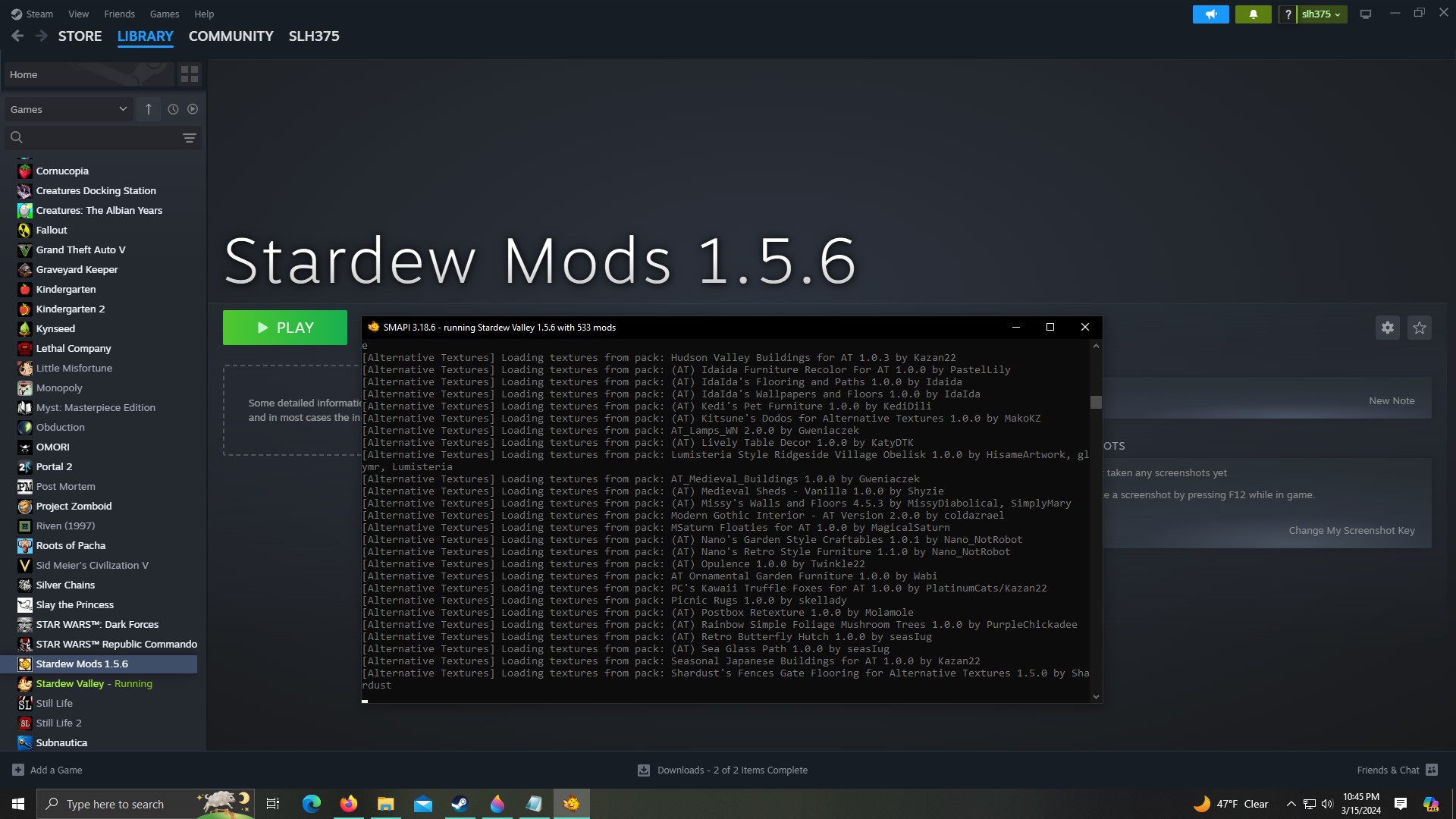
Hello! I am hoping someone can help me with a question involving duplicating my game file so my game doesn't break with the 1.6 update. I followed the instructions to add Stardew 1.5.6 to steam as a non-steam game, but when I press "Play" on the new version it still ends up running the old version of the game. Is this working correctly? SMAPI says it's running the 1.5.6 version, but Steam clearly shows "Stardew Valley" running and not "Stardew Mods 1.5.6" on the left hand side of the screen. I have included a picture for clarity. https://ibb.co/yyVkhmb
 compact verge
Hi, where do you put your Stardew 1.5.6 folder?
scarlet quail
Steam will always show stardew valley running, since it'll recognize the game's exe running
that said, even when 1.6 comes out, it won't recognize which version you're running
in other words: That's normal
(Example: I'm on modding alpha (1.6) right now, but I can boot my 1.5.6 fine and it says I'm running SDV)
cunning jackal
I had it in the steam common folder and then I tried moving it to a folder on the desktop, but it didn't seem to change the way steam was running it
scarlet quail
again, that's normal
As long as the filepath at the start of the SMAPI log is your new folder, you're good
cunning jackal
ok thank you! I wasn't sure if it was normal or not lol
the filepath at the start of SMAPI was for the new folder
compact verge
cunning jackal
the filepath at the start of SMAPI was for the new folder
Yar, all's fine, then.
cunning jackal
Awesome!! Thank you guys so much!! 😊
Oh!! One more quick question. Both version of the game still share saves correct?
scarlet quail
Yep
1.5.6, if you have a 1.6 save with data it can't read, will show some red in the log when you get to your saves screen.
 ebon plinth
heyyy i was wondering if my saves would corrupt if i delete my mods?
mainly bc of the 1.6 update and stuff dnnjdsnjds
like would it be a good idea to duplicate the game files so i can make sure that i can play my older saves even if all the mods i currently have won't be updated?
 inland shoal
https://smapi.io/log/f586b16f025347aca9922eab720c3336
keep on getting this strange error on smapi
native dragonBOT
Log Info: SMAPI 3.18.6 with SDV 1.5.6 (build 1.3.37.0) on macOS Unix 13.0.0, with 97 C# mods and 317 content packs.
Suggested fixes: One or more mods are out of date, consider updating them
stark horizon
ebon plinth
heyyy i was wondering if my saves would corrupt if i delete my mods?
Your saves will almost without a doubt be affected if you delete all your mods and try to play them in 1.6. Some mods, once removed, will corrupt the save files due to what they edit and how they edit.
You do have options, though, to preserve the save file integrity until mods are updated and/or you determine you can safely remove mods that aren't updated.
!backup
native dragonBOT
You have options if you are worried that the update to 1.6 will break your modded save.
-
Copy and move your game folder to a new location on your computer and launch SDV directly from that new location. For easier access, pin the new location to your favorites or create a shortcut to the .exe file on your desktop!
-
Rename the game folder to "Stardew Valley 1.5.6" and launch SDV directly from that new location. NOTE: You will not be able to play through Steam anymore unless you also set up the game + SMAPI as a non-Steam game method, so keep that in mind if you care about total playtime hours or achievements.
-
Add 1.5.6 to Steam as a non-Steam Game Method (instructions here: https://stardewvalleywiki.com/Modding:Player_Guide/Getting_Started#Can_I_have_different_mod_groups.3F)
(See instructions for finding game folder here: https://stardewvalleywiki.com/Modding:Player_Guide/Getting_Started#Find_your_game_folder)
stark horizon
inland shoal
https://smapi.io/log/f586b16f025347aca9922eab720c3336
keep on getting this stran...
Heya cheese! This is an error caused by Market Town. I would advise reporting it to the mod author.
ebon plinth
stark horizon
Your saves will almost without a doubt be affected if you delete all your mods a...
okay, thanks!
if i set up the game as a non-steam game will the achievements show up to the normal sdv steam page or the 1.5 version
i'm so sorry if that doesn't make sense i'm not sure how to put my question to words ddsnjds
i'm just wondering bc i'm going for perfection in my save
tho the in-game achievements probably work anyway
stark horizon
The in-game achievements will work, but because you will either be disconnecting it from Steam or setting it up as a non-Steam game, you won't get the corresponding Steam achievements until you resync the save file.
ebon plinth
ohhhhh okay okay
how about the save resync how does that work? can i just replace the save file in the actual sdv files orrrr do they work differently? i'm just asking all my questions now jdjndsd
stark horizon
That's understandable! When the time comes, all you would have to do is move your save files into the new location created when SDV 1.6 updates.
stark horizon
You're welcome!
inland shoal
stark horizon
Heya cheese! This is an error caused by Market Town. I would advise reporting it...
Hi Logo! Thanks for the response. Would you reccommend me removing Market Town then?
stark horizon
inland shoal
Hi Logo! Thanks for the response. Would you reccommend me removing Market Town t...
It will continue to spam SMAPI until it's corrected, though it doesn't look like it's a game-breaking error. I would disable it for now, though.
inland shoal
alright! thank u <3
 sonic frigate
do mods work in multiplayer? if so how do they work? do all players need the mod or just the leader? etc
stark horizon
sonic frigate
do mods work in multiplayer? if so how do they work? do all players need the mod...
!mpmods
native dragonBOT
You can mod your multiplayer games, but to avoid any hiccups, all players' mod lists need to match. If players have too many mismatched mods, you will experience bugs in your game - even if the mods were working fine earlier, there is no guarantee that they will stay that way, and strange things may start occurring. There are a few exceptions to this - cosmetic mods usually work fine with no glitches, and some C# mods work as well. Mods often include information on whether or not they work in multiplayer in their descriptions. However, in general, your mod lists should match exactly.
See https://stardewvalleywiki.com/Modding:Player_Guide/Getting_Started#Do_mods_work_in_multiplayer.3F for more details on how mods work in multiplayer!
sonic frigate
ty
stark horizon
You're welcome!
 tacit hull
I can't get any mods to work
After extensive googling I managed to figure out that I somehow downloaded smapi wrong because the little black box at the bottom that's supposed to appear does not, but not how to fix the problem
neat plaza
!gs
native dragonBOT
If you would like a guide to setting up mods for Stardew Valley, check out the getting started guide! https://stardewvalleywiki.com/Modding:Player_Guide
tacit hull
Okay, it says to follow the instructions inside the install file but the file is this:
#!/usr/bin/env bash
cd "dirname "$0""
xattr -r -d com.apple.quarantine internal
internal/macOS/SMAPI.Installer
Which is not very instructive
stark horizon
You're on a mac, yeah?
tacit hull
Yeah
stark horizon
You have the installer downloaded and in your download folder, correct?
tacit hull
I put it in my mods folder but I've now opened it in downloads too
I've been going at this a long time so I just defaulted 😓
stark horizon
Right click on the "install on macOS.command" file and then select "Open"
tacit hull
Yep
stark horizon
(from the one in the downloads folder)
tacit hull
Ahhhm it's running now
 stark horizon
You'll have to do these steps every time you need to update SMAPI - Apple will block it every time
tacit hull
What does "file path to the game directory" mean
neat plaza
!findmodsfolder
native dragonBOT
Your Mods folder should be in your game folder after you install SMAPI. See here for more information on finding it: https://stardewvalleywiki.com/Modding:Player_Guide/Getting_Started#Find_your_game_folder
If you use Steam, you can also right click on the game name > Manage > Browse Local Files.
stark horizon
tacit hull
What does "file path to the game directory" mean
File path is basically - what folders do you have to open to get to the executable file?
On a mac it should be Users/yourusername/Library/Application Support/Steamapps/steam/common/Stardew Valley/Contents/MacOS
stark horizon
 primal parcel
What this means is that for some of your crop items, Producer Framework doesn't have rules for them. It's not a game-breaking issue
primal parcel
stark horizon
What this means is that for some of your crop items, Producer Framework doesn't ...
How would I fix that? Since I'm on multiplayer
Please!
stark horizon
primal parcel
How would I fix that? Since I'm on multiplayer
First, you want to make sure that every single person in your co-op has the exact same mods.
But also! It doesn't necessarily need to be fixed! Producer Framework Mod is just saying that for these crops, no products exist, and that could be intentional.
primal parcel
stark horizon
First, you want to make sure that every single person in your co-op has the exac...
Would it be possible that some mods took over the outputs, leading to different items but for a different mod?
stark horizon
That would show a different message - you would likely get "such and such already exists, ignoring rule for this other mod"
tacit hull
stark horizon
File path is basically - what folders do you have to open to get to the executab...
I pasted /Users/[myname]/Library/Application Support/Steam/steamapps/common/Stardew Valley/Contents/MacOS and it told me that directory doesn't seem to contain a valid game install
stark horizon
tacit hull
I pasted /Users/[myname]/Library/Application Support/Steam/steamapps/common/Star...
Can you send a SS of your game folder?
primal parcel
Hmm that's interesting because the other player has unchanged items, somehow I am ending up with different items for different mods
stark horizon
primal parcel
Hmm that's interesting because the other player has unchanged items, somehow I a...
Then you likely have a mod mismatch. I advise that both of you run a log at https://smapi.io/log and compare mod lists.
primal parcel
Will do, thank you!
tacit hull
stark horizon
Can you send a SS of your game folder?
What is ss?
stark horizon
Sorry! Screenshot
Basically, Skyward, we need to figure out where your game folder actually is and direct SMAPI to it
tacit hull
I took as wide a shot as I could of my folder
stark horizon
So far so good. Can you open the MacOS folder and show me what's in there?
OH WAIT
tacit hull
?
stark horizon
Your Mods folder should be inside the MacOS folder
tacit hull
AAAAAHHHHH
It didn't automatically generate and one of the videos I watched told me it'd be fine if I made it myself, which is what I did
stark horizon
And that may have made SMAPI confused
primal parcel
stark horizon
Then you likely have a mod mismatch. I advise that both of you run a log at http...
Confirmed we have the same mods, is it possible for a different mod folder to take over even if deleted? Mine stuff got messed up after I downloaded PPJA Mega Pack.
tacit hull
So do I still direct it to macos or the mods folder inside?
stark horizon
tacit hull
So do I still direct it to macos or the mods folder inside?
to MacOS - because inside that folder is where the Stardew Valley Unix executable file lives
tacit hull
okay
stark horizon
primal parcel
Confirmed we have the same mods, is it possible for a different mod folder to ta...
That is possible, yeah, and could possibly indicate that not everything was deleted as it should have been.
tacit hull
Nope, still says the same thing
tacit hull
Sorry yeah, you're helping two people
naive drum
Isnt the PPJA mega pack most recent version a broken DGA one?
primal parcel
Idk but my stuff is all messed up now
stark horizon
tacit hull
Sorry yeah, you're helping two people
Can you send a screenshot of what the inside of the MacOS folder looks like, please?
primal parcel
stark horizon
That is possible, yeah, and could possibly indicate that not everything was dele...
Redownloaded every mod and reinstalled Stardew as well, but somehow the items switched to different items
stark horizon
primal parcel
Redownloaded every mod and reinstalled Stardew as well, but somehow the items sw...
That's because the data exists in your save file. You could try reverting to a previous save.
primal parcel
Hmm okay let me try that
stark horizon
Are you the host?
primal parcel
No unfortunately
stark horizon
I honestly don't know too much about how to troubleshoot issues like these in multiplayer.
tacit hull
Do you mind if I dm you the screenshot? I'm not big on tech so I tend to be paranoid over not knowing what could be identifying especially in a big server full of computer people I don't know.
stark horizon
That's fine
stark horizon
tacit hull
Do you mind if I dm you the screenshot? I'm not big on tech so I tend to be para...
We're going to try a different way. Can you open a new Terminal window?
tacit hull
Meaning?
stark horizon
Meaning, Terminal is an app on your Mac, and we need to open it 😄
tacit hull
Sorry I big dumdum
sonic frigate
to everyone: what's your #1 tip on modding or suggestion you'd give a new modder, or maybe something you wish you knew when you started
stark horizon
sonic frigate
to everyone: what's your #1 tip on modding or suggestion you'd give a new modder...
Read the mod descriptions!
But this question would be best asked in #modded-stardew - this channel is more for problem solving mod issues. 🙂
sonic frigate
ok will do ty
tacit hull
Okay new terminal opened
stark horizon
Now, input sudo /Users/yourusername/Downloads/SMAPI\ 3.18.6\ installer/install\ on\ macOS.command (and put your actual user name instead of yourusername
tacit hull
Uh
I opened terminal from that file we were working on, do I need to open it seperately for this?
stark horizon
We need a new window, yeah.
You should be able to open one from the "Shell' menu
in the menu bar
stark horizon
Yep
gaunt gust
hang on, why are we using sudo for smapi?
stark horizon
We're trying to trick their OS
tacit hull
I will say this may be part of the problem
gaunt gust
tacit hull
Okay, it says to follow the instructions inside the install file but the file is...
what were you trying to do here?
stark horizon
Install SMAPI on MacOS
tacit hull
I downloaded mods a while ago and was able to play them just fine. However I haven't played with them for a while so I just decided to wipe the mods I had and download new ones. I wiped the mods folder clean but didn't do anything to the macos one.
gaunt gust
okay
tacit hull
Idk if this could be a problem
stark horizon
Atra - if you're comfortable taking over, it's very late for me. I just don't want to leave you in the lurch
gaunt gust
I mean, I have to go to work sooner rather than later
so this probably should not take more than the time it takes for me to finish this coffee
tacit hull
But the black box that smapi makes show up is not showing up and none of the mods are working
gaunt gust
okay
stark horizon
Okay, then I'm going to hop off and head to bed. Skyward, if you aren't able to sort this out, send me a msg, and I'll respond after I've had some sleep. 🙂
gaunt gust
can you tell me what ls "/Users/[yourusername]/Library/Application Support/Steam/steamapps/common/Stardew Valley/Contents/MacOs/stardew*" shows you
stark horizon
(thanks atra, for the assist, and I hope you have a good day at work!)
gaunt gust
Hopefully! I hate writing reports XD
tacit hull
Ima send you the inside of my macos folder in dms just like I did for logo
gaunt gust
okay, and what happened when you tried to install SMAPI?
gaunt gust
tacit hull
Okay, it says to follow the instructions inside the install file but the file is...
I'm trying to figure out what this is about
since these aren't instructions, this is a script
tacit hull
I figured it out
That's not the problem anymore
The problem is I give it the file path and it tells me that directory doesn't seem to contain a valid game install
gaunt gust
okay
see the MacOS file?
drop the installer (including the folder it came in) into that folder
do NOT allow it to overwrite anything, if that prompt comes up it's wrong
tacit hull
?
gaunt gust
Okay
- I don't see SMAPI installed
tacit hull
I had it installed but I removed it cause I thought I was supposed to!
gaunt gust
- SMAPI's installer has an alternative method to detect the game folder - if the installer is IN the folder itself, it'll just go there
This is a tad bit more foolproof
tacit hull
I'm not sure if that's what you meant but I put the unzipped smapi folder into macos and it changed nothing
naive drum
You have to run the Install on MacOS that's in the installer folder
gaunt gust
can you check if the steam properties -> Betas -> Beta Partipation is what?
 tacit hull
It is that
tacit hull
Oh
gaunt gust
this is correct
 tacit hull
Sorry, one of my earlier attempts told me to change it to that
gaunt gust
they were wrong
tacit hull
WAIT
IT WORKED
HOLY COW LET'S SEE IF THIS WORKS IN GAME
OH MY GOD IT WORKED
@gaunt gust, @stark horizon, GOD BLESS THE BOTH OF YOU YOU BRILLIANT PEOPLE I HOPE YOU HAVE THE GREATEST DAY AY WORK AND THE GREATEST NIGHT'S SLEEP
Now instead of playing my game I'm gonna go eat the debilitating level of sugar I have in the fridge cause I have been working on this for so so many hours and mommy needs her carbs
🫡
ebon plinth
hiii how do i know i did the game files copying thing right?
should i also copy the game files from appdata location or not?
naive drum
You dont need to copy the appdata ones
ebon plinth
ebon plinth
hiii how do i know i did the game files copying thing right?
i probably did i just want to make sure nothing gets fucked up ssjnjs
ebon plinth
naive drum
You dont need to copy the appdata ones
okay, thanks!
i'm also kinda confused with my game folders sdnndsn
like
should they look like this

what is all that stuff😭 💀
probably nothing to worry about but i want to make sure since i have no idea what (unmodded) sdv game files look like
torn bear
anyone can help me install the recolor addon?
 dire fractal
could you send a link to it?
 remote hazel
is there anyone having trouble with downloading sdv expanded from nexus?
smh i cant even download it
prisma bay
stark horizon
No worries. Ping me later, when you're ready!
I fell asleep during the movie 💀
But I’m ready now if you’re awake
If not that’s fine
 tawdry kindle
probably a dumb question, but how will 1.6 effect mods? will we have to wait for updates on every single one? or will they still work?
modern python
depends heavily on the mod
some will still work fine without updating (mainly content packs) many will not
 lament vortex
you wont have to wait for updates for every single one, updates will be mostly for frameworks and c# mods
lament vortex
frameworks are mods that make other mods work. like content patcher for example
lament vortex
yep. some content packs (think mods that use content patcher, for example) will probably be updated to work with whatever new things 1.6 brings but most will be fine even if its not updated
scarlet quail
!modupdates
native dragonBOT
Once 1.6 releases, most mods will be updated as soon as the mod authors are available and capable of making updates. We do not know of a specific timeline for any update to any mod, expansion or otherwise, but rest assured mod authors have been given access to a build of 1.6 without content changes with which to make updates to help mod updates be ready for release day. If a mod you use is not ready for release day, please do not harass the mod author to update - mod authors are people who may have other time commitments and cannot immediately update their mods.
If you have questions as to whether a particular mod will be ready for release day, it is best to ask the mod author themselves. Please keep in mind a lack of response does not necessarily mean the mod is being abandoned - the mod author may not have time to respond or is hard at work behind the scenes. Most major mods will likely have an update prepared for 1.6 on or near release.
tawdry kindle
scarlet quail
!modupdates
tyty
tawdry kindle
lament vortex
yep. some content packs (think mods that use content patcher, for example) will ...
gotcha! Thanks
 dull zenith
where do i get the working UI info suite?
scarlet quail
!uiinfosuite
native dragonBOT
If you go to https://github.com/Annosz/UIInfoSuite2/releases, you can find UI Info Suite 2, which works with Stardew 1.5.5+. Download the first zip, not the source code.
dull zenith
thank you!
molten flax
hey i jw if anyone can help me, im updating all my mods manually, and theres one i deleted and downloaded the newst version (5.0.0) re launched my game and it keeps saying i still need to update it 

 oak forum
molten flax
hey i jw if anyone can help me, im updating all my mods manually, and theres one...
oak forum
molten flax
hey i jw if anyone can help me, im updating all my mods manually, and theres one...
Check the manifest. IT could have the wrong version written in it
molten flax

it doesnt i must be doing something wrong but idk what
oh the MFM one says 4.0

theres two folders, CP and MFM, the mfm one still says 4.0.0
molten flax
oak forum
Check the manifest. IT could have the wrong version written in it
im not sure what mfm means, but should i change it?
 oak forum
molten flax
oak forum
molten flax
Is that the manifest.json in that folder?
 dusty spruce
MFM = Mail Framework Mod
molten flax
oak forum
Is that the manifest.json in that folder?
yes
oak forum
molten flax
yes
So if your 100% you did the newest then thats the issue
You can either
A. Ignore it
Or
B. Update the manifest.json to match the version its looking for
molten flax
oak forum
So if your 100% you did the newest then thats the issue
ok. thank you so much. im stil tryna learn about this so i appreciate the help
oak forum
molten flax
ok. thank you so much. im stil tryna learn about this so i appreciate the help
Yea no problem! It's just a portion that gets missed sometimes ^_^
I had two or three I had to do this for
torn bear
Anyone can help me install the recolor addon
I tried since yesterday and couldn’t
Manage
lament vortex
which one
 lament vortex
show me how you have it installed
if you have the files in their own folder, move them out of the folder so they're together with the game's files
torn bear
wdym?
torn bear
lament vortex
if you have the files in their own folder, move them out of the folder so they'r...
mind maybe going to dms?
 lean star
did you unpack the .zip?
lament vortex
no, i dont do troubleshooting in dms
torn bear
so what do i do?
torn bear
lean star
did you unpack the .zip?
yes
lean star
is the "launcher" in the same folder as the stardew valley.EXE?
 lament vortex
when you uzipped the reshade files, did you move the whole folder? and if so, where did you move it to?
the reshade as in the natural color reshade
lean star
I can see you've done it wrong, there should be a folder called reshade-shaders in that list
(me and typos...)
lean star
ok, so we can start from there
you're in the right folder, good, now unpack the .zip into that folder
you should then have another folder called reshade-shaders and a file called Natural Color - Launcher.bat
 median eagle
can someone tell me how to put flooring in this small section? It's been throwing me off
 neat plaza
does putting flooring there not work?
median eagle
nope
lament vortex
you cant i dont think. use dynamic flooring (aedenthorn mod)
torn bear
lean star
you should then have another folder called `reshade-shaders` and a file called `...
which one do i put in
lean star
torn bear
which one do i put in
everything
torn bear
the whole thing?
lean star
yes
 lean star
why did you put it in a folder?
lean star
no, you unpacked it into a new folder, you're supposed to put the batch and the shader folder into the sdv root
like so
 lean star
same
torn bear
I remjove it and put it here>?
lean star
not sure where you want to remove it from but yes, put it there
torn bear
from the shady recolor folder
lean star
lean star
is the "launcher" in the same folder as the stardew valley.EXE?
anything you have to do to answer this question with "yes"
lean star
the steam launch option is for SMAPI, this is a reshade, not an SMAPI mod
torn bear
ik but ifd there is no this it wont work
lean star
"C:\Program Files (x86)\Steam\steamapps\common\Stardew Valley\StardewModdingAPI.exe" %command%
median eagle
i installed dynamic flooring but still cant change this section:
 lean star
"C:\Program Files (x86)\Steam\steamapps\common\Stardew Valley\StardewModdingAPI....
lean star
lean star
"C:\Program Files (x86)\Steam\steamapps\common\Stardew Valley\StardewModdingAPI....
or whatever your path is
median eagle
wait nvm
torn bear
lean star
or whatever your path is
It didn’t work
the smapj launched but the colors didn’t
maybe I gotta do the installer now?
after I put the path
lean star
did you run the launcher and install the reshade?
torn bear
torn bear
This
This
lean star
but do you still get that?
torn bear
I didn’t check now
As I had to go out from home
When I go back I’ll see
but now that I put the path will it say it or no?
lean star
do that
you should not require the path command, you don't start the launcher.bat through steam
torn bear
I know but idk why it kept saying that
When I launched the installer
But the installer should be in the SDV root right? Same with the reshade shaders folder
lean star
yes
median eagle
now i have this strip of unevenness but none of the flooring in the catalogue matches it
 lean star
strip of unevenness?
lean star
I assume you "placed" the flooring in the room?
if you did, you forgot the last row of flooring (there's another row on the "back" layer of the walls, which is the wooden boards you see here)
 broken ivy
I just need some help I'm trying to use star drop but for some reason I already have the installer whatever it's called downloaded but I cannot find it in my files I don't know where I'm supposed to look
median eagle
lean star
if you did, you forgot the last row of flooring (there's another row on the "bac...
thats the ones i cant get to match
lean star
median eagle
thats the ones i cant get to match
that much I get but how did you apply the flooring to the room? vanilla or by placing it using dynamic flooring?