#archived-modded-support
1 messages · Page 322 of 1
 scarlet quail
 native dragonBOT
Android SMAPI does not currently work for versions of SDV past 1.5.6.39. We do not know if or when it will be made compatible. It is not possible to downgrade to .39 through legal means so do not ask how to do this.
Mod support for 1.5 on Android is still experimental, so many mods are broken or buggy. That's often something SMAPI needs to fix, and we may not be able to provide a solution.
scarlet quail
!androidcompat
native dragonBOT
An incomplete list of android compatible mods can be found at https://android.stardew.rocks. If you find a mod that isn't on there, submit it by following the instructions here.

A list of mods that are compatible with Android SMAPI.
 quartz swift
If you have successfully installed SMAPI in your game, now have the "SMAPI Stardew Valley" chicken icon, and can't find the 'zane' folder as specified in the instructions, you are being blocked from seeing it by Android 13 or later. You may need to download ADB onto your PC, connect to the phone with the adb shell command, and copy the mod files from the directory you dropped them in into the zane directory (adb shell can see the directory.)
 languid trout
That we know of. Locked doors remain on a save file when editing an existing map, btw. Even if you deleted the mod that added the door.
 robust patrol
!logtoobig
native dragonBOT
If the log is too big, see here for how to fix that https://stardewmodding.wiki.gg/wiki/Debugging#If_the_log_is_too_big_/_parser_site_won't_load_it. (Or just head and tail the file: https://www.baeldung.com/linux/head-tail-commands)
robust patrol
Ah. There
robust patrol
languid trout
That we know of. Locked doors remain on a save file when editing an existing map...
It isn't locked afaik
Where would the Patch Summary be?
DEBUG?
TRACE?
Got it
So if I disabled the mod, the door would still be there for my current save?
languid trout
If the door isn't locked, it wouldn't still be there from my understanding of map tile properties. Locked doors have intrinsic qualities to them that basically worm their way into a save. I know people have had locked doors stay after removing mods with kids in them, like adding a locked door in the saloon that leads to the void.
 knotty forge
Hi, I’ve got a problem with katriel and I want to restart the mod, I’ve downloaded the mod again but my progres is still the same 
This appeared
 languid trout
What exactly is the issu-oh. Did you contact the author? Mod progress is usually tied to the save file, not the mod itself btw
!log
native dragonBOT
Can you upload your SMAPI log to https://smapi.io/log (see instructions on that page) and share the link here? Even if your game doesn't show any errors, logs are useful, and often necessary, for troubleshooting.
knotty forge
Thx
knotty forge
Thx, tbh I think the problem is that I triggered her second heart event without even starting the 0 heart event, I want to undo all my progress with katrielle or try to open my smapi saves file from yesterday but idk how
 rough frost
hiii! ok so i modded my game to like a re color but it was also supposed to be a stardew expanded one too and it never showed up so i need help!
scarlet quail
!log
native dragonBOT
Can you upload your SMAPI log to https://smapi.io/log (see instructions on that page) and share the link here? Even if your game doesn't show any errors, logs are useful, and often necessary, for troubleshooting.
rough frost
what’s that
scarlet quail
(Read what the Governor requested. It's the main thing for troubleshooting mod issues, especially like yours)
rough frost
ok thanks i’ll look at it
hi! im having trouble finding the smapi file, i have installed smapi like, its on my computer but idk where to find it
languid trout
What operating system? You don't have to find Smapi, you just have to follow the instructions and copy paste the text. It'll lead you to where you need to go.
rough frost
I have a windows
 neat plaza
 languid trout
Thanks Pillow. Downloading that video for future needs
robust patrol
languid trout
If the door isn't locked, it wouldn't still be there from my understanding of ma...
OK thanks. I might see which mod it is later then
rough frost
sorry where would i find that smapi folder im a bit lost
languid trout
You don't need to find it.
robust patrol
languid trout
Thanks Pillow. Downloading that video for future needs
What video?
languid trout
You click windows and r on your keyboard, and a window pops up
 pliant nymph
!log
native dragonBOT
Can you upload your SMAPI log to https://smapi.io/log (see instructions on that page) and share the link here? Even if your game doesn't show any errors, logs are useful, and often necessary, for troubleshooting.
languid trout

When you click windows and r, that window in the corner pops up, then you copy paste the exact text stated in the instructions for step 2 into that window.
rough frost
what do i type into the run thingy
neat plaza
it's right there
twice
once in the actual box and it's there for the almost the entire gif
languid trout
 neat plaza
robust patrol
Oh lol. Useless on Steamdeck
neat plaza
robust patrol
Oh lol. Useless on Steamdeck
is that not just linux
so you'd use the linux instructions
rough frost
oh ok i pressed save parse log and a lot of text came up, whats the next step?
scarlet quail
give the link to the log
robust patrol
neat plaza
is that not just linux
Yeah. Arch Linux to be precise
native dragonBOT
Log Info: SMAPI 3.18.2 with SDV 1.5.6 (build 22018) on Microsoft Windows 10 Home, with 13 C# mods and 4 content packs.
Suggested fixes: One or more mods are out of date, consider updating them
neat plaza
robust patrol
Yeah. Arch Linux to be precise
so you'd use the linux instructions
scarlet quail
rough frost
https://smapi.io/log/488d189019e6469c97cd8beee78e8ea0
00:30:33 ERROR SMAPI - Stardew Valley Expanded 1.14.18 because it requires mods which aren't installed (JSON Assets: https://www.nexusmods.com/stardewvalley/mods/1720).
you're missing json assets
without it Expanded won't work
I would also advise getting the Antisocial Mod for SVE
rough frost
ok so how do i install that into my mod folder?
scarlet quail
Because otherwise it's using the version in SVE itself and that's... old
same way as every other mod you've installed in your mod folder
languid trout
Not into SVE. Into the mod folder itself.
rough frost
okay i might need like a refresher bc i installed those a year ago lol
robust patrol
neat plaza
> so you'd use the linux instructions
I meant the r/run command
 devout pumiceBOT
 robust patrol
Not SMAPI itself
scarlet quail
(don't do r/ stuff here!)
robust patrol
Oops
scarlet quail
!gettingstarted
native dragonBOT
If you would like a guide to setting up mods for Stardew Valley, check out the getting started guide! https://stardewvalleywiki.com/Modding:Player_Guide
languid trout
robust patrol
I didn't even know that was a thing
(The bot links to reddit and subreddits whenever you type the letter r in front of a forward slash. And forward slash commands in general are meant for https://discord.com/channels/137344473976799233/257895149517013002)
Discord
Discord is the easiest way to communicate over voice, video, and text. Chat, hang out, and stay close with your friends and communities.
pliant nymph
lol my life
 languid trout
!logtoobig
native dragonBOT
If the log is too big, see here for how to fix that https://stardewmodding.wiki.gg/wiki/Debugging#If_the_log_is_too_big_/_parser_site_won't_load_it. (Or just head and tail the file: https://www.baeldung.com/linux/head-tail-commands)
rough frost
i need help on how to download the mod from nexus sorry
pliant nymph
rough frost
i need help on how to download the mod from nexus sorry
there should be a download button on the upper right
languid trout
You just click manual download, right click the downloaded zip and hit extract all to the Mods folder
rough frost
uhm itsnnot in my mods folder right now, do i just hit extract to it now or do i put it in the folder and then hit extract?
languid trout
You can do either or, I prefer just extracting it while it's in downloads
pliant nymph
rough frost
uhm itsnnot in my mods folder right now, do i just hit extract to it now or do i...
you have to extract it then manually move it over
rough frost
ok ty
wait extracting is like unzipping right so if i click it instead and drag it over will it work teh same
like open it and then drag
languid trout
I mean it's better to just extract all to your destination
That's a lot of unnecessary work since you can set Mods folder to be your destination and have it be the default extraction point for your mods from downloads.
And you do need to extract it either way
Smapi cannot read compressed/zipped folders
rough frost
this is right?

i. need to get the antisocial thing but i suspect it’s the same process
languid trout
That's the right process but what the heck is the tmp file?
That shouldn't be in there
rough frost
someone said previously that it just lives there and so yeah
idk if i should delete it or have it stay
neat plaza
you can delete it
 modern python
yes
 languid trout
So, for future reference-mods will tell you what you need on the Mod Page. And if it doesn't list anything in Mod requirements, don't download it.
scarlet quail
(I might state that last part is superfluous - some modders forget to add dependencies, rather than them being XNB mods or similar)
pliant nymph
native dragonBOT
Log Info: SMAPI 3.18.6 with SDV 1.5.6 (build 22018) on Microsoft Windows 10 Pro, with 66 C# mods and 42 content packs.
Suggested fixes: One or more mods are out of date, consider updating them
rough frost
tysm it worked omg
pliant nymph
pliant nymph
https://smapi.io/log/be07e0968d0944c491b244aed0c285db
i removed riverside valley and durins rest, and when i went to sleep in game it got stuck
pliant nymph
yes XD
scarlet quail
#2: Can you get a log from when it gets stuck?
Oh, well, #1 is probably the problem
pliant nymph
trying to recreate it now
scarlet quail
you need to divorce them before removing
pliant nymph
how do you divorse?
scarlet quail
Mayor's House has a book (at least in vanilla)
it'll allow you to divorce
But yeah, never, ever, ever, ever, ever remove a mod if you're married to someone in it
languid trout
Mayor's house still has it in all expansions.
pliant nymph
native dragonBOT
Log Info: SMAPI 3.18.6 with SDV 1.5.6 (build 22018) on Microsoft Windows 10 Pro, with 66 C# mods and 42 content packs.
Suggested fixes: One or more mods are out of date, consider updating them
scarlet quail
Yep
congratz, you would have been pregnant that night
Object reference not set to an instance of an object. at StardewValley.Utility.pickPersonalFarmEvent
Essentially, though, it would have been going over the code, seeing if you could get pregnant... and then run into "WHO THE FUCK IS THIS "DAIA" PERSON" or whoever you married
pliant nymph
i didnt pick the one i removed to get preg with. but anyways
scarlet quail
That's why I clarified after
pliant nymph
so reinstal, and get divorsed? anything else to remove
scarlet quail
it's still trying to find person B in the code, regardless of whether you choose them
Correct. Reinstall, divorce anyone you're trying to remove, then remove.
languid trout
Also, this is completely optional and just based on seeing how the framework plays with others-I'd get rid on Entoarox along with Agent Lyoko's fix. It has nothing to do with your issue, but it likes to cause issues and is just outdated and archaic.
quartz swift
pliant nymph
i removed riverside valley and durins rest, and when i went to sleep in game it ...
Just curious - what is Riverside Valley? Can't find it on Nexus
pliant nymph
quartz swift
Just curious - what is Riverside Valley? Can't find it on Nexus
might be riverview
modern python
ridgeside village
pliant nymph
languid trout
Also, this is completely optional and just based on seeing how the framework pla...
what is agent lyoko file called?
languid trout
....What? I was talking about the person troubleshooting for you
I said the Entoarox framework
scarlet quail
Nah, I'm clearly a file now
pliant nymph
funny
quartz swift
scarlet quail
Nah, I'm clearly a file now
can i install you on android if I have 1.5.39
languid trout
Gone too deep in the code
scarlet quail
(But yeah, what Chirps meant is remove Entoraox along with the divorce then remove, thing
Nope, I'm notoriously not compatible with Android code >:)
(But my actual mods are, assuming their framework works on Android!... so not my NPCA mods, but the other ones XD )
quartz swift
Great, now I have to add the breakfast one, that looks ace
pliant nymph
its fixed now, thanks
 empty pecan
hey so i'm new to modding and was wondering how to install the stardew valley expanded onto my computer. i don't know if this is the right place for me to ask for help but any help is appreciated.
 robust bison
!gettingstarted
native dragonBOT
If you would like a guide to setting up mods for Stardew Valley, check out the getting started guide! https://stardewvalleywiki.com/Modding:Player_Guide
empty pecan
thank you!
modern python
!sve
native dragonBOT
Stardew Valley Expanded (https://www.nexusmods.com/stardewvalley/mods/3753) is a mod which adds a lot of new content and areas to the game. It has many dependencies, so be sure to follow the install guide which is on the github wiki along with FAQs and troubleshooting steps for common issues: https://github.com/FlashShifter/StardewValleyExpanded/wiki
It's recommended to play Stardew Valley Expanded on a fresh save file to avoid potential issues.
 vocal rain
Can anyone tell me what is crashing my game here? https://smapi.io/log/b387a2bc3b9345d687c2f28d4a7a5bc9
native dragonBOT
Log Info: SMAPI 3.18.6 with SDV 1.5.6 (build 22018) on Microsoft Windows 11 Home, with 144 C# mods and 279 content packs.
Suggested fixes: One or more mods are out of date, consider updating them
robust patrol
Is it safe to add in NPCs mid game?
 worthy moth
Adding is usually fine, the only downside is if you miss out on anything which is coded to earlier in the game
robust patrol
Like what? Heart Events?
worthy moth
It depends, think about NPCs as having their own story. Some events you want to unfold at the beginning, year one. You can possibly miss out on that part of the story if you add them later on.
That's assuming the NPC has anything like that.
robust patrol
Ah. I'm still in Spring Y1 anyway
 compact verge
Yeah, it depends on how the NPC is coded.
Some NPC stories assume that you're adding them mid-game anyway. Like Lucikiel's.
robust patrol
Ah OK cool
languid trout
(And, using my own unreleased mod as an example, Bat Outta East Scarp circumvents the issue by requiring you to reach at least level 30-50 in the mines, and requires you to wait a day for the mail, so you'll never encounter him on Spring 1, year 1, which is partially because of hard-coded dialogue 😉)
robust patrol
languid trout
(And, using my own unreleased mod as an example, Bat Outta East Scarp circumvent...
Huh. Cool
quartz swift
Hey folks. I think I have a great collection of mods here finally, but one threw an error - can you tell which mod this error is coming off of?
https://smapi.io/log/d0dedd21c63042cc85f6da8970cb6f39?Levels=error~critical
native dragonBOT
Log Info: SMAPI 3.18.3 with SDV 1.5.6 (build 0.0.0.0) on Android Unix 6.1.25.14, with 26 C# mods and 59 content packs.
languid trout
You're probably not going to like the answer
It looks like the custom companions framework is tossing a tantrum
quartz swift
That's interesting. I'll keep an eye out. I can see what uses that.
 elfin panther
what does that mean

like.. how can i fix it
i got like tons of other errors but this is the most common
modern python
do you use vortex or another mod manager?
elfin panther
vortex?
elfin panther
modern python
do you use vortex or another mod manager?
it depends, what other mod managers are there
i don't use vortex, no
modern python
stuff like Mod Organizer 2
modern python
id recommend trying to not use that, mod managers often break stardew mods
including stuff like this
elfin panther
elfin panther
i got a "mod organizer"
mb, i actually don't
but what does the manifest.json mean
modern python
manifests are basically mod ID cards, they tell SMAPI that theyre a mod and how they should be loaded into the game
so you could either accidentally be deleting the manifests, or youre installing mods that are replacers rather than proper mods (ie, you replace assets within another mod rather than installing them traditionally)
it would help to know specifically which mods are giving you this problem
elfin panther
huh
 modest grail
I've seen that before in exactly one other mod, when they had an extra folder inside their own mod (at the same level as the manifest and content JSONs) for Custom Music that was supposed to be separated out and had to be installed separately.
elfin panther
im kinda new on this
modern python
what part doesnt make sense to you ?
modest grail
Any chance you could name the mod(s) you're using?
modern python
modern python
it would help to know specifically which mods are giving you this problem
start with this and then we'll go from there
 orchid cairn
first time modder here! disclaimer - i watched a few video tutorials and read about how to install the mods, so i'm not sure where i went wrong. the game was running fine at first, but now won't open and i am seeing red text on the black screen that pops up.
orchid cairn
orchid cairn
first time modder here! disclaimer - i watched a few video tutorials and read ab...
i downloaded the expanded mod + all the required parts
modern python
!log
native dragonBOT
Can you upload your SMAPI log to https://smapi.io/log (see instructions on that page) and share the link here? Even if your game doesn't show any errors, logs are useful, and often necessary, for troubleshooting.
elfin panther
(AT) Fairy Garden Furniture it's the only one that shows me the json error
elfin panther
native dragon
Can you upload your SMAPI log to https://smapi.io/log (see instructions on that ...
oh, should i send it?
alr
modern python
elfin panther
(AT) Fairy Garden Furniture it's the only one that shows me the json error
ah, yeah, that definitely shouldnt be giving you that message. i recommend just deleting the mod and redownloading it
 lament vortex
just upload the file it asks for, then send the link here
native dragonBOT
Log Info: SMAPI 3.18.6 with SDV 1.5.6 (build 22018) on Microsoft Windows 11 Pro, with 22 C# mods and 31 content packs.
Suggested fixes: SMAPI is running in strict mode, which removes all deprecated APIs. This can significantly improve performance, but some mods may not work.
modern python
ouh you should not be using strict mode smapi
elfin panther
i didn't know there's a strict mode
scarlet quail
tbh you shouldn't even be able to get strict mode anymore
Pathos replaced those with alpha SMAPI on nexus
modern python
that was only a recent change so its understandable
scarlet quail
so I'm doubly confused
modern python
doesnt matter anyway
elfin panther
i am even more confused
scarlet quail
Sure but I'm assuming they asked for help after installing
elfin panther
never used mods be4
scarlet quail
i.e. they downloaded it today
either way, you need to install regular SMAPI from Nexus
lament vortex
elfin panther
never used mods be4
just redonwload and reinstall smapi
lament vortex
thats causing all ur problems
modern python
lyoko just focus on the big picture, dont need to be speculating for stuff like this 
scarlet quail
correct, it'll fix the main problems outside of the Fairy Garden furniture and Belight's HD clothes
elfin panther
3.18.6 right?
lament vortex
fairy garden furniture i'm assuming its bc AT isn't loading
scarlet quail
ye
modern python
yes
modern python
thats also a strict mode thing
scarlet quail
Reinstall SMAPI first
modern python
one thing at a time
scarlet quail
we'll deal with other red text after
elfin panther
wait i kinda downloader the one that says "for developers"
mybe that's why it ain't workin
scarlet quail
I think Vin's probably right in that we shouldn't speculate on why it happened, just work on fixing the problem itself.
elfin panther
but the other says for 1.6 and later
 scarlet quail
Please screenshot which file you are clicking manual download on
lament vortex
also, did you open the game again and see the same errors?
scarlet quail
Also please give a log of the first screen from the SMAPI installer
pliant nymph
!log
native dragonBOT
Can you upload your SMAPI log to https://smapi.io/log (see instructions on that page) and share the link here? Even if your game doesn't show any errors, logs are useful, and often necessary, for troubleshooting.
pliant nymph
(i keep breaking things lol)
elfin panther
lament vortex
also, did you open the game again and see the same errors?
yep
elfin panther
scarlet quail
Please screenshot which file you are clicking manual download on
3.18 (not the "for devs" one)
the normal one
scarlet quail
as I stated, please screenshot it
pliant nymph
elfin panther
 native dragonBOT
Log Info: SMAPI 3.18.6 with SDV 1.5.6 (build 22018) on Microsoft Windows 10 Pro, with 65 C# mods and 42 content packs.
Suggested fixes: One or more mods are out of date, consider updating them
scarlet quail
Okay. So that's the right version. Now screenshot the first screen of the SMAPI installer from that download.
pliant nymph
pliant nymph
https://smapi.io/log/cdc72b9f79b5444bb83a674fb5a75955
i got trapped in bed
scarlet quail
temporarily disable Cape Stardew and retry, Arysisa
elfin panther
scarlet quail
Okay. So that's the right version. Now screenshot the first screen of the SMAPI ...
first screen?
 scarlet quail
no. you open the installer
that thing that says install on windows.
Then you screenshot what comes up.
elfin panther
 scarlet quail
okay. Please proceed as if you are installing SMAPI for the first time
once done, restart SMAPI and check if it's working
scarlet quail
elfin panther
If it doesn't work, I need this screenshot again, but this time with the filepath visible
scarlet quail
... I am not sure what you mean by that
elfin panther
like
scarlet quail
Just finish the installer.
elfin panther
i finished it
scarlet quail
it said "SMAPI is installed" at the end in green then?
elfin panther
yep
scarlet quail
then just start your modded game
elfin panther
furniture mods didn't work but at least SV expanded worked
im fine w that
ty for helping
scarlet quail
Yep, that's what I figured
you can give another log if you want
we can try and point out what's going wrong with the rest
native dragonBOT
Can you upload your SMAPI log to https://smapi.io/log (see instructions on that page) and share the link here? Even if your game doesn't show any errors, logs are useful, and often necessary, for troubleshooting.
 ebon mural
Hi everybody! ❤️ I'm new to modding & I'm just wondering if anybody could teach me how to update mods 🙂 last time I launched SDV I think it said SMAPI or Content Patcher needed an update!
thanks in advance <33
modern python
for mods, just delete the old version and install the new version like normal. for smapi itself, download the new version, unzip, then run the installer and tell it to install. you dont have to uninstall the old smapi
ebon mural
oh really?? its as easy as uninstalling & reinstalling the new ones??? Wow thats way easier than I thought it would be
I thought it was gonna be a long complicated process hahaha!
modern python
yep!
modest grail
For SMAPI, the install process will overwrite the old one, so it's super convenient.
ebon mural
wow thats awesome! Thanks guys! Hopefully it works!!
modern python
gl!
 plush notch
Hi
I installed the game a few days ago with the expanded mod, I chose mercajoja, and at the end of everything, it doesn't give me the option to buy the cinema for the 500k, does anyone know why this is?
compact verge
IIRC you need 8 hearts with Morris to unlock the theater.
lament vortex
since you're editing the mod files, i'd suggest asking in #making-mods-general
plush notch
compact verge
IIRC you need 8 hearts with Morris to unlock the theater.
Thksssss
knotty forge
What should I do if smapi says it couldn’t open mods that are empty?
 pallid summit
reinstall those mods, probably
if you're using Vortex, you may wish to consider not using it (it has a reputation for screwing up your files like this)
knotty forge
Thx
 dawn ivy
@pallid summit i fixed my marlon issue, thanks sm for ur advice 🥹
pallid summit
glad to be of help!
 glass marsh
Hi folks, I got a quick question on a mod compatibility bit -- does anyone know if MARGO's additional skill levels (past 10) can be configured to show up in the UI Info Suite 2 experience bars?
robust patrol
native dragonBOT
Log Info: SMAPI with SDV on , with 0 C# mods and 0 content packs.
native dragonBOT
If the log is too big, see here for how to fix that https://stardewmodding.wiki.gg/wiki/Debugging#If_the_log_is_too_big_/_parser_site_won't_load_it. (Or just head and tail the file: https://www.baeldung.com/linux/head-tail-commands)
languid trout
Should've read the comments for XP display
Margo and XP Display are currently incompatible
scarlet quail
Ah, this is a common thing then?
languid trout
(It happened recently, but not as recent as the XP Display download.)
scarlet quail
(normally errors on their lonesome are insufficient, and it's best to head and tail the log rather than cut out errors that may be uninformative, Blue)
scarlet quail
(This is an exception apparently)
robust patrol
Why?
scarlet quail
Because normally just the error does not tell us enough.
there's lots that is just flat out removed from the log file that we'd normally use to troubleshoot
robust patrol
scarlet quail
(normally errors on their lonesome are insufficient, and it's best to head and t...
OK thanks
scarlet quail
You're very much lucky it's a common error Chirps knew 
robust patrol
scarlet quail
Because normally just the error does not tell us enough.
No no. You misunderstood
languid trout
Yeeeah, thankfully I've seen it before. It's something Shockah is aware of.
scarlet quail
I mean, I don't see how I misunderstood, I'm looking at your log right now
robust patrol
I was asking why the two were incompatible.
scarlet quail
it's literally only the error message
pallid summit
robust patrol
I was asking why the two were incompatible.
my guess is they cause this error (crashing the game menu during the draw() method)
robust patrol
Sorry for not being clearer
languid trout
Margo changed in th-
What Ichor said
scarlet quail
My statement stands, regardless, but we'll move on since the answer has been given 🙂
robust patrol
languid trout
Margo changed in th-
What Ichor said
Lol. So if I delete xp display will that fix it?
scarlet quail
pretty much. That or delete MARGO
robust patrol
OK thanks everyone
languid trout
I mean, it will fix that particular issue, yes. And hopefully there aren't any others.
robust patrol
I'm sorry for the trouble
scarlet quail
No worries! Just please give the full log in the future
Head and tail it if pastebin doesn't work
robust patrol
I've never done head and tail. I didn't understand it fully when I read it earlier
 spare relic
I don't know what mod changed it, but SVE's name for the wizard was removed by another mod?
scarlet quail
!log
native dragonBOT
Can you upload your SMAPI log to https://smapi.io/log (see instructions on that page) and share the link here? Even if your game doesn't show any errors, logs are useful, and often necessary, for troubleshooting.
native dragonBOT
Log Info: SMAPI 3.18.6 with SDV 1.5.6 (build 22018) on Microsoft Windows 11 Home, with 46 C# mods and 48 content packs.
Suggested fixes: One or more mods are out of date, consider updating them
scarlet quail
Interesting
just so we're not overlooking the obvious - how many hearts do you have with the Wizard?
spare relic
1
scarlet quail
then the obvious has been overlooked
the Wizard isn't shown as Magnus until 4
it's a very specific alteration
spare relic
scarlet quail
the Wizard isn't shown as Magnus until 4
He was shown as Magnus at 0 hearts before
scarlet quail
Then that was a bug, because
{
      //Wizard's NPC disposition
      "Action": "EditData",
      "Target": "Data/NPCDispositions",
      "Entries": {
        "Wizard": "adult/rude/neutral/negative/male/datable/null/Other/winter 17//WizardHouse 3 17/{{i18n:Name.Wizard}}",
      }
    },
    {
      //Wizard's NPC disposition - Changes display name to "Magnus" at 4+ hearts
      "Action": "EditData",
      "Target": "Data/NPCDispositions",
      "When": {
        "Hearts:Wizard": "4, 5, 6, 7, 8, 9, 10, 11, 12, 13, 14"
      },
      "Entries": {
        "Wizard": "adult/rude/neutral/negative/male/datable/null/Other/winter 17//WizardHouse 3 17/{{i18n:Name.Magnus}}",
      }
    },
Yes, I 100% have this code on speed-dial
why do you ask
(Too... many... modded... tests with it XD )
Anyway, jokes aside, you should not have seen Magnus's name as anything but the wizard until 4 hearts
spare relic
ah
modern python
what other code do you have on speed dial 
scarlet quail
speed dial 1-7 are my partners' code bases
Other than that... PPAF for the token stuff, and there's one other I'm forgetting but I'd probably know instantly if I saw it
goes to look at modlist for a sec
languid trout
That said I needed this example for Chirps so..Yoinks
scarlet quail
Oh, d'oh, of course, the NPCA example codes
You'd think I'd know that quicker since I have three packs for it XD
modern python
smh
 cerulean swallow
hey ppl, hope doing great, so quick question about the Json Assets version 1.11.0 so my game says I need to get the update but it ruins my whole mods, is there anything need to do to fix it? or if I keep the 1.10.14 version would be okay?
scarlet quail
!log
native dragonBOT
Can you upload your SMAPI log to https://smapi.io/log (see instructions on that page) and share the link here? Even if your game doesn't show any errors, logs are useful, and often necessary, for troubleshooting.
scarlet quail
Give us the log from when you have the update, unless you're on Android
If you're on Android
!androidcompat
native dragonBOT
An incomplete list of android compatible mods can be found at https://android.stardew.rocks. If you find a mod that isn't on there, submit it by following the instructions here.
A list of mods that are compatible with Android SMAPI.
cerulean swallow
scarlet quail
Give us the log from when you have the update, unless you're on Android
okay sure, 1 SEC
native dragonBOT
Log Info: SMAPI 3.18.6 with SDV 1.5.6 (build 22018) on Microsoft Windows 10 Home, with 52 C# mods and 92 content packs.
Suggested fixes: One or more mods are out of date, consider updating them
scarlet quail
... unrelated to your question but you should remove FeTK and Tool Upgrade Delivery Service and replace them with Mail Services Mod or you'll have repeating mail
As for your question, stick with 1.10.14. I'm... concerned 1.10.4 is throwing an update check for the alpha version
it's probably normal but esp. with 1.6 not being out yet regular users shouldn't be using alpha versions of mods
cerulean swallow
scarlet quail
As for your question, stick with 1.10.14. I'm... concerned 1.10.4 is throwing an...
yeah let me just get another log bc for some reason I don't see it maybe I should have run the game implement it
native dragonBOT
Log Info: SMAPI 3.18.6 with SDV 1.5.6 (build 22018) on Microsoft Windows 10 Home, with 50 C# mods and 77 content packs.
scarlet quail
yeah, so here's the thing
Json Assets 1.11.0-sdvalpha means it's for alpha 1.6
meaning you definitely should not be using it on 1.5.6
cerulean swallow
then what should I do?
scarlet quail
When I say I'm concerned 1.10.14 is throwing an update check, I mean it should not be telling people to update yet because people should only use the normal version
use 1.10.14
cerulean swallow
oh I see, big rip hah
scarlet quail
the alpha version should not be something SMAPI is telling you to update to
when 1.6 releases and it gets changed to the new version, then yeah! But I'm concerned if it's telling you to update to the alpha version
Not something you need to worry about. At worst, if I see it happen, I'll go ping casey elsewhere
cerulean swallow
scarlet quail
when 1.6 releases and it gets changed to the new version, then yeah! But I'm con...
yeah me too bc if it disables my other mods, it would make me rly sad
scarlet quail
actually, your log contains it. Interesting. I'll go ping casey elsewhere now XD
cerulean swallow
scarlet quail
actually, your log contains it. Interesting. I'll go ping casey elsewhere now XD
okay then look forward for the update
 naive drum
cerulean swallow
yeah me too bc if it disables my other mods, it would make me rly sad
naive drum
cerulean swallow
yeah me too bc if it disables my other mods, it would make me rly sad
it probably disables your other mods because it can't load on stardew 1.5.6 (because it's for 1.6 instead) and then the other mods rely on it
 dapper halo
Heyo can someone explain more thoroughly, how to mod android version?
I think im doing something wrong
 neat plaza
!androidsmapi
native dragonBOT
Android SMAPI does not currently work for versions of SDV past 1.5.6.39. We do not know if or when it will be made compatible. It is not possible to downgrade to .39 through legal means so do not ask how to do this.
Mod support for 1.5 on Android is still experimental, so many mods are broken or buggy. That's often something SMAPI needs to fix, and we may not be able to provide a solution.
dapper halo
So what version exactly do I need?

 neat plaza
Android SMAPI does not currently work for versions of SDV past 1.5.6.39. ... It is not possible to downgrade to .39
 dire fractal
I downloaded mods for stardew but when I open stardew the mods doesn't work, I tried multiple mods and they don't work either, does anyone know how to fix this?
 sacred remnant
your stardew game itself should either be version 1.5.6.39 or older
the current version in app store is 1.5.6.51
 woeful meteor
https://smapi.io/log/e18f8fad329b45339a51cc8cc98e9d49 anyone know if any of these mods are incompatiable with other mods i have
native dragonBOT
Log Info: SMAPI 3.18.6 with SDV 1.5.6 (build 22018) on Microsoft Windows 10 Home, with 59 C# mods and 185 content packs.
Suggested fixes: One or more mods are out of date, consider updating them
woeful meteor
terrible suggestion
sacred remnant
at a glance i don't see any incompatible mods
but PyTK shouldn't be needed anymore
woeful meteor
its needed for one of my mods
dire fractal
sacred remnant
the current version in app store is 1.5.6.51
i got it from steam
sacred remnant
woeful meteor
its needed for one of my mods
afaik you can just edit out the dependency in the manifest.json, since everything PyTK does should just be built into smapi by now
sacred remnant
dire fractal
i got it from steam
okay, are you opening stardew through steam? did you set up the custom launch settings?
dire fractal
sacred remnant
okay, are you opening stardew through steam? did you set up the custom launch se...
yeah im opening stardew from steam, how do i set up custom lauch settings?
sacred remnant
dire fractal
yeah im opening stardew from steam, how do i set up custom lauch settings?
okay making sure, you have installed smapi right?
and not just putting stuff in a Mods folder
dire fractal
sacred remnant
okay making sure, you have installed smapi right?
yeah
sacred remnant
okay.right click stardew in your library and select the bottom option

should be properties?
dire fractal
yep
dire fractal
yeah im on windows
sacred remnant
assuming you haven't changed your steam game install location, copy paste this:
"C:\Program Files (x86)\Steam\steamapps\common\Stardew Valley\StardewModdingAPI.exe" %command%
into the launch options field
dire fractal
okay
woeful meteor
it fails to load anything after content patcher sydney npc pack
what mod is sydney npc pack apart of
nvm im stupid
sacred remnant
dire fractal
okay
when you click to play stardew after that, it should open modded stardew
sacred remnant
dapper halo
💀💀

 naive drum
!androidsmapi
native dragonBOT
Android SMAPI does not currently work for versions of SDV past 1.5.6.39. We do not know if or when it will be made compatible. It is not possible to downgrade to .39 through legal means so do not ask how to do this.
Mod support for 1.5 on Android is still experimental, so many mods are broken or buggy. That's often something SMAPI needs to fix, and we may not be able to provide a solution.
naive drum
tl;dr it doesnt work on android anymore
 brave lotus
Just curious- so these two need updating but i do not use the alpha version as no need to- do i just ignore that they need updating? I updated with the most recent (not including alpha version)
 robust patrol
So Stardew Valley Kids Expanded (SKE Maps)
Was the one causing this weird door.


Lol.
Why???
quartz swift
 tropic beacon
Hey is there a 1.5 version of sdv that can run sve?
tropic beacon
Hey is there a 1.5 version of sdv that can run sve?
The answer is "maybe." Some people have gotten SVE to run with 1.5.6.39 on some phones. I have not. It appears to be dependent on your phone and Android version in some way we have not figured out.
 dusty spruce
You need a specific unofficial version of SVE’s C#/SMAPI component.
I believe it’s available on their Discord server
quartz swift
And even then, maybe, maybe not.
 steel snow
Hey i tried using the Luoli outfit mods but for some reason it doesn’t appear, i checked the coding pop up thing and there doesn’t seem to be any problem either. Anyone know what’s wrong?
 pliant veldt
When I start stardew, I see that these mods need to be updated. But then I downloaded the latest version. Unfortunately, this remains and you often notice that red text appears again and that mods no longer work. How do you deal with this?
sorry if my terrible English. I translated with google translate

 grizzled bear
hi everyone. havent played in a while. i heard about an unofficial date for 1.6, so really on the fence about starting a modded playthrough now. i saw there are some alpha versions of some mods, should i be downloading that? or, should i start after 1.6? because, i can wait. :p
sacred remnant
you can make a backup of your entire game folder to keep a copy of 1.5.6 if you want to play mods right now
but waiting is a pretty good option too
grizzled bear
sacred remnant
you can make a backup of your entire game folder to keep a copy of 1.5.6 if you ...
thank you for the fast reply.  to make a backup, i'd just have to copy the stardew valley game folder? or the entire path from program files to sdv?
lament vortex
!backup
native dragonBOT
You have options if you are worried that the update to 1.6 will break your modded save.
-
Copy and move your game folder to a new location on your computer and launch SDV directly from that new location. For easier access, pin the new location to your favorites or create a shortcut to the .exe file on your desktop!
-
Rename the game folder to "Stardew Valley 1.5.6" and launch SDV directly from that new location. NOTE: You will not be able to play through Steam anymore unless you also set up the game + SMAPI as a non-Steam game method, so keep that in mind if you care about total playtime hours or achievements.
-
Add 1.5.6 to Steam as a non-Steam Game Method (instructions here: https://stardewvalleywiki.com/Modding:Player_Guide/Getting_Started#Can_I_have_different_mod_groups.3F)
(See instructions for finding game folder here: https://stardewvalleywiki.com/Modding:Player_Guide/Getting_Started#Find_your_game_folder)
robust patrol
Does anyone know why this isn't triggering?


 formal path
 molten iron
not sure if this is the right place to ask but i got bored and was looking through some mod's code which replaced some of the lines from StringsFromCSFiles, any ideas on how to trigger this dialogue?

 wispy pine
what mod is that?
molten iron
wispy pine
what mod is that?
romancable rasmodius the sve compatiable version
modern python
!launchoptions
native dragonBOT
If you're using Steam or GOG on Windows, you will need to set your launch options in order for Steam/GOG to automatically launch with SMAPI. The SMAPI installer will tell you what to set as the launch options when it completes (green text). You can find instructions (with screenshots) on how to do that here: https://stardewvalleywiki.com/Modding:Installing_SMAPI_on_Windows#Configure_your_game_client
wispy pine
molten iron
romancable rasmodius the sve compatiable version
crud, the files don't show the dialogue associated with the events
i tried, sorry i couldnt find an answer for you
molten iron
all good, thank you for trying
scarlet quail
molten iron
not sure if this is the right place to ask but i got bored and was looking throu...
So fun fact for you. I'm not entirely sure how these lines trigger in 1.5.6 (I found the code block, but don't understand it) but the string they patch is outright gone in 1.6
So, for your own purposes, I'd simply take it as "these are lines that will never trigger", since it's not likely you'll ever see them in game
modern python
how mysterious
molten iron
good to know, thank you!
 analog vessel
Having a bit of trouble with mods. They keep saying there are new updates when I can only download their alpha releases? https://smapi.io/log/a3ea826e173b4f649cc384f5e53843b4
native dragonBOT
Log Info: SMAPI 3.18.6 with SDV 1.5.6 (build 22018) on Microsoft Windows 11 Home, with 13 C# mods and 5 content packs.
scarlet quail
do not download the alpha releases
so long as you're on 1.5.6, you need the stable ones.
analog vessel
Fixed it, thanks!
 wicked elm
I updated to the alpha releases and now it says my SDVE is not correct. I'm assuming it's because SMAPI and everything is on the alphas now? Will it still run, or should I go back?
scarlet quail
That moddrop sync is going to cause a lot of problems, isn't it 
Ah well, I've already bugged casey about it and she currently don't have access to moddrop, so I'm not gonna push. We may just have to make a command telling people not to update to the alpha versions
quartz swift
My install is now crashing ... occasionally ... and I became paranoid that some of the characters didn't spawn, after which I realized I just wasn't going to to the right places at the right times.
Remind me how to find out what triggered a mid-game quit/crash? is there a log? is that just the smapi log?
languid trout
It's the same thing as what you find for the smapi log, except it's labeled a crash instead of latest, I believe?
Yep, instead if SMAPI-latest.txt it is SMAPI-crash.txt
@quartz swift
Still can't really help with android, but here you go .
 desert steeple
I’m trying to get Stardew expanded, but it’s not working. I’ll send a picture.
native dragonBOT
Can you upload your SMAPI log to https://smapi.io/log (see instructions on that page) and share the link here? Even if your game doesn't show any errors, logs are useful, and often necessary, for troubleshooting.
scarlet quail
please give that instead
desert steeple
It’s not uploading
scarlet quail
What error are you getting when you drag the SMAPI-latest into the parser and parse it?
dire fractal
Sorry but am I able to dm anyone about getting mods to work on Mac? Pretty sure I just have something in the wrong folder and it’s simple fix I just don’t know what the issue is specifically. If you are able to help you can just dm me
dusty spruce
most of us don't do DMs
robust bison
just ask here
pallid summit
better to do it in the open here so knowledge can be shared
modding on a Mac isn't any different in practice from modding on Windows or Linux. the folders where the files go are just at different paths
wicked elm
I was playing with a friend, we finished the community center and then that night the game crashed. Here's the log
https://smapi.io/log/c5056677dd274e458f43e9ef2d2bb36f
native dragonBOT
Log Info: SMAPI 3.18.4 with SDV 1.5.6 (build 22018) on Microsoft Windows 11 Home, with 28 C# mods and 15 content packs.
Suggested fixes: One or more mods are out of date, consider updating them
wicked elm
The "out of date" mods are the ones that have the "alpha" versions. Everything else is up to date.
robust patrol
wicked elm
The "out of date" mods are the ones that have the "alpha" versions. Everything e...
We'll need your friend's log too I believe
wicked elm
We are on the "cast" not two separate games
robust bison
you mean splitscreen?
 robust bison
check the mod descriptions
wicked elm
robust bison
you mean splitscreen?
Yes. Through the remote play together
 wicked glacier
Is Fashion Sense compatible with Content Patcher?
lament vortex
wicked glacier
Is Fashion Sense compatible with Content Patcher?
they do completely different things, so yes
quartz swift
imo fostoria and stoffton are both buggy and not worth the trouble
downtown zuzu is EXTREMELY alpha
didn't 1.5 nuke mermaid island
etc
woeful meteor
ty for the feedback!
 vast drum
hello! I joined because I heard about the upcoming update and I wanted to know if it is recommendable to uninstall mods before it happens in case it causes problems?
lament vortex
i dont think having mods will cause issues to update, but it may cause problems if you want to play the update
!backup
native dragonBOT
You have options if you are worried that the update to 1.6 will break your modded save.
-
Copy and move your game folder to a new location on your computer and launch SDV directly from that new location. For easier access, pin the new location to your favorites or create a shortcut to the .exe file on your desktop!
-
Rename the game folder to "Stardew Valley 1.5.6" and launch SDV directly from that new location. NOTE: You will not be able to play through Steam anymore unless you also set up the game + SMAPI as a non-Steam game method, so keep that in mind if you care about total playtime hours or achievements.
-
Add 1.5.6 to Steam as a non-Steam Game Method (instructions here: https://stardewvalleywiki.com/Modding:Player_Guide/Getting_Started#Can_I_have_different_mod_groups.3F)
(See instructions for finding game folder here: https://stardewvalleywiki.com/Modding:Player_Guide/Getting_Started#Find_your_game_folder)
rough frost
so should i not use stardew expanded if it will interfere with smapi? (yellow text)
 scarlet quail
!deprecated
native dragonBOT
SMAPI 3.18.0 raised deprecation levels to the final stage, meaning SMAPI will now show yellow warning dialogues for mods with deprecated code. For the user, this means that the mod will break in the upcoming SMAPI 4.0 if it is not updated. If you are concerned about losing certain mods, it is recommended to create a backup of Stardew Valley 1.5.6 now (see !backup), but at present most modders are updating their code so that their mods can be released when 1.6 releases. Most major mods are not expected to be broken for a long period of time after 1.6 releases.
scarlet quail
It is fine to use, it's just gonna break in 1.6 with the current version
scarlet quail
It's not something to fix, really
rough frost
oh ok
scarlet quail
What is your concern, specifically
rough frost
it’s alright, i’ll figure it out later
 neon robin
Can someone help me figure out why my smapi isnt working?
This is literally my like last resort
neon robin
I'm trying to install it or pair it or whatever to my launcher and my code for it is ( D:\SteamLibrary\steamapps\common\Stardew Valley )
Instead of the c whatever
C:\Program Files (x86)\Steam\steamapps\common\Stardew Valley
scarlet quail
Go on...
neon robin
And it won't connect my mods?
Like I set the launch code
Into the stardew launcher on steam
scarlet quail
So you set launch options and what specifically are you expecting to happen that isn't
Talk me through what's happening as if i'm a complete novice at computers
lament vortex
neon robin
I'm trying to install it or pair it or whatever to my launcher and my code for i...
i'm going to guess you wrote the launch options exactly as you wrote here
that needs to have both the " and %command% at the end
scarlet quail
I'm also guessing it's the lack of " and %command% too nonu, but we gotta check the result
neon robin
lament vortex
i'm going to guess you wrote the launch options exactly as you wrote here
No I put "D:\SteamLibrary\steamapps\common\Stardew Valley\StardewModdingAPI.exe" %command%
The code it gave me
Into the launch options
scarlet quail
At which point we then ask what happens
naive drum
What are you expecting to happen, and what happens when you launch the game?
If you have not attempted to launch the game via steam yet after setting your launch options: go do that
scarlet quail
Arbelliana I am very much requesting specifics. Nothing tells us nothing, we need to know what then happens when you click play
neon robin
I have???? And smapi loads up and the game starts
native dragonBOT
Can you upload your SMAPI log to https://smapi.io/log (see instructions on that page) and share the link here? Even if your game doesn't show any errors, logs are useful, and often necessary, for troubleshooting.
scarlet quail
Now we know SMAPI is loading
The log will now tell us what is and isn't existing and loading
naive drum
Your SMAPI is working and has made the Mods folder, but you might be looking in the wrong place for it - the SMAPI log will tell you, and us, the filepath to your Mods folder
Also, what mods have you attempted to install, and where have you been looking for the mods folder? D:\SteamLibrary\steamapps\common\Stardew Valley, or somewhere else?
native dragonBOT
Log Info: SMAPI 3.18.6 with SDV 1.5.6 (build 22018) on Microsoft Windows 11 Pro, with 0 C# mods and 0 content packs.
Suggested fixes: You don't have the Error Handler mod installed, reinstall SMAPI to get it
 crude oak
im not sure what i did, but this is the second day my dog Borscht is in the same inaccessible area 😭

(upper right)
naive drum
i
huh.
run the SMAPI installer again, arbelliana?
scarlet quail
neon robin
https://smapi.io/log/6db4b71711fe4c72b6f1351fc12b5b40
D:\SteamLibrary\steamapps\common\Stardew Valley\Mods
Navigate there and give us a screenshot
File path visible please
elfin panther
crude oak
im not sure what i did, but this is the second day my dog Borscht is in the same...
omg ur farm looks gorgeous
neon robin
 neon robin
i dont know? my boyfriend downloaded it for me
crude oak
elfin panther
omg ur farm looks gorgeous
aw tysm 🩶, i applied so many mods which I fear may be the problem 
neon robin
this is literally why im asking for help
elfin panther
i don't hve many mods, and simple furniture mods fails
naive drum
If you go to This PC, then D, then SteamLibrary, then steamapps, then common, then Stardew Valley, is it the same thing
elfin panther
like, i can't fix this stupid .json error 😔
neon robin
naive drum
If you go to This PC, then D, then SteamLibrary, then steamapps, then common, th...
yeah
naive drum
!log cocoa
native dragonBOT
Can you upload your SMAPI log to https://smapi.io/log (see instructions on that page) and share the link here? Even if your game doesn't show any errors, logs are useful, and often necessary, for troubleshooting.
scarlet quail
neon robin
Assuming this is actually the D drive - the window's too small to verify the drive from the listed filepath, though most everything looks accurate - reinstall SMAPI at that drive so it properly makes the mod folder and puts in the three base mods
Then you need to put all your unzipped mods in the mod folder that the installer creates
crude oak
elfin panther
i don't hve many mods, and simple furniture mods fails
I went ham and downloaded 108, they all interacted smoothly until my lil borzoi showed up
scarlet quail
I gotta brb but I shall return
neon robin
scarlet quail
Assuming this is actually the D drive - the window's too small to verify the dri...
 naive drum
Wooo! A Mods folder!
OK, now you want to unzip the mods you downloaded and put them in that Mods folder
neon robin
naive drum
Wooo! A Mods folder!
that i made. thats empty. because i tried to do this without help.
crude oak
update, my babyboi is properly on the farm so i dont need help now, i did a groundbreaking strategy: turned it off and back on again
 naive drum
neon robin
that i made. thats empty. because i tried to do this without help.
naive drum
neon robin
that i made. thats empty. because i tried to do this without help.
OK so put the SMAPI installer folder somewhere on your D drive - in the Stardew Valley folder works fine - and run it again.
neon robin
naive drum
OK so put the SMAPI installer folder somewhere on your D drive - in the Stardew ...
how do i move the folder???? theres no option to move it
neon robin
so i did that and the game started
naive drum
Okay, so you ran the SMAPI installer again, then opened Stardew via Steam?
neon robin
i opened stardew via steam and smapi opened and said i didnt have mods in the left corner so if thats progress cool
naive drum
Did you run the SMAPI installer again first.
(it's an important step in trying to work out what the heck is going on)
If you DID run the installer again, what did the end screen say?
worthy moth
When you run the installer it may be helpful to double-check what the auto-detected path is that it's trying to install to
neon robin
you want me to run that again?
neon robin
it says the same thing.
naive drum
Screenshot please?
neon robin
 naive drum
That's the beginning of the installer not the end screen - press 1
here's my end screen

(windows 10 and a different install path to you but what it should approximately look like)
neon robin
 naive drum
OK so that looked like it has successfully installed everything to the D drive you showed earlier - can you look in the Mods folder there and see if Console Commands, Error Handler, and Save Backup are there now?
neon robin
yeah, they are
naive drum
yay! it installed correctly!
neon robin
so from here when i install mods what do i do
naive drum
Unzip them and put them in the Mods folder
neon robin
how do you unzip them
this is literally the first time ive been on a pc in 10 years, and i dont know anything
worthy moth
!unzip
native dragonBOT
Files with the extension .zip, .rar, or .7z are archive files, which you can extract to get the actual files inside. For a .zip file, just right-click (or long-press on Android) it and choose the option like extract or uncompress. For .rar and .7z, you need to install third-party software first, like 7-zip https://7-zip.org/ on Windows (get the x64 version), Keka https://keka.io/ on macOS, PeaZip https://peazip.github.io/ on Linux, or ZArchiver https://play.google.com/store/apps/details?id=ru.zdevs.zarchiver on Android.
worthy moth
TLDR on windows double click on it and you can drag the mod folder to Mods
Every mod should have its own folder
naive drum
Two methods: method 1, put the zip in the Mods folder, rightclick the .zip and click the "extract" or "uncompress" option, then in the window that pops up trim off the last folder so the path ends with Mods
method 2: open zip, click and drag or copy-paste contents
neon robin
and how do i know if it worked
worthy moth
If you look at the SMAPI console, or load up your log, it tells you what mods were successfully loaded
naive drum
Also unzips, just like any other file moving on a PC, will tell you if something goes wrong or if it needs your input on anything
neon robin
okay
wicked elm
Can someone help with this?
I was playing with a friend, we finished the community center and then that night the game crashed. Here's the log
https://smapi.io/log/c5056677dd274e458f43e9ef2d2bb36f
native dragonBOT
Log Info: SMAPI 3.18.4 with SDV 1.5.6 (build 22018) on Microsoft Windows 11 Home, with 28 C# mods and 15 content packs.
Suggested fixes: One or more mods are out of date, consider updating them
wicked elm
We play using split scneen Reomte play together. All mods are up to date excluding the "alpha" updates that just came out
naive drum
!reset and also your SMAPI is out of date - you put the installer in your mods folder instead of running it
native dragonBOT
See https://stardewvalleywiki.com/Modding:Player_Guide/Troubleshooting#Reset_your_content_files for instructions on resetting your game files! (This doesn't affect your save files.) You may also want to check this list of XNB > Content Patcher conversions (https://stardewvalleywiki.com/Modding:Using_XNB_mods#Alternatives_using_Content_Patcher) to see if there are already replacements for any XNB mods you may have been using :)
wicked elm
SMAPI is the most recent update without "alpha" (which wont run with SDV Expanded). I will reset and also move the folders around
vocal rain
Hey can anyone help with this crash? I can tell it has something to do with Ridgeside Village cause the game will load when I remove it, but I don
native dragonBOT
Log Info: SMAPI 3.18.6 with SDV 1.5.6 (build 22018) on Microsoft Windows 11 Home, with 144 C# mods and 279 content packs.
Suggested fixes: One or more mods are out of date, consider updating them
scarlet quail
vocal rain
Hey can anyone help with this crash? I can tell it has something to do with Ridg...
this is multiplayer?
vocal rain
@scarlet quail No, singleplayer
scarlet quail
That is extremely odd then
because your game is throwing netcode errors
Netcode errors shouldn't be thrown if single-player, and wouldn't be due to RSV
neon robin
so i downloaded all my files and unzipped them, am I supposed to leave the zipped folders in my drive?
scarlet quail
zip folders can be kept or deleted, your choice
vocal rain
Huh, you know I was on yesterday, and wasn't someone else having issues with a netcode error on singleplayer?
scarlet quail
as long as the unzipped folders are in the mod folder, that's what matters
Not that I know of, kitten. Netcode should only ever be thrown if multiplayer. That or someone's mod made a big mistake, and again that wouldn't be RSV or people would have lost their minds (expansion mods get extra scrutiny  )
)
This is why I was asking whether it was multi or single
naive drum
wicked elm
SMAPI is the most recent update without "alpha" (which wont run with SDV Expande...
You have SMAPI 3.18.4 installed. The most recent for 1.5.6 is SMAPI 3.18.6
you have the installer for SMAP 3.18.6 in your mods folder, which doesn't do anything, and didn't run it
vocal rain
The weird thing is that I have almost 20hrs into this run and had no issues until this crash. Anyway to fix it?
neon robin
which spacecore am i supposed to install???
 gaunt gust
It's possible I guess for single player to have netcod3 issues
naive drum
Most recent that doesn't say Alpha
gaunt gust
But I've not seen that bef9re
scarlet quail
the one that doesn't have alpha in it as wingheart said
do NOT download the alpha versions, they won't work in 1.5.6
vocal rain
That's what I thought, did they find a solution?
wicked elm
naive drum
You have SMAPI 3.18.4 installed. The most recent for 1.5.6 is SMAPI 3.18.6
you h...
Thank you! That makes sense. Why didn't the game crash sooner? We played for 2hr before it clashed
neon robin
can I send u my log and u tell me what i messed up (again)
naive drum
yes arbelliana
native dragonBOT
Log Info: SMAPI 3.18.6 with SDV 1.5.6 (build 22018) on Microsoft Windows 11 Pro, with 12 C# mods and 4 content packs.
neon robin
how do i delete it
neon robin
youre an ass
scarlet quail
then download the stable version and unzip that to your mod folder
.......
I'm... telling you what to do?
naive drum
Do you not know how to delete files/folders?
scarlet quail
I guess it's probably a good thing I have to go soon since apparently I'm an ass on this but I'm legitimately confused here
neon robin
i thought you selected them inside the follder and deleted them?
scarlet quail
Yep, you delete the SpaceCore folder that way
modern python
please be patient and kind arbelliana, the people here are helping on a volunteer basis. calling them names doesnt help. theyre only trying to help
naive drum
Make sure the game is not running then either:
a. click the folder/file you want to delete once, then press the Del key on your keyboard
or b. rightclick the folder/file you want to delete, click Delete
neon robin
so once the folders deleted
scarlet quail
Download version 1.17.2 on Nexus
That is the most recent version that doesn't have alpha in it.
it's on the files tab, right below the alpha pre-release
neon robin
i did that though i thought. because ive changed the spacecore folder twice now
naive drum
The one in your mods folder?
scarlet quail
If it's been done twice, then the best way to check afterwards is to unzip SpaceCore to a different location and opening its manifest.json to check its version
scarlet quail
If the newly unzipped SpaceCore's manifest says 1.18? yeet SpaceCore and the zip, then redownload from Nexus
This is why I'm asking you to check the manifest by opening it with a program like notepad.
Doing so will showcase what is being unzipped. As much as it sucks, we have to verify you're unzipping the right zip/downloading the right zip
 scarlet quail
Okay. Then from there, go to your mod folder, make sure SpaceCore is deleted from it, then move the newly unzipped folder to your mod folder.
Then re-run the game, and give a new log. If it's still happening, I would suspect that the wrong mod folder is being navigated to somehow
However, if everything worked, we won't have to go beyond "new log".
neon robin
Okay i think everything is working now. Thank you
rough frost
hey! if i install a mod and i have a save file, will that mod go with that save file or would i have to start a new one.
like would i be able to play on that save file with the new mod accessible or have to start a new one for it to work
naive drum
You'd be able to play on the old save file with the new mod!
rough frost
oh ok great ty!
naive drum
Though some mods don't work very well with new save files and bundle mods in specific need a new save (they usually tell you this on the mod page) since bundles are baked into the save
rough frost
ohh alright
 next yew
hello! i tried to finally update my mods and now my favvvv NPC mod is failing to load. if i make a smapi log could someone maybe help me figure out whats going on?
modern python
question, did you attempt to update to the 1.6 alpha versions of the mods?
next yew
yes i believe so
but in the smapi log, it keeps saying i havent for space core even though i have
modern python
you shouldnt do that, 1.6 isnt out yet. please downgrade back to the non 1.6 versions of the mods
next yew
ahhh i didnt know i was just trying what smapi recommended. okay thank you!
 vital panther
... so i tried to make a stardew that was safe at 1.5, took the whole folder and moved it to my documents instead of wherever steam had it. took a week or 2 off cuz life got busy and now some of my mods arent working but i havent updated anything  how'd they break? there's no smapi errors, but a lot of new "modname uses depreciated code and will break in the next major smapi update" that wasnt there before
robust bison
!deprecated
native dragonBOT
SMAPI 3.18.0 raised deprecation levels to the final stage, meaning SMAPI will now show yellow warning dialogues for mods with deprecated code. For the user, this means that the mod will break in the upcoming SMAPI 4.0 if it is not updated. If you are concerned about losing certain mods, it is recommended to create a backup of Stardew Valley 1.5.6 now (see !backup), but at present most modders are updating their code so that their mods can be released when 1.6 releases. Most major mods are not expected to be broken for a long period of time after 1.6 releases.
vital panther
yes but if i made a backup, why is it suddenly giving me warnings and breaking when it was previously ok? i havent touched a single one of my mods, smapi, or the game. feels like my backup isnt really functioning as intended
pliant nymph
help, why am I only catching trash? and not saltwater fish
 pallid summit
it's possible it's just bad luck
 mossy moat
does anyone know if all of these are compatable? my first time modding and i downloaded so many and realized some probably arent compatable with others
 naive drum
vital panther
yes but if i made a backup, why is it suddenly giving me warnings and breaking w...
naive drum
vital panther
yes but if i made a backup, why is it suddenly giving me warnings and breaking w...
They're not broken
They are working just fine
It says "will break in the next update" because the next update, to 1.6, is Probably Like Next Week
so the things are there to say to mod authors that if they haven't made a 1.6 update for their mods yet they need to get on that
vital panther
naive drum
They're not *broken*
no - a handful of my mods are in fact broken, though i havent gone through the list to see how it compares. my point about the depreciation notes was that a week ago i was not getting the warnings and i am now
meaning something somewhere updated
native dragonBOT
Can you upload your SMAPI log to https://smapi.io/log (see instructions on that page) and share the link here? Even if your game doesn't show any errors, logs are useful, and often necessary, for troubleshooting.
 warm trout
I got this error from smapi:
An error occurred while propagating asset changes. Error details:
NullReferenceException: Object reference not set to an instance of an object.
at StardewValley.NPC.routeEndAnimationFinished(Farmer who) in stardewvalley\Farmer\Farmer\NPC.cs:line 4053
at StardewValley.NPC.finishEndOfRouteAnimation() in stardewvalley\Farmer\Farmer\NPC.cs:line 3979
at StardewValley.NPC.prepareToDisembarkOnNewSchedulePath() in stardewvalley\Farmer\Farmer\NPC.cs:line 3985
at StardewValley.NPC.checkSchedule(Int32 timeOfDay) in stardewvalley\Farmer\Farmer\NPC.cs:line 3870
at StardewModdingAPI.Metadata.CoreAssetPropagator.UpdateNpcSchedules(IAssetName assetName) in SMAPI\Metadata\CoreAssetPropagator.cs:line 1169
at StardewModdingAPI.Metadata.CoreAssetPropagator.PropagateOther(IAssetName assetName, Type type, Boolean ignoreWorld, Boolean& changedWarpRoutes) in SMAPI\Metadata\CoreAssetPropagator.cs:line 653
at StardewModdingAPI.Metadata.CoreAssetPropagator.Propagate(IDictionary2 assets, Boolean ignoreWorld, IDictionary2& propagatedAssets, Boolean& changedWarpRoutes) in SMAPI\Metadata\CoreAssetPropagator.cs:line 134
what it means?
robust patrol
In a few areas, such as East Scrap, my game will heavily lag at times.
Is there any way to reduce lag?
warm trout
robust patrol
In a few areas, such as East Scrap, my game will heavily lag at times.
Is there...
do you have sprite master installed?
languid trout
robust patrol
In a few areas, such as East Scrap, my game will heavily lag at times.
Is there...
Fewer mods in your case. Expansions are more resource intensive as time goes on
!log
native dragonBOT
Can you upload your SMAPI log to https://smapi.io/log (see instructions on that page) and share the link here? Even if your game doesn't show any errors, logs are useful, and often necessary, for troubleshooting.
robust patrol
warm trout
do you have sprite master installed?
I do
warm trout
native dragon
Can you upload your SMAPI log to https://smapi.io/log (see instructions on that ...
native dragonBOT
Log Info: SMAPI 3.18.6 with SDV 1.5.6 (build 22018) on Microsoft Windows 11 Pro, with 104 C# mods and 156 content packs.
Suggested fixes: One or more mods are out of date, consider updating them
robust patrol
languid trout
Fewer mods in your case. Expansions are more resource intensive as time goes on
Lol. Ok
warm trout
robust patrol
I do
theres nothing we can do 🫡
robust patrol
I'll pull my log tomorrow
warm trout
native dragon
**Log Info:** SMAPI 3.18.6 with SDV 1.5.6 (build 22018) on Microsoft Windows 11 ...
sometimes i get worried about the amount of informations smapi collects from me
languid trout
For the record, I'm not saying get rid of East Scarp, I'm just saying that the thing I warned you about before is going to just get worse
 formal kindle
Hey, I'm getting a blank smapi console on startup. The game was working fine yesterday, and I have not updated any files or mods since then. Sometimes if I let it sit long enough, it'll load a little further, but hang on "Loading mods..." and do nothing else. When I put the log on the smapi website, it tells me that I don't have error handler installed, except I do, and I even reinstalled smapi to ensure that.
warm trout
warm trout
sometimes i get worried about the amount of informations smapi collects from me
but im still dont know what this log means
languid trout
warm trout
but im still dont know what this log means
It looks like something's happening with June, but nothing game breaking.
warm trout
languid trout
It looks like something's happening with June, but nothing game breaking.
does it breaked june?
pallid summit
formal kindle
Hey, I'm getting a blank smapi console on startup. The game was working fine yes...
best to provide the link to that log, if you still have it. i don't know if i can help, but without it i definitely can't
formal kindle
formal kindle
Hey, I'm getting a blank smapi console on startup. The game was working fine yes...
Actually it seems to have worked itself out now
pallid summit
ah. carry on then
languid trout
Naw. It looks like npc adventures with June is the issue, but the character itself is fine.
warm trout
languid trout
Naw. It looks like npc adventures with June is the issue, but the character itse...
ok then, thank you
languid trout
Oh I figured it out.
The pack is for June as an npc before he became part of RSV officially
warm trout
its impressive how you readed this and figured out about june
 mossy moat
i just tried to run my game with these mods installed (no issues in config) and then it crashed when loading into a new farm. would it be a compatability issue?
 pallid summit
!log
native dragonBOT
Can you upload your SMAPI log to https://smapi.io/log (see instructions on that page) and share the link here? Even if your game doesn't show any errors, logs are useful, and often necessary, for troubleshooting.
native dragonBOT
Log Info: SMAPI 3.18.6 with SDV 1.5.6 (build 22018) on Microsoft Windows 10 Home, with 23 C# mods and 13 content packs.
Suggested fixes: One or more mods are out of date, consider updating them
pallid summit
i don't see any evidence of a crash. did you load into your save?
mossy moat
pallid summit
i don't see any evidence of a crash. did you load into your save?
no i started a new one, i updated wind effects and it worked right away, apparently that version was broken
first time playing modded ahahah
pallid summit
ok then. have fun!
languid trout
!sm
native dragonBOT
SpriteMaster (https://www.nexusmods.com/stardewvalley/mods/4922) is a mod that resamples the game's graphics to be smoother and improves performance. It is highly configurable and you can choose which options to enable.
languid trout
That's normal for modded gameplay.
 ruby cedar
Nothing is wrong with my game, I'm just crying now because my mod list is going to break when the update comes out

languid trout
!backup
native dragonBOT
You have options if you are worried that the update to 1.6 will break your modded save.
-
Copy and move your game folder to a new location on your computer and launch SDV directly from that new location. For easier access, pin the new location to your favorites or create a shortcut to the .exe file on your desktop!
-
Rename the game folder to "Stardew Valley 1.5.6" and launch SDV directly from that new location. NOTE: You will not be able to play through Steam anymore unless you also set up the game + SMAPI as a non-Steam game method, so keep that in mind if you care about total playtime hours or achievements.
-
Add 1.5.6 to Steam as a non-Steam Game Method (instructions here: https://stardewvalleywiki.com/Modding:Player_Guide/Getting_Started#Can_I_have_different_mod_groups.3F)
(See instructions for finding game folder here: https://stardewvalleywiki.com/Modding:Player_Guide/Getting_Started#Find_your_game_folder)
languid trout
@ruby cedar
ruby cedar
Bless your soul I love you
languid trout
 thin pumice
hey i was wondering if anyone could explain to me how you remove mods from one file and add them to one save file because if i remove it from smapi it will remove it from my other files. because i have stardew expanded and i want to play a file without it but how do i remove it without removing it completly
languid trout
!modgroups
native dragonBOT
See this link for how to load different mod groups: https://stardewvalleywiki.com/Modding:Player_Guide/Getting_Started#Can_I_have_different_mod_groups.3F
native dragonBOT
Stardrop (https://www.nexusmods.com/stardewvalley/mods/10455) is the only mod manager written specifically for Stardew Valley. For information about how to install and use it, please see the Stardrop wiki: https://floogen.gitbook.io/stardrop/
If you're having an issue, here's the guidelines on reporting issues: https://floogen.gitbook.io/stardrop/resources/reporting-issues
thin pumice
languid trout
!modgroups
what is that
languid trout
Instructions to group mods for different saves.
pallid summit
that's a command to summon the bot. see the link directly below it
thin pumice
I am confused
languid trout
The two links are instructions to allow you to do what you wanted to do, but in different ways.
What exactly confuses you about the instructions?
thin pumice
Where are the instructions?
scarlet quail
native dragon
See this link for how to load different mod groups: <https://stardewvalleywiki.c...
Here
thin pumice
Ok I read them but they don't make any sense?
scarlet quail
You need to be more specific on what doesn't make sense
thin pumice
ok
scarlet quail
We can't help without you being specific
thin pumice
So the part where it says Create a separate folder for each mod group in your game folder, like Mods and Mods im not sure what to do like i get it overall but when actually doing it I'm not sure how to.
robust bison
you need help creating a folder?
pallid summit
if you're not comfortable manipulating files and folders on your disk, you should probably install Stardrop instead and let it do the work
robust bison
^
languid trout
native dragon
Stardrop (<https://www.nexusmods.com/stardewvalley/mods/10455>) is the only mod ...
The stardrop alternative
thin pumice
So do I just install it like a normal mod?
languid trout
No, it doesn't go into the mods folder-the instructions are all on the mod page, with links to the github and FAQ
thin pumice
Alright
 quasi moat
I’m not sure if this is the right place to ask, but I’ll start here and move it to the right place if this is the wrong one  I’m trying to finish perfection in my current save so I can start a new save when 1.6 is ready, but I’m at 99% for my friends (the last thing I need) and I can’t figure out what I’m missing. I’m at full hearts with everyone, I’ve got Event Lookup so I can see what events I’ve done and I don’t think I have any outstanding events that would preclude perfection? But this was my first playthrough with a few big mods that I’m not sure about as far as adding events that are required for perfection. How would I check that?
scarlet quail
There's a perfection tracker in qi's room which can narrow it down
Did you add anything that would add recipes or items?
quasi moat
I’ve been checking the perfection tracker - that’s how I know my great friends level is at 99%, and that’s the last thing I have left to complete
I mentioned that I’m at full hearts with everyone, and I thought I’d triggered all the events I needed to do to get perfection, but obviously I haven’t if I’m at 99% great friends 😂
native dragonBOT
Can you upload your SMAPI log to https://smapi.io/log (see instructions on that page) and share the link here? Even if your game doesn't show any errors, logs are useful, and often necessary, for troubleshooting.
scarlet quail
I can at least check the mods that edit the dispos and give you a relative check
quasi moat
As far as I know I’ve unlocked everyone - I know I’ve friended everyone in the mods I’ve added
scarlet quail
that first part is why I asked for the log
quasi moat
But I’ll grab the log and see if there’s anything you can parse out
scarlet quail
As far as you know is the correct statement - there may be more people missing XD
quasi moat
I went through the mods I added to make sure I’d gotten everyone, but who knows at this point, lol
The NPC mods I added are Circle of Thorns, Mermaid Island, East Scarp, Jessie and Juliet, and whichever one adds Lavril, lol
scarlet quail
Impressive. Most would have had no idea who I meant since she requires getting Josephine and Oliver unlocked, then friending Josephine to full
quasi moat
She was kind of a pain to trigger though, lol
scarlet quail
Same for Vivienne, I imagine?
quasi moat
Yep, I just got her last event because I forgot to do something 
 elder zephyr
Hello, I just installed Stardew Valley on my new cell phone and when I played it I realized that when I went with Robin, he didn't sell me the bucket to change the alternative textures of my mods to decorate, why does that happen?
scarlet quail
!log
native dragonBOT
Can you upload your SMAPI log to https://smapi.io/log (see instructions on that page) and share the link here? Even if your game doesn't show any errors, logs are useful, and often necessary, for troubleshooting.
scarlet quail
!androidcompat also
native dragonBOT
An incomplete list of android compatible mods can be found at https://android.stardew.rocks. If you find a mod that isn't on there, submit it by following the instructions here.
A list of mods that are compatible with Android SMAPI.
quasi moat
scarlet quail
definitely need the log
Sorry this took so long! Stuff happened -_- Here's the log:
https://smapi.io/log/35b92df95360483e867b467b80701e27
native dragonBOT
Log Info: SMAPI 3.18.6 with SDV 1.5.6 (build 22018) on Microsoft Windows 10 Home, with 123 C# mods and 700 content packs.
Suggested fixes: One or more mods are out of date, consider updating them
scarlet quail
The main one I'd suspect you haven't met here then is Pickled Pete
Everything else that edits NPCDispo seems relatively evident
(Well, Ridgeside has several unlockable NPCs)
(But I'm guessing you RSV wiki'd them)
quasi moat
I've gotten Pickled Pete all the way up too, so it's not him
Yeah, I'd played through Ridgeside before, so I had no problems there this time
scarlet quail
hm. I have to sleep, but patch export Data/NPCDispositions
you can run through the list there - it'll give you a list of everyone, incl. antisocial people
run through everyone there and see if there's names that jump out at you
quasi moat
Will do. Is there a way to tell if there's an event I'm missing that I need to trigger? When I went through the events for the NPCs through Event Lookup there were a bunch of events listed as No but as far as I can tell they're events that I can't trigger (like 14 heart events for bachelor/bachelorettes) or events that I can't tell what they are, plus I know that not all the events are listed under the NPCs anyway...is there a way to look up outstanding events I need to trigger? Obvs don't need to answer now - sleep good, I need to do the same. Thanks for your help!
grizzled bear
hii all. https://stardewvalleywiki.com/Modding:Editing_XNB_files if i want to change portraits of the companions, which only come in xnb files, do i follow the instructions under that link? i read xnb is not advisable to use, and found that link from some older messages.  for context i'm using "Victy's Basegame Villager Portrait Re-textures"
 quartz swift
Random fact from my debugging for people searching for support - pretty sure the buffalo in the Boarding House mod were causing Android crashes in Custom Companions
dusty spruce
you need to add it. also, #making-mods-general
 worthy belfry
Oh, srr
dusty spruce
also, without such a file, the mod will not be recognized by SMAPI
 shy orbit
grizzled bear
hii all. https://stardewvalleywiki.com/Modding:Editing_XNB_files if i want to ch...
shy orbit
grizzled bear
hii all. https://stardewvalleywiki.com/Modding:Editing_XNB_files if i want to ch...
it depends, if the xnb files are in a smapi mod (i.e. a mod that goes in the mods folder) the xnb files themselves are not a problem. if they are supposed to replace the original game files then it's recommended to convert them into a content patcher mod (content patcher can use xnb files the same as pngs)
compact verge
grizzled bear
hii all. https://stardewvalleywiki.com/Modding:Editing_XNB_files if i want to ch...
Hi! Editing XNB files is an old method and is highly not recommended. I took a look at "Victy's Basegame Villager Portrait Re-textures" and it seems like it has a CP version. I suggest that you use that instead.
grizzled bear
compact verge
Hi! Editing XNB files is an old method and is highly not recommended. I took a l...
oh, yes. i must have misunderstood the marriage candidate as something else. thank you for pointing it out.
 fair echo
Any news about sdv mobile 1.5.6.52 smapi compatibility?
Or smapi mobile still stuck on lower version sdv
dusty spruce
still stuck, and don't expect this to change before 1.6
fair echo
@dusty spruce that's lame, but o well. Still big sheesh to mobile mod support makers. What a fantastic job their doing. Even if mod support comes out 2-3years late it is still worth the wait
dusty spruce
the problem is that no one is working on it, because it's basically not feasible as it is
it's a technical problem with how the 1.5 port is made
sure, Android SMAPI could probably be updated to support whatever is the latest version now instead of .39, but that's still basically a half-broken state
1.6 is right on the horizon
hopefully it changes something under the hood, when it gets ported
 pliant cipher
when 1.6
 lean star
when sentence
quartz swift
Until someone actually appears saying "I am developing Android SMAPI" I'm feeling a bleak prognosis
robust patrol
native dragonBOT
Log Info: SMAPI 3.18.6 with SDV 1.5.6 (build 1.3.37.0) on Unix 6.1.52.10, with 468 C# mods and 756 content packs.
Suggested fixes: One or more mods are out of date, consider updating them
 golden geode
Getting this error: ```
A fatal error was encountered. The library 'libhostpolicy.so' required to execute the application was not found in '/usr/share/dotnet'.
Failed to run as a self-contained app.
- The application was run as a self-contained app because '/home/mart/.local/share/Steam/steamapps/common/Stardew Valley/StardewModdingAPI.runtimeconfig.json' did not specify a framework.
- If this should be a framework-dependent app, specify the appropriate framework in '/home/mart/.local/share/Steam/steamapps/common/Stardew Valley/StardewModdingAPI.runtimeconfig.json'.
game works fine without SMAPI
 lament prairie
what OS are you on?
robust patrol
golden geode
Arch specifically
Steamdeck?
golden geode
Desktop
robust patrol
I meant, are you on Steamdeck?
By desktop, I'm guessing you're on Desktop Mode?
golden geode
No I mean a desktop pc
robust patrol
Ah. OK.
I'm not sure then
I asked because the Steamdeck is Arch Linux too
But I don't know if the files are the same
Are you playing Stardew on Steam?
golden geode
for me .steam is a symlink to .local/share/Steam so it should be the same
robust patrol
Ah. OK.
Should be then
You should have a /Mods folder though
Stardew API doesn't seem to be in one
Wait. Nevermind lol
Hmm. Are you using a Mod Organiser?
scarlet quail
(For the record, the past search history on this indicates it may be rooted in that libssl thing)
(Elizabeth probably knows more Linux-wise though, so if she's still around on this I'd listen to her over me easily)
robust patrol
https://smapi.io/log/cc2e6a666eba4d0ba79f589477f018cd
Anyone know anything about this? I'd appreciate some insight
native dragonBOT
Log Info: SMAPI 3.18.6 with SDV 1.5.6 (build 1.3.37.0) on Unix 6.1.52.10, with 468 C# mods and 756 content packs.
Suggested fixes: One or more mods are out of date, consider updating them
golden geode
robust patrol
You should have a /Mods folder though
yeah, it was just that it defaulted to the windows version for some reason. Enabling and Disabling proton fixed it
 bitter pebble
Can someone help me? My SMAPI is not opening the game, and some of the mods i put in were not working... https://smapi.io/log/373aa87e845741259d8bbf7e061310f0
native dragonBOT
Log Info: SMAPI 3.18.6 with SDV 1.5.6 (build 22018) on Microsoft Windows 11 Home, with 51 C# mods and 88 content packs.
Suggested fixes: You don't have the Error Handler mod installed, reinstall SMAPI to get it, One or more mods are out of date, consider updating them
bitter pebble
how do i install error handler??
scarlet quail
bitter pebble
Can someone help me? My SMAPI is not opening the game, and some of the mods i pu...
Plug in headphones
you install error handler by reinstalling SMAPI
bitter pebble
scarlet quail
Plug in headphones
just a sec, my mic stopped
scarlet quail
In case you're thinking that means I want to VC, that's not what I meant
I mean literally the crash problem is fixed by plugging in headphones
If it's not... then you should start to get worried because that means worse things are happening and we can troubleshoot that to a mild extent
bitter pebble
scarlet quail
I mean literally the crash problem is fixed by plugging in headphones
really??
scarlet quail
yes.
verify it's fixed that way first before cheering, because while that's the solution 99% of the time, there's still the 1%.
scarlet quail
nope. Connect headphones
scarlet quail
well, now I have a second thing for you to do and it's gonna sound weird
go and see if you can hear anything when you, say, play any YouTube video
literally any.
scarlet quail
well, I have some bad news for you
Your audio drivers on your whole computer, at this moment in time, are kaput
It may still be fixable
pallid summit
you could try rebooting
scarlet quail
restart your computer, check drivers, etc.
But unless you can hear sound from a YouTube video, your modded game won't launch
pallid summit
sometimes the kernel does an oopsie and audio stops working until you reboot
 daring ermine
when i enter certain areas my game lags and freezes on a black screen how do i fix
without deleting mods if possible
modern python
a few questions
- are you doing multiplayer
- whats the RAM of your computer
- how many mods (particularly expansions/ones that add new maps) do you have
daring ermine
solo
not sure?
the big ones are ridgeside and stardew expanded and some npcs
modern python
ok if your RAM is on the low end you might be pushing it with rsv and sve. id recommend trying to find it out (you can google "how to find out RAM [your device here]"
daring ermine
oh
bitter pebble
bitter pebble
what do i do??
fixed the audio!

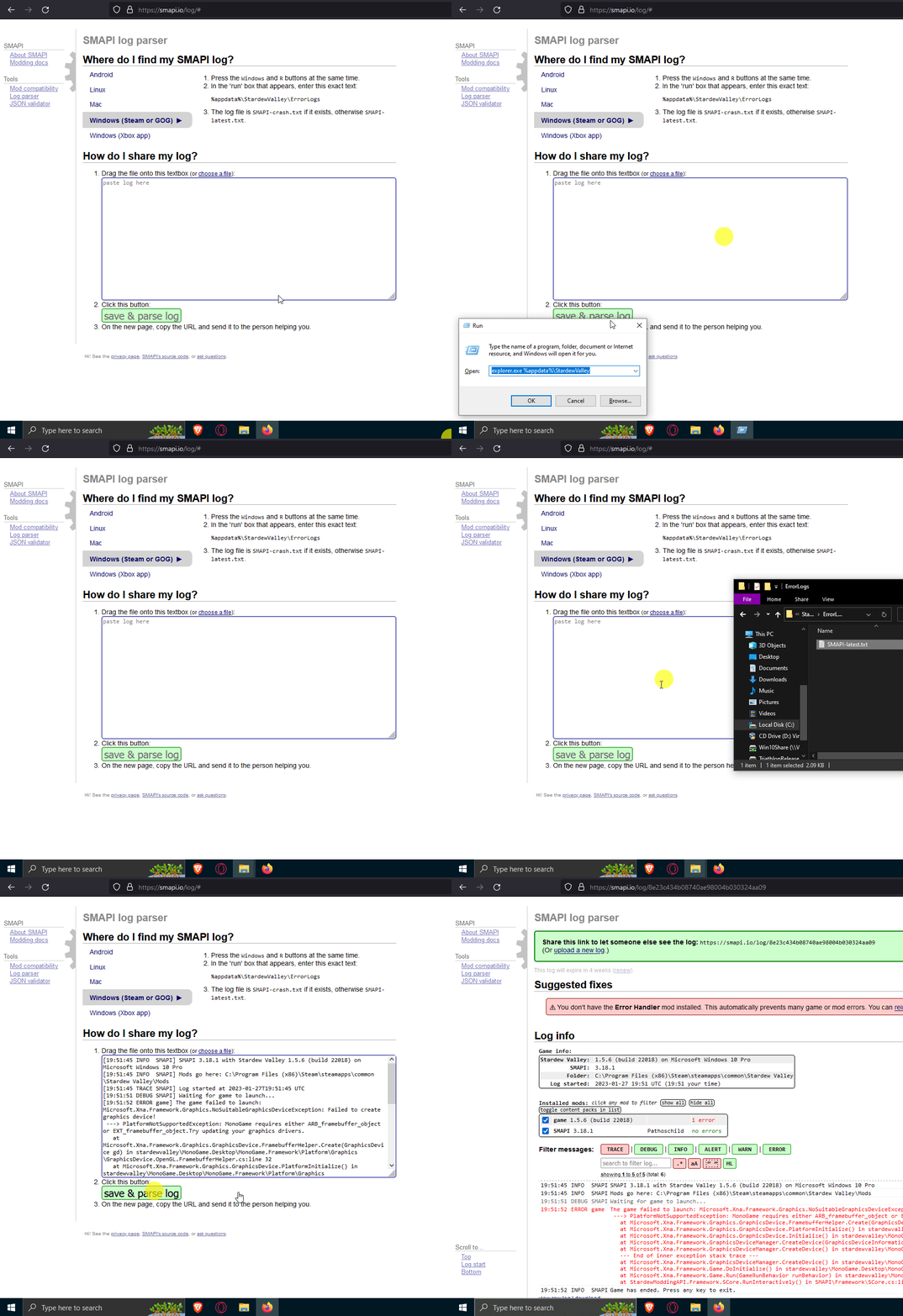 modern python
thats storage, not RAM
daring ermine
okay
scarlet quail
bitter pebble
fixed the audio!
If audio is fixed then congratz, it should work again
daring ermine
but how would i fix ram
modern python
fix? or find?
daring ermine
fix
modern python
cuz RAM isnt something you can fix without like, upgrading your hardware
pallid summit
if you're lucky, you can buy more and add it to your computer. if you're not, you can buy a new computer
bitter pebble
scarlet quail
If audio is fixed then congratz, it should work again
game did not open...
daring ermine
modern python
cuz RAM isnt something you can fix without like, upgrading your hardware
oh damn
then yeah that might be a small issue
scarlet quail
bitter pebble
game did not open...
!log
native dragonBOT
Can you upload your SMAPI log to https://smapi.io/log (see instructions on that page) and share the link here? Even if your game doesn't show any errors, logs are useful, and often necessary, for troubleshooting.
modern python
so yeah either upgrade hardware, downsize your modlist, or deal with the loading times
 high cairn
daring ermine
fix
high cairn
daring ermine
fix
First thing would be to check if that's the problem or not.
scarlet quail
And you're sure the audio is fixed, e.g. you can hear youtube videos right now, Clarin?
bitter pebble
native dragonBOT
Log Info: SMAPI 3.18.6 with SDV 1.5.6 (build 22018) on Microsoft Windows 11 Home, with 51 C# mods and 88 content packs.
Suggested fixes: You don't have the Error Handler mod installed, reinstall SMAPI to get it, One or more mods are out of date, consider updating them
daring ermine
high cairn
First thing would be to check if that's the problem or not.
true