#archived-modded-support
1 messages · Page 135 of 1
 native dragonBOT
 past coyote
I can’t move my stable, when I go into construct farm buildings, stable doesn’t show up
 pale hemlock
Alright I have re-downloaded all of them
I have not unzipped them or put them in the mods folder because someone said something about them being in the wrong place? They are in a different folder right now
And also I saw something about not unzipping them in the mod folder
Idk

 ebon yacht
they are not lol
i had all of those before, with no issues
i've played with all these for quite a while now without this happening
one of those is the mod that is being affected
none of those except wildflours resources, which is the one where wood is affected, even touch wood or resources
wood that is chopped from trees isnt layered with the vanilla overtop, its normally coloured in wildflours colouring, its just the wood and hardwood chunks that lay around on my farm.
 gaunt gust
hardwood chunks?
ebon yacht
like the tree trunks
gaunt gust
tree trunks?
ebon yacht
yes, the bigger trunks of trees that give hardwood when you chop them
gaunt gust

although I guess it doesn't matter, it's maps/springobjects anyways because every third thing in this game is in maps/springobjects
ebon yacht
yeah those
gaunt gust
usually I would go patch export maps/springobjects to see if that file matches what I expect
ebon yacht
okay thanks!! its super weird and i know the map i stared using is pretty like, in depth, there's so many config settings and they consider it a resource farm, but i didn't think it would affect my resources. and its just so weird that only the wood is affected lol
gaunt gust
Usually it's because someone edited the wood to match their recolor/foliage
ebon yacht
yeah im really confused cause i def haven't added any new or different recolours so im gonna switch out the map and go from there.
im also going to turn off the debris in foliage redone because while it didn't cause conflict before and idk why it would now, im gonna try whatever lol
pale hemlock
Huh. Apparently when I put them in the temporary folder they went in the mods folder anyway so whatever lmao
Those were empty folders again
For some reason
It. Looks like it's working?
 long brook
can you screenshot your mods folder?
pale hemlock
ITS WORKINT
long brook
well if it is working, congrats
pale hemlock
I mean i saw no red text and the path looks different now so I'm assuming lmao
It says running 22 mods
Unfortunately it is now. Very late lmao so I will get to actually play tomorrow woo
pale hemlock
@ripe mulch @long brook @neat plaza thank you for your help!
long brook
either launch smapi through steam (setting launch option or add smapi as non-steam game) or launch smapi while steam is already running in background
 past light
I just read this guide on wiki
https://stardewvalleywiki.com/Modding:Installing_SMAPI_on_Linux
I'm afraid you can't, not even Steam Deck.. only Windows, probably

Stardew Valley Wiki
This page explains how to install SMAPI (the tool which lets you use mods) on Linux.
long brook
Steam achievement works as long as steam runs in background
 pallid solstice
So question.. while i was downloading all the mods i wanted for SVE.. i THINK i made the mistake of downloading a couple of different portrait mods.. are those gonna clash and break stuff or?
 shy orbit
most likely either only one will be applied (since the last one targeting the same images overrides the previous mods) or depending on how they do it none might get applied. not really break anything
 native grail
Is there any mod that allows me to watch movies anytime? I don't like the once a week restriction
past coyote
does anyone know how to stop lag without zooming in, i hate having a zoomed in look
native dragonBOT
If you would like a guide to setting up mods for Stardew Valley, check out the getting started guide! https://stardewvalleywiki.com/Modding:Player_Guide
 soft ginkgo
HELP PLS
I can not see anything written in my game anymore
Most text is just gone
I did NOTHING to my game since I played earlier today and it's just poof
I am so scared that I cannot play anymore
 dark crest
You don't have a save backup?
soft ginkgo
I think so
 neat plaza
!reset
native dragonBOT
See https://stardewvalleywiki.com/Modding:Player_Guide/Troubleshooting#Reset_your_content_files for instructions on resetting your game files! (This doesn't affect your save files.) You may also want to check this list of XNB > Content Patcher conversions (https://stardewvalleywiki.com/Modding:Using_XNB_mods#Alternatives_using_Content_Patcher) to see if there are already replacements for any XNB mods you may have been using :)
soft ginkgo
I am trying something rn
If this doesn't work
I'm gonna try and re-install the game
I'm just so down rn
This game is the only thing that is keeping me going rn
I fixed it
It was the font mod
 round gate
my screen is shaky and person isnt showing up behind desk
pretty sure this is a mod issue just not sure which one
 topaz matrix
round gate
my screen is shaky and person isnt showing up behind desk
topaz matrix
round gate
my screen is shaky and person isnt showing up behind desk
What seems to be the problem?
round gate
topaz matrix
What seems to be the problem?
i think my game window is set too big
but idk how to fix it
plus its shaky
like the actual window is shaking randomly
and my character sprite was in the wrong position in the begining cutscene
topaz matrix
round gate
i think my game window is set too big
are u on full screen mode
long brook
Try lowering game resolution to 1080 and set every scaling to 100%
round gate
topaz matrix
are u on full screen mode
i am now
round gate
long brook
Try lowering game resolution to 1080 and set every scaling to 100%
gotchu
window is fine now thanks guys
 grim notch
hi! unsure if this is where this question should go, but are there any mods that allow a stardew server to be up at all times? ty
 dusty spruce
#modded-stardew is probably a better fit for such questions
grim notch
tyvm!
 gleaming vault
My friend and I have the exact same mods folder and everything is up to date however we experience extreme lag, not being able to pick up items and not able to open chests when playing together. these mods don't affect our game play when playing alone, any suggestions on how to fix this?

 tropic terrace
is their a way to download collections on nexus without vortex?
or is their a verison or vortex for max?
dusty spruce
not being able to open the same chest is a vanilla mechanic, unless you meant not being able to open ANY chests
long brook
Nexus collection is exclusove for vortex usage only
gleaming vault
dusty spruce
not being able to open the same chest is a vanilla mechanic, unless you meant no...
not being able to open any chest
we have played modded for a few years and have never had this problem before
tropic terrace
long brook
Nexus collection is exclusove for vortex usage only
fuck
gaunt gust
gleaming vault
My friend and I have the exact same mods folder and everything is up to date how...
This is basically what happens if your connection gets bad
If you create a new save and connect vanilla does this happen?
 scarlet quail
But did you run SMAPI?
SMAPI is not a mod you install, it's the mod loader
if you do not run SMAPI, mods will not appear
and logs will not be generated
gaunt gust
!launchoptions
native dragonBOT
If you're using Steam or GOG on Windows, you will need to set your launch options in order for Steam/GOG to automatically launch with SMAPI. The SMAPI installer will tell you what to set as the launch options when it completes (green text). You can find instructions (with screenshots) on how to do that here: https://stardewvalleywiki.com/Modding:Installing_SMAPI_on_Windows#Configure_your_game_client
round gate
scarlet quail
But did you *run* SMAPI?
how do i run it? like is it a certain doc or sum
ive alr set the thingy for steam
scarlet quail
atra called how you run it XD
If that was the case, then you'd have a pufferchick in your taskbar
And an errorlogs folder in your appdata/roaming/stardewvalley folder
scarlet quail
I could swear I added "needs quotations" to the wiki for it
Yup, I did, and it's still there
round gate
thx!
 tough falcon
so i’m trying to put in retextured hairs and clothes into the game, i put it into the mods folder and it’s not doing anything?
 calm heron
is it a png
 grand vector
 if i was to add npcadventures mod, should i add it at the start or later? because im not sure if i'll use it but id probably not want to restart my farm
 somber loom
did you unzip it? .zips and .rars need to be unzipped into the mods folder and not just placed inside
 fallow estuary
grand vector
<a:peepoHey:878301566631804928> if i was to add npcadventures mod, should i add ...
fallow estuary
grand vector
<a:peepoHey:878301566631804928> if i was to add npcadventures mod, should i add ...
i added it into a file i had already started, and it went fine! i believe you can also remove it at any time, it didn't cause any issues for me. when it's installed you don't HAVE to use it, but the option is always there
grand vector
fallow estuary
i added it into a file i had already started, and it went fine! i believe you c...
ok thanks so much again 
fallow estuary
yw! 
somber loom
where did you get this mod from?
somber loom
ok so you need to unzip it into the mods folder and not just place it in there as a .zip or .rar
did you do that?
tough falcon
i did that
 ripe mulch
why do smapi keep saying " (name of folder) is empty delete it) when its not clearly empty?
native dragonBOT
Can you upload your SMAPI log to https://smapi.io/log (see instructions on that page) and share the link here?
somber loom
unless its a fashion sense mod and you dont have fashion sense
somber loom
u should send a log too but generally that happens when youve incorrectly installed a mod
so delete it and reinstall it
native dragonBOT
Log Info: SMAPI 3.18.2 with SDV 1.5.6 (build 22018) on Microsoft Windows 11 Home Single Language, with 40 C# mods and 46 content packs.
Suggested fixes: Pytk isn't compatible with newer SMAPI performance optimizations, consider removing it, One or more mods are out of date, consider updating them
tough falcon
somber loom
unless its a fashion sense mod and you dont have fashion sense
its a fashion sense mod, i have fashion sense
somber loom
delete everything related to looking for love in ur mods folder and reinstall it
also probably dont use pytk lol
ripe mulch
somber loom
also probably dont use pytk lol
lol but doesns't my other mods need pytk?
tough falcon
native dragonBOT
Log Info: SMAPI 3.18.2 with SDV 1.5.6 (build 22018) on Microsoft Windows 10 Home, with 28 C# mods and 27 content packs.
Suggested fixes: Pytk isn't compatible with newer SMAPI performance optimizations, consider removing it, One or more mods are out of date, consider updating them
tough falcon
everything else is working fine its just the outfits and hair
ripe mulch
tough falcon
https://smapi.io/log/5fcc17317c6044c6b0342c8c215d6644
cant see any issues with ur files
somber loom
theyre just not appearing in the game? are you using the hand mirror to access them?
tough falcon
oh
somber loom
ripe mulch
lol but doesns't my other mods need pytk?
i have absolutely no idea, but just about any recently updated mod will have done away with it's pytk dependency
ripe mulch
hm alright
tough falcon
.... i thought they were just supposed to show up on startup
somber loom
you can keep it if you want, its not the reason for your issue itll just slow the fuck out of your game
OH ok. yeah no fashion sense stuff is only in the hand mirror menu
youll still be using all the plain vanilla stuff when first making your farmer and when changing your appearance at the wizard's tower
ripe mulch
somber loom
delete everything related to looking for love in ur mods folder and reinstall it
so?? i just delete looking for love?
somber loom
delete everything about looking for love yes. and then reinstall it
ripe mulch
okay
somber loom
make sure youre unzipping the entire folder and not the subfolders inside of it. im not really the best person to be helping u here but it looks to me like you mightve unzipped one of the subfolders into ur mods folder instead of the entire thing
scarlet quail
blinks did I get tagged and then untagged? discord gave me a notif here
 sonic marsh
@scarlet quail sorry for pinging you, but did you see that my wish came true??
it was me
scarlet quail
Your... wish? Sorry, I'm apparently blanking
sonic marsh
i misclicked and sent a blank message
seed bag mod got updated to not require plato anymore
scarlet quail
Oh yeah, Plato came back and updated a lot of their mods to not need the stuffs
sonic marsh
i'm so happy
tough falcon
i need help again, my computer wont load up the game anymore
its just stuck
its stuck with smapi saying "mods loaded and ready"
native dragonBOT
Log Info: SMAPI 3.18.2 with SDV 1.5.6 (build 22018) on Microsoft Windows 10 Pro, with 28 C# mods and 27 content packs.
Suggested fixes: Pytk isn't compatible with newer SMAPI performance optimizations, consider removing it, One or more mods are out of date, consider updating them
long brook
Did you click something on smapi window? And how long is it stuck?
tough falcon
long brook
Did you click something on smapi window? And how long is it stuck?
no, about 10 mins
long brook
!troubleshoot try steps under game doesn't launch
native dragonBOT
hey! Can I get you to run through this troubleshooting guide https://stardewvalleywiki.com/Modding:Player_Guide/Troubleshooting#Game_doesn.27t_launch? If none of the options there work, can you post the error message you get if you open SMAPI using the command line?
tough falcon
it worked i just had to restart my computer
long brook
Good old way, restart computer. Good to know problem is solved
 dull shard
from what ive seen custom furniture is the only thing messing up my logs, can anyone help?
native dragonBOT
Log found, uploaded to: https://smapi.io/log/d97f9c15647141bd8e16b3d2b3c48fc5
somber loom
have you updated it?
dull shard
yeah, that log is from after i updated it
scarlet quail
that'd be why
You need to remove all Custom Furniture before updating due to the switch
then you can put it back after
(Also verify your files)
 wide zephyr
I'm not sure if this is the right channel, but I got all the needed things done for SMAPI (Android ver.), but when I try to install SMAPI through the installer, it said "Instalation failed" the multiple times I've tried to get it to work.
Not sure what is wrong because this is my first time trying to mod a game, I have a screenshot to show what I mean.
 scarlet quail
wide zephyr
I'm not sure if this is the right channel, but I got all the needed things done ...
scarlet quail
wide zephyr
I'm not sure if this is the right channel, but I got all the needed things done ...
!androidsmapi
native dragonBOT
There is no working android SMAPI right now, after the mobile 1.5 release. No Android SMAPI means no mods on Android right now. ZaneYork, the developer of Android SMAPI, has said he will work on it when he has time. You can follow this Github issue for details, but please do not harass him or spam the Github. https://github.com/ZaneYork/SMAPI-Android-Installer/issues/246
When there is one, the instructions here will be updated: https://stardewvalleywiki.com/Modding:Installing_SMAPI_on_Android
wide zephyr
Thank you
scarlet quail
!log for you X
native dragonBOT
Can you upload your SMAPI log to https://smapi.io/log (see instructions on that page) and share the link here?
 idle kiln
cellar keeps dissapearing, but house is still fully upgraded. anyone know how to fix?
log: https://smapi.io/log/fe51d419e4d94b41bd100434cb05240f
native dragonBOT
Log Info: SMAPI 3.18.2 with SDV 1.5.6 (build 22018) on Microsoft Windows 11 Home, with 122 C# mods and 150 content packs.
Suggested fixes: One or more mods are out of date, consider updating them
dull shard
scarlet quail
You need to remove all Custom Furniture before updating due to the switch
oh god 🧍♂️
scarlet quail
idle kiln
cellar keeps dissapearing, but house is still fully upgraded. anyone know how to...
Can you temporarily disable "Map Edit" and see if you can see it?
if not, please show a screenshot of what's happening
also temp disable industrial kitchen, yes, but do that post-map edit
scarlet quail
after map edit, industrial kitchen, or both were removed?
idle kiln
map edit
scarlet quail
Yeah. That was editing FarmHouse2 from what I saw
idle kiln
oof alright. thank you!
 celest ice
I downloaded the mod "WearMoreRings", and for some reason, it turns all of my boots bright red. Is there a fix for this?
 dapper gazelle
(I don't have wear more rings fwiw)
scarlet quail
.q 6023
 devout pumiceBOT
[#6023] "If you are having issues with all of your shoes turning your Stardew character's boots red, your boots internal data has corrupted. Thankfully, this is mostly a benign problem, and can be fixed by spawning new boots and throwing away the old ones. To spawn new boots, type debug fin <boots> in your console, replacing <boots> with the exact name of your boots without spaces (e.g. Space Boots become spaceboots)." - @scarlet quail (27 Feb 2023 @ 05:15:33 AM UTC)
scarlet quail
so it's probs not Wear more rings then, just a coincidence
 jagged quiver
im trying to dow load the novan’s seasonal grads path 1.5 mod but it downloads as a rar file and i’m having trouble changing it so it isnt and so i can use it. what do i do?
 visual jetty
jagged quiver
im trying to dow load the novan’s seasonal grads path 1.5 mod but it downloads a...
visual jetty
jagged quiver
im trying to dow load the novan’s seasonal grads path 1.5 mod but it downloads a...
!unzip
native dragonBOT
Files with the extension .zip, .rar, or .7z are archive files, which you can extract to get the actual files inside. For a .zip file, just right-click (or long-press on Android) it and choose the option like extract or uncompress. For .rar and .7z, you need to install third-party software first, like 7-zip https://7-zip.org/ on Windows (get the x64 version), Keka https://keka.io/ on macOS, PeaZip https://peazip.github.io/ on Linux, or ZArchiver https://play.google.com/store/apps/details?id=ru.zdevs.zarchiver on Android.
celest ice
scarlet quail
so it's probs not Wear more rings then, just a coincidence
I'm not sure. Whenever I take Wear More Rings out, my boots go back to normal.
jagged quiver
Once I download 7-zip, do I do extract here and yes all?
scarlet quail
My guess is, if you put in a different mod, the same thing will happen, MarkMaker
Think so, Jerispinky
jagged quiver
I did that and it still is rar😅maybe im doing something wrong
scarlet quail
the rar won't change, but you'll get a new folder that isn't a rar
that new folder is what you put in your mods folder
jagged quiver
Ohhh i see now. Thank you!
tough falcon
okay last issue hopefully, the wizard's sprites and portraits wont change
i have romanceable but i changed it so it is the right portrait/sprite i want
native dragonBOT
Log Info: SMAPI 3.18.2 with SDV 1.5.6 (build 22018) on Microsoft Windows 10 Pro, with 28 C# mods and 28 content packs.
Suggested fixes: Pytk isn't compatible with newer SMAPI performance optimizations, consider removing it, One or more mods are out of date, consider updating them
scarlet quail
Sounds like a config wasn't changed
That or somehow since you're using Multiple Spouses and Custom Spouse Patio (old versions) instead of Free Love and Custom Spouse Patio Redux (New version) that it's interfering that way
or, third possibility, since you have SVE, isn't there an SVE version of romanceable raz that would have the correct portraits?
tough falcon
scarlet quail
or, third possibility, since you have SVE, isn't there an SVE version of romance...
i found that out
i changed it in SVE just now i realized that was probably the problem
PROBABLY-
 umbral sierra
i wanted to use https://www.nexusmods.com/stardewvalley/mods/14136 this mod for my rsv, but smapi just said it's an empty folder 

Nexus Mods :: Stardew Valley
Retexture of the Marriage Canidates and children in Ridgeside Village.
scarlet quail
That's a portrait replacer
you gotta take the PNGs and put them in the proper folder in the regular mod
umbral sierra
scarlet quail
you gotta take the PNGs and put them in the proper folder in the regular mod
uhh where exactly-
scarlet quail
the folders the pngs are in in that mod are in the CP folder of Ridgeside
umbral sierra
and i replace the folders?
tough falcon
i cant go into the wizards tower because it wont let me move
like my character doesnt show up and it doesnt move or do anything
does Romanceable Rasmodius and SVE conflict to do that?
scarlet quail
tough falcon
okay
18:58:25 ERROR Content Patcher Two content packs want to load the 'Maps/WizardHouse' asset (Romanceable Rasmodius and Stardew Valley Expanded). Neither will be applied. You should remove one of the content packs, or ask the authors about compatibility.
need SVE version to not get this error
 quasi relic
So I’m downloading stardew expanded. Basically I’m at the part where you have to download SO MANY additional mods - and one of them says that i have to download an additional one too. Do I download it too?
 lament prairie
Yeah
lament prairie
SVE is really big so it needs lots of help
lament prairie
It should not affect your computer when the game isn’t running
It’s harder to say what the exact performance impact will be in the game, although with just SVE alone most PCs are fine
There’s a huge range of performance in Macs
My friend’s 2015 MacBook Air can’t really run zoom, while a new M1 Mac can run machine learning code as well as some desktop computers
 daring berry
Does anyone have both Vibrant Pastoral Recolor and Elle's Town Buildings? I think they're causing some of my buildings to glitch, but I really want both.
 lament prairie
!loadorder
native dragonBOT
When two mods both edit dialogue or images, whichever mod loads last "wins" and is the one you see in the game. In order to change the load order of mods, you can add false dependencies, see here for details: https://stardewmodding.miraheze.org/wiki/Tutorial:_How_to_Add_a_False_Dependency_for_Load_Orders
lament prairie
Or you can see if they have configs
daring berry
I'm using Generic Mod Config -- the only overlap I see is some seasonal town effects (snow on the roofs, for example) and I toggled it off, but still getting this.
^that's in Vibrant Pastoral Recolor
I will try this false dependency!
daring berry
it worked! thank you!
 dire fractal
How do I play vanilla when I have smapi installed? I wanna play some vanilla with my friends
 hoary bane
dire fractal
How do I play vanilla when I have smapi installed? I wanna play some vanilla wit...
hoary bane
dire fractal
How do I play vanilla when I have smapi installed? I wanna play some vanilla wit...
Steam?
dire fractal
When I start Stardew on steam smapi starts
hoary bane
Clear your launch options to run vanilla.
 lyric frost
Whenever my player goes to sleep my game just freezes and stays on a black screen help
sonic marsh
i'm having a weird "bug", idk if i should call that
using "mail services" mod
the game doesnt let me send my axe to upgrade, but all other tools work fine
but, if i put the axe to upgrade directly at clint's, i recieve it back through the mail
it doesnt even generate a log message, so i dont think there is a way to try and solve it
 lament prairie
they're from the hard skull cavern challenge
they restore energy, except that probably they don't work right from CJB
lament prairie
the no-eating 100 levels challenge
 median violet
oh wow
lament prairie
It's a Qi quest
median violet
yeah i havent gotten to that one yet
lyric frost
lyric frost
Whenever my player goes to sleep my game just freezes and stays on a black scree...
https://smapi.io/log/3c9e302df68e45828ea410339b09f698 if anyone can help
native dragonBOT
Log Info: SMAPI 3.18.2 with SDV 1.5.6 (build 1.3.37.0) on macOS Unix 12.3.0, with 26 C# mods and 22 content packs.
Suggested fixes: Pytk isn't compatible with newer SMAPI performance optimizations, consider removing it
scarlet quail
lyric frost
https://smapi.io/log/3c9e302df68e45828ea410339b09f698 if anyone can help<:SDVpuf...
Quick question: Did you load in and immediately sleep on this log?
lyric frost
yea because I wanted to see if it would crash again
ive been trying for like the past two hours
scarlet quail
Well, I have some good news and bad news for you then
lyric frost
oh god
scarlet quail
but first I should check
you're getting rid of ES and RSV, yes?
(because that's the error handler part, and is normal if you're getting rid of it)
lyric frost
yea
scarlet quail
Okay. So the error happens in attempting to pick a farm event that's supposed to happen at night
lyric frost
i got rid of them already and removed Pytk as it suggested
scarlet quail
The good news is most of your mods shouldn't be the cause of it, as I use almost everything except your content packs, which shouldn't touch the game logic
The bad news is this likely means you have/had XNB mods or something got lost in your files
!reset
native dragonBOT
See https://stardewvalleywiki.com/Modding:Player_Guide/Troubleshooting#Reset_your_content_files for instructions on resetting your game files! (This doesn't affect your save files.) You may also want to check this list of XNB > Content Patcher conversions (https://stardewvalleywiki.com/Modding:Using_XNB_mods#Alternatives_using_Content_Patcher) to see if there are already replacements for any XNB mods you may have been using :)
scarlet quail
verify your game files
I should warn you, removing PyTK is going to kill off Mando and Grogu too
scarlet quail
It shouldn't. Still, it does provide a test case you can figure out
After verifying your game files, see if the same thing happens without Mando and Grogu
I've never heard of it happening with them, but I can still be surprised.
lyric frost
okay ill do that real quick
scarlet quail
(For the record: if it works, it's either Mando/Grogu or the game file reset, so we'll still check with those two guys in game after verified files if it works.)
lyric frost
just verified files on steam, gonna load up the game and see if it'll work
umbral sierra
i downloaded https://www.nexusmods.com/stardewvalley/mods/14195 and i don't see it, where is it?

Nexus Mods :: Stardew Valley
Buildable functional Glass Dome Igloo / Greenhouse / Conservatory / Sunroom with functional indoor hot springs using SolidFoundation. 2 main styles. Exterior pool to represent indoor hot springs.
very long name
scarlet quail
It is, yes. Where are you looking for it?
umbral sierra
the instant buildings menu?
scarlet quail
...is that at Robin's?
umbral sierra
oh I found it- it's just that robin disappeared(and i thought the mod deleted her) but I realized she was at Pierre's shop
lyric frost
bad news it still shows a black screen
scarlet quail
Even with PyTK disabled and files verified???
If so, can you put a new log in here?
lyric frost
yea lemme do that rq
umbral sierra
also the hedge fences mod for dga doesn't work, it's just a shadow circle
lyric frost
i think it has to do with the fact i was married to sterling and now he isn't in the game
native dragonBOT
Log Info: SMAPI 3.18.2 with SDV 1.5.6 (build 1.3.37.0) on macOS Unix 12.3.0, with 24 C# mods and 20 content packs.
scarlet quail
No, that I can confirm shouldn't be it unless you married Sterling for longer than 7 days
And if that's the case... then my only thought is that somehow it's trying to initiate a pregnancy event with a spouse who no longer exists
But that shouldn't happen and error handler should have taken care of it
hopefully someone with code knowledge knows how to bypass it and will look at it. Real quick though - why precisely did you get rid of RSV and ES?
lyric frost
it was making my game super slow and since I switched computers, I thought i would be better off without them
native dragonBOT
SpriteMaster (https://www.nexusmods.com/stardewvalley/mods/4922) is a mod that resamples the game's graphics to be smoother and improves performance.

Nexus Mods :: Stardew Valley
SpriteMaster resamples all of the game's artwork to make it look smoother - a so-called 'HD' effect, and also implements game optimizations and load-time improvements to make the game run faster.
lyric frost
if I go onto my other computer and remove the files, maybe that would work?
gaunt gust
lyric frost
https://smapi.io/log/2fe35e790ae2446792bc117f26983547
Yes. You have to divorce characters before removing them from the game
scarlet quail
oh
well, easy fix. Add in SpriteMaster and PyTK back, as well as RSV and ES
See how well it works
lyric frost
okay so hypothetically I did that, but their characters would not add back to the game
scarlet quail
....huh?
You... can't divorce someone not in game?
I'm very confused by that statement
lyric frost
nono so like I knew I was still married to Sterling, so I downloaded the mods back in but for some reason they would not show up in the game
the characters that is
ill try again and get back to you lol
scarlet quail
I mean, put them back in, and if they aren't showing up, send a log
scarlet quail
eh dw about it
umbral sierra
is it just me or the dga hedge fences mod doesn't work (or is it im lazy and i search it up in the cjb item spawner)
umbral sierra
it does appear, but a circle, and it's a shadow ( a shadow circle)
scarlet quail
sounds like a sprite isn't working or something
probs a you thing
!log if you really want
native dragonBOT
Can you upload your SMAPI log to https://smapi.io/log (see instructions on that page) and share the link here?
lament prairie
dga_store is the equivalent of cjb cheats for DGA items
DGA items don't show in CJB
scarlet quail
I knew it. Wasn't able to explain it as well and with the knowledge that Elizabeth had, but I knew it didn't really get found in CJB
(Thank you Elizabeth)
umbral sierra
lament prairie
`dga_store` is the equivalent of cjb cheats for DGA items
where is it tho? i searched it and it says no results found
lyric frost
sterling is back, im gonna divorce this poor man right now
scarlet quail
Tell me that's not what you did
umbral sierra
i searched it in nexus mods
scarlet quail
deep sigh alright, so I'm gonna tell you something that I'm hoping you didn't understand previously
when text looks like this, it means it's code
 pseudo vine
Can Ios be modded?
scarlet quail
So type dga_store in your SMAPI console
scarlet quail
pseudo vine
Can Ios be modded?
no
umbral sierra
scarlet quail
So type `dga_store` in your SMAPI console
k lemme open smapi rq
umbral sierra
is it the one that opens stardew? (sry for the trouble)
scarlet quail
....type it in your SMAPI console
not in-game
SMAPI console = Command prompt window thingy
umbral sierra
?
 lyric frost
scarlet quail
eh dw about it
lyric frost
scarlet quail
eh dw about it
all is fixed, thank u!
scarlet quail
umbral sierra
?
that is unhelpful - as stated, a log is better here
I don't know what part of a SMAPI console text is, I'd need a log.
 wary sparrow
Hi! So, I'm not really sure what's going on. I think I've run into some weird Desync in multiplayer. Everytime my friend and I load up, they can't see me moving around even though I'm right next to them.
The only thing I did recently was update and add a few of wildflours mods. I'm a bit worried because it's happening straight at the beginning of our save. restarting didn't seem to fix it.
Any idea's what might be the issue?
My log: https://smapi.io/log/89868ba9eb914f14853b0140eec24f80
My friends: https://smapi.io/log/260465d1ed1e40ad8712d49fc1caaa87
native dragonBOT
Log Info: SMAPI 3.18.2 with SDV 1.5.6 (build 22018) on Microsoft Windows 10 Home, with 61 C# mods and 212 content packs.
Suggested fixes: One or more mods are out of date, consider updating them
Log Info: SMAPI 3.18.2 with SDV 1.5.6 (build 22018) on Microsoft Windows 10 Home, with 62 C# mods and 212 content packs.
Suggested fixes: One or more mods are out of date, consider updating them
wary sparrow
(Oh I should note that I'm the host
scarlet quail
While I don't know if this is the reason why, whichever one of you has Challenging Community Center Bundles should yeet it
umbral sierra
scarlet quail
that is unhelpful - as stated, a log is better here
okay, it works ty for the help
wary sparrow
scarlet quail
While I don't know if this is the reason why, whichever one of you has Challengi...
ya I saw that xD I'll def ask my friend to yeet that sucker out- there's one other I saw too that needs to be yeeted too but I'm not sure if that would be the issue sadly ;3;
scarlet quail
otherwise you guys actually have equal mods so.... might just be stardew netcode being evil
wary sparrow
crap so if it's not the mods is there no way to fix it?
I'm really hoping we don't got to start our save over >.<
scarlet quail
it'll clear up eventually, but tonight might not work for it
lament prairie
Sometimes your internet or the servers are just having a bad day
wary sparrow
OH ok - I'll remove the mods and try again tomorrow then! thank you both so so much!
lament prairie
Adding more mods can increase the load (amkunt of info that has to go back and forth)
wary sparrow
Ya I've been trying to keep the mod amount around 270 and not go over 300 just to keep the load at least not crazy
ok thank you so much again both of you!!!
 mental thorn
I have the challenging community center mod with the PPJA/SVE setting (I have all the required mods) and one of the bundles for the center is broken. Is this a known issue? Is there a fix? TIA

It won't accept the tomatoes, and the labels are wrong (hard to explain)
scarlet quail
you don't have 30 tomatoes
Unless that bundle mod changes how the bundles work, you can't donate them one at a time
you need 30 (across all qualities) to donate
mental thorn
I swear I had 30. there's an item missing too
scarlet quail
I dunno about the item, that seems like a minor cosmetic thing
But you only have 22 on you
14 + 7 + 1 = 22
mental thorn
yep, that's my bad. I assumed I planted 30
sonic marsh
mental thorn
I have the challenging community center mod with the PPJA/SVE setting (I have al...
I have CCCB, the missing item is called "Clary Sage"
its from the mod "Mizu's Flowers"
are you sure you have the mod installed?
 lavish pivot
hello i am trying to install smapi stardew valley on my android 12 phone can you help me
native dragonBOT
There is no working android SMAPI right now, after the mobile 1.5 release. No Android SMAPI means no mods on Android right now. ZaneYork, the developer of Android SMAPI, has said he will work on it when he has time. You can follow this Github issue for details, but please do not harass him or spam the Github. https://github.com/ZaneYork/SMAPI-Android-Installer/issues/246
When there is one, the instructions here will be updated: https://stardewvalleywiki.com/Modding:Installing_SMAPI_on_Android
scarlet quail
and that'd be why
 iron lotus
hi I need help with some mod issues in game I got the seasonal mod for npcs but I also have a portraits mod and the seasonal mod covers up my portraits is there anyway to make my portrait mod a priority ?
scarlet quail
iron lotus
hi I need help with some mod issues in game I got the seasonal mod for npcs but ...
!log
native dragonBOT
@iron lotus Can you upload your SMAPI log to https://smapi.io/log (see instructions on that page) and share the link here?
scarlet quail
we'll be able to see what portrait mod and what seasonal mod that way
And what order they're editing in
native dragonBOT
Log Info: SMAPI 3.18.2 with SDV 1.5.6 (build 22018) on Microsoft Windows 11 Home, with 21 C# mods and 33 content packs.
Suggested fixes: Pytk isn't compatible with newer SMAPI performance optimizations, consider removing it, One or more mods are out of date, consider updating them
scarlet quail
Okay. So Seasonal Cute has a config option to turn off specific characters from getting the seasonal stuff
whoever you're using for the portrait mod - which isn't evident in your log - disable theirs
iron lotus
alright thank you
mental thorn
sonic marsh
are you sure you have the mod installed?
yep, all the other flowers are there
mental thorn
sonic marsh
I have CCCB, the missing item is called "Clary Sage"
oh, when I look at cjb item spawner, the seeds for that exist, just not the flower itself
 oak notch
Anyone know why after installing SVE i cant seem to get it to run?
native dragonBOT
Can you upload your SMAPI log to https://smapi.io/log (see instructions on that page) and share the link here?
hoary bane
🪵
 umbral latch
i begging anyone find a marry willy mod
umbral latch
omg rtysm
 native lotus
Hello does anyone know if debug commands will work trying to change the money for a farmhand.
 robust bison
 austere folio
Hi, kind of a different question, but I saw this SMAPI patch note many moons ago: "Fixed macOS launcher using Terminal regardless of the system's default terminal" (for 3.16.0) and I'm on 3.18.1 and I have iTerm2 set as my default and it has still always launched in Terminal. I launch from Steam. Is there something I have to do to convince it to open in iTerm2?
 ashen radish
is it possible to put mods in sdv 1.5 android?
dusty spruce
!androidmods
native dragonBOT
If you're using SMAPI on Android, you'll need specific older versions of most mods. For a list of many of the most popular mods compatible with android SMAPI, see here https://forums.stardewvalley.net/threads/stardew-valley-mobile-mods-list.13322/#post-85980. For mods not listed here, they may or may not be compatible with android, but see https://stardewvalleywiki.com/Modding:Android for more info, including how to find a compatible version of a mod not listed in the first link.
Stardew Valley Wiki
This page explains how to install SMAPI (the tool which lets you use mods) on Android.
native dragonBOT
There is no working android SMAPI right now, after the mobile 1.5 release. No Android SMAPI means no mods on Android right now. ZaneYork, the developer of Android SMAPI, has said he will work on it when he has time. You can follow this Github issue for details, but please do not harass him or spam the Github. https://github.com/ZaneYork/SMAPI-Android-Installer/issues/246
When there is one, the instructions here will be updated: https://stardewvalleywiki.com/Modding:Installing_SMAPI_on_Android
dusty spruce
sorry, this one
 valid crag
Hello i trying to install Elegant Scarecrows and Gwen's Medieval Craftables but it overwritten by the original image file, how should i do T^T
 ripe mulch
valid crag
Hello i trying to install Elegant Scarecrows and Gwen's Medieval Craftables but...
ripe mulch
valid crag
Hello i trying to install Elegant Scarecrows and Gwen's Medieval Craftables but...
is the mod CP?
valid crag
ripe mulch
is the mod CP?
Yesssss
ripe mulch
if then so you can change it on the GMC
that little setting kind of looking in ur intro
when u open ur game its on the corner
valid crag
ohh i will try and update this problem later✨
 flat condor
with PPJA, i'm going back and downloading the JA versions since the DGA ones were giving me some issues with recipes, but i'm not sure what version of Farmer To Florist would be better
the DGA one on GitHub fixes the mail issue, but JA is potentially more reliable, at least for the rest of the PPJA mods
alternatively, is there a way to get the recipes without having to find a fix for the mail?
sonic marsh
JA version of FTF doesn't have the mail problem
flat condor
oohhh, i see the latest one on nexus is DGA, i never got the JA one this run of modding
i'm just a dummy
valid crag
ripe mulch
if then so you can change it on the GMC
im trying but doesn't work, in GMC have just choice to change appearance (only file from mod). i have video when try to fix it in game if you want to watch
sorry for my eng skill T^T ...
shy orbit
valid crag
im trying but doesn't work, in GMC have just choice to change appearance (only f...
!log we should be able to see from the log what mods are editing the craftables tilesheet (where the scarecrows are), as long as you viewed the scarecrow in the game before uploading the log
native dragonBOT
@valid crag Can you upload your SMAPI log to https://smapi.io/log (see instructions on that page) and share the link here?
 final sigil
sonic marsh
the game doesnt let me send my axe to upgrade, but all other tools work fine
final sigil
sonic marsh
the game doesnt let me send my axe to upgrade, but all other tools work fine
Some one reported it as a but once, but after some investigation it was dicovered it's a conflict with "Panning Upgrades".
valid crag
shy orbit
!log we should be able to see from the log what mods are editing the craftables ...
Sorry for late https://smapi.io/log/69276088ddfe43c9beff0b6a6245e4b1
native dragonBOT
Log Info: SMAPI 3.18.2 with SDV 1.5.6 (build 22018) on Microsoft Windows 10 Pro, with 46 C# mods and 45 content packs.
Suggested fixes: Pytk isn't compatible with newer SMAPI performance optimizations, consider removing it, One or more mods are out of date, consider updating them
dire fractal
jump off from the cliff just to get attacked by wild Pokemon!!!
now.. where smapi mobile 😉
already finish the game and i don't know wut tu du..
 dusky canyon
not released yet
shy orbit
valid crag
Sorry for late https://smapi.io/log/69276088ddfe43c9beff0b6a6245e4b1
looks like the only mod editing the craftables tilesheet after Elegant Scarecrows is Starblue Valley, so if ES is patching the scarecrows correctly then the culprit should be Starblue Valley
sonic marsh
final sigil
Some one reported it as a but once, but after some investigation it was dicovere...
I have this mod, but I don't think I ever used it
Does any of you actually do any panning??
sonic marsh
Also, going to Clint's to upgrade the axe is not a big deal
valid crag
shy orbit
looks like the only mod editing the craftables tilesheet after Elegant Scarecrow...

Omg its work! Thank you so muchhhhh. don't know how to repay ur kindness 🥺 ✨
shy orbit
no problem! (and thanks is enough)
 undone drum
I'm stuck on a loading screen starting the new game.

Oh crap yeah, SMAPI 3.18.2 Stardew Valley 1.5.6
 rare hearth
https://www.reddit.com/r/SMAPI/comments/11gf7ep/what_have_i_done_wrong/
I posted a Reddit post with my problem and someone recommended trying the discard? any help is appreciated and I can join vc for better support if anyone wants to!
sorry for jsut sending a link but it has the pictures linked and ths smapi log parser so i thought it'd jsut be easier!
 undone drum
nvm i remember being told that turning my xnb files into pngs would be better, turns out sdv doesn't like that.
topaz matrix
rare hearth
https://www.reddit.com/r/SMAPI/comments/11gf7ep/what_have_i_done_wrong/
I poste...
May I have your log please
shy orbit
rare hearth
https://www.reddit.com/r/SMAPI/comments/11gf7ep/what_have_i_done_wrong/
I poste...
Stardew Valley Expanded\[CP] Stardew Valley Expanded because it contains files, but none of them are manifest.json. these kind of errors mean that those mod folders don't contain the files they should (or that smapi can't access them i guess). if there isn't a manifest.json file in [CP] Stardew Valley Expanded for example, they need to be reinstalled. if that file exists, then it's some permission issue i guess
rare hearth
topaz matrix
May I have your log please
native dragonBOT
Log Info: SMAPI 3.18.1 with SDV 1.5.6 (build 22018) on Microsoft Windows 10 Pro, with 27 C# mods and 31 content packs.
Suggested fixes: You don't have the Error Handler mod installed, reinstall SMAPI to get it, Pytk isn't compatible with newer SMAPI performance optimizations, consider removing it, One or more mods are out of date, consider updating them
topaz matrix
rare hearth
here: https://smapi.io/log/4a5ba0b248c64c85b1e746ab134c311b
Re-download sve
Delete the sve in your folder.
rare hearth
topaz matrix
Re-download sve
I have multiple times but Im doing it again right now, but from a drive folder my friend provided since nexus won't let me download anything. I've tried a VPN, no ad blockers, and turning of the windows antivirus thing
topaz matrix
Do u have a nexus account
rare hearth
Yea
rare hearth
shy orbit
`Stardew Valley Expanded\[CP] Stardew Valley Expanded because it contains files,...
Like these?
 topaz matrix
rare hearth
Yea
topaz matrix
rare hearth
Yea
Did u go to the files tab on the sve page
rare hearth
topaz matrix
Did u go to the files tab on the sve page
Yea if you're free i'd be happy to go on call and show you and try anythign to get it to work!
shy orbit
rare hearth
Like these?
yep, those look fine. so i'm assuming it's a permission issue, but unfortunately i don't know how to fix those on windows
rare hearth
I've done both mod manager download and manual
 rare hearth
shy orbit
yep, those look fine. so i'm assuming it's a permission issue, but unfortunately...
rare hearth
shy orbit
yep, those look fine. so i'm assuming it's a permission issue, but unfortunately...
Alright thats good to know then thank you!
shy orbit
wait actually
that's a different path than what is shown on the log as failing Stardew Valley Expanded\[CP] Stardew Valley Expanded
rare hearth
shy orbit
that's a different path than what is shown on the log as failing `Stardew Valley...
Oh right i did have 2 of them before i think one wa with CP at the start the other one was lose? I think i delelted the one without cause ithere was something with it, maybe it was empty? I dont remember at all
I'll launch it right now and check
this is still here

super hard to read probably
shy orbit
SVE missing parts, so it needs a reinstall
rare hearth
yea which i just did
my friend has this drive where she put all the mods for me to download since nexus doesnt work
these are the expanded ones

I only downlaod the CP one? should I do all of them?
shy orbit
yep, it needs all of them
rare hearth
bruh was that the problem all along
I'll do it
Can i just have afolder witha ll of them or do i put them separately in the mods folder
shy orbit
those folders can be put inside one folder yeah
rare hearth
Thank you so much @shy orbit I feel so dumb now, I misunderstood what my friend told me to download! Extremely appreciated 
shy orbit
np
rare hearth
You, or anyone here, wouldn't happen to know how to fix a modded game crashing at the end of the day, forcing me and my friend to restart the day, and also turning ANY house decors I have in my house into chairs?
It does work and save properly sometimes but we don't wanna have to restart the progress we do. It happens randomly when we go to sleep in any way, screen turns black and for my friend there's error text in the code, which we don't really understand.
We couldn't put the code into the smapi log parser, it says its too big or something so we only have a shitty picture although I will ask for a better one.
shy orbit
people probably need the log(s)/error message to figure it out. you could try uploading the big one directly here or trimming most of the error messages from it before uploading it to the log site
or you can try the picture too, who knows, it could be enough
 ebon charm
Could someone help me figure out why my game keeps crashing when I go to bed on the 27 day of spring, year one. I'm playing multiplayer. And have my error log.
long brook
ebon charm
Could someone help me figure out why my game keeps crashing when I go to bed on ...
!log please from both you and your friends
native dragonBOT
@ebon charm Can you upload your SMAPI log to https://smapi.io/log (see instructions on that page) and share the link here?
native dragonBOT
Log Info: SMAPI 3.18.2 with SDV 1.5.6 (build 22018) on Microsoft Windows 11 Home, with 33 C# mods and 36 content packs.
Suggested fixes: Pytk isn't compatible with newer SMAPI performance optimizations, consider removing it, One or more mods are out of date, consider updating them
ebon charm
I only have my error log
long brook
Is that log right after the game crashed?
ebon charm
yes
long brook
The cause of crash might be from your friend then, hence we need to see your friend log too
rare hearth
shy orbit
or you can try the picture too, who knows, it could be enough
its like really really bad but you could try, i'll get her to take anew one asap but shes not online rn.. https://imgur.com/HQhVvK8
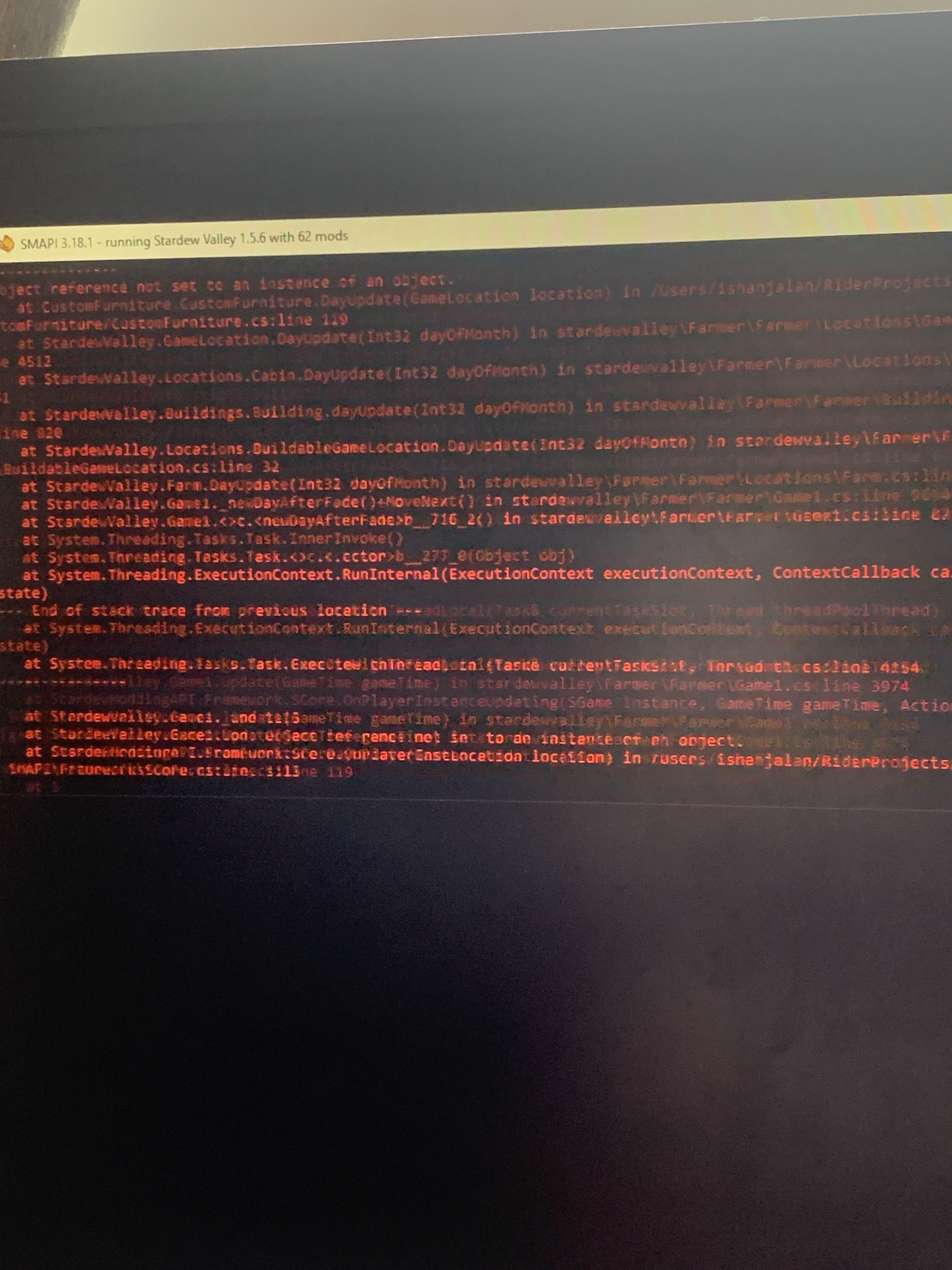
if you zoom you can see a little but like ... yea
long brook
Do you just update Custom Furniture? If yes, try to get rid all custom furniture in your game. Then install Custom Furniture mod (newest version) again
Also Custom Furniture isn't compatible in multiplayer session if you play multiplayer
rare hearth
Its not? Oh that might be it then although it does work sometimes which is weird
we'll try upating custom furniture mod then
 carmine zealot
this is save anywhere comment, how can I use this mod properly if these issues occurred?

 livid magnet
ook Happybirthday... why are you looping ever few days?-- why>?
long brook
rare hearth
we'll try upating custom furniture mod then
Yup just checked chat history that Custom Furniture mod isn't compatible in multiplayer, at least for now (idk if plato will make it work later)
rare hearth
Oh my god we're gonna try removing it rn shes online haha
somber loom
i dont think you can use save anywhere properly. its pretty fucked
long brook
carmine zealot
this is save anywhere comment, how can I use this mod properly if these issues o...
The new dev of that mod is working to update the mod. Iirc save anywhere can be wonky and might break save as of now so your choice to install it now or wait later
ebon charm
We're currently on livestream so its hard for me to test much right now. Seems custom furniture might be my problem? I avoided it this time & my game didn't crash. I'll get my friend's logs soon as I can
carmine zealot
ok so it still needs to wait
long brook
livid magnet
ook Happybirthday... why are you looping ever few days?-- why>?
I remembered lyoko said sonething about happy birthday mod but i can't remember how to fix this. Are you using the latest version of happy birthday mod?
scarlet quail
You'll need to use the 1 from 2 versions back in order to stop the looping
Then you can Migrate the data To the newest version When updating if you'd Like to Use the newest version
My speech to text is not liking me this morning
livid magnet
long brook
I remembered lyoko said sonething about happy birthday mod but i can't remember ...
As as I know I am,.
 lapis sparrow
Anyone know of a mod similar to "No More Random Mine Flyers"? "No Mine Flyers Redux" removes ALL flyers - I only want to remove the ones that spawn from offmap.
past coyote
does PyTK slow down your game?
dapper gazelle
yeah, especially startup/loading
grand vector
hihi i cant find my mods folder
i found the right stardew folder
but it doesnt have mods in it
grand vector
im trying to
grand vector
ah
past coyote
Does anyone know which mod makes lissy’s character stand so perfect and amazing if you get what I mean

 lunar mesa
my animals do this weird thing where if i open the farm door to let them out, it decreases their mood to fine, but when i keep them in theyre happy...? its been an ongoing pattern
grand vector
scarlet quail
without SMAPI there's no mods folder
ive installed smpai and all the mods i want but i installed the mod config menu and i cant see that so i feel like i may have some something wrong
 long brook
grand vector
ive installed smpai and all the mods i want but i installed the mod config menu ...
long brook
grand vector
ive installed smpai and all the mods i want but i installed the mod config menu ...
config menu is bottom left in main menu (small icon) or bottom choice inside in-game setting
!log if none showed up, try send log to see if GMCM is loaded
native dragonBOT
Can you upload your SMAPI log to https://smapi.io/log (see instructions on that page) and share the link here?
grand vector
 native dragonBOT
If you're using Steam or GOG on Windows, you will need to set your launch options in order for Steam/GOG to automatically launch with SMAPI. The SMAPI installer will tell you what to set as the launch options when it completes (green text). You can find instructions (with screenshots) on how to do that here: https://stardewvalleywiki.com/Modding:Installing_SMAPI_on_Windows#Configure_your_game_client
grand vector
scarlet quail
so you didn't launch SMAPI
now its saying error message
hoary bane
past coyote
Does anyone know which mod makes lissy’s character stand so perfect and amazing ...
You mean the mod for the body?
scarlet quail
so you didn't use quotes
grand vector
C:\Program Files (x86)\Steam\steamapps\common\Stardew Valley\StardewModdingAPI.exe" %command%
is what i used
scarlet quail
you forgot the first "
past coyote
hoary bane
You mean the mod for the body?
Yeah like it’s hard to explain like how the body looks like
grand vector
oh
hoary bane
past coyote
Yeah like it’s hard to explain like how the body looks like
Looks like Cuter Shoes on Nexus.
past coyote
hoary bane
Looks like Cuter Shoes on Nexus.
ok ty!!!
hoary bane
Could also be GH's Body on Naver, but the Nexus one is more easily accessible.
flat condor
also potentially More Elegant Farmer body on nexus
grand vector
woo working
hoary bane
That doesn't look like Elegant Body to me.
grand vector
now i need to ask, will all mods show in the mod menu?
hoary bane
Mod Menu?
grand vector

 scarlet quail
only mods with GMCM integration
gaunt gust
most mods will, but mods do need to implement explicit support for it, many many older mods do not
hoary bane
Oh. No.2
past coyote
How do I make rar files into folders with 7zip?
neat plaza
!unzip
native dragonBOT
Files with the extension .zip, .rar, or .7z are archive files, which you can extract to get the actual files inside. For a .zip file, just right-click (or long-press on Android) it and choose the option like extract or uncompress. For .rar and .7z, you need to install third-party software first, like 7-zip https://7-zip.org/ on Windows (get the x64 version), Keka https://keka.io/ on macOS, PeaZip https://peazip.github.io/ on Linux, or ZArchiver https://play.google.com/store/apps/details?id=ru.zdevs.zarchiver on Android.
grand vector
thanks everyone ^^
 grim swan
does anyone use DCBurgers portrait mod for SVE?
 neat plaza
do you have pytk assuming it's a pytk portrait mod
 torpid notch
hey, my mac isn't letting me open up smapi and idk what to do
 scarlet quail
That... raises eyebrow isn't Terminal the main mac thing? If you can't open it, wouldn't that necessitate a restart?
torpid notch
tried that and it didn't change the prompt
grim swan
neat plaza
do you have pytk assuming it's a pytk portrait mod
yes i had pytk
 torpid notch
NVM GOT IT TO WORK
livid magnet
Anyone else having automate struggling to work>?
 wary mica
Smapi work for mobile 1.5?
scarlet quail
!androidsmapi
native dragonBOT
There is no working android SMAPI right now, after the mobile 1.5 release. No Android SMAPI means no mods on Android right now. ZaneYork, the developer of Android SMAPI, has said he will work on it when he has time. You can follow this Github issue for details, but please do not harass him or spam the Github. https://github.com/ZaneYork/SMAPI-Android-Installer/issues/246
When there is one, the instructions here will be updated: https://stardewvalleywiki.com/Modding:Installing_SMAPI_on_Android
 fossil sandal
Is there any way to recover used mods from a save file? I had my hard drive die on me and I'm not sure which mods I all had
dusty spruce
not really, no
fossil sandal
damn ... I'm really honestly not sure if I want to return to the game now if I can't get my last save to work...
lament prairie
I’m sure you can get the save to work
You can probably recover any NPC mods
You probably can’t read much else out of the save
You might be able to get object names, but I don’t know offhand
Just install SMAPI and load up the save and see what happens
 snow prism
fossil sandal
Is there any way to recover used mods from a save file? I had my hard drive die ...
snow prism
fossil sandal
Is there any way to recover used mods from a save file? I had my hard drive die ...
you can use the log
if you still have that
fossil sandal
I have nothing. Log, Mod Files, Configs, etc everything died with that hdd >.<
Even some custom files that I changed for personal use T.T
At least I can kinda guess which ones I had installed from the Nexus Mods Download history
native dragonBOT
Log Info: SMAPI 3.18.2 with SDV 1.5.6 (build 22018) on Microsoft Windows 11 Pro, with 22 C# mods and 49 content packs.
Suggested fixes: Pytk isn't compatible with newer SMAPI performance optimizations, consider removing it, One or more mods are out of date, consider updating them
dusty spruce
do you have a screenshot or a photo of the glitchiness?
 dapper gazelle
yeah, so CF was updated to no longer require PyTK (yay)
 serene parrot
dapper gazelle
serene parrot
dapper gazelle
however any currently placed CF furniture is going to be borked
you'll need to remove them first
afterward, your furniture should work as normal but yeah you'll need to replace them.
 worn sand
dapper gazelle
you'll need to remove them first
worn sand
dapper gazelle
you'll need to remove them first
remove the furniture mods or just the furniture in game?
dapper gazelle
I believe you have to remove the old furniture items, then update CF, then put the furniture items back in with newly updated CF
so you maaay have to roll back CF temporarily to remove the furniture (if you want you can try and see if removing it right now and then spawning the same piece of furniture back in works)
worn sand
alright
 bleak viper
I can't get the CJB mods to work
 merry plank
Having an odd experience after getting a new laptop and transferring my files, mods and saves over. When I load one of my older games, I'm unable to access my inventory, map screen, etc., and hitting Esc doesn't bring up the menu. For some reason this isn't an issue when starting a newer game. Here's my most recent SMAPI log if someone's able to take a look.
native dragonBOT
Log found, uploaded to: https://smapi.io/log/ef04f0e229a3457e8b2adb398087c969
merry plank
Did a bunch of updates to mods yesterday while converting over and not seeing much in the newest log that stands out as an issue, although there are some duplicate mods I have to go clean up.
 left zenith
Is it normal for UI info suite 2 to have a really long load time at the start?
[UI Info Suite 2] Setting up icon sheet
It takes forever to get through this message and if I touch my game at all it insta crashes but then after a few minutes of loading I'm able to play just fine. I have a few of the expansion mods like SVE, scarp, and ridgeside but nothing that changes icons
merry plank
NVM, figured out the offending mod and removed it (MARGO)
scarlet quail
it's not UI info suite taking that long, mariella - that's all your mods loading at the time you click to load a file
left zenith
scarlet quail
it's not UI info suite taking that long, mariella - that's all your mods loading...
Yeah, I figured it was because of the other mods but I just added a few more recently and it slowed down considerably, from like 10-15 seconds to like several minutes of loading in 😮 its obviously not the biggest deal but it is a little annoying bc i cant touch my pc at all while i'm waiting
 spark kraken
I need help it says the mods need the new Smapi but I can't find it.
scarlet quail
spark kraken
I need help it says the mods need the new Smapi but I can't find it.
you... can't find SMAPI?
On smapi.io or nexus?
scarlet quail
run the installer
install on windows
unless you're not on windows
Are you on Mac/Linux or Windows?
spark kraken
Im on Windows
scarlet quail
then yes, run install on windows in the unzipped SMAPI folder
spark kraken
Okay I found it
Thank you I'll come back if I run into another wall
Whats the newest SMAPI?
I have the 3.18.2
scarlet quail
that is the newest SMAPI
scarlet quail
spark kraken
I have the 3.18.2
What error are you getting?
spark kraken
When I launch and it runs through the mods I get a bunch of red text and it says that it needs the newest SMAPI but i have it installed, I think the Mod Organizer is set to the older smapi i installed awhile ago but i dont know how to change it
gaunt gust
!log
native dragonBOT
Can you upload your SMAPI log to https://smapi.io/log (see instructions on that page) and share the link here?
scarlet quail
....ah, if it's Mod Organizer 2 I'm no expert on that
 hidden cloak
hey, i'm having issues getting stardrop to work on my mac; i loaded it exactly according to the instructions and designated different profiles, but SMAPI still loads all of my mods regardless of profile. has anyone experienced similar issues, and how did you resolve it?
native dragonBOT
Log Info: SMAPI 3.18.2 with SDV 1.5.6 (build 22018) on Microsoft Windows 10 Home, with 165 C# mods and 276 content packs.
Suggested fixes: One or more mods are out of date, consider updating them
 fathom helm
My game stutters a lot and sometimes makes battle/fishing impossible
scarlet quail
you'll need to update some mods - and I actually don't mean the ones Gov/smapi.io is recommending
You need to use Free Love instead of multiple spouses
SpriteMaster is on... beta 16?
So updating that should help
same with moving to Custom Spouse Patio Redux instead of Custom Spouse Patio
fathom helm
ahh okee i shall do that
scarlet quail
There's other stuff too based on your log - reinstall RSV and Deep Woods, delete Horse_113 from Adopt n Skin folder, install the Happy Birthday content pack so Happy Birthday is usable, reinstall Riley too
Fixing errors will make lag drop significantly
fathom helm
there are a few i have no idea how to solve
20:22:49 ERROR Content Patcher Patch error: Ridgeside Village (Content Patcher component) > Include all the Events (from Data/Events/EventExtras.json) > Special Characters (Characters/RSVTortsKiwi) has a FromFile which matches non-existent file 'Assets\EventFiles\RSVTortsKiwi.png'.
20:22:50 ERROR Content Patcher Patch error: NPC Jasper > Gunther, Marlon and more > assets/Includes/GuntherMarlon.json > Schedule has a FromFile which matches non-existent file 'assets\Schedule\Gunther.json'.
these two
scarlet quail
fathom helm
`20:22:49 ERROR Content Patcher Patch error: Ridgeside Village (Content...
This one requires a reinstall of RSV
scarlet quail
fathom helm
`20:22:50 ERROR Content Patcher Patch error: NPC Jasper > Gunther, Marl...
This one needs a reinstall of Jasper
I have both of those files in my RSV/Jasper, so yours is just missing them somehow
 pseudo ice
does anyone know how to access the stardew mods folder? I wanna download a few
lament prairie
!gettingstarted
native dragonBOT
If you would like a guide to setting up mods for Stardew Valley, check out the getting started guide! https://stardewvalleywiki.com/Modding:Player_Guide
pseudo ice
oh thanks!
 opaque dove
Hi! I dont know if anyone can help me. I've done all the steps and none of them have worked what so ever. Everytime I download SMAPI, its up for 10 seconds or more before it crashes on me. I have no mods in the folder and have tried countless times to start fresh and reinstall it all. I dont know if anyone has run into this problem, but I could really use some help cause i love this game and it breaks my heart that i cant even play it with my fave mods
scarlet quail
opaque dove
Hi! I dont know if anyone can help me. I've done all the steps and none of them ...
Please state the exact steps what happens, since downloading smapi to crashing for 10 seconds (no definition on when it crashes) is not specific enough for help
(Try explaining it like I'm a new person who has no idea how mods work)
opaque dove
Stardew valley the vanilla version is fine, nothing wrong with it at all and doesnt crash on me, but as soon as I try to download SMAPI and run it; the whole system just shuts down on me. I count to 60 seconds before the game decides to close on me. There is nothing else installed or in the mods file. There is no error messages either when the lil window pops up to show if there is any mods running.
My computer used to run SMAPI so fine too
scarlet quail
...Okay, we're running into several problems here in your explanation
First, you download, then install SMAPI using the batch file, correct?
you're not trying to just... run SMAPI from your downloads somehow
also you unzip the SMAPI folder, yes?
opaque dove
Yes i download the game first, run it for a bit before I install SMAPI and open it. I unzip the file into my desktop and open the lil window thing to install it
scarlet quail
Second, you're saying it runs for 60 seconds and then "shuts down". That... needs more explanation. Do you get to the title screen?
scarlet quail
opaque dove
Yes i download the game first, run it for a bit before I install SMAPI and open ...
you're...running the game while you install SMAPI???
somehow I feel like that's a bad idea
opaque dove
NO NO NO English isnt my first language im terrible at explaining things
I have already installed it
THEN i run it
scarlet quail
Real quick, then, just in case it might help, what is your native language?
#friends has some alternate language servers
opaque dove
Spanish. but I prefer English more to teach me my mistakes lol. I'm sorry if I'm being difficult. But also sometimes if im lucky it'll go to title screen. sometimes it loads to the birds then crashes
I think it might just be my graphics card
scarlet quail
I'll do my best to help, but there is a Spanish server, if that'd be better for you
if you're saying SMAPI is launching, though
!log
native dragonBOT
Can you upload your SMAPI log to https://smapi.io/log (see instructions on that page) and share the link here?
native dragonBOT
Log Info: SMAPI 3.18.2 with SDV 1.5.6 (build 22018) on Microsoft Windows 10 Home, with 3 C# mods and 0 content packs.
scarlet quail
okay so this is telling me you have no mods outside of the vanilla mods
And that it launches perfectly to the title screen
opaque dove
Yes, it'll launch to the tittle screen but then shuts down on me
scarlet quail
When does it crash though
specifically. You get to the title screen, and from there, what happens?
(it ain't your GPU btw - 22:15:17 TRACE SMAPI Running on GPU: NVIDIA GeForce RTX 3060/PCIe/SSE2 is recognized perfectly)
opaque dove
on the title screen itself, like I havent even press load or new. It just closes before I can even start a new game.
scarlet quail
so it launches to title screen, then before you can click anything it hard crashes, shutting down both SMAPI and the game itself?
lament prairie
Do you have an antivirus?
opaque dove
scarlet quail
so it launches to title screen, then before you can click anything it hard crash...
yes yes
scarlet quail
Yeah then check antivirus first as Elizabeth said
opaque dove
lament prairie
Do you have an antivirus?
I dont think so ? I used to have that off but I can check
scarlet quail
After that we'd need to see the Event Viewer to learn why it's hard crashing
opaque dove
ooohh it turned itself back on when I was cleaning my pc ;;n;; let me see if that works or if itll still crash
nooo it still crashes
scarlet quail
yeah and that means it's event viewer time to see the cause of hard crashing
so I'm no longer qualified to help here XD
opaque dove
im sorry ;;n;; thank you sm for your help
 frosty mirage
Can someone help me with the museum tiles?
I'm using museum expansion with a building overhaul mod.
Even when I set the overhaul as dependency for expansion, the tiles doesn't change completely.
I don't know anything about modding so can't figure out the problem.
 lament prairie
You’ll probably need to disable parts of one or the other mod to get it to look right if they both edit the same thing in a way that doesn’t play nice
Check if they have configs
frosty mirage
The overhaul doesn't have config for individual buildings. Do I have to manually edit overhaul's museum tile to replace with the expansion?
dapper gazelle
yeah probably
I had the same issue b/c I was using the museum from Foliage Redone and it doesn't have Foliage Redone compat. So probably need to do some manual finagling
frosty mirage
Alright. Gonna give it a try then.
 ashen bobcat
I can start my game with no issue but the minute I try to load into a new farm the game crashes. Here is my Smapi log can anyone help? https://smapi.io/log/2f1a47f8bbf248fab418600437917e95
native dragonBOT
Log Info: SMAPI 3.18.2 with SDV 1.5.6 (build 22018) on Microsoft Windows 11 Home, with 28 C# mods and 16 content packs.
 tulip carbon
does anyone know the cuase of this error? I can't progress to the next day bc of it,
https://smapi.io/log/eb655102bac248148fa8a7d66ea04e27
native dragonBOT
Log Info: SMAPI 3.18.1 with SDV 1.5.6 (build 21362) on Microsoft Windows 11 Pro, with 93 C# mods and 166 content packs.
Suggested fixes: Pytk isn't compatible with newer SMAPI performance optimizations, consider removing it, One or more mods are out of date, consider updating them
scarlet quail
ashen bobcat
I can start my game with no issue but the minute I try to load into a new farm t...
How long are you waiting until you click into the game?
scarlet quail
tulip carbon
does anyone know the cuase of this error? I can't progress to the next day bc of...
You have multiple spouses instead of free love. The game is bugging because Multiple Spouses is outdated
swap to Free Love and the error should fix itself
ashen bobcat
scarlet quail
How long are you waiting until you click into the game?
Do you mean I should let it load when I start the game?
tulip carbon
alr thank u!!
scarlet quail
(Custom Spouse Patio should also become Custom Spouse Patio Redux)
ashen bobcat
scarlet quail
How long are you waiting until you click into the game?
The screen after I complete my character goes blue then says loading then crashes
I waited a good few minutes after starting the game and that didnt seem to help
scarlet quail
ashen bobcat
The screen after I complete my character goes blue then says loading then crashe...
define crashes
not responding or hard crash
And this is a single-player game, yes?
ashen bobcat
Yes it is single player, I get the StardewValleymoddingApi.exe is not responding prompt
scarlet quail
Yeah okay then you actually aren't waiting long enough. it takes a long time on save creation usually, especially with a less powerful computer
wait at least 10 minutes.
And more importantly
the second you hit the "create" on the character thing, do not touch the game
At all. Walk away from the computer, don't tab out, just walk away for a bit
ashen bobcat
Ok I’ll try that
scarlet quail
get a drink of water or something
ashen bobcat
waiting a bit did the trick thanks
scarlet quail
Yep, not responding is almost universally a "you're not waiting long enough" thing
 severe stone
I use Vortex and was wondering what the average amount of mods everyone uses before the game starts lagging. 🤔
scarlet quail
severe stone
I use Vortex and was wondering what the average amount of mods everyone uses bef...
Varies on computer and what mods you have
bleak viper
I can't go to desert
 dapper gazelle
do you have BusLocations installed?
bleak viper
I think so
dapper gazelle
bleak viper
I think so
did you remember to keep the folder that says [BL] Desert?
You won't be able to access the desert without it
bleak viper
dapper gazelle
did you remember to keep the folder that says [BL] Desert?
my bad thanks
 keen bramble
i need help immersive farm 2 is not working
its not appearing on the mods list but it is on the mods folder with other mods
shy orbit
!log
native dragonBOT
Can you upload your SMAPI log to https://smapi.io/log (see instructions on that page) and share the link here?
 toxic karma
is there a mod to view the your comunity center and what you need for it?
 gloomy crane
that feature is vanilla, unless i don't understand your question
dusty spruce
vanilla already has a button in your inventory to show the Community Center, and that same button also pulses whenever you hover over any item that has to be donated
toxic karma
oh sorry wrong paste i wanted to ask about if there is a mod to sell crops instently from your inventory or from the bin like getting the money same day (excluding pier)
dusty spruce
#modded-stardew was the right channel for this kind of question anyway
toxic karma
ok
 winged sail
Hello! Trying to update portrature to the latest version as smapi had pink text showing that it had an update but im not sure how to do it? May I ask for some help?
i tried looking at the wiki but im still not sure
lunar mesa
for the mods trinkets, the crafting table recipe doesnt show up in robin's list and i dont have it in my crafts
dusky canyon
probably better to go to the mod page
ripe mulch
lunar mesa
for the mods trinkets, the crafting table recipe doesnt show up in robin's list ...
so robin has no new items showed up?
the mod description said on the bug report that it's still getting looked at
but its better if you send ur logs so we can see if theres any errors
!log
native dragonBOT
Can you upload your SMAPI log to https://smapi.io/log (see instructions on that page) and share the link here?
lunar mesa
ripe mulch
so robin has no new items showed up?
okay thanks! and ill send the log
idk what happen bc it was working at one point
native dragonBOT
@cursive sable You leveled up to Cowpoke. You can now speak in our voice channels and share images in all channels!
 cursive sable
i have Smapi as a non steam game cuz i wanna be able to play modded and vanilla stardew
 dusty spruce
have you tried running it without Steam at all? like, double-clicking the StardewModdingAPI.exe?
 pearl stream
So uh... May save file keeps going back to the game's startup
I already deleted corrupted files after I saved. Renamed my last save, but when I boot up and load my current save, it goes back to CA's logo
 sharp epoch
@pearl stream So does mine! I was logging on to post this issue
pearl stream
I also turned off cloud save
pearl stream
sharp epoch
<@158177854218174464> So does mine! I was logging on to post this issue
We have the same issue 💀
My modded playthrough save... Noooooo
scarlet quail
cursive sable
i have Smapi as a non steam game cuz i wanna be able to play modded and vanilla ...
I have the same set up so I can help here. What error are you getting
scarlet quail
pearl stream
We have the same issue 💀
!log from you and Sera
native dragonBOT
Can you upload your SMAPI log to https://smapi.io/log (see instructions on that page) and share the link here?
cursive sable
scarlet quail
I have the same set up so I can help here. What error are you getting
it dont show up an error it just dont open
scarlet quail
Okay. Go to your stardew local files and try to open it that way
Since it should have added the API that way anyway, You should be able to run it from there if it's not a problem with your set up.
pearl stream
native dragonBOT
Log Info: SMAPI 3.18.2 with SDV 1.5.6 (build 22018) on Microsoft Windows 10 Home Single Language, with 42 C# mods and 39 content packs.
scarlet quail
pearl stream
https://smapi.io/log/9197e25128b0410390763da7eb3b224e
Your save is still corrupt.
If you only reverted By using the old files You're going to have to use the smapi backup
sharp epoch
scarlet quail
!log from you and Sera
native dragonBOT
Log Info: SMAPI 3.18.2 with SDV 1.5.6 (build 22018) on Microsoft Windows 10 Home, with 39 C# mods and 53 content packs.
Suggested fixes: Pytk isn't compatible with newer SMAPI performance optimizations, consider removing it, One or more mods are out of date, consider updating them
sharp epoch
(I've removed Pytk and TXML)
scarlet quail
Yours is also corrupt. Just so you guys know how I Know- Anytime you get the XML error thing. It pretty much means you're screwed save wise
pearl stream
scarlet quail
If you only reverted By using the old files You're going to have to use the smap...
how again?
sharp epoch
😦 Is there any way to fix it?
pearl stream
I mean, I got a backup from 3 hours ago
scarlet quail
pearl stream
I mean, I got a backup from 3 hours ago
Try that. If not,in your stardew local files should be back ups.
Unless you've only been playing with mods for 1 day but that's a different story.
pearl stream
Nah. I've started playing stardew modded late february
scarlet quail
sharp epoch
😦 Is there any way to fix it?
!saves first to put in old files, If that doesn't work have to go to your stardew files and you will be able to get the smapi back ups.
native dragonBOT
Use this guide to find your save files: https://stardewvalleywiki.com/Saves.
scarlet quail
Yeah then unless you deleted one of the three basic mods you will have backups.
sharp epoch
Where do I find the SMAPI backups?
neat plaza
your game folder
pearl stream
sharp epoch
Where do I find the SMAPI backups?
C:\Program Files (x86)\Steam\steamapps\common\Stardew Valley\save-backups follow this address
scarlet quail
^
pearl stream
my steam and stardew were both installed in C drive
sharp epoch
pearl stream
C:\Program Files (x86)\Steam\steamapps\common\Stardew Valley\save-backups follow...
I'm going to try this in a minute!
neat plaza
assuming that's where your sdv is installed
pearl stream
do not copy paste that address yet
 sharp wagon
hii i need help, i logged into the game and my saved game was gone idk why so if anyone has time on their hands pls help me
pearl stream
that's just the address where I installed steam and vanilla stardew in my laptop
scarlet quail
....did we just get three likely save corruptions in a row or something? Do we have yahtzee?
scarlet quail
sharp wagon
hii i need help, i logged into the game and my saved game was gone idk why so if...
!log
native dragonBOT
Can you upload your SMAPI log to https://smapi.io/log (see instructions on that page) and share the link here?
pearl stream
sharp wagon
hii i need help, i logged into the game and my saved game was gone idk why so if...
%appdata%\StardewValley
scarlet quail
I swear if this one has XML too I'm going to start wondering if a specific mod is corrupting stuff
pearl stream
there are several frameworks that are outdated
scarlet quail
Yeah but none cause corruption
That's a whole different ballgame
It'd be far more likely it'd be a specific mod or everyone installing XNB mods than corruption by framework
pearl stream
sharp wagon
hii i need help, i logged into the game and my saved game was gone idk why so if...
%appdata%\StardewValley\ErrorLogs for uploading your error logs to smapi log website
pearl stream
scarlet quail
It'd be far more likely it'd be a specific mod or everyone installing XNB mods t...
I haven't been using To-Dew for a while now. When I do a save with something on the todo list, game won't give me save success message in green font
that's what I'm suspecting that is
scarlet quail
that might just need a reinstall on your end then
To-Dew's been on hundreds of logs without corruption yahtzee
lament prairie
I would be surprised, Todew is popular and used without issues for lots of people
quasi relic
How do you get to grandpa’s shed in SVE on the grandpa’s farm map?
 pearl stream
nah. Before I started my modded playthrough, I install the mods because I was influenced by a youtuber who did 100 days of modded stardew
scarlet quail
you see the trees between the greenhouse and the shed, ben?
the ones on the shores of the river?
You have to walk through that area to reach the shed
(I didn't learn this for a long time)
Later you can build a bridge but for now it's long way up
scarlet quail
it's painted on the map, most likely
there's a difference between "map trees" and "generated trees"
quasi relic
scarlet quail
you see the trees between the greenhouse and the shed, ben?
Ok thanks I just gotta upgrade my axe and pickaxe to get there now
pearl stream
Update: it's not the save file
Does this mean I have to uninstall and reinstall vanilla and all the mods?
scarlet quail
pearl stream
Update: it's not the save file
Pretty sure your error has to be the save file. Why do you think it's not
I would literally just start going Backwards through your save backups
sharp epoch
!! I missed a few days of progress, but it's fixed now! Thank you thank you thank you!
scarlet quail
No problem Sera! Enjoy your mods and let us know if it happens again
sharp epoch
🙏 😊 Will do! Thank you again!
pearl stream
scarlet quail
Pretty sure your error has to be the save file. Why do you think it's not
I tried my backup savefile. And it looped back to CA's logo
scarlet quail
pearl stream
I tried my backup savefile. And it looped back to CA's logo
Then try farther back backups
If you've had mods for as long as you've stated there will be more backups farther back.
 mortal wigeon
Hello im new to stardewvalley and im trying to mod (mobile) i tried to follow some tutorial but after i did all of the steps my smapi SV keep crashing.
lament prairie
!androidsmapi
native dragonBOT
There is no working android SMAPI right now, after the mobile 1.5 release. No Android SMAPI means no mods on Android right now. ZaneYork, the developer of Android SMAPI, has said he will work on it when he has time. You can follow this Github issue for details, but please do not harass him or spam the Github. https://github.com/ZaneYork/SMAPI-Android-Installer/issues/246
When there is one, the instructions here will be updated: https://stardewvalleywiki.com/Modding:Installing_SMAPI_on_Android
pearl stream
Update 2: save is loading for quite some time. As usual
My laptop is an Acer aspire 3 with potato specs. So, it's pretty normal for a stardew modded save file to load in almost 30 minutes
scarlet quail
Yeah you should really get sprite master then
But it does show that your file is actually loading now
It's just your initial backup did not work
pearl stream
How come my initial save was perfectly fine until I slept to save and decided to corrupt itself?
Like, I was just chopping wood, make paths, sold a hazelnut butter and shit
scarlet quail
No clue! Sometimes it just happens
And it's not like it's Reading your file when it Saves
Also though are you using any XNB mods?
pearl stream
Xnb? No, I don't
Now I feel frustrated for playing a save file that was 6 ingame days back
lament prairie
If you ever quit while the game is saving, I think that is one of the more reliable ways to corrupt a save
 rose star
hmm. anyone have any ideas? I updated Spritemaster, I'm not getting any errors, but Smapi keeps stalling out mid loading just after it shows the Spritemaster data. my raw log indicates that it's stopped on processes that edit the StringsFromCSFiles from the mods that affect those.
native dragonBOT
Log Info: SMAPI 3.18.2 with SDV 1.5.6 (build 22018) on Microsoft Windows 10 Home, with 148 C# mods and 773 content packs.
Suggested fixes: Pytk isn't compatible with newer SMAPI performance optimizations, consider removing it, One or more mods are out of date, consider updating them
rose star
yeah yeah shush I know about pytk
pearl stream
The usual corrupt I'm having is when the save is taking too long and you start to see 3 dot animation after the word saving
scarlet quail
That's not corruption, that's load time Kaguya
pearl stream
then why was the messages in red font in the console?
scarlet quail
red = error. Doesn't always mean corruption
Corruption is usually when someone states their file goes back to title screen after trying to load
the Loading... is a normal thing, title screening is not
pearl stream
You don't understand. Saving... while the 3 dots are moving are signs of a save file going missing, but it's not
scarlet quail
...no, it's not
Saving... if the dots are moving means it's trying to save
not the sign of it going missing
heck, trying to quit out as Elizabeth said is probably what corrupts it instead
pearl stream
Then what I've been doing was me unknowingly corrupting my own save?
scarlet quail
pretty much!
pearl stream
I.. I have mixed reactions after learning that
scarlet quail
rose star
hmm. anyone have any ideas? I updated Spritemaster, I'm not getting any errors, ...
Given your 800 mods, I do have to ask how long you're waiting. Mine - with significantly less mods, mind you - does stall on SpriteMaster for a while, and when it loads up after not doing much for a bit Json assets take a moment to load
pearl stream
I've been pressing alt f4 and rename the save old save file to make it work whenever the saving takes longer than 10 seconds
lament prairie
It is possible that you have some mod that's throwing errors on save as well
But specifcally quitting out while saving I believe is why your saves are corrupting
rose star
scarlet quail
Given your 800 mods, I do have to ask how long you're waiting. Mine - with signi...
remember back when I would wait 20 minutes+ to load? it's back there again
and at present with the additions, I'm sitting at 922
but even when I revert back to the original 837 that worked prior, it does the same thing
pearl stream
I'll play again tomorrow.. I can't...
scarlet quail
okay. Well, I really hate to say this one Mipha but given Routine/Plato killed it too...
Can you yeet PyTK and do the same load?
rose star
already tried. same result.
scarlet quail
Now that is interesting
Any ideas, Elizabeth? I honestly don't know what to suggest here
lament prairie
No idea
The computer might just be foundering under the load of that many mods
As the save file progresses generally load times would be expected to increase
I have no idea what SM actually does, so I can't really advise there
rose star
Spritemaster fixed my load times before, when I had 837. worked like a charm.
and again, when I revert back to that same 837, it stopped working then too.
I've tried old SM, new SM, and various other things
 twin pasture
for some reason once i got tmxl (non pytk) installed, reinstalled seasonal garden farmhouse and removed dependance on pytk, i have very shiny floors
 scarlet quail
oooh that looks cool
twin pasture
and grass..
 scarlet quail
Okay, less cool
rose star
...and very polished grass
scarlet quail
Now I think you're a ghost
(But in all honesty, I'm guessing it's an unintended interaction with Dynamic Reflections or something)
twin pasture
yeah and water doesnt seem to know i exist now
 scarlet quail
Wait hold up
Your Dynamic Reflections now reflects on EVERYTHING ELSE??
Just NOT Water??
okay what.
pearl stream
twin pasture
yeah and water doesnt seem to know i exist now
When Dynamic Reflections has been inverted
twin pasture
thats one goofy interaction
scarlet quail
Tani you've gone to the twilight zone
pearl stream
DR is working fine for me
twin pasture

pearl stream
no reflection on ground or floor
twin pasture
no red text in log
scarlet quail
Also uh... I might toss your log to the Dynamic Reflections person or something if there's no log errors
pearl stream
twin pasture
no red text in log
Me when saving the game is taking longer than 10 seconds
twin pasture
native dragonBOT
Log Info: SMAPI 3.18.2 with SDV 1.5.6 (build 22018) on Microsoft Windows 11 Pro, with 130 C# mods and 320 content packs.
twin pasture
pearl stream
Me when saving the game is taking longer than 10 seconds
sounds normal to me
pearl stream
does your device have potato specs?
twin pasture
nah
pearl stream
but I do
pearl stream
81 mods installed
twin pasture
oof
pearl stream
including frameworks