#archived-modded-support
1 messages · Page 66 of 1
 desert pewter
I wouldnt even think to try to see if that mod was the issue as it didnt seem like it would be affecting all items
SERIO YOU ARE A LIFE SAVER
 abstract tusk
desert pewter
SERIO YOU ARE A LIFE SAVER
abstract tusk
desert pewter
SERIO YOU ARE A LIFE SAVER
Yay i'm glad it helped 
 upper yacht
Enable recruitment ask with SHIFT pre-key in NA config file.
 scarlet quail
.... Holy crap that's possible? I'm... well, I guess I learn something new every day XD
upper yacht
scarlet quail
.... Holy crap that's possible? I'm... well, I guess I learn something new every...
https://www.npcadventures.dev/docs/guide/requests-with-shift it's documented

Ask to follow with shift on your keyboard
scarlet quail
Somehow despite having gone over most of the docs when creating a packs I still managed to miss something, d'oh XD Thank you
 wanton nymph
anyone? ;_;
 dapper gazelle
wanton nymph
anyone? ;_;
dapper gazelle
wanton nymph
anyone? ;_;
I don't really think this should have an effect on it (b/c once you change it, it should stay) but maybe try going into the main Alternative Textures config file (or use GMCM) and set Use Random Textures When Placing Flooring to false, and see if the issue continues?
(unfortunately I haven't used Kaya's mod but I don't think there's any reason it should randomly be changing back on its own? (like usually AT textures either work or they don't) so that's the only thing I can think of :/)
 safe spade
i have a aestion did sampie remove the update checking thing?
(using strict mode)
scarlet quail
Strict mode wouldn't have an update check, most likely
Mainly because what it's meant for is to prevent deprecated mods from loading
safe spade
also another thing the stardrop mod manager fails at checking for mod updates any idears why?
wanton nymph
dapper gazelle
I don't really think this should have an effect on it (b/c once you change it, i...
I already set that random setting to false, so that can't be it 😦
I'm also confused because it stays for like 3-4 ingame days, but on every 3rd or 4th day, it changes back to the beach texture
I think I'll just have to take the beach texture out, which is a shame, but I don't know what else to do
 urban tendon
So I was gonna ask, will Earthy recolour work like, it will recolor every modded area just like natural recolour or
dapper gazelle
it'll recolor the parts that use the same tilesheets (the grass, most trees probably), but it won't recolor the buildings or the entire landscape like a reshade
 tardy raven
ive been trying to fix this for a while now and nothings been working, does anyone know anything that could help?

 solar spire
how exactly does mods work on multiplayer? do everyone need to have them or just certain mods?
 snow wraith
Most mods. It's best to have all the same just to avoid any chance of one slipping through, imo
tardy raven
I keep a separate folder to move mods into when I play multi, but I think you can keep some
 robust bison
solar spire
how exactly does mods work on multiplayer? do everyone need to have them or just...
robust bison
solar spire
how exactly does mods work on multiplayer? do everyone need to have them or just...
!mpmods
 native dragonBOT
@solar spire See https://stardewvalleywiki.com/Modding:Player_Guide#Do_mods_work_in_multiplayer.3F for details on how mods work in multiplayer. :)
robust bison
tardy raven
ive been trying to fix this for a while now and nothings been working, does anyo...
likely a manifest error, you'll have to update the version number in manifest.json
 dim star
Hii everytime i join my friend on multiplayer and enter the bar, it crashes for me and it freezes for him
then when i leave his game, his game goes bk to normal and unfreezes
idk wats causing it
https://smapi.io/log/c23d088c8dfa454486b528b89b67250e
native dragonBOT
Log Info: SMAPI 3.18.0 with SDV 1.5.6 (build 22018) on Microsoft Windows 11 Home, with 83 C# mods and 125 content packs.
Suggested fixes: One or more mods are out of date, consider updating them
scarlet quail
We need a log from them as well
native dragonBOT
Log Info: SMAPI 3.18.0 with SDV 1.5.6 (build 22018) on Microsoft Windows 10 Home, with 82 C# mods and 135 content packs.
Suggested fixes: One or more mods are out of date, consider updating them
scarlet quail
welp time to figure out which C# mod you have that they don't
That's my first assumption. Second is the mismatch of content packs although that's probably fine
Actually, never mind, I don't need to hunt for it
!mpmods
native dragonBOT
See https://stardewvalleywiki.com/Modding:Player_Guide#Do_mods_work_in_multiplayer.3F for details on how mods work in multiplayer. :)
scarlet quail
See that thing about having all the same custom NPC mods?
You don't have mineral town
you also may have an extra C# mod in there somewhere
dim star
oh ya i just deleted it, oops, tysm ^^
 steep pewter
are their any outfit mods for mobile? I can't find any on nexus
scarlet quail
I mean most outfit mods are just image replacers, so you can probably have any of them as long as they have the right content patcher version
steep pewter
oh, ok thanks
 tired coral
Is there a resource for those looking to create mods? I want to make a custom crop, but can't seem to find any resources online
 hoary bane
tired coral
Is there a resource for those looking to create mods? I want to make a custom cr...
hoary bane
tired coral
Is there a resource for those looking to create mods? I want to make a custom cr...
!startmodding
native dragonBOT
Making mods can be broadly divided into two categories: SMAPI mods, which use C#, and content packs, which don’t require coding knowledge, just making json files. Usually it’s easiest to start with making content packs, especially if there’s a framework that already does what you want, and in general it's better to use frameworks whenever possible for compatibility reasons.
To get started with SMAPI modding, see here: https://stardewvalleywiki.com/Modding:Modder_Guide/Get_Started
To get started with content pack modding, you’ll probably want to check the list of frameworks here: https://stardewvalleywiki.com/Modding:Content_pack_frameworks and then either use the wiki tutorial on Content Patcher here https://stardewvalleywiki.com/Modding:Content_Patcher or check out the tutorial wiki in case there’s a tutorial https://stardewmodding.miraheze.org/wiki/Category:Tutorials
 junior yoke
Hey yall, me again. Significant amounts of fiddling later, and I've basically gotten my game to work, but whenever I try to launch it the open smapi command tries to open from the private tmp folder? I can click on it to manually open it once I click on where it's located and it works, but thats very annoying
 hidden tinsel
Hey I’m trying to mod for the first time and when adding sdve and all of the folders needed for it the game isn’t working and I’m not sure what caused it  would anyone mind sharing some advice?
robust bison
hidden tinsel
Hey I’m trying to mod for the first time and when adding sdve and all of the fol...
!log
native dragonBOT
@hidden tinsel Can you upload your SMAPI log to https://smapi.io/log (see instructions on that page) and share the link here?
hidden tinsel
native dragonBOT
Log Info: SMAPI 3.18.0 with SDV 1.5.6 (build 22018) on Microsoft Windows 10 Home, with 13 C# mods and 9 content packs.
Suggested fixes: You don't have the Error Handler mod installed, reinstall SMAPI to get it
hidden tinsel
I am reinstalling it. The game just won’t start
robust bison
!smapislow
native dragonBOT
For some players, SMAPI can take a while to launch the game. See this section of the troubleshooting guide for some common causes and possible fixes: https://stardewvalleywiki.com/Modding:Player_Guide/Troubleshooting#Game_lags_or_stutters_in-game
hidden tinsel
Ok so I changed my mods to just be error handler and smapi and even that won’t start the game. Like it says it’s ready to go but it won’t start? 
NVM IT JUST STARTED?
So uhh what should I do from here to make sure my mods work?
robust bison
read mod descriptions
 near terrace
what's happened though
hidden tinsel
My computer has stopped responding after I try to load a new save with just sdve on it. I don’t think my computer is cut out for this
Listens to sdv soundtrack sadly
near terrace
what're your pc specs? maybe you'd like to install spritemaster and see if that improves your performance
hidden tinsel
near terrace
what're your pc specs? maybe you'd like to install spritemaster and see if that ...
I’m not sure how to check my pc specs 
 unkempt flare
if i load smapi all the mods but one doesnt work i its called like flash shifter for stardew valley expanded i cant find that but i dont think thats the problem after a bit it will load and then fill with like thousands of line of text with a api or frame work problem ive tried reinstalling the mods i think are causing it and smapi but i have no fix
near terrace
Also @hidden tinsel having taken a gander at your log, you have both Grandpa's Farm and Immersive Farm 2 Remastered installed, they both replace the standard farm by default so remove one of them
hidden tinsel
near terrace
Also <@856600207876554782> having taken a gander at your log, you have both Gran...
Oh I fixed that but ty!
near terrace
hidden tinsel
Oh I fixed that but ty!
Cool cool
near terrace
unkempt flare
if i load smapi all the mods but one doesnt work i its called like flash shifter...
!log
native dragonBOT
@unkempt flare Can you upload your SMAPI log to https://smapi.io/log (see instructions on that page) and share the link here?
unkempt flare
native dragonBOT
Log Info: SMAPI 3.17.2 with SDV 1.5.6 (build 22018) on Microsoft Windows 10 Pro, with 38 C# mods and 43 content packs.
Suggested fixes: Pytk isn't compatible with newer SMAPI performance optimizations, consider removing it, One or more mods are out of date, consider updating them
near terrace
PyTK is poorly optimised for newer versions of the game
unkempt flare
i already deleted it
i need to fix portraits and text files that didnt download correctly
near terrace
Okay so looking at your log, you've tried to use the immersive farm 2 remastered, which was made to be used with Stardew Valley Expanded. You need to have SVE installed for it to work properly.
Next, a bunch of your mods are missing files, and generic mod config menu is throwing an absolute temper tantrum because it's also missing files.
Please reinstall literally all of your mods, install Stardew Valley Expanded, and then see if that fixes the problem.
Did you use Vortex to install your mods @unkempt flare ?
unkempt flare
i did not is that bad?
near terrace
No, that's perfectly fine. Vortex is known for messing up mod installs, so we don't advise using it
unkempt flare
does extracting files with 7 zip cause problems like this?
because ive done this stuff before and this never happened but i used 7 zip and this happened
hidden tinsel
hidden tinsel
WAIT NVM I THINK MY GAME JUST LOADED?!
Ok ok so uhhh not sure what I did but my game isn’t working as sdve it’s just sdv?
near terrace
unkempt flare
does extracting files with 7 zip cause problems like this?
Nah, I use 7zip, it doesn't affect things
You may have just got a bunch of bad downloads, perhaps
unkempt flare
well idk what i did but it caused ww3 in my files
near terrace
hidden tinsel
Ok ok so uhhh not sure what I did but my game isn’t working as sdve it’s just sd...
Send your updated log?
hidden tinsel
near terrace
Send your updated log?
Sure one sec
near terrace
unkempt flare
well idk what i did but it caused ww3 in my files
Download your mods again and see if that helps
unkempt flare
i will this will take forever but ive been craving this game
near terrace
and don't replace your existing mod files by overwriting them, please clear out your mods folder except for error handler, save backup, and console commands
hidden tinsel
near terrace
Send your updated log?
native dragonBOT
Log Info: SMAPI 3.18.0 with SDV 1.5.6 (build 22018) on Microsoft Windows 10 Home, with 13 C# mods and 0 content packs.
near terrace
hidden tinsel
https://smapi.io/log/ddd7b73344e14eb1bd56e7e7adb72626
... SVE isn't even being detected
Did you uninstall SVE?
hidden tinsel
I thought I did hold on….I redownloaded all my sdve mods because I did something wrong
near terrace
Only the C# frameworks have loaded, nothing else
hidden tinsel
I FORGOT SDVE!
near terrace
Woops
hidden tinsel
So do I have to close and re-open sdv after I add the mod to my folder to make it work?
My computer is slow af so I was just wondering
near terrace
Yeah relaunch the game
hidden tinsel
Ok 🥲
near terrace
hidden tinsel
My computer is slow af so I was just wondering
Okay maybe you might benefit from installing spritemaster
!spritemaster
native dragonBOT
SpriteMaster (https://www.nexusmods.com/stardewvalley/mods/4922) is a mod that resamples the game's graphics to be smoother and improves performance.

Nexus Mods :: Stardew Valley
SpriteMaster resamples all of the game's artwork to make it look smoother - a so-called 'HD' effect, and also implements game optimizations and load-time improvements to make the game run faster.
hidden tinsel
I just wanna make sure sdve works and then I’ll figure out spritemaster
near terrace
Install Generic Mod Config Menu as well, it'll give you an interface to change mod configs from the game itself without needing to quit out and change them manually
hidden tinsel
near terrace
Install Generic Mod Config Menu as well, it'll give you an interface to change m...
Makes sense!
near terrace
It's very useful, I have 600 mods and I would go insane if I had to edit every config.json for mods that allow it manually
hidden tinsel
Ok snowlex I need you to trust in my computer as I try to open sdve
near terrace
near terrace
It's very useful, I have 600 mods and I would go insane if I had to edit every c...
and it's because I always forget the commas
hidden tinsel
near terrace
It's very useful, I have 600 mods and I would go insane if I had to edit every c...
I feel like my laptop would blow up at around 60 mods at least 
near terrace
hehe I get that. Mine heats up a bit during the initial loading process but settles down later
hidden tinsel
Your modded farms do look so pretty tho 
#jealous
Ok I know I tend to say that my game isn’t loading right before it loads but my game actually isn’t working this time 
hidden tinsel
hidden tinsel
Hey I’m trying to mod for the first time and when adding sdve and all of the fol...
IVE BEEN WORKING ON MODS FOR 2 HOURS?
hidden tinsel
hidden tinsel
Ok I know I tend to say that my game isn’t loading right before it loads but my ...
Should I try reloading the game?
hidden tinsel
Sure although it shouldn’t have changed that much
Sorry to bother you again snowlex
native dragonBOT
Log Info: SMAPI 3.18.0 with SDV 1.5.6 (build 22018) on Microsoft Windows 10 Home, with 14 C# mods and 5 content packs.
hidden tinsel
hidden tinsel
https://smapi.io/log/1a13a5ea48184487912c7fa9cad71c30
Going to finish this in the morning but feel free to lmk what I did wrong
unkempt flare
reinstalling every mod did not work
hidden tinsel
unkempt flare
reinstalling every mod did not work
Wait what mods are you trying to install?
hidden tinsel
Uh wait ok I have a dumb suggestion but it helped me with sdve
Did you use the how to install guide to get the right mod files?
unkempt flare
wdym
hidden tinsel
unkempt flare
wdym
Well in nexus mods for sve there is a link if you scroll down that shows u the correct mods to download with sve. Might help idk
The installation guide thingy
I couldn’t think of the word lol
unkempt flare
i have those mods it says
hidden tinsel
Ok uh not sure if I’m the most experienced person to help you with this but I hope you figure it out bongus!
unkempt flare
i fixed it
im so dumb for what i was doing ive had this pc for so long and cant believe i made this simple mistae
near terrace
hidden tinsel
Sorry to bother you again snowlex
Ah don't worry about it
Looking at your log again, there aren't any errors, so I'm assuming this is a performance issue, perhaps.
Try installing Spritemaster and see if it helps somewhat
near terrace
unkempt flare
im so dumb for what i was doing ive had this pc for so long and cant believe i m...
how did you fix it?
unkempt flare
sooo im kinda dumb
and since its late im extra dumb
and i was clicking replace instead of rename with winrar xD idk i just wasnt thinking about it
so everything was just getting deleted lol
hoary bane
hidden tinsel
https://smapi.io/log/1a13a5ea48184487912c7fa9cad71c30
What's wrong with your game? The log looks fine to me.
hoary bane
hidden tinsel
Ok I know I tend to say that my game isn’t loading right before it loads but my ...
Oh I didn't scroll up far enough. Not working in what way? "Not Responding"? CTD?
 thick merlin
Could use some help getting the mods to work
I went through vortex and when trying to open the modding api I get this

 nimble nimbus
Anyone know what mod adds this person and where to find 'em

 radiant valve
do you have lookup anything installed?
thick merlin
And I get this when trying to install Manually
 nimble nimbus
radiant valve
do you have lookup anything installed?
nimble nimbus
radiant valve
do you have lookup anything installed?
ahh, completely forgot it existed - thank you! ❤️
native dragonBOT
Log Info: SMAPI 3.18.0 with SDV 1.5.6 (build 22018) on Microsoft Windows 11 Home, with 111 C# mods and 131 content packs.
nimble nimbus
Anyone know whats happening here 

 dusty spruce
!log
native dragonBOT
Can you upload your SMAPI log to https://smapi.io/log (see instructions on that page) and share the link here?
 livid karma
Im at mobile and if i (lets say 1.5 is available) update my game, will the smapi mod adapt to the update?
dusty spruce
you'll need to install a new version of SMAPI
livid karma
dusty spruce
you'll need to install a new version of SMAPI
ok good to know
nimble nimbus
dusty spruce
!log
sorry, its taking its time to save
requested entity is too large, might have to paste a partial log
native dragonBOT
Log Info: SMAPI with SDV on , with 0 C# mods and 0 content packs.
dusty spruce
well, this tells us nothing
dusty spruce
we need to see what was happening before it went all wrong
native dragonBOT
Log Info: SMAPI 3.18.0 with SDV 1.5.6 (build 22018) on Microsoft Windows 10 Home, with 211 C# mods and 335 content packs.
Suggested fixes: Pytk isn't compatible with newer SMAPI performance optimizations, consider removing it, One or more mods are out of date, consider updating them
nimble nimbus
Sorry, meant to copy the beginning before the error looped - just didnt paste right previously
It was also just as my house was done upgrading for the first time - so it may be some sort of conflict there
hoary bane
thick merlin
And I get this when trying to install Manually
What platform are you on? Steam? Gog?
nimble nimbus
"VERY IMPORTANT - when you upgrade your farmhouse your game could crash the night when upgrade is applied (your SMAPI log will show endless wall of red error text) - it happens when you try to save the day - it will crash and you'll lose all your ingame day. To prevent that - please, disable the ALL farmhouse layouts in config the day before the upgrade happens (it usually takes Robin 3 days to finnish the work, so you need to disable all farmhouse layouts in config before you go to sleep on 2nd day while Robin is still working. Note that for config option to be able to apply you need to wait 10 seconds (1 ingame tick) after enabling\disabling them (so don't hurry get to sleep - please, just stand still for 10 second! "
figured it out
thank you anyway! Ignore the fact that my game is being held together with duct tape and prayers regardless
dusty spruce
nimble nimbus
https://smapi.io/log/98a2daf387b24c3f952e82b591b88a6c
honestly, i have no clue about your specific issue. you have sooo many C# mods, it's pretty much impossible for us to tell what's going on.
i have some other notes for your mod set though:
- you have both Don't Stop Me Now (thanks for using my mod btw!) and Turn to your Enemies - Don't Stop Me Now already does what Turn to your Enemies does, and much more
- Flexible Sprinklers (again, thanks for using my mod) and Activated Sprinklers - those will in general be incompatible with each other, and Flexible Sprinklers has its own activate option
- never heard of ToolUpgradeDelivery (heard of Tool Upgrade Delivery Service though - that one is broken) - but looking at the comments it's also broken. i suggest using Mail Services Mod instead
- Range Highlight and UI Info Suite 2 and Data Layers - you probably don't need Range Highlight with UI Info Suite 2, nor maybe Data Layers?
- Longer Fence Life and No Fence Decay - yeaaah, pointless to use two of those.
- Cooking Skill and Love of Cooking - yep, just use one or the other.
- Walk of Life / Immersive Professions and Capstone Professions - incompatible
- apparently Harvest With Scythe and Tractor Mod may interact in a wrong way when installed at once, but if you don't mind scythes being broken on the tractor then it's fine
in general your whole mod setup is a mess, you should really be more careful about what mods you install
i didn't even bother looking at content packs
near terrace
I'd add on to all of this and suggest that @nimble nimbus install their mods from scratch, without using Vortex this time, because Vortex appears to have bungled a bunch of their mods, both C# and content packs
nimble nimbus
dusty spruce
honestly, i have no clue about your specific issue. you have sooo many C# mods, ...
Thank you, i appreciate your help
dusty spruce
you could also try disabling/removing half of your mods, seeing if the issue still persists
if it doesn't, then most likely one of the mods in that half was the cause
(or a combination of a specific mod from that half, and some other mods you have)
just keep 50-50ing your mods, enabling/disabling, until you're down to 1
issue persists: disable half of the mods left (or ones you just enabled)
issue gone: enable half of the mods you just disabled
nimble nimbus
near terrace
I'd add on to all of this and suggest that <@137901949822566400> install their m...
I'll probably just end up doing this tomorrow, sounds like something good to spend a few hours on
 dense trench
What is this bug!?

 vapid latch
so i'm crashing whenever i'm prestiging skills with the mod called "walk of life - immersive professions" after going to bed, but neither the smapi console nor the logs show anything of value, smapi doesn't even recognize it as an error or crash and just spits out a normal latest.txt log
is there anywhere else i can look at or something i can do before having to disable 100+ mods and continuously boiling down which one of my mods is conflicting? 🥲
vapid latch
 lament vortex
are you prestiging two skills at the same time?
lament vortex
are you prestiging two skills at the same time?
yeah i was, but i just tested without any mods and prestiged 3 at the same time and didn't crash
sad times lol
lament vortex
hm maybe it just crashes with only two? im not too sure, ive also gotten crashes while prestiging two at the time and i certainly don't have any mods that could conflict
but ive never tried to prestige 3+
vapid latch
in any case so far i have prestiged 3 just to make it a fair test
100+ mods didn't cause any conflict after i put them back in in several chunks, now the last 40 cause issues again
just gonna keep searching and trying to find what the problem is
 indigo stone
Hey can anyone help me im on linux and I cant install smapi
 neat plaza
indigo stone
Hey can anyone help me im on linux and I cant install smapi
neat plaza
indigo stone
Hey can anyone help me im on linux and I cant install smapi
why can't you?
indigo stone
neat plaza
why can't you?
Type the file path to the game directory (the one containing "Stardew valley.all, then press enter thats what its telling me and I dont know what to do
neat plaza
indigo stone
Type the file path to the game directory (the one containing "Stardew valley.all...
you enter the path to the folder that Stardew Valley.dll is in
indigo stone
Im more used to windows lol
dusty spruce
you chose to use Linux
indigo stone
neat plaza
you enter the path to the folder that `Stardew Valley.dll` is in
What does that mean
indigo stone
dusty spruce
you chose to use Linux
Steam deck
dusty spruce
is your Stardew purchased on Steam?
neat plaza
indigo stone
What does that mean
the path.. the location
of the folder
indigo stone
neat plaza
you enter the path to the folder that `Stardew Valley.dll` is in
Are you saying inter this too the konsole
 gaunt gust
(Valve deciding to use Arch, which is probably the most RTFM Linux community, amuses me sometimes)
neat plaza
indigo stone
Are you saying inter this too the konsole
what
indigo stone
neat plaza
you enter the path to the folder that `Stardew Valley.dll` is in
What are you saying here? Are you saying enter that into my konsole
indigo stone
neat plaza
yeah
Ugh
 neat plaza
indigo stone
Ugh
neat plaza
indigo stone
Ugh
that's just the filename
indigo stone
neat plaza
yeah
Can you help me by entering vc and I can share my screen maybe you can help me dig into this deeper idk what Im doing🥲
neat plaza
e path to the folder
indigo stone
neat plaza
> e path to the folder
Can you meet me in vc?
neat plaza
no
indigo stone
Well what are you saying e folder?
scarlet quail
They mean the path of the folder. Empath I'm not gonna lie to you if you are not knowledgeable about file paths, you probably should not be using mods on steam deck
neat plaza
^
"e path" was a mis-selection of "the path"
scarlet quail
It is the full path to the folder where stardew Valley DLL is located. I don't know where that is on Linux but you will have to find it if you actually want to use mods
 dire fractal
Good morning people, I'm Brazilian and I don't know anything about English. Actually, I'm using Google translator to talk to you. Does anyone know how to download the new version of smapi for Android? I've been trying for a week.
scarlet quail
!androidsmapi
native dragonBOT
The Android version of the game is quite a bit different from other ports and so needs a custom version of SMAPI. See https://stardewvalleywiki.com/Modding:Installing_SMAPI_on_Android for details on getting started.
scarlet quail
Should be in first part of guide in that link. The APK one
indigo stone
scarlet quail
They mean the path of the folder. Empath I'm not gonna lie to you if you are not...
And as I said, I have no problem mounting started on windows, but Lenix I’m new to sell. It takes me a minute to understand what to do it’s not impossible for me to relearn something but the problem is I’m more used to hands on approach then someone typing out what to do give me step-by-step. That’s why I asked if someone can meet me a voice chat so I can teach me
scarlet quail
Well you're not going to have much luck with having people join a voice chat
indigo stone
scarlet quail
It is the full path to the folder where stardew Valley DLL is located. I don't k...
And on the other hand, I have looked on YouTube and I’m not the only one having the same problem each command that I’ve given even on the site that I saw the step-by-step tutorial it says it’s invalid, so yeah I don’t know what one guided on U2, they were supposedly showing everyone, but that apparently is not everyone fix
indigo stone
scarlet quail
Well you're not going to have much luck with having people join a voice chat
Yes, I will have understood it before. I’ve had someone join voice chat and they step-by-step walk me through instead of texting it out because I’m doing it as they’re telling me what to do you’re dumb as fuck dude I’m just gonna be honest with you.
 lament prairie
For example, I’m on a subway
neat plaza
indigo stone
Yes, I will have understood it before. I’ve had someone join voice chat and they...
not everyone likes voice chats
scarlet quail
Wow. That's quite unnecessary
scarlet quail
And it really kills my desire to help out here at this point so I'll leave it to you two Elizabeth and pillow! Good luck
lament prairie
Linux is harder if you’ve never used it before
You may need to learn some linux basics first
neat plaza
scarlet quail
And it really kills my desire to help out here at this point so I'll leave it to...
honestly i'm close to stopping to help too
near terrace
indigo stone
Yes, I will have understood it before. I’ve had someone join voice chat and they...
Jeez this is entirely unnecessary. Not everyone is willing to vc and certainly not when you're out here calling people who've been nothing but polite "dumb as fuck".
hidden tinsel
hoary bane
Oh I didn't scroll up far enough. Not working in what way? "Not Responding"? CTD...
The game just…won’t start
near terrace
hidden tinsel
The game just…won’t start <:SDVpufferchickcry:614852765080092673>
Have you tried Spritemaster yet?
hidden tinsel
near terrace
Have you tried Spritemaster yet?
I wanted to try and get sdve to work before figuring out spritemaster but I think I’ll have to use spritemaster first 
near terrace
Yeah I was suggesting spritemaster precisely because it might optimize your game a bit better and give it a fair chance of loading
hidden tinsel
Yeah ok I’ll try to get spritemaster downloaded
near terrace
cool, I suggest getting generic mod config menu as well
Spritemaster has a resampling feature that smoothens out everything in the game to give it a kind of HD effect, so if you don't want that you can turn it off in the config
hoary bane
hidden tinsel
The game just…won’t start <:SDVpufferchickcry:614852765080092673>
Like it won't launch? Not even to the main menu?
hidden tinsel
hoary bane
Like it won't launch? Not even to the main menu?
Yeah it just stops at smapi 
hoary bane
Did you click the console at all while it was launching?
 fierce vigil
oh..
near terrace
hidden tinsel
Yeah it just stops at smapi <:SDVpufferfear:282662022926172162>
Verify your game files on Steam as well
hidden tinsel
hoary bane
Did you click the console at all while it was launching?
I don’t think so?
native dragonBOT
@hidden tinsel You leveled up to Cowpoke. You can now speak in our voice channels and share images in all channels!
hoary bane

hidden tinsel
YAY
near terrace
You're blue now Lime!
hidden tinsel
near terrace
Verify your game files on Steam as well
…wait what?
hidden tinsel
near terrace
You're blue now Lime!
I’m blue ba ba de ba ba die /ref
hoary bane
Can you relaunch the game without clicking anything else and wait for about.. 5 minutes?
I see you have SVE, err I'll change that to 10 mayhaps.
hidden tinsel
hoary bane
Can you relaunch the game without clicking anything else and wait for about.. 5 ...
Sure I will try
gaunt gust
!log
native dragonBOT
Can you upload your SMAPI log to https://smapi.io/log (see instructions on that page) and share the link here?
radiant valve
hmm, it appears the deluxe preserve mod has an error where you put Roe in and get, a rabbit's foot 
https://www.nexusmods.com/stardewvalley/mods/14571?tab=description

 native dragonBOT
Log Info: SMAPI 3.18.0 with SDV 1.5.6 (build 22018) on Microsoft Windows 11 Home, with 109 C# mods and 147 content packs.
hoary bane
Besides a CTD or select mode, I don't really see why the game would stop before it reaches the main menu. 
radiant valve
Aged Roe Roe, my favorite snack
hoary bane
Tasty.
radiant valve
Wait, is this like a feature
 near terrace
gaunt gust
!log
near terrace
gaunt gust
!log
their last log is further up, just scroll past the rude guy arguing with pillow and agent Lyoko and you'll find it
radiant valve
i am so lost
gaunt gust
!troubleshoot
native dragonBOT
hey! Can I get you to run through this troubleshooting guide https://stardewvalleywiki.com/Modding:Player_Guide/Troubleshooting#Game_doesn.27t_launch? If none of the options there work, can you post the error message you get if you open SMAPI using the command line?
gaunt gust
(For LIME_)
near terrace
radiant valve
Wait, is this like a feature
having taken a peek at the Producer rules for deluxe preservation... yeah the author appears to have made a mistake with the item ID for the output for aged roe
radiant valve
how would i report this to them? also used lookup and. i thought the deluxe ones were just supposed to make it faster, not output different items?
 hidden tinsel
Gonna go download and set up spritemaster brb
near terrace
radiant valve
how would i report this to them? also used lookup and. i thought the deluxe ones...
I'm reporting the bug rn. As for the bonus caviar, that seems to be a baked in feature.
The mod author should've made a separate entry for caviar production from Sturgeon roe, but they've instead added it as an additional output, resulting in the 50-50 chance you're seeing in Lookup anything
vapid latch
lament vortex
hm maybe it just crashes with only two? im not too sure, ive also gotten crashes...
it turned out to be UIInfoSuite2, btw. i don't know how or why, but anytime i activate it together with walk of life and i prestige multiple professions, i crash. lol
radiant valve
Ty so much for helping! Ah, interesting. Welp i'll go back to regular jars for now haha 
near terrace
If you want, I can DM you a temporary fix for the aged rabbit's foot roe, lol
lament vortex
vapid latch
it turned out to be UIInfoSuite2, btw. i don't know how or why, but anytime i ac...
Hmm I also have that mod, I'll test when I get home and see if I its the same for me
radiant valve
near terrace
If you want, I can DM you a temporary fix for the aged rabbit's foot roe, lol
yes please 
near terrace
radiant valve
yes please <a:aSDVemoteheart:568476250050658314>
cool, I'll send it over in a few ✨
 stuck ferry
indigo stone
Yes, I will have understood it before. I’ve had someone join voice chat and they...
stuck ferry
indigo stone
Yes, I will have understood it before. I’ve had someone join voice chat and they...
And you are being a jerk. There is no reason to lash out the way you did.
scarlet quail
Much as I appreciate it, guys, they apparently left the server (or got kicked) so you're probably wasting your breath at this point XD
near terrace
Well good riddance, I say
stuck ferry
They won’t be missed
 halcyon igloo
does anyone remember what the incompatibility with the rush orders mod was? was it mail services? that got rid of the option to rush lol
native dragonBOT
Log Info: SMAPI 3.17.2 with SDV 1.5.6 (build 1.3.37.0) on macOS Unix 12.4.0, with 76 C# mods and 90 content packs.
Suggested fixes: Pytk isn't compatible with newer SMAPI performance optimizations, consider removing it, One or more mods are out of date, consider updating them
scarlet quail
Not 100% certain since I don't know mac as well. That said, it's stating there's part of a path missing there
So tell me: What's in your Horse overhaul mod folder, under the assets folder and then the sounds folder?
Screenshot is best here unless you want to type it all out
 wispy crane
i just tried redownloading it then replaced it and it worked for some reason 💀 thanks for trying though I appreciate it
scarlet quail
Yeah probably ended up being a case of a missing file then 😅
wispy crane
yeah probably lol
i am having another issue though
let me give context, basically ive been modding my stardew games for ages but i took a break for pc stardew cuz smapi and mac weren't compatible for awhile but ive been wanting to play again so i decided today was the day i cleaned out my entire mods folder and updated them,, before i started i checked my game and my natural hair mod was working and now out of nowhere its just not working although i have all of the stuff
let me send a new log
native dragonBOT
Log Info: SMAPI 3.17.2 with SDV 1.5.6 (build 1.3.37.0) on macOS Unix 12.4.0, with 78 C# mods and 91 content packs.
Suggested fixes: Pytk isn't compatible with newer SMAPI performance optimizations, consider removing it, One or more mods are out of date, consider updating them
vapid latch
lament vortex
Hmm I also have that mod, I'll test when I get home and see if I its the same fo...
after thorough testing, it really just happens when you prestige more than one profession at a time while UI Info 2 is present, combined with walk of life 🙂
scarlet quail
The new log doesn't show errors, raging, nor a load into a save file
Did you load into the file? Because the only "natural hair" portion is shown in fashion sense
Which generally requires the mirror in the save file to use
lament vortex
 might have to report that to ui info, shleep
wispy crane
i haven't loaded in yet but let me show the difference between before and now
wispy crane
scarlet quail
Which generally requires the mirror in the save file to use
oh wait
it does??
scarlet quail
Yep.
Anything fashion sense requires the hand mirror or on occasion a regular mirror, depending on the file
and the mods contained within, at any rate

 vapid latch
lament vortex
<:SDVpufferpensive:770686370410397756> might have to report that to ui info, shl...
vapid latch
lament vortex
<:SDVpufferpensive:770686370410397756> might have to report that to ui info, shl...
the owner of walk of life, VonLoewe, wrote on the bug report page that it's not worth reporting to ui info sadly. so i will just make a report to Loewe and see if they can do something about that
lament vortex
ahhh that sucks
welp, i hope something can be done. it's not really the end of the world, but still, itd be nice to be able to prestige more than one skill at a time with ui info
vapid latch
for sure. at least now i / we know where it came from, before i was always scared crossing fingers when doing prestiges after long days and losing the progress haha
hidden tinsel
How do I install sprite master for sdv 
robust bison
!gettingstarted
native dragonBOT
If you would like a guide to setting up mods for Stardew Valley, check out the getting started guide! https://stardewvalleywiki.com/Modding:Player_Guide
wispy crane
scarlet quail
Yep.
nvm yeah it does work like that lol
lament vortex
vapid latch
for sure. at least now i / we know where it came from, before i was always scare...
do you have the link to where they said that? i cant see it in the bug report, and i cant find it in between all the comments
hidden tinsel
hidden tinsel
How do I install sprite master for sdv <:SDVpufferdizzy:720705708005261322>
Do I just put it into my mod folder after I install it?
Woooo wait I think this is working
SNOWLEX THANK YOU FOR RECOMMENDING SPRITEMASTER THIS IS GREAT
vapid latch
lament vortex
do you have the link to where they said that? i cant see it in the bug report, a...
it's on the 4th page in the bug reports, a comment under the UI Info bug 
 hidden tinsel
IT WORKS!
lament vortex
hmm but we can't be sure it's the same issue
that report says it was fixed
plus, when the game crashes we don't get an error so
vapid latch
yeah that is true
lament vortex
i say you report it, worst case they can't do anything about it
 vapid skiff
Need help, everytime when I walk to the fish pond, the game will crashed
https://smapi.io/log/ff135e92637e47dcad6b198e0cf30cbc
i play on mobile 
native dragonBOT
Log Info: SMAPI 3.7.6.1 with SDV 1.4.5 on Android Unix 4.14.190.61, with 33 C# mods and 20 content packs.
Suggested fixes: One or more mods are out of date, consider updating them
vapid latch
lament vortex
i say you report it, worst case they can't do anything about it
will do! 
lament vortex
 thank you for testing, shleep
hidden tinsel
Hey I wanted to see if I could download ridge side with my other mods and I was wondering what files do i download on the nexus page?
vapid latch
hidden tinsel
Hey I wanted to see if I could download ridge side with my other mods and I was ...
you can click on "Requirements" on the nexus description page and it will show which mods you need before
 hidden tinsel
Ok ty!
 plucky berry
how do i ernable support for modded
near terrace
plucky berry
how do i ernable support for modded
!gettingstarted
native dragonBOT
@plucky berry If you would like a guide to setting up mods for Stardew Valley, check out the getting started guide! https://stardewvalleywiki.com/Modding:Player_Guide
wanton nymph
dapper gazelle
I don't really think this should have an effect on it (b/c once you change it, i...
hi, I just saw that the names of the 2 stone beach re-textures are completely identical with the names of the 2 glitter beach re-textures. I think that's why it always changes from beach glitter to beach stone. Here are the screenshots, do you know how I can re-name the 2 beach stone re-textures?
hidden tinsel
Do I have to download anything under old files for ridgeside village?
dusty spruce
old files = old versions
hidden tinsel
Ok that’s what I thought I was just making sure
wanton nymph
https://imgur.com/KM6vupZ and https://imgur.com/sC19GDd since I can't upload pictures here apparently
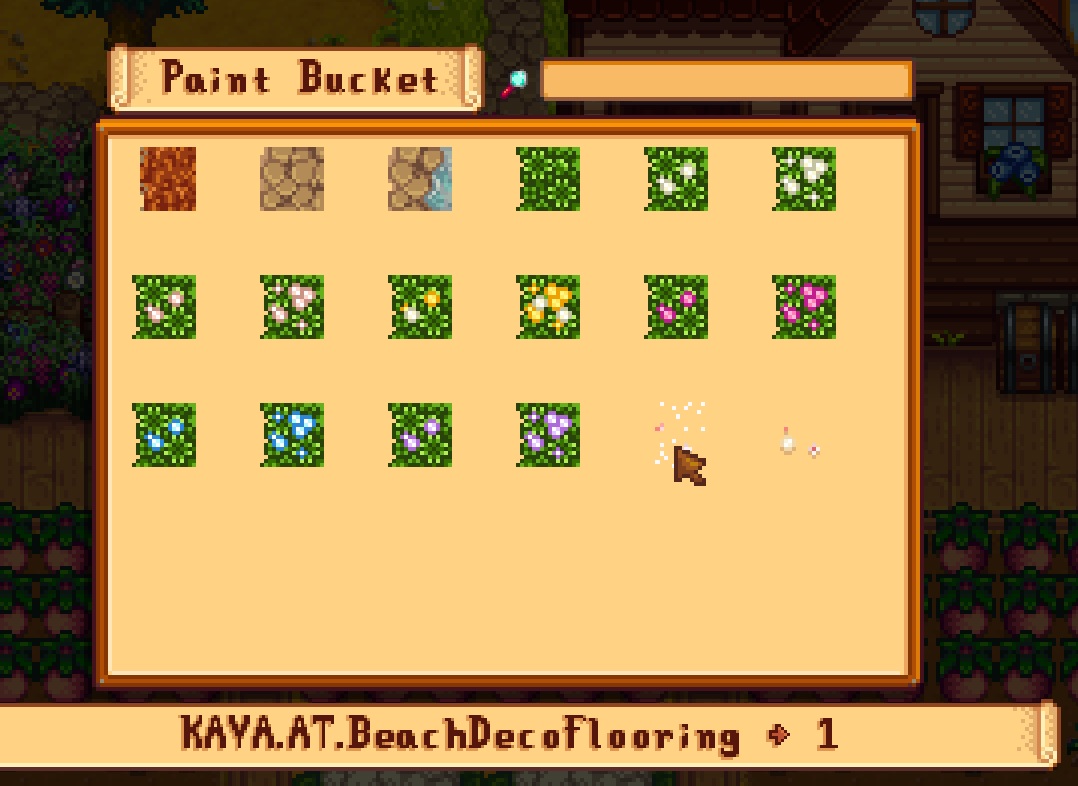
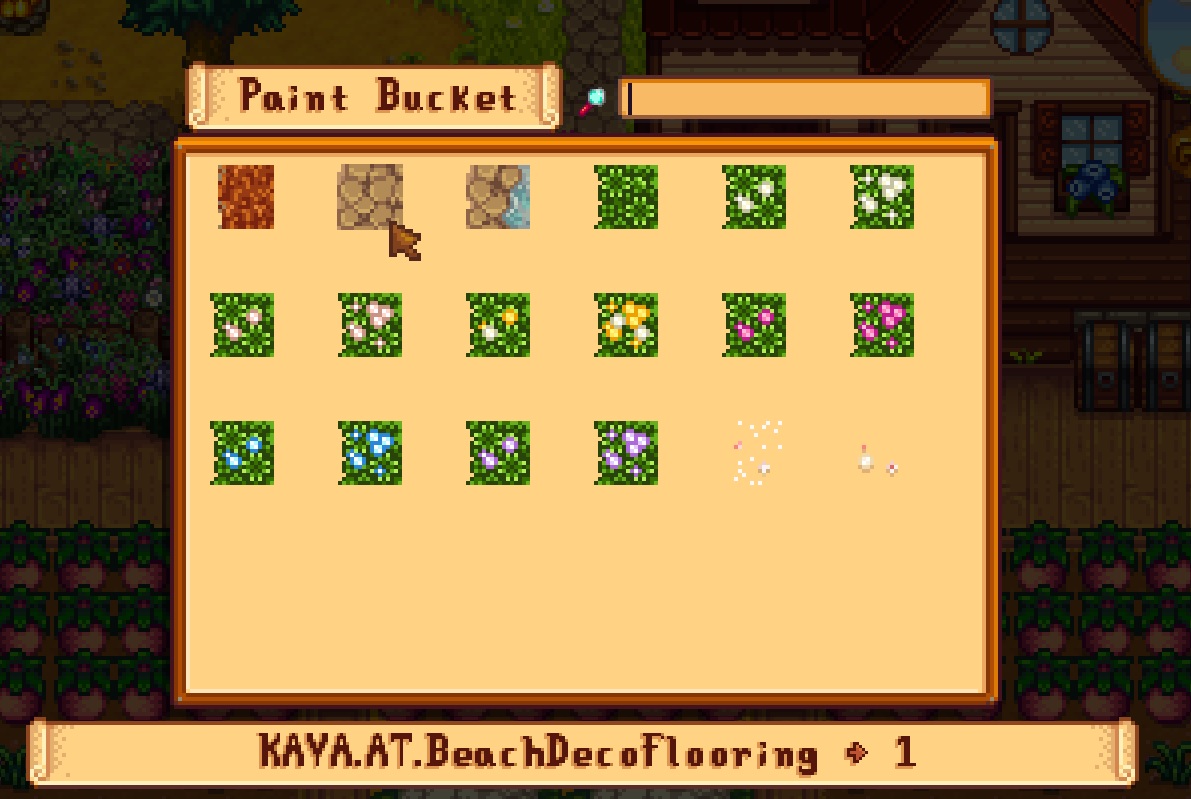
does anyone know how to change the name that's shown there for one of the textures? Because it's the same name for 2, one texture always replaces the other every 3-4 ingame days
vapid skiff
hello i need help, everytime i walk to fish pond, the game just crash and closed, is there something can fix the issue?
wanton nymph
wanton nymph
does anyone know how to change the name that's shown there for one of the textur...
the flower textures shown are all numbered 1-13, but somehow the 2 stone textures and the 2 glitter textures have identical names, which explains why the game constantly swaps them 😦
dapper gazelle
It looks like Kaya has the glittery one set as a non-seasonal texture, but the stone ones set as the seasonal texture for the same items, and I suspect those are in conflict with each other. That said, it also looks like she set both the wood and gravel floors to do the same thing... which are you using @wanton nymph--the wood path or the gravel path?
wanton nymph
dapper gazelle
It looks like Kaya has the glittery one set as a non-seasonal texture, but the s...
I use the gravel floor
dapper gazelle
ok! and which look are you trying to achieve again: the glittery look or the stone look?
wanton nymph
I want the glitter ;_;
but it would also be nice if I could use the stone one in a different corner of my farm, at least that was my design plan for the future
dapper gazelle
okie. I would suggest going into the [AT] Beach Flooring folder and deleting Gravel_Fall, Gravel_Spring, Gravel_Summer, Gravel_Winter from your folder. Since you want to do the beach stone thing later, I would say also delete WoodPath and leave the WoodPath seasonal ones.
wanton nymph
maybe if I could re-name the stones to 3 and 4 it might work? But I don't know how to rename, or if that's even possible, I have looked through all settings and didn't find a way for that
hidden tinsel
Hey does anyone have any recolor mod recommendations that work with sve and ridgeside? I’m just looking for something to make the game look prettier
dapper gazelle
this shooould allow you to use gravel paths to achieve the glitter look, and the wood paths later on to achieve the beach tide stone look
wanton nymph
dapper gazelle
okie. I would suggest going into the [AT] Beach Flooring folder and deleting Gra...
oh, that's a good idea, I'll try that now, thank you so much! 🙂
it seems to have worked! 😄
dapper gazelle
that's awesome!
safe spade
https://smapi.io/log/24fffb49733b455ea73cfd4484347779 i cant load any saves new or old it gets stuck all the time (all mods are updated some just still show they not updated trust me i checked)
native dragonBOT
Log Info: SMAPI 3.18.0 with SDV 1.5.6 (build 22018) on Microsoft Windows 10 Home, with 366 C# mods and 745 content packs.
Suggested fixes: One or more mods are out of date, consider updating them
vapid skiff
I need help, my game just crash and closed everytime walk to my fishpond.
I've try reinstall, but nothing changed.
I dont know how to fix this
(I play on Android)
Here my log:
https://smapi.io/log/1ab8d46f9d0240e8a79bbc6ae6aa0fad
native dragonBOT
Log Info: SMAPI 3.7.6.1 with SDV 1.4.5 on Android Unix 4.14.190.61, with 33 C# mods and 20 content packs.
Suggested fixes: One or more mods are out of date, consider updating them
lament prairie
Something in your fish pond possibly in the list of things it needs seems broken
I can’t really determine more from the log unfortunately
vapid skiff
lament prairie
I can’t really determine more from the log unfortunately
it seems an issue with JsonAssets, & RSV.
Ridgeside Village apparently uses JsonAssets to add new items. But the huge flaw with JA;
i dont have laptop or pc to fix it 
vapid skiff
let me try use warp snitch, hope its work
 wheat harbor
Whenever I go far east of Clint's (im using stardew expanded and ridgeside village), i get stopped my an invsible wall just after the stone bridge, it says something about installing Grampleton fields. I don't see it on nexus mods, does anyone know how to download it?
scarlet quail
It's in SVE optional files
safe spade
safe spade
https://smapi.io/log/24fffb49733b455ea73cfd4484347779 i cant load any saves new ...
Im sadly still having this issue
scarlet quail
safe spade
https://smapi.io/log/24fffb49733b455ea73cfd4484347779 i cant load any saves new ...
Load the file and don't touch it
safe spade
scarlet quail
Load the file and don't touch it
I did for 10 minutes
I can try to let it load longer tho
scarlet quail
It may take a long time with 1146 mods and no spritemaster
safe spade
Spritemaster?
native dragonBOT
SpriteMaster (https://www.nexusmods.com/stardewvalley/mods/4922) is a mod that resamples the game's graphics to be smoother and improves performance.
Nexus Mods :: Stardew Valley
SpriteMaster resamples all of the game's artwork to make it look smoother - a so-called 'HD' effect, and also implements game optimizations and load-time improvements to make the game run faster.
scarlet quail
Disable resampling if you don't like the graphical changes
safe spade
Will it overwrite Customs sprites? (have some sprite mods)
scarlet quail
No
Just smooths stuff. I personally disable resampling and still get the performance improvements
wheat harbor
scarlet quail
It's in SVE optional files
Do you know where I can find it?
I don't see optional files in the folder.
scarlet quail
On Nexus optional files
vapid skiff
lament prairie
On Pc I would say to install warp snitch
omg its works after i try all different version haha thanks a lot for helping me
vapid latch
scarlet quail
Just smooths stuff. I personally disable resampling and still get the performanc...
never knew spritemaster was supposed to bring performance improvements lol. i just checked and i get 10-15 fps less with it ON 
scarlet quail
That sounds like a bug Ameise would love to figure out
(Ameise is creator of SpriteMaster)
safe spade
scarlet quail
Just smooths stuff. I personally disable resampling and still get the performanc...
update it loaded and the crashed https://smapi.io/log/2fdad8c52d604cca96c55b677c66bfbf
native dragonBOT
Log Info: SMAPI 3.18.0 with SDV 1.5.6 (build 22018) on Microsoft Windows 10 Home, with 369 C# mods and 747 content packs.
Suggested fixes: One or more mods are out of date, consider updating them
safe spade
also it did not give me a crash log
scarlet quail
Several possible problems
Reinstall ARV - ARV characters are trying to spawn in a nonexistent house that should exist
vapid latch
please update mods
safe spade
my mods are updaed
yes sampie says there are updates but i checked
also what was ARV again
safe spade
can you send me the discord
scarlet quail
Should be on ES's page
Or posts
On phone ATM so can't find link easily to copypaste
safe spade
il try again with the ARV beta
https://smapi.io/log/78986e890b914b958e91793a0b0bb284 new log still crashes but the ARV errors are gone
native dragonBOT
Log Info: SMAPI 3.18.0 with SDV 1.5.6 (build 22018) on Microsoft Windows 10 Home, with 369 C# mods and 747 content packs.
Suggested fixes: One or more mods are out of date, consider updating them
safe spade
scarlet quail
Three, Garbage cans might have issues
also how do ya mean that? should i maybe fix my game through stream?
vapid latch
safe spade
also how do ya mean that? should i maybe fix my game through stream?
before you updated, better garbage cans threw out an error as well. that one is now gone in the new log
safe spade
vapid latch
before you updated, better garbage cans threw out an error as well. that one is ...
ohhh i look if it load without still
safe spade
scarlet quail
Are you able to move before the crash?
no
this happeds in any save btw even a fresh one
safe spade
im currently looking if it loads without the garbage mod
otherwise i might try to repair the game (why i did not do that befor idk)
update it died again
safe spade
i did not add any XNB mods
i know those cause more harm then good
acually 3 files were fixed
i see if it works now
still dies
scarlet quail
At this point I'd be thinking event viewer would show why it would crash, but that's beyond me
 plain pebble
safe spade
scarlet quail
At this point I'd be thinking event viewer would show why it would crash, but th...
plain pebble
safe spade
scarlet quail
At this point I'd be thinking event viewer would show why it would crash, but th...
THERE IS SOMTHING IN IT
dusty spruce
i mean, in theory you could write a PowerShell script to do so
safe spade
scarlet quail
At this point I'd be thinking event viewer would show why it would crash, but th...
vanilla also crashes!
its stardew itself that the issue
safe spade
okay a fully vanilla save starts up still dose not explane why i get an crash error
 spice sigil
I just downloaded a mod off nexus mods, what folder do I put them in again?
scarlet quail
Whatever mods folder SMAPI specified when it installed
nimble nimbus
near terrace
I'd add on to all of this and suggest that <@137901949822566400> install their m...
I know its much later, but would I have to manually download each mod again? Or can I just extract it from my downloads in vortex? Im unsure how vortex's compiling works
scarlet quail
!log
native dragonBOT
Can you upload your SMAPI log to https://smapi.io/log (see instructions on that page) and share the link here?
spice sigil
I have a mod in my mods folder that isnt working
scarlet quail
spice sigil
I have a mod in my mods folder that isnt working
refer to the governor
That's why I called that command XD
spice sigil
The !log command?
scarlet quail
mhm
native dragonBOT
If you would like a guide to setting up mods for Stardew Valley, check out the getting started guide! https://stardewvalleywiki.com/Modding:Player_Guide
scarlet quail
SMAPI is literally the mod loader. if you don't have SMAPI, you're not gonna get any mods on your file that aren't xnb
And well
!xnbzola
native dragonBOT
An XNB mod replaces some of your game's .xnb files to change the game (unlike newer mods that go in your Mods folder). This is an older type of mod that's no longer recommended, and can cause a number of issues. See https://stardewvalleywiki.com/Modding:Using_XNB_mods for help using them (and a list of alternatives using Content Patcher), and https://stardewvalleywiki.com/Modding:Editing_XNB_files for help unpacking & editing them (including for use with Content Patcher).
https://media.discordapp.net/attachments/156109690059751424/575085766426886145/ZolasFury.png
 scarlet quail
TL;DR: Don't use XNB mods, install SMAPI
scarlet quail
use the readme so you can install manually - I assume you're on Linux. I don't know what's going wrong from your "it won't work" thing and I don't have Linux, so you'll have to use the manual instructions unless someone else knows it
scarlet quail
Ah, you didn't unzip the folder with the installer, did ya
scarlet quail
Got it. Anyway, the installer will tell you where the Mods folder should be.
scarlet quail
you need to put the mod you want loaded in the mods folder that the installer
I would auto install, yes.
spice sigil
that link no work

Stardew Valley Wiki
Do you want to play Stardew Valley with mods? This guide is for you!
scarlet quail
that link works just fine
nimble nimbus
Quick question - when moving from vortex to avoid compiling issues, can I take the mods ive already downloaded from vortex directly or would I have to manually download them again?
And with that, is there another mod manager I should be using or should I just do it all directly/manually through smapi?
scarlet quail
I have no clue to the first
 summer swan
nimble nimbus
Quick question - when moving from vortex to avoid compiling issues, can I take t...
summer swan
nimble nimbus
Quick question - when moving from vortex to avoid compiling issues, can I take t...
As far as I remember Vortex should store all the zips at one location.
scarlet quail
the second, tbh it's recommended to just do it manually, but if you must use a mod manager, use Stardrop
summer swan
You can just move them "elsewhere". I don't remember how the folder is called unfortunately.
dusty spruce
nimble nimbus
Quick question - when moving from vortex to avoid compiling issues, can I take t...
Most of us just install manually; if you really can’t be assed, use Stardrop
Eh ninja’d
nimble nimbus
dusty spruce
Most of us just install manually; if you really can’t be assed, use Stardrop
Yeah I'll end up doing it manually then, thats all good - thanks!
nimble nimbus
summer swan
As far as I remember Vortex should store all the zips at one location.
Ill find it, just want to make sure vortex doesn't make any changes to the modded files so that I would have to download them again
dusty spruce
I really need to work on the config moving mod to make updates easier
spice sigil
scarlet quail
There's literally text on my end
Im back to possibly be dumb
summer swan
There is just one important thing: After you copied your zips "elsewhere" you have to unmanage the game in Vortex. I don't know for SDV but for other games you can get in trouble otherwise.
spice sigil
Never mind
nimble nimbus
summer swan
There is just one important thing: After you copied your zips "elsewhere" you ha...
ok sweet, will do
spice sigil
I couldnt think of a way to put it
nimble nimbus
thank you @summer swan - managed to find the zip files too, they're at appdata/roaming/vortex/downloads
I appreciate the help lads/ladesses
summer swan
@nimble nimbus If you're lucky the mods might already be installed where they should be. Check the mods folder inside the game folder. But I only used Vortex after the release. Things might have changed.
nimble nimbus
Ahh wonderful, they're all there
I'm going to do a backup of them regardless, just to ensure that vortex doesn't mess with anything
summer swan
And after you unmanaged SDV: Start the game and check if SMAPI "complains".
nimble nimbus
hopefully no wonderful wall of repeating red text, we'll see how it goes lmao
scarlet quail
Okay the tagging is unnecessary, but aside from that, what's up?
spice sigil
So what happend this time is that, I need to put the C/: thing into steam
But I dont get that
scarlet quail
oh you mean
spice sigil
Any were
scarlet quail
!launchoptions
native dragonBOT
If you're using Steam or GOG on Windows, you will need to set your launch options in order for Steam/GOG to automatically launch with SMAPI. The SMAPI installer will tell you what to set as the launch options when it completes (green text). You can find instructions (with screenshots) on how to do that here: https://stardewvalleywiki.com/Modding:Installing_SMAPI_on_Windows#Configure_your_game_client
scarlet quail
?
scarlet quail
Clear up something for me: you on linux or windows?
spice sigil
Windows
summer swan
You don't know where to put it in or where you're stuck?
scarlet quail
The text is there then
spice sigil
The text is were!
scarlet quail
it's got images where to put the text
spice sigil
ik that
scarlet quail
And the default for most is "C:\Program Files (x86)\Steam\steamapps\common\Stardew Valley\StardewModdingAPI.exe" %command%
summer swan
Right after you installed SMAPI in the window.
spice sigil
I now feel the mosy stupid as ever
summer swan
If you don't have Steam installed in Program Files (x86) you just need to adjust the link accordingly.
spice sigil
Now when I try to launch it says "The system cannot find the path specified"
scarlet quail
Please, please tell me you happened to actually read the end message on the SMAPI installer
summer swan
Calm down. Where is your Steam installed?
scarlet quail
Because it tells you where it is. Otherwise we're going step by step here
spice sigil
hoary bane
Are you on Steam?
Yes
hoary bane
Can you run the installer again and pick the manual option?
scarlet quail
click the cog for Stardew Valley in steam
hover over manage, then click browse local files
summer swan
Or they just go to properties and let Steam tell them where the game ist.
spice sigil
scarlet quail
hover over manage, then click browse local files
ok
scarlet quail
assuming you have that up
click the right side of the top part that has the filepath
e.g. C:\Program files\ etc.
or whatever the folders at the top end in stardew valley
you'll see a long sentence
paste it here.
spice sigil
scarlet quail
click the right side of the top part that has the filepath
WHATS A FILEPATH
hoary bane
It's the road to a folder, basically. How you get from point a to b.
spice sigil
the one that starts with search?
scarlet quail
wince this might be a problem if you don't know what a filepath is
OH
you're close
hoary bane
Beside it.
summer swan
What you see at the top of the files: C: > Steam > and so on. You can click on that in windows explorer and you get the full path.
hoary bane
To the left.
scarlet quail
click the EMPTY space to the left of it
you'll get a long line of highlighted text
spice sigil
The search?
spice sigil
the refresh arrow?
scarlet quail
a little more left
hoary bane
Too far.
spice sigil
The down arrow?
hoary bane
Finding waldo but for the path lol.
scarlet quail
click the EMPTY SPACE
spice sigil
YOU SHOULDA BEEN SAYING RIGHT
scarlet quail
no, Dungeon, no right.
spice sigil
Im confused
summer swan
This thing.
 scarlet quail
Click in the space where there is NOTHING to the right of what purple circled
scarlet quail
FINALLY
hoary bane
summer swan
Exactly that. 😄
scarlet quail
Alright so we have several problems though here
First up, your Stardew is installed in your D: Drive
so you mis-installed SMAPI most likely
summer swan
SMAPI should detect the game.
spice sigil
DANG IT
scarlet quail
Really? it doesn't auto C: drive it?
summer swan
I hadn't to change anything during installation.
scarlet quail
Interesting
summer swan
Or my memory is wrong.
scarlet quail
Okay then you should be good
spice sigil
in steam
scarlet quail
let me write up what you need to write in the launch options
spice sigil
But not for the smapi download
scarlet quail
should be ez
summer swan
@spice sigil They will give you a "path" and then you just copy and paste it into your launch options. It just needs to be adjusted a little bit.
scarlet quail
"D:\SteamLibrary\steamapps\common\Stardew Valley\StardewModdingAPI.exe" %command%
That's what you need to put in Launch Options
hoary bane
Can you take a screenshot of your file explorer?
summer swan
What didn't work? You get an error?
spice sigil
An error occurred while updating Stardew Valley (missing executable)
scarlet quail
Toldja SMAPI didn't install in the right place
spice sigil
hoary bane
Can you take a screenshot of your file explorer?
How do I take screenshots?
scarlet quail
that's.... not helpful for them-
hoary bane
😂
hoary bane
I mean technically it would solve that error. 
summer swan
I guess that means I was wrong?
spice sigil
scarlet quail
first, uninstall SMAPI
ok
scarlet quail
Then use the installer and instead of the usual 1 enter 1 enter
do 1, enter, 2, write that filepath above (not my launch options, your filepath you pasted in), then enter
scarlet quail
Okay, even more simplified
spice sigil
Thanks
scarlet quail
Dungeon, first up. did you uninstall SMAPI?
spice sigil
Yes
hoary bane
spice sigil
How do I take screenshots?
Windows key + Print screen iirc. Snip shot should be Ctrl + shift + R(or is it S)
scarlet quail
You are given two options, much like you installed it originally
spice sigil
right?
scarlet quail
right.
spice sigil
k
scarlet quail
You have to type the number 1 or the number 2 to continue here, 1 to install, 2 to uninstall
You uninstalled, so 1 now
Enter
hoary bane

spice sigil
Download SMAPI 3.17.2?
summer swan
No.
scarlet quail
that is NOT THE INSTALLER
summer swan
You already downloaded it. Just start the installer. 🙂
scarlet quail
you already have downloaded it, so open the installer you used to uninstall it
scarlet quail
Okay. Now it should be asking if you want to install or uninstall anything in the window
hoary bane
Smapi's latest version is 3.18.0 though.
spice sigil
no SMAPI here
scarlet quail
facepalm
spice sigil
It isnt
scarlet quail
Dungeon I want to help you but you're not doing what I've requested
scarlet quail
You didn't delete the installer after you uninstalled SMAPI, no?
spice sigil
I did
summer swan
The file you used to uninstall smapi: You use it now to install. It's one file for both things.
spice sigil
oh
scarlet quail
Please undelete the installer, run the installer, and choose 2 to uninstall SMAPI.
hoary bane
Naturally.
 lilac bramble
Hello I’m using Mac OS Monterey and I am trying to update my smapi but it keeps on saying failed to create coreclr is there a way to fix this?
spice sigil
lilac bramble
Hello I’m using Mac OS Monterey and I am trying to update my smapi but it keeps ...
WAIT YOUR TURN
scarlet quail
Oh hell no
Dungeon don't you be rude to people
I will 100% stop helping you if you're gonna gatekeep others from asking about their issues
spice sigil
scarlet quail
I will 100% stop helping you if you're gonna gatekeep others from asking about t...
It was a joke :c
hoary bane
I'm wheezing.
summer swan
spice sigil
It was a joke :c
It was a very bad joke.
scarlet quail
lilac bramble
Hello I’m using Mac OS Monterey and I am trying to update my smapi but it keeps ...
For the record, someone else had this particular issue earlier. I don't know the problem, but we're technically waiting on technical minded people to chime in
summer swan
@spice sigil Is your problem in regards to understanding what Agent Lyoko asks you to do "lack of pc knowledge" or "language"?
spice sigil
summer swan
<@965746403177553960> Is your problem in regards to understanding what Agent Lyo...
All of the above
summer swan
What's your native language?
spice sigil
english
scarlet quail
Then it's the former
spice sigil
I am not fluent in PC
scarlet quail
We both speak English as our first language, so it's not language
hoary bane
spice sigil
I am not fluent in PC
Did you uninstall smapi?
scarlet quail
it's PC Knowledge, which tbh makes me worried for you having mods at all, since usually modding requires someone with at least basic computer terminology knowledge
I'm still willing to help, but like... it's gonna be worrisome
spice sigil
scarlet quail
it's PC Knowledge, which tbh makes me worried for you having mods at all, since ...
I know some stuff
hoary bane
That's fine, one can learn as they go.
spice sigil
So, I have all the smapi installers in the recycle bin
lilac bramble
scarlet quail
For the record, someone else had this particular issue earlier. I don't know the...
Dang ok, thanks for the help.
spice sigil
Now what
scarlet quail
eye twitches
hoary bane
Can you reread what Lyoko said a few messages back?
spice sigil
ok
scarlet quail
y'know what, screw trying to get you to undelete them. Download the SMAPI installer from SMAPI io again
Do not delete anything unless I specifically say delete now, Dungeon
hoary bane
spice sigil
ok
Actually, do you want to read the guide instead? Iirc there should be picture guides on it.
spice sigil
I can undelete the 3.18.0 installer
hoary bane
!gettingstarted
native dragonBOT
If you would like a guide to setting up mods for Stardew Valley, check out the getting started guide! https://stardewvalleywiki.com/Modding:Player_Guide
scarlet quail
Nope, not gonna deal with it, just redownload
spice sigil
ok
scarlet quail
let me know when it's downloaded and you've unzipped the folder you downloaded.
spice sigil
unzipped
scarlet quail
yes.
spice sigil
press one correct?
scarlet quail
hit the number 2. Then hit the enter key
spice sigil
k
scarlet quail
you already installed, but you keep deleting the installer rather than uninstalling, so we're doing the uninstallation now.
spice sigil
ok
scarlet quail
Do not delete the installer or I'll probably ragequit at this point XD
spice sigil
ok
gaunt gust
Lyoko, feel free to take a breather XD
scarlet quail
safe spade
the module coreclr.dll is failing apprently
This person and AsianJesus so far
gaunt gust
lilac bramble
Hello I’m using Mac OS Monterey and I am trying to update my smapi but it keeps ...
hmm
scarlet quail
Alright dungeon, you should have uninstalled SMAPI now
gaunt gust
that's known for sierra but not monterey
spice sigil
idk how
scarlet quail
So. Double click on install on windows bat again.
you should have the same prompts as earlier.
spice sigil
I still have that up
scarlet quail
okay, what does it say?
specifically, what is the last text on it
Last sentence on it, that is.
spice sigil
Type the file path to the game directory (the one containing 'Stardew Valley.dll'), then press enter.
scarlet quail
raises eyebrow one sec, let me run my own SMAPI installer. I swear that uninstalling should be automatic but I could be wrong
spice sigil
kk
scarlet quail
although I should copy out my config because I like pretty colors...
spice sigil
lel
scarlet quail
Oh, I'm a dumbass. That's why you weren't able to figure out the word "uninstall". I'll own that one.
spice sigil
ok
scarlet quail
Do you remember what you typed in when you ran the SMAPI installer the first time?
spice sigil
nope
scarlet quail
type that in again.
well. Shit. Let's hope the install path works instead this way.
give me a moment
spice sigil
Is it this? D:\SteamLibrary\steamapps\common\Stardew Valley
scarlet quail
in the window you have up that says "type the file path to the game directory" and stuff
type D:\SteamLibrary\steamapps\common\Stardew Valley
yeah
scarlet quail
it will give you two options. Honestly at this point just hit install
so press 1, then press the enter key
spice sigil
kk
"D:\SteamLibrary\steamapps\common\Stardew Valley\StardewModdingAPI.exe" %command%
WE DID IT
scarlet quail
That second part is the launch options
Not the file path to put in the installer D:
Assuming you did that, and put the launch options in steam, it should now work.
spice sigil
Thanks Lyoko
scarlet quail
Make sure your mods are in the mods folder
spice sigil
They are
scarlet quail
Good. They should load, assuming you have the dependencies for them, if they need them
Have fun modding
scarlet quail
yep which means you're missing a dependency mod most likely
scarlet quail
now that your SMAPI is loading though you can actually get the log if what it tells you isn't comprehensible
But if it is, follow what SMAPI says, you'll get it running eventually
native dragonBOT
Can you upload your SMAPI log to https://smapi.io/log (see instructions on that page) and share the link here?
native dragonBOT
If finding a log is too confusing and you're able to load your save, you can install the In-Game SMAPI Log Uploader to get the log without having to search through the files. Simply hold Left Alt in game and then click the Pufferfish symbol and the log will automatically be uploaded to smapi.io! https://www.nexusmods.com/stardewvalley/mods/13979

Nexus Mods :: Stardew Valley
Provides a means of uploading a SMAPI log to SMAPI.io from within the game, using a custom hotkey, a hidden UI button, and on a critical game error.
spice sigil
[SMAPI] Skipped mods
[SMAPI] --------------------------------------------------
[SMAPI] These mods could not be added to your game.
[SMAPI] - UI Info Suite 2.0.0 because it's no longer compatible. Please check for a newer version at https://www.nexusmods.com/stardewvalley/mods/1150 or https://smapi.io/mods

Nexus Mods :: Stardew Valley
Provides helpful information about things around you designed to help you be aware of what's going on without feeling like you're cheating.
scarlet quail
!uiinfosuite
native dragonBOT
If you go to https://github.com/Annosz/UIInfoSuite2/releases, you can find UI Info Suite 2, which works with Stardew 1.5.5+. Download the first zip, not the source code.
spice sigil
Thats the problem
scarlet quail
you're using the old version which won't work
And - fuck. You have to download off github
spice sigil
WHATS WRONG WITH THAT
scarlet quail
Like it's possible (hell, I do it constantly) but I was really hoping to avoid showing you other mod sites and what download buttons to click
Since it can be confusing
click on the link there, download "UIInfoSuite2.zip" under the "assets" part by clicking on it
do not download anything with "source code" next to it.
spice sigil
im it github
scarlet quail
You clicked the link the gov called?
spice sigil
the github one?
scarlet quail
Yes.
spice sigil
Yeah
scarlet quail
Then you should already see the assets section in the first post
scarlet quail
download "UIInfoSuite2.zip" under the "assets" part by clicking on it
Yes, the top post
spice sigil
k
scarlet quail
the community center and other displayed stuff
spice sigil
Did that
scarlet quail
you downloaded it?
spice sigil
yeah
scarlet quail
Unzip the zip and put the unzipped folder in your mods folder (and delete the old UI Info Suite one that's in there)
scarlet quail
There ya go then
spice sigil
Thanks
scarlet quail
Happy modding
spice sigil
You too
hoary bane
Awwe happy ending. Good work Lyoko!
wheat harbor
I'm trying to download Grampleton Fields but it won't download when I get it off Nexus.
I click Mod Manager option and click slow download.
Once it reaches 0, it just doesn't do anything.
summer swan
Which mod manager are you using?
wheat harbor
SMAPI
spice sigil
Is it a manual download or vortex?
summer swan
SMAPI is not a mod manager.
wheat harbor
spice sigil
Is it a manual download or vortex?
Manual
spice sigil
Ok
summer swan
Use manual download and not "with mod manager".
wheat harbor
summer swan
SMAPI is not a mod manager.
I used it to download all my mods and that worked.
summer swan
Or do you mean Stardrop?
dire fractal
Hello! I'm trying to use a custom map called Lavender meadows, but it's not showing up upon completing a new file.
scarlet quail
Link to the mod?
(So I can figure out what it's supposed to be doing behaviorally)
!log also in case SMAPI's not loading it
native dragonBOT
Can you upload your SMAPI log to https://smapi.io/log (see instructions on that page) and share the link here?
dire fractal
native dragonBOT
Log Info: SMAPI 3.17.2 with SDV 1.5.6 (build 22018) on Microsoft Windows 10 Home, with 65 C# mods and 214 content packs.
Suggested fixes: Pytk isn't compatible with newer SMAPI performance optimizations, consider removing it, One or more mods are out of date, consider updating them
dire fractal

Nexus Mods :: Stardew Valley
Grassy meadows of farmland bisected by a freshwater river and surrounded by wild lavender forests.
scarlet quail
Oh this is interesting. Let's see what's in the mod because your log is... telling me something weird
dire fractal
It is kind of a new way to add a map
scarlet quail
correct, Ness
wheat harbor
Oh.
wow
when I reach far east of grampleton theres a path that keeps going but is blocked off by an invisible wall
is that anything special?
scarlet quail
nope ness, just the far end of the area
Anyway, Jelly
I have several questions
First, what recolor are you using, if any?
dire fractal
The Daisyneko
scarlet quail
Earthy?
dire fractal
Do I have too many recolors? yes, earthy
scarlet quail
Okay so not yellog, thank god
anyway
go to your mods, and open the [CP] DaisyNiko's Tilesheets folder
then go into the assets folder, then into the "earthy" folder
Do you see a file called "spring_daisyextras"?
dire fractal
yep
scarlet quail
Okay. So we have a problem then
Your log says
Mod crashed when loading asset 'Maps/CFL_Map/DaisyNiko.LavenderMeadows/Lavender Meadows'. SMAPI will use the default asset instead. Error details: SContentLoadException: Custom Farm Loader loaded map '../[CFL] Lavender Meadows/cfl_maps/LavenderMeadows/LavenderMeadows.tmx' with invalid tilesheet path 'spring_daisyextras.png'. The tilesheet couldn't be found relative to either map file or the game's content folder.
 lusty cliff
tryna play the Stardew Roguelike mod but I can't get it to work, can anyone help with this?
scarlet quail
define "not getting it to work" amgee
dire fractal
Are there two pngs named the same?
lusty cliff
I'm launching with smapi, I got the mod in the Mods folder. Just launches like the normal game
like vanilla
scarlet quail
there are several PNGs in the daisynikos but nothing that would hurt you, Jellychu

 scarlet quail
Please reinstall Lavender Farms, DaisyNiko's Tilesheets, Earthy Recolour, Custom Farm Loader, annnnnnd this Minecart Patcher thing, Jelly
dire fractal
Okay
scarlet quail
then, upon booting to the title screen, give log
lilac bramble
gaunt gust
hmm
Actually I’m now on Ventura my Mac must have auto updated idk if that helps solve the problem
dire fractal
scarlet quail
then, upon booting to the title screen, give log
Provide the log after gettting to the menu or upon trying to start a new file
dire fractal
So just quit when the menu pops up
dire fractal
native dragonBOT
Log Info: SMAPI 3.17.2 with SDV 1.5.6 (build 22018) on Microsoft Windows 10 Home, with 65 C# mods and 216 content packs.
Suggested fixes: Pytk isn't compatible with newer SMAPI performance optimizations, consider removing it, One or more mods are out of date, consider updating them
dire fractal
new log
scarlet quail
Looks like the reinstalls maybe worked
Relaunch, then try to make a new farm on Lavender Farms
should be available as a separate farm, not a replacer
scarlet quail
!autolog
native dragonBOT
If finding a log is too confusing and you're able to load your save, you can install the In-Game SMAPI Log Uploader to get the log without having to search through the files. Simply hold Left Alt in game and then click the Pufferfish symbol and the log will automatically be uploaded to smapi.io! https://www.nexusmods.com/stardewvalley/mods/13979
Nexus Mods :: Stardew Valley
Provides a means of uploading a SMAPI log to SMAPI.io from within the game, using a custom hotkey, a hidden UI button, and on a critical game error.
scarlet quail
I have the pufferfish thing hidden and instead just use a hotkey
so I press F7 and bam, log made
dire fractal
it's still under custom mods in the menu, is that okay?
scarlet quail
Insane utility for me, but more importantly, if I ever deal with people in here that don't know how to get a log and either don't want to or cannot find their log, it's used
pardon, jelly?
dire fractal
I can look into it.
scarlet quail
What do you mean by "custom mods in the menu"?
 cerulean swallow
hey guys so question. do I need to change this mod or it's just fine?
 dire fractal
It's fine, I'll make the new map first
scarlet quail
it's fine, Gazelle
cerulean swallow
is there anywhere else beside nexus to find an update for this mod?
(MG) Flowering Fields 2.0.0: https://www.nexusmods.com/stardewvalley/mods/1981

Nexus Mods :: Stardew Valley
A More Grass pack for Starblue Valley. (Because you can never have too much flower grass.)
dire fractal
Heyo, it's working now. Thanks much!
scarlet quail
No probs. Glad the reinstalls worked so that it could properly identify the tilesheets
Gazelle, does it not work at present?
More Grass should still be updated, which is what that mod needs as the framework
cerulean swallow
scarlet quail
Gazelle, does it not work at present?
no it says it need update
native dragonBOT
Can you upload your SMAPI log to https://smapi.io/log (see instructions on that page) and share the link here?
cerulean swallow
native dragonBOT
Log Info: SMAPI 3.17.2 with SDV 1.5.6 (build 22018) on Microsoft Windows 10 Home, with 23 C# mods and 25 content packs.
Suggested fixes: One or more mods are out of date, consider updating them
scarlet quail
it says it loaded on that log
So you may need to exit so the log file updates
Exit the game, that is
cerulean swallow
more grass is working but I felt it's need more grass or they are not growing as normal
scarlet quail
Oh so it just doesn't seem like it's working to you? there's no specific error you see that says it needs an update?
cerulean swallow
scarlet quail
Oh so it just doesn't seem like it's working to you? there's no specific error y...
no except that one mod that I sent earlier which it asked for an update
scarlet quail
Ah, yeah no that's not an update problem then probably
that's most likely a manifest error
cerulean swallow
scarlet quail
that's *most likely* a manifest error
aw that's sad
scarlet quail
you don't need to update it if you don't want to, but if you really want that update error gone just fix it in the manifest
cerulean swallow
scarlet quail
you don't need to update it if you don't want to, but if you really want that up...
how do I do that?