#vanilla-tech-support
49 messages · Page 13 of 1
 tribal nacelle
 tulip islandBOT
Can you upload your SMAPI log to https://log.smapi.io (see instructions on that page) and share the link here?
 radiant ivy
well it's rather my friend that keeps crashing
my game is completely fine
but my game keeps constantly crashing
tribal nacelle
Do you both have Kisekae?
radiant ivy
yes
same version
he pretty much has my entire mod list
and now he ruined my far
farm
because it's bugged
tribal nacelle
There's something wrong in your Kisekae settings, check to make sure your config is set up correctly
radiant ivy
i just got what i got with the download
it's CCP
or not it's just the unofficial patch
anyway my game normally starts up with no errors detected
nothing's wrong
tribal nacelle
@copper hollow Do you have any idea what's happening with Kisekae here?
 rocky pagoda
 cursive wigeon
Thanks for the link
 copper hollow
@radiant ivy @tribal nacelle Looks like you're missing the Kisekae files which match your options?
Error loading "KisekaeBase_male_0_0_8_0". File not found.
This is what it usually looks like, that's why I'm not sure why it's looking for this other file
radiant ivy
i did use one alteration
i switched the bottom from another mod as it was semi required
but at first this was no problem
we played a fair bit without an issue
copper hollow
I think it loads the file dynamically (the numbers are the options you selected).
radiant ivy
till he tried to change
basically he wanted to switch from female to male
and then his game crashed
and after that he couldn't join my lobby anymore
tribal nacelle
You both have the "change gender' option set to true?
radiant ivy
i mean i do
but i'm guessing my save is already fucked at this point
i can't open the social tab anymore
wait now i can?
is it because i reinstated the original Kisekae folder instead of the altered one
 proven pulsar
Would anyone happen to know or be able to figure out the coords if I were to want to put the exp bars in the bottom left corner?
radiant ivy
i mean i delted that mod because it was more in the way and it's still there in cutscenes
 full knoll
@proven pulsar check mod description/posts
there is a key making the exp bar where you want in game
radiant ivy
say just in case
is there a way to divorce by code
like wipe the title of the sort
full knoll
debug divorce <NPC> in SMAPI
radiant ivy
well i meant another player
radiant ivy
so i just type that into the smapi black box
full knoll
yep
radiant ivy
welp we fixed it
indeed
it was me altering the kisekae files
@tribal nacelle
it messed up the character model causing his game to crash
proven pulsar
@full knoll the way you do it is super simple lol hold shift than hit x and it moves it to where your mouse is
full knoll
yep
full knoll
I was just busy tbh 
@cursive wigeon https://stardewvalleywiki.com/Saves#Find_your_save_files
The game saves progress when the in-game day ends, i.e., when the farmer goes to bed, collapses from exhaustion, or collapses at 2am. All progress during a day is lost if the player quits the game without ending the day.
I'm also switching to mobile so linking/looking for stuff fast is h a r d
full knoll

full knoll
what are you trying to do?
cursive wigeon
I lost a save file
My game froze then closed and when I restarted the game my file was gone
full knoll
On the same link I gave you you got some solutions to recover them!
cursive wigeon
I tried the first one, remove the line and it did nothing
Yea I gave up on it
Thanks for the help
full knoll
wrong channel (i deleted the post )
@cursive wigeon remove the "line" ?
it's not at all what the tutorial says D:
cursive wigeon
Nope
full knoll
do you still have them? So I can try to fix it (maybe)
cursive wigeon
As soon I started the game the files reverted over to what they were
 sharp prism
Hi ! I'm trying to replace a farm map with my own but I keep getting this error and I dunno how to fix it :/
copper hollow
That's an easy fix; come ask in #making-mods-general and well help you out!
(No need to wait until nobody is talking, we often have multiple conversations there.)
 peak osprey
hey, a friend is getting an error with NPCMapLocations and Starblue both trying to load LooseSprites/map (https://log.smapi.io/qinryemL), does anyone know what the easiest fix is? it's weird bc NPCMapLocations has a starblue map?? (we fixed the error with diverse SDV already dw)
copper hollow
@peak osprey See https://www.nexusmods.com/stardewvalley/articles/102 for help fixing that.
peak osprey
oh bless thank you!
 clear holly
Hi guys, I'm new here. I'm not used to modding stuff, but I did replace one of the bachelors in game with sprites I custom made of Chief from Animal Crossing
Problem is I don't know how to make his name change... I've already tried changing a file named "NPCDispositions" like someone suggested here before but all I did was end up losing Elliott completely off of my affection table
Any ideas?
peak osprey
i would ask over in #making-mods-general actually! this channel tends to be more for game crashes and errors and stuff
clear holly
OHH my bad I thought this was a support channel FOR modding thank you oops XD
ill just copy paste it there then my apologies
peak osprey
yeah np! it gets a bit confusing don't worry
 modest meadow
What controllers are currently supported on the Android version?
full knoll
!mobilesupport @modest meadow
tulip islandBOT
@modest meadow This is support from the community, so unfortunately we can't help much with Android/iOS. You can report issues or provide feedback to the mobile developers via Reddit (https://www.reddit.com/r/StardewValley/comments/b0syp7/stardew_valley_now_available_on_android/) or the support forums (https://community.playstarbound.com/threads/stardew-valley-android-ios-known-issues-and-fixes.153425/) instead.
full knoll
Short version : we have no idea
 stray linden
Time to open up a mobile section!
 wary palm
@modest meadow any Bluetooth controller should work I know Xbox PS4 and moga and generic ones I have tried do
modest meadow
I have tried the Xbox One, PS4 and Switch Pro controllers and none of them allow me to switch my active tool.
 viral tendon
I hear there's some crazy issues with any controllers
You can move and do something else, but most of the menus and such wont work
modest meadow
Menus don't work, there is no tool hit guide, there is no way to walk slowly for more accurate positioning...
 cloud jetty
im not sure where i can go to report it but i found a bug
rocky pagoda
Tell us what it is though, as it may be well-known already, or there may be a way to avoid it.
cloud jetty
when interacting with my horse if im near its head it pops the hat off and if i move away and back it does it again
full knoll
what platform? PC?
cloud jetty
Switch
full knoll
worth reporting then
rocky pagoda
Ah, not one I've seen before.
cloud jetty
another question, how do i post on the forum? i havent used it before.. i just like to mind my business and play since its relaxing
tulip islandBOT
(@cloud jetty You leveled up to Villager! You can now join voice chat and all public channels. See #445729591533764620 for more info. Keep up the good work!)
rocky pagoda
Uh.. It's just like any other forum..?
You'll need to make an account, if you haven't already.
 dusk beacon
Will the Android version have multiplayer?
full knoll
most probably not! If I remember well, the company that takes care of android looked into it and there was too many problems with it? I can't remember but something along those lines
 loud briar
@loud briar reinstalling the app didn’t work out. I guess it isn’t a bug then but an intended feature I guess 😦
full knoll
 you pinged yourself
loud briar
I tried to link my own post^^
tulip islandBOT
This is support from the community, so unfortunately we can't help much with Android/iOS. You can report issues or provide feedback to the mobile developers via Reddit (https://www.reddit.com/r/StardewValley/comments/b0syp7/stardew_valley_now_available_on_android/) or the support forums (https://community.playstarbound.com/threads/stardew-valley-android-ios-known-issues-and-fixes.153425/) instead.
 hexed apex
Hello
 young robin
Hello
loud briar
@full knoll thanks, I'll do this and keep you all updated
full knoll
 golden jay
Hello,
I'am not sure if this is right place for this but I can't get help anywhere else. I have a problem with hosting or creating co-op game in Stardew Valley(Steam-PC). Every try of connection from my friend to mine, or from me to his game ends up with ,,Connection Failed'' comunicate. I think it's problem of my account becouse we tried on my other computer and it was the same. Also my friend joined smoothly to our other friends game. I have read a lot about such problems and nothing helped. We have been trying playing for last 10 months a lot of times and it's always the same. Please if you could give us any help I would be very grateful.
 warm hedge
Hey Vinian, this is definitely the right place to ask. I'm not sure how best to resolve your issue but hopefully someone here can.
copper hollow
@golden jay I've seen a few players with that issue, but I don't think we ever found a solution that works through Steam. Connecting by IP (using a service like Hamachi to set up the connection) should work instead though.
 opaque sigil
Hey is there a way to move the clock? As of now it blocks this merchant and I can't interact with them
opaque sigil
oh, I see the zoom now, thank you 😄
tulip islandBOT
(@opaque sigil You leveled up to Villager! You can now join voice chat and all public channels. See #445729591533764620 for more info. Keep up the good work!)
hexed apex
np
opaque sigil
okay so the zoom did not work
it's still covered by my clock, this is as zoomed out as I can get
golden jay
Hey, me again. So the hamahi gave us little progress becouse now we are able to join each other by IP, and even in the game there is couminicate that other player has joined and in the cabin there is character but secound player ends up in black screen with ,,Loading'' and thats all. Do you know any solution for this ?
 wild slate
Why can’t I invite my friend to join me? D:
rocky pagoda
Try invite only, if it gives you that option?
wild slate
It just says online/offline
My friend even tried using my ip address with no success.
rocky pagoda
Are you running the game from Steam?
wild slate
Yeah.
rocky pagoda
So you set the launch options to make it run with SMAPI?
wild slate
Yeah.
tulip islandBOT
Can you upload your SMAPI log to https://log.smapi.io (see instructions on that page) and share the link here?
wild slate
Gonna try one more restart just in case...
rocky pagoda
Restart your whole PC, if you haven't tried that already.
wild slate
Okay, restarting steam twice did it. Or maybe restarting sdv five times did it. 🤷♀️
Sorry for the trouble!!
rocky pagoda
Ah, good.
 sick bay
I don't remember.. Casks do work or do not work in a greenhouse?
copper hollow
Casks only work in the cellar (unless you use mods).
sick bay
Okay. Thank you!
 frank gulch
Is there any place where I can find all the "parameters" explained? The ones that are in the game save file.
Some are obvious like "defense" or "attack speed". But I would like to know the differences between "lucklevel" or "addedlucklevel", and explanations to many more.
hexed apex
oh a phone
when you enter the caves
it doesnt matter how much you stay in there
but when you go out
the souynd seffect would still be like you are in the caves
lik oeping invenotry and chests
 calm zodiac
!mobilesupport
tulip islandBOT
This is support from the community, so unfortunately we can't help much with Android/iOS. You can report issues or provide feedback to the mobile developers via Reddit (https://www.reddit.com/r/StardewValley/comments/b0syp7/stardew_valley_now_available_on_android/) or the support forums (https://community.playstarbound.com/threads/stardew-valley-android-ios-known-issues-and-fixes.153425/) instead.
calm zodiac
Thanks for understanding :)
 viral sundial
Got a question. Trying to launch the game after installing smapi and putting a few mods in the Mods directory. The smapi installer script said "Launch the game the same way as before to play with mods." so I click the play button in steam. Nothing happens. Game doesn't launch.
Running Arch Linux with i3wm
viral sundial
So I launched the StardewModdingAPI.bin.x86_64 file manually in a terminal. It seems to be working. So this means that whatever exe steam was launching was the wrong one. So when the script said to launch the game the same way as before to play with mods, it was lying. Is there a way to make steam launch this exe or will I have to launch it manually ever time?
full knoll
@viral sundial you didn't read correctly the tutorial
it's only for GOG users and non-window people. Steam users got an extra step
(I am getting the link)
This page explains how to install SMAPI (the tool which lets you use mods) on Windows. See also:
read part two
ah shit you're on linux.
do you have Mono installed?
(the mono-complete package)
 hidden bobcat
hi everyone! my save is stuck on the "loading..." screen. it's on a multiplayer game, but it works OK from the host side (I'm not the host) and any other save will load OK, multiplayer or not. It crashes like that with or without mod as well. This is the smapi error log: https://log.smapi.io/RwB7NyAW can anyone please help me?
full knoll
hello fellow french speaker
do you prefer your support in french or english?
(I'll be there in a minute)
hidden bobcat
Hi! Whichever, we can stick to English in case it helps someone else reading up the archive looking for a solution to the same problem? Thank you and take your time!
hidden bobcat
okay, thank you! yeah multiplayer was hard to get started, but now that we're both on windows it seems to be doing better (windows/linux was a bit of a trip)
tulip islandBOT
(@hidden bobcat You leveled up to Villager! You can now join voice chat and all public channels. See #445729591533764620 for more info. Keep up the good work!)
viral sundial
so... the windows installer tells you to change launch option in steam. But the linux installer says to run as is.
And it tells you to copy from the installer. I can't do that because my installer didn't say that.
Mine says this
full knoll
🤔
i'm finally 100% here
sdv and splatoon got my life istg
anyway
let's see
@hidden bobcat do you have any XNB mods installed?
hidden bobcat
@full knoll what's an XNB mod? A mod that replaces an XNB files?
viral sundial
If I look at the linux install page here https://stardewvalleywiki.com/Modding:Installing_SMAPI_on_Linux it says that setting launch options in steam is not necessary
This page explains how to install SMAPI (the tool which lets you use mods) on Linux. See also:
hidden bobcat
@full knoll well I think I have several of those... horse sprite and npc dialogue replacement mods. it did work just fine until a few days ago, and it also didn't work with any of these mods, but I can try again. how is it best to proceed? uninstalling and reinstalling the game completely?
viral sundial
And to answer your earlier question that I just noticed, yes I have mono installed. The game is functioning normally with mods when I run the file manually. This wouldn't be the case without mono.
full knoll
@hidden bobcat go in your sdv steam properties and verify your game files
it will delete all of them
@viral sundial can you try to re-install it?
better be safe than sorry
hidden bobcat
@full knoll but it won't delete my saves right?
viral sundial
I've tried that twice. Same result.
viral sundial
Even tried reinstalling the game, removing all remnants of game related files manually, and reinstalling smapi with all mods. Still the same problem
hidden bobcat
@full knoll then do I also delete the mods in the mods folder?
hidden bobcat
@full knoll OK am trying rn
full knoll
:3
hidden bobcat
@full knoll unfortunately, that didn't work :(
full knoll
can you send me the log?
hidden bobcat
@full knoll https://log.smapi.io/3Bb5NPxs there you are
full knoll
might be JA then, i wasn't sure (since Haywrites mods are in fact xnb mods in disguise)
hidden bobcat
@full knoll https://log.smapi.io/PT2t0z73 so should I delete JA and all the mods that work with that?
hidden bobcat
@full knoll no, it's only when I join that particular game. all the other saves work fine.
even another multiplayer game with the same host works OK
full knoll
can I have a host log too?
hidden bobcat
sure thing
full knoll
awesome
hidden bobcat
@full knoll https://log.smapi.io/1m6wiBnw there you go, the host log
full knoll
looks like you don't have both the same mods!
make the host zip their mod folder
and try with their mods
hidden bobcat
@full knoll OK, we're trying this rn! thank you for being friendly and helpful so far!
 patent hamlet
Zola is the queen of support
full knoll
"ok so you dumb shit didn't install the SAME EXTACT mods you stoopid"
patent hamlet
LMAOOO
full knoll
ash bbi ily
full knoll
hidden bobcat
(this pufferfish heart is so cute)
hidden bobcat
@full knoll unfortunately, this is still not working :(
full knoll
can I have both logs again?
hidden bobcat
@full knoll of course!
host log: https://log.smapi.io/Uwgh8Kfq
non-host log: https://log.smapi.io/fJu7NkmW
hidden bobcat
yes, we have more than 80hrs on it
viral sundial
@full knoll Saw you mention Pathos earlier. Would he know anything about how to fix my problem?
full knoll
any Linux user tbh :(
Nox, did you delete any mod since then?
because it looks like it's looking for something and can't find it
viral sundial
I bring up Pathos because I saw him on some forums back in 2016 trying to solve a similar issue.
viral sundial
oh
hidden bobcat
@full knoll I don't think we did? If anything we've been adding new mods now and then, then of course we delete the mods before reinstalling then when we update them.
full knoll
viral sundial
So if this is actually an issue with SMAPI than he would be the one to speak with. And at this point, I'm thinking that might be the case. Unless there's a more formal way to submit a bug report? Or maybe I should go post on the forums about it instead of posting in here?
full knoll
can you write your issue and ping Pathoschild#0001 ?
here in support
so he can come back to it when he gets on
@hidden bobcat did you add recently TeaTime ?
hidden bobcat
@full knoll no, we added this one maybe a couple weeks ago? The issue is much more recent than that. Althought this mod /did/ crash on another save on the host side (but not on mine) but uninstalling and reinstalling the mod seemed to make it work again.
full knoll
does any of you got tea in their inventory or chest?
hidden bobcat
The host got tea in their chest, but not their inventory. I have tea in my chests but I can't remember about my inventory (I don't think so though)
hidden bobcat
We've only ever played together, actually. We don't know anyone else who plays the game.
full knoll
Could you invite me so we can try?
hidden bobcat
Sure, give me a min
full knoll
because if it's your save i can probably fix that
viral sundial
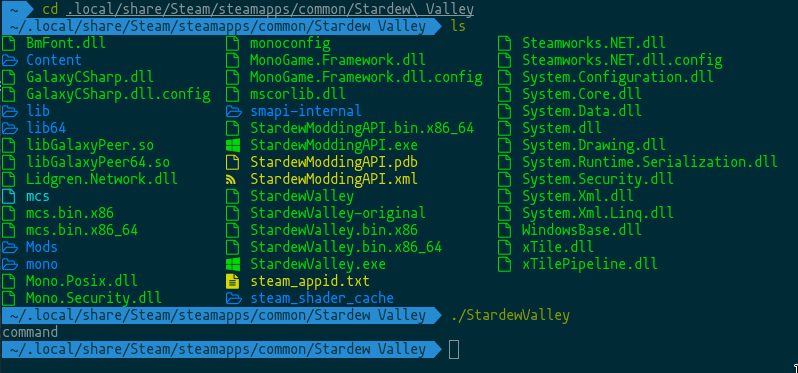
@copper hollow I'm attempting to run Stardew Valley with SMAPI on Arch Linux. Mono is definitely installed. I run "install on Linux.sh" in a terminal and the script eventually says that SMAPI is installed and that I may launch the game from steam. The webpage guide quite clearly states that modifying steam launch options for the Linux version is not necessary. After installing SMAPI and a few mods, I try launching from steam. The game doesn't launch at all. When running "./StardewModdingAPI.bin.x86_64" in a terminal, the game launches and the mods I've installed are working as expected. I tried googling to find a solution and only found a thread where you were present which was discussing a similar problem on github in december of 2016. Although I'm not sure if my problem is specifically related, you can find that thread here. https://github.com/Pathoschild/SMAPI/issues/198
Adendum: Running "./StardewValley" in a terminal makes it clear that something about this file is completely broken. See screenshot here. https://i.imgur.com/X0qvLkG.png

GitHub
#183 fixed the launcher so the SMAPI console is opened alongside the game. This apparently breaks Steam launch for some Linux users (but not all). If the launch script launches a terminal (even jus...
And now I patiently wait and see what happens.
full knoll
he should get online in about 2 to 3 hours if he doesn't work
viral sundial
It is a weekend and I just popped open an energy drink. The odds are good.
So yeah, it's not working because the game's executable just outputs "command" and doesn't actually do anything.
 feral arrow
Your saying words and I’m confused. What are you trying to do
tulip islandBOT
(@feral arrow You leveled up to Villager! You can now join voice chat and all public channels. See #445729591533764620 for more info. Keep up the good work!)
feral arrow
Thank you. I’m alright. Kinda just talking cause my computer is being slow
full knoll
you are in #vanilla-tech-support here! It's not for chatting at all, sorry
feral arrow
Oh sorry
full knoll
it's alright!
 north ivy
Ma cat.
hexed apex
he is now lost to the void
full knoll
common bug
north ivy
This bug happens often. I go outside, my cat is not there. I get inside, then go outside again, cat's there. And now I find out that he's been in the void all along.
Poor Witchy.

modest meadow
Excuse me?
Anyone know what Twitch is looking for?
Because it's sure as hell ain't the installation folder.
full knoll
...what are you trying to do I don't understand
if you do locate game and just put the exe it doesn't wok?
modest meadow
And yes, I do own the game.
hexed apex
woh that looks different
modest meadow
I prefer it over regular Steam.
hexed apex
fair
full knoll
are you following this guide ? https://help.twitch.tv/s/article/adding-a-game-and-box-art-to-the-directory?language=en_US
full knoll
modest meadow
Not much use.
full knoll
modest meadow
Already sent Twitch three emails and they haven't responded yet.
copper hollow
Yeah, this would be a question for Twitch unfortunately. You could try asking on the Curseforge Discord, they might be able to help more.
@viral sundial Can you run these commands and paste the output here?
command -v xterm
command -v x-terminal-emulator
command -v xfce4-terminal
command -v gnome-terminal
command -v konsole
command -v terminal
update-alternatives --config x-terminal-emulator
will do
copper hollow
@frank gulch re "Is there any place where I can find all the "parameters" explained? The ones that are in the game save file."
Nope. Most of the game state is written to the save file, and the game internals aren't documented much. We might be able to help here if you're looking for something specific though.
viral sundial
I can tell you though that I'm not using xfce, gnome, or konsole. I'm just using i3
so command never output anything at all and update-alternatives is command not found. Anything else I can do for you?
copper hollow
🤔
viral sundial
Not sure what the command command does lol. But I am using termite. So I tried running it on termite.
copper hollow
Which distro are you using?
viral sundial
arch
copper hollow
Figured. 😛
copper hollow
So the issue is that (a) none of the terminals SMAPI is looking for are installed, and (b) your system doesn't define x-terminal-emulator which should be a pointer to the default terminal. I'm not super familiar with Linux, but it's possible that Arch has its own alternative to x-terminal-emulator.
viral sundial
copper hollow
You could just edit the StardewValley file to use termite, but ideally I'd like to figure out if this is an issue other Arch users would have, and change the launch script to handle it if so.
viral sundial
Can command read $TERM?
If smapi could just look for $TERM it would look for "the" terminal that is installed.
Looking at the code on github now
figured it would be cs with the mono requirement lol
copper hollow
Direct link if needed: https://github.com/Pathoschild/SMAPI/blob/develop/src/SMAPI.Installer/unix-launcher.sh.
 midnight sable
Does anyone know how xp I need to have to lv up from lv 2 to lv 3?
copper hollow
@midnight sable On Discord, or in Stardew Valley?
midnight sable
Stardew valley
copper hollow
@viral sundial I'm not really a Linux user, so not quite sure how to use $TERM here. For example:
echo $TERM
> xterm-256color

xterm-256color StardewValley
> xterm-256color: command not found
You're setting the TERM locally in the script when a terminal is found wut
$TERM should already be set within the system. Should be reading it. Not writing to it
copper hollow
Yeah, that was contributed by a Linux user. It was needed for some Linux distros to enable xterm compatibility.
viral sundial
weird
copper hollow
Linux is really fragmented. Installer on Windows and Mac was figured out in 1.0, but I think Linux installation will never work for all users. I can see why so many apps only support Mac/Windows. 😛
I wish there was a terminal standard, so you could just do something like x-terminal-standard-3 StardewValley and it'd use whatever preferred terminal implements 'Terminal Standard 3.0' or something.
viral sundial
If I'm reading this corrrectly...
i'm gonna go try something
midnight sable
Does anyone know?
viral sundial
What is the value of $COMMAND?
copper hollow
That will be command -v or type, depending which worked for your distro (command -v in your case).
copper hollow
That will be ./StardewModdingAPI.bin.x86_64 $@ (if 64-bit) or ./StardewModdingAPI.bin.x86 $@ (if 32-bit).
Basically the command to run in the shell.
viral sundial
Where is this unix-launcher.sh file located in an install?
copper hollow
It gets renamed to StardewValley in the game folder, and the vanilla launcher becomes StardewValley-original.
viral sundial
ah, it's a .sh in disguise
no wonder it's only 4k
I will experiment and get back to you
Made one change and now it launches from steam with terminal output in termite.
just another elif for termite
see lines 84 and 85 https://hastebin.com/ucinofapap
If I figure out a better way to do it that doesn't require a million elifs. But for now, this makes it work for people with setups like mine using termite
full knoll
@midnight sable ask in #stardew-spoilers
viral sundial
On almost any system with a full desktop environment, one of the other terminals in that if block will be installed.
So it would make sense if I'm the only person with this problem. I'm rare. I'm playing stardew valley on arch linux with i3wm and only have termite installed.
full knoll
i can't even make sense of window so linux...
viral sundial
@copper hollow Would you be willing to add this to upstream? Or should I maintain my own?
copper hollow
Sure; can you send a pull request? I'll add it in the upcoming SMAPI 3.0.
viral sundial
Is it bad if I don't know how to do that?
I have git installed but I mostly just use it to push my dotfiles to gitlab
copper hollow
I can just add the lines myself (or I can help you with the pull request if you're interested).
midnight sable
Are Strawberrys worth buying?
tulip islandBOT
(@midnight sable You leveled up to Villager! You can now join voice chat and all public channels. See #445729591533764620 for more info. Keep up the good work!)
viral sundial
I woud like to learn the pull request thing. Tried looking up how to do it. Just forked smapi to my github
was trying to follow this page https://help.github.com/en/articles/creating-a-pull-request-from-a-fork
Unless there's a way to do it without forking?
copper hollow
Nope, forking is correct. So the general process would:
- Fork the repo.
- Clone the repo to your local machine.
- Create a new branch.
- Commit your change to the branch.
- Push to GitHub.
- Create the pull request in GitHub.
copper hollow
Yep.
viral sundial
Was in develop branch. Created new branch called things. Am I doing it right?
copper hollow
Yep (or you could name the branch something like add-termite-support).
viral sundial
Yeah that makes sense lol
My local thing still says develop though
Should it say add-termite-support instead?
copper hollow
You can checkout the branch. It's been a while since I did it from the command line, but try this:
git checkout thing
@midnight sable please ask these kind of questions in #stardew-spoilers . Support is here for game breaks and such
viral sundial
great success
Oh so we should move to different channel then?
oh you were talking to boy
oops
full knoll
^^
copper hollow
Technically this should be in #making-mods-general now. 😉
full knoll
true
viral sundial
alright then
frank gulch
@copper hollow what can i change in save file so the monsters won't hit me too much? Like I want them to still do damage just very little.
im talking about the monsters in skull cavern
copper hollow
You can't change that through the save file; you'd need to find (or create) a SMAPI mod to change monsters.
frank gulch
defense or immunity does't affect the damage income?
tulip islandBOT
(@frank gulch You leveled up to Villager! You can now join voice chat and all public channels. See #445729591533764620 for more info. Keep up the good work!)
copper hollow
I think that's calculated dynamically, but you could try changing it and see if it works.
There's a mod which adjusted monster difficulty (either increase or decrease), but it's not updated for the latest versions yet.
frank gulch
okay, thanks for the help 
 uncut mist
On the android version sometimes when I attack in mines the character starts walking instead of attacking when I press the button anyone else experience this
tulip islandBOT
(@uncut mist You leveled up to Villager! You can now join voice chat and all public channels. See #445729591533764620 for more info. Keep up the good work!)
viral tendon
It would be best to post any android support issues to their respective places. We can't do much with that version of the game sadly
!mobilesupport
tulip islandBOT
This is support from the community, so unfortunately we can't help much with Android/iOS. You can report issues or provide feedback to the mobile developers via Reddit (https://www.reddit.com/r/StardewValley/comments/b0syp7/stardew_valley_now_available_on_android/) or the support forums (https://community.playstarbound.com/threads/stardew-valley-android-ios-known-issues-and-fixes.153425/) instead.
uncut mist
Alright thanks
viral tendon
You're welcome.
 potent topaz
do chickens need heaters in winter?
 dense plank
yeah they do otherwise they don't make it
hexed apex
How does one get a rank on this stardew valley discord?
tulip islandBOT
(@hexed apex You leveled up to Villager! You can now join voice chat and all public channels. See #445729591533764620 for more info. Keep up the good work!)
 pearl hearth
Just like that :)
full knoll
see #445729591533764620 !
(somehow I don't understand why people don't read rules and welcome during the 10min)
(I mean you read rules and stuff before doing something on a forum or game, i'm maybe too old school ?)
young robin
(you can easily miss it)
full knoll
(my bad then)
 vocal delta
(I caught on pretty quickly, but for someone new to discord servers it'll be pretty confusing/overwhelming uOu)
full knoll
(understandable)
vocal delta
(Might be a good idea to automatically revert new members to the welcome?)
full knoll
(it's what it does when it gives you the first lvl :3)
vocal delta
Yeah, but like when we join in join in! Like whilst waiting for the 10 mins to count out
copper hollow
@dapper totem I added https://github.com/Pathoschild/SMAPI/issues/632 to track mobile/console support efforts; feel free to comment there if you want to be listed (I just marked Android as being worked on anonymously for now).
GitHub
SMAPI officially runs on Linux, Mac, and Windows (see player guide). I don't plan to port it to mobile/consoles myself, but I'm happy to provide any help needed if someone familiar with tho...
 dapper totem
Thanks!
 austere bridge
If I need some quick easy money during fall, what can I do that won't take half a month? Fishing?
 pure mango
full knoll
pure mango
full knoll
@pure mango can you give more details on your issue?
full knoll
I think it was a troll tbh
proven pulsar
anyone know why my map would be showing 2 of each npc?
rocky pagoda
You probably have two mods that show the NPC locations?
young robin
^
probably ui info suite and npc map locations, i suggest you turn off ui info suite's show townspeople on map since npc map locations is way more accurate
proven pulsar
that must have been it i removed npc map locations and it fixed it
oh ill put it back than
 vital bronze
Hey my stardew keeps crashing Everytime I try to load it what do I do?
rocky pagoda
!log
tulip islandBOT
Can you upload your SMAPI log to https://log.smapi.io (see instructions on that page) and share the link here?
rocky pagoda
Ah, then try that first.
viral tendon
Can you drag and drop the SMAPI-latest.txt file into this chat window
young robin
open up SMAPI-latest.txt, ctrl+a, copy, then paste into the box
vital bronze
[20:35:47 INFO SMAPI] Found 1 mod with warnings:
[20:35:47 ERROR SMAPI] Skipped mods
[20:35:47 ERROR SMAPI] --------------------------------------------------
[20:35:47 ERROR SMAPI] These mods could not be added to your game.
[20:35:47 ERROR SMAPI] - zipped files because it contains files, but none of them are manifest.json.
[20:35:47 INFO SMAPI] Type 'help' for help, or 'help <cmd>' for a command's usage
[20:35:47 TRACE SMAPI] Checking for updates...
[20:35:47 TRACE game] Window_ClientSizeChanged(); Window.ClientBounds={X:320 Y:192 Width:1280 Height:720}
[20:35:47 TRACE game] Signing into GalaxySDK
[20:35:48 ERROR SMAPI] An error occured in the overridden draw loop: System.MissingMethodException: Method not found: 'Int32 StardewValley.BellsAndWhistles.SpriteText.getWidthOfString(System.String)'.
at StardewModdingAPI.Framework.SGame.DrawImpl(GameTime gameTime)
at StardewModdingAPI.Framework.SGame.Draw(GameTime gameTime) in C:\source_Stardew\SMAPI\src\SMAPI\Framework\SGame.cs:line 953
[20:35:48 TRACE game] Window_ClientSizeChanged(); Window.ClientBounds={X:0 Y:0 Width:1920 Height:1080}
[20:35:48 TRACE game] Window_ClientSizeChanged(); Window.ClientBounds={X:0 Y:0 Width:1920 Height:1080}
[20:35:48 TRACE game] Window_ClientSizeChanged();
viral tendon
You didn't install the SMAPI update correctly
An error occured in the overridden draw loop: System.MissingMethodException: Method not found: 'Int32 StardewValley.BellsAndWhistles.SpriteText.getWidthOfString(System.String)'.
vital bronze
ok
so I originally didn't download smapi and the first smapi file is just in my downloads folder do I have to do anything different?
viral tendon
You need to unzip the files from the SMAPI folder you downloaded. Then run the installer.
vital bronze
Okay... i did that and its still crashing with the same message
viral tendon
Can you post a screenshot of your Stardew Valley folder
vital bronze
I didn't do this I'm just trying to fix it so this is what I'm looking at and as far as I can see she doesn't actually have a stardew valley folder
viral tendon
No I mean the actual Stardew Valley folder. So most likely it will be C:\Program Files (x86)\Steam\steamapps\common\Stardew Valley\
viral tendon
Ok and when you run the game it crashes still? Can you go to https://log.smapi.io and do as Jesse suggested. If can't drag and drop the file it needs into the box, you can open the file, and then copy and paste the entire contents into that box and hit save. Then share the link with us
Just so we have more information.
viral tendon
Yeah the log is showing that you're still running SMAPI 2.10.1 with the newest SDV version.
In your first screenshot, you showed a folder named SMAPI 2.11.1 inside there you should see a .bat file named Windows Installer or something similar
Can you run that
A black box should pop up and ask you if you want to install or uninstall just hit install. Let it run till it finishes, Once it pops some green text, I would copy the text. Then try to run Stardew again
vital bronze
viral tendon
You have it opened somewhere
Probably when you were copying and pasting it into the log site
vital bronze
viral tendon
Ok that looks right
vital bronze
Now im good thanks! For some reason last time I tried to install it didn't pull up that menu so I didn't know I wasn't right
viral tendon
As long as it works 😃 You're welcome
vital bronze
Thank you
viral tendon
You're welcome. Any more issues feel free to post again. Someones usually around that can offer advice
 quasi dagger
does anyone here know how i could get an incubator in my coop without making a brand new one? i had a chest where it normally spawns before upgrading it to the big coop (i was taking hay out of the feeder and storing it in there so i could fit more in my silo) and it just never gave me one, i've since upgraded to a deluxe coop, removed the chest, and moved the building multiple times with no luck
quasi dagger
i managed to fix it by placing my drum block there and modifying my save to replace the drum block with an incubator (with values copied from a different save that isnt bugged), for future reference if anyone else has this issue, don't place anything in a level 1 coop (i can only assume having a chest where the incubator normally spawns is what caused this)
viral sundial
Having trouble placing anything on the wall in my house (calendar, windows, etc...). Googling for the issue shows people using a controller on pc or using a console. I'm using mouse and keyboard.
Just got a window to stick randomly by spam clicking across the entire wall as I walk by.
 swift elbow
Are you putting it on the right part of the wall?
Don’t think you can place at the top tile of the wall
But the 2nd top you can
viral sundial
I tried on every wall at every level I could.
After placing that one window when spamming, it seems to have fixed itself somehow. Can now place items properly on the wall the first try.
hexed apex
DirectInput controllers doesnt working with SDV Android
full knoll
!mobilesupport @hexed apex
tulip islandBOT
@hexed apex This is support from the community, so unfortunately we can't help much with Android/iOS. You can report issues or provide feedback to the mobile developers via Reddit (https://www.reddit.com/r/StardewValley/comments/b0syp7/stardew_valley_now_available_on_android/) or the support forums (https://community.playstarbound.com/threads/stardew-valley-android-ios-known-issues-and-fixes.153425/) instead.
 compact geyser
Hello, can somebody help me stardew valley doesnt want to start and there arent any errorlogs, i've tried pretty much everything
 limber acorn
(moving here from #making-mods-general) @compact geyser could it be a folder permission error in %AppData%/Roaming/Stardew Valley?
full knoll
(at this point re-installing window would be the best bet tbh)
 formal bough
Baseball bat to the whole thing. Can't have a problem with the game if there's nothing there to have the problem on.
full knoll
oof no lmao
formal bough
It wouldn't fix the problem of course, it would just give you another problem
viral sundial
You have to run 10 layers of resursively installed virtual machines on a server board with two intel xeons. That should work.
formal bough
Have you tried turning it off and back on again?
 empty basin
Hello guys so i have created an reddit post to explain my problem. I appreciate every help i get!.
https://www.reddit.com/r/StardewValley/comments/b4xu5o/server_closes_the_connection_after_510minutes/
copper hollow
You could try connecting by IP using a service like Hamachi, in case it's an issue with Steam or your connection to Steam.
@compact geyser When you're online, can you find your game folder (https://stardewvalleywiki.com/Modding:Game_folder) and post a screenshot here?
hexed apex
hey! this might b in the wrong channel but i've been using stardew predictor and have just realized that the dates it's showing me are fourteen days off? does anyone use it and is it off for you?
 dark sierra
How do you get the latest beta for the latest version
compact geyser
@copper hollow heres the screenshot its in german tho i hope thats not a problem
compact geyser
are you on steam?
dark sierra
yeah
copper hollow
@compact geyser That's fine. What happens if you double-click StardewModdingAPI directly?
@hexed apex You can report it to MouseyPounds#0557 in #making-mods-general, they're the author.
compact geyser
it opens (according to the task manager) for a second and then just closes
hexed apex
i found out that i was just reading it wrong 0: thank u though pathoschild
copper hollow
@compact geyser There's an admin shield icon on the Stardew Valley icon. Can you right-click on that file, click Properties, and post a screenshot?
compact geyser
but i belive i made it so i could only use it as an admin that was one my first attempts at fixing the issue
copper hollow
Can you delete that Stardew Valley file entirely, then reset your content files (https://stardewvalleywiki.com/Modding:Player_Guide/Troubleshooting#Reset_your_content_files) and try it again?
compact geyser
tried that multiple times
copper hollow
Deleting the file will undo any other changes you've done to it, like requiring admin.
compact geyser
im trying it again give me a minutes
well i just did it but its still asking for the admins permission
copper hollow
Can you go to the properties for that file again, click the compatibility tab, and post a screenshot?
compact geyser
rocky pagoda
 hallow plank
ouch
copper hollow
Can you uncheck compatibility mode and require admin?
Then hit apply, click the security tab, and post a screenshot.
compact geyser
copper hollow
Can you click your name in the list, and post a new screenshot?
compact geyser
copper hollow
Can you click Erweitert and post a screenshot?
compact geyser
copper hollow
Can you do the same for StardewModdingAPI now (post screenshot of properties, security with your name selected, and security > advanced)?
copper hollow
And the compatibility tab too?
compact geyser
copper hollow
Okay, that all looks fine. Just to make sure, the issue still happens now if you double-click StardewModdingAPI, right?
compact geyser
yeah
copper hollow
Do you have any security software installed (firewall, antivirus, active monitoring, etc)?
 open phoenix
hey, I'm having issues with stardew valley on mobile, there's no music, only ambient sounds. obv I looked in the settings and the music is on 100%
copper hollow
We can't help much with the mobile version unfortunately. You can report it here:
!mobilesupport delialalala#8801
tulip islandBOT
@open phoenix This is support from the community, so unfortunately we can't help much with Android/iOS. You can report issues or provide feedback to the mobile developers via Reddit (https://www.reddit.com/r/StardewValley/comments/b0syp7/stardew_valley_now_available_on_android/) or the support forums (https://community.playstarbound.com/threads/stardew-valley-android-ios-known-issues-and-fixes.153425/) instead.
open phoenix
ok, I'll report it there, thanks
compact geyser
@copper hollow yeah but its not blocking SDV i checked
open phoenix
haha there's someone that posted there 1 hour ago with the exact same issue
tulip islandBOT
(@open phoenix You leveled up to Villager! You can now join voice chat and all public channels. See #445729591533764620 for more info. Keep up the good work!)
copper hollow
@open phoenix They're still actively releasing patches to fix issues, so hopefully it'll be fixed soon.
@compact geyser Which one do you have?
compact geyser
avast
hidden bobcat
hi, I have another issue! now the game won't start at all. I tried checking the file integrity on steam and it only told me there was a missing one that would be acquired again. can someone please help me? the smap log is https://log.smapi.io/9QNDRdRc
copper hollow
@compact geyser Can you temporarily disable it entirely, and try launching StardewModdingAPI again?
@hidden bobcat Have you already tried restarting your computer? Do you have an audio device (e.g. speakers or headphones) plugged in? Does audio work in other apps?
 left kiln
Hello modding channel id like to ask has anyone run mods in multiplayer. Do ones that are just cosmetic like xnb files effect other users. Second if a mod adds content into the game like Artisian Valley do all players need it downloaded?
copper hollow
@left kiln We'll answer in #making-mods-general since you asked there too. 🙂
left kiln
I didnt know where to ask, my mistake
compact geyser
didn't work
 prime mango
is this the place where you post the smapi logs?
copper hollow
@prime mango #making-mods-general would be the best place for help with mods.
prime mango
thank you
copper hollow
@compact geyser Alright, I think it's time for the big guns. Hold on, I'll prepare a custom SMAPI build to test.
compact geyser
im not acually worried abou SMAPI my main problem is that the base game wont start
copper hollow
It's weird that SMAPI crashes too. Even if the game is crashing, SMAPI should intercept the error and display it.
If we can get SMAPI working, we should be able to figure out why the game isn't.
compact geyser
i understand
copper hollow
Can you...
- unzip this;
- move the
StardewModdingAPIfile inside into your game folder (overwriting the current one); - try running
StardewModdingAPIin your game folder directly again?
compact geyser
still not working
copper hollow
That's... weird.
This is all the code that's running:
        public static void Main(string[] args)
        {
            Console.WriteLine("This is a test.");
            PressAnyKeyToExit(true);
        }
So it definitely seems like something is blocking the executable.
hidden bobcat
@copper hollow it worked, thank you very much!
hallow plank
you thought to check in the task manager?
copper hollow
How about this version?
compact geyser
also works
 unreal vale
excuse me, may i have some assistance?
compact geyser
@copper hollow that one doesnt work
copper hollow
Interesting.
unreal vale
i am currently trying to run smapi, windows. bat, but windows keeps saying it's named wrong
copper hollow
@unreal vale Can you post a screenshot of the error?
unreal vale
tulip islandBOT
(@unreal vale You leveled up to Villager! You can now join voice chat and all public channels. See #445729591533764620 for more info. Keep up the good work!)
copper hollow
Can you post a screenshot of the folder containing the .bat file?
unreal vale
copper hollow
Can you post a screenshot of the internal folder too?
unreal vale
copper hollow
That's weird. What if you double-click that windows-install file directly?
@compact geyser Can you try this one?
rocky pagoda
That's a .dat..?
unreal vale
yeah
copper hollow
Oh, didn't notice that. So looks like you have an antivirus tool that's deleting the exe files.
unreal vale
nortan
compact geyser
That one works again
copper hollow
@unreal vale See https://stardewvalleywiki.com/Modding:Player_Guide/Troubleshooting#SMAPI_files_disappear_or_your_antivirus_complains for more info on that.
@compact geyser And this one?
compact geyser
aslo works
copper hollow
Aaaand this one?
compact geyser
doesnt work
copper hollow
How about this?
compact geyser
doesnt work
copper hollow
And this?
copper hollow
Okay. So SMAPI works fine, but the moment it makes any reference to the game itself it crashes immediately.
So... something is terribly wrong with your Stardew Valley instance somehow? 🤔
compact geyser
do you have any ideas on how to fix it?
copper hollow
Can you try rebooting into Windows 10 safe mode (https://support.microsoft.com/en-us/help/12376/windows-10-start-your-pc-in-safe-mode), and see if the game works then?
compact geyser
didnt work
copper hollow
Can you right-click the StardewValley file, click the details tab, and post a screenshot?
compact geyser
copper hollow
Can you...
- try launching the game again;
- press the Windows key, type
event viewerand open the Event Viewer app; - expand 'Custom Views' on the left, then click 'Admistrative Events';
- post a screenshot.
compact geyser
copper hollow
What time is it for you now?
copper hollow
Can you try launching the game again, click Action > Refresh in the event viewer, and post a new screenshot?
 naive acorn
So me and a friend are playing stardew multiplayer with a few mods, the mods run fine however when i try to join with mods it wont work yet works when i join in vanilla
We want to play it in modded as it adds alot to the game thats super useful so trying to work out whats wrong
full knoll
hi @naive acorn !
compact geyser
full knoll
Pathos is with another person so i'll be the one helping you
naive acorn
okie dokes :D
tulip islandBOT
Can you upload your SMAPI log to https://log.smapi.io (see instructions on that page) and share the link here?
naive acorn
one second
tulip islandBOT
(@naive acorn You leveled up to Villager! You can now join voice chat and all public channels. See #445729591533764620 for more info. Keep up the good work!)
full knoll
(take your time)
copper hollow
@compact geyser Can you click the top two entries in that list, and post screenshots of their details?
naive acorn
https://log.smapi.io/dmyqCPv4
This is mine, just waiting on me friend. Were using the exact same mods and smapi version etc btw
full knoll
you have no mods installed tho
naive acorn
i definetly have mods installed xD
full knoll
can you screenshot your /Mods folder?
naive acorn
full knoll
can you copy paste the path of /Mods please?
naive acorn
C:\Program Files (x86)\Steam\steamapps\common\Stardew Valley\Mods
full knoll
@naive acorn can you re-install SMAPI?
full knoll
(try to run windows-install as an admin as well)
copper hollow
@compact geyser Okay, so the game is crashing trying to load an unspecified assembly.
compact geyser
@copper hollow do you have any idea on what it could be?
copper hollow
Not yet, but getting closer.
full knoll
(he's very focused i can hear it from there)
naive acorn
https://log.smapi.io/HS6qi9xR heres my new log after reinstalling smapi and relaunching stardew
naive acorn
just tryin now
copper hollow
@compact geyser Can you try this version?
compact geyser
that ones working
copper hollow
Can you post a screenshot of what the console displays?
compact geyser
naive acorn
Ok just hit connecting, chose my character and now its on the loading screen, im hoping it'll get past that
usually it either fails to connect or gets stuck on the loading screen
still unable to join
full knoll
can you post a log with the infinite loading?
sorry I was busy with other stuff I'm back
copper hollow
@compact geyser Try this one?
naive acorn
I apologise but do you want me to take a log while stuck in the loading screen?
naive acorn
will do :P
full knoll
it will work, logs write themselves all the time
it's not like you have to close the game to have one ^^
compact geyser
@copper hollow working should i post a screenshot?
full knoll
(yes)
copper hollow
Yep!
compact geyser
copper hollow
Looks like a problem with your XNA Framework install. Did you get any errors when you tried reinstalling that?
compact geyser
no none
naive acorn
@full knoll as i was getting the log its decided to load lol, i'll keep an eye on it to see if it was a one off let me in or it decides to kick me etc :P
copper hollow
@compact geyser So the good news is we found the problem: your XNA Framework install is broken or corrupted. The bad news is that's often difficult to fix. The most common fixes are...
- Uninstall and reinstall XNA Framework.
- Perform a Windows reset.
- Reformat entirely and perform a clean reinstall of Windows.
compact geyser
@copper hollow I'll try them Thank you for your effords i think can handle it from here if not ill come back xx p.s. you cant belive how happy i am right now Thanks again
copper hollow
Welcome! Let us know how it goes.
full knoll
( wholesome ending)
compact geyser
sure will
hexed apex
how do i make the ex husband name go away with another farmhand?
swift elbow
Wipe there mind at the witches hut using one of the statues
hexed apex
it doesn't give me the option too when i talk to the statue. i think it's becuase it's another player not a npc
 rough wind
where would be the best place to report a bug on the android version?
full knoll
!mobilesupport
tulip islandBOT
This is support from the community, so unfortunately we can't help much with Android/iOS. You can report issues or provide feedback to the mobile developers via Reddit (https://www.reddit.com/r/StardewValley/comments/b0syp7/stardew_valley_now_available_on_android/) or the support forums (https://community.playstarbound.com/threads/stardew-valley-android-ios-known-issues-and-fixes.153425/) instead.
full knoll
:3
rough wind
thanks!
tulip islandBOT
(@rough wind You leveled up to Villager! You can now join voice chat and all public channels. See #445729591533764620 for more info. Keep up the good work!)
full knoll
of course!
 hoary sequoia
I'm playing for the first time, and I'm on Android; is the fishing minigame stupid hard because I'm on Android? Does buying a better fishing pole help?
hoary sequoia
Kk
 rose saddle
i bought the recipe for the tub of flowers but its not in my crafting?
rose saddle
Pc
full knoll
are you sure it's not there when you scroll in the crafting menu?
rose saddle
... ty so much im a little bad at this XD
tulip islandBOT
(@rose saddle You leveled up to Villager! You can now join voice chat and all public channels. See #445729591533764620 for more info. Keep up the good work!)
rose saddle
also was this the right place to ask that question?
full knoll
no but eh
I knew so
Support is for game breaks and bugs on PC
next time #stardew-spoilers would be better!
rose saddle
Ok thank you!
full knoll
and so many people come here for nothing related to support anyway
i think i gave up for you today lmao
and it would have been a bug who knows! glad it wasn't
 viral parcel
is there any way to increase controller functionality? 😄
for Android*
I cannot tell you how many times the touch controls have auto-whacked a sapling
or busted my gem copy machine after grabbing only the one gem out
or picked up my GOSH DANG CARPET
tulip islandBOT
(@viral parcel You leveled up to Villager! You can now join voice chat and all public channels. See #445729591533764620 for more info. Keep up the good work!)
proven pulsar
is there anywhere i can advertise my stream?
rocky pagoda
 vivid glade
tulip islandBOT
vivid glade
tulip islandBOT
(@vivid glade You leveled up to Villager! You can now join voice chat and all public channels. See #445729591533764620 for more info. Keep up the good work!)
vivid glade
MISTAKE
full knoll
I think.... most people didn't read the rules here.
@vivid glade we do not take care of glitches, please report them on the forum instead
Stuck? Found a bug? Post details here!
!mobilesupport @viral parcel
tulip islandBOT
@viral parcel This is support from the community, so unfortunately we can't help much with Android/iOS. You can report issues or provide feedback to the mobile developers via Reddit (https://www.reddit.com/r/StardewValley/comments/b0syp7/stardew_valley_now_available_on_android/) or the support forums (https://community.playstarbound.com/threads/stardew-valley-android-ios-known-issues-and-fixes.153425/) instead.
 north wharf
I'm having issues with the Protector of the valley achievement 😦
full knoll
@north wharf please before anything read #445729663885639680
oh nevermind
my bad
your normal username is a little bit more pingable, I guess.
on what platform are you?
north wharf
I'm on PC
rocky pagoda
Nah, normal username isn't relevant...
full knoll
then you defenitly need to change your username
north wharf
Okay it's changed, Now can I get help please?
rocky pagoda
You have SMAPI, I presume?
north wharf
Yes.
rocky pagoda
Try debug achieve Achievement_KeeperOfTheMysticRings in the SMAPI console
north wharf
Oop
That worked
Wow that saved me more toruble
I was searching for hours to find something to fix that, And you did it in .2 seconds. I applaud you
rocky pagoda

 charred harness
Okay, I have a problem. So, I'm downloaded SMAPI for modding SV and when I try to open, windows defender react and say then this might be a virus. Can somebody tell me if it's dangerous or it's nothing?
I downloaded the version on Nexus
young robin
its not dangerous
disable your antivirus temporarily
oh, with windows defender, you can press more info and then run anyway i believe
rocky pagoda
Assuming you're downloading it from somewhere sensible (the SMAPI site) and not some other strange place, at least.
charred harness
Nexus is safe
tulip islandBOT
(@charred harness You leveled up to Villager! You can now join voice chat and all public channels. See #445729591533764620 for more info. Keep up the good work!)
charred harness
Wut?
copper hollow
(See #445729591533764620 for more info about the server roles.)
charred harness
So, I run it but not of my mod I downloaded with on Vortex seem to work
Someone can help me?
copper hollow
@naive marlin Stardew Valley 1.3.36 was released recently, so updating to the latest SMAPI from https://smapi.io should fix that. You may need to update your mods too; the SMAPI console will show update alerts in purple, and you can check https://mods.smapi.io to know which mods have updates or alternatives.
@charred harness Can you upload your SMAPI log to https://log.smapi.io (see instructions on that page) and post a link here?
 naive marlin
ok, sorry. i was un-informed on the recent update. that would make a lot of sense.
charred harness
[SMAPI] SMAPI 2.11.1 with Stardew Valley 1.3.36 on [Insert name of my computer here]
[SMAPI] Mods go here: c:\program files (x86)\steam\steamapps\common\Stardew Valley\Mods
[SMAPI] Starting game...
Setting breakpad minidump AppID = 413150
Steam_SetMinidumpSteamID: Caching Steam ID: 76561198268270555 [API loaded no]
[SMAPI] Loaded 2 mods:
[SMAPI] Console Commands 2.11.1 by SMAPI | Adds SMAPI console commands that let you manipulate the game.
[SMAPI] Save Backup 2.11.1 by SMAPI | Automatically backs up all your saves once per day into its folder.
[SMAPI] Type 'help' for help, or 'help <cmd>' for a command's usage
He only loaded 2 mods
naive marlin
he?
copper hollow
Can you post a screenshot of the c:\program files (x86)\steam\steamapps\common\Stardew Valley\Mods folder?
charred harness
copper hollow
And inside the Mods folder?
charred harness
copper hollow
(@naive marlin In some languages like French, 'he' and 'it' are the same word.)
copper hollow
Not sure what Vortex is doing, but it doesn't seem to be putting mods in the right place. You can just unzip them directly into that folder though, don't need to use Vortex unless you want to.
full knoll
@charred harness si tu as besoin d'aide et préfère le français n'hésite pas
charred harness
J'ai pas trop de probléme
full knoll
👌
charred harness
Je me débrouille biens en anglais
full knoll
Nice
I know some people try to speak broken English and supports gets difficult
We had Thai people we were very kind and tried but it got too confusing lmao
charred harness
I got those message
[SMAPI] - Choose Baby Gender 1.0.2 because its manifest is missing required fields (UniqueID).
[SMAPI] - Fire Emblem Swords Pack-3708-0-0-2-1553378198 because it contains files, but none of them are manifest.json.
[SMAPI] - Haley Marriage Dialogue.zip-1677-1-2 because it's not a SMAPI mod (see https://smapi.io/xnb for info).
←Index
[SMAPI] - Health Bars Mod 1.7 because it's no longer compatible. Please check for a new version at https://mods.smapi.io
[SMAPI] - JumJum Jr. Rarecrow Mod-197-1-0 because it's not a SMAPI mod (see https://smapi.io/xnb for info).
[SMAPI] - LovedLabels 2.1 because it's no longer compatible. Please check for a new version at https://mods.smapi.io
[SMAPI] - Movement Speed 1.0 because it requires mods which aren't installed (Stardew Hack).
[SMAPI] - No More Bowlegs-346- because it's not a SMAPI mod (see https://smapi.io/xnb for info).
[SMAPI] - Spouse Rooms Redesigned-828-07 because it's not a SMAPI mod (see https://smapi.io/xnb for info).
[SMAPI] - Stardew Config Menu 1.2 because it's no longer compatible. Please check for a new version at https://mods.smapi.io
[SMAPI] - Toddlers With Overalls-626-1\Overalls\Abigail. Overalls because it's not a SMAPI mod (see https://smapi.io/xnb for info).
[SMAPI] - Toddlers With Overalls-626-1\Overalls\Alex. Overalls because it's not a SMAPI mod (see https://smapi.io/xnb for info).
[SMAPI] - Toddlers With Overalls-626-1\Overalls\Base. Overalls because it's not a SMAPI mod (see https://smapi.io/xnb for info).
←Index
[SMAPI] - Toddlers With Overalls-626-1\Overalls\Elliott. Overalls because it's not a SMAPI mod (see https://smapi.io/xnb for info).
[SMAPI] - Toddlers With Overalls-626-1\Overalls\Emily. Overalls because it's not a SMAPI mod (see https://smapi.io/xnb for info).
[SMAPI] - Toddlers With Overalls-626-1\Overalls\Haley. Overalls because it's not a SMAPI mod (see https://smapi.io/xnb for info).
[SMAPI] - Toddlers With Overalls-626-1\Overalls\Harvey. Overalls because it's not a SMAPI mod (see https://smapi.io/xnb for info).
[SMAPI] - Toddlers With Overalls-626-1\Overalls\Leah. Overalls because it's not a SMAPI mod (see https://smapi.io/xnb for info).
[SMAPI] - Toddlers With Overalls-626-1\Overalls\Maru. Overalls because it's not a SMAPI mod (see https://smapi.io/xnb for info).
[SMAPI] - Toddlers With Overalls-626-1\Overalls\Penny. Overalls because it's not a SMAPI mod (see https://smapi.io
←Index
copper hollow
(For future reference, it's easier if you upload the log to https://log.smapi.io/ and post the link here instead.)
So you've got a few issues:
- Many of those mods are XNB mods, an older type of mod that replaces your game files directly. See https://stardewvalleywiki.com/Modding:Using_XNB_mods for more info and alternatives.
- Choose Baby Gender, Health Bars Mod, Loved Labels, and Stardew Config Menu are broken in current versions. You can check https://mods.smapi.io/ to know if a mod still works, and where to find an update/alternative if available.
- For Movement Speed, you need to install Stardew Hack too: https://www.nexusmods.com/stardewvalley/mods/3213.
formal bough
Did 13 50 get their game fixed?
 sonic sphinx
hii can someone help me
formal bough
?
copper hollow
@formal bough We found the issue and some likely solutions, but haven't heard back yet on whether they worked.
@sonic sphinx Sure, what's the issue?
sonic sphinx
whenever i use the stove and i have all of the ingredients for the recipes, my fps drops and everything gets super laggy. i tested the same thing on a diff save where i didnt have the ingredients needed to cook things and the cooking menu was fine, no lag or fps drop
formal bough
Have any mods?
sonic sphinx
yeah i have a lot. do u think it could be RemoteFridgeStorage causing the problem
copper hollow
Can you cause the issue again, upload your SMAPI log to https://log.smapi.io (see instructions on that page), and post a link here?
formal bough
RemoteFridgeStorage caused a similar problem for me
copper hollow
Yep, could be Remote Fridge Storage; I've seen some complaints about that.
rocky pagoda
I vaguely remember seeing someone with that problem a long time ago now. Don't remember what the cause was... But seems like the first thing to try removing.
formal bough
Is it a mod conflict or something that causes it? I ended up just removing the mod.
copper hollow
I think it's just a performance issue. The logic works in a pretty inefficient way.
sonic sphinx
wheres expanded fridge when u need it 😢
formal bough
I like the mod and all but it's annoying
sonic sphinx
it hurts my eyes when it lags like that. lol
formal bough
Mine just repeatedly beeps and spasms.
 viral tendon
You need to update SMAPI
hexed apex
Darn it
viral tendon
Current version is 2.11.1 or so
hexed apex

idk why these simple things are so hard XD gosh darn.
i have the new update 2.11.1 and then i put install on windows
and then i get this
viral tendon
Can you post a screeenshot of the entire folder
hexed apex
sure
viral tendon
So I can see what other files are there
 viral tendon
And what do you have inside the internal folder?
 viral tendon
hmmm
viral tendon
Have you tried running it as Admin? I don't see why it can't find it.
viral tendon
Maybe, I know there have been some issues with certain AV's causing issues.
hexed apex
what do i need to run as admin agaqin?
viral tendon
Right click on Install on Windows and choose run as admin
 copper hollow
Looks like the windows-install.exe file doesn't exist, probably because it got deleted by an antivirus. (The one you see in the screenshot is windows-install.exe.config, but Windows likes to be confusing by hiding some extensions.)
hexed apex
thanks windows.
viral tendon
You know I seen that it said something about XML and it never clicked 🤣
hexed apex
🤔
viral tendon
You could disable your AV, install SMAPI and turn it back on. That should bypass it deleting the file. Or just add SMAPI to the whitelist so it doesn;t treat it as a virus
hexed apex
okay okay
and anti virus in tuned off right now
like when i ran as admin a while ago
viral tendon
Once it's turned off, re-extract the files again
hexed apex
ok
viral tendon
The internal folder should look something like.
You may not see the extensions, since yours were turned off
 hexed apex
thee one in or out of internal
 dreamy canopy
Out of.
viral tendon
The one outside of the internal
dreamy canopy
The "Install on Windows.Bat".
hexed apex
oh shoot lol
viral tendon
The one where I have my mouse pointer
dreamy canopy
Okay then.
viral tendon
Ok now, it should give you some green text. If you use Steam, you'll want that text
viral tendon
Ok then when it finishes the installation, it will show you some green text. You can copy that text, and then set up your Steams Launch options
That enables you to run SMAPI right inside your Steam Library
If you closed the window, that's fine we can make it work anyways

 viral tendon
Yep. Looks like you're running SMAPI outside steam. Lets set that up now
If you open your Steam Library -> Right click Stardew Valley -> Properties -> Set Launch Settings
You should see an empty box
Put this in that box "C:\Program Files (x86)\Steam\steamapps\common\Stardew Valley\StardewModdingAPI.exe" %command%
viral tendon
Once you have that pasted into the box, hit ok. The start Stardew inside the Library. You should see the Black Console window open
hexed apex
"C:\Program Files (x86)\Steam\steamapps\common\Stardew Valley\StardewModdingAPI.exe" %command%
hexed apex
"C:\Program Files (x86)\Steam\SteamApps\common\Stardew Valley\StardewModdingAPI.exe" %command%
"C:\Program Files (x86)\Steam\steamapps\common\Stardew Valley\StardewModdingAPI.exe" %command%
i think its already in there though
cause it was already filled in
viral tendon
Looks like it. So you should beable to run Stardew right from Steam
It should open SMAPI automatically for you
hexed apex
yes
viral tendon
If it still gives you the Achievement error, try restarting steam.
hexed apex
it working good
viral tendon
There you go 😃 Have fun playing with mods
hexed apex
umm i do need a back up save
🤔 like im thinking
maybe i need to update the back up sace
casue it been awhile
viral tendon
SMAPI comes with one. It backs up your save every real day