83 messages · Page 1 of 1 (latest)
 coarse wasp
Hi, I tried everything I found on internet, on this discord and my friends told me, nobody worked for me.
My friend hosted a game, another friend could join but I was stucked on "Getting server info". Then, I tried to host the server without mods and my friends were stucked on the same message.
Next, I tried to enter a public multiplayer server and again, stucked.
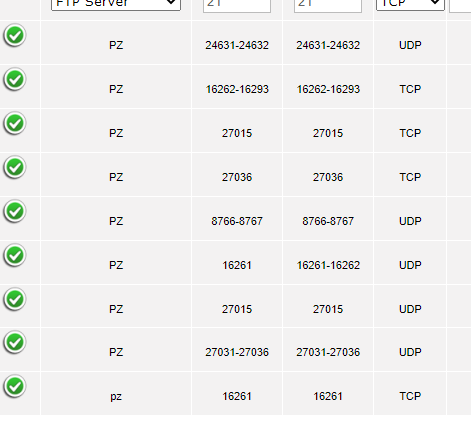
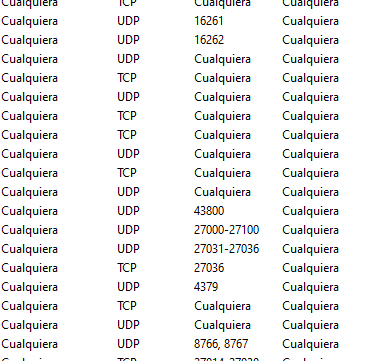
I opened every port I found on internet(Jazztel Livebox, Spain): https://i.gyazo.com/67c0bcd2243e22fae979cc356a5cc0ab.png
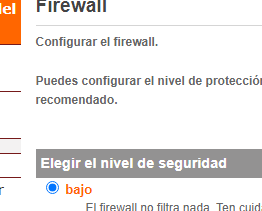
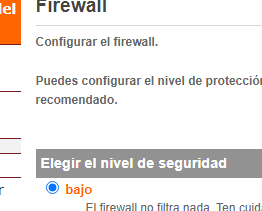
I configured firewall as low security: https://i.gyazo.com/8150ee1ae41fbe50869c1218b6ffec6e.png (The firewall does not filter anything)
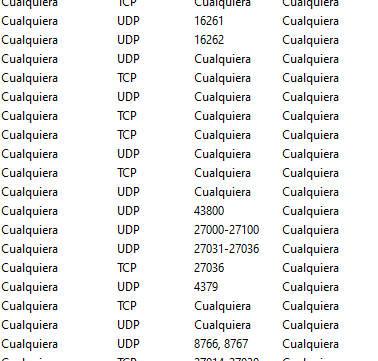
also in my windows defender firewall: https://i.gyazo.com/90eda51c341c5e5a000c7c78a8f18d38.png
I reinstalled three times Project Zomboid, two only the game and the third reinstalling Steam. I reseted router and PC after and before enter the game. I deleted alls files on user/Zomboid
There is no beta mode select on PZ or Steam, they are selected as "None"
I tried a software that verified my ports are opened when I tried to create a game o enter a server.
I don't know what more I can try and could fix my problem. Time ago, I could play with friends with same router and internet, my PC changed to a better one. This is my actual PC:
-NVIDIA GeForce RTX 3080
-AMD Ryzen 7 5800X 8-Core Processor
-32 GB RAM
-Windows 10
I saw the guide to create a dedicated server with SteamCMD, but if I can't join any multiplayer server, I don't think that could fix that problem.
I upload my log.zip, trying to enter servers.
After two days looking on internet and trying every fix I found and still it doesn't work.
What am I missing?
Regards
 wheat halo
Do you have any antivirus perhaps?
Additionally, you are missing the 16262 UDP port in your router
Not necessary to connect, but important for hosting
coarse wasp
wheat halo
Do you have any antivirus perhaps?
I don't, Windows Defender
coarse wasp
wheat halo
Not necessary to connect, but important for hosting
I tried to, but enters a conflict with 6th line I added
But I have to say, I tried now to enter wiht my brothers account on his PC
and he can connect to a mutiplayer server without any problem
both are connect with cable
Now, I tried to enter with my steam acc on his PC and I can enter a mutiplayer game, so it's my PC
wheat halo
16261 and 16262 UDP ports are the only ones you need anyway

This is also very wrong
Ports on both sides should be the same
Regardless, you only tried to connect to one server from what I can tell, have you tried connecting to a different one?
coarse wasp
wheat halo
Regardless, you only tried to connect to one server from what I can tell, have y...
Yes, I tried a friend hosting and 3 public servers I found randomly
with steam relay tick on and off
but knowing I can enter a mutilpayer server with my brothers PC, internet is fine
It's something about my pc blocking game, but I don't know what it is
i added both .exe (32 adn 64) to firewall
Dunno if windows defender could block this game, I can play others steam games wihtout any probem online, like total war warhammer 3
coarse wasp
wheat halo
Ports on both sides should be the same
IN this table, left column is called Intern port and right column, extern port. I can't put a range, like 16261-16262, on intern port
so i put it like that way
when i host a server, 16262 automatically opens on my router
 wheat halo
Generally Defender does not block games
Can you check your Steam Launch parameters in that case? Do you perhaps have any sort of -nosteam launch parameter there?
Since that would prevent you from connecting to servers
Other than that, can you try using the "Alternate Launch" when starting the game?
coarse wasp
wheat halo
Can you check your Steam Launch parameters in that case? Do you perhaps have any...
no parameters, i check it before and after reinstall
coarse wasp
wheat halo
Other than that, can you try using the "Alternate Launch" when starting the game...
i'll try now


stuck


getting server info
wheat halo
Can you screenshot how the server info is filled out?
wheat halo
What happens when you try using the Use Steam Relay?
coarse wasp
nothing, same message
wheat halo
Alright something seems very wrong with your PC seemingly
I would first recommend you try installing the game to a different hard drive, if possible?
coarse wasp
I already did
I uninstalled the game, search every folder on my pc related to PZ
and installed in my second hard drive, on a steam library where I installed other games
right now, I'm playing online to a multiplayer game on total war warhammer 3, game is hosted by my friend who hosted the pz server I couldn't enter
Log for my last tries
This weekend im gonna format and check if that fix this problem and other problem I got, not related with this
wheat halo
It is as if something blocked your connection.. this is likely not related, but can you check if your Network connection is set to "Private" instead of "Public" ?
Since the public one has somewhat different security settings
As Windows considers it a public connection, not a home one

I have a crossover cable connecting a Windows 10 and a Windows 7 system. They are connected but can't see each other. Both show public network. I would like to be able to copy files across using the connection. I don't have other network or router to…
coarse wasp
wheat halo
It is as if something blocked your connection.. this is likely not related, but ...
I changed one hour ago, my friends told me, because I was having problems to enter to a game on TW Warhammer 3, but then another friend got the same problem as i got on TW, he hosted the game and I could enter
then, I tried to enter a PZ server and stucked
 wheat halo
Hm yeah that does not make much sense to me in that case, since it cannot be a network issue otherwise since your brothers PC works fine
Has to be some sort of application on your PC specifically blocking it?
Though it may also be caused by the ports you forwarded, I would probably remove all of the port forwards (and especially any outgoing ones if you set up any) and see if that helps
It is unlikely that it does, but that is the only difference I can see between your two PCs at this moment
Since you port forwarded to just yours
coarse wasp
I deleted all ports since TW Warhammer3 wasn't working properly, but seems problem was with steam servers
My brother got a antivirus+firewall called Bitdefender, that he paid last year. He shared me his account because he can add 5 more dispositives
but still, stucked on getting server info
I'm gonna format today or tomorrow and see what happens
coarse wasp
I hosted a server from my PC and my brother can enter the server with his PC, then we hosted a server with his PC and I can enter
but still I can't enter other servers
when we enter in our hosted server, appears a message below screen saying that port 16262 is closed
I added on my firewall and router config, and still appears that message
wheat halo
Those are two 16262 ports
As said, the game needs 16261 and 16262
 eternal rune
from what i understand, i should make two rules?
the two are:
16261 and 16262?
wheat halo
Yes preferably
coarse wasp
Well, I just format my PC, upgraded my windows 10 to windows 11 and i can join multiplayer games
I didn't add anything on my router or firewall
There was something blocking steam/game for some reason and I couldn't know what
At least, I hope my stuttering problem I get is fixed too