#mod_development
1 messages · Page 337 of 1
 pastel wolf
 autumn bluff
hm
well thats the only place the word "puppers" appears in the entire lua section
inside here:
SpecialLootSpawns.DogTags = {}
pastel wolf

 worn lodge
pastel wolf
worn lodge
pastel wolf
check names of things although you already did
and try putting the vanilla mesh in its place
just to check
it is a mesh thing it seems
 bronze yoke
if you're getting the failed to load asset: AssetPath{ "ProFishingRod" } error that means somewhere you specified the path to the model as exactly ProFishingRod when it should be weapons/2handed/ProFishingRod based on your screenshots
pastel wolf
 bronze yoke
also, iirc, if it shows the icon on the ground, that probably means you forgot to specify WorldStaticModel for the item, rather than the model failing to load - pretty sure if the model fails to load you see nothing instead
pastel wolf
 pastel wolf
bronze yoke
also, iirc, if it shows the icon on the ground, that probably means you forgot t...
pastel wolf
bronze yoke
also, iirc, if it shows the icon on the ground, that probably means you forgot t...
how do i go about fixing that?
bronze yoke
in your item block add WorldStaticModel = ProfishingRod, (exactly matching the name of your model block from your screenshot)
 bronze yoke
yeah!
your WeaponSprite should match the capitalisation as well
you have ProFishingRod but the model is called ProfishingRod
pastel wolf
oop
i'll update the model's capitalization then too

THERES MY BEAUTIFUL
now its just not showing in my hands
or on my back
but it shows up on the ground! kinda pointing striaght up though
problem for later, I just want it to show up in my hands now

but there it is!
worn lodge
@bronze yoke hey albion sorry for the ping but how difficult do you think itll be to make a bootclip attachment for a backpack that shows the exact model of the attached boots?
bronze yoke
i think it would be somewhat complex, you'd need lua code swapping out the model behind the scenes or something, and it'd probably not be possible to e.g. automatically grab the boots model from any mod, you'd have to manually add support for specific mods
worn lodge
hmm i see
pastel wolf
Its odd that its showing up on the ground and not in my hands...
worn lodge
so if i went the lazy route i could just use a basic model for it to show
bronze yoke
yeah, if you don't mind it not matching the actual model of the boots then it probably wouldn't be too complicated
worn lodge
bronze yoke
i think it would be somewhat complex, you'd need lua code swapping out the model...
couldnt i theoretically make a check for footwear and look for the name of the item in the container?
or just the attached pair of footwear instead of container check
bronze yoke
you just can't really get very creative with rendering models unfortunately, i don't think you'd be able to show them on the clip unless you had a ClothingItem that places it there

 pastel wolf
hrm
now after fixing the issue of the quads on the reel and updating the texture
its not taking the new texture
worn lodge
pastel wolf
its not taking the new texture
redo uv
pastel wolf
oop, yeah that was it
right!
so its here, it functions
i'm going to lower its weight and up its durability a bit, and now to add it to spawnpool!
pastel wolf
now for the other two
which should go way quicker with me getting this first one made!
pastel wolf

Three of them!
tomorrow I want to try making some more implements, an old wooden oar and a fishing net, and try to figure out how items breaking works, make a broken version of the oar
One problem I had, which seems to be part of the new fishing system ((which is fun)) is that when a fish is caught it changed the model of the rod to a bent one, which means when i'm fishing and I do snag a big one the rod turns invisible until it's reeled in
i also want to dive into trying to make some clothes too but that seems a lot more complex
 ancient grail
pastel wolf
One problem I had, which seems to be part of the new fishing system ((which is f...
ancient grail
pastel wolf
One problem I had, which seems to be part of the new fishing system ((which is f...
im not sure but it might be cuz of anims xml file uses another model
same as sawn off shotgun
if thats the case then you might need to clone that to be able to change it to your preferred model
but like i said im not sure
you would have to check the xml on your own
cuz i cant do it from my end since im currently modding for b41
pastel wolf
fair enough, i'll try digging into it more later because it would be cool for the rod to bend when I do catch the big one
worn lodge
@ancient grail hey glytcher quick question, whats this about held in hand models? as in "Backpack_LHand" for example?
is it just a different rotation or..?
pastel wolf
also making these repairable would be smart too..
ancient grail
worn lodge
<@591976049592631298> hey glytcher quick question, whats this about held in hand...
where did you see that? if its on the script then idk that might be for b42 only .
i dont know much about b42
worn lodge
i dont think its b42
i think its for whenever you hold something (specifically a backpack) on either hand
ancient grail
where did you see it
ancient grail
ahh can you paste the contents of that xml
worn lodge
yea hold
`<?xml version="1.0" encoding="utf-8"?>
<fileGuidTable>
<files>
    <path>media/clothing/clothingItems/BasedBackpack.xml</path>
    <guid>cccbb588-4931-4126-aa1b-cbe2fbc017b7</guid>
</files>

<files>
    <path>media/clothing/clothingItems/BasedBackpack_LHand.xml</path>
    <guid>85a23017-b7f9-4a18-addc-564ddc9caa7c</guid>
</files>

<files>
    <path>media/clothing/clothingItems/BasedBackpack_RHand.xml</path>
    <guid>5505a841-cd44-4bbc-a7a3-402201dda0b7</guid>
</files>
</fileGuidTable>`
ancient grail
thats just for clothing
that means theres a clothing item that uses that xml
worn lodge
yea yea yea
i was trying to figure out
how to put my backpack onto the skeleton
the hand
but the bones arent showing up
ancient grail
so to give an example
    item Jumper_TankTopDiamondTINT
    {
        DisplayCategory = Clothing,
        Type = Clothing,
        DisplayName = Diamond-pattern Sweater Vest,
        ClothingItem = Jumper_TankTopDiamondTINT,
        BodyLocation = Sweater,
        BloodLocation = JumperNoSleeves,
        Icon = SweaterVestArgyle,
        ScratchDefense = 10,
        Insulation = 0.4,
        WindResistance = 0.2,
        FabricType = Cotton,
        WorldStaticModel = JumperSleeveless_Ground,
    }
theres an xml file thats named Jumper_TankTopDiamondTINT

so in your case
clothingItems\BasedBackpack.xml
clothingItems\BasedBackpack_LHand.xml
clothingItems\BasedBackpack_RHand.xml```basically the ClothingItem properties on the item scripts point towards the xml file
and the fileguid should also have an entry for that xml file
with its own guid
ancient grail
worn lodge
how to put my backpack onto the skeleton
this is something else
im not even sure what you mean by that
worn lodge
Yeah, since i saw that it had the Left and Right things for the backpack
i assumed i have to do that for mine too
but with the fbx im using
no bones show up on blender
so i cant add the backpack to the hand and yada yada
armature is there
but no vertex groups show
although i guess this is more of a modeling thing.........
ancient grail
    item Bag_FannyPackFront
    {
        DisplayCategory = Bag,
        WeightReduction    =    50,
        ClothingItemExtra = Bag_FannyPackBack,
        ClothingItemExtraOption = FannyPack_WearBack,
        clothingExtraSubmenu = FannyPack_WearFront,
        Weight    =    0.2,
        Type    =    Container,
        Capacity    =    1,
        DisplayName    =    Fanny Pack (Front),
        Icon    =    FannyPack,
        OpenSound   =   OpenBag,
        CloseSound   =   CloseBag,
        PutInSound   =   PutItemInBag,
        BodyLocation = FannyPackFront,
        ClothingItem = Bag_FannyPackFront,
        CanBeEquipped = FannyPackFront,
        RunSpeedModifier = 0.98,
        WorldStaticModel = FannyPack_Ground,
    }

    item Bag_FannyPackBack
    {
        DisplayCategory = Bag,
        WeightReduction    =    50,
        ClothingItemExtra = Bag_FannyPackFront,
        ClothingItemExtraOption = FannyPack_WearFront,
        clothingExtraSubmenu = FannyPack_WearBack,
        Weight    =    0.2,
        Type    =    Container,
        Capacity    =    1,
        DisplayName    =    Fanny Pack (Back),
        Icon    =    FannyPack,
        OpenSound   =   OpenBag,
        CloseSound   =   CloseBag,
        PutInSound   =   PutItemInBag,
        BodyLocation = FannyPackBack,
        ClothingItem = Bag_FannyPackBack,
        CanBeEquipped = FannyPackBack,
        RunSpeedModifier = 0.98,
        WorldStaticModel = FannyPack_Ground,
    }
    model FannyPack_Ground
    {
        mesh = WorldItems/Clothing/M_FannyPackFront_Ground,
        scale = 0.4,
    }


so basically you create 2 or more clothing items and link them together by using
ClothingItemExtra
these are the context menu strings
ClothingItemExtraOption clothingExtraSubmenu
model FannyPack_Ground {...}
is for the model you see when you drop the item on the ground
so most of the time you have 2 models
the static - the one you see on the player
and the ground/worlditem
you can use the static model as ground but that wouldnt normally look right
(standing or floating)
worn lodge
hmmm yeah i get it
but well
i took the military bag code
and it has
ReplaceInSecondHand = BridgesBag_LHand holdingbagleft,```thats my added code with the bridgesbag but
it used to say alicebagR and L
ancient grail
yeah oh that is related to the anim xml
worn lodge
Okay so i gotta do that on my own right
since the bag fbx i looked at it changed the model slightly and adjusted it towards the hand seemingly using the armature

and it moves the bag with the arm'
but i cant do that with the armature
myself
ancient grail
holdingbagright and holdingbagleft refers to the player animation variable that is set to true whenever you use that option
but im not sure about BridgesBag_RHand
that might be attachment location? idk..
can you show a screenshot of the problem in game?
i dont think i understand the issue tbh
 worn lodge
My issue is
im trying to make the reference for the file
right
so putting the bag on the right hand
this is on blender btw
But when i select the armature
there is NO vertex groups
so i cant make the right hand anim reference
therefore it probably wont show in the right/left hand when held
 ancient grail
ok i looked at it somemore and found an example
Bag_PlasticBag_RHand is the xml
PlasticBag_RHand is the model
and its used by multiple bag items for some reason so you might not need to make your own.
just copy the ones you see on a vanilla script
 ancient grail
worn lodge
My issue is
ancient grail
worn lodge
My issue is
you have to manually add them
worn lodge
ooh huuhh
well
then
the one that is already made here
wont show up
is it because its linked to the backpack i took?
ancient grail
im not really sure . there are several possibilities if thats the case
can you paste your item script
worn lodge
my xml?
ancient grail
i think i understand it now
    item Bag_Satchel
    {
        DisplayCategory = Bag,
        WeightReduction    =    30,
        Weight    =    1,
        Type    =    Container,
        Capacity    =    15,
        DisplayName    =    Satchel,
        IconsForTexture = Satchel_Leather;Satchel_Green;Satchel_Khaki,
        CanBeEquipped = Back,
        OpenSound   =   OpenBag,
        CloseSound   =   CloseBag,
        PutInSound   =   PutItemInBag,
        ClothingItem = Bag_Satchel,
        BloodLocation = Bag,
        RunSpeedModifier = 0.99,
        ReplaceInSecondHand = Bag_Satchel_LHand holdingbagleft,
        ReplaceInPrimaryHand = Bag_Satchel_RHand holdingbagright,
        WorldStaticModel = Satchel_Ground,
    }
Bag_Satchel
Bag_Satchel_LHand
Bag_Satchel_RHand
these are all xml files inside the clothingItems folder
worn lodge
Yes
ancient grail
hmmm... maybe look at an fbx from a mod and see how they did the right and left hand versions .. i havent done anything like this before
only the equipped one
worn lodge
i can send you the fbx from the basedbackpack mod
that im looking at
because i tried to yoink the armature and the already added vertex group
but it only shows on the other backpack
 tranquil kindle
What you need help with?
I made quite amount of backpacks and understand it quite well
worn lodge
trying to make left and right handed holding refs
for my bag
tried taking an armature from an already done one from a mod
but the vertex group only shows on the modded bag
and wont show on my bags armature modifier
tranquil kindle
Why not use the same one you did your original backpack, unles you haven't had it working at all since lack of armature?
tranquil kindle
Have you seen my guide about making clothing mod?
The idea for backpack is very similar
worn lodge
yeah i was looking at it
tranquil kindle
Do you have armature that is linked in there? I use it myself so that would be the easiest to explain
worn lodge
yea i got it
tranquil kindle
Give me a sec. I'll make a small video/gif
You do have custom model for backpack that already has vertex groups, right?
So you don't have to type the names of them
worn lodge
tranquil kindle
You do have custom model for backpack that already has vertex groups, right?

soo i dont
tranquil kindle
Thats fine
Okay, so pretty much you need to add some bones to backpack model
Sorry, groups*
 rancid cargo
How do I load my 2 textures into the game? I've modified the water shader to include new texture samplers but the textures are not appearing ingame. I did put them in \textures folder but that didnt work ofc, so I'm guessing I'd have to put them where those 3 are? Which my best guess is one of .pack texturepacks.
 tranquil kindle
you just put + and write name of bones you want it to be affected with.
For backpack most common is Bip01_BackPack, but there are also Spine/Spine1 to make the straps move separetly. Otherwise it would look wonky
tranquil kindle
Yes
So you only need Rhand bone for right hand
then go Edit mode, select all faces and give it all 100 % of weight and "assign"
However you need to move backpack in the area where hand is, apply all transforms before export
worn lodge
Alright
got it working now
so with the main bag ill have to do this with the back too? spine and all that
tranquil kindle
I add Spine/Spine1 to Straps to make it move more with the torso, Backpack bone is more for mesh part thats just on back
You could add calvices right and left one, but... its not worth the effort messing with weights
There will always be some clipping, especially with other modded clothes
tranquil kindle
I spend 90% of weightpainting on Straps itself 😂
worn lodge
oof dude
tranquil kindle
Or if i feel like Extra working i transfer weights from Player model into Backpack so Straps get extra details
worn lodge
reconsidering even having straps atp
tranquil kindle
It's not that hard
Jut do Upper half of straps Spine 1 and bottom one Spine, see how it plays out
Then you can average it
Weight painting is something you have to get a grasp out
https://steamcommunity.com/sharedfiles/filedetails/?id=3432928943 Feel free to check out my backpack mod and see how i weighted them for references
 worn lodge
damn i already got that one
ill check it
i dabbled ever so slightly in weight painting when i made like
custom fortnite models and stuff
but never got too deep in the sauce
worn lodge
tranquil kindle
https://i.gyazo.com/d58838c6d752a5fa2f21cce3c0bf0661.mp4 https://i.gyazo.com/58c...
howd you do that with proportional editing? i think the small scale of this messing with me and wont let me downsize the radius
bronze yoke
rancid cargo
How do I load my 2 textures into the game? I've modified the water shader to inc...
you can't, mods have no control over shader uniforms
you can add a new uniform but that doesn't make the game actually set a value for it
tranquil kindle
worn lodge
howd you do that with proportional editing? i think the small scale of this mess...
Mouse scroll untill its right size
Or just for the moment of editing increase scale 100 or 1000 times, edit it and go back
I myself model stuff at 100/1000 scale, then resize it down
I know i could do it with export settings and just do all in Big size, but... i'd rather stick to something i know
worn lodge
yeaah thats fair
well thank you so much you saved me with this one so badly
definitely wont be the last time you help me out big
rancid cargo
bronze yoke
you can't, mods have no control over shader uniforms

very sad situation with the game water shader
 trail ibex
What are some good reverse engineering tools for lua?
 dusky thistle
trail ibex
What are some good reverse engineering tools for lua?
dusky thistle
trail ibex
What are some good reverse engineering tools for lua?
Not sure what you're asking for, as lua in PZ is plaintext (not compiled), and doesn't need to be reversed.
trail ibex
Is there a way to see the code run?
dusky thistle
Debug mode.
trail ibex
Okay thanks
bronze yoke
it's an interpreted language, the source code is right there, and the game has a built-in debugger and everything 😅
 limber hull
is it possible to add the b42 towns to b41? Any modders who have recreated the towns?
 stuck turtle
hey guys, i'm trying to make a mod which adds a custom sleeping bag but i cant get the bag to place in the game world
worn lodge
stuck turtle
hey guys, i'm trying to make a mod which adds a custom sleeping bag but i cant g...
maybe a staticmodel issue?
or well
world
model
issue
tranquil kindle
If its custom sleeping bag that you place on ground as a tile? Maybe you lack the actual tile?
I have yet to test sleeping bags in b42, but mod in b41 made them placeable/buildable and they were tiles that allowed you to sleep like on bed
stuck turtle
im borrowing the tile of an existing one for now
 stark steppe
Is there a guide available on how to add new UI elements? I know next to nothing about actual coding, like usual, I tried reverse engineering using other mods, but I can't make heads or tails of it, there are too many variables to track and too much terminology to make sense of. Also, documentation on how the file structure actually works, which files go where and why would also be a godsend. Thanks.
 bright fog
stark steppe
Is there a guide available on how to add new UI elements? I know next to nothing...
bright fog
stark steppe
Is there a guide available on how to add new UI elements? I know next to nothing...
Read the pinned messages
stark steppe
bright fog
Read the pinned messages
Excellent, thanks.
 glacial garnet
i’ve got a terribly large mod idea, one issue: with what i have in mind i gotta wait until like, B45 lmao.
well, time to learn how to mod and build my skills for it until then.
bright fog
glacial garnet
i’ve got a terribly large mod idea, one issue: with what i have in mind i gotta ...
What's your idea ?
glacial garnet
i’ve noticed that people love mixing this game with fallout.
so i’d personally really love to try and make a total fallout overhaul once the NPC support is out on a stable build in like, a few years time.
granted this is one hell of a task and B47 will probably be out by the time i’m done, lol.
but i’d still love to do it regardless.
bright fog
You're not the first to work on something like that
glacial garnet
even then, sure as hell won’t be the first mod i make, i’ve got a few smaller, far more feasible ideas for a start
bright fog
@sonic needle is one of the modders I know about that worked on a bunch of Fallout stuff
glacial garnet
dope. yeah it’s because of people like them that i thought “screw it, i want to make zomboid into just, straight up sandbox fallout”
 sonic needle
bright fog
<@163660884554678273> is one of the modders I know about that worked on a bunch ...
sonic needle
bright fog
<@163660884554678273> is one of the modders I know about that worked on a bunch ...
sup
ah, grand idea's are best lowered with realistic expectations.
Pick one thing, do that, then do another, etc,
works best this way
glacial garnet
yeaaaah. as is the way of life.
i’d totally build up a good deal of experience before even considering tackling this.
sonic needle
what experience do you have starting now?
glacial garnet
funny you should say that!
none.
but yeah no, i’m going to learn, do some mods of varying sizes and types for like, a few years for sure.
my only requirement is “vanilla NPCs must be readded” for any amount of work to start, because i’d like to use TIS’s framework as a basis so to speak.
sonic needle
solid goal, a framework to stand on, is better than meandering in the caves, so to speak
glacial garnet
yep, we’ve got the animal framework so that’ll be a relief for stuff.
i mean with some animals like brahmin i just really need to remodel the cow is all.
sonic needle
the issue isnt a remodel there, its Lua, surrounding it, The rest is alot easier now
glacial garnet
sounds about right.
sonic needle
pz has alot of issues with animations, loading them, xml layout, and more,
glacial garnet
so that’ll be the first hurdle then, i suppose?
bronze yoke
animal mods are actually pretty easy to make
bright fog
Just requires you to be able to animate 😅
bronze yoke
the initial panic about them when b42 first came out was just people making weird assumptions and then being disappointed when those assumptions weren't right
glacial garnet
fair lol
sonic needle
i do like assumptions, but why didnt the raccoons have sixty legs like it was foretold
glacial garnet
sonic needle
i do like assumptions, but why didnt the raccoons have sixty legs like it was fo...
don’t give me ideas now
bronze yoke
been a while since i've played a fallout, a brahmin is just a two-headed cow right? you probably could get away with just adding a head to the cow model and not need to animate anything
glacial garnet
bronze yoke
been a while since i've played a fallout, a brahmin is just a two-headed cow rig...
yeah, most i’d have to do is animate the second head and just change them up and make sure they don’t break upon the change
sonic needle
yep, would work fine, as canon wise, one is dumber, the other is the main
glacial garnet
now doing a new one from scratch?
yeah, entire different beast.
i’ll probably just borrow from sprinter code for something like a deathclaw
tranquil kindle
bronze yoke
animal mods are actually pretty easy to make
Is there specific rig for Animals to making their models/animations? Or is it all using Player's aramature?
bright fog
Someone commissionned to add a brahmin in the modding Discord if I remember right
glacial garnet
tranquil kindle
Is there specific rig for Animals to making their models/animations? Or is it al...
i know the old dog mod probably used the player armature.
we all saw that one clip.
i still shudder.
bright fog
glacial garnet
i know the old dog mod probably used the player armature.
we all saw that one cl...
It did
tranquil kindle
That i know of, but now i'm not sure if TIS provided anything and i just missed it
bright fog
No
tranquil kindle
😂
sonic needle
b42 will load, any new armature for animals, last i checked was the case
tranquil kindle
Why i am not surprised
glacial garnet
well with animals having their own framework it should work out much better than before, that’s certain.
bright fog
There's some limitations but the main challenge is that you need to animate every single movement of the custom animal, unless you manage to use existing armatures
bronze yoke
tranquil kindle
Is there specific rig for Animals to making their models/animations? Or is it al...
you can use any skeleton, as of b42 the skeleton is no longer hardcoded
sonic needle
existing armatures from other games should work though
bronze yoke
the one we're using for the horse mod is completely original
sonic needle
in theory, we could use fallouts actual netiverse armature
glacial garnet
luckily i don’t think i’ll need to be super detailed with the animations as i’d like for it to fit as close to the standard animation style of PZ.
fallout definitely wont be a first attempt at map making, i’ll be doing that with more vanilla assets and real world stuff first.
i’ve got scandinavia in mind, for sure.
sonic needle
are you going to map your home town
bright fog
Project Scandinavia
bronze yoke
don't be ridiculous. nobody's ever tried something that crazy before
bright fog
Damn

 glacial garnet
if russia and france can be added i can add finland
tranquil kindle
Alone?
glacial garnet
i’ll look for assistance when (or if) i get to the point of active development, i don’t to be a fledging modder and go “hey guys can y’all help me with a project” and end up doing the bare minimum.
glacial garnet
that’s like, my number one fear with collaborating
sonic needle
for me, i outlasted them all, even still
glacial garnet
not having something to show but not putting in the work due to inadequacy.
sonic needle
its an odd twist of fate, that you sit where i was once,
all i can say is, you CAN do what you wish to make eventually,
But you wont ever be able to make all of it,
glacial garnet
that’s fair i suppose.
bronze yoke
i was joking about the idea of making their home town, that's kind of every mapper's first project
sonic needle
its the Hubris trap, of mapping
bright fog
bronze yoke
i was joking about the idea of making their home town, that's kind of every mapp...
It do be a good way to get started with mapping I feel like
sonic needle
it is, gets you most of the way there, usually before grand idea's appear
tranquil kindle
Though you'll need to visit every house in your town to see how to make their interior. Better get good at picking the locks
glacial garnet
and the stores, and the transportation hubs, and the-
“your honor i broke into the entire strip mall because i needed to make a 1:1 map of the town in a game”
“yes, your honor, i was going to go for the houses next door.”
 brave bone
can someone confirm, when dismantling vehicles. It seems dismantling is instant , even without mods. is there a sandbox option for that in vanilla?
bright fog
brave bone
can someone confirm, when dismantling vehicles. It seems dismantling is instant ...
Dismantling vehicles is a vanilla feature ?
Or you mean parts ?
tranquil kindle
Wreckages, it is
brave bone
wreckages yeah
tranquil kindle
Maybe you have debug mode instant action?
 supple briar
So regarding overwriting distribution, is there anything special you need to do to overwrite vanilla stuff?
bright fog
supple briar
So regarding overwriting distribution, is there anything special you need to do ...
Not particularly, you can just directly modify the distribution table
Just make sure to do it properly
supple briar
bright fog
Just make sure to do it properly
Yeah see this is the issue, are there rules for how to do it properly?
I'm working on a gun mod in the background right now, and I want to modify both
-The loot tables for buildings and containers
-The guns that spawn on zombies
I have found both of the files for the basegame
but I don't know what I'd need to do to totally overwrite the vanilla loot table for them
bright fog
@tropic python think your easy distribution mod could implement more tools to manipulate the distribution ?
I feel like adding the ability to delete specific items might be a good addition
bright fog
supple briar
but I don't know what I'd need to do to totally overwrite the vanilla loot table...
You want to overwrite what exactly ?
Specific item spawns or the ENTIRE distribution ?
I would suppose that you basically just want to modify gun related loot ?
supple briar
bright fog
You want to overwrite what exactly ?
Sorry I'm not really up to date on the proper lingo, so gonna explain this the best I can while being a total noob with coding.
My goal would be to take, for example, the attached weapons on zombies, and making sure that my custom distributions would overwrite the vanilla game ones. For example I would like to make sure I could stop the base game M16 from spawning on police zombies/locations.
bright fog
When it comes to loot spawning on zombies, I'm not familiar with it and always forget how it's even defined
As for loot spawning inside containers, you can iterate over the entire distribution and whenever you find the entry with the specific item ID, you can delete it from the distribution
It needs to be done properly tho and I can't explain in detail rn how it's done bcs I'll go sleep soon
bright fog
bright fog
<@273515146243080192> think your easy distribution mod could implement more tool...
@silent zealot wrong stalker sorry*
supple briar
if I have the right file it's in lua/shared/definitions/AttachedWeaponsDefinitions.lua
the file covers both weapons sticking out of zombies, and weapons attached to zombies in holsters and such
so for example, lets say I want to change this code to make it so the rifle was replaced with a different one
AttachedWeaponDefinitions.assaultRifleArmyOnBack = { id = "assaultRifleArmyOnBack", chance = 50, outfit = {"ArmyCamoDesert", "ArmyCamoGreen"}, weaponLocation = {"Rifle On Back"}, bloodLocations = nil, addHoles = false, daySurvived = 0, weapons = { "Base.AssaultRifle", }, }
IDK how to do the code block thing, sorry
would having "AttachedWeaponDefinitions.assaultRifleArmyOnBack" over write the base game?
bright fog
Like I said I'm not familiar enough with how this works here
My guess is override the weapons table
I suggest you check out the wiki too, to learn about the modding structure and also to read about Lua
sonic needle
that there is, weapon attachement via 3d item on z
 silent zealot
bright fog
<@273515146243080192> think your easy distribution mod could implement more tool...
silent zealot
bright fog
<@273515146243080192> think your easy distribution mod could implement more tool...
Yes, I even have a comment in the Lua file about adding a delete option but then never implemented it.
silent zealot
supple briar
if I have the right file it's in lua/shared/definitions/AttachedWeaponsDefinitio...
Never replace an entire file from the base game; that will cause countless problems. Any lua file you make needs a unique name to avoid this.
You can replace entire functions, but that's risky if things change or another mod wants to do the same so needs to be considered carefully.
You can prefix/postfix a function with extra code that they ns before/after it but leaves the original, that's pretty safe.
And in this case you're not wanting to replace code at all, you want to manipulate data that is in a Lua table.
A complicated table-full-of-tables, but still just basic Lua table stuff. Which is a confusing mess when you get started.
silent zealot
supple briar
would having "AttachedWeaponDefinitions.assaultRifleArmyOnBack" over write the b...
Yes, (making a few assumptions) you can just have a Lua file that redefined that specific table entry
You don't even need to overwrite the whole thing:
require "Definitions/AttachedWeaponDefinitions.lua"

AttachedWeaponDefinitions.assaultRifleArmyOnBack.weapons = {"Base.MyGun"}
Put that in a lua file in /media/lua/shared in your mod, it will run after the vanilla file loads (the require line makes 100% sure of this) and changes that specific value in the lua table to a new table with one entry: Base.MyGun
supple briar
silent zealot
Put that in a lua file in /media/lua/shared in your mod, it will run after the v...
I see
I hadn't planned on literally replacing the file, but good to know
bronze yoke
silent zealot
Put that in a lua file in /media/lua/shared in your mod, it will run after the v...
the require line does nothing, vanilla files always load before mod files
silent zealot
bronze yoke
the require line does nothing, vanilla files always load before mod files
They help me rememeber which files I'm relying on, so that's important. 😛
supple briar
so if I were to add more guns the list, It would go
AttachedWeaponDefinitions.assaultRifleArmyOnBack.weapons = {"Base.MyGun"}
AttachedWeaponDefinitions.assaultRifleArmyOnBack.weapons = {"Base.MyGun2"}
and that would make it so only those two guns only spawn in the definition right?
bronze yoke
don't disagree with it stylistically, just nitpicking the idea that it does anything
silent zealot
supple briar
so if I were to add more guns the list, It would go
AttachedWeaponDefinitions.as...
If you do that you're setting AttachedWeaponDefinitions.assaultRifleArmyOnBack.weapons to a value, then immediatley setting it to something else.
You want to set it to a value that is a table with two entries:
AttachedWeaponDefinitions.assaultRifleArmyOnBack.weapons = {"Base.MyGun", "Base.MyGun2"}
Ah I see
does this same idea carry over to loot definitions? I.e how items spawn in rooms or is that different?
silent zealot
Yes, you could do it this way
But there are a lot of loot entries, a better way would be to write something that iterates through the table structure and finds matching ebntires and changes them
Like Sir Doggy mentioned, I should add "remove item" and "replace item" to Easy Distro instead of just having comments in the code to do that.
Since that already has a framework for iterating through the tables and matching items. (though I'm not sure i's working properly for vehicle loot)
supple briar
So what about adding to a loot table (spawn zone?) without replacing
silent zealot
Easiest way: EasyDistro.
Lets you use one line to add an item to loot tables by copying an existing item (with optional rarity modifier)
I made that when I wanted to add a gun to loot tables and it was going to be so much work to copy everything I needed to a file, when "anywhere pistols show up but 25% as likely" was what I wanted.

Feel free to weigh in on the API vs. Library debate: which term is more correct, which term is the one people are more likely to think is correct when searching the workshop, and what torture is appropriate for suggesting Application API Interface Library? 😛
supple briar
silent zealot
Feel free to weigh in on the API vs. Library debate: which term is more correct,...
So question, does this let me add items to certain loot pools, or is it just general?
like can I make it so my gun is only added to, say, hunting stores but not police stations?
silent zealot
Easy Distro is when you want to copy an existing item's distribution.
If you want to be more specific, you can do it the traditional way by manually adding it to specic locations
But if it's a hunting rifle, I'd just copy the distribution for Base.HuntingRifle
supple briar
So I was looking at rain's gun pack
silent zealot
Then it gets added to places where a Base.HuntingRifle can show up. That probably includes police stations but at a higher rarity than hunting lodges
supple briar
table.insert(AttachedWeaponDefinitions["shotgunPolice"].weapons, "Base.AR15")
silent zealot
Depends how much control you want over distribution
supple briar
this could work if I didn't want to replace guns, right?
silent zealot
yes, that takes the table AttachedWeaponDefinitions["shotgunPolice"].weapons
And adds a new entry to it
shoves it right in there
 supple briar
I feel like I'm asking really basic questions that I would already know if just read a bit
silent zealot
It's really "how do I work with triple layered lua tables" which is a bit tricky to figure the syntax for
especially as there are multiple ways of doing it
supple briar
table.insert(ProceduralDistributions["list"]["GunStoreAmmunition"].items, "Base.762x39Carton");
table.insert(ProceduralDistributions["list"]["GunStoreAmmunition"].items, 0.1);
So, assuming I'm reading this right, the second line is weight, right?
still don't know how to make a code block
silent zealot
the 0.1?
supple briar
Yeah
silent zealot
will be some sort of probability, higher == more likely.
silent zealot
supple briar
still don't know how to make a code block
I suggest looking for a basic lua tutorial to work though - it's a simple language, but knowing the basics will help
AI like ChatGPT is really bad for zomboid questions but is pretty decent for Lua questions.
supple briar
Is there any particular place you recommend starting for tutorials or is it more a "just find what works for you"?
silent zealot
I don't know what is good - I got started by learning BASIC, but that is not a good way to do things.
It honestly wasn't a good way to get started in the 1900s either, it was just teh easiest way to find material for.
And a system to run it.
Useful Chat GPT example:


it won't be 100% correct, but stuff like this is usually pretty good.
You can also give it some code and ask it to explain.
Just don't ask it to write code for zomboid!
supple briar
I would but I think you need to pay or give a phone number to use chatgpt
and screw that
silent zealot
I don't pay (it's not useful enough!) and I think I just login using my google account.
supple briar
also the cap guns are funny
I need to find one in game
it gave me a very dumb idea
silent zealot
dumb ideas can make great mods.
Chocolate Milk From Brown Cows has my greatest popularity:effort ratio by far, given the mod is exactly one line of very simple code.
supple briar
I've had a few dumb ideas
like the M1 Garand, I want it to have chance that lowers with your reloading skill of giving you a hand scratch when reloading it
simulating Garand Thumb
(the injury not the youtuber)
silent zealot
Bleeding to death in combat is a bit harsh, but you can trigger pain and put muscle strain on the location to simulate a bruise. (assuming "bruised" is not already an injury type)
supple briar
Garand thumb does actually cut your finger a bit
and it's going to a less than 1% chance it happens even with 0 reloading
silent zealot
Sure, but in zomboid "scratch" means "you might bleed to death from this"
silent zealot
Yeah, you might be able to adjust the intensity but a scratch is something bad enough to reduce overall condition from bleeding and need bandaging
supple briar
Thank god PZ doesn't have paper cuts then
silent zealot
minor thing like paper cuts just don't show up at all
supple briar
when I get working on that, I'll look into if scratches are always life threatening or if it depends on something else
would be funny way to die
"Failed reloading a M1 Garand so bad he died"
silent zealot
supple briar
would be funny way to die
Not really, it would just annoy me
And I'd never use a mod with a tiny chance of random death
getPlayer():playerVoiceSound("PainFromGlassCut")
Play the pain noise, that will feel more fair if you have a silenced Garand and attract zombies by screaming in pain
supple briar
that plus a little muscle strain would work too I guess, maybe play a shorter ping sound
oh god I'm not dealing with suppressors yet
silent zealot
BTW> There's a sperate command to make a sound actually attach zombies
Are you modding for B41 or B42?
supple briar
I was thinking of making the ping have a low noise range
supple briar
silent zealot
Are you modding for B41 or B42?
B42
are they actually in B42?
I thought they were modded only
silent zealot
I suggest just using Rain's supressors
you can support them without making your mod require Rains, you can see that in the Survival Rifle mod
That mod also shows how you can make an existing attachment work for your gun, since your gun needs to be on the attachment's weapon list
supple briar
I might look into it, but I don't really like suppressors if I'm honest
at least in PZ
silent zealot
That's fine too
supple briar
feels like it kinda goes outside the whole "Kentucky 1993" idea
most of my gun list is big old 30-06 hunting rifles and crappy revolvers
silent zealot
Oil-can suppressors would be a thing
in a world with zombies that are attacted to sound
Like in The Walking Dead, they made spressors from plastic bottles then... just stopped using them, same as they covered tehmselves in zombies guts to hide once, wore football armor once, etc etc.
silent zealot
Personally I find "supressed pistol, no suppressed long arms" is a good balance for gameplay.
But depends a lot of settings and prefered play style
silent zealot
supple briar
So you made your mod compatible with rain's? that's why yours have suppressors
Yeah, I didn't want to make an entire firearms mod so I just use vanilla attachments and (if installed) Rains.
silent zealot
I just wanted to make some interesting guns that fill a role different enough to what is already in the game.
Brita's overhauled so many things it's not really vanilla lol
supple briar
The Brita comparison is due to roster of firearms
silent zealot
Current firearms project: a shotgun that just smashes everything in a cone in front of it.
Currently working to reduce it a sane level (no 100% kill, not infinite zombie) but having issues so it may just be "kill everything"
But I got distracted trying to use the explosion code to send ragdolls flying lol
Then I'll made a model for the Russian KS-23 4 gauage shotgun and a way to make home-made ammo out of pipes, scrap metal and gunpowder.
Muscle strain from shooting: hell yes.
supple briar
I didn't know you could do that
silent zealot
I found Brita's had too many redundant weapons. How may 5.56 mm assault rifles using STANAG magazines do you need, really?
supple briar
I'll have to account for that in the bullet bases I assume
supple briar
silent zealot
I found Brita's had too many redundant weapons. How may 5.56 mm assault rifles...
Man you are going to HATE my mod
I have like, 19 AR-15 variants alone
silent zealot
I know they are immensly common around the world.
HAHAHAHa
There are people who love that
supple briar
I am one of those people
bronze yoke
brita's is more for gun nerds than gameplay
silent zealot
And want to collect all 27 variatiosn of the M16
Totally fair, the great thing about mods is they are optional.
bronze yoke
argubaly vanilla already has several redundant weapons anyway, the gunplay mechanics aren't really complex enough to express much variation between weapons
supple briar
currently there are 280 guns on my list.
mostly handguns
because god there are a lot of handguns
and 5 hand grenades
silent zealot
How many weapons using an M4 lower reciever?
supple briar
don't forget the hand grenades
supple briar
silent zealot
How many weapons using an M4 lower reciever?
hell let me check
silent zealot
I bet there are more than 280 of those alone lol
Not accounting for personal customizations
supple briar
23
I'm just doing stuff that could
-Reasonably exist in 1993 kentucky
there isn't a second point woops
a lot of these are going to share models
silent zealot
Have you made a list of what code features you will need for you mod? i.e. things you can't do with with just vanilla gun scripts
supple briar
silent zealot
Have you made a list of what code features you will need for you mod? i.e. thing...
Been working on that
I only have 2 features marked right now
I want to have some form of automatically ejecting clip for, at least, the M1 Garand. Need to learn lua.
Animations for Bullpups
that's it
viewing this a extreme "vanilla plus" project
silent zealot
Only one type of magazine per gun?
supple briar
silent zealot
Only one type of magazine per gun?
oh god no
Oh wait
yes
sorry
got confused
supple briar
if it was in base game I would do stuff like 10, 20, and 30 round STANAG mags
but I rather not fall into that unending pit of depth
silent zealot
You will need code if you want magazines to be visible on the gun only when there is a mag
supple briar
before long you're coding how to make a M249 take them and all that
silent zealot
in vanilla mags are a permanant part of the model
supple briar
Depending on how I feel about it I might look into that
but I find it a cool but unneeded detail
I have actually done some gun modding before
this is technically V2 of the project
silent zealot
I like it, especially for weapons with big obvious magazines.
supple briar
V1 died cold and alone when B42 came out
silent zealot
If you want to prepare for that, just make sure you keep your blender files so you can export the gun without a mag and the mag seperately.
Then if you do revisit it later you're not redoing everything from scratch.
supple briar
this is the only surviving image of V1 before it's violent death
 silent zealot
I've been tempted to add a few .22LR weapons in a pack, because there are some interesting .22 gun but with the way damage works in zomboid and it would end up being a away to mildly annoy zombies 100 times while they walk up to you.
supple briar
silent zealot
I've been tempted to add a few .22LR weapons in a pack, because there are some i...
adding those to my pack
silent zealot
Calico w/ 1980s laser sight
 supple briar
god I love wacky 22s
supple briar
silent zealot
Calico w/ 1980s laser sight
I do have a calico on the list
image stolen
silent zealot
this piece of junk... if you're going garand thumb then this should have a 5% chance to shoot your hand when you cock it.
 supple briar
Sadly it's out of timeline
silent zealot
pfft.
supple briar
that was late 2000s early 2010s I think?
and I have a cut off of about 1995
for this pack
big plans later
silent zealot
I wouldn't stress too much about that, just add a "limit guns to 1993 and earier" option
silent zealot
Or make submods (multipel mods in one workshop upload) to seperate out the not-time-period-accurate guns
supple briar
oh god....I have another bad idea
Fixed mag AR-15s
the worst mod
Project Zomboid if it took place in California
silent zealot
You say post ban AR, I say pre-ban LMG

(I didn't make the model, it's CC Atribution from sketchfab and needs work to be useful in Zomboid)
supple briar
uhhhhhhhhhhhhhhhhh
 silent zealot
this is not "low poly" in zomboid terms 🙂
 supple briar
silent zealot
this is not "low poly" in zomboid terms 🙂
supple briar
silent zealot
this is not "low poly" in zomboid terms 🙂
Oh I know that modeller!
the sketch fab one
silent zealot
yeah
I need to learn more about materials in Blender to do the textures, make teh mag taller for teh 97 round version + reduce polycount, add a front sight...
supple briar
silent zealot
I need to learn more about materials in Blender to do the textures, make teh mag...
Does PZ use blender materials at all?
supple briar
also since I mentioned it, look upon ye mighty and despair at all 72 handguns
 silent zealot
I can bake the material to a texture, but if I'm going to do that I'd rather replace the flat color with something more metal-like
supple briar
I need to make a list of all the new ammo I need too
because I think the final gun list will 100% pass 400 if not 500 just due to variants
silent zealot
And I will make life harder by flipping down the sights when it is work on the back.
supple briar
Honestly, and this is my opinion, I'd just make my own model
Tony's stuff is good, but I think all the work you'd need to do to make them work in PZ is more than just modelling it yourself
silent zealot
supple briar
I need to make a list of all the new ammo I need too
Don't be afraid to combine similar calibres, Zomboid does that already a lot (a battery is everything from AA to lantern cell for example)
supple briar
silent zealot
Don't be afraid to combine similar calibres, Zomboid does that already a lot (a ...
Afraid?
I want the pain
supple briar
I want a poor player to walk into a gunstore and find 4 different version of a hunting rifle using 4 different ammo types
silent zealot
it's also pain for the player when there are so many ammo types you can't find what you need
supple briar
and that's not even touching the "relic" guns
silent zealot
but.. some players ike it.
supple briar
silent zealot
it's also pain for the player when there are so many ammo types you can't find w...
That's why there will only be 3 types of shotgun ammo
12 gauge, 10 gauge, and 20 gauge
silent zealot
No revolver shotgun!
silent zealot
supple briar
410 gets rolled into 20 gauge
I thought you wanted the pain 😛
silent zealot
supple briar
It didn't exist in 1993 I think
.410 was invented in 1857
supple briar
I meant the shotgun
also there will be like 6 different hunting only calibers
I am not cruel
silent zealot
Someone saying "What if we made a shotgun shell that fits in a .45 chamber?"
silent zealot
Well... there are half a dozen thing you could call "44"
supple briar
true
silent zealot
The vanilla Base.Bullets44 are used in the legally-distinct-from-a-Desert-Eagle gun
supple briar
without looking it up, I think there are something like 6 different pistol ammo types (9mm, 45, 44, 380, 40s&w, 32)
not counting 22
I also kind of want to do blank guns that can be converted to functional
to replace the cap guns at the wild west town
silent zealot
So .44 Magnum. But Rain's also uses them as .. um... I think .44-40 Winchester. Or maybe .44 Remington.
supple briar
I don't plan on going into sub types of ammo
44 is 44
so it covers any 44-(whatever) ammo
silent zealot
yeah
supple briar
oh I forgot 357 as well
silent zealot
and .22 for .22LR and .22 high power necked rifle rounds
supple briar
The motto is "pain within reason"
silent zealot
"They're the same picture" meme
 supple briar
I don't plan of doing many magazine fed guns with different ammo types
I want to reserve that pain for bolt actions without mags
silent zealot
I made the survival rifle use .223 and 5.56mm, but that's easier to do when you are only loading one round at a time.
supple briar
I had a plan for 223 and 5.56 where you can convert them like rains
but you convert the box not just the bullets
silent zealot
"convert .223 <-> 5.56" is a common feature in gun mods but takes time to change the bullets
supple briar
to save time
and I had this idea where you find "relic" ammo which you can convert into any of the rare ammo types
like what's used for the MAS 223
silent zealot
So I just skip that and change the weapon's bullet type to whatever is in your pockets when you reload.
supple briar
well no that 5.56
I have this idea for "rare and hard to find" guns that spawn in boxes with ammo and magazines
silent zealot
One way to do that is make a "Rare Gun Case" item that contains the gun, mags, ammo and add the case to the loot tables.
supple briar
silent zealot
One way to do that is make a "Rare Gun Case" item that contains the gun, mags, a...
that was the idea
so for example
(had to make sure the image didn't contain *certain * symbols)
 silent zealot
It would help a lot when you finally get an AA-12 and there are no mags lol
supple briar
silent zealot
It would help a lot when you finally get an AA-12 and there are no mags lol
that was the idea
I don't want someone to find this uber rare gun, and then never find a mag
so uber rare guns can only spawn in a box with magazines
and ammo if they use a rare type
silent zealot
I did start work on a "Craftable Magazines" mod for Britas that let you do things like use a magazine/small metal sheet/screws to make an extended magazine.
Because I was sick of looking for the extended mags that were so much better than other mags
supple briar
part of my idea is having no weirdly unique mags
silent zealot
So you'll have "357 pistol magazine" etc?
supple briar
like Rain's has a 5.56 extended mag that only works on the Galil and nothing else
supple briar
silent zealot
So you'll have "357 pistol magazine" etc?
It will break down by type
silent zealot
And the galil can only use that mag, because of Vanillas one gun -> one type of magazine.
supple briar
silent zealot
And the galil can only use that mag, because of Vanillas one gun -> one type of ...
the ability for multiple mag types per gun is right up there with armed vehicles for my biggest PZ wants
silent zealot
I've poked the gun/reloading code enough I think I could make a library for it.
- one ammo type only, none of this normal/HP/AP/etc stuff to manage
- automatically use the compatible mag with the most bullets, no player choice like britas adding another set of keybinds for mag type.
Have a "AddMagMapping(weapon, {table of mags})" function for modders to use.
Then it needs to hook the loading code where it checks for a magazine and where it selects which mag to use.
Would even work with Rain's "visible mag as attachments" if the extended mags had appropriate models made.
I'll put that on my to-do list.
supple briar
I want to try and keep my coding as low profile as possible so I don't plan on working on removable mags or magazines types out the gate
my first goal will be getting the M1 Garand clip working
 drifting ore
supple briar
my first goal will be getting the M1 Garand clip working
drifting ore
supple briar
my first goal will be getting the M1 Garand clip working
Do you have the ping sound effect?
supple briar
drifting ore
Do you have the ping sound effect?
I'll find one
silent zealot
That's why a library is useful, you make a gun and different sized mags, instead of having to code stuff you just use the library and one line to list what mags your guns can use.
supple briar
I haven't even modeled the M1 yet
drifting ore
supple briar
I haven't even modeled the M1 yet
I'd take the M14 model and work backwards off that.
silent zealot
And if it's kept simple it doesn't end up like Gunfighter, which AFAIK was only used by Britas
silent zealot
drifting ore
I'd take the M14 model and work backwards off that.
Base.M1 = Base.M14 - 13 done.
supple briar
in my head how the M1 script would work would be
-it checks if the M1 has a loaded mag
-It checks when the Mag reaches zero
-then it does the thing
gonna start watching lua tutorials tonight if I can keep my attention on them
silent zealot
Remember magazines are optional - you can just put single bullets in
supple briar
the M1 does use clips so I want to feature that
clips as in literal clips, not slang for magazines
silent zealot
Or you code it so if you hit reload and there are bullets in the gun those bullets are flung into the floor lol
supple briar
behold, a magazine
 silent zealot
along with an empty stripper clip
supple briar
silent zealot
Or you code it so if you hit reload and there are bullets in the gun those bulle...
In real life if you reload a M1 before it's empty, it doesn't actually eject, it just pops out a bit and you take it out
gonna try and emulate that
silent zealot
Well that is boring.
supple briar
All of this is working to my end goal, of a map (challenge map?) set in 1944 France
drifting ore
silent zealot
`Base.M1 = Base.M14 - 13` done.
🤣 Nah, I meant that if you pop the model into blender, you can chop off the magazine on the bottom and lengthen it a tad and it would look right.
silent zealot
Stipper clips would also be something that is feasible to craft - unlike mags which need more precision.
supple briar
drifting ore
I'd take the M14 model and work backwards off that.
The M1 and M14 are different enough that I'd make them separately
silent zealot
So instead of having to hunt for clips, the player bends small sheets of metal into clips and that gives teh gun a nice advantge which is not overly powerful.
They'd look the same at zomboid scale, other than the magazine.
 drifting ore
supple briar
The M1 and M14 are different *enough* that I'd make them separately
drifting ore
supple briar
The M1 and M14 are different *enough* that I'd make them separately
I agree.
silent zealot
But the vanilla M14 model... lets just say there is scope for improvement
supple briar
silent zealot
They'd look the same at zomboid scale, other than the magazine.
My brain won't allow me any shortcuts like that
if I can find a way to do it, I would maybe make stripper clips a attachment that, when added, gives the gun that "reload all bullets at once" thing you mentioned before
 willow pendant
Where can I find the functions or files that adds for example the police outfit clothing in the player creation menu in B41 ? Trying to make a character profession mod with some specific clothing available in the character creation...
ancient grail
supple briar
In real life if you reload a M1 before it's empty, it doesn't actually eject, it...
ive done this
m1 garand
it auto ejects and the clip falls on the ground
with the sound and all that
the mod is uploaded by totallyinnocent
as part of his weapon pack
nvm i did the upload after all
https://steamcommunity.com/sharedfiles/filedetails/?id=3015394773
 ancient grail
supple briar
`I want to have some form of automatically ejecting clip for, at least, the M1 G...
ancient grail
supple briar
`I want to have some form of automatically ejecting clip for, at least, the M1 G...
ive also made the bullpup anims
couldnt find the other clips

 granite ginkgo
If anybody has any idea why I can't enter my car, please let me know
tranquil kindle
granite ginkgo
If anybody has any idea why I can't enter my car, please let me know
I'd start by removing all colider boxes
Just leaving basic one
It feels like character is trying but can't get to place to sit
tranquil kindle
Speaking of vehicles, yours do have textures for damage/blood and display separetly?
granite ginkgo
yes, but i have a null texture as placeholder for now
also this is how it looks for areas

semms fine to me
granite ginkgo
tranquil kindle
Speaking of vehicles, yours do have textures for damage/blood and display separe...
yea, so i don't have any other coliderr boxes, only the default one, I wonder if it's a script related issue to seats, but i'm using a script from an older B42 mod that works
If ya want i can leave the script here if you want to throw a look over it
worn lodge
pain

 torn igloo
How do you force sync client container to the server?
 vapid wagon
Apologies if this sounds a rambling, but I was wondering if any one has any experience with audio .BANK files not working after being edited and rebuilt? No error message or anything, just no sound in the game
vapid wagon
It was something I did a couple of years ago and I wanted to see if I could update it for B42. Unfortunately when I rebuild it, it just doesn't work. Google of course offers no solutions. Or if it does then I'm just too tech illiterate that I don't understand it
bright fog
vapid wagon
It was something I did a couple of years ago and I wanted to see if I could upda...
Did you make sure to use the new B42 bank files and not your old one ?
vapid wagon
I did. I replaced all the duplicate files and figured I'd test it before I go to the trouble of editing and creating new wavs. rebuilt it like I did last time, replaced it with the one in the games files and I just have no music in the game anymore
bright fog
I wouldn't be surprised if the system changed a bit since now we have even more dynamic music I believe ?
silent zealot
GOOD NEWS: I finally worked out a way to make double barrel shotguns fire both barrels at once.
BAD NEW: shotguns are so utterly shit right now that this means shooting into a tightly packed horde wounds two zombies instead of one.
 silent zealot
Yes, on a quick look it has some similarity with what I am working on for teh KS-23 but it's also weird and I don't know what exactly it's doing
vapid wagon
bright fog
I wouldn't be surprised if the system changed a bit since now we have even more ...
True. But i just figured there would be more Wavs to edit and that was it. Files look exactly the same as far as i can tell
bright fog

Did you try to not modify anything and just repack the bank file ?
Perhaps it's the method you use to repack that is wrong
And not your modifications of its content
tranquil kindle
silent zealot
BAD NEW: shotguns are so utterly shit right now that this means shooting into a ...
While i like current system better, some guns do feel underwhelming. with Aiming 3 i had to fire up to 5 rounds 308 to kill single zombie while aiming at its head
I use chance for damage, but still...
Shotguns should injure, but a single shot killing multiple zombies that are mostly killed by headshots shouldn't really be the case i belive
However a single shotgun shot Should kill a single zombie
At least*
vapid wagon
bright fog
Did you try to not modify anything and just repack the bank file ?
That's not a bad suggestion actually. I may just try that. Appreciate the Idea 👍
bright fog
Check pinned messages for the Unofficial modding Discord where you can send commission requests
silent zealot
There's a commissions channel on the PZ Modding Discord
If you want to have a go making the script yourself this channel can help.
bright fog
Pinned messages can also help you regarding that
 tame comet
 silent zealot
Isn't that already in the game? Or is it only for dedug mode.
tame comet
Hey guys, this is my first mod for PZ, please, share your thoughts about it!
tame comet
silent zealot
Isn't that already in the game? Or is it only for dedug mode.
For some reason only in debug
silent zealot
In that case, great mod.
tame comet
But I really enjoy this fancy map, so made that
silent zealot
Since the detailed view is now usable in 42.10, unlike earlier versions where it just lagged everything out
It's a very nice looking map, I'm so used to the default one by now though
tame comet
silent zealot
It's a very nice looking map, I'm so used to the default one by now though
Totally agree. Still can't understand why this pyramid view is available only in debug mode
silent zealot
The detailed view was in B42 before 42.10, but it performed so badly I assume they kept it in debug only because it was not ready for general use. Now it is, but they forgot to add the button to non-debug mode.
Or they are waiting to make sure the new pyramid stuff does not have issues before enabling it.
tame comet
silent zealot
The detailed view was in B42 before 42.10, but it performed so badly I assume th...
Do you mean this was in previous 42 versions? Yes, as it was available in b41, in debug mod, and it is really differs from pyramid view in 41 build. For some reason, I think TIS are going to make it in-vanilla feature when they implement layers for this view
silent zealot
Yeah, screenshot from 42.9: debug mode

Good pickup that it wasn't in normal mode, adding it there is a really nice mod for sane people that play the game normally.
 faint kestrel
Working on a new mod for a stun baton melee, is there a data value for stun chance and or other damage types?
bronze yoke
stun??? what game have you been playing
supple briar
you could maybe emulate a stun by making it so when someone is hit with the baton, it gives them muscle strain or something
rancid cargo
 bloodbath
Fear of Blood trait would get me dead here
 tranquil kindle
granite ginkgo
If anybody has any idea why I can't enter my car, please let me know
tranquil kindle
granite ginkgo
If anybody has any idea why I can't enter my car, please let me know
I think i found the solution
granite ginkgo
tranquil kindle
I think i found the solution
¿¿¿
For now I changed to B41 to finish it, ofc it works without problems there
tranquil kindle
Hold on... now i reversed and it still works
I swear.... How did i fix it....
Hah. I moved Model offset and it somehow broke whole vehicle and gave me 130 errors
tranquil kindle
No... you need to have it at 0
Let me show you
I have no idea why it works like that....
granite ginkgo
Good thing you found out, I would have never💀
granite ginkgo
Why does it even happen this way, cool mod btw
tranquil kindle
I have a feeling that someone made a mistake and made entry areas move with model offset
So technicly the seat entry is where you stand, but its "higher" and character just can't get there. Thats my theory
Or is below ground*
Wasn't there a option to "increase" radius of wheels? Like i do have big model, but feel like hitboxes are smaller
supple briar
tranquil kindle
Wasn't there a option to "increase" radius of wheels? Like i do have big model, ...
There is
one sec
wheel FrontLeft
{
front = true,
offset = 0.5581 0.0620 1.0078,
radius = 0.25f,
width = 0.25f,
}
tranquil kindle
I did it in txt file because i see there is width/radius
supple briar
offset is dangerous
tranquil kindle
Yeah, i knew it was, but i swear in b41 you could do that in vehicle editor ingame
supple briar
I think using it how you did is going to break stuff
tranquil kindle
Thats the example
tranquil kindle
The thing is... it works flawlessly in B41
supple briar
you always want the car body touching or even below the ground a bit
or else you can't enter it
supple briar
tranquil kindle
The thing is... it works flawlessly in B41
assuming you're making this for b42, though?
supple briar
make sure your body isn't above the blue line in the editor (or whatever line it is)
or else you can't get in
the tricky thing is that if you have already entered a car, you still can even if the bodies been moved to a point where it makes it impossible to get in
so set script on a different vehicle and check if you can get in it, if you can't lower the body
model offset is useful but quickly breaks stuff
tranquil kindle
supple briar
make sure your body isn't above the blue line in the editor (or whatever line it...
I figured it out, i pinged Aero because i had the issue he had and found out what causes it.
Model offset SHOULD NOT break it, it literally is there to move displayed models, YET it does break
tranquil kindle
I belive there was also option to set maximum angle you can turn steering wheels, right?
supple briar
I'm pretty sure?
I don't really know how it works though
i think it's "steeringclamp"?
but I could be wrong

 bright fog
This only took me the entire fucking afternoon
Massive cleanup

And there's still some bits left here and there
pastel wolf
hooooooww does one go about making a weapon break?
ie like, breaking into a broken version of itself
another thing is i pick my weapon up and it just instantly drops to the ground, weird
okay yeah this is odd, my dude holds the paddle for a few seconds and just drops it automaticly
worn lodge
oh

 kindred dawn
I’m trying to update my mod from B41 to B42.10 unstable, but for some reason, it’s causing car dashboards to not appear.
Anyone know what the problem is?
pastel wolf
okay i think i figured it out?
I create a call in the script for onbreak.oldcanoepadel and make a lua file for onbreak and in that have the head revolve as wood scrap and the handle resolve as the broken version of the weapon?
oookay mmaybe not, it seems to break into a large handle.. huh
I'm lost lmao
kindred dawn
kindred dawn
I’m trying to update my mod from B41 to B42.10 unstable, but for some reason, it...
Oh, my mod does not change any UI, and only adds in custom recipes and items. And nothing to do with cars that should make the dashboard disappear.
kindred dawn
Oh I need to change it to the B42 syntax
silent zealot
pastel wolf
I create a call in the script for onbreak.oldcanoepadel and make a lua file for ...
Do you want code to make a weapon break, or code that handles turning it into a broken version of the item when it does break?
pastel wolf
I made a broken version of the weapon, so I want it to break into the broken version, and then that broken version break into a handle
silent zealot
If you want to handle it when it breaks, look at the OnBreak = <function> section of the item script and media/lua/shared/Items/Onbreak.lua. That gives a handy framework, but technically you can execute any code you want when a weapon breaks.
If you want to extend OnBreak with a new function:
require "Items/OnBreak" --the vanilla code will always load first, but I still like to add this

function OnBreak.MyCoolWeapon(item, player)
    OnBreak.GroundHandler(item, player, "Base.Splinters")
    OnBreak.HandleHandler(item, player, "Base.MyCoolWeaponBroken", false)
end
Then OnBreak = OnBreak.MyCoolWeapon in the item
Same for the broken version to have it break even further
The GroundHandler/HandleHandler/HeadHandler are there to make your life easier, but are not required.
pastel wolf
function OnBreak.OldCanoePadel(item, player)
OnBreak.GroundHandler(item, player, "Base.Splinters")
OnBreak.HandleHandler(item, player, "ProfishingRod.OldCanoePadelBroken", true)
end
So like this?
or should i just change the true to false?
or is it because im missing that require line?

 silent zealot
require "Items/OnBreak" --the vanilla code will always load first, but I still like to add this

function OnBreak.ThermiteLance(item, player)
    player:SetOnFire()
end
is perfectly valid.
pastel wolf
 silent zealot
pastel wolf
or should i just change the true to false?
silent zealot
pastel wolf
or should i just change the true to false?
Look at HandleHandler in OnBreak.lua and see what that parameter does
Is what you have not working?
The require line should not be required, but I like to include it as a best practice.
Is the ProfishingRod.OldCanoePadelBroken item in the game and working?
 silent zealot
Did you look at what the "true" does?

You're telling the fucntion you want the OldCanoePadelBroken to start broken
so presumably it then goes through it's own break code to become a handle
pastel wolf
ah! so then I should just make that FALSE and that should resolve it?
silent zealot
I expect so
But if not, work through what the code in OnBreak.HandleHandler is actually doing
pastel wolf
it worked!
perfectly in fact!
note to self dig through the documentation next time this happens!
Now to figure out how clothing works, I've got a cooler to make!
 rancid tendon
Pastebin
Pastebin.com is the number one paste tool since 2002. Pastebin is a website where you can store text online for a set period of time.
so i am once again at my wits end here
same problem i was having before that i never fixed
the problem i am having: i am making custom zombies that require items from spongie's clothing. some of them require a specific color of item that have multiple options, which means making a copy of that item that only uses one texture.
i am trying to do that. i did that successfully, over a year ago, with an existing item called the desperado coat. i am now trying to make a literally identical copy of that item whose sole difference is that it points to the brown texture instead of the black texture. however, copying the item invariably makes pz fucking crash EVEN THOUGH IT'S A NON-CONFLICTING NEAR-EXACT COPY OF A WORKING ITEM!!!!!
it's driving me INSANE
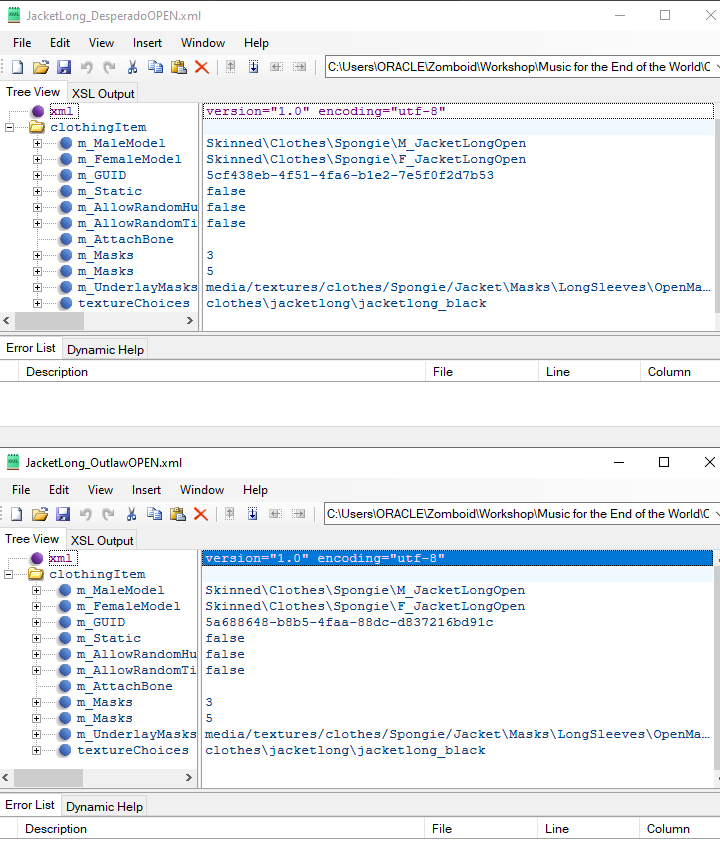
it's making me so angry because these are IDENTICAL ITEMS in EVERY way except for ids/guids
tranquil kindle
worn lodge
<@286889717985705986> help me out please
What i'm looking at
worn lodge
i got it fixed
turns out it was a chain of events
that caused all of that
ended up in me remaking my model
but its chill
rancid tendon
pinging you on this because you wanted to know and i'm only now getting back to this. this is a new version of the problem though, where previously i was copying another item from a mod that hadn't already been copied in the same way successfully, but now i'm copying my own working copy of an item from a mod and running into the same issue.
per your suggestion last time, i made a copy of the item using spongie's definition instead of my copied one--JacketLong_Random, and that works just fine. it's only using my own clothing definition that breaks it
but my clothing definition is exactly the same as the functional one!!!!!!!!!!!!!!!!!! it's making me so mad!!!!!
so i am:
- making an exact copy of an item in script, except changing out ids where necessary
- copying that item's clothing definition exactly as is except changing out the guid and file title
- adding the new guid and xml title to the guidtable
- and this results in a fucking crash??? related to models and bones somehow???
pastel wolf
three stages left before I publish this mod! Making the fishing rods use the proper model when actually fishing, loot tables and making this cooler actually show up as its model when you hold it and not the default cooler...
rancid tendon
rancid tendon
so i am:
- making an exact copy of an item in script, except changing out ids wh...
i just now ran another test where i made the item that uses spongie's existing definition and that item worked just fine. so i took that item, copied the functional definition exactly, changed nothing else except to insert a new guid (didn't change the texture selection or anything), added that guid/name to the fileguidtable, and that's causing a crash. essentially renaming a completely functional item is all it takes. i feel like i'm taking crazy pills
tranquil kindle
Show the script
silent zealot
Also, the crash error
rancid tendon
tranquil kindle
Show the script
i did show the script it's in that pastebin
rancid tendon
silent zealot
Also, the crash error
as is the crash error
silent zealot
yes, in your console.txt you normally get information that helps identify what happened to cause the crash
rancid tendon
yeah i'm telling you it's in that pastebin :p
Pastebin
Pastebin.com is the number one paste tool since 2002. Pastebin is a website where you can store text online for a set period of time.
noteworthy: the actual manifestation of the crash is that it hangs right as the item would be rendered and prints this error infinitely over and over
silent zealot
rancid tendon
i just now ran another test where i made the item that uses spongie's existing d...
Is that crash when using your model or sponmgies model?
rancid tendon
silent zealot
Is that crash when using your model or sponmgies model?
this crash occurs when using spongie's model, though it's notable to stress that another item in the mod uses the exact same model in the same way and doesn't crash
spongie's not my* oop
silent zealot
ClothingItem = JacketLong_DesperadoOPEN,
ClothingItem = JacketLong_OutlawOPEN,
What are the two clothing definitions
rancid tendon
to clarify:
spongie's original clothing definition for this item is JacketLong_Random(OPEN if applicable)
i copied this definition to create JacketLong_Desperado, which is the same but has a new GUID and points only to the Black texture instead of any of the 3 long jacket textures. this item works perfectly fine right now
i then copied JacketLong_Desperado to make JacketLong_Outlaw, which right now is literally identical except for a new guid and results in a crash
silent zealot
You changed the filename to JacketLong_Outlaw.xml?
rancid tendon
correct
silent zealot
Doublecheck it's not something like JacketLong_Outlaw.xml.txt and make sure teh file permissions are OK, path is correct
rancid tendon


here are the two xmls next to each other--one on the right works, one on the left doesn't
silent zealot
And the fileGuidTAble entries?
rancid tendon

properly set
... actually the jacketlong_desperadoopen one is wrong but
not relevant to our current bug since that's the one that's working currently lmao
bronze yoke
the guid in the filelist and the guid in the clothingitem don't technically have to match, since the game does not actually do anything with the guid in the clothingitem
tranquil kindle
rancid tendon
to clarify:
spongie's original clothing definition for this item is JacketLong_R...
Does
ClothingItemExtra = MFTEOTW.JacketLong_Desperado,
even exist?
If not, that throws an error
Its the problem when you partially past, something. If you have jacket that has extra option, paste that extra option too
rancid tendon
that does exist, yes
the pastebin only contained the two scripts for the open variants of these items to show the ways they differed, i didn't feel the need to post the closed versions as well since they're functionally the same
tranquil kindle
IF there is something wrong with item that is linked with ClothingItemExtra it will cause issues
rancid tendon
    {
        DisplayCategory = Clothing,
        Type = Clothing,
        DisplayName = Leather Jacket,
        ClothingItem = JacketLong_DesperadoOPEN,
        BodyLocation = Jacket,
        Icon = JacketLongBlack,
        BloodLocation = LongJacket,
        RunSpeedModifier = 0.93,
        CombatSpeedModifier = 0.97,
        BiteDefense = 20,
        ScratchDefense = 40,
        NeckProtectionModifier = 0.5,
        FabricType = Leather,
        Weight = 2,
        WorldStaticModel = JacketLong_Ground,
        ClothingItemExtra = MFTEOTW.JacketLong_Desperado,
        ClothingItemExtraOption = CloseJacket,
        clothingExtraSubmenu = OpenJacket,
    }
   item JacketLong_Desperado
    {
        DisplayCategory = Clothing,
        Type = Clothing,
        DisplayName = Leather Jacket,
        ClothingItem = JacketLong_Desperado,
        BodyLocation = Jacket,
        Icon = JacketLongBlack,
        BloodLocation = LongJacket,
        RunSpeedModifier = 0.93,
        CombatSpeedModifier = 0.97,
        BiteDefense = 20,
        ScratchDefense = 40,
        NeckProtectionModifier = 0.5,
        Insulation = 0.65,
        WindResistance = 0.35,
        FabricType = Leather,
        WaterResistance = 0.45,
        Weight = 2,
        WorldStaticModel = JacketLong_Ground,
        ClothingItemExtra = MFTEOTW.JacketLong_DesperadoOPEN,
        ClothingItemExtraOption = OpenJacket,
        clothingExtraSubmenu = CloseJacket,
}```So if you have that line and there is item that DOES NOT EXIST meaning the ID is wrong, on Rightclick it will cause error
rancid tendon
that item does exist lol
tranquil kindle
Well, i can't know it before because you posted it jut now
rancid tendon
rancid tendon
the pastebin only contained the two scripts for the open variants of these item...
that's what i was sayin here
rancid tendon
rancid tendon
``` item JacketLong_DesperadoOPEN
{
DisplayCategory = Clothing,
...
    {
        DisplayCategory = Clothing,
        Type = Clothing,
        DisplayName = Leather Jacket,
        ClothingItem = JacketLong_Outlaw,
        BodyLocation = Jacket,
        Icon = JacketLongBrown,
        BloodLocation = LongJacket,
        RunSpeedModifier = 0.93,
        CombatSpeedModifier = 0.97,
        BiteDefense = 20,
        ScratchDefense = 40,
        NeckProtectionModifier = 0.5,
        Insulation = 0.65,
        WindResistance = 0.35,
        FabricType = Leather,
        WaterResistance = 0.45,
        Weight = 2,
        WorldStaticModel = JacketLong_Ground,
        ClothingItemExtra = MFTEOTW.JacketLong_OutlawOPEN,
        ClothingItemExtraOption = OpenJacket,
        clothingExtraSubmenu = CloseJacket,
    }
    item JacketLong_OutlawOPEN
    {
        DisplayCategory = Clothing,
        Type = Clothing,
        DisplayName = Leather Jacket,
        ClothingItem = JacketLong_OutlawOPEN,
        BodyLocation = Jacket,
        Icon = JacketLongBrown,
        BloodLocation = LongJacket,
        RunSpeedModifier = 0.93,
        CombatSpeedModifier = 0.97,
        BiteDefense = 20,
        ScratchDefense = 40,
        NeckProtectionModifier = 0.5,
        FabricType = Leather,
        Weight = 2,
        WorldStaticModel = JacketLong_Ground,
        ClothingItemExtra = MFTEOTW.JacketLong_Outlaw,
        ClothingItemExtraOption = CloseJacket,
        clothingExtraSubmenu = OpenJacket,
}```but yeah here are the full scripts for both
the first pair of scripts works perfectly, second pair of scripts crashes
tranquil kindle
When does crash occours? When you load game/when you spawn item or when you right click one of versions?
rancid tendon
the second you equip the item when it would begin to render the item
it freezes the game and begins printing the error listed in that pastebin over and over
tranquil kindle
Can i see those clothing XML's?
rancid tendon
desperado xmls work, outlaw xmls don't
oop that's an old version of the guidtable hold on
there we go
tranquil kindle
Out of curiosity.... could you send me whole item script file? I want to check something
rancid tendon
(for context: this file contains a bunch of similar items that i'm copying for the purposes of being able to spawn them with specific texture selections and etc on zombies--as you can see i've done this a million times and it worked every time but this one lmao)
tranquil kindle
And its only Outlaw (very bottom one) that breaks?
rancid tendon
yup
tranquil kindle
And they all use same model?
rancid tendon
well not all these items--however, Outlaw uses the same model as does the Desperado coat, and the desperado coat works
tranquil kindle
Like open variant that works is used on both and same with closed one
rancid tendon
correct -- the desperado coat is a direct copy of JacketLong_Random from Spongie's mod, where it uses the same model but cuts the texture selection down from 3 options to 1. that version works just fine
then i copied that version and tried to make the same item again but with swapped guids/item ids (so that i could eventually change the texture selection from black to brown, but i didn't even change that) and it broke
tranquil kindle
I think i found it?
rancid tendon
oh?
tranquil kindle
First is that there is typo :JacketLong_RandomOPENR
rancid tendon
that's from the first GUIDtable that was outdated
tranquil kindle
Second that even tho its typo :JacketLong_RandomOPEN Does not exist in fileguid
rancid tendon
the second guidtable i sent that is current shouldn't' have that
tranquil kindle
Where is the new one?
rancid tendon
rancid tendon
here


 rancid tendon
ah consarnit that's also the wrong text file LMAO hold on--that's the one i was working with to try and test it using the original item definition (and then an identical copy of the item definition but with one letter and the guid changed)
this is the working version rn sorry about that
tranquil kindle

rancid tendon
I'M SOWWYYYYY i sent them both from the wrong folder and didn't notice
tranquil kindle
Okay, but are you sure you're not using the WRONG ones?
rancid tendon
i'm definitely sure about that lol, dw
i checked once i realized i sent the wrong txt but nah i just clicked the wrong shortcut
 hearty bronze
how do i make a 3d model appear in the world? ive made a 3d model and want to tie it to a world object, but for soome reason it wont register in the game.
i have the model file and the .txt in 42 > media > models_X > WorldItems > Boxes
tranquil kindle
rancid tendon
i'm definitely sure about that lol, dw
 Is there a reason you add "MFTEOTW." before clothigitemextra?
You already have module, so i see no point.
hearty bronze
and the model txt file reads
{
    model SanitaryPad_Box
    {
        mesh = WorldItems/Boxes/SanitaryPadBox,
        scale = 1
    }
}```You said the "desperado" one works and it has it too, but i'd just remove it
tranquil kindle
hearty bronze
and the model txt file reads
```module Base
{
model SanitaryPad_Box
{
...
No texture
I know some vanila items that aren't clothes do not have Texture (not sure why, but i have theory)
But overall clothes get their texture from XML files, where WorldItems/weapons need to have texture assigned
rancid tendon
tranquil kindle
<:hmmm:1174812553185071165> Is there a reason you add "MFTEOTW." before clothig...
just uncertainty as to whether or not that was how it worked, i'll remove that but yeah i doubt that's the issue considering a working item has it :p
hearty bronze
tranquil kindle
No texture
thanks
tranquil kindle
rancid tendon
just uncertainty as to whether or not that was how it worked, i'll remove that b...
I'm gonna be honest... right now i have no idea.
It's diffrent if i have the mod in front of me and can launch a game and see how its caused
bronze yoke
it doesn't check modules correctly iirc
hearty bronze
i hate talking to computers so bad man i thought making 3d models was just dropping them in 😭
for the world static model do i need to include the whole path of WorldItems/Boxes/x.fbx or is it just the model name
tranquil kindle
I think what you just posted sounds abut right
pastel wolf
containers... weh
hearty bronze
doesnt show up ingame sadly
my file directory for the 3d model is media > models_X > WorldItems > SanitaryPadBox.fbx
for the model text file its in scripts > clothing > SanitaryPadBox.txt
the file reads
module RedDays
{
    model SanitaryPadBox
    {
        mesh = WorldItems/SanitaryPadBox,
    texture = SanitaryPadBox
        scale = 1
    }
}
thanks
hearty bronze
and in the items text file it reads
which i think is right
tranquil kindle
Yes
What, you don't do that
You use your model definition, there, in that case "SanitaryPadBox"
tranquil kindle
So you have model definition here
module RedDays
{
    model SanitaryPadBox
    {
        mesh = WorldItems/SanitaryPadBox,
    texture = SanitaryPadBox
        scale = 1
    }
}
Thats called model script, it gives your mesh and texture ID (in this case SanitaryPadBox because you did "model SanitaryPadBox"),
You use that in Itemscripts so if you want it as
WorldStaticModel you put
WorldStaticModel = SanitaryPadBox,
oh so i remove the worlditems prefix from the itemscript?
tranquil kindle
Yes
hearty bronze
tysm, it appears now
well it doesnt its invisible but its actually replacing the 2d icon now
tranquil kindle
Then it means that either texture is in wrong place, or maybe your model has more than one material
Or its too small/too big
Or its origin point (of 3d model) is in wrong place and its there, but offscreen
tranquil kindle
No more than one
Game doesn't really care about what kind of material it is, It wont display metalics/roughness. It just can't be more than one
hearty bronze
ah i usually divide up what i want to texture differently into different materials
rancid cargo
watuh vs water

 pastel wolf
i'm using azakaela distribution tool
worn lodge
rancid cargo
watuh vs water
toofpick
pastel wolf
should I name my item ProFishingRod or item.ProFishingRod or whats the proper syntax here?
 tranquil kindle
What is this tool?
tranquil kindle
Is it public?
pastel wolf
i just need to know how to like, make my stuff actually spawn in world and what my file should look like
yeah
tranquil kindle
Put module, so for example if you have Base then you do Base.ProFishingRod
No need for item.
pastel wolf
wouldn't it be ProFishingRod.ProFishingRod then? since its the script first, then the pointer to the item ProFishingRod in that file?
tranquil kindle
If you have module ProFishingRod, then it would be correct
pastel wolf
Okay! that does work, awesome
that's one problem solved, the things can actually spawn in world!
so that leaves 2 problems to solve, making the fishing rods not be invisible when i actually do catch a fish, and making the cooler show up when held
tranquil kindle
Anyone familiar how to make vehicle more durable? I'd thought setting FrontEndHealth and rearEndHealth to high number would change something, but apparently its the same if its 1 or 3000

@granite ginkgo Maybe you have any idea?
granite ginkgo
tranquil kindle
<@596335515272478740> Maybe you have any idea?
I only know about frontendhealth and rearendhealth, do you think that maybe changing the type to heavy duty can affect health, or it's simply the type