#mod_development
1 messages · Page 273 of 1
 queen oasis
queen oasis
queen oasis
 queen oasis
also have a media folder with just the lua in it
 ivory gyro
queen oasis
ivory gyro
queen oasis
thankkss
 molten hornet
working hard or hardly working

 spare hinge
oh
queen oasis
common is empty but I just started mesing with it
spare hinge
AH
i needed to make the common folder
even though its empty
i guess its a hard requirement
fantastic
now to figure out workshop
 mellow frigate
queen oasis
media has everything in it also, minus mod.info and poster
mellow frigate
queen oasis
media has everything in it also, minus mod.info and poster
ModName/media is only for B41 compatibility
spare hinge
okay i just tried to click on the ground to move my character like its baldurs gate 3
i havent played PZ in too long oh dear haha
ivory gyro
Yes but someone know why its dont show up in the mod list ?
spare hinge
did you make a common folder?
queen oasis
mellow frigate
ModName/media is only for B41 compatibility
yea. I'm doing like 4 things at once. I'm not being very articulate


 ivory gyro
spare hinge
this is how mine looks
ivory gyro
spare hinge
this is how mine looks
same for me
and its show up in your mod list ? (on unstable)

 steep cloak
Heres what im doing now with Save Our Station.
Loads like a charm ingame, surprisingly no errors, with the exception of the map (as expended, since it likely will need recompiling). So technically its still broken, but not on the lua side at least.

I put my modinfo in common since it doesnt have anything special in it - could put in 42 though if i really need version specific things.
steep cloak
steep cloak
Heres what im doing now with Save Our Station.
Loads like a charm ingame, surpr...
Funnily enough the vehicles still spawn where they would lol
 mellow frigate
steep cloak
Funnily enough the vehicles still spawn where they would lol
mellow frigate
steep cloak
Funnily enough the vehicles still spawn where they would lol
Everything is perfectly normal..
spare hinge
did anything with workshop change?
 gleaming sorrel
Can someone explain in simpleton terms to me how to update a mod?
ivory gyro
https://steamcommunity.com/sharedfiles/filedetails/?id=3386409674&searchtext=
For people want to have the Old Moodles Icons.
(B42) feel free to use this as exemple mod
 gleaming sorrel
ivory gyro
https://steamcommunity.com/sharedfiles/filedetails/?id=3386409674&searchtext=
Fo...
gleaming sorrel
ivory gyro
https://steamcommunity.com/sharedfiles/filedetails/?id=3386409674&searchtext=
Fo...
Damn you beat me too it
ivory gyro
gleaming sorrel
Damn you beat me too it
Sorry friends ^^ But i didnt replace somes icon, theres new ones in B42
gleaming sorrel
ivory gyro
Sorry friends ^^ But i didnt replace somes icon, theres new ones in B42
Could rework them in the build 41 style.
I love working with pixel art so it would be fun to try.
 sonic needle
fragmo anything was the mistake you made
 elder oxide
i am SO grateful that updating retexture mods is simple
 gray robin
Do you guys think with build 42, npc mods like bandit / day one etc will get more advanced? Does the added animal AI help somehow?
gleaming sorrel
elder oxide
i am SO grateful that updating retexture mods is simple
I'm still confused, it doesn't help that my pc keeps crashing whenever I try to update the game.
I'm worried I perhaps may be screwed
queen oasis
of course they changed world markers. why wouldn't they.
 nova socket
elder oxide
gleaming sorrel
I'm still confused, it doesn't help that my pc keeps crashing whenever I try to ...
nova socket
elder oxide
gleaming sorrel
I'm still confused, it doesn't help that my pc keeps crashing whenever I try to ...
It entirely has to do with file structure, ill grab a screenshot for you
Stuff with more complicated code i have no clue about bc im an artist and not a coder, but retextures i have figured out
elder oxide
gleaming sorrel
I'm still confused, it doesn't help that my pc keeps crashing whenever I try to ...
Inside of the "Zomboid\Workshop[MODNAME]\Contents\mods[MODNAME]" folder should look like this. For simple retextures with no lua or anything, you can leave "41" and "42" empty. Inside the new "common" folder is where you move the "media" folder and your "mod.info" file
 gleaming sorrel
elder oxide
Stuff with more complicated code i have no clue about bc im an artist and not a ...
gleaming sorrel
elder oxide
Stuff with more complicated code i have no clue about bc im an artist and not a ...
Luckily I only have 1 code mod which I'm leaving to the modding community to fix.
gleaming sorrel
elder oxide
Inside of the "Zomboid\Workshop\[MODNAME]\Contents\mods\[MODNAME]" folder should...
Doesn't seem too difficult
sonic needle
i took way too many adhd meds. >:D Tiem to MOD
mellow frigate
elder oxide
Inside of the "Zomboid\Workshop\[MODNAME]\Contents\mods\[MODNAME]" folder should...
there is no such thing as 41 folder for B41.
elder oxide
mellow frigate
there is no such thing as 41 folder for B41.
What do you mean
mellow frigate
B41 structure for B41 compatibility must be the same as before B42
[ModName]\media\
 silent zealot
Can you have B41 and B42 in the same mod?
mellow frigate
so B41 code is one layer lower than anything for B42 and future
mellow frigate
silent zealot
Can you have B41 and B42 in the same mod?
yes
silent zealot
So the B41 stuff in whatever folders they were in before, then common & B42 for the new stuff
thanks
elder oxide
Thank you yeah
silent zealot
That will avoid needing to upload seperate B42 versions to steam
queen oasis
if anyone smarter than me has the source opened, could you tell me if I'm blind or not because it looks like they left the old WolrdMapMarkers in as WorldMapMarkersV1 but it's not exposed?
mellow frigate
check pinned messages from nasKo
 gilded hawk
sonic needle
i took way too many adhd meds. >:D Tiem to MOD
gilded hawk
sonic needle
i took way too many adhd meds. >:D Tiem to MOD
Check your blood pressure 🩸
I'm le back fellow modders
sonic needle
i recognise that Name...
wait, i wonder if you can commission someone to not update their mod xD?
mellow frigate
sonic needle
wait, i wonder if you can commission someone to not update their mod xD?
Don't give me ideas..
elder oxide
so would this be the correct file structure?

seems weird to have two copies of "media" and "mod.info"
mellow frigate
elder oxide
so would this be the correct file structure?
without 41 folder, yes (media being already for B41)
mellow frigate
you'll thank me once it works on your client's side 😉
elder oxide
Lmao
sonic needle
mellow frigate
Don't give me ideas..
only the most chaotic B42 thoughts today. Promise.
 pale merlin
does the lua folder go directly inside the common folder?
sonic needle
it goes... in the square hole. but fr all the files go either in common or 42
mellow frigate
sonic needle
only the most chaotic B42 thoughts today. Promise.
you act as chaotic for sure, but chaotic good, chaotic bad or chaotic evil ?
mellow frigate
pale merlin
does the lua folder go directly inside the common folder?
no you need the media folder between common and lua
sonic needle
only the most, Chaotic Neutral
a slight spelling error in a recipe corrupting the whole game to crash without any log hints.
respectfully tho.
mellow frigate
Thou shall not spell errors in the vicinity of recipes. Or shall the five Hells fall upon thou
 bronze yoke
nevermind @ talk of the addon manager taking days to update, Umbrella (Unstable) is live

 silk hollow
Quick question: 42 unstable is out. What does that mean? It's going to become "stable" after X amount of time or it's a soon(tm)?
Follow up: Is it worth start checking issues with my mod now or should I wait until it's stable?
sonic needle
its a base to build on.
pushing it out, means they can fix faster, as it will break more in unexpected ways they cant test.
pale merlin
mellow frigate
no you need the media folder between common and lua
thanks, any idea why mine still isn't showing in the mod list?
 mellow frigate
silk hollow
Quick question: 42 unstable is out. What does that mean? It's going to become "s...
mellow frigate
silk hollow
Quick question: 42 unstable is out. What does that mean? It's going to become "s...
this is THE time to convert mods. so that when stable comes out, USERS can use mods smoothly
pale merlin
a pinned post on file structure would help i think
mellow frigate
pale merlin
thanks, any idea why mine still isn't showing in the mod list?
I'd try with mod.info and poster at 42 level
silk hollow
mellow frigate
this is THE time to convert mods. so that when stable comes out, USERS can use m...
mhm, according to this reasoning:
as it will break more in unexpected ways they cant test
It might instead be better to wait a bit until things settle down a bit.
mellow frigate
pale merlin
a pinned post on file structure would help i think
yes, which is why there IS a pinned post from nasKo
pale merlin
lmao, my bad
silk hollow
mellow frigate
yes, which is why there IS a pinned post from nasKo
Ah I see, I'll check on that then
mellow frigate
pale merlin
lmao, my bad
thou shall join ash in the 7 hells of Baradum ! #mod_development message
 quasi kernel
Seems that InventoryItemFactory is no longer valid on the client, probably expected. Could be wrong but that's what I gathered from a quick conversion test.
I gotta figure out a way to get a displayname for an item without actually creating it,,
 north rain
Anyone know how we can do proceduralgeneration for clothing spawns?
It's different now in 42
silk hollow
I'll add that it might be a good time to update any sort of wiki we have on modding. Discord is cool and all but messages aren't searcheable from search engines and it will end up with people asking again and again the same thing and only getting answers if someone notice the questions.
 elfin stump
Hey all, I am curious if anyone has figured out the working mod structure. I cannot seem to get a mod to pop up on the list. I saw some posts above about a 42 folder and tried that in a couple of arrangements with no luck. Do these need to be in local mod folder or does the workshop folder still work? Any input would help great!
Nvm! I see the pin now!
bronze yoke
quasi kernel
Seems that InventoryItemFactory is no longer valid on the client, probably expec...
InventoryItemFactory no longer exists
elfin stump
And it begins, good luck everyone! 🫡
 clear needle
The modpocalypse
north rain
Is there a way to instal two seperate Project zomboids on my library? So i can have an unstable and regular? I need to check my mod for backwards compatibility now
 teal slate
Beautiful Java doesn't seem to work for B42.
 gray robin
Do you guys think with build 42, npc mods like bandit / day one etc will get more advanced? Does the added animal AI help somehow?
 open drum
probably since we now have animals
 frank elbow
teal slate
Beautiful Java doesn't seem to work for B42.
frank elbow
teal slate
Beautiful Java doesn't seem to work for B42.
Fernflower appears to be working for me at the moment (just got in a bit ago, so still running)
teal slate
Fernflower's after my time, so.
 tacit pebble
gray robin
Do you guys think with build 42, npc mods like bandit / day one etc will get mor...
tacit pebble
gray robin
Do you guys think with build 42, npc mods like bandit / day one etc will get mor...
i havent tried b42 yet, but I think we can use faction system from animals if there is something like that.
bandit for faction 1 with aggressive ai, friendly for function 2 with friendly ai...
because chicken and boar will not be in same faction and it means it's much easier to control and to manage
only imagine tho
 crystal canyon
Trying to update my mod and want to check if it works right away or what broke. How do I enable unsupported mods on debug? I'm on debug but can't see that option
crystal canyon
Ah ok, saw that on the help section on the mod manager. Another thing, is b42 not reading from the user mods folder? I have the correct structure but the game is not showing them
bronze yoke
it should load from mods, a common hiccup you might have run into is it doesn't load at all if there isn't a common folder
crystal canyon
I'll check that. Thanks
frank elbow
teal slate
Fernflower's after my time, so.
Fernflower is the decompiler that BeautifulJava uses under the hood. You can run it directly
Comes with IntelliJ as a .jar & there are forks (unsure what the forks add; I think I just yoinked the one I use from IntelliJ)
tacit pebble
By the way guys, do you usually decompile or backtrack to figure out what function has been added after new update? it's first time getting next version since I started modding in PZ.
teal slate
Found the issue with Beautiful Java.

Two matches. Somehow.
Setting to a max of 1 works.
crystal canyon
Anyone knows how the map selection works to point the spot on the map? I managed to get the mod to load but want to integrate that new feature.
got it, nvm 😄
 silent zealot
It's been too long since I did Zomboid modding... Is the expected workflow to develop the mod in C:\users\myname\zomboid\mods and then when ready copy it to the Workshop folder to upload to steam?
bronze yoke
i'd probably just start in workshop, otherwise you'll just have to move it anyway
silent zealot
So I shouldn't have the same mod folder in mods and under Workshop?
My profile is a mess 😂
bronze yoke
you shouldn't, it can cause issues where it loads some files from different locations and is generally confusing
you don't want to debug why your mod isn't working for an hour and then realise you were editing the wrong folder
silent zealot
Thanks, I'll sort that out and start updating some things for B42
silent zealot
bronze yoke
you don't want to debug why your mod isn't working for an hour and then realise ...
I have definitely done that before
queen oasis
not so mad about the change in world markers now
 late hound
Hey how can I get my mod to show up in the mod list? My mod list is completely empty. I was getting an error:
WARN : Mod          f:0, t:1734485684161> ChooseGameInfo.readModInfoAux       > can't find "C:\Users\xx\Zomboid\Workshop\AuthenticZ\Contents\mods\Authentic Z - Current\common\mod.info"
ERROR: General      f:0, t:1734485684163> ExceptionLogger.logException> Exception thrown
    java.lang.NullPointerException: Cannot invoke "zombie.gameStates.ChooseGameInfo$Mod.getId()" because "<local4>" is null at ChooseGameInfo.getModDetails(ChooseGameInfo.java:205).
    Stack trace:
        zombie.gameStates.ChooseGameInfo.getModDetails(ChooseGameInfo.java:205)
        zombie.gameStates.ChooseGameInfo.getAvailableModDetails(ChooseGameInfo.java:222)
        zombie.modding.ActiveMods.checkMissingMods(ActiveMods.java:218)
        zombie.ZomboidFileSystem.loadMods(ZomboidFileSystem.java:920)
        zombie.GameWindow.init(GameWindow.java:1412)
        zombie.GameWindow.mainThreadInit(GameWindow.java:701)
        zombie.GameWindow.mainThread(GameWindow.java:599)
        java.base/java.lang.Thread.run(Unknown Source)
and I am not sure what this means
bronze yoke
to get a b41 mod to load at all:
- create empty
common\folder inside of your mod's folder (e.g.Authentic Z - Current\common\) - create
42\folder inside of your mod's folder and copy the entire mod into it
ideally you should move assets intocommon\but that's the bare minimum to get it to be recognised by the game
late hound
bronze yoke
to get a b41 mod to load at all:
- create empty ``common\`` folder inside of you...
Yeah I know about the folders, this is what I got

then I have a full copy in common, which should work right?
 silent zealot
First mod updated for B42, for the appoximately zero people waiting on this before they started their new playthrough.
 late hound
silent zealot
late hound
silent zealot
can I get a link?
silent zealot
late hound
mod is hidden
silent zealot
try now, it set itself to hidden when I updated it
 queen oasis
Nice replacement for highlighting squares
addAreaHighlight(minX, minY, maxX, maxY, z, r, g, b, a)
There's also renderIsoRect and renderIsoCircle. Still no full-blown LineDrawer though
late hound
hum so I got my mod to show up in the list, but when I hit accept, I get this error in the console, has anyone else received this?
Caused by: java.io.IOException: Script load errors.
not sure what causes that
ivory gyro
You dont like the new loading screen looking like AI image ? Lets get back the old illustrations of Project Zomboid !
https://steamcommunity.com/sharedfiles/filedetails/?id=3386484368
 sonic needle
late hound
hum so I got my mod to show up in the list, but when I hit accept, I get this er...
sonic needle
late hound
hum so I got my mod to show up in the list, but when I hit accept, I get this er...
corrupt script i think..?
late hound
no?
mellow frigate
no way that crazy Djackz is player B42 MP !
 finite scroll
i've noticed b42 workshop items don't show up in the usual workshop directory, did they change it?
mellow frigate
finite scroll
i've noticed b42 workshop items don't show up in the usual workshop directory, d...
it always takes a bit of time to get updated, meanwhile you can click on the keyword from one of the mods using it to get the list.
silent zealot
You can manually edit the URL:

Not a lot of updated mods yet (not surprising given that B42 has only been out for hours)
I can definitely feel the lack of some of my favourite mods!
 oak bluff
ivory gyro
**You dont like the new loading screen looking like AI image ? Lets get back the...
oak bluff
ivory gyro
**You dont like the new loading screen looking like AI image ? Lets get back the...
could you also possibly add this one? :D
 ivory gyro
oak bluff
could you also possibly add this one? :D
ivory gyro
oak bluff
could you also possibly add this one? :D
Yup i add it tomorrow 🙂
 junior blaze
Hello, i got questions about mods. Can you replace one of a vanilla hair texture/model from a mod, also only one hairstyle mod. Not all of them..
Cuz i would like to replace the original hairstyle in files, with the one hair type i like in b42.
 small topaz
Are there already people working with the new lua code? Does anyone knows why they putted most of the TimedActions in the shared folder?
 fathom marten
ivory gyro
**You dont like the new loading screen looking like AI image ? Lets get back the...
fathom marten
ivory gyro
**You dont like the new loading screen looking like AI image ? Lets get back the...
I'm sorry, what?
 covert adder
is there a guide for making mods in b42?
 green bobcat
is there a mod that allows you to hold a 2 handed weapon like a rifle in your offhand while using a melee or one handed weapon in your main?
green bobcat
covert adder
is there a guide for making mods in b42?
probably not yet, it only launched a few hours ago so it'll be a hot minute before one is made either officially or unofficially
covert adder
yea i just meant like a rough idea for how to do it
even a text guide would prob help
green bobcat
green bobcat
is there a mod that allows you to hold a 2 handed weapon like a rifle in your of...
similarly to the overkill perk in MWII
small topaz
Can anyone confirm that they changed the B41 command "InventoryItemFactory.CreateItem(item)" to "instanceItem(item)" ?
 zealous iris
i have arrived with no experience on a whim to some day attempt a herculean task
 west pelican
any way to disable anti aliasing? b42 is a lot more blurry
zealous iris
zealous iris
i have arrived with no experience on a whim to some day attempt a herculean task
aka attempt to recreate an entire city without prior zomboid mod experience 
though actual development will likely start with B42 since basements and skyscrapers
 tranquil reef
I've already looked and it seems like it's not possible, but custom animals is out of the question right?
Can't find which .class file defines them, but also can't find any lua file that defines them
covert adder
is there some trick to getting mods to work?
i cant get em to work i added the 42 file and common file but still doesnt work
west pelican
i am going to sleep if anyone has the time, I'd love to see a mod that removes TAA
 winter bolt
tranquil reef
I've already looked and it seems like it's not possible, but custom animals is o...
winter bolt
tranquil reef
I've already looked and it seems like it's not possible, but custom animals is o...
theyre made through lua but im not sure if they can have custom behaviour yet
covert adder
so should media be in common or just in the mod folder with common and 42?
tranquil reef
winter bolt
theyre made through lua but im not sure if they can have custom behaviour yet
Oh damn, really? Can you give me the directory location
Custom behavior isn't a massive concern for me. I just want to screw around for now
winter bolt
i havent checked yet but if you search for an animmal name like chicken you should find it
open drum
so... im sorry if i sound ignorant but as a science major, what's the whole fuzz about using AI image???
Are they just hating it in general or cuz it just have many errors in the image??
 cosmic condor
open drum
so... im sorry if i sound ignorant but as a science major, what's the whole fuzz...
cosmic condor
open drum
so... im sorry if i sound ignorant but as a science major, what's the whole fuzz...
there are rumors that AI companies take artwork posted on social media without permission to train their AI models. many artists feel disrespected when people choose to create images using generative AI rather than hiring them for their artistic skills.
 grave acorn
It keeps on telling me that i need a preview.png image in my mod folder when I do? where does it go?
finite scroll
cosmic condor
there are rumors that AI companies take artwork posted on social media without p...
hardly rumors
there's confirmation of it happening multiple times before
and also ai art just looks like shit
ai has lots of practical applications, art is not one of them
 grizzled fulcrum
grave acorn
It keeps on telling me that i need a preview.png image in my mod folder when I d...
grizzled fulcrum
grave acorn
It keeps on telling me that i need a preview.png image in my mod folder when I d...
next to your mod.info
grave acorn
grizzled fulcrum
next to your mod.info
how? if you dont mind me asking
oh
its there
bronze yoke
it should be next to your workshop.txt for the steam preview
grizzled fulcrum
did I get them mixed up xd
grave acorn
 bronze yoke
the one next to your mod.info would be for the in-game preview which doesn't cause an error if you don't have
grizzled fulcrum
makes sense
grave acorn
bronze yoke
it should be next to your workshop.txt for the steam preview
where does that go? NVM
open drum
cosmic condor
there are rumors that AI companies take artwork posted on social media without p...
oh... i see
grave acorn
my moodle mod didnt replace my moodle lmao
 vestal gyro
 wet sandal
All my mods except Tetris are updated <:tired:721361533611016193>
wet sandal
All my mods except Tetris are updated <:tired:721361533611016193>
I slept just before the update hit and now gotta do that this entire afternoon because of work
covert adder
what is preview.png and do i need it? If so how does one get it just make a png named preview?
steep cloak
covert adder
what is preview.png and do i need it? If so how does one get it just make a png ...
thats the preview image for the workshop i believe
covert adder
do i need it?
steep cloak
Well its your thumbnail, so if you want a thumbnail, then yes
covert adder
oh lmfao
steep cloak
lol
covert adder
well it not working for me and im trying to find out why
steep cloak
How big is the image? Is it a square resolution?
steep cloak
Oh i thought you meant the image wasnt working
covert adder
nah like the mod not even appearing
steep cloak
I think if you dont, itll just give it the default indie stone thumbnail?
covert adder
yea not sure
i cant even get it appear
also should i put it in workshop or C:\Users\thego\Zomboid\mods
covert adder
ill send it
steep cloak
steep cloak
Heres what im doing now with Save Our Station.
Loads like a charm ingame, surpr...
^
thats how my structure looks now, loads fine ingame
Rough example only of course - stuff like textures is in common, functional stuff like lua scripts in 42.
the old media folder is unchanged from previous b41 mods.
covert adder
i see
steep cloak
Dunno if it matters but i removed the pzversion string in the mod.info files in the common folder
covert adder
i wasn't putting mod info in common with everything else
steep cloak
Mod info can be in common or any of the version folders.
covert adder
should i just fill common if im only doing 42?
covert adder
lol
steep cloak
winter bolt
common doesnt need mod.info
It can be in either the common or the version folders, as per the pinned post.
I put mine in common because im likely not going to be targeting specific b42 versions or making any changes to the file
But it doesnt matter as long as its in either common or a version folder
 covert adder
alright so just putting it in the file i want like common or 42 should work right?
if im doing a 42 mod
steep cloak
Yes
And my modinfo just has name, id, description, poster and modversion
Since targeting PZ versions seems to be done through the folders now, i believe the old pzversion key is not needed anymore
grave acorn
lmao my moodle replacement mod aint working ingame lmao
steep cloak
Guessing the moodle icon definition changed maybe?
 lilac mural
Modding page on pzwiki has not been updated yet?
 dark wedge
Hey everyone! It's been a while. It looks like ModOptions is now natively supported in B42.
dark wedge
To that end, I've created a small example to hopefully get people started with using it, as it's not compatible with the old ModOptions system. Example output is below (these are saved options). The Lua file is documented and has all of the available options to us. Hopefully this is helpful to people.

 dull moss
dark wedge
To that end, I've created a small example to hopefully get people started with u...
dull moss
dark wedge
To that end, I've created a small example to hopefully get people started with u...
#musicmaniacpins new mod options
(it's a pin for myself)
dark wedge
There's a few more options that we can play around with, and it's not too bad to get switched over. But it is definitely different. This should prevent further breaks in the future though.
bronze yoke
definitely not an event
dull moss
I'll have to experiment around
dark wedge
nope. no "onChange" function like the old version, and no event that I can see either.
 coral blade
modders go brrr
dark wedge
it would be handy to have a basic 'onChange' or whatever function like with old ModOptions. i'd even settle for a "OnSettingsApply" event or something to just do a reload.
coral blade
pretty sure the 41 mods don't work on 42
bronze yoke
if it is done by lua it shouldn't be that bad to catch it
dull moss
It starts 
 coral blade
we can only hope for the major mods to be updated asap
dull moss
HOLDL
coral blade
thanks in advance 🙏
dark wedge
Yea, I had 5 comments within like 4 hours of B42's release....
dull moss
Feel free to send your fav modders a coffee ;)
dull moss
dark wedge
Yea, I had 5 comments within like 4 hours of B42's release....
Classic
bronze yoke
can these people not just play twelve minutes of vanilla
dull moss

dark wedge
"but muh brutal handiwork" 
winter bolt
bro 💀
 dull moss
Lmao
winter bolt
this was posted hours after release lmfaoo
dull moss
Tell him to update them for you then
spare hinge
winter bolt
bro 💀
average mod user behavior
winter bolt
this wasnt on my mod thankfully
dull moss
If it's ain't that hard

I'd still tell him to update the code and send to author then
I mean, updating the mod isn't that hard
spare hinge
look someone bought me a game so i would update a mod of mine im not complaining
dull moss

My dude experience is probably like a texture mod that probably wasn't changed how it works in 42
And he's like "yeah it isn't hard"

 coarse sinew
dark wedge
Yea, I had 5 comments within like 4 hours of B42's release....
coarse sinew
dark wedge
Yea, I had 5 comments within like 4 hours of B42's release....
I had a comment even before b42 asking if it works with it.
 coral blade
oof
 pale merlin
coarse sinew
I had a comment even before b42 asking if it works with it.
pale merlin
coarse sinew
I had a comment even before b42 asking if it works with it.
get to work! they're paying for excellent service!
spare hinge
time travellers need mods too
dark wedge
coarse sinew
I had a comment even before b42 asking if it works with it.
Toilet comment from a real toilet. not unexpected.
dull moss
coral blade
people really think old mods work instantly with 42?
Sometimes it does tbh
Depends on the game and the mod
 minor perch

 dull moss

coral blade
Happened with RimWorld as well
dull moss
Nuovo commento 
coral blade
1.5 was released and people were like "yo when you update the mod??"
pale merlin
sorry if i'm asking a a question that has already been asked. how do we fill out this data?
 sonic needle
so the rendering bug, why has it all suddenly killed UV's 😦
spare hinge
probably by editing mod.info in some form
though i am not aware of any documentation
pale merlin
spare hinge
though i am not aware of any documentation
same
winter bolt
pale merlin
sorry if i'm asking a a question that has already been asked. how do we fill out...
in mod.info you can add "author = something"
sonic needle
dont think i can fix it without someone updating the pinned body files either
pale merlin
winter bolt
in mod.info you can add "author = something"
i'll give it a shot, ty
coral blade
btw, does the mod packaging changed from 41 to 42?
spare hinge
yea
theres a slightly different folder structure now

the files that you would usually put in a mod go into either "42" or "common"
the game picks files based on a version
"common" has files that go for any version
"42" is only files that work on 42
and presumably in the future there would be more version folders but for now its only 42
 round notch
Are they updating build 41 for this new file structure?
bronze yoke
no
spare hinge
probably not?
bronze yoke
build 41 will continue to use the old structure which doesn't conflict with the new one anyway
covert adder
how do i see prints?
bronze yoke
if you're in debug mode they'll appear in the lua console
 bronze yoke
launch the game with -debug
coral blade
sorry was away
covert adder
90% of problem solving is overcoming your own stupidity
coral blade
@spare hinge thanks for the information
spare hinge
np 
covert adder
turning the mod on might've helped 😭
 covert adder
yea
spare hinge
not anymore no
covert adder
put it in 42 or common
coral blade
damn
spare hinge
anything outside of the version folders is ignored basically
the game overlays the files from common and 42
with common taking precedence
so the same file in both 42 and common will only exist as the common version
at the moment the split doesnt make a huge difference, but it will in the future
you can probably just stuff everything in 42 for now
bronze yoke
are you sure common takes precedence? that seems like the exact opposite of how it should work
coral blade
I'm checking an old folder packaging
spare hinge
The mod folder now requires 2 sub-folders. First folder is “common”. This folder will always load and it will always load first. You can place files here that will not change in future mod updates for a specific game version. (it’s a good place for resource files)
#1318693102143148054 message
covert adder
i also heard other people saying that it go common then 42 i think?
but im not sure
bronze yoke
'load first' doesn't really mean anything in particular here but keep in mind that regular mod load order prioritises mods loaded *last*
coral blade
damn
 spare hinge
that is a good point
coral blade
so basically I have a problem
covert adder
fair point
coral blade
time to tinker with some code 🤔
covert adder
goodluck
covert adder
dont let the bug bite
spare hinge
am in debug mode
covert adder
f11
spare hinge

covert adder
oh you gotta go in to the property
spare hinge
cheers
covert adder
for the game
in general
then in the textbox you put -debug
then you should be set
coral blade
thanks @covert adder
covert adder
print('--------------------CENTRAL SCRIPT LOADED--------------------')

Events.OnPlayerUpdate.Add(function (player)
    local health = player:GetHealth()
    if health <= 1 then
        print('Player is Dying')
    end
end)```but nothing for prints
covert adder
why isn't this working for line 4 i cant get operations like <= to work?
covert adder
spare hinge
where exactly is the log in debug mode
so im actually a bit confused about that too but normally you can find it in the files where the mods file is but instead look in Logs
spare hinge
i am doing that now
spare hinge
but someone said you can have it ingame
spare hinge
which would be more convenient
bronze yoke
it should be in the lua console in the bottom left
spare hinge
 spare hinge
this what i got
coral blade
@spare hinge nice for you working with Linux 💪
bronze yoke
there are some extra fields you can choose to fill in but nothing mandatory has changed
bronze yoke
spare hinge
not in the debugger, just in-game
pale merlin
so whats the replacement for InventoryItemFactory? assuming there is one
bronze yoke
instanceItem("type")
spare hinge
bronze yoke
not in the debugger, just in-game
oh you cant read logs from the menu?
thats annoying
pale merlin
bronze yoke
``instanceItem("type")``
amazing, thanks. i'll give that a shot
covert adder
so is there a way to get operator symbols to work like <= i cant get it to work?
bronze yoke
they should work fine
spare hinge
have you verified the value?
covert adder
how does one do that?
spare hinge
print it
bronze yoke
the capitalisation makes me think :GetHealth() is not a real function though
covert adder
well im getting there health isn't that a certainity it'll be a number?
spare hinge
odd, did it not throw an error?
this is the kinda thing that should make lua throw up and yell at you
spare hinge
huh
bronze yoke
i don't know what you were doing wrong but those operators do work
covert adder
okay ill test it out again see if it work now
 exotic wedge
I don't know what is missing.
 covert adder
try removing mod.info from there and making sure it in common
that how i have mine setup
winter bolt
rename 42 to 42.0 maybe?
exotic wedge
i follow here
 tame mulch
exotic wedge
I don't know what is missing.
tame mulch
exotic wedge
I don't know what is missing.
common, not Common
covert adder
oop
exotic wedge
😲
spare hinge
tame mulch
common, not Common
does that actually matter on windows? 
or is that a java thing
dull moss
I mean if game tries to load folder /common/ and it's not there, yknow
spare hinge
yes but on windows capitalization is ignored
"Common" and "common" are considered the same
however it isnt on linux so its a good idea to lowercase it anyway
pale merlin
it seems that instanceItem is somehow performing worse than the old InventoryItemFactory
maybe it does more?
spare hinge
oof the script load order seems to have changed and its wrecking me
dull moss
Btw is it known if we update mods now, will they still work in 41 using new structure? Like did they update 41 to be able to use new folder structure?
spare hinge
 covert adder
spare hinge
"Common" and "common" are considered the same
covert adder
spare hinge
"Common" and "common" are considered the same
well try it as common and if it works you found your solution
lol
spare hinge
ill try but i dont think it should affect it?
 spare hinge
?
covert adder
well all im saying mine is like that and mine works and urs doesnt lol
dull moss
And you like "yeah I don't think that's it"
spare hinge
uhh
covert adder
lol
covert adder
yee
 tame mulch

covert adder
i cant get Events.OnPlayerDamage.Add(DamageCheck) to work
print('--------------------CENTRAL SCRIPT LOADED--------------------')


function HealthCheck(player,health)
    if health < 1 then
        player:setHealth(100)
        print('Reviving the player! ' .. health)
    end
end


local function DamageCheck(player, damage)
    local health = player:getHealth()
    local damageDealt = health - damage

    if damageDealt < 1 then
        HealthCheck(player,health)
    end
end

Events.OnPlayerDamage.Add(DamageCheck)```it didn't work?
 tame mulch
spare hinge
does that actually matter on windows? <:lizDetect:620347661223985168>
tame mulch
spare hinge
does that actually matter on windows? <:lizDetect:620347661223985168>
you need name common in lowercase
dull moss
Oh
spare hinge
tame mulch
you need name common in lowercase
is it enforced on the java side
pale merlin
lmao
covert adder
im not sure if im writing it wrong or what but i keep getting errors on the OnPlayerDamage event
dull moss
covert adder
i cant get Events.OnPlayerDamage.Add(DamageCheck) to work
```lua
print('--------...
It's because the player can't be damaged anymore you sillyhead
dull moss

spare hinge
also yea putting the script in common doesnt actually change script load order
covert adder
lmfao
spare hinge
i tried and predictably it didnt work
covert adder
so how do i detect player damage
spare hinge
it only matters for putting together the mod file structure
covert adder
im confused
tame mulch
covert adder
im not sure if im writing it wrong or what but i keep getting errors on the OnPl...
Try OnPlayerGetDamage
dull moss
 covert adder
thanks boss
 tame mulch
covert adder
thanks boss
tame mulch
covert adder
thanks boss
OnPlayerGetDamage put 3 params (char, DamageTYPE, damageVal)
dull moss
I need to look at new code
 spare hinge
how did the script load order change from 41?
it seems to no longer be purely alphabetical by filename
 covert adder
oop
dull moss

tame mulch
spare hinge
how did the script load order change from 41?
lua?
lilac mural
Uh.. Did something changed with how poster declared in mod.info? Cause I have blank white square..
dull moss
Require them in other files? 
spare hinge
i actually do not want to do that
i want it to be an optional dependency
afaik require throws an error if the file is missing right?
spare hinge
still not ideal, but i might go for that
basically it would be boilerplate for other modders
that i would like to avoid
tame mulch
You want mod files from other mod?
spare hinge
i am porting my mod config manager
other mods will check if its present
but in order to do so it needs to be loaded BEFORE any other mod
however if its not present, it should not cause errors
in 41 i accomplished this by prefixing my filename with !
dull moss
Oh oh oh
Are translations UTF-8 now?
Please tell me they are utf-8 now
I don't wanna suffer with 4 different encodings anymore


 spare hinge
so yea it seems like lua files get loaded on a per-mod basis now
rather than thrown into one big pile of files and then alphabetically
oof
also seems like placing files in common DOES affect lua load order, but only within a mod
tame mulch
Yep. Per mod: common folder loads first, then version folder.
About mod load order - you can specify in mod.info params "loadModAfter", "loadModBefore"
tame mulch
in this params? will be ok, if this mod not exist
spare hinge
fantastic
loadModAfter=ModConfigMenu
like this right?
it seems to not quite work
teal slate
Can't get PZAPI/ModOptions working...
local options = PZAPI.ModOptions:create("SomeMod", "Some Mod Options") gives attempted index: ModOptions of non-table: null, and require "PZAPI" or require "PZAPI/ModOptions don't work.
... is the issue that this is in the Shared folder?
spare hinge
so is hitting "auto" on the mod load order button supposed to disable all mods?
im assuming no
alright sweet so it seems the load order was the only issue with my mod
didnt actually need to change any code
teal slate
teal slate
... is the issue that this is in the Shared folder?
You can only access it from client code. That feels... wrong, and also useless?
Oh.
Right, so the Mod Options mod has a sandbox_path thing that let you use sandbox options in multiplayer.
Which is not recommended and they say to just use sandbox options instead! Well, alright.
 meager light
i keep trying to reupload my mod for b42, keeps saying that mod.info isn't there, its in the b42 slot, but that should still work
tame mulch
meager light
i keep trying to reupload my mod for b42, keeps saying that mod.info isn't there...
can you send screenshot?
mod.info in 42 folder?
teal slate
Are non-workshop mods just... not supported in B42?
The mod ID is prepended with a backslash for some reason...
The instructions I was given say Value in modID in mod.info / mod requirements must follow the format: “WORKSHOP-ID/MOD-ID” (same format applies to other params: incompatible, loadModAfter, loadModBefore) which implies a workshop ID is required?
I figured it out.
lilac mural
Does anyone have references on how to make use of items through ISBaseTimedAction?
I tried making it myself, but when I press button in context menu - nothing happens
teal slate
Oh god, that's disgusting. You have to put just
\before the ID in requirements, so it'd be\VaccinesForagingor whatever (for a local/unreleased mod modifying the vaccine stuff).
Well, it works.
 primal schooner
does anyone know why b42 modoptions settings gets reset after returning to the main menu? (regardless if mod is enabled)
teal slate
getActivatedMods() doesn't really work anymore in B42 with workshop IDs being included... this is a huge headache.
winter bolt
i noticed some of the new armor has this tag which im guessing makes the player immune to being dragged down by 3+ zombies?

 lost slate
Modding report, request and suggestions 🐦
primal schooner
moved bug report to the #1318920979581501502 message
 clear wedge
appears mod.info needs to be wrapped inside { }s now? got a "tried reading non-table" or similar when I tried without
clear wedge
 dusty aspen
is there any example of b42 mod.info?
dusty aspen
is there any example of b42 mod.info?
{
    name=Name
    id=WorkshopId/ModId
    description=description here
    versionMin=42
}
``` worked for me (if no workshopid just put nonsense)go ahead and try
dusty aspen
it wont work on me 😦
clear wedge
dusty aspen
it wont work on me 😦
did you put in common folder?
you need to make two folders
42 and common
put mod.info in common
put media in 42
 little harbor
it can be in either folder
and mine works without { } but with it the images and some other parameters dont work
 dusty aspen
It's now this
name=TwitchStatsKR
version=42
Author=귀챠니즘
poster=poster.png
id=2756091658/Twitch-Stats-KR
description=StatsTwitch 한국어 번역
}```
works properly without {} i thinkid=firearmmodvanilla
incompatible=\firearmmod,\firearmmodbeta
modversion=42-1.0.1
versionMin=42.0.0
author=Hyzo
icon=icon.png
description=New firearm models.
poster=poster.png
poster=firearms2.png
poster=firearms3.png
poster=firearms4.png
poster=firearms5.png```does it show properly?
little harbor
 little harbor
havent gotten the whole workshopid/modid thing to actually work with the mod manager though
with the mod.info
dusty aspen
ok i'll try
little harbor
Did not put them in common however it shouldn't matter as long as they're together
dont quote me on that but better safe than sorry
little harbor
 sullen bobcat
teal slate
`getActivatedMods()` doesn't really work anymore in B42 with workshop IDs being ...
sullen bobcat
teal slate
`getActivatedMods()` doesn't really work anymore in B42 with workshop IDs being ...
Please tell me that's a joke...
In gonna take a long walk off a short pier...
teal slate
sullen bobcat
Please tell me that's a joke...
I mean, you have to include the workshop ID, which means reuploads and local copies are fucked.
Which is great if you want to make modpacks slightly more of a headache. It sucks if you want to make functioning mod compatibility, though.
sullen bobcat
Welp... thats gonna be a ton of work.
Looking forward to that mess...
dull moss
teal slate
I mean, you have to include the workshop ID, which means reuploads and local cop...
Local copies would still have same workshop Id thought
That is if it's a copy from existing mod
sullen bobcat
On a side note:
Anyone got any clue how to define where the point at which the new bullet effects are supposed to come from?
I'm sure someone has asked/found this already but in looking through it must have missed it...
teal slate
dull moss
Local copies would still have same workshop Id thought
Local copy as in it's in the mods folder.
 ornate grotto
is it possible to add custom voices for b42?
 potent loom
is b42 using the same version of Lua language?
 shut zodiac
How hard would it be to make a mod where blood is colored randomly like in Zom 100?
clear wedge
struggling to understand how fluids are spawned -- I know that items are spawned through ProceduralDistribution but what about fluids that are defined in e.g. fluids.txt?
find in folder through the lua isn't helping much
tranquil reef
clear wedge
struggling to understand how fluids are spawned -- I know that items are spawned...
I think you might need to make a custom item
It'd be nice to make a mod where water bottles spawn with blood inside of them or something, but for now if your focus is just making a completely different liquid, make a container item with said liquid , then have that spawn
winter bolt
ornate grotto
is it possible to add custom voices for b42?
from what i can tell looking at the decompiled code it doesnt look like its possible
oh wait hold on it might be possible
theyre created through xml but i dont see where the sounds are applied yet
the voice options in the menu are created in xml but it looks like the actual voices are hardcoded
 zenith oak
I know this one goes way back - but I couldn't think of a better person to direct the question towards.
Do you by chance know if B42 has changed anything that would make it possible to create a vehicle that would be able to remove snow tiles?
clear wedge
tranquil reef
It'd be nice to make a mod where water bottles spawn with blood inside of them o...
I looked around and found that the b42 entities can act as fluidcontainers/dispensers so maybe that is a possibility
        component FluidContainer
        {
            ContainerName   = Dispenser,
            capacity        = 10,
            InitialPercentMin      = 0.0,
            InitialPercentMax      = 1.0,
            InputLocked    = true,
            Fluids
            {
                fluid       = Water:1.0,
            }
        }
now the problem is figuring out how to add a new entity lmao
the new recipe system is really cool, TIS really cooked here
gilded hawk
Is the "common" folder back compatible with B41?
dark wedge
gilded hawk
Is the "common" folder back compatible with B41?
From what I can tell, no.
gilded hawk
OOOF, that's unfortunate
potent loom
that makes it completely useless for now i guess
gilded hawk
yeah, pretty much
potent loom
i quickly scanned some of the new b42 mods, and they simply leave it empty and just duplicate the old structure in 42 subfolder
and all mods i checked it was just a copy/paste
round notch
Yeah it's gonna be clunky if a mod wants to backwards compat support b41
potent loom
only for several years 🙂
gilded hawk
round notch
Yeah it's gonna be clunky if a mod wants to backwards compat support b41
I don't think it's rocket science, it's all about dividing the business logic from the integration with the game
ornate grotto
winter bolt
the voice options in the menu are created in xml but it looks like the actual vo...
any way to "replace" them
tacit pebble
dark wedge
From what I can tell, no.
hey wait what
then does it mean if I left b41 version inside of common folder and updated my mod already via 42 folder, all b41 players have not been able to use my mod until now since i updates my mods? sorry I asked you back but I'm little confused because of my English skill..
ornate grotto
i'd love to make EFT voices
winter bolt
ornate grotto
any way to "replace" them
fmod sound modding probably
 rose sail
were the new loading screens fully removed? or can i still replace them with the newspaper pictures
winter bolt
ornate grotto
any way to "replace" them

A user-friendly tutorial on how to easily replace Project Zomboid's soundtrack with your own!
Modding this game is painful, although less painful than using TileZed.....
 opal nest
Anyone know where I can find some information about updating my mod to build 42?
rose sail
opal nest
Anyone know where I can find some information about updating my mod to build 42?
check pinned
opal nest
rose sail
check pinned
Ahhh thank you!
 pallid obsidian
yo guys, does anyone know how to make new voices/voice replacement mods for zomboid?
opal nest
rose sail
check pinned
Is there a new sample mod in 42 as well?
opal nest
I'll install now and take a look
dark wedge
tacit pebble
hey wait what
then does it mean if I left b41 version inside of common folder an...
Correct, the "common" folder is not read by B41. So if you moved the B41 version there, it won't be accessible to users still on B41.
The "common" folder also has priority over versioned folders (42, 42.01, etc) and is intended to be used for art and things of that nature. so ideally you shouldn't place your whole mod there.
tacit pebble
dark wedge
Correct, the "common" folder is not read by B41. So if you moved the B41 version...
thanks. I think I have to ask a help to gpt for English translation next time. I totally misunderstood pinned message. omg.
 bright fog
Common is for big files that shouldn't be copy pasta in-between every versions of your mod
You can see it that way
dark wedge
But it's B42+ only
tacit pebble
I thought common is for all version while 42 is for specific(42 or higher) version. ugh
dull moss
so for b41 pretty much full mod should be in b41 folder and starting from b42 we can use common folder (mid-version one) as intended, right?
 tranquil kindle
So pretty much Models/textures/animations should be there
The only ones that come to mind when thinking size
 fleet bridge
what about sandbox?
if you have sandbox in common, and then in 42.01, 42.02, does each version load its own sandbox variables?
 sage cliff
I'm trying to narrow down and fix a mod conflict. From what I've been told, the potential issue might be a hotbar refresh event being spammed. What specific string or function would I need to be on the lookout for to be able to find this specific function or event? Sorry if this isn't the best place to ask.
 tight dirge
Not sure. I might do my own set of moodles despite saying I don't care about them. As form of face expression practice.
 fleet bridge
are the moodles still limited to 32x32?
 red tiger
The battle of moodles begins.
I used to work on countryballs in Aesprite.
Might toss my silly hands into the ring.
tacit pebble
fleet bridge
are the moodles still limited to 32x32?
I don't think so. because it looked like pretty HD on my 2k monitor.
red tiger
Why TIS decided to get away from pixely gold I can't understand.
fleet bridge
what's the new limitation and does Moodle Framework support it? 😄
red tiger
The game looks best as pixelated.
red tiger
tight dirge
Not sure. I might do my own set of moodles despite saying I don't care about the...
It'd be great to see you marry the updated design to the golden pixel style.
Also did TIS keep the MoodleUI in Java for 42?
It'd be better for modders if it were brought into Lua.


Missed opportunity there. :X
 proper crown
fleet bridge
are the moodles still limited to 32x32?
proper crown
fleet bridge
are the moodles still limited to 32x32?
No, new resolution is 128x128
red tiger
proper crown
No, new resolution is 128x128
Is it still hard-coded to not scale well with 4K?
proper crown
No idea.
red tiger
Someone offered pizza for a java mod for 4K support for moodles a couple years ago for build 41.
(I obliged)
tight dirge
red tiger
It'd be great to see you marry the updated design to the golden pixel style.
Well, I am taking my own liberty here. I could technically make 1:1 new one, though then I would feel dissatisfied. Not that the vector art is inherently bad, but I just like to add my own touch to things.
red tiger
tight dirge
Well, I am taking my own liberty here. I could technically make 1:1 new one, tho...
You should. You're a modder. <3
Don't forget to have fun. A lot of people do that, surprisingly.
proper crown
I was busy yesterday trying to make my first mod which was to change the moodles back to the legacy version.
Spent a while figuring it out on my own and another while re-drawing the new ones only to notice someone ninja'd my idea using AI 😭
tight dirge
Welp that sucks...
proper crown
Yep, kinda demotivated me from playing B42 altogether lol.
 pulsar heath
afternoon everyone
any documentation around to read about the changes to the mod structure?
proper crown
pulsar heath
any documentation around to read about the changes to the mod structure?
Pinned messages.
tight dirge
Anywho, I admit I think a lot of the vector art is not bad but executed poorly. Considering they are still going to be displayed in low scale in the game, a lot of it is not obvious what it is.
Like "heavy load" sprite, the encumbrance. Literally, that arrow makes the whole thing look like a lamp, I think it should be just from the silhouette itself obvious what it is in cases where it isn't face-shaped. Or some just aren't readable like hunger.
pallid obsidian
pallid obsidian
yo guys, does anyone know how to make new voices/voice replacement mods for zomb...
bump
pulsar heath
proper crown
Pinned messages.
thank you
red tiger
proper crown
Spent a while figuring it out on my own and another while re-drawing the new one...
I also worked on a custom menu UI mod for someone. It had custom rain effects with wind and some VFX. =)
I have some ideas too for 42. I want to work on a complete UI rewrite, involving GLSL shaders support and frosted-glass designs.
pulsar heath
to think the mod ill have to change more things is the stats mod ... and not the integration one... lol i thought it would the other way around...
well, no hurry in updating my mods... will to it after new years..
tranquil reef
red tiger
The game **looks best** as pixelated.
Exactly. It doesn't make sense to update the moodles when items are still pixel art. Makes the art inconsistent
pulsar heath
so the discord integration....
~can i "leech" from it?
that would make my life easier to update my integration mod for twitch... better yet... if i can leech from it i can make a multi stream platform integration mod...
pulsar heath
tranquil reef
Exactly. It doesn't make sense to update the moodles when items are still pixel ...
tbh i dont like the new moodle icon's
they kinda feel out of place
but thats just me
gilded hawk
red tiger
I have some ideas too for 42. I want to work on a complete UI rewrite, involving...
Frosted glass WIN7 style?
red tiger
gilded hawk
Frosted glass WIN7 style?
Frosted-glass MacOS style
gilded hawk
red tiger
Frosted-glass MacOS style
Ohh, I see, that would be interesting
red tiger
gilded hawk
Ohh, I see, that would be interesting
Oh yeah?

 gilded hawk
red tiger
Oh yeah?
gilded hawk
red tiger
Oh yeah?
bruh did you get it working already??????????????
Java mod I assume, right?
red tiger
gilded hawk
bruh did you get it working already??????????????
I modded in GLSL shader support for Lua code and also modded the UI render code to support them. I wrote the shader for it.
This was in 41.
I can bring it forward.
gilded hawk
Uh, very interesting ngl
red tiger
Been sitting on that project as more important ones kept popping up.
gilded hawk
For now I'll just focus on porting some of my core mods to B42
red tiger
gilded hawk
For now I'll just focus on porting some of my core mods to B42
I'm updating Umbrella.
gilded hawk
red tiger
I'm updating Umbrella.
WOOOOOOOOOOOOOOOOOOOOOOOOOOOOOOOOOOOOOOOOOOOOOOOOOOOOOOOOOOOOOOOOOOOO
Love umbrella so much, I saw you made the unstable plugin for vscode right?
red tiger
gilded hawk
Love umbrella so much, I saw you made the unstable plugin for vscode right?
extension? And no actually we use Lua-Language-Server extension. (The main one with LuaCATS support)
I made the ZedScript extension
gilded hawk
Isn't this yours?
 red tiger
Wait.
@bronze yoke Was this you?
Also what is this menu?
Hahahah I've never seen this.
I manually install my global typings in a folder on my PC.
Well that's convenient. :D
gilded hawk
I saw the instructiom to open this menu on the Readme of umbrella a few hours ago during lunch break: https://github.com/asledgehammer/Umbrella?tab=readme-ov-file#vscode-recommended
GitHub
A collection of LuaCAT typings for Project Zomboid's API - asledgehammer/Umbrella
bronze yoke
you didn't know? they've been up there for at least a year 😅
gilded hawk
red tiger
Well that's convenient. :D
Very much, I'm enjoying it on my other laptop
bronze yoke
(well obviously i only uploaded unstable last night)
red tiger
bronze yoke
(well obviously i only uploaded unstable last night)
I updated Candle to have 41 and 42 branches.
 stone garden
modpocalypse was worse than i expected and we will lose alot mods
 hallow anvil
How can I port my clothing mods over to 42?
bronze yoke
clothing should actually be pretty much drag and drop, there's a pinned message about the new mod structure
if your clothing uses custom models there's currently a bug that means it won't render correctly unless the weights are normalised though
red tiger
It's so funny @bronze yoke I love you.
red tiger
You basically solved a few tasks without me even looking yet.
tranquil kindle
Guns seem to be quite reworked
bronze yoke
🙇♀️
red tiger
Absolutely thrilled to have such a proactive modding community. This is why I keep modding tools for yall.
tranquil kindle
You can update them
red tiger
❤️
tranquil kindle
 copper abyss
ah. I see.. so my gun mods are just finished?
copper abyss
ah. I see.. so my gun mods are just finished?
They might work out of the bat, but thing is from i noticed, most guns got changed in terms of stats. m16 got a huge buff. Im not sure, now that we have ATRO like shooting and Full Auto Actually shoots fast and you can fire bolts as fast as rack animation finishes, if there is somethign missing
dull moss
red tiger
It's so funny <@119473430289448961> I love you.
Albion is our lord and savior

tranquil kindle
I'm not sure how siliencers and stuff might work, since mods that did them were lua based.
red tiger
dull moss
Albion is our lord and savior
 copper abyss
tranquil kindle
They might work out of the bat, but thing is from i noticed, most guns got chang...
copper abyss
tranquil kindle
They might work out of the bat, but thing is from i noticed, most guns got chang...
ah, I see. I remember for my last unreleased mod I've been working on I had acouple features that I hope still work
-firemode
-randomized gun sounds
etc etc
I guess I'll be back with a million issues soon
red tiger
I hope that ZedScript files aren't .txt

I guess I'll have to wait another couple years on that.
bronze yoke
i do really like some of the new stuff in the script format though
red tiger
Oh God. I have to update that code too.
bronze yoke
save me item components...
red tiger
Is the syntax more consistent?
dull moss
ok so who yet started updating your lua scripts to b42, how you guys approach this? change to correct folder structure and see if booting it up works?
red tiger
Do I have to rewrite my lexer & parser for the Script format?
Nope. Internal code still only loads .txt files.
That's going to make people still need to manually set the format on the vscode extension.
pepehands
that's a 2 minute edit in the code. :X
pallid obsidian
yo guys is there like a modding guide or something for b42?
red tiger
pallid obsidian
yo guys is there like a modding guide or something for b42?
You're gonna need to wait a while for that.
@bronze yoke Hopefully the newer format will be consistent.
I haven't looked.
 rustic zealot
I am looking for a way to read live kill count from B42

 tranquil reef
"One day"
 robust locust
Am I right in thinking that all my recipes need to be rewritten in the new format?
bronze yoke
yeah
robust locust
that sucks
pallid obsidian
red tiger
You're gonna need to wait a while for that.
aight bet
was looking to add some new voices
no clue how to tho lol
robust locust
also, did anyone else have a game crash to do with the vehicle dashboard?
 low yarrow
round notch
low yarrow
round notch
I wonder if mod options dev is gonna come back to update? Someone might need to fork it if it's no longer compatible with build 42 
Anyone tested it?
bronze yoke
no need, b42 has a native alternative
round notch
Hell yeah
red tiger
 drifting stump
been a while huh
drifting stump
been a while huh
Yup.
 rain steeple
none of these new B42 mods seem to work with B42
red tiger
Probably because people are trying desperately to get attention from the fresh wave of players.
It's an unfortunate pattern in larger releases of games.
rain steeple
lol right? It's pretty funny
drifting stump
for anyone here who uses radialmenuapi i wont be updating it
 chrome veldt
"none" is a bit dramatic tho
drifting stump
im refactoring and merging into the community patches
quasi kernel
I managed to update my latest mod with minimal changes - thank goodness.
InventoryItemFactory is forever gone,,,,,,
 untold sun
how ya been man??
red tiger
Been up to no good, just like the olden days.
untold sun
hahaha
red tiger
I wrote a lot of tools since.
These kids now see the API through intellisense on VSCode.
untold sun
i don't know if you knew this, but my only experience back then was modding PZ and skyrim
i'm working on my degree now
about to retire from the army
have 2 kids
red tiger
We're ancient elders here tommy.
untold sun
yeah, but you're like a founding father
the work you did for this game kept it alive imo
red tiger
Dude, they applied the chat rewrite features I did their own way since I took a short break following 2017.
untold sun
for those that dwell here and see this, Jab is a legend
crystal canyon
any information on what changed for map loading?
I see that it isnt loading the way it used to;
ERROR: General f:0, t:1734547612633> ExceptionLogger.logException> Exception thrown java.io.EOFException: wx=32, wy=32, nBytes=900, this.zombieIntensity.length=1024 at IsoMetaGrid$MetaGridLoaderThread.loadCell(IsoMetaGrid.java:2704). Stack trace: zombie.iso.IsoMetaGrid$MetaGridLoaderThread.loadCell(IsoMetaGrid.java:2704) zombie.iso.IsoMetaGrid$MetaGridLoaderThread.loadCell(IsoMetaGrid.java:2546) zombie.iso.IsoMetaGrid$MetaGridLoaderThread.runInner(IsoMetaGrid.java:2536) zombie.iso.IsoMetaGrid$MetaGridLoaderThread.run(IsoMetaGrid.java:2523)
untold sun
aight man i gotta bounce, just wanted to say hi, later bro
red tiger
untold sun
aight man i gotta bounce, just wanted to say hi, later bro
I'll be here. Ff2 add
chrome veldt
@rain steeple So far, here are some that work on my end:
- Close The Trunk
- Draw On The Map
- Equipment UI
- Firearms B42 - Vanilla
- Has Been Read
- I Don't Need A Lighter
- Reorder Containers
- Reorder The Hotbar
red tiger
crystal canyon
any information on what changed for map loading?
I see that it isnt loading th...
Old map save.
Happened to me.
potent loom
I am changing InventoryItemFactory to instanceItem, but it does not work for ranged weapons, any idea why?
chrome veldt
I'm relatively new here and admit to not know you @red tiger, why he saying you're a legend? Like, as a PZ modder or as a dev in general?
crystal canyon
@red tiger nah, brand new game under devmode. moved a b41 map to the new structure to see if it loaded and check what I need to change/update
Game loads but the modded cell doesnt
 red tiger
chrome veldt
I'm relatively new here and admit to not know you <@183299843240886272>, why he ...
red tiger
chrome veldt
I'm relatively new here and admit to not know you <@183299843240886272>, why he ...
I grandfathered in support for custom 3D models, both in modding API and in writing the first Blender scripts. I'm not a developer.
Also did stuff like custom server plugins and frameworks. I also wrote anti-cheats.
More of a tooler than a modder but same.
chrome veldt
Pretty cool stuff! Are you sure you're not a dev? haha
red tiger
I'm not one no. There's a large wishlist I have for them.
I fill in a weird niche here since a lot of modders avoid modding the core of the game and stick to Lua.
chrome veldt
When I say dev I'm not talking about a PZ specific dev, just a dev, like, at work
red tiger
chrome veldt
When I say dev I'm not talking about a PZ specific dev, just a dev, like, at wor...
Oh in that context yes.
Been coding for over 16 years and modded since 2003.
chrome veldt
Elder indeed
red tiger
chrome veldt
Elder indeed
queen oasis
started penning down last week what all I would need to just outline a selected area on the map and now, b42 just "does it"

the alpha infill is jank looking but it's something
red tiger
I need to see if zombie.ui.UIElement contains radial draw calls.
Nope.
Still not in 42.
quasi kernel
queen oasis
started penning down last week what all I would need to just outline a selected ...
I wonder if I could update my generator range mod to do something like this now
chrome veldt
Damn, I got a few mod ideas that might actually work now in B42, that's exciting
queen oasis
quasi kernel
I wonder if I could update my generator range mod to do something like this now
there's addAreaHighlight, renderIsoRect and renderIsoCircle
red tiger
I need something like:
javaElement:fillArc(centerX: number, centerY: number, radius: number, startRadians: number, endRadians: number): void;
I believe there's arc exposed now too but don't quote me
quasi kernel
Does renderIsoCircle actually draw a circle or just an approximate circle with squares?
Reason I ask is because I'd like to set up the mod to actually show what's powered
queen oasis
I believe it works a lot like the world markers did but you can't change the sprite or overlay now
quasi kernel
Ah.
queen oasis
I can't get intelli to open to have a look right now. it's mad at me
quasi kernel
No worries, appreciate you letting me know about this
red tiger
If you guys need API diffs: https://github.com/asledgehammer/Candle/commit/3aee9ac74a5ea96354e65de83b68cbcfd7d23c3a
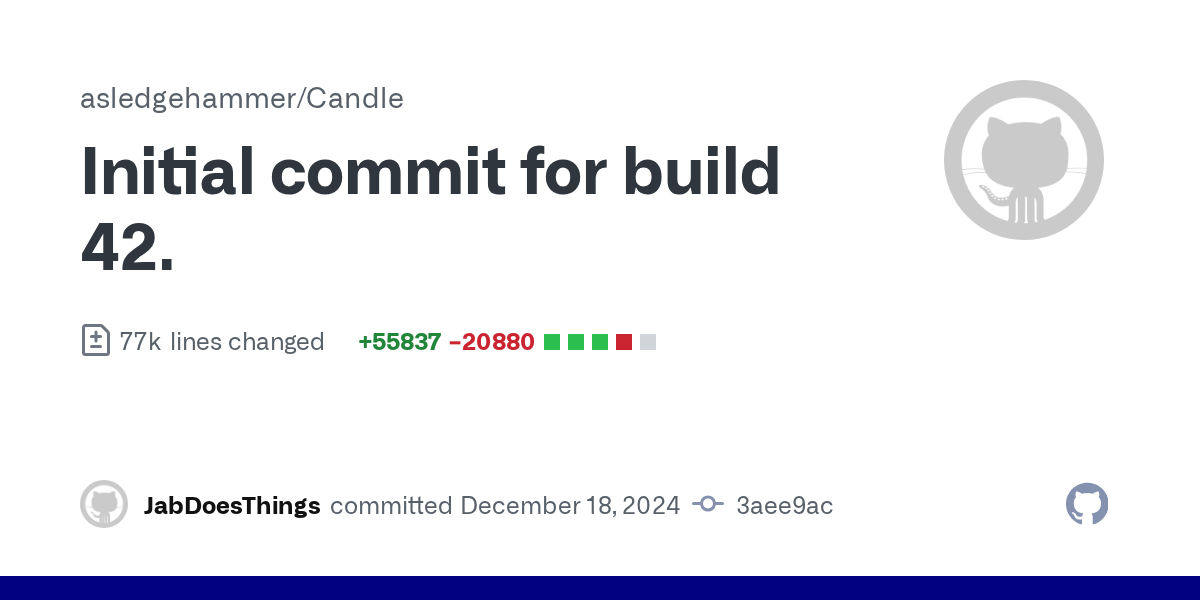
This will show you diffs
For the Build 41 -> Build 42 change.
Added API, etc.
quasi kernel
Do you know if addAreaHighlight is an individual square thing or does it just take two coordinates and make a highlighted region for that?
Oop, perhaps I could check that
queen oasis
I was really hoping they exposed all of lineDrawer but no such luck
it takes coordinates
addAreaHighlight(x, y, x+1, y+1, z, squareHighlight.red, squareHighlight.green, squareHighlight.blue, squareHighlight.alpha)
quasi kernel
Ugh, about what I expected
Good for squares, not for circles
I don't think it'd be difficult to get the generator visibility up and running, just depends on if I can get the range and stuff easily from the lua side
queen oasis
renderIsoCircle(x, y, z, r, g, b, a, 1)
I'm assuming the last is the size? idk I haven't played with it
and intelliJ is still not talking to me
quasi kernel
I just worry it'll run into the similar issue of being a literal circle and not a "circle" of squares
 worldly belfry
hello
queen oasis
oh yea, you would need to use the area highlight for that, or if square:setHighlight still works
quasi kernel
Is square:setHighlight still a per-frame thing?
worldly belfry
i have atualized this mod from b41 to b42
function ChangeBags()
    -- Variable that gets the list of all items
    local aitem = getAllItems()

    -- Check if aitem is not nil and proceed
    if aitem then
        -- Loop that checks them all
        for i = 0, aitem:size()-1 do
            local item = aitem:get(i)
            if string.find(item:getTypeString(), "Container") then
                -- finds anything with the Type "Container" and discards anything unwanted
                item:DoParam("WeightReduction = 100")
                item:DoParam("Capacity = 500")
            end
        end
    end
end
-- This launches and calls the function when you start PZ. If you enable new mods it should automatically run again to add any new items to the file.
Events.OnPreDistributionMerge.Add(ChangeBags);```The issue I had with that last time was that it just kinda flashed a lot and I didn't want people getting a seizure or something.
worldly belfry
worldly belfry
i have atualized this mod from b41 to b42
```
function ChangeBags()
-- Var...
but the capacity not correct
red tiger
 quasi kernel
It was also really laggy last I remember
worldly belfry
is setting to 48 not to 500
queen oasis
quasi kernel
The issue I had with that last time was that it just kinda flashed a lot and I d...
that's why I ended up with world markers but they're gone in b42
quasi kernel
Hm..
queen oasis
if you want to borrow some code for 41, you can have a look at "Auto Logging" and in the JBSelectUtils file.
 digital rover
hey, how hard would it be for someone with no coding experience (me) to make a mod that changes the level requirement to make a stone blade from 5 knapping to 1? the crude blade doesn't have a recipe atm and i want to try live in the wilderness from the start of the game
round notch
How many mod info files do you need?
Seen someones B42 build hes thrown 3 mod infos in all three folders 🤣
bronze yoke
just two
round notch
Did you duplicate poster as well or change path?
bronze yoke
i duplicated the posters
winter bolt
why
 round notch
1 in 42 folder and 1 in default spot?
round notch
round notch
1 in 42 folder and 1 in default spot?
^
 sterile goblet
ModTemplate could be updated for b42. Currently it seems, like you need both Common and 42.0 directories. Also tried putting everything in common since my mod is very simple, but mini-poster didn't work for example.
Anyway, here is the diff from the version upgrade if anyone is having issues https://github.com/Franisz/WeightlessAccessories/compare/master%40{1day}...master

GitHub
Project Zomboid mod that alters item weight. Contribute to Franisz/WeightlessAccessories development by creating an account on GitHub.
 slate laurel
Too soon for nuclear reactor crafting?

Well maybe, but I was able to figure out how to replace icon, sprite and mesh textures, so it's a start. Now to make it a mod instead of modifying the game files...
round notch
Anyone having any luck with animations? I was using the setVariable but that doesn't seem to be working anymore 🤔
 quartz wraith
MODDERS PLEASE FOR THE LOVE OF GOD. do NOT delete your old B41 MODS.
It DESTROYS servers.
quartz wraith
winter bolt
why
Check the pinned messages if you haven't already.
 fossil bridge
Anyone know how to modify the new lighting system? ||I'd assume not but I thought it'd be worth a shot||
I see there's some java class files, and two dlls in the game folder. But wasn't sure if I was going to have to RE those or if there was documentation somewhere
winter bolt
one of my mods has gone from a 10mb download to a 40mb download because of the new mod format 
 sacred harness
Where are you getting the updated format!?
winter bolt
in pins
sacred harness
Aww snap, thank you LOL
 cobalt plaza
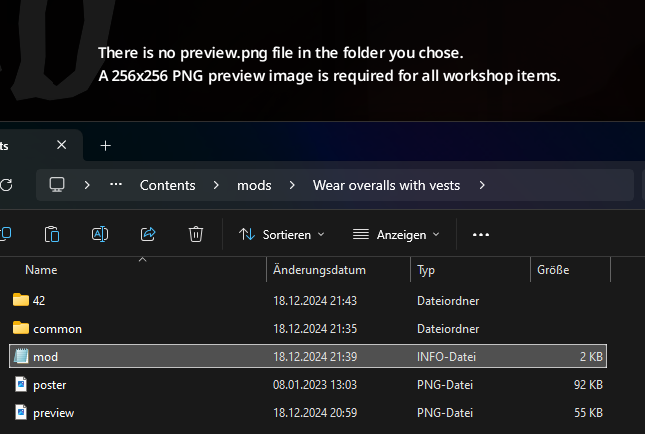 round notch
Your preview should be in same folder as Contents folder, same structure as a regular workshop mod
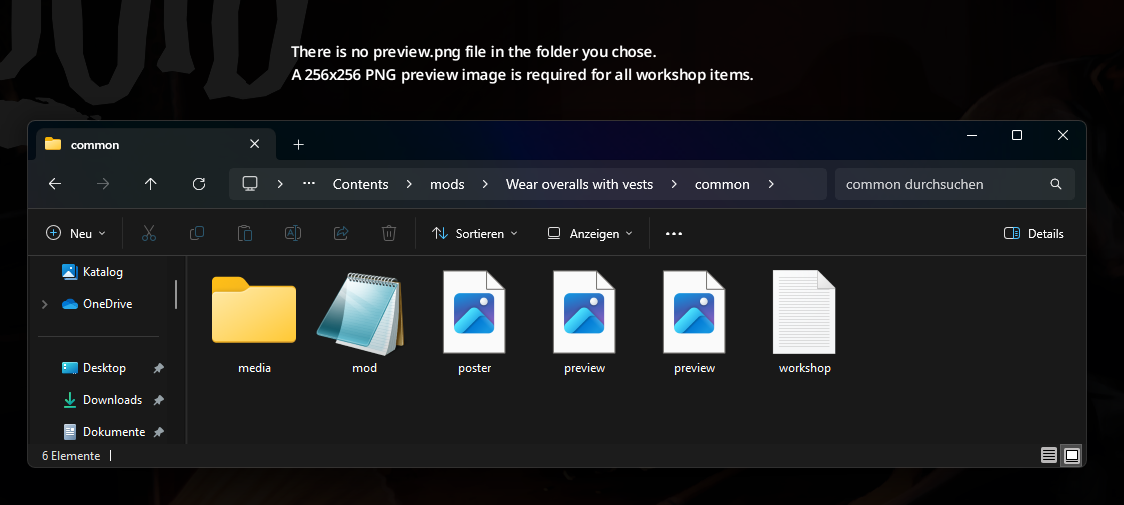 drifting stump
All mod.info parameters in B42
name
poster
description
require
incompatible
loadModAfter
loadModBefore
id
author
modversion
icon
category
url
pack
tiledef
versionMax
versionMin
Are these case-sensitive?
mellow frigate
Dhert gives us a tool to transfer from ModOptions to B42 Vanilla ~equivalent https://steamcommunity.com/sharedfiles/filedetails/?id=3386860561
 drifting stump
red tiger
Are these case-sensitive?
drifting stump
red tiger
Are these case-sensitive?
yes
red tiger
drifting stump
yes
Damnit.
drifting stump
the code hurts my eyes
red tiger
This is something I briefly mentioned over the past few years needing to be fixed.
There's no need to case-sensitive these guys. =/
drifting stump
 red tiger


 drifting stump