#GUI Open/Close issue
1 messages · Page 1 of 1 (latest)
 tough charm
The written skript is not mine, simply trying to debug it and fix it to work properly.
function spawnershop(p: player):
  set {_spawner::1} to "ooooooooo"
  set {_spawner::2} to "o1234567o"
  set {_spawner::3} to "o89bcde-o"
  set {_spawner::4} to "o-------o"
  set {_spawner::5} to "ooooooooo"

  create a gui with id "spawnershop" with virtual chest with 5 rows named "          &c&lSpawner &f&lShop" and shape {_spawner::*}:
    make gui "o" with white stained glass pane named " "

    set {_zombie} to skull of "MHF_Zombie" parsed as an offline player
    make gui "1" with {_zombie} named "&c&lZombie Spawner" with lore "%nl% &7&lPrice: &f{@ZombiePrice}&a $ %nl% &7&lAmount: &f{@ZombieAmount}":
      execute player command "/zombiespawner"

  open gui "spawnershop" to {_p}

command /spawnershop:
    trigger:
        spawnershop(player)
```Original Skript
https://www.spigotmc.org/resources/spawner-shop-skript.114535/

SpigotMC - High Performance Minecraft
 plucky fiber
tough charm
The written skript is not mine, simply trying to debug it and fix it to work pro...
plucky fiber
tough charm
The written skript is not mine, simply trying to debug it and fix it to work pro...
I think it is because it is a function, try to put it in the command and it will be fixed.
tough charm
I was thinking the same, that's what I was noticing
 viral wraith
That shouldn’t be the problem
I believe it’s because he’s creating another gui with the same id
I could be wrong though
plucky fiber
viral wraith
That shouldn’t be the problem
I believe it’s because he’s creating another gui w...
ohh yes it could be that, I didn't realize it
tough charm
Ahh, yeah I didnt think about that
every time the commands ran, it creates a new one
Would I on script load: the gui creation, and then simply show the gui
open gui with id "myGlobalGUI" to player
Working with skript makes me glad I learned LUA while back, syntax isn't that far off
tough charm
I'm gonna give it a go
plucky fiber
I don't use skript-gui but you could do something like open gui with id "gui:%player%" to player
tough charm
I got it fixed 😄
Time to dm the creator and tell him the fix lol
@foggy ocean I fixed it 😄
viral wraith
damn
tough charm
@hazy gorge
This, the commands and other information are essentiallly all the same, just name and var name changes
I could make something like this in LUA in about 20 lines ish
tough charm
viral wraith
damn
??
viral wraith
the ping
tough charm
viral wraith
the ping
I left a review on the page and he said to dm him on discord, but he's not accepting friend requests or messages, so I pinged him here.
 hazy gorge
tough charm
hazy gorge
tough charm
god
what the hell
number one
functions exist
number two
use loops
tough charm
hazy gorge
god
I know, but working with what someone else did sometimes just doesn't end well without completely starting over
I feel like you're sitting there rewriting the entire thing xD
hazy gorge
function shop_getGUI(shop: string) :: gui inventory:

    create gui blah blah:
        set {_shopGUI} to (last created gui)

        loop (indexes of {-shop::spawners::items::*}):
            set {_varPath} to "%{_shop}%::items::%loop-value%"

            set {_item} to {-shop::%{_varPath}%::item}
            set {_slot} to {-shop::%{_varPath}%::slot}
            set {_buyAmount} to {-shop::%{_varPath}%::buyAmount}

            make gui {_slot} with {_item}:
                shop_buyItem(player, {_item}, {_buyAmount})

    return {_shopGUI}

function shop_buyItem(player: player, item: number, buyAmount: number):

    if {-data::%{_player}'s uuid%::money} < {_buyAmount}:
        send "Not enough money" to {_player}
        stop

    if {_player} doens't have enough space for {_item}:
        send "Not enough space for item" to {_player}
        stop

    remove {_buyAmount} from {-data::%{_player}'s uuid%::money}
    give player {_item}


command shop:
    trigger:
        open (shop_getGUI("spawners")) for {_player}
You were lol
hazy gorge
now all you need is a way to set the variables
i would personally use skript-yaml for a yaml config
and cache all the values inside of the yaml config into the ram variables
tough charm
I'm gonna look into that
hazy gorge
for example:
shop-id: "spawners"

items:

  cow:
    shop-item:
      item: whatever the spawner itemtype is
      name: "&dCow Spawner"
      lore:
        - "&dCow Spawner"
    slot: 30
    buy-amount: 69420

  creeper:
    shop-item:
      item: whatever the spawner itemtype is
      name: "&dCreeper Spawner"
      lore:
        - "&dCreeper Spawner"
    slot: 31
    buy-amount: 69420```
#CACHING
on load:
shop_reload()
function shop_reload():
delete {-shop::*}

set {_yamlPath} to "path/to/yaml-file"
loop files_getFilesInFolder({_yamlPath}):
    set {_file} to loop-value
    set {_yaml} to "shop-%{_file}%"
    load yaml "%{_yamlPath}%/%{_file}%" as {_yaml}

    set {_shopID} to (yaml value "shop-id" from {_yaml})

    loop (yaml node keys "items" from {_yaml}):
        set {_itemID} to loop-value
        set {_varPath} to "%{_shop}%::items::%{_itemID}%"

        set {-shop::%{_varPath}%::item} to yaml_getItemFromPath({_yaml}, "items.%{_itemID}%.shop-item")
        set {-shop::%{_varPath}%::slot} to (yaml value "items.{_itemID}.slot" from {_yaml})
        set {-shop::%{_varPath}%::buyAmount} to (yaml value "items.{_itemID}.buy-amount" from {_yaml})

    unload yaml {_yaml}```
You're a real one man lol
tough charm
Yup already grabbed it and was reading documentation
hazy gorge
aswell, add these to a utils file
import:
    java.io.File

function getFolderFiles(folder: string) :: strings:

    set {_folder} to new File({_folder})
    set {_filesInFolder} to {_folder}.listFiles()
    loop (...{_filesInFolder}):
        set {_value} to loop-value
        if ({_value}.isFile()) = true:
            add {_value}.getName() to {_files::*}
    return {_files::*}


function yaml_getItemFromPath(yaml: string, path: string) :: item:

    set {_item} to (yaml_getValue({_yaml}, "%{_path}%.item") parsed as item)

    set ({_item}'s custom model data) to yaml_getValue({_yaml}, "%{_path}%.custom-model-data")
    set (name of {_item}) to formatted yaml_getValue({_yaml}, "%{_path}%.name")
    set (lore of {_item}) to formatted yaml_getList({_yaml}, "%{_path}%.lore")

    loop yaml_getNodes({_yaml}, "%{_path}%.nbt"):
        set {_node} to loop-value
        set {_yamlPath} to "%{_path}%.nbt.%{_node}%"

        set {_tag} to yaml_getValue({_yaml}, "%{_yamlPath}%.tag")
        set {_tagType} to (yaml_getValue({_yaml}, "%{_yamlPath}%.tag-type") parsed as nbt type)
        set {_tagValue} to yaml_getValue({_yaml}, "%{_yamlPath}%.tag-value")

        set ({_tagType} {_tag} of nbt compound of {_item}) to {_tagValue}

return {_item}```You just did it far faster than I would lol
does utils file need any specific name or folder structure?
hazy gorge
no
tough charm
Or just a .sk
hazy gorge
just a .sk
tough charm
Alrighty ❤️ Appreciate you man
hazy gorge
you can make a utils folder and create a utils.sk
which is what i would do
but it really doesnt matter
tough charm
Alrighty, I will do that, and this is good knowledge to know, I appreciate you taking the time to do that
hazy gorge
yeah no problem
tough charm
@hazy gorgethis made me chuckle a bit buy-amount: 69420
hazy gorge
lmao
tough charm
hazy gorge
for example:
```#YAML config
shop-id: "spawners"
items:
cow:
shop-item:...
I'm assuming this goes in the main .sk file?
the second bit, not the first
hazy gorge
hazy gorge
```
function shop_getGUI(shop: string) :: gui inventory:
create gui bla...
the yaml config goes into a yaml file, the function goes into wherever you have this skript
tough charm
@hazy gorge
https://i.imgur.com/S3Lqsnn.png
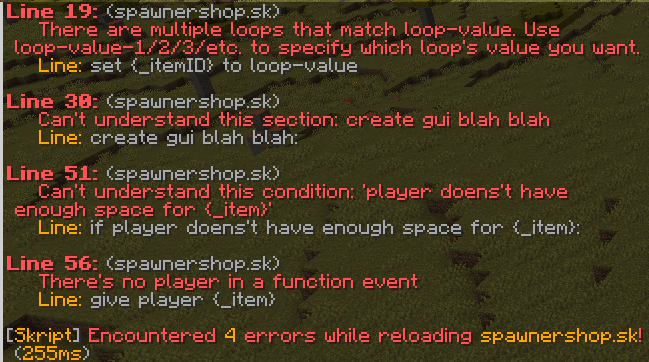
I thought I renamed everything properly, but guess not?
hazy gorge
read the errors
tough charm
I am down to 3 now
The loop value one I think is the one I don't understand the most.
This specifically erroring set {_itemID} to loop-value
hazy gorge
when you are in multiple loops, skript doesnt know what value you are talking about
    loop-value = x```

```loop 69 times:
    loop 420 times:
loop-value is unknown and you need to replace it with either loop-value-1 or loop-value-2```in this case we need to access the value from the second loop
 tough charm
So skript is unable to realize that the second loop-value is meant to be what is pulled from "items"?
Instead of loop getFolderFiles({_yamlPath}):
Okay, now Im down to just no player in function event errors

Well, no errors now, but unsure why GUI isn't opening lel
tough charm
@hazy gorgeSorry to continually bother you, but somehow I broke it lol
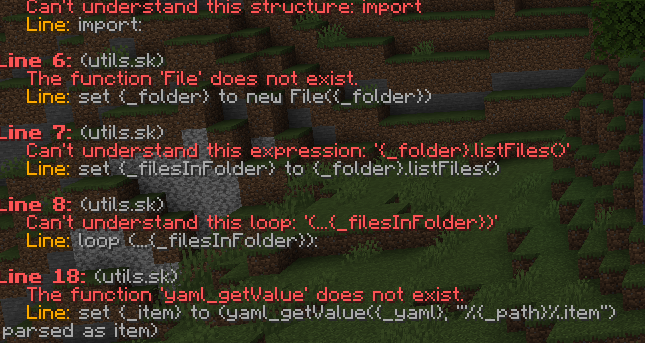
All of a sudden its now yelling about the Skript-yaml functions not existing?


 wind plinth
that's not even skript-yaml syntax, that's skript-reflect
if you have Skript 2.8+, you need reflect 2.4
tough charm
Oh, that I didn't know
hazy gorge
tough charm
https://i.imgur.com/fw9MIhe.png
sorry didn’t see this, did you fix it?