#🚧│tech-support
1 messages · Page 18 of 1
 mossy yarrow
 marsh glen
Great
 royal ferry
Hello, I have a dedicated server (runned by G-Portal). After today's restart there is an issue with backpack space. Players, no matter which backpack they have on them it still give only 2 rows for items in it.
I've seen suggestions to reinstall the client - which I did. Also verification of the files did run smoothly - and did not solve the issue.
Can I ask for advises?
 sharp valley
Hi guys, logged into my dedicated server hosted on another pc here, the world is now blank, hulp 💀
marsh glen
sharp valley
Hi guys, logged into my dedicated server hosted on another pc here, the world is...
Check the guide in the pins
mossy yarrow
marsh glen
Great
Thank you it works!
marsh glen
Another satisfied customer, lmao
 wary ledge
@marsh glen Is the process the same for copying the server files if my dedicated server er is on a different machine then what I play on? Meaning I grab the files from my gaming machine and copy to the server machine?
marsh glen
wary ledge
<@282657265272487936> Is the process the same for copying the server files if m...
This is the case scenario it is MOST meant for 🙃
 halcyon lily
Hello, can anyone help me out? Since the cloud patch, I haven't been able to start my game. On Steam, it says 'Running' for a moment, but then it just disappears without anything happening. I’ve already tried all the troubleshooting steps from https://windrose.support/faq/game-wont-start, but nothing helped—even a fresh reinstallation of the game didn't work
 marsh glen
I'm on mobile, but will be back at my desk in about 35 minutes, if no one else beats me to it, I'll the a look at your log file and see what I can see, no promises though.
halcyon lily
marsh glen
I'm on mobile, but will be back at my desk in about 35 minutes, if no one else ...
Okay Thanks
 cyan wren
Anyone got a suggestion for 2 worlds running via one dedicated server exe? happened with the last update in SteamCMD
 peak girder
Hi. with the new update of saved files, anyone know what folder does the game load saved world?
I see in Default we have RocksDB, RocksDB_v2 and RocksDB_v2_Backups. I need to backup my worlds from dedicated server so I just want to do quickly
 jolly igloo
my friend is trying to send me his save file so i can host from my pc, however when i put his folder in rocksdb2 with my other save the game doesn't register it and i cant load it, any fixes to this?
 halcyon yew
peak girder
Hi. with the new update of saved files, anyone know what folder does the game lo...
halcyon yew
peak girder
Hi. with the new update of saved files, anyone know what folder does the game lo...
jsut do all 3 jsut in case, better yet backup the entire R5
 warm jasper
So I've noticed when I fail to load game still, if I reset my settings (toggling Reflex to enabled or boost back and forth), lets the shaders reload the game with no issue. I'm on the driver that is supposed to benefit Windrose. Should I reinstall or do the latest driver since it seems like the issue might be coming from shader?
marsh glen
As far as I can tell right now, if you want to restore or migrate your world you need to put your world files in BOTH the RocksDB AND RocksDB_v2 in their respective sub folders <\0.10.0\Worlds > @peak girder @jolly igloo
marsh glen
halcyon lily
Hello, can anyone help me out? Since the cloud patch, I haven't been able to sta...
Looking at your log for errors I find:
Session CrashGUID > UECC-Windows-828526C443EE5A6387AAF3ACAFF4BE5D
Session CrashGUID >====================================================
LogAssetRegistry: Premade AssetRegistry loaded from '../../../R5/AssetRegistry.bin'
LogConfig: No local boot hotfix file found at: [C:/Users/patri/AppData/Local/R5/Saved/PersistentDownloadDir/HotfixForNextBoot.txt]
LogAudio: Display: Pre-Initializing Audio Device Manager...
LogAudio: Display: AudioInfo: 'OPUS' Registered
LogAudioDebug: Display: Lib vorbis DLL was dynamically loaded.
LogAudio: Display: AudioInfo: 'OGG' Registered
LogAudio: Display: AudioInfo: 'ADPCM' Registered
LogAudio: Display: AudioInfo: 'PCM' Registered
LogAudio: Display: AudioInfo: 'BINKA' Registered
LogAudio: Display: AudioInfo: 'RADA' Registered
LogAudio: Display: Audio Device Manager Pre-Initialized
LogPluginManager: Error: Unable to load plugin 'R5SteamworksProxy'. Aborting.
LogCore: Engine exit requested (reason: EngineExit() was called)
LogAudio: Display: Beginning Audio Device Manager Shutdown (Module: )...
LogAudio: Display: Audio Device Manager Shutdown
LogExit: Preparing to exit.
LogPakFile: Destroying PakPlatformFile
LogExit: Exiting.
Log file closed, 05/05/26 17:48:36 ```
Specifically:
``` LogPluginManager: Error: Unable to load plugin 'R5SteamworksProxy'. Aborting. ```
It happens when your system begins initializing your Audio drivers, but I'm not 100% it's an audio issue. (Could be)
One solution I've found, if you've not tried it, is trying to set your game to run under Windows 8 Compatibility mode.
Are you running mods on your game? midnight arrow
My shipmates and I were able to overcome the server mismatch by reentering the invite code.
Perhaps the server list and version are cached or stored locally?
Either way we are now in.
 chilly hill
is there an option to disable the inverted steering when moving backwards? it makes no sense and it makes me angy
marsh glen
 chilly hill
fr me
marsh glen
I feel the same
jolly igloo
marsh glen
As far as I can tell right now, if you want to restore or migrate your world you...
My rocksdb has no other files besides a sync, should I make the folders inside it?
marsh glen
jolly igloo
My rocksdb has no other files besides a sync, should I make the folders inside i...
reference the guide in the pin for folder locations, (specifically when I reference LOCAL)
But yes you will likely need to create the < Worlds > folder in:
%localappdata%\R5\Saved\SaveProfiles\YourSteamID\
if you've never run a local dedicated steam server.
you will also need to take note in reference to the ServerDescription.json , it's contents, and where it should be located
 lofty forum
hey guys, i am currently trying to host a server on gportal with the save files of my friend, he send them to me and i put them on the server via FTP.
I edited the serverdescription.json but every time the server starts it is not able to find this specific folder, and instead creates a new save file folder with different difficulty level, no build on the map but the same world seed.
Can anyone help me out?
 tribal aurora
anyone got also problems to join other servers ?
marsh glen
lofty forum
hey guys, i am currently trying to host a server on gportal with the save files ...
check the guide in the pins, it's not your specific issue, however the file locations, and and .json notes will have relevance
specifically about moving files back to the server, (the last 4 steps)
 foggy chasm
hi can anyone help? i have lost my base when i uploaded it to the server but the map seems the same?
peak girder
marsh glen
As far as I can tell right now, if you want to restore or migrate your world you...
Thank you!
 digital flare
foggy chasm
hi can anyone help? i have lost my base when i uploaded it to the server but the...
digital flare
foggy chasm
hi can anyone help? i have lost my base when i uploaded it to the server but the...
i have similar issue. i uploaded my solo to dedicated server and its like a couple hours of base building is missing. The only thing I notice different is the MANIFEST-number changes on the dedicated server when it starts.
 cursive iron
I found the solution to this, for anyone having the same problem, I used a VPN and I finally got to connect! 
 twin cradle
by any chance are the servers down cause my game trys to load and is kicking me back to the play screen
 full harness
Hello, I got a problem when I try to join my friends server, I get loading screen, but after about 20-30 sec the game just close, any idea what is going on ? when I just join the solo/offline mode its fine
twin cradle
im trying to join my server , not dedicated but pw prtected and yea i cant get in at all
halcyon lily
marsh glen
Looking at your log for errors I find:
``` LogInit: Session CrashGUID >========...
I had mods installed, but I deleted all the save files and there's nothing left on there
marsh glen
halcyon lily
I had mods installed, but I deleted all the save files and there's nothing left ...
Are you running your own server? Local (Steam) or dedicated (Different Machine) ?
halcyon lily
marsh glen
Are you running your own server? Local (Steam) or dedicated (Different Machine) ...
i have a Gportal Server
marsh glen
did you remove the mod files from both the server and your local installation (Steam Directory) ?
halcyon lily
marsh glen
did you remove the mod files from both the server and your local installation (S...
no i have only deleted on my Computer, my Friends can play on the Server, only my game dont starts
marsh glen
Do other players require the mods?
halcyon lily
marsh glen
Do other players require the mods?
Yes, they are general mods, but these are only available on the server; I only tested them in single player, which is why I had them on my PC.
 idle mica
Hello. My save corrupted and thankfully I had a backup but its for the older version of the game and it seems the save folder is no longer in the Appdata folder where is it now and is it possible to use the old save still?
marsh glen
halcyon lily
Yes, they are general mods, but these are only available on the server; I only t...
Typically the R5 errors I have found trace back to mods. I cant' say for sure that's your issue, but it's where I would start.
One more question, were any of your mods reliant on the UE4SS installation/Additional files
idle mica
Is there anyone that can help?
halcyon lily
marsh glen
Typically the R5 errors I have found trace back to mods. I cant' say for sure t...
No, I haven't used any mods with UE4SS. Is there any file I can still delete that might be related to the mods? I've already deleted all the mod .paks and the save files.
marsh glen
idle mica
Is there anyone that can help?
- were all community "volunteers" and do this out of willingness to help, a little patience goes a long way.
Check the pinned guide, specifically about were to place files for migration / backup.
This is a reference to your issue, and not a step by step guide, you discretion will be needed.
 winter elk
hi guys, i can load my save on offline, but when try to host it throws me back to menu, what can i do? 
lofty forum
marsh glen
check the guide in the pins, it's not your specific issue, however the file loca...
thank you so much it wqorked, the problem was that gportal doesnt set up the old db folder and i had an old gamefile.
the community can be thankful for someone like you
marsh glen
lofty forum
thank you so much it wqorked, the problem was that gportal doesnt set up the old...
glad I could help, there's a few of us in here helping, and doing the work, i'm not a solo act by far 🙃
marsh glen
halcyon lily
No, I haven't used any mods with UE4SS. Is there any file I can still delete tha...
It could be your client is trying to pull a mod from the server, and there's a mismatch, however since you do have other players connecting with no issue it's unlikely. It would be a last step to remove the mods from the server, and readd one at a time, to verify, but not something I'd consider doing at this point.
Have you tried setting teh game to launch in compatability mode already?
halcyon lily
marsh glen
It could be your client is trying to pull a mod from the server, and there's a m...
I can't even get into the game to join the server; it doesn't even start. Therefore, I don't think it's due to the mods on the server. I've tried compatibility mode, but the result is the same. In Steam, it briefly says "running" and then disappears.
 dark talon
Yeah me and a Friend cant join Either
 dense gale
My friend is hosting a local server for us two to play on Steam but he seems to not be able to launch the server every night? Does anyone have a fix for us really enjoying the game alot but this is seeming to ruin it.
marsh glen
halcyon lily
I can't even get into the game to join the server; it doesn't even start. Theref...
Fair point the game doesn't even launch,
If you go into device manager on your PC, do you have any devices with errors? Specifically your audio device?
halcyon lily
marsh glen
Fair point the game doesn't even launch,
If you go into device manager on your ...
no nothing

 acoustic girder
winter elk
hi guys, i can load my save on offline, but when try to host it throws me back t...
acoustic girder
winter elk
hi guys, i can load my save on offline, but when try to host it throws me back t...
I'm havince the same issue
seems the servers are down?
dense gale
acoustic girder
I'm havince the same issue
my friend having the same problem
dense gale
acoustic girder
seems the servers are down?
quiet annoying
winter elk
acoustic girder
seems the servers are down?
I kept trying and it eventually opened, looks like they’re having issues indeed.
acoustic girder
Yeah offline / Solo only for me right now ugh
marsh glen
halcyon lily
no nothing
hmm... this is an odd one..
halcyon lily
marsh glen
hmm... this is an odd one..
i have solved it
marsh glen
halcyon lily
i have solved it
what did you find?
halcyon lily
marsh glen
what did you find?
i have deleted the Game, and then i deletet all files from AppData\Local\Temp, and after installation from the game now it starts again
halcyon lily
marsh glen
what did you find?
now i hope i became my save files back
marsh glen
halcyon lily
i have deleted the Game, and then i deletet all files from AppData\Local\Temp, a...
 halcyon lily
marsh glen
https://tenor.com/view/touchdown-nfl-football-gif-15049037
halcyon lily
marsh glen
https://tenor.com/view/touchdown-nfl-football-gif-15049037
Thank you very much for your Help
marsh glen
halcyon lily
now i hope i became my save files back
if your cloud saves are off, you'll be restoring the Players & Accounts folders in sub directories under
< %localAppData%\R5 >
(there is a backup folder in that directory you may be able to pull from)
the pinned guide can be used as a point of reference
 pastel totem
Weird question, is there a way to sync maps? I pin things on mine and my bf is not seeing or getting them
marsh glen
pastel totem
Weird question, is there a way to sync maps? I pin things on mine and my bf is n...
you may have to turn on Co-Op Progress
pastel totem
How you turn it on?
 peak sigil
anyone know what to do when i go to host my world i get sent back to menu
marsh glen
pastel totem
How you turn it on?
it's the other json file, lemme find it one sec
 abstract mica
i keep getting connection error on attempt to join server
peak sigil
yeah i cant even load into my own server its just broken
 novel cove
Same here I cannot connect host any server
 agile thorn
welp thought i was gonna play this today and its broken
marsh glen
pastel totem
How you turn it on?
in your WorlDescription.json file which is inside your World Folder on your server under:
\R5\Saved\SaveProfiles\Default\RocksDB_v2\0.10.0\Worlds\
Set this to true:
"{\"TagName\": \"WDS.Parameter.Coop.SharedQuests\"}": false,
Server will need to be stopped ofc
agile thorn
everyone who cant host try to host it direct ip if you know how to portforward it let me in
peak sigil
how do i get to my world settings
marsh glen
it seems like the Proxy servers for Invite codes is having issues
marsh glen
peak sigil
how do i get to my world settings
which world settings there are two json's in different locations
both do different things
peak sigil
the one u said to change
marsh glen
In my post like 3 replies up?
marsh glen
I mean the file location is in the reply
agile thorn
he literally listed it
halcyon lily
marsh glen
if your cloud saves are off, you'll be restoring the Players & Accounts folders ...
Thanks, i have all back 🙂 now i can Enjoy my game
marsh glen
halcyon lily
Thanks, i have all back 🙂 now i can Enjoy my game
Stellar
 past gate
Ummmm, I can't host a game....? Just bought the game last night, and it just takes me back to the main screen
 peak mesa
past gate
Ummmm, I can't host a game....? Just bought the game last night, and it just tak...
peak mesa
past gate
Ummmm, I can't host a game....? Just bought the game last night, and it just tak...
is singleplayer possible?
 gleaming forge
So, I'm having an issue trying to start a co-op world it just puts me back on the main menu and doesn't load.......
past gate
Yes, single player works
novel cove
Same here still having the issue
past gate
Eh, not really, I have a beefy pc, lol
novel cove
peak mesa
does it take a while to load to singleplayer too?
Yes it does
past gate
Maybe took 45 seconds to a min
peak mesa
ah so not the problem of PC
past gate
Yeah, i9-14900k + 64Gb ram + separate nvme for games + 4090, cpu and gpu are liquid cooled.
I was able to join using a SEA server connect, the NA and EU are down is my hypothesis
peak mesa
novel cove
Yes it does
ya me too it takes me 6 mins to log in to singleplayer world
gleaming forge
past gate
Yeah, i9-14900k + 64Gb ram + separate nvme for games + 4090, cpu and gpu are liq...
There's your first problem.......it's liquid cooled......lol
novel cove
Ok not six minutes but max 1-2 mins
past gate
Lol, works great! You should see it render video, haha
peak mesa
i see but if you guys are having the problem then is not specs wise problem
 pearl vector
Did you get this resolved? I'm in the same problem. Docker logs show it starting up and installing then hard restart
gleaming forge
No, I think it is a network issue....like both me and my friend joined our other friends world and as soon as we got done with the tutorial boat part it kicked us back to the main menu......so network?....I'm not sure but that's what I am thinking.
peak mesa
gleaming forge
No, I think it is a network issue....like both me and my friend joined our other...
same
it happened to me too
past gate
Use the SEA server, it worked immediately
 digital drift
@sand radish 
peak mesa
past gate
Use the SEA server, it worked immediately
i use SEA still doesnt work
i wonder if i would be able to join if i use data
i even use vpn
n it doesnt work
novel cove
Managed to host the coop now let's see for how long
pastel totem
marsh glen
in your WorlDescription.json file which is inside your World Folder on your serv...
HOw exactually do I get there? Im not finding a place to edit
marsh glen
pastel totem
HOw exactually do I get there? Im not finding a place to edit
I'm not clear on your question.
Do you have directory access to your server?
You simply open the file in a text editor.
I gave you the exact folder structure to navigate to the file
pastel totem
Well going and looking, it said there is currently no coop map sharing
marsh glen
where does it say this?
pastel totem
Thread my bf found on reddit says coop dont have map sharing
marsh glen
not what i've experienced. all my servers we all seet eh same map and fast travel points
 sage barn
Have there been any reports of multiplayer servers not respecting the scaling settings?
 sand radish
I'm not aware of any ongoing issues with the container, but it might be specific to how you're hosting it. Have you made an issue on github?
sage barn
We've got a server that seems to be acting like all the enemy values are bottomed out.
 maiden thunder
Is this inability to host a server tied to Steam's Tuesday maintenance?
sage barn
Most games that rely on steam for authentication in any way have issues during the tuesday maint, yea.
 polar sleet
my mp server wiped completely. i luckily had a full seperated backup of the serverdescription.json and saved folder and replaced the recent ones with it. that brought my world back.
as far as connection issues try the forced relay to get connected.
recent update messed up a lot
pastel totem
How do you get to that file to edit the save file?
polar sleet
saved files are under R5
maiden thunder
sage barn
Most games that rely on steam for authentication in any way have issues during t...
Figured as much. Thank you for the confirmation.
sage barn
Just gotta wait for maint to end
pastel totem
R5 has no save files under it for me
polar sleet
pastel totem
R5 has no save files under it for me
running a dedicated or just hosting through basic game?
pastel totem
Hosting through the game
polar sleet
pastel totem
Hosting through the game
[your drive]\SteamLibrary\steamapps\common\Windrose\R5\Builds\WindowsServer\R5\Saved
marsh glen
pastel totem
Hosting through the game
< %localappdata%\R5\Saved\SaveProfiles\YourSteamID\ >
its' in App data
inside your world saves folder.
sage barn
%localappdata%\R5\Saved\SaveProfiles\YourSteamID\
marsh glen
pastel totem
Hosting through the game
My apologies, I shoud have lead with "How are you hosting, local, or remote machine"
pastel totem
I am hosting and he is joining through the server info I provided
marsh glen
if that folder is empty you are not hosting on the same machine
pastel totem
?? I am hosting on the same machine I am talking on lol
polar sleet
marsh glen
if that folder is empty you are not hosting on the same machine
depends on pc build and drive to mine is found a different route because i use E: drive lol
marsh glen
it should look like this
 pastel totem
there is no save folder under the R5
marsh glen
polar sleet
depends on pc build and drive to mine is found a different route because i use E...
no server files on a local host are stored in appdata local
Game files are stored in your steam dir
polar sleet

 marsh glen
polar sleet
marsh glen
polar sleet
I repeate my point
pastel totem
I understand that but there is no save folder under the R5
marsh glen
your player, files, and account files are under your steam directory
polar sleet
marsh glen
Game files are stored in your steam dir
i would agree with you if it wasnt that mine isnt running that way lol i pulled my game data from here and dropped it onto a dedicated
i now run a self hosted dedicated that currently supports 20?
marsh glen
yes you can do that, it will make copies if your solo , if you run hosted, it puts the files in appdata
pastel totem
Its just me and my bf so I only have the server set to 2
Which folder are you going into to set the coop?
marsh glen
pastel totem
Which folder are you going into to set the coop?
it's in your world folder, the long string that you set as your WorldID in ServerDescription.json
marsh glen
pastel totem
Which folder are you going into to set the coop?
in your file explorer put this in and hit enter
%localappdata%\R5
inthe address bar
 orchid oyster
is something with nitrado my friend already resets his server several times and i still cant join anybody same problems
marsh glen
the steam update tuesday is fuggin with the proxy servers for invite codes
Direct IP should be uneffected
pastel totem
My R5 folder there is no worlds folder
pastel totem
 marsh glen
are you in the Appdata\Local directory?
what you are showing looks like your steam game directory
pastel totem
 marsh glen
there we go..
open saved profiles >> YOUR STEAM ID FOLDER
In both RocksDB\0.10.0\ AND RocksDB_v2\0.10.0
you should have Worlds folders
IN BOTH THESE FOLDERS you will have your World folders
In those folders you will have WorldDescription.json
Edit as I stated previous to BOTH files in both locations
pastel totem
The file is already set to true, but the coop map is not showing on his end
marsh glen
do you see his fast travel points when he places them and vice versa?
or are those not showing up for you as well?
pastel totem
They only show up if I go to the island he is at and vise versa
were also not seeing markers we place, I can place one in one area and he not see it and has to see a screenshot to set it in that location
marsh glen
placed markers don't share, at least not as far as I've seen. The world map should be the same, though you will have individual fog reveal progress, but fast travel markers should be shared, (so if you or he places a teleport, the other should be able to use it right away)
and ... now that' i'm re-reading your original question, I'm finding that I originally read it wrong...
My apologies, no, you can't see each others markers, and fog reveal is not progress shared. The map layout is, as it is the world.
TP points are shared, and usable by anyone regardless of placement
There may be a mod that allows this, I'm not sure I've not looked at new mods made in the past few days
 midnight hamlet
I cannot join my dedicated server i get fatal error, but i can play my own servers
 mystic vigil
i currently try to figure how to update my nitrado server to be.. well current game version
 ruby hill
anyone had an issue where there dedicated server wont change difficulty keeps putting itself in ulta easy even though you have changed to normal
 dense flare
Thank you to @marsh glen for tirelessly assisting me when it turns out I did something really stupid. Much appreciated sir!
marsh glen
The one thing I can give the devs for sure, is they made it pretty damn difficult to actually lose data. There's a couple redundant save processes, of redundant saves and auto backups.
 fluid radish
ruby hill
anyone had an issue where there dedicated server wont change difficulty keeps pu...
fluid radish
ruby hill
anyone had an issue where there dedicated server wont change difficulty keeps pu...
I've got it the other way round, tried to lower the difficulty to kill Hands but the server just wont change health/damage multipliers despite the sliders showing they are lower
ruby hill
fluid radish
I've got it the other way round, tried to lower the difficulty to kill Hands but...
yh we realised ours was set to max so lowered it to normal but now it is bugged and wont change
fluid radish
ruby hill
yh we realised ours was set to max so lowered it to normal but now it is bugged ...
Probably worth logging it as a game bug #1493348541177794601
ruby hill
fluid radish
Probably worth logging it as a game bug <#1493348541177794601>
yh probably
ours is that low that i have been able to kill the last boss without really taking any damage
ruby hill
fluid radish
Probably worth logging it as a game bug <#1493348541177794601>
it says to use the server providers section of the discord but i cant find that
marsh glen
You may need to try changing it in the json file the one located in your world save folder on the server WorldDescription.json
@ruby hill @fluid radish ☝🏼
ofc stop the server first
mystic vigil
okay ... srsyly iam feeling like a child trying to install mods in minceaft back in 2012... how do i update my server on nitrado x.x
ruby hill
marsh glen
You may need to try changing it in the json file the one located in your world s...
apparently that wont work either because thats what the server ai support said to do
marsh glen
mystic vigil
okay ... srsyly iam feeling like a child trying to install mods in minceaft back...
I self host dedicated VM's in my datacenter. I have no clue about various hosts update procedures. If no one else can offer assistance, I'd recommend reaching out and creating a ticket at your host or searching their docs for guides
 prime trellis
The game won't launch on NA servers when I try to host a game, so I have to connect to SEA servers. Is this because the servers are full or something?
marsh glen
ruby hill
apparently that wont work either because thats what the server ai support said t...
you did try it though?
marsh glen
prime trellis
The game won't launch on NA servers when I try to host a game, so I have to conn...
invite code proxy server are having issues
ruby hill
marsh glen
you did try it though?
yeah we tried it, we have made tickets as well
 mystic vigil
marsh glen
I self host dedicated VM's in my datacenter. I have no clue about various hosts...
mystic vigil
marsh glen
I self host dedicated VM's in my datacenter. I have no clue about various hosts...
... you need to just Restart the server on nitrado... it does it automaticly...
 peak zinc
So for someone wanting to import their world into a server... where do I find the files locally? I'm finding sources that say there's a windrose directory in local files but there is not...
mystic vigil
peak zinc
So for someone wanting to import their world into a server... where do I find th...
peak zinc
oh man, there are two world ID folders and idk which is which
halcyon yew
peak zinc
oh man, there are two world ID folders and idk which is which
Check the date and files inside for the oldest one
mystic vigil
in the select screen
mystic vigil
if you hover over your saves in select it shows the id
peak zinc
oh
ahhh now the other is gone, you all are awesome. Thank you.
So there is not RocksDB.... just RocksDB_v2.... is that ok?
This is to be imported into a Nitrado
oh man, can you not upload entire folder?
ah FTP client
 fleet barn
my friends game crashes just as he's loading into the game, main menu is ok but game crashes when he's joining or hosting a server. Last time we played everything was normal. Any ideas?
dense flare
marsh glen
The one thing I can give the devs for sure, is they made it pretty damn difficul...
The only way you can lose data is by deleting/overwriting files, so back yo shizz up before updating peoples!
 dry citrus
So were do i find the savegame backup files that were added in yesterdays update? Just broke my save when joining a server. now stuck in loading screen every time i load the world in solo till the whole pc freezes up.
dense flare
I say this because I overwrote one of my own files. It did not end well....
 lone ermine
Hey guys, quick question about map exploration. Is there a way to share my discovered map/fog of war progress with my friends so they can see everything I've already uncovered?
I tried sending them my map files directly, but it doesn't seem to work—their maps are still dark. With the new save system in version 0.10.0.5, has anyone found a specific file or a way to sync map data between players on a dedicated server? Maybe there is a console command for this now? Thanks!
marsh glen
lone ermine
Hey guys, quick question about map exploration. Is there a way to share my disco...
no
possbily a mod, but not in the base game
 molten lichen
Afaik that stuff is tied to your character information
dense flare
If you go to someone else's world, like if they're hosting and you join, I guess the map is covered for you?
wary ledge
dedicated server from steam will not load world before update, keeps generating a new server description file and a new world folder
marsh glen
wary ledge
dedicated server from steam will not load world before update, keeps generating ...
reference the guide in the pin. You'll have to adjust for your own local hosting, but the premise stands
you'll more focus on bringing restoring backup files files
halcyon yew
Gonna need an automated message to reference that pinned post soon haha
marsh glen
bet
wary ledge
guess my save is corrupted

 hollow ridge
Went to load Game today and only find Default Level 1 Character - Tried to recover from the saved backups they all load to the same Lvl 1
I did load one and got this Error Screen But still just loaded to Lvl 1
I EVEN tried to replace with a Zipped Copy of the R5 Folder - Same thing
 peak mesa
my game is smooth on my steamdeck but is literally dying on laptop
dense flare
wary ledge
guess my save is corrupted
You're giving me PTSD, that's where I was yesterday at this time and it took me 8 or so hours to sort it out. Hopefully you have a backup of your R5 folder or Saved folder from before the game update?
marsh glen
@wary ledge @hollow ridge Reference my massage chain here, I helped a user out of both your situations earlier today
wary ledge
all i have is that default_backup folder no backup of that R5 folder before hand
marsh glen
wary ledge
all i have is that default_backup folder no backup of that R5 folder before hand
you have hope
hollow ridge
marsh glen
<@110217060075732992> <@146440032687751168> Reference my massage chain here, I h...
tried that was all the backups have the same issue of loading to lvl - and even a Zipped Copy from almost 2 weeks ago is doing the same thing
marsh glen
mmmm... rip
did you copy to BOTH RocksDB folders and thier respective sub dirs?
RocksDB & RocksDB_v2
hollow ridge
BOTH - everthing says to delete the V2 folder before coping the files from backup
marsh glen
both folders have to be removed, back up first
hollow ridge
Correct - I have been Deleting RocksDB_v2 and RocksDB_v2_Backups Folders - Then Copying the 0.10.0 folder and the AccountDescription.json - pasting into RocksDB folder in the NONE Backup # folder and overwriting the files.
marsh glen
oof sounds like you might be lost then, bummer
 granite vessel
I have no idea what happened but I connected to my server and everyone of the quest I had completed and was working on are just gone. Does anyone have any ideas how to get them back

 little wolf
Im having issues connecting to any server, i played fine the last two days, now today i can not connect to my friends dedicated server, nor can i create a solo/offline nor can i host a game, everything will start loading and then after a few seconds it takes me right back to main menu
wary ledge
has we heard any thing from the developers on this server save issue?
peak mesa
little wolf
Im having issues connecting to any server, i played fine the last two days, now ...
maybe cloud sync
little wolf
peak mesa
maybe cloud sync
do i just turn it off?
peak mesa
yes but there is something else you need to do about saved profiles but i forget what i am also trying to figure it out
 silent robin
Yeah logged back in after dedicated server update and map is gone and all of the bases are gone. I'm sure it will get figured out. These things happen.
 vivid nimbus
hello guys, thanks for all of your help & support here!
I have a weird issue, I have a dedicated server running in my lab and my friends are joining with no issues (I never turn it off), but I noticed when no one plays for a while no one can connect to it, I need to go and restart the dedicated server to be able to join, has any one encounter this ?
one more thing to add, I can see the logs get generated when I try to connect after a while (so it's not a networking issue) but it hangs on loading.
marsh glen
silent robin
Yeah logged back in after dedicated server update and map is gone and all of the...
check the pinned guide
marsh glen
vivid nimbus
hello guys, thanks for all of your help & support here!
I have a weird issue, I...
I've left my servers running for weeks, and not seen this.
vivid nimbus
marsh glen
I've left my servers running for weeks, and not seen this.
it seems to me it's a rare one (I don't know if that's good or bad lol)
 jaunty wolf
I beat the 2nd boss last night…what do I do?
 granite vessel
jaunty wolf
I beat the 2nd boss last night…what do I do?
granite vessel
jaunty wolf
I beat the 2nd boss last night…what do I do?
Click cancel then there should be a retry button near play that retrys to sync steam cloud.
little wolf
so i created a new character and was able to connect to a server no problem, is there anyway to fix my "broken" characters save file so i dont lose my progress?
granite vessel
little wolf
so i created a new character and was able to connect to a server no problem, is ...
In your local appdata AppData/Local/R5/Saved/SaveProfiles/ the game stores a backup of your character you can try replacing your character file with one of the back ups
little wolf
granite vessel
In your local appdata AppData/Local/R5/Saved/SaveProfiles/ the game stores a bac...
i created a copy of my save profiles folder, disable my cloud sync launched game, closed game turned cloud back on, launched game joined server
 hard holly
clearly EA but curious anyone have the issue of Doctor Galen "not appearing?" funny part was he appeared to me once when I came out of the cave... was able to talk to him and start the next set of quests... but now that I have the boat, I cannot find him - when I click the quest it shows me where he "Should be" but hes MIA
granite vessel
little wolf
i created a copy of my save profiles folder, disable my cloud sync launched game...
YEah its doing the same for me, I just launch and if it loads cloud save I delete everything in the save file copy the back up over and relaunch. It takes like 5 times for to get it to work. Not sure whats causing that.
little wolf
granite vessel
YEah its doing the same for me, I just launch and if it loads cloud save I delet...
just happy its working lol
marsh glen
hard holly
clearly EA but curious anyone have the issue of Doctor Galen "not appearing?" fu...
open your bonfire
dry citrus
hard holly
clearly EA but curious anyone have the issue of Doctor Galen "not appearing?" fu...
Did you move the bonefire? if so you have to activate him in the fire.
hard holly
marsh glen
open your bonfire
ahh well F me... haaa ty good sir
 dreamy ivy
My cannons wont fire, i hold rmb to aim and click lmb but there spark and nothing comes out
anyone else had this problem?
 edgy iron
hey all, does anyone know if the excessive drive writes that were fixed in the april 30th patch were still affecting people connected to a dedicated server? I'm guessing no?
it sounds like those writes probably only happened if you were playing on a local world or your own server or something right
 lone tartan
Question: For four days now I have had to reboot the server, hosted on Gportal, before I am able to connect to the server. Just wondering, is this normal?
edgy iron
nope
when you say you've had to reboot it for four days in a row, why are you rebooting? does it outright crash, is there lag, what prompts the reboots
 digital prawn
hello, does anyone have the how to fix your character and game reverting back to level 1?
granite vessel
digital prawn
hello, does anyone have the how to fix your character and game reverting back to...
AppData/Local/R5/Saved/SaveProfiles/ the game stores a backup you can try reverting to one of them
lone tartan
Not sure what the problem is. It is online, and says it is running. When I get off for the day I switch over to the game box and try to log in. Keeps kicking me back to the main screen. it is after that, my wife lets me know she has not been able to get in all day.
Once I shut it off, and bring it back up, login is fine
If I was able to identify the problem, I would report it. I will keep an eye on teh logs, see if I can find it
granite vessel
Not sure the the core issue is but if you are hosting on Windows you could create a scheduled task that kill the server and restart it every x hours. If you are on a Linux host you can use crontab to do that same thing.
lone tartan
It is Gportal, no access to the OS. But I do have a daily reboot set at 7:30 each day
granite vessel
Maybe try every 12 hours or if you always are on at the same time a schedule reboot could be a decent workaround. I have no idea what Gportal is I just self host when I need it.
lone tartan
Yea, I normally would self host, but guess I am getting old and lazy. Don't want to mess with it really. There come a point that the tools are just not appealing no more
 frozen raft
granite vessel
AppData/Local/R5/Saved/SaveProfiles/ the game stores a backup you can try revert...
frozen raft
granite vessel
AppData/Local/R5/Saved/SaveProfiles/ the game stores a backup you can try revert...
hey, could you tell me how do you "restore" a backup save please ? when i open the zipfile i have no idea what to do with the file inside, as it's different . thanks
granite vessel
frozen raft
hey, could you tell me how do you "restore" a backup save please ? when i open t...
Check the pins theres a more detailed guide in there
I didn't interact with any zip files so I thinking you are in the wrong place
Turn steamcloud off while your trying to revert cause it will override what you do
frozen raft
ty !
just in case , I could maybe ask here my issue : I'm trying today to create a dedicate server on Nitrado, and it's "working" kinda, but it keeps loading a save from the 3rd of March, I suspect before the latest patch. And I can't understand why or what I am doing wrong. if someone hs a similar issue? it's driving me crazy, been on it for 3 hours... thanks !
 quartz scroll
Hello dear developers! I ran into the problem that my pirate's profile was completely deleted when I was playing in a computer club. There is no way to restore it, because files from steam cloud were deleted on their own.
How can you help me to solve this problem so that I return to the previous level and do not spend 36.2 hours completing it again?
I really appreciate my gameplay and intend to continue chasing game quests, so I really hope for your help.
P.S.
We have our own separate server and we have all the backups from this server. Is there any chance that my character is saved in the server data (backups) and we can restore it. If it is possible, then how to do it?
marsh glen
edgy iron
hey all, does anyone know if the excessive drive writes that were fixed in the a...
it was an issue for dedicated servers as well, and it was resolved April 30th patch
edgy iron
marsh glen
it was an issue for dedicated servers as well, and it was resolved April 30th p...
yea i figured, but was it an issue for the clients that were playing on those dedicated servers is what im asking about
marsh glen
edgy iron
yea i figured, but was it an issue for the clients that were playing on those de...
yeah it was an issue for all
edgy iron
...so the game did a ton of IO writes even while you were a client for a dedicated server?
marsh glen
it was constant writes to your saves files
edgy iron
neat
marsh glen
which is on both server and client. I personally observed it on both
edgy iron
well, appreciate it
quartz scroll
We have our own separate server and we have all the backups from this server. Is there any chance that my character is saved in the server data (backups) and we can restore it. If it is possible, then how to do it?
granite vessel
quartz scroll
Hello dear developers! I ran into the problem that my pirate's profile was compl...
I hate to be the one to break it to but if the character save that stored inside of the appdata was deleted and it didn't back up to steam cloud there is no recovering that save.
marsh glen
quartz scroll
We have our own separate server and we have all the backups from this server. Is...
Character progress is saved locally on your client. The world progress is saved on the server
marsh glen
granite vessel
I hate to be the one to break it to but if the character save that stored inside...
there are backups in the appdata folder, that are automated, i may "possibly" still be recoverable
marsh glen
quartz scroll
We have our own separate server and we have all the backups from this server. Is...
Check the pinned guide for reference
marsh glen
quartz scroll
We have our own separate server and we have all the backups from this server. Is...
also use the search feature I've helped a handful of players today restoring player data
wary ledge
i think im cooked, no matter what backup version i pull over to local client i get the same data verification error
granite vessel
wary ledge
i think im cooked, no matter what backup version i pull over to local client i g...
That sucks to hear there are save editors on Nexus and the client is responsible for all character so you could just cheat you stuff back in.
wary ledge
character is fine its the world from dedicated server that is jacked
marsh glen
wary ledge
character is fine its the world from dedicated server that is jacked
the guide didn't help out?
wary ledge
nope
marsh glen
bumer
granite vessel
This is the importance of keeping backups.
marsh glen
you're the first we've not been able to recover
wary ledge
i have tried multiple backups from default_backup on the server to the my local client machine and always get this error

even backups from before the server was updated
marsh glen
yeah, your backups got cooked
granite vessel
I would reconmend to downgrade your client but because the constant writing the last version on the game did, I would just reconmend start a new world.
wary ledge
yeah im done, not starting a new world all over again
 wanton gyro
hey guys is anyone able to help me set up a mod called WSE Project - Save Hub. I have tried forever and can not get it to work
marsh glen
oops wrong tag
marsh glen
wanton gyro
hey guys is anyone able to help me set up a mod called WSE Project - Save Hub. I...
is it dependant on UE4SS ?
wanton gyro
marsh glen
is it dependant on UE4SS ?
UE4SS? I was just going to the mod page and doing what it said and it was not working
marsh glen
wanton gyro
UE4SS? I was just going to the mod page and doing what it said and it was not wo...
some mods have dependencies. I particularly stay away from anything requiring UE4SS for the time being until they become more stable. They are tending to cause a lot of server stability issues.
If the mod you are trying to get installed is UE4SS dependent, I'd likely not spend my time on it, why i was asking about the dependencies.
wanton gyro
O it has no dependencies as far as I am aware of. The mod page did not mention having any
marsh glen
so it should be simply place the contents (usually .pak files) in the ~mods folders on the server and the client.
beyond that, if they are placed right, not much more you can do.
wanton gyro
marsh glen
so it should be simply place the contents (usually .pak files) in the ~mods fold...
On instructions it said place it in worlds folder because it is a world with some resources
marsh glen
wanton gyro
On instructions it said place it in worlds folder because it is a world with som...
I'm not familiar enough with that mod or process then to give help, maybe someone else can chime in
 white ginkgo
yo so the mods gonna respond or what
i was on my paid server earlier today until about 6:30 est, now it keeps crashing my game, it was also doing it to my friend but now hes able to get into the server. whats going on
marsh glen
white ginkgo
yo so the mods gonna respond or what
i was on my paid server earlier today until...
you prolly want to open a ticket at your host
white ginkgo
marsh glen
you prolly want to open a ticket at your host
talking about where i got the server?
marsh glen
yessir
white ginkgo
marsh glen
yessir
everything its told me to do, does not work lmao
 dusk summit
If anyone has info, my friend is trying to play windrose, and it was going fine the first few days, but out of no where it gave the "directx 12 is not supported on your system" error on startup. We have tried to "force" it via changing it to dx11 and d3 something which didn't work. Updated all drivers, and pc updates available. Just wondering if we are missing something. Thanks so much in advance.
past gate
Ummmm, I killed the game, but steam still thinks it is open, and when I hit "stop" it's stuck on stopping
 manic olive
has anyone successfully moved a save from a server host to a steam cmd server?
im trying to move our save to my home server but cant get our old world from the server host to load i know im doing something wrong lol it keeps defaulting to a new world
past gate
Is there a way to share the map with your allies? This is silly
 misty stone
anyone know how to get multiplayer working on mac
 vivid spade
this games cooked4 days still cant play on my level 9 account no errors just kicks me to main menu with no error message
wanton gyro
hey guys is anyone able to help me set up a mod called WSE Project - Save Hub. I have tried forever and can not get it to work
 granite ravine
Something I see an issue with is there's a whole lot of dedicated private server fixes but I'm not finding anything with these specific issues-
Crashing online when hosting a Private co-op non dedicated server but
Not crashing when playing solo and local..
Linux based (I play with steam deck)
I have tried deleting the save files and everything just to start a new and I crash every time I start to hear the waves coming in, just before it switches from the load screen to dropping into the world.
What possibly, can i be doing wrong.. or am I just waiting for another support update for Linux?
 loud forge
What is the way to bring a world/save from dedicated server to local for singeplayer?
halcyon yew
loud forge
What is the way to bring a world/save from dedicated server to local for singepl...
Check pinned post
granite ravine
halcyon yew
Check pinned post
Love, I've tried the "delete the saves" fix
 vagrant heart
Hey guys, finding a problem where we made another server after this update made the last one just keep saying it was out of date. The weirdness is that one of our guys can hop on but myself and the owner of the server cant seem to log in. We get stuck in a loop where it tries to load and then kicks us to the main menu. Is there a fix for that or location I can look for trouble shooting?
halcyon yew
I’m talking to Lock specifically
granite ravine
Oh I can't read I'm dumb
halcyon yew
I think for majority of us the dedicated server issues were similar enough that we could figure out a band aid solution for it, these one-offs (especially when it comes to steam deck) can have a nuuuumber of issues that may just require patience
granite ravine
v.v yee yee vali go back to enshrouded it's just that it was working ok until after the update
halcyon yew
Coming from a dev, the smallest change can make a huge impact, for all we know they made a change to how something spawns and it could break everything
If your issue still continuing by next week I’ll do some testing for u (left my deck at my parents place)
granite ravine
That would be so lovely
 rose orbit
Game is super laggy anyone having this issue
 indigo cedar
Nah I just keep getting kicked to title screen upon logging into a friends dedicated server
 clever crescent
Can the the multipler and respawm filesbe edited?
vagrant heart
indigo cedar
Nah I just keep getting kicked to title screen upon logging into a friends dedic...
Same and finding no solution
 night vine
I believe my cloud save is corrupted and causing a bunch of issues but it doesnt matter how many times I delete the files and try and cause a cloud sync issue it just keeps restoring the deleted files
 prime gulch
lmao what an absolute disaster. how has there not been an official acknowledgement yet about how bad this update screwed the entire player base
 supple aurora
My Windrose has been at a halt for the past 2-3 maybe 4 days lost track due to my friends server being stuck on an infinite loading screen loop.
prime gulch
there are lots of solution posts in (https://discord.com/channels/1260209458924224542/1493364524705775657)
supple aurora
We were playing just fine until we had bad lag and all disconnected
prime gulch
i successfully recovered my steamCMD based dedicated server after the update-bork, you can too
supple aurora
He does not want to do extra stuff to save the world and all our belongings and progress is in that server so we have not been able to play
prime gulch
i dont blame him, fixing it is a precarious pain in the rear because of how they tied steamcloud in
supple aurora
6-7 of us have been waiting patiently playing other games hoping windrose would fix it
prime gulch
should be a hotfix out by end of day otherwise they're gonna get review bombed
halcyon yew
supple aurora
6-7 of us have been waiting patiently playing other games hoping windrose would...
they should;ve released coop and labelled it as beta instead
prime gulch
Cleanest way to do it is to just start a fresh dedi via SteamCMD, run it once and let it populate its configs, then copy the old world files into it and update the ServerDescription.json to reflect the appropriate world name
worked for me
supple aurora
my friends still paying for the server and its still up and running its just none of us can join it
halcyon yew
he needs to troubleshoot if he doesnt want to then u do it for him
supple aurora
I fear if we lose everything we might be done with the game
prime gulch
yea if you paid for hosting you're likely screwed... get access to the server directory and see if you can find the world backups. copy them and nuke the server and then reinject them
do not attempt to salvage, steamcloud will fight you every step of the way
granite ravine
Ok so update, I did the delete profile thing- again..
I was able to run the game and get into it on co-op I ran around for about a minute and thennnn
Crash
prime gulch
and request a refund cuz this is garbage. refund request influx gets devs moving
halcyon yew
granite ravine
Ok so update, I did the delete profile thing- again..
I was able to run the gam...
yea i have a strong feeling its a steam deck/linux issue, early access + steam deck is not a good combo
vagrant heart
So weird thing, I was signed into a VPN and upon shutting the enitre VPN application off I was able to get onto the server just fine
prime gulch
also, test by creating a fresh new character and joining to see if its a mismatch between the serverdescription.json in your OG character
halcyon yew
supple aurora
I fear if we lose everything we might be done with the game
u wont loose anything, just backup the world files and move it into ur local machine to confirm its not corrupted
prime gulch
that was part of the problem we had.. fresh new characters worked, but old characters couldn't join
it looks like a dedi server sided only issue, but its actually both a client side AND dedi server issue. hard one
vagrant heart
Do you all use a VPN by chance? Turning mine off made mine boot right away. I was fighting with all these different character save bugs stuff and finally just turned off my VPN and got in right away
pastel totem
Is there a issue with hosting a server? My bf is semi lagging but im lagging to the point im rubber banding and it says im running when im not
warm jasper
so i let it redo my config file and after one gameplay session, trying to log in again gets me infinite login loop
short of deleting the whole game i've tried everything. ree
prime gulch
honestly just backup your world files and wait for them to fix their blunder
warm jasper
that's the R5?
prime gulch
<dedicated server folder>\R5\Builds\WindowsServer\R5\Saved\SaveProfiles\Default\RocksDB\0.10.0\Worlds\
prime gulch
C:\Users<username>\AppData\Local\R5\Saved\SaveProfiles<steamID>\Default\RocksDB\0.10.0\Worlds
they'll likely release an update that recursively fixes all the mayhem
......or get review bombed to death
warm jasper
so i can redo the config file, log in, log out, and then the next login 5min later is infinite loop. im starting to think we cant use DLAA on this
its so crazy. thats the only major change im doing and it used to work fine
prime gulch
try logging in with a fresh character
see if the worlds preserved
i spent like 5 hours doin all the typical bs, no idea what fixed it but its working...
 left agate
Running a self hosted dedicated server using the docker container and after the update yesterday my server keeps rebooting without ever finishing. I Backed up the config folders and nuked the container and tried to start fresh, but now it fails to generate initial settings and gives up after 120seconds then container restarts itself  (host is ubuntu server if that makes any difference)
prime gulch
other than that im using SteamCMD based dedicated server (not full game)
shrug not ur fault
warm jasper
prime gulch
try logging in with a fresh character
fresh character i do the tutorial and then proceed to infinite load screen
either dead world or they need to fix game
last time i did fresh char it fixed the world
prime gulch
i imagine theres an entire studio full of people trying to fix it as we speak
warm jasper
yeah...me too. least im just onto building my final base now, so no major gameplay to do
prime gulch
not really sure but there is some persistent server ID, world ID, etc etc... and its all gotta match in the new RockDB, RockDB_v2, and RockDB_v2_backup or whatever folders
and then thers serverdescription.json and its all gotta match up too
dunno enough about R5 to give you an accurate overview of the proper setup tho... theres also client sided files, though once I got my server fixed my clients didn't need to do anything to rejoin successfully, just worked
warm jasper
It's confusing tbh
 errant holly
Game freezes for 30 seconds every minute or so. I was reading that this is an issue with SSD saving (?) should I just not play until fixed? I had no stuttering for the first 20 hours of play time now it’s unplayable
prime gulch
I wouldn't worry about it too much, my players are reporting weird behaviours, enemies spontaneously despawning
so im pretty sure they royally screwed the game... save your world and wait for them to fix it all up
errant holly
Thanks luckily I’m playing on a dedicated server
prime gulch
might actually be doing yourself a disservice by modifying the world
warm jasper
errant holly
Game freezes for 30 seconds every minute or so. I was reading that this is an is...
I have NVME SSD and no issues
errant holly
warm jasper
I have NVME SSD and no issues
Me too
Literally ran flawlessly and then I started getting stuttering and freezing
warm jasper
prime gulch
might actually be doing yourself a disservice by modifying the world
So all I've done is deleted the configs folder after renaming old one, and then it regenerated a config folder and poof I can log in fine. It's only after quitting the game, that I can't log in the next time.
Also it's weird that I turned off steam cloud after deleting the folder, and it wants to use steam cloud anyway
prime gulch
yea prob steamcloud issue of some sort
warm jasper
Maybe there's a setting I didn't click right on that.
prime gulch
this is what happens when someone forgets a semi colon
 naive mountain
 hallow jacinth
errant holly
Game freezes for 30 seconds every minute or so. I was reading that this is an is...
hallow jacinth
errant holly
Game freezes for 30 seconds every minute or so. I was reading that this is an is...
How much RAM do you have installed in your system?
 uneven tiger
what is the matter with servers? I am not able to log on our Server?
 lilac lake
Posted this in the player help section.. didnt see this one:
Does anyone know why my server is showing as client server mismatch? I am running dedicated server and the may4 update has just made it so no one can join the server. Running the server through steamCMD and it has the star wars update, but still the mismatch. I am on, version: 0.10.0.5.120-073042fb but no player can join.
lilac lake
left agate
Running a self hosted dedicated server using the docker container and after the ...
FUN!!! Running windrose on linux is a pain. are you using wine10? or is everything pre baked in your docker container?
left agate
I think prebaked? here is the image I'm using indifferentbroccoli/windrose-server-docker:latest most env vars are default, just changed name, invite code, and password.
 jaunty tide
left agate
Running a self hosted dedicated server using the docker container and after the ...
jaunty tide
left agate
Running a self hosted dedicated server using the docker container and after the ...
There are two issues affecting Linux servers: a Docker update that broke SteamCMD (you must downgrade Docker CE, set seccomp to unconfined, or inject the previous seccomp profile), and a windrose+ broken setup (it was just fixed, I believe).
lilac lake
jaunty tide
There are two issues affecting Linux servers: a Docker update that broke SteamCM...
The worst kind of error!!!
left agate
jaunty tide
There are two issues affecting Linux servers: a Docker update that broke SteamCM...
Hero! Found the github issue relating and I am on docker ce 29.4.2 I'll downgrade and keep my fingers crossed. thanks!
 snow burrow
well this is intresting im on my friends docker server right now as we speak he must have done that lmao
left agate
may not have upgraded docker version yet. I upgraded cause I manage servers with ansible and docker got updated in my weekly patching.
that's what i get for wanting to stay up to date lol 🙃
 hushed latch
Was overall GPU usage reduced in this latest update? I have somehow went from 85%-95% utilization down to below 60% and I haven't done anything to cause that kind of a drop. I'm not complaining, I think it's great, I'm just curious if it was done in the patch or my GPU just decided to take a break?
lilac lake
lilac lake
Posted this in the player help section.. didnt see this one:
Does anyone know w...
Bump: Anyone know how to fix this?
 radiant shoal
ok this is a weird one. . i copied a folder in the worlds folder to back it up. whent into the world in game did some changes,. deleted the folder in the worlds folder and put the backup folder in. and the world was unchanged
 icy vine
I really need help I've hit delete on the wrong server
Is there anything I can do to get it back?
 full valve
Does anyone know how to fix a glitch where the plague effect continues to grow even if you fast travel away from the swamp???
 exotic aspen
Anyone hosting via unraid able to guide me replacing the save files for the map from my backup? Whenever I delete them and the paste in the backup save files it ignores them and starts a fresh map
 mellow lodge
Cannot connect to LAN server on linux via Wine64. Server appears to start and run but ports not open. Using xvfb to spoof the display (which isn't needed anyway for WindroseServer.exe so why?). Relevant config lines:
"UserSelectedRegion": "EU",
"P2pProxyAddress": "127.0.0.1",
"UseDirectConnection": true,
"DirectConnectionServerAddress": "192.168.2.115:7777",
"DirectConnectionServerPort": 7777,
"DirectConnectionProxyAddress": "0.0.0.0",
Any help? This should be dead simple but it's not
 manic mulch
mellow lodge
"UserSelectedRegion": "EU",
"P2pProxyAddress": "127.0.0.1",
...
manic mulch
mellow lodge
"UserSelectedRegion": "EU",
"P2pProxyAddress": "127.0.0.1",
...
"DirectConnectionServerAddress": "192.168.2.115"
mellow lodge
tried both ways. no luck
manic mulch
so you put the ip in the Direct IP slot on client?
manic mulch
im not sure then im haveing a bit of a issue my self steamcmd seems broken now - heh wont update
mellow lodge
testing the port on the server box shows the port is not open
tried several docker solutions. all crap
don't build/run various resaons
I used a Win generated server folder copied over to the linux box.
 timid marsh
mellow lodge
don't build/run various resaons
timid marsh
mellow lodge
don't build/run various resaons
Maybe want to try mine build?
https://github.com/UberDudePL/windrose-dedicated-server-docker
I was able to help few people run their's docker when it did not build and updated Troubleshoot.md with those steps. Maybe it will work for you as well?

GitHub
Windrose dedicated server for Linux using Docker, SteamCMD and Wine, with persistent saves, backups and self-hosted 24/7 setup. - UberDudePL/windrose-dedicated-server-docker
it has built in command tool to setup for first time and mange it as well, notifications, automatic backups and few other things
exotic aspen
where do i find this? %localappdata%\R5\Saved\SaveProfiles\YourSteamID\
errant holly
hallow jacinth
How much RAM do you have installed in your system?
32 gb
 grand trail
STEAMDECK
Guys, Cannot even get to the main menu! Infinite loading screen
hallow jacinth
grand trail
STEAMDECK
Guys, Cannot even get to the main menu! Infinite loading screen
verify files
 thin drift
Ehm, what?
grand trail
hallow jacinth
verify files
Did it , even reload the whole game from scratch
 steady quarry
Hey all,
i have copied my save game from my local dedicated server to my remote dedicated server. i replaced the island ID and turned on the windorse server. on startup it is generating a new save game and overwrites the island id in the ServerDescription.json. What is the issue?
only difference. i am using direct connection in serverdescription on the remote dedicated server
thin drift
steady quarry
Hey all,
i have copied my save game from my local dedicated server to my remote...
Afaik the World ID is important to keep the same, but I don't believe that to be the full story for you. Sorry...
marsh glen
steady quarry
Hey all,
i have copied my save game from my local dedicated server to my remote...
Did you copy your saved world folder into both respective sub directories in RocksDB AND Rocksdb_v2 ?
This is an important step a lot of folks miss.
steady quarry
oha
marsh glen
exotic aspen
where do i find this? %localappdata%\R5\Saved\SaveProfiles\YourSteamID\
I have no idea how to answer this, you're asking how to find a pathing to a literal pathing.
steady quarry
no. the new dedicated server has not created v1 folder
exotic aspen
marsh glen
I have no idea how to answer this, you're asking how to find a pathing to a lite...
sorry i just had to click show hidden files.... the appdata folder was hidden on my C drive user by default
marsh glen
steady quarry
no. the new dedicated server has not created v1 folder
When you say v1 are you referring to the RocksDB folder?
steady quarry
yep. i will try what you said and lets see. thats the only difference between both servers. the old one has a savegame which got migrated to v2. i tought that RocksDB (v1) is not relevant anymore
marsh glen
steady quarry
yep. i will try what you said and lets see. thats the only difference between bo...
Yea from my testing it appears if you were update "migrated" it didn't move the saves, it split them. So both locations are required. Disabling cloud save for now is also recommended.
steady quarry
looks like you are right 😄 oh man. what a mess
grand trail
grand trail
STEAMDECK
Guys, Cannot even get to the main menu! Infinite loading screen
Still need some help 🙁 can someone explain me
marsh glen
steady quarry
looks like you are right 😄 oh man. what a mess
You may also want to completely rename/remove the RocksDB and RocksDB_v2 then import fresh from your old server (local) seems to pickup better that way
marsh glen
grand trail
Still need some help 🙁 can someone explain me
The steam deck because it is Linux based is a whole other set of problems. A couple users are having the same issue, you might be better off posting in the support threads
https://discord.com/channels/1260209458924224542/1493364524705775657
And maybe a dev can help you there. This is a dev issue, that likely no community member will have an answer to.
steady quarry
@marsh glen : My server doesnt create a new save game anymore but when i try to connect the game ends in a loading loop
lone ermine
Hey guys, I'm having a technical issue with my server FTP. I'm trying to install mods, but my hosting (4Netplayers) keeps blocking the tilde character (~). Every time I try to create the ~mods folder, I get a '550 No such file or directory' error. Because of this, I can't upload my .pak files properly. Does anyone have a workaround or a different folder path for mods that doesn't require the tilde? Thanks!
 drifting lark
You can name it LogicMods too
marsh glen
steady quarry
<@282657265272487936> : My server doesnt create a new save game anymore but when...
Are cloud saves turned on ?
drifting lark
Works on Gportal atleast
marsh glen
steady quarry
<@282657265272487936> : My server doesnt create a new save game anymore but when...
There's a pin in this chat room re this issue
lone ermine
drifting lark
You can name it LogicMods too
Thanks for the help with the folder name! One more thing regarding a 'stack size' mod: Do I (and other players) need to have the mod installed locally as well, or is it enough to have it only on the server side? I want to make sure we won't have any sync issues or crashes when moving items.
marsh glen
lone ermine
Thanks for the help with the folder name! One more thing regarding a 'stack size...
It always safe to place the mods client side as well, most require it, but it is ok to place the "server only" ones client side as well.
drifting lark
exactly, it's all time safe to let everyone have the mods. I do have a .rar file on my discord with all required mods
steady quarry
marsh glen
Are cloud saves turned on ?
where can i turn it of on server settings?
marsh glen
I do recommend staying away from UE4SS dependant mods for now, they are not quite there yet, and do cause stability issues often.
marsh glen
steady quarry
where can i turn it of on server settings?
This is a steam client setting for the game it self
 true quiver
so have a dedicated server hope would i go about moving my world to it?? can someone help?
marsh glen
true quiver
so have a dedicated server hope would i go about moving my world to it?? can som...
You can use the pinned guide as a reference, mainly the last 4 steps, same procedure.
Discord also has a fabulous search function.
true quiver
marsh glen
You can use the pinned guide as a reference, mainly the last 4 steps, same proce...
you are a legend! thank you!!!!!!!
discord has a search function? i didnt know that lol
marsh glen
true quiver
discord has a search function? i didnt know that lol
Yessir
 raven elbow
updated server through steamcmd, game still telling me versions do not match.. any idea?
just get this when trying to update again

 fathom egret
Hi! I've followed the guide on how to run dedicated server, and everything is working perfectly: items, progression, quests, etc.
BUT, when I start the server, it creates a new island each time. When I change the IslandID in the ServerDescription file, whenever I start the server from a .bat file, it changes the ID to a new one. Any thoughts?
dense flare
raven elbow
just get this when trying to update again
You need to delete the manifest in the /steamcmd/steamapps/ folder for 4129620 and try again
marsh glen
dense flare
You need to delete the manifest in the /steamcmd/steamapps/ folder for 4129620 a...
This, if you're running a docker container it's the .acf file
marsh glen
fathom egret
Hi! I've followed the guide on how to run dedicated server, and everything is wo...
Check the pinned guide
mossy yarrow
Have they fixed the big data storage issue that’s killing SSDs?
They said they had but proven otherwise
mellow lodge
timid marsh
Maybe want to try mine build?
https://github.com/UberDudePL/windrose-dedicated-s...
Thanks but I don't want code joining, I want direct connect over a LAN.
mossy yarrow
⛔ I DO NOT RECOMMEND! 108 GB of writes per hour on your SSD, silently. Without warning. Without mentioning it in any patch notes. For TWO WEEKS since…
 Reddit
marsh glen
mossy yarrow
https://www.reddit.com/r/crosswind/s/VhrthBEy70
Reddit
marsh glen
mossy yarrow
https://www.reddit.com/r/crosswind/s/VhrthBEy70
This was resolved in the 4/30 patch
mossy yarrow
marsh glen
This was resolved in the 4/30 patch
According to the posts I’ve found it’s just reduced not fixed
Hmm gonna try and see for myself how it behaves
marsh glen
The first two post in what you linked even claiming it's patched. I've also been monitoring both server side, as well as client side since the 30th patch and well before on 7 different servers, and various clients.
It's patched, and the current amount of writes is well within normal.
With that said you make your own decisions, if you are uncomfortable playing, then don't.
hell even the post it self says it's patched, just b/c the OP is not satisfied with the reduction does not mean it's not within normal game writes parameters
 brazen kindle
Anyone else having issues entering their saves ive been stuck on a loading screen than i get an application hung pop up dk what caused it i was playing fine yt
marsh glen
brazen kindle
Anyone else having issues entering their saves ive been stuck on a loading scree...
check the pins
 rose crane
 restive quail
The current large number of writes is a direct result of the save backup system.
 halcyon agate
Before the patch, with my NVME 990 Pro 2TB, I played about 80 hours (or about 8 TB of wear), which equals 0.7% wear on the SSD (out of potential 1200 TBW)... it would take about 23,000 hours to play to kill it... how can I say that I would change the CPU twice before the SSD (and crystal disk say i've 25To TBW actually after one year with lot of game, OS, and others, and 99% clean)
marsh glen
mossy yarrow
I found it interesting
You wanna know what I find even MORE interesting that NO ONE is talking about?
The calls to foreign IP's while the game/server is running even if you're running a dedicated server inside a local network, with no calls to invite codes (proxy connections) or even dedicated IP.
I've seen calls to IPs based in Russia, as well as various Middle-Eastern IP Geo-locations.
That concerns me far more
marsh glen
halcyon agate
Before the patch, with my NVME 990 Pro 2TB, I played about 80 hours (or about 8 ...
This, honestly, the "I'm a vibe IT guy" needs to check some reality
restive quail
marsh glen
You wanna know what I find even **MORE** interesting that **NO ONE** is talking ...
LOL I just noticed that yesterday, but mostly because my firewall blocked it.
If the firewall didn't give me the notice, I wouldn't have paid attention. I have areas like Russia and China blocked anyway for obvious reasons.
mossy yarrow
marsh glen
You wanna know what I find even **MORE** interesting that **NO ONE** is talking ...
Ok that's just weird
marsh glen
I watch calls from my internal networks constantly. I run a small data center in house for my business
brazen kindle
marsh glen
check the pins
anyway i do this without deleting my save i tried replacing the save with the backup
 remote tendon
Heyyy,
maybesome one got a clue for.
I host my own server on my pc (second pc same network).
Before this night i could connect as normal, now after the update, it generated a new world that i could connect to but when i changed the settings back to the old word he cant find the server with the invite code and when i try to connect via IP it sends me back to the Main Menu without an error.
Console looks fine (i think), ports are open, even tried a new installation..
marsh glen
remote tendon
Heyyy,
maybesome one got a clue for.
I host my own server on my pc (second pc s...
Pinned comments
marsh glen
brazen kindle
anyway i do this without deleting my save i tried replacing the save with the ba...
I'm not sure what you're asking
mossy yarrow
marsh glen
I watch calls from my internal networks constantly. I run a small data center i...
Which tool do you use to monitor etc? I have a server computer with Proxmox and a lot of stuff on it
brazen kindle
marsh glen
I'm not sure what you're asking
can i use a backup or do i have to start fresh
marsh glen
brazen kindle
can i use a backup or do i have to start fresh
you can use backups
marsh glen
mossy yarrow
Which tool do you use to monitor etc? I have a server computer with Proxmox and ...
I run numerous monitors, but mainly have alerts setup from my firewalls/gateways (Sonicwall, PfSense,.. etc..)
If you really want to go easy mode you can just check client side from Resource/performance monitor, (found from task manager), under networking, just watch the windrose-shipping.exe and the IP's it calls while running the game client. It's not hidden at all.
I'm actually writing up a full post about this, and will be presenting it to the devs today. There need to be some explanations for these calls..
Tin foil hat conspiracy theory: you want to make a successful attack on a nation at a high level? ,.. Best place to start,.. Hide it in a game, lmao"
Disclaimer, I'm not saying windrose does that, but doesn't mean other games aren't collecting everything they shouldn't be..
restive quail
marsh glen
I run numerous monitors, but mainly have alerts setup from my firewalls/gateways...
I saw this with another EA game, (I honestly forget which one. Ark, Conan or 7 Days are most likely). When it was filling the MP server list, it was basically pinging each server to see if it was alive. Leaving the game on the server list for longer than about five minutes would fill the Windows DNS cache and kill the local network connection.
remote tendon
marsh glen
Pinned comments
I tried it rn, i cant see the world locally, when i put in the RocksDB folder aswell it says there is a mitigration error and it needs to be deleted 🙁
marsh glen
restive quail
I saw this with another EA game, *(I honestly forget which one. Ark, Conan or 7...
Yeah,.. Tha's a def a "No Beuno" situation...
In all honesty, I have a feeling the answer from the dev's in this situation is going to be, that even on closed LAN systems, or Direct IP, the game and server is still calling the "Proxy" servers used for Invite code system. Pretty sure this just needs to be a way to disable the invite code system entirely for users not interested in using it.
marsh glen
remote tendon
I tried it rn, i cant see the world locally, when i put in the RocksDB folder as...
did you place in RocksDB AND RocksDB_v2?
Did you also verify your DedicatedServer.json contents are correct after placing in the correct folder?
remote tendon
marsh glen
did you place in RocksDB AND RocksDB_v2?
Did you also verify your DedicatedServ...
yes to both, but i can do it again
marsh glen
remote tendon
yes to both, but i can do it again
I would blow out the folders in your localappdata you just imported, then try again
remote tendon
still cant migrate to newest version :/
 marsh glen
remote tendon
still cant migrate to newest version :/
marsh glen
remote tendon
still cant migrate to newest version :/
ok that world file may be corrupted and unrecoverable. You can try bringing back each backup version you have one by one until you find one that is salvageable. (Expect some progress loss)
remote tendon
funny thing there is no backup from this world in the backup folder
marsh glen
ok there are now two backup locations since the Patch 5/3:


are you able to see both those locations?
specifically the folders with _backups
remote tendon
i dont have default_backsup the folder but the other one and there is another world from testing but not the one with actual play time xd
marsh glen
oof...
remote tendon
yep :/
marsh glen
did you ever by chance have manual backups you made, or automated?
remote tendon
i let a friend try the same steps but same error since i uploaded the worlds to get it to my pc haha
nope just the 15h from the last two days sadly
i mean i could send you the folder and maybe i am just stoopid to do it(i dont think so tbh)
 remote tendon
it is what it is in the end but well haha
marsh glen
remote tendon
i mean i could send you the folder and maybe i am just stoopid to do it(i dont t...
pretty sure I'll get the same situation, basically when you bring it local, It's trying to reimport, and rewrite the permissions to fix what's happening on your server.
... you could try blowing out what you imported one more time, and this time jsut bring over just the RocksDB not the v2 folder, and your json.
The client will try to fully reimport the RocksDB to RocksDB_v2. It's a long shot but it may work.
remote tendon
ill try it should not take long, ty
remote tendon
yeah turned it off for it
marsh glen
ok
warm jasper
marsh glen
pretty sure I'll get the same situation, basically when you bring it local, It's...
i might try this too and if it doesnt work just uninstall. i have cloud sync off and the first boot up of the game seems to work fine. its the second boot up (if i close and relaunch), that immediately has a problem.
marsh glen
warm jasper
i might try this too and if it doesnt work just uninstall. i have cloud sync off...
please let us know if it works out for you
remote tendon
yeah sadly still corrupted, time to get a new run haha

 hot tartan
Running into an odd error with my dedicated server. Everything is saved on my F:/ drive an SSD but for some reason the server is sending a slow task error pointing to my D:/ drive an older HDD it shouldn't be using. Is there a way to point these back-ups to a folder saved on my F:/ drive with the rest of the saved files?
 marsh glen
hot tartan
Running into an odd error with my dedicated server. Everything is saved on my F:...
marsh glen
hot tartan
Running into an odd error with my dedicated server. Everything is saved on my F:...
That is one I've not seen before, I'd recommend posting this in
https://discord.com/channels/1260209458924224542/1493364524705775657
And maybe a dev can respond.
 vestal niche
What is it I am hearing about game causing huge SSD issues?
marsh glen
you're hearing old resolved news, but you can research and make up your own mind about it.
 silent rover
hello every time i try to load my local save on my server that i bought , it just keep loading up a new world instead of the ones i put in there , is there any fix to this at all ?
remote tendon
did you edited the json file so it takes the uploaded one?
 lime topaz
silent rover
hello every time i try to load my local save on my server that i bought , it jus...
lime topaz
silent rover
hello every time i try to load my local save on my server that i bought , it jus...
That save file is corrupted.
marsh glen
lime topaz
That save file is corrupted.
this is not entirely true
marsh glen
silent rover
hello every time i try to load my local save on my server that i bought , it jus...
check the pinned guide
silent rover
marsh glen
check the pinned guide
i got it working
warm jasper
I tried the steps I listed earlier and I got it to load once, and then it crashed again and infinite looped. Think I'm done with this game for a bit.
Nice game. Just needs to actually work
timid marsh
mellow lodge
Thanks but I don't want code joining, I want direct connect over a LAN.
It is also possible, it's in the readme.md
Direct connection (alternative to invite code, requires port forwarding)
USE_DIRECT_CONNECTION=false
DIRECT_CONNECTION_SERVER_PORT=7777
DIRECT_CONNECTION_PROXY_ADDRESS=0.0.0.0
USER_SELECTED_REGION= # Leave empty for auto-detect (SEA, CIS, EU)
PORT=7777
QUERYPORT=7778
MULTIHOME=0.0.0.0
marsh glen
*If your connecting in the same LAN network as the server you will not need portforwarding in your gateway
 somber canyon
Anyone happen to know why my Dedicated Server keeps over writing the difficulty settings...
I change them and it says na and sets them back
timid marsh
is the server stopped fully?
timid marsh
marsh glen
*If your connecting in the same LAN network as the server you will not need port...
True, it is not needed but as general rule, it is needed, assuming majority of servers are setup to connect from different places
marsh glen
timid marsh
True, it is not needed but as general rule, it is needed, assuming majority of s...
He specified a LAN connection
timid marsh
I just quickly copied an extract from readme
timid marsh
On another note, do you know what needs to copied apart from world folder in order to move the map discovery progress between solo and dedicated server?
marsh glen
Map progress is all part of the world save in the world folder. It's just the json and both RocksDB & RocksDB_v2 folders (specifically the World folders from each, however a lot of users are having better luck bringing the entirety of the root RocksDB/_v2 folders)
 lunar oriole
im never gonna get to play this game huh
 lime topaz
lunar oriole
im never gonna get to play this game huh
lime topaz
lunar oriole
im never gonna get to play this game huh
Ensure the game is not blocked by any security app and remove "run as Admin" flag from it.
lunar oriole
issue still peresists when i make sure that the security app isnt blocking it and i dont run it as admin
mellow lodge
timid marsh
It is also possible, it's in the readme.md
# Direct connection (alternative to i...
Have you verified this? For example, you have USE_DIRECT_CONNECTION=false
lime topaz
lunar oriole
issue still peresists when i make sure that the security app isnt blocking it an...
I'm fairly positive it's one or the other.
Create Process failure code 2e4 is a permission error.
lunar oriole
well i completely disabled my security, but i also added the steam folder as an exclusion just in case, and it doesnt run as admin as i have the box in compatability unchecked
i figured it out
pastel totem
So when my bf loads up the server I can connect to it, and then he finally loads in and when he does it crashes, would verifying the files fix it or?
marsh glen
pastel totem
So when my bf loads up the server I can connect to it, and then he finally loads...
It may help, it could also be his player files are corrupted and needs to restore a backup of them.
marsh glen
lunar oriole
i figured it out
mind sharing your solution, for people that may have the same error in the future..
hard holly
Any place in here for Dedicated server support? I uploaded my map via WinSCP, changed the config files for the WorldIsLandID: and still everytime i "start the server and someone loads in" it creates a new world... - Also found an older video, that claimed we had to transfer the file in binary which I did as well...
marsh glen
hard holly
Any place in here for Dedicated server support? I uploaded my map via WinSCP, ch...
look at the pins
hard holly
marsh glen
look at the pins
yep did all that
odd - not too sure what is going on then
 autumn flame
my dedicated server keeps restarting atm (runnin in docker) is this known (if yes is there a workaround?) (already tried deleting all data in the docker data directory got the same result. it just exits directly after starting)
marsh glen
hard holly
yep did all that
did you make sure to place your world save fold in both the sub dirs of RocksDB & RocksDB_v2?
hard holly
there is only 1 folder unless the backup is the 2nd?
 marsh glen
You can try copying the _v2 and name it RocksDB
ofc shut down the server process first.
Then when you boot up, It may force the server startup process to remigrate.
Beyond this, if you're renting hosting you may want to reach out to your host and open a ticket, or post in the https://discord.com/channels/1260209458924224542/1493364524705775657 thread
 elder glen
I have a server that I can connect to set up with steamcmd but everytime I try to change the difficulty preset it resets to medium when I launch the server anyone have a fix for this or know what im doing wrong?
hard holly
marsh glen
Beyond this, if you're renting hosting you may want to reach out to your host an...
yeah its with Nitrado their setup is a bit diff then our local files
 light sand
is there a problem with hosting multiplayer rn? my friend either cant connect or his connection is so bad cannons fire 10 seconds after he shot them, both of us have 1000/1000 ethernet
mellow lodge
It is also possible, it's in the readme.
lime topaz
lunar oriole
i figured it out
What was it in the end ? 👀
 jolly basalt
my friend keeps getting the hung error while trying to joinmy server we have renamed the save ,run as admin,gone into campatibility and checked those boxes and still gets it ,,any ideas?
autumn flame
autumn flame
my dedicated server keeps restarting atm (runnin in docker) is this known (if ye...
well i figured it out. my problem was this here https://github.com/indifferentbroccoli/windrose-server-docker/issues/54
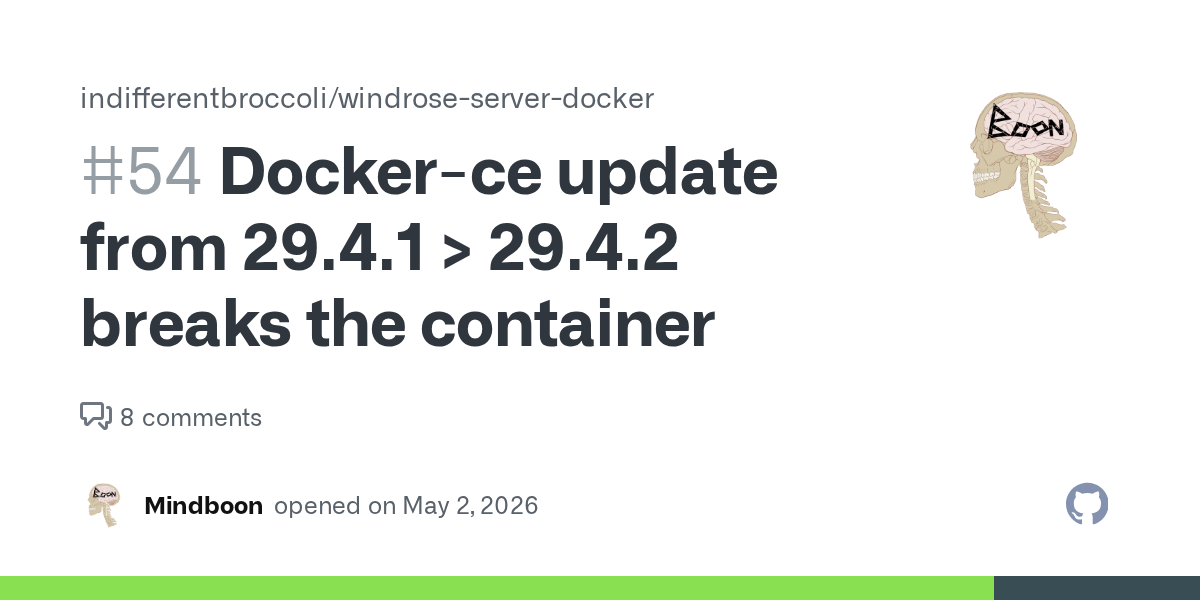
GitHub
After updating docker-ce package the container no-longer loads: OS: Debian 13 Docker-CE packages tested: 29.4.1 - Works perfectly 5:29.4.1-1-debian.13-trixie 29.4.2 - Refuses to start - Output belo...
pastel totem
marsh glen
It may help, it could also be his player files are corrupted and needs to restor...
So we are still having this issue, how would he restore/back up? Verifying files did nothing
somber canyon
timid marsh
is the server stopped fully?
Yes it is stopping fully
sage barn
Has anyone had an issue where the game just refuses to read the game files? Everything keeps dropping down to the minimum settings, and we can't even manually edit the file to get it to stick.
lime topaz
sage barn
Has anyone had an issue where the game just refuses to read the game files? Ever...
Is the R5 directory in %LOCALAPPDATA% set to Read Only ?
sage barn
lime topaz
Is the R5 directory in %LOCALAPPDATA% set to Read Only ?
Nope.
We can play just fine, its just the difficulty multipliers all revert to the lowest possible setting, which makes us think theres a filesystem issue
 ember pine
Hello, I need help. My save game is gone after a Steam Cloud sync error. I tried to restore it using the local backups in RocksDB_v2_backups by copying them into RocksDB\0.10.0, but the game still forces me to create a new character.My backup folder contains Accounts and Players folders with CURRENT files inside. Could someone please help me check if my database is corrupted or help me fix it? Thank you!
 meager scarab
hard holly
there is only 1 folder unless the backup is the 2nd?
meager scarab
hard holly
there is only 1 folder unless the backup is the 2nd?
i have the same issue, i even tried migrating it to a local dedicated server that i installed via steam to cancel out the FTP as a problem.
doesnt work there aswell.
Did you get it to work properly?
another thing i noticed is
my island id is quite short an purely decimal, every other id the servers i tried to migrate the save to made id´s in hex and are quite longer.
could be coincidence but at this point im getting paranoid
digital drift
sage barn
We can play just fine, its just the difficulty multipliers all revert to the low...
Was a fun goosechase, but this seems to be why ha
Saves + Configs not loading to tldr that entire thing can be handled via:
-> Rename the RocksDB_v2 folder to RocksDB
-> Remove the RocksDB_Backups_v2 folder
-> Make edits to your config + boot
Something along the way is hard prioritizing archived snapshots or the v1 db, v2 is basically a read point nothing is meant to be written to it (Right now, anyway)
hard holly
meager scarab
i have the same issue, i even tried migrating it to a local dedicated server tha...
I stepped away right now, I noticed nirado browser interface was lagging between WinSCP and their actual “file explorer” I went in and nuked all their files and copied directly over from my side. Left it off incase there is some kind of cache issue in the background. I’ll let you know when I get back if what I did worked - otherwise I’ll open a ticket with them and have them reprovision that box
meager scarab
good luck with the ticket, since for me its not even working locally i dont think nitrado has anything to do with the problem
hard holly
meager scarab
good luck with the ticket, since for me its not even working locally i dont thin...
Locally works fine. From their side. My game world is fine too when I go local. Their “start up process” seems to over write the server config with a new world on load up.
I’m guessing their system might be calling a corrupt tag on my upload. Another guy on YT made a comment about the upload “had to be binary” or it would fail. Although I’m thinking now due to the new file path names wind rose team might have fixed that. I’ll try a standard copy if this fails
meager scarab
i can host if i go ingame on host, but as soon as i try copying the game files to a dedicated server that is installed on the same harddrive i get this issue
hard holly
meager scarab
i can host if i go ingame on host, but as soon as i try copying the game files t...
Gotcha I haven’t even tried that. That might allude to the binary transfer issue which. Being in systems for years I don’t see why that’s a thing. You can try a powershell copy “robo copy” look up the commands this keeps all attributes = between transfer
 misty cypress
Can someone help me get rid of this broken link? If I hit confirm, it comes back the next time i open the game

 solid flame
misty cypress
Can someone help me get rid of this broken link? If I hit confirm, it comes back...
solid flame
misty cypress
Can someone help me get rid of this broken link? If I hit confirm, it comes back...
I have the same problem
sage barn
digital drift
Something along the way is hard prioritizing archived snapshots or the v1 db, v2...
Ill give that a try later when I get to my computer
Thanks for the help
solid flame
Same, but in polish xD

 knotty river
hey, im hosting a server for my friends. everything was wroking fine till yesterday but today when i load into the same server it just throws me back to the main menu. Anyone experience this issue?

 earnest cove
So i cant load into the game anymore what now i cant play anymore?
 coral peak
knotty river
hey, im hosting a server for my friends. everything was wroking fine till yester...
coral peak
knotty river
hey, im hosting a server for my friends. everything was wroking fine till yester...
I actually came here to ask this myself. Save loads just fine in single player, though It sends me back to main menu on Multiplayer
knotty river
coral peak
I actually came here to ask this myself. Save loads just fine in single player, ...
Try other servers
Seems like its happening in na/eu servers. I loaded into CIS and i was in first try
 zenith panther
I have the same problem, and I reported it myself, but received no reaction or answer. It's become extremely annoying. These multiplayer problems should be fixed, or the developers should compensate all players and go back to development.
 modern bear
Hi, i set up a dedicated Server on my second computer using steamcmd
Joining works fine, but every time i try to change the difficulty in the WorldDescription.json using NPP+, after restarting the Server with the Batch File, it instantly overwrites the Settings back to Medium.
Island ID is the Same in ServerDescription.json and WorldDescription.json.
Is it correct that the ServerDescription isnt located in the root folder after Installing, but in the R5 folder?
Is there a solution to this? Please, ive been sitting here for ours, trying different permissions, reading forums, everything.
Its running on a client with windows 11.
marsh glen
You're not gonna wanna hear this, but it's early access. There's a big warning telling you that, as well as telling you in game features may or may not work. Hell it pretty much spells out the game may not work at all. You/we take the risk buying into early access titles. We all accepted the risk of stuff being borked.
Not saying the devs can't or shouldn't respond, but technically they don't "have" to do anything.
The biggest problem I've seen is a lot of people running/setting servers that really ,.. just don't know the first thing about running a server. Most, accept they don't know, and accept they might not be able to figure it out,.. But then there are the few that expect too much when they don't even know the slightest how to begin troubleshooting, (like using a search, or checking pinned comments first. 🙄 )
marsh glen
modern bear
Hi, i set up a dedicated Server on my second computer using steamcmd
Joining wo...
ServerDescription.json resides in the R5 Folder. The difficulty issue has been brought up by a lot of people, AFAIK there is no known resolution
 old rover
hi, i rented a server today and ive followed the steps but i cannot get my local save to load into the game. i copied my world folder to the world folder on the server. i edited that json file and put my long world name in the world Id but when i load the game it starts a new world and the json file has a new ID in it...
ive used 3 different ftp programs, followed a youtube video, ive deleted it all and started off fresh 3 times as well. i also stop my server before i do anything..
cyan wren
lost my whole dedicated server somehow. have the old files but it keeps making a new world now and no matter what i edit to accept the island id it just makes a new world. very very frustrated
marsh glen
pinned comments
cyan wren
all i did was shut it down and then try to start it a diff day
old rover
sounds like my issue badguy except i just rented mine today and it keeps changing what i put in the fileas waell
im new to discord where do i view a pinned comment
marsh glen
 granite vessel
old rover
hi, i rented a server today and ive followed the steps but i cannot get my local...
granite vessel
old rover
hi, i rented a server today and ive followed the steps but i cannot get my local...
The first thing I would check is making sure that you are copy the save file into the right directory inside of ther server. This is what mine as an example
/R5/Saved/SaveProfiles/Default/RocksDB/0.10.0/Worlds/AF0FD9F472BF4396D88574BFF93EA484/
You should see a bunch of .sst files inside of the save directory
As for my json file where I specify the world it looks like this

 errant pine
hi goats, all servers services pings are not that good and im kinda in the middle, any idea of how to make my pc host s server directed to my pc
granite vessel
errant pine
hi goats, all servers services pings are not that good and im kinda in the middl...
You can run the server software directly on your pc and connect to it via putting localhost in the ip field when direct connecting.
Inside of steam install the windrose Dedicated Server software and run it. Do note the server must be running in the background in order for you to be able to connect to it.
 mental locust
what does this mean
 granite vessel
mental locust
what does this mean
granite vessel
mental locust
what does this mean
Are you on linux?
mental locust
windows 11
errant pine
granite vessel
You can run the server software directly on your pc and connect to it via puttin...
you are a linuxenjoyer prob 150iq, im a potato head didnt understand anything of what you just said, any guide for that? 
granite vessel
I was having that same error but it was because of Nvidia 595 drivers reverting to 590 fixedd ti for me
 vernal fjord
I've paid for a dedicated server. Can no longer connect to it but my brother is able to... can I please get some assitance..
cyan wren
well i think I got it back
granite vessel
vernal fjord
I've paid for a dedicated server. Can no longer connect to it but my brother is ...
-
- Are you able to ping the servers IP/.
-
- What does the server console show when you are trying to connect?
vernal fjord
Not sure what you mean by ping the server. Just purrchased one from the game through Nitrado
I can tell you that my brother can connect no issue however it sends me back to the main menu.
granite vessel
I don't have much to go on right now if possible could you open the server hosters website navagate to the console and see if the console see you trying to connect.
If nothing shows up in the console when you are trying to connect I would check your firewall first and if you still are having issue connect try a VPN
vernal fjord
K
cyan wren
okay, i got the save file back, but now its running 3 server instances in one dedicated exe. wtf
vernal fjord
Anybody else have any insight? Renting the server from Nitrado, cannot connect after doing the tutorial but another player can. Server shows online and reachable.
granite vessel
vernal fjord
Anybody else have any insight? Renting the server from Nitrado, cannot connect a...
Were you able to connect initially? maybe your character save bugged out.
 lime violet
Hello, I am trying to copy the world from my Nitrado server to my new VPS and the world files are all back dated. I don't have anything I have done in say the last 24 hours. Does anyone know why I can't copy an updated version of my world?
granite vessel
lime violet
Hello, I am trying to copy the world from my Nitrado server to my new VPS and th...
Are you still able to access the Nitrado website to download the updated version on your save off of them then copy it over to the VPS. Or did you lose access and only have outdated saves?
lime violet
I have access, I literally have the server offline, I copy the world folder to my local hosted server, load the world and parts of my map arent open, materials and things I built no there. Nothing basically I have done in the last 24 hours
granite vessel
Did you edit the json file?
lime violet
Yes, it is referecing the correct world file.
The would loads, just yesterdays version
granite vessel
Have you tried replacing the contents of the save its able to load with the one you want to have it load? Please make backup beofore you override the files if you don't have any.
lime violet
yes, I have deleted the entire world folder.. directly copied it via FTP to the local hosted server.. the world loads, but as it was a day or so ago
building, mats in crates, planting.. everything is as it was before, not how it was 1 hour ago when I turned off the server.
If I log back into Nitrado, its all correct and updated..
So I don't understand how copying the "world" would give me something different then what's on Nitrado.
granite vessel
Just to be sure you are copying the world from the directory
/R5/Saved/SaveProfiles/Default/RocksDB/[GameVersion]/Worlds/
The only thing I can think of is that world you are copying is a backup and not the one that Nitrado is using.
It makes no sense that if you copied the world from there and moved it over it should just work I was able to convert from singleplayer to a dedicated server doing this.
If you can't get it in the best option might just be save editing everything you lost back in
lime violet
bruh lol..

I am copying literally directly into the folder... from the correct location, to the correct location...
lime violet
on Nitrado or Local?
digital drift
If the RocksDB_v2 / RocksDB_v2_Backups exists it prioritizes those bar none
lime violet
okay see that would explain alot.
halcyon yew
Just double checking, are u going through the pinned instructions,
lime violet
Yes they exits. should that be what I am copying?
lime violet
halcyon yew
Just double checking, are u going through the pinned instructions,
Pinned changes?
digital drift
Youd want to move the save data thats latest there, though truth be told Id do it the unintended way cause save loading is a bit janky atm haha
-> Move the v2 folders to some other dir (or just rename them)
-> Put the save under RocksDB (the v1 path iirc)
-> Boot
Server should grab + migrate on its own
Alternatively, remove the _Backups dir and just rename the RocksDB_v2 to RocksDB
^ And yeah make sure the save data is under that v2 dir pre-rename (or after)
marsh glen
Specifically the last 4 steps of the pinned guide would be what you're looking at, but now that you have Kringle here, just do what he says
halcyon yew
digital drift
We found loading it to the client really isnt needed, its more so stemming from the backend save handling of this : https://discord.com/channels/1260209458924224542/1501430959701098507
It may help, so wont discourage trying it - but it should work entirely server side; unless the client has some RocksDB fix the server doesnt
marsh glen
yeah, I know the guide is more than what's needed, but it does get the job done.
digital drift
No forsure! Its solid
halcyon yew
i would like to think the moving back and forth fix is easier for most of the technically challenged people here (no offense)
digital drift
I think its just preference, in my eyes just deleting the v2_Backups folder and renaming RocksDB_v2 to RocksDB and hitting start is easier xD though that also raises the variables involved in each persons specific save issue
marsh glen
I found the move back and forth does fix some perms that get changed on the server
digital drift
Both get the job done, so nbd!
halcyon yew
yea try both people
granite vessel
How should I go about adding rcon to my sever.
digital drift
marsh glen
I found the move back and forth does fix some perms that get changed on the serv...
Ah yeah that makes sense
halcyon yew
if they both don't work then just wait
digital drift
granite vessel
How should I go about adding rcon to my sever.
Would need to use mods -> #│modding-general
marsh glen
digital drift
I think its just preference, in my eyes just deleting the `v2_Backups` folder an...
Your method essentially makes the server rebuild the new _v2 files, and re"import" the world save, so yeah you're right it is accomplishing the same thing really
lime violet
Okay so just to clairfy, If you want to copy your Windrose Server to a new VPS or Locally hosted, you need to copy the SaveProfiles/Default Folder...
Not the "World" Folder.
The simplest way to put it?
digital drift
More or less, to make sure it all migrates yes
marsh glen
right
lime violet
Thanks!
digital drift
Though if after doing that its still finnicky, you'll wanna follow either the large pin by Jedi or the few steps I tossed in - both can help save load issues, just kinda depends whats causing it
 smoky tulip
Is anyone else still having SSD issues with Windrose?
marsh glen
smoky tulip
Is anyone else still having SSD issues with Windrose?
elaborate
digital drift
^^
smoky tulip
marsh glen
elaborate
When I play Windrose it tries to read/write on my SSD at anywhere between 100-200 mbs causing insane amounts of stuttering in game.
marsh glen
That's shoulda been resolved on the 4/30 patch...
which I would assume you have since you can't play without updating..
smoky tulip
So they say, but as of last night I'm still having the same issues, if not even worse. I'm wondering if its still persistent for anyone else
granite vessel
My drives are writting almost nothing while gaming.
marsh glen
are you on a NvME when you say SSD or a 2.5" Sata? cause an NvME you wouldn't notice the writes even before patch
granite vessel
Was experiencing it on the last patch
 granite yew
yes< I beleive the issues still exists ... I can can only direct IP to our server , we turned the invite code back on to see if we can connect thru community servers and the it just restarts the game back to main menu.
marsh glen
yeah since the 4/30 patch I've seen all my servers and clients go to well within reasonable writes
earnest cove
Anyone knows how to fix the loading issue it keeps me loading to my world
marsh glen
granite yew
yes< I beleive the issues still exists ... I can can only direct IP to our serv...
if you're running direct ip connect invite will not work, it's one or the other
smoky tulip
I believe 2.5" sata... I'm not 100% sure, its a prebuilt pc and I don't really know computers very well
marsh glen
hmm.. and your game client, and the server you connect to are both running the latest builds?
granite yew
marsh glen
if you're running direct ip connect invite will not work, it's one or the other
Yeah, I know... its either/ or but I am saying the invitecode /community connect servers issue is still there..
marsh glen
granite yew
Yeah, I know... its either/ or but I am saying the invitecode /community connec...
ah i see
granite yew
Thx for the response@marsh glen.. you have had greaat insight during this matter.
smoky tulip
marsh glen
hmm.. and your game client, and the server you connect to are both running the ...
Yes, it was all updated on the 30th.
marsh glen
smoky tulip
Yes, it was all updated on the 30th.
tha's definitely new to me, dunno if Kringle's or any one else has some insight, but it might be worth opening a new thread to report it in https://discord.com/channels/1260209458924224542/1493364524705775657
smoky tulip
marsh glen
tha's definitely new to me, dunno if Kringle's or any one else has some insight,...
Will do, I'll wait till I'm home and on the game so I can get some screenshots
 inner orchid
i beg they fix this fps drop with the frigate!! its unplayable!
digital drift
Yeah would likely be best to bug report that one, havent seen any large issues w/ it at scale (yet)
mental locust
granite vessel
I was having that same error but it was because of Nvidia 595 drivers reverting ...
how do I revert drivers
granite vessel
I don't know how to on windows I've been on linux for <10 years
mental locust
dam
warm jasper
So I am not sure what I did but I might have fixed my game, I'll play a diff one and hop back on in a bit and let you know if it's still good.
But basically I turned off cloud, deleted config file AND rocks DB v2 + backups, forcing it to make a new V2. When I logged in, it was my save from Sunday (before the update). Walked around a bit, logged out. Turned back on Cloud and used cloud save. When I got back in not only was I still at my Sunday save, I could fast travel to Tortuga TWICE and not crash, only had a slight load hiccup less than a second.
It gives me a chance to build a new Spanish looking base at the cove island which is cool. We'll see if I'm all fixed in a bit.
At least I didn't lose boss progress. That would have been nuts
marsh glen

 rose gulch
Has anyone been able to use the dedicated docker from indiffrentbroccoli on Docker Desktop in Windows?
 swift parcel
Ship Hull Customization Not Showing
Is this a bug, see enclosed picks.
From what i can see it is the correct ship and customization.
I did a clean instal of the game and steam and it still not populating correctly.
Any help would be great thank you!


 jaunty tide
rose gulch
Has anyone been able to use the dedicated docker from indiffrentbroccoli on Dock...
jaunty tide
rose gulch
Has anyone been able to use the dedicated docker from indiffrentbroccoli on Dock...
It should work, but the server will run much better if you run it natively, since you will remove the Wine translation layer and will have much better transfer speeds to the storage. Docker Desktop also eats 2 GB of RAM just by being started, since it's a virtual machine on Windows.
Haven't tried it, but there's a Windows app to manage the server that should make it easier.
 spice owl
Hi, I am currently hosting a server for friends, right now Shared Quests is on, was thinking if I should turn off. The reason I am thinkin that is, does anyone know if someone completes a quest in an area on the map, if it is no longer available for anyone else that wasn't online at the time with "Shared Quests" turned on? Thanks in advanced. 🙂 PS, could we allow XP from killing stuff? Just a thought. Sorry if I am posting this in the wrong chat, I am new here.
 celest flame
how do i fix this? ive been trying to pull my current saved file from a gportal server but when on solo it wont let me acces it, it will give me an outdated saved file
 marsh glen
spice owl
Hi, I am currently hosting a server for friends, right now Shared Quests is on, ...
marsh glen
spice owl
Hi, I am currently hosting a server for friends, right now Shared Quests is on, ...
You will still be able to run the quests if you are not there when they get completed
lime violet
spice owl
Hi, I am currently hosting a server for friends, right now Shared Quests is on, ...
I will put it this way, the first quest to free the captives, my buddy did all of them, we started playing, got the quest, he finished, it finished for everyone. We didn't know where to go after that cuz all the markers went away. Hope that helps.
marsh glen
lime violet
I will put it this way, the first quest to free the captives, my buddy did all o...
were you all on the server at the same time he completed?
spice owl
Okay, so if I am understanding this correctly, they get to the do the quests, but the "Location xp" wouldn't be their for them to get since it was already done by someone? E.G exploring an island and looting the chests at the areas on the map? Does that make sense?
lime violet
spice owl
Okay, so if I am understanding this correctly, they get to the do the quests, bu...
No
rose gulch
I moved my local save to a dedi with steamCMD, does anyone know what the defualt-value of WorldPresetType is?
And is there any advantage to opening porst and stuff instead of using uPnP?
lime violet
spice owl
Okay, so if I am understanding this correctly, they get to the do the quests, bu...
They still have to clear the locations and would get the XP.. But the flags, that show those locations would be gone, you would have to find them naturally.
They would get the XP for the quest
 vocal nacelle
Can someone explain to me the SSD issue? How are the things looking? I've seen that devs have patched it already, but is it all good now?
marsh glen
vocal nacelle
Can someone explain to me the SSD issue? How are the things looking? I've seen t...
To most, the writes are within normal parameters, some still don't like the amount of writes.
 quartz yoke
+1 thanks for the guide on fixing the issue where a self hosted server was creating new worlds every time it started. That pin took me out of a lot of frusteration I was having.
marsh glen
lime violet
They still have to clear the locations and would get the XP.. But the flags, tha...
this has not been the case for our players, other players have completed the questline with out some members, those members that missed still have the quest and markers and can complete and get XP / rewards
vocal nacelle
marsh glen
To most, the writes are within normal parameters, some still don't like the amou...
Are there any plans to further reduce the writes?
lime violet
marsh glen
this has not been the case for our players, other players have completed the qu...
Not if it's a shared quest and they are online. You have to disable shared to descibe what you are saying
marsh glen
lime violet
Not if it's a shared quest and they are online. You have to disable shared to de...
again not in what we have seen
jaunty tide
spice owl
Hi, I am currently hosting a server for friends, right now Shared Quests is on, ...
Maybe this affects only some quests, but from my observations, shared progress only works for people in the quest area who actually engage with the objectives.
A friend ran away from naval combat two times, and we had to repeat the quests for him to complete them.
Dying also seems to break the shared progress: the one who dies must come back and engage before the quest is finished.
marsh glen
vocal nacelle
Are there any plans to further reduce the writes?
tha's a question for the devs
spice owl
lime violet
They still have to clear the locations and would get the XP.. But the flags, tha...
Ooooooooooh, I see what you are saying. I am starting to see the pro's and cons of "Shared Quests" Hmmmm, sounds like it may be best to turn it off.
lime violet
jaunty tide
Maybe this affects only some quests, but from my observations, shared progress o...
Yes, if someone dies fighting a boss and that, they lose out on the progress.
marsh glen
jaunty tide
Maybe this affects only some quests, but from my observations, shared progress o...
this seems in line with what we've seen
lime violet
But killing the boss isn't a shared quest I don't believe.. just cuz you do it together, doesn't mean its shared..
marsh glen
"you have to be there" for shared completion otherwise you can run on your own
lime violet
marsh glen
"you have to be there" for shared completion otherwise you can run on your own
Where do you see that, I don't agree
marsh glen
we've not seen missions disappeared from others completed, while not there.
warm jasper
marsh glen
https://tenor.com/view/pout-kiss-blowing-a-kiss-suspense-christian-bale-gif-1693...
came back from playing another game, infinite load screen again
dumb dumb dumb.
lime violet
marsh glen
we've not seen missions disappeared from others completed, while not there.
what do you mean "while not there"
also, are you sure it was a "shared quest"
marsh glen
lime violet
Where do you see that, I don't agree
I don't know how to show you where, it's what I've personally seen in share vs non share quest states, as well as reported by our players.
As far as "you have to be there" it's exactly as #🚧│tech-support message describes. You complete as a group in the activity, actively interacting, or if you miss the completion, you can run it your self or with others again as long as someone hasn't completed and has the quest still active.
We have not seen "quests disappear"
marsh glen
lime violet
also, are you sure it was a "shared quest"
my guy... are you trolling me?
rose gulch
Excuse me guys.
I installed SteamCMD and Windrose dedicated server, copied my save from my local %appdata%\local\R5\ bla bla rockdb folder and moved it into the dedicated Rockdbv2 folder (as there wwere no rockdb folder)
It seems like everything is there, but my fog on the map is back?
lime violet
marsh glen
my guy... are you trolling me?
asking clarifying questions isn't trolling.. Quests have multiple layers (various objectives) and sometimes only One of those layers is "Shared" It's not always the entire quest as a whole...
marsh glen
rose gulch
Excuse me guys.
I installed SteamCMD and Windrose dedicated server, copied my s...
Check here and the conversation that follows #🚧│tech-support message
jaunty tide
rose gulch
Excuse me guys.
I installed SteamCMD and Windrose dedicated server, copied my s...
you must edit ServerDescription.json, pointing WorldIslandId to the active world ID. It likely generated a new world and ignored the one you copied.
https://playwindrose.com/dedicated-server-guide/#wsg-serverdesc
lime violet
I was here for all that.. thanks for the refresher.
If you and another person on the server both have a quest task that says "Shared Quest" from my experience, if anyone completes it, it will complete for both of you as long as you are both on the server. You do not need to be in the "area" of the quest.
To clarify, you don't agree with that?
rose gulch
jaunty tide
you must edit `ServerDescription.json`, pointing `WorldIslandId` to the active w...
I think my issue is regarding the rockdb and rockdb2 folder, ill try whats mentioned above :d
marsh glen
lime violet
I was here for all that.. thanks for the refresher.
If you and another person ...
From what we've seen and our players have reported, it's exactly as I referenced, you have to interact in some way, with the Yes "shared quest" state to receive credit for completion.
I'm now moving on from this internet measuring contest. You can find someone else to receive your snarky comments. I've put enough effort the last two days helping folks here.
jaunty tide
rose gulch
I think my issue is regarding the rockdb and rockdb2 folder, ill try whats menti...
If there's only a RocksDB folder, the server will migrate it upon startup and create a RocksDB_v2 by itself. Just make sure the world ID is set up correctly. After you confirm it's working, you may delete RocksDB and leave only RocksDB_v2.
rose gulch
jaunty tide
If there's only a `RocksDB` folder, the server will migrate it upon startup and ...
That worked, thank you!
Am I understanding it correctly that Windrose Plus is the best way to "manage" the server?
marsh glen
He's only got the Rocks_v2, he'll want to move it to a Rocks_DB, remove the _v2 and let the server process re migrate
as well as teh backup folders, but do make sure you've got copies / backups
jaunty tide
rose gulch
That worked, thank you!
Am I understanding it correctly that Windrose Plus is t...
When it's not broken... yes. It prevented my server from starting the other day and removed backpack slots. Use it carefully, especially right after the game updates.
marsh glen
rose gulch
That worked, thank you!
Am I understanding it correctly that Windrose Plus is t...
I'm not a fan of any mod requiring UE4SS right now. They seem highly unstable, and cause server stability issues a lot of the time. I just don't think they are "there" yet
rose gulch
Oh okay, I'll skip it then!
is there any way to set up an Message ofthe day and stuff, or is it mainly just for multipliers and stuff?
jaunty tide
rose gulch
is there any way to set up an Message ofthe day and stuff, or is it mainly just ...
Not natively. The server is very barebones atm
marsh glen
 lime violet
marsh glen
From what we've seen and our players have reported, it's exactly as I referenced...
lime violet
marsh glen
From what we've seen and our players have reported, it's exactly as I referenced...
Proof you don't "need to be there"
Chapo Santana and Ben both completed the Catastrophe's Aftermath.
Get rid of Jim Godart is a "Shared Quest"
You can see in Ben's map that quest location is in the top left, where the character currently is..
You can see in Chapo map, he has been no where near wher Ben currently is..
Yet, chapo has finished the quest..


 marsh glen
ok, cool, you're highly invested more in this than I am. Congrats, you win!
lime violet
Thus... You only need to be on the server active if shared quests are enabled.
 lime violet
marsh glen
ok, cool, you're highly invested more in this than I am. Congrats, you win!
lime violet
marsh glen
ok, cool, you're highly invested more in this than I am. Congrats, you win!
It's not about that, its about a person asked a question, and I am giving them the correct answer.
Sorry for communicating the correct information.
Do you often tell people the wrong thing, then give the person who is correcting you, with proof a hard time.. cuz thats pretty cringe..
marsh glen
well, because it works for me it must work for all, typically isn't' the end all be all. we've seen different. another user confirmed they've seen different. It might just be in the realm of possibility, both scenarios may just be right.
I mean, Early access and all, but hey, how could that be, never any weird stuff happening in EA... 🙄
lime violet
marsh glen
well, because it works for me it must work for all, typically isn't' the end all...
Mine works the literal way the developers described how shared quests work.. Take your own advise.
marsh glen
I'm sorry you've had / having a bad day, I hope it gets better.
granite vessel
This is way to heated for a tech support chat boys go touch some grass its not that deep.
lime violet
Having a great day, just think a tech support channel should be correct info.. not "how it works for me"
 lime violet
yet, you would rather post memes.. in a tech support channel... lmfao
rose gulch
New question:
I copied from RockDB, but somehow the save is "earlier" then the newest one, and backup is also a day old. But "Steam_Autocloud.vdf" is edited yesterday at the correct time, is there anywhere else that I can find my save-file apart from %appdata%/local?
I exited the game normally, so it should have saved
lime violet
rose gulch
New question:
I copied from RockDB, but somehow the save is "earlier" then the ...
I KNOW THE ANSWER LMFAO
rose gulch
!?!?!
lime violet
copy the entire default folder!
rose gulch
Hol' up
lime violet
I literally asked the same thing 2 hours ago
 marsh glen
drive up 3 level to the steamID folder
lime violet
lime violet
Okay so just to clairfy, If you want to copy your Windrose Server to a new VPS o...
earlier solution
you need to copy all 3 versions of the RocksDB Folders
lime violet
Sorry, if that is local, the file structure looks a little different
rose gulch
I just figured, I can try to go in and force save the game and then transfer lol
marsh glen
rose gulch
I just figured, I can try to go in and force save the game and then transfer lol
it's not how the server files work
 split wagon
Has anyone had some weird fps drop, whether its on a deserted island or at base? I'm using an old CPU so i've turned on frame gen. My fps randomly go from ~80 to about ~10 out of nowhere. Restarting the game fixes it, but thats a crap fix. Fast travelling doesn't really fix it either, but it goes away randomly too
granite vessel
split wagon
Has anyone had some weird fps drop, whether its on a deserted island or at base?...
Unreal Engine 5 moment
Happens on my 5070ti paried with a ryzen 9 9950x3d
Juust drops to around 40 from 80ish
lime violet
rose gulch
I just figured, I can try to go in and force save the game and then transfer lol
Did copying all 3 folders not work?
rose gulch
They are all last modified two days ago Goonsly, even thought I played 24 hours ago
split wagon
Weird. My friends haven't got the same issue though. There's 6 of us, im the only one. And it drops to 6fps before framegen lol
quartz yoke
Can confirm my i9-14900f with a 4070 super drops also.
lime violet
split wagon
Weird. My friends haven't got the same issue though. There's 6 of us, im the onl...
do any of them complain of banding or lag?
quartz yoke
Pretty rarely tho
rose gulch
oh hold on
marsh glen
rose gulch
They are all last modified two days ago Goonsly, even thought I played 24 hours ...
backups only happen automatically when you shutdown / start the server, I can never remember which. if your local server has been running non stop that's why
split wagon
ohh i see what you mean. Old CPU screwing me, so instead of dropping to 40 it drops to 10 lol
split wagon
lime violet
do any of them complain of banding or lag?
no, but could be my old CPU :/
granite vessel
split wagon
Weird. My friends haven't got the same issue though. There's 6 of us, im the onl...
Framgen lowers your base framte IE game running with higher latency and is using your system resources to gen those frames rather than render real ones. If I explained this poorly please look into cause you should never be using framgen.
lime violet
split wagon
no, but could be my old CPU :/
okay, just asked cuz I get some like lag/banding when ship fighting, but that's the only time.
quartz yoke
But I just migrated my self hosted server to a different machine in my basement and it smoothed the rubber banding out for the 3-4 of us that play on it.
jaunty tide
rose gulch
Where is the default-folder? In my %appdata%\local, I have a random ID
The directory structure is a bit different on the server. That 765.. is your SteamID and won't be used on the server.
Since you mentioned you rolled back progress, I'm guessing your client already migrated the database to v2, and you must copy RocksDB_v2 from the client to R5/Saved/SaveProfiles/Default/ on the server instead.
Remove any other RocksDB directories inside Default on the server, just in case.
As you have already set up ServerDescription.json, this should be enough.
rose gulch
jaunty tide
The directory structure is a bit different on the server. That `765..` is your S...
I tried to copy all of them now, hold on, I'll get back to you! 😄
 nimble torrent
Good day, I'd like to report a translation issue. It used to be called a plant merchant, and everything was basically fine. But now it's called a food merchant, and he also sells flax and some other inedible plants.
 lime violet
nimble torrent
Good day, I'd like to report a translation issue. It used to be called a plant m...
lime violet
nimble torrent
Good day, I'd like to report a translation issue. It used to be called a plant m...
I feel like this might belong in #1493348541177794601
rose gulch
jaunty tide
The directory structure is a bit different on the server. That `765..` is your S...
This worked, once again - thank you SO much!
nimble torrent
I didn't find a suitable topic there... plus I'm on my phone right now and just forwarded this from Ru chat...
 cedar lava
Hi.. New here. 🙂
I have a savegame that I can only host within the game. But previsouly, it did work on a dedicated server too.
Now, I cannot make it load the savegame regardless of what I try.
The server seems to load the world. But when trying to join it, it does not work.
If i wipe the save game and create a new world with the same json settings and a fresh worldid. It works fine and I can join it , no issues..
marsh glen
cedar lava
Hi.. New here. 🙂
I have a savegame that I can only host within the game. But p...
There's a reference guide in the pins, or check the conversation starting here #🚧│tech-support message
 stuck vale
Hi, someone knows about it or just a fake news?
 marsh glen
stuck vale
Hi, someone knows about it or just a fake news?
marsh glen
stuck vale
Hi, someone knows about it or just a fake news?
been patched
granite vessel
stuck vale
Hi, someone knows about it or just a fake news?
Patched on 30th of last month
jaunty tide
stuck vale
Hi, someone knows about it or just a fake news?
old news. It's fixed.
stuck vale
Thank you mates
cedar lava
marsh glen
There's a reference guide in the pins, or check the conversation starting here h...
That worked! 🙂 Thanks.. Have been searching for a solution to this..
marsh glen

 bright edge
Hey guys, you find the absolute fix for the "server creates new world on restart, and doesn't load the uploaded world" yet?
I learned how to absolutely fix it
 fallen verge
anyone having issues with WorldDescription.json on dedicated server reseting to default values when server starts ?
marsh glen
This method also works server side only #🚧│tech-support message
granite vessel
fallen verge
anyone having issues with WorldDescription.json on dedicated server reseting to ...
Are you using a docker container to run the server?
fallen verge
no, bare windows machine
its a brand new server, i only have RockDB2_v2 folder https://gyazo.com/41ccc7b878fabee3d2217be4a95e0af5

and even using the presets that come inside the DedicatedServer.md or whatever preset or custom setting i use, it always reset to Medium on server start https://gyazo.com/f1287da8fed05de3f52fb3a456bfeade
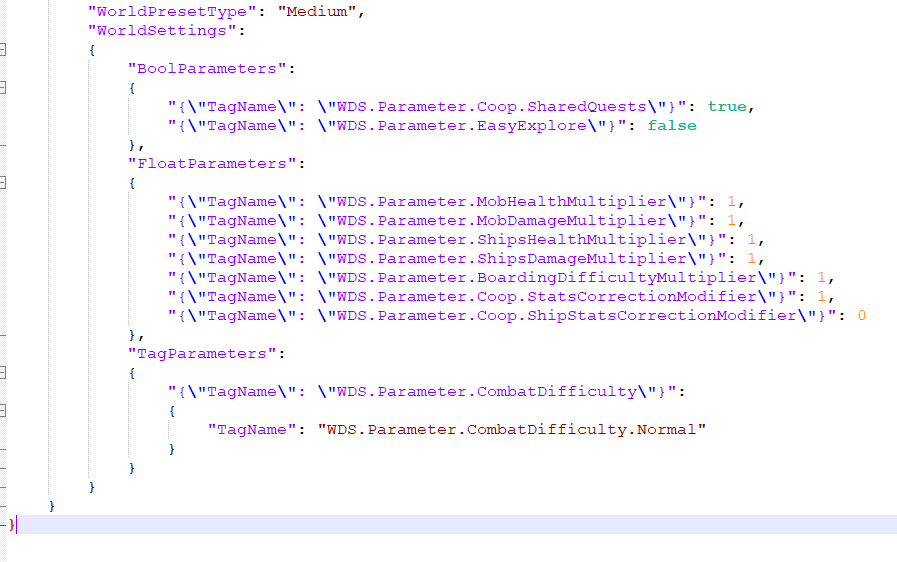
islandID its matching the ServerDescription.json
 west echo
Hi guys, I have a problem. I bought a dedicated server. I wanted to transfer my saves to the path C:\Users\xxx\AppData\Local\R5\Saved\SaveProfiles but I can't find the saves updated to today's date.
marsh glen
fallen verge
its a brand new server, i only have RockDB2_v2 folder https://gyazo.com/41ccc7b8...
Read into the conversation starting just before here #🚧│tech-support message Specifically what Kringle says
marsh glen
west echo
Hi guys, I have a problem. I bought a dedicated server. I wanted to transfer my ...
Dedi server are different pathings check the pin the last 4 steps will pertain to what you want
west echo
marsh glen
Dedi server are different pathings check the pin the last 4 steps will pertain ...
I'm not talking about the dedicated saves, I'm talking about the local saves that I want to transfer to the dedicated but they are not updated
marsh glen
west echo
Hi guys, I have a problem. I bought a dedicated server. I wanted to transfer my ...
wait... Just noticed you're asking about your saves.
Are you looking for your backups?
The world folders are your world saves. they are further down in the sub directories
west echo
yes that path I have files updated to day 4 even if I started the game today
 somber canyon
I still cant get the server to read any changes to the file in regards to difficulty it very stubbornly resets to medium regardless of what I do
marsh glen
west echo
yes that path I have files updated to day 4 even if I started the game today
yeah, the pin will be a good reference for what you want, you're just not drilling into the folders deep enough
fallen verge
marsh glen
Read into the conversation starting just before here https://discord.com/channel...
Oh ok, its a known bug and theres a workaround, i guess we can expect a fix on a update soon
granite vessel
Ah I was drawin blanks on that hope that gets fixed soon
west echo
marsh glen
yeah, the pin will be a good reference for what you want, you're just not drilli...
even when digging the date reported is always the 4th
 velvet turtle
Can anyone help me figure out why i cant get into my solo gameplay but can join online servers
granite vessel
velvet turtle
Can anyone help me figure out why i cant get into my solo gameplay but can join ...
I think this should go here #1493348541177794601
marsh glen
west echo
even when digging the date reported is always the 4th
this was running as a local Steam server, correct?
and are you look in the worlds folder at the actual files, or are you goin by the dates on the folder?
west echo
yes I'm looking for local files in offline mode on steam
I think the date should update if the save is updated, right?+
marsh glen
folder dates in windows do not always reflect the last updated dates of the files within them. take a look at the actual files inside your worlds folder
a lot of the times, folder dates are the date created, not last updated
marsh glen

 median raptor
hello all, i host a game for my wife and myself. up until today everything has been great. but now whenever she tries to connect to my hosted world "application has hung and will be closed" comes up and crashes the game. i was able to get her connected twice but after about 10 minutes she crashed, then the second time i crashed. is there a known issue for this and is there a fix?
 subtle thistle
median raptor
hello all, i host a game for my wife and myself. up until today everything has b...
subtle thistle
median raptor
hello all, i host a game for my wife and myself. up until today everything has b...
linux?
subtle thistle
median raptor
Windows 11
check and make sure both your game version are correct and that the ip match as well with the open port
<@&1354821664998817822> spam?
median raptor
subtle thistle
check and make sure both your game version are correct and that the ip match as...
games are same versions, verified game files on both machines, just using invite code
marsh glen
auto mod to the rescue
subtle thistle
yeah sometimes its slow 
subtle thistle
median raptor
games are same versions, verified game files on both machines, just using invite...
direct ip?
median raptor
we've played like this fine for 50 hours
subtle thistle
median raptor
we've played like this fine for 50 hours
is it direct ip or invite code?
marsh glen
it could be the proxy server used for Invite code connections, they have been unstble lately.
subtle thistle
also doesnt mean your isp has not blocked that port
marsh glen
hes' using invite code
median raptor
subtle thistle
is it direct ip or invite code?
invite code
subtle thistle
i would try direct ip then
marsh glen
can u test setting direct IP, should be easy since you're on the same lan ( I assume)
subtle thistle
marsh glen
can u test setting direct IP, should be easy since you're on the same lan ( I as...
i made a script for all of that
median raptor
yeah we are
marsh glen
median raptor
yeah we are
yeah I'd set direct IP for now
median raptor
so dumb question, how do i find the ip to give to her to connect?
i have ipconfig open right now
marsh glen
just note that if you want to go back to Invite code, (b/c direct IP does not save recents) you will have to undo it, it's one or the other
Just ipconfig in terminal on the host machine
subtle thistle
your ip and then port 7777
marsh glen
that's machine will be the IP the other will connect to, also make sure to turn on direct IP in the ServerDescription.json file
subtle thistle
GitHub
Contribute to 1r0nch3f/Windrose-Captain-Chest development by creating an account on GitHub.
the captain signal script will do it all for ya
ok back to work 
 autumn oxide
god I would kill for a exit to desktop menu option....
i keep exiting and then finding myself sitting at menu screen for the next 24 hours...lol
warm jasper
Now I'm trying to just play it with no cloud sync that seems to be helping me. We'll see.
median raptor
marsh glen
that's machine will be the IP the other will connect to, also make sure to turn ...
direct connection didnt work either, she started to load then sent back to main menu, it is enabled in the json file
marsh glen
median raptor
direct connection didnt work either, she started to load then sent back to main ...
are you able to watch the server log as she is trying to connect? It should open as a cmd window if you're starting via the batch file. not sure if you can see it if you launch the server via steam
median raptor
marsh glen
are you able to watch the server log as she is trying to connect? It should open...
its a local host
marsh glen
so you launch via steam right?
median raptor
non-dedicated
marsh glen
median raptor
non-dedicated
you launch via steam right, the server I mean?
 fleet mulch
need help, i had bug free experience up to level 15 character, i unlocked everything , and it seems after the latest patch, my game won't load my save, i get stuck on an infinite loading screen that ends with a error that says application has hung, any fixes?
median raptor
in game, when i click play i then click host game
marsh glen
ah ok
can you post your contents of ServerDescription.json
Just blank out/redact the invite code if you want to keep that secret
screen shot will work
This will be in your Steam directory where the game is installed:
\\SteamLibrary\steamapps\common\Windrose\R5
median raptor
 manic mulch
well since update even puting the correct world folder code - it still keeps makeing worlds lol..
marsh glen
manic mulch
well since update even puting the correct world folder code - it still keeps mak...
check teh pined guide
marsh glen
median raptor
ok this looks fine
fleet mulch
am i the only one who got a savefile issue fron their patch fixing save files? what is going on
or atleast the loading screen of death
manic mulch
marsh glen
check teh pined guide
And set "WorldIslandId": "04A4F36F41134855B3AD6FFA08FD11A1" to match the ID of your uploaded save (It's the folder name).,
Start your server. this is what i have done it still changes lol
marsh glen
manic mulch
And set "WorldIslandId": "04A4F36F41134855B3AD6FFA08FD11A1" to match the ID of y...
did you great the whole thing, or just quote me an excerpt
marsh glen
median raptor
when she connectes, she puts in your LAN IP and the port right?
median raptor
marsh glen
when she connectes, she puts in your LAN IP and the port right?
public ip and port
marsh glen
median raptor
public ip and port
what do you mean public ip?
median raptor
only tried that way once though
marsh glen
your gateway IP?
you want to have her use the IP on your LAN to yur machine that is hosting, no reason to go out the gateway
median raptor
where do i find that?
manic mulch
marsh glen
did you great the whole thing, or just quote me an excerpt
yep it keeps changeing it in the json file anyway
marsh glen
median raptor
where do i find that?
open a command window