#🚧│tech-support
1 messages · Page 4 of 1
 agile veldt
 glossy atlas
Thanks for the reply I’ve never done a rented server before so I have 0 clue abo...
glossy atlas
Thanks for the reply I’ve never done a rented server before so I have 0 clue abo...
I'm sure if you get stuck someone can help. Yes move it to the same directory but on the dedicated server side
 glossy atlas
You recommended gportal over nitrado or is there no real difference?
agile veldt
Honestly just what I use it's personal preference they both do the same thing
glossy atlas
Ok buddy thank you for your time hopefully il get it sorted later on today then
agile veldt
glossy atlas
Ok buddy thank you for your time hopefully il get it sorted later on today then
Happy Saling sir
 terse topaz
Hello! i cannot pass the loading screen, it only stays in the loadinscreen and i can never play the game
any tips
?
 undone venture
Same boat as you chibs,was just about to ask the same question
terse topaz
yeah it is very annoying and i kinda want to get my monney back if i cant play the game...
agile veldt
terse topaz
Hello! i cannot pass the loading screen, it only stays in the loadinscreen and i...
I think everyone has the same issue rn
have to wait for a patch
terse topaz
agile veldt
I think everyone has the same issue rn
oh okey.. i did the toutorial then stuuck in loadingscreen forever 🙁
agile veldt
terse topaz
oh okey.. i did the toutorial then stuuck in loadingscreen forever 🙁
Are you on solo or co-op
undone venture
ive tried unistalling/reinstall,validated all the files,checked the saves but no joy
agile veldt
Oh so it's not just a server side thing
terse topaz
nope :/
agile veldt
hmmmm, seems some people are able to play
terse topaz
yeah my friend can play but not me
 willow sedge
same server?
terse topaz
yes, i tried to host a game, play solo, join friends. but still always stuck in the loadingscreen
agile veldt
terse topaz
yeah my friend can play but not me
Do you have mods or full vanilla?
terse topaz
agile veldt
Do you have mods or full vanilla?
just downloaded the game so vanilla i think
agile veldt
yeye. thought maybe it could me a mod error cos I use some mods but maybe not
 fallen zinc
terse topaz
yes, i tried to host a game, play solo, join friends. but still always stuck in ...
fallen zinc
terse topaz
yes, i tried to host a game, play solo, join friends. but still always stuck in ...
That have a lot of people at this moment
terse topaz
yeah need a patch or i refound the game
 amber tangle
Any new info on the intel arc b580 bsod issue?
willow sedge
its only gportal? Or other as well too?
 undone burrow
terse topaz
oh okey.. i did the toutorial then stuuck in loadingscreen forever 🙁
undone burrow
terse topaz
oh okey.. i did the toutorial then stuuck in loadingscreen forever 🙁
Something that might help: The tutorial actually still happens "locally", and you only actually connect to the server after the tutorial is completed. You may want to consult the options at https://playwindrose.com/faq/
 fathom aspen
game crashes randomly for me
fallen zinc
willow sedge
its only gportal? Or other as well too?
i have some frinds on G portal and it works .. my server friom G portal Dont work xD
 light delta
so im hosting a server using Bisecthosting and want to change the difficult setting but i dont have any game.ini files. can anyone help me out?
 vapid gazelle
Hi, someone know how to export sst files from Nitrado pls ?
 cloud pier
light delta
so im hosting a server using Bisecthosting and want to change the difficult sett...
cloud pier
light delta
so im hosting a server using Bisecthosting and want to change the difficult sett...
look for a file calleed "dedicatedserver.md" <- at least thats what we have on g portal
 manic mulch
light delta
so im hosting a server using Bisecthosting and want to change the difficult sett...
manic mulch
light delta
so im hosting a server using Bisecthosting and want to change the difficult sett...
you could copy the world from the server put it in the local on your computer edit it with the game off line copy it back
 swift bough
fallen zinc
i have some frinds on G portal and it works .. my server friom G portal Dont wor...
swift bough
fallen zinc
i have some frinds on G portal and it works .. my server friom G portal Dont wor...
My Gportal go to main as well
light delta
cloud pier
look for a file calleed "dedicatedserver.md" <- at least thats what we have on g...
would i add the difficult settings in that file?
terse topaz
undone burrow
Something that might help: The tutorial actually still happens "locally", and yo...
i can only play offline and not host or join a game with my friends.
cloud pier
for anyone having issues with your gportal windrose server loading and sending you to main menu - https://discord.com/channels/1260209458924224542/1494954994279907338
cloud pier
light delta
would i add the difficult settings in that file?
exactly.
 manic mulch
terse topaz
i can only play offline and not host or join a game with my friends.
manic mulch
terse topaz
i can only play offline and not host or join a game with my friends.
are you runing panel of some sort?
 unreal summit
My Gportal have the same problem
terse topaz
manic mulch
are you runing panel of some sort?
how do you mean?
manic mulch
terse topaz
how do you mean?
like pterodactyl?
terse topaz
i wanna play with my friends not solo, and i cant play on their host games and i cant host a game it just get me stuck in the loadingscreen 4 ever
light delta
terse topaz
i wanna play with my friends not solo, and i cant play on their host games and i...
i have to use a vpn to play with my friends
 thick marsh
Has anyone tried running on an N100 host?
 covert sleet
After successfully deleting my old character, I realized the error stemmed from me exiting the game and shutting down my computer while Steam was saving my gameplay to the cloud.
Now I'm playing again from the beginning. lol

 minor bobcat
On G Portal, done a restart just now and back up and running
cloud pier
from G portal

 ivory tide
cloud pier
from G portal
ivory tide
cloud pier
from G portal
My server in G-Portal is on
 vivid spoke
HI all, me and my friends are currently trying to do our coop server but every time the person who is currently hosting the server and has the save loads in he just get kicked back to the main menu. is there something going on at the moment with servers or is it just some thing that is happening at the moment?
 errant sinew
Hey, I have a question. Is there such an option? My friend and I started playing on his server (joining with the code). If we buy a dedicated server now, will it be possible to transfer all our progress we made on his host to the dedicated server?
cloud pier
errant sinew
Hey, I have a question. Is there such an option? My friend and I started playing...
yes. should be possible by just upload the save file
errant sinew
cloud pier
yes. should be possible by just upload the save file
yeah but i wanna be 100% sure cause someone here said he tried it and the game isnt just loading the world
cloud pier
errant sinew
yeah but i wanna be 100% sure cause someone here said he tried it and the game i...
i had to reinstall my server and downloaded my world and then just re upploaded it, and it worked.
but it was all on same server host - dedicated
 astral forge
Anyone facing data loss on his player but no in the world he's playing on?
 gloomy mountain
Been having crazy high CPU Usage and a lot of input lag. Anyone else?
 sweet tapir
do you have to have a dedicated server to host? I cant see any servers?
 wind tree
Hey guys im facing an issue rn which i cant join my friends server but i can play offline with no issues, everytume i try to join my friends server it takes me back to the main menu when the loading screen ends and same thing with them they cant join me bit they can join each other. What can i do to fix it?
 cinder turret
errant sinew
yeah but i wanna be 100% sure cause someone here said he tried it and the game i...
cinder turret
errant sinew
yeah but i wanna be 100% sure cause someone here said he tried it and the game i...
we also did this, you need transfer following from the old to the new server:
R5\saved\saveprofiles\default\RocksDB\0.10.0\Worlds - the whole folder
R5\ServerDescription.json
 cloud sundial
hey all im still having this issue with connecting to a nitrado hosted server. The code is perfect, ive reinstalled the game, i have the correct code and game files all checked, ive reloaded multiple times and still cant access this server but others can. Is there anything i need to do in the client? Or steam to get it to a version i can access or is there any fix that can help

 keen parcel
Guys I joined my friends server, if the host isn’t online is there a way I can enter his server? Or at least go solo then bring my buildings and progress to his server??? 🥲 💔
cinder turret
keen parcel
Guys I joined my friends server, if the host isn’t online is there a way I can e...
did he host the server or do your friend have a dedicated server?
keen parcel
cinder turret
did he host the server or do your friend have a dedicated server?
He did host
cinder turret
keen parcel
He did host
then, you have to wait, till your friend plays
 lost matrix
keen parcel
Guys I joined my friends server, if the host isn’t online is there a way I can e...
lost matrix
keen parcel
Guys I joined my friends server, if the host isn’t online is there a way I can e...
you can play offline on a new world and bring your inventory along
keen parcel
How much does the dedicated server cost? And does the progress transfer with me to the dedicated server (missions completed and points and ship aquired) ?
lost matrix
ship, ship inventory, upgrades, quest progression, everything follows your character
cinder turret
there are different offers. i payed 11€ for 30 Days at g-portal. your friend need to transfer the world files from his lokal world(which he hosted) to the dedicated server
keen parcel
lost matrix
ship, ship inventory, upgrades, quest progression, everything follows your chara...
Oh thx
keen parcel
cinder turret
there are different offers. i payed 11€ for 30 Days at g-portal. your friend nee...
How?
 simple lance
confirming, game purchase and running on low setting perfectly fine. Thanks again
lost matrix
when choosing a hosting provider I would search the chat for the hosting provider and see how many people have issues with each hosting provider
hosting a dedicated server can be done for free if you have enough cpu/ram and don't mind having your computer running for your friends
 rocky zealot
Has there been any troubleshooting for the loading screen of death ? ( When loading back into a server )
keen parcel
lost matrix
hosting a dedicated server can be done for free if you have enough cpu/ram and d...
It has to run 24h?
lost matrix
keen parcel
It has to run 24h?
it has to run when you want people to play on it.
cinder turret
keen parcel
It has to run 24h?
at least every time you and your friends wanna play
keen parcel
I need them to play even if I was offline
cinder turret
then you need to get a dedicated server
- hosting profider
- lokal on your pc, but then your pc must run 24/7
keen parcel
I just searched it .. It’s toooooo expensive to have a dedicated server😅💔
Toooooooooooooo expensive
cinder turret
keen parcel
I just searched it .. It’s toooooo expensive to have a dedicated server😅💔
11€ for 30 days?
keen parcel
anyone has another idea rather than Nitrado?
cinder turret
g-portal
keen parcel
Im looking for 365 days
lost matrix
I would look at the broccoli guys
keen parcel
It shows 133$
 rotund galleon
Hey everyone, does anyone know a fix for not connecting to a friend on a server? (It loads endlessly and then kicks out.) Or, conversely, there's no server on another server if you enter the code on the server.
lost matrix
check out indifferentbroccoli too for hosting. They make their servers open source source. Which is a very nice thing to do for the community
cinder turret
keen parcel
Im looking for 365 days
but are you sure you want to play the game for a year?
lost matrix
you could probably split the bill with your friends too
but I'd look at a monthly plan
cinder turret
lost matrix
you could probably split the bill with your friends too
thats how we deal with, if the game is running on windows server better 😄
 native monolith
rotund galleon
Hey everyone, does anyone know a fix for not connecting to a friend on a server?...
native monolith
rotund galleon
Hey everyone, does anyone know a fix for not connecting to a friend on a server?...
Same here - nobody seems to know how to fix it
 lament tartan
hello im having prombles with the quests showing no entry
keen parcel
cinder turret
but are you sure you want to play the game for a year?
I just found a way of creating a server using SteamCMD, can I do it with Windrose?
keen parcel
lost matrix
you could probably split the bill with your friends too
Question for u also 😁
lost matrix
Yes of course
keen parcel
If I do it, my PC should be on 24h right? I don’t have to be online in the game
lost matrix
you can run this command to do it:
f:\steamcmd\steamcmd.exe +force_install_dir f:\windrose +login anonymous +app_update 4129620 +quit
Of course you will need to change the paths to fit your computer
cinder turret
but, if you wanna do this on your pc, the pc have to run every time you and your friends want to play
lost matrix
Only your PC needs to be running with the windrose server in the background. You can turn off your game
but you also probably want to tweak the windows sleep timer so it doesn't go to sleep
cinder turret
keen parcel
If I do it, my PC should be on 24h right? I don’t have to be online in the game
i sent you a yt tutorial we used first
lost matrix
and make sure you keep windows up to date so it doesn't just update and reboot the computer unexpectedly
keen parcel
lost matrix
Only your PC needs to be running with the windrose server in the background. You...
Will it make my PC weaker with time? Consume something?
lost matrix
nah you can do it for 10 years no problem
keen parcel
cinder turret
i sent you a yt tutorial we used first
Thanks, much much appreciated ❤️❤️
lost matrix
server doesn't demand much
keen parcel
lost matrix
server doesn't demand much
That’s a relief, I was scared tbh
lost matrix
keen parcel
That’s a relief, I was scared tbh
nothing to worry about at all
I've done this sort of thing for many years
keen parcel
lost matrix
I've done this sort of thing for many years
Im trusting you then, thx for the help both of you 🫡❤️
lost matrix
There are also guides for how you can copy a save file from the game and run it on the server
 boreal gulch
Hey all, me and my wife play with me hosting (not a dedicated server) and we are on DC (isp is Verizon). Love the game, but there's a lot of rubberbanding/lag (internet lag, not fps lag) , most specially when doing the ship battles. The ship even keeps "catching up" and going from 20kts to 5kts on a cycle. I've read some things about around that this is an issue they are aware. Only wanted to report here as well.
 vestal quiver
Hey, I hosted a private session and selected 4 players. Is it possible to increase the amount of players after having played on that session? I read on the web that it's possible to do via the in-game files, I just wanna make sure that's correct
 brave surge
Sup guys, i have tried to run a dedicated server via steam server, and also steamcmd, both versions if I click forehand bat and windrose server exe all end in windownclose immediately or nothing. Tried running as admin, tried cmd to folder and running to keep window open nothing. Server is running windows 11 has .net can run other servers through steamcmd, any help please or a way for error log to find out whats occurring. Server has correct specs etc?
lost matrix
vestal quiver
Hey, I hosted a private session and selected 4 players. Is it possible to increa...
Yes you can edit a json file and change it there
vestal quiver
lost matrix
Yes you can edit a json file and change it there
Awesome, thank you!
lost matrix
in the R5 folder there is a file called ServerDescription.json.
Simply change MaxPlayerCount, but be careful to keep everything in the correct order, keep the comma etc. Sensitive file.
 cold heron
HEY guys, before i buy server on Nitrado ... could you please help me?
If i am trying to connect to my dedicated server on my pc, i cant connect to that server due to "unexpected error".
didnt find any possible fix for this.
Will Nitrado server somehow bypass this and let us connect?
lost matrix
cold heron
HEY guys, before i buy server on Nitrado ... could you please help me?
If i am ...
How do you host your dedicated server?
cold heron
i followed the guide on their site and downloaded dedicated server from steam.
lost matrix
a dedicated server should work just fine. If you want I can send you an invite code so you can test that you are able to actually join a dedicated server that works
cold heron
that would be awesome
lost matrix
if you can join that code then it doesn't really matter if you choose nitrado or any other hosting provider. I would recommend another hosting provider though, based on how many people have had issues with nitrado.
And I would advice you only pay for a month to see if you are happy with the performance.
cold heron
well, unexpected error occured, so still the same unfortunately
lost matrix
try creating a new character and see if that makes a difference
or try connecting to a vpn like protonvpn to see if your ISP or DNS settings may interfere with the game
protonvpn is free
and make sure your game is updated
I'll test that server just to make sure it works 😛
 violet shore
I am stuck in a load cycle.... I have a Gportal account
cold heron
created new character and still unexpected error occurs. 🙁
going to download VPN to check
violet shore
been playing on it since the 15th
lost matrix
just confirmed the server is operational. I could join with no issues
So guess a nitrado server won't help you out
you could also try to just change your DNS server settings. I use 1.1.1.1 / 8.8.8.8 to avoid any ISP limitations.
but a VPN will also avoid such limitations
 hearty hornet
hello, anyone tried to host a game in multiplayer (new world new player) but got kicked back to the main menu while the game is loading ?
cold heron
lost matrix
you could also try to just change your DNS server settings. I use 1.1.1.1 / 8.8....
i have done this yesterday as well. Also port forwarding. UpNp enabled, nat type moderate. Also own static IPV4 from my provider.
im trying VPN currently to check any results. Will get back
cold heron
hearty hornet
hello, anyone tried to host a game in multiplayer (new world new player) but go...
Hi, yes. Im trying to solve it now here with @lost matrix 🙂
 ebon jungle
Hello, i have a question about my cpu. I have a i7-12700KF. I have read, that this kind of cpu will get very hot with games that use U5 like windrose. I found reports of windrose player (with that cpu). They said they fixed this problem by undervolting the cpu ( -0.050 V to -0.080 V ). Can anyone confirm this solution?
lost matrix
cold heron
i have done this yesterday as well. Also port forwarding. UpNp enabled, nat type...
You don't need port forwarding or upnp enabled. a punchable nat should do the trick
lost matrix
ebon jungle
Hello, i have a question about my cpu. I have a i7-12700KF. I have read, that th...
Other factors also matter for CPU heat, like which fan, paste, case and room temperature you have.
CPU's can get hot without it being dangerous. They usually just become temporarily slow to avoid overheating.
There are tools that show you the CPU temp, like Ccore temp
ebon jungle
lost matrix
Other factors also matter for CPU heat, like which fan, paste, case and room tem...
Ok. I use hwmonitor. A few games make my temp up to 98 c. If i remember right it were u5 games and x4. I try to avoid such games atm, but windrose is calling me haha
cold heron
Ok, so ProtonVPN solved the problem. I can see your server now.
do you have any issue that is between me and provider in your mind? Is there any way i could fix this with them?
 wraith kettle
Can anybody help me and test this invite code ? a220d491
Got no friend to test it 
lost matrix
cold heron
Ok, so ProtonVPN solved the problem. I can see your server now.
There is a rumor that the windrose game needs to connect to a backend, and that its hosted in russia. That may be something certain ISP's block
cold heron
wraith kettle
Can anybody help me and test this invite code ? a220d491
Got no friend to test i...
i see it 🙂
cold heron
lost matrix
There is a rumor that the windrose game needs to connect to a backend, and that ...
that makes sense... thats probably why they ask for ISP and country, right?
wraith kettle
cold heron
i see it 🙂
thank you ❤️
wraith kettle
lost matrix
There is a rumor that the windrose game needs to connect to a backend, and that ...
I've read about that on Steam Forums... That's also why I was suspicious about that "no port attribution" method.
lost matrix
There is a FAQ here:
https://playwindrose.com/faq/#faq-isp
However, I personally cannot test that port on windrose.support:3478. I don't have any issues though. So not sure if the FAQ is up to date on this point
Good luck. Gtg
 deft plover
Hi. I have a quest to craft a melee weapon. I'm crafting the weapon, but the quest isn't being accepted. What should I do?
 sharp galleon
my pc freezes all the time!!!
 nocturne root
Hello everyone,
Does anyone have any advice regarding the endless loading and inability to join or host a game?
 outer plover
Hey guys can someone help please? Trying to play online and one of my friends is constantly booted out straight after they join the server.
Server is hosted by player A, Player B can log in fine, player C constantly booted, players B and C are on the same network. is there a known fix or is it just pot lock? this happened yesterday but they eventually got in..today is much harder
 hollow compass
nocturne root
Hello everyone,
Does anyone have any advice regarding the endless loading and i...
hollow compass
nocturne root
Hello everyone,
Does anyone have any advice regarding the endless loading and i...
I am having the same issue
nocturne root
hollow compass
I am having the same issue
I want to play it with three other friends...
 civic jetty
I am also having the same issue
Any communication from Kraken???
Also can't quit game without end task. Was fine yesterday
 still trail
deft plover
Hi. I have a quest to craft a melee weapon. I'm crafting the weapon, but the que...
still trail
deft plover
Hi. I have a quest to craft a melee weapon. I'm crafting the weapon, but the que...
quest text says craft, quest itself says upgrade
all you really need to do to complete it is equip any level 2 weapon
civic jetty
Does anyone have a fix for the connection issues on paid servers?
Keep getting booted back to main menu
 short dock
is there a way to see why my dedicated server just closed itself suddenly?
civic jetty
Same with other people on the server
civic jetty
short dock
is there a way to see why my dedicated server just closed itself suddenly?
Same problem here
short dock
you on dedicated hosted by yourself or on a service?
 grave kite
Same here, assuming update
 pale jackal
My dedicated server just shut down and won't start back up
 slow grotto
hosted server just closed again... does anyone know why this happens. Two players in one's game...
 dim rock
Same here
civic jetty
Seems wide spread at this point
 graceful gorge
y had disconnect as well
 devout river
Ah. Ok cool. I was losing my marbles troubleshooting lol
 lucid basin
yep, their auth servers are borked it seems
 hot roost
Their remote host is unavailable, all servers do some form of session authentication via a server from the devs and when that is unavailable it kills your hosted box
lucid basin

 dense edge
just happened to me too, wasn't sure if it was a me problem or game so I joined the discord
devout river
Don’t love that. Why can’t I connect to my locally hosted server without their servers operational.
civic jetty
dense edge
just happened to me too, wasn't sure if it was a me problem or game so I joined ...
Same here lol
 storm otter
devout river
Don’t love that. Why can’t I connect to my locally hosted server without their s...
storm otter
devout river
Don’t love that. Why can’t I connect to my locally hosted server without their s...
Because they act as a middleware
dense edge
do we know if our progress will remain intact
my main concern was wiping due to server crash
hollow compass
Does anyone have any advice regarding the endless loading and inability to join or host a game?
hot roost
devout river
Don’t love that. Why can’t I connect to my locally hosted server without their s...
I imagine this'll be removed at some point because it's not tenable long term but I bet during development they used this to build or test a server browser or something similar and it's just poorly implemented
devout river
I literally just unlocked the first boat and was building my first wharf
civic jetty
Not much support in this tech support channel
 severe shore
devout river
Don’t love that. Why can’t I connect to my locally hosted server without their s...
severe shore
devout river
Don’t love that. Why can’t I connect to my locally hosted server without their s...
So pirates can't pirate the pirate game, for one, ||not that it really stops them||
lucid basin
dense edge
do we know if our progress will remain intact
my main concern was wiping due to ...
the multiple times my dedi server crashed i've lost seconds of progress. Seems like rollbacks aren't really a thing.
unreal summit
Gportal is ok for me
storm otter
lucid basin
the multiple times my dedi server crashed i've lost seconds of progress. Seems l...
woooooow you lost SECONDS the game is so broken
hot roost
severe shore
So pirates can't pirate the pirate game, for one, ||not that it really stops the...
This would be fine for client authentication but you don't need a license for the dedicated server so not sure why it would need to authenticate anything
 sand karma
Interesting that self hosted servers are tied to a third party api authentication
lucid basin
storm otter
woooooow you lost SECONDS the game is so broken
you idiot, i'm telling someone that there's nothing to worry about.
devout river
Do they have an official system status page. I didn’t see one besides this random one https://status.technobezz.com/windrose

Gamebezz
Live Windrose server status tracker. Real-time outage detection, player reports & connection issues monitoring. Check if Windrose is down right now with instant status updates.
lucid basin
stuffs back up.
severe shore
hot roost
This would be fine for client authentication but you don't need a license for th...
sure, you can host a dedicated server without owning the game or anything (which makes perfect sense if you think about how dedicated servers work), but all clients need authentication anyway
devout river
So if I lose internet at my house I can’t play my pirate game because of real life pirates lol
lucid basin
i think this is, ironically, an anti-piracy measure more than anything.
civic jetty
Statement made by Kraken acknowledging the problem
lucid basin
kind of weird that it's on the server side and not the client.
 latent blaze
severe shore
sure, you can host a dedicated server without owning the game or anything (which...
latent blaze
severe shore
sure, you can host a dedicated server without owning the game or anything (which...
LAN-incapabe games, Grrrr!
Just got here, assuming the servers are borked? Can't login to my own server running on my local network.
hot roost
hahaha, just checked, you can't post the url of the API gateway that is down which prevents your dedi from working
Looks like their k8s cluster has died since even the ingress is blocking
latent blaze
I checked, it WAS running in EU AWS
devout river
I’m back in. Had to restart the server
still trail
latent blaze
Just got here, assuming the servers are borked? Can't login to my own server run...
I restarted mine twice and it's been working after the second, for the last five or so mins?
lucid basin
one very concerning thing is that the auth server was in moscow, the dev is uzbek and now they've moved everything out.
 fair holly
stuff crashes, relax, its not the end of the world. relaying via their servers is probably temporary, its easier for stuff in development as it doesn't require any network changes. all good now it seems. they need some more intelligent error correction as the server must be restarted for it to retry the connection to the relay.
 onyx shale
That is my question. Its been amazing graphics I’m sure it was close to yours. But after a death its down to 20ish
 grand orchid
My friend is trying to join my hosed game and his game keeps crashing while he try to join
how can i fix?
 raw spoke
Hello,In the settings, I disabled shared quest progression. There are 10 of us, but we mostly play in small duos now.My question is: for example, when we clear a camp, only one person drops the insignias.With shared quests enabled, does it validate the quest for all 8 players in the game, or only for the two players nearby who are actually doing the quest? And does it allow both of them to get the drops?Do the pirates in the camps respawn?What settings are you guys using?
 terse reef
grand orchid
My friend is trying to join my hosed game and his game keeps crashing while he t...
terse reef
grand orchid
My friend is trying to join my hosed game and his game keeps crashing while he t...
They are having issues currently. We're not able to relaunch our server -- very possible it's causing your issues as well.
 tribal oriole
Question about the ordering mechanic!
Is this a tooltip typo, or is it a bug?
The stack size is 30, but it says each contains 50.. In that case, it should be one stack plus 2/3 of a stack.
This might not be the right channel for this question......

 sleek glacier
Ok about to throw this game into the fire, so yesterday out of nowhere had to disable the cloudsave feature and delete the folder trick to even get the game to run. Then today I cant load into any server other than local game only, because loading into a server kicks the entire server... or shared games kicks everyone as well... and now its back to the stuck on game loading again...
 tropic harbor
why when i join my own solo/offline map the game crashes/closes
also any dedicated server i try ( ive tried 2) we cant join them
im about ready to give up spent more time trying to get in a game than playing
tribal oriole
tribal oriole
Question about the ordering mechanic!
Is this a tooltip typo, or is it a bug?
T...
NVM.....

 full warren
Hello all! My dedicated server went down, like others are reporting. It is back up now but everything not on my charater is gone. Base. Map is all shroud. I am.........annoyed LOL. I have been looking for ways to restore this. Inm my R5 folder, deeper down, under folder named the version number I see about 7 folders with world IDs.
PLEASE tell me I can do something to restore what I had
still trail
full warren
Hello all! My dedicated server went down, like others are reporting. It is bac...
assuming you have some sort of backup, the R5 folder ServerDescription.json 'WorldIslandID' field is the folder you need to restore.
full warren
I tried that but then it changed in that JSON and created another one
It was A4FB59450345433B4193F386D5D4C293, I changed it to ACE52D4ACE6244A03A815D59F6F3758C then started the server and now its E49E5D2592374803638033380DF295F8
still trail
then you'll probably need to look through the WorldDescription.json of each to find the original by name.
full warren
What do I look for?
still trail
assuming it's generating them, the WorldName should only be unique on the one you made (if you named it)
or just go back in your backups until there's a single folder?
 tired ocean
is p2p multiplayer working again? or is it still down?
full warren
I don't have backups. I am using Pterodactyl and just noticed backups were at 0
still trail
tired ocean
is p2p multiplayer working again? or is it still down?
it's been back up, was only down for a few minutes
full warren
still trail
assuming it's generating them, the WorldName should only be unique on the one yo...
It appears to be creating a new worldID everytime it is turned off and started up again
terse reef
Our server has not connected yet. Not sure how widespread that is.
still trail
terse reef
Our server has not connected yet. Not sure how widespread that is.
restart again, it doesn't seem to recheck while still up
definitely an oversight
terse reef
Hm. Yeah, ours isn't connecting. We were fine until it kicked everyone out, but now it won't complete the handshake to authorize the server. It checks for updates and then stops.
Last two lines we're getting:
Disconnected from Steam
Server install complete
Aaaand, we're back. Nothing done; just started working again.
 leaden lark
Why cant i click on my server to join it? im up to date.
 stuck nexus
I am running this game on 2 computers, my sons third computer will not even launch the game. It just cycles back to the play button on steam and never launches. I have updated graphics drivers, windows 10, and checked file integrity already. It is also allowed through the firewall.
@still trail
 lime topaz
stuck nexus
I am running this game on 2 computers, my sons third computer will not even laun...
lime topaz
stuck nexus
I am running this game on 2 computers, my sons third computer will not even laun...
Share DXdiag report of the PC that has the issue.
stuck nexus
lime topaz
tribal oriole
Question about the ordering mechanic!
Is this a tooltip typo, or is it a bug?
T...
Report it in #1493348541177794601 so the devs can confirm
lime topaz
stuck nexus
Look this one up in a CPU database on TechPowerUp or on ark.intel.com
Processor: Intel(R) Pentium(R) CPU G4620 @ 3.70GHz (4 CPUs), ~3.7GHz
It probably doesn't support the AVX instruction set and thus will not be able to boot the game.
 weary burrow
Has anyone encountered low fps near base camp cause mine get as low as 14 fps
lime topaz
weary burrow
Has anyone encountered low fps near base camp cause mine get as low as 14 fps
Depends on how intricate your camp is and on which hardware.
weary burrow
lime topaz
Depends on how intricate your camp is and on which hardware.
Its just the start of a new game. All I have is a bon fire, 3 charcoal kilns and 2 smelters
I am at the first island that you start in
I have to be an island away to get some stable fps and Ive set the graphics resolution all to low
Yet in the demo I was getting higher than 60 even at base camp
By then I could build castles and get like 10 frames difference
tribal oriole
lime topaz
Report it in <#1493348541177794601> so the devs can confirm
I figured it out, it spawns 30 in your inventory, then 20 drops on the ground for some reason.
lime topaz
tribal oriole
https://discord.com/channels/1260209458924224542/1493764667074412797/14950716911...
Oh.. max stack is 30 probably ?
 restive quail
lime topaz
Look this one up in a CPU database on TechPowerUp or on ark.intel.com
> Processo...
restive quail
lime topaz
Look this one up in a CPU database on TechPowerUp or on ark.intel.com
> Processo...
Even without that issue, it is almost 60% slower than the minimum hardware spec for the game.
tribal oriole
lime topaz
Oh.. max stack is 30 probably ?
Yes, max stack is 30, but I had space for a 20 stack too, which is why I was left puzzled.
weary burrow
and it doesn't look like my gpu is being utilized properly
lime topaz
weary burrow
Its just the start of a new game. All I have is a bon fire, 3 charcoal kilns and...
The kiln/smelter produce a demanding VFX so best not to have them around unless you need them.
But again, depends also on hardware as well as which exact settings you have.
Nvidia DLSS-FG is known to cause multiple issues in this game for example.
restive quail
weary burrow
and it doesn't look like my gpu is being utilized properly
What hardware setup do you have?
If you don't know, post the dxdiag output
weary burrow
restive quail
What hardware setup do you have?
4070 mobile gpu, 64 gb ddr4, 1tb ssd, i7 12th gen
restive quail
Ensure your fake E-Cores are disabled completely, or use software like ProcessLasso. Your CPU likely only has two usable CPU cores.
 sudden plume
Hi everyone. My friends can join the server I created, but I can't join theirs; it keeps redirecting me to the main menu without giving an error message.
weary burrow
lime topaz
The kiln/smelter produce a demanding VFX so best not to have them around unless ...
That doesn't explain why the demo was more stable compared to the early access
restive quail
Your GPU doesn't get used because your CPU is bottlenecking. Windoze doesn't allocate processes properly for the fake cores.
lime topaz
weary burrow
That doesn't explain why the demo was more stable compared to the early access
They are not really 1:1 identical, and the demo didn't have DLSS-FG either to my knowledge.
restive quail
Demo had a LOT less going on than the EA version.
Also probably had less optimization, so it was telling your hardware to put it on an E-Core. With better optimization, it isn't hitting a heavy load, so the stupid OS puts it on a useless core.
This is why Intel chips are crap since the 12th-Gen.
weary burrow
Is there a way to rectify this?
Ive looked into the bug reports and not one mention of low fps
lime topaz
Do you have DLSS or DLSS-FG enabled or ?
weary burrow
lime topaz
Do you have DLSS or DLSS-FG enabled or ?
I disabled it and set everything on low and still the same resul
lime topaz
At which resolution you play ?
weary burrow
lime topaz
At which resolution you play ?
I swapped btw 1600 and 1920 with the same results
Much worse now after updating the drivers
 proper mural
People get regular framedrops? It's not really that big of an issue to me but when I for example run through the jungle I get like 3s of good perf and then 1s of framedrops
weary burrow
Im hitting single digits
proper mural
Scrolling up, your issue is pretty similar to mine actually, because I get the framedrops when walking inside my hut. Did think it was the smelter/kiln at first too, because smoke effects are usually an fps killer
weary burrow
 proper mural
Mine might actually be lower than that lol. It's weird because 'normally' my fps is fine (30+ at least)
 hollow ether
anyone got fps problems today with the game? yesterday it runs fine with over 140+ and now it barly running with 50 fps
weary burrow
This is me in a cave after a min
 hollow compass
Does anyone have any advice regarding the endless loading and inability to join or host a game?
 worthy nexus
Are there server issues? Had a dedicated server going last night and now owner of server says he can’t get logged into the game
still trail
worthy nexus
Are there server issues? Had a dedicated server going last night and now owner...
it did go down earlier, for a few minutes.
and mine didn't seem to auto-reconnect when the auth servers were working again, so if his restarted immediately on closing, it may still be stuck in that state and need another restart
 copper hawk
does anyone have issues to connect to a hosted server i can see them but cant log in ?
still trail
copper hawk
does anyone have issues to connect to a hosted server i can see them but cant lo...
that happened to me earlier and I had to restart my client
sudden plume
copper hawk
does anyone have issues to connect to a hosted server i can see them but cant lo...
+1
copper hawk
i did it 4 times still cant connect but i see them
sudden plume
my friends join my server but I cant
 final karma
my dedicated server has took 2+ hours to restart and wont force stop/start any help
 versed sorrel
I saw the dev post on the steam forums about deleting your data and turning off cloud save. That didn't work for me. I assume this is a known bug and I'm just SOL until it's fixed?
weary burrow
This game is not utilizing my system resources properly and its always base camp which drops fps like crazy

 worthy nexus
Is there a way to not lose your progress because it looks like our world reset again and we lost another base
copper hawk
this is what i see for the servers of my friends but cant connect
 still trail
worthy nexus
Is there a way to not lose your progress because it looks like our world reset a...
still trail
worthy nexus
Is there a way to not lose your progress because it looks like our world reset a...
dedicated server or someone joining you?
still trail
then I can't recommend enough looking through their settings and seeing how to set up a backup (or schedule them yourself if you're self-hosting)
you're not the first that's run into that issue, but I haven't seen a fix for it yet. backups are your best bet.
 indigo blade
been three days now and still can tload the game, tried all fixes as well
worthy nexus
still trail
you're not the first that's run into that issue, but I haven't seen a fix for it...
Thanks appreciate it. He’s looking into it now. Happened yesterday too
We were making decent progress too. 😂😂😂
sleek glacier
cant get the game to load on startup... this is really frustrating
it just sticks at the loading screen
weary burrow
 worthy nexus
weary burrow
worthy nexus
weary burrow
And I thought my fps was bad
sleek glacier
i didnt have this issue until last night
 manic sand
refreshed as simple restart ?
indigo blade
I got in on launch day played fine and since then i cant even load the game up, just sits in the laoding screen.
 polar breach
my fps sits at 60 and server fps at 30 seems fine for me
summoning the pig pet caused a lot of lag tho
 sudden arrow
manic sand
refreshed as simple restart ?
sudden arrow
manic sand
refreshed as simple restart ?
As in we had to completely remake it
 modern wing
this is with Skyeserve hosting
 versed sorrel
Does anyone know the dedicated servers default difficulty, or where to change it? I'm self hosting.
still trail
versed sorrel
Does anyone know the dedicated servers default difficulty, or where to change it...
R5/Saved/SaveProfiles/Default/RocksDB/0.10.0/Worlds/[world]/WorldDescription.json
[world] will be a long string, should only be one unless you've made more than one for some reason
 hearty escarp
modern wing
this is with Skyeserve hosting
hearty escarp
modern wing
this is with Skyeserve hosting
how do you get those stats to show?
versed sorrel
still trail
R5/Saved/SaveProfiles/Default/RocksDB/0.10.0/Worlds/[world]/WorldDescription.jso...
Tyvm.
Is "Medium" High sees?
modern wing
settings general show gameplay statics
hearty escarp
ty ty
still trail
versed sorrel
Tyvm.
for defaults look in DedicatedServer.md, in the server's root
there's examples of each preset
versed sorrel
still trail
there's examples of each preset
You're amazing tyvm.
Odd, my partner in the same room as me can connect from her PC but I get infinte loading screened.
 lone oxide
Hey guys. I must be doing something wrong because both Co-Op and dedicated servers are significantly laggy sometimes even taking a whole second to react to inputs. and I didnt have this issue during the demo.
game is installed on an SSD and I have gig fiber so not a hw or network issue
has anybody else experiance this?
 honest juniper
lone oxide
Hey guys. I must be doing something wrong because both Co-Op and dedicated serve...
honest juniper
lone oxide
Hey guys. I must be doing something wrong because both Co-Op and dedicated serve...
Lots of people are, it’s the relays and relay selection
 finite barn
typed this in another chat as well but not a lot of activity there, is there any way to increase the in game text size? It is very small and I have a detached retina making it very brurry and hard to see. I need it at least half larger than it is. Getting close to the screen i see color blind and intensity accessibility options but nothing for text size. Is there a way to ask devs or are there any mods to address this?
vestal quiver
What happened to the feedback channel? I assume too many posts?😅
restive quail
finite barn
typed this in another chat as well but not a lot of activity there, is there any...
Curious, what resolution is your monitor?
Also, I think a probably good workaround would be to set the game to a smaller resolution, and let your GPU upscale it.
 slim mango
finite barn
restive quail
Curious, what resolution is your monitor?
Also, I think a probably good workaro...
slim mango
finite barn
restive quail
Curious, what resolution is your monitor?
Also, I think a probably good workaro...
1920x1080 scaled at 150%
versed sorrel
versed sorrel
Odd, my partner in the same room as me can connect from her PC but I get infinte...
Yeah I've done the save deletion recommended by devs, and disabled cloud saves. Worked for my partner in the same room to connect to my self hosted dedicated server. But my client gets stuck in an infinite loading screen.
lone oxide
honest juniper
Lots of people are, it’s the relays and relay selection
is there a fix for this?
restive quail
finite barn
1920x1080 scaled at 150%
Your OS scaling won't affect a lot of software like games. I would set the game to 720P then and let the GPU upscale it to 1080.
finite barn
ok will give it a try, ty
 viral plaza
Can't find tortuga on my map after finding it on a friend's world? Can't restart quest to get a marker on my world map! Please help??
versed sorrel
versed sorrel
Yeah I've done the save deletion recommended by devs, and disabled cloud saves. ...
I can connect and do the tutorial, but not play the game.
 worn quartz
Please tell me, when I try to log into a rented server, I'm thrown to the main screen and that's all, what could be the problem?
versed sorrel
worn quartz
Please tell me, when I try to log into a rented server, I'm thrown to the main s...
Having the same issue with a self hosted server.
 hybrid briar
I'm a little late but have you found anything on this? Curious if there's any update or if this is confirmed bug?
- Host: AMD Ryzen 5 5600X (6C/12T)
- Server: Windrose dedicated server running on Ubuntu 22.04
- Empty: 2 CPU threads pinned at 99.9% (the UE5 GameThread — confirmed via top -H, ~287 min accumulated CPU time in a few hours). Host temps hit
89–92°C. - With even 1 player connected: GameThread drops to single digits. Host temps settle at ~70°C.
- Stopping just the Windrose server drops host temp ~20°C within seconds.
Other people having similar experiences in discord community.
I5-12600k showing similar usage, but not a temp increase like mine.
restive quail
hybrid briar
I'm a little late but have you found anything on this? Curious if there's any up...
There is a thread on this. One sec I'll get the link.
Our 3900X isn't doing it as bad, but it is holding a steady 8.5% CPU when idle.
hybrid briar
good to know, my workaround for now is to expose an api call to start the server and have it auto shutdown when active user = 0.
definitely not ideal, just wanted to make sure that made it to the devs thanks for that link ❤️
 hasty apex
versed sorrel
I can connect and do the tutorial, but not play the game.
hasty apex
versed sorrel
I can connect and do the tutorial, but not play the game.
you have to give the game access to the internet, it should do a popup when you log in to a server
 frail dagger
hybrid briar
I'm a little late but have you found anything on this? Curious if there's any up...
frail dagger
hybrid briar
I'm a little late but have you found anything on this? Curious if there's any up...
the games just poorly optimized, not an issue with your pc/server, just optimization
 umbral carbon
anyone else have dedicated server crashes for "out of memory"?
honest juniper
lone oxide
is there a fix for this?
yes, for at least a few of teh contributing causes and i've reported them in another channel - they're not easy for users to apply, but quite easy in teh game code
lone oxide
Would you mind linking me to them?
honest juniper
lone oxide
aparently I dont have access to that chanel
 leaden nexus
Когда заходишь в инвентарь то генерация кадров dlss выключается, а когда выходишь из инвентаря то она опять включаеться, но в этот момент игра очень сильно пролагивает, с fsr такой проблемы нет, он работает даже в инвентаре и не выключается
sudden arrow
nvm we are back to being able to play on my server, but every time a 3rd person try to log in the server crash 😄
honest juniper
lone oxide
aparently I dont have access to that chanel
the short version fo the most major issue in the r5 connection code is the stun bindings being set by doing gethostname() then getaddrinfo(hostname) then using the resulting ip to bind. on multi-homed systems this will often result in the wrong interface being bound to, preventing the udp hole punching from working, causing the falling back to relays. the fix in the game would be simple, use an unspec bind and connect(2) to get a local address bind, which is the traditional and portable method to get that reflexive address without having to understand the routing topology. the quick hack for linux hosts is to edit /etc/hosts to contain an entry for the hostname pointing at the hosts lan ip that's hosting the default ipv4 route. the hack might also work on windows for that issue, but i've not brought up a vm to test yet
 wild garden
viral plaza
Can't find tortuga on my map after finding it on a friend's world? Can't restart...
wild garden
viral plaza
Can't find tortuga on my map after finding it on a friend's world? Can't restart...
you can use https://windrose.tools/map to show your full map, and it will show Tortuga as a marker
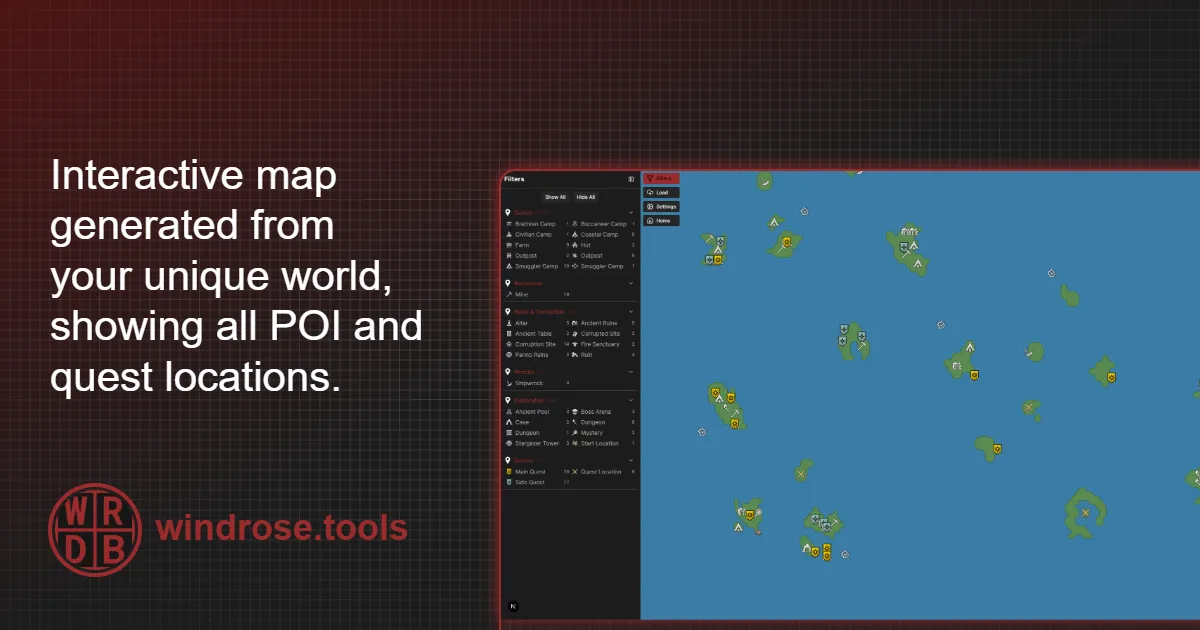
Windrose.tools
Windrose interactive map showing POI and quest markers.
 dreamy bay
Anyone got resources for running the server in a Linux docker?
 vocal epoch
Please solve unlimited loading when host start.
lost matrix
dreamy bay
Anyone got resources for running the server in a Linux docker?
Get started with Docker on linux here:
https://www.youtube.com/watch?v=OTmyNHTQ0AA
You don't need to watch after the docker desktop part

Docker is a powerful system for developing, distributing and running applications and stacks. This video shows you how to set up Docker as well as Docker Desktop on Arch Linux, as well as other Arch-based distros like Manjaro, Arcolinux and EndeavourOS
Docker Arch Wiki: https://wiki.archlinux.org/title/docker
Docker Desktop on Arch docs: https:...
lost matrix
dreamy bay
Anyone got resources for running the server in a Linux docker?
Here is the docker I'm using:
https://github.com/indifferentbroccoli/windrose-server-docker
git clone https://github.com/indifferentbroccoli/windrose-server-docker.git
cd windrose-server-docker
mv .env.example .env
nano .env (make changes, :wq to quit)
docker compose up -d

GitHub
This is a Dockerized version of the Windrose dedicated server. - indifferentbroccoli/windrose-server-docker
GitHub
This is a Dockerized version of the Windrose dedicated server. - indifferentbroccoli/windrose-server-docker
 mighty thorn
hey guys, when me nd my friend want play together, he cant join me, unexpected error apears, when he wants join my session, and he cant host game bcs when he want to start hosting, it instantly throw him in main menu back, any solutions? Thanks
lost matrix
dreamy bay
Anyone got resources for running the server in a Linux docker?
Alternative docker is this one, but I haven't tried it. Good documentation though.
https://github.com/indifferentbroccoli/windrose-server-docker.git
GitHub
This is a Dockerized version of the Windrose dedicated server. - indifferentbroccoli/windrose-server-docker
lost matrix
mighty thorn
hey guys, when me nd my friend want play together, he cant join me, unexpected e...
he can try running protonvpn and see if that works. Free
dreamy bay
Thanks @lost matrix
 mighty cradle
"an unexpected error occurred " was fixed?
 haughty breach
sooo im new and my friend and i try to play but we cant connect to our host game. is there a solution?
 unreal anvil
hi how can i upload a older world after my world got grieft ?
 outer prism
My friend keeps on trying to join/ host a game online with myself and 2 others. The 3 of us can join, but she just gets in a loading screen. Doesn't matter if she hosts or not.
 cunning dock
outer prism
My friend keeps on trying to join/ host a game online with myself and 2 others. ...
cunning dock
outer prism
My friend keeps on trying to join/ host a game online with myself and 2 others. ...
Same here
 timid marsh
You can try my docker container, using it for last couple of days
https://github.com/UberDudePL/windrose-dedicated-server-docker

GitHub
Dockerized Windrose Dedicated Server (SteamCMD + Wine) with persistent saves and 24/7 hosting setup. - UberDudePL/windrose-dedicated-server-docker
And few other people confirmed that it is working for them as well
lost matrix
mighty cradle
"an unexpected error occurred " was fixed?
Some people reported running a vpn can get around it. protonvpn is free
 unique silo
For anyone else running into a crash to desktop when loading into a game no matter the game or character, this happened to me after an initial CDT and I was unable to play. Even making a new character I could play through the intro but loading into the island crashed. I had to locate my graphic config files and remove them letting the game rebuild them at C:\Users<username>\AppData\Local\R5\Saved\Config\Windows. Remove or rename the config files here and re-launch.
unreal anvil
i can not finde player report i wanna report a player in this chanel what grieft me and other peoples
 vagrant terrace
hello all, got a intresting problem. friends character will not load. if he changes to a new character it loads fine. have tryed deleating local data and redownloading from cloud, turning cloud off and such to no avail. is there anyway to fix his character so he dosent lose progress?
 silver radish
how to enable text chat?
cloud pier
silver radish
how to enable text chat?
there is no chatt function ingame yet
silver radish
There was just no way to post to ask/request about it, cant do it in general, just get flooded out with jibber jabber an images, no FAQ about it, ping'n a Dev generaly is a no no, ping'n a mod about it is like just about as bad of an idea, so i figured ask'n fer tech support on how to Enable it an maybe get seen by some one who can post some kinda status on that area of the game would best serve here.
 silver scaffold
Stuck in infinite loading screen today. Can’t play at all
 cursive vapor
Same problem for me
 midnight nimbus
Hallo ich habe einen Server gemietet aber ich komme nicht drauf, bzw wenn ich drauf komme fliege ich gleich wieder, gportal meinte ich soll hier fragen, das hatte ich noch nie in einen anderen Spiel, im Router habe ich die dns auch schon geändert aber das bringt nichts, hat jemand Ideen
 dense willow
is the feedback channel hidden for everyone or did I somehow get shadow banned from there?
 unreal slate
Has the constant crashing been addressed yet? I cant host a multiplayer map without getting booted as soon as I log in
 regal juniper
dense willow
is the feedback channel hidden for everyone or did I somehow get shadow banned f...
regal juniper
dense willow
is the feedback channel hidden for everyone or did I somehow get shadow banned f...
it's gone for me too, maybe they took it down to work on some of the issues there?
dense willow
regal juniper
it's gone for me too, maybe they took it down to work on some of the issues ther...
yea I was just told its down for a while
was worried I got shadow banned xD
regal juniper
doubt you would unless you really badmouthed the game, or people playing it.
dense willow
I did have a bit of a heated discussion that went on for a while, but no name calling or disrespect, this was just as heated it got lol

So I thought maybe they thought I broke some rules based on that lol
 zinc cobalt
Guys - I have a bit of an issue. I'm hosting a dedicated server on a separate computer in my network using Docker. My friends externally can join with the invite code, however, I cannot join my own server, the game just crashes to the main menu. Is there any way to troubleshoot this?
dense willow
you should bug report that if you havent
sounds really strange
maybe you can join with a vpn? lol
 keen shuttle
hybrid briar
I'm a little late but have you found anything on this? Curious if there's any up...
keen shuttle
hybrid briar
I'm a little late but have you found anything on this? Curious if there's any up...
I've posted a few times about my issue to little fanfare haha. So the only thing that has worked for me. I made a togglable script around "sudo cpupower frequency-set -u 4400MHz" my cpu can boost to 4.9ghz. So now when I play Windrose I hit the toggle and dont go above 73c, then when im done and want to play any other game at all, I turn the toggle off and play with my full speed available to me.
 leaden lark
Cant click on my server to even attempt to join it.
 normal arrow
I was able to play Windrose on a private server until 2 days ago and it stopped being able to log in, it just constantly returns to the menu screen. I've verified files, and completely reinstalled. Is there something else I can do? I've verified that the server is up and others are on it
 spark grail
hello is anyone having issue where can't join friends or host game at all only play solos?
spark grail
normal arrow
I was able to play Windrose on a private server until 2 days ago and it stopped ...
same here can't join game only solos
leaden lark
yup same here
normal arrow
What happened? It was going so well
spark grail
it was working yesterday now its not
leaden lark
ever since the server shutdown at like 3am today i havent been able to reconnect to servers
spark grail
I tried my phone internet and it worked but can't play all day on mobile data
I hope this get fixed if not then I want refund
dense willow
spark grail
I tried my phone internet and it worked but can't play all day on mobile data
get a good vpn, most have 30 days free
if it worked on your mobile it would most likely work on a vpn
Nordvpn is great
spark grail
I have one it tried everything and didn't work yester day used vpn today vpn didn't work
dense willow
hm that is strange, deffinly something you should report if you havent
spark grail
yeah when I connect to a game the game shuts down
 sharp ledge

 digital drift
Anyone else seeing strange RAM increase over time? 🤔 Just sanity checking before I submit a report ~
On one of the servers im monitoring, over the course of about 5 hours the server with 2 players online went from on boot using about 5.8GB and by the end of 5 hours was @ 8 ~ Increasing this further to 10gb still had the growth to cap happen
*Some growth is expected, but at 2 players not in endgame eating as much as 4 feels off 👀 *
 brittle adder
Hi, facing the same issues as lots of people : First launch was successful, I then left and reconnected hours later and once trying to join the same server and I end up in a loading screen for what seems the eternity, waited over 10mins for nothing to happen
Tried the steam on/off cloud/delete savesfiles to relaunch on a new char but faced the same result
 south ether
Did you find a solution? Im also at the loading screen/
 vital wharf
Hi nei mir im lager wird kein john doe, Doktor Gehlen etc mehr angezeigt nach dem ich das feuer umplaziert habe
 solid acorn
digital drift
Anyone else seeing strange RAM increase over time? 🤔 Just sanity checking befor...
solid acorn
digital drift
Anyone else seeing strange RAM increase over time? 🤔 Just sanity checking befor...
Not seen anything to bad with ours.
Had a few customers running since day 1 and at the moment the highest we have running is 5.69gb and thats with 3 players on and pretty established bases etc
digital drift
Interesting.. May be save specific then?
solid acorn
Idle CPU useage is the big one at the moment xD
digital drift
Will do some testing, thanks for the clarification! ❤️
solid acorn
digital drift
Will do some testing, thanks for the clarification! ❤️
Got me checking through all our servers now xD
digital drift
Sanity check, is Skye Windows or Linux based?
Just wanna check if this is somehow Proton/Wine misplaying w/ gc or somethin
solid acorn
Linux here
digital drift
solid acorn
Got me checking through all our servers now xD
I had the worry last week Id see issues w/ the performance stuff going on so I setup tracking already ha ezpz monitoring
 indigo meteor
Hi my friends play this game online i can't join them. My screen only LOADING how can i fix it
solid acorn
digital drift
I had the worry last week Id see issues w/ the performance stuff going on so I s...
We made a last minute decision to go for Windrose so I didn't have the foresight to do that xD
 neat vector
indigo meteor
Hi my friends play this game online i can't join them. My screen only LOADING ho...
neat vector
indigo meteor
Hi my friends play this game online i can't join them. My screen only LOADING ho...
Same issue here
 foggy knot
Hi, me and my friends hav a dedicated server. all but me can join... i keep getting this error. i tried to make an hotspot with my phone and it still gave me the error. so it's not my internet....
 unreal slate
Doesn't seem to be like any of these issues are being addressed. Going to see about getting a steam refund.
solid acorn
I know there are a few support tickets open for people in a similar situation at the moment. Haven't trawled through to see if solutions yet though
unreal slate
There isnt hasnt been. Ive looked. Im also on linux. Just got asked to send a dump but id rather getrefunded at this point. Might be the worst early access experience ive ever had.
normal arrow
normal arrow
I was able to play Windrose on a private server until 2 days ago and it stopped ...
I was able to get in by using the Cloudfare Warp
 neon ginkgo
I get this error at times when i start the game.

 manic magnet
@neon ginkgo
Run System File Checker (SFC) and DISM: Open Command Prompt as administrator and run sfc /scannow to repair damaged files
or you can choose to disable that warning and play the game normally
In services.msc, you can set the "Windows Error Reporting Service" to disabled, though this is not recommended as it hides system issues
 lapis swan


 iron ridge
unreal slate
There isnt hasnt been. Ive looked. Im also on linux. Just got asked to send a d...
iron ridge
unreal slate
There isnt hasnt been. Ive looked. Im also on linux. Just got asked to send a d...
Then you do not buy EA very often. Also most games do not support Linux especially on the first week. People are trying to help but seem you do not want help just permission to leave. Good Bye, Good Luck........If you pay attention you would see this team is working very very hard to clean things up. The response from Devs in the #1493364524705775657 channel has been top knotch that I saw. Seconds after a thread is created devs are in there to at leat let the person know they have been seen. Find a AAA game that has that level of support.
unreal slate
iron ridge
Then you do not buy EA very often. Also most games do not support Linux especial...
"Most games do not support linux" my steam library says otherwise.
Like the game was working for hours then suddenly stopped working when hosting a multiplayer game. It legit makes zero sense.
iron ridge
unreal slate
"Most games do not support linux" my steam library says otherwise.
Going based on what I have seen. I know for a Fact that Icarus is one of those games. So run off that is fine but to say that things are not being addressed is a LIE. I am not going to sit here and allow that without speaking up. So refund and good bye. Clearly you do not want to support development you just want to complain.
Conversation is over so please leave it be okay. Good luck to you.
unreal slate
You have issues
iron ridge
I will never get the people that buy EA but do not want to support the game. Glad the Block Button exists. I am out for now guys. SP works without a flaw, MP usually is more complicated with nearly every game out there that started in EA.
 clear orchid
what's the ETA on fixing joining friends servers?
No reason I can join him fine one day and constantly CTD or get sent back to main menu the next day
 civic oasis
Hey everyone! We’re currently receiving a very high volume of requests. Please bear with us, we’re getting to everyone as quickly as possible and actively working on resolving the issues. Thank you for your patience.
iron ridge
clear orchid
what's the ETA on fixing joining friends servers?
https://discord.com/channels/1260209458924224542/1349723749858934834
They are giving as much information as they can. So far this team has done more than most other EA games. Give it time.
And respect the kitty.....never cross a black cat, even a mostly black cat. HEHEHE HEHEHE
clear orchid
Not interested in hearing about how much they do vs. someone else. I didn't pay someone else I paid this team. Good to see they've acknowledged it now and aren't trying to blame ISP's, ty for the link
 topaz jackal
Yesterday I was getting 90-100 FPS, but today it suddenly dropped to 70 max no matter where I go. What's going on
solid acorn
I'm really confused as to what the issues is going on here, not one of my customers has had any issues with connection. Is anyone answering as to what the problem actually is? Is this something us other hosting companies have to watch for?
neon ginkgo
manic magnet
<@233291754181361664>
Run System File Checker (SFC) and DISM: Open Command Prom...
Thank you 🙂
 unborn idol
For the quest "How My Sea Adventure Began: Destroy Blackbeard's pirates' ketch, is there a command or a config file to edit to complete the quest for myself? Before having to research, we assumed Shared Quest was simply that and did not have Tracking turned on and we took both our ships out to destroy the ketch and one player got the rewards and the quest was marked completed. I however got a long # maybe 7 or 9ish characters long pop up on the lower left hand side of my screen then go away and was given some Piastre only and the quest remains incomplete. I went and did the quest solo a second time and still no completion of the quest. I am hosting the game and other member connecting via LAN.
lucid basin
Anyone try out mods on dedicated servers yet?
 craggy compass
I can’t join the game with my friends. I bought the game on Epic Games, while they are playing through Steam, and when I try to connect, it sends me back to the main menu. What could be the reason? Is there any official or knowledgeable person who can help with this issue?
We’re trying to join using a room code. The game is sold as multiplayer, so why does it redirect us to rent or purchase a server?
 cunning idol
hello nitrado support could you help me please my server is restarting in a loop since i change the settings ,my id nitrado is : 11078374
clear orchid
craggy compass
I can’t join the game with my friends. I bought the game on Epic Games, while th...
It's something the devs need to fix
Recommend trying to see if your friend can join your server and if so, host it yourself until they fix
lucid basin
cunning idol
hello nitrado support could you help me please my server is restarting in a loop...
search for your issue in #1493364524705775657
craggy compass
Unfortunately, neither of us can join each other’s servers.
manic magnet
maybe try using google DNS
8.8.8.8
8.8.4.4
 cold talon
I'm on the ship where I picked up the food supplies that the undead were guarding. I died twice on the ship, but my things are not there, neither on the deck nor in the hold nor in the water.

 stable frost
craggy compass
Unfortunately, neither of us can join each other’s servers.
stable frost
craggy compass
Unfortunately, neither of us can join each other’s servers.
same cant jjoin or host and dns fix doesnt works
craggy compass
Don’t sell the game as multiplayer when we can’t even play together. There’s no one even addressing the issue, and then you wonder why people leave negative reviews.
bllsh*t
 void rampart
craggy compass
Don’t sell the game as multiplayer when we can’t even play together. There’s no ...
void rampart
craggy compass
Don’t sell the game as multiplayer when we can’t even play together. There’s no ...
We play together just fine. Maybe troubleshoot your end before you blame the game.
 fluid wren
Has anyone encountered not being able to load into your game when you host a co op? Or having an infinite loading screen trying to load into a friends hosted game? Playing solo is perfectly fine but the moment my friend tries to host or join any sort of mp, its just infinite loading screen
craggy compass
void rampart
We play together just fine. Maybe troubleshoot your end before you blame the gam...
Everyone is having issues—if you’re the only one who can join, congratulations. Then refund our money and you can keep playing, kid.
polar breach
craggy compass
Don’t sell the game as multiplayer when we can’t even play together. There’s no ...
me and my friends playing just fine on our server, maybe you got poop internet
craggy compass
polar breach
me and my friends playing just fine on our server, maybe you got poop internet
We tried everything, man. Unfortunately, nothing is working.
void rampart
craggy compass
Everyone is having issues—if you’re the only one who can join, congratulations. ...
Not everyone, just those that try to do something technical over their heads Son 🙂
craggy compass
void rampart
Not everyone, just those that try to do something technical over their heads Son...
k
polar breach
craggy compass
We tried everything, man. Unfortunately, nothing is working.
If you tried everything then you'd be playing, you're obviously missing something. Game worked fine on release date and has worked fine since then even after the update.
 violet lance
It’s a mix of players being able to and not. They are looking into it. You bought an early access game, let them fix bugs as they come, it’s not gonna be flawless from day one.
craggy compass
polar breach
If you tried everything then you'd be playing, you're obviously missing somethin...
The game kicks us back to the main menu when trying to connect. Unfortunately, we’ve tried everything that’s been suggested.
polar breach
craggy compass
The game kicks us back to the main menu when trying to connect. Unfortunately, w...
that on a local hosted game or a dedi host?
craggy compass
polar breach
that on a local hosted game or a dedi host?
Local
polar breach
craggy compass
Local
i havn't messed with local hosted but I assume its either something with ports or something conflicting with windows like nitrado had going on
i just use rented server a lot easier xd
void rampart
I don't envy the guys doing the trouble shooting. Just imagine how many variations these people that are having issues have on each of their computers. Could be hundreds of different programs they have installed, drivers they're using for other apps, firewalls, etc.
polar breach
yeah it was fun troubleshooting the servers creating whole new maps each time they rebooted after the latest update XD
it wasnt saving its worldID
 latent sphinx
So the performance of the game has degraded since the update yeaterday, constant lag hiccups and outright stops for ten/twenty secojnds at a time, any ideas?
 granite tusk
hi im having a issue i cant join my friend just get server not found or unexpcted error was working fine yesterday & i also cant host a game
polar breach
latent sphinx
So the performance of the game has degraded since the update yeaterday, constant...
i have noticed random spikes of low fps but other than that its not too bad
i get it maybe once every 10-20 minutes
it's always client side as well server fps stays fine
latent sphinx
So we are in coop its not as bad with the single player, but it is there still, what happened dos anyone know?
manic magnet
@latent sphinx devs should fix this
what you can do from your side:
set fps cap to 60 it will reduce stutter spikes significantly
and toggle vsync off
void rampart
TBH, the whole P2P thing as a multiplayer platform is sketchy in the first place. Servers and clients shouldn't really be on the same box. Grounded solved this some what by using a third party to save/share the save files for game sessions
 willow tide
Was wondering where do saves get saved to in file manager?
Am wanting to move my save to a server
manic magnet
@willow tide in here
C:\Users[user]\AppData\Local\R5\Saved
latent sphinx
Overall that hasn't been an issue for us until the update. I know a lot of people were having issues but we were smooth sailing now this
willow tide
manic magnet
<@120365103827648516> in here
C:\Users\[user]\AppData\Local\R5\Saved
what type of file is it?
void rampart
They can be opened with notepad or any text editor
manic magnet
latent sphinx
Overall that hasn't been an issue for us until the update. I know a lot of peopl...
they pushed a hotfix for a few issues, and this fix may have caused other issues, because you're right this started happening after the update (happened to me too) i made it alot better only by capping fps and disabling vsync
willow tide
I mean where would I find the world in that folder?
manic magnet
willow tide
what type of file is it?
sec
void rampart
.vdf isn't it? Cant remember
manic magnet
void rampart
.vdf isn't it? Cant remember
that's the steam cloud sync metadata (not your actual progress)
granite tusk
why can my friends join the sever nut i cant i just get unecpected error
void rampart
Jus use the Windows key and R then paste this in %LOCALAPPDATA%\R5
willow tide
yes im in R5 in the file manager, im just trying to find the acutal world so I can upload it to a server
is it R5>saved>savedprofiles>76561198101719840>rocksdb>0.10.0> worlds?
manic magnet
willow tide
Is the world under save games?
i'm guessing that you need the saved file for your world you can find it in here
C:\Users(user)\AppData\Local\R5\Saved\SaveProfiles\76561198412860777\RocksDB\0.10.0\Worlds
manic magnet
willow tide
is it R5>saved>savedprofiles>76561198101719840>rocksdb>0.10.0> worlds?
yes
willow tide
they did not make this easy 
manic magnet
if you already created a world in a dedicated server, i'd recommend just copying all the files inside worlds (in your local) and pasting them inside the worlds folder in the dedicated server
willow tide
alright, im using Nitrado, and at least right now theres nothing in the FTP
grave kite
Servers down again? Edit: Scratch that
 keen bear
entschuldigt das ich kein englisch schreibe ist nicht so das beste) ich musste in meiner Fritzbox die Ports freischalten,dann ging das auch mit dem connecten auf den Server. Wir haben einen Server bei Gportal. Steamcloud hab ich deaktiviert.
willow tide
right so I tried to upload the world but it didnt seem to work, any suggestions?
 steady viper
Having multiplayer issues can’t set up or join servers.
I have changed dns
Any ideas please.
still trail
willow tide
what type of file is it?
what you're looking for is going to be in R5\Saved\SaveProfiles, select your profile, then go to RocksDB\0.10.0\Worlds
it's the entire folder there
willow tide
still trail
what you're looking for is going to be in R5\Saved\SaveProfiles, select your pro...
yep I got it now
 shut ridge
well I connect to my but friekbd cant
solid acorn
void rampart
I don't envy the guys doing the trouble shooting. Just imagine how many variatio...
No troubleshooting here, all my customers playing fine xD
I'm just here cus us small hosts like to watch the big hosts squirm sometimes xD
 exotic karma
Fatal Error AMD Ryzen 7 7800X3D 8-Core Processor 32.0 GB Ram 9070xt black screen crash playing on mostly maxed settings at 1440p

 fresh kernel
i can not play game when i get in its so slow and my character is white and takes so long to load and freezes and game is choppy
 minor harbor
exotic karma
Fatal Error AMD Ryzen 7 7800X3D 8-Core Processor 32.0 GB Ram 9070xt black screen...
minor harbor
exotic karma
Fatal Error AMD Ryzen 7 7800X3D 8-Core Processor 32.0 GB Ram 9070xt black screen...
Do you have thermal paste on your computer?
 quaint shell
Do most people usually have to port forward to connect with other players?
still trail
quaint shell
Do most people usually have to port forward to connect with other players?
wouldn't work on windrose, it changes ports randomly each time
got a server running on the network, and play it with friends and direct connecting to others without forwarding anything
quaint shell
still trail
wouldn't work on windrose, it changes ports randomly each time
Ok thank you my sibling and I trying find why we crash when we join each other on steam decks
 final ember
exotic karma
Fatal Error AMD Ryzen 7 7800X3D 8-Core Processor 32.0 GB Ram 9070xt black screen...
final ember
exotic karma
Fatal Error AMD Ryzen 7 7800X3D 8-Core Processor 32.0 GB Ram 9070xt black screen...
The same thing is happening to me!!!
 teal bobcat
Has anyone had an issue of a dedicated server not launching? Launching the bat file shows the cmd window for just a half second and then disappears. In task manager I see the bootstrap launch and immediately close. Nothing else happens and no logs that I can see. Even if I open the terminal and run the bat file, there is no output
The server is running in a Windows 10 VM
 tender hound
dedicated just crashed a second time
 atomic glen
Same thing. Same error for many people.

 umbral python
Are there any plans to add support for a Linux dedicated server? No Wine or Box64 required
 sturdy spindle
teal bobcat
The server is running in a Windows 10 VM
sturdy spindle
teal bobcat
The server is running in a Windows 10 VM
Same thing on my VM, No outputs no logs written. Starting WindroseServer.exe directly also fails.
I just tried to set it up via Wine on a mint vm but that also does not seem to work.
atomic glen
Guys there was a small update. And since then nothing works.
 hollow lichen
Can you tell me if a cooperative is working?
still trail
hollow lichen
Can you tell me if a cooperative is working?
vague question. in general, yes. some people are having issues, and they're going to be here... lol.
teal bobcat
atomic glen
Guys there was a small update. And since then nothing works.
When was the update?
sturdy spindle
atomic glen
Guys there was a small update. And since then nothing works.
Ah that explains that part then, ty
teal bobcat
I just installed for the first time yesterday and had the issue
 wooden agate
anyone have audio issues? specifically when sailing and listening to shanties?
sturdy spindle
But... wait... Freshly installed Windrose Dedicated Server runs on my main machine
still trail
sturdy spindle
Same thing on my VM, No outputs no logs written. Starting WindroseServer.exe dir...
if you're doing it in linux, launch the actual executable directly
/R5/Binaries/Win64/WindroseServer-Win64-Shipping.exe
teal bobcat
still trail
if you're doing it in linux, launch the actual executable directly
W10 VM seeing this issue
still trail
teal bobcat
W10 VM seeing this issue
was responding to the wine/mint part
running ubuntu server and just raw with wine/xvfb/screen and no issues before or after update
south ether
How do i get past the loading screen?
sturdy spindle
still trail
running ubuntu server and just raw with wine/xvfb/screen and no issues before or...
Any special wine setup on your end? Is your setup headless?
sturdy spindle
ok ill look into it some more, ty for the pointers
still trail
actual launch command is just screen xvfb-run --auto-servernum wine /home/windrose/server/R5/Binaries/Win64/WindroseServer-Win64-Shipping.exe -log
sturdy spindle
oh, i see framebuffer might actually help
south ether
How do i get past the loading screen?
 rapid cliff
Do we have a way to somehow host the dedicated server without the windrose backend?
 rugged rose
Played on a friends server last night with no issue. Today I choose the server, put password in, join it goes to map screen then never puts me in the game and sends me back out to the play screen. I see no patch that might have happened. Is there something in the R5.log file that might tell me why I can't get in?
south ether
How do i get past the loading screen?
solid acorn
south ether
How do i get past the loading screen?
Join the 100's of other players waiting for the fix
violet lance
rugged rose
Played on a friends server last night with no issue. Today I choose the server,...
A lot of people have this, kraken express is having issues with internet providers blocking their services in certain regions, so when you join their windrose relay server cant route your client to the end server.
solid acorn
violet lance
A lot of people have this, kraken express is having issues with internet provide...
Do we know what regions? Our HO is here in Ireland and we fine, I have customers in the US and Europe playing fine
violet lance
Not sure if they have said anything about regions. I am in Denmark and run a self hosted server and have had the problem since around 20.00 local time.
solid acorn
Hmm odd, I have 2 customers in Denmark specifically running fine
I'll give them the heads up anyways just in case 😅
still trail
problem from what I've gathered is that they're blocking some of the servers used for the routing
so even in areas impacted, it's not everyone that sees it
rugged rose
My friends is being hosted by Survival servers, not self hosted. I am in the US, I assume he created it in the US as well
 mystic vine
Sad there's no way past the relay having the server rack next to my pc and being in the hundreds in ping isn't ideal lol.
violet lance
mystic vine
Sad there's no way past the relay having the server rack next to my pc and being...
Im looking at my server right next to me as well 😅 cant remember where in the long list of support threads i read it but there was some talk about looking into/working on ip connection
mystic vine
The thought of the packets running from my gaming pc through the wire to my router, all the way to the EU and back to australia through the same router to my server isn't very playable lmfao, Australian internet sucks generally this doesn't help.
manic magnet
anyone faced the inifinite loading screen and fixed it?
 storm canyon
atomic glen
Same thing. Same error for many people.
storm canyon
atomic glen
Same thing. Same error for many people.
Im getting the same thing
storm canyon
storm canyon
Im getting the same thing
It took about 25 or 30 mins of that, then it finally came back up.
atomic glen
It has been 2 hours.
 finite sentinel
the range from the basic enemy sailor is broken ,it has way to much range, also crew mates only block my hits but the enemy can pierce through my crew and hit me even if i stand 2m away and 2 or more crew mates stand infront of me, enemy ignores hitbox from my mates, there is no normal sea fight possable. On the higher lvl with faster enemy and perfekt blocking enemys, no dubble handed weapon is usable because those weapons are way to slow
sturdy spindle
still trail
actual launch command is just `screen xvfb-run --auto-servernum wine /home/windr...
Got it to start after changing the CPU type to host in proxmox, seems like wine was unhappy with the emulated instruction sets
finite sentinel
if u stand on the small boot u get sucked in the enemy ship if it crashes you
 elfin apex
anyone else get randomly kicked off their server and have it been stuck on restarting for like 15-20 minutes
 unreal fox
I can't play the game online, even on my own server.
elfin apex
oh wow
finite sentinel
unreal fox
I can't play the game online, even on my own server.
no online issues here we use gportal sever
unreal fox
I cannot create a server and I cannot join another server.
finite sentinel
The enemy can strike through the mast and on land through stone
also can the enemy strike througjh the deck of the shil
finite sentinel
change ini data
 toxic abyss
I'm having an issue with the quest called needle in a haystack. I was supposed to board the ship called the unsinkable however I accidentally destroyed it and it's not respawning and the quest isn't updating
finite sentinel
 ebon gull
I can't load into my sever, how long will it take to fix?
ebon gull
I can't load into my sever, how long will it take to fix?
to standard settings with zero changes
lime topaz
toxic abyss
I'm having an issue with the quest called needle in a haystack. I was supposed t...
The Not-So-Unsinkable 
I believe there's a bug report about it already
toxic abyss
lime topaz
The Not-So-Unsinkable <:wr_logo:1480596778033086515>
I believe there's a bug r...
So am I stuck? I don't wanna restart i grinded alot
 iron mica
Everyday at 8pm CST my server shuts down and restarts for no reason, I do not have an automated restart timer set for that... what is going on Nitrado???
iron mica
someone told me that there are Nitrado reps in this chat, and i'd really like to know why it keeps doing this...
 tired otter
i cant load the game and my friend have the same probleme
lime topaz
iron mica
someone told me that there are Nitrado reps in this chat, and i'd really like to...
Create a support thread #1493364524705775657
They can be pinged in there.
 plucky hazel
this has been constant and I can not pinpoint it
 lime topaz
plucky hazel
this has been constant and I can not pinpoint it
lime topaz
plucky hazel
this has been constant and I can not pinpoint it
Make a #1493364524705775657 thread
plucky hazel
lime topaz
Make a <#1493364524705775657> thread
I actually found it .... I will be making a bug report this is a memory leak, it looks like
 cold tide
Heyall! A buddy just gifted me the game, and I'd really like to play with him, but while I can play solo no problem, whenever I try to host a game or join his game the loading screen just never ends. Anyone else encounter this and can help? Thanks!
 regal birch
Goodevening gamers, I just bought the game on steam. But not getting it to start up for me. Anyone else having this problem?
 nova fable
Hi i am having this issue:
Game client: 22823373
Dedicated server: 22823173
The difference is subtle — 373 vs 173 — but that's a newer client build that your server hasn't received yet. The game got a patch that the dedicated server app hasn't caught up to.
This is likely a developer-side delay where they pushed a client hotfix but haven't updated the dedicated server app on Steam yet. Given it just launched into Early Access last week and they've been pushing rapid hotfixes, this is pretty common.```
I can't use my weapons rn until this is fixed, hmm... past pumice
regal birch
Goodevening gamers, I just bought the game on steam. But not getting it to start...
past pumice
regal birch
Goodevening gamers, I just bought the game on steam. But not getting it to start...
Mine initially crashed at start whenever I used msi afterburner with riva tuner. If you have that on, try quitting the app
mystic vine
nova fable
Hi i am having this issue:
```There's your problem. The build IDs don't match:
...
I hope for my own sanity that's not an Ai summary at the bottom, Try updating your server ours is fine at the moment it's just unplayable without lag due to routing issues.
devout river
Are there widespread issues again? Game keeps crashing for me out of nowhere.
 hot fox
Game keeps kicking us back to main menu on login
 tropic lava
hot fox
Game keeps kicking us back to main menu on login
tropic lava
hot fox
Game keeps kicking us back to main menu on login
Same here
 desert frigate
is there any setting to make it so my mouse doesnt go off onto my second monitor while playing. tried putting it on fullscreen and didnt change anything so randomly will end up clicking out
hot fox
I'm curious how this is happening with dedicated servers lmao
tropic lava
Perhaps its the dedicated server version mismatch? Just checking in with people that owns the server I'm in if there was an update on that side
devout river
I restarted the game a few times and the server app and I’m back up. Not sure if anyone else was randomly having issues just now.
 thorn patio
Hello - I am running a self-hosted server on a VM via Pterdactyl Panel. Each ime I try to connect to it, I'm booted back to the main menu.
This issue only occurs when connecting to the server from the same LAN. Players outside of my home network can connect without issue.
Anyone else experiencing this?
devout river
I’m connecting to my server on the same LAN successfully. I haven’t had anyone test it externally but it’s all open.
Frankly, I have no idea how an invite code can give out a LAN and WAN ip address lol
 royal venture
Anyone have a solution for this crash? Its only happening when a 3rd player tries to join a hosted server. It doesnt matter who it is, it always crashes when a 3rd player joins
devout river
devout river
I restarted the game a few times and the server app and I’m back up. Not sure i...
I lied I’m still not able to get it running consistently. I was playing fine for 12 or so hours
polar breach
devout river
I lied I’m still not able to get it running consistently. I was playing fine for...
thats me today ;l time for a nap lol spent all day goofin around building a new house
 summer flower
I'm reading through the dedicated server guide on the website, and it's saying there's no dedicated ports being used, and is rather done via UPnP. Am I just misunderstanding this, or is this game server unable to be ran via port forwarding?
Wait, I think I've answered my own question if someone wants to verify. Port forwarding isn't needed since there's no direct join and is done instead via join codes, right?
nova fable
there is a mod to have direct ports, but it requires unofficial setup
 slate apex
anyone using nitrado and running into issues at the moment?
nova fable
well the dedicated server steamcmd files aren't up to date
 woven cloud
Question anyone using Nitrdo hosting and have infinity loop resets after the patch today that was pushed?
got a group of people been trying to figure it out so far nothing.
nova fable
its new give it some time ig
 remote verge
woven cloud
Question anyone using Nitrdo hosting and have infinity loop resets after the pat...
remote verge
woven cloud
Question anyone using Nitrdo hosting and have infinity loop resets after the pat...
yeah pretty much everyone
woven cloud
gotcha.
remote verge
seems like its a windrose backend issue, id recommend playing on a player hosted world
 jagged crow
woven cloud
Question anyone using Nitrdo hosting and have infinity loop resets after the pat...
jagged crow
woven cloud
Question anyone using Nitrdo hosting and have infinity loop resets after the pat...
im in the same boat
thorn patio
summer flower
Wait, I think I've answered my own question if someone wants to verify. Port for...
Correct.
cold tide
Problem! I can play solo no problem but whenever I try to host a game or join my friend the loading screen just never ends. Anyone else encounter this and can help? Thanks!
 north axle
slate apex
anyone using nitrado and running into issues at the moment?
north axle
slate apex
anyone using nitrado and running into issues at the moment?
Holy crap I’m so happy I’m not going crazy I thought I was doing something wrong
slate apex
yeah man, really frustrating
fresh kernel
i can;t even play the game so laggy and choppy
nova fable
same here, for those with the infinite loading screen, i had to get rid of ddos settting on my server ,but that is a werid workaround specific for m e
slate apex
looks like it is up?
nova fable
lot of ports to open through firewall, but it seems to use its own port pnp thingy
 vocal wadi
If i have hosted a game localy/played solo, If I want that save file on a server hosting site, can that be done?
slate apex
can yalll try, looks like it's better
jagged crow
it automatically started restarting again
slate apex
gotcha, mine is currently running
 granite ravine
Am i doing something wrong? I have 34 stone ammo it is in my ammo slot-
Flintlock pistol saysss I don't have any ammo what
 shut owl
Do you have gun powder
 marble reef
you got gunpowder?
granite ravine
Ooooh
 small pulsar
what server options can I config? im lookin for a file for config and am not seeing much
granite ravine
Hehe makes sense kay thanks bye
mystic vine
granite ravine
Am i doing something wrong? I have 34 stone ammo it is in my ammo slot-
Flintloc...
I had an issue like that earlier had to box my ammo, powder & gun and reequip it and it counted it again.
 undone cliff
I am trying to connect to a friend's server. We have the correct invite code and password. We have all done the tutorial, we have all verified game files. I cannot connect. Any suggestions?
summer flower
undone cliff
I am trying to connect to a friend's server. We have the correct invite code and...
Nitrado hosting? Been seeing people have problems with it
marble reef
is it hosted by nitrado by anychance?
undone cliff
No it is GTX
summer flower
Probably the same issue, tbh
marble reef
i'd say go ask for help on their discord but they're about as responses as the other hosts
though GTX have always responded fairly quickly to their own ticket system maybe give that a try @undone cliff
mystic vine
Damn I haven't heard of GTX since they got partnered up with space engineers years back glad to see they're still going lol
devout river
I don’t think it was a hosting provider issue. I self host and I was having issues too
summer flower
small pulsar
what server options can I config? im lookin for a file for config and am not see...
https://playwindrose.com/dedicated-server-guide/#wsg-advanced
Look here for the world options. You have to set them in the WorldDescription.json file. The "Advanced" section of the guide shows all the available settings
woven cloud
marble reef
i'd say go ask for help on their discord but they're about as responses as the o...
unironically there more active here in #1493364524705775657 then there own discord.
woven cloud
valid
marble reef
bunch of the nitrado support here have been non stop helping from what i've seen all day
barely a peep on their own discord
woven cloud
well ngl, i was told by the end of the week there will be some good hosting options so ill prob ditch Nitrado.
mystic vine
honestly a good idea wish more server hosts put in that effort
oh god support is all nitrado related posts lmao
woven cloud
games new and all stuff happneds but its hard to even get support or even a site notice there are issues with a new game they are offering to host is crazy.
marble reef
i think a quick announcement would of solved alot of the chaos
woven cloud
agreed.
marble reef
been happening what 12+ hours for some people
woven cloud
since 10am PST, its 9pm.
marble reef
Rough
woven cloud
yea more so when the server has been crashing a few times over the last 2days prior.
new game, EA, stuff happens all good.
communicate with your clients.
summer flower
Can confirm that SteamCMD has the latest files. Just had one of the guys test the connection and it's working fine
small pulsar
is there a setting to change the max fast travel points?
summer flower
small pulsar
is there a setting to change the max fast travel points?
Not that I'm seeing
small pulsar
summer flower
Not that I'm seeing
big sad
summer flower
That doesn't necessarily mean there isn't one - I'm just not seeing it so far
Seems to just be limited to the scaling and difficulty for now
marble reef
small pulsar
is there a setting to change the max fast travel points?
i see a mod for it on nexus but dont think nitrado support mods atm
mystic vine
someone mentioned a unofficial way or mod involving port forwarding earlier could you send me a link to that ._.
summer flower
mystic vine
someone mentioned a unofficial way or mod involving port forwarding earlier coul...
I have a custom firewall setup that everything on my network goes through, and I didn't have to set anything for it to work. Throwing that out there in case it matters to you
I normally have to go through firewall rules pretty extensively to host servers, but this one was the fastest setup for a hosted game I think I've ever had
 zenith pier
Anyone have a resolution for the server infinite restart loop? Or just wait for support..
marble reef
Nothing so far sorry
so far the only thing they've said is to load a backup file but that hasnt worked out for anyone i've seen so far
 somber lichen
Mine just keeps going to the main screen after loading. and then when i hit Play again and then go to connect to server its there but not highlighted where i can click on it
zenith pier
Yeah no clue.. tried different things and been waiting for 2 hrs for there support to look at it I guess
mystic vine
summer flower
I normally have to go through firewall rules pretty extensively to host servers,...
I was more looking for a way around having the unnecessary routing through Europe from Australia for the server hosted on my server rack no less than 2 metres away from me lmao
summer flower
mystic vine
I was more looking for a way around having the unnecessary routing through Europ...
It may just be a server mod to force a particular port to be used. You'd have to check and see if there's a client-sided mod to allow joining specific IPs/ports. Otherwise you're still stuck using a join code to join the server
 urban scroll
anyone getting major server lag? im having to press crafting button multiple times to craft anything
summer flower
urban scroll
anyone getting major server lag? im having to press crafting button multiple tim...
I'm told mine is fine right now. Might be worth a server restart?
mystic vine
urban scroll
anyone getting major server lag? im having to press crafting button multiple tim...
let me guess dedicated server?
urban scroll
mystic vine
let me guess dedicated server?
ya im using gportal
mystic vine
I don't know much about that host all I know is most hosts are subpar when it comes to performance but if your servers resources look fine then it's probably the routing issue that everyone has atm just gotta wait for a fix
lime topaz
nova fable
well the dedicated server steamcmd files aren't up to date
They are.
summer flower
Mine is hosted on a residential ISP, so I want to say the likelihood of it being exclusively a routing issue is somewhat low, and will be dependent on ISP for something like that
summer flower
lime topaz
They are.
Confirmed. I only just hosted mine as of around the time that comment was made and people are connected fine with updated clients
 torpid quest
windrose servers with no players on them seem to use significantly more CPU power than servers that have players lol
marble reef
thats wild
torpid quest
10% vs 3%
lime topaz
royal venture
Anyone have a solution for this crash? Its only happening when a 3rd player trie...
Just to rule it out : there's a known server crash when an outdated client tries to connect.
Is that your case perhaps ?
torpid quest
I have to write a script to read through the log file and see how many players are on the server and throttle ones that are empty, annoying.
Because there's no server query protocol.
Oh well, that's a problem for tomorrow.
lime topaz
torpid quest
windrose servers with no players on them seem to use significantly more CPU powe...
Known issue since the Demo days.
mystic vine
summer flower
Mine is hosted on a residential ISP, so I want to say the likelihood of it being...
Might not be too noticeable but in the instance of routing through germany from australia is definitely is, used to 0-1ms when playing on servers hosted on my homelab going from that to 280 is annoying but i understand it's EA will just keep playing hosted worlds meanwhile lol.
marble reef
im surprised theres still not announcement on any of the hosting discords about this issue
summer flower
torpid quest
Because there's no server query protocol.
I'm assuming RCON implementation etc is on the roadmap for the future
royal venture
lime topaz
Just to rule it out : there's a known server crash when an outdated client tries...
Its for sure not an issue with outdated clients, any 2 individuals can connect to the server but the moment any 3rd tries to connect its crashing. It doesnt matter the order of whose connecting, just that a 3rd connection is crashing the server
fresh kernel
now i got to work perfect by running the game as administrator
lime topaz
royal venture
Its for sure not an issue with outdated clients, any 2 individuals can connect t...
Could you create a thread in #1493364524705775657 and provide server and client logs ? 
lime topaz
fresh kernel
now i got to work perfect by running the game as administrator
If you need to run anything like a game as Admin you need to solve the issue of your apps or system services blocking the game.
fresh kernel
how do i do that
summer flower
fresh kernel
how do i do that
If you're using a startup script, go to properties on the file and set it to launch as admin. If you're using something like Task Scheduler to start it up, you can set it to run as admin in there
 slim frost
Has anyone found a fix to the endless lOADINg SCREEN bUG?
 hasty yacht
I keep getting game crashes and just now got DC from my own world
nova fable
For some reason the weapons don't work in steamcmd server, the build numbers are different but is that intentional?
I don't know if its that or a syncing issue
Dedicated server: 22823173```--> I'm going to try one more thing, i'll let you know how it goes.
 vapid spade
Hey, anyone else having trouble hosting on a Legion Go? I can't seem to start a host game. It always kicks me back to the main menu after the loading screen. My Steam Deck with the same setup works fine, though. Any help would be awesome.
 reef quail
So uh.. Why does my friend look like this? lol
 mystic vine
hosted world or server?
reef quail
Hosted world
We're actually back to a problem we had previously.. Where he cant join. He will start loading in; his ship appears, then he appears, but his game will freeze (but he still hears audio) and eventually he gets a "application hang detected" error and the game closes
This started happening after the April 16th hotfix. Before that, he was able to join with no issues effortlessly
mystic vine
I haven't encountered anything like that hosting worlds what's he playing on?
reef quail
Windows 11 like me
 odd pagoda
Does anyone know where the save game folder is located on Linux?
I lost a 20+ hour save due to a crash earlier and would like to have a backup for my character
mystic vine
reef quail
Windows 11 like me
Is he able to play solo or join others?
nova fable
something like this i imagine:
~/.local/share/Steam/steamapps/common/Windrose/
thick marsh
odd pagoda
Does anyone know where the save game folder is located on Linux?
Dedi or listen server?
reef quail
mystic vine
Is he able to play solo or join others?
He can play solo, yeah. And we havent tried having him join anyone else
odd pagoda
thick marsh
Dedi or listen server?
Not a Nitrado server
thick marsh
You do know you can run your own dedicated right?
odd pagoda
?
mystic vine
._.
odd pagoda
I thought that was a paid service
thick marsh
no,, the question was are you running the dedicated server binary or locally as a listen server
odd pagoda
I'm not sure
nova fable
if you are sharing your game or sharing someone elses game by default it is a listen server
odd pagoda
Then it's a listen server
 somber island
is their anyone here that can help me i was able to log into my dedicated server this morning but i now i am not able to, my buddy is logged into it now and is playing but i just get stuck on the loading screen, it has been here for almost 30 mins now
 wide rampart
Anyone find any solutions to Disk Response Times with multiple people in server? I have 3 of my friends on my dedicated server, and its on an Gen3 NVMe with 36g of ram and 14 cpu cores, and if we're all in different areas disk response time introduces crazy latency. No network usage or anything else, seemingly just disk. Just picking brains
thick marsh
wide rampart
Anyone find any solutions to Disk Response Times with multiple people in server?...
are you running it over chipset nvme?
thick marsh
somber island
is their anyone here that can help me i was able to log into my dedicated server...
alt+f4 and restart, i had this a couple days back
somber island
i have restarted already this is the third time now that i am not able to log in the solo game starts and i can play its only the MP
wide rampart
thick marsh
alt+f4 and restart, i had this a couple days back
No, it's on a x16 riser card, but its the only nvme so no bifurcation needed. Numa and IRQ are squared away now, just seems to have constant Response peaks. Beyond aggravating lol
I run a valheim server and 2 ark servers in the same config, but on their own NVMe risers, and they're perfectly fine with 10-12 of us in it, but Windrose is struggling to handle 4 of us
thick marsh
wide rampart
No, it's on a x16 riser card, but its the only nvme so no bifurcation needed. Nu...
check what slot its wired into, I havent had any issues using a relatively slow nvme, directly connected to a CPU slot, but I have had issues with other games where if its routed to a slot that goes through the chipset it can cause weirdness.
I am assuming CPU load etc is in check given the detail in your post.
Im actually trying an N100 atm to see if it runs acceptably
wide rampart
Yeah, CPU sits around 15% and mem is 30% static, its tied on CPU 1 on the server, and the CPU's are static locked to the same CPU the NVMe is connected to for lanes. I dont want to setup direct passthrough given its a bit of a pain, but I'm running out of ideas.. cache-write back is configured, Windows and Linux sides, and it brought it down from 120-130ms peaks, but just cant get stable under 1ms like it ought to be
thick marsh
Windows vm or wine docker?
wide rampart
Windows VM
thick marsh
maybe try the wine docker, full windows vm can do some utterly weird stuff when using vdisks
not that overlayfs and docker are much better
 cursive flicker
wide rampart
I run a valheim server and 2 ark servers in the same config, but on their own NV...
cursive flicker
wide rampart
I run a valheim server and 2 ark servers in the same config, but on their own NV...
this is the setup we use and its pretty stable for us: #1495306794766172160 message
wide rampart
cursive flicker
this is the setup we use and its pretty stable for us: https://discord.com/chann...
Lovely lol
cursive flicker
its not windows vm tho :/
wide rampart
cursive flicker
this is the setup we use and its pretty stable for us: https://discord.com/chann...
Can't hit your link, whats the breakout?
cursive flicker
go to id:customize and select mod
thick marsh
cursive flicker
its not windows vm tho :/
I've had so many issues with winvms over the years
cursive flicker
thick marsh
I've had so many issues with winvms over the years
hyperv lol?
thick marsh
cursive flicker
hyperv lol?
hyperv, vmware, qemu/kvm, xenserver
take your pick, all have had weird bugs ive spend days tracking down
odd pagoda
So where would I find the save files on Linux playing on a listen server?
thick marsh
odd pagoda
So where would I find the save files on Linux playing on a listen server?
Try this
$XDG_DATA_HOME/Steam/steamapps/compatdata/3041230/pfx/drive_c/users/steamuser/AppData/Local/R5/Saved/SaveProfiles/76561198008312825/RocksDB/0.10.0/Worlds/<<worldhash>>
But not 100% sure what the default is for client linux
somber island
ok i have done the alt f4 and im still not connecting
thick marsh
somber island
ok i have done the alt f4 and im still not connecting
try creating a new world, if so that means that world is likely corrupted
thick marsh
Then could be your character is bugged?
odd pagoda
thick marsh
Try this
`$XDG_DATA_HOME/Steam/steamapps/compatdata/3041230/pfx/drive_c/users/st...
Thank you, had to modify the search a bit but I found it
Hopefully I won't lose this one
thankfully my first one was only level 9 and I'm already back at level 4
somber island
o man so i made a new character and it starts right up but my main guy had all our money is there any way to fix this?
 safe karma
Hi, sorry im not following issues with the game, I see that ppl has rubberbanding issues with dedicated servers. So do we unfortunately. We pay for SurvivalServers yesterday we wherebfighting boss on 1st biom and it was nightmare, lots of freezing and teleportat
ions. Is there any quick fix for that. Are kraken team working on that?
 past tapir
Anyone found a fix for hosting local servers? I can play single player fine, but neither me or my pal can host or join multiplayers.
 narrow stratus
past tapir
Anyone found a fix for hosting local servers? I can play single player fine, but...
narrow stratus
past tapir
Anyone found a fix for hosting local servers? I can play single player fine, but...
Same issue as others above I was playing my own hosted local world fine 12hrs ago tried to load up same world now and it sits on loading forever before finally giving application hung error and closing the app.
Had this issue yesterday thought it was related to the steam cloud save game issue as coincidentally when I turned it off it loaded yesterday. Turned it back on it still loaded. This time that fix doesn’t work and I had backed up the save when it was working before turning cloud on again deleted what was there now put the backup in same issue.
Reading the issues with dlss frame gen I did update to the latest nvidia drivers. Same issue.
Since the game is loaded to main menu just hangs during loading of local hosted save I decided to turn frame generation type to off and what do ya know it loaded!!
 regal oracle
guys my building catlog only have the first page and all the others are empty what can i do
narrow stratus
I dont understand why now that im ingame i can turn fsr or dlss frame generation back on and it stays working yet if its on when i exit game and try go back in I get application hang during loading screen.
narrow stratus
regal oracle
guys my building catlog only have the first page and all the others are empty wh...
Play the game and unlock them? 👀
past tapir
So.. no one has a fix for the endless loading / failing to host? We don't even get errors. Jist bsck to a "blank" main page with only the quit option
regal oracle
narrow stratus
Play the game and unlock them? 👀
roof floor all of this is lock ?
 inland tangle
Hey, anyone figured how to fix the infinite loading at the start of the game ?
I already played for 20h and was going for another session today, and for some reason my game wont get past the initial loading screen. It loads for 20-30min and then i get to the "main menu" but theres only the exit option.
I did restart my pc, verified the game files, reinstalled the game, and it doesnt fixed it...
narrow stratus
regal oracle
roof floor all of this is lock ?
I don’t remember exactly what u start off with but u don’t have much that’s for sure.
Even now I don’t have anything other than 65 degree leaf roofs despite having marble walls etc.
I been buying the blueprints from the faction vendors or finding them ingame pirate camps etc
regal oracle
i only have the first page for the work stuff anything other is empty
narrow stratus
regal oracle
i only have the first page for the work stuff anything other is empty
How long u been playing?
regal oracle
2 hours bro
narrow stratus
That’s normal u don’t start off with locked blueprints showing up.
What u don’t know u don’t see in your catalogue until u discover it.
regal oracle
narrow stratus
That’s normal u don’t start off with locked blueprints showing up.
What u don’t ...
can i send u in privte photo?
narrow stratus
regal oracle
can i send u in privte photo?
lol um no…
Just play the game u will be fine
regal oracle
ty for nothing like dont answer at first place if u cant help and write the same stuff
abiziana
 sweet widget
hello im having a problem with one of my three friends not being able to join my server. two of my friends can join fine. i have no server password and player limit is set to 8 also im just hosting off my pc not using a 3rd party.
 lime oar
sweet widget
hello im having a problem with one of my three friends not being able to join my...
lime oar
sweet widget
hello im having a problem with one of my three friends not being able to join my...
Are they getting any kind of specific message? Does it lag and then kick your friend out or just hang permeanently or....?
sweet widget
no just loading forever and crashing/back to main menu
lime oar
hrmmmm
if its just the one friend but others are joining fine, I'd say that's some kind of issue on his/her end. Their PC has the minimum specs and all that?
The other thing I'd guess is maybe something with their internet/peer to peer/firewall settings potentially
sweet widget
he was able to join when we started but i crashed and after that it started the other two are fine
 barren silo
im having that same issue, im the friend that can't join. I was able to join 2 days ago but now I'm stuck. If I leave it loading for like 15min it pops up with a quit button. I am able to load solo games fine. Last night I wasn't able to host either. I tried the troubleshoot advice to delete the safe file and let it resync but that doesn't seem to work.
past tapir
A lot of people are having this issue. Both me and a buddy are the same. Infinite loading until it eventually hits a "main menu" with only.the quit option.
I have tried basically everything offered as a solution but have had no luck
 agile walrus
Hey all does anyone know how to add mods to a nitrado serevr ?
cold heron
Try using VPN, this helped me and my friend and solved the problem with getting back to menu.
ProtonVPN is free.
Let us know, if it helped
agile walrus
ok i mean the mods work on single player but i want to take my world save ffrom nitrado to my si8ngle player instead then lol i ddid it but it just wouldnt open 🙁
 waxen spear
agile walrus
ok i mean the mods work on single player but i want to take my world save ffrom ...
waxen spear
agile walrus
ok i mean the mods work on single player but i want to take my world save ffrom ...
there's no way to do this currently, as the way Nitrado and other server hosting providers split the files
violet lance
cold heron
Try using VPN, this helped me and my friend and solved the problem with getting ...
Second this, using a vpn client side lets me connect, not that this is a permanant solution in any way, but for now it works
 rich fossil
someone knows how the "coop scaling" settings really work. Does this work in proximity with your friends only? Or is everything getting scaled up on the server no matter if other players are close by or not? ty
waxen spear
basically if you try to do it, the world doesnt load properly and it'll be better for you to just transfer things via Player Inventory and ships than trying to copy the world over
cold heron
??? You’re on something?
waxen spear
rich fossil
someone knows how the "coop scaling" settings really work. Does this work in pro...
from what i've noticed it's just from when people join the server
rich fossil
waxen spear
from what i've noticed it's just from when people join the server
hm okay thats sad
so if 10 players are on and you try to do solo anything it will be bullet sponge 😄
cold heron
violet lance
Second this, using a vpn client side lets me connect, not that this is a permana...
Atleast something. Some update could solve this. Soon hopefully
waxen spear
rich fossil
so if 10 players are on and you try to do solo anything it will be bullet sponge...
you could always just lower the coop multiplier which is what I did
cold heron
In my and my friend case, ISP was blocking connection. When used VPN, we were finally able to connect
rich fossil
waxen spear
you could always just lower the coop multiplier which is what I did
i have it on 1.0 right now - we mostly 4 players. What you suggest?
cold heron
If you go up in chat, you can all find it there. 😉
waxen spear
rich fossil
i have it on 1.0 right now - we mostly 4 players. What you suggest?
I changed mine to .70 and we average about 5 so i'd just do that
rich fossil
thanks mate will do that too now ! 🙂
 cloud torrent
I can log in as a single player the game opens and I can play without any issues. However, I can’t join any servers. When I host, my friends can’t join either. It just keeps sending us back to the main menu without giving any error.
cold heron
cloud torrent
I can log in as a single player the game opens and I can play without any issues...
Hey. As mentioned above. The only workaround that worked for me is to use VPN. ProtonVPN is free, so I used that one.
Your ISP is probably blocking the connection. Let me us know if that worked for you
 steel crypt
Will the game run smooth on my system? Notebook Acer nitro v17 Ai ryzen 7, 16gb, Nvidia rtx 5050
barren silo
yep the vpn worked, thanks heaps
 urban blaze
Hey I'm hosting my server on my PC, but right now I cannot establish the host, it loads and then returns to the main page afterward
 knotty apex
I have been having issues with lag in co op. Im playing by myself all settings are on low, pc all up to date. It freezes at this screen when getting on or off
 mystic vine
knotty apex
I have been having issues with lag in co op. Im playing by myself all settings a...
mystic vine
knotty apex
I have been having issues with lag in co op. Im playing by myself all settings a...
we need specs to work with^
knotty apex
@mystic vine I can get them when I wake up in the morning
 queen anchor
Anyone know best settings for higher FPS ? I am on a 1050ti - many thanks
 gilded anchor
Game literally wont open for me, have tried multiple times over last couple of days.
Average setup but surely that cant be the reason that the game literally wont open?
2080 Super
Ryzen 5 7600X 6 core
queen anchor
Sometimes systems on full window crash and do not open, someone advised force launching in steam settings by typing in windowed
Worked for me
 slow harness
I played since realse a coop save today the game wont find it but in the saves there is still the World save any information how to fix
gilded anchor
queen anchor
Sometimes systems on full window crash and do not open, someone advised force la...
Will try, ty
Doesnt crash though, literally just cant get past first loading screen xD
sudden plume
Hi everyone, I’m having an issue joining my friend's server. Every time I try to connect, I get kicked back to the main menu during the loading screen. Interestingly, my friends can join my server without any issues, but since I have a low-end system, I really need to join my friend's host instead of hosting it myself.
We are a group of 4 people. Currently, only one person can successfully join the friend's server, while the other two of us (including me) are unable to connect.
cold heron
sudden plume
Hi everyone, I’m having an issue joining my friend's server. Every time I try to...
Hello, if you go up I have mentioned solution. Only workaround at the moment is using VPN. Download free VPN such as ProtonVPN and use it.
Your ISP is probably blocking connection.
Let us know if that worked:)
restive quail
cold heron
Hello, if you go up I have mentioned solution. Only workaround at the moment is ...
That isn't the only workaround. Most of those ISP's have enabled an "advanced firewall" feature that you just need to turn off.
cold heron
restive quail
That isn't the only workaround. Most of those ISP's have enabled an "advanced fi...
Oh yeah, correct. Mine is O2 in Czechia and we can’t control these firewalls even on our modems and security app
But you’re right. First try to enable windrose to pass ISP security, then VPN
restive quail
The firewall is on the ISP side, and you usually have to manage it through their management app on a smartphone, or through their web interface that isn't part of your modem at all. It's really stupid.
restive quail
fathom aspen
for me performance is all over the place
Have an Intel CPU?
fathom aspen
restive quail
Have an Intel CPU?
yes
restive quail
Windows automatically puts the client into a low-power restricted state. If you have a 12th-gen or newer Intel CPU, your CPU is the problem. Use Process Lasso to ensure the process doesn't get put into restricted mode, or disable your fake E-Cores.
 raven vector
I have an issue with the dedicated server (SteamCMD), When running "StartServerForeground.bat" it's generating no config files. I've run it in command prompt hoping it would show me any errors but it doesn't. It opens, closes, creates no files, so something is preventing the server from starting up and generating those config files. Where do I begin troubleshooting this? Is there a way to force the server to dump logs or at least show the terminal window to see any messages?
lime topaz
raven vector
I have an issue with the dedicated server (SteamCMD), When running "StartServerF...
Which enviro, host OS, guest OS, hardware, etc. ?
restive quail
raven vector
I have an issue with the dedicated server (SteamCMD), When running "StartServerF...
If you have Win 11, see if Smart App Control got enabled.
raven vector
Baremetal, HP Proliant, Win Server 2016
lime topaz
Which exact CPU model
restive quail
raven vector
Baremetal, HP Proliant, Win Server 2016
Isn't 2016 no longer supported?
raven vector
restive quail
Isn't 2016 no longer supported?
I think it's LTSC, server OS LTSC chains are way longer than home chains, it still gets updates
I may be wrong though
restive quail
No I mean by Steam, and most similar newer software.
lime topaz
restive quail
No I mean by Steam, and most similar newer software.
Steam client, and it's not used when you download the server using SteamCMD
lime topaz
raven vector
Baremetal, HP Proliant, Win Server 2016
Which CPU exactly ?
raven vector
lime topaz
Which enviro, host OS, guest OS, hardware, etc. ?
2x Intel Xeon 3.07 GHz X5675
lime topaz
Not supported, missing AVX instruction set.
restive quail
Oh, pretty sure that CPU is too old.
raven vector
FFFFUUUUU damn, alright
Makes sense though
I've been trying to push this thing for YEARs
restive quail
That's been obsolete for a decade. I had a couple of R710's with X5680's that i retired a couple of years ago.
raven vector
restive quail
That's been obsolete for a decade. I had a couple of R710's with X5680's that i...
You'd be surprised at what it can still run
lime topaz
raven vector
I've been trying to push this thing for YEARs
Dragging that undead pirate on a leash 
raven vector
lime topaz
Dragging that undead pirate on a leash <:wr_skull:1480595960613699644>
Yeah I run everything on this, Palworld Servers, Ark Servers and a bunch of other games
restive quail
raven vector
You'd be surprised at what it can still run
Oh I know. They ran a full Ark SE cluster. More of the games I was hosting needed more power though.
raven vector
I am deeply saddened by this, as I cannot afford to get a new server...
And I refuse to rent one on principal
So I guess I'm stuck for now lol
restive quail
Renting ends up costing more anyway
 unkempt pendant
Do you guys have problem with connecting? Yesterday we played normaly (I had to download a specific app to even be able to join the game) Today... We cant join each other agtain
raven vector
restive quail
Renting ends up costing more anyway
I worked for Aarons rent to own in like 2002 and it blew my mind when I saw how much renting things costs you in the end, so now I refuse to rent if I can avoid it
restive quail
unkempt pendant
Do you guys have problem with connecting? Yesterday we played normaly (I had to ...
Probably maintenance. Check announcements.
lime topaz
Me and my sys admin ditched refurb Xeons a while ago and basically assembled a server from spare desktop parts.. I mean, R9 5950X as a spare part because he be rich yo.
Refurb servers have too many restrictions, F their licencing shenanigans.
raven vector
Waaaait...my wifes PC (that she doesn't use) has my old 5800X/6700XT..........
restive quail
raven vector
I worked for Aarons rent to own in like 2002 and it blew my mind when I saw how ...
We picked up our servers on Ebay for about $600. It took them less than a year to pay themselves off compared to what renting would have cost.
restive quail
raven vector
Waaaait...my wifes PC (that she doesn't use) has my old 5800X/6700XT..........
That would work sweetly.
raven vector
lime topaz
Me and my sys admin ditched refurb Xeons a while ago and basically assembled a s...
You may have solved my issue here
lime topaz
raven vector
Waaaait...my wifes PC (that she doesn't use) has my old 5800X/6700XT..........
Reposes, adapt, assimilate
restive quail
I'm currently hosting ours on a R9 3900X
raven vector
Marriage with wife is ENDED. Currently married to WINDROSE SERVER
What's the resource usage looking like with the Windrose server (32GB DDR4, 5800X) Do you think I can get away with running it and it not impacting her daily tasks?
She never uses it anyways but one day she will randomly try to use it every so often
restive quail
Ours is sitting at 8% CPU. RAM might get tight though.
raven vector
She doesn't game on it, web stuff mostly
restive quail
Fine then.
raven vector
She HAS games
restive quail
Server calls for 16GB RAM, but I personally haven't seen it get that high yet.
raven vector
Awesome, time to break the news to her lmao, Good thing my couch is comfortable
lime topaz
raven vector
What's the resource usage looking like with the Windrose server (32GB DDR4, 5800...
Currently the server does not idle properly so it puts more load on the CPU when empty than when it has a player connected.
But the overal requirements depend on how many players it will host and how far apart they be in the game world.
raven vector
4/5, never further than draw distance. We're a bunch of goblins and tend to zerg so we try not to split up
lime topaz
Also, there's a patch coming today.
restive quail
lime topaz
Currently the server does not idle properly so it puts more load on the CPU when...
It was funny, I looked yesterday, and it was actually using less CPU with people on than it was idle.
lime topaz
restive quail
It was funny, I looked yesterday, and it was actually using less CPU with people...
Brother my sys admin put some industrial 3000RPM Noctua fans on the server box and then we've put it in my room.. hearing those jets an entire workday ain't funny 
restive quail
We have a basement I shove the servers in.
lime topaz
The only basement here is the street 7 stories down
Would get too expensive t run fiber down there.
tired ocean
just got kicked back to menu - are there server issues again?
raven vector
lime topaz
Brother my sys admin put some industrial 3000RPM Noctua fans on the server box a...
My server fans crank up to 70% when the raid controller starts heating up. the SoS thinks the entire system is overheating because of that one component. My server sits in my living room next to my PC. My wife always thinks an airplane is flying low overhead when they kick on
lime topaz
tired ocean
just got kicked back to menu - are there server issues again?
There's a maintenance going on
tired ocean
restive quail
Not sure why people don't read announcements
Yikes. I'm so sorry I happened to miss one random message please forgive me
restive quail
Saves you a hell of a lot of frustration to go look before asking. Especially when they notify for it.
tired ocean
Noted. I'll be sure to be perfect in future.
restive quail
It's just being smart is all.
 novel estuary
After patch, I can't connect to servers and my friends
cinder turret
yeah, we have the same issues
novel estuary
ok thx Mings
 hollow cosmos
I was hosting a game online with friends and it all of a sudden kicked us all out. I cannot host an online game now but I can start an offline version.
tropic lava
Maintenance is still ongoing
restive quail
How long did they say the downtime would be?
#│announcements message
 strange mirage
how long til the servers are back up will be about 20 to 30 it say about the patch notes
hollow cosmos
Oh very well. Thank you
 unique ermine
novel estuary
unique ermine
novel estuary
Thx for info mates ^^
restive quail
And take whatever time they give you, and set your expectations at three times that.
hollow cosmos
Was there an est. time for the maintenance to end?
 wispy estuary
will the loot stioll be on the floor if you died and got kicked
 ember escarp
hey me and my buddys game crash and the small dingy/boat will not die lol it just kills the game cant get back in now Noooo

 cursive prawn
Am I the only one who has a problem where when I try to join my server it just gives me a loading screen and then immediately kicks me out to the main menu?
 prime compass
nope
hollow cosmos
Yeah server os dpwm
 noble rampart
hi guys where can i put the dlss enabler files
hollow cosmos
maintenance
 slender hawk
Hello! I was playing with my partner and got kicked from the game - is the server down atm ?
restive quail
cursive prawn
Am I the only one who has a problem where when I try to join my server it just g...
Pretty much everyone due to the previously announced maintenance.
#│announcements message
Read guys. It isn't rocket science.
noble rampart
update came
restive quail
tired ocean
"oh look at me, I'm Raithon. I'm literate"
It gets me a lot farther in life, I tell ya.
slender hawk
I only just joined the discord and didn't see the announcement. Thanks.
 long jay
restive quail
Read guys. It isn't rocket science.
long jay
restive quail
Read guys. It isn't rocket science.
Pirates dont know how to read... only rum
ember escarp
long jay
Pirates dont know how to read... only rum
facts
raven vector
long jay
Pirates dont know how to read... only rum


 twilit lake
is it rum o'clock?
 hidden gale
omg guys is it down
 tropic badger
I guess the game is down?
 fading kettle
I ahve to say, its my first time seeing survival game hosted on our own dedicated serwers that go down when game is getting update 
restive quail
It took a left at Albuquerque
ember escarp
solo it not
 snow sedge
문열어 !!!!!!!!!!!!!!!!!!!!!!!!!!!!!!!!!!!!!!!!!!!!!!!!!!!!!
 coarse dagger
Anyone getting these errors after the update?
 twilit lake
coarse dagger
Anyone getting these errors after the update?
twilit lake
coarse dagger
Anyone getting these errors after the update?
yeh cus its down
 young shale
coarse dagger
Anyone getting these errors after the update?
young shale
coarse dagger
Anyone getting these errors after the update?
Yep, think there may be an issue there.
restive quail
twilit lake
servers will not work until they turn the back end back on at their end
restive quail
Direct IP should work without that if you have updated.
coarse dagger
Thanks @restive quail
 queen aspen
I got same issue