
#🌐 Connectivity / Server Issues
1968 messages · Page 2 of 2 (latest)
 bitter fossil
 quick bear
no
 trim pasture
ye, I think playing on EU in the evenings is impossible for my friends and I right now 🙁

 devout isle
Somebody that has the Connection Error timed out and waiting for a miracle to happen, anybody willing to go in the games files, in easy anti cheat and try launching that Easy anticheat EOS.exe and tell me if anything happens for them?
 atomic nest
devout isle
Somebody that has the Connection Error timed out and waiting for a miracle to ha...
atomic nest
devout isle
Somebody that has the Connection Error timed out and waiting for a miracle to ha...
no it wont even open for me. and i tried many things with it. removing it and having steam download it again. i also treid to open it with powershell.
trim pasture
same thing every time currently

 devout isle
Yeah that's what I've been playing with
 simple spire
we need updates of devs. so many days and no update of the server or the problems
 sterile rose
Hey atleast we got a community challange :3 thats much needed atm. Not any silly problem fixes
 north turtle
Ok, so i had an old notebook i installed it and it made the login without an issue there.... just not a playable pc lol
devout isle
Weird, I wonder what's the issue then... if we have it
 fierce sphinx
i got 60 ms on everything else, is eu messed up ?

 atomic haven
I am using my phone now for USB tethering and it works. so it seems to be a router issue, i guess?!
trim pasture
fierce sphinx
i got 60 ms on everything else, is eu messed up ?
I wish it was 248 for me, I am closer to 600 😂
fierce sphinx
so its not just me, smthings wrong with felloship ?
 reef current
Hi, does anyone know what to do with this?
 fierce sphinx
reef current
Hi, does anyone know what to do with this?
fierce sphinx
reef current
Hi, does anyone know what to do with this?
it happened to me earlier then stopped but 300 ms
north turtle
reef current
Hi, does anyone know what to do with this?
thats what we trying to figure out
devout isle
Did you get kicked from the game with an anti cheat message?
trim pasture
fierce sphinx
so its not just me, smthings wrong with felloship ?
has been like this for all of my friends and me since the one maintainance that fixed the login queue and made the game more stable
fierce sphinx
i played yesterday there was nothing, but now me and my mates have this 300 ms, we live close to each other
 idle idol
anyone else getting this constantly
 north turtle
fierce sphinx
it happened to me earlier then stopped but 300 ms
north turtle
fierce sphinx
it happened to me earlier then stopped but 300 ms
u did something or just out of the sudden it logged back in?
trim pasture
fierce sphinx
i played yesterday there was nothing, but now me and my mates have this 300 ms, ...
it's really random for us as well. most of the time in the evenings after work
sometimes we can do 1 dungeon fine and then it's bad again
I've seen many comments about ping issues especially in EU over the week though
fierce sphinx
north turtle
u did something or just out of the sudden it logged back in?
just logged back in and it worked, but again 300 ms
atomic haven
idle idol
anyone else getting this constantly
 atomic nest
i can log in sometimes but i cant enter dungeons
devout isle
Tried reinstalling multiple times, integrity, a lot of thing. Feel like 2 main issues are occuring here

 worn trench
atomic nest
i can log in sometimes but i cant enter dungeons
worn trench
atomic nest
i can log in sometimes but i cant enter dungeons
same
atomic haven
same 🙂
fierce sphinx
yo
those who still see 300 ms
outside on loading

just tried to log in to see and it says it dropped
 hoary barn
atomic nest
i can log in sometimes but i cant enter dungeons
hoary barn
atomic nest
i can log in sometimes but i cant enter dungeons
Telekom?
north turtle
its so strange that i can login in one pc and the other i keep gettin the error
devout isle
north turtle
its so strange that i can login in one pc and the other i keep gettin the error
Thats the EOS error right?
north turtle
devout isle
Thats the EOS error right?
ya
devout isle
north turtle
ya
I'm wondering if the NoEAS(0) means NoEasyAntiCheat...
But I'm not sure
north turtle
i even turned the security for memory integrtity to let easy cheat screw with my pc but still cant login
devout isle
I justr don't kno what changed between 30 hours of play time and this
quick bear
i dont get why you guys now search for a solution on our side.. everything else is working as usual
north turtle
quick bear
i dont get why you guys now search for a solution on our side.. everything else ...
just bored
quick bear
we could just start a review bombing - chinese style
devout isle
I submitted a ticket. wondering how long it will take
quick bear
you found a way to submit a ticket? xD
quick bear
care to share a link?
i promise i am not planning to create millions of tickets via automation because im bored
devout isle
quick bear
devout isle
https://support.arcgames.com/hc/en-us/
ty!
north turtle
Well at least i found the error its number 154 of easy anti cheat
devout isle
How did you get that?
 hardy spire
Any same Problems ?

 tribal arch
love this disconnect simulator, good game 👍
 quick bear
that's sarcasm - now i get it

 fervent spade
anyone found a fix for this?

 noble rune
fervent spade
anyone found a fix for this?
noble rune
fervent spade
anyone found a fix for this?
Game issue, ask the devs I guess.
It has turned from Login queue simulator to Disconnect Simulator
If you're playing on EU, try playing on US, feels like only the EU server is so screwed up

 loud nexus
noble rune
Game issue, ask the devs I guess.
It has turned from Login queue simulator to Di...
loud nexus
noble rune
Game issue, ask the devs I guess.
It has turned from Login queue simulator to Di...
how do i switch servers?
been having this issue constantly since like a few hours ago
noble rune
loud nexus
how do i switch servers?
Start menu, top right screen
loud nexus
glad to see im not the only one
atomic haven
fervent spade
anyone found a fix for this?
i use my phone to teather 5g - that worked.
my guess is a (port) issue in some routers. but i am not expert
north turtle
atomic haven
i use my phone to teather 5g - that worked.
my guess is a (port) issue in some r...
Was having the easy cheat error?
quick bear
noble rune
Game issue, ask the devs I guess.
It has turned from Login queue simulator to Di...
fixed for me! ty lol
trim pasture
we tried again after an hour break and ping is still an issue
300-400
reef current
I hate this...........
 devout isle
Yeah, same issue, not sure what to do...
devout isle
reef current
I hate this...........
Did you try with a VPN or another wifi/network like mobile device?
reef current
devout isle
Did you try with a VPN or another wifi/network like mobile device?
yea, dont work
 fading solar
hey guys, sometimes receiving a large message upon disconnecting, which i will ss when it appears again. most of the time i am having random lag spikes, some short, others prolonged and it is affecting my experience.
tried verifying files the other day, one file was missing so it fixed it. hoped it would help, still having issues. not sure if it is worth reinstalling, or if something in the games settings is causing this to happen? im honestly fine on all other games i play.
also not normal for me to sit at 50-60 ping on games, usually around 20
 jagged turtle
I just had this too, spooked me - but I've seen there's others having it today, so don't panic
devout isle
Would like any sort of update from support or devs on this please?

 dire needle
Weird, I also had this happen after an anti-cheat message? It might just be general server instability? Mine coincided with trying a new keyboard so it scared me a little but it seems fine for now?
devout isle
Had this after anti cheat, but it's been going on for 3-4 hours now
jagged turtle
Was anyone else logging when they had the anti cheat error? Wondering if it was related, probably not
dire needle
jagged turtle
Was anyone else logging when they had the anti cheat error? Wondering if it was ...
happened to me in a quickplay for probably unrelated?
 lost oxide
Game boots up, skip cinematic, no servers are listed, and I click the START button to no avail. After two hours of this, I briefly was allowed into the US Boston server for a maximum of 2 minutes before getting kicked out due to an HTTP error. Now, the game has reverted back to the previous problem I stated. No servers, can’t get into the game
north turtle
Just imagine being abble to play..... Must be cool
 ornate axle
I live in Denmark, no VPN, typically no internet issues in any other games.
I get auto set to NA because I have about 110 ms on NA but 180 ms on EU. It's really odd, I have 40 ms in town on EU, the instant dungeon starts I shoot up to 180. Anyone else have similar issues or know of fixes? If it's related to steam potentially or this game.
north turtle
devout isle
Would like any sort of update from support or devs on this please?
@cunning lantern
 sullen cairn
I been getting some packet loss for the past few hours, it was below 10% which was playable but it is getting progressively worse. is anyone getting this issue as well?
 soft vector
anyone have this problem? i just bought the game
 reef current
New day, old problems

 ornate surge
I might've found a "fix" for the "Connection Error"
What fixed the issue for me (at least from a litte testing): I simply clicked on the server selection drop down, clicked on a different server than my usual (for me it was switching from EU to US) and then clicked on my usual server again.
After that, no more Stronghold connection error for now. I know it doesn't make sense and shouldnt have any impact but you never know - maybe it works for someone else aswell.
What i tried what didn't work:
- verify game files
- uninstall game / arc launcher
- unplug router (that fixed the issue the first time i had it for the rest of the day)
- update drivers
- windows updates
- upgrade from windows 10 to 11
- disable ipv6
 wispy dawn
ornate surge
I might've found a "fix" for the "Connection Error"
What fixed the issue for me ...
wispy dawn
ornate surge
I might've found a "fix" for the "Connection Error"
What fixed the issue for me ...
or just fix the game... wtf - do 25 workarounds just to play a paid game.
 drowsy rover
ornate surge
I might've found a "fix" for the "Connection Error"
What fixed the issue for me ...
drowsy rover
ornate surge
I might've found a "fix" for the "Connection Error"
What fixed the issue for me ...
This fixed the Connection Error for me. The error has not occurred again. I tested it for about 5 raids
 signal shard
devout isle
Would like any sort of update from support or devs on this please?
signal shard
devout isle
Would like any sort of update from support or devs on this please?
I have the same issue, I bought the game and installed it yesterday, played the tutorial and a quick dungeon then logged off, haven't been able to log back in, I wasn't kicked by the Anti-cheat but I can't log in and have the same error message
ornate surge
drowsy rover
This fixed the Connection Error for me. The error has not occurred again. I test...
Glad to hear it actually works for other people aswell. I don’t know how this can be the fix but it doesnt matter if it works 😄
north turtle
reef current
New day, old problems
I needed to format my pc, so installed windows 11 agian, and game workin now, i hope u all dont need to do this to fix it too.
reef current
north turtle
I needed to format my pc, so installed windows 11 agian, and game workin now, i ...

 stuck lava
Win 11 propaganda gtfo
 topaz siren
2 day with the same issue
 devout isle
Yea same here
Formatting fixes it apparently. But not sure if temporary or actual fix.
reef current
Can anyone actually help us with this problem? Or is this just a room for endless complaints into the void?
 mellow flame
topaz siren
2 day with the same issue
mellow flame
topaz siren
2 day with the same issue
same problem for me...
 white pecan
Hi, since the patch I constantly have 200ms. I've done speedtests, open other games paralell (all low ms 10-20). So it can't be an issue on my side. Anybody have the same problem? I really like the game and want to play, but with this 200ms it's just not playable. The people I play with don't have this problem.
 final girder
This issue is really annoying. Any help regarding long loading and then error appear from the screen? Another problem is packet loss for random dungeon run...

 rare breach
final girder
This issue is really annoying. Any help regarding long loading and then error ap...
rare breach
final girder
This issue is really annoying. Any help regarding long loading and then error ap...
I'm getting this error 9 out of 10 times when im joining a dungeon. The one time it works Im getting the error after leaving the dungeon at the end. Im the only on in my group and its kind off annoying 🙁
Would also appreciate some help with this
 gaunt viper
same here. Sometimes when i get in the dungeon i get big packet loss instead of connection error.
 wispy dawn
I assume they just went on Holidays after releasing the game - lol

 amber kettle
I have the same problem.
 ornate surge
 astral hatch
Try changing your Server to another one and back to your standard server and tell me if the error stops (atleast for a while)
 old lion
No thats not working
astral hatch
@bloodstain no, it doesnt. I have the same issue immediately on Boston-Server
idk. I literally cant play the game right now.
Ive tried everything, even re-installing the game.
Funnily enough only I have this issue, my friends dont.
Not to mention I havent had this for the entire week, its just since today
atomic haven
I have a stupid "fix" for that connection error.
I use my mobile phone to USB tether 5G to my pc.
gaunt viper
 atomic haven
yea, for that
 subtle lynx
this message comes after every dungeon
 astral hatch
We cant even start any dungeons atm. I have this error before connecting in.
my friends also started getting it now :&
atomic haven
astral hatch
my friends also started getting it now :&
that is good news
more ppl need to have it
they have to adress it then
 fleet trail
second day and i still cant connect to EU ffs
 prisma horizon
atomic haven
they have to adress it then
prisma horizon
atomic haven
they have to adress it then
not sure mate, its already a lot of ppl have this for at least a week and no info on it
 prisma horizon
its like shouting into the void at this point xD
bitter fossil
ornate surge
I might've found a "fix" for the "Connection Error"
What fixed the issue for me ...
actually helped, got one more error, then was able to play, who knows why, ty for sharing info, hope it helps anyone else👍
white pecan
ornate surge
Try changing your Server to another one and back to your standard server and tel...
hey it solved my ping. So i'm EU and since patch I have 200ms constantly. I switched to NA and back to EU and have now 50. But I'm pretty sure after playing a bit it will again go back to 200ms. How did you know this will work and what does this mean?
So the jumps between low ping and high ping are always in between loading screens.
 lean lion
And its back! Have anyone tested VPN?
 devout isle
So update for people, I had the EOS problem formatted, worked for about an hour and now this is showing up

After an anti-cheat message disconnect
The anti-cheat message is something to do with Authentifaction failed
reef current
I tested this in another game with Anti-Cheat (Hunt Showdown), and it also crashes due to an issue with Easy Anti-Cheat. For some reason, it's blocked, but I don't know why. Just in case, I also contacted my anti-virus support; it might be blocking it, but who knows? Everything worked fine with it two days ago.
 west stone
Have same EOS problem (ConnectLoginNoEAS(0) failed with EOS result code EOS_NoConnection), tried reinstalling game, launching as adminstrator (stuff suggested for other games with EOS problems like Palworld). Nothing worked. Guess I`m missing halloween event. Great.
 agile urchin
entire server at stronghold was lagging, then i got this error after 3 minutes, no one could move or press anything, que up, wtc


 jaunty isle
 late trellis
just keeep getting this when i try to login
late trellis
just keeep getting this when i try to login
same. just bought the game and aI am getting the EOS_Connect_ExternalTokenValidationFailed.. but after I press 'ok' -> this is the screen that I get

steam says I've played 66 freaking minutes.. (plot twist) I haven't cause I am trying to log tf in.. any1 any solution?.... like it's getting really annoying and frustrating tbh..
makes 0 sense to me if EOS is 'down' how come that other ppl can still play. other then that - if I move my cursor over the server 'EU/AMSTERDAM' it shows 'Online'.
as far I am am watching this tab of the server some ppl paid 25 euros to see an error(or it just feels like it...) ... dunno
prisma horizon
New patch did not fix this. RIP

 tardy adder
new patch did not fix the soft dc bug either which breaks party chat, groups, online status and queues
 primal sluice
Asia Server, my queue usually only 1 or 3 at most, but now 614, when I waited, I got kicked out because inactivity.
 jaunty isle
nope, patch did dogshit to say the least.. same thing over and over again for God's sake..


what the hack am I supposed to do?

 chilly elk
Getting timed out while queued to log in is a rough one!
 unreal yacht
First time loading up the game and sat through 3 800+ queues on the Asia server. Got kicked due to inactivity. I know this is early access but not even being able to login after downloading is a HUGE bummer and leaves an aweful impression.
 real steeple
This game is a huge amount of lag spikes that makes it unplayable when it happens every second
 hexed dune
The patch brought a problem
 north turtle
hexed dune
The patch brought a problem
north turtle
hexed dune
The patch brought a problem
thats an issue with easy cheat, if u try to play other games that use it u wont be abble to
hexed dune
north turtle
thats an issue with easy cheat, if u try to play other games that use it u wont ...
I only played WoW, but it doesn't use easy cheat.
 shy ether
FIX ASIA
 sacred temple
Love how i was in a 700 Queue, Kept clicking on the screen because a friend said too so my Q wouldn't restart! But then had to AFK for a couple of minutes- as the Q ended it said you have been logged out due to inactivity now back in a 700 Q GG!!!!
So then i made extra effort and it did the same thing again.
Thanks for the good game design @cunning lantern Glad buying the max game $$ pack is going to good use, wasting peoples time.
real steeple
The game is literally unplayble after the patch, giant lag spikes and stuttering for more than 1 sec. 1 gcd and 2 secs of doing nothing but stuttering every time.
 native void
This happens every like 5 min and i just appear offline for my friends. And i cant use the chat everything else is fine but its annoying
 topaz siren
3 days with the same error, please fix it, it's starting to get annoying.

 last bone
anyone know address login sever? Wanna ping

or how i can fetch servers
or idk go reengineering game and find how to play game
 final rapids
Please help me, I've encountered this problem. I've tried various methods to solve it. Sometimes it would disappear, but it always came back. I've solved it by restarting the game 1-3 times. Now it's not helping. I've been trying to access my characters for several hours now. Sometimes it works. But when I queue for a quick match, an error occurs and it all starts again.

Having scrolled up, I see that they don’t really help here.

trim pasture
oh no the curse got me

not working for the last few times, I'll try again in a few minutes 🫡
 signal sage
final rapids
Please help me, I've encountered this problem. I've tried various methods to sol...
signal sage
final rapids
Please help me, I've encountered this problem. I've tried various methods to sol...
i get the same
trim pasture
I am in but the server ping issue I had the last couple of weeks stays sadly
 fierce sphinx
is the game randomly crashing for u guys, its like u alt f4'd. its hapening to me andsome of my mates
 timid ermine
topaz siren
3 days with the same error, please fix it, it's starting to get annoying.
timid ermine
topaz siren
3 days with the same error, please fix it, it's starting to get annoying.
Same to me, tried a lot of things and nothing worked obviously
 sullen chasm
Good day, I apologize in advance for my poor English, but I don't know if anyone can help me with this error.

 dry pebble
Almost always having high ping issues on EU when playing Sailor's Abyss as a premate... like 9/10 times.

 ornate totem
I'm having issue with packet loss. Sometimes when i join a dungeon i have around 20-30% packet loss, and then when back to stronghold is down to 0
fading solar
surely it cannot be allowed to go on like this, for this long?

 frosty lake
I cant login anymore for this error any idea how to fix it ? I already reinstall the game multiple times but it wont do any good

 timid ocean
Does somebody has a clue what to do if there is no server available in drop down and when clicking start, nothing happens?
Already tried to clear the cache, resetted winsock, pc restart
mellow flame
timid ocean
Does somebody has a clue what to do if there is no server available in drop down...
try to turn off your antivirus. It helped me.
 cosmic kestrel

 high swift
My game randomly "freezes" especially during fights. Sometimes for 3-4 seconds. Then it starts back up again.
When i go into teh dungeon the packet loss counter also stops working
 vast anchor

 gusty bramble

 vestal tulip
STILL getting tons of these

 static pier
I have experienced severe connection errors (especially the "UNetConnection Timed Out) for several days, which made the game unplayable. I usaly had to disconnect, reconnect for 30-45 mins to do one dungeon while my mates had to wait.
I tested a shit-ton of things and its not my computer nor can it just be the servers since it works for most ppl just fine. For me it was connecting to them, specifically the ports over which I connected. The ports used by Arc were closed for my router and this may have lead to exceeding some time limit and getting the error message.
Two days ago I just opened up ports from 9800 to 9900 and 4900 - 5400 (TCP and UCP) which include 9881 and 5222 used by Arc and since then I've not had a single CONNECTION ERROR screaming in my face. When I close them the connection errors start again. Since I've tested this over two days I'm relatively confident that this actually was the problem for me and not just a coincidence.
If anyone tries this out and it's fix leave a comment with country and internet provider to help the engineers narrow it down and fix it for everyone.
For me its Germany and Telekom as IP
 idle rivet
About problem ConnectLoginNoEAS(0) failed with EOS result code (EOS_NoConnection):
complete reinstallation of windows helped to solve that problem.
I tried all the options I found in this discord, and this was the only one that worked for me. I tried to fix it about 4 days. So gl with it.
hexed dune
idle rivet
About problem ConnectLoginNoEAS(0) failed with EOS result code (EOS_NoConnection...
Thanks for the possible solution! But it seems to me that reinstalling windows is an excessive measure for a problem that should be solved by developers.
prisma horizon
ye xD if you have high ping in game just move closer to game servers location lol
primal sluice
Server ASIA. I thought after today's patch everything back to normal, but the same problem still exist, long login queue and got kick because inactivity while waiting in queue.
 lean lion
static pier
I have experienced severe connection errors (especially the "UNetConnection Time...
lean lion
static pier
I have experienced severe connection errors (especially the "UNetConnection Time...
Will try this! the servers are normally okay during daytime but today ive been recked
topaz siren
days 4 with the same issue ! let's see next week

 tepid peak
topaz siren
days 4 with the same issue ! let's see next week
tepid peak
topaz siren
days 4 with the same issue ! let's see next week
looks like they don`t care...as long as it works for the people who are streaming there game
 wintry junco
can any1 help me please I keep getting the following error when trying to login, I have searched the internet and cant find a fix. ConnectionNoEAS(0) failed with EoS result code (EOS_NoConnection)
mellow flame
wintry junco
can any1 help me please I keep getting the following error when trying to login,...
Wellcome to our EOS club
wintry junco
been going on for 2 days now, I cant find anything on the web either
 solemn rose
Got a lot of this tipe, sometimes can play for few hours, but some times every 2nd loading is resulted in this

 wintry mantle

 timber sage
tepid peak
looks like they don`t care...as long as it works for the people who are streamin...
timber sage
tepid peak
looks like they don`t care...as long as it works for the people who are streamin...
agreed even messaging some ppl to find out any info on a fix to just be left on read, doesnt seem to be a priority at all not even in the slightest, checking into that eos club. ever since this new patch just no go wont work. i was going to play the halloween stuff

 west stone
EOS is not this developer`s problem, but epic anti-cheat problem, and yes, Epic doesn't care. Happens randomly in a bunch of games (killing floor 3, apex, palworld, fall guys etc.)
Though developers could have made a post about this issue at least
 tawny crest
Help me, brothers, I see that everyone has such a problem that it has not been solved?


 gleaming trail
Anyone know why connecting to US servers doesn't lag me out but EU servers do when my ping is lower? kekw
reef current
tawny crest
Help me, brothers, I see that everyone has such a problem that it has not been s...
Терпи-терпи
tawny crest
reef current
Терпи-терпи
Терпим 😿
 fringe drum
I'm either getting disconnected from dungeons with this or I have 30-60% packet loss during the run, stronghold is unaffected, tried portforwarding, does not work

 silk yoke
After entering Stronghold, I get this error: Anti-cheat - backend violation. Is there anyone else who has the same problem? I've been playing the game since it came out and this is the first time I've bought it.
 solid wolf
fringe drum
I'm either getting disconnected from dungeons with this or I have 30-60% packet ...
solid wolf
fringe drum
I'm either getting disconnected from dungeons with this or I have 30-60% packet ...
getting a ton of those these past 24 hours. gave up on playing the game entirely until it's fixed
 plush wing
Just fell victim of it...
 lean lion
All we can hope for is that more and more people will have issues so they get forced to fix it.
gleaming trail
It seems like people are all having the same issues for awhile but hey! At least we got a stronghold reskin😀
 sick solstice
Some nodes are completely screwed, 1 get 1 packet every 5-10 seconds. Some are okay.
 north scaffold
do other games that use EasyAntiCheat work for you ppl with the EOS_NoConnection error?
reef current
north scaffold
do other games that use EasyAntiCheat work for you ppl with the EOS_NoConnection...
no
gleaming trail
My gamers
I have found something
So! Make sure the game is set to launch as admin, disabled full-screen optimisation and make sure you have -dx11 in the steam launch. Mix those together with solution 1/2 of this video. https://www.youtube.com/watch?v=rCQpunD-hVI

If you’re experiencing multiplayer lag, high ping, connection lost errors, or login problems while playing Fellowship on PC, this video will walk you through the exact steps to fix all of these connectivity issues so you can get back into the game smoothly!
CHAPTERS
00:00 Intro
00:14 Solution 1
01:13 Solution 2
02:32 Solution 3
03:24 Outro
 tawny tendon
its day 3 now 🙁
 timber sage
I've tried every so called fix or whatever you want to call it none of it works ever since this new patch this is all i get. im starting to think this channel isn't being looked at all no official response and its happening to quite a few people too. i just dont understand are we just left in the dark with no help or solution 🤷♂️

 tawny tendon
timber sage
I've tried every so called fix or whatever you want to call it none of it works ...
tawny tendon
timber sage
I've tried every so called fix or whatever you want to call it none of it works ...
Same, Ip-Change and network reset didn´t help
reef current
Soft reinstall windows too
 sly steeple
timber sage
I've tried every so called fix or whatever you want to call it none of it works ...
sly steeple
timber sage
I've tried every so called fix or whatever you want to call it none of it works ...
Have the same problem, im tried all fixes - not working at all...
 devout isle
The EOS connection was fixed for me after a full windows reset.
reef current
jaunty isle
I fixed that.
Do you have a guide or is this too complicated for regular users?
fading solar
devout isle
The EOS connection was fixed for me after a full windows reset.
Can you define? Do you mean a whole reset of the pc, or somehow for the OS only?
jaunty isle
nah; it's kinda unbelivable what happend on my side and I guess my man @devout isle managed to do it on the hard way with a full windows reset. But hope u all sit
basically; on their validation/login token they are taking the current time(which is spagetti coding in my opinion and validation token should not contain such infromation...) - so what I did(don't laugh) here goes nothing; I entered in windows settings -> Change the Date and the time and there is a Sync now button(can attach screen shot)
- press it;
- restart windows;
- go play the game.

@reef current
whoever made the server connect/login/auth requests was beginer or kinda smoked/cooked.
whatever. I wrote a lot in addition(server decided it's "not appropriate) - so this worked for me after 2 days of investigating - hope it helps others before any1 else needs to reset windows and other wizardries and loose some data that they needed.
if it helps, I am happy for you all.
wintry junco
this didnt work for my, im really reluctant to do a full windows install for this error
devout isle
I did a windows reset with wiping personal files. I kinda wanted to do it anyways..
reef current
Didn't work for me either
fading solar
jaunty isle
basically; on their validation/login token they are taking the current time(whic...
My pc upon remembering is 2 minutes faster for some reason unknown to me, it keeps doing it. Could this be why im disconnecting/lagging a lot?
 weak token
keep getting this when i am trying to join instances
 timber sage
i made a ticket on the arc games site i do think you need to be signed in to see it but i completed all the steps and added all the info they wanted, just when u do the drop down make sure to scroll it down to see the correct option for the ticket. hopefully with enough ppl doing it, it will get fixed sooner i hope. not sure if this has already been said but hey gotta try everything. the site is https://support.arcgames.com/hc/en-us/requests/new

 drowsy rover
weak token
keep getting this when i am trying to join instances
drowsy rover
weak token
keep getting this when i am trying to join instances
try this:
wispy dawn
I thought that game had a beta... wtf 😄
Packet Loss....? Just several times randomly over the day
 lament apex
When going to report a player, it always says "Sending report failed.", but if you then try again "You already reported this player."
 humble yew
anyone else have unusually high ping to us/boston?


 severe ridge
trim pasture
had the anti cheat thing that kicked me out of the game again
severe ridge
trim pasture
had the anti cheat thing that kicked me out of the game again
lol joined the discord and came here just to say the exact same thing i also cannot login as i've been false flagged by easy anti cheat apparently
 rare crag
getting the same error with Easy Anticheat above, and now im login im getting this (see screenshots)


 gusty mountain
jaunty isle
basically; on their validation/login token they are taking the current time(whic...
gusty mountain
jaunty isle
basically; on their validation/login token they are taking the current time(whic...
This is the fix


 hushed elm
Same here
https://i.imgur.com/Z6gnOH5.png
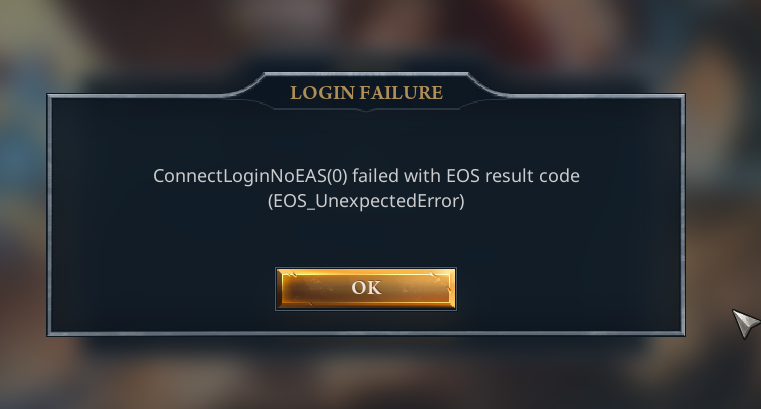
 flat plaza
games buggin out again
tardy adder
anyone know the port range this game uses? trying to filter traffic through a vpn to fix connection issues
trim pasture
I know, just usually share any bugs here to keep track
gleaming trail
If you’re experiencing multiplayer lag, high ping, connection lost errors, or login problems while playing Fellowship on PC, this video will walk you through the exact steps to fix all of these connectivity issues so you can get back into the game smoothly!
CHAPTERS
00:00 Intro
00:14 Solution 1
01:13 Solution 2
02:32 Solution 3
03:24 Outro
fading solar
jaunty isle
basically; on their validation/login token they are taking the current time(whic...
i havent lagged this evening since sorting my date and time out, might help some others as well
tawny tendon
gleaming trail
https://www.youtube.com/watch?v=rCQpunD-hVI
didn´t work for me
gleaming trail
Not guaranteed but between that video, running as admin, disabling full screen optimisation and using dx11 command. I’ve had 0 issues oh and moving it off SSD to my CDrive
fringe drum
performing voodoo rituals just to play a game brings me back to the early 2000s for sure
 quaint solar
Every time I log in I get stuck at the stronghold loading screen forever. Usually it just crashes or stays there forever but one time it gave me this error. Any idea how to fix? Launching from steam deck.

 strong sky
Hard to tell whether this is server-related or strictly Meiko, but losing inputs throughout the run.
quaint solar
quaint solar
Every time I log in I get stuck at the stronghold loading screen forever. Usuall...
After I let it time out I can log in the next time without issue it seems like
 warm lagoon
quaint solar
Every time I log in I get stuck at the stronghold loading screen forever. Usuall...
warm lagoon
quaint solar
Every time I log in I get stuck at the stronghold loading screen forever. Usuall...
Experiencing the same issue as well on my deck. Also not being able to launch steam menu with Shift+Tab after last update
timber sage
it is a bit sad when its not even acknowledged i guess it would be higher priority if more ppl had the problem or streamers got it too
 wild urchin
anyone know if this has a fix?

 edgy torrent
Sorry if this is a repost, this chat is long 🙂 . But does anyone else get an issue where half way through a dungeon they kind of disconnect from the game? I can still move around but everyone else stops. The chat still works so im not d/c'd. Making the game very unplayeble (Asia server if ti matters)
reef current
1 week later

 swift bolt
Asia servers messed up?
 frank tinsel
reef current
1 week later
frank tinsel
reef current
1 week later
same - seems like developers dont give a .... xD
jaunty isle
reef current
1 week later
I mean u can also check some registries in regedit:
- press
win+Rkey; - type in
regedit;
InHKEY_CURRENT_USER: - (*)search through:
Software->Microsoft->Windows->Current Version->Explorer->Shell Folders: - (**)search for the
Personalkey(first attachment) -> this should be set toDocumentsif u have any Onedrive or wizardry just take out the path from Windows File Explorer and paste it in here; - right click on
Personal->Modify..-> Paste the correct path and save/or just eliminate theOndrivesubpath from the route and save it
(NEXT) In HKEY_CURRENT_USER:
- search in the same repo as before at (*) but instead of
Shell Folderyou needUser Shell Folder; - same steps as (**) - attachment 2.
Save everything; restart PC; try again 🙂


dunno if it helps, I also changed these before syncing the time and date
lmk know if it helps
reef current
jaunty isle
I mean u can also check some registries in `regedit`:
- press `win`+`R` key;
- t...
If I understand correctly, I need to move the Personnel path (if it's correct, and it seems to be, similar to the one in the screenshot) from Shell Folders to the User Shell Folder and replace USERPROFILE with the regular, direct path.
I did this and synced the time, but it didn't help. It seems like it's just a curse.
jaunty isle
@reef current, you kinda got it, yes 🙂
In both places u need to have the right path to Documents, u need to have the same path - the format should be something like
{DRVIVE}/Users/{CURRENT_USER}/Documents
no Onedrive, nothing special. U see for me it's C:\Users\Me\Documents
 proper stag
Can anyone help with this error? occurs when loading into the game or loading into the hub
 reef current
jaunty isle
<@207398501997346816>, you kinda got it, yes 🙂
In both places u need to have t...
reef current
jaunty isle
<@207398501997346816>, you kinda got it, yes 🙂
In both places u need to have t...
I indicated this both there and there.
jaunty isle
if u set them both, u should save everything. restart PC and try the game
reef current
jaunty isle
if u set them both, u should save everything. restart PC and try the game
I did it and the problem remained.
jaunty isle
...
 vague gorge
hi does anyone have issues like some dungeons they play normally and some dungeoun randomly I get 120-150+ ms ping and lags
In on optic fiber and dont have issues on other games
jaunty isle
@reef current , these are the 3 things I did: first I changed these in the registry, then I updated my nvidia drivers and last the time thingy with the sync.. nothing else
and for me it works now..
 jaunty isle
sure thing. I am really trying to help.. but these r the things that I tried
imagine ppl from the studio actually tryin' to help us..
reef current
 jaunty isle
where is this?
like what did u do?
don't u have Geforce experience or what's the name of the app?
 reef current
jaunty isle
where is this?
reef current
jaunty isle
where is this?
Now the game gives me this message when I try to restart it from the antivirus loading screen. I just restarted my PC after installing the drivers.
reef current
jaunty isle
where is this?

Easy Anti-Cheat is the industry-leading anti-cheat service, countering hacking and cheating in multiplayer PC games through the use of hybrid anti-cheat mechanisms.
now that
 timber sage
i got that too, done every tip, video guide, magic trick, all the above and still nothing, it all started since this latest maintenance which was meant to have a issue resolved but i guess no update? or any form of "hey guys still working on it" . no official response at all just talking amongst ourselves i guess.


 reef current
Honestly, I don't think the problem is on my end at all. I think it's the damned anti-cheat that just decided to cut off the connection for certain people. It's probably even related to the recent issue, apparently, with Amazon.
The truth is, it's not entirely clear how a clean system reinstall helps people. So, there must be something causing the blocking in the current system state, but what is it? I checked my antivirus, I installed a clean boot, I reinstalled the game, the anti-cheat, cleaned the registry, installed other games (where, by the way, it also doesn't work), disabled various software, tried bypass programs and a VPN, contacted my ISP to have them check the issues and even change my IP address.
But the most annoying thing about this is two things: The problem is extremely rare; for some reason, many players have no trouble. I don't think they're manually syncing the time or checking their registry. And for some reason, the developers of this anti-cheat haven't cared about this issue for a whole week.
The most interesting thing is that there's no way to even report it to them. They don't have direct user support. There is some alternative for developers, but even that only offers advice like "restart your router." But I'm not a developer, so I can't even highlight this problem. I can't ask the developer to address it because they don't care either. For a whole week, I haven't seen any comments from the developers about the situation, even on Discord. Someone filed a ticket with Arc support, but they haven't responded for three days.
So, all I can do is pray for luck and wait for someone to fix it? Or maybe no one's even fixing it? Or maybe no one even knows it needs fixing? We're stuck in a fog, completely oblivious and ignorant.
west stone
Absolutely on point, same thoughts.
north scaffold
yup, been in contact with epic support for a few days now and progress has been slow to say the least. gotten to the point of them asking me to try disabling firewall... after listing in the initial ticket what I've tried and sending them the logs. maybe some day itll work 😐
- random stuff fixes it for some people so figuring out the actual cause feels impossible
hexed dune
I guess I should try catching the developers' stream and spamming the question there – when will there be answers in the Discord threads with the issues? So far, it seems like they're completely ignoring the problems.
west stone
Yeah strangest thing is that different stuff seems to help some people, but some are doomed into reinstalling windows.
timber sage
reef current
Honestly, I don't think the problem is on my end at all. I think it's the damned...
My thoughts exactly 👍
tawny tendon
soooo they are not going to fix it and i quit this game for good ? sad had fun + was 9k and 310gs but what ever
 reef current
tawny tendon
soooo they are not going to fix it and i quit this game for good ? sad had fun +...
reef current
tawny tendon
soooo they are not going to fix it and i quit this game for good ? sad had fun +...
Welcome to the club
timber sage
tawny tendon
soooo they are not going to fix it and i quit this game for good ? sad had fun +...
welcome welcome i do wonder how many more people this needs to happen to before it becomes a priority, enjoy the silence
 novel glen
reef current
Honestly, I don't think the problem is on my end at all. I think it's the damned...
novel glen
reef current
Honestly, I don't think the problem is on my end at all. I think it's the damned...
is there any way to contact the devs?
Apparently they don't use discord or reddit, so what options do we have? Twitter and that's it?
I wonder if devs are even aware of this. At least they should acknowledge it, complete radio silence looks rather unprofessional imo
timber sage
it seems they do use discord cause they use it to announce patches notes this halloween event
 gaunt plume
i bought the game yesterday and i cant play it as having same issues been looking into fixing the problem with my pc but still the same thing with the EOS
anyone found a way to get in ?
 exotic gate
Same issue, it's been a week now. Do developers even read their discord or they don't give a sh*t ?
 torn vessel
Same here since 1 week, nice to pay 25$ an early acces game and have no response from dev ahah
reef current
After update all working
fading solar
My issue was fixed from another user suggestion who mentioned something about going in to date/time settings and syncing it. Havent really lagged since aside from 1-2 small spikes. Hopefully it helps someone else
west stone
Yay my eos not connecting problem got fixed, I can finally play 
quaint solar
quaint solar
Every time I log in I get stuck at the stronghold loading screen forever. Usuall...
Still having this issue after the patch today.
The fix for me is to let it time out (wait 10m or so, however long it takes), and then once it kicks you out you can log back in instantly
solid wolf
VRY NICE
 ripe dawn
Just got an internal service error trying to log in after a discconect the start game screen
US server
 plucky holly
internet connection lost then this
 strong sky
Ardeos + Kindling + Amethyst + big pull is a guaranteed way to "lag". Toggle away from Kindling or from Amethyst and server stops dying
 unborn panther
My game was playing fine this morning, now my cursor is stuttering and my character movement isn't as responsive, more like glitchy. My ping and internet are the same.
 honest idol
how can it be that US server work better for me than EU right now. Im living in germany....

 umbral yacht
tawny tendon
soooo they are not going to fix it and i quit this game for good ? sad had fun +...
umbral yacht
tawny tendon
soooo they are not going to fix it and i quit this game for good ? sad had fun +...
Been playing for ages and today got this issue?? wtf?!
 thin magnet
At start screen it is currently saying the server is down for maintenance and won't let me on while i have friends who are on and have relogged and still can get in
thin magnet
Still says server maintenance and won't let me login. I've restarted the game multiple times, restarted my computer multiple times, as well as uninstalling and reinstalling the game...
 kind burrow
and another one is anti cheat problem kicking me out mid game or in login screen
 thin magnet
Why am I getting a closed for maintenance screen when there is no maintenance?

 dapper chasm
Launcher seems to close immediately upon opening any tips?
 hallow compass
Hi,
I’m running into a recurring issue.
Context: I’m European but currently living in Asia, with a perfectly stable fiber connection.
When I search for a group and join a NA or EU group, I sometimes get the following error message (it happens randomly — sometimes everything works fine, but for example today it happened twice in a row).
The issue also occurs when I’m connected to EU servers.
The game has already been reinstalled, the router restarted, and the PC rebooted, etc.
Do you have any idea what could be causing this problem?
Thanks in advance!

 wheat mantle
i've been experiencing stuff like this a lot specifically when playing fellowship. irrelevant of the server (EU or NA), i will have these semi-frequent instances of multi-second hick-ups in my entire internet connection. This is a stability test i ran on a second monitor alongside it. Doesn't happen outside fellowship, but i can very quickly make it happen in fellowship.
It also doesn't happen in fellowship when i swap to my phone internet.
Oh, also i have that 'eu server ping is somehow higher than NA server ping' issue that others have mentioned having in denmark
 hallow compass
vestal tulip
most of the time there's no issue at all
hallow compass
vestal tulip
most of the time there's no issue at all
ok thank you for the answers
 hallow snow

last patch it worked perfectly fine
however this patch and 2 patches ago i had this constantly
loading into the game, going into dungeons
europe server, stable internet
 bitter schooner
Hi folks, not sure if this is the right place to report this but it's best that I can think of. I've played 2 characters over the last week and happened to end up with similar rating on both, and I've gotten a bronze trim for placing in the upper 50%. However it only unlocked for Helena and not for Sylvie :(
Feels like a bug with the mail system or smth to me. But could it be just me misunderstanding how it is meant to work?
vestal tulip
Getting 50-80% packet loss from sydney OCE to asia servers
Normally it's totally fine
kind burrow
every time i try to open game and press start
 wispy dawn
any idea why there is packet loss sometimes / how to fix this...?
atomic haven
hallow snow
same
strong sky
FYI - if you think you have packet-loss-like experience without seeing it in the performance menu, try turning off advanced combat logging. Solved all of our 'lag' issues on big pulls
 slow stag
Hi, when i try to log in, it just sits at the start game section and nothing happens. I have validated files, ive done net checks and it seems to be a game issue. i was in a dungeon and opened chest, nothing in the chest, then i was kicked from the game, and now i cant get in at all
cant even pick a server anymore

 sterile jacinth
when i go into a dungeon i am stuck in loading screen
 turbid knot
kind burrow
every time i try to open game and press start
turbid knot
kind burrow
every time i try to open game and press start
im having the same issue any solution?
kind burrow
turbid knot
im having the same issue any solution?
nothing beside close game try again
 whole light
vestal tulip
Getting 50-80% packet loss from sydney OCE to asia servers
whole light
vestal tulip
Getting 50-80% packet loss from sydney OCE to asia servers
Also having this issue, sydney to asia servers, its unplayable. Suspect potential ISP issue but I have also been having load in/load out screen hangs and unsure if same cause.
 lofty ivy
[EU] Connection Error & Packet loss
Tried US servers and had no packet loss there.

 placid panther
honest idol
how can it be that US server work better for me than EU right now. Im living in ...
placid panther
honest idol
how can it be that US server work better for me than EU right now. Im living in ...
exactly the same issue here. Turns out when I select the EU realms my ping in game is low (as it should be) but it keeps trying to put me into NA regardless.
 shadow yoke
Problems since Launch everything else is fine
 honest idol
placid panther
exactly the same issue here. Turns out when I select the EU realms my ping in ga...
honest idol
placid panther
exactly the same issue here. Turns out when I select the EU realms my ping in ga...
I solved this issue by using a VPN. Apparently my provider throttles the connection to the eu server
placid panther
honest idol
I solved this issue by using a VPN. Apparently my provider throttles the connect...
can confirm, tested vpn and problem is gone. german internet at its finest 🙂
trim pasture
500+ ping in EU several times in a row, then no possibility to travel to dungeon, had to re-start game.
going to test MS again
 glacial latch
Still no news about the game closing randomly without any error ?
 serene brook
shadow yoke
Problems since Launch everything else is fine
serene brook
shadow yoke
Problems since Launch everything else is fine
the issue is it routes EU traffic to a serivce in Boston and then to Amsterdam.... maybe its just for the login so it shows bad ping cause of the bad routing
trim pasture
ping issues each dungeon EU
and the loading screen bug right after again
this time for a friend
serene brook
idk if all the issues come fram that
but EU somehow routes via boston and back (atleast what the ping shows)
 zealous condor
Not sure if Im missing something but I keep que'ing for quick play then it just takes me out? Not sure whats going on.
Seems to be relogging fixed whatever issue was going on.
 pure parrot
This is the first time I've encountered this error. I was kicked out of the dungeon and couldn't get back into the game. Now there's a queue to enter.


 analog ocean
My whole group gets lags at the last boss of Drakheim, even though the rest of the dungeon is fine. It only happens on the last boss, and it seems like it also only happens in this dungeon. It's also not a one-time thing, has happened several times. When I do the dungeon alone with pugs, there are no lags at all, only when grouped, and then everyone gets them.
 cold jolt
Seriously, what's wrong with the packet loss issues on EU?
Just randomly the game works fine with 0%, then it spikes to 70+% on certain instances.
Unplayable in the evenings....
 rain sigil
Same for me, where do you live?
 proper mulch
<@&1342645153034276915> any news about the connectivity issues?? i'm facing since day 1 the same bug where to be able to chat or get invited or queue i have to restart the game at the end of every dungeon, and even during the dungeon i can only chat for like 2 mins , after that i get chat disconnected and often i get connected back again. This is annoying and we are completly without any track if this issue is being handled or not.
 junior wraith
Click start does nothing? Restarted steam and still does not work. Any ideas?
 willow coral
hallow snow
willow coral
hallow snow
im having this as well how do i fix this?
 violet sinew
willow coral
im having this as well how do i fix this?
violet sinew
willow coral
im having this as well how do i fix this?
vpn
north turtle
Well now i can open the game i click Start and it just stays on trying to connect forever no error no nothing, just dont respond
 honest lynx
I have to play with a vpn in the evenings because otherwise i have high ping to the EU servers.
The problem is, if i play with vpn the game runs lagfree but i get left the group joined the group messages during dungeons and after that my name in chat is <none><unkown >.
I either have to choose between playing lagfree and chat issues or high ping and chat works fine.
In every other game I have 30ms ping or less even without a vpn
vestal tulip
Getting 50-80% packet loss from sydney OCE to asia servers
 jagged kernel
how do i fix this damn bug that has me "go offline" when i am still 100% online
jagged kernel
honest lynx
I have to play with a vpn in the evenings because otherwise i have high ping to ...
I have this exact thing but I don’t use a vpn
 sleek plume
Since a few days i have high ping on eu. If i ping the server manually i get the normal 20-25ms like on every other game. Any fix for this?
glacial latch
Still no news about the game closing randomly without any error ?
ornate totem
Im having costant packet loss 40-50%, kinda unplayable, anyone with the same problem?
 viscid sandal
My packet loss is showing 0% but my ping to Asia servers goes from ~200 to 400 and no input goes through to the server, this happens for about 20 seconds every 2 minutes. I'm based in NZ.
trim pasture
lot's of EU ping issues again
umbral yacht
junior wraith
Click start does nothing? Restarted steam and still does not work. Any ideas?
No server selected in top right corner
vague gorge
had to turn off the game now, ping was over the roof (and everything else I do ping is great)
 vagrant void
Almost every single time I join a queue, after a minute or so it will disappear and I'll get this symbol by my chat except it starts as red then turns to this after a little bit. Every single dungeon I join, the other group members will see "Audy has left the group" even though I'm still there. Then it will reconnect after like 2 minutes and I see three messages for "So-and-so has joined the group". It prevents me from chatting in any group I'm in.

 chrome lagoon
Server Lag issues on multiple servers. Checked connection on my end and all good.
 silk yoke
I had solved this issue when I switched to Windows 11 two weeks ago, and the game was working fine last night. But this morning it’s giving me the same error again. It’s starting to get really annoying — I’m honestly thinking about quitting. Is anyone else experiencing this problem?

 soft drift
Not sure if a server issue, but many times when I leave a dungeon (after completing it) I try to re join the queue but it bugs out. Basically it says I’m still in a party so I can’t join a queue.
Then I can’t leave the party and can’t queue, then after 2/3 mins it puts me in the same group as I was before, then it keeps bugging out and doesn’t allow me to queue.
This also happens sometimes randomly when I am queuing already, it bugs out, removes me from queue and doesn’t let me requeue and I need to click like 10 times to leave party until I can requeue again. It is very very annoying
lofty ivy
 noble rune
Idk what's up with EU servers, but the only server I see having Ping and Connectivity Issues is the EU Server.
Usually my ping is around 24, but every other day this happens
EU also seems to be the only Server I tend to get disconnected in a loading screen when joining a Dungeon or getting back to the Stronghold.
Played a lot on US Servers due to that and never had that issue there

 dense ingot
having some major fps drops this evening, trying to play and the game will go from 120/150 range to going into combat and being 1fps driving me mad
umbral yacht

 brisk epoch
Hello
After recent maintenance i keep getting troubles with EU:
- Connection error on loading screen when i log on char / enter dungeon
- 20% +/- packet loss with spikes
- Cannot write in chat
Ping is ok
Meanwhile playing on NA didnt trigger any of those problems
My location is Bishkek, Kyrgyzstan
Pathping to IP noted in connection error message is in attachment

 solar prairie
Hi
i can only play on EU servers in the morning times .. in the afternoon / evening my ping goes to >300ms and I have to switch to NA Servers to be able to play at a somewhat normal ping (I am located in Germany)
Is there any known fix to this?
 half coral
Hi, I received a prompt mid Wraithtide Vaults saying my Anti Cheat Authentication failed, and it booted me from the game. I am not using any third party programs or addons. I closed out, logged back into the game, and now I am unable to chat in /server, /party, or whisper people I am friends with. Is there any programs that cause issues with Easy Anticheat I may have installed?


 patent sand
Any fix for "ConnectLoginNoEAS(0) failed with EOS result code (EOS_NoConnection)" I am just tired can't find any answers on internet
lofty ivy
cconnection error are going wild today on EU
 peak cedar
 proper mulch
vagrant void
Almost every single time I join a queue, after a minute or so it will disappear ...
proper mulch
vagrant void
Almost every single time I join a queue, after a minute or so it will disappear ...
u are not alone, many other face this issue. i'm also included in the list. they keep releasing patch notes but fixing this connectivity issues that exists since ever nope
lofty ivy
many connection errors on EU today again.. every loading screen is a dc or connectio error
fading solar
my game had been fixed and now its back to where it was again, getting super frustrated with these errors
jagged kernel

 elfin dock
Login Failure: ConnectLoginNoEAS(0) failed with EOS result code (EOS_Connect_ExternalTokenValidationFailed)
jagged kernel
how do i get around that? haha
elfin dock
i just spammed join and eventually i got in
jagged kernel
I had to close steam entirely then got in
 tawny shore
Another patch, most important problem still ignored :/

 pulsar pecan
Anyone one EU that keeps getting thrown onto US servers when connecting?
solid wolf
tawny shore
Another patch, most important problem still ignored :/
I'm getting this issue today more than ever. Out of 5 games I start, I can join 1 at most. Always stuck in loading screen and then this BS.
 deep obsidian
 tawny shore
solid wolf
I'm getting this issue today more than ever. Out of 5 games I start, I can join ...
tawny shore
solid wolf
I'm getting this issue today more than ever. Out of 5 games I start, I can join ...
im at around 200h rn, 1/3 of it is the connection error into char select into, often repeating multiple times in a row without being able to run a dungeon...until couple days ago i played heal then tank...aint too bad since i at least can find lobbys... now that im on my first dps its just horror...10 min q into DC into another 15 min q just for another dc
also it seems kinda weird to me that only certain people seem to have it, or at least have it often... but ive tried so many things to fix it, still getting it around 1/3 loading screens
deep obsidian
 solid wolf
tawny shore
im at around 200h rn, 1/3 of it is the connection error into char select into, o...
solid wolf
tawny shore
im at around 200h rn, 1/3 of it is the connection error into char select into, o...
I'm playing with a group of friends between whom I'm the only one experiencing this issue constantly. Seems to be a problem with the routing to server as I have it only when playing from one of two locations I play from. I tried opening all ports and tweaking some things on both my router and PC, but nothing's changing. It's really frustrating getting constantly DC'd and spending more time trying to play than actually playing. Also around 200h in this game thus far.
 umbral fox
Question: Does anyone else have an issue where they leave the party/rejoin the party every couple of minutes? Little red icon bottom left near chat window showing "!" for a random amount of time then suddenly your back. No drop in connectivity, no drop in latency just leave party/chat...
lofty ivy
while trying to join silken 3 as full grp
 proper mulch
umbral fox
Question: Does anyone else have an issue where they leave the party/rejoin the p...
proper mulch
umbral fox
Question: Does anyone else have an issue where they leave the party/rejoin the p...
i face this issue, and they still not addressing this.
 heady zealot
hi, since yesterday i'm getting the error of servers not showing up, how do i fix this?

 dusk sun
heady zealot
hi, since yesterday i'm getting the error of servers not showing up, how do i fi...
dusk sun
heady zealot
hi, since yesterday i'm getting the error of servers not showing up, how do i fi...
same problem here. did you get any fix for this?
heady zealot
dusk sun
same problem here. did you get any fix for this?
nothing yet, reinstalling the game
 dense grotto
Asian Server is down. Some players encountered
Connection issue!
heady zealot
dusk sun
same problem here. did you get any fix for this?
found the fix, ffs, reinstalling did not the work
you need to close steam, go to the game folder, and start game-launcher.exe
it will open steam and it will work now
dusk sun
heady zealot
found the fix, ffs, reinstalling did not the work
didnt fix it for me unfortunately. if anyone got the same problem and maybe a different try to fix would be very appreciated
 calm flax
 fading solar
calm flax
fading solar
calm flax
Standard for me over the last few days again, it had been fine but it started again
calm flax
fading solar
Standard for me over the last few days again, it had been fine but it started ag...
Tbh i wont play until they fix this
Takes 30 mins to get a group to be disconnected
 devout skiff
i have this bug now

 woven perch
both me and a friend have issues with this when logging into or out of an instance, also see it very often with randoms as well... tried everything internet suggests to fix it but nothing works, really getting discouraged to even play when every 2nd run i have to wait a few minutes to get back in the game. EU server

 twin adder
any idea why i cant see any servers?

 vital mica
woven perch
both me and a friend have issues with this when logging into or out of an instan...
vital mica
woven perch
both me and a friend have issues with this when logging into or out of an instan...
i have the same since friday, are you using amd ? ( didint find fix yet:()
woven perch
vital mica
i have the same since friday, are you using amd ? ( didint find fix yet:()
yes
vital mica
woven perch
yes
I thought so. It probably has something to do with the AMD drivers, but I haven't figured out what yet:(
woven perch
dont think it's connected
vital mica
hmm
It's either the last patch in the game or the drivers. I updated both of those things on Friday, and I've been having problems ever since.
woven perch
friend has nvidia gpu and has the same issue
soft drift
please please please see this reddit bug, it keeps happening to me, exactly as they say, it makes it unplayable becaus I need to restart after EACH dungeon - makingit impossible to play Eternal..
https://www.reddit.com/r/fellowshipgame/comments/1of5wsb/leaving_and_rejoining_party/
Reddit
Explore this post and more from the fellowshipgame community
soft drift
proper mulch
i face this issue, and they still not addressing this.
same issue here! its imposible to play with this
 hardy shore
when LFG-ing with people from NA/EU (i'm from asia) some days i'll get 40-50% packetloss, some days i don't, not sure what it is
fading solar
vital mica
I thought so. It probably has something to do with the AMD drivers, but I haven'...
I truthfully havent updated my drivers since earlier in the year, i still have that issue so im not sure if updating will help anyway
vital mica
fading solar
I truthfully havent updated my drivers since earlier in the year, i still have t...
vpn fixed the issue
 lean berry
how?
 lunar shard
is anybody having this issue too? disconnects me from parties, from all chats, cant accept invite or invite anyone

and it pops up regularly
lunar shard
get knocked out of queues too. its a constant bug since release. no amount of reinstalls fixes it
proper mulch
just sit down and wait
i have been waiting since the start of the EA
they simply don't care and they never mention any work in progression
 past tapir

 true terrace
anyone else been getting game crashes since the patch? been happening to me and a few friends - most notably during an eternal final boss >.< and we had to start again to time it
had probably 10+ since last update
 fickle lark

my friend has this problem
he used to freeze out 1 out of 10 dungs
3 patches later it chain happens to him basically borderline unplayalbe
 near grove
fickle lark
https://cdn.discordapp.com/attachments/1437887703873097768/1442918272621084793/D...
near grove
fickle lark
https://cdn.discordapp.com/attachments/1437887703873097768/1442918272621084793/D...
Just logged in, got the same error TWICE in a row while entering the dungeon and pressed ALT + F4.
This happens for how long now? 3 or 4 weeks and still isn't fixed?
That's one way to lose players...
fickle lark
near grove
Just logged in, got the same error TWICE in a row while entering the dungeon and...
actually the solution above worked
which is not ideal but beter than chain crash
use a vpn adn set urself to netherlands
 fierce thorn
also got randomly high pings even tho my speedtest says we gucci
also random 2 disconnects back to back
and game freezes
first time happening after 180 hours gametime
 rancid quarry
Hi have anyone got an issue where servers are not appearing?
 north turtle
please fix ur issue with easy cheat, everytime u release a update that invovles easy cheat people start gettin this kind of shit


 dusk palm
i have it too
 north turtle
last time i had to do a full clean up on my pc and install all over again, i wont do that shit again ill just quit
 stark girder
Getting the same issue today, first time ever
 simple python
Same issue, not had this issue before 🙁
 lofty ivy

 warm grove
simple python
Same issue, not had this issue before 🙁
warm grove
simple python
Same issue, not had this issue before 🙁
Same issue here right now NA
 gentle ice
getting this same error, tried uninstalling and reinstalling but no luck
 surreal aurora
i got the same login failure issue. out of nowhere. verifying files didnt help restarting didnt help.... honestly ill try the reinstal once but if that wont help... im out :/
 bleak cove
tryed VPN with different countryes, didn't help
 potent shuttle
same error, should i do anything or just wait?

 atomic haven
potent shuttle
same error, should i do anything or just wait?
atomic haven
potent shuttle
same error, should i do anything or just wait?
no known fix currently.
 serene carbon
I'm in - keep trying

 dusty sierra
same happening to me too right now
 fallen jackal
serene carbon
I'm in - keep trying
fallen jackal
serene carbon
I'm in - keep trying
kept trying and got in eventually. pure brute force seems to be the solution.
 frigid hollow
same happening atm
 dusty sierra
ok the failure message changed to internal server error for a moment and now i am in again
potent shuttle
im in, if you try a few times it let you connect
potent shuttle
dusty sierra
ok the failure message changed to internal server error for a moment and now i a...
same happened to me
dusty sierra
so i guess trying to repeatedly log in is the best option really
 ocean plover
Welcome to Epic Games Public's home for real-time and historical data on system performance.
 celest canopy
ocean plover
https://status.epicgames.com/
celest canopy
ocean plover
https://status.epicgames.com/
mod this guy
lunar shard
fallen jackal
Adding this to the pile:
same got it just now for the first time ever
how can i fix it?
lunar shard
lol

progressed to this... cmon it took me forever to find a group, i get kicked out mid bossfight "anti cheat verfication failed" and now this shit
what a joke
 pastel lake
lunar shard
progressed to this... cmon it took me forever to find a group, i get kicked out ...
pastel lake
lunar shard
progressed to this... cmon it took me forever to find a group, i get kicked out ...
same sh*t bro, i have same story
lunar shard
also lets be real, easy anti cheat leads to garbage bugs in every game its implemented into that i've ever played ON TOP of being useless anyway. that joke of a tool never kept anyone from cheating lol
patent sand
i like how they wont let us game and they wont even let us chat in discord https://discord.com/channels/1254866410258038845/1420650466865582132
 rapid sky
so much crybabies in here, touch some grass bruh tf
 rare sage
so much ppl touched his mom he doont even know who's his daddy
 silk remnant
I closed VPN and Iphone cable connected to PC, then it worked( OS: Kubuntu 25.10)
potent shuttle
I executed fellowship-launcher.exe as admin, closed steam and run again and it worked


 stable kettle
Issue still persists through patch.
 fallow lynx
stable kettle
Server List is empty. Known fix for this?
fallow lynx
stable kettle
Server List is empty. Known fix for this?
I have the same problem.
I reinstalled everything I could, and also checked everything
stable kettle
fallow lynx
I have the same problem.
I reinstalled everything I could, and also checked ever...
Hours of troubleshooting; I've given up.
I'll wait until some announcement or they answer here.
fallow lynx
stable kettle
Hours of troubleshooting; I've given up.
I'll wait until some announcement or ...
Me too...
It's really sad that such nonsense happened.
patience for us)
stable kettle
Agreed. My friends can play, I can't. What region are you in. I'm currently in EU, GERMANY.
fallow lynx
stable kettle
Agreed. My friends can play, I can't. What region are you in. I'm currently in E...
From RU, Novgorod region.
I tried logging in with different VPNs, but it didn't work(
I was looking for information about similar errors and unfortunately realized that it does not depend on the region.
Today I will try to use another computer and log in to the game from another account on my PC.
Maybe this will bring us closer to understanding the problem.
It's a pity that the developers haven't given any feedback(
fallow lynx
@stable kettle
I have some good news. I was able to log in to the game from another computer and from my Steam account.
It seems that the problem is with the computer itself.
I suspect that the anti-cheat is to blame. There is some kind of hardware binding, and I don't know how to completely uninstall the game so that it thinks it has been completely reinstalled.
stable kettle
Maybe because anti-cheat is also with Epic Games?
fallow lynx
I think the developers could suggest a solution that would allow for a hard reset of the game.
stable kettle
Agreed. We can only hope.
fallow lynx
stable kettle
Maybe because anti-cheat is also with Epic Games?
its maybe
fallow lynx
stable kettle
Agreed. We can only hope.
I'm looking for a solution)
I hope I can help us soon
stable kettle
fallow lynx
I'm looking for a solution)
I hope I can help us soon
Was the successful log in from same ISP source?
stable kettle
fallow lynx
I'm looking for a solution)
I hope I can help us soon
VPN Fixed for me... ProtonVPN.
Now the question is WHY?!
 novel lagoon
Hey Gang, just reading up on what you're struggling with.
I suspect that the anti-cheat is to blame.
The server connection endpoint is not guarded by Anti-cheat, so we're not sure that's what's the cause.
After speaking to our network team, it sounds likely caused by firewall or potentially outdated windows that doesn't have the correct certificates. Given that another computer worked it kinda rules out your network (assuming the other computer was on the same network).
We bundle a bunch of certificates with the game but some vendors change their Root CA when they need to and usually Windows Update can deliver those.
VPN Fixed for me... ProtonVPN.
What happened here, can you explain what changed?
Can people struggling to see servers connect to https://crbackend.playfellowship.com/ without the VPN? It should give a '404 page not found'
stable kettle
Turned off VPN: Unable to Load.
Turned on VPN: 404

 novel lagoon
okay, so it looks like either your ISP is blocking it, or you have some other software getting in the way
stable kettle
/help
I was trying to quote you. 😛
It's interesting that the change happened within the last 2 days.
Is there any tips from the Network team to help me troubleshoot whether it's the ISP or Computer?
I'm happy to have Isolated the issue this far. I'm not tech savvy enough to understand the connection requirements and how test and diagnose each requirement.
My Modem/Router was working fine with the game, then yesterday roughler 20+ hours ago, I no longer could see Server Lists at the Main Menu.
novel lagoon
can you put your phone on the same network and connect through your phone?
stable kettle
I shall try
WoW... Looks like it is the ISP/Router Modem and not the computer.
How interesting. Did something change with the connection requirements for CR/Fellowship?
novel lagoon
No, nothing, sorry.
stable kettle
Hmm... Well thank you for helping me isolate the issue.
If you don't mind, can you provide what the requirements are to connect to that URL/Fellowship servers. So I can direct my troubleshooting efforts to those requirements.
IP or Ports...
I imagine port forwarding is a requirement, but I've deactivate UPnP Filter on the Modem.
novel lagoon
port 443, but you should already have this open, since it's for regular https traffic. You wouldn't be on discord without it being open 😉
stable kettle
Yeah! and I've seen the successful 443 TCP connection via Resource Manager when I'm connected.
There's the amazon.aws server. I get good established TCP connection.
So if I'm not blocking 443 (protocol), then I'm (ISP) blocking the Network/IP?
novel lagoon
I'm sorry, I don't know, and neither do our team. I think that's beyond our ability to diagnose.
it sounds like everything on your PC is working well, but something external is getting in the way
stable kettle
I just need someone to validate my logic.
443 isn't blocked - I'm on Discord.
crbackend IS blocked - Must be Network/IP specific?
novel lagoon
that's our thinking, yes. If your phone hardware cannot reach the backend either, then your PC is not at fault. And if connecting to VPN allows you to connect, then something on the network itself is preventing access
stable kettle
I appreciate the support! I was feeling lonely and unsupported. I have been playing nearly everyday for weeks now.
I really enjoy your game. I hope to figure out why this ISP is DoS'ing me 😄
novel lagoon
heh, thanks. hope so too.
fallow lynx
Hello!
Thank you for your attention)
As I mentioned earlier, I tried to log in with my account, but from another computer (where Windows hadn't been updated for about 3 months).
When I logged in, I was mistaken for a new player and was prompted to complete the tutorial, etc.
On my computer, I tried to completely uninstall the game and Steam, as well as delete all registry keys for Steam, Fellowship, and Battleye.
I also tried changing the computer name.
I expected this error to be related to the HW part.
On the network side, I've tried using proxies and VPN tunnels.
None of these have yielded any results.
I've performed all the Windows updates, but to no avail.
I've also tried following the link. you provided. And in all cases, the response is 404 (without VPS, with proxy, with VPN).
Am I correct in understanding that I can use this endpoint to check if the server connection error has been resolved?
Since the problem is most likely related to my PC, since there is no connection
I will try to reset the network settings.
Please tell me: what can I use for debugging? Is there a debug log?
fallow lynx
novel lagoon
Can people struggling to see servers connect to https://crbackend.playfellowship...
It seems there is a problem here)
How can this be fixed?
 stable kettle
fallow lynx
It seems there is a problem here)
How can this be fixed?
stable kettle
fallow lynx
It seems there is a problem here)
How can this be fixed?
Will can verify, but seeing "404" is desired.
That means good "Network" connectivity.
I cannot see "404" when my VPN is off. So my ISP/Router is blocking connectivity.
I further isolated the issue. Taking the SIM from the modem and into my phone. I still cannot address webpage. Vodafone must be blocking network.
If I were to request them to unblock the fellowship network, what network would I provide them?
novel lagoon
right. Fellowship is connecting to CRBACKEND to get the server listing. Ideally you get the 404 error because you are connecting with your web browser and not the game. If it times out (as biigdogg did) it's a problem.
So 404 is desired in troubleshooting.
When you start Fellowship with a new computer, it will always forget your tutorial settings because they are saved locally and not cloud-saved across steam (that's coming in the future but lower priority)
fallow lynx
I have no idea how to fix this.
A 404 error is a good sign, but there's still no server list.
However, on another computer (on the same network and with the same provider), everything works fine.
It's clear there's a problem with the PC, but I don't know what exactly(
fallow lynx
novel lagoon
right. Fellowship is connecting to CRBACKEND to get the server listing. Ideally ...
Is it possible that the application is building a tunnel to connect to the server, and this tunnel may be blocked by the provider?
novel lagoon
fallow lynx
I have no idea how to fix this.
A 404 error is a good sign, but there's still no...
I'm not sure what could be blocking the game on your PC, sorry.
It could be anything from a firewall blocking it, to certificates needed, to other applications blocking it.
If you're completely up-to-date on your windows updates and any drivers, there's really nothing else our team can think of to recommend, unfortunately, beyond the nuclear option of reformatting.
fallow lynx
novel lagoon
I'm not sure what could be blocking the game on your PC, sorry.
It could be *an...
Isn't there some kind of API to check server availability from the browser?
novel lagoon
For fellowship? no nothing like that exists
stable kettle
@novel lagoon According to Vodafone, Germany doesn't block IP space. They quickly surmised that "The Game Infrastructure must be blocking your IP or your IP Space."
novel lagoon
stable kettle
<@332289839171108864> According to Vodafone, Germany doesn't block IP space. Th...
You said you were able to play once you connected through VPN. Were you able to log into the servers, get into the Stronghold etc.?
stable kettle
Yes, indeed! I played 3 quickplays while you were responding to our intial cries for help.
I could send you, privately, my public IP to troubleshoot if that's something we can do to help isolate.
novel lagoon
stable kettle
I could send you, privately, my public IP to troubleshoot if that's something we...
i can take a look, but the only time someone would be blocked would be if they were banned for behaviour, and if you could log in, that clearly isn't the case
stable kettle
novel lagoon
i can take a look, but the only time someone would be blocked would be if they w...
I DM'd you my statistics.
 grim brook
i have the same issue with the empty server list.
worked fine until yesterday.
turning on a VPN fixes it for me as well
lean lion
Does the VPN help with the connection issue? I get connection error 3-4 times in a row..
stable kettle
grim brook
i have the same issue with the empty server list.
worked fine until yesterday.
t...
I don't feel alone now. @novel lagoon maybe Amazon is inadvertantly blocking or not routing traffic. 🤷🏿♂️
 fallow lynx
stable kettle
I don't feel alone now. <@332289839171108864> maybe Amazon is inadvertantly bloc...
fallow lynx
stable kettle
I don't feel alone now. <@332289839171108864> maybe Amazon is inadvertantly bloc...
I solved the problem completely - I reinstalled Windows.
I tried everything I could, but in the end, even Arc Launcher wouldn't launch.
I suspect there's an anchor somewhere on my computer that's blocking the connection to the servers.
stable kettle
fallow lynx
I solved the problem completely - I reinstalled Windows.
I tried everything I co...
Wow, I wouldn't have gone that far. Congratulations!
Our issues are different. Mine is network related.
fallow lynx
stable kettle
Wow, I wouldn't have gone that far. Congratulations!
Our issues are different....
I would like your problem to be solved too. ❤️
stable kettle
Same. Though I have a free VPN, I'd like to be able to connect without a VPN.
lean lion
Seems like a VPN solved my connection issues. MS went up from 36 to 54 tho. Atleast i can play now
 reef forum
I’m also pretty regularly hitting the connect timeout issue mentioned by others.
Most often this is trying to connect to a dungeon instance. Occasionally but far less often it is leaving a dungeon and connecting back to the stronghold.
The frustrating part as a user is when it happens and then you rejoin as the hero you are stuck in the stronghold while the rest of the group is in the instance without you and there’s no way to join them.
Annoying if you are with friends.
Super annoying if you are solo queuing as someone with a long queue timer and the group disbands instead of requeueing together.
For me this started after the patch one week ago (Nov 21)
Connecting to US/Boston
Connecting from Canada/BC via TELUS fiber
Please reach out if there’s any way I can help you all track this down - experienced engineer and happy to help.
Other people that mentioned this recently:
@calm flax (#1428218551927574650 message)
@woven perch (#1428218551927574650 message)
@fickle lark (#1428218551927574650 message)
fickle lark
install vpn and set urself to somewhere closer or any other point where ua re from
atomic haven
reef forum
I’m also pretty regularly hitting the connect timeout issue mentioned by others....
i get this issue aswell. like you, mostly for dungeons.
based in Germany connecting to EU.
 hardy shore
playing from asia and connecting specifically to EU is extremely dicey for me too, when it works it works but sometimes you just get 50% packetloss and/or that timeout connection error. i've got friends facing this too
i've seen the opposite happen too, EU players having unplayable packetloss when connecting to asia
high ping is one thing, game would be playable if it were just high ping but the packetloss makes it a slideshow
sterile rose
Do we seriously have a new bug that kicks you out of the game by anti cheat???
 fathom lichen
Hey i lost a 330 trinket, i have all the records showing ive never dismantle it and my game crashed, when i loged back the trinket in my inventory just disappeared.
I really need it as healer.
 quiet gust
 sterile rose
fathom lichen
Hey i lost a 330 trinket, i have all the records showing ive never dismantle it ...
sterile rose
fathom lichen
Hey i lost a 330 trinket, i have all the records showing ive never dismantle it ...
It should be back in your mail, happened to me too multiple times
 graceful needle
quiet gust
graceful needle
quiet gust
God this needs fixing so badly. I am dropping about 50% of the time entering dungeons. I don't lag at all so it's something else.
Not only is it making the game borderline unplayable for me, but it's causing me to repeatedly ruin games for others as they are entering dungeons missing a player.
 lapis ruin
I am notoriously getting this error- it looks like this
- I am stuck in loading screen longer than usual
- I am sent back to character selection screen and i get this error OR i am stuck in loading screen forever and and i have to kill fellowship/steam process and hard restart everything
What fixes it? Dunno, seems pretty random but sometimes it works better for some time after hard game reset or when i am a group lead.
What i tried? - verifying game files, reinstalling the game, playing the game on my mobile hotspot instead of my usual connection, doing some stuff in command prompt with releasing dns, resetting some connectivity stuff etc. Nothing worked.
It is really quite a big issue that often ends up with groups disbanding and it is hapenning pretty often, about 30-40% times i zone into dung/stronghold tbh

 fathom viper
lapis ruin
I am notoriously getting this error- it looks like this
1. I am stuck in loading...
fathom viper
lapis ruin
I am notoriously getting this error- it looks like this
1. I am stuck in loading...
if you ever got solved this problem tell us too.
graceful needle
lapis ruin
I am notoriously getting this error- it looks like this
1. I am stuck in loading...
It has only been happening for me for the last week or two. Something with a recent patch.
 molten violet
I'm not getting the same issue, I think, but I posted this on steam:
Sometime's I can play a few dungeons and have no issues, and then the next moment it'll just keep persisting, It's incredibly frustrating for me as I have had stints of like 9 minute queues and then within 30 seconds of a dungeon I get this issue.

Nothing I can do to fix it, and none of my friends have this issue but I've read that others have the same issue. I managed to sort of make it happen "less" but dialing down my graphics settings, but even then it still happens so frequently.

I doubt it has anything to do with me playing on Linux, as my one friend also plays on Linux and he has 0 issues at all.```

like I dont fully understand why, sometimes its just a case of closing the game ,restarting and it works fine for a while again but other times it'll just keep persisting and I just cant play the game at all for the evening and have to roll the dice again the following dayHow on earth is this STILL happening?!
I've had so many great looking teams in matchmaking, that have ended up having all our time wasted due to this

 west pelican
I'm literally avoiding to play just because I keep getting this bug
 drifting wagon
vestal tulip
How on earth is this STILL happening?!
I've had so many great looking teams in m...
drifting wagon
vestal tulip
How on earth is this STILL happening?!
I've had so many great looking teams in m...
Same. Have it almost every day, often multiple times. Super annoying. I have no idea what that address in the error message is, but I would maybe black it out just in case
this is one of mine from today

I'm guessing there isn't a solution to that yet.
proper mulch
@novel lagoon any news about ur investigation? this is so frustrating.
 warm cliff
Just got DCd for “anti cheat authentication” issues.
lapis ruin
drifting wagon
this is one of mine from today
About this bug- using VPN fixed it for me
proper mulch
they are about to release the feature of Eternal Queue where they explicit say on video "Communication is the key" i don't know how we can communicate if our chat and matchmaking connectivity is 100% bugged
fathom viper
guys anyone tried Vpn services to make yourself looks like playing from sweden? maybe the devs are racists so they fck out connectivity with everyone who aren't from sweden. my friend who i play with, he is from sweden and he never got any connection error!. someone who got payed vpn pls check this theory :D
graceful needle
drifting wagon
this is one of mine from today
New patch and not even any recognition of this? Still the same issues. May have to quit after all
drifting wagon
graceful needle
New patch and not even any recognition of this? Still the same issues. May have ...
Yeah would be nice to at least have them say something
 mint creek
With free VPN (I use proton free tier) it's working alright so far. It's not a permanent solution but at least you can play the game
 tender island
Clicking "Start" on the title screen does nothing. Arc launcher loads the game straight away instead of making me press "Play" button as before. No error messages, just nothing happens.
tender island
tender island
Clicking "Start" on the title screen does nothing. Arc launcher loads the game ...
Ope, problem fixed. Server wasn't auto-selected and once I picked one I got in fine. 🤦
proper mulch
they have been doing this since they release the Early Access. Its a know bug since day 1.
 pastel rock
sometimes i just cant join a dungeon and get a connection error. Its not reproducable but happens from time to time
 lapis ruin
pastel rock
sometimes i just cant join a dungeon and get a connection error. Its not reprodu...
lapis ruin
pastel rock
sometimes i just cant join a dungeon and get a connection error. Its not reprodu...
i mentioned it above- using a vpn fixes it
not an optimal solution but it's on the table for the time being
 static tinsel
pastel rock
sometimes i just cant join a dungeon and get a connection error. Its not reprodu...
static tinsel
pastel rock
sometimes i just cant join a dungeon and get a connection error. Its not reprodu...
I have now started getting this same error semi-regularly. In the past week it's gotten much worse, I disconnected with this maybe 5/6 times last night
stable kettle
@novel lagoon My issue is resolved. I am able to connect without VPN. Thank you and your team for working the issue. A published fix would satisfy curious minds ❤️
mint creek
let us know
 sour silo
stable kettle
<@332289839171108864> My issue is resolved. I am able to connect without VPN. Th...
sour silo
stable kettle
<@332289839171108864> My issue is resolved. I am able to connect without VPN. Th...
how did u fix it? i still have the issue, i refuse to use vpn
stable kettle
sour silo
how did u fix it? i still have the issue, i refuse to use vpn
I didn't fix it. After latest patch, I logged in and I had servers available to select without having VPN on. CR fixed it, so they have to let us know.
 upbeat frost
the moment i log in, with or without VPN, my ping goes from 100-130 to this mess, cant do anything in the lobby or dungeouns, any1 has the same issue?

 rough jungle
upbeat frost
the moment i log in, with or without VPN, my ping goes from 100-130 to this mess...
rough jungle
upbeat frost
the moment i log in, with or without VPN, my ping goes from 100-130 to this mess...
cloudfare warp fixed this for me, dont know its the game or the isp with routing problems but it only happens with this game
 storm palm
i get this error a lot of times it is kind of irritating i go 1 dung then next time this happens

 young thistle
Anyone know why my login server always defaults to Boston or Asia but never Europe recently?
It's disruptive at best but bizarre
 winged lily
Is anyone getting high ping since the patch? sometimes it depends on which dungeon I join. Thinking it could be a layer issue?
 mild bridge
asia getting absolutely clapped tonight, terrible ping
winged lily
Yeah same
Just had 650+ ping on Asia
I think its even worse than that, I counted 3 seconds in between spells xD
winged lily
mild bridge
asia getting absolutely clapped tonight, terrible ping
You Aussie as well? I wonder if it's an aussie issues connecting to Asia servers?
 cedar flame
storm palm
i get this error a lot of times it is kind of irritating i go 1 dung then next t...
cedar flame
storm palm
i get this error a lot of times it is kind of irritating i go 1 dung then next t...
i got the same . what it means ?
mild bridge
winged lily
You Aussie as well? I wonder if it's an aussie issues connecting to Asia servers...
in Japan
drifting wagon
pastel rock
sometimes i just cant join a dungeon and get a connection error. Its not reprodu...
Same. If you don't immediately go back in but back to the start screen and then "Start" into te character selection it will let you rejoin though.
 earnest basalt
let me play...
 earnest basalt
let me play...
earnest basalt
earnest basalt
let me play...
I still can't login ingame. What is this..
earnest basalt
@novel lagoon I had found u was already trying to help community with such problem. https://crbackend.playfellowship.com/ I have "404 page not found" without VPN, and with it, so can't really see what's the problem. It had appeared yestarday at evening without any reason. Hadnt updated anything, not a Windows, not any drivers or etc. But the problem still here
novel lagoon
Hey, i showed the tech team this morning. They've seen it and are looking at if there are additional edge-cases since the patch we need to consider.
In cases like this it could be really anything. especially if it worked earlier in the week and then stopped working. That tells us the client, at least, is not broken for you, that the problem likely exists either on your computer, between your computer and the server, or with the server itself.
earnest basalt
novel lagoon
Hey, i showed the tech team this morning. They've seen it and are looking at if ...
i believe all was working fine, when the launcher was shown. Like now if i click "Play" in steam it directly launch the game. Not the laucher where u usually also click "Play" again. And for some reason I had noticed that this loading menu had changed the language to russian, but was eng before (screen attached, yes my system is on russian language, but before that problem it was the eng text there)

I could add some details how it was
I was doing some runs and at some point I started receiving long loading screens and then some disconnections, when u getting back to the character choose menu with the "CONNECTION ERROR" text-window. I had restarted PC and my WI-FI router, got into game. All was fine when I was in stronghold, but whenever I was loading in an any dungeon - getting dced again.
And at the next game restart I got the language change of that screen I had attached the message before and then just can't choose an any server to login ingame
I had tried to fully reinstall the game and the easyAnti-Cheat several times, but nothing had changed. The VPN also doesnt change the situation at all
proper mulch
@novel lagoon what about the chat bugs? where u are always getting disconnected appearing the red sign ??
we are waiting for months to a patch regarding this, its literally unplayable since u can't communicate with any 1
proper mulch
well even tho no one is answering this, i confirm what others said before. Using a VPN solves the issue.
I have tried with ExitLag connected to a server in Amsterdam and it works. It's not possible that the problem is on our end, since we are talking about many players with the same problem, and obviously we play other games, we consume other services and we are pretty fine.
@novel lagoon can we expect any answer or resolution about it?
novel lagoon
proper mulch
well even tho no one is answering this, i confirm what others said before. Using...
We're unfortunately limited in what we can answer/respond to. Which is why you hear so infrequently from us on discord.
We see a lot of the issues that get raised and add them to the stack of issues that get triaged by how widespread the issue is, or how clear the reproduction steps are to identify and resolve. Without log data, or information we can use to understand the problem it's hard for us to know how to proceed on issues like this. We can (and have) spent days resolving issues with AntiCheat but others still have edge cases we can't resolve since each player's setup and situation is unique to their machine. Same with chat issues. We are fixing issues as we discover them, or get concrete recreation steps but your issue may not be one we know how to recreate.
That's not to fob you off, but rather to explain why responding to individual cases is difficulty.
With that in mind, if you can give me better understanding not just of the issue but of your setup, that helps us understand more, but not necessarily tells us anywhere near enough to enact a fix based on it. Your steam ID might help as well in some cases as we can use it to find your account on our system, but I understand not sharing that openly.
proper mulch
novel lagoon
We're unfortunately limited in what we can answer/respond to. Which is why you h...
dmed you with the Steamid.
Regarding the setup idk exactly what to say about it, is just windows 11 with the game installed via Steam. If i use ExitLag i run perfectly fine, if i run without exitlag or anyother vpn i have chat issues, but i can play normally
fickle lark
friend have a new issue
he starts game - game loads - game never starts
reinstall, sync, repair, verify done didnt help
novel lagoon
fickle lark
friend have a new issue
Hey, it's possible this is caused by the fellowship.exe being set to 'Run as Administrator'.
[Can your friend try running without this setting and see if they still have the issue.](#1428188819647365271 message)
drifting wagon
storm palm
i get this error a lot of times it is kind of irritating i go 1 dung then next t...
Yeah I dont know why this is still a thing. just had it too
fickle lark
novel lagoon
Hey, it's possible this is caused by the fellowship.exe being set to 'Run as Adm...
wow it worked thanks
 severe marsh
Hi all
I'm getting a very very high ping on Fellowship, sometimes getting DC
However, I can play multiple other online games without any connexion issues...
People don't answer on disc nor chat to say if they encounter problems but it seems not
I already repaired the game in steam but don't know what I can do anymore...
 onyx folio
severe marsh
Hi all
I'm getting a very very high ping on Fellowship, sometimes getting DC
How...
onyx folio
severe marsh
Hi all
I'm getting a very very high ping on Fellowship, sometimes getting DC
How...
same issue
ornate totem
Can't log-in, any fixes?

 severe marsh
ornate totem
Can't log-in, any fixes?
severe marsh
ornate totem
Can't log-in, any fixes?
Can you try using the "refresh" button top right and then connect on EU?
I have this issue since this morning and no fix yet - just noticed the high amount of packet loss
severe marsh
@ornate totem Were you able to fix it?
 sonic mulch
When trying to log in I'm getting this out of a sudden. Anyone else experienced the same?

 latent helm
sonic mulch
When trying to log in I'm getting this out of a sudden. Anyone else experienced ...
latent helm
sonic mulch
When trying to log in I'm getting this out of a sudden. Anyone else experienced ...
same, are the servers down ?
 rose relic
just happened to me, was finishing a Ransack run.. the chest was empty and couldn't chat. Then i got that connection error
rose relic

 cold ibex
yeah just happened to us too, chest didn't spawn when we killed boss but it said 100% complete, then chest loaded and was empty also, and now we stuck on the http request not successful failed login screen
we were able to now log back in vbut still no loot, nothing in mailbox either
 paper cove
servers f´d
cold ibex
 ornate totem
severe marsh
<@261950120709455872> Were you able to fix it?
ornate totem
severe marsh
<@261950120709455872> Were you able to fix it?
i just closed steam and after a while i fixed, i tried the button but non always was working
 nocturne schooner
So I cannot play the game, none of the servers are showing up in the top right and my play button is grayed out, any ideas?
west pelican

New week new issues
I verified my files and checked task manager i have no idea what the launcher is asking me to do
west pelican
Seem the issue is a conflict with Ace anti-cheat from Wuthering Waves and Easy anti-cheat
Restarting PC helped but a fix would be appreciated
 hollow stone
ornate totem
Can't log-in, any fixes?
hollow stone
ornate totem
Can't log-in, any fixes?
having the same now, how did you fix it ?
and that when the server list finally appears

 ornate totem
i didnt fix, it fixed alone, probably just server issue
drifting wagon
Has there been any update on that/ did the devs mention it at all by now?

Only had it once today which is an improvement  I was just wondering
(also yes I know "a vpn might solve this" but I don't have one, and I don't care to look into it .. to be honest I don't even know if I am allowed to use one; I know some providers have that in their TOS)
novel lagoon
drifting wagon
Has there been any update on that/ did the devs mention it at all by now?
Hey. We're unfortunately not able to give much of an update on these Connection Errors. They are literally just timeouts to the server. Since they are intermittent (sometimes they work fine and other times they are time out) the data just points to problems on the servers, rather than anything client side. We've investigated as much as we can but the servers themselves Chief Rebel do not own or maintain, they are provided through our publisher. We are working behind the scenes to improve the servers we have and identify bad clusters and clean things up as we go, but we unfortunately are having to be reactive rather than pro-active until we finish changing publishers.
drifting wagon
novel lagoon
Hey. We're unfortunately not able to give much of an update on these Connection ...
Is there anything helpful I can provide, e.g. tickets when it crashes etc?
Also thank you for replying
drifting wagon
Also, if you changed servers with publishers, I had that issue before too.
novel lagoon
drifting wagon
Is there anything helpful I can provide, e.g. tickets when it crashes etc?
Not at this moment, no. But we are yet to get the new servers set up through Coffee Stain, so we are still using the ones provided by Arc until the process of transferring that side of things is completed. It's an ongoing process.
drifting wagon
novel lagoon
Not at this moment, no. But we are yet to get the new servers set up through Cof...
I pretty reliably have this happen 1-4 times almost each evening/ day, so if something comes up that I can do to give you guys more data let me know.
novel lagoon
drifting wagon
I pretty reliably have this happen 1-4 times almost each evening/ day, so if som...
Thank you, appreciate it. I'm sorry this is happening.
drifting wagon
novel lagoon
Thank you, appreciate it. I'm sorry this is happening.
Honestly, overall it’s one of the more polished EA experiences I‘ve had, and you guys clearly keep improving things so I don‘t mind too much.
Short tank-queue times definitely help though
novel lagoon
drifting wagon
Honestly, overall it’s one of the more polished EA experiences I‘ve had, and you...
Appreciate that, thanks.
These connection issues, especially when it's not part of the client, are particularly tricky for us to diagnose and resolve long-term.
patent sand
west pelican
setis found issues, setis brainstormed issues and setis fixed issues. God Bless setis
lapis ruin
Well, at least vpn works as a temporary fix
 earnest plaza
Have been getting this issue nearly every day when i start the game for the first time, takes 2-3 tries.

 tight patrol
Guys, I've encountered the same issue as you: "connectloginnoeas 0 failed with eos result code eos_noconnection". After 2 hours of trying to launch the game, I was able to resolve this problem by launching the game from the Steam library folder. I didn't change any internet settings or use a VPN.
RU Kaliningrad
 open gale
Having this message while trying to login using boosteroid

 open gale
tight patrol
Guys, I've encountered the same issue as you: "connectloginnoeas 0 failed with e...
open gale
tight patrol
Guys, I've encountered the same issue as you: "connectloginnoeas 0 failed with e...
Any idea what to do when using cloud gaming service?
 river tartan
Having the same issue 🙁 4 of my friends aswell .. Open the gateeee !!

 dusty shuttle
Having the same issue
 cold ibex
also having same issue, and unable to launch game again after exiting after getting that message - any luck?
 dense sage

 dense notch

 atomic cedar
https://status.epicgames.com/ Looks like it's related to the server in the epic game.
Welcome to Epic Games Public's home for real-time and historical data on system performance.
 deep pilot
I cant log in same AutoLogin no connection issue I could play this afternoon, I checked the Epic server page I dont see our Fellowship lsited but all seems operational?
 snow vigil
I havent been able to login since last night getting a message: ConnectLoginNoEAS(O)failed with EOS result code (EOS_NoConnection)
Anybody know a workaround?
 wicked meadow
I'm having the same issue as @snow vigil and @deep pilot . Any news on this? I haven't seen any announcement
 lilac nimbus
any fixes yet? i was able to play this morning and now i cant get back on
snow vigil
I'm not an IT guy or anything but it seems like it's something to do with Epic Online Store's anti-cheat that evidently this steam game uses is not communicating with the fellowship application for some reason or another.
wicked meadow
I just ran the game as administrator and managed to get in. @deep pilot @snow vigil @lilac nimbus
deep pilot
wicked meadow
I just ran the game as administrator and managed to get in. <@108204107681628584...
deep pilot
snow vigil
I'm not an IT guy or anything but it seems like it's something to do with Epic O...
cold ibex
snow vigil
I havent been able to login since last night getting a message: ConnectLoginNoEA...
i had to update the steam client as well, once the Epic online services were restored earlier today, in case that helps
mild bridge
why are asia servers always dumpster fire
just rotating through 60ms - 180ms - 300ms on the start menu. It's not my connection. just this game
sterile rose
When are the devs gonna gix the anti cheat bug?
mild bridge
another day asia server still looking like dumpster fire for networking
how can a server that should be at 60ms be more than servers across the planet
 onyx folio
server down ?
 hybrid notch
Hello! Has anyone seen the error where trying to get on the server you get "Server is closed for maintenance please come back later"?
hybrid notch
Nvm figured it out, apparently it's because the computer time did not match what the server time was so it did not like that
latent helm
I get random lag spikes in the middle of the dungeon and game is unplayable anyone having the same issue ? Checked with my internet provider everything is okay
 obtuse yoke
EU server seems to have some connection issues
 narrow dirge
I play in the Asia region and have been experiencing consistent lag spikes of 600–800ms over the past few days, often lasting for most or all of a dungeon. Last night, this occurred randomly (sometimes multiple dungeons in a row, sometimes not for a dungeon or two), typically affecting me and occasionally one other player, while others remained unaffected. The other affected players were from North America, so the issue did not appear to be tied to my location (Australia) or specific ISPs.
I was streaming last time and you are welcome to go through the vod and see how bad it got at times if you wish. We cooked a few dungeons because my healing spells took so long to start casting and different tanks were struggling in some of them too.
 steady zinc
Can second this, Asia servers have been constantly bad.
Friends and I even play on EU, which would provide a consistent 300ms, as opposed to spiking between 60-600ms on Asia
 fiery ivy
I can also advise that this is inconsistent for players. I play in a full group on the Asia servers and two of us play from the same house. One of us can have a normal connection, around 180-190 ping, and the other will be getting ping spikes up to 300-600. Over the last two weeks we have not had more than one or two dungeons where everyone had a normal connection to the server.
narrow dirge
I logged onto Asia last night and it was instantly 800+ in the Stronghold so I switched to EU and sat on 350ms for the night. Not very nice latency but got a few dungeons done... Hopefully there is some maintenance this week that will clean this issue up!
 random radish
I was getting this tonight. 40-60ms ping in Stronghold, then spiking to 500-600ms when we'd zone into the dungeon. We were all in the US, I was the only one getting the spikes.
One of the group thought to pass me lead and have me queue, and this did solve the problem. Went to 40ms.
 mild vessel
So much lag in the pub area
mild vessel
so much lag on load in, i have it only while playing this game
 random steeple
I am having a bug that triggers very, very consistently (maybe even 100% of the time). Upon completion of a dungeon, and leaving said dungeon I am booted out of the game and met with this screen. I'm seemingly unable to connect back until the party I was in is disbanded. This bug is absolutly destroying my chances of reaching my end of season goals as I am never able to stay with a party after a run goes well. This is basically gamebreaking and needs to be addressed please. Thank you.
 narrow dirge
Sadly still been getting awful lag spikes on the Asia Region servers, up to 850ms when I normally have about 160ms from Melbourne! 😆
I just run on the NA servers for now which is stable at about 300ms, hopefully there is some fix for connections to Asia soon. Also get the disconnect bug when leaving a dungeon which is pretty annoying!
 kindred flicker
random steeple
I am having a bug that triggers very, very consistently (maybe even 100% of the ...
kindred flicker
random steeple
I am having a bug that triggers very, very consistently (maybe even 100% of the ...
also having this issue, doesnt seem to require party disband to get back in, but i have to reconnect anywhere from 1-8 times before i actually load in
 viscid zephyr
kindred flicker
also having this issue, doesnt seem to require party disband to get back in, but...
viscid zephyr
kindred flicker
also having this issue, doesnt seem to require party disband to get back in, but...
Same thing's happening to me 
random steeple
kindred flicker
also having this issue, doesnt seem to require party disband to get back in, but...
yea i eventually realized folks were just leaving b4 i could get back in
 bold elm
devs please update your auth servers, they are just not working. its really the worst reason for such a great game
 delicate tusk
Asian Servers: I live in Australia (Sydney), ping usually sits around ~180ms. The friends I play with mostly live fairly close, but one lives in Perth (opposite coast). We are ALL (around 8 people) getting an issue where one player will occasionally have their ping go up >700ms, often so bad that it doesn't just delay registering inputs but ignores them entirely. Based on it happening to everyone, all on separate connections, and without concurrent internet issues with any other services at the same time, it seems to us to be a server issue.
When running internet speed tests, we've all confirmed that our pings to our ISP haven't changed (~10ms) at the time that the issue is occurring. It is also NOT happening to the whole party, it's usually limited to one person in the group and who it is changes at random. This issue has been happening essentially every day for at least the last four weeks.
This makes the game almost unplayable on the Asian servers, it's so bad that we all prefer to play in US, where the ping is generally around 280ms, but it's at least stable at that value.
 drifting plinth
Yeah Asian servers have been broken for a while and had the same issue as you and I play with someone else in the same house and we can have one of us with 160-180 ping and the other at 300-500 so its not ISP, connection, etc. Its definitely the servers.
cause it will alternate sometimes or not happen to either of us for a dungeon and then happen in the next
 toxic trellis
There's no politically correct way to say this, but here goes: I'm from Brazil, and this whole "connection to host lost" thing is an unprecedented rip-off. Every single match I play, I lose the connection and have to try to reconnect about 10 times, every single time. This happens in every single match, and I have to keep trying about 10 times until I manage to get it back in, and it's incredibly frustrating. This problem has been going on for a while now. There was maintenance in the meantime, but they didn't fix this problem, which is more than obvious. In the Brazilian community, this is becoming a meme. I even say, "Let's start with 15 connection problems just to warm up and start the game well." I really hope they're working to fix this as soon as possible.
fiery ivy
Any chance we could get an acknowledgement from someone that the issues with the Asia servers have been noted and is being looked in to? It's killing my group's ability to reach our goals during the event. We should have had plenty of time if the servers weren't broken since before Christmas.
 median marten
 mild bridge
another day of asia servers being in the dumpster
i appreciate the ping being shown so that I don't even have to press the start button 😊
median marten
 drifting plinth
Any word on Asia server lag issues? Game's been unplayable for a while now for my entire group
drifting plinth
Considering this issue has been happening for about a month now I guess the word is "no"
I get these arent easy problems to troubleshoot but providing a simple "we're still investigating" would go a long way instead of nothing
mild bridge
just cant imagine leaving a whole region in the dumpster for so long 😶🌫️
fiery ivy
I'm not expecting a fix this fast necessarily, but at least some acknowledgement they are still investigating so I know I'm not sitting here waiting for something that isn't happening.
I couldn't care less about the new season content because I have no idea if I can even play it.
drifting plinth
Yeah makes it hard to recommend the game to other people if one of the caveats is "oh but its not working right now"
fiery ivy
Boy I'd love to be excited about the new things coming in season 2 but the game is still unplayable and we haven't had any other acknowledgement that anyone is looking into this issue or a progress update.
drifting plinth
If I ignored customer feedback at my job without acknowledging receipt for this long I'd be out of a job
random radish
Anyone else issues w/ US servers? In stronghold I'm between 120-250ms. In a dungeon I was at 400ms.
Normally I'm around 40ms.
 drifting plinth
That's the same issue we're talking about, it seems to just randomly tank someones ping
fiery ivy
Exactly the same problem we've been having on the Asia server for near 7 weeks now.
 iron citrus
I have never been able to connect my twitch account and claim my rewards, it takes me to this page. How do I submit a ticket so I can claim the rewards?

Here are the rewards page:

 pseudo shard
Hello, I'm on a Shadow virtual PC. I haven't played any games for 353 hours and I can't anymore because the anti-cheat is blocking my access.

 topaz rose
Good evening! Has anyone seen this issue before? impossible to launch the game even after a lot of manipulation:
- Reinstallation
- Turn the PC off and on again
- Check that the defender is ok with the program
- Run as admin
etc....


 topaz rose
Good evening! Has anyone seen this issue before? impossible to launch the game e...
topaz rose
topaz rose
Good evening! Has anyone seen this issue before? impossible to launch the game e...
Issue evolve without any change on my side.
Now it launches endlessly asking me each time to validate the anti cheat...
 drifting plinth
Any word on Asia server lag issues? Game's been unplayable for a while now for m...
drifting plinth
drifting plinth
Any word on Asia server lag issues? Game's been unplayable for a while now for m...
Guess still no update, a mod pinged Hamish about this and I mentioned as part of that conversation that its very poor form if someone is actually reading about these issues to not communicate if the team is at least aware there is a problem so we know there is an ongoing problem instead of having no idea if we are actually being heard.
This is terrible customer service, especially as there is no word on any other channel (reddit, steam, whatever other places you're putting this) about any issues
random radish
The choppy cast-bars and UI elements seem to be back in the Stronghold.
drifting plinth
drifting plinth
Guess still no update, a mod pinged Hamish about this and I mentioned as part of...
It's been over a month with complete radio silence... This is literally a joke- #1428218551927574650 message
fiery ivy
Why the hell does this channel even EXIST if no one is going to respond to anything in here?
Surely someone can take 5 seconds to say "We're aware and investigating"
 vague vine
 drifting plinth
I mean do we have to just start pinging devs to get any attention in here or something?
drifting plinth
It'd be a real shame if this made people quit your game and actively discourage new players huh
Absolutely woeful customer service
drifting plinth
Oh hey people on reddit have noticed: https://old.reddit.com/r/fellowshipgame/comments/1qw83dg/oce_server_moved/
Reddit
Explore this post and more from the fellowshipgame community
 coral bison
can anyone help me with this, i cant see my friends, que up or use chat, i dont have any problem with my internet connections or sth

 surreal sequoia
coral bison
can anyone help me with this, i cant see my friends, que up or use chat, i dont ...
surreal sequoia
coral bison
can anyone help me with this, i cant see my friends, que up or use chat, i dont ...
I have the same issue did you solve it ?
 harsh python
In EU just now

 rich fossil
I get that same message any time we attempt to do the back half of sailor's, boss just freezes in place, we can type and then get dc'ed with that exact same message
 sacred scarab
Servers offline cant login WTF
 harsh python
Got this when I logged in, followed by connection error


 next current
Unable to start, servers unavailable.
I tried, but it didn't help: reinstalling the game, relogging into Steam, checking cash and EAC, tried VPN, changed network settings on my PC.
And the funny part is, my girlfriend's other computer in the same network allows her to play. I tried it also with a laptop, and it worked too. Only my own computer has encountered this issue.
I played a lot in the season 1. This problem only appeared in the 2 season.

 next current
Unable to start, servers unavailable.
I tried, but it didn't help: reinstalling ...
next current
next current
Unable to start, servers unavailable.
I tried, but it didn't help: reinstalling ...
Today's hotfix did not help
 severe gulch
just found a group for a dungeon when i got hit with a super long loading screen into a disconnect to character selection screen. how is this still a problem? this has happened all the way back at the very start of early access release and its still not fixed?

 hollow flare
cleared eternal ransack 5 but due to packet loss / lag the reward chest said "empty" meaning i got no loot at all, later i didn't receive it in mail either
harsh python
Another dungeon randomly freezing, then disconnecting (EU)

 exotic flume

 uneven bramble
exotic flume
uneven bramble
exotic flume
+1
exotic flume
I literally got on the horse and the anti-cheat kicked me out and now the game won't open
serene carbon
Kicked out by anti-cheat authentication mid-dungeon 🙁
Now can't log back in

 lusty forum
What is that i cant log in after patch, it was fine earlier today!!!! ????

can someone explain???
serene carbon
lusty forum
can someone explain???
Lots of us have this issue
 grim blade
I got kicked by anti-cheat too. I have my game streamed and had zero cheats on.


I can share the stream to any GM if need be..
serene carbon
Guys Restart your PC - it works!
grim blade
I didn't have to restart, I just tried again now and can log in
 vale karma
banger no servers to select

 vocal isle
 lusty forum
many times game freeze to everyone in party
 edgy pasture
Just got kicked for connection error, we were chatting with the party while we were in the "lag" so really odd one. (cant share the error cuz there is my IP in it for some reason  )
)
 sweet scaffold
Whenever i login, i load into the stronghold, and i can click my buttons but nothing happens and then it disconnects me. and gives me the following message. Any advice? Edit: added attachment of connection error

 agile dock
Any help?

 near grotto
Everytime I try to log in I get this error. Reinstalled game, restarted computer. Nothing. Been trying to log on every 15mins or so for hte last 2hours+. Any help?

 proper tree
Game auto selects wrong server location in the start screen - EU is 60ms and US is 140 ms and sometimes when i start the game its automatically on US
 gaunt storm
Asia server appearing offline

friends are playing on it but its appearing offline, its happened once before this patch
 dusk rivet
Here's a new one!
Queued
Your place in the queue is: 0
It started at 1, dropped to 0 and 5+ minutes later, still sitting at the launch screen at position 0
Only 1 thing has changed, was that my brother and I joined a shared Steam family group together.
My preferred copy is my own.
However ... if I set my preferred copy to HIS, I can log in just fine?
edit: additional note, my brother can launch the game without issue, using either his own, or my copy set as the preferred copy.
 agile dock
Zero suport?
Its it?
I know it's difficult for someone to help or answer, after all there must be several problems, but could someone at least inform us, we are trying to solve something... several people with the same problem...
No error message appears, there is simply no option to log in.
agile dock
<@&1342645153034276915> .
Please, help me?
 jade sand
Ill forward it.
agile dock
Ty
 distant cove
proper tree
Game auto selects wrong server location in the start screen - EU is 60ms and US ...
distant cove
proper tree
Game auto selects wrong server location in the start screen - EU is 60ms and US ...
Know bug, #📢announcements
 quasi whale
Hey guys my friend is stuck at queue position 0, restarted game and pc couple of times already, however he always gets stuck... any advice?
 viral holly
servers appear not online for me, but do for my friend
 viral holly
any support for this? Been having this issue since today's eve
<@&1342645153034276915>
viral holly
gaunt storm
Asia server appearing offline
SEeing the same issue as you do for all the servers, did you manage to resolve?
fwiw, the issue resolves when I use a VPN
 uneven night
For some using a vpn or tethering your phones hot spot can get around that. The issue is with your ISP and the routing to the servers
gaunt storm
viral holly
SEeing the same issue as you do for all the servers, did you manage to resolve?
After a few refreshes it usually pops back online or closing and opening. It still happens from time to time
This is also with and without a VPN
dusk rivet
quasi whale
Hey guys my friend is stuck at queue position 0, restarted game and pc couple of...
@quasi whale Same here. I'm in a Steam Family where the two of us (only 2 people in the family group) each have our own copy of Fellowship, but for whatever reason I have to set my "preferred copy" to theirs.
If your friend is in a Steam Family, have him try setting their preferred copy to a different one.
novel lagoon
Hey chat,
I'm going to forward some of these issues to see if we can figure out what's up. It would be helpful to know your UserID's though, so we can check our logs
quasi whale
dusk rivet
<@631292271064514571> Same here. I'm in a Steam Family where the two of us (onl...
I saw ur post on reddit an here aswell, sadly he doesn't have steam family so that's not the fix :/
quasi whale
novel lagoon
Hey chat,
I'm going to forward some of these issues to see if we can figure out ...
Hey, thanks a lot for the reply, which UserID is that?^^
Like would steamid/id64 help or do you need some ingame ID, if so how can I find that for my friend? 🙂
 west finch
I cannot change my name. Looks a lot like the bug you guys had on the 12th.

If I ever get a queue, it just spins infinitely when I get to position 0
novel lagoon
quasi whale
Hey, thanks a lot for the reply, which UserID is that?^^
Like would steamid/id64...
UserID is what you send to each other for friend codes
quasi whale
novel lagoon
UserID is what you send to each other for friend codes
And how do I get that when he can't join the game as he is stuck at positon 0 when starting the game? lol
novel lagoon
quasi whale
And how do I get that when he can't join the game as he is stuck at positon 0 wh...
Fair point. Okay, I'll check with our network folks tomorrow and see what they can do without it.
quasi whale
novel lagoon
Fair point. Okay, I'll check with our network folks tomorrow and see what they c...
❤️
Like I did a bunch of research and can't find anyhting about it, but this one guy who fixed it with something about family sharing, but he doesn't have that :/
quasi whale
novel lagoon
Fair point. Okay, I'll check with our network folks tomorrow and see what they c...
Thing is he bought it a while ago, refunded it, now bought it again and now the problem appeared, that he is stuck at position 0 each time. Maybe it has something to do with that? His Steamid64 is 76561198267311017 if that helps 🙁
I really wanna play with him this is saaaaadge
west finch
quasi whale
Thing is he bought it a while ago, refunded it, now bought it again and now the ...
That's also my case if that helps
novel lagoon
If you've been stuck trying to login with Position 0, can you please check again, the issue should now be resolved.
west finch
novel lagoon
If you've been stuck trying to login with Position 0, can you please check again...
I have been able to connect, thank you
harsh python
After a dungeon with a great group....
 novel lagoon
harsh python
After a dungeon with a great group....
novel lagoon
harsh python
After a dungeon with a great group....
can you send me your UserID /Friend code? we'll take a look tomorrow. Roughly what time did this happen?
harsh python
novel lagoon
can you send me your UserID /Friend code? we'll take a look tomorrow. Roughly wh...
Happened right before I sent the message on discord, so around 13:15 UK time.
On EU server.
FELLOWSHIP-01K7QH4WG8C2D538YGKE8ZK7TX
novel lagoon
harsh python
Happened right before I sent the message on discord, so around 13:15 UK time.
On...
so assuming this was when you tried to load back into the stronghold, not going to another dungeon?
harsh python
Correct. The dungeon ended, we got the loot, then left.
"Returning to Stronghold" loading screen into that message.
The party was fully matchmade by the queue, if it helps (e.g., I wasn't invited by someone in a different region).
 past elbow
Since the Last Update "Healer Hotfix Patch Notes (Updated)" from Mon, February 23: I have severe connection Issues.
- Often i cannot connect on the server (From Hero Selection Screen to the Stronghold). All i get is the error message "Cannot connect / Connection Failed" With the hint, that it times out after 60 seconds.
- In Dungeons and in the Stronghold i have massive Packet loss, from 40-80% Packet loss, while my ping is always under 50. Also I have no Packet loss in Discord or other games.
The Game is currently not playable for me. Idk how to fix. already resatartet PC and Router. Already repaired Game Files via steam.
novel lagoon
past elbow
Since the Last Update "Healer Hotfix Patch Notes (Updated)" from Mon, February 2...
Can you give me your UserID/Friend Code, I will pass it along to the network team to take a look at, see if something obvious is affecting you
hollow flare
packet loss issues / disconnecting from the server when trying to zone into an instance

and after getting in immediately kicking again

 somber jewel
was lagging hard in stronghold, in dungeons was fine, relogged, having this while trying to log in

 wheat pond
EU Servers:
I can't queue into dungeons from the Stronghold, find game does not queue me. I can't send messages. Sometimes I quickly can queue, but I just hear the Q pop, but I don't join a party and no voting window shows.
60ms with 0.0% packet loss.
 fluid cedar
wheat pond
EU Servers:
I can't queue into dungeons from the Stronghold, find game does not...
fluid cedar
wheat pond
EU Servers:
I can't queue into dungeons from the Stronghold, find game does not...
I have the same problem
 fair kraken
wheat pond
EU Servers:
I can't queue into dungeons from the Stronghold, find game does not...
fair kraken
wheat pond
EU Servers:
I can't queue into dungeons from the Stronghold, find game does not...
Same. Also swapping heroes takes a minute or more, leaderboards take a minute to load, vendors dont have loot sometimes.
 slender panther
Complete cithrel in time twice. No rewards, no ability to complete eternal dungeons.

 agile dock
What a mess! In the first season, I played 100 hours or more, and now the second season starts, and I can't even play...
This situation is definitely not fun...
Just to be clear, I've been trying to play since the damn season launched on February 19th... I've tried everything, called my internet provider, and everything else I could possibly do... Can anyone help with this?
PS: The new server interface looks nice, but what about functionality?
 novel lagoon
agile dock
What a mess! In the first season, I played 100 hours or more, and now the second...
novel lagoon
agile dock
What a mess! In the first season, I played 100 hours or more, and now the second...
can you send your steam id, we can try and see if there's something specific to your account
might there be anything locally blocking UDP access to port 50000
agile dock
That's too technical for me, how can I figure something like that out? The local provider ran tests and reset everything, and it's working normally now, except for Fellowship.
agile dock
I created an inbound and outbound rule allowing access to port 50000, and it still didn't work. Do you have any other suggestions?
I tested it in the CMS, everything went well and there's no problem with any inbound traffic. (I think).
 novel lagoon
If you can open Powershell in windows, you can copy/paste this code in and see if it runs:
$u=New-Object Net.Sockets.UdpClient;$u.Client.ReceiveTimeout=3000 $b=[Text.Encoding]::UTF8.GetBytes("hello") $u.Send($b,$b.Length,"agones.na.playfellowship.com",50000)|Out-Null try{$r=[Text.Encoding]::UTF8.GetString($u.Receive([ref](New-Object Net.IPEndPoint([Net.IPAddress]::Any,0)))) if($r-eq"hello"){"SUCCESS"}else{"BAD RESPONSE"}}catch{"FAILED"} $u.Close()
it should look like this when you paste it and run it
 agile dock
i try.
 novel lagoon
okay, so that confirms you're not able to ping our servers to get the current status. the most likely culprits are a firewall or a setting on your router
 spare nexus
Hi, I don't think it's related to the last update because it happened before, but I am getting severe stuttering, in town or in dungeons it appears randomly with a random duration. Sometimes it last the whole dungeon sometimes it stop for 10 min and comes back again. EU amsterdam btw. The real problem is that it's totally random. I can do 5 dungeons no issue, then from nowhere full stuttering/lag and I can't do anything properly, 1/1.5 input delay on everything, can't loot chest, can't open NPC in town etc.
Ping show 70-80 and 0 packet loss when this happens (sometimes 130ish, but never more ping) : which can't be real vs the lag I experience. This is 300 ping delay. I have a full 1 second delay on my abilities. When it doesn't lag, it shows 25-40 ping.
I do not lag in any other game and my connection is fine with Netflix + Streaming + games, even competitive FPS, stable 25-40 ping, 0 packet loss.
And then at the end of dungeons where I lag, a connection error shows up at the end. I just did a dungeon, 2 x 5 min ish lag. with ok times in between. It's like this since launch basically 🙁
spare nexus
 reef current
When will this game start working properly?
 past elbow
novel lagoon
Can you give me your UserID/Friend Code, I will pass it along to the network tea...
past elbow
novel lagoon
Can you give me your UserID/Friend Code, I will pass it along to the network tea...
FELLOWSHIP-01K90G642HMM7WMEP8M060TPB7
Currently I have no lags. It got fixed as i activated a VPN to play Fellowship.
novel lagoon
past elbow
FELLOWSHIP-01K90G642HMM7WMEP8M060TPB7
Currently I have no lags. It got fixed as...
so it's fine with VPN but laggy on regular?
reef current
@novel lagoon Is it normal that I get all the rewards again for clicking on them again?
 novel lagoon
reef current
<@332289839171108864> Is it normal that I get all the rewards again for clicking...
novel lagoon
reef current
<@332289839171108864> Is it normal that I get all the rewards again for clicking...
yes, we're going to put a statement out about it shortly, but yes, a silver-lining of the issue is that you get the items again
reef current
novel lagoon
yes, we're going to put a statement out about it shortly, but yes, a silver-lini...
Okay, thanks. This is a nice boost for players. It's a shame I already have a fully equipped character, so this is useless for me.
 warm grove
game's laggy ?
 sleek stag
I can't get into any dungeons this morning, I select the queue and then after a few minutes it just drops me out with no message or notification, then it won;t let me queue again until I reset to start page and reload character - has anyone else seen this
mild bridge
Is there any networking debug logs I can generate to submit?
I occasionally had this problem last season but I get sustained lag spikes resulting in at least 1s input delay over large intervals 2-5 minutes. It doesn't happen every dungeon, but some dungeons.
I don't have connectivity problems in any other game.
In asia, playing from Japan, 560mbs down, 577 up, 13ms latency to tokyo.
This really makes a character like Tariq unplayable at higher ranks.
 latent river
This happened 3 times in 12 hours now. The entire party freezes up and the dungeon is over. This happened on 5% Boss HP today. Its really annoying.
 latent river
another when trying to log back in:

 crimson tartan
I wonder if anyone can help me, I've purchased the Steam Support pack and the skins are still locked but eveyrthing is ticked on the DLC part?

 covert socket
latent river
another when trying to log back in:
covert socket
latent river
another when trying to log back in:
Hello I get a same bug , he appears right in the middle of the dungeon, sometimes even during a boss fight, he disconnects me and I can't do anything... I have a good internet connection, I've tried uninstalling and reinstalling the game, but the bug still occurs. It's not all the time, but it happens occasionally. Is there anything I can do? Thanks ...
ID : FELLOWSHIP-01K9K272GWQHE1G4CCQ0V5RMMN
 latent river
covert socket
Hello I get a same bug , he appears right in the middle of the dungeon, sometime...
latent river
covert socket
Hello I get a same bug , he appears right in the middle of the dungeon, sometime...
It happened to the entire group for me, or you too?
covert socket
latent river
It happened to the entire group for me, or you too?
I dont know I experienced a freeze, like a loss of connection, and I was disconnected and returned to the menu.
latent river
ahh
covert socket
latent river
ahh
but the freeze lasted 30/45 seconds and then I got disconnected, so I experienced this freeze in the middle of a fight even though everything was fine, and then I got disconnected again.
latent river
yea same for me
 tranquil rivet
FYI, they are aware of it, forgot there was an announcement. #📢announcements message @latent river @prisma pulsar sadly nothing that helps you now, but they know
latent river
tranquil rivet
FYI, they are aware of it, forgot there was an announcement. https://discord.com...
Good enough for me!
 sand epoch
The servers are telling me they are down. i cant log onto the game and i just bought it off steam
 rose umbra
EU server is dead, no login, delay, lagg, matchmaking off, connection error, people sliding while standing
btw I alwayse have huge lagg spikes in the night hours
 worthy crown
i got empty chest twice in the dungeon and received only gear from mailbox, lost so many mats
rose umbra
seems okay now
covert socket
rose umbra
EU server is dead, no login, delay, lagg, matchmaking off, connection error, peo...
I get a same ... it's impossible to play ...I'm experiencing severe lag all of a sudden...
rose umbra
covert socket
I get a same ... it's impossible to play ...I'm experiencing severe lag all of a...
Yesterday it took me half hour just to get into a dungeon with a group because of these issues. (and not because of the que)
Sometimes I have random lagg spikes during dungeons too. Its a bit hard to heal with a 10-20 sec lagg, delay and desync, people sliding around, mobs dissapeare. In the same time Im speaking with a friend on DC and he havent seen a lagg... 😄 and Im just standing and waiting what will happen or the group will die or not xD
If Im lucky I even get "left the group" message in chat, so I cant even tell them I cant see sh!t. 😆
covert socket
rose umbra
Yesterday it took me half hour just to get into a dungeon with a group because o...
I just used a jump and I know 10 sec later Im was dead xD
rose umbra
covert socket
I just used a jump and I know 10 sec later Im was dead xD
I usually just call it the "lagg affix" 😂
past elbow
novel lagoon
so it's fine with VPN but laggy on regular?
Exactly.
rose umbra
rose umbra
Yesterday it took me half hour just to get into a dungeon with a group because o...
And again...
harsh python
Are the EU servers down?

 latent river
harsh python
Are the EU servers down?
latent river
harsh python
Are the EU servers down?
same issue here, any news?
harsh python
Nope
covert socket
latent river
same issue here, any news?
It often happens at night
Because so many players are online, I think there's a real server problem at night.
latent river
Its really great to get timed out at the end of a dungeon like this night by night again and not get an update on it.


and again 🙂
 latent river
Number 3 timeout for everyone.
@novel lagoon is SW at the end broken by any chance? We just played 2 different other dungeons that worked without a problem.


Every SW today ended like this.
 woeful gale
does anyone know if they bug or issues from the last patch but every time i enter combat my ms/ ping just from 30ms all the way to 500ms to 600ms and it came be all the place in combat but if don't fight stay around 30ms to 40ms?
hollow flare
cannot log in on any servers / from EU

 lucid matrix

 crude pelican
Same

 river cloak
Yep same issue, got booted with an Anti Cheat issue, then get this trying to log back i n.
Same issue for US and EU servers for me
 sand nebula
also just got this on asia servers, afk talking to friend in stronghold in my party, he did not get kicked
 covert socket
again and again crazy
 river cloak
Also just had this after Exiting the game. Clearly there's something going on with the Anti-Cheat (No, I'm not cheating... are there even cheats available for this game lmfao)
 covert socket
again and again crazy
covert socket
covert socket
again and again crazy
Cant play anymore I uninstalled and reinstalled the game, but I still get the same error....
 trim fern


 devout apex
Same issue

 forest lance
+1

 snow shore
+1
 river cloak
@novel lagoon @spice heart @drifting mango Sorry to @ you team, but this seems to be quite a wide spread issue stopping people from playing, if you weren't already aware of it.
novel lagoon
Hey, yes we're aware, this is an issue on Steam's end, an issue that is affecting a lot of games right now.
river cloak
Roger that, wouldn't usually tag you all but seemed serious. Thanks for the prompt response
novel lagoon
I understand, we're investigating anyway, to see if there's anything we can improve on our end regarding this.
 fathom shuttle
????

have it too, with steam
check integrity of files does not help, admin mode also not
novel lagoon
no, it was an issue with steam. should be resolved now, we're seeing players being able to login now
agile dock
Nop, sad.


 flat shadow


 brazen marten
I'm unable to see my friends list, chat, or queue for any games. I tried verifying games, switching servers and restarting!


 slow flicker
Log on another server
I was EU, had this bug, restarted 5 times, didn't fix it, logged on NA, and it's fixed
slow flicker
brazen marten
I'm unable to see my friends list, chat, or queue for any games. I tried verifyi...
☝️
 chilly cradle
can't chat, friend list empty, q not working

 tired perch
switching to NA fixed it for me
chilly cradle
tired perch
switching to NA fixed it for me
all three servers giving this issue for me, sadly
slow flicker
for some people restarting fixes it, some people it's server/region swap, some people just wait it out 10 to 15min
just try whatever's worked for others and stay logged in trying shit for a bit
 rich jacinth
EU server: getting connection errors and heavy ability lag / rubberbanding in the stronghold. anyone else or did the gods single me out for punishment today?
harsh python
Party Chat randomly stops working until the party is remade. Happened 3 times in a row (i.e. 3 dungeons in a row).