#how to run text tovideo or iamge to video models efficeintly with my 7900 xtx + linux rocm 7.2

1 messages · Page 1 of 1 (latest)

sweet axleBOT
#

Welcome to the ROCm developer community! It is great to see you using the AMD Radeon™ RX 7900 XTX. I am specifically tuned to provide assistance for ROCm 7.2.0, and I can certainly help you optimize your video generation workflows on Linux.

To run text-to-video (T2V) and image-to-video (I2V) models efficiently on your hardware, we recommend three primary approaches: using our lightweight Hummingbird model, leveraging ComfyUI for modular workflows, or applying TeaCache optimizations via FastVideo.

1. AMD Hummingbird-I2V: High Efficiency and Speed

Our AMD Hummingbird-I2V is a lightweight, feedback-driven model specifically designed to deliver high-quality results on resource-constrained hardware like your RX 7900 XTX. It uses a compact 0.9B-parameter U-Net architecture, which is significantly more efficient than larger models. [rocm.blogs...] [rocm.blogs...]

  • Performance: It can generate high-quality 4K video in just 11 seconds using 16 inference steps on an RX 7900 XTX. [rocm.blogs...]
sweet axleBOT
# sweet axle Welcome to the ROCm developer community! It is great to see you using the AMD Ra...
  • Visual Quality: It utilizes ReNeg, a reward-guided framework that learns negative embeddings to boost visual fidelity without manual prompt engineering. [rocm.blogs...]

https://rocm.blogs.amd.com/\_images/artificial-intelligence-image-to-video-images-image-to-video-generation.webp "AMD Hummingbird Image to Video: A Lightweight Feedback-Driven Model for Efficient Image-to-Video Generation"

AMD Hummingbird Image to Video: A Lightweight Feedback-Driven Model for Efficient Image-to-Video Generation (from rocm.blogs.amd.com)

2. ComfyUI with LTX Video: Modular Flexibility

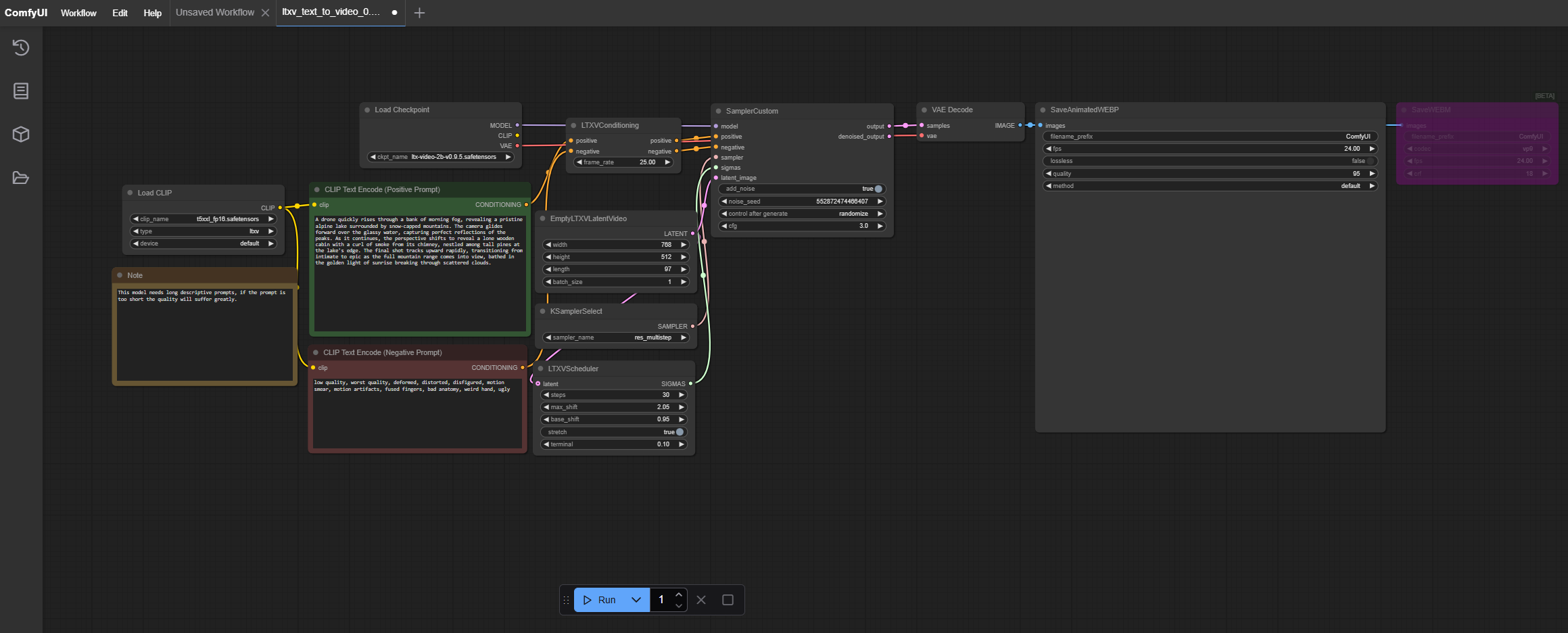
ComfyUI is a node-based graphical interface that allows you to construct modular AI video generation workflows. For your 7900 XTX, the LTX Video model (specifically Ltx-video-2B-v0.9.5) is an excellent choice for efficient generation. [rocm.docs...] [rocm.docs...]

Setup Highlights:

sweet axleBOT
# sweet axle * **Visual Quality:** It utilizes **ReNeg**, a reward-guided framework that lear...
  1. Environment: Use a Python 3.12 virtual environment and install the PyTorch ROCm wheels. [rocm.docs...]
  2. Workflow: You can load pre-configured JSON workflows for LTX Video to automate the pipeline. [rocm.docs...]

https://rocm.docs.amd.com/projects/ai-developer-hub/en/latest/\_images/comfyui-ltx-workflow.png

ltx workflow (from rocm.docs.amd.com)

3. FastVideo with TeaCache: Inference Acceleration

If you are using models like Wan2.1, you can significantly speed up inference using TeaCache (Timestep Embedding Aware Cache). This is a training-free approach that reuses model outputs between consecutive timesteps when the differences are minimal. [rocm.blogs...] [rocm.blogs...]

sweet axleBOT
# sweet axle 1. **Environment:** Use a Python 3.12 virtual environment and install the PyTorc...
  • Efficiency Gain: In our tests, enabling TeaCache reduced generation time from 118 seconds down to 72 seconds for a 50-step generation. [rocm.blogs...] [rocm.blogs...]
  • Attention Backends: FastVideo supports Flash Attention 2 and 3 natively on ROCm, which further optimizes performance on your GPU. [rocm.blogs...]

Summary Comparison

sweet axleBOT