#[solved] Filament keeps breaking off/jamming in the hub
1 messages · Page 2 of 1
 fleet sapphire
can you get the tool clear without disassembling everything this time, or is it a whole teardown again
 drifting gyro
Just ran the extruder backwards and pulled this out with tweezers


Then pushed this out of the nozzle
So the colors went from black to blue to red.
I barely saw any blue come out
And saw no res
Red

pushback has been disabled...retry?
fleet sapphire
Do some manual changes, make sure you go through each color
and extrude between
and don't foget to restart after chaing that pushing first too right
wow that was barely english
drifting gyro
Am I the only one to have this many issues
sigh
AGAIN..
always fails the first time it attempts a change.
it was working for a while..months ago.
fleet sapphire
When you pick this back up tomorrow, restore the pushback to 18 and then run the debug script so we can see the configs as they are now.
It's probably worth trying buffer ramming to load filament in the toolhead. This will use the expansion of the buffer rather than the filament sensor to ensure that filament is loaded to the toolhead. It's worth a shot at least. https://www.armoredturtle.xyz/docs/afc-klipper-add-on/installation/buffer-ram-sensor.html#configuration
Armored Turtle Project Documentation
drifting gyro
Well
during all this, the grub screw on lane 2 decided to leave the chat and come unscrewed, meaning it couldnt grab my lane 2 filament
and i ended up stripping the grub screw.
after getting it tight...
im trying tip forming for shits and giggles next.
drifting gyro
Welp I actually got somewhere with tip forming even though it clicked a lot

until i got a timer too close crash..
drifting gyro
with the buffer thing it does the exact same thing, shaking/clicking like crazy
maybe worse actually.
fleet sapphire
There’s a setting for ttc mitigation that you can enable
https://www.armoredturtle.xyz/docs/troubleshooting/troubleshooting.html#general-unreliability
trsync_update
Armored Turtle Project Documentation
I had another idea for you, to try with cutting. You could make the pushback massive, add another 20 mm, so that the opening to cooling tube does not have filament sticking up anymore. You’ll get the squirt but you’re over the chute. Increase tool_stn by the same amount. You will not have to poop as much.
I suspect that maybe leaving that opening free for the new filament may help guide things better in this terrible filament path.
I think that might be what is helping with tip forming, leaving that tube open. But tip forming leaves you open to strings and bad tips and blobs jamming it up.
Before you test this make sure you cut the tips off all your spools so they’re nice to start. And you might want to open the extruder and make sure it’s clean too
drifting gyro
Ram sensor enabled, confirm tool is loaded
04:15:14
R  _____     ____
E /      \  |  o |
A |       |/ ___/
D |_________/
Y |_|_| |_|_|
  Turtle_1
04:15:14
R  _____     ____
E /      \  |  o |
A |       |/ ___/
D |_________/
Y |_|_| |_|_|
  Turtle_1
02:51:56
// Retries: 0/5 Probed points range: 0.006943 tolerance: 0.006000
04:15:14
Warning: Both advance and trailing switches are triggered on Buffer Turtle_1. Please check your buffer switches or configuration.
04:15:14
Warning: Both advance and trailing switches are triggered on Buffer Turtle_1. Please check your buffer switches or configuration.
hmm...
the fuck

 hexed jacinth
🤷🏼♂️ those switches seem to be trouble
drifting gyro
I cant catch a fuckin break
what doesnt make sense is its showing triggered right now but its not.
so..another broken wire??
hexed jacinth
Continuity is what matters, if you got a meter I’d check that way
drifting gyro
it doesnt look broken
fleet sapphire
This could have been causing your problems in your prints too
hexed jacinth
Electricity doesn’t lie
drifting gyro
it was working..
hexed jacinth
Yes that is normally how broken wiring is
drifting gyro
It was indeed broken under the heatshrink...
flimsy ass fuckin connectors 🤬
or the kid in the factory in china just cant make a good solder joint
fleet sapphire
You're not being helped having that buffer flapping around in the breeze. You don't need a rear skirt to connect it to the extrusion, if you put your bottom extrusion on
hexed jacinth
Even without that there is a strain relief tab on the hub
drifting gyro
switch has been repaired..
drifting gyro
fleet sapphire
You're not being helped having that buffer flapping around in the breeze. You do...
It also doesnt help if I have to move the BT every time I have to unclog my hotend
hexed jacinth
That’s beside the point of supporting wires
drifting gyro
I am wanting to print a multicolor skirt but I cant really do that with filament changes being unreliable
drifting gyro
hexed jacinth
Even without that there is a strain relief tab on the hub
where?
hexed jacinth
Literally next to the switches
drifting gyro
fleet sapphire
I had another idea for you, to try with cutting. You could make the pushback mas...
Ok, so try this now?
Should I keep it in "ramming" mode..?
well..I am getting fuck tons of clicking on the FIRST filament load, so i know its not leftover filament..
yea this ramming is worse.
hexed jacinth
Let’s be more specific please, clicking when?
drifting gyro
During load.
while its over the poop chute and actively pushing filament into the hotend.
hexed jacinth
What do you mean by load? Ok well that has nothing to do with ramming then unless you’re parking above the chute anyways
You might need adjust tool_stn
drifting gyro
Well it takes more force to trigger the ramming effect than it does the actual toolhead sensor.
so it keeps pushing until the force overcomes the springs.
hexed jacinth
But that will be the BT clicking not your toolhead
drifting gyro
I mean...
the PTFE in the chamber shakes like its reachin climax
and it goes click 100x
hexed jacinth
Like I said be specific
fleet sapphire
You should probably recalibrate the bowden length
drifting gyro
hexed jacinth
This was my point, the click doesn’t happen until after the ramming is done
fleet sapphire
Good point, and if it's the toolhead, there's still lots of crap there we're in the middle of addressing
drifting gyro
when using the actual toolhead sensor it wouldnt do the clicking on the first load but it does with ramming.
hexed jacinth
Did it extrude?
drifting gyro
With ramming? no
fleet sapphire
What's a first load anyway, this seems like coincidence since you had SOMETHING in there before right. Anyhow, with your sensor being 10-15 mm from the top of the gears, that's a different tool_stn value now
drifting gyro
Ramming just isnt gonna work for my setup. It keeps having NEW issues
hexed jacinth
It probably would have done the exact same with a sensor then. Filament had to go somewhere for the extruders not to skip
drifting gyro
New issues
- Clicking on FIRST load (didnt happen until 2nd load before)
- When unloading, it ALSO makes a bunch of clicking/skipping noises
- This
!! lane2 Buffer did not become compressed after 10 short moves.
Setting and increasing 'tool_max_unload_attempts' in AFC.cfg may improve unloading reliability
Ugh, that one
The springs are SUPPOSED to make that work
But ok. I'm on team let's not mess with this right now
drifting gyro
my poor extruder man
fleet sapphire
@hexed jacinth the context here is that when it can pull against the extruder it will collapse the buffer every time springs or no, but for this to work it has to collapse on its own. And we already saw how marginal it was.
drifting gyro
gonna have to fully disassemble again.. this shit is PACKED.
fleet sapphire
Good, you can clean out the remenants of your tip forming experiment
fleet sapphire
Ok. Well, after that then, undo the buffer thing, and let's go after the changes to increase pushback and get the cut piece all the way down into the cooling tube
drifting gyro
Well I have no idea what this little piece of plastic is for but I have a feeling it's probably not a good thing that it fell out of somewhere while taking all this apart.
 fleet sapphire
It looks broken on the bottom edge
drifting gyro
yea...
no idea what it goes to... 😅
tool_stn: 68.0
variable_pushback_length : 38
variable_retract_length : 20
 fleet sapphire
What's that?
 fleet sapphire
Ok, make sure all those are out
The numbers look good to start. T command, extrude until new color. Then unload
drifting gyro
Das nasty
 fleet sapphire
no other t commands, nothing else
After the unload I want you to look in that little "window" you have there, and see if the piece that got pushed down is still visible.
fleet sapphire
This color is all the way coming out?
drifting gyro
I extruded 10mm and got 10mm of filament
fleet sapphire
Of this one you just loaded
fleet sapphire
Then yeah unload
It might spurt a bunch out on unload now
In fact, I expect it to
drifting gyro
 fleet sapphire
Oh, that's from the unload?
drifting gyro
drifting gyro
fleet sapphire
Oh, that's from the unload?
I guess I didn't pay attention to exactly when it appeared. After it unloads it doesn't set the extruder temp back to 0 so it could be ooze, could be leftovers from when I extruded 10
fleet sapphire
keep the nozzle hot, can you push that down a little with your poker?
fleet sapphire
Until you don't see it, maybe keep track of how much you pushed, approximately
fleet sapphire
that's ok
drifting gyro
I can really only see it on video from that specific angle
fleet sapphire
the other thing you can do is kinda guess based on the measurements yesterday, put a piece of tape on your poker
drifting gyro
It does ooze very slowly
fleet sapphire
you want it to be pushed down so it's all the way in the heat sink
drifting gyro
It seemed like the poker went through it..?
I think about 68mm is when it started pushing out the nozzle?
fleet sapphire
Hmm. I'm starting to doubt if our pushback is working
But why don't you bump it up another 10, do the same thing as before
fleet sapphire
nah, you can load normal
just poke it down like that if it's still visible
keep going by 10 until you don't see it or until it gets stupid, lmk what you come up with
drifting gyro
hard part is I think the poker goes through the filament or next to it or something
oh its BEEN stupid
I probably shouldve used a different color..
So it made a bit of a grinding noise during the cut
This much came out of the nozzle

lets do a diff color..
drifting gyro
Still not a fan of the grindijng
fleet sapphire
If you're hearing grinding, try to lower variable_extruder_move_speed, it's probably 25, try 20
fleet sapphire
I don’t think we were managing to push it down much if at all before
drifting gyro
Its pushing down now?
fleet sapphire
Presumably, but if you still see it after unloading not enough
 fleet sapphire
Keep going
fleet sapphire
That’s what I’m saying, this might get stupid. Maybe what you can do is just feel to the top of it with the poker each time and see if you’re doing anything to it
drifting gyro
pretty soon were gonna have 1ft of filament sticking out
I cant feel the top of it, it just pushes through..
maybe its still partially molten or something
fleet sapphire
Hmm
Well at the end of this, we can bump the retract up, and that will counteract
If you have stuff squirting out after the cut, we’re doing something. The question is if that keeps getting bigger.
Because some of the pushback is done directly on the piece below the cut, but the last part of it is done by filament on top of the cut pushing down on it
drifting gyro
It just full on shit on the bed
fleet sapphire
Perfect
drifting gyro
 fleet sapphire
I think you’ve done good. Bump up the retract by 10, it should reduce the purge amount
drifting gyro
roger..
fleet sapphire
T command, extrude, t command, extrude etc
drifting gyro
Am I just looking to see if it poops less
fleet sapphire
You’re looking to see if it loads more reliably
drifting gyro
The problem is last night I did like 15 T commands, worked beatuifully. Tried an actual print and it failed on the first change attempt
gonna do some T commands now though.
fleet sapphire
At least you’ll see how much of a problem this new squirt is
drifting gyro
Ok I think it pooped less onto the bed, but it still made the grinding noises while doing it
its definitely gonna be a problem
fleet sapphire
Is this your now broken extruder bc of the piece that fell out?
drifting gyro
fleet sapphire
Reduce the pushback by 5 add 5 to retract
drifting gyro
fleet sapphire
That’s still with the new value?
drifting gyro
Trying new value now with the -5 +5
fleet sapphire
Ok
drifting gyro
I am thoroughly confused
The cutter arm is getting stuck in for a few seconds now
and nothing is coming out
fleet sapphire
Yeah, that’s a problem
drifting gyro
what da hell
fleet sapphire
Ugh
drifting gyro
I mean
it didnt poop on the bed, didnt grind, and the next color loaded successfully..
is it a problem? 😭
fleet sapphire
lol well it’s going to be inconsistent
drifting gyro
yeah..
fleet sapphire
Make the variable_cut_dwell_time 500
drifting gyro
done
fleet sapphire
one sec
I'm not sure how much that will help, since that stops it in the middle of the cut
There's no other delay between that we can change though
drifting gyro
It seems repeatable too, I did it twice just to make sure
fleet sapphire
Try it with the delay, I dunno maybe it’ll help? We can also mess with the macro if it doesn’t
This is what rip length is supposed to fix, but it isn’t set up for the cutter above extruder.
drifting gyro
phone freakin out
Here's what happens if I set pushback back to 68 and retract to 30
 drifting gyro
yes 63 pushback 35 retract.
fleet sapphire
This is getting stuck before the pushback happens
Put that delay in the macro there, let's see if this helps give it some time to click back before we smash into it with the filament
drifting gyro
Should I change back to 68 or 63
fleet sapphire
Go back to 63/35
drifting gyro
which macro is that? cut?
yup
I have no idea if it worked or not
im not getting the click of death during load right now
the cutter gets stuck in for like 5-6 seconds
fleet sapphire
Bummer
drifting gyro
at this point i think all i can do is adjust random values by 1mm at a time and hope something works
fleet sapphire
Go back to the smaller retract that was working
See if that makes the arm go back consistently
If it does, drop down the pushback a little bit at a time until you’re swuirting out as much as you can stand
drifting gyro
20 I think it was?
fleet sapphire
I thought 30 was ok?
drifting gyro
ill try 30
Welp
I went down to 25 retract/63 pushback just to see and the blade is still getting stuck..wtf
I cant get the blade to not stick now
fleet sapphire
Well that’s good. I wonder if too much retract is actually getting soft filament in there that sticks it
Back off pushback to make it usable, but keep as much as you can stand
We don’t even know for sure if this will help in a print, everything is a guess at this point
Oh I misread it was sticking at 25
drifting gyro
Sry for buying such a piece of shit printer
fleet sapphire
I dunno man, it’s a challenge lol
drifting gyro
changing retract back to 20 i guess
fleet sapphire
If that really helps 🤷♂️
At some point I might try to code a rip that will work for you but I can’t do it with just a macro I don’t think
drifting gyro
i done fucked up now
lane4 Failed to unload filament from toolhead. Filament stuck in toolhead.

FFFF
fleet sapphire
How did that happen?
drifting gyro
Maybe cause me changing it to 20, idk man
if u remember though, I was originally getting that CONSTANTLY which is why i even made the new hub
that seems to have overall "fixed" this issue..
variable_retract_length           : 25
variable_quick_tip_forming        : False
variable_cut_count                : 1
variable_rip_length               : 0       # Distance in mm to retract to aid lever decompression (>= 0)
variable_rip_speed                : 3         # Speed mm/s
variable_pushback_length          : 68        # Distance in mm
variable_pushback_dwell_time      : 20        # Time to dwell between the pushback
Heres where I am right now.
- The blade comes back out after about 1 second which is faster I guess
- It makes the grinding while extruding
- Were back to small poop on the bed
fleet sapphire
1 second is much better, but still too long with the pushback, make that delay 2000 ms and see if the cut is at least consistent
drifting gyro
I wonder if the clicking is because the blade is stuck in?
fleet sapphire
That's what I think
drifting gyro
let me try manually pulling it back out right away
nope thats not why
it doesnt start pushing/clicking until after the blade comes out
fleet sapphire
When was the last time you checked your extruder tension?
drifting gyro
In the BT?
fleet sapphire
yeah my flashforge is the same
drifting gyro
heh
fleet sapphire
How about 15 on variable_extruder_move_speed
drifting gyro
yes
I hit save & restart in the config editro
didnt click until the very end this time..
only maybe 4 clicks instead of 20
gotta love how clicks is our measurement of fuckage.
fleet sapphire
only mildly fucked, that's pretty good
Let's treat the clicks as it's doing something
it's not that alarming
right? tell youself that
drifting gyro
I mean its unnecessary wear on the extruder
fleet sapphire
Well, I'm going to have you start backing down the pushback by a little bit. Don't measure on clickage, but measure on how much is squirting out. You want some, but not a so much you gotta change the sheets
I suspect that once this is reduced from the crazy level it's at now, it won't be clicking as much either
drifting gyro
I changed extruder speed to 8 for shits and giggles to see if it makes a diff..
ONE CLICK
fleet sapphire
fwiw, the purge speed is variable_purge_spd, which is probably pretty close to that number now
you're basically doing the same here
drifting gyro
Well my variable_purge_spd is 5
fleet sapphire
look, you're trying not to purge a ton here though, right?
fleet sapphire
yeah I don't know what that is and I'm not googling it
drifting gyro
Johnnys depps ex that shit on his bed.
drifting gyro
This is how much came out during the cut. It was more in the form of a blob but I pulled it apart to show length
 fleet sapphire
Drop it down until you can make it to the bathroom without losing it on the bed
drifting gyro
ok
fleet sapphire
Hopefully that's still bigger than the number we found yesterday
drifting gyro
dropping from 68 and 65..
 fleet sapphire
nah that's stupid
I mean SHOULD it be? Yeah in a perfect world. But I suspect you're having to push through your buffer
drifting gyro
blade is getting stuck again :/
fleet sapphire
Remember, this pushback doesn't happen until AFTER that cut.
drifting gyro
All I changed is this
variable_pushback_length : 52 # Distance in mm
fleet sapphire
This is coincidence
drifting gyro
hmm..
I would agree I guess because it worked at 52, I dropped it to 45 and it started, now its doing it at 52 as well.
fleet sapphire
This has probably been happening all along, and you just haven't noticed
drifting gyro
Hmmmmm
this button looks more and more attractive every second

The graveyard grows..
 fleet sapphire
It gets stuck because your buffer is putting pressure on the blade after a cut
drifting gyro
fleet sapphire
I mean, we could put pushback back to zero (which is precisely why I did this on the flashforge!) but you were having problems with that
If this arm is getting stuck, that might be a better solution space to explore
At least until coming up with a rip solution that will work here
drifting gyro
https://i.imgur.com/Nte02yQ.png someone else with the same printer just posted this picture..
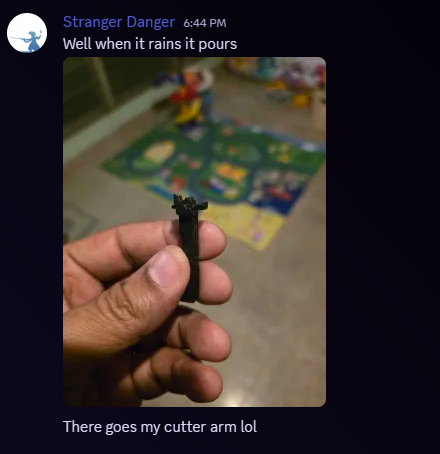

looks...awfully similar to the piece i lost earlier huh..
fleet sapphire
 drifting gyro
Mines still good

When it gets stuck and I manually have to pull the lever back out, it makes like a squeaking noise and has resistance..
fleet sapphire
Eh it sounds like filament squishing it
drifting gyro
but there shouldnt be filament there
fleet sapphire
When it gets stuck during a cut?
fleet sapphire
Yes, it’s pushing from the top, the spring force of the buffer
You know one thing we didn’t consider was the load speed, maybe we need to turn this down
Clicking during load, maybe that’s making things inconsistent
drifting gyro
load speed? how would that affect it?
fleet sapphire
Oh, well I jumped ahead a little, we're going to try to make it work with no pushback, so the cutter getting stuck isn't a problem
but then tool_stn has to push that piece back down
drifting gyro
which is currently 68
fleet sapphire
tool_load_speed: 25
drifting gyro
is that sensor to nozzle TIP or nozzle entrance?
currently 5
we reduced it to try cutting down on load clicks
fleet sapphire
technically, it's sensor to nozzle, but practically, it's sensor to wherever filament is filled up in the extruder
drifting gyro
ok
fleet sapphire
oh is that the same value
drifting gyro
seems like it?
drifting gyro
whats this
drifting gyro
let me try
fleet sapphire
Set pushback to zero, lower the tool_load_speed
You'll need to lower tool_stn as well
drifting gyro
tool_load_speed is already 5
fleet sapphire
what were you changing then?
drifting gyro
variable_extruder_move_speed : 8 # Speed mm/s for all extruder movement
fleet sapphire
[AFC_extruder extruder]
tool_unload_speed: 25           # Unload speed in mm/s when unloading toolhead. Default is 25mm/s.
tool_load_speed: 25
different
drifting gyro
I was changing the one under here the whole time [gcode_macro _AFC_CUT_TIP_VARS]
drifting gyro
fleet sapphire
How about 15 on variable_extruder_move_speed
thats what you told me to change
i am confusion
fleet sapphire
Yes, this is a new value, for a new thing we're messing with
the speed of tool_stn
drifting gyro
ok its currently 8...leave it?
fleet sapphire
No, set it to 8
fleet sapphire
And you're going set pushback to 0
drifting gyro
and tool_stn is currently 68.0
drifting gyro
fleet sapphire
And you're going set pushback to 0
thats done
fleet sapphire
We might need to mess with tool_stn
drifting gyro
ok
fleet sapphire
This is the one where we look for filament coming out right after the load, when poop is disabled
drifting gyro
ok so, keep it at 68 for now?
fleet sapphire
Probably fine
fleet sapphire
Ok, you won't be able to measure tool_stn like this, so you'll need to load it once, then do a toolchange. You can disable poop in the UI just for this test
You want some to come out, not a huge amount
fleet sapphire
Yeah. Turn off poop temporarily like you did before. Then extrude, then do a T0 and watch. Extrude and iterate. Remember you can mess with this value in the ui.
fleet sapphire
What are you doing with your hand in there
drifting gyro
TAKING A VIDER
drifting gyro
words are hard
fleet sapphire
We've done enough that I think you have SOME idea what's going on
fleet sapphire
Not during the cut, but just after load
If that was just an observation, then good as it should be
fleet sapphire
Well in between there you’re re tuning tool_stn
fleet sapphire
When you have a little coming out at the load, with poop off. Make sure you extrude enough in between to fully flush.
I’ll check back in later, lmk how it goes when you get back to it
drifting gyro
The problem is during load, its still going to the park position so I cant see shit (even with poop off) so going to the chute has to be turned off as well
thanks
If I extrude between tool changes won't that invalid the results of the stn calibration?
Because the point is to see how far the filament has to go until it hits the top of the old filament in the extruder
But if I extrude between changes won't it move the old filament to an unknown location
fleet sapphire
You need to fully flush between changes. You’re trying to tune the load so that when the new filament comes in it doesn’t push too much old stuff out. Bc that’s what poop will do, once re-enabled. You’ve got it disabled just so you can see, but you still have to do it.
drifting gyro
So even at the previous 68, none of the next color comes out.
So I load red, extrude 40mm until red shows, then change to blue... no blue comes out until I do the manual 40mm extrusion
drifting gyro
The magic number is...

tool_stn: 105.0
it clicks quite a bit at the end right before the next color comes out but it does get to the next color, just barely
 fleet sapphire
Hang on I think there’s a disconnect here. Tool_stn is just until anything comes out (old color). Poop takes you to the next color
drifting gyro
tool_stn: 30.0
thats the one.
tiny tiny bit of ooze.
I guess based on that, if 105 is until the next color comes out and 30 is until the previous color comes out... we can estimate that the piece left in there is ~75mm.
So would it make sense to try retracting 30 and pushing 30?
fleet sapphire
No, we do not push anymore, and retract is fine where it until proven guilty of other crimes. What it means is that 75 is around your minimum poop amount.
drifting gyro
oh I thought pushback was needed?
fleet sapphire
Needed is presumptive -- I really wanted to try it. But we couldn't do it because the cutter is getting stuck. So we can't try it until there's a rip method to unstick your cutter.
In the meantime, we did discover that some of the extrusion moves were a little fast for you system, and you've tuned tool_stn.
I think you should re-enable poop, and go for a few test tool changes
Before that one question - I just finished watching your video, and just out of curiosity, if you go up to say, 35, does it run a lot more filament out?
drifting gyro
Not a LOT more, but definitely more than I feel comfortable dragging over a print mid print
fleet sapphire
ok. It won't drag over, remember this one normally happens over the bucket
fleet sapphire
I'm just asking because in one video I can't tell the difference between perfectly tuned (which this could be) or too short
drifting gyro
let me try with 35
fleet sapphire
And you do that by overshooting, and then backing off a little
fleet sapphire
Ok, yeah that's too much. It was a nice load though
fleet sapphire
lol So your number is probably around 30. Feel free to tune it more, but you can probably run with it
drifting gyro
I did it 1mm at a time earlier and settled on 30
fleet sapphire
great, thanks for confirming that
so yeah, run some Ts
with poop on
still do some extrusion between
drifting gyro
and wait to see how long it takes to fuck up
fleet sapphire
yep
drifting gyro
im gonna try that damn turtle again...
that seems to be the quickest way to make it break.
fleet sapphire
godspeed
drifting gyro

lane1 Failed to unload filament from toolhead. Filament stuck in toolhead.
The first change.
cant make this shit up
fleet sapphire
what went wrong
drifting gyro
No idea..maybe it didnt cut properly..?
drifting gyro
It was stuck I think... I did another cut, unset_lane_loaded and did an eject.
fleet sapphire
ok, so you might have some shard shit in there, can you look at it now or did you roll on?
drifting gyro
there is definitely a piece stuck in there.
cant find my tweezers to even attempt pulling it out.
ugh..
ill go back to suffering with this shit tomorrow
thanks for the guidance today.
fleet sapphire
One note, fwiw, because you don't have pushback anymore, I do expect to see a piece of filament right at where the cutter is
drifting gyro
I wish I knew why it doesn't always cut reliably
I noticed sometimes it makes a very audible click when it cuts, sometimes it's faint and sometimes there isn't a sound at all
I think that's why I had it set to 3 cuts
But I didn't realize it would retract between each cut or whatever
fleet sapphire
it doesn't. you could try this again, it was disabled out of fear this was causing problems, but without evidence
The sticking cutter might actually help you here if it really went all the way though
since your stub is being held there, btw, you can probably roll your extruder backwards and pull it out
drifting gyro
The stuck piece is too short to stick out the top, it's beneath the coupler teeth
fleet sapphire
oh there is an extra thing in there?
 fleet sapphire
I can't even imagine, ok, sounds like a mess
drifting gyro
Lmao yep
fleet sapphire
I’m going to be driving all day today, so I won’t be help, but the other teaching turtles can help you with this if you need. What I want you to do today is go through the armored turtle docs regarding slicer setup, and make sure that this is all correct. Macro calling, slicer multimaterial settings, etc. considering that you’re always fine until you start a print.
drifting gyro
The last issue I ran into was just the filament not cutting properly
drifting gyro
The only difference was I was missing this from machine start...so I added it
M104 S0 ; Stops OrcaSlicer from sending temperature waits separately
M140 S0 ; Stops OrcaSlicer from sending temperature waits separately

Welp..
I figured out what that broken piece was
It is part of the cutter arm
Not sure if it's related to my issue but it broke for a reason

 topaz lion
Umm, that probably does not help make the cutting reliable
drifting gyro
Already sent a request to support to get a new one
But in the meantime I found a file to print one...
If I could get filament to load...
First load I tried, clicking like crazy.
fleet sapphire
drifting gyro
Not sure if it's related to my issue but it broke for a reason
That your printer would prefer to remain monochromatic if it has any say in things?
drifting gyro
lane1 Failed to unload filament from toolhead. Filament stuck in toolhead. bruh
fleet sapphire
drifting gyro
It's unclear, what you're pointing to in the video, what starts there?
drifting gyro
fleet sapphire
It's unclear, what you're pointing to in the video, what starts there?
The bottom of the filament piece. So it did a cut and unload.. that is the BOTTOM of the piece that is left after the cut/unload.
fleet sapphire
Oh, ok, yeah. you mean, just that we can actually see it now without you having to zoom in with your camera inside of the hand crusher
So, any idea what's going on with the unloads failing? Is it the cuts?
drifting gyro
I have no idea.. I put in a fresh blade today and everything.
fleet sapphire
Did you print a new blade holder?
drifting gyro
This last time it failed to unload, the extruder sensor was actually not triggered at all. All I did was just UNSET_LANE_LOADED and ejected, came out just fine
drifting gyro
fleet sapphire
Did you print a new blade holder?
Not yet
Their support will send me a new one but I will work on printing a new holder
fleet sapphire
drifting gyro
This last time it failed to unload, the extruder sensor was actually not trigger...
Can you do a debug dump for me?
I want to see what led up to the failure, there's some logging around that. It doesn't look like that could be true with the sensor though, what triggers this is if the sensor still detects filament
Can you confirm that the cut did work though?
drifting gyro
fleet sapphire
Can you confirm that the cut did work though?
The cut must have worked cause I ran an eject which didnt do another cut
fleet sapphire
Unless it pulled a melty tip back with it
So you could also fully eject the spool and look at the end, and show me what that looks like
drifting gyro
I already have the next print going 😅
fleet sapphire
If you're cutting successfully and failing this check, it's one thing. But if the unloads are failing because the cuts are failing, it really is working as designed
drifting gyro
So remember that "y" piece that we were talking about before
apparently im not the only one with the issue. Another guy modified it to make the filament channel wider
so im printing that too.
fleet sapphire
nice
There's another clue that you've been inserting uncut filament back in, which was in your video. That shit you pulled out with the tweezers is filament whisps that come out when you pull straight out of the hotend
drifting gyro
So I need to not pull out
fleet sapphire
that's not what she said
drifting gyro
LAME
fleet sapphire
just cut off the tip
if you do it, just eject the spool all the way, inspect the tip and cut if it if you have to, before putting it back in
drifting gyro
the weird thing is there was like 10mm between the bottom of the filament and the top of the hotend
fleet sapphire
In your video?
drifting gyro
yea
fleet sapphire
That's what I was asking, so I thought it was all one piece going all the way down
at what point did you take that video?
drifting gyro
Right after a filament unload
I think...
after this print ill do just that again.
fleet sapphire
The only way that seems possible is if you loaded and did not extrude out to the color you just loaded
AND if there was nothing in there before too
unless... was there a melty tip on that piece?
fleet sapphire
ok. well. next time just take a good pic of it, you're making me guess here
drifting gyro
im also having to guess
fleet sapphire
it's possible that what you're looking at there is what is left after the retract, since we're not pushing it back down
So your next action item is to keep an eye out for this failure to unload. Unload the same way you have been, and eject, and take a picture of the tip.
drifting gyro
By same way I have been...you mean by using the unload command? or by switching filaments
fleet sapphire
UNSET_LANE_LOADED and shit if you do that, you can straight up eject from there
that's probably the cleanest way to recover from that
drifting gyro
Yea it just successfully unloaded this time after the print ended
fleet sapphire
It's suspicious that you started seeing this problem after breaking the cutter
But if you're getting good cuts and this is still failing, we can fix that too
drifting gyro
It happened quite a bit before as well which was the whole reason I was recommended to make the new hub
fleet sapphire
I see
That makes sense with the old hub, since you would have to potentially take up the entire length of the hub to get off the sensor
right now, it should move about 40mm before giving up, which does seem like plenty
drifting gyro
Ummm...
fleet sapphire
unless you haven't actually cut
fleet sapphire

 fleet sapphire
lol
Ok, so yeah, that's what's left after the retract
generally why we want to to the pushback, while that's... GD. Not hard
drifting gyro
So it is pulling fully out of the hotend
fleet sapphire
Yeah, and it might be ok
In fact, now you can see how much more you can probably retract without issue, assuming these will go back in
but if you have failures to load, this might be why
drifting gyro
What should I do next master
fleet sapphire
Install those new parts, get back to it
drifting gyro

So while testing the cutter to make sure it moved slowly I cut that piece of filament that was still in there.
ill just push it out with the poker.
Alright new parts installed.
Every day we stray further from God
 fleet sapphire
This printer is most clearly the work of someone other than god
drifting gyro
satan
everyday it becomes more like a voron
if only i could have one of them sexy stealthburners
Whats next cap
try to break it?
fleet sapphire
fuckin send it
drifting gyro
cereal comin up..
💀
my black filament is stating to get to the level where it doesnt stay weighed down properly during moves so im gonna start getting filament falling off the spool and tangled..
So during the load it clicked at the box turtle then after it left the poop chute there was a CLICK at the toolhead? About halfway to the center of the bed then it took extra extrudes to reach the correct color?
its repeatable..
its not the cutter getting stuck
While making the clicking noise at the BT, nothing is coming out during the poop
0:37 in that video theres a weird loud click/crack sound
at first i thought maybe the blade was getting stuck but its not
fleet sapphire
can you peek in that window and see if it's the mushroom tip?
 fleet sapphire
are you able to back the extruder out by hand, and see if that red is just stuck right there with the bad tip?
Or, I guess you could use the machine to do it too
drifting gyro
Probably not because the blue should be pushing in right behind it
ill try the machine
got more power
Should I heat up the hotend for this
I try not to let it sit at temp for too long casue the filament can harden/compact
fleet sapphire
Yeah, might as well
drifting gyro
when we finally figure all this out do i get a special role for being the most special boy
fleet sapphire
I wouldn't doubt it
fleet sapphire
ffs
fleet sapphire
if you back it up you just need to give it some help with pliers. it's ground a divot and can't grab it
not sure if there's enough room to grip though
also, you might want to disconnect the bowden out the top so it's not pushing into blue
drifting gyro
I did disconnect the Bowden
I can't get a grip on it with my tweezers..
Got it

 fleet sapphire
not quite what I expected to see
drifting gyro
Heard that before
fleet sapphire
if it was a good surprise, then congratulations
fleet sapphire
Sounds good. I'll be curious to know if the cutter still gets stuck. If it does I'll finish up the rip changes so we can do pushback. No pushback is looking like a problem.
fleet sapphire
Ok nice. I won't be around until later, but you can maybe backtrack through where we were when your cutter started sticking, and see if you can get a pushback back in there as big as you could without getting too much squirt
I think that's where we were
drifting gyro
Keep tool stn the same
fleet sapphire
I think it should still be good. You should verify and re-tune if not, your tuning on it was good
drifting gyro
It's probably fine...
drifting gyro
Not working on the printer today. Decided I wanted to have a peaceful ish day 😅💀
Qidi is sending me a new extruder tho
drifting gyro
This is as far down as my extruder can "pushback" the filament

It makes some grindy grinds
drifting gyro
Kinda looks like the purple (printed) blade holder moves the blade in a tiny bit more...? it keeps scraping the filament against the blade while loading/unloading even with the blade/cutter arm in resting position..
Yep the blade sits in a completely different spot with the printed one 💀
topaz lion
Yeah the purple one looks like filament could get caught on the blade
drifting gyro
yeeeeppp..


life is a fitlhy whore!
probably better off with the broken one..
Qidi support is sending me a whole new extruder under warranty (https://us.qidi3d.com/products/plus4-extruder) which will include all this shit..

QIDI US Store
Upgrade your Plus4 with a new extruder! Ensure consistent filament flow for high-quality 3D prints. Reliable performance for demanding projects.
Also looks like the 2 extruder gears aren't perfectly inline


Boooo
im trying to FIX problems not cause more 👎
drifting gyro
https://www.printables.com/model/1240903-qidi-plus-4-extruder-cantilever-arm TIL other people with my printer have printed these cantilever arms to fix extruder grip issues
 drifting gyro
So..I discovered more shit today
- Long screw holding the tension arm in place
- Bowed tension arm
- Cutter arm was broken, and the new one causes the blade to scrape the filament
fleet sapphire
Well, good finds! Hopefully once this is all sorted out things will go a little more smoothly. At least the whole boxturtle and buffer part of this have gotten a workout and seem to be behaving.
drifting gyro
Im looking into services, currently looking forward to getting this new tensioner arm printed in titanium
I found a shorter screw to put in there
drifting gyro
My bt issues aren't all fixed btw, I keep having issues with rolls not winding back up right
drifting gyro
New extruder is coming tomorrow
drifting gyro

New extruder vs the old one but they say "nothing changed"...hint: the filament hole
also, the new one is miles quieter and smoother
fleet sapphire
Is this one supposed to have ptfe lining it or does it gradually taper down inside?
drifting gyro
fleet sapphire
Is this one supposed to have ptfe lining it or does it gradually taper down insi...
no ptfe lining
I didnt take the new one apart
fleet sapphire
How wide is the new hole?
fleet sapphire
You’ll just need to watch for filament getting hung up on the way down. Maybe it’ll be fine.
drifting gyro
fleet sapphire
You’ll just need to watch for filament getting hung up on the way down. Maybe it...
fleet sapphire
Ah ok. Yeah that’s probably good to go.
drifting gyro
ignore my fat ass breathing
drifting gyro
@fleet sapphire still running into issues of the blade not coming back out properly 😭
drifting gyro
I have a question.. so ive been watching the extruder while unloading and I noticed it retracts, cuts, then pushes back...but it seems to retract AGAIN after pushback..?
fleet sapphire
Well, yeah, it has to move the filament back up after it pushes
if you're having trouble with the blade returning after the cut, we're now back at the spot where you can't have pushback enabled though
drifting gyro
fleet sapphire
if you're having trouble with the blade returning after the cut, we're now back ...
I messed with a bunch of shit and kinda have it working now but still not reliably... i got 1 color change in successfully then the next change, clickclickclickclickclik..
(with pushback)
fleet sapphire
if your cutter is stuck, the boxturtle extruder is just going to jam the filament into the blade, and your toolhead extruder is going to move the cut piece down and then back up into the blade
fleet sapphire
I dunno man, my flashforge didn't have so many problems. I just turned off pushback for this blade return thing and it was never an issue for me
drifting gyro
Every day I grow closer to tossing this fuckin thing from the 3rd story and buying a voron trident.
oh my god man....
back to the CLICKING
Black > Green - Fine
Green > Red - Clickclickclickclick
aka color change 2.
Hmm..
 drifting gyro
@fleet sapphire think I might have to go back to HappyHare. The qidi plus4 community has since made a custom fork of HH that supports the cutter configuration on our printers and apparently they got it reliable..
https://github.com/Wazzup77/Happy-Hare/tree/cutter-extruder heres their fork for anyone possibly wanting to add support to AFC..

GitHub
The Qidi fork of the best MMU software driver for Klipper (ERCF, Tradrack, Box Turtle, Night Owl, Angry Beaver, 3MS, ...) - Wazzup77/Happy-Hare
"It's essentially 3 things:
- make sure the process does not break when the tip position is above the extruder after cutting (HH had this issue, most changes are related to this I think - it retracted the filament with the extruder and MMU after cutting, and thus pulled the molten tip and usually clogged the extruder with molten filament or failed to unload because the sensor never showed empty)
- ripping should be done bidirectionally, but at least push the filament with the extruder.
- tensioning the filament by retracting with the MMU unsynced from the extruder greatly helps cut reliability, I highly recommend this. Even without any actual slack (like a PFS sensor) the bowden tubes can easily provide milimeters of springiness that can be used for this"
Gonna try all this after work and report back.
 normal basin
drifting gyro
Black > Green - Fine
Green > Red - Clickclickclickclick
normal basin
drifting gyro
Black > Green - Fine
Green > Red - Clickclickclickclick
clicking where? Extruder? So something is jamming in the extruder?
Trying to read all the messages here. Is there a tl;dr to the current state of things?
drifting gyro
normal basin
Trying to read all the messages here. Is there a tl;dr to the current state of t...
Just posted it in #boxturtle
Yes clicking in toolhead extruder and sometimes at the BT
hexed jacinth
If it recovers after loading it seems like you’re going too fast
drifting gyro
Recovers..?
hexed jacinth
Like your picture above you said it clicked but then it did the color change successfully
drifting gyro
drifting gyro
Hmm..
See the giant gap between colors? That's how long it takes for the new color to start coming out even though it's pooping etc. cause it clicks/skips the whole poop cycle.
It's not pooping efficiently because of the clicking crap
hexed jacinth
So it is a clog or blockage of some form. But eventually it pushes through that.
drifting gyro
Not always...
But I usually stop it because it just SOUNDS like it's causing damage
So maybe EVENTUALLY it would..
Can't rip because it would pull the filament up into the blade. I tried reversing the rip direction to push it down instead, that didn't do anything. Messed with speeds, lengths..
Dwell times.
Sounds like the HappyHare fork is using the extruder in the MMU to put tension on the filament, then engaging the cutter
So the MMU (bt in our case) pulls back on the filament to create tension, then cuts it while pulling back..
drifting gyro
Here's their macro for cutting
[gcode_macro CUT_FILAMENT]
description: Moves to cutter, tensions filament, and cuts.
gcode:
{% set T = printer.mmu.tool|default(-1)|int %}
{% set sv = printer.save_variables.variables %}
RESPOND TYPE=command MSG="Performing filament cut"
BOX_MOVE_TO_CUTTER

# Tool -1 is unknown, -2 is bypass; don't tension filament with box in these cases
{% if T >= 0 %}
    {% if T == 0 %}
        {% set stepper = "stepper_mmu_gear" %}
    {% else %}
        {% set stepper = ("stepper_mmu_gear_" ~ T) %}
    {% endif %}
    FORCE_MOVE STEPPER={stepper} DISTANCE=-35 VELOCITY=50 ACCEL=50
    G4 P500
{% endif %}

BOX_DO_CUT
FORCE_MOVE STEPPER=extruder DISTANCE=10 VELOCITY=8 ACCEL=100 # Relieve pressure from cutter
GitHub
Contribute to Wazzup77/Bunny-Box development by creating an account on GitHub.
fleet sapphire
Fwiw, I made some changes to support the negative rip that are on my AFC fork. But I haven’t been able to test them because I don’t have a bt set up on my flashforge right now.
drifting gyro
fleet sapphire
Fwiw, I made some changes to support the negative rip that are on my AFC fork. B...
I had a chat with Claude and he helped me make an option to reverse rip direction but it still didn't help lmao..I think using the BT extruder to rip from the top of the blade might be the better solution like theyre doing here
I really don't wanna go back to HH I'd rather adopt my AFC setup to do the same thing for cut..
fleet sapphire
That’s essentially what the negative rip would do, but it required allowing the bt extruder to move on its own during a print
drifting gyro
The MMU they made this for is qidis own MMU called the qidi box but it should work the same..
drifting gyro
fleet sapphire
That’s essentially what the negative rip would do, but it required allowing the ...
Can that be done? Moving ONLY the BT extruder and not the toolhead
fleet sapphire
With a change yes, it’s just a guard in the code
And the extruders get unsynced in the macro
drifting gyro
It's either this or I buy a voron lol..
I'm sick of my printer being less reliable than a Ford car
fleet sapphire
GitHub
Automated Filament Changer Software. Contribute to kekiefer/AFC-Klipper-Add-On development by creating an account on GitHub.
drifting gyro
I realize it's not the BTs fault
hexed jacinth
just replacing the toolhead seems easier than a whole new printer
drifting gyro
fleet sapphire
https://github.com/kekiefer/AFC-Klipper-Add-On/tree/DEV%2Brip_length
I don't think this takes me where it's meant to
hexed jacinth
why? it takes you to his fork
drifting gyro
Oh...thought it was meant to take me to the file that was changed nvm..
So I'm kinda dumb...how do I know what to copy from here..?
fleet sapphire
Yeah, I recognize it’s not so simple to just try. If you’re willing to test this I’ll have to walk you through installing this later
drifting gyro
I'd try anything at this point.
Does this separate the BT extruder from the toolhead during that rip?
https://cults3d.com/:2880186 someone sent me this this morning but uhhh..that's NEXT LEVEL jank

Cults 3D
UPDATED: 4/10/2025
This is to relocation the cutter and add a filament sensor while still being able to use most of the original parts from the printer.
This was made to add the Box Turtle to the Qidi 4 Plus
Parts Required:
1x #4 exacto blade
1x 5.5mm Ball Bearing
1x .3x4x30mm Pen Spring
1x Brass Tube(OD 3mmx.5mm)
1x simple end switch (you nee...
fleet sapphire
drifting gyro
Does this separate the BT extruder from the toolhead during that rip?
Yes, precisely. We will definitely have to play with the numbers a little bit, and might consider allowing a different pull from the top and the bottom, since we have to take out enough on the top to make sure all the slack it out of the buffer
drifting gyro
I'll try it when I get home
Well I'll let u know when I get home cause I'll need help lmao..
drifting gyro
fleet sapphire
https://github.com/kekiefer/AFC-Klipper-Add-On/tree/DEV%2Brip_length
Sooo this is what u have been working on for me? Lol
fleet sapphire
Well I threw this together in an evening a couple weeks ago. But it's going to be your problem pretty soon
I was hoping this cutter issue would just go away with your new toolhead
drifting gyro
So was I...
fleet sapphire
cd ~/AFC-Klipper-Add-On
git remote add kekiefer https://github.com/kekiefer/AFC-Klipper-Add-On.git
git checkout -B DEV+rip_length kekiefer/DEV+rip_length
./update-afc.sh -b DEV+rip_length
Update with "U", say "y" to update macros, and answer "o" (or "b" if you want a backup of your old macro file if you've changed it)
Try a rip length of -10 in your config and restart klipper. This should be more than enough to take up the whole buffer if needed. For this value, it pushes the filament with the toolhead towards the nozzle by +10, and then retracts it with the boxturtle extruder by the same amount. We might actually want to leave the bottom extruder alone, or move it by less, or move it after. This will need to be experimented with.
THIS IS COMPLETELY UNTESTED OTHER THAN HAVING CLAUDE REVIEW MY CHANGES. The thing where we have to unsync the extruders looks good on paper, but there's not a precedent in the macros for it, so you're the guinea pig here.
I'm pretty busy all morning, but I'll be around later this afternoon and this evening to check on you
drifting gyro
I won't be home until like 7 est anyway
fleet sapphire
ok, great. lmk when you get around to this then
drifting gyro
So it retracts, cuts, rips with the BT motor then pushes the cut piece back down?
fleet sapphire
Yeah that's the sequence
This is all of the rip length change at the end of the day:
            {% elif rip_length < 0 and lane_loaded %}
                SYNC_EXTRUDER_MOTION EXTRUDER={lane_loaded} MOTION_QUEUE=
                G1 E{rip_length|abs} F{rip_speed}
                LANE_MOVE LANE={lane_loaded} DISTANCE={rip_length} FORCE=1
                SYNC_EXTRUDER_MOTION EXTRUDER={lane_loaded} MOTION_QUEUE={extruder_sync_name}
            {% endif %}
- Retract
- Tension (retract with MMU only, hold still with extruder)
- Cut
- Rip (retract with MMU, extrude with extruder) @fleet sapphire this is their procedure btw, just got a clear answer
fleet sapphire
This does the cut first, but if it doesn’t work it should be easy to try it that way too
Basically the same, just no tension step
drifting gyro
Sounds good
drifting gyro
fleet sapphire
```
cd ~/AFC-Klipper-Add-On
git remote add kekiefer https://github.com/kekiefer/...
nitro@plus4:~/AFC-Klipper-Add-On $ git checkout -B DEV+rip_length kekiefer/DEV+rip_length
fatal: 'kekiefer/DEV+rip_length' is not a commit and a branch 'DEV+rip_length' cannot be created from it
got it
fleet sapphire
oh whoops I forgot the git fetch --all in there didn't I
 drifting gyro
fleet sapphire
```
cd ~/AFC-Klipper-Add-On
git remote add kekiefer https://github.com/kekiefer/...
drifting gyro
fleet sapphire
```
cd ~/AFC-Klipper-Add-On
git remote add kekiefer https://github.com/kekiefer/...
wait.. -10? negative
fleet sapphire
yeah
fleet sapphire
I'll probably make this nicer, if it actually works
topaz lion
you can still get a voron, you dont need an excuse 🙂
drifting gyro
so the difference I want to see is the cutter NOT getting stuck?
fleet sapphire
The man tends to give good advice, you should listen to him
fleet sapphire
drifting gyro
so the difference I want to see is the cutter NOT getting stuck?
yes
drifting gyro
Should I do an unload or change?
fleet sapphire
It should operate the same way for both
drifting gyro
👀
// AFC_Cut: Cut Filament
19:38:17
// pressure_advance: 0.000000
// pressure_advance_smooth_time: 0.050000
19:38:17
// AFC_Cut: Moving to cutter pin
19:38:17
// AFC_Cut: Retract Filament for Cut
19:38:18
// AFC_Cut: Move to Cut Pin Location
19:38:18
// AFC_Cut: Cut Move...
19:38:22
// AFC_Cut: Final Cut...
19:38:22
// Extruder 'lane3' now syncing with ''
19:38:26
// Extruder 'lane3' now syncing with 'extruder'
19:38:26
// AFC_Cut: Push cut tip back into hotend
19:38:37
// pressure_advance: 0.032000
// pressure_advance_smooth_time: 0.050000
19:38:37
// AFC_Cut: Clearing cutter pin
19:38:57
Lane lane3 unload done t:41.008
Oh yeah, that makes sense it would squirt shit out the bottom lol
drifting gyro
well..
fleet sapphire
did the cutter return?
drifting gyro
variable_retract_length           : 15

# This can help prevent clogging of some toolheads by doing a quick tip from to reduce stringing
variable_quick_tip_forming        : False

# Number of times to run the cut movement
variable_cut_count                : 1

# Retract length and speed after the cut so that the cutter can go back
# into its origin position
variable_rip_length               : -10       # Distance in mm to retract to aid lever decompression (>= 0)
variable_rip_speed                : 4         # Speed mm/s

# Pushback of the remaining tip from the cold end into the hotend
# *Must be less then retract_length
variable_pushback_length          : 28        # Distance in mm
variable_pushback_dwell_time      : 40        # Time to dwell between the pushback
😳
i had pushback on
fleet sapphire
that's ok
drifting gyro
fleet sapphire
did the cutter return?
i kinda forgot to watch the most important part.
fleet sapphire
heh
drifting gyro
nexpected error during CHANGE_TOOL:
19:41:09
!! An unexpected error occurred during CHANGE_TOOL. Please check the logs and report this issue to developers.
what in the fuck
topaz lion
rip, send us your klippy.log
that was put inplace so klipper would not crash if something bad happened, but we need to see the log now
topaz lion
yeah its only in dev branch right now
topaz lion
actually upload your afc.log as well
drifting gyro
fleet sapphire
The value 'fila' is not valid for SENSOR
Script running error
Traceback (most recent call last):
  File "/home/nitro/klipper/klippy/extras/delayed_gcode.py", line 34, in _gcode_timer_event
    self.gcode.run_script(self.timer_gcode.render())
  File "/home/nitro/klipper/klippy/gcode.py", line 241, in run_script
    self._process_commands(script.split('\n'), need_ack=False)
  File "/home/nitro/klipper/klippy/gcode.py", line 223, in _process_commands
    handler(gcmd)
  File "/home/nitro/klipper/klippy/gcode.py", line 151, in <lambda>
    func = lambda params: origfunc(self._get_extended_params(params))
                          ^^^^^^^^^^^^^^^^^^^^^^^^^^^^^^^^^^^^^^^^^^^
  File "/home/nitro/klipper/klippy/gcode.py", line 161, in <lambda>
    handler = lambda gcmd: self._cmd_mux(cmd, gcmd)
                           ^^^^^^^^^^^^^^^^^^^^^^^^
  File "/home/nitro/klipper/klippy/gcode.py", line 324, in _cmd_mux
    raise gcmd.error("The value '%s' is not valid for %s"
gcode.CommandError: The value 'fila' is not valid for SENSOR
actually the error is your trying to extrude and your toolhead temperature is below minimum temperature
topaz lion
 drifting gyro
but...why doesnt it just heat up to meet that temp
thats like complaining the door is closed instead of opening it
topaz lion
AFC does not touch temperature when changing while printing, do the cut lower temperature?
cause AFC set the temperature before cut, so temperature needs to be set back once done cutting
topaz lion
looks like AFC thought temperature was already hot enough when doing the toolchange

 fleet sapphire
heeey
drifting gyro
now what?
fleet sapphire
If you think there's too much getting pushed out after the cut, you could try lowering pushback a little bit?
fleet sapphire
ok, remember we do want to see a little something, because that tells us the filament got pushed back down.
drifting gyro
ok
drifting gyro
That didn't take long
fleet sapphire
What are we looking at here
drifting gyro
Tool Change - None -> lane3
20:13:27
Loading lane3
20:13:27
Setting extruder temperature to 0.0
Uhhh...
so I did a T2, and it SET the temp to 0
what da fuq
(while loading)
so of course its now going to jam
topaz lion
oh, yeah I got a PR out to fix that
fleet sapphire
@topaz lion did I break this with the next extruder temp stuff?
topaz lion
run this command and that should fix it for now
AFC_SET_SPOOL_TEMP LANE=lane1 EXTRUDER_TEMP=210
but set to right temp
drifting gyro
its almst funny in a fucked up sorta way.
topaz lion
fleet sapphire
<@178887472590225408> did I break this with the next extruder temp stuff?
No I did when I sanitized extruder temperature during PREP and force it to 0 if it was set to None
I am actually surprised that not alot of people have found this error on dev, or maybe most people are running spoolman
 fleet sapphire
It looks like Jimmy just merged the fix for that.
cd ~/AFC-Klipper-Add-On
git fetch --all
./update-afc.sh -b kekiefer/DEV+rip_length
then you can delete the local branch we made, after that's done, I didn't realize I could refer to it like that with the script.
git branch -D DEV+rip_length
ughhh...
clicking like crazy when trying to load again
i noticed something this time though.

why did my extruder temp suddenly change to 200 target? it should be 235.
fleet sapphire
Interesting, wonder if this has to do with why you always had clicking problems in the actual print and not in testing
fleet sapphire
slicer temps are right for all your filaments?
drifting gyro
i um....
i have a confession
😭
green nozzle temp was set to 250, red and blue were 200 for some reason, and the plate temp for all 3 of them was 40 instead of 80.. also volumetric flow was 2 instead of 12....
i have no idea wtf happened i did have all of these set..
 fleet sapphire
drifting gyro
green nozzle temp was set to 250, red and blue were 200 for some reason, and the...
fleet sapphire
drifting gyro
green nozzle temp was set to 250, red and blue were 200 for some reason, and the...
I’ve found it’s better to just have one preset for the brand and type, but not different ones for each color. Easier to keep in sync.
 fleet sapphire
 drifting gyro
https://www.youtube.com/watch?v=n36qmQkQH8g This is the guide to install the "upgrade kit" that came out when qidi released their own mmu

Available in the official store: https://qidi3d.com/products/qidi-box
I never got those "upgrade" pieces...
the silicone piece that goes on the wiper, or the "stickers" that go under the wiper arm and on the wiper activation lever.
I wonder if the silicone piece would help ACTUALLY knock filament off the nozzle like its supposed to.
drifting gyro


 drifting gyro
fleet sapphire
https://tenor.com/view/this-is-not-turtle-dr-pol-its-time-for-turtles-it-is-not-...
drifting gyro
fleet sapphire
https://tenor.com/view/this-is-not-turtle-dr-pol-its-time-for-turtles-it-is-not-...

Still got some stuff to iron out, like the weird stringing on the corners of the purge/prime tower, pushback length, and the stupid filament not getting pooped out the back of the printer like its supposed to.
But uhhh..58 filament change success
fleet sapphire
 topaz lion
Oh that's awesome
drifting gyro
W
fleet sapphire
drifting gyro
Hope you're sending that one in for a serial, you sure earned it
drifting gyro
Already posted
fleet sapphire
Nice
drifting gyro
Thanks for all the help and sry for wasting ur time 😓
Clog issue was probably due to filament temps being wrong in slicer and unload failures was due to cut/rip issues.


Next MAJOR issues...
fleet sapphire
Yeah, I was just going to say. Strings on the tower, this is generally excessive tool_stn. If you find it's really inconsistent, the pushback plays in here too.
drifting gyro
the poop keeps clogging the filament chute and causing issues.
The string happens at the point where it lifts up when its finished and goes to the actual print though it seems
fleet sapphire
Oh that's right, you're doing poop
I mean, you could always skip poop, and do the whole purge in the wipe tower
Big wipe tower, but it solves both problems
drifting gyro
Hmmm...
Any idea if theres a way to make the poop clump up into one piece? I would assume there would need to be a surface underneath the nozzle
fleet sapphire
yeah, you'd do the poop on the bed, otherwise it does this string stuff
drifting gyro
If I pooped on the bed, how would I get it to fall off the bed?
fleet sapphire
you kick it off with the toolhead
drifting gyro
I would assume "kick", but there isnt enough free space around the bed to do that like on a voron
fleet sapphire
If you want to get qidi's poop to work the way they intended, you may need to look at what their recommendations. I'm not aware of anyone who does the free air poops here
drifting gyro
fleet sapphire
nozzle doesn't overshoot the bed, you poop on the bed and push with the fan duct
fleet sapphire
All your problems are solved by purging in the prime tower
No need to wipe, no need to poop or kick
drifting gyro
I turned it off as part of the AFC setup guide, is there a reason its normally advised to turn it off?
https://i.imgur.com/Sqf4wMD.png oh..thats why. holy shit
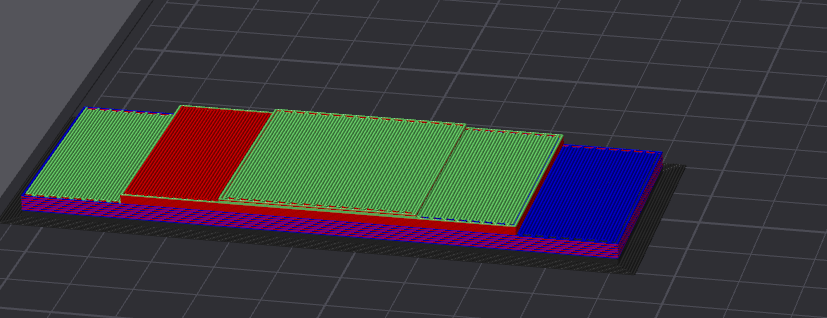


that severely limits my print area
fleet sapphire
How often do you print on the entire bed that you can't spare this?
drifting gyro
rarely, but it is a pretty large area
 fleet sapphire
Most people lose that much to the kick on the bed anyhow. No extra z moves, built in wiping and shit collection
My flashforge has a 150x230 bed and I do it this way
#print-showcase message
 drifting gyro
whys it so...rustic lookin
My serial really should be 666 for obvious reasons lmao
fleet sapphire
I'ma close this ticket now. If you need help with the tuning, once you decide what you want to do, you know where to find us
[solved] Filament keeps breaking off/jamming in the hub
drifting gyro
@fleet sapphire @topaz lion will the macros and stuff be cleaned up so I can feel more confident in it? Lol
fleet sapphire
drifting gyro
<@733163594681679882> <@178887472590225408> will the macros and stuff be cleaned...
What are your concerns? It just wasn’t tested
But ultimately yes, I’d like to get this merged. If there are changes that we want to make to this, I will need your help testing them.
GitHub
Major Changes in this PR
Printers with the cutter mounted above the extruder need to push away
from the blade in two directions after the cut. A positive rip_length
already handled the retract-only...
drifting gyro
fleet sapphire
What are your concerns? It just wasn’t tested
The temps for all the lanes was set to 0, and I had to change them manually through a command to 235 for my petg. What happens when I try to print ASA, PC, PLA or a filament that needs a different temperature? I would assume this value is supposed to be dynamically set depending on filament type, not statically set.
Lol
 fleet sapphire
Jimmy merged the fix in dev while we were discussing it, I just took my change and plopped it on that. You should be good to go
drifting gyro
So I need to clone one of your guys branches to make lane temp automatically set again
fleet sapphire
What?
drifting gyro
I'm confused.
fleet sapphire
No, it’s fixed, and you’ve got the fix already. You shouldn’t have to do anything weird. Unless there’s a different problem I don’t understand
drifting gyro
I had to change lane temps for all 4 lanes by running this
AFC_SET_SPOOL_TEMP LANE=lane1 EXTRUDER_TEMP=235
So if I try to print ASA, it will use 235
fleet sapphire
That was before the fix
drifting gyro
PLA, 235..
fleet sapphire
You updated after that to get the fix
fleet sapphire
#1482468956198539365 message whether you actually did it or not 🤷
drifting gyro
Yea don't think I did. Would it hurt anything to do it now?
fleet sapphire
No, it should just take care of this temperature issue, the code changed for rip is exactly the same. You shouldn't even need to update the macros.