#Need help calibrating filament loads/unloads
1 messages · Page 1 of 1 (latest)
 left cobalt
 mystic abyssBOT
Please run this debugging script when not printing and post the resulting link in chat.
Armored Turtle Project Documentation
 last crow
What hotend does that use?
left cobalt
last crow
What hotend does that use?

QIDI US Store
Print precisely with the Plus4 Bimetal Nozzle Hotend, designed to minimize clogging and enhance 3D printing performance.
last crow
So basically a Bambu hotend though
last crow
Well for starters I would set pushback to 8 which is 2 less than your retract so it still shouldn’t cause oozing
last crow
Try that but make sure you’re purging on a tool change
left cobalt
im still trying to hunt down why it sits at the front left instead of parking
last crow
When?
left cobalt
When loading
it sits at the front left, loads, then moves to the chute
instead of just..moving to the chute THEN loading/purging
last crow
What command are you using?
last crow
Oh well that’s even weirder
left cobalt
I think you previously found why it was doing it but i cant find my old thread
last crow
I can take a closer look when I get home
left cobalt
attempting a load
well..had 5 successful loads/unloads back to back. gonna try a print.
left cobalt
I think I found where its doing it in my print_start after the G29
[gcode_macro PRINT_START]
gcode:
    {% set bedtemp = params.BED|int %}
    {% set hotendtemp = params.HOTEND|int %}
    {% set chambertemp = params.CHAMBER|default(0)|int %}

    SET_GCODE_VARIABLE MACRO=_APPLY_NOZZLE_OFFSET VARIABLE=hotend_temp VALUE={hotendtemp}

    M104 S0 #Set hotend to 0
    M106 P2 S0 #Set fans to 0
    M106 P3 S0 #Set fans to 0
    M106 S255 #Set fans to 255
    G28 #Home
    M141 S{chambertemp} #Set chamber temp
    M140 S{bedtemp} #Set bed temp
    M106 S0 #Set hotend to 0

    #CLEAR_NOZZLE HOTEND={hotendtemp} PEI_WIPE=1 PURGE=0 #Clear nozzle

    M191 S{chambertemp}
    M190 S{bedtemp}
    M104 S140
    RESPOND PREFIX="INFO" MSG="PRINT_START sees HOTEND = {hotendtemp}"
    G29
    G0 Z50 F600
    G0 X5 Y5  F6000
    {% if chambertemp == 0 %}
        M106 P3 S255
    {% endif %}
    M109 S{hotendtemp}
    M141 S{chambertemp}
    M204 S10000
    SET_PRINT_STATS_INFO CURRENT_LAYER=1
G0 X5 Y5
last crow
You don’t actually load sitting your print start which seems odd
left cobalt
It loaded but the extruder keeps clicking. It should be able to handle 12mm/s during printing but idk. Weird.
heres my machine start gcode
PRINT_START BED=[first_layer_bed_temperature] HOTEND=[first_layer_temperature] CHAMBER=[chamber_temperature]
SET_PRINT_STATS_INFO TOTAL_LAYER={total_layer_count} ; For pause at layer functionality and better print stats

T{initial_tool}

; adapative purge line
G1 X{first_layer_print_min[0]-10} Y{first_layer_print_min[1]} Z0.8 F6000.0 ; position 10mm left from the lower left of the first layer
G1 X{first_layer_print_min[0]-10} Y{first_layer_print_min[1]+30} E30 F360.0 ; extrude 30mm of filament in the y direction
G92 E0.0 ; reset extruder
G1 E-0.5 F2100 ; small retraction
G1 Y{first_layer_print_min[1]+40} F6000.0 ; move an additional 10mm without extruding
G92 E0.0 ; reset extruder
Ahh you just have way more than I would expect on slicer side
What is clicking? Since it looks like your print is working ok
left cobalt
Extruder skipping for some reason

Ughhhh
Print ended, filament rewound no issue. Homed the printer and this piece of filament just randomly appeared it seems and is triggering the sensor
 last crow
looks like your cut isn't working right then
last crow
the piece that should have stayed in the hotend yes
last crow
I'd check your turtleneck switches are working
last crow
which is true if there isn't a lane loaded, just look under MISC tab in mainsail
 last crow
in the correct conditions?
last crow
ok thats good, what filament is this
left cobalt
Tinmorry PETG-GF

Glass Fiber Reinforced PETG Filament 1.75mm, High Impact Resistance PETG GF 3D Printing Filament, Durability & Stiffness, Compatible with Bambu Lab FDM 3D Printer, 1 KG 1 Spool, Frosted Black
last crow
what firmware are you on for everythign?
left cobalt
Everything? Like...beacon, nebula cam..everything?
last crow
I mean cameras don't matter but all of the MCUs
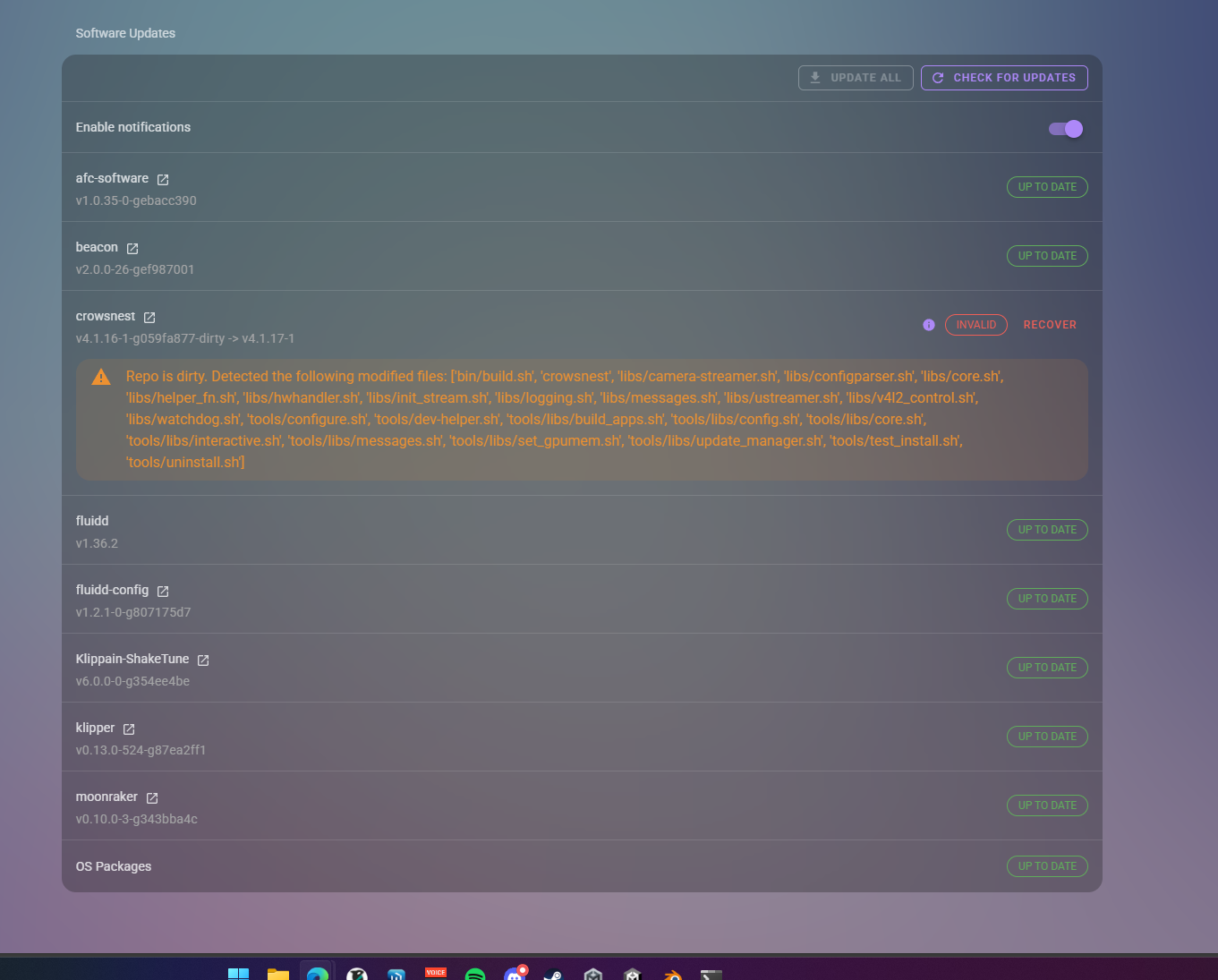 last crow
thats not firmware
left cobalt
its updated trust me
last crow
show me? its not hard
last crow
its listed right above where you took that screenshot
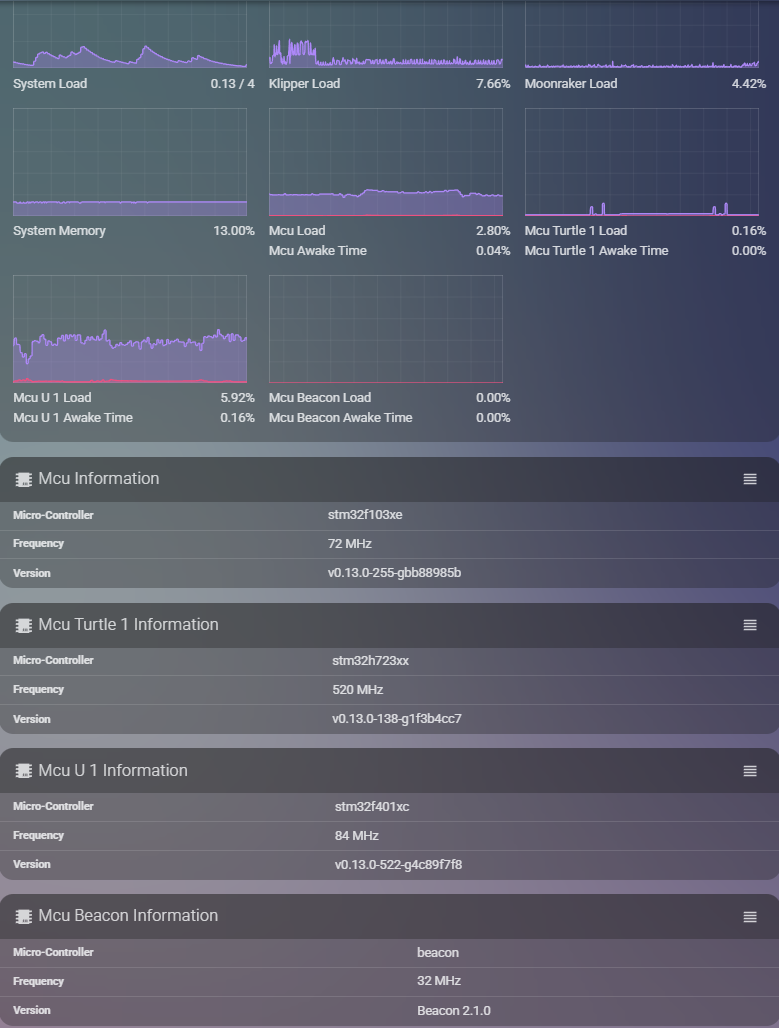

 last crow
see the version # there? thats firmware.
and seeing how a few are several hundred commits behind I am going to suggest getting them updated to eliminate any issues for mismatch potential
left cobalt
I worry that updating will brick something..
you think simply being outdated would cause filament to retract back into the extruder? seems a lil far fetched,..
last crow
no but we have seen weird extrusion rate things when firmware is old. IDK what klipper might have done with clock speeds recently but I know they have messed with H7 series and GB01
left cobalt
So...I gotta figure out how to update these without bricking shit
https://termbin.com/cksn heres my latest
left cobalt
my best guess is we changed it to that during previous troubleshooting
last crow
IDK why we ever would have
left cobalt
"we" meaning me and someone else in the discord, maybe not u
last crow
I assume this is a proprietary cutter?
left cobalt
yup
last crow
and 285.5, 7.5 is nealry full stroke?
last crow
any chance that the blade has moved on you?
left cobalt
it makes an audible cut every time and i retightened the blade today
It is cutting the filament
last crow
I just can't think of a reason it would bull it back up except its hanging on by a hair
hopefully someone else chimes in for you, its almost my bed time
left cobalt
wait let me check something rq
Machine end gcode
TOOL_UNLOAD

M141 S0
M104 S0
M140 S0
G1 E-3 F1800
G0 Z{min(max_print_height, max_layer_z + 3)} F600
G0 X0 Y0 F12000
{if max_layer_z < max_print_height / 2}G1 Z{max_print_height / 2 + 10} F600{else}G1 Z{min(max_print_height, max_layer_z + 3)}{endif}
print end
[gcode_macro PRINT_END]
gcode:
    SET_IDLE_TIMEOUT TIMEOUT={printer.configfile.settings.idle_timeout.timeout}
    CLEAR_PAUSE
    M400
    G4 P5000
    M106 P2 S0
    M106 P0 S0
    M106 P3 S0

    M104 S0
    M140 S0
    M141 S0

    M220 S100
    M221 S100
    SET_STEPPER_ENABLE STEPPER=stepper_x enable=0
    SET_STEPPER_ENABLE STEPPER=stepper_y enable=0
    SET_STEPPER_ENABLE STEPPER=stepper_z enable=1
    SET_STEPPER_ENABLE STEPPER=stepper_z1 enable=1
    SET_STEPPER_ENABLE STEPPER=extruder enable=0

    DISABLE_ALL_SENSOR
    BED_MESH_CLEAR
    G31
    CLEAR_LAST_FILE
    M84
    BEEP I=2 DUR=500
are any of those retracting
last crow
there is a 3mm retract in the machine end
last crow
its after tool_unload so shouldn't even matter
left cobalt
its not triggering the error saying the tool failed to unload
so i think its happening after unload..
last crow
is your cutter above your extruder gears?
 last crow
ah well that makes sense then for the rip length
And I would recommend doing a small retract like 1mm before you unload and thats it.
IDK the dimensionals work there but 3mm could be enough to trigger that sensor
left cobalt
its pulling quite far up
last crow
might be a an issue with absolute vs relative mode I suppose
 last crow
ok so its fine during print but fails print_end?
left cobalt
It seems to be that way yes. At print end, it retracts fine, doesnt complain, nothing
but then I notice the sensor RE-triggers
after it goes red, it goes back green, I look at theres filament
let me do another single layer print and see if i can record what happens
last crow
try putting an M83 before the G1 E-3
left cobalt
[gcode_macro PRINT_START]
gcode:
    {% set bedtemp = params.BED|int %}
    {% set hotendtemp = params.HOTEND|int %}
    {% set chambertemp = params.CHAMBER|default(0)|int %}

    SET_GCODE_VARIABLE MACRO=_APPLY_NOZZLE_OFFSET VARIABLE=hotend_temp VALUE={hotendtemp}

    M104 S0 #Set hotend to 0
    M106 P2 S0 #Set fans to 0
    M106 P3 S0 #Set fans to 0
    M106 S255 #Set fans to 255
    G28 #Home
    M141 S{chambertemp} #Set chamber temp
    M140 S{bedtemp} #Set bed temp
    M106 S0 #Set hotend to 0

    #CLEAR_NOZZLE HOTEND={hotendtemp} PEI_WIPE=1 PURGE=0 #Clear nozzle

    M191 S{chambertemp}
    M190 S{bedtemp}
    M104 S140
    RESPOND PREFIX="INFO" MSG="PRINT_START sees HOTEND = {hotendtemp}"
    G29
    G0 Z50 F600
    #G0 X5 Y5  F6000
    AFC_PARK
    {% if chambertemp == 0 %}
        M106 P3 S255
    {% endif %}
    M109 S{hotendtemp}
    M141 S{chambertemp}
    M204 S10000
    SET_PRINT_STATS_INFO CURRENT_LAYER=1
Side note I replaced the G0 X5 Y5 with AFC_PARK and that seems to make it go to the park position instead of the front left of the bed during print start.
last crow
that makes sense lol
left cobalt
just added the M83
last crow
that would ensure that the extrusion move is relative instead of it doing weird things and trying to undo the cut moves
left cobalt
I hope this fixes it
left cobalt
Wellll..it didnt do it this time I dont think..
I dont see filament sticking up at least and the sensor isnt triggered
 neon pebble
Let’s keep the non-zero pushback as a possible issue in our back pocket here. Because the cut piece is above the extruder, the boxturtle extruders will need to reliably exert force to push the cut all the way through past the extruder gears. Because after the pushback, the extruder is moved the same distance the other way, and if it still has a hold on the bottom piece, you’ll wind up holding that stub and it’ll be pulled into the sensor, just like in the picture and as described here. I set mine to zero on the flashforge. At least if you have a rubber band on the buffer (or the new hub-buffer combo) you might be able to get away with it, but make sure the pushback is big enough to fully clear the gears.
last crow
any news?
left cobalt
Yea I tried printing ASA and it failed to load or something, extruder kept sticking. unsure why.


 last crow
Isn’t there supposed to be PTFE there?
left cobalt
Inside the toolhead? No