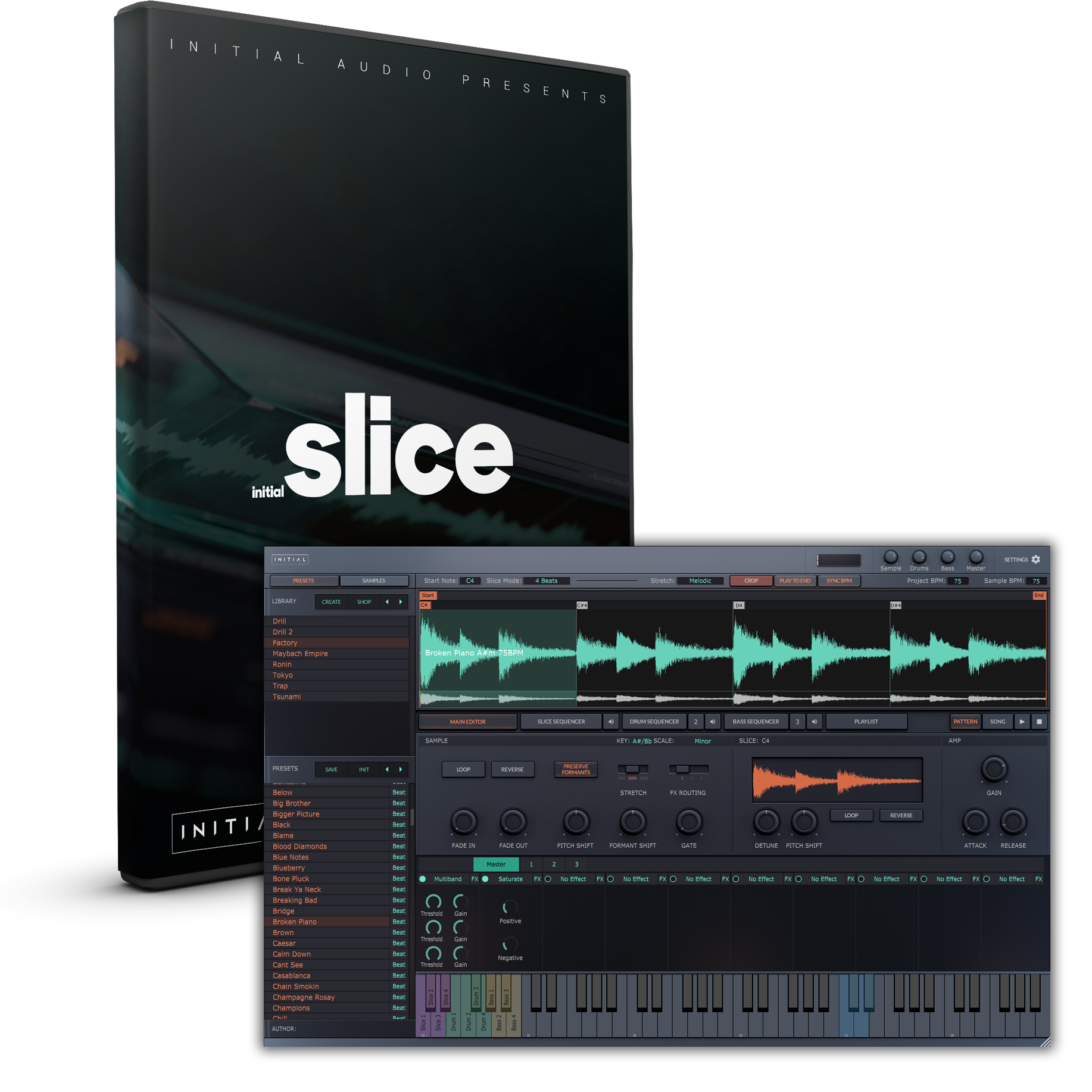
#Initial Slice - by Initial Audio
1 messages · Page 1 of 1 (latest)
 wraith wren
 hollow beacon
wraith wren
Best slicer plugin I've found, and I've tried pretty much of them. Even better t...
hollow beacon
wraith wren
Best slicer plugin I've found, and I've tried pretty much of them. Even better t...
Is there a list of all of your plugin recommendations somewhere?
wraith wren
No. haha don't listen to me; you'll go broke. 😉
Srsly though, my "must have" and "desert island" plugins change from year to year as new, better offerings appear, and as my workflow and preferences evolve.
hollow beacon
Yeah, fair enough
 supple mantle
wraith wren
No. haha don't listen to me; you'll go broke. 😉
Srsly though, my "must have" a...
supple mantle
wraith wren
No. haha don't listen to me; you'll go broke. 😉
Srsly though, my "must have" a...
Have you considered making a page on Equipboard?
supple mantle
@wraith wren someone was talking about it so I thought I might ask: Does this have the immediacy of Ableton Simpler? Simpler is beloved for that reason - drag in a sample, adjust sensitivity, and start playing slices immediately - so this might be worth getting if I can have that same kind of immediacy in Bitwig.
The only other sampler plugin (strictly speaking) I have is Serato Sample, which I do like, but it still lacks the instant feedback of adjusting a simple threshold knob.
wraith wren
supple mantle
<@199641587687358474> someone was talking about it so I thought I might ask: Doe...
Yes, the workflow is very much like working in Simpler (and using a knob on the Push 2 to adjust the slicing sensitivity while you hammer away at pads to see what fun slices you're getting out of the process.
It's much faster/better than working in Serato Sample.
supple mantle
wraith wren
Yes, the workflow is very much like working in Simpler (and using a knob on the ...
I might have to cop this then...
wraith wren
And once you find any slice(s) you like, you can drag them right out of the waveform area into Drum Machine pads, Sampler, track lanes, whatever. Very fast.
 crisp schooner
$99. I’m going to have to wait for a sale for this one.
 glacial imp
I found the slicing in Renoise Redux to be really better than the Bitwig tool, but I haven't tried much else...
supple mantle
crisp schooner
$99. I’m going to have to wait for a sale for this one.
That is the sale price.
 storm turret
anybody here has mapped the VST parameters to macros so it’s usable with controller?
i have tried a looooot of VSTs and none of em seem to be able to do that
like the part where you adjust the beginning and end of the sample with parameters
don’t seem doable (which kinda makes sense) but i’m looking for anything to do it simpler style
storm turret
wraith wren
Yes, the workflow is very much like working in Simpler (and using a knob on the ...
perhaps that’s what bapho meant here but i want to be sure!
 noble oasis
wraith wren
Yes, the workflow is very much like working in Simpler (and using a knob on the ...
noble oasis
wraith wren
Yes, the workflow is very much like working in Simpler (and using a knob on the ...
serato is a bit different in function, e.g. it supports performance/lazy slicing, where you run the sample and create a new slice whenever you hit a pad. i use that form of slicing a lot and its one of the reasons i ended up getting an mpc bc of it in the end.
imho this ones too elaborate for me, if bitwig would allow playback from cursor wed be 90% there in the audio editor, if they add something like s1s impact xt were basically there at that point. but yeah im contiuously looking at samplers as well but at this point im not really happy with any of them. i wrote the atlas guy some feedback which he responded to and he said hes considering adding slices in future releases. if that happens its getting pretty close to geist and then that would be a great option.
not that this ones bad it pretty much has everything you need (sans lazy chop) but having the browser and the sequencers there is too much clutter for me that i want to buy it
the best sampler would be geist 3 :p but roli is not hip for it
noble oasis
storm turret
like the part where you adjust the beginning and end of the sample with paramete...
you can do it in akais softare
any drum thing that has attack / release should be able to do it
but thats after the slice is uppose
i guess your best bet is mpc studio controller (not that expensive) or maschine but for these vsts i think using mouse is faster anyway
wait you cant put slices in one shot mode? thats a complete no go for me then
or am i missing the setting
yeah with out one shot and choke groups i cant use a sampler like this
the slicing still pretty nice tho
wraith wren
noble oasis
or am i missing the setting
You're missing the setting. Make sure this button is OFF (not highlighted with orange text), and playback will stop at the end of each slice.
 noble oasis
if you play by midi?
wraith wren
Not sure what you're asking
Also, ALL slices are "latched" by default , which means they play as a one-shot. Tap the midi note and the entire slice will play as long as that slice is "latched". If you want instant cutoff on MIDI Note OFF, you need to turn the "Latch" button off.
noble oasis
does it play oneshot if you trigger the slice by pressing a midi key
or just when you press play in the waveform display
i thought i tried either
i guess i missed this then
wraith wren
Midi key on a controller works fine if that "Play to End" is OFF.
noble oasis
okay, did i miss the choke setting as well?
so one of my major usecases for these slicers is take a bit of a song and create irregular slices by ear/or even with some chance and then replay them with oneshot/every sample choking every sample
so it retains the rhythm of the song but you still get something very different
 noble oasis
alright and that doesnt conflict with what you wrote at the top? "latched means they play as one shot"
i would test it but i just uninstalled still interested to know if i want to have a slicer after all
wraith wren
The "Latch" button is global. Applies to all slices.
The "Play to End" button is global. Applies to all slices.
Turn both of them off and you can do MPC-style chop grooves for days.
noble oasis
okay
well its a useful software and the mouse manual slicing actually works well, what you cant say for most of these, i agree with that
wraith wren
Yeah, and honestly the "Manual" slicing mode is way better than the realtime slice in Serato Sample, IMO.
The sample ALWAYS starts on C2. Turn on Manual slice mode. Enable "Play to End" and DISABLE "Latch". Now hold down C2 and watch the playback cursor/highlight. When you hear the next slice point you want, just double click at that spot in the waveform. Keep going until you have your rough slice points laid out. Then go back and fine tune them. Done.
Double-click to make a slice point. Right-click to delete a slice point. Drag to move a slice point. Learn those two buttons I showed above and you can do anything MPC-like (or Serato-like), or Simpler-like.
Also it's just so easy to drag the slices out of the VST and into something else in Bitwig. I honestly like this plugin better than SliceX. I haven't touched SliceX since I got this.
noble oasis
i still think its a different workflow because in what akai calls lazy chop you basically eyeball it by feel when you want to start a new slice. i actually had this implemented in reaper and studio one once, reaper especially nice with slice at playhad position. but i also didnt like serato sample enough to buy it, im slowly starting to get to terms with how bitwig handles audio and sometimes i actually just record stuff from the daw into the mpc and do sample chops there.
wraith wren
Well, I mean, MPC is the king granddaddy of sample flipping and chop grooves, so if you have an MPC and you don't mind the extra steps of getting samples into and out of it....
noble oasis
but dont you think initial slice is overloaded, like you probably want neither the browser nor the sequencers there. if they sell me just the sample chop bit for 30 bucks im into it 😉
i didnt like slicex either but i barely remembre it
wraith wren
I tend to move the slices I want OUT of Intial Slice and INTO a Bitwig Drum Machine, because I tend to find interesting slices in a big mudpie resample session, and then I want to arrange them in a pad order (inside Drum Machine) that makes the selected slices easy to play like an instrument.
noble oasis
yeah i sometimes use hy-slicer and that has no drag and drop from bitwig which sucks
but i use it to remix my own loops
but once i realized i can just do 4 lanes of audio comping iwth the same loop and have most of the editing featuers in bitwig as well... i often just use timeline
basically the audio comping makes bitwig into some type of regroover (RIP)
wraith wren
Yeah, the plugin is indeed "overloaded" with features I don't use. All I want is the various slicing modes--especially the excellent "Transient" mode that is just like slicing in Simpler with a Push), the ability to QUICKLY set the start/end of each slice I want, and then to easily drag the slice out of the VST and into a Drum Machine (or onto an audio track).
noble oasis
i agree with that
wraith wren
But of all the slicer plugins out there--including SliceX from FL (which yes I do have), I find this one is the most intuitive and fast for getting the slices I want for sample flipping or for chop grooves. Serato Sample used to be my preferred tool, but Serato keeps messing it up with new updates and it was always clunky and slow to create the slices in.
noble oasis
i think when i last used it it also didnt have sample end points
wraith wren
This one doesn't either, but once you drag a slice into Drum Machine you have complete control over loop start/end, AD envelopes, looping crossfade, speed/warping, etc.
noble oasis
i think its good to overcome bitwigs shortcomings with slicing
wraith wren
Exactly. Drum Machine is great, perfectly servicable, just as easy to use as (for example Impact XT from S1), and you can really mess with each sample in each pad of the machine. (Because Bitwig!)
But Bitwig SUCKS at slicing. Its "onset detection" is terribad, and they don't give you nearly enough options/control in "Slice to Drum Machine" or "Slice to Multisample"
BTW pro tip: you can keep Initial Slice sitting right in front of Drum Machine on the same track. Pull a sample into it and slice it up to drag the chunks you want into Drum Machine. Then just deactivate Initial Slice. It's now out of the way and not taking any resources. Need to grab a new slice or maybe tweak a slice you brought into Drum Machine? Just reactivate Initial Slice and do whatever, then drag the new thing into Drum Machine. Rinse and repeat as needed.
noble oasis
i think impact xt is alot faster for handling samples, e.g. because how the adsr and sample start end is located next to the pads. id just use sitala if they would add a and r independently. i would also buy an impact xt vst. i will try adsr sampler next but i think its too much again.
good workflow idea
wraith wren
I will admit that Impact XT was pretty nice
noble oasis
at the time i thought why is it so much worse than geist 😂 now i want it back
 burnt nacelle
just downloaded the demo for this. wish i didnt come with the 300 loops
burnt nacelle
ok, this is a damn good sampler. Does everything i want a sampler to do.
Only three issues I have with it.
1.Can't import Mp3. not a deal breaker, but not great.
2. The GUI keyboard is off by an entire tone. So when I hit a C it hits a shows me hitting a D. Not sure if theres a setting, but i didnt find it. Hopefully a restart will fix it.
3. no attack or release for samples in drum sequencer?
 tardy hazel
They say:
- Lifetime free updates. Pay once get all future updates for free.
but what is on the list?
supple mantle
Yes, I'm curious about this too. I tried the demo and it seems... I dunno, it seems a little rough around the edges, it's hard to describe.
This is giving me "I can't trust other people to do it right so I might as well do it myself" vibes, but something like this is way above my pay grade to develop...
tardy hazel
i wait for Slicer 2 by HY...this maybe will do what i want, i got Egoist, Slicer 1 by HY...so and the Sampler in Bitwig doing well also...i can wait
burnt nacelle
im still trying the demo. ive yet to have it stop working for me, it just asks if you need more time after every 30 minutes.
worth a shot to demo it imo. It works pretty damn good
 frosty widget
@vital epoch Simpler alternative
frosty widget
The sampler feels good, but I have a few problems:
- Zoom control feels stressful, not really accurate
- can't drag resampled audio files from BW into the sampler from inside the DAW?
-transient sensitivity range is too limited?
burnt nacelle
frosty widget
The sampler feels good, but I have a few problems:
- Zoom control feels stress...
I can drag audiofiles from BW browser into the sampler. they have to be wav. if you're talking about an audio clip, you have to double click into the clip and grab the file there to drag in
frosty widget
burnt nacelle
I can drag audiofiles from BW browser into the sampler. they have to be wav. if ...
ah thanks! the audio clip tip worked!
however, dragging slices out of the sampler does not work. Maybe because of the demo?
burnt nacelle
not sure, i've not tried that, i usually just record sraight to a track
 heady hare
looks sweet
burnt nacelle
Initial audio support confirmed that dragging slices out of the app is fully operational in the non demo version. Not being able to is a limitation of the demo.
Also on sale for $29 right now
https://initialaudio.com/product/slice-loop-slicer-plugin/
Loop Slicer plugin and Sampler with over 300 melodic loops, samples, drumkits and beatstarters. VST and AU compatible.
supple mantle
Had a loop I liked, saved and came back to it later and it seems Initial Slice forgot my settings and now the slice points are different. I'm hoping that's just a bug with the factory content...
crisp schooner
burnt nacelle
Initial audio support confirmed that dragging slices out of the app is fully ope...
$69 today.
burnt nacelle
Yea not on sale anymore