#Jehree's mods (LeaveItThere, ImmersiveDaylightCycle, etc.)
1565 messages · Page 2 of 2 (latest)
 atomic valve
 silent tiger

atomic valve
I think we decided it wasn't important because you had the plugin anyway haha
 ornate onyx

Hard work
threw it straight into my root folder and upon running SPT server it doesnt recognize it as a mod even
silent tiger
ornate onyx
threw it straight into my root folder and upon running SPT server it doesnt reco...
Tyr-MikhailReznichenko-Client-Main isn't even a folder that's in the release, and most importantly shouldn't even be in the mods folder because it's the client portion of the mod.
So, you've most definitely installed it wrong.
ornate onyx
so should i only have the server folder?
silent tiger
So of course it's not going to recognise it as a mod because it shouldn't be there
silent tiger
Delete the files and folders that shouldn't be there in your mods folder from previous installations.
ornate onyx
alright done
right now i have the server mod in my user/mods folder
and i dont have the client mod installed anywhere
silent tiger
Gewd
 silent tiger
Delete that entire folder too, the only server mod you should have in the user/mods folder is tyr-mikhailreznichenko-server
There should be no appended version
ornate onyx
the file i downloaded from github was called Tyr-MikhailReznichenko-Server-SPT-3.10.5
silent tiger
Well it shouldn't have been

GitHub
Tyr-MikhailReznichenko-Server. Contribute to Xenoxia8953/Tyr-MikhailReznichenko-Server development by creating an account on GitHub.
The only file you should be downloading is from there
On the releases
1.0.1, tyr-mikhailreznichenko.zip
ornate onyx
ok ty
 neon mist
You are downloading the master and not the release
ornate onyx
yeah
silent tiger
neon mist
You are downloading the master and not the release
That what they did? gg
I barely know anything about github
neon mist
Happens all the time in the game I mod for
 tiny oar
silent tiger
That what they did? gg
tiny oar
silent tiger
That what they did? gg
Why download release, when you can download zip 
 silent tiger
Hah
Also wish I knew why 1.0.0 appears above 1.0.1, it's not like I deleted both releases at some point and re-released both (with 1.0.0 first and then 1.0.1 after) in an attempt to fix that.
And set the tags and all that bullshit
ornate onyx
sorry i usually do that when downloading github stuff
tiny oar
silent tiger
Hah
I recommend linking directly to the download zip file from wherever you link the download. So this:
https://github.com/Xenoxia8953/Tyr-MikhailReznichenko-Server/releases/download/1.0.1/tyr-mikhailreznichenko.zip
Instead of this
https://github.com/Xenoxia8953/Tyr-MikhailReznichenko-Server/releases
ornate onyx
i didnt even stop to think
silent tiger
ornate onyx
sorry i usually do that when downloading github stuff
You... Definitely shouldn't then haha
silent tiger
tiny oar
I recommend linking directly to the download zip file from wherever you link the...
That's likely what I'll do when I make an actual full public release tbf
tiny oar
silent tiger
Also wish I knew why 1.0.0 appears above 1.0.1, it's not like I deleted both rel...
Just delete the 1.0.0 release 
ornate onyx
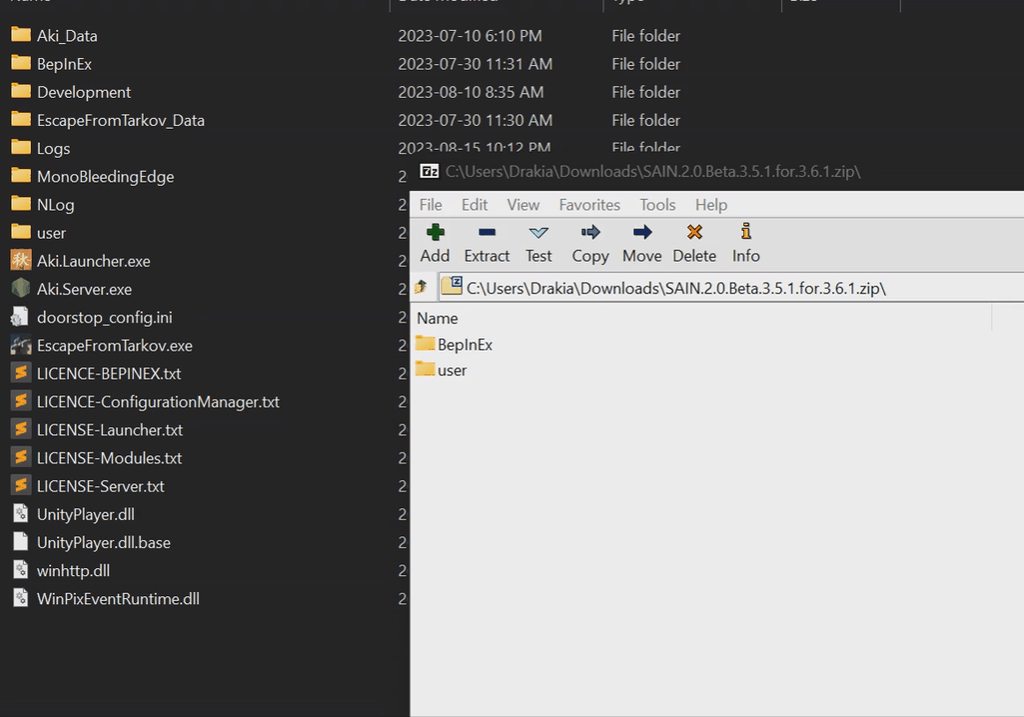
downloaded 1.01 release extracted and pasted into user/mods folder

no client mod in my spt folder either
tiny oar
ornate onyx
downloaded 1.01 release extracted and pasted into user/mods folder
pasted into
No
 silent tiger
I already told you before all you needed to do was open it and extract the folders into the root folder
Though if you're using Jehree's latest versions and not the versions made for my mod, you'll need to delete my client mod and setup Jehree's mod in the bepinex config so that all items have physics regardless of size.
 copper wadi
So for yours just dont drop in the bepinex folder at all then? I know you're answering two different threads here. Sorry 😄
neon mist
they drop into root folder as has been said now
 atomic valve
👀 
atomic valve
copper wadi
So for yours just dont drop in the bepinex folder at all then? I know you're ans...
Yes, you just need the user folder
emphasis on you
 atomic valve
💪
copper wadi
tired of goons spawning in at crackhouse and literally shooting at us before the deploy timer finishes... 😦
atomic valve
Yeah that sounds annoying haha
ornate onyx
@copper wadi are you using path to tarkov or something?
copper wadi
Yes
copper wadi
@atomic valve I have thoughts on rotation and placement stuff. I have done a handful if building systems in the past. If you’re not all settled on them I will write them up and shoot them your way.
atomic valve
Sure go for it! I have some plans for that, will probably be my next adventure.
I want to make some custom UI that lets you lock different axes and replace the interaction menu with it.
I also plan on making use of the scroll wheel, and locking the player camera even when you are moving the object and let you hold left click to move the object, and right click to move your camera, kinda like how it works in modeling programs or game engines.
copper wadi
yeah thats kinda where my head was at with it too
atomic valve
copper wadi
yeah thats kinda where my head was at with it too
Did you have any other thoughts?
copper wadi
just some inut stuff that may make it easier, I'll try to write it up today or tomorrow
atomic valve
gotcha
ornate onyx
Ever considered a grid system for snapping placed objects to?
That way you could be precise with the incremental movements or rotations with keybinds etc
atomic valve
Since the rest of the game isn't aligned to a grid, I think it'd be annoying more than anything
 manic shell
could always let people make it more granular on their own i suppose
ornate onyx
jehree
you could incorporate a part into each map that counts as the 0, 0 point
even if the game doesnt have it itself
think of it as the master object
then movements are calculated based on distance between part 1 and master part vertically, horizontally etc
purely conceptual
atomic valve
I know, but a random desk in the game isn't going to align with the grid so it'll be hard for it to ever line up with anything
manic shell
what if you could set your own reference point for the grid origin? something like, the grid originates from the previous object you placed.
ofc just on a toggle as an option
atomic valve
Yeah maybe. Would just be tough for it to always line up
I'm hoping the ideas I have in mind for improving move mode will make it nice enough that a grid system isn't needed
neon mist
We over here trying to make the Sims eft edition
atomic valve
neon mist
We over here trying to make the Sims eft edition
yezzir
copper wadi
The building formerly known as Crackhouse, now under new management.
 ornate onyx
man cultists are not spawning for me
copper wadi
Im not sure youre gonna find an answer for that in this channel…
silent tiger
copper wadi
The building formerly known as Crackhouse, now under new management.
Schneat
copper wadi
you guys just need to figure out how to let us place the emplaced 50 and GL. 😄
It will be like block wars in Judge Dredd with Fortress.
ornate onyx
If you need anything digital design work/JavaScript/audio design or 3d modelling reach out to me
I'd love to try and help and it'd look good for my portfolio as well
copper wadi
We desperately need some enclosures or frames. Getting air bursted by boss guards is no bueno.
Also cargo containers. ::D
silent tiger
I don't believe it's in Jehree's list of things to do to provide things outside of the basics, and I'm currently not working on my mod right now.
atomic valve
Eventually ™️
atomic valve
silent tiger
I don't believe it's in Jehree's list of things to do to provide things outside ...
Oh yeah also, Unity 2022 was in the 3.11 update so very likely all of your bundles are borked 
ornate onyx
update is released?
silent tiger
atomic valve
Oh yeah also, Unity 2022 was in the 3.11 update so very likely all of your bundl...
Quite likely
 open hornet
yo how's GKS coming?
not to rush you or anything, just curious if it's been started or how far
wait
i'm extremely stupid
atomic valve
I don't know what that is 👀
tiny oar
atomic valve
I don't know what that is 👀
 GKS = Gilded Key Storage
Bro already forgetting his own mods
atomic valve
I've never seen it abbreviated
ornate onyx
ping me if tyrion updates the building mod
open hornet
atomic valve
I've never seen it abbreviated <:kekw:876203563452342292>
I mean you haven’t updated it yourself in a while I don’t blame you for not recognizing it 😂
Me saying “I’m stupid” came from me realizing drak is maintaining it lol
silent tiger
Me and Jehree have something in common when it comes to mods
 proud barn
making it insurable by default was diabolical btw with propor ripping millions of rubles per run multiple times
new update works great, one of my fav "QoL that is lowkey kinda broken but it's single player so whatever"
atomic valve
Yeah I don't personally use insurance so I didn't notice that immediately.
Glad you're enjoying :)
silent tiger
Me neither 😂 Using insurance on SPT just feels cheaty
copper wadi
I just make insurance ridiculously expensive on my server and then let Realism give the value of the items back as opposed to the items. And since I run barter economy...
atomic valve
👀

Got it nice and compact. Something must be wrong, I'm doing UI stuff and kinda enjoying it
 tiny oar
Adds in-game
Everything breaks
atomic valve
Future me's problem 
atomic valve
I think it's pretty much ready
 atomic valve
tiny oar
> Adds in-game
> Everything breaks
atomic valve
tiny oar
> Adds in-game
> Everything breaks
get rekt
 manic shell
atomic valve
👀
manic shell
atomic valve
👀
kinda need your secrets on this, GUI stuff is arcane to me LOL
atomic valve
manic shell
kinda need your secrets on this, GUI stuff is arcane to me LOL
The act of making it in Unity, or how to get it into Tarkov?
manic shell
both
atomic valve
Well to make it I started trying to just follow UI tutorials on Unity and that was abysmal
So instead I downloaded free a UI pack from the asset store called Quantum, and basically just took all the custom scripts off of the demo scene it came with and referenced the prefabs it came with to make more bits, and messed with it until it looked good.
then I read this: https://docs.unity3d.com/540/Documentation/Manual/BuildingAssetBundles.html, had to change the build target to StandaloneWindows
then used this bit of code to test that it worked

I'll still have to manually find all the game objects to hook up all the buttons and yada yada
manic shell
grateful for that, ty ^^
tiny oar
This is my bundle loading code for the Quest Tracker UI: https://github.com/DrakiaXYZ/SPT-QuestTracker/blob/master/QuestTrackerPlugin.cs#L310
Then each part of the UI is a named prefab:

 silent tiger
UI is totally very fun 😩 Not
It was a pain in the ass doing it for my Halo radar and shield mod, and just as painful when I recently set one up for my furniture mod
manic shell
love u guys for this, good info sharing session
copper wadi
UI programmers are like gold. I have been at a couple studios where we had people who, that was 100% their jam. Such a good experience working with them.
silent tiger
Programming is hord
But it has its moments where it's also... Weirdly therapeutic.
Just depends if it's all going well or not 😩
copper wadi
Dock extract fortified for naval operations.


 lament carbon
Did the 3.10 version of leave it there work with FIKA?
atomic valve
Yes
atomic valve
 proud barn
I still don't really know how I want to use thiis mod... but I wanna use it so bad now with all the ui dev hype it's coming out great
(leave it there for context (and the home addons))
atomic valve
and they're getting closer together
 proud barn
on fika too oooh?
atomic valve
bounds clamping go brr
 atomic valve
proud barn
on fika too oooh?
atomic valve
proud barn
on fika too oooh?
yep it's built with Fika :) works with or without it
lament carbon
copper wadi
Dock extract fortified for naval operations.
what mod lets you place props like this?
is that the home comforts one or is it something different?
copper wadi
Its LEave it There, combined with Home Comforts and the placeables from Tyrians builder trader mod.
copper wadi
LIT and HC are requirements for the Trader so they all kinda play together.
lament carbon
fika modders are something else man i swear
silent tiger
Lights and such were already a planned feature, though in the time being you can enable flashlights on weapons and then drop them to the floor and place them
atomic valve
Well this was a lot for my brain to handle. Ow.
 atomic valve
Needs fixes in the bundle tho:
- Change settings on all buttons so that pressing space doesn't activate them
- Physics toggle has the X all the time, even when it is unchecked
atomic valve
If you are just moving the item around by holding left click, it moves purely on the axis you are moving your mouse / scroll wheel in
Left / Right = mouse left and right movement
Up / Down = mouse up and down movement
Forward / Backward = scroll wheel
If you walk around while holding left click, the object moves with you and still responds the same to mouse movement as above
If you hold right click, you can look around as normal
If you hold left AND right click, the movment changes to instead be parented to your camera as if you are carrying it around (like the old Translation mode)
This ignores axis locking though
the result feels very nice in my opinion 
atomic valve
@copper wadi any thoughts? :D
I still need to make some updates to the UI bundle to include a bit more information about what buttons to press and such
 magic bolt
I'm assuming this is all part of the 3.11 update your doing for leave it there?
cause that new UI looks real nice
atomic valve
Leave It There is already out for 3.11, but yeah it has been planned to make move mode suck less haha
magic bolt
any chance of getting that UI backported to 3.10 
fine if not obviously, I'll just have to wait until I update
lament carbon
atomic valve
If you are just moving the item around by holding left click, it moves purely on...
You've done a damn good job with this. Keep up the great work.
atomic valve
magic bolt
any chance of getting that UI backported to 3.10 <:joe_pray:1204117500720324712>
Unfortunately no, the 3.11 update came with a pretty big refactor so it'd be a lot of work to backport.
 magic bolt
atomic valve
Unfortunately no, the 3.11 update came with a pretty big refactor so it'd be a l...
magic bolt
atomic valve
Unfortunately no, the 3.11 update came with a pretty big refactor so it'd be a l...
that's fine, I'll just wait till I eventually update to 3.11
and also yeah, this mod is like, really cool
I'm surprised it's even something you've managed to do honestly, I never would've thought it'd be something possible
atomic valve
What's crazy is the original idea was to just have place-able small caches that you could put stuff in, and it was supposed to come with a scav overhaul that would require you to use those caches to get items off your scav.
But then in dev there was an ah-ha moment where I realized I could place literally any item in the game haha
atomic valve
magic bolt
I'm surprised it's even something you've managed to do honestly, I never would'v...
Honestly I wouldn't have been able to without Fika itself having figured out so much already. Most of the biggest early problems with the mod were solved by looking at the Fika source code.
magic bolt
Yeah I saw that on the comments of the mod
Either way, it's good, I like it
I use lockable doors so I fully intend to find a spot on one of the maps and just
live there
atomic valve
I'm glad! It's been my favorite project for a while
magic bolt
I'm curious if the exfil/infil from home comforts could be set up to work with PTT
atomic valve
magic bolt
I use lockable doors so I fully intend to find a spot on one of the maps and jus...
I need to update that shit. I'll try and do that later today
atomic valve
magic bolt
I'm curious if the exfil/infil from home comforts could be set up to work with P...
Currently no, Trap needs to add support for it. It doesn't break or anything but if you exfil with the radio I believe it just doesn't change your offraid pos
magic bolt
ah right okay
well either way, I suppose I could pick an already existing exfil and find a place close to it
atomic valve
He's been on a bit of a hiatus but I'm sure it'll get updated to 3.11 at some point with that feature added
magic bolt
that's fine, always good to have a break now and then
would be nice though cause then I can literally just set my main stash at that exfil, and just go in and out there
basically be my hideout of sorts
atomic valve
We didn't have PTT mind you, but my friends and I had that going when we were playing a couple months ago. We set up in different buildings on the west side of Customs. Was good fun.
some screenshots:
https://cdn.discordapp.com/attachments/973781375633223720/1333504211182162030/image.png?ex=67de58d3&is=67dd0753&hm=b81ffc4adb560d81017a3a65b17a06c9dd6349542ca10710fd678dbb9edec155&
https://cdn.discordapp.com/attachments/973781375633223720/1333504210192564347/image.png?ex=67de58d3&is=67dd0753&hm=62bbac00cdc2aa5c2d8b5e14585bf7794ee3d25327a0146aa6d7dec457bd6f32&
https://cdn.discordapp.com/attachments/973781375633223720/1333498678899507351/image.png?ex=67de53ac&is=67dd022c&hm=b37e178e15171d379a83a62b0e7b2f3bb0cd4709376aa70ebea13675ae424009&
https://cdn.discordapp.com/attachments/973781375633223720/1333498596066066534/image.png?ex=67de5398&is=67dd0218&hm=c1ac22000a1af8b407194f8947a4cf99103aaa7594784486f68a8bc8d4a45061& https://cdn.discordapp.com/attachments/875705856623263764/1334384327454363668/image.png?ex=67dee97f&is=67dd97ff&hm=d1aeeef577381bf75717c43f1a82160f8aeae167f10c9db0a11156a28098b217&


 magic bolt
Is that the streamer house on customs?
atomic valve
yep haha
magic bolt
yeah lol looks good
makes me wanna hop on tarkov lol
I'm watching TV right now but now I wanna play
atomic valve
The number of raids we spent with bots totally off just building was kinda crazy haha
magic bolt
yeah I mean I've always liked being able to build stuff in games that don't usually allow it
stalker anomaly is one that I spent ages on
there was a mod called hideout furniture and I always used to build a base inside of a train car
atomic valve
Yeah I've seen people mention that mod a lot
atomic valve
It'd take a major redesign at this point and would be quite jank, but I wonder about how moving stuff around would be if it actually collided with the world while you moved it lol
magic bolt
hideout furniture on anomaly had a habit of re enabling physics on items you had placed if you came back through a level transition
atomic valve
Oh so your stuff would just explode or move? haha
magic bolt
so you'd come back to your base sometimes and everything would just be flying around yeah
atomic valve
In Leave It There physics is entirely disabled unless it's specifically enabled by something. Once it rests it becomes static.
In fact with this new update, it doesn't even have a RigidBody component unless you've moved it that raid haha
magic bolt
that's good
I'd rather not accidentally bump into a wall and see it gracefully fall over
atomic valve
Yeah, could be a big perf problem too
magic bolt
yeah
having alot of stuff with physics calculations running is bound to be heavy on the CPU
atomic valve
Funny enough, I learned that when you drop an item on the ground, it is technically physics enabled while sitting there. It's just that there isn't really anything you can throw at it that will collide with it, because loot items don't collide with themselves
magic bolt
by the way, lockable doors is a mod you made right?
atomic valve
yep yep
magic bolt
is there anyway to stop NPCs from breaching the door after you've locked it? Or is that just not really possible
cause I tried to lock myself in a room in dorms and they just blasted inside and shot me in the head lol
lament carbon
i really hope at some point we can have placeable MGs and Heavy Grenade Launchers
atomic valve
magic bolt
cause I tried to lock myself in a room in dorms and they just blasted inside and...
That should be base behavior. Are you using Fika?
magic bolt
uh yeah I am
atomic valve
Were you the host?
magic bolt
Yep
I use fika simply for visceral combat to be honest, that's the only reason I have it
and the headless client is nice I suppose
atomic valve
Hm yeah it shouldn't be possible as long as its on the host. It blocks their navmesh AND locks the door
magic bolt
right hm
atomic valve
magic bolt
and the headless client is nice I suppose
If you were using the headless, was it installed on that as well?
lament carbon
To be fair, I also have the problem of being able to breach doors that are "locked"
but im on a regular dedicated client
atomic valve
lament carbon
To be fair, I also have the problem of being able to breach doors that are "lock...
Yeah the player themself can do it, shouldn't cause any problems. Just bots shouldn't do it.
magic bolt
atomic valve
If you were using the headless, was it installed on that as well?
Yeah, I tend to try to keep the same mods installed on both my server and client, even though the client may not need them, I've had some issues taking stuff out of the client before so I just install them to both
the only difference is I just don't put any other plugins beside AI based ones on the headless client
atomic valve
Yeah all my mods should be on all clients. It not being on the host would cause the AI to ignore the locked doors.
I may have to increase the size of the blocker a bit
magic bolt
it was scary, got my blood pressure up definitely lol
atomic valve
(and a headless client will always be the host)
magic bolt
I was like "okay yeah I'm safe I can use a surgery kit" and then I just hear BANG and I have been shot in the head with a M4
atomic valve
magic bolt
the only difference is I just don't put any other plugins beside AI based ones o...
In the case of Leave It There, Lockable doors, Home Comforts, etc you should have the plugin on the headless as well
magic bolt
oh, that I didn't know
atomic valve
That would explain it :P
magic bolt
I thought the headless would only be running AI based mods, I mean that's what the installation said
hmm
I'll put make sure to pop the plugins onto my headless install later
see if it fixes the problem
atomic valve
I typically keep a Fika Compatibility page on the github wiki on my mods that has info about it (I try not to flood the hub page with Fika stuff)
That said it is def missing from lockable doors haha
magic bolt
another question, are doors that you lock meant to unlock between raids, like is that the intended behaviour
atomic valve
magic bolt
I thought the headless would only be running AI based mods, I mean that's what t...
Yeah since the AI is running on the headless, the mod needs to be there so that the bots actually know the door is locked
magic bolt
Ahh
atomic valve
magic bolt
another question, are doors that you lock meant to unlock between raids, like is...
Nope should stay locked, iirc getting it on the headless should fix that too
magic bolt
okay yeah I definitely have them installed incorrectly then lol
atomic valve
what's funny about this is your Lockable Doors were essentially placebo LOL
magic bolt
thanks for telling me that
yes they were
all the doors I locked were literally me thinking I was safe
😭
atomic valve
I should build info pop-ups or something into the mod so it's more obvious
magic bolt
I would definitely recommend putting a disclaimer on the modpage maybe, just like "If you use Fika's Headless Client, make sure you install the plugin onto the server aswell" or something
but that's up to you at the end of the day
maybe put a notification popup in game if it detects the plugin isn't there? dunno if that's possible
atomic valve
For my mods, you can just check the github wiki for Fika Compatibility comments:
https://github.com/Jehree/SPT-LockableDoors/wiki/Fika-Compatibility
atomic valve
magic bolt
maybe put a notification popup in game if it detects the plugin isn't there? dun...
yeah should be
magic bolt
atomic valve
For my mods, you can just check the github wiki for Fika Compatibility comments:...
Very straight forward page
atomic valve
magic bolt
alright I'm gonna go install all the plugins onto my headless client
atomic valve
There's more to say on the others haha https://github.com/Jehree/SPT-LeaveItThere/wiki/Fika-Compatibility
but ye generally all my mods end up needing to be everywhere
magic bolt
see if it fixes the issues I was seeing
magic bolt
atomic valve
but ye generally all my mods end up needing to be everywhere
will keep that in mind for your next mods if you do have any baking In the oven
atomic valve
I'd make it clearer on the mod page but I find it tacky to talk extensively about Fika on it since it isn't on the hub.
magic bolt
alright ive just reinstalled all the plugins to the headless client
time to see if it works now lol
magic bolt
@atomic valve Quick question, hope you dont mind me pinging you
I noticed you put a link to a mod in the PTT thread, where you can build like, walls and stuff
Ive been using it, only question ive got is, are they meant to have no collision?
if you know, that'd be great if you could help if they are meant to cause none of them have collision right now
Ah i think i just found the reason
the minimum physical item size is set at 12, none of the building objects are big enough to be counted for collision
hmm
atomic valve
Yeah his client mod, which currently isn't up to date with Leave It There, handles that. For now you just have to set that number in the config to something small like 4.
It won't apply to pre-placed items until you reclaim and re-place them, or reload the raid.
magic bolt
Right okay
just checking is all cause ive set up something in the building the grenade machine gun is in on GZ and i was just like "why am i walking trhrough everything"
atomic valve
just bare in mind that that config setting will also make objects on the floor block bot pathing, so if it's set to 4 a drill you place in a doorway may stop a bot from entering haha
atomic valve
not a massive deal, you just have to be mindful
magic bolt
yeah ill keep that in mind
proud barn
the videos have me hyped it looks so polished
I still don't really know how I'd actually play a balanced profile around the idea of just leaving it there. As I'd be afraid to do some near extract 'backpack'o'loot and grab it next time
rather than doing a more "in raid hideout stash" with containers n all. Tried it breifly with PTT in 3.10 but I just had more grief and issues with ptt and fika that I dropped it quickly
atomic valve
proud barn
I still don't really know how I'd actually play a balanced profile around the id...
Having played with it myself, it doesn't feel THAT unfair. If you think about it, an item that's placed in a raid still needs to be gotten to and brought to an exfil to do anything with it.
Just don't go placing every piece of loose loot that you see.
And also, the mod has balancing features. You could highly limit how many things you're allowed to have placed on the map, or even limit what items you're allowed to place to just a few. Totally up to you.
proud barn
it breaks my brain a bit thinking about it in theory
have a few fika friends that have the weakness of "if there's a feature to abuse, it'll be exploited, even unintentionally" so I'll probably go thru the config and restrict it
unrelated, do Looting bots mod end up looting the items from placed containers?
magic bolt
This was addressed in a comment on the mod page iirc, but i believe the answer was they do not
or it was on the modpage itself
 atomic valve
proud barn
have a few fika friends that have the weakness of "if there's a feature to abuse...
atomic valve
proud barn
have a few fika friends that have the weakness of "if there's a feature to abuse...
Keep in mind that most of the config is localized, so you'll have to get them to change their config too / send them yours
And ye no bots will loot anything
proud barn
atomic valve
Keep in mind that most of the config is localized, so you'll have to get them to...
I'm the config master overseeing the changes and exporting the connectingclient.rar for our shared experience, so that's taken care of that
(they don't touch configs)
still a tad butthurt that I never saw 3.11 coming as I even went as deep as changing some of the trades and barters with certain traders to try to pad out the balance when having 25+ traders and some of them offer the "same" item and the power scaling is all wack (piscilu I'm yelling at you)
but whatever! Cheers for 3.11 being LTS and with age we'll have a good time again
magic bolt
Im curious, how hard would it be to add interactable doors that you can place
I in no way have the knowledge to do something like this but im just curious to see if its something that would even be possible
copper wadi
Doors are already a fuckshow in BSG code apparently. I wouldnt hold my breath.
magic bolt
Fair enough lol
 lone mortar
Thanks for the mod
atomic valve
magic bolt
Im curious, how hard would it be to add interactable doors that you can place
I mean someone could make an addon. I thought about just making simple Minecraft doors that don't animate or anything but just snap open and closed haha
magic bolt
would it be possible to do the animated doors or is that a whole other can of worms?
atomic valve
Sure it's possible
magic bolt
Hm, as i said i have no current knowledge, nor the intention to acquire such knowledge to do so, but its just something i was curious about
atomic valve
If someone could make it work in a Unity project then it could be done in a mod. It's just a matter of how much work it'll be haha
copper wadi
I mean technically anything is possible with code. Its just a matter of if its worth it. I once had a client ask if we could design a peripheral of a tool for working on aircraft that would interface with new maintenance training software that didnt exist. The tool was basically a wrench. They wanted a usb wrench. I think we told them given time and money sure anything is “possible”.
magic bolt
fair enough lol
tiny oar
atomic valve
Sure it's possible
The hard part would be anything to do with bots and those custom doors
atomic valve
tiny oar
The hard part would be anything to do with bots and those custom doors
Nah, just slap a nav mesh blocker on it and done
tiny oar
I guess if you don't want bots to be able to open them at all yeah
atomic valve
Ye I see your point, would be hard if you did. But yeah I don't think I would personally, it'd be there for the purpose of not being usable by bots
atomic valve
Getting close to release, got some showcase vids recorded 
https://youtu.be/xvQ5Z1b7xEE
https://youtu.be/6nW1Gt5cSrg
https://youtu.be/PBGnGyH0les


 magic bolt

Figured id show what i managed to do with this
took me a bit to find the immersive physics toggle lol
atomic valve
magic bolt
https://www.youtube.com/watch?v=1kclSMnZBNI
Very cool!
And yeah sorry, the imsserive toggle is gone in the update I'll be releasing soon and instead it is a checkbox inside the custom UI
magic bolt
atomic valve
Very cool!
Oh by the way, quick question
is there any specific reason why Home Comfort's doesnt seem to be functioning properly?
Are you aware of any incompatibilties or anything?
I can get the items that come with the mod, but the space heater for example, i cant turn it on
atomic valve
Are you on 3.10 or 3.11?
magic bolt
3.10.5
atomic valve
Is there a HomeComforts folder in BepInEx/plugins?
magic bolt
let me have a look
ive got it on the headless client yeah, you said LIT, lockable doors and this needed to be on every client so i popped it in there
just checked my main install
seems i uh, failed to install it to my main install 😭
atomic valve
Haha that'd do it
magic bolt
literally every single time i have an issue its always my fault 💀
atomic valve
It's aight it's all a learning process
magic bolt
Looks like what i did was only put the bepinex folder on the headless client
i put the user folder on both, but the bepinex was only on the headless
atomic valve
Yeah should be other way around. user folder only needs to be installed on the install that's running the server, and BepInEx in every single client install
magic bolt
see this is what has been confusing me for the past few days to be honest
the installation guide for the dedicated client says that the only stuff that should be in the bepinex folder should be plugins that handle AI and such
atomic valve
Typically that's the case, but some mods need to be on every single install. The gist is kinda this:
The headless client is still a client. It is basically a fake player that is hosting the game. So a UI mod wouldn't need to go on it, for example.
But.. the way that packet sending works is that any client that is not the host (so in the case of a headless, that's every single human controlled client, since the headless is always the host) can only send packets to the host.
So picture this: you and your friend are playing together and have a headless client, which means there is a total of 3 clients in use with the headless as the host. If your client wants to talk to your friend's, the packet has to go Your Client -> Host Client (headless) -> Your Friend
Since the host has to always be in the middle, any mod that does custom packet sending to sync things like whether or not the heater is on, or whether an item is placed, will probably have to be on all clients, including headless.
Sorry for the info dump lol
atomic valve
And also any mod that interacts with AI will have to be on the headless since that is where the AI is being ran, and Leave It There and Lockable Doors both have to tell the AI that X location can't be pathed to
magic bolt
see i was just seeing the headless as a different server basically, but if it is literally a client then that makes sense
magic bolt
atomic valve
And also any mod that interacts with AI will have to be on the headless since th...
yeah which i found out yesterday lol
with the whole
lockable doors thing
atomic valve
Ye if you use Raid Review, you can literally see it periodically teleporting to the player who started the raid haha
magic bolt
literally had placebo
oh huh
so its literally just an invisible player?
i figured it just wouldn't spawn them in, just have them handling everything in the background
atomic valve
Yep, as far as I understand it yeah. I'm sure there's more to it but generally speaking mhm. Not just the AI is on it, but the loot, the exfils, etc
magic bolt
huh well
the more you know i guess
im currently trying to look for a spot to set up with LIT in streets, kinda thinking of maybe an apartment or something, dunno yet though
atomic valve
I imagine doing it that way was the most straight forward for the Fika devs because they just had to make a client headless rather than try and reinvent the whole way the raid is hosted
magic bolt
i mean yeah they did say that it wasn't exactly a "headless" client
atomic valve
It's the more user friendly version of having a second PC next to you that you host the raid with
magic bolt
i have been thinking of buying a dedicated machine to host servers off of
but the cost for a good one is just making me sad when i look at my bank account
bills are smacking me across the face 😭
atomic valve
magic bolt
i have been thinking of buying a dedicated machine to host servers off of
I've ran them on my old PC and it works well even though it isn't particularly powerful. It's an old i5 4690k with 24gb of DDR3
magic bolt
to be honest i just need to get a good cpu and a good amount of ram in one
and then ill be fine
graphics card shouldn't be needed as all its doing is hosting the server, my main computer will run the graphics side of things
atomic valve
You could look for used laptops with broken screens too. If they have decent hardware otherwise, you can install something like Proxmox on it and bam you have a neat little home server.
And ye I don't even have a GPU in my server machine
magic bolt
i had an old laptop i was going to use for it
and then i spilt pepsi on it
if it was water i would've been fine cause i could've let it dry out as it wasn't powered on
but the sugar and stuff in the pepsi was just the end of it
 cinder zodiac
Hi Jehree, I hope I'm not breaking any rules here, I am just curious if you plan on bringing immersive daylight cycle to 3.11?
atomic valve
cinder zodiac
Hi Jehree, I hope I'm not breaking any rules here, I am just curious if you plan...
Yep 'tis planned, I'm just a procrastinator haha.
cinder zodiac
Haha no worries lol youre making magic happen lol
magic bolt
https://youtu.be/UVLIa5_2sJs Went ahead and did another one, i like this one alot more compared to the one i did in GZ

only issue is once you put those guns on that rack, good luck getting them back lol
magic bolt
also, unrelated to the video, i got the space heater to work in special slots so now i get to carry one around everywhere lol
 atomic valve
magic bolt
https://youtu.be/UVLIa5_2sJs Went ahead and did another one, i like this one alo...
atomic valve
magic bolt
https://youtu.be/UVLIa5_2sJs Went ahead and did another one, i like this one alo...
Nice
magic bolt
really looking forward to eventually updating to 3.11 seeing the new UI you've got though
atomic valve
I would like to add beds to Home Comforts that let you skip time, but it'd also be neat if you could claim one on the map
magic bolt
using the current one is fine but the new one just looks nicer
magic bolt
atomic valve
I would like to add beds to Home Comforts that let you skip time, but it'd also ...
That would be quite cool
Being able to claim an already existing bed would be interesting aswell, would be cool to use with Raid Overhaul definitely
atomic valve
Idk how doable it'd be. It can be tricky to target props because they typically have arbitrary names and such.
Could always just say "clip the bedroll item into it so you can't see it"
atomic valve
I did that with a space heater and a fire barrel
magic bolt
theres a firebarrel on the floor of the dorms i built that hideout in so i might do that aswell lol
magic bolt
@atomic valve hope you dont mind me pinging you, quick question. Ive just come back to Customs and im looking at the door i locked, its not giving me an option to unlock it, it just said breach.
Is there some way to like, wipe the mod so any doors i had locked, will be unlocked in the next raid?
Ah damn, i think i found it, sorry for pinging you
atomic valve
magic bolt
<@219591654364020736> hope you dont mind me pinging you, quick question. Ive jus...
There is, but I think that particular door takes a key
magic bolt
atomic valve
There is, but I think that particular door takes a key
Yeah i figured out what it was
Raid Overhaul has a skeleton key, it wasn't working, managed to fix it. I thought it was lockable doors, my bad
copper wadi
atomic valve
I would like to add beds to Home Comforts that let you skip time, but it'd also ...
use the bed as the "extract" instead of a beacon. 😄 Stash is dreamland.
atomic valve
lolol
manic shell
doors in tarkov are actual nightmares
you need PRAYERS to get any code that touches them working
magic bolt
lol sounds terrible
atomic valve
manic shell
you need PRAYERS to get any code that touches them working
Tbf Lockable Doors wasn't bad at all. I'm just directly setting its states and letting BSG code figure the rest out haha
magic bolt
I mean the whole locked door state was there already I suppose you just had to figure out how to switch between the two using a context menu
and then apply it to every door in the game I guess
manic shell
if only there was consistency
magic bolt
from what I've heard bsg is not known for that 😭
atomic valve
ye it wasn't bad, just this and adding and sizing a NavMeshObstacle to the door
 magic bolt
yeah, such a good mod though
copper wadi
Would love to see the door randomizer synced with Fika.
magic bolt
I think I came across some desync with lockable doors earlier lol, I locked a door after I closed it and then it just unlocked itself and opened again, and I actually got so scared I thought I was experiencing like the ghost of tarkov or something lol
silent tiger
atomic valve
Idk how doable it'd be. It can be tricky to target props because they typically ...
Target the props bundle rather than its name instead, can't have different weird arbitrary bundle names
It's how I was thinking of re-doing my de-clutterer mod (Whenever I get around to doing it)
Assuming of course every model has its own bundle
atomic valve

silent tiger
Another thing I was planning to do with de-clutterer was sort of keep a cached file of all the found props it needed to remove, but I never figured that out.
I imagine you'd have better luck with something like that
Make a cached file it could use to directly edit the entities it needs to and add this bed property to
atomic valve
yeah I guess instead of searching for them all every time instead it could just spit all their names to a json. But.. it'd suck if something in the map loading process could cause certain game objects to differ in name slightly
If it's fast to search, no need to cache 🤷♂️
silent tiger
It probably won't be a problem for you if you only need to edit a few props and apply code to them
For me with de-clutterer, searching through every object and checking it over to be deleted/removed made it hang on loading
But I was doing a lot with every game object, so
atomic valve
All the mods be updated 
 atomic valve
silent tiger
It probably won't be a problem for you if you only need to edit a few props and ...
atomic valve
silent tiger
It probably won't be a problem for you if you only need to edit a few props and ...
The problem would be trying to find some consistent way to get every bed looking object in the game. It'd be too much work
magic bolt
atomic valve
All the mods be updated <:monkacomfy:877393055492235265>
new UI for LIT came with this?
atomic valve
yep yep
magic bolt
epic epic
magic bolt
atomic valve
The problem would be trying to find some consistent way to get every bed looking...
Just do the sleeping bag thing lol
atomic valve
Yeah that's what I figure I will do
magic bolt
and if people want it to work on a bed just tell them to stick it inside of a bed and turn off physics
it would be cool if it just worked but heah
atomic valve
Yeah it would probably be OP to have every bed in tarkov usable anyway
silent tiger
atomic valve
The problem would be trying to find some consistent way to get every bed looking...
I'd just manually make a list of bundle names and look for only those, obviously you won't get all of them but you'd probably get the main used beds, I can't imagine Tarkov has that many different bed models though tbf.
Ultimately just depends on exactly how you want to do it
You could even just make a 'bed designation' tool that lets the user just look at a bed and then it grabs the prop the user is looking at and bam now it's a bed
atomic valve
Ye I could but nah, I'll just stick to a custom item. I don't feel like hunting through all the game objects and figuring out how to target every single bed haha. Too much work.
copper wadi
Yeh just do the item and let people share their placement profile if they want tbh
silent tiger
atomic valve
Ye I could but nah, I'll just stick to a custom item. I don't feel like hunting ...
Thus my 'bed designation' tool idea
There's no looking through game objects if it just grabs the one you're looking at. Up to the player then to decide if what they look at should be a bed or not
copper wadi
dont judge my pile of trash, thats my nest!!!
atomic valve
silent tiger
There's no looking through game objects if it just grabs the one you're looking ...
There's also no game objects to look through if it's just a bedroll placed on the ground I don't see a point in complicating it
silent tiger
Of course there's a game object to look through if it's a bedroll placed on the ground
It still has to tweak a game object
Whether it's a placed item with leave it there, or an already existing game object
It's clear you don't want to do it that way, but it's an option that would work.
atomic valve
I'm sure it could but ye I'd prefer to just follow the pattern that the other items in Home Comforts do.
magic bolt
atomic valve
I'm sure it *could* but ye I'd prefer to just follow the pattern that the other ...
Do you think home comforts will end up becoming a fully fledged like "build your safehouse" mod with like placable barricades and stuff, or will you leave that to other people, like the person who made that Mikhail trader already
atomic valve
It might include some place-ables like some basic window barricades and maybe a shelf or something but I doubt it'll ever be a massive base building mod. I am learning how to do custom assets but I'm not interested in maintaining a fuckload of them haha.
magic bolt
yeah fair enough lol
atomic valve
I like keeping my mods as modular as possible too to try and keep the feature creep from becoming a problem
hence why Home Comforts is separate from Leave It There
magic bolt
yeah i can understand that
proud barn
update is out HUUUUUUUUUUUUUU
I will now pretend to play PTT by setting up little hideouts on each map and exclusively use those for deploy and extracct with home comforts
copper wadi
Man. I cant waaaaiiittt for Trap to hook up ptt to allow specific stashes to be associated with the beacon.
atomic valve
copper wadi
Man. I cant waaaaiiittt for Trap to hook up ptt to allow specific stashes to be ...
You may be able to do it yourself, if I understand correctly it just needs to be added to the hard coded list of exfils
The exfil name is homecomforts_safehouse if you wanna mess around and try to add it
I think you just need to add that exfil to each map array in this file:
https://github.com/guillaumearm/PathToTarkov/blob/master/src/_generated/all-vanilla-exfils.ts
 shell falcon
seems that physics is only working and being applied to the first item you interact with using leave it there, no other items.
If you attempt to interact with physics or the "undo move" button, it will move that original item the physics is bound to.
atomic valve
shell falcon
seems that physics is only working and being applied to the first item you inter...
Huh.. it sure is. Thank you I'll look into a fix.
shell falcon
atomic valve
Huh.. it sure is. Thank you I'll look into a fix.
Thank you
I'm not sure if this is known or if this is the best place to report bugs, but there is also another bug in which guns that are placed will be overheated with red hot glowing barrels & suppressors upon loading back into a raid.
This incurs the visual heat waves & I am unsure if it truly affects malfunction rates, the limited experience we have, it seems that it did.
Although it might be entirely visual.
This will persist when the player uses the weapon, the player can temporarily 'cool down' the suppressor by taking it off the weapon and placing it back on, the barrel will remain heated.
But it will not take long for it to start glowing red hot again.
In the case that it's not a purely visual bug, I assume it would be best interest to fix that.
If it's only visual, i kinda like having the SV-98 Lightsaber sitting around xD
(I placed my glowing sv-98 next to the space heater for effect)
atomic valve
Yeah, that's a known issue. I haven't looked into how to fix it, but if you just shoot one round through it it cools right down. Seems like it may be visual.
atomic valve
shell falcon
(I placed my glowing sv-98 next to the space heater for effect)
This is genius
shell falcon
atomic valve
Yeah, that's a known issue. I haven't looked into how to fix it, but if you just...
Hm, I'll double check when I next play, but I feel like the glow was persisting through shooting
kinda just dealt with it haha
atomic valve
shell falcon
Hm, I'll double check when I next play, but I feel like the glow was persisting ...
It takes a sec, it seems to cool down at the rate it would if it was actually overheated
I'll put in an issue for it tho so I stop forgetting to look. Could be an easy fix.
shell falcon
ahh i see, will pay more attention to it cheers
atomic valve
And FYI yeah this is probably the best place to report stuff
shell falcon
Too easy cheers 
atomic valve
shell falcon
seems that physics is only working and being applied to the first item you inter...
Fixed in 2.0.1.
 icy bone
atomic valve
The exfil name is `homecomforts_safehouse` if you wanna mess around and try to a...
icy bone
atomic valve
The exfil name is `homecomforts_safehouse` if you wanna mess around and try to a...
Hi Jehree and Gorilla. I'm keen to see Home Comforts playing nicely with PTT; have a crazy idea for config with one exfil per map to (small) home stash and traders, and all other exfils transit-only. Small stash is to further incent use of Home Comforts as operating base. Anyway I tried adding homecomforts_safehouse to each map in the all-vanilla-exfils.js (note only js is in standard distribution, not ts) which was unsuccessful, so I also added homecomforts_safehouse to the PTT config file (infil and exfil) and same - you can select Exfil but nothing happens. Keen to hear any other ideas to test! Cheers.
copper wadi
YEah I couldnt get it to work either 😦
icy bone
I'm guessing PTT pulls in extracts for map during raid load, and as homecomforts_safehouse doesn't exist yet it's locked out. Likely as Jehree says in mod comments page, it'll need a tweak from Trap. He's a busy man of course so for now I'll watch this space. But if anyone has ideas to test I'm down for sure.
copper wadi
Yep, I expected it wouldnt happen until Trap has more time. I want to do the same as you with the safehouse and a "home" per map.
atomic valve
I may be looking into updating PTT
edit: maybe not.. this is kinda above my head lol
copper wadi
I believe in you!!!
icy bone
I had this vague hope that by including homecomforts_safehouse in the infil and exfil config, it would be visible once the radio was placed, but I reckon that bit is not dynamic. All good, game is still fun, would just be an interesting little cherry on top.
atomic valve
I'll take another look tomorrow potentially. Path To Tarkov is set up a little different than most mods so I may need to bother Trap with some questions
copper wadi
Yeah Jehree, after some more placement and raids and such I am 100% still a believer in you needing a "build state" that is toggled with an F key to turn on the interactions with the placed objects. I died using sandbags as cover and my body wasnt searchable because it was prioritizing the placed sandbags. Buddy had to ful on move the sandbags to get at my corpse. Then he died while doing that...
atomic valve
Yeah sorry that kinda fell off the radar, but it's still on my list for when I get back to features
copper wadi
no worries, I havent upgraded yet anyhow, just had that happen earlier today an was like ahhh well shit, lol
atomic valve
copper wadi
no worries, I havent upgraded yet anyhow, just had that happen earlier today an ...
I'm working on updating / refining his assets, so your idea may actually be less necessary because their interaction hitboxes should be much more precise (similar to how the walls already are)
copper wadi
Possibly, but like I said yu also have problems with the prompts being up when youre near a placed item. Like any mouse wheel scroll for LPVO zoom, incremental crouch etc... interacts with the context popup for place/reclaim etc.
atomic valve
copper wadi
Possibly, but like I said yu also have problems with the prompts being up when y...
Maybe, but we'll have to try it. The way we figured out how to make the interaction colliders more precise makes it so that you really have to be looking at it to get the prompt, not just casually past it like usual.
If it's still annoying though I'll add a hotkey to toggle the interactions
copper wadi
Word, you also may need to check for collision/visibility stuff on Tyrians stuff, or he will need to. I just got murdered through a concrete barrier by Kollanty and friends when they had no angle on me at all. So they could see me, and shoot through it. That may be a byproduct of the "fix" for 3.10.x for your updates though.
atomic valve
Hm weird. Definitely shouldn't have, it has a ballistic collider on it with a pen chance of 0.
copper wadi
I was surprised as well. I just ducked down behind it and went into freecam to look at what spawns were doing. I know nothing would spawn behind me as I Was in the emercom exfil. Unless theres some weird interaction with the freecam maybe. They were just sitting there idling til a PMC bot spawned, some engaged him and 3 just rantowards me shooting. I dont even know how they had ANY LoS. Super weird.
atomic valve
Maybe something desynced with your host?
I doubt that though unless the wall was just placed or moved or something
copper wadi
Maybe, looking ar raid review they didnt start keying on me until the dedicated host "player" popped over to be where I was. Maybe the SAIN logic is doing some weird shit with their detection.
I wish I had been recording.
atomic valve
If any of y'all want to play with Tyrian's base building assets in 3.11, here you go. I may release something using them in 4.0 but for now I won't bother putting this on the hub.
https://github.com/Jehree/SPT-IdeaFurniture/releases/tag/v1.0.0
atomic valve
Fixed
 robust spire
atomic valve
If any of y'all want to play with Tyrian's base building assets in 3.11, here yo...
robust spire
atomic valve
If any of y'all want to play with Tyrian's base building assets in 3.11, here yo...
Hey, any idea why this error would be appearing in the console with this mod? I confirmed the trader ID it's complaining about belongs to IdeaFurniture and it doesn't really seem to be causing any issues/the mod still works fine.
 copper wadi
you added and then removed a trader but didnt remove the trader all the way, if the trader or item profiel sticks in your user profile it will throw that error. I have only had it happen after REMOVING Tyrians trader, not when hes still installed.
I would say try following the instructions there and letting SPT clean it up.
robust spire
I enabled both of those options and the error still appeared. I even checked my profile for the trader id manually and it wasn't there (because the spt server removed it) but when I toggle those options off it is there Shrug

either way the trader still works fine lol
just to clarify: SPT is complaining about a missing trader for ideafurniture, which I do have installed so shouldn't be missing???
tiny oar
@atomic valve You're missing a line
copper wadi
copy the trader ID and do a find in your profile and see what it actually is. It may be something else, but yeah like I said I have only ever seen it when removing traders.
tiny oar
// Add trader to trader enum
Traders[this.traderBase._id] = this.traderBase._id;```I noticed that too, wondered why that happened. Thanks
tiny oar
(Adjusted to match your data structure of course, that's from the mod example)
atomic valve
Being able to add to an enum like that is cursed
atomic valve
robust spire
just to clarify: SPT is complaining about a missing trader for ideafurniture, wh...
You're free to ignore it, I'll get an update pushed that shuts it up when I get a sec
 atomic valve
robust spire
ty ty [prayge](https://cdn.discordapp.com/emojis/814673988420239371.webp?size=48...
atomic valve
robust spire
ty ty [prayge](https://cdn.discordapp.com/emojis/814673988420239371.webp?size=48...
 proven rain
Hey, how would someone get immersive day and night cycles to work with a dedi and server
atomic valve
Install the client mod on all clients (including dedi) and install the server mod on the server
https://github.com/Jehree/SPT-ImmersiveDaylightCycle/wiki/Fika-Info
 mint scroll
Hello, I'm sorry if this was asked but discord mobile is terrible with forums.
If one person extracts via safe room radio and the other via normal exfil then return to the same map, do the two spawn separate?( One in safe room one in normal spawn)
 lavish lichen
mint scroll
Hello, I'm sorry if this was asked but discord mobile is terrible with forums.
...
lavish lichen
mint scroll
Hello, I'm sorry if this was asked but discord mobile is terrible with forums.
...
yes they do
mint scroll
Oh damn. Thanks.
Also, things placed via LeaveItThere will persist even after shutting down the server then booting back up, right?
lavish lichen
yes. are you using the headless client?
mint scroll
Not yet, but I'm planning soon.
lavish lichen
ok theres a setting in the leave it there mod that keeps all data on the headless client which keeps it persistent for everyone
mint scroll
If we just play on one person's server regularly, that wouldn't be a problem, right? We don't hop between one another when it comes to hosting
Moot point when we eventually get to Headless but still
lavish lichen
no i believe the data will either be stored on your client for when you join them if they have that setting turned off or itll stay on their server if its turned on. i have two servers and two headless clients myself but they use different profiles so i havent tested that
mint scroll
If it was stored on the server, would that mean increased load times or less performance for the host?
mint scroll
What's the difference between storing on client and on server?
neon mist
It's not on a server. It's on the headless client.
copper wadi
I have previously placed a shit ton of stuff and not seen any meaningful load times or frame rate issues. Sample size of 1 and all that. ymmv.
mint scroll
neon mist
It's not on a server. It's on the headless client.
That makes more sense
So, without a headless for the time being, I'd have to store things clientside
mint scroll
i presume clientside refers to profiles
neon mist
correct
mint scroll
i have a couple of questions
- say i store it clientside and test it by placing some stuff in one map. i then join my friends' server. will my stuff appear on his game?
- if i were to uninstall the mod, would any items placed be removed by themselves or would that cause issues?
robust spire
mint scroll
i have a couple of questions
1. say i store it clientside and test it by placing...
- no, pretty sure it's based on the person that hosted the game (?)
- the items are loaded into the map when you start the raid, so if you uninstalled the mod your saved items simply wouldnt spawn.
mint scroll
aity, thank you
atomic valve
mint scroll
i have a couple of questions
1. say i store it clientside and test it by placing...
By default the placed items you see are based on the host of raid. If you use a headless client, that client is the host. The setting that was referred to just makes it global instead of based on the host.
1: If the setting is set to global? Yes. If not? Only if you are hosting.
2: no issues, but they'd not be able to be picked back up ofc (reinstalling will cause them to come back)
mint scroll
Ty very much
ornate onyx
Is this gonna get a 4.0 port
 ornate onyx

 glossy sapphire
I've been having an issue with my BOOBS in that after the fika update I was having the infinite initialization problem that went away after i removed my BOOBS.
 crimson estuary
Would it be possible for us to see a "% chance to spawn" for items? I like to hide weapons and valuables around the map for my friends to find and id love to make these more than just one time things
copper wadi
that would be cool
Being able to generate caches that may or may not always be there.
 quasi pebble


 sonic kite
^^^^^^