#Dockerized Fika fails when using docker-compose.yml
109 messages · Page 1 of 1 (latest)
 icy jasper
 trail vale
Can you please upload the images to Discord? Just drag and drop em into the chat, thanks.
icy jasper
its the one from this FAQ thread https://discord.com/channels/1202292159366037545/1236681505451933758
trail vale
Talking about the screenshots you linked.
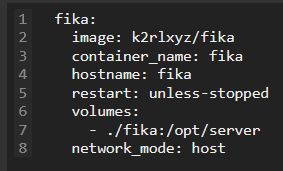
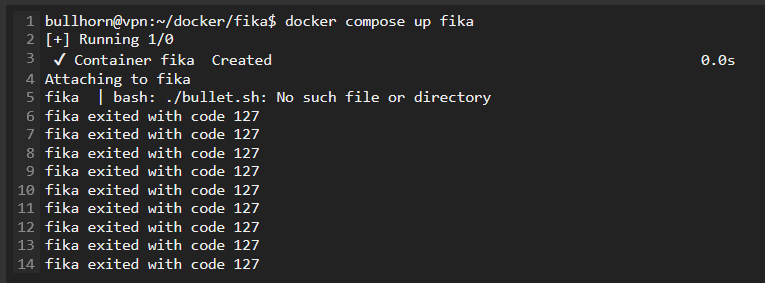 trail vale
Have you tried building it yourself? I don't have a server available for me to test the Docker image.
There should be instructions on how to build it in the thread you linked.
under fika remove image add build and dockerfile: Dockerfile
if you wish to use docker compose.
icy jasper
i put his 2 files into \home\user\docker\fika\ and modified the yml as such https://i.imgur.com/fc7NpkT.png and now its building.. will report back soon ™️
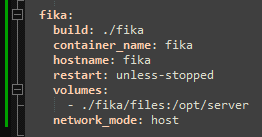 icy jasper
that seemed to work. it looks the way it should. im not sure how to launch the .exe on this linux vm 🤔
its failing to load with Error: Safety file found. Exiting.
its part of the 2nd file the person provided in the fcpy.sh file
trail vale
it's there so you can make changes to your setup before starting the server.
Change http.json and whatever to your liking then delete /opt/server/delete_me
icy jasper
oh lol. http.json needs to stay 0.0.0.0:6969 like the normal port-forwarding configuration, right?
trail vale
yep
icy jasper
im not sure where /opt/server/ is maybe im blind
icy jasper
ooh right! i am blind 😄
server fails to load hmm https://i.imgur.com/kZcaY2u.png
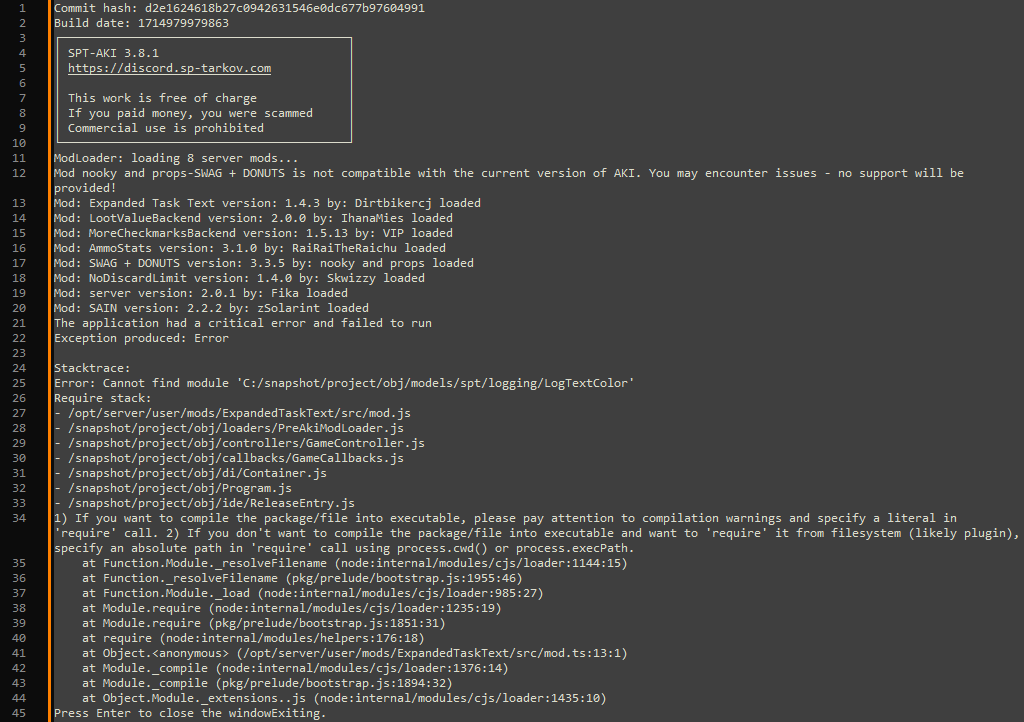
ill try to get rid of expanded task text to see if its just 1 mod thats causing issues or if im in bigger trouble
as i remove a mod, another mod causes this failure. so i removed all of them mods and the server loaded successfully 😮
now just need to figure how to add mods without getting these errors 🙂
trail vale
you might be missing some SPT dependencies. 
icy jasper
i had to run the build twice, it failed on the 1st try and succeeded on the 2nd
trail vale
looks like you are missing LogTextColor 
icy jasper
this was the 1st attempt like i stopped downloading node.js at 45.9% but continued anyway?
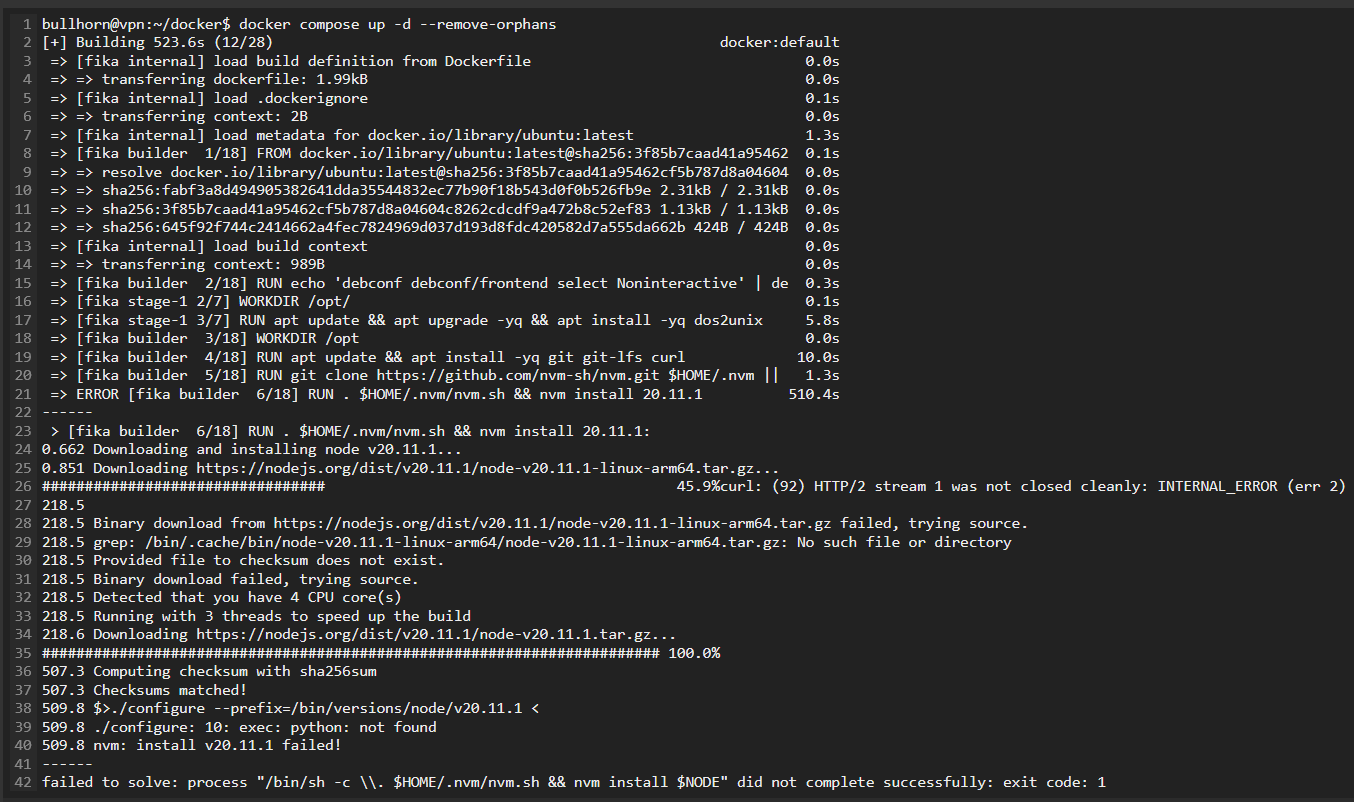
not sure if related though. 2nd build was successful without errors
trail vale
Try purging the image and re-running docker compose.
icy jasper
will do brb
icy jasper
i think that did it! it loaded with the mods and no errors. now the next step is client fails to connect.. might need to restart the instance after port forwarding? not sure
trail vale
shouldn't have too.
can you check if it's running correctly and bound to port 6969? sudo netstat -tulpn | grep :6969
icy jasper
the server https://i.imgur.com/AKCltoD.png
tcp port 6969 forwarded
the http:json https://i.imgur.com/ei23gDx.png
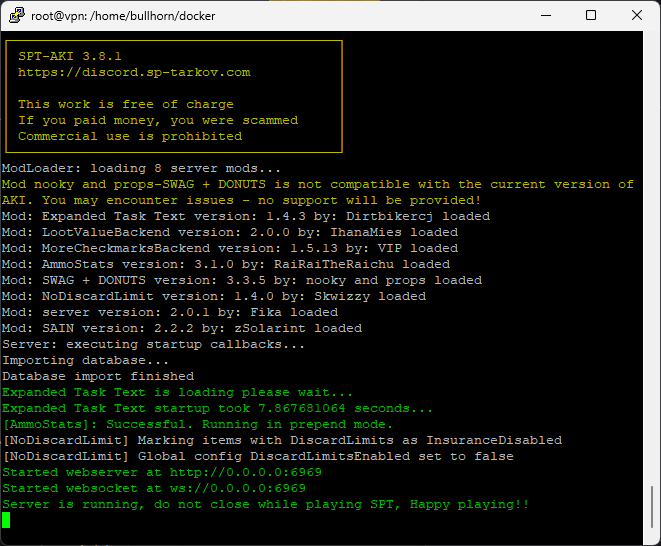
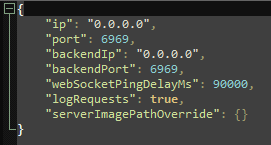
and the correct IP of the server set in the launcher
trail vale
detach from the container and run the command I sent above.
CTRL+P + CTRL + Q
or just shut it down and run docker compose with -d to run it detached.
icy jasper
tcp 0 0 0.0.0.0:6969 0.0.0.0:* LISTEN 251275/./Aki.Server
icy jasper
nope status inactive
i rather not change that if possible, this vps is used for other stuff that i dont want to break
trail vale
sudo iptables -S
send a screenshot of the output
hard for me to tell what you are running :p so we will have to go through all of this.
icy jasper
ah im starting to remember
i set this vps years ago so its all hazy, but i remember running
    iptables -I INPUT -p tcp -m tcp --dport 443 -j ACCEPT
    iptables -I INPUT -p tcp -m tcp --dport ##### (censored yep) -j ACCEPT
iptables -I INPUT -p udp -m udp --dport ##### -j ACCEPT```sudo nano /etc/iptables/rules.v4
icy jasper
so it wasnt enough to add tcp 6969 in the vps gui, ill have to run that for 6969 too
trail vale
add port 6969 and run sudo service iptables-persistent reload
icy jasper
unrecognized service, did they rename it? this vps old af
trail vale
not running iptables-persistant aight sudo iptables-save > /etc/iptables/rules.v4
take note of your stuff in the rules.v4 file
sudo iptables-restore < /etc/iptables/rules.v4
last one should take rules in rules.v4 and put it into the iptables service.
The first one you can run after adding rules with iptables command, you shouldn't have to run that one as you manually edited the rules.v4 file
sudo iptables-restore -n < /etc/iptables/rules.v4 this one will add the new rules but will not overwrite.
Honestly you should just try to make the switch to ufw it is more user friendly.
so in your case ```sudo iptables-restore -n < /etc/iptables/rules.v4
is probably the right command.
icy jasper
looks like that did it, i can see tcp 6969 in iptables -S
moment of truth will it connect
nope. now im stumped hah
thanks for all the help btw theres no way i couldve gotten this far on my own
trail vale
You sure the url in your launcher is correct?
icy jasper
http:// the vps ipv4 :6969 looks good
icy jasper
in the vps gui i added tcp 6969 to the ingress rules only
am i supposed to add it to both ingress and egress rules
trail vale
should only be inbound
trail vale
sudo iptables -A OUTPUT -p tcp --sport 6969 -m conntrack --ctstate ESTABLISHED -j ACCEPT```let's get you over on ufw honestly it's just much easier.
run this: sudo ufw allow 22
sudo ufw enable
sudo ufw allow 6969/tcp
those other rules you had you can just do the same for them soufw allow 443/tcp and for the two other rules you have do the same just replace the port and protocol where necessary
also just to make sure, I am assuming port 22 is your SSH port. If not change that before enabling
icy jasper
its not im trying to remember everything
one of the blurred ones is the ssh port, but im still trying to figure whats this duplication, that happened after i ran the previous commands https://i.imgur.com/EbPTKot.png
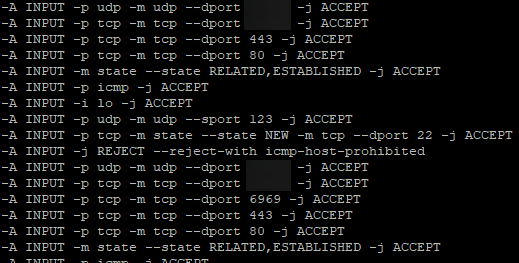


the 6969 appeared along with all the other ports that were already forwarded
trail vale
I would clear it out except for the SSH ports.
Then run the commands I sent.
the ufw ones
icy jasper
iptables -I INPUT -p tcp -m tcp --dport 6969 -j ACCEPT that made it work
server is reachable
im still not entirely sure how to unscrew whatever i screwed up before 
trail vale
I would still recommend that you switch to ufw, it's easier for you to manage
anyways, great that you got it working
icy jasper
yeah i hear ya im just really scared of screwing something up. i have no memory of setting the rest of the stuff on this VPS, if i brick it its gonna be hell
trail vale
you do you 😉
icy jasper
thanks a lot for alllll the help
im going to try logging in and see how it runs
so the takeaway from this entire thread, really is this...
if you want to run the Dockerized Fika from the FAQ with docker-compose.yml, you have to build it yourself by adding this into your .yml:
build: ./fika
container_name: fika
hostname: fika
restart: unless-stopped
volumes:
- ./fika/files:/opt/server
network_mode: host```
Add the 2 files provided by the OG poster into /home/fika/
Then build with:
```docker compose up -d --remove-orphans```
and dont forget you have to forward port tcp 6969 in both the VPS provider GUI, as well as in the server itself (iptable/ufw) dull pawn
icy jasper
so the takeaway from this entire thread, really is this...
if you want to run t...
dull pawn
icy jasper
so the takeaway from this entire thread, really is this...
if you want to run t...
Hey man, following along with your progress. What does your full compose file look like? I don't see a docker compose in the original thread (unless I'm blind)
icy jasper
i have a bunch of other containers that are irrelevant so i never posted it
here's how it would look if you only had/added Fika to it:
services:
  fika:
    build: ./fika
    container_name: fika
    hostname: fika
    restart: unless-stopped
    volumes:
      - ./fika/files:/opt/server
network_mode: host```just save that in docker-compose.yml