#Lethal Quantities
1 messages · Page 8 of 1
 coarse lark
I've just been turning experimentation into an extremely hard moon for my friends because we otherwise always skip it
 tranquil patrol
yeah spawning things is usually tied to curves, but everything scrap related is not
coarse lark
Okay cool
tranquil patrol
also there's tools for visualising the curves
coarse lark
Are you able to change the stats of monsters per moon or is it global
I was gonna just figure desmos lol
tranquil patrol
coarse lark
Are you able to change the stats of monsters per moon or is it global
you can do either or
tranquil patrol
basically, if a value is ticked on the moon preset, the moon will use that value, but if it's unticked, it will use the Global preset value. if there isnt anything set for that value in GLobal, it will just be vanilla
coarse lark
tranquil patrol
basically, if a value is ticked on the moon preset, the moon will use that value...
Oh okay
tranquil patrol
coarse lark
Is there stuff like weather control too
Unfortunately not, there was plans to but the dev hasnt been working on the mod
coarse lark
Damn
tranquil patrol
WeatherRegistry is what i use for weather stuff
coarse lark
So if I leave the scrap alone on a moon in this mod on a moon will it use the LLL preset or the vanilla games
coarse lark
tranquil patrol
WeatherRegistry is what i use for weather stuff
Can you set the weather for moons that way
tranquil patrol
coarse lark
Can you set the weather for moons that way
yea
coarse lark
Okay nice
I also wanted to see if I could change time of day
Not like an eclipse but having the day be set at night the whole time
Just visually
tranquil patrol
coarse lark
So if I leave the scrap alone on a moon in this mod on a moon will it use the LL...
im not certain but probably, i think LQ uses LLL values as the defaults so i think if you set things in LLL but not in LQ it will take the LLL values
tranquil patrol
coarse lark
I also wanted to see if I could change time of day
not with this mod unfortunately. i think weatherregistry dev might be working on something related to that but idk. not sure if theres a way to do that rn
tranquil patrol
ywyw
tranquil patrol
what is lc if not a torture device
coarse lark
Exactly
Hopefully I won't run into too many problems executing it
However this thread seems pretty good already to just read back and look at walls people ran into
tranquil patrol
yeah most issues are known. i think dont touch the map size multiplier, only change the factory size multiplier, but other than that thigns tend to work as expected
the only barrier really is discord not allowing you to search for things in specific threads
coarse lark
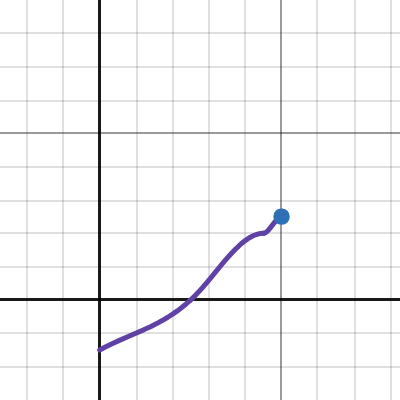
correct me if im wrong but if I graph the turret spawning for experimentation it looks like this

if so what do negative values mean
 austere urchin
No idea, maybe it take absolute value
tranquil patrol
coarse lark
correct me if im wrong but if I graph the turret spawning for experimentation it...
did you put an extra x y value at the end? like if your last values are 1,7.5, put another afterwards that's just 1.1,7.5
it might still have a negative swing but that's just how the maths works out, you haven't done anything wrong
if you click the little button next to the Y axis inputs you can manually move the points around to see if you can get the curve shape you want
coarse lark
I just pasted these in from the default config
 tranquil patrol
yeah in desmos you need to put an extra x,y coordinate at the end with the same Y value, but slightly higher X. it determines the angle at which the curve ends, which in the game is always flat, but desmos doesn't know that
tranquil patrol
np
to clarify just in case, you don't want to put the 1.1 value back into LQ, that stays in Desmos. It probably wouldn't make much of a difference anyway cause the max X for traps is 1 anyway but just so you know
coarse lark
kk
 stone heath
coarse lark
correct me if im wrong but if I graph the turret spawning for experimentation it...
stone heath
coarse lark
correct me if im wrong but if I graph the turret spawning for experimentation it...
It doesn't account for the way graphs can work in unity (whether between some points is linear, weighted, etc)
You can set how each point transitions to each other within unity graps
Most likely the first point to point is linear, making it 0 value the whole time
You can replicate a linear point transition by setting the value right before the next point as the same value of the previous point
Ex. (0 0 -> 0.89 0 -> 0.9 1)
coarse lark
yeah ill probably do that thank you
 upper sable
coarse lark
if so what do negative values mean
upper sable
coarse lark
if so what do negative values mean
just means that zero spawn
 haughty owl
0193d685-1c69-b102-07b7-1b51e9c18b38
Essentially I was expecting to see Moon Prices and Risk levels change but they havent
its a new modpack that im making for a friend group, we used to do lethal a lot but its been a while so I'm a bit out of practice, maybe i just missed something stupid XD
 ruby fractal
haughty owl
0193d685-1c69-b102-07b7-1b51e9c18b38
Essentially I was expecting to see Moon Pr...
ruby fractal
haughty owl
0193d685-1c69-b102-07b7-1b51e9c18b38
Essentially I was expecting to see Moon Pr...
Oh, if you wanna change moon prices, you need to do it in the "Global" preset and set all of your planets' parents to Global. That's the eaiest way to do it.
haughty owl
Well i was trying to see if i could organize the moons into groups of 3 and make all the moons in said group free to travel between
kinda like a solar system?
ruby fractal
Check out the Constellations mod for that. It'll be much more fitting for that
tranquil patrol
haughty owl
Well i was trying to see if i could organize the moons into groups of 3 and make...
you can do that but it's more complicated to do than youd think. i will have a look in a bit
tranquil patrol
@haughty owl I reckon 7 billion might be too big of a number. Also for the prices, you've almost done it correctly, you just need to add every moon to the Prices lists of each moon, eg in the Experimentation preset, tick Prices and double tap Add All and leave unchanged. Repeat for all moons, and then it will work with how you've set it up. Assuming the price of Orion isn't set to 7 billion
 haughty owl
tranquil patrol
<@803802141642457130> I reckon 7 billion might be too big of a number. Also for ...
haughty owl
tranquil patrol
<@803802141642457130> I reckon 7 billion might be too big of a number. Also for ...
LMAO
I did that cuz I have a friend who hates orion
So we'd never go there, thanks XD
tranquil patrol
Idk what the limits would be but something like 50k seems like it would work. Or 69696
haughty owl
Cool, appreciate the help :>
 leaden hedge
coarse lark
if so what do negative values mean
leaden hedge
coarse lark
if so what do negative values mean
Negative values don't mean anything, traps just won't spawn.
tranquil patrol
@tacit thunder No pressure it's not a big deal but I noticed that changing an item's weight (pounds not spawn weight) doesn't actually work if it's set in a parent preset. For instance, I had an item set to 22 in Global, it was on the scrap list for Experimentation, but upon finding the item on Experimentation its weight was only 1 pound (by default its weight is around 30, so setting its weight in Global actually reduced its weight to 1 pound.) If I set the weight to 22 in Experimentation's preset specifically, the weight DOES change correctly. I might be able to change weights with another mod just fine, just letting you know in case you ever feel like coming back to this
austere urchin
tranquil patrol
<@282697035063361537> No pressure it's not a big deal but I noticed that changin...
Did you check the box for the scrap item on experimentation? I believe that toggles editing everything, from rarity, to price to weight (unless those have their own boxes and I forgot, but yeah any blue checks will do an overwrite)
tranquil patrol
austere urchin
Did you check the box for the scrap item on experimentation? I believe that togg...
I did, yes. Every other value works fine just not weight
austere urchin
Huh, I see
 tacit thunder
i see, that's kind of strange 🤔
i will try to update this mod sometime after christmas, it's when i have time off work finally
 civic arch
austere urchin
civic arch
austere urchin
This is like my favorite mod fr, hope you've been taking care man
tacit thunder
thanks, work is taking a lot of my time but i kind of have a week off for christmas or so
and then it's back to the grind
this mod is not abandoned though, i try not to leave projects in a broken state
but at the same time that means i dont really start new ones 😛
austere urchin
Lol, I feel that
tranquil patrol
it's difficult with a game like this tho cause every update can be modbreaking :(
 robust kiln
019400d8-f099-8836-f708-019314fe290a (first one)
019400dc-caf4-d188-91a9-e6d8e1f9f09b (second one)
I'm putting this here just in case its an issue with lethal quantites rather than the generic interiors update
 austere urchin
Looks like I'm not the only one lol
I thought I was crazy cause nothing like this has ever happened
robust kiln
I was about to say same but I think you could already tell
austere urchin
Lmao yeahh
Unfortunately Generik would be the only one with any insight besides Bananapuncher on this issue, I think. I've never made an interior myself

 noble skiff
robust kiln
are you using the newest update?
noble skiff
robust kiln
are you using the newest update?
Of what?
robust kiln
generic interiors
robust kiln
strange
I had it with no other mods besides lethal quantities and generic interiors
(and chameleon but I disabled that and nothing changed)
noble skiff
weird. let me try it with only those mods and see what's up
robust kiln
robust kiln
`019400d8-f099-8836-f708-019314fe290a` (first one)
`019400dc-caf4-d188-91a9-e6d8...
here were my 2 modpacks
I changed experimentation to have only magic 7 balls so you could see it was edited
I have to go to bed now since its 2am my time
robust kiln
yeah
noble skiff
I don't know why that is but I'd just generate a config then install generic's
robust kiln
if it just affected interiors I would be upset but at least I could use other stuff but it just doesn't work
robust kiln
noble skiff
I don't know why that is but I'd just generate a config then install generic's
I did that and the changes just didn't happen
I changed all the scrap to magic 7 balls and nothing changed, it was the vanilla loot table
robust kiln
robust kiln
I changed all the scrap to magic 7 balls and nothing changed, it was the vanilla...
019400dc-caf4-d188-91a9-e6d8e1f9f09b this has the lethal quantities file and if you look in it I did this on experimentation (no magic 7 balls)
noble skiff
yeah that is weird. It seems with generic's int installed, no more LQ configs are generated or ig work
 severe harness
Forwarding it over here for Banana to also see but LQ doesn't seem to be handling any interiors that internally get read in as a duplicate, causing it to entirely fail
Recent addition to Generic's Interior seems to have an interior that's being read in as "Level1Flow" which is where this issue is cropping up Fixed as of 1.5.2 and onwards for Generic Interiors
Figured to mention in the future case where two modded interiors of similar nature exhibits this behavior, unlikely, but figured to mention as a just in-case
tranquil patrol
robust kiln
`019400d8-f099-8836-f708-019314fe290a` (first one)
`019400dc-caf4-d188-91a9-e6d8...
did you by chance change the map size multiplier for that, or any, moon? also pls send a log, LQ will just fail if there's an incorrext syntax somewhere but it basically just tells you what's wrong in the log
austere urchin
Nah, I'm pretty sure it's the interior. All I had to do was update the mod, and the next time I booted up the game all configs were absent. No moon prices, no interior matching, and I'm betting no specific enemy spawns either
austere urchin
severe harness
Forwarding it over here for Banana to also see but LQ doesn't seem to be handlin...
Have you brought this to Generik's attention as well?
severe harness
I did, provided logs too about it (I actually provided logs to him first as I feel this issue more pertains to GenericInteriors rather than LQ)
tranquil patrol
Other than LQ having a failsafe that just defaults to the vanilla dungeons if there's duplicates like this, it seems like a non LQ issue. There's plenty of ways LQ could have failsafes tbh
severe harness
It defo is something that does need to be resolved via Generic's end since its something via their most recent update to GenericInteriors that's causing it
severe harness
I figured to also mention the here issue too just to avoid a future scenario where something like this crops up again with the whole duplicate interior ID stuff between let's say, 2 different mods covering identical themes for interiors
LQ seems to have something already in place should there be a case of enemies having the same internal ID, I forget which mods specifically but I have seen instances of multiple entries of "Flowerman" (ie Bracken) and it seems to handle it just fine
tranquil patrol
that specifically seems more like some sort of bug in naming the enemies, not that the enemies themselves have the same names
robust kiln
severe harness
I did, provided logs too about it (I actually provided logs to him first as I fe...
I presumed it was like that but I wasn't sure
 potent delta
does anyone know why presets.json didn't generate?
austere urchin
Are you using generic interiors?
potent delta
yes I am
potent delta
do they conflict or something?
severe harness
For some unusual reason there's a 2nd "Level1Flow" in GenericInteriors, which is causing a conflict with LQ cause the mod doesn't know how to handle duplicate interior IDs
For context, Level1Flow is the ID for the vanilla Facility interior that almost every vanilla moon (except March) uses
 open matrix
Ig generate a config with GenericInteriors off and then turn it back on
open matrix
only would be an issue if you wanted to mess with that interior in LQ, which you probably shouldnt because to my understanding you get desyncs and stuff with interiors being messed with in here, so i tend to do it via LLL or CC
open matrix
robust kiln
the config just doesn't do anything
thats weird
robust kiln
indeed it is
open matrix
i have been using GenericInteriors for a while and my LQ config works perfectly fine
robust kiln
its only been with this update
severe harness
That's because this issue is recent with the 1.5 update for Generic Interiors
Prior to the update GenericInteriors and LQ both worked completely fine together
potent delta
maybe generic could rename "level1flow" somehow?
dont know if thats possible though
open matrix
severe harness
That's because this issue is recent with the 1.5 update for Generic Interiors
Ah i see
severe harness
It certainly is, but thing is idk where tf the 2nd Level1Flow is coming from
robust kiln
it is very strange that it would happen
though I know nothing of interiors I haven't seen another one have that issue
severe harness
Cause Storehouse is "StorehouseFlow" and (something) ||Liminal Facility is "BackroomsFlow"||
Thing is LLL isn't showing a 2nd "Level1Flow" anywhere either but yet LQ says it exists
noble skiff
I just rolled back generik's storehouse version until it gets fixed
robust kiln
same
one of the main reasons I am upset is that my room idea got in but it entirely breaks my modpack
austere urchin
Gonna have to stick to 1.1.1 myself for the time being
potent delta
for some reason the presets.json still didnt generate after uninstalling generic interiors then launching the game
very strange
severe harness
Did you boot up a save by any chance in that attempt
Cause I see Presets.json in the profile after I removed GenericInteriors from the mod listing
 potent delta
probably, do i have to delete the save file?
austere urchin
I would
severe harness
Yeah I deleted the save file and booted up a save and Presets.json appeared
potent delta
severe harness
Cause Storehouse is "StorehouseFlow" and (something) ||Liminal Facility is "Back...
what is backrooms from?
like the liminal facility interior
also, i tried deleting all save files and presets.json still wont generate
really weird
severe harness
potent delta
what is backrooms from?
||Liminal Factory (ie BackroomsFlow)|| is from GenericInteriors
It seems to have been added via the v1.5 updates
 obtuse vale
severe harness
||Liminal Factory (ie BackroomsFlow)|| is from GenericInteriors
obtuse vale
severe harness
||Liminal Factory (ie BackroomsFlow)|| is from GenericInteriors
They said that they did not add it
austere urchin
obtuse vale
They said that they did not add it
 noble skiff
obtuse vale
They said that they did not add it
noble skiff
obtuse vale
They said that they did not add it
 tranquil patrol
austere urchin
https://tenor.com/view/lie-lie-detector-cap-you-are-lying-stop-lying-gif-1219838...
tranquil patrol
austere urchin
https://tenor.com/view/lie-lie-detector-cap-you-are-lying-stop-lying-gif-1219838...
i had hoped this meme wouldn't die it's so funny
open matrix
I can hear the buzz sound
 high mist
obtuse vale
They said that they did not add it
high mist
obtuse vale
They said that they did not add it
I love gaslighting
 knotty fjord
my lethal quantities is not working for some reason
i know thast not a lot to go off of but nothing i put in it is reflected on my game
is this a new update bug or probably an update to a mod i have
austere urchin
I'm aware that duplicate level scenes can cause LQ to basically not load its configs, so it may be possible something like that is happening for you
LQ definitely works by itself though
knotty fjord
i've read a bit and saw something about generic interiors
maybe their new ||backrooms|| update has broken my game D:
austere urchin
Nah I use GI with LQ and it works, that was patched in .5.0 I believe
Must be a diff mod. When I run into problems I end up disabling stuff in the modpack until I've found the conflict
tranquil patrol
knotty fjord
i know thast not a lot to go off of but nothing i put in it is reflected on my g...
do you have the log
knotty fjord

severe harness
There WAS a problem with GI and LQ, it's fixed as of 1.5.2
Most recent version is safe with the two mods together
knotty fjord
it must be something i very recently added then cause it's never done this before
tranquil patrol
knotty fjord
it must be something i very recently added then cause it's never done this befor...
yeah there were issues with generic interiors only recently, that have now been fixed
austere urchin
Nah that was fixed at least a few days ago
severe harness
If you use a mod loader, should be able to check the version of the mod you got by clicking on it
knotty fjord
i'm definitely up to date on all mods
it's probably something new i added cause i very recently went on a spree for new stuff
would the log tell me where the syntax error is?
austere urchin
It would show warnings and errors yeah
knotty fjord
would this happen during game start up, joining a ship, or landing?
sorry if this is a lot of questions
i'll probably just figure it out
tranquil patrol
knotty fjord
would this happen during game start up, joining a ship, or landing?
i think it loads everything upon hosting the lobby
but might be worth landing anyway im not sure
knotty fjord
👍
knotty fjord
okay i tried everything i can think of and i looked through the log a bunch and removed a bunch of mods and nothing worked. i saw the log throwing a fatal error for LC_api which i never needed before and tried to use it and it didnt fix it. can anyone figure out whats going on? in this log i opened the game went to experimentation and turned the game off. what i put in LQ was to spawn a redwood giant as the only daytime enemy and have GI's backrooms as an interior with like 99.55%
 sonic laurel
@tacit thunder any chance for support for Diversity modded enemies? Walker and Watcher don't have weights in LQ from what I can see. I'm aware Watcher is not loaded like regular EnemyTypes; could possibly be situated under hazards in LQ?
EDIT: Just realised you have Brackens(WalkerType). Still seems to be nothing for the Watchers I guess because they spawn/are coded differently to other enemies.
 upper spade
yeah banana puncher since you're pinged your mod also breaks with mine #1306079837064265780 because you do weird stuff to spawn enemies from vents (im assuming you clone them somehow)
its been kind of a thorn in my side for a while
and unfortunately my only response i can give to people is "dont spawn enemies with LQ" because literally no other config mod has this issue
would appreciate if you could redo enemy spawning logic a bit if you ever update this again
austere urchin
I'm sure he will, in due time
tranquil patrol
knotty fjord
okay i tried everything i can think of and i looked through the log a bunch and ...
why on earth are you using lc api
 austere nova
my guy is a year behind
upper spade
LOL
knotty fjord
tranquil patrol
why on earth are you using lc api
the log said something about it but in this test lc api is not used
which is weird cause i've never had to use it.. but my log is whining about it
maybe i have a really old mod
i read that he'll be updating the mod soon after christmas so maybe all these problems will disappear
severe harness
Most modders I see typically avoid LC_API at all costs with its endless number of problems it cause to like, everything
If your pack is whining about LC_API is absent I imagine it's an extremely old mod that reaaaalllllyyyy needs updating
Similarly to any moons that are screaming at you that Lethal Expansion being absent
tranquil patrol
knotty fjord
the log said something about it but in this test lc api is not used
if you have a mod that requires lc api, that mod is nearly a year old and broken
austere urchin
Speaking of old mods, is fixplugintypesserialization supposed to be working fine? Cause It's outputting errors on every launch
Not a gamebreaking issue (besides a ~60% chance of launching it seems) but I'm kinda surprised it's still being used as a dependency to this day
knotty fjord
tranquil patrol
if you have a mod that requires lc api, that mod is nearly a year old and broken
i have that really old mod that lets you switch items with 1234 and i have some mods from like before feb last year
i wish it would tell me what's breaking my favorite mod, lethal quantities !
i literally can't play or work on my pack because of some imposter mod
austere urchin
I always end up going through every mod in my pack, enabling everything until I can reproduce the problem
It works at least lol
knotty fjord
i tried that with every new mod i added but i just never could get it to work
it's sad this was all working a few days ago but as soon as it was 2025 it all went and died on me
sonic laurel
That mini patch over the new year period caused some havoc
tranquil patrol
knotty fjord
okay i tried everything i can think of and i looked through the log a bunch and ...
"castlegrounds" something causing an error, also what is "DTM"
knotty fjord
castlegrounds and all related moons and mods i removed yesterday to try to see if it was the problem and it didn't work
and uh lemme think about dtm
oh you're right this dtm mod is doing something
diversity team? i'll try this out when i get home
tacit thunder
sonic laurel
<@282697035063361537> any chance for support for Diversity modded enemies? Walke...
yeah that is on my todo list also ;_;
tacit thunder
upper spade
yeah banana puncher since you're pinged your mod also breaks with mine <#1306079...
ok i will do testing with ur mod too, thanks
knotty fjord
don't want to start dogpiling but i always thought it would be awesome to have an option sort scrap, enemies and interiors when making presets in the web editor cause my pack is big and it would make things a little easier
tranquil patrol
knotty fjord
don't want to start dogpiling but i always thought it would be awesome to have a...
sort them by what
and how
severe harness
knotty fjord
i have that really old mod that lets you switch items with 1234 and i have some ...
For the first one you mentioned, could use HotbarPlus by FlipMods, virtually identical with some optional features that can be toggled
I just turn off all the delay removal stuff to try to minimize the risk of the notorious inventory bug (if it still even exists, haven't seen it in awhile)
Plus it feels more 1-to-1 with how vanilla is in that regard, although minor
knotty fjord
tranquil patrol
sort them by what
like for scraps this would be the most useful since let's say pikmin 2 has like 200 scraps, they're all mixed in sorted by name A-Z. if i could go through each mods scraps at a time it would be easier than every single scrap from A-Z
i have like 400 scraps so this is probably only an hardship for me..
knotty fjord
severe harness
For the first one you mentioned, could use HotbarPlus by FlipMods, virtually ide...
i'll definitely use that cause i've been waiting to get rid of this literally deprecated mod for a while
tranquil patrol
i wasnt being like "why would we want that" i just wanted to probe for specifics
things being labelled or sorted by mod is something that's been suggested before
is the pikmin scrap mod not lethalexpansion tho
oh it's lll compatible now nvm
severe harness
I actually used ItemQuickSwitch way back in the day so I know where ya comin from . < .

 sonic laurel
knotty fjord
You.
sonic laurel
knotty fjord
You.
Just use Motion Tracker V2?
knotty fjord
im currently using v3
i just saw this mod in top most rated on the front page and just decided to take it for a spin
i had no idea it would ruin everything
upper spade
i need to update v3 to not search for enemies every frame for the pitch function
its like negligible when you only have 1 or 2 on at once but if you spawn like 10 it can get laggy
sonic laurel
There's a v3? 😂
Oh shit there is too!
We've barely ever bought the motion trackers during our run tbh but they fit the theme so they're there to stay
I guess I'll update to v3 eventually
 pearl flower
will LQ actually overwrite any spawn weight from other mods that add mobs for example? or do you have to individually disable spawn management in those seperate mods?
austere urchin
LQ takes priority in my experience
tranquil patrol
pearl flower
will LQ actually overwrite any spawn weight from other mods that add mobs for ex...
most mods will apply their weights upon the game launching, whereas LQ applies the weights upon a game being hosted. so unless a specific mod applies weights upon the game being hosted, which is unusual, then LQ should take priority
pearl flower
Every enemy that is not in the enemies list in the web ui of the specific moon will not spawn right? or will LQ just let other mods manage the weight then?
tranquil patrol
pearl flower
Every enemy that is not in the enemies list in the web ui of the specific moon w...
won't spawn, if you want it to use the original mod's values you add it to the list but dont check any boxes
pearl flower
tranquil patrol
won't spawn, if you want it to use the original mod's values you add it to the l...
i noticed some enemies just dont appear in the drop down to select... even though the mod is active and the enemies spawn if you let the mod itself handle it
tranquil patrol
pearl flower
i noticed some enemies just dont appear in the drop down to select... even thoug...
it names the enemies weirdly sometimes, like they might be called FlowerMan(ModdedEnemy)
severe harness
I think Diversity's Watcher is one of these that doesn't show up in LQ
tranquil patrol
oh yeah watcher doesnt show up cause it doesnt spawn like the others
pearl flower
for example i cant find the redwood giant from thegiantspecimen.. theres also no name that COULD be the redwood giant
severe harness
Interesting
tranquil patrol
pearl flower
for example i cant find the redwood giant from thegiantspecimen.. theres also no...
it might be called pinkgiant?
pearl flower
tranquil patrol
it might be called pinkgiant?
not in there
tranquil patrol
or centipede(redwoodgiant)
severe harness
I could've sworn I was able to edit the value for it way far back in the day but I don't remember the nam-
Centipede

pearl flower
tranquil patrol
or centipede(redwoodgiant)
thats the case for the driftwood giant even though this one also exists as its own entry
tranquil patrol
pearl flower
thats the case for the driftwood giant even though this one also exists as its o...
maybe the centipede driftwood one is actually redwood... add it to the list and see its default values whether they match the driftwood or the redwood settings
pearl flower
tranquil patrol
maybe the centipede driftwood one is actually redwood... add it to the list and ...
where can i see the default value? when i add it to the list and check the box it just says 0
tranquil patrol
pearl flower
where can i see the default value? when i add it to the list and check the box i...
depends which preset you're editing, add it to one of the vanilla moons to check the values
pearl flower
tranquil patrol
depends which preset you're editing, add it to one of the vanilla moons to check...
yea im working on the preset of experimentation
tranquil patrol
idk if it spawns there by default tho
pearl flower
how do you make enemies spawn sooner over the course of a day in the LQ web UI?
 lone stream
pearl flower
how do you make enemies spawn sooner over the course of a day in the LQ web UI?
lone stream
pearl flower
how do you make enemies spawn sooner over the course of a day in the LQ web UI?
Spawn Chance Curve
You can set this for Outdoor/Indoor enemies as a whole, or individually.
pearl flower
ok yea idk what to put in as values :D
basically i want the enemies to spawn 1.5x faster
lone stream
Under "Key", 0 is the beginning of the day, and 1 is the end of the day. The "Value" is multiplied by the rarity to determine the spawn weight at that specific time. The higher the value the more likely a spawn.

You can add more keys to control the spawns more. Just make sure the key is between 0 and 1. Like this example attached:
 pearl flower
the values that were there i just multiplied with 1.5 now.. what does the 1 and 15 mean in my case?

the "-3" can't be right so i replaced it with 1 as you said
tranquil patrol
the curves arent always what you expect. put your values into this https://www.desmos.com/calculator/s5dmajojxa
 tranquil patrol
pearl flower
the "-3" can't be right so i replaced it with 1 as you said
tranquil patrol
pearl flower
the "-3" can't be right so i replaced it with 1 as you said
and negative numbers are actually helpful in cases where you definitely dont want something spawning between certain times. the spawn chance curve of individual enemies is multiplied by the moon's spawn chance curve to get a final weight chance of something spawning. if, for instance. the moon's weight curve has a value of 1 for the first 3 hours of the day, but you dont want an enemy spawning in the first 3 hours of the day, you can have the spawn curve of the enemy start as a negative number to just guarantee it wont spawn
pearl flower
thanks for explaining and providing that link :)
tranquil patrol
pearl flower
thanks for explaining and providing that link :)
by the way to clear up future confusion, when using the Desmos graph you need to add an extra x value at the end of 1.1 with a y value of the same value as the last, as seen in the example already there
(doesnt need to be 1.1 it just needs to be higher than the previous value)
upper spade
tranquil patrol
most mods will apply their weights upon the game launching, whereas LQ applies t...
uhh 😅
hahaha yeah it would be really unusual if another mod did that
i totally have not done this on two separate occasions
austere urchin
 pearl flower
Can you actually copy enemy configs to other moons? When you add a modded moon and you wanna copy paste the enemy config from another moon that has already been customized...
Otherwise you would have to readd and rebalance every monster one by one by hand again.
austere urchin
Would be a nice addition for a future update
 torn escarp
can I make LQ's moon prices take priority over LLL's moon prices? right now it's just outright ignoring any price changes from LQ =/
 sand steeple
torn escarp
can I make LQ's moon prices take priority over LLL's moon prices? right now it's...
sand steeple
torn escarp
can I make LQ's moon prices take priority over LLL's moon prices? right now it's...
how are you doing the changes?
Afaik, the price of the moons are dependant of the moon you are in orbit right now
for example:
Experimentation - 0 (ORBIT)
Assurance - 20
Vow - 30
Experimentation - 10
Assurance - 0 (ORBIT)
Vow - 10
Experimentation - 15
Assurance - 5
Vow - 0 (ORBIT)
torn escarp
I have tried:
- enabling Global prices in the configuration, then adding the values in the online editor under Global
- editing the prices in the Prices.cfg file
- editing the price variable per planet in the Presets.cfg outside of the web environment
none of those seem to make any difference, whereas I edited one price in the LLL config and it showed immediately
sand steeple
torn escarp
I have tried:
- enabling Global prices in the configuration, then adding the val...
I'm not sure if global works :,]
sand steeple
sand steeple
for example:
Experimentation - 0 (ORBIT)
Assurance - 20
Vow - 30
Experimentati...
This is the way I've done and at least I can confirm it worked :]
torn escarp
sorry I don't understand how that's relevant to changing prices manually
could you elaborate?
austere urchin
Global works for me. I just have to make sure every moon uses global as the parent. Is that how yours is set up?
Either that or the parent's parent is global... basically it all traces back to global
austere urchin
torn escarp
could you elaborate?
In case you need the ping
torn escarp
austere urchin
Global works for me. I just have to make sure every moon uses global as the pare...
Yeah. Do I have to check the prices for it to actually reflect?
this is how it's set up https://puu.sh/Kn4Pc/81536528f9.png

the price of the planet itself is not checked but it is set
austere urchin
Yep, always check off values you wanna apply changes for, otherwise it'll use the default
torn escarp
I see, thank you
austere urchin
No prob
torn escarp
@austere urchin I assume I have to untick the LLL overrides now to make it work?
austere urchin
Probably, I would do that to be sure
(I'm pretty sure LQ takes effect after LLL but not positive)
torn escarp
alright time for some hopium
well it does seem to work 🙂 but new problem is that LethalMoonUnlocks discounts don't register 😭
thanks for your help ^^
austere urchin
Damn, I have no idea what that mod is but I can prolly guess from the name
I try 👌
severe harness
tl;dr it adds a variety of ways to handle pricing of moon routing
austere urchin
Hrmm interesting
torn escarp
yeah but oh well I'll try to find some alternative
 cobalt aurora
Threw this together so you can send this to people who havent used LQ before https://youtu.be/QUPpdZ815tQ
 robust kiln
cool
 surreal flicker
@cobalt aurora Some useful links to specify how you want specific entities to spawn
https://lethal.miraheze.org/wiki/Mechanics
https://www.desmos.com/calculator/s5dmajojxa
Lethal Company Wiki
This article is meant to give experienced employees an in-depth view behind various game mechanics such as entity spawning, game cycles, scrap collection and much more to come.
This article is still in its early stages and more information will be added in the future as our team gathers more behind the scenes intel. All the values and informatio...
cobalt aurora
surreal flicker
<@662829318002573312> Some useful links to specify how you want specific entitie...
ill link them in the comments of the video I made
bc I never really touched the enemy spawns so me doing a guide for them would not be good lol
surreal flicker
It's the main reason to use LQ to be fair
For me at least, I put together very specific encounteres that require I edit the spawn logic
cobalt aurora
surreal flicker
It's the main reason to use LQ to be fair
ehhh the average person really just wants interior spawns
when they ask how to use it
main reason I did the guide was so I dont have to explain it every time
surreal flicker
tru tru
I'm not an average person 😓
I had to figure out animation curves on my own
surreal flicker


 placid thistle
surreal flicker
<:ragepe:609171528445198340>
placid thistle
surreal flicker
<:ragepe:609171528445198340>
Fairly certain since the latest LLL/LethalLib change LQ may be mostly bricked
placid thistle
tacit thunder
this mod is _not_ abandoned though, i try not to leave projects in a broken stat...
Oh shoooooot
placid thistle
tranquil patrol
it's difficult with a game like this tho cause every update can be modbreaking :...
Yea it’s annoying asf
tacit thunder
oh
placid thistle
tacit thunder
oh
Hello banana abuser
placid thistle
In the changelog for LLL I believe it says something for removing a lethallib patch or hook or something
Ugh nope it was a different mod
surreal flicker
placid thistle
Fairly certain since the latest LLL/LethalLib change LQ may be mostly bricked
Its not, I fixed it. I just forgot to set the rarity value
Setting a single dungeon flow with a rarity of 0 will cause that error. Just set a rarity
placid thistle
surreal flicker
Its not, I fixed it. I just forgot to set the rarity value
Okay interesting I also didn’t set rarities for my enemies
So maybe I need to do that
I just wanted to force enable them
surreal flicker
placid thistle
Okay interesting I also didn’t set rarities for my enemies
Interiors not enemies
placid thistle
surreal flicker
Interiors not enemies
Yes but I’m wondering if I was having issues because I didn’t input any rarity values
surreal flicker
No issues for me
 swift tundra
Is it possible for the config for scrap items to be organized by what mod they come from? It would be... so very helpful.
 jaunty sand
How do i reset LEthal quanities files
severe harness
As in a completely new clean slate?
Can just go into your mod manager of choice, go to your config editor and find the 2 files for LethalQuantities and delete those
To regen the preset file, just boot up the game and start a run with all that you want in your LQ file
 velvet fractal
How does LQ play with LLL? Does it completely override LLL's settings?
 paper beacon
How does LQ play with YesFox? Is fox independent of LQ or can be touched?
paper beacon
velvet fractal
How does LQ play with LLL? Does it completely override LLL's settings?
From what I do, I didn't touched LLL for 3 months since I started using LQ so except for moon time, yes it does override, not completely but most of the settings
velvet fractal
paper beacon
How does LQ play with YesFox? Is fox independent of LQ or can be touched?
Independent
Fox has unique spawning
velvet fractal
paper beacon
From what I do, I didn't touched LLL for 3 months since I started using LQ so ex...
If I don’t touch the spawning of items in LQ will it use the LLL setting? Or is that not something you know about if you haven’t used LLL for a while?
paper beacon
velvet fractal
If I don’t touch the spawning of items in LQ will it use the LLL setting? Or is ...
I don't know, never manipulated scrap spawning on either LLL or LQ
But all I can tell is when I configurated LLL using LQ at the same time (interior weights), me and friend had interior desyncs thst he was on the floor, and I was floating
upper sable
paper beacon
How does LQ play with YesFox? Is fox independent of LQ or can be touched?
fox has unique spawning. you can configure most of that in the yesfox config
paper beacon
upper sable
fox has unique spawning. you can configure most of that in the yesfox config
alr, I'll check that out
open matrix
If i could ask for just 1 thing in LQ, it would be for it to remember references to stuff from mods no longer loaded (possibly grayed out or crossed out or something?)
Its very infuriating that if you load in when a mod is disabled (or errors and fails to load) that LQ will just wipe all info pertaining to that thing (e.g. a moon and its associated route prices, or an enemy/scrap from all the spawn pools)
Since if you then re-enable or fix that thing, all of it still remains gone, so you need to then manually add it all back which becomes a nightmare in larger packs
The only thing that does save is the actual moon presets, but references to that moon such as route prices don't
This isn't a problem in say...LLL or other similar configs, because any things referenced in the configs that don't exist anymore are just...ignored...but then apply again once you get the associated mod back
upper sable
it seems the scrap value multiplier doesn't still work
knotty fjord
open matrix
If i could ask for just 1 thing in LQ, it would be for it to remember references...
something that could also fix this problem and would make LQ a lot easier to use long term is some way of copying individual moon presets
like being able to export and import stuff done to a moon
let's say i meticulously edit the scrap spawns for a modded moon and a month or two later that moon changes fundamentally in the code so all work done on it wipes and it acts like it s a brand new moon
open matrix
Yep
There is a presets tab at the top of the moon list you can click on though
I didn't realise that was a whole seperate menu for the longest time
I think because it wasnt in bold
knotty fjord
if there were some way to save whatever individual edits you did it would be awesome. i know you could technically go into the actual json file and copy and paste the code from within but it's really not meant for that and it seems like it's prone to destroy things if you manually edit it
knotty fjord
open matrix
Yep
There is a presets tab at the top of the moon list you can click on though
...
oh is what i'm talking about already in the mod?
 chrome atlas
Hello! I has a question regarding the mod! So I've made configs for several moons and they work just fine.
But later on I want to add a new mod that spawns new mobs. Which means I'll need to regenerate the Presets.json file, my question is that if there's a way to save the configs I've made previously or I gotta do all over again once I generate the new .json file?
 stuck juniper
chrome atlas
Hello! I has a question regarding the mod! So I've made configs for several moon...
stuck juniper
chrome atlas
Hello! I has a question regarding the mod! So I've made configs for several moon...
you do not actually need to regenerate the entire presets.json file, you can simply install a new mod that adds new mobs, moons, scrap, or interiors and then run Lethal Company (and loading into the ship at least once after these new mods are installed) and they will be added to what the presets.json file acknoweldges as present to be played with by Lethal Quantities
nothing needs to be redone except under special circumstances where a mod gets a drastic rewrite and takes one entity, then entirely rebuilds and renames it via an update to that mod. Should this happen (as it did with moonswept where the cleaner drone got sufficient enough changes) LQ will simply remove an entry that doesn't seem to exist in any referencable form
I fortunately kept backups of my preset.json files so I could look at how I set up the cleaner drone from Moonswept in previous older versions of my modpack, then manually copied those over to the current one, since the current one just had all my cleaner drones vanish from my enemy spawn roster on custom-tailored moons
I am assuming this can also happen with things like scrap items. If you remove the mod (or it gets updates that remove that scrap reference) they will just vanish from LQ's list even if they were in use, and you will not be informed in any way except by spotting it yourself or noticing their absence in-game
always make back-ups, even just so you can reference past work you don't want to lose from an update, but as for ADDING new content and not dealing with it being removed by a mod update, no, you don't have to regenerate the presets.json file, it will just acknowledge the new content itself after the game has started up into a ship at least once.
do keep in mind though, some mods add mobs in ways LQ cannot recognize or play with. I recall some fnaf mod with foxy or nightmare foxy or whatever being one such mod where LQ would not recognize it because that mob was built in an unorthodox way (meaning it wouldn't show up) or had its spawning behavior built in an unorthodox way (meaning even if it DID show up, LQ would not be able to force it to spawn like other mobs)
I also know for a fact the kidnapper fox (if you add it back in via mods) cannot be forced to spawn with LQ either, LQ requires the mob to utilize vanilla spawning behavior in order to work
chrome atlas
For some reason when loading into the ship the Presets.json file gets updated but the new spawns don't work at all. Also when checking the file in the browser editor it doesn't show the new enemies when I activate the check.
They do however IF I delete the file and let it regenerate, that's where it starts working, however that means I lose the scrap spawns I've manually set before. I feel like I'm missing something.
It might be LQ being unable to recognize Biodiversity? It's the mod I am trying to implement.
The first image is the preset I want to use but the Ogopogo and Leafy Boy are missing. The second image has them appear if I have it regenerate the file, however that way I lose all the scrap settings I got on the presets of the first image.
It's usually that way if I add other mods that add something.

 stuck juniper
chrome atlas
The first image is the preset I want to use but the Ogopogo and Leafy Boy are mi...
stuck juniper
chrome atlas
The first image is the preset I want to use but the Ogopogo and Leafy Boy are mi...
no, my LQ can recognize biodiversity. I suspect you are simply making a human error I myself made when I started using LQ a bunch. Remember that the website you use to customize things is only based off of a file you drag-and-dropped at one point in the past. It will not be able to read any updates the game makes to that presets.json file, it can only create its own updates through changes you make and then copy-paste to overwrite the one the game is actually using.
If you want to have a specific moon regenerated (meaning you want it to be a starting point based on whatever zeekerss (for vanilla moons) or a mod author (for their respective custom moon) has set the scrap and monsters and such to be) then what you want to do is delete that specific moon by clicking Presets at the upper left of the website ui, finding the moon you want, and clicking its delete button 2 times. This wipes it completely. Then, when the game starts up, it will regenerate that moon and place it back into the Presets.json file automatically when it detects new content that isn't present.
Unfortunately, yes, this WILL wipe the scrap because it's replacing everything on that specific moon with its default setting by being regenerated. Monsters. Spawn curves. Dungeon weight. The whole nine yards.
If you only want to regenerate a single moon, yes, this is what you must do and then you will simply have to reconstruct your scrap pool from scratch (but you can have two tabs of the website open at once. One with a previous version open, one with your newer version open, so you can just reference back and forth to recreate it by hand one-to-one for all scrap and related values)
I thought you meant having to recreate the entirety of the Presets.json file just to add one single mod with new mobs. That is definitely not necessary, but if you want a moon regenerated to get it back to default state, yeah, you'll have to recreate anything from that moon you didn't want defaulted.
however... from what I think I understand, you JUST want to add biodiversity mobs, and that's it right?
the correct way to do this is to just add biodiversity to your mod list as normal. Boot the game up. Load into a ship. Quit the game. Then click the "Edit another file" button on the upper left of the website ui, take the Presets.json file in LethalQuantities/Advanced, and drag-and-drop it in because it now has the added Biodiversity mobs on top of whatever it already had from previous change work you had done up to that point.
These new mobs will show up as a mob you can select and put into the spawn roster yourself now, but no, they will not show up in the actual list of enemies being told to actively spawn. The reason is because LQ takes priority, and will not allow other mods to tamper with a moon you have customized already (thank goodness)
this is what I mean by selecting a new mob, it's in the drop-down menu and selectable now, but you will have to place it into customized moons yourself one by one

obviously, adding a new mob will have it's rarity check unmarked, so you just go into biodiversity's config and check what that rarity should be
so, in the Aloe's case... you go to the biodiversity config file in your modmanager

scroll down to reach her spawn settings
and check what Rarity she seems to have as an average for certain moons

keep in mind though, rarity is just a number, and how often she shows up will still be based on what that moon has spawning along side her and at what different rarity weights, that is why you see things like Offense and Assurance and Experimentation all with different rarity weights. It is not so that she shows up that many times more often from those moons, it's because those moons have different monster lists which effect her likelihood of spawning proportionally
so basically you wanna look at this number more than the value to figure out how likely she actually is to spawn

here in Aloe's config you can see that for ALL modded moons, she is simply told to have a rarity of 2

but the config also gives her different rarities for certain custom moons that the mod author of biodiversity is aware exist or perhaps were requested, and so based on those custom moons' default monster spawns, the biodiversity dev(s) set Aloe to use those rarities to make her fit them reasonably well according to what else spawns along side her that would effect how often she shows up
therefore, you could just give her a rarity of 2 here in the LQ ui like this

but, if you look at one of my moons, that gives the poor girl a 0.73% chance of spawning, meaning she is ULTRA rare by default on almost any moon (unless that moon uses super duper low numbers for all its rarities, which most moons, vanilla OR custom, do not do)
but I'm probably going way overboard with this because I've been using LQ unbelievably much for my modpack and I'm extremely familiar with it by now
stuck juniper
stuck juniper
the correct way to do this is to just add biodiversity to your mod list as norma...
for your purposes, just follow these steps here, then add Aloe yourself to the moon you want, and give her a rarity value that makes her Rarity % number go high enough that she shows up roughly how often you want her to. Maybe something like a 15, instead of the 2 that her config would default her to if it were handling her spawning instead of LQ handling it

but do keep in mind her default spawn chance curve as well! This WILL impact how she spawns based on the period in the day. As you can see here, her default spawn curve makes her spawn with her regular weight (decided by the rarity value you set) but then is multiplied by <1 past halfway through the day, meaning her chances to spawn go down as the day continues past the halfway point, until she has a 0% chance of spawning at the end of the day

if you do not like this default spawning behavior she comes packaged with from biodiversity, you'll want to adjust her spawning curve yourself, or if you have no idea what that even means or how to do it, you can just flatten her spawning curve instead, which looks like this image here:

flattening her spawn curve means she spawns the EXACT SAME from start of day to end of day, and there is NO passage of time that will change how likely or unlikely she is to spawn, meaning with a flattened spawning curve like that, she will ONLY obey her rarity value (spawning weight number) that you set for her
(and obviously she needs to have enough power left open for her to spawn. Her default is 2 power, so there must be at least 2 less than the max power level for interior enemies, or she is no longer eligible to spawn until some die)

setting her power value to 0 will bypass this obviously, meaning just her rarity weight and how many enemies are allowed to exist at that moment in the day will decide whether or not she spawns
chrome atlas
stuck juniper
therefore, you could just give her a rarity of 2 here in the LQ ui like this
Gotcha, this helps, I also missed on the presets setting above, so thank you! 👍
stuck juniper
chrome atlas
Gotcha, this helps, I also missed on the presets setting above, so thank you! 👍
np, lemme know if you aren't getting the in-game behavior you want, odds are I've already run into the problem and figured it out in the past
stuck juniper
chrome atlas
Gotcha, this helps, I also missed on the presets setting above, so thank you! 👍
oh also, if you are using LQ to set the dungeon interior, there is an issue where you can have desync between host and clients, where clients see a different interior than the host, which can cause non-host players to fall through the dungeon and die right when entering it, or other anomalies.
To avoid interior desync, go to the > Global preset, check off Dungeon flows, then add literally every single one that is present like this:

don't have to do anything else, just that. Then, if you use LQ to force a specific dungeon interior on a specific moon, clients (who have that same Presets.json file from a shared modpack code, obviously) will always have the same interior as the host. That was a doozy some months back that someone else figured out for me
chrome atlas
Oh! Actually I just use LLL to handle the interior rates and stuff, everything else I go with LQ since it gives the final say of the spawns rates with all the mods combined which is neat, but for interiors is that is not really needed to me.
stuck juniper
that's fine too, albeit it a tiny bit of a longer process since you gotta cross-reference LLL config and then hop back to LQ for everything non-dungeon-interior
stuck juniper
chrome atlas
Oh! Actually I just use LLL to handle the interior rates and stuff, everything e...
do be aware also, since you mentioned customizing scrap, the "Scrap value multiplier" is either completely non-functional, or it is non-functional if you have WeatherRegistry installed. Cannot remember which, but either way, avoid using it. Just manually up the min/max values for each scrap instead if you want higher/lower scrap pool totals
chrome atlas
Oh yea I noticed that, I let WeatherRegistry handle multipliers depending on weather, with LQ I tend to set and check Min and Max scraps.
 versed iris
Seems to be a slight incompatibility with BrutalCompany (any version of it) that causes any spawn curves, spawn caps, and trap spawns changed in LQ to be reset. It's minor but still such an inconvenience sometimes ):
stuck juniper
If BrutalCompany makes changes to spawn curves after the moon initially loads in while the ship is still landing, that'd probably be why. Whatever fiddles with the curves last gets the final say in what they look like, and I'm assuming BrutalCompany fiddles with stuff quite on-the-fly during a game session to keep replayability diverse and dynamic.
paper beacon
versed iris
Seems to be a slight incompatibility with BrutalCompany (any version of it) that...
for me it erased most of entities whitelisted into spawning
versed iris
stuck juniper
If BrutalCompany makes changes to spawn curves after the moon initially loads in...
That's exactly it. It tends to apply its patches after every other mod and intentionally resets those values when it does

I don't know if there would be an easy workaround
stuck juniper
not unless BrutalCompany can be given a config feature that tells it when to apply its changes other than after initial moon loading screen. Otherwise LQ would need a compatibility update and I doubt that'll happen
 fringe plover
Can LQ still be used alongside LLL? I haven't used this mod in a fat minute and I loved the simplicity when setting custom interiors.
stuck juniper
fringe plover
Can LQ still be used alongside LLL? I haven't used this mod in a fat minute and ...
Depends on what you're mixing and matching. In my case, I am using LQ to handle dungeon type, dungeon size, monster spawns roster, interior, exterior, and daytime spawn curves, individual monster spawn curves, scrap pool, scrap amount, but not moon routing price
I instead use LLL to set moon routing price so that a mod called Moon Unlocks can detect the prices and arrange them in a way I desire. LLL does not overwrite anything LQ is setting when making a moon's alteration 'true' in the LLL config despite that moon still having custom shenanigans through LQ
and in this case, it works perfectly fine, LQ takes control of scrap pool and monster spawns, but is told to not even attempt touching moon routing price, and LLL thus has its scrap and monster values in its config for a specific moon left to their defaults, and sets the routing cost just fine in-game as per its config value
I have not tested what happens if you try to have LLL and LQ try and tweak routing cost, but I would assume LQ will take priority from my experience
fringe plover
stuck juniper
Depends on what you're mixing and matching. In my case, I am using LQ to handle ...
I used to use LQ ALL the time, but I had no idea if it was still compatible. I wanted to set custom interiors for each moon that I'm making a new pack with. (wesleys)
stuck juniper
that's what I am doing in my modpack atm too, LQ can do it perfectly fine
fringe plover
That's awesome, appreciate it. LLL is a slog to go through
stuck juniper
you could probably do interiors through LLL and tell LQ not to change anything and that may also work fine, but it's more convenient for me to have LQ do it
however, if that is your goal, do be aware of an issue with interior desync between host and non-host clients
fringe plover
Do I have to do anything in specific to have LQ override LLL?
stuck juniper
it has a very easy fix tho
fringe plover
stuck juniper
however, if that is your goal, do be aware of an issue with interior desync betw...
I remember this being an issue when I last used it lmao.
stuck juniper
fringe plover
Do I have to do anything in specific to have LQ override LLL?
I don't think so, pretty sure LQ will just take priority in most or all scenarios of something it can actually change
fringe plover
What's the fix?
stuck juniper

go to the Global preset
check off Dungeon flows
add LITERALLY every single one it allows you to add
literally, every last one
don't touch their rarities or anything, just have them kinda... there in global preset
don't know why, but this fixes interior desync, all non-host clients will always get the same interior the host does as a result (so long as they have the same Presets.json file from LQ which gets shared through codes or the modpack anyway)
fringe plover
Ah, okay. That's relatively simple thankfully. Appreciate it!
What about enemies? Is it the same way or does it matter in that regard?
stuck juniper
also do be aware, if you use WeatherRegistry, scrap value multiplier in LQ is nonfunctional, WeatherRegistry takes priority and will force that value back to its 0.4 default (which WeatherRegistry then plays with accordingly based on its own config settings and the in-game weathers)
no, enemies doesn't have any issues like dungeon interior desync
fringe plover
stuck juniper
also do be aware, if you use WeatherRegistry, scrap value multiplier in LQ is no...
I don't use WeatherRegistry. I most likely won't be using mods that mess with external factors so I hopefully won't have any issues.
stuck juniper
well either way, in case some other mod tries to wrangle that value away from LQ, try to avoid using it in LQ and just manually up scrap value one-by-one instead of using LQ's scrap value multiplier
wouldn't surprise me if some other mods also render that setting from LQ non-functioning in-game
fringe plover
Ah, alright. I'll be sure to watch out for that, but I dont usually mess with scrap value anyways because I usually just balance it out with what type of scrap spawns on a moon.
stuck juniper
yeah then you should be fine
the scrap value multiplier break-defaulting back to 0.4 from mod incompatibilities + the interior desync with the obscure fix is really the only things you gotta know
OH wait that's not true, uhhh, I learned this the hard way, DO NOT put individual enemy spawn curves into negatives
it breaks spawning
fringe plover
I could never figure out how spawning curves work so I wont be doing that either lol
stuck juniper
general spawn curve for all enemies CAN go negative, individual spawn curve for specific enemies should NEVER dip into negative
 stuck juniper
fringe plover
I could never figure out how spawning curves work so I wont be doing that either...
stuck juniper
fringe plover
I could never figure out how spawning curves work so I wont be doing that either...
oh okay lol
fringe plover
I had multiple people try to explain it but I could never wrap my head. Regardless, thanks for the advice! Really appreciate it.
stuck juniper
ye np, if you wanna dip your toes into the more annoying mathy stuff later on, I can try to help you, gotten pretty familiar with this tool by now
 pastel vapor
stuck juniper
don't know why, but this fixes interior desync, all non-host clients will *alway...
pastel vapor
stuck juniper
don't know why, but this fixes interior desync, all non-host clients will *alway...
you mean the map size multiplier desync?
honestly, I didn't ever encounter weird desync in interior while playing with people since I changed map size multipliers
but people are saying that map size multiplier will cause desyncs if the file is somehow not the same for everyone
figuring out how the factory size and map size multiplier work together and then changing each interior's factory size differently on each moon depending on their map size is a huge bother though so I'd rather not do it unless it's unavoidable...
stuck juniper
well if the file is different in that way of course it can cause desyncs, but apparently sometimes entire interiors can be different between host and non-host, and that fix makes sure that doesn't happen
pastel vapor
what the hell
stuck juniper
I alter interior size with the multiplier for basically every moon I've made, never run into any desync issues (since I use the quickfix)
pastel vapor
I never even heard of something like that happening
stuck juniper
it happened to me a long while ago before I knew of the fix
pastel vapor
I dont even have any interiors added in global tho
but I have a few interiors added with their rarity on each moon
 idle tundra
all i was told is to not use the map size multiplier, and to use per-dungeon sizes for the moons i want to change in order to avoid desync
stuck juniper
and one time I even changed my presets.json mid-game thinking it'd just update and obey my file, and the only change I made was the size multiplier to make an interior larger, and it ended up generating a different interior for all non-host players, they saw me walking through walls they couldn't follow because my interior was different, and they would fall through floors that didn't generate where mine did
pastel vapor
funnily enough
idle tundra
that's fun
stuck juniper
idle tundra
all i was told is to not use the map size multiplier, and to use per-dungeon siz...
nah, map size multiplier works fine for me, I've always used it
pastel vapor
things like this happened to us with the map itself on Cosmocos and Arelion that have random outside generation but I never saw stuff like that with interiors
idle tundra
i've never gotten where the entire interior was different, just where its the same one with desynced rooms
pastel vapor
probably since I used code to distribute it
idle tundra
like i watched someone phase through a diagonal wall in facility cus on their end it was a loot room
pastel vapor
idle tundra
like i watched someone phase through a diagonal wall in facility cus on their en...
did you have interiors also checked on the moon and a few ones added?
or did you only check the map size multipliers but not the interior
idle tundra
pastel vapor
did you have interiors also checked on the moon and a few ones added?
this was a long time ago, before i used LQ
during a period where desyncing was known and being caused by something else
pastel vapor
oh...
I feel like checkmarking interiors on each moon beside the map size multiplier should fix this as well since I didnt experience desync
even if you didn't checkmark interiors in global
pastel vapor
nice
idle tundra
so for some moons i just did this
 pastel vapor
then I have nothing to worry about since I did this on EVERY moon to only make interiors spawn that match the moon's atmosphere
idle tundra
the primary thing i started using LQ for was adjusting danger levels and adjusting interior size multipliers
pastel vapor
I used it for everything other than hazards
idle tundra
cus the moon i was setting up for endgame generated too small and titan generated too big so it was lagging
pastel vapor
but factory size multipliers individually are hell to do when I want every A tier moon for example to have 1.25 map size multiplier and the normal 1 (or 0?) on each interior
idle tundra
yeah i didn't do it for every moon
cus most of them had an appropriate multiplier imo
there were just a few that were completely out of line for their cost or danger
pastel vapor
LLL says that modded interiors have a factory size multiplier of 1 normally while LQ says 0 so I'm confused on what it actually is but should be okay
pastel vapor
idle tundra
there were just a few that were completely out of line for their cost or danger
yes, also some moons for me took 5 minutes just to find 4 scrap items on, like Tundaria or March
with their near 2.0 map size multiplier and low scrap count
 languid hatch
how do i config
pastel vapor
languid hatch
how do i config
you search lethal quantities web editor in google, then go to your mod manager's folder -> lethal company -> the modpack's profile -> bepinex -> config -> lethalquantities -> advanced and drag the presets.json to the web editor
pastel vapor
it really isn't
once you do it 1-2 times
starting is complicated, but after you get the gist of it using LQ is MUCH more comfortable and effective than CentralConfig or LLL
especially for configuring scrap
it also lets you know all entities and scrap you have (in a list) so you don't need to figure out how they're called like in CC or LLL
versed iris
yeah LQ being more deep & complex than any similar mod is kinda the whole point
languid hatch
pastel vapor
you search lethal quantities web editor in google, then go to your mod manager's...
how do i find my mod managers folder (i use gale)
fringe plover
If I add scrap spawn values to the global preset does that add the total value from global onto each moon?
 valid roost
Anyone have a clue as to why any changes in LQ to interior appearance rates are not reflecting in-game?
upper sable
valid roost
Anyone have a clue as to why any changes in LQ to interior appearance rates are ...
changing interior chances is the most broken and buggy part of LQ, just use LLL
valid roost
Wonderful. Thanks for the responce.
 crisp kraken
Sorry if this has already been asked, but I'm trying to change the spawn chance of certain items, enemies, and adjust moon pricing, globally. But when I tested this in-game, going to any moon breaks my adjustments, presumably because it's loading the preset for that moon, and unloading the "Global" preset. Is there an intended way to apply global moon pricings, item spawns, etc.?
alternatively if there's a mod that's more suited for that I would appreciate any pointers 
pastel vapor
crisp kraken
Sorry if this has already been asked, but I'm trying to change the spawn chance ...
you made it with LQ in the web editor right?
ohh wait this is the LQ thread
um
I don't think it should "unload" global, unless you also checked the settings for each moon individually
since LQ overrides LLL settings that are checkmarked
 shadow citrus
Helloo hii i didn't know people still talked here
I asked smth about LQ on modding general
Well i already got an answer, just redo everything on LLL, but i still wanted to ask if there is any know reason on why i could be having constant lags spikes whenever i use it
And also a minor issue but starting the ship takes so much longer
pastel vapor
not sure
takes about 5-15 seconds to start the ship
for me
and I used LQ to config enemies, scrap and interiors + map size on every moon we have
which is about 40
turning every changes to false in LLL may help
shadow citrus
Ye i think i did that, will try again tho
pastel vapor
but I've no lag spikes so if you do get that it may be something else not LQ alone
shadow citrus
I do have some old interiors
pastel vapor
do you have enough RAM?
shadow citrus
pastel vapor
do you have enough RAM?
I hope
pastel vapor
check the resource monitor when you're playing
shadow citrus
I mean, it works fine without LQ, thats the weird part
pastel vapor
my only guess is that LQ may be using up more RAM
since again I have enough RAM and LQ causes no lag spikes for me in a modpack of almost 200 mods
but if you start running out of RAM then the game starts stuttering
shadow citrus
Yeah could be, but the lag spikes are so weird, they happen randomly and it is a constant lag spike that doesnt end until i get to orbit
pastel vapor
does it lag a lot when you enter the ship?
LethalExpansionCore made the game lag very hard whenever someone was on the ship
shadow citrus
Sometimes i have a day with no lag spikes, other times its immediate and sometimes is halfway through the day, and grabbing appy is a guaranteed lag spike
shadow citrus
pastel vapor
does it lag a lot when you enter the ship?
Nope
pastel vapor
shadow citrus
Sometimes i have a day with no lag spikes, other times its immediate and sometim...
huh
shadow citrus
Ill try sending a video later today
pastel vapor
I don't think that's LQ's fault, but probably triggers a mod that causes it
checkinging your RAM and the oldest mods you have may be a good start
shadow citrus
My guess is that there is probably an enemy causing this
pastel vapor
sounds like it to me too
shadow citrus
But only happens with LQ thats the weird thing
pastel vapor
if it only happens sometimes and later during the day
pastel vapor
shadow citrus
But only happens with LQ thats the weird thing
did you change factory or map size multipliers by any chance
shadow citrus
When it happened immediately it was an eclipse day
shadow citrus
pastel vapor
did you change factory or map size multipliers by any chance
Nope
Didnt want to touch that
pastel vapor
those are the only enemies I know that change behavior when the Apparatus is taken so may want to try with disabling them
shadow citrus
pastel vapor
those are the only enemies I know that change behavior when the Apparatus is tak...
Oh you mean that
I have a ton of mods that change the appy
Xd
shadow citrus
Facility meltdown, lethalradiation,lighteater,diversity, countryroad
But without LQ grabbing appy doesnt bug
pastel vapor
I have nooo idea what could be causing it without logs, what I would try is disabling these mods while having LQ enabled, or checking old mods and deleting them if they aren't needed
shadow citrus
Can you read logs?
I could try sending one when it happens to see if there is smth
 crisp kraken
pastel vapor
I don't think it should "unload" global, unless you also checked the settings fo...
crisp kraken
pastel vapor
I don't think it should "unload" global, unless you also checked the settings fo...
I only ticked "Prices" for the Global preset, no other preset has it ticked. But the prices reset after I landed on a moon
I'll double check
crisp kraken
It didn't happen when I went to experimentation or march, but it did happen when I went to attenuation or collateral. There's nothing different about their corresponding presets - they all have dungeon flow options ticked and nothing else.
wondering if it's something else in my mod list interfering. i'll try isolating
shadow citrus
pastel vapor
I can read them although I'm not a modder so I don't understand too much from th...
sorry for being so late, here is the log i think
in this session it happened
and heres a video showcasing whats happening
at around 14 seconds the lag spikes begin
shadow citrus
i MAY have found the issue???????????????????
shadow citrus
Ill be spending more time trying to figure out what is causing it than using the mod itself atp
😭
shadow citrus
ok so im 60% confident is the cleaning drone from moonswept
idk why tho
everytime it spawns the lag starts
but what does it have to do with LQ
fringe plover
how does the global preset work for scrap spawn rates?
do I need to add the scraps in global to every moon I want it to apply to or just leave it in global?
shadow citrus
shadow citrus
ok so im 60% confident is the cleaning drone from moonswept
yeah 100% i can confirm cleaning drone is doing smth with it
but why tho
so weirddd
shadow citrus
fringe plover
do I need to add the scraps in global to every moon I want it to apply to or jus...
do you mean this?
 fringe plover
Yes.
fringe plover
I have these set up
 shadow citrus
fringe plover
I have these set up
shadow citrus
fringe plover
I have these set up
i think you like plushies
fringe plover
Do I need to add the ones in global to the moons corrently but just have the rarity check diabled or will it automatically apply if it's in global?
shadow citrus
fringe plover
Do I need to add the ones in global to the moons corrently but just have the rar...
they should already be spawning
fringe plover
shadow citrus
i think you like plushies
I wanted to limit them because I have over 30 moons with a bunch of other modded scrap and they appeared too often, lol.
shadow citrus
global will override every moons config
fringe plover
It shouldn't affect the other scrap that isn't in global though, right?
shadow citrus
i think if you dont add more scrap there it probably will only spawn those type of scraps
tho maybe if you add the other scrap to a specified moon i could work idk havent tried the scrap option
only interiors 
fringe plover
So best bet is to just test then?
shadow citrus
fringe plover
So best bet is to just test then?
i would suggest
fringe plover
mk
shadow citrus
just put 99999 to a random scrap on exp and see if it spawns
fringe plover
Appreciate it!
shadow citrus
np!, would do it myself but im doing some modpack thingies that i dont want to touch anything else or it will break as seen on my 3 million messages above
tell me if it works! im curiouss
fringe plover
Yeah I was correct in what I thought. You can add global presets, but they will only work if you have that scrap added on other moons. Example, if I add a duck scrap on global, it has to be added onto the moons I want it to for it to apply to the total pool of items on that moon. Leave the rarity box unchecked on the other moons.
shadow citrus
oh i didnt knew that! well the more you know...
fringe plover
Ye the 9999 rarity thing you told me to do was the proof I needed that it works like that
shadow citrus
ye 9999 means it will almost always spawn so if you put that and dont see any it probably means smth is wrong
crisp kraken
fringe plover
Yeah I was correct in what I thought. You can add global presets, but they will ...
this is what i found too. wondering if there's an alternative solution as i have a lot of moons and a lot of items i want to disable...
it applies to moon prices too. although i have compensated by using LLL for that
fringe plover
crisp kraken
this is what i found too. wondering if there's an alternative solution as i have...
The only thing I know of is to just enable the scrap on each moon individually and set it to 0%, which is really annoying and tedious. Unfortunately there's not really an easy way of going about it afaik, so I'm using global presets to make it less time consuming to go through each moon individually.
 foggy summit
Hello @tacit thunder I was wondering can your mod set certain scrap items from 2 handed held items to 1 handed?
 halcyon crown
does anyone know how all but 2 modded enemies randomly removed themselves from the moons I set them on through LQ? Like, the actual lists. They're just not there and I have to add them back in for every single moon. Even Global removed them from the list
I also noticed that snare flea and modded enemies presumably using it as a template were changed, SF is now Centipede and the others using the name were Light Eater and Maid, both of which would look like Snare Flea(LightEaterEnemy) for example, but now it's just their normal name? How did this just, magically happen out of nowhere?
oh great, just nice. Some scrap was also randomly deleted from the scrap list too
shadow citrus
halcyon crown
oh great, just nice. Some scrap was also randomly deleted from the scrap list to...
LQ barely works atp since it doesnt have a maintainer
I only use it for interiors, the rest i do it from the enemy's/scrap config
halcyon crown
shadow citrus
LQ barely works atp since it doesnt have a maintainer
I disagree
this has never happened since I started using LQ, not unless I removed the mod that contained the stuff that vanished which makes sense for it to do
but in this case, the mods are still there, the enemies/scrap are still there, they just removed themselves from the list and I have to re-add them + set the values again
halcyon crown
halcyon crown
I also noticed that snare flea and modded enemies presumably using it as a templ...
this too, never had this before
shadow citrus
halcyon crown
I disagree
That's what ive been told/my experience with it
halcyon crown
As of now the only options I know don't work well/at all is enemy is killable and now the map size multiplier
everything else I've used seems fine, minus a few things not working with Global
shadow citrus
Ye, i also got a big issue where using LQ and moonswept lagged my entire game so i had to disable one of them
And i spent like 5 days making the interior weights so im not disabling LQ
shadow citrus
halcyon crown
but in this case, the mods are still there, the enemies/scrap are still there, t...
But if you re-add them do they start spawning?
I may be reading it wrong but i got something similar where some config i made didnt save and i had to do it again
halcyon crown
I don't know
I haven't finished
I have to set all this stuff for 40 moons so it's gonna take a few hours before I get it all set back up
at like, 27 moons with the scrap right now
shadow citrus
👍
halcyon crown
shadow citrus
I may be reading it wrong but i got something similar where some config i made d...
well, that's definitely not what happened here
I had these set a while ago, only recently it decided to reset them
can't fathom how or why
never disabled the mods or anything so that couldn't have done it
at least wesley's scraps stayed
would have been a nightmare if I had to do those too
tacit thunder
foggy summit
Hello <@282697035063361537> I was wondering can your mod set certain scrap items...
no
foggy summit
tacit thunder
no
Ah okay thanks for your response.
halcyon crown
shadow citrus
But if you re-add them do they start spawning?
I have re-added them now and both the enemies and the scrap are spawning again
pastel vapor
halcyon crown
but in this case, the mods are still there, the enemies/scrap are still there, t...
that's why you should always keep a spare copy of your last LQ presets file
outside of the Lethal folders
pastel vapor
shadow citrus
LQ barely works atp since it doesnt have a maintainer
I have been using it for pretty much everything and I have no issues with it so far
only thing that happened to me was that moonswept enemies changed their name in LQ and removed themselves from lists + some of the vanilla scrap items readded themselves to moons and changed back their values at some point but I believe that was when I was testing something and disabled a few mods
halcyon crown
pastel vapor
that's why you should always keep a spare copy of your last LQ presets file
Literally did
open matrix
halcyon crown
does anyone know how all but 2 modded enemies randomly removed themselves from t...
This can happen ofc if you ever load the game with the mod removed or disabled
But it can also happen if the mod errors or fails to load
CodeRebirth will do this if for example, you make ANY mistake in the spawn curve config for the traps in its own config, it doesnt load properly, so then all your Redwood Titans and Jimothys etc. get deleted from the LQ config
So yeah not a lot you can do except backup as much as possible
Also if a mod dev ever decides to rename their entity, it can be deleted from the LQ configs
Biodiversity changing the name of the Nethersome's duck deleted it from all scrap pools in my experience
It then had to be re-added under its new name
shadow citrus
pastel vapor
I have been using it for pretty much everything and I have no issues with it so ...
Ye it works, but it can break easily and has some options that are broken from what I've heard, and without a maintainer this will slowly sop working, let's hope it doesn't break with V70
open matrix
LQ i feel is the best option still out of all of them
shadow citrus
open matrix
LQ i feel is the best option still out of all of them
Yee
pastel vapor
if LQ breaks someone should just redo it tbh
shadow citrus
pastel vapor
if LQ breaks someone should just redo it tbh
There is CC
But it doesnt have all the options LQ have
pastel vapor
shadow citrus
There is CC
honestly CC is ass
shadow citrus
pastel vapor
honestly CC is ass
:0
open matrix
Technically LLL is good if you wanna manually count and add up all the weights and stuff, but it doesnt allow fine tuning of stuff like spawn curves, power levels of individual creatures etc.
And CC conflicts and interferes with other mod stuff
pastel vapor
reconfiguring things in the config is 1000x more difficult than with LQ
I literally have to figure out every single scrap's name in the config an then keep them all mind instead of having a list, same with enemies
it's literally just LLL config with more options but what makes LLL config terrible is how tedious it is to do in the modmanager's config
I definitely wouldn't have the mental energy to configure the entire modpack with CC
open matrix
LQ is missing a few things though still too
LLL is better for interiors generally, and LQ doesn't let you specify the min/max total value for a moons scrap
From my experience, this variable doesnt seem to do anything......EXCEPT when its a single-scrap day
The game will use that variable to determine how much to spawn in
shadow citrus
Yeah i love how easy is to tweak things in LQ
open matrix
This matters a lot if you mess with a moon and make it later game / earlier game than intended
pastel vapor
if something doesn't work in LQ you can just leave it unchecked and do it in CC though
open matrix
i pretty much do that, but with LLL
pastel vapor
shadow citrus
The map size multiplier is kinda broken atm
actually it isn't
you just have to check the interiors too
then it won't glitch the game
it may not work I guess but at least won't desync the game
shadow citrus
But the web is sooo easy to use, i dont like that is completely white but you can just have a dark web extension
open matrix
pastel vapor
actually it isn't
from my experience, messing with it caused desyncs, i tried a lot of different ways
In the end though i realised i dont have much reason to mess with the interior size for a moon, rather certain interiors just needed to be changed
shadow citrus
pastel vapor
actually it isn't
A lot of people have said otherwise
pastel vapor
open matrix
from my experience, messing with it caused desyncs, i tried a lot of different w...
I have both interiors and interior chances checked on every moon and I never encountered any desync with interiors
open matrix
do you do all interior related stuff through LQ?
pastel vapor
yes
open matrix
ah thats why probs
i set the chances and all that in LLL
since thats where you can also fine tune the sizes of the interiors
shadow citrus
If you give the size manually to every interior it works but if you use the global one it breaks
halcyon crown
open matrix
This can happen ofc if you ever load the game with the mod removed or disabled
B...
A lot of stuff was removed from the lists with 0 changes made to my configs or enabled/disabled mods. If I had to guess, something messed up the snare flea since it's now called centipede which maybe is why things broke, but I have no idea how that randomly happened, unless some mod update for some reason did that, and I already said I had a backup, both were messed up
idle tundra
if i do something like this is it going to override LLL spawns and only spawn what's defined in LQ?
 valid roost
If I remember reading correctly, yes, any checked options in LQ will overwrite LLL options.
open matrix
idle tundra
if i do something like this is it going to override LLL spawns and only spawn wh...
Yes, assuming this is say... the config for Vow, then you're only gonna get Leaf Boys spawning indoors with what you have there, LLL will be overidden
But, if this is in the "Global" config, and Vow inherits from Global, then you can do stuff like mess with all the settings for the Leaf Boy like the power level, which will be the new defaults in Vow
For example, here in the global config i have messed with the Locker's spawn chance curve and max enemy count

Now in the vow config, despite the greyed out info saying otherwise, it will inherit the settings i gave it in global
Its only if i tick the setting here that it will be overrided
 idle tundra
open matrix
For example, here in the global config i have messed with the Locker's spawn cha...
idle tundra
open matrix
For example, here in the global config i have messed with the Locker's spawn cha...
Does that mean if I set an enemy's weight to 0 in global it'll basically just stop enemy spawns entirely for every moon that doesn't have it's own override?
Cus I set some enemies to weight of 0 in global and then added their specific weight for different moons
idle tundra
actually i guess i should ask, if the entry is there but the rarity box isn't checked, will it use LLL/original mod's values for rarity?
open matrix
idle tundra
Does that mean if I set an enemy's weight to 0 in global it'll basically just st...
Yes
If its 0 in global, and in the individual moon page (assuming it inherits from global) you added it then yeah, it wouldnt spawn
If you then edited the weight for the enemy in the moon page, it would use that value instead
open matrix
idle tundra
actually i guess i should ask, if the entry is there but the rarity box isn't ch...
If the rarity box isn't checked, it will use the rarity set in global, which in this case would be 0
if you want to inherit the LLL weights, i am gonna assume you need to add the entity and untick the rarity
And make sure you also dont tick the rarity in the global area
idle tundra
open matrix
if you want to inherit the LLL weights, i am gonna *assume* you need to add the ...
i believe that is the case, thanks
i did a test right now, because i reconfigured traps in LQ. i had already set up weights in code rebirth for its hazards, and didn't set it up in LQ. but since the CR traps were in the list on LQ, they did spawn (i assume with the weight in CR config)
i'll assume i just have to have all the entities that can spawn in the list on LQ
open matrix
idle tundra
i did a test right now, because i reconfigured traps in LQ. i had already set up...
Yeah so, if you add the CR traps to the moon, then it will use the CR config values unless specified
if you dont add them to the moon, they wont spawn at all, regardless of whats in the CR config
unless you dont tick the "traps" box at all on the moon ofc

 raw badger
Is there a mod this conflicts with that causes it to swap modded store items around? All I have is all scrap items enabled in global and it mixes nearly every single modded store item up
idle tundra
raw badger
Is there a mod this conflicts with that causes it to swap modded store items aro...
do you have lethal things installed
raw badger
I do
idle tundra
that might be the reason
lethalthings has a known bug that jumbles up store items if you turn some things off
raw badger
idle tundra
lethalthings has a known bug that jumbles up store items if you turn some things...
What would i have turned off if I have all scrap enabled though?
idle tundra
it would be some store item in the lethalthings config
raw badger
I don't think it would be in lethalthings config, havent changed any entries in there
shadow citrus
Im having the same problem and i don't have lethal things 😔
open matrix
raw badger
Is there a mod this conflicts with that causes it to swap modded store items aro...
This may or may not fix the issue, but afaik its not a LQ issue
https://thunderstore.io/c/lethal-company/p/SylviBlossom/TerminalConflictFix/

Thunderstore
Narrows down terminal conflicts if more letters match one word than another
but yeah, its caused by a mod adding stuff to the store in a bad way, that causes the list to get shuffled
i.e. Store Item 1 becomes Store Item 2, 2 becomes 3, etc. etc.
you can also fix it by disabling some store items in any mods you have until its "fixed"
however the second you add a mod / update a mod that adds in NEW store items, it may then be shuffled again and you need to remove another item
Some store items you could toggle are Surfaced's Pickle on a Stick, things like the CodeRebirth Wallets and Hoverboard if you dont use them, LethalThings ToyHammer / Pinger etc.
open matrix
open matrix
This may or may not fix the issue, but afaik its not a LQ issue
https://thunders...
I havent had this issue for a while though, i believe since i added this
shadow citrus
open matrix
This may or may not fix the issue, but afaik its not a LQ issue
https://thunders...
At least for me i do have that mod and still happens, i do happen to have a lot of store items so it could be anything
At first i thought it was terminal formatter but after some test i dont think so
shadow citrus
And also idk how it happens to yall but at least for me is a very specific way where first quota works but when i go to sell everything shuffles, if i close the game and reopen it starts working again
Very weird
shadow citrus
open matrix
i'd say just disable stuff you dont need then until it fixes itself
But yeah atp im used to trial and error so i will do that
I HOPE a store item is the culprit
Cuz if not... 
raw badger
shadow citrus
I HOPE a store item is the culprit
i ended up trying to reset all configs so nothing was changed and it still didnt do anything for me 
open matrix
open matrix
but yeah, its caused by a mod adding stuff to the store in a bad way, that cause...
@raw badger thats why i am saying this
raw badger
what alternatives are there for mods that allow all items to spawn anywhere?
raw badger
shadow citrus
And also idk how it happens to yall but at least for me is a very specific way w...
yeah, was the same for me, I think I fixed it by screenshotting the store and deleting every store item entry in the lethal quantities config
 woeful cliff
I'm looking at the github, does anyone know what types of things DirectionalSpawnableMapObject class in GlobalInformation.cs is meant for?
versed iris
Will this mod still work in v70?
idle tundra
in theory it does
i havent been able to try it in my profile yet (because other things aren't working rn) but i don't see any reason why LQ wouldn't work
maybe it would just not work with the new enemy
severe harness
Check the enemy spawn list and see if this is a selectable option:
||Giant Sapsuckers||
.
versed iris
For some reason in my pack now I'm always getting this error and lethalquantites gives up

I don't know why it gets hung up on the global config since I don't even use the global config
crisp kraken
My interior weights seem to not be working after the v70 update
austere urchin
💔
Is it joever?
I'm gonna miss this bc it's absolutely carried my pack which I must now update after so long
severe harness
I'll prob be rebuilding my modpack tonight so I'll mention any snags if I encounter any
austere urchin
So far my configs actually seem to still be working
severe harness
austere urchin
So far my configs actually seem to still be working
Didn't blow up for me either
 crisp kraken
My interior weights seem to not be working after the v70 update
crisp kraken
crisp kraken
My interior weights seem to not be working after the v70 update
I'll try and do a bit more testing... maybe it's something on my end
crisp kraken
hmm, seems to be working now? weird. I updated other mods in my pack (received updates since I last checked), and downloaded a fresh Presets.json from the web UI. maybe that conflicting mod got updated, whatever it was
paper beacon
so... does this mod even work?
my presets.json file doesn't update at all after starting the lobby and modified prices doesn't change as they should, so I'm assuming the whole mod on me is unrespondable
EDIT: I find out that the mod works but what mod might cause it to not register?
austere urchin
paper beacon
~~so... does this mod even work?~~
my presets.json file doesn't update at all af...
You're saving the presets file before launching the game right? It could also be an inheritance issue (like the parenting stuff)
I'm not aware of any mods that break LQ as I'm pretty sure it would basically override everything
Idk how familiar you are with LQ but be sure to keep any boxes ticked that you wanna override data for, otherwise it'll just use default. I think I also make everything inherit from global usually
paper beacon
Well the thing is I even removed the whole folder with LethalQuantities from the config folder to generate a new one, and it refused to
austere urchin
Oh 💀
Might be a deeper problem afoot then
May have to reinstall the mod or something
Next time delete files but not folders, should be safer(?)
paper beacon
I only suspect some mod prevents it from loading
On other modpack it works normally but on my... more bloated it won't lul
severe harness
If ya ever need to delete anything for LQ in the future, deleting the Presets.json is typically the safer bet since that regens when starting a session
austere urchin
It could be anything, prolly something tiny
That's usually what happens in programming, modpack creation and anything else that has to do with stringing a bunch of things together to work a certain way
The weakest link breaks all 🥀
 grand scroll
Ive uninstalled a bunch of moon, yet they still show in my LQ
anyway to get rid of them?
paper beacon
grand scroll
Ive uninstalled a bunch of moon, yet they still show in my LQ
delete them from your preset manually
it's nothing pressuring on keeping them
it's useful keeping them if you plan to return the moons some other day
grand scroll
paper beacon
delete them from your preset manually
it's nothing pressuring on keeping them
it...
how do I do that? Like removing them from the file via text?
paper beacon
grand scroll
how do I do that? Like removing them from the file via text?
you press "PRESETS" and then delete on specific level you want gone
 grand scroll
paper beacon
you press "PRESETS" and then delete on specific level you want gone
grand scroll
paper beacon
you press "PRESETS" and then delete on specific level you want gone
OHHHH
im dumb X_x
noble skiff
upper sable
changing interior chances is the most broken and buggy part of LQ, just use LLL
Fr? I didn't know this
shadow citrus
noble skiff
When I was using LQ mpnths ago I had zero probs
i had 2, loading times increasing and weird constant lag spikes, tho the lag spikes where from moonswept idk why
paper beacon
upper sable
changing interior chances is the most broken and buggy part of LQ, just use LLL
No it's not
Just don't enable configuration settings on LLL or leave it default
LQ should override it unless v70 broke it as well
halcyon crown
i never noticed anything odd with interior chances in LQ, aside from simulate command not working
 crisp stone
(thats because lq doesnt acknowledge LLL so i cant know what its doing)
halcyon crown
bananas....
 loud island
Does anyone know if the sapsucker works with LQ? I've tired making it a "daytime", "outside" and "interior" enemy but it doesn't seem to spawn. I assume it is in some way tied the the spawning of the nest and that's why it isn't working but I also idk if it's just me having this issue.
paper beacon
I can't 100% confirm if he spawns, but setting him up on alcatras as a daytime outside, ended up with 3 of it's eggs spawning
about the creature I'm not sure since I didn't went to look for it
I give 70% chance that it works
loud island
oh strange. I haven't even been able to get the nest or any eggs to spawn but I'll do some more testing and see if I've just messed something up
It did work once tho but that was on default vow, as soon as I made a change to the moon it stopped spawning again.
paper beacon
I believe it works but it must be as a daytime outside
otherwise he might not work, idk I didn't tested interior/nighttime entities but I bet he doesn't work like that
alongside manticoils, bees and roaming locusts that takes "power" too
so you might as well get unlucky with him spawning
halcyon crown
I can confirm it works
Have it added to mine and I saw it spawn on 2 of the moons I set it to
loud island
Yeah turns out my mod profile is broken in some way. A bunch of stuff from LQ isn't working on that specific profile. :p
shadow citrus

halcyon crown
shadow citrus
<:AngryManeater:1312919181703909466>
 grand scroll
does LQ casuse lag when a moon is changing interiors?
ive been trying to figure it out
idle tundra
grand scroll
does LQ casuse lag when a moon is changing interiors?
Wdym changing interiors
grand scroll
like loading into the moon
idle tundra
Oh
I don't think it does
Actually it might lag just a little
But in my experience it's not anything significant
 carmine crater
Am I doing this right?
 carmine crater
trying to make a "Lethal Company Hard Mode" for Public Lobbies
 low nebula
carmine crater
Am I doing this right?
low nebula
carmine crater
Am I doing this right?
What is your goal? First off I don't think you can have two 1's in the x column, think of 1 as the end of the day, or 12 am. The y column is the amount of enemies that spawn (give or take spawn deviation) at that time of day. Example is say you have 0.5 in left and 3 in right. That means on average half way through the day 3 enemies will have spawned. Due to spawn deviations this can be higher or lower than 3 but that would be the average of the example I believe.
idle tundra
carmine crater
Am I doing this right?
Key cannot be less than 0, and cannot have duplicate entries
A good way i do is 0, 0.33, 0.66, 1
I also don't think enemy spawn curve value can go into negatives but I'm not sure
carmine crater
Okay
carmine crater
low nebula
What is your goal? First off I don't think you can have two 1's in the x column,...
So
Key = Time
Value = Spawn amount
low nebula
Ye and I now realize I could've just said that instead of typing out so much oops
carmine crater
so wait
does this mean
if this is set to 0, the value from the spawn chance curve will spawn the exact amount of enemies thats set in it?

actually imma test that
loud island
idle tundra
I also don't think enemy spawn curve value can go into negatives but I'm not sur...
These are the values I get when just selecting march tho. I haven't changed them at all and it seems to work fine. I think the negative value is to compensate for spawn deviance as setting it to 0 sometimes causes nighttime enemies to spawn early(even tho there isn't a setting for outside deviance??), but I have no idea about the key.
 idle tundra
carmine crater
does Global override all the moons that its a parent of?
idle tundra
carmine crater
does Global override all the moons that its a parent of?
Yes unless that moon has its own settings
carmine crater
idle tundra
Yes unless that moon has its own settings
Got it!
Thank you!!
yay so I won't have to individually remove all these moons configs <3

Thankies Wawa
idle tundra
What do you have in your global preset
carmine crater
idle tundra
What do you have in your global preset
Nothing right now
Im about to set it how I desire
Vanilla Monsters more common and Modded monsters a bit lower
Except for Ooblterra
I uh
wanna keep Ooblterra's theme pure
as much as I can
idle tundra
Just keep in mind global only overrides stuff in the boxes it has checked
carmine crater
idle tundra
Just keep in mind global only overrides stuff in the boxes it has checked
Yeah I know
idle tundra
Ok
carmine crater
I was just curious if it like
actually overrides the stuff in general
<3
Thank You!

 carmine crater
I don't see the Giant Sapsucker in Quantities web config
Wait...
Im confused now
I think I might have to reload my entire Lethal Quantities config from scratch
paper beacon
carmine crater
I think I might have to reload my entire Lethal Quantities config from scratch
Just boot up the lobby with the config you're working on, and he should pop in automatically
austere urchin
Also note that sometimes the names may register incorrectly in LQ, when this happens it should have the correct entity in parentheses next to it.
i.e. mask hornets(nutcracker) or something like that, idr internal names lol
No idea how this works but at least you can usually still tell
carmine crater
austere urchin
Also note that sometimes the names may register incorrectly in LQ, when this hap...
Yeah I've seen that
But I searched it's name up
carmine crater
paper beacon
Just boot up the lobby with the config you're working on, and he should pop in a...
even after doing this multiple times
never did it ever pop up
austere urchin
Hrmm I think a coderebirth enemy did that for me a while back
Is there anything listed twice?
pearl flower
I still don't fully understand how the spawn lists/enemy lists work in the web UI of LethalQuantities. I use CodeRebirth, and among other things, this mod adds a MicrowaveCart, which counts as an entity and can be managed through LQ. This (and others) spawns even if they're not part of the list of manually added and configured/checked enemies in the web UI. They haven't been added and checked with the checkbox. I thought entities had to be manually added to the enemy list and checked. I thought all enemies that are not part of the customized list in LQ just wont spawn. Or do they also spawn if they aren't defined by LQ, but there's a mod-specific config that controls spawning?
open matrix
pearl flower
I still don't fully understand how the spawn lists/enemy lists work in the web U...
Strange. Microwaves are not an entity in my LQ file. They are a hazard
Check if you have "Microwave" under traps for a moon
pearl flower
open matrix
Strange. Microwaves are not an entity in my LQ file. They are a hazard
Is there any way to avoid having to add and configure all monsters individually in LQ, but simply have all monsters not added to the list in LQ managed by other mods? I think its a little annoying that LQ overwrites everything and every monster not included/configured wont spawn
open matrix
pearl flower
I still don't fully understand how the spawn lists/enemy lists work in the web U...
In general, yes, enemies not added to the LQ info wont spawn, but there are exceptions
Shy Guy from Scopohobia for example still spawns regardless of LQ, unless you have the mod that patches it
From my play tests though, the CR enemies respect whether they are added to the list or not
open matrix
pearl flower
Is there any way to avoid having to add and configure all monsters individually ...
Not that i know of, unless i am confused
If you ever "tick" an enemies box for a moon in LQ, you have stated you are overriding it. From there, you must specify each enemy you want to spawn. If you untick it, then it will use the defaults based on the LLL configs and configs of each mod
So on my end, for each moon, i have enemies ticked, and i specify the weights of each enemy
pearl flower
Oh okay. So it's enough to just not add the monster to the list or to add it but not check it
open matrix
you can add an enemy and untick the rarity box, which will then cause it to use whatever the global weight is, or whatever weight
And yes, you should be fine to not add the entity and then it wont spawn. What i like to do though is add the entity and set the weight to 0
pearl flower
I just don't want to have to add every monster added to the game to every enemy list on every moon. If I don't have to add the monster to the list in LQ's web UI for it to spawn, then everything's fine.
Or do I have to add it but not check it if I want other mods to take care of the spawning weight?
open matrix
pearl flower
Or do I have to add it but not check it if I want other mods to take care of the...
honestly, i am not too sure, because i handle all the spawn weights through LQ
Sure, you can probably add them to the moon and then just dont tick the rarity, and it SHOULD use their config value
just, make sure if your moon inherits from global, that you didnt set a rarity weight for it in global
E.g.
If you add a Redwood giant to Vow's LQ page, and dont tick the rarity, then it should use the rarity you set in the CodeRebirth config, unless Vow inherits from global and in global you changed the weight to something else, in which case it will use that weight
Hopefully that makes sense
pearl flower
no my global looks like this. so I should be good
 open matrix
eitherway, yes you will need to add each enemy to each moon, but you dont need to mess with all the weights
open matrix
pearl flower
no my global looks like this. so I should be good
Ah nice
pearl flower
i noticed that the "add all" button in the web ui doesnt do anything
tornado and firestorm appear in the list of outside enemies in LQ... isn't that weather? why does it count as an enemy for LQ?
open matrix
pearl flower
tornado and firestorm appear in the list of outside enemies in LQ... isn't that ...
They are enemies, the weather spawns the enemy
thats just how they are coded
open matrix
pearl flower
i noticed that the "add all" button in the web ui doesnt do anything
normally double-clicking it does
pearl flower
open matrix
normally double-clicking it does
That worked. Thanks
So, in my case, I basically just add all the monsters to the list. I simply uncheck the boxes for all those whose spawn weight I don't want to control with LQ, but rather where I want to use vanilla LC or the config of the corresponding mod. All the checked monsters in the list with the specific weight value will then be controlled by LQ, overriding other mods that control the spawn weight of these specific monsters.
Did I understand it correctly? :D
open matrix
pearl flower
Did I understand it correctly? :D
I think so, yes
 foggy plover
Heylo there
I seek help to find why in the fuk does this mod cause my enemy to generate omega lag spikes when it generate particles
foggy plover
Turn out its not because of the particles but the instantiated decals on particle collisions
still is weird
open matrix
foggy plover
Heylo there
I seek help to find why in the fuk does this mod cause my enemy to g...
The mod is unfortunately unmaintained atm, though it still works fine
Dev isn't particularly active, except for some pings about very important stuff
Some other mods have had weird issues with LQ, such as iirc ClaySurgeonOverhaul, which isn't able to spawn in their custom guys properly
foggy plover
i am not looking for a fix, just the why it happen
so maybe i can fix it on my side
loud island
open matrix
The mod is unfortunately unmaintained atm, though it still works fine
Dev isn't ...
Btw, is there a more supported alternative then or is LQ still the main way to tweak a moons enemy spawn/behavior and scrap? (Apart from editing cfgs of the moons themselves)
I'm asking since I have run into some odd issues with LQ before and I'm planning on making a modpack for my friends and I that will heavily rebalance most of the progression.
woeful cliff
I'd use Central Config
I've run into issues with LQ where it completely breaks enemy spawning if you use it to modify enemy pools
idle tundra
if you already used LQ and don't want to use it anymore, Central Config is a fine choice
i'm waiting in anticipation of LunarConfig though, that looks pretty good so far
loud island
I'll give CC a try then! Thx
open matrix
loud island
Btw, is there a more supported alternative then or is LQ still the main way to t...
LQ still works, for now
Fingers crossed that doesnt change
I personally recommend against CC, though thats largely due to compat issues and stuff in the past
For example, it used to have a line of code to just ignore weatherregistry (the mod literally needed for custom weathers and stuff anyways) and override it with its own scrap values
very intrusive
i believe from backlash it got changed eventually byeah stuff like that
In general, i think each set of tools has upsides and downsides
LQ is probably the most complex, and can be finnicky where if you do something wrong it shits itself but otherwise works really well
The only incompat i know though is ClaySurgeonOverhaul, everything else seems to work fine
But in general it lets you do a lot, and has really handy stuff like the %s next to each weight so you know the odds on stuff without needing to calculate it etc.
LLL is basic in what it can do and a bit primitive, but works really well, and i personally use it for the interiors whilst LQ does everything else
CC has a lot of features but overwrites other mods and can force you to use its configs over others
I am not sure what @woeful cliff is working on, but i understand its some kind of...tag based config tool?? So it would be really good for large modpacks where you dont want to fine tune stuff and just wanna say...add a bunch of an enemy to all desert moons or whatever, but not as good for fine tuning and balance stuff within each moon
Though maybe you can elaborate on it if its different to that?
austere urchin
I'm no coder so take this with a chunk of salt, but I'm inclined to believe that LQ must be extremely well written to survive multiple updates after maintenance for it already ended
crisp stone
austere urchin
I'm no coder so take this with a chunk of salt, but I'm inclined to believe that...
nah
austere urchin
Also the user friendliness of the web ui is simply unbeatable which is also why I still use it
crisp stone
not saying lq code is bad but the stuff it touches has almost never changed whatsoever in basegame
austere urchin
That would make sense then
loud island
open matrix
LQ still works, for now
Fingers crossed that doesnt change
I personally recommen...
Yeah I'm prob gonna stick to LQ since that's what I'm used to. I was mostly asking to see if there was an alternative that the community generally agreed was better, but that I just didn't know about.
woeful cliff
open matrix
In general, i think each set of tools has upsides and downsides
LQ is probably t...
What I'm aiming for in Lunar is more of a 'best of both worlds' approach. Having the fine tuning of properties and curves that LQ lets you do; like changing item values and properties globally and the ability to change things like spawn curves on moons and a variety of settings relating to enemies. And have injection systems like CC, especially when it comes to tags and interiors.
open matrix
I see i see
What about stuff like, changing the power level of a creature on a per moon basis for example, or moon route prices between each moon?
If Lunar ends up with those, then i am struggling to think of what LQ would still have left that stands out
woeful cliff
All the properties (like power level) are changed globally and I only modify the base price but I could add features like that if people would want/use them
And LQ would still have a web editor tho I'd like to have that too since it's such a great tool like it is for LQ but I have no clue how to do that stuff :p
open matrix
I see i see
Yeah, if Lunar ends up with those it'd take the edge over LQ i'd say
The only other thing is yeah the web UI is really nice
Especially the live %s next to everything, makes it easy to understand the data at a glance
woeful cliff
A web editor would also let me do things config files can't, like I've been having issues when it comes to deciding whether something like interiors should be added to a moon, or moons should be added to an interior, but with a web editor and you upload all the files, anybody could just do both if it's coded right
Just one small issue, no idea how to make a website :(
loud island
Oh btw I do want to ask something that might be a bit off-topic. Is there any easy way to change the weight of the apparatus when pulled? I tried with LQ but I assume it only affects it if I make the app spawn as a normal item.
austere urchin
Hrrrrmmm idk about this one, may not be something LQ can do to my knowledge
halcyon crown
woeful cliff
I've run into issues with LQ where it completely breaks enemy spawning if you us...
I have never had this happen to me oddly enough and I modified every single enemy pool for 50+ moons
halcyon crown
open matrix
LQ still works, for now
Fingers crossed that doesnt change
I personally recommen...
Is it possible that's why it overrides LQ which is meant to override anything you change with it? Something similar to that? The whole reason I uninstalled CC was because of that, I used it for trap min/max stuff but it was overriding LQ's scrap multiplier I set and even trying to use CC's own scrap multiplier didn't work (still ended up as 0.4x despite changing it.)
open matrix
halcyon crown
Is it possible that's why it overrides LQ which is meant to override anything yo...
Yeppp
CC does work, but its intrusive
It's their way or the highway
It doesnt really want to play nice with other config mods
Compat has gotten better but ig it still doesnt work with LQ then
Might be petty for me to say, but, it is called CentralConfig afterall-
It wants to be the center of where you do all your config stuff
halcyon crown
yeah I definitely wouldn't code a tool like that so I don't know why they do it that way. Especially when they proceed to not codei t properly to where their options don't even work -_-
I think InteriorHazardsPlus might be a suitable replacement though, looks promising but i haven't really messed with it yet but it does appear to be spawning a lot of hazards since I haven't messed with its configs yet
replacement for me, I mean. not for the whole "modifying everything" deal
loud island
austere urchin
Hrrrrmmm idk about this one, may not be something LQ can do to my knowledge
Yeah I doubt it. I might look into making my own mod to do it since I've wanted to give it a try for a while now. It's only changing one value so I'd imagine it's stupidly simple to do.
austere urchin
Perhaps yeah, hardest part would prolly be learning how to make a mod to begin with
halcyon crown
austere urchin
Perhaps yeah, hardest part would prolly be learning how to make a mod to begin w...
Yeah i tried to setup to make a simple audio replacement mod for repo and like my pc just refused to download the required stuff so I just can't even do it lol
It's weird how the worst part is the setup
austere urchin
Usually how these things go I guess
stone heath
not sure if this is actually a problem, game seems to be working fine and it selected the right flow but it says to report it so here i am 
 severe harness
Hmm strange, check and see if something might've gotten haywire when configuring Tartarus (particularly with your choices of Interiors), is this the only moon you're getting this error on?
stone heath
severe harness
Hmm strange, check and see if something might've gotten haywire when configuring...
I have only one interior (Tartarus) selected in LQ, I'm not sure if I get it on other moons I'll have to check
grand scroll
Is there a way to have a certain dungeon spawn one all of the moons than having it set each individual one?
shadow citrus
Global
paper beacon
shadow citrus
Global
yeah but that replaces all other interior settings as long as they're parented as "Global" right here (if using on web editor)

 noble crypt
for some reason i can only go on a moon once
per game
i have lethal quantities and changed some things on experimentation to test out some new enemies
and it works fine
but once i leave the moon
or die
i am unable to go back until i close and reopen the game
it just keeps saying waiting for crew
and i know for a fact that it is being caused by lethal quantities because without it, it works fine
shadow citrus
What do you have set up in exp?