#Lethal Quantities
1 messages · Page 5 of 1
 tacit thunder
id have to take a look at the dungeon flow desync, since im not entirely sure why that's occuring
which would take some time
ive been busy with work, and other stuff, so the only free time i really get is like half the weekends
 waxen frost
The map size multiplier desync is weird. It used to happen to me to and the only fix for me was either not changing them at all or overriding them with AC (idk if there are other mods that can do it).
However recently that's no longer necessary and I haven't gotten any interior desync (I'd say at least since v50).
Desync from dungeon flows in LQ is something I never experienced. It always overrides LLLs selection.
 crisp stone
if your using AC i would suggest refraining from posting regarding issues
not with any ill intent just the stuff around the mod itself and how its hosted means working with it is pretty unviable
waxen frost
I'm just sharing my experience. AC doesn't touch that field unless override is enabled which in this case was the fix. I've been using AC since day one pretty much and it very rarely caused me any problems - still if I had any doubt especially with the current 'situation' that something might be caused by AC I wouldn't post about it here like it wasn't.
In this case specifically the issue was clearly reproduced by Ryktear with LQ only. So why would AC have anything to do with it?
Thinking about it now - purely based on my experience and the timeline of me setting up fresh modpacks - this seems to be an issue with LQ map size mult overrides that is masked with LLL v1.2.0+ (or other mods that override and network the size mult, like AC). Maybe even LLL v49 versions masked it but it was then brought back by the 'fixed' part of LLLFixed - your other favourite source of headaches ig - as many people including me were using that for quite some time
 inner light
waxen frost
The map size multiplier desync is weird. It used to happen to me to and the only...
inner light
waxen frost
The map size multiplier desync is weird. It used to happen to me to and the only...
huh, weird
i've only used LQ in v50 and i've gotten some interior desyncs
waxen frost
inner light
i've only used LQ in v50 and i've gotten some interior desyncs
By that you mean two completely different interiors or just interior generating differently?
inner light
interior generating differently
we went to rend with no dungeon flow changes but a map size multiplier of 1.2 (default is 1.8)
and then map generated differently for both me of us
i'll have to see if dungeon flows desync
waxen frost
inner light
and then map generated differently for both me of us
Ok, so I'm really not sure but I suspect you might be able to fix that by installing LLL (latest + TerminalFormatter). No need to add any moons, or interiors.
inner light
no yeah, that probably fixes it
only issue is LLL breaks with short length quota settings applied through #1193627690960437369
just insta ejects you once day 1 ends
and my pack relies entirely on 1 day quotas
so it's not really a fix possible for me at the moment
but i'm not exactly upset about not being able to alter map size multipliers, just hoping dungeon flows won't be affected aswell
waxen frost
ah, i see. does setting the quota to 1 day not fuck with spawns btw? Setting it really high like 99 makes spawns go brrr
from my experience the only time I saw dungeon flow desyncs was at that time where the selected moon on ship monitor desynced.
I think that was an early version of LLLfixed or smth? not exactly sure
inner light
waxen frost
ah, i see. does setting the quota to 1 day not fuck with spawns btw? Setting it ...
haven't seen that, no
though something weird's been happening with LCV and setting the minimum outsidespawns to 1
for SOME reason when you do that it makes it so the outside (night) spawns ALL spawn during the day
like, not just one
it just makes it as if it were eclipsed
waxen frost
hmm, interesting. I'm not familiar with LCV but if that settings actually overrides the minimum boundary for outside spawns that makes sense I think. Are you experiencing no outside spawns with 1 day quotas?
Maybe try changing the outside enemy spawn chance curve with LQ to achieve what you want. x is the progress through the day as 0-1 and y is roughly the amount of enemies to spawn.
inner light
waxen frost
hmm, interesting. I'm not familiar with LCV but if that settings actually overri...
nah I am, i just wanted to up the difficulty a bit by having 1 nightime spawn always be there at the start of the day
I did a looot of testing and it always only spawned one
then for some reason when I tried it with more people it was like 2 dogs and 3 earth leviathans in experimentation on landing
inner light
waxen frost
hmm, interesting. I'm not familiar with LCV but if that settings actually overri...
might help, ye
 turbid zinc
Does checking the box mean anything?

like if I were to leave it unchecked would my changes still be there or would it go back to its defaults?
inner light
turbid zinc
like if I were to leave it unchecked would my changes still be there or would it...
i always thought it'd just return back to defaults, but i'm not sure
or wait, no if you uncheck the box the changes will remain there
turbid zinc
I'll just leave em checked to be safe
inner light
i misread sorry
inner light
same happens if you remove hygroderes from that spawn pool you got there
if the rarity's 72 and you remove em and then put em back they'll still be 72
turbid zinc
Ohh okay!
sweet
I assume this overrides the configs of other mods?
like say I used The Locker mod's configs for some moons but the configs in this web UI will take priority?
inner light
turbid zinc
like say I used The Locker mod's configs for some moons but the configs in this ...
hmm
i've got no idea, I often try to only use one mod to config certain areas
turbid zinc
I could just erase all the configs the Locker mod comes pre made with
but I feel like it does override those
waxen frost
inner light
might help, ye
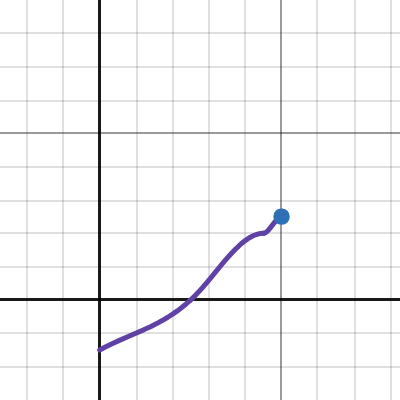
ok, so first time tinkering with outside spawn curves but got something working close to what you want ig.
some spawns early in the day, nothing for a while, then later around 5-6 pm they ramp up
this is the curve

u can play around with it here: https://www.desmos.com/calculator/s5dmajojxa
waxen frost
turbid zinc
Does checking the box mean anything?
removing the checkbox will not touch enemies in that level UNLESS that preset inherits from global and global preset has the enemies checkbox checked.
Setting a rarity for locker will override locker config but that's different for each enemy mod. Scopophobia (shyguy) for example needs an additional patch mod so it doesn't override the values set with LQ.
turbid zinc
what about immortal snail and shrimp (LC_Office)?
waxen frost
Can't tell sorry. Haven't used immortal snail and always had shrimp deactivated cause of performance issues
turbid zinc
alright, thanks anyways tho
 jovial pelican
but at what times are enemies spawned? a curve indicates a check at every gameupdate, but then there would be way more enemies?
 tranquil patrol
jovial pelican
but at what times are enemies spawned? a curve indicates a check at every gameup...
tranquil patrol
jovial pelican
but at what times are enemies spawned? a curve indicates a check at every gameup...
The curve X value is the time normalised. The Y is a multiplier for the game update value. So if you have a rarity weight of 100, and the day is, say, 0.5 (50%) of the way done, based on the curve xCore sent the 100 would be multiplied by around -2
Though I did notice that the curves in the Desmos graph tend to want to wiggle a lot more than they should, so I might need to tweak it
tranquil patrol
waxen frost
this is the curve
In your experience, do curves like this actually translate into the game well? Like all your values, bar the first ones, are positive but the curve dips heavily, is this accurate to the calculations ingame or do I need to reevaluate the graph?
jovial pelican
tranquil patrol
The curve X value is the time normalised. The Y is a multiplier for the game upd...
i get the math part. what i dont get is how often the game actually does the math.
tranquil patrol
jovial pelican
i get the math part. what i dont get is how often the game actually does the mat...
Ohh I see, I think the game attempts to spawn creatures every couple of ingame hours?
Not sure if there's a specific value
tranquil patrol
jovial pelican
i get the math part. what i dont get is how often the game actually does the mat...
 waxen frost
tranquil patrol
In your experience, do curves like this actually translate into the game well? L...
waxen frost
tranquil patrol
In your experience, do curves like this actually translate into the game well? L...
Well, I put trust into your graph :p
I only used this here to demonstrate actually. Previously I always did it like you're probably referring to: more intuitively. Like at 0.4 progress, I want about 2 spawns. At 0.3 I still want it at about 0, and so on
tranquil patrol
I don't recall anything about this being changed in v50
waxen frost
afaik these are the fixed intervals for inside spawn rotations and they never change. I have no clue how outside or daytime works in that regard
tranquil patrol
waxen frost
Well, I put trust into your graph :p
I only used this here to demonstrate actual...
Hmm okay, I'll have to do my own tests cause it doesn't visually look like how I expect, but maybe it's a quirk that Unity curves have too idk
jovial pelican
tranquil patrol
but i saw stuff spawn before 7:40?
tranquil patrol
jovial pelican
but i saw stuff spawn before 7:40?
7:40 is like, the moment the ship begins landing
jovial pelican
nvm mind my comment then. had brain lag
tranquil patrol
Yeaa np
waxen frost
tranquil patrol
Hmm okay, I'll have to do my own tests cause it doesn't visually look like how I...
So that one curve I posted above did behave ingame like it looked visually but ofc it's hard to tell especially with outside enemies. Some dogs might have spawned hidden from my sight during midday.
How did you get the f(x) then? I assumed it's 1:1 from Unity
jovial pelican
wiki says its "Cubic Hermite spline"
tranquil patrol
waxen frost
So that one curve I posted above did behave ingame like it looked visually but o...
It is 1:1 but I thought maybe I had some variables set wrong or smth
All I really had to do was rescale it and replace the correct variables
inner light
waxen frost
this is the curve
oh hell yeah, thanks dude
tranquil patrol
Ig the curves are more counter intuitive than I thought
 mystic furnace
so is this supposed to work automatically cause i edited experimentations interiors and put the config in the right place but its not doing anything
before i sound stupid or somn lemme clear out everything that could be doing somn
yeah so like
am i suppose to enable it or somn??? cause my games not reading the advanced config despite it being where its supposed to go
okay yeah no i i dont get it. i edited experimentation and its just not even applying
literally went through the log and nothing states it shouldnt work, exactly the opposite where it 100% looks like it should absolutely works but when i simulate it on the console it shows completely different interiors and chances
sorry for clogging the chat im just tired of configuring this damned game and i dunno what im doing wrong
crisp stone
@mystic furnace simulate doesn’t show what this mod does
 turbid zinc
What if I added new scrap mods to my pack after getting LQ?
would I need to reinstall it and reset my configs?
inner light
i think they would be added to the scrap list after you boot up the game w the mods
turbid zinc
hm
Maybe Im just unlucky?

Im currently thinking that ImmersiveScrap items are just not spawning at all
:/

I checked into the preset file for LQ and the scrap items are registered but NONE are applied to any moon already so I'll have to painstakingly add each one individual for every moon

crying LMAO

having to figure out which items are from immersivescraps and not from one of wesley's moons
inner light
turbid zinc
I checked into the preset file for LQ and the scrap items are registered but NON...
oughh
that's so painful
turbid zinc

inner light

turbid zinc
fuck it we ball
 ruby fractal
turbid zinc
having to figure out which items are from immersivescraps and not from one of we...
ruby fractal
turbid zinc
having to figure out which items are from immersivescraps and not from one of we...
When you have both Wes' moons and Ganimedes and they both have diamond and pickaxe items.
turbid zinc
THERES ALREADY THREE DIFFERENT FIRE EXTINGUISHERS LMAO
lord give me patience 🙏
alright now I know which ones I'm looking for
 tacit thunder
mystic furnace
sorry for clogging the chat im just tired of configuring this damned game and i ...
tacit thunder
mystic furnace
sorry for clogging the chat im just tired of configuring this damned game and i ...
yeah you 'll have to just launch and test it out, but it should print out in console that LQ is applying settings or something
tacit thunder
turbid zinc
alright now I know which ones I'm looking for
haha yeah, ill add an option to allow searching by mod at some point
turbid zinc
Oooo that'd be so helpful yeah! :D
this aside I genuinely love this mod a lot, it solves the biggest problem I had with my modpack (spawnweights being one of the most inconsistent things ever LOL)
like there's dine where like 90% of monsters have weights below 10 and then artifice having all of monsters with a weight near 100 😭
waxen frost
turbid zinc
Im currently thinking that ImmersiveScrap items are just not spawning at all
the best thing to do in this situation is configure your preferred weights in the mod's config so here immersivescraps. Then in your LQ preset make a copy of your current presets and delete the old ones. Start the game and load a save to generate the presets again.
Now you have your new 'defaults'. If desired you can now manual copy some settings from the backuped (copied) presets or, if your dare, use a online JSON editor. Make backups
turbid zinc
I think its too late for that LOL
Im about done with setting the scrap weights for each moon
at the very least I was able to cherry pick which scrap from the mod to use for each moon, so I could keep a sorta theme going with each moon
but thanks anyways tho!
ruby fractal
Hmm, alright, I must've completely missed what the Global preset does, or maybe I need a new preset for this but...
I added a few scrap to Global only to adjust their sell prices and change the conductivity of them, but now on custom moons I've assigned to the Global parent, they know only spawn one single scrap, the one I edited. I didn't set their rarity or anything, left it at 0 and kept them disabled, so I must be misunderstanding something here.
turbid zinc
I assume that like whatever you set the parent to be, the moon that you applied it to will copy the same as the parent
so say you gave global like 3 scrap, any moons that have it as the parent will copy the 3 scrap and kinda just remove everything else
I never tried it and it worries me to think about so I never bother messing with the global config
 stuck juniper
cannot thank you enough for this tool, it's been invaluable in building my modpack. It has singlehandedly enabled me, a NON-modder, to rip open custom moons and tweak their scrap and monsters to perfection according to my personalized game balance. Only thing I wish it would add in its info/resources roster is a link to some online web-hosted tool that can visualized animation curves with the same hermite cubic spline interpolation gobblydee-gook that Unity uses for spawning based on keys and values I feed into it, that way I can see exactly what my spawn curves look like without needing to actually acquire a Unity dev kit just for its animation preview window. Currently I'm sort of roughly guessing what the curve looks like and testing it repeatedly, which works well enough but it is far from ideal.
jovial pelican
Performs and visualizes a cubic spline interpolation for a given set of points.
tranquil patrol
 stuck juniper
hmmm, which one is easiest to use for just a quick plug-and-look of values according to how unity handles spawning with the animation curves?
stuck juniper
I'm a bit stupid but I think timodenk is more user-friendly for the simplicity, but thank you both!
tranquil patrol
For me, I can't wrap my head around what you need to input for the timodek one, the desmos one is just put values in and see result
stuck juniper
maybe a link to banana's favorite resource for this plus a quick little tutorial with screenshots of what to punch in and where to get a visual of it might be a nice addition to the mod's thunderstore page/Web UI "Animation curve?" link, just for people terrible at math like me to easily grab pop-ups of what they are building without needing to necessarily learn all the buttons and features of a complicated highly flexible math tool, which to me is what desmos looks like
 open matrix
Can confirm btw that changing the Map Size Multiplier for a moon will cause interior desync in LQ
(and yes, everyone has the same config and profile etc.)
Interestingly, the host seems to have one interior layout, and all the clients have another, that might be a clue for the dev as to whats happening
I set which interior spawns through LLL, so that synced fine
but since the size desyncs, all the rooms outside the starting area are different
happened pretty consistently until we all went and disabled that setting in LQ for the moon, then no issues
stuck juniper
open matrix
Can confirm btw that changing the Map Size Multiplier for a moon will cause inte...
oh dear that's VERY bad for me... so would setting dungeon sizes per-moon through LLL configs sync fine then?
open matrix
SORRY
i meant MAP size multiplier

not the "factory" size multiplier
2 different things
Map Size depends on the moon
Factory size is different for each interior
And then for different LLL interior configs, the value would normally be between the map size and factory size or something like that
open matrix
stuck juniper
oh dear that's VERY bad for me... so would setting dungeon sizes per-moon throug...
I edit the Dungeon ("factory") size in LLL, not LQ
And its worked nicely

I use LQ for the enemy and scrap spawns, routing prices etc.
i thought it was ok to mess with the map size but no
 fringe plover
Does LQ have any issues with LLL as of now? Haven't touched it since v49
stuck juniper
yeah the map size multiplier was what I was using this whole time :/, guess I'll just uncheck that on the web UI and do all of them through LLL instead
open matrix
fringe plover
Does LQ have any issues with LLL as of now? Haven't touched it since v49
In my experience no
But thats assuming you let LLL handle which moons interiors spawn on as well as the other interior settings like the size
And you let LQ handle scrap, enemies, routing prices etc.
they work fine
fringe plover
open matrix
In my experience no
But thats assuming you let LLL handle which moons interiors ...
That was the plan! LQ has been my go-to for that stuff, so I don't plan on touching LLL. Just wanted to make sure.
stuck juniper
open matrix
In my experience no
But thats assuming you let LLL handle which moons interiors ...
uh oh wait a minute, I need specific moons to have specific interior sizes, not a specific interior having a global size multiplier applied to it that effects ALL moons using that interior... can LLL not do this?
does factory size multiplier work fine with LQ but not map size multiplier? what is even the difference if they both affect the dungeon interior size?
open matrix
stuck juniper
uh oh wait a minute, I need specific moons to have specific interior sizes, not ...
LLL cannot do it per moon, no. LLL lets you set the chance for an interior for different moons, but the size changes apply to all
LQ on the other hand does let you change the interior size per moon
stuck juniper
so factory size multiplier works just fine but map size multiplier causes desync of dungeon interior?
open matrix
stuck juniper
does factory size multiplier work fine with LQ but not map size multiplier? what...
idk if messing with factory size multiplier works, i dont mess with it cuz i use LLL and have it be consistent across all moons
i do this because in my LLL config, the interior size is a blend between the max size of the interior and the moon size
so for example, a facility will be bigger on titan than vow
same with pool rooms
But across the board, the pool rooms will also just be way way smaller since the default is pretty huge
stuck juniper
is there an easy way to just check how many rooms the interior generated with in-game so I can live-test if it's actually doing anything or do I just gotta run around in there until it's clear it works? lol
open matrix
uh, idk lol
I just figured it out whenever i died and could spectate enemies and see through walls a bit
default pool rooms for example would have like, 3 layers of very wide interconnected corridors and passages
So easy to get lost in, and loot so spread out, most bathrooms and all had nothing in them
scaling it down made it so much better
open matrix
stuck juniper
is there an easy way to just check how many rooms the interior generated with in...
i mean in all fairness, its about the "feel" for you and your players anyways
stuck juniper
yeah but I wanna balance the modpack without having to do trial runs on multiple moons meant to have unique interior sizes but same interior theme as elsewhere
open matrix
some solid numbers on rooms n stuff might help, but really how people generally feel whilst exploring it is the most important part imo
stuck juniper
I guess I can fiddle with factory size multiplier and see if it works and doesn't cause desync issues
open matrix
stuck juniper
yeah but I wanna balance the modpack without having to do trial runs on multiple...
Then yeah, idk how you'd do that
Some interiors might have dev debug modes that output that info in the log for you
open matrix
stuck juniper
yeah but I wanna balance the modpack without having to do trial runs on multiple...
But to be blunt with you, if you wanna mess with the interior size for every interior on every moon differently, then naturally yes, getting it exactly how you want is gonna be tedious by the sounds of it regardless
Thats why i just opt to generally have the interiors scale in size based on what moon their on
And some large interiors in particular like dungeon and pool rooms are scaled back globally
Generally that works fine for me
stuck juniper
I'm gonna build a gimmick moon where the interior is like 5x normal size and only has 6 pieces of loot all worth 1000 and make it a treasure hunt thing where most of your inventory is about bringing useful gear instead of room for loot, just because it's a good way to justify having a custom moon beyond getting obsessively precise over which moon has what loot pool value and whatever
I have no choice but to get tediously precise lol
open matrix
stuck juniper
I'm gonna build a gimmick moon where the interior is like 5x normal size and onl...
Interesting, i kinda have that
Except its the Ikea moon
We set the spawns goofy
And 3 scrap spawns in, but its worth like 3k each
Landing in the Ikea car park is like landing on the d-day beaches
but ikea is a joke moon that costs like 6k to go to
Funnily enough, this is the same moon i tried to make larger
and caused the desync i mentioned earlier
waxen frost
@open matrix you can set the factory size multipliers in the global preset to normalize generation size of all interiors across all moons and imho that's a wayyy more intuitive way than using the LLL config lerp thing which might not be working as intended rn according to Zaggy and my own observations align with that. LQ works perfectly fine for me.
The interior desyncs with map size multiplier are happening because for some reason all clients are using the default value and not the one of the host which should mean all clients get the same dungeon that is different from the host's dungeon. In older versions there were logs printed by LLL stating the dungen size where you were able to observe this but I think they were removed in the v50 version or moved to more detailed logging (new option).
That being said I do not have this issue any longer even though I am using the map size multiplier in LQ. So I'm curious, what version of LLL are you using?
open matrix
waxen frost
<@403236125835001887> you can set the factory size multipliers in the global pre...
I am using the latest version of LLL
waxen frost
Hmm, me too. If you scroll up a bit you'll find me posting about this. It's so weird. I had that issue before and then at some point it just stopped and I'm not sure why.
waxen frost
open matrix
I am using the latest version of LLL
oh, wait a sec. You are not using the factory size multiplier in LQ but the size config in LLL, right? Maybe try disabling the setting in LLL conf and use the on in LQ instead (or nothing) and see if that changes it. You can do that just for one moon/dungeon combination to test.
open matrix
Yes, but the 3 interiors that spawned were not edited in LLL. It was Facility, Warehouse and Office, and none of those i have changed the dungeon sizes for in LLL
The desync was purely from LQ changing the map size multiplier on that 1 moon
undoing my changes to the map size multiplier immediately fixed the desync issue
It was the first and only time i ever changed that value in LQ and its what made it desync immediately
waxen frost
Hmm, that's fair.
All I can tell you is I have map size mutliplier set for every single moon in my presets.json and I am not getting these dungeon desyncs.
In my LLL config I set nothing but moon prices so I do have the Enable Content Configuration set to true for all moons but set to false for all dungeons..
waxen frost
So I did some testing on that interior generation desync issue in LAN mode..
Reproducing the desync
Fresh profile with LQ only, let LQ generate presets. Open the presets.json in webUI and set a a map size for experimentation. Test in-game. Desync.
What avoids the desync
If in the same preset (or via inheritance) the dungeon flow section is active and the dungeon flow is added to the list the desync is gone. It is not required to have the rarity or factory size multiplier set. Just adding the flow is sufficient.
Having dungeon flows section active but no dungeons added to the list does not fix the desync.
Uncertainties
I have tested this without LLL and can't say if Content Configuration or dungeon selection influences it. Also I'm not sure if enabling the dungeon flows section without adding has any other effects (maybe dungeon selection?).
I will try in my default pack. I'll keep my interior size settings in LQ global preset and go back to dungeon moon matching via LLL content configuration and see what happens.
@tacit thunder
@open matrix Easiest solution for you to avoid the desync while still using LQ's map size multiplier should be going to your global preset, enabling the dungeon flow checkbox and adding all dungeon flows via "add all" button. No need to configure anything. Would be glad if you tried and report if that fixes it for you.
stuck juniper
waxen frost
<@403236125835001887> Easiest solution for you to avoid the desync while still u...
so just for clarification so I didn't misunderstand anything... according to your current tests, you believe I CAN have interiors be different sizes per moon even if all said moons are the SAME interior flow (such as Level2Flow) AS LONG as I go to LQ's Global and check off dungeon flows and add all manually? The key I'm looking for in my specific case is moon-specific interior sizes, not interior-specific interior sizes for what I'm building.
waxen frost
stuck juniper
so just for clarification so I didn't misunderstand anything... according to you...
I'm not sure if you mixed stuff up or just mistyped when typing 'check off dungeon flows' but generally my answer to you is: yes, I believe it should work.
Map size multiplier is a per-moon multiplier for dungeon size. This allows you to make every dungeon on a moon larger (or smaller). Typically more expensive, harder moons will just haver larger interiors and it's because of this value. I believe this is your main concern.
However currently there seems to be bug where setting this causes desyncs of the interior. To resolve it I suggest, you go into your global preset, enable the "Dungeon flows" section/checkbox and then hit the "Add all" button twice.
This will add all dungeon flows to the list in your global preset which in my testing resolved the desync.
Now what about that Factory size multiplier? This is the per-dungeon multiplier for dungeon size.
The problem most people face is that dungeons, especially custom dungeons, generate at different sizes (for various reasons) on the same moon (same map size multiplier).
So let's say you have a moon - Experimentation for example - and you set the map size multiplier to 2 to make dungeons a larger. If you're gonna set it up so Level1Flow and HospitalFlow can be the dungeons there, Hospital will generate way, way larger than Level1. So to bring all of your dungeons on the same level - size wise - you can use the factory size multiplier. It's multiplied with the Map size multiplier.
This allows you to have every single dungeon generate at roughly the same size relative to each other on all of the moons while the absolute size still increases from moon to moon according to the moon's map size multiplier.
Basically try this.
 stuck juniper
okay that's what I thought you were saying, just wanted to be positive since I've been spending the last week learning a bunch of new stuff about Lethal Company just so I can use LQ more effectively in my modpack, thank you for clarifying
tacit thunder
waxen frost
So I did some testing on that interior generation desync issue in LAN mode..
##...
thanks for the heads up, interiors alone don't cause issues, but map size multipliers do, and i still am not sure why
stuck juniper
I feel like perhaps either LQ isn't changing spawn chance curve/spawn amount range correctly, or certain custom moons have some strange shenanigans tied into them by the creator sometimes that is able to bypass normal spawning behavior and force altered weird spawning behavior. I'm tweaking Infernis right now and it's default spawn range was apparently 10.4, so I checked it off and set it to 2, and in the resulting tests one day got 11 enemies before noon, the other got 3 before noon, spawning curve was left at default and untouched for these tests.
I was also getting weird behavior on Atlas Abyss where sometimes I'd land and there'd be 17 enemies immediately, other times it seemed to obey the custom spawning curve and range perfectly fine and the resulting enemy spawn numbers matched up flawlessly with what LQ showed they would be. This was on the same weather type for all these tests as well.
Is it possible for custom moon authors to fiddle with spawning behavior in ways LQ isn't able to detect and alter/block off? I can't seem to find any other explanation for the results I see while trying to fine-tune custom spawn pools and spawn times.
anybody know a tool that lets me see what numbers the game is currently using for spawning live while playing or something? really not sure how else to troubleshoot this
inner light
hmmm
imperium maybe?
It has a spawn oracle that let's you see what's most likely to spawn at any time
stuck juniper
interesting, alrighty I'll try that and see if I can track down the behavior, thx
stuck juniper
nah that doesn't even print what he believes the spawning curve or spawn range to be, that can't spot it
oh wait... I think I CAN see the spawn range at least
tranquil patrol
stuck juniper
anybody know a tool that lets me see what numbers the game is currently using fo...
Vanilla posts logs when things spawn and when the spawns are set with the current weights
stuck juniper
and it does look like it is in fact ignoring LQ's change entirely
fringe plover
Does Nightmare Foxy ignore LQ? I noticed it spawned on a moon where I had it disabled.
stuck juniper
Imperium claims in-game the deviation is 10.4, that's the default spawn range LQ showed before I modified it, but LQ says it IS in fact checked off and set to 2

 stuck juniper
tranquil patrol
Vanilla posts logs when things spawn and when the spawns are set with the curren...
stuck juniper
tranquil patrol
Vanilla posts logs when things spawn and when the spawns are set with the curren...
where do I go to watch vanilla logs then? will they enable me to basically reconstruct what the spawning curve is by watching the logs or something?
tranquil patrol
stuck juniper
where do I go to watch vanilla logs then? will they enable me to basically recon...
Not really, it tells you the current weights of every possible enemy every couple of ingame hours
Enemy Spawn Amount range isn't the max number of creatures that can spawn, it's the max number of creatures that can spawn at a spawn cycle
Max number of creatures is determined by power levels
stuck juniper
yeah, I'm pretty sure I understand that so far, I am tweaking the spawning curve and spawning range but my only real way to see if they take proper effect is to boot the game up and watch enemy spawns live as they happen per-cycle with lategame better scanner upgrade lol.
I keep getting days where it goes out of wack and spawns way more than the spawning curve should allow even if it would have selected the max spawn range and then other days where it behaves like I would expect from the spawn curve keys and values I set.
but ONLY on 2 custom moons so far, doesn't do this on a third
tranquil patrol
Wdym by "more than the spawning curve should allow"
stuck juniper
like, at 0.5 which would be about 3:00 pm in the day, the spawning curve doesn't surpass 5 at the value and the range is 2, meaning at most, there should NEVER be more than 7 enemies at once at 3:00 pm
but I'm getting instances where there's 11 before noon sometimes
tranquil patrol
That ain't how it works
stuck juniper
https://tools.timodenk.com/cubic-spline-interpolation
I'm using this tool to visualize my keys and values, so it can't be that I'm just making wacky curves
Performs and visualizes a cubic spline interpolation for a given set of points.
but it spawns in cycles every 2 hours right?
so it doesn't spawn that many enemies RIGHT on that value RIGHT on that time, it instead draws the from overall line when a cycle hits right?
am I just not understanding what's being explained here then?

according to this, unless my tool is not showing the true line for some reason, I should NEVER see more than a maximum of 4 enemies by exactly halfway through the day

 tranquil patrol
Someone else please correct me if I'm wrong, but I'm pretty sure that tooltip is just wrong. To my understanding, the spawn chance curve just multiplies with each individual creature's curves to determine what spawns at each interval. The number of things that can spawn at each interval is influenced by something as well I don't remember, but also remember that individual enemies also have spawn amounts (ie baboon hawk spawning in groups)
stuck juniper
unless a cycle is a bit behind or ahead of that exact time, in which case it could be a tiny bit off but still obeying that curve line to decide how many to allow to spawn IF there is room according to power levels
oh dear, you mean LQ has been teaching me incorrect lessons this entire time?
fringe plover
Is this a known issue with Foxy?

 stuck juniper
so then if I have something that has, say, a 3% chance of spawning right at the start of the day, and the overall spawning curve starts at -2 but the range bumps it to a perfect 0 by landing on 2 when choosing between -2 or 2 (as I think that's how the range works)... theoretically that means 3% x 0 which is 0 so I should NEVER EVER see my blobs at the start of the day... but I have before I believe
 tranquil patrol
stuck juniper
according to this, unless my tool is not showing the true line for some reason, ...
tranquil patrol
stuck juniper
according to this, unless my tool is not showing the true line for some reason, ...
Assuming the tooltip is correct you'd be wrong about this anyway. If at hour two the max spawn count is 1, 1 spawns, at hour four the max is 2, 2 spawn, at hour six the max is 3, 3 spawn, at hour eight the max is 4, 4 spawn meaning a total 10 have spawned
stuck juniper
tranquil patrol
Assuming the tooltip is correct you'd be wrong about this anyway. If at hour two...
that's what I was showing and say actually
I thought the spawning curve basically acts as a throttle enforcing how many a spawn cycle is able to add IF there is room both in power level AND the spawning curve allowing it as a blanket-ceiling cap
tranquil patrol
But you're saying you expected only 4 enrmies at halfway?
stuck juniper
if my range is 2, that means it could have selected between -2 and 2, so let's say it selected the max of 2, therefore if my curve doesn't go above 4 halfway through the day
the most I should EVER see is 6, right?
tranquil patrol
The value is not the max number allowed in the level, it's the max number that can be spawned at a spawn interval
stuck juniper
okay so... the value is not a CAP that prevents the total current number going beyond it... the value is how many can be spawned at that next cycle additionally?
tranquil patrol
Max is 1 at the first interval and 1 spawns, max is 2 at second interval 2 spawn, now there are 3 enemies with a max spawn count of 2
stuck juniper
so if at 12:00pm the curve has a value of 3, the cycle at that time can add no more than 3 enemies tops, even if 3 already currently exist at that time?
tranquil patrol
Yeah the amount of enemies already there has no bearing on the spawn chance
stuck juniper
oooooooh
tranquil patrol
The only cap for the level as a whole is power level
stuck juniper
I was treating it as a BLANKET-power-cap and figured the actual power-cap was only there for enemy differentiation, not max enemy count
okay
so then here IMMEDIATELY as I land... this is actually correct behavior!?


 tranquil patrol
Max Enemy Count and Group Spawn Count are probably your friends. They aren't curves so less customisation but still
stuck juniper
4 interior enemies INSTANTLY as the level loads in and runs the very first spawn cycle... even though my curve and range are set up like that?
does that all look correcting according to your understanding of these functions?
tranquil patrol
I'm not really sure atm tbh, I understood the curve differently but the tooltip is making me question myself. I'll have to double check tomorrow, it's nearing 4am
stuck juniper
oh alrighty, well thanks for telling me at least that I may have been mislead
if I totally misunderstood the spawning curve functionality that could explain the wacky inconsistent behavior I've been getting
 indigo pewter
stuck juniper
so then here IMMEDIATELY as I land... this is actually correct behavior!?
indigo pewter
stuck juniper
so then here IMMEDIATELY as I land... this is actually correct behavior!?
what mod tells you that info about the enemies?
stuck juniper
it's not a debug mod or anything, it's just Lategame Upgrades with the Better Scanner upgrade maxed out, its level 3 allows you to type "scan enemies" into the terminal and it spits out all currently spawned in enemies, but it doesn't specify which are inside or out, though that's rarely a problem since normally indoor and outdoor enemy types never blend with each other's environments unless you force them to with modded spawning
I have a current theory about my spawning issue behavior... I may or may not have extended the deadline to 90 days since I was testing things by landing and taking off over and over repeatedly numerous times to watch spawns live on the terminal monitor... and according to this https://lethal.miraheze.org/wiki/Mechanics
the min and max count of enemies that spawn uses an equation that includes the current deadline to decide the minimum count... and I believe setting the deadline too high like that might have resulted in a min monster count higher than a max monster count, which MIGHT have been causing the issue, still testing on a vanilla deadline of 3 days or less to be sure though...
Lethal Company Wiki
This article is meant to give experienced employees an in-depth view behind various game mechanics such as entity spawning, game cycles, scrap collection and much more to come.
This article is still in its early stages and more information will be added in the future as our team gathers more behind the scenes intel. All the values and informatio...
tacit thunder
stuck juniper
I feel like perhaps either LQ isn't changing spawn chance curve/spawn amount ran...
the spawn amount range might be really high, which will change the variation
and yeah, having more days forces a really large spawn range
tacit thunder
fringe plover
Is this a known issue with Foxy?
not sure, i dont know what foxy's default behaviour is like
fringe plover
I tested it and it seemed to bypass LQ unfortunately.
tacit thunder
probably uses custom spawning logic then
fringe plover
It's similar to ShyGuy where I can't set specific locations in the config for the mod, too 😅
tacit thunder
yeah it's a bit unfortunate but i cant really change it
fringe plover
All good!
tacit thunder
👍
tacit thunder
turbid zinc
Oooo that'd be so helpful yeah! :D
if u have changes and try to load another file, it should prompt you with a popup
stuck juniper
yeah my spawning behavior works as intended now that my deadline days are below 10 in testing, that was likely the culprit, so that's good
stuck juniper
jovial pelican
i use https://tools.timodenk.com/cubic-spline-interpolation
also @tacit thunder this tool is very simple and helpful to use to visualize spawning curves and track what I'm actually modifying, I strongly recommend adding it to the Web UI and any other relevant tutorial sections for LQ, and then just give some quick instructions on how to punch in your keys and values, click interpolate, and navigate/zoom on the grid with the little buttons on the bottom right. It's so crucial to be able to visualize the animation curves for spawn chance and falloffs that frankly I doubt anyone even COULD make use of changing those values LQ allows for the changing of without this tool.
tacit thunder
ill look into the math behind it
but afaik animation curves also have weights behind each point
which im not entirely sure if it's more of a bezier curve
stuck juniper
yeah that's true, but so far I can attest that what I witness in my test curves by the hour in-game and what I actually set the numbers to seems to be pretty spot-on consistent
so at least for now, it's an excellent tool even if MAYBE the curves it outputs aren't absolutely-flawlessly exact to what Unity reads them as internally
also I meant link to the tool not literally embed it into the Web UI sorry lol
stuck juniper
it's enabled me to gut and completely reconstruct spawning chances for indoors, individual enemies, and a few falloff curves for an entire moon and I ran into no "wtf that's not right" moments (because this was all being done before I added 90 days to my deadline)
tacit thunder
lol
waxen frost
stuck juniper
it's enabled me to gut and completely reconstruct spawning chances for indoors, ...
haha seems like all of us had that happen to us when we were testing shit out. #1213985212686532638 message
I mean surely the spawning algorithm isn't hardcoded to 3 days, right?
waxen frost
fringe plover
It's similar to ShyGuy where I can't set specific locations in the config for th...
at least for ShyGuy you can get ShyGuyPatcherPatcher by DBJ. It disables the custom spawn logic allowing you to use LQ
waxen frost
stuck juniper
also I meant link to the tool not literally embed it into the Web UI sorry lol
my problem with both of these tools is copy and pasting all the values individually. WIN + V helps (clipboard history - in case someone didn't know about it) but it's still tedious
stuck juniper
I mean it slows me down a little, sure, but I frankly don't care lol, as long as it works I'm willing to waste time typing it number by decimal by number if I have to
jovial pelican
having the curve calculator on the right of the web ui would be awesome. especially together with buttons to copy from/to the calculator. mentioning when the spawn cycles occur (0.0926, 0.1667, 0.2778, 0.3889, 0.5000, 0.6111, 0.7222, 0.8333, 0.9444) would also be great.
stuck juniper
new toggleables to alter a specific moon's minenemytospawn AND spawncooldown values so we can control how often or infrequent spawn cycles happen as well as more precise spawning control so we can bypass the quirky conditions that need to be met to naturally raise minenemiestospawn beyond 0 would be lovely too
but frankly a bypass to the invisible cap of roughly 20 enemies before spawning just dies and refuses to make anymore would be super lovely, make a literal zombie horde Rend with 60 masked lol
jovial pelican
i think its capped to the amount of vents on the map
as an interior spawn will fail if it does not find a free vent
stuck juniper
https://lethal.miraheze.org/wiki/Mechanics this says it caps to 20 OR the number of free vents, so I think if the number of free vents is over 20, it still caps at 20
Lethal Company Wiki
This article is meant to give experienced employees an in-depth view behind various game mechanics such as entity spawning, game cycles, scrap collection and much more to come.
This article is still in its early stages and more information will be added in the future as our team gathers more behind the scenes intel. All the values and informatio...
would be nice to have a 'brute-force spawning' toggle that just spawns the enemy in front of a vent instead of coming out of the vent if it detects no vent is available, that way you can break the cap for sure, just have it ignore the default 20 and imitate vent spawning through positions
indigo pewter
stuck juniper
it's not a debug mod or anything, it's just Lategame Upgrades with the Better Sc...
oh interesting. I assumed Better Scanner was for the personal scanner not the ship scanner. I guess I should read the description instead of assuming
 astral marten
@tacit thunder
Send Help!
People are using the same names now and I do not know what is from where.

I have 4 Hoarding Queens!
all different archetypes....
When you impliment that Modded Enemy Legend. I will be so happy.
ruby fractal
Yeah, that is very confusing, especially since I find one with (DriftwoodGiantObj) and then there's also the ACTUAL Driftwood Giant. Like, which one is which?!
 tawdry summit
astral marten
tawdry summit
astral marten
What the 😅
Why is the hoarder queen invading everything
astral marten
tawdry summit
What the 😅
Why is the hoarder queen invading everything
I have no idea
tawdry summit
I hope its not a my end thing, since I have 0 clue why that is
astral marten
I do not even know if it is your Hoarder Queen or if it is a same named entity

Fray has 3 of them set.
tawdry summit
Its likely the enemy in the parenthesis?
It seems like the Hoarder Queen is taking the displayed name from other enemies in Lethal Quantities
Itd be vice versa mb
astral marten
But it is also injecting itself into multiple moons
Do you have the Queen set to go to other moons?
astral marten
ok then this may be you.
tawdry summit
Eugh
The Bugling isnt causing the same issues which is odd
& it also is placed in that config via the tag stuff

 tawdry summit
yeah
astral marten
but for some reason the queen is injecting itself as 4 seperate spawn weights.
This is the vanilla config un edited.
tawdry summit
astral marten
but for some reason the queen is injecting itself as 4 seperate spawn weights.
I dont think thats what is happening though
Its not actually the queen enemy
astral marten
I have no idea what is happening then. 😛
tawdry summit
astral marten
In this example, 'Brackens' is the display name of the 'Flowerman' which is the bracken ofc. But it seems to have itself listed on the Football enemy and the Walker enemy
astral marten
@tacit thunder I need help
 celest spokeBOT
Hello, @astral marten, we have a dedicated support channel and forum here: #help-and-troubleshooting #1185732310700654732
Anyone responding is a volunteer so be patient.
astral marten
Go away The Company!
tawdry summit
ikr!
astral marten
tawdry summit
In this example, 'Brackens' is the display name of the 'Flowerman' which is the ...
Yeah these relate for me to the proper enemy. So I never questioned it. However this experience now has me completely befuddled.
tawdry summit
I dont believe there is any gamebreaking issues with this bug, but BananaPuncher may bring more useful info to the table
astral marten
tawdry summit
I dont believe there is any gamebreaking issues with this bug, but BananaPuncher...
Unintended things are happening for sure. Game Breaking I have no idea.
Why you always being Different Rosie!
Your always finding new ways to break things. 😛
astral marten
hahaha
 noble crypt
how do i get my presets.json folder to include the new mods i've downloaded since ive made it
i tried loading in with the new mods and LQ turned on, but currently it just gets stuck on random seed and then the presets folder wont include anything new
tacit thunder
astral marten
<@282697035063361537> I need help
the id in the parentheses is the real name of the enemy
not sure where hoarderqueen is from, but the centipede is the vanilla snare flea
the problem is now, if you type snare flea in the console, it wont show you the correct bestiary entry
astral marten
tacit thunder
the problem is now, if you type snare flea in the console, it wont show you the ...
So how did this happen?
astral marten
tacit thunder
not sure where hoarderqueen is from, but the centipede is the vanilla snare flea
Hoarder Queen is from @tawdry summit Moons
tacit thunder
because the custom enemies use the same enemy file id in their scan node
tacit thunder
they use the same enemy file id as the bracken
tawdry summit
tacit thunder
because the custom enemies use the same enemy file id in their scan node
oops
astral marten
So when they created the Enemy instead of assigning a New Enemy ID. They used an existing one?
tawdry summit
Ill fix it xD
tacit thunder
yeah
astral marten
tacit thunder
yeah
Ok that explains the Bracken before Football.
What about Hoarder Queen (Centipede)
So Rosie has an enemy ID and name but the Enemy is a centipede?
tacit thunder
they overwrote the snare flea file entry
tacit thunder
no, just the bestiary entry
astral marten
@tawdry summit ROSIE! 😛
crisp stone
its my fault
astral marten
Ok so correct me if I am wrong.
Brackens(Football) Spawns Football - However uses Bracken Bestiary
Hoarding Queen (Centipede) - Spawns Centipede but uses Hoarding Queen Bestiary?
Hoarding Queen (Hoarding Queen) - Spawns HQ and uses HQ bestiary.
Shrimp - Registers its own ID and Bestiary.
tacit thunder
yes
astral marten
crisp stone
its my fault
How does this always end up as your fault. 😛
crisp stone
astral marten
How does this always end up as your fault. 😛
Odd comment
astral marten
crisp stone
Odd comment
When I read conversations I always see you ninja in a "Oops my bad"
So what is the issue that you believe LLL to be doing?
tawdry summit
oh?
astral marten
So this issue exists because @tawdry summit Switched to the LLL enemy system for their moons and the system is auto applying the wrong enemy ids?
Interesting.
Does this also explain why it is applying in multiple times?
since there are 4 instances of Hoarder Queen.
Would there be any kind of Work Around or Bandaid fix for this atm?
I think we lost Batby
astral marten
tacit thunder
yes
Thank you for all of this knowledge
tacit thunder
👍
astral marten
@tacit thunder
Ohh one more question
How come some custom enemys just list their name
Shrimp
and some are
Hoarding Queen (Hoarding Queen)
or
Wanderer (Wanderer)
tacit thunder
because their bestiary entry is set up right
astral marten
tacit thunder
because their bestiary entry is set up right
Which one?
tacit thunder
any ones that dont have the parentheses
 vivid nymph
astral marten
vivid nymph
astral marten
Ok so if I wanted to let devs know what the problem is. How does one set up the bestiary entry correctly so their entity shows up without parentheses?
tacit thunder
no clue tbh
astral marten
👍
@queen salmon Pinging you as it looks like your Walker and Wanderer seem to have this problem as well.
Read from here
#1213985212686532638 message
tacit thunder
of course, some enemies might not have a reason to have an entry, but all vanilla ones do
astral marten
true
 queen salmon
astral marten
Read from here
https://discord.com/channels/1168655651455639582/1213985212686532...
queen salmon
astral marten
Read from here
https://discord.com/channels/1168655651455639582/1213985212686532...
My discord leads me to a random message instead...
Evrytime I click it
astral marten
oh interesting
 astral marten
start from here

If I am understanding everything correctly Your walker is set up to inherit the Brackens Bestiary and Scan Node and not one of its own, and the Wanderer while posessing its own Scan Node and Bestiary has something wrong with it.
Basically when corrected they should list as
Walker
Wanderer
Not
Brackens(WalkerType)
Wanderer(Wanderer)
Current Enemy screenshots for reference in one place.


 waxen frost
noble crypt
does LQ cause an issue where old birds dont wake up?
waxen frost
noble crypt
does LQ cause an issue where old birds dont wake up?
Custom moon? I think that can be the issue. Moon author didn't add something that makes them wake up (I don't what it is)
waxen frost
astral marten
<@1093317421714116750> Pinging you as it looks like your Walker and Wanderer see...
Pinging @jade token too because Knight has the same issue iirc
(last 10+ messages for context)
Could this (in general) also be a reason for the bestiary in terminal breaking btw?
I think that's an issue that many don't realize because who uses the bestiary, right? 😄
astral marten
@tawdry summit
It does look like the Hoarder Queen has overwritten the Centipede, Driftwood Giant, and Slenderman enemies.
They have disappeared from the list completely and are now associated with the Hoarder Queen.
Let me know if and how you fix this. 😄
@queen salmon
Looks like the Wanderer is from Oobalterra.
@buoyant gyro
Does the driftwood giant have its own scan node and Bestiary entry?
 buoyant gyro
astral marten
<@514120543046336516>
Does the driftwood giant have its own scan node and Bestia...
buoyant gyro
astral marten
<@514120543046336516>
Does the driftwood giant have its own scan node and Bestia...
yes lol
buoyant gyro
fun
astral marten
buoyant gyro
fun
My theory was that it was inheriting entities without a Scan Node or Bestiary entry. This theory is now busted.
 jade token
waxen frost
Pinging <@233999394490286080> too because Knight has the same issue iirc
(last 1...
jade token
waxen frost
Pinging <@233999394490286080> too because Knight has the same issue iirc
(last 1...
Mine has no parathesis though?
tawdry summit
astral marten
<@979691257066561636>
It does look like the Hoarder Queen has overwritten the ...
This genuinely shouldnt be happening
I dont have anything which even would remotely overwrite other enemies
I dont have a fix for it, apologies
buoyant gyro
consider its not our mods buggin
astral marten
tawdry summit
This genuinely shouldnt be happening
Its ok. I know you just like the world to burn. 😛
tawdry summit
buoyant gyro
consider its not our mods buggin
Im assuming it may be the way LLL registers enemies but i have no clue
tawdry summit
Yeah no clue then
astral marten
We will figure this out in time and remember these fun momments later. haha
waxen frost
fwiw this is how it looks for me

I get a lot of "knight" while SourceShard does not 🫠
edit: just noticed I'm missing HoardingQueen entirely even though I have Affliction
 vale escarp
buoyant gyro
i dont use LLL
vale escarp
buoyant gyro
i dont use LLL
hpw do you get moons and interiors?
buoyant gyro
for my mod
astral marten
waxen frost
I get a lot of "knight" while SourceShard does not 🫠
edit: just noticed I'm mis...
ohh interesting
noble crypt
waxen frost
Custom moon? I think that can be the issue. Moon author didn't add *something* t...
its embrion
noble crypt
i noticed the default LQ settings had only birds as "outside enemies" instead of daytime enemies on embrion. i thought this was a mistake so i made them spawn as daytime enemies. maybe this is what causes them to stay asleep?
im testing with a new profile that only has LQ and i kept the default LQ settings. hope this works
are presents.json folder connected to the codes in anyway?
i saved over some of my progress with a json folder from a profile without some of the moss im using so im hoping i can undo via reverting to a code that had the old json file
im gonna try it rn
tacit thunder
noble crypt
are presents.json folder connected to the codes in anyway?
yes, sharing a code will share the presets.json
tacit thunder
astral marten
ohh interesting
i have no clue how the enemy files are implemented, but probably the loading order determines which entries in the bestiary get overwritten or something. i dont know why it's those enemies too, since i know a lot of other enemies have valid bestiary entries that don't get overwritten
noble crypt
those damned old birds still arent waking up
not sure what it is
has to be one of my other mods
cuz they work on a profile with only LQ
noble crypt
does LQ edit things while the game is open?
noble crypt
noble crypt
does LQ edit things while the game is open?
nvm just confirmed this
 red vapor
Hi ! Does presets.json override previous config settings set on mods for interiors ?
noble crypt
presets.json has the final say over anything
for example i could give the harpghost a power level of 3 on its config
but in presets.json i can make it have a power level of 15 if i felt like it
and on an individual basis
noble crypt
red vapor
Hi ! Does presets.json override previous config settings set on mods for interio...
so yea it does 👍
red vapor
Ok ! Tysm ❤️
noble crypt
pretty sure u can just ignore the previous configs and just override with the json file
red vapor
Also, does default settings for moons in the web ui settings are kept if I use the Global tab ?
I'd like to keep default settings for interiors and add every moded interiors on every moon with the same weight and map multiplier
Will vanilla interiors still spawn ?

Or do I need to add this manually for every moon ?
jovial pelican
you have to add them for them to be chosen, but you dont need to override any settings like rarity.
tranquil patrol
Just use the Add All button on each moon
red vapor
Ok thanks
red vapor
Hello again
Why does March have no dungeon flows setting by default ?
What are vanilla interiors rarities for this moon ?
 upper sable
red vapor
Hello again
Why does March have no dungeon flows setting by default ?
What are v...
upper sable
red vapor
Hello again
Why does March have no dungeon flows setting by default ?
What are v...
march has a 300 spawn weight for a special variant of the default facility with the correct amount of fire exits
red vapor
upper sable
march has a 300 spawn weight for a special variant of the default facility with ...
Thanks !
No second option ?
Like other moons
upper sable
red vapor
Thanks !
No second option ?
nope, because of how the base game works, they'd have to make a unique version of the mansion with the correct fire exit amount. more effort than it's worth
red vapor
Ok
But in that case do moded interiors work with March ?
 severe harness
Should, do give it a test just to make sure
I'd temporarily set the said modded interior you wanna try out a ludicrously high weight for March as a part of the test
If you use mod managers like r2modman/Thunderstore App, you can make a separate dummy profile and quickly try this out for yourself
 runic vortex
moving the question here
Now forgive me for potentially not reading all of the menu cuz im currently typing this while being bombarded
Does this mod pull a complete list of modded and vanilla items from the game? or is it just moonstuffs
astral marten
@tacit thunder
Will LQ beat out every mod, moon, or file that adds enemies/weights?
tacit thunder
runic vortex
moving the question here
Now forgive me for potentially not reading all of the ...
all items, enemies, and moons it can find
astral marten
tacit thunder
all items, enemies, and moons it can find
I ask this as some moons are adding their own enemies now, I need to know if my changes will overwrite theirs or if I have to build around them. But I do not really know how to find out what is happening behind the curtain.
tacit thunder
it really depends on how they add their items
tranquil patrol
LQ sets values at round start right? If another mod sets values before that LQ overrides, if another mod also sets values at round start I think it's a tossup, and if another mod sets values after round start it will override
tacit thunder
yes
astral marten
welp
astral marten
Will there be a way in the future to make sure LQ comes out on top?
tacit thunder
it depends, but probably not?
astral marten
Darn. Well it will suck to put in so much work to not have it apply.....
tacit thunder
ideally, other mods would have an option to disable or not apply their settings
because i cannot differentiate between event mods or other mods, etc
astral marten
I am just going to pretend there will never be issues and go forward.
Rose colored glasses engaged!
tacit thunder
lol
astral marten
Ill come cry here later if all fails. 😛
tacit thunder
👍
astral marten
@tacit thunder I am going to send you this stupid profile to look at after I am done. hahaha
Its bigger then last time. 😛
tacit thunder
lol ok
astral marten
one of these days I will break LQ
runic vortex
sweeet thanks
astral marten
@tacit thunder
Is this capable with LQ.
Can I have an entity spawn outside only Once at day, last the entire day, and not respawn when killed?
tacit thunder
i think any enemy would last the entire day and not respawn
you can set the rarity really high and set the max enemy count to 1
astral marten
tacit thunder
you can set the rarity really high and set the max enemy count to 1
Yeah but if it was killed it would free up power and should respawn? I believe?
astral marten
also another question. I am unable to see this enemy added by a moon in LQ however I can see his other enemies.
#1219708489086271568 message
astral marten
tacit thunder
dead enemies do not add more space to the power or max count
As far as I understood it did in Vanilla hence why Keep Enemy Power was made.
https://thunderstore.io/c/lethal-company/p/JS03/KeepEnemyPower/

Thunderstore
A simple mod that prevents the current power level of a moon going down when an enemy dies. Fully configurable.
tacit thunder
astral marten
also another question. I am unable to see this enemy added by a moon in LQ howev...
not sure, it may have been registered at a later time or something
tacit thunder
astral marten
As far as I understood it did in Vanilla hence why Keep Enemy Power was made.
ht...
i may be wrong, i havent looked into the code where an enemy dies in great detail
astral marten
tacit thunder
not sure, it may have been registered at a later time or something
Later time?
So if it is not added at or before round start?
Or somewhere else?
tacit thunder
yeah perhaps
no clue because it really depends on how it's implemented
it might have a strange name in the list of enemies, if there's one you dont recognize
noble crypt
i want old birds to spawn universally on moons and i wanted there to be a small chance of them to spawn on experimentation
i tried having them spawn in the morning so that they'd be statues until midday but they just immediately activate. is this cuz only certain moons have the old birds statue function?
noble crypt
also im fiarly certain ive confirmed this...
so
i did a little editting with LQ on experimentation
and now i cant return to exp and already loading it
so if i load in
then die on the moon or leave the moon
i cant come back
and i just get stuck on waiting for players
doesnt even get to random seed :/
whats up with that
noble crypt
noble crypt
also im fiarly certain ive confirmed this...
it started after i made changes in LQ, but it could be due to a certain mod that isnt compatable with LQ maybe
here are all the mods I use
 jovial pelican
noble crypt
it started after i made changes in LQ, but it could be due to a certain mod that...
jovial pelican
noble crypt
it started after i made changes in LQ, but it could be due to a certain mod that...
what does your console say?
 sly nymph
noble crypt
sly nymph
noble crypt
Do you not use r2modman?
tranquil patrol
tacit thunder
dead enemies do not add more space to the power or max count
When enemies die they actually do remove their power with them. It's why the mod #1218637153026703370 exists
tranquil patrol
astral marten
<@282697035063361537>
Is this capable with LQ.
Can I have an entity spawn outs...
You could have its spawn curve have a super high chance early in the day and then 0 chance later in the day, so it spawns early and then can't spawn again later
astral marten
tranquil patrol
You could have its spawn curve have a super high chance early in the day and the...
Hmmmm I will have to learn how spawn curves work.
noble crypt
jovial pelican
what does your console say?
idk what that means
noble crypt
sly nymph
Do you not use r2modman?
never heard of it, ill have to look into it... do u think itd solve the issue?
earlier i was having an issue with landing on the company moons so i got terminalformatter as a quickfix... would r2modman be similar for the issue im having?
tacit thunder
tranquil patrol
When enemies die they actually do remove their power with them. It's why the mod...
interesting, ill have to take note of that. not sure if i mentioned it anywhere but ill have to double check the tooltips to make sure there's no misinformation
tacit thunder
noble crypt
also im fiarly certain ive confirmed this...
are there any errors in the console?
noble crypt
tacit thunder
are there any errors in the console?
ill have to check
i think it might be an enemy mod
do u know if giant specimens causes issues?
tacit thunder
no clue
noble crypt
one of the moons that had the problem didnt involve that mod tho so idk
tacit thunder
im not entirely sure what's up with the old birds... id have to take a closer look at it and do a lot more testing to be sure
but afaik it shouldn't cause any issues
noble crypt
wait so are they supposed to spawn in stasis from ur experience?
tacit thunder
i think so?
noble crypt
hm ok
im going to try to make a new profile without any edits in the LQ, because that is when the issues started
tacit thunder
ok
i dont know if the old birds are more meant to be like decorations around the map, but have special features or something
they probably have custom mechanics that i dont know about
noble crypt
yeah so thats the ols bird problem... do u know anything abt the moon thing i mentioned earlier?
tacit thunder
not sure... which is why id need error logs
tacit thunder
👍
stuck juniper
so I was doing some stress-testing out of curiosity using LQ, and for some reason, coil heads are more resource intensive on the game than brackens. Now, granted, I do have the PathFindingLagFix mod, but I'm pretty sure all that does is adjust the resource-hogging calculations that take place only when a Bracken is in his retreat mode, so I don't think that's tampering with my results at all.
From my tests, 5 coilheads in an interior that is set to 3x the size of experimentation causes the game to stutter very regularly to the point it's rather unplayable from how annoying it is, and only gets worse the more coilheads are added (no-doubt due to the large interior size blending poorly with however coilhead wander navigation actually works internally). This isn't a huge surprise on its own, but the bizarre thing is that 14 brackens in this very same interior size is buttery-smooth in-game performance with NO hitches or stutters, period. Both with no player inside the interior (which generally deactivates the bracken's a.i. functions and puts him dormant) but also with a player inside the interior actively roaming around, the frames are bizarrely stable and perfect.
TIL coilhead wander behavior is more resource-intensive than bracken active-hunting behavior... by A LOT
I found nutcrackers to be the second worst offender, causing minor but regular stutters when placed in numbers higher than about 3 in large interiors such as this, and butlers coming in last, very rarely causing minor and very infrequent frame stutters when their numbers push past about 10 at once in an interior this size.
Didn't test every single monster, but I am beginning to think Zeekerss himself probably stress-tested titan with its 2.2x interior size and found that 5 coilheads may have been as much as the game can handle with an interior that big before noticeable frame dips became commonplace for the rest of the mission day.
turbid zinc
If I used LLL to be able to make moons hidden or not, would the other configs such as scrap and monster spawns when enabling the config utilization be changed overriden by LQ and my changes there not altered?
open matrix
stuck juniper
so I was doing some stress-testing out of curiosity using LQ, and for some reaso...
I guess since they're constantly checking for line of sight of players based on the geometry of the interior
tacit thunder
turbid zinc
If I used LLL to be able to make moons hidden or not, would the other configs su...
LQ shouldnt override any other mods by default
regardless of whether moons are hidden by LLL
red vapor
Hi ! Do I need to check Enemies boxes for monsters to spawn ?
I nearly have no mob spawning lately
 stuck juniper
red vapor
stuck juniper
red vapor
yes, if the box is not checked, it means it will use default values and LQ won't be the one changing anything if it is in fact still changing anyway in-game. If you have nearly no mobs spawning, it could be that you altered the global preset which effects ALL spawning EVERYWHERE via LQ, or you just have other mods impacting spawning behavior somehow.
Also, keep in mind, having a HUGE deadline like 20+ days can impact the range value, and the range value can take away or add to the total of how many monsters spawn overall for an entire day, so don't playtest with enormous deadlines
red vapor
I didn't change anything about mob spawning (except for modded mobs) or deadlines
I'll just try to check those boxes
Thanks
Can I share my modpack so someone can check if one of my mods could cause this issue pls ?
red vapor
AdditionnalContentFramework
AdditionalSuits
BarchLib
BepInExPack
BetterTeleporter
Celestial_Tint
CoilHeadStare
Coroner
Corporate_Restructure
CullFactory
Dantors_Mental_Hospital
DimmingFlashlights
DiscountAlert
Diversity
FacilityMeltdown
Fast_Climbing
FasterItemDropship
FixPlugginTypesSerialization
Football
GeneralImprovements
GraphicsAPI
Helmet_Cameras
HideChat
Hold_Scan_Button
HookGenPatcher
LateCompany
LC_Office
LCBetterSaves
LCCutscene
LCMaxSoundsFix
LethalConfig
LethalFashion
LethalLevelLoader
LethalLib
LethalModDataLib
LethalNetworkAPI
LethalPosters
LethalQuantities
LethalRadiation
LETHALRESONANCE
loaforcsSoundAPI
LobbyCompatibility
Mirage
More_Emotes
MoreCompany
NAudio
NewTerminal
OdinSerializer
PoolRooms
ReservedFlashlightSlot
ReservedItemSlotCore
ReservedWalkieSlot
Runtime_Netcode8patcher (Deprecated)
SchoolDungeon
Scoopys_Variety_Mod
Scopophobia
SCPFoundationDungeon
Sector0_Interior
ShipWindows
SnatchinBracken
StarlancerAIFix
StarlancerWarehouse
Touchscreen
Traduction_FR_de_Lethal_Company
UniTask
YippeeMod
stuck juniper
red vapor
AdditionnalContentFramework
AdditionalSuits
BarchLib
BepInExPack
BetterTeleporte...
I know the current version of MaskedEnemyOverhaul completely breaks spawning and nothing spawns ever, but you don't have that, and none of that jumps out at me as a problem I know about. Unfortunately you're just looking at disabling portions of your modpack and testing to see when spawning starts to work again, then weed out the culprit and get rid of it. No other options if you are getting zero or bizarrely minimal creature spawns.
I recommend Lategame Upgrades even if only for debugging, because it has an upgrade called Better Scanner that gives you access to a "scan enemies" command which shows how many creatures, inside and out, docile or hostile, are currently spawned in, so you can watch monster spawns live from the terminal.
red vapor
stuck juniper
I know the current version of MaskedEnemyOverhaul completely breaks spawning and...
Ok thanks for your time
Here's the error that could explain my issue but idk

It repeats a billion times when I'm on a moon
stuck juniper
"DiversityAIManager" sounds like it's from the Diversity mod
red vapor
Yes
stuck juniper
I'm not a modder in any capacity, but based on that, looks like Diversity is probably causing issues trying to spawn in a custom monster like the walker or something
red vapor
Ok, I'll try disabling or tweaking it then
stuck juniper
I know Diversity doesn't do that on its own, so it's probably a conflict with other mods, you can either disable/tweak Diversity until it stops, or go weed out the other mods likely borking it and disable those so you can keep Diversity
red vapor
stuck juniper
I know Diversity doesn't do that on its own, so it's probably a conflict with ot...
I disabled a mob from diversity, that's what caused the issue ☠️
stuck juniper
sounds about right
red vapor
I just added it back but set its weight to 0
tranquil patrol
I think it has different spawning logic maybe?
red vapor
Idk, but the issue is no more x)
astral marten
@tacit thunder is there any limit on how many Enemies the LQ list can hold?
The Dev of the Harvest Moons, moon pack seems to be adding more entities however they are not registering on the list. Hmm.
Some are some arent
tacit thunder
no it should be able to hold nearly unlimited
how are the enemies being registered?
astral marten
tacit thunder
how are the enemies being registered?
By the Dev or by LQ?
astral marten
He creates the enemy and then adds it as a prefab to his moon. Thus the enemy only spawns once.
However, on one moon LQ picks it up and can distribute it to other moons. On the other, it does not.
astral marten
tacit thunder
and do those enemies show up with other mods
yes
I can use Imperium the Debug tool to spawn in and kill the enemy
However LQ cannot find or manage it
tacit thunder
hmmm
not sure why only some enemies would appear
are there any errors in the console, or are the not working enemies special in any way?
astral marten
no errors that I can see from LQ, I will double-check.
tacit thunder
👍
astral marten
tacit thunder
are there any errors in the console, or are the not working enemies special in a...
They are re-skins of the Eyeless dog and Baboon hawk.
They use the same AI, but have a different size, mesh , texture, scan node, and Bestiary entry.
astral marten
They are registered as a new entity
tacit thunder
like an EnemyType?
tacit thunder
hmmm ok
ill have to test this sometime then, it is strange that only some are being registered
astral marten
Alpha shows up on the Enemy List. It can be completely adjusted, placed on moons, spawned, and killed. Matriarch that is built the same way does not.
astral marten
tacit thunder
ill have to test this sometime then, it is strange that only some are being regi...
The entities that he adds are ||Alpha, Small Dog, Tree Masked, and Matriarch||. Every single one other then Matriarch are seen by LQ.
 tacit thunder
ok it might be an issue with the matriarch itself then? it seems like it might have a conflicting name or id or something
astral marten
@upper sable Did you design the Matriarch in a different way?
upper sable
from what i can tell, no
tacit thunder
urrgh a one off bug
if there's no error messages in LQ then ill have to test it myself, but no clue when that will be, sorry
astral marten
tacit thunder
if there's no error messages in LQ then ill have to test it myself, but no clue ...
It's ok. I will just wait here with Teary Big Eyes.
upper sable
this has made me realize the matriarch is missing content tags so i will go ahead and fix that
 severe harness
Eh? What you mean?
As in you have both Liminal Pools & Pool Rooms and one is overriding each other within LQ?
 cobalt aurora
severe harness
Eh? What you mean?
As in you have both Liminal Pools & Pool Rooms and one is ove...
cobalt aurora
severe harness
Eh? What you mean?
As in you have both Liminal Pools & Pool Rooms and one is ove...
yes, there is only this one
and when set it only spawns liminal
even happens in the lll preloader
even downgrading both lll and liminal didnt fix it
severe harness
cobalt aurora
even downgrading both lll and liminal didnt fix it
Oh right, iirc both PoolRooms and SDM needed to update due to some of the 1.2.3 LLL changes, so that might be why it's having some difficulty showing up
SDM already pushed an update regarding this
PoolRooms as of just a few minutes ago JUST pushed an update, if using r2mm/thunApp, you'll need to wait a bit for it to show up
cobalt aurora
severe harness
Oh right, iirc both PoolRooms and SDM needed to update due to some of the 1.2.3 ...
ah nice, still weird that downgrading didnt fix it
severe harness
By any chance have you tested a profile with JUST the individual ones instead of them together? This is just to see what the internal name for PoolRooms is
cobalt aurora
severe harness
By any chance have you tested a profile with JUST the individual ones instead of...
I have not but rn Im working on LQ spawn chances and I wanna have them finished before bed
cobalt aurora
severe harness
If anything I can check super fast on my end, not doing anything rn anywho
luckily poolrooms was only on like 30 of my 75 moons so going back later wont be long

 cobalt aurora
severe harness
cobalt aurora
severe harness
?????
maybe I have too many interiors XD
or do you have the new update
severe harness
Oh right lemme try with LLL 1.2.3 as well
cobalt aurora
also downloading the new version rn
cobalt aurora
severe harness
Oh right lemme try with LLL 1.2.3 as well
also my browser crashed and my setting reset Xd
had like 10 moons done
@severe harness , new poolrooms version fixed it
severe harness
Sweet
 atomic geyser
does anyone know why the pool rooms interior doesn't show up here despite having it installed

it shows up in the LLL config
cobalt aurora
atomic geyser
does anyone know why the pool rooms interior doesn't show up here despite having...
new update fixes it
just came out
so it might not appear in the launcher
had the same issue
cobalt aurora
atomic geyser
i have the latest version
v 0.1.22?
atomic geyser
 cobalt aurora
atomic geyser
cobalt aurora
atomic geyser
thats not how pool rooms versions are structured. do you mean liminal pools?
atomic geyser
oh wait you meant the poolrooms version
oops
i thought you meant lethal quantities lol
 atomic geyser
i updated poolrooms, thank u 👍
 tight gate
is there seriously no way to delete moon presets?
the entire left side of the gui is filled with moons that i'm not using anymore
and i can't get them out of the preset
so it's just super messy
turbid zinc
honestly yeah, it's been bothering me to see modded moons I don't use anymore
the best way to go about it from what I could tell is just deleting the config and making a new one by loading the game to refresh the preset.json file
but it requires reinputting all of your changes again
which is tedious
sly nymph
you can click the preset thingie in the top left
tranquil patrol
tight gate
is there seriously no way to delete moon presets?
Wh yeah there's a whole ass delete button
tight gate
OHHH
tight gate
sly nymph
you can click the preset thingie in the top left
okay thank you
astral marten
@buoyant gyro I noticed a problem with Giant Specimens. For some reason I believe their bestiary and scan nodes got messed up.
I used to have a Redwood Giant on my LQ list and Snareflea(DriftwoodGiantObj).
Now I have a Driftwood Giant and Snareflea(DriftwoodGiantObj)
I think you renamed the Redwood Giant in one of your updates instead of updating the Driftwood Giant.
It should be Redwood Giant and Driftwood Giant.
It looks like Redwood was renamed to Driftwood, and the Driftwoods ID is mapped to the Snareflea Bestiary.
turbid zinc
sly nymph
you can click the preset thingie in the top left
YOU CAN CLICK THAT???
I feel so dumb 😭
thank you so much
buoyant gyro
astral marten
<@514120543046336516> I noticed a problem with Giant Specimens. For some reason ...
Renaming it isn't a mistake I can just do ;p
astral marten
buoyant gyro
Renaming it isn't a mistake I can just do ;p
Well I did not do it. 😛
buoyant gyro
I didnt say u did
astral marten
buoyant gyro
I didnt say u did
Point being. Redwood giant does not exist anymore.
in the named list
buoyant gyro
What do you expect me to do?
Thr bestiary entries aren't messed up
Plus if its config related, just do it through my mod :p
astral marten
No not config related.
LQ generated an enemies list. So you can specify where and what enemy spawns on each moon. Its an all in one for all enemies. For some reason your entity name changed from the correct name to an incorrect named entity.
@tacit thunder I really do not know whos problem this is. But its starting to suck to use LQ with misnamed enemies.....
buoyant gyro
I havent updated recently anyway but yeah not me
tacit thunder
astral marten
<@282697035063361537> I really do not know whos problem this is. But its starti...
im really not sure what the problem is either, since the bestiary entries are not touched by LQ, and all the vanilla entries are done correctly
i don't know how other mods register their enemies either, but it could be how their config is set up, or how lethallib registers them. for now, you'll just have to read the name in the parentheses, which is never going to be the correct name(which is why I use the scannode when possible)
LQ doesn't have any way or try to distinguish vanilla vs modded, since it attempts to treat all enemies as if they were correctly added(like all vanilla mobs)
 craggy patrol
idk if this is frequently brought up thing (so sorry in advance if this is the 400th time youve heard this) , but theres this weird thing in the web where modded monsters names are incorrect? like w/ giant specimens for me it lists the driftwood giants as smth like "Snare Fleas (driftwoodgiant)"
astral marten
@upper sable @tacit thunder
Looks like it may have been related to the settings you fixed. Matriarch Hawk now shows up in my list.
tacit thunder
nice
tacit thunder
craggy patrol
idk if this is frequently brought up thing (so sorry in advance if this is the 4...
yeah, it tries to fetch the name of the enemy from the scannode, so like coil-heads instead of springman, but sometimes some modded enemies have the same bestiary entry, so it shows up as the same name
that's why it has the parentheses for the internal name of the enemy
astral marten
I found other problems..... I had to get rid of LQ. I just can't anymore. 😭
cobalt aurora
astral marten
I found other problems..... I had to get rid of LQ. I just can't anymore. 😭
This is why I use it mostly for interiors lol
tranquil patrol
astral marten
I found other problems..... I had to get rid of LQ. I just can't anymore. 😭
What other problems
 civic arch
im pasting the json downloaded from the webui to r2modman but i dont see any game changes, help?
(ping me)
cobalt aurora
civic arch
im pasting the json downloaded from the webui to r2modman but i dont see any gam...
How do you know it didnt work
civic arch
cobalt aurora
How do you know it didnt work
did changes to adamance including making hazard rating A, and changing description but i didnt see changes on monitor or the popup when landing
cobalt aurora
civic arch
did changes to adamance including making hazard rating A, and changing descripti...
Oh Ive never used those features
sorry cant help
civic arch
sad
civic arch
civic arch
im pasting the json downloaded from the webui to r2modman but i dont see any gam...
^ if anyone could help
turbid zinc
civic arch
did changes to adamance including making hazard rating A, and changing descripti...
I haven't tried it on a vanilla moon but the change works for me here

EGypt is typically just an A difficulty tier moon, but I was able to add the extra ++ to it
waxen frost
civic arch
^ if anyone could help
are you certain you put it in the correct place? Risk and Description overrides are working for me.
civic arch
waxen frost
are you certain you put it in the correct place? Risk and Description overrides ...
i copied the json from website, i opened thunderstore/r2modman, went to configs and presets.json, open file and i pasted and saved, is that correct?
sorry i was sleeping
cobalt aurora
civic arch
i copied the json from website, i opened thunderstore/r2modman, went to configs ...
you replaced the file right?
idk if pasting it into the json works
civic arch
I tried that too, i went to the thunderstore profile in files and i replaced the json with the one downloaded from the website named "presets.json"
cobalt aurora
civic arch
I tried that too, i went to the thunderstore profile in files and i replaced the...
ok just checking
civic arch
i also checked json config file and its the one from web
tranquil patrol
What's teh filepath of the presets.json file you put into the profile
civic arch
1 sec
tranquil patrol
Should be <user>\AppData\Roaming\r2modmanPlus-local\LethalCompany\profiles<profile>\BepInEx\config\LethalQuantities\Advanced
civic arch
tranquil patrol
What's teh filepath of the presets.json file you put into the profile
C:\Users\Name\AppData\Roaming\r2modmanPlus-local\LethalCompany\profiles\profile\BepInEx\config\LethalQuantities\Advanced
hid name for obvious reasons
the code in the json is also updated, because i changed the hawk power level to 1 and its showing 1
and saved
tranquil patrol
Yea that's correct. Idk it should be working, what exactly did you change and to what, and are you definitely running the correct version of the game. IE not clickling "Vanilla" to open the game
civic arch
tranquil patrol
Yea that's correct. Idk it should be working, what exactly did you change and to...
do i need to change another config?
tranquil patrol
It should just work, so unless the things you've changed contain invalid characters or you haven't actually turned them on idk what to say
civic arch
no invalid characters im sure
i dont wanna double check anything i changed but if i have to
i dont think any of my mods would affect this either
018f918d-837e-85c3-e5db-9d9aa6a5f4e1
tranquil patrol
@civic arch This is causing your LethalQuantities to error

The values must be integers
 silk stream
astral marten
<@514120543046336516> I noticed a problem with Giant Specimens. For some reason ...
silk stream
astral marten
<@514120543046336516> I noticed a problem with Giant Specimens. For some reason ...
just asking wich of the two is the redwood?
turbid zinc
It should just be the ones that have their names in parenthesis no?
cobalt aurora
turbid zinc
It should just be the ones that have their names in parenthesis no?
yea it is, its a weird thing with how some mod makers name their enemies in the files
 dense timber
silk stream
just asking wich of the two is the redwood?
dense timber
silk stream
just asking wich of the two is the redwood?
Driftwood Giant is the Redwood
Snareflea(DriftwoodGiantObj) is the Driftwood
silk stream
dense timber
Driftwood Giant is the Redwood
Thanks
buoyant gyro
cobalt aurora
yea it is, its a weird thing with how some mod makers name their enemies in the ...
No
I aint trynna get this blame put on me :p
cobalt aurora
buoyant gyro
No
Maybe I said it wrong, I meant the other mods that are getting mixed with the giants
or it may just be LQ being weird
buoyant gyro
My guess is just some weird shenanigans with LQ grabbing custom names etc, but nothing is setup wrong from our side afaik
cobalt aurora
buoyant gyro
My guess is just some weird shenanigans with LQ grabbing custom names etc, but n...
I thought men stalker had an issue on their side
maybe I was wrong
buoyant gyro
Okay I cant speak for ALL enemies, but if they've followed the proper tutorials it should be fine
(I remember men stalker actually not doing things right so maybe LOL)
cobalt aurora
buoyant gyro
Okay I cant speak for ALL enemies, but if they've followed the proper tutorials ...
anyways as Long as can figure out which is which its not an issue, but also mat have to swap over too selenes config mod when then is done
astral marten
tranquil patrol
What other problems
So the issues I had that broke me.
Unhad assumed unchecking the lists would alow them to be edited or reaquired. However, they do not seem to refresh themselves in anyway, which means all updating for each mood would require manual work or a deletion and regen of the moon.
I have 75 moons. So for me not happening.
I was going to bite the bullet and manually update them after I ran a test delete and repopulation of one moon
That ended up revealing another issue.
The entity lists that were bugged and showed "Hoarding Queen(Centipede)" got fixed to proper values after the moon preset regen. As well as any other entity. Most of my problems with entity's were fixed. Bit only doe that moon.
Fixing all of the other moons would require a Full Wipe and re entry of information.
It broke my soul and I gave up.
astral marten
silk stream
just asking wich of the two is the redwood?
I never figured out, I gave up when it looked like I would have to regen all moons to fix it.
tranquil patrol
I don't get why anyone in their right mind would ever need that many moons tbh
cobalt aurora
tranquil patrol
I don't get why anyone in their right mind would ever need that many moons tbh
me lol
Im psycho
tranquil patrol
Play stupid games win stupid prizes
cobalt aurora
tranquil patrol
Play stupid games win stupid prizes
I stopped when I learned of the new config mod coming soon
silk stream
cobalt aurora
I stopped when I learned of the new config mod coming soon
What new mod?
cobalt aurora
silk stream
What new mod?
idk what the name is gonna be but its being made by the selenes choice dev, heard from someone working on it its making good progress
dense timber
Is just realised that they're also the one who made Arachnophilia
turbid zinc
does football not work with LQ's entity spawn weights?
cobalt aurora
turbid zinc
does football not work with LQ's entity spawn weights?
I dont think its technically an entity but I may be wrong
turbid zinc
I mean she shows up as Brackens(Football), but I just see that as like some kind of LQ or Vanilla thing that makes it that way
cobalt aurora
turbid zinc
I mean she shows up as Brackens(Football), but I just see that as like some kind...
thet yeah thats it
the way LQ grabs names is weird sometimes
that is football
turbid zinc
I have her spawn weight set to like 1000 on embrion so I can get an easy spawn to just see how she works but she just hasn't spawned yet I think
like maybe there's a requirement I'm supposed to meet as a solo player still??
if so then that's weird, I'd assume I'd be immediately targeted
turbid zinc
turbid zinc
I have her spawn weight set to like 1000 on embrion so I can get an easy spawn t...
either the value is too high and makes it not work or something I'm doing wrong in game
cobalt aurora
turbid zinc
I have her spawn weight set to like 1000 on embrion so I can get an easy spawn t...
not sure how shee works since she may her own spawn formula like peepers do
turbid zinc
is there a mod that helps me see what entities are being spawned?
I try paying attention to the logs but it just gets spammed and flooded by stuff like null AudioClip
cobalt aurora
turbid zinc
is there a mod that helps me see what entities are being spawned?
Imperium
but warning
doesnt work if you have sentinal mod
cobalt aurora
turbid zinc
nah I don't
I only use imperium for the spawn predicter
I use dev mod for the rest
turbid zinc
Oh so I could have both?
cobalt aurora
turbid zinc
Oh so I could have both?
ye
cobalt aurora
turbid zinc
sweet!
It was either f5 or f4 I think for spawn predicter
cobalt aurora
turbid zinc
alr
probably
turbid zinc
she has like a 60% chance to spawn cmon what is this 😭

probably a spawn curve thing ig
cobalt aurora
turbid zinc
she has like a 60% chance to spawn cmon what is this 😭
probably
havent messed with that myself yet
turbid zinc
hm, it keeps saying nothing spawned but a snare flea is in the facility
she appears in the prediction but thats probably because of her own mod's config...
 turbid zinc
okay so the prediction is 100% accurate right?
if so, then she's literally not been haunting me this entire time
alright the LQ config does seem to work, she's always on a spawn cycle before noon/evening on embrion where her spawn chance is highest
I'm just left super confused tho cuz why is she not haunting me?
:/
turbid zinc
okay, she finally showed herself on a play session yesterday 👍
I guess there's something weird trying to test in solo??
idk 😭
silk stream
Why does not work the dungeon flows value?
turbid zinc
?
they work well with me
are you sure to leave the box checked after making your changes?
silk stream
I change it but when i simulate the Landing the values are different
turbid zinc
silk stream
I change it but when i simulate the Landing the values are different
Oh dont trust those values lmao
It's primarily for LLL if you use that to set interior values
silk stream
Oh ok there is another way to check?
silk stream
Ok
turbid zinc
I have LC_Office interior as the only one that can spawn in experimentation and I have never seen a different interior so I'd say it works
silk stream
Just asking what do i need to put in the factory size multiplier?
turbid zinc
I'm entirely not sure tbh, I experiment with it but from what I can tell is just to have modded interiors be at 1 value and the vanilla ones 1.5 (which is what LQ defaults it to)
silk stream
Ok
turbid zinc
although I haven't tested it extensively, since custom interiors with 1.5 could be perfect but for others it's far too big
like for LiminalPools I think 1.5 is too big but 1 is great
turbid zinc
okay no scratch that
turbid zinc
silk stream
Just asking what do i need to put in the factory size multiplier?
I recommend 1.3 or 1.5 for all modded interiors
I just tested it further and 1 makes them far too small
tranquil patrol
@silk stream Simulate doesn't take LQ changes into account
cobalt aurora
Ik this sounds dumb but if I set a size multiplier in global for an interior it does effect in on every moon right
 oak zinc
Something's wrong with the preset file (the one i downloaded after editing)
Somewhy it seems to just be the normal presets.json that already loads in when you boot up the game with LQ mod
only thing i altered were the dungeonflows
and the flows i config'ed aren't in there
here's an example of a moon i edited
 turbid zinc
cobalt aurora
Ik this sounds dumb but if I set a size multiplier in global for an interior it ...
turbid zinc
cobalt aurora
Ik this sounds dumb but if I set a size multiplier in global for an interior it ...
this sounds smart but I'm not risking the fact of setting an interior and pray that it applies just the interior changes to my other moons and not instead applying the changes but completely wiping every single other ones because in global there is none
and also, I use quite a few interiors and I don't want all of em in every moon
cobalt aurora
turbid zinc
this sounds smart but I'm not risking the fact of setting an interior and pray t...
Thats not what im trying to do
Im trying to make a size multiplier apply to a specific interior on ALL moons that have it
turbid zinc
I'm sure it doesn't works like that, although it'd be super convenient
cobalt aurora
turbid zinc
I'm sure it doesn't works like that, although it'd be super convenient
Sad, will have to set per moon then
turbid zinc
if you want you can try it out yourself
save a copy of your presets before doing the changes to global
so if it goes wrong you still have a backup
cobalt aurora
turbid zinc
if you want you can try it out yourself
Problem is it isnt super simple to see how big an interior is
turbid zinc
yeah-
cobalt aurora
Also yeah have a backup
turbid zinc
you're kinda forced to have to rigorously hop in and do a full quota trying to get scrap on the interiors to see of its too big or not lol
I use imperium to help with that if I'm interior testing solo (99% of the time, I am)
speedbuff 👍
tranquil patrol
cobalt aurora
Ik this sounds dumb but if I set a size multiplier in global for an interior it ...
As long as it isn't ticked on the moons themselves, yeah. Though I'd recommend using the factory size multiplier instead
cobalt aurora
tranquil patrol
As long as it isn't ticked on the moons themselves, yeah. Though I'd recommend u...
Its not that i want all moons to be smaller
I want specific interiors
tranquil patrol
I'm not understanding what you're asking about
cobalt aurora
tranquil patrol
I'm not understanding what you're asking about
Example, i want all pools rooms to use a 0.4 size multiplier on all moons I have its on , would setting poolsrooms as that in global make it apply to them all
tranquil patrol
Yeah that's what I'm saying, use the factory size multiplier
In global
And make sure it's unticked on the moons
Change the Factory Size Multiplier here in Global, but for poolrooms

Eg this in Global

And this on each moon
 cobalt aurora
tranquil patrol
Yeah that's what I'm saying, use the factory size multiplier
cobalt aurora
tranquil patrol
Yeah that's what I'm saying, use the factory size multiplier
Ah forgot it was called fact size multiplier sorry
oak zinc
Sorry to be here asking again, but does anyone know what could i be doing wrong that makes me end up downloading a default presets.json file instead of my edited one?
turbid zinc
you can always the duplicate the tab on the web UI and throw the new file in there to check if it actually got your changes
oak zinc
alr
something pretty weird: All my preset.json files have my changes
however they just don't work ingame
i have like 9 preset files by now
turbid zinc
is it just some things not working?
oak zinc
(they're the same thing)
i just changed interiors
like, put the interiors and put the weight
turbid zinc
make sure the name is just "preset.json" when putting it into the folder
turbid zinc
oak zinc
like, put the interiors and put the weight
how are you sure? are they just not appearing there?
oak zinc
well, on the moon Mare, i had removed the level1flow (facility) and had put only level2 (mansion) and Castleflow, but when i entered Mare the interior was facility
and also
checking the console (cmd, idk i just forgot the name) there was this message
let me get it

this means that they aren't config'ed to spawn in there, am i right?
oak zinc
oak zinc
i booted the game up again and got this same message.... i really don't know what's happening
here's Mare's config (edited by me)

if there's anything i did wrong or any button i should've pressed that i didnt, please let me know
i have these two

the one that loads automatically, and the one i edited
turbid zinc
you shouldn't be having two of them-
change the name of the preset file with the changes you made to just
Presets.json
no space or numbers
you can do that after putting the file into the folder
oak zinc
Alr
turbid zinc
oak zinc
the one that loads automatically, and the one i edited
The one that's loading automatically is the one the game is using, it's a default file that's basically just an unaltered file like you've never touched it. It's only like that because it doesn't register the name of the one you want used as the right .json file so it generates a new one and ignores the altered one
turbid zinc
hoping it does! 🙏
oak zinc
yea
YESSSSSSSSSS
IT WORKEEEDDDDDDD
tysm for the help
my 2 braincells fighting for 3rd place wouldnt be able to figure this out
stuck juniper
discovered an interesting issue with Lethal Quantities.
I was building a modpack and using LQ to rigorously reconstruct and carefully fine-tune the scrap and enemy spawns of multiple custom moons, and as I was doing it, everything worked just fine, but then around the time I added some mods that LQ needed to recognize and add to my master preset.json, I started getting weird spawning behavior that was causing spawns to fail in-game but succeed internally. Here's what I mean by this issue:
For example, on PsychSanctum, I initially had it working fine where about 7 monsters would spawn in the very first cycle before the ship even finished landing, and I used lategame Better Scanner upgrade to 'scan enemies' and see how many existed on the map. After moving on to a different moon and adding some additional mods that added scrap items and other custom moons that LQ would detect and include in its customization options on the Web UI, suddenly the spawns weren't there for PsychSanctum. They didn't show up on 'scan enemies', and I even installed Imperium and freecam'd down to the dungeon to visually check and make sure it wasn't some weird issue with Better Scanner not detecting enemies that actually existed.
Now, the enemies that were SUPPOSED to spawn (and used to with no changes done to PsychSanctum at this point from that working iteration of PsychSanctum) were showing up in logs as though they DID spawn, such as the first two images you can see where it claims it is adding enemy power as a result of spawning multiple specific enemies and also the SkinWalker mod acknowledging enemies like the immortal snail existing as a potential candidate to play player-recorded microphone clips from (but it doesn't because it's set to false, yet will still show in logs that it acknowledges which enemies that exist potentially could)
This is what I mean by the enemies seeming to spawn internally according to logs and vanilla/mod code, but NOT spawning for real in-game.


at first I thought this issue was some sort of weird result with LQ failing to apply the custom spawn curves even though they were customized and checked off (and again, had been working the way I customized them just fine previously), so I checked in-game spawns and compared it to the vanilla spawn curve, but no... the vanilla spawn curve for that moon never exceeds 10 enemies by mid-day EVEN with the range accounted for at its max possible selected value, yet I was getting monster spawns of 18 around mid-day, meaning it was still using MY custom spawn curve but it was on some BIZARRE delay where multiple spawn attempts were failing in-game but succeeding according to internal logs, and even Imperium's spawn prediction claimed those spawns SHOULD be happening as you can see in this screenshot, so that proved my custom spawn curves WERE being considered but not executed

then as a troubleshooting technique, I wiped the preset, made LQ generate a fresh one, simply PUT BACK my custom spawning curve numbers, max power, and range, and wouldn't ya' know it...


suddenly it was working flawlessly again just like when I'd initially started tweaking it from its vanilla settings
I think using a master preset.json and then adding things to it from mods that weren't there when you originally started tweaking that master preset.json file somehow confused LQ in what it outputted but only for certain moons (meaning only for certain parts of the preset.json file contents) because other moons I had customized still had their scrap and spawns working perfectly fine, and I'd doen those moons AFTER PsychSanctum was finished, and I even went back and tweaked them a bit and they still worked just fine according to what I set!
Edit: The above is not the cause apparently
so now my solution is to painstakingly generate a fresh new preset.json with the old one open in a separate tab on the Web UI, and just copy ALL the values for ALL the moons to functionally recreate all my modpack work but on a fresh preset.json
so for future reference, in case anybody uses LQ as a tool to do LOTS of big fancy layered detailed fine-tuned modpack construction/adjustments, just be aware that if you start getting weird behavior (at least in monster spawns) that has NO explanation (such as way too many days until deadline that can force the spawn range to a crazy-high number without you realizing it) then it means you need to generate a fresh preset.json and paste all your changes into that new one to FORCE the changes to take effect in-game.
No clue what caused it exactly, but I even tried disabling ALL the mods I had added before spawning broke and it was sitll broken, so it wasn't a mod overriding anything, it's GOTTA be LQ being quirky-funny-goofy with what it's outputting if the master preset.json has had too many mod additions implemented onto it is my best guess at this point
@tacit thunder in case you care to look into this, here's the preset.json (you'll need to rename it back to Presets.json) that has broken monster spawns for PsychSanctum and Argent but perfectly functioning ones for ALL other custom moons (aside Polarus, Junic, Atlantica, and Acidir which had no custom spawns and are hidden and deactivated because I only wanted to use some of their scrap items through LQ and not the moons themselves)
and here is the r2modman code for the profile of this modpack
018fa786-8ec5-740b-ee87-cf534f61b363
tacit thunder
hmm yeah that's pretty strange...have you removed any mods recently?
stuck juniper
I did test it after disabling ALL mods I had added before the break-point of monster spawns yes
the spawns were still broken
but as to removing mods that the preset should now be acknowledging uhhhh
I DID used to have some moons from RosiePie's Moons and opted to get rid of them but that was QUITE early on in the modpack development
and the spawns did not break at that point, nor did those moons add custom scrap
tacit thunder
ok
stuck juniper
I suppose it's possible I added a mod, told LQ to use it, then removed the mod, then went into the same master preset.json and told LQ to stop using it, and maybe that confused it or doomed it into BECOMING confused down the line but... I really can't imagine how
the only mod I added RIGHT around the time it broke was Toil-Heads, the coil heads with turrets on their heads
tacit thunder
hmm
stuck juniper
but that doesn't add a separate enemy entity, that simply modifies existing coil-head entities with a chance-based effect of placing a turret on their heads
and also adds 1 scrap plushie item IF you have the scrap plushies mod
and LQ DID acknowledge the toilhead plushie and let me place it in the scrap pool
but again the issue is solely with monster spawning, scrap NEVER had any issues I ever detected while using Detailed Scan mod to see every single scrap item produced on the map
stuck juniper
yeah that's my guess, I probably stretched LQ just too far by adding and removing and adding and removing and tweaking then removing then adding stuff over a long-form modpack creation process
I'm just happy I found a brute-force solution of generating a fresh one and re-doing all the hundreds of changes by hand
tacit thunder
😬
stuck juniper
with the amount of time I've already invested into this modpack, this solution is no big deal, I'll just need a couple hours which is peanuts compared to the 2-ish weeks I've already spent building and balancing it from the ground up lol
cobalt aurora
stuck juniper
but that doesn't add a separate enemy entity, that simply modifies existing coil...
best to keep a backup of the most recent working version
stuck juniper
thx again so much for this tool, it really is invaluable
tacit thunder
sorry
stuck juniper
that was not sarcastic
I literally couldn't have built my modpack without your work ❤️
tacit thunder
no, im really thankful that ur using this, im just also really sorry that i cant provide any updates
stuck juniper
as long as I can wrestle it to the ground and make it work eventually, I'm happy regardless of the hoops I have to jump through
tacit thunder
that's good
turbid zinc
yeah I had painstaking moments myself but nonetheless I appreciate this mod gratefully
stuck juniper
stuck juniper
so now my solution is to painstakingly generate a fresh new preset.json with the...
this did not solve it 😦
I thought it would, but apparently the issue is I have somehow overloaded LQ with too many changes in a single Presets.json file, and as a result the spawning breaks in this manner for 2 of the 8 custom moons I tailored
I literally OVER-used Lethal Quantities to the point it is somehow failing to apply in-game the changes it was set for on the Web UI.
I'm out of ideas and rather demoralized... would blending Presets.json and LQ config settings potentially fix this? @tacit thunder
perhaps it's something to do with Tolian, as both moons causing this spawning issue are from him but the other custom moons appear to work fine
tacit thunder
stuck juniper
I literally OVER-used Lethal Quantities to the point it is somehow failing to ap...
hmmm... im not sure about the blending the json, since i havent ever encountered this sort of case, but maybe, if it's only tolian moons, that could be them doing something
red vapor
Hey !
What's that please ?
 tranquil patrol
red vapor
Hey !
What's that please ?
tranquil patrol
red vapor
Hey !
What's that please ?
Something about file permissions I think
jovial pelican
red vapor
Hey !
What's that please ?
try rebooting your system
tacit thunder
red vapor
Hey !
What's that please ?
not sure, maybe you have the file open somewhere?
 tough cradle
is 0.3 a valid number for map size
tacit thunder
maybe not, it's pretty small
tranquil patrol
tough cradle
is 0.3 a valid number for map size
It's valid in the sense it's allowed, but the smaller the value the higher the chance interior generation goes wrong and crashes the game
I'd generally keep the minimum size multiplier to 1
tough cradle
tranquil patrol
It's valid in the sense it's allowed, but the smaller the value the higher the c...
im trying to get a really small map but it crashes yea
ALSO weird bug im having when i kill monsters, and their corpse drops i get some crazy value like 50k on a snare flea
tranquil patrol
Don't see how that could be LQ tbh
tranquil patrol
I don't need that to know the issue, it's just not likely to be an LQ issue
 tranquil patrol
LQ works under the assumption that scrap spawns at the start of the round, and mods like whatever you have that drops corpses spawns new scrap, so I don't think their values would even be affected by LQ, or at the very least not in the same way
Unless you have multipliers in the Global preset, the issue wouldn't be with LQ in any way without some freak bug that idk how it would even occur
tough cradle
tranquil patrol
Unless you have multipliers in the Global preset, the issue wouldn't be with LQ ...
it just suddenly started to do this after i edited some value
tranquil patrol
What value
tough cradle
something about the scrap
tranquil patrol
That's awfully non-specific
tough cradle
i think min / max scrap or value multiplier
tranquil patrol
Would you happen to know the exact value of the corpse/s
Easy way to check actually, seeing as the value multiplier is 1:
In the dropdown menu where it says "Magic 7 Ball" find one of the corpse scraps and add it and see if it has default values set
I imagine it won't tbh, seeing as it has custom spawn logic, but you never know
 tranquil patrol
tough cradle
this is NOT what i set it as in the config
tranquil patrol
tough cradle
this is NOT what i set it as in the config
What's "the config"
tough cradle
