#NetcodePatcher
1243 messages · Page 2 of 2 (latest)
 crimson chasm
 boreal onyx
Tools>options
crimson chasm
i have years and years of experience with C# but absolutely no experience with actually using the tools surrounding it lol
which is funny
boreal onyx
I just go through every menu until I find what I want
crimson chasm
i just keep everything default because i am scared
every time i touch something like 10 things break
boreal onyx
that likely is more useful as it isn't building three mods lol
 rain wadi
for now yeah
thankyou so much for figuring out that it only happens in VS tho
i never would have guessed
altho i should've
rain wadi
yeah
rain wadi
boreal onyx
and command line?
not command-line in visual studio
tho
cos visual studio fucks with your terminal
boreal onyx
vs just don't like you
 solar brook
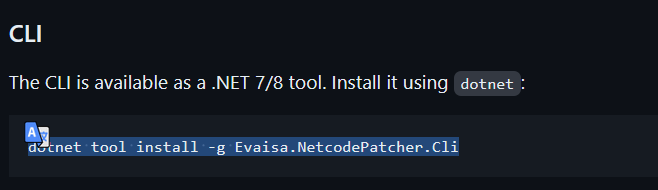
just noting that i copied this line from the git readme https://media.discordapp.net/attachments/1190745944787013643/1194719774874280016/image.png?ex=65b1607f&is=659eeb7f&hm=f6bbce460b49d952bcf79ba208e9e86c9ebf0ba2f7cc332db9669562dc10ad96&=&format=webp&quality=lossless

but it was incorrect. the dotnet part should be removed
rain wadi
it's not incorrect
If you installed globally -g then yes, remove the dotnet part
however if you installed locally:
dotnet new tool-manifest
dotnet tool install ...
then it needs the dotnet part
crimson chasm
rain wadi
If you installed globally `-g` then yes, remove the dotnet part
just to note
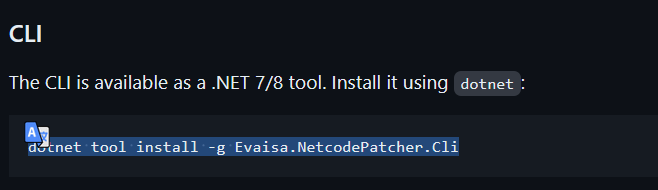
the cli install part of the readme is a global install
so basically everyone will install it globally
crimson chasm
👍
crimson chasm
rain wadi
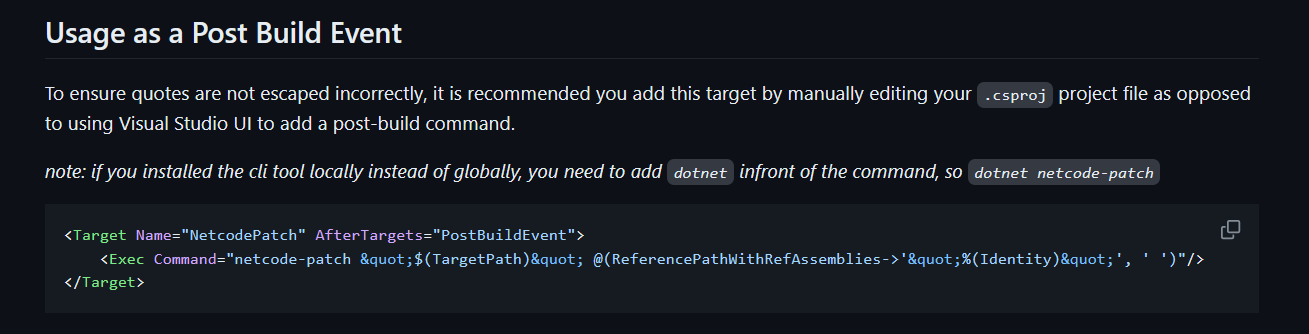
could u change the vscode snippet then
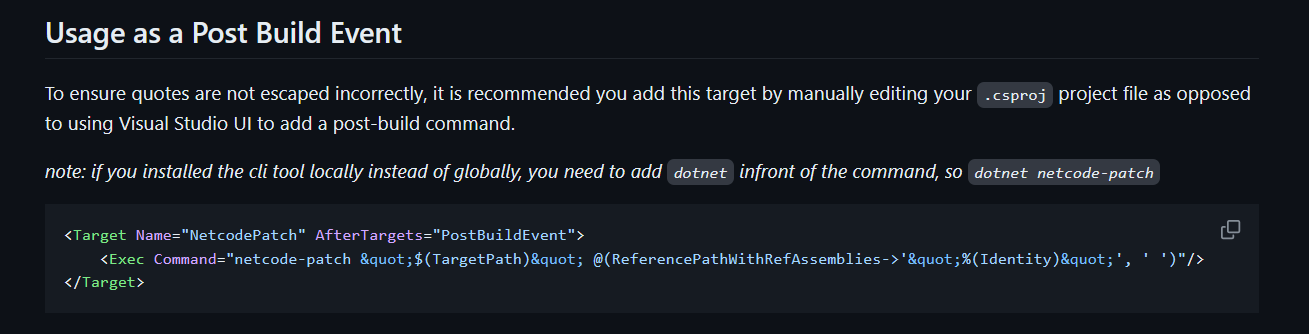
this good?
i added an extra note
solar brook
yeah it seems pretty clear
boreal onyx
@rain wadi if I have this in my project as a MSBuild package reference & NetcodePatch, do I need to do anything special in a github workflow file?
rain wadi
boreal onyx
<@290259615059279883> if I have this in my project as a `MSBuild` package refere...
non
boreal onyx
coolio
I do have a workflow-specific question
unrelated to the netcode patcher tho
I fixed it
I have no idea why it was complaining tho
rain wadi
boreal onyx
I have no idea why it was complaining tho
what was the issue?
boreal onyx
trying to upload the right file - it was having issues finding it
rain wadi
ah
boreal onyx
sorry
GitHub
Contribute to Xilophor/LethalNetworkAPI development by creating an account on GitHub.
running into another odd issue
(got first one to work with ugly solution)
some reason my publish workflow isn't running the latest version
boreal onyx
boreal onyx
some reason my publish workflow isn't running the latest version
fixed that
(I love testing in prod)
rain wadi
boreal onyx
(I love testing in prod)
Lol
It's often the only way to test the publish workflows 😅😭
boreal onyx
told you
rain wadi
you know the CWD is the repo root?
LethalNetworkAPI/bin/Release/netstandard2.1/LethalNetworkAPI.dll would work fine
no leading /
boreal onyx
 rain wadi
alternatively you can ${{ github.workspace }}/LethalNetworkAPI/bin/..
boreal onyx
i'll try
rain wadi
boreal onyx
You can also try with a leading ./
I think all my upload-artifact and download-artifact paths use those
./LethalNetworkAPI/bin/Release/netstandard2.1/LethalNetworkAPI.dll

 rain wadi
lmao
boreal onyx
whats the best way to upload to thunderstore?
the action I'm using doesn't seem to want to work
rain wadi
boreal onyx
whats the best way to upload to thunderstore?
tcli
you already have a tool manifest
so dotnet tool install tcli
oh no you don't
dotnet new tool-manifest
then in your action, dotnet tool restore
boreal onyx
yeah that's leftover from the doc site being in the same repo
rain wadi
you will need to tcli init and configure your thunderstore toml
the template is out of date
[config]
schemaVersion = "0.0.1"

[general]
repository = "https://thunderstore.io"

[package]
namespace = "Lordfirespeed"
name = "Refuge_Company"
description = "The Refuge's Lethal Company modpack!"
websiteUrl = "https://github.com/Lordfirespeed/RefugeCompany"
containsNsfwContent = false

[package.dependencies]

BepInEx-BepInExPack = "5.4.2100"

[build]
icon = "./icon.png"
readme = "./README.md"
outdir = "./dist"

[[build.copy]]
source = "ModName/bin/Release/netstandard2.1/ModGuid.dll"
target = "/BepInEx/plugins/ModName/"

[[build.copy]]
source = "LICENSE"
target = "/"

[publish]
communities = [ "lethal-company", ]

[publish.categories]
lethal-company = [ "modpacks", ]
you wanna hop in the mod-dev vc? this is getting complicated fast lol
rain wadi
which one
boreal onyx
one below beta-testing
solar brook
have any of you figured out how to get the release build to generate a pdb
i keep tryna change the setting
but its locked somehow
rain wadi
solar brook
have any of you figured out how to get the release build to generate a pdb
add a property in the csproj
<DebugType>portable</DebugType>
make sure you update dotnet tool update -g Evaisa.NetcodePatcher.Cli for this
solar brook
rain wadi
add a property in the csproj
it already adds that when i try to change the setting, it just has no effect
boreal onyx
you might also have to set DebugSymbols to true
 solar brook
hmmm doesnt seem to do anything either
could be the SDK
i dunno why the SDK would decide to force settings like that though
 rain wadi
solar brook
what!!!
rain wadi
solar brook
what!!!
bruh
solar brook
dont worry i found a cool solution
apparently properties set in a <Target> tag take precedence

Stack Overflow
Let's say I launch a build script, definition named SampleScript , specifying the parameter /p:MyPrefix=Custom. There is the following code in the script:
<PropertyGroup Condition="$(
oh no... it didnt work..
oh wel. i guess i can make a new release configuration
nevermind that dont work either
i'll just try using debug but setting optimized to true
rain wadi
solar brook
apparently properties set in a <Target> tag take precedence
They do if you actually set the target to run, and at the right time
If you just make a <Target> tag without setting any BeforeTargets etc it will never run
unless you dotnet msbuild -target:xyz but that's a different ballgame
solar brook
rain wadi
They do if you actually set the target to run, and at the right time
you were right
 solar brook
does having debug symbols on while optimize on cause any problems

i mean fair
ill get rid of it now that i know i dont need to make sure
solar brook
solar brook
does having debug symbols on while optimize on cause any problems
hey so even if its successfully patching
[Info   : Unity Log] JOIN REQUESTED through steam invite
[Info   : Unity Log] lobby id: 109775242886638067
[Info   : Unity Log] Lobby id joining: 109775242886638067
[Info   : Unity Log] refreshing lobby...
[Info   : Unity Log] Waiting for lobby data refresh
[Info   : Unity Log] Displaying menu message
[Info   : Unity Log] Got lobby data refresh!; 109775242886638067
[Info   : Unity Log] Members in lobby: 1
[Info   : Unity Log] Lobby join accepted! Lobby id 109775242886638067 is OK
[Info   : Unity Log] lobby.id: 109775242886638067
[Info   : Unity Log] id: 109775242886638067
[Info   : Unity Log] Successfully joined steam lobby.
[Info   : Unity Log] AA 109775242886638067
[Info   : Unity Log] BB 109775242886638067
[Info   : Unity Log] CC 76561198112328886
[Error  : Unity Log] NullReferenceException: Object reference not set to an instance of an object
Stack trace:
GameNetworkManager.StartClient (Steamworks.SteamId id) (at <af9b1eec498a45aebd42601d6ab85015>:0)
GameNetworkManager.JoinLobby (Steamworks.Data.Lobby lobby, Steamworks.SteamId id) (at <af9b1eec498a45aebd42601d6ab85015>:0)
System.Runtime.CompilerServices.AsyncMethodBuilderCore+<>c.<ThrowAsync>b__7_0 (System.Object state) (at <787acc3c9a4c471ba7d971300105af24>:0)
UnityEngine.UnitySynchronizationContext+WorkRequest.Invoke () (at <e27997765c1848b09d8073e5d642717a>:0)
UnityEngine.UnitySynchronizationContext.Exec () (at <e27997765c1848b09d8073e5d642717a>:0)
UnityEngine.UnitySynchronizationContext.ExecuteTasks () (at <e27997765c1848b09d8073e5d642717a>:0)
still get the same error

the one that happens somewhere around here in GameNetworkManager
rain wadi
it'll be something like
- you didn't initialize the
RuntimeInitializeOnLoadAttributetypes
- you didn't register the network prefab right
it might also just be you being silly
solar brook
rain wadi
it'll be something like
hold on i learned an amazing new trick thanks to random stackoverflow post
if you ask ILSpy to generate a pdb of Assembly-CSharp.dll and put it next to the file in the lethal company folder
stack traces will be more specific
[Info   : Unity Log] Members in lobby: 1
[Info   : Unity Log] Lobby join accepted! Lobby id 109775242893406171 is OK
[Info   : Unity Log] lobby.id: 109775242893406171
[Info   : Unity Log] id: 109775242893406171
[Info   : Unity Log] Successfully joined steam lobby.
[Info   : Unity Log] AA 109775242893406171
[Info   : Unity Log] BB 109775242893406171
[Info   : Unity Log] CC 76561198112328886
[Error  : Unity Log] NullReferenceException: Object reference not set to an instance of an object
Stack trace:
GameNetworkManager.StartClient (Steamworks.SteamId id) (at -/GameNetworkManager.cs:1184)
GameNetworkManager.JoinLobby (Steamworks.Data.Lobby lobby, Steamworks.SteamId id) (at -/GameNetworkManager.cs:1133)
System.Runtime.CompilerServices.AsyncMethodBuilderCore+<>c.<ThrowAsync>b__7_0 (System.Object state) (at <787acc3c9a4c471ba7d971300105af24>:0)
UnityEngine.UnitySynchronizationContext+WorkRequest.Invoke () (at <e27997765c1848b09d8073e5d642717a>:0)
UnityEngine.UnitySynchronizationContext.Exec () (at <e27997765c1848b09d8073e5d642717a>:0)
UnityEngine.UnitySynchronizationContext.ExecuteTasks () (at <e27997765c1848b09d8073e5d642717a>:0)
im so very sorry
the problem the whole time was that i was missing an orig(self) statement
i guess we all know what the error looks like when that happens though
because it isnt very clear
crimson chasm
solar brook
i guess we all know what the error looks like when that happens though
the error will differ per hook
very much depends on what you are hooking, some functions wouldn't error at all
the reason it is erroring is because some code didn't run which makes something else fail to use a reference
there is really no good way I know of to track down errors caused by not calling the original functions lol, besides realizing that it was the last thing you did
solar brook
oh well. at least some good came out of this
like finding out that LC SDK has weird setting enforcement
boreal onyx
Haven't personally tried it or anything, but you do need this to have NetworkVariables, right? or can you just do that without this?
just wondering if I implemented network variables in my networking api for no reason lol
rain wadi
boreal onyx
Haven't personally tried it or anything, but you do need this to have NetworkVar...
I believe so yeah
netcode does some real convoluted bollocks with NetworkBehaviours
 pulsar swallow
ive been having issues getting the patch tool to work, it says that it couldent find debug info even knowing i have <DebugType>portable</DebugType> set
up, and i used a debug build with (dotnet build -c Debug)
here is a link to my git if that helps https://github.com/glados1235/TombsMadnessMod
and the command im trying to use to patch is
netcode-patch "E:\SteamLibrary\steamapps\common\Lethal Company\BepInEx\plugins\TombsMadnessMod.dll" "D:\Documents\GitHub\TombsMadnessMod\TombsMadnessMod\AddedDLLS" "E:\SteamLibrary\steamapps\common\Lethal Company\Lethal Company_Data\Managed"
you seem to be patching the plugin file in your game folder
I think you probably actually want to patch the plugin file in your build folder??
rain wadi
rain wadi
you seem to be patching the plugin file in your game folder
it's failing to patch in your game folder because you didn't copy the .pdb file with the .dll
rain wadi
rain wadi
I think you probably actually want to patch the plugin file in your build folder...
there is an example of doing it this way using an MSBuild target on the README, would you mind giving that a try?
pulsar swallow
oh, uh yea
okay, yea that worked, just need to fix my code for an error i got
tysm
rain wadi
sweet!
pulsar swallow
but um, if the MSBuild wont work with vs, do i need to do that every time i build my mod?
i dont fully understand why i need to do this, just that i do
rain wadi
what did you actually do @pulsar swallow ?
pulsar swallow
i was just told that MSBuild dosent work with VS
rain wadi
Did you use the MSBuild package or the MSBuild target
pulsar swallow
i added this to the main file
<ItemGroup>
  <PackageReference Include="Evaisa.NetcodePatcher.MSBuild" Version="3.*" PrivateAssets="all" />
</ItemGroup>
<ItemGroup>
  <NetcodePatch Include="$(TargetPath)" />
</ItemGroup>
Yes so that doesn't work with VS - you have to build from outside VS if you use that. I would recommend using the other strategy on the readme
Slightly further down it talks about a postbuild target
Which uses the CLI
boreal onyx
I still don't understand why that doesn't work with VS
rain wadi
I tried to open a ticket on Microsoft's Dev forum about it the other day but in order to open visual studio problems you have to install visual studio and use its 'help' menu 🤣🤣
so I was unable to do that
boreal onyx
linux distro, or just don't want to use VS?
pulsar swallow
i added it to my post build like this is this correct?
 boreal onyx
linux distro, or just don't want to use VS?
boreal onyx
boreal onyx
linux distro, or just don't want to use VS?
cause either is very understandable
rain wadi
pulsar swallow
i added it to my post build like this is this correct?
if it works, it's correct hahaha
pulsar swallow

 rain wadi
pulsar swallow
i added it to my post build like this is this correct?
rain wadi
pulsar swallow
i added it to my post build like this is this correct?
I think you should move the xcopy command after the NetCode patch one tho
rain wadi
boreal onyx
linux distro, or just don't want to use VS?
Both haha
My (remote) desktop doesn't have it installed and I would prefer not to install it
pulsar swallow
good point lol
rain wadi
my (local) laptop runs Pop!_OS
pulsar swallow
the one in my game plugin folder wouldent be the patched one 💀
rain wadi
pulsar swallow
the one in my game plugin folder wouldent be the patched one 💀
That's correct haha
pulsar swallow
okay so i hope my netcode stuff will work now
https://pastebin.com/J7nVkTYN
this is what ive been doing this for
boreal onyx
still haven't personally moved my main desktop over to linux yet, mainly because there's a lot of data on it and I don't want to lose any
pulsar swallow
yooo the code did sync
but there are a lot of issues in console by the looks of it,,
pulsar swallow
when should i run
networkManager.GetComponent().AddNetworkPrefab(prefab);
does it need to run when loading my assets from my loader for each asset?
or just before i call NetworkObject.Spawn();
boreal onyx
before the client or host joins
pulsar swallow
so before a lobby is created?
boreal onyx
Lethal Company Modding Wiki
An advanced overview of how to use Unity Netcode Patcher to add networking to your Lethal Company mods.
pulsar swallow
ty
boreal onyx
that part applies



 short vortex
why are you getcomponent then is?
just use TryGetComponent
avoids the cast
asset.TryGetComponent(out NetworkObject obj)
boreal onyx
^
solar brook
i been tryna test my mod
i can join my friend and my mod works great
my friend cant join me though
they spawn in, but their name is Player # and they get stuck on the spawn in fading in animation thing the game does
then they disconnect
thats happened to me before when we had different mods on or when the save file was wrong
but we made sure neither of those were a factor
its been a rea pain
because the mod works great otherwise
pulsar swallow
solar brook
they spawn in, but their name is `Player #` and they get stuck on the spawn in f...
this happens to me when i join the host too fast, try joining after the host is able to move around, if thats not already what your doing
i think its just lethal doing its thing lol
pulsar swallow
short vortex
why are you getcomponent then is?
dunno, works great runs once at the very start of mod Awake so i dont really mind it being the way it is, but ill tinker with it ig
pulsar swallow
is there a way to make it fail build if it fails to patch?
ive been chasing gremlins all week and it was due to the patch not working from a code issue
 mellow vault
pulsar swallow
is there a way to make it fail build if it fails to patch?
ive been chasing grem...
mellow vault
pulsar swallow
is there a way to make it fail build if it fails to patch?
ive been chasing grem...
Ah, this reminds me of one issue with a custom ClientRpc only running on the host (host also called it) if ran from override void HitEnemy(), but every client recieved it if called from elsewhere in my enemy AI code. Not sure if it's a skill issue, or if the tool failed in that case. I should probably debug the issue and report about it here if it turns out to not be a skill issue.
Also btw, am I doing something wrong or is there a way to stop NetcodePatcher CLI from spamming the build logs?
 pulsar swallow
It was a skill issue on my part but I didn't realize my mistake because there was no colorful logs or failed builds just a silent message saying the patch failed lol
 neon cypress
I'm trying to use the UnityNetcodePatcher post-build event to patch my mod, but I'm getting a System.IO.IOException saying "The process cannot access the file because it is being used by another process. I'm using Rider as my IDE and I've made sure to include the required code snippet in my plugin's Awake function. Does anyone have any troubleshooting tips?
nevermind, i backread and found the solution to my problem :|