#✅Luma: Unreal Engine
1 messages · Page 2 of 1
 topaz belfry
I'll fix it for arbitrary render resolutions later
So it's a little bit like the Nunu game. I need to get one of those games to figure out why that happens.
 rancid pine
funny thing is kof xv is the only game I can think of that supports RT but not TAA
topaz belfry
What a weird choice for a fighting game
 viral prism
algo 1 disables it yes. idk why you'd need it though
rancid pine
regarding UE5 support: Fatal Fury City of the Wolves is able to get it "working" when set to TAA instead of TSR, but is super jittery and ghosty


TSR/TAA/DLAA CNN/ DLAA Transformer
topaz belfry
good to know
viral prism
topaz belfry
So it's a little bit like the Nunu game. I need to get one of those games to fig...
btw in Nunu i observed that using TSR (r.AntiAliasingMethod 4 ) makes the game much more performance heavy. usually DLSS K and TSR share similar performance +/- 6%, but dlss K had like 30% advantage
topaz belfry
Nunu also has TSR? so maybe they changed TAA implementation a bit after adding TSR
viral prism
ue5 has support for tsr out of the box i think
but no they dont let you enable it normally. they make you stay with TAA if only using the game's graphics menu
topaz belfry
TSR looks like a competent anti aliasing luckily, so these games are not suffering that terrible in terms of quality
topaz belfry
viral prism
but no they dont let you enable it normally. they make you stay with TAA if only...
lmao why?
viral prism
upgraded to ue5 last minute maybe. they dont use lumen or nanite or anything like that.
 polar grove
Works in Guilty Gear Strive and Ace Combat 7 with engine.ini tweaks. AC7 was already on the wiki but doesn't need as many engine.ini lines as the issue post had


 heavy terrace
First time writing here, but long time lurker, so first things first... you guys are doing an amazing job RenoDX and Luma are genuine gamechangers, so thanks for the effort. 😄
[SystemSettings]
r.DefaultFeature.AntiAliasing=2
r.PostProcessAAQuality=6

one of my beloved games worked right out of the box: DRAGON QUEST XI: Echoes of an Elusive Age (not the S version, the original)
 turbid plank
topaz belfry
I gotta check UE5 taa source in github
turbid plank
topaz belfry
I gotta check UE5 taa source in github
UE's license tho 
 modest crag
dx12 support at some point? 👉 👈
 marsh quail
^
topaz belfry
polar grove
Works in Guilty Gear Strive and Ace Combat 7 with engine.ini tweaks. AC7 was alr...
Just edit ac7 with the required ones only please
topaz belfry
turbid plank
UE's license tho <:catToes:1295724829634461717>
I just need to know if they changed the implementation
 magic cosmos
hey guys, would there be an unreal x32 version of luma? I found an unreal 4 dx11 game, but it is x32.
 red heath
magic cosmos
hey guys, would there be an unreal x32 version of luma? I found an unreal 4 dx11...
red heath
magic cosmos
hey guys, would there be an unreal x32 version of luma? I found an unreal 4 dx11...
there's no x32 DLSS
red heath
magic cosmos
hey guys, would there be an unreal x32 version of luma? I found an unreal 4 dx11...
what game?
magic cosmos
red heath
what game?
Unloved

UNLOVED is based on the community award-winning mod for Doom2 with the same name by the same creator. UNLOVED is a strange place. A twisted reality. A nightmare that comes to life. A place where demons and abhorrent monsters manifest and possess the living with only one goal: to end you. Nothing wants you here. And there is no way out. Onl…
Price
$4.99
Recommendations
937
latest version of luma is giving this error in all games when I close it

 quartz shell
Does DLAA work in batman Arkham knight?
topaz belfry
quartz shell
Does DLAA work in batman Arkham knight?
UE3
quartz shell
topaz belfry
UE3
Does the mod only work on 4?
topaz belfry
quartz shell
Does the mod only work on 4?
yeah 4.9+
quartz shell
topaz belfry
yeah 4.9+
Ok, thanks.
quartz shell
topaz belfry
yeah 4.9+
Will there be no UE 3+ support?
topaz belfry
quartz shell
Will there be no UE 3+ support?
not as part of the generic addon, to my knowledge there was no generic engine TAA implementation in UE3.
so it would have to be a per-game project
quartz shell
topaz belfry
so it would have to be a per-game project
It's a pity, the game is very beautiful, but it lacks good anti-aliasing.
topaz belfry
it's on the list of planned games, but no ETA on that.
quartz shell
Or maybe in the future, you can make a mod that can add DLAA in any game where there is TAA?
 small hemlock
wouldn't be possible to make it generic
topaz belfry
yeah would be impossible, too many engine specific details
every engine encodes motion vectors differently, some have inverted depth, some don't even jitter the image when doing TAA
too many variables.
quartz shell
Good luck, and thanks a lot for the mod.
magic cosmos
remnant from the ashes, th awesome adventures of captain spirit and destroy all humans! carnage clone working
note: destroy all humans! clone carnage doesn't seem to work ingame, at least not in local split screen, where I tested, presumably base games 1 and 2 should work fine.


If anyone can confirm if it works online that would be great.
red heath
year split screen support is not in yet, might never come as it';s just a couple games.
magic cosmos
This error happens with the latest version of Luma, but the game doesn't crash
 magic cosmos
red heath
year split screen support is not in yet, might never come as it';s just a couple...
magic cosmos
red heath
year split screen support is not in yet, might never come as it';s just a couple...
leave him off the wiki then?
topaz belfry
magic cosmos
This error happens with the latest version of Luma, but the game doesn't crash
Do you have the test build?
magic cosmos
yes
topaz belfry
Ah it's not an issue. I will probably remove this assertion next release.
red heath
magic cosmos
leave him off the wiki then?
u can add it specifying split screen doesn't work
all UE4 games can be there
marsh quail
red heath
year split screen support is not in yet, might never come as it';s just a couple...
Oh, is that why It Takes Two didn't work for me?
Figured it was because split screen is uncommon and probably not super supported in UE as a whole
magic cosmos
Does anyone have split fiction and can use optscaler to switch to dlss? because it has fsr 3.1, I think that if it works, having a split screen is not the problem for dlss, right?
marsh quail
fsr3 > dlss via opti most likely works, but it may have required custom code from Hazelight to make fsr work in the first place
and that's why Luma doesn't work currently in It Takes Two
magic cosmos
marsh quail
fsr3 > dlss via opti most likely works, but it may have required custom code fro...
but split is dx12, right?
marsh quail
yup
magic cosmos
But that's why luma doesn't work yet, but my question was if dlss works well in split screen, wouldn't it be the problem that other games aren't working
destroy all humans! clone carnage doesn't seem to work ingame, but on the menu and lobby yes
 stiff gorge
quartz shell
Does DLAA work in batman Arkham knight?
stiff gorge
quartz shell
Does DLAA work in batman Arkham knight?
Arkham Knight's AA was a pretty bad implementation of SMAA t1x iirc which means that we'll probably never have DLSS. And that's a shame because the specular aliasing at even 8K is pretty distracting 🙁
red heath
heavily customized engine
rancid pine
heavy terrace
one of my beloved games worked right out of the box: DRAGON QUEST XI: Echoes of ...
(for the record, was not able to get it working in S)
topaz belfry
 hybrid hazel
ity does detect TAA shader though
hybrid hazel
ity does detect TAA shader though
They probably compile the vanilla taa, but they probably draw a custom one instead.
You can try disabling in game taa and try forcing ue taa somehow
topaz belfry
rancid pine
(for the record, was not able to get it working in S)
Going to install it
viral prism


last game technically works but comes with a nasty vram leak https://store.steampowered.com/app/1623940/Bramble_The_Mountain_Kin
red heath
FSR 3 incoming too
viral prism
that must be the work of Maple 😄
red heath
viral prism
that must be the work of Maple 😄
yes Maple did the DX11 version and I use that!
just implemented it
needs a couple lines of code to hook it up to UE
 uneven flare
this has no capability to do hdr yet, right?
polar grove
Forgive Me Father works but also has a similar issue where enabling DLAA causes VRAM (and RAM) to fill up immediately and massively stutter. Disabling DLAA returns performance to normal
 viral prism
@polar grove can you repro with this build? #1429954416781557872 message
i went back to bramble and it seems fine so far.
topaz belfry
so new builds have some memory leak issue?
polar grove
viral prism
<@122128769245773826> can you repro with this build? https://discord.com/channel...
seems to be fine with that build, ran around for a bit and didn't have any issues
 hybrid hazel
Is the TAA to DLSS mod forcing some kind of hdr? because it messes up with the games brightness and i have to max it out from the games settings in order to look correct.
topaz belfry
Latest build shouldn't have gamma issues or force any type of hdr
hybrid hazel
topaz belfry
Latest build shouldn't have gamma issues or force any type of hdr
well it still does it for me
hybrid hazel
topaz belfry
Latest build shouldn't have gamma issues or force any type of hdr
i downloaded it from here https://github.com/Filoppi/Luma-Framework/wiki/Mods-List#unreal-engine
GitHub
Luma is DX11 games modding framework based on the ReShade Addon system. Multiple mods are currently included, the biggest one being Prey (2017), which refactors its post processing rendering phase ...
marsh quail
it's not the latest build (the wiki link targets an older version)
https://github.com/Filoppi/Luma-Framework/releases get it from here
GitHub
Luma is DX11 games modding framework based on the ReShade Addon system. Multiple mods are currently included, the biggest one being Prey (2017), which refactors its post processing rendering phase ...
topaz belfry
Would say maybe stick to version 189 and see if the memory leak issue is not present
hybrid hazel
marsh quail
https://github.com/Filoppi/Luma-Framework/releases get it from here
thanks
magic cosmos
last build of luma is giving this bug in the vanishing of ethan carter redux, previous builds don't give this bug, still no success in getting it to work dlaa
 red heath
magic cosmos
last build of luma is giving this bug in the vanishing of ethan carter redux, pr...
red heath
magic cosmos
last build of luma is giving this bug in the vanishing of ethan carter redux, pr...
try next build in 10m when it's ready
magic cosmos
red heath
try next build in 10m when it's ready
Build 196 or a new one?
red heath
magic cosmos
Build 196 or a new one?
197
magic cosmos
no bug in Build 197
 red heath
magic cosmos
no bug in Build 197
red heath
magic cosmos
no bug in Build 197
@topaz belfry disabling the FSR define fixed it
it's probably the device upgrade messing up the depth or something
magic cosmos
Supreland is a curious case, it has native DLSS, 2. something and with DLSS Swapper you can exchange it for the new versions, but what would be its DLAA is in an internal resolution of 1114x627, but using Luma DLAA works much better

 red heath
magic cosmos
Supreland is a curious case, it has native DLSS, 2. something and with DLSS Swap...
red heath
magic cosmos
Supreland is a curious case, it has native DLSS, 2. something and with DLSS Swap...
ah yeah the first DLSS games didn't offer DLAA, though u can usually force it with external tools?
it could also be they had messed the DLSS implementation.
magic cosmos
red heath
ah yeah the first DLSS games didn't offer DLAA, though u can usually force it wi...
I tried overwriting with nvidia app, but it doesn't work on it, which is strange, since the rtx demo that has the same version of dlss works
 topaz belfry
red heath
it's probably the device upgrade messing up the depth or something
topaz belfry
red heath
it's probably the device upgrade messing up the depth or something
it's the same in ff7, depth gets removed from SRVs for some reason
I remember when we first added that upgrade feature it broke FF7, think you added it globally initially and then changed it to prey only.
magic cosmos
Excuse my ignorance, but I have a question for the devs: will it be possible to use motion blur or DoF for DLSS? Because, for example, PureDark used motion blur in Elden Ring to use DLSS, so games like Unreal Engine 3 would also work, right?
marsh quail
Very likely possible, not easily feasible in a generic manner
magic cosmos
marsh quail
Very likely possible, not easily feasible in a generic manner
because for those who found about afmf3 it used motion blur and bof for FG in the driver
topaz belfry
magic cosmos
Excuse my ignorance, but I have a question for the devs: will it be possible to ...
yeah motion blur can work, depends on the game tho
red heath
magic cosmos
Close to the sun, Just die already,Kid a mnesia exhibition, Layers od fear 2, maneater, Mothergunship, Relicta, Ruiner, Shenmue3, Supraland working, ABZU, Aven Colony, Daemon x Machina, The Vanishing Ethan Carter Redux unsuccessful in working.


 topaz belfry
would be nice to compile the engine version of the games that aren't working
may help narrow down issues to some engine version hopefully
red heath
magic cosmos
Close to the sun, Just die already,Kid a mnesia exhibition, Layers od fear 2, ma...
yeah if u can bother, in the wiki u could write down the UE version of games u test
whether they work on not
usually it's in the file properties of the game's exe
right click, properties/info
red heath
@topaz belfry submitted a fix, the lod bias wasn't working, so it still wasn't as crisp as it should have been
also, FSR 3 is now working. I tried it in Ashen.
Looks quite better than native TAA.
red heath
red heath
<@161300056123637760> submitted a fix, the lod bias wasn't working, so it still ...
all games should look better now.
topaz belfry
red heath
<@161300056123637760> submitted a fix, the lod bias wasn't working, so it still ...
oh I had that fixed in my local but no big deal
heavy terrace
In Kingdom hearts 3 i am getting this behaviour:

I used TXAA Ingame
[SystemSettings]
r.DefaultFeature.AntiAliasing=2
r.AntiAliasingMethod=2
i am using build 201
 visual forge
@topaz belfry disabling sharpening from ini dont effect dlss right ?
topaz belfry
visual forge
<@161300056123637760> disabling sharpening from ini dont effect dlss right ?
It shouldn't
topaz belfry
heavy terrace
We introduced some issues in the last built try 189
heavy terrace
topaz belfry
We introduced some issues in the last built try 189
It is black instead of grey now with 189, but I guess kingdom hearts 3 is just a weird game. Thanks for the response though.
magic cosmos
Life is Strange 2, Redeemer, Snake Pass and Steel Rats, working


and the ones I found were unreal versions, I already put them on the wiki.
red heath
magic cosmos
Life is Strange 2, Redeemer, Snake Pass and Steel Rats, working
newest version?
modest crag
snake pass had cool physics
magic cosmos
red heath
newest version?
Any place in Luma that you can see? but I believe it is build 197
magic cosmos
@red heath any chance of having a luma for cry engine?, are there any games I want to try or does prey work?
red heath
magic cosmos
<@232584079986524160> any chance of having a luma for cry engine?, are there an...
a generic mod?
there's like 5-10 CryEngine games
not worth it
magic cosmos
red heath
not worth it
According to the wiki, there are 23 games, but it's a shame then.
 void hull
I only know about the Crysis games, that one Rome game and the Homefront sequel
Oh wait and Prey ofc
Well Prey 2017 because we also have the original Prey which I've no idea what that is on
magic cosmos
void hull
I only know about the Crysis games, that one Rome game and the Homefront sequel
and a few others
 visual forge
Life is Strange: True Colors - dx11 upscaling not working
viral prism
visual forge
Life is Strange: True Colors - dx11 upscaling not working
? did you install to the correct folder? it shows dlss indicator here the moment on first boot. ill do more extensive testing and check for leaks and whatnot

check if ingame aa is "very high" or "cinematic" btw
viral prism
so it works on 189 but not the latest version, and rtss seems to be breaking 189 as well
visual forge
viral prism
so it works on 189 but not the latest version, and rtss seems to be breaking 189...
not working
viral prism
was working with this here
SteamLibrary\steamapps\common\Life is Strange True Colors\Siren\Binaries\Win64
heavy terrace
heavy terrace
[SystemSettings]
r.DefaultFeature.AntiAliasing=2
r.PostProcessAAQuality=6
I noticed something was off with the textures on camera movement, so I added r.temporalaasamples=2 and now the image is perfect, I also added it on the wiki, perhaps more games would need that treatment
visual forge
viral prism
was working with this here
`SteamLibrary\steamapps\common\Life is Strange True C...
Not working
topaz belfry
When you say not working what do you mean?

 topaz belfry
Missing dlss dll if it's not showing the option there
Can you take a screenshot of the folder?
visual forge
topaz belfry
Can you take a screenshot of the folder?
Reinstalled, working now😁
visual forge
As long as resources are not upgraded, renodx ue is compatible with luma ue
red heath
visual forge
As long as resources are not upgraded, renodx ue is compatible with luma ue
good.
soon we'll have our own HDR anyway
viral prism
man of medan is certainly an interesting game
needs pillarbox removal mod, taa upsampling disabled, and it still looks half broken 😄
taa vs dlss


looking good
the lighting doesnt change either when using dlss like before
@topaz belfry ✅ or 🚧 ?
topaz belfry
viral prism
<@161300056123637760> ✅ or 🚧 ?
🚧
If they have visual issues and not a direct upgrade to TAA
viral prism
the 2nd batch of shots look good
for the first one i used a different pillarbox mod (UUU) which caused the broken visuals
topaz belfry
Oh then you can do ✅
magic cosmos
If anyone can see the daemon x machina, I put it as no, but when the game opens, the dlss hud flashes a few times
topaz belfry
I don't own it sadly
magic cosmos
topaz belfry
I don't own it sadly
Didn't get it via epic?, I have it there.
topaz belfry
I don't have epic. Always forget to claim their games anyways
polar grove
magic cosmos
If anyone can see the daemon x machina, I put it as no, but when the game opens,...
i'll check it out when i can
viral prism
im messing with it atm, no dice so far
good background soundtrack cant complain
they use 1 sample for TAA so it always looks bad... jap devs lol
 topaz belfry
well you can set TAASamples with engine variables at least
how did you get it to work?
viral prism
topaz belfry
well you can set TAASamples with engine variables at least
except in this game it resets on startup.. some scripted nonsense
might need to make a pak mod that overrides defaultscalability with the custom values
r.DefaultFeature.AntiAliasing=2 r.PostProcessAAQuality=4 r.TemporalAASamples=4
this should be enough
taa samples = 1 (default) was why dlss was never working
set above 1 and it works
topaz belfry
viral prism
except in this game it resets on startup.. some scripted nonsense
ah yes, so they not only break it but prevent you from fixing it. fantastic
red heath
viral prism
`r.DefaultFeature.AntiAliasing=2
r.PostProcessAAQuality=4
r.TemporalAASamples=4`...
r.TemporalAASamples=8 or 16 is better
in general
visual forge
red heath
`r.TemporalAASamples=8` or 16 is better
What does it do ?
red heath
visual forge
What does it do ?
increases the number of jitter phases
the more the better usually
more sub pixel accuracy
visual forge
this is my ini setting
[SystemSettings]
r.SceneColorFringeQuality=0
r.MaxAnisotropy=16
r.Tonemapper.Sharpen=0.0
r.TemporalAASamples=16
1st question: so dlss transformer add sharpening or should i add rcas sharpening.
2nd question: does fog affected by transformer model in dlaa also ?
 red heath
visual forge
this is my ini setting
[SystemSettings]
r.SceneColorFringeQuality=0
r.MaxAnisotr...
red heath
visual forge
this is my ini setting
[SystemSettings]
r.SceneColorFringeQuality=0
r.MaxAnisotr...
take comparison screenshots 😛
yes transformer + fog -> RIP
viral prism
red heath
`r.TemporalAASamples=8` or 16 is better
1 2 4 8 16


 red heath
viral prism
1 2 4 8 16
red heath
viral prism
1 2 4 8 16
you zoomed in on a transparent element 😄
these are literally the only things that don't get properly reconstructed
topaz belfry
visual forge
this is my ini setting
[SystemSettings]
r.SceneColorFringeQuality=0
r.MaxAnisotr...
shouldn't need to use sharpening at native res. maybe a little rcas
yeah a fence or some thin non transparent object is probably better
stiff gorge
With the rare exception, Preset K volumetrics look so bad in UE games, that Preset J, with its worse looking foliage, is the better trade-off imo
red heath
stiff gorge
With the rare exception, Preset K volumetrics look so bad in UE games, that Pres...
They both look bad
stiff gorge
Indeed. NVIDIA still has a lot of work to do training the transformer model with more reference volumetrics.
magic cosmos
in Sherwood Extreme I found the same thing that happens in daemon x machina, it shows dlss active when launching the game, but then it is no longer there, neither in the menu nor ingame,
topaz belfry
Gets disabled in the menu too?
magic cosmos
yes
topaz belfry
Now I'm curious. Very weird.
magic cosmos
Something curious I saw, if I add the line r.MaxAnisotropy=16 it changes the trees in the background when I leave SR at none and TN.


and latest build of luma with graphical bug in ethen
 topaz belfry
Probably due to fsr3, we should disable it until we get it fixed properly
magic cosmos
It must be a lot for you, but it wouldn't be possible to use a flag for games with bugs?, so you wouldn't need to disable it globally.
the gunk for example is working very well with fsr 3
 red heath
magic cosmos
Something curious I saw, if I add the line r.MaxAnisotropy=16 it changes the tre...
red heath
magic cosmos
Something curious I saw, if I add the line r.MaxAnisotropy=16 it changes the tre...
MaxAnisotropy should be 16
red heath
topaz belfry
Probably due to fsr3, we should disable it until we get it fixed properly
want me to do that?
red heath
topaz belfry
Probably due to fsr3, we should disable it until we get it fixed properly
i can actually merge the ReShade fix I made locally in our reshade, that fixed all problems no?
red heath
magic cosmos
It must be a lot for you, but it wouldn't be possible to use a flag for games wi...
we fixed the bug, it's in reshade.
not merged yet.
red heath
magic cosmos
the gunk for example is working very well with fsr 3
does it have ghosting in motion?
and how do particles look?
topaz belfry
red heath
i can actually merge the ReShade fix I made locally in our reshade, that fixed a...
The ones I could test. So maybe we should do the reshade fix first and if more stuff is broken then disable it
red heath
magic cosmos
submitted the fix. it should be auto built in about 20m
@magic cosmos @viral prism would you be able to capture a 1080p screenshot of a game running with the original TAA and the Luma DLAA, where it shows a big difference?
I'd like to use it to upload an announcement on Reddit.
Thx
magic cosmos
red heath
<@313467599008563212> <@982615260743753809> would you be able to capture a 1080p...
good?

 red heath
magic cosmos
good?
red heath
magic cosmos
good?
not bad
but this scene is a bit too dark, lacks in interesting objects and is just boring to look at 😄
i need a glorious couple announcment pics
like this one is pretty good
magic cosmos
ok, I see a better one here
magic cosmos
better?

 red heath
magic cosmos
better?
red heath
magic cosmos
better?
pretty good yeah 🙂
how about showing the village on the other side?


 red heath
damn the difference it makes at 1080p is insane.
magic cosmos
I think discord reduces the quality a little
red heath
magic cosmos
I think discord reduces the quality a little
do you have:
- The Ascent
- Rime
- Stray
- Scorn
- System Shock (2023)
- Kingdom Hearts III
- Hellblade: Senua's Sacrifice (remastered)
- Observer: System Redux
- Biomutant
- Blair Witch
- Darksiders 3
- Layers of Fear 2
- Crash Bandicoot 4: It's About Time
- Life is Strange 2
- Mutant Year Zero: Road to Eden
- Vampyr
i think these would be some great games to show comparisons
in particular the ones in bold
if u could bother snapshitting a few 🙏
magic cosmos
Hellblade: Senua's Sacrifice (remastered),Darksiders 3,Layers of Fear 2,Life is Strange 2,Blair Witch,Mutant Year Zero: Road to Eden,Vampyr,Rime, I have this, but I would have to download them
marsh quail
Hellblade 1 has DLSS though
can probably force dlaa with nvapp/profile inspector
viral prism
red heath
do you have:
- **The Ascent**
- **Rime**
- **Stray**
- **Scorn**
- System Shock ...
mutant is crazy
screenshots are lame so i did a quick recording
red heath
viral prism
screenshots are lame so i did a quick recording
we'd need quality PNGs for Reddit 🙂
red heath
viral prism
reddit compresses shots anyway
u can download the original i think
viral prism
doesnt it allow video uploads?
red heath
viral prism
especially the first one in an album
doubt that 😄
red heath
viral prism
doesnt it allow video uploads?
yeah but i can't bother editing a video, just wanted to upload 4-5 games before and after, side by side
users can scroll the images at their own pace and zoom in etc

 viral prism

 magic cosmos
here are some images, rime, it doesn't work, hellblade and the ascent have dlss, it's version 2, I couldn't get it over with nvidia app, but it was possible to force it with dlss tweaks the dlaa, but dx11 works the luma too

 magic cosmos
the ascent is another curious case, with luma, some things change in the scene, upon a certain brightness they come into existence with dlaa, however hud is not shown, but it is working, with the taa lines in engine.ini, the hud appears.


 viral prism
does this look normal? [taken in motion]

im also not really seeing improvement from dlss in general in this game
red heath
magic cosmos
here are some images, rime, it doesn't work, hellblade and the ascent have dlss,...
teag rime is old as fuck
red heath
viral prism
does this look normal? [taken in motion]
looks normal to me.
red heath
viral prism
im also not really seeing improvement from dlss in general in this game
could be. it's customized UE.
red heath
magic cosmos
the ascent is another curious case, with luma, some things change in the scene, ...
owever hud is not shown, but it is working
i'd assume if the hud is not shown, DLSS isn't being applied, or if it is, it's getting overwritten anyway
viral prism
tried to match the angle as best as i could. one's with luma completely disabled, and the other is with luma enabled and dlss k

 viral prism
red heath
looks normal to me.
viral prism
red heath
looks normal to me.
weird that its upscaling or messing with the motion blur
basically requires playing with it disabled
topaz belfry
That is weird, shouldn't affect motion blur at all
magic cosmos
red heath
> owever hud is not shown, but it is working
i'd assume if the hud is not shown,...
was applied, it has the same problems as when it is active with hud, the brightness on the streetlight and the shadow appear more.
red heath
magic cosmos
was applied, it has the same problems as when it is active with hud, the brightn...
will need izu to look into that
magic cosmos
This glow only appears when it is active.

 magic cosmos
topaz belfry
If you have debug dll you can try turning it off
magic cosmos
topaz belfry
If you have debug dll you can try turning it off
where can i get her
viral prism
magic cosmos
where can i get her
#1429954416781557872 message
magic cosmos
thanks
magic cosmos
topaz belfry
Probably auto exposure issues
stays the same.
 toxic harness
Has anyone checked out Werewolf: The Apocalypse - Earthblood?? Does dlaa work there?
 tepid sierra
magic cosmos
here are some images, rime, it doesn't work, hellblade and the ascent have dlss,...
tepid sierra
magic cosmos
here are some images, rime, it doesn't work, hellblade and the ascent have dlss,...
the diff here is quite crazy
magic cosmos
tepid sierra
the diff here is quite crazy
yes, it looks very good, the dlaa 310.4 loses a little bit of sharpness compared to the 310.3, but it gains better anti-aliasing, but I took these images with a standard that is in luma.


 surreal nimbus
stiff gorge
Arkham Knight's AA was a pretty bad implementation of SMAA t1x iirc which means ...
surreal nimbus
stiff gorge
Arkham Knight's AA was a pretty bad implementation of SMAA t1x iirc which means ...
So DLSS for Arkham Knight is probably not coming anytime soon? Even DLDSR would not help much if aliasing is bad even in 8K?
red heath
surreal nimbus
So DLSS for Arkham Knight is probably not coming anytime soon? Even DLDSR would ...
As of now, I am busy with other things, but if Musa gets a passion for DLSS it could happen soon.
toxic harness
Let's all ask Musa to take up dlss in arkham
 plain tulip
what does arkham knight even use for AA?
visual forge
plain tulip
what does arkham knight even use for AA?
 red heath
yeah temporal SMAA is jittered
it's what Prey used too
so it can be replaced with DLSS
stiff gorge
Since Arkham Knight only uses SMAA T1x, which includes subpixel jittering but doesn’t use motion vectors, wouldn’t that make it incompatible with DLSS injection? It’s still essentially a single-frame post-process AA, no?
topaz belfry
stiff gorge
Since Arkham Knight only uses SMAA T1x, which includes subpixel jittering but do...
No motion blur in arkham either?
stiff gorge
Sure, the UE 3.5 motion blur shader makes use of a velocity buffer calculated from camera and (some) object transforms, but they probably have scaling, bias, and directionality that's not well suited for temporal reconstruction.
red heath
stiff gorge
Sure, the UE 3.5 motion blur shader makes use of a velocity buffer calculated fr...
we can customize everything
usually motion vectors are calculated raw, and then scaled for motion blur
stiff gorge
Fair enough.
red heath
stiff gorge
Since Arkham Knight only uses SMAA T1x, which includes subpixel jittering but do...
i can't remember how it even worked in Prey
it was accumulating over time
but not properly
stiff gorge
Prey has T2X too.
red heath
but i think it was using motion vectors
stiff gorge
The use of motion vectors is the major delineating difference between T1X and T2X.
red heath
stiff gorge
The use of motion vectors is the major delineating difference between T1X and T2...
what i mean is, how can you do temporal
if there's no MVs?
stiff gorge
It's not really "Temporal SMAA" as PCGW suggests. In fact, follow the source cited from the PCGW page and it's a fucking Steam community post from some random dude.
visual forge
As far as I remember, it's SMAA, which was called inferior compared to reshade smaa
stiff gorge
lol, fake news on PCGW. It's literally just FXAA.
 visual forge
Hmm
red heath
stiff gorge
lol, fake news on PCGW. It's literally just FXAA.
What's this
stiff gorge
That's the decompiled UnrealScript from Arkham Knight's Engine package. What you're seeing is the different defined symbolics for every anti-aliasing type possible.
tbf, perhaps PostProcessAA_MAX is some awesome temporal SMAA. I dunno.
 stiff gorge
lmfao. Kal has been fighting a war of attrition with the r/FuckTAA neo-luddites for a decade.
red heath
stiff gorge
lmfao. Kal has been fighting a war of attrition with the r/FuckTAA neo-luddites ...
but i though he also hated DLSS
 storm forge
He does kinda hate DLAA as well in some games 
Kinda weird he hasn't embraced OptiScaler for its Output Scaling feature, that's something he'd love using with DLAA, everything would be sharper and cleaner
tepid sierra
i dont even get the fuck taa people, ah yes lemme have crazy shimmering everywhere instead
i will take a slight blur for a stable image any day of the week
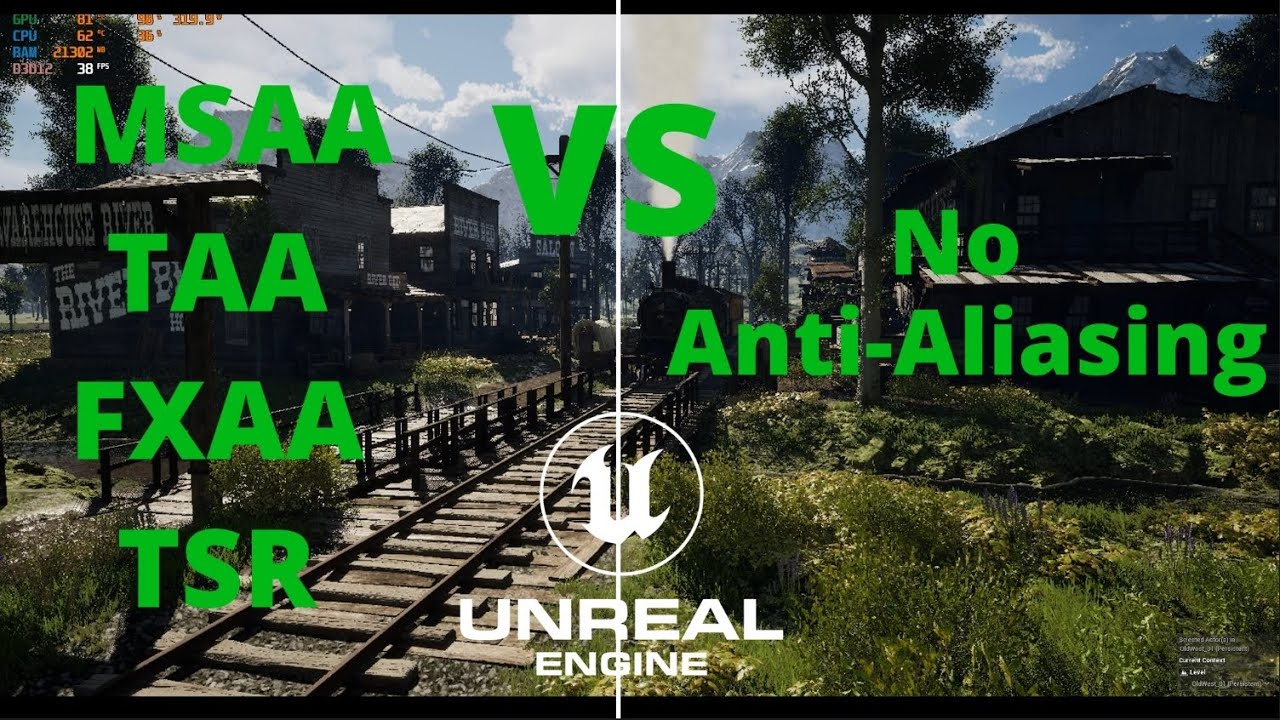
Hello everyone! I noticed there aren't many videos on YouTube covering anti-aliasing in UE5, so I wanted to share this with you. Thanks for watching, and if you enjoyed the video, don't forget to subscribe!
like in this, anything except TSR and TAA looks absolutely atrocious to me
this is probably a bit of a worse case/hyperbole with UE5 but still, gets the point across as to whats bothering me about the traditional AA methods
stiff gorge
A LOT of them are 1080p gamers, still rocking a 1080 Ti or an AMD GPU.
But I hear you. I replayed Arkham Knight and was so distracted by the extreme specular aliasing, even on my 4K TV. I would gladly trade off the "visual clarity" for a blurrier option.
 paper wharf
tepid sierra
i dont even get the fuck taa people, ah yes lemme have crazy shimmering everywhe...
paper wharf
tepid sierra
i dont even get the fuck taa people, ah yes lemme have crazy shimmering everywhe...
You have crazy shimmer because slop devs are using temporal solutions as a band-aid

If the devs were not slopping about
you wouldnt have shimmering
and we would all be using kino MSAA
tepid sierra
stiff gorge
A LOT of them are 1080p gamers, still rocking a 1080 Ti or an AMD GPU.
But I he...
yeah sure at 1080p TAA is probably not as nice, but even when i was on that res i still preferred it
stiff gorge
God, the evangelizing about MSAA is the worst, as if it was some fucking panacea that solved world hunger.
tepid sierra
paper wharf
and we would all be using kino MSAA
MSAA doesnt fix this
paper wharf
stiff gorge
God, the evangelizing about MSAA is the worst, as if it was some fucking panacea...
 It solved world hunger
but then evil bigGPU took it away from us
paper wharf
tepid sierra
MSAA doesnt fix this
Correct, slop devs abusing shit that causes the shimmer in the first place is the problem
tepid sierra
?
stiff gorge
Sarcasm detected
paper wharf
shitpost aside
The point kinda stands
What causes the shimmering in the first place
Typically an abuse of material authoring
a lot of that you cant solve
or you could but it would be giga expensive
It is just eaiser to use a temporal AA method
tepid sierra
i mean.. i wouldnt say that. its just a side effect of how detailed a game is nowadays.. grass for example how tf are you gonna make that not shimmer when you have very fine grass
msaa certainly doesnt fully fix that
only at very high settings that are bonkers intensive
like sure grass looks great at 4k and 4x or 8x msaa
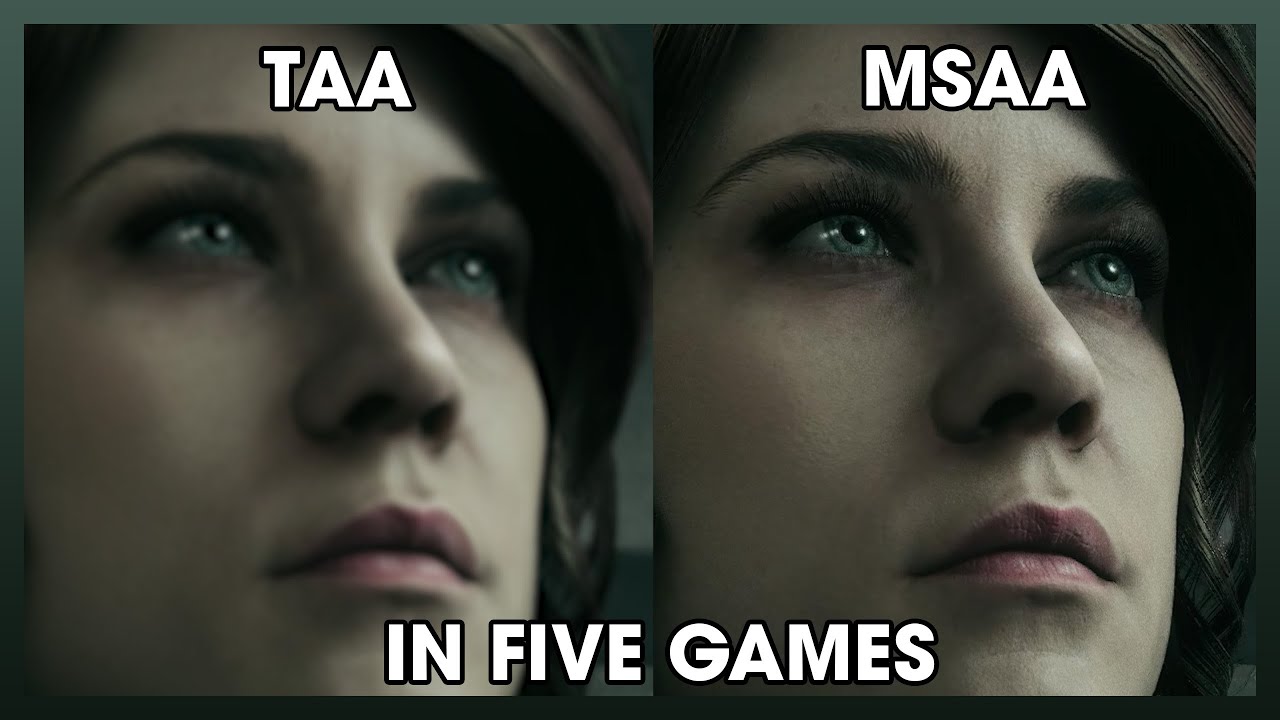
#comparison #antialiasing #gaming #taa #msaa
Ever wonder why modern games look so blurry? Your antialiasing, TAA, short for Temporal Antialiasing, basically blurs the entire picture at motion to hide the jaggies. This also causes smearing / ghosting. All upscalers suffer from this as a result. MSAA does not have this problem but due to renderi...
for example the rdr2 clips with msaa
i very much prefer taa
even though the taa is dogshit
kek
 paper wharf
On to complaining about RT/PT caused ghosting
Back in my day
we had baked lighting
perfection
tepid sierra
MSAA dont do any good for denoising that shit either
tepid sierra
paper wharf
we had baked lighting
works for a game that isnt dynamic yeah, looks great in that case
paper wharf
paper wharf
perfection
(Just dont move anything in a scene)
tepid sierra
yeah xd
paper wharf
kek
paper wharf
tepid sierra
works for a game that isnt dynamic yeah, looks great in that case
Theyre all non dynamic /s
tepid sierra
paper wharf
NOOO you dont understand we need RTGI for this linear horrorslop walking sim
tepid sierra
xd
turbid plank
magic cosmos
Does anyone have split fiction and can use optscaler to switch to dlss? because ...
Not sure if that's still relevant for you but wanted to chime in. Dlss doesn't support dynamic output resolution, and this game changed output res a lot during transitions. This makes Opti have to reinit dlss/xess/fsr2 every frame during transitions which is super slow and effectively unplayable.
There would be ways to workaround it but it's a lot of work and messy code for just a single game. Tho I did try an easier solution and the novideo driver was not happy
 quaint python
I remember the rumors of the Switch 2's dlss supporting dynamic output resolutions lol
magic cosmos
turbid plank
Not sure if that's still relevant for you but wanted to chime in. Dlss doesn't s...
my question itself was whether dlss would work in "split screen", why would Destroy All Humans! – Clone Carnage only works in the lobby, but not ingame.
turbid plank
quaint python
I remember the rumors of the Switch 2's dlss supporting dynamic output resolutio...
All major upscalers support dynamic res input, aka the image the game sends. The issue is the image that the upscaler produces
turbid plank
magic cosmos
my question itself was whether dlss would work in "split screen", why would Dest...
Hmm, split fiction specifically runs two upscalers at the same time and adjusts the ratios of output res between them on the fly. Haven't seen any other game do that. There was one split screen game that merges the images before passing them into the upscaler, therefore running a single upscaler instance, solving the issue
magic cosmos
turbid plank
Hmm, split fiction specifically runs two upscalers at the same time and adjusts ...
by PCGW it only has fsr 3.1, this must be a mess like other games tested like deamon x machina.
turbid plank
FSR 3.1 does support dynamic output res so that's probably why they only have fsr in split fiction.
magic cosmos
turbid plank
FSR 3.1 does support dynamic output res so that's probably why they only have fs...
reading a little about it and apparently frs does support drs, several games work, but it depends on the devs to implement this correctly.
storm forge
Fake ain't talking about DRS though, but DOS if you were to use an acronym
turbid plank
The usual dynamic res scaling refers to input buffers, aka what an upscaler gets from the game.
Split fiction changes output buffers, most upscalers need a full reinit to change those
magic cosmos
ok, you may be right, but the point was just to know if because it is split screen the reason why luma is not working in destroy all humans.
 turbid ingot
Dragon Quest I and II HD-2D Remake
create shortcut - properties - add -dx11
engine.ini:
[SystemSettings]
r.DefaultFeature.AntiAliasing=2
r.PostProcessAAQuality=6
r.TemporalAASamples=2
an error will popup after you open it even with -dx11 in shortcut.exe but it will work, just leave it and don't click OK, wait for the game to actually open and play.

 topaz belfry
Oh wow this game has taa? Does it look good with DLAA?
marsh quail
only FXAA in the options according to pcgw
topaz belfry
I'm finally back home, can start working on this again.
turbid ingot
topaz belfry
Oh wow this game has taa? Does it look good with DLAA?
at first no, need to edit engine.ini for it to work.
Yes, it eliminates shimmering on 3D models and makes it look much better too.
turbid ingot
Crisis Core Final Fantasy VII Reunion
Settings: All High

 untold crow
does anyone have github link or instructions faq of this? nothing is pinned 🙁 ok got it on dev feed 😄
red heath
@topaz belfry maybe we should make a wiki page to describe what this mod does
untold crow
Wartorn seems to work? although some thing in game doesnt work coz i get more fps when i force dx11. anti aliasing cinematic
 red heath
untold crow
Wartorn seems to work? although some thing in game doesnt work coz i get more fp...
red heath
untold crow
Wartorn seems to work? although some thing in game doesnt work coz i get more fp...
this game looks broken 😄
untold crow
ye it just looks bad the grass man, they even have some "painterly effect" this is how it looks with it
 topaz belfry
Oh wait that's actually how the game is supposed to look? I thought Luma was breaking it.
💀
untold crow
not the same settings but its without modding painterly off on. ye it looks bad ue game exe is 5.6.1 so i guess thats ue version

 topaz belfry
Why does it look so... Blue?
untold crow
ask devs 😄 could be coz i had this units choosen but if i hadnt on previous screens it looked simillar
topaz belfry
New version fixes
- FSR3 image quality improvements due to missing/incorrect motion vectors
- Added toggle for Auto-Exposure setting (may be better off in some games with excessive flicker)
Is it possible to add DLSS in the future?
topaz belfry
toxic harness
Is it possible to add DLSS in the future?
possible yeah, not sure how probable tho. It would be of not very high quality if it is.
toxic harness
topaz belfry
possible yeah, not sure how probable tho. It would be of not very high quality i...
I think it would be worth a try, thanks a lot.
turbid ingot
any roadmap for this project?
untold crow
@topaz belfry fsr3 should work before this update? When i was testing Wartorn when i changed to fsr3 it was crashing the game. No point trying to fix it coz game looks like shit anyways.
topaz belfry
untold crow
<@161300056123637760> fsr3 should work before this update? When i was testing Wa...
Would work now, with the reshade fixes
topaz belfry
turbid ingot
any roadmap for this project?
There is a wishlist of things. It's all done on our free time, so no real road map.
topaz belfry
turbid ingot
any roadmap for this project?
HDR implementation. Dx12 support are probably highest priorities
plain tulip
will dx12 be just for the ue addon or luma in general?
 balmy bobcat
will be a very good day when we have DLSS + HDR at same time
@topaz belfry how come your ff7 remake mod works with HDR but not the unreal engine mod
also im happy to report that w/e you did in the 2.0 build fixed the smearing i had
though ive got a weird issue, when i use clouds attack (left mouse click, the game severely stutters)
only happens with DLSS transformer
topaz belfry
balmy bobcat
<@161300056123637760> how come your ff7 remake mod works with HDR but not the u...
I did manual fixes for FF7
topaz belfry
balmy bobcat
only happens with DLSS transformer
Anywhere or somewhere specific? Weird stuff
topaz belfry
I'll try it out see if I can replicate
balmy bobcat
happens with CNN too actually
idk if its cuz im combining so many things, ive got your mod, then renodx, and lyalls
topaz belfry
Are you using the ff7 mod with reno or the UE mod with reno?
topaz belfry
If it's the ff7 one the issue is probably that both Luma and Reno modify the swap chain. Bound to have conflicts.
balmy bobcat
lemme try without reno real quick
good and bad news is that it still happens
bad news it also happens without lyalls
topaz belfry
🤔Let me figure it out. Must be a new issue then, right?
topaz belfry
Which means its probably fsr3
topaz belfry
balmy bobcat
what do you use to capture performance?
balmy bobcat
topaz belfry
what do you use to capture performance?
Rtss
topaz belfry
balmy bobcat
Rtss
going to take me a bit to figure this one out, doesn't happen in debug mode 😭
topaz belfry
balmy bobcat
Rtss
if you don't mind can you try with the test build from git?
 lethal trench
topaz belfry
dx12 sm5 games probably not too terrible, sm6 will be a challenge for sure.
lethal trench
topaz belfry
dx12 sm5 games probably not too terrible, sm6 will be a challenge for sure.
Hmmm
This could be useful for kingdom hearts...
(kingdom hearts 1 to dream drop distance)
topaz belfry
Are those custom engines?
marsh quail
only kh3 is unreal
balmy bobcat
topaz belfry
if you don't mind can you try with the test build from git?
Gonna have to wait till after I get back from work today, like 13 hours from now probably
topaz belfry
balmy bobcat
Gonna have to wait till after I get back from work today, like 13 hours from now...
let me know when you have time, I need to sanity check with someone else. Seems to happen only with the github ci build
balmy bobcat
topaz belfry
let me know when you have time, I need to sanity check with someone else. Seems ...
tbh theres an even bigger problem that happened (also happens on unreal test build)


lighting and shaders or something area all screwed up
and dlss wont come on either
happens with unreal test build and the ff7 nexus download
topaz belfry
balmy bobcat
tbh theres an even bigger problem that happened (also happens on unreal test bui...
never seen this issue, this happens like sometimes or all the time?
are you using SK by any chance?
balmy bobcat
topaz belfry
never seen this issue, this happens like sometimes or all the time?
all the time now since it happened, and not using sk
if i take everything out but luma, it looks liek this

and super stutters in game though dlss works now

turning of dlss fixes the super stutter
topaz belfry
balmy bobcat
all the time now since it happened, and not using sk
try deleting the luma folder and repasting it, aslo delete the reshade.ini
balmy bobcat
topaz belfry
try deleting the luma folder and repasting it, aslo delete the reshade.ini
didnt fix
topaz belfry
oh this is the UE4 generic not the FF7 addon, the issue is just that the swapchain is not upgraded and there is a mismatch. You need renodx to fix that with the generic addon.
balmy bobcat
topaz belfry
oh this is the UE4 generic not the FF7 addon, the issue is just that the swapcha...
now the swords entirely missing

and super weird shit is happening
 topaz belfry
guess it is just not compatible huh, did you try the ff7 addon test build?
if not I will send you a locally compiled build to try
balmy bobcat
topaz belfry
guess it is just not compatible huh, did you try the ff7 addon test build?
i havent seen a ff7 remake test build only ff7 rebrith
i wonder if its because i have ultrawide
im using lyalls fix, but the luma addons still broken when i dont use lyalls fix
balmy bobcat
@topaz belfry it works without stutters

i still need to test with renodx forcing hdr

got this error on boot
hitting okay the game still loaded
no stutter!

so wtf is the difference between the one on nexus and the test
topaz belfry
balmy bobcat
<@161300056123637760> it works without stutters
No idea why only the publish release build stutters. I'll keep looking into it.
topaz belfry
balmy bobcat
so wtf is the difference between the one on nexus and the test
Technically there should be no difference. Gotta track some memory leak perhaps
topaz belfry
balmy bobcat
It's an assertion you, was probably there already but they don't show in non test builds.
balmy bobcat
is it safe to disable generic depth and effect runtime sync
i always run those off but now i reset my ini
its working perfect now as far as i can tell, i even have the display commander working with it too now
so im using Luma + Renodx + DC + Lyalls
did a combat without a hitch
topaz belfry
Nice
lethal trench
topaz belfry
Are those custom engines?
Kingdom hearts 1.5, chain of memories, 2.5, BBS & DDD all use a custom engine, but on PC the engine runs in DX12
0.2 and 3 are on unreal
 blazing trout
Hello everyone 👋 I'm wondering if this could potentially work on heavily modified UE3 engine in the distant future.
I'm talking about MK11 (2019). That game has DX11 and DX12 exes.
It already has HDR, but what would do wonders for image quality would be DLSS injection to replace native TAA.
As that game's TAA archives stable image but at the cost of some slight TAA blur.
I've tried to test it with the generic UE version of Luma mod but it doesn't work - the game boots up but Luma options are not changing anything.
visual forge
blazing trout
Hello everyone 👋 I'm wondering if this could potentially work on heavily modif...
 topaz belfry
Yeah if it's not the default UE4/5 TAA this will never work. A separate mod will have to be built for a game like that.
 faint canopy
Doesn't seem to work for sonic racing crossworlds.
topaz belfry
Did you try forcing taa through engine variables?
toxic harness
topaz belfry
Did you try forcing taa through engine variables?
And when will there be support for dx12?
plain tulip
topaz belfry
There is a wishlist of things. It's all done on our free time, so no real road m...
^
toxic harness
plain tulip
OK, thanks
topaz belfry
has anyone tried granblue fantasy relink by any chance?
viral prism
topaz belfry
has anyone tried granblue fantasy relink by any chance?
yeah why? not ue btw
topaz belfry
viral prism
yeah why? not ue btw
oh it isn't, thought it was. has that ue look
viral prism
no it doesnt 
topaz belfry
viral prism
no it doesnt <:soyjak_crying:1361920746489778369>
I am sorry 
 surreal mulch
Might I ask what’s the difference between Luma and regular RenoDX?
Luma adds HDR and Reno improves it in games that already have it?
topaz belfry
Luma adds DLSS, the Renodx unreal engine plugin adds HDR
surreal mulch
OH ok lol, I got confused cause it said the Adding HDR feature was WIP
topaz belfry
We will be adding HDR for Luma as well.
And other features like upgrading ambient occlusion to GTAO
surreal mulch
Cool!
turbid ingot
topaz belfry
And other features like upgrading ambient occlusion to GTAO
will this be free and open source too? if it is that would be great.
topaz belfry
turbid ingot
will this be free and open source too? if it is that would be great.
yeah the entire project is open source
stiff gorge
\
stiff gorge
courtesy of my dog in the middle of the night
 storm forge
Finally got to try Luma in Redout2 but it's a super weird one :
- As screenshots show, DLAA loses SSR and some other stuff when native TAA(U) has it all (same with FSR3 btw)
- if I delete my [SystemSettings] tweaks in engine.ini (attached), then only native TAA will work (either DLAA or FSR3 will have a frozen/bugged image when getting to start actual gameplay (but HUD is still working)


(Sorry for the washed out shots, NVapp didn't produce JXRs for whatever reason)
topaz belfry
How many games have taau and not dlss? Might be interesting to do a version that works of off TAAU
storm forge
@viral prism , please enlighten Izueh, I don't know UE stuff enough to give a real constructive answer
magic cosmos
storm forge
(Sorry for the washed out shots, NVapp didn't produce JXRs for whatever reason)
with the prints from windows itself saved in JXRs.
storm forge
But I assume no UE4 games have TAAU vanilla without forcing it via that algo1 cvar
storm forge
magic cosmos
with the prints from windows itself saved in JXRs.
Well I use NVapp, usually it works as expected but this time it didn't 😅
magic cosmos
oh yes, I've never seen it save in this format
storm forge
topaz belfry
How many games have taau and not dlss? Might be interesting to do a version that...
Ironically, Luma here works with TAAU (algo 1) but not with vanilla TAA
topaz belfry
storm forge
Ironically, Luma here works with TAAU (algo 1) but not with vanilla TAA
Ah I understood the opposite. So the SSR bug happens when you turn on taau?
storm forge
With the [System.Settings] cvars, it works but loses SSR & stuff
magic cosmos
about Redout2, I tested it on the wiki, and I didn't notice if it lost SSR, but some games do have this type of problem, the ascent, for example, has a different brightness in the materials and shadows when you activate dlaa
storm forge
Without those cvars, it doesn't work (frozen/broken)
storm forge
magic cosmos
about Redout2, I tested it on the wiki, and I didn't notice if it lost SSR, but ...
Oh, never tried DLAA in the Ascent, too heavy on my rig with RT
But vanilla DLSS is fine enough thankfully
storm forge
storm forge
Without those cvars, it doesn't work (frozen/broken)
Only the HUD less image is frozen/broken, the game actually runs, sounds play and all but I have to get back to None SR in Luma to get it playable again 
Weird devs having only implemented TAA & XeSS... Like why 
magic cosmos
storm forge
Oh, never tried DLAA in the Ascent, too heavy on my rig with RT
you can try optscaler to use dlss instead of xess
 magic cosmos
It may be specific to the game, this problem, smooth motion gets a black screen in edf 4.1, it works in others
storm forge
No it's the unreal engine XeSS plugin
It's common to all UE games XeSS
Only FSR4 can cope with XeSS inputs in those games
But I'm on Ampere so no FSR4, tried the int8 DLL as well to no avail unfortunately
magic cosmos
Which game has this problem?
storm forge
All UE games
magic cosmos
according to the optscaler wiki you have to add these tweaks Enable OutputScaling and XeFG
Edit Engine.ini and add
[SystemSettings]
r.NGX.DLSS.DilateMotionVectors=0
r.Streamline.DilateMotionVectors=0
magic cosmos
yes, it says there for Enable OutputScaling and XeFG
storm forge
XeSS to FSR<4 or DLSS in UE games can't be done because of how the XeSS plugin is done for UE : now depth data, which both DLSS and FSR need to be able work
magic cosmos
storm forge
XeSS to FSR<4 or DLSS in UE games can't be done because of how the XeSS plugin i...
painkiller 2025 only has xess and it works in frs 4.
 topaz belfry
also does anyone know some other UE game that has SSAO?
storm forge
@viral prism likely knows a bunch of them (where are you, man ?)
topaz belfry
using jedi survivor and ff7 for now
trying to port the gtao implementation from ff7 to the generic mod
this might not be a good sample, seems like Jedi Survivor uses HBAO or GTAO already and not the default SSAO
 deft sun
Pretty sure most UE4 games use SSAO
They gotta have those contact shadows somehow without real time GI
topaz belfry
yeah I found them shader in darksiders 3 now
darksiders 3 also uses the newer better AO from UE4, need older games. Happy we had @viral prism put engine version on the wiki
topaz belfry
oh well thanks to whomever did it
viral prism
the makeover with the new tab with all engine versions was done by someone else
topaz belfry
vampyr seems like a good candidate by engine version
viral prism
all games from 4.24 and onwards will have toggle between ssao/gtao
all older have ssao
r.DefaultFeature.AmbientOcclusion 0/1

 topaz belfry
maybe I got unlucky and the ones I tested did custom, seems like they had HBAO or something similar. Star Wars Jedi and Darksiders 3 didn't have the same SSAO that ff7 had
topaz belfry
viral prism
r.DefaultFeature.AmbientOcclusion 0/1
ok so maybe the info in the wiki is wrong, says jedi is 4.21.2.0, so it shouldn't have gtao toggle.
viral prism
nah thats correct, but jedi is ssao only - just showing comparison for reference
viral prism
topaz belfry
How many games have taau and not dlss? Might be interesting to do a version that...
https://store.steampowered.com/curator/41480488 - all Dark Pictures games, probably same behavior in all of them where higher AA setting forces TAAU.
also [Redacted] which doesnt work with luma https://store.steampowered.com/app/2229940/REDACTED/. it has XeSS but no DLSS
 topaz belfry
viral prism
<https://store.steampowered.com/curator/41480488> - all Dark Pictures games, pro...
topaz belfry
viral prism
<https://store.steampowered.com/curator/41480488> - all Dark Pictures games, pro...
why is game border remover required for this game?
topaz belfry
I see
magic cosmos
topaz belfry
oh well thanks to whomever did it
the ones I found, I added, only the daylight one that I didn't find which version it is.
deft sun
topaz belfry
maybe I got unlucky and the ones I tested did custom, seems like they had HBAO o...
Pretty sure FF7 is custom
They reworked the engine a lot
 worldly hearth
 jaunty belfry
I get tons of jittering on the world models with the upscaling mods
jaunty belfry
CNN Model with preset F seems to work fine
really wanted to use K but I'll take this
cool stuff
magic cosmos
jaunty belfry
really wanted to use K but I'll take this
the dlss 3.10.4 version has a little more ant-alising than 3.10.3, try it
 topaz belfry
jaunty belfry
really wanted to use K but I'll take this
topaz belfry
jaunty belfry
really wanted to use K but I'll take this
Weird that has more issues with K. This game had a weird custom TAA so chances are they mess up some things even if you force vanilla TAA.
topaz belfry
It was a funny typo, how is it that pumbo had an image ready for it?
magic cosmos
topaz belfry
It was a funny typo, how is it that pumbo had an image ready for it?
well, he had 26 minutes to look lol
plain tulip
magic cosmos
Sorry, not everyone is a native English speaker.
-# isn't pumbo's first language italian? lol
magic cosmos
plain tulip
-# isn't pumbo's first language italian? lol
I don't know, I don't know him.
 unborn hare
Not sure if it’s just my case but for future documentation:
Dragon Ball Z: Kakarot (HD) works with DLAA in the title screen and when going in game, however when a scene change happens such as going into a cutscene, it reverts back to TAA from there. This is with DBZK_Fix which seems to be the only way for DLAA to activate in-game to begin with
topaz belfry
might be one of those games that resets engine variables
turbid ingot
has anyone tried Bravely Default II?
topaz belfry
Is a square hd2d game probably works just like the dragon quest games
turbid ingot
turbid ingot
has anyone tried Bravely Default II?
I've tried and it doesnt work
tried forcing taa and it detects taa but dlss debug don't show up
topaz belfry
r.DefaultFeature.AntiAliasing=2
r.PostProcessAAQuality=6
r.TemporalAASamples=16
did you set these?
also make sure to set the engine.ini to read only after as well
topaz belfry
turbid ingot
I've tried and it doesnt work
tried forcing taa and it detects taa but dlss debu...
even with the shorcut trick you used for dq 1 and 2?
turbid ingot
yes, tried that but setting engine.ini to read only is what haven't done yet
turbid ingot
topaz belfry
even with the shorcut trick you used for dq 1 and 2?
yes even with this it don't work
topaz belfry
I have the game so I will check tomorrow
turbid ingot
topaz belfry
I have the game so I will check tomorrow
oh really, that would be great then thank you.
topaz belfry
turbid ingot
oh really, that would be great then thank you.
btw do you know if the shorcut trick is required or if it works at all for steam deck/linux?
turbid ingot
i think no need, bravely default II uses dx11 by default
turbid ingot
topaz belfry
btw do you know if the shorcut trick is required or if it works at all for steam...
it works now, for some reason it doesn't work when graphics quality is on High

 obsidian gale
Ama guess high forces a different aa method
turbid ingot
when switching back from medium to high it produces this
 topaz belfry
turbid ingot
when switching back from medium to high it produces this
topaz belfry
turbid ingot
when switching back from medium to high it produces this
try setting hidpi setting to application override in the exe properties.
turbid ingot
topaz belfry
try setting hidpi setting to application override in the exe properties.
still the same
topaz belfry
turbid ingot
still the same
try this build, also set the cvars with the lyall fix. working on my end
turbid ingot
thanks @topaz belfry i'll try it now
it works now! with lyall mod and with your build


but it has this weird fps drop when entering shops or inside buildings, it actually froze and restarted my pc because it rans into problems.
had to use my phone to capture it

or maybe its just a vram issue, as you can see at the top it nearly max out my vram when compared with this without dlaa
 topaz belfry
weird just going into any shop?
turbid ingot
it maxes my ram too even without lyall mod
 turbid ingot
topaz belfry
weird just going into any shop?
turbid ingot
topaz belfry
weird just going into any shop?
yes
topaz belfry
turbid ingot
yes
test with fsr3 as well see if it happens
turbid ingot
i actually switch back to to medium and same scenario
wait let me restart my pc then

its eating my gpu vram and ram
topaz belfry
a memory leak, maybe
 turbid ingot
on fsr it goes on like this medium or high settings
turbid ingot
turbid ingot
on fsr it goes on like this medium or high settings
i mean when entering shops
topaz belfry
hmmm, can't replicate. any possible external cause?
turbid ingot
maybe ue4ss, but is yours working fine? if it does then maybe the problem lies within my device.
topaz belfry
turbid ingot
maybe ue4ss, but is yours working fine? if it does then maybe the problem lies w...
Memory stays consistent as well
try deleting reshade.ini just in case
turbid ingot
yah, will try later
thank you again
turbid ingot
it works now, I deleted engine.ini so it generates a new one.
hybrid hazel
whats the difference between luma and luma test files on github
topaz belfry
hybrid hazel
whats the difference between luma and luma test files on github
test is for tester
hybrid hazel
how to enable dlss for mafia 3?
viral prism
hybrid hazel
how to enable dlss for mafia 3?
red heath
U can't.
toxic harness
red heath
U can't.
And how much longer is it to wait?, thank you
 toxic harness
red heath
https://tenor.com/view/bed-time-gif-21640936
toxic harness
red heath
https://tenor.com/view/bed-time-gif-21640936
How much?
red heath
toxic harness
How much?
up to u
toxic harness
red heath
up to u
I'm willing to pay $5
red heath
toxic harness
I'm willing to pay $5
nice, 1m of salary 🙂
toxic harness
red heath
nice, 1m of salary 🙂
Where should I transfer to ?
red heath
toxic harness
Where should I transfer to ?
#📢dev-feed message
toxic harness
red heath
https://discord.com/channels/1161035767917850784/1248995443581517865/14476587462...
Will I be able to get mafia in this case?
red heath
toxic harness
Will I be able to get mafia in this case?
that's the roadmap
topaz belfry
going to need a list of games with confirmed SSAO, don't have that many UE games and hav eonly found two games with SSAO and engine version < 4.24
visual forge
anyone ini expert for adding tsr in unreal engine 5 game
visual forge
deft sun
Is there a UE5 game that doesn't have TSR to begin with? It's the default AA met...
Lolipop Chainsaw repop
 topaz belfry
found an interesting bug when combining luma and renodx, renodx upgraded some resources and causes a false positive TAA detection shader that breaks rendering.
Oops meant to post this here and posted it in renodx thread.
red heath
topaz belfry
found an interesting bug when combining luma and renodx, renodx upgraded some re...
addons are run in alphabetical order
or well, in the order they register events
if u call renodx -> a_renodx.addon
it might work?
topaz belfry
will try this out later
 cursive reef
I tried that with earlier builds but that didn't make a difference unfortunately
topaz belfry
did you find compatibility issues in some games with reno?
cursive reef
Yea, it seems like most games that require reno upgrades break if you combine it and luma
SMT5 was the only one I've tested where bgra8 typeless upgrades from reno worked with luma
marsh quail
oh i was planning on starting smtv very very soon (if i don't get what i want on Winter Sale), should load order be Reno first for upgrades then Luma?
topaz belfry
cursive reef
Yea, it seems like most games that require reno upgrades break if you combine it...
I guess I got lucky. I tried it with dq3 and it worked. Will try to look into some way of fixing this.
Guessing this would be an issue if I upgrade resources in Luma itself too
I should try looking for a patter in the false positives to avoid matching them.
cursive reef
topaz belfry
I guess I got lucky. I tried it with dq3 and it worked. Will try to look into so...
Oh ty, that'd be really cool :)
Maybe I just got unlucky with the games I tested lol, it definitely broke clash and raincode, and some other game I can't remember
obsidian gale
dq3 worked for me
 cursive reef
But @visual forge also mentioned that games with reno upgrades don't work
cursive reef
visual forge
As long as resources are not upgraded, renodx ue is compatible with luma ue
Which ones did you test that broke with luma + reno?
cursive reef
obsidian gale
dq3 worked for me
hmm
cursive reef
topaz belfry
Guessing this would be an issue if I upgrade resources in Luma itself too
Still maybe worth a shot
topaz belfry
obsidian gale
dq3 worked for me
yeah I recently tested this one, but the others I tested did break
obsidian gale
i admit i didn't go far tho
visual forge
cursive reef
Which ones did you test that broke with luma + reno?
i only remember life is strange with true colors
topaz belfry
cursive reef
Yea, it seems like most games that require reno upgrades break if you combine it...
did it always break the same way frozen image?
topaz belfry
got a potential fix, anyone mind testing in the games they had issues with?
cursive reef
topaz belfry
did it always break the same way frozen image?
It froze the image iirc but the broken view also had no shadows, a lot of textures were just green too. I'll capture screenshots later today
cursive reef
topaz belfry
got a potential fix, anyone mind testing in the games they had issues with?
I still have those two games installed, so I could test them
topaz belfry
cursive reef
It froze the image iirc but the broken view also had no shadows, a lot of textur...
cursive reef
Thx, I'll try that after work
cursive reef
@topaz belfry clash is still green, but not frozen

behaves the same if I change the load order
cursive reef
Clash: Artifacts of Chaos
setting luma back to none makes the game look completely normal again
rain code on the other hand now almost works
 sharp panther
has anyone tried the mod with Half Sword and worked?
cursive reef
cursive reef
rain code on the other hand now almost works
but if there are certain UI elements overlaid on top of the game scene, some textures break
like the red carpet here


this doesn't go away if you swap back to none
load order makes no difference here either
oh wait
this is happening with reno only too
topaz belfry
yeah some games just break if you upgrade textures
I am testing clash I happen to own it
cursive reef
so it seems like your new fix works in rain code, nice
its just reno that now has an issue lol
wasn't there when I added support for it
cursive reef
cursive reef
so it seems like your new fix works in rain code, nice
DLSS looks insanely good there, their TAA config was insanely unstable
everything constantly shimmers
heavy terrace
topaz belfry
https://github.com/user-attachments/files/24206180/Luma-Unreal.Engine.zip
wow, thanks a lot for this build, it fixed kingdom hearts 3, DLAA now works, never did before
topaz belfry
Nice
topaz belfry
Have added additional checks, to avoid false positives. But gotta need help re-testing some games that already worked to make sure there aren't false negatives now
red heath
topaz belfry
Have added additional checks, to avoid false positives. But gotta need help re-t...
 topaz belfry
can only test the games I own sadly
turbid ingot
Scarlet Nexus works so much better now, past builds causes black screen on some places.
 topaz belfry
now need to find UE games with dithering and ssao so I can do the generic patches
topaz belfry
Have made some more changes, might have fixed borderlands 3. Will push a release later.
red heath
topaz belfry
Have made some more changes, might have fixed borderlands 3. Will push a release...
what was the problem? false positives?
topaz belfry
red heath
what was the problem? false positives?
For borderlands it was the offsets I showed you
red heath
topaz belfry
For borderlands it was the offsets I showed you
where
topaz belfry
Dithering fix coming along, have managed to get it working on Aliens.
red heath
topaz belfry
Dithering fix coming along, have managed to get it working on Aliens.
Aliens what?
topaz belfry
red heath
Aliens what?
fireteam elite
magic cosmos

 marsh quail
oh i was planning on starting smtv very very soon (if i don't get what i want on...
marsh quail
marsh quail
oh i was planning on starting smtv very very soon (if i don't get what i want on...
no workey  (paired with marat's smtvv reno snapshot)
well nevermind it worked once i get out of the starting classroom? weird
topaz belfry
it's a miracle it works sometimes
obsidian gale
turbid ingot
Dragon Quest I and II HD-2D Remake
create shortcut - properties - add -dx11
eng...
Did you get reno hdr working ?
On this game
Tried upgades but no dice
Dq3 needed only one

turbid ingot
obsidian gale
Did you get reno hdr working ?
nope, not yet
just this luma mod
marsh quail
marsh quail
well nevermind it worked once i get out of the starting classroom? weird
aight now i know why it didn't work
gen5 taa with lyall's mod shouldn't be enabled
 humble lava
Hi, I'm playing Jedi Fallen Order using the Luma mod and the new DLSS 4.5 (310.5.0). The Issue: It defaults to Preset K, but I am trying to force Preset M. I have tried NVIDIA App and NVIDIA Profile Inspector (Global setting), both are being ignored by the game/mod. Does anyone know if there is a specific config file I should be editing instead?
void hull
Could try setting a forced global override in nvidiaprofile inspector
humble lava
Tried it, still stuck at preset K
 rich crescent
DLSS Swapper is another program you could use
 hard flame
same here w/ global override and specific profile override and still can't force preset m
marsh quail
M with DLAA is extremely heavy so I'm not sure it's gonna be worth it either way
K already looks as good as it gets
paper wharf
Except K has doodoo voluemtrics and doesnt have the new linear colour special sauce
WaitTM for CES 2027 for Preset N and O with fixes to both

surreal mulch
paper wharf
Except K has doodoo voluemtrics and doesnt have the new linear colour special sa...
Whats the color thing?
plain tulip
surreal mulch
Whats the color thing?
so games should do the vast majority of the rendering in linear space
the new dlss models were trained on linear space instead of log so colors, hightlights, and shadows should look more accurate
topaz belfry
humble lava
Hi, I'm playing Jedi Fallen Order using the Luma mod and the new DLSS 4.5 (310.5...
I will update the framework, give me some time
surreal mulch
plain tulip
so games should do the vast majority of the rendering in linear space
the new dl...
Oh damn that’s cool af
plain tulip
surreal mulch
Oh damn that’s cool af
notice how the colors, highlights and shadows look different between preset M and preset K
I think might be because of the new linear stuff
https://imgsli.com/NDM4ODkw/3/1
 surreal mulch
plain tulip
notice how the colors, highlights and shadows look different between preset M an...
surreal mulch
plain tulip
notice how the colors, highlights and shadows look different between preset M an...
Will check when I get home
U think it’s a positive change?
humble lava
plain tulip
notice how the colors, highlights and shadows look different between preset M an...
10% fps drop with preset M?
plain tulip
no Idea what the person who took these screenshots is running
void hull
plain tulip
notice how the colors, highlights and shadows look different between preset M an...
From some screenshots I've seen it looks like we're back to CNN in that regard
topaz belfry
nvidia losing the recipes?
I am honestly kind of dissapointed at a lot of coverage regarding dlls4 and transformer models. Few bring up the obvious shortcomings.
I found J and K borderline unusable
void hull
It is probably people not being sensitive to the same issues
If by chance then those people covering it have are all the same in that regard than people who are sensitive to other things fall outside the boat
topaz belfry
void hull
It is probably people not being sensitive to the same issues
I mean yes, but I rarely hear mention of the super blocky volumetric effects.
like DF just said on their 4.5 analysis that model K didn't have any particular jarring weakness
and I'm here like...
also some people seem to not notice ghosting as much, doesn't mean it isn't there and an obvious flaw.
void hull
topaz belfry
like DF just said on their 4.5 analysis that model K didn't have any particular ...
Well it's Oliver
He usually seems fine with console image quality
Which I'm like???
So I don't really take him seriously in that regard
Just like his HDR takes
turbid ingot
humble lava
Hi, I'm playing Jedi Fallen Order using the Luma mod and the new DLSS 4.5 (310.5...
Bravely Default II
Preset M by using latest DLSS Swapper
 balmy bobcat
humble lava
Hi, I'm playing Jedi Fallen Order using the Luma mod and the new DLSS 4.5 (310.5...
balmy bobcat
humble lava
Hi, I'm playing Jedi Fallen Order using the Luma mod and the new DLSS 4.5 (310.5...
to get M you have to do game profile overrides in nvpi instead of global
magic cosmos
I am testing here the dlss 4.5 model M, it is no longer flickering in borderlands 3, but only if you replace it with the nvidia app, with luma even putting 3.10.5 it still flickers
humble lava
Dlss Swapper worked, and doing game profile overrides in profile inspector instead of global worked
storm forge
balmy bobcat
to get M you have to do game profile overrides in nvpi instead of global
Apparently global can work if using the driver dll instead of the one that comes with the SDK
Weird ik but it's what one of the DLSS Swapper issues opener on GitHub tells
humble lava
topaz belfry
just pushed the update with dlss 4.5
No unreal engine build?
topaz belfry
should be up soon
topaz belfry
humble lava
No unreal engine build?
fixed
 lime ridge
topaz belfry
fixed
lime ridge
topaz belfry
fixed
getting a memory leak with the new UE build when I enable dlss, was fine with the previous version
 topaz belfry
man what is wrong with github builds
I don't know what causes the issues with the git builds and it doesn't happen with every build either
lime ridge
topaz belfry
this build is still leaking for me too
topaz belfry
@humble lava @lime ridge guys available to test a potential fix?
lime ridge
sure
topaz belfry
lime ridge
sure
lime ridge
doesn't leak but there's constant stutter and jittering
lime ridge
F L M seem fine, J and K have the stuttering
topaz belfry
@red heath any ideas?
lime ridge
actually nvm L and M are stuttering
topaz belfry
lime ridge
actually nvm L and M are stuttering
figured
humble lava
topaz belfry
this fixed the memory leak for me in star wars
topaz belfry
do you also have stutter issues?
humble lava
no stutters
topaz belfry
may be game related somehow, I see the stutters in DQ3
red heath
topaz belfry
<@232584079986524160> any ideas?
no
topaz belfry
red heath
no
ok I think the issue is actually the struct compare in update setting, I think floating point inaccuracies may cause dlss to reset when it's not supposed to
topaz belfry
lime ridge
actually nvm L and M are stuttering
try if you can
lime ridge
nice all presets working now
dang the frame time cost of the new presets is much too significant for dlaa, 240 fps with K -> 140 with L, and 170 with M
thanks for the fix, checked a few more areas and no issues
 jovial tartan
So because on the website it says frame generation glitches may occur, use older version.....does that mean frame generation can be injected to most of those games?
red heath
topaz belfry
ok I think the issue is actually the struct compare in update setting, I think f...
inaccuracy from what
topaz belfry
red heath
inaccuracy from what
actually I am not totally sure, resolutions are in integer actually. but I was logging the struct everytime it changed and it was the same values but the memcmp failed.
I guess mv_scale? is the only float value
red heath
topaz belfry
I guess mv_scale? is the only float value
But why does it change
topaz belfry
red heath
But why does it change
to my knowledge it doesn't I am doing a comparison without memcmp and it works fine now
red heath
topaz belfry
to my knowledge it doesn't I am doing a comparison without memcmp and it works f...
Just put a breakpoint after the successful comparison and see what values are different I guess
topaz belfry
red heath
Just put a breakpoint after the successful comparison and see what values are di...
doesn't happen in development mode actually, which is why I was logging instead. Now that I think about it, maybe some padding in the struct that doesn't get zeroed in release mode.
red heath
topaz belfry
doesn't happen in development mode actually, which is why I was logging instead....
mmm
should be zeroed on allocation
topaz belfry
no I don't think that is true unless you run on debug mode. need to zero out with memset or = {}
let me test
nope memcmp still fails
20:04:50:092 [26604] | INFO  | [Luma] DLSS: Reinitialization #17 triggered. Settings:
  Output: 3840x2160
  Render: 3840x2160
  Dynamic Resolution: Yes
  HDR: Yes
  Inverted Depth: Yes
  MVs Jittered: No
  Auto Exposure: Yes
  MVs Scale: 1.000x, 1.000y
  Render Preset: 13
  Quality Mode: 5
20:04:50:146 [26604] | INFO  | [Luma] DLSS: Reinitialization #18 triggered. Settings:
  Output: 3840x2160
  Render: 3840x2160
  Dynamic Resolution: Yes
  HDR: Yes
  Inverted Depth: Yes
  MVs Jittered: No
  Auto Exposure: Yes
  MVs Scale: 1.000x, 1.000y
  Render Preset: 13
  Quality Mode: 5
20:05:08:836 [26604] | INFO  | [Luma] DLSS: Reinitialization #19 triggered. Settings:
  Output: 3840x2160
  Render: 3840x2160
  Dynamic Resolution: Yes
  HDR: Yes
  Inverted Depth: Yes
  MVs Jittered: No
  Auto Exposure: Yes
  MVs Scale: 1.000x, 1.000y
  Render Preset: 13
  Quality Mode: 5
20:05:08:892 [26604] | INFO  | [Luma] DLSS: Reinitialization #20 triggered. Settings:
  Output: 3840x2160
  Render: 3840x2160
  Dynamic Resolution: Yes
  HDR: Yes
  Inverted Depth: Yes
  MVs Jittered: No
  Auto Exposure: Yes
  MVs Scale: 1.000x, 1.000y
  Render Preset: 13
  Quality Mode: 5
20:05:21:837 [26604] | INFO  | [Luma] DLSS: Reinitialization #21 triggered. Settings:
  Output: 3840x2160
  Render: 3840x2160
  Dynamic Resolution: Yes
  HDR: Yes
  Inverted Depth: Yes
  MVs Jittered: No
  Auto Exposure: Yes
  MVs Scale: 1.000x, 1.000y
  Render Preset: 13
  Quality Mode: 5
20:05:21:897 [26604] | INFO  | [Luma] DLSS: Reinitialization #22 triggered. Settings:
  Output: 3840x2160
  Render: 3840x2160
  Dynamic Resolution: Yes
  HDR: Yes
  Inverted Depth: Yes
  MVs Jittered: No
  Auto Exposure: Yes
  MVs Scale: 1.000x, 1.000y
  Render Preset: 13
  Quality Mode: 5
mind if I just keep the overloaded equality operator I did?
guess I could also dump the memory and compare
 marble canopy
Does this work in Borderlands 3? Tried it last night and it didn't seem like there was any visual difference between DLSS and FSR.
red heath
topaz belfry
mind if I just keep the overloaded equality operator I did?
not really, but i'd also like to understand why memcpy would fail
topaz belfry
marble canopy
Does this work in Borderlands 3? Tried it last night and it didn't seem like the...
Should, someone tested it above.
topaz belfry
red heath
not really, but i'd also like to understand why memcpy would fail
let me do a memory dump when comparsion and memcmp don't give the same result. will let you know.,
red heath
topaz belfry
let me do a memory dump when comparsion and memcmp don't give the same result. w...
i think u can check with VS too?
memory debug
topaz belfry
red heath
i think u can check with VS too?
in debug mode the issue doesn't happen at all, so would be harder to identify.
red heath
u don't need debug mode to scan memory
topaz belfry
red heath
memory debug
New: 000f000070080000000f000070080000010101000000803f0000803f010100000d000000
Old: 000f000070080000000f000070080000010101000000803f0000803f010000000d000000
no idea how to use that, let me read about it
it was uninitialized padding on the boolean type it seems. actually doing memset(0) works even if you initialize to the struct with = {} or {0} it doesn't seem to set padding to 0.
red heath
topaz belfry
it was uninitialized padding on the boolean type it seems. actually doing memset...
good to know
thx
wonder if that's what messed up my just cause 3 tests
 plain tulip
bruh
marsh quail
another billion to pumbo's kofi
is that gonna work with games that overly rely on sdr quirks though? ie smtvv
(the beam sword is supposed to be white)
 marsh quail
buy that 10k nits qdled tv

US.TCL
SQD-Mini LED TCL Deep Color System WHVA 2.0 Ultra Panel TCL Halo Control System Up to LD20,000 Precise Dimming Series Up to 10,000 Peak Nits UltraThin Depth Audio by BANG & OLUFSEN

deft sun
Fuck the consumer shit, get the pro mastering monitor like Vincent
1k nits full screen baby
deft sun
 jovial tartan
red heath
gotta buy the S95H on release day innit
jovial tartan
red heath
gotta buy the S95H on release day innit
I'm also tempted, namely because it doesn't have a one connect box
 broken shore
Hey im trying to get lumahdr and DLSS to work in kingdom hearts 3 and im not sure its working correctly any chance somebody can help me real fast ?
i followed this video exactly and im not sure its working.

Timestamp :
- Kingdom Heart III DLAA 4 & FSR 3 AA Lua Mod : 00:00
- TXAA & FXAA Support : 00:37
- Engine.ini Tweaks : 00:55
- Download Luma Unreal Engine Mod : 02:04
- Download Luma Reshade Addon File : 02:27
- DLSS Debug Overlay Setup : 02:48
- Luma Unreal Engine Mod Setup : 03:28
- Luma Reshade Addon File Setup : 04:04
- Delete msvcp140.dll F...
also, i am trying to inject this mods textures using reshade as well not sure if its working either.... https://www.nexusmods.com/kingdomhearts3/mods/2197

Nexus Mods :: Kingdom Hearts III
I rework the textures of the environmentmy twitter : https://x.com/Nanaky28my web site: https://www.vierockhd.ca/ more than 60HD Remaster Games!!
topaz belfry
broken shore
Hey im trying to get lumahdr and DLSS to work in kingdom hearts 3 and im not sur...
what exactly is not working, can you describe the issue
broken shore
Well firstly im trying to get Special K and reshade to work at the same time, but i cant, so i tried to bypass using special k and just use reshade, but now i dont know if my 4k mod for kh3's textures are being injected correcly as well as the not knowing if the DLSS mod using lumahdr is working correctly either
topaz belfry
if it's using SK texture replacement it won't work without SK
to test if luma is working you can try turning DLSS to none and see if the image changes at all
broken shore
Yeah i got that now, But i guess im just trying to get reshade working with special K
topaz belfry
do you not notice any difference?
topaz belfry
broken shore
Yeah i got that now, But i guess im just trying to get reshade working with spec...
likely won't work
broken shore
hmmm
topaz belfry
can you send me your reshade.log file
broken shore
Well i guess i can just start trying to get reshade with dlss and lumahdr to work first
might not even need the 4k texture mod
if i can get that to work lol
gettiung an error when i run the game saying application tried to create non direct x11 game only supports direct x 11
pops up twice
then i click continue
topaz belfry
does it work after?? those are warnings
broken shore
Trying now
just reinstalled everything.
i got that part now
just wish i can figure out how to inject the textures for the 4k mod
to make it look freaking awesoime.
topaz belfry
yeah wish reshade addons wouldn't conflcit with SK too
 broken spruce
Sorry for the dumb questions: this is like the renoDX UE universal addon in the sense that make HDR works for all UE 5(?) games right? Does it support FG better compared to renoDX?
marsh quail
broken spruce
Sorry for the dumb questions: this is like the renoDX UE universal addon in the ...
currently the addon only does TAA -> DLAA/FSRAA conversion
marsh quail
but if Luma also upgrades the sdr path in the future, it's gonna have the same limitations as reno
broken spruce
reno got kinda fixed by creating another addon but that addon at times makes the game crash or not launch at all so I was hoping for a different solution
topaz belfry
marsh quail
but if Luma also upgrades the sdr path in the future, it's gonna have the same l...
It's the issue resource upgrade?
storm forge
I can't make AutoExposure be off and survive restarts in Redout2, what would be the flag to manually save in the ini ?
Also, since using DLSS preset = 5 to use E works (I've swapped the DLSS dll to the driver one with all presets in it), would you consider offering an extended preset selection menu one could enable through the Advanced Settings tab ?
topaz belfry
storm forge
Also, since using DLSS preset = 5 to use E works (I've swapped the DLSS dll to t...
yeah I thinking about it, probably will just add preset E. all the other ones are not worth it.
topaz belfry
storm forge
I can't make AutoExposure be off and survive restarts in Redout2, what would be ...
in that game only or is this in general?
storm forge
topaz belfry
yeah I thinking about it, probably will just add preset E. all the other ones ar...
I mean if E is offered and works, it would mean a dll having them all is used so why not all of them for science ?  Somewhat agreed tho, E & F are the only ones I'd realistically be using for cnn
storm forge
topaz belfry
in that game only or is this in general?
Hmm admittedly haven't tried in other games, Redout2 is the only one in which disabling it makes highlights brighter (ironically enough ik)
Only slightly brighter though, it's nothing like presets L & M behave at all
Btw, FSR3 is surprisingly close to L & M for highlights brightness
topaz belfry
storm forge
I mean if E is offered and works, it would mean a dll having them all is used so...
Will have it in the test build with all for people that want to do stuff for science
storm forge
Good call 🙂
topaz belfry
storm forge
Only slightly brighter though, it's nothing like presets L & M behave at all
I think auto exposure should be on in most games. Some get excessive flicker and fireflies. So should be off for those.
storm forge
Yeah it's motly usefully relevant to enable it usually
Redout2 is just an oddball on many fronts but it's so fast paced those things I can't even notice
What I could notice though was my fps dropping from 120-157 (reflex cap) to 70 with M or sub 60 with L 
It's an Ampere peasant torture at DLAA
topaz belfry
M doesn't scale as well with resolution
meant to be used in performance mode
so preset M DLAA just tanks performance even without mods like Luma
storm forge
Meh, it's diminishing returns for sure but it's worth it at any res if it can be run easily enough (Ada and newer)
Considering the lighting improvements, I would totally use it if I had the raw power in my GPU
topaz belfry
I went from 240fps using preset E DLAA 4k x 1.5 resolution in MH Rise to ~50fps with preset M
on a 4080
storm forge
Ouch 😭
topaz belfry
so I just went back to preset E
topaz belfry
eta soon™
marsh quail
topaz belfry
It's the issue resource upgrade?
dunno the specifics
topaz belfry
storm forge
Formatting fail lol
Nobody saw the mistake, you good
 spiral burrow
Hi all, have any of you guys tried to use dlaa with the dragon quest 7 reimagined demo? i thought I could follow the DQ11S steps to get it working in 7R but that didn't work lol
topaz belfry
does dq7 support dx11?
spiral burrow
When I first launched the game I got error prompts not detecting dx11, so i used the dx11 launch argument and the game was able to load.
i dont know how to check if a game is dx12 or 11 once it's running though, ill have to find a way to do that
topaz belfry
what is then the issue?
spiral burrow
there probably isn't any to be honest, i just wasn't smart enough to get it to work without a detailed guide for that specific game
marsh quail
spiral burrow
i dont know how to check if a game is dx12 or 11 once it's running though, ill h...
use reshade/rtss/specialk
topaz belfry
spiral burrow
there probably isn't any to be honest, i just wasn't smart enough to get it to w...
Don't have the game, make sure to set engine.ini as read only
spiral burrow
I'll give that a shot after work, thanks
 velvet harbor
Just finished Jedi Fallen Order with Luma and Model M really helps with some of the missing highlights in the game, also replaying the game in HDR, DLAA, 8K shadows and increased LODs feels like a remaster despite beings the same SKU in the end

 topaz belfry
Fallen Order is such a great game, pity the lack of optimization really.
at least hardware now can brute force it mostly
velvet harbor
I cranked everything and locked the game to 60hz and called it a day and it was ok for the most part except Kashyyyk where it had 1-2 pauses when exploring new areas
Here's several more with model M. Greez beard looks so good


 surreal mulch
I so wish Survivor was more decent. Been wanting to play it but I heard terrible experiences with the pc port
 inner island
It's ok on a very powerful pc. Like 3D v cache cpu, 16GB VRAM, stick to 1440p output resolution unless you're using a top 5 GPU.
broken spruce
I played Survivor with my old 6900XT. there was some stutter here and there but performance was OK
but I did play after years it came out
rancid pine
topaz belfry
does dq7 support dx11?
DX11 works, but the game only has FXAA by default and no engine.ini (tried creating one but doesn't work), UUU cant unlock console, UE4SS crashes on startup
topaz belfry
Going to have to wait for a lyall fix or something else to unlock the engine and developer console
Oh he made one already
Try it
topaz belfry
rancid pine
DX11 works, but the game only has FXAA by default and no engine.ini (tried creat...

Codeberg.org
An ASI plugin for Dragon Quest VII Reimagined (Demo) that can add ultrawide/narrower support, enable the console and more.
if someone can get it working please add the steps you took in the wiki 🙏
rancid pine
topaz belfry
https://codeberg.org/Lyall/DQ7RFix
oh wow nice
topaz belfry
should be able to force TAA with that
rancid pine
topaz belfry
should be able to force TAA with that
Bloom is broken, freezes on whatever it was when DLSS got enabled
TAA/DLSS/DLSS after moving camera/DLSS after moving camera with bloom disabled


 topaz belfry
rancid pine
Bloom is broken, freezes on whatever it was when DLSS got enabled
TAA/DLSS/DLSS ...
topaz belfry
rancid pine
Bloom is broken, freezes on whatever it was when DLSS got enabled
TAA/DLSS/DLSS ...
only with dlss bloom works with TAA?
rancid pine
topaz belfry
only with dlss bloom works with TAA?
yeah, works with TAA
or at least isnt obviously broken like this
topaz belfry
interesting, would need to get the game to debug. probably has a false positive?
can you share reshade log?
rancid pine
topaz belfry
interesting, would need to get the game to debug. probably has a false positive?
full game isnt even out yet, just the demo
and demo is only 1.8gb
topaz belfry
rancid pine
what settings did you use to get it to work?
rancid pine
topaz belfry
what settings did you use to get it to work?
r.ScreenPercentage = 100
r.DefaultFeature.AntiAliasing = 2
r.TemporalAA.Algorithm = 0
r.ViewDistanceScale = 5
r.StaticMeshLODDistanceScale = 0.001
r.Shadow.MaxCSMResolution = 4096
r.Shadow.MaxResolution = 4096
r.MaxAnisotropy = 16
make sure you set Enabled = true for cvars and change algorithm to 0 in DQ7RFix.ini
topaz belfry
ah was missing algorithm 0
think I see the issue
this is interesting, not sure how to deal with this but they combined the TAA and the first mip of the bloom into one compute shader.
so skipping TAA skips blooms
@red heath you added after draw callbacks, right?
red heath
topaz belfry
<@232584079986524160> you added after draw callbacks, right?
last param of ondrawcustom