#✅RenoDX: Clair Obscur - Expedition 33
1 messages · Page 4 of 1
 bold minnow
 limber goblet
80/80 is very similar to 62/62
bold minnow
I thought so yea
limber goblet
near identical actually
80/80 is a little bit more saturated maybe
80/80 equals to 65/62
 warped ginkgo
if you're interested in how the sliders effect the image
you can look at the desmos graph
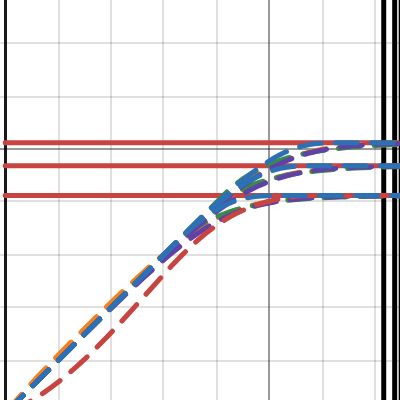
Desmos
drop down "renodrt variables"
and just move shit up and down
 visual flower
what kind of preset are you using atm?
limber goblet
1.00
52
50
54
65
50
62
0
visual flower
thanks, appreciate it
limber goblet
np
 pearl wagon
Has anyone tried this to improve camera movement stutter? I did 1/2 refresh rate through nvidia profile inspector and set a FPS (in-game) to 60FPS on my 120hz monitor. I'm not sure but I think it looks smoother.


ResetEra
I've had the same issue recently with South of Midnight, was getting camera microstuttering when running under Gsync even with external cap.
I know that SoM is UE4 and COE33 is UE5 but in both cases I get no camera microstuttering with a 60 Hz signal in Fullscren Mode, in-game Vsync AND in-game...
 eternal python
I have 0 issues with that, running butter smooth for me
Surprising given that it's Unreal
Only get few stutters in cutscenes but I think that might be cause of Lyalls fix unlocking to 60fps
All in all great experience so far
 winged dune
Ain't no way i'm gonna use V-Sync instead of 0 issues with 60 SK VRR optimized cap.
warped ginkgo
winged dune
Ain't no way i'm gonna use V-Sync instead of 0 issues with 60 SK VRR optimized c...
if you're using vrr you want vsync
vrr gets sad when you dont use vsync
winged dune
I mean, its on, just never getting engaged with 120hz.
warped ginkgo
vsync is always on when you're in vrr range
eternal python
Why no Vsync? That's what im using and its running well
I would get it if it was a competitive game for latency tho
warped ginkgo
there is no latency penalty on vsync if you're in your vrr range
winged dune
It was my assumtion that normal V-Sync has no effect unless you're hitting over your refresh rate, but i might be wrong.
warped ginkgo
winged dune
It was my assumtion that normal V-Sync has no effect unless you're hitting over ...
nope
winged dune
I meant i'm not using V-Sync 1/2 instead of SK setup 🙂
warped ginkgo
vsync behaves the same as vsync does, but with no latency penalty when you use vrr
but you dont want to use fractional vsync
that griefs hard
 neon spire
so if I am using vrr I should use ncp vsync 1/2 or in-game vsync?
I am using currently SK with 60fps cap
 buoyant falcon
neon spire
so if I am using vrr I should use ncp vsync 1/2 or in-game vsync?
buoyant falcon
neon spire
so if I am using vrr I should use ncp vsync 1/2 or in-game vsync?
no and maybe
dont use half vsync
eternal python
I would recommend Vsync with VRR
buoyant falcon
if ingame vsync is not broken then use it
visual flower
btw what sharpening value do you guys use?
warped ginkgo
whatever the default in the fix is
warped ginkgo
rip didnt even look
limber goblet
winged dune
Ain't no way i'm gonna use V-Sync instead of 0 issues with 60 SK VRR optimized c...
yup, zero stutter with SK
 main elm
visual flower
btw what sharpening value do you guys use?
main elm
visual flower
btw what sharpening value do you guys use?
0 and force dlss preset j
visual flower
I gotta try J, do you guys just use it because of better volumetrics?
game does have a lot of fog but it didn't bother me too much
and I really lke the clear textures
main elm
the sharpening is really bad even at low values, its just bad - use RCAS or something if you need to, just forget about that ingame one
main elm
visual flower
I gotta try J, do you guys just use it because of better volumetrics?
yeah tbh i cant really see much difference between j and k, except k is worse on volumetrics
visual flower
hm
main elm
they're both far sharper in that good way than the old presets
visual flower
alright, I'll try it out, tyty
I see, that's great
game tends to blur out further objects anyway so
warped ginkgo
main elm
0 and force dlss preset j
@main elm does J not ghost?
main elm
visual flower
game does have a lot of fog but it didn't bother me too much
and yeah somehow the artifacts on volumetrics dont bother me that much in the game even though theres a lot
warped ginkgo
K was a rip, and I went back to E
main elm
warped ginkgo
<@98455130633949184> does J not ghost?
it does, but less
K is basically unusable compared to that
warped ginkgo
yea I ditched K fast
visual flower
are there any video comparisons?
warped ginkgo
I might give J a try sometime; but for now E seems pog
eternal python
I have been using K and haven´t noticed anything too weird honestly
But maybe Im blind
 wraith atlas
K has been fine for me too. Might be a resolution issue. idk
eternal python
Could be yeah. I´ve never had Issues with it at 4K on a big screen so far
It always looks better than other presets
SO much that I have it enabled by default in ProfileInspector for all games lol
limber goblet
J has issues if you don't move the camera aka during more static cutscenes
visual flower
I'm playing at 2k and K definitely has some volumetric issues and some ghosting (on the hair movements mostly) but it's nothing crucial
I'll try J though just to feel it out
visual flower
limber goblet
J has issues if you don't move the camera aka during more static cutscenes
what kind of issues?
limber goblet
visual flower
what kind of issues?
Dark line "patterning"? Hard to describe
visual flower
hm
limber goblet
pattern like artifacts especially in volumetrics and cloud
it's not as bad as preset k's smearing tho
it's kinda hard to notice in this game so I guess preset J is probably the best option atm
preset E works fine too
warped ginkgo
wraith atlas
K has been fine for me too. Might be a resolution issue. idk
I'm on 4k balanced so idk
limber goblet
still in act 1 but I had to change my settings again:
 visual flower
limber goblet
preset E works fine too
visual flower
limber goblet
preset E works fine too
wouldn't it lose some of that sweet texture clarity K provides?
limber goblet
I find preset K too sharp at times tbh
visual flower
are you using lyall's fix?
limber goblet
yea
warped ginkgo
visual flower
wouldn't it lose some of that sweet texture clarity K provides?
yea; but it doesnt smear like crazy
limber goblet
preset K is not great especially during cutscenes when that horrible DoF is used
visual flower
limber goblet
still in act 1 but I had to change my settings again:
are you playign on oled btw?
 safe jackal
it's a trade off from stability to sharpness between E (most stable) J and K (sharpest)
on MHWilds the artifacts were too distracting for me, almost every map had them
on Exp33, I noticed them but it's on way less scenes and not as distracting
limber goblet
visual flower
are you playign on oled btw?
I am
visual flower
safe jackal
it's a trade off from stability to sharpness between E (most stable) J and K (sh...
yea in wilds it was all over the screen sometimes but even then I preferred sharpness more tbh
man playing new good games and just literally launching youtube/twitch is a potential for spoilers lol
people are doing the dumbest thumbnails that show stuff
visual flower
you're also on 4K though if I understand it right
so you probably have a bit more clarity than me on 2k
 latent pumice
I'm hoping that they tweak their DoF parameters in subsequent patches b/c it's amongst the worst I've seen in UE5
warped ginkgo
visual flower
so you probably have a bit more clarity than me on 2k
2k is 1080p!
people calling 1440p 2k is a marketing misnomer
visual flower
oh yea
warped ginkgo
if anything 1440p would be closer to 3k
visual flower
I meant 1440p
limber goblet
latent pumice
I'm hoping that they tweak their DoF parameters in subsequent patches b/c it's a...
yea it's just really bad lol
warped ginkgo
yea ik, I'm messing with you
safe jackal
my target is 4k70-80fps, using Balanced preset K
limber goblet
I locked it to 60fps, it's fine
warped ginkgo
14900k + 5090
limber goblet
GPU usage is around 70%
warped ginkgo
limber goblet
I locked it to 60fps, it's fine
I wanted 70 fps because
vrr
my display does weird stuff around 58-59 fps
but 60+ is good
limber goblet
I see no flicker with 60
limber goblet
warped ginkgo
my display does weird stuff around 58-59 fps
ahh ok
safe jackal
warped ginkgo
14900k + 5090
4k70 preset E balanced sounds like 70% gpu usage
limber goblet
yea my TV acts weirdly when the FPS is locket to the lfc trigger value too
warped ginkgo
it looks fine
but 70 > 60 on this display
honestly 63 would be fine too
even the 5090 sint good enough for 80
so I just used nvidia's limiter to 70
safe jackal
are you using RT mods?
limber goblet
3840x1600 here with preset E quality DLSS
locked 60, and I don't think that the framerate dropped below 60, during gameplay, yet
cutscenes yea
but It's impossible to notice the frame drops during cutscenes
the frametime graph is smooth, and there is no stuttering
safe jackal
ok, I just checked. I'm on Performance, not balanced. ingame AA on medium, everything else set on Epic.
4k70fps overworld (5700x3d, 4080, LG C2)
limber goblet
yea sounds about right
main elm
limber goblet
I find preset K too sharp at times tbh
youre just used to taa/dlss blur
its not oversharpening
main elm
i agree it looks too sharp in the way "holy shit how does this look that crisp" but not in a "oversharpening artifacts" way
latent pumice
I hate it too, but still prefer it to the days of the mid 2010s when all we had was FXAA and SMAA.=
main elm
latent pumice
I hate it too, but still prefer it to the days of the mid 2010s when all we had ...
absolutely
limber goblet
main elm
youre just used to taa/dlss blur
it's not oversharpened, but too sharp games can look, well like games, it can be immersion breaking
latent pumice
the FUCKTAA crowd are a weird bunch
visual flower
I mean games look incredible nowadays, at least some, so if future dlss4 gets even better it would be the dream
main elm
latent pumice
the FUCKTAA crowd are a weird bunch
they're insane 😄
limber goblet
I prefer preset K most of the time tho
I think very realistic looking games can look weird without some kind of blurring
Expedition 33's art direction is not that realistic
visual flower
maybe but games are so blurry honestly
the only non blurry game I think I saw recently was talos 2
limber goblet
yes ofc I'm not talkin about TAA or early DLSS blur
the biggest immersion breaking in games is the shimmering imo
limber goblet
I mean visualy
visual flower
yea that makes sense
limber goblet
the fuckTAA guys prefer shimmering over image stability it's crazy
latent pumice
For real. Going back to Arkham Knight and dealing with high contrast edge and specular shimmering, even at 4k, was immersion breaking.
visual flower
every time I see volumetric artifacts I always think tho that I'm gonna be super impressed any time I see clear textures, so that outweights it 😸
limber goblet
and then we get 128gb texture packs with high res blurry textures rofl (MHW)
latent pumice
limber goblet
the fuckTAA guys prefer shimmering over image stability it's crazy
They'll constantly talk about how Arkham Knight and MGS V and Battlefield 1 were the pinnacle of graphic design in gaming, and that everything ever since has been diminishing returns. They're nuts.
limber goblet
yea lol
 fiery orchid
latent pumice
They'll constantly talk about how Arkham Knight and MGS V and Battlefield 1 were...
fiery orchid
latent pumice
They'll constantly talk about how Arkham Knight and MGS V and Battlefield 1 were...
 limber goblet
his side profile is legendary
 summer folio
Does preset J vs K even matter if I'm using ray reconstruction? I know RR uses its own preset E but unsure if the normal DLSS preset has any influence on the output
warped ginkgo
I might be wrong, but I think when RR is active; a differnet DLL is used for super sampling
which has its own presets
summer folio
no you're right it's using DLSS-D which has E as the latest preset
warped ginkgo
but RR should have a transformer mode
eternal python
Arent they 2 completely separate presets?
warped ginkgo
since they showed it off with the 5000 series in cyberpunk
summer folio
D and E are the transformer presets for RR
warped ginkgo
copy
summer folio
just wasn't sure if there was something weird going on in the background where the DLSS preset had an impact for whatever reason. RR seems better with volumetrics than preset K but still has some weirdness when the camera cuts during a cutscene and shows a kind of checkerboard pattern in volumetrics (happens both in Ninja Gaiden 2 Black and E33)
warped ginkgo
idk about RR; but
I went back to preset E after using K fo ra bit
with regular DLSS
because K was too "unstable"
smeared and stuff
eternal python
I assume ur on the latest driver?
summer folio
dunno which of us you are asking but I am
eternal python
I was asking Marat particularly haahaha
summer folio
i think the transformer problems at least with RR are minor enough that I wouldn't want to go back to CNN especially since we can't use DLAA without crashing renodx
eternal python
Because I haven't noticed smearing at all using preset K. Maybe I was "not looking for it" or somethin
But wait, are u using RR in this game?
summer folio
yeah just put this in engine.ini, it costs like 15-20% on a 5090 though so you need headroom
r.NGX.DLSS.RayReconstruction=1
r.NGX.DLSS.denoisermode=1
r.Lumen.Reflections.BilateralFilter=0
r.Lumen.Reflections.ScreenSpaceReconstruction=0
r.lumen.Reflections.Temporal=0
r.Shadow.Denoiser=0
eternal python
Oh damn, thats cool. But I def don't have that performance headroom
 plucky finch
pearl wagon
Has anyone tried this to improve camera movement stutter? I did 1/2 refresh rat...
plucky finch
pearl wagon
Has anyone tried this to improve camera movement stutter? I did 1/2 refresh rat...
Allegedly, the latest version of ClairObscurFix is supposed to address this
eternal python
Today I had to drop DLSS to balanced cause I was dropping some frames in a particular zone lol
warped ginkgo
eternal python
I assume ur on the latest driver?
yea always
I always grab the latest drivers
and hotfix drivers
eternal python
I will look for smearing tomorrow when I play. Maybe this will ruin preset K for me but now Im curious hahaha
About the COfix, I read it was not recommended to skip the intro for more stability?
eternal python
warped ginkgo
apparently its a SK thing
What is a SK thing?
eternal python
I dont think Im following. Im not using SK. You mean that its only a problem if you use SK?
warped ginkgo
from what I've read yea
eternal python
Ohhh gotcha
warped ginkgo
specifically if you use sk to inject reshade
eternal python
Then ill just activate it to save those precious 10s lol
eternal python
warped ginkgo
specifically if you use sk to inject reshade
What´s the benefit to that?
eternal python
Ohhh, interesting lol
 dry sundial
does special k work with reno, rt/rr, and puredark mods? I want to force preset J since whenever i use the RR mod it gets stuck at preset D
summer folio
dry sundial
does special k work with reno, rt/rr, and puredark mods? I want to force preset ...
latest RR preset is E, J is only normal DLSS
D and E are transformer for RR
dry sundial
Ok ty
It still won't let me change it to E though
It seems locked into d when I check using dlss indicator
summer folio
need dlss_d 310.2.1.0 to use preset E, here: https://raw.githubusercontent.com/NVIDIA/DLSS/refs/heads/main/lib/Windows_x86_64/rel/nvngx_dlssd.dll
dry sundial
I am using the version
I tried changing it with the option in puredarks mod but it isn't changing it according to indicator
summer folio
dry sundial
I tried changing it with the option in puredarks mod but it isn't changing it ac...
puredark's mod changes the normal DLSS preset but RR uses a different preset, I would force preset E for RR via NVInspector
dry sundial
summer folio
puredark's mod changes the normal DLSS preset but RR uses a different preset, I ...
I'll give tht a go
latent pumice
I bundled together the aforementioned hair shimmering fix, enhanced lumen, and ray reconstruction implementation tweaks. Looks pretty good at 4K Performance w/ Preset J.
dry sundial
Is there a way to fix the insane motion distortions especially in cutscenes? I also keep getting crashes ever 30 mins or so during cutscene combat transitions.
latent pumice
Has anyone had success unpacking E33's .pak files? I'd like to snuff out the DoF values and do some tweaking in Cheat Engine.
No luck with Game Extractor nor UnrealPak
winged dune
dry sundial
Is there a way to fix the insane motion distortions especially in cutscenes? I a...
Never had it, but i'm not using PD or RT.
Just Reno and Lyall's fix through SK.
At one point my game would constantly crash on load and i had to use prior safe, thats about it.
summer folio
latent pumice
I bundled together the aforementioned hair shimmering fix, enhanced lumen, and r...
you should set r.Lumen.Reflections.Temporal=0 and r.Lumen.Reflections.BilateralFilter=0 if you're using RR, also r.Lumen.Reflections.DownsampleFactor=2 in that ini cuts reflection resolution in half compared to the default value of 1
If you want, you can add these lines to add correct specularity to every surface rather than just surfaces with roughness at or below the default values (0.25-0.3ish and 0.75 respectively), you'll want to remove "r.Lumen.Reflections.MaxRoughnessToTraceClamp" from your ini if you decide to use them. It's fairly expensive at 10-12% FPS cost at DLSS quality with a 5090, though you can earn back half of that by turning on radiance caching with no visible loss of quality: (feel free to set more sane values if you have less headroom)
r.Lumen.Reflections.MaxRoughnessToTrace=1
r.Lumen.Reflections.MaxRoughnessToTraceForFoliage=1
r.Lumen.Reflections.RadianceCache=1
This line will give you a few % more FPS on average up to almost 10% in some forested areas in exchange for slightly softer distant shadows (default is -1):
r.Shadow.Virtual.ResolutionLodBiasDirectional=0
(the default values I mentioned are for epic settings, they are very likely different for lower presets)
 slow forum
summer folio
D and E are transformer for RR
slow forum
summer folio
D and E are transformer for RR
No, J & K are as well
It's even in the official Nvidia communications and documentations when they updated the SR model to bring K, they had explicitly mentioned RR transformer was still using J, then RR got K. You can check all that easily in HL2 RTX without reading any docs
summer folio
slow forum
It's even in the official Nvidia communications and documentations when they upd...
it's possible that RR has a J and K preset but going by the integration guide it doesn't seem to be mentioned
 slow forum

Documentation you shared is out of date and maybe not updated yet
summer folio
It's from the latest SDK release last month. The answer you linked is from february before RR preset E release, that rep (or chatgpt) likely confused RR preset D (the original RR transformer preset) for J (original transformer SR preset). SR was updated to K in late jan or early february, RR hadn't received E at that point and wouldn't until april hence the specification that the newest preset had not changed.
slow forum
Dunno what to tell you.. Check with your DLSS debug overlay then, it's the definitive proof you need
D&E are CNN, doc isn't up to date
 pure tapir
As of January 30th, 2025, the “Latest” model for DLSS Super Resolution has been updated to Transformer "Preset K", a minor refinement to Transformer Preset J, which showcases improved temporal stability, reduced ghosting, and enhanced detail in motion.
"reduced ghosting"
are you sure about that, nvidia?
summer folio
slow forum
D&E are CNN, doc isn't up to date
Forcing E results in preset E ingame, forcing K is invalid and results in D which is the new default RR preset


A B and C are CNN hence being deprecated in the docs
slow forum
Except they're what you're using now in Clair Obscur which doesn't apply those presets properly, hence the "invalid" return you mention.
Try in Cyberpunk or Alan Wake 2, they have native support for both and RR uses J in there for Transformer and E for CNN
Better yet, just look at the Half-Life 2 RTX menu
You can literally choose J & K for RR...
summer folio
you can feel free to show screenshots of RR preset K in cyberpunk or AW2, i'm not going to install them for no reason
slow forum
I see (well I'll be damned, D natively & no preset showing when overriding to latest thru NVapp - my bad, sorry)
 elder void
summer folio
you can feel free to show screenshots of RR preset K in cyberpunk or AW2, i'm no...
elder void
summer folio
you can feel free to show screenshots of RR preset K in cyberpunk or AW2, i'm no...
I've tried myself several times and never got the overlay to show K in a game using RR.
So to my very basic understanding each DLSS technology (SR/RR) have a separate arrange of presets.
 west smelt
limber goblet
still in act 1 but I had to change my settings again:
west smelt
limber goblet
still in act 1 but I had to change my settings again:
I got so lost in the game that forgot about modifying anything.
 somber pebble
warped ginkgo
and lipsync
somber pebble
warped ginkgo
and lipsync
I noticed the entire game doesn't have that great lipsync compared to others
 errant jackal
The UI for DLSS is different if youre using RR
This is with RR

This is without RR
 somber pebble
latent pumice
I bundled together the aforementioned hair shimmering fix, enhanced lumen, and r...
somber pebble
latent pumice
I bundled together the aforementioned hair shimmering fix, enhanced lumen, and r...
is the shimmering hair fix related to using RR? Cause I didnt notice any shimmering so far
somber pebble
plucky finch
Allegedly, the latest version of ClairObscurFix is supposed to address this
didnt even know there was a new version, downloading now!
this isn't linked to the "latest snapshot" in the pin msg btw! just FYI 😄
plucky finch
somber pebble
didnt even know there was a new version, downloading now!
If you're visiting github regularly, you can set notifications regarding any particular project you are interested in

 ancient siren
When people say "use RCAS for sharpening" are they referring to lilium's HDR CAS shader? Or something else?
Ignore that, there's a desperate RCAS shader, doh
Is that always preferable to CAS?
limber goblet
somber pebble
I noticed the entire game doesn't have that great lipsync compared to others
It’s synced to the french vocies
limber goblet
ancient siren
When people say "use RCAS for sharpening" are they referring to lilium's HDR CAS...
Lilium’s HDR shader should support RCAS too now, I think
but yea RCAS should be better than CAS
somber pebble
limber goblet
It’s synced to the french vocies
Really? I thought the “main performance” was with English actors. Like A Plagues Tale, even though both are french devs
main elm
somber pebble
Really? I thought the “main performance” was with English actors. Like A Plagues...
pretty sure you're right. i mean they have charlie cox and andy serkis
eternal python
Yeah it's a small synchronization mismatch
Don't know if it's a bug or they just didn't do better
I've noticed that unlocking cutscenes to 60fps makes the lipsync a bit better for me
plucky finch
main elm
pretty sure you're right. i mean they have charlie cox and andy serkis
Worth keeping in mind that unlike with animation, VA is usually done fairly late in the game production, it doesn't look like the game used performance capture, so my guess is that animation team recorded themselfs using the French script as an animation reference, and then tried to maybe tweak it to the eng VA as much as the budget allowed them
dry sundial
summer folio
you should set r.Lumen.Reflections.Temporal=0 and r.Lumen.Reflections.BilateralF...
is there anything i can also add for pop ins? The pop ins are pretty terrible
eternal python
plucky finch
Worth keeping in mind that unlike with animation, VA is usually done fairly late...
This could very well be it yeah
slow forum
plucky finch
Worth keeping in mind that unlike with animation, VA is usually done fairly late...
Well Lipsync is messed up in both french & english unfortunately 😢
 sand willow
True but it’s more tolerable (to my eyes) than English in French VA
limber goblet
main elm
the lipsync just seems desynced a bit
the lipsync with french audio is not desynced tho
I mean it looks a lot better than with english audio
 silver perch
I love it when im 30 mins into a bossfight and the game freezes cuz of renodx
 surreal thorn
dont use it then
surreal thorn
free is free, complaint is valid but eh, you dont know the crash was caused exclusively by reno anyway
limber goblet
I’m lucky then, no freezes in ~12 hours
wraith atlas
I don't freeze as long as I don't use DLAA
 regal pivot
Had no crash or freeze either in 25 hours
surreal thorn
silver perch
such is life
turn on dump luts i guess and see if anything else drops in your folder
if you want to be of actual help, could also share the reshade log
errant jackal
Dont use DLAA and youre golden
 silver badge
I can't make reno work at all with this game for some reason, the reno plugin is loading fine but sliders does nothing except disabling cutscene film grain settings and the peak brightness. Contrast, saturation, shadows etc does nothing.
I tried with SK and without SK, it is the same, plugin loads but settings not working. I am using the provided reshade version. I can use reno ob monster hunter wilds it works fine there.
I also tried turn off my other monitors. It does something but definitely not an HDR experience. I think the game does not use HDR at all for me. I also put the game borederless full screen since it is dx12
I use ClairObscurFix mod but it also does not work without that mod
If it matters I use DLSS4 preset K with quality mod
It somehow looks better when I put my monitor in SDR mod and disable reno all-together, which further suggests somehow HDR is not used in the game... That is also weird because SK overlay reports HDR10 in game when I use my monitor in HDR mod
Damn I found the problem.... It was a mod which tweaks engine.ini
somber pebble
silver badge
Damn I found the problem.... It was a mod which tweaks engine.ini
Lol, what lines are responsible then? For future reference
errant jackal
wow it was something that wasnt the mod imagine that
silver badge
It was a .pak mod that overrides the engine.ini somehow
probably it was forcing SDR if I had to guess
for performance reasons...
silver badge
somber pebble
Lol, what lines are responsible then? For future reference

Nexus Mods :: Clair Obscur: Expedition 33
Optimizes Clair Obscur and reduces stuttering considerably by optimizing shader compilation and assets streaming.
don't use it with reno...
somber pebble
latent pumice
I bundled together the aforementioned hair shimmering fix, enhanced lumen, and r...
Actually, I think Im seeing this hair shimmering issue, hair doesnt look all that great in this game, also the classic flickering hair shadows etc, does that section fix it?
Also, another question for everyone else, does CA, vignette etc need to be on for reno? I have it all on but just wondering how much it’s detrimental to the image
wraith atlas
Just tried 99% DLAA and Preset J. Look so good.
safe jackal
somber pebble
Actually, I think Im seeing this hair shimmering issue, hair doesnt look all tha...
Reno should work with any in-game postprocessing toggle setup
I personally noticed massive smearing in the background scenes and disabling Motion Blur fixed it (this was before using Reno and I did not try upgrading the motion blur FPS that was shared here). The rest I don't mind being enabled on, as they aren't producing a distracting image for me.
 digital venture
any engine.ini command to reduce bloom ?
elder void
ancient siren
Is that always preferable to CAS?
I'm using Lilium's HDR CAS at 0.15 value. Tried RCAS but it does overbright the UI too much.
ancient siren
RCAS on linear rather than gamma mode didn't seem to overbrighten
I've gone with linear/0.5/remove noise
 thin pike
Odd, what would cause only UI Brightness to work? I thought it was SK conflict but now I can't get Reno to do anything even without other mods. Bizarre.
limber goblet
thin pike
Odd, what would cause only UI Brightness to work? I thought it was SK conflict b...
Are you using the correct ReShade version?
and correct addon file
I spent a good 30 minutes trying to figure out why reno was not working correctly. I used the oblivion addon file with Expedition 33… 😅
somber pebble
summer folio
you should set r.Lumen.Reflections.Temporal=0 and r.Lumen.Reflections.BilateralF...
Does RR make a substantial difference in this game?
I find the shimmering/flickering around gustaves head/hair on some cutscenes really distescting as well, like it cant blend well with dof
eternal python
somber pebble
Does RR make a substantial difference in this game?
I find the shimmering/flick...
Can always change the hairstyle lol
thin pike
limber goblet
Are you using the correct ReShade version?
Yup, I've never been able to get SK to use Reno typically even if I use the supplied DXGI, but now it doesn't care at all even on a complete reinstall. Unsure. Probably just wait for an update or two.
somber pebble
latent pumice
I bundled together the aforementioned hair shimmering fix, enhanced lumen, and r...
Anyone knows if this is worth using? Already using lumen enhanced as it shows here but mainly the hair shimmering and other tweaks. Plus RR of course
neon spire
latent pumice
I bundled together the aforementioned hair shimmering fix, enhanced lumen, and r...
tried this. RR has weird shimmering issues, tried it but reverted. rather have weird hair shimmer than entire areas shimmering
limber goblet
neon spire
tried this. RR has weird shimmering issues, tried it but reverted. rather have w...
what if you turn off RR?
neon spire
let me try
let me make sure with the hud enabled, but enabling r.Lumen.Reflections.Temporal=0 disables RR right?
neon spire
summer folio
you should set r.Lumen.Reflections.Temporal=0 and r.Lumen.Reflections.BilateralF...
ok nvm , avoid these settings and shimmering is not an issue at least in the area I am in
somber pebble
neon spire
ok nvm , avoid these settings and shimmering is not an issue at least in the are...
So use RR and the engine.ini posted?
neon spire
still testing
summer folio
somber pebble
So use RR and the engine.ini posted?
You shouldn't use anything I posted without having RR turned on with full res scale reflections, so his ini with that minor tweak. Also preset D of RR has shimmering problems of it's own and is the default preset, better off forcing E
Also RR won't fix hair shimmer, you'd just need to use a higher dlss setting to lessen it
summer folio
dry sundial
is there anything i can also add for pop ins? The pop ins are pretty terrible
Not that I found, all of the ini tweaks I've seen posted for it do nothing
neon spire
summer folio
You shouldn't use anything I posted without having RR turned on with full res sc...
ah so preset D is the issue, how do you force E?
as soon as I set r.Lumen.Reflections.Temporal=0 screen becomes full of shimer and noise
 remote crescent
As of today my game is SUPER washed out, no idea why.
 empty mist
what mods/addons whatever do you use?
remote crescent
Reno, Lyall, SpecialK
empty mist
i had that happen sometimes when i played with SK and RenoDX, that SK turned it's own SDR->HDR mode on and renodx was also doing its thing so it looked ultra bad, all i did was change it to SRGB or HDR10 Native
remote crescent
Maybe that's it - I'll check SK
empty mist
yea check SK hdr and make sure its on HDR native mode
remote crescent
Yuuup that was it
summer folio
neon spire
ah so preset D is the issue, how do you force E?
i use NVIDIAInspector, DLSS-RR - Forced Preset Letter E (need 310.2.1.0 DLSS_D.dll for this), also need to be using r.Lumen.Reflections.DownsampleFactor=1 or 0 or you will get shimmering regardless (2 is half res). By default that INI runs the game's default temporal denoiser on top of ray reconstruction when only RR should be needed
neon spire
summer folio
i use NVIDIAInspector, DLSS-RR - Forced Preset Letter E (need 310.2.1.0 DLSS_D.d...
I am guessing 0x00000005 in inspector is E, right?
summer folio
neon spire
I am guessing 0x00000005 in inspector is E, right?
yeah it is
empty mist
remote crescent
Yuuup that was it
ye it happens to me here and there so thats the first thing i check, or if i accidentally have RTX hdr or some other hdr on xd
neon spire
summer folio
yeah it is
yeah shimmering fixed with preset E and downsamplefactor=1
but it seems to me that the hair shadow fix just pretty much gets rid of hair shadows and makes the faces look plastic
from the ini
summer folio
neon spire
but it seems to me that the hair shadow fix just pretty much gets rid of hair sh...
these 2 lines should be the shadow fix, the other 2 are just preference and increase SSS intensity by a good bit
r.SSS.Quality=1
r.SSS.HalfRes=0
 ebon python
I've been following along with this and I end up with weird shimmering/noise on the tattoos? on Lune's left arm when panning the camera around
 peak plover
do you guys suggest to disable reno for the last battle to watch the cutcenes after better?
ebon python
summer folio
ebon python
from just the enhanced-RT ini or something I posted?
ebon python
What you and Izueh have been discussing. I ended up at the below with forcing preset E for RR and K for DLSS in profile inspector
r.NGX.DLSS.RayReconstruction=1
r.NGX.DLSS.denoisermode=1
r.Lumen.Reflections.BilateralFilter=0
r.Lumen.Reflections.ScreenSpaceReconstruction=0
r.lumen.Reflections.Temporal=0
r.Shadow.Denoiser=0
r.Lumen.Reflections.MaxRoughnessToTrace=1
r.Lumen.Reflections.MaxRoughnessToTraceForFoliage=1
r.Lumen.Reflections.RadianceCache=1
r.Shadow.Virtual.ResolutionLodBiasDirectional=0
r.Lumen.Reflections.DownsampleFactor=1
r.SSS.Quality=1
r.SSS.HalfRes=0
r.Lumen.TraceMeshSDFs=1
r.Lumen.TraceMeshSDFs.Allow=1
r.LumenScene.DirectLighting.OffscreenShadowing.TraceMeshSDFs=1
r.Lumen.TraceMeshSDFs.TraceDistance=300
Or at least I think I've followed along correctly lol
summer folio
ebon python
Or at least I *think* I've followed along correctly lol
does turning the temporal denoiser back on fix that shimmer? i can't test that tattoo I haven't unlocked it yet
ebon python
Lemme try that
neon spire
only difference I see is that your perf quality is set to 2, mine is at 0 in the dlss hud
ebon python
I have ultra performance forced to 77% because I was never going to use that preset anyway, so idk if that's where it's getting that from
Actually, I guess it does it a bit without RR so maybe it's just kinda the way it is
empty mist
peak plover
do you guys suggest to disable reno for the last battle to watch the cutcenes af...
i used reno for it and it was flawless for me, no stutters no anything but might just be a lucky scenario for me so
summer folio
that's quite a bit less with normal dlss though, you still have the shimmer with combined RR + temporal denoiser?
i don't have any sort of shimmer or noise with her tattoo in the default outfit but I don't have the first outfit you posted with the bad shimmer
don't have with with default ultra performance at 4k either so probably not internal resolution
ebon python
Which one is the temporal denoiser setting? This r.lumen.Reflections.Temporal?
summer folio
yeah
ebon python
It does go away almost completely with that set to 1 as well with the default outfit, so it must be something goofy with the one I started with. I'll just not use that one and call it good lol. Appreciate your assistance!
summer folio
ebon python
It does go away almost completely with that set to 1 as well with the default ou...
yeah you aren't losing much with the temporal denoiser on anyways, mainly just a small amount of clarity in more mirror-like reflections, not worth having that shimmer
ebon python
Yeah, I agree it's worth it
visual flower
@limber goblet just out of curiosity: I see you guys increase color saturation by quite a decent margin in your presets, but when I switch back and forth it seems to kind of kill the whole "vibe" of the depressing mood in some locations. Do you feel like it doesn't really happen or it doesn't matter as much or you value the increased clarity and vibrance more? I know it's all extremely subjective and depends on personal taste but thought it's interesting to ask
maybe I'm just tripping though and too used to default colors (it kinda reminds me of nier automata vibes a lot)
 merry ermine
to me it feels like the game wants to contrast the beauty of the world with the death around it.
visual flower
I'm at the point where I want to play with one of your presets in like a new game plus or something but I usually don't replay games...
 lost egret
is it just me or is there an insane amount of input latency in this game
visual flower
doesn't feel that way to me at all
merry ermine
lost egret
is it just me or is there an insane amount of input latency in this game
like when moving around in general or with parries and stuff?
eternal python
visual flower
<@504732204887179275> just out of curiosity: I see you guys increase color satur...
For me personally increasing saturation in any game makes no sense. Breaks the whole art direction
lost egret
when i move mouse and turn the camera it feels like i play through moonlight in another city, feels strange since it's running at 120
visual flower
I think it sorta makes sense if the game doesn't have native HDR in some cases but idk
 hasty loom
generally contrast is added in per-channel which in turns adds saturation. renodrt does contrast by luminance which adds no saturation
ancient siren
lost egret
when i move mouse and turn the camera it feels like i play through moonlight in ...
Feels very responsive to me with a controller. So that's either a M&K issue, or something else on your end
visual flower
if you're using some kind of framegen that could explain it, but otherwise seems odd
lost egret
nothing i have added myself, and smooth motion is off as it just causes distorted and flickering screen for me with reshade
one clue could be that the game doesn't seem to work properly with mpo as when i disable reshade and run it with sk it reports composed flip
sand willow
Does the mod apply to cutscenes also?
warped ginkgo
sand willow
Does the mod apply to cutscenes also?
in engine yes
but fmvs are well fmvs
those would need some sort of auto hdr/itm, but I'm not a fan of it -- especially in bright games
sand willow
Ah makes sense. I can modify that somewhat later on for video purposes. Those are probably compressed in some obscure file to even bother
warped ginkgo
well you cant use autohdr with reno
by autohdr I mean implementing autohdr in the shader
renodx supports inverse tonemapping/autohdr for fmvs
eternal python
Btw. Does Reno for this game also fix the gamma? Or should I also use Lilliums fix
sand willow
I meant messing with the visuals of the fmv sections in my video editor
warped ginkgo
eternal python
Btw. Does Reno for this game also fix the gamma? Or should I also use Lilliums f...
reno fixs everything
pretty much the first thing every reno mod does is fix gamma missmatches
and gamma memes
eternal python
Oh, nice then
limber goblet
visual flower
<@504732204887179275> just out of curiosity: I see you guys increase color satur...
I don't increase saturation that much, I use 57 saturation and 50 blowout atm. The game looks slightly desaturated by default, and skin/hair tone look washed out/pale imo. Nier Automata is not desaturated, it's just very brown, Expedition 33's world is very vibrant, but desaturated. But I agree that the game does not require a lot of extra saturation, 57/50 looks balanced in my opinion
I'm usually against increasing saturation, but this game is one of the very few, where increasing saturation makes sense imo, even if you are a "purist" like me haha
ancient siren
I'm enjoying the slightly desaturated look. Every now and then you encounter something super saturated, and it looks spectacular
eternal python
ancient siren
I'm enjoying the slightly desaturated look. Every now and then you encounter som...
That´s called art direction! And why I think increasing saturation in this game is also a mistake (but as always personal preference is ok)
I agree with that. It looks spectacular when you see something vibrant and shiny hahaha
limber goblet
The game looks "wrong" to my eyes at the default saturation level, but my TV is calibrated, and we have no idea what the devs saw on their monitors, so it really is just personal preference
increasing contrast is another question mark to me, the default contrast is high enough that it actually crushes shadow details here and there
but increasing contrast a little makes the game more cinematic looking overall
 sonic scarab
For this game do I have to turn on UE HDR to make reno work?
eternal python
Noup
eternal python
limber goblet
The game looks "wrong" to my eyes at the default saturation level, but my TV is ...
UE5 games usually have that "desaturated look". I can get someone not liking it
But it's just the way they are
sonic scarab
does this look normal?
 eternal python
In this game I agree it's tricky to decide between color grade it yourself or leave it default cause it doesnt actually have a native HDR to compare to
eternal python
sonic scarab
does this look normal?
No, there´s something wrong there
eternal python
wtf, that's weird still
limber goblet
sonic scarab
yeah its exposure going really dark lol.
yea auto exp is very aggressive in this game
sonic scarab
okay b/c when I looked away from that it gets really bright lol
limber goblet
one of the reasons why increasing contrast is not really a good idea
sonic scarab
I have contrast at 50 lol
limber goblet
yea that's fine, I have it at 53
sonic scarab
I don't have oled. Just AOC miniled. I feel like if I do contrast too high it will definitely cause too much shadow crush.
limber goblet
yea just leave it at 50
you should adjust the highlights slider tho, increase it to ~55 with 50 contrast
limber goblet
errant jackal
The UI for DLSS is different if youre using RR
This is with RR
how to do you force enable RR in this game?
adjusting ini settings is not enough
I copied the dll into the correct folder, I think. Sandfall\Plugins\NVIDIA\DLSS\Binaries\ThirdParty\Win64
sand willow
Do those settings hold up in caves? Like that first one is pretty rough in some corners; crushed everything
sand willow
sonic scarab
does this look normal?
I think that’s what I’m referring to; sometimes it’s just the autoexposure being wonky
But it’ll make you feel like you need a dynamic slider with your settings lol
limber goblet
sand willow
Do those settings hold up in caves? Like that first one is pretty rough in some ...
the "manor" looks crushed but it looks crushed without reno in SDR too
caves look fine
sand willow
limber goblet
how to do you force enable RR in this game?
Are you using game pass version? Cuz the path for the ini file is different
limber goblet
steam version
sand willow
Still trying to decide if it’s worth it for me; to stay well above 60fps I need to use performance with my graphics card
limber goblet
I can't get RR to trigger 😦
sand willow
Is your engine.ini file beside one called gameusersettings.ini
limber goblet
yes
the indicator shows that preset J is used but nothing else
🤦♂️
enigne.ini
i should go to sleep lol
sand willow
What happened lol
limber goblet
I used enigne.ini instead of engine.ini
limber goblet
yea it's working now
sand willow
Let me know how your performance is after
limber goblet
about the same so far
preset J alone tanks the performance
20% more GPU usage with preset J compared to preset E
I'm still locked to 60fps but normal gameplay GPU usage went up to 90+%
from 70
ugh yea it can drop to low 50s during battles
sand willow
Yea that’s what I was experiencing.
sand willow
Not the worst thing, but it does put it through the paces.
limber goblet
it looks better, but idk
sand willow
I’m on a 4060 Ti and yes I have to drop down lol
limber goblet
I will test the performance preset
sand willow
The shadows aren’t as rough anymore, but what I had to do was use performance and then use sharpening in Reshade to make it not as soft
Game needs a patch on game pass version for the DLSS flickering though
limber goblet
performance preset works fine but it looks worse than CNN model preset E quality
Balanced looks nice
battles hold 60 fps, barely though
 haughty dirge
latent pumice
I bundled together the aforementioned hair shimmering fix, enhanced lumen, and r...
haughty dirge
latent pumice
I bundled together the aforementioned hair shimmering fix, enhanced lumen, and r...
haha - this is exactly - EXACTLY - what i did. still very hopeful for Ultra Plus bc i don't understand most of these commands, but agree 💯 that the visual impact on hair shimmering and lumen artefacts is significant and easily noticeable so happy running this at the moment just based on the fact that it looks noticeably better, even if the settings are suboptimal in some way
limber goblet
I had no hair shimmering and depth of field looks bad, still
so I might switch back not sure yet
haughty dirge
given some of the weirdness around resolutions and upscalers interacting weirdly in this game i wouldnt be surprised if there are some combinations that produce artefacts that other combos do not
but yeah in my case the hair shimmering was driving me mental in the vanilla game so ill take wtv i can get to eliminate it atm, even if its not a great solution
limber goblet
3840x1600 with CNN Model Preset E Quality DLSS looks fine, shimmering is not noticeable
eternal python
Can someone describe shimmering to me? Cause I haven't noticed anything even with preset K
limber goblet
eternal python
UE5 games usually have that "desaturated look". I can get someone not liking it
if you want to keep the SDR saturation/shadow level, but with better highlights, then this preset matches SDR
 eternal python
limber goblet
if you want to keep the SDR saturation/shadow level, but with better highlights,...
eternal python
limber goblet
if you want to keep the SDR saturation/shadow level, but with better highlights,...
Thanks! Will try it tomorrow
limber goblet
eternal python
Can someone describe shimmering to me? Cause I haven't noticed anything even wit...
you would notice it haha
eternal python
Then I'm playing at 4k balanced with preset K and no shimmering detected on my end I guess hahaha
I don't have everything at epic tho, maybe it's that
limber goblet
it's edge instability, like when you have no anti ailasing applied to an image
everything is unstable, everything shimmers
eternal python
Oh then I definitely didn't see that in my game
limber goblet
but just the hair in this case
eternal python
Haven't noticed anything. Just dof messing with it
haughty dirge
somber pebble
Does RR make a substantial difference in this game?
I find the shimmering/flick...
ive not done enough visual testing to know which change has lead to the hair quality improvement/shimmer elimination, but i also run an engine.ini that i tried to keep as short as possible as i dont understand many of the commands myself, basically just combining the enhanced lumen stuff + LODs + the hair shimmering related items from the initial enhanced RT mod + ray reconstruction. and the hair shimmer is essentially 💯 eliminated. but dont ask me which line of the ini made the diff 😅
haughty dirge
lost egret
is it just me or is there an insane amount of input latency in this game
i dont get any feeling of input latency, but the combination of some fairly stiff character animation + the parry/dodge timing windows being pretty brutal (at least for me imho as someone who doesnt play that type of combat much) definitely created a bit of an impression of input lag at first, before i realised i just was.... not fast enough with my input reactions lmao
haughty dirge
limber goblet
3840x1600 with CNN Model Preset E Quality DLSS looks fine, shimmering is not not...
yeah no idea if it has anything to do with the interactions i mentioned or anything else, but im playing on a 4K TV (so not too far off your resolution, diff aspect ratio tho) and even with a vanilla game install (ie no random engine.ini tweaks, no RenoDX, etc) using DLSS preset E the... maybe shimmering is the wrong word tho it kinda looks like that - more accurate might be disocclusion fizzle around the hair - is real bad :/
haughty dirge
limber goblet
but just the hair in this case
as a non native english speaker i probs need to clarify as per my msg above bc my choice of wording was pretty imprecise 😅 - while whatever im seeing on and around hair has some visual similarities with what we'd usually call shimmering, i think my description in my prior message is probs more accurate re what im actually seeing
haughty dirge
yeah i would agree its not objectively awful, for whatever reason its a specific visual artefact that i just seem to be particularly sensitive too
i cant NOT notice it/focus on it, even while able to overlook other image quality issues 🤷♂️
limber goblet
RR preset E solves the awful denoiser artifacts in reflections and on other surfaces
its a lot more stable than the default denoiser
the performance cost is high but it looks noticeably better
haughty dirge
limber goblet
RR preset E solves the awful denoiser artifacts in reflections and on other surf...
i gotta admit this is the first time im learning that RR has its own/separate presets to DLSS-SR
very keen to try this - what tool does one/do you use for this?
summer folio
haughty dirge
very keen to try this - what tool does one/do you use for this?
you can force different presets using the latest version of NVInspector under "DLSS-RR - Forced Preset Letter"
haughty dirge
summer folio
you can force different presets using the latest version of NVInspector under "D...
tysm, ill have a look now - is it the "original" nv profile inspector or one of the newer derivatives? i havent used it in a while and ive seen peeps refer to revamped, and some other one, that are apparently better?
summer folio
i'm using this https://github.com/Orbmu2k/nvidiaProfileInspector/releases

GitHub
Contribute to Orbmu2k/nvidiaProfileInspector development by creating an account on GitHub.
wraith atlas
haughty dirge
tysm, ill have a look now - is it the "original" nv profile inspector or one of ...
I like Revamped a lot.
haughty dirge
wraith atlas
I like Revamped a lot.
ty ill have a look - what are some of the main improvements/differences?
wraith atlas
haughty dirge
ty ill have a look - what are some of the main improvements/differences?
I just find that it is easier to use as the more commonly used settings are moved more towards the top and they name the hex options for average joes to understand.
haughty dirge
that does sound legit useful to me - will give it a look as well - cheers mate
visual flower
ancient siren
I'm enjoying the slightly desaturated look. Every now and then you encounter som...
yeah I think this is exactly how I feel about it too
although I like the clarity in the presets of others
limber goblet
visual flower
yeah I think this is exactly how I feel about it too
if you rise blowout, which you should, then you have to rise saturation if you want to keep the original saturation level btw.
limber goblet
highlights look kinda wrong if you keep blowout at 0
visual flower
I see
limber goblet
like in the mansion, the bulbs look yellow with blowout at 0
visual flower
I just use blowout at 10 and nothing else changed rn
limber goblet
yea 10 works
ancient siren
limber goblet
The game looks "wrong" to my eyes at the default saturation level, but my TV is ...
Yeah I've got a calibrated s95d
somber pebble
What does blowout do? I copied your settings @limber goblet you posted yesterday and looks pretty good imo. Blowout is at default there tho
warped ginkgo
somber pebble
What does blowout do? I copied your settings <@504732204887179275> you posted ye...
blowout is highlight desaturation
usually you use it to offset the saturation slider
because the saturation slider by itself is too stronk sometimes
somber pebble
gotcha! makes sense, yeah the lights in mansion are quite yellowish but I have no ground truth for comparison so I thought it looked good lool. Will play with it a bit
haughty dirge
It might be far from optimal as I'm just eye balling it and haven't compared to vanilla sdr, which I guess is the closest we have to ground truth, but just a slight bump up of blowout looks way better to me
iirc I'm literally on default settings except bumping blowout to 10
Before that, I guess as the name of the setting directly references, some light sources were defs too clear and colourful/not showing enough of the blowout you'd get from looking at something bright IRL and that just made it feel off somehow
Just that slight bump gives, ya know, enough blowout, that it looks "right" to my eyes
(again acknowledging that this feeling is not based on any comparison to anything even resembling ground truth, just my gut reaction lmao)
visual flower
I think some things still don't look quite right but since there's no way to compare them I don't know what they are caused by
like the light casting on special effects, or very bright sunlight looks off in some cases
it looks sort of bland instead of sunny/shiny if that makes any sense
but it doesn't happen in all cases which leads me to believe it's some sort of lumen issue
limber goblet
somber pebble
What does blowout do? I copied your settings <@504732204887179275> you posted ye...
which one?
somber pebble
limber goblet
still in act 1 but I had to change my settings again:
This one
limber goblet
somber pebble
This one
the default blowout setting is 0
somber pebble
Ok I forgot to copy that setting then 
limber goblet
I changed my setting again to 58 saturation and 62 blowout btw. 57/50 looked too saturated
visual flower
do you guys use any ini tweaks?
I think the game looks quite good as is, even with insane DoF
limber goblet
visual flower
do you guys use any ini tweaks?
Yes I switched to Ray Reconstruction
visual flower
can you elaborate a bit, and what did it change?
limber goblet
Pretty much this: #1365094340355035167 message but with t.Lumen.Reflections.Temporal = 1
I switched to DLSS preset J too
And RR preset E
the performance cost is high tho
limber goblet
It’s tasking my GPU ~30% more
visual flower
I'm getting around 80 fps average rn, don't wanna dip it further
limber goblet
60 fps is fine imo
visual flower
I start noticing some unsmoothness when it goes close to that
after playing in 180-360 for some time I feel like 60 is not good anymore 😸
 grizzled jackal
I used to play 360hz as well because shooters n shit but im fine with 60, as long as theres motion blur, good motion blur settings really make it more than fine for me in singleplayer games
somber pebble
limber goblet
Yes I switched to Ray Reconstruction
https://www.nexusmods.com/clairobscurexpedition33/mods/42?tab=description
Any idea why here he's stating to use 2 streamline dlls? When the game has no streamline files to be found by default? oO

Nexus Mods :: Clair Obscur: Expedition 33
A Lumen rebirth, stitched with memory and motion.
limber goblet
not sure, the dlssd dll should be enough I think
somber pebble
I find it really annoying the amount of .ini commands everywhere. Like, knowing what's making it worse or even working at all. People just add random crap onto it. I just want to use RR, make sure there's no flickering/shimmering and no hair shimmering/face shadows flickering and thats it loool
somber pebble
grizzled jackal
doesnt the game have reflex or am i monke brain
no
limber goblet
visual flower
after playing in 180-360 for some time I feel like 60 is not good anymore 😸
Yea, framerate consistency is king. A 30fps drop from 120fps feels bad, because it’s a sudden change in “smoothness”. A locked 60fps feels better than 60-90 imo. You can get used to 60 fps in 10 minutes.
grizzled jackal
somber pebble
I find it really annoying the amount of .ini commands everywhere. Like, knowing ...
id either wait for U+ tbh, or just play it default with lyalls sharpening fix, its not like the game looks bad
grizzled jackal
limber goblet
Yea, framerate consistency is king. A 30fps drop from 120fps feels bad, because ...
100%
60fps with perfectly stable frametimes is genuinely nice to play and i will always go for a cap in a game that i can maintain 99.9% of the time
thats why oblivion is unplayable for me sadly
60fps cap but spikes into 60-90ms on a OCd 9800x3d and ungodly tight ram timings
still no update from virtuos :(
limber goblet
somber pebble
I find it really annoying the amount of .ini commands everywhere. Like, knowing ...
that ini preset I linked earlier should be good to go with that one setting changed to 1

 cobalt crown
grizzled jackal
still no update from virtuos :(
cobalt crown
grizzled jackal
still no update from virtuos :(
He doesn't know
Virtuos releases a game
Maybe a update or two
And that's it
You're coping if you think they're going to 'fix' anything
elder void
visual flower
do you guys use any ini tweaks?
I'm using this ones:
[SystemSettings]
r.Tonemapper.Sharpen=0
r.DFDistanceScale=2
r.ViewDistanceScale=10
r.SkeletalMeshLODBias=-15
r.StaticMeshLODDistanceScale=0.0001
foliage.LODDistanceScale=10
grass.CullDistanceScale=10
grass.densityScale=3
Not sure about all them, but I tested foliage.LODDistanceScale with the console and since it's tied to NPCs level of detail it helped a lot with pop-in.
grizzled jackal
cobalt crown
You're coping if you think they're going to 'fix' anything
sooo they gonna just leave it in this terrible state?
this shit is borderline unplayable
actually scrap that, it is unplayable
fiery orchid
grizzled jackal
id either wait for U+ tbh, or just play it default with lyalls sharpening fix, i...
i've been playing other games while waiting for Ultra+ lol
finished Prey a few days ago, now onto GOW:R
somber pebble
grizzled jackal
id either wait for U+ tbh, or just play it default with lyalls sharpening fix, i...
Already using it with sharpening to 0
somber pebble
fiery orchid
i've been playing other games while waiting for Ultra+ lol
finished Prey a few d...
Theres no confirmation U+ is coming tho right?
fiery orchid
somber pebble
limber goblet
that ini preset I linked earlier should be good to go with that one setting chan...
The temporal denoiser right? Im already using the “enhanced lumen” mod commands gonna check the diff
grizzled jackal
fiery orchid
i've been playing other games while waiting for Ultra+ lol
finished Prey a few d...
yeah lazor (a u+ author) wanted to do Expedition, just very busy rn with oblivion u+
might still be a bit but i dont really mind since i already finished the game, i'll replay it for sure tho when u+ comes for it
 eternal python
grizzled jackal
might still be a bit but i dont really mind since i already finished the game, i...
eternal python
grizzled jackal
might still be a bit but i dont really mind since i already finished the game, i...
Ive always heard good things about ultra+ but never tried it. Is it recommended always? In cyberpunk for example.
I wanted to try it but seems hard to set up
grizzled jackal
Oblivion is actually the first U+ I've actively used so far. Imo they are doing a really good job improving the looks of a game while keeping performance in mind, or even having better performance than vanilla while actually looking better
If you have issues with setting it up i would ask over in their discord
eternal python
More than issues I have doubts. I might go to the discord and ask yea
grizzled jackal
I'd say its pretty straight forward if you use their U+ manager app
eternal python
The problem with the cyberpunk one is the many PT modes, it's confusing to me
eternal python
grizzled jackal
I'd say its pretty straight forward if you use their U+ manager app
Didn't know it had an app to manage
grizzled jackal
eternal python
The problem with the cyberpunk one is the many PT modes, it's confusing to me
yeah fair enough, i dont know what each of them do in particular myself so better ask them and whats recommended depending on your specs etc
grizzled jackal
eternal python
Didn't know it had an app to manage

Nexus Mods :: Modding Tools
The Ultra+ Mod Manager makes it easy to install, update, and configure Ultra+ mods.
can adjust all settings in there, update the U+ packages for each game etc
kinda neat
visual flower
eternal python
The problem with the cyberpunk one is the many PT modes, it's confusing to me
I ended up just using native PT in cyberpunk
ultra had some issues all the time I tried it personally
because they are still changing/disabling some things
native looked better and performed well enough
cobalt crown
grizzled jackal
sooo they gonna just leave it in this terrible state?
Pretty much, I'm just going off previous Virtuos work. They don't do major updates for their ports.
Now add on that OR has your typical UE5 special sauce issues, nothing is getting fixed
You're also forgetting that OR is still using OG oblivion for anything outside the renderer
And OG oblivion is absolutely dog shit with it's systems
grizzled jackal
Yeah GG then will wait for Skyblivion
cobalt crown
OBscript has to be the worst scripting language
grizzled jackal
Even if it doesn’t nearly look as good
fiery orchid
grizzled jackal
sooo they gonna just leave it in this terrible state?
DF did say Bethesda and Virtuos are gonna push some fixes for the traversal hitches
grizzled jackal
Where did they say that
hasty loom
Um, wrong thread/post?
grizzled jackal
One can cope
grizzled jackal
hasty loom
Um, wrong thread/post?
Shh
hasty loom
I'm confused if you guys are talking about E33 devs or Oblivion
grizzled jackal

Oblivion
E33 runs flawless for me
No crashes, super stable frametimes very rare hitches

cobalt crown
Outside of the asset loading hitches on the overworld map, E33 is a clean experience
elder void
somber pebble
https://www.nexusmods.com/clairobscurexpedition33/mods/42?tab=description
Any i...

Even under transformer model RR seems softer.

Also with that mod... Reflections sometimes look better, but some others it's like if RR were clearing up all the flaws they have making them look worse.
dry sundial
anyone else getting random crashes every hour or so while using reno, rr/rt ini., PPuredark?
eternal python
visual flower
ultra had some issues all the time I tried it personally
Yeaaaa that´s what I guess would happen if I used it honestly
eternal python
visual flower
native looked better and performed well enough
Im just missing around 10fps to be stable at dlss perf without framegen, which at 60fps its not ideal but its the only way i can play smooth with PT rn
So I was kinda hoping this could help, but FG is probably a better solution
visual flower
yeah I feel you, I just ended up using framegen
other "fixes" didn't quite look right to me and they always broke something
eternal python
elder void
https://imgsli.com/Mzc3Mzkw
What settings are you using in reno? That looks GUD
elder void
eternal python
What settings are you using in reno? That looks GUD
52 contrast and that's it. Haha.
elder void
Well. 180 brightness and the 780 peak brightness of my TV.
Can't wait to get a G5 haha.
visual flower
oh btw @limber goblet I tried your new saturation setting, it does indeed look a lot closer to the original colors
eternal python
elder void
Can't wait to get a G5 haha.
Planning on getting one next year hopefully (or a newer model idk yet)
somber pebble
elder void
https://imgsli.com/Mzc3Mzkw
in this case there's barely any difference though, differences would be more in direct reflections no?
somber pebble
elder void
Also with that mod... Reflections sometimes look better, but some others it's li...
Yeah, I'm not planning on using the mod. Just wanted to add RR + some tweaks that make sense
elder void
somber pebble
in this case there's barely any difference though, differences would be more in ...
But look at the next picture. It's just there are so many ini tweaks around about RT reflections that I'm not sure if they're making the game look worse for a big performance hit and a improvements just in some reflections.
somber pebble
You're right, just looked at it with attention. It looks like it's trying to clear it up leaving pieces of "pixelated" mud, just doesnt look great
visual flower
btw can someone explain to me how I can add reshade filters to the reno version of reshade?
I tried copying the folder of shaders from other game but reshade doesn't see it
nvm figured it out
grizzled jackal
Be advised that almost no shader is actually HDR compatible
visual flower
yeah, I just wanted to try lilium's cas
grizzled jackal

elder void
There was an .ini command to make the UI not to garble that much when using FG alongside HDR wasn't it?
errant jackal
grizzled jackal
Be advised that almost no shader is actually HDR compatible
Actually lots are strangely enough, lots also aren't but a decent amount are
somber pebble
is puredark's FG mod worth it? Latest build states it's compatible with reno
 formal forum
just had a couple of crashes and event viewer says that rdx caused it
Faulting application name: SandFall-WinGDK-Shipping.exe, version: 5.4.4.0, time stamp: 0x00000000
Faulting module name: renodx-clairobscur_expedition33.addon64, version: 0.0.0.0, time stamp: 0x68169387
Exception code: 0xc0000005
Fault offset: 0x0000000000450bef
Faulting process id: 0x2B18
Faulting application start time: 0x1DBBEA0A0169843
Faulting application path: C:\Program Files\WindowsApps\KeplerInteractive.Expedition33_1.2.0.0_x64__ymj30pw7xe604\Sandfall\Binaries\WinGDK\SandFall-WinGDK-Shipping.exe
Faulting module path: C:\Program Files\WindowsApps\KeplerInteractive.Expedition33_1.2.0.0_x64__ymj30pw7xe604\Sandfall\Binaries\WinGDK\renodx-clairobscur_expedition33.addon64
Report Id: 762fa0db-fe4c-453a-a2c2-65d37a276471
Faulting package full name: KeplerInteractive.Expedition33_1.2.0.0_x64__ymj30pw7xe604
Faulting package-relative application ID: AppExpedition33Shipping
@jagged portal
merry ermine
errant jackal
Actually lots are strangely enough, lots also aren't but a decent amount are
a good chunk of shaders happen to work decently with hdr10 (so most native hdr), but very few work correctly with scrgb (a lot of sdr to hdr renodx conversions)
winged dune
somber pebble
is puredark's FG mod worth it? Latest build states it's compatible with reno
If you get stable 60 its not worth it, if you don't - its not worth it either. Framegen in a nutshell.
 wheat portal
dry sundial
anyone else getting random crashes every hour or so while using reno, rr/rt ini....
wheat portal
dry sundial
anyone else getting random crashes every hour or so while using reno, rr/rt ini....
yes, using those 3. Mostly crashing during cutscenes, ALOT. Honestly not sure if its the engine tweak or adding the .dll's he requests.
 deep nova
i need hdr to use this right ?
visual flower
yes
elder void
Most crashes I had were related to using some overlay like Lilium's HDR analysis tool. So the first thing I'd check would be some sort of ReShade effect or overlays.
grizzled jackal
merry ermine
a good chunk of shaders happen to work decently with hdr10 (so most native hdr),...
fair enough, its just something ive seen mentioned here a couple of times so i thought it would be helpful
merry ermine
it's still true, no worries. Even the ones that happen to work in hdr10 don't necessarily work as intended fully
grizzled jackal

warped ginkgo
I found a way to increase stability in Clair Obscur (Both Ritsu's mod + Unreal Engine) -- This applies to all DX12 mods really
@jagged portal @regal pivot @merry ermine
-> Make sure you're using the pinned reshade version in #general
-> disable the "Generic Depth" + Effect Runtime Sync" addons in the Addon-ons tab in reshade
-> delete all your reshade fx, make sure reshade looks like the attached image when you launch the game
-- There is a known stability/perf issue if reshade loads/compiles any fx shaders in dx12
--- sadly that means no lilium analsys tool
-> If you load effects from a centralized folder, open reshade.ini, and delete the EffectSearchPaths + TextureSearchPaths lines
I've tested multiple DX12 UE games, and all exhibit the same behavior for me on the latest nvidia drivers + 5090 -- if I have fx, I crash; no fx the game is stable
Shortfuse discovered loading fx has perf overhead, but it seems its not just perf overhead; but stability too
 warped ginkgo
 trim anchor
ngl I do this too(not having any effects), but I just assumed it was a placebo
trim anchor
ngl I do this too(not having any effects), but I just assumed it was a placebo
I spent all day testing this in multiple games
merry ermine
btw, I know it's already known that the generic addons for reshade can cause some perf issues, but I found out in oblivion that it can be extremely profound when CPU bottlenecked, probably depending on what the game is doing
warped ginkgo
yea those seem to also have a non zero perf cost; shortfuse ran tests on those for oblivion
merry ermine
Difference between pulling like 42 fps and 65 ish, when in a city iirc
warped ginkgo
yea
it seems the actual fx compilation
is what griefs stability and perf
because fx get compiled every time the swapchain is modified
or the fx is enabled/disabled
trim anchor
merry ermine
btw, I know it's already known that the generic addons for reshade can cause som...
I did not know
trim anchor
warped ginkgo
because fx get compiled every time the swapchain is modified
is this relevant to yumia?
warped ginkgo
worth a try
winged dune
Is it incrimental? I did this when i stumbled on Shortfuse findings, i think just not loading things i don't use helped, but might have been a camera spin in camp coincidence and placebo.

 warped ginkgo
winged dune
Is it incrimental? I did this when i stumbled on Shortfuse findings, i think jus...
warped ginkgo
winged dune
Is it incrimental? I did this when i stumbled on Shortfuse findings, i think jus...
I had load only enabled effects before; but it still didnt help
you want no effects getting found
winged dune
Theres one battle that consistently tanks my FPS to around 55, will probably try and compare.
merry ermine
it will probably only make a difference if CPU bound fwiw
winged dune
Deleted paths and restarted game, before and after. Gonna restore and restart again.


Should have saved a full screen screenshot first time, wonder if battle space can change.
warped ginkgo
try also getting rid of SK
for a true raw perf test
not that sk is bad, just for a "raw" test
winged dune
Loaded stuff back up, not that big of a difference, maybe game benefitted from restart and its just a shaders cost. The battle space looks exactly the same, so its consistent. Now i'm going to load all the unused junk back.
 winged dune
warped ginkgo
try also getting rid of SK
winged dune
warped ginkgo
try also getting rid of SK
Nah, thats too much bother between DLSS and making local installs, could be better, but besides the point anyway.

 winged dune
Loaded stuff back up, not that big of a difference, maybe game benefitted from r...
winged dune
winged dune
Loaded stuff back up, not that big of a difference, maybe game benefitted from r...
That was a bad snip after alt-tab or something, eh.
Well, i'm not bound by my undervolted 7800X3D.
And my game randomly crashed only once throughout 150+ hours, so i'm probably not the best example.
Retook my usual setup with only CAS and filmgrain loaded after game restart.

So yeah, think its just those 2 active shaders cost for me.
Back to Balanced DLSS for smooth 60.
That battle is a good measure though, for sure, better than spinning camera at camp.
elder void
warped ginkgo
I found a way to increase stability in Clair Obscur (Both Ritsu's mod + Unreal E...
Performance issues even of you don't have the effects activated? What I can definitely tell is that if I load the HDR analysis one it's going to crash instantly, in a minute or in an hour, but it's going to happen. If I don't toggle it I can play for hours. HDR CAS activated as well, but I've never crashed just using that one.
 fresh viper
what's everyone's opinion on the black floor? Outta the box the HDR looks kinda washed out, and I'm not sure if that's artistic intent or if I should try to tweak it
winged dune
I am of the opinion that black floor is not a subject to artistic intent.
I myself have no issue with Reno at default though.
ancient siren
elder void
Performance issues even of you don't have the effects activated? What I can defi...
Crash with HDR analysis enabled? Or crash further down the line even if you enabled it for 5 seconds then disabled?
I ask because I experienced my first UE crash in about 10 hours yesterday, and an hour or so earlier I'd been using HDR analysis
And is there a downside to disabling the other add-ons that come with Reshade? Other than presumably the fact you can't use the .fx
winged dune
ancient siren
And is there a downside to disabling the other add-ons that come with Reshade? O...
No downside at all, you only need reshade for Reno addon.
ancient siren
But I love the RCAS 😐
winged dune
Yeah, that is true...
ancient siren
Certainly isn't worth instability and noticeable perf cost though.
winged dune
Yep, i myself have no issues and the cost doesn't bother me, but for people with crashes or FPS struggle its certainly a solid advice. May be even better if they are CPU bound or in other games.
ancient siren
Yeah I'm on a 9800x3d but crashes suck.
This news plus the saga for every new game trying to get SK and Reno playing nice is a bit sad!
grizzled jackal
I genuinely have no clue how I never crashed in Clair Obscur with Reno and some effect loaded
Seems like I’m the only one
70h flawless
Always doing 8-12h sessions
 pseudo mist
is this true or nah
 merry ermine
haven't played as much as some of yall but I have yet to crash in general
merry ermine
pseudo mist
is this true or nah
it's entirely dependent on what's used by default
and what other permutations the mod author feels like gathering
so no it's not true, but it may be right for that game
might even be right for most games 🤷
pseudo mist
hmm i see
winged dune
Engine.ini is a rabbit hole of tomfoolery. That much is certain.
pseudo mist
is there any helpful engine.ini tweaks for this game , in general i mean
pseudo mist
merry ermine
so no it's not true, but it may be right for that game
Any way to test jon?
elder void
ancient siren
Crash with HDR analysis enabled? Or crash further down the line even if you enab...
For me tends to be more instant, but can happen after an hour or so as well.
merry ermine
pseudo mist
Any way to test jon?
the real answer is simply that the correct engine.ini with renodx is no changes. Any change to post processing risks creating a new permutation that isn't handled
basically, to test just use lilium's hdr analysis shader and see if you're clamped
pseudo mist
alright
warped ginkgo
pseudo mist
is this true or nah
yesno
that cvar for tonemapquality controls diff stuff
and one of them is no vignette
but it might break stuff
warped ginkgo
elder void
Performance issues even of you don't have the effects activated? What I can defi...
@elder void yep thats what I found testing
fx (only one I had installed was the analsys shader)
no fx -> no problem
if I toggle it, its a ticking time bomb
might be fast
might not be
I wonder if reno is upgrading the histogram
also as of the latest commit, the unreal engine addon is drag and drop with clair obscur; so you guys can try that out
no settings required
pseudo mist
warped ginkgo
I found a way to increase stability in Clair Obscur (Both Ritsu's mod + Unreal E...
I cant find any pinned reshade versions in the general chat , are u referring to this?
#1321685184852135967 message
warped ginkgo
warped ginkgo
pseudo mist
I cant find any pinned reshade versions in the general chat , are u referring to...
that pin needs updating
somber pebble
warped ginkgo
I found a way to increase stability in Clair Obscur (Both Ritsu's mod + Unreal E...
Is this 5xxx series related? Cause I have 0 stability issues on a 4090
 grim hinge
warped ginkgo
I found a way to increase stability in Clair Obscur (Both Ritsu's mod + Unreal E...
grim hinge
warped ginkgo
I found a way to increase stability in Clair Obscur (Both Ritsu's mod + Unreal E...
what about performance mode
warped ginkgo
grim hinge
what about performance mode
didnt try that
but that still compiles the fx
the issue seems to be the fx compilation
performance mdoe just compiles w/o cbuffers
hardcoded settings
but I can try tomorrow
warped ginkgo
honestly not 100% sure what the interaction is; but the tl;dr is:
no fx: 100% stable
fx: rip
limber goblet
warped ginkgo
I found a way to increase stability in Clair Obscur (Both Ritsu's mod + Unreal E...
if you use SK's draw reshade first and compatibility mode and reshade's performance mode, then the difference should be minimal, or well the difference is minimal on my PC
I like having the HDR Analyzer tool available :D, I had no crashes yet, and I used the HDR Analyzer tool for hours 🤔 even with performance mode disabled
I still use the 572.83 driver tho, which is a lot more stable than the newer drivers
I disable CFG (Control Flow Guard) for all DX12 games too
winged dune
I don't think Reno works for me with Compatibility mode.
Sliders in Reno dont work, and the game looks hideous, HDR10 Native instead of scRGB native doesnt help. Without compatibility mode everything is fine.


 ornate pilot
You need to disable compatibility mode when using reno with SK.
winged dune
Yeah, was just wondering whether it actualy works for MPaul.
pure tapir
winged dune
Sliders in Reno dont work, and the game looks hideous, HDR10 Native instead of s...
🅱️ lair Obscur
that is certified deep fried
pseudo mist
Do you guys have a weird shimmering issue?
 limber goblet
ornate pilot
You need to disable compatibility mode when using reno with SK.
limber goblet
ornate pilot
You need to disable compatibility mode when using reno with SK.
you are probably right, if you load reshade through SK, then you have to disable compatiblity mode for reno to work
I'm not loading reshade as a plug-in for Expedition 33 though
so yea the compatibility part can be ignored
I will test it, because I'm pretty sure that reno works with compatibility mode enabled in other games
west smelt
warped ginkgo
I found a way to increase stability in Clair Obscur (Both Ritsu's mod + Unreal E...
Ritsu sharing pro tips.
Me, who never bothered to install shaders. kekew.
 limber goblet
But I'm pretty sure that the instability issues are caused by the newer Nvidia drivers, 3 DX12 games were crashing randomly on my PC when I used the newer 572.83+ drivers
 edgy oriole
If your monitor has the option to clamp gamut in HDR, then it's fundamentally broken and you should get a better one 🤣
The one good thing HDR did was define everything in absolute terms and expand the gamut to Rec 2020.
So everything has a universal color management target and there's no monitor @#$%ery to worry about.
edgy oriole
winged dune
Sliders in Reno dont work, and the game looks hideous, HDR10 Native instead of s...
scRGB native isn't an option, that will just cause the game to crash.
Oh, you're mismatching HDR10 with scRGB for 🤷
winged dune
Didn't you fix it?
edgy oriole
I removed it, yes.
winged dune
I thought chosing either native was fine and irrelevant.
edgy oriole
No, it needs to match the type of HDR the game is using.
winged dune
edgy oriole
I removed it, yes.
I vaguely remember reading that it was fixed afterwards, my mistake.
edgy oriole
If you want SK to convert scRGB to HDR10, then you need to click Enable Processing.
winged dune
Nah, guess it doesn't matter without processing.
winged dune
Was just messing around to see if Compatibility mode works somehow.
slow forum
edgy oriole
scRGB native isn't an option, that will just cause the game to crash.
Interestingly enough, that's what has to be set in SK for latest GTA5E RenoDX build to get colors to not be messed up
scRGB without enabling processing I mean
Previous Reno for GTA5E builds could just be HDR10 without Enable Processing but since it switched from PQ to scRGB, it's what works now
edgy oriole
Makes sense, if the input and output color spaces are the same, Enable Processing isn't needed.
But if you wanted to have RenoDX do HDR10 but output to an scRGB SwapChain, you'd need to Enable Processing and use the HDR10 Native Preset.
Why you would do this, I dunno 🤷.
slow forum
Got it 🙂
neon spire
warped ginkgo
I found a way to increase stability in Clair Obscur (Both Ritsu's mod + Unreal E...
No RCAS ? RIP
wraith atlas
warped ginkgo
that pin needs updating
Do I delete the contents of the "Textures" folder too?
limber goblet
neon spire
No RCAS ? RIP
Which driver are you using?
pseudo mist
if iam using sk n reno
I choose hdr10 native right?
https://cdn.discordapp.com/attachments/1069846460314689578/1369662857230286918/image.png?ex=681cad70&is=681b5bf0&hm=ddb78bf72d3e2c55696eef3e63d1f42acb73bb609cf18d36df8539aeed074f3a&
 pseudo mist
neon spire
No RCAS ? RIP
pseudo mist
neon spire
No RCAS ? RIP
could use opti maybe
 unborn locust
pseudo mist
if iam using sk n reno
I choose hdr10 native right?
https://cdn.discordapp.com/a...
unborn locust
pseudo mist
if iam using sk n reno
I choose hdr10 native right?
https://cdn.discordapp.com/a...
change the hdr10 passthrough dropdown to raw buffer (or click the reset button)
pseudo mist
unborn locust
change the hdr10 passthrough dropdown to raw buffer (or click the reset button)
ty
wraith atlas
Tried the generic Unreal RenoDX and shit is WAY too bright. Don't think something is set right.
surreal thorn
dont use generic when this has a specifc addon
visual flower
some locations tank fps pretty badly
not sure if I wanna give up the stunning visuals tho damn
eternal python
visual flower
some locations tank fps pretty badly
Wdym. Reno is more expensive in some particular locations?
 sterile monolith
warped ginkgo
honestly not 100% sure what the interaction is; but the tl;dr is:
no fx: 100% st...
sterile monolith
warped ginkgo
honestly not 100% sure what the interaction is; but the tl;dr is:
no fx: 100% st...
this makes no sense, if the shaders arent enabled, they arent doing anything
or maybe its because i toggle load only enabled in the reshade setting
hasty loom
sterile monolith
this makes no sense, if the shaders arent enabled, they arent doing anything
It still iterates through the shader list.
And sets all the values the shaders need to know for UI to work (eg: lilium's shader knows if the rendering is HDR or SDR)
winged dune
I myself couldn't really relate when trying different things in CO, but I was only rendering around 55 frames.
sterile monolith
hasty loom
It still iterates through the shader list.
even with load only enabled? i never see the reshade icon in the corner if i have nothing enabled with that option on when swapchain changes happen...
winged dune
An easy way to test for yourself is some battle where your FPS drops - it's still steady and consistent between game restarts.
winged dune
sterile monolith
even with load only enabled? i never see the reshade icon in the corner if i hav...
I've tried with nothing enabled but the list actually loads in full if at least something isn't enabled, didn't pay attention to icon though.
Well, using RCAS and Filmgrain anyway.
visual flower
eternal python
Wdym. Reno is more expensive in some particular locations?
no just some locations are pretty harsh on performance
hasty loom
sterile monolith
even with load only enabled? i never see the reshade icon in the corner if i hav...
What option?
ShowForceLoadEffectsButton?


 hasty loom
Then yes
It only applies the skipped flag which is used here: https://github.com/crosire/reshade/blob/31ca3cb18f49c4bf098d49665604d727711ff49b/source/runtime.cpp#L1097
This is where it sets the flag: https://github.com/crosire/reshade/blob/31ca3cb18f49c4bf098d49665604d727711ff49b/source/runtime.cpp#L1515
winged dune
I might try testing in some silly way like dropping to 1080p and using DLSS ultra performance with no FPS cap, but at the end of the day for me specifically, playing at 4k 60 GPU bound, the difference seems practically non-existent.
hasty loom
Performance mode overrides the skipped flag
neon spire
limber goblet
Which driver are you using?
572.83
limber goblet
neon spire
572.83
and the game is still crashing? 🤔
neon spire
it isn't
does this still affect performance on old drivers tho?
or is only on latest driver
I will test
limber goblet
disabling shaders?
it might affect performance, but should not affect the game stability, if you are still on the older 572.83 driver
I saw no real difference on my PC
limber goblet
https://www.youtube.com/watch?v=nF4pHlsbiD4 this is actually a very decent video

#ClairObscurExpedition33
A big Thanks to Kepler Interactive for providing the game code.
*ClairObscurFix Mod : https://github.com/Lyall/ClairObscurFix/releases
⏰Timestamps :
00:00 Intro
00:20 Distinct and unique visuals
00:39 No constant stuttering or hitching
01:04 Odd performance issue
01:44 This game is quite demanding
01:58 Over-sharpen...
It's just as good as Alex's "Recommended PC settings" videos imo
silver perch
somber pebble
is puredark's FG mod worth it? Latest build states it's compatible with reno
it has a 25% fps loss for me. It is better than without it at times but the moment my real fps (without fg) drops below 70 or so it gets worse than native. (because with fg those 70 become like 55 and then it gets weird sometimes)
also sometimes it bugs out and I need to restart the game because it becomes a stutter fest
like, it becomes a blurry mess unless I disable it or restart it
silver perch
silver perch
it has a 25% fps loss for me. It is better than without it at times but the mome...
also, i have a 5070 ti (might be relevant for the 25% fps loss somehow)
in oblivion for example the native mfg is way better because I dont lose 25% of my base framerate. I dont know why it goes down that much for me
So currently I have it disabled because while it might look better in 90% of the scenes, those 10% are annoying and the breakage is also very annoying
bold minnow
limber goblet
https://www.youtube.com/watch?v=nF4pHlsbiD4 this is actually a very decent video
I love his videos
limber goblet
bold minnow
I love his videos
Yes, his videos are genuinely good and helpful
 clear turtle
limber goblet
https://www.youtube.com/watch?v=nF4pHlsbiD4 this is actually a very decent video
clear turtle
limber goblet
https://www.youtube.com/watch?v=nF4pHlsbiD4 this is actually a very decent video
only issue i have is GI on high fucks up hair shading too much
the rest of the settings are good
fiery orchid
that 3-4ms cost for Epic GI is rough though

 limber goblet
yea Epic GI is a must if you can "afford" it
limber goblet
clear turtle
like for me thats major
yea, it's smiliar to Oblivion's HW lumen
visual flower
@limber goblet any settings you adjusted from epic to lower?
limber goblet
visual flower
<@504732204887179275> any settings you adjusted from epic to lower?
only shading to high
fiery orchid
clear turtle
like for me thats major
i was already set on Epic GI for the better light bouncing anyway (from my testing in the starting area, haven't played further), but yeah that's huge
ancient siren
I've got foliage on High, and DLSS Balanced. Only concessions I've made at 4K, and I've locked to a rock solid 70 FPS. Feels good
winged dune
Shadows and Shading Epic -> High seem to be quite masssive and practicaly unnoticeable.
visual flower
I feel like it's noticeable but I never compared it 1-1
might be just me gaslighting myself
limber goblet
the shadows setting controls the volumetric effects too, that is somewhat noticeable, that's why I kept shadows at Epic
visual flower
I'm not sure what exactly causes some fights to drop in fps quite substantially, happened in like 2 locations so far for me
but reducing shading/shadows seemed to increase fps quite a bit so probably something related to those
winged dune
Yeah, i'm in a night area without fog atm, will check somewhere else later.
visual flower
would be cool if it was a little more similar in terms of performance between the locations
summer folio
winged dune
Shadows and Shading Epic -> High seem to be quite masssive and practicaly unnoti...
Shadows high has a fairly short lod, epic seems basically infinite, no idea what shading epic does though
winged dune
For me FPS drops wherever theres some fire effect on screen i think.
limber goblet
visual flower
but reducing shading/shadows seemed to increase fps quite a bit so probably some...
reducing shading to high is pretty "safe", there is like zero difference in picture quality
visual flower
the thing about shading is that I don't really understand what it even affects lol
so I'm not sure what to look for when changing it
ancient siren
summer folio
Shadows high has a fairly short lod, epic seems basically infinite, no idea what...
Yeah it was the shadow lods that makes me keep it at epic. I hate noticeable pop-in more than pretty much any other artifact
warped ginkgo
winged dune
This checkbox.
I had load only enabled; and still crashed
the only thing that did it for me was to nuke all fx
summer folio
You can't nuke all fx with puredark or FG won't work, can't disable generic depth either
limber goblet
summer folio
You can't nuke all fx with puredark or FG won't work, can't disable generic dept...
use the older 573.83 driver then it wont crash
summer folio
limber goblet
use the older 573.83 driver then it wont crash
Hasn't crashed for me except one area in early act 2, was just saying
limber goblet
oh okay
summer folio
Well other than if I force dlaa in console
warped ginkgo
summer folio
You can't nuke all fx with puredark or FG won't work, can't disable generic dept...
I dont use any of those; I only use renodx (unreal engine generic) + the game (steam)
 stiff forge
do I really need to use the included dxgi.dll?
Im using puredark's upscaling mod
and he said to use his instead of this one
is it there any different or
limber goblet
you don't have to name it dxgi.dll, but yes you have to use it
stiff forge
ohh alr so I can name it like dxggi.dll?
warped ginkgo
if puredark is using the latest commit for his reshade builds
limber goblet
if you are talking about reshade
warped ginkgo
it should already have all the fixs shortfuse added
limber goblet
wait puredark is using reshade?
stiff forge
warped ginkgo
if puredark is using the latest commit for his reshade builds
ig he is because he said to use his instead of this one
stiff forge
limber goblet
wait puredark is using reshade?
yeah
warped ginkgo
puredark uses reshade yea
limber goblet
oh my bad then
stiff forge
its ok got it then
eternal python
limber goblet
https://www.youtube.com/watch?v=nF4pHlsbiD4 this is actually a very decent video
Epic settings are brutal damn
eternal python
limber goblet
yea Epic GI is a must if you can "afford" it
Im running it on high but after seeing this I'll definetly try epic. Probably won´t be able to get stable 60 even with my 4080 tho I'm predicting
limber goblet
eternal python
Im running it on high but after seeing this I'll definetly try epic. Probably wo...
If you enable RR and use all the ini edits with DLSS preset J, then you have to use DLSS perf if you want to get stable 60 fps.
I use a 4080 too
eternal python
Imma try
4K DLSS Transformer Performance (Preset K)
Shadows: High
GI: Epic
Reflections: Epic
Post Process: Epic
Texture: Epic
Visual Effects: Epic
Foliage: High
Shading: High
limber goblet
The vanilla game runs fine tho even at epic settings, 3840x1600 DLSS Quality
eternal python
And see if I can mantain 60fps in the more demanding areas
limber goblet
Use preset J instead of K
limber goblet
J is a lot more stable
but okay
eternal python
limber goblet
J is a lot more stable
but okay
But it usually has tradeoffs
Its not just more stable
eternal python
It does ghost a bit in some scenes but barely a bother to me honestly
I guess you´ve probably checked comparissons. But in every game here preset K is noticeably better https://www.youtube.com/watch?v=5PoSbb7o6z4

Detailed PC Specs...
GeForce RTX 3070 FE (Undervolted 1890MHz 925mV) - https://amzn.to/3CC9w63
AMD Ryzen 7600 (Asus Enhanced PBO On) (Deepcool AG620 Air Cooler)
LG 32GP850-B 1440p 180Hz Monitor - https://amzn.to/3CscBEq
32GB Ram DDR5 6,000Mhz CL30 (16x2 Dual Channel)
Gen4 NVME SSD (Read/Write 7,300/6,700 MBps)
Asus Rog Strix B650E-F PCIE 5.0 Mot...
I reaaaaally doubt Expedition is not the exact same
safe jackal
warped ginkgo
I found a way to increase stability in Clair Obscur (Both Ritsu's mod + Unreal E...
wow, so this is the reason I didn't have any crashes compared to others maybe
eternal python
K does have it's problems but it makes everything look much crisper without over sharpening so it's worth it for me
Is my go to for every game
neon spire
anyhting with a lot of fog is a no for me with preset k
 fickle gorge


Anyone know why my hdr looks worse using the mod
Sdr is at the top
Saturation is way lower on hdr compared to sdr for some reason
pearl wagon
dumb question but is there any performance difference between running special k global vs dxgi (local)? I got it working with renodx and am pretty happy with it
ornate pilot
as far as I know there is no difference in performance,
I sometimes used local injection too.
haughty dirge
winged dune
Shadows and Shading Epic -> High seem to be quite masssive and practicaly unnoti...
pluys dropping shading from epic to high actually results in less artefacts in this game
pseudo mist
fickle gorge
Saturation is way lower on hdr compared to sdr for some reason
Just increase it no?
pseudo mist
warped ginkgo
rn I'm on 4k ballanced, E
What is E btw?
(Ik what K is)
haughty dirge
E is the latest and "best/most balanced/easiest to recommend overall" of the CNN presets
K is a newer transformer preset than J, but it is not necessarily better - which to use changes on a game by game basis (like how it used to be with C, D, F before we finally got E)
haughty dirge
depending on the visual style of the game and what type of artefacts bother you more, E is the safest option in terms of not introducing any DLSS artefacts, but it isnt capable of generating the insane performance returns the transformer model presets can (where DLSS performance often looks better than quality mode using an old CNN preset)
K tends to fuck up volumetrics and cause some ghosting, while J can cause some crazy shimmer in vegetation
pseudo mist
Also what do u guys keep your visual effects & post processing settings at?
haughty dirge
so which one looks best is really dependent on the game, there isnt a clearly better one, whereas if you're using the older CNN presets you can pretty much apply E to every game and be fairly confident youre getting the best experience
pseudo mist
haughty dirge
K tends to fuck up volumetrics and cause some ghosting, while J can cause some c...
Interesting
pseudo mist
haughty dirge
so which one looks best is really dependent on the game, there isnt a clearly be...
Older cnn presets meaning?
haughty dirge
pseudo mist
Also what do u guys keep your visual effects & post processing settings at?
iirc basically everything at high except GI and textures to epic bc of the visual impact and vram availability
in most UE5 titles that just use the "standard" engine settings, most settings have very little visual difference between high and epic
haughty dirge
pseudo mist
Older cnn presets meaning?
A through F - the DLSS presets we had before Nvidia introduced "transformer model" DLSS with DLSS4 as part of the 50 series announcement
pseudo mist
haughty dirge
in most UE5 titles that just use the "standard" engine settings, most settings h...
Hm yeah
haughty dirge
CNN = convolutional neural network
just a different/older way of doing machine learning
pseudo mist
haughty dirge
A through F - the DLSS presets we had before Nvidia introduced "transformer mode...
Ahhhh
pseudo mist
Anyone else like using rcas in this game? hm
Also any way to disable the cutscenes DoF without disabling it in gameplay n stuff hmm 🤔
fickle gorge
pseudo mist
Just increase it no?
I mean is it like sdr being oversaturated or hdr having wrong saturation
Cause isn’t her just supposed to have the same saturation with better highlights
ornate pilot
maybe you can share the comparison with screenshoot file .jxr?
pseudo mist
^
grim hinge
fickle gorge
I mean is it like sdr being oversaturated or hdr having wrong saturation
Most likely cursed monitor settings in sdr
fickle gorge
ornate pilot
maybe you can share the comparison with screenshoot file .jxr?
Aigh lemme try that
fickle gorge
grim hinge
Most likely cursed monitor settings in sdr
I mean I didn’t touch saturation in both my monitors sdr and hdr modes
grim hinge
fickle gorge
I mean I didn’t touch saturation in both my monitors sdr and hdr modes
they come out the box cursed in SDR
all the qd oleds
they stretch the gamut
fickle gorge
grim hinge
they stretch the gamut
I did use the rtings color profile thing
Should that fix it
Cuz I imagine reviews would be rlly bad anyways if there was this much variance in the color quality
warped ginkgo
just keep your monitor in hdr on always
and get used to it
sdr on most of these displays is busted
might aswell rip the bandaid off
fickle gorge
warped ginkgo
just keep your monitor in hdr on always
I thought it was only keep ur monitor on hdr for hdr content
Otherwise aren’t I kind of just losing out on the value of my monitor
warped ginkgo
you can get a media player that does sdr in hdr accuratly for movies/shows
outside of that; who cares what the task bar looks like
fickle gorge
warped ginkgo
outside of that; who cares what the task bar looks like
I mean it’s ur windows also
Most YouTube vids too
Etc
warped ginkgo
who cares what the file explorer looks like
youtube you can watch in mpv
and mpv does accurate sdr in hdr
or just get used to srgb gamma for youtube
not the end of the world
grim hinge
ya i dont think using cursed sdr is a solution
his face is red
rtings says not to use their icc
its dumb that they even upload it
https://www.rtings.com/monitor/tests/picture-quality/color-accuracy#our-tests
However, we also include the ICC profile that CalMan generates. This profile is meant for our unit only, and we don't suggest you use it on your monitor, even if it's the same model.

RTINGS.com
We measure color accuracy on a monitor twice: once pre-calibration, only changing a few settings, and a second time after a full calibration.