#✅RenoDX: Zenless Zone Zero
1 messages · Page 3 of 1
 prime igloo
 strong tide
they know, they don't care
strong tide
the static UID is present on every game they made (and on other gachas) because they want to have an identifier on screenshots
strong tide
strong tide
the static UID is present on every game they made (and on other gachas) because ...
yes, even if it's dumb and you can remove it easily with editing, you'd be astonished to learn that leakers are even dumber and lazier.
and they also know that most people won't bother to remove the identifiers lmao
prime igloo
including me
well I actually don't even understand that anymore, since private servers are so easy to set up and get updated very regularly
it's slowly turning into one of those scenarios where it's more an annoyance to proper users than a deterrent to anything malicious
strong tide
but like, here's the thing though, a developer will only think "someone might want to touch this shader on its own", if the person writing that code is thinking about supporting modding, even implicitly, because for the developers, it doesn't matter, if they want to disable the pillarbox, they have the source code, they can just go and remove the code that sets it up.
the game is just not designed around modding, so developers will just not think or even consider this use case
prime igloo
yeah, I'd like devs to think about that, but kind of an unrealistic expectation for a company like hoyo
on a slightly relevant note, I suck at using REST if the game gives me the slightest bit of resistance. I tried removing the UID using it but I failed miserably. is there a better place I could ask for help regarding this or does anyone here have an ini for it that does that?
 mighty moss
prime igloo
on a slightly relevant note, I suck at using REST if the game gives me the sligh...
mighty moss
prime igloo
on a slightly relevant note, I suck at using REST if the game gives me the sligh...
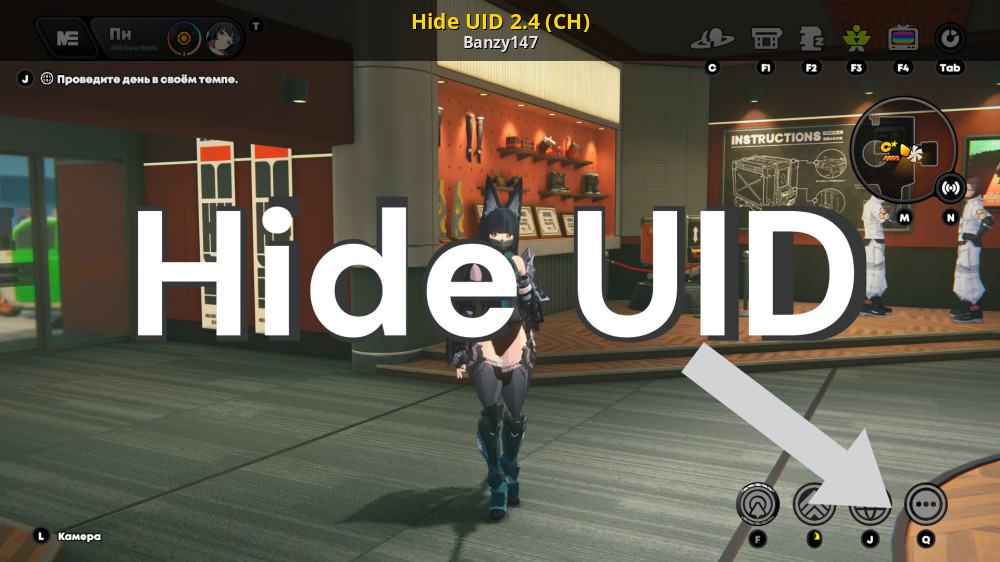
GameBanana
Hide UID 2.2 (Work)... A Zenless Zone Zero (ZZZ) Mod in the UI category, submitted by Banzy147
This works for removing the uid
prime igloo
is that for the modded launcher though?
mighty moss
prime igloo
is that for the modded launcher though?
If you mean xxmi, yeah
prime igloo
ah ok, appreciate it, I just use reshade though
 prisma dome
prime igloo
ah ok, appreciate it, I just use reshade though
prisma dome
prime igloo
ah ok, appreciate it, I just use reshade though
Use the Shader Toggler addon.
prime igloo
isn't that REST?
ohh, this? https://github.com/FransBouma/ShaderToggler
I'll take a look
GitHub
Reshade 5+ addin to toggle shaders on/off in groups based on a key press. It allows you to configure these groups from within the addin as well. - FransBouma/ShaderToggler
 opal cove
prime igloo
ah ok, appreciate it, I just use reshade though
opal cove
prime igloo
ah ok, appreciate it, I just use reshade though
Might as well use the mod instead of wasting time
opal cove
prime igloo
it's slowly turning into one of those scenarios where it's more an annoyance to ...
Most Oled users dont care
And the benefit of having an always on id for ss far outweighs appeasing the 1% of user complaining about burning in the corner of the screen (if that ever happens)
prisma dome
So, I'm guessing soop's converter effects don't work with REST?
I'm just trying to make sure the DoF effect I'm using doesn't cover the UI, but I can't isolate shaders in REST without it breaking the converter shaders.
 orchid coyote
Did anyone have issues with the game crashing every 30-40minutes, and displaying stuff that shouldn't be normally seen with RenoDX?
For example
-
Sometimes the black screen shown during scene switching can disappear earlier than it supposed to and show pop-in
-
During Dialogue when the speaking character changes the screen flashes black for a split-second.
Both of these don't happen without ReShade, and the game is stable
Also during dialogue the characters seem overblown when a choice appears
 sonic cipher
✅RenoDX: Zenless Zone Zero
prime igloo
was seed ult fixed?
opal cove
no
prisma dome


Discord is supposed to have native AVIF support... why do their uploads of em come out so fried? The PNG by comparison.

Or, maybe it's the autoconverter I'm using to convert from JXR to AVIF, because Discord won't let me upload anything bigger than 10mb without Nitro. Otherwise, I would just upload the native PNG's out of Reshade instead of converting to smaller files.
opal cove
#🖼️hdr-screenshots exists
 tacit berry
prisma dome
Discord is supposed to have native AVIF support... why do their uploads of em co...
tacit berry
prisma dome
Discord is supposed to have native AVIF support... why do their uploads of em co...
it doesn't really support hdr avif
I think you can work around that by using the icc profile hack and 8 bit
 dusky pagoda
prime igloo
do they not know what an OLED is
dusky pagoda
prime igloo
do they not know what an OLED is
to be fair the UID is dimmer than the game world most of the time and if it ever becomes an issue it will likely be inverse burn in, which is partially fixed via long term pixel compensation cycle
people very much do still get "burn in" from black bars, it's just much less common than the typical logo burn in
tacit berry
the ui is brighter than the highlight on ps5
tbf the ps5's video capture isn't great, but the ui shouldn't be brighter as seen with renodx
this is untonemapped
 austere void
the mod is kinda broken right now
orchid coyote
austere void
the mod is kinda broken right now
And it's abandoned
Just use Special K HDR
Works fine for this game
That's what I'm doing
tacit berry
afaik the only thing that's broken is seed's ult
tacit berry
orchid coyote
Did anyone have issues with the game crashing every 30-40minutes, and displaying...
oh
I mean I've had some black flickering on distant objects
opal cove
austere void
the mod is kinda broken right now
its time for you to learn to fix it buddy
opal cove
orchid coyote
Did anyone have issues with the game crashing every 30-40minutes, and displaying...
no
orchid coyote
opal cove
its time for you to learn to fix it buddy
Why so aggressive
I would love to fix it myself but I don't have the skillset required, so I just don't use it
opal cove
orchid coyote
Why so aggressive
I would love to fix it myself but I don't have the skillset r...
its not aggressive its an ongoing meme i have with him
orchid coyote
opal cove
its not aggressive its an ongoing meme i have with him
Ohh
Makes sense lol
 idle rampart
opal cove
its time for you to learn to fix it buddy
idle rampart
opal cove
its time for you to learn to fix it buddy
No one is updating renodx for zzz now?
 karmic atlas
ZZZ has z'ed it's last Z
 silver lantern
Press Z to pay respects
mighty moss
Please let this be true 🙏

I've been asking them to add dlss/fsr/xess upscaling in every zzz survey for a while
But uhh is dx12 gonna fuck over this renodx mod if it's not getting updated?
orchid coyote
mighty moss
Please let this be true 🙏
FINALLY
Waited so long for a proper anti aliasing solution
Now only native HDR support
karmic atlas
Just when Maple leaves behind the Z slop
orchid coyote
karmic atlas
Just when Maple leaves behind the Z slop
Someone really doesn't like gacha
karmic atlas
- ZZZ Reno dead
- Wuwa has atrocious RTGI since the latest update
- Genshin has no HDR and AC means no Reno
I dunno
Do I wait for duet abyss
Everness to neverness
orchid coyote
karmic atlas
- ZZZ Reno dead
- Wuwa has atrocious RTGI since the latest update
- Genshin has ...
Wuwa broke RTGI in latest update?
damn
karmic atlas
It looks ass
Major ghosting
RTAO is too strong now
Looks like cranked up SSAO back in the day
Or those Reshade based RT shaders were the user cranked the settings
opal cove
I dont think theres even rtao in this game
Its just plain ssao
You can turn capsule AO settings off with RT on
karmic atlas
But that doesn't solve the ghosting?
opal cove
karmic atlas
- ZZZ Reno dead
- Wuwa has atrocious RTGI since the latest update
- Genshin has ...
Its alive as long as you dont play seedslop

orchid coyote
As long as DX12 doesn't break the shaders
karmic atlas
When that DLSS patch drops we'll see what you'll say then
orchid coyote

karmic atlas
Because I ain't playing with TAA anymore
orchid coyote
karmic atlas
Because I ain't playing with TAA anymore
There's also SMAA but uhhh
It's not good
karmic atlas

orchid coyote
Doesn't even seem to be working properly lol
opal cove
Nobody talks about smaa
karmic atlas
Might as well turn AA off
opal cove
Leave that trash behind
karmic atlas
Same thing
opal cove

orchid coyote
Is it supposed to be this bad?
karmic atlas
Yes
opal cove
Smaa was always this bad
karmic atlas
SMAA fixes a bit of stairstepping in static shots, that's about it
orchid coyote
Thought it should be better than TAA but then I had to change to it cause SMAA did nothing to the sharp edges
karmic atlas
karmic atlas
SMAA fixes a bit of stairstepping in static shots, that's about it
For so long I had to contend with the 'just turn off AA in a game and use Reshade based SMAA bro'
I would toggle SMAA on/off
No difference
Same shimmerfest
This was when I first picked up a pc
karmic atlas
orchid coyote
Thought it should be better than TAA but then I had to change to it cause SMAA d...
You could make the argument that SMAA is 'better' because no ghosting or blur
But the cost is shimmefest
karmic atlas
You have bad eyesight
Games have had shimmering forever
It's fine
Games were not blurry until 8th - 9th gen slop
orchid coyote
Huh?
Did the performance drop?
You would think it should be better especially when ZZZ has problems with shader compilation stutter
As DX12 builds at start
karmic atlas
orchid coyote
As DX12 builds at start
Elden ring would like to have a word 
 cedar flume
orchid coyote
Now only native HDR support
cedar flume
orchid coyote
Now only native HDR support
 orchid coyote
cedar flume
https://tenor.com/view/jack-tanamen-gecky-incorporeal-gif-21102682
orchid coyote
cedar flume
https://tenor.com/view/jack-tanamen-gecky-incorporeal-gif-21102682
I mean, the PS5 version has HDR
cedar flume
orchid coyote
I mean, the PS5 version has HDR
they dont really care for pc
orchid coyote
cedar flume
they dont really care for pc
I guess it's more like an exclusivity deal
Sony must have paid big money for their console priority
cedar flume
yeah because they would only do it for money
orchid coyote
orchid coyote
Sony must have paid big money for their console priority
Genshin still doesn't have 4K textures on other platforms than PS5
orchid coyote
orchid coyote
Genshin still doesn't have 4K textures on other platforms than PS5
same with higher LOD
ZZZ has had ray tracing since like 1.5?
cedar flume
I know, Genshin is the worst offender
orchid coyote
orchid coyote
ZZZ has had ray tracing since like 1.5?
But only on PS5
And I don't think anyone uses it as the hardware can't keep up 60fps even without ray tracing
I think it drops to like 40?
Maybe less
karmic atlas
Bad enough that Plebstation has no games
But we also have to suffer with features only being exclusive to that version
orchid coyote
It's a good console
But the developers don't optimize games nowadays, so the hardware's too weak for 60fps
orchid coyote
cedar flume
well thats because zzz is already badly optimized in raster
I love being CPU limited with my R7 5800X on 1440p
Friend's 5800X3D isn't much better in 4K
mighty moss
orchid coyote
I love being CPU limited with my R7 5800X on 1440p
7800x3d cpu bottlenecks slightly at 4k lol
Noticed some fps improvements in specific cpu heavy scenarios upgrading to 9800x3d
orchid coyote
mighty moss
Noticed some fps improvements in specific cpu heavy scenarios upgrading to 9800x...
When a game needs 9800X3D to not be CPU limited you know it's bad lol
mighty moss
orchid coyote
When a game needs 9800X3D to not be CPU limited you know it's bad lol
Yeah and im not even on some crazy gpu like a 4090 or a 5090 so it would be worse there 😭
orchid coyote
I'm on a 4070Ti and it's bad
karmic atlas
9800X3D is the bare minimum
When the 10900X3D with 12core 1CCD comes out
The 9800X3D will become a 3600X overnight
mighty moss
orchid coyote
I'm on a 4070Ti and it's bad
Im on a 9070xt
orchid coyote
orchid coyote
I'm on a 4070Ti and it's bad
Really hope they add Framegen with the DLSS update
Extra smoothness would be great
karmic atlas
 embrace the frameslopping
orchid coyote
As Lossless Scalling and Smooth Motion have big artifacts here
karmic atlas
@opal cove more followers for the cause
orchid coyote
karmic atlas
<:snig:1372315229505196162> embrace the frameslopping
It's better than base 60fps with almost the same input latency
But only DLSS FrameGen makes sense
Every other implementation is shit
too much artifacting
mighty moss
orchid coyote
Really hope they add Framegen with the DLSS update
Yeah if they add fg then we get reflex too
Cant wait to force enable reflex > al2 in optiscaler without using fg to reduce latency
orchid coyote
mighty moss
Cant wait to force enable reflex > al2 in optiscaler without using fg to reduce ...
Can you not already do that with Special K?
I know it supports Nvidia Reflex
mighty moss
Yeah you prolly can in special k as well on an nvidia gpu
orchid coyote
I'm already force enabling it
mighty moss
I dont use sk tho
orchid coyote
I use it for HDR and VRR framepacing
More stable than using Reshade+DisplayCommander in my case
I have no idea why but last time I tried it the game crashed every like 30-40minutes
With Special K its rock stable
opal cove
karmic atlas
<@221530925849116672> more followers for the cause
im a lossless frameslopper these days
dumb adaptive frame gen is so good
nvidia needs to steal that
opal cove
orchid coyote
I mean, the PS5 version has HDR
you're getting better than base PS5 HDR with this reno mod
karmic atlas
What they need to do is bloody release reflex warp
Nearly end of the year
Still no reflex 2
opal cove
no
karmic atlas
Aceshit
karmic atlas
'proper'
opal cove
wipeout screen is clamped on reno? guess what
ps5 is also like that
opal cove
basically a lot of things that are "broken" in reno right now
is just standard ps5 hdr fare
karmic atlas
Snoys sandbagging us renochads
opal cove
i don't think you'll be picking a new gachaslop
with so many other gachaslops in the horizon
karmic atlas
'Soo many'
Where?
I am still waiting
I was a firm anti-weeb
I've now embraced the gatcha and weeb shit
But there's no games
Or they don't have HDR
So the same as no games
austere void
opal cove
its not aggressive its an ongoing meme i have with him
get cooked old man
:3
orchid coyote
opal cove
im a lossless frameslopper these days
It would be really good if not the text artifacting
austere void
orchid coyote
It would be really good if not the text artifacting
what artefacts "? 
orchid coyote
opal cove
is just standard ps5 hdr fare
I need to try the PS5 HDR just to see how it compares to Special K / RenoDX
opal cove
orchid coyote
It would be really good if not the text artifacting
Barely an inconvenience
Text artifacting is just due to game fps when u switch between menus
orchid coyote
austere void
what artefacts "? <:YangyangDerp:1283919833813221459>
When text shows up in dialog you get a mumbo jumbo flash for a split second before the next dialog appears
opal cove
yes
cause thats from the dogshit game
if you want to adjust that in LS
you can just
adjust the lower bound
austere void
opal cove
Barely an inconvenience
true, when i cap ZZZ at 80 FPS and turn on that 2x i do not see issues
 opal cove
just the game being dogshit and dropping fps inbetween menus
orchid coyote
opal cove
just the game being dogshit and dropping fps inbetween menus
Yeah it's really weird
The FPS consistency is all over the place
opal cove
orchid coyote
What does that do exactly?
increase interpolation threshold
LSFG already disables itself if you're 10~ fps or below
increasing this limit increases that
orchid coyote
orchid coyote
The FPS consistency is all over the place
I've seen drips to ~12-16fps in 0.1% lows
while switching menus
orchid coyote
opal cove
increasing this limit increases that
Need to try that actually
opal cove
then you can try raising the threshold to 20 fps
tacit berry
mighty moss
But uhh is dx12 gonna fuck over this renodx mod if it's not getting updated?
absolutely
tacit berry
orchid coyote
I mean, the PS5 version has HDR
yea, but its kinda crap
so many things are still clamped

 opal cove
Just in time to quit this game and play endfield
tacit berry
mighty moss
So dlss + rt on pc is actually gonna be real
yea, but rip renodx
dlss + rt or hdr
pick one
karmic atlas
tacit berry
dlss + rt or hdr
pick one
 opal cove
Sigma
 sullen tiger
i quit this game
opal cove
2little2late
mighty moss
tacit berry
dlss + rt or hdr
pick one
Hopefully they let u pick between running dx11/dx12 and dlss/rt is supported in dx11
But that's prolly too much wishful thinking
opal cove
Rt is not part of dx11 feature set bud
mighty moss
Nvm i realised that hsr is also dx11 and has dlss
So we should be good for dlss if zzz still has a dx11 mode
karmic atlas
no frameslopping for you
mighty moss
orchid coyote
No Framegen
Well if optiscaler works theres always that as an option to inject frame gen
orchid coyote
mighty moss
Well if optiscaler works theres always that as an option to inject frame gen
Can you use DLSS motion vectors to force enable DLSS Framegen?
mighty moss
orchid coyote
Can you use DLSS motion vectors to force enable DLSS Framegen?
Nope, optiscaler's fg injection is fsr 3 based
But it does use dlss/whatever upscaler's motion vectors
orchid coyote
Interesting
So you can enable FSR3 FG with DLSS inputs
Thought the game needed native fg support for this
Kinda nice
opal cove
mighty moss
So we should be good for dlss if zzz still has a dx11 mode
Cope
It can happen but hsr only has a dx11 path
Not zzz
orchid coyote


[2.3.4 - BETA] Updated Lucia Model: With RTX
︀︀
︀︀via Seele Leaks
︀︀Thanks to cakeel- for upload!
 girlcockx
·
girlcockx
·
RTGI is here
I really do hope it won't slash FPS in half
prime igloo
you know it's a sick feature when you have to ask yourself what the difference even is, but your frame rate is halved
abomination of a redesign tho
opal cove
prime igloo
you know it's a sick feature when you have to ask yourself what the difference e...
Yea
ZZZ default GI bake
Is already very competent
This RTGI looks pretty fucking mid just like the piss 5 vsrsion
Its not ww with dynamic time of day where the GI helps
prime igloo
the GI in zzz already is so cool
dusky pagoda
orchid coyote
So you can enable FSR3 FG with DLSS inputs
Thought the game needed native fg su...
Only in DX12, XeFG is supported as well in beta opti
mighty moss
Yep dlss/fsr fg isnt supported in dx11
dusky pagoda
afaik there aren't any games on dx11 with frame gen unless you count unofficial mods (obligatory fuck puredark btw)
mighty moss
But well we are getting dx12 anyways with rt in the next patch
sullen tiger
dont think theres any dx11 game with fg
karmic atlas
mighty moss
Yep dlss/fsr fg isnt supported in dx11
older streamline had the ability to support DX11 NV FG
Ofc no DX11 games natively have it
sullen tiger
karmic atlas
Ofc no DX11 games natively have it
is there even a mod
karmic atlas
There are
PD and Doodlez
have both implemented some variation of FG into DX11 games
PD even got +2.7.0 Streamline to work so MFG is available in Skyrim
dusky pagoda
very neat
karmic atlas
I asked Pumbo if we could do the same
but it will be a bunch of work with Luma and he doesnt care that much aboiut FG
karmic atlas

sullen tiger
we have games like wukong and mhws that turn on fg by default no matter what
fucking shitty devs
opal cove
dusky pagoda
afaik there aren't any games on dx11 with frame gen unless you count unofficial ...
Cuz puredark probably wraps it in dx12
tacit berry
mighty moss
Hopefully they let u pick between running dx11/dx12 and dlss/rt is supported in ...
dx11 doesn't support rt
tacit berry
karmic atlas

tacit berry
prime igloo
you know it's a sick feature when you have to ask yourself what the difference e...
it won't slash your fps in half
like it doesn't really impact performance that much on a ps5
opal cove
Piss 5 cant even maintain a constant 60 even with rt off tho
Dont know why theyre so stuck on native rendering
tacit berry
its not just the gpu that's the problem though
opal cove
R5 3600 shouldnt be too hard for 60 except in extreme cases
Playing on ps5 i only see brief moments of
60
Which is like wtf even when theres nothing that major going up on screen
Of course wuwa is also even worse with the native rendering bs
15fps slide show
tacit berry
opal cove
R5 3600 shouldnt be too hard for 60 except in extreme cases
lumina square or even the new area are probably cpu bound
my 2070 super can hold 60 at 4k native
the ps5's gpu should probably be faster
or is it? idk tbh
opal cove
Man
Or maybe its my friends tvs being shitty
But the frames just feel bad
Or im too used to lsfg
tacit berry
the ps5 version is genuinely that ass
on my 2070 super pc it feels far superior in lumina square and that one new area
hell even in combat I guess because of vrr
honestly either they gotta scale more shit down or cap it to 30fps
mighty moss
tacit berry
the ps5's gpu should probably be faster
Its probably about the same
Series x gpu is roughly around 3060ti equivalent but ps5 is a bit cut down compared to that still

► Watch the FULL video here: https://youtu.be/PuLHRbalyGs
► Support us on Patreon! https://bit.ly/3jEGjvx
► Digital Foundry YouTube: https://youtube.com/digitalfoundry
► Digital Foundry Merch: https://store.digitalfoundry.net
► Digital Foundry at Eurogamer: https://eurogamer.net/digitalfoundry
► Follow on Twitter: https://twitter.com...
Yeah it pushes similar numbers to the 2070 super
tacit berry
mighty moss
Its probably about the same
tbh I only said that because its a dx11 game, but idk how relevant that is really
sometimes it pushes ahead when the game demands a lot of memory bandwidth
but most of the time in modern stuff it'll shit itself because it runs out of vram
orchid coyote
tacit berry
the ps5 version is genuinely that ass
I literally tried it yesterday too
Damn
tacit berry
yea bro welcome to the club
orchid coyote
VRR doesn't even go below 48Hz for me when the game is definitely below that sometimes
It's so ass
tacit berry
the hdr is scuffed and it runs like ass
orchid coyote
tacit berry
the hdr is scuffed and it runs like ass
Yeah
But VRR with Special K helps a lot on PC on the other hand
tacit berry
it does
orchid coyote
Small-scale fights are really smooth
tacit berry
like I've said that's part of the reason why its a much smoother experience on my 2070 super and 5900x
orchid coyote
orchid coyote
Small-scale fights are really smooth
But I also have a 4070Ti so it would be really bad if they weren't lol
tacit berry
the other part is because it doesn't get cpu bound in lumina square
tacit berry
orchid coyote
But I also have a 4070Ti so it would be really bad if they weren't lol
damn yea that's going to beat a ps5 pro
orchid coyote
tacit berry
the other part is because it doesn't get cpu bound in lumina square
Yeah you're probably GPU bound with that GPU
tacit berry
yea
orchid coyote
I'm getting CPU bound in Lumina's Square
tacit berry
I have to drop to 1080p if I want a steady 60
tacit berry
orchid coyote
I'm getting CPU bound in Lumina's Square
forgot to mention I capped my frame rate to 60
orchid coyote
Getting 1440p@70fps stable-ish with 1.2 render scale
But it can drop slightly below 60 in heavy areas
Or sometimes go above 90
tacit berry
tacit berry
I have to drop to 1080p if I want a steady 60
I guess the ps5 could, but the cpu is still an issue
orchid coyote
or 120+ in domains
orchid coyote
tacit berry
I guess the ps5 could, but the cpu is still an issue
Yeah
It's interesting though as Genshin is steady 4K@60
tacit berry
I did drop the res in that one new area to see how well it'd run on the 5900x
orchid coyote
HSR too
tacit berry
it was at like 80-ish fps while cpu bound
orchid coyote
It's just that ZZZ is so heavy
orchid coyote
tacit berry
wait I thought hsr ran poorly
HSR was locked 60 for me
tacit berry
oh you mean on pc
orchid coyote
tacit berry
because they target 4k native
They do the same for Genshin
orchid coyote
tacit berry
because they target 4k native
No, I mean PS5
Didn't notice any framedips tbh
tacit berry
orchid coyote
They do the same for Genshin
yea, but genshin is aight from what I saw at least
orchid coyote
But I also didn't play HSR on PC
tacit berry

While setting up my testing equipment again, I used this as one of my tests and thought I might as well upload it before 3.3 drops! Thanks for watching and I hope you enjoyed it! Please leave a like and subscribe for more videos!
Previous video: https://youtu.be/bHVikxca7zw
Help me afford to make these videos: https://ko-fi.com/RudeGerbil
Foll...
orchid coyote
As the controller support was weird
orchid coyote
tacit berry
https://www.youtube.com/watch?v=336OaEgoVY4
Oh yeah, I stopped at something like 2.3
It was smooth back then
tacit berry

This series continuation lies in your hands viewers! Thanks for watching and I hope you found it helpful and or informative!
2.0 Analysis: https://youtu.be/l1tGve3OQLs
Please leave a like and subscribe for more videos!
#gaming #mihoyo #honkaistarrail #honkai #acheron #mei #meisenpai #ps5 #gacha #hoyoverse #new #playstation #hoyolab #performan...
this one has the overworld
its sinking, but not as low as zzz
orchid coyote
So mostly 60 with drops to 40 during intense animations
orchid coyote
tacit berry
its sinking, but not as low as zzz
Yeah, ZZZ is pretty bad
orchid coyote
orchid coyote
So mostly 60 with drops to 40 during intense animations
Probably not as noticeable due to HSR being turn-based
tacit berry
orchid coyote
So mostly 60 with drops to 40 during intense animations
it was sinking in the overworld, but it seems like it was within vrr territory
orchid coyote
ZZZ is very fast-paced
tacit berry
zzz constantly falls out of vrr territory

After a year, I have finally covered Genshin Impact again!
Companion video: https://youtu.be/0diSOwmyl4g
Previous video: https://youtu.be/L7q8Y1WHyzk
Help me afford to make these videos: https://ko-fi.com/RudeGerbil
Follow me on Bluesky: https://bsky.app/profile/rudegerbil.bsky.social
Chapters:
Intro 0:00
Recap 0:12
Important Info 0:45
Natlan...
now for genshin
orchid coyote
tacit berry
zzz constantly falls out of vrr territory
I love my 1% lows being 20fps during menu changes
mighty moss
orchid coyote
It's just that ZZZ is so heavy
Yeah, on my 9070xt at 4k 0.8 render scale and maxed settings except for mirror reflection set to medium, it barely maintains 120fps in the overworld
In combat it's more like 90-100fps most of the time but can dip to as low as 60 if it gets really heavy in specific situations
orchid coyote
mighty moss
In combat it's more like 90-100fps most of the time but can dip to as low as 60 ...
Yeah, similar for me with 1.2 scale 1440p
tacit berry
mighty moss
Yeah, on my 9070xt at 4k 0.8 render scale and maxed settings except for mirror r...
ready for fsr 4?
mighty moss
tacit berry
ready for fsr 4?
Ofc
tacit berry
also tbf renodx breaks with mirror reflections set to high
mighty moss
Mirror reflection set to high eats a big chonk of fps as well
Sometimes I've seen like 10-15fps difference between medium and high for that
But the visual quality difference isn't really worth it for that
 tacit berry
wuwa is terrible I've heard
orchid coyote
ZZZ is ever worse in 2.0 than before damn

I played it during launch but immediately switched to PC
Yeah that is what I remember back then
 mighty moss
orchid coyote
ZZZ is ever worse in 2.0 than before damn
mighty moss
orchid coyote
ZZZ is ever worse in 2.0 than before damn
Sub 30fps in combat is crazy
orchid coyote
mighty moss
Sub 30fps in combat is crazy
And it's with DRS
mighty moss
Ps5 is prolly getting cpu bottlenecked as fuck ig
orchid coyote
They really went and added DRS in 2.0 and it still drops below 30
mighty moss
Those zen 2 cores are not keeping up
orchid coyote
mighty moss
Ps5 is prolly getting cpu bottlenecked as fuck ig
Seeing as ZZZ is extremely single-threaded then you bet it is
mighty moss
If only sony/ms waited a year to put a zen 3 cpu in their consoles at least
Would have aged quite a bit better over time I'd imagine
austere void
guys can some one help me set up SK HDR ? XD
orchid coyote
austere void
guys can some one help me set up SK HDR ? XD
- Enable HDR
- Enable 8/10bit pipeline remastering + check Keep 8bit UNORM
- It's working
It's that easy
The most difficult part is installing Special K itself
austere void
Oh ok :3
 quiet moth
is the last version from 4 months ago ?
mighty moss
quiet moth
is the last version from 4 months ago ?
Yeah it hasn't been updated since 2.0
quiet moth
Thank god I don't pull mid characters like Seed or Orphie&Magus 😌
orchid coyote
quiet moth
Thank god I don't pull mid characters like Seed or Orphie&Magus 😌
Yeah it won't work at all in a few days
prime igloo
🫡
orchid coyote
But we're getting DLAA!!
 orchid coyote
prime igloo
300 fps here I come
orchid coyote
prime igloo
300 fps here I come
DLSS won't do much in this game
Most of the time you're CPU bound rather than GPU
prime igloo
really? I don't have that experience at all
mighty moss
I mean even if it doesnt improve performance much, having an aa solution that isnt hot garbage will certainly help with the visuals
orchid coyote
mighty moss
I mean even if it doesnt improve performance much, having an aa solution that is...
I mean won't do much for performance*
I'll personally be probably using it for the better AA
orchid coyote
prime igloo
really? I don't have that experience at all
What's your setup?
prime igloo
I'm a certified TAA hater, DLSS at faster settings is still better or equal to TAA. gonna be a straight up upgrade in every way
5800X3D with RTX 3080
very sad how there has been no new GPUs released since the 30 series 😔
mighty moss
orchid coyote
Most of the time you're CPU bound rather than GPU
Im mostly gpu bound but thats because im on a 9800x3d playing at 4k (0.8 render scale) on a 9070xt lol
But yeah even in that scenario there are still cpu bottlenecks sometimes (not too often but they do exist)
orchid coyote
prime igloo
very sad how there has been no new GPUs released since the 30 series 😔
It's correct for the 5xxx series but a 4070 has 3090 performance with half of the power and lower temps
It's definitely an upgrade
prime igloo
true it would be nice to upgrade for better efficiency. this thing is so loud
orchid coyote
VRAM is another beast but pure performance-wise the 4xxx series is really good
5xxx on the other hand only brings a cost cut and nothing more basically
orchid coyote
prime igloo
true it would be nice to upgrade for better efficiency. this thing is so loud
I got a 4070Ti from PNY and damn it's silent even under load lol
Only gets audible over 70C, and loud over 80C
This was the main reason I didn't get a 3090 tbh
mighty moss
orchid coyote
5xxx on the other hand only brings a cost cut and nothing more basically
Mfg and buggier drivers 😻
orchid coyote
orchid coyote
This was the main reason I didn't get a 3090 tbh
As they require undervolting to even function normally
orchid coyote
orchid coyote
As they require undervolting to even function normally
400W peak looking ass
tacit berry
orchid coyote
DLSS won't do much in this game
might give you enough headroom to enable ray tracing
cedar flume
tacit berry
might give you enough headroom to enable ray tracing
even more cpu load, the game is gonna explode
prime igloo
I'm surprised their system renovations blog posts don't talk about DLSS or ray tracing. I wonder if they're just testing it but not releasing it yet. I think it was plenty announced when HSR got it
tacit berry
cedar flume
even more cpu load, the game is gonna explode
can't be that bad
austere void
orchid coyote
I mean won't do much for performance*
what do you mean it won’t ? cutting half of my resolution with DLSS should work better
cedar flume
tacit berry
can't be that bad
dont mess with the zzz devs.....
mighty moss
prime igloo
I'm surprised their system renovations blog posts don't talk about DLSS or ray t...
HoYoLAB is the community forum for Genshin Impact and Honkai Impact 3rd, with official information about game events, perks, fan art, and other exciting content.
No mention of dlss or rt on the actual update changelog either
Is it not happening then?
prime igloo
I guess not yet
 mighty moss
Oh
So both dx11 and dx12 modes are available simultaneously then
But no dlss in dx11 mode?
🥀
mighty moss

strong tide
fyi i'll drop D3D11 support
for the renodx mod as well
unless the shaders happen to be shared across D3D11/D3D12 (which i find it unlikely)
mighty moss
I assume dx12 doesn't work for the renodx mod currently right?
strong tide
unknown
can't tell from the title screen
and game is still in maintenance
i'll need to check in-game when servers are up
probably turbo dead though
mighty moss

strong tide
I also don't know what is the state of d3d11
mighty moss
Well I hope there's another way without using 3dmigoto to hide uid on bottom right corner so that shit doesn't burn in on my oled
Trying to use REST do that failed miserably
I'm prolly too dumb to use it correctly or smth idk 
 feral gulch
If we find the shader that draws it, could add a toggle to hide it in RenoDX.
But also realistically its unlikely to burn in unless you’ve got it blasting full brightness all day everyday
mighty moss
Yeah no fsr as expected, but wtf did they block ray tracing for non nvidia gpus too?

💀
I wonder if the dlss/rt stuff will show up if i can get optiscaler working lol
mighty moss
feral gulch
If we find the shader that draws it, could add a toggle to hide it in RenoDX.
...
Well its a static element thats always there whenever ur playing the game like 99% of the time so not very healthy for an oled i think
opal cove
strong tide
I also don't know what is the state of d3d11
I'll be home from grocery when the patch finishes
Prob will check but i mean we're dropping d3d11 if thw shaders r not overlapping so
mighty moss
mighty moss
I wonder if the dlss/rt stuff will show up if i can get optiscaler working lol
Yeah it does lmao (also there seems to be reflex support since optiscaler + fakenvapi able to hook into it to load al2?)

Lets see what happens when server goes live
strong tide
feral gulch
If we find the shader that draws it, could add a toggle to hide it in RenoDX.
...
I explained this already
The game uses a generic shader to draw the UI
if i stopped that shader from rendering on renodx
it would literally stop rendering the entire UI
anyway uh i have some very bad news
looks like every shader changed on d3d11

strong tide
strong tide
looks like every shader changed on d3d11
wait not every shader, looks like some of the uberposts still work, but the lutbuilder is 
strong tide
opal cove
D3d12 using sm6 tho?
it is
D3D12 and D3D11 are an entirely different set of shaders
mighty moss
strong tide
oh this is going to be painful
shaders on SM6 have different names
and i can't get SRVs to show
strong tide
strong tide
and i can't get SRVs to show
ok nvm i got that working
opal cove
servers up early
mighty moss
opal cove
servers up early
Not for eu server at least

 mighty moss
😭
opal cove
We're in.
mighty moss
mighty moss
Lets see what happens when server goes live
Cooked

Does dlss work fine for anyone who has an nvidia gpu here tho
opal cove
works fine for me
prime igloo
oh so dlss works with optiscaler?
tacit berry
mighty moss
Cooked <a:gone:1078582663234998272>
nooooooo
tacit berry
prime igloo
oh so dlss works with optiscaler?
spyware is probably not using opti
mighty moss
tacit berry
nooooooo
I did get it working but only with fsr 2.2

Both fsr 4 and xess are brokey
Well thats a shame but hey its still better than taa ig
idle rampart
mighty moss
I did get it working but only with fsr 2.2
the game only provides dlss ? no fsr?
tacit berry
yep
mighty moss
idle rampart
the game only provides dlss ? no fsr?
Yeah only dlss
idle rampart
damn another AMD hater after wuwa
tacit berry
and the fucked up thing too is its only avaliable under dx12
even though dlss supports dx11
idle rampart
mighty moss
Yeah only dlss
and fsr4 dont even work... wtf man
tacit berry
with fsr at least they'd have the excuse of no dx12 support kinda
idle rampart
tacit berry
with fsr at least they'd have the excuse of no dx12 support kinda
wdym no dx12 support?
idle rampart
tacit berry
fsr 2 doesn't support dx12
fsr2 in 2025 
tacit berry
I meant dx11
mighty moss
idle rampart
damn another AMD hater after wuwa
Nah wuwa has native fsr 3.1/4 support
idle rampart
mighty moss
Nah wuwa has native fsr 3.1/4 support
not fsr4, they dont
u have to override it
mighty moss
Nah they do since a recent patch
I have a friend who plays wuwa on 9070xt and he gets fsr 4 natively without any workaround
idle rampart
mighty moss
Nah they do since a recent patch
im pretty sure thats fsr3?
in game
not driver override
and it doesnt have RT for the most RT capable AMD card, genius move too
mighty moss
idle rampart
im pretty sure thats fsr3?

Thats the screenshot from my friend
Native fsr 4 upgrade from the driver working after you enable fsr 3.1 in game
idle rampart
mighty moss
yea ik, thats what i meant
mighty moss
idle rampart
and it doesnt have RT for the most RT capable AMD card, genius move too
Yeah apparently they are working on adding rt support for rx 9000 series
idle rampart
mighty moss
Yeah apparently they are working on adding rt support for rx 9000 series
yea i tried to force it, it didnt work, just rainbow texture everywhere lol (it was working last patch btw)
mighty moss
FSR 3.1.5 also works on optiscaler
 idle rampart
mighty moss
FSR 3.1.5 also works on optiscaler
idle rampart
mighty moss
FSR 3.1.5 also works on optiscaler
fsr4?
mighty moss
idle rampart
fsr4?
No
idle rampart
mighty moss
No
💀
mighty moss
Im gonna try the int8 version of fsr4 and see if that works, thats the last resort ig
Nope still fucked
mighty moss
Oh wait there are newer optiscaler builds on their discord
tacit berry
despite them adding a shader burn
mighty moss
Lemme give those a try
opal cove
@idle rampart


off/on
check the shelf at the left
low/medium/high wont make a diff in this bc the only diff is resolution
mighty moss
tacit berry
yea this sucks
Ok yep fsr 4 works with the latest test build + non linear srgb input


 opal cove
 mighty moss
Although xess is still broken
tacit berry
it'll be more obvious at lower dlss resolutions
mighty moss
Btw there does seem to be nvidia reflex in this game since fakenvapi is able to hijack it to inject anti lag 2 calls
Anti lag 2 overlay comes up and all as well, and holding down right ctrl does show a noteable difference in green latency number
But anti lag 2 frame limiter doesnt work
Ok wow rt high is fucking brutal in its perf overhead
On a 9070xt it more than halves your fps compared to rt off

 idle rampart
mighty moss
On a 9070xt it more than halves your fps compared to rt off
idle rampart
mighty moss
On a 9070xt it more than halves your fps compared to rt off
4k?
mighty moss
idle rampart
4k?
Yeah its 4k with "dlss prioritise graphics quality" preset (actually fsr4)
idle rampart
mighty moss
Yeah its 4k with "dlss prioritise graphics quality" preset (actually fsr4)
1.3 scaling?
mighty moss
idle rampart
1.3 scaling?
Optiscaler says its 1.4

Rt low has a lot less perf overhead thankfully

Huh rt medium is basically as heavy as rt high

Yeah ill stick with rt low then
Looks close enough to rt high but runs way better
Hmm with optiscaler the in game dlss presets do nothing, all of them are 1.4 scale ratio
And even trying to force a custom scale ratio its still stuck at 1.4
tacit berry
mighty moss
Ok wow rt high is fucking brutal in its perf overhead
I think rt high is full res
hence why its so much more demanding
tacit berry
mighty moss
And even trying to force a custom scale ratio its still stuck at 1.4
and yep
tacit berry
tacit berry
I think rt high is full res
do keep that in mind if you decide to use lower internal resolutions
tacit berry
haha right you can't go lower anyway
opal cove
did it stop stuttering for you now
tacit berry
I hopped off
I played it for like 10 minutes
I'm probably just going to stick with 11
dusky pagoda
idle rampart
fsr2 in 2025 <:doomerWojak:1309186255669432412>
fsr 2.1 has the useless cool quirk of looking semi-presentable at insane ratios like 4x+ compared to fsr 3 being unusable
can't wait to have to render at 240p to make RT playable on an A750
dusky pagoda
opal cove
1.4 no matter what dlss you use
ah nvm, it the dlss presets worked in hsr with opti so I got too hopeful
mighty moss
dusky pagoda
can't wait to have to render at 240p to make RT playable on an A750
Yeah youre kinda cooked with xess not working in this game on optiscaler
Oh well there is fsr4 int8 instead
dusky pagoda
fsr4 int8 takes like 5ms at 1440p lmao
mighty moss
mighty moss
dusky pagoda
fsr4 int8 takes like 5ms at 1440p lmao
Seems to not have too much overhead on battlemage tho, is it really that much worse on alchemist?
https://www.reddit.com/r/IntelArc/comments/1nixq8d/fsr_4_running_on_b580/
 dusky pagoda
I get around the same cost at 1080p
It pretty much scales linearly with resolution though
I'd assume that's why people have luck with it on handhelds with low res screens but I'm just guessing
opal cove
using fsr4 int 8
266p -> 800p
works fine
igpu
better than fizzle 2
or fizzle 3
dusky pagoda
the disocclusion of fsr annoys me so much
How much work is it to add HDR10 PQ output instead of scRGB to a RenoDX mod? I'm reminded of the completely different fizzle FSR framegen has and XeFG/DLSS-G doesn't work with scRGB
 dusky pagoda
mighty moss
<@818951165500719114> this fresh optiscaler test build from their discord server...
dusky pagoda
mighty moss
<@818951165500719114> this fresh optiscaler test build from their discord server...
oh neat, is that just the most recent test build? I've already been using it for xefg in other games
mighty moss
dusky pagoda
oh neat, is that just the most recent test build? I've already been using it for...
No its a newer build than that
dusky pagoda
wait how did you get that then
mighty moss
dusky pagoda
wait how did you get that then
Like i said its from their discord
#1005863090044284938 message
prisma dome
strong tide
looks like every shader changed on d3d11
Is there a reason why this happens? I don't get why the game's rendering can change from patch to patch, outside of super-major patches like 2.0.
prisma dome
Also... how do I swap to DX12?
mighty moss
prisma dome
Is there a reason why this happens? I don't get why the game's rendering can cha...
Uhh this one was pretty major too on the technical side
Adding dx12 mode for dlss and rt
Yeah
prisma dome
But all the techincal stuff came on the DX12 side. So, why did the DX11 shaders change?
mighty moss
 flat ravine
Is your game stuttering too?
flat ravine
Is your game stuttering too?
Yeah there's some mad shader compliation stutter that takes a bit of time to settle out
prisma dome
Granted, I'm no game designer. I'm just trying to add 2 & 2 to get 4, so to speak.
dusky pagoda
mighty moss
I hate that it actually looks good, HSR with DLSS (and by extension opti conversion) at anything but native looks melted
flat ravine
mighty moss
Yeah there's some mad shader compliation stutter that takes a bit of time to set...
My game is just stuttering continuously whenever i move the camera or move
Restarted 5-6 times but no good
prisma dome
Guess I'll learn how to install SK until the Reno mod gets updated.
prisma dome
There doesn't seem to be a way to force DX12 while running SpecialK. I can only do DX12 with Reshade.
Moreover, DX12 disables all mods.
mighty moss
prisma dome
There doesn't seem to be a way to force DX12 while running SpecialK. I can only ...
Special k supports dx12 so thats weird
mighty moss
prisma dome
Moreover, DX12 disables all mods.
Yeah 3dmigoto (and by extension zzmi/xxmi) only has dx11 support unfortunately
So mods that use those (pretty much all of them) are cooked for dx12
prisma dome
Indeed. But I could live with all the character mods I used being cooked; it's the 32:9 ultrawide mod that is the most important to me.
prisma dome
mighty moss
Special k supports dx12 so thats weird
Indeed. I think it's because the only way to currently enable DX12 is to do so through a modification of the game's shortcut, rather than through the game's launcher via it's own exe. So, the injector doesn't see it.
strong tide
prisma dome
Is there a reason why this happens? I don't get why the game's rendering can cha...
It happens because something on the game changed lol
note that MiHoYo doesn't have to exactly change a shader to break it
there is a global cbuffer with a bunch of variables
if mihoyo adds or removes a field there
literally every shader will break
(or well, most shaders will break, since most shaders use that global cbuffer)
and fyi, while most changes were made for Direct3D12, doesn't mean that Direct3D11 isn't affected
the majority of shaders are built for all platforms
so if mihoyo changes something for Direct3D12, it will replicate on Direct3D11 as well
point being, if they touch literally anything graphics related, it might break the mod
prisma dome
Noted.
With all that said... I would like to make a request that you don't drop DX11 support. With HoYo not even letting you choose the version you can use at will in an easy way, it's safe to say it's not ready for primetime. DLSS doesn't use the most recent model, either (found out when using DLSS Swapper). It'll probably need a driver update from Nvidia. Plus, all the mod support being for the DX11 version - including QOL stuff that some of us might find essential - is kinda forcing that version to be the better build atm.
strong tide
not happening.
Unless someone else is willing to take over updating the mod, i will not support both Direct3D11 and Direct3D12.
I no longer play this game and while i'm willing to keep it up to date, supporting both APIs would require updating the mod twice
there's zero overlap between the shaders used in Direct3D11 and Direct3D12
Unity rebuilds the shaders for Shader Model 6 when running in Direct3D12 (Direct3D11 uses Shader Model 5)
first is the Shader in Direct3D11
second in Direct3D12
they are very different
supporting both versions is like making the mod for two different games almost.
prisma dome
So then, why not exclusively stick with the version with more universal compatibility, which is DX11? Because not all the DX12 stuff is ready for all the people who can use it anyways, like FSR & whatnot. And the RT features don't seem much more impressive or performative than what you can do with RTGI in Reshade.
I at least think that would be the best way to go about it until DX12 has more time in the oven. It also wouldn't force people to choose between playing in HDR & breaking the rest of their mods. Just my two cents, that's all.
mighty moss
prisma dome
So then, why not exclusively stick with the version with more universal compatib...
FSR 4 works fine for me through optiscaler at least
idle rampart
flat ravine
My game is just stuttering continuously whenever i move the camera or move <:doo...
The game also compiles shader while playing, just give it more time
mighty moss
Yeah the first day after a new patch or gpu driver update theres gonna be shader compilation stutter everywhere
But once u play enough those will go away eventually
prisma dome
flat ravine
My game is just stuttering continuously whenever i move the camera or move <:doo...
Average ZZZ experience tbh.
I'm on a 7950X3D & 4090. 64GB RAM. No shortage of memory anywhere; still a bit of a stuttery mess.
flat ravine
idle rampart
The game also compiles shader while playing, just give it more time
gave 20+ mins lol but it always stutters when moving camera badly like the frame time graph is a mess
restarted 10+ times  i need to reinstall maybe
idle rampart
flat ravine
gave 20+ mins lol but it always stutters when moving camera badly like the frame...
Yea, just play wuwa
flat ravine
idle rampart
Yea, just play wuwa

strong tide
prisma dome
So then, why not exclusively stick with the version with more universal compatib...
So, i'm in a bit of an awkward position right now.
Truthfully speaking, the only reason i'm updating this mod right now is because some of my friends still play this game (like @opal cove) and they wanted to use the DX12 features like RT lol, if it weren't for them, i would mark this mod as abandoned and move on, because i really don't feel like working on it.
The reason this mod wasn't on the official github for RenoDX and was distributed on Discord, is because i wasn't really sure if i wanted to commit to it long term, so i threw it here, just in case people wanted to use it.
I do empathize with your request however, i'll see if i can update DX11 (and DX11 doesn't look completly broken so it might be salvageable)
prime igloo
tbf we also have no official word on if/when dx12 will ever be the default
strong tide
truthfully i don't really care what the default is.
flat ravine
1 more attempt then i reinstall
mighty moss
prime igloo
tbf we also have no official word on if/when dx12 will ever be the default
Dx12 becoming the default is probably an inevitability
Theyre not just taking their time adding in dlss and rt for fun lol
strong tide
strong tide
truthfully i don't really care what the default *is*.
I'm not paid to work on this, i'm doing this for fun and for my friends pretty much.
mighty moss
strong tide
So, i'm in a bit of an awkward position right now.
Truthfully speaking, the onl...
Tbh if it ever does get too much for you to keep updating this mod you should consider accepting donations if it helps, personally I wouldnt mind donating a bit here and there to help motivate you in keeping this mod alive (and maybe some others here feel the same way too)
strong tide
oh it looks like most of the uberposts by a miracle didn't break on direct3d11
strong tide
mighty moss
Tbh if it ever does get too much for you to keep updating this mod you should co...
I appreciate the offer but i can't really accept donations for this.
it would cause issues with my actual job if i did
mighty moss
Ah right then fair enough
strong tide
ok since Direct3D11 seems to be mostly working
that has early Direct3D12 support, may do bad things there.
mighty moss
Would you recommend running dx11 or dx12 mode for that one?
strong tide
Direct3D11
mighty moss
Ok
strong tide
oh yeah i updated the mod to run with latest reshade
so you'll probably need to update reshade
adding Direct3D12 support forced me to change how upgrades work so this may introduce new issues on Direct3D11 (but hopefully not)
mighty moss
Yeah in dx12 mode there is some noticeable artificing towards the bottom part of the screen
Other than that it does seem to work so far from a quick glance
Dx11 mode looks good tho
strong tide
mighty moss
Yeah in dx12 mode there is some noticeable artificing towards the bottom part of...
🤔
doesn't happen on my end?
i'll take a look on that later
meanwhile i found an issue with DX11 (and fixed it)
Fixed clamping caused by bloom shader on Direct3D11
mighty moss
mighty moss
Yeah in dx12 mode there is some noticeable artificing towards the bottom part of...
Oh and also the wallpapers in the pause menu are completely missing hdr in dx12
strong tide
yeah i didn't have the time to hunt for the bajillion ubershader permutations on dx12
i spent most of the time fixing issues on the SM6 decompiler so i could decompile the DX12 shaders
lol
mighty moss
Character details screen highlights are clipped in dx11
Same for the team selection screen too
 flat ravine
Alice looking different
mighty moss
Also holy shit the sig wengine lighting effects are so much brighter than before
Are they actually supposed to be that bright or nah
mighty moss
mighty moss
Character details screen highlights are clipped in dx11
In dx12 mode both of those screens dont have any hdr at all
mighty moss
mighty moss
Also holy shit the sig wengine lighting effects are so much brighter than before
In dx12 theyre not quite as bright but still brighter than previous renodx versions in earlier patches
Hmm
flat ravine
Looks tooo bright
idle rampart
mighty moss
In dx12 mode both of those screens dont have any hdr at all
how did u get optiscaler working eh?
mine wont work
mighty moss
idle rampart
how did u get optiscaler working eh?
I recommend using this optiscaler .dll from their discord along with the latest test build also from their discord (make sure to disable log files in optiscaler.ini)
#1005863090044284938 message
For installation pick dbghelp.dll as the file name
Also if you want to use fsr 3.1/4, enable non-linear srgb toggle in optiscaler settings
cedar flume
mighty moss
Ok wow rt high is fucking brutal in its perf overhead
I only lost something like 10 fps from rt and gained them back with dlss
It is surprisingly smooth considering how dx11 was
idle rampart
mighty moss
I recommend using this optiscaler .dll from their discord along with the latest ...
not working for me, weird
optiscaler UI never show up
mighty moss
idle rampart
not working for me, weird
optiscaler UI never show up
You are using the dx12 mode right?
idle rampart
mighty moss
You are using the dx12 mode right?
yea
-use-d3d12
mighty moss
Idk then you must be installing it wrong or something
Installation instructions should be the same as usual apart from what i mentioned
Copy files to game folder (although replace the optiscaler.dll with the one i linked)
Run install .bat
Select that installation file name i mentioned
Should be properly installed that way
idle rampart
mighty moss
Copy files to game folder (although replace the optiscaler.dll with the one i li...
i got it working
bruh
 mighty moss
cedar flume
aint no way I only got 2 manatos with 160 pulls
mighty moss
cedar flume
aint no way I only got 2 manatos with 160 pulls
Cooked
I got 2 copies of him on my 4th 10 pull
cedar flume
mighty moss
I got 2 copies of him on my 4th 10 pull

ofc on the weapon banner i get 4 of his wengine in 1 10 pull, wtfff
prisma dome
strong tide
So, i'm in a bit of an awkward position right now.
Truthfully speaking, the onl...
Thank you, and I appreciate your response. Very understandable & I greatly appreciate you being willing to still work on this.
 prisma dome
mighty moss
Dx12 becoming the default is probably an inevitability
prisma dome
mighty moss
Dx12 becoming the default is probably an inevitability
Honestly, this is why I hope someone works on a DX12 solution for modding the game. It's possible that ZZZ's devs sunset DX11 entirely one day, as some devs have done with older DirectX variants in other games (like Square Enix sunsetting the DX9 version of XIV iirc). It would suck if all those mods went poof.
opal cove
strong tide
Will check later tonight
prisma dome
||It's times like these that I wish I knew how to code, but idk where to even start on that tbh.||
tacit berry
I forgot his name
sullen tiger
@polar notch
tacit berry
but the guy who made the mod for opus echo of starsong too had no experience iirc
sullen tiger
tacit berry
but the guy who made the mod for opus echo of starsong too had no experience iir...
thats a different person
i dont remember who either
tacit berry
yea
 polar notch
yeah adding hdr to sdr games is easy depending on the game, the framework carries most of the work
karmic atlas
prisma dome
Honestly, this is why I hope someone works on a DX12 solution for modding the ga...
The problem is that low level API are a nth times harder to work with than high level ones like OGL, DX9 or DX11
I have constantly heard the remake of ' I dont want to deal with DX12' when it comes to a game
karmic atlas
prisma dome
||It's times like these that I wish I knew how to code, but idk where to even st...
Start with learning a regular programming language to pick up on the principles
then at the same time look into shader programming e.g HLSL
Learn OpenGL . com provides good and clear modern 3.3+ OpenGL tutorials with clear examples. A great resource to learn modern OpenGL aimed at beginners.

NVIDIA Developer
Thats what I am doing anyways
I studied CS at school as one of my subjects but found it borning as.
Now I have to do catch up on everything
AIslop also helps
To give explanations and break downs of what is happening. Just dont except it to vibe code the entirety of a reno addon or modify shaders to implement pathtracing in for you. There are way to many variables and context that it doesnt understand
prisma dome
karmic atlas
The problem is that low level API are a nth times harder to work with than high ...
What's the difference between low level & high level API?
Actually nvmd, just googled it.
orchid coyote
strong tide
Dayum, you got there fast
strong tide
It's because DX11 wasn't as broken as i thought it was, i just couldn't read apparently
orchid coyote
I understand there will be a DX12 version ready later on but you need more time?
strong tide
I plan on prioritizing DX12 yes
orchid coyote
strong tide
It's because DX11 wasn't as broken as i thought it was, i just couldn't read app...
Makes sense, there's more stuff to do with DX12 probably as they are whole new shaders
opal cove
@strong tide

do you get this occasionally?
when I launch ZZZ, inject64 tries to hook on even when the game is not launched yet (only a UAC prompt showed up)
strong tide
when the UAC prompt happens, the process already exists but you are not allowed to touch it
you have to always open inject64 before opening the game
opal cove
yeah, I open inject64 -> waiting for process -> open game -> UAC -> inject64 hooks into something when the UAC prompt is still on
then it doesnt hook into the actual game
Also, the game is crashing with the mod if you have DLSS enabled
do I provide logs for this
strong tide
opal cove
Also, the game is crashing with the mod if you have DLSS enabled
is it?
i made the mod with DLSS on lmao
opal cove
damn wtf lol
strong tide
opal cove
then it doesnt hook into the actual game
ah yeah that happens some times.
strong tide
no
strong tide
strong tide
ah yeah that happens some times.
you can avoid that
by doing the galaxy brain shit
opal cove
I guess the lights are broken with RT on 😭
 opal cove
strong tide
by doing the galaxy brain shit
opal cove
strong tide
by doing the galaxy brain shit
whats the secret shifu
strong tide
write powershell
Start-Process "C:\ProgramData\ReShade\inject.exe" -ArgumentList "X6Game-Win64-Shipping.exe" -WorkingDirectory "C:\ProgramData\ReShade" -Verb RunAs
Start-Process -Wait "D:\SteamLibrary\steamapps\common\Infinity Nikki\launcher.exe" -Verb open
save that as a ps1 script
then use ps2exe to convert that into a standalone exe that requests UAC elevation
so you only get one UAC prompt in total, the one to run the script
opal cove

strong tide
Invoke-ps2exe -inputFile <script.ps1> -x64 -noConsole -requireAdmin
GitHub
Module to compile powershell scripts to executables - MScholtes/PS2EXE
opal cove
I'll send you the logs for the dlss crash
something related to when 0xb0f35d3c gets replaced i guess
im not sure what to do about the RT issue, would it affect if i start dumping uberposts now
strong tide
opal cove
im not sure what to do about the RT issue, would it affect if i start dumping ub...
i have no clue
opal cove
😢
opal cove
@austere void test the latest addon and let me know if you crash with DLSS enabled
feral gulch
I'm getting the DLSS GPU crashes too (ReShade log just says device hung). Using ShortFuse's DLSS fix addon prevented the crashing but causes the UI + loading screens to look washed out and flicker. I'm on ReShade 6.6.1 and NVIDIA driver 581.29 fwiw
 austere void
opal cove
<@209957332480688129> test the latest addon and let me know if you crash with DL...
austere void
opal cove
<@209957332480688129> test the latest addon and let me know if you crash with DL...
won’t i have to use SK to get DLSS on? cuz i give it up trying to get DLSS on in ZZZ once i heard i need SK for it >.>
and Reno + SK has had issues for me in ZZZ
if there is another method to get DLSS in ZZZ i will test the addon with DLSS
opal cove
feral gulch
I'm getting the DLSS GPU crashes too (ReShade log just says device hung). Using ...
Can confirm this works
but yeah, causes the UI to become borked
austere void
opal cove
whats the talk about SK here
i mean it was mention in brandy discord to use this command -use-d3d12 in SK to get ZZZ to use DX12, apart from that i don’t know what other method to get dx12 in ZZZ
opal cove
create a shortcut
add -use-d3d12 as an argument for it
have you never done that before
idle rampart
austere void
i mean it was mention in brandy discord to use this command -use-d3d12 in SK to ...
u create a shortcut for it, who says anything about SK
💀
opal cove
nobody said anything about SK
austere void
idle rampart
u create a shortcut for it, who says anything about SK
it was mention wanna
e to get pics from brandy discord?
idle rampart
austere void
it was mention wanna
e to get pics from brandy discord?
im sure it was about smtg else
austere void
i guess some one did try with SK to use that command agrument
austere void
idle rampart
u create a shortcut for it, who says anything about SK
ok, so i create the shortcut :3 what next?
idle rampart
austere void
ok, so i create the shortcut :3 what next?
read spiwar message earlier
austere void
where do i add -use-d3d12?
feral gulch
austere void
where do i add -use-d3d12?
add it to the end of target outside of the quotation marks
 austere void
feral gulch
add it to the end of target outside of the quotation marks
austere void
feral gulch
add it to the end of target outside of the quotation marks
hm, i did try this
and it ever worked

 austere void
ok will make sure is typed correctly, :3
austere void
yap, i can't run Reshade+ Reno in Dx12, it works ofc on Dx11 and ZZZ can run in DX12 without Reno
it just crashes when it finish loading
opal cove
turn off dlss
austere void
opal cove
turn off dlss
yeah it works without DLSS
ok so without DLSS, and RT, is there a advantage to run ZZZ in DX12?
mighty moss
Nah performance is barely in the scope of margin of error between dx11 and dx12 with dlss and rt off
In my experience
May as well stick with dx11 if not using those features
flat ravine
mighty moss
Nah performance is barely in the scope of margin of error between dx11 and dx12 ...
Is DX12 stable in cities for u? No excessive stuttering i mean
mighty moss
After you give it a bit of time to compile the shaders yeah
flat ravine
Damn my game is broken then
orchid coyote
I really wonder why they didn't add pre-compiling of shaders
It's already there on Android
austere void
orchid coyote
I really wonder why they didn't add pre-compiling of shaders
isn’t that what they do in dx11? cuz DX12 is not officially out
they do shaders compiling when you start the game on dx11 from what i remember
prime igloo
I get almost half the fps on dx12 vs dx11, and heavy stuttering when moving around. def something wrong with it
and I'm pretty sure I saw precompilation in the start menu on both
austere void
yeah, thats what happens when you forced dx12 since it’s no officially supported
i doubt it will drop FPS THAT much when they officially launch dx12 and DLSS……hopefully 0.0
cedar flume
orchid coyote
I really wonder why they didn't add pre-compiling of shaders
they did, it doesnt do a lot tho
opal cove
orchid coyote
It's already there on Android
Precompilation doesnt catch everything on android either
Shaders on android just compiles faster in game so you notice less stutters vs this
tacit berry
prime igloo
I get almost half the fps on dx12 vs dx11, and heavy stuttering when moving arou...
it happens, but not all the time
regardless I'm on team dx11
opal cove
tacit berry
regardless I'm on team dx11
didn't get it working on dix12?
tacit berry
it works, but I just don't want to deal with the problems
opal cove
understandable
dix12 RT is also broken right now with reno for some reason #1330764788711555166 message
opal cove
strong tide
```
Start-Process "C:\ProgramData\ReShade\inject.exe" -ArgumentList "X6Game-Win6...
Start-Process -Wait "<zzz launcher>" -Verb open```
right?oh wait how do you get the -use-d3d12 args then
nvm
got it
Start-Process -Wait "<zzz exe>" -ArgumentList "-use-d3d12" -Verb open```i don't have her or her signature so uh that's fun but i think i know what's going on, i think this is supposed to be this bright
in order to get DX12 working, i had to change how RGBA8_UNORM upgrades work, previously i only upgraded some whitelisted shaders to RGBA16_FLOAT, but that approach wouldn't work on DX12 thanks to boring tech reasons that i don't feel like explaining
so i'm now upgrading any RGBA8_UNORM textures that match the aspect ratio of the backbuffer (so basically anything that has your aspect ratio lol)
this was required because of how DLSS works
mighty moss
strong tide
i don't have her or her signature so uh that's fun but i think i know what's goi...
I think you should be able to try her with her sig effects in the vr training mode
strong tide
i don't think this is a bug
mighty moss
Hmm
strong tide
strong tide
so i'm now upgrading any RGBA8_UNORM textures that match the aspect ratio of the...
but now we upgrade a lot more to HDR
and this means we now get to recover HDR highlighs that were previously capped.
strong tide
strong tide
so i'm now upgrading any RGBA8_UNORM textures that match the aspect ratio of the...
i didn't do this before because it caused issues with NaNs in some levels with some characters but mihoyo must have fixed it or something
because it's no longer happening
strong tide
strong tide
so i'm now upgrading any RGBA8_UNORM textures that match the aspect ratio of the...
this also has the side effect of fixing a bunch of other things that were previously clamped
like dialogs with 0.8 resolution scale
point being, we're just extracting more HDR out of the game now compared to the previous versions
the only reason that thing in particular looks odd is because the lighting on the game is quite muted
so it kinda clashes a little bit with the rest of the scene
but this is not exactly a bug
it's just that in previous versions, those highlights were capped to SDR because i never added their shader to the RGBA8_UNORM upgrade list
they are now uncapped
wait hold on
i think i know why the DLSS stuff is crashing
@opal cove
are you using inject64 to inject ReShade?
try installing reshade as d3d12.dll
it should work (it works on my end)
opal cove
Ok will try
strong tide
use optiscaler
to inject reshade
put ReShade64.dll on the game's folder
and set LoadReshade to true
on OptiScaler.ini
OptiScaler should chainload ReShade in a safe way
if you do inject64 + OptiScaler stuff will explode
guaranteed to get a race condition somewhere lol
mighty moss
opal cove
dix12 RT is also broken right now with reno for some reason https://discord.com/...
RT works fine for me with reno

But i seem to be the only one here getting the flickering artifacts on the bottom on my screen in dx12 mode whether i have rt on/off or "dlss" on/off
Is that just an amd thing or what
strong tide
oh you are using OptiScaler to translate DLSS to FSR/XeSS?
i didn't try that
but native DLSS had no issues like that
mighty moss
Yeah im using optiscaler to translate dlss into fsr4
But i also tried xess and fsr 2/3 as well and same thing
strong tide
the RT thing will probably have to be fixed by dlssfix then
shortfuse said he would look into that eventually
for now use optiscaler lol
opal cove
mighty moss
RT works fine for me with reno
Latest build?
mighty moss
opal cove
Latest build?
Yep
mighty moss
Havent seen that issue on my end
strong tide
oh
opal cove
mighty moss
Havent seen that issue on my end
Setting screen
Every setting you set
It might be something u set diff from us
mighty moss
opal cove
Setting screen


Basically every setting max except high precision character disabled, motion blur disabled and colour filter strength 0
opal cove
I wonder if its something random like the game forcing ray reconstruction on with nvidia
mighty moss
Optiscaler is spoofing my amd card as an nvidia anyways to even get the rt stuff to show up and work so thats weird lol
opal cove
mighty moss
Optiscaler is spoofing my amd card as an nvidia anyways to even get the rt stuff...
I mean ur spoofed
But RR wont run for you
mighty moss
Yeah ig
Also i found out that the rt perf hit in this game is way higher on my 9070xt compared to a friend who has a 5070ti
He tried the same settings i have with rt high and basically getting double the fps
mighty moss
In other games with non path tracing rt, rt performance are usually quite close between both cards so the disparity here is quite surprising
Maybe there really is a reason why rt is officially locked to nvidia for now
strong tide
opal cove
I wonder if its something random like the game forcing ray reconstruction on wit...
no
i think i know what it is
NvApi SER supported.Bind Nv shader ext to slot0 space2[streamline] error: Result::eErrorFeatureMissing
i see this when i try runing ZZZ in DX12 on player.log