#✅RenoDX: Unreal Engine
1 messages · Page 20 of 1
 hearty anchor
 left narwhal
I mean, if it works it’s great.
Lots of QoL features.
But yeah, if not using them then oh welp.
One of my most used features was the screenshot management, which is still much better there with controller chords and what not, too.
But ReShade at least allows me to take HDR screenshots so I am fine.
Some games like AC Shadows, I definitely wanna use SK with
 spare bane
Probably better to just make them realtime like I do in Oblivion Remastered, but modifying the output shaders. I'm going to start dumping them
 zenith epoch
Is the reno for lies of p worth using?
spare bane
zenith epoch
Is the reno for lies of p worth using?
Native/ini HDR is broken I think
zenith epoch
Alright I guess I'll use reno then
 tired mulch
 rotund zinc
Leaving his idiosyncrasies aside - I will just mention that RenoDX is not banned in the patron-only part of the server and he continues to help peeps in there. From personal experience, being one of the users that had an issue with that combo on almost every new game for months on end - I don't know whether it's a Reshade issue and Reshade updates made it better, tbh I have a feeling a lot of it might be due to NV having fucked up drivers all the time rn, plus the, I dunno what to call them really, "newer method" RenoDX mods Ritsu has been posting lately that are compatible with MFG, etc. - something defs has changed because the last month or two I can't remember a single game where I've had any issues with the SK + Reno combo
and lets be honest... those are not the only tools and mods I'm running - if the game has an Ultra Plus mod for it, that's always in the mix
I'm a single anecdote so maybs I just went from super unlucky to super lucky but something's different
Close to 💯 pct of the time, I just chuck U+ and Reno at a game, launch with SK, and it just worksTM
(sorry - didn't really mean to detour the conversation - only reason I mention it is bc if you're like me and it was a combo that rarely ever worked, so you've given up and haven't tried in a couple months, give it a go with the latest versions of everything 🤷♂️
 cobalt marlin
Also you can just type "R e n o D X" there. It's not filtered 😜
left narwhal
rotund zinc
(sorry - didn't really mean to detour the conversation - only reason I mention i...
I tried it with Mafia and it didn’t seem to help anything with pace native frames so I just used RenoDX.
Didn’t check both together, though. Albeit, good shout. But I always check both games anyway whenever I play a certain game I think SK will help me in. Last game I used it with was DOOM.
 jovial trout
rotund zinc
Leaving his idiosyncrasies aside - I will just mention that RenoDX is not banned...
jovial trout
rotund zinc
Leaving his idiosyncrasies aside - I will just mention that RenoDX is not banned...
The native HDR mods should basically always work. The issue is the resource upgrades usually, which isn’t a thing with those.
left narwhal
jovial trout
The native HDR mods should basically always work. The issue is the resource upgr...
Depends, AC Shadows was a native mod and had a lot of trouble after some updates.
Last I figured out a fix, it was related to FG.
i.e. keep FG disabled when launching the game, edit INI or w/e.
But once in-game, can eanble and works fine, etc.
With so many things happening within SK with FG itself, and then the game itself, adding ReShade in the mix, and then extra addons.
It's bound to break at some point and you have to find a good balance.
I wish pace native frames in SK did in Mafia what it does in AC Shadows i.e. make such a huge difference.
rotund zinc
jovial trout
The native HDR mods should basically always work. The issue is the resource upgr...
Thank you for the correct technical reason I did not know the right terms for 🙏
rotund zinc
left narwhal
Depends, AC Shadows was a native mod and had a lot of trouble after some updates...
It works as normal again - I think some games are just a bit fuckier than others, eg there's some section of code or something (sry I don't know the correct term) that changes every patch in AC Shadows so there's always a delay before SK gets updated for it. Though the last two patches or so iirc someone else did a GitHub fix straightaway and it got merged into nightly or wtv SK like the next day which was nice
EDIT: typos
left narwhal
rotund zinc
It works as normal again - I think some games are just a bit fuckier than others...
Memory address, yeah.
Well, I can't get nightly updates from SK anymore, so I have to wait for full updates, which comes much later.
Thus, I can't really use SK reliably anyway.
So, any of these 'new fixes' that come, I won't see them until weeks later, if not longer.
rotund zinc
left narwhal
So, any of these 'new fixes' that come, I won't see them until weeks later, if n...
I know the HDR Den is usually pretty chill about convo diversions (thanks gents 😅) but I'm mindful we have veered quite far from UERenoDX territory lmao. Can't remember for sure but iirc we're friends on Discord? Hmu on DM when you get a chance
zenith epoch
The hdr in lies of p is definitely ass and even with reno it's way too dark plus it won't let me change half the settings.
 maiden sphinx
zenith epoch
The hdr in lies of p is definitely ass and even with reno it's way too dark plus...
maiden sphinx
zenith epoch
The hdr in lies of p is definitely ass and even with reno it's way too dark plus...
You have to open and close the character info menu to see changes you make to the sliders in Lies of P
The version of UE5 UE4 it runs on doesn't have real-time sliders
 unborn verge
Lies of P is on UE4
zenith epoch
maiden sphinx
You have to open and close the character info menu to see changes you make to th...
I did all that
 stoic latch
I just did two playthroughs of lies of p with Reno and the HDR was great. Definitely not too dark.
 tardy moat
I've been trying to get reshade to show up in this game for the past couple of days so I can use RenoDX in it, but no luck - I know it was a few months back, but did you do anything particularly different to get this game to show it up?
maiden sphinx
tardy moat
I've been trying to get reshade to show up in this game for the past couple of d...
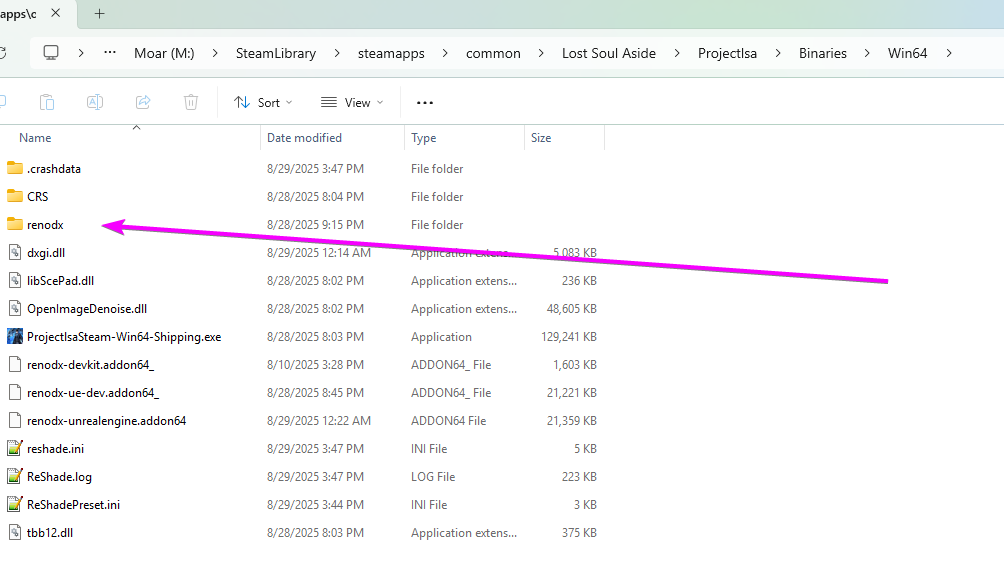
Here's what my ReShade installation looks like

The DLC is also in its own UE-style directory, so you might have to install ReShade there if you want to play that content
tardy moat
maiden sphinx
Here's what my ReShade installation looks like
Minus the Reshade folder, mine looks about the same
I'm trying it in the base game
 maiden sphinx
Yeah it's starting up and loading fine for me. I'm using the custom Reno ReShade build pinned in #🧩renodx-dev and just installed the latest UE snapshot and it works. In-game settings all maxed out + super high RT with DLSS performancce
 left narwhal
maiden sphinx
Here's what my ReShade installation looks like
left narwhal
maiden sphinx
Here's what my ReShade installation looks like
Why is there a SKIV PNG file.
 elfin lance
left narwhal
Why is there a SKIV PNG file.
elfin lance
left narwhal
Why is there a SKIV PNG file.
I have skiv set as my default image viewer
for all the formats it supports
since it opens pretty damn fast
left narwhal
OIC, the icon is for that.
my b.
Also, wasn't there a hotkey that I could press to drag and move the zoomed in image around within SKIV?
I can't remember which one
ALT, CTRL, and SHIFT doesn't work. Individually pressing them.
CTRL+Scroll Wheel does the zoom
elfin lance
idk
left narwhal
But if I wanna drag the image around and not the whole tool, I think there was a hotkey. Can't remember which.
left narwhal
RIP
 tulip gazelle
When I try to play Mafia I get a black screen
maiden sphinx
left narwhal
Why is there a SKIV PNG file.
what Marat said, and it was from before I had it set so my ReShade screenshots would go into a dedicated screenshot folder in the game directory
left narwhal
tulip gazelle
When I try to play Mafia I get a black screen
Did you upgrade?
tulip gazelle
left narwhal
Did you upgrade?
I'm not sure what you are referring to
left narwhal
tulip gazelle
I'm not sure what you are referring to
 maiden sphinx
tulip gazelle
I'm not sure what you are referring to
maiden sphinx
tulip gazelle
I'm not sure what you are referring to
Even though the screen is black, you should be able to open the reshade menu while the game is launched
Didn’t mean to reply to that, but yeah do as what the screenshot Umer sent says
tulip gazelle
ah that fixed it thanks
 past pasture
I had that issue when I first learned about the UE version. I didn't know I had to go to the advance settings to be able to change that. I thought it was going to be locked behind coding 
zenith epoch
Getting this error now when trying to launch Lies of P with Reno 
 spare bane
zenith epoch
Getting this error now when trying to launch Lies of P with Reno <:Thonk:8135745...
spare bane
zenith epoch
Getting this error now when trying to launch Lies of P with Reno <:Thonk:8135745...
reshade.log please
can you try a build from july 31st to see if it's a new thing?
zenith epoch
sure where can i find it
spare bane
zenith epoch
Which one of them should i get exactly
spare bane
july 31st
zenith epoch
It doesn't specify exact dates on their builds
spare bane
?
zenith epoch
Just says 1 or 2 weeks ago
zenith epoch
👍
same error
odd
i didn't really change anything between the launches where this started happening
must be something else causing it
elfin lance
building
latest commit, fresh build, everything is working just fine

I'm using shortfuse's pinned reshade in #🧩renodx-dev
make sure the game's native hdr is off
I'm also not using any other mods
zenith epoch
yes
elfin lance
share your reshade.log no idea
zenith epoch
ShortFuse already looked at it
elfin lance
here is my working reshade.log if it matters
zenith epoch
 north escarp
is this mod superior to default ue hdr
north escarp
is this mod superior to default ue hdr
yes
the default hdr in lies of p is very bad
gonna have to check what causes the error after i get home from work
spare bane
might be trying to boot in hdr
elfin lance
is windows hdr on?
jovial trout
I remember thinking the HDR in lies of p looked decent enough, is it the usual thing where it's missing grading?
elfin lance
jovial trout
I remember thinking the HDR in lies of p looked decent enough, is it the usual t...
it had raised blacks + gamma missmatch
that made the game thats supposed to be dark look mad gray
you can tell they made it on 2.2 monitors
 fallow mica
jovial trout
I remember thinking the HDR in lies of p looked decent enough, is it the usual t...
fallow mica
jovial trout
I remember thinking the HDR in lies of p looked decent enough, is it the usual t...
it has really raised blacks
zenith epoch
nah i'm not running anything in hdr beforehand. This pretty much happened from one launch to another
 quick sedge
Has anyone tried Echoes of the End yet? Does it have native HDR or does it need a Reno for that?
 tough sand
maiden sphinx
tough sand
maiden sphinx
What game is this?
quick sedge
Trying to enable Engine.ini HDR and getting this

Looks like RenoDX: UE is doing fine in this game

But those things were more shiny with native HDR
- Engine.ini
- Reno


 tidal fable
quick sedge
But those things were more shiny with native HDR
1. Engine.ini
2. Reno
tidal fable
quick sedge
But those things were more shiny with native HDR
1. Engine.ini
2. Reno
What game is this?
left narwhal
Echoes of the End
 glossy valve
Is it good?
left narwhal
Haven't picked it up, yet. I think going to wait for Game Pass release for it, visually looks pretty good but rest of the stuff looked very cookie cutter to me.
 west stump
All the problems with UE's HDR:
UI:
- The UI is blended in linear space in HDR and gamma space in SDR... which results in completely different alpha blends (e.g. a black square that is 50% transparent will be very darkening in SDR and not much in HDR)
- UI and fullscreen videos are linearized with sRGB in HDR so they are washed out (gamma should be 2.2)
- The UI does not support HDR colors (gamut beyond Rec.709/sRGB), and can't be pre-blended with the HDR scene for blurred backgrounds, as it would support in SDR
- The UI does not respond to the SDR gamma settings, so it's always drawn on screen as it came from textures, without adjustments (not really good as the whole game image should be encoded with the inverse of the decoding function your display uses)
- The HDR UI composition had a
color = max(color, 0.001)that caused black bars to not be black, this was very obvious on OLED on Hellblade 2, it also made the UI brightness scale improperly, I fixed it here https://github.com/EpicGames/UnrealEngine/pull/12444 (it's been merged, it might be in 5.5 already) - DLSS Frame Generation was broken in HDR as it flagged all pixels as UI. Almost all games that shipped with both in the last two years have unusable FG in HDR, we fixed that here https://github.com/EpicGames/UnrealEngine/pull/11616 (merged, hopefully it's in 5.5)
Tonemapping and Grading:
- They tonemap by channel as opposed to by luminance etc... That is old school by now and heavily influences the content by shifting bright reds to pink, blue to purple etc and generally desaturating all colors. All content ends up being accidentally baked for this look
- All the SDR "filmic tonemapper" parameters are straight up ignored in the HDR tonemapper
- Color Grading LUTs are only supported in SDR and completely skipped in HDR (UE games literally ship without LUTs in HDR, completely changing their look!)
- Both SDR and HDR use variations of ACES, but very different implementations of it, so they hue shift differently, have different black levels etc. Reds in particular are very different, and blues too
- RGB luminance calculations are sometimes done incorrectly during tonemapping (BT.601 instead of BT.709) (I have a PR to fix this, not merged yet https://github.com/EpicGames/UnrealEngine/pull/11811)
- The HDR ACES tonemapper has a "min nits" param that doesn't default to 0 and doesn't seem to make any sense, setting it to 0 produces negative values, setting it slightly too high raises the black floor (0 in isn't 0 out) etc
- Some of the grading levels params raises blacks (as in, they raise the black floor so that black becomes grey), and that should generally be avoided in 2025 on HDR/OLED displays, it'd be much better to use Oklab to tweak shadow without raising it, and use scene fog to actually give the impression of fog
Encoding, Calibration and Output:
- SDR defaults to sRGB encoding and is very hard to change, and the SDR gamma code makes little, it only applies to tonemapping and skips the UI. As a consequence, HDR is washed out out of the box as it doesn't have the same mismatch SDR has (the most common HDR problem almost all games have)
- HDR brightness calibration is lackluster, there's no proper "paper white" value that matches mid grey or white to the SDR levels, so it's very hard to match visually or compare against it. The tonemapper hue shifts more or less dependently on your brightness value, which isn't good either.
- HDR peak brightness calibration is not good, there used to be only 1000 nits and 2000 nits modes, it's unclear if now tonemapping supports arbitrary peaks, but they still have separate branches for 1000 and 2000 nits ACES curves
- The HDR calibration has too many settings for the average users, most UE games that have HDR expose all of them without really understand what they are for and why the user would change them (spoiler: they shouldn't)
- They don't take the peak brightness sourced by consoles automatically (last time I checked), both Xbox Series and PS5 have their own HDR user calibration data that streamline it all, without needing a calibration menu.
- The default "paper white" is overly bright for a proper HDR experience in a good viewing environment (it's something like 300 nits, as opposed to the ITU suggested value of 203 nits)
- Their sRGB<->linear conversions loose some quality every time as they are not mirrored and clip near black values (a hacky NaN bugfix they made 15 years ago that shouldn't be needed anymore) (also fixed by https://github.com/EpicGames/UnrealEngine/pull/12444)
- HDR can only ever be toggled on if it's enabled on boot on the display
- HDR compatibility is only checked on the primary display so it falls apart if you move the game window to your second display
- Toggling on HDR in the game will not toggle on HDR on the display if it wasn't already in HDR mode, causing you to see HDR in SDR (clipped gamut and brightness, deep fried look)
- HDR used to be scRGB in DX11 and HDR10 on DX12, I think it's still the same but DX11 is deprecated (or removed?) now. scRGB is a more future looking HDR format, as it's 16 bit and allows brightnesses beyond 10k nits and colors beyond BT.2020, but it's certainly not mandatory to use
- HDR used to be NvAPI only and unnecessarily force Fullscreen Exclusive for years, though I think that's been fixed recently
- HDR within the Editor viewports was messy and might take very different branches with different results
The good:
- Color Grading is live, however good or bad it is (it's by channel, so it's not always great)
- Tonemapping is cheap as it's done in a properly log encoded 32x LUT, even if that has a minor quality hit
- SDR is 10bit instead of 8bit as most engines do (R10G10B10A2 instead of R8G8B8A8 textures, same cost, better usage of rgb)
- Tonemapping is done at the very end of the pipeline, just before UI, as it should, so no other post process needs to have SDR vs HDR branches
- Albedo textures, light colors and rendering support color spaces wider than BT.709/sRGB if one is brave enough to go for that (it has some limitations, but it's a great initiative)
- All rendering is in R16G16B16A16_FLOAT textures, which allows for very high quality (although negative values aren't used, so the gamut can't be extended)
In general, the HDR post processing code is of very low quality and was clearly touched by tens of people that did not communicated nor had a unified design, or a good understanding of how real world displays work.
They even have HDR config params that don't do anything and are forgotten about, other that are overwritten at runtime so they are useless etc...
TL;DR: The problems that have the worst consequences are:
- Wrong gamma in SDR (sRGB instead of 2.2)
- Tonemapping by channel and with compeltely different tonemappers/params in SDR vs HDR
- Blending the UI in linear space instead of gamma space in HDR
west stump
west stump
All the problems with UE's HDR:
**UI:**
- The UI is blended in linear space in ...
west stump
west stump
All the problems with UE's HDR:
**UI:**
- The UI is blended in linear space in ...
@spare bane
quick sedge
The fire is not bright at all 😕
 left narwhal
Looks more like smoke, lol
quick sedge
It's like SDR
B8G8R8A8_TYPELESS and R10G10B10A2_UNORM upgrades do not help with this
maiden sphinx
tough sand
What game is this?
(The Legend of) Sword and Fairy 7
zenith epoch
quick sedge
Looks like RenoDX: UE is doing fine in this game
now is the game good
quick sedge
zenith epoch
now is the game good
I can't say it's good
 tight acorn
was fg fix added or not ?
zenith epoch
quick sedge
I can't say it's good
Seems like another mediocre dead on arrival game at best from what i've seen
 neat wigeon
west stump
All the problems with UE's HDR:
**UI:**
- The UI is blended in linear space in ...
neat wigeon
west stump
All the problems with UE's HDR:
**UI:**
- The UI is blended in linear space in ...
This is referring to ini forced hdr, not the Reno addon, right?
west stump
neat wigeon
This is referring to ini forced hdr, not the Reno addon, right?
yeah RenoDX ironically ends up not having most of these problems as it upgrades the SDR path
zenith epoch
Reno is just the better choice
HDR in most UE games is straight ass
default hdr that is
west stump
zenith epoch
default hdr that is
i'll fix it
 small socket
Keep trying to add commits I guess or however it is called
 tough turtle
Any fix for the EXCEPTION_ACCESS_VIOLATION issue yet?
jovial trout
west stump
i'll fix it
you workin at epic now? 👀
west stump
jovial trout
you workin at epic now? 👀
tryin
small socket
Sounds like you're looking for a new challenge
jovial trout
good luck, probably the most important place to be in terms of rendering (unfortunately)
fixing the engine so we can finally get good HDR 5 years downstream 
zenith epoch
HDR working out the box 
west stump
I already fixed Ultrawide in all their games by defaulting the FOV to Hor+ 😄
nobody even knows 😛
before that most UE games didn't support UE games and had fucked up FOV in 21:9 or 32:9
cobalt marlin
Oh that's thanks to you ?! Well infinite thanks for that
Wish we could patch older UE games like The Ascent instead of having to bother with external stuff using cheat engine or flawless widescreen
jovial trout
didn't know that was you, thank you 😭
fallow mica
west stump
I already fixed Ultrawide in all their games by defaulting the FOV to Hor+ 😄
please also fix the motion blur r.MotionBlur.TargetFPS=0should be set by default, current default is 30 which makes motion blur at high fps unplayable
 topaz quail
west stump
tryin
topaz quail
west stump
tryin
did you join epic just to fix stuff?
lmao
west stump
cobalt marlin
Oh that's thanks to you ?! Well infinite thanks for that
I harassed them for years, eventually they merged my PR
harassment works 🙂

 cobalt marlin
Imma harass ShortFuse to fix GTA5E then 
jovial trout
fallow mica
please also fix the motion blur `r.MotionBlur.TargetFPS=0`should be set by defau...
this is one of those issues that makes me wonder if anybody at epic plays any of the games made on their engine lmao
west stump
cobalt marlin
Imma harass ShortFuse to fix GTA5E then <:CatBleh:1397567541181939813>
don't
I offended some guy on nexus today
he wrote me 4 times over the weeks
asking stupid shit
"pls will you answer me, what DLSS model should I use, answer me"
fuck off 😛
cobalt marlin
I just pinged him blaming you for it, won't bother him more rest assured
 signal wasp
west stump
"pls will you answer me, what DLSS model should I use, answer me"
signal wasp
west stump
"pls will you answer me, what DLSS model should I use, answer me"
So, what DLSS model should I use kind sir?
west stump
signal wasp
So, what DLSS model should I use kind sir?
I use E/F I think or D
not the transformer
fallow mica
jovial trout
this is one of those issues that makes me wonder if anybody at epic plays any of...
ya its so annoying and almost all ue5 games released this year made this mistake
west stump
fallow mica
ya its so annoying and almost all ue5 games released this year made this mistake
Make a PR, it takes one second.
 warped lynx
fallow mica
please also fix the motion blur `r.MotionBlur.TargetFPS=0`should be set by defau...
warped lynx
fallow mica
please also fix the motion blur `r.MotionBlur.TargetFPS=0`should be set by defau...
wow I didn't know that's a thing
jovial trout
west stump
Make a PR, it takes one second.
but do they ever merge PR's from nobodies?
west stump
jovial trout
but do they ever merge PR's from nobodies?
yes
jovial trout
good to know
fallow mica
warped lynx
wow I didn't know that's a thing
almost all UE5 games this year have unplayable motion blur at high frame rate because of this
 grim kernel
yeah i dont get it, previously games usually had it set properly
also tbh it's another shit default value by epic, this should've been set to 0 by default
grim kernel
west stump
yes
mine would probably still be ignored if you didnt pressure them through dev channels
west stump
grim kernel
mine would probably still be ignored if you didnt pressure them through dev chan...
i can do the same thing
west stump
fallow mica
almost all UE5 games this year have unplayable motion blur at high frame rate be...
pls do it
or i will, and then take credit 😄
 halcyon solstice
@west stump message from Myrkur Games saying they had some issues with HDR in their UE games that's why had to disable it before launch https://steamcommunity.com/app/2821610/discussions/0/600786469911756288/#c600786469911756969
 forest sapphire
trying it out in silent hill 2 remake and it seems like its clamped to sdr. any ideas or anything i can do? was just curious to try it out vs the in game hdr with the black floor fix considering the issues pumbo described with UE HDR.
 forest sapphire
already did, that fixed black screen but not the sdr clamp
warped lynx
does the contrast slider do anything?
maiden sphinx
forest sapphire
trying it out in silent hill 2 remake and it seems like its clamped to sdr. any ...
Use native HDR (set the HDR settings to default) and the dedicated SH2R mod:
Snapshot: https://clshortfuse.github.io/renodx/renodx-silenthill2remake.addon64
Nexus: https://www.nexusmods.com/silenthill2/mods/145
Make sure to revert the in-game HDR min luminance settings if you've tried to lower the black floor that way - it's not the right way to solve this issue.
The new default setting for min luminance (-9) is not good. I'd suggest going back to the original default of -4 or even higher with this mod.
forest sapphire
Yeah I’ve been using it, it looks good. But i just want to see how the renodx sdr->hdr upgrade compares, considering the issues with UE HDR like skipping color grading.
forest sapphire
warped lynx
does the contrast slider do anything?
Not sure, I’ll check
forest sapphire
warped lynx
does the contrast slider do anything?
nope. tried backing out to main menu and loading back in after adjusting the slider too, no difference.
forest sapphire
these lutbuilders got dumped, could these be of any use?
tried loading all my saves from different areas of the game but these are the only two i got
west stump
elfin lance
Lies of P is a pretty good game
the out of box native hdr has a gamma missmatch, which makes the game look super gray -- when its supposed to be dark
elfin lance
forest sapphire
these lutbuilders got dumped, could these be of any use?
I'll add them in a bit later
forest sapphire
elfin lance
I'll add them in a bit later
i'm down to give it a shot myself, since there's a few other UE games I've tried where renodx is stuck in SDR. i'm looking at the process you described back when you were helping me out with fixing renodx in ready or not. I'm not sure how to run the decompiler to be honest though. would this lead me down the right track? https://github.com/clshortfuse/renodx/blob/main/docs/CONTRIBUTING.md

GitHub
Renovation Engine for DirectX Games. Contribute to clshortfuse/renodx development by creating an account on GitHub.
elfin lance
forest sapphire
i'm down to give it a shot myself, since there's a few other UE games I've tried...
you just need decomp.exe
from the front page
and then for sm6 lutbuilders you do
decomp.exe [lutbuilder_hash.cso] -f --use-do-while
look at other sm6_x lutbuilders in the unreal engine folder
its like 2 lines of code
and ctrl+f
 hardy cloud
What's the recommendation for Hellblade 2? Just use the game's native HDR implementation?
unborn verge
hardy cloud
What's the recommendation for Hellblade 2? Just use the game's native HDR implem...
Yes
 arctic terrace
hardy cloud
What's the recommendation for Hellblade 2? Just use the game's native HDR implem...
arctic terrace
hardy cloud
What's the recommendation for Hellblade 2? Just use the game's native HDR implem...
Unless they made a change since launch, you'll want to tonemap the game with lilium's tone mapper as it can get up to 10k nits for some rare scenes.
 finite basalt
Titan Quest 2
renodx is also really hurting my framegen performance

im in 3x mode, should easily have 225 fps (my cap)
im using the reshade linked in the renodx channel
left narwhal
Finally got around to trying this one, does this not work with new ReShade or something? Or am I doing it wrong, do you throw it next to game's exe for it to load or?
elfin lance
the example addons are kinda old
so maybe it doesnt work with hdr screenshots idk
but all addons go in game folders
left narwhal
Right
But if I wanted a central location for certain addons.
AddonPath=C:\Program Files (x86)\Special K\Global\ReShade\AddOns\**,.\
Would this work?
elfin lance
yea
left narwhal
That way certain QoL addons like SS ones, I'd throw them there.
Right, figured.
I guess it's just not working with newer ReShade.

elfin lance
the default addon path is just the game folder
left narwhal
Right
When you had me setup central for Shaders/Textures path, you also put the default path in there after it looks for central location
So, it was neat.
That way if I ever wanted to test something quick for game specific, I'd just throw in game folder etc
So, figured I'd do the same for AddOns.
 pine void
left narwhal
Finally got around to trying this one, does this not work with new ReShade or so...
pine void
left narwhal
Finally got around to trying this one, does this not work with new ReShade or so...
Still working here, with latest official ReShade. If loaded, it should show in Addons tab, though there is no setting, "it just works".
left narwhal
Yeah, it wasn't showing in addons tab.
Nvm, it shows now.
@pine void are you loading the addon centrally by assigning it in ini or throwing it next to game's exe?
AddonPath=C:\Program Files (x86)\Special K\Global\ReShade\AddOns\**,.\ throwing this in ini seems to block it, tried it under [ADDON] as well as [GENERAL], and both fails.
pine void
left narwhal
<@328585230657257473> are you loading the addon centrally by assigning it in ini...
Uhm, I don't know about \**,.\ at the end.
I am loading it from a different folder, it works fine. My path doesn't have any fancy stuff at the end though
left narwhal
Works fine for textures and shaders, so figured it'd be fine here as well. Cause this way, it first looks at the assigned location, and then the game folder.
I'll fiddle around with it, thanks.
And now every SS I take, it'll basically be moved to my clipboard as well just fine, no config needed at all?
forest sapphire
@elfin lance sorry to ping you but im pretty sure ive got the lutbuilders edited correctly. do i just upload them to the github? and can i test them myself before i do? just wanna know what the process should be, since theres a few other ue games i wanna get renodx working in too.
elfin lance
@forest sapphire share them here, I'll take a look
forest sapphire
i think i got it right but i'm not 100% sure. i'd love to contribute in the future if i run into other ue games where it doesn't work.
elfin lance
@forest sapphire 0xbbb is good, you're just missing SV_Target = saturate(SV_Target) at the end of the shader, before the return
DA6 just needs a fix
well you want to copy and paste the default output from the shader
u0[int3((uint)(SV_DispatchThreadID.x), (uint)(SV_DispatchThreadID.y), (uint)(SV_DispatchThreadID.z))] = GenerateOutput(float3(976, 977, 978), cb0_040w);
you want to take those 2 files
fork renodx
throw them into the sm6 folder in the unreal addon
and make a PR
after you make the fixs
 warped lynx
that game is out?
jovial trout
warped lynx
that game is out?
tomorrow
warped lynx
oh shoot
left narwhal
jovial trout
though it might be worth a bespoke mod
You picking it up?
left narwhal
I haven't played the last 2 chapters of Hellblade 2, yet. Might finish them tonight/tomorrow.
After that I was really thinking of picking that up, but now I'm also leaning towards just hating myself and ... playing 2042, lol.
Those BF6 rewards enticing me 
jovial trout
I'm playing some 2042 rn
left narwhal
jovial trout
gonna be pretty busy the next week or so though
Yeah, I am open to play other games until Aug 29th, when Lost Soul Aside drops.
jovial trout
honestly it's not so bad these days really
left narwhal
Then I'mma nolife that, unless it's just a bad launch then RIP.
left narwhal
jovial trout
honestly it's not so bad these days really
I'd be playing from scratch, so I guess it'll already be 100x better than what I had in Alpha.
🙃
Final release wasn't far from alpha, FWIW.
But they have fixed a lot from what I've heard.
So, maybe a lil bit of 2042 won't hurt.
What's the HDR status in it?
jovial trout
fine enough, but you have to have a mode on your monitor/tv that ignores metadata
left narwhal
jovial trout
fine enough, but you have to have a mode on your monitor/tv that ignores metadat...
How do you mean
I won't be able to play this on brighter display, so it'll be C4 for me.
Just don't wanna be blinded or clippings that's just rough, don't really need 10/10 HDR there.
jovial trout
afaik, it basically tells your display to expect a 10k nit signal and it gets ready to tonemap it, regardless of what you set peak to in-game. So like on my AW3423DWF, if I don't put it in console mode it's super dim and ugly.
RDR2 has the same problem
but yeah, only calibration option in-game is peak nits
left narwhal
So, if my panel has EDID value of 800 or w/e, and I set in-game to be that as well.
It should be fine, and won't have to worry about it?
jovial trout
should be good with a TV with HGIG I'd think
left narwhal
jovial trout
but yeah, only calibration option in-game is peak nits
2042 does different grading for each map like we have in BF6 or nah?
I don't think it did that.
It was all cool everywhere.
stoic latch
Sword of the sea works out of the box and it looks great. At least up to when you get control of your character. Haven't gone past that.
sdr / reno defaults

 stoic latch
Pretty heavy game. 85-100 fps at native 4k on a 5090. Have to set resolution scale to 65% (I assume this is using TSR) to hit a locked 120. No stutter though
left narwhal
Damn
 errant spindle
hi ! i have a problem with Drive beyond Horizon


i have clipping when i look around
and when i look the sunrise
 left wolf
stoic latch
Sword of the sea works out of the box and it looks great. At least up to when yo...
left wolf
stoic latch
Sword of the sea works out of the box and it looks great. At least up to when yo...
Works out the box yup, but it does look a lil bit boosted
elfin lance
errant spindle
probably need to upgrade resources like bgr8 typeless or rgb10a2 unorm
 nimble river
left wolf
Works out the box yup, but it does look a lil bit boosted
nimble river
left wolf
Works out the box yup, but it does look a lil bit boosted
is anyone playing Sword of the Sea able to get more than 1000 peak brightness with Renodx?
 thorny silo
@elfin lance displayMap (any option among DICE, Frostbite, NeutralSDR or ToneMapMaxCLL) can fix the per channel grading problems in Dragon Quest XI. Blue Sun goes back to Red Sun.
elfin lance
thorny silo
<@664732951724032001> displayMap (any option among DICE, Frostbite, NeutralSDR o...
yea ik
we really need a renodrt tonemap option
that just displaymaps from peak nits 10k
thorny silo
elfin lance
that just displaymaps from peak nits 10k
what is the difference between that and ToneMapper "None"
elfin lance
thorny silo
what is the difference between that and ToneMapper "None"
with 2 param tonemap pass (which is what UE is)
I think there might be a slight difference
but not that big
10k nits is already no tonemapping, just with all the stuff we'd have from enabling a tonemapper; like colorgrading sliders and etc
also I think hue correction/hue shift doesnt show up in none
thorny silo
I studied the DQ11's lut builder a bit to understand the difference between HDR ini and SDR, when both use the same builder.
it seems the HDR ini ignores tonemapping and grading, and clamps to 1000 / 2000 nits
not sure if its clamping or tone mapping
 empty mantle
Void/Breaker LUT shaders. Default settings get HDR enabled in-game but the peak brightness is only being applied to the UI it seems. Enabling Upgrade B8G8R8A8_TYPELESS to Any Size seems to crash the game either at launch or when loading a save. Upgrading R10G10B10A2_UNORM and B8G8B8A8_TYPELESS separately and together didn't fix it either.
forest sapphire
elfin lance
and make a PR
made a PR for the cs file. i noticed the ps i edited is already in the repo lol so probably no need to upload that?
elfin lance
forest sapphire
made a PR for the cs file. i noticed the ps i edited is already in the repo lol ...
if its already onthe repo, you dont need to upload it
weird that the addon dumped it
nice job, if you're able to fix those 2 lutbuilders; you're able to fix all SM6 lutbuilders
@forest sapphire I think you missed a parathesis at the end here
u0[int3((uint)(SV_DispatchThreadID.x), (uint)(SV_DispatchThreadID.y), (uint)(SV_DispatchThreadID.z))] = saturate(float4((_2402 * 0.9523810148239136f), (_2403 * 0.9523810148239136f), (_2404 * 0.9523810148239136f), 0.0f);
it should be
u0[int3((uint)(SV_DispatchThreadID.x), (uint)(SV_DispatchThreadID.y), (uint)(SV_DispatchThreadID.z))] = saturate(float4((_2402 * 0.9523810148239136f), (_2403 * 0.9523810148239136f), (_2404 * 0.9523810148239136f), 0.0f));
0.0f));
elfin lance
normally github would autobuidl your PR, but since you never commited anything before
its not autobuilding until shortfuse aproves it
the autobuild would've cought the mistake
left wolf
nimble river
is anyone playing Sword of the Sea able to get more than 1000 peak brightness wi...
Correct
glossy valve
empty mantle
Both are already part of the mod
tough turtle
Satisfactory DX12 is running into Failed to create backup depth-stencil texture!, is it an issue with the lut builder? Results in a guaranteed crash
nimble river
left wolf
Correct
ohh, can you share your settings please? No matter what I do I can't get more than 1000 nits peak brightness.
left wolf
Yeah ignore my previous response, I entirely misread your comment, I am also capped at 1000nits
But there is probably an override that is needed
 celest ginkgo
Is frame gen flickering with RenoDX HDR on UE5 games a common issue? Or do we need to find the correct compute shader to patch it to pass RenoDX?
left narwhal
Common issue.
SF been working on fixing it, lots of progress made.
And I think pretty much fixed now, so should be any day, I think?
 ashen herald
celest ginkgo
Is frame gen flickering with RenoDX HDR on UE5 games a common issue? Or do we ne...
ashen herald
celest ginkgo
Is frame gen flickering with RenoDX HDR on UE5 games a common issue? Or do we ne...
#🧩renodx-dev message
Wait for the debooging to finish and then it needs to be merged into the custom reshade
after that SDR path Reno with trans FG/MFG flicker is fixed
celest ginkgo
@ashen herald Not sure if I understand what you mean
ashen herald
SF has fixed it
he is just debugging some stuff
and he said he'll merge the fix into the custom reshade he pins in #🧩renodx-dev
I cant remember if the individual reno addons will also need to be updated to support the fix but he mentioned it is a one-liner
small socket
Might already be downloadable
His latest nightly seems to be from yesterday
The addon I've no idea about
ashen herald
👀
small socket

That's what I see when I download it
If it even works it is probably better to wait still though
Doubt we've to wait long now anyway
forest sapphire
elfin lance
its not autobuilding until shortfuse aproves it
sorry to keep bothering you with this, but i noticed that the pull request i submitted failed these checks. any idea if that's an issue on my end and something i can fix, or something on shortfuse's end? sorry for being so clueless with this whole process, its the first time i've done anything on github. i'm just not sure if he's cool with being pinged/dm'd to ask him.
 pine void
forest sapphire
sorry to keep bothering you with this, but i noticed that the pull request i sub...
pine void
forest sapphire
sorry to keep bothering you with this, but i noticed that the pull request i sub...
L415: SetTonemappedAP1(901, 902, 903);
lacks float3
It's considering 3 separate "inputs" instead of one that is float3
elfin lance
ohh yea
when I was checking the shader, I was making sure the colors where right, forgot float3 is missing
SetUntonemappedAP1(float3(A, B, C));
do that for all the inputs
 minor surge
nimble river
is anyone playing Sword of the Sea able to get more than 1000 peak brightness wi...
minor surge
nimble river
is anyone playing Sword of the Sea able to get more than 1000 peak brightness wi...
It loads but I can't get the game brightness slider to work (and therefore none of the tonemapping options work) - has anyone else tried this for Sword of the Sea? From what i've read, sounds like a missing shader and therefore LUTbuilder doesn't work
nimble river
sorry to reply to such an old post, but I've been playing Strive with Renodx with B8G8R8A8_TYPELESS and besides the bright tension bar (which is no big deal at all) the HP bar doesn't change at all during the match, remining at 100%. Did I mess something up?
 thorn sable
when using this mod in a ue4 game does it compile shaders in realtime? i'm having difficulty with combat because big explosions and effect makes everything stop motion sometimes
jovial trout
nimble river
sorry to reply to such an old post, but I've been playing Strive with Renodx wit...
I never actually played a match with it, only did training. Might just be a problem.
nimble river
jovial trout
I never actually played a match with it, only did training. Might just be a prob...
ohh I see. Such a shame, Strive looks great with Renodx, but as it stands it not usable outside of training .
forest sapphire
elfin lance
do that for all the inputs
i added that to SetTonemappedAP1 and it failed again sadly. i did notice though that i had forgotten to put an underscore behind the values in each input, i.e i had (901, 902, 903); instead of (_901, _902, _903); would that have been a possible point of failure? and i noticed that the other cs files in the repo don't have float3 in SetTonemappedAP1. idk i'm just kinda losing my mind about why the pr keeps failing 🙁
 plucky nest
white reflection blinding my eyes (sword of the sea)

 heady notch

 royal wyvern
which upgrade
elfin lance
plucky nest
white reflection blinding my eyes (sword of the sea)
yea thats an issue in some games
usually caused my resource upgrades
elfin lance
forest sapphire
i added that to SetTonemappedAP1 and it failed again sadly. i did notice though ...
@forest sapphire you need the underscores
all the colors are variables, and the variables all have an underscore before the #
 nova bronze
Anyone managed to get Sherlock Holmes: The Devil's Daughter working with RenoDX UE? Everything is locked to the UI brightness. The slider itself works, it just changes the brightness of everything. The other do nothing and max brightness of the game won't go over the UI brightness at all. Tried activating all resource upgrades and it does not seem to do anything.
elfin lance
nova bronze
Anyone managed to get Sherlock Holmes: The Devil's Daughter working with RenoDX ...
ue 5?
might just have scene specific shaders
like set blowout to 100
and restart the game
if the game is black and white, that means the mod works
you just have to make the scene change for sliders to properly apply
like load a save, open/close inventory. every game is different
nova bronze
It's UE4, a 2016 game
I believe the game uses scene shaders, etc. The previous game, Crimes and Punishments, used these as well, I think. Like the colors suddenly changes when going through a door, etc. But that was a 32bit game so I used SK for HDR. This one just doesn't seem to even start with SK, heh.
Tried the blowout, restart, but it does nothing.
elfin lance
maybe the lutbuilders arnt in the game
try to enable dump lutbuilders
and restart the game
see if it dumps any files
nova bronze
you mean the "Dump LUT Shaders" option?
elfin lance
yea
nova bronze
Doesn't seem to dump anything. At least I don't see any new files in the game folder next to reshade/reno
nova bronze
yeah
 nova bronze
The reshade log gets really huge pretty quick with this message multiple time each millisecond:
23:28:58:216 [27788] | ERROR | [RenoDX] utils::resource::GetResourceViewInfo(Resource view not found for handle: 0x0000000000000000)
spare bane
nova bronze
The reshade log gets really huge pretty quick with this message multiple time ea...
Use reshade nightly or the renodx reshade nightly
nova bronze
Yeah, this was with both nightly builds
I know it's probably not that relevant, but SK HDR seems to work, but I had to revert to the regular reshade release.
spare bane
SK HDR is just AutoHDR
spare bane
nova bronze
It's UE4, a 2016 game
Is it DX11?
nova bronze
Yeah DX11
spare bane
Hmmmmmm 🤔
I wonder why it's even trying to process 0x00
Nightly fixes some dx12 issues
halcyon solstice
if someone can hook up reno properly to new mafia old country game would be amazing!
here's lutbuilder files:
 bold gulch
halcyon solstice
if someone can hook up reno properly to new mafia old country game would be amaz...
bold gulch
halcyon solstice
if someone can hook up reno properly to new mafia old country game would be amaz...
both of these are in the repo
maybe you're using an older version of the unreal mod?
halcyon solstice
Oh really? Cool. I was downloading couple days ago. Will download the latest now. Cheers
halcyon solstice
bold gulch
maybe you're using an older version of the unreal mod?
tried latest one. game still only respect UI brightness slider for me which controls overall brightness only
bold gulch
might not update in real time
try setting blowout to 100 and then restarting the game
if its black and white that means it works but doesn't update in real time
if the game has a gamma/brightness slider, moving that might cause the shader to update
elfin lance
bold gulch
both of these are in the repo
yea recently the mod has been dumping shaders already in the mod
idk if people are using shortfuse's debug build
that dumped everything
or if there is a bug
 dense jay
In clair obscur, should I use renodx or unreal mod.
And how to use it in Hogwarts legacy ?
bold gulch
dense jay
In clair obscur, should I use renodx or unreal mod.
And how to use it in Hogwart...
the clair mod was updated recently, should be much nicer now. idk if nexus is updated so just do the snapshot
dense jay
Hogwarts Legacy
UI brightness is affecting whole image, gamma correction is off due to using ultra + which fixes black floor
 halcyon solstice
bold gulch
might not update in real time
halcyon solstice
bold gulch
might not update in real time
Interesting. First time I hear it could update but not in realtime. Gonna test it out. But generally now I think how many games in the past might’ve not been updating in realtime as well and i assumed it’s not working as always resetting sliders to defaults if i see them not working
small socket
Apparently it is an UE5 engine upgrade thing
Iirc it is 5.3 and later
Someone correct me if I got the version wrong
elfin lance
dense jay
Hogwarts Legacy
5_1, cant decompile
thats a first though for unreal engine
spare bane
Truly custom
spare bane
Need to make a guide in the other discord
halcyon solstice
in mafia old country indeed slider udpates not happening in realtime. one has to go bacl to main menu to see the difference (no need to exit the game).
noticing another issue that sky flickers when FG uses latest 310.3 nvngx_dlssg.dll
one has to go back to 3.8.1 to fix this. which is a shame as that older one produced like 15-20% less fps comparing new to newer one
is this a known general issue or this is new to mafia old country game?
ashen herald
Shortfuse fixed it
will post it coming Monday
Reno addons will need to be updated
but after that the FG flicker is gone for good in all games
and FG will run before Reshade
which stops other problems
halcyon solstice
awesome. thanks so much for the update
halcyon solstice
he's great!
left narwhal
halcyon solstice
he's great!
If you wanna play the game without flicker until then.
Just downgrade your game's FG to 3.8.1
And it'll work fine.
halcyon solstice
thanks. yeah i mentioned this fix but unfortanetelly it gives me way less fps than transformer fg. i'll wait couple days no biggy
 brave sand
elfin lance
5_1, cant decompile
brave sand
elfin lance
5_1, cant decompile
You can decompile SM 5.1 with vkd3d-proton + spirv-cross
ugh fine i'm going to lift the dxbc translator into it's own tool.
actually, hold on
https://github.com/doitsujin/dxbc-spirv/tree/main this exists now
GitHub
IR and translation library for older D3D shader models - doitsujin/dxbc-spirv
oh, i lost all interest in helping after seeing what game was it for.
you're on your own there.
topaz quail
lmfao
elfin lance
brave sand
You can decompile SM 5.1 with vkd3d-proton + spirv-cross
ugh fine i'm going to l...
oh?
I remember shortfuse worked on dxbc to llvm or something, adn then decomp the llvm with decomp.,exe -- but that didnt work out well
forest sapphire
elfin lance
did the guy ever get the lutbuilder right
looks like it finally passed the checks. it’ll probably go a lot smoother in the future now that i have the format down and know what oversights i made to look out for. just gotta wait for it to be merged?
elfin lance
forest sapphire
looks like it finally passed the checks. it’ll probably go a lot smoother in the...
pog, now we wait for shortfuse to merge
elfin lance
did you load every level in silent hill 2
and that was the only one that dumped?
if so awesome
that probably means we got like all the major ue 5.1 shaders covered
forest sapphire
yup i loaded all my saves from different areas of the game, it only dumped the two, one of which was already in the repo.
elfin lance
thats pretty sweet
nimble river
plucky nest
white reflection blinding my eyes (sword of the sea)
try using Upgrade B8G8R8A8_TYPELESS (Output Size) and a resolution percentage of 95% or 105% (anything other than 100%). This fixed the issue for me, playing with peak brightness of 2500 nits with no issues so far.
heady notch
Game Echoes of the end. had a black screen, Tried Upgrade_R10G10B10A2_UNORM to Output Size, and that makes the starting logos and legal appear but in that screenshot there should be some graphics in the background but instead I get a black screen. What can I do?

clicking on new game some stuff does appear but it's kinda fucked

tried Upgrade_B8G8R8A8_TYPELESS output size and ratio but made no difference
heady notch
Ok used the dumb method for dumb people like me: activated everything at the same time then deactivated one by one until I found what worked.
Apparently the game needs Upgrade_R10G10B10A2_UNORM to Output Size and Upgrade_CopyDestinations to ON
 dense jay
When gta trilogy was updated in unreal addon, was lutbuilders included classic lighting ?
 warm lion
dense jay
When gta trilogy was updated in unreal addon, was lutbuilders included classic l...
warm lion
dense jay
When gta trilogy was updated in unreal addon, was lutbuilders included classic l...
iirc i toggled it while dumping the lutbuilders, but not 100% sure ;(((
warm lion
Would it be possible to add these lutbuilders? It's Until Dawn, would be great 😄
dense jay
Does addon support unreal engine 3 ?
elfin lance
dense jay
Does addon support unreal engine 3 ?
no
elfin lance
warm lion
Would it be possible to add these lutbuilders? It's Until Dawn, would be great �...
I'll get to it sometime, I've been busy recently
glossy valve
 earnest bolt
game brightness changes when UI brightness adjusted
earnest bolt
game brightness changes when UI brightness adjusted
It's not realtime, you need to reload or restart
 north kindle
how's the new Gears of War Reloaded HDR?
heady notch
Does Eternal Strands works without any issues with the UE addon?
fallow mica
north kindle
how's the new Gears of War Reloaded HDR?
its UE so its most likely to be broken
ashen herald
When it comes to HDR and UE
you're better off assuming it is all broken and wrong
until proven otherwise
left wolf
earnest bolt
Sword of the Sea
btw there is an area which is clipped 203nits
and near the end the game will just crash with the UE addon in
earnest bolt
earnest bolt
north kindle
how's the new Gears of War Reloaded HDR?
craptastic
north kindle
there goes another game I had a tinge of excitement for completely DOA
(till its RenoDX mod is released, hopefully)
 stark thorn
hardy cloud
stark thorn
hardy cloud
Anybody else tried MGSDelta? Played just a little bit but vanilla HDR looks kinda meh to me.
elfin lance
warm lion
Would it be possible to add these lutbuilders? It's Until Dawn, would be great �...
.
elfin lance
warm lion
Would it be possible to add these lutbuilders? It's Until Dawn, would be great �...
@warm lion I added the 2 until dawn lutbuilders for you
gonna commit them to the repo now
forest sapphire
tested out silent hill 2 real quick with the new merged lutbuilder, requires upgrading R10G10B10A2_UNORM to output size but it seems to work pretty good. only thing is it seems to be limited to bt.709, not sure if that's to be expected. that bar scene in the vanilla hdr has a ton of wcg but that might be due to the per channel tonemapping in UE's hdr? at least from what i understood when pumbo explained the problems with UE's hdr.

 elfin lance
forest sapphire
tested out silent hill 2 real quick with the new merged lutbuilder, requires upg...
elfin lance
forest sapphire
tested out silent hill 2 real quick with the new merged lutbuilder, requires upg...
your next commit can be
adding auto upgrades
for silent hill 2
addon.cpp
and here is a guide
GitHub
Renovation Engine for DirectX Games. Contribute to clshortfuse/renodx development by creating an account on GitHub.
forest sapphire
sweet, i'll take a look thanks
elfin lance
here is a slightly dirty commit, but here is how i added banishers to upgrade by default
remember, product name not exe name
halcyon solstice
ashen herald
will post it coming Monday
wondering if this happened? didn't see it in the changelogs
spare bane
halcyon solstice
wondering if this happened? didn't see it in the changelogs
reshade had a bunch of updates and i need to rebase: https://github.com/crosire/reshade/commits/main/
jovial trout
nice, void/breaker works
 cerulean geyser
spare bane
reshade had a bunch of updates and i need to rebase: <https://github.com/crosire...
cerulean geyser
spare bane
reshade had a bunch of updates and i need to rebase: <https://github.com/crosire...
Oh man, FG fix soon then? So very excited
 covert hound
elfin lance
<@789869897362178058> I added the 2 until dawn lutbuilders for you
covert hound
elfin lance
<@789869897362178058> I added the 2 until dawn lutbuilders for you
Thank you! Gonna test in a minute 😊
warm lion
elfin lance
<@789869897362178058> I added the 2 until dawn lutbuilders for you
works great, thank you once again, u can add them to the main addon ❤️
heady notch
if i wanted to post some lutbuilder files for people to have a look at, which of the 4 should I post? the 2 biggest ones?
 maiden sphinx
heady notch
if i wanted to post some lutbuilder files for people to have a look at, which of...
maiden sphinx
heady notch
if i wanted to post some lutbuilder files for people to have a look at, which of...
Just send all of them and note what game they’re from
heady notch
Echoes of the End
as said here #1321685184852135967 message game needs R10G10B10A2_UNORM to Output Size and Upgrade copy destination to ON to work. Sliders seems to not do anything apart from UI brightness that increases the entire game brightness
and FG makes the sun shimmer but I think that's a problem with FG and reno specifically

game seems to work otherwise
elfin lance
heady notch
Echoes of the End
I'll get to this tonight
elfin lance
heady notch
Echoes of the End
wait we already have a lot of those lutbuilders in the repo
we have:
- 0x8736
- 0xAD0A
the others look like native hdr lutbuilders based on size so we dont need them
@heady notch update your unreal engine mod, maybe you have one that is dumping all shaders; not just missing shaders
@spare bane do you know about any open issue where unreal dumps all shaders; not just the missing ones
I seen people link shaders we have for a week or so; but idk if they're on the debug discord build you made that dumps EVERYTHING
spare bane
elfin lance
<@115289688037785602> do you know about any open issue where unreal dumps all sh...
It dumps all shaders
elfin lance
heady notch
Echoes of the End
0x2D and 0xFE are not lutbuilders btw
Texture2D<unsigned long long> t0 : register(t0);

float main(
  noperspective float4 SV_Position : SV_Position
) : SV_Depth {
  float SV_Depth;
  unsigned long long _7 = t0.Load(int3((uint)(uint(SV_Position.x)), (uint)(uint(SV_Position.y)), 0));
  if ((uint)_7.x > (uint)127) {
    SV_Depth = asfloat(_7.y);
  } else {
    SV_Depth = 0.0f;
    if (true) discard;
  }
  return SV_Depth;
}
the current snapshot, or only your test discord build?
spare bane
Current.
elfin lance
copy
not a big deal, since I get "file exists"
was just asking if its known behavior
elfin lance
elfin lance
```cpp
Texture2D<unsigned long long> t0 : register(t0);
float main(
noperspec...
idk wtf this is -- maybe its define memes
spare bane
It's so you know what shader a game is using. Also so it doesn't look like it's doing nothing
elfin lance
I guess it gets stuff from the vertex shader, _7 depth
and returns sv depth based on a condition
spare bane
It's supposed to be what writes to uav0
But this has no rtv. So a bug
It writes to dsv
elfin lance
did you test decomp with pixel shaders that have uavs
because my understanding is pixel shaders can write to a uav
or read from a uav; idr which
or both
spare bane
Yes
elfin lance
guess its just a weird cso then
the cso is above in the 4 lutbuilders if you're intersted
 viscid mirage
spare bane
It dumps all shaders
viscid mirage
spare bane
It dumps all shaders
Maybe you could name all dumped lutbuilders that are already in the mod something like lutbuilder_x_<hash>
So that we can easily distinguish them
And know that we're maybe dealing with a bad decomp
New ones can stay lutbuilder_<hash>
elfin lance
viscid mirage
Maybe you could name all dumped lutbuilders that are already in the mod somethin...
addon.cpp has logic to skip shaders from saving that are already in the mod based on hash
idk why shortfuse stopped it from skipping them
heady notch
elfin lance
<@253557102671429633> update your unreal engine mod, maybe you have one that is ...
I got mine from the github yesterday and it showed today (as of yesterday) is there a new one?
elfin lance
no its fine
either way there are no new lutbuilders
the mod seems to dump all lutbuilders even if they're already in the mod
elfin lance
viscid mirage
And know that we're maybe dealing with a bad decomp
if its to find bad decomps, I second adding some sort of flag that the lutbuilder is already there
new: lutbuilder_<hash>
old: exists_<hash>
spare bane
elfin lance
idk why shortfuse stopped it from skipping them
because then people assume nothing is happening
and also, if a lutbuilder is bad we wouldn't know
elfin lance
spare bane
because then people assume nothing is happening
I guess
but it makes it a pain in the ass to see if a new area/map dumped a shader
because it will be in the folder with all of them
heady notch
so the addon dumps the shaders every time I boot the game? Because I'm planning on playing Echoes of the End until I finish it so would be useful to have it dump them only if some are not included.
but then again I may wait because I remember them saying that they would introduce official HDR support this week or the next
elfin lance
heady notch
so the addon dumps the shaders every time I boot the game? Because I'm planning ...
you never want to play games with shader dump enabled
it griefs perf
you want to only enable it if you notice an area is missing shaders/broken
heady notch
elfin lance
it griefs perf
Oh, I thought the game was badly optimized lmao
gonna try it without the option then
heady notch
let me try it
heady notch
elfin lance
but dump lutbuilders is a significant hit
man it was a 40 FPS hit
WTF
I can turn off FG now lmao
 left zealot

elfin lance
lost soul aside merged into main, wait an hour and download the addon from the website
 hallow thistle
elfin lance
lost soul aside merged into main, wait an hour and download the addon from the w...
hallow thistle
elfin lance
lost soul aside merged into main, wait an hour and download the addon from the w...
Which website again? is it the regular github page? i forgot where to download the latest general ue4 renodx version
heady notch
hallow thistle
Which website again? is it the regular github page? i forgot where to download t...
https://github.com/clshortfuse/renodx/wiki/Mods/ UE section click on snapshot

GitHub
Renovation Engine for DirectX Games. Contribute to clshortfuse/renodx development by creating an account on GitHub.
 flint sigil
elfin lance
lost soul aside merged into main, wait an hour and download the addon from the w...
flint sigil
elfin lance
lost soul aside merged into main, wait an hour and download the addon from the w...
Do we turn off in game hdr for lost soul aside when using renodx?
quick sedge
In Lost Soul Aside, once again, there is that glitchy framegen with UE's native HDR, when the whole picture is distorted. r.Streamline.TagUIColorAlpha=0 fixed the situation again
But there was no such bug in Wuchang, for example
Why do they keep doing this glitch in UE games? Maybe Pumbo can tell them to stop doing it? He works there now, right?
west stump
quick sedge
Why do they keep doing this glitch in UE games? Maybe Pumbo can tell them to sto...
😅 I don't work at epic atm no.
west stump
quick sedge
In Lost Soul Aside, once again, there is that glitchy framegen with UE's native ...
The streamline problem was fixed by Ersh about a year ago. However games release with old ue versions so they still have the bug.
quick sedge
west stump
The streamline problem was fixed by Ersh about a year ago. However games release...
Especially since this is an Unreal Engine 4 game
west stump
quick sedge
Especially since this is an Unreal Engine 4 game
Write the devs, tell them about the bug
It's a one line fix.
We should do a lot more of that instead of passively fixing everything
Without ever thinking of the long term
quick sedge
west stump
Write the devs, tell them about the bug
But a lot of UE games have this problem. In that case, we'll have to write to everyone. Many of these games are no longer being updated
west stump
quick sedge
But a lot of UE games have this problem. In that case, we'll have to write to ev...
Do what is realistic.
earnest bolt
west stump
Write the devs, tell them about the bug
i do this a lot and 90% of the time, the issue is ignored, even when you supply ample information regarding the bug
west stump
earnest bolt
i do this a lot and 90% of the time, the issue is ignored, even when you supply ...
earnest bolt
west stump
LinkedIn
hunting down employees seems a bit rude
west stump
earnest bolt
hunting down employees seems a bit rude
You are not blaming them
earnest bolt
west stump
You are not blaming them
no but still seems a bit invasive
also if they're private you can't contact them
earnest bolt
why do support tickets even exist though if the only way to solve it is to chase someone down
west stump
They go through publishers first. Another company.
Then are screened by local publishing people
That will likely throw in the bin anything they think is irrelevant, like HDR.
earnest bolt
west stump
If 3000 report it, it will be seen. Otherwise, no.
fallow mica
quick sedge
Why do they keep doing this glitch in UE games? Maybe Pumbo can tell them to sto...
UE hdr is broken anyway
 gloomy roost
Any advice for Sword of the Sea? Which upgrades should I enable? I'm not quite sure what good starting points are
quick sedge
Some skyboxes are so SDR in this game. So that’s how we played before HDR? It's awful. No game is worth playing like this

Lost Soul Aside
But HDR itself looks better there
fallow mica
quick sedge
Some skyboxes are so SDR in this game. So that’s how we played before HDR? It's ...
games from early ps3 era are generally worse than this
quick sedge
I don't even know how I'm going to play DX9 games now...
elfin lance
quick sedge
Some skyboxes are so SDR in this game. So that’s how we played before HDR? It's ...
@quick sedge is that native hdr or reno unreal?
quick sedge
elfin lance
<@195128039468826624> is that native hdr or reno unreal?
Native. But this skybox is like that. When the sun is there, it shines brightly
elfin lance
can you do me a favor
get the latest renodx ue
and tell me if you get any lutbuilders with dump lutbuilders on
make sure native hdr is off
I didn tget to that area
 elfin lance
ty!
0x5788 is the one with the sdr lut
and 0xEC0 seems to be the generic one
ty
maybe we got all the game's lutbuilders
 brave rampart
I get fatal error CTD in MGS delta. Anyone else ?
 fossil pasture
Is there a version of reshade that has the fix for using framegen with renodx hdr? I have been searching here, and apparently the fix was almost/already done. I am getting flicker right now using FSR framegen via optiscalar w/DLSS input (3000 series gpu).
Sinking City Remastered appears to work, but the HDR still looks washed out and about the same as the default UE HDR. To my eyes, RTX HDR is the only decent HDR option for this game. Otherwise I would stick to SDR.
Here are the lut builders in case they are useful.
 astral estuary
Seems like Cronos has a raised black level floor
west stump
astral estuary
Seems like Cronos has a raised black level floor
Same issue as Silent Hill 2.
Me and Ersh might look into it.
astral estuary
Is there a specific build/release for silent hill 2 or could I just try the UE mod?
astral estuary
 lapis stratus
https://clshortfuse.github.io/renodx/renodx-silenthill2remake.addon64
lapis stratus
https://clshortfuse.github.io/renodx/renodx-silenthill2remake.addon64
Thanks a lot! Did they maybe update something or is something included in the ultra+ mod? I didn't notice it that much until now playing the game
lapis stratus
haven't used any ultra+ mods in my games so I can't really tell
 proven cairn
Is this safe for Fortnite?
warped lynx
no
 knotty mulch
Hey, got a problem with reno in Darksiders 3. It functions perfectly except for an issue with the enemy healthbars. With reno enabled the bars don't reflect damage done and the just remain a solid green until they die. Problem goes away with reno disabled. Mod page says Darksiders 3 is plug and play so I'm curious if anyone here has an idea on how to fix it.
maiden sphinx
knotty mulch
Hey, got a problem with reno in Darksiders 3. It functions perfectly except for ...
I didn’t observe that back when I tested the game, so it might’ve been an oversight by me or changed with an update to the mod since it’s been a few months
knotty mulch
maiden sphinx
I didn’t observe that back when I tested the game, so it might’ve been an oversi...
No worries, its not so bad. Thankfully boss bars function fine.
I'll try out older versions later to see if anything changes.
maiden sphinx
Early June is when I first took a look at the game
knotty mulch
good to know, I'll start with that
knotty mulch
No luck unfortunately, went as far back as the archive goes and the issue persists
left narwhal
Try reporting that in RenoDX server, and see if you can get some help.
knotty mulch
will do
jovial trout
is text ever garbled and blocky?
It's possible it needs an upgrade that's not exposed in the menu
knotty mulch
From what I've experienced thus far it's just the health bars with strange behavior
 daring breach
Is there no RenoDX for Still Wakes the Deep?
left narwhal
Does the generic one doesn’t work? If it’s UE?
You can submit LUTs if it’s not working in RenoDX server.
 primal bane
How is the HDR is Hell is Us?
quick sedge
From my perspective, only a few new games that I played critically needed an HDR fix. So in these couple of games native HDR itself is fine for me
small socket
@tight acorn like this

 atomic veldt
Does RenoDX work with Cronos? Could you please tell me what I need to download to install the mod?
west stump
atomic veldt
Does RenoDX work with Cronos? Could you please tell me what I need to download t...
#📢dev-feed message
atomic veldt
@west stump Thank you for your answer, but is there a full guide on how I should install it?
For example, what decision should I make from these screenshots?


 atomic veldt
@warped lynx ty! Finally, should I select the Cronos executable (.exe) file here?
 atomic veldt
@warped lynx Do I need to complete this step after installing ReShade as well?
"Place the renodx-cronosthenewdawn.addon64 file next to ReShade's dxgi.dll - in (Steam\steamapps\common\Cronos. The New Dawn\Cronos\Binaries\Win64)"
warped lynx
yes
atomic veldt
@warped lynx And if I understand correctly, the final thing I need to do is set these values in the game and adjust my display’s peak brightness? There’s nothing else I need to do in the reshade overlay itself, right?
 warped lynx
correct
atomic veldt
nice, thanks a lot!
 weary rivet
does this method work with Daemon X Machina Titanic Scion ?
maiden sphinx
weary rivet
does this method work with Daemon X Machina Titanic Scion ?
It worked in the first game from my testing
weary rivet
I just tested and and its working fine
 abstract viper
warped lynx
correct
abstract viper
warped lynx
correct
can u tell where is engine ini?
cannot find it in the game folder

and its not possible to set them exact like suggested in the game
warped lynx
abstract viper
can u tell where is engine ini?
idk, but you don't need to edit it for the reno mod
 dire saffron
@left narwhal what settings do you use in Hell is Us?
left narwhal
I haven’t started the game, yet. But I remember it looking good OOTB, as in matching SDR.
@elfin lance been playing, though.
dire saffron
I can't find it right now, but what was the problem with native HDR again?
elfin lance
it being generic ue hdr
which for some people is fine
sometimes devs "forget" the sdr grading when bandaiding a native hdr implementation
left narwhal
Demo was capped as well, IIRC.
elfin lance
I'm not a fan of aces memes
for the average person, the native hdr might be fine if you dont want to dick around with mods
elfin lance
if thats griefed maybe its worth fucking around with mods 
I've been playing too much runescape, and built a backlog of campaign games a mile long
daring breach
Are these the suggested settings for an LG C3?

 rotund otter
The Cronos RenoDX mod is perfect. Looks so good
earnest bolt
Thought Ersh’s was better? I don’t see a specific mod for cronos
rotund otter
Oh damn sorry I meant Ersh's. Just stupidly assumed it was Reno. I'm an idiot. Anyway, it's perfect.
unborn verge
rotund otter
Oh damn sorry I meant Ersh's. Just stupidly assumed it was Reno. I'm an idiot. A...
It is
 distant shadow
Did you find a fix for this? I'd like to try and but I'm also using Arise-SDK and a quality mod so maybe those are not compatible with RenoDX.
west stump
rotund otter
Oh damn sorry I meant Ersh's. Just stupidly assumed it was Reno. I'm an idiot. A...
It is a renodx mod after all.
It's ersh+pumbo though!
 rigid path
distant shadow
Did you find a fix for this? I'd like to try and but I'm also using Arise-SDK an...
rigid path
distant shadow
Did you find a fix for this? I'd like to try and but I'm also using Arise-SDK an...
No I haven't tried since then
 full moss
jovial trout
again, sliders probably won't work in real time
full moss
jovial trout
again, sliders probably won't work in real time
same thing as before, tried to upgrade some things also, but no luck, only UI brightness slider works, and it makes the game brighter also
jovial trout
Hm, I’ll have to wait until I get the game I guess.
jovial trout
full moss
same thing as before, tried to upgrade some things also, but no luck, only UI br...
try copying the upgrades I put on the mods page for borderlands 3
Hopefully for Borderlands 4 for real this time.
@full moss try this
I've been told it works
full moss
I'll try soon
full moss
jovial trout
<@523201505424310285> try this
worked
but only peak brightness slider works
and ui brightness still makes the game brighter
full moss
jovial trout
try copying the upgrades I put on the mods page for borderlands 3
Where is it?
jovial trout
it's not needed for bl4
 atomic elbow
jovial trout
Hopefully for Borderlands 4 for real this time.
atomic elbow
jovial trout
Hopefully for Borderlands 4 for real this time.
I get just a black screen
jovial trout
atomic elbow
I get just a black screen
In game hdr off?
 tall ridge
pretty sure i have in-game hdr off as well and same @jovial trout
jovial trout
Probably need rgb 10 bit upgrade with framegen
tall ridge
how to do that
jovial trout
Or to use the DLSS framegen fix
jovial trout
tall ridge
how to do that
Advanced menu, r10g10b10a2 to output size
Also I’d like to encourage people to discuss this mod in the Renodx server just so it’s easier to track https://discord.gg/QgXDCfccRy
rotund otter
jovial trout
Also I’d like to encourage people to discuss this mod in the Renodx server just ...
I know everybody already knows this, but I've had a few beers so I'd just like to reiterate how shitty it is for the end user that this is now split across 2 servers.
Love you all though, and thanks for the game changing mods.
jovial trout
yeah it does kinda suck, ngl
I can't speak for everybody of course but I think the best route forward is to move as much renodx discussion as possible over to the new server
at least regarding mod development/support (since support often feeds into dev)
unborn verge
rotund otter
I know everybody already knows this, but I've had a few beers so I'd just like t...
Dad is about to come back with the cigarettes any time now 
rotund otter
Please 💙
tall ridge
jovial trout
I can't speak for everybody of course but I think the best route forward is to m...
was it changed because this server has too many channels essentially all reno content focused to one channel and general discussions etc remain here?
west stump
tall ridge
was it changed because this server has too many channels essentially all reno co...
#🧩renodx-dev message
tall ridge
fuck
 kind schooner
tall ridge
fuck
kind schooner
tall ridge
fuck
indeed
 unique parcel
✅RenoDX: Unreal Engine
atomic elbow
Is there anyway to fix the insane amount of stuttering. I jat started and it really abd. Im suing reno and Ultra plus
glossy valve
Delete cache
fallow mica
atomic elbow
Is there anyway to fix the insane amount of stuttering. I jat started and it rea...
do a clean install of your driver to reset the shader cache
 jolly shoal
i see some pretty old posts about the universal mod working with Everspace 2; however, it seems to only work with directx 11 mode for me (launching in directx 12 seems to result in a black screen; music and sfx will keep playing so the game didn't crash/hang). any ideas?
maiden sphinx
jolly shoal
i see some pretty old posts about the universal mod working with Everspace 2; ho...
 jolly shoal
maiden sphinx
jolly shoal
maiden sphinx
Thank you!
tight acorn
@left narwhal you were right
time to purge everything
we'll force -50 green and hdmi black signal mismatch everywhere
left narwhal

I'll create an interactive search page for the mod.
It'll help some.
But I guarantee you, you'll sitll have users asking same questions.
tight acorn
gotta be a big square when clicking on the snapshot
left narwhal
It's just the nature of dealing with end users.
left narwhal
You go Apple approach and overtake everything, that's how you deal with the 'masses'.
DLSS Fix been solid in everything I've tried.
Marat had crashes in Hell is Us with it, but I was having crashes in that game even without.
So, I think something else an issue there.
RenoDX UE culprit I say, but Marat said he kept playing with it and no crashes, so idk. Will see.
 marble stump
Are there any fixes for UE games where the UI brightness slider controls the brightness of the entire image, or should those just be kept at default? Happens in most UE games I've tried
glossy valve
Sliders aren't realtime in most UE5 games
You'll have to retrigger the shader by loading a save point, reaching checkpoint, opening inventory...etc
hallow thistle
Even though i don't See immortals of aveum under the supported ue5 Games for renodx on github, there is still a chance that the General unreal engine renodx version may work with this Game, right?
 warped rampart
it can work yes, try it and if you have success with it you can add the game to the supported games wiki
quick sedge
So what about HDR in Silent Hill f? Something's not right, yes?
The second screenshot is with maximum contrast in the game settings

 abstract viper


got this with ue addon
guess we have to wait for mod
just in one place, till that everything was working ok
 hexed crag
quick sedge
hexed crag
quick sedge
I think overall the HDR in this game is more or less okay
 warped rampart
native? it's broken
bold gulch
quick sedge
But the mod is not ready yet?
Seems like it might be done
Well I could add film grain control
But I think I have the core done
Haven’t found any more lutbuilders
 dreamy socket
Anyone have a link for their silent hill f reno preset?
Or is it best to keep things close to default for this game?
west stump
dreamy socket
Or is it best to keep things close to default for this game?
always default
left narwhal
dreamy socket
Anyone have a link for their silent hill f reno preset?
Check the pinned in #🧩renodx-support, and then look for the game specific mod by Musa in there.
It's in a different server.
 grim forge
I'm having a problem using Renodx in Banishers: Ghosts of New Eden. THe mouse cursor duplicates and shader comp stays at 0%.
 summer heart
Sorry for the double post.
Hi. I’m using the mod for Aliens Dark Descent. To use the mod,
do I need to enable game hdr using engine.ini tweaks (since there is no in game hdr toggle)?
Reason I ask is if I don’t enable hdr in engine.ini and just use reno, lilian’s hdr analysis doesn’t pick up that game has hdr. And the reno sliders don’t work either. Is that the expected behavior?
ashen herald
summer heart
Sorry for the double post.
Hi. I’m using the mod for Aliens Dark Descent. To use...
UEslop addon works by doing its own swapchain proxy using SDR path
Internal UE HDR should not be set or used
Unless there's a custom add-on for a title that tells you to use native HDR
summer heart
Thanks. And then what would show in Lilium's analysis? For now, it just shows SDR analysis with the addon and no engine.ini HDR tweak.
As in, is that normal?
ashen herald
No
Lilium will report either HDR10 or scRGB if HDR is active
I see it is a support title via Reno list
Did you set Upgrade B8G8R8A8_TYPELESS (Any Size)?
summer heart
I did.
I was playing with SK. Trying without SK now. Will let you know how it goes.
ashen herald

That explains it
SK is very finicky with Reno
You'll get all the SK functionality whilst retaining Reno compatibility
summer heart
While its HDR, its still capped at 203 nits.

I dont see any additional settings for Tales of Arise on the wiki.
 summer heart
ashen herald
Missing Lutbuilders
summer heart
ashen herald
Missing Lutbuilders
This?
viscid mirage
summer heart
This?
this one is already included in the mod. arise should be unclamped by setting r8g8b8a8_typeless to output size
summer heart
viscid mirage
this one is already included in the mod. arise should be unclamped by setting `r...
Thank you! It would be good to mention this in the wiki.
 warped rampart
anyone (with a github account) can edit the wiki
 west idol

Not sure if this was discussed already, but new Painkiller demo works great with generic UE addon

seems the game, despite heavy focus on multiplayer, is not using any anti-cheat lol
Now that I've tweaked the values, it looks even better

 left narwhal
west idol
left narwhal
west idol
This looks dope.
Probs gonna play it.

Painkiller is a reimagining of the classic franchise, featuring co-op play for up to three players and full offline support. Battle hordes of demons and titanic terrors across richly detailed gothic environments.
Trapped in Purgatory, you are sentenced for your transgressions against Heaven. But the Voice of the Creator gives you a chance to r…
Price
$39.99
Release Date
Oct 21, 2025
This one, right?
west idol
left narwhal
This one, right?
yes
 west stump
Demos are back in vogue
west stump
left narwhal
https://store.steampowered.com/app/2300120/Painkiller/
Art style needs hdr.
Shame.
west idol
it looks fantastic in HDR
I've finished the demo both and SDR and HDR
and SDR can straight up be confusing to look
It's amazing how much more clear it is what you are looking at in HDR
 formal wraith
Does this work well on Enotria? I saw the in-progress status on Github
small socket
I think the wiki just hasn't been updated
My be able to find an answer by using the awful discord search
formal wraith
Well I had to do the blackscreen fix for it and I could get ingame but the sliders don't do anything even with scene change/main menu so not really sure whether its working properly. Some old chats mention an engine.ini modification, well putting that in just gave me full black screen after loading my save.
Think I will stick to AutoHDR for now.
 zenith birch
west idol
seems the game, despite heavy focus on multiplayer, is not using any anti-cheat ...
zenith birch
west idol
seems the game, despite heavy focus on multiplayer, is not using any anti-cheat ...
Because its PvE not PvP right?
west idol
yeah, it's PvE
jovial trout
errant spindle
forwarded these to the renodx server
 low prairie
Hi. Anyone have any settings for Ready Or Not? I've got it working fine but the color grading of this game feels pretty bad
hallow thistle
Seems to work fine ?! That's UI though (but idk why 120 max when I have 203 🤔 )
(R10G10B10A2_UNORM required)
Duet Night Abyss (available in 9 hours)

 languid bough
does it work with bloodline2 irs ue5.3
astral estuary
Hey everybody, can someone point me to the most recent UE release of RenoDX? I'd like to use it with Bloodlines 2
fallow mica
astral estuary
Hey everybody, can someone point me to the most recent UE release of RenoDX? I'd...
the snapshot one is the latest
 honest raft
I'm not sure what I'm doing wrong, I'm trying to use this with The outer worlds 2 and ing getting a black screen on boot.
quick sedge
@languid bough @astral estuary I played Bloodlines 2 with Engine.ini HDR. It looks the same in this game as with Reno, although it's a bit dark, but at least DLSS works. Framegen doesn't work in this game at all
small socket
honest raft
I'm not sure what I'm doing wrong, I'm trying to use this with The outer worlds ...
Then you should read the instructions on that same mod snapshot page
That's the usual cause of a black screen
honest raft
I didn't see anything about that
astral estuary
quick sedge
<@384594014235525121> <@1339288572032974981> I played Bloodlines 2 with Engine.i...
Ok, I might stick to RTX HDR then, it's dark as well xD so I guess this is intended
quick sedge
astral estuary
Ok, I might stick to RTX HDR then, it's dark as well xD so I guess this is inten...
I'm not sure about RTX HDR, to be honest
 regal gale
Just outta curiosity, can this work with luma?
 raw inlet
lutbuilder for KOF XV
Previous versions didn't dump anything, but also worked, whereas now it clips, B8G8R8A8_TYPELESS causes character select to not show, and in dx11 mode the health bars don't show
raw inlet
lutbuilder for Fatal Fury City of the Wolves, also has the issue where health bars don't show
astral estuary
quick sedge
I'm not sure about RTX HDR, to be honest
To me it's at least better than plain UE hdr
quick sedge
astral estuary
To me it's at least better than plain UE hdr
But it's good, it's just too dark in places. Otherwise, it's legit HDR. I don't know why anyone would prefer post-processing like RTX HDR when there's normal native


 astral estuary
quick sedge
But it's good, it's just too dark in places. Otherwise, it's legit HDR. I don't ...
astral estuary
quick sedge
But it's good, it's just too dark in places. Otherwise, it's legit HDR. I don't ...
Those screenshots really don't look that bad, usually it's really washed out, and isn't it limited to 1000 nits? I have a 1600 nits TV
quick sedge
astral estuary
Those screenshots really don't look that bad, usually it's really washed out, an...
I don't think it even reaches 1000 nits. But the game is so dark that these highlights still look bright
I think you can try this parameter in the ini filer.HDR.Display.MaxLuminance=1600
 versed wagon
#1413695723404398674 message
 proven linden
This is not renodx but Lyal's framerate cap patch causing the quote to stay
 pulsar meadow
I was using this mod in Banishers Ghost of New Eden and it caused black frames when changing camera in custcenes/dialogues. Is it fixable?
 thorn narwhal
Hey. I am using the renoDX addon for the game Bellwright. By setting R10G10B10A2_UNORM to Output Size it kind of works, but only the sliders for UI Brightness (it brightens the whole game) and Peak brightness do anything, even after restarting the game.
Is there something I am missing or is it just not supported?
 stiff marsh
i'm wondering the same as last question except for tormented souls 2, none of the grading options work but for UI brightness
my upgrades are setup like this


 stiff marsh
oh i thought the ui brightness should only aspply to the UI and that there was an issue with my setup.
that really doesn't say anything about the ui brightness but thanks for your time
bold gulch
ui brightness applies to the ui by scaling the game scene relative to the ui
the game scene doesn't scale in real time
hence the ui slider brightens everything
thorn narwhal
bold gulch
Thanks but nothing of this changes anything in Bellwright. Only UI Brightness
bold gulch
Must mean missing lutbuilder
pulsar meadow
pulsar meadow
I was using this mod in Banishers Ghost of New Eden and it caused black frames w...
Someone knows why this could be? Would love to use the mod but it's unusable by default cause of this issue :((
 teal kettle
sup guys, idk if anyone tested this

but ui brightness slider work as game brightness and game brightness slider doenst work
i got this .cso file
maiden sphinx
teal kettle
but ui brightness slider work as game brightness and game brightness slider doen...
The game is UE5 meaning you may need to reload the scene by triggering a loading screen or going to some menus in order to see changes you make to the sliders, including game brightness
maiden sphinx
teal kettle
This lutbuilder is already included in the mod
teal kettle
maiden sphinx
The game is UE5 meaning you may need to reload the scene by triggering a loading...
Oh, Alright cool
Ty
stiff marsh
for me, even going back to the main menu then reloading my save, neither the game brightness or exposure does not change the brightness level and as said, only the ui brightness, gamma correction and maybe a few others are actually working
its tormented souls 2 i'm playing, is anybody able to recreate it?
i made sure by maxing out and zeroing both of the exposure and game brightness
i downloaded most recent version from the github
bold gulch
you can try dumping the lutbuilder
dump luts slider on then restart
and it'll drop a cso file in the game folder
stiff marsh
I didn't have the most recent reshade installed. I had 6.5. Its fixed now.
 rugged flax
A fresh steam install of Gears 5 will reach in-game with R10_U set to Output Size & Upgrade Copy Destinations enabled, you just gotta use a patched exe, which is a drag.
quick sedge
pulsar meadow
I was using this mod in Banishers Ghost of New Eden and it caused black frames w...
Yes! You must set Upgrade_CopyDestinations=1
@elfin lance See? I told you so. We should make Upgrade_CopyDestinations=1 the default for Banishers
Besides, I have constant crashes in this game, can’t really continue playing, but not sure that Reno is to blame
elfin lance
quick sedge
Besides, I have constant crashes in this game, can’t really continue playing, bu...
it might be reno/reshade; no idea tbh I just fixed the shaders
crashes are shortfuse's territory
pulsar meadow
quick sedge
Yes! You must set Upgrade_CopyDestinations=1
OMG thanks a lot! Will test it ^^
quick sedge
pulsar meadow
OMG thanks a lot! Will test it ^^
Do you have crashes? Because I do
pulsar meadow
quick sedge
Do you have crashes? Because I do
I haven’t been using it since the start of the game cause I had this black frame issue I camera changes. So can’t really tell you
thorn narwhal
bold gulch
Must mean missing lutbuilder
This is the lutbuilder I get when dumping lut shaders on Bellwright:
astral estuary
quick sedge
I'm not sure about RTX HDR, to be honest
I read there was an Outer Worlds 2 version here somewhere? Can someone point me to it
quick sedge
astral estuary
I read there was an Outer Worlds 2 version here somewhere? Can someone point me ...
I play The Outer Worlds 2 with native in-game HDR. And I don't have much complaints about it in this game
warped rampart
astral estuary
I read there was an Outer Worlds 2 version here somewhere? Can someone point me ...
latest snapshot of ue generic supports ow2
repo build is pinned
unborn verge
rugged flax
A fresh steam install of Gears 5 will reach in-game with R10_U set to Output Siz...
"patched exe"?
You mean high seas patch?
left narwhal
unborn verge
No shade, I couldn't get it working even with patched exe
I SO don't wanna deal with the EAC bullshit
 vast shard
yo just to inform that for Void breaker
you just need to put R10G10B10A2_UNORM on output size
and it just works good

👍
and shit seems to crash randomly
vast shard
empty mantle
Void/Breaker LUT shaders. Default settings get HDR enabled in-game but the peak...
same problem as you
 verbal thicket
quick sedge
Besides, I have constant crashes in this game, can’t really continue playing, bu...
verbal thicket
quick sedge
Besides, I have constant crashes in this game, can’t really continue playing, bu...
I fixed banishers crashing by not using DLAA, other presets work without crashes
quick sedge
verbal thicket
I fixed banishers crashing by not using DLAA, other presets work without crashes
And since then there hasn't been a single crash until the end of the game?
verbal thicket
i havent finished it yet, but crashes almost all gone
with dlaa its basically random crash after 5-10 minutes
with quality preset, no crashes. Got 1 random crash after that, but I tweaked cpu oc, probably due that
verbal thicket
verbal thicket
with dlaa its basically random crash after 5-10 minutes
Most of the crashes happened during dialogue or after dialogue
verbal thicket
quick sedge
Yes! You must set Upgrade_CopyDestinations=1
I had this issue also! I havent tried Upgrade_CopyDestinations=1 yet, but i remember that The Alters had exact same issue in dialogues
maybe thats the fix
pulsar meadow
The pinned repo build link here is always the latest snapshot? Dunno if it gets updated automatically
warped rampart
it's always pointing to the latest snapshot yeah
pulsar meadow
Awesome, thanks for the clarification!
pulsar meadow
Is it normal that I have to up shadows to 90 in banishers to counter the black crush that Reno introduces compared to the native image?
Maybe Im missing something, 90 seems like a lot
pulsar meadow
quick sedge
Yes! You must set Upgrade_CopyDestinations=1
This didnt work? Is it this?

I now get a weird white flash
On every camera cut in dialogue
Oh wait I didnt restart the game
Ok now it worked! Xd
quick sedge

pulsar meadow
Man feelsgood to finally be able to use Reno in this game, it´s always such a gamechanger, its insane
quick sedge
pulsar meadow
Man feelsgood to finally be able to use Reno in this game, it´s always such a ga...
And then crashes happen
pulsar meadow
quick sedge
And then crashes happen
Hope i dont get em lol
pulsar meadow
Does this mod also work on Dispatch? It’s UE4 afaik
warped rampart
quick sedge
But there was a function for processing movies in some Reno mods
pulsar meadow
warped rampart
Oh gotcha, I feared that yea
Probably not worth it then to keep the whole experience coherent at least