#▫️Silent Hill 2 Remake
1 messages · Page 6 of 1
 tough scarab
 open zenith
To my knowledge, ever FG solution recommends a minimum of 60 to reduce artifacts.
Some devs ignore this, so artifacts become muuuuch more visible
tough scarab
FSR minimum recommended is 60
DLSS FG is 40
I have used it in the 30s with Cyberpunk at high resolutions, and it was fine, depends on the game
open zenith
https://www.youtube.com/watch?v=68oI_tkJEoc Depends indeed on how quickly the game visuals change/move.
► Watch the FULL video here: https://youtu.be/HD9-5n31WKs
► Support us on Patreon! https://bit.ly/3jEGjvx
► Digital Foundry YouTube: https://youtube.com/digitalfoundry
► Digital Foundry Merch: https://store.digitalfoundry.net
► Digital Foundry at Eurogamer: https://eurogamer.net/digitalfoundry
► Follow on Twitter: https://twitter.com/digitalfoun...
Plus perception of it looking good or not differs per person likely
 neat kestrel
open zenith
https://www.youtube.com/watch?v=68oI_tkJEoc Depends indeed on how quickly the ga...
neat kestrel
open zenith
https://www.youtube.com/watch?v=68oI_tkJEoc Depends indeed on how quickly the ga...
I think base 40 is probably the lowest you wanna go
open zenith
neat kestrel
I think base 40 is probably the lowest you wanna go
But likely higher for fast-paced games
neat kestrel
I didn't watch the video yet though
neat kestrel
open zenith
But likely higher for fast-paced games
yea
well in cyberpunk i did base 40 and it was basically fine
i capped to 80
i even forced vsync (and i dont have VRR) so even with the input lag it felt fine
but others may not tolerate that
neat kestrel
I can't bring myself to replay that game
it's too boring lol
I still don't understand why it needed a remaster
open zenith
Shut up 🤪😋
neat kestrel
haha
 gray parrot
neat kestrel
it's too boring lol
gray parrot
neat kestrel
it's too boring lol
I couldnt even play it more than an hour originally, let alone go for seconds.
neat kestrel
I likely won't play the 3rd game
tough scarab
neat kestrel
it's too boring lol
the sequel was boring. I thoroughly enjoyed the first game and expansion. 2nd game there was no longer any interesting mystery, no likeable characters, halfway through I started speedrunning it to be done
even the flashy graphics couldn't keep me engaged
neat kestrel
I got upset at the ending of the 2nd game where they set up the 3rd game. It's like continuing the storyline just for the sake of continuing the storyline
 summer gyro
Sylens is the only good character in the series tbh
neat kestrel
yea and the actor past away 😦
he was such a good actor
he's absolutely hilarious in the Comedy Central show Corporate
as the CEO
tough scarab
2nd game where he has to be recast
 crystal flame
tough scarab
2nd game where he has to be recast
crystal flame
tough scarab
2nd game where he has to be recast
he would've been in alan wake 2 too
tough scarab
that's what I mean
summer gyro
Oh damn I didn’t know he was in quantum break
tough scarab
he was going to be Door in AW2
crystal flame
yeah
tough scarab
but the guy they got to replace him is really good, almost feels like his brother or cousin
crystal flame
yeah he channeled him well
tough scarab
I remember that guy from Advanced Warfare campaign too
crystal flame
||https://www.youtube.com/watch?v=l51GDgbMieE|| (aw2 spoiler)

Warlin Door reveals the truth to Alan Wake Scene - Alan Wake 2 PS5
neat kestrel
How is the DLC for AW2? I havent played it yet
it's next on my list after SH2
spooky gaming marathon
tough scarab
it's very good
but too short
it took me roughly 3 hours playing slowly and reading every note
collecting everything
neat kestrel
I need to remember which HDR settings I used for the main game
tough scarab
also it has a missable teaser "trailer" for Control 2
tough scarab
If you haven't seen the trailer for the expansion don't watch it
because it spoils the only new enemy introduced in it
tough scarab
I wish I hadn't, I assumed the expansion would be much longer like half the main game at least
trailer spoils the first encounter/reveal of the new enemy type
would have been way scarier and totally unexpected going in blind
crystal flame
i liked the second dlc much more than the first
 pallid lava

Thoughts on Konami's resurrection of its classic series (not that last resurrection, which they un-surrected just as it was resurrecting, this is a new one). Light spoilers, watch in HDR for the best results.
Support on Patreon- https://www.patreon.com/Nerrel
Discord- https://discord.gg/g9kkJpQ
Ersh mod (briefly) featured at 7:56
neat kestrel
He's famous
neat kestrel
I tried DLSS FG out in this game. Seems fine to me
neat kestrel
@summer gyroDo you remember if the Mid Luminance slider affects peak brightness in this game?
neat kestrel
I'm not sure
summer gyro
there was an update
adjusting bt.2390's knee offset doesn't look good usually
but adjusting dice's shoulder works fine
neat kestrel
i think it does
Is Dice the one that's kind of dynamic and adjusts based on the scene?
summer gyro
i guess it depends if the game needs highlights to become desaturated
i think there's an adaptive mode but I never tried that
neat kestrel
I never tried adaptive either but i think with dice you don't enter the peak brightness value
you just enter the target
summer gyro
you might be thinking of inverse tonemapping
neat kestrel
one sec i'll check

you don't enter the max luminance value
I thought it was supposed to detect it somehow
compared to bt2390 where you enter it
summer gyro
it takes target luminance
from the top
the max input luminance might just be max float
neat kestrel
what exactly does that mean
summer gyro
at what point does it clip any value over
like if you set max input luminance to 10k in bt2390
everything above 10k just clips
summer gyro
the maximum floating point number that can be represented
in scrgb it would be whatever the fp16 max float is I guess
and in hdr10 it would just be 125 in bt709 linear
idk I haven't looked at the actual code
neat kestrel
alrighty
neat kestrel
summer gyro
adjusting bt.2390's knee offset doesn't look good usually
in theory it's like the same thing right?
summer gyro
if you raise it to 1 it also slightly raises midtones
summer gyro
ya same
neat kestrel
I'm really frustrated with SH2 HDR controls lol
summer gyro
i would just start from the defaults and raise the mid and min luminance a little bit as you raise peak
then scale everything down with pumbo to a good paper white and thats it
the defaults look about the same as sdr
neat kestrel
can you not get it to a good paperwhite with the in game controls?
summer gyro
the brightness slider in the in game controls looks like exposure
so you can't lower brightness without completely changing hue/saturation/contrast
neat kestrel
And the mid luminance slider won't get you just kinda lower average brightness?
so you can try to make it look like a lower nit sdr
summer gyro
it lowers the brightnes but it also completely changes the look of the game
summer gyro
300 ish
neat kestrel
ok i'll give your settings a try I think
but just adjust the peak formula and then i'll have to move midtones
summer gyro
neat kestrel
it's this?
 summer gyro
neat kestrel
it's this?
summer gyro
neat kestrel
it's this?
ya if you lower peak you also have to lower midtones by a little bit and minimum little more
i moved midtones from 50 to 53
neat kestrel
by lower minimum luminance you mean push it down on the graph? I forget which way the slider goes. I think higher values are darker?
summer gyro
minimum luminance slider goes from like -20 to 0
neat kestrel
something like that
summer gyro
so just lower it to maybe -4 as a start
neat kestrel
neat kestrel
it's this?
these are your newest?
summer gyro
I found that -4 looked close to sdr without ersh's fix. I ended up raising the minimum luminance with ersh's fix
summer gyro
neat kestrel
these are your newest?
ya

 summer gyro
-4 was closer to sdr without the mod, so it might be worth messing around with lowering minimum luminance to -4 and then raising the contrast offset
but im also ok with it as is
neat kestrel
i used your exact peak
just wanted to check the charts
graphs don't exactly match up but it's likely impossible
ah i forgot to change shortfuse's setting to 25
i'll have to retake those later
summer gyro
neat kestrel
ah i forgot to change shortfuse's setting to 25
mod is by ersh
 neon tusk
neat kestrel
Did a comparison
neon tusk
neat kestrel
Did a comparison
Wow! I am using the same settings but your output looks WAY nicer. Warmer and colors seem richer. I gotta be screwing something up lol 😆 Wonder if I should adjust gamma on my s90d


 summer gyro
Nice
neon tusk
@neat kestrel Are you in the apartments for the first time? I'm wondering if it goes "otherside ish" later hence explaining the difference I'm seeing
Also assuming your screenshots are at the apartments first floor lol
Great results btw
neat kestrel
neon tusk
<@262398316032163851> Are you in the apartments for the first time? I'm wonderin...
it does. i got past this part. I just like this area for testing
neon tusk
Ahh that is probably it.. Looks like I have some spookiness to look forward too XD
Also this game is freaking amazing. First horror game I've played. Cannot get through some levels without my GF there lol ..
We are gonna play Alan wake 2 next.. Truly embracing the Halloween vibes lol
I love how they "deaden"/clamp output of light sources . Really an eerie effect.. Also great call using Pumbo to reintroduce this effect in HDR. Really boosts atmosphere.
neat kestrel
summer gyro
Nice
okay here's my attempt to get it to match yours with a lower peak brightness. I just left ersh's fix at 30. I was able to get it close.
Yours

Mine
 summer gyro
nice
neat kestrel
summer gyro
nice
yea so lowering peak brightness seems to push up both midtones and shadows
you mentioned it changes overall contrast but wouldn't that mean it would push down shadows and raise midtones?
neat kestrel
oh thought you said lowering my apologies
neat kestrel
i finally made it out of the prison
gray parrot
neat kestrel
i finally made it out of the prison
Lol same... but apparently we're still fucked 🤪
neat kestrel
yep the labyrinth is brutal
 lost spire
SH2 hdr is probably pog a.f
I have all defaults, -4 min, and ersh's renodx mod [default settings]


just when you're tired of the white fog, you go into a room and get blasted with the most colorful lights ever, its great
this feels like "WCG done right"
neat kestrel
lost spire
SH2 hdr is probably pog a.f
I have all defaults, -4 min, and ersh's renodx mod ...
What is pog?
 rigid river
same question here
 sterile mauve
interjection Slang. (used as an exclamation of approval, especially in video game chat):
pallid lava
pog is short for poggers, which is a word to describe excitement, joy, or to hype
For example:
HDR is poggers
or
Cuban missile crisis was not poggers
neat kestrel
Is Marat making up words again?
pallid lava
Sadly no
neat kestrel
 pallid lava
Urban Dictionary
it used to be something that people said in a streamers chat when something remarkable happened but now its an overused shitpost meme that makes me laugh every fucking time for some reason
neat kestrel
"it used to be something that people said in a streamers chat when something remarkable happened but now its an overused shitpost meme that makes me laugh every fucking time for some reason"
neat kestrel
I'm not sure a main character has ever gotten rekt as consistently as James from SH2
gray parrot
neat kestrel
I'm not sure a main character has ever gotten rekt as consistently as James from...
what is rekt? did you mean to say wrecked
tough scarab
wrecked
gray parrot
lost spire
this feels like "WCG done right"
#🖼️hdr-screenshots message
neat kestrel
gray parrot
what is rekt? did you mean to say wrecked
Rekt is the gamer way to spell it
gray parrot
neat kestrel
Rekt is the gamer way to spell it
I am learning so much in Discord... Rekt and Pog and Gib
pallid lava
Wait till you find out about kek 
neat kestrel
Pwnd
rigid river
The only kek I know is from World of Warcraft
summer gyro
Did the original have music playing in all the cutscenes
It feels kinda off here
Looked it up and it is in the original
Was watching Maria’s intro scene
Though the music is louder in the original
Very early 2000s feel to the music
gray parrot
neat kestrel
I made it to the ruined hallway labyrinth level
Stop following me!
neat kestrel
😛
gray parrot
hehe the staircases just have me stressed af
also was somebody crying wolf about a wall of arms not included in this game?
or was that something else @neat kestrel
neat kestrel
i have no idea ha
neat kestrel
damn ||eddy is a fuck||
neat kestrel
I just got past the labyrinth. Almost there
tough scarab

Get UEVR here
https://github.com/praydog/UEVR
Get Game Profile here
https://github.com/praydog/SH2R-UEVR
Join this channel to get access to perks:
https://www.youtube.com/channel/UC980GIIFgzq2ebNtLgTZSEA/join
VRified Games
https://www.facebook.com/vrifiedgames/
Add me on
Tik Tok: https://www.tiktok.com/@vrified_games
Patreon: patreon.com/us...
 neat kestrel
@crystal flame someone in U+ is saying the latest patch broke your black floor mod. I don't have the game installed to test but was curious if you've checked it.
crystal flame
i've checked. it works.
the only reason it wouldnt work is if they'd edited the shaders in the update
which of course isn't the case, and likely won't ever be
neat kestrel
gotchya
he said he submitted it as an issue on your github too
glad to hear it still works
pallid lava
So after replaying OG Silent Hill 2 twice in the row now (first PS2 version in the most period accurate way I could [with the exception of 60 fps hack] and then PC EE), I've finally got around to the remake
Good god, it might be even bigger technical clusterfuck than Jank Survivor now
The stuttering is truly unbelievable, and I didn't even get to the apartments yet
But also, the game has an entire buffet of image quality options, and all of them look like garbage
Every single one
TSR/TAA is probably the least cursed, if you can tolerate horrendous amounts of ghosting
Everything else straight up breaks post-processing and hair rendering
I kinda regret buying this now tbh, even Dead Space Remake didn't looked/felt this bad
Not to mention the game is insanely laggy with vsync or any kind of frame rate cap
Just a complete dumpster fire on the technical level
sterile mauve
i guess you could call it a bit of a bloober
pallid lava

gray parrot
pallid lava
Just a complete dumpster fire on the technical level
Use U+ and cap frames in NCP - you will have a much better experience (not 100% amazign but tollerable).
pallid lava
Yesterday I've spent over 3h trying to whip it into shape
Every combination of settings, every config on nexus, every frame rate limiter
Nothing really works
For me
And i have 12600k and 3080 12gb
Not exactly a toaster
Maybe 3d processors work better, dunno
But the performance is a disaster no matter what
Actually, no, performance itself is actually fine
But you can't take 5 steps without the game hitching
sterile mauve
animation stutter?
 ebon zealot
lock it to 60 externally via vsync and set the cap to 60 in-game. gets rid of the animation stutter. there are a lot of traversal stutters even on a 7800x3d, but not every 5 steps lol. in my experience the opening town part is the worst performing. especially around neely's bar
some big hitches there
also try it without sk if you're using it
it was causing additional stutter for some here
pallid lava
ebon zealot
lock it to 60 externally via vsync and set the cap to 60 in-game. gets rid of th...
Also, for some reason disabling the in game frame rate limiter like doubles the input lag
I think I've got it to 300ms with some combination of settings
Lol
I've tried to cap the game to 30 to tone down stutters, but it usually gave me around 150ms of lag, and it didn't really helped with the stuttering either
ebon zealot
that's a lot of lag. i can't say i noticed any when messing around with settings but i'm not super sensitive. i feel like i would have noticed 150ms though...
pallid lava
Oddly enough, presentmon reports that the stutters are caused by the GPU and not CPU like in every other game
I feel like bloober had to break the engine somehow, lol
This might be the worst behaving UE game I've seen, and that's saying something
ebon zealot
30 fps on a 7800x3d got rid of pretty much all the stutter. played the entire prison level and didn't see a single one. but it's 30 fps so i'd rather have the stutter with a higher framerate personally
 quartz epoch
I capped to 30 externally and used the -UseFixedTimeStep launch command that Alex mentioned in the DF coverage and that helped mitigate the worst of it, but it still wasn't especially smooth
ebon zealot
i found 60 to be a good compromise. past the opening town area i didn't find the stutter to be intrusive. nowhere near as bad as something like dead space or jedi survivor pre-patch
crystal flame
there's no fix for streaming stutter
and I agree with @pallid lava that i found the game to feel worse than jedi survivor did on launch
ebon zealot
crazy
i guess if you exclude koboh i would say sh2 does perform worse than jedi survivor
crystal flame
not to mention dead space which i consider fairly inoffensive with regards to stutter
ebon zealot
but that area around the hub was horrendous at launch
no way
dead space is the only game i've stopped playing on pc this generation (or last) because of performance
it was so bad
tolerable after upgrading to a 7800x3d, but unplayable to me on a 5900x
crystal flame
like, you have a small stutter precisely when you open a door in dead space
in sh2 you have a large stutter every few steps at nondescript position in the middle of a hallway or somewhere like that
ebon zealot
that was definitely not my experience in dead space
quartz epoch
I never found it too intrusive in Dead Space remake with the stutters largely being limited to opening doors, but yeah, I found SH2 remake horrific generally for it
ebon zealot
if it was just at doors it wouldn't be a big deal
crystal flame
ebon zealot
that was definitely not my experience in dead space
hm weird. something else going on there maybe
ebon zealot
i've read that the faster the storage you have it stored on the worse the stutter is, with it almost being completely gone when playing from an HDD
quartz epoch
should have made them take longer to open Metroid Prime style
crystal flame
i have played it on a nvme
crystal flame
unlocked, maxed out
i never lock fps, i use vrr, so the worst potential scenario for stutters
pallid lava
ebon zealot
that was definitely not my experience in dead space
I've said this before, but Dead Space being so oppressively dark kinda helps make stuttering somehow more tolerable
Kinda like some VR games give you an option for a very aggressive vignette to help with motion sickness
neat kestrel
ebon zealot
that was definitely not my experience in dead space
I played Dead Space Remake on a 3080 on max settings at 1440p and it felt fine?
Lol
ebon zealot
weird. anyway, sounds like sh2 is for yall what dead space was to me. a stutter every 5 feet, and not just a stutter. it was a hitch
i reinstalled a few weeks ago to test out hdr in the game and it was the exact same as it was. just immediately started stuttering lol
crazy
if the ps5 version didn't also stutter while also looking considerably worse i'd just play it there
i'm curious what yalls experience is with elden ring
pallid lava
One of the reasons I haven't played it yet
Other being that I know for sure it will consume like a three months of my life
neat kestrel
With U+, latest game patch, and vsync off using in game framerate limiter at 60, using a controller, with framegen, it was honestly good enough in my opinion
ebon zealot
 glossy pivot
never truely goes away
glossy pivot
never truely goes away
https://www.youtube.com/watch?v=WsH2UBshYbQ
fresh install, no shader cache

This is a fresh install so there is no shader cache. 7800x3d, 4090, 64gb DDR5-6000.
ebon zealot
bonus DLC video with a 60 fps cap set in the NVCP to smooth out the frametime graph. again, first time going to the DLC after reinstall so no cache for most of this stuff. https://www.youtube.com/watch?v=wAf7dNhpKlI

Fresh install so no shader cache. 7800X3D, 4090, 64gb DDR5-6000.
glad i finally took vids of ER so i can post them next time someone on resetera smugly says that the pc version has stuttering no matter what. it's performed like this for me since day 1. i feel like i'm taking crazy pills when people say this game runs poorly no matter the hardware. it runs this smoothly at 120 fps as well
tough scarab
pallid lava
And i have 12600k and 3080 12gb
remove affinity from ecores
that was the fix I found
same cpu
in ER it was to remove affinity from C0
pallid lava
Oh god, they are going with the ||time loop theory being cannon||, and they are not even being subtle about it
 strong stream
Where
pallid lava
I mean, there are those interactions prompts all over the game that give you "flashbacks" which I initially thought were just easter eggs,
But then James and Maria had a conversation before entering the bowing alley, that literally doesn't make sense unless you played the original, and ||James actually remembers the conversation from the OG game||
And then the same thing happens when James enters the theater
neat kestrel
pallid lava
I mean, there are those interactions prompts all over the game that give you "fl...
I never played the original so i didn't notice at all
summer gyro
so this is basically ff7 remake
summer gyro
well not different timelines but the original stuff already happened
pallid lava
Yeah, it's ||a time loop or a purgatory, same shit either way||
Another example is ||Maria reacting to the Baldwin Mansion despite not remembering why, tho this one is even weirder because Born from a Wish is technically a prequel||
Quick google shows that ||the Polaroid photos scattered across the game also tie into this||

It literally adds nothing except being a theory buster
I dunno if I can even blame Bloober for this, busting people's theories on twitter seems to be Masahiro Ito's favorite pastime
This also ties to my other big complaint so far: the game cannot help itself from saying the quiet parts out loud
Like, okay, ||Maria looks like she looks and has keys for the strip club, audience can put 2+2 together||
But apparently not, ||because now she has to literally start pole dancing to get the point across||
ngl, so far the game is confirming almost all my fears
The pacing is also wack, the game feels longer for the sake of being longer, none of the stuff they added for the remake so far adds anything of value
I mean, it's not bad, and I kinda appreciate how apartments are now essentially a Dark Souls style dungeon, but it really just does nothing except for slowing down the game
Dunno, maybe it's another example where technical issues are coloring my opinion on the game like with Jank Survivor
I do like the game so far better than JS tho
okay, rant over (for now)
pallid lava
neat kestrel
I never played the original so i didn't notice at all

PC port is available on The Internet Archive
It's not legal legal, but Konami could have taken it down at any moment, so it looks to me like they don't give a shit
You can also beat it in like two days, so it's not really a large time investment
sterile mauve
sh2?
pallid lava
yeah
it's like 10h when you really take your time
Half of that if you know what you're doing
neat kestrel
Yea idk man. I personally really enjoyed SH2
I thought it was great
and it took me 20 hours, with a few hours of that probably spent messing with the HDR
so probably more like 16 hours to beat
pallid lava
I'm not saying the game is bad, it's a mostly fine remake of one of the greatest games ever made
But anyone saying this is as good of a remake as RE ones is off their rocker
summer gyro
What about re3
pallid lava
I just don't vibe with some of the decisions made
pallid lava
summer gyro
What about re3
RE3R rocks and I will not hear any slander about it
summer gyro
I like it but it’s too short
pallid lava
 summer gyro
Also nemesis should have been a roaming enemy
pallid lava
I rather have a dope 3h game than a 20h slog
summer gyro
Mr x was cooler
If the game was cheaper I would’ve felt better about it
I still like it but don’t love it
Iirc it was $40 on release
Even that didn’t feel like a good deal
Just feels like there was more they could have done
pallid lava
summer gyro
Also nemesis should have been a roaming enemy
It wouldn't really fit with the structure they went for
The game is paced like a chance, you don't stay much in the same environment, there's a constant forward momentum
It's one of the rare games where you can actually feel the urgency
The problem is, when people imagined RE3 remake, they thought about a semi open world game like TEW2
Which is also a good game, but very, verry different than RE3R
summer gyro
Ye I like it for what it is but I can’t help but wonder what it could have been if it was a full fledged game
pallid lava
TEW2 essentailly
pallid lava
It's good!
summer gyro
And it has renodx
pallid lava
On the positive note, Lilum's grain shader goes really, really well with this (SH2R that is)
Bloober skimped on the thick ass grain shader like the original had because they are COWARDS
 zealous pebble
pallid lava
And i have 12600k and 3080 12gb
zealous pebble
pallid lava
And i have 12600k and 3080 12gb
I have the same except 10gb 3080. Turned off vsync, 4k res, DLSS I think balanced?, locked the game to 40fps with nvidia control panel, and it ran a lot better in terms of stutter. Like the micro-hitches. The big loading stutters never go away.
U+ mod did nothing, I'm convinced its a giant placebo unless someone can demonstrably prove me wrong with direct comparisons with fresh installs.
I think the pacing is better than the OG game personally, although the prison is a bit too long, and maybe the apartments. Hospital felt perfect
Gameplay is vastly superior too... not even close. I was never a fan of the OG gameplay. This game feels really visceral and intense although yes combat is slightly janky at times
pallid lava
Yeah, the combat is definitely an improvement, though I feel like they laid down the enemies a bit too thick in the dungeons sometimes
Apparently the game has at least 350 enemies, which is probably around 3x of OG
less is more and all that
as for the pacing, I think like most of the stuff they added feels like a busy work
Run around the town to collect pieces of vinyl
Run around the apartments to collect hands for the clock
The nice thing about OG is that you could see reality breaking apart the further you went, here in the first few hours the game hits you with some Resident Evil bullshit
Even puzzles that are taken straight from the OG like coin cabinet are made like 3x more complex for seemingly no reason
summer gyro
I like more complex puzzles
neat kestrel
pallid lava
On the positive note, Lilum's grain shader goes really, really well with this (S...
I thought the game had a bit of film grain already but yea the original had a ton
 signal heart
Tone wise i thought the remake was fantastic and people complaining that they made new James more relatable compared to the original are just wrong
It was a bit too long, if you cut an hour each from the hospital, prison, and labyrinth it would have flowed better. Also the* final sentence*line read wasnt as good as the original.
Slightly too long, too many enemies, and they were just a bit too aggressive. But the actual portrayal of character's trauma and voice acting is so much better.
If I have to hear somebody legitimately argue that David Lynch wouldn't have told Guy Cihi to do another take then im gonna lose my mind
pallid lava
VA in the OG was a mixed bag for sure, but I'm not convinced the remake (so far) is a straight upgrade in that regard
Accidental or not, the sometimes weird line delivery kind of fitted the dream like tone of the game
signal heart
there are certain lines where it magically works
The last sentence in the game and maria's lines definitely
But there's also stuff in the remake, especially with Angela, where it was so close to some people i know it was gut wrenching
It loses out on the vagueness, but gains alot in * yeah that's what that sounds like* in a way that really hurts
Though i will say, angela's reveal moment still works in original
With james, he legitimately sounds like someone who has guilt that the town is using against him, like someone whose gone through caretakers resentment
Which i feel like people who might not know what thats like sometimes ignore in the original while acting like in water is some sort of righteous end for a remorseless villian
He sounds like someone who has been drained by being a caretaker, which can happen to anyone
pallid lava
Yeah people really fucking hate James and insist that "In Water" is cannon because that's what he deserved
Remake James sounds really tired of all of this, definitely makes him sound more relatable
OG James sounded like he's in a daze, which again fitted the dream like tone which, I feel, is kinda lost in the remake
I don't think one take is inherently superior to the other, it's kinda the matter of preference
I think I prefer the OG more, but I do agree Guy Cihi performance was very uneven, everyone else was good to great I think, especially Mary/Maria VA
I'm not really feeling her in the remake so far, they kinda went too hard on the "cat in the heat" angle IMO
zealous pebble
Eddie's VA was always comically bad. He's so much better in this one
Anyway I agree that James is more relatable, and I prefer that. I never thought they intended for James to come across as evil, the point was this can happen to almost anyone and its just human nature and its okay to ask for help in that situation... because the alternative is not good for anyone
pallid lava
Hard disagree about Eddie
||"Ain't no big deal to kill a man" delivery was PERFECT||
He sounds very cartoonish, true, but everything about him is cartoonish
Which makes the fact ||he's essentially a serial killer|| even more absurd
neat kestrel
Eddie in the remake (never played the original) was fantastic
I never played the original so I'm not thinking about this too much tbh. My take is that the remake absolutely felt like a huge fever dream, and the way they made James relatable was great. I really have no complaints
I think the only ending that feels "canon" was the one ||where you talk to your wife and he tells her why he killed her. It felt like everyone got closure ||The other endings felt stupid and boring af.
neat kestrel
pallid lava
I'm not really feeling her in the remake so far, they kinda went too hard on the...
agree on this. Idk if the original was that oversexualized but this one felt annoying to me. Felt like fanservice from an anime
strong stream
the voice acting in the remake is just better in general imo James was so bad
and Mary is sexualized absolutely but it services a point. she is what James wanted, after all. James is not a good man.
signal heart
Thats not really accurate
I wouldn't say Maria is sexualized like in an anime
If she was what james really wanted he wouldn't be turning her down constantly
strong stream
it’s also not really that simple either
signal heart
She's the town holding his unsatisfied libido in his face and saying thats all he amounts to
strong stream
he has an ending with her for a reason
signal heart
Yeah and its the WORST
signal heart
neat kestrel
agree on this. Idk if the original was that oversexualized but this one felt ann...
If it was anime fanservice then you would also get the feeling that nobody has ever fucked
strong stream
yeah it sucks lmao
pallid lava
neat kestrel
agree on this. Idk if the original was that oversexualized but this one felt ann...
She definitely had more of a succubus vibes in the OG
So far, in the remake she just comes off as inappropriately horny
I'm holding my judgment until I hear her yell "ANYWAY"
I'm surprised about the takes on the OG James
Him sounding meek and pathetic most of the time was kinda the point, I feel

Silent Hill Playlist: https://www.youtube.com/playlist?list=PL0RZafRaBv5elQ-TNjMGF1uKh2pgRvs52
Website: www.naughtygaming.net
Patreon: https://www.patreon.com/naughtygaming
Twitter: @Naughty_Gaming
Facebook: https://www.facebook.com/nawghtygaming
Discord: https://discord.gg/TEsbVcBYZT
Donate: https://www.paypal.com/cgi-bin/webscr?cmd=_s-xclick&...
Yeah, no, OG wins here
strong stream
i didn’t really get meek and pathetic honestly
but id agree that would be a good characterization of him
 humble veldt
neat kestrel
I think the only ending that feels "canon" was the one ||where you talk to your ...
humble veldt
neat kestrel
I think the only ending that feels "canon" was the one ||where you talk to your ...
so how do I get it
humble veldt
pallid lava
She definitely had more of a succubus vibes in the OG
So far, in the remake she ...
shit so are you telling me I should play the original instead?
neat kestrel
humble veldt
so how do I get it
I would just play normally and then watch the other endings on youtube. The criteria that triggers the endings is kinda random. Like how much you use your pipe, how often you use health items, and your gameplay style
it would be annoying trying to get a specific ending
pallid lava
humble veldt
shit so are you telling me I should play the original instead?
No
||maybe||
You should play it anyway!
signal heart
you should play both
pallid lava
From what I can see remake makes for the good companion piece to the original, but it's not really a substitute like the Resi remakes
humble veldt
well which one should I play "first"
pallid lava
OG
pallid lava
At Labyrinth now, some more thoughts thus far:
- Hospital shows that Bloober penchant for the schlock horror is alive and well
- mannequins can go fuck themselves
- I don't think ||Abstract Daddy|| needed to be a multi-stage set piece battle
- I mourn the loss of some troll scares from the OG, like ||the demon in the prison||, or ||the clock room in the hotel|| assaulting you with sound when you go back through it
- at least they kept the ||screaming bathroom lady||
- the scene between James and Maria ||in the labyrinth|| was really well done, I have my issues with the direction sometimes, but they nailed that one at least
- the last two dungeons are so fucking dark I'm getting an eyestrain
- mannequins can seriously go fuck themselves
neat kestrel
the game actually seemed to get easier in the labyrinth haha
the prison was by far the hardest area I'd say
pallid lava
And the game is done!
Overall, I have mixed feelings, it could have been way, way worse, it's a solid game made that clearly respects the original
But also, I fund it to be kinda a slog, you spend most of the game on the key hunt, which gets old fast
And I generally disliked the changes they made to the OG like, 7 out of 10 times?
Between shit performance, shit IQ and pacing issues, I don't see coming back to it anytime soon, maybe when it gets remastered for PS6 in like 5 years or something.
neat kestrel
I thought it looked really good visually lol
Even though the HDR is a choose your own adventure type of deal
I think DF had it in the top 10 best graphics of 2024
Some of the key puzzles are brutal though
pallid lava
It does look really nice
At least when the lower budget doesn't rear it's head.
Some animations are ROUGH
But I guess it's a testament to the technology, how just 5 years ago you needed a Naughty Dog levels of talent and resources to make the game look this good
neat kestrel
True
I'll still never forgive bloober for their observer system redux bullshit 😛
Full price even if you got the original, for a half ass reskin and wack RT
Boooooo
I'm just being salty though
I think they're a good studio and I'm excited for more games from them
pallid lava
A few more thoughts:
- I don't love the new rendition of Theme Of Laura. The original might be one of the most iconic pieces of video game music, dunno why they felt the need to alter it.
- James ||speaking Polish in Dog ending, instead of Japanese like in OG is a nice touch||
- however, ||since we no longer get a clips show during the credits, part of the joke in aforementioned Dog ending is lost.|| Which I guess is a good microcosm of the entire game for me, a step back for every step forward
- ||UFO ending tho||,

signal heart
It needed afew graphics engineers to be sent over from epic to tune some stuff
Especially when DLSS was ghosting out of the box
Whats crazy is that maria was my least favorite performance even though i went into the game with high expectations/full confidence of her actress
If y'all have played FFXIV, she's Lyna in Shadowbringers
pallid lava
I mean she was fine, but in the OG game Monica Horgan went absolutely all in, to the point she was apparently actually crying during the letter reading
that kind of raw emotion is hard to match
On the flip side, Angela VA was a low key MVP in the remake, totally nailed every single line IMO
I think my main gripe with the remake, tone wise, is that it was usually too blunt where it needed to be subtle, and too subtle where it needed to be blunt
But it definitely had it high points, like the ||jail scene in the labyrinth|| and the ||final conversation with Angela||
zealous pebble
DF gave this best audio and 4th best graphics. Graphics would be 3rd if not for the performance issues. I agree with that wholeheartedly
Sad that they don't seem to care to update further
neat kestrel
I thought they were working on another patch. Maybe not
 hardy viper
At the risk of reposting I need to ask this here, in the 'official' thread:
Has anyone on PC (or otherwise) noticed that the HDR calibration picture looks different, even with the same settings, when viewed at the Title Screen (before a game loads) versus in-game (pause screen)? I calibrated HDR using the picture at the Title Screen, but after loading the game and pausing to re-enter HDR calibration, the luminance values are the same, but the picture appears much darker. I'm using a 4090 on PC. Anyone else experience this?
pallid lava
You can safely ignore in game calibration screen
hardy viper
Why? Please elaborate?
I'm trying to determine if my TV is utilizing some processing that is causing this, so I can deactivate it. Thats why I'm asking if anyone has experienced a similar issue?
tough scarab
Because it's broken and you need to look at the actual game
Many games where that's the case
hardy viper
Thx you both for the help.
So you don't believe my issue is a problem with my TV or PC setup? Its the same damn picture thats what is throwin me lol
pallid lava
hardy viper
Thx you both for the help.
So you don't believe my issue is a problem with my ...
What display do you have, and what settings?
hardy viper
PC: RTX 4090 & Intel i9-14900k.
Resolution: 4096x2160, Desktop color depth - HDR, Out color depth - 8bpc, Output color format - RGB, Output dynamic range - Full
Supersampling: DLSS on 'Quality' with renderer set to EPIC. G-Sync enabled and max fps locked at 116 fps to keep it just under 120hz.
TV: LG G4 OLED (OL83G4WUA). Set to HGIG, and all cinema/motion processing deactivated. 4:4:4 passthrough - enabled, Deep color - enabled for 4k content.
There are so many settings. I hope this helps!?
Attached pics - first one (brighter) from title screen. Second one (darker) from in game pause menu. Values are nearly identical but picture alot different. Don’t get it.
I do notice the fps are different (upper right). Gsync problem?

 pallid lava
Yeah you should be good
I would only change RGB to YCbCr 444, so the GPU does the conversion instead of TV itself
You might get smoother gradients that way
As Olek said earlier, the in game calibration images are usually fucked in HDR (and often in SDR too) I wouldn't pay much attention to them as they are usually not representative of how the game ends up looking
hardy viper
OK, I'll stop obsessing about it lol. I just couldn't understand why the hell the same image would look so different depending on when I access the HDR calibration... maybe its outputting dynamic metadata or something...
I'll make the color change, thanks.
pallid lava
If you worry about dynamic metadata (tho this should not be an issue with HGiG) installing reshade will block it from being sent to the display
hardy viper
Does HGIG disable the source from sending dynamic metadata?
pallid lava
HGiG should completely ignore metadata, even if the TV receives it
hardy viper
Oh OK, I was under the impression that HGIG disables the displays tone mapping in favor of using the metadata from the game solely.
neat kestrel
I'm not sure I tested it specifically but I don't think this game sends bogus metadata
neat kestrel
hardy viper
Oh OK, I was under the impression that HGIG disables the displays tone mapping i...
HGIG is essentially like "pass through"
so it'll just show whatever it's sent
the issue is when games specifically send maxcll or maxdml metadata, when not using HGIG
So for example, many monitors don't have a dedicated HGIG mode. It just does tonemapping based on metadata, and if it gets none, it'll do "HGIG"
But if it gets stupid maxcll/maxdml metadata, then it might tonemap instead of doing HGIG
reshade/SK blocks this BS
hardy viper
OK I understand, thanks.
Last night I viewed the calibration screen picture while playing different game saves. Some games I was in light maps and others, in darker areas. The calibration pic was brighter (pic 1 above) when the game was paused in a light area. On the other hand, it was dimmer (pic 2 above) when paused in a dark room/area....
No idea why this is happening, but it would seem some tone mapping is taking place, but for the area I'm in, not from what is shown on the screen.
Any ideas? Or does the advice remain the same 'ignore the damn calibration picture' haha. I just want to ensure my settings are not causing tone mapping to take place that is not from the game directly. Otherwise, the calibration I'm doing is pointless...
summer gyro
well if you double checked that just loading 2 different saves in different areas caused the image to be different then I guess its somehow influenced by the scene
hardy viper
agree. So this would be a function of the game causing this, right?
pallid lava
exposure?
summer gyro
the tonemapper is running over those images it so I guess it makes sense that the scene's parameters would influence the images
useless setup anyway
garbage settings
they literally gave us a million sliders cause they couldn't do shit right themselves
hardy viper
It can't be TV tone mapping because the TV would calibrate to the pic on screen (ie the HDR calibration picture), correct?
Musa - when you say the tone mapper is running are you referring to the game tone mapping function?
I'm very new to this hopefully it even makes sense what I'm asking haha
pallid lava
Yes, he's talking about in game processing
hardy viper
k thx.
hardy viper
pallid lava
As Olek said earlier, the in game calibration images are usually fucked in HDR (...
I switched from RGB to YCbCr 444 in NVIDIA Control Panel. Once switched, I was forced to set Output Dynamic Range to 'Limited'. Whereas with RGB i had it set to 'Full'. Is this normal and which should I go with?
pallid lava
It's normal
Ycbcr is limited only
TVs are designed to work in ycbcr limited, everything else gets converted internally
 peak bane
is there no paper white setting in this game?
figured it'd be the hdr brightness setting but it seems like its acting more like exposure
peak bane
any idea what is is by default?
lowering mid brightness and raising max brightness slightly to accommodate that looks pretty good, but I'd like to start with knowing what the game is outputting by default so i don't overcorrect
 summer gyro
i think 300
the hdr defaults appear roughly similar to sdr 300 nits and the ui brightness defaults to 300 nits last I checked
peak bane
oh wow no wonder the game looks so overly bright w/ the default settings, even with the black floor fix mod.
any shaders to directly convert that down to a given pw value?
i wanna shoot for 200 pw or maybe even lower
pallid lava
peak bane
i wanna shoot for 200 pw or maybe even lower
Try old defaults
#1291021198628618353 message
peak bane
summer gyro
looks great with those settings pretty much exactly what i was going for, thank you.
 peak bane
pallid lava
Try old defaults
https://discord.com/channels/1161035767917850784/12910211986286...
peak bane
pallid lava
Try old defaults
https://discord.com/channels/1161035767917850784/12910211986286...
thank you as well. musa's settings look great to me, but i'll give that a try too and see which i prefer.
neat kestrel
isn't the G4 like 1400 nits?
peak bane
1500 nits
the g4 is what i have
i honestly prefer 1000 peak in this game
since its such a dark game
summer gyro
The game overshoots it anyway
neat kestrel
yea true
neat kestrel
Did framegen have an issue with vignette? I don't recall...
 hardy viper
pallid lava
It's normal
hardy viper
pallid lava
It's normal
Doing some reading, my G4 LG OLED supposedly supports RGB 'Full'. Do you still suggest the change to ycbcr 'limited'? Last time I'll ask I'll go with whatever you suggest.
Also, last time I switched to ycbcr it changed the look of the picture alot. Should I recalibrate windows HDR at that point?
neat kestrel
use ycbcr 444 limited for LG wOLED TVs
it should not be changing the look of the picture a lot
it should be like small differences in banding, if you can even tell a difference at all
you shouldn't have to recalibrate anything with windows HDR app
hardy viper
Will do thanks
gray parrot
neat kestrel
use ycbcr 444 limited for LG wOLED TVs
How come no RGB Full and TV to High instead?
gray parrot
Will watch soon!
glossy pivot
its like 5 seconds
the dude who does all the calibration test pattern discs
uses ycbcr because the tv will just convert RGB to that anyway
gray parrot
Ah ok but why limited? And if limited, does the tv need to go to low black levels setting also? I was told to keep those two consistent always
pallid lava
And TV will do a worse job at it than GPU
pallid lava
gray parrot
Ah ok but why limited? And if limited, does the tv need to go to low black level...
YCbCr is limited only
gray parrot
pallid lava
YCbCr is limited only
Got it. And so tv should be set to low also?
pallid lava
Just leave it at Auto
gray parrot
I am told Auto is also broken on C9 LGs
pallid lava
Ideally, you shouldn't even have to touch it
gray parrot
Sooo it was always low or high. If limited use low so guess ill do that
But also confirm with my sources on C9 forums
Thanks 😊
gray parrot
Auto is there, its just broken and send incorrect data when used.
so its either Low or High and Limited or Full
pallid lava
I see
gray parrot
so I suppose my best option is Ycbcr Limited and Low black level on a C9
4 years of using wrong setting lol
Stacey Spears really knows how to drive a point home though haha
hardy viper
I wonder if thats why the picture changed so much on my G4 when I switched GPU output from RGB full to ycbcr limited - because the black was still on high?
pallid lava
Maybe?
hardy viper
Yea tough to say.
I'll go with ycbcr444 output and set TV to 'low' black level. Hopefully this doesn't sacrifice the full dynamic range.
pallid lava
It shouldn't make a difference for video content (including video games)
neat kestrel
gray parrot
I am told Auto is also broken on C9 LGs
should be easy to test if it's broken or not
neat kestrel
hardy viper
I wonder if thats why the picture changed so much on my G4 when I switched GPU o...
"auto" works on my C1 so i have to imagine it works on the G4 lol
neat kestrel
gray parrot
4 years of using wrong setting lol
haha you had it mismatched for 4 years?
i can't remember if limited --> high causes crushed or raised shadows
"high" is basically like "pass through" i think?
I think the only time you want to mistmatch it is with madvr because there's like 3 steps. MadVR --> GPU --> Display? So you have to do like limited --> high --> limited
something along those lines, might be backwards
gray parrot
neat kestrel
haha you had it mismatched for 4 years?
Not mismatched thankfully
neat kestrel
oh i thought you said you had been using the wrong settings
neat kestrel
you had rgb full and TV high?
hardy viper
neat kestrel
"auto" works on my C1 so i have to imagine it works on the G4 lol
I need to look. I don't recall seeing 'auto' as an option. Could be I need to check again.
gray parrot
neat kestrel
you had rgb full and TV high?
Correct
And apparently thats also right... lol
And I can tell the guy in the video was trying to convey the same to stacey but stacey cut him off and got sude tracked with the mention of green tint and not the issue at hand
neat kestrel
I know movies are done with limited. So you'd need some sorts conversion to move it from limited to full right?
If you wanted to use full on the tv
gray parrot
This is just strictly for movies
gray parrot
glossy pivot
uses ycbcr because the tv will just convert RGB to that anyway
If you use YCBCR - it will go back to RGB for LUT corrections and ultimately display (ignoring the RGB to RGBW conversion). This needs to happen at a higher bit depth internally to avoid colour aliasing. If you do it prematurely (in the source) then you get aliasing as the link between source and TV is at the lower bit depth.
neat kestrel
gray parrot
This is just strictly for movies
Oh for games full and full is just fine definitely
gray parrot
neat kestrel
Oh for games full and full is just fine definitely
Full and RGB and High Black levels right?
so I had it right for 4 years lol
gray parrot
gray parrot
If you use YCBCR - it will go back to RGB for LUT corrections and ultimately dis...
Always best to send what the image was rendered in from the source. For PC and consoles, that's RGB. Unfortunately some manufacturers (cough, Microsoft, cough) think that HDR should be in YCbCr and Limited but since we're at 10 bits it's not going to be noticeable.
neat kestrel
Yea. Technically ycbcr 444 is better on the tvs but that's also fine
gray parrot
neat kestrel
Yea. Technically ycbcr 444 is better on the tvs but that's also fine
But isnt that limited to "Limited" option?

ignore the 8 bits above
neat kestrel
Yes it's limited. So the you'd want low in the tv
gray parrot
yee thats what I said in the start - you just match them both, Low and Limited or High and Full - but then folks mentioned RGB was not correct lol thus prompting the whole convo
I'll just stick with Full/High/RGB
hardy viper
gray parrot
yee thats what I said in the start - you just match them both, Low and Limited o...
On my G4 I don’t have a ‘black level’ that can be set to limited or full. I have ‘Video Range’ that can be set to auto full or limited. I assume that is the setting you are referring to?
I’ve got Black Level set to 50 with contrast and brightness at 100 each. Black and white stabilizer settings are both at 10. Sharpness is at 0 and game color depth is at 55. Fine tune dark areas is at -2.
This is for output in RGB Full 10 bit. Does this look correct?
neat kestrel
hardy viper
On my G4 I don’t have a ‘black level’ that can be set to limited or full. I have...
Yea, same thing.
they change the names of things over time ha
humble veldt
so what settings do you guys use?(with the black floor fix)
this port is annoying
the game straight up just didn't boot without special k at first
then it required reshade to be loaded as a plug-in for renodx to work
and it still crashes when exiting the game
pallid lava
It crashes even without SK
pallid lava
humble veldt
so what settings do you guys use?(with the black floor fix)
I used old defaults, except for minim luminance at -1 because late game areas are crushing shadows like crazy
humble veldt
so basically everything on stock except for min luminance at -1?
humble veldt
pallid lava
It crashes even without SK
I mean
I kept on getting unreal engine errors
until I injected special k
pallid lava
humble veldt
so basically everything on stock except for min luminance at -1?
No, those are old defaults
#1291021198628618353 message
They changed it in the first patch to be super bright
humble veldt
cool
pallid lava
You can crank Mid Luminance a bit if it looks too dim for you
hardy viper
this is what I ended up with. on the right is a reshade shader called pumboautohdr, just copy the settings from that. I use it to lower the average brightness level. on the left is Ersh's silent hill 2 black floor fix mod. This is for my 1080 nit tv, as you can see I set peak brightness much higher but that's because pumboautohdr brings it back down. G4 is 1000 nit peak I believe so just set peak to 2200 and copying the rest of the settings should be good
@humble veldt above is what Musa shared with me. This is what I’m using and very happy with results. Sharing as an option, fyi.
I’m using 3250 or something like that for brightness. There is a formula to determine the value. If you are interested work your way down a few posts in the hdr-gaming channel below the above post.
neat kestrel
Peak slider changes overall contrast fyi
so you can't copy someone's settings with a different peak
you'd have to tweak it to match
HDR controls in this game are dogshit
neat kestrel
humble veldt
I'll just deal with the bright paper white lmao
I did my own HDR tweaking and then used Musa's method to lower paperwhite to 140. It looked good
But really this game is choose your own adventure. Just do whatever looks acceptable
humble veldt
I don't mind 300 nit paper that much
neat kestrel
the game is dark as shit either way lol
 exotic stirrup
Just tried out the newest, 310.2.1.0 Ray Reconstruction on the game and damn, it's so much cleaner and resolves faster than earlier RR versions.
However...it gives James the superpower to see through fog:

It tries to resolve the image behind the fog and you see the outlines of everything.

 cunning mural
exotic stirrup
Just tried out the newest, 310.2.1.0 Ray Reconstruction on the game and damn, it...
cunning mural
exotic stirrup
Just tried out the newest, 310.2.1.0 Ray Reconstruction on the game and damn, it...
Through tweaks or nvidia app?
exotic stirrup
Tweaks. The game has no official RR support, which is a crying shame.
tough scarab
exotic stirrup
It tries to resolve the image behind the fog and you see the outlines of everyth...
that was happening with old RR already
the game doesn't support RR so no wonder it doesn't work ideally
I think it also might have something to do with Ultra+ assuming ur using that
exotic stirrup
tough scarab
that was happening with old RR already
Yeah, this is something the team would tweak to fix on the engine side if it was officially supported.
I've gone back and forth with the older dlls extensively and this is a seperate issue, at the very least in severity. Not using ultra+ either.
pallid lava
It's not getting fixed
They would have to rewrite the asset streaming system, not happening post release
The game will remain a broken POS unlit UE6 remaster or something
humble veldt
alright so
- Should I play with ultra+ and deal with the visual bugs
- Should I use -fixedtimestep(no animation stutter) and play at 30fps with dlaa
neat kestrel
What's #2? I thought Ultra+ includes some fix for animation stutters
gray parrot
neat kestrel
What's #2? I thought Ultra+ includes some fix for animation stutters
its to lock the game down to 30 FPS like Alex from DF showed as a gimmick test and play the game that way with minimal stutter cuz what are you gonna stutter to if you are capped at the lowest denominator. Folks think thats a realistic solution I guess...
as you know, thats gonna be a really long 20+ hours playing at 30 FPS
neat kestrel
I'd rather play at 60 and have some stutter than at 30 with no stutter. 30 is brutal
I guess it could be okay since you move so slowly and you can play with a controller.....but yea
at that point I'd take some stutter to get 60
neat kestrel
humble veldt
1. Should I play with ultra+ and deal with the visual bugs
2. Should I use -fixe...
Potentionally do neither of those and just play the game locked to 60, with framegen to 120 (if you have a 40xx card) with new DLLs
That's probably what i'd do at this point
pallid lava
neat kestrel
I'd rather play at 60 and have some stutter than at 30 with no stutter. 30 is br...
Bro you are gonna get stutter anyway
A LOT OF IT
-fixedtimestep does fix the animation hitching though
but that's a separate issue
neat kestrel
In that case I wouldn't bother with it then
just embrace the stutter
become one with it
But yea I would just skip both U+ and that fixedtimestep mods
lock to 60, add framegen, play with a controller
or don't add FG, either way fine
pallid lava
You have merely adopted the stuttering
But I was born in it
Molded by it
neat kestrel
Yea framegen in games always locks vsync even though apparently that's not required anymore
but devs keep doing it
Not sure I've ever played a FG game where they didn't lock vsync
sterile mauve
humble veldt
1. Should I play with ultra+ and deal with the visual bugs
2. Should I use -fixe...
not touching this unless they patch the damn game properly
neat kestrel
I wouldn't bet on them ever fixing the game
i'd just play it if you want
it's still a really great game
definitely playable
 high junco
Yeah I played it recently with RTX4090,R7 5800x and even if it becomes unbearable sometimes in running sections I would say it is playable. I didn't play with Ultra+ cuz it introduced some issues with hair rendering and reduced my FPS by %5-8.
It might be a placebo or some other thing tho. I was trying everything to make game run better.
gray parrot
sterile mauve
not touching this unless they patch the damn game properly
the devs already moved on to other things, and its a UE issue, not a game issue itself. Highly doubt its ever getting fixed.
sterile mauve
it's a game issue
gray parrot
a fix is doubtful at this point
sterile mauve
it's still a game dev skill issue problem
gray parrot
which they clearly havent solved and moved onto other games now
sterile mauve
well you never really know as devs aren't forced to disclose support periods
it is only possible to assume
gray parrot
they are probably neck deep in CRONOS
exotic stirrup
Yeah I'm not hopeful for meaningful patches. The thing that bothers me most with the game is the boiling Lumen, not the stuttering.
I'm shelving it until the next ray reconstruction .dll drops, if that happens to fix my issues with what I currently have.
gray parrot
boiling lumen, can you show an example/picture of what that looks like?
I already completed the game so im curious if I saw it
neat kestrel
Idk what boiling lumen means lol
Also the game doesn't have RR, correct? You have to mod it in with U+ or something?
summer gyro
The boiling effect on lighting that’s really visible with software lumen
quartz epoch
neat kestrel
Also the game doesn't have RR, correct? You have to mod it in with U+ or somethi...
it's just an .ini edit and the DLL
 gray parrot
summer gyro
The boiling effect on lighting that’s really visible with software lumen
gray parrot
summer gyro
The boiling effect on lighting that’s really visible with software lumen
if you are talking about the steam/glow coming off of a bright highlight or object like water - isnt that kinda the signature look of a UE game?
summer gyro
Idk how to describe it other than a boiling effect
it just looks like boiling water
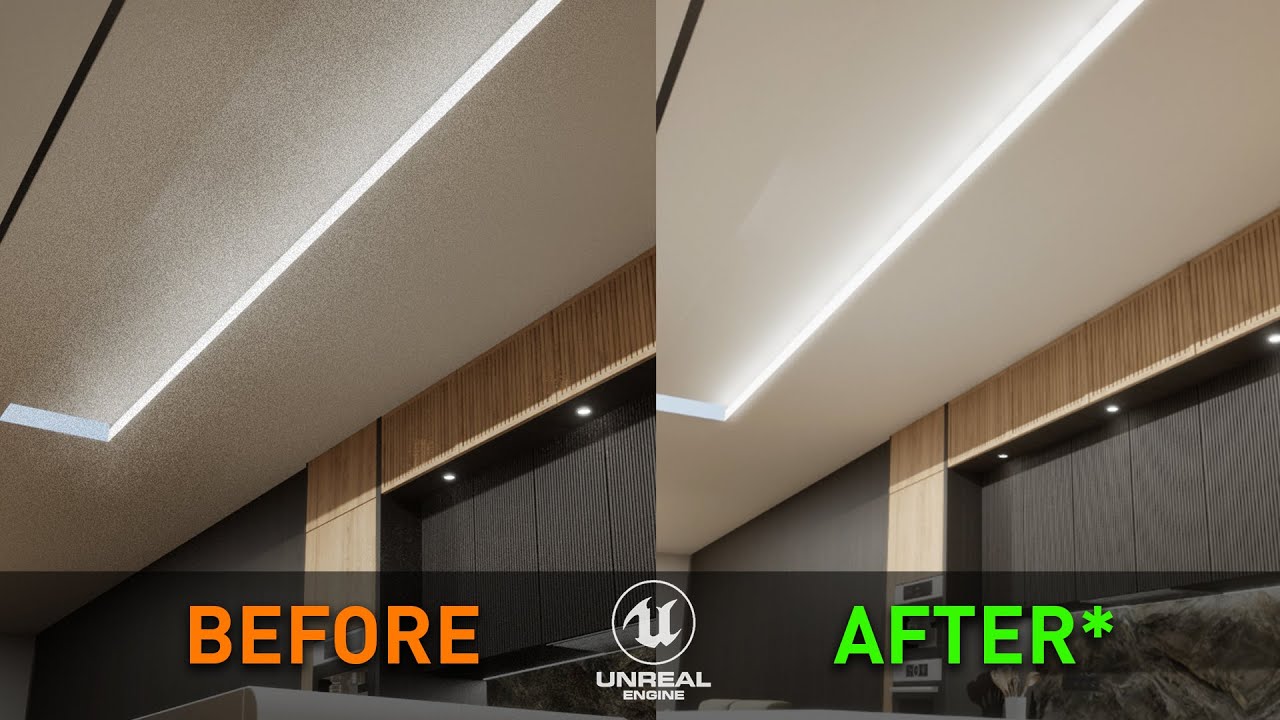
Tutorial on how to fix the flickering, dancing lighting artifacts from Lumen in Unreal Engine 5.3.
Unreal assets in video from the Unreal Marketplace.
ArchViz Interior vol.3 - Next Level 3D
MEDA Furniture Pack - Render Logic
Intro - 0:00
First Solution - 0:14
Second Solution - 0:38
Another Example - 0:53
This showcases it
It’s really bad in robocop
gray parrot
oof yah thats really bad and I dont think I've seen it in SH2 or Robocop for that matter
I also use Ultra Plus in both those games so maybe they fixed it
exotic stirrup
Yeah exactly that.
Running some engine.ini tweaks and ray reconstruction with the newest .dll works absolute wonders for it in SH2, but it also shows you outlines of stuff behind fog.
neat kestrel
summer gyro
The boiling effect on lighting that’s really visible with software lumen
They added software lumen via that patch?
or did it already have it
neat kestrel
quartz epoch
it's just an .ini edit and the DLL
oh, very easy nice
summer gyro
neat kestrel
They added software lumen via that patch?
It’s ue5 it already had it
neat kestrel
Also now I cannot hear the word Lumen without thinking of Severance
humble veldt
neat kestrel
I'd rather play at 60 and have some stutter than at 30 with no stutter. 30 is br...
I played a game for 50+ hours recently at 30fps
anyway imma start it
humble veldt
quartz epoch
it's just an .ini edit and the DLL
I am aware of this, but it also added some visual bugs
humble veldt
constant 60ms stutters during traversal
 humble veldt
fixed timestep helps make the game feel more consistent
but the stutters do still kinda suck
vrr seems like it can slightly shorten the length of them maybe
but at the cost of flicker
haven't bothered trying ultra+
issue is it hasn't been updated for the latest patch
tough scarab
doesn't need an update
 rigid jackal
humble veldt
constant 60ms stutters during traversal
rigid jackal
humble veldt
constant 60ms stutters during traversal
How often do you get these
If it's really as often as that graph indicates that's not normal
I maybe get a one off 50-60ms stutter with 30fps and fixedtimestep every few minutes
With a 7800x3d
You maybe also want to use the front edge sync framerate cap in RTSS
Because thats the smoothest and doesn't cause vrr flicker
gray parrot
humble veldt
it stutters in cutscenes too
No I played with Ultra plus mod
neat kestrel
I played with U+ so idk how bad stuttering was without it. I figured it was similar
gray parrot
neat kestrel
I played with U+ so idk how bad stuttering was without it. I figured it was simi...
no the U+ mod had a fix for cutscenes in there...
neat kestrel
Oh ok
humble veldt
rigid jackal
How often do you get these
quite often
and I'm using special k's frame rate limiter
I'm also not using vrr
neat kestrel
Try not using SK. I heard reports that SK was causing performance issues in this game
I didn't use it
neat kestrel
Use vsync off with the in game set to 60
Try that
Don't use any limiters. This game is fucking wack
humble veldt
neat kestrel
Use vsync off with the in game set to 60
wdym
it'd be double the speed though
neat kestrel
I'm saying use the in game limiter with 60, vsync off
humble veldt
so run the game at 60fps?
humble veldt
imma try front edge 30fps first
not sure if the game will even launch though
it straight up wouldn't launch without sk at first
also lyall's mod broke after the latest patch which kinda sucks
could uncap the cutscene framerate to bypass unreal's limiter entirely
neat kestrel
not sure i'm familiar with lyall's mod
I think U+ uncapped cutscenes?
i dont remember
humble veldt
neat kestrel
I think U+ uncapped cutscenes?
yea, but fixed timestep won so
neat kestrel
what do you mean? I didn't use any of those mods haha
i just used U+
and cutscenes were uncapped
humble veldt
n
humble veldt
humble veldt
1. Should I play with ultra+ and deal with the visual bugs
2. Should I use -fixe...
like I said fixedtimestep won
neat kestrel
gotchya
and what does this launch paramter do? Uncaps cutscnes? Or helps with stutter?
sorry been a while since i played
humble veldt
ties the game speed to frame rate
neat kestrel
and what is the launch command?
humble veldt
-fixedtimestep
neat kestrel
and again, forgive my ignorance, but this is for uncapping cutscenes, or stutter, or both
humble veldt
just for the animation stutter
humble veldt
I did try playing at 60 briefly with no u+ obviously
humble veldt
neat kestrel
so like curtains and shit looking choppy - fixes that?
one sec
quartz epoch
neat kestrel
so like curtains and shit looking choppy - fixes that?

This video is sponsored by MSI's range of next generation QD-OLED monitors. Learn more here: https://msi.gm/QD-OLEDs
UK viewers can click here for a chance to win an MSI MPG 271QRX QD-OLED Gaming Monitor, Metaphor: ReFantazio Xbox/PC game code and exclusive tote bag: https://msi.gm/msi-x-metaphor-refantazio-giveaway
Silent Hill 2's remake for P...
humble veldt
humble veldt
I did try playing at 60 briefly with no u+ obviously
I did spot some animation stutter
humble veldt
quartz epoch
https://www.youtube.com/watch?v=B1Et12RgWlQ&t=932s
thanks bro
humble veldt
U+ apparently fixes it, but I think I've seen some people say its still an issue
neat kestrel
well anyway, yea, maybe try 60 fps in game with vsync off and see how that feels
it wont fix all the stutters
but should hopefully help
humble veldt
I'll try fixed time step with front edge sync, but I'll disable in game v-sync and use the driver override
since I'm on fixed refresh it'll tear if I disable v-sync entirely
if its still kinda shit I'll try using ultra+ and see what happens
since apparently the stutter isn't normal
neat kestrel
humble veldt
since I'm on fixed refresh it'll tear if I disable v-sync entirely
I find that tearing isn't as easy to see on our 240hz monitors
humble veldt
I'm on 120hz
neat kestrel
oh ok
I have a hard time seeing tearing a lot of the time with vsync off on the 240hz panel
I assumed it was due to the faster refresh rate
(not using VRR either)
Like I have to look for it very hard
maybe i'm just blind idk
humble veldt
GitHub
The solutions remove the black bars in anything other than 16:9 and fully unlock the FPS from 30.
Instructions:
Download the latest version of the preferred archive(s) below.
Unpack to \SHProto\Bi...
hmm maybe it still works
really I just want to disable the unreal limiter in cutscenes
neat kestrel
I could have sworn that that first big game patch fixed the 30 fps cap in cutscenes
but I honestly don't remember
neat kestrel
Or maybe it was just that they added FG which doubles frames in cutscenes?
humble veldt
according to the pcgw no
neat kestrel
yea i know that pcgw says that
not sure if it wasn't updated
or i'm just wrong
If you're still seeing 30 fps in cutscenes then i'm wrong
humble veldt
humble veldt
https://github.com/RoseTheFlower/UltrawideIndex/releases/tag/silenthill2remake
the mod was updated for 1.06
neat kestrel
Maybe i'm wrong
Most of my time spent in this game was figuring out the absolute dogshit HDR sliders
ha
humble veldt
that's why I was asking you guys :P
neat kestrel
I can't even remember which HDR settings i used
I apparently didn't save them
rip
looks like I used this or something? But with paperwhite lowered via pumbo's?

idk
quartz epoch
@humble veldt not sure if they both work, but I noticed you were saying "-fixedtimestep", when it's "-usefixedtimestep", so figured it was worth bringing up just in case
quartz epoch
ideal, no worries
neat kestrel
humble veldt
I was probably using -usefixedtimestep
So you're saying that even with that launch command, you're still getting terrible stuttering with SK?
humble veldt
humble veldt
constant 60ms stutters during traversal
basically this when traversing long distances
ebon zealot
in my experience this gave the best experience:
- fixed refresh forced disabled in NVCP to disable VRR
- 1/2 refresh vsync in NVCP (60 fps)
- 60 fps fps in-game fps cap
matching the in-game fps cap to your vsync fps cap accomplishes the same thing as the -usefixedtimestep launch param, but at 60 fps
humble veldt
no thanks
ebon zealot
and yeah using SK increased stutters in my experience
ebon zealot
it's a pretty slow game
ebon zealot
yeah 30 fps is the way to go if your only goal is to mask the stutter, but... it's 30 fps
humble veldt
also I don't think its necessary to disable vrr
half rate v-sync is incompatible with vrr
so it just doesn't work
ebon zealot
right, that's why i disabled it
humble veldt
rip
wonder why that works though
I think I might have asked sammi once about the animation stutter
ebon zealot
dunno. someone on resetera discovered it. it works for jedi survivor as well. maybe other UE games
humble veldt
but I forgot what she said
humble veldt
ebon zealot
dunno. someone on resetera discovered it. it works for jedi survivor as well. ma...
dope
I'll probs give it a shot
thx
one more question
does this work with 1/3rd rate v-sync?
for 40fps
humble veldt
rip
ebon zealot
i tried doing it at 120 and forcing 120 via an .ini edit and it didn't work
humble veldt
if that does work
then I really hope that the unlock cutscenes mod works
I assume you're using that right?
ebon zealot
i didn't. iirc there were some issues with it at launch. not sure if they got cleared up
ebon zealot
yeah
humble veldt
damn
ebon zealot
didn't really bother me tbh
humble veldt
yea its not a huge deal I guess
ebon zealot
it's not like they're fast-paced action sequences or something lol
humble veldt
so long as unreal's limiter doesn't cause some nonsense
ebon zealot
most are just people standing still talking
humble veldt
that's honestly the main reason why I wanted to unlock them
also you don't use ultra+ right?
rigid jackal
ebon zealot
in my experience this gave the best experience:
1. fixed refresh forced disabled...
you get 1/2 and 1/3 vsync options in nvcp? I only see 1/2 adaptive with fixed refresh
ebon zealot
I don't remember. I think just 1/2. I believe you can do 1/3 with profile inspector? Just keep in mind you'll still get animation stutter if you can't match whatever that is with the in game option (30 or 60)
ebon zealot
humble veldt
also you don't use ultra+ right?
No I didn't
rigid jackal
ebon zealot
I don't remember. I think just 1/2. I believe you can do 1/3 with profile inspec...
the 1/2 and 1/3 options in nvpi don't work for me for some reason
they just get ignored
and yea most stutters are below 20ms so a 40 fps cap would be the obvious choice
but then the animation stutter is really obnoxious
humble veldt
rigid jackal
and yea most stutters are below 20ms so a 40 fps cap would be the obvious choice
mainly was asking because of dlaa
humble veldt
rigid jackal
you get 1/2 and 1/3 vsync options in nvcp? I only see 1/2 adaptive with fixed re...
ugh you're right
rigid jackal
you can select those in profile inspector
but they don't work on my machine
so maybe they don't on your pc as well
humble veldt
I don't have sh2 installed on this pc
but I'm testing in marvel rivals rn
I assume you had the right executable selected too? The win shipping one
rigid jackal
yea
 rigid jackal
ah
humble veldt
the lag is indeed horrendous though
its laggier than using the built in limiter to cap it to 60
also for what its worth I switched to fixed refresh first in the nvcp
and then I used inspector to enable half rate v-sync
since I wasn't sure what to disable in inspector
to kill g-sync
rigid jackal
humble veldt
and then I used inspector to enable half rate v-sync
thats what I did as well, maybe I need to follow your nvpi settings closely
but cool that it works for you
maybe I have some busted driver or global settings or something
humble veldt
I assume you're using the one that has the overflow fix?
rigid jackal
idk what's that
humble veldt

GitHub
#247 temporary fix for 571.96 overflow bug - thanks emoose :)
2nd latest one
rigid jackal
ah thanks, downloaded it today to try the global dlss overrides
but I'm not sure if I used it to test the 1/2 vsync
humble veldt
works for me
also I gotta admit
I'm not sure if the latency is any better than 30fps lmao
and unreal's limiter does mess with the pacing
good news is I'm not getting anymore 60ms spikes
humble veldt
do you guys use hardware or software lumen?
humble veldt
humble veldt
I'm not sure if the latency is any better than 30fps lmao
its def better than front edge sync 30fps
back edge though I don't know
neat kestrel
humble veldt
do you guys use hardware or software lumen?
We have a choice?
pallid lava
What do you think Ray Tracing toggle in options do?
HW lumen makes the game stutter even more sadly
But SW lumen is gimped in PC
There's a cvar to fix it, lemmie look for it
rigid jackal
humble veldt
I'm not sure if the latency is any better than 30fps lmao
I wonder if you're getting rid of additional stutters that way tho, not sure about the intricacies of half refresh vsync
pallid lava
sg.GlobalIlluminationQuality=4
sg.ReflectionQuality=4
also
.Lumen.TranslucencyReflections.FrontLayer.Allow=1
r.Lumen.TranslucencyReflections.FrontLayer.Enable=1
If you are capping to thirty use r.OneFrameThreadLag=0 to reduce the input lag
and don't use in game vsync
rigid jackal
pallid lava
If you are capping to thirty use `r.OneFrameThreadLag=0` to reduce the input lag
wouldn't this introduce more stutters
or does it just not matter at 30
pallid lava
It shouldn't matter at 30
neat kestrel
pallid lava
What do you think Ray Tracing toggle in options do?
I thought the game used software lumen for something else idk
I haven't played in like 5 months
I used hardware then
I'm surprised you guys are spinning your wheels so much on this. I just locked to 60 with a controller and it was easily playable with some occasional annoying stutters lol
Maybe my tolerance is higher
Or i'm old and blind
tough scarab
i suggest removing cpu affinity from e-cores, thats how I fixed my stutter on 12600k
aside from unavoidable traversal or pso stutters, it made the game almost perfectly smooth, using Ultra+ mod
neat kestrel
One day i will replay this game
humble veldt
rigid jackal
I wonder if you're getting rid of additional stutters that way tho, not sure abo...
I haven't really seen any stutter(that wasn't on the graph)
neat kestrel
I was in a shitty mood yesterday so sorry if I sounded like I was dismissing your guy's struggles with this game by saying like "worked fine for me"
 humble veldt
I'm just overthinking it anyway you're good
humble veldt
on a more positive note
with the black floor fix at least
the game's indirect lighting does look fantastic
hardy viper
humble veldt
I'm just overthinking it anyway you're good
Same - since I started modding i tinker more than enjoy playing. Not to complain, I enjoy it and like this community. Plus the results with properly implemented renodx is amazing for hdr.
That said I need to start enjoying my first ever playthrough of cp2077 and stop screwing with slider constantly haha
humble veldt
renodx?
 tired mural
hardy viper
That said I need to start enjoying my first ever playthrough of cp2077 and stop ...
tired mural
hardy viper
That said I need to start enjoying my first ever playthrough of cp2077 and stop ...
That's an easy fix. Subscription model for slider usage.
You have used up your 3 free slider changes. Subscribe now for $4.99/mo for upto 10 Adjustments per day.
hardy viper
Brilliant idea lol
lost spire
tired mural
That's an easy fix. Subscription model for slider usage.
> You have used up you...
tonemappers:
vanilla, none, aces, renodrt (premium, unlock for 9.99)
neat kestrel
humble veldt
renodx?
The game needs it lol
 hazy thorn
Was thinking of doing another playthrough. My first one was with just using BFF shader, now that there's renodx, should I use the one from nexusmods or the snapshot on github?
And what would the in-game HDR settings need to be at?
hazy thorn
I just set the HDR min luminance to -4 as suggested, but what about HDR Max Luminance? I set it to my TVs, 800 nits but it doesn't reach 800 in that same test menu. Should I expect it to reach 800 sometimes in-game?
Also, What setting would you guys recommend within reno? Black Floor Fix only or the default one which I can't remember the name right now?
summer gyro
hazy thorn
I just set the HDR min luminance to -4 as suggested, but what about HDR Max Lumi...
it overshoots in game anyway
but its not too bad
hazy thorn
summer gyro
it overshoots in game anyway
Ah does it? So aim for 800 for my case then?
What about the “Type”, I know it’s probably personal preference but having option paralysis lol, both gamma and contrast offset look good imo, but not sure which one makes the most sense
hazy thorn
Btw, I just found an issue. I've been pulling my hair with this. But I found renodx to be the culprit of causing a Halo effect around Jame's head when rotating the camera with FG on, almost like there's a semi-copy of the model a few frames ahead.
I reinstalled the game, tested with default DLSS version, NVapp overriden, added RR, etc. No halo at all. As soon as I add April's snapshot from github it causes it.
https://www.youtube.com/watch?v=Ff3yqoPBT7I
I'm gonna try nexusmods version to see if it makes a difference

Tested nexus version, same thing. Uninstalled reshade, no glitchy halo.
@summer gyro
summer gyro
hazy thorn
Tested nexus version, same thing. Uninstalled reshade, no glitchy halo.
<@25181...
Maybe try the snapshot

GitHub
Renovation Engine for DirectX Games. Contribute to clshortfuse/renodx development by creating an account on GitHub.
hazy thorn
summer gyro
Maybe try the snapshot
That's what I stated on my first message. I used the snapshot first then the nexus version
As soon as I add April's snapshot from github it causes it.
summer gyro
Only other thing I can think of is trying that beta reshade
hazy thorn
Which one?
summer gyro
#🧩renodx-dev message
hazy thorn
summer gyro
https://discord.com/channels/1161035767917850784/1213837557704425472/13617886471...
ty, gonna give it a shot
Yep, still there. Even if I select "vanilla" in reno, it shows. So it seems to be reno? Used April and nexus versions.
It's instantly noticeable compared to without
summer gyro
ya probably a reno or maybe reshade bug
hazy thorn
deleted reno addon, kept reshade install, no halo
hazy thorn
Is there a possibility of fixing this or not really at this point? Cause I can't find a good value with black floor fix :[ Always feels like its crushing shadow detail
sterile mauve
give them more than a few hours bro
summer gyro
ShortFuse might know what it is
gray parrot
hazy thorn
deleted reno addon, kept reshade install, no halo
You wont get rid of it... I had the same issue on my C9 and so I never used reno for this game.
Oddly it only happens to the few of us and not everyone
humble veldt
only with frame gen?
hazy thorn
gray parrot
You wont get rid of it... I had the same issue on my C9 and so I never used reno...
I actually just managed to get rid of it. I reinstalled the drivers (DDU) and the game. And all by default with FG it doesnt show anymore. But if I override FG to the latest version it does show the halo.
Before, it was showing the halo even with 3.7 dlssg I think because of U+. Im not using it anymore, I replaced dlssg to 3.8.1 even and its flawless.
At this very moment Im overriding DLSS in nvapp to transformers (preset K) and not overriding FG and 0 issues.
So, SR = 3.12.1 / FG = 3.8.1
gray parrot
hazy thorn
I actually just managed to get rid of it. I reinstalled the drivers (DDU) and th...
Ok my mistake. You had a halo on james head and not in dark areas cuz of hdr. Different issue.
Glad you figured it out
 molten hamlet
you basically need 60hz vsync to avoid the animation error in this game so FG is pretty much useless imo
tough scarab
30 fps
peak bane
doesn’t ultra+ fix it?
the animation stutter
unless there’s another animation bug i dont know about
tough scarab
its explained in DF video I don't remember it