#▫️Silent Hill 2 Remake
1 messages · Page 2 of 1
 crystal flame
both
 wet kelp
there is a LOT of variability in the draw calls ... 6ms to 14ms
okay wow
i'm going to try forcing DX Flip presentation
crystal flame
isnt it already on normally?
crystal flame
i wouldnt even have vrr without flip discard, no?
wet kelp
correct. it will allow tearing and use a flip buffer. is it DX Flip presentation specifically though? is it UE's implementation? i don't know, they don't talk much about it
but you can force it, which does seem to change things for people
i meant to say ***Nanite
i'm tired
OHH
i wonder how big the GPU scene upload is
wet kelp
nanite max verts it can process per frame is 16 million .. max polys is 8 million. is that a lot? ¯_(ツ)_/¯ it sounds like a lot
the problem with things like nanite is devs just don't bother running UE's diagnostic and optimisation tools any more. they just import a whole bunch of bought or created assets and wheeee let's go. because nanite
#1293113206687928322 message this is with DX Flip forced and some optimization of frame timing and the RHI thread
wet kelp
yeah, i can see what's happening. if you turn the fog off with r.VolumetricFog 0 you can see quite clearly what the problem is (i don't know about problems without U+, probably several)... whenever a new mesh is drawn, there is a hitch as its surface is filled. presumably due to RT "something". normally, you would fix this by limiting r.RayTracing.Geometry.MaxBuiltPrimitivesPerFrame to, say, 1024. a very simple fix, so that RT work can be spread over several frames, preventing the RT build hitch.
however, rather excitingly, in this game, r.RayTracing.Geometry.MaxBuiltPrimitivesPerFrame is broken. the game crashes when setting it to anything other than -1 ( = unlimited). so that's not an option
i don't think this is U+ related, it's also not specifically HDR related. it's just "engine stuff". i also don't know your work well enough to know whether it helps to know this. my work is diagnostic. i'm not simply copying Engine.ini values from Reddit and "hoping something works", i'm disabling parts of the frame to do root cause analysis.
my goal is not to overtake HDR threads, it's simply that the fastest way to halt the progress of science and engineering is to silo information...
in any case, now that we know this, i'll post future results in my thread, so if this is actually useful/helpful, you might want to look there 😊
wet kelp
just a quick update, issue is diagnosed and reproducible. here i'm causing a deliberate frame time spike every 60 seconds
 wet kelp
it's fixed. i can turn the frame spikes on and off affirmatively (see FT graph)

 gray parrot
wet kelp
it's fixed. i can turn the frame spikes on and off affirmatively (see FT graph)
gray parrot
wet kelp
it's fixed. i can turn the frame spikes on and off affirmatively (see FT graph)
New build coming soon? 🙌
wet kelp
gray parrot
New build coming soon? 🙌
wet kelp
hey we can adjust skylight strenght 😊


 gray parrot
Who else keeps drinking their health meds trying to open the map! Fml 😆
gray parrot
wet kelp
hey we can adjust skylight strenght 😊
Dark looks wayy too scary
wet kelp
gray parrot
Dark looks wayy too scary
hahaha
i just turned off fog and saw a creature lurking around a corner in the fog. i don't think i can cope lmao
i'll just test this area 😂
 crystal flame
game feels technically more fucked than jedi survivor
stutter hell
i don't really understand why it gets a free pass on steam, where are all the complaints
jedi survivor was at least much better if you turned off raytracing
here even that doesn't help
i can't honestly recommend the game in its current state. it's literally nauseating to play with this stutter (and the bonus vrr flicker)
i'd refund if i bought it through steam. though i'm past the 2h mark and the real shitshow starts at the apartments level
 stark trench
One bloobillion dollars
 zealous pebble
What's the verdict here on all the mods I've seen floating around to fix stutter?
Do reg edits to increase CPU priority actually work for a lot of people? (YMMV of course)
Likewise is this Ultra Plus mod all its cracked up to be across multiple hardware configurations? Is there video supporting this showing before and after?
Appreciate the work you're attempting to do Sammi, I am intrigued to try it, just would be nice to have definitive proof that it is improving the situation. Btw you might want to add a description on your pictures on NexusMods, the one image I was totally confused as to what you were showing, its only here I realized you were forcing frame time spikes and then turned them off halfway through your graph on the image
+1 to the VRR flicker issue too, it looks really bad on my OLED at times
wet kelp
zealous pebble
What's the verdict here on all the mods I've seen floating around to fix stutter...
i've looked at several engine.inis and they were all copied off reddit, with dozens of commands that don't even work in this game
no, registry edits don't help. they might help a handful of people if they have problems
zealous pebble
Yeah I figure the priority CPU fixes might work for people with weak CPUs
wet kelp
take a look at my notes under the performance tuning sticky. most people forget these things, and i can tell you Unreal when tuned well pushes the PCIe and GPU very hard, so these steps are important
i'm not experiencing large stutters, it's definitely playable
zealous pebble
I will give your mod a shot this week and see if it improves stutters in the same areas where I've been having an awful time in the vanilla game
I like that it's fixing the black point as well
I have a Gen 4 pcie ssd that can write like 7gbps so if your mod can push that I could see it helping with traversal stutter
wet kelp
it will push it, but don't neglect the things in the sticky too. hopefully yours is already okay, but i often hear those things improve several games
zealous pebble
Noted, thanks
 rigid jackal
wet kelp
take a look at my notes under the performance tuning sticky. most people forget ...
rigid jackal
wet kelp
take a look at my notes under the performance tuning sticky. most people forget ...
is resizable bar that important? I had really large frametime spikes (100ms or more) in all games from time to time (every few minutes), and disabling it fixed that
 open zenith
rigid jackal
is resizable bar that important? I had really large frametime spikes (100ms or m...
open zenith
rigid jackal
is resizable bar that important? I had really large frametime spikes (100ms or m...
Sure it is not placebo and a warm shader cache?
rigid jackal
I haven't done extensive testing; I also haven't tested it with this game
I had those issues in all games, even well optimized ones without shader comp stutter
tried basically everything under the sun and thought it was just ram instability, even though mem stress tests came up with nothing
disabling rebar in the bios helped. and from benchmarks I've seen rebar always causes lower 0.1% fps in games
 tough scarab
doesn't play nice with SK
 pallid lava

Nexus Mods :: Silent Hill 2 (2024)
Makes the game more faithful to the HD collection of the original release by eradicating most of the fog from the game
 hybrid anvil
?
 strong stream
i didnt even realize how much this murdered my 4090
im getting 60-70 FPS in the apartment
maybe the FSR3 mod would help
tough scarab
hybrid anvil
?
FG mod by ImpureBright
tough scarab
pallid lava
https://www.nexusmods.com/silenthill2/mods/2
Lmao
people just willingly take the ragebait
 green mist
tough scarab
FG mod by ImpureBright
green mist
tough scarab
FG mod by ImpureBright
and how to enable this in game?
green mist
this will also work on 30xx series or its only for 40xx?
tough scarab
it's dlss FG what do you think
green mist
ok ok, I was thinking maybe is already moded to work with 30xx series
I wondering if it will work with mods
tough scarab
what mods
green mist
thats allow works FG on olders cards
tough scarab
you can try yourself
should be possible to put one of those on top of it
to use FSR FG
whle retaining DLSS upscale
there's probably guides out there
open zenith
tough scarab
FG mod by ImpureBright
Have a direct link to the mod page itself?
Why do you think that?
Oh yeah? Impurebright == PureDark?
tough scarab
 open zenith
Oh yeah? Impurebright == PureDark?
open zenith
open zenith
Oh yeah? Impurebright == PureDark?
Is that the case @warm pelican ?
@tough scarab Is it indeed a mod behind a paywall?
open zenith
tough scarab
I didn't pay anything
I meant, the original source, does the modmaker hide it behind a paywall? And where did you get it?
tough scarab
I got it from ImpureBright
open zenith
Have a link to the public mod page?
open zenith
tough scarab
I got it from ImpureBright
Directly with permission to share?
open zenith
I removed it; while I hate modders putting things behind paywalls, lets not try to circumvent those anyways to at least respect the author's questionable wishes....
tough scarab
They go after servers that act like hosting hubs for paywalled mods
open zenith
And the information Olek gave me is too vague to prove otherwise.
tough scarab
But I was just personally sharing a mod from ImpureBright
Never heard of PureDark
sounds like a shitty guy
open zenith
The information you provided is lacking to prove the author didn't put it behind a paywall normally or even gave you the permission to share it
Next time just link to the Discord message or mod page containing the mod, avoids all this
tough scarab
if you want I can just post an external link so it's not hosted on the Discord
open zenith
tough scarab
if you want I can just post an external link so it's not hosted on the Discord
Yeah, if it leads to a public proper mod page, sure
Please
Without providing a public non-paywalled source, please don't share or offer mods if they aren't of your own making
tough scarab
 open zenith
Please respect it and supply the proper public info then next time
tough scarab
amen
 summer gyro
i had to turn ray reconstruction off to improve frametimes
but i dont think it was ever that bad
mostly noticeable when walking, standing still it seemed mostly fine
 glossy pivot
what is that software that microsoft made that tracks VRR hz?
crystal flame
glossy pivot
i dont have that issue, something must be up
guess what
i just removed sk
it's not doing it anymore
the game is now randomly resizing other open windows of course
this is now much more sane. the flickers are from the camera, aside from the big one in the middle. that's still happening ofc
pallid lava
crystal flame
it's not doing it anymore
 crystal flame
glossy pivot
what is that software that microsoft made that tracks VRR hz?
crystal flame
glossy pivot
what is that software that microsoft made that tracks VRR hz?
first time i'm hearing about one 😄
well it's still terrible while moving around
at least standing still doesn't freak out anymore
 wide gyro
glossy pivot
what is that software that microsoft made that tracks VRR hz?
wide gyro
glossy pivot
what is that software that microsoft made that tracks VRR hz?
rtss plugin for displaying vrr hz: https://www.forum-3dcenter.org/vbulletin/showthread.php?t=593443
[Tool] RTSS - NVIDIA VBlank Status (GSYNC Indicator) nVidia Grafikkarten
glossy pivot
 wide gyro
yes sorry, but it might help if you can't find the MS tool.
glossy pivot

Microsoft Apps
This application lets you analyze the refresh rate of your display. If your setup supports dynamic refresh rate (https://devblogs.microsoft.com/directx/dynamic-refresh-rate/) you will be able to see when other apps boost or you may toggle the boost yourself by clicking the button. You can also choose the folder and enable logging, it will genera...
wet kelp
summer gyro
i had to turn ray reconstruction off to improve frametimes
it's actually preset E + ray reconstruction that's causing the terrible frame times
preset A doesn't do it
preset E is using some sort of shader
crystal flame
wet kelp
what the f is that... 🤔
that's just special K
wet kelp
causing it?
wet kelp
oh thank goodnesss 😂 i had no idea what might cause that inside UE
crystal flame
it's still stuttering, mind you. just SK was adding bonus stutters
even that second video has this flash of vrr disengaging in the middle
at 0:13
wet kelp
hmm i have an idea
yes i've introduced some stutters by using too much async dispatch
just fixing that...
it's interesting, FSR3 FI has its own RHI swap it uses, which completely replaces UE's... it's SO much smoother. like insanely smooth
you know what i find really interesting? sometimes debugging these really problematic games like Survivor (or this one), trying fairly random settings changes is one of the most useful tools to actually bisect problems... with that in mind, having 2 different packs each with a different approach, and then trying one, then trying the other, can be really useful. it's like basic software genetics.
what would be super cool to solve these issues is basically a computer program that changes random values then launches the game and monitors frame time, then does it again, and again, and again, and breeds the best winners, to eventually arrive at the ideal settings
gray parrot
crystal flame
it's still stuttering, mind you. just SK was adding bonus stutters
Time to get this off of SK then
gray parrot
wet kelp
you know what i find really interesting? sometimes debugging these really proble...
like an AI system? 🤯 😉
wet kelp
gray parrot
like an AI system? 🤯 😉
kind of. it's not 'AI', it's software genetics, which has been around (though in limited supply) for about 25 years
dammit i can see the frame instability is happening on the RHI thread, but WHERE
OMG found it!
it's occlusion culling
(left) before 1024 privative occlusion packet size .... (right) 128 prims


makin' progress
LowLevelFatalError [File:D:\SilentWorkspace\501T-BL\Engine\Source\Runtime\D3D12RHI\Private\D3D12Util.cpp] [Line: 868] Interfaces.CopyCommandList->Close() failed at D:\SilentWorkspace\501T-BL\Engine\Source\Runtime\D3D12RHI\Private\D3D12CommandList.cpp:284 with error E_INVALIDARG oopsiedasies
crystal flame
so the hdr values are literally defaults from unreal
static TAutoConsoleVariable<float> CVarHDRDisplayMinLuminanceLog10(
    TEXT("r.HDR.Display.MinLuminanceLog10"),
    -4.0f,
    TEXT("The configured minimum display output nit level (log10 value)"),
    ECVF_RenderThreadSafe
);

static TAutoConsoleVariable<float> CVarHDRDisplayMidLuminance(
    TEXT("r.HDR.Display.MidLuminance"),
    15.0f,
    TEXT("The configured display output nit level for 18% gray"),
    ECVF_RenderThreadSafe
);

static TAutoConsoleVariable<float> CVarHDRAcesColorMultiplier(
    TEXT("r.HDR.Aces.SceneColorMultiplier"),
    1.5f,
    TEXT("Multiplier applied to scene color. Helps to"),
    ECVF_RenderThreadSafe
);
it's not custom
crystal flame
@tired mural silent hill is just default unreal aces. so the usual black floor woes are there. do you understand what's going on with unreal aces and whether the defaults aren't ideal? the usual thing is here with raised black floor

 tired mural
how different is SDR from HDR? SDR is "aces matched", but not real ACES so it might go to zero. real ACES HDR is 0.005 floor IRIC
the unreal lut builder should be final output, and another nothing else on top except for maybe film grain
crystal flame
tired mural
how different is SDR from HDR? SDR is "aces matched", but not real ACES so it mi...
it is more or less similar to sdr
sdr also looks raised
tired mural
that's probably too much to be anything reasonably inputted into ACES. aces gets really dark. they're either not using Unreal stock ACES or doing something after the lut builder to raise the image
crystal flame
tired mural
that's probably too much to be anything reasonably inputted into ACES. aces gets...
i feel like this is the exact same thing that happens in every unreal game with stock hdr tho. they all look raised
tired mural
it would have to really raised before it gets to ACES for it to be that high and kinda unnatural
i mean, possible, but that crazy high with ACES usually means they're going custom, like trying to pass an SDR LUT or something
crystal flame
i feel like there might be something fundamentally wrong with unreal's aces
tired mural
i think hellblade2 is stock
crystal flame
hellblade had unclamped highlights so couldnt be
tired mural
hmm.
it's probably faster to just look at the SH2 shader if somebody has it
"easily" dumped on PIX
 humble veldt
crystal flame
hellblade had unclamped highlights so couldnt be
humble veldt
crystal flame
hellblade had unclamped highlights so couldnt be
Wow
crystal flame
tired mural
it's probably faster to just look at the SH2 shader if somebody has it
i don't think there's a reason you should be digging through that mess
just look at unreal's source
see the comments full of "this is a hack" and todo
crystal flame
i need to check what a blank project looks like
tired mural
sdr tonemappers usually have the HDR code in there, just behind a cbuffer branch that never gets executed. so i've seen it in like Thaumaturge
but any game that isn't using fixed 1000 nits or 2000 nits from before is custom. so the fitting can be broken, like in cyberpunk
i think variable peak nits ACES was fine. not how i do it, but fine
jedi survivor is custom stretched ACES as well
 quartz epoch
tired mural
but any game that isn't using fixed 1000 nits or 2000 nits from before is custom...
quartz epoch
tired mural
but any game that isn't using fixed 1000 nits or 2000 nits from before is custom...
no idea if it's relevant to this at all, but it defaults to 1000 peak and Musa said if you adjusted that peak value slider it would lower the black levels, too
tired mural
then it's probably custom. black shouldn't move if you're doing it right
it's probably the 1000 baked ACES and they're trying to fit it
and their math is broken. just like CDPR, just like Sea of Thieves
black level in HDR should be because of the viewing environment, not device peak
crystal flame
tired mural
then it's probably custom. black shouldn't move if you're doing it right
well the settings, and the default values match unreal perfectly so i really doubt it's something custom
the peak cvar actually existed in 5.1 (the version they're using) even though unreal seemingly moved on from the static 1000/2000 peak in 5.3. i'm not sure whether that cvar did anything
summer gyro
crystal flame
it is more or less similar to sdr
HDR default settings looks way different
crystal flame
summer gyro
HDR default settings looks way different
the black floor tho?
tired mural
sdr actually isn't even ACES. it's unreal's "matched" ACES
crystal flame
sdr is also similarly raised at a glance
tired mural
it's basically uncharted2/hable matched to ACES with ACES rrt sweeteners
summer gyro
Ya black floor is raised at the very start of the game
Once you get to the flower shop it’s crushed to dogshit
tired mural
// Legacy settings
Slope = 0.98;
Toe = 0.3;
Shoulder = 0.22;
BlackClip = 0;
WhiteClip = 0.025;

// ACES settings
Slope = 0.91;
Toe = 0.53;
Shoulder = 0.23;
BlackClip = 0;
WhiteClip = 0.035;
hable params that Unreal tweaked to match ACES. and those params are in cbuffer and only run in SDR.
HDR doesn't use those at all, so if they modified the hable params then the ACES HDR will mismatch from SDR (well, more than usual on Unreal)
crystal flame
hmm yeah so that's a blank project's black floor in 5.1
 tired mural
base floor is probably 0.005
crystal flame
that one's good
tired mural
i use 0.0001, but really not that different
tired mural
crystal flame
the r.HDR.Display.MaxLuminance truly does work in stock ue5.1
crystal flame
yes
it's all default in sh2
i'm strongly believe there's nothing custom there regarding hdr
tired mural
summer gyro
crystal flame
i'm strongly believe there's nothing custom there regarding hdr
That negative black floor stuff
No idea what that is
crystal flame
tired mural
min is `0.0001` in Unreal: <https://github.com/EpicGames/UnrealEngine/blob/40eea...
it's not that value tho
it's the r.HDR.Display.MinLuminanceLog10 which is -4 by default
which equals 0.0001
crystal flame
summer gyro
That negative black floor stuff
r.HDR.Display.MinLuminanceLog10
unreal just does pow(10, cvar) and sends it to aces
the fact that they expose it in the raw value is what makes me believe they're not doing anything custom
it is basically "heres the hdr settings guys set it up how you like"
tired mural
FACESTonemapParams()
    : ACESMinMaxData(2.50898620e-06f, 1e-4f, 692.651123f, 1000.0f)
    , ACESMidData(0.0822144598f, 4.80000019f, 1.55f, 1.0f)
    , ACESCoefsLow_0(-4.00000000f, -4.00000000f, -3.15737653f, -0.485249996f)
    , ACESCoefsHigh_0(-0.332863420f, 1.69534576f, 2.75812411f, 3.00000000f)
    , ACESCoefsLow_4(1.84773231f)
    , ACESCoefsHigh_4(3.0f)
    , ACESSceneColorMultiplier(1.5f)
    , ACESGamutCompression(0.0f)
1e-4f
summer gyro
I see that’s why they did -4
Butt he difference between 10^-4 and 10^-20 should be small then
crystal flame
tired mural
```cpp
FACESTonemapParams()
: ACESMinMaxData(2.50898620e-06f, 1e-4f, 692.651...
i dont think they ever send the default struct tho?
summer gyro
They look way different in game
crystal flame
do you want a 5.1 blank project with console enabled to play with cvars?
crystal flame
yeah i suppose the issue isnt with unreal's aces then if the blank project looks perfectly fine
tired mural
so it's ultimately in the input parameters, which also seem to match
they're not supposed to do 1.5 for exposure. there's a whole midgray system for that
but i don't think it would cause that much raise
crystal flame
tired mural
they're not supposed to do 1.5 for exposure. there's a whole midgray system for ...
we can tweak that in sh2, so what do you think the ideal values would be instead?
default is 15 mid, 1.5 exposure
tired mural
it's probably like 25 nits they're targeting for mid gray. though i guess that also depends on their rendering. if their render is underexposed, that's one way
crystal flame
that exposure cvar is r.HDR.Aces.SceneColorMultiplier btw. has this amazing description Multiplier applied to scene color. Helps to
tired mural
i use effective peak/sdr scaling with ACES and base it on their SDR code.
ACES says SDR is 0.02 - 48 nits
crystal flame
anyway we need to give up on that assumption that configurable peak is only in 5.3+ as it works in 5.1
i suppose they refactored it somewhat in 5.3
but still, the cvar exists and works. though it doesnt actually reach the set value. like 2000 maxes out at around 1700, 5000 at 3500
tired mural
uh, i think i can tell you the ACES SDR values, it's what i use, but i'm not sure there's a value to scale after ACES is done tonemapping, which is what i do
Unreal does preexposure in, tonemap with 15 nits midgray with peak relative to 10000 nits (ACES HDR default). i do preexposure in to adjust for 10% midgray of peak/sdr, then readjust after (aka paperwhite scaling)
that's those minmax data values in the params, but i don't think they do anything after ACES is done
what i do```cpp
static const float ACES_MID_GRAY = 0.10f;
const float mid_gray_scale = (tm_config.mid_gray_value / ACES_MID_GRAY);
const float reference_white = (sdr ? 1.f : tm_config.game_nits);
float aces_min = (0.0001f) / reference_white;
float aces_max = (sdr ? 1.f : tm_config.peak_nits) / reference_white;
if (!sdr && tm_config.gamma_correction != 0.f) {
aces_min = renodx::color::correct::Gamma(aces_min, tm_config.gamma_correction == 1.f);
aces_max = renodx::color::correct::Gamma(aces_max, tm_config.gamma_correction == 1.f);
}
aces_min /= mid_gray_scale;
aces_max /= mid_gray_scale;
color = renodx::tonemap::aces::RGCAndRRTAndODT(color, aces_min * 48.f, aces_max * 48.f);
color /= 48.f;
color *= mid_gray_scale;
basically just been wondering if there are better unreal hdr aces defaults than the, uh, default ones
tired mural
i don't trust ACES hdr, personally. i don't think they even care about it. all of the ACES crew is SDR first
SDR = "hero grade"
oh. i don't use this code anymore
summer gyro
So since -.46 was mid in sdr should it also be .46 in hdr or .18 cause .18^.454545 = .46
tired mural
i use SSTS. Unreal is really ACES 1.1 or 1.2
wait a minute
const SegmentedSplineParams_c9 ODT_48nits =
{
  // coefsLow[10]
  { -1.6989700043, -1.6989700043, -1.4779000000, -1.2291000000, -0.8648000000, -0.4480000000, 0.0051800000, 0.4511080334, 0.9113744414, 0.9113744414},
  // coefsHigh[10]
  { 0.5154386965, 0.8470437783, 1.1358000000, 1.3802000000, 1.5197000000, 1.5985000000, 1.6467000000, 1.6746091357, 1.6878733390, 1.6878733390 },
  {segmented_spline_c5_fwd( 0.18*pow(2.,-6.5) ),  0.02},    // minPoint
  {segmented_spline_c5_fwd( 0.18 ),                4.8},    // midPoint
  {segmented_spline_c5_fwd( 0.18*pow(2.,6.5) ),   48.0},    // maxPoint
  0.0,  // slopeLow
  0.04  // slopeHigh
};

const SegmentedSplineParams_c9 ODT_1000nits =
{
  // coefsLow[10]
  { -4.9706219331, -3.0293780669, -2.1262, -1.5105, -1.0578, -0.4668, 0.11938, 0.7088134201, 1.2911865799, 1.2911865799 },
  // coefsHigh[10]
  { 0.8089132070, 1.1910867930, 1.5683, 1.9483, 2.3083, 2.6384, 2.8595, 2.9872608805, 3.0127391195, 3.0127391195 },
  {segmented_spline_c5_fwd( 0.18*pow(2.,-12.) ), 0.0001},    // minPoint
  {segmented_spline_c5_fwd( 0.18 ),                10.0},    // midPoint
  {segmented_spline_c5_fwd( 0.18*pow(2.,10.) ),  1000.0},    // maxPoint
  3.0,  // slopeLow
  0.06  // slopeHigh
};
yeah, i don't know where Unreal is getting their numbers from
ah, here:
const SegmentedSplineParams_c5 RRT_PARAMS =
{
  // coefsLow[6]
  { -4.0000000000, -4.0000000000, -3.1573765773, -0.4852499958, 1.8477324706, 1.8477324706 },
  // coefsHigh[6]
  { -0.7185482425, 2.0810307172, 3.6681241237, 4.0000000000, 4.0000000000, 4.0000000000 },
  { 0.18*pow(2.,-15), 0.0001},    // minPoint
  { 0.18,                4.8},    // midPoint
  { 0.18*pow(2., 18), 10000.},    // maxPoint
  0.0,  // slopeLow
  0.0   // slopeHigh
};
idk if they're using the wrong numbers, or it's just old ACES 1.2 stuff
oooh. i didn't notice that. yeah, they're doing it wrong
crystal flame
tired mural
idk if they're using the wrong numbers, or it's just old ACES 1.2 stuff
1.3 was added in 5.3 i think
tired mural
the coefficients they're using are for 10000 nits
they just changed it to 1000 nits
[unreal](#1291021198628618353 message) vs [spec for 10K](#1291021198628618353 message)
they're mixed. slopeLow is from the 1000 nit one
crystal flame
tired mural
they're mixed. slopeLow is from the 1000 nit one
you sure those defaults are used?
they might be filling that struct out everywhere with different values
summer gyro
do you know what is causing increasing the peak to increase contrast
tired mural
these are the 1000 nit coefficients here
i use the 48nit coefficients and slopes
i hate reading the ACES code. so confusing
crystal flame
tired mural
i hate reading the ACES code. so confusing
same for unreal stuff related to aces. they seem to have layers of indirection and it's just a bitch to search through
tired mural
the unreal code has inv_ssts meaning it's using ssts (1.3), meaning the should compute the coefficients on the fly.
i lied. i don't even use coefficients. i use 1.3 which computes them
so where are these coefficients even going now
yeah, they're baked. Unreal doesn't compute them on the fly
crystal flame
tired mural
the unreal code has `inv_ssts` meaning it's using ssts (1.3), meaning the should...
if you're reading the current branch then it should be aces 1.3
it wasnt before tho
tired mural
the problem is there's like 4 outputTransform() with different parameters
it calls init_TsParams
that's the real, dynamic ACES
it's only called for ACESOutputTransformsRGBD65
hilarious
the one with dynamic min max is the SDR one
yeah, Unreal dynamic ACES is broken, i guess. even in 5.5 it's
- SDR - dynamic min/max to SRGB
- HDR 1000 - baked 1000 nit with ACESParams
- HDR 2000 - baked 2000 nit with ACESParams
https://github.com/EpicGames/UnrealEngine/blob/5.5/Engine/Shaders/Private/TonemapCommon.ush#L328 UE 5.5, the only reference to dynamic ts_params is in the SDR call
crystal flame
tired mural
yeah, Unreal dynamic ACES is broken, i guess. even in 5.5 it's
* SDR - dynamic...
so, the max luminance is using the max luminance cvar (because it's obviously working) but some of the values are wrong and still set up for the static 1k/2k?
tired mural
to make their 1000 nit params, they changed the 10000 RRT one to say 1000 nit. and now they changed that 10000 => 1000 one to 10000 => to user_max
ACES 1.3 dynamically recomputes the coefficients. there's no more precomputed coefficients. but apparently they only reference that for the SDR (and then don't even use it because they have their hable match?)
i guess you can use ACES 1.3 to recompute the params and output them, and then plug them in to Unreal. that's the real ACES slope/tonemapping
crystal flame
tired mural
to make their 1000 nit params, they changed the 10000 RRT one to say 1000 nit. a...
wait so, the params were only ever correct for 10k? so, basically, they were (and are) always wrong?
tired mural
they don't use the 1000 nit params
summer gyro
i guess I could try going with 10k max and see if I can match sdr with that
tired mural
i need to find how these values used to be used
there are c9 params, and there are c5 params. i think these are c5, which may be 1.2, but they migiht be using c5 params for 1.3
summer gyro
oof in game slider only goes to 5k
summer gyro
oof
tired mural
yeah, these dont' match up
i'm confusing the proper aces params for 0.0001 and 1000 nits
wet kelp
crystal flame
i'm strongly believe there's nothing custom there regarding hdr
i would agree
crystal flame
@tired mural i can only run nsight in sdr as hdr requires fullscreen which crashes nsight
but i just found a limited lut
which is the source of the raise i'd guess
so maybe they did edit the hdr shaders to use luts after all?
tired mural
these are spec values for ACES 0.0001 - 1000:
ACESMinMaxData(0.0000054931640625,0.0001,1516.488477437014,1000)
ACESMidData(0.18,4.8,1.55,1)
what's the precision of the custom LUT?
256x16 rgba8u?
crystal flame
32x32x32 rgb10a2
summer gyro
sampling in pq?
crystal flame

its a compute shader and one of the inputs, aside from the lut, is the game but not raised
 tired mural
it's the lut builder that samples another lut?
crystal flame
i'm not sure anymore
it's the final lut built by lutbuilder, i guess? i'm not sure where it's being created
tired mural
i think that's the lut builder. if the draw your looking at has a render, then it's sampling the lut builder.
lut in lut builder would be SDR LUT (like thaumaturge)
crystal flame
it's a dispatch
tired mural
can you dump the shader?
crystal flame
wait i'll try the game in dx11 actually
again tho, this is sdr as i can't seem to capture hdr without crashing
tired mural
SDR would still build a rgb10a2 LUT
crystal flame
right just saying
and, uh, i think this one creates that lut?
i don't see a sdr lut used tho
maybe its just some post process volume parameter that raises the black floor of the built lut?
if the raise comes from there and not a sdr lut that would also mean it'd work in hdr without any shader edits
wet kelp
709 looks quite lovely
 crystal flame
it'd also mean that's not really fixable i guess
no matter what anyone says i do not like darkness in a game looking like this
 tired mural
ACESMinMaxData(0.0000054931640625,0.0001,1516.488477437014,1000)
ACESMidData(0.18,4.8,1.55,1)
ACESCoefsLow_0(-4,-4,-3.1573765772723945,-0.4852499958223395)
ACESCoefsHigh_0(-0.3328634701316002,1.6953459448827743,2.758124123737559,3)
ACESCoefsLow_4(1.847732470573514)
ACESCoefsHigh_4(3)
computed tsparams for 1000 nit
they were pretty close actually
except midgray being 0.08?
the min was off, maybe i did it wrong
nah, i think i did it right
wet kelp
you've seen this is partly adjustable by engine?
tired mural
not sure how it'll work in newer unreal. but in theory, you can rewrite the forced 1000 nit of older Unreal engines to your true peak
tired mural
crystal flame
this is the lut builder, but looks like less code. but maybe because i'm reading the assembly
crystal flame
tired mural
this is the lut builder, but looks like less code. but maybe because i'm reading...
thought it was it, so yeah
theres no sdr lut as input so that's not what is raising
i guess it's some of the post process params
tired mural
the other shader is the lut sample and seems okay. samples and then adds film grain on
crystal flame
i wonder which post process param raises the floor
tired mural
if it's dx11, you can mod that shader, have it return 0, and see if doesn't output black
crystal flame
i hope they're not using something like ColorOffsetShadows to raise it
tired mural
0x00001608: sample_l_indexable(texture3d)(float,float,float,float) r1.xyz, r1.xyzx, t9.xyzw, s6, l(0.000000)
0x0000163C: mad r0.x, r0.y, l(543.309998), r0.x
0x00001660: sincos r0.x, null, r0.x
0x00001678: mul r0.x, r0.x, l(493013.000000)
0x00001694: frc r0.x, r0.x
0x000016A8: mad r0.x, r0.x, l(0.003906), l(-0.001953)
0x000016CC: mad r0.xyz, r1.xyzx, l(1.050000, 1.050000, 1.050000, 0.000000), r0.xxxx
t9 is the 3D LUT. sample, then scale up by 1.05 and add grain (mad)
crystal flame
it's surely just the normal unreal shader
tired mural
if something is raising it, changing that to 0 would show up as not black anymore, but raised.
but that's a compute shader
which is weird
crystal flame
they can be compute
tired mural
the lut generator, i've seen as compute, but this is strange. i guess maybe compositing
it's a pixel shader in hellblade2 and jedi survivor
crystal flame
yeah. source has a compute path there
#if COMPUTESHADER
cant find what actually sets that define tho
wet kelp
post process is running on compute
tired mural
i see it in the unreal source. poorly documented code. doesn't say where namespaces end
crystal flame
r.Color.Grading 0 gets rid of the raise
obviously it's a bad idea, but that's where it comes from
though honestly in this current area it looks good
r.Color.Grading 1

r.Color.Grading 0
 wet kelp
tired mural
<https://github.com/EpicGames/UnrealEngine/blob/40eea367040d50aadd9f030ed5909fc8...
wet kelp
tired mural
<https://github.com/EpicGames/UnrealEngine/blob/40eea367040d50aadd9f030ed5909fc8...
what UE version is this?
looking
@tired mural you're going to want this v5.1 https://github.com/EpicGames/UnrealEngine/blob/5.1/Engine/Shaders/Private/PostProcessTonemap.usf
tired mural
@crystal flame how about r.Color.Min?
crystal flame
tired mural
<@98455130633949184> how about `r.Color.Min`?
that does nothing in hdr
tired mural
https://github.com/EpicGames/UnrealEngine/blob/5.1/Engine/Shaders/Private/PostProcessCombineLUTs.usf would be here, but not sure which it is
tired mural
r.Color.Grading is in SDR or HDR? or both?
oh it's a bunch of the params
const FPostProcessSettings& Settings = (
            ViewFamily.EngineShowFlags.ColorGrading && CVarColorGrading.GetValueOnRenderThread() != 0)
            ? View.FinalPostProcessSettings
            : DefaultSettings;
yeah
it disables the whole thing basically
well hopefully the hash matches one dumped from unreal
tired mural
seems the shader is the same, just cbuffers
they would have to really jack up the values for that, but my guess is in ColorCorrectAll
good ol' lift, gamma, gain
wet kelp
crystal flame
that does nothing in hdr
it does - just not in Dolby
if you switch to another mode like 709 it works
P3 and Dolby it doesn't because they're stricter i guess
tired mural
this nonsense: ```cpp
float3 CCColorShadows = ColorCorrect(WorkingColor,
ColorSaturationShadowsColorSaturation,
ColorContrastShadowsColorContrast,
ColorGammaShadowsColorGamma,
ColorGainShadowsColorGain,
ColorOffsetShadows+ColorOffset);
float CCWeightShadows = 1- smoothstep(0, ColorCorrectionShadowsMax, Luma);
i made a separate slider in cyberpunk just for lift (offset)
crystal flame
tired mural
this nonsense: ```cpp
float3 CCColorShadows = ColorCorrect(WorkingColor,
Colo...
my plan is to edit the original shader, remove the offset code and dump it
and see if theres a difference
crystal flame
i guess i could in dx11
crystal flame
decompiled shaders are still a pain. the unreal thing will be cleaner
i have a utility thing that outputs the hashes and dumps all permutations
 lost spire
crystal flame
decompiled shaders are still a pain. the unreal thing will be cleaner
lost spire
crystal flame
decompiled shaders are still a pain. the unreal thing will be cleaner
sm5 takes 5 minutes copy and pasting
crystal flame
lost spire
sm5 takes 5 minutes copy and pasting
well if this works then i'll have sm6 already
lost spire
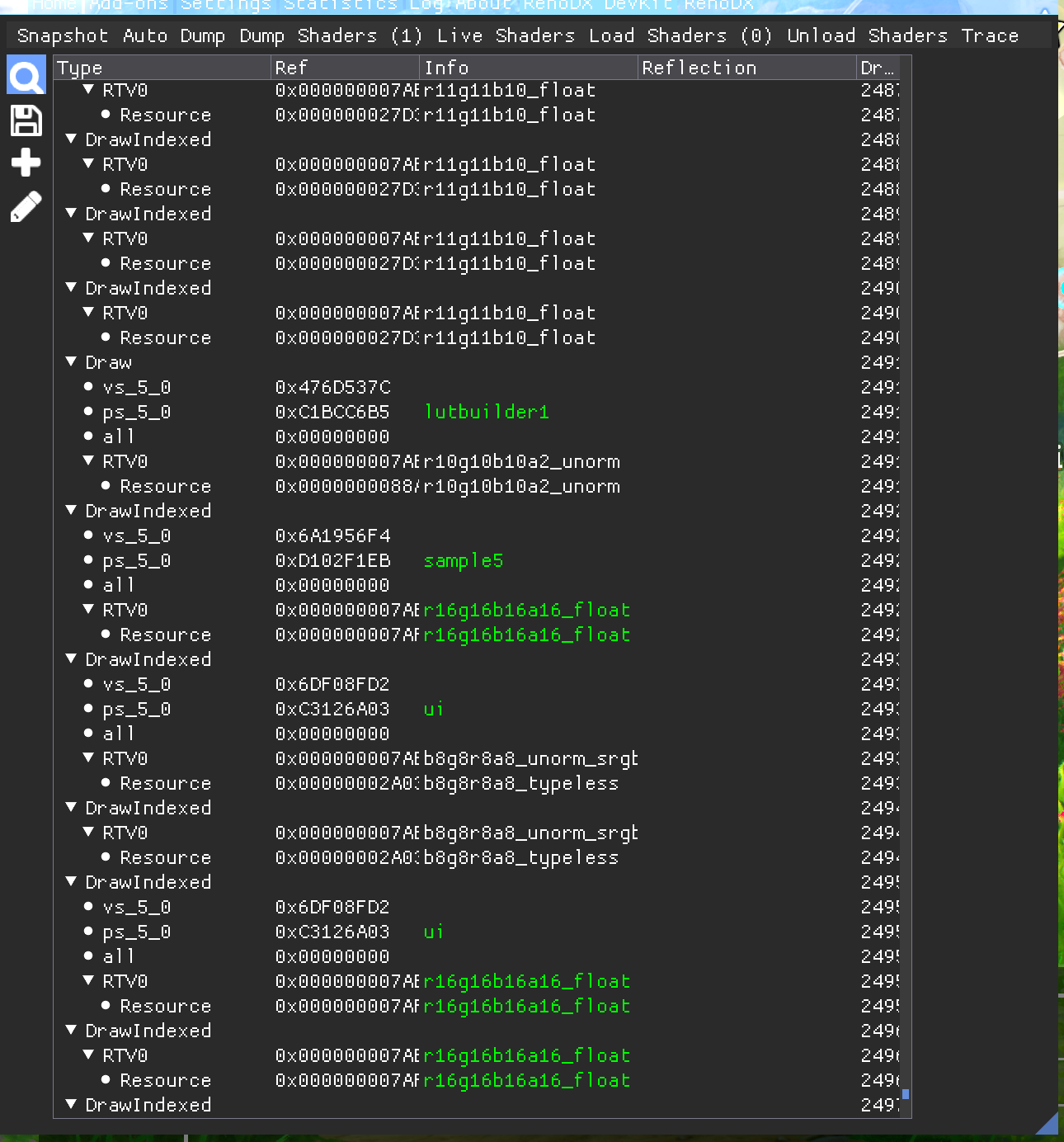
if the shader has 543 in it, its the sample shader
the sample shader always gets drawn to the swapchain
and the lutbuilder is a rgb10a2 shader that always comes ontop of the sample shader
in the devkit itw ould look liek this, 1 sec
in pix you can also sort objects by 32x32x32
and find the lutbuilder
and get the bin, and run it through shortfuse's decompiler
lost spire
crystal flame
well if this works then i'll have sm6 already
we got one via thaumaturge and adrian's wu kong mod
tired mural
just realized that you can also pull shaders from the pak files, i think.
then you'll have all the hashes
crystal flame
maybe
lost spire
 crystal flame
lost spire
crystal flame
lost spire
lutbuilder (32x32x32 10bpc) -> sample drawn on swapchain
lost spire
crystal flame
honestly it might be a scam
I'm messing around with this one game
it pre-compiles shaders
it gave me 15 lutbuilders
renodx dumped them all
life good
I went to a new area, saw a new lutbuilder/hash
but it wasnt part of the pre-compilation
only way to get all the lutbuilders and sample shaders is to play the game yourself
crystal flame
idc i have all permutations so that ensures i didnt miss it
lost spire
the sample shader will 99% of the time always have 543 in it -- https://i.imgur.com/3kE9fKi.png

thats an easy way to find it
crystal flame
hash matched
and it worked
raise is gone
they're fucking using color offsets

so. what would be a non-shitty way to replicate the idea of color offsets
if anyone wants to check this out
wet kelp
lost spire
only way to get all the lutbuilders and sample shaders is to play the game yours...
they're using at least a few different luts for different areas
crystal flame
wet kelp
they're using at least a few different luts for different areas
luts are not used in hdr. i strongly doubt they are using actual luts anywhere
the lutbuilder we're talking about builds a lut from all the params and, optionally, and only in sdr, a sdr lut placed in that post process volume (or blends a few if they're overlapping
that lut from lutbuilder is always used. but that sdr lut is completely ignored in the hdr lutbuilder
i also havent seen a sdr lut used in the lutbuilder when i checked with nsight
i removed + (ColorOffset.xyz + ColorOffset.w)
do you have an idea how to do a color offset in a way that won't fuck up the black floor? i assume there's a reason they're doing this. probably to just brighten the image lol idk
lost spire
@crystal flame I took these pics later, shows you how shitty ini hdr is
#1282729343721803837 message
crystal flame
lost spire
<@98455130633949184> I took these pics later, shows you how shitty ini hdr is
that's not relevant?
crystal flame
figured lol
tired mural
crystal flame
do you have an idea how to do a color offset in a way that won't fuck up the bla...
basically how i floor correct the luts
but those lifts are usually done in gamma
float3 CorrectBlack(float3 color_input, float3 lut_color, float lut_black_y, float strength) {
  const float input_y = renodx::color::y::from::BT709(color_input);
  const float color_y = renodx::color::y::from::BT709(lut_color);
  const float a = lut_black_y;
  const float b = lerp(0, lut_black_y, strength);
  const float g = input_y;
  const float h = color_y;
  const float new_y = h - pow(lut_black_y, pow(1.f + g, b / a));
  lut_color *= (color_y > 0) ? min(color_y, new_y) / color_y : 1.f;
  return lut_color;
}
this is a different method i use to force it go to black
works in linear
crystal flame
this is basically another puzzle piece to fix unreal hdr btw
that's all over in all the games probably
tired mural
float color_zero_y = y::from::BT709(color_zero);
if (color_zero_y > 0) {
  color = renodx::lut::CorrectBlack(color, color_zero, color_zero_y, 1.f);
}
uh, you basically pass 0 and see if it's raised
tired mural
you just need luminance bt709
crystal flame
well the function looks like this
float3 ColorCorrect( float3 WorkingColor,
    float4 ColorSaturation,
    float4 ColorContrast,
    float4 ColorGamma,
    float4 ColorGain,
    float4 ColorOffset )
{
    // TODO optimize
    float Luma = dot( WorkingColor, AP1_RGB2Y );
    WorkingColor = max( 0, lerp( Luma.xxx, WorkingColor, ColorSaturation.xyz*ColorSaturation.w ) );
    WorkingColor = pow( WorkingColor * (1.0 / 0.18), ColorContrast.xyz*ColorContrast.w ) * 0.18;
    WorkingColor = pow( WorkingColor, 1.0 / (ColorGamma.xyz*ColorGamma.w) );
    WorkingColor = WorkingColor * (ColorGain.xyz * ColorGain.w) + (ColorOffset.xyz + ColorOffset.w);
    return WorkingColor;
}
so, uh, the Luma value is probably that?
tired mural
float yFromBT709(float3 bt709) {
  return dot(bt709, float3(0.2126390039920806884765625f, 0.715168654918670654296875f, 0.072192318737506866455078125f));
}
so... there's no way it'll gain without coloroffset.xyz + coloroffet.w
crystal flame
huh?
tired mural
float3 CorrectBlack(float3 color_input, float3 lut_color, float lut_black_y, float strength) {
  const float input_y = dot(color_input, AP1_RGB2Y);
  const float color_y = dot(lut_color, AP1_RGB2Y);
  const float a = lut_black_y;
  const float b = lerp(0, lut_black_y, strength);
  const float g = input_y;
  const float h = color_y;
  const float new_y = h - pow(lut_black_y, pow(1.f + g, b / a));
  lut_color *= (color_y > 0) ? min(color_y, new_y) / color_y : 1.f;
  return lut_color;
}


float3 lift = ColorOffset.xyz + ColorOffset.w;
float lift_y = dot(lift, AP1_RGB2Y);
if (lift_y > 0) {
  WorkingColor = CorrectBlack(WorkingColor, lift, lift_y, 1.f);
}```so is this game generic unreal engine hdr generated via output device 3/4 ?
crystal flame
tired mural
```cpp
float3 CorrectBlack(float3 color_input, float3 lut_color, float lut_black...
uh that's not gonna be smooth. it'll leave 0 at 0, but anything else would immediately have the whole gain nvm you edited the message
crystal flame
lost spire
so is this game generic unreal engine hdr generated via output device 3/4 ?
entirely untouched hdr. at least lutbuilder
tired mural
add it before the return
crystal flame
why do bt709 if they're doing float Luma = dot( WorkingColor, AP1_RGB2Y );?
tired mural
is it? then use that
crystal flame
well its the first line in that function
tired mural
i think that's it
i have a desmos of it: https://www.desmos.com/calculator/iaowrdex8x
crystal flame
can get rid of strength in CorrectBlack
tired mural
it'll optimize away, yeah.
crystal flame
a yeah i guess it would
tired mural
i have it attached to a slider in cyberpunk, only because i like to compare
crystal flame
happy my shader dumper worked flawlessly this time
tired mural
wouldn't you only want to run this in offset shadows?
crystal flame
uh yeah, now it's too dark
tired mural
float3 CCColorShadows = ColorCorrect(WorkingColor,
        ColorSaturationShadows*ColorSaturation,
        ColorContrastShadows*ColorContrast,
        ColorGammaShadows*ColorGamma,
        ColorGainShadows*ColorGain,
        ColorOffsetShadows+ColorOffset);
the function is running on midtones and highlights
crystal flame
yeah i know. but would the correction fuck it up there?
tired mural
yeah because it does this ```cpp
float3 WorkingColorSMH = CCColorShadowsCCWeightShadows + CCColorMidtonesCCWeightMidtones + CCColorHighlights*CCWeightHighlights;
it's certainly not working right currently. everything got crushed now
just removing the offset looked fine
i don't understand what the CorrectBlack function does then
tired mural
but the CC function is weird
it works on three 0-1 ranges, shadows, midtones, highlights
and you can offset midtones and highlights as well
crystal flame
what about just lerping the offset based on workingcolor luminance?
tired mural
that's kinda what it does, or should do
crystal flame
so it won't do anything if luminance is 0, otherwise it'll smoothly go up
not sure how to lerp it tho, is luma 1 high or low
tired mural
you should do it on CCColorShadows, not inside the ColorCorrect function
crystal flame
WorkingColor = WorkingColor + lerp(0, (ColorOffset.xyz + ColorOffset.w), min(Luma.xxx, 1)); something like this
crystal flame
tired mural
you should do it on `CCColorShadows`, not inside the ColorCorrect function
i can try. i have a suspicion they globally raise everything because it'd make too much sense to do otherwise
tired mural
you can apply at any point. it just lerps from what 0 is computed to have been raised
the b in the desmos is how aggressive/early it shifts to 0
crystal flame
// Shadow CC
    float3 CCColorShadows = ColorCorrect(WorkingColor,
        ColorSaturationShadows*ColorSaturation,
        ColorContrastShadows*ColorContrast,
        ColorGammaShadows*ColorGamma,
        ColorGainShadows*ColorGain,
-        ColorOffsetShadows+ColorOffset);
+        lerp(0, ColorOffsetShadows+ColorOffset, min(Luma, 1));
    float CCWeightShadows = 1- smoothstep(0, ColorCorrectionShadowsMax, Luma);
what about this
tired mural
it will remove the floor, but won't be consistent
let me actually reread my cyberpunk code
crystal flame
seems to look ok. so yeah it's enough to just do this on shadows
god it looks so much better without that raise
tired mural
float3 minBlack = LUT_TEXTURES[textureIndex].SampleLevel(SAMPLER, float(0.f).xxx, 0.0f).rgb;
const float lutMinY = renodx::color::y::from::BT709(minBlack);
if (lutMinY > 0) {
  color = renodx::lut::CorrectBlack(inputColor, color, lutMinY, 1.f);
}
so, inputColor is the color as inputed (WorkingColor before ColorCorrect())
color was the color after ColorCorrect()
and lutMinY is luminance after ColorCorrect() would return if you pass it 0 (which we know is just ColorOffsetShadows+ColorOffset
crystal flame
i'm off for now, the lerp is the peak of what i can come up with myself
happy to have found the actual issue and i think this needs to be eradicated from all unreal games
yes sir i would like to add a flat value to the shadows to raise the black floor. absolutely that's what i wanted to do yes
i feel like we should think what is the reason a dev would add a color offset to the shadows. likely because they felt the scene was too dark. so maybe ideally we should convert that offset into something that will serve a similar purpose without looking like ass on oled. exposure or something?
tired mural
it's common in the lift gamma gain in color grading. offset is lift.
you know bethesda loves it in starfield
they want shadows to be tinted a certain color
crystal flame
yeah but oleds universally hate this
tired mural
it's torture
crystal flame
so imo this needs to be replaced entirely
tired mural
it's standard practice in all the renodx mods when it corrects luts.
i don't even notice when i'm modding games because it handles it for you
crystal flame
yeah. i mean if it’s done for visibility purposes then maybe lift exposure slightly instead?
tired mural
it's a hard trade off. lift in cyberpunk is really bad. really strong. it's the worst part of the LUTs
in theory, the color correct strength can control how early it returns to "vanilla" luminance
but with no user control, could be more difficult. i really on game brightness and shadows to correct it
still, if it's like starfield, you weren't setting detail anyway. it was fogged up anyway
crystal flame
i’m trying to think why they felt they needed the lift and the only idea i have is that the scene was too dark and they wanted to brighten it. and they couldn’t see they’re not really adding any detail by doing a color offset because they’re on a shitty office lcd.
not necessarily talking about bloober because this is everywhere
tired mural
it gives "a look"
crystal flame
right.
tired mural
but all color gradin is basically photoshop era effects and math
straight up srgb math
which means working in gamma
tired mural
gain gamma lift is pow(gain * (x + lift), gamma)
crystal flame
he wasn’t doing this because the scene was too dark
tired mural
starfield did it for the film-like fog effect. actual film has "film fog" to it and was very noticable in the 70s era film. gives that instragram faded look
crystal flame
yea
tired mural
idk about silent hill, but might be a thing too. to give it a dated feel
crystal flame
they have a separate 90s mode
 crystal flame
tired mural
idk about silent hill, but might be a thing too. to give it a dated feel
crystal flame
tired mural
idk about silent hill, but might be a thing too. to give it a dated feel
if they wanted to achieve a limited range look then sure. that’s ass tho
tired mural
it was an "how things were". you understood all film had some sort of fog to it. then oled comes along and that's no longer standard
even CRT has a fog to it
crystal flame
yeah. basically this needs to be gone but i’m just musing on what’s the ideal replacement
tired mural
because the phosphor, uh.. area? basically. CRT screens have this gray area that electrons are fired onto. it's not actually black
cinema relies on dark environment and you know none of these devs did any work in a dark room
they designed these scenes with office lights
movies do it too though. any star wars film/tv show has gray for space
crystal flame
basically by getting rid of the raised black floor we make things darker. how can we somehow not make things darker, and retain the brighter shadows but actually have detail there instead of a flat gray?
tired mural
"shadow contrast", basically pointed gain instead lift
crystal flame
if the reason for the offset was that they wanted to brighten it up a bit
crystal flame
tired mural
"shadow contrast", basically pointed gain instead lift
we need to cook on this idea then
tired mural
you can't 100% replicate it though
crystal flame
tired mural
you can't 100% replicate it though
well 100% would be bad anyway heh
tired mural
the shadow slider i have is okay. but basically you add more gain
crystal flame
gotta figure out how to convert the value
tired mural
so the way the function works as oppose to the lerp is to bias clearer to the original gain but still retain black
it gives it some contrast
which is why it uses pow
it's messing with the b value in the graph, but i just put a value that i felt was probably universal enough
if you lower b, it shifts to vanilla sooner
The other thing you could do it use perceptual stuff to increase shadow visibility. We fixed shadows with OKLAB in Starfield
wet kelp
well the game runs like shit under SM6
i guess because they haven't compiled shaders for it
tough scarab
wet kelp
why don't I just enable FSR3 FG
doesnt work with dlss
lost spire
wet kelp
well the game runs like shit under SM6
wat
pretty sure the game is sm6 by default, because RT
unless you're running the renodx devkit; that nukes fps in dx12
wait I scrolled up, its sm5 
let me c
yea default settings (ultra/rt) the game is SM6

do you mean sm5? because some games like wukong you can force to run in sm5 via -d3d11 -- but it will run like proper shit
lost spire
lost spire
yea default settings (ultra/rt) the game is SM6
idk man, I fired up the devkit out of curiosity
maybe its the settings I use?
all ultra
the devkit shoes sm 6_6
wet kelp
it's really not..
 lost spire
weird stuff
wet kelp
left vanilla ... right ultra+ 0.7.1

 lost spire
if its sm5
wet kelp

 lost spire
wonder why ersh mentioned having to do sm6
wet kelp

 lost spire
a sm5 lutbuilder fix takes like 5 minutes
wet kelp
lost spire
a sm5 lutbuilder fix takes like 5 minutes
hmm idk, i'll try launching it as SM6 again
tough scarab
nice
lost spire
@wet kelp launch it with no mods
put in reshade with addon support
and put this in
devkit
when you get in game, take a snapshot [press home/screensot] in the devkit imgui
and just scroll down
wet kelp
won't that give the same result as your screenshot?
lost spire
lost spire
yea default settings (ultra/rt) the game is SM6
I did that in the main menu and got all sm 6_6 shaders
 lost spire
wet kelp
won't that give the same result as your screenshot?
lost spire
wet kelp
won't that give the same result as your screenshot?
it will tell you what the game is running in that frame
if the devkit says xx_6_6 , the shader is pixel shader 6.6
I never seen the devkit guess wrong so idk
also idk why it shows amd fsr replacement backend when I dont even have upscaling enabled
lost spire
all the ue5 games I ever dumped
are all sm6+
unless you do -d3d11
assuming it lets you
so while idk what that cvar is doing specifically, the .cso files the devkit decompiles will be sm6
wet kelp
huh, well there you go 😊 i stand corrected 😄
0.7.1 really looks so nice
left ray reconstruction ... right my settings


🤔
lost spire
@wet kelp this is a bit off topic, but if there is a cvar that can force a game to change sm6 <-> sm5; do you think it would work for persona 3 reloaded [sm6.1]
wet kelp
no there's no cvar
lost spire
I dont need it to run well, but if I could get the sm5 version of the shaders, I could upgrade them to 6.1 when compiling
well not cvar, but pak setting
wet kelp
yes it's in BaseEngine.ini, add it here 😊

if you want to disable SM6, put a - before it
lost spire
wet kelp
yes it's in BaseEngine.ini, add it here 😊
@rigid jackal something we have to try
thanks man
lost spire
if this works thats actually huge; sm6 is ass to work with
[gotta learn sometime though]
wet kelp
it will work
but let me know anything you need for Persona 3... my husband loves those games
how does it run?
lost spire
wet kelp
how does it run?
idk; I refuse to play until I get hdr working thats not w11 auto hdr
but it has forced raytracing and no upscaling
digital foundry did a video on performance
wet kelp

Nexus Mods :: Silent Hill 2 (2024)
Unlock the FPS from 30 in cutscenes and remove the black bars from the cutscenes in anything other than 16:9
 wet kelp
lost spire
idk; I refuse to play until I get hdr working thats not w11 auto hdr
wet kelp
lost spire
idk; I refuse to play until I get hdr working thats not w11 auto hdr
do you have UUU? can you do a CVars dump?
lost spire
wet kelp
do you have UUU? can you do a CVars dump?
ini hdr griefs it, the game's engine is cursed
it has to be fixed properly
but I don't know sm6; so there's that
hybrid anvil
crystal flame
i removed `+ (ColorOffset.xyz + ColorOffset.w)`
Ah, they just used levels to raise brightness? Lol
hybrid anvil
crystal flame
`WorkingColor = WorkingColor + lerp(0, (ColorOffset.xyz + ColorOffset.w), min(Lu...
Yeah. Something like this partially preserves it. Much better.
tough scarab
wet kelp
https://www.nexusmods.com/silenthill2/mods/69
Pantene Pro-V
wet kelp
I meant to post those in my thread 😜
wet kelp
crystal flame
<@115289688037785602> https://github.com/EpicGames/UnrealEngine/blob/40eea367040...
is there a reason you guys are not using the right version of UE?
gray parrot
wet kelp
huh, well there you go 😊 i stand corrected 😄
Wait, do I have to turn off Ray recons. in order to use 0.7.1 properly?
hybrid anvil
wet kelp
is there a reason you guys are not using the right version of UE?
they ported back HDR from 5.3
crystal flame
hybrid anvil
they ported back HDR from 5.3
no it’s not ported, it’s stock 5.1
crystal flame
wet kelp
is there a reason you guys are not using the right version of UE?
didn’t matter in this case, i did use 5.1 on my pc just didn’t link the right file here
tough scarab
wet kelp
left ray reconstruction ... right my settings
you uploaded same pic twice I think
gray parrot
tough scarab
you uploaded same pic twice I think
They are different. See the hair is noticebley different among other few things
tough scarab
ok I can see they are barely different, right pic is slightly sharper
don't get what it's supposed to show
gray parrot
tough scarab
don't get what it's supposed to show
Might be a more stable picture in motion, otherwise not much difference in pics for sure, just slightly darker on right
tough scarab
if the right one disables RR it can't be more stable in motion
gray parrot
tough scarab
if the right one disables RR it can't be more stable in motion
Im told the pak actually enables RR so im confused... @wet kelp will have to shed light on things
tough scarab
maybe this comparison was vanilla with just RR, vs her mod which has RR and other changes?
gray parrot
tough scarab
maybe this comparison was vanilla with just RR, vs her mod which has RR and othe...
yes thats what I think it is
tough scarab
they have to be both RR because otherwise you'd see much worse reflections without it
gray parrot
correct
and very minimal difference
let this day be marked as the day me and Olek saw eye on eye on something
tough scarab
 gray parrot
 crystal flame
if anyone wants to check this out. place next to the exe, requires reshade (the reshade addon replaces shaders)
you should probably restore the mess you've likely made in the hdr settings while trying to fix the black floor 😛 try running defaults
pallid lava
crystal flame
This is for SH2 only or general use for UE5?
crystal flame
pallid lava
This is for SH2 only or general use for UE5?
it should work for any stock ue5.1 as these are made in a blank ue5.1 project
other versions likely have different shaders and thus hashes
gray parrot
crystal flame
if anyone wants to check this out. place next to the exe, requires reshade (the ...
I dont think the black floor is at all a problem in this game, its already very low and whatever is there is most likely intended per to the fog and atmosphere
 hybrid pumice
crystal flame
hybrid pumice
crystal flame
Doesn't work with ultra plus
crystal flame
gray parrot
I dont think the black floor is at all a problem in this game, its already very ...
some places look bad on oled imo
 ebon zealot
i think it's a problem. the first half of the hospital is horrendous on an OLED
gray parrot
crystal flame
some places look bad on oled imo
Ahh ok I havent made it to the hospital yet, though I am playing on OLED as well
crystal flame
gray parrot
Ahh ok I havent made it to the hospital yet, though I am playing on OLED as well
havent been in the hospital either, but heres where i realized it was bothering me yesterday
 gray parrot
Are you guys on default HDR values?
ebon zealot
yeah
crystal flame
hybrid pumice
Doesn't work with ultra plus
it... does not indeed. huh. @wet kelp what are you changing that could swap the shaders? (are you switching to sm5 for some reason?)
ebon zealot
i've been using lilium's black floor fix, but i have to adjust it per area as the min nit value varies pretty wildly
crystal flame
ebon zealot
i've been using lilium's black floor fix, but i have to adjust it per area as th...
yeah. this will look better and will work everywhere as it fixes the root cause
gray parrot
only once Ultra Plus allows it
tired mural
I think the worst I've seen is still Starfield

 crystal flame
tired mural
I think the worst I've seen is still Starfield
crystal flame
tired mural
I think the worst I've seen is still Starfield
absolutely
tired mural
i can try to rework the Starfield math for linear if it's important. it's just that based around LUTs and them being in gamma space.
ebon zealot
demon's souls has some pretty horrendous hdr "blacks" that will need fixing if it comes to pc! https://i.imgur.com/8H67Oq2.jpg
 gray parrot
Only about 90% of the HDR games have bad black levels
ebon zealot
yeah
crystal flame
tired mural
i can try to rework the Starfield math for linear if it's important. it's just t...
I'm doing this rn
// Shadow CC
+   float4 ShadowOffset = ColorOffsetShadows+ColorOffset;
+   ShadowOffset.xyz *= saturate(WorkingColor.xyz);
+   ShadowOffset.w *= saturate(Luma);

    float3 CCColorShadows = ColorCorrect(WorkingColor,
        ColorSaturationShadows*ColorSaturation,
        ColorContrastShadows*ColorContrast,
        ColorGammaShadows*ColorGamma,
        ColorGainShadows*ColorGain,
-       ColorOffsetShadows+ColorOffset);
+       ShadowOffset);
    float CCWeightShadows = 1- smoothstep(0, ColorCorrectionShadowsMax, Luma);
yeah, but if black has a tint it doesn't reapply the color perceptually like the LUT method which uses OKLab to do it. just more math
in starfield it's important because they wanted a color haze
and a lot of it
green in one planet, blue in another, red on mars etc
float3 Unclamp(float3 original_gamma, float3 black_gamma, float3 mid_gray_gamma, float3 white_gamma, float3 neutral_gamma) {
  const float3 added_gamma = black_gamma;
  const float3 removed_gamma = 1.f - min(1.f, white_gamma);

  const float mid_gray_average = (mid_gray_gamma.r + mid_gray_gamma.g + mid_gray_gamma.b) / 3.f;

  // Remove relative to distance to inverse midgray
  const float shadow_length = 1.f - mid_gray_average;
  const float shadow_stop = max(neutral_gamma.r, max(neutral_gamma.g, neutral_gamma.b));
  const float3 floor_remove = added_gamma * max(0, shadow_length - shadow_stop) / shadow_length;

  // Add back relative to distance from midgray
  const float highlights_length = mid_gray_average;
  const float highlights_stop = 1.f - min(neutral_gamma.r, min(neutral_gamma.g, neutral_gamma.b));
  const float3 ceiling_add = removed_gamma * (max(0, highlights_length - highlights_stop) / highlights_length);

  const float3 unclamped_gamma = max(0, original_gamma - floor_remove) + ceiling_add;
  return unclamped_gamma;
}

float3 RecolorUnclamped(float3 original_linear, float3 unclamped_linear) {
  const float3 original_lab = renodx::color::oklab::from::BT709(original_linear);

  float3 retinted_lab = renodx::color::oklab::from::BT709(unclamped_linear);
  retinted_lab[0] = max(0, retinted_lab[0]);
  retinted_lab[1] = original_lab[1];
  retinted_lab[2] = original_lab[2];

  float3 retinted_linear = renodx::color::bt709::from::OkLab(retinted_lab);
  retinted_linear = renodx::color::bt709::clamp::AP1(retinted_linear);
  return retinted_linear;
}
if (lut_config.scaling != 0) {                                                                     \
  float3 lutBlack = SampleColor(ConvertInput(0, lut_config), lut_config, lut_texture);             \
  float3 lutMid = SampleColor(ConvertInput(0.18f, lut_config), lut_config, lut_texture);           \
  float3 lutWhite = SampleColor(ConvertInput(1.f, lut_config), lut_config, lut_texture);           \
  float3 unclamped = Unclamp(                                                                      \
      GammaOutput(lutOutputColor, lut_config),                                                     \
      GammaOutput(lutBlack, lut_config),                                                           \
      GammaOutput(lutMid, lut_config),                                                             \
      GammaOutput(lutWhite, lut_config),                                                           \
      GammaInput(color_input, lutInputColor, lut_config));                                         \
  float3 recolored = RecolorUnclamped(color_output, LinearUnclampedOutput(unclamped, lut_config)); \
  color_output = lerp(color_output, recolored, lut_config.scaling);                                \
}
sure but that's too big brain for me
tired mural
yeah, it's not worth it if it's just straight up raising of black
renodx is all namespaced, so you can just import src/shaders/renodx.hlsl and have access to all the functions. but the raised-black-from-lut math isn't broken apart
or you can just fix the sampler instead of the lut builder and treat the built lut as any other LUT even if it's in PQ. i think Musa does that for god of war
quartz epoch
crystal flame
if anyone wants to check this out. place next to the exe, requires reshade (the ...
that immediate difference when booting it up

 summer gyro
Is it just a black floor fix or does it also recalculate those ACES coefficients
quartz epoch

 rigid jackal
man the traversal stutter is killing me. the game even slows down during those frametime lurches
is that normal
open zenith
rigid jackal
is that normal
No, bad programming I suspect
quartz epoch
quartz epoch
combined with the Less Shiny Hair mod on Nexus
 wide gyro
crystal flame
wide gyro
crystal flame
thanks, working great
hybrid anvil
tired mural
I think the worst I've seen is still Starfield
this would probably win a lawsuit if you sue Bethesda
gray parrot
quartz epoch
Thats eating up a lot of shadow details
tired mural
HDR should be 5 nit dark room.
hybrid anvil
quartz epoch
that immediate difference when booting it up
tbh I like the left version better. There's better visibility in dark areas, and that's probably what they wanted.
hybrid anvil
crystal flame
I'm doing this rn
```diff
// Shadow CC
+ float4 ShadowOffset = ColorOffsetShad...
@crystal flame I think you should make a version that halves the black raising.
tired mural
or just add more gain to the shadows relative to how much it was raised
hybrid anvil
crystal flame
I'm doing this rn
```diff
// Shadow CC
+ float4 ShadowOffset = ColorOffsetShad...
Or do this, maybe better:
// Shadow CC
+   float4 ShadowOffset = ColorOffsetShadows+ColorOffset;
+   ShadowOffset.xyz *= pow(saturate(WorkingColor.xyz), 1.f / 2.2f);
+   ShadowOffset.w *= pow(saturate(Luma), 1.f / 2.2f);

    float3 CCColorShadows = ColorCorrect(WorkingColor,
        ColorSaturationShadows*ColorSaturation,
        ColorContrastShadows*ColorContrast,
        ColorGammaShadows*ColorGamma,
        ColorGainShadows*ColorGain,
-       ColorOffsetShadows+ColorOffset);
+       ShadowOffset);
    float CCWeightShadows = 1- smoothstep(0, ColorCorrectionShadowsMax, Luma);
ColorGain *= something something
ColorContrastShadows is also there, could try boosting that relative to how much ShadowOffset originally was
crystal flame
hybrid anvil
tbh I like the left version better. There's better visibility in dark areas, and...
thats why i'd like to transfer this offset into something that raises brightness in a way that isnt shitty on an oled
crystal flame
tired mural
ColorGain *= something something
something like that, yeah. no idea what exactly there heh
hybrid anvil
crystal flame
thats why i'd like to transfer this offset into something that raises brightness...
try this #1291021198628618353 message, might work.
crystal flame
hybrid anvil
try this https://discord.com/channels/1161035767917850784/1291021198628618353/12...
yeah gonna do that. i'd like to try boosting gain somewhat too, any idea what to do?
i can just yolo and add ShadowOffset to the gain
no that'd be bad probably
hybrid anvil
ye
tired mural
i thought the same thing, probably enough to be honest. this is all uncharted territory. or try to figure out the function i made which uses pow
tough scarab
@crystal flame So atm doesn't work with Ultra plus mod?
crystal flame
tough scarab
<@98455130633949184> So atm doesn't work with Ultra plus mod?
yes, dunno why
it might be changing to SM5 from SM6, that could certainly cause it. but i don't see the point
wet kelp
tough scarab
don't get what it's supposed to show
RR makes the road look like crap
wet kelp
crystal flame
it... does not indeed. huh. <@184939081585786880> what are you changing that cou...
nope..
wet kelp
crystal flame
havent been in the hospital either, but heres where i realized it was bothering ...
what tool are you using there to analyze?
crystal flame
wet kelp
what tool are you using there to analyze?
lilium's hdr analysis reshade shader
wet kelp
crystal flame
it might be changing to SM5 from SM6, that could certainly cause it. but i don't...
U+ it does explicitly allow SM6
I'll try removing that
crystal flame
wet kelp
U+ it does explicitly allow SM6
they are sm6 so it should work. idk
crystal flame
gray parrot
Thats eating up a lot of shadow details
here's a new version with lowered contrast in the affected areas. i believe it achieves the brightening effect without looking like ass on oled
wet kelp
this is with the SM6 declaration removed
grazie bello
just the regular Reshade install?
crystal flame
yeah
crystal flame
wet kelp
this is with the SM6 declaration removed
still doesnt match the hashes. this is really strange
especially as i dump all possible permutations
wet kelp
tough scarab
maybe this comparison was vanilla with just RR, vs her mod which has RR and othe...
i accidentally disabled RR a while back, but nobody noticed and everyone seems happy, so i have been working on other problems. RR is quite blurry, i don't like it in this game at all. it's more stable in motion, yes, but not by a lot
lumen does some ray reconstruction anyway, it's spatiotemporal
(i believe anyway)
wet kelp
crystal flame
especially as i dump all possible permutations
lol i created an enigma. okay i'll see if i can bissect
gray parrot
Wait so RR is disabled in latest pak?
wet kelp
yes
i'm going to rearrange how the mod is made so i can have little sub packs for things 😊
crystal flame
wet kelp
lol i created an enigma. okay i'll see if i can bissect
it's good that we accidentally caught this i think. because i don't think you want your mod to be doing that at all, i wouldnt be surprised if this might cause shader precompilation to not work
gray parrot
 gray parrot
wet kelp
i'm going to rearrange how the mod is made so i can have little sub packs for th...
gray parrot
wet kelp
i'm going to rearrange how the mod is made so i can have little sub packs for th...
Yes, that would be pretty awesome
wet kelp
gray parrot
https://tenor.com/view/screaming-gif-19485868
lmao 🤣 see the thing is, people seem to have been enjoying how it looks. i think it looks better with my fixed Lumen reflections. so why would you care?
gray parrot
wet kelp
lmao 🤣 see the thing is, people seem to have been enjoying how it looks. i thin...
I honestly thought something was off lol the shine went away I thought
wet kelp
crystal flame
it's good that we accidentally caught this i think. because i don't think you wa...
it's possible. i also think it's good. if all UE games are a little fucked like this, we can fix things together. if you look at the visual differences i made in #1293113206687928322 , it's quite significant now
i'd much rather work with good modders to fix the things like HDR, (hair in this case), bugs, etc. so the game is as good as it can be
gray parrot
gray parrot
I honestly thought something was off lol the shine went away I thought
but that was also with manual RR enabled so I dont know
wet kelp
let's face it, the devs don't get the last 10% to polish
i'll be honest though, i haven't done anything to change shaders, i'm really surprised
gray parrot
yeah HDR is a big one needing assist
wet kelp
( <<< completely aware changing shaders changes the shipped precompiled shaders)
gray parrot
wet kelp
( <<< completely aware changing shaders changes the shipped precompiled shaders)
Have you tested manual Ray Reconstruction with your mod? vs just your mod? Thatd be a neat test
wet kelp
guys... i am a developer. i own a software company and AI and other patents and am a system engineer. i don't know shader language, but c'mon 😜
wet kelp
gray parrot
Have you tested manual Ray Reconstruction with your mod? vs just your mod? Thatd...
yes...
no it's not my mod
i could try another RR dll. they are all different. people don't realise devs modify them before shipping. i used the CP one bc i'm lazy
gray parrot
Damn
wet kelp
sorry, is it regular ReShade? your changes were upstreamed to their rel?
crystal flame
wet kelp
i could try another RR dll. they are all different. people don't realise devs mo...
devs have no idea what's in those dlls 😄 and they're a black box, they can't edit them either
gray parrot
the plot thickens, list of shitstorm is longer than traffic returning to FL on I-75 right now
too soon?
crystal flame
wet kelp
sorry, is it regular ReShade? your changes were upstreamed to their rel?
it's just a reshade addon that replaces shaders, compiled from reshade examples
requires reshade with addon support
gray parrot
wet kelp
yes...
did not look good vs just the Ultra Plus mod?
wet kelp
crystal flame
devs have no idea what's in those dlls 😄 and they're a black box, they can't ed...
they do edit them. CDPR removed SHaRC from nvngx_dllsd. they don't edit them often, but they do change them
CDPRs dlssd 3.7.10 was 20MB smaller than other games
wet kelp
crystal flame
it's just a reshade addon that replaces shaders, compiled from reshade examples
ever going to do your own asi injector?
wet kelp
gray parrot
did not look good vs just the Ultra Plus mod?
what didn't?
also i need to fix Wukong, people are asking me
crystal flame
wet kelp
ever going to do your own asi injector?
no need in this case, reshade provides its own hooks
gray parrot
wet kelp
what didn't?
sorry, does the Ultra Plus + Manual addition of RR looks bad compared to just the Ultra Plus mod?
crystal flame
wet kelp
they do edit them. CDPR removed SHaRC from nvngx_dllsd. they don't edit them oft...
i doubt it was cdpr, it mustve been nvidia. i don't think they have any access to what is inside
wet kelp
crystal flame
i doubt it was cdpr, it mustve been nvidia. i don't think they have any access t...
sorry, i got it the wrong way round. another game removed SHaRC. people were trying to use it with Cyberpunk..
why would you remove it though? if it's not explicitly called it does nothing
crystal flame
wet kelp
why would you remove it though? if it's not explicitly called it does nothing
earlier version that didnt have it, i'd assume?
wet kelp
crystal flame
no need in this case, reshade provides its own hooks
you're aware some people flat out refuse to use Reshade?
crystal flame
wet kelp
you're aware some people flat out refuse to use Reshade?
that's their problem
wet kelp
not combattive - just asking
haha k
my goal is simple. i love games. i want everyone to enjoy them 😊
wet kelp
gray parrot
sorry, does the Ultra Plus + Manual addition of RR looks bad compared to just th...
imo, yes. BUT i'll try downloading the RR dll from Techthingy
crystal flame
i don't feel like doing all the work reimplementing what reshade provides just so a few weird people can use it 😛
reshade's good
gray parrot
wet kelp
imo, yes. BUT i'll try downloading the RR dll from Techthingy
Thanks, thats where I got my copy from
wet kelp
crystal flame
reshade's good
i agree. my only annoyance is when too many injectors crash things (MSI, SK, ReShade...)
OHHH maybe CDPR had Nvidia add SHaRC
crystal flame
right. reimplementing that myself would probably have similar compatibility issues though (or worse because reshade has years of compatibility fixes already done)
hybrid anvil
wet kelp
grazie bello
ITA?

 wet kelp
crystal flame
right. reimplementing that myself would probably have similar compatibility issu...
wet kelp
crystal flame
right. reimplementing that myself would probably have similar compatibility issu...
i was just thinking you'd fork someone else's simple asi injector
but yes, it's wasted effort
gray parrot
wet kelp
<@1202971138100035634> can you please send me yours?
yes, will do tonight!
wet kelp
dw i agree Ersh, i was just asking the question
crystal flame
wet kelp
but yes, it's wasted effort
and bonus possible conflict with reshade. which i use to see the hdr analysis shader, for example 😄
wet kelp
yes true. fair. well reasoned 😂
gray parrot
Sammi, what overlay do you use to monitor frametime/FPS? Its not RiviaTuner is it?
tough scarab
 wet kelp
gray parrot
Sammi, what overlay do you use to monitor frametime/FPS? Its not RiviaTuner is i...
wet kelp
gray parrot
Sammi, what overlay do you use to monitor frametime/FPS? Its not RiviaTuner is i...
just rivatuner, yes
i'm guessing this is not it
 gray parrot
wet kelp
i'm guessing this is not it
gray parrot
wet kelp
i'm guessing this is not it
Thats reshade/HDR analysis
tough scarab
wet kelp
just rivatuner, yes
*RiviaTuner
wet kelp
gray parrot
Thats reshade/HDR analysis
i mean, the shader_replace is not working
gray parrot
wet kelp
i mean, the shader_replace is not working
sorry
wet kelp
gray parrot
sorry
you will be 😄 here's my settings
 wet kelp
crystal flame
havent been in the hospital either, but heres where i realized it was bothering ...
wet kelp
crystal flame
havent been in the hospital either, but heres where i realized it was bothering ...
yeah it looks like it's not working with U+
?

bissecting 😭 in Australian
gray parrot
 open zenith
crystal flame
here's a new version with lowered contrast in the affected areas. i believe it a...
open zenith
crystal flame
here's a new version with lowered contrast in the affected areas. i believe it a...
Is this mod of your own making?
crystal flame
yes
 wet kelp
hahah totally me
my husband wanted me to get some complicated coffee machine. i was like, you don't understand, i would need a coffee machine to make it to the coffee machine
okayyyy......... progress
 summer gyro
wet kelp
my husband wanted me to get some complicated coffee machine. i was like, you don...
summer gyro
wet kelp
my husband wanted me to get some complicated coffee machine. i was like, you don...
i wanted a casabrews cm5418

 wet kelp
no i moved bloom to a compute shader
umm no that's not it 🤔
this is actually a really fascinating data point that this can happen. it might explain some hitches in Survivor
wet kelp
i might have had P3 applied, i just disabled it
wet kelp
crystal flame
hm i think i made it too bright now 😄
do you know the namespace(s) you guys hooked?
crystal flame
wet kelp
do you know the namespace(s) you guys hooked?
#1291021198628618353 message
this is the entire edit
in PostProcessCombineLUTs.usf
well, not the current one as i did contrast adjustments afterwards, but that's in the same function
wet kelp
all good, ty
oh seriously, i bissected all sections and didn't find it 🤦♀️
starting again lol
by quarters this time i guess
i suppose it could be 2 changes that's done it. how exciting 
crystal flame
wet kelp
i might have had P3 applied, i just disabled it
nah it is too bright, i've just checked
wet kelp
otay
crystal flame
i have a magic number there to convert from the offset to contrast, so it's basically guesswork on what's the right value
wet kelp
i have 2 Dolby displays, if that helps
okay located the section
i really, really hope it's not what i think it is

 wet kelp
crystal flame
a bit less bright
wet kelp
crystal flame
a bit less bright
found it

they must have forked the code path for the shaders for the D3D12 disk cache
crystal flame
hmm
wet kelp
fixed
crystal flame
@tired mural is it possible the shaders would be loaded in some different way without running the on_create_pipeline reshade event?
tough scarab
wet kelp
fixed
Does this force disable RR?
wet kelp
lol no, i'll fix RR in a sec 😊
tough scarab
thanks
wet kelp
i'm very, very curious to see how this runs now
still the same!

(same frametime hitch. i think it's anim loads)
@crystal flame annoyingly, frame time is less stable without the disk cache
crystal flame
static TAutoConsoleVariable<int32> CVarDriverOptimizedPipelineStateDiskCache(
    TEXT("D3D12.PSO.DriverOptimizedDiskCache"),
    0,
    TEXT("Enables a disk cache for driver-optimized Pipeline State Objects (PSOs).\n")
    TEXT("PSO descs are cached to disk so subsequent runs can create PSOs at load-time instead of at run-time.\n")
    TEXT("This cache contains data specific to the hardware, driver, and machine that it was created on.\n")
    TEXT("0 to disable the driver-optimized pipeline state disk cache\n")
    TEXT("1 to enable the driver-optimized pipeline state disk cache\n"),
    ECVF_ReadOnly);
looking at what actually uses it
wet kelp
it's a little improved with the non driver PSO disk cache (which doesn't change the shaders)
crystal flame
wet kelp
it's a little improved with the non driver PSO disk cache (which doesn't change ...
i don't think it changes the shaders
i think the reshade event just doesnt run
crystal flame
its possible it could be replaced in a different way. renodx might already be handling that, i'm just using the reshade addon example as it was lightweight and simpler
wet kelp
got you
well the difference without the cache is essentially "zero hitches (except for that one i'm tracking down)" vs. "a few dozen small hitches per minute (about 4ms)"
so it is significant
exactly why UE doesn't auto-enable it on Windows is beyond me
oh!! that's why Steam Deck is crashing on startup!
tired mural
crystal flame
<@115289688037785602> is it possible the shaders would be loaded in some differe...
yes, which is what pipeline cloning handles.
i call it compile-time and runtime replacement in renodx
crystal flame
tired mural
yes, which is what pipeline cloning handles.
guess i should make it a renodx then
wet kelp
why haven't you done it already, i was thinking 🤣
crystal flame
i already have .cso files tho. i don't (can't) compile them from hlsl alone
tired mural
yeah, cso files
wet kelp
(joking!!)
crystal flame
that's doable in renodx without pain? including already compiled cso
tired mural

you'd have to handle embeds manually
no c++ #embed yet
so, just embed .cso files in the folder. let me see if i can do it in cmake quick
hybrid anvil
crystal flame
I think that the raised blacks also serve to give them impression of foggyness, even when there is none.
crystal flame
hybrid anvil
I think that the raised blacks also serve to give them impression of foggyness, ...
they have actual fog when it's supposed to be foggy
the only impression the raised blacks give me is of a shitty lcd
tired mural
almost done, just confused by cmake syntax (of course)
uh, just 0x1234578.cso right?
crystal flame
yea
tired mural
i'm putting the .cs_5_0 or whatever as optional, because that's how the devkit dumps them
lost spire
why not just decompile your .cso files and just inject them like a regular mod
just make no changes to the decompiled output
crystal flame
lost spire
why not just decompile your .cso files and just inject them like a regular mod
bc that would be silly
crystal flame
only if the decompilation can be recompiled back without any changes
remember its sm6
hybrid anvil
crystal flame
they have actual fog when it's supposed to be foggy
but near the camera fog doesn't work, especially in interiors
wet kelp
hybrid anvil
I think that the raised blacks also serve to give them impression of foggyness, ...
i agree. i've been careful to only juuust touch the black floor. the problem i see is the texture brightnesses don't quite match between the player character and the world (or there's possibly a character light) ... which makes the character look separate from the world. lowering the black floor a touch improves this greatly, but too much and it loses that Silent Hill "feel" with the fog
also, if you look at the changes i made to RT reflections (removing the roughness clamp) it also helps to fix the texture brightness inconsistencies
i had to raise the black floor (went from -0.0016 to -0.001)
wet kelp
hybrid anvil
but near the camera fog doesn't work, especially in interiors
near camera fog is disabled in Unreal for about 10 metres from the character. i have NO idea why they do this by default. it can be undone, i did it for hogwarts. i will possibly need the customized UEngine source to mod it (i haven't checked if there is one)
crystal flame
hybrid anvil
but near the camera fog doesn't work, especially in interiors
idk man. that sort of slight raise they have is probably unnoticeable on any lcd. and the only purpose it serves is downgrading an oled to a lcd
hybrid anvil
crystal flame
idk man. that sort of slight raise they have is probably unnoticeable on any lcd...
sure. I'm not playing on OLED atm.
but on my OLED there's even less details near black than on my monitor
it goes lower, but doesn't have much detail
crystal flame
i'm not sure the current contrast adjustment is good tho. i need to find a goddamn savepoint and test properly
hybrid anvil
it just all ends up looking black
hybrid anvil
crystal flame
i'm not sure the current contrast adjustment is good tho. i need to find a godda...
r u only applying that near black?
crystal flame
yes
tired mural
@crystal flame ready
wet kelp
do you guys know if it's running on SM5 or 6?
wet kelp
someone just posted this for oled ... that's just with r.color.min -0.001

(which looks like way too much to me)
tough scarab
crystal flame
sm6
Can't believe we got SM6 before GTA6
wet kelp
crystal flame
i'm not sure the current contrast adjustment is good tho. i need to find a godda...
#1293113206687928322 message
they are switching LUTs a lot in the game, especially in doors or when things get weird, things get a lot darker
we could have a problem that all of those have a different black point
crystal flame
wet kelp
they are switching LUTs a lot in the game, especially in doors or when things ge...
its not luts
its post process volumes
and yes, that kind of static min color adjustment is going to have issues with that
wet kelp
right. but same point applies
crystal flame
thats why my shader fixes the root cause there
wet kelp
you might need to have an adaptive black
gray parrot
wet kelp
someone just posted this for oled ... that's just with r.color.min -0.001
Thats just wiping off all the fog and elements plus the black levels? Thats not what the game is going for
crystal flame
default game look lol

i'm not gonna get convinced this is "intended foggy look" it's ass
wet kelp
gray parrot
Thats just wiping off all the fog and elements plus the black levels? Thats not ...
they're playing with fog disabled, by the looks
(which i'm not interested in supporting)
gray parrot
wet kelp
they're playing with fog disabled, by the looks
Yup thats what it looks like, no imagination at all
tough scarab
crystal flame
thats why my shader fixes the root cause there
All this stuff getting fixed/modded in first week is just another example of why you can't enjoy shit on day 1/launch
gray parrot
tough scarab
All this stuff getting fixed/modded in first week is just another example of why...
Or 4 days later hehe
crystal flame
tough scarab
All this stuff getting fixed/modded in first week is just another example of why...
yeah. though it seems we have raised black floor enjoyers here
wet kelp
crystal flame
i'm not gonna get convinced this is "intended foggy look" it's ass
yeah. i mean, they're intentionally limiting your perception to increase fear .... sounds that come from nowhere ... fog all around you so you can't see... and black rooms you can't see in
crystal flame
i strongly disagree with this look


 crystal flame
wet kelp
yeah. i mean, they're intentionally limiting your perception to increase fear .....
crystal flame
wet kelp
yeah. i mean, they're intentionally limiting your perception to increase fear .....
yeah, but let the black be black. the raise does nothing except looking bad
tough scarab
b b b ut the creative intent 🤢
wet kelp
i just think we should respect the horror "tools" they're using
because that's the whole reason SH works
crystal flame
wet kelp
i just think we should respect the horror "tools" they're using
see i feel like that goes out the window when you realize they're doing this on SDR office LCDs
wet kelp
that's all i'm saying. like if you can suddenly see, where they don't want you to be able to.....
summer gyro
crystal flame
default game look lol
ya so replacing it in a way that doesn't lower it too much would be nice
crystal flame
like, i don't believe the raised black floor is part of the intended look