#✨│ai-help
1 messages · Page 248 of 1
 analog obsidian
 wary shoal
oh i had no idea about thisss
analog obsidian
24k = 48k
20k = 40k
16k and below = 32k
true 48k audio is hard to find
40k and 32k are common
with 32k being the most common of all
32k = anything from youtube, twitch
analog obsidian

btw after you find the correct sample rate of your dataset (most probably 32k), delete your model's logs folder and re-do the whole preprocessing again
 quick terrace
how can I change vocals in a song, can you guys help me? Which site?
wary shoal
just wondering but this is what i want to see on spec right?

i switched everything to 32k on applio but im still seeing the parameter error
analog obsidian
wary shoal
i switched everything to 32k on applio but im still seeing the parameter error
download the 32k pretrain
wary shoal
got it downloaded and set it still gives the error 😦
should i try testing it with another pretrain?
analog obsidian
wary shoal
should i try testing it with another pretrain?
send a screenshot of your applio ui settings, you must be doing something wrong


 analog obsidian
wary shoal
analog obsidian
wary shoal
go to your model's log folder > sliced_audios > open any random slice in spek
do they match the sample rate? (32k)

 edgy oak
wary shoal
try the wokada fork up top
edgy oak
wary shoal
try the wokada fork up top
i can't send pics
 analog obsidian
wary shoal
this would be a 32k sample rate right since its udner 16k?
analog obsidian
wary shoal
this would be a 32k sample rate right since its udner 16k?
multiply by 2 the highest frequency your dataset reaches, thats your sample rate
16x2 =32
32k
but yea idk why are u getting that error
wary shoal
i knowwwww 😭 im trying everything
analog obsidian
disable custom pretrained, see if the og pretrain works
 simple ore
- make sure you pick the right g and d file
not d and g
- and the right SR
if in doubt, delete the model folder and reprocess again
edgy oak
wary shoal
try the wokada fork up top
can i have direct link pls
analog obsidian
simple ore
2) and the right SR
this is weird because everything matches and he did re-preprocess the whole thing 2 times

wary shoal
color me purple guys it worked!!!
i literally deleted my log folder for the third time and now its loading!!
i wanna thank you all for not giving up on me
simple ore

 brittle wing
analog obsidian
this is weird because everything matches and he did re-preprocess the whole thin...
brittle wing
analog obsidian
this is weird because everything matches and he did re-preprocess the whole thin...
I literally applied for model maker why is no one checking my submission
analog obsidian
brittle wing
I literally applied for model maker why is no one checking my submission
okay lemme check it
analog obsidian
done
brittle wing
analog obsidian
okay lemme check it
Thanks 🩷🩷🩷 but understand it's not my first model
analog obsidian
oh sorry lmao i thought it was ur first model
analog obsidian
for future models remember to hear your epochs, and choose one that doesn't sound robotic
brittle wing
Okayyy I will take that advice to heart
analog obsidian
more epochs don't equal better results
brittle wing
Does this one sound like the subject
analog obsidian
yea
brittle wing
analog obsidian
yea
Okay
analog obsidian
analog obsidian
more epochs don't equal better results
200e is usually a safe amount, you can save each 10 and hear them
brittle wing
analog obsidian
200e is usually a safe amount, you can save each 10 and hear them
Ikr
It was the most stable, started artifacting after 250
 vague karma
need tuturial on how to download
 frozen vapor
SAME
vague karma
can someone help with a tut on how to download
@analog obsidian tut
@edgy oak you get the ai voice changer or
 knotty moth
brittle wing
It was the most stable, started artifacting after 250
knotty moth
brittle wing
It was the most stable, started artifacting after 250
it may vary on different models
the best bet is to observe loss graphs (avg) and test several checkpoints
brittle wing
analog obsidian
nice job
Thx
brittle wing
knotty moth
the best bet is to observe loss graphs (avg) and test several checkpoints
I know I have experience
 late flicker
When i run-applio.bat, it will just say me: Press any key to continue . . .
idk what's wrong, i did everything they said on installation guide
knotty moth
late flicker
When i run-applio.bat, it will just say me: Press any key to continue . . .
no error messages?
try redownloading the latest release (precompiled)
knotty moth
vague karma
<@681186927151546397> CAN YOU HELP me get the voic changer
 no thanks
!howtoask
 patent trellisBOT
knotty moth
!howtoask
patent trellisBOT
knotty moth
!howtoask
How To Troubleshoot 
__**GIVE CONTEXT.**__ 📝
- Don't simply mention your issue, like "
my rvc is not working". - Describe the step you are on, what you're trying to do, the RVC you're using, a screenshot, etc.
- The more context, the better.
__**BE POLITE.**__ <:matsuripray:1159685390156967936>
- Don't be desperate. You can ping a Helper, but if they ignore, they aren't available/don't know the answer.
- It's okay if you're frustrated, but don't take it into this server.
- Don't DM without prior consent.
__**BE PRODUCTIVE.**__ 🤝
- Don't ask for every little instruction. Put your own effort & test things by yourself.
- Don't ask to ask.
- Check if your answer is a Google search away/on our guides website.
If you've changed your mind about your message, feel free to delete/edit it.
late flicker
knotty moth
try redownloading the latest release (precompiled)
Please, give me link. Idk if my is right
simple ore
late flicker
When i run-applio.bat, it will just say me: Press any key to continue . . .
dont run as admin?
late flicker
simple ore
dont run as admin?
no
late flicker
simple ore
https://huggingface.co/IAHispano/Applio/resolve/main/Compiled/Windows/ApplioV3.2...
already using
 faint violet
yo why is the voice changer so slow
faint violet
hey guys, i could use some help so it was working at first right after i installed it (a bit laggy, but fine), but after a while it just stopped detecting my voice. i haven’t changed any settings or anything. is there any fix for this?
 hallow thistle
faint violet
hey guys, i could use some help so it was working at first right after i install...
hallow thistle
faint violet
hey guys, i could use some help so it was working at first right after i install...
!howtoask
patent trellisBOT
hallow thistle
!howtoask
How To Troubleshoot
__**GIVE CONTEXT.**__ 📝
- Don't simply mention your issue, like "
my rvc is not working". - Describe the step you are on, what you're trying to do, the RVC you're using, a screenshot, etc.
- The more context, the better.
__**BE POLITE.**__ <:matsuripray:1159685390156967936>
- Don't be desperate. You can ping a Helper, but if they ignore, they aren't available/don't know the answer.
- It's okay if you're frustrated, but don't take it into this server.
- Don't DM without prior consent.
__**BE PRODUCTIVE.**__ 🤝
- Don't ask for every little instruction. Put your own effort & test things by yourself.
- Don't ask to ask.
- Check if your answer is a Google search away/on our guides website.
If you've changed your mind about your message, feel free to delete/edit it.
hallow thistle
Which W-Okada version are you using? And what is your PC GPU?
vague karma
hallow thistle
Which W-Okada version are you using? And what is your PC GPU?
can you help me with the cable stuff
hallow thistle
vague karma
can you help me with the cable stuff
Yes, you can elaborate anything about W-Okada and virtual cable, but it doesn't always have to be me.
vague karma
the vb cable driver pack 45 it wont work
vague karma
hallow thistle
Yes, you can elaborate anything about W-Okada and virtual cable, but it doesn't ...
the vb cable driver pack 45 it wont work
hallow thistle
vague karma
the vb cable driver pack 45 it wont work
No need to duplicate your message. I have seen it now.
vague karma
what do i do
hallow thistle
!howtoask
patent trellisBOT
hallow thistle
!howtoask
How To Troubleshoot
__**GIVE CONTEXT.**__ 📝
- Don't simply mention your issue, like "
my rvc is not working". - Describe the step you are on, what you're trying to do, the RVC you're using, a screenshot, etc.
- The more context, the better.
__**BE POLITE.**__ <:matsuripray:1159685390156967936>
- Don't be desperate. You can ping a Helper, but if they ignore, they aren't available/don't know the answer.
- It's okay if you're frustrated, but don't take it into this server.
- Don't DM without prior consent.
__**BE PRODUCTIVE.**__ 🤝
- Don't ask for every little instruction. Put your own effort & test things by yourself.
- Don't ask to ask.
- Check if your answer is a Google search away/on our guides website.
If you've changed your mind about your message, feel free to delete/edit it.
hallow thistle
Let me guess, did you follow the guide from YouTube?
vague karma
yes
hallow thistle
Again, please answer my question. What is your PC GPU?
The original version of W-Okada is old and outdated. There's a better one to try. VB-Cable has issues for Windows users when trying to use it with W-Okada.
vague karma
then what do i use ?
vague karma
there is a better one to try ?
hallow thistle
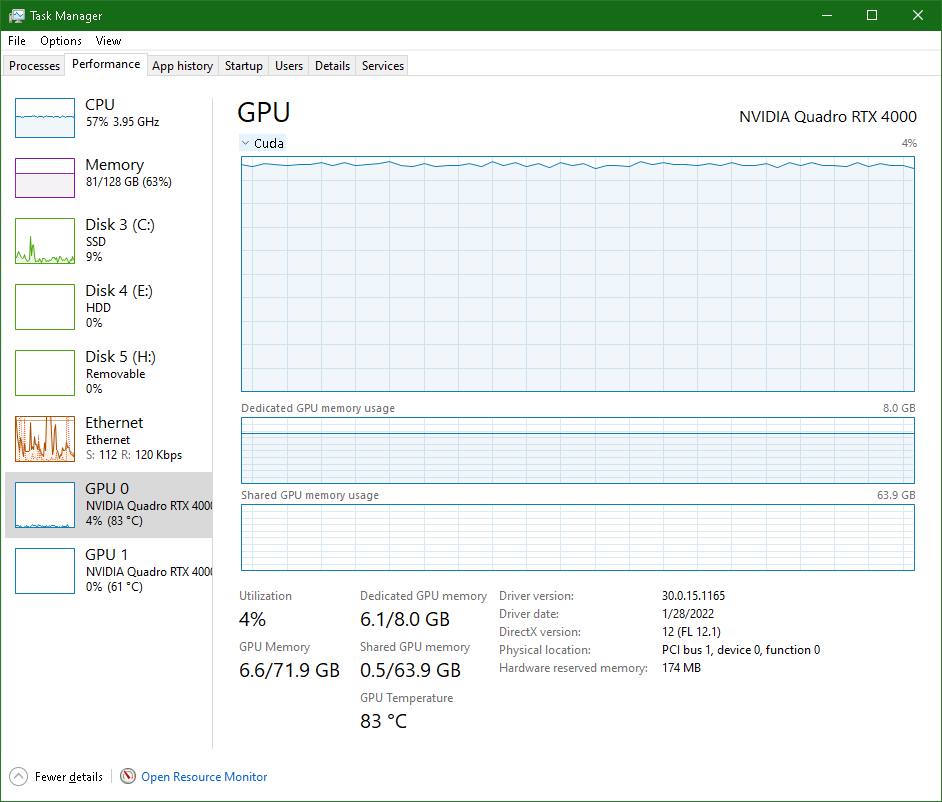
To check your PC GPU, open Task Manager, go to Performance tab, spot where GPU 0 or GPU 1 is in the left side, and click either one to reveal its full name on right side. Otherwise, I can't pick the proper W-Okada for that.

Don't mind my screenshot, that one shows CPU, my laptop doesn't have a GPU. But at least it should give you some ideas.
knotty moth
vague karma
then what do i use ?
please read the following guide: https://docs.aihub.gg/rvc-voice-changer/local/deiteris-w-okada-fork/
Last update: May 5, 2025
the download section depends on your gpu
hallow thistle
If you know what you are doing. Also, use Virtual Audio Cable lite instead of VB-Cable. https://software.muzychenko.net/freeware/vac470lite.zip
 hallow thistle
You haven't answered my question earlier. Does your PC has AMD Radeon RX or something?
vague karma
amd radeon
hallow thistle
So what's the full name of it?
vague karma
amd ryzen 7 5700g with radeon graphics
hallow thistle
AMD Ryzen is CPU, not GPU. While "AMD Radeon (TM)" but without RX in its name is the integrated GPU. Using W-Okada with an integrated AMD/Intel GPU is not recommended.
vague karma
so dont use it
hallow thistle
vague karma
so dont use it
What?
vague karma
so dont use w okada
hallow thistle
No, that's not what I mean.
vague karma
what you mean
hallow thistle
What do I mean? Am I or are you confused? If your PC doesn't have a "dedicated" GPU, like AMD Radeon RX, there's an online option.
vague karma
what is the online option
hallow thistle

vague karma
?
hallow thistle
Do you understand what I said?
vague karma
nahh not really
hallow thistle
Do I have to explain to you to understand more?
hallow thistle
Oh fuck. To check your PC GPU, open Task Manager or press Ctrl + Shift + Esc on your keyboard, go to Performance tab, spot where GPU 0 or GPU 1 is in the left side, and click either one to reveal its full name on the right side. https://softwareg.com.au/cdn/shop/articles/overall-gpu-usage.png

 hallow thistle
vague karma
already looked
hallow thistle
vague karma
already looked
You're cooked. Go to bed now. You can try again later.
vague karma
@hallow thistle but bro you saying my pc not good enough
hallow thistle
 lost niche
can someone help me mute
lost niche
can someone help me mute
What do you mean by muting?
vague karma
so i cant get it
hallow thistle
vague karma
<@561807329977434122> but bro you saying my pc not good enough
When did I say that? What?
vague karma
well you wont help me get the right version you say its not reccomended so i give up
hallow thistle
lost niche
like chat mute
 hallow thistle
vague karma
well you wont help me get the right version you say its not reccomended so i giv...
hallow thistle
vague karma
well you wont help me get the right version you say its not reccomended so i giv...
I'm not gonna lie, you failed to understand me, you misunderstood to be something else, so I can't help with that.
vague karma
@hallow thistle ggs so what i do just wait until later
 vague karma
gn @hallow thistle you can help me tmr ai
hallow thistle
Be quiet, I guess. Once you wake up, we can continue on this later.
 knotty moth
vague karma
<@561807329977434122> ggs so what i do just wait until later
knotty moth
vague karma
<@561807329977434122> ggs so what i do just wait until later
so is the problem solved or not?
 craggy bough
hallow thistle
To check your PC GPU, open Task Manager, go to Performance tab, spot where GPU 0...
craggy bough
hallow thistle
To check your PC GPU, open Task Manager, go to Performance tab, spot where GPU 0...
is that a 2nd gen ☠️
 near anchor
hi, i need some help figuring out why my rvc1006 stopped making models fast after a windows reinstall. i'm on windows 10, got a rtx3070 and a ryzen5900x. last time i trained a model was about 4 months ago using the same rvc version but in the meantime i had some trouble with my pc and had to reinstall windows. last week i also had to uninstall my nvidia drivers since it kept crashing everygame i played so now i'm on 566.36. i've been trying to train a model for the past 2 days but whenever i start training it takes a minute or more per epoch wehn it usually took around 30 seconds before. i increased the number of workers and checked if fp16 is enabled so atp I think it just might be something with my gpu but i wanted to see if anyone has had any trouble with this before
hallow thistle
craggy bough
is that a 2nd gen ☠️
Yes, it's Intel Core i3 second generation. 
hallow thistle
near anchor
hi, i need some help figuring out why my rvc1006 stopped making models fast afte...
That RVC sounds like an old version of RVC WebUI. I think there's a better fork RVC WebUI available.
near anchor
could you link me the newer version?
hallow thistle
near anchor
could you link me the newer version?
Last update: Apr 01, 2024
near anchor
thanks i'll check it out
near anchor
alright so the training time per epoch is still around 1 minute my gpu usage is very weird staying at around 10-15% then just skyrocketing when i open task manager or another program. this was an issue with rvc1006 as well with it not using the gpu and using my ram
i also had some cuda timeout errors at first but after i installed the cuda toolkit they stopped
<@&1159293204038955078>
 low shard
quick terrace
how can I change vocals in a song, can you guys help me? Which site?
low shard
quick terrace
how can I change vocals in a song, can you guys help me? Which site?
What's your PC GPU?
low shard
edgy oak
how to download ai voice changer
Realtime for calls?
low shard
edgy oak
i have ryzen 5 5600g with 16gb ram
That's a CPU, not a GPU, what's your PC GPU?
low shard
vague karma
can someone help with a tut on how to download
I already did #✨│ai-help message
edgy oak
low shard
That's a CPU, not a GPU, what's your PC GPU?
don't have one
low shard
edgy oak
don't have one
The GPU is the most important thing to run AI
You can check your pc gpu on Windows via:
ctrl+shift+esc (task manager) -> Performance tab -> GPU
Check and let me know
low shard
faint violet
hey guys, i could use some help so it was working at first right after i install...
elaborate:
- your pc gpu
- what you want to do
- the tutorial link you followed
- a screenshot of the settings
do not use video tutorials for rvc/wokada, they are old. We are a general AI server, not just voice
low shard
 spark pumice
how i can add the model?
spark pumice
how i can add the model?
elaborate:
- your pc gpu
- what you want to do
- what tutorial link are you using
- a screenshot of the program
do not use video tutorials for rvc/wokada, they are old. We are a general AI server, not just voice
low shard
near anchor
<@&1159293204038955078>
What's the exact issue you're having?
edgy oak
low shard
The GPU is the most important thing to run AI
You can check your pc gpu on Wind...
i think i already said that i don't have gpu
low shard
edgy oak
i think i already said that i don't have gpu
If you don't have any even after checking, then your pc is too weak, you can't expect to run ai locally on bad hardware
You got 3 options:
- Buy a better pc
- Run it locally (on ur pc) using the CPU mode of the wokada fork which has better performance https://rentry.co/ForkVoiceChangerGuide (but this isn't suggested as it could be unstable)
- Use **cloud **(remote good pc):
Cloud:
- Kaggles (30 hours weekly of better GPUs, T4x2 & P100, harder to use, requires an account and a phone number):
AI is an expensive tasks, it can't run locally on every hardware
Chatgpt and other sites just use cloud, running on a remote good pc
edgy oak
i'll skip at this point
low shard
edgy oak
i'll skip at this point
You can just use cloud, it's free and you get 30 hours weekly
edgy oak
low shard
You can just use cloud, it's free and you get 30 hours weekly
my internet is not that good
low shard
it's not a 1 click progran, AI isn't user friendly, but there are guides
low shard
edgy oak
my internet is not that good
well, you can try CPU mode, but it won't work in games and you can't expect very low delay
edgy oak
edgy oak
i'll skip at this point
👍
low shard
Alr then, cya
knotty moth
edgy oak
my internet is not that good
it works ideally with a decent GPU for local one, or a decent netowrk for cloud one
it's a realtime workload so don't expect to work on too weak systems
near anchor
low shard
What's the exact issue you're having?
whenever i train a model it takes too long starting with 1 minute for the first 2-3 epochs then 2-3 minutes for the next ones
knotty moth
near anchor
whenever i train a model it takes too long starting with 1 minute for the first ...
seems possibly vram bottleneck
try using lower batch size (or use checkpointing in Applio at cost of some performance), or simply get a gpu with more vram (8 GB is at least recommended)
 simple ore
near anchor
i also had some cuda timeout errors at first but after i installed the cuda tool...
simple ore
near anchor
i also had some cuda timeout errors at first but after i installed the cuda tool...
cuda toolkit is not required unless you're trying to compile something. Watch the vram use on your gpu.
if it slips into shared memory use, the performance drops like a brick.
low shard
 hallow storm
start_http.bat
hallow storm
start_http.bat
start_http.bat is part of the original wokada
original wokada isn't suggested anymore, don't watch any video tutorials for wokada, they are old
what's ur pc gpu? what do you want to do?
hallow storm
low shard
start_http.bat is part of the original wokada
**original wokada isn't suggested...
im just tried change the model
low shard
hallow storm
im just tried change the model
you shouldn't use that version at all
dont even bother trying to use it
what's your pc gpu? what do you want to do?
hallow storm
low shard
you shouldn't use that version at all
then what me need?
low shard
hallow storm
then what me need?
what's your pc gpu? what do you want to do?
hallow storm
nvidia
hallow storm
1650
low shard
hallow storm
using ai voices
realtime for calls? or pre-recorded audios?
hallow storm
realtime
low shard
because it's different programs
low shard
hallow storm
1650
alr good enough, lemme guess, you used a video tutorial and have vb audio cable too?
hallow storm
yes
low shard
hallow storm
yes
uninstall vb audio cable, it causes issues
delete your old original wokada
forget everything you see off that old youtube tutorials
-realtime
patent trellisBOT
low shard
-realtime
💻 Local Realtime RVC
Guides for Programs that use RVC Models in Realtime for Calls/Games
• Wokada Deiteris Fork
Most suggested. GUIDE
• Original Wokada
ONLY the latest alpha comes close to the Deiteris Fork performance, older versions in youtube tuts are way worse. GUIDE
• **RVC GUI Mainline Realtime**
Unavailable, the guide is outdated and the program is worse compared to the ones above, and much less updated
low shard
read the 1st link, wokada deiteris fork is way better
@hallow storm let me know how it goes
 low shard
hallow storm
low shard
hallow storm
no, you shouldn't be on here at all
read the guide carefully please
first of all, get vac lite https://docs.aihub.gg/rvc-voice-changer/local/deiteris-w-okada-fork/#virtual-audio-cable
Last update: May 5, 2025
near anchor
simple ore
cuda toolkit is not required unless you're trying to compile something. Watch th...
that's the thing, whatever batch size i put in the applio it increases my browser's ram usage by 2 to 4 gigs. the gpu says it's using 7.4-7.6 gigs of memory when im training. i got the cuda toolkit because i was troubleshooting using chatgpt and it ansked me which cuda version i got. it used to work before the windows reinstall, gpu being used properly and everything
simple ore
near anchor
that's the thing, whatever batch size i put in the applio it increases my browse...
batch size has nothing to do with the browser ram usage
near anchor
i understand that. im just letting you know in case it's some undesired behaviour. i thought it was bleeding into shared memory like rvc1006 used to do yesterday when it maxed out my 32gigs of ram
simple ore
if you see the regular memory being used, then you're training on CPU
near anchor
i don't think it would use 6% of my cpu if i was training on it
simple ore
if you see this , then you're training on GPU

this is with HiFi-GAN batch 8, 30 min set, no gpu caching
 simple ore
okay, looks fine
near anchor
how? whenever i was using rvc to train my gpu usage would be around 80-90% and would do the epochs faster
with rmvpe
simple ore
rmvpe extractor is only used to preprocess data
training works with prepared files
windows does not diplay GPU use correctly..., 10-15% is what you may see at most.
but if you change one of the small charts to CUDA, it will be 95%+

and with VRAM being used, it indicates the traning is using your gpu
near anchor
alright the cuda cores are being used but that still leaves me with longer training time
simple ore
how big is your dataset and how fast it is running?
near anchor
30 minutes and idk what you mean by how fast it's running
simple ore
min/epoch
near anchor
around 1 minute per epoch

but like i said earlier before the windows reinstall i worked with even bigger datasets and the epochs were done faster
simple ore
looks reasonable.
my 35min set with batch 8 runs at 23s/epoch on 4070 ti super, it is 2.2x faster than 3070
previous version of applio and rvc used to train using fp16 precision
on 3070 fp16 is not all that faster than current fp32
near anchor
i see
one last thing because i never understood how batch size works. is the number supposed to be the amount of vram of the gpu?
simple ore
no, it is the number of samples that are evaluated at the same time.. more samples, more VRAM being used
it should corelate to the dataset size first
near anchor
simple ore
no, it is the number of samples that are evaluated at the same time.. more sampl...
aha...
"It's advisable to align it with the available VRAM of your GPU. A setting of 4 offers improved accuracy but slower processing, while 8 provides faster and standard results." does this not mean that a smaller number of samples get you a better model?
simple ore
You have a backpack that fits 8 bottles of vodka (3070 with 8GB), if you're going to eat tacos with friends, maybe one botte is enough. If you're going to a wedding, 8 may not be.
act accordingly
near anchor
i usually trained between 4-6
hallow storm
how i can generate pre recorded?
low shard
hallow storm
how i can generate pre recorded?
you said your pc gpu is gtx 1650 #✨│ai-help message
Wokada and rvc are different
RVC = Retrieval-based-Voice-Conversion, the best Few Shots Speech To Speech AI Models (on v2), Inferences (use models) pre-recorded audio (ai covers) and train (make) models. Technically, Mainline RVC does have a go-realtime.bat (aka RVC-GUI), but it's pretty messy and outdated so it's extremely not suggested for realtime.
Wokada = uses RVC for realtime inference. There's 2 main versions, Original made by Wok, and the most suggested one is Deiteris Fork (modified version)
Your Nvidia GPU is good enough to do inference (use models) locally (on ur pc), not the best to train (make models) even if still possible
You can:
- Locally (runs on your pc so the speed depends on that, you will have to set it up with the guides):
- Cloud (remote good pc, easier and faster than ur PC but it's limited):
- Ilaria RVC Zero: fastest and simplest that you can get for free
- Weights.com: Partnered with AI Hub, lets u do them easily but u may be in a queue
- Applio UI Colab: max 4 hours daily, not granted, of GPU
- RVC-AI-Cover-Maker-U Colab: Automatically separates the vocals and instrumentals, converts the voice and mix all together back
Easiest possible (automatically separates vocals & instrumentals) : weights.com & rvc-ai-cover-maker-ui
easiest cloud: Ilaria rvc zero
easiest local: Applio
 fading barn
any good recent guides for training a voice model?
low shard
fading barn
any good recent guides for training a voice model?
what's ur pc gpu?
fading barn
I have a 3080 right now
 ionic fossil
I used the audio analyzer from Applio to determine the sample rate of some audio from my dataset. What does it mean if my bits per sample equal 44100, but my sample rate is 22050? The clip in question is in m4a format.

I guess I could just use Spek.
low shard
fading barn
I have a 3080 right now
ionic fossil
simple ore
if it reaches that high
Ah, I see. That makes sense. I see that sample rate as well in Spek, like you said. However, it seems that the audio half itself is only peaking at 16kHz in the graph. Does that mean the data is only truly 32kHz?
 fading barn
low shard
As you got a good PC, you can use RVC locally, you can choose between:
- [Applio...
fading barn
low shard
As you got a good PC, you can use RVC locally, you can choose between:
- [Applio...
what about embedder models? I read that applio fork with spin has better sounding laughter for example
hallow thistle
low shard
I already did https://discord.com/channels/1159260121998827560/11592901396091372...
Has he asked about W-Okada hours ago before this? I think he was like forgot about it or just trolling around.
 plain narwhal
Hi, i haven't used the Voice Changer for a long time, but I have a doubt. In the github, I followed the instructions and it says that it is recommended to install the WSL2 and either Docker or Annaconda, but when I used the Voice Changer I did not do that. Can someone explain me briefly how it works? or even how to set up everything correctly. Also, correct me if im wrong, but i installed the v2 version called "vcclient_win_cuda_2.0.78-beta" since i have an nvidia GPU but i still dont know if that the way to go.
low shard
plain narwhal
Hi, i haven't used the Voice Changer for a long time, but I have a doubt. In the...
vcclient_win_cuda_2.0.78-beta
that is original wokada, which isn't suggested anymore
what's your pc gpu, os, and what do you want to do?
low shard
fading barn
what about embedder models? I read that applio fork with spin has better soundin...
sorry but I haven't tried the spin embedder yet, maybe @crude flame did
plain narwhal
i have a gtx 1650, and i just want to use the voice changer to do some basic stuff, talk to friends and use it in games
low shard
plain narwhal
i have a gtx 1650, and i just want to use the voice changer to do some basic stu...
what's your Operative System? Windows?
plain narwhal
yep
low shard
plain narwhal
yep
then idk why you were talking about the Windows Subsystem for Linux lol, whatever you did before, just delete it all since it's not even the right program
plain narwhal
back when i had it, i used for singing too, and it worked fine
low shard
if you installed vb audio cable, uninstall it too
low shard
plain narwhal
back when i had it, i used for singing too, and it worked fine
wokada isnt for pre-recorded audios
RVC = Retrieval-based-Voice-Conversion, the best Few Shots Speech To Speech AI Models (on v2), Inferences (use models) pre-recorded audio (ai covers) and train (make) models. Technically, Mainline RVC does have a go-realtime.bat (aka RVC-GUI), but it's pretty messy and outdated so it's extremely not suggested for realtime.
Wokada = uses RVC for realtime inference. There's 2 main versions, Original made by Wok, and the most suggested one is Deiteris Fork (modified version)
Do you need Wokada or RVC?
low shard
plain narwhal
chill, thats why i asked before downloading anything 🙂
Yeah I'm being chill, I'm just telling you that you can delete if you installed anything before
low shard
plain narwhal
RVC
-realtime
patent trellisBOT
low shard
-realtime
💻 Local Realtime RVC
Guides for Programs that use RVC Models in Realtime for Calls/Games
• Wokada Deiteris Fork
Most suggested. GUIDE
• Original Wokada
ONLY the latest alpha comes close to the Deiteris Fork performance, older versions in youtube tuts are way worse. GUIDE
• **RVC GUI Mainline Realtime**
Unavailable, the guide is outdated and the program is worse compared to the ones above, and much less updated
low shard
please read up the 1st link above, wokada deiteris fork
it has better quality and more optimized
plain narwhal
so, wokada is for real time conversations and RVC is for pre recorded right?
hallow thistle
plain narwhal
so, wokada is for real time conversations and RVC is for pre recorded right?
W-Okada the realtime voice changer. RVC is a program that converts pre-recorded audio. Both use RVC voice model, but are not the same program.
low shard
plain narwhal
so, wokada is for real time conversations and RVC is for pre recorded right?
yes
plain narwhal
as for the part where you add the ai voices, is still the same as before? you download it from the voice models section and use the correct specifications and thats it?
hallow thistle

low shard
plain narwhal
as for the part where you add the ai voices, is still the same as before? you do...
correct specifications
i'm not sure what you mean by this, but everything is in the guide
you just need to download the model and upload it
hallow thistle
I don't know how to explain about this.
low shard
the settings vary
simple ore
ionic fossil
Ah, I see. That makes sense. I see that sample rate as well in Spek, like you sa...
the content looks 32k
hallow thistle
Yes, you download voice models from #1175430844685484042, extract them to a folder and then upload them into W-Okada. Fork W-Okada instructions are similar to that original W-Okada.
 pseudo swift
just wondering if rvc is still the best tech for singing since i've noticed most videos on bilibili use so-vits-svc
they dont have the voice cracking problems of rvc from what i've seen but that's probably to do with how well you can clean your audio for rvc right?
hallow thistle
pseudo swift
just wondering if rvc is still the best tech for singing since i've noticed most...
RVC is still the best for AI voice singing. so-vits-svc is an old AI voice changer from 2023 and never updated from now.
pseudo swift
oh i see i guess china is just quite behind on the tech then
is it still rvc v2? no updates?
analog obsidian
pseudo swift
just wondering if rvc is still the best tech for singing since i've noticed most...
are you sure the videos you're watching aren't from 2023?
hallow thistle
There are better RVC fork programs to use, one of them being Applio.
plain narwhal
bro, i know I'll sound like someone from the flintstones, but i was looking for the download link and i ended up in Kaggle, just to realize there was a link to all the versions in my face all this time lol, thx for the help
pseudo swift
analog obsidian
are you sure the videos you're watching aren't from 2023?
nope they're new videos
thanks for the replies
 safe moth
anyone help me get good voice changing exe or anything
hallow thistle
safe moth
anyone help me get good voice changing exe or anything
!howtoask
patent trellisBOT
hallow thistle
!howtoask
How To Troubleshoot
__**GIVE CONTEXT.**__ 📝
- Don't simply mention your issue, like "
my rvc is not working". - Describe the step you are on, what you're trying to do, the RVC you're using, a screenshot, etc.
- The more context, the better.
__**BE POLITE.**__ <:matsuripray:1159685390156967936>
- Don't be desperate. You can ping a Helper, but if they ignore, they aren't available/don't know the answer.
- It's okay if you're frustrated, but don't take it into this server.
- Don't DM without prior consent.
__**BE PRODUCTIVE.**__ 🤝
- Don't ask for every little instruction. Put your own effort & test things by yourself.
- Don't ask to ask.
- Check if your answer is a Google search away/on our guides website.
If you've changed your mind about your message, feel free to delete/edit it.
hallow thistle
Anything? There's W-Okada the realtime voice changer. What is your PC GPU?
analog obsidian
pseudo swift
nope they're new videos
the videos mention which version they're using?
safe moth
NVIDA GeForce RTX 2050
hallow thistle
Anyone who uses SVC to this day must be ancient ones. 
hallow thistle
safe moth
NVIDA GeForce RTX 2050
Now follow this guide. https://docs.aihub.gg/rvc-voice-changer/local/deiteris-w-okada-fork/#download-nvidia-on-windows
Last update: May 5, 2025
safe moth
hallow thistle
Anything? There's W-Okada the realtime voice changer. What is your PC GPU?
NVIDA GeForce RTX 2050
pseudo swift
analog obsidian
the videos mention which version they're using?
only some of them but yeah its strange why its more popular
maybe there are more chinese guides for sovits than rvc
analog obsidian
pseudo swift
only some of them but yeah its strange why its more popular
im searching so-vits-svc in bilibli and im getting quite old videos
hallow thistle
safe moth
NVIDA GeForce RTX 2050
No need to send the same message. I have already seen that. 
pseudo swift
sort by newest
analog obsidian
pseudo swift
sort by newest
ah thanks, yeah they're using 4.1
im hearing one and it sounds like a low quality version of rvc v2
they sound like vocaloids lol
for reference, this is how rvc v1 (not v2) used to sound like https://www.bilibili.com/video/BV1MR4y1a7x3/
pseudo swift
analog obsidian
for reference, this is how rvc v1 (not v2) used to sound like https://www.bilibi...
i can only get results this good sometimes  think i need to clean my stuff better
analog obsidian
so-vits 4.1 uses rmvpe too
both can get the same f0 errors
because they use the same estimator
the reason why you feel some sovits covers are less glitchly is because some people actually clean their reference audios, for the best results
pseudo swift
ahhh i see
analog obsidian
but in terms of quality it sounds like a downgraded v2
slightly worse than v1
pseudo swift
its very hard to clean songs with lots of layers and effects to them
analog obsidian
yeah
they can also just sing the song themselves
then run rvc inference
ta-da, no voice cracks
pseudo swift
i feel like rvc would struggle with this gangnam style for example https://www.bilibili.com/video/BV1zhNCzUEmu/
pseudo swift
analog obsidian
they can also just sing the song themselves
thats a good idea, now if only i had singing skills
analog obsidian
pseudo swift
i feel like rvc would struggle with this gangnam style for example https://www.b...
give me 5 mins, im going to try inference gangam style with one of my singing models
they use rmvpe, you can get that exact same result in rvc
pseudo swift
ooh i would very interested in the results
analog obsidian
pseudo swift
ooh i would very interested in the results
in the meantime, to avoid voice cracks in songs remove every trace of harmonies
the double vocals thing
also remove reverb from the sample
pseudo swift
can i know what you use for that? i use mvsep but results still vary
analog obsidian
for harmonies go to xminuspro and select "mel karaoke becruily"
and for dereverb use dereverb by anvuew
pseudo swift
thanks ill give it a try!
analog obsidian
ok i finish cleaning the sample, 1 sec going to convert the vocals
you can also use synth v to create the vocals, then inference the result in rvc
but that requires you to identify every note by ear lol
pseudo swift
unfortunately i have almost zero music theory knowledge
plain narwhal
ey, when i try to download the VAC, it says that i need to review default endpoint assingments and re-assign if needed. I know what "endpoints" it is talking about, but what does it mean with "re-assign"?
analog obsidian
pseudo swift
unfortunately i have almost zero music theory knowledge
it's a matter of cleaning the reference audio
pseudo swift
ooh yeah thats damn good
yep i got to perfect that part
thank you so much for trying this out
analog obsidian

pseudo swift
for vocal/inst separation do you use bs or melband reformer or something else?
analog obsidian
pseudo swift
for vocal/inst separation do you use bs or melband reformer or something else?
use melband roformer, bs roformer is old
 analog obsidian

best mel roformer model for vocals is gabox fv4
but it can't separate harmonies/double vocals from the main singer
pseudo swift
so the process should go mel roformer > mel karaoke becruily > dereverb by anvuew?
 latent cypress
and INSTV7 by gabox for better instrumental result
analog obsidian
pseudo swift
so the process should go mel roformer > mel karaoke becruily > dereverb by anvue...
yeah
analog obsidian
latent cypress
and INSTV7 by gabox for better instrumental result
you can also do this if you wanna have a better quality instrumental
 crude flame
low shard
sorry but I haven't tried the spin embedder yet, maybe <@673327878288703519> did
crude flame
low shard
sorry but I haven't tried the spin embedder yet, maybe <@673327878288703519> did
Spin is good, just very experimental
pseudo swift
great i'll try it out 
analog obsidian
gabox fv4 isn't in xminuspro, im not sure if it's in mvsep either

but its in that colab
latent cypress
it's on NotEddy huggingface, more easier to use
pseudo swift
latent cypress
it's on NotEddy huggingface, more easier to use
nice
latent cypress
 analog obsidian
latent cypress
it's on NotEddy huggingface, more easier to use
analog obsidian
latent cypress
it's on NotEddy huggingface, more easier to use
is uvr-de echo still the best for echo?
latent cypress
analog obsidian
is uvr-de echo still the best for echo?
yeah, but i hate the fact it's cutting the frequency to 15-16k
analog obsidian

pseudo swift
latent cypress
https://huggingface.co/spaces/TheStinger/UVR5_UI
i really love how they have a leaderboard its hard to keep up with what the best models are
analog obsidian
damaexgh btw, some songs have echo
in those cases you wanna do gabox/mel karaoke > dereverb anvuew > uvr de echo
pseudo swift
ty!
latent cypress
there's also dereverb mono by anvuew, which better at removing reverb than the regular one, but it reduces the ability to remove background vocals
but it's not the big deal, since we have becruily karaoke model now
analog obsidian
latent cypress
there's also dereverb mono by anvuew, which better at removing reverb than the r...
oh so we can use dereverb mono in any type of reverb? not only just room reverb?
like reverb from vocals
latent cypress
yeah i guess, on my test, all that’s left in the vocal stems are just the echoes
i can even remove the reverb from dolby atmos stems, which dereverb v2 by anvuew can't do
 safe moth
hey should download the NVIDA RTX 5000 when i already have RTX 2050 ?
latent cypress
does my english confusing? i tried to improve my english skill without using chatgpt
simple ore
safe moth
hey should download the NVIDA RTX 5000 when i already have RTX 2050 ?
what makes you think you need a software developed to support 5090 GPU when you only have 2050?
analog obsidian
latent cypress
does my english confusing? i tried to improve my english skill without using cha...
nop, your english is better than mine 
latent cypress

 safe moth
simple ore
what makes you think you need a software developed to support 5090 GPU when you ...
safe moth
simple ore
what makes you think you need a software developed to support 5090 GPU when you ...
ahh im not smart
latent cypress
analog obsidian
my english is super bad tho lol
i though you were a native speaker
analog obsidian
latent cypress
i though you were a native speaker<:yt_nails:1159569314848972891>
my first language is spanish
latent cypress
hola mami
analog obsidian
holis
 viral mason
analog obsidian
damaexgh btw, some songs have echo
in those cases you wanna do gabox/mel karaoke...
viral mason
analog obsidian
damaexgh btw, some songs have echo
in those cases you wanna do gabox/mel karaoke...
for anything with reverb u need to do multiple models? yeesh
analog obsidian
viral mason
for anything with reverb u need to do multiple models? yeesh
first model is to separate the vocals
uvr de echo is optional, only used for echo
if the vocals lack echo then u dont need that
viral mason
analog obsidian
first model is to separate the vocals
ah, I've been using big beta 4 bc I heard it's the better one in uvr for removing vocals from anything
latent cypress
viral mason
for anything with reverb u need to do multiple models? yeesh
separate vocals (voc_fv4 still the safe choice for rvc), separate lead vocals (becruily karaoke model. dereverb (dereverb v2 or dereverb mono by anvuew)
analog obsidian
viral mason
ah, I've been using big beta 4 bc I heard it's the better one in uvr for removin...
used to a decent option before gabox fv4 was made
(big beta 4 came first)
latent cypress
yeah, it's too noisy compared to voc_fv4
viral mason
analog obsidian
used to a decent option before gabox fv4 was made
ah ok, I'll switch to that then if it is available in the huggingave uvr space
latent cypress
viral mason
ah ok, I'll switch to that then if it is available in the huggingave uvr space
it is
viral mason
latent cypress
it is
peak
hallow storm
low shard
you said your pc gpu is gtx 1650 https://discord.com/channels/11592601219988275...
me dont need train
i mean it, but local

how on https://www.weights.com/
low shard
hallow storm
me dont need train
then dont worry, you can use Applio locally if you want
low shard
hallow storm
how on https://www.weights.com/
weights.com is only cloud, do you wan to do it locally or on cloud?
latent cypress
hallow storm
i mean it, but local
rvc inference
hallow storm
low shard
weights.com is only cloud, do you wan to do it locally or on cloud?
locally
low shard
hallow storm
locally
weights.com is only cloud
You can try Applio locally
Last update: Apr 01, 2024
viral mason
hallow storm
i mean it, but local
u can make covers on weights really easily as long as you're on pc
pseudo swift
thank you so much for your help everyone this is a way better result than i was getting before 
 analog obsidian
viral mason
latent cypress
it is
this btw right?
 latent cypress
viral mason
this btw right?
latent cypress
viral mason
this btw right?
yep
viral mason
latent cypress
yep
but is it better than this one on mvsep?
 latent cypress
for me, voc_fv4 is best if you want the fullness vocals result, i think the one one on mvsep is focusing on bleedless, and sometimes the vocals is a bit muddy (iirc)
hallow storm
viral mason
u can make covers on weights really easily as long as you're on pc
they have queue
latent cypress
the queue on weigts is crazy rn
viral mason
latent cypress
the queue on weigts is crazy rn
has been for a while
hallow storm
started
low shard
latent cypress
the queue on weigts is crazy rn
i mean it's a free service
viral mason
they gave up on samples 6 -7 days ago when posting a model, their site is slowly dying and being overrun with bots flooding the ques
rip
latent cypress
viral mason
has been for a while
yea, my image model is just finished in 6 days
latent cypress
low shard
i mean it's a free service
yeah, i get that
low shard
hallow storm
started
alr, any other issues?
low shard
viral mason
they gave up on samples 6 -7 days ago when posting a model, their site is slowly...
You may want to report this in their official server for issues on the site discord.gg/weights
viral mason
if they haven't noticed, they wouldn't glace at me telling them
low shard
viral mason
if they haven't noticed, they wouldn't glace at me telling them
If you don't report an issue, it just makes developer's life harder to find that issue, I don't know if everyone is having the same samples issue etc
Plus they do look at the reports and suggestions
viral mason
low shard
Plus they do look at the reports and suggestions
I suggested a simple feature they should add like making a volume slider for covers and they never added it :p
that should be a basic feature as covers are just mp3 files
viral mason
low shard
If you don't report an issue, it just makes developer's life harder to find that...
I've talked to a few creators like Homiebear and he has said the same issue is on his end
low shard
viral mason
I suggested a simple feature they should add like making a volume slider for cov...
I've looked into all of your messages and couldn't find anything related to that, mostly old messages about your models not syncing last year
low shard
viral mason
I've talked to a few creators like Homiebear and he has said the same issue is o...
Might be a temporary issue, I'm not sure, all I can say is to talk about it in their server, I don't work on the site
viral mason
low shard
I've looked into all of your messages and couldn't find anything related to that...
I remember asking for it in the official weights dc server but may have been deleted or somtehing, not sure honestly
was a while ago
 arctic sand
how to run w okada on chrome?
hallow storm
low shard
alr, any other issues?
no
low shard
arctic sand
how to run w okada on chrome?
elaborate:
- your pc gpu
- what operative system do you use
- what do you want to do
arctic sand
rtx3060
win10
realtime voice changer
 candid radish
i cant find how to start the thing
on my files
i cant find the start
whenever i press a file
it says what app
i want to open it with
it asks what command app
i want to open with it
simple ore
candid radish
i cant find how to start the thing
what thing?
 pastel oak
arctic sand
rtx3060
win10
realtime voice changer
pastel oak
arctic sand
rtx3060
win10
realtime voice changer
You can just open up the local webui adress on chrome
arctic sand
pastel oak
You can just open up the local webui adress on chrome
When i run mmvc it runs on edge How do i run it right on chrome?
pastel oak
arctic sand
When i run mmvc it runs on edge How do i run it right on chrome?
I think it opens your default browser
So you either change default to chrome or after opening on edge you copy paste to open on chrome
It might be possible to add a scriptline to the exe to open on chrome but never tried it
arctic sand
pastel oak
So you either change default to chrome or after opening on edge you copy paste t...
ok thx~
 clear basalt
when doing the conversion the output audio was the same, could it be that my model is an old one?
 sharp basin
does anyone know about RVC GUI?
im trying to convert audio with a voice model but everytime i do it i get this


it used to work in the past i dont know why its not working now
 hidden coyote
how do i do samples of the voice
brittle wing
Why isn’t the download working at all?
sharp basin
nevermind just had to change GPU to CPU
simple ore
sharp basin
does anyone know about RVC GUI?
you're trying to use an outdated software on a gpu that is not suitable
sharp basin
It worked before
simple ore
what's your gpu?
simple ore
it is not suitable for anything RVC related
voice conversion requires more than 2GB VRAM, so by running it on CPU you're using the system RAM intead.
that's why it works.
sharp basin
I see
 rancid path
is there a way to change the image of a model?
 dusk rock
hello, there is working google colab that can do rvc v2 training?
viral mason
dusk rock
hello, there is working google colab that can do rvc v2 training?
may as well jsut use kaggle at this point
 fringe kestrel
Hello everyone, I have a question ^^
Im using Droidcam to capture my video and audio tracking, and then MMVCServerSIO to work with that captured audio. But when im silent my microphone sensivity went up, and any background noise gets treated as a voice, with random burps and whispers at the output.
Is there a way to have push-to-talk implemented at any of those programs, or cut off audios below certain threshold?
hallow thistle
Which W-Okada version are you using? And what is your PC GPU? I think you have been talking about this somewhere.
simple ore
- make sure your mic audio is routed correctly (mic -> wokada -> virtual cable -> discord) 2) fix headphone sound leak by turning the volume down 3) fix the mic sensitivity by turning it down
hallow thistle
Wait. How do you fix others to hear their own filtered voices from your microphone? I don't think that's possible.
simple ore
by not letting their vocies come into your wokada
hallow thistle
Very confusing wording for sure. There's a way to do noise gate from your microphone on W-Okada. On W-Okada, there are Sup1 and Sup2 in "Noise:". "In. Sens.:" indicates how much dB should Sup1 or Sup2 gate.

Additionally, if your PC has an audio driver which has noise suppression built in for microphone, you can try it there. Mine has one.

There doesn't seem to be NVIDIA GeForce RTX 2006. Do you mean RTX 2060? 
The latest one, yes, so which one is it? Mine is b2332, which is the literally latest version of Detris fork W-Okada.

You can send your screenshot here.
Everything there seems to be correct. Is noise audio coming from microphone really that low?
The "echo" from microphone can happen when you place your microphone too close to speakers, hence the echo'd audio. It can also happen with headphones too.
low shard
candid radish
i cant find how to start the thing
elaborate:
- your pc gpu
- what you want to do
- what thing
- what tutorial link did u use
low shard
clear basalt
when doing the conversion the output audio was the same, could it be that my mod...
elaborate:
- your pc gpu
- what you want to do
- what tutorial link are you using
- what do you mean
low shard
sharp basin
does anyone know about RVC GUI?
RVC GUI is outdated asf, dont follow youtube video tutorials for RVC, they are old
low shard
sharp basin
nevermind just had to change GPU to CPU
CPU is slow asf
low shard
sharp basin
its NVIDIA GeoForce GTX 750 Ti
That's extremely too weak, cloud (remote good pc) is better for you, CPU would just overheat and take too much time
Train (make) RVC Models on cloud:
- Prepare the Dataset
- Setup RVC:
Choose a cloud way to use RVC,
- Google Colabs (max 4 hours of daily T4 16gb gpu not granted for free, not much hours for training, but easy to use, there's a paid tier):
- Kaggles (a bit harder to use and needs phone number but gives 30 hours weekly of better gpus, either T4x2 16gb each or P100 16gb, only free):
- Lightning.ai (Kinda hard, needs login, no issue with web uis or anything, but only free 15 credits monthly, Free Studios run 24/7 but require restart every 4 hours. There's a paid tier):
- Be sure to know about the tensorboard
Google Colab = Easier but risk of getting disconnected
Kaggle = Harder but way more gpu time
If you are looking for the easiest way and for free, is using https://weights.com/ which ofc uses RVC
RVC Inference (use models) on pre-recorded audio on Cloud
You can use either:
- Weights.com: Easiest Possible Ever Automatic
- Ilaria RVC Zero: Fastest free on cloud
- Applio UI Colab: RVC Fork with some extra features like TTS
- RVC AI Cover Maker UI: Automatically Separates the Vocals and Instrumentals, converts the voice and mixes them back
low shard
rancid path
is there a way to change the image of a model?
You got already helped in https://discord.com/channels/1159260121998827560/1386152147485458514
low shard
dusk rock
hello, there is working google colab that can do rvc v2 training?
what's your pc gpu first?
cloud services like colab and kaggle are meant only for people with a bad pc, to let them use a remote good pc
low shard
fringe kestrel
Hello everyone, I have a question ^^
Im using Droidcam to capture my video and ...
Elaborate:
- your pc gpu
- what you want to do
- a screenshot of your Wokada Deiteris Fork (that's what "MMVCServerSIO" is called) settings
knotty moth
sharp basin
does anyone know about RVC GUI?
-gui
patent trellisBOT
knotty moth
-gui
RVC Easy GUI
This program is pretty abandoned and old, don't use it.
 low shard
did you try enabling echo on? for echo cancellation
hallow thistle
Using RVC-GUI in 2025 is crazy. It's old. There's a better one available.
low shard
try using echo on but reducing extra to 2.0
No, that's not delay, chunk controls delay
Extra controls a bit the quality of the model, but high values can cause cutoff
which is why we don't suggest putting it too high and usually 2.7, but in some cases 2.0 could be better if you still experience cutoff
could you just try extra 2.0 with echo on to check if it fixes that? if not, you can also try to put in sens more to the right
knotty moth
just don't have mic bleed on headphones
 median monolith
Is there a place where I can make image to video conversions (preferably with prompt option if possible) wich i can use with no restrictions whatsoever (no site with credits, filters and that stuff) ? Like a collab link or something?
simple ore
Is there a place where I can have a 12-course gourmet feast for free?
simple ore
median monolith
Is there a place where I can make image to video conversions (preferably with pr...
if you're a student, you can get google's veo2 for free(?)
low shard
median monolith
Is there a place where I can make image to video conversions (preferably with pr...
Absolutely not
Why would someone offer you cloud unlimited usage, making them cost a lot of money to afford the GPUs and running the server, for free?
Someone gotta pay for those GPUs that need to be extremely powerful for such tasks, and the electricity for runnning them too
If you want something with unlimited usage, buy your own powerful pc and run some local AI on it
fringe kestrel
low shard
Elaborate:
- your pc gpu
- what you want to do
- a screenshot of your Wokada Dei...
found noise suppression in Wokada, that worked 
low shard
simple ore
if you're a student, you can get google's veo2 for free(?)
The Google One Student Offer (“Offer”) allows you to enjoy the benefits of the subscription at no additional cost for the duration of the promotional period of 15 months from the date of redemption of the Offer (“Offer Period”). The Google One Terms of Service apply to the subscription during the Offer Period. The Google Privacy Policy describes how personal data is treated in this service.
The Offer expires on June 30, 2025 and must be used by that date.
Requirements and Eligibility
To be eligible for the Offer and maintain access for the entire Offer Period, you must:Be at least 18 years old.
Reside in Brazil, Indonesia, Japan, the United Kingdom or the United States.
Successfully verify your student status using a valid school email address when prompted.
Please re-verify your registration by August 31, 2025.
Have a personal Google Account.
Have a Google Payments account with an eligible form of payment at the time of subscription.
Subscribe to Google AI Pro through the Google Play Store.
Not unlimited for sure, and seems strict
low shard
fringe kestrel
found noise suppression in Wokada, that worked <:cat_blush:1359900624631894146>
Be sure that you're running on version b2332, also if u want I can also check up ur settings to suggest better ones
simple ore
use closed ear headhones, lower the headphone volume, lower the mic sensitivity
some usb headphones with a dongle have an automatic echo cancelation
 upbeat carbon
i have a question, almost every model has this in the description and i was wondering what does it mean?
 vague karma
@simple ore i need voicechanger
simple ore
-rt
patent trellisBOT
simple ore
-rt
💻 Local Realtime RVC
Guides for Programs that use RVC Models in Realtime for Calls/Games
• Wokada Deiteris Fork
Most suggested. GUIDE
• Original Wokada
ONLY the latest alpha comes close to the Deiteris Fork performance, older versions in youtube tuts are way worse. GUIDE
• **RVC GUI Mainline Realtime**
Unavailable, the guide is outdated and the program is worse compared to the ones above, and much less updated
 distant turtle
-colab
patent trellisBOT
distant turtle
-colab
📒 Google Colab Notebooks
Google Colab is a Cloud (Remote Good PC) Service. While the Free plan provides up to 12 hours of daily usage, the GPU is typically available for only about 4 hours each day on average.
• **Applio**
by IA Hispano
Google Colab
• **RVC Mainline**
by Hina
Google Colab
• **UVR5 NO UI**
by Eddy
Google Colab
• **UVR5 UI**
by Eddy
Google Colab
• **Wokada Deiteris Fork**
by Deiteris & Hina
Google Colab
• **Hina's Modified Original Wokada**
• **RVC-AI-Cover-Maker-WebUI**
by Shiro & Eddy
Google Colab
• **FaceFusion UI**
by Nick088
Google Colab
• **FaceFusion NO UI**
by Nick088
Google Colab
• **Music Source Separation Training (Inference)**
by Jarredou & Makidanye
Google Colab
vague karma
@simple ore but i got a amd ryzen 5700 with radeon graphics
 tall sierra
anyone know when i run the start_http.bat the window just opens and insta closes
simple ore
upbeat carbon
i have a question, almost every model has this in the description and i was wond...
just a description for the dataset (f0 extractor = rmvpe), length of training (although number of epochs is missing), and base pretrain used
vague karma
@simple ore any other voice changers ?
upbeat carbon
simple ore
just a description for the dataset (f0 extractor = rmvpe), length of training (a...
what about batch size and steps?
crude flame
vague karma
<@155030383648440320> any other voice changers ?
do you have to @ him every single time 😭
just reply to the message
low shard
vague karma
<@911742715019001897>
I already did, #✨│ai-help message, i told you this already, read carefully
@vague karma stop pinging staff constantly, read the message I sent you, this is not a 1 click program
simple ore
upbeat carbon
what about batch size and steps?
nvm
low shard
upbeat carbon
i have a question, almost every model has this in the description and i was wond...
it's just training details, you don't have to worry about them, they aren't settings to you to put in the relatime voice changer for example
simple ore
^ yeah
upbeat carbon
if they could only tell the pitch of the voice so it sounds more accurate😔
low shard
upbeat carbon
if they could only tell the pitch of the voice so it sounds more accurate😔
that varies alot, depends on your voice too
upbeat carbon
imo
low shard
you can only play and test it yourself
simple ore
yu can adjust the pitch of the audio to match the model's male/female
upbeat carbon
if i downloaded the female voice how do i match it?
low shard
upbeat carbon
if i downloaded the female voice how do i match it?
you have to play around with the pitch till it sounds good, universally if you're a man and using a female voice, you'd need to put the pitch to like 8-12, but that depends on how deep or high is your voice
if you send a screenshot of your program settings, I can also help you to use the best ones
like the extra, chunk, and optional settings to get best quality and delay
upbeat carbon
low shard
if you send a screenshot of your program settings, I can also help you to use th...
i uhh was doing an ai cover and was just wondering on how do i make it sound accurate ;_;
but for the vc i don't mind i'll also need it
low shard
upbeat carbon
i uhh was doing an ai cover and was just wondering on how do i make it sound acc...
oh ai cover? I thought you meant realtime voice changer
be sure to use f0 as rmvpe, use a good model and play with the pitch till it sounds good
be aware that you might need to play also with different models, not all thousands of models are good
low shard
upbeat carbon
but for the vc i don't mind i'll also need it
what's your pc gpu? i can guide you to use it, guessing that you're talking about realtime voice changer for calls
distant turtle
hi, where I have the cursor should I leave the 2 or should I change this fact?
 low shard
also be aware that if you post your ai covers to youtube you might risk copyright strikes bc of instrumentals, like me and many others did
distant turtle
silent traning files
upbeat carbon
low shard
also be aware that if you post your ai covers to youtube you might risk copyrigh...
i'm not posting it on yt tho
low shard
distant turtle
hi, where I have the cursor should I leave the 2 or should I change this fact?
leave it to 2
distant turtle
low shard
leave it to 2
thx
upbeat carbon
low shard
what's your pc gpu? i can guide you to use it, guessing that you're talking abou...
hold on
 low shard
upbeat carbon
hold on
low shard
upbeat carbon
hold on
your pc gpu is extremely important, be sure to not be using any video youtube tutorials for neither vc nor ai covers
low shard
 steel forge
Walmart has no switch 2
steel forge
Walmart has no switch 2
funny but this is the support channel btw 😭
upbeat carbon
low shard
what's your pc gpu? i can guide you to use it, guessing that you're talking abou...
here
 low shard
upbeat carbon
here
low shard
upbeat carbon
here
-realtime
patent trellisBOT
low shard
-realtime
💻 Local Realtime RVC
Guides for Programs that use RVC Models in Realtime for Calls/Games
• Wokada Deiteris Fork
Most suggested. GUIDE
• Original Wokada
ONLY the latest alpha comes close to the Deiteris Fork performance, older versions in youtube tuts are way worse. GUIDE
• **RVC GUI Mainline Realtime**
Unavailable, the guide is outdated and the program is worse compared to the ones above, and much less updated
low shard
read 1st link, wokada deiteris fork
be aware to not use super intensive games like marvel rivals, and to play at lowest settings
upbeat carbon
oh should i use deiteris fork instead?
low shard
upbeat carbon
oh should i use deiteris fork instead?
yes, is the screenshot you got from some youtube tutorial link?
they use an over year old version of rvc and wokada, never trust video tuts for rvc/wokada
what do you use to make ai covers?
upbeat carbon
low shard
what do you use to make ai covers?
mangio rvc fork
low shard
upbeat carbon
mangio rvc fork
that's ancient
it has been abandoned since summer 2023
it's like running windows xp in 2025
upbeat carbon
oh :-:
distant turtle
How many epochs do you recommend for 5 minutes of audio?
low shard
upbeat carbon
oh :-:
uninstall everything you got off youtube, mangio rvc fork, vb audio cable, old original wokada
youtube tuts are the worst for rvc/wokada
Your Nvidia GPU is good enough to do inference (use models) locally (on ur pc), not the best to train (make models) even if still possible
You can:
- Locally (runs on your pc so the speed depends on that, you will have to set it up with the guides):
- Cloud (remote good pc, easier and faster than ur PC but limited time):
- Ilaria RVC Zero: fastest and simplest that you can get for free
- Weights.com: Partnered with AI Hub, lets u do them easily but u may be in a queue
- Applio UI Colab: max 4 hours daily, not granted, of GPU
- RVC-AI-Cover-Maker-U Colab & Kaggle: Automatically separates the vocals and instrumentals, converts the voice and mix all together back
Easiest possible (automatically separates vocals & instrumentals) : weights.com & rvc-ai-cover-maker-ui colab/kaggle
Easiest cloud: Ilaria rvc zero
Easiest local: Applio
upbeat carbon
low shard
youtube tuts are the worst for rvc/wokada
oh
low shard
distant turtle
How many epochs do you recommend for 5 minutes of audio?
there's no suggested epochs, check https://docs.aihub.gg/rvc/resources/training/#epochs--overtraining
Last update: May 5, 2025
upbeat carbon
i uhh didn't know that all of them are bad
distant turtle
low shard
there's no suggested epochs, check https://docs.aihub.gg/rvc/resources/training/...
thanks
upbeat carbon
anyways should i use this vc instead?
 low shard
upbeat carbon
i uhh didn't know that all of them are bad
low shard
upbeat carbon
i uhh didn't know that all of them are bad
its fine, they are old since rvc and voice changer trend died years ago
low shard
upbeat carbon
anyways should i use this vc instead?
no, that is the over year old version of original wokada from yt tuts
it has way worse performance
and its way more buggy
upbeat carbon
low shard
no, that is the over year old version of original wokada from yt tuts
all of them are outdated😭
low shard
upbeat carbon
all of them are outdated😭
yes.. 😭
upbeat carbon
i need a new one🙏
low shard
upbeat carbon
i need a new one🙏
I already gave you the new one
read up the wokada deiteris fork guide
upbeat carbon
this one was 2 weeks ago?!??!
 low shard
upbeat carbon
this one was 2 weeks ago?!??!
low shard
upbeat carbon
this one was 2 weeks ago?!??!
send the tutorial link, i will prove you even newer tuts are just copy pastas of old tuts
you can already see from the github link that is original wokada and not wokada deiteris fork
AI changes at sonic speed, video tutorials can't handle going this much fast
upbeat carbon
low shard
send the tutorial link, i will prove you even newer tuts are just copy pastas of...
here
low shard
upbeat carbon
https://www.youtube.com/watch?v=SxdnGxicJOg&t=1s
this one is from the tut u sent

this is where the file is from, over a year ago, https://huggingface.co/wok000/vcclient000/tree/main

 upbeat carbon
low shard
this is where the file is from, over a year ago, https://huggingface.co/wok000/v...
upbeat carbon
low shard
this is where the file is from, over a year ago, https://huggingface.co/wok000/v...
what's this?
low shard
I saw that tutorial before, I tried leaving a comment to warn people that the tutorial uses old software but the creator seems to have deleted my comment lmaoo
low shard
upbeat carbon
what's this?
the download link to the version the guy uses in the tutorial, its over than a year old
upbeat carbon
low shard
I saw that tutorial before, I tried leaving a comment to warn people that the tu...
already!?!??!
that fast!??!?!
anyways uh where is the "newest" one that i can download?
low shard
upbeat carbon
already!?!??!
i tried leaving a comment for wokada deiteris fork and to check the new tutorial, but then i checked the video later and they deleted it, you can even try doing it yourself but they seem to have a filter against "wokada deiteris fork"
again, don't trust everything from youtube
low shard
upbeat carbon
anyways uh where is the "newest" one that i can download?
Last update: May 5, 2025
upbeat carbon
unless it's this?
 low shard
upbeat carbon
unless it's this?
low shard
upbeat carbon
unless it's this?
this is for the rtx 5000 serie version, you gto rtx 30 serie, not 50
Last update: May 5, 2025
upbeat carbon
oh yea mb silly me
low shard
get vac lite too https://docs.aihub.gg/rvc-voice-changer/local/deiteris-w-okada-fork/#virtual-audio-cable
Last update: May 5, 2025
be sure to not skip steps
also, delete the old software you got off youtube
upbeat carbon
vac lite is line 1 right?
low shard
upbeat carbon
vac lite is line 1 right?
yes
did you uninstall vb audio cable and the old software first?
upbeat carbon
then i have it
low shard
to not cause issues
upbeat carbon
lemme see
low shard
steel forge
Since when
what?
 low shard
upbeat carbon
lemme see
low shard
upbeat carbon
lemme see
lmk
upbeat carbon
also when i downloaded deiteris fork this is how it's named for some reason
 low shard
upbeat carbon
also when i downloaded deiteris fork this is how it's named for some reason
low shard
upbeat carbon
also when i downloaded deiteris fork this is how it's named for some reason
no, you shouldn't download it from the github
Last update: May 5, 2025
upbeat carbon
low shard
no, you shouldn't download it from the github
wait what?
upbeat carbon
this one right?
 low shard
upbeat carbon
wait what?
low shard
upbeat carbon
wait what?

yes, get everything from the guide, don't get it from other sources
upbeat carbon
life would be so cool if tutorials weren't outdated fr fr😔
low shard
upbeat carbon
life would be so cool if tutorials weren't outdated fr fr😔
written tutorials are the only ones you should trust in any ai context, so it's better you get used to them
everyone can easily update written guides
 low shard
upbeat carbon
uh too many choices:_;
low shard
upbeat carbon
uh too many choices:_;

 low shard
upbeat carbon
oh ;_;
low shard
upbeat carbon
oh ;_;
sorry was just trying to be clear
low shard
upbeat carbon
okay.. here it is..
yup, unzip it
upbeat carbon
low shard
sorry was just trying to be clear
no worries it's fine, i was just too silly
anyways it's gonna take a while to download so in the meantime, what chunk and extra should i use?
when its done downloading
low shard
upbeat carbon
anyways it's gonna take a while to download so in the meantime, what chunk and e...
are you gonna use it for discord vc or games?
upbeat carbon
low shard
are you gonna use it for discord vc or games?
for discord and 1 game
 jagged shard
Hi ai
low shard
upbeat carbon
for discord and 1 game
what game?
low shard
jagged shard
Hi ai
Hello there
do you need any help? if so, elaborate your help request pls
upbeat carbon
low shard
what game?
just roblox
low shard
upbeat carbon
just roblox
130ms chunk and 2.7 extra
upbeat carbon
low shard
130ms chunk and 2.7 extra
tysm
 quasi oxide
yo am the only one that the voice changer lags so much
low shard
quasi oxide
yo am the only one that the voice changer lags so much
elaborate:
- your pc gpu
- what you want to do
- what tutorial link you used
- a screenshot of your program settings
BE SURE TO NOT USE VIDEO TUTORIALS, THEY ARE OUTDATED FOR RVC&Wokada
low shard
upbeat carbon
tysm
yw and lmk
quasi oxide
low shard
elaborate:
- your pc gpu
- what you want to do
- what tutorial link you used
- a...
gpu rx 7600xt
use it in game
https://youtu.be/SxdnGxicJOg?si=EjfNUX0bBJZPSbPe
i dont have permission to send picture
low shard
quasi oxide
gpu rx 7600xt
use it in game
https://youtu.be/SxdnGxicJOg?si=EjfNUX0bBJZPSbPe
that tutorial is extremely outdated
we just talked about it above #✨│ai-help message
it uses an over year old program, it's just a copy pasta of old tuts
delete everything you got off youtube, vb audio cable, that old original wokada, everything
quasi oxide
what do you recommend?
low shard
quasi oxide
what do you recommend?
-realtime
patent trellisBOT
low shard
-realtime
💻 Local Realtime RVC
Guides for Programs that use RVC Models in Realtime for Calls/Games
• Wokada Deiteris Fork
Most suggested. GUIDE
• Original Wokada
ONLY the latest alpha comes close to the Deiteris Fork performance, older versions in youtube tuts are way worse. GUIDE
• **RVC GUI Mainline Realtime**
Unavailable, the guide is outdated and the program is worse compared to the ones above, and much less updated
quasi oxide
Oh wow thanks
low shard
quasi oxide
Oh wow thanks
it will give you much more performance and quality since you're on AMD, and there's major improvements
I also tried commenting that video that the program they use is old but they deleted my comment
if you want you can even try commenting or checking if my comment exists yourself, they either have a filter against the new software for some weird reason (prob views)
upbeat carbon
low shard
130ms chunk and 2.7 extra
wait can i also use it for talking in discord?
the settings
low shard
upbeat carbon
wait can i also use it for talking in discord?
yes, its a realtime voice changer
low shard
upbeat carbon
the settings
send a screenshot of ur wokada so i can check up ur settings
upbeat carbon
low shard
send a screenshot of ur wokada so i can check up ur settings
it's still downloading
but i will sent it
low shard
alr
quasi oxide
low shard
it will give you much more performance and quality since you're on AMD, and ther...
btw what settings do you recoomend?
low shard
quasi oxide
btw what settings do you recoomend?
every settings is said in the guide, or if you just send me a screenshot of your settings I can suggest you
it varies depending on the gpu, there's no universally good chunk or extra for everyone
also, which game are you gonna use it in?
quasi oxide
val, roblox ig
low shard
quasi oxide
val, roblox ig
nice, send me a screenshot of ur wokada and i can suggest you the settings
!give-meida-perms 1h @quasi oxide
low shard
quasi oxide
im still downloading the new one rn
alr, let me know when you're done then
low shard
quasi oxide
i can send you the old settings i used
no, there are different settings
 low shard
quasi oxide
im stuck here
low shard
quasi oxide
im stuck here
its not stuck, it should have opened your default browser
quasi oxide
Oh ye
low shard
it uses a web user interface, for better performance, for other details check: https://docs.aihub.gg/rvc-voice-changer/local/deiteris-w-okada-fork/#why-does-it-run-in-a-browser-and-not-its-own-window
Last update: May 5, 2025
so no it won't open in its own window
what browser do you use btw?
quasi oxide
microsoft edge
low shard
quasi oxide
microsoft edge
should work fine
quasi oxide
low shard
should work fine
ye it did but feels weird
low shard
you also got vac lite right?
quasi oxide
yess
low shard
quasi oxide
ye it did but feels weird
there's no way to use it as a singular window, or if you do you might cause to have worse performance
low shard
quasi oxide
yess
you uninstalled vb audio cable, if you had it?
quasi oxide
low shard
there's no way to use it as a singular window, or if you do you might cause to h...
ohh that make sencse
quasi oxide
low shard
you uninstalled vb audio cable, if you had it?
nope i still have it
if i upload a model will it save there ?
low shard
quasi oxide
nope i still have it
uninstall it, it can cause issues on windows
low shard
quasi oxide
if i upload a model will it save there ?
on wokada deiteris fork yes
when you're ready send the screenshot
quasi oxide
so wait i dont need vbcable?
low shard
quasi oxide
so wait i dont need vbcable?
no
quasi oxide
okay
low shard
quasi oxide
okay
A VAC (Virtual Audio Cable) makes a fake audio device, used to re-route the audio of different programs
In Wokada context, it's used to get the output of wokada as the input in other programs
Vac lite does the job, you don't need vb audio cable, it does the same thing but worse on windows
low shard
quasi oxide
do i have to restart my pc once i delete
yeah to avoid issues
 hollow kestrel
are u sure we need to delete the vb thingy?
quasi oxide
ye
analog obsidian
hollow kestrel
are u sure we need to delete the vb thingy?
last day i help a person that wasnt able to hear themselves using the monitor feature because the app bugged somehow and was unable to choose something else but vb audio cable
ive heard some have been lucky and vb cable works fine for them, but normally you get insanely weird bugs like the one i just said
hollow kestrel
analog obsidian
last day i help a person that wasnt able to hear themselves using the monitor fe...
what do u put in the output device then if not vb
low shard
hollow kestrel
are u sure we need to delete the vb thingy?
yes
analog obsidian
virtual audio cable
hollow kestrel
but thats nto a thing without vb
not*
both cable input and cable in is from vb in my options atleast
nvm its fine its working
 azure sequoia
can someone please send w-okada nvidia version, my version just don't see my gpu
azure sequoia
send me in pm
hollow kestrel
oh mb
low shard
azure sequoia
can someone please send w-okada nvidia version, my version just don't see my gpu
what's your pc gpu?
azure sequoia
4050 laptop
low shard
azure sequoia
4050 laptop
you want realtime voice changer rigth?
azure sequoia
yep
low shard
azure sequoia
send me in pm
@hollow kestrel no need to pm btw, we have support channels for a reason
low shard
azure sequoia
yep
-realtime
patent trellisBOT
low shard
-realtime
💻 Local Realtime RVC
Guides for Programs that use RVC Models in Realtime for Calls/Games
• Wokada Deiteris Fork
Most suggested. GUIDE
• Original Wokada
ONLY the latest alpha comes close to the Deiteris Fork performance, older versions in youtube tuts are way worse. GUIDE
• **RVC GUI Mainline Realtime**
Unavailable, the guide is outdated and the program is worse compared to the ones above, and much less updated
hollow kestrel
oaky iwasnt sure if i could send links here or not
low shard
get the nvidia version, not rtx 50 serie version
low shard
hollow kestrel
oaky iwasnt sure if i could send links here or not
you can dw
low shard
hollow kestrel
both cable input and cable in is from vb in my options atleast
huh? line 1 should work fine, want me to check your pc gpu and program settings?
azure sequoia
this?
 hollow kestrel
low shard
huh? line 1 should work fine, want me to check your pc gpu and program settings?
hollow kestrel
low shard
huh? line 1 should work fine, want me to check your pc gpu and program settings?
theres no line one
oh
hm
I was missing sm
upbeat carbon
@low shard just 2 hours left!

but since it's 9 pm for me i guess i'll have to continue tomorrow
low shard
hollow kestrel
theres no line one
get it from https://docs.aihub.gg/rvc-voice-changer/local/deiteris-w-okada-fork/#virtual-audio-cable
Last update: May 5, 2025
low shard
upbeat carbon
<@911742715019001897> just 2 hours left!
holy wifi 😭
how do u deal with downloading big files
oh wait thats russian ig so its normal its slow with vpn
upbeat carbon
low shard
how do u deal with downloading big files
gotta deal with it somehow also it's polish😭
but no worries it's fine
brittle wing
Damn I got this problem - vocals don't align with instrumental after being converted, there's always a delay.
 inner cloak
-colab
patent trellisBOT
inner cloak
-colab
📒 Google Colab Notebooks
Google Colab is a Cloud (Remote Good PC) Service. While the Free plan provides up to 12 hours of daily usage, the GPU is typically available for only about 4 hours each day on average.
• **Applio**
by IA Hispano
Google Colab
• **RVC Mainline**
by Hina
Google Colab
• **UVR5 NO UI**
by Eddy
Google Colab
• **UVR5 UI**
by Eddy
Google Colab
• **Wokada Deiteris Fork**
by Deiteris & Hina
Google Colab
• **Hina's Modified Original Wokada**
• **RVC-AI-Cover-Maker-WebUI**
by Shiro & Eddy
Google Colab
• **FaceFusion UI**
by Nick088
Google Colab
• **FaceFusion NO UI**
by Nick088
Google Colab
• **Music Source Separation Training (Inference)**
by Jarredou & Makidanye
Google Colab
 proper lynx
why on the voice changer the voice work but on the game no
low shard
proper lynx
why on the voice changer the voice work but on the game no
elaborate:
- ur pc gpu
- what u want to do
- the tutorial link u are using
- a screenshot of the program and voice setting
BE SURE TO NOT USE VIDEO TUTORIALS, THEY ARE OLD FOR WOKADA&RVC
median monolith
simple ore
Is there a place where I can have a 12-course gourmet feast for free?
sorry, i should have been more specific. i meant, something like applio collab/kaggle voice training/inference. you know, you can use it and stuff if you set it up correctly, but ofc, you still have a limited time to use it per day or week or whatever, but instead of ai voice stuff, its image to video conversion. and if it is to have a credit system thing, atleast so it gets replenished by some amount after some time, not forcing me to pay a monthly subscription if i want to keep using it...
low shard
median monolith
sorry, i should have been more specific. i meant, something like applio collab/k...
credit system thing
yeah nope it doesn't work that way, kaggle only gives 30 hours weekly for free and has no paid gpu system, because its meant for data science
google colab has 4 hours max of daily gpu for free, and you can either pay via subscriptions or via renting computing,
the cloud computing service wouldn't know how many computing you need for generating that video, so it can't do a credit system thingy, as it's meant for general computing and not just video gen
if you really need a credit system absolutely, try https://education.civitai.com/civitais-guide-to-video-in-the-civitai-generator/, but this isn't colab/kaggle, you have to pay the credits
median monolith
low shard
> credit system thing
yeah nope it doesn't work that way, kaggle only gives 30 h...
so basically both collab and kaggle can be used for ai voice stuff but not for image to video stuff is what I understood... ok i guess ._.
median monolith
low shard
if you really need a credit system absolutely, try https://education.civitai.com...
not that I necessarily want one with credit systems, i just want a way wich i can do that stuff "without needing to pay" while at the same time its fair/affordable for the other side (i cant pay or buy anything online :(, thats mainly why im asking all of this).
low shard
median monolith
so basically both collab and kaggle can be used for ai voice stuff but not for i...
Google Colab / Kaggle are cloud computing platforms, as long as you can code something that their free gpus are strong enough for, it can do it
The issue is video generation needs A SHIT TON of energy, way more than RVC,
I have checked into stuff like FramePack (known img2video open source ai), and it seems like it can't run on those because it goes out of memory https://github.com/lllyasviel/FramePack/issues/88
The only thing I saw working were https://github.com/c1t1zen1/Pyramid-Flow-For-Colab and https://www.youtube.com/watch?v=y9jVCOV_rg8
GitHub
Anyone working on a google colab version, with no UI?
GitHub
OpenSource text-to-video AI generation - Pyramidal Flow Matching for Efficient Video Generative Modeling - c1t1zen1/Pyramid-Flow-For-Colab

✨ Turn Your Photos into Stunning AI Videos – for FREE! ✨
In this video, we explore how FramePack-Studio, combined with Google Colab, creates jaw-dropping AI videos without any paid tools! Whether you're an AI enthusiast, content creator, or just curious about the latest in AI video tech – this is your chance to dive in and try it yoursel...
I may also want to add that Google Colab & Kaggle may ban your account if you use Web UIs
low shard
median monolith
not that I necessarily want one with credit systems, i just want a way wich i ca...
civitai has a free way to get points but by daily tasks
well, you can kinda play with video generation for free but don't expect too much from the free gpus they give
median monolith
low shard
Google Colab / Kaggle are cloud computing platforms, as long as you can code som...
I see, now it makes more sense.
low shard
 idle osprey
can voice model scream?
idle osprey
can voice model scream?
models can't scream nor laugh well
 pallid olive
I'm using voice changer client demo v.1.5.3.18a, is there a way to slide mp3s in it like I see others do with different known songs and such?
low shard
pallid olive
I'm using voice changer client demo v.1.5.3.18a, is there a way to slide mp3s in...
elaborate:
- your pc gpu
- what you want to do
voice changer client demo v.1.5.3.18a
that program is over a year old, it's an old version of original wokada, outdated, and it only does realtime voice changing, not changing pre-recorded audios, do not trust youtube tutorials for this, they are old
do you need realtime conversion? or just pre-recorded audio conversion?
there are different programs
RVC = Retrieval-based-Voice-Conversion, the best Few Shots Speech To Speech AI Models (on v2), Inferences (use models) pre-recorded audio (ai covers) and train (make) models. Technically, Mainline RVC does have a go-realtime.bat (aka RVC-GUI), but it's pretty messy and outdated so it's extremely not suggested for realtime.
Wokada = uses RVC for realtime inference. There's 2 main versions, Original made by Wok, and the most suggested one is Deiteris Fork (modified version)
Wokada is for realtime, rvc is for training models and inferencing pre-recorded audios
pallid olive
Nvidia RTX 3070 Laptop
What program do you reccomend?
pallid olive
low shard
Wokada is for realtime, rvc is for training models and inferencing pre-recorded ...
Ah, I see
low shard
pallid olive
Nvidia RTX 3070 Laptop
What program do you reccomend?
What program do you reccomend?
I can't reccomend anything if you don't tell me what you want to do
there's a lot of different versions and alot of different programs depending on what you want to do
pallid olive
Well, thank you then
I'll check Wokada out
low shard
pallid olive
Well, thank you then
I'll check Wokada out
you want realtime voice changing or pre-recorded audios? you seem to want to convert pre-recorded audios, but wokada can't do that
i can give you all guides and help, but you need to elaborate exactly what you want to do
be sure to not trust video tutorials, they are pretty old, our written guides are up to date
pallid olive
Nah, it's a secondary need for me
I do want it but first of all I want to be able to transform my own voice in realtime. mp3 conversion is a secondary option, and I don't need a program for all the training stuff cause I'm not interested in it
low shard
pallid olive
Nah, it's a secondary need for me
I do want it but first of all I want to be abl...
alright, you should uninstall the program you got then, it's not good for your need
it's outdated
-realtime
patent trellisBOT
low shard
-realtime
💻 Local Realtime RVC
Guides for Programs that use RVC Models in Realtime for Calls/Games
• Wokada Deiteris Fork
Most suggested. GUIDE
• Original Wokada
ONLY the latest alpha comes close to the Deiteris Fork performance, older versions in youtube tuts are way worse. GUIDE
• **RVC GUI Mainline Realtime**
Unavailable, the guide is outdated and the program is worse compared to the ones above, and much less updated
low shard
1st link, get wokada deiteris fork
it's way better than your old original wokada that you prob got off youtube
way less delay and better quality
this is for realtime voice conversion
@pallid olive let me know
pallid olive
Alright, thanks, checking it out now
low shard
pallid olive
Alright, thanks, checking it out now
be sure to uninstall the program you had and vb audio cable first
 scenic dawn
how to fix [Voice Changer] Pipeline is not initialized.
[Voice Changer] Waiting generate pipeline...
simple ore
add the voice model file?
low shard
scenic dawn
how to fix [Voice Changer] Pipeline is not initialized.
[Voice Changer] Waiting ...
what's your pc gpu?
what tutorial link are you using?
what do you want to do?
scenic dawn
low shard
what's your pc gpu?
what tutorial link are you using?
what do you want to do?
nvidia gefroce rtx 3050 laptop
russian guy from youtube https://www.youtube.com/watch?v=jfb-yd4gqQU
I want to use it for its intended purpose
low shard
scenic dawn
nvidia gefroce rtx 3050 laptop
russian guy from youtube https://www.youtube.com/...
completely outdated

this is an over year old version of original wokada
scenic dawn
my version is 1.5.3.18a
low shard
all video tutorials are outdated for rvc & wokada, only written guides are up to date
low shard
scenic dawn
my version is 1.5.3.18a
yes, that's over a year old too
scenic dawn
low shard
yes, that's over a year old too
dam
low shard
everything you'd get off youtube for wokada is old
it's like using windows 7 still in 2025
scenic dawn
where can I watch the tutorial?
low shard
scenic dawn
nvidia gefroce rtx 3050 laptop
russian guy from youtube https://www.youtube.com/...
intended purpose
you want realtime voice changing for calls?
low shard
scenic dawn
where can I watch the tutorial?
watch the tutorial
you can only read the updated one, there's no updated video tutorial to watch
low shard
scenic dawn
yep
-realtime
patent trellisBOT
low shard
-realtime
💻 Local Realtime RVC
Guides for Programs that use RVC Models in Realtime for Calls/Games
• Wokada Deiteris Fork
Most suggested. GUIDE
• Original Wokada
ONLY the latest alpha comes close to the Deiteris Fork performance, older versions in youtube tuts are way worse. GUIDE
• **RVC GUI Mainline Realtime**
Unavailable, the guide is outdated and the program is worse compared to the ones above, and much less updated
scenic dawn
tsym I'll try it
low shard
simple ore
add the voice model file?
im honestly shocked how years old videos still get used nowdays
low shard
scenic dawn
tsym I'll try it
yw and lmk
scenic dawn
low shard
im honestly shocked how years old videos still get used nowdays
he posted it a month ago, I thought it was fresh
simple ore
someone needs to publish newer videos and push the old crap out
low shard
scenic dawn
he posted it a month ago, I thought it was fresh
nope, new tutorials are just a copy pastas of old ones that still use old programs lmao
simple ore
and write comments to old video authors to update their shit
low shard
people are too much reliying on old shit
low shard
simple ore
and write comments to old video authors to update their shit
I did, they delete my comments 😄
try writing a comment about wokada deiteris fork under https://www.youtube.com/watch?v=SxdnGxicJOg&t=1s

I will go over every single step needed to fully understand and use this powerful AI-voice changer. U can use it for trolling people or whatever purpose floats your boat.
💾VOICE CHANGER DOWNLOAD (GITHUB): https://github.com/w-okada/voice-changer/blob/v.2/docs_i18n/README_en.md
💾VIRTUAL AUDIO CABLE DOWNLOAD: https://vb-audio.com/Cable/in...
after I did it it wasn't there after 5 minutes
low shard
simple ore
someone needs to publish newer videos and push the old crap out
i don't think anyone wants to put all that effort anymore
video editing takes time and ai updates pretty fast
ionic fossil
I'm on the Deiteris fork, and all of a sudden, my performance display no longer works.

Any thoughts on why this may be?
 tardy schooner
Hi guys
I’ve got something new to share!
knotty moth
ionic fossil
I'm on the Deiteris fork, and all of a sudden, my performance display no longer ...
did you actually hear the output?
knotty moth
low shard
nope, new tutorials are just a copy pastas of old ones that still use old progra...
copy pasta bros deserve to be replaced by AI 
 full marsh
-colab
patent trellisBOT
full marsh
-colab
📒 Google Colab Notebooks
Google Colab is a Cloud (Remote Good PC) Service. While the Free plan provides up to 12 hours of daily usage, the GPU is typically available for only about 4 hours each day on average.
• **Applio**
by IA Hispano
Google Colab
• **RVC Mainline**
by Hina
Google Colab
• **UVR5 NO UI**
by Eddy
Google Colab
• **UVR5 UI**
by Eddy
Google Colab
• **Wokada Deiteris Fork**
by Deiteris & Hina
Google Colab
• **Hina's Modified Original Wokada**
• **RVC-AI-Cover-Maker-WebUI**
by Shiro & Eddy
Google Colab
• **FaceFusion UI**
by Nick088
Google Colab
• **FaceFusion NO UI**
by Nick088
Google Colab
• **Music Source Separation Training (Inference)**
by Jarredou & Makidanye
Google Colab
hallow storm
applio have any metrics / data for an external site?
ionic fossil
knotty moth
did you actually hear the output?
Yeah, I hear the output, but there's no representation on the graph or updated performance numbers.
simple ore
hallow storm
applio have any metrics / data for an external site?
wdym?
distant turtle
-COLAB
patent trellisBOT
distant turtle
-COLAB
📒 Google Colab Notebooks
Google Colab is a Cloud (Remote Good PC) Service. While the Free plan provides up to 12 hours of daily usage, the GPU is typically available for only about 4 hours each day on average.
• **Applio**
by IA Hispano
Google Colab
• **RVC Mainline**
by Hina
Google Colab
• **UVR5 NO UI**
by Eddy
Google Colab
• **UVR5 UI**
by Eddy
Google Colab
• **Wokada Deiteris Fork**
by Deiteris & Hina
Google Colab
• **Hina's Modified Original Wokada**
• **RVC-AI-Cover-Maker-WebUI**
by Shiro & Eddy
Google Colab
• **FaceFusion UI**
by Nick088
Google Colab
• **FaceFusion NO UI**
by Nick088
Google Colab
• **Music Source Separation Training (Inference)**
by Jarredou & Makidanye
Google Colab
hallow storm
simple ore
wdym?
applio collecting any metrics or data for send to external site?
simple ore
no
and as long as you have all required files download you can use it locally without connecting to internet
knotty moth
hallow storm
applio collecting any metrics or data for send to external site?
it is open source
you could even see the source code if it doesn't have that thing at all
 nova willow
does anyone know a good ai coding model that I can run locally that codes in python for blender addons
knotty moth
nova willow
does anyone know a good ai coding model that I can run locally that codes in pyt...
I'd rather code in a separate IDE or notepad++
nova willow
idk how to code 💔
I need to update a plugin for usage for my animation studio
its broken
knotty moth
the AI could help you, I meant
nova willow
oh
simple ore
nova willow
does anyone know a good ai coding model that I can run locally that codes in pyt...
how much vram you got?
nova willow
simple ore
how much vram you got?
my father has a 4080 that he uses for it
Ill ask him to let me use it
so that much vram
16
so
that
 sly iron
heyyy, i’m working on creating ai models and not sure if i should go with MidJourney, DALL·E 2, or Savro for sfw content....what do you think? lmk ur recos guys.
simple ore
sly iron
heyyy, i’m working on creating ai models and not sure if i should go with MidJou...
wdym "create ai model"
if you mean create stuff using the ai image models
sly iron
i watch some ai influencer going to boom idk if it's true but let's see
low shard
nova willow
16
you can try https://ollama.com or lmstudio and try running small models like Qwen2.5 Coder 14B or gemma 3

Get up and running with large language models.
tho they arent as good as big models like chatgpt or gemini 2.5 pro, but it's unlimited as it's FOSS
simple ore
sly iron
i watch some ai influencer going to boom idk if it's true but let's see
okay, by 'model' you mean a fake person
there are some specifically designed to keep the same face/body, for pictures and videos
upbeat carbon
my download from yesterday got cancelled so now i have to wait 2 days for it to download🤑
 simple ore
nova willow
16
simple ore
nova willow
16
can run this in LM studio

Q8_0 may fit
Q4 are smaller and faster, but less precise
hallow thistle
upbeat carbon
my download from yesterday got cancelled so now i have to wait 2 days for it to ...
Connect to better Wi-Fi and leave your PC turning on. 
upbeat carbon
hallow thistle
Connect to better Wi-Fi and leave your PC turning on. <:Kisakiuppies:13614066673...
good idea! tysm!❤️
low shard
upbeat carbon
my download from yesterday got cancelled so now i have to wait 2 days for it to ...
just buy a new wifi atp 😭
low shard
simple ore
can run this in LM studio
did u ever do a comparison with ollama btw? i heard it has better performance than lmstudio
hallow thistle
sly iron
heyyy, i’m working on creating ai models and not sure if i should go with MidJou...
Do you mean something like you wanna generate an AI-generated image of a person for AI influencer? The way you worded made me misinterpreted as "training an image model on Midjourney or Dall-E" which doesn't sound possible.
upbeat carbon
low shard
just buy a new wifi atp 😭
your right!
simple ore
low shard
did u ever do a comparison with ollama btw? i heard it has better performance th...
lm studio runs ollama behind the scene
low shard
simple ore
lm studio runs ollama behind the scene
wasn't lm studio closed source?
is it really just a ui wrapper for ollama?
simple ore
nvm
sorry, llama.cpp
i run a few models for story creation, tried silly tavern, but it was above my head
low shard
simple ore
i run a few models for story creation, tried silly tavern, but it was above my h...
i think silly tavern is mainly focused on just RP
not really what i do usually
simple ore
more like talking to character, and I was looking for something like DMing a dungeon crawl
low shard
simple ore
more like talking to character, and I was looking for something like DMing a dun...
more like talking to character
isnt that what rp is?
DMing a dungeon crawl
tbh i dunno what u mean with dungeon crawl
simple ore
Dungeons and Dragons
and DM as in Dungeon Master
create a few characters, write their backstories, then put them in a situation and let them react to things that happen
as a DM I tell llm "the rogue notices a hidden trap on the floor", llm writes the response
low shard
ohh
simple ore
and silly tavern is one on one chat, eRP most of the time
aka trying to convince a sexy elf to some snu-snu
low shard
simple ore
aka trying to convince a sexy elf to some snu-snu
is their project really made for that 💔
simple ore
jfc.. have you seen the character cards?
low shard
simple ore
jfc.. have you seen the character cards?
no.. i just thought they were a RP project but not that kind..
i feel sorry for your gpu
simple ore
Well I did try installing it, but in a typical linux fashion it a software by developers for developers...
zero documentation for beginners
low shard
uninstall it and put soap your in your gpu 💔 💔
gpus worst fates is either being abused in a crypto farm or erp atp
 golden walrus
 i tried to run silly tavern locally but
 my gpu doesn't have that much vram

 muted coral
welp my idea worked perfectly
 summer estuary
hello
 short oracle
low shard
uninstall it and put soap your in your gpu 💔 💔
short oracle
low shard
uninstall it and put soap your in your gpu 💔 💔
I gotna question
Can u put the voice changer on keybind?
low shard
short oracle
Can u put the voice changer on keybind?
wdym on keybind?
low shard
muted coral
welp my idea worked perfectly
huh
low shard
summer estuary
hello
hello, do u need any help
low shard
short oracle
On my controler?
not possible, you can't set wokada deiteris fork on a keybind
hallow storm
knotty moth
you could even see the source code if it doesn't have that thing at all
im lazy for it

bruh
 mossy stone
Embed :(
low shard
hallow storm
im lazy for it
skill issue, tho no applio doesn't send any statistics or external data
low shard
hallow storm
https://cdn.discordapp.com/attachments/1002427862026039358/1331616420374642770/t...
embed perms at level 10