#✨│ai-help
1 messages · Page 199 of 1
 latent kettle
 simple ore
you can discount the "raising" fm
it is not really raising, not with the average numbers like that
latent kettle
simple ore
it is not really raising, not with the average numbers like that
Okay. So I think I shouldn't look at FM ?
simple ore
when the average is mostly flat like that, or slowly creeping up, (+1.0-1.5) it is nothing to worry about
 hallow thistle
latent kettle
simple ore
when the average is mostly flat like that, or slowly creeping up, (+1.0-1.5) it ...
hallow thistle
latent kettle
simple ore
when the average is mostly flat like that, or slowly creeping up, (+1.0-1.5) it ...
Emm. Lemme send you something

is is good ??
@simple ore
Should I worry about it ?
Other losses are still going down 📉
 analog obsidian
latent kettle
Should I worry about it ?
analog obsidian
latent kettle
Should I worry about it ?
the fm graph fluctuates a lot, dont worry too much about it
as long the rest are going down you should be fine
for g/total u should look if the graph is not too noisy
and also it should not be too flat
latent kettle
analog obsidian
for g/total u should look if the graph is not too noisy
and also it should not b...

i think it is looking fine ??
Smoothing 0.999
analog obsidian
latent kettle
i think it is looking fine ??
looks fine to me
latent kettle
analog obsidian
looks fine to me
I'm worried because I want to submit it for model maker role.
analog obsidian
latent kettle
I'm worried because I want to submit it for model maker role.
how big is your dataset? and which batch size you used for training?
for submissions we aren't too harsh when we review models, we only ask for them to be functional without major problems, no need to be perfect
latent kettle
analog obsidian
how big is your dataset? and which batch size you used for training?
for submiss...
In future I also want to get model master
Batch size is 6
Dataset length (in minutes) 23
Total trained epochs 449/500
analog obsidian
latent kettle
In future I also want to get model master
sure! with enough practice you can reach this, finetuning is not that hard, what matters the most is the dataset
best approach to this is not to make it more harder and confusing
keep things simple for finetuning
analog obsidian
latent kettle
Batch size is 6
Dataset length (in minutes) 23
Total trained epochs 449/500
as long your g/total does not look too noisy or too flat, this setting is fine
 knotty moth
 worn river
https://discord.com/channels/1159260121998827560/1319621721950785586/13196217219...
worn river
https://discord.com/channels/1159260121998827560/1319621721950785586/13196217219...
it cannot be used in mainline rvc nor Applio public release
as it said it is for experimental purpose
 patent musk
Hi, can someone tell me where to download the freaking GUI and package for the latest rvc inferance? I can't find it
latent kettle
analog obsidian
sure! with enough practice you can reach this, finetuning is not that hard, what...
As a noob, can I ask what is fine-tuning
 cinder grotto
Hello question I have a model that I want to continue training but when I put it and give it start apple I only get that and I can not continue training my model.

 steel pivot
!help
 dull ironBOT
Wally Commands
-# The prefix for commands is !
Select a category from the menu down below to view all related commands
 tawdry gullBOT
steel pivot
!help
tawdry gullBOT
steel pivot
!help


 LunaBot 🌙 is the perfect music bot! Feature rich with high quality music! And Custom Playlist
You can start listening music by just joinning a voice channel and typing: /play [song name or link] (Remove brackets).
We support only Spotify, soundcloud, bandcamp and more!
To view more help on a specific command or category, run
/help <command> or /help <category>
Important Links:
 Support
 Premium
Invite
Command Categories:
🎶: Music
💰: Premium
⚙️: Utility
📕: Admin
Select A Page From Dropdown Menu Below
 LunaBot
·
analog obsidian
latent kettle
As a noob, can I ask what is fine-tuning
LunaBot
·
analog obsidian
latent kettle
As a noob, can I ask what is fine-tuning
training with a pretrain = finetuning
in order to train without a pretrain you need more than 44 hours of audio
that is for advanced users/dev, so always train with a pretrain
 brittle wing
-guides
 azure marshBOT
brittle wing
-guides
azure marshBOT
brittle wing
-guides
📚 Documentation
 AI HUB Docs
✨ More guides
- How to use RVC Mainline Colab by Cauthess
- AICoverGen Colab Guide by Eddy (Spanish Helper)
- Create a model with RVC disconnected (colab) by Angetyde
 marsh coral
quick question, is it possible to use the rvcc to change already existing audio? like a youtube video or something? Or does it have to be real-time speaker?
latent kettle
analog obsidian
training with a pretrain = finetuning
in order to train without a pretrain you n...
you mean custom pretrain??
latent kettle
marsh coral
quick question, is it possible to use the rvcc to change already existing audio?...
yes you can use
analog obsidian
latent kettle
you mean custom pretrain??
using a pretrain in general, the original or custom pretrains
marsh coral
latent kettle
yes you can use
Thanks for the quick response! how would I do that?
analog obsidian
marsh coral
quick question, is it possible to use the rvcc to change already existing audio?...
rvc can be used locally
-rvc
azure marshBOT
analog obsidian
-rvc
📚 Documentation
✨ More guides
- How to use RVC Mainline Colab by Cauthess
- AICoverGen Colab Guide by Eddy (Spanish Helper)
- Create a model with RVC disconnected (colab) by Angetyde
analog obsidian
also rvc does not stand for realtime voice conversion
latent kettle
RVC is not realtime voice changer. there is different thing for realtime
latent kettle
analog obsidian
also rvc does not stand for realtime voice conversion
most of the beginers think it is realtime
analog obsidian
w-okada is just rvc inference in realtime
marsh coral
analog obsidian
rvc can be used locally
like here?
 latent kettle
analog obsidian
using a pretrain in general, the original or custom pretrains
latent kettle
analog obsidian
using a pretrain in general, the original or custom pretrains
so i use orignal pretrain. that means im fine tuning?
latent kettle
marsh coral
like here?
its wokada not rvc
marsh coral
merci
analog obsidian
latent kettle
so i use orignal pretrain. that means im fine tuning?
yup
analog obsidian
marsh coral
merci


Documentation for a simple, high-quality voice conversion tool focused on ease of use and performance.
and here a tutorial on how to convert audio files to your model's voice
pretty easy and quick
place your model in the logs folder of applio
marsh coral
awesome! Thanks
latent kettle
latent kettle
i think 500 epochs are enough
@analog obsidian
analog obsidian
latent kettle
<@775545133448953856>
if you like how it sounds, sure
latent kettle
analog obsidian
if you like how it sounds, sure
why there is a little a very little noise in every model. do rvc produce it ??
 flint solar
latent kettle
why there is a little a very little noise in every model. do rvc produce it ??
flint solar
latent kettle
why there is a little a very little noise in every model. do rvc produce it ??
yes
analog obsidian
latent kettle
why there is a little a very little noise in every model. do rvc produce it ??
if the model was trained with noise and the original inference audio has noise, the model will generalize to it
normal behavior
latent kettle
analog obsidian
normal behavior
is it possible to remove that noise
flint solar
latent kettle
is it possible to remove that noise
how bad is the noise
latent kettle
i normally use UVR to process my data and i use best modles for isolating the vocals
analog obsidian
latent kettle
is it possible to remove that noise
if the model was trained without noise you can actually use the index file to remove some of the noise
but if the model was trained with noise, nothing that you can do
latent kettle
analog obsidian
if the model was trained without noise you can actually use the index file to re...
can i send you a sample ??
flint solar
analog obsidian
but if the model was trained with noise, nothing that you can do
denoise the output
analog obsidian
flint solar
denoise the output
noisy models will add noise to the inference output it despite the input being denoised
latent kettle
lemme send a sample from dataset and an output
analog obsidian
u can try it by converting the og pretrain to a small .pth file and inference a clean audio
the result will have noise regardless if the input audio is denoised
latent kettle
please stay here ill be back in a minute
flint solar
analog obsidian
u can try it by converting the og pretrain to a small .pth file and inference a ...
yeah its normal
analog obsidian
latent kettle
lemme send a sample from dataset and an output
oki
having a bit of noise is not problematic anyways @latent kettle
a model being able to clone noise is good when inferencing noisy audio
too clean might cause the model to add weird sounds instead of noise
flint solar
latent kettle
too much shit going on with this model
flint solar
latent kettle
i use MDX23CInstVoc HQ
u made this model?
latent kettle
to isolate vocals
latent kettle
flint solar
u made this model?
yes 😭
flint solar
latent kettle
yes 😭
u gotta retrain
latent kettle
flint solar
u gotta retrain
maybe..
flint solar
u using the wrong models to clean ur vox
latent kettle
guide said.. thats why i used it
flint solar
latent kettle
guide said.. thats why i used it
-audio
azure marshBOT
flint solar
-audio
Suggestions for @latent kettle
📚 Audio Guides & Tools
- Creating Datasets for RVC using iZotope RX11, by Cauthess
- Gathering and Isolating Audio, by SCRFilms ❄
- Instrumental and vocal & stems separation & mastering guide, by deton24
- Vocal Mixing Tutorial, by Roomie
- https://mvsep.com/
More commands: -colab, -uvr, -karafan, -overtrain, /help
flint solar
latent kettle
guide said.. thats why i used it
u most likely followed an outdated guide
knotty moth
analog obsidian
u can try it by converting the og pretrain to a small .pth file and inference a ...
analog obsidian
knotty moth
yup has noise
latent kettle
analog obsidian
yup has noise
is it possible to remove it ??
analog obsidian
latent kettle
is it possible to remove it ??
if the model was trained with noise, no
latent kettle
should i send a sample of my dataset ??
flint solar
@latent kettle why are u training on 48khz
analog obsidian
nono don't send dataset samples here
only model output
and again don't be too afraid of noise, is not really a bad thing
latent kettle
flint solar
<@1174561195102056459> why are u training on 48khz
i trained on 32Khz
flint solar
latent kettle
i trained on 32Khz
i dont think u did
latent kettle
analog obsidian
nono don't send dataset samples here
only one sample 15 sec.
latent kettle
flint solar
i dont think u did
im sure with it
flint solar
latent kettle
im sure with it
the output u sent isnt 32khz
analog obsidian
latent kettle
only one sample 15 sec.
use spek instead, move your sample to spek and show the spectogram
latent kettle
analog obsidian
sure send it here
analog obsidian
😭
latent kettle
analog obsidian
use spek instead, move your sample to spek and show the spectogram
okay
analog obsidian
latent kettle
i don't see noise
analog obsidian
flint solar
the output u sent isnt 32khz
rvc converts it to 32k dw
as long he selects 32k training}
for inference if you use applio you have to enable this option
 latent kettle
 latent kettle
analog obsidian
as long he selects 32k training}
latent kettle
analog obsidian
as long he selects 32k training}
im sure i selected 32Khz and im using Applio
analog obsidian
latent kettle
im sure i selected 32Khz and im using Applio
if the slicer and add effects options are enabled, applio will convert it to 32k
so is fine
knotty moth
latent kettle
that seems not fine
latent kettle
ya i did it
latent kettle
knotty moth
that seems not fine
whats wrong with it
latent kettle
i used songs and then i put itto UVR 5 and selected FLAC
latent kettle
analog obsidian
yes but you converted it to mp3
i used FLAC For Traning
latent kettle
latent kettle
This is FLAC
analog obsidian
latent kettle
i used FLAC For Traning
you sent an mp3 file
but is your actual dataset in .flac?
latent kettle
analog obsidian
you sent an mp3 file
yes..
analog obsidian
converting a mp3 to flac is not gonna remove the compression
hmm, as long your dataset was always .flac and never were .mp3 converted to .flac everything should be fine
training on compressed audio just makes the model a bit lower quality
knotty moth
latent kettle
i used FLAC For Traning
the source is still mp3 anyway, a pig with lipstick will be still a pig
analog obsidian
analog obsidian
training on compressed audio just makes the model a bit lower quality
should not cause more problems besides this but im not 100% sure
latent kettle
so basically from starting. i downloaded an audio from an XYZ website in MP3 320kbps and then i processed it into UVR and it gaved me FLAC. and then I put That FLAC into FL Studio And Just Cut bad Sounding Portions. After That i Export in In FLAC
analog obsidian
latent kettle
so basically from starting. i downloaded an audio from an XYZ website in MP3 320...
ok thats bad
what u did, you compressed the audio heavily (.mp3) then convert it the same heavily compressed audio to .flac
you did not increased the quality doing that
the same compression is in the flac
latent kettle
idk what to do.. i thought FLAC is Good. Because It Is LossLess 😭
analog obsidian
latent kettle
idk what to do.. i thought FLAC is Good. Because It Is LossLess 😭
its good but you didn't downloaded a .flac, you downloaded an mp3 file then converted it to flac 
latent kettle
analog obsidian
its good but you didn't downloaded a .flac, you downloaded an mp3 file then conv...
how do i download FLAC?
analog obsidian
latent kettle
how do i download FLAC?
for yt videos use yt-dlp.exe or cobalt tools
latent kettle
analog obsidian
for yt videos use yt-dlp.exe or cobalt tools
cobalt tools dont have FLAC maybe. but it have WAV
analog obsidian
latent kettle
cobalt tools dont have FLAC maybe. but it have WAV
you don't need neither of them from youtube
you need .opus
latent kettle
analog obsidian
you need .opus
is it good ?
analog obsidian
latent kettle
is it good ?
less compressed audio yeah
after that you convert the .opus to .wav
latent kettle
wav is good or not ?
analog obsidian
and now you have an audio that is not heavily compressed
analog obsidian
latent kettle
what if i download wav from cobalt tools?
comes with a bit more compression than .opus
thats how youtube works

choose best audio quality
this downloads .opus or .webm
then you convert it to .wav
latent kettle
okay. now what about noise ?
analog obsidian
latent kettle
okay. now what about noise ?
noise is not a problem unless is very loud
latent kettle
i also use De-EchoReverb to process my dataset
knotty moth
latent kettle
idk what to do.. i thought FLAC is Good. Because It Is LossLess 😭
again it's just a lipstick for the pig
latent kettle
why there is noise in every model which i train 😭
analog obsidian
latent kettle
why there is noise in every model which i train 😭
select split audio in applio

in inference
and also you can clean your inference audios, removing the noise from them
latent kettle
analog obsidian
select split audio in applio
okay but my qustion is how do i improve my dataset
analog obsidian
latent kettle
okay but my qustion is how do i improve my dataset
why are you so scared of noise
that doesnt damage the model
the original pretrain was trained with very noisy audio
latent kettle
1 mistake>: i have used compressed audio. 2nd ? how do i process my dataset
latent kettle
flint solar
u gotta retrain
he said i have to retrain
analog obsidian
latent kettle
i also use De-EchoReverb to process my dataset
separation models also adds noise to the outputs (yea a bit ironic i know)
but again is not a bad thing 😭
latent kettle
okay so my model is good to get Moddel Maker role 🥺
 long dirge
how to make w okada work on whjatsapp
latent kettle
long dirge
how to make w okada work on whjatsapp
maybe by using virtual cable and using whatsapp web
long dirge
but on settings u cnat change mic
analog obsidian
long dirge
how to make w okada work on whjatsapp
you can't use w-okada on whatsapp
long dirge
sad
analog obsidian
latent kettle
okay so my model is good to get Moddel Maker role 🥺
sure! try submitting it
believe me, reviews are not harsh on new model makers
latent kettle
long dirge
but on settings u cnat change mic
then idk sorry. maybe you can't
knotty moth
long dirge
sad
~~but you can use chatgpt on whatsapp https://www.techspot.com/news/106040-beyond-smartphones-chatgpt-now-available-landlines-whatsapp.html~~
long dirge
😭
analog obsidian
knotty moth
~~but you can use chatgpt on whatsapp https://www.techspot.com/news/106040-beyon...
lmao
flint solar
latent kettle
i also use De-EchoReverb to process my dataset
potentially the worst de echo model out there
long dirge
can soemone gimme a realistic girl voice model for trolling 😭
latent kettle
flint solar
potentially the worst de echo model out there
which one do you use ?
analog obsidian
long dirge
can soemone gimme a realistic girl voice model for trolling 😭
#🔍│help-w-okada
use this channel for w-okada things
flint solar
latent kettle
which one do you use ?
just use the normal de echo
analog obsidian
this channel is for rvc, not w-okada
long dirge
analog obsidian
<#1159290161683767298>
use this channel for w-okada things <a:android_cry:11596...
i to bored to switch
analog obsidian
long dirge
i to bored to switch
there are realistic girl models for trolling there 🙂
flint solar
long dirge
i to bored to switch
get yo ass outta here
long dirge
analog obsidian
there are realistic girl models for trolling there 🙂
alralr
latent kettle
flint solar
just use the normal de echo
i use Vr Arch UVR-DeEco-Dereverb
is it normal ?
analog obsidian
latent kettle
i use Vr Arch UVR-DeEco-Dereverb
you're not supposed to use deecho-dereverb
you are supposed to first use dereverb
then de-echo
flint solar
latent kettle
i use Vr Arch UVR-DeEco-Dereverb
use UVR-De-Echo-Normal
latent kettle
 analog obsidian
latent kettle
analog obsidian
latent kettle
uvr-deEcho not deecho-dereverb
long dirge
WHAT RVC USES https://www.youtube.com/channel/UCPlDFENHg4_HX8alladwHhg
 crude flame
analog obsidian
believe me, reviews are not harsh on new model makers
crude flame
analog obsidian
believe me, reviews are not harsh on new model makers
depends on who you get Evilplans
 analog obsidian
crude flame
depends on who you get [Evilplans](https://cdn.discordapp.com/emojis/94807847948...
analog obsidian
crude flame
depends on who you get [Evilplans](https://cdn.discordapp.com/emojis/94807847948...
😭
flint solar
crude flame
depends on who you get [Evilplans](https://cdn.discordapp.com/emojis/94807847948...
mantrax
marsh coral
getting a:
RuntimeError: cuDNN error: CUDNN_STATUS_NOT_SUPPORTED. This error may appear if you passed in a non-contiguous input.
Can anyone help?
azure marshBOT
marsh coral
getting a:
RuntimeError: cuDNN error: CUDNN_STATUS_NOT_SUPPORTED. This error ma...
Hey, gringochileno! Please use the command !howtoask to increase your chance of getting help by structuring your question in a way others can understand better. Also make sure you're asking in the right help channel:
- General RVC help: #✨│ai-help
- W-Okada / Realtime RVC: #🔍│help-w-okada
- AI image related: #🔍│help-ai-art
analog obsidian
marsh coral
getting a:
RuntimeError: cuDNN error: CUDNN_STATUS_NOT_SUPPORTED. This error ma...
amd gpu?
marsh coral
I don't know, sorry 😭
analog obsidian

flint solar
marsh coral
I don't know, sorry 😭
check?
latent kettle
analog obsidian
then de-echo
also what should i use to isolate voclas
flint solar
latent kettle
also what should i use to isolate voclas
bs roformer
flint solar
latent kettle
also what should i use to isolate voclas

MVSEP performs separation of audio into vocal and instrumental parts, extracts text from audio and it is free. Uses Artificial Intelligence.
here
latent kettle
flint solar
bs roformer
is it avaiable on uvr ?
flint solar
latent kettle
is it avaiable on uvr ?
i dont think it has the newer version
latent kettle
flint solar
i dont think it has the newer version
i want to use it locally
analog obsidian
latent kettle
also what should i use to isolate voclas
 latent kettle
i have a decent GPU
analog obsidian
analog obsidian
tldr; mel roformer kim bas curtiz
flint solar
never use dat bs
analog obsidian
big beta 5e is more clear but adds too much noise 😭
knotty moth
even worse than Apollo/Lew enhancer
analog obsidian
worst case sceneario he should use the compressed audio
latent kettle
analog obsidian
tldr; mel roformer kim bas curtiz
for isolation ?
 latent kettle
is it on UVR 5
analog obsidian
latent kettle
is it on UVR 5
bas curtiz no
flint solar
analog obsidian
but mel roformer sdr is lower than bs roformer
latent kettle
i dont want to use any web
analog obsidian
flint solar
but mel roformer sdr is lower than bs roformer
bs roformer has muddy vocals and no one uses it anymore in the audio separation discord
latent kettle
is there any local alternative?
analog obsidian
i personally use mel for my models
 flint solar
analog obsidian
i personally use mel for my models
flint solar
analog obsidian
i personally use mel for my models
i acc never used melr 😭
analog obsidian
flint solar
i acc never used melr 😭
is more clear 
latent kettle
no colab. the actual problem in uploading and downloading speed with limited internet. i dont have a wifi at home
analog obsidian
i repeat: rvc already upscales your audio
flint solar
latent kettle
is there any local alternative?
we get dat u got a powerful ass gpu bro js use mvsep
latent kettle
latent kettle
no colab. the actual problem in uploading and downloading speed with limited int...
but
analog obsidian
latent kettle
is there any local alternative?
yup, hold on
marsh coral
analog obsidian
amd gpu?
Intel (R) UHD Graphics
flint solar
marsh coral
Intel (R) UHD Graphics
u cant do shit with dat sadly
analog obsidian
latent kettle
is there any local alternative?
https://github.com/ZFTurbo/Music-Source-Separation-Training/ https://www.youtube.com/watch?v=M8JKFeN7HfU
GitHub
Repository for training models for music source separation. - ZFTurbo/Music-Source-Separation-Training
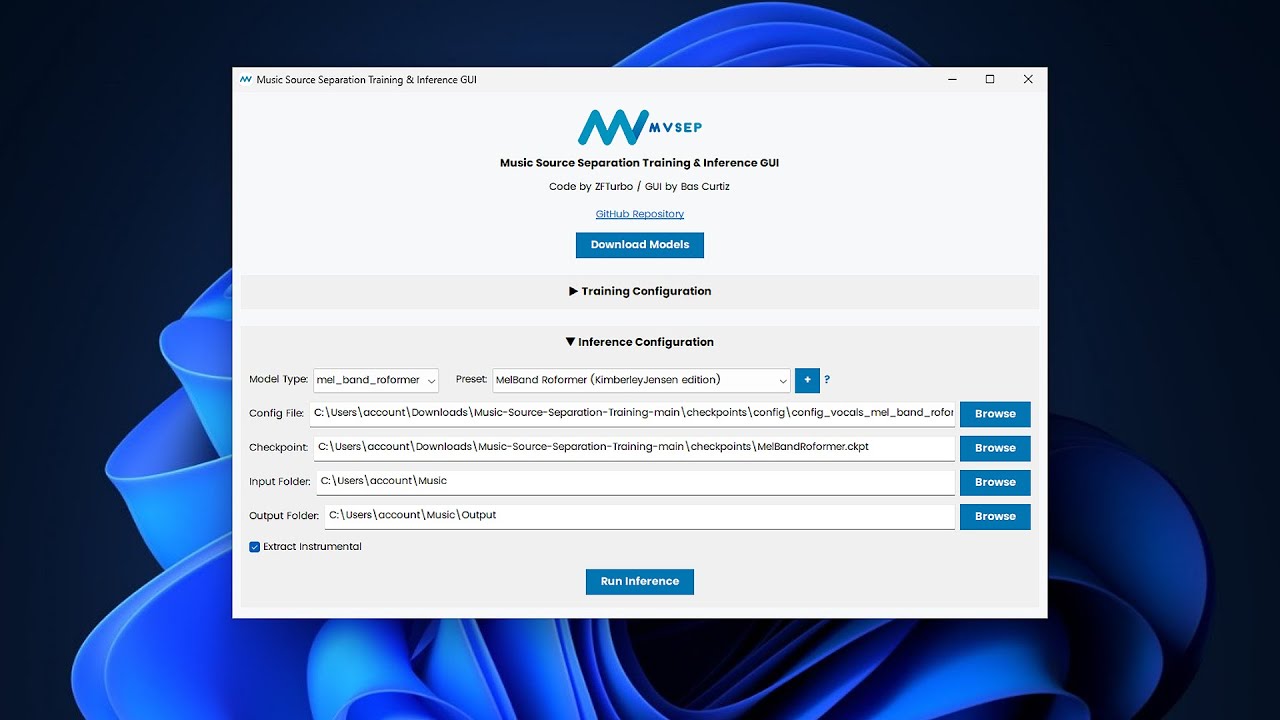
How to install & inference with ZFTurbo's Music Source Separation script (incl. GUI)
0:00 1. Install Python: https://www.python.org/ftp/python/3.11.6/python-3.11.6-amd64.exe
0:22 2. Install Microsoft Visual C++ 2015-2022 (x64): https://aka.ms/vs/17/release/vc_redist.x64.exe
0:38 3. Install Microsoft C++ Build Tools: https://visualstudio.microso...
analog obsidian
marsh coral
Intel (R) UHD Graphics
sorry i don't know if its possible to inference in integrated gpus
crude flame
analog obsidian
big beta 5e is more clear but adds too much noise 😭
ive used it and it sounds fine
 lavish lintelBOT

Congratulations Razer by Weights!
Your Grotle is now level 29!
crude flame
lavish lintel
 knotty moth
analog obsidian
i repeat: rvc already upscales your audio
knotty moth
analog obsidian
i repeat: rvc already upscales your audio
note that if the dataset has lower cutoff than the target sample rate, the model will learn those missing frequencies instead of actually "upscaling" it
analog obsidian
crude flame
ive used it and it sounds fine
im actually using it for my models now, i dont mind the noise, because again noise does not damage models, guys
flint solar
analog obsidian
is more clear <:doggowave:979093591362261093>
which version should i use
crude flame
analog obsidian
im actually using it for my models now, i dont mind the noise, because again *no...
im actually making my first singing model with it
analog obsidian
flint solar
which version should i use
unwa's big beta 5e
crude flame
crude flame
im actually making my first singing model with it
yes its been a year and i havent made a singing model
analog obsidian
is the more clear, legit sounds like an actual raw sample sometimes and you forget its isolated lol
crude flame
analog obsidian
is the more clear, legit sounds like an actual raw sample sometimes and you forg...
fr
flint solar
analog obsidian
is the more clear, legit sounds like an actual raw sample sometimes and you forg...
noted.
latent kettle
analog obsidian
unwa's big beta 5e
can you please DM Me All stuff ?
analog obsidian
flint solar
noted.
sure! give it a try, keep in mind big beta 5e is noisy!
marsh coral
analog obsidian
sorry i don't know if its possible to inference in integrated gpus
what about a NVIDIA GEForce GTX 1050 with Max-Q?
analog obsidian
marsh coral
what about a NVIDIA GEForce GTX 1050 with Max-Q?
i don't know if that can run cuda applications (applio)
sorry
marsh coral
all good
analog obsidian
if it can run cuda applications it can do inference
flint solar
analog obsidian
sure! give it a try, keep in mind big beta 5e is noisy!
u think ver 2024.10 would perform better?
latent kettle
analog obsidian
https://github.com/ZFTurbo/Music-Source-Separation-Training/ https://www.youtube...
can you DM Me All ??
analog obsidian
latent kettle
can you DM Me All ??
no, watch the tutorial
analog obsidian
flint solar
u think ver 2024.10 would perform better?
has less noise than big beta5e but not as clear like it
latent kettle
i will watch just DM the links and names of models and other things
analog obsidian
but more clear than bs roformer at least
knotty moth
marsh coral
what about a NVIDIA GEForce GTX 1050 with Max-Q?
fine for inference, but not for training
latent kettle
analog obsidian
but more clear than bs roformer at least
i'm worrid i even don't no how to make a good dataset 😫 how will i get model master
💔
please help me
analog obsidian
latent kettle
i'm worrid i even don't no how to make a good dataset 😫 how will i get model m...
this is your first time making a model, relax
latent kettle
analog obsidian
this is your first time making a model, relax
and i wasted my 3hrs btw
analog obsidian
latent kettle
and i wasted my 3hrs btw
i waste more hours because my datasets are all 1 hour long or more
its normal
latent kettle
do i stop using UVR
analog obsidian
latent kettle
do i stop using UVR
use the script i sent you
follow the tutorial
or
i can send you an more updated version of uvr
flint solar
analog obsidian
has less noise than big beta5e but not as clear like it
i think i should start use mel de reverb too
analog obsidian
flint solar
i think i should start use mel de reverb too

flint solar
analog obsidian
<:Okayge:856362991414804490>
which one tho
latent kettle
analog obsidian
https://github.com/Anjok07/ultimatevocalremovergui/releases/download/v5.6/UVR_12...
Ultimate Vocal Remover v5.6.0 i have this version currntly
 scarlet cedarBOT
 sietangaingu
Server Avatar

 weak cipher
No
analog obsidian
flint solar
which one tho
idk, maybe try sucial v2 dereverb
 shell holly
Hi, I’m trying to train an AI voice model but ran into this error:
C:\ia nvidia\RVC1006Nvidia/logs/testtest
load model(s) from assets/hubert/hubert_base.pt
move model to cuda
no-feature-todo
Any idea what’s causing it?
crude flame
analog obsidian
idk, maybe try sucial v2 dereverb
anvuew v2 is better
analog obsidian
crude flame
anvuew v2 is better
thanks i have no idea about de-reverb models 😭
knotty moth
analog obsidian
idk, maybe try sucial v2 dereverb
I didn't see the improvement over v1
analog obsidian
noted, im going to remember this in case i need a dereverb
knotty moth
anyway both Sucial's and anvuew's are for stereo reverb
crude flame
analog obsidian
thanks i have no idea about de-reverb models 😭
First is sucial V2 second is anvuew V2


sucial leaves some reverb in ( not much )
cant really hear a difference tho
so
analog obsidian

flint solar
I used anvuew mel dereverb
 dim jewel
Hi guys, I have a question regarding dataset.
Let's say I have singer. They have 1 song that I want to make cover off, which would be the same song, with the same singer, but with different lyrics. Is there any point in training model on the other singer's songs, if model would be used for this one only particular song?
 glacial pollen
dim jewel
Hi guys, I have a question regarding dataset.
Let's say I have singer. They have...
glacial pollen
dim jewel
Hi guys, I have a question regarding dataset.
Let's say I have singer. They have...
if it's " 1 time use " model, for that one given song you use in your dataset, no, no point.
In this scenario, generalization to unseen data ( aka. Model's capability to adapt to songs / content it wasn't exposed to throughout the training ) losses the meaning
pretty much
dim jewel
What if it's the same scenario, but the whole album?
glacial pollen
dim jewel
What if it's the same scenario, but the whole album?
Hmmm.. yea, same rule applies
If you intend to use the model on the data it was exposed to ( Again, during training), having it " full of variety " ( the dataset ) kind of losses the meaning
dim jewel
But wouldn't it still needed to learn variety to adapt to changed lyrics?
glacial pollen
dim jewel
But wouldn't it still needed to learn variety to adapt to changed lyrics?
Oh yea, if you mention changed lyrics, in that case you want the dataset to contain ( more or less ) phonetics and / or pitch variations of a given phonetic / word
But it isn't 100% a strict rule
All comes down really to how well you model generalizes ( It's ability to adapt to stuff it did not see during training )
And generalization is a matter of: Good training, properly picked batch_size ( smaller promotes better generalization, typically ) and naturally, dataset's diversity
But let's not make it any huge or extreme deal really
dim jewel
As always, thank you
glacial pollen
dim jewel
As always, thank you
Glad to help
 fair pelican
yo i need help with setting up the voice changer to work in discord, the output virtual cable is in input and the input virtual cable is in output how do i fix it help
 valid stream
i put my chunk at 640 but its still like 3 seconds delayed how do we fix it
glacial pollen
fair pelican
yo i need help with setting up the voice changer to work in discord, the output ...
#🔍│help-w-okada is for voice changers
Both of you
 low shard
 silk hearth
/create
low shard
fair pelican
yo i need help with setting up the voice changer to work in discord, the output ...
low shard
valid stream
i put my chunk at 640 but its still like 3 seconds delayed how do we fix it
silk hearth
/create
low shard
fair pelican
yo i need help with setting up the voice changer to work in discord, the output ...
low shard
valid stream
i put my chunk at 640 but its still like 3 seconds delayed how do we fix it
 weary pond
hello I'm trying to set up a two PC RVC, i followed this guide https://rentry.co/VoiceChangerGuide#opening-on-multi-pc-setups but for some reason the IPs only loads in the PC with RVC installed and not the secondary PC where i want to connect at, anyone can help?
low shard
weary pond
hello I'm trying to set up a two PC RVC, i followed this guide https://rentry.c...
That's Wokada not RVC
Wokada is the program to use RVC (Retrieval-based-Voice-Conversion, Speech To Speech) Models in realtime for calls
There's the fork (modified version), the deiteris fork which has better performance
Wrong help channel, use #🔍│help-w-okada
weary pond
my bad
low shard
Dw
 unique rock
what is this for?
cache_all_training_sets
simple ore
cache training data on GPU, provided small performance improvement, as long the as the dataset is not too big to fit into vram
@unique rock
 humble river
anyone on rn
does not even mention its an error
just says this
2024-12-20 21:56:06 | INFO | fairseq.tasks.hubert_pretraining | HubertPretrainingTask Config {'_name': 'hubert_pretraining', 'data': 'metadata', 'fine_tuning': False, 'labels': ['km'], 'label_dir': 'label', 'label_rate': 50.0, 'sample_rate': 16000, 'normalize': False, 'enable_padding': False, 'max_keep_size': None, 'max_sample_size': 250000, 'min_sample_size': 32000, 'single_target': False, 'random_crop': True, 'pad_audio': False}
2024-12-20 21:56:06 | INFO | fairseq.models.hubert.hubert | HubertModel Config: {'_name': 'hubert', 'label_rate': 50.0, 'extractor_mode': default, 'encoder_layers': 12, 'encoder_embed_dim': 768, 'encoder_ffn_embed_dim': 3072, 'encoder_attention_heads': 12, 'activation_fn': gelu, 'layer_type': transformer, 'dropout': 0.1, 'attention_dropout': 0.1, 'activation_dropout': 0.0, 'encoder_layerdrop': 0.05, 'dropout_input': 0.1, 'dropout_features': 0.1, 'final_dim': 256, 'untie_final_proj': True, 'layer_norm_first': False, 'conv_feature_layers': '[(512,10,5)] + [(512,3,2)] * 4 + [(512,2,2)] * 2', 'conv_bias': False, 'logit_temp': 0.1, 'target_glu': False, 'feature_grad_mult': 0.1, 'mask_length': 10, 'mask_prob': 0.8, 'mask_selection': static, 'mask_other': 0.0, 'no_mask_overlap': False, 'mask_min_space': 1, 'mask_channel_length': 10, 'mask_channel_prob': 0.0, 'mask_channel_selection': static, 'mask_channel_other': 0.0, 'no_mask_channel_overlap': False, 'mask_channel_min_space': 1, 'conv_pos': 128, 'conv_pos_groups': 16, 'latent_temp': [2.0, 0.5, 0.999995], 'skip_masked': False, 'skip_nomask': False, 'checkpoint_activations': False, 'required_seq_len_multiple': 2, 'depthwise_conv_kernel_size': 31, 'attn_type': '', 'pos_enc_type': 'abs', 'fp16': False}
2024-12-20 21:56:10 | INFO | infer.modules.vc.pipeline | Loading rmvpe model,assets/rmvpe/rmvpe.pt
then at 5.3 secs the gradio thing says error
simple ore
@craggy wyvern this is the right channel to ask your question
the answer is - depends on what you're trying to install. Likely some outdated build.
azure marshBOT
hallow thistle
-gui
 hallow thistle
A batch file for launching up webui went missing from this most recent OG RVC GUI, but instead got this batch file for launching up the "realtime" RVC pre-installed. Of course, I don't think it gonna work well.
 low shard
Wrong channel, use #🔍│help-w-okada
hallow thistle
The first time I clicked and run this batch file back in 2023, I was like surprised by how this GUI looked. Then later I found out it wasn't meant for "audio conversion" thing, but rather the "realtime" one. 

I'm surprised by how people still think RVC has another realtime program. Could it be this thing? 
glacial pollen
hallow thistle
I'm surprised by how people still think RVC has another realtime program. Could ...
well, this is the " in-built rvc's real-time voice changer " I always mention
not sure if there's any other tho
azure marshBOT
 brave ermine
i got an error while generating index
brave ermine
i got an error while generating index
Hey, muhamet! Please use the command !howtoask to increase your chance of getting help by structuring your question in a way others can understand better. Also make sure you're asking in the right help channel:
- General RVC help: #✨│ai-help
- W-Okada / Realtime RVC: #🔍│help-w-okada
- AI image related: #🔍│help-ai-art
brave ermine
im using local applio and it says v2 extracted file is not found
anyone know what i am doing wrong
nah i found it i just didnt press this button how silly lol
 humble river
2024-12-20 21:56:06 | INFO | fairseq.tasks.hubert_pretraining | HubertPretrainin...
humble river
humble river
2024-12-20 21:56:06 | INFO | fairseq.tasks.hubert_pretraining | HubertPretrainin...
anyone know fix
humble river
humble river
then at 5.3 secs the gradio thing says error
at 5.3 sec it says eroor
3070ti 13700k btw
humble river
glacial pollen
well, this is the " in-built rvc's real-time voice changer " I always mention
you on rn?
glacial pollen
ye
glacial pollen
what's up then
humble river
humble river
at 5.3 sec it says eroor
do you know a solution for this
no error in the logs
just that its loading rvmpe
glacial pollen
Well, 2 things
humble river
alr
glacial pollen
- You should provide logs using " > ", like so:
asdfghjkl
and 2... what release / fork you use? ( of rvc / applio )
This is by far the most important part / info you didn't provide I believe
humble river
glacial pollen
This is by far the most important part / info you didn't provide I believe
sorry ill do that again
glacial pollen
Actually nah
humble river
glacial pollen
and 2... what release / fork you use? ( of rvc / applio )
i installed it yesterday
glacial pollen
Just tell me what release you use
where does it come from
applio github? or official rvc one
glacial pollen
humble river
offical
Yea, tbf, instead of trying to debug og rvc which can at times be problematic or headaching
I'd actually go for Applio
glacial pollen
humble river
sry not that good eng
It's fine
humble river
glacial pollen
It's fine
ty
glacial pollen
Applio is easier to run and generally to get running
humble river
glacial pollen
Applio is easier to run and generally to get running
does it have the same quality
glacial pollen
humble river
does it have the same quality
More or less yes, it's with everything that's based off of rvc really
humble river
oh
do u have the link
wanna make sure i download the right one
or the user who made it
will do
glacial pollen
You're a newbie right?
humble river
yes
glacial pollen
If so, I recommend this one
https://github.com/codename0og/codename-rvc-fork-3/archive/refs/heads/main.zip
Has some nicer descriptions / easier to get descriptions I added
humble river
alr
glacial pollen
humble river
ty
overall, you'll run 2 things
humble river
glacial pollen
overall, you'll run 2 things
pip install and run app
glacial pollen
1st goes the install .bat and then run .bat files
humble river
oh
glacial pollen
just, simply run it with no " run as admin " or whatsoever
humble river
ok
glacial pollen
In any case, read the repository's description, if you had some troubles
https://github.com/codename0og/codename-rvc-fork-3/blob/main/README.md

GitHub
Codename's rvc fork version 3, based on Applio. . Contribute to codename0og/codename-rvc-fork-3 development by creating an account on GitHub.
humble river
glacial pollen
In any case, read the repository's description, if you had some troubles
https:/...
ok tysm
glacial pollen
yw man
( ps. Make sure to unpack the fork folder / the folder from archive to C drive / os drive directly, if you can afford some space on your drive )

Like so
humble river
glacial pollen
( ps. Make sure to unpack the fork folder / the folder from archive to C drive /...
i got 2tb im alg
glacial pollen
Neat, in that case best of luck~
 idle osprey
glacial pollen
idle osprey
glacial pollen
logs folder and in there, per-model folder
humble river
ok
glacial pollen
This is also the case when you train a model, .pth models appear in there ( index too )
humble river
ty
humble river
glacial pollen
This is also the case when you train a model, .pth models appear in there ( inde...
thats not for me lol
but ty
glacial pollen
yea just saying in case
 humble river
so creare folder
glacial pollen
per-model as in, each model ( pth and index ) gets a folder
humble river
OHHH
glacial pollen
per is like " for "
humble river
so should i make one with the pth and index
glacial pollen
Yea, applio searches up for models in logs location
humble river
glacial pollen
per is like " for "
oh i didnt grab that in context ;p;
 jaunty talon
One message removed from a suspended account.
low shard
jaunty talon
One message removed from a suspended account.
could u retry?
i just tried myself and the bot works #🤖│bots message
jaunty talon
One message removed from a suspended account.

 tame mica
lavish lintelBOT
tame mica
lavish lintelBOT

Congratulations kar@shin padoru 🎄!
Your Dewott is now level 34!
New move!
Your Dewott can now learn Aqua Jet!
glacial pollen
That is not rvc tho ( I mean yea, but weights manages it
 dense drift
Soo where should i ask for help
glacial pollen
So like, if yt dls are disabled
you gotta dl the vocals on your own
Not sure how weights manages it tho
Whether they isolate ( the vocals ) or not
Well.. You'd have to dl the vocals / song, if it's a song then isolate / separete the vocals using mvsep or uvr and only then, upload the vocals to weights
dense drift
There is no option to upload
glacial pollen
dense drift
There is no option to upload
Idk then man
they say to upload it in afterall

I ain't associated with weights nor I use their services so, I possibly couldn't know how it's done in there
dense drift
Ohh alright
glacial pollen
Alternatively, screenshot the whole ui
dense drift
But thanks for helping
glacial pollen
and show me how it looks
dense drift
glacial pollen
Alternatively, screenshot the whole ui
Its fine
glacial pollen
alr then
 torpid prairie
can i use a voice model with only pth file
low shard
torpid prairie
can i use a voice model with only pth file
yes, in rvc context, the pth is the actual voice, the added index is the accent
may not sound the best though
torpid prairie
alr
 severe sand
Does anyone have experience getting "sh", "ch" and "sch" sounds to be pronounced properly? like in the German "Ich"
Everything I try, every model completely fails at those sounds even if they exist in the dataset
Unfortunately its pretty important since we use them for music but I just can't find any solution
crude flame
severe sand
Does anyone have experience getting "sh", "ch" and "sch" sounds to be pronounced...
How long is your dataset?
severe sand
about 15-20 minutes of talking and singing on average
crude flame
if possible you could try making it longer
severe sand
nvm the main model I'm looking at is trained on 32 minutes of talking and singing
mostly singing, I'd think thats way more than enough, especially considering the models are completely unable to pronounce "Ich" like its not even really close
they always turn it into "isch" if they pronounce it at all
crude flame
so it has "ich" in the dataset and in the inference audio?
severe sand
yes
it seems a bit like most of the time rvc even thinks that the ch is supposed to be breath noise and supresses it entirely
crude flame
how noisy is your set? little bit is fine but if its loud enough it could make a difference
severe sand
No noise, studio environment
not sure if you can pronounce the german ch but do you think you could find a clip were its being pronounced correctly? I can try making one showcasing the issue
crude flame
welp, you can blame vctk for not having any german in it making that "ich" suck
severe sand
whats vctk?
severe sand
ah I see, yea I was worrying that this might be the issue
I've tested some other pretrained models but they seemed mostly terrible
so I didn't even keep those models
crude flame
if you want you can grab several hours of german speech and make a small little finetuned pretrain for german
and hope it makes it better
analog obsidian
severe sand
not sure if you can pronounce the german ch but do you think you could find a cl...
original pretrain was trained in english only
severe sand
Anything specific I have to do for that? Like maybe I have to somehow reduce the learning rate or something?
crude flame
severe sand
Anything specific I have to do for that? Like maybe I have to somehow reduce the...
nope
just train it like a normal model
severe sand
And do you mean using the pretrained models and finetuning it into a better one or make a new model from scratch
I do kinda hope that this is the issue now, else I will put a bunch of time into that without fixing it xD
I will try some other pretrained models first, this one could be interesting
 crude flame
severe sand
And do you mean using the pretrained models and finetuning it into a better one ...
crude flame
severe sand
And do you mean using the pretrained models and finetuning it into a better one ...
sorry a bug scared the life out of me, but yeah make a pretrain using a pretrain
severe sand
And you are dead sure that those kind of noises are results of bad pretraining? Because I feel like even english noises like "shark" are kinda struggling with the sh
crude flame
severe sand
I will try some other pretrained models first, this one could be interesting
dont use rigel
lavish lintelBOT
Congratulations Razer by Weights!
Your Grotle is now level 31!
crude flame
it sucks
severe sand
welp damn, now where am I gonna find hours of german. It probably has to contain male and female voices right? Since I will need both
crude flame
severe sand
welp damn, now where am I gonna find hours of german. It probably has to contain...
you done need both but it will be better with both
severe sand
Okay I will try around with that a bit, thanks
Oh another question, do I have to fear overtraining when creating a pretrained model? And a general idea of how many epochs I will need for multiple hours of data? I assume it will take quite a while even for 50-100
crude flame
severe sand
Oh another question, do I have to fear overtraining when creating a pretrained m...
its the same as training a model, so overtraining is bad and there is no certain amount of epochs
severe sand
okay thats much easier than I assumed then, good to know
low shard
crude flame
sorry a bug scared the life out of me, but yeah make a pretrain using a pretrain

 carmine hearth
Hey guys, is there anything written about audacity dataset cutting settings? I'm looking for it for people using RVC Mainline or RVC Disconnected (that's me!), but my inexperienced searching skills have yet to find it...
I'm using machine translation. Sorry if it's hard to understand!
 placid heath
i just had a question, to make songs with ai, like to rap as different things, what is recommended? like settings and everything. im new to this so please be patient with me!
simple ore
carmine hearth
Hey guys, is there anything written about audacity dataset cutting settings? I'm...
ideally you want an evenly cut audio, some overlap between segments
3-5 seconds, no more than that and overlap 0.3-0.5s
carmine hearth
Thank you for your help, I will try that.
 mental spade
I'm having issues it's just not comign through anything I can hear it on the client thats it
https://i.imgur.com/EJEuzG3.png
https://www.youtube.com/watch?v=IS_SPQVv5iY Was watching this
Think I fixed it
hallow thistle
-colab
azure marshBOT
hallow thistle
-colab
📒 Google Colab Notebooks
- Applio, by IA Hispano Google Colab
- RVC Disconnected, by Kit Lemonfoot Google Colab
- RVC Mainline, by Hina Google Colab
- AICoverGen-WebUI, by Hina Google Colab
- AICoverGen-NoWebUI [English], by Ardha, fixed by Eddy, Hina and Gdr Google Colab
- AICoverGen-NoWebUI [Spanish], by Eddy, Hina and Gdr Google Colab
- UVR5 NO UI, by Eddy Google Colab
- UVR5 UI, by Eddy Google Colab
- Modified W-Okada's Voice Changer, Google Colab
- 🆕 FaceFusion UI, by Nick088 Google Colab
- 🆕 FaceFusion NO UI, by Nick088 Google Colab
- 🆕 EasyGUI, by Rejekts Google Colab
ℹ️ Note
While the Colab free plan provides up to 12 hours of daily usage, the GPU is typically available for only about 4 hours each day on average.
More commands: -audio, -hf, -local, -kaggle, -realtime, -rvc, /help
hallow thistle
mental spade
I'm having issues it's just not comign through anything I can hear it on the cli...
Tutorial videos on YouTube are outdated. 
knotty moth
also they could have video editing magic, so it'd look too good but not in reality
low shard
mental spade
I'm having issues it's just not comign through anything I can hear it on the cli...
YouTube tutorials are SEVERLY OUTDATED, do NOT use them
Go to #🔍│help-w-okada and tell ur PC GPU
This is the wrong channel, and you're using old software
low shard
placid heath
i just had a question, to make songs with ai, like to rap as different things, w...
You want to make ai covers? What's ur PC GPU
unique rock
Can someone explain to me the Tensorboard graphs? Following the Applio guide I only learned to see the total loss g, but they say that I should not only take into account that graph but also more.
low shard
unique rock
Can someone explain to me the Tensorboard graphs? Following the Applio guide I o...
Last update: Dec 12, 2024
There's a more advanced guide here
 simple walrus
For rvc-gui I create a voice model for Ai Cover. When I use the voice model I create in any song, whether male or female, no matter if I make the pitch negative or positive, the voice I use in the song is not the same as the voice model I created in the song. Why?
low shard
simple walrus
For rvc-gui I create a voice model for Ai Cover. When I use the voice model I cr...
GitHub
Just a fork of RVC for easy audio file voice conversion locally - Tiger14n/RVC-GUI
Do u mean this one
It's super OUTDATED
What's ur PC GPU
There's a better program for realtime voice changer
hallow thistle
-gui
azure marshBOT
hallow thistle
-gui
low shard
@simple walrus You looking for ai covers or realtime voice changer?
simple walrus
@low shard I want to use my own voice in the rvc-gui but when I use it the voice does not change to my own voice in the song
unique rock
Can you tell me which is the best pre-train?
low shard
simple walrus
<@911742715019001897> I want to use my own voice in the rvc-gui but when I use i...
don't use rvc gui, it's outdated
sooo, just do ai covers
or realtime voice changer for calls?
hallow thistle
RVC is the audio conversion program, while W-Okada is the realtime voice conversion program that uses RVC voice model.
low shard
^^^
simple walrus
@low shard There is no alternative program can you recommend me an ai cover program where I can install on pc without connecting to websites
hallow thistle
The "RVC-GUI" can refer to the OG RVC GUI program, which has been long outdated.
-rvc
azure marshBOT
hallow thistle
-rvc
📚 Documentation
✨ More guides
- How to use RVC Mainline Colab by Cauthess
- AICoverGen Colab Guide by Eddy (Spanish Helper)
- Create a model with RVC disconnected (colab) by Angetyde
low shard
simple walrus
<@911742715019001897> There is no alternative program can you recommend me an ai...
when you say RVC-GUI, do you meanhttps://github.com/Tiger14n/RVC-GUI/blob/main/README.md
GitHub
Just a fork of RVC for easy audio file voice conversion locally - Tiger14n/RVC-GUI
if so, that's OUTDATED, DON'T FOLLOW YT TUTS
Tell me your pc gpu
hallow thistle
You still didn't answer us about what GPU your PC has.
Applio is a recently developed fork program of RVC GUI, one of the only RVC forks AI Hub by Weights recommended.
simple walrus
My notebook cpu is Intel® HD Graphics 500
hallow thistle
Is it only GPU 0? If so, that's mean your laptop doesn't have a dedicated GPU.
low shard
simple walrus
My notebook cpu is Intel® HD Graphics 500
that's not a cpu, that's integrated GPU, it's really bad and slow
The program won't even run on integrated gpu, it will run on your cpu
making it very very slow
It's suggested to use Cloud, your CPU is SLOW
You can:
- Locally (runs on your pc so the speed depends on that, you will have to set it up with the guides):
- Cloud (remote good pc, easier and faster than ur PC but it's limited):
- Ilaria RVC Zero: fastest and simplest that you can get for free
- Weights.gg: Partnered with AI Hub, lets u do them easily but u may be in a queue
- Applio Colab: max 4 hours, not granted, of GPU
Easiest possible (automatically separates vocals & instrumentals) : weights.gg
easiest cloud: Ilaria rvc zero
easiest local: Applio
if you really want to do it on cpu slow, you can locally via applio
lavish lintelBOT

Congratulations Nick088 [ITA/ENG] by Weights!
Your Charizard is now level 76!
low shard
but It's NOT suggested
simple walrus
Applio I used it but it is a bit complicated it connects to website is confusing
Thxx for Suggestions I will try
hallow thistle
Applio doesn't connect to the "internet", it hosts locally on your PC localhost port. Unless you set Gradio to share to around the world.
 steel forge
yeah that too
runs without an internet connection but requires a network
all RVC GUIs will be web-based. Unless someone wants to cobble together a modern RVC-GUI
low shard
hallow thistle
Applio doesn't connect to the "internet", it hosts locally on your PC localhost ...
it actually does connect to the internet
they use Edge TTS API
steel forge
low shard
they use Edge TTS API
but once you download the pretrains and stuff you can infer no internet right
no tts
hallow thistle
An internet connection is needed to download voice model online. 
low shard
simple walrus
Applio I used it but it is a bit complicated it connects to website is confusing
You probably used the Google colab, ofc that one does
The local applio doesn't unless you do TTS
There are different versions of the same program, cloud and local
hallow thistle
-colab
azure marshBOT
hallow thistle
-colab
📒 Google Colab Notebooks
- Applio, by IA Hispano Google Colab
- RVC Disconnected, by Kit Lemonfoot Google Colab
- RVC Mainline, by Hina Google Colab
- AICoverGen-WebUI, by Hina Google Colab
- AICoverGen-NoWebUI [English], by Ardha, fixed by Eddy, Hina and Gdr Google Colab
- AICoverGen-NoWebUI [Spanish], by Eddy, Hina and Gdr Google Colab
- UVR5 NO UI, by Eddy Google Colab
- UVR5 UI, by Eddy Google Colab
- Modified W-Okada's Voice Changer, Google Colab
- 🆕 FaceFusion UI, by Nick088 Google Colab
- 🆕 FaceFusion NO UI, by Nick088 Google Colab
- 🆕 EasyGUI, by Rejekts Google Colab
ℹ️ Note
While the Colab free plan provides up to 12 hours of daily usage, the GPU is typically available for only about 4 hours each day on average.
More commands: -audio, -hf, -local, -kaggle, -realtime, -rvc, /help
low shard
simple walrus
Thxx for Suggestions I will try
If you really need it offline, you can install Applio locally but will be extremely slow
Else I'd suggest to use weights.gg which is on cloud
hallow thistle
Google Colab is a cloud service.
simple ore
unique rock
Can someone explain to me the Tensorboard graphs? Following the Applio guide I o...
you did not read the advanced section?
unique rock
simple ore
you did not read the advanced section?
just did it
 placid stone
hi, I have a question, I can only switch between GPU0, CPU, GPU1, GPU2 and GPU3 in the voice changer and my voice changer is also lagging a lot. can someone help me?
azure marshBOT
placid stone
hi, I have a question, I can only switch between GPU0, CPU, GPU1, GPU2 and GPU3 ...
Hey, Jan.! Please use the command !howtoask to increase your chance of getting help by structuring your question in a way others can understand better. Also make sure you're asking in the right help channel:
- General RVC help: #✨│ai-help
- W-Okada / Realtime RVC: #🔍│help-w-okada
- AI image related: #🔍│help-ai-art
hallow thistle
placid stone
hi, I have a question, I can only switch between GPU0, CPU, GPU1, GPU2 and GPU3 ...
For W-Okada, go to #🔍│help-w-okada. #✨│ai-help is about RVC the audio conversion.
 sage heath
my voice changer is capturing my pc voice too and its eco what do i need to do
hallow thistle
sage heath
my voice changer is capturing my pc voice too and its eco what do i need to do
For W-Okada, go to #🔍│help-w-okada.
sage heath
hallow thistle
For W-Okada, go to <#1159290161683767298>.
what?
hallow thistle
Please read my earlier message above.
There's no way your PC has four GPUs at once. Unless you've downloaded the old OG W-Okada, which can be tricky to cause its GUI to show more GPU than one, and each GPU could all be picking up CPU.
low shard
sage heath
what?
you're using the wrong channel, RVC is NOT Wokada, use #🔍│help-w-okada
 left crow
I have a question I wanna make ai covers but someone told me to use rvc is it only pc or is it on mobile too?
low shard
left crow
I have a question I wanna make ai covers but someone told me to use rvc is it on...
It's technically for both
What's ur pc gpu?
left crow
I have hp laptop but my mom uses it for work so I use mobile
And what's a GPU im very dumb in this kind of things lol
low shard
left crow
And what's a GPU im very dumb in this kind of things lol
GPU = Graphics Processing Unit
The component used for every heavy task
low shard
left crow
I have hp laptop but my mom uses it for work so I use mobile
yea laptops aren't good either for that
hallow thistle
left crow
I have a question I wanna make ai covers but someone told me to use rvc is it on...
It is possible to run RVC entirely on smartphone, but it won't be as fast as desktop.
left crow
Ohh
It's fine I only wanted to make lads ai covers
But I don't know the website lol
There's a lot of website idk what to choose
hallow thistle
Weights.gg is a website that can do AI cover for free.
left crow
Ohh I use that but idk some part of the song breaks but it's good ig
Maybe it depends on the song lol
low shard
left crow
Ohh I use that but idk some part of the song breaks but it's good ig
that depends on the model and song
you can't do much about it
Weights.gg uses RVC but in a easier way for users
Other sites use RVC too, but they make you pay for it
 charred drum
bro is marketing weights.gg
low shard
charred drum
bro is marketing weights.gg
Weights.gg doesn't make u pay 70 dollars monthly like kits.ai atleast
charred drum

 opal kelp
-colab
azure marshBOT
opal kelp
-colab
📒 Google Colab Notebooks
- Applio, by IA Hispano Google Colab
- RVC Disconnected, by Kit Lemonfoot Google Colab
- RVC Mainline, by Hina Google Colab
- AICoverGen-WebUI, by Hina Google Colab
- AICoverGen-NoWebUI [English], by Ardha, fixed by Eddy, Hina and Gdr Google Colab
- AICoverGen-NoWebUI [Spanish], by Eddy, Hina and Gdr Google Colab
- UVR5 NO UI, by Eddy Google Colab
- UVR5 UI, by Eddy Google Colab
- Modified W-Okada's Voice Changer, Google Colab
- 🆕 FaceFusion UI, by Nick088 Google Colab
- 🆕 FaceFusion NO UI, by Nick088 Google Colab
- 🆕 EasyGUI, by Rejekts Google Colab
ℹ️ Note
While the Colab free plan provides up to 12 hours of daily usage, the GPU is typically available for only about 4 hours each day on average.
More commands: -audio, -hf, -local, -kaggle, -realtime, -rvc, /help
 alpine bough
hi, i downloaded the ngrok file, but cannot open it, can u help me?
cannot find or open /Users/batokaraevzafarbek/Downloads/ngrok-v3-stable-darwin-arm64.zip, /Users/batokaraevzafarbek/Downloads/ngrok-v3-stable-darwin-arm64.zip.zip or /Users/batokaraevzafarbek/Downloads/ngrok-v3-stable-darwin-arm64.zip.ZIP.
i tried through collab, but there is a 403
по русски можно
-rules
rules
@acoustic scarab
 acoustic scarab
 low shard
alpine bough
помоги
low shard
alpine bough
помоги
speak english here, or use the channel that @acoustic scarab said
low shard
alpine bough
cannot find or open /Users/batokaraevzafarbek/Downloads/ngrok-v3-stable-darwin-a...
what are you trying to do?
alpine bough
so i was trying to set up through the collab
and firstly i was getting 403 errors so i tried using ngrok
and getting erroro there too
low shard
alpine bough
should i use help-w-okada channel>
yes, please show screenshot and elaborate more on #🔍│help-w-okada , also tell me what colab & tutorial you're using (send the link)
you shouldn't download ngrok,that gets downloaded on google colab not ur pc
 upper tusk
Hello there, I have a question, I would like to try and make an RVC model based on sherry birkin from RE 2 remake, but I have only maybe 2-3 minutes of dialogue from her that is usable, is that enough to work with or is it just not going to work ?
brittle wing
Hewwo! I was wondering if anyone can help me to get my voice onto discord and games?
just struggling a lil, got the virtual audio cable installed etc, just dunno how to do it
low shard
brittle wing
https://i.ibb.co/W6wNxvm/chrome-f-Hk-PJ8-Zssi.png
Wrong channel, use #🔍│help-w-okada
RVC ≠ Wokada
 tranquil raven
!help
dull ironBOT
Wally Commands
-# The prefix for commands is !
Select a category from the menu down below to view all related commands
 woeful canyon
tranquil raven
!help
woeful canyon
tranquil raven
!help
Available Commands
!ping - Check bot latency
!help - Show all commands
!status - Show bot status
tranquil raven
analog obsidian
no, don't use w-okada, use actual rvc
Where is the link for actual rvc?
!help
dull ironBOT
Wally Commands
-# The prefix for commands is !
Select a category from the menu down below to view all related commands
tranquil raven
I'm tryna find the link for this version of rvc
 hallow thistle
tranquil raven
I'm tryna find the link for this version of rvc
hallow thistle
tranquil raven
I'm tryna find the link for this version of rvc
This is the realtime .py for RVC, which can be found inside the folder of the most recent original RVC GUI. However, the OG RVC GUI has been long outdated, and the realtime RVC won't be working as well as the fork W-Okada.

I'm not sure why you're looking for this specific RVC version when there's a recently developed real-time voice conversion program available, which it works better than that.
If you're looking for the best real-time program out there, let me know at #🔍│help-w-okada.
 open stag
- colab
azure marshBOT
open stag
- colab
📒 Google Colab Notebooks
- Applio, by IA Hispano Google Colab
- RVC Disconnected, by Kit Lemonfoot Google Colab
- RVC Mainline, by Hina Google Colab
- AICoverGen-WebUI, by Hina Google Colab
- AICoverGen-NoWebUI [English], by Ardha, fixed by Eddy, Hina and Gdr Google Colab
- AICoverGen-NoWebUI [Spanish], by Eddy, Hina and Gdr Google Colab
- UVR5 NO UI, by Eddy Google Colab
- UVR5 UI, by Eddy Google Colab
- Modified W-Okada's Voice Changer, Google Colab
- 🆕 FaceFusion UI, by Nick088 Google Colab
- 🆕 FaceFusion NO UI, by Nick088 Google Colab
- 🆕 EasyGUI, by Rejekts Google Colab
ℹ️ Note
While the Colab free plan provides up to 12 hours of daily usage, the GPU is typically available for only about 4 hours each day on average.
More commands: -audio, -hf, -local, -kaggle, -realtime, -rvc, /help
 hot sonnet
!howtoask
 patent trellisBOT
hot sonnet
!howtoask
patent trellisBOT
hot sonnet
!howtoask
How To Troubleshoot 
__**GIVE CONTEXT.**__ 📝
- Don't simply mention your issue, like "
my rvc is not working". - Describe the step you are on, what you're trying to do, the RVC you're using, a screenshot, etc.
- The more context, the better.
__**BE POLITE.**__ <:matsuripray:1159685390156967936>
- Don't be desperate. You can ping a Helper, but if they ignore, they aren't available/don't know the answer.
- It's okay if you're frustrated, but don't take it into this server.
- Don't DM without prior consent.
__**BE PRODUCTIVE.**__ 🤝
- Don't ask for every little instruction. Put your own effort & test things by yourself.
- Don't ask to ask.
- Check if your answer is a Google search away/on our guides website.
If you've changed your mind about your message, feel free to delete/edit it.
hot sonnet
what is the best download for amd :(
low shard
tranquil raven
I'm tryna find the link for this version of rvc
this one is very old and sucks, check the fork i was saying in #🔍│help-w-okada
low shard
hot sonnet
what is the best download for amd :(
for what
hot sonnet
low shard
for what
to be honest I don't know, because i thought okada was rvc but i think rvc is okada
low shard
hot sonnet
to be honest I don't know, because i thought okada was rvc but i think rvc is ok...
😭
what do u want to do
low shard
hot sonnet
idk
wdym u don't know
low shard
hot sonnet
i just want a smooth voice changer
yea u can just say that dw
let's go to -> #🔍│help-w-okada
hot sonnet
ok ty
 tough stone
my audio is around 3 minutes long and its separated into like 10 shorter audios, is THIS normal?

Also my epochs are 250 and save time 30
rmvpe_gpu, no other settings touched
rtx 2060 S
its been around 20 minutes, no changes/updates in the console as well
latent kettle
tough stone
its been around 20 minutes, no changes/updates in the console as well
Are you training a model? Show me the console screen
tough stone
Nvm its solved, I just had to uninstall Python
 low shard
 supple salmon
Any idea what I should go about this? :o
supple salmon
Any idea what I should go about this? :o
btw if u tryna download a model for wokada, u can just continue in #🔍│help-w-okada
link me the discord post where u got that model
supple salmon
low shard
link me the discord post where u got that model
Dunno how
supple salmon
low shard
btw if u tryna download a model for wokada, u can just continue in <#11592901616...
Also I thought it was related since rvc thingy
low shard
supple salmon
Also I thought it was related since rvc thingy
yea but u using it for wokada, so maybe let's go to #🔍│help-w-okada
low shard
supple salmon
Dunno how


 pallid ocean
Is the applio-rvc colab ver. working for anyone? I seem tobe getting an error related to circular imports upon training the model (index seems to be training without any problem)
 dire vapor
how to use rvc v3 in applio colab or other colab?
 silent stratus
 molten fog
is this option any good?
molten fog
is this option any good?
depends on if you cleaned your data well or not
low shard
dire vapor
how to use rvc v3 in applio colab or other colab?
Rvc v3 doesn't exist
Officially
Since like 2 years
There's some unofficial forks that are experimental like @glacial pollen 's fork but idk if there's a colab
low shard
pallid ocean
Is the applio-rvc colab ver. working for anyone? I seem tobe getting an error re...
Show a screenshot
silent stratus
low shard
Show a screenshot
i had that error
silent stratus
pallid ocean
Is the applio-rvc colab ver. working for anyone? I seem tobe getting an error re...
i had that error and idk what i did spicifically but i kept switchiung google accounts and it eventually worked
silent stratus
low shard
Show a screenshot
dire vapor
low shard
There's some unofficial forks that are experimental like <@1239634084133601423> ...
I said Codename fork
 low shard
silent stratus
low shard
silent stratus
wtf never seen that before
looks like smt isn't installed properly
you told noobies about it?
silent stratus
low shard
you told noobies about it?
yeah i did it seems like a new issue that hasnt happened before and a lot of ppl are getting it
noobies dosent even know why its happening
simple ore
i said you may need an update to colab
Vidal did fix some torch imports
you can just manually re-install torch
!pip uninstall torch torchvision torchaudio -y
!pip install torch==2.3.1 torchvision==0.18.1 torchaudio==2.3.1 --upgrade --index-url https://download.pytorch.org/whl/cu121
silent stratus
okay thanks
low shard
simple ore
i said you may need an update to colab
u should tell that to vidal or push the update if u can
coloab moment 
molten fog

if my dataset has like multiple singing tones (calmer singing tones and then more almost "yelling" singing tones where the artist puts more emotion in their voice), is that what this is talking about when it says "diverse"? shoudl i use a bigger batch size?
azure marshBOT
molten fog
if my dataset has like multiple singing tones (calmer singing tones and then mor...
Dataset
A set of audio files compressed into a .zip file, used by RVC for voice training. The quality & length of the dataset are the biggest determining factors of the final quality of the model.
analog obsidian
molten fog
if my dataset has like multiple singing tones (calmer singing tones and then mor...
diverse as different expressions, words, tone, etc
for example a non diverse dataset would be one having monotone speech, with repeated words in between speech, similar sentences, basically 0 variety
if your singing dataset 90% of the time is singing in the same tone then is not diverse enough
for batch sizes you can try 4-8
4 for small datasets (10 minutes and below)
and 8 for 30 minutes and above
choosing batch sizes is more complicated than that but for training models these are the most used values in rvc
molten fog
analog obsidian
choosing batch sizes is more complicated than that but for training models these...
should i just do 8 my dataset is 14 minutes
it is pretty diverse in terms of tone
btw
analog obsidian
molten fog
should i just do 8 my dataset is 14 minutes
14 minutes is not big, so you only got the diversity
molten fog
analog obsidian
14 minutes is not big, so you only got the diversity
so should i meet in the middle at like 6
its longer than 10 minutes but not thirty minutes long
analog obsidian
molten fog
so should i meet in the middle at like 6
do 8 if you want the model to be cooked fast and quick
or do 4 to squeeze everything from the dataset aka having better generalization
up to you
molten fog
analog obsidian
do 8 if you want the model to be cooked fast and quick
or do 4 to squeeze everyt...
ill do 4 since i prefer accuracy
i have no problem wating as im training locally and im patient
waiting*
analog obsidian
sure batch size 4 will work fine in this case
as long the graphs are not extremely noisy
molten fog
analog obsidian
sure batch size 4 will work fine in this case
for avg running loss do i train one epoch get like 20% of what the total steps were and then input it and start training again
analog obsidian
molten fog
for avg running loss do i train one epoch get like 20% of what the total steps w...
yup
follow codename's suggestions
molten fog
analog obsidian
yup
do i need it enabled to 0 when i train the first epoch or do i enable it after and resume training
analog obsidian
molten fog
do i need it enabled to 0 when i train the first epoch or do i enable it after a...
both works
silent stratus
analog obsidian
both works
is this overtraining i cant tell plus the overtraining detector isnt going off

but it seems to be going up
analog obsidian
silent stratus
is this overtraining i cant tell plus the overtraining detector isnt going off
yes
silent stratus
analog obsidian
yes
okay thanks
 clear oasis
How do I train a model? I'm just starting out
low shard
clear oasis
How do I train a model? I'm just starting out
what's ur pc gpu?
brittle wing
silent stratus
is this overtraining i cant tell plus the overtraining detector isnt going off
Yes seems like
10k is the Lowest point mhm
low shard
Open "extracting vocals from songs"
 flat yoke
ModuleNotFoundError                       Traceback (most recent call last)
<ipython-input-3-bd2dc64d26a0> in <cell line: 2>()
      1 #@title Save the model
----> 2 from mega import Mega
      3 import os
      4 import shutil
      5 from urllib.parse import urlparse

ModuleNotFoundError: No module named 'mega'

---------------------------------------------------------------------------
NOTE: If your import is failing due to a missing package, you can
manually install dependencies using either !pip or !apt.

To view examples of installing some common dependencies, click the
"Open Examples" button below.
---------------------------------------------------------------------------
can someone tell me why i get this error?
im trying to save this model:
nvm
low shard
flat yoke
```---------------------------------------------------------------------------
M...
Be sure to not use Ilaria rvc Google colab
flat yoke
low shard
Be sure to not use Ilaria rvc Google colab
which one should i use
low shard
flat yoke
which one should i use
Tell me what you want to do
And if possible, your PC GPU
(I'm asking your PC GPU bc I seen people with actual good PCs using cloud
flat yoke
rtx 3050
flat yoke
low shard
Tell me what you want to do
just use some models for short voice lines
low shard
flat yoke
rtx 3050
Is it the 4gb laptop one
flat yoke
no
low shard
6gb?
flat yoke
wait yeah it is the 4gb one
low shard
flat yoke
wait yeah it is the 4gb one
Yeah nvm
knotty moth
flat yoke
wait yeah it is the 4gb one
the 4gb one is laptop
low shard
- Cloud (remote good pc, easier and faster than ur PC but it's limited):
- Ilaria RVC Zero: fastest and simplest that you can get for free
- Weights.gg: Partnered with AI Hub, lets u do them easily but u may be in a queue
- Applio Colab: max 4 hours, not granted, of GPU
Easiest possible (automatically separates vocals & instrumentals) : weights.gg
easiest cloud: Ilaria rvc zero
easiest local: Applio
Ilaria rvc zero and weights.gg are prob your best options
low shard
flat yoke
are they using the same models tho
All models on ai hub are synced on weights.gg
So unless you're comparing 2 different models, they prob are the same
They still are RVC v2 ofc
 oak edge
hi, to get best quality in rvc model should batch size be higher or lower? (I'm using colab free, applio, and T4 gpu)
knotty moth
oak edge
hi, to get best quality in rvc model should batch size be higher or lower? (I'm ...
batch 8 generally, or 4 for short/less diverse dataset
also fp32 may give better "quality" (precision) and gradient stability than fp16, but double the vram usage and slower. batch 8 fp32 would fit the T4 vram tho, or better the kaggle notebook with 2x T4 gpu.
oak edge
i got a 20minute single file datasset also what is fp
knotty moth
oak edge
i got a 20minute single file datasset also what is fp
floating point precision for the model params
oak edge
i mean where to configure it
knotty moth
oak edge
fp32 always better than fp16?
it seems too technical to explain quality-wise, except the time and vram usage difference, you can just try it by yourself
mental spade
So it seems now virtual cable died?
got it to work last night
Computer crash nwo nothing
 surreal spruce
-colab
azure marshBOT
surreal spruce
-colab
📒 Google Colab Notebooks
- Applio, by IA Hispano Google Colab
- RVC Disconnected, by Kit Lemonfoot Google Colab
- RVC Mainline, by Hina Google Colab
- AICoverGen-WebUI, by Hina Google Colab
- AICoverGen-NoWebUI [English], by Ardha, fixed by Eddy, Hina and Gdr Google Colab
- AICoverGen-NoWebUI [Spanish], by Eddy, Hina and Gdr Google Colab
- UVR5 NO UI, by Eddy Google Colab
- UVR5 UI, by Eddy Google Colab
- Modified W-Okada's Voice Changer, Google Colab
- FaceFusion UI, by Nick088 Google Colab
- FaceFusion NO UI, by Nick088 Google Colab
- EasyGUI, by Rejekts Google Colab
ℹ️ Note
While the Colab free plan provides up to 12 hours of daily usage, the GPU is typically available for only about 4 hours each day on average.
More commands: -audio, -hf, -local, -kaggle, -realtime, -rvc, /help
 lunar quartz
how can i download rvc? any link
low shard
lunar quartz
how can i download rvc? any link
what's ur pc gpu, and what do u want to do
lunar quartz
radeon rx580 and i wanna do covers
low shard
lunar quartz
radeon rx580 and i wanna do covers
Your AMD GPU is good enough to do inference (use models) locally (on ur pc), you won't be able to train (make models) but use them
You can:
- Locally (runs on your pc so the speed depends on that, you will have to set it up with the guides):
- Applio (AMD Windows) : A fork of RVC with some extra features like Applio TTS, kinda faster and simpler but same quality tho
- Mainline (AMD Linux/Windows) : The original RVC
- Cloud (remote good pc, easier and faster than ur PC but it's limited):
- Ilaria RVC Zero: fastest and simplest that you can get for free
- Weights.gg: Partnered with AI Hub, lets u do them easily but u may be in a queue
- Applio Colab: max 4 hours, not granted, of GPU
Easiest possible (automatically separates vocals & instrumentals) : weights.gg
easiest cloud: Ilaria rvc zero
easiest local: Applio
low shard
mental spade
So it seems now virtual cable died?
RVC is not Wokada
elaborate in #🔍│help-w-okada
 fathom reef
What is the most high quality pretrain type?
simple ore
you saw it, but you did not read the notes? 🙂
simple walrus
I have a question: How can I change words in a song? Is there a free application or program that can do this? What methods are there?
and I think this suggested ai cover website is great, it does what it should and it is free https://www.weights.gg/de
 light pelican
I'm at this step, but it’s not working. Can someone help me, please?
https://docs.ai-hub.wtf/rvc/resources/epochs-tensorboard/#tensorboard:~:text=%23-,In the left panel%3A,-Activate Ignore outliers
 simple ore
are there actual logs?
 foggy cedar
simple ore
you saw it, but you did not read the notes? 🙂
foggy cedar
simple ore
you saw it, but you did not read the notes? 🙂
I only saw this in Applio no ui, so I didn't see a note about it.
simple ore
vocoder is a new generator (MRF HiFiGAN and RegineGAN), no pretrains for those yet
Checkpointing - save vram at cost of slower training, can use larger batch sizes
low shard
@craggy stratusthis is the right channel for ai covers
- Cloud (remote good pc, easier and faster than ur PC but it's limited):
- Ilaria RVC Zero: fastest and simplest that you can get for free
- Weights.gg: Partnered with AI Hub, lets u do them easily but u may be in a queue
- Applio Colab: max 4 hours, not granted, of GPU
Easiest possible (automatically separates vocals & instrumentals) : weights.gg
easiest cloud: Ilaria rvc zero
You could also do it on phone cpu locally, but it will be harder and slow asf, not suggested
 craggy stratus
the voice i want to achieve (AI cover of yukari i found on tt) and i just want to kinda figure out what settings to set, cause when i tried to do it, the voice was off
 lavish spruce
enhypen
latent kettle
38 epochs dataset length about 40 minuts. batch size 8. D loss is going up. do i stop traning ?? and change the batch Size ??

 pure tangle
how to download model
latent kettle
pure tangle
how to download model
simple ore
latent kettle
38 epochs dataset length about 40 minuts. batch size 8. D loss is going up. do...
you may be ~100 epochs short of the target
or 200
latent kettle
i set to 250
simple ore
keep going
simple ore
as long as you have a good clean set with variety of content it will be more than 38 epochs
latent kettle
simple ore
as long as you have a good clean set with variety of content it will be more tha...
sorry what ??
simple ore
i mean it takes longer than 38 epoch to exctact everything useful from a 40 min set
provided the dataset is of a good quality
 latent kettle
okay.. i see
 onyx crater
latent kettle
onyx crater
latent kettle
Are there any symbols of overfitting ??


D loss is going down but G loss seems little bit increasing @simple ore can you please help me ??
low shard
That's not RVC
RVC = Retrieval-based-Voice-Conversion
It's used only for inference on pre recorded audios and training modela
You have wokada instead
Did you download this from a YouTube video
You downloaded an old version then
Go in #🔍│help-w-okada I can help u
low shard
latent kettle
Mmm maybe let it train a little more
It doesn't seem really increasing much
latent kettle
This picture is on 175 and now it's 200
glacial pollen
latent kettle
This picture is on 175 and now it's 200
You won't see any true overtraining for a long while
especially given you're not using averaged loss
glacial pollen
yet you'll be able to recognize it once it happens. it's quite apparent when it happens
Differs too much from normal graphs, the behavior
 charred portal
Hi, I was wondering. Does anyone know any tool to train AI models using samples that would support multilanguage? I want to use it for AI voice changer.
low shard
charred portal
Hi, I was wondering. Does anyone know any tool to train AI models using samples ...
Does anyone know any tool to train AI models using samples that would support multilanguage?
RVC (Retrieval-based-Voice-Conversion) is the tool used to train the best Speech to Speech models
But you can't make a model support EVERY SINGLE LANGUAGE, else you would have to train the voice of that guy/girl of him speaking EVERY SINGLE LANGUAGE EXISTING IN THE WORLD
However, you can train an english model and technically use it for other languages too, in rvc context, the model is made of a pth (actual voice) and added index (the accent), you could use it in the voice changer lowering the index ratio so it doesn't have the accent it was trained on
I want to use it for AI voice changer.
Be sure you're using Wokada Deiteris Fork and not some YouTube tut one
charred portal
low shard
> Does anyone know any tool to train AI models using samples that would support ...
I only want Czech Language
Speaker is also Czech
low shard
charred portal
Speaker is also Czech
Then you just need to train it
Is it your first time
charred portal
low shard
> Does anyone know any tool to train AI models using samples that would support ...
And would you recommend some software that I can run locally on my computer? I used to use Mangio RVC, but it didn't do much results
low shard
charred portal
And would you recommend some software that I can run locally on my computer? I u...
Mangio RVC is an outdated fork
what's ur pc gpu first?
charred portal
RTX 4060
knotty moth
should be the same 8 gb
low shard
charred portal
It is Laptop
eh, usually laptop gpus aren't the best
could be doable
Train RVC Models on cloud:
- Prepare the Dataset
- Setup RVC:
Choose a cloud way to use RVC,
- Google Colabs (4 hours of daily gpu for free, not much hours, but easy to use):
- Applio (ui)
- Mainline (UI)
- RVCDISCONNECTED (no ui)
- Kaggles (a bit harder to use and needs phone number but gives 30 hours weekly of better gpus):
- Mainline (UI)
- Applio by Vidal (UI)
- Applio by Shirou (UI, no guide as of right now)
- Lightning.ai (Kinda hard, needs login, no issue with web uis or anything, but only free 15 credits monthly):
- Be sure to know about the tensorboard
Google Colab = Easier but risk of getting disconnected
Kaggle = Harder but way more gpu time
If you are looking for the easiest way and for free, is using https://weights.gg which ofc uses RVC
Maybe you could try locally first
@simple ore did u ever hear someone train on a 4060 8gb laptop?
knotty moth
charred portal
Only 8GB
either bs 8 fp16 or bs 4 fp32, or turn on checkpointing
charred portal
When I generated it before it generated a whopping 150 .pts files, is that correct or am I doing something wrong?
 brazen skiff
Help, does anyone know what frequency I should train at if my dataset has a frequency of 44hz, should I train it at 40 or 48hz?
knotty moth
brazen skiff
Help, does anyone know what frequency I should train at if my dataset has a freq...
go 40k or inspect the spectrogram using spek or audacity
glacial pollen
brazen skiff
Help, does anyone know what frequency I should train at if my dataset has a freq...
48khz
those 4khz are actually important for sibilants and fidelity, regardless
40khz model would dumpen the clarity so, 48 is the way to go for. Luckily 48 works with 44.1khz audio fairly fine if you're careful with training and the data itself
( Tho ensure it's truly 44.1khz (( frequency spectrum itself )) )
latent kettle
I got model maker, now it's time for model master, can someone please guide me ?
 woven anvil
Hi there RVC beginner here,
Does anyone have a good tutorial that explains how RVC/Gradio works?
Can't find a tutorial I understand on YouTube.
latent kettle
woven anvil
Hi there RVC beginner here,
Does anyone have a good tutorial that explains how R...
Do you want to learn principle and programming of Rvc ?
latent kettle
woven anvil
No I just want to create a voice model for myself.
Which GPU Do you have
woven anvil
Oh one sec I'll check.
knotty moth
woven anvil
But it's awfully complicated : S
it's even harder to "master" it
latent kettle
knotty moth
it's even harder to "master" it
I got model maker, now it's time for model master, can someone please guide me ?
woven anvil
Nvidia Geforce GTX 1660 Super and then I also have a Quadro P4000.
knotty moth
latent kettle
I got model maker, now it's time for model master, can someone please guide me ?
I'm not a master yet
latent kettle
knotty moth
I'm not a master yet
Do you want to be ?
woven anvil
knotty moth
it's even harder to "master" it
I believe you 😅
latent kettle
woven anvil
Nvidia Geforce GTX 1660 Super and then I also have a Quadro P4000.
And vram ?
knotty moth
latent kettle
Do you want to be ?
you're not even litsa
woven anvil
latent kettle
And vram ?
The PC with the Quadro has 32 GB and this one has 16GB
latent kettle
woven anvil
The PC with the Quadro has 32 GB and this one has 16GB
VRAM, video memory, not RAM
woven anvil
Oh my bad.
latent kettle
knotty moth
you're not even litsa
What does it mean 🤔
knotty moth
woven anvil
The PC with the Quadro has 32 GB and this one has 16GB
at least 8 GB rtx card recommended
woven anvil
latent kettle
VRAM, video memory, not RAM
Introducing The GeForce GTX 1660 SUPER
Making it SUPER is the addition of 14 Gbps GDDR6 VRAM, which boosts peak memory bandwidth to 336 GB/s (a 75% improvement over the GeForce GTX 1660's 8 Gbps 192 GB/s GDDR5 VRAM).
Quadro should be 8GB
knotty moth
woven anvil
Introducing The GeForce GTX 1660 SUPER
Making it SUPER is the addition of 14 Gbp...
so yours is GTX 1660 super or which quadro?
woven anvil
I have two PC's, one has Quadro the other the super.
woven anvil
knotty moth
so yours is GTX 1660 super or which quadro?
One I'm using right now has the super.
latent kettle
woven anvil
I have two PC's, one has Quadro the other the super.
I think gtx 1660 super has 4GB vram
knotty moth
woven anvil
I have two PC's, one has Quadro the other the super.
which quadro, I said? quadro turing/newer?
latent kettle
So p4000 will de a good option
latent kettle
knotty moth
which quadro, I said? quadro turing/newer?
P4000
woven anvil
knotty moth
which quadro, I said? quadro turing/newer?
Quadro P4000 that's all I know : S
Okay so I need to use the other Desktop to do this.
latent kettle
woven anvil
Quadro P4000 that's all I know : S
P4000 will be good for training I guess. Because it have 8GB of VRAM
knotty moth
woven anvil
Quadro P4000 that's all I know : S
it's not as optimized as RTX cards, but fp32 performance should be fine
in this case, you should go batch size 4 and fp32 (usually defaulted for non-RTX cards)
woven anvil
knotty moth
it's not as optimized as RTX cards, but fp32 performance should be fine
in this ...
I have no idea what you mean by all that, are these the things I need to enable/select in Gradio?
knotty moth
woven anvil
I have no idea what you mean by all that, are these the things I need to enable/...
then read the guide here https://docs.ai-hub.wtf/essentials/how-to-make-voice-models/
In the context of RVC, the dataset is an audio file containing the voice the model will replicate. It can be either speaking or singing.
latent kettle
knotty moth
you're not even litsa
Can you please tell. Me what did you said?


 woven anvil
knotty moth
then read the guide here https://docs.ai-hub.wtf/essentials/how-to-make-voice-mo...
woven anvil
knotty moth
then read the guide here https://docs.ai-hub.wtf/essentials/how-to-make-voice-mo...
Isn't there a YouTube that has a tutorial on it?
I don't understand the terms, for example how do I convert my voice sample into a pth file?
latent kettle
knotty moth
https://tenor.com/view/cat-annoyed-eyeing-cat-meme-cat-funny-gif-148671304483250...
Ahh, tell me....
knotty moth
woven anvil
Isn't there a YouTube that has a tutorial on it?
I don't understand the terms, f...
the existing videos are too old and misleading
latent kettle
woven anvil
Isn't there a YouTube that has a tutorial on it?
I don't understand the terms, f...
Everything is mentioned in Guide
Read carefully
knotty moth
latent kettle
Ahh, tell me....
I don't own that pandora's box
woven anvil
I know, but I don't know what there telling me in the steps, there are lots of terms and file types I'm completely unfamiliar with.
latent kettle
knotty moth
~~I don't own that pandora's box~~
I didn't understand. Anyways NVM
latent kettle
woven anvil
I know, but I don't know what there telling me in the steps, there are lots of t...
You can ask that terms here
woven anvil
How do I turn my audio sample into a .PTH file?
Says I have to drop it into the weight folder.
I only have wav type right now.
knotty moth
woven anvil
How do I turn my audio sample into a .PTH file?
rename the extension to .pth
there's no choice but to read the guide carefully
woven anvil
Dear gods...
latent kettle
woven anvil
Dear gods...
I'll assist you
So let's begin
1st you need a dataset, "dataset is the audio or samples of your character's voice " From me, recommended length is minimum 10 minutes maximum 30 minutes.
woven anvil
I have done that, I have almost 20 minutes of clean audio with lots of variation in pitch and emotions etc.
In WAV format.
latent kettle
To prepare a good dataset, you need to remove background music, reverb eco and noise by using UVR 5
Also cut the silence and pauses from dataset
woven anvil
Was like half way with training a model with Google Colab before it completely broke and became unusable 🤭
woven anvil
latent kettle
Also cut the silence and pauses from dataset
Done that.
woven anvil
latent kettle
To prepare a good dataset, you need to remove background music, reverb eco and...
This as well.
latent kettle
woven anvil
Was like half way with training a model with Google Colab before it completely b...
Using colab is not recommended. Instead you can use kaggle
woven anvil
Can't I do it with gradio?
Was kinda happy I got it working 🥲
Colab is completely unusable so even if I wanted too I couldn't get it to work again.
latent kettle
woven anvil
Can't I do it with gradio?
Was kinda happy I got it working 🥲
Kaggle is a cloud computing platform just like colab. You can use RVC on Kaggle
latent kettle
woven anvil
Colab is completely unusable so even if I wanted too I couldn't get it to work a...
Kaggle is stable and provides 30 hours of GPU runtime
woven anvil
Okay so I have to install that first then?
And if it's based on the cloud, then I could use this PC with the super instead?
Is Kaggle free to use?
latent kettle
woven anvil
Okay so I have to install that first then?
And if it's based on the cloud, then ...
Firstly tell me, do you want to train on locally, or on cloud ☁️?
woven anvil
Doesn't matter aslong as I get a voice model at the end 😬