#✨│ai-help
1 messages · Page 147 of 1
 rare gobletBOT
 silent bone
Hi guys, I'm trying to integrate an RVC to a python program that I'm making but when running it shows me an error below. Im at loss with this 😭 . (Not quiet sure if this is appropriate. please do let me know and I will delete it right away)
OSError: tesune0316/MikoRVC does not appear to have a file named config.json. Checkout 'https://huggingface.co/tesune0316/MikoRVC/tree/main' for available files.
 proper shale
couldn't extract pitch and accent. it's probably because name of model has spaces
 obtuse rapids
proper shale
couldn't extract pitch and accent. it's probably because name of model has space...
obtuse rapids
proper shale
couldn't extract pitch and accent. it's probably because name of model has space...
oh ok
proper shale
silent bone
Hi guys, I'm trying to integrate an RVC to a python program that I'm making but ...
huh....
it shouldn't even ask for a config.json file

silent bone
oh...
I'm using transformers for this one not sure if its the correct way
AutoModelForSeq2SeqLM
AutoTokenizer
 brittle wing
I'm going to learn Japanese and make an AI cover. Do you have any g/d.pth models you recommend?
proper shale
brittle wing
I'm going to learn Japanese and make an AI cover. Do you have any g/d.pth models...
G/D are for training purposes only, so uh... we can't really recommend anything
obtuse rapids
 obtuse rapids
proper shale
how's your dataset path?
obtuse rapids
proper shale
how's your dataset path?
you mean this
 proper shale
obtuse rapids
you mean this
proper shale
obtuse rapids
you mean this
wait wait wait you can't even train
brittle wing
proper shale
G/D are for training purposes only, so uh... we can't really recommend anything
It sounds a bit weird.
The ultimate purpose is AI cover, but I'm trainnimg through Japanese character model voice right now, so I was going to ask if there is a model you recommend here
obtuse rapids
proper shale
wait wait wait you can't even train
NOOOOOOOOOOOOOOOO
proper shale
brittle wing
It sounds a bit weird.
The ultimate purpose is AI cover, but I'm trainnimg throu...
if you're training, check the weights folder. can't recommend any because i don't really know how your training is going
proper shale
obtuse rapids
NOOOOOOOOOOOOOOOO
yeah says you don't have a compatible gpu
you could do it via the cloud tho
Last update: Mar 8, 2024
obtuse rapids
proper shale
you could do it via the cloud tho
ok
 pastel oak
whats the issue i didnt understand
 keen tartan
brittle wing
keen tartan
brittle wing
is there a guide anywhere to make my own models
is it as simple as just adding a bunch of audio files of the voice u want talking
proper shale
brittle wing
is there a guide anywhere to make my own models
Last update: Mar 10, 2024
has everything related to model making n stuff
proper shale
brittle wing
thx
yw :)
proper shale
brittle wing
how long in total is reccomended
like 10+ mins is recommended to get a good model
brittle wing
oh i thought id need longer lol
 gaunt citrus
-colab
 azure marshBOT
gaunt citrus
-colab
azure marshBOT
gaunt citrus
-colab
☁️ Google Colabs
- Applio, by IA Hispano Google Colab
- AICoverGen-WebUI, modded by Hina Google Colab
- AICoverGen-NoWebUI [English], by Ardha, fixed by Eddy, Hina and Gdr Google Colab
- AICoverGen-NoWebUI [Spanish], credits to Eddy, Hina and Gdr for translating and fixing Google Colab
- Ilaria RVC, by thestingerx Google Colab
- RVC Disconnected, by Kit Lemonfoot Google Colab
- easyGUI, by rejects Google Colab
- 🆕 UVR5 NO UI for Google Colab, by Eddy Google Colab
🤗 Hugginface Spaces
- Applio, by IA Hispano Huggingface Spaces
- Ilaria RVC, by thestingerx Hugginface Spaces
- RVC-HFv2, by r3gm Huggingface Spaces
- AICoverGen, by r3gm Huggingface Spaces
- Advanced RVC Inference, by r3gm Huggingface Spaces
- RVC v2 Huggingface version, by Clebersla Huggingface Spaces
More commands: -audio, -local, -overtrain, -realtime, -rvc, -help
rare gobletBOT
Ayo? @gaunt citrus level 2 !!! 
 hot trail
Can anyone tey make a model of the female voice from this guy on youtube @Rabo9D
brittle wing
whats the difference between doing it on the cloud vs locally
proper shale
hot trail
Can anyone tey make a model of the female voice from this guy on youtube @Rabo9D
proper shale
brittle wing
whats the difference between doing it on the cloud vs locally
locally will use your gpu n stuff, while via the cloud will just do it online. cloud services have limitations though, while locally it's just limited to ur own hardware and stuff
brittle wing
im guessing locally is better then right
proper shale
brittle wing
im guessing locally is better then right
yes
if possible, do it locally
 halcyon cliff
any help with this?
proper shale
halcyon cliff
so it messed it all up bec of that?
yep
halcyon cliff
okay lemme try it again
imma nuke everything n restart from there bec i kinda noticed how very very senstivite it is in the colab
THERE WE GO
rare gobletBOT
Ayo? @halcyon cliff level 2 !!!
halcyon cliff
ty sm mj <3
halcyon cliff
daang
also which graph do i need to pay attaention to the most again? was it norm_g?
proper shale
halcyon cliff
also which graph do i need to pay attaention to the most again? was it norm_g?
check g/mel, g/kl and g/total
proper shale
grads are kinda important, but it's not really that essential compared to the others
proper shale
halcyon cliff
okay ty
lmk if you have more questions
halcyon cliff
okay!!! tysm
brittle wing
-colab
azure marshBOT
brittle wing
-colab
☁️ Google Colabs
- Applio, by IA Hispano Google Colab
- AICoverGen-WebUI, modded by Hina Google Colab
- AICoverGen-NoWebUI [English], by Ardha, fixed by Eddy, Hina and Gdr Google Colab
- AICoverGen-NoWebUI [Spanish], credits to Eddy, Hina and Gdr for translating and fixing Google Colab
- Ilaria RVC, by thestingerx Google Colab
- RVC Disconnected, by Kit Lemonfoot Google Colab
- easyGUI, by rejects Google Colab
- 🆕 UVR5 NO UI for Google Colab, by Eddy Google Colab
🤗 Hugginface Spaces
- Applio, by IA Hispano Huggingface Spaces
- Ilaria RVC, by thestingerx Hugginface Spaces
- RVC-HFv2, by r3gm Huggingface Spaces
- AICoverGen, by r3gm Huggingface Spaces
- Advanced RVC Inference, by r3gm Huggingface Spaces
- RVC v2 Huggingface version, by Clebersla Huggingface Spaces
More commands: -audio, -local, -overtrain, -realtime, -rvc, -help
brittle wing
Does rvc use a lot of gpu memory clock?
Feel like doing a mod on my gtx 1660 supper vram cooling solution to boost clock speeds with copper thermal pads sitting on my shelf
 tranquil raven
Can somebody help me install the rvc mainline repo for amd gpus, I'm running the script from the downloads from the guide but it isn't working
showing these messages
 brittle wing
tranquil raven
brittle wing
tranquil raven
Did you install Python and Pytorch correctly
tranquil raven
Is there a vid I can watch to make sure I install it correctly?
I don't think I installed pytorch
brittle wing
tranquil raven
Is there a vid I can watch to make sure I install it correctly?
You can skip the CUDA part since you're installing the AMD version
tranquil raven
Which part is the cuda part
Should I select ROCm?
or cpu
Still have this error after installing pi torch

 proud elbow
tranquil raven
Should I select ROCm?
proud elbow
tranquil raven
Should I select ROCm?
you're not in linux
the Nvidia version with runtime runs fine on cpu mode
 hollow nymph
i might need some help i was making an ai model and the train feature index button wasnt working and there was no index file for the model i created so i thought i could mabey just publish it without one, turns out you cant and i already closed the window is there any way to get the index file for the model i created? it still works for some reason and im really confused
tranquil raven
Wait but I'm tryna do it for a amd gpu
Because I heard the rvc repo works better for amd gpus than wokada
 crisp shore
yo dose colab still work
 worn trellis
HELP- I trained a model with ov2 with 200 epochs and approximately 40 minutes of dataset had a very, very bad result, literally the voice was completely robotic and it was barely possible to clearly identify a voice. the dataset was very clean and good. Does anyone know why? I also trained without pretrain and it gave the same result, completely robotic. I have a 3060
crisp shore
dose colab work anymore
i keep seeing ai videos on ticktock i need too know how to do em
 queen kraken
tranquil raven
Because I heard the rvc repo works better for amd gpus than wokada
queen kraken
tranquil raven
Because I heard the rvc repo works better for amd gpus than wokada
so did you download rvc to use it in real time voice changer?
tranquil raven
queen kraken
so did you download rvc to use it in real time voice changer?
yes
proud elbow
worn trellis
HELP- I trained a model with ov2 with 200 epochs and approximately 40 minutes ...
ov2 is not good for long and mediocre dataset, or you can try TITAN
tranquil raven
I was trying to follow this https://rentry.org/VoiceChangerGuide
proud elbow
tranquil raven
Because I heard the rvc repo works better for amd gpus than wokada
for realtime, instead of original one try the RVC realtime repo in the guide in #🔍│help-w-okada
out of my knowledge, @pastel oak might help you
tranquil raven
proud elbow
for realtime, instead of original one try the RVC realtime repo in the guide in ...
I'm having trouble installing
rare gobletBOT
Ayo? @tranquil raven level 3 !!!
worn trellis
proud elbow
ov2 is not good for long and mediocre dataset, or you can try TITAN
I tried too without any pretrained model but i have the same result, a model that was just some strange noise.
proud elbow
worn trellis
I tried too without any pretrained model but i have the same result, a model tha...
with default pretrain or none at all? the latter will be always bad
worn trellis
proud elbow
with default pretrain or none at all? the latter will be always bad
None, and probly would give me same result with default pretrain
rare gobletBOT
Ayo? @worn trellis level 1 !!!
queen kraken
tranquil raven
yes
go to https://rentry.co/RVCRealtimeGuide and download the RVCAMD_IntelLatest
proud elbow
worn trellis
None, and probly would give me same result with default pretrain
nah, will be worst
worn trellis
proud elbow
nah, will be worst
How do i fix that?
proud elbow
worn trellis
How do i fix that?
I bet you havent tried not to use pretrain at all, aka from scratch?
worn trellis
Ye, but it gave me similar results, like a strange noisy voice
proud elbow
some random noise in silences?
worn trellis
No, like even the voice part when someone is talking gets like super duper robotic and noisy, making me barely able to understand when someone is talking and when no one is talking.
tranquil raven
queen kraken
go to https://rentry.co/RVCRealtimeGuide and download the RVCAMD_IntelLatest
Okay I have it
I'm getting no audio output
 neat matrix
im using rvc while uploading my clips in training, and i'm getting "NotADirectoryError: [WinError 267] The directory name is invalid:'C:\Users\Admin\Downloads\clips\glebclipsv1.wav' while uploading my clips, i tried changing the audio files to flac and getting rid of spaces but it didn't work at all
 hot lagoon
like when makeing the back voacls in synthv then cover them to rvc was the steps?
Like is it 1
Get orignal back
2 put them in synthv
3 try best to copy back vocals form orignal
4 export it then covert to rvc?
 naive violet
Been told that my voice sounds quite electric, what to do about that?
 visual tendon
pls anyone help me, what's the best way to make RMVPE model?
I tried everything, but it's always a failed model...
 white bone
Hey, does anyone know how to fix my RVC from crashing? Everytime I try to start conversion, it stops responding. Any way to fix it? Also, if you know how, please ping me. I'm going to bed shortly, so I need a ping to see this in the morning tmrw.
rare gobletBOT
Ayo? @white bone level 2 !!!
visual tendon
white bone
Hey, does anyone know how to fix my RVC from crashing? Everytime I try to start ...
idk sir sorry.
 heady rain
how do i get a character golden cheese cookie from cookie run kingdom voice i need it for a song im doing
 lapis carbon
white bone
Hey, does anyone know how to fix my RVC from crashing? Everytime I try to start ...
lapis carbon
white bone
Hey, does anyone know how to fix my RVC from crashing? Everytime I try to start ...
make sure both the input and output use the same driver (aka both selected input and output have mme at the end)
rare gobletBOT
Ayo? @lapis carbon level 1 !!!
proud elbow
hot lagoon
like when makeing the back voacls in synthv then cover them to rvc was the steps...
use mel-scale spectrogram as guide to copy/adjust the notes
 trail snow
Hey, I’ve been trying to download the weeknd voice model but none of them work
I get an error everytime
JSONDecodeError
neat matrix
posting this again because no one helped me, im using rvc while uploading my clips in training, and i'm getting "NotADirectoryError: [WinError 267] The directory name is invalid:'C:\Users\Admin\Downloads\clips\glebclipsv1.wav' while uploading my clips, i tried changing the audio files to flac and getting rid of spaces but it didn't work at all
 glad zealot
neat matrix
posting this again because no one helped me, im using rvc while uploading my cli...
glad zealot
neat matrix
posting this again because no one helped me, im using rvc while uploading my cli...
it seems to be looking for a directory
neat matrix
agreed
rare gobletBOT
Ayo? @neat matrix level 1 !!!
glad zealot
try just C:\Users\Admin\Downloads\clips dont put the audio file to the path
neat matrix
alright
that worked, thanks a lot
guess when i put it in the path name it considered the clips as another folder
trail snow
glad zealot
it seems to be looking for a directory
Do you know how to fix the JSONDecodeError on the download model step
rare gobletBOT
Ayo? @trail snow level 1 !!!
trail snow
ModuleNotFoundError Traceback (most recent call last)
<ipython-input-1-d1577709b10a> in <cell line: 4>()
2 #@markdown Link the URL path to the model (Mega, Drive, etc.) and start the code
3
----> 4 from mega import Mega
5 import os
6 import shutil
ModuleNotFoundError: No module named 'mega'
I keep getting this
glad zealot
trail snow
ModuleNotFoundError Traceback (most recent call last)
<ipy...
are you running locally?
or colab
trail snow
Colab
azure marshBOT
glad zealot
-colab
☁️ Google Colabs
- Applio, by IA Hispano Google Colab
- AICoverGen-WebUI, modded by Hina Google Colab
- AICoverGen-NoWebUI [English], by Ardha, fixed by Eddy, Hina and Gdr Google Colab
- AICoverGen-NoWebUI [Spanish], credits to Eddy, Hina and Gdr for translating and fixing Google Colab
- Ilaria RVC, by thestingerx Google Colab
- RVC Disconnected, by Kit Lemonfoot Google Colab
- easyGUI, by rejects Google Colab
- 🆕 UVR5 NO UI for Google Colab, by Eddy Google Colab
🤗 Hugginface Spaces
- Applio, by IA Hispano Huggingface Spaces
- Ilaria RVC, by thestingerx Hugginface Spaces
- RVC-HFv2, by r3gm Huggingface Spaces
- AICoverGen, by r3gm Huggingface Spaces
- Advanced RVC Inference, by r3gm Huggingface Spaces
- RVC v2 Huggingface version, by Clebersla Huggingface Spaces
More commands: -audio, -local, -overtrain, -realtime, -rvc, -help
trail snow
glad zealot
if its colab it might be an outdated notebook
What do I do? This is my first time doing all this
glad zealot
trail snow
What do I do? This is my first time doing all this
what notebook are you using? the link
trail snow
glad zealot
trail snow
https://colab.research.google.com/drive/1Gj6UTf2gicndUW_tVheVhTXIIYpFTYc7?usp=sh...
 grave plover
hey guys, I'm new here, just a short question, does anyone know if I can just find chatgpt's voice model somewhere? I was trying to make it sing a song if that make sense. thank you.
heady rain
how do i make an ai cover i have an aduio sample but i dont where or how to use it i do have a song i really want to use but im generally confused on what im doing this is my frist time doing this and i really really want to do this
 feral crescent
tranquil raven
Wait but I'm tryna do it for a amd gpu
feral crescent
tranquil raven
Wait but I'm tryna do it for a amd gpu
How did this work out for you? I've got an AMD GPU and I'm trying to figure this all out
proud elbow
grave plover
hey guys, I'm new here, just a short question, does anyone know if I can just fi...
haven't seen it other than the Siri-like GPT4o demonstration
grave plover
proud elbow
haven't seen it other than the Siri-like GPT4o demonstration
thanks, I guess I'll just try to train it on my own then.
proud elbow
grave plover
thanks, I guess I'll just try to train it on my own then.
you could instead integrate/pipeline the chatgpt, TTS and RVC process
 brisk violet
hi, i just joined. could anyone be so kind as to explain how i could make chris mclean from total drama sing without me
tranquil raven
feral crescent
How did this work out for you? I've got an AMD GPU and I'm trying to figure this...
Seems to work pretty well so far
I'm testing with a 6900xt tho so have no idea with lower end cards
brisk violet
as a complete newcomer how would I acquire a chris mclean voice model
feral crescent
tranquil raven
I'm testing with a 6900xt tho so have no idea with lower end cards
Ok nice thanks
rare gobletBOT
Ayo? @feral crescent level 1 !!!
feral crescent
same issue on local install.
Index search FAILED or disabledSpent time: fea = 0.048s, index = 0.001s, f0 = 0.024s, model = 0.043ssola_offset = 322Infer time: 0.13Index search FAILED or disabledSpent time: fea = 0.050s, index = 0.000s, f0 = 0.027s, model = 0.044ssola_offset = 322Infer time: 0.13
and on and on
brittle wing
how do i use amd gpu fr
my nvidia has less vram and my amd has more
and stronger
so is there a way to use my amd instead of nvidia
proud elbow
brittle wing
my nvidia has less vram and my amd has more
for training or voice changer? 8 gb vram should be enough for that
brittle wing
proud elbow
for training or voice changer? 8 gb vram should be enough for that
my nvidia gpu got 6
also is there a way to use amd instead of nvidia
since the newest drivers added ai support
 proud elbow
brittle wing
my nvidia gpu got 6
proud elbow
brittle wing
my nvidia gpu got 6
it is still feasible as bare minimum
brittle wing
proud elbow
it is still feasible as bare minimum
yeah but i dont really wanna use ddu and then download the drivers again just to use it
so is there a way to just use amd instead nvidia?
proud elbow
brittle wing
yeah but i dont really wanna use ddu and then download the drivers again just to...
why not dual gpu for offloading other workloads? (need a pcie riser depending on ur mobo)
brittle wing
proud elbow
why not dual gpu for offloading other workloads? (need a pcie riser depending on...
i dont have a spare pcie x1 and pcie x16
proud elbow
brittle wing
since the newest drivers added ai support
it needs ROCm on linux, yet directml has shitty optimization and support
brittle wing
damn
rare gobletBOT
Ayo? @brittle wing level 6 !!!
brittle wing
so i have to wait another driver for it?
btw just a question does adding more vram to my nvidia gpu makes it perform better?
like upgrading my 1660 ti vram from 6gb to 12gb
since there was a empty vram slot
proud elbow
if u have enough budget for 3060 why not
 sand apex
idk if this is the right place to ask or not, but in the client, why does enabling the index to any level use so much CPU performance?
 olive mural
is this the channel where i ask for help for making models? i am trying to make a voice model with RVC Disconnected v2 but when i click training i just get this error: "FileNotFoundError: [Errno 2] No such file or directory: '/content/drive/MyDrive/rvcDisconnected/AM/%s/AM/filelist.txt'"
proud elbow
olive mural
is this the channel where i ask for help for making models? i am trying to make ...
dont use spaces or strange unicode characters in the model name
grave plover
hey, anyone would kindly show me how to upload my RVC model to huggingface by any chance?
rare gobletBOT
Ayo? @grave plover level 1 !!!
feral crescent
Is there a max file size for audio uploads for conversions? I'm using Ilaria-RVC and a longer clip about 100MB looks like it's frozen
feral crescent
-local
azure marshBOT
🖥️ Local stuff
- 🍏 Applio, by IA Hispano GitHub
- Mangio-RVC-Fork, by Mangio621 Huggingface
- RVC Studio, by SayanoAI Huggingface
- AICoverGen, by SociallyIneptWeeb GitHub
- Replay, by Replay Team Website
- Original RVC, by the RVC-Project team GitHub
- GPT-SoVITS, by RVC-Boss GitHub
Need some help? 🤔
You can find more info on the #1159513888199540817 channel. If you can't find your answer, feel free to ask for help in #✨│ai-help. Credits to Faze Masta and Antasma for compiling these links.
More commands: -audio, -colabs, -overtrain, -realtime, -rvc, -help
 crude bolt
can i pause training of an rvc-model
or stop and lateron continue ?
if it is possible; what do i have to do inside rvc-web-ui?
i hoped my pc be done by now - but it fell asleep during my sleep (powersaving mode) ^^;
also it spit out alot of D and G numberred .pth-files ... is that normal ?
its my first time i attempting to create a model
pastel oak
tranquil raven
Wait but I'm tryna do it for a amd gpu
what do you need help with?
make sure to follow the rvc guide
https://rentry.co/RVCRealtimeGuide
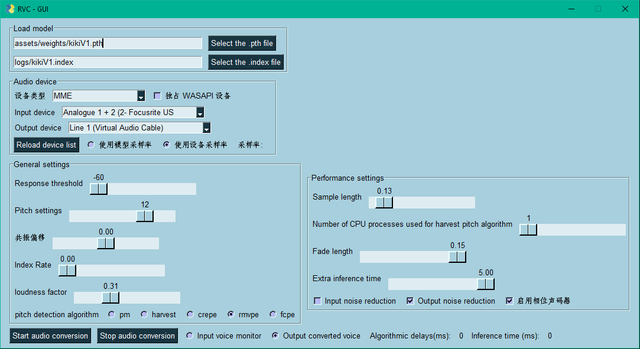
This guide will be in the same style/format as Blancdot's for simplicity sake. Credits go to the legend.
Thanks to Codename for additional input.
Jump To The Important Sections
Comparison RVC & W-Okada
Download NVIDIA
Download AMD/INTEL GPUs
Virtual Audio Cable (mandatory)
Opening
GUI setting...
feral crescent
When I use a huggingface space or google colab (that I duplicated on my profile) is the audio I upload to be changed saved on their servers? Or is it deleted after I convert it
pastel oak
 hasty elk
I Need help
hasty elk
I Need help
ask
pastel oak
crude bolt
also it spit out alot of D and G numberred .pth-files ... is that normal ?
you use the g and d paths to continue training later
you should have normal pth files aswell which should be in the folder assets -> weights
pastel oak
grave plover
hey, anyone would kindly show me how to upload my RVC model to huggingface by an...

 pastel oak
olive mural
is this the channel where i ask for help for making models? i am trying to make ...
pastel oak
olive mural
is this the channel where i ask for help for making models? i am trying to make ...
you dont link the filelist.txt you only link the /AM/ folder. so remove the filelist.txt
im not quite sure why you are using a txt file to create a voice model anyway?
pastel oak
sand apex
idk if this is the right place to ask or not, but in the client, why does enabli...
wokada is not the greatest with optimization
 wispy lodge
That's not wokada problem. Index just works on CPU and is quite demanding
sand apex
pushes a 5950x 16-core to 100%, lol
rare gobletBOT
Ayo? @pulsar anchor level 5 !!!
 pulsar anchor
https://app.kits.ai/convert/private/bf-v2-1 Is anyone have a model from this ai voice?
Example: https://youtu.be/gc95h153m64
brittle wing
@pastel oak Sorry for the ping but can I know which version of Python and Pytorch are you using for the rvc voicr changer
Just a curious question
 broken dawn
Why do I use and not heard and vol 0
rare gobletBOT
Ayo? @broken dawn level 1 !!!
 upper trail
When I try to use it (press "start audio conversion") the software just crashes
here are what both interfaces look like:

 rare gobletBOT
Ayo? @upper trail level 2 !!!
pastel oak
brittle wing
<@965636299509882980> Sorry for the ping but can I know which version of Python ...
I dont know off the top of my head but think 3.10.8 or 3.10.6
pastel oak
upper trail
When I try to use it (press "start audio conversion") the software just crashes
...
your input and output are different types, i just suggest you download the latest version
https://huggingface.co/Shadicti/RVCLatest/blob/main/RVCNvidiaLatest.zip
and the guide
https://rentry.co/RVCRealtimeGuide
if you dont want to download the latest version, simply make sure output is (MME) at the end too
upper trail
pastel oak
if you dont want to download the latest version, simply make sure output is (MME...
Ok its fixed now but I have realised it makes a very very minor impact on my voice compared to examples that I have hear in yt videos
I'm not sure if there is something I'm not doing or if my expectations were just too high
pastel oak
upper trail
Ok its fixed now but I have realised it makes a very very minor impact on my voi...
do -60 response threshold
what gpu do you have
and wdym "minor impact on my voice"
upper trail
pastel oak
do -60 response threshold
no impact
upper trail
pastel oak
what gpu do you have
1660 super
upper trail
pastel oak
and wdym "minor impact on my voice"
like if im using a female one it will just make me sound like a squeaker
basically the only thing that changes is the pitch
pastel oak
upper trail
like if im using a female one it will just make me sound like a squeaker
then lower pitch until you find the sweetspot
upper trail
pastel oak
then lower pitch until you find the sweetspot
If I lower the pitch it just sounds more robotic
pastel oak
use a streamer voice, or mommy stuff etc
upper trail
that work well for you
pastel oak
upper trail
that work well for you
https://huggingface.co/Blyuv/Mommy/resolve/main/MOMMY.zip?download=true
i think this was decent
upper trail
alr tysm
pastel oak
upper trail
pastel oak
maybe this
https://huggingface.co/EnduGalletaa/E-girlv2/resolve/main/E-girlv2.zi...
tried that one
brittle wing
upper trail
1660 super
Aye same gpu
These are my current rvc settings for my gtx 1660 super
 pastel oak
why is your input line 1 lol
thats odd
i generally recommend enabling output noise red and the vocoder thing on the right of it (at least i do, idk if you had any other experiences)
upper trail
brittle wing
These are my current rvc settings for my gtx 1660 super
what does extra interence time do
pastel oak
and extra you can keep at 5.00 but i have recently switched down to around ~2.00 because the cutting off in the beginning is a bit annoying
pastel oak
upper trail
what does extra interence time do
quality of voice model
upper trail
alr
pastel oak
you can comfortably use 5.00, if you notice first syllables get cut off more often, reduce it
upper trail
ill set mine to 5 and see if that helps
pastel oak
upper trail
ill set mine to 5 and see if that helps
thats not gonna fix much of your issue i think its just model related
but yah

 unreal pewter
i just downloaded rvc how to open ?
proud elbow
pulsar anchor
It doesn't have .index file
it can still work ig
unreal pewter
yall how do i open rvc
upper trail
pastel oak
https://huggingface.co/Blyuv/Mommy/resolve/main/MOMMY.zip?download=true
i think...
this one sounds better but i think a lot of people would still take it as a 12 year old kid
but thats just with me talking normally without any voice imitation
pastel oak
up to you to find a voice you like or create your own
 primal agate
i cant put url and download on rvc how to fix
 compact sinew
what
 tough fiber
https://www.kaggle.com/code/hinabl/public-w-okada-voice-changer
need help it didnt work
always it says
WARNING: Error parsing requirements for aiohttp: [Errno 2] No such file or directory: '/opt/conda/lib/python3.10/site-packages/aiohttp-3.9.1.dist-info/METADATA'
for first cell
 supple quest
tough fiber
https://www.kaggle.com/code/hinabl/public-w-okada-voice-changer
need help it di...
supple quest
tough fiber
https://www.kaggle.com/code/hinabl/public-w-okada-voice-changer
need help it di...
ask in #🔍│help-w-okada ig
 brittle wing
hey is it normal for RVC GUI to take up CPU power rather than GPU? AMD btw
hot lagoon
Can anyone help me understand when someone said this to me? use mel-scale spectrogram as guide to copy/adjust the notes
brittle wing
brittle wing
hey is it normal for RVC GUI to take up CPU power rather than GPU? AMD btw
@pastel oak what can I do to make it use GPU more? RX6600M
rare gobletBOT
Ayo? @brittle wing level 1 !!!
 cosmic tide
cosmic tide
cosmic tide
I need help with that thing
brittle wing
like, sure it works great but I wanna do stuff with it on yk?
pastel oak
brittle wing
<@965636299509882980> what can I do to make it use GPU more? RX6600M
are you running go realtime dml
pastel oak
cosmic tide
upload the zip into your google drive like it says and copy the URL of the folder
cosmic tide
pastel oak
upload the zip into your google drive like it says and copy the URL of the folde...
The name of the zip file?
pastel oak
brittle wing
yea
im not sure about the behavior of RX-M gpus im not sure how to help
brittle wing
I set it to 20+5.00
pastel oak
cosmic tide
The name of the zip file?
no
you put in whatever your folder name is
so like /content/drive/rvcdisconnected or whatever it ks
idk anything about rvcdisconnected
brittle wing
it works fine, it just takes up CPU power
when I wanna use GPU
ryzen 7 5800H btw
50% just having it on
pastel oak
brittle wing
it works fine, it just takes up CPU power
youll need to ask someone who uses rx-m gpu
maybe @wispy lodge is more knowledgable
do you know what command to run for RVC realtime to detect rx6600m
wispy lodge
It should work with dml version, but it still may use some cpu
For me it uses around 30% with ryzen 7 5800h
brittle wing
yeah but having it on takes up 40-50%
cosmic tide
pastel oak
upload the zip into your google drive like it says and copy the URL of the folde...
I did that before the error
pastel oak
cosmic tide
I did that before the error
then idk sorry
cosmic tide
 wispy lodge
brittle wing
yeah but having it on takes up 40-50%
wispy lodge
brittle wing
yeah but having it on takes up 40-50%
Well, there isn't much you can do, that's how rvc realtime works. I used sample length 0.25 and 5.00 extra
brittle wing

wispy lodge
I resolved this issue in my forked wokada version, but not in rvc
crude bolt
brittle wing
hey is it normal for RVC GUI to take up CPU power rather than GPU? AMD btw
you need to start the right version of the 2.
and also installed the right version
to be more concrete
brittle wing
yeah that's what I did
crude bolt
on installing you have to include the requirements-dlm for amd
and start also the the dml variants
brittle wing
I Downloaded the AMDversion and started go-realtime-gui-dml
crude bolt
as far i know - cuz i get it from github there is 1 'master' version , on installing it you had to install like pip install requirements-dml.txt
there is no 'right' version to download the way i did it
brittle wing
github?
brittle wing
I got it from the rentry
rare gobletBOT
Ayo? @brittle wing level 2 !!!
crude bolt
ic ic - well most help here is provided you go the way we also provide the software , you can get it from diffrent forks or alternative sites we have no clue how all those variants are working
let alone fix the problem then
get this version please ^^; so there are more ppl in this channel to help you out if you got problems with 'this' particular version
glad zealot
that works
wispy lodge
I'm afraid this won't help just because that's the issue with the code and dml version. Feel free to try though
crude bolt
yeh well if it doesnt work on this software at least we have ruled out the code by then.
sometimes totally approaching the problem from a diffrent direction gives you more insights ;3
 subtle elm
Voices lag asf
brittle wing
crude bolt
https://github.com/RVC-Project/Retrieval-based-Voice-Conversion-WebUI
Japanese text @_@
 rapid flame
pastel oak
brittle wing
I Downloaded the AMDversion and started go-realtime-gui-dml
rapid flame
pastel oak
brittle wing
I Downloaded the AMDversion and started go-realtime-gui-dml
try out emojikages wokada fork instead then
lemme look for link rq
https://github.com/deiteris/voice-changer/releases/tag/b1877
windows dml one

 cloud finch
Why does my storage tank whenever i use Applio
I converted once and it went down an entire gig
brittle wing
which one of these is the best to use
 rare gobletBOT
Ayo? @brittle wing level 2 !!!
brittle wing
pastel oak
try out emojikages wokada fork instead then
W-Okada sucks for me
cuz AMD
pastel oak
brittle wing
W-Okada sucks for me
as i said.. emojikages fork is different and runs better
he even said he fixed the thing you mentioned in his modified version
brittle wing
the models in that just sound bad, even on ONXX
wispy lodge
There's even a video in readme that demonstrates perf 😄
brittle wing
wispy lodge
There's even a video in readme that demonstrates perf 😄
wheres readme
wispy lodge
brittle wing
wheres readme

GitHub
リアルタイムボイスチェンジャー Realtime Voice Changer. Contribute to deiteris/voice-changer development by creating an account on GitHub.
brittle wing
is there a way to seperate ad libs from vocals
 calm moat
hello everyone 🙂
I have a voice model, but not in the archive, but in the pth and index files
. what do I need to do with them to add to the rvc gui?
cosmic tide
help
 crude bolt
pastel oak
he even said he fixed the thing you mentioned in his modified version
crude bolt
pastel oak
he even said he fixed the thing you mentioned in his modified version
ah i failed to read this context , sorry @wispy lodge
 queen frigate
is this the place where you can make brainrot remix's
olive mural
pastel oak
im not quite sure why you are using a txt file to create a voice model anyway?
im not
rare gobletBOT
Ayo? @olive mural level 1 !!!
queen frigate
hey faultrio do you know if you can make brainrot remixs in rvc applio?
proper shale
we don't really give support to voice.ai... maybe if you have a decent GPU you could use W-Okada

EOL - No further Updates
Github - Blanc-dot
Discord - Blanc_dot
Despite being end of life, most if not all information has not really changed, so should be very accurate until actual new stuff comes out.
Other Links
Antasma's Local Error Fixes
Antasma's Colab guide
Sushi's useful Links - You need...
 visual elm
@brittle wing hi
brittle wing
-colab
azure marshBOT
brittle wing
-colab
☁️ Google Colabs
- Applio, by IA Hispano Google Colab
- AICoverGen-WebUI, modded by Hina Google Colab
- AICoverGen-NoWebUI [English], by Ardha, fixed by Eddy, Hina and Gdr Google Colab
- AICoverGen-NoWebUI [Spanish], credits to Eddy, Hina and Gdr for translating and fixing Google Colab
- Ilaria RVC, by thestingerx Google Colab
- RVC Disconnected, by Kit Lemonfoot Google Colab
- easyGUI, by rejects Google Colab
- 🆕 UVR5 NO UI for Google Colab, by Eddy Google Colab
🤗 Hugginface Spaces
- Applio, by IA Hispano Huggingface Spaces
- Ilaria RVC, by thestingerx Hugginface Spaces
- RVC-HFv2, by r3gm Huggingface Spaces
- AICoverGen, by r3gm Huggingface Spaces
- Advanced RVC Inference, by r3gm Huggingface Spaces
- RVC v2 Huggingface version, by Clebersla Huggingface Spaces
More commands: -audio, -local, -overtrain, -realtime, -rvc, -help
brittle wing
pastel oak
why is your input line 1 lol
I just unplugged my microphone that's why lol
brittle wing
pastel oak
and extra you can keep at 5.00 but i have recently switched down to around ~2.00...

 opal kelp
-colab
azure marshBOT
opal kelp
-colab
☁️ Google Colabs
- Applio, by IA Hispano Google Colab
- AICoverGen-WebUI, modded by Hina Google Colab
- AICoverGen-NoWebUI [English], by Ardha, fixed by Eddy, Hina and Gdr Google Colab
- AICoverGen-NoWebUI [Spanish], credits to Eddy, Hina and Gdr for translating and fixing Google Colab
- Ilaria RVC, by thestingerx Google Colab
- RVC Disconnected, by Kit Lemonfoot Google Colab
- easyGUI, by rejects Google Colab
- 🆕 UVR5 NO UI for Google Colab, by Eddy Google Colab
🤗 Hugginface Spaces
- Applio, by IA Hispano Huggingface Spaces
- Ilaria RVC, by thestingerx Hugginface Spaces
- RVC-HFv2, by r3gm Huggingface Spaces
- AICoverGen, by r3gm Huggingface Spaces
- Advanced RVC Inference, by r3gm Huggingface Spaces
- RVC v2 Huggingface version, by Clebersla Huggingface Spaces
More commands: -audio, -local, -overtrain, -realtime, -rvc, -help
pastel oak
brittle wing
i use 1.86 on my rtx 3060ti but idk how it affects other gpus
its a good value for me, i think others with my gpu use 1.01 but quality was too meh when i tried it
 slim geyser
pastel oak
and extra you can keep at 5.00 but i have recently switched down to around ~2.00...
slim geyser
pastel oak
and extra you can keep at 5.00 but i have recently switched down to around ~2.00...
Oh yeah, I know someone who's tested this, and we think the silencing thing on max extra is model specific. Like, some models have the problem, and some don't, so the bug is prob brought on by some different things being done in the training phase, if I had to guess.
brittle wing
how do i use the batch inference thing in applio huggingface
brittle wing
what si better out of harvest and crepe
feral crescent
feral crescent
When I use a huggingface space or google colab (that I duplicated on my profile)...
Does anyone know?
brittle wing
did #1175430844685484042 got nuked or smth? can't find any rvc v2 models, did the mods merge it with the normal rvc tag?
why im getting this error?
 white bone
Does anyone know how to get the output to work? I can't hear the converted voice for the RVC. it doesn't crash on me now, but idk how to get the output voice.
 lucid crow
wispy lodge
https://github.com/deiteris/voice-changer/blob/master-custom/README.md
lucid crow
wispy lodge
https://github.com/deiteris/voice-changer/blob/master-custom/README.md
@wispy lodge does this work on AMD Ryzen 5
 lusty cedar
can you tell me what I should use with a RTX 2050
 stray ether
I need help, it works fine on desktop. However I can run steamvr normally but the moment I run rvc it kills all my audio, I checked all outputs and inputs does anyone know what I can do to fix this?
brittle wing
lusty cedar
can you tell me what I should use with a RTX 2050
You can try these settings

But try setting the sample length to 0.36-0.42
Because a RTX 2050 mobile is basically a GTX 1660 SUPER with similiar CUDA architecture but with DLSS and Ray tracing technology
But the rtx 2050 is pretty more superior when it comes to AI
In gaming gtx 1660 super performs 38% more better than it
 thin stump
@glad zealot Twist his balls off
glad zealot
thin stump
<@444684887363026974> Twist his balls off
balls twisted
 low shard
EVERYONE HAVING ERRORS ON THE ILARIA RVC MANGIO (THE ONE IN THE DOCS) CHECK #📰│dev-updates message
 alpine shore
Ok so Im using my voice changer and its so delayed how do I fix that
rare gobletBOT
Ayo? @alpine shore level 1 !!!
 urban hill
alpine shore
Ok so Im using my voice changer and its so delayed how do I fix that
urban hill
alpine shore
Ok so Im using my voice changer and its so delayed how do I fix that
better hardware or settings tweaks for a little bit less
brittle wing
alpine shore
Ok so Im using my voice changer and its so delayed how do I fix that
What gpu
urban hill
oh yeah if ur amd convert to onnx
brittle wing
urban hill
oh yeah if ur amd convert to onnx
Doesn't work with rvc
You still need to use .pth
I've tried it before
urban hill
brittle wing
Doesn't work with rvc
i use onnx
i think its the version that supports it
urban hill
oh lol u got no worries about it then lol
rvmpe_onnx what im on and its ass but it works kinda for amd
brittle wing
Ya
The AI voice translation was so ass on my RX 580
It was so delayed and stuttery
rare gobletBOT
Ayo? @brittle wing level 5 !!!
urban hill
im trying to get colab to work rn cause i used to use it but now it just freezes and disconnects mid setup
do i need colab pro to get more resources or what
brittle wing
A gtx 1650 is probably like the bare minimum
for rvc
If you're on the Nvidia side
alpine shore
brittle wing
What gpu
I have a 1660 super
urban hill
i have 5700xt
brittle wing
urban hill
i have 5700xt
Rx 6600 has newer architecture
So it's probably more better in AI
Gaming-wise 5700xt is more faster no doubt

Nvm
Rx 5000 series should be the bare minimum on AMD side
 solemn edge
rvc voices have massive delay but beatrice works really well
brittle wing
solemn edge
rvc voices have massive delay but beatrice works really well
True
Tbh they should've made beatrice the standard
Rvmpe is still pretty good
slim geyser
wut
the beatrice voices sound pretty damn bad
and, y'know, they're not the same thing as rvmpe
rvmpe is a pitch extraction method for RVC to use, beatrice is just another thing entirely. It does not use the same .pth files you use with rvc.
pastel oak
slim geyser
Oh yeah, I know someone who's tested this, and we think the silencing thing on m...
Interesting
slim geyser
Like, the beatrice voices are just another voice changer thing the w-okada dev added, because it didn't already have enough bloat, apparently.
urban hill
hina colab realtime launches but always runtime disconnect as it finishes
 rare gobletBOT
Ayo? @urban hill level 2 !!!
slim geyser
urban hill
i have 5700xt
use rvc gui instead of colab lol
don't need onnx files, don't have to deal with the cpu bug
slim geyser
w-okada is not the rvc gui I'm talking about
wispy lodge
Or use wokada fork that has cpu bug completely eliminated lol
urban hill
ah
slim geyser
keep on forgetting about your fork, ngl
urban hill
but i mean using anything other than colab would impact performance heavily
slim geyser
you need to get one of those youtubers who've made a, "how to sound like an annoying anime girl," videos with regular okada to feature your fork lol
urban hill
only thing i can run with rvc locally is roblox or somethin
slim geyser
depends on the kind of games you play
can fix a lot of problems by maxing out your fps at 60 and lowering graphic settings
wispy lodge
slim geyser
you need to get one of those youtubers who've made a, "how to sound like an anno...
Tru lol
Though it's actively changing, so it most likely would be outdated the next day
urban hill
slim geyser
can fix a lot of problems by maxing out your fps at 60 and lowering graphic sett...
this would be something that i could resort to but im just seeing if anyone knows how to help me with my colab issues since its supposedly still working
i would be willing to pay for colab pro if i know that it would solve my issues
wispy lodge
urban hill
this would be something that i could resort to but im just seeing if anyone know...
Is there any issue with Colab? I think currently you just enter your ngrok token, hit Run all cells and go to your ngrok URL. Simple as that
 analog ridge
is it ok settings for rtx 4060? chunk:256, extra:4096, f0 Det:harvest
urban hill
wispy lodge
Is there any issue with Colab? I think currently you just enter your ngrok token...
my runtime disconnects like the image i screenshotted above
and i can get to the browser gui but no output because it disconnected
wispy lodge
Hmm, let me check with my version. Maybe something has changed in colab runtime
urban hill
its probably because of compute points but im not sure
or compute units whatever they are
idk ill just buy some and see
wispy lodge
Nah, it seems like some error with notebook
On the right pane, you can see that your instance will last for 2 hours
analog ridge
analog ridge
is it ok settings for rtx 4060? chunk:256, extra:4096, f0 Det:harvest
can anyone answer pls?
wispy lodge
And if it had Connect T4 button, that means it runs instance with T4 GPU
 nocturne moon
Кто нибудъ есть русский хелпер?
wispy lodge
analog ridge
is it ok settings for rtx 4060? chunk:256, extra:4096, f0 Det:harvest
chunk 192, extra 16384, f0 det rmvpe
analog ridge
I love u
urban hill
it freezes a lot during the server start cell, and it disconnects before i even touch any buttons on the gui
rare gobletBOT
Ayo? @nocturne moon level 1 !!!
analog ridge
whats the settings I need to set for better sound(gain in and out)?
rare gobletBOT
Ayo? @analog ridge level 1 !!!
analog ridge
 analog ridge
whats the settings I need to set for better sound(gain in and out)?
analog ridge
analog ridge
whats the settings I need to set for better sound(gain in and out)?
without glitch
slim geyser
analog ridge
without glitch
depends on your mic, and how loud you're speaking, but I think you can just mess with it while it's on to see what works best for you.
well, out is just making the ai voice louder
you wanna mess with input
analog ridge
ty
wispy lodge
I'd say you probably don't want to mess with out gain and only adjust the in gain. And increasing the value above 1 (which is 100%) might distort the audio
wispy lodge
nocturne moon
<@277821614345945089>
?
nocturne moon
nocturne moon
Please help me, I can't hear myself in ai voice changer, what could it be?
Pls
wispy lodge
You need to set Monitor to your headset to hear yourself
 analog ridge
wispy lodge
I'd say you probably don't want to mess with `out` gain and only adjust the `in`...
analog ridge
wispy lodge
I'd say you probably don't want to mess with `out` gain and only adjust the `in`...
do I need to use it for better audio?
 pastel oak
nocturne moon
Please help me, I can't hear myself in ai voice changer, what could it be?
pastel oak
nocturne moon
Please help me, I can't hear myself in ai voice changer, what could it be?
Dont ping random people.
Send a screenshot of your voice changer
pastel oak
analog ridge
Sup2 is noise suppression, to avoid unnecessary sounds in your background to get picked up
No point in using sup1, and echo you only need if your voice echoes
analog ridge
thank you so much!
wispy lodge
Note that Sup2 may also filter out quiet syllables (really getting annoyed by this sometimes), so if you don't have problems with noise - just don't use any of them
analog ridge
ok, but I need)
wispy lodge
Then yeah, Sup2 is usually what you want to use
If that doesn't work well, then routing audio through 3rd-party solutions like steelseries sonar or rtx voice is also an option
analog ridge
its working right, ty
brittle wing
urban hill
but i want to use colab for use while gaming
Your rx 5700 xt should be already ample for rvc
proper shale
mmmm
brittle wing
If you really wanna get the best results with rvc while gaming
proper shale
ah
brittle wing
I would just really recommend setting your game's graphics to the lowest settings
And capping your framerate at 60 fps
proper shale
yes
brittle wing
That way most of your gpu power is being focussed on the voice changer
And not the game or it will cause some stutters
 daring heath
HOW DO I CONTIUNE TRAINING

which folder is it
ok so i wrote in just here

wtf its at epoch 1 now
proper shale
daring heath
ok so i wrote in just here
might be because spaces in its name
also new mj model yay
daring heath
proper shale
might be because spaces in its name
the experiment name has spaces in it
do I just make sure that the sample rate is the same and the experiment name is the same as before then I hit train model to contiune the training?
daring heath
oh what do i do then
proper shale
crap i hate my mobile intern
proper shale
daring heath
do I just make sure that the sample rate is the same and the experiment name is ...
this too
proper shale
make sure that your name, sample rate, batch size is all the same
proper shale
and, definitely don't use spaces in the model name
daring heath

it said all keys matched perfectly
btw I dont think it matter if I have spaces or not the thing works
i know about codenames and shid I know why u should have it as a standard
but if I can do spaces imma do that
proper shale
that's the thing though, it breaks training most of the time
daring heath
whats the diffrence between one click training and train model
proper shale
daring heath
whats the diffrence between one click training and train model
one click training is broken
daring heath
ok lol
proper shale
 frail crater
my voice sounds like dog shit it sounds like robot
frail crater
my voice sounds like dog shit it sounds like robot
what are you using?
and, does it do it everywhere or on one app specifically
daring heath
why does the epoch restart tho
proper shale
probably because of the spaces in the name
daring heath
It said 25 in the log, keys matched when I clicked train model to contiune and now its 0
proper shale
also it just saved the 5 and 10 epoch d/g
daring heath
ok should I just delete the model and then make a new one
proper shale
daring heath
ok should I just delete the model and then make a new one
yeah
proper shale
daring heath
i just go at logs and then delete it right
yup
daring heath
clearly done something wrong here
 rare gobletBOT
Ayo? @daring heath level 4 !!!
daring heath
proper shale
probably because of the spaces in the name
so with this fixed model when I go ahead and retrain it, its gonna contiune at the right epoch not from 0 right
proper shale
daring heath
clearly done something wrong here
mmm how did preprocessing and feature extraction go
daring heath
daring heath
clearly done something wrong here
I deleted the folder and I redid it
proud elbow
daring heath
0 seconds a epoch
I see what you did there
 daring heath
proud elbow
I see what you did there
daring heath
proud elbow
I see what you did there
wym
i got no idea what ure talking bout
im new
i forgot to the extraction
proper shale
ah
proud elbow
daring heath
wym
that's batch size you have set, and on short dataset
daring heath
the dataset is 16 min
proud elbow
im not sure if even 4090 or A100 is that fast
 proud elbow
ah good then
daring heath
so now its working
its going alot faster than last time cuz then it was like 1 minute
2024-05-31 15:56:23,566Mj Thriller EraINFO====> Epoch: 1 [2024-05-31 15:56:23] | (0:01:15.876951)
2024-05-31 15:57:07,253Mj Thriller EraINFO====> Epoch: 2 [2024-05-31 15:57:07] | (0:00:43.672445)
2024-05-31 15:58:27,593Mj Thriller EraINFO====> Epoch: 3 [2024-05-31 15:58:27] | (0:01:20.334218)
2024-05-31 15:59:33,094Mj Thriller EraINFO====> Epoch: 4 [2024-05-31 15:59:33] | (0:01:05.494266)
2024-05-31 16:00:30,874Mj Thriller EraINFO====> Epoch: 5 [2024-05-31 16:00:30] | (0:00:57.774335)
2024-05-31 16:01:25,446Mj Thriller EraINFO====> Epoch: 6 [2024-05-31 16:01:25] | (0:00:54.566728)
2024-05-31 16:02:29,393Mj Thriller EraINFO====> Epoch: 7 [2024-05-31 16:02:29] | (0:01:03.940795)
2024-05-31 16:03:35,701Mj Thriller EraINFO====> Epoch: 8 [2024-05-31 16:03:35] | (0:01:06.275938)
2024-05-31 16:04:20,485Mj Thriller EraINFO====> Epoch: 9 [2024-05-31 16:04:20] | (0:00:44.778808)```i must have done something wrong with the gpu setting sthen
 shy yacht
does anyone know how to set the voice so it doesnt hear like its out of breath?
daring heath
out of breath??
lol
train it more i guess
i have no idea
How do I get a tensorboard displaying the training
like a graph
daring heath
how do I export the model? Do I extract the latest pth file but how do I get the index shitty file
 honest laurel
is ilaria rvc mainline not working too?
rare gobletBOT
Ayo? @honest laurel level 1 !!!
white bone
Does anyone know how to get the output to work? I can't hear the converted voice for the RVC. it doesn't crash on me now, but idk how to get the output voice.
proper shale
daring heath
how do I export the model? Do I extract the latest pth file but how do I get the...
pth is in weights, index in logs
proper shale
white bone
Does anyone know how to get the output to work? I can't hear the converted voice...
hm? what are you using to convert?
white bone
proper shale
hm? what are you using to convert?
I'm using the RVC GUI Client
proper shale
send a screenshot
white bone
alright, gimme a moment to boot it up
this one.

I was on cable to try and see if Discord can pick it up
hence why it says the output device is "Cable"
But even with headphones set, I still can't hear my voice.
Or well, the converted voice.
proper shale
white bone
this one.
probably the spaces in the folder name
proper shale
screws up everything yk
white bone
It still doesn't work even with the preset models
white bone
got it.
white bone
proper shale
probably the latter
I managed to get an output, but it won't pick up my voice, and instead it gives it a choppy feeling. Any way to fix that?
proper shale
white bone
I managed to get an output, but it won't pick up my voice, and instead it gives ...
probably decrease your response threshold
honest laurel
oh rly
white bone
proper shale
probably decrease your response threshold
Ah, gotcha
proper shale
and maybe check input noise reduction if you got bg noise
white bone
proper shale
and maybe check input noise reduction if you got bg noise
It's still choppy, do I make the Response threshold -60, or make it higher?
proper shale
wait... is it doing that only on discord or on both programs?
proper shale
alright... shit
white bone
do you want me to send a Screen recording of what it does?
proper shale
yeah that would help tbh
rare gobletBOT
Ayo? @white bone level 3 !!!
proper shale
white bone
wait increase that sample rate
no wait
sample length
my brain is dying
white bone
how much?
proper shale
to the middle id say
glad zealot
proper shale
my brain is dying
Me everyday
white bone
now it won't pick anything up
white bone
I'm using the one related to my GPU, which is Intel.
glad zealot
A can't help with that but it sounds like a feedback loop
proper shale
is it integrated or is it one of the Intel Arcs
white bone
 glad zealot
honest laurel
gg
white bone
Maybe it's because I wasn't letting it boot up fast enough
Yep, it was because I wasn't giving it time
Thanks for the help, tho!! I highly appreciate it!
proper shale
Ah, you're welcome! Glad you could fix it
Thought it was the iGPU screwing you over
glad zealot
I wonder if I can run that
 stark wadi
how can I run RVC on m3 max?
proper shale
stark wadi
how can I run RVC on m3 max?
Installing Applio is a simple process, you can download and install Applio in different ways.
 mortal jasper
-colab
azure marshBOT
mortal jasper
-colab
☁️ Google Colabs
- Applio, by IA Hispano Google Colab
- AICoverGen-WebUI, modded by Hina Google Colab
- AICoverGen-NoWebUI [English], by Ardha, fixed by Eddy, Hina and Gdr Google Colab
- AICoverGen-NoWebUI [Spanish], credits to Eddy, Hina and Gdr for translating and fixing Google Colab
- Ilaria RVC, by thestingerx Google Colab
- RVC Disconnected, by Kit Lemonfoot Google Colab
- easyGUI, by rejects Google Colab
- 🆕 UVR5 NO UI for Google Colab, by Eddy Google Colab
🤗 Hugginface Spaces
- Applio, by IA Hispano Huggingface Spaces
- Ilaria RVC, by thestingerx Hugginface Spaces
- RVC-HFv2, by r3gm Huggingface Spaces
- AICoverGen, by r3gm Huggingface Spaces
- Advanced RVC Inference, by r3gm Huggingface Spaces
- RVC v2 Huggingface version, by Clebersla Huggingface Spaces
More commands: -audio, -local, -overtrain, -realtime, -rvc, -help
proud elbow
u can ask more in #🔍│help-ai-art but...

 foggy folio
-rvc
azure marshBOT
foggy folio
-rvc
Documentation
📚 All-In-One English documentation
Full AI Voice Model Training Guide (Local)
Link: YouTube
Credits: Christopher Villanueva
Model training with Mainline RVC
Link: Rentry
credits: Raven (ravencutie21)
AICoverGen Colab Guide
Link: Google Docs
Credits: Eddy (Spanish Helper)
Create a model with RVC disconnected (colab)
Link: Google Docs
Credits: Angetyde
rare gobletBOT
Ayo? @foggy folio level 9 !!!
foggy folio
alr what is the best version of rvc just for covers rn
like the one that gives the highest quality outputs rn
 indigo pilot
Hi does anyone know why step 2 of the RVC model isn't working for me? It says JSONDecodeError
 odd shale
indigo pilot
Hi does anyone know why step 2 of the RVC model isn't working for me? It says JS...
odd shale
indigo pilot
Hi does anyone know why step 2 of the RVC model isn't working for me? It says JS...
Which colab are you using?
indigo pilot
RVC v2 with crepe
odd shale
foggy folio
like the one that gives the highest quality outputs rn
Actually the quality of the output will depend on the quality of the model you use.
Not the version of RVC.
indigo pilot
bruh no wonder lol
I found the link through a youtube video, do you have the updated?
odd shale
indigo pilot
bruh no wonder lol
tip: don't use video tutorials on youtube
These tend to be pretty outdated
odd shale
indigo pilot
I found the link through a youtube video, do you have the updated?

Use this colab.
proper shale
guide for it: https://docs.aihub.wtf/rvc/cloud/applio-colab/
Last update: Apr 01, 2024
indigo pilot
odd shale
These tend to be pretty outdated
lesson learned. I recently got into this so im super new
rare gobletBOT
Ayo? @indigo pilot level 1 !!!
indigo pilot
odd shale
https://colab.research.google.com/github/iahispano/applio/blob/master/assets/App...
thanks
indigo pilot
proper shale
guide for it: https://docs.aihub.wtf/rvc/cloud/applio-colab/
thanks
proper shale
indigo pilot
thanks
yw :)
indigo pilot
🙂
 jagged coral
guys, which female model voice you think is the best and most natural for man?
odd shale
jagged coral
guys, which female model voice you think is the best and most natural for man?
You must test yourself with the public models on the #1175430844685484042 channel
daring heath
proper shale
pth is in weights, index in logs
ok nice so I just make a folder out of the two and then I can use it
man why is isnt this written anywhere tf
do everyone hear train their models more than the first pass

like i dont understand it completely u train ur model up to ur top epochs and after that its just fine tune training if u train it more?
 brittle wing
@wispy lodge
 daring heath
Huuuh??? what do I do now I put it at 450

and now its going 451?
isnt it done training?
wispy lodge
brittle wing
<@277821614345945089>
Well, this should be at least working
But the delay will be 1.87 seconds
brittle wing
wispy lodge
Well, this should be at least working
is everything correct? now what do i do?
wispy lodge
brittle wing
is everything correct? now what do i do?
You can try pressing start and see how it works at least. It should output converted voice to your speakers
proper shale
daring heath
ok nice so I just make a folder out of the two and then I can use it
it should probably work just fine as it is
unless you didn't enable the "Save small finished model to weights" option
proper shale
daring heath
like i dont understand it completely u train ur model up to ur top epochs and af...
You can stop after a certain epoch count (make sure your D/G stuff has already saved)
Then just test and see
brittle wing
wispy lodge
You can try pressing start and see how it works at least. It should output conve...
OMG ITS LIKE DELAYING BUT IM NOT SURE IF ITS THE AI ONE OR ME
brittle wing
wtf
@wispy lodge like im speaking into the mic but sometimes the voice doesnt even repeat just bg noise and its like really delaying, any more advice?
and sometimes the voice comes AFTER i press stop
daring heath
brittle wing
wtf
It’s ballin by Roddy Rich
wispy lodge
brittle wing
<@277821614345945089> like im speaking into the mic but sometimes the voice does...
Well, do you actually use web camera as a microphone? Do you have a microphone on your headset?
brittle wing
wispy lodge
Well, do you actually use web camera as a microphone? Do you have a microphone o...
no i use my webcamera as my microhpone and my headphones are seperate
wispy lodge
Then you might need to enable noise suppression at least. Try enabling sup2
wispy lodge
And to reduce the delay, you can try reducing Chunk a bit. You can try reducing it to value that corresponds to 1000ms
If it sounds ok, then you can try reducing it more
brittle wing
wispy lodge
And to reduce the delay, you can try reducing Chunk a bit. You can try reducing ...
reducing or increasing?
wispy lodge
Reducing
brittle wing
wispy lodge
Reducing
i put 80 chunk
is the voice suppose to be heard after i press stop?
wispy lodge
80 is too small. Use the one that corresponds to 1000 ms, I don't remember exact value
wispy lodge
brittle wing
is the voice suppose to be heard after i press stop?
This can happen if delay is too high or your CPU/GPU does not keep up
daring heath
brittle wing
<@277821614345945089> like im speaking into the mic but sometimes the voice does...
Is it a live voice changer
odd shale
daring heath
Is it a live voice changer
It's realtime, so yeah.
daring heath
Turn up the processing time idk what it’s called batch size
it’s gonna be more delayed but better quality
brittle wing
daring heath
Is it a live voice changer
yea
brittle wing
wispy lodge
80 is too small. Use the one that corresponds to 1000 ms, I don't remember exact...
80 is 10240 ms
oh wait
i read wrong
im blind mb
@wispy lodge i put 384
brittle wing
daring heath
Turn up the processing time idk what it’s called batch size
which one is that
i gave a ss
daring heath
No idea
brittle wing
daring heath
No idea
did it work for u
rare gobletBOT
Ayo? @brittle wing level 3 !!!
brittle wing
ok its working but it cuts of mid sentence, like when i say hello nice to meet u, she goes 'HELLO....NICE TO....MEET...YOU'
daring heath
brittle wing
did it work for u
i dont use live rvc
so my michael jackson model works hahahahahaha
brittle wing
daring heath
so my michael jackson model works hahahahahaha
damn must be nice
daring heath
its my first model aswell
brittle wing
daring heath
its my first model aswell
congratulations
btw how to add models in the voice changer
wispy lodge
brittle wing
ok its working but it cuts of mid sentence, like when i say hello nice to meet u...
Hmm, what's your CPU?
daring heath
brittle wing
btw how to add models in the voice changer
i use rvc gui so i have no idea
rare gobletBOT
Ayo? @daring heath level 5 !!!
daring heath
prolly move the zip into the models folder
unzip the zip folder and put it in the models
make sure the assets of the folder is the 1st directory of the folder
not a folder inside of a folder having the assets
brittle wing
wispy lodge
Hmm, what's your CPU?
 wispy lodge
brittle wing
wispy lodge
brittle wing
Err, Core 2 Duo is way too old to run voice changer at decent level... Does it cut mid-sentence with chunk 704?
proud elbow
brittle wing
isnt it ancient already in vista era? 
brittle wing
wispy lodge
Err, Core 2 Duo is way too old to run voice changer at decent level... Does it c...
ik my pcs pretty old
brittle wing
proud elbow
isnt it ancient already in vista era? <:shocked:1159360273904316467>
stawppp
brittle wing
proud elbow
isnt it ancient already in vista era? <:shocked:1159360273904316467>
what do u recommdent a good cpu, imma build my pc
daring heath
mj a gangster
 next mist
dude 😂
daring heath
keep me away from ai bruh
proud elbow
brittle wing
what do u recommdent a good cpu, imma build my pc
depend on your budget
brittle wing
proud elbow
depend on your budget
im not sure but smth atleast better than my current one and smth that most people use
wispy lodge
proud elbow
isnt it ancient already in vista era? <:shocked:1159360273904316467>
Vista came out in 2007 and this CPU came around the same time so nah, it was fresh
wispy lodge
brittle wing
im not sure but smth atleast better than my current one and smth that most peopl...
Depends on the budget. Any current budget CPU would be better than much older CPU models
brittle wing
is there some kind of ai voice changer that u can use in games and stuff
proud elbow
wispy lodge
Vista came out in 2007 and this CPU came around the same time so nah, it was fre...
and im a bit surprised it can still run win 10
wispy lodge
Win 10 has surprisingly good support for old hardware actually
brittle wing
wispy lodge
Depends on the budget. Any current budget CPU would be better than much older CP...
i see i see
but what do u recommend tho
brittle wing
wispy lodge
Win 10 has surprisingly good support for old hardware actually
what about win 11?
proud elbow
I remember having a first gen core i5 laptop in 2011 and was sticking on win 7 and 4 gb ram
proud elbow
brittle wing
what about win 11?
even though u can bypass TPM requirement, I doubt if ur mobo could support it without issues
brittle wing
proud elbow
even though u can bypass TPM requirement, I doubt if ur mobo could support it wi...
sigh, fr
i really gotta change everything huh
i dont even have a graphics card
proud elbow
brittle wing
i dont even have a graphics card
igpu or "onboard VGA" like that in 00's era?
proud elbow
brittle wing
im not sure but smth atleast better than my current one and smth that most peopl...
for low budget tier, ig i5 12600 or ryzen 5600 is decent. and gpu is either 1660 super or 3060 depend on how much budget u can spare.
wispy lodge
You can also look for used parts and build cheaper setup with older parts as well
brittle wing
proud elbow
for low budget tier, ig i5 12600 or ryzen 5600 is decent. and gpu is either 1660...
i see, noted, thank u thank u
i was never a pc working kinda person so i never used it much but when i actually needed it and realized how much money it requires to build a pc, had a mini heart attack
wispy lodge
Though if you're not very familiar with computer hardware or don't have a friend who could help to find and verify parts, that may be not the best option
brittle wing
proud elbow
igpu or "onboard VGA" like that in 00's era?
idek bro
brittle wing
wispy lodge
You can also look for used parts and build cheaper setup with older parts as wel...
alrr thank you so much
brittle wing
wispy lodge
Though if you're not very familiar with computer hardware or don't have a friend...
@wispy lodge @proud elbow thanks for helping me out, take love bros
wispy lodge
Because you usually can get old top GPUs for cheap (like rx 480 8gb for example) at least and they serve well even in modern games. That's how I've been advancing with my hardware until I got more money to buy better new hardware 😄
proud elbow
im not sure if 2 gb vram already suffocates in the modern requirements, but despite being 10 year old, even GT 710 has 2 gb vram too
wispy lodge
gt 710 is way too weak even for the time when it was released and 2gb of vram doesn't really help it
 cosmic yew
rare gobletBOT
cosmic yew
rare gobletBOT
Ayo? @cosmic yew level 1 !!!
cosmic yew
how do i fix this?
Collecting parselmouth
  Downloading parselmouth-1.1.1.tar.gz (33 kB)
  Preparing metadata (setup.py) ... done
Collecting googleads==3.8.0 (from parselmouth)
  Downloading googleads-3.8.0.tar.gz (23 kB)
  error: subprocess-exited-with-error

  × python setup.py egg_info did not run successfully.
  │ exit code: 1
  ╰─> See above for output.

  note: This error originates from a subprocess, and is likely not a problem with pip.
  Preparing metadata (setup.py) ... error
error: metadata-generation-failed

× Encountered error while generating package metadata.
╰─> See above for output.

note: This is an issue with the package mentioned above, not pip.
hint: See above for details.```HOW DO I OPEN TENSOR BOARD
daring heath
Huh`? cant i train it more?

 spiral osprey
does ilaria colab still work?
daring heath
@proper shale cant i train the model more
proper shale
daring heath
Huh`? cant i train it more?
it was saved, you just need to Increase total epochs to resume later
daring heath
wait so more epochs is more training
proper shale
daring heath
u should really have 10k epochoes?
not necessarily
every model is different after all
proper shale
that's why TensorBoard exists
proper shale
you need to dl it btw, have you done that already or?
spiral osprey
proper shale
ila rvc mainline does work
this is a web ui inference?
rare gobletBOT
Ayo? @spiral osprey level 10 !!!
proper shale
spiral osprey
this is a web ui inference?
yeah
daring heath
proper shale
you need to dl it btw, have you done that already or?
Nope
How do I fix thst
do I need to fix that now
Or after the 1K training
I wanna do 1000 epochs
Btw is RVC that advanced it can make it sound realistic or is it held back by the robotic artifacts
proper shale
daring heath
Btw is RVC that advanced it can make it sound realistic or is it held back by th...
All depends on your dataset, tbh
It can get really close
proper shale
daring heath
How do I fix thst
Last update: Feb 10, 2024
daring heath
Ok so I would take it a yes it’s advanced as shid
spiral osprey
proper shale
yeah
thanks
proper shale
spiral osprey
thanks
You're welcome :)
daring heath
Btw what’s Overtraining isn’t it just good that it masters it
Or wait ye
Like it becomes more data obv
proper shale
daring heath
Btw what’s Overtraining isn’t it just good that it masters it
Well not really. It makes your model worse
daring heath
bruh
proper shale
But it's not something that comes this quick
daring heath
can I just move the RVC folder onto another pc and continue training there or does it fugg up the device info shid
like it starts going where the Rtx 3060 ti this a mx 550
proper shale
daring heath
can I just move the RVC folder onto another pc and continue training there or do...
Yeah you probably can
daring heath
proper shale
All depends on your dataset, tbh
I think imma update the dataset cuz it has a lot of high saturation
proper shale
Just copy over the logs folder
proper shale
daring heath
I think imma update the dataset cuz it has a lot of high saturation
Ah I see
daring heath
proper shale
Just copy over the logs folder
Ok nice
I feel like it goes over a threshold of ai managing if yk what I mean
like it has control on the bass and mids but not the highs it’s a bit over and it exposes the ai robot sound
daring heath
proper shale
Just copy over the logs folder
Btw I posted some demos here of it aleready
It sounds great tho 😹
daring heath
daring heath
.
I added the autotune reverb and the high saturation
Tremble saturation**
 blazing turret
hey has anyone else run into the problem of the voice changer not working properly in call of duty? it works in any other game but for some reason just goes insanely laggy in cod... i have no idea how to fix this. it has worked in the past.
opal kelp
-colab
azure marshBOT
opal kelp
-colab
☁️ Google Colabs
- Applio, by IA Hispano Google Colab
- AICoverGen-WebUI, modded by Hina Google Colab
- AICoverGen-NoWebUI [English], by Ardha, fixed by Eddy, Hina and Gdr Google Colab
- AICoverGen-NoWebUI [Spanish], credits to Eddy, Hina and Gdr for translating and fixing Google Colab
- Ilaria RVC, by thestingerx Google Colab
- RVC Disconnected, by Kit Lemonfoot Google Colab
- easyGUI, by rejects Google Colab
- 🆕 UVR5 NO UI for Google Colab, by Eddy Google Colab
🤗 Hugginface Spaces
- Applio, by IA Hispano Huggingface Spaces
- Ilaria RVC, by thestingerx Hugginface Spaces
- RVC-HFv2, by r3gm Huggingface Spaces
- AICoverGen, by r3gm Huggingface Spaces
- Advanced RVC Inference, by r3gm Huggingface Spaces
- RVC v2 Huggingface version, by Clebersla Huggingface Spaces
More commands: -audio, -local, -overtrain, -realtime, -rvc, -help
opal kelp
Help, I can no longer access the applio's public link
rare gobletBOT
Ayo? @opal kelp level 4 !!!
brittle wing
how many minutes of recording should i have to make an ai model
odd shale
brittle wing
how many minutes of recording should i have to make an ai model
Between 10, 15 or 20.
Preferencially, as clean as possible.
brittle wing
how should they be like all the voice clips in 1 audio track
or all of them seperate
in like short segments of speech
i havent checked docs yet sorry im just getting the voice files ready
odd shale
brittle wing
or all of them seperate
You can split the audio in 5-7-10 second fragments.
brittle wing
all seperate mp3 files?
odd shale
brittle wing
all seperate mp3 files?
Don't use mp3.
brittle wing
wav?
odd shale
Use wav or flac instead
brittle wing
how does it work is it basically just putting them in a software and letting it make it
odd shale
brittle wing
how does it work is it basically just putting them in a software and letting it ...
Actually it's not that simple.
brittle wing
odd shale
brittle wing
<:lfg:1159355870119993496>
You gotta split your audio file in segments (you can use label sounds option in Audacity to do so then select "export multiple files") put the files in a folder and then put the folder of your dataset in the datasets folder of your RVC root folder.
brittle wing
would i edit the audio a little
like noise gate and stuff like that
so its clearer
daring heath
Can I make a model out of 20 seconds of dataset?
Is that possible
I know it’s gonna be shit
odd shale
daring heath
I know it’s gonna be shit
I think you can make the dataset as clean as possible.
And play around with batch size.
brittle wing
odd shale
You gotta split your audio file in segments (you can use label sounds option in ...
how do u do labels in audacity
odd shale
brittle wing
so its clearer
if you can of course.
odd shale
brittle wing
how do u do labels in audacity
Analyze > Label Sounds
odd shale
brittle wing
or no
You can use Truncate Silence on Audacity but you can do it yourself or use Label Sounds instead.

Use these settings for Label Sounds
After you clicked on apply, you'll see stuff below like this. (On the tag text you can put any name you want (a legible one preferencially) along a ##1

Then, just go to File > Export > Export Multiple
brittle wing
will that even work on these cuz they look like this
 odd shale
brittle wing
will that even work on these cuz they look like this
odd shale
brittle wing
will that even work on these cuz they look like this
If you got various audios, just do it one by one.
odd shale
brittle wing
its gonna take forever sadly
Sadge
 rare gobletBOT
Ayo? @brittle wing level 3 !!!
brittle wing

odd shale
brittle wing
<:trol:1159397152183824405>
Label sounds will exclude the silence for you.
brittle wing
im just adding a limiter and stuff in fl studio cuz its easier to use for me
odd shale
brittle wing
im just adding a limiter and stuff in fl studio cuz its easier to use for me
If you know what you're doing with FL, it's fine then.
brittle wing
it just basically needs to have minimal background noise right
odd shale
brittle wing
it just basically needs to have minimal background noise right
If the background noise is barely audible, it's fine.
brittle wing
is it gonna be shitty cuz
its my friend im trying to make an ai voice of him to troll him
odd shale
brittle wing
is it gonna be shitty cuz
But if i was you i would make sure to delete all the noise.
brittle wing
but all of it is recorded thru a game chat
so sometimes it cuts and stuff like thar
odd shale
brittle wing
but all of it is recorded thru a game chat
Well, you're doing your best with what you got.
That's something at least.
Don't feel bad, pal
odd shale
odd shale
Then, just go to File > Export > Export Multiple
Then you'll get a window like this.

Create a folder where you'll export your audios before hand and select it.
And select flac or wav as format.
brittle wing
il just do it manually cuz alot of it is just him humming and background noise
so i need to listen thru it anyways
odd shale
brittle wing
so i need to listen thru it anyways
That's okay.
I'm just finishing my Label Sounds usage explanation.
brittle wing
so i just need a folder full of seperate audio files of him speaking right
odd shale
odd shale
And select flac or wav as format.
Then select 8 as level and 16 bits, then hit "export"
odd shale
brittle wing
so i just need a folder full of seperate audio files of him speaking right
yeah.
As clean as possible.
brittle wing
the audio file is 40 mins long and 400mb 
odd shale
brittle wing
the audio file is 40 mins long and 400mb <:despair:878130235181244446>
I'd recommend you to use flac ig.
brittle wing
i already exported it as wav
odd shale
brittle wing
i already exported it as wav
You exported the split audio files as .wav?
brittle wing
nah its all of them in 1
i put noise supressuion stuff on it
and exported it al las 1
to see how long it was in total
odd shale
brittle wing
nah its all of them in 1
I would recommend you to use Label sounds bc RVC's built-in audio splitter isn't that good.

 odd shale
 jolly onyx
is ilaria rvc outdated?
jolly onyx
is ilaria rvc outdated?
I'm not sure, but you can use Applio Colab too.
jolly onyx
oh! thank you
odd shale
jolly onyx
oh! thank you
Do you want the link to it and the guide?
jolly onyx
odd shale
Do you want the link to it and the guide?
I found the link and I think I'm working around it
thank you
jolly onyx
odd shale
Do you want the link to it and the guide?
actually maybe link me the guide please 
odd shale
jolly onyx
thank you
You're welcome.
odd shale
jolly onyx
actually maybe link me the guide please <:matsuripray:1159685390156967936>
Right away sir.
Last update: Apr 01, 2024
There you have.
 junior spire
.
odd shale
junior spire
.
Do you need something buddy?
brittle wing
can i use audio clips of them like singing and stuff
or does it just need to be normal speech
odd shale
brittle wing
or does it just need to be normal speech
You can experiment and use singing audio too if you want.
 stuck fox
I play on an RP project in the game Dayz, and I need the voice of an old grandfather, who can help? preferably in Russian
odd shale
stuck fox
I play on an RP project in the game Dayz, and I need the voice of an old grandfa...
Use the #1159289738314919936 channel and make a free/paid post asking for your desired model.
Or you can read the docs too and learn how to make it yourself.
stuck fox
👍
odd shale
stuck fox
👍
In the context of RVC, the dataset is an audio file containing the voice the model will replicate. It can be either speaking or singing.
There you have just in case.
 frank shuttle
is Ilaria broken?
odd shale
frank shuttle
is Ilaria broken?
I'm not sure.
frank shuttle
i think it is
odd shale
frank shuttle
i think it is
In that case, use the Applio Colab.
Last update: Apr 01, 2024
This is the guide you can follow to know how to use it.
And this is the link to the colab.
odd shale
frank shuttle
I hope this one works
Tip: If gradio's public URL doesn't work, reset the colab and check "share tunnel" before clicking on Start Applio cell.
 frank shuttle
ok bet
daring heath
odd shale
And play around with batch size.
What is batch size gonna do
I think I can make the dataset sound clean with a lot of manual work including IZotope rx 10
odd shale
daring heath
I think I can make the dataset sound clean with a lot of manual work including I...
If you know how to use RX10, of course.
odd shale
daring heath
What is batch size gonna do
I think it's how much audio files are processed at a time.