#pc-gaming
1 messages · Page 85 of 1
 azure flicker
 full flint
Secure Boot is fully on, too.
Firmware TPM 2.0 has been in CPUs since Skylake (for Intel) and Zen (for AMD).
full flint
azure flicker
ummm amd 7 3700 is 8th gen right?
Ryzen 7 3700 is 3rd gen AMD CPU. It's fully supported by W11.
Provided, you enable TPM2.0 and Secure Boot in your BIOS.
azure flicker
ugh this is trouble some
full flint
Considering that W11 really is just a big update for W10, I agree.
For something so similar, the requirements have basically killed off about 80% (50-60% for the edge cases like TPM2 compatible cpu gens) of the W10 user base.
 smoky flame
I don't think my old 6700K had TPM 2.0 and that was with a high end motherboard at the time, the Asus Z170 Maximus VIII Hero Alpha. I think I dabbled in TPM a little back then but knew so little. What I did find out was that motherboard had no TPM module connector
full flint
It did not.
full flint
full flint
For something so similar, the requirements have basically killed off about 80% (...
there's actually a good bit under the hood
It's a more efficient system, and is only 64-bit. has a new thread-scheduler, and it's lighter on the system
think about the efficiency boost from 8.1 (or 7) to 10
smoky flame
well, at least one thing. Those that want W11 should be able upgrade with relative ease to a more supported hardware config. CPU stock doesn't seem too bad
full flint
plenty of 5800X and 3700X to go around for sure
smoky flame
last I kept up to date with it all RAM prices were on the up and Chia may affect NVMe SSDs. Big elephant in the room remains the state of GPUs
full flint
full flint
It's a more efficient system, and is only 64-bit. has a new thread-scheduler, an...
So... no more 32bit apps support?
smoky flame
I wonder if AMD will enable GPU Scheduling on their GPUs by the time Windows 11 is out in the public. Could mean AMD users have GPU Scheduling, DirectStorage and Smart Access Memory (SAM) all enabled should the requirements for each be met
full flint
@smoky flame I could help you search for it, if you want.
full flint





that's clean
 ruby spear
Nice
smoky flame
what CPU is that in there? that stock AMD cooler going to be running hot and loud
smoky flame
that is true, at least for stock use. Overclocking would be out of the question though and the cooler itself will still be pretty loud. Nothing curve optimizer couldn't correct I'm sure
full flint
you really don't need to OC ryzen
it has its own natural OC curve that's more than sufficient
smoky flame
I'm including PBO in OC seeing as that isn't stock spec. Really not sure I see that much of a point in PBO when PB2 is doing just fine with the CPUs at stock
smoky flame
any idea what time the Windows 11 insiders build goes live?
full flint
this week, but no one knows the exact date
 viral crest
5800x has no stock cooler lol
smoky flame
cool, I'm going to give it a go. Already registered to the dev build and updated to that. So just a waiting game now. Quite excited to get a look at Windows 11. Hopefully see DirectStorage in action. Already had the chance to check out Auto HDR with whatever dev build I got updated to
viral crest
It also tends to run warmer than others depending on use.
We just upgraded our Chia plotting rig to a 5950x from the 5800x
smoky flame
5950X 
 smoky flame
yeah, I know that. Pretty sure the air cooler I use could handle even the 5950X at stock. What's the power draw on one of these CPUs at stock again?
viral crest
Looks like 150 at stock
I was going to use the 5800x but I think for now I'll keep my 3600 haha
We need to recoup some of our investment.
You have any luck with your GPU trade? @smoky flame
smoky flame
didn't do a GPU trade. Instead went all in and bought a 6800 XT. Got a Red Devil for £1200. Talk about making a deal with the devil, right? 😅
viral crest
Oh nice! hopefully you were able to sell the other one? haha
smoky flame
not yet but working on that, yeah
viral crest
Awesome. 😄
 haughty cloak
what do I do here?
full flint
You type words
viral crest
talk about PC gaming lol
 civic pumice
Go find out how to build
 storm lantern
Ngl I broke my laptop
 viral patio
I play genshin impact
 swift verge
my friend are trying to download halo 3 : odst on pc but he don't want to download entire mcc which is gonna took him 180 gb
and i just want to know how to download only just halo 3 : odst on pc pls
full flint
if it's not on steam, he can't download specific games
MS Store only allows for the whole MCC to be downloaded
 shadow rapids
so I have a question
ruby spear
You going to ask it?
full flint
Ikr?
full flint
Welcome to the sixth episode of our developer video series! We've been working non-stop since our last major update video, and we're excited to show you what we've been up to. A big "thank you" those who have been following us over the years, and a warm welcome to those who are just finding out about the project!
Please visit our website and jo...
 obsidian bobcatBOT
#rules 💵 13. No buying, selling, or trading items/codes on the server. Do not ask for codes, handouts, or freebies either.
full flint
So experiementing with 11 and holy hell! I see up to 50% performance increase on games
And this is just an early build, it'll be insane when it gets released
That’s dope
full flint
full flint
And this is just an early build, it'll be insane when it gets released
Gimme the benches
This means nothing without the benches!!!!
 dreamy rune
Hey... uhm... I'm embarrassed to ask, what's a good game I can play on my potato of a pc?
full flint
We’d need to know just how potato it is really
You could probably play Halo MCC and play at least the first 3 games since they range from 20-13 years old
dreamy rune
https://cdn.discordapp.com/attachments/602906685073260564/853826814493327360/unknown.png this is the only way Yakuza can run on my PC
 analog sapphire
dreamy rune
Hey... uhm... I'm embarrassed to ask, what's a good game I can play on my potato...
analog sapphire
dreamy rune
Hey... uhm... I'm embarrassed to ask, what's a good game I can play on my potato...

Check your system requirements. Can I Run it? Test your specs and rate your gamimg PC.
viral crest
full flint
And this is just an early build, it'll be insane when it gets released
That's good to hear. I just need Bungie and AMD to play nice. haha
 late badge
yea you need mcc for any halo
 severe shale
Hi, why the controller doesn't reconnect when it turnoff in game? is there a solution for that ?
 final wigeon
severe shale
Hi, why the controller doesn't reconnect when it turnoff in game? is there a sol...
final wigeon
severe shale
Hi, why the controller doesn't reconnect when it turnoff in game? is there a sol...
You need to use a Samsung charger cord and connect it to you pc
Or bluetooth
smoky flame
viral crest
That's good to hear. I just need Bungie and AMD to play nice. haha
sorry for the ping but AMD's recent driver 21.6.1 seemed to have improved Destiny 2 performance or so I heard anyway. 21.6.2 is also available now
viral crest
Yes! Thank you. I'm about to install it.
smoky flame
enjoy! 
viral crest
I'm hearing good things xD
I may need to look into installing this 5800x we have and upgrading my RAM. Just for fun, ya know. LOL
smoky flame
what you on just now?
viral crest
I have the 3600 and 16GB ram
smoky flame
ahh nice. RAM might be ok still, unless you are talking higher capacity
viral crest
If I upgrade the CPU though I may need a better cooler 😛
Yea just more. I want 32GB
For work I do a lot of design stuff and that'll just make it smoother
smoky flame
cool. I went with 32GB and I think it may be a bit on the overkill side for me haha. Don't think I've seen any game past 16GB yet lol
though scary enough I have seen one game use nearly all 16GB VRAM on my 6800 XT. Never thought The Division 2 was that hungry. RAM usage was about the same, 13GB on both
 surreal moss
@torn reef please do not cross post in channels
 autumn sluice
analog sapphire
https://www.systemrequirementslab.com/cyri/
autumn sluice
analog sapphire
https://www.systemrequirementslab.com/cyri/
Dont use can you run it. It is notorious for being wrong at least 70% of the time
autumn sluice
full flint
So experiementing with 11 and holy hell! I see up to 50% performance increase on...
11?
full flint
Windows 11
 buoyant orbit
anyone wanna play bedrock minecraft with me?
viral crest
Okay, it's working now in crucible...I uninstalled some extra software and I'm not sure if that helped but I'm not complaining. 😛
 fathom mirage
 thick hemlock
anyone know why game bar constantly says my controller is low battery? using official play and charge and game bar says its low but bluetooth says its 100%
 jagged osprey
Guys what will happen if i overclock my cpu on a laptop?
Intel(R) Core(TM) i3-8145U CPU @ 2.10GHz 2.30 GHz
8th Gen
smoky flame
CPU will get warmer, likely throttle too if it gets too warm. I'd never overclock a laptop CPU
jagged osprey
smoky flame
CPU will get warmer, likely throttle too if it gets too warm. I'd never overcloc...
That's what am thinking bad idea
jagged osprey
smoky flame
CPU will get warmer, likely throttle too if it gets too warm. I'd never overcloc...
my cpu is already very hot
 cosmic swan
yo
so why does it say if i buy game pass ultimate (witch i did) i get ea play? but when i try to download an ea play game i have to pay??
full flint
cosmic swan
so why does it say if i buy game pass ultimate (witch i did) i get ea play? but ...
are you using the EA Desktop app?
cosmic swan
full flint
are you using the EA Desktop app?
no, i'm using the xbox app, witch then redirects me to the ea app
it always says i have to pay 3,99£, when i should just have ea play with the game pass -_-
cosmic swan
well, i just bought ea play since i didn't bother to get it to work -_-
 calm copper
full flint
calm copper
full flint
Do you really think you’re the only person that dislikes them?
People have been doing the big poopy on them for over a decade for their poopy practices. That better you darn tootin bot?
 carmine path
anyone here that has windows 11,how is it and is it worth it to buy?
 pearl wave
carmine path
anyone here that has windows 11,how is it and is it worth it to buy?
pearl wave
carmine path
anyone here that has windows 11,how is it and is it worth it to buy?
Considering that only one pre-release build has been made available to Windows Insiders thus far, it's hard to make a fair assessment. Plus, Windows 11 will be a free upgrade for Windows 10 users as long as your hardware supports it.
full flint
Hey guys I have a question about xbox controllers
A few years ago I bought the xbox one controller with the wireless adapter. Now I'm looking to buy another controller as my current one has stopped working. Can I use another xbox one controller that will work with my adapter?
 rose river
anyone know if the streets of rage 4 dlc will be part of GP?
carmine path
pearl wave
Considering that only one pre-release build has been made available to Windows I...
okay.😁
 blissful jungle
is there a steelseries headset that supports xbox and pc mic inputs? which is the cheapest?
pearl wave
I use the Arctis 5. @blissful jungle
It's USB for PC, but you can get a separate 3.5mm cable that'll go from the controller directly to the headset. The only drawback is you don't get the RGB lighting when playing on Xbox.
blissful jungle
pearl wave
I use the Arctis 5. <@!499358452192116736>
thx, i have ss credit to spend.
blissful jungle
pearl wave
It's USB for PC, but you can get a separate 3.5mm cable that'll go from the cont...
also whats the diff between the 5 and 3, no rgb?
pearl wave
I'm not sure of the exact differences. I picked mine up about a year ago and had looked into it at the time but my memory is hazy now.
Not sure if there's a difference in sound quality or not. I can vouch for the Arctis 5's though. They sound nice. Especially if you pick up a Dolby Atmos license and enable it on your Xbox or Windows PC.
It's $15 for the Atmos license, but because you can pick it up via the Microsoft store it works between Xbox and PC, so you only buy it once.
blissful jungle
pearl wave
It's $15 for the Atmos license, but because you can pick it up via the Microsoft...
oh good to know.
3 and 5 are like about a $35 difference.
pearl wave
From what I can tell looking up the two side by side is the Arctis 3 lacks RGB and that chat mixer dial that comes included with the Arctis 5.
Basically a little knob you can use to tune out the in game audio to focus in on just chat, or vice versa.
If neither of those things are important to you, then the 3 should probably work just fine for you.
I only nabbed the 5 because my KB/M setup is RGB so I wanted it to match, lol.
blissful jungle
looks like amzn has refrub 5s for $60.
i think you're right though, the 3 doesn't have atmos option and 5 does
pearl wave
Well, the 5 has DTS, which is different.
blissful jungle
oh its the 2019 model, does that matter?
pearl wave
The Arctis 3 would still support Dolby Atmos. It's a software surround sound solution, so most headsets would support it.
And no, that could just be the last revision they released.
Yeah when I go to Steelseries website and navigate to the Arctis 5 product page, it comes up as the 2019 edition. So that's probably the last time they updated the hardware.
blissful jungle
oh good idea
blissful jungle
pearl wave
It's USB for PC, but you can get a separate 3.5mm cable that'll go from the cont...
website only says the 5 does ps5 with usb not xbox.
pearl wave
Correct. USB on Xbox doesn't work. However the Arctis 5 comes with a 3.5mm adapter.
So the chat mixer dial is what connects to your PC via USB. And then there's a proprietary Steelseries cable that goes from your headset to the chat mixer.
You unplug that cable from the chat mixer and into the 3.5mm adapter, and then the adapter into your Xbox controller.
This is why you lose RGB on Xbox, since you can't connect the headset via USB, so you have no power source for the RGB.
blissful jungle
pearl wave
You unplug that cable from the chat mixer and into the 3.5mm adapter, and then t...
does it only do output sound with xbox controller or does the mic work too?
pearl wave
The mic works, too.
blissful jungle
ok i was looking for the 3.5mm adapter but couldn't find anything on the SS website
pearl wave
It comes with the headset.
blissful jungle
pearl wave
It comes with the headset.
so i can buy any male to male 3.5 cord?
pearl wave
You don't need to.
You get the chat mixer (which connects to your PC via USB), a Steelseries cable that connects your headset to the chat mixer, and the 3.5mm adapter.
You just take the Steelseries cable and disconnect it from your chat mixer, and connect it to the 3.5mm adapter instead.
There's no need for an additional male to male cord.
blissful jungle
pearl wave
There's no need for an additional male to male cord.
ah ok, thanks.
pearl wave
If you order through the Steelseries website, there's apparently a coupon code you can use to get 10% off.
NEWSLETTER10
Guessing you just type that in at checkout.
SHOCK12 or SOON12 for 12%
(Thanks Microsoft Edge) lol
blissful jungle
oops, i just ordered refurb ones from amzn for $70. they arrive saturday.
pearl wave
Hey no worries either way. Grats on the purchase! I think you'll enjoy them. They are pretty lightweight too and are very comfy. So they're good for long sessions.
 tepid fable
Canada day rgb

 raven hull
peppermint
 hardy ferry
hey could someone help me with some monitor issues
 covert zealot
im tryna run forza horizon 4 (on pc) but it crashes on launch. Any suggestions?
autumn sluice
Run as admin
blissful jungle
@pearl wave , got the 5's in today. they are poggers! plus with the DTS and Atmos addons make them elite. question, will the license through the Windows store work on both Win10 and Xbox or do you have to buy twice?
pearl wave
You only buy once. And make sure you use only DTS or Atmos. They are both virtual surround sound options.
If you buy Atmos then use that instead of DTS.
blissful jungle
pearl wave
If you buy Atmos then use that instead of DTS.
which is better?
for xbox series x and win10 with arctis 5?
i think DTS because i only use it for gaming and discord chatting.
pearl wave
You can use Atmos on Xbox and Windows 10. My opinion is that Atmos is better quality and more widely supported than DTS.
So if you don't mind shelling out the few bucks for Atmos it's worth it IMO
raven hull
Just wait for a sale. They come now and then.
The default audio is good if you not an audiophile.
blissful jungle
ty!
 steel lion
Is this what Xbox had become too
 pale spoke
raven hull
The default audio is good if you not an audiophile.
pale spoke
raven hull
The default audio is good if you not an audiophile.
I don't think audiophiles would care for atmos for headphones? Like they'd rather have sound in stereo
Or am I missing something here
raven hull
Yes and no. Yes stereo when it comes to music, because music isn’t in a 3D space. A true Atmos system is expensive, but is completely immersive. In gaming, the world is computer created. So using a headset to create an artificial 3D space for the artificial 3D world isn’t the must have for audiophiles. But it’s better than not having it. In short, using a headset isn’t an audiophile’s recommendation. But if you’re to use one for gaming, atmos is better than no atmos.
pale spoke
I tried it before on my old PC honestly couldn't tell much of a difference
raven hull
It’s advertise as any headphones, but I don’t believe it. It’s like the HDR of audio. If you don’t have a device that supports it, just won’t see (in this case, hear) the difference.
pale spoke
I tried on my PC I have now I noticed a bigger difference
then again it also has a dolby equaliser
smoky flame
I don't touch stuff like equalizers, even for games. Would prefer the audio to sound as it was meant to (no enhancements) and that I fear makes me a bit of an audiophile though I am opening up to trying Dolby Atmos
pale spoke
I like to keep the sound as normal too
smoky flame
just done playing some Ghost Recon Breakpoint and my 6800 XT makes light work of even that. 100-130 FPS with maxed settings at 1440p. Seems only ray tracing it really struggles in. I love this GPU!
smoky flame
ok, quick update on Ghost Recon Breakpoint. There was a setting I had enabled (is enabled by default) called temporal injection that behaves like a checkerboard renderer. Since disabled it and FPS lowered to around the mid-80's but all still perfectly playable in my books
 woeful bone
Who wants to play Roblox or Minecraft this evening at 1 AM EST? Dm me. Pls
obsidian bobcatBOT
If you're looking for someone to play with, please go to #587074461770186765
 leaden fog
hi
 silent karma
If I wanted to play Halo 4 player splitscreen co-op, would it work if I had 4 different screens?
or will it just split screen on one monitor
 sonic sleet
idk if this is the right channel but how do you use cloud gaming on pc?
autumn sluice
sonic sleet
idk if this is the right channel but how do you use cloud gaming on pc?
browser
 hidden kiln
how to connect xbox 360 controller to pc
sonic sleet
i dont think you can do that or you will need a adapter and a cord for the controller
autumn sluice
cord
 fleet spire
 rough bay
Yo anyone knows if the dolby atmos for headphones thing on the dolby access app is worth it?
full flint
@smoky flame is the update out for AMD PC's yet? The one that can improve FPS?
full flint
rough bay
Yo anyone knows if the dolby atmos for headphones thing on the dolby access app ...
It is super worth it.
smoky flame
full flint
<@246209595318468618> is the update out for AMD PC's yet? The one that can impro...
no driver update was required for FSR but yeah, there's been two drivers out since. 21.6.1 and 21.6.2. What GPU did you have again?
smoky flame
ahh all good then. AMD removed support for pre-Polaris GPUs with 21.6.1. FSR just requires a game to support it and update to include the feature. List of games is very limited for now but should improve towards the end of the year
FidelityFX Super Resolution (FSR) is an image upscaling technology. Supported games render their graphics at a low resolution, then upscale those graphics to the monitor's native resolution, which provides a framerate boost. It was developed by AMD and released on June 22, 2021. FSR works on every GPU that supports DirectX 11, DirectX 12, or Vu...
full flint
silent karma
If I wanted to play Halo 4 player splitscreen co-op, would it work if I had 4 di...
One monitor only. And that is for console.
PC does not have splitscreen.
rough bay
full flint
It is super worth it.
I'll props get it then
full flint
Yessir
 ashen stirrup
I'm looking for some help. I have two different Xbox One controllers that I use on my PC via the controller adapter or bluetooth. The right analog stick does a lot of drifting on both of them. Leads me to believe it's not the controllers. (Different version numbers.) I could be wrong of course and was wondering if anyone had any ideas or troubleshooting tips to get this drifting to go away because playing Forza Horizon 4 has become enraging with the camera flicking all over the place.
One of them is model 1697, the other is model 1708.
ashen stirrup
Ok, well, figured it out I think at least for now. Found the "Xbox Accesories" app on the windows store, installed that and wired both controllers up one at a time and updated the firmware on one, the other was already at it's latest firmware. Both of them seem to be behaving now and I can drive without the camera flicking around now.
 dusk charm
is anyone using windows 11? cause I need help
 pastel mirage
can my 1080 60p Samsung tv do 60 fps?
smoky flame
dusk charm
is anyone using windows 11? cause I need help
what's up?
 umbral meadow
Guys, what's the Max yall would pay for a 1660 Ventus OC
@me with what y'all would think they would cost brand new right now
raven hull
pastel mirage
can my 1080 60p Samsung tv do 60 fps?
If you mean 1080 60 hz. Then yes, 60 frames.
 timid tapir
 fiery niche
can sumone help me with donlading micrsoft fligh sim on pc
timid tapir
wut
 devout estuary
 surreal laurel
sonic sleet
fiery niche
can sumone help me with donlading micrsoft fligh sim on pc
surreal laurel
sonic sleet
fiery niche
can sumone help me with donlading micrsoft fligh sim on pc
cant you just do it from the microsoft store
 young canopy

surreal moss
full flint
surreal moss
https://cdn.discordapp.com/attachments/418147279103328276/861701200848224256/vid...
Is that not the correct way to assemble the parts?
 magic wraith
surreal moss
https://cdn.discordapp.com/attachments/418147279103328276/861701200848224256/vid...
magic wraith
surreal moss
https://cdn.discordapp.com/attachments/418147279103328276/861701200848224256/vid...
It hurts in me 😂
 spiral sluice
why. My brain hurts just watching it
 lusty marsh
my pc keeps crashing when im playing games for no reason can someone please help me?
lusty marsh
no how do i check crash logs
 quiet agate
-/
 waxen wharf
hello
 modern relic
hey i've noticed when playing with controller my windows key gets disabled, any way i can get it re enabled again? using an xbox sx controller
 true saffron
hey guys so i have an xbox one s, i usually play on tv but how to play on my pc
full flint
 swift smelt
when i use xbox game bar to clip footage, it doesnt record xbox party chat audio
autumn sluice
Never has
 winged sage
is the game pass ultimate pc is $1 for three months for the first time?
 viscid fossil
swift smelt
when i use xbox game bar to clip footage, it doesnt record xbox party chat audio
viscid fossil
swift smelt
when i use xbox game bar to clip footage, it doesnt record xbox party chat audio
The game bar sort of sucks if I am being honest. Shadow play or OBS are better options if you want to record clips.
smoky flame
something seems off with this Fire Strike result... Check the specs of the premium gamping PC (2020) for comparison my system has a 5600X CPU and 1x 6800 XT
 surreal moss
3950x was not as geared towards gaming as the 5th gens are
It’s beefy but it’s slow
Your 5600x is a better cpu for the majority of games
Also does the test even take advantage of SLI?
 dense silo
Hello, could anyone help me with xbox game bar? I am in general discussion
smoky flame
I tested fire strike extreme and ultra versions after and it does seem this premium gaming pc does eventually get the upperhand over my system but not by much and yeah I doubt fire strike makes much, if any use of SLI but the same can be said for so many games anyway so it is fairly accurate
full flint
surreal moss
Also does the test even take advantage of SLI?
it has a single gpu, so it doesn't.
 modern relic
yo if there's any DXWnd wizards out there - is there a way to force enable the windows key on older games?
 sour bridge
Does GTA V run well on an Fx-8300 and a GTX 1050?
full flint
It’ll run. But you’ll have to turn quite a bit down
full flint
it should, with the right settings.
I myself found some settings that even on a GTX 760 and a i5 6600K, I stay above 60FPS all time in SP.
and it includes setting textures to Very High 🥶
full flint
What is your definition of “lightweight”?
The larger the case the bulkier the cooling
It’s a situation of either or
full flint
uhh. probably a ryzen 5000 series and an nvidia 30 series
but honestly, it's not going to be cheap
even moreso than usual
full flint
and getting a slim one with those specs will cost you quite an amount of bucks
full flint
- a grand or two
- Because AMD has basically just went and turned over, they're much more powerful and cheaper than Intel's respective (in games, the 5000 series are actually ahead of Intel and they MULTIPLY Intel's performance in workloads
smoky flame
worst part is laptops aren't going to be cheap full stop. They tend to cost even more than desktop counterparts and often have worse performance due to being mobile. Not a lot that can really be done about that. I'd imagine even trying to keep a laptop cool is a lost cause while gaming
smoky flame


TechPowerUp
AMD is allegedly preparing for an August 2021 debut of its Radeon RX 6600 XT graphics card in the retail segment, according to tech YouTuber Coreteks. Released exclusively as custom-design cards, through the company's AIB partners, the card will reportedly come with an MSRP price of USD $399, or rou...
 peak remnant
after signing in to the xbox website i get stuck on the loading screen
 devout canyon
wrong server
 cedar smelt
smoky flame
https://www.techpowerup.com/284302 <:rooAww1:580612066239447050>
cedar smelt
smoky flame
https://www.techpowerup.com/284302 <:rooAww1:580612066239447050>
Please can it be available for that price, rather than treble?
smoky flame
I doubt that unfortunately but things do seem to be improving slowly so it might not be treble the price
dusk charm
I honest to god hate the start menu of windows 1
autumn sluice
dusk charm
I honest to god hate the start menu of windows 1
Well yea its the first windows
dusk charm
autumn sluice
Well yea its the first windows
what? the ui is like the first windows?
autumn sluice
Smh
dusk charm
ohh I meant windows 11.....
 vernal zinc
sour bridge
Does GTA V run well on an Fx-8300 and a GTX 1050?
vernal zinc
sour bridge
Does GTA V run well on an Fx-8300 and a GTX 1050?
GTA 5 Online runs on my low profile GT430 1gb on 40fps
but everything is down, and frame scaling was 1/3 i think
0.75
any ideas what should i add here?
 livid sun
Is it worth for me to switch over to xbox series s from pc? These are my specs:
Gpu - gtx 1060 3gb
Cpu - Ryzen 5 2600
Ram - 16gb 2x8 3000mhz ddr4
500 m.2 ssd & 500hdd
raven hull
Why is it a switch? Just have both.
full flint
raven hull
Why is it a switch? Just have both.
maybe he wants to sell some/all of the parts to fund the series?
raven hull
Then no. Not worth to sell to buy.
autumn sluice
At those specs might be worth the series x
 gusty abyss
quick question for you guys and gals, I am not getting the allow my voice to an xbox party chat to stream box. Is there a way to make that option appear again ?>
i am on pc joining an xbox party chat livestreaming
typically there is an allow voice to be captured box but it isnt there
 split sun
 smoky flame
https://youtu.be/mwj0GbbQZqU this will be an interesting watch...

Buy Hardware Unboxed merch: https://represent.com/store/hardwareunboxed
Support us on Patreon: https://www.patreon.com/hardwareunboxed
Join us on Floatplane: https://www.floatplane.com/channel/HardwareUnboxed
Buy relevant products from Amazon, Newegg and others below:
Asus PG32UQX - https://geni.us/F0aEbt
LG 27GN950 - https://geni.us/9Up4kXX
LG...
 mystic spindle
im having a problem
i downloaded a game from the Microsoft store and it wont work
i got it free bc i have it on xbox
 tawny anvil
hi guys, my GPU is getting 104C in minecraft, thats not good right?
rough bay
tawny anvil
hi guys, my GPU is getting 104C in minecraft, thats not good right?
No, that is too hot, make sure to clean your pc/laptop on the inside and check if fans are working, also make sure not to put the device on a rug or anything, normal gpu temps should be between 70-80 with highs of 80-90
tawny anvil
I think the curtains were blocking the side out take for a bit
but both CPU and GPU are hot
ok it dropped a bit in temperature now I moved the curtain
smoky flame
what CPU and GPU is this?
tawny anvil
10900K & RTX 3090
smoky flame
dang! yeah something must definitely be up with the 3090 to be getting that hot. Any idea what model of 3090 it is?
tawny anvil
founders edition
smoky flame
hmm that should be able to keep the GPU relatively cool, not have it sit at 104C that is crazy. Not even sure Nvidia's limits allow that
smoky flame
oh juction temp!
that explains it now, yeah I wouldn't worry too much about that. I ignore that reading for the most part on my 6800 XT
tawny anvil
ah ok great!
The card got REALLY loud and the case is very hot so I got a bit worried
smoky flame
what's the temps like on the other reading?
smoky flame
that is typical temperatures those. Could create custom fan curves for the CPU cooler and GPU if you want to lower that further but the trade off will be noise
tawny anvil
I use the lian li uni fans and I cant seem to change the curve too much
I just put them on 800rpm as its the lowest they go
I was thinking of adding the EKWB waterblock with memory cooling but I'm not sure how hard that would be
smoky flame
water cooling is expensive and will require some maintenance over time. Should you ever face a leak it could wreck your whole PC. Air cooling is fine as it is
tawny anvil
ah ok gotcha
I hoped it would be more quiet doing that
but yeah one leak and all my equipment is fried
smoky flame
it would be quiet for sure but cost and risk aren't worth it unless you can afford to potentially replace components should the risk expose itself. Could always get AIO coolers. CPUs have them and so do GPUs. It is a mix of air and liquid cooling, hence the all in one but doesn't require any maintenance. Can be costly still though with these coolers coming in at least £100+ for something decent on the CPU, not so sure about the GPU
tawny anvil
I got a NZXT z63 AIO right now for the cpu
smoky flame
nice
tawny anvil
I wouldn't mind spending 600-800 for watercooling the entire system but maintenance seems annoying & I really dont wanna replace the components
I want to use this system for atleast 4 more years
smoky flame
yeah, that is some system!
smoky flame
some come as kits, Corsair used to do them where you take the existing cooler off and apply new thermal paste along with attaching the GPU to the new cooler but idk who or what does these things now, if anyone. 3090 under AIO conditions would be a monster
tawny anvil
gotcha, I google around for them thanks
that sounds like a great cost effective solution
smoky flame
might want to look a bit more at it before jumping right into it all but yeah, it beats all the risk involved with custom loop water cooling and should still keep your GPU relatively cool
I'd worry if there somehow isn't an improvement in both current and junction temperatures
tawny anvil
yeah for sure
full flint
Yeah I need help
I've got GTA V on my Xbox and I want to play on it on PC with my saved data from my Xbox
How do I play on GTA V on my PC?
autumn sluice
Heres the neat part: you dont
 cunning pawn
autumn sluice
Heres the neat part: you dont
cunning pawn
autumn sluice
Heres the neat part: you dont
Lmfao
full flint
full flint
I've got GTA V on my Xbox and I want to play on it on PC with my saved data from...
You can go to Xbox play anywhere website, log in with your account and search the games you want to redownload
There is also some videos on YouTube that can help u out
full flint
full flint
You can go to Xbox play anywhere website, log in with your account and search th...
yeah I think GTA V isn't on there unfortunately
 north dust
Yeah gta 5 isn’t Xbox play anywhere
full flint
full flint
yeah I think GTA V isn't on there unfortunately
Rip
full flint
Little question someone knows how to make a profile picture at Epic Games on the pc  😂
😂
 terse cobalt
full flint
Little question someone knows how to make a profile picture at Epic Games on the...
terse cobalt
full flint
Little question someone knows how to make a profile picture at Epic Games on the...
it doesnt exist, im surprised too.
full flint
oh okay thx
 jagged bone
 pallid swift
Yo anyone still in here
full flint
@smoky flame you about? idk if it's correct or not but the new AMD GPU driver has my gpu volts very low.
21.6.1 is what I installed.
I can set it to 750 the lowest. before it was like 1.2~
am I missing something? what changed? 😂
smoky flame
something doesn't sound right there
full flint
I was thinking that, too.
950 is the default...
sec let me screenshot.
bugged driver?
smoky flame
what's it like if you were to reset to default settings?
smoky flame
I mean if you were to be at stock, automatic/default if that is available for your GPU. Does it still show this behaviour at stock?
 full flint
I can't see the volts if it's set to default/automatic.
smoky flame
hmm I'm not sure what to do or say about this tbh. Might be worth reporting it to AMD. Sorry 😦
full flint
no worries, just weird. 😂
 supple charm
just bought the Elite Series 2 Controller for my PC, how do I setup my padel configurations?
 sullen oracle
can someone help me with an xbox app for pc probelm i have?
surreal moss
smoky flame
https://www.techpowerup.com/284516 probably still going to beat Alder Lake in core count and power usage so no real biggie here. 5nm, pcie 5.0 and DDR5 to top all that off. Damn

TechPowerUp
We have recently seen several reputable rumors confirming that AMD's Zen 4 Raphael desktop processors will be limited to 16 cores with 2 compute units. There were previous rumors of a 24 core model with 3 compute units however that now seems unlikely. While the core counts won't increase some skews ...
full flint
yo
vernal zinc
yo can i upgrade enchantments on a netherite armour?
like if i have prot 4, and i put prot 5 book, will armour upgrade to prot 5?
full flint
does anyone know any good pc gaming youtubers?
vernal zinc
full flint
does anyone know any good pc gaming youtubers?
PewDiePie
full flint
vernal zinc
PewDiePie
like someone who reviews pc gaes
vernal zinc
oh bruh
full flint
games
vernal zinc
thats not "good" i though you meant good at games, like playing them
idk then who review games
full flint
vernal zinc
thats not "good" i though you meant good at games, like playing them
oh lmao i meant like good reviews
vernal zinc
just type in search intel i5 vs ryzen 5 and then u will find game reviewers
in youtube tho
 tender tundra
anyone know why microsoft store doesnt work? im trying to install some games and the game pass games wont work
obsidian bobcatBOT
Auto unmuted @sage terrace
late badge
lfg 21+ only no kids dm me
full flint
full flint
does anyone know any good pc gaming youtubers?
Linus tech tips jays two cent
surreal moss
Gamers nexus
full flint
Paul's hard ware
pale spoke
full flint
does anyone know any good pc gaming youtubers?
optimum tech, hardware unboxed, hardware canucks
full flint
anyone know when the new lineup of the Odyessy monitors are going to come in stock?
I'm holding out but it's taking forever
terse cobalt
for more than 2 seconds? never.
full flint
oh, wait; they're selling out quick but have been in stock?
terse cobalt
i dunno
full flint
was supposed to be released in June, I keep checking and no stock
smoky flame
no idea but the Neo G9 releases later in July so I guess maybe the rest will show up then too?
full flint
terse cobalt
curry? yeah indians do make really good curry ngl
full flint
currys* lol
pale spoke
steam deck sounds insane
 echo jackal
guys i need help with xbox live when i test the conectivity it says blocked
i follow all the steps that are on xbox site still it didnt work
full flint
pale spoke
steam deck sounds insane
Sure does, switch killer.
pale spoke
doubt it
smoky flame
new AMD driver, 21.7.1
 full flint

Check out the Drop x Sennheiser HD 6XX Headphones at https://dro.ps/6xx-ltt-07
Use code LINUS and get 25% off GlassWire at https://lmg.gg/glasswire
Why do max settings even exist if we can barely run them? Should you buy a 3080 or 3090 if you have an older monitor, or will your older card keep you afloat for the time being?
Buy NZXT N7 Z590
O...
Please watch this @blissful shard
 dire patrol
Hey, I’m running into an issue where I try to install games on the Xbox app and when I click install, it says there are no disks available. Then I go to the settings to change disk location and the drop down bar is just blank?
dire patrol
How to I check for corrupt dependencies?
 robust hollow
yooo
full flint
dire patrol
How to I check for corrupt dependencies?
- Open command console with admin permissions (you can do that by Task Manager)
- Type "sfc /scannow"
Of course you could Google it but still
 gleaming forum
my left bumper is extremely unresponsive sometimes but sometimes it works normal, but i can still feel input lag from that side. I've tried smashing it and blowing in it like good old reddit said to. I play rocket league in particular and the RB feels way more responsive than LB. what to do?
 restive zenith
Deal in Australia at the moment. XFX Radeon RX 6900 XT Speedster MERC 319 Black 16GB GDDR6 for $1999 AUD. Best price I found for a in stock 6900xt.
smoky flame
how have prices for it been up until now?
smoky flame
nice so GPU prices are coming down
restive zenith
Yes. But I think its mainly AMD 6000 series ones are coming down because they are not selling that well.
smoky flame
I don't see why that would be considering Nvidia cards tend to cost far more in this current condition but I think I know one reason. AMD RX 6000 series GPUs aren't as highly sought after for mining cryptocurrency. Apparently miners would rather take 5700 XT over the seemingly much more powerful 6800 XT or 6900 XT
restive zenith
That is a fair call. The best RTX 3080 price I can find is $2499 AUD and they are usually not in stock.
smoky flame
Hah yeah. $2500 for a 3080 yet the 6800 XT is its competition likely selling for $1000 less or not far off if I had to guess, lol
restive zenith
Your right. But the best price I can find for the RX 6800 XT is $1699 AUD and they are in stock in a lot of shops.
smoky flame
ouch!
actually wait, this is Aussie Dollars. $1700 Australian Dollars comes to just over £912 (before VAT) that actually isn't too bad. Isn't MSRP but I doubt we'll see those prices before new GPUs launch
restive zenith
What are your prices like in pounds?
The AUD prices include GST so nothing extra on top to pay.
smoky flame
well I bought my 6800 XT Red Devil a couple weeks back for £1200 but seeing 6800 XT in retail stores has been rare to non existent for the most part. I think at one point, not that long before I bought my 6800 XT there was one selling for £1500 so I already got a good deal and to further sweaten it I later traded in my old GPU, the highly sought after 5700 XT and subtracted the cost of what I got for that off my new GPU and it came to £840
probably would have got way more selling it over ebay but I don't trust it
restive zenith
Ok so that comes to $1566 AUD for a RX 6800 XT which is pretty good. We are in a tight lockdown for 2 weeks because of covid. I ordered the 6900 XT online and the post office is designated as essential so they are open, so I should still get mine delivered fairly quickly.
With ebay you have to pay fees when u sell something.
How are u liking the 6800XT?
smoky flame
loving it, absolute monster of a GPU when coming from something like the 5700 XT. So far no game has really tested it. Besides when I try running ray tracing. That runs horribly since there is no DLSS support (that being Nvidia RTX only)
 blissful shard
did he do a bad thing?
 feral blade
blissful shard
did he do a bad thing?
feral blade
blissful shard
did he do a bad thing?
Nope. If done properly, it's a good thing.
 feral blade
Means you get more performance out of it versus having it run at stock clocks. It'll run hotter but that's the cost of overclocking.
smoky flame
nope but it will run hotter and stuff. All that can be easily reversed if you want by clicking automatic and that will put it back to stock clocks
blissful shard
is what he did gonna hurt it?
smoky flame
not really but the gains are pretty minimal tbh
feral blade
blissful shard
is what he did gonna hurt it?
I would say no. If he's overclocking it for you, chances are he wouldn't have done it in the first place if he thought it was gonna hurt it.
blissful shard
im testing it at automatic in endwalker to see what the score is
smoky flame
score will be lower but I wouldn't think that much lower. Clock speeds should now be as were advertised though
smoky flame
that much from losing the OC and going stock/factory OC?
blissful shard
ya
smoky flame
ouch
feral blade
I would say test a few games that stress your GPU, then compare the results stock vs overclocked
smoky flame
tbh though it shouldn't be that big of a deal. Stock does increase the likelyhood of it being more stable than a manual overclock. Some games don't play nice with manual overclocks
blissful shard
Score: 16414
Average Frame Rate: 117.8675
Minimum Frame Rate: 49
Performance: Extremely High
thats on stock it was over 130 before
sub whats a good game to get to try on my pc?
smoky flame
sorry had to do something. A good game. Hmm I'm not sure. That is very subjective and falls to stuff you enjoy playing.
one thing, I'm tempted to try the same settings you had for a manual OC on my GPU. Last time I tried manually OCing this card it crashed on me so I don't expect it to hold but if it does I'll be impressed but curious as to where I went wrong. Heard RDNA 2 cards had quite a bit of OC headroom
blissful shard
did it work?
smoky flame
applying the same settings you had just to try it. Should it crash Radeon Software reverts back to automatic so I have nothing to worry about but I expect it to crash when power limit (+15%) is lower than max frequency (+17%)
 blissful shard
are you gonna test it in the endwalker benchmark since you already have a score saved?
smoky flame
trying it now. Brb, I like to close Discord while gaming. Might be back quicker if it crashes. I uninstalled the endwalker benchmark. Going to try Assassin's Creed Valhalla
didn't even get past the game's splash screen and it all froze up on me. That sucks 😦 Not like it really matters though. I don't beleive in overclocking hardware. Squeezing out everything you can for so little in terms of gain usually isn't worth it and may create instability with the system while the OC is active
just to confirm my tuning settings are back at default. Going to run Assassin's Creed Valhalla again and it should work as intended and next post should be a benchmark result. Proving the whole instability part I don't like about overclocking
 blissful shard
aw
smoky flame
as expected. Passed the splash screen where everything froze up for me last time and completed a benchmark at 1440p maxed settings 
 blissful shard
yay
full flint
business edition 😳
vernal zinc
123
full flint
smoky flame
as expected. Passed the splash screen where everything froze up for me last time...
That gpu is beast
full flint
smoky flame
as expected. Passed the splash screen where everything froze up for me last time...
It dropped to 59FPS tho...
tawny anvil
fixed my temps by adding fans to the top of the case
https://imgur.com/a/81dSKxp Think it turned out pretty poggers as the kids would say
smoky flame
full flint
It dropped to 59FPS tho...
lol, 0.1% lows don't bother me. What's the odds at 0.1% to be seeing 59 FPS (or lower) 1 in 1000 frames? Maintains well above 60 FPS even in the 1% lows and that, unless mistaken would be 1 in 100 frames
smoky flame
just by running a Shadow of the Tomb Raider benchmark at 1440p maxed settings (no ray tracing) and this is the result I got back. At one point during the mountain part of the benchmark FPS was exceeding my monitor's 240Hz refresh rate!
 blissful shard
smoky flame
just by running a Shadow of the Tomb Raider benchmark at 1440p maxed settings (n...
blissful shard
smoky flame
just by running a Shadow of the Tomb Raider benchmark at 1440p maxed settings (n...
im gonna run that when i build my new pc and see what i get 😄
pale spoke
 valid night
I’m looking to get a pc atm
valid night
I’m looking to get a pc atm
assuming you don't have the budget wait for GPU prices to settle or stabilise (assuming you are buying/building a desktop)
There's tons of videos on how to build pcs on youtube from the likes of gamers nexus, jayztwocents, paulshardware, linustechtips, bitwit and so on
If you are just buying one (especially a laptop) its a lot easier...
smoky flame
blissful shard
im gonna run that when i build my new pc and see what i get 😄
should see quite an improvement on the CPU end but GPU will remain as was. FPS should increase though
blissful shard
my cpu was at 100% for more then half the test and it said i was 34% gpu bound does that mean my cpu is holding it back?
today the mother board and the ram and power supply get delivered, and monday i get the cpu and the thermal goop stuff and then tuesday i get the cooler and then thursday i get the case
smoky flame
mine wasn't like that and we have the same core count 6 cores and 12 threads, just one CPU generation apart. Do you know if you have Ryzen Master installed on your PC?
blissful shard
idk why you have to use goop but its a thing and my dad made me get it it was like $8
yes i have it
smoky flame
thermal paste helps the cooler do what it has to in keeping the CPU cool. Cooler wouldn't work properly without it and the CPU would likely overheat
open Ryzen Master and lets see the settings a moment
blissful shard
well the kind he had me get was https://www.amazon.com/gp/product/B0795DP124/ this kind
Amazon.com: ARCTIC MX-4 (incl. Spatula, 4 Grams) - Thermal Compound Paste, Carbon Based High Performance, Heatsink Paste, Thermal Compound CPU for All Coolers, Thermal Interface Material: Computers & Accessories
my pc isnt on right now im on my macbook in bed
smoky flame
I heard Arctic is a good choice. My CPU air cooler is from Arctic and came with a little pouch of the same thermal paste
smoky flame

ARCTIC GmbH
The ARCTIC Freezer 34 eSports DUO is a powerful Tower CPU Cooler with two 120 mm BioniX P-fans in push-pull configuration. Compatible with Intel and…
blissful shard
i asked my dad he said its overclocked to 4.3ghz all cores and thats a upgrade over stock of 100mhz
thats a nice looking cooler i like the black and white look
my system is gonna be all black and white too i got a white case and rams
smoky flame
keeps my 5600X pretty cool at stock. Doesn't usually pass 70C in most games though I found Cold War it will, could also be to do with this so called heatwave I'm facing too
blissful shard
idk how good the one my dad had me get is
https://www.amazon.com/gp/product/B08NWPXKZQ its this one
Buy COUGAR Aqua ARGB 240 All-in-One RGB Liquid Cooling Series (COUGAR Aqua ARGB 280): Water Cooling Systems - Amazon.com ✓ FREE DELIVERY possible on eligible purchases
smoky flame
AIO coolers should do a better job than air coolers but Ryzen will try to boost as much as it can before hitting various limits so don't be surprised if CPU temperatures exceed 60C. Overclocking, much like the GPU won't yield much in terms of performance gains so it is best left stock. Your 5900X will draw much more power too
blissful shard
will it overheat?
smoky flame
no, it will be fine
think I'll revisit Biomutant. Been a few updates since I last played it. Wonder if it is any better and how it performs with this beast of a GPU.
 sharp moss
How much fps do u think u will get in fortnite on max settings? Just curious
blissful shard
yay i got 3 of the parts i ordered
 midnight finch
anyone want to play ranked team racing in fh4
smoky flame
if I'm going to build myself a new PC what case would be good? Really fancy trying for airflow and I may even be tempted back into using an AIO CPU cooler too. Got what I feel is the perfect one in mind
blissful shard
what perfect one @smoky flame ?
i asked my dad what case you should use hes finding it for me
raven hull
I can’t do it, but I’m a fan of wall mounted cases.
blissful shard
https://www.amazon.co.uk/dp/B088T3VMKK my dad said this one is the bestest one for airflow
raven hull
Wall mount is all open, all air.
smoky flame
thanks! I noticed there is a non RGB version. As long as there is no differences between them (besides the RGB of course) I think I'll opt for the non-RGB and save myself a little bit of money. Will be buying other fans after so any fans included with the cooler or case likely won't remain. Going for a minimal RGB approach this time
I'd never trust myself with a wall mounted PC
blissful shard
non r gb only has 1 fan in front and not 2 but other then that it looks the same
also the non rgb looks like it costs more
so just get the rgb and take the fans out or dont plug in the rgb part?
smoky flame
drgb case costs a bit more. No reason to spend that extra if I won't use it
blissful shard
drgb says 137 and non rgb says 168 are you seeing somthing different?
smoky flame
I'm seeing 137 and 103
blissful shard
maybe its because im not in the uk and thats why i see a different price
smoky flame
might be. £34 I can put back into fans though so I think I'll do that. If fans are the same on the cooler as the ones I intend to get then that may save me a little more. I like outfitting the whole case with fans 😄
blissful shard
my dad said the included fans are good and replacing them would cost more then what your gonna save so just dont plug in the 5v rgb cable and use the rgb fans as is
smoky flame
I know but I really like the fans that come with the CPU cooler I use just now. I'd also like to keep loose cables to a minimum. Being very picky with this build, maybe too picky... 😄
blissful shard
what are the fans with your cooler? can you buy them separate?
smoky flame
https://www.arctic.de/en/BioniX-P120/ACFAN00116A pretty sure it is this and it comes with an adapter to allow a second fan to use the same fan connector

ARCTIC GmbH
The BioniX P120 is a pressure-optimised 120 mm Gaming Fan. With the patented PWM PST Technology is is controllable in a wide range.
blissful shard
do you like them because of the white and black?
smoky flame
they seem really quiet and no RGB is of course what I'm after
might get those for the cooler there is also the F120 https://www.arctic.de/en/BioniX-F120/ACFAN00092A that seems more suitable for case cooling

ARCTIC GmbH
Highspeed fan with a focus on design, ultra-low-vibration operation and a particularly wide speed range, tailored to meet the needs of gamers.
blissful shard
https://youtu.be/jkJxoATZyds this is the review for my case that i got i picked it myself an my dad said i done a good job

The Phanteks P360A is one of the cheapest high-airflow cases we've reviewed lately. It's not quite in the ultra-budget category, but it's cheaper than the competing Lancool 215, P400A, et al.
Sponsor: EVGA Z20 Keyboard on Amazon https://geni.us/kvPqEC
Watch our Best Cases of 2021 (So Far) round-up: https://www.youtube.com/watch?v=ffuAnwGivO8
Yo...
that guy looks like a stoner
smoky flame
still don't know if I'll bother going for the 5950X honestly seems overkill but I have a motherboard to match it if I do go through with it and would be a bonkers PC
smoky flame
how my PC could look. https://uk.pcpartpicker.com/list/QRs7xc
blissful shard
fancy
i switched my cooler from a 280 to a 240 my dad found one thats not overpriced and will fit in the top of my case instead of the front
Amazon.com: MSI MAG Series RGB CPU Liquid Cooler (AIO): Rotatable Blockhead Design, 240mm Radiator, Dual 120mm RGB PWM Fans, MAG CORELIQUID 240R: Computers & Accessories
smoky flame
that is pretty cool and yeah, my thinking was going for 240 but that case your dad suggested allows for even a 360 AIO. Pretty crazy to imagine that at the top of a case but I think 360 may be a bit much. Could get the 360 version of the cooler in my pcpartpicker link for less than £100 though
smoky flame
not sure yet
might actually hold off on the upgrade for now. See if my brother would rather I build him a PC. Won't likely cost as much but comes off his money rather than me spending a huge amount on what is pretty much an overkill system
might still do some minor upgrades to stuff like the case, fans and PSU though. Those have been part of my system since 2016 or so and may need replacing some day soon
blissful shard
my dad changed the cooler order again and now its coming on tuesday again
he got a arctic freezer 240 because its the best one so thats what i will have in my pc now
smoky flame
haha that's the one I was going for 😄
blissful shard
it looks weird and has a fan by the cpu whats it do?
smoky flame
that's the pump I think

ARCTIC GmbH
The powerful and multi-compatible AiO CPU water cooling system Liquid Freezer II has been perfectly tailored to suit the needs of gamers and other de…
blissful shard
it doesnt have lights but thats ok my case already has lights
im gonna make them pink or rainbow idk yet
viral crest
I have the p400a and definitely recommend Phanteks for airflow @smoky flame
The p500a is a bit larger as far as I know, so if you don't need the room you could get the same and it's cheaper.
Corsair has an airflow case as well, bit more expensive though.
full flint
my xbox app closes after clicking game pass so does xbox companion please help
smoky flame
hmm thanks blue! I think I've changed my mind. Going to refresh my PC if anything. Like buy some new case fans, maybe still go through with a new case that is better equipped for airflow and perhaps a new PSU, one that will have me ready for future GPUs because something tells me 650W won't last forever, especially with the GPUs I keep eyeing up to buy and this 650W PSU I've been using has lasted me over 5 years now as it is
also, the p500a might be perfect btw all that extra room should great for allowing air to move about a bit and hopefully means I have space for AIO radiators at the front should I not only return to AIO cooling for my CPU but look at it for GPU cooling too. Anyone ever run dual AIO cooling in a PC
blissful shard
my dad told me you can use 1 as intake and the other 1 as exhaust and it will work fine
smoky flame
is it definitely a widespread bug with Windows 11? Tried uninstalling the driver and allowing Windows update to install the latest available version it has? Should be even more up to date than the official public releases but still behind AMD Vanguard
blissful shard
idk what it is
smoky flame
if you can, might want to see if your dad can do this. Would involve uninstalling the current GPU driver, which may require a restart and then going to Windows updates, check for updates and it should show an AMD graphics driver to which he installs, upon installation it may need another restart but that might fix the issue 🙂
blissful shard
well its getting re installed once i build the new pc
smoky flame
ahh ok, might still be something to keep in mind on reinstall
blissful shard
ok
my dad said your graphics should be intake and cpu should be exhaust, the cpu can tolerate higher temps than the graphics
hes smart idk how he learns that stuffs
smoky flame
hmm interesting I would have thought it be the other way around. CPU as intake and GPU exhaust since the GPU is likely to get hotter thus expelling the air out would be better than allowing that to gather inside the case
blissful shard
he said the cpu isnt that stressed for games the graphics mostly is and you need the most cooling for that and if your super stressing the cpu the graphics arent doing anything
smoky flame
that is a fair point but at least in my use case all i'd be doing is gaming so the GPU is likely to be the most stressed. I've yet to see a game use 100% of my CPU and the hottest it gets under current cooling conditions is around 70C. AIO I could likely get it cooler still
blissful shard
ya so the graphics needs the most cooling and your cpu is already getting all the heat from your graphics and not even that hot with a regular cooler so with water it will be better anyways
smoky flame
ok, so GPU intake and CPU exhaust. Got it! 👍 thanks 🙂
blissful shard
how did my dad learn all the stuffs he knows?
smoky flame
no idea but it is awesome to learn this stuff. I love PC gaming
smoky flame
have fun!
blissful shard
sub guess what
i learned how to install ram and which spots they go in, and i installed the ssd thingy too
sharp moss
blissful shard
i learned how to install ram and which spots they go in, and i installed the ssd...
Ohh cool, I learned to install the ram but needed help with the ssd
smoky flame
nice! RAM and NVMe SSD are easy plus no cables to worry about or that
 silk turret
i learned how to safe my pc from virusses
full flint
Ok
smoky flame
tried some livestreaming through Radeon Software and the quality isn't too bad. My PC for having a seemingly low end/mainstream CPU wasn't at all bogged down by it or the game I was playing - Cold War. What's the big deal about people calling AMD livestreaming trash etc? Was perfectly fine on my end
blissful shard
my dad said the quality isnt as good as nvidia so anything that isnt 100% exactly as good = trash, he also said the performance hit is tiny becuz the graphics has built in hardware to do video streaming with and only uses a little bit of your graphics ram and not much else
surreal moss
Quality/efficiency isn’t the best in comparison to NVENC and x264
It’s not bad, but it’s not nearly as good as the other two when set up right
blissful shard
my dad said if sites would switch to hevc codec that amd would take the lead and quality for everybody would go up because the one they use now is super old and not great to begin with
surreal moss
X264 is old but it’s open source and extremely customizable
blissful shard
oh is the hevc thing not open?
surreal moss
No idea. But no need to replace it right now
There’s still lots of people who can’t even watch a full quality livestream
blissful shard
because there pc is too slow?
even $40 android phones from 2 years ago can play videos fine so it has to be old pcs that have the issue
smoky flame
Interesting. I think I have quite a bit to learn about livestreaming. Mostly just giving it a try though. Wanted to put to rest my curiosity about it all
blissful shard
oh, ya thats why quality would be better because hevc is way better then the old one at any given bit rate and also both amd and nvidia are equally good at doing hevc videos
i never streamed off a pc so far only the xbox, but im gonna try it once i build my new pc
also xlr8 im building a new pc! my dads teaching me how i already learned how to install ram and a nvme
smoky flame
your PC should be more than capable soon!
blissful shard
https://pcpartpicker.com/list/MG9DLP is the pc 😄
im waiting on the rest of the guts they are coming in the next couple days
sub do i need to save up for a new ssd thats a pcie 4? or is that one fast enough?
smoky flame
think you forgot to add the cooler change
blissful shard
https://pcpartpicker.com/list/jnPpTJ fixed it ty
smoky flame
fast enough. Windows 11 will make use of DirectStorage and the minimum requirement is a gen 3 NVMe SSD so you are fine and ready to make use of that feature - we have the same SSD btw! 😄
blissful shard
did i pay too much for any of those parts?
oh its my dads old one he got a samsung 980 thingy that was mega expensive
blissful shard
should i replace the fans on the cooler with ones that have lights?
smoky flame
up to you on that
blissful shard
will it make it cool worse?
smoky flame
not as far as I'm aware. My case has a fan in just about every location that allows for one
blissful shard
mine will have fans in every spot except the back do i need to add one?
smoky flame
that is usually the spot for exhaust. Ideally you want front to be intake and top and rear to be exhaust
or that is what I have read up and been told various times at least
blissful shard
i hope i dont mess up my pc build
so far your the only one that gave a opinion on the parts i picked with my dads help
smoky flame
I'm sure you won't. You got this! Read over the manuals carefully and just take your time with it. Building your first PC is quite an experience. Seeing it successfully boot up is such a good feeling
ehh I just try to help out where I can. Very passionate about PC building and gaming. Only built one PC. Swapped out the GPU 3 times and rebuilt once since. All that since mid 2016. I still feel relatively new to it all myself but have learnt a lot in the past 5 years
blissful shard
thats a long time
 rigid oar
I have a question related to pc game pass and the pc Microsoft store
sharp moss
hey
 floral quail
guys
I was just wondering, that is around 65-75c good for a 240m AIO liquid cooler cooled 3900X under full gaming load
smoky flame
that is fine, stock no overclock or enabling PBO right? These AMD CPUs will try to boost through an algorithm until various limits are reached and then stop
hence why I don't recommend anyone manually overclocks their Ryzen CPUs. AMD already have them running close to their best so just leave them at stock.
Newer Ryzen CPUs, Zen 3 (5000 series) have a feature called curve optimizer that allows the user to undervolt, negative 30 being the max and each step lowers voltage by 3-5mV
requires quite a bit of tweaking though. As I found out one jsut can't set all cores to negative 30 and forget it. Optimal set up of curve optimzer will require the user to go through each core individually to find the best figure for that core and the more cores your CPU has, the more work that makes
full flint
pbo is useful
smoky flame
from what I've used of PBO, when enabling motherboard limits or through Ryzen Master is that it seems to unlock these limits and allowed multi core clock speeds to increase a little. May improve performance marginally too but will have the CPU run much hotter as a result of limits being essentially lifted
full flint
got enough Cooling to do though is warmer then I would like is on a 95 tdp chip
smoky flame
I believe using PBO will make even an AIO cooler cry. Have seen people with AIO coolers and their AMD CPU reaching 80C which is about the same as how my cooler does and it is not an AIO. Dual fan air cooler.
Though I would like to add, even though PBO seems to lift limits some still seem to be at play as I've noticed my 5600X won't get hotter than 80C or around that when PBO is enabled even though the CPU is rated to run at up to 95C
full flint
mine is 2600x lol
surreal moss
PBO will make it boost to max temps based on a table. 95C hurts stability so it’ll stop climbing the table based on the temp
Which is usually around 80 suprise surprise
My 8700k is rated for 105
Doesn’t mean it’s safe to run that
Even if you used LN2, that thing will keep boosting its heart out until it hits a thermal throttle, or most likely a throttle somewhere else (in that example)
Usually core/mem stability
smoky flame
I get that but I thought that temperature limit was safe. Anyone using the stock cooler, that happens to use PBO during a warm summers day would find that out pretty quick I guess 😄
full flint
true
surreal moss
It’s safe as in it won’t have a physical meltdown and die to the point of not turning back on
After that, it will most likely initiate system shutdown if it can’t cool
smoky flame
yeah, that is the safe I was thinking. Safe but not ideal to be running at these temperatures, aka hitting the limit
surreal moss
You’re gonna throttle hard before you even get there anyway
smoky flame
hmm so would lowering that limit to 80C do anything seeing as that appears to be like a soft cap as it is?
I'm still pretty amazed at how well my air cooler manages when I see others using AIO with the same CPU as me getting much the same temperature though idk if you saw what I've been saying lately, XLR8 but I may consider a return to AIO cooling. Even considering an AIO GPU kit too if it keeps my 6800 XT any cooler but all that is distant thoughts right now.
will never go custom loop liquid cooling though. That is just too much work and I'm not in the position to replace any hardware should a leak occur. At least with AIO coolers the chance of a leak is minimal to none and no awkward maintenance required over time like there is with custom loop liquid cooling
rigid oar
full flint
shoot
So I noticed that the Microsoft store on pc has a thing that shows this game supports mods , is there a way to filter games that way
full flint
rigid oar
So I noticed that the Microsoft store on pc has a thing that shows this game sup...
Unfortunately no.
full flint
sad
smoky flame
might want to update the bios on the motherboard to the latest available non beta version. Support for Ryzen 5000 was added a while back but there's no telling if your motherboard will support it out the box. Most B550 boards should support a feature called BIOS flashback
 light lily
sup guys
blissful shard
@smoky flame yaaay i built a pc, except its sprawled out on a table, because the case comes tomorrow
the cpu part was scary it has so many pins omg
idk what to test my cpu cooler with to make sure its working
my dad had me do this, it got to 59C after 10 minutes of doing that over and over, so i think thats ok
 blissful shard
asus thingy and ryzen master thingy both said the same thing
smoky flame
ahh Ryzen Master is alright. Asus thingy though? Another program that I hear is pretty good to use is hwinfo. I used that when monitoring CPU temperatures and running Cinebench r23
blissful shard
umm, https://rog.asus.com/us/armoury-crate/ this thingy
ROG makes the best hardware for PC gaming, eSports, and overclocking. Our innovations deliver top performance and premium experiences for everyone.
it only goes down to 40 when not doing anything and up to 59 - 60 when doing that cinebench thing and 48 when doing FF14 benchmark
smoky flame
oh no armory crate. Personally I don't use it but have heard it is a nightmare to remove from the PC, should you ever want to. I disabled it in the BIOS so I don't get annoyed by the occasional notifications
blissful shard
so i shouldnt install it? i didnt re install windows yet i just booted up the windows it already had i was waiting until i put it all in the case to redo the windows with dads help
how do we disable the pop up thingy for the software in the bios? is it hard to find?
smoky flame
completely your choice I choose not to due to hearing it can be a nightmare to uninstall later but its your syatem, your call. Now that you've effectively built a PC it isn't so hard is it? tis but a bunch of screws and some cables :D
blissful shard
the hard part was not freaking out and dropping the cpu thingy because it has 1500 tiny pins on it and omg its scary to even touch it
smoky flame
uhh iirc it was in the boot section in the bios. Gimme a moment to confirm
blissful shard
ok
smoky flame
under the tool section
 blissful shard
ok ty
smoky flame
don't forget to enable resize bar again and make sure CSM is disabled before fresh installing windows 10
blissful shard
my score in ff14 went up by 3500 points btw
smoky flame

smoky flame
will be yeah
blissful shard
yay
ok so tomorrow i gotta turn off the armory thingy and then re install windows
smoky flame
how was it installing the cooler?
https://wccftech.com/directstorage-developer-preview-out-now-on-pc-supports-windows-10-too/ wow Microsoft. Make up your mind on DirectStorage. thought only Windows 11 was going to support it. Good to see it coming to Windows 10 though I guess

The first developer preview for DirectStorage API is now available on PC. Interestingly, Microsoft said it will now support Windows 10, too.
blissful shard
sub it was ok, i had to screw in some screws and do a thing
swift verge
uhhh-
how to solve This is rated above ***my gamertag*** restriction
i bought xbox gamepass and have no family member with my account
all i want is just to download the game :<
blissful shard
putting it in the case is gonna be weird, but shouldnt be that hard, the case i got, the entire top of the case is removable so i can bolt the cooler to the top piece and then install the board, and then put the case back together to make it way easier i think
xiox are you under 18?
swift verge
blissful shard
xiox are you under 18?
yep
blissful shard
then idk what to do, ask in #233805809346150400 but i think its because your trying to play something rated higher then your age
k brb again
blissful shard
sub my dad did a thing and now it gets 24k in cinebench instead of 19.4k, idk what he did to it
smoky flame
sounds like he may have overclocked it. That is quite a leap
temperatures still good?
blissful shard
84C during 10 mins of cinebench, hes running FF14 benchmark for me and then i will report the temperature it gets on that and the score
smoky flame
definitely an overclock. Might be PBO. If so everything should be ok. Temperatures shouldn't get that high while gaming
blissful shard
hwinfo says max temp was 78C during that benchmark

no change in score, idk why
Score: 19554
Average Frame Rate: 132.8273
Minimum Frame Rate: 69
full flint
Nice
blissful shard
maximum cpu power draw 167.5w he said he just enabled pbo and it takes care of the rest automagically
smoky flame
if it is PBO the most it might do is slightly improve multi core clock speeds but still within spec, hence the higher score in cinebench r23. Games don't quite operate the same way. In fact, I find while gaming clock speeds remain around the single core figure, which on my 5600X is 4.65GHz
blissful shard
4950mhz max clock speeds, hes gonna see what it runs at during the benchmark now
smoky flame
going to download that benchmark again and set my CPU to use PBO too
blissful shard
he said its doing 4700 - 4800 during the game
smoky flame
that would be in line with the single core clock speed on the 5900X I believe, as I mentioned
ok, brb going to run the benchmark
smoky flame
dang
 blissful shard
are you set to 1440p maximum? or does it say 1440p custom?
smoky flame
1440p max
blissful shard
ok im curious what you score
smoky flame
 blissful shard
so that difference is 100% just the graphics card being faster?
smoky flame
yup and by the looks of it not much of a difference either. I thought there would have been a far bigger score gap tbh
blissful shard
why isnt it that big?
blissful shard
what does 5600 do in cinebench with pbo thingy?
blissful shard
so it should do like 12k? ok
smoky flame
 smoky flame
I didn't check but usually hovers around 80C when I tested it before
btw, through Ryzen Master there might be a couple of additional features for your CPU since it uses two CCD that might further optimize performance for certain programs
blissful shard
what do i do?
smoky flame
go into Ryzen Master and from there look for game mode. Make sure to re enable PBO and see if one of these options are present. You might get both or one of them, I got neither since I believe legacy compatility mode requires a Ryzen CPU with more than one CCD. As for dynamic local mode and memory access mode idk what they do. i don't even know if either will be present on your CPU
 smoky flame
games should work, enabling that might just improve performance since it disables half the cores and if I'm not mistaken it will likely pick the stronger of the two CCD meaning you should see a performance boost. Most games still barely make use of 4 cores, let alone 12! 😄
the odd games that do happen to make use of more than 6 cores is when that second CCD would be reintroduced and from there you might see a loss in performance since the other CCD seems to choose efficiency over performance and as a result the CPU tries to find a happy balance between the two
 smoky flame
nice!
blissful shard
190 is too fast
im installing tomb raider on it to test it
apparently im cpu bottlenecked because my maximum is the same for cpu render and gpu on here
i might actually outscore you on this game?
smoky flame
there is a setting in Radeon Software called enhanced sync go into FH4's profile and enable that and it should eliminate screen taring and allow you to play screen tear free even past your TV's refresh rate
I'm not too sure on that. You might but GPU should be the deciding factor in proper game tests and that is where mine will come out ahead. It's some 20-30% faster I think. That would be comparing a system with the exact same CPU and with SAM enabled
blissful shard
in 10 minutes i will test tomb raider what settings did you do?
k brb in 6 minutes, will you be around for long enough for me to test tomb raider?
2 more minutes apparently
smoky flame
I set tomb raider to the highest settings possible besides anti aliasing,I left that on TAA and ray tracing that I disabled
blissful shard
ok i will do that in 1 mins when its finished
smoky flame
my run from before
 blissful shard
ok brb i will do it now
oh its downloaded now its doing something else
so another minute
k brb!
@smoky flame

oops its not the same you had lens flares off too
brb i run again
smoky flame
some settings like lens flare are personal preference. I just disable them. Not a fan of motion blur or depth of field either. Performance likely won't improve much, if at all. at best a couple FPS gained but it won't make that big of a difference in a benchmark I'd think
 smoky flame
no, that is great. 125 FPS at 1440p and effectively maxed settings is nice
blissful shard
on yours the last half of the benchmark the cpu was bottle necking you if im reading your graph right but on mine the cpu never did and was 100% gpu?
smoky flame
yeah, I don't get what was happening there. GPU bound even says 59% which is odd. With those settings and the 1440p resolution it should be GPU bound
blissful shard
im on driver 21.6.1 instead of 21.7.1 would that make a difference? how do i get the new one?
smoky flame
no, that's just an update. Again a personal preference thing I'd say. Some (like myself) like to make sure everything is up to date others will only update if necessary, like it fixes an issue they had or something along those lines.
To get an update though go into Radeon Software and click on the second most right icon, (a gear) settings. Should then take you to the settings tab and from there choose recommended + optional for Preferred Software Version and then check for update. It will download, press install and let it do its thing. You will need to restart your system at least once for it to apply
blissful shard
radeon thing said im up to date
oh i fixed it its downloading
its installing yay
smoky flame
any time a driver update goes live I usually post the update notes here for no reason other than being excited about each and every update AMD release 😄
blissful shard
it updated and rebooted already
smoky flame
nice!
blissful shard
k what can i test now?
smoky flame
idk, go crazy with it I guess! That GPU should be able to handle just about any game with at least 60 FPS or greater. Just don't try ray tracing as that will tank the framerate
blissful shard
ok but idk what to benchmark 😄
smoky flame
try playing some games and see how it performs. Benchmarks are fairly limited and may not show you a true representation of how your hardware performs
blissful shard
ok i will have to wait until tomorrow when i build it to do that because i have no controller or sound in here
smoky flame
you might also want to disable PBO while gaming. I don't think it will really do much during gaming. I've not noticed it really take affect while gaming
 smoky flame
did you test it while playing FF14 or was that just with the benchmark? As I said before about overclocking it won't really make that much of a difference. Best result maybe a few extra frames but the overclocked hardware runs hotter, uses more power and may not be as stable as stock. PBO is an exception though as it just seems to allow more power to the CPU and not much else. I guess tweaking the power limit slider and putting that to max on the GPU would have a similar effect and stability shouldn't be affected. Really up to you at the end of the day though
blissful shard

and it was a gigabyte and not a strix 6700xt afterall and speccy wasnt drunk, and i was wrong
it was with the benchmark, im gonna test the actual game now
well once it downloads all 70 gigs of itself
smoky flame
going to give this a try where I use both PBO and a maxed GPU power limit. Pretty sure my CPU tops out at around 112w and my GPU 322w. 434W total between just the CPU and GPU. Rest of the system likely doesn;t draw any more than 50-100w
 smoky flame
nice
smoky flame
how many fans on the GPU?
blissful shard
3
smoky flame
nice! That should keep things relatively cool
blissful shard
https://www.techpowerup.com/review/gigabyte-radeon-rx-6700-xt-gaming-oc/ its this kind apparently

TechPowerUp
Gigabyte's Radeon RX 6700 XT Gaming OC comes with a triple-fan, triple-slot cooler that achieves temperatures and noise levels that are better than the AMD RX 6700 XT reference design. Unlike many other cards, we saw good overclocking potential, better than nearly every other RX 6700 XT we've tested so far.
idk if that can tell you anything useful
smoky flame
tells me plenty. I love techpowerup's reviews and tear downs!
blissful shard
ok what did it tell you then?
smoky flame
what do you mean?
smoky flame
well it just tells me it is a 6700 XT and that it is a good GPU. It's not often there is a bad choice these days but not that long ago both AMD and Nvidia used to have blower style cooler GPUs and the cooling performance on them was horrible. Fast forward to now and it is rare to see these blower style cooler on GPUs from either company this generation
blissful shard
yay
smoky flame
Think I'll go and play The Division 2. That has a benchmark in game that I'll run and post before actually playing
smoky flame
pretty sure this is a great result. 1440p, maxed settings. The usual personal preference stuff disabled and even enabled Radeon Image Sharpening through Radeon Software.
 blissful shard
what preference stuff did you disable? so i can try a benchmark of it once it downloads?
smoky flame
stuff like motion blur, depth of field, chromatic aberration, lens flare. Might have missed some of them but that is the common ones that should I see them I disable them. Some don't mind the effects, hence the whole personal preference thing though
play around, this is the joys of PC gaming. Having all these options to explore and nothing really to stop us 😄
full flint
will radeon 5700xt run infinite at 1440 120fps
blissful shard
nobody knows
 pine frost
Does anyone know exact time the gta update will come?
 pure walrus
Hi all,
With Microsoft Flight Simulator 2020 coming to Xbox at the end of this month I wanted to share with you a series of 90 videos I created on learning how to fly the Cessna 172N via a flight simulator. The videos were created for those who are new to flight simming or even aviation in general and want to learn more about how to fly a general aviation aircraft such as the Cessna 172N. The link is below. Hope you find these helpful!!
https://www.youtube.com/watch?v=gcAkcrFpqqM&list=PL2pzLk352ZHEfrFiDb-VCetz3PoIjOSRR
floral quail
smoky flame
that is fine, stock no overclock or enabling PBO right? These AMD CPUs will try ...
I had the power settings set to ryzen high performance so it was probably running at 4Ghz but idk if pbo was enabled or not, because I dont know what it is
 loud venture
pine frost
Does anyone know exact time the gta update will come?
loud venture
pine frost
Does anyone know exact time the gta update will come?
nope
 vernal horizon
Windows + G
blissful shard
@smoky flame also, division 2 crashes in direct x 12 mode instantly on trying to load, is this normal? it works in 11
smoky flame
yeah, unfortunately DirectX 12 is known to have issues. For some it will work fine, others it is a mess. Shame really as DirectX 12 provides what appears to be some gain to performance but I think I may have found out why it crashes
blissful shard
why? also did you benchmark it in 11 or 12?
mine crashes literally the instant it tries to load into the game or the benchmark from the menu if its in direct x 12
smoky flame
I run it in DirectX 12 and seem to be lucky and I think the crashing in DirectX 12 may have something to do with VRAM usage. Takes a little over 13GB if you end up running the game at maxed settings, or at least it does on my 6800 XT. Kind of funny how the old GPUs I used to use crashed and so far this one seems solid. Past GPUs I've owned have had far less VRAM than the 6800 XT has (16GB). Had a 1080 Ti, which had 11GB and more recently a 5700 XT that had 8GB
if it is to do with VRAM then there are currently only 4 GPUs that have more than 13GB VRAM that can properly run The Division 2 at maxed settings with DirectX 12. 6800, 6800 XT and 6900 XT on AMD's side and the 3090 on Nvidia's side
smoky flame
you could try the DirectX 11 mode but you might lose a little performance. Should run far better though and VRAM usage shouldn't be nearly as high
blissful shard
it doesnt run at all in directx 12 it instantly crashes when it tries to load into the game or benchmark, literally as soon as the loading circle hits 99% the amd driver tells me the game sotpped responding
in directx 11 it only gets 88fps on 1440p max graphics
smoky flame
That is still a pretty solid result. With VRR enabled on your TV you probably won't even notice it since there will be no screen tearing or that but yeah, that will sound about right
only reason I use maxed settings is to see the worst the game can do in terms of graphic settings and their hit to performance. If I had more time I'd go as far as to directly compare each setting in the games I play and find the best settings based off visual quality and performance. With some settings giving little to no visual improvement but a huge hit to performance likely being the settings I drop
blissful shard
yaaaay its built
smoky flame
nice!
 vernal sleet
Free code to 1 month Game pass ultimate.
Code: QQYHW-W43F7-KC4PV-CGXYH-D26DZ
Not sure if you're able to use it but check and see
full flint
Please let them know if you redeem it as well.
raven hull
New user trial code. FYI.
blissful shard
@smoky flame i got the p360 its awesome but not huge
smoky flame
how was it to build in?
blissful shard
my dad found a thing and we made my cpu run better while also still being even cooler then stock
amd curve optimizer set to negative 20 made the voltages lower and still increased the clock speeds with pbo so i score 22.9k instead of 24k but the temperatures are lower then it was stock where i only scored 19k
it wasnt that bad it went pretty fast
i did it all by myself!
the hardest part was making it so all the wires were neat and none were sticking out anywhere so the inside looks perfect
smoky flame
hah yeah. Cable management can be a nightmare
blissful shard
oh it was fine i didnt even need a single zip tie even tho it came with a bunch
i just had to find the right hole each wire goes through and the right way to route it so it was perfect
you cant see any wires inside at all except the tubes from the cooler which you cant exactly hide
smoky flame
Nice, see it wasn't all that bad after all 🙂 I get it looks scary but honestly PC building isn't difficult and the sooner people realize this the sooner they can build a higher quality system with components they selected rather than get bargain bucket parts and companies mark up these pre builds. Also feels good after building and booting the system up knowing you done it


 smoky flame
done pretty good. I took no time with my PC's cables snaking them about the case is just time consuming. As long as it is decently tidy I'm happy. Can always revisit it and tidy it up more whenever anyway
raven hull
I like it. I’m all about cable management.
full flint
nice
autumn sluice
Go to gaming. The rest is pretty self explanatory
 robust mist


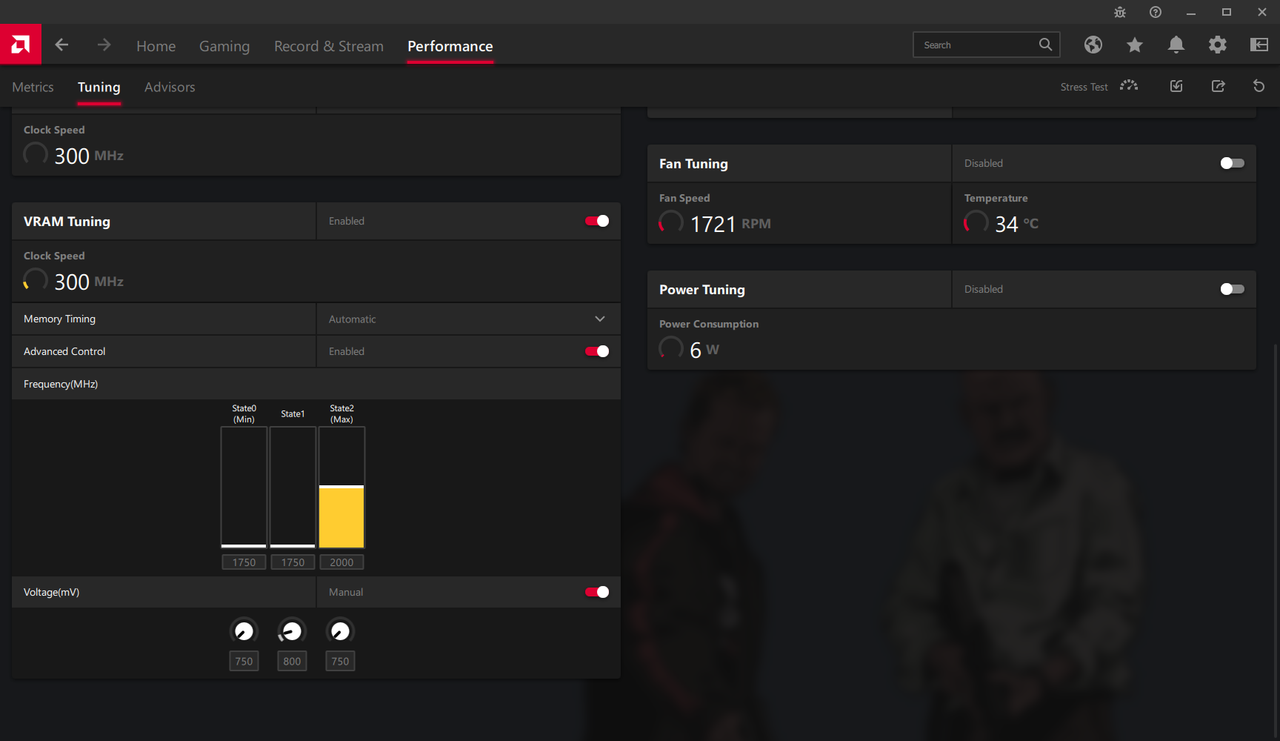
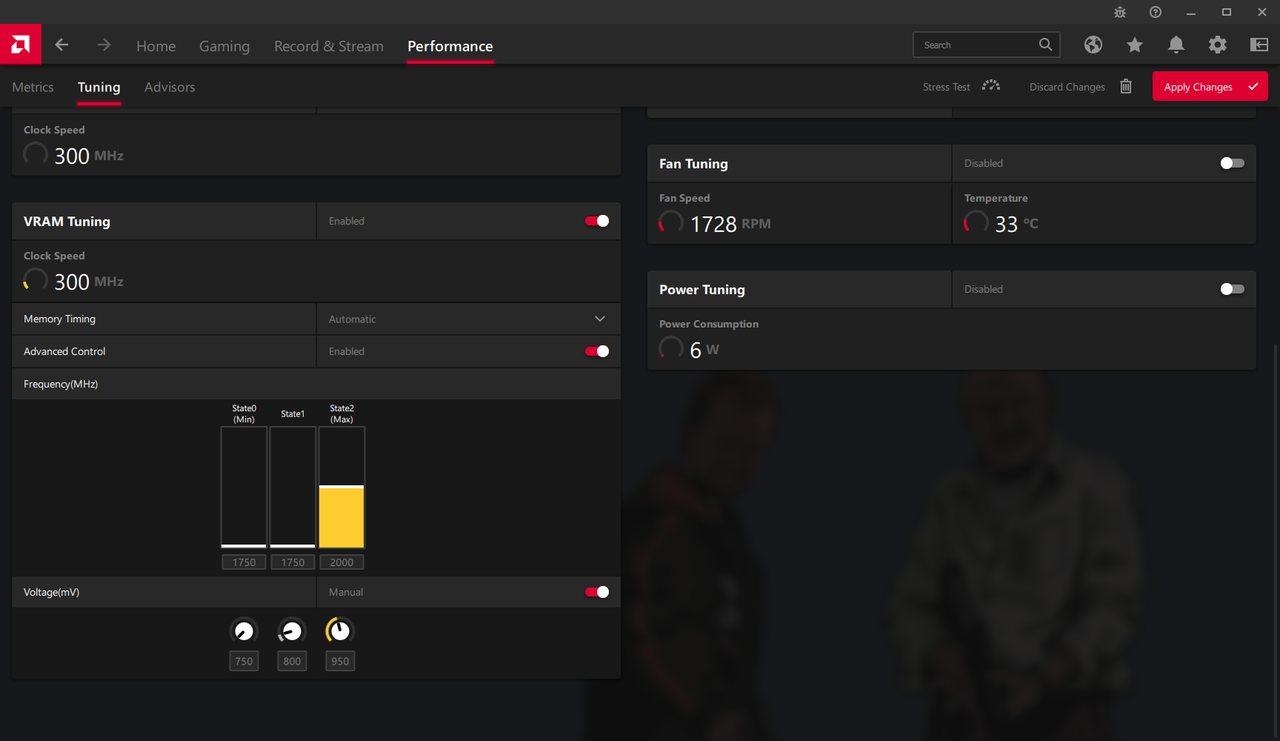 autumn sluice
Looks at the join now button
raven hull
There’s no remote play on pc for series x|s yet. There is cloud gaming with Ultimate.
full flint
@smoky flame when did you say that new monitor is coming from Samsung? it's like a week to my birthday and want to get a new monitor for the Series X/PS5 ASAP. but holding off until the Samsung G5 IPS gets more stock/released.
smoky flame
no idea, I believe Samsung have released it but with just about everything right now availability is limited to non existent. Just keep checking retailers and it might show up. Neo G9 is said to release in about a week but that is ultrawide and likely to be very expensive
 woeful egret
the
 coarse pond
just finished building a new pc and after several hours of troubleshooting finally got it up and running (sorta) my x570 / 5600x combo wasn't showing display for my gpu using display port but hdmi worked, gonna try updating the firmware of the gpu to see if that fixes it lmao
smoky flame
when I rebuilt my PC one of the first things I done was install AMD's chipset drivers. If you haven't already done that you might want to
coarse pond
well i didn't even have a os installed yet, just couldn't get picture displayed for the bios because my display port wouldn't work, imma get all the drivers and stuff installed once i get the os installed
smoky flame
oh, my bad. What GPU was this?
 livid seal
hello eveyone, I was planing to a new game pc with those spces: ASUS RX 6700 XT OC 12GB GDDR6 256bit TUF-RX6700XT-O12G-GAMING,
AMD Ryzen 5 5600X, 6 core (3.7/4.6GHz, 32MB Cache, AM4) MPK, Wraith Stealth,
G.Skill Trident Z RGB, 16GB (2x8GB) DDR4 3600MHz, for AMD, F4-3600C18D-16GTZRX,
DeepCool GAMMAXX L240 V2,
Fractal Design Meshify C Mini,
Gigabyte P850GM, 850W, Active PFC, 80+ Gold, 120mm вентилатор
but then I found out xbox series x 😄
and price become half.
could you please help me to choose. is there negative thing on xbox ?
I am mostly playing COD Warzone
and I will use keyboard and mouse on xbox series x if I buy
smoky flame
That system sounds pretty solid tbf. It will be faster than the Series X though I do admit not enough to justify buying it over the console if it costs about double but still, PC gaming does have many benefits console gaming just can't offer.
For a start far more access to high refresh rate displays with Displayport 1.4 and these refresh rates can exceed what the Series X can use.
Also, as with all RX 6000 series AMD GPUs, the 6700 XT supports HDMI 2.1, like the Series X should you have a TV or monitor that also uses HDMI 2.1
livid seal
thank for the comment. I have sony tv, I can handle it with that. in the future I can buy 32 inch 2k monitor
smoky flame
what resolution is this Sony TV?
livid seal
I have powerfull laptop an working and playing games on it
4K
sony KD-55XF9005
this is the monitor that I in the list
Dell 27 Gaming Monitor S2721DGFA
smoky flame
nice, though at 4K it may be a bit too much for the 6700 XT. It is more suited to 1440p gaming so a monitor will be a better choice
coarse pond
smoky flame
oh, my bad. What GPU was this?
1050 ti
livid seal
smoky flame
nice, though at 4K it may be a bit too much for the 6700 XT. It is more suited t...
yes you are absolutely right. I am an 20 years computer engineer. I do understand very well 😄
but I really decided to buy xbox series x
smoky flame
coarse pond
1050 ti
ahh tried all the displayport connections? kind of odd for displayport not to work after building a new PC. 🤔
livid seal
this computer cost 2000 dollar without monitor 😄
@coarse pond sorry to intrup your topic, mate.
coarse pond
smoky flame
ahh tried all the displayport connections? kind of odd for displayport not to wo...
only has one display port and hdmi port, the hdmi works fine just not the display port. I was readying online and people were saying it might need a firmware update
coarse pond
livid seal
<@!228887814240993281> sorry to intrup your topic, mate.
its fine
livid seal
I will wait to finish your topic first
smoky flame
also, that is really cool. All that experience as a computer engineer, devrimer 🙂
smoky flame
I'm not sure a firmware update will be required. What monitor you using Snack?
coarse pond
smoky flame
best not hold yourself back too long or they'll sell out and you will miss your chance to purchase a console until another time
coarse pond
this firmware update says if theres blank screen issues with display port that might solve it
the lg27gl83a is the monitor i was using
livid seal
coarse pond
https://www.nvidia.com/en-us/drivers/nv-uefi-update-x64/#:~:text=NVIDIA%20Graphi...
yes mate make that update
livid seal
smoky flame
best not hold yourself back too long or they'll sell out and you will miss your ...
yes I am really ready to buy now 😄 but is there something bad on that xbox ? like kb and mice using an issue? and I will play warzone nonstop. is there lag or mice working working normal ?
smoky flame
ok, yeah. Give that update a try when you can, Snack and hopefully it allows you to use displayport again 🙂
afaik mouse and keyboard work just fine on console. Besides that though I don't know much on the Series X past the hardware it uses. I only play on PC so I'd be the wrong person to ask questions about the Series X
livid seal
okay mate, thank you a lot for your comments. but pc components are just awesome 😄 at least one week reaserch and youtube videos 😄
smoky flame
heh yeah. I love PC hardware. Though it doesn't really take me a week to decide on things. Back when AMD announced the Ryzen 5000 series CPUs and Radeon RX 6000 series GPUs I was all set on a system with one of each inside. Fast forward to December I get teh 5600X and some other parts and build that up. Fast forward again to late June this year and I added the monstrous 6800 XT Red Devil and it really is a beast. Has blown me away so far. So much so I'm looking at upgrading to a 4K 120Hz OLED TV! 😄
smoky flame
the Red Devil cost me £1200 when I bought it. Luckily I sold my old GPU shortly after and I offset what I got for that against what I paid for the Red Devil and that brings the cost down to £840. Bought the new card used (but not from ebay) so wanted to give it a once over, make sure everything was legit before selling my old GPU and everything appears to be as I'd expect of a GPU. Immaculate condition. I swear, it could pass off as new. Everything was still there and stuff. I feel I really lucked out. One of those "it was meant to be" type of scenarios
livid seal
yeah you were really lucky. bravo mate.
 molten bluff
Hello, I am trying to connect my xbox 360 controller with my pc using wired connection. The controller is just blinking but not connecting. Can you help me solve it?
 dusty vector
Is it a wired controller or are you trying to use a wireless controller with a play and charge cable?
Because the latter won’t work
molten bluff
I don't have any wireless receivers. I just have a wired controller cable and xbox 360 controller.
which has play and charge
dusty vector
Won’t work
molten bluff
Ok thank you.
dusty vector
The play and charge cable for 360 only carries power, it doesn’t carry data.
The wireless controllers can only connect wirelessly
molten bluff
Ok, but will it work if there is a wireless receiver?
dusty vector
If it’s a 360 wireless receiver, it should.
molten bluff
Ok thank you.
full flint

pcgamer
There's surely no reason for devs not to implement it now?
full flint
Sign up for Private Internet Access VPN at https://www.privateinternetaccess.com/TechQuickie
Learn about NVMe 2.0 and how it'll make your SSDs - and even your hard drives - faster.
Leave a reply with your requests for future episodes, or tweet them here: https://twitter.com/jmart604
►GET MERCH: http://www.LTTStore.com/
►SUPPORT US ON FLOATPL...
NVME 2.0 specs released
smoky flame
just in time for pcie 5.0/gen 5 NVMe
full flint
you mean PCIe Gen 6.0
both 5.0 and 6.0 are/were on track for this year
I'd imagine 6.0 and even 5.0 might get pushed back into next year though given everything going on
smoky flame
I thought Alder Lake was to feature pcie 5.0 support?
full flint
the cpu supports it, doesn't mean it's going to be available
smoky flame
I'll never understand the whole pcie standards btw. So far it has been found out that even the latest GPUs don't appear to make any additional use of pcie 4.0 over 3.0. NVMes on the other hand have gotten faster though. Will 5.0 and 6.0 provide anything new for GPUs or will it be much the same?
full flint
pcie4.0 changes will be things like direct storage
smoky flame
that's also available on 3.0 though
full flint
for the NVME, yes
basically it'll support both, but one will be much faster

Big shout out to MSI for sponsoring this video! Check out all of their products we used down below.
PCI Express gen 4 has been around for over a year and a half now – But it hasn’t really made much of a difference… Does that change with Ryzen 5000, RTX 3000, and Radeon 6000?
Buy MSI RTX 3090 SUPRIMX X GPU (PAID LINK): https://geni.us/6dT9AXK
B...
higher is always better
because your gpu, your drives, your nvme, your gpu, the USB ports, all utilize lanes
if you have less room, then you'll encounter throttling. currently on Gen4. PCIe Lanes are commonly shared
meaning average motherboards with 2 NVME ports and 6 SATA 3.0 ports, will only be able to use 4 of those SATA ports if they have 2 NVME
smoky flame
side note, I knew that video! ||Motherboard dropped!|| 
full flint
because the 5th and 6th SATA port will share the bandwidth that PCIe slot 2 for NVME (or GPU) uses
meaning if you have a second x16 or M.2, you can't use 2 sata drive ports since the bandwidth is average shared
the new improvements are doing to affect directstorage, and most workstation-grade tasks more than gaming
but it's also like DX11 to 12
things take time to get optimized for newer pipelines
smoky flame
hmm I see  too bad there wasn't a way to get a custom pcb where SATA ports could be removed to reduce limits and stuff. I'd go completely SATA-less tbh. Already have the SATA ports disabled in the BIOS since I don't have anything to connect to them
full flint
SATA are quite important for bulk storage
smoky flame
I know, just with NVMe taking over I won't be surprised to see the exclusion of SATA ports on some motherboards in the not too distant future. Have any motherboard manufacturers tried it yet?
full flint
NVME 2.0 is extending to SATA
smoky flame
that is an odd move considering SATA's speed caps. I'll watch that techquickie video in a bit btw
full flint
you mean the enterprise drives with 500-700MB/s Sequential R/W speeds?
which is more than SATA 3 or the same as SATA SSD
smoky flame
yeah, that is way slower than even NVMe gen 3. I don't get why they would bring SATA into it when NVMe in its current form factor looks so future proof. Already seeing capacities up to 8TB on a storage about the size of a thumb. Might not come cheap just now but that should be alarm bells for SATA based storage imo. About to go extinct, like floppy discs and other storage solutions of the past
full flint
NVMe gen 3 doesn't exist
PCIe gen 3 exists, but that's unrelated as that's split between M.2 ports, x16, and SATA
it doesn't matter if it's slower, it's fast for mechanical drives, and data centers aren't going to be using M.2 drives
blissful shard
no