#how do i download RVC
262 messages · Page 1 of 1 (latest)
 misty trout
 forest sequoia
misty trout
there are so many tutorials that are atleast 30 minutes long and im so confused ...
forest sequoia
misty trout
there are so many tutorials that are atleast 30 minutes long and im so confused ...
Last update: Mar 8, 2024
misty trout
thanks
misty trout
forest sequoia
https://docs.ai-hub.wtf/rvc/local/mainline/
uh there isnt a path file


maybe there is but idk what it should be named
forest sequoia
misty trout
uh there isnt a path file
You linked two different things
Path file audio is like the screenshot suggests, just the audio file of the one you want to make a cover of
voice model is something completely different, you put the voice model .pth file into the assets > weights folder and then you can select it on the webui
misty trout
forest sequoia
Path file audio is like the screenshot suggests, just the audio file of the one ...
so where can i find it
i have like 50 audio files of the character speaking
but im not sure if i need a specific one that i can download from there
forest sequoia
misty trout
i have like 50 audio files of the character speaking
If making a cover, you can only make it one by one
So you select one of them, like idfk C:/Desktop/voices/firstaudio.mp3
convert, download, then continue with secondaudio.mp3
as for the voice model youre trying to download from the first screenshot, you download "model.pth" and "model.index"
rename those two files to whatever the models name is
put .pth file in the folder RVC1006 > assets > weights
and the .index file in the folder RVC1006 > logs
misty trout
forest sequoia
rename those two files to whatever the models name is
put .pth file in the fold...
like if its a character from a game like tf2 heavy or something do i just rename it tf2 heavy
forest sequoia
misty trout
like if its a character from a game like tf2 heavy or something do i just rename...
it doesnt matter what name you give it its just for you to know which one youre selecting
misty trout
forest sequoia
rename those two files to whatever the models name is
put .pth file in the fold...
i already did that but it said error
 forest sequoia
misty trout
i already did that but it said error
forest sequoia
misty trout
i already did that but it said error
Send a screenshot of the whole thing before you clicked on convert
And one of the console window
misty trout
i kinda dont trust sending the console window
 native nacelleBOT
@misty trout has reached level 2. GG!
forest sequoia
I just need the last lines where it gives an error

 forest sequoia
misty trout
forest sequoia
misty trout
Do you actually have a file called "audio_example.wav" located in that path or did you forget to select it
misty trout
forest sequoia
Do you actually have a file called "audio_example.wav" located in that path or d...
no
i dont think i have it
where is it
forest sequoia
There is a major logic flaw you have here, let me explain
forest sequoia
"Enter the path of the audio file to be processed" is where you put in an audio file that you want to convert. You said you have 50 files of someone speaking, and you want someone else to speak those lines, yes?
So in there you put in one of those 50 files
native nacelleBOT
@forest sequoia has reached level 18. GG!
misty trout
yes
forest sequoia
And let me explain how to select one of those voices path
1 sec
So u go to your folder with your audios, pre select one you want like this


Then click on this
copy path
Then go back to the webui and CTRL + V (Paste) whatever it copied
misty trout
alright thanks
forest sequoia
It automatically puts " " at the start and end, usually it doesnt matter if theyre kept in or not, but remove them just in case

 forest sequoia
misty trout
does it affect anything if there is a number
forest sequoia
misty trout
does it affect anything if there is a number
blank spaces might be problematic
either rename to sam_50 or sam50
What GPU does your pc have btw?
 forest sequoia
aight think 1050 is just barely ok for this
try with changed name, and screenshot me the webui again
misty trout
forest sequoia
try with changed name, and screenshot me the webui again
i did
but still
forest sequoia
I am not sure about dtype error, maybe someone with more knowledge can check
Until then, i can give you an online alternative which is fast and no need to run any files stuff
Ilaria RVC https://huggingface.co/spaces/TheStinger/Ilaria_RVC
Guide on how to use it:https://docs.google.com/document/d/1YbXcLFPaGjhOdG5NFkK3QrucCEpHZBwFUxkeMO8aB18/edit

in short
model loader tab: you upload model pth and model index
then on the inference tab, you click to upload audio, select model, convert
misty trout
forest sequoia
Ilaria RVC https://huggingface.co/spaces/TheStinger/Ilaria_RVC
Guide on how to ...
is it like the same thing
misty trout
ok
i thought RVC developers was just for the other one
like ithought the server was just dedicated to that rvc
thanks alot
forest sequoia
yes and no i guess
theres forks and branches that were built upon this rvc
we just help people find what they need
misty trout
doesnt matter as long as i can troll in tf2 as some anime girl
forest sequoia
misty trout
doesnt matter as long as i can troll in tf2 as some anime girl
Hold up
Are you looking for realtime usage?
misty trout
yeah
forest sequoia
...this is not realtime usage
misty trout
oh
misty trout
is there any with realtime usage
forest sequoia
in case you thought that
well gtx 1050 is really not a strong gpu, you will have some sort of delay
could be like up to a second potentially
Guide style is in the same as Blanc_dot's. Thanks Blanc_dot for corrections. Most technical information comes from deiteris.
Last update October 6th, 2024: Multi PC setup explanation added
Translations added for:
German: https://rentry.co/ForkVoiceChangerGuide_de
Turkish: https://rentry.co/ForkVo...
misty trout
forest sequoia
well gtx 1050 is really not a strong gpu, you will have some sort of delay
no i can run gta 5 with 60 fps
forest sequoia
This is realtime voice changer that will run decent with your gpu
forest sequoia
misty trout
no i can run gta 5 with 60 fps
Doesnt matter, it depends highly on cuda cores which the 1050 doesnt have much of
misty trout
i literally have no idea why this 5 year old laptop with a 1050 can run gta 5 smooth as butter
this laptop is literally older than my little cousin
forest sequoia
gta 5 is well optimized
it doesnt take much to run it
developers did a good job
forest sequoia
forest sequoia
https://rentry.co/Forkvoicechangerguide#download-nvidia
anyway download nvidia
then download the virtual cable (this is what u need to use it ingame)
start the MMVCServerSIO.exe, it will install some files, it might take some time but this is one time only
if theres any errors just post in here ofc
then you can head over to the "uploading voice models" section and go from there
for 1050 i recommend:
f0 det: rmvpe or fcpe, try both. fcpe can reach lower delay
chunk: start with 250
extra: 1.0s
misty trout
forest sequoia
anyway download nvidia
then download the virtual cable (this is what u need to ...
i saw ''failed'' flash for a sec and then it closed itself
native nacelleBOT
@misty trout has reached level 3. GG!
misty trout
its pretty late where i live so ima go sleep
forest sequoia
misty trout
i saw ''failed'' flash for a sec and then it closed itself
Fix is on this section:
https://rentry.co/Forkvoicechangerguide#press-enter-to-continue-failed-to-download-or-verify-files
Guide style is in the same as Blanc_dot's. Thanks Blanc_dot for corrections. Most technical information comes from deiteris.
Last update October 6th, 2024: Multi PC setup explanation added
Translations added for:
German: https://rentry.co/ForkVoiceChangerGuide_de
Turkish: https://rentry.co/ForkVo...
misty trout
forest sequoia
Fix is on this section:
https://rentry.co/Forkvoicechangerguide#press-enter-to-c...
thanks a whole lot man
i’ll try again tomorrow
your patience is immeasurable and i love it
wish i could give a tip or something but am broke
forest sequoia
all ggg
misty trout
forest sequoia
all ggg
alright i did everything so how do i use it
forest sequoia
Did it load up
 forest sequoia
What was ur gpu again
forest sequoia
Select your gpu
F0 det: fcpe
Chunk: 250
Extra: 1.0s
Then select your model by clicking on it to load it up
Input mic
Output virtual cable
Monitor headphones if u wanna hear urself
Then look at the graph on the top left of the image
"Perf" number should be green
Let me know what number it says on perf
misty trout
forest sequoia
Select your gpu
F0 det: fcpe
Chunk: 250
Extra: 1.0s
Then select your model by ...
i dont think i have a virtual cable
forest sequoia
Download link on the guide
 forest sequoia
Click staet
Start*
Then speak and check for the perf metric on the graph like i said
misty trout
 forest sequoia
As i said, click on the model in the bluebox to load it up haha
Where it says no image if that wasnt clear
misty trout
oh thanks
its kinda laggy an has a long pause between syllables
also it sounds like morty lmfao
misty trout
 forest sequoia
You have your gpu drivers installed, and the gpu selected?
There is no internet involved here
misty trout
oh ok
forest sequoia
forest sequoia
You have your gpu drivers installed, and the gpu selected?
Check for this
If it still doesnt go down, then i suppose try the og vanilla voice changer. It should run smoothly
sry if you have to keep bouncing back between downloads lol

Github - Blanc-dot
Discord User - https://discord.com/users/824922747423031359
Special thanks to the following people : lusbert, poopmaster, felt, fazemasta, antasma, shadictl, x_hina, sushi
thanks are for anything added to guide, taken from any talks, settings added when previously collecting st...
 forest sequoia
Get nvidia download. Run "start_https"
misty trout
i havent gotten rickrolled in over a year
forest sequoia
forest sequoia
Get nvidia download. Run "start_https"
Sorry, i meant run start_http
Without the s
misty trout
forest sequoia
Get nvidia download. Run "start_https"
where
in the files?

this one in the MMVC file?
 forest sequoia
Yes
native nacelleBOT
@misty trout has reached level 4. GG!

 forest sequoia
nice
misty trout
thanks alot chad

 forest sequoia
misty trout
forest sequoia
misty trout
Use f0 det: rmvpe
But the out of memory error is not related to that actually, just means your GPU is really driving toward its limit 😅
misty trout
forest sequoia
But the out of memory error is not related to that actually, just means your GPU...
does it matter if there are many tabs open
like on opera gx
also still doesnt work
 forest sequoia
misty trout
does it matter if there are many tabs open
forest sequoia
misty trout
does it matter if there are many tabs open
gpu just trash thats the problem lol
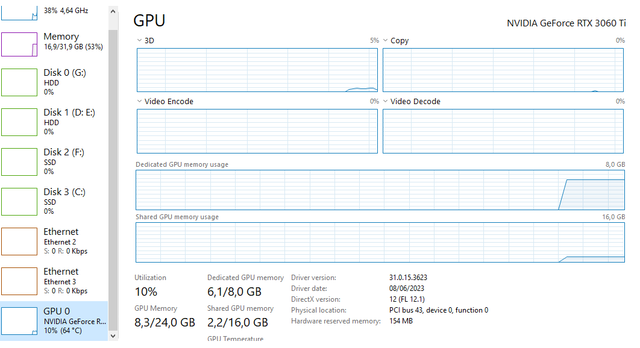
voice changer ideally needs 6gb vram to work decently, yours has 2
misty trout
doesnt make sense that nearly any game i play runs at 60 fps with no lag spikes yet i try to run a simple voice changer its at its limit
forest sequoia
misty trout
doesnt make sense that nearly any game i play runs at 60 fps with no lag spikes ...
it does make sense, this is AI not a game
Im not that technical to be able to explain
misty trout
so what should i do
does this mean i cant use any voice changer and have to get a pc
forest sequoia
misty trout
so what should i do
do you have good internet
misty trout
forest sequoia
do you have good internet
amazing most of the time but sometimes dogwater (but i just turn it on and off to make it good again)
forest sequoia
misty trout
amazing most of the time but sometimes dogwater (but i just turn it on and off t...
ehh well does it have 100 mbps down?
misty trout
forest sequoia
ehh well does it have 100 mbps down?
well tbh idk how to check that but it takes about 25 minutes to download a 6 gb program so idk
forest sequoia
anyway you can try the online version
The guide on setting it up:
https://docs.google.com/document/d/e/2PACX-1vTIceEcBfS6Zqolv_QEysrFfI_EJikPxozWptP_EjkpLVl-l-gdo-ijBonQMTviAHEYm5emmd9k9TdC/pub
Anything else, such as uploading voice models and settings, check out
https://rentry.co/VoiceChangerGuide
Skip the "[Optional] Upload a voice model (run this before the voice changer)" cell since it doesnt work, you can upload it later when the GUI opens

Github - Blanc-dot
Discord User - https://discord.com/users/824922747423031359
Special thanks to the following people : lusbert, poopmaster, felt, fazemasta, antasma, shadictl, x_hina, sushi
thanks are for anything added to guide, taken from any talks, settings added when previously collecting st...
misty trout
is it compatible with discord and gams
forest sequoia
yes
forest sequoia
limited to 4h daily thou
misty trout
yeah actually maybe ill just get a voice acting career
or maybe do this

yeah still doesnt work
ill go get a voice acting career
misty trout
whats the best chunk for a shit gpu
forest sequoia
The higher the value, the more delay but the more time your gpu has to process
idk try 192 - 256
forest sequoia
try f0 det fcpe
forest sequoia
full name
misty trout
 misty trout
i know but could it run it
forest sequoia
No clue
misty trout
alr ima try
misty trout
wish me luck i dont combust
its not like im running the voicer changer 24/7


i didnt even get to try the cpu
forest sequoia
misty trout
it says youre already running the voice changer basically
misty trout
how#
misty trout
oh nvm found it
its cuz i play modded ultrakill which also needs a console so i thought the open console thing was just my mods
lmfao the breathing sounds
native nacelleBOT
@misty trout has reached level 5. GG!
misty trout
out of nowhere
im not even breathing into my mic
also i dont think the gpu is the problem its cause i wasnt doing fcpe
i was doing crepe
nvm cpu and fcpe are the only ones that work
even then really laggy
i'll just get a pc
or something
wait wtf its doing kinda better at 704
i dont care at all about delay as long as it doesnt seperate words into two
holy shit it kinda works just a long delay
okay 448 works best
but major problem
im sick
so my voice sounds weird and so does the voice changer
i dont blame the software for that
alsoi did some research
if my cpu isnt over 100 c it should last like decades
and since i may or may not get a pc soon
i dont see any problem with me using cpu
misty trout
so far amazing but some pauses and lag spikes
wait last thing (i hope to dear god its the last thing) @forest sequoia
how do i make the voice louder
my friend says the voice is very quiet
even when im practically screaming
forest sequoia
misty trout
how do i make the voice louder
increase the volume : out