

1 messages · Page 1 of 1 (latest)
 scenic zinc
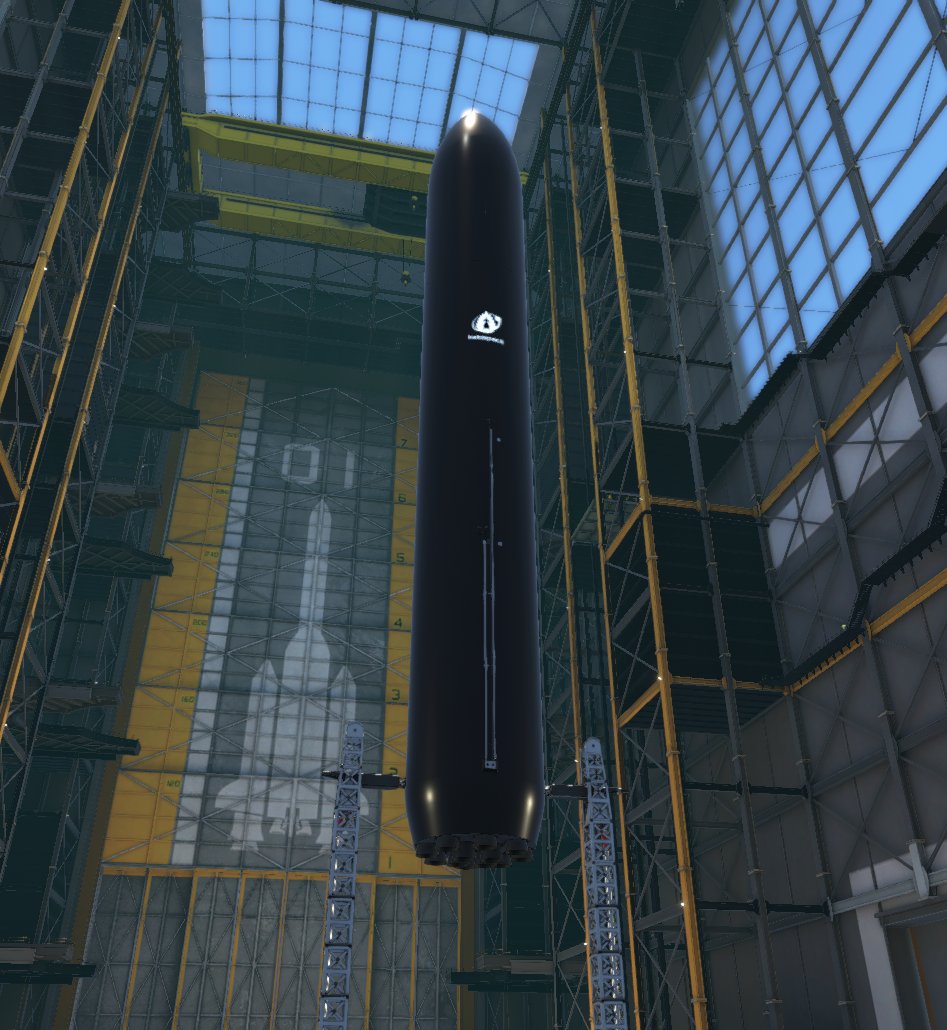
aaaaand now heres my current issue, i cant seem to make the model load at all, it just loads a pink cylinder that does not match any of the meshes of the part, so i assume its some sort of safe-error mesh the game loads. You can see based on the nodes how big it should actually be.
Actually now that i look closely... i just re-did ALL of the importing in unity and KSP2 and im noticing my old fairing nodes are still there even though I did not re-add them in unity...
Does the game keep stuff cached somewhere and its not refreshing the mod parts?
 wraith gale
Whenever you make any changes to the prefab's components, you also need to re-export the JSON file
The game mostly reads the information from that
That would be my guess for why you're still seeing the nodes
scenic zinc
i have, and i also made sure to delete all the files in the mod folder of the game
im actually really confused at this point LOL
might just re-do the whole unity project
and use my fairing as a test instead since its a simpler model
wraith gale
As for the model, anything suspicious in the logs?
scenic zinc
where's the logs stored
wraith gale
C:\Users\username\AppData\LocalLow\Intercept Games\Kerbal Space Program 2\Player.log
that one contains all the combined logs
 gilded kayak
scenic zinc
Actually now that i look closely... i just re-did ALL of the importing in unity ...
gilded kayak
scenic zinc
Actually now that i look closely... i just re-did ALL of the importing in unity ...
Are you using patch manager?
You need to turn on always invalidate cache
scenic zinc
it is installed
wraith gale
ah, didn't even think of that
yeah that would do it
it only rebuilds the cache when a mod is installed or updated
but since you're just replacing the same version, it won't know to do it
scenic zinc
ah
scenic zinc
wheres that setting, first time im doing all this lool
wraith gale
Settings -> Mods -> Patch Manager
scenic zinc
ok got it
ok good news the nodes updated, bad news model still unloaded, so let me check logs
first thing i notice while scrolling
 wraith gale
wtf @gilded kayak
gilded kayak
Did you do a json export and a patch export?
wraith gale
oh I didn't realize patch export was already in KSP2UT 
wraith gale
ah yeah, then that's the cause of that warning
they basically both do the same thing, the JSON and the patch file
so the part is being created twice
scenic zinc
ok, i did see it being created further up the log
scenic zinc
i see this which i assume is related to not having a icon image set in the parts list
 wraith gale
yeah I think so
wraith gale
but also why %NAME%
gilded kayak
That's a ... KSP2UT bug
combined with PMs swapping
I just found the bug
I fixed it in one place but not the other
This should fix the %NAME% bug from json exports.
gilded kayak
You need localization for that
gilded kayak
gilded kayak
<@366972069440913418> https://github.com/KSP2Community/KSP2UnityTools/pull/11
I'm going to force merge
@scenic zinc update KSP2UT as well
for icon and model to be fixed
scenic zinc
gotcha
i couldnt find any other reference to the model by searching for its name in the logs
this(img 1) is a reference to this(img 2) right?

 gilded kayak
scenic zinc
this(img 1) is a reference to this(img 2) right?
gilded kayak
scenic zinc
this(img 1) is a reference to this(img 2) right?
Older than 0.5.0
before we switched to the package format
wraith gale
oh yeah I should specify that
if you installed from Git URL, no need to delete anything
scenic zinc
ok
wraith gale
you can just open Package Manager, click on KSP2UT and click Update
scenic zinc
gotcha, it updated to 0.8.2
oh my god im going to cry
it loaded

ignore the scuffed texture, in desperate measures i just threw a random texture at it in case it missing was the issue
it only took these attempts 😂
 wraith gale
🥳
it's a bit of a learning curve, but once you get your first part or two into the game, it becomes very routine and easy
scenic zinc
yeah i think it is easier, i was originally upset the nodes are done manually in the module instead of just using the Empties i already had set up in blender (like ksp1 nodes work), but i think i do prefer this now, i just copy the coords of the empty to it
wraith gale
oh and by the way, for generating the icons, IsaQuest made this: #1131796879013855343 message
scenic zinc
nice
 gilded moth
scenic zinc
it only took these attempts 😂
gilded moth
scenic zinc
it only took these attempts 😂
yep its like rhat when you’re first starting out
spent many hours here asking for help lol
wraith gale
gilded moth
yep its like rhat when you’re first starting out
Oh btw while you're here, would you mind making a new thread for the icon generator in #1078701690762571866 please? So that people can more easily find it than in the archive
scenic zinc
also thanks isa for putting up with my ranting in my discord
gilded moth
sure
gilded moth
scenic zinc
*also thanks isa for putting up with my ranting in my discord*
no problem
gilded moth
wraith gale
Oh btw while you're here, would you mind making a new thread for the icon genera...
done
wraith gale
thanks!
wraith gale
lmao
gilded kayak
Lolll
scenic zinc
i reverted to VAB and its back to purple lol
 scenic zinc
thats the bottom of the log
 wraith gale
for the rotation, I would once again probably blame the way Unity imported it
wraith gale
scenic zinc
thats the bottom of the log
and this looks right (considering you don't have an icon)
but it feels weird that it's trying to find it multiple times in a row
scenic zinc
maybe its not happy with me removing the textures from the material
if i press launch it warns me "Still Loading"
so i guess its stuck trying to load it
wraith gale
huh
I remember seeing that a long time ago
but I honestly have no clue what it was
(I'm not exactly the parts expert here, I haven't even made any of my own, I'm just familiar with the process)
scenic zinc
btw on the wiki it says the icon must have _icon in the end, but it seems it does not, it only loaded when i removed it
wraith gale
ok now I think I understand all your issues
it's the overrides

these are basically experimental overrides for when you want to make a part that uses some other existing part's model+textures and icon
were those prefilled with those values?
scenic zinc
yes
wraith gale
@gilded kayak we really need to change that
otherwise no parts made with this version of KSP2UT will work correctly
scenic zinc
do i empty those fields?
wraith gale
you can try to do that, yes
I'm not 100% sure how it will act if it's an empty string instead of null, but it might fix the issues
gilded kayak
scenic zinc
do i empty those fields?
%NAME%_icon.png
But alright, I might just add a checkbox to include the overrides
wraith gale
yeah, because then the icon will work
but the prefab overrides are just completely broken
I would honestly just remove it altogether for now
until it's fixed in PM
but yeah, if you add a checkbox that's off by default, that works too
gilded kayak
@wraith gale PR made
scenic zinc
with the box empty it still loaded (and i didnt add _icon to the file again)
(also temp icon while i figure things out)
 wraith gale
huh, that definitely shouldn't happen
scenic zinc
wait
gilded kayak
I think ... it loaded the first sprite
scenic zinc
i forgot to re-save json 
wraith gale
ahh
gilded kayak
Accept PR so we don't have to deal with this for now
scenic zinc
alright it seems to be loading consistently now, i also corrected the materials and took it for a spin
 scenic zinc
So, new problem, i added the fairing, and i added a decoupler module to the top node, but no matter what direction i set it in the module, it always decouples in this direction
the decoupler is on the fairing side, since you can only have one decouple module on a part...
wraith gale
scenic zinc
the decoupler is on the fairing side, since you can only have one decouple modul...
yeah that makes sense
scenic zinc
the only thing that made a difference was enabling Automatic Dir, which then makes the fairing shoot up

ive tried 1 and -1 on every coord
wraith gale
that is I'm assuming making it just decouple in the direction of the node
wraith gale
oh
scenic zinc
i even tried inverting the nodes but it still goes the same direction lol
wait
i may have found one thing
i have it set to horizontal

ill try vertical
i wonder if horizontal makes it try to shoot in the direction of the center of mass
wraith gale
I think that should only determine its icon in staging or something like that
but I can't say for sure
scenic zinc
wouldnt that be this?
 wraith gale
yeah you're right
looking into the code, seems like it's more so used to determine resource flow
scenic zinc
ah
wraith gale
wraith gale
and apparently automatic staging?
ohh I get it, it tries to automatically assign stage in the VAB
not actually performing staging automatically
scenic zinc
ah yeah makes sense
wraith gale
by the way I'm looking into Data_Decouple and I'm not even seeing any fields with the direction
the "Explosive Dir" thing
and it's not in the JSONs of stock parts either
weird
scenic zinc
heh
wraith gale
oh, it's not in the data object, it's directly on the module
I'm blind
it's obvious from the screenshot
but yeah ExplosiveDir should definitely be getting used if AutomaticDir is unset
wraith gale
 wraith gale
gilded kayak
That means its not touchable with PM
wraith gale
gilded kayak
That means its not touchable with PM
I mean, at least you can edit it with the json ruleset I guess
but it's not great
wait no
gilded kayak
Dont think so
wraith gale
duh
yeah I think this is definitely something they just forgot
it makes no sense for it to only be on the prefab
scenic zinc
what does Omni Decoupler mean
wraith gale
it sounds like it might just be a double sided one?
yeah just checked
it's used for the double-sided stack decouplers
wraith gale
as far as I can tell, ExplosiveDir should be doing what you want it to
scenic zinc
i just tested again and it made no difference
i wonder if its related to how the stock fairings are broken and only go upwards instead of actually separating sideways
wraith gale
scenic zinc
and what is Anchor Name at this point im just trying everything
should be the name of the transform where the decoupling happens
physically
no wait that doesn't sound right
it's not extremely clear
inline decouplers don't have it and radial ones do as far as I can tell
oh I think it might be for when you want your decoupler to split into two parts
and the anchor is probably the parent object of the part of the decoupler that should stay connected to the decoupled stuff
scenic zinc
ah i see
wraith gale
I have no clue how changing the values of ExplosionDir doesn't affect the direction in the game
the code is clearly written that way
scenic zinc
im gonna guess its the game itself thats broken at this point
the decoupler on stock fairings has been broken for a while
wouldnt surprise me if its the same code for the normal decouplers or something
wraith gale
scenic zinc
the decoupler on stock fairings has been broken for a while
I mean yeah
but they're completely separate systems
as far as I can tell, there's no connection between the two
scenic zinc
hmm
wraith gale
you could try using UnityExplorer or Reflektor to play around with the values at runtime
for both the stock parts and yours
and see if it has any effect
these two mods basically let you edit the fields of any game object and its components
while running the game
scenic zinc
ok
wraith gale
UnityExplorer is more robust but very slow, Reflektor is being developed specifically for KSP2 and is very new
scenic zinc
oh no
so when you drag a part from the scene to the project window
does it matter which one i click on to edit values
wraith gale
if you edit the one in the scene, you have to apply overrides for changes to be saved to the prefab
 wraith gale
to be fair we dealt with this issue many times before and still neither me nor Cheese realized
scenic zinc
hahaha
scenic zinc
decouplers all working as intended, time for sleep now...
scenic zinc
gilded kayak
You need localization for that
Finally got a day off to work on the mod again, how do I do this? Couldnt find it on the wiki last time i checked
scenic zinc
finally imported the upper stage, and imported the updated booster with the upper QD in the interstage


also added all the drag stuff spoken about in #🔴mod-dev
things missing atm other than textures is:
Engine Cluster, Upper and Lower Fins, RCS Pod
and ofc the SL and Vac standalone engines
bro why is it IMPOSSIBLE TO MOVE STAGES IN THE STAGING THING

 wraith gale
nice!
scenic zinc
who needs landing legs when you have nozzles
wraith gale
> me anytime I land Super Heavy in KSP
scenic zinc
xddd
scenic zinc
https://twitter.com/EritoKaio/status/1751032332998299777
(This mod uses the MIT License, I will include it inside the mod for future versions)
KaioSpace-KSP2 v2024.1.2 is now public. This is still highly experimental and likely broken. Releasing it mostly so I can find issues faster. The rocket is still missing its fins, legs, upper engines, rcs, engine VFX and a some textures.
#KSP2
 Twitter
·
Twitter
·
Ill make a more "official" release with ckan n stuff once I have at least this whole rocket finished.
wraith gale
Awesome! Just wanted to mention, you should specify the license of your mod next to any download link posted here (rule #7)
(You don't have any compiled source code, so that part doesn't apply)
scenic zinc
oh yeah i forgot
scenic zinc
MIT license is included inside the mod folder now.
but like seriously, the second point was just an attempt, it still definitely does some weird shit with collisions that i dont understand
like when im flying slow near the ground sometimes it just does some weird shit where it flips rapidly and break itself apart
and on the landing pads at KSC when im near landing i get water splashes? as if my collision model was a few meters below the rocket?
like huh
if anyone can confirm this for me id appreciate it
scenic zinc
1.01.4
Known Issues:
Aero stability, weird collider behavior on the booster, unknown source.
Any further fixes will just go into 1.02 because I want to progress with other features while trying to figure this out.
scenic zinc
scenic zinc

 clever ivy
Oooo
scenic zinc
I will modify the booster to bring it a little closer to V2, but im likely keeping V1 hotstage ring since i already integrated it into my booster, ill likely chnage the chines, the QD and some other minor things, I am also keeping the engine covers because if I dont... then the exposed engine powerheads will very much increase the poly count of the whole thing.
I will also not fully replicate the ship, I'm going to take creative liberties to make it my own design
wraith gale
that's fair, I mean, the renders we got seemed to be more so just rough concept


