#wowhead-feedback-support
1 messages · Page 25 of 1
 tawny blade
The Forsaken faces on bfa have issues, so unfortunately all parts of the dressing room reflect that. When blizzard updates the bug it should be fixed. Upright orcs I believe are similar issue, need the right daa
 smoky oyster
the site looks really broken for me right now, as if the stylesheet were missing
smoky oyster
I tried it in chrome, firefox and opera, how would you want that screenshot
 jade mural
@teal dragon
the tab at one point said Wowhead: srsly. Now it says Wowhead: The first three letters say it all.
seems to e back now but says Wowhead: More effective than a [Booterang]. lol
 crystal olive
press I think ctrl+shift+k to open firefox webconsole
there you can see what errors the page is throwing
 turbid tartan
Source map error: TypeError: NetworkError when attempting to fetch resource.
Resource URL: moz-extension://ba27d3b7-f5bc-4cf3-809c-6b0d2cec5aa3/js/contentBundle.js
Source Map URL: underscore-min.map[Learn More]
not sure if that means its an addon but i just disabled them all and its still doing it
fyi the mobile site is doing the same thing
 teal dragon
For your information
 copper epoch
thanks
turbid tartan
yes on Chrome and Firefox on a Windows PC and on Chrome and Samsung browser on Android phone
teal dragon
@turbid tartan @jade mural I'm still not experiencing this so hoping to get as much info as possible.
turbid tartan
let me check on my tablet
teal dragon
Are these all on the same network?
turbid tartan
yes but i can put the phone onto mobile network
hmmm that fixed it
so its something on my end
 cunning badger
something's not right. the website isn't displaying correctly on my phone either?
turbid tartan
are you in AU?
cunning badger
nope
turbid tartan
hmmm
cunning badger
I'm in Michigan
turbid tartan
worked for you?
cunning badger
yep
 viral marsh
something wrong with wowhead? multiple devices are displaying it as extremely basic
turbid tartan
read above
viral marsh
Doesnt really explain much
cunning badger
I don't know how to do that
viral marsh
how on earth do you do that on mobile devices
turbid tartan
its a pain to do but i can walk you thru it if needed
viral marsh
seems like its a site problem, not a personal one
cunning badger
the site was up for a second
turbid tartan
yep its not working again even with the dns. that was a coincidence. D'oh.
cunning badger
but I neeeeeddddd the information!
turbid tartan
this is the worst. you dont realize how much you use the site until you dont have access
my Wowhead Looter program isnt working either
cunning badger
I really needed it though
turbid tartan
up again
 hoary cobalt
There is a problem resolving dns for wow.zamimg.com
cunning badger
Ah. okay.
 hoary cobalt
Ahh, it looks like someone missed a "." in their dns zone config, ops. They probably already know what's wrong 😃
 fluid wing
Ok, I was coming here to ask about this. Glad to know it's not just me
 plucky fractal
has someone pinged a dev?
 gusty anvil
wowhead down?
plucky fractal
Yeah
 haughty canopy
ah so it's not just me... I got the same view as Felstrider
except there's this stupid video playing from distroscale
 late meadow
As I literally just said on twitter, it's a DNS error
someone forgot a trailing "." when they touched the CNAME record for wow.zamimg.com and as such, it's appending zamimg.com to the return
and just like that it's fixed. 😃 THANK YOU!
haughty canopy
yar fixed wahoo!
teal dragon
This is being addressed now. Glad a cause was identified.
One of those situations where a change is made that causes unforseen issues. Apologies for that.
late meadow
the silly ins and outs of DNS and those trailing periods
 lament ocean
its pretty easy once you know the base programming
but most companys tend to have a set method 😃
teal dragon
Most should be able to confirm this is fixed. Some may need to wait about 10 minutes.
lament ocean
its fixed for me.
 wind arrow
it may have been answered before but why is it that loading the website always takes so long (no this cant be my internet since nothing loads as slow as wowhead)
 rotund matrix
I was wondering if there was a way to turn the BFA videos on the side of the page off. they are starting to get really annoying as they auto load every time I go to a page and make major lag for my comptuer.
 viscid heart
as in the news videos?
wind arrow
i think he/she does mean those ye
teal dragon
Site seems to be loading normally @wind arrow . It's possible though for slow downs to occur or variability in load times depending on the page loaded and/or the type of ads populated during that particular page load, but for the most part, the site should be loading reasonably fast most times.
@rotund matrix the module on the right that has recent articles in slide show form is part of our ad system, it periodically has muted video ads. It can be entirely removed with a Premium subscription, as well as the rest of the traditional ads, here: http://www.wowhead.com/premium. Thank you!
rotund matrix
it's not a periodic add video, it's a video about new patch notes for BFA ... and it's not periodic it's every page I load. It seems really I could deal with an add that would stop, but an auto playing slide show that has laggy videos is just not cool. I mean I'd say I'd go some where else to get info... but wowhead is the only place really to get the information. It seems kinda scummy that the only way to use the sight lag free is to pay for premium... that's not a good buisness plan. Getting rid of adds sure I get taht ... but to have to get it to take off update slide shows seems a little silly.. putting the upsate slideshows in should be the premium perk, not taking them off.
 arctic cairn
They're a free website - with as many visitors they have, their host probably costs roughly $200+ a month. Those ads help pay for that. When you purchase premium, you help pay for that as well but the ads are gone since you put money directly into the website. There's a lot more to it than that but that's the basis of a website
Actually looks like they use their own - so that drives the cost up a bit as well
 vale hedge
It's also not expensive to pay for premium. 75¢ per month if you buy the 12 month option.
 civic anchor
Noticed something with the Discord bot/hook delivering the WH news to a friend's Discord server, it missed the recent "New Weapon and Creature Models" post, but it's listed in #latest-news-old on this server, so it obviously wasn't omitted. Is this a known issue? What can I tell my friend to troubleshoot this on our side?
teal dragon
The mechanism that runs the webhook sometimes fails before it gets delivered to everyone. We're working on improving the process involved to mitigate the chances of this happening in the future, there's nothing anyone can do to help the process in the meantime though. Sorry 😦 -- "New Weapon and Creature Models" is the last one to fail though, so your observation is correct.
 fickle pecan
Hey. Just got access to the alpha. Does the wowhead looter addon work with alpha? When in the looter options, it declares that "Beta World of Warcraft path is invalid".
And it can't auto detect the path either
crystal olive
Sadly not, because Addons are disabled on Alpha atm
fickle pecan
Ahh alright! Thanks for letting me know 😃 I edit on wowpedia, , but also upload screenshots on wowhead. Many NPCs have different IDs, so the wowhead looter with it's NPC IDs really come in handy for both sites. I'll have to wait with some of the screenshots untill they enable addons then 😃
Or what I mean to say is, some NPCs have several IDs, but yeah you get the point!
crystal olive
yup ^_^
plucky fractal
@fickle pecan You can use this macro to find the ID of an NPC until such time when you can use the Wowhead Client again /run local name = UnitName("target"); local guid = UnitGUID("target"); ChatFrame1:AddMessage(name.." has the GUID: "..guid);
fickle pecan
Macros don't work either as far as I can tell
plucky fractal
That's how I've always gathered the IDs when submitting screenshots.
fickle pecan
But I'll be saving that one for later for sure! 😃
plucky fractal
Well darn!
fickle pecan
Yeah I have one that tells genders as well, which I tried using on the tortollans, but it didn't work either.
plucky fractal
What good is Alpha if you can't even screenshot reliably!
fickle pecan
I can at least screenshot the named ones who "typically" only have one ID 😃
 neat talon
I... Uh... Kinda imagine the staff of the site isn't gonna be super inclined to troubleshoot an adblocker 😛
neat talon
The best part is that the comment I replied to was deleted.
 rancid copper
I can't imagine why lmao
neat talon
It's the greatest mystery of our time.
 fickle siren
Meh I removed it because you are correct and didn't think it needed to be here. but i just said yeah its a feature. :p
tawny blade
Unfortunately the staff has no control over ad-blockers or how to configure them...gets quite frustrating when they strip extra CSS elements out of the site and then people note the site doesn't load. We'd honestly prefer more ads along the lines of the Elder Scrolls one, as it's related to gaming, and does not refresh which could potentially serve a noisy ad...or some weird one like foot cream. We have more control working with brands directly for things like Elder Scrolls, and we'd like to rely more on advertising revenue from things like that, instead of the randomized ads.
 shrewd frigate
My apologies, as a fellow developer i think you might want to know this is happening on the Main Website Page.
viscid heart
i want that too!
 terse hill
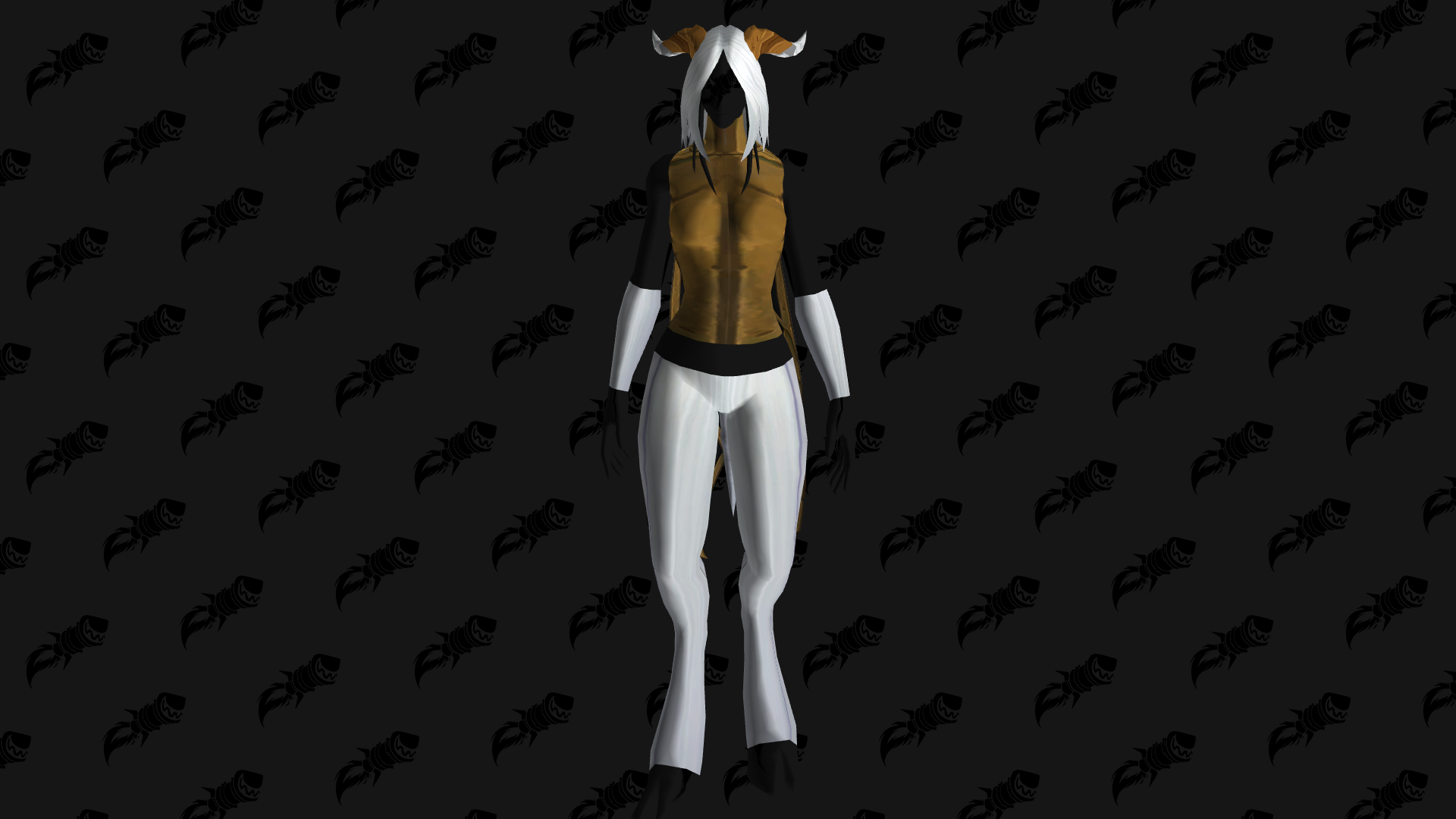
http://www.wowhead.com/dressing-room#kxzz0zJ89oz9m8QeH808QeJ808Piv808QeK87VQeU808QeO808QeP808QeQ808QeS87Vu ya site dun broke

Wowhead
Try out armor sets on any World of Warcraft character. Test different transmog and plan your wardrobe.
 arctic cairn
Known issue
tawny blade
It's a data issue on blizzard's end between live and bfa discrepancies for displaying these items. Pulling it up in the BFA dressing room should work properly: https://bfa.wowhead.com/dressing-room#kxzM0zJ8z9ccI9V8QeH808QeJ87cQeK87VQeU808QeO808QeP808QeQ808QeS87V
Wowhead
Try out armor sets on any World of Warcraft character. Test different transmog and plan your wardrobe.
teal dragon
@shrewd frigate Unfortunately I can't replicate that behavior anywhere. Are you still seeing it?
shrewd frigate
@teal dragon Seems to have been fixed, yesterday it was showing constantly (Chrome Browser). Just wanted you guys to know :).
 karmic dome
The js script for site tooltips seems to be working again as well!
arctic cairn
Just a heads up, the week of the 1st is the last week the Google calendar updates with ingame events.
 harsh chasm
@tawny blade Is it possible to list what bosses are active in Lower Karazhan on the frontpage like it is for Violet Hold?
im having Opera and Moroes in mind
arctic cairn
It's probably too late into legion to make changes to that.
 verbal sky
is wowhead currently lagging or is it just me?
Taking loads of time to load some part of site atm
Mostly happens either after submitting or opening new window for different Gear Piece etc
arctic cairn
I can't find anywhere and I've asked here 4 times with no response - how do you setup wowhead tooltips on IPB 4.2.8? The guide shows for 2.2 and the way IPB is coded now is completely different to the way it was coded then.
crystal olive
Sorry about not getting an answer before, but the reason was likely because no one ever did it likely, I can ask around some people to see if I can find something for you.
arctic cairn
Awesome. Thank you
arctic cairn
I actually figured it out, doesn't work like it should most likely - gotta embed the link to the item on the name of the item instead of just being able to link it and it changes it to the color and the tooltip. If you can find out how to do that, that would be amazing
 daring plover
I have a banner at the top of a wowhead window in Chrome saying "Rats! WebGL hit a snag".
Along with the standard CPU-in-wowhead-maxes-out thing, of course.
I keep meaning to investigate enough to work out whether it's mining bitcoin or something.
(And the also-standard "leave any wowhead window open for 5 minutes in the background and the Chrome tab will crash" thing, of course.)
arctic cairn
Make sure your chrome is up-to-date. If it is follow the steps below to see if that fixes your issue. If it's not, update it and see if that fixes it.
Fix #1 Disabling Hardware Accelerated Graphics in Chrome
We can fix this problem by disabling hardware accelerated graphics from the settings in google chrome. Follow the steps mentioned below.
Navigate to chrome://settings>>show advanced settings.
There you can see an option “use hardware acceleration when available”.
Uncheck it and Restart your browser to make the changes live.
Fix #2 Disable WebGL
Go to chrome://flags. Search for the option “Disable WebGL.
Enable this option and restart your browser.
It is very unlikely that your problem still Persist But if you encounter this error then there is another way to tackle it.
Fix #3 Chrome GPU
Navigate to Chrome://GPU.
Here under the Problems detected heading,
daring plover
What's webgl even doing on non-modelviewer pages, anyway?
arctic cairn
It's the script that's on the website, don't necessarily have to be on the page where it's active.
daring plover
Yeah, but it shouldn't actually be doing anything if it's not showing a model.
arctic cairn
It's most likely not doing anything, Chrome has a weird way of handling those to begin with
daring plover
Given the CPU-load issues, it doesn't seem implausible that it's churning away wildly on pointless stuff in the background.
 round flicker
Hmm finding PS4 Gran Tourismo ads are squishing the page and breaking text in talent calc:
tawny blade
hey @round flicker we haven't done skins for a while, not with the video unit, and now with both together we agree it looks a bit too squished. We're going to try to turn the video unit off for now, while the skin is up.
teal dragon
@round flicker this should be fixed for now. Thanks for bringing it to our attention.
round flicker
👍
 celest glen
Not really sure where to post this, but this giveaway survey thing assumes that I've played battle royale games and that I have a phone with an OS on it, and then gives me no options to say I don't. >:
teal dragon
@celest glen All I can really do is suggest you fill it out as best you can, or you could not do it at all (For clarity, not being snarky, lol, just stating the two options). Unfortunately we didn't have any direct control over the logic of the survey. 😦
viscid heart
where can we suggest guides for the guide spotlight?
teal dragon
You can reach out to @tulip hazel :)
viscid heart
well poop! its underrated. it doenst have the full 5
 novel roost
Why is Overwatch listed as a MOBA in the survey?
 nocturne zodiac
Anyone else having any issues with the Wowhead client not updating?
 stoic acorn
@nocturne zodiac updating or uploading? There haven't been any updates for it in a while.
nocturne zodiac
Uploading. I get an error message the says it can't update a file. Try again later.
I tried re-downloading the client, but no change.
stoic acorn
You can try resetting the data files by closing WoW and deleting all the +Wowhead_looter.lua files in your WTF folder. Note that this will lose any information that wasn't uploaded, you can try backing them up in another folder just in case that isn't the issue.
karmic dome
@nocturne zodiac could you try changing the password on the website, waiting 20-30 minutes and then logging in the wowhead client again? This seemed to work (sometimes) for other people.
nocturne zodiac
Sure, I'll try it out in a little bit.
 gloomy cloud
I'm getting a 502 error on any wowhead page at the moment
 weary furnace
It should be back now. They usually resolve in a few minutes.
gloomy cloud
Yeah it's just intermittent now
teal dragon
@nocturne zodiac Do you have alpha? If so, that can cause the error. I believe it tried to do something that it can't on the alpha/beta client.
nocturne zodiac
Ah, that's it then
rancid copper
How do we get it to recognize that we watched the video? I've watched it like 4 times and it won't let me hit continue...
[for the giveaway]
 white plaza
I can't even watch the video. Doesn't load.
teal dragon
Once the video ends the Continue button should be enabled. I tested it without any trouble.
teal dragon
Try reloading the page entirely, clearing cache, best I can suggest.
rancid copper
did both already. which browser did you test in?
teal dragon
Chrome.
rancid copper
Hmm, that's what I'm using. weird....
That's what I see even after I watch the video, which popped in a new tab
rancid copper
I'll try watching it on my phone later, but that's weird.
Never had this issue before.
 noble thistle
So you have to have facebook account for Gleem thing?
 jade timber
Anyone else been missing pins on the site? There'll be a map that's supposed to show me where a character is, but there's no marker.
 small ore
@jade timber got a link or screenshot?
jade timber
I mean, it's just the maps on the site, except without any pins.
Been doing it for a couple days or something. I'll go to look someone up, but there's nothing on the map there to show me where they are.
small ore
on bfa right?
jade timber
No, I'm pretty sure what I've been looking at is Classic content.
small ore
got a link that shows the problem? or which npc did you search for?
cos like i pick a random npc and it's show me map and pins
*showing
jade timber
Yeah, I had to have someone else look and it was fine for them.
It's been several NPCs and it's happened with all of them.
Wowhead
Hansel Heavyhands is a level 53 NPC. This NPC can be found in Searing Gorge. In the NPCs category. Added in Classic World of Warcraft. Always up to date.
Nothin'
jade timber
IDK if you did anything but it's working now~
teal dragon
@jade timber We've made an adjustment, the issues stems from AdBlock... it's temporary until we can figure out the underlying cause and if it's something we can adjust or not.
But for now you should be able to see things again. 😃
jade timber
Ah, thank you~ Excellent tech support.
 gleaming umbra
hmm things that arent giveaways in the givewaways channel..... 🤔
 dreamy mirage
owo
 sinful mason
Anyone having trouble with the Wowhead client? I'm getting Upload failed: Invalid status code: 500.
 steel gust
Any news on the Easter egg hunt?
teal dragon
@sinful mason give it another try, if it still falls let me know.
@steel gust they're pretty well hidden, haven't found any yet this year.
sinful mason
Now it says 'End of file'.
And now the same message as before, @teal dragon
Do you think it could be a problem on my end?
teal dragon
No, not at all. I think your lua files are either corrupt or grown too large.
One moment...
sinful mason
It's a fresh install. I've had the addon installed for a long time but haven't updated in a while. Apparently it's 1.8MB.
teal dragon
Perform the following:
Delete the +Wowhead_Looter.lua (and +Wowhead_Looter.lua.bak) file in your World of Warcraft/WTF/Account/<Account Name>/SavedVariables folder. Then, go relaunch World of Warcraft. Give it a minute, close it and try to upload again.
sinful mason
*fresh install of the Wowhead client.
Ah, those files are around 10MB each.
Well that has done the trick. Thanks.
Shame all that data has gone to waste. Any way I can salvage it?
teal dragon
Based on how old it evidently was it would have been ignored anyhow, no worries.
sinful mason
Fair enough 👍🏼
 sage folio
Sorry if this is not the right place, but will there be a WoWhead egg hunt this year? (love those) Can't seem to find any info on it.
teal dragon
I can tell you this...
....yes. 😂
 ocean crow
Is it intentional, that the eggs can only be seen on the english version of wowhead although the contest is "open to anywhere"? If so it might be a good idea to note that on the contest page.
teal dragon
Sure, I can add a note.
ocean crow
thanks 😃
crystal olive
uhh
arctic cairn
Umm... @teal dragon
teal dragon
@gilded yacht Something you want to tell us? Are you lonely?
neat talon
Welp. I'm lost.
crystal olive
he misses her
 open wraith
Gruh. Still can't see hairstyles on upright orcs.
teal dragon
Seem to work okay for me @open wraith
open wraith
Well, it hasn't for me, across multiple devices.
teal dragon
I see a total of 8 (1 of which is bald).
This is #3
I'd recommend clearing your browser cache and/or trying in Private/Incognito Mode, with no browser extensions/addons running, to see if the behavior persists or not.
 leaden socket
hi super quick question, i'm writing a guide and i accidentally submitted it before it was finished, what do i do?
i put a thing in the description saying it wasn't done but is there a way to take it out of the approval list?
or pending approval list
srry
 crude urchin
@leaden socket Hi. Could you please send me a link to it through private message?
leaden socket
sure thing!
stoic acorn
The last sentence is duplicated 😉 https://www.wowhead.com/website-achievement=156
Wowhead
Website Achievement: Every time you earn this achievement, you've been entered once into our Noblegarden giveaway! Up to ten entries are allowed. This achievement can be earned multiple times. This achievement can be earned multiple times.
teal dragon
@stoic acorn evidently the system adds the line, which I thought I had to add myself, automatically when the achievement isn't unique. I believe I fixed it. Thanks!
arctic cairn
Always fun when you find out that the system does something you didn't know it did lol
 humble widget
I have found 6 or 7 eggs in the website but only got achievement for 4 of them. I have tried reloading the pages several times but i still do not get the achievement pop up that i found the egg.
stoic acorn
Note: You must visit the English, www/live, version of the page to find the egg(s) (one bfa exception).
@humble widget ☝
humble widget
Yes exactly, i found many eggs, but on 3 or 4 i didnt get the pop up, do you think im randomly switching to the french german and chinese versions of the site? ^^
verbal sky
Got all eggs just now myself and id like to give feedback about them. Making Harder questions nexttime would be great 😛 . Long as you played actively during Legion you can pretty much answer on every question without too much effort except maybe for 6 & 8 .( Or maybe i was just being stupid with 6 😅 )
Seems like i finally hit 100k rep milestone aswell 
plucky fractal
Congrats on the milestone, I guess I shouldn't have spoiled you so much by accepting all those screenshots!
verbal sky
haha
Well there might have been few which i could just reported instead that they already had semidecent replacements already.
😉
verbal sky
Cheers 😃
 humble gust
There's a awnser to one of the Riddles I think is not working correctly cause I'm 100% Certain my awnser was correct but it didn't proc the achievement
crude urchin
Did you try to switch to English version of page?
humble gust
But I also don't want to give out the awnser so who do I talk to without spoiling @crude urchin I don't know who to contact about this or @ on the Discord and your the only mod on that I see...
I do apologise for an unnecessary @ if you were the wrong person to contact 😖
But I am English
I use the us page by default
Or am I doing something wrong
Specifically the Riddle not procing is number 5
crude urchin
Everything looks to be okay on our side 🤔
humble gust
Lemme try again
teal dragon
What's your username @humble gust
teal dragon
You are indeed missing that achievement. Send me a PM with the link you feel is the correct answer please.
teal dragon
😉 glad to hear it! Good luck 
humble gust
Danke
 barren fox
Is there something wrong with wowhead atm? I'm getting constant Error pages coming up if I try to use it.
crude urchin
@barren fox Hi. Please turn off extensions and clear cache
 hidden pine
how do i get listed as a wowhead premium member on here?
crude urchin
@hidden pine If you're a Premium user on Wowhead please send @teal dragon a private message requesting an add to that role on Discord. Please provide your exact Wowhead name and associated email address when doing so. Allow 1 business day please.
hidden pine
thanks ❤
 lucid bobcat
@tawny blade Hey perc, if I understand correctly the BFA Collector Edition does not contain an artbook ?
tawny blade
It has not been announced
So for current purposes, no art book
@lucid bobcat The novella will have original art but doesn't seem like 100% art book
lucid bobcat
Yup, sounds more like 2 faction-POV short stories
@tawny blade The tech tree is based on Warcraft II is this a typo, or am I remembering wrong that at Blizzcon they only exclusively mentioned WCIII ?
crystal olive
on which post?
lucid bobcat
tawny blade
they have mentioned warcraft II several times
maybe they misspoke
I'm pretty busy now so hard to check back
lucid bobcat
@rich wyvern Another interview to add to the interview roundup article https://www.youtube.com/watch?v=eHivjZ3zgjo

SUSCRÍBETE: http://goo.gl/UO2T7d Battle for Azeroth Interview with Matt Goss & Patrick Dawson that we did in the Battle for Azeroth Press Tour in Irvine (Cal...
tawny blade
Thanks, Epislon reached out with some topics he'd like us to include so I'll write something up this afternoon
tawny blade
@lucid bobcat should be updated now
 manic dagger
@rich wyvern regarding cultist casting times (and them not being set by blizzard or hyping anything up): https://www.reddit.com/r/wow/comments/8a96xk/xorothian_cultists_what_the_channeling_actually/

reddit
Summary of recent events Over the past several months, several users noticed that cultist mobs on the Broken Shore called 'Xorothian...
 jovial ledge
hey guys, is it possible to set the default language of wowhead to english? almost everytime I revisit it's set to german even tho I prefer the english version. happens also when I google english item namens, the site shows up with the german name on google. maybe cookie settings or anything?
 austere basin
Sorry I posted that in the wrong channel area
 timid osprey
@jovial ledge, your Google results is something you'll need to ask Google about, but I'm pretty sure they base it off your ISP location. As for Wowhead, there is no setting I can find for default languages. It looks like the language is dictated by the subdomain. Once you set the language, all links in the tab will be based off that language, but if you return to Google and it gives you a DE link, the language will be German due to the subdomain.
teal dragon
@timid osprey @jovial ledge that's exactly right, we don't force any particular language on anyone based on location, that would be something Google is doing for you. Might be able to disable that somewhere. I recommend using our on site search whenever possible, may reduce the frequency. Have a good weekend!
jovial ledge
thanks to both of you
 blazing lance
Does the Windows Wowhead client work with BFA Alpha? I am getting this when I hit OK
crude urchin
@blazing lance Hi. Sadly not, because Addons are disabled on Alpha atm
 west scaffold
silly question... where do we turn in the giveaway for Easter? I'm new to doing these.
 red smelt
@west scaffold you have to visit each of the ten pages while logged into Wowhead, doing so will automatically give you an achievement on the site, each achievement is an entry into the giveaway
west scaffold
ooooh just hitting the spots does? I thought I had to email something!
ty @red smelt
 fervent basin
For the database giveaway, are we supposed to get any kind of popup or notification if we visit the right page?
crude urchin
Yes
arctic cairn
By the time you're done, you should have 11 copper achievements
fervent basin
I couldn't solve all the clues…lol
timid osprey
11 achievements?
stoic acorn
You mean 10?
stoic acorn
There are only 10 that are part of this event, Cross Your Fingers is for any Wowhead contest. I have 11 of that one...
timid osprey
10xNoble Garden, but you get 1xCross Your Fingers for the first entry.
stoic acorn
To be super clear, you should have 10 of https://www.wowhead.com/website-achievement=156, as those are the entries in the contest. Any other achievement you get is only tangentially related to the contest, at most.
Wowhead
Website Achievement: Every time you earn this achievement, you've been entered once into our Noblegarden giveaway! Up to ten entries are allowed. This achievement can be earned multiple times.
(Unless you win, but that won't show up till they are announced 😉)
The last one you are talking about just means you entered any Wowhead contest, for example here's the 11 ones of just that achievement that I have: https://www.wowhead.com/website-achievement=26#user:ArcaneMagus
Wowhead
Website Achievement: Participated in a Wowhead contest. This achievement can be earned multiple times.
timid osprey
I know...
@arctic cairn said, "By the time you're done, you should have 11 copper achievements," I questioned it, having forgotten about the Cross Your Fingers. You followed up along the same lines. When I realized where the 11th came from, I tried to clarify it for you.
My apologies for not explaining my response immediately following the topic it was discussing. I thought it was obvious. I'll try to be sensitive of others in the future.
arctic cairn
I'm talking about looking in your achievement history. There should be 11 within the time frame from start to end of finding the eggs. The 11th is the Cross Your Fingers and you get that after you find the 1st egg but you can't see that at first glance.
Like this
 inner hill
https://bfa.wowhead.com/talent-calc/shaman/restoration
on this side the shaman has lost his Flame Shock but at the Alpha he still have his Flame Shock usable
can t tell u the ID cause Addons don t work there
Wowhead
Talent Calculator for the Battle for Azeroth expansion of World of Warcraft.
 next coral
Admins, we need guides on Vanilla wow itself before classic wow comes out so new players know what they’re doing before they go into it.
timid osprey
New players won't read the guides until after they realize they don't know something.
next coral
I would.
When I tell myself “I want to play this class in Vanilla” I wonder how it works before I play Vanilla.
Like I want to play a warlock but I don’t even know what curse of elements does.
plucky fractal
I'm sure there will be some guides on Classic WoW, but it's a long way out, and there is little information on what it'll be exactly yet, so not much to write about currently.
timid osprey
I'd guess that we won't see a classic realm until the 15th anniversary, maybe later.
crystal olive
@next coral thanks for the suggestion. Once we get closer to the Classic WoW launch I'm sure we will have plenty of guides to help both old and new players to Classic
But right now, we are probably over 2 years away from it, at least
next coral
Fair nuff, I’d like to say 1 and a half to 2 but thank you very much.
I just hope to not see Legion/BFA newbies interested in a project that they can’t get into because they don’t entirely understand it. Classic WoW was a much different game and I hope that everyone gets the experience their hoping for. For that to happen with newbies, you’ll need guides and such. But if that’s the expected path, then...yusssssss.
 green ferry
Does dis ord feedback count as site feedback?
crystal olive
sure!
 stray tulip
Somebody else's character is showing up on my wowhead, for example when I look in the wardrobe I can load this character's wardrobe, although noone else has had access to my account. It says the character was added 12 days ago, it's a draenei Holy Paladin... Nothing else has happened weird with my account.
timid osprey
@stray tulip, did you look up that character. I did that with a friend of mine before he got his own Wowhead account and claimed the character. Before that, when I looked it up it showed up as an unverified character for me.
stray tulip
I looked it up, yes. Its definitely not mine or anyone I know, its on a different realm from me. Also I only have one 110 😃
timid osprey
If you go into the profile, right next to the button to update it should be a button to delete it. That will remove the profile from your character list.
stray tulip
Its stranger still, because the time when it got added I was using my account to use the modelviewer the first time. Its confusing me because Im worried something has happened to something of mine that gave someone access
Is there someone I could report this to
teal dragon
@stray tulip There's nothing to worry about, if you view or look someone up in the profiler it's saved for later access. Just load it up and click the red x to have it deleted from your lists. You haven't given anyone else access or anything. :)
stray tulip
I didnt look it up until after though
Sorry if it was unclear
Its odd, but maybe a bug? I could give more information, if it will help
I did delete it. So hopefully it will be okay. Seems to me it was just a strange bug I wasn't expecting ^^
teal dragon
Just viewing it will also add it, like if someone linked it in the forums or on another site, or if you looked at it from someone's Wowhead profile. I have quite a few myself for this reason. :D You could have just accidentally clicked something and pressed back before the page even finished loading, it happens.
stray tulip
But it loaded while I was doing my own thing. Like I didnt see or click anyone's afaik. I was just going back and forth between searching items in wowhead and adding them to my transmog 😃 but I will be aware for the future
I looked up the profile after it had appeared*
it was a very nice transmog
lucid bobcat
@rich wyvern FinalBoss has released his PAX dev interview, should probably be added to the interview roundup article https://www.youtube.com/watch?v=AQ0BvSsdZeY

Bay sits down w/Morgan Day & Daniel Stahl from the World of Warcraft: Battle for Azeroth dev. team, at PAX East 2018, to ask about the upcoming expansion, Is...
tawny blade
we are planning a separate article on it, he messaged me about it earlier this afternoon
 prime mountain
dressing room broken for anyone else?
crystal olive
broken or... improved? 🤔
teal dragon
I believe that's the new Allied Race: Treelore Gnomes
teal dragon
oops, haha - true, I'm doing too many things at once.
crystal olive
seems normal here?
teal dragon
May have to do with a weapon, or armor piece... @prime mountain can you give us the link you're viewing?
green ferry
I was just going to say that i personally feel like 12 hours is a short time for response on a giveaway. The last givaway for example had a window of 3am to 3pm. A time where i am mostly either asleep, at work, or driving.
teal dragon
12 hours was a compromise between 24 hours and 4 hours. Since I redraw winners when someone doesn't reply, having it be 24 hours is too long. I had an instance where I had to keep rerolling winners an entire week, which isn't reasonable for me. 4 hours was understandably too short. To be frank with you, there is never going to be a time frame that is good for everyone. I give people 14 days to reply to site giveaways and even then it's not enough time for some.
Given the worldwide audience we have at Wowhead there's never going to be a perfect time. If someone wants to partake, I just encourage them to set an alarm or take whatever steps they need, at some convenient point in the 12 hours after a giveaway ends on Discord, to take a look at Discord (or make sure you have notifications enabled). There's rarely any real excuse for someone being entirely unable to check for a full 12 hours.
Nonetheless, thanks for the feedback. 😃
 elfin tapir
hi
I just tried to log in, but the site complains about invalid login/password
it gets problematic when I try to reset password, because it requires an email address, and I have no memory whatsoever which one I've used
teal dragon
@elfin tapir send me a PM here please.
 bold umbra
Can I report bugs with the new Twitch extension here?
as you can see, in theater mode the buttons are fully covered by a Twitch overlay.
as in, in theater mode they're unclickable
Or can the streamer themselves choose where this is placed?
crystal olive
that's an issue with theater mode
and the streamers can choose where they are placed
 novel drum
The Twitch extension requires logging out of the character to update, right? Like the armory? So if you play a class that changes talents/gear frequently, it'll be out of date pretty quickly. Not sure if there's anything to work around that, but thought I'd ask anyway.
crystal olive
Sadly, yes, currently we only support fetching the data from the Armory. If the extension gets popular, maybe that can be improved in the future!
novel drum
Okay. Seems like a neat project, looking forward to seeing it evolve.
crystal olive
Yup! We're very excited about it as well!
fickle pecan
I am experiencing some inconsistencies between what I see on the Alpha and what I see on Wowhead. https://bfa.wowhead.com/npc=137056/ appears as a dwarf in-game, although his model is messed up as the screenshot shows.
Wowhead
The location of this NPC is unknown. In the NPCs category. Added in World of Warcraft: Battle for Azeroth. Always up to date with the latest patch.
Wowhead
The location of this NPC is unknown. This NPC is the objective of Q03 Windswept Coast. In the NPCs category. Added in World of Warcraft: Battle for Azeroth.
Lithia appears as a goblin instead of a blood elf in game, with a different last name; Grindstone
Wowhead
The location of this NPC is unknown. This NPC is the objective of Cutthroat Business Practices. In the NPCs category. Added in World of Warcraft: Battle for Azeroth.
Gary Bilgewater shows up as Gary Cofferdam in-game
Based on their titles at least. Wowhead doesn't show anything for "Lithia Grindstone" or "Gary Cofferdam", but of course I can't check IDs yet to really make sure.
 junior moon
Hmmmmm Gary Bilgewater displayid is correct
atm I can't look more for mortas and lithia to see what is going on
but I guess it some bad data
and probably will be fixed / solved when we get new build tonight and when we do creature push
fickle pecan
Right. Lithia and Mortas I only just made pages for on Wowpedia a few days ago. Gary I've checked now and then for the past 2 weeks without update on wowhead. I'll check back later in any case 😃
prime mountain
@teal dragon sorry for late reply but its still messed up for me https://www.wowhead.com/dressing-room#Rk0c0zJ8z9cbzcm9m8sB2808MbE808DXf808zYr808Mzs808Gew808MrV808Mrz808Mro808kAp808MrM808bdQ87c
Wowhead
Try out armor sets on any World of Warcraft character. Test different transmog and plan your wardrobe.
stoic acorn
Looks like it's the weapon
 glad plover
What am I am doing wrong here, this was just working, but now it seems like not all items are showing. I'm just looking for all leather armor which the Horde can use - https://www.wowhead.com/leather-armor/side:2/slot:8 But this is only showing me at minimum of level 40 required, where's items for level 40 and below??
Wowhead
A complete searchable and filterable list of Leather Foot Armor in World of Warcraft: Legion. Always up to date with the latest patch (7.3.5).
stoic acorn
Your search is returning too many results (1000 max), try filtering a bit further.
glad plover
Weird, it's never done this before.
I had to narrow it down by using the Req Levels.
teal dragon
@prime mountain Use the BFA version http://bfa.wowhead.com/dressing-room#Rk0c0zJ8z9cbzcm9m8sB2808MbE808DXf808zYr808Mzs808Gew808MrV808Mrz808Mro808kAp808MrM808bdQ87c please to resolve that. It's something that'll work itself out when the game releases.
vale hedge
Hey, can someone got to SW or Org? Also, can someone see it Treedrasil has burned to the ground?
 queen creek
Where can i find the list of winners from the noble garden egg hunt contest?
teal dragon
The winners have not yet been finalized. When they are, they'll appear here: http://www.wowhead.com/contest=the-great-noblegarden-egg-hunt-2018
queen creek
thank you 😃
 frosty ledge
Uhhh....
Wowhead
Try out armor sets on any World of Warcraft character. Test different transmog and plan your wardrobe.
Can anyone see this changed?
I think the Dressing room is bugged for me.
I'm supposed to see a female human in monk gear.
teal dragon
frosty ledge
No I mean
A friend sent me this link when she completed her custom look in Dressing Room
But I can't see it
teal dragon
You don't see anything at all or you don't see what they see?
The link led to a male, I switched it to female and there's where the screenshot is from.
teal dragon
Hmm, the link they gave must be incorrect somehow.
Tell them to save it as an outfit via the 'Save' button and then send you the outfit link.
frosty ledge
Could it be because they're sending the link through phone? :L
teal dragon
I don't think that should matter actually. Let me try loading it on my phone though.
Nope, looks the same.
frosty ledge
Mhh... Confusing. :S
teal dragon
I don't think the link they gave you is correct, maybe they didn't properly copy the new link?
Wowhead
Try out armor sets on any World of Warcraft character. Test different transmog and plan your wardrobe.
frosty ledge
Hmm... They're not logged in, could that be a factor?
teal dragon
That also shouldn't matter.
The link above is the same model that you and I are seeing, but with the correct hair style, color, face and skin color to match your friends' screenshot.
I took that from my phone after loading the original link you provided.
frosty ledge
I don't even see the correct haircolor or skin color.
:S
They're all on 1 for me.
teal dragon
After clicking my link you don't see the different numbers for customization?
frosty ledge
Nope, all's same
Unchanged
The link has changed but the changes do not echo in the dressing room itself
:L
frosty ledge
I just clicked it from this chat
teal dragon
Try copy/pasting it I guess 😦
Not that it solves your current issue regardless. Can your friend providing the link come in here?
teal dragon
frosty ledge
Nice, personalized Discord link! xD
She'll join in a moment, she's just rushing back home from store.
@plucky fractal
Over here!
(She has to wait for 10 minutes to chat) xD
teal dragon
I'll fix that.
Should be good.
@plucky fractal Basically, I'd like you to change one attribute of your dressing room character, then change it back. Then copy/paste the URL please.
frosty ledge
(She's still rushing home, soryr for the wait!)
plucky fractal
I'm sorry about that! Here, this might work, I put a shirt item on.
Wowhead
Try out armor sets on any World of Warcraft character. Test different transmog and plan your wardrobe.
frosty ledge
I still see human male in warrior starter oufit
teal dragon
That link works correctly for me.
@frosty ledge I'm not sure why but it doesn't seem the new link is actually working for you when clicked, based on that other screenshot, you're still looking at the incorrect link from earlier. Try closing out your browser completely and the clicking it.
frosty ledge
AH! IT STARTED TO WORK! I had to referesh my page like 4 times!
I don't know why I couldn't see before
:S
Eiryna, you're on phone or PC now?
plucky fractal
Also, there is a problem with the Leggings of the Sable Stalkers item in the WoWhead modelviewer. In game, the item shows knee pads and pouches, but not in the modelviewer.
Phone! ^^
frosty ledge
I don't know what changed, I saw human male at first when I opened but when I refreshed about 4 times, it turned up as it's supposed to be
 frail crag
Hey can I ask a question?
frosty ledge
This is the place for it
frail crag
How come the model viewer doesn't work in Firefox?
I just mean for Wowhead. For some reason the model viewer for Lolking works just fine.
teal dragon
@frail crag It seems to work okay for me.
Do you have any third party addons/plugins running in Firefox? One of them may be preventing the asset from loading.
frail crag
let me check
teal dragon
You might try in Private Browsing to see if that's the case.
frail crag
It doesn't work in Private Browsing. I whitelisted Wowhead from ABP and the viewer still doesn't load.
The only other addons I have are Avast and DuckDuckGo
teal dragon
Try entirely disabling ABP, despite "whitelisting" it doesn't always seem to entirely "whitelist" based on my experience with others.
viscid heart
but i dont get adds anyway, and the modelviewer probably is javascript as most adds are and avast/ABP blocking something they think is also a add can make things go poop
frail crag
It's not ABP. I disabled it.
teal dragon
Did you try disabling DuckDuckGo? I mean, hell, might as well try that as well.
teal dragon
I'm honestly not familiar with it. Perhaps there some settings you can tweak to keep it from interferring.
frail crag
Nope. There's just Enable/Disable and remove.
DDG is a search engine that doesn't track you. Chances are its anti-tracking algorithm was blocking the model viewer
ok i was wrong there is a whitelist option
teal dragon
Hopefully it actually works for ya. Regardless, I do apologize for the inconvenience.
frail crag
It's fine. Problem's solved, that's all I care about.
gloomy cloud
There are a lot of items being displayed as grey quality in the BFA db https://bfa.wowhead.com/elemental-trade-goods
Wowhead
A complete searchable and filterable list of all Elemental Trade Goods in World of Warcraft: Battle for Azeroth. Always up to date with the latest patch (8.0.1).
crude urchin
This is a known issue and our Devs are currently working to fix it 😉
gloomy cloud
👍
 dapper snow
where can i get help on the wowhead client? Trying to upload 100KB i get End of File
crude urchin
@dapper snow Hi. Please, perform the following steps Delete the +Wowhead_Looter.lua (and +Wowhead_Looter.lua.bak) file in your World of Warcraft/WTF/Account/<Account Name>/SavedVariables folder. Then, go relaunch World of Warcraft. Give it a minute, close it and try to upload again.
 summer bloom
using the wowhead news webhook and really enjoy it. got me thinking that i would get a lot of use out of a similar news webhook that showed me official blizzard posts. wowhead.com already provides the functionality, any way to use a webhook to grab it?
arctic cairn
@summer bloom you can get a bot with Twitter functionality and have @warcraftdevs post in there as well. It's not exactly what you're looking for but it's an option
summer bloom
Thanks i'll try that!
dapper snow
did what Funkyjam said and still getting same problem try to upload and it hangs at Finalizing and then End of ile
stoic acorn
There is one of those files for each character, to fully clear it you need to remove the global one and the one for each character
dapper snow
i did a search for all of the files in the drive that contains my wow program and deleted and it still does it
 icy nebula
https://www.wowhead.com/silvershard-mines - Says its a 5v5 on the site, is 10v10 same thing here https://www.wowhead.com/temple-of-kotmogu and https://www.wowhead.com/seething-shore
Wowhead
A level 110 pvp battleground. A zone from World of Warcraft. Always up to date with the latest patch (7.3.5).
Wowhead
A level 110 pvp battleground. A zone from World of Warcraft. Always up to date with the latest patch (7.3.5).
Wowhead
A level 110 pvp battleground. A zone from World of Warcraft. Always up to date with the latest patch (7.3.5).
 storm cobalt
Is there any way to get more than 50 results in the list from database results?
teal dragon
Not on a single page no.
 dusk trail
Hi Staff team o/
Love love looooooooving the constant post and update about the Mage towers when they are Up in EU/US.
But please could you add in BOLD to the banner that announces when they are up:
The EU/US Mage Towers activated at: [Day] XYZ am/pm (CET/GMT etc)
The EU/US Mage Towers will deactivate at: [DAY] XYZ am/pm (CET/GMT etc)
Really helps with planning my game time - between juggling work / life / family / raiding etc.
Ty in advance xoxoxo
 stoic lantern
Thanks for the Plushie wowhead ❤ you made my day with that giveaway winner notification
What a nice thing to wake up to when reading mails with coffee
crystal olive
@dusk trail hey, sadly we don't have the exact time the mage tower went up / will go down because that information isn't available on the API, all the information we have is from the wowhead client uploads, which could be off by minutes or hours, depending on when someone uploads their data, that's the main issue of having such informaton, innaccuracy. 
dusk trail
Aye that is correct - but when the towers are live in game there is a constant timer. If one staff member logs in checks the remaining time remaining at the broken shore table and then POSTs that in the banner announcing time. I mean you guys reach a lot of people. This is useful info to get to the masses :D
https://www.timecalculator.net/hours-from-now-calculator
^handy tool
Hours from now calculator helps you to calculate the time hours and minutes later and ago from now. What time will it be in hours later and ago from now.
crystal olive
That remaining time can only be seen in the final 24hrs
dusk trail
Ok granted - But we know the towers are up for 3 days from the points they reach 100%.
I'd be happy to try posting estimations on when they will likely shutdown.
If it's useful add it to the banner - hopefully players will appreciate it - if not no biggy
🤣
Thx guys
teal dragon
You're very welcome @stoic lantern !
next coral
Is there a place we can submit emojis?
I’d like to submit this: 
Here’s the picture you’d have to change it to a png though
 inner wolf
wh. why do you want that to be an emoji
 terse saddle
Cause tuskarr are the best race 
viscid heart
:tuskarr:
next coral
 worthy junco
can we see warfront's weapons & armor in the dressing room of the website ?
 stuck wadi
getting 502/500 trying to access wowhead.com/quest=38455
 warm depot
Looks like it's down, got a 502 just going to the homepage.
stuck wadi
😦
 north hazel
@acoustic crypt tagging you as you seem to be the only staff in available status. Not sure if you folks are aware.
 acoustic crypt
being looked at
 scenic panther
no wowhead weekly tonight guys?
crystal olive
@scenic panther Perculia is on a trip this week, so there won't be an episode today
arctic cairn
It appears the customization article is missing the beta tag. Is that just me or is that actually missing?
crystal olive
fixed!
arctic cairn
Glad it wasn't just me.
 scarlet peak
Acting up again, 502 gateways. Need more 
arctic cairn
^same
teal dragon
Operations is working on it.
teal dragon
https://twitter.com/Wowhead/status/987545914813235201
Note: the site has recovered.

We're experiencing some site instability at this time. We're aware of the issue and are actively working to resolve it. We appreciate your patience in the meantime!

 Twitter
 verbal hatch
Do you have to do anything special to link your premium account with discord? I'd like to be orange :3
teal dragon
@verbal hatch Please check the #welcome-rules for instructions 😃
verbal hatch
ofc.. I'm sorry bows head in shame
fickle pecan
I heard people saying that addons are enabled in the alpha now. Is this true? Is there a working alpha-compatible wowhead looter addon?
plucky fractal
They are enabled.
fickle pecan
The wowhead looter too? I have a macro that lets me see NPC IDs but the addon is much more practical
plucky fractal
Not sure about that, only know they’re enabled because I saw towellie using a damage meter on alpha
 fresh bramble
🎉
fickle pecan
Yeah macros was enabled at the same time, but yeah I'll just use macros for now in regards to IDs 😃
 thick berry
hi
guys please answer me
ive abandoned the ashbringger quest
now i cant find it again
karmic dome
Try ask in #retail-wow
worthy junco
can we put this armor : http://wow.zamimg.com/uploads/screenshots/normal/718241.jpg
in the dressing room to see how it fit on others classes

it's the tier 3 warfront for alliance
plucky fractal
i think wowhead down 😦 rip
 spring geyser
The article about the book goes immediately into story spoilers without any warnings... Not all of us want to read those so a heads-up would be appreciated
plucky fractal
Gotta wonder how big those shoulderpads would be for night elf males. They usually get huge shoulder pads.
 tribal vector
I think the model theyre using is the night elf male cause humans don’t have one yet
plucky fractal
Nah, those are humans. I can tell by the body shape.
plucky fractal
Damn, they look remarkably human. Where's the triangle shaped torso?
And the ears?
tribal vector
The shoulders hide em lol
plucky fractal
Yep!
frail crag
Is that armour or a Transformer?
tawny blade
The armor can't be added to the Dressing Room yet because Blizzard hasn't created items for them which allow players to search for them in the tool
for example we knew what the maghar orc armor looked like for 2 months before blizzard finally created the items. then it was added automatically
 warm wadi

 tacit wave
Hi, I accidentally placed Rextroy's video under http://www.wowhead.com/item=121815/voidtalon-of-the-dark-star#videos.. could you please place this in to solo/paladin/raids. So sorry about the mistake.
Wowhead
A mount collection item. In the Mount Items category. Added in World of Warcraft: Warlords of Draenor. Always up to date with the latest patch.
plucky fractal
@tacit wave No worries about the mistake. I am however unable to move the video to another location without a specific name/ID.
I'll remove the video from it's current location, and then you can re-upload it to the page that you had in mind.
tacit wave
thank you
teal dragon
Brief site outage, should only be a few minutes. 😃
 warm sundial
Was about to ask, ty for informing 😃
teal dragon
I would have mentioned it earlier but it slipped my mind. 😐
Should be back to normal now. Thank you 😃
 unreal olive
I can't react to the givewaway bot
The icon to click is nottthere
Oh, sorry. It was there, it had just reset
teal dragon
It's a display thing, that I mention in the reply below it. If you don't see it at all you can always just add it if necessary. Sorry about that.
 atomic orchid
this has been going on for couple days already, i have adblock but i have it disabled for wowhead
small ore
what about in incognito mode?
crystal olive
do you have any script blockers on?
because if it works on incognito, it is likely an extension that isn't enabled on incognito that is causing it
atomic orchid
i have privacybadger
and after enabling sdad.guru and ap.lijit the site seems to work great again
it seems that sdad.guru was the one that broke the site
i had it blocked for some reason
crystal olive
glad it is working again!
atomic orchid
thanks for help ♥
plucky fractal
I noticed an error on the Returning Players Guide for people returning from Vanilla! It's concerning the Draenei information. It says they landed on Azuremyst Isle, an island North of Teldrassil, when it's actually South 😃
Wowhead
Guide on what has changed on WoW since Vanilla, for players returning to the game. Includes New Races, Leveling, Gearing up, Achievements and more.
timid osprey
@plucky fractal, if you want to be technical, it's South West. 😉
plucky fractal
True, South West!
timid osprey
Bloodmyst Isle is West South West. 😃
plucky fractal
^ They're correct! I just knew it wasn't North due to travel things I've done!
crystal olive
@plucky fractal @timid osprey thanks for the report, I've fixed it!
 wet belfry
Any links I try to follow on the front page is at the moment giving me a 404 error. Anybody aware of this?
tawny blade
this may just be on your end, I haven't noticed a traffic dip on the site
plucky fractal
I'm having the same if I try to open a link via a new tab on chrome.
If I just click on the link, it works.
If I open it in a new tab, I get an error.
Tested some more. It doesn't matter if I open the links into a new tab from the frontpage (scrolling down article by article) or from the "Recent news" section.
I'll get the "Page not found" error.
It's actually with every link in wowhead. I tried to open an NPC link mentioned in the Boralus article and I get the same issue.
plucky fractal
Same issue ^
tawny blade
try disabling your browser addons one by one, I can't replicate this in chrome
plucky fractal
Reloaded without content blockers in iOS safari and it’s fine now. Should’ve double checked that first. Sorry
manic dagger
Yeah, most likely the g00 stuff being blocked by adblockers
Actually, can reproduce it without an adblocker in incognito too by just going to a link directly by pasting the URL in top bar and navigating to it that way. Will also 404.
teal dragon
Yeah, the link for whatever reason is poisoned for lack of a better word. If you visit the link directly, not copy/pasting from the poison link, it works fine. Example: http://www.wowhead.com/news=283841/boralus-hub-updates-in-26476-banners-tradewinds-market-unity-square links just fine... loads up just fine. But I have a gibberish URL that leads to 404, and if I try to copy/paste it then it continues the gibberish.
We'll keep an eye out to see if this is widespread or not. I have only the couple reports here and one via email. It seems to be stemming from content blockers but I'm not yet certain as to why.
manic dagger
I'm guessing the ad redirect/g00 stuff is encoding the link in some way for some reason. Seeing a lot of encoding crap in the URLs which will make it render the same way in the URL bar but will not actually be the same. Seems to be a zero width space between every character in the URL for some reason.
 violet sundial
The g00 ad stuff is cancer, if a premium sub wasn't so reasonably priced I would have had to stop using the site. Before I got premium, if I was visiting the site on a laptop, the laptop would get warm enough that it felt like it was going to melt >.<
arctic cairn
I just want to get an official response on this if I may - I have been seeing some posts on the official wow forums saying that bfa beta keys are available from you guys for premium users. This doesn't seem to actually be the case but don't want to say anything without having an official answer to slow the spread of those rumors.
teal dragon
We don't have beta keys, at all, zero/nadda. To my knowledge, no one does. When we do, they won't be given out based on Premium status.
arctic cairn
Thank you so much Sas. That's exactly what I figured.
teal dragon
@arctic cairn Curious to see one of these posts you're referring to, got a link?
arctic cairn
I'll go back in my browsing history and see if I can find an example for you.
https://us.battle.net/forums/en/wow/topic/20762107201#post-12 - some wowhead smack talk going on in here as well but this is one of the comments I'm referring to - it's from April 12th but it's still on the front page of GD

Daniel Stahl revealed game systems will be tested in Closed Beta very soon. Make sure to enable the Beta Opt-in in your Battle.net account for the upcoming waves of invites. This is the interview held last week. https://youtu.be/NCA5bW3raUo
teal dragon
Smack talk is part of the terrain there... Wowhead or not, lol
arctic cairn
lol that is true
teal dragon
Ah, so yeah, that person is clearly trying to start crap by perpetuating false claims that we're extorting people to sign up for Premium. Can definitely ignore it.
arctic cairn
Of course. I love people lol
teal dragon
btw, I don't see that on the front page of GD.
arctic cairn
I don't see it there anymore either - that's a good thing
tawny blade
https://us.battle.net/forums/en/wow/topic/20762107201?page=2#post-26 'it's just a joke!!!'
Daniel Stahl revealed game systems will be tested in Closed Beta very soon. Make sure to enable the Beta Opt-in in your Battle.net account for the upcoming waves of invites. This is the interview held last week. https://youtu.be/NCA5bW3raUo
arctic cairn
I did not see that lol thank you Perc
 nocturne ether
FWIW, I pay for premium not to be advertised to, regarding the content in #premium-only
i hope this is a one off thing
arctic cairn
You pay premium to not have advertisements on their site. They can advertise and do whatever they want with Discord.
Personally - I like these little things that pop up for us every once in a while
teal dragon
I'll remove you from that channel @nocturne ether.
arctic cairn
My apologies for being a lil passive aggressive. Noticed that after I read what I said a few times. Wasn't my intention.
teal dragon
I thought it was fine, I share the same viewpoint. But if he doesn't want to see it then I have no objection to removing him from it since it's within my power.
arctic cairn
I have a feature idea that maybe I can make but don't know where to begin. Would it be possible to get a webhook for blue posts that popup in the tracker?
Not sure if I'd have to pull that from Blizz or Wowhead
nocturne ether
ya its a 6/halfdozen thing
thats half a giveaway, half an ad imo
i dont do free labor for chances at giveaways :p
it it doesnt bother you, thats fine
teal dragon
@nocturne ether Just to clarify, that wasn't a giveaway, anyone who participated received the gift card. Sorry if that wasn't clear initially.
 sturdy brook
You indicated a number of 'acceptable' playing systems. However, do you accept Mac users? You mention ..."Must be 18-45 - Must have an interest in mobile games and have played, on mobile, games like Hearthstone, Clash Royale, Arena of Valor, Vainglory, Mobile Legends and/or, on PC/Console Starcraft, Dota or LoL ...or... be a PC/Console player that actively plays Starcraft, Dota, LoL or any other RTS game and plays ANY other game on mobile *"... However my daughter and I use iMac Desktops...
arctic cairn
That is for the mobile game so you have to have iPhone with iOS software. Desktops are not what is wanted
sturdy brook
I do realize that part! I had just wondered as the one part of the info referenced PC/Console. ".or... be a PC/Console player that actively plays Starcraft, Dota, LoL or any other RTS game and plays ANY other game on mobile *" That was why I asked about iMac users. Silly question though.. Sorry for confusion...
 reef moon
tribal vector
reef moon
tribal vector
Yeah he said blood elves
 final sapphire
For the charity giveaway thing, i play on console so I assume I cant participate? Sorry if its a silly question
arctic cairn
Discord has to see playing (insert game here). xbox is getting Discord so you'll be able to download it there now or soon
Their wording didn't make much sense - seems like it may be on rollout
final sapphire
Oh alright!
arctic cairn
Looked in my Microsoft store on my xbox so if you have an xbox, it looks like it's there
 clear compass
What ever happened to the 1 year of free wow time giveaway? Never saw the winner
final sapphire
I'll take a peek now. And the winner was announced and claimed prize in the giveaway channel
teal dragon
I just removed all that to post the charity event.
But winner info was there until about 30 minutes ago. Winner was Malin.
clear compass
Gotcha, thank you
 dry pebble
Sry yes that's what I meant. But where is the original post? The one in the #sweepstakes channel is a repost right?
final sapphire
Oh also, the discord for xbox one is currently only offered to xbox insiders, the other option in the app store is a third party product. They are planning on rolling it out for all members in the coming days
teal dragon
@dry pebble each partnered server can make their own post, there's no central post for all.
neat talon
Soooo... Discord needs to have recorded me playing Fortenite at any point, or ... like, right now?
teal dragon
Today. TODAY ONLY. Must play the game and add the ⭐ to the announcement post, all must occur TODAY.
neat talon
Fiiiine, i'll update Fortnite.
teal dragon
:D
neat talon
(I only played it at all 'cuz my friends asked me to 😛 )
rancid copper
It's only certain servers, though, not all servers. Gotta be discord partners.
neat talon
Sas posted it, so I'm assuming this server qualifies.
So I'mma turn on Fortnite for like a minute and then go back to doing what I was doing 😛
rancid copper
Oh, this one definitely qualifies
But it's not "each server", it's only specific ones
so it's not like any server can copy/paste the message
neat talon
Discord can still see that I'm playing a game if I told it to stop telling my friends that, right?
teal dragon
I believe so... can't say for certain.
neat talon
Neat. Gold llama for a game I'm probably never gonna play again 😄
teal dragon
FYI: Users may experience some site instability for the next 15 minutes or so while we make some database changes.
Edit: Changes complete. Site should be back to normal. Thank you!
violet sundial
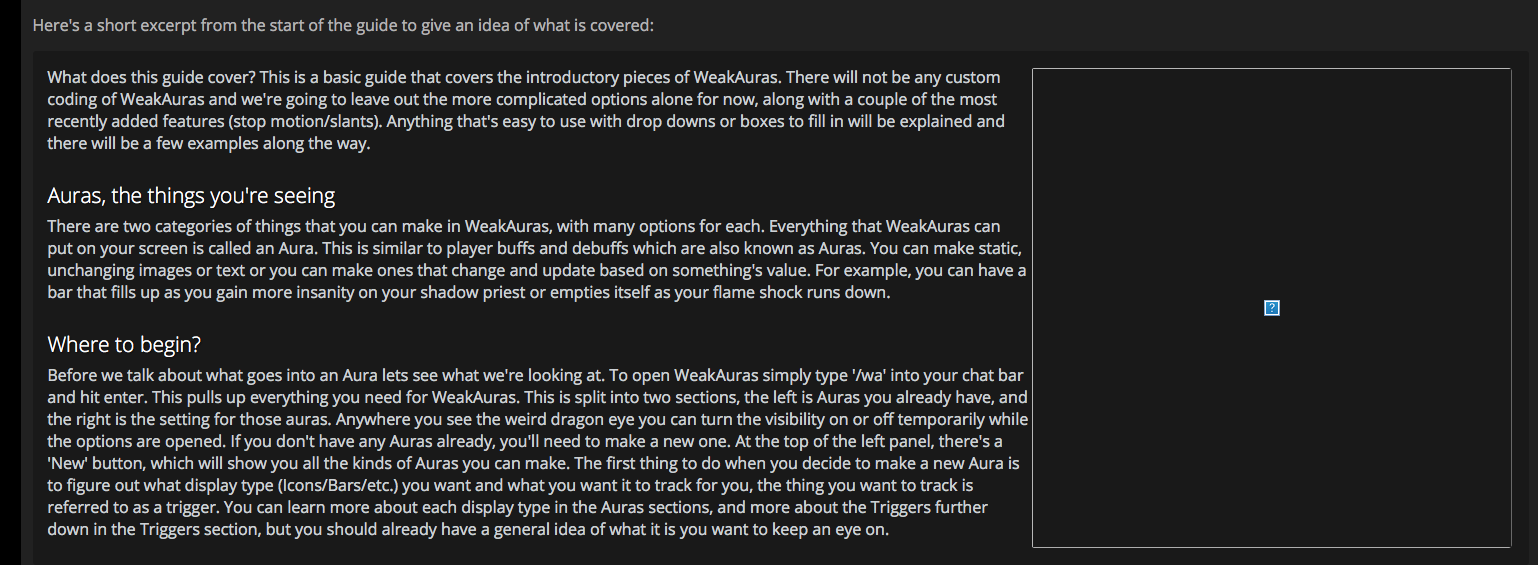
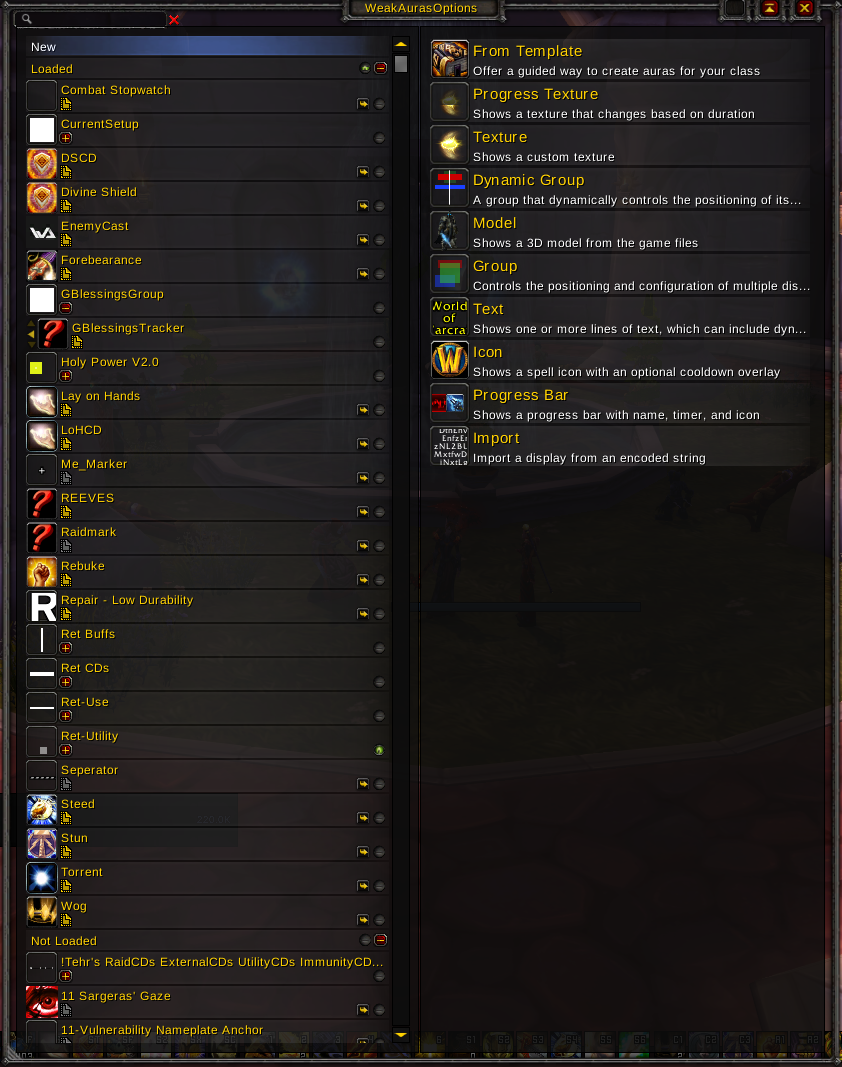
https://i.imgur.com/tjT5oZN.png most beautiful WeakAuras display I've ever seen, I too want a [?] in my WoW
 timid osprey
@violet sundial, the image is loading. See if it will load from a direct link to Imgur: https://imgur.com/T1zTcDT
 violet sundial
Aye that works, but: https://i.imgur.com/qVEyHNn.png

It works if I open in a new tab
Maybe imgur has new restrictions on inline image usage?
Sounds like they may be doing a referrer check so it only allows imgur.com to load the i.imgur.com image
timid osprey
Interesting. It's loading fine in my Chrome. Maybe you have an addon that is restricting it?
timid osprey
No idea what that is.
timid osprey
Ah, my addons do load in incognito. ^^'
Got 403 when I opened the page in incognito. I think that's the issue.
stoic acorn
Wow, I never would have known there were missing images just looking at it as both Firefox and Chrome are hiding the missing images for me.
The only image that works is the one in the "Importing Auras from others" section, as that is hosted on wow.zamimg.com.
crystal olive
@violet sundial @timid osprey @stoic acorn Thanks for the feedback we will fix those images shortly, making sure they are all hosted on our domain (wow.zamimg.com)
rancid copper
the only reason I recognized missing images was the context. Otherwise yeah, all but 1 image in the article is broken. Can't wait to see it when it's fixed 😄 Definitely sharing with all my guildies, we've had a ton of WA questions recently.
arctic cairn
https://www.wowhead.com/returning-player-guide-changes-burning-crusade
Should be updated to include a link to the WOTLK guide
Wowhead
Guide on what has changed on WoW since Burning Crusade, for players returning to the game. Includes New Races, Leveling, Gearing up, Achievements and more.
Same with the vanilla one
violet sundial
@crystal olive deja vu:
https://i.imgur.com/D2XpueD.png
https://i.imgur.com/cC8zTIA.png

@gloomy cloud dunno if you can edit articles but I'll tag you too 😛
 arctic cairn
I don't even get those boxes... It's just a blank space for me
crystal olive
fixed
gloomy cloud
@crystal olive What was it?
crystal olive
check your pings
 noble quarry
Why do i cant see something? always when i open the site.
viscid heart
some adblockers are a bit too zealos
noble quarry
@viscid heart i have my adblock disabled on that site.
viscid heart
zealos doesnt get stopped. seeing you being german there is also a duckduckgo extension that can do that
noble quarry
so, what can i do :D?
viscid heart
deleting cache, trying incognito such stuff
i never had that problem myself
could check all extensions what they do
noble quarry
@viscid heart so, i only got ublock irigin, betterttva dn google docs offline. guess nothing with that
arctic cairn
Try disabling ublock all together and not just for wowhead and see what happens.
 true token
Why do I keep getting a notification for the #sweepstakes even though I've looked at the thing??? It's acting like someone mentioned me and I can't get it to go away.
teal dragon
Might need to reload, or right-click the channel and 'Mark as Read'
true token
Tried both and it's not working 😦
teal dragon
I'm not sure then. 😦 That would be something to take up with Discord support: https://support.discordapp.com/hc/en-us
true token
Okay, thank you
teal dragon
np, sry I can't really help if neither of those two things resolve it.
teal dragon
Did you try right clicking the server itself and Mark as Read? I know I mentioned the channel itself earlier. Also, try looking at #sweepstakes and scrolling all the way up and back down.
true token
Yup I did them all and had no result.
I actually logged off for a bit longer then just logged back in and the notification is finally gone.
arctic cairn
That happens to me every so often. It doesn't happen a lot but it does happen.
So it's not just you :)
 latent onyx
@true token Did it happen on your mobile or on your pc?
I have the same problem sometimes on my mobile
true token
Mobile
 vital ruin
@true token, what works for me is completely closing the app on my phone(including swiping left/right on the active app tray), then opening discord on my desktop(closing and reopening if it's already open), clicking and making sure i've viewed all channels on all servers i'm currently connected to, and once all that's done, then I open discord on my phone. That's the only way i've been able to clear the notification icon on my phone if someone tags me or uses the everyone/here tag
 thorny canyon
Anyone else having trouble with BRH?
The second boss is ticking my group down with the Felblaze floor, but we aren't even standing close to it.
@acoustic crypt
You're on staff, do you know what this is about?
teal dragon
@thorny canyon Please do not ping our staff directly like that. I'm the only exception (as is stated in the #welcome-rules channel). Your question is not related to the Wowhead site, so I'd recommend inquiring in #retail-wow where fellow users may have some information to provide. We're a fan site, not Blizzard developers, so we're not equipped to answer your question directly in this manner. Thank you.
 wise herald
The violet hold Bosses displayed on front page for EU for this week seem to be incorrect, me and a friend just went in to do the 2 achievements, festerface was up as displayed on the page. However millificent wasn't active, mindflayer Kaarhj is up instead
 snow charm
one issue. the search. It needs some revamp/improvement, because it wont search in news, also wont split up the terms to have some ngram search as well, what makes almost useless
tawny blade
Is there a particular topic you feel is missing? if there's not a database match, the news should be listed right below the 'no database results' found message. we've also tried to have certain weird terms pull up guides, like 'warfronts' brings up the warfronts guide.
violet sundial
guide to baiting the bfa beta channel with high elf stories :P
no but seriously though, I can't say I've come across an instance where I've looked for something and there's not been anything of relevance. The closest thing I can think of would be to maybe add more sidebar links to pages like the class pages - e.g. to guides like the NLC for each spec.
For instance, if I go to the Paladin page, the only way I can get to the NLC guide would be to scroll down and click the "retribution paladin guide - legion 7.3.5" button, then find the NLC in the sidebar
Perhaps some of the screenful of blank space underneath the class name could be put to some use?
viscid heart
you can also stay at the top and use the link in the class dropdowns
karmic dome
@violet sundial are you referring to the class guide pages or the class pages?
violet sundial
@karmic dome class page, although it only appears to happen on Safari on macOS. I'm typing this from Windows, where the blank space issue isn't a thing.
Page for reference: https://www.wowhead.com/paladin
Wowhead
This is the call of the Paladin: to protect the weak, to bring justice to the unjust, and to vanquish evil from the darkest corners of the world. These holy warriors are equipped with plate armor so they can confront the toughest of foes, and the...
karmic dome
I mean... isn't that like 2 clicks away? one click on the spec and then one more on "Artifact"
violet sundial
my point was that it isn't obvious how to get to the NLC guides from that page, if I click the spec in the right sidebar I get taken to ability list, I have to scroll way down to find the guide list
manic dagger
Is the site supposed to be making my chrome download a 0kb file named "$"? Kinda weird.
teal dragon
@manic dagger It's usually the result of a broken flash file that the browser didn't know what to do with, the file is literally nothing, just delete it. If this happens again please click Report Ad under any ad and indicate that you downloaded a $ file so we can try to figure our what's broken. Thank you!
teal dragon
FYI: Another database adjustment is occuring, 502's may be experienced at this time but should last no longer than ~15 minutes.
Edit: Should be all good now. Thanks!
viscid heart
https://bfa.wowhead.com/spell=159456/travel-form#changelog is listed under glyphs but is just travel form rank 2
Wowhead
You gain an additional 60% movement speed while in the land version of Travel Form. This movement speed bonus will not be granted if Travel Form is activated while in combat.This effect is disabled in battlegrounds and arenas.
 violet kestrel
Hey guys, looking for the extension, but when I click in the link its no available.
 brisk veldt
Was looking through all the Discord servers you guys have listed, and Towelliee's server has an expired link.
 rocky acorn
are the other warfront recolors going to be added to the dressing room?
 gaunt imp
somebody knows why, when i try to install wowhead´s webhook on my discord server, it sends my to a page that says UNKNOWN_ERROR? D:
timid osprey
I'm sure this has been asked before and my search phrasing is just bad, but is there any way to get the item pages to display the appropriate bonuses instead of being redirected? For example, a neck in my main's profile looks like this screenshot and have the HREF of https://www.wowhead.com/item=142174&bonus=3536:42:1587:3337&ilvl=970, but it redirects to https://www.wowhead.com/item=142174&bonus=1826:1462. I can adjust the configuration to get the appropriate stats to display (https://www.wowhead.com/item=142174&bonus=42:1587:1826), but not the proper bonus modifier(s) for quality, source, and forging(?). It seems weird that this would display correctly in the tooltip mouseover but not be possible on the full item page.
Wowhead
This blue amulet of item level 845 goes in the "Neck" slot. It is looted from Midnight. In the Amulets category. Added in World of Warcraft: Legion.
Wowhead
This blue amulet of item level 845 goes in the "Neck" slot. It is looted from Midnight. In the Amulets category. Added in World of Warcraft: Legion.
Wowhead
This blue amulet of item level 845 goes in the "Neck" slot. It is looted from Midnight. In the Amulets category. Added in World of Warcraft: Legion.
arctic cairn

Discord
Step up your game with a modern voice & text chat app. Crystal clear voice, multiple server and channel support, mobile apps, and more. Get your free server now!
gaunt imp
tnks bro @arctic cairn
arctic cairn
np - glad it worked for you 😃
 river hound
@timid osprey most tooltip enhancements are specific to the tooltips, not the item page. we're hoping to enhance the item page some time this month to support the same things.
timid osprey
I see...well, if y'all have need of an extra PHP developer...I apply every time. 😉
teal dragon
@brisk veldt That link to Towelliee's server has been fixed. Thank you.
brisk veldt

 novel citrus
this isn't the site but on the Turalyon VO video on YT, the text in the actual video says "Ghuun VO"
inner wolf
I can't believe turalyon was ghuun this whole time
violet sundial
@tawny blade https://i.imgur.com/MffJEpo.png
 violet sundial
yall need to stop using imgur, this is like the 4th time Ive had to report this 😂
tribal vector
For the artifact voices article, was the ashbringer also tested? Since tirion can talk to you rarely while holding it
tawny blade
Fixed
tribal vector
Or is it just specifcally the “sentient” artifacts
tawny blade
This is the 2nd time I'm aware of imgur, the other time being weakauras (written by a new author)
 feral light
Fishingfriend on the main homepage is wrong! It's not Akule Riverhorn, today it's Corbyn.
viscid heart
@feral light EU or NA?
feral light
@viscid heart EU
viscid heart
NA says akule
feral light
works now :) thanks
and yes sorry, it was NA not EU
then i don't know if akule was right lel
 bright snow
I'm getting an issue with trying to point the wowhead client to Beta wowb.exe. I've made a forum post (linked in the topic below about previous path issues). Any timescale yet on addressing BfA uploads?
(http://www.wowhead.com/forums&topic=254452&p=3978127)
Wowhead
Hi there, I realized my client may exclude some of the wow games (live, ptr, beta) so I checked the paths in the settings. The paths of Live and PTR clients ar…
 silent meteor
I'm not sure this is the right place, but I can't seem to get your twitch extension to work ... it doesn't save changes to its configuration no matter what i do: activated or deactived, while stream is running and while its not running, with desktop App open and closed...
teal dragon
@bright snow it's something we're working on, listed in known issues in the thread mentioned on the thread you linked. Blizzard made changes that delayed our ability to accept beta data via the client. I don't have an estimate but hopefully soon.
@silent meteor can you walk us through the exact steps you're taking, and what issues you're encountering along the way. Browser info, screenshots, browser extensions, character info, basically anything that might be relevant and send it to feedback@wowhead.com please? That way we can look to replicate it and report it to the dev team. Thank you!
arctic cairn
You mean beta? https://www.wowhead.com/news=283806/waycrest-manor-battle-for-azeroth-beta-dungeon-preview

Wowhead
Today we are previewing Waycrest Manor, a new dungeon open for testing in the Battle for Azeroth alpha. This is a dungeon Alliance players encounter as they level up through Drustvar.
lucid bobcat
@rich wyvern Lord Waycrest uses a plague eruptor model instead of Lord Waycrest's model in the Waycrest Manor preview http://wow.zamimg.com/uploads/screenshots/normal/730291.jpg
 rocky acorn
are the other warfront recolors going to be added to the dressing room?
tawny blade
@rocky acorn it's up to blizzard to decide what tints get turned into equippable items, which is the criteria for it to show up in the dressing room.
tawny blade
@lucid bobcat This has been updated to the correct model
rocky acorn
I see
 elder kraken
If I use screenshots in my wowhead guide made by someone else that have been posted on wowhead, do I need to credit each individual screenshot to the user that made it or would "Screenshots used have been taken from submitted screenshots on Wowhead" or something along those lines suffice?
Oops, I mean if I use them for a guide on wowhead
teal dragon
@elder kraken a general statement would be sufficient.
 austere crest
i hate this 😦 my mom took away my high-speed modem
fickle pecan
I have an item list that doesn't load. I like to add curious/unavailable items to that list, and I could imagine that some items might have been removed, causing the list to misbehave, but ofc I can't say for sure. In any case, I can't load the list to remove "broken" items myself
NPCs, objects, quests and spells work fine, but the Item one never loads for me
inner hill
Does anyone know what to do if the wowhead client stops uploading data telling Upload failed: End of file ?
teal dragon
I wish I did. All I can say is keep trying, it usually goes through eventually. If it doesn't, might have to delete the lua files to get it to start uploading again. We're looking to replace the client eventually, because these little errors are elusive, but it's a WIP.
teal dragon
@fickle pecan should load for you now. And yes, had to do with removed/missing/undefined items.
 summer adder
@tawny blade Hi, is there any reason wowhead doesnt display file names? for example on MMOChampion when you hover or click the file (datamined map, an icon, a model....) will show this but Wowhead doesnt do that https://i.imgur.com/SIhm374.png
I would really like to know what all these icons are for, what they're called, or these models, or minimaps, but I can only get that information on MMOC, but I prefer Wowhead's layout
Wowhead displays a string of number instead https://i.imgur.com/Dcnp1wm.png
 sly glade
 teal dragon
@sly glade We're aware of some errors that are occuring as a result of the new patch. We hope to have them fixed tomorrow. If you still see LUA errors like this on Thursday, May 10, (or 11, depending on your location) please send them to feedback@wowhead.com (copy/paste preferred, screenshot is okay but not preferable).
sly glade
i copy in pm @crude urchin
fickle pecan
@teal dragon Out of curiosity, do you have the names of the items removed from my list? Or was it just some of those wowhead-exclusives? 😃
 lost rune
Damnit, tomorrow has become ... or rather continued to be ... tomorrow. I was hoping to make more progress on beta data collection today. :<
crystal olive
we are interally testing a fix for the looter today
hopefully it is all good for public soon (no tm)
teal dragon
@fickle pecan no, I don't, I'm not sure the dev who fixed it would either. Would have just been an id # that no longer existed I imagine. Sorry.
fickle pecan
Ah sure! Thanks for fixing it in any case! 😃
crude urchin
We just pushed a fix for the Wowhead Looter addon to work with the latest BFA beta build http://www.wowhead.com/news=284196/wowhead-client-now-updated-for-battle-for-azeroth-beta
 kind eagle
http://www.wowhead.com/armor/min-req-level:1/max-req-level:110/class:12/color:FF0000/slot:1?filter=178:161:99;1:1:11;0:0:0 I'm not totally sure filtering by color is working, unless I'm going about this wrong. By my reckoning, that should have pulled up every craftable red leather head-bucket, but it brings up blue and green goggles. Seems to work fine up until the color filter, where it narrows it down to those.
Wowhead
A complete searchable and filterable list of Armor in World of Warcraft: Legion. Always up to date with the latest patch (7.3.5).
bright snow
@inner hill End of File error means your files have grown too big for wowhead to upload. If you search this channel on discord, there's a fix for it, which resets to a blank file
plucky fractal
@kind eagle You need to use this setup (the filter you picked means the gear has a profession requirement, ie. you need said profession to wear the item).
The color results still aren't very accurate though, but at least you get a few more results.
kind eagle
Ah. Thanks.
plucky fractal
@kind eagle And I just realized I didn't actually include the link: https://www.wowhead.com/armor/min-req-level:1/max-req-level:110/class:12/color:FF0000/slot:1/type:2/live-only:on?filter=178:161:86;1:1:11;0:0:0
 boreal pine
can I set a standard language in my profile?
inner hill
@bright snow thx i found it;
- 15.04.2018 maybe u should pin that in the channel for others, cause it worked for me
timid osprey
@boreal pine, no, the language is determined by the URL.If you're using Google to find Wowhead pages, you should instead go directly to Wowhead, select your language, and search within the site.
teal dragon
^ that's correct. We don't force a language on anyone, but search engines might send you to a localized page based on your location.
 solemn dew
Any @staff web developers on?
teal dragon
@solemn dew Best to just ask what you need to ask.
solemn dew
Well, it's not something I'm asking, Sas. It's a suggestion because the website is broken in Safari.
And I don't think general staff would be able to know whether the fix would work or not because they would need to know what specific divs in the website do.
teal dragon
Right, I mean, it's best to say what you're going to say.. questions or suggestions. If our general staff can't help then we still relay it to the appropriate parties, or you can write it all up and send it to feedback@wowhead.com and I'll route it around accordingly.
solemn dew
So - this div - <div id="infobox-alternate-position"></div> is failing in Safari and causing the page to go below the right box.
@media screen and (min-width: 768px)
wowhead.css:1:194730#infobox-alternate-position {
margin: 20px -10px 10px;
overflow: auto;
}
That is the CSS is runs it. Removing the overflow will fix it in Safari and seems to have no effect in chrome
Interestingly enough, removing the margins also fixes it, but I think that would be a breaking change
I have tested in Safari and Chrome that both of those fix the issue. Not sure about if it breaks Firefox, though.
Also couldn't find a page with infobox actually shown, but when I made it be shown manually, it didn't seem to break it either
Example of what I mean by it's broken
teal dragon
fizzle, just FYI, I've sent this feedback to the dev team. They'll see what they can do to replicate and fix it. Thank you.
 inner sequoia
Why do wowhead block my whole browser after leaving it open for some time?
Does the site use my cpu to do bitcoin mining?
stoic acorn
Wowhead itself doesn't do anything like that, it sounds like you had a bad ad which I'm sure they would love a report of: https://www.wowhead.com/forums&topic=142&p=3370978
Wowhead
This post is current as of June, 2017. _________________________________________ TLDR version: Use the feedback link on the top right of any page of …
inner sequoia
Ty boi
tawny blade
Our stance on bitcoin mining is also covered in https://www.wowhead.com/forums&topic=143&p=1319
Wowhead
Welcome to the A.F.A.Q.: Ad Frequently Asked Questions Thread This has been created to address some of the most common questions about advertising on Wo…
Does Wowhead utilize or condone cryptocurrency mining via ads or other methods?
Wowhead does not knowingly permit ads that attempt to use your computer's CPU power to mine cryptocurrency nor does our site employ mechanisms to perform such actions. If you believe an ad is behaving in this way, please report it via the methods discussed in this document.
To learn more about the recent trend of ads mining cryptocurrency, please read this article by IT security company ESET which provides a detailed explanation.
stoic acorn
The recently featured mount guide has http://o.aolcdn.com/hss/storage/adam/7107df5832fb15bf392d7ed5a2dd11b/astralserpent.jpg embedded within it, which is triggering warnings that the site is no longer secure due to the mixed content.
 teal dragon
Yeah, not sure there's much we can do about that. Users can host images for their guides off-site if they wish.
arctic cairn
Only page you really need to worry about that anyway is the page where you put in your login and credit card info for premium
stoic acorn
If it's not secured anyone in between you and the source server could have modified it to do anything. Sure, it's _extremely_unlikely, but you should always be using HTTPS to ensure that the content you are seeing came from the server you think it did. Remember to pay attention to the address bar of your browser (how I noticed that the page was no longer secure).
plucky fractal
If someone changes the link from http to https it would solve the warning issue.
verbal sky
Current giveaway proves how many ppl actually bot these or maybe it is just visual bug as i can only see 30-35 on most of headphones except for last one 

 winged minnow
Halp! I really would like to add Wowhead news to my channel, however it will not let me click "authorize" for the web hook on the wowhead website. Is there another way to do it? I am admin and made the discord channel. Please can you help?
Issue sorted! Thanks 😄
verbal sky
Well to be excepted i suppose 😅
 regal hollow
Sometimes the numbers derp out in extreme cases when there's a bunch of reactions to a post/message, forcibly done by Discord on lower end systems. (IIRC, it used to be posted in the #sweepstakes channel aswell as the giveaways)
stoic acorn
Discord will often "optimize" posts with high numbers of reactions and just show a really small number. As long as it shows blue for you, you have entered. (And even if it doesn't, if it did before it's likely still counted).
regal hollow
Yea Arcanemagus' explanation's better than mine.
karmic dome
@winged minnow do you still need help?
winged minnow
yes please
karmic dome
Alright, check DM 😃
vale hedge
@teal dragon If you win more than one of the Blue items, do you get to pick which one you want?
teal dragon
I'm surprised by how many people ask this question, lol. It's highly improbable to happen, but if it did, no, no picking... I'd go from top to bottom, whichever was won first would be it and the second would be redone near immediately.
plucky fractal
Ha.
 white pawn
Been having issues loading site. I have ok internet. 50Mb down and 10Mb up and only have issues with your site. It takes like 5 to 10 seconds for main elements to load and upto 30 seconds for full page load. The stuff on right takes a full 30 seconds or so and i mostly have a black screen in chrome and firefox for at least 10 to 15 seconds. I have a reasonably high end pc with 32GB of ram and a 6 core i7 cpu. I have no issues loading other sites at all. I have to refresh page too sometimes just to get it to load. If i am moving around your site looking at different things it is painfully slow and i find it quicker to go to google and find a direct link rather than try any sort of search from site itself.
just clicked on a link on site to look at a page with details about a mount and it is sitting there with waiting for www.wowhead.com... for more than 45 seconds. Going to have to click refresh yet again.
well if i switch to firefox it just loads real quick. Chrome is still waiting 2 minutes later after i click refresh.
 mystic lake
Hey there! A few of us Guild leaders on US-Lightbringer have started a Specific Region/Server Discord Server, could you add us to your list when you get a chance? https://discord.gg/5Gd7JYm
crude urchin
@mystic lake hi. are you still fleshing out the server?
teal dragon
I replied to their email... a bit too early to be added to the list for now.
mystic lake
@crude urchin ahh yes we are still fleshing it out.
arctic cairn
I have one too and they want it to have a pre existing population so it may be a while before you can get added
lucid bobcat
Is there a way to see past versions of quests / of a quest page on Wowhead ? For example if quest X used to say "hello" in build Y, but it was updated in build Z to say "goodbye".
arctic cairn
No there isn't - the pages just get updated automatically with the Wowhead client
teal dragon
It's actually more from game data that it's updated, not so much the client. 😃
 ebon lion
Hi! Am I the only one that doesn't seem to be able to log on the wowhead website? Even the reset password doesn't work. I always end up with a 502 Bad Gateway or "This site can't be reached" error
plucky fractal
Same
 fossil lava
yup, trying to create an account and all im getting is "This site can’t be reached
The webpage at https://www.wowhead.com/account=signup might be temporarily down or it may have moved permanently to a new web address."
Wowhead
The largest World of Warcraft (WoW) information website, featuring information on classes, professions, artifacts, raids, transmog, and more.
i think it's because of the huge amount of people logging in/creating accounts to join the giveaway
ebon lion
There is also a message saying We've just updated our login system. If you have any issues please contact us for help. right under the login fields
I did contact them, but did not receive any confirmation mail that it has been received or anything
 ember comet
I have the same problem
tawny blade
Yeah the account sign-up page is getting pretty hammered right now. We've had over a thousand entries so far so the system overall does seem to be working once you get in
timid osprey
Everyone wants those Beta keys. xD
ebon lion
Yeah ;p
I guess I'll try later today, and let the website breath a bit. I don't think we reduce our chances to get the beta keys if we register later (I really hope so)
timid osprey
@ebon lion, you don't. Every user that enters gets one entry and has until the 21st @ 11:59 PM PDT to enter, so you could wait a few days and not have a problem.
Just don't wait too long and forget. 😉
ebon lion
Don't worry, I'm not about to forget. I got a streamer friend that would really love to have me join him there
fossil lava
@ebon lion method is doinng a giveaway too
 wanton marlin
@teal dragon hi, would like to check is there problem with tooltip js again?
Uncaught ReferenceError: g_wow_expansion is not defined at basic.js?11:1
ebon lion
@fossil lava Thanks! I'll get it there too!
tawny blade
@wanton marlin we are deploying a fix for that now, thanks for the report
timid osprey
I do have a question about the key giveaways, but I may have simply missed it when I read through the rules. Can keys won through the contest be gifted to someone else? For example, if I enter the contest, then Blizzard invites me into the Beta but I also win the contest, can I give that key to a friend, or would it be locked to my account?
tawny blade
The key is not locked to your account, however the odds of being invited after you entered the giveaway, but before you won a key, are pretty low
timid osprey
I understand, I just wanted to make sure there wouldn't be any problems if it happens. I won a giveaway for Legion Beta with another group, but in the time it took to get the key from them I did get invited by Blizzard. ^^'
 hushed sphinx
Why am I unable to see my characters on Wowhead. I've refreshed my character list couple of times but the list doesn't update
plucky fractal
Hey, sorry for bothering. I was wondering if there are any ongoing problems with login/registration? I cannot create an account or log in via my battle net account.
 west crane
the website has been flooding with registration attempts, so it's a bit slow at the moment. Just keep trying or wait a couple hours.
plucky fractal
it's been like this for the past 3 or 4 hours
west crane
hmm, Might be down then. People have been having this issue for a while, but I saw people saying it was overflow on their servers.
I'm sure it'll be up tonight.
ebon lion
it works @plucky fractal But you need to try again and again, then at some point it works
hushed sphinx
everyone wants a BFA keys lol
ebon lion
the website just have too many registration
I finally managed to register for the contest after 3 hours
plucky fractal
yeah probably, all good
i just wanted to log in tho, already have beta access for bfa..
hushed sphinx
🤔 🔫
ebon lion
sadly, it goes through the same server for that 😅
hushed sphinx
I can't even register 90% of my chars aren't even showing up
teal dragon
We're working to increase the authentication/registration stamina as we speak, its just a bit overwhelmed right now.
hushed sphinx
Alright mate thanks for the info
Is that going to fix the issue with chars not showing up on wowhead?
 west crane
Yeah, my chars don't show up as well.
teal dragon
Where are they not showing?
 strong acorn
They dont sync with Bnet,atleast they didnt do it for me,after that i logged out and now im waiting for a fixxed login atm
west crane
When you try to import a character
strong acorn
Battle.net login also seems to be broken
west crane
It's still showing my belf Rogue as level 80 when I've been 110 for over a year, and have even had a name change...
strong acorn
just redirects to the account creation/login for old ZAM accounts
teal dragon
Okay so if the character had a name change or switched realms then you need to import it again from its current location and name. I'd call these other ones "stale".
Battle.net login is essentially the same as ZAM. If one's down they're both down. That's being worked on.
strong acorn
kk
west crane
But, the thing is, my new name doesn't show up, and I didn't name change until like 3 months ago after I'd been lvl 110 for a long time.
so wouldn't the character with the old name be 110?
Also, I just logged in with no problem whatsoever, so it might be a browser/region issue.
Just checked my characters again. My 110 Rogue is now showing up, but a lot of my other characters aren't. Weird, oh well.
teal dragon
@west crane where are you looking? Is this in the Battle.net tab of your settings or are you just looking at your Profiles under your Wowhead profile? What's your username?
hushed sphinx
I'm experiencing the same problem @teal dragon as if the characters have been cached and do not want to update on the settings page
teal dragon
So this is under the Battle.net tab in settings?
hushed sphinx
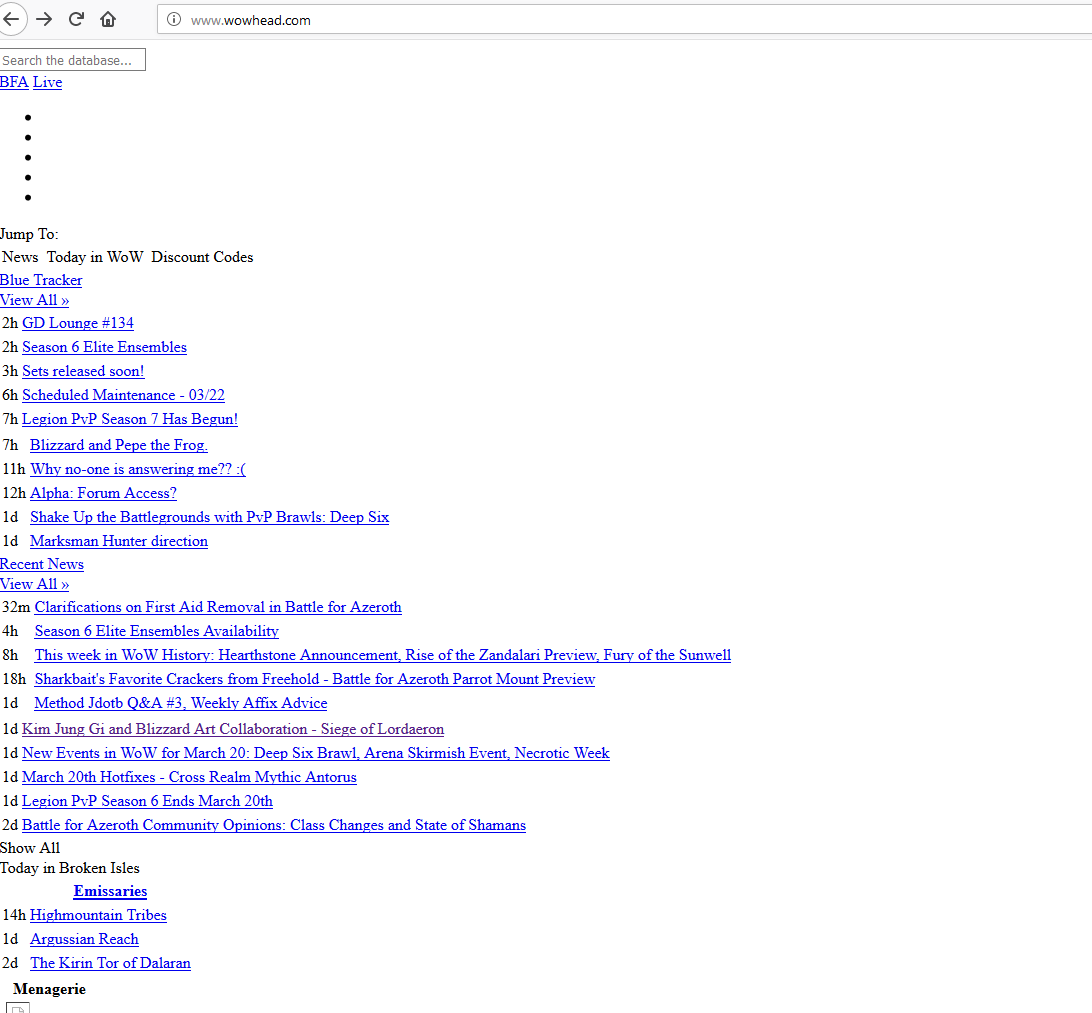

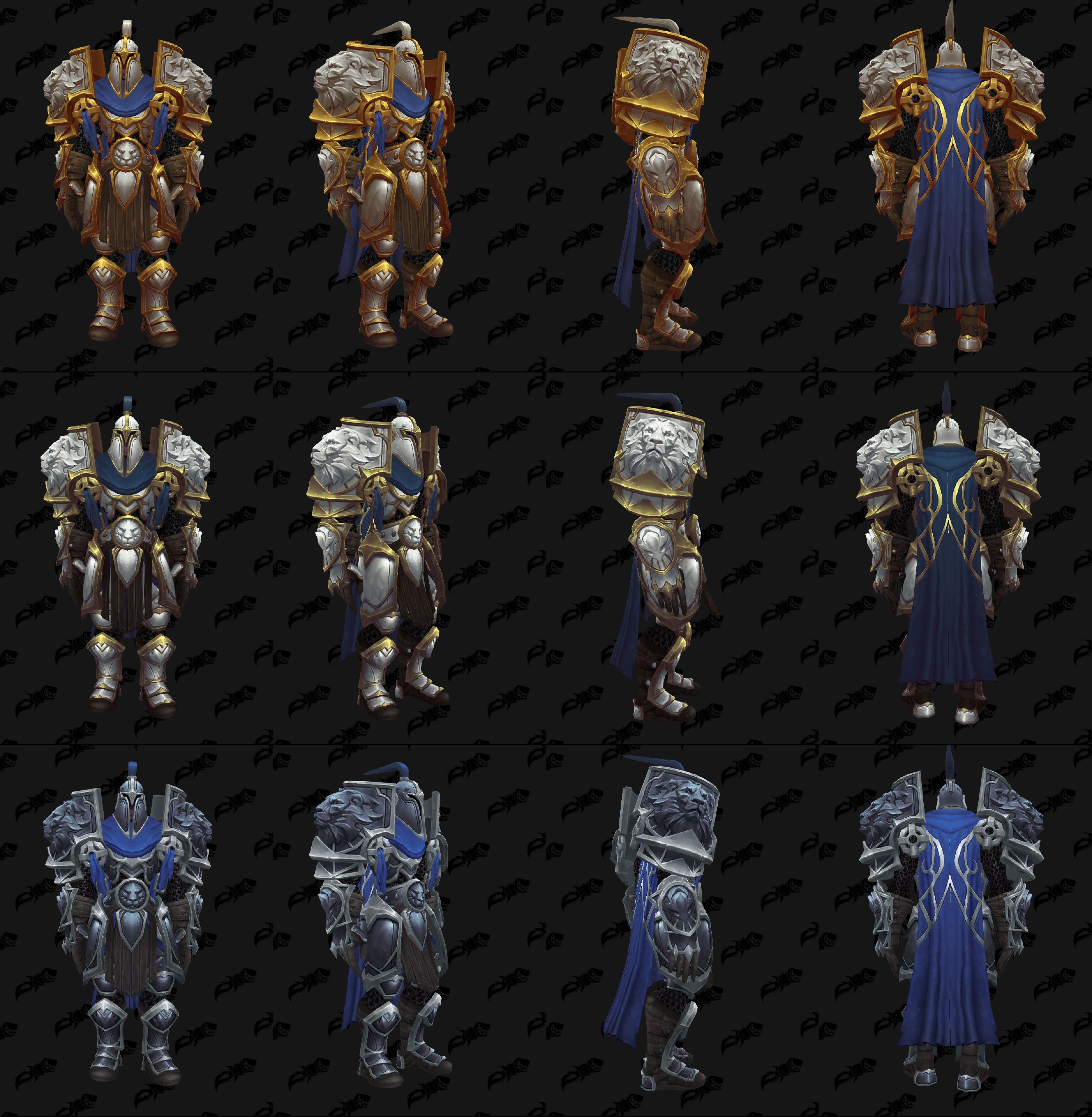


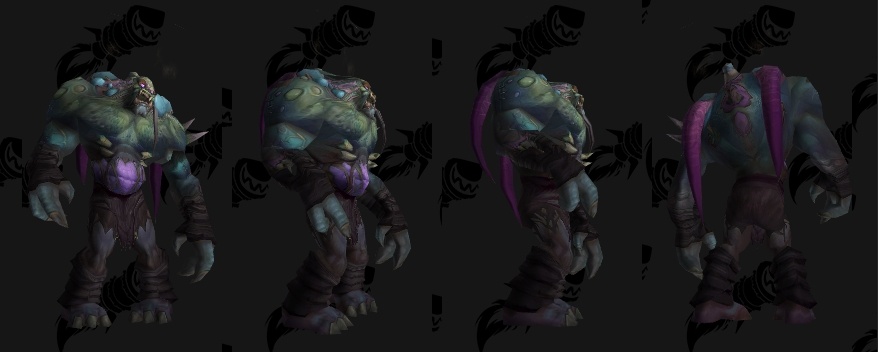


 teal dragon
Okay, so there's no characters showing at all?
hushed sphinx
can I pm u ?
 jagged halo
Im getting the same problem it seems
all the characters that are showing up in my profile are from like 3 years ago
teal dragon
It's okay if the data in that tab is old... just click one that you still play/exists, and then you can refresh it in the profiler.
jagged halo
thats the problem ones that I do still play technically has been faction name and server changed
teal dragon
Okay, load it up here then: https://www.wowhead.com/list
jagged halo
got an error. Limit reached try deleting some lists
teal dragon
Okay, have too many messages. Give me just a couple minutes.
Okay, so, @jagged halo -- what's your Wowhead username?
jagged halo
Clawles
teal dragon
So you must have some private lists.
Wowhead
The largest World of Warcraft (WoW) information website, featuring information on classes, professions, artifacts, raids, transmog, and more.
and load any you don't need anymore, click the delete button on them to free up some space.
@west crane you got one of your characters properly loaded and entered?
west crane
Yes, I have two characters loaded and entered
I know that doesn't increase my chances, but I did it just to make sure there were no errors.
teal dragon
Okay, glad to hear it. Good luck.
west crane
Thank you. Thanks for the help
jagged halo
ok so after I get some deleted. Then just add another character to the profile i guess?
teal dragon
Yes, and then you'll need to verify it manually since you couldn't load it up from the Battle.net tab in settings.
So, go to https://www.wowhead.com/list and load up the character, then click the verify button on the menu there and follow the instructions.
 gray cove
why cant I update my battle net with the wowhead site? All my characters are level 100? All I see is my characters pre legion
I see
ty
teal dragon
@gray cove If one of them still exists, on the same region and with the same name, click it anyway... it'll update in the profiler once you actually add it to the site.
plucky fractal
Would it be at all possible to make so i can see weapons with a certain illusion on them, if not already a thing.
teal dragon
It's not necessary to do it manually unless the character is entirely missing, has had its name/realm changed, and is showing incorrectly in the list.
@plucky fractal That's not possible unfortunately, no illusions or enchants appear on the model viewer/dressing room.
 barren briar
i have no idea whats going on with my account on the website
last time i logged on was propably like 2014 but now when i want to reset password that i forgot ofc site just loads for centuries and gives an error
teal dragon
We've been having some authentication issues due to the overwhelming # of people trying to login/register for the giveaway @barren briar but it should have improved by now. Have you tried to login within the past couple minutes?
 glacial fable
Trying to register an account but getting this error just a second ago: ERR_SPDY_PROTOCOL_ERROR
teal dragon
Okay, we're still working to increase... whatever it is they need to increase to keep this from happening.
I'm drawing a blank on the "what".
glacial fable
Oh, I can confirm that I received the Account Verification mail now
 rare tulip
@teal dragon I can't change the e-mail of my account, whenever I enter a new email nothing happens, I have no longer access to the old email but i'm logged in in wowhead
teal dragon
@rare tulip since that involves personal info, send me a PM with the Wowhead username please.
barren briar
Well my issue was kinda different I wasn't able to reset the password for the old account. I tried few times, have waited long time since loads through pages are quite long and gave up. I did a new account and everything worked so far
teal dragon
I wish I had a way of asking everyone not to do just that. Not getting through on one and then making a new one isn't ideal and just causes problems down the line. You're only permitted one account, having more than one can be troublesome if it appears you're cheating or something (not saying you are, just appearances).
Did you enter with the new account?