#💬┃studio-chat
1 messages · Page 1 of 1 (latest)
 elfin urchin
 craggy pebble
Hi everyone
 runic wave
Helloo 👋
 keen salmon
craggy pebble
Hi everyone
keen salmon
craggy pebble
Hi everyone
Hi
keen salmon
runic wave
Helloo 👋
How are you
runic wave
keen salmon
How are you
im good, comfy now, how about you
 broken tiger
how’s everyone?
 arctic valley
broken tiger
how’s everyone?
arctic valley
broken tiger
how’s everyone?
Good and you
 eternal hare
 broken tiger
arctic valley
Good and you
broken tiger
arctic valley
Good and you
doing well
 regal sleet
ohh moar studio
 pulsar estuary
Hi to all, I have a questions about Suno maybe is Suno Studio, however. With Suno can I setting one for one the instrument? For example can i tell I want a song with drum and guitar and then tell what part of drum play (snare or tom), the beat etc And for guitar what scale, or note or chord and with what style to play? I see the Studio is like a DAW. Thanks
broken tiger
you have some of those options, but it’s still a work in progress
 hardy cape
Any good ways to get longer instrumental tracks without dealing with Extend? I tend to get super mixed/bad results with extend, but i'm hoping to generate instrumental tracks that are 3-5 minutes long, instead of the 1:30-2:00 that i usually get
 tulip vortex
 marble ocean
hardy cape
Any good ways to get longer instrumental tracks without dealing with Extend? I t...
marble ocean
hardy cape
Any good ways to get longer instrumental tracks without dealing with Extend? I t...
The main way I get much longer one is through very detailed prompts, but one thing you can do try is creating a song with lyrics then cover that with a very low audio influence, or even just upload a longer audio file with no sound (and cover that)
 fair apex
Hi everyone
Trying out Studio first time on a piano track I did myself and where I want to add synths and percussions.
Currently struggling a bit because my track switches from 4/4 88BPM to 3/4 60 BPM in the middle of the song and this confuses the heck out of suno it seems.
Also it does not help that the original is 5:35 min long, so I cant add an instrumental track through the whole length.
any tips?
 topaz violet
hardy cape
Any good ways to get longer instrumental tracks without dealing with Extend? I t...
topaz violet
hardy cape
Any good ways to get longer instrumental tracks without dealing with Extend? I t...
What are you putting in the Lyrics box? If you're just using [Instrumental] or something similar, it's going to be a crapshoot and you'll often see shorter tracks since there's no guidance. I like to put in my song sections and use "prompt noise" - just symbols that suno won't try to sing. Something like:
○ ● ○ • ○ ○ ● ⚬ • ○ ●
○ ● • ○ ● ○ • ○ ● ○ ○ ●
● ○ • ○ ● ○ ● • ○
○ ● ○ • ○ ● ○ ● • ○ ○ ● ○ •
[Pre-Solo Build - Crescendo, tension mounting]
● ○ ● • ○ ● ○ • ● ○ ● ○ ●
○ ● • ○ ● ○ ● • ○ ● ○ ● • ○ ●
● ● • ○ ● ● ○ ● • ● ○ ● ● • ● ●
[Solo - Full meltdown shred, legato flurries, tapping, harmonic squeals, maximum intensity]
● ⬤ ○ ● ● • ⬤ ○ ● ⬤ ● ○ ●
⬤ ● ○ ⬤ ● ● • ⬤ ●
● ⬤ ● • ○ ● ⬤ ○ ● ● ⬤ • ○ ● ⬤ ○ ● ●
⬤ ● ● ⬤ • ○ ⬤ ● ●
○ ⬤ ● ● ⬤ ● ○ ⬤ ● ● ⬤ • ● ● ⬤ ●
⬤ ● ⬤ ● ⬤ ● ⬤``` neon tinsel
Sigma sigma boy sigma boy sigma boy...
elfin urchin
Hey everyone! In case you you haven't heard, we've got Studio 1.2: #📢┃announcements message
 winter tendon
one thing that gets me every time in studio is that the seach has input, but its hidden. so i cant see why things are missing until i remember to unhide the search bar.
 magic sorrel
Hey studio gang, quick Q. I have a song where the only change I want to so is add an interlude between two sections. I believe I should be able to do this within studio but I'm unsure of how to. Is anyone available to help walk me through?
elfin urchin
magic sorrel
Hey studio gang, quick Q. I have a song where the only change I want to so is ad...
Hey Kaede! If you're looking to add another section to your song, I'd personally use Editor. There's some great user videos from other Suno users showing how to use the Editor for the use case you're describing! https://www.youtube.com/watch?v=ZqdS2DP3O7Q
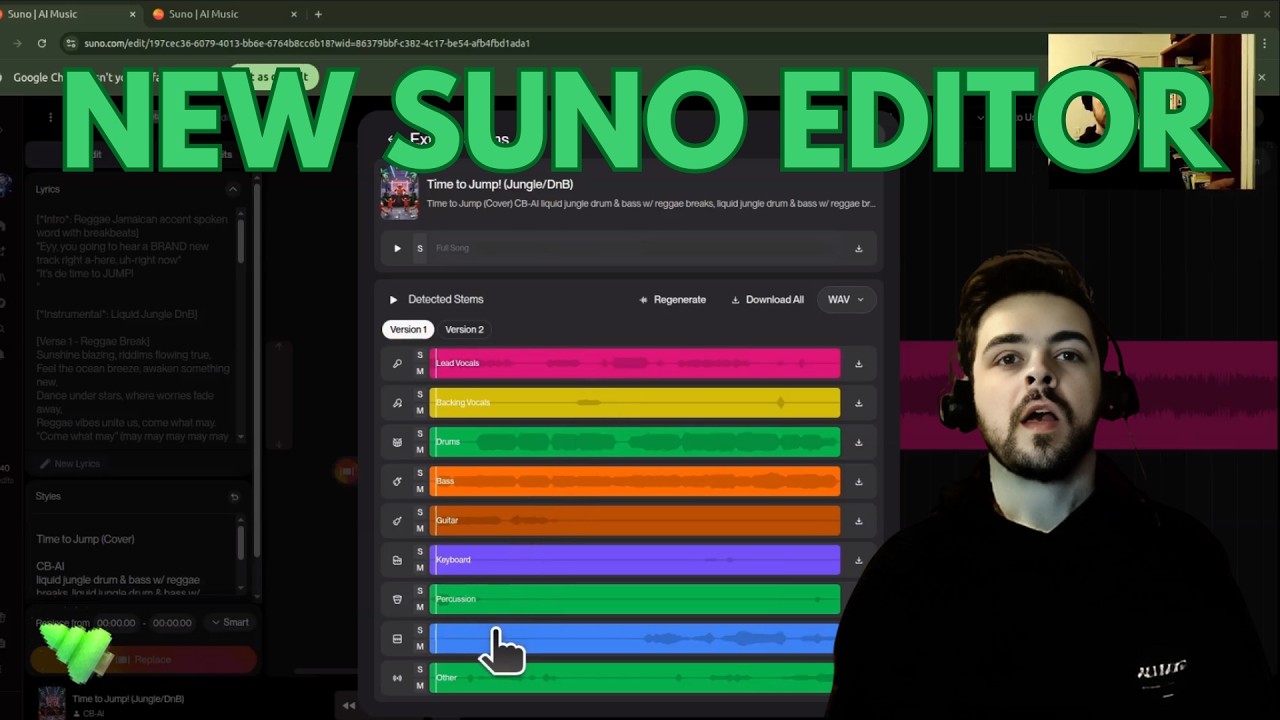
Suno AI's new Song Editor has plenty of new, powerful features to elevate your creative workflow. Join me as I walk us through a high level overview of how to navigate the user interface, use the features, and edit your song.
0:00 Intro
1:00 Accessing the new Suno Song Editor
1:27 General layout and navigation
9:01 Beat tracking and metrono...
magic sorrel
elfin urchin
Hey Kaede! If you're looking to add another section to your song, I'd personally...
Editor I used earlier. Can you help me with what I'm trying to do?
Because I wasn't getting the results I wanted.
broken tiger
magic sorrel
Hey studio gang, quick Q. I have a song where the only change I want to so is ad...
have you tried highlighting that section and generating a new prompt for the interlude?
magic sorrel
broken tiger
have you tried highlighting that section and generating a new prompt for the int...
yes.
magic sorrel
broken tiger
have you tried highlighting that section and generating a new prompt for the int...
I posted the screenshot here since its disabled in this chat
magic sorrel
everything? like its not getting context
broken tiger
so it’s generating a completely different vibe and genre?
magic sorrel
same genre, wrong vibe, context, etc
im trying to transition from the end of chorus 2 and beginning of the bridge with an interlude that leads into the bridge
with bookend context
the interlude needs to transition from the end of chorus 2 to the beginning of the Bridge
broken tiger
so is it not generating enough energy or too much?
magic sorrel
both
gens are either too soft
or try to rewrite the entire thing
the too soft misses all instrumentation context
the too much follows the genre but the vibe is wrong
broken tiger
what prompt are you giving it for the instrumental interlude?
broken tiger
I honestly don’t know. It looks like you’re doing it right.
magic sorrel
the results I'm getting indicate otherwise xD
https://suno.com/song/459342d0-6c16-4700-becc-669f3a0e2770 so this is the source song. im trying to add an extend between 3:39 and 4:28

The idea is to go from 3:39 to a spoken word interlude that introduces the breakdown section that begins at 3:42 and runs until 4:28
what is happening is... not that.
how do I share clips?
broken tiger
you mean the interlude?
magic sorrel
yeah sorry
broken tiger
not sure if it will let you share a section like that
magic sorrel
figured out how to share a section

Ok I have an interlude where all I need is to blend it together with the two sections it's being squished between what's the best way to do that?
broken tiger
you got the interlude you want?
magic sorrel
i have an interlude that will absolutely work for what I want. I just need to be able to blend it between the two sections
broken tiger
is it in a different session?
magic sorrel
different session?
broken tiger
a different studio session
did you generate the interlude you want within the same session you’ve been in?
magic sorrel
yes
I ended up finding something I think might work.
Yeah this will work I think
ok how do I output a song from studio and it not have like 30s of silence?
craggy pebble
magic sorrel
ok how do I output a song from studio and it not have like 30s of silence?
When you edit in studio make sure there isn't that 30 seconds silence. Use the slider to adjust it.
magic sorrel
https://suno.com/s/ho9WAJLmc3iiNdrY could anyone let me know what they think about this? i need a critical ear. I need feedback especially around the 3:39 mark. I'm struggling to find a good way to cleanly transition this section. I'm down for suggestions if there's a better way to do this.

 odd imp
so i could use some feed back everone said my music was well..what it is..and that i should try to make something els well here it is "The Last Good Dream" https://suno.com/s/rkC9HrODXKrTMLpD

what you all think
you said taht mr tree i remeber it
i made a metal one too https://suno.com/s/VgbmjeAKQF7Jnqdq
 hardy cape
topaz violet
What are you putting in the Lyrics box? If you're just using [Instrumental] or s...
hardy cape
topaz violet
What are you putting in the Lyrics box? If you're just using [Instrumental] or s...
this is genius, thank you. worked like a charm. instantly spit out a 7:00 track, never seen that in suno
 main hamlet
magic sorrel
https://suno.com/s/ho9WAJLmc3iiNdrY could anyone let me know what they think abo...
main hamlet
magic sorrel
https://suno.com/s/ho9WAJLmc3iiNdrY could anyone let me know what they think abo...
so disclaimer I only listened the first minute and then from 2:30 - 430 and snippets here and there outside of that.
I work with this genre a lot, and usually after a buildup like that cutting almost everything out on the last word/syllable into a really minimal synth or piano feels "right". Suno does this often, but in your case since it seems like you're stitching multiple songs together, you may have to do it manually (e.g. by covering that section and choosing stems, or by finding the right instrumentals etc. from other parts of the song).
whatever your approach, this is my recommendation in musical terms:
In your case, since you have piano chords with spoken vocal coming after, try this on the final pitch up of the lyric "breaks":
- drop the drums completely (final cymbal might be okay)
- start the piano chords right away
- optionally give it a 4-bar or 8-bar chord/simple countermelody lead-in to the spoken section.
-- i also recommend removing the guitar entirely in the spoken section to maintain the contrast in tone, tempo, and emotion, and maintain that all the way until after the spoken line "the song finally found you" for a similarly dramatic buildup
Your song does that kind of sudden emotion shift a bit at 2:55,
(i'm timestamping where the shift happens so you should start listening 10-20 seconds before the timestamp)
this song of yours does it at 6:04 https://suno.com/s/Flhe7W5nHJ5X92TF
https://suno.com/s/NJgMqc8Ez102gqc8 at 4:29
here are some similar-ish examples from my songs:
https://suno.com/song/65d79eb0-ec44-480d-b8fc-504fe4f3dded at 2:42 and 3:45
https://suno.com/song/f11b74e4-9fe9-40a1-9ec3-f0f8ba79d905 at 2:37 and 4:22
https://suno.com/song/115e7d19-eccc-4287-bd47-ea338b130616 at 2:23, 2:55, and 4:20 (not exactly the same structure, but similar concept of an instrumental drop into piano only backing)
this is just a recommendation based on my tastes and experience, and definitely not the only way to do it
p.s. unless its a very deliberate branding choice, you should probably ease off the giant boba lol don't get me wrong i do like boba but your songs page is very offputtingly over the top for a music platform
magic sorrel
its deliberate branding
main hamlet
magic sorrel
its deliberate branding
haha fine, fair enough
magic sorrel
so full disclosure this is my first time touching anything in studio
main hamlet
ah. welcome. you're in the right place i guess
magic sorrel
normally i do everything outside of studio with creative usage of prompting and persona/cover/remaster/etc
main hamlet
i'm actually going to take a shower
but i will get back to anything you say in like 20ish mins
magic sorrel
for sure
magic sorrel
main hamlet
so disclaimer I only listened the first minute and then from 2:30 - 430 and snip...
so yes i am stitching multiple discrete generations together. Originally while I was listening to the different generations I realized I did not provide enough context as to why/how the song caused the isekai in the first place, and wrote an interlude to introduce the concept. one of the gens I got was so close to perfect (imo) that I wanted to just fix it.
what I did to "fix" this was using studio I cut at the point I wanted which was at the end of Chorus 2 and beginning of the Breakdown where I introduce Embla's character and then started to run generations using the lyrics and replace/cover until I got a result I liked, and then I put it into a different track, overlapped it with the two cut parts of the original song, and did a fade out for the bookends and a fade in for the interlude.
I'm sure theres a better way to do this but this is the primary thing I want to fix.
main hamlet
magic sorrel
so yes i am stitching multiple discrete generations together. Originally while ...
not sure what you mean by the "isekai", but i think i understand everything i need to
all the timestamped things i liked is gonna be like the goal
it won't be hard to get close to the goal, but it could be difficult to get it exactly the way you want it
if you were to choose between an easier route that doesn't require going to deep into studio, v.s. a more involved route that will improve your studio skills but also have a learning curve, which would you be more inclined towards?
magic sorrel
main hamlet
not sure what you mean by the "isekai", but i think i understand everything i ne...
isekai = "Another world"
the original version of the song didnt have the interlude it just went from chorus 2 to breakdown and i realized the lyrics i wrote for the breakdown don't have enough context so I wanted to do something vaguely rhapsody of fire (unholy warcry-era) or ayreon inspired to do the interlude.
as for getting close to the goal, im fine with approximation. it's ai. i'm not gonna get 1:1 what I want, especially with this genre
working within the constraints of the tool is part of the enjoyment
i would be inclined to an easier route because im on a time crunch, but would also like to know the more involved route for the future
if that makes sense
main hamlet
okay, so i'll give you both routes but kinda just vaguely for the more involved unless you start findiing that one interesting
magic sorrel
thats fine
main hamlet
i'm assuming the vocals are more or less the way you want them
the less involved route would be to make covers of Chorus 2 and the Interlude until you get the right instrumentals, and you can use stem extraction to remove the vocals and put in the transition
like you just line up the two parts and cover it
omg are we not allowed images in here
main hamlet
elfin urchin
Welcome to the Studio Chat and Studio Suite! We're moving things around to impro...
could you kindly allow images in here, very hard to explain things in studio without the ability to put screenshots
lets move to the old studio chat channel, under #1420792719969878028
 bronze lance
I thought they did allow images in here
 pearl ocean
Man I love the new updates
Being able to simply select an alternative track to preview it is a minor change that makes such a huge impact to my workflow
Suno is getting better in literally every conceivable way
main hamlet
pearl ocean
Being able to simply select an alternative track to preview it is a minor change...
i appreciate theyre making changes but that change made my workflow so much more of a hassle lol
 torpid field
What an actual music project looks like btw
 broken tiger
torpid field
What an actual music project looks like btw
broken tiger
torpid field
What an actual music project looks like btw
FL studio. I use it too.
regal sleet
ok loving that fx removal feature of the vocals. sounds so much better
 urban cosmos
hardy cape
this is genius, thank you. worked like a charm. instantly spit out a 7:00 track,...
urban cosmos
hardy cape
this is genius, thank you. worked like a charm. instantly spit out a 7:00 track,...
it worked for me too... 8 minutes track 🙂 three parts embedded in one song... https://suno.com/s/wmADn5X0Uu0PYPp9 this is a very quick result... without any cleanup

 sick birch
Something that's really dumb now, is the fact that when I open my song in Studio, I no longer have the lyrics etc in the left pane. Why not??? Where am I supposed to now get the lyrics from if I have Studio open already with the song in it... Am I now supposed to open a second browser so I can just be back in my Workspace or Library to get the lyrics of the song?? Seriously, what gives!?
sick birch
topaz violet
What are you putting in the Lyrics box? If you're just using [Instrumental] or s...
Yikes, this is crazy. I've generated 14 minute song by doing none of this.
topaz violet
sick birch
Yikes, this is crazy. I've generated 14 minute song by doing none of this.
I've generated plenty of long instrumentals without the prompt noise, but when Suno start churning out short renders, that's an easy way to bump it past that.
sick birch
topaz violet
I've generated plenty of long instrumentals without the prompt noise, but when S...
Ah I understand
topaz violet
I've used braille as prompt noise, too. Kinda fun to slip messages in there 😄
[Guitar Says a Thing - Irritated, Sarcastic] ⠠⠱⠁⠞⠖⠦ ⠠⠊ ⠙⠊⠙⠝⠄⠞ ⠎⠁⠽ ⠁⠝⠽⠞⠓⠊⠝⠛⠖⠲ ⠠⠇⠑⠁⠧⠑ ⠍⠑ ⠕⠥⠞ ⠕⠋ ⠹⠊⠎⠂ ⠚⠑⠗⠅⠖
 raven flint
Hey everyone, is there anyone here who would be super keen to identify the type of prods in a song and, more importantly, transcribe it into Suno's prompt?
 heavy pelican
sick birch
Something that's really dumb now, is the fact that when I open my song in Studio...
heavy pelican
sick birch
Something that's really dumb now, is the fact that when I open my song in Studio...
Lyrics are in the right panel by clicking track and then clip.

 tough quiver
heavy pelican
Lyrics are in the right panel by clicking track and then clip.
tough quiver
heavy pelican
Lyrics are in the right panel by clicking track and then clip.
I don't disagree, there are some fundamental design assumptions for this app. Who is the audience, DAW, new person, hobbyist. Make a decision Suno or create specific workflow chocies/panels by asking customer questions. back to better design choices.
For example, Stems should be pumped in with the song... seems like a way to sell more stems here > it is so riddiculous they are not in, if you have them, by default.
The interface is cobbled together by an engineer? Cause it feels like it...
Could be a cool tool but what i would consider obvious menu items for Right-Click here or there... Suno decides to leave it up to you to figure out.
Just not worth the effort and back to my regular DAW I go.
 last pecan
@uncut mural There is a serious consistent degraded quality issue right now. Is something going on lately? It's really bad, like above and beyond the normal edges of the model
heavy pelican
raven flint
Hey everyone, is there anyone here who would be super keen to identify the type ...
Honestly, it's been a couple of years now since Suno began, so just searching "Suno prompts" can get many links to users lists of prompts.
In workflows can be found some generous and mounts of prompt lists from users.
Just dive in and find some nice lists.
Ive only looked at them, but have gotten more mileage by exploring users song and seeing what prompts have been giving what results.
raven flint
heavy pelican
Honestly, it's been a couple of years now since Suno began, so just searching "S...
i will
 clever flare
Hi, Can anyone pls explain why do I still get other instruments playing when I prompt a single instrument in suno studio... no i didn't click cover. Thanks
heavy pelican
clever flare
Hi, Can anyone pls explain why do I still get other instruments playing when I ...
I have not seen a simple or consistent explanation why, if this should happen. Seems buggy. If you feel its buggy, then best mention as a bug or feedback. Outputs allow to click Report and Bugs or you can mention directly in the bug channel 🐛 https://discord.com/channels/1069381916492562582/1082775596767117312
Personally, ive chosen to give me a bass track and got some various other sounds, as well, but as separate tracks. I just reported it and waited to see if it persists. If it persists. I dont use the tool for awhile.
clever flare
heavy pelican
I have not seen a simple or consistent explanation why, if this should happen. S...
Thanks Dasvon.
I don’t really see these issues in YouTube videos, so I’m starting to think I might be doing something wrong.
I haven’t paid much attention to all the channels here either ...I get lost easily on Discord .
I really hope Suno has (or adds) a web-based forum...ill head to the bug channel 👍🏽
heavy pelican
clever flare
Thanks Dasvon.
I don’t really see these issues in YouTube videos, so I’m starti...
Well, the "instruments" are just stemming from the original song with varied settings, including filtering for that frequency. So bleeder is possible, for the moment.
I dont know if the new "Remove FX" in Studio would have a productive side effect of helping to remove bleedover (along with making it dry) , but its new, I havent tried. Something fun to test.
As for just giving a totally different "instrument" like got, eventually one track was all bass, so just used that one and moved on.
last pecan
clever flare
Hi, Can anyone pls explain why do I still get other instruments playing when I ...
It's because it is not really doing a single instrument, it is still ultimately working backwards from noise so it doesn't get it right all the time. What you can do though is just grab the stems from the thing you made and pull out the bit you want
sick birch
heavy pelican
Lyrics are in the right panel by clicking track and then clip.
Thank you for that.
Now, in the past when I selected a section or whatever, the lyrics of that section would highlight in that lyrics section... It doesn't now. In fact, those lyrics now only show with the entire clip selected by clicking its title/header, but the moment you select a section or click inside the clip or timeline, the lyrics all disappear again.
They are seemingly making this harder to change lyrics for just a section/selection and regenerate... 🙄
heavy pelican
sick birch
Thank you for that.
Now, in the past when I selected a section or whatever, the...
Its possible you may be remembering the Edit UI that highlights sections? But if you remember Studio doing that, yes, its not available presently. I never recall that. For me, it always shows the full lyrics, in fact.
And I've put in a suggestion to somehow show the lyrics which have been selected. Otherwise we just have to do it by ear, which it what Ive always done. Or change lyrics in New Edit UI first, then take it to Studio.
Can you show a screenshot of that? Here is my clicking a selection which ive moved down in a separate track, to be more direct, yet clicking it in Studio still just brings up the full lyrics for me.
/
pearl ocean
torpid field
What an actual music project looks like btw
That's just one method of production. I used to do that too, my FL looked like that for every song, and then this revolutionary thing called AI was born and everything changed lol
 copper anchor
uhh hello
 stuck current
Question: If I've a song with everything need but vocals outside of lyrics and I load that song as first track in Sudo Studio. Is there a way to add a "New" Vocal track that leverages a voice persona for that new track?
 lime lava
stuck current
Question: If I've a song with everything need but vocals outside of lyrics and I...
lime lava
stuck current
Question: If I've a song with everything need but vocals outside of lyrics and I...
did you try it?
 umbral bane
some producer?
 tame stirrup
umbral bane
some producer?
tame stirrup
umbral bane
some producer?
Yes
bronze lance
clever flare
Hi, Can anyone pls explain why do I still get other instruments playing when I ...
If you're trying to redo an individual stem, you gotta manually highlight it, otherwise you'll only get cover, and you'll never get what you want with cover.
nvm I just noticed you said you didnt use cover, So it was for a new track?
stuck current
lime lava
did you try it?
I don't see where to do so, looking for answers good or bad.
 sleek bane
Hey all,
Is anyone got an idea why I can't see audio waveforms in suno studio (not on main and not on clip menu)? I have tried uploading audio and using extract | insert stems option.. same result.
Attached image - you can see the bars of volume but no waveform..

 ornate maple
Where are instructions for how to use 'Alternate Takes'?
All I see is a way to add a sort of sub-channel, but it's empty.
ornate maple
clever flare
Hi, Can anyone pls explain why do I still get other instruments playing when I ...
It's trained on songs, and designed to give songs, not single instruments playing solo. I've tried the same, and can sometimes get a quartet to mostly stay a quartet, but often not.
heavy pelican
You may have found it by now but:
Studio provide the "alternate track" Track Creation bar hovering lower bar. There you can choose what kind of track you wish to create relevant to the segment you've indicated up top in the stack. Choose from the list of instruments , vocal or song, paste in the lyrics, try with or without prompts
It will give two alternates below the original selected track.
ornate maple
heavy pelican
You may have found it by now but:
Studio provide the "alternate track" Track ...
You mean the thing with the button that says 'Replace'?
They have to have some actual instructions somewhere...
heavy pelican
ornate maple
You mean the thing with the button that says 'Replace'?
They have to have some ...
Yes. Clicking the down arrows, we can change it to Cover. This will take the melody into consideration as well, helping to change instruments or lyrics while keeping the vibe and melody.
Select a small section or click the whole track. Choose an instrument, add style if you're wanting more of a change but still syncing with the vibe, or no prompt. Lyrics if we're changing lyrics, but might be a good idea to use the same lyrics within the selected piece anyway. Same as any Cover tool. Otherwise Suno will just want to give an instrumental, even if ygou choose vocal or song, or at least randomly do so.
As normal, everything is a variable. Lyrics, size, prompts, time of day, server load, so probability of success of any tool always remains about 18% . But when it hits, its always cool, yea?
ornate maple
heavy pelican
Yes. Clicking the down arrows, we can change it to Cover. This will take the me...
The reason I didn't think that was the same thing is both because it's not labeled that way, and because I've tried this a number of times in the past, and it never works. Just tried it again now four times / 8 alt tracks.
Only the Drums track is selected, and Drums is selected in the dropdown box, with a very simple prompt 'Light touch, minimal jazz percussion'.
In this case here, as you can see, the drums don't even come in until ~39 seconds in, and these cover alt tracks always fills the whole track regardless, instead of mimicking the original in structure, even with the audio influence jacked up. Some of these alt tracks are covers of the whole song, not just percussion, regardless of settings.

 loud rock
ornate maple
The reason I didn't think that was the same thing is both because it's not label...
loud rock
ornate maple
The reason I didn't think that was the same thing is both because it's not label...
Just checking, you muted the other tracks that you didn't want to be used as influence?
heavy pelican
ornate maple
Now will doing them in the Create box sync with the original other stems.... well, im on my phone doing this so I can't say. There may be something to using the tool we tried, in Studio, as it may quantize and sync up a bit and replace the drum stem with another track. Thats the idea at least.
That would be more testing for me, especially now since there is a "Quantize" tool available as well. So im in the dark to compare if any difference between using Studio "Cover/Replace" tool, or just head left and used the Create box as we have before.
sick birch
heavy pelican
Its possible you may be remembering the Edit UI that highlights sections? But ...
I'll see tonight if I can get a chance to demonstrate. Wait... what Editor were you in on the first part of your video before accessing Studio?? Maybe I am losing my marbles, cos that is what I seem to be remembering. 🫣
ornate maple
heavy pelican
Now will doing them in the Create box sync with the original other stems.... wel...
They sync with the song. It's just not using the selected stem/track for it's structure.
ornate maple
loud rock
Just checking, you muted the other tracks that you didn't want to be used as inf...
No, but I'll try that next time.
loud rock
ornate maple
No, but I'll try that next time.
You can mute the entire track, or create clips and mute the sections. But everything on the timeline, all tracks, is used as audio influence in Cover and Replace within Studio. Muting removes them from consideration when creating.
heavy pelican
sick birch
I'll see tonight if I can get a chance to demonstrate. Wait... what Editor were ...
That was New Edit UI.
 upper edge
Yo, hi.
I was wondering.... is it somehow possible to connect Audima Sway(https://audima.com.au/op/sway-b3/) to Studio?
 ionic rain
Anyone have any tips on adding a harmony vocal line that stays with the rhythm of the lead, but doesn't then also sing in unison? I'm having a hard time getting the second voice to either not match the lead with a lower audio influence setting, or be too close to it. If I add anything about it being a harmony in the style prompt it generates a vocal line with a harmony in it, rather than harmonizing with the existing lead.
heavy pelican
ornate maple
They sync with the song. It's just not using the selected stem/track for it's st...
OK. I hope I was giving a bit more insight then. I dont know what "it" references, but maybe @loud rock has added more info to move a solution into view.
The one thing that wont happen is to get a pristine "stem" quality of one instrument in trying to clone an actual stem containing another instrument. That would be similar to using the MIDI values and choosing a difference instrument.
Though with something like "acoustic guitar" or "piano", we can get close to literally cloning a stem to sound like another instrument. The success rate is lower that most would become frustrated trying.
Granted, drums is a "non-melodic" instrument for most applications, on its own as an attempt.
But, Im not clear and have missed the mark of what you're looking to happen, if not just outright cloning. I hope im just overlooking something simple that someone else can point out.
I hope something clicks and we can work out a solution, even if "it cant be done" is the answer.
A good point is to ask: Has someone else done this or are you seeing where someone is saying it can be done, again, whatever "it" is?
heavy pelican
upper edge
Yo, hi.
I was wondering.... is it somehow possible to connect Audima Sway(https:...
Suno doesn't accept incoming MIDI data from hardware in the browser. Modern browsers support WebMIDI API in theory, but Suno doesn't implement or expose any MIDI input features—Sunos website is not designed as an interactive MIDI controller host.
bronze lance
Okay I'm about to scream.... Trying to take a vocal stem and regenerate it no matter what I do now, is completely broken. Cover, Replace, 10+ different variations of slider placement, splitting the stem in two sections so there's less context overhead, everything I can think of
And it's either
A. Full song
B. Multiple Instruments
C. and the few also vox gens I did manage to get don't even remotely match up with OG stem/song.
 candid basalt
"Hi everyone (I'm using a translator, so please excuse any mistakes). I've been experiencing issues with tempo instability in my generations. It's not just the vocals; the entire track seems to fluctuate in speed randomly. The BPM doesn't stay constant, making the rhythm feel 'wobbly' or inconsistent. Has anyone found a way to fix this?"
bronze lance
I wanna see a Suno Studio video on dude stemming out a song and then using studio to take those stems and recreate new stems around the same context as the stem and song that was stemmed, and Im not talking about a song that has like 3 instruments in it at a tempo of a slug overdosing on fent. An actual rock or modest song with multiple overlaping frequencies, and I wanna see exactly the procedure for getting this to work anymore, because it's like with every change, What USED to be an easy process of Import song to Studio, Generate All Stems, Adding all Stems to timeline, and literally clicking whatever stem you wanted redone, and clicking recreate and boom. done. So long as your sliders were set remotely correctly, It worked for the most part.
And its like with these last two updates it just does whatever the **** it wants to.
heavy pelican
You wrote more. Ill read first.
heavy pelican
bronze lance
I wanna see a Suno Studio video on dude stemming out a song and then using studi...
OK. Got it. Thats more clear.
So quick timeline. Studios been up for 4 months. When did you see the change?
What's the process:
Load any Suno generated output into Studio
Create multiple stems
Attempt to "clone" or close approximate one instrument for another of a stem-track
Thats what was working before?
If i dont have it right, please note the order and ill try to repeat the issue or see whats going on.
heavy pelican
bronze lance
I wanna see a Suno Studio video on dude stemming out a song and then using studi...
And if you have an example of an output and the stem it was reproduced from, which had worked before, that would be great. But I know its near impossible to find an old stem. Yet, check your Studio project list to find, if its been recent.
Or easier, DM me a throw-away output of the genre you're accustomed to, so i have a closer model to work from -- and other than drums, which stem into which instrument are you going for. At least if I fail, it will be in the right direction.
 old lark
is studio useless?
Would be nice is I could do editing in studio.. as in, edit the vocal stem for example.. but I can't...
"we added EQ" ... well EQ useless unless you have compression..
heavy pelican
old lark
"we added EQ" ... well EQ useless unless you have compression..
While Compression is certainly beneficial. EQ, alone has it benefits.
So far the introduction of stems likely was to meet a present need at the time to download and create outside of Studio.
So, like you said, it will be nice as it progresses forward.
For now then, we work hand in hand with ours DAWs as well for more editing and enhancements. Hope soon that may change as there may be integration, as well, introduced.
bronze lance
heavy pelican
OK. Got it. Thats more clear.
So quick timeline. Studios been up for 4 months....
Yeah, so for example. Lets say you have a completed song, you import that to studio and then use the option to generated a fully stemmed version of that song. Then import those stems directly to the timeline using the add all function. So now you should have your main unstemmed track at the top that's muted, along with all the stems it generated on your time line.
From here the process to redo stems that wasn't upto par was simply clicking on whatever stem you wanted, for example. lets use guitar. from there it would be as simple as typing in the style you wanted for the stem, and clicking "replace" Now granted this would typically lead to the stems being generated being cut off if the stem being replaced was longer than 4 mins but as far as getting workable results, pending you didn't crank the audio slider or have your sliders set wombo crazy this method would often (More times than not) produce a replacement stem that was matching the rest of the song, and was ONLY what stem you asked for.
Now doing those exact steps only nets you "Cover" as the option which as its setup now from my testing will NEVER give you those results, and the method of highlighting the stem manually so you DO get the option for replace isn't even giving the desired results anymore.
bronze lance
I have a feeling this is coming back down to the same issue I brought up before about when you make a request for a replace I noticed that whether or not you go a replacement that was ONLY the instrument you asked for hinged on the fact that Studio used a control tag modifier during the api call/request to specify what was being done, so for instance there would be a control tag for "Add_Guitar" used for replacement of a guitar stem and requests that were made with a control tag come back as correct, where as anytime it failed to use that modifier your generations often included other stuff or lacked any clear context of the rest of the mix. and now unless that control tag as just been moved when viewing devtools. its not being used at anypoint during the process i mentioned above, and studio seems back to just generating whatever mostly.
(Could all that be a red harring, maybe, I dont know how things are setup on the back end, but its obviously doing something).. and heres what I mean. (disregard most of the yellow text, the main thing I wanna show is that tag clearly making a difference and what I mean here)


 minor prairie
Hi, can't take the dry stem after FX removal as MIDI file, why is that?
 elfin carbon
minor prairie
Hi, can't take the dry stem after FX removal as MIDI file, why is that?
elfin carbon
minor prairie
Hi, can't take the dry stem after FX removal as MIDI file, why is that?
Could be a bug, please report it in the feedback channel. https://discord.com/channels/1069381916492562582/1468672731959791697
 clear island
can anyone get "fade" to work at the end of clips in Studio? I can place it fine, it just doesnt have an affect.
topaz violet
clear island
can anyone get "fade" to work at the end of clips in Studio? I can place it fine...
I believe it only takes effect when you save the track; not while still viewing it in Studio.
 uncut mural
clear island
can anyone get "fade" to work at the end of clips in Studio? I can place it fine...
uncut mural
clear island
can anyone get "fade" to work at the end of clips in Studio? I can place it fine...
Hey TonyByte 👋
I'm having a difficult time reproducing this. A good tester may be to drag the fade further and compare the volume levels. If this continues on your end could you share in the #🪲┃studio-feedback a bit more information? What's described in the guidance provided here would be super helpful: #🪲┃studio-feedback message
I'd like to try to follow the exact steps you are taking to see if I can do this on my end as well. Looking forward to figuring this out!
clear island
uncut mural
Hey TonyByte 👋
I'm having a difficult time reproducing this. A good tester ma...
Good news. When starting a new project today, it works fine. Going back to my old one works now as well. I've used Ableton live for over 10 years and visually, everything was looking fine. Temp glitch, I guess? I'm not used to working on the web. I guess a re-open or refresh makes sense; It's not something I'm used to doing.
uncut mural
clear island
Good news. When starting a new project today, it works fine. Going back to my ol...
Thanks for the update, very glad to hear it's working as it should now! Hope you have an awesome day making really cool music!
 thin ridge
Dear Suno Team,
I hope this message finds you well.
My name is Dj Atwa, and I am a music producer based in Egypt. I specialize in authentic Mahraganat and Oriental (Sharqi) music genres.
I have been closely following Suno’s impressive advancements in AI music generation and am reaching out to introduce myself and explore potential collaboration opportunities. As you know, Egyptian Mahraganat and Oriental styles possess unique rhythmic structures and intricate instrumentation that require deep cultural nuance to capture correctly.
If you are looking to expand Suno's capabilities in authentic Middle Eastern sounds, I would be eager to contribute my expertise. I am ready to provide original compositions, stems, or professional feedback to help refine the model's output for these specific genres.
I have attached a link to my portfolio below for your review. I would appreciate the opportunity to discuss how my work can support Suno’s growth in the region.
Thank you for your time and consideration.
Best regards,
heavy pelican
thin ridge
Dear Suno Team,
I hope this message finds you well.
My name is Dj Atwa, and I ...
As one peer to another, even in the more casual settings of chat channels, new ideas and discoveries of your experiences in using Suno are always welcomed on a volunteer basis in many of the rooms. Such as here and suno-school channel. We are all here to share ideas.
So anytime you feel there's is something to contribute as it relates to how it could be applied to the Suno program, technically or conceptually, promptwise or a new process to get a special sound or genre, I personally would welcome a post about it.
uncut mural
thin ridge
Dear Suno Team,
I hope this message finds you well.
My name is Dj Atwa, and I ...
Hey DjAtwa 👋
Adding to what Dasvon shared, feel free to always reach out through suno.com/feedback as well! We'd love to hear anything that could help to improve the experience when creating!
Hope you have an awesome day!
 bronze lance
uncut mural
Hey DjAtwa 👋
Adding to what Dasvon shared, feel free to always reach out thro...
bronze lance
uncut mural
Hey DjAtwa 👋
Adding to what Dasvon shared, feel free to always reach out thro...
ssmash
 pearl timber
thats informative
but i wanted a rating sorry
if you were to account for all the other stuff you use together with suno studio
how good of a rating would you give it
 charred cedar
Hey everyone, REAPER is an amazing Pro DAW and it's free :d A lil tip 🙂 To improve your studio productions, Peace ❤️
 wintry hound

 forest ibex
Any prompt idea on Studio to generate funk guitar played like Neil Roger (chic, daftpunk...) ? Thank you
 vapid oar
forest ibex
Any prompt idea on Studio to generate funk guitar played like Neil Roger (chic, ...
vapid oar
forest ibex
Any prompt idea on Studio to generate funk guitar played like Neil Roger (chic, ...
You could try these:
1970s Disco Funk, Clean Stratocaster, Muted Guitar Chucking, Rhythmic Scratch Guitar, Chic-style Guitar.
Or
French House, Nu-Disco, Filtered Funk Guitar, Sidechained Compression, Electro-Funk
Mess around with those and see if you can get the sound you're looking for
vapid oar
Another thing you could try is to use is adding -esque to the end of a noun
vapid oar
Maybe use the words chucking guitar riffs or tight guitar riffs
forest ibex
Thank you, I will try all your advices. Because actually it generates guitar with keys and drums. Even I have not notify that
 agile whale
 vapid oar
forest ibex
Thank you, I will try all your advices. Because actually it generates guitar wit...
vapid oar
forest ibex
Thank you, I will try all your advices. Because actually it generates guitar wit...
If it gens other instruments just remove the stems. Doesn't that work for you minus the bleed overs?
or was it the bleed overs you're talking about?
heavy pelican
vapid oar
If it gens other instruments just remove the stems. Doesn't that work for you mi...
That's going to be the current workaround is to stem the stems.
vapid oar
That's what I had thought but maybe he was inferring that the other instruments bleed into the guitar track.
That's an entirely different issue where remove fx might help but my lack of success with it makes me question if it would be good advice to offer for a bleed over stem situation
forest ibex
In, Studio, when I add a new track, ie: a guitar, it generates a playing guitar + keys + drums alf the way... It's not only a guitare part.
uncut mural
Very cool studio workflow just dropped 👉 [Create → Studio: Riser Hunting + EQ Cleanup](#1471629967421866302 message)
Looking forward to seeing how you all use it and the workflows you all add to #1468670591354535957 as well!
 vocal gale
Hey everybody! When Im editing in Suno I find the beat of stems drifting off the grid. In fact, I rarely have stems line up in ways that they are easy to copy and paste or edit. It seems like there is no snap on the sequencer grid, so your edit cursor could basically be anywhere, making nearly impossible to cut copy and paste stems. The longer the song, the worse it gets. This is specific to 4, 8 and 16 bar loops. I appreciate anyone's thoughts, I'm kinda frustrated. Also, how does On Beat vs Original play a factor in this. If I was to import a song I made, swap some stuff out, then change the tempo, would the new stems I create need to be set at Original? You would think on beat would make more sense. Thanks a MILLION for any advice ❤️

 real bramble
vocal gale
Hey everybody! When Im editing in Suno I find the beat of stems drifting off the...
real bramble
vocal gale
Hey everybody! When Im editing in Suno I find the beat of stems drifting off the...
did you say "there was mice"
vocal gale

perhaps I should check some of these workflows, surely Im not the only one out here experiencing this
 serene obsidian
So I've been using suno for nearly 2 years now and thinking about upgrading. Can I hear some feedback/comments on studio?
vapid oar
I don't use Studio enough having little musical experience but when I do use it I think it's fantastic. It bridges suno with a daw but allows much more intimacy with the instruments and the way you can align/adjust the clips and tracks.
I'm probably not the right person to promote it but I can't say anything bad about Studio.
Is it worth the upgrade? 100% yes!
serene obsidian
Well, I'll get a month and tool around with it.
I've had experience with DAW software for years now, as well as traditional music production.
vapid oar
If I think it's great as an unskilled Daw user, then I'd bet you'll find it plenty useful
 pure wagon
hi, not sure if this is the correct place but i need help please. Hi everyone, I’m having trouble with Persona creation in Suno Studio.
- I uploaded isolated vocal stems from my own songs, plus direct spoken recordings (including tongue twisters).
- All of them show up in the Edit/Studio tab but remain whited out indefinitely.
- When I click them, they only open as tracks with options for Remix or Stems — no Persona options appear.
- I’ve tried waiting over 30 minutes, refreshing, restarting, and recording directly in Suno several times, but no new Persona ever shows up in the dropdown list.
Has anyone else run into this issue? Is there a known fix or workaround
elfin urchin
pure wagon
hi, not sure if this is the correct place but i need help please. Hi everyone, ...
Hey Mychal! Personas aren't currently supported in Studio yet. Apologies for any confusion there!
elfin urchin
vocal gale
Hey everybody! When Im editing in Suno I find the beat of stems drifting off the...
Have you tried selecting Manual Tempo down on the Transport? Also, Snap to Grid is a feature.
 vocal gale
yes
elfin urchin
vocal gale
yes
Got it. Feel free to DM a project where this occurs so I can take a further look for myself. Thanks!
 restive crypt
hey all
how do i make 1 minute songs?
the old model i could just prompt "Total duration? 60 seconds"
but the new model doesnt respect that
 burnt owl
restive crypt
hey all
how do i make 1 minute songs?
the old model i could just prompt "Total d...
burnt owl
restive crypt
hey all
how do i make 1 minute songs?
the old model i could just prompt "Total d...
Hey Condz. You're right - pro and premier both offer 8 minute uploads. There's currently an issue and the team is investigating. Sorry for any inconvenience!
restive crypt
burnt owl
Hey Condz. You're right - pro and premier both offer 8 minute uploads. There's c...
i see, thanks
old model works

only the paid model doesnt respect the time
burnt owl
restive crypt
old model works
Oh sorry, I completely read that wrong. There's a problem with uploads not respecting the 8 minute upload atm, so my head just went immediately to that xD
Yeah durations in prompts aren't a guaranteed thing unfortunately. I find them sometimes work, sometimes get in the ball park, and sometimes just don't respect it at all
 fiery sand
I've tried setting the model all the way back to v3 with the same upload failure
 earnest timber
Hello, good day. I have a question and I'm not sure if you can help me answer it here. I'm a Colombiano singer and songwriter, and I'd like to know if, upon upgrading to the SUNO Pro plan, I can transfer my songs created on the free plan to commercial use so I can upload them to digital platforms.
@everyone
 marsh panther
earnest timber
Hello, good day. I have a question and I'm not sure if you can help me answer it...
marsh panther
earnest timber
Hello, good day. I have a question and I'm not sure if you can help me answer it...
Nobody's going to stop you. I wouldn't worry about it.
marsh panther
earnest timber
Hello, good day. I have a question and I'm not sure if you can help me answer it...
And also you can probably re-run them as a "cover" if you're really concerned
New topic:
Any Studio users notice that the Studio DAW is running pretty choppy after this last update or is it just me?
Or could it be the fact that I have like 4000 songs and should probably delete some? But I am working in a fresh workspace.
burnt owl
earnest timber
Hello, good day. I have a question and I'm not sure if you can help me answer it...
I'm afraid it doesn't retroactively grant commercial use licenses just by upgrading your plan. The song needs to be created while subscribed to Pro or Premier. You can always upload and share songs you made on the free plan - you're just unable to monetize them and must give credit to Suno
 leaden goblet
Sup
 loud apex
I always wonder if we can change the sample for example for drums or synthes in Studio in a certain parts of clips?
marsh panther
marsh panther
New topic:
Any Studio users notice that the Studio DAW is running pretty choppy...
For anyone who experiences the same issue, switching to from Chrome to Avast browser seems to have fixed the Studio slowness issue for me
 marble aurora
Hey all! New to all of this. Does anyone use Studio more as a production suite than for composing? I have full songs and want help with production via studio, but am unsure how to go about it....or if its even possible. Thanks for your help!
marsh panther
marble aurora
Hey all! New to all of this. Does anyone use Studio more as a production suite t...
I do some eq-ing, but if you want effects (reverb, delay, etc), you probably either need to pull it into another DAW, or roll the dice on using the replace button and hoping to get the effect you want without changing anything else
I have gotten some cool phase shifting by stacking the same track with different eq's, but that's about it
marble aurora
Is there a way to put an entire song in rather than just 90 seconds?
heavy pelican
marble aurora
Is there a way to put an entire song in rather than just 90 seconds?
As @marsh panther mentions, you can stack same tracks and get phase shifts and richer tones. And EQ is available. Panning. Volume. Time stretch. Quantize. Dry vocals. Beyond that, its the Suno Tools, as you said to create and re-create.
Keep in mind Suno songs and tracks are , for the most part, mixed and mastered, so you can get away with just the EQ and track stacking in some instances.
 boreal rock
Hello! I have a question regarding the Terms of Use.
In a community I’m part of, there is an idea to organize a small song contest where participants generate songs using Suno. The songs would be submitted by users, and then played during a livestream where the songs would be listened to in 1v1 matchups according to a randomly generated ladder.
The livestream itself has donations enabled, but the organizer would not sell, distribute, or otherwise monetize the songs directly — they would only be played during the stream for the purpose of the contest.
Some participants would likely be using the free plan to generate their songs.
Would this type of use be allowed under Suno’s Terms, or would it be considered commercial use that requires a paid plan?
Thank you in advance for your clarification!
EDIT: I should also mention that the winner would get a small prize of the access to the patreon for a period of time
heavy pelican
boreal rock
Hello! I have a question regarding the Terms of Use.
In a community I’m part of...
There are no attorneys or legal advice to advise on Terms of Service in the Suno Discord. Such would create a legal liability. Since the TOS is an important and legally binding contract, you should consult an attorney to review the Terms of Service, if you feel you have questions.
At minimum, contact Suno Support for their response.
heavy pelican
boreal rock
Hello! I have a question regarding the Terms of Use.
In a community I’m part of...
For what its worth, they're are also state laws and tax considerations to consider regarding awarding prizes of ever audited as well as having filed for not-for-profit status in receiving donations. 🥴 But again, thats something beyond this Discord.
We're here to have fun!
marsh panther
I really want to increase my knowledge and share knowledge about Suno Studio functionality/workflows, but I feel there's a disproportionately high amount "what if" ToS/Legal questions from non-studio users in this channel adding noise.
Can there be a Studio Users only channel or separate ToS/Legal chat channel. There's just so many ToS questions and copyright debates in every corner of the internet dealing with Suno and they're kind of frustrating to read knowing that for 99.999999% of cases no action is going to realistically be taken one way or the other no matter what they choose to do.
 alpine heart
marsh panther
I really want to increase my knowledge and share knowledge about Suno Studio fun...
alpine heart
marsh panther
I really want to increase my knowledge and share knowledge about Suno Studio fun...
What kind of TOS are you looking for?
marsh panther
I think you misunderstand. I'm asking if we can prevent people from asking about ToS in the Studio channel.
heavy pelican
marsh panther
I think you misunderstand. I'm asking if we can prevent people from asking abou...
I think better to simply discourage the questions about getting legal advice or legal permission. That should be done before one agrees to the Terms of Service.
Just keep reminding folks that no legal advice is provided nor encouraged.
All answers are provided when one educates themself with enough information. That's all one can hope for. 🤓
I dont mind so much about answering what does a copyright mean or such.
But still, any legal chats as to ones liability and legal responsibilities and benefits should just be referred to their legal counsel as none of us should advise anyone but ourselves.
 viscid tide
I have a quick question about this Discord channel.
Where can I find someone to collaborate with.
I am looking for engineers who can do mixing and mastering.
 spare remnant

Bryson
 tepid anvil
spare remnant
https://suno.com/@noob_master67
tepid anvil
spare remnant
https://suno.com/@noob_master67
Best to share in Suno showcase, general chat or genres showcase
Next time try not to spam in multiple channels
 halcyon kestrel
Can you separate lyrics/voice from a song you create in studio and just have an instrumental?
 snow basalt
if the lyrics of a famous song is used to create a song then would that amount to copyrights violation?
 polar root
 velvet ice
how do i tell suno to use a diferent bpm in a expecific part of my song?
vapid oar
halcyon kestrel
Can you separate lyrics/voice from a song you create in studio and just have an ...
Yes, you can separate them inside Studio but the music tracks will have lower volume where the lyrics were.
It would be best to do a cover of the song removing the lyrics specifying the lyrics ae non-existent. [No Vocals | No Adlibs] though you may have to gen few times to get Suno to follow the suggested lack of vocals.
vapid oar
snow basalt
if the lyrics of a famous song is used to create a song then would that amount t...
Yes, that is never a good idea. Use AI to draft your lyrics if you're not able to write them.
vapid oar
velvet ice
how do i tell suno to use a diferent bpm in a expecific part of my song?
bpm is not easily changeable during song generation. It's best to make two generations with BPM specified and stitch them together but still you run the risk of them not sounding similar. (you can try using extend ) Others may have other option.
 celest spruce
velvet ice
how do i tell suno to use a diferent bpm in a expecific part of my song?
celest spruce
velvet ice
how do i tell suno to use a diferent bpm in a expecific part of my song?
Start with 2 different gens, then stitch them together in Studio, save as new song, open in editor (if you want to do all instruments at once), regenerate that section with the selection extending into parts of the original so you get a similliar sound, and make sure "Follow track BPM is selected".
If its a large BPM difference it might take a lot of rolling.
vapid oar
celest spruce
Start with 2 different gens, then stitch them together in Studio, save as new so...
I hadn't thought of doing it that way using follow track bpm. Completely missed that
uncut mural
Hey all! We just dropped a new Studio Fundamentals tutorial in https://discord.com/channels/1069381916492562582/1473032988970455081 
 jaunty jackal
uncut mural
Hey all! We just dropped a new Studio Fundamentals tutorial in https://discord.c...
jaunty jackal
uncut mural
Hey all! We just dropped a new Studio Fundamentals tutorial in https://discord.c...
Cool. I have a song I wrote that contains multiple meters throughout. For example a section that is 3/4, followed by a section that is technically written as alternating 6/8+1/2 (but is effectively 5/4), before going back to 3/4. Will Studio support us creating sections that each can have their own time signatures in the future?
 keen orbit
Any idea what to expect from 1.3? Seems like the Suno guys are on a roll introducing new feats.
alpine heart
viscid tide
I have a quick question about this Discord channel.
Where can I find someone to ...
What are you looking for exactly?
 gritty egret
Why does Replace in studio limit the styles to 200 characters?
does it do that on regular create? Cause if so then all my prompts were fake
heavy pelican
Does anyone wishes there were measure marks in edit like that have in Studio.
Its gotten a little frustrating to have to either visually or surely guess where to make a lyrics edit, since similar is easier in Edit that in Studio.
heavy pelican
heavy pelican
Does anyone wishes there were measure marks in edit like that have in Studio.
...
Speaking of, Edit UI was a bit glitchy as well yesterday. When clicking Recreate to generate some samples there could be as much as a 30 second delay befor the sample module pops up.
heavy pelican
heavy pelican
Speaking of, Edit UI was a bit glitchy as well yesterday. When clicking Recreat...
This caught me the first time and I clicked again. Of course, it finally popped up and I got 4 samples. Grrrrr.
.
heavy pelican
heavy pelican
.
Im not pleased with the Save process in Studio. Ive had to note the volume before saving and often have to adjust by about -4db, so that the Saved File is not crashing the ceiling and clipping.
Any change in EQ before saving seems to just exacerbate the issue.
heavy pelican
heavy pelican
Im not pleased with the Save process in Studio. Ive had to note the volume befo...
Submitted to a "real 🌎 " Valentine song contest , as I often do, but winner announced today. Crossing fingers. My edits in Studio were quick and quite stunk, but its a contest, so, meh, they dont judge on production. Just excellent songwriting talent, so I have a shot. 😍
heavy pelican
heavy pelican
Submitted to a "real 🌎 " Valentine song contest , as I often do, but winner an...
Also. What's the best means of lining up a replacement vocal to the original vocal. Does the new quantizing offer any solution when speaking of vocal timing, rather than instrumental. It does "move" the vocals, but I fear thats not much use.
For instance, two good uses, is using replacements as possible duets or harmonizing with the original.
But also, once we use a second vocal replacement track, it wont very well line up with the original, which also means it wont line up with the back up vocals. The answer is to adjust the back up vocals, I know, as its less work, but is there any quick clicks with the tools we have, so far?
 blissful hatch
quiestion the get MIDI option in studio if you downloaded it but you mist the popup to save it can you find the midi in studio or somewhere in suno or do yuou need to spend credits again
 lone sonnet
Hi all. Hoping to gather some tips and support on my workflow from Suno in DAW (in my case, Logic Pro). I'm having an issue whereby BPM doesn't appear to be flowing as it should when stems are downloaded. For example, I open the song in Studio/Editor and set the BPM to manual, but when transposing this across to Logic Pro, it is not correct and therefore I cannot work within any form of solid click.
I understand throughout the song there may be slight fluctuations but wondered if anyone had any tips (or hopefully a fix) where I can make this work. TIA!
broken tiger
lone sonnet
Hi all. Hoping to gather some tips and support on my workflow from Suno in DAW (...
did you use the time signature and warp marker feature in studio?
 glacial pendant
Has anyone managed to remaster songs made in V2/V3/V3.5 and V4?
These are songs that usually have artifacts, but I haven’t been able to find a workflow that helps achieve an almost identical generation with good quality.
 lunar canopy
Does anyone want to help me write a English cover to a Suno AI Japanese anime opening?
uncut mural
Hey everyone!
We just dropped our fist Studio challenge! Looking forward to seeing the awesome stuff you're inspired to share!
For more info check out: https://discord.com/channels/1069381916492562582/1473506048974262447
 split mesa
Is anyone getting token errors????
regal sleet
So i actually looked at those workflow examples. properly got dual voice with both persona's working.. shoulda looked sooner
heavy pelican
regal sleet
So i actually looked at those workflow examples. properly got dual voice with bo...
yes. Good stuff provided you have Premium. For Pro, most still are looking for prompting suggestions.
regal sleet
i do, absolutly loving working with studio, slowly learning more
heavy pelican
heavy pelican
yes. Good stuff provided you have Premium. For Pro, most still are looking for...
Funny but I'm having more fun now with prompting duets, and just enjoying the results , even if not perfect on the first gen. Then go in and start edits. Similar to AI Art, it can help to edit just the bad bits than to try to get it all at once. But yes, working with personas takes it in a different direction.
 cold tinsel
WTF
heavy pelican
cold tinsel
WTF
yep.. its Wednesday! and Thursday and Friday coming soon. Something up?
uncut mural
S/O to @jaunty jackal & @livid plank for their recent workflow entries in #1468670591354535957
It's really cool seeing how you are using Studio. Additionally, super thoughtful to share the things you've learned to help others stand on your shoulders of experience!
Thank you for taking time to put these together!
https://discord.com/channels/1069381916492562582/1473661645367808226
https://discord.com/channels/1069381916492562582/1473392311563063456
marsh panther
blissful hatch
quiestion the get MIDI option in studio if you downloaded it but you mist the po...
I believe the stems you have already made pop up if you click "get stems" on the song again, and then you can output midi from there. I've done that once before.
 gilded ginkgo
Sup guys, any rumors of a V6 or some big update soon?
 heady dome
is there a way to shorten the length of a song?
 near orbit
where is "save"?
or "save project" or whatever?
something happened to the program where all the waveforms are supposed ro be have all been blanked out and it's just white there now but the tracks will still play i just can't see anything from the track line display so I'd like to restart the program maybe reboot my pc but want to make sure to save the work I'm wondering if the save got blanked out too? I imagine it would normally be pretty obvious and difficult NOT to see, right?
oh, that's awesome the server has a built in moderator bot that can tell if I'm using self-censored curse words and block my entire post ...but it can't tell me how to save a project. very rad.
heavy pelican
near orbit
something happened to the program where all the waveforms are supposed ro be hav...
Best option is to Export to a "saved song" to then find in your Library. Closing the browser and opening again should still bring you back into the most recent Studio project you were last working, but to be safe, export it first. You may wish to first change the title to something different to distinguish your saves.
 heavy pelican
near orbit
something happened to the program where all the waveforms are supposed ro be hav...
heavy pelican
near orbit
something happened to the program where all the waveforms are supposed ro be hav...
Yes. The waveforms have blanked out sometimes. More a display issue, maybe a busy Server time of day, than anything else ive seen. Click refresh, or close browser . . . or even open a second new browser first, go to Studio to re-form Studio with the last display of waveforms and if all looks good, close the other browser.
 jagged valve
Has anyone been able to transform/cover/replace an extracted guitar stem into an isolated (no drums, no bass) amazing guitar track?
heavy pelican
jagged valve
Has anyone been able to transform/cover/replace an extracted guitar stem into an...
Keep stemming the stem until its nothing but guitar?
 oak widget
Hello everyone
jagged valve
heavy pelican
Keep stemming the stem until its nothing but guitar?
Not what I meant. I already have an extracted guitar stem, but Suno keeps reintroducing drums/bass when I Cover/Replace. I’m asking if anyone has a reliable method or slider/prompt combo to keep it truly guitar-only end to end.
celest spruce
jagged valve
Not what I meant. I already have an extracted guitar stem, but Suno keeps reintr...
What are you putting in the desciptor field? If you describe exactly how you want the instrument to sound your more likely to get just that instrument. For example: [short guitar chugs with transient cutoff in alternating strums] is better than [guitar].
And despite what many experienced with adding prompt negatives, it can work as long as its not standalone.
I've had success with: [Sharp distinct violin bowing to song motif with no backing instrumentation]
However, separating it: [Sharp distinct violin bowing to song motif], [no backing instrumentation] is what would cause problems.
Also, studio references all audio within the timeframe you select, whether its muted or not. If you temporarily cut and drag it off your generation area, leaving only what your trying to cover, you'll get a much cleaner gen.

 jagged valve
celest spruce
What are you putting in the desciptor field? If you describe exactly how you wan...
jagged valve
celest spruce
What are you putting in the desciptor field? If you describe exactly how you wan...
I've tried many different variations, so I've accepted settling with a guitar, bass, and drum layered stems by section for now, though it is not what I want. I also see that it doesn't like to go over 4 minutes either, it'll tap out about 75% of the duration for me.
Do you use brackets literally in the prompt or is that just for the example? [Industrial metalcore djent guitars+bass ONLY. Full-length, preserve timing/structure. (with and without the following tag)–ABSOLUTELY NO drums, kick, snare, hats, cymbals, percussion. No vocals, synth, choir, FX.] I've tried every variation of exclude styles as well.
Nice, I will try moving the stems out of the area I'm working on next. Thank you, I'm about to give your suggestions a whirl.
heavy pelican
celest spruce
Also, studio references all audio within the timeframe you select, whether its m...
Agreed. That would be "stemming a stem". Either directly select the stem and see if you can just stem from the stem and get an even cleaner solo version of the instrument.
.. . . or , remove the Main track, slide the stem to Track #1, then stem it...
. . . or , save the track, and re-open alone into Studio, Stem it and take the clean solo version if you get it, and place into the previous Project.
celest spruce
jagged valve
I've tried many different variations, so I've accepted settling with a guitar, b...
I just used brackets for the example. But avoid using short statements like "No drums" or "Guitar only". Suno doesn't know what to do with that. It sees the word "drums" and "no" and assumes you want both. But it can't decipher what aspect of the drums your referencing "no" too.
The reason my earlier example works is because its attached to a descriptor, and contained within one sentence. I'm giving a very specific idea of the things I want "yes" and "no" to. If you don't adequately describe both of those, you'll get issues. And seperating it with commas, like what you showed in your example, means the description is no longer self contained.
heavy pelican
celest spruce
What are you putting in the desciptor field? If you describe exactly how you wan...
My message was contradictory, so I removed it. Carry on
celest spruce
heavy pelican
*My message was contradictory, so I removed it. Carry on*
Oh, lol. I don't think I managed to read it in time. Haha, I'm sure it was fine.
heavy pelican
celest spruce
Oh, lol. I don't think I managed to read it in time. Haha, I'm sure it was fine.
I try not to step on what others are presenting. We were talking about stemming and prompting at the same time. lol. They seem focused on prompting, so have at it. Always good to have options.
celest spruce
heavy pelican
I try not to step on what others are presenting. We were talking about stemmin...
Ahh, gotcha, haha. The stemming is actually useful here too though.
@jagged valve If your goal is just to isolate the guitar, consider opening the stem in its own studio file before coving/replacing. I've done that a few times to isolate instruments.
It ensures there is nothing else to reference, and means you don't have to move around all your other stems. You can export and drag it back into the main project afterwards.
heavy pelican
celest spruce
Ahh, gotcha, haha. The stemming is actually useful here too though.
<@770919624...
Yep. Very useful.
jagged valve
I moved everything far away down the timeline, muted every track, tried the sliders at different strengths and I got the punchiest drum layered stem yet. Haha. I have tried opening the stem in a solo session but it does not have the data from the song I'm trying to source it from. The complex syncopation and how all the different instruments play, it just gives you a new alien sounding generation.
What I'm trying to do is take a full song and get perfect non-music-rebalanced (RX 11) pseudo stems from the song I have with the same syncopation, drum grooves, and bring it all into ableton, where my original song lives that I actually wrote so I can upgrade it to the power of this suno one. I've spent a lot of time with the MIDI files as well, but if I could only get fully, perfectly BPM synced Covered stems, I'd be set.
 celest spruce
That sounds frustrating, unfortunately that's all the advice I have. I'm not the most familiar with Suno's MIDI conversions, so I wouldn't know what to look for with that. Good luck though, hopefully someone else can give better insight.
jagged valve
celest spruce
That sounds frustrating, unfortunately that's all the advice I have. I'm not the...
Thank you though, you still gave me insight. It appears that I’m trying to push the model beyond its capabilities. I’m sure it’ll be updated to handle it sometime this year. Have a good day!
loud rock
heady dome
is there a way to shorten the length of a song?
Would need more elaboration. Many ways to shorten the length of a song, either before gen or after. Depending on your needs.
If users know what you're trying to achieve they can offer some advice.
 nimble coral
Ok so im trying to create something that i just don't know if its possible with studio and i dont have a traditional DAW.. so here's what im wanting I created a base song now im trying to create the exact or super close same instrumental beat and sound but with different instruments .. is this even possible with Suno?
heavy pelican
nimble coral
Ok so im trying to create something that i just don't know if its possible with ...
Whats your end goal?
You want a new version of the same song and melody with the prosody (vibe) of the new style -- You can get that with Covering and adding a Persona.
Or you want to literally have an different instrument replace some of the others ' but also keep a few and have the same tempo? You can do a bit of that in Studio, but you'll get somewhat of a blend as if your mashing the first genre and second genres. From there you might be able to get some instrumental stems out of it , and rinse and repeat. As well as optioning to extend on a stem to add more of that particular instrument. Depending on your end goal, it could be tasking.
Instrumentally, you can stem the first song. Then start experimenting with Replacing each of the stems to see if you can get a predominance of the new instrument. You may even need to stem THAT new stem to get rid of any remaining bleed or extra instruments.
Tweaks come in play as you change your prompts and work the sliders in Studio while Replacing instruments. Suno will decide how best to fit a banjo, for instance, in place of a guitar in a 145bpm song, and may just prefer to keep blending the original audio back in .
Percussion seems a little easier, such as replacing a drum set with an Indian Tabla switches out fairly decently and clean.
A DAW is like working with clay to build a sculpture. AI Generative is like working with marble to chisel away until you get what you're looking for.
nimble coral
Ok so im going big without a DAW honestly.. so here is what I was trying.. I write country music mostly but I can write for rock and have dabbled in country/rap so here is the crazy twist I was trying to do.. verse 1 outlaw country rock sound 4/4 76bpm right then it twists into a 3/4 traditional country waltz 90- 96 bpm chorus... then 2nd verse moden country 4/4 then back to 3/4 for chorus 3rd Verse country rap 4/4 half time feel then bridge and back to 3/4 I got the time signatures to work in 1 version of the song. Perfectly but I wanted the 3/4 chorus section to be that old timey country music vibe think Patsy Cline style instruments..
Ive tried to use cover with specific instruments but it still reverts to almost exactly the same instruments of the original ive teied to adjust sider for style prompt making just instrumental but still didnt work
 cobalt sentinel
heavy pelican
Keep stemming the stem until its nothing but guitar?
cobalt sentinel
heavy pelican
Keep stemming the stem until its nothing but guitar?
I'd like there to be a rhythm and lead guitar as separate stems.
 gaunt tide
Hi all, I've been playing around with v4.5 of suno for the past couple weeks with mixed results.
I've been trying to add a layer of an anime girl humming along with a music box instrumental song but so far it's turned into multiple generic women singers harmonizing along with.
Any ideas on how I should add a single, specific style of voice humming along would be very much appreciated
heavy pelican
nimble coral
Ive tried to use cover with specific instruments but it still reverts to almost ...
Ill try to give some response tomorrow. I have gotten a bit tired today, but I spent some time this afternoon experimenting.
Its easy for me to say, "you got a tall order" but in part, since Suno is random, we can often find the "perfect " output and then want to edit THAT one. But as you mention, it could have varying tempos, combined close frequencies of similar instruments, and become one of the hardest to work with.
The true question is if we can replicate nearly the same output with the same prompts/lyrics. If so that gives us a leg up to then use prompts which may give us a similar vibe, but is able to separate the instruments a bit better, make it less over-produced or distorted, and even lean itself to being a bit more dry in the initial presentation to help us further edit it later. Else, many aspects we start with we may end up having us to "leave it like it is".
Something to start with, but truly I should sleep.
nimble coral
heavy pelican
Ill try to give some response tomorrow. I have gotten a bit tired today, but I s...
I think i figured out close enough to achieve what I wanted without a DAW at least ... and it was definitely the most challenging task ive done with suno
heavy pelican
nimble coral
I think i figured out close enough to achieve what I wanted without a DAW at lea...
Ahh... great. Glad it worked out deliciously by letting it simmer in the crock pot a while.
Sounds great!
celest spruce
gaunt tide
Hi all, I've been playing around with v4.5 of suno for the past couple weeks wit...
If I ever need a vocal style different from the rest of the song, I always generate it separately, then add it in studio. You can get more specific with generating vocals in there.
 thorny birch
Follow me on Suno !!!
 oblique hedge
how do you get rid of the hiss and white noise from suno
https://open.spotify.com/track/6yOH3Rp2orrEsw0KFzjAvI?si=c519194dd32b4e2e as you can hear here its a bit to bad hiss and white noise
 haughty bridge
Shawn
haughty bridge
oblique hedge
https://open.spotify.com/track/6yOH3Rp2orrEsw0KFzjAvI?si=c519194dd32b4e2e as you...
I don’t hear it, but I could just be me
 sinful kiln
How come it’s so hard to just drag two of the same song into the timeline and the audio just be the same? what am I missing here?
sinful kiln
Right
 vague pagoda
If its not matching the tempo its targeting it will be faster or slower than the reference
Its not that it matches, it fits it so it doesnt skew wrong
Like, think of it like aspect ratio
In graphics
sinful kiln
vague pagoda
If thats a fresh studio then if you add more, theyll fit to that tempo or ask you or whatever
However if the tracks are vastly different, it wont match up unless those are stems youre focused on
Bruh wtf
So
They're half the bpm
Is it doubletime
When you play it in studio
If you select the short track in the studio line, the right panel should have a toggle for bpm matching
sinful kiln
vague pagoda
They're half the bpm
Okay got it … , stems from the same song but Suno tags the BPM different.. keep the tempo on beat and change the Speed setting
 lusty rose
Why does my jazz music sound distorted? Is there a way to fix it?
sinful kiln
lusty rose
Why does my jazz music sound distorted? Is there a way to fix it?
Does it go away when you solo each track?
 dry thunder
this is my on fiver and i edit it noow
elfin urchin
We still got people sharing their Studio Workflows for our very first Studio Challenge In case you didn't know, dropping a Studio Workflow in https://discord.com/channels/1069381916492562582/1468670591354535957 could earn you 2500 extra credits dropped into your account. Just get them in ASAP along with your Suno handle! 🎚️ 😎
 patent zenith
What is happening about effect removal to create dry stems? At the moment it is next to useless, with lots of effects, doubling, and reverb remaining.
elfin urchin
patent zenith
What is happening about effect removal to create dry stems? At the moment it is ...
Hey there! Sorry to hear it hasn't been successful for you. Do you have any examples you'd like to DM me with? Has it happened in multiple projects?
patent zenith
Thanks for the interest. I realise this is a developing tool, so don't expect perfection straight away. But, here is an example of a track where I seperated the stems, then removed effects from the lead vocal. And the second example is where I tried again. Some of it is fine, but there is some doubling at points. The second file is where I tried again. This time there is noticeable, but irregular reverb in parts. To be fair, it did a better job than the stem extractor tool in logic.
 elfin cairn
hey all I've scoured the internet and can't find an answer for this. can i use personas when creating a vocal track in studio? I've tried generating a normal track in studio and using "cover" to add the persona but then it adds it's own music and it's own tempo. Totally not what i'm looking for.
Am I doing this wrong of is it not supported?
loud rock
elfin cairn
hey all I've scoured the internet and can't find an answer for this. can i use p...
Persona in the Studio UI is not currently supported. You can be in Studio and create gens in the left Create area where you remix stuff and apply Persona there like normal while in Studio, but at this time can not use Studio specific creation tool with Persona.
heavy pelican
patent zenith
Thanks for the interest. I realise this is a developing tool, so don't expect pe...
Does re-drying the dried stem make any difference or keeps everything the same?
I"ll test a bit from my end as well.
 forest lichen
Anyone know how to get a hold of the support team? I've been locked out of my account for over a month, and now the account is gone. When i tried to sign in, it acted like I was created a new account and there wasn't already a premium account under that email. No reply from support or billing.
tepid anvil
forest lichen
Anyone know how to get a hold of the support team? I've been locked out of my ac...
Best to check the other channel https://discord.com/channels/1069381916492562582/1466922036046856356 if you already waited it out on receiving a reply from them you can wait inside ticket help as it might be a while since they’re backlogged too.
studio chat isn’t meant for support related questions
heavy pelican
elfin cairn
hey all I've scoured the internet and can't find an answer for this. can i use p...
What is the final product to sound like? And what is your process. Are you uploading a recording of your singing solo without music, or recording a voice then covering while also trying to adding a persona?
heady dome
Hey, I'm using the studio for the first time. Is there a way to sync two tracks so they fit together, like piano and strings? I'm having a hard time placing the strings correctly to fit the beat of the piano.
actually, i managed to fit it
placing it correctly
gritty egret
Where is the replace button? i cant find it

i see remix.. but i dont want a cover of this
nvm it finally appeared
heavy pelican
forest lichen
Anyone know how to get a hold of the support team? I've been locked out of my ac...
First: I dont have a solution.
Are you Satu? If so, it appears your account is visible to others. 8 public songs and 3 playlists.
How have you determined that it is presently gone?
Assuming you are somewhat new into a Premium account (?), at minimum, look at the account you are logging into. If its only a basic account then likely you have signed up into a new account by accident, you think?
From whatever account you are in, look up your profile on the Home page, and follow yourself. The Satu profile shows presently having 6 followings. This test should then show you have 7.
I tell everyone to, at minimum, write down their handles, and screen shot their profile page showing either a blank "public" profile or a page with public songs listed.
Assuming you have written an email to Support and/or Billing that is actually the main means of contact.
gritty egret
Why does it not take the forward context into consideration. It references the audio behind the replace -- but the audio in front it just cuts to abruptly like it doesnt even see it.
 heady dome
How deep can you edit with Suno Studio? I find it hard to cut, paste, quantize, and connect parts. I’m pretty new to this, so I just want to know how flexible it is and to what level I can take it before needing to move to an external editor like FL Studio or Cubase.
 glass dust
well, while it may be a little slow and laggy compared to FL or Cubase, you can do anything that involves sequencing (because you can zoom down to samples). You can eq each track individually, but something like quantize requires original midi signals, which don't exist, so you can't unless you meticulously warp the time one apparent beat at a time. if you want effects you need a daw, or to adjust timing of the note you're going to need to write or extract the midi for the part and assemble it in a daw
 foggy bramble
can someone help me?
I’ve been trying for a week to fix a song in Suno. I love the original female voice and instrumental from the first version, but there were pronunciation mistakes.
I managed to fix some pronunciation issues, but now a new problem keeps happening:
Some words are still mispronounced.
Some lines are skipped or partially blended.
In the final chorus, it merges lines together instead of respecting the line breaks.
The line “Even when I want to beg you stay” gets blended into “Run away” instead of being separated with a pause.
The word “reaches” is either over-emphasized or delivered unnaturally.
“I just” sometimes gets skipped or rushed.
“fake” pronunciation is inconsistent.
I tried adjusting everything in the editor, but the same issues keep happening.
I don’t want to change the melody or the original female voice — I only want to fix pronunciation and line timing.
Has anyone experienced this?
Is there a specific way to force Suno to respect line breaks and exact lyric delivery?
 heady dome
glass dust
well, while it may be a little slow and laggy compared to FL or Cubase, you can ...
heady dome
glass dust
well, while it may be a little slow and laggy compared to FL or Cubase, you can ...
see, thank you, you can output to midi right?
heady dome
heady dome
see, thank you, you can output to midi right?
i thought i saw quantize options for that can be done for clips ...like 1/4 1/8 1/16 does it really work?
glass dust
You can and I know people who make great music. if there is a quantize that would be dope but I don't know
with the midi I mean
in fl
but it's not always perfect
they're adding things in studio at a pace that I'm unfamiliar with
glass dust
foggy bramble
I’ve been trying for a week to fix a song in Suno. I love the original female vo...
if you showed me your prompt I could make suggestions
heady dome
i meant this
 heady dome
i find it hard to fix transcations between clips, any tips for that? like you change synth melody and than start vocals, hard to make smooth transcation between synth and vocal + drums+ bass
glass dust
all I can say is crossfading, you can get lucky and be able to like, eq lowpass or highpass something out to make more room, and then you can have like, the mute dummy cross fade into another unmodified clip to gradually mix things in
heavy pelican
glass dust
the clip editor is something I haven't done much with
Ive seen a vocal stem move when I clicked quantize, but honestly, I dont know what it does to syncing anything. Im same. I havent worked with it enough. Suno does put labels on things that sound close to what they should be but really do something else, even if what it does is cool and a great tool, we have to fiddle with it to find out.
🎶 it went "zip" when it moved, "bop" when stop, "whir" when it stood still. I never knew just what it was and I guess I never will 🎶
tepid anvil
Song shares is better in the showcase channel https://discord.com/channels/1069381916492562582/1083129341870878780
Studio chat isn’t meant for song shares
 real tundra
tepid anvil
Song shares is better in the showcase channel https://discord.com/channels/10693...
real tundra
tepid anvil
Song shares is better in the showcase channel https://discord.com/channels/10693...
sorry is a error
elfin cairn
heavy pelican
What is the final product to sound like? And what is your process. Are you uplo...
I made a persona I just wanted all the vocal takes to use the same persona so it wasn't wildly different every take or song
heavy pelican
elfin cairn
I made a persona I just wanted all the vocal takes to use the same persona so it...
There can be some changes, not so much from your persona but how much weight is give when you change the audio you're covering, the prompts you're using or the lyrics (which will obviously change).
So, if you keep the audio slider at a level you like for one song, hypothetically, the others will have a similar vibe. But if you vary the lyrics (of course) , the audio, (naturally) and the prompts (maybe not- depending on the song), then the outcome may vary enough that you will need to make tweaks.
As for the audio slider that tends to be between 20% - 85%.
 polar swallow
i didnt use suno tho
 oblique fjord
Anyone know how I could prompt lyrically the "G'day mate" greeting? it doesn't like it typed as-is
 sacred knoll
How does it sound phonetically?
Guh Day mate?
oblique fjord
more like just removing both Ds
loud rock
oblique fjord
Anyone know how I could prompt lyrically the "G'day mate" greeting? it doesn't ...
Australian Male, "Guhday mate"
that sounded good when I made it in Sounds.
 oblique hill
Is it possible to get all the metadata for your music, and not just the BPM? I'm talking about the segments, measurements, etc.
elfin cairn
heavy pelican
There can be some changes, not so much from your persona but how much weight is ...
i mostly understand using personas with covers, etc. I'm talking about implementing it in a voice track IN studio. like when you add a track and select "vocal" and select the context to fill. it just gives me a random voice every time.
heavy pelican
elfin cairn
i mostly understand using personas with covers, etc. I'm talking about implement...
Sorry, I was thinking in terms of personas. You started with "I made a Persona"... so I misunderstood where you were coming from.
In Studio, I tried with a current song written yesterday, used audio (randomly but near) at 99% and Style at 4% weirdness at 1% but basically both very low... Chose Vocals and added the same lyrics to correct a word . Selected approx 4 measure segment.
I got a vocal exacting the current vocal, along with some harmony background and a keyboard, similar to a 80s piano synth. in other words, the lead vocal sounded exactly the same.
Since I'm not using a persona, and can't use a persona in studio , then the audio slider is higher.
as we cant use Personas in Studio, was there still a connection with Persona that I am missing? Or maybe just misnaming the sliders?
Note: I didn't try Vocal/Replace in Studio as I assume I may get a completely different voicing and even a change in gender.
 elfin cairn
heavy pelican
Sorry, I was thinking in terms of personas. You started with "I made a Persona"....
elfin cairn
heavy pelican
Sorry, I was thinking in terms of personas. You started with "I made a Persona"....
thanks. I was hoping to use it not only to keep conformity inside the same song i'm crafting but across multiple songs. works great as a cover but not during the build out of the song in studio
heavy pelican
elfin cairn
thanks. I was hoping to use it not only to keep conformity inside the same song ...
Have you not found even one random persona that works with most any cover of an output?
 dawn orchid
you guys ever have an issue where Suno studio wont detect audio input? (headset) only displays list of inputs when i unplug it. inspect element gives (Uncaught (in promise) NotReadableError: Device in use)
 worthy acorn
does any one knows if there is a way to enhance the generated voice in the songs? would be cool to add custom voice with in the suno system. other wise I'm using Flstudio to give the voice a more personal touch but it would be cool to do it directly in the studio
heavy pelican
worthy acorn
does any one knows if there is a way to enhance the generated voice in the songs...
I suppose not in a preset or dial-it-in off the rack kind of DAW way. Enhancing already generated vocals though. Prompting and just listening to random results is about all. Other than pulling a vocal in a different direction by using a Persona thats clearly NOT like the vocal you're using and then adjust sliders to find that sweet spot. Rinse and repeat.
 blissful fable
In Studio, what is the most effective way to get re-takes of a solo lead vocal stems from the originally separated vocal stem? I just want to get the same exact (SOLO) vocal but without the digital noise created by the stem separation process AND without sounds from other stems. Studio keeps creating lanes that have the entire multi-track mix on it, rather than a clean, essentially identical take of just the vocal.
 rose idol
Hey guys can someone dn so I can send them my lyrics for feedback?
heavy pelican
rose idol
Hey guys can someone dn so I can send them my lyrics for feedback?
Critiquing lyrics are nice to have, but lyrics "change" once we add music and melody.
I always suggest starting with the full package, lyrics, music, melody and then see what feels off: the length, the meaning, the story, does it stay interesting, have a point, anything catchy or hooky we like, and so on.
I mean, adding music now to lyrics is essentially free to do.
sacred knoll
rose idol
Hey guys can someone dn so I can send them my lyrics for feedback?
You could try posting in #📚┃suno-school and see if anyone responds?
rose idol
Okay
heavy pelican
rose idol
Hey guys can someone dn so I can send them my lyrics for feedback?
Personally, I dont mind critiquing lyrics of someone Ive know a few years in a songwriting group, but I would NOT dare touch to look at just words on paper of someone just asking.
When someone expresses themselves in lyrics, they are revealing alot about their life, feeling, thoughts and so on, so its enough for me to just say, be proud of what youve created.
So, putting music and dealing with it more in a professional manner in order to gets some personal taste in how the song affects someone else, then thats a good time to ask whats good and what might be changed about it.
rose idol
Wait you soeak the truth
 rapid pendant
Hi,
I am trying to buy a plan at Suno but it is not accepting my card. I used this same card for past purchases at Suno.
Please help.
elfin urchin
rapid pendant
Hi,
I am trying to buy a plan at Suno but it is not accepting my card. I used th...
Hey there. Please write in to support at support@suno.com
rapid pendant
Should I drop them an email there?
elfin cairn
heavy pelican
Have you not found even one random persona that works with most any cover of an ...
i have a persona I like a lot. I use it in my covers. just wanted something i could drop into studio when building out the track
as it stands i'm having to write a song with 10 different voices and then running it back through a cover with persona
i'm not loving the workflow there
regal sleet
I woulda loved that you can select a persona and use that for vocal tracks, now cover is the only option
it works though
tepid anvil
rapid pendant
Should I drop them an email there?
You can email support this will show you how https://discord.com/channels/1069381916492562582/1373016771103166575
fair apex
Studio definitely needs more effects, just EQ is not enough. Also it needs a de-shimmer effect. Please
 agile oracle
I know this incredibly stupid, but when its time to export, how do I select the whole track? Also can I shrink the time to the length of actual track?
Studio really needs an onsite FAQ and tutorial.
elfin urchin
agile oracle
I know this incredibly stupid, but when its time to export, how do I select the ...
There's no stupid questions here! Simply click Export where the full song will save to your library. You can also select the amount of track you want to export, then select, Selected Time Range. Let me know if you need any further help from here!
 agile oracle
elfin urchin
There's no stupid questions here! Simply click Export where the full song will s...
agile oracle
elfin urchin
There's no stupid questions here! Simply click Export where the full song will s...
but how do I select the amount of track. Press CRTL and select?
elfin urchin
Simply click and drag and you'll be good! It'll save to your library as well.
agile oracle
elfin urchin
Simply click and drag and you'll be good! It'll save to your library as well.
what's the screenshot for?
😄
elfin urchin
agile oracle
😄
Whoops! Here's a screen recording on how to
 lone kite
I signed up for the $10 plan. I wanted to take my piano and add drums and bass. Can't seem to do it with the basic plan. Does studio allow this? I'm not trying to just AI generated a whole song.
elfin urchin
lone kite
I signed up for the $10 plan. I wanted to take my piano and add drums and bass. ...
Hey Sir Limby! You sure can. Here's a video tutorial intro on Studio. https://youtu.be/qR4BefPvSiI?si=inbczjuhyg5kRWyQ

Start creating in Suno Studio here: https://suno.com?utm_source=Social&utm_medium=YTSF
Ready to master Suno Studio? This is the official, complete beginner's guide that will teach you everything you need to know. In this tutorial, we cover every feature: track building, editing, mixing, and how to bring your music ideas to life faster than ever....
 scarlet cargo
Anybody having issues with the "Cover" feature in Suno Studio cutting off the song. I have imported and old song of mine that I wanted redone/remixed/covered. It keeps getting truncated at the end with about 20 seconds of the song left. I have tried everything. Tempo selection, aligning it to the grid properly...nothing is working. I am very experienced with Pro Tools and Logic...I am wondering if this is a glitch? Song is 4:30 and I have the premier subscription.
 maiden gate
i created a persona but it keeps reverting her style to the song voice paired her with so instead of seeing something like "Hard Rock" beneath her name and pic on my profile all i see is the whole song style she started and got paired with. how do i remove this? looks dumb when u go to my profile and see the entire style description of a song under her picture.
 scarlet cargo
Anybody having issues with the "Cover" feature in Suno Studio cutting off the so...
scarlet cargo
scarlet cargo
Anybody having issues with the "Cover" feature in Suno Studio cutting off the so...
I think I figured it out...even though it says there is an 8 minute limitation it looks as though it's actually 4 minutes. My song is 4:36.
heavy pelican
You've posted to the wrong room to get any traction, my friend.
This is just a channel for talking about Suno Studio technique and features.
You can continue by posting in https://discord.com/channels/1069381916492562582/1466922036046856356
 warm gull
Thanks to @heavy pelican Sorry, I was just desperate because of a 40-day billing issue. Robin is helping me now. Thanks
 mystic grove
😉
maiden gate
@mystic grove how do i reconnect a persona to a song i was making for it? I had made a song with them on it but it ended up being an 8 minute generation. I needed to chop off the end because all it was was an extra 4 minutes of rumbling guitar bass, but when I did the only way to save it was as a "new song". This in return took the persona off the song and now the song is sitting in my library with no persona attached to it. I dont see an option to re-pair them without regenerating a whole new different song. The song is still in her voice.
 molten shell
maiden gate
<@752568447262785636> how do i reconnect a persona to a song i was making for it...
molten shell
maiden gate
<@752568447262785636> how do i reconnect a persona to a song i was making for it...
I had to delete the Persona and attach it to that song 🙁
that was my only work around i could find, had the same issue
maiden gate
Thats so dumb. I just treid another method. Extend the new cropped song u made without the Persona. Change the extended part to an ending of 2 seconds long and put the persona on that. Generate. Gave the 2 second extend clip the persona back but when I pressed "Get full song" it removed her again.
They need to add a "Add persona to track" when editing a clip. There was no need for the perfect song I had for her happpened to add an extra 4 minutes of a distorted Guitar Bass growl in it, making it 8 minutes long.
 eager heath
My songs "style is": mixing, electronic, basss, no voice, 126 bpm. because i added a bass with no voice on studio? might be a bug, or is there a way on studio, where ican decide what style that comes out after im done?
 cinder pilot
Good morning im having issues getting logeed into my Suno pro account since yesterday. Seems it keeps wanting to create new accounts for me instead of loggin me in
uncut mural
cinder pilot
Good morning im having issues getting logeed into my Suno pro account since yest...
Hey Feuer Werker!
Thanks for reaching out about this, and sorry to hear you're having trouble logging in. To help get this sorted, I'm going to ping you in the #ticket-help channel with some guidance on best next steps.
Looking forward to getting this figured out.
uncut mural
Hey everyone!
We just added a new video on syncing live audio to the grid with Time Stretching / Warp Markers in Suno Studio. Super useful if you record free-played ideas and want to lock them to the timeline without losing the feel.
Check it out here: https://discord.com/channels/1069381916492562582/1476260270237155339
Looking forward to hearing what you think!
 bold plaza
Is there a way to replace the vocal melody with an instrument solo playing only the vocal melody using Studio?
I tried these step.
- Stem separation the song.
- Duplicate Vocal stem
- Select vocal stem to use Replace/Cover, changing it to guitar and writing "piano solo" or "guitar solo" .
result: it creates a guitar cover of the entire song and not just the vocal part. it's basically strumming chords some arpeggios (plus some snare brushes and background strings in a small part towards the end) even though I state guitar solo. I'd like it to just be a single string solo guitar playing the vocal melody. @uncut mural
heavy pelican
bold plaza
Is there a way to replace the vocal melody with an instrument solo playing only ...
Before Studio was around, this is how I've been doing it...I haven't run through Studio to test. But you can take the Vocal Stem , Cover it at high % Audio and Style sliders -- 85%-ish. Weird low.
But use Acoustic Guitar .... and let it solo itself. usually it solos the melody without doing so much rhythm. Exclude as much possible... a cappella, orchestral, synth, percussion, etc.
When done, you then may have to stem the Acoustic Cover to get just the guitar.
I'll attach a sample when I can actually view my Library. lol. It seems non-cooperative right now.
bold plaza
heavy pelican
Before Studio was around, this is how I've been doing it...I haven't run through...
hey thanks for jumping in. what i've noticed is that if i make the guitar solo or piano solo track with the bg music muted and only the vocal track on, its completely off rhythym. why is that happening?
heavy pelican
bold plaza
hey thanks for jumping in. what i've noticed is that if i make the guitar solo o...
Using Studio 1.2? Yea, I wouldn't know without testing.
bold plaza
so far its the only way to get closer to a guitar solo.i've been using Audio slider at 90 to 95% . is that too high?
bold plaza
heavy pelican
Using Studio 1.2? Yea, I wouldn't know without testing.
yes
man this is so confusing. now my new track includes the drums and everything in one track....
i'm talking about the track that was supposed to be just the guitar solo. it has drums and background music now.
heavy pelican
@bold plaza So, using as I described about NOT using Studio 1.2's Cover/Replace feature right away but using classic Create itself (which can be done inside Studio):
Here is the vocal stem, and then acoustic guitar cover which I then stemmed to get solo guitar. They seem to still sync within Studio. Obviously not perfect as most things go, once you get to 2 minute spot, Suno can still get wonky. But I' didnt go that far to test.
https://suno.com/s/fs1TaTG59aM5svPA
https://suno.com/s/xrVr8jd2ebYvGijv
https://suno.com/s/XreC0GsJ6M8l55Jl Both overlayed to show sync


 heavy pelican
bold plaza
yes
heavy pelican
bold plaza
yes
And you wanted electric guitar? So I covered it, the acoustic version, as electric... Since I only used about 20 second sample, it went melody for about 20 seconds and then went improvisational
https://suno.com/s/ZF3fH0Z3QbH6ARVL
And a dryer version. https://suno.com/s/FuUYr3f5TSGwKjfe

Listen and make your own on Suno.
 heavy pelican
bold plaza
man this is so confusing. now my new track includes the drums and everything in ...
heavy pelican
bold plaza
man this is so confusing. now my new track includes the drums and everything in ...
The idea of Covering a stem and NOT getting a "stem-like" result can seem confusing, but it [Studio 1.2] is improvising embellishing when it Covers or Replaces. But stemming/the stem and maybe needing to stem/ the stemmed/ stem (do it twice) is fairly quick to do and solves much of the issues.
Its all part of using the GAW. (Generative Audio Workstation) and usually all the tools to their advantage, usually congruously. It not always seamless, but keeping it fluid and using all tools available is the key. Studio is slick but not always the optimal tool for every step in the process.
Old Skool Still Rules 🤘
 urban laurel
is there a way in studio to save your workflow while in the middle of edits? seems like if you close the browser you have to drag everything back out
I might be missing something'
heavy pelican
@urban laurel Sorry i got sidetracked.....
yes, you can Export the work which will also save as a Project.
When saving, its good to rename the project to the most recent work so as to recognize it within your projects when you click Open Project.
Also, it may help that you can look at every step in in your process with the Versions option in the menu.
Generally, you can leave the Studio page and go do other things, and when you come back to studio, your last work is still there, until you throw another new project in. Better to save at key points so you have a means of going back to forks in the road where you may wish to make changes or pick up an old track.


 paper scroll
hello guys .. is there any solution for adding new instrument in studio on steems project .... i want add only and instrument but the generated track include drums and other things ... i tried zll the solution i have seen in youtube and suno learning section
does anyone find a slution for this ??
loud rock
paper scroll
hello guys .. is there any solution for adding new instrument in studio on steem...
There is som info above. Look at what Dasvon says above about stemming stems.
Unfortunately, not yet, we can't create a single instrument in a very reliable way. It almost always adds other instrumentation and we have to extract the stems and sometimes even stem those stems to remove the others. Other methods, but within Suno that is the general idea of it.
paper scroll
Thank you bro ... unfortunately this problem should be solved then the studio will be incredible
bold plaza
heavy pelican
The idea of Covering a stem and NOT getting a "stem-like" result can seem confus...
I don't understand the difference between Replace and Cover on Studio.
they both do the same thing for me.
and what the difference is between seleting the existing vocal tracks that i want changed into a guitar or synth lead.
and adding a new track and create the synth lead there to play along with the rest of the song.
heavy pelican
bold plaza
I don't understand the difference between Replace and Cover on Studio.
they bot...
In the simplest ideals, what I have found so far is
Cover tries to maintain the tempo, melody and even vocal qualities / Replace makes more reference to keeping the chords , genre and vibe of the song but can vary in melody.
Both try to blend in with where the segment is chosen.
Thats ideal. But especially for replace, there can be big variances. Often to do with the instrument your replacing, or if its a segment with vocals, or further a larger segment than just a line or two.
bold plaza
heavy pelican
In the simplest ideals, what I have found so far is
Cover tries to maintain the...
the new track created using Replace/Cover decides to keep the vocal i'm trying to remove and turn into a synth...
so now i have the old vocals plus, synth leads playing together
heavy pelican
bold plaza
and what the difference is between seleting the existing vocal tracks that i wan...
Both, with a vocal melody and with just adding a new track, for it to "play along" and have much assemblance or appearance in sounding like it belongs, we would likely need to do a Cover.
heavy pelican
bold plaza
so now i have the old vocals plus, synth leads playing together
That's a good thing, i guess? I dont know what end result you want would be.
As I said, regarding Studio 1.2 , it can sometimes be good to start with the Create panel outside of Studio. If you have gone straight to Studio, it might be a bit harder to get a good feel of what it should do.
bold plaza
heavy pelican
That's a good thing, i guess? I dont know what end result you want would be.
...
i tried Cover the vocal track as synth solo and it sounds really bad. the sound quality for one, and it's a totally different instrument compared to if i Cover/Replace in studio directly on the timeline
in the example you showed me, you used the normal cover and got good results?
its like completely ignoring the melody of the vocal i covered. and the timing doesnt match at all to the vocal or original track anymore. i think i'm doinog something wrong here
bold plaza
heavy pelican
That's a good thing, i guess? I dont know what end result you want would be.
...
for results. i just want the vocal melody to be a mono synth lead playing that same melody.
heavy pelican
bold plaza
so far its the only way to get closer to a guitar solo.i've been using Audio sli...
I used the classic Create panel, not Cover in Studio. Right. I then Stemmed the guitar result if it contained any extra instruments.
When I stemmed the resulting guitar, even the next Stem had drums, so I THAT one again to finally get down to a solo guitar stem .
bold plaza
that's what i just did. the classic create panel. it's geting worse results for me
argg. what a mess
heavy pelican
Lets do this. Let me see if I can make a video. I'll follow my own steps. I'll be back.
bold plaza
the best i can hope for is probably to
- duplicate vocal stem
- mute everything except drum stem
then remix/cover the duplicated vocal stem into my synth lead
then exxtract the new track and hope i can cleanly remove the drums that were readded in. correct?
heavy pelican
bold plaza
argg. what a mess
Wait. I'll back up. Are you using "Acoustic Guitar' as your style?
bold plaza
i am using.
synth lead solo, mono synth lead solo
heavy pelican
bold plaza
i am using.
synth lead solo, mono synth lead solo
Since you mention "guitar solo" and now mention "synth lead" are they one in the same or you are changing the instrument?
bold plaza
i was working on guitar but now i'm on a different one using synth
heavy pelican
bold plaza
i am using.
synth lead solo, mono synth lead solo
We can work best if we first use an instrument that typically plays melodies. So, I use acoustic guitar, but maybe a bass, or clarinet. From there, if we get a clean melody line that matches the melody of the vocals, we then just replace THAT instrument with your synth lead.
OK> Synth lead.
heavy pelican
bold plaza
i was working on guitar but now i'm on a different one using synth
What generally is the music you're creating... the style or genre.
bold plaza
i think it worked
i cant remember how i did it though. lol
but i got better results directly in studio
heavy pelican
bold plaza
i think it worked
oh something worked as you wanted. Great!
heavy pelican
bold plaza
thanks so much!
I did nothing. Suno may have learned from itself and finally gave you what you wanted.
heavy pelican
bold plaza
thanks so much!
You can click within the banner space of a song in your Library and get the songs Info info to show on the right side. It may give you the slider settings and some information on what you did, that might help.
 icy stump
How are you doing today
 tepid igloo
Just in case they message you too

 ornate badge
hey guys i’m wondering if anyone can help me with making an ai song for class i’m new
ty
forest ibex
Hi, I'm looking to modify a melody line in the lead vocals while keeping the lyrics and vocal tone the same, only 2 bars at the end of the verse. Do you have any ideas on how to do this properly?
heavy pelican
ornate badge
hey guys i’m wondering if anyone can help me with making an ai song for class i’...
If you search in youtube for "Suno v5 How To Make a Full Song"
I see theres a recent Oct 2025 video showing a simple guide to starting out songmaking with Suno.
That should get you started.
bold plaza
heavy pelican
You can click within the banner space of a song in your Library and get the song...
do you use the new timestrech/quantize tool in studio?
heavy pelican
I have, but not enough to know much. Mostly using the timestretch to fix some crowded words. I have NOT tested quantizing much to sync tracks. Sorry.
 white ginkgo
How do you cover a stem in Studio without it adding other instruments? When I cover a drums stem, it always adds other things like bass or synths.
heavy pelican
white ginkgo
How do you cover a stem in Studio without it adding other instruments? When I co...
If you like the drums in the results, then you could stem out the drums from that cover.
For future reference though you can use the Create panel to exclude as much possible, then, once again, if anything but solo drums, them stem out drums from one of your nicer sounding outputs.
 lone shale
hi, anyone maybe knows more but is there a function to match lyrics in the editor or the legacy editor manualy? in the modern editor the match lyrics button is grayed out and in the legacy version i can edit the lyrics and click confirm and align lyrics but it gets it completly wrong...
heavy pelican
lone shale
hi, anyone maybe knows more but is there a function to match lyrics in the edito...
In New Edit UI, click the tempo cog and click "Follow Track" first, then align lyrics?
What does "Completely wrong" mean? Typically, if the magenta highlighter is not following the words in sync, either we need to add words or remove words on the other side. Then save.
You're saying, once saved and brought back up the magenta highlighter still doesnt follow the new or same words we just saved?
oblique hedge
why is suno so bad now. i have my best songs back from 3.5 and 4.0 and 4.5 and 5 make it so bad with white noise and hiss
i liked it in beginning but now it cant compare to tunee.ai in terms of quality of sound
sacred knoll
Can you please post some examples of what you mean? From v3.5 4.0 and v5 showing what you're saying?
This kind of feedback is most useful.
 acoustic tree
Hi! I’m having an issue downloading the stems of a track I created.
When I click Extrac, it just keeps loading and the WAV Tempo-Locked option never shows up. The stems appear in my Library but I’m only able to download the regular WAV version.
Is there a way to enable the WAV Tempo-Locked download again, or is this a known issue? Is there anything I can try to fix it?
Thanks for your help!
 fringe basin
I am also having issues with downloads. I have the premier account and suno will not let me download a wav file of my song.
 rough relic
My pro version not activated 5 days gone..money deducted..mail sent..they have accepted that they have received money..still processing..can't work bcoz of this 😪
heavy pelican
rough relic
My pro version not activated 5 days gone..money deducted..mail sent..they have a...
Typically, any new purchase , or rather, purchase with new card info, takes aboit 5 business/bank days to do a security review by the banks before Suno even sees the funds.
If you literallyhave been emailed the receipt, then there may be other issues, but usually it takes that 5 days of the funds floating and the user subscription not activated yet. Then funds get posted.
Thursday has ended. So thats 4 days from last Friday. Maybe tomorrow (about 12 hours from now) things will kick in.
heavy pelican
acoustic tree
Hi! I’m having an issue downloading the stems of a track I created.
When I clic...
In case your computers been hoarding junk files and RAM, do consider doing a cleanse and empty your cache and restart browser.
Anything above a 6 minute highly-produced song the pat.few hours ,and start getting files higher that 50 MB as well, then things can start lagging or time out.
Its possible that cound be contributing.
acoustic tree
heavy pelican
In case your computers been hoarding junk files and RAM, do consider doing a c...
Thanks for the suggestions!
Quick question: is there any way to download the stems as WAV Tempo-Locked without having to run the Extract process again? Since the stems already appear in my Library, I was wondering if there’s a way to re-trigger or access the Tempo-Locked files directly without reprocessing the whole track.
Appreciate your help!
rough relic
@heavy pelican problem is this was my 2nd month of buying the subscription..1st purchase was 22nd Jan 2026..and money got deducted automatically on 22nd feb which was supposed to happen now every month the same thing will happen? Any idea Sir
BTW I appreciate your help 🙏🏻 I am based in India..so Friday going on here 27th Feb 2026 1:45pm now
heavy pelican
acoustic tree
Thanks for the suggestions!
Quick question: is there any way to download the st...
Unfortunately, there seems to be a dump of the stems from the module once we attempt any other procedure. If we literally just do nothing, I thing that "view extracted stems" remains open awhile -- i actually timed 20 minutes once -- , but often it disappears when clicking about and we have to stem again. The tempo lock option is also not within Studio.
heavy pelican
rough relic
<@465342107905818624> problem is this was my 2nd month of buying the subscriptio...
Well, you are correct to expect it to just immediately auto-pay. Once a payment source is authorized from the first time we use the card, the subsequent payment should be immediate, so long as we dont change the card info (which sits in Stripe, I think) or change any personal info within Suno or whatever log in Authority youre signing in from.
I understand, if one uses UPI, there are some mandates which may occassionally need to be re-authorized, so check your UPI app if thats your payment source and see if Suno is listed. Adding that extra bridge of using UPI then connecting through GPay has also been reported some delays.
All a guess on my part, but if any of that rings closes to what your situation is, see if you can look into things on your end of any history, tracking or authorizations needed through using UPI.
fringe basin
No word on not being able to download wav files of my songs??
rough relic
Ya Suno is listed they have deducted the money on 22nd feb as auto pay..and it clearly shows suno has received the payment..I used BHIM App not gpay for this..everything is clear from my end..check attachment too

@heavy pelican Sir please check 🙏🏻
forest ibex
Hi, I resend my question, in case you can help me or say me where to ask it ?
I'm looking to modify a melody line in the lead vocals while keeping the lyrics and vocal tone the same, only 2 bars at the end of the verse. Do you have any ideas on how to do this properly?
 tribal owl
Hello, I accidentally upgraded to the Premier plan while checking it.
My previous plan was Pro (1 year) and I had around 2300 credits.
After the accidental change, my credits were reduced to 1000.
I would like to revert back to my previous Pro plan and restore my previous credits if possible.
Please help me fix this mistake. Thank you.
broken tiger
tribal owl
Hello, I accidentally upgraded to the Premier plan while checking it.
My previou...
#support-guide billing support section at bottom
heavy pelican
rough relic
Ya Suno is listed they have deducted the money on 22nd feb as auto pay..and it c...
BhIM runs on top of UPIs engine, so we can interpolate that there may be delays through that process. But clearly, I would not know anything specifically. We are only taking guesses why it may be happening
The Billing support team are the ones who can trace what may be the problem. But if you have any setting features within the app which could give you any further help, as mentioned previously, to make sure Suno is on a "white list" for example, you might wish to look for that.
This is a channel for discussing the tools and use in Suno Studio
So you may at least post your issue in https://discord.com/channels/1069381916492562582/1466922036046856356 to help make someone aware. However there is NO official support in any Discord channel. Emailing Billing is the means of getting help to rectify any account issues.
If you wish to email Billing immediately, you should read these instructions. https://discord.com/channels/1069381916492562582/1373016771103166575
heavy pelican
tribal owl
Hello, I accidentally upgraded to the Premier plan while checking it.
My previou...
There is a team member , DAViD in ticket-help at this moment. Ytou might wish to ask there.
heavy pelican
forest ibex
Hi, I resend my question, in case you can help me or say me where to ask it ?
...
Usually, New Edit UI or the Legacy version are a good source for doing that. There are a few youtube videos you can search from last year that show that process if you have not tried as yet.
Suno Studio has its own line replacing tool you can try. Which is by highlighting the lines you wish as a segment in the waveform.. Then going to the floating bar below and choosing "song" and Cover, typing in the two lines you wish, adjust sliders to emphasize keeping audio as much same possible, and clicking Cover. It's not perfect.
Im showing my phone version. Desktop is much easier to maneuver.
 rough relic
Thank you for your help Sir 🙏🏻
winter tendon
yes. its a bit like a daw where you can build or rework your tracks / stems.
loud rock
go to the "song details" of the song, change the style summary section. open the song in studio (opening with editor may work, didn't test), Export, full song. Should be copy of song with new style you described.
new tech
 past cave
anyone else notice after time stretching was added, adding tracks now doesnt really work well? I used to be able to take a song and select almost the whole thing, and then add a violin Melody track and it would be perfect.... now when I try to do that same exact process with any tracks it's always off beat.
and then I spend 2 hours messing with the different time warp settings to line everything up and it's still just isn't the same...
am I missing something
 worldly glacier
Anybody know how to make the lyrics appear again in the right side? Help me please🙏
 forest ibex
heavy pelican
Usually, New Edit UI or the Legacy version are a good source for doing that. Th...
forest ibex
heavy pelican
Usually, New Edit UI or the Legacy version are a good source for doing that. Th...
Thank you so much for your detailed answer. I tried to find youtube video that explains the process but found only video that explain how to change lyrics while keeping the melody line. I need the opposite 😉
heavy pelican
forest ibex
Thank you so much for your detailed answer. I tried to find youtube video that e...
The melody would change if you change the style prompts within the editors, but that may be too drastic. Try though if you wish.
But Suno doesnt keep the same melody on every generation -- so that could be to your advantage. Though Suno is not Melodyne or a pitch corrector, if we click a few generations, it will likely change up on the melody randomly in its intonation and maybe tempo as well. Add a space between a word or two to force Suno to re-tokenize and have to change the melody. So that we hope to get a couple that change the melody up on us.
With Studio: Maybe even a better option would be to Cover the song with audio slider towards 50%, find a version you like and try to splice it in by using Studio.
Or the oldest version , take the song you like and extend a few times of that section you want changed. Again, then finding one you like and splicing that into the original with Suno Studio. Or taking the reworked/extended one and splicing the END of the original one you liked back onto the new extended one at the end of the new extension -- whereever you think sounds best.
forest ibex
heavy pelican
The melody would change if you change the style prompts within the editors, but ...
Thank you, I'll try all your advices
glass dust
@heavy pelican , king of helpers
 nova linden
Hello guys, one question, why can‘t i use my recorded voice as a Persona?
What do i have to do to make it work?, i don’t have an option on my voice to make it Persona
 olive whale
I've been playing with Suno for a couple of months. I've created some amazing songs.
Now I am trying to do something so simple, but it has me stumped.
I am using Suno Studio, edited a song, but for the life of me I don't know how to save.
What am I missing?
If this is the wrong chat for this, point me to the right place... I'll ask there.
 tepid anvil
nova linden
Hello guys, one question, why can‘t i use my recorded voice as a Persona?
tepid anvil
nova linden
Hello guys, one question, why can‘t i use my recorded voice as a Persona?
Personas can’t be used with vocals as it could sound likeness to other people or artists. It’s off for safety reasons.
heavy pelican
forest ibex
Thank you, I'll try all your advices
You have Studio , then?
winter tendon
olive whale
I've been playing with Suno for a couple of months. I've created some amazing so...
it saves automatic after each step. you can reaload each step from 3 dot menu "versions" ... thats your save states
heavy pelican
Not sure what this post is about. How does it relate to Studio?
 hidden geyser
i dont know im new here
you can use that on studio
you know
FL STUDIO!
correlations
heavy pelican
We can not add plug ins to Suno STUDIO. It is a proprietary software.
heavy pelican
hidden geyser
were i can post that?
No advertising of any means is allowed in Suno's Discord. It seems like you're promoting new software. So I guess no where we can post things like that.
hidden geyser
ok
heavy pelican
olive whale
I've been playing with Suno for a couple of months. I've created some amazing so...
If youre saving your song (as a final iteration) then you can Export it to a saved file. That Export button is upper right of the interface.
Sorry , if the Export button seemed to hang. It is supposed to have a drop down menu of choices to save.
forest ibex
heavy pelican
You have Studio , then?
Yes I have studio 👍
heady dome
DO you all use here external software besides studio?
 undone coyote
Anyone has this ai cover song " lyaz replay 1960s folk x synthwave " ?
It disappeared from Youtube I miss it so badly
 cloud bane
Do you guys know how to create an alternate Vocal isolated without having the entire song, or do I simply have to extract stems each time ?
oblique hedge
extend doesent work glitches 2 seconds audio files or less than 20
 true glen
oblique hedge
extend doesent work glitches 2 seconds audio files or less than 20
true glen
oblique hedge
extend doesent work glitches 2 seconds audio files or less than 20
Alot of those hopefully suno will refund you the credits 🙂 give them a thumbs down and let suno backend know something is wrong with it that way 😊 hopefully it gets resolved for you
oblique hedge
true glen
Alot of those hopefully suno will refund you the credits 🙂 give them a thumbs d...
Yea its a shame because i maked a great track but its a little short. It didnt work i tryed like 40 times but this is how it turned out https://open.spotify.com/track/7ywLItNT1ORi1LxEqhAb4I?si=QVIb6v96SQCA09a6QpsPOQ
heady dome
I just made my first song using Studio. Where can I get some feedback on it? I worked really hard to make it as good as possible.
loud rock
heady dome
I just made my first song using Studio. Where can I get some feedback on it? I w...
Post it in https://discord.com/channels/1069381916492562582/1083129341870878780
for sure. It's slowmode. share up to 2 links (in one post) every 6 hours or so. this is where many share there songs. That's one place sure. 🙂
heady dome
loud rock
Post it in https://discord.com/channels/1069381916492562582/1083129341870878780
...
Thanks, but since it's my first song in Studio, I want to know if it's as good as I think it is—at least from a mixing and quality perspective. I don't have monitor speakers.
loud rock
heady dome
Thanks, but since it's my first song in Studio, I want to know if it's as good a...
I understand. Feedback is the goal. With that I do not know. For then, it is not only feedback you are looking for, but possibly someone with an ear for things.
bronze lance
heavy pelican
We can not add plug ins to Suno STUDIO. It is a proprietary software.
I would surely hope we get plugins one day, if not than what was the purpose of them buying out wavtool then... I kinda assumed that's what Studio as gonna be .
 fast glacier
Hey guys - we have a stubborn glitch in a song where in the penultimate chorus it skips a beat and it is really nticeable. Having tried replacing the section, regenning the lyrics etc it keeps messing with the vibe and beat of the whole song. It is literally one line. Any tips/tricks to resolve this?
uncut mural
Hey Lujah!
Really sorry to hear that this happened, thank you for reaching out about it.
When you get a chance could you reach out to me via DM?
tepid anvil
cold tinsel
m!rank
Hi @cold tinsel was there something you needed help with?
cold tinsel
tepid anvil
Hi <@1467595733463994551> was there something you needed help with?
No, just sharing my skill for what I do.
molten shell
Spent all day on a song... studio is fun.. a little painful but fun... fun to learn it. I can see the value on how it can improve the song, I also see all the pain points people have about it, .. but wow. I heard my song so many times in my head now 🙂 Lol its like still echoing how many times i hit replay and tried to fine tune each spot
 true pasture
So I am having a slit issue.
The song comes out right but I want to separate male artist on the song
I need one to be a UK accent and the other to be a American accent. This is starting to annoy me
 indigo cosmos
true pasture
So I am having a slit issue.
The song comes out right but I want to separate ma...
indigo cosmos
true pasture
So I am having a slit issue.
The song comes out right but I want to separate ma...
Prompt it in the lyrics using brackets [] specifically when the person is supposed to join, typically that works.
true pasture
Most definitely it is annoying
 olive nymph
just getting started with Suno. Having trouble figuring out how to get it to do what i'd like to do. First, i need to just take my male vocal and change it to female. The part is only about 2mins long. I've uploaded my acapella voice part to clone/change to female and no matter what I do, I cant get Suno to just change to a female voice... its always creating new full songs. I have the premium subscription. of course, once its successful, I'll be downloading the stem to slide into my daw/song. suggestions/steps please? and thank you
 dark flicker
Use 2 persona’s then tell suno to transition to the other voice
Let me look into it later I must start my day right now it’s 8:00 in the morning for me
true pasture
dark flicker
Let me look into it later I must start my day right now it’s 8:00 in the morning...
That is literally what I am trying to understand
true pasture
dark flicker
Use 2 persona’s then tell suno to transition to the other voice
[ artist 1 vocals]
[ artist 2 vocals]
Then in music ( use quotes)
heavy pelican
true pasture
That is literally what I am trying to understand
Hold on. Their post might not have been for you. You should ask first who they were talking to. Its confusing when reply is not used. 😊
Also, they've started work. Their response might be awhile.
true pasture
heavy pelican
Hold on. Their post might not have been for you. You should ask first who they...
It was a reply because I to am trying to understand
heavy pelican
true pasture
It was a reply because I to am trying to understand
Ricochet has asked a different question. So, I think they were replying to ricochet. Again, I'll say its unknown.
Nonetheless, first, do you use Pro or Premium? Or Basic.
heavy pelican
true pasture
It was a reply because I to am trying to understand
To be fair and save any confusion, I see @raw void has done well in Suno-chat to thoroughly give an answer to you, talking about the issues and options in Suno-chat.
Probably best to keep the thread to one channel. Let you try some ideas then bring it back to the same channel to follow up.
true pasture
heavy pelican
To be fair and save any confusion, I see <@844971030879010877> has done well i...
Have a good day
 median pivot
does anyone have any recommended videos or tutorials on how to use studio for what I'd consider basic stuff? e.g. insert another verse... keep music, replace vocals... extend a section.. stuff like that I used to know how to brute force with early Suno and audacity.
elfin urchin
median pivot
does anyone have any recommended videos or tutorials on how to use studio for wh...
Hey @median pivot ! We actually have a whole channel with our tutorial videos including a Getting Started video tutorial
https://discord.com/channels/1069381916492562582/1468677589752352799
median pivot
elfin urchin
Hey <@260238331630059530> ! We actually have a whole channel with our tutorial v...
thanks!
 craggy crow
hey all, if i create music on suno using free credits, and then when i go to download it says to upgrade this music i should subscribe, does this mean when i subscribe and pay, and then everything that i created using the free credits i can use for commericial rights?
 devout grail
craggy crow
hey all, if i create music on suno using free credits, and then when i go to dow...
devout grail
craggy crow
hey all, if i create music on suno using free credits, and then when i go to dow...
No, only for one song.
 elfin urchin
oblique hedge
this needs to be fixed!
elfin urchin
oblique hedge
this needs to be fixed!
Hey Freaki91! Sorry for the frustration! Could you share with me what you prompted? Feel free to DM if you'd like.
winter tendon
elfin urchin
Hey Freaki91! Sorry for the frustration! Could you share with me what you prompt...
this prompt makes placeholder pictures https://suno.com/s/o3rKoMeZABIvSjU6
 tight fog
oblique hedge
this needs to be fixed!
tight fog
oblique hedge
this needs to be fixed!
wth. are you sure, you weren't using the "sound" feature mistakenly?
dark flicker
true pasture
[ artist 1 vocals]
[ artist 2 vocals]
Then in music ( use quotes)
sorry, yes that was ment for you
heavy pelican
broken tiger
<@&1082792303976001547> the above is spam 👆🏻
I am? hold on.. i'll fix that. There. better.
winter tendon
heavy pelican
I am? hold on.. i'll fix that. There. better.
i think it was meant for an already deleted comment not yours.
heavy pelican
winter tendon
i think it was meant for an already deleted comment not yours.
Rectified to mesmerize!
 pure walrus
Apologies i posted this in the main chat . Anyone know what happened to Studio? I used to be able to give it say just drums as context and choose drumes as the instrument and it would.. go figure make drums. now it is writing full songs and ignoring the instrument selction all together
winter tendon
pure walrus
Apologies i posted this in the main chat . Anyone know what happened to Studio? ...
you want to layer drums on drums or extend the drums?
pure walrus
neither, so I have an original song , I split it up into stems, I mute all the tracks but the drums, select the drums, do a new track, choose drums as the instrument, give it the style of drums and sound, hit create, (tried replace too) and it is added guitars, vocals. but I have studio sessions from a few weeks ago wher eit just did the drums as expected. if that makes sense
I know it hears the drums because the drums are correct in the recreation
but it is ignoring the instrument selection a
this worked well a couple weeks ago
winter tendon
pure walrus
neither, so I have an original song , I split it up into stems, I mute all the t...
so you want to take the drums out of the song and put new ones on?
I did that yesterday. I moved the drums out of the song at the end and made my selection just with the drums, selected "drums" and typed in what style they should have, and studio generated the drums i had, but in new and clean.
Something like that?
pure walrus
well I dont need to take them out of the song, as I have split all the parts into stems. so I have the drums on their own track. So I selected just the drums, in that single drum track, and hade it create a new track with these new drums, while it did that, it also added in music and vocals.
a few weeks ago, it had no issue with just reproducing drums, as everything was misted but the drum track for content, and the instrumnent choosen was drums. it seems like it is ignore it that I just want drums
winter tendon
pure walrus
well I dont need to take them out of the song, as I have split all the parts int...
maybe thats a style problem. i try to prompt very specific just words that describe for example the drums... nothing to confuse suno to think i want anything else. Yes, i have that also happen sometimes that other sounds or mixes come out (but thats not new, i always had that to some degree, but then i reprompted).
pure walrus
I did that too, say only the drums, no other instruments. etc.. the big issue for me is it worked with out issue a few weeks ago, it doesnt now. Maybe it is just messing up in generall. but I did this for guitar, bass etc.. and it worked great at just doing the indivdual instrument track.
winter tendon
I think the changes are more or less just optical that happened, to give more specific control over already generated things. I am not sure if the underlaying thing that makes the beats has changed.
loud rock
pure walrus
I did that too, say only the drums, no other instruments. etc.. the big issue f...
When you say "no other instruments" putting that in the prompt can confuse it. Just want to add that.
Like Mr.Tree already said, Suno adding extra instruments when wanting just the one, is not a new thing. Sometimes we get lucky. Sometimes it takes Suno time before it adds the instruments we would have heard, but it never made it that far in the gen, or whatever.
Anyway, my question/ suggestion, are you putting other instruments in the exclude prompt box? Click the >< arrows at the top left corner of the Studio prompt box to expand the prompt box out, select Advanced options, put instruments you don't want in the exclude to try and see if it will avoid them? Obviously, you want just drums. So add everything else to the exclude guitar, keyboard, (anything it's trying to add that isn't the percussion you want).
I do not use this method myself, often, but I have seen others recommending it. Could be worth a shot. (Assuming you didn't already prompt it this way using the exclude box.) I would avoid saying "no other instruments", as the ai doesn't understand "no" very well and sometimes just parses right on by that and just see "other instruments"
 balmy jewel
I have a song where the voice is too high and a bit strained. I’d like a softer and slightly more monotone vocal. But no matter what I do (cover or remaster), the voice doesn’t change.
Any suggestions? I have Premium.
broken tiger
heavy pelican
I am? hold on.. i'll fix that. There. better.
it was already handled but thanks
pure walrus
loud rock
When you say "no other instruments" putting that in the prompt can confuse it. J...
Thanks for the reply, I did not try the exclusion, I will. I did not always use the "No other instruments" only after the way it worked prior didnt work. Like 2 to 3 weeks ago, if only the drums were un muted for context and I created a new track, chose drumes as the intrument and prompted it, worked perfectly, everytime, I have like 10 of my songs I stemmed then re did each intrument track. Now it does not work at all. There seems to have been some what of a change, or I was the luckiest person on the planet to get it to work everytime before.. and I am not so lucky lol. I will try the exclusion though, great idea. Thanks!
pure walrus
loud rock
When you say "no other instruments" putting that in the prompt can confuse it. J...
I tried the exclusion as well. still no luck, it is just taking the drums and writing complete songs. There is something broken or changed recently. It is completely ignoring the instrument selection. Which truly sucks. Thanks for the idea though
elfin carbon
pure walrus
I tried the exclusion as well. still no luck, it is just taking the drums and wr...
This is a known thing, all we can do currently is stem that and use the part you need. Its a PITA but until they change it, thats what we have.
pure walrus
elfin carbon
This is a known thing, all we can do currently is stem that and use the part you...
they changed it recently though? I worked perfectly 3 weeks ago. Just clarifying 🙂 an thank you!
elfin carbon
As I understand it, its always created an entire song like you were doing a normal gen in create. The work around till they fix/change that is to stem that and add the stem you need to the timeline.
pure walrus
elfin carbon
As I understand it, its always created an entire song like you were doing a norm...
Yeah in my experience, I was able to make stems of my songs. Mute everything but the drums tracks, prompt it choose drums as the instrument and it would just reproduce the drums. It wouldnt make much sense for them to give you instruments to choose to generate and tracks tp generate them to, only to create whole songs from them. Whats the sense of the choosing the instrument then. (thats not directed towards you 🙂 ) It worked as I expected it to 3 weeks ago. I have quite a few songs I was able to do this on without issue. I do appreciate you trying to help thought 🙂
 sour basalt
balmy jewel
I have a song where the voice is too high and a bit strained. I’d like a softer ...
sour basalt
balmy jewel
I have a song where the voice is too high and a bit strained. I’d like a softer ...
I’m stuck with something similar to this… I’m just trying to change only a part of the melody (voice) and some words that were skipped, but the “replace” or trying to generate only the voice parts is being a challenge. I can’t go near the voice I had, and the replace id a pain for short parts. I’m thinking of extract all the instruments and the voice separately and generate new voice following the melody I can record in a new track, and I fear the moment I’ll try to add a harmony backing voice xD
jagged valve
balmy jewel
I have a song where the voice is too high and a bit strained. I’d like a softer ...
-
You could remaster it on Normal or High to bust up its DNA, then cover that remaster with prompting and Exclude Style: gritty vocals, strained vocals, screaming, yelling, raspy vocals, soprano-singer, alto-singer, etc. Style prompt tags like warm lower register, baritone, "make the vocals more relaxed", etc.
-
If you have a Persona with the desired voice that could work, or you make a similar song, same BPM, same Key and intentionally prompt the vocals you're aiming for, you could make a Persona out of that and use it on your current project.
-
You could Cover the song with [Instrumental] in the Lyrics field (delete the lyrics), prune every vocal tag out of your style prompt to make it purely an instrumental. Start the Style Prompt off like: "This instrumental track at (your song's BPM) in (your song's Key)", then add some tags in Exclude Style: Vocals, singing, singer, lead vocals, etc. Then cover that instrumental with a strong vocal style that matches your target better.
There's many combinations available and you really just have to try new things like turn the weirdness up to 60-70%, try the style prompt at different levels (Red Zones don't always create bad generations), and try reducing the audio influence.
jagged valve
sour basalt
I’m stuck with something similar to this… I’m just trying to change only a part ...
The only way I can somewhat think of how to change part of the vocal melody is to make a persona out of your original song, connect a microphone of some kind and sing the part you want to change, export the song with your recorded melody on it and then Cover that export, possibly with the same Persona. You may have to make an instrumental version of your original song... Hmm, I'm going to be thinkin' about this for a minute. 🤔
 versed tapir
loud rock
go to the "song details" of the song, change the style summary section. open the...
versed tapir
loud rock
go to the "song details" of the song, change the style summary section. open the...
I did test this in editor. Apparently, it only works in studio, because it didn’t in editor at all.
loud rock
versed tapir
I did test this in editor. Apparently, it only works in studio, because it didn’...
I see. I don't think editing the description like this is the intended functionality. Possible it could get patched out as well.
We had a method to remove the style description, leaving only "no style", and that was patched away.
This is the only method I am aware of at this time.
heavy pelican
loud rock
I see. I don't think editing the description like this is the intended functiona...
Since the original message was removed, I wonder now what this was about. 😊 what was the original attempt? Oh, keeping Suno from throwing in a strange description?
 thorn crater
loud rock
heavy pelican
Since the original message was removed, I wonder now what this was about. 😊 wh...
thorn crater
loud rock
heavy pelican
Since the original message was removed, I wonder now what this was about. 😊 wh...
indeed. feels like a grey area. most people don't seem to see how this can be a bad thing. not considering it, which is a good thing. all they want is a description that fits their music. all for that. 100%.
some people would ruin it for everyone else tho, i suppose.
anyway, just thinking out loud. back to games. hope everyone is well this evening.
sour basalt
jagged valve
The only way I can somewhat think of how to change part of the vocal melody is t...
Thank you for your tips! So far the best results I get is doing a cover of the original with the same persona, reducing weirdness a lot, and setting audio influence to around 90%. For the first half of the song works like a charm, however it starts changing song structure and improvising too much afterwards (I guess because it’s a cover). Now I reached the limit of attempts (“elevate usage”) xD
If I could just replace the voice on studio… But I can only generate. I’ll let you know if I achieve something better
 next nebula
Dear all,
I have a song that consist of 4 verses.
How can i switch between persona's within the song?
I did extract the stems, highlighted the part i wish a different persona, but i can't find where i can choose the persona.
loud rock
next nebula
Dear all,
I have a song that consist of 4 verses.
How can i switch between per...
You're probably wanting to "remix selection", since you have them separated, and do a Cover of each section vocal with the Persona.
You have to use the left side ("Create" UI) to do the Persona. Persona doesn't work within the Studio specific UI (bottom).
next nebula
That works...i have the same style and lyrics but different persona's.
Now i have the schema; verse 1 en 3 are male voices verse 2 and 4 are female voices.
Where to go from here?
Studio -> extract stems-> replce the make withe the female voice?
loud rock
next nebula
That works...i have the same style and lyrics but different persona's.
Now i ha...
Have you already looked through the Workflow channels for Duets and Multi-singer? Some examples are in there, more than 1 method.
https://discord.com/channels/1069381916492562582/1468670591354535957
https://discord.com/channels/1069381916492562582/1252267444773326848
uncut mural
@elfin urchin just dropped a super cool new Studio challenge: https://discord.com/channels/1069381916492562582/1479570263615082628 👀
next nebula
loud rock
Have you already looked through the Workflow channels for Duets and Multi-singer...
Excellent.
I go right to it. thank you!
 idle gust
help
marble ocean
idle gust
help
What's up?
 vocal torrent
Is it because the quality is lacking that I'm not getting many likes? Could someone rate my songs? I'm starting to have doubts as I'm making them.
heavy pelican
vocal torrent
Is it because the quality is lacking that I'm not getting many likes? Could some...
Likes are often somewhere between .oo4 and 1.oo % of listens, so just to get one like, it may take 100 listens. I wouldnt use that as a gauge of if your song is "good or bad".
Looks like you just joined Discord Suno today? I find I'm my best judge of my songs if I wait a song out for about 3 months, then go back and listen with fresh ears to see how Ive progressed, many time, I may make changes. Sometimes, I love hearing the song again. Who knows.
But likes are often just given as courtesy nod that they've clicked on your song whether they like it or not personally, they dont hate it, so you get a like. So a user who just spend lots of time posting in suno-showcase, or maybe better, posting in contests or challenges that everyone makes an effort to listen, can better get more listen to your songs, as well.
If you enjoy what youre creating, thats all that really matters.
vocal torrent
heavy pelican
Likes are often somewhere between .oo4 and 1.oo % of listens, so just to get one...
Thank you, Dasvon, for your kind reply. Yes, this is my first time using Discord, so please forgive me. I've been wondering about this recently, and I've noticed that creators who don't even make HOOKS are getting a strange number of likes. I've been wondering about this because the quality of their songs isn't that high. I think the existence of bots is undeniable. Personally, I've been rushing around making songs a little too much. I'd like to spend some time researching.
heavy pelican
vocal torrent
Thank you, Dasvon, for your kind reply. Yes, this is my first time using Discord...
Users in Suno dont "buy" songs. And so there's no value, no clout, and no honor to getting lots of likes. I listen to songs with one like that are no better or no worse than ones with 230 likes. I havent discovered any reason to use that as a benchmark.
Good luck, dont worry, be happy if you get likes, but more importantly just have fun.
balmy jewel
jagged valve
1. You could remaster it on Normal or High to bust up its DNA, then cover that r...
I tried remaster many times. But having problems with it (seems it's getting worse for me). It fails to repeat the same lyrics. Some times it even changes the vocals from woman to man. Like it covers it.
vocal torrent
heavy pelican
Users in Suno dont "buy" songs. And so there's no value, no clout, and no hono...
Yes, that's the ultimate point. I wasn't getting paid, and I was just being made to dance. It was like a social game. I woke up, and from now on I'm going to focus only on what I want to do.
marble ocean
vocal torrent
Is it because the quality is lacking that I'm not getting many likes? Could some...
The quality (unless it's so poor that you literally can't listen to it which is unlikely) says very little about how many likes you will get. Most people get likes and listens through different ways of promoting their songs
Some more honest some less honest ways
vocal torrent
marble ocean
The quality (unless it's so poor that you literally can't listen to it which is ...
Thank you for your comment. Aside from the sound quality, it seems like it's clearly not just a mutual follow. I have serious doubts.
marble ocean
vocal torrent
Thank you for your comment. Aside from the sound quality, it seems like it's cle...
Let's just say this; some of the songs with the most listens and likes by far on this platform are low quality meme songs from the 3/3.5 era, but that's because it was easier for people to game the trending back then
They changed that system significantly at some point
vocal torrent
marble ocean
Let's just say this; some of the songs with the most listens and likes by far on...
What is the current situation? I've only just started, so I don't really know. Is social media and other things related to it?
marble ocean
vocal torrent
What is the current situation? I've only just started, so I don't really know. I...
Yep, and also being active on other platforms/places where they get a following by being social
Once in a while you can also have the luck that someone running the staff lists listens to and likes one of your songs and puts it there and that will give plenty of listens and likes
vocal torrent
marble ocean
Once in a while you can also have the luck that someone running the staff lists ...
I see. There was a creator who hadn't even produced a single HOOKS. But he had an incredible number of followers. And the quality of his music wasn't even that great.
 weary fox
Hey guys I need help. Whenever I try to trim a song in editor its giving me an error message that says
An error occured. Please try again, or click the button below to open in the legacy editor. ERROR INFO: Message: Cannot read properties of null (reading 'showNav')
I already cleared my browser and used a different browser and device but im still having the same issue. is this a problem on suno's end?
Am i the only one having this issue?
 mint hill
weary fox
Hey guys I need help. Whenever I try to trim a song in editor its giving me an e...
mint hill
weary fox
Hey guys I need help. Whenever I try to trim a song in editor its giving me an e...
Man...I'm having the same issue, big problem using editor, I can't replace with new lyrics, can't extend, and can't add new sections...I will send the prints here. Support just messeged me now saying that is a problem on their side due to high use demand and they are working on it...
 heavy pelican
weary fox
Hey guys I need help. Whenever I try to trim a song in editor its giving me an e...
heavy pelican
weary fox
Hey guys I need help. Whenever I try to trim a song in editor its giving me an e...
Another user today had a showNav null error in editor. So maybe something going on. You, mortxx, another user... thats three. So, devs are aware, we just need to wait it out then, give it a few days as the weekend is here.
 dawn kraken
Helloooo...
There is any discord channel with voice channels to we meet each other, share screen , have fun and networking? 🙂
heavy pelican
dawn kraken
Helloooo...
There is any discord channel with voice channels to we meet each ot...
None Ive seen specific to Suno or specifically about Suno Studio which this channel is about.
winter tendon
Is there something broken with studio export? Some of my songs have some or a lot of silence at the end despite not having anything in there.
I guess there was something there and the final lenght doesnt get resettet properly.
tepid anvil
Wrong channel to share yesterday I said you could share either in gen chat or showcase. Studio Chat is only for studio related conversations if that’s what you already use.
 glacial quarry
tepid anvil
Wrong channel to share yesterday I said you could share either in gen chat or sh...
glacial quarry
tepid anvil
Wrong channel to share yesterday I said you could share either in gen chat or sh...
Thanks for the heads up, my bad
 dawn citrus
winter tendon
Is there something broken with studio export? Some of my songs have some or a lo...
dawn citrus
winter tendon
Is there something broken with studio export? Some of my songs have some or a lo...
waters the tree - I noticed that stuff doesnt clear properly too.
tepid anvil
glacial quarry
Thanks for the heads up, my bad
You’re welcome. It’s alright you’ll get used to it navigating around the server 😊
 coarse thorn
Why when i upload an audio, it says: “Uploaded audio matches existing work of art”?
 elfin carbon
coarse thorn
elfin carbon
coarse thorn
Thats Suno's built in Copyright safe guard, The agent that scanned your upload saw something that looks like it might be copyrighted work.
coarse thorn
elfin carbon
Thats Suno's built in Copyright safe guard, The agent that scanned your upload s...
Ahh… alright
coarse thorn
elfin carbon
Thats Suno's built in Copyright safe guard, The agent that scanned your upload s...
And… if I want to mashup a copyrighted song with a song made on Suno… what I’m gonna do?
elfin carbon
coarse thorn
And… if I want to mashup a copyrighted song with a song made on Suno… what I’m g...
Thats against the TOS, Suno does not allow copyrighted works for obvious legal reasons.
coarse thorn
elfin carbon
Thats against the TOS, Suno does not allow copyrighted works for obvious legal r...
Ok
coarse thorn
elfin carbon
Thats against the TOS, Suno does not allow copyrighted works for obvious legal r...
Ahh! That’s why the guy I saw making the mashups used covers from the original songs!
 crimson lily
Hi
near orbit
elfin carbon
Thats against the TOS, Suno does not allow copyrighted works for obvious legal r...
About that: some times when I've let the player go due to multitasking/being distracted It'll eventually start playing random songs from other creators apparently based on the last songs I was working on/reviewing...and often times when this happens, amongst those songs will be word for word covers of various songs that I know were not created by that creator. Some times these covers are of pretty obscure songs but sometimes they are covers of mainstream hits. Any idea on how people manage to get these covers made and how they are able to post them?
NGL i've messed around trying to make covers and Suno is usually remarkably good about putting the brakes on those attempts quickly. Even for what I feel are some pretty obscure songs...🤷
heavy pelican
near orbit
About that: some times when I've let the player go due to multitasking/being dis...
Its not a perfect world. And some song you heard may be from 2023 -24 when the censors were being tweaked. Things are better now. Songs being removed. Accounts being closed.
But bottom line, even though one can physically rob a bank and I think so far, about 100% who try, do succeed, its still against the law. So eventually . . . well . . .
With Suno ,there may still be a momentary success rate of something getting by to be less than 100% . . . With a few billion songs, and AI monitoring improving, it may just be a matter of time.
jagged valve
balmy jewel
I tried remaster many times. But having problems with it (seems it's getting wor...
Did you try to Cover the Remaster with a Persona created from the original version or a similar version with a voice that's similair to the one you want?
 agile aurora
Hello
true glen
coarse thorn
And… if I want to mashup a copyrighted song with a song made on Suno… what I’m g...
I guess in this particular situation, SUNO protected itself very well from the intentions 🙂
uncut mural
Hey all! Hope your day is going well!
just wanted to hop in to spotlight the current Studio challenge we have going: https://discord.com/channels/1069381916492562582/1479570263615082628
Looking forward to seeing what you all come up with!
elfin urchin
winter tendon
Is there something broken with studio export? Some of my songs have some or a lo...
Have you tried re-exporting today? Would love to see an example if you want to DM me the export!
elfin urchin
weary fox
Hey guys I need help. Whenever I try to trim a song in editor its giving me an e...
Hey there! Could you DM me a screen recording of this issue? Having console open would help out a lot too!
winter tendon
elfin urchin
Have you tried re-exporting today? Would love to see an example if you want to D...
let me try some of the ones that made problems. i fixed it by just exporting a selected time range (i adopted doing this as studio exported quite often a lot of silence... i guess its me dragging in sound clips after the end of the song and then removing them again)
winter tendon
elfin urchin
Have you tried re-exporting today? Would love to see an example if you want to D...
i can dm you the studio project and the export if you want, as studio still exported 15 minutes from my 4 minute song. (DM would be nice as its a project containing voice samples of me that would make the internet implode of cringe 😬 )
the 15 minutes are because : i imported 2 seven minute uploads of me singing after the song, then i cutted that down, put it into the song and then removed the stuff after the song... but it kept the length.
 obtuse sphinx
Hi, does anyone have any advice for when you have a version of a song and you only want to change a few words without messing up the song's structure or rhythm?
winter tendon
obtuse sphinx
Hi, does anyone have any advice for when you have a version of a song and you on...
i usually stem the songs apart and the modify them in studio. Dont expect the stems to fix things, they sound like the music, just in parts...
You can edit and replace stems, also the voice.
If you need to experiment a bit, studio is perfect as you can always shove things around and you dont have to regenerate.
obtuse sphinx
I can't afford to study, but thanks for the advice lol
broken tiger
obtuse sphinx
Hi, does anyone have any advice for when you have a version of a song and you on...
add the new lyrics and create a cover of the original
obtuse sphinx
broken tiger
add the new lyrics and create a cover of the original
I tried it, but it gets very distorted even if I only change a couple of words, even using the same meter.
broken tiger
obtuse sphinx
I tried it, but it gets very distorted even if I only change a couple of words, ...
that’s strange. I know it doesn’t always work out, but I usually get decent results.
obtuse sphinx
broken tiger
that’s strange. I know it doesn’t always work out, but I usually get decent resu...
It must be because the songs I make are in Spanish, since it's more optimized for the English language.
broken tiger
obtuse sphinx
It must be because the songs I make are in Spanish, since it's more optimized fo...
That could the issue. That’s the only solution I know of. I hope it works out for you.
 spice pawn
Hey everyone, i made a decent Techno track, but it has an area where the notes stray out of key. Whats my best bet for fixing this. Other than the one area im hoping to retain as much of the track as possible. Ive previously had issues in splitting stems on synth heavy genres as all the synth would split into one stem. Does anyone know what I should be doing in this case?
heavy pelican
spice pawn
Hey everyone, i made a decent Techno track, but it has an area where the notes s...
Often other instrument are also heard as a synths, such as violins, so i get it to wonder about that, but when you say all synth split into one stem, have they ever been separated? Just as all guitars are always, technically, expected to be in one guitar stem.
So, what's the expectation? Suno physically only has 12 stem slots, so that would limit any expansion without trying to stem the stem.
So I dont know a specific means to unique single out one synth sound from another. The only suggestion I can think of would be to run many recreates or covers and see if we get a variety of single synth stem.
Begin that by duplicating the original stem a few times, then try to put in high, low and medium passes to auarally single out frequencies, save each, then bring them back in and stem those to see if it focuses only in one frequency or modulation. You may even want to remaster one of those EQd stems first to see if remaster then can find separate styles of synth and make them more clear (or even turn some into other instruments that can be re-stemmed away).
But to get a stem that has the sound of a Fairlight, Khorg, Yamaha and Moog and attempt to separate those into their separate entities, thats beyond something ive seen.
spice pawn
heavy pelican
Often other instrument are also heard as a synths, such as violins, so i get it ...
sorry so i should try to split as stems a second time after i do the initial stem split, but this time it should only be the synth stem and it might split it further into multiple synth instruments? Im basing this off of a previous track i split the stems on in studio where it gave me a a stem for Synth, Bass, Drums and FX, but multiple instruments were in the synth stem - which made it more difficult to do a mix/master in FL. i did a quick excerpt of the track to show what i mean, in which the soft synth pluck is off note, but there is a backing synth behind it as well that is playing the correct notes and is the vibe for most of the track.
heavy pelican
spice pawn
sorry so i should try to split as stems a second time after i do the initial ste...
Wait, maybe i misunderstood.
Yes. If its OTHER instruments are in your synth stem, then yes, stemming the stem can again split out more instruments.
I thought you were hearing a variety of brand named synths and wasted to separate them more. That would be some magic indeed. But worth a try.
So back to the stemming-the-stem.... before any stem you try to have the original as clean as possible or if you can , by ear, run the EQ on it to keep the synth contained within a frequency and mute out more of the other instruments. Save the file. Bring back into Studio and then stem it.
But from what ive seen, stemming a stem can often do the trick one time without need to modify the original stem first.
Keep in mind, if its violins or any orchestral instrument, well, since synthesizers are designed to mimic those, its hard for Suno to distinguish one from another. The worse the fidelity or the more over-produced or distorted the music, the more it will combine them into one stem.
Im my tests, when re-stem the first stems, I can get separate tracks, thats good.... or get a violin track with synth still, a synth with a violin solo (which i can edit out).
At some point I may then just give up and cover a stem , prompt for violin or synth and just let Suno convert whatever instruments all into one instrument.
Lots of ways around it. Whether , in the end, they sync up and sound cohesive and harmonic is another consideration. But start by stemming a stem to see what comes from it.
heavy pelican
spice pawn
sorry so i should try to split as stems a second time after i do the initial ste...
In your example, you could try to EQ out the marimba style , or maybe EQ out everything BUT the marimba, to then stem it again. See if suno throws it into a percussion track instead.
Dont forget there is Remaster which one of its things is to fiddle with changing instruments and instrumentation. Run the stem through Remaster first to see if it separates the instrumente even more before trying anything else... and it may even attempt to quantize the off-beat marimba sound, but i dont know about that.
Blow it out and try Remaster /High first to see what it does.
 real mesa
Is it better to make stems from shorter clips in studio or a full song? Example I have various 8 bar sections split and also the whole reference section. Does the re generation for the stems do better with shorter or longer tracks?
heavy pelican
real mesa
Is it better to make stems from shorter clips in studio or a full song? Example ...
Id have a feeling the Stem of smaller sections wouldnt be much different than stemming the larger as for quality or clarity. But for syncing up, maybe a big difference.
If you took a track, split into thirds, put each third on a new track, then stemmed each new track and tried to splice back together, we could only hope Suno didnt make any variations in the reformation of the new stems to make a big difference between the splices.
But thats an easy test, for sure for both questions.
real mesa

Ive got something like this going so far. Had to use the transient markers quite extensively for the sections
heavy pelican
real mesa
Ive got something like this going so far. Had to use the transient markers quite...
Compared to just running a stem on the whole track, how's the fidelity or artifacts, less, more, the same?
 mortal pelican
I know this guy who asked me if I knew how too get product keys for DAWs. I told him, this guy, I would look around for him. I wonder how I might find that infoo: you know, for this guy i know. For HIM.
heavy pelican
mortal pelican
I know this guy who asked me if I knew how too get product keys for DAWs. I told...
I mean, theres no keys or promo codes for using Suno. If that's the question.
oblique hedge
Suno should fix export quality same as on website
Website is much higher quality compared to wave download
But i still love it


 latent hatch
Hi, my Suno Studio generation is stuck for every project.
I already tried different browsers, networks and computers and cleared cookies.
Nothing generates and it always fails after a few minutes.
It looks like my generation queue might be stuck.
Could a moderator help check or reset my account queue?
elfin carbon
latent hatch
Hi, my Suno Studio generation is stuck for every project.
I already tried diffe...
This is a community Discord, we are all volunteer and do not have access to account stuff. If you believe your account has an issue; you will need to email Support. They are the only ones who can see and fix account issues.
 rose hatch
sd5f11
heavy pelican
rose hatch
sd5f11
Did you mean to address a user?
 tepid flicker
lolo
 deep adder
Hello Suno Team,
I am a music creator using Suno to generate original songs and I would like to clarify the copyright and ownership rights of the tracks created on your platform.
Could you please confirm the following details:
-
If I generate a song using my own prompts in Suno, do I own 100% of the copyright and master rights to that track?
-
Am I allowed to commercially distribute and monetize the music on platforms such as Spotify, Apple Music, YouTube, TikTok and other streaming services?
-
Can I license the music for sync opportunities, such as TV commercials, films, TV series, advertisements and online media?
-
Are there any restrictions or conditions regarding ownership if the music is generated entirely through Suno prompts without using external copyrighted samples?
-
Do I retain full ownership in perpetuity, or does Suno keep any rights to the generated content?
-
If I have a paid subscription plan, does that change or guarantee the ownership and commercial rights?
I want to ensure that I fully comply with your terms of service and that I can legally use my generated music for commercial purposes and licensing opportunities.
Thank you for your clarification.
elfin carbon
deep adder
Hello Suno Team,
I am a music creator using Suno to generate original songs and...
Basically, if you are on a free user plan, you do not own the music tracks you create on the platform. The only thing you do have is a license to use the songs in a non commercial manner. No monetization.
If you create music while on a paid plan, you then own the rights to those tracks and can monetize them as you wish.
See this link here https://help.suno.com/en/categories/550145-rights-ownership
 obsidian dagger
deep adder
Hello Suno Team,
I am a music creator using Suno to generate original songs and...
obsidian dagger
deep adder
Hello Suno Team,
I am a music creator using Suno to generate original songs and...
To get into the weeds, get the terms and conditions and everything else that has to do with usage. Upload that in an ai and ask any question you might have.
 dense crane
I tried to access Chat (beta) today for the first time and noticed it is not showing up as an option. I have a premier subscription running Chrome on PC and have tried clearing cache, etc. Is anyone else having an issue with Chat?
heavy pelican
deep adder
Hello Suno Team,
I am a music creator using Suno to generate original songs and...
It's complex enough that one one here should attempt to and be liable for giving you legal counsel and advice, and thats what any response would entail.
Sorry for that. Even some self-research from many online law firms discussing entertainment law and copyrights are available, as well as AI chats can give some in insight, though all research should be cross-checked and verified.
Good luck. But here in Discord, I think those key points and interests should not be attempted to respond to by just us fellow peers.
vocal gale
Im having issues exporting multitrack, its not including all the channels, or not filling them properly, is there a limit to how many you can export? does selecting all and then exporting help?
its exporting some channels empty
heavy pelican
vocal gale
Im having issues exporting multitrack, its not including all the channels, or no...
When you say "export" are you meaning "extracting" the stems? Some stems, like Woodwinds or Brass wont have any information anyway as there was none in the original song or track #1, to extract. All 12 stems are allocated each time, but some may be empty.
So carry that through then that exporting them will include empty tracks.
Maybe you meant tracks that have waveforms in them , once exported to wav or midi files and save to a computer have no information in those specific files? If so then that's a reportable bug.
vocal gale
I do this quite regularly, it always works, except for today

I export as multitrack and import into ableton
but the tracks, once imported into Ableton, some of them are empty, Drums 3 for example
also, its downloading much faster than usual, which would make sense if not all the data is there
there are currently 16 channels, it has exported this many before... I think

the download size is typically a couple gigs, but now they are much smaller... something is definately up
and the worst part is it eats tokens to export, and I have tried 3 times
deep adder
I entered Suno Studio and I have a problem with the audio and I don't understand why it's not working.
 vocal gale
heavy pelican
When you say "export" are you meaning "extracting" the stems? Some stems, like ...
vocal gale
heavy pelican
When you say "export" are you meaning "extracting" the stems? Some stems, like ...
yeah, I think it is a reportable bug, but they have been having a lot of issues the last couple days, could be related to that...?
server up and down, whathaveyou
(appreciate your help btw, thanks for the advice) I might make a bug report tomorrow if its not resolved by then
 last glade
Wait, is that Suno Studio? Is a whole DAW?
tepid anvil
last glade
Wait, is that Suno Studio? Is a whole DAW?
The layout of it is like a daw. There’s definitely demonstrations of the features in it plus a beginners guide if it’s something you want to check out https://discord.com/channels/1069381916492562582/1468677589752352799
last glade
I don't have access to the Studio yet 🙁 Only the editor. But next month I will upgrade to Studio for sure.
tepid anvil
last glade
I don't have access to the Studio yet 🙁 Only the editor. But next month I will ...
Don’t worry I don’t either but their YouTube videos are informative though
last glade
I will take a look for sure to know its possibilites!
heavy pelican
deep adder
I entered Suno Studio and I have a problem with the audio and I don't understand...
If it always worked before, then its something to have looked at by tech , which in this case are the developers.
Sure, theres been more glitches this weekend, and possible to have some effect.
You should have 16 tracks total to download , labeled 0 through 15.
Your tracks do appear to be blends of different instruments on some of them. Make sure thats not something thats confusing per the labels. But if one track of 16 tracks in Ableton is clearly just a line, then youre right. All should have SOME waveform, somewhere, regardless of the label.
And if you're being chaged credits for downloading, definitely try to screen-vid that or at least screenshot it to report to the bugs channel. There should be NO credits charge to download files. I download a 10 track 3 times, saved the file . No credits debited.
Be aware if you have more than one browser open, and youve only been working on one for awhile, thenyou peek at another open one after awhile , the credits might be higher until you refresh. This can give the illusion that credits have been charged for something.
Just in case youre also downloading a MIDI , clicking Get MIDI will charge 10 credits, but thats because we also created the MIDI at that moment. I tested creatingg two MIDI and was debited 20 credits. Technically though , the download is free.
• The workaround is to find the track that did not appear with a wavefile and download that one again. (No credits should be debited)
• Try Highlighting half the tracks ( or a third) and download using Selected Time Range.(no credits should be debited)
But anecdotally, there seems to pop up a post about large files timing out now and then, so losing a file or just getting a blank file seems possible on a 2 gig file. You could try downloading at a different time of day when you feel the Server may be less loaded.
 patent ginkgo
i have been getting errors in suno studio for 2 days now
i've tried different browsers, reloading, updating browser, restarting my computer, and just going to bed and waiting for it to be fixed.
patent ginkgo
vocal gale
and the worst part is it eats tokens to export, and I have tried 3 times
wait it eats tokens to export?
 lucid hollow
 patent ginkgo
lucid hollow
patent ginkgo
lucid hollow
contacting support is the only real option
lucid hollow
I sent you an e-mail and told you to wait for the support team, but there's no contact, and nothing has been done since December
sacred knoll
lucid hollow
I sent you an e-mail and told you to wait for the support team, but there's no c...
heavy pelican
lucid hollow
I sent you an e-mail and told you to wait for the support team, but there's no c...
As it stands the direct and official support of Suno is through emails to Billing or Support. You would need Billing. Please review the steps to provide the needed details.
https://discord.com/channels/1069381916492562582/1373016771103166575
Here there would be no support provided. This post would not be forwarded. So please write Billing directly through email.
Or as well, post in the ticket-help channel as @sacred knoll has provided a link.
 viscid lake
I generated a song 100 times and finally got the perfect version - SUNO glitched in the middle of it twice. There's no excuse for an AI to glitch like a skipped record but that's beside the point. Does anyone know how I can get the exact same song regenerated without the skips? Covering it keeps the skips.
Help?
heavy pelican
@viscid lake You're Basic or Pro?
Describe the "glitch". A click, a repeat, a gibberish babble of lyrics?
Basic and above can try Covering. Audio slider is typically slid high 80s, but default may work well, also.
Pro and above can use editors to cut and splice out glitches, depending.
REMASTERING might help take out certain artifacts.
PREMIUM and Studio can get more creative.
viscid lake
Thank you! Im pro. I did say that the glitch sounded like a skipped record and that covering didn't work. I haven't noticed that remastered does anything either. It just skips and skips, twice. So there are chunks of music gone.
heavy pelican
post removed by user for irrelevant content
sour basalt
heavy pelican
*post removed by user for irrelevant content*
I’m working with something similar for days (spent +2000 creds only for this)… Best results I got is with a persona and generating covers with different slider positions as I was interested only in the main voice. So far I can replicate the first two minutes of the song quite well but after that it conpletely changes the song no matter what I tried. It’s what it is, but when I extracted the stems from all the attempts just looking to use each voice track as “takes” so I can build a track with the best parts I noticed all voice stems have noises (pops here and there mainly, some have clicks) and there’s no clean one nowhere…..
Is this something that can be avoided? If I use the option in studio to remove effects on the voice track do you thing it would improve? I’m at a loss xD
heavy pelican
rough relic
Thank you for your help Sir 🙏🏻
How's is your account? You up and running now?
heavy pelican
sour basalt
I’m working with something similar for days (spent +2000 creds only for this)… B...
Pops and clicks anecdotally seem to be tied eith just the processing of the song. Well, thats obviously, but I mean, if its a bust part of the day or the Sever's being tweak, those kind of things seem to produce songs with clicks. Its random enough not to seem a bug, but just seems like something is dragging in the generation of the song that the process gets "dirty" and has issues.
The occassional click i step in manually and just minimize the clicks by lowering their volume, which can be an analogue means of dealing with them. But if several, if may not be worth the effort.
The avoid measure is just what we've done since 3.5, and thats extending from just before the parts start degrading. Some songs, even shorter 4 minutes ones are like mentos and cola -- whatever is in the prompts and styles, lyrics, arrangement t, whatever, the specific mix doesnt do well and get volatile towards the end.
Extending allows us to focus on changing up the prompts, maybe even swerve a bit outside the channel we are trying to stay in, and by putting in "ethreal" or "folk" or "energetic" or who knows what odd prompt, Suno then might separate the frequencies and clean the process enough to continue on without affecting what is already good about the song.
sour basalt
heavy pelican
Pops and clicks anecdotally seem to be tied eith just the processing of the song...
Hey, thank you for the tips. I tried on different days, so I guess it is not the servers but the song itself. I’m using a persona, so maybe that’s the thing. I tried different prompts and styles (as I’m doing a cover and I’m disregarding instruments as I only want to fix the main voice. The thing is I find these noises everywhere (old songs, other styles, with out perdons etc). Thanks for the tips 🙂
heavy pelican
sour basalt
Hey, thank you for the tips. I tried on different days, so I guess it is not the...
We dont rule out contextual drifting from decoding and reconstructing the outputs, which is what can be happening .
Changing prompts or limiting them in the extension process may help reduce thr density of the harmonics and ease up on how Suno distributes the frequencies, reducing chances of popping and clicking. You already have the characteristic of the "stuff to the left" of the extension which is already baked in. So we dont need to continue ALL prompts with extensions. Even one or none can help. Reducing some instrumentation density can keep things cleaner and may give a newer and different perspective to the piece as well to reduce ear strain.
oblique hedge
i had 8 songs now within 30 minutes where the song starts again from beginning arround 30 seconds in allready playing
on v5
heavy pelican
oblique hedge
i had 8 songs now within 30 minutes where the song starts again from beginning a...
Yea. That happens, but should be rare. If 8 in 30 minutes, definitely report that in the bug channel.
 hearty pier
Is there anyone from the Suno team here? How long does it usually take to hear back from Suno customer support by email?
My account has been blocked, and this is urgent. Could someone please help me? 😭
tepid anvil
hearty pier
Is there anyone from the Suno team here? How long does it usually take to hear b...
Waiting time varies from a week to a month. They’re also backlogged too. Better off waiting it out with your patience until they get to your message from the queue line. All inquiries are replies to in the order they were received. Suno discord server is community ran we can’t help you when it’s all done by through by emails. Or check this channel https://discord.com/channels/1069381916492562582/1479483412250366054
 worldly plume
I don't know if it is the right place to ask. Have anyone had success with get Suno to sing in a specific dialect?
heavy pelican
Short answer, and assuming the language is English , is some accents can emerge like an Asian style, i think Hindi (or Indian), and Eastern Europe /Russian seem to work OK, , and as for dialects , British, maybe American, by prompting alone, but others might depend more on the style or genre of song you have -- and often are not reliable to show up when attempted.
Of course, I havent made much effort to recently test in awhile so the Sounds FX might emulate accents as well. And 5.0 might have a better chance.
Often users mention having trouble with Australian yet it pops up randomly it seems, as well.
Mixing a native language spellings to get a native accent , such as Japanese, but blend with a few segments of English as well can keep an accent going. You may then revert the native language parts to English and hope it doesnt lose the accent, or do the same but adding a persona made from the good "mixed" Japanese language output with the good native dialect and apply it to a Cover of the next version with all English lyrics.
worldly plume
heavy pelican
Short answer, and assuming the language is English , is some accents can emerge ...
I havn't tried australian accent but brithish accent have worked for me. Specially when it is rap. What i am trying to create now is in Dari and Hazaragi. They are dialects of Persian but words and pronunciations are a lot different than british and american english. I can do the phonetic spelling but it sounds too robotic and you have to tweak a lot and credit can get used up fast. The problem here is when i use the native alphabet, Suno either sounds like Urdu speaking singer or Persian speaking singer.
heavy pelican
worldly plume
I havn't tried australian accent but brithish accent have worked for me. Special...
You could always throw the question in the Urdu channel. See what experience one might have there. https://discord.com/channels/1069381916492562582/1155320490567680000 It may not b e as active. So scroll up as well while in that channel and see if any posts address it.
worldly plume
heavy pelican
You could always throw the question in the Urdu channel. See what experience one...
Aha, thank you!
spare remnant
Hi
patent ginkgo
viscid lake
I generated a song 100 times and finally got the perfect version - SUNO glitched...
i go into the stems, and cut it out, then cover it.
sacred knoll
Any way to keep Studio from eating the style prompt?
elfin urchin
sacred knoll
Any way to keep Studio from eating the style prompt?
Hey Hepcat! Could you elaborate further? Drop some screenshots if you have them as taht might be helpful!
mystic grove
Maybe Studio is hungry ?? 😉
sacred knoll
elfin urchin
Hey Hepcat! Could you elaborate further? Drop some screenshots if you have them ...
Not sure how useful a screenshot is here. I create stems (full version), open those in Studio to remove some of the vocals in an area, export the result. The result has nothing listed as its styles.
elfin urchin
Could you DM the project and the song?
sacred knoll
elfin urchin
Could you DM the project and the song?
Not sure how to even find it.
viscid lake
hearty pier
Is there anyone from the Suno team here? How long does it usually take to hear b...
Used to be days now it's over a month. Don't know what to tell you. Half the time I get a boilerplate message now so I've basically given up and I rely on this and the reddit channel. For your message you may want to start your subject line with "URGENT"
viscid lake
patent ginkgo
i go into the stems, and cut it out, then cover it.
This seems solid though it's already cutting out a chunk of the verse but I'm going to give it a shot The issue being that the cover is already going to drift but I'm digging it
viscid lake
heavy pelican
*post removed by user for irrelevant content*
I'm not sure I understood all of that, regarding the skipping record it's literally doing all of that it's jumping back and forth and hopping over things and I'm getting clicks. Suno does this over the best of the generations too, consistently fyi
 rich vigil
I'm using suno studio, I have the premier plan, and I haven't been able to get suno studio to generate anything for days. Regular suno works fine for me, but suno studio tries to generate for a few minutes, then times out and gives an error message. Is this happening to others?
I've tried clearing cookies and cache, using different devices, browsers, and networks. Nothing works for me
heavy pelican
viscid lake
I'm not sure I understood all of that, regarding the skipping record it's litera...
Thanks.
So I'll address with just understanding the problem, instead of the work-arounds. Some useful info for everyone.
A the least, report the issue as a bug if its seems a constant occurence.
Just to note, if youre new to Suno. Version 5.0 has always skipped on an irregular basis. Its not uncommon and all version "skip" in some way, infrequently, as some factors can create skips:
• lyrics structure too long / repetitive
• messy section tags such as [verse] and [chorus] in several spots.
• classic skips occur with Covers/extends of uploaded audios
• server load high
Its not so frequent to be a concern and that we cant attempt to workaround a few, but can be an annoyance. If it 1 out every 20 outputs (10 generations) or less, then yes, thats seems "constantly" so keep reporting as a bug in the bugs channel. https://discord.com/channels/1069381916492562582/1082775596767117312
Its possible to workaround the issue by restructuring the song. SUNO is great, but not perfect for all genres/arrangements. I gave 6 good intermediate skilled workarounds depending on what is going on, but none of those would be as perfect as a perfect output. True.
Often things need to be tweaked. Or just re-worked. So.....
Since this is Studio and your issue doesnt seem to be Studio related, try also to head over to Suno-school where we can request help to have a specific song looked at:
If someone there volunteers to take this further to help there then what to include in your post (makes it easy for someone to help):
• A direct link to the song
• The full lyrics + structure you used
• What version (v5?), whether it's Custom Mode, Cover, Extend, etc.
• Exactly where it skips (timestamp + what happens)
• What you've already tried (different prompts, shorter structure, etc.)
Maybe a more one-on-one approach to assess skill level first to possibly help to find something to move the project ahead a bit.
patent ginkgo
viscid lake
This seems solid though it's already cutting out a chunk of the verse but I'm go...
Wait its doing a scratch for a large part of the verse? I've only had it where its like .3 seconds I'll hear an annoying sound. So I usually can get away with cutting that piece out
heavy pelican
hearty pier
Is there anyone from the Suno team here? How long does it usually take to hear b...
Discord does not have any official support team members.
If you have already sent an email and have not received a response yet,
you may DM @DAViD with a brief description of the issue, and your email address so he can find your support ticket.
viscid lake
patent ginkgo
Wait its doing a scratch for a large part of the verse? I've only had it where i...
It'll just keep skipping repeatedly so chunks will be missing and it's not editable after two or three times
viscid lake
heavy pelican
Thanks.
So I'll address with just understanding the problem, instead of the wor...
I didn't realize I was in studio though I'm supposed to have studio I'm waiting on a reply from support so we could be here a while..... I followed a link I was given.
I'm not new to Suno but I do avoid 5 because it does create a lot of glitches.
I don't know what you mean by lyric structure. Could you clarify? I've always been told that setting off different chunks of lyrics with [verse] etc is good for suno. My lyrics tend to have unusual meter and structuring which I noticed suno struggles with
heavy pelican
viscid lake
I didn't realize I was in studio though I'm supposed to have studio I'm waiting ...
The "too long" is the focus words on that "lyric structure too long/repetitive". Simply meaning if its too long (often with a page of prompts and accompanying tags -- yes we get 5000 characters, but optimally that should include a balance of line spaces , not actual characters -- or if stanza are repeated such as 8 choruses all the same, Suno can have a harder time working out how to fit it all in and has been know to just truncate bits.
Anecdotally, skipping is noted to occur often in "bigger" songs stuffed to the brim with tags and lyrics.
heavy pelican
viscid lake
I didn't realize I was in studio though I'm supposed to have studio I'm waiting ...
I write the same in off-meter and inconsistent arrangement, but I havent notice that to influence a type of skipping. But, yea, Suno could have trouble struggling to find a groove, but that would not be related , I wouldnt think, to jumping about, skipping, clicking or truncating the song. At least I haven't noticed and I do lots of odd arrangements, same as you. Just not big ones.
The closest I get to filling a page of lyrics is during audio book narration. But no tags, no styles much, just words. So maybe im lucky to not have issues.
heavy pelican
viscid lake
I didn't realize I was in studio though I'm supposed to have studio I'm waiting ...
And I'd agree, setting off chunks of lyrics, adding space, as for allowing Suno to breathe is probably a good thing. I personally think it has to slow down , relatively, and recalibrate, helping to keep it from glitchingg and fumbling to fit things in a rhyme scheme or pattern. Again, just my experience, so it just become opinion at that point.
viscid lake
heavy pelican
The "too long" is the focus words on that "lyric structure too long/repetitive"...
Ugh! Nowhere close to that.
 flat wyvern
I think Suno has a problem, the songs are limited to 4:20, with V5 Suno, did you notice anything, since Suno says it can be up to 8 minutes,
heavy pelican
flat wyvern
I think Suno has a problem, the songs are limited to 4:20, with V5 Suno, did you...
You might be experiencing some limitations once we use covers , personas, even extensions.
For whats its worth, I ran a first Gen getting around 4 minutes on some, got a 15 second one, and a 5:25. Ran a cover on the 5:25 to get songs well over 6 minutes. So it does seem to be random times as usual.
This is NOT using Studio and just running 4.5all on a Basic account.
So yeah, not using v5.
 heavy pelican
flat wyvern
Ок
heavy pelican
flat wyvern
Ок
You could still be right. I mean, 4 minutes sounds about the average. All depends on prompts, genres, and so on. 8 minutes is just the limit, not the promise. So yea 4 to 5 minutes if lucky.
Pop over to suno-school https://discord.com/channels/1069381916492562582/1102676217687195679for these type posts, since it may be a bit confusing to some in Studio channel -- as this tries to relate to Studio -- and see whats up with others.
 reef aurora
Hi All 🙂 Anyone else having issues with sample generation in studio please?
I tried everything-deleting all library(Even trash) ,used different browsers etc..

files remain in this status
I tried contacting suno via email but they are unresponsive
heavy pelican
I dont know "everything " you've tried, so ill go for a couple of ideas:
• Clicked the "x" s to cancel the process?
•. Clicked the track menu and choose delete?
• Save the project, and bring back up to see if it worked?
• Export the project as a file?
• open another project in its place to see if it swaps out and auto-saves?
elfin urchin
reef aurora
I tried contacting suno via email but they are unresponsive
Hey there! So sorry for the frustration! Could you send me a link to the project in a DM so I can see what the issue is?
 open patrol
Hi everyone, can someone tell me what happens when I cover a song, Suno doesn't follow some parts of the original song, instead adding new notes that are not original?
I'm so frustrated with this, Suno can't cover the whole song perfectly.
Thank you in advance, greetings from Indonesia🙂
 lethal loom
Has anyone experienced this with Tiktok? Im freaking out thinking im about to lose everything ive created over the past year 😱

 elfin carbon
While this isnt a place for any TikTok stuff, you have a couple options there... use them?
elfin urchin
Happy Friday everyone! We just dropped a new [Studio Challenge](#1482090881246040205 message) where you can earn **2500 credits! **Head over and get those submissions in by 12:00 PST, March 20th, 2026.
But MOST importantly, I want to hear from you guys! What kinds of Challenges would you like to see involving Studio? No wrong answers!
heavy pelican
open patrol
Hi everyone, can someone tell me what happens when I cover a song, Suno doesn't ...
Covers as for playing songs at a café, bustering or ecording on an album are not clones, though a recognition of the melody is foremost, a cover can vary as the chord progression varies, or get vamped a bit outside of the pure melody line. You might play a cover in a minor key rather than the original major key, tempo can change, and melody can change a bit to fit the chord. New harmonies could be added.
You cant re-arrange the lyrics though as that becomes a derivative, not a cover.
Now as for Suno. Taking this into consideration, most labels of tools in Suno are used loosely, so nothing should be looked at as following some music industry standard definition. Suno circles around the relative concept of reinventing a song from having a near clone to just throwing in some elements to keep it recognizable but can go out into left field as for sounding similar.
Remember we have sliders, prompts and tools which can vary the output extremely, but even at default level, its not to be guaranteed that we get a near clone of a song or its melody when covering it. Many time quite close, yes. But never perfect.
open patrol
heavy pelican
Covers as for playing songs at a café, bustering or ecording on an album are not...
Thanks a lot for that breakdown. I didn't realize that re-arranging lyrics officially makes it a derivative work rather than a cover. That’s a great tip for my projects on Suno. Thanks for sharing your knowledge!
 gaunt zenith
Is any one else having issues with their stems just setting there rolling and and never really appearing? It just seems to roll over and over
elfin carbon
gaunt zenith
Is any one else having issues with their stems just setting there rolling and an...
Busy web service might have display errors.. Look in your library, turn off teh filter for STEMS, they are most likely there waiting for you.
gaunt zenith

its still looks like this
I was not trying to extract them for saving I was just trying to extract them for my song.
To use in studio
 placid scarab
Is it possible to recharge suno account on Discord?
heavy pelican
placid scarab
Is it possible to recharge suno account on Discord?
No. Thats done through your subscription in suno.com
heavy pelican
open patrol
Thanks a lot for that breakdown. I didn't realize that re-arranging lyrics offic...
The important part is how different from the original you start to make it. Legally doing a performance of a Cover can be protected by blanket licenses and agreement by youre being a part of an P.R.O. in the USA. If you get into derivative territory, then suddenly you are required to get a mechanical license sorry, i meant, you may need permission from the copyright holder, such as the publisher to stream OR perform live.
 strange valley
Hey guys, i want to recreate a separeted guitar stem from a suno song. Because the original stem sounds extracted. If I do a cover of the selected part, the guitar itself sounds great but always gets too busy, since it should be just a part of the whole instrumental. Is there a workaround or prompt for it? I´m burning so much credits from using different ways and prompts but most of the time the covers have other instruments or are too busy. Also I´ve noticed that depending on the active tracks, the results differ as well. Really confusing.
heavy pelican
strange valley
Hey guys, i want to recreate a separeted guitar stem from a suno song. Because t...
A dirty technique is to just keep making a stem from a stem until we're left with just the one instrument.
So the cleaner and more separate the instrument of the original or even the stem that we are about to stem, or stem again, the better the results.
That could mean running the EQ over it to separate and emphasize the instrument you're trying to isolate, or even remastering the stem first to see if it opens up the spaces between the instruments to get a better re-stem.
 shrewd helm
@heavy pelican hi I NEED HELP
heavy pelican
shrewd helm
<@465342107905818624> hi I NEED HELP
I responded to you post in suno-school.
shrewd helm
i see ,thx
heavy pelican
To help make people aware of the Studio challenges and the others , https://discord.com/channels/1069381916492562582/1482090881246040205 I also have a question:
In the show and tell challenge, what do we think "made it in Studio" means? Obviously, if we literally open Studio and start by recording or importing an audio there, then edit everything from within Studio there, thats defined. But if we do any part of an output to a nearly complete output and then just EQ it in Studio for instance is that "made it in Studio" worthy?
 hoary flicker
heavy pelican
To help make people aware of the Studio challenges and the others , https://dis...
hoary flicker
heavy pelican
To help make people aware of the Studio challenges and the others , https://dis...
Is Studio a DAW that touched the song? Yes. Changing the mix isn't something you can do otherwise in Suno.
What if you take a track from a completed output and adjust the volume to the whole track or parts of that track? Could only do that in Studio within Suno.
heavy pelican
hoary flicker
What if you take a track from a completed output and adjust the volume to the wh...
Your point is just that as long as it was in Studio for a moment, then its submissable. OK. Cool.
hoary flicker
No, just opening it in Studio and doing nothing but saving it again...that's nothing.
Opening it in Studio, doing actual editing, changing the mix, etc. That's different.
heavy pelican
hoary flicker
Opening it in Studio, doing actual editing, changing the mix, etc. That's differ...
Yes. I was being too general. Yes, as long as something was done to augment the output in Studio for a moment. 👍
hoary flicker
Yeah because honestly, Suno output has pretty bad mixes a lot of the time.
hoary flicker
So can I take the Drums stem and break that out into further stems like hi-hat, kick, snare?
elfin carbon
I wish lol
heavy pelican
hoary flicker
So can I take the Drums stem and break that out into further stems like hi-hat, ...
You'd be our tester to know. 🙂
Honestly, its not a thing, but anything may be possible if we tweak around with it. Do EQ passes on three duplicate tracks and then stem each track to see if we get different percussions. There IS a percussion stem channel available for all things it cant determine is drum related.
Maybe I'll add that to todays test list. But its getting long.
hoary flicker
Yeah, testing it. It would be nice to not have both guitars on the same track. Be nice to have hi-hit and other drum parts broken out. Right now, I see issues where the drums are fine but the hi-hat is too loud.
And I can't fix the hi-hat without messing with all the drum parts.
heavy pelican
heavy pelican
You'd be our tester to know. 🙂
Honestly, its not a thing, but anything may be...
one economical issue is if its cymbals, kick, etc. It may only BE drum related and only show up in the different versions of a stemming session. So that's 50 credits per version. aayyieiee!!!
hoary flicker
Or the drums are OK (snare, kick, toms) but the overheads (hihat/cymbals) are a nightmare.
hoary flicker
heavy pelican
one economical issue is if its cymbals, kick, etc. It may only BE drum related a...
Isn't that why Premier gets 10K credits?
heavy pelican
hoary flicker
Yeah, testing it. It would be nice to not have both guitars on the same track. B...
Well, the clue here is that violins and synths can be separated or together, one can show on the other track because Suno cant tell them apart sometimes. maybe theres a hack to do the same for Drum related gear (and not general percussion). Or trick Suno to think that cymbals and specific drums are percussion instead of "drum"
heavy pelican
hoary flicker
Isn't that why Premier gets 10K credits?
yea. Thats why I have to skip eating some days. 😄
heavy pelican
heavy pelican
Well, the clue here is that violins and synths can be separated or together, one...
The other clue is if we can get Sounds to make those specific parts, maybe theres something to using them in the future, kind of MIDI like. That would take some effort to that with whats there though. But yea, thats what testing is for. To run it through the gauntlet.
winter tendon
🤝
 crimson gull
he got hacked.. this message was flooding discord today..
winter tendon
crimson gull
he got hacked.. this message was flooding discord today..
if i see these images, i usually ping a mod and they take care of that.
hoary flicker
@heavy pelican I had to use sess.fm's drum splitter for what I wanted.
I also could get the MIDI of it all and in a full DAW like Logic Pro it splits the MIDI parts up...
Midi of the drums stem
heavy pelican
hoary flicker
I also could get the MIDI of it all and in a full DAW like Logic Pro it splits t...
Yep.. reMix: Drums, ReStem , theres a couple of them out there. Even Moises has their small version of it i think.
hoary flicker
Yeah, I just took the drum stem from Studio and uploaded that to sess and I got snare, kick, toms, hihat, etc
 grand storm
 sonic pasture
Hi everyone,
I’m an artist developing a cinematic alt-pop / electronic project and looking to connect with producers who resonate with this sound.
I currently have 7 demos in development and I'm refining them for pitching to a label team and a potential manager.
Some demos also include my own vocals recorded outside Suno.
 nova linden
Hello and hi!
I’m using the Free Plan (v4.5-all) on two accounts to make music. I’m not interested in making money—I just want to share my songs with people on YouTube/TikTok.
I’ve read the ToS, but I’m not completely sure what’s allowed in this case, so I wanted to ask directly to make sure I’m not violating any rules while sharing my music publicly.
Thanks a lot!
reef aurora
gaunt zenith
Is any one else having issues with their stems just setting there rolling and an...
yep been like that for a week
gaunt zenith
reef aurora
yep been like that for a week
Finally figured out what it was that was going on. It for some reason glitched and added the song on there twice and I did not see it until I zoomed out.
reef aurora
mine literally timesout and never gets generated
gaunt zenith
reef aurora
mine literally timesout and never gets generated
I did send a screen shot about it to support .
 real oasis
I know vocals can be exported as a stem, but is there any way to separate the different vocal layers more, like high note parts and verse vocals, instead of them all being combined into one vocal stem? luckily sometimes i get the backup vocals as a separate stem but just wondering
elfin carbon
real oasis
I know vocals can be exported as a stem, but is there any way to separate the di...
Short answer is no.
Longer answer, no stem splitter can do that currently. It is possible there is a specialized splitter somewhere out on the net (like the drum splitters) but I am not aware of any.
last glade
Hello, I have a good song but at the OUTRO it have around 1 minute of unneeded instrumental. It is possible to cut it and get a smooth ending in the Editor? Or this have to be arranged in Studio?
elfin carbon
last glade
Hello, I have a good song but at the OUTRO it have around 1 minute of unneeded i...
Should be able to. You can cut, you can also cut and fade the end.
last glade
elfin carbon
Should be able to. You can cut, you can also cut and fade the end.
It doesn't match cutting, also I tried "healing" it but does nothing really useful. So I guess the only way is to cut, then select the replacing part and create a new part there? It will "blend" with the current song?
strange valley
Do you guys prompt the instrument stems the way you prompt songs or do you write less? Like using brackets, moods and song part segments?
 strong bone
I've been using Suno for uploading a song with me playing guitar accompaniment and then turning it into a more fully produced song with a better voice. But Suno is always cutting off the end of the songs. If I make the song shorter (less than 5 minutes) it just cuts off proportionately. A month ago this wasn't happening and I was able to produce songs of up to 7 minutes. Anybody understand this problem?
hoary flicker
elfin carbon
Short answer is no.
Longer answer, no stem splitter can do that currently. It i...
Yeah, that's pretty much what I found too. Vocals are harder because they are in the same frequency range, where as different pieces of a drum kit are not.
Oh wait, that's guitars...sess.fm has a tool for vocals. Haven't tested it yet.
@real oasis https://sesh.fm/tools/acapella-extractor

Sesh
Make beats together in real-time. The multiplayer DAW built for producers.
I haven't tested that one yet.
 woeful crow
Hi! Sorry if I missed this already, but I see some ppl post 2 songs in the Suno showcase at once. Can we do that from our phone too or only on the laptop?
loud rock
woeful crow
Hi! Sorry if I missed this already, but I see some ppl post 2 songs in the Suno ...
u can share 2 links from phone as well i believe. just copy & paste both links in the same post. (edit post if you already posted)
 warm coyote
for the love of god can we please get access to old studio again? I've been on this for a couple of days, and it sort of doesn't matter what new functions there might be, the old one was easily 10x better than this.
really at the give up point on the new studio
real oasis
hoary flicker
<@253398130358222852> https://sesh.fm/tools/acapella-extractor
this actually helped tbh! at least for what I wanted to achieve to separate the vocals more. thank you!
woeful crow
loud rock
u can share 2 links from phone as well i believe. just copy & paste both links i...
Thank you OBLMOUS! I will try it as soon as slowmode is over!!!
 pliant trellis
 tepid anvil
 wind palm
Can yall show some love I’ll show some love back
wind palm
Can yall show some love I’ll show some love back
For casual talking General chat is better for that https://discord.com/channels/1069381916492562582/1069381916492562585
 unreal crypt
every time I try to make a version of a single track within a project, even though I select the part I want to change and the type of instrument, it always creates a version of the whole song with all the instruments. Im going crazy!
 tidal estuary
Hello,
I hope you're doing well. I generate videos using Suno and I'm having an issue when I download my outputs. The downloaded file appears only as a very small still image (a tiny photo). Previously I could download full-size videos and large images, but now the downloads appear as tiny images and the videos I create no longer show at the larger size they used to.
I'm contacting you through Discord. My Discord username is @willy_manzano_soler. Could you please help me troubleshoot this issue?
Thank you for your help.
hoary flicker
GEnerate videos how?
 final remnant
good
heavy pelican
hoary flicker
GEnerate videos how?
One can make a 5 to 10 second video clip of the artwork (or upload the same) as their artwork. Click menu and Song Details for further. There we can edit artwork, set remix and comment permissions , add descriptions, and others.
hoary flicker
That's not really a video. That animated art.
Plus there is the new "Video download" which gives like a lyric video (doesn't work great) so there's a couple options here.
heavy pelican
hoary flicker
That's not really a video. That animated art.
Its defining their use of the word video. So when a user says "video" you now know they mean animated art. 😊
hoary flicker
Well I've been doing tech support for 30+ years. Saying vague things is a problem.
You can gen a "video" in Cover Art and you can download a "video" of your song.
heavy pelican
hoary flicker
Well I've been doing tech support for 30+ years. Saying vague things is a proble...
Couldn't agree more. 👍
hoary flicker
So "I create video in Suno" needs some 'splaining
- Suno isn't a video creation platform. 2) there is more than one option to gen "video"
bronze lance
hoary flicker
So can I take the Drums stem and break that out into further stems like hi-hat, ...
Yes using UVR, there's a model specially for that
bronze lance
bronze lance
Yes using UVR, there's a model specially for that
So export your drum track from Suno, import it into ultimate vocal remover, you'll have to search the name of the model that's for drum splitting but there is one for sure, I just don't have a way to check atm, and I think it's under that models advanced options inside UVR, but just poke around and you'll find it, works fairly well to
 inner lily
Hello,
How can I generate a performance backing track (minus-one / instrumental bed) with no lead or topline melodic content? I need an arrangement suitable for live vocals that contains only rhythm section and harmonic foundation.
Even after using several prompts, the output still introduces lead voicings, melodic motifs, piano licks, or instrumental hooks.
What is the correct way to design a producer-level prompt or workflow that strictly limits the arrangement to drum grooves, sub or electric bass patterns, sustained synth pads, comping block chords, atmospheric textures, and percussive FX, while completely avoiding melodic phrasing, arpeggiated figures, countermelodies, and solo instruments? Thank you!🙏
 reef storm
inner lily
Hello,
How can I generate a performance backing track (minus-one / instrumental...
reef storm
inner lily
Hello,
How can I generate a performance backing track (minus-one / instrumental...
You simply can't do that with SUNO, sorry.
sacred knoll
inner lily
Hello,
How can I generate a performance backing track (minus-one / instrumental...
Have you tried creating a likely track, stemint it and then removing what you don't want in Studio?
 worn bone
Has anyone recorded their own vocals and maybe a guitar for an entire song and filled in the rest like bass, drums and synth with Suno? I've made a lot of songs on Suno, but I've never tried recording my own stuff and try it even though I have the software and hardware. 😅
 golden scaffold
is anyone else having the issue where genereations never finish on studio?
heavy pelican
worn bone
Has anyone recorded their own vocals and maybe a guitar for an entire song and f...
Chillpanic recently did a video trying out the idea of just recording each instrument part by recording his voice. So the idea is there and certainly seems plausible.
And this being after his watching Sunos demonstration of similar .
We can record directly in Studio by the way.
final remnant
hellogoodfang
 covert flicker
golden scaffold
is anyone else having the issue where genereations never finish on studio?
covert flicker
golden scaffold
is anyone else having the issue where genereations never finish on studio?
Hi, Studio is broken for me. No matter what, the generations always fail.
 grand hollow
Any thoughts of making tracks rather than songs, I am too new to the studio but is it easy on the endless loop side of things?! I would love to use the rendered loops out of suno to make a long version and then send the model again and again on those at a correct length, whereas when I do it with the snippet itself it rarely goes over 3min without having set up the lyric box in a way that it forces it to do max length.
heavy pelican
covert flicker
Hi, Studio is broken for me. No matter what, the generations always fail.
You click and nothing happens, or whats going on? Or something happens but not what you expected.
heavy pelican
grand hollow
Any thoughts of making tracks rather than songs, I am too new to the studio but ...
Ultimately, with my not following completely the description of how youre wanting it to loop, would say Studio doesn't have an preset tool to workout points for looping. So no matter the direction taken, anything presently would be more manual manipulation than some feature of Studio.
If we can be precise in our splicing a piece to loop, we could duplicate and loop all day long, but to then clean it up any through a remaster might find it getting issues after 10 minutes or so, I would certainly expect. So in the end, if youre doing it easily on an third-party DAW using presets , then theres not a good comparison for using Studio in that way at the moment.
Studio has now a quantizer, and we can stretch and pull tempo marks, so again, there are some manual adjustments, but it seems you're asking about consistent sound and re-cover limitations as well once length is involved. Thats still probably needing experimenting to figure out if theres a good workflow for that regarding looping only
covert flicker
heavy pelican
You click and nothing happens, or whats going on? Or something happens but not ...
Generations within Studio fail, they constantly timeout. It fails for create/replace and cover. This have been ongoing for a week now and I've burnt through loads of credits hoping it will sort itself out.
I've cleared my browsing history, disabled my VPN, tried three different browsers, tried 3 different computers and the issue persists. I've even connected to my phone hotspot to rule out my network.
heavy pelican
And this is with replacement or covers in Studio? We are NOT talking about using the create panel as, like, a Pro member would be limited in doing?
Many people are coming into Suno and directly using Studio and I keep assuming they are familiar with just the Create interface. You've been a member for a while. So talking from that perspective.
As you know, using Cover and extends, personas and the can truncate anything thats originally over about 3 minutes. So thats a given. Even if its Studio, its going to use the same backend tools.
Can you give me a step by step what you're doing to "generate" just one track in Studio then. Or even , how long of an initial main track are we working with? And this is nothing to do with stemming or covering a stem at this point, ill assume.
I assume its like:
• click the track
• go down to the floating panel strip, choose "Song" , put in some styles
• click Cover or Replace
Results: it churns awhile, and ghosts up the typical 2 sample tracks only a new track line on the sequencer under the present track , but then truncates both , in that it feels it cuts off the song towards thr end and doesnt finish a complete tack of similar lengths.
covert flicker
heavy pelican
And this is with replacement or covers in Studio? We are NOT talking about usin...
Yes, exactly. I try and create a new track for guitar for example, fill in the style (pop-punk electric rhythm guitar for example) and it will create the lanes and just show the usual generating ui graphic but then fails after approx 2 mins. I am also trying to cover/replace a section of the vocal stem and turn it into backing vocals but this also fails.
heavy pelican
covert flicker
Yes, exactly. I try and create a new track for guitar for example, fill in the s...
Just running a full song of 2:48 to see what happens on my end. Hold on.
And for a week to happen points to your side, youre right, but let's see.
heavy pelican
covert flicker
Yes, exactly. I try and create a new track for guitar for example, fill in the s...
All im doing is clicking main track, choose guitar and running Cover. Lets see what happens first.
heavy pelican
heavy pelican
All im doing is clicking main track, choose guitar and running Cover. Lets see w...
@covert flicker So far, so good. .....
 heavy pelican
covert flicker
Yes, exactly. I try and create a new track for guitar for example, fill in the s...
heavy pelican
covert flicker
Yes, exactly. I try and create a new track for guitar for example, fill in the s...
At sbout 3 minutes , it went through fine. I got 2 sample tracks in fu. Both played through .
Have you opened browser incognito as well to circumvent some pre-added extensions?
covert flicker
heavy pelican
At sbout 3 minutes , it went through fine. I got 2 sample tracks in fu. Both pl...
Yes,
heavy pelican
covert flicker
Yes,
Quick question. What happens when you cover a song using the Create panel outside of Studio and just put , say, guitar in the styles box. And again, how long is your original song.
Youre saying it simply times out, and not goes a bit and is truncated.
heavy pelican
covert flicker
Yes,
This is happening on the simplest of suno songsl tests ?
Say, an instrumental of just "rock" as a prompt, then cover that in Studio . Throw that song into edit to duplicate a couple of times for a 10 minute song, then throw THAT ONE in Studio and Cover as you did and test what happens then?
We are seeing which one times out and if all do.
covert flicker
heavy pelican
Quick question. What happens when you cover a song using the Create panel outsi...
The song is under 4 minutes. Generations work in the Create tab, create/covers/remaster. I can also edit in the editor/legacy editor. Nothing generates in Studio.
heavy pelican
@covert flicker Could be some old or corrupt files in your computer thats not meshing with new data from an updated Studio at some point. I dont know.
But ...
If youre comfortable with working inside the develper tools -- this also involves logging out and back in. Make sure thats a common routine for you so as to not lock you out for not having logged out in weeks or months:
Here are the steps for Google Chrome to empty LocalStorage ( this is NOT clearing cache but goes further):
- Go to the Suno website.
- Press F12 (or right-click on the page and select "Inspect") to open the Developer Tools.
- In the Dev Tools panel, find and click on "Application" tab.
On the left-hand menu, look for the "Storage" section and expand "LocalStorage": - Click on thde entry for the Suno website (e.g., https://suno.com).
- Right-click on that entry and select "Clear".
- . Refresh the page.
This will help delete any corrupted data causing the Ul bug without affecting any other websites or clearing all of your browser data.
Log out.
Close all browsers.
Open one browser.
Log in.
Try one again.
heavy pelican
covert flicker
The song is under 4 minutes. Generations work in the Create tab, create/covers/r...
Did you try in incognito first? I dont think you said
covert flicker
heavy pelican
Did you try in incognito first? I dont think you said
I am currently running in incognito, functionality is even worse without it.
heavy pelican
covert flicker
I am currently running in incognito, functionality is even worse without it.
Maybe thats a good clue to an issue on your end. Hope thats solvable.
Well, if youre comfortable and at your own risk, you can clear the localStorage. Each browser does it a bit differently but its fairly simple.
grand hollow
heavy pelican
Ultimately, with my not following completely the description of how youre wanti...
Awesome, thank you very much. I‘ve worked with almost every DAW on this planet. Yeah it is the easier way right now, how cool and OP would it be to have such functions in Studio. It is coming never the less but not for this cheap maybe 100+ per month to keep the tourists away 😅😜🦄
Back to external looper, easy.
heavy pelican
grand hollow
Awesome, thank you very much. I‘ve worked with almost every DAW on this planet. ...
Many will ask, not as a "How do I do in Studio" but as a "is it worth me upgrading to Studio" kind of question. But if you're using Studio and have some neat workthroughs, workflows or workarounds when the equivalent tool is not yet available, it is still welcomed to hear of anything you have figured out. We got a couple of channels for those suggestions. Always fun to try some grassroot manual maneuvers and hacks until updates make those same simply automatic.
In a similar balanced perspective, there are a few things that Generative AI does that then doesn't need a DAW anymore. Such as some auto-mastering, whether viewed good or bad, so looping, for instance might come in from another direction unlike how its done in a DAW only. Many users are asking for it, EDM DJs as well as others. So hopefully on their list.
 solar yew
Hey everyone I have a question that I cant find a specific answer for. Basically I was a pro sub, created a song with 2 separate personas. got them together, and for the life of me couldnt get them to sing the proper lyric lines. Burnt 1200 creds and all kinds of lyric/prompting tweaks. SO i finally said Im getting studio and goong to see what I can do. So when getting the stems, both of the vocals from the personas are on the one vocal stem. I am manually going through the stem to split every vocal switch between the two. VERY TIME CONSUMING to say the least. So the question i have, is there a faster way or more efficient way of isolating the individual perosnas from within the single vocal stem, or am i just stuck with going the long tedious route?
 vapid grail
I have a question why is the chat beta feature slow?
heavy pelican
vapid grail
I have a question why is the chat beta feature slow?
There's a chat beta feature located inside of Studio?
vapid grail
heavy pelican
There's a chat beta feature located inside of Studio?
idk if u have it but it dropped for me im on the pro plan
heavy pelican
vapid grail
idk if u have it but it dropped for me im on the pro plan
Oh. My confusion. The is the studio chat channel and I assumed things are showing up there.
The chat option i understand is a still tested by folks like you. I dont have in Pro. So, besides Monday being a typical bottleneck kind of day, its probably just something they're still working on.
You can peruse "chat beta" in the suno-chat channel or in the feedback or bugs channel to see if there more chatter from any other roll-out testers. Otherwise, by all means, report whatever you wish as a bug or feedback in those channels or through suno.com/feedback as thr more they know thr better helps them improve the beta before rolling out to anyone else.
vapid grail
heavy pelican
Oh. My confusion. The is the studio chat channel and I assumed things are showin...
oh my bad i didnt know
heavy pelican
vapid grail
oh my bad i didnt know
Youre one of the lucky ones. 😊
vapid grail
heavy pelican
Oh. My confusion. The is the studio chat channel and I assumed things are showin...
wait where can i find the feedback or bugs?
vapid grail
heavy pelican
Youre one of the lucky ones. 😊
i feel blessed
heavy pelican
vapid grail
i feel blessed
I dont see a chat-beta feedback channel set up for that, so maybe the https://discord.com/channels/1069381916492562582/1082775596767117312 can get your feedback to the right person through there.
heavy pelican
vapid grail
wait where can i find the feedback or bugs?
Ive also asked. If someone tells me or posts something, I'll tell you. 
 harsh flicker
 vapid grail
heavy pelican
Ive also asked. If someone tells me or posts something, I'll tell you. <:cool_a...
vapid grail
heavy pelican
Ive also asked. If someone tells me or posts something, I'll tell you. <:cool_a...
Thanks! ta da goat
ya
loud rock
solar yew
Hey everyone I have a question that I cant find a specific answer for. Basicall...
https://discord.com/channels/1069381916492562582/1473661645367808226
Making duets is a tricky one, with multiple methods.
The method of making 2 different Covers of the same song, each with the different singing voice (Persona) you want.
Similar to what you're doing, you still need to go through and splice which singer is singing which part and place them on the timeline.
Just with this method of making the separate vocal covers first, this avoids multiple singers in one stem.
Still need to clean the clutter, but the mess is sorted into piles at the start, rather than sorting through as you go.
The first link is a workflow from Sudio Suite chat thread here, there is more about duet and multi-singer in the Suno Hub's Workflows as well.
https://discord.com/channels/1069381916492562582/1252267444773326848
elfin urchin
solar yew
Hey everyone I have a question that I cant find a specific answer for. Basicall...
At the moment there isn’t for your use case as Stem Extraction groups main vocals together. Will relay your use case as feedback to the team!
I have successfully made a duet in studio with vocals starting from scratch if that interests you!
solar yew
thank you
elfin urchin
Two more days to get submissions in for our Studio Challenge this week to earn up 2500 credits . Pretty easy one!
https://discord.com/channels/1069381916492562582/1482090881246040205
nova linden
Hey guys, what's the best place here to share a full music movie made with Suno? I put a lot of work into the visuals.
heavy pelican
nova linden
Hey guys, what's the best place here to share a full music movie made with Suno?...
This is Suno -Studio channel. So Studio doesnt have that means.
However you can have fun creating a Hook. It allows video upload of as much as 4 minutes, it says.
 loud rock
nova linden
Hey guys, what's the best place here to share a full music movie made with Suno?...
loud rock
nova linden
Hey guys, what's the best place here to share a full music movie made with Suno?...
 cosmic tapir
Hello
I'm having trouble with the instrument creation tool in Suno Studio. The process takes a very long time with no results, while outside of Suno Studio, it creates perfect songs. What's the problem? Can anyone help me? Thank you!
 vapid sinew
cosmic tapir
I'm having trouble with the instrument creation tool in Suno Studio. The process...
vapid sinew
cosmic tapir
I'm having trouble with the instrument creation tool in Suno Studio. The process...
Hello, I have the same situation. The process takes a lot of time and doesn't produce any results. It gives an error, and this has been happening for several days.
vapid sinew
covert flicker
Yes,
please tell me if you've solved the problem. I'm having the same issue.
heavy pelican
vapid sinew
Hello, I have the same situation. The process takes a lot of time and doesn't pr...
And @cosmic tapir just to keep things organized , remember to post issues in https://discord.com/channels/1069381916492562582/1468672731959791697
"Not an Answer" - Answer: Suno runs the same backend generations as the other tools have all along, and visually maps then into Studio. So if lagging seems the issue, then take the moments to just use the same tools , as youve mentioned, outside Studio and drag then back in when done. Until further updates get more efficient.
And really, go through the routine of clearing cache before each session, try to diminish opened browsers and such that can both chew through real time RAM and effects and conflict at times with any daily/weekly updates from gunking up and syncing properly. Of course that will help all activities you do that day be more efficient.
 glossy rune
Friends, does anyone else have the problem that Suno Studio does not produce anything and is stuck on this screen?
 covert flicker
glossy rune
Friends, does anyone else have the problem that Suno Studio does not produce any...
covert flicker
glossy rune
Friends, does anyone else have the problem that Suno Studio does not produce any...
Yes, I've had this issue for over a week. I have posted it in the #🪲┃studio-feedback channel along with a video.
 native jay
@covert flicker
heavy pelican
covert flicker
Yes, I've had this issue for over a week. I have posted it in the <#146867273195...
Have you cleared the localStorage (not cache/history) as mentioned then? Didn't help? I hadn't seen a response since mentioning trying that as well.
covert flicker
heavy pelican
Have you cleared the localStorage (not cache/history) as mentioned then? Didn...
Yes, i tried with no success. It's definitely an account issue because it's the same across 3 different computers (using windows and linux) and various web browsers. The create page works fine.
heavy pelican
covert flicker
Yes, i tried with no success. It's definitely an account issue because it's the ...
Then you're basically updated on your end. Thats a good thing.
 noble sail
hey i can't login into suno anyone have the same problem?
 crimson lily
Anyone know if the subscription thing is fixed when U change plans and it deletes your stuff
heavy pelican
crimson lily
Anyone know if the subscription thing is fixed when U change plans and it delete...
Ive personally not seen any users account or files get deleted by upgrading a subscription.
I cant think of any instance where an intended upgrade has resulted in the deletion of all files.
You may be thinking of time our subscription can get soft-locked. This has never deleted any files. This is often due to when we click the cancel button before upgrading. Canceling is not needed.
Or other instances where the user simply logs into a new account inadvertently and it appears to have a Basic account with no files. Thats very common and does not therefore delete anything as they are simply in another new account.
 gray otter
glossy rune
Friends, does anyone else have the problem that Suno Studio does not produce any...
gray otter
glossy rune
Friends, does anyone else have the problem that Suno Studio does not produce any...
I have the same problem, is there no way to solve it?
I've tried it on both Mac and Windows, but it's the same symptom.
I paid for the premier to use the studio, but it doesn't work...
glossy rune
gray otter
I have the same problem, is there no way to solve it?
I've tried it on both Mac...
I have the same problem. I have tried on both Macbook and Windows and with many different browsers and also cleared the cache via F12 suggested here and nothing works. I really hope they fix this soon because I can't use Studio at all and I purchased the subscription just because of the Studio option.
 fresh bronze
anyone have any experience eq'ing suno vocals to be like less shiny and high end heavy and got any presets or advice?
gray otter
glossy rune
I have the same problem. I have tried on both Macbook and Windows and with many ...
I wonder if there will be compensation for the duration of loss and credit even if it is fixed later😓
 noble hollow
glossy rune
I have the same problem. I have tried on both Macbook and Windows and with many ...
noble hollow
glossy rune
I have the same problem. I have tried on both Macbook and Windows and with many ...
i have same problem, doesn`t work 💩
fresh bronze
glossy rune
Friends, does anyone else have the problem that Suno Studio does not produce any...
just refresh page and it works for me
uncut mural
Just a heads up! **One hour **left to share your entry in this week's Studio challenge: https://discord.com/channels/1069381916492562582/1482090881246040205 🥳
cosmic tapir
I thought I was the only one experiencing the freezing issue in Suno Studio's instrument creation section. Turns out several others are in the same situation. I submitted feedback over a week ago and then sent another support request yesterday. I'm getting impatient and haven't received any response. And then, at the end of the month, my credit card gets reset. It's very frustrating.
cosmic tapir
vapid sinew
Hello, I have the same situation. The process takes a lot of time and doesn't pr...
Hopefully they will fix this bug soon.
heavy pelican
gray otter
I have the same problem, is there no way to solve it?
I've tried it on both Mac...
@gray otter @glossy rune @noble hollow @cosmic tapir If you wish, both studio feedback https://discord.com/channels/1069381916492562582/1468672731959791697 and the bug channel would get the attention more for a dev to note the issue you're having. ( this room is more for prompts and patter)
Its asked that we do our own troubleshooting first then note in a good format so the issue can be detailed and as well, hope to be repeatable, but nonetheless, a means of providing detsils enough to pinpoint the issue as well as collate with similar issue from other users..
Heres their pin:
Hey everyone! 👋 Just wanted to pin a message to this thread regarding bug reporting in Studio. Bug reports should be reported there in Studio-Feedback.
Before reporting please make sure to try the troubleshooting steps below to see if they fix the issue at hand Sometimes they can!
1. Clear your browsing history: This helps eliminate any cached data that may be causing conflicts.
2. Disable any VPN: If you're using a VPN, please turn it off temporarily, as it might be affecting your connection.
3. Switch to a different browser: Sometimes, certain browsers may have compatibility issues, so try using an alternative one.
4. Restart your device: This can help refresh your system and clear any temporary glitches that might be affecting your login.
5. Log back in: Once you've completed these steps, try logging in again.
If the issue persists, please report as following:
[BUG] The issue description.** Tag me** @elfin urchin in Studio-Feedback for visibility purposes.
If at all possible, please include a screen recording of the issue WITH console in Dev Tools open in your browser. This will help your issue be solved quicker as our developers will be able to see what's going on under the hood.
In Chrome you can find console by going to VIEW > DEVELOPER> DEVELOPER TOOLS > CONSOLE tab (between Elements and Source) I attached a video example as well!
If the issue has depleted any of your credits, I'll be sure to give you back those credits and then some for the hassle 👍
Thanks everyone!
- Elliot
heavy pelican
covert flicker
Yes, i tried with no success. It's definitely an account issue because it's the ...
Cool. Then ill keep trying to repeat the problem, then I'll have something as well or discover something in the process. Meanwhile, doc anything you can with a vid or what may help further and post in studio-feedback.
gray otter
sry, I got the channel mixed up
heavy pelican
gray otter
sry, I got the channel mixed up
No worries. They just need the details to see whats going on. Better to post there. This channel is not monitored for that.
elfin urchin
Hey everyone! New Studio Challenge dropped. Submissions can earn up to 2500 on this one! #1484627630396276937 message
spice pawn
is all that heal edits does glue them back together? does it actually affect the audio?
heavy pelican
spice pawn
is all that heal edits does glue them back together? does it actually affect the...
Just my observations, and fine with being shown i am wrong, but it seems to just "CTRL-Z" or reverse whatever steps or processes were applied with or between two segments.
If it only glued two segments together that would be wonderful, assuming it also created a nice blend. That would makes sense, as in a self-healing blending tool much as Remaster does. That doesn't seem to be the case or action. If true, that would be a generative AI action. So, its unlikely.
But in my testing so far.... if I split or splice into separate segments , then work on a segment such as change volume, time warp it a bit , etc...... then click heal edit again and again, it continues to reverse each edit back out with each heal edit click until it finally glues the segments back together again as if nothing happened. I use it often for just that. Phones dont have CTRL-Z. I have found no other purpose.
So it seems nothing more than an "un-do" button towards a specific clip or track.
glossy rune
heavy pelican
<@382501706128424960> <@1460013239382310914> <@1452215979471011870> <@1484441...
I have tried everything possible but unfortunately nothing works. Of course I have also registered in the chat you mentioned but there is no response from SUNO.
I am not the only one experiencing the problem, it is dozens if not hundreds of users who have been stating that they have had the same problem for more than a week.
The company simply ignores and does not provide answers.
heavy pelican
glossy rune
I have tried everything possible but unfortunately nothing works. Of course I ha...
Having an issue that affect many is called a bug if it's peristent.
Every bug reported, every thumbsdown, each feedback sent, is collated to find a common issue. If its a server issue, those are then tackled by the devs.
You've posted in the studio-feedback.
I think youve done all you can do. So we put it in the devs hands to focus on fixing it.
glossy rune
Thank you, I hope this gets resolved soon.
hoary flicker
glossy rune
I have tried everything possible but unfortunately nothing works. Of course I ha...
Let's also keep in mind that statements like "a dozen or hunderds" needs to be compared to the user base. If there's 2.5M users than "hundreds" you're still talking less than 1% of the user base.