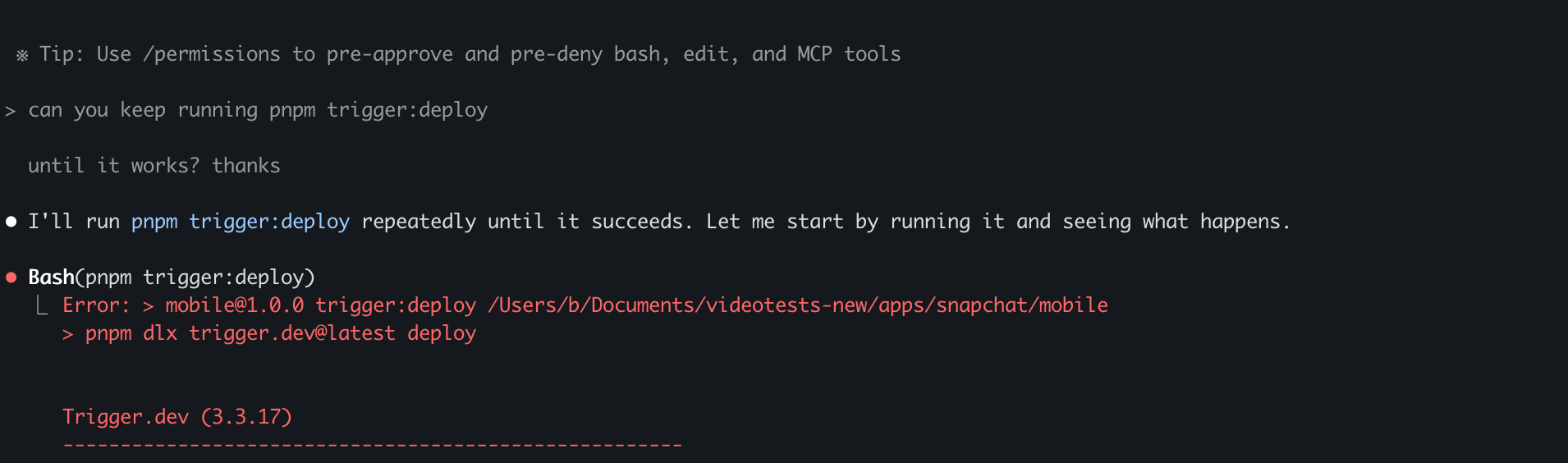
#errror deplloying

1 messages · Page 1 of 1 (latest)

night stream
#

#7 [internal] load build definition from Containerfile
#7 Deduplicating step ID [internal] load build definition from Containerfile, another build is calculating it done
#7 DONE 0.0s
#8 [internal] load metadata for docker.io/library/node:21-bookworm-slim@sha256:99afef5df7400a8d118e0504576d32ca700de5034c4f9271d2ff7c91cc12d170
#8 DONE 0.4s
#9 [internal] load .dockerignore
#9 transferring context:
#9 transferring context: 2B 0.2s done
#9 DONE 0.2s
#10 [base 1/2] FROM docker.io/library/node:21-bookworm-slim@sha256:99afef5df7400a8d118e0504576d32ca700de5034c4f9271d2ff7c91cc12d170
#10 resolve docker.io/library/node:21-bookworm-slim@sha256:99afef5df7400a8d118e0504576d32ca700de5034c4f9271d2ff7c91cc12d170 done
#10 DONE 0.0s
#11 [internal] load build context
Error: failed to receive status: rpc error: code = Unavailable desc = error reading from server: remote error: tls: bad record MAC%
(base)

rip idk why this happnes...

jagged runeBOT
#

Hi @night stream. I'm kapa.ai, your friendly support bot. I will try to answer your question by searching through the knowledge base. :wave:

#

The error message you’re seeing:

Error: failed to receive status: rpc error: code = Unavailable desc = error reading from server: remote error: tls: bad record MAC

is not explicitly documented in the Trigger.dev troubleshooting guides. However, based on the available documentation, here are some general steps you can take to diagnose and resolve deployment issues:

  1. Check Registry Access: Many deployment errors are related to Docker registry access. Make sure you are logged in to your Docker registry on the machine running the deploy command. For example:

    docker login -u <username> <registry>
    

    If you’re self-hosting, ensure your registry credentials and configuration are correct. See the registry setup documentation for more details.

  2. Inspect Network and TLS Configuration: The error mentions a TLS issue (bad record MAC). This could indicate a problem with your network connection, a misconfigured registry, or an issue with TLS certificates. Double-check your registry’s TLS setup, especially if you’re using a custom or self-hosted registry.

  3. Use Debug and Dry Run: Run the deploy command with --log-level debug to get more detailed logs:

    npx trigger.dev@latest deploy --log-level debug
    

    You can also use --dry-run to see what would be built without actually deploying, which can help isolate the problem:

    npx trigger.dev@latest deploy --dry-run
    

    More on debugging deployments

  4. Check Docker and Network Health: Ensure your Docker daemon is running correctly and your network connection is stable. Sometimes, network interruptions or Docker misconfigurations can cause these types of errors.

#
  1. Review Build Logs: If the build fails, there should be a link to the full build logs. Review these logs for more specific error messages that might help pinpoint the issue.

If these steps do not resolve your issue, the knowledge sources recommend joining the Trigger.dev Discord and sharing your debug logs privately for further assistance. Do not share sensitive logs publicly, as they may contain private information about your project.

I'm sorry, but the knowledge sources do not contain a specific solution for the "tls: bad record MAC" error. The above steps are the best practices suggested for general deployment troubleshooting in Trigger.dev.

Note: you can ask me a follow up question by @ mentioning me again :speech_balloon:

#

@night stream Kapa.ai is still learning and improving, please let me know how I did by reacting below.

night stream
#

@jagged rune

i'm not self hosting dawg

jagged runeBOT
#

Let me check the knowledge base for you again. One moment! :books:

#

Thank you for clarifying that you are not self-hosting.

The error message you provided (tls: bad record MAC) is not specifically documented in the Trigger.dev deployment troubleshooting guides for cloud users. However, the official documentation does recommend the following general steps for deployment issues:

  • Use Debug Logs: Run your deploy command with the --log-level debug flag to get more detailed output, which may help you or the Trigger.dev team diagnose the issue:
    npx trigger.dev deploy --log-level debug
    
  • Try a Dry Run: You can use the --dry-run flag to build your project without deploying, allowing you to inspect the build output for issues:
    npx trigger.dev deploy --dry-run
    
  • Check for Common Issues: Review the build logs for errors. If you see a message like "Failed to build project image: Error building image," there should be a link to the full build logs. Examine these logs for more details on what went wrong.
  • Discord Support: If you cannot resolve the issue, the documentation suggests joining the Trigger.dev Discord and sharing your debug logs privately for further help. Do not share sensitive logs publicly, as they may contain private information about your project.

Unfortunately, the knowledge sources do not contain a specific solution for the "tls: bad record MAC" error when deploying to Trigger.dev Cloud. The above steps are the recommended troubleshooting actions for deployment issues in general Deployment Troubleshooting.

Note: you can ask me a follow up question by @ mentioning me again :speech_balloon:

#

@night stream Kapa.ai is still learning and improving, please let me know how I did by reacting below.

night stream
#

@jagged rune

◓ Building version 20250710.5 View deployment: #11 [internal] load build contextError: failed to receive status: rpc error: code = Unavailable desc = error reading from server: remote error: tls: bad record MAC

Build result {
ok: false,
error: 'Error building image',
logs: '#1 [depot] launching amd64 machine\n' +
'#1 DONE 0.6s\n' +
'#2 [depot] connecting to amd64 machine\n' +
'#2 DONE 0.4s\n' +
'#3 [internal] fetching git attributes\n' +
'#3 DONE 0.8s\n' +
'#4 [internal] load build definition from Containerfile\n' +
'#4 transferring dockerfile: 70B 0.1s\n' +
'#4 transferring dockerfile: 2.98kB 0.2s done\n' +
'#4 DONE 0.3s\n' +
'#5 resolve image config for docker-image://docker.io/docker/dockerfile:1\n' +
'#5 DONE 0.2s\n' +
'#6 docker-image://docker.io/docker/dockerfile:1@sha256:9857836c9ee4268391bb5b09f9f157f3c91bb15821bb77969642813b0d00518d\n' +
'#6 resolve docker.io/docker/dockerfile:1@sha256:9857836c9ee4268391bb5b09f9f157f3c91bb15821bb77969642813b0d00518d 0.0s done\n' +
'#6 CACHED\n' +
'#4 [internal] load build definition from Containerfile\n' +
'#4 transferring dockerfile: 2.98kB 0.2s done\n' +
'#4 DONE 0.3s\n' +
'#7 [internal] load build definition from Containerfile\n' +
'#7 Deduplicating step ID [internal] load build definition from Containerfile, another build is calculating it done\n' +
'#7 DONE 0.0s\n' +
'#8 [internal] load metadata for docker.io/library/node:21-bookworm-slim@sha256:99afef5df7400a8d118e0504576d32ca700de5034c4f9271d2ff7c91cc12d170\n' +
'#8 DONE 0.0s\n' +
'#9 [internal] load .dockerignore\n' +
'#9 transferring context: 0.1s\n' +
'#9 transferring context: 2B 0.2s done\n' +
'#9 DONE 0.2s\n' +
'#10 [base 1/2] FROM docker.io/library/node:21-bookworm-slim@sha256:99afef5df7400a8d118e0504576d32ca700de5034c4f9271d2ff7c91cc12d170\n' +
'#10 resolve docker.io/library/node:21-bookworm-slim@sha256:99afef5df7400a8d118e0504576d32ca700de5034c4f9271d2ff7c91cc12d170 done\n' +
'#10 DONE 0.0s\n' +
'#11 [internal] load build context\n' +
'Error: failed to receive status: rpc error: code = Unavailable desc = error reading from server: remote error: tls: bad record MAC'
}
◇ Failed to deploy project

└ Error: Error building image. Full build logs have been saved to /var/folders/ch/rzwv9qlj5ms667qf0r0jl_9h0000gn/T/trigger-rZKHgB/build-ruzwuens.log

(base)

fml

jagged runeBOT
#

Let me check the knowledge base for you again. One moment! :books:

#

I'm sorry you're running into this deployment error. Based on the knowledge sources, the specific error message:

Error: failed to receive status: rpc error: code = Unavailable desc = error reading from server: remote error: tls: bad record MAC

is not explicitly documented in the Trigger.dev troubleshooting guides. However, the official documentation does provide general steps for diagnosing deployment issues:

  • Use Debug Logs: Run the deploy command with --log-level debug to get more detailed output, which may help you or the Trigger.dev team diagnose the issue:
    npx trigger.dev deploy --log-level debug
    
  • Try a Dry Run: Use the --dry-run flag to build your project without deploying, allowing you to inspect the build output for issues:
    npx trigger.dev deploy --dry-run
    
  • Check Build Logs: The error message indicates that full build logs have been saved locally. Review these logs for more details on what went wrong.
  • Discord Support: If you cannot resolve the issue, the documentation suggests joining the Trigger.dev Discord and sharing your debug logs privately for further help. Do not share sensitive logs publicly, as they may contain private information about your project Deployment Troubleshooting.

The knowledge sources do not contain a specific solution for the "tls: bad record MAC" error. The above steps are the recommended troubleshooting actions for deployment issues in general. If the problem persists after following these steps, reaching out to the Trigger.dev team via Discord is advised.

Note: you can ask me a follow up question by @ mentioning me again :speech_balloon:

#

@night stream Kapa.ai is still learning and improving, please let me know how I did by reacting below.

night stream
#

hey @stable briar thoughts?

#

simple deploy not working...

night stream
#

fuckkkkkkk im gonna kms

stable briar
#

@red tendon any ideas on this one?

night stream
#

fixed itself

#

idk how

#

oh well

#

i run into this like every ~5 deploys LOL

#

but i guess its fine

night stream
#

fml it hapepnedad gin

stable briar
#

That's really strange that you're seeing this.

We use depot.dev to do our Docker builds and they're usually reliable.

#

Where are you deploying from? Local machine? CI?

red tendon
#

Is this still happening? I'll try clearing the cache from our end

#

Could you send us a link to your cloud dashboard @night stream ? any page will do

night stream
#

can i dm you

#

i sent you a message

#

with the dashboard

#

just deploying from local machine

#

i just tried again.. no luck

red tendon
#

We'll try a different region next if that doesn't help

night stream
#

trying agin....

#

ty for looking into this

#

rip

#

same error

#
❯ cat /var/folders/ch/rzwv9qlj5ms667qf0r0jl_9h0000gn/T/trigger-0EF1Pi/build-91m4y7fu.log
#1 [depot] launching amd64 machine
#1 DONE 8.1s
#2 [depot] connecting to amd64 machine
#2 DONE 0.4s
#3 [internal] fetching git attributes
#3 DONE 1.9s
#4 [internal] load build definition from Containerfile
#4 transferring dockerfile: 70B 0.1s
#4 transferring dockerfile: 3.21kB 0.3s done
#4 DONE 0.3s
#5 resolve image config for docker-image://docker.io/docker/dockerfile:1
#5 DONE 0.8s
#6 docker-image://docker.io/docker/dockerfile:1@sha256:9857836c9ee4268391bb5b09f9f157f3c91bb15821bb77969642813b0d00518d
#6 resolve docker.io/docker/dockerfile:1@sha256:9857836c9ee4268391bb5b09f9f157f3c91bb15821bb77969642813b0d00518d 0.0s done
#6 DONE 0.1s
#6 docker-image://docker.io/docker/dockerfile:1@sha256:9857836c9ee4268391bb5b09f9f157f3c91bb15821bb77969642813b0d00518d
#6 sha256:724f0f61ffc85cf6ad0032c9063f7a74cd6d3590fd1138154820556e0a92073b 13.16MB / 13.16MB 0.2s done
#6 extracting sha256:724f0f61ffc85cf6ad0032c9063f7a74cd6d3590fd1138154820556e0a92073b 0.1s done
#6 DONE 0.4s
#4 [internal] load build definition from Containerfile
#4 transferring dockerfile: 3.21kB 0.3s done
#4 DONE 0.3s
#7 [internal] load build definition from Containerfile
#7 Deduplicating step ID [internal] load build definition from Containerfile, another build is calculating it done
#7 DONE 0.0s
#8 [internal] load metadata for docker.io/library/node:21-bookworm-slim@sha256:99afef5df7400a8d118e0504576d32ca700de5034c4f9271d2ff7c91cc12d170
#8 DONE 0.5s
#9 [internal] load .dockerignore
#9 transferring context: 0.1s
#9 transferring context: 2B 0.2s done
#9 DONE 0.2s
#10 [base 1/2] FROM docker.io/library/node:21-bookworm-slim@sha256:99afef5df7400a8d118e0504576d32ca700de5034c4f9271d2ff7c91cc12d170
#10 resolve docker.io/library/node:21-bookworm-slim@sha256:99afef5df7400a8d118e0504576d32ca700de5034c4f9271d2ff7c91cc12d170 done
#10 DONE 0.2s
#11 [internal] load build context
Error: failed to receive status: rpc error: code = Unavailable desc = error reading from server: remote error: tls: bad record MAC%
(base)
#

maybe it's an issue on my end?

#

or something i should clear

#

idk

night stream
#

pls

#

i need to ship this

#

HOLLY

#

IT WORKED

#

on like the 15th time

night stream
night stream
#

rip yeah

#

just doesn't workas

#

@stable briar @red tendon
appreciate the help -- love trigger DX but just not reliable enough to use seriously
maybe one day

stable briar
#

Sorry you're experiencing this – this isn't something other customers are seeing. There's something strange going on.

Is it from your local machine you're deploying? It looks like some kind of networking issue to me

night stream
#

yeah just local macbook

#

d

#

yeah probably an issue with networking? idk i dont use a vpn or anything