#High CPU usage when running @trigger.dev/cli@latest
1 messages · Page 1 of 1 (latest)
 prisma dagger
 haughty karma
I can think of two things that could be causing this:
- You're doing a lot of runs?
- There's a bug in our new tunnel (yalt) which is causing high CPU usage.
Are you doing a lot of runs? If we can rule that one out then it's probably something on our end 🤦♂️
 blazing parrot
I'd be very surprised if it was the yalt.dev change... that simply opens a WebSocket connection (using ws), but of course there could be something going wrong there that's causing an issue
prisma dagger
I don't get to do any runs - as soon as I run Trigger CLI CPU usage goes up, and I can't really use my Mac until I kill the process
process is next-server not the Trigger CLI itself
haughty karma
Hmm interesting. When you just run your Next server, without our CLI, it's all fine?
prisma dagger
yes
haughty karma
Sorry for the slow response
- Do you have a lot of runs that are queued on dev? So when you connect it suddenly starts a ton of runs? You can monitor this in the new "Runs" page and filter by the "Dev" environment.
- Do you have a lot of Jobs? I'm wondering if the indexing is sending a ton of JSON, but that seems unlikely.
prisma dagger
- I have no queued runs
- I have 9 jobs
haughty karma
We're trying to reproduce this, we've not seen it before.
Could you send us the output of this: npx envinfo --system --binaries and your version of Next.js?
prisma dagger
I in San Francisco until 21st, I will send those when I get back
prisma dagger
System:
OS: macOS 12.7.2
CPU: (8) x64 Intel(R) Xeon(R) CPU E5-1620 v2 @ 3.70GHz
Memory: 13.35 GB / 32.00 GB
Shell: 3.2.57 - /bin/bash
Binaries:
Node: 18.19.0 - /usr/local/bin/node
Yarn: 1.22.4 - ~/.yarn/bin/yarn
npm: 10.2.3 - /usr/local/bin/npm
Watchman: 2023.02.27.00 - /usr/local/bin/watchman
"next": "^14.0.3"
haughty karma
Going to try and reproduce this by running the same versions of Node and Next
prisma dagger
I tried updating trigger to newest version, but no change
It looks like nextjs Compiling /api/trigger ... never finishes - like it is stuck in infinite loop
updated to nextjs "14.1.0", no change
I removed all my jobs from index file and just added the example job
$ next dev
   ▲ Next.js 14.1.0
   - Local:        http://localhost:3000
   - Environments: .env.local, .env

 ✓ Ready in 5.8s
 ○ Compiling /api/trigger ...
 ✓ Compiled /api/trigger in 22.6s (41 modules)
it did compile, but CPU usage does not go down
I am bearly able to use my computer, until I kill the process, so it is difficult to do debugging
haughty karma
I'm trying to reproduce this now
Are you using the app router?
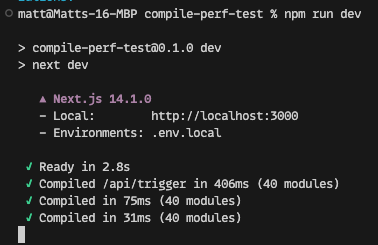
I just tried to reproduce with the create next-app settings
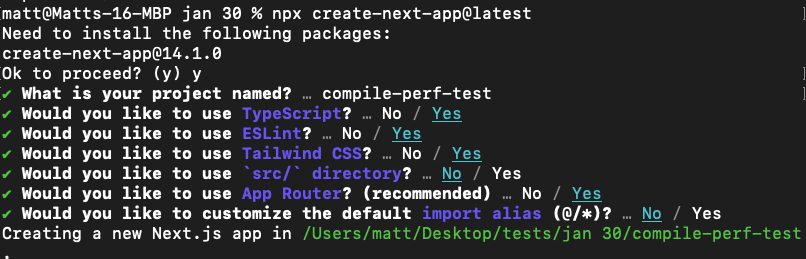
Next.js 14.1.0
With the example job.
And I get normal seeming compile times of
I think we need to try figure out if it's something special about your project.
Can you try doing this, it should only take 5 mins:
- Create a new project in Trigger.dev
- Select Next.js from the frameworks grid
- Select "Create a new Next.js project"
There are 5 steps on there.
prisma dagger
haughty karma
Are you using the app router?
yes
prisma dagger
haughty karma
I think we need to try figure out if it's something special about your project.
...
done - works without any problems
haughty karma
OK so it's something about your project. What's your dev script in your package.json?
I know some people have had luck using next dev --experimental-turbo
prisma dagger
I guess it is just --turbo now. It did solve the CPU issue! But now I have a new problem:
yarn run v1.22.4
$ next dev --turbo
   ▲ Next.js 14.0.4 (turbo)
   - Local:        http://localhost:3000
   - Environments: .env.local, .env

 ✓ Ready in 1982ms
 ○ Compiling /api/trigger ...
 ✓ Compiled /api/trigger in 15.4s
 ○ Compiling /_error ...
 ✓ Compiled /_error in 1151ms
$ npx --yes @trigger.dev/cli@latest dev
✔️ [trigger.dev] Detected TriggerClient id: segment-x--jZ_
✔️ [trigger.dev] Found API Key in .env.local file
✖ [trigger.dev] Server responded with 500 (http://localhost:3000/api/trigger).
✖ [trigger.dev] No server found (http://localhost:3001/api/trigger).
✖ [trigger.dev] No server found (http://localhost:3002/api/trigger).
✖ [trigger.dev] Your endpoint couldn't be verified. Make sure your app is running and try again. /api/trigger
  [trigger.dev] You can use -H to specify a hostname, or -p to specify a port, or -s to specify https, or -t to specify the tunnel-url pointing to the local dev server.
✨  Done in 25.25s.
It's crazy that it takes 15 seconds to compile /api/trigger still
prisma dagger
I tried adding verbose to trigger client, but that does not get me the error message
btw. when I push code to staging (Vercel) enviroment, everything works fine
haughty karma
Yeah the Next.js dev server since 13 is terrible
Although no one else has had performance issues like this
You're on a newish version of the @trigger.dev/sdk?
prisma dagger
2.2.11
haughty karma
I can't see us returning a 500 from anywhere. That failure that's happening is our CLI trying to connect with http://localhost:3000/api/trigger. So it doesn't go via the internet.
Ok try updating to see if that helps: npx @trigger.dev/cli@latest update will update all your trigger packages
I'm wondering if they've changed to ip v6 with that command. Astro does that.
If updating the packages doesn't work try re-running the CLI:
npx --yes @trigger.dev/cli@latest dev -H "[::]"
That's the IP v6 localhost
prisma dagger
I don't think that's it, /api/trigger is found and compiled, but throws a 500 error, any idea how can log it?
btw. I updated to 2.3.17
haughty karma
Yeah good point, it wouldn't get a response at all
You can add:
verbose: false,
logLevel: "info",
ioLogLocalEnabled: true,
to the new TriggerClient() options.
But we might not be logging this out. I've never seen a 500 come back from the /api/trigger endpoint before
prisma dagger
so that didn't give me anything back, but when I have my app open during /api/trigger compilation I got that:
 haughty karma
mjml isn't a package we use, I just searched our pnpm-lock file that all our dependencies and their dependencies
I think this --turbo flag is probably experimental for a reason
prisma dagger
so - removing email sending task from trigger jobs solved the issue
haughty karma
What are you using to send emails?
prisma dagger
resend + react-mjml parsing function that is the issue, I guess
In the past I added
  experimental: {
    serverComponentsExternalPackages: ['mjml']
  },
to my next.config.js
haughty karma
If you add mjml-core as well does it fix it?
I've had to do stuff like this in Remix before, it's a pain
I had to add a load of packages to it, even dependencies of dependencies
I've not heard of react-mjml before. Are you using it because they have more components?
prisma dagger
haughty karma
I've not heard of `react-mjml` before. Are you using it because they have more c...
I tried using resend's react-email in beta, but it was still not production ready, a lot of styling/responsive issues. I used pure mjml for my last project, but I liked idea of having the code in react so react-mjml was perfect 😉
I added mjml-core to serverComponentsExternalPackages but now I just get different error related to it
 haughty karma
This looks like an issue with dynamic imports. Turbo probably does it differently. I had a similar issue with esbuild recently that was fun to fix.
The docs are a bit thin on htis: https://nextjs.org/docs/pages/api-reference/next-config-js/turbo

Configure Next.js with Turbopack-specific options
If you're using resolve.alias is looks like you'll have to change some things
prisma dagger
looks like fun
prisma dagger
ok - I think I am ok - back to next dev without --turbo, with added mjml-core in serverComponentsExternalPackages and updated Trigger
haughty karma
It's behaving itself?
I have had slowness before with Node – removing all the node_modules folders from the monorepo and then doing a fresh install of packages solved it.
prisma dagger
haughty karma
It's behaving itself?
I think so, so far so good
haughty karma
Ok great
prisma dagger
Thanks for helping me debug this issue!
haughty karma
No problem 
prisma dagger
So, I am back where I started, I needed to downgrade Trigger to 2.2.11 because of that issue: #1186360299952029717 message
Now I again struggle with CPU usage skyrocketing when trying to use Trigger in dev
haughty karma
So you were getting those build errors again?
I saw this similar problem and the webpack changes required to fix it: https://stackoverflow.com/a/77738096

Stack Overflow
I am attempting to update some older code to eliminate warnings. I have upgraded some code that uses the 'crypto' module. However, webpack 5.88.2 does not recognize the new syntax. My new import lo...
I haven't seen this issue with any other customers, I think it might be a Next.js issue with pages + app routers maybe
prisma dagger
I solved the other issue, now I am on Trigger.dev 2.3.17, but high cpu usage was still occuring, just after successful trigger route compilation
finallyI tried setting up my ngrok tunel - and this seams to have solved the issue
Is there a way to automaticly create ngrok tunells with latest version similar to behavior of npx @trigger.dev/[email protected] dev ?
haughty karma
That's interesting that its being caused by our tunnel. No there isn't but you can just run that old version of the CLI and it should work fine
prisma dagger
fun fact: npx @trigger.dev/[email protected] dev works for me but not for my college on Linux, but he have no problems with @latest 😜
haughty karma
Ha ok, probably we made some fixes that were impacting some users