#script thread assert
1 messages · Page 1 of 1 (latest)
 alpine storm
No it should not. Can you provide us the full logs folder of the session when it just happened? And a description of what you did right before it happened
 dense lily
Steps
- Opened project
- Loaded world
- Clicked play
- No error
- Escaped after 10 seconds
- Clicked a chair in the world and removed something from the 'Partent Context List' in the ActionsManagerComponent
- CTRL + S to save
- Clicked play
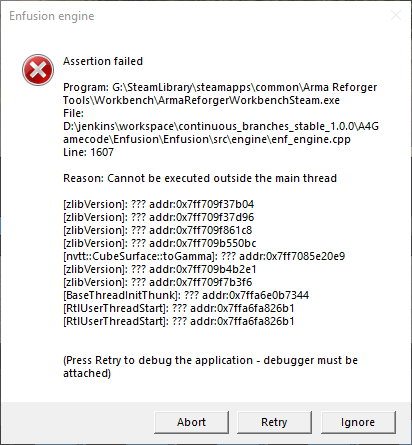
- The error pops up https://i.imgur.com/LWI32e4.png
 alpine storm
Can you reproduce this somewhat reliably with that project? If so I'd ask for the setup so I can see if I can make it happen for me also
It might be related to EDF/EPF from me but I am not sure about it yet
dense lily
alpine storm
Can you reproduce this somewhat reliably with that project? If so I'd ask for th...
Yes it happens 100% of the time. Also I don't have to modify anything, first time I click play it runs fine, once I stop it from playing the next times will always do this.
This shows up in the in-editor log
Reason: NULL pointer to instance

Class:      'SCR_SupportStationManagerComponent'
Function: 'AddSupportStation'
Stack trace:
Scripts/Game/Components/SupportStation/SCR_SupportStationManagerComponent.c:138 Function AddSupportStation
Scripts/Game/Components/SupportStation/SCR_BaseSupportStationComponent.c:1058 Function DelayedInit
Scripts/Game/Components/SupportStation/SCR_FuelSupportStationComponent.c:54 Function DelayedInit
Scripts/Game/game.c:843 Function OnUpdate
SCRIPT    (E): Virtual Machine Exception

Reason: NULL pointer to instance

Class:      'SCR_SupportStationManagerComponent'
Function: 'AddSupportStation'
Stack trace:
Scripts/Game/Components/SupportStation/SCR_SupportStationManagerComponent.c:138 Function AddSupportStation
Scripts/Game/Components/SupportStation/SCR_BaseSupportStationComponent.c:1058 Function DelayedInit
Scripts/Game/game.c:843 Function OnUpdate
UpdateEntities
 WORLD        : Frame
Alright. Please zip me your project add-on send it to me via DM and perhaps include your .db folder from profile if there is anything. I'll try to reproduce it tomorrow then and maybe I can fix it or at least offer a workaround to avoid getting it. Thank you
alpine storm
We will fix these errors you saw in the log, they might be related to the assert you see. If you have time please try adding this to your mod and see if your asserts suddenly stop. If so comment it out and see if it suddenly starts again. That would be a huge help thx
modded class SCR_SupportStationManagerComponent
{
    override void AddSupportStation(notnull SCR_BaseSupportStationComponent supportStation)
    {
        // Do nothing.
    }
}
Thanks, will do.
 hushed ridge
alpine storm
We will fix these errors you saw in the log, they might be related to the assert...
hushed ridge
alpine storm
We will fix these errors you saw in the log, they might be related to the assert...
I am also getting the same error that @dense lily is reporting.
I tried your solution but couldn't build/validate the script.
hushed ridge
 dense lily
hushed ridge
dense lily
hushed ridge
Same error when I tried it too
alpine storm
I think you two accidentially filepatched the original away. You can override an entire vanilla script file by putting a file with the same name in the same location. Try something like this

This works fine 🙂
 dense lily
alpine storm
This works fine 🙂
dense lily
alpine storm
This works fine 🙂
Copying the same location and naming I still got the error popup
https://i.imgur.com/yXi5k25.png
Copying your naming and the same location you used I also still got the error
https://i.imgur.com/0zGHh0l.png
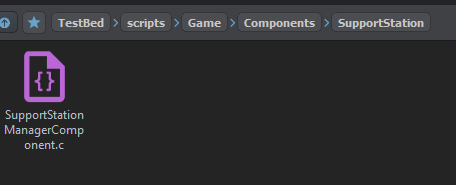
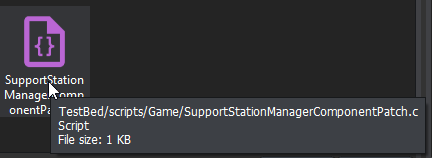


Could validate this time however
alpine storm
The game compiles and starts but you still get the assert is what you are saying?
dense lily
alpine storm
The game compiles and starts but you still get the assert is what you are saying...
Yup that's right
alpine storm
Okay then unfortunately I have no idea. And without being able to reproduce it myself I can't investigate it further. Not sure what the difference is between your setup and mine (I used experimental tools as you did)
dense lily
alpine storm
Okay then unfortunately I have no idea. And without being able to reproduce it m...
I'll make another project and as I work through it I'll see what the last thing I done before it starts popping up.
It's weird that it only happens the second time I press play, even if no change is made at all
hushed ridge
Same situation for me. I can launch first time, no issues. The 2nd time, I'll get the exception error even with the modded example you provided. Only thing that mitigates it is to disable the component on my gamemode entity. Out of curiosity, what does your gamemode prefab look like?
dense lily
hushed ridge
Same situation for me. I can launch first time, no issues. The 2nd time, I'll ge...
My game mode is the default GameMode_Plain duplicated into my mod. No idea if that's how you're meant to do it or not though
dense lily
hushed ridge
I wonder if it's related
Yeah, I'm not too sure aye. I changed the game mode to some of the others and on the second 'play' the error still pops up.
That's with closing the editor after each pop up too
hushed ridge
What's really odd is now it is doing it to all of my projects... even brand new ones with nothing in them:

These are the logs when the assertion appears. Not sure if this is helpful but:
 alpine storm
. Only thing that mitigates it is to disable the component on my gamemode entity.
What component?
hushed ridge
alpine storm
> . Only thing that mitigates it is to disable the component on my gamemode enti...
Sorry, I was wrong. It still occurs even with the SupportStation component disabled.
I've verified the file integrity of both my main game and the workbench tools. I've also updated my drivers. Workbench still errors
alpine storm
As as soon as you disable the component it works fine?
hushed ridge
No. I was incorrect when I stated that.
I forgot to relaunch after I received the error. Since the error only appears the first time if you choose abort/ignore on the assertion.
hushed ridge
Is it risky to continue developing after choosing to ignore the assertion? I'd like to keep working on my mod but this is blocking development 😦
alpine storm
You can safely ignore asserts if you feel like they don't touch on anything you made. They are meant as warning sings it something going wrong but this one might be our fault if it happens in brand new projects or yours
dense lily
alpine storm
You can safely ignore asserts if you feel like they don't touch on anything you ...
Would you suggest we reinstall the tools?
I'm too new to this to take educated guesses at the things we may be doing differently from others, that cause us to get this.
hushed ridge
I've already tried to completely reinstall the main game and the tools. No luck in fixing the problem.
I've also opened some of my old projects from last year and still the error appears.
hushed ridge
@alpine storm @dense lily I think I've narrowed it down a bit. Deleting the .save folder in the Workbench folder seemed to fix it. I'm going to recursive search the files in the folder and find what exactly is causing it in there.
C:\Users\INSERT USER NAME HERE\OneDrive\Documents\My Games\ArmaReforgerWorkbench\profile\.save
It is this file causing the issue:
 hushed ridge
alpine storm
hushed ridge
alpine storm
Ahhhh OneDrive
@dense lily is your documents folder in OneDrive as well?
This is known to cause multiple issues because the workbench is reacting to file changes which OneDrive can trigger while doing it's sync
Perhaps you can disable the sync for that folder @hushed ridge and it will fix it. Thx for investigating. Reload of engine settings due to external changes is indeed one of the assert triggers I saw in the code so this would make sense.
hushed ridge
Sure. I'll give that a shot.
hushed ridge
alpine storm
Perhaps you can disable the sync for that folder <@182587005778132992> and it wi...
I checked and my OneDrive settings have been disabled for quite some time now. There havn't been any syncs to/from any of the folders. So while I may be wrong, I have a hunch this isn't related.
dense lily
alpine storm
This is known to cause multiple issues because the workbench is reacting to file...
No
C:\Users\Name\Documents\My Games
Damn, that would have been a good find
hushed ridge
dense lily
No
```C:\Users\Name\Documents\My Games```
Damn, that would have been a good find
Did deleting the file I mentioned work for you?
dense lily
hushed ridge
Did deleting the file I mentioned work for you?
Hey sorry I missed this, yes that's stopped it from popping up now.
Restarted editor a few times too and no pop up
hushed ridge
No worries, glad to hear that worked!