#AR-10
1 messages · Page 1 of 1 (latest)

 outer cloud
lol
outer cloud
I’ll be fine tuning it, stay tuned for updates!
outer cloud
Probably going to do a Springfield trapdoor, too
 neat helm
 fallen apex
https://tenor.com/view/ncr-fallout-california-republic-wavy-flag-gif-12304240
fallen apex
https://tenor.com/view/ncr-fallout-california-republic-wavy-flag-gif-12304240
no they use a 5.56 ar-15 with wood grip and stock

 outer cloud
Listening to Route 9 from SOG prairie fire while I work
 gentle talon
outer cloud
Listening to Route 9 from SOG prairie fire while I work
gentle talon
outer cloud
Listening to Route 9 from SOG prairie fire while I work
Question, what model did you use for this? Just curious because I have a model for an AR-10 also that I thought looked considerably better (No offence)
outer cloud
gentle talon
Question, what model did you use for this? Just curious because I have a model f...
One from sketchfab
I need to fix the materials a bit
gentle talon
outer cloud
I need to fix the materials a bit
I can send you over the one I bought from CGTrader if you'd like?
gentle talon
Ok, do you want me to DM you them?
outer cloud
Sure
 cobalt fiber
gentle talon
I can send you over the one I bought from CGTrader if you'd like?
cobalt fiber
gentle talon
I can send you over the one I bought from CGTrader if you'd like?
Careful discussing that here, unless you bought a commercial licence you can't distribute the model.
Just a friendly heads up.
gentle talon
cobalt fiber
Careful discussing that here, unless you bought a commercial licence you can't d...
I gotchu, it didn't say that for the one I bought but thank you
cobalt fiber
gentle talon
I gotchu, it didn't say that for the one I bought but thank you
Royalty free (a lot of the models are this licence) means you can use it as many times as you want, for your own project but not distribute the model. Unless I misunderstand the wording used.
gentle talon
cobalt fiber
Royalty free (a lot of the models are this licence) means you can use it as many...
Yeah I understand, again thank you for the heads up bro
 vagrant pewter
gentle talon
I can send you over the one I bought from CGTrader if you'd like?
vagrant pewter
gentle talon
I can send you over the one I bought from CGTrader if you'd like?
you cannot re-distribute bought models
i will ask for proof of purchase if things looks 🐟 y
cobalt fiber
outer cloud
Now trying to fix the arsenal box for Combat OPs
You need to make the entity catalog which will then populate the arsenal
outer cloud
cobalt fiber
You need to make the entity catalog which will then populate the arsenal
Yea, but which one?
I don't see one for combat OPs
cobalt fiber
outer cloud
I don't see one for combat OPs
They don't feed in? Which faction is combat ops?
outer cloud
cobalt fiber
They don't feed in? Which faction is combat ops?
I have no idea, I tried US but it only works for conflict
cobalt fiber
outer cloud
I have no idea, I tried US but it only works for conflict
@sterile moat might be able to assist.
I am assuming you went through the examples and the wiki page overall?
outer cloud
cobalt fiber
<@105548653594193920> might be able to assist.
I am assuming you went through t...
That's how I made it useable, yea
cobalt fiber
outer cloud
That's how I made it useable, yea
You might have to make a custom spawnable prefab for combat ops? I am not familiar with combat ops mode sorry.
gentle talon
vagrant pewter
you cannot re-distribute bought models
I appreciate the concern, I contacted the model creator, he said it was ok to gift it to him. He said I can’t mass re-distribute though which I completely understand
gentle talon
outer cloud
That's how I made it useable, yea
So the AR-10 doesn't like to reload...
cobalt fiber
gentle talon
So the AR-10 doesn't like to reload...
Could be missing a magwell configuration or animation table breakdown.
outer cloud
cobalt fiber
Could be missing a magwell configuration or animation table breakdown.
It's working for me right now
cobalt fiber
outer cloud
It's working for me right now
Custom magwell or inheriting default stanag556
outer cloud
cobalt fiber
Custom magwell or inheriting default stanag556
Custom magwell
Registered it in a script like the tutorial says
cobalt fiber
gentle talon
So the AR-10 doesn't like to reload...
Make sure you are using his custom mag and not the default magazines in inventory.
gentle talon
outer cloud
?
Newest
outer cloud
gentle talon
Newest
Which mags are you using?
gentle talon
outer cloud
Which mags are you using?
There is only one type that spawns in the box
outer cloud
gentle talon
There is only one type that spawns in the box
.... Weird
cobalt fiber
gentle talon
There is only one type that spawns in the box
Which is? The standard 30rnd Stanag?
outer cloud
M16 mags or...?
outer cloud
gentle talon
The actual AR10 mags
Hmm...
cobalt fiber
Tried deleting and installing from scratch?
gentle talon
outer cloud
Hmm...
I even tried to drop it in via the inventory and through the inspection
gentle talon
cobalt fiber
Tried deleting and installing from scratch?
Me?
If so yeah, I even had a couple of friends try it and it still did the same thing
Might just be something with xbox
outer cloud
gentle talon
Might just be something with xbox
Oh
That might be why?
I'm not completely sure
gentle talon
Yeahhh....I'm just a poor boy lol
outer cloud
I'll look into it
gentle talon
outer cloud
I'll look into it
Alright, thx. also just my opinion, the metal is very bright
outer cloud
gentle talon
Alright, thx. also just my opinion, the metal is very bright
Even with the updated model?
outer cloud
Does it look like this in general?
 gentle talon
outer cloud
Does it look like this in general?
gentle talon
outer cloud
Does it look like this in general?
Yes, the metal is just very bright. like someone polished it
outer cloud
gentle talon
Yes, the metal is just very bright. like someone polished it
Okay, I lowered the albedo color

Does that look better?
gentle talon
outer cloud
Okay, I lowered the albedo color
Yeah
The lookalike wood baculite furniture will look better with it being darker too
Do you only plan to make the one version of it? just curious
outer cloud
gentle talon
Do you only plan to make the one version of it? just curious
Yea, as soon as I get it fixed for XBOX
outer cloud
Does this mean it only works on PC or...? @cobalt fiber
 vagrant pewter
outer cloud
Does this mean it only works on PC or...? <@293168886419947530>
vagrant pewter
outer cloud
Does this mean it only works on PC or...? <@293168886419947530>
nope
outer cloud
vagrant pewter
nope
Hmm....


 outer cloud
I see
gentle talon
For some reason the mag disappeared but that might be because of a conflicting mod
outer cloud
gentle talon
For some reason the mag disappeared but that might be because of a conflicting m...
Maybe
gentle talon
It looks good overall though
outer cloud
What other mods do you have the might have a chance of conflict?
I'm going to push out a patch, let's see if it works
gentle talon
outer cloud
What other mods do you have the might have a chance of conflict?
I downloaded that G3 DMR mod and there’s a newer MP5 mod
outer cloud
Ah
gentle talon
Those are the only two I can think of
outer cloud
Uploading a small change right now
One of the animation graph file values was possibly off
In the prefab, at least
Uploaded, try updating it
Works on mine, but the weapon firing animations are not working
gentle talon
So it’s works for me, but the reload is weird, it works fine if there is still a round in the chamber but for some reason it won’t fully reload from an empty mag
Empty mag reload I have to go into the weapon inspection and manually load it that way
gentle talon
outer cloud
Nevermind, just had the issue
Ok lol, but the model now is good, that I think is solid
outer cloud
gentle talon
Ok lol, but the model now is good, that I think is solid
Added fire selection animations, testing now
Yea, it seems to be a problem with the animations
outer cloud
gentle talon
Ok lol, but the model now is good, that I think is solid
I think I've figured it out, now I need to fix the firing animation breaking when switching modes
Seems the slide closed state is turned off when I switch modes
gentle talon
That's really weird but then again i don't know too much with that stuff
cobalt fiber
outer cloud
Seems the slide closed state is turned off when I switch modes
Check your events on your weapon anims. Compare yours to the vanilla weapons. 9 times out of 10 that fixed my issues when I was learning.
outer cloud
cobalt fiber
Check your events on your weapon anims. Compare yours to the vanilla weapons. 9 ...
Meaning?
cobalt fiber
Exactly what I said. In the animation editor. Get to your weapon mesh animation tab, not the player anims.
Inside there, double click on every green dot one by one, then check in the events tab under properties down the bottom (if on default layout). Compare your frame animation events, comparing them to the vanilla m16a2 events.
Sound, reload, slide lock, blend in etc etc.
outer cloud
I assigned them properly then
The problem is the animations work UNTIL you switch fire modes
cobalt fiber
If you are missing events, it won't know where to move to. Which could be why it works until the slidelock at the end of a mag.
Including changing fireside (safety)
If your anims are breaking from changing fire mode, you broke something. Is your graph working fully? No ! in there?
outer cloud
cobalt fiber
If you are missing events, it won't know where to move to. Which could be why it...
The mag is full


Left is before switch, right is after
cobalt fiber
outer cloud
The mag is full
Did you build a graph from scratch?
outer cloud
Without switching

After

There are a few warnings from the idle and sight elevation
cobalt fiber
Does it do it when you switch from safe to semi, or only if you go from semi to full?
outer cloud
cobalt fiber
Does it do it when you switch from safe to semi, or only if you go from semi to ...
It breaks if you switch it either way
cobalt fiber
On that note is your weapon semi auto or burst?
outer cloud
cobalt fiber
On that note is your weapon semi auto or burst?
Semi and full auto
cobalt fiber
Is your burst timer etc set to state 2 or state 1?

 cobalt fiber
Did you change state 2 to state 1 so your animation knows you have it on there? Because it could be breaking the connections when you change mode. Double click on the Burst and see what the properties are for the big condition line
outer cloud
cobalt fiber
Did you change state 2 to state 1 so your animation knows you have it on there? ...
There is no state one for some reason
As in nothing happens on state 1
cobalt fiber
Screenshot your condition line
outer cloud
On the controls or...?
cobalt fiber
On the down arrow pointing into the BurstTimer , Burst and the bottom pose
cobalt fiber
outer cloud
What does it look like?
The graph, the little arrow pointing into your BurstTimer bubble, then I think properties will bring up the condition line?
I am literally doing all of this from memory, on my phone, at work on my lunch break so I can't show you screenshots from my end.
outer cloud
I don't see a properites option
cobalt fiber
The bottom left tabs where you went to check events
 cobalt fiber
You need to modify that to State == 1 and then do the same for BurstTimer, Burst, Pose for Burst, the arrows going from BurstTimer to Semi and Safe.
outer cloud
I see
cobalt fiber
Basically, anywhere in the graph that says State == 2 make State == 1 as your weapon has no State == 2 as you don't have a Burst fire mode.
outer cloud
Alrighty
cobalt fiber
My lunch break is nearly over so I have to smash down food, good luck with it.
 cobalt fiber
outer cloud
I think it is, but I want to check
cobalt fiber
outer cloud
I think it is, but I want to check
Yep
It tells the game to check what state the weapon fire mode is set to, so the game knows how many shots it can fire.
cobalt fiber
All entries updated that call for State == 2 are changed?
outer cloud
Yep
cobalt fiber
Not just in that little square, there are others in other graph locations, but I can't remember off the top of my head which. Look for broken links in the graph before and after.
outer cloud
I'll look around
cobalt fiber
Sorry man, trying to help.
outer cloud
Don't worry
cobalt fiber
If you still don't get it working I will help from home after work but that is another 3 hours away.
outer cloud
Okay, I found it
Turns out start condition for Queue 1 was HasVariableChanged(State) while the interrupt was empty

The funny thing is I did not do that
outer cloud
outer cloud
Turns out start condition for Queue 1 was HasVariableChanged(State) while the in...
This is it when I fixed it by the way
@gentle talon Care testing it when it finishes uploading?
There
I'll let you know when it is ready
outer cloud
It works, but now there's a new bug I need to iron out
The safety sticks
cobalt fiber
outer cloud
It works, but now there's a new bug I need to iron out
The safety sticks
Check you have it set up to transition back from safe. The arrows between nodes are a good place to start.
outer cloud
Now the reload is stuck on empty
outer cloud
When I reload from empty, it does not allow firing
cobalt fiber
outer cloud
When I reload from empty, it does not allow firing
Missing an event somewhere in your weapon anims, trying to figure out which, your animation editor should tell you based on what links break when you reload
gentle talon
These are somethings I got before the newest update.
Now the mag doesn’t appear in the arsenal and the one in the gun already is invisible….
Plus toggling the safety as well as rising and lowering the gun. The left arm goes wonky

 outer cloud
gentle talon
These are somethings I got before the newest update.
Now the mag doesn’t appea...
outer cloud
gentle talon
These are somethings I got before the newest update.
Now the mag doesn’t appea...
Huh
outer cloud
Still working on it
outer cloud
Testing a fix, standby
outer cloud
cobalt fiber
Missing an event somewhere in your weapon anims, trying to figure out which, you...
Had to borrow some animations from the M16
It should work now
Though I've been noticing what works in the workbench sometimes does not transfer over
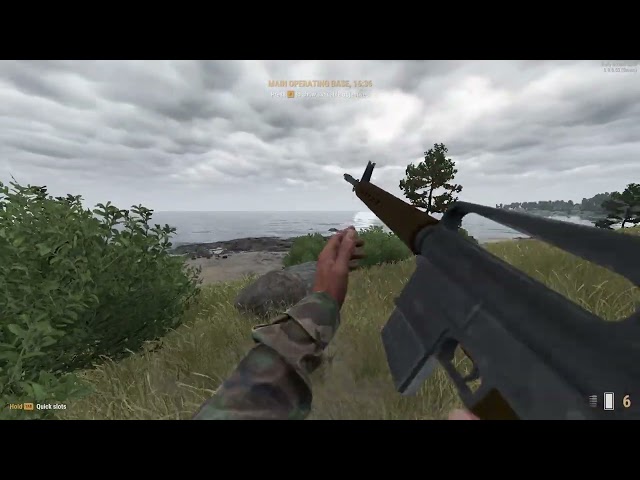
Still was not able to find the arsenal for Combat Ops in Arland
cobalt fiber
Small detail I noticed on that video, you need to tweak the bolt release animation a bit to match the player anim and then modify your rack bolt event to match when it slams forward. At the moment it's delayed as is your bolt/charging handle slamming into place (good 1/2 second delay?)
Heading out, but glad you're getting improvements, hope I was able to help.
outer cloud
cobalt fiber
Small detail I noticed on that video, you need to tweak the bolt release animati...
Yea, I noticed that too
But, it is functional
outer cloud
outer cloud
Still was not able to find the arsenal for Combat Ops in Arland
Found and tweaked
outer cloud
cobalt fiber
Small detail I noticed on that video, you need to tweak the bolt release animati...
How would I do a weapon bolt release animation?
outer cloud
Alrighty, it’s all working now
outer cloud


 gentle talon
outer cloud
gentle talon
outer cloud
So I don't know about you but comparing the size of the AR-10 to a real one, your model is slightly oversized....
outer cloud
I don't really care anymore
I know it works, and I'm too afraid to change it since it will fuck a lot of things up
Besides, I've come to find that I'm better suited for ballistic mods
cobalt fiber
outer cloud
Besides, I've come to find that I'm better suited for ballistic mods
You made a ballistic mod?
outer cloud
cobalt fiber
You made a ballistic mod?
Yea, M855A1
Modeled the ballistics pretty faithfully
cobalt fiber
outer cloud
Yea, M855A1
As faithfully as one can make something with no armor system in the engine I suppose.
outer cloud
Yea
It works, and works rather well :)
Drops the enemy in a single well-aimed shot to the chest
cobalt fiber
Are you planning to do a ballistics overhaul of all weapons or just that?
outer cloud
cobalt fiber
Are you planning to do a ballistics overhaul of all weapons or just that?
Now that you mention it, I might as well
Revamping M855 would be a nice starting point
