#enfusion_model
1 messages · Page 23 of 1
 sand pagoda
 turbid moss
sand pagoda
i have no idea how it determines when to emit light and when to not, but, this "...
turbid moss
sand pagoda
i have no idea how it determines when to emit light and when to not, but, this "...
Yeah, no idea, its black magic 😄
 digital basin
is there a way to make a rgba file without using substance? It doesnt seem like photoshop is able to do an alpha channel
sand pagoda
turbid moss
Yeah, no idea, its black magic 😄
well, i think i got it now
 shell hedge
digital basin
is there a way to make a rgba file without using substance? It doesnt seem like ...
shell hedge
digital basin
is there a way to make a rgba file without using substance? It doesnt seem like ...
It can, just save as something that isnt PNG
 hoary gazelle
Got to crounch a little updated on addons today, with now the ability to add a custom bone on weapon and vehicle addon, as well as some bug fix with socket creation. Now you can just click on Edit , click on a face and add a socket to that point as in the video(on both addons ofc). Also added everyone to one place on github: https://github.com/steffenbk/Arma-Reforger-Addons/tree/main
 flint ivy
hoary gazelle
Got to crounch a little updated on addons today, with now the ability to add a c...
flint ivy
hoary gazelle
Got to crounch a little updated on addons today, with now the ability to add a c...
Awesome work!
 sonic violet
I'm trying to import this model into the engine, is it possible to convert GLBfiles to Enfusions native file format for this?
https://www.fab.com/listings/d5a58638-8f14-4a08-b9b7-e093b79a4d79

Fab.com
If UV overlap occurs, set the "Light Map Coordinate Index" to "0" in the static mesh settings in UE5.If the lighting and shadow rendering are not accurate, adjust the "Light Map Resolution" value by increasing it as needed. Recommended settings (The mesh can be imported with materials and textures fully adjusted.)First, import the GLB file, an...
 stray bridge
sonic violet
I'm trying to import this model into the engine, is it possible to convert GLBfi...
stray bridge
sonic violet
I'm trying to import this model into the engine, is it possible to convert GLBfi...
glb import into blender, export as fbx, imlort fbx into reforger tools
sonic violet
Mint, gotcha, thank you!
sonic violet
Alright, noted.
RQ
The preview sphere is supposed to show the material right?
And not just a white/grey sphere?
Oh wait, if I preview the material it shows, just not on the sphere in the editor.
FYI, I am a huge newbie to Blender and modeling 


Oh
Material preview Wasn't on
HAHAHA
Okay, I went ahead and got the material to apply in Blender, exported and imported as FBX but the material was still blank in Enfusion
 remote palm
I can confirm that this is a terrible attempt of increasing poly count since well… you dint have any sharp edges and most importantly it will not have the UV unwrap anymore :I
It looked so promising 🥲
remote palm
sonic violet
Okay, I went ahead and got the material to apply in Blender, exported and import...
Yes, that is normal. You have to import the texture files into your “Data” folder and assign the corresponding texture files to your material.
You have to create a “BCR” and “NMO” texture.
BC = Base Color
R = Roughness
NM = Normal
O = Occlusion?
But the Arma DC has a specific channel for texture help - #enfusion_texture
sonic violet
Ohh, okay. I'll go on over there then
 steel hare
Hej guys quick question
Would you prefer going for trim sheets when texturing larger assets (buidlings) or go for unique uv mapped textures?
shell hedge
I prefer doing like vanilla buildings
 compact scarab
remote palm
Yes, that is normal. You have to import the texture files into your “Data” folde...
compact scarab
remote palm
Yes, that is normal. You have to import the texture files into your “Data” folde...
Yes it's occlusion
steel hare
shell hedge
I prefer doing like vanilla buildings
Can you maybe elaborate? 🙂
shell hedge
Open vanilla building in workbench and check how the model and textures are setup
steel hare
it seems like they use a mixture of both? For buildings e.g. the brick texture ResourceManager/~ArmaReforger:Assets/_SharedData/Brick/ST_Bricks_Bare_01_BCR.edds is only a tileable brick texture as it seems (1k texture). No trimsheet or anything
shell hedge
The multi material is super fun
 last parcel
indeed
 fossil crater
remote palm
Yes, that is normal. You have to import the texture files into your “Data” folde...
fossil crater
remote palm
Yes, that is normal. You have to import the texture files into your “Data” folde...
@sonic violet NMO => Normal, Metalness and Occlusion. (RG, B, A respectively).
remote palm
fossil crater
<@154027923366608896> NMO => Normal, Metalness and Occlusion. (RG, B, A respecti...
Oh, sorry! I thought it was like Normal Map and Occlusion
 sly bridge
remote palm
Yes, that is normal. You have to import the texture files into your “Data” folde...
sly bridge
remote palm
Yes, that is normal. You have to import the texture files into your “Data” folde...
the info is available on wiki, the direct link is pinned to #enfusion_texture channel
remote palm
sly bridge
the info is available on wiki, the direct link is pinned to <#976231628785475624...
Ik - i was just pulling it from my head - but after not touching stuff for about a month, some stuff gets lost.
 hybrid mountain
My mesh is having issues with LODs, higher levels of LOD materials are being shown at larger distances, I have tried various overrides of LOD factors and it is still bugging out. I'm assuming 1.3 is forcing MIP level based on object complexity so I'm probably forced to decrease complexity of a mesh which is the size of two and a half LAVs?
sonic violet
remote palm
Yes, that is normal. You have to import the texture files into your “Data” folde...
😄
 sonic violet
fossil crater
<@154027923366608896> NMO => Normal, Metalness and Occlusion. (RG, B, A respecti...
sonic violet
fossil crater
<@154027923366608896> NMO => Normal, Metalness and Occlusion. (RG, B, A respecti...
Thank you.
remote palm
sonic violet
😄
Nice 🙂
 elder rune
why mesh's can be so darknest
 elder rune
why mesh's can be so darknest
elder rune
elder rune
why mesh's can be so darknest
resolve:
export like obj,
import in new scene, export to enfusion like fbx
Thanks for @tall swift (hell of the dayz is helping us future)
 tacit eagle
what category does the farmhouse prefab fall into? It's in a prefab>structures but is it an object, composition, item, system?
 strange flint
Hello everyone, kinda noobie question but do i need to manually create the view LODs in my modeling software or can i make then in enfusion? The wiki mentions an automatic method, that left me a bit confused

 wicked jasper
You need to create them yourself. The engine handles the switch between the lods
strange flint
ahh ok thanks
 livid belfry
Why does the USP prefix in blender tools not allow me to assign collider metadata to it?
Have mesh object named "USP_Ball"
Colliders Setup button is disabled for this object. If I rename it UCS for a capsule collider it allows me?
livid belfry
Figured it out. Create it first as UCS_thing, then rename to USP_thing and it imported fine.
hoary gazelle
completed my other addon for blender today. So now its very easy to make destructible parts for buildings https://www.youtube.com/watch?v=_GqnsPzh5H8

Now you can make destructible parts for buildings like this
 nova granite
hoary gazelle
Now you can make destructible parts for buildings like this
nova granite
hoary gazelle
Now you can make destructible parts for buildings like this
wonder how performant this is at scale, since each client would have to sync each buildings individual wall/room state.
hoary gazelle
Every wall is its own prefab. Its more or less its own "building" in a sense. But when its gone, or destroyed its added as just an empty prefab
remote palm
Jesus thats really cool 😄
Can you also replace the "empty" prefab with a damaged version of the part that got destroyed? So it does´nt just dissapear 😄
hoary gazelle
yes its just to change the destruction prefab, i have it in the tutorial on how to change it
hybrid mountain
I have never seen this before. When I move the camera towards the back direction in the editor and in the world, my model disappears. Is this a 1.3 bug or something I can fix somehow...

 remote palm
hybrid mountain
I have never seen this before. When I move the camera towards the back direction...
remote palm
hybrid mountain
I have never seen this before. When I move the camera towards the back direction...
Check your face orientation in blender - thats probably your issue
hybrid mountain
remote palm
Check your face orientation in blender - thats probably your issue
It should still be visible based on camera angle, it's almost like the game is culling the entire mesh based on camera position. It's a lot to ask if someone can replicate this or just take a look at my fbx haha, it's a simple mesh plane probably 5inx5in in size
just, bloop


 steady halo
anyone knows how to enable backface culling?
 neat canopy
steady halo
anyone knows how to enable backface culling?
neat canopy
steady halo
anyone knows how to enable backface culling?
In the material settings there is this to change
 steady halo
thanks!!
neat canopy
hybrid mountain
It should still be visible based on camera angle, it's almost like the game is c...
Do you have LOD´s in place?
elder rune
what's problem can be? Thank's in advance
RESOURCES (E): BSP mesh is not valid 'BSP_mdl'
Have you done all of these things like in the wiki?
 sand pagoda
elder rune
what's problem can be? Thank's in advance
```
RESOURCES (E): BSP mesh is not va...
sand pagoda
elder rune
what's problem can be? Thank's in advance
```
RESOURCES (E): BSP mesh is not va...
not triangulated, non planar faces, not closed geo, internal faces, non manifolds
steady halo
why is the model not overriding the material here?

 fallow pond
 hybrid mountain
neat canopy
Do you have LOD´s in place?
hybrid mountain
neat canopy
Do you have LOD´s in place?
Yep, still the same thing, not that LODs matter because it is literally a 2 polygon model
It is literally the most efficient model I have the capability of importing into the software. Wish I had a copy of 1.2 to test there.
Turning off cull fixes it but I would have to guess that there is something seriously wrong with the render pipeline post update
 mighty bronze
fallow pond
mighty bronze
fallow pond
Damn that's a fine lookin model.
 fluid fern
Hi there, with the update I added the SCR_destructiblebuildingComponent for destruction.
So on this point no problem my building is well destroyed however my windows remain, with the help of Wolf we had fun to modify the interior property Query Bounding Boxes by putting a completely lunar scale but my windows still remain.
Do you have any idea? it's very strange!
elder rune
Does anyone know anything about the checkbox? -"Force Create Portals". When i turn off the param, i have 3 not working portals, other is working good. But when i turn on the checkbox, all portals working...
P.S. Sry for my english
 neat canopy
elder rune
Does anyone know anything about the checkbox? -"Force Create Portals". When i tu...
neat canopy
elder rune
Does anyone know anything about the checkbox? -"Force Create Portals". When i tu...
https://community.bistudio.com/wiki/Arma_Reforger:FBX_Import#Portals
Take a look here
 neat canopy
elder rune
Does anyone know anything about the checkbox? -"Force Create Portals". When i tu...
neat canopy
elder rune
Does anyone know anything about the checkbox? -"Force Create Portals". When i tu...
So maybe you are missing a BSP?
sand pagoda
elder rune
Does anyone know anything about the checkbox? -"Force Create Portals". When i tu...
if some portals are working, and some are not, this is probably bsp problem, or maybe lack of other portals
elder rune
neat canopy
So maybe you are missing a BSP?
Nope, i have... But mb really bsp problem's, i will testing. Thanks
elder rune
sand pagoda
if some portals are working, and some are not, this is probably bsp problem, or ...
Thank yo too
neat canopy
elder rune
Nope, i have... But mb really bsp problem's, i will testing. Thanks
There should be some BSP error messages in the console that help. When you reimport the mesh
hoary gazelle
updated the destruction a bit when i found a new prefab had a lot more detailed setup than i expected. So can make holes in walls now soon 😉
elder rune
neat canopy
There should be some BSP error messages in the console that help. When you reimp...
As i understand my problem is that vertical's (in screen)... But i can't optimize some more...
 neat canopy
elder rune
As i understand my problem is that vertical's (in screen)... But i can't optimiz...
neat canopy
elder rune
As i understand my problem is that vertical's (in screen)... But i can't optimiz...
What does the Error Message say? Also triangulate your BSP mesh
elder rune
neat canopy
What does the Error Message say? Also triangulate your BSP mesh
yeah when im import. im triangulate... This's video is my problem. Console say some warning
 RESOURCES (W): ExtractConvexEnvelope(): AreaPortal 'PRT_18' (3) doesn't have vertices assigned! Check the model, it's leaking.
 RESOURCES (W): ProcessAreasAndPortals(): AreaPortal 'PRT_18' (3) doesn't have reachable areas assigned!
 RESOURCES (W): ExtractConvexEnvelope(): AreaPortal 'PRT_12' (7) is larger than input data! Check the model, it's leaking.
 RESOURCES (W): ExtractConvexEnvelope(): AreaPortal 'PRT_14' (10) doesn't have vertices assigned! Check the model, it's leaking.
 RESOURCES (W): ProcessAreasAndPortals(): AreaPortal 'PRT_14' (10) doesn't have reachable areas assigned!
 RESOURCES (W): ExtractConvexEnvelope(): AreaPortal 'PRT_15' (11) doesn't have vertices assigned! Check the model, it's leaking.
 RESOURCES (W): ProcessAreasAndPortals(): AreaPortal 'PRT_15' (11) doesn't have reachable areas assigned!
But it's not that room portal's
fluid fern
fluid fern
Hi there, with the update I added the SCR_destructiblebuildingComponent for dest...
Nobody had this problem?
neat canopy
elder rune
yeah when im import. im triangulate... This's video is my problem. Console say s...
The thing in the video is sometimes a Bug in the workbench preview, so try to check it out in the Worldeditor with a spawned player.
The Warnings are important and you should try to fix them to have proper portals in the end. Have you added Portals to the interrior doorways as well?
Also keep in mind that the Portals always should be a little bigger then the BSP windows holes or doorways.
If not, this would lead to the „it’s leaking“ warning
elder rune
neat canopy
The thing in the video is sometimes a Bug in the workbench preview, so try to ch...
it's video in world editor, when im character, it's working similar
neat canopy
elder rune
it's video in world editor, when im character, it's working similar
Okay, but still try to remove the warnings first, maybe this fixes the problem in the end 🙂
I‘ll go to sleep now. Wish you the best. Hope you get it fixed. 👍
elder rune
neat canopy
Okay, but still try to remove the warnings first, maybe this fixes the problem i...
Thank you very much, you safe my time, but i have just one last problem
elder rune
neat canopy
Okay, but still try to remove the warnings first, maybe this fixes the problem i...
If you know some about that ) So sorry for concern
elder rune
neat canopy
Okay, but still try to remove the warnings first, maybe this fixes the problem i...
And good night, pleasant dreams 😅
neat canopy
elder rune
If you know some about that ) So sorry for concern
Do you mean the shadow on the joint of the walls?
elder rune
neat canopy
Do you mean the shadow on the joint of the walls?
yeah
neat canopy
elder rune
yeah
Could be a problem with a the portal volume in that room.
If it ends directly flat with the wall it can maybe cause such issues. But not 100% sure
Try to let it overlap a bit more if not allready
elder rune
neat canopy
Try to let it overlap a bit more if not allready
Already,, but im will test ) Thank u very much
steel hare
hoary gazelle
completed my other addon for blender today. So now its very easy to make destruc...
really cool stuff you got there! Do you have a documentation for your tool somewhere?
hoary gazelle
steel hare
really cool stuff you got there! Do you have a documentation for your tool somew...
https://www.youtube.com/watch?v=_GqnsPzh5H8&feature=youtu.be
This is the basics, but making another video soon on how to do it as i did in the video above
 tidal latch
fluid fern
Hi there, with the update I added the SCR_destructiblebuildingComponent for dest...
tidal latch
fluid fern
Hi there, with the update I added the SCR_destructiblebuildingComponent for dest...
what class are your windows?
GenericEntity?
StaticModelEntity is ignored by the system for instance
fluid fern
tidal latch
what class are your windows?
Its vanilla Windows
These Windows are in a prefab in generic entity my_building_furniture
tidal latch
why do you have windows in furniture prefab?
fluid fern
tidal latch
why do you have windows in furniture prefab?
Because I've grouped everything together, would you advise me to put them directly in the building's prefab instead?
tidal latch
yes, like in vanilla assets
there is a tool which would snap windows to sockets based on their name
fluid fern
tidal latch
there is a tool which would snap windows to sockets based on their name
Oh, I didn't know that.
last parcel
Wait are you handplacing them ? 
fluid fern
last parcel
Wait are you handplacing them ? <:meowsweats:707626030613135390>
Euhhhh yes 😅 What's the magic tool?
last parcel
you place one of these where the windows axis point is and then do it like the vanilla buildings do.
 fluid fern
last parcel
you place one of these where the windows axis point is and then do it like the v...
fluid fern
last parcel
you place one of these where the windows axis point is and then do it like the v...
Oh yes, all my buildings have sockets, and when I import the fbx they're clearly visible, but on enfusion I don't know the tool that automatically places windows and doors.
 fluid fern
Hummmmmmmm okay, I'll have to go over all my prefab s again, but thanks for the info I didn't know.
steel hare
What the? How should one figure this out? Thanks a lot for sharing!
I read BI's tutorials but this somehow is not mentioned anywhere 😄 And after a few days this information will also disappear in the infinite vastness of this discord channel 😄
last parcel
well you just take a look at the prefabs from the game and p3d in the editor and just use reasoning in want it correspends to thats what i did atleast.
 crimson sail
Does anyone have a good workflow video for Reforger uniforms > Substance > back to Reforger? Documents work as well. Not sure if I'd have to send the models to Blender first
fluid fern
tidal latch
there is a tool which would snap windows to sockets based on their name
Its work fine now, thanks you
compact scarab
Is there any way to adjust things like this while in game mode so I can see where it's being positioned?

 grand imp
Should i make a Sig P320 or an HK P30L?
grand imp
compact scarab
Is there any way to adjust things like this while in game mode so I can see wher...
I really don't know bud, i usually do it while in blender
 surreal ore
compact scarab
Is there any way to adjust things like this while in game mode so I can see wher...
surreal ore
compact scarab
Is there any way to adjust things like this while in game mode so I can see wher...
The origin of the pistol should be where the hand is gonna be
mighty bronze
surreal ore
The origin of the pistol should be where the hand is gonna be
I just had a stooped idea
What if you took the animation rig, used the asset library animation, copy transforms and then edit there so if fits the hands.
Then transfer it back, everything should be normal just without copy transforms.
compact scarab
@grand imp sent me a blender template to line it up with that worked awesome.

Need to learn animation workflow now so I can make him hold it with 1 hand and new reload animation pulling back the hammer.
compact scarab
And I moved the origin per zeliks suggestion
hoary gazelle
Fine tuned the workflow for destruction of walls etc now. Can easy setup this now
compact scarab
hoary gazelle
Fine tuned the workflow for destruction of walls etc now. Can easy setup this no...
Sweet. Care to share your workflow for it? I haven't touched the destruction yet.
I got my weapon creation workflow down though.

Arma4Life | Colt Walker WIP
hoary gazelle
compact scarab
Sweet. Care to share your workflow for it? I haven't touched the destruction y...
yes working on a video
compact scarab
hoary gazelle
yes working on a video
Nice!
 solar heron
I have a Problem with using UDIMs i want to make this wall and roof with udims to spread multiple textures over the whole Wall/Roof but if i load in the model i don't know how i setup everything. How i tell Enfusion that the Walls have Multiple UDIM Tiles? In The Picture 2 you see that its messed up...because enfusion uses just one material instead of 5 ... the 3rd Picture is in Substance were everything is fine. Some Ideas?


 calm rune
compact scarab
<@521815272290648089> sent me a blender template to line it up with that worked ...
calm rune
compact scarab
<@521815272290648089> sent me a blender template to line it up with that worked ...
Do you have the scaling right?
compact scarab
calm rune
Do you have the scaling right?
Idk it's a bought model. The handle fits right but the rest looks a bit big. I'll measure it some time and see.
its 15.5" in real life
solar heron
Did someone were i can find the wiki where its writen how i setup buildings in Blender? Cant find this anymore...was somewhere in the bitstudio site i think. But this website is totaly weird to me.
https://community.bistudio.com/wiki/Arma_Reforger:Weapon_Creation/Asset_Preparation
There was something like this.. But for buildings
 vestal quarry
solar heron
Did someone were i can find the wiki where its writen how i setup buildings in B...
vestal quarry
solar heron
Did someone were i can find the wiki where its writen how i setup buildings in B...
Not sure if this is what you saw previously, I don't do buildings but I know a few things regarding them are mentioned in here https://community.bistudio.com/wiki/Arma_Reforger:FBX_Import
solar heron
vestal quarry
Not sure if this is what you saw previously, I don't do buildings but I know a f...
Thanks man. Thats it 👍🏻
 cold vector
Anyone know why my guy doesn't seem to be holding the L85A3 I'm so thoughtfully modding in for him? Lol

I've been using the weapon creation tutorial on the wiki
vestal quarry
cold vector
Anyone know why my guy doesn't seem to be _holding_ the L85A3 I'm so thoughtfull...
damn that's quite rude of him. What did you use as your base prefab?
cold vector
vestal quarry
damn that's quite rude of him. What did you use as your base prefab?
Rifle_Base.et
I think the issue is I'm testing too early? Maybe?
I haven't done animations yet
 cerulean patio
When I export a vest to Reforger, it comes with 1-230 bones and not 1-229. Do u guys know how to solve this?
 vestal quarry
cold vector
I think the issue is I'm testing too early? Maybe?
vestal quarry
cold vector
I think the issue is I'm testing too early? Maybe?
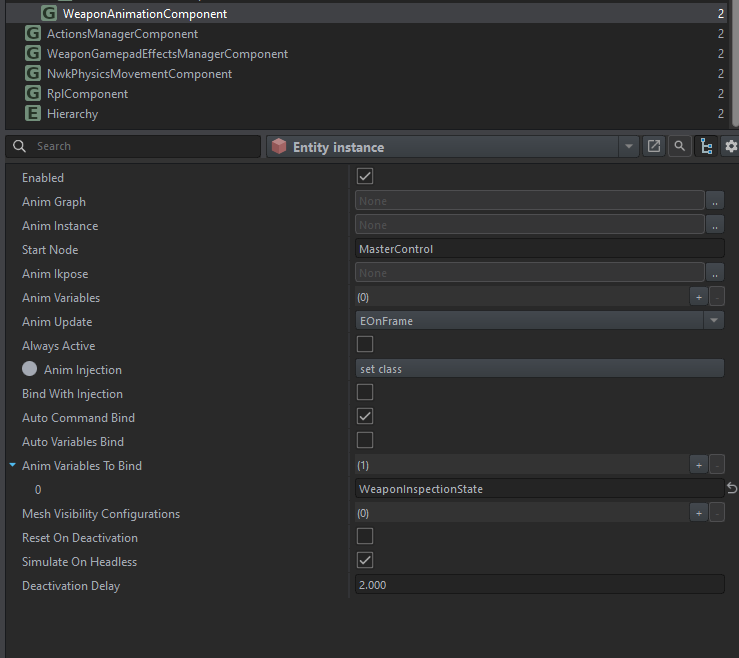
It's probably that. The WeaponAnimationComponent is empty by default https://i.imgur.com/gA5Uj3r.png but you can plug in some vanilla stuff temporarily if you want to. https://i.imgur.com/6OHAfiA.png
 cold vector
vestal quarry
It's probably that. The WeaponAnimationComponent is empty by default https://i.i...
cold vector
vestal quarry
It's probably that. The WeaponAnimationComponent is empty by default https://i.i...
It doesn't seem to like me much
although...

is the tutorial outdated?

^ the tutorial shows the gun being off to the side
once added to the rig
grand imp
cerulean patio
Hey there bud, make sure your weight are where they're supposed to be
grand imp
cerulean patio
When I export a vest to Reforger, it comes with 1-230 bones and not 1-229. Do u ...
And you gotta check if your EntityPosition object is parented to the Armature as a bone
grand imp
cold vector
although...
Are you looking to make an idle pose for the rifle?
If so:
https://community.bistudio.com/wiki/Arma_Reforger:Weapon_Animation/Basic_Tutorial
Take a look at "Adding Weapon to Scene"
Pretty much explains the basics of the animations, and btw make sure to parent absolutely everything to the Armature on the "Object" properties.
crimson sail
Alright boys, so I've made a uniform patch in Blender. It was then textured in Substance Painter. I'm completely lost as to what to do now. How do I put this in game?

 spiral hedge
Guys, how i can prevent light coming into a room? My Model does not have any Portals (complete close BSP and PRTVOL). I disabled Sky, Terrian, Ocean in the EnvProbe, but there is still light inside the room.
shell hedge
Not possible since the engine doesnt simulate light realistically
You need probe volume with fake darkness like vanilla buildings
spiral hedge
even, when i turn down all sliders, its much to bright
 honest pine
cerulean patio
When I export a vest to Reforger, it comes with 1-230 bones and not 1-229. Do u ...
honest pine
cerulean patio
When I export a vest to Reforger, it comes with 1-230 bones and not 1-229. Do u ...
#enfusion_model message check this and message above it could help
honest pine
crimson sail
https://i.gyazo.com/e2eb25501e781c21721137cdc5d6f8a2.png
ctrl+shift+E to export your textre, choose arma reforger profile (BCR+NMO) if you don't have it download the profile from here https://github.com/BohemiaInteractive/Arma-Reforger-Misc/tree/main/Art/Substance Export Profiles(drag and drop the files into resource window in painter)
next you import your png texture into workbench and you assign them to a new material
tidal latch
cerulean patio
can you show all bones that you have in game?
 wooden wolf
Im stuck, i made this billboard and i have uploaded it to workshop thinking it will show up as placeable item in GM, but its not showing, any help to make this show up in GM would be greatly appreciated
 stray bridge
wooden wolf
Im stuck, i made this billboard and i have uploaded it to workshop thinking it w...
solar heron
stray bridge
wooden wolf
Im stuck, i made this billboard and i have uploaded it to workshop thinking it w...
solar heron
Since 1.3 i get this error in Blendertools. i want to make a collider setup...if i click on the button this error apears in console. any workarounds? or is there a update for blendertools?
 spiral hedge
What can be wrong if MaterialOverride of a CLoth item is not working? I have 9 times the same shirt with different Materials (Colors) 8 of them working fine but the 9th will not accept the override. If i check it in the world, it always shows the Default Material, if i than change the Override, it shows the correct one. But after Restarting workbench or Testing in Playmode its again the Default one. This drives me crazy for 4 hours now and i did nothing different than the other 8 shirts.
btw. i also tryed to give the Material and also the "BaseLoadoutClothComponent" a new GUID and reimport. But this also does not change anything
spiral hedge
solar heron
Since 1.3 i get this error in Blendertools. i want to make a collider setup...if...
Install the new Version from your Steam directory
 polar dew
Is it possible to bake Mlods for vanilla models? If I understand correctly you would normally import the model into blender for that, which is impossible because it's a vanilla object. I have some vanilla object where I changed the materials and I now want to change the mlod to reflect that.
Otherwise I will just have to paint the texture myself.
surreal ore
polar dew
Is it possible to bake Mlods for vanilla models? If I understand correctly you w...
I thought I seen a plugin for that somewhere.
polar dew
surreal ore
I thought I seen a plugin for that somewhere.
There is a "Bake MLod" plugin in the worldEditor, but it does nothing on it's own. It's just a tool window with text. No Button to do something. 🤔
surreal ore
polar dew
There is a "Bake MLod" plugin in the worldEditor, but it does nothing on it's ow...
You probably have to have a prefab opened. Not a world
 wicked dirge
spiral hedge
What can be wrong if MaterialOverride of a CLoth item is not working? I have 9 t...
wicked dirge
spiral hedge
What can be wrong if MaterialOverride of a CLoth item is not working? I have 9 t...
in your MeshComponent do you have a .xob or a .et? There was a bug related to this when using xobs, while you can also make a very simple prefab and put that in. See vanilla cloth
spiral hedge
wicked dirge
in your MeshComponent do you have a .xob or a .et? There was a bug related to th...

Mesh:

Its exactly like the 8 other shirts
But this will always spawn in default Blue
wicked dirge
check vanilla
its random
it will work on some, then randomly be bad on others
but basically in the object field you dont have to link a xob, you link another simple prefab instead
shell hedge
.et works 100% of the time, .xob/material overrides work depending on the weather
wicked dirge
indeed, but inspect whats in vanilla, as the target .et is not a full fledged one, just some simple dummy
that one is actually pointing to the xob
spiral hedge
wicked dirge
indeed, but inspect whats in vanilla, as the target .et is not a full fledged on...
Original also using XOB
 spiral hedge
Dont ask me, but after 4 restarts of workbench its now working...
spiral hedge
Lets move to the next problem 😄
Is this a problem of BSP ? PORTALS or BOXVOL ? I use the regular EnvProbe from Airfield_Bunker

 bitter grove
How’re you guys modeling your clothes in blender? Using shrink wrap or cloth sewing… what’s the best way do you think
 wraith sundial
<@&105621371547045888> could any of you help clear up the use of model sources, as long as I use the listed license correctly I am fine to use it right?
 delicate condor
wraith sundial
<@&105621371547045888> could any of you help clear up the use of model sources, ...
delicate condor
wraith sundial
<@&105621371547045888> could any of you help clear up the use of model sources, ...
what kind of sources?
wraith sundial
delicate condor
what kind of sources?
There's a market on FAB called vigilante as well as the usuals, like sketchfab and cgtrader
delicate condor
wraith sundial
There's a market on FAB called vigilante as well as the usuals, like sketchfab a...
well there is frankly a lot of ripped models on those sites
so if you buy ripped stuff and it ends up being found out
you bear the consequences
wraith sundial
delicate condor
well there is frankly a lot of ripped models on those sites
But there's no way for me to find that out so as long as I prove I didn't know and had no mal intentions then it wouldn't be right, legally that's on the seller/poster for stealing the model?
delicate condor
no you are repsonsible
wraith sundial
Legally or just from your guys' perspective/ bi
delicate condor
legally
when you upload stuff to workshop you agree you have rights to what you upload
so you have to be sure you have rights to it
wraith sundial
Yes and as far as I would know I have the rights because I'm using the posted license on whatever site I get it from, I'm not violating the oc's eula/ license as I didn't steal it the poster did
delicate condor
but if it ends up being ripped the license you have bought is void
you might avoid being banned.
but it will get removed
and you lose your money
and all the work that went into the mod
you dont get to keep stolen car you buy either
wraith sundial
Ok I just wanted to make sure it wouldn't like strike/ ban me from posting on workshop, I understand that risk of buying models it's just I don't want to be kept from posting in the future if I didn't know the model was stolen
delicate condor
wraith sundial
Ok I just wanted to make sure it wouldn't like strike/ ban me from posting on wo...
you can always ask around here for opinions on stuff you want to buy and what kind of reputation sellers have
cheap game ready models are very often taken from somewhere
the scam relies on sale volume
and that even if people find out they dont talk about it or care because it was not much money
sly bridge
wraith sundial
There's a market on FAB called vigilante as well as the usuals, like sketchfab a...
vigilante studios provides the assets for unreal only. Their license prohibits extraction of files
from the provided packages
mighty bronze
Oof
 gusty hatch
Hi all, is mesh reimport not working for anyone else? When I reimport it's not importing the updated mesh.
having to delete a mesh and import fresh isn't great. It was working before the last update.
 wispy summit
gusty hatch
having to delete a mesh and import fresh isn't great. It was working before the...
wispy summit
gusty hatch
having to delete a mesh and import fresh isn't great. It was working before the...
Same for me
 fleet robin
hi there! is there any way to import reforger model to blender for learning reason? im not going to share it or use in projects, i just wanted about mesh decisions and proportions of some things
im sorry for such basic question
mighty bronze
fleet robin
hi there! is there any way to import reforger model to blender for learning reas...
Quick answer, no you can't, encrypted models.
Long answer, no you can't, encrypted models.
But there is a animation rig that uses the US army man (I believe sample character) and sample weapon creation has a model of the grommet rifle from arma contact dlc

GitHub
Modding Samples. Contribute to BohemiaInteractive/Arma-Reforger-Samples development by creating an account on GitHub.
fleet robin
mighty bronze
Quick answer, no you can't, encrypted models.
Long answer, no you can't, encryp...
aww :( well i needed ural since im making one of its ussr modifications
can i see mesh somewhere at least?
but thank you!
mighty bronze
The workbench does give you to view all models in game
including things like rocket pods in the first exp 1.2 branch
I do not have access to my computer, but I think the base model Ural is not the assembled truck so you can view and or attach stuff to it
mighty bronze
fleet robin
aww :( well i needed ural since im making one of its ussr modifications
Out of curiosity what kind of ural?
fleet robin
mighty bronze
Out of curiosity what kind of ural?
Ural 5920
mighty bronze
Diet object 279
 uneven vessel
How are people organising their blend files for vehicles? With all the separate VehParts there's about 20 different .fbx exports- are people making separate blend files for each light/door/etc.?
fleet robin
uneven vessel
How are people organising their blend files for vehicles? With all the separate ...
Why would you need separate blend files?
You can export selected objects as fbx instead of transporting selected object to separate blend and only then export it
I have like hundred of objects in same blend file
mighty bronze
Collections are in option as well
Tldr in software folders for your models
Ie group up your doors in a collection called doors, then you can export via active/visible collection
tidal latch
uneven vessel
How are people organising their blend files for vehicles? With all the separate ...
uneven vessel
aha thank you all, very useful 🙏
mighty bronze
Lol I never viewed this tutorial before glad I'm somewhat on point tho
uneven vessel
great minds think alike
mighty bronze
Nah i consider it more of sharing the one braincell
fleet robin
fleet robin
Ural 5920
like currently im working on interior and i would like to compare proportions to arma ural to know if im making it correctly

 burnt temple
Trying to export trees from Speedtree to Enfusion. In Speedtree it looks normal. But when imported into enfusion it looks like shit. Any idea what went wrong?

 turbid moss
Change emat class to matpbrtreecrown?
 turbid moss
Do you have opacity map
burnt temple
nope

I haven't figured that part out yet
😭
what is opacity map look like? R,G,B channel all the same and Alpha nothing?
spiral hedge
spiral hedge
Lets move to the next problem 😄
Is this a problem of BSP ? PORTALS or BOXVOL ...
Anyone?
turbid moss
burnt temple
Only red channel black/white mask
https://community.bistudio.com/wiki/Arma_Reforger:Textures
burnt temple
OK. thanks
last parcel
spiral hedge
Anyone?
could be the Boxvol not importing correctly any errors/warnings in the log ?
spiral hedge
No nothing, also Portals look fine
last parcel
the thing is that it looks almost like the boxvol is either damaged somehow, almost like due it not being perfectly aligned making it not import correctly
spiral hedge
my BOXVOL is just a simple box 😄 Does it need any special setup?
cold vector
Anyone know why on a custom gun I can't seem to reload at all? I have the magazine config set up on my prefab, it just does nothing when I hit R
mighty bronze
cold vector
Anyone know why on a custom gun I can't seem to reload at all? I have the magazi...
Made sure that the magazine wells match?
cold vector
mighty bronze
Made sure that the magazine wells match?
Yeah, like the game recognizes I have more magazines in my inventory (i.e. it shows "4" next to the mag icon), it just does nothing when I go to reload
mighty bronze
Hmmmmm
Ngl I just got in bed after a 3rd shift and I'm tired af
Idk if I can help rn
cold vector
I wonder if it's because of missing player anims... I thought I did them all, but
This gun is a bullpup, so actually that would make sense
mighty bronze
You set up all the animations in rhe animation editor right?
cold vector
mighty bronze
You set up all the animations in rhe animation editor right?
Yeah, I may be missing a player reload anim though
mighty bronze
Should be a green circle next to the reloads on the sheet in your workspace.
If they're Grey they're missing
Also if you did custom animations they sont have any events (like attach/detach/spawn/despawn magazine)
cold vector
mighty bronze
Should be a green circle next to the reloads on the sheet in your workspace.
If ...
player or weapon animations?
mighty bronze
Player animations
Weapon animations only sync with player
cold vector
mighty bronze
Player animations
Weapon animations only sync with player
alright
there's an animation but it does nothing seemingly
 mighty bronze
Ye child models will not play animations
Select the l85 model and if should play
(Under preview models)
cold vector
Another issue I have is that when I go to lean side to side, I seem to rock back and forth?
last parcel
spiral hedge
my BOXVOL is just a simple box 😄 Does it need any special setup?
well it needs the dummyvolume material. that should be all just make sure there is not any rotation on it and that it covers the entire room/building completly + abit more into it.
cold vector
mighty bronze
Ye child models will not play animations
Select the l85 model and if should play...
Here's a video of the issue. When the mag just disappears that's when I hit R
mighty bronze
You should like send. Picture of you'd weaponanimatipn component
 mighty bronze
cold vector
mighty bronze
cold vector
Okay after skill issuing my way out of not getting out of bed
Check always active and try again
And follow up if that don't work
Are you able to see the player animations in the animation editor?
cold vector
mighty bronze
Okay after skill issuing my way out of not getting out of bed
Check always activ...
It didn't work sadly
mighty bronze
Damn I'm a failure ;(
cold vector
Also here's the player animation set

 wary inlet
burnt temple
nope
wary inlet
burnt temple
nope
chuck it in image processor and extract opacity form albedo alpha
mighty bronze
Do binsingname to wwapib
 cold vector
mighty bronze
Do binsingname to wwapib
cold vector
mighty bronze
Do binsingname to wwapib
Still broken 😦
mighty bronze
So I know why
cold vector
 mighty bronze
You ain't got no player animations
 cold vector
Fun
mighty bronze
Grey circle = no anim assigned
cold vector
This'll be a great one to try and do then
wispy summit
Where can I adjust the distances for the various LODS for a model?
cold vector
Given there's no tutorial for these
mighty bronze
cold vector
Given there's no tutorial for these
https://community.bistudio.com/wiki/Arma_Reforger:Weapon_Animation/Setup#Assigning_animation_workspace_to_prefab
https://youtu.be/ko0CZacVUZg?si=plO1dM2LB3RRvdYX

https://community.bistudio.com/wiki/Arma_Reforger:Weapon_Animation/Setup
This Modding Boot Camp seminar was originally held on the Arma Discord Server on February 26th, 2025.
In this session, Senior Technical Designer Maciej Pham discusses Blender Tools setup, weapon animation, and more.
00:00 - Introduction
00:31 - Start of presentation
08:5...
cold vector
mighty bronze
https://community.bistudio.com/wiki/Arma_Reforger:Weapon_Animation/Setup#Assigni...
Yeah but specifically for the player reload animations
There's only a tutorial for the IK offset
mighty bronze
The video actually goes over nla editor to make bullpulp anims for the grommet
cold vector
mighty bronze
The video actually goes over nla editor to make bullpulp anims for the grommet
Oh useful, okay
mighty bronze
Honestly I stopped at the nla so idk how much detail they go into
Because their ain't no anim that is close to a gustaf
cold vector
I'll go through the tutorial and hopefully it fixes my issues 🙂
Thanks Star, appreciate it
mighty bronze
Also I think the wiki tut uses the ak74 work space which has no bolt release animation setup, I'd use the m16 workspace if you want bolt release AND slide animations
Idk what voodoo magic causes but sometimes the m16 uses the bolt slide (instead of bolt release button) animation is why I mention it
spiral hedge
last parcel
well it needs the dummyvolume material. that should be all just make sure there ...
Than i did all correctly.
last parcel
have you tried a diffrent ENV probe ? like the base one,
burnt temple
OK. Tree is working now. Here is another issue. Why LOD0 shows no leaves but LOD2 shows it. I though LOD2 is a rougher version of LOD 0

 spiral hedge
last parcel
have you tried a diffrent ENV probe ? like the base one,
spiral hedge
last parcel
have you tried a diffrent ENV probe ? like the base one,
Yeah, but all settings i try will not change the overbright. It looks like the inside of the room is fully under control of the sun.
last parcel
have you checked to see if the boxvol is inversed
burnt temple
burnt temple
OK. Tree is working now. Here is another issue. Why LOD0 shows no leaves but LOD...
Problem solved. Turned out to be a SpeedTree bug.😅
spiral hedge
last parcel
have you checked to see if the boxvol is inversed
Yes. if i select the probe, the box will be selected and also the size locks fine
last parcel
No i mean, if it not accidently like this that the normals are going to the inside instead of out

an other problem could be there is a giant hole somewhere that you havent spotted yet 😛
spiral hedge
last parcel
No i mean, if it not accidently like this that the normals are going to the ins...
Uhh normals need to inside?
last parcel
No the picture shows if it looked like that its setup wrong.
spiral hedge
ok, normals are on the outside.
Could it be a problem, that i do not have outside walls?

So, my walls are just plains
last parcel
Oh yes that be the issue
last parcel
just tried on a quick example and yes that is most likely going to be the issue you are having,
spiral hedge
last parcel
just tried on a quick example and yes that is most likely going to be the issue ...
i now created some outside walls, but still the same 😦
 last parcel
hmm, then I don't know what could be the issue.
mighty bronze
Ignore that ping I just woke up
 grand notch
spiral hedge
i now created some outside walls, but still the same 😦
grand notch
spiral hedge
i now created some outside walls, but still the same 😦
What is your problem
grand notch
spiral hedge
All Prefabs (Character) inside the room glowing
DM?
spiral hedge
DM?
burnt temple
The model looks a bit blown out than in the prefab editor. How to make them match?

 mighty bronze
burnt temple
The model looks a bit blown out than in the prefab editor. How to make them matc...
mighty bronze
burnt temple
The model looks a bit blown out than in the prefab editor. How to make them matc...
Model viewer is a Grey world with no specular map
So either the sun is making your mesh brighter or your material is very shiny
example

 burnt temple
Thank you!
spiral hedge
Good day, i now created a new BSP for my building, but now i got the following Error while importing. Can someone explain what this means? Thanks
 RESOURCES    : r_BuildBspTree(): Found 1 faces that were incident with selected split plane!
    Check model, it possibly has many almost coplanar faces producing too many similar split planes.
 RESOURCES    : Build successful
PROFILING    : Rebuilding took: 920.019400 ms
RESOURCES    : Thumbnail request processing timeout in phase 2 @"$ArmaReforger:Common/Materials/dummyvolume.emat"
I'm looking for somewhere I can buy assets from that does british vehicle models. I'm really struggling to find UK vehicles like the Coyote, the Jackal, the Husky, etc... Anyone know places I could look?
 dark aspen
Anyone know why my model would come out black like this? Looks fine in Blender and Substance


 shell hedge
Vertex colors?
dark aspen
shell hedge
Vertex colors?
Where'd that be at
shell hedge
Idk blender 😦
stray bridge
I think somewhere inside the green triangle thing on ur right or inside the material
if not google will most likely tell you where to find it
dark aspen
Oh shit so yea i think this has got to be it

So how do i erase it
Oh never mind it was the opposite, I had to add the Vertex Paint to that piece. It worked! Thanks
 latent silo
Anyone know of any good guides on modeling for enfusion? I want to make buildings for reforger but havent done anything for this engine before
 whole epoch
I added a "MatTerrianObject" around my building and now grass grows on the side of the building (way above the plane). Any ideas?
 spiral hedge
Lets move to the next problem 😄
Is this a problem of BSP ? PORTALS or BOXVOL ...
spiral hedge
spiral hedge
Lets move to the next problem 😄
Is this a problem of BSP ? PORTALS or BOXVOL ...
@tidal latch Hi, who can i ask about this problem? Because no one here seems to know a solution. Thanks
 hexed sandal
spiral hedge
<@105548653594193920> Hi, who can i ask about this problem? Because no one here ...
hexed sandal
spiral hedge
<@105548653594193920> Hi, who can i ask about this problem? Because no one here ...
From what you can see you have badly cast the meshes that collide the light to generate shadows.
The problem seems to be more in the building than in the soldier.
spiral hedge
hexed sandal
From what you can see you have badly cast the meshes that collide the light to g...
The BSP is as simple as i can make it. And if i check the Debug ingame, also the Volumes are created correctly

 faint viper
latent silo
Anyone know of any good guides on modeling for enfusion? I want to make building...
faint viper
latent silo
Anyone know of any good guides on modeling for enfusion? I want to make building...
For building i would say is the easiest thing, you just build them inside blender or whatever you want, make colliders and thats it, you make the doors separate since they will have an animation and a different prefab with components
hexed sandal
spiral hedge
Have you checked that the normal ones are correct?
I don't know about now, but in my day we couldn't make angles greater than 180º. We solved that scenario by creating cubes to make all the walls independent.
is a rather complex model for generating the collisions of light rays.
spiral hedge
hexed sandal
is a rather complex model for generating the collisions of light rays.
Its a prison with cells. And i dont think i can split the BSP into different meshes. Normals are fine and all is 90°
spiral hedge
hexed sandal
is a rather complex model for generating the collisions of light rays.
i already removed 50 verts, but did not changed anything
i just dont like to have any sunlight in the room. i will light it up with Entitys. But currently the full sun is bright up all prefabs in the room. i already removed the diffuse from the Materials, otherwise also the Walls are tinted (depending on the outside weather and sun angle)
hexed sandal
Maybe you do not have well closed entrances with gates and some of the outside environment enters and it is not an airtight place.

Note that the portal is slightly larger than the BSP and passes through it (I assume to ensure that it is completely closed).
spiral hedge
Portal:
 spiral hedge
i was on that page the last 4 days
hexed sandal
It is difficult without seeing your model, understand...
spiral hedge
i can send you a scetch if you like to help
hexed sandal
send me the XOB that is binarized to preserve the original.
spiral hedge
You cannot see BSP/BOXVOL in XOB
tidal latch
There is better documentation coming for BOXVOL and portal but I don't know the ETA when it will be available on Wiki
In some upcoming version of Workbench, there should be also tools to debug boxvol inside of workbench (like, see it in xob)
hexed sandal
visible using Diag_Menu*(Win+Alt)*->Render->Light_portals->BSP diag enabled
https://community.bistudio.com/wiki/Arma_Reforger:Diag_Menu#BSP_diag
yes it is possible...


 latent silo
faint viper
For building i would say is the easiest thing, you just build them inside blende...
latent silo
faint viper
For building i would say is the easiest thing, you just build them inside blende...
Alright sweet thank you
 hazy path
whole epoch
I added a "MatTerrianObject" around my building and now grass grows on the side ...
hazy path
whole epoch
I added a "MatTerrianObject" around my building and now grass grows on the side ...
go into top ortho view and paint default terrain mat underneath your structure
hexed sandal
spiral hedge
When I look at the other buildings, the BSPs are more squares separated by portals.
I think your building is too complicated. maybe you should put portals in each cell and optionally a portal between the first and second floor...
spiral hedge
hexed sandal
When I look at the other buildings, the BSPs are more squares separated by porta...
i will try.. im so bored from this
spiral hedge
hexed sandal
When I look at the other buildings, the BSPs are more squares separated by porta...
i now added a Portal for each cell, but on import i get the following message:
 RESOURCES    : r_BuildBspTree(): Found 58 faces that were incident with selected split plane!
    Check model, it possibly has many almost coplanar faces producing too many similar split planes.
 RESOURCES    : Build successful
PROFILING    : Rebuilding took: 1005.132000 ms
If i debug, each cell have a different color box.
solar heron
I build some Concrete Road and Ground Prefabs for my Rocketbase. But now i have the Problem that vehicles don't drive on it. i went with a car on it and get stuck. what is to do to tell the engine that i can drive on this model?...walking, collision and fire view works fine.
 spiral hedge
solar heron
I build some Concrete Road and Ground Prefabs for my Rocketbase. But now i have ...
spiral hedge
solar heron
I build some Concrete Road and Ground Prefabs for my Rocketbase. But now i have ...
 solar heron
spiral hedge
solar heron
spiral hedge
So i need the colliders also as a FireGeo? 👍🏻
spiral hedge
This are the original colliders from a bridge. make sure to use the same layers (also Static, Navmesh...)
Two Colliders: 1x Building 1x FireView
solar heron
How i can add these interaction layers?
spiral hedge
You can set the layers in Blender Material Tools or on the import settings of your model
solar heron
spiral hedge
You can set the layers in Blender Material Tools or on the import settings of yo...
Hmm i will try tomorrow. So i can choose multiple things for one collider?
spiral hedge
solar heron
Hmm i will try tomorrow. So i can choose multiple things for one collider?
Nope you need two colliders
solar heron
spiral hedge
Nope you need two colliders
Yes.. But in the picture is in one collider: static, navmesh, navmesh vehicle
And in the other one is: FireGeometry and ViewGeometry
spiral hedge
If you use "Building" it will be used for "Static, Navmesh and NavmeshVehicle"... FireView will be use "ViewGeo and FireGeo"
solar heron
spiral hedge
If you use "Building" it will be used for "Static, Navmesh and NavmeshVehicle".....
Aaahh..now the little switch in my brain is switched on. 👍🏻
spiral hedge
Viel Spaß
solar heron
Danke dir... Werd es morgen mal testen
turbid moss
Why not buildingfireview?
turbid moss
I have very simple bridge and it work ok.
 solar heron
So i just copy the colliders and put the other settings in this...why they used trimesh...isnt this expensive?
I have multiple UBX Colliders. And for the ramp UCX...
compact scarab
Utm is mesh collider so yeah expensive but still not going to affect anything unless you have a ton of them
I guess relatively expensive but engines can handle tons of polygons or triangle these days. As long as the physics aren't "active" shouldn't be a problem
solar heron
compact scarab
Utm is mesh collider so yeah expensive but still not going to affect anything un...
Okay. So for this Road thing its okay...i dont have a huge amount of polygons...max 200 or so for the straight
compact scarab
solar heron
Okay. So for this Road thing its okay...i dont have a huge amount of polygons......
I use them for a lot of things and my performance is fine still. Right now most of my colliders are UTM still getting 60 FPS
200 polygons is absolutely negligible
The engine can probably handle a million polygons Or more. Maybe not quite that many but a ton anyway
Another thing you can do is get a plug-in that uses the algorithm/library I forget the name of it. But it estimates a mesh collider with a series of simple colliders automatically.

Blender addons
Collider Tools is a Blender add-on designed for creating physics colliders for games and real-time applications. The add-on simplifies the process of creating various collider types such as Box, Sphere, Convex, Convex (cylindrical), Auto Convex, Mesh, and Oriented Minimum BBox. These colliders can be easily imported into engines like UE, Unity, ...
That's one. I think it's free on his GitHub also
solar heron
compact scarab
Another thing you can do is get a plug-in that uses the algorithm/library I forg...
@compact scarab cool that plugin looks nice. i will put this on my list for tomorrow 👍🏻
compact scarab
solar heron
<@1315916391286837300> cool that plugin looks nice. i will put this on my list f...
I had one that used the same library for unity I used it all the time.
spiral hedge
Maybe there is another idiot like me and have such problem in the future... do not try to fix your model / bsp / boxvol... first check if "cast shadows" on MeshObject is turned on. 😦
 last parcel

 sturdy forge
What do I need to get zeliks to work, I know I need bones but I dont know what file to get from the github
stray bridge
what zeliks
sturdy forge
zeliks characters
Its a mask and I looked at other mods for examples and the difference is they have character bones and I don't
fallow pond
oh boy cant wait to do the low poly 😦

 agile furnace
Good evening, I would need a helping hand with the engine to make a prop mod, because I studied the official Enfusion documentation, I still can't pack the mod so that it is functional, someone more qualified could help me understand the procedure please
mighty bronze
fallow pond
oh boy cant wait to do the low poly 😦
No, make everyone's game into a hardware stress test with 0 lods
Also good luck baking the normals, that shiz never work well for me :/
 hazy vault
agile furnace
Good evening, I would need a helping hand with the engine to make a prop mod, be...
hazy vault
agile furnace
Good evening, I would need a helping hand with the engine to make a prop mod, be...
Well, I posted a link to a YouTube video on how to do it, but it was removed. “Lookup Arma reforger Import” and use one of those videos
agile furnace
hazy vault
Well, I posted a link to a YouTube video on how to do it, but it was removed. “L...
THIS STEP DOESN'T CAUSE A PROBLEM, YOU HAVE NOT UNDERSTOOD THE MEANING OF MY CALL TO THE IDE I am building a mod with additional panel assets I am stuck in the rest of the procedure when generating with a plugin the files in the UI folder
hazy vault
agile furnace
THIS STEP DOESN'T CAUSE A PROBLEM, YOU HAVE NOT UNDERSTOOD THE MEANING OF MY CAL...
Well, best of luck then
agile furnace
So your intervention is of no use to me, thank you.
fallow pond
mighty bronze
Also good luck baking the normals, that shiz never work well for me :/
baking easy
mighty bronze
fallow pond
baking easy
Is that so? Make me a souffle
Jokes aside I always had pains baking maybe just need to revisit a tutorial
 hollow hornet
is something like this @ 25k poly count fine for LOD0? (3d modeling newbie)

 sullen charm
hollow hornet
is something like this @ 25k poly count fine for LOD0? (3d modeling newbie)
sullen charm
hollow hornet
is something like this @ 25k poly count fine for LOD0? (3d modeling newbie)
That’s a bit much for a rifle, a lot of that count is coming from fine details which can be baked onto a lower poly model
hollow hornet
dually noted, thanks
last parcel
that is not much. even the ak74 is 41k in polycount so you are more then fine with 25k.
wicked dirge
hollow hornet
is something like this @ 25k poly count fine for LOD0? (3d modeling newbie)
if you open a vasnilla rifle xob in Workbench you can inspect how many poligons it has, this shuold give you a good idea. Forxample we saw in BIS models after 1.2 with addition of new weapons, the polycount doubled from the ones that cae with the game from the start
hollow hornet
great, thanks a lot wolf and assassin!
 bleak depot
anyone knows where is the problem? I cant find a solution...
in MatLightPortals isnt a specularMul

 livid hull
bleak depot
anyone knows where is the problem? I cant find a solution...
in MatLightPortals ...
livid hull
bleak depot
anyone knows where is the problem? I cant find a solution...
in MatLightPortals ...
is this your emat file? If you open it with a text editor and remove the line and the error will go away
bleak depot
okay thx. i have recreate the emat and delete old file. worked too 🙂
last parcel
or just use the Portals materials that BI uses, saves alot of hazzle and space
compact scarab
Anybody know where to adjust offset for worn model of a backpack?
gusty hatch
compact scarab
Anybody know where to adjust offset for worn model of a backpack?
If you need to do it for that backpack in general you can do it via offset in the models import options
compact scarab
gusty hatch
If you need to do it for that backpack in general you can do it via offset in th...
That is great to know also, but I think it might not work because I only need it for the model when it is being worn.
That might mess with the pickup version of it I'm thinking.
I guess I could just duplicate the model huh
gusty hatch
pickup version should be a different item model. If you are using the same model for item just duplicate the worn model, rename it with _item to use as item, then reimport on the original
solar heron
@spiral hedge @turbid moss @compact scarab it now works fine and can drive on my Road Prefabs... now iam in the phase of detailing out my rocket base (not historical correct). Thanks for your help
 spiral hedge
On the new LAV25 and BTR, there is no water coming into the Model while driving into the ocean. What setting or collider is responsible for this?
 magic bear
I'm hoping to find someone here that can help point me to the answer I'm looking for. I have some CAD design experience but thought my question was for textures but they said to come here. The question is how to create the entity that I need to make a decal just like the one on the helicopter. The one that says "United States Army" on the tail/boom of the helicopter. As well as to place it on the model where I would like it to be at. Thanks!
 light sphinx
how do you add sandbags, camo net, etc to vanilla vehicles?
surreal ore
compact scarab
That is great to know also, but I think it might not work because I only need it...
All clothing items need a "ground model" and a "worn model" the worn model must be rigged and share the same skeleton as the character.
From what I've seen, you're using an unrigged model as the worn model and expecting to adjust it's offset. And that's not how that works.
compact scarab
surreal ore
From what I've seen, you're using an unrigged model as the worn model and expect...
Okay yeah I know they need to be rigged but I didn't know that the offset was related I was just learning the other part of setup until they get rigged. I just ended up adjusting it in blender and got it kind of where I wanted it on worn variant. I'll wait till it's rigged to do it right
surreal ore
compact scarab
Okay yeah I know they need to be rigged but I didn't know that the offset was re...
It takes 2 seconds in Blender lol
Just rig the backpack ffs
compact scarab
I will that's my next thing to learn I've never done much rigging when I get home I'll figure it out
 faint wyvern
does anyone know how to add a RegisteringSlot conponment in Slotmanger, it seems i cant change them no more
hybrid mountain
faint wyvern
does anyone know how to add a RegisteringSlot conponment in Slotmanger, it seem...
either duplicate existing one, or manually add via text editor
faint wyvern
hybrid mountain
either duplicate existing one, or manually add via text editor
thanks man, how do i go into text editor on my prefab
hybrid mountain
go to folder where mod is stored, find the prefab file, open with notepad
find another file with the registering slot for comparison, ensure you are careful with modification
faint wyvern
is this the new wey, or just a work around for it being broken?
spiral hedge
Hi, is there a way to increase the view distance of a Model/Prefab? I have a door with 5 LODs, but if i walk away (20 - 25m) from this door, i can see how it disappears and the white Portal light filling the whole door frame.
 civic holly
Anyone know how to rectify odd shadows on custom models? Ive tried ensuring Normals are outside etc.
 wicked dirge
civic holly
Anyone know how to rectify odd shadows on custom models? Ive tried ensuring Norm...
wicked dirge
civic holly
Anyone know how to rectify odd shadows on custom models? Ive tried ensuring Norm...
yeah something is very worng with your normal map. can you show the NMO screenshot?
 dim nimbus
Does vehicle firegeo has to be closed mesh?
tidal latch
it depends on type of colliders
dim nimbus
tidal latch
it depends on type of colliders
UTM FG body
dim nimbus
armor 10mm
with the latest update, we send best regards to bob murphy who apparently was fired
hence why AK now pens 2 LAVs and KPVT does not pen visors whatsoever

lav hull collider is not closed
tidal latch
it will work
dim nimbus
Aight
the ONLY armored thing in LAV atm is appaarently glass

bc everything else is.. mae d out of paper now
thats default ak.

But glass? hell, even 14.5 mm KPVT does nothing
👌
tidal latch
there are feedback channels for bug reports
dim nimbus
i dont like these
i am old, fren, ill go uise old shity web 1.0 issue tracker instead 😄
tidal latch
ok
faint wyvern
does anyone know how to make a helicopter rotor blade Blur
shell hedge
radial blur in photoshop?
dark aspen
Can't figure this out: I got the issue you can see below, but when I take off the weight from the likely areas the rigging stop working. How do you do, i guess, "complex" weight painting and prevent unwanted areas from being rigged


 elfin epoch
Hello everyone, I'm asking for your help.
I'm new to 3D modelling, and to do this I first want to import a pre-made model into Arma Reforger.
However, my model being imported, when I use it in-game, I notice that in first person it hides my visibility (photo attached).
I've tried looking in the settings, but I can't find the solution. Can anyone help me?
 surreal ore
elfin epoch
Hello everyone, I'm asking for your help.
I'm new to 3D modelling, and to do thi...
surreal ore
elfin epoch
Hello everyone, I'm asking for your help.
I'm new to 3D modelling, and to do thi...
Inherit from the helmet base prefab
Duplicate one of the vanilla worn helmet materials
use the duplicated material for your worn item
Otherwise you'll have to create a material with the correct settings and create a prefab with the correct settings and add a ParametricMaterialInstanceComponent and give it the correct settings.
elfin epoch
Okay thx, I'm trying that
elfin epoch
I've find I'it at the beginning, but as I'm not speaking so good english , I must have miss the information
 hot gazelle
Any good tutorials out there on adding plate carriers to the game? Got a couple I’d like to get rigged up but I’ve never really dealt with the weight painting/importing with armature etc
 drowsy crescent
can anyone rig some gloves I have? ill pay!?
surreal ore
hot gazelle
Any good tutorials out there on adding plate carriers to the game? Got a couple ...
Watch Blender tutorials on rigging. That part is the same regardless of the game or software the model is going to be used in.
 quaint bloom
Is there a way to export vehicles from arma to blender? I’m trying to make the LAV-M variant of the LAV for a unit I’m in
hybrid mountain
quaint bloom
Is there a way to export vehicles from arma to blender? I’m trying to make the L...
no
quaint bloom
hybrid mountain
no
So I’m assuming I’m left with modelling the LAV myself
quaint bloom
no clue what I'm doing but i think I'm doing good? idk I've never used blender
 fallow pond
1st time projects never end in success
stray bridge
quaint bloom
no clue what I'm doing but i think I'm doing good? idk I've never used blender
real problems will occur very fast but thats the challenge, if ur motivated and patient enough eventually you will get there
drowsy crescent
Having issues!!!! I import my clothing item and it will not load the material. its kinda like the blender fbx file is black. wont let any material show
 waxen current
I'm trying to import an .FBX and the "reimporting" is stuck at 58% everytime. I must be missing something.
stray bridge
waxen current
I'm trying to import an .FBX and the "reimporting" is stuck at 58% everytime. I ...
million polys?
waxen current
I'm not super experienced in modeling, just trying to get some paid assets in, I'm assuming this is a problem...

I dropped it to this, got it done.
 wicked dirge
quaint bloom
no clue what I'm doing but i think I'm doing good? idk I've never used blender
wicked dirge
quaint bloom
no clue what I'm doing but i think I'm doing good? idk I've never used blender
you are doing good, by trying! keep going, dont give up even if you dont get it right straight away! It takes years of practice, but you will see improvements with every model you make.
99.99999% dont even try, so YES you are doing good!
 storm anvil
Is there a good source i can use for learning ins and outs of getting blender made models, into the world editor?... I exported as an FBX in blender and then imported into enfusion... but all it gave me was the base model, with no texture/painted.. just grey in color... Also need to learn more about adding buildings, stuff with animated/interactive parts.. one thing at a time but yeah
 gleaming totem
hi anyone know if Character_Weights_Template.blend work if i export it into 3ds max and do the rigging there ?
wicked dirge
gleaming totem
hi anyone know if Character_Weights_Template.blend work if i export it into 3...
in my experience putting 3dsmax in the mix for all character weighing and rigging business for Reforger has been a nightmare. Better stick with Blender
gleaming totem
wicked dirge
in my experience putting 3dsmax in the mix for all character weighing and riggin...
rgr
 small apex
Whats the best way to do car rigging ?
I know rigacar dont work on the current version of blender so im learning how to do it manually
Anyone got any pointers ?
surreal ore
small apex
Anyone got any pointers ?
Watch Blender tutorials on rigging.
small apex
surreal ore
Watch Blender tutorials on rigging.
Not gonna lie majority of the videos i see everyone is using a rigging addon i havent seen somebody manually build anything
So them youtube tutorials are garbage
And i see more stuff for arma 3 rather den reforger
small apex
Lol i said fuck it n moved on ill comeback to it later now im working on a phone
mighty bronze
new model on that right
god why do normal map baking have to be so painful

I'm using blender
Cage with setting at 0.1 meter, reset normal vectors, cleared custom data in vertex settings.
Trying to bake from subdivided down to low poly and I get two different results on these two rounds (the roughness and color of the base layer texture is the same in substance)
I'm also using 32 bit depth so artifacts shouldn't be happening(which doesn't seem to br the case just specular normal mapping being wonky)
wicked dirge
mighty bronze
I'm using blender
Cage with setting at 0.1 meter, reset normal vectors, cleared ...
you need to respect the rules of shading to improve the results. First make sure you introduce sharp edges correctly on the Low poly. Then make sure that the UV island borders correspond to the sharp edges. This is a fundamental rule of baking correctly.
mighty bronze
Clarification I mean in the right
Those are two different models with different looking specular (from Nirmal maps)
I'm getting back on to look into it more
wicked dirge
Normal map does not do anything about specularity, that is handled by metalness and roughness, but indeed if the shading is incorrect, you might start seeing specular reflections where you shouldnt
mighty bronze
wicked dirge
you need to respect the rules of shading to improve the results. First make sure...
when you state sharp edges you mean the mark sharp like this right? (I know the seam is off)
 mighty bronze
k attempt #69
mighty bronze
wicked dirge
you need to respect the rules of shading to improve the results. First make sure...


I might need to reduce those ridges, they're barely noticable in pictures of the real round
but holy shit
you don't know how much I want to cry right now because no guide or help forum I found mentioned making sure the sharps matched seams
I've been having trouble with this on and off for probably years now
oops I forgot to reimport the texture for the heat round guess that's why the band was so noticable
 gleaming totem
wicked dirge
Normal map does not do anything about specularity, that is handled by metalness ...
gleaming totem
wicked dirge
Normal map does not do anything about specularity, that is handled by metalness ...
isn't that what it does ? change the angle of the specular reflections
wicked dirge
gleaming totem
isn't that what it does ? change the angle of the specular reflections
angle yes, strength no
wicked dirge
mighty bronze
I might need to reduce those ridges, they're barely noticable in pictures of the...
yeah it rather strange that this is not point number one in every baking tutorial and basically produces the right result every time. In fact this is really the ONLY strict rule to follow! So much so that most 3D software alows you to auto unwrap your model by sharp edges. So my typical flow is: finish model, ensure the sharp edges are defined properly (a lot of time you can select edges by angle and do mark sharp and 80% is done, then just cleanup). then automatically unwrap (make seam first, then unwrap) by sharp edges, again for 80% this works fine. Come back and add seams where appropriate for things like cylinders (on smooth edges you can put a uv seam wherever you like!!!!) and then just pack everything nicely. You are ready to bake.
wicked dirge
mighty bronze
I might need to reduce those ridges, they're barely noticable in pictures of the...
https://youtu.be/C_RqdNbYOjE watch this

Master 3D Modeling and Topology Today: https://www.onmars3d.com/
You will learn 5 tips on how to solve common texture baking issues. You will get perfect texture bakes every time using Blender and Substance Painter!
I and just finished the modeling, UV, texture baking wanted to make video as it was top of mind on how to create game-ready ass...
vestal quarry
could try making a post in #creators_recruiting
wary inlet
mighty bronze
oops I forgot to reimport the texture for the heat round guess that's why the ba...
looks really good man! sharp edge normals for the win!
mighty bronze
wary inlet
looks really good man! sharp edge normals for the win!
Thanks I'm working in the next phallic shaped object rn
 mighty bronze
complete

 mighty bronze
fallow pond
mighty bronze
fallow pond
fake news!
that image doesn't show the flat rim that leads to that lower part

also now I can't unthink of it looking like a
Sus object
attached to a plunger
(also ignore the white part being incorrect on my final round I fixed that)
 hardy egret
Will UDIMs ever be supported
 signal yarrow
Hi guys! Are there those who can or have a desire to help our project? The point is, there is a 3d model of the drone, we need to make it all perform functions. For details write me in private messages. Thank you!
 iron galleon
what was the fix for a LOD turning black cant seem to get it to render correct
shell hedge
hardy egret
Will UDIMs ever be supported
Just create a separate mesh with individual materials and use the udim exports as textures for them
 cosmic solstice
Anyone know of anygood Airport terminal structures that are on workshop?
stray bridge
cosmic solstice
Anyone know of anygood Airport terminal structures that are on workshop?
theres none
 south topaz
When importing model from blender to workbench i keep getting missing parts of the model.
https://imgur.com/a/Zv5Ybt2
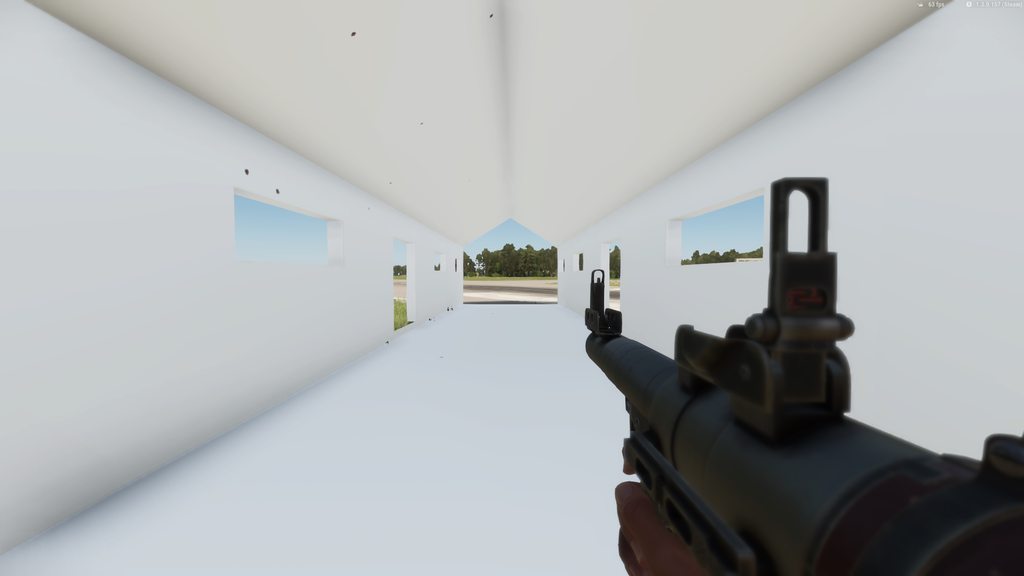
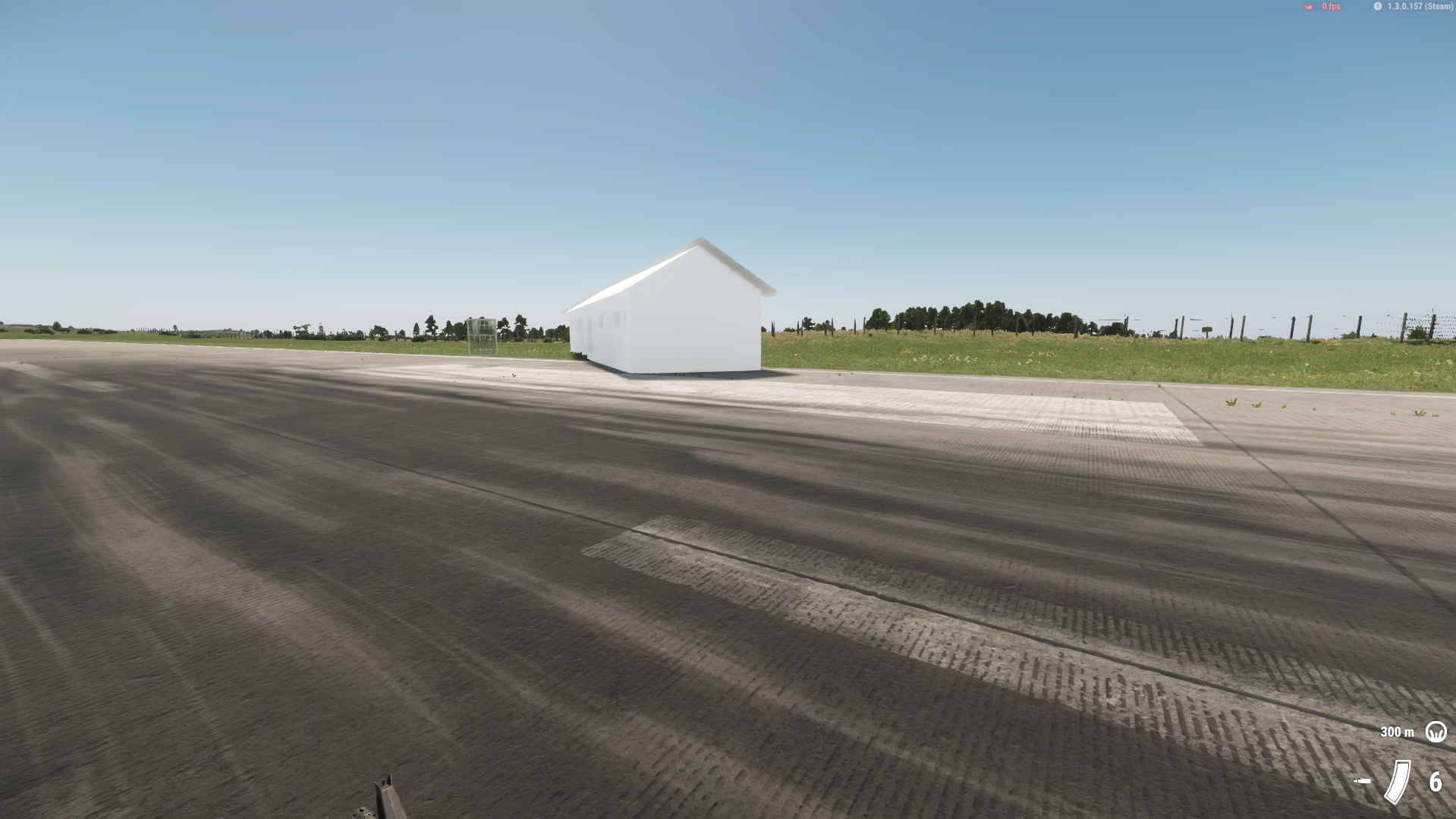
what do you do to fix it?
stray bridge
you checked face orientation?
looks like flipped faces, make sure they are the right way around
 fresh lion
I tried asking a couple times in textures, yesterday, which I thought was the right place. But I'm gonna try here too. Here's a copy and paste of my question there:
Hey, I'm new to this side of things, so be gentle 😉 is there a good tutorial for the export, import, and editing of the EDDS image files? my goal is I'm trying to put together a arsenal of modded weapons and I want to make a few green and yellow EDDS files for the overlay of battle use and damage. I'm not a huge fan that most modded weapons looks like some Chad just bought it at Cabela's 15 minutes ago. I want to Export a BI EDDS(probably the one for the M16 suppressor), for a reference start point and edit/resize it to match what I want. I Don't have the option to Duplicate to my folder so I know it's a different process, but I'm unclear on my next steps. Please and thank you
stray bridge
you cannot export base game textures
import is just drag and drop .tif or .png files into ur mod
fresh lion
stray bridge
you cannot export base game textures
So if I wanted to make an image that was like the green and yellow one they use for the nicks, marks, and wear, where would I learn to do that specifically. Im not a fan that a lot of modded weapons look like some Chad just bought it at Cabela's 15 minutes ago. These are supposed to be tools used by virtual "soldiers". I'd like my stuff to look battle tested rather than brand new
stray bridge
you can use eg substance painter to do ur texturing work.
But this is only possible for custom weapons, for proper texturing you need the mesh / the uv maps. Which you dont get from the base game weapons. You cant export those
fresh lion
stray bridge
you can use eg substance painter to do ur texturing work.
But this is only poss...
These are modded weapons. I've been swapping the base image and playing with settings and I'm pretty happy with my results. Except they look brand new. The original modded weapons and my version look like they've seen little to no action. One of the images in the EMAT for the vanilla, 5.56, sand stripe suppressor is a green and yellow image that contains the knurled, diamond pattern, stamped writing, and nicks and wear. I could integrate this kind of image easily because the weapons mod I use doesn't use or have the camo section in their EMAT. If I make a EMAT with the section I can make a pretty decent asset skin. But I'm lacking knowledge of the making the image for damage and wear with transparent parts and wear to add to my assets. If you know of, or think of any resources to go pick this apart and learn, Id be appreciative, I'm a fairly quick learner
stray bridge
fresh lion
These are modded weapons. I've been swapping the base image and playing with set...
google and youtube 
fresh lion
stray bridge
google and youtube <:hapyj:1349188088395726979>
I've tried. EDDS doesn't pertain to a specific file type. And as for the yellow and green image that hides certain parts of a background image, no idea what a proper name is for the image or if it's even yellow and green in other editors. Hard to use Google a lot when you're so new and know so little. Thanks though. I appreciate you, homie
shell hedge
Substance Painter
fresh lion
@shell hedge @stray bridge ahh, gotcha. I know that was said before. I'll look into it tonight. I appreciate you guys
surreal ore
fresh lion
I've tried. EDDS doesn't pertain to a specific file type. And as for the yellow ...
fresh lion
surreal ore
https://community.bistudio.com/wiki/Arma_Reforger:Textures#Texture_Properties
Rog, taking someone out to dinner in 20 minutes. Later tonight I'll do a pretty good deep dive and try to make some progress. I use the Biki for SF stuff more than anything, I should've looked there, my bad. I appreciate you guys
 quiet trench
Hi everyone, i need some help😭... I make some dev for 3D models and it's my first time on enfusion workbench . i want to upload a rules panel in my serv, so i make panel (3d model )with blender but when i go in the workbench i can't put my edds in my texture. The defaut is "creating new material to replace the place holder"
"Ressources : failed to retrieve relative path"
"Defaut : failed to create new material".
I'm french but i can speak in english.
if people can help me please 😭😭😭😭thank you
uneven vessel
what are these GEO_skin/noSkin bones used for on the UH1H Huey model?

 fallow osprey

 young wind
I imported fbx into the workbench now I have the .xob how can I make it into .et? didnt understand the wiki section about this one..
tidal latch
young wind
I imported fbx into the workbench now I have the .xob how can I make it into .et...
 mortal marsh
Anybody having collider setup issues with the Blender tools for Enfusion today?
mortal marsh
south topaz
When importing model from blender to workbench i keep getting missing parts of ...
I also had this issue yesterday and after checking my face orientation about 300 times I still had issues
Now I think about it, I wonder if there Blender addon has been updated and I havent updated it?
bitter grove
I think I remember someone saying there was an update for the blender addon. I would check that first
mortal marsh
How big is the size limit for objects? Ive created this HQ building in Blender but the colliders dont work if I import it all in one

By size limit, I mean specifically distance wise, not vertices or faces - Thats already way beneath the required limit
compact scarab
Can anybody give me an overview basic workflow of how to rig a new piece of clothing in blender with auto rig Pro for enfusion?
stray bridge
mortal marsh
How big is the size limit for objects? Ive created this HQ building in Blender b...
nothing the console tells you on import?
also if we talking about colliders, would be good you show them
mortal marsh
@stray bridge Yeah fair enough, my bad!
Nothing in the log 😦
Heres the collider and its associated stats in Blender

 last parcel
Split that building up and then reattach it with diffrent Prefabs in the editor instead, as having that many Colliders + that high of a polycount with just Colliders is only going to lead to performance issues, + you are going to have alot of more problems when creating the BSP for the building, with the Lightportals and Portal Volumes.
mortal marsh
Thanks for the advice mate 🙂 How did you manage it with your School Building? Seems thats a single xob?
last parcel
it had alot of less colliders then you have currently + lower in polygon LOD 0 is like 28k polygons, and the highest counted on my collider is 11k in total all around.as i think the max polycount for colliders is at 25k
also i took a hot min to import it when adding the BSP stuff.
mortal marsh
Good to know! Thanks for taking the time, much appreciated 🙏
mortal marsh
Hundreds of hours in Blender over the past few months and Ive only just learned you can 'walk' through your model 😐
shell hedge
The what
hexed sandal
mortal marsh
<@393508675047784448> Yeah fair enough, my bad!
Nothing in the log 😦
Heres ...
Sorry if I get confused @mortal marsh, wouldn't it be easier since the buildings are repeated, make them separate and at the end create a composition?
mighty bronze
mortal marsh
Hundreds of hours in Blender over the past few months and Ive only just learned ...
Are you talking fpv camera mode?
mortal marsh
hexed sandal
Sorry if I get confused <@365571422757584896>, wouldn't it be easier since the b...
Probably, sort of wish I had began with that in mind!
mortal marsh
mighty bronze
Are you talking fpv camera mode?
Yeah, I didnt realise you can use the camera like you might a freecam to get the 'first person' effect without having to scroll in to zoom
 stray bridge
mortal marsh
Yeah, I didnt realise you can use the camera like you might a freecam to get the...
stray bridge
mortal marsh
Yeah, I didnt realise you can use the camera like you might a freecam to get the...
press tab and you can actually „walk“ too
mortal marsh
mortal marsh
<@393508675047784448> Yeah fair enough, my bad!
Nothing in the log 😦
Heres ...
I eventually found the problem with this - Thought I'd post incase anybody ever searches for something similar.
So I was able to import the collider eventually as a single UTM (however inadvisable this might be)
The issue, it turns out, was that in using boolean modifiers to create doors & windows it had created a small amount of non-manifold areas, these were causing the collider to fail upon import (although the log wasnt stating this)
I fixed the issue by creating a new, very simple collider, comprised entirely of cubes with no knife projects or booleans used 🙂
 ornate walrus
Hey so im trying to add a custom fire hydrant model and i can walk right through it , I have a collider I've tried UBX and UTM with no success any tips?
 turbid moss
Add rigidbody component?
ornate walrus
turbid moss
Add rigidbody component?

I have these so far
so if i select static it works but my bullets go right through it
turbid moss
What collider layer u used in model?
 turbid moss
y
 chilly dragon
Like the collider preset. Eg propfireview
turbid moss
Both static and geometry enabled?
 ornate walrus
chilly dragon
Like the collider preset. Eg propfireview
ornate walrus
chilly dragon
Like the collider preset. Eg propfireview
what should i use in this case?
turbid moss
propfireview should be ok
shell hedge
You could save a lot of time by simply comparing your thing to a vanilla thing... check what colliders vanilla props use, what layers they use, and do your props like vanilla...
tidal latch
https://community.bistudio.com/wiki/Arma_Reforger:Prop_Creation#Creating_prefab also here is more info
 compact scarab
Anybody willing to remote into my PC and rig one piece of clothing in blender for me to show me how to do it.
I should be doing it on the Character_Weights_Template yes?
tidal latch
youtube also have quite a lot tutorials about transfering weights and rigging by hand
compact scarab
Thanks I had seen the helmet one but missed the vest one somehow
compact scarab
Yay breakthrough.
compact scarab
Is there a list of submeshes / body parts to hide somewhere?
Whats torso called? I tried torso and chest and not hiding it
shell hedge
Yeah in the vanilla character model
And in the identity config of the... faction or character I forget
compact scarab
nice ty
I looked on the import settings of the base character mesh but not on the prefab
shell hedge
Why import settings? Look at the mesh list
compact scarab
Thats what I meant. I didnt see submeshes on it but its early maybe i overlooked it
 compact scarab
Oh its in the LOD section thats why
ty

Is this where reference pose comes into play? Do I need to match it to the clothing?
shell hedge
I always rig in the default A pose
 halcyon dew
I am trying to import a new car model. Unfortunately all textures seem to be one sided? Exported the model from Blender.
compact scarab
halcyon dew
I am trying to import a new car model. Unfortunately all textures seem to be one...
There's an option for it on the material
Its called culling or something and you have to disable it for it to be double-sided
halcyon dew
Got it, thanks!
young wind
I have collider but no colision when player steps on nor hits

 young wind
hm wtf in diag it dosnt have any collision 
 shell hedge
gm_flatgrass
last parcel
becuse you haven't clicked on Model Geometry in the rigidbody.
young wind
Yep that was the issue, thought it was for using the mesh geometry itself, weird naming 
last parcel
well there is a wiki for a reason to help with this sort of stuff.
young wind
Anyone knows if there option to import fbx that have vertex paint without it effecting the model textures?
compact scarab
Anybody know how this happens so I can fix it?

exported from blender 4.2
gotta be some kind of record
tidal latch
you can open txo in txt file and see what is generating so much data
tidal latch
xob is binary form of txo
tidal latch
I'm not at work today but I remember this question being asked on Slack few times. I might check it in 2 weeks
 cold rune
Might be a dumb question but how do i set my custom LODs?
 stray bridge
cold rune
Might be a dumb question but how do i set my custom LODs?
stray bridge
cold rune
Might be a dumb question but how do i set my custom LODs?
look how base game did it, always a good idea to check that first
wicked dirge
cold rune
Might be a dumb question but how do i set my custom LODs?
check the wiki
dim nimbus
i would like to know how mine ingame gets triggered.
Attaching MT colliders (car wheel collision for example)to something onto character does not trigger mine when "smaking" mine with the thing.
Are these particular checks excluded with playable cahracters and only computed when vehicle goes over mines?
 rancid cape
Is there a way to adjust how a plate carrier sits on a character in enfusion or does that need to be done in blender?
compact scarab
What bone to use for pivot id for a tshirt?
faint viper
rancid cape
Is there a way to adjust how a plate carrier sits on a character in enfusion or ...
Blender when you link it to the armature
dark aspen
From my understanding it’s completely automatic depending on one’s graphics settings. Though you can change it manually according to the wiki
 paper mantle
Could you elaborate on how to use the decal entity?
bitter grove
what have i done wrong. i feel like i followed the wiki pretty well. i re did it and got the same result

 livid hull
bitter grove
what have i done wrong. i feel like i followed the wiki pretty well. i re did it...
livid hull
bitter grove
what have i done wrong. i feel like i followed the wiki pretty well. i re did it...
set the parent to the armature

this is for the collider but you get the general idea from here
bitter grove
my collider one should be set up correct and you mean in relations set my LOD0 one to parent armature?


@livid hull
i do that and it scales up and floats far away
 livid hull
ill send you some instructions on DM
spiral hedge
Hi guys. i have a small question to LODs. If i place Vanilla Characters, they get rendered up to 700m. On 800m i can only see the arms, but no more cloth items. If i now place a character with my cloth, the pants will not be rendered on 600m, so it looks like the char does not have legs 😄 The pants have 4 LODs. Do i need to add more LODs or is there a setting for this? Thanks and have a nice weekend
shell hedge
Do they have same amount of LODs as characters?
It might be switching LOD based on parent
sand pagoda
can be pixel size
spiral hedge
sand pagoda
can be pixel size
is there any info to this?
sand pagoda
spiral hedge
is there any info to this?
basically, treat it as multiplier of asset size in viewport, bigger pixel size, lower (LOD0 instead of LOD1, etc) LOD is loaded, also changes culling
 spiral hedge
Thanks, will check this
 buoyant depot
Hello, good day. I’m having an issue with a vehicle when importing the skeleton. When I import it, the vehicle in the prefab gets lifted (the wheels don't make contact with the ground). I’ve tried several things in Blender but haven’t been able to fix it. Does anyone know what the problem could be?
 leaden chasm
What may cause the objects to wobble and not settle down for a long time? These are vanilla with "static" unchecked, but i've also tried just making simple box model and it wobbles too. Tried some different layer presets, different rigid body settings, only thing which helps a little bit is setting linear and angular threshold to max, but that is unwanted and object still wobbles before becoming inactive. While say tree debris seem to not wobble at all.
shell hedge
does this happen on arland or everon or only on mptest?
wary inlet
leaden chasm
What may cause the objects to wobble and not settle down for a long time? These ...
tree debris has a damping I think, so that may be reason
leaden chasm
wary inlet
tree debris has a damping I think, so that may be reason
Tried parameter within rigidbody, tried as a separate component, same effect
leaden chasm
shell hedge
does this happen on arland or everon or only on mptest?
Tried on mptest and arland
leaden chasm
shell hedge
I have the same issue with my tonk
dayum
Actually just rechecked Arland and now it's fine, no wobble
Maybe it has something to do with default terrain surface material in mptest, or idk
leaden chasm
shell hedge
does this happen on arland or everon or only on mptest?
your tank also does that on arland and everon?
shell hedge
leaden chasm
your tank also does that on arland and everon?
omg ur right it's fine on arland
yippee
NO WAIT
leaden chasm
i'm almost sure that it was not fine before but wtf really
leaden chasm
shell hedge
it still wobbles but less
have you tried messing up with these? on arland it feels like it respects these settings more than on mptest
 shell hedge
No because the wreck model I based mine on was set to static
leaden chasm
shell hedge
No because the wreck model I based mine on was set to static
how is that even possible
what's your layerpreset on the wreck?
shell hedge
its exactly the same as BTR70_wreck prefab with swapped mesh
leaden chasm
shell hedge
its exactly the same as BTR70_wreck prefab with swapped mesh
do you have colliders in your swapped mesh?
i believe so, because otherwise it wouldn't be able to wobble
so what layerpreset is on your wreck collider?
leaden chasm
Ok, i'll go through world and terrain entities for arland and mptest and see if they have any different settings
HMMMMM, maybe that's the freaking issue?


Created simple terrain with 0 0 0 -- still wobble
Replaced default surface with Grass_02 -- still wobble
shell hedge
Mine wobbles on arland so its an issue in my mesh probably
leaden chasm
This is ridiculous how inconsistent it is
It is definitely has something to do with terrain, or combination of something in terrain and collider
shell hedge
BTR70 vanilla xob doesnt have this issue so I think I will just redo my collider later, dedicated wreck model maybe
 valid pendant
does anyone know how to fix the error that the crosshair is no longer displayed in the sight? i have followed the modding instructions but somehow it doesn't work
 leaden chasm
shell hedge
BTR70 vanilla xob doesnt have this issue so I think I will just redo my collider...
leaden chasm
shell hedge
BTR70 vanilla xob doesnt have this issue so I think I will just redo my collider...
Ok, i think i've found a pattern. At least for my case. So basically it wobbles when heightmap is perfectly flat (or unedited, or combination of both), if i make a hill even next to the area where tvs are falling they seem to stop wobbling
shell hedge
Strange that the BTR70 wreck doesnt wobble tho
leaden chasm
But on arland i did test on the airstrip and it also doesn't wobble. Maybe it has something to do with terrain grid/tile/size/whatever
leaden chasm
shell hedge
Strange that the BTR70 wreck doesnt wobble tho
So your wreck wobbles on both MPTest and Arland/Everon? If so where exactly did you test, in which area? I'll go drop some TVs in there.
shell hedge
Airfield, flat
leaden chasm
shell hedge
Airfield, flat
ok, before you redo your wreck, can i get the model, just the collider part, i'll test it
remote palm
valid pendant
does anyone know how to fix the error that the crosshair is no longer displayed ...
"no longer"? or is it just not displaying?
I think i had a similar issue once
 sleek forum
Anyone knows why are my fractured pieces not falling once I destroy a prop?

I inherited vanilla asset and just replaced spawned objects and main object mesh
remote palm
do you have proper geometries added? And did you reimport them once you have imported your asset?
sleek forum
what do u mean? my main object has collider if u mean that
remote palm
Yeah, mb 🙂
sleek forum
but when I destroy a prop, then spawned broken parts just stay in the air
sleek forum
nwm... I figured it out
 untold meadow
is there a size limit of objects to have geo lods?, asking since switching from arma 3 and objects cant be beyond ~70m and still have collision
 mint hollow
leaden chasm
Maybe it has something to do with default terrain surface material in mptest, or...
mint hollow
leaden chasm
Maybe it has something to do with default terrain surface material in mptest, or...
Yes MPTest terrain surface and very small flat terrain is not the best for physics test
livid hull
spiral hedge
Hi guys. i have a small question to LODs. If i place Vanilla Characters, they ge...
iirc for this in your clothes you can enable inherit visibility on the meshobject and that will use the same sizing distance as the character model
spiral hedge
Hey, is it possible to have two separated $rendertargets on the same model?
 midnight path
mint hollow
Yes MPTest terrain surface and very small flat terrain is not the best for physi...
midnight path
mint hollow
Yes MPTest terrain surface and very small flat terrain is not the best for physi...
why?
rancid cape
Just curious is it possible to make plate carriers that shape to the body or clothes? dosent the vanilla chest rigs stretch at certain points when wearing armor under?
midnight path
untold meadow
is there a size limit of objects to have geo lods?, asking since switching from ...
i have a few 200m X 200m terrain objects and they work fine with collision
i even tested a 800 x 800m one and it worked fine
bitter grove
inventory item not popping up after added it to inventoryitemcomponent, what am i missing?


also colliders are set up the same on these two( fire geo and metal 5mm) but the one on the left doesnt sound or look the same after shooting it

also no marks on these guys after headshots

 granite marsh
I'm current working on this building, I'm trying to set up everything similar to the buildings in-game can anyone explain to me how the UV set work, both UV set 1 and 2 are different.


 fading wren
Heey heey, I kinda need some expert 😄 I am very new with blender and the Enfusion engine, but I managed to create my first object, HOWEVER, it is a POSTER, but the borders arent transparent what did I miss to make it work properly?

To extra clarify I am talking about the blue ish windowish thing arounmd the poster

Original poster
 wary inlet
fading wren
Heey heey, I kinda need some expert 😄 I am very new with blender and the Enfusi...
wary inlet
fading wren
Heey heey, I kinda need some expert 😄 I am very new with blender and the Enfusi...
is that done on plane mesh? if it is poster your better off running decal
fading wren
wary inlet
is that done on plane mesh? if it is poster your better off running decal
Yeah I used a plane mesh. Oo, so I need to place a decal instead of a plane mesh? 😄
wary inlet
fading wren
Yeah I used a plane mesh. Oo, so I need to place a decal instead of a plane mesh...
yeah, I think there is a decal specific material, when you are in world editor just throw in a generic decal entity
if weird things continue to show up it could be a matter of your material textures, ensure you have opacity map and alpha in BCR is approximate roughnes value

 fading wren
In blender it works fine, in Arma reforger it keeps filling in the transparant gaps. Did I miss something?
 fading wren
Oke I have 0 clue how to fix this.
If anyone knows a solution that I am missing, please let me know! 🙂

 red sinew
fading wren
In blender it works fine, in Arma reforger it keeps filling in the transparant g...
red sinew
fading wren
In blender it works fine, in Arma reforger it keeps filling in the transparant g...
Kick me if I’m wrong, but your plane has a UV map, and part of that UV map is untextured. You can try remeshing your plane to the outline of the poster in orthographic view, UV > UV project > Smart unwrap, export and try again
midnight path
fading wren
Oke I have 0 clue how to fix this.
If anyone knows a solution that I am missing...
opacity map
 fading wren
midnight path
opacity map
fading wren
midnight path
opacity map
O thanks man! 😄 How do I make such an Opacity map for other posters and graffity I am porting? 🙂 Because I plan to export custom graffity and posters to increase the overal quality of my terrain
fading wren
red sinew
Kick me if I’m wrong, but your plane has a UV map, and part of that UV map is un...
I will see if that also works, thank you for the tip! 🙂 I am very new in porting objects and working in blender so every bit of help is much appreaciated! 🙂
midnight path
fading wren
O thanks man! 😄 How do I make such an Opacity map for other posters and graffit...
in the opacity map, white is visible, black is transparent
so just bring in your bcr to photoshop and edit it to make a opacity map
the value of white in each pixel 0-255 equals the amount of opacity
 dusty ember

 stray crater
granite marsh
I'm current working on this building, I'm trying to set up everything similar to...
stray crater
granite marsh
I'm current working on this building, I'm trying to set up everything similar to...
What exactly do you want to know about UV sets ?
fading wren
midnight path
in the opacity map, white is visible, black is transparent
Thanks for the tip, the poster works now (almost) as intended!
From a distance it looks good, but when you get closer you can see some greenish lines around it.
So I am almost there :D. I never used photoshop, I will instal photoshop tomorrow! 🙂


 midnight path
fading wren
Thanks for the tip, the poster works now (almost) as intended!
From a distance i...
midnight path
fading wren
Thanks for the tip, the poster works now (almost) as intended!
From a distance i...
cool 🙂 almost any modern image editing program will work, it doesnt have to be photoshop
fading wren
midnight path
cool 🙂 almost any modern image editing program will work, it doesnt *have* to b...
Man man, I am learning so much the last few days and since I want to expand on that.
But holy moly there are a lot of bumps in the learning cycle.
midnight path
fading wren
Man man, I am learning so much the last few days and since I want to expand on t...
the learning curve is steep but once you memorize a few things it gets alot easier
fading wren
midnight path
the learning curve is steep but once you memorize a few things it gets alot easi...
Good to know! Was already affraid that is like a lifelong uphill battle xD.
Cheers for the help tho, I am now trying to recreate the Opacity map of the poster (like you did).
fading wren
I think I did it! 😄 I think I remade it!

@midnight path , why does your Opacity have those extra details in it? (the scratches) mine looks way to clean compared to yours
 keen canyon
Where is this found? Is it important to do when placing Signs?
Reason I’m asking is I just made my own sign from Blender and once I publish to Workshop, they are no longer found in the map.
 keen canyon
fading wren
Do you mean this?
keen canyon
fading wren
Do you mean this?
I tried adding some components to make it act like metal but bullets go right through it.
mighty bronze
Okay
Who the hell keeps using that funny polish name for all the AI
 amber totem
Hello everyone, I am currently working on getting custom player models into my mod. But the new model doesn't exactly align with the provided bones from the Reforger Armature.
When I (using Blender) adjust the position (in Edit Mode) of the armature bones that need changing, they get snapped back at the very end in the Enfusion Tools when I have my prefab ready. (I already guessed this would probably happen)
Does anyone know how to adjust the default bone positions, without screwing over animations etc.?
I have a feeling I need to override an animation skeleton defined somewhere in the files, but I have no clue as to where.
 calm karma
How does the WaterErase material work. Is there some extra step I need to do besides making a sealed box where water shouldn't go and applying the material to it?
amber totem
Usually works like that in games yeah. Can't confirm though. But game engines check which area the volume fills, and creates a mask based on it
calm karma
amber totem
Usually works like that in games yeah. Can't confirm though. But game engines ch...
Does the mesh have to be inside out?
Never mind. Just tried flipping the normals and it works now
granite marsh
stray crater
What exactly do you want to know about UV sets ?
Is this something I set up in blender when I'm UV unwrapping, do I even need to have 2 UV set?
stray crater
granite marsh
Is this something I set up in blender when I'm UV unwrapping, do I even need to ...
You must have made the mistake and set two UV sets I guess. On the paper, you don’t NEED it, but it’s a real plus if you learn how to use it on Reforger
last parcel
You do need it for buildings that uses the maskmap system...
stray crater
last parcel
You do need it for buildings that uses the maskmap system...
That’s the real plus I was talking about 🙂
 deep dagger
granite marsh
I'm current working on this building, I'm trying to set up everything similar to...
deep dagger
granite marsh
I'm current working on this building, I'm trying to set up everything similar to...
Hii, could you please point me into the direction of importing buildings to reforger? Thanks!
granite marsh
deep dagger
Hii, could you please point me into the direction of importing buildings to refo...
 dawn cargo
Hello just wondering how do you make it where you can place a custom sign in game master
stray bridge
dawn cargo
Hello just wondering how do you make it where you can place a custom sign in gam...
dawn cargo
stray bridge
https://community.bistudio.com/wiki/Arma_Reforger:Asset_Browser_Mod_Integration
Ok when i place it i can't move it do you know how to fix that?
 midnight ore
If anyone could point me in the right direction for sorting this, it’d be appreciated.


 amber totem
midnight ore
If anyone could point me in the right direction for sorting this, it’d be apprec...
amber totem
midnight ore
If anyone could point me in the right direction for sorting this, it’d be apprec...
There could be a few things wrong here, but it's difficult to determine without seeing all details:
- Did you move one of the bones from the Armature? (You are not allowed to, this breaks things 😦 )
- Did you make sure to Apply the transforms of your object BEFORE adding the modifier link to the Armature?
- Are the weights painted to right bones? Judging the type of mask, I think you could easily get away by Weight painting/assigning it all to the Head bone
midnight ore
amber totem
There could be a few things wrong here, but it's difficult to determine without ...
Not touched armature , Selected mask & armature - applied transforms too , transfered weights from sample to new mesh model
amber totem
I haven't done weight transfers myself yet, but only manual skinning. Could you try that?
I am also happy to hop into a call with you to try and figure things out with you sharing your screen
midnight ore
amber totem
I haven't done weight transfers myself yet, but only manual skinning. Could you ...
I popped you a dm
compact scarab
I've got the clothing rigging figured out in blender, but trying to figure out how to get it working in enfusion properly. If anybody can point me in the right direction would be awesome.

And just curious why is the sample character template not in A pose by default?
 compact scarab
And if I put the character in A pose and then parent the shirt to the armature it does this.
Where am I screwing up
 rancid cape
How many polys is to many polys when it comes to vehicles in arma reforger, what range should i be in to where it still looks good and not dated?
midnight path
rancid cape
How many polys is to many polys when it comes to vehicles in arma reforger, what...
i keep mine under 300k
the sample car is like 40k
high detail vehicle usually 250-350k
rancid cape
So my origin in blender is set to center-ish mass of my object, why is it that in the workbench moving and rotating it is way offset? How do i fix it?

 last parcel
But the object in blender is not.
stray bridge
rancid cape
So my origin in blender is set to center-ish mass of my object, why is it that i...
Think of the virtual "floor" in blender (0,0,0) as of the floor in reforger, so place it just on 0
rancid cape
stray bridge
Think of the virtual "floor" in blender (0,0,0) as of the floor in reforger, so ...
Aaaaha thanks!!
 glossy prairie
How do I open an empty map in Infusion?
dawn cargo
Does anyone know how to make it where you can move your sign bc when i place it its just stuck can't move it or delete it
 quiet ledge
glossy prairie
How do I open an empty map in Infusion?
quiet ledge
glossy prairie
How do I open an empty map in Infusion?
MP_TESt is a good flat testing map
surreal ore
compact scarab
https://youtu.be/Uk9bgj5lr5Y
I've got the clothing rigging figured out in blend...

"Leather Jacket" (https://skfb.ly/6TxTA) by zacharykozak is licensed under Creative Commons Attribution (http://creativecommons.org/licenses/by/4.0/).
 errant girder
can somebody help me with this? as soon as i add a amature to this, its going crazy in enfusion engine, i tryed everything i could think off
every other part on this gun works perfectly
surreal ore
Apply transforms
mighty bronze
In object mode you effectively wanna make sure everything shows up as 0 location, 0 rotation, and 1 scale
 compact scarab
surreal ore
https://vimeo.com/1080682263?share=copy
compact scarab
surreal ore
https://vimeo.com/1080682263?share=copy
Thank you very much man appreciate it.
errant girder
mighty bronze
In object mode you effectively wanna make sure everything shows up as 0 location...
thats actually the case, also for all other parts
 rancid cape
How do i hide the names on the bones?
 errant girder
rancid cape
How do i hide the names on the bones?
errant girder
rancid cape
How do i hide the names on the bones?
go to object mode first
 rancid cape
errant girder
go to object mode first
rancid cape
errant girder
go to object mode first
Hmm that tab aint there for me
 errant girder
rancid cape
Hmm that tab aint there for me
errant girder
rancid cape
Hmm that tab aint there for me
select a bone in object mode, then this tab should be visible
rancid cape
errant girder
select a bone in object mode, then this tab should be visible
Aaah thanks!
rancid cape
Where the hell did i go wrong? It as if its not connected to the skeleton, i have armature set up like it showed on the biki and i weight painted using the samples from the biki, i exported and imported also following the biki and the prefab was made duplicating the RHS JPC swapping out the needed .xobs

 surreal ore
rancid cape
Where the hell did i go wrong? It as if its not connected to the skeleton, i hav...
surreal ore
rancid cape
Where the hell did i go wrong? It as if its not connected to the skeleton, i hav...
 sage zodiac
Did you ever fix this?
 lucid aspen
any reason why my lvl 9000 material isn't working with helmets? all my colliders are set up right and configs just lost here ant ideas?
surreal ore
lucid aspen
any reason why my lvl 9000 material isn't working with helmets? all my colliders...
Your colliders can't be set up right if they aren't working correctly.
lucid aspen
here's the colliders wroking
here is the config with the OP material applied to the helmet importing body armour is easy so helmets should be the same thing, i even have a opscore manable and ess crossbow glasses working with the op material but the helmet is the only thing that doesn't work for some reason


so 100mm concrete stops everything on the helmet so fixed i guess
bitter grove
surreal ore
Your colliders can't be set up right if they aren't working correctly.
In theory, if you but a box over a helmet and scale it down to the rough size, label it UBX_whatever… would that have issues with collision?
surreal ore
bitter grove
In theory, if you but a box over a helmet and scale it down to the rough size, l...
You don't wanna use a box for an organic shaped object
You'll have floating impact particles
bitter grove
So you’d want to use a trimesh?
bitter grove
Do you make your trimeshes by duplicating and decimating?
lucid aspen
i'll do a fast video
it's pretty easy you can do that for body armour and any addition armour for helmets
 bitter grove
surreal ore
No, preferably you'd want to use a primitive
bitter grove
surreal ore
No, preferably you'd want to use a primitive
So a sphere would be best? For a helmet at least
bitter grove
lucid aspen
Is that a free addon? Simple colliders?
lucid aspen
if you use a sphere you'd not be able to head eyes someone
yes
just follow them steps there all under 150 faces so you'll be fine
bitter grove
Not able to delete the bottom have of sphere and add a face to it? Or would that ruin the integrity of the collider
Half
lucid aspen
i mean you could do it like that but i'm not sure tbh
surreal ore
UCX is the best bet
You wanna use the simplest collider possible
I had it backwards actually. Apparently sphere is the best performance wise
lucid aspen
lucid aspen
here's the colliders wroking
it's really up to him the default helmet collider has more faces then the one i just did
bitter grove
Where in enfusion can I enable the collider view like that
quiet ledge
bitter grove
Where in enfusion can I enable the collider view like that
alt numpad 6
compact scarab
surreal ore
https://vimeo.com/1080682263?share=copy
Does doing multiple clothes in the same blender project work do you know? I got one setup working but trying a 2nd garment in the same blender project can't seem to get working. Just curious if you know if that causes issues.
surreal ore
compact scarab
Does doing multiple clothes in the same blender project work do you know? I got...
As long as you're doing everything correctly it doesn't matter.
compact scarab
Cool ty
surreal ore
The only thing that matters is the exported fbx
bitter grove
why would this be doing this on game? seems low enough poly and everything's even


seems like its only at the front too. happens on another helm model too

 rocky sedge
bitter grove
rocky sedge
bitter grove
Check the weights, Parts of it might be tied to the face bones
gusty hatch
yes. I use a single file with a single soldier dummy and armateur for a entire factions kit
to clarify, it's fine. You don't need to duplicate the armateur for each item you export. You only need the basebody to copy weights and shouldn't be exporting it anyway, unless I'm misunderstanding what you are doing.
compact scarab
gusty hatch
yes. I use a single file with a single soldier dummy and armateur for a entire ...
Nice thanks appreciate it.
 sick shard
Hello I was wondering if anyone knows how find this #AR-Backpack_IIFS_FieldPack_Name I would like to create own
 olive fern
Hi, I have a problem with collision on my custom props.
I followed the tutorial from piano man about creating a foxhole, everything worked well but everytime I close and reopen my project, my foxhole looses its collision and idk why.
foxholes which are placed whilst the workbench was running are working fine in the playtest mode but as soon as I close the project and reopen it again and then try to playtest it, they have no collision no more.
and yes I turned them into a prefab with rigid body component and I added the layers like shown in the video
bitter grove
rocky sedge
Check the weights, Parts of it might be tied to the face bones
yeah im not sure why this is happening


 rocky sedge
bitter grove
yeah im not sure why this is happening
rocky sedge
bitter grove
yeah im not sure why this is happening
Go trough all the weights and see if anything else but head has weight on the main part of the helmet.
bitter grove
I did and then deleted everything and reimported/ created a new prefab and it fixed it. thankyoui for your help!
 flint smelt
Im really new to blender I need help on adding collisions is there anybody that wants to give me a step-by-step guide on how to add collisions to a model


 olive fern
flint smelt
Im really new to blender I need help on adding collisions is there anybody that ...
olive fern
flint smelt
Im really new to blender I need help on adding collisions is there anybody that ...
copy mesh -> decimate it a bit -> rename it with UTM_ infront and export everything together
flint smelt
I dont know if I did the mesh right but I did the collider setup and I got this error is there any way I can shoot this model out to someone to add Collision on to it
 faint viper
as ulup said thats the best and easiest way to do it. You dont need the addon to export it, even if u do it normally it will recognize it and work
shell hedge
But decimate it properly. I've seen mods that add static props that have UTM colliders with 10000 faces and walking over them/touching them reduces my FPS every time.
I think more colliders that are simple is better than fewer that are more expensive The other way around. Fewer complex is better than more simple
Will double check
olive fern
Hi, I have a problem with the consistency of my custom model.
I decided to follow pianoman's foxhole tutorial and everything went fine but when restarting my workbench and going back into playtest mode my custom props have lost their collision.
Interestingly, prefabs placed in the same instance the workbench was started, HAVE COLLISION, like .. WHAT?!
https://prnt.sc/_O0Qazg-8xoq

the same problem applies to a few more models I made after this one aswell.
 next crown
can anyone help me out with vehicles i have 2 models i've made but not sure where to go from there when modding in a new vehicle do i have to have a duplicate bone rig like base arma vehicle or can i duplicate and replace the xob and make it work like that as of now i duplicated a humv and and replaced the xob with my vehicle and got the truck to turn on but it will not drive
 astral hull
next crown
can anyone help me out with vehicles i have 2 models i've made but not sure wher...
astral hull
next crown
can anyone help me out with vehicles i have 2 models i've made but not sure wher...
@midnight path
midnight path
next crown
can anyone help me out with vehicles i have 2 models i've made but not sure wher...
best way is to make your own rig but with the same names vanilla vehicles use
and build the vehicle with a vehicle_base, swapping the .xob has never worked correctly for me and is a headache
next crown
Roger so better to build my own bone rig to the names of armas bone rig
 loud mist
made a backpack but it has no physics at all wondering how do i add bones to it so it can get physics is there like a certain file i can download and apply it in blender or is it something else
burnt temple
How to turn off this wind animation preview when editing this asset?
 stray bridge
burnt temple
How to turn off this wind animation preview when editing this asset?
stray bridge
burnt temple
How to turn off this wind animation preview when editing this asset?
set the material to this basetree material or whatever, top right a bit the the left change class button.
If thats done scroll alsmost all the way down there is settings like stiffness
sick shard
olive fern
Hi, I have a problem with the consistency of my custom model.
I decided to follo...
I'd follow BI examples as there a lot better also I'd get two addons for blender called simple collider and LOD generator very good and simple tools that's makes it easy and faster to import less messing around todo only thing with simple collider you need todo is in it's settings under trimesh add UTM and that's about it
 strong burrow


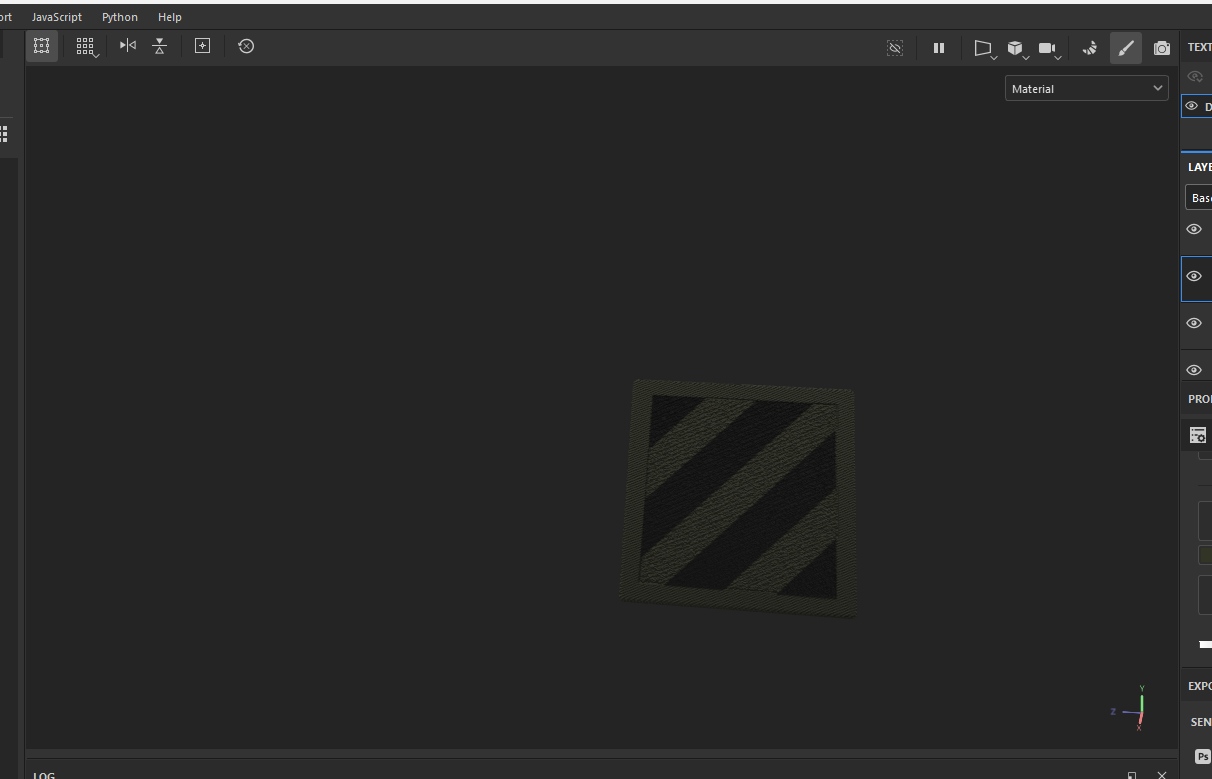 stray bridge
no
 young wolf
When I drop my model weapon it goes through the map but it doesn't do that in my test map? I have 2 colliders a weapon and a fire geometry
remote palm
young wolf
When I drop my model weapon it goes through the map but it doesn't do that in my...
Have you reimported your model so that your colliders are actually registered?
glossy prairie
quiet ledge
MP_TESt is a good flat testing map
How the download this?
quiet ledge
glossy prairie
How the download this?
 stray bridge
glossy prairie
How the download this?
stray bridge
glossy prairie
How the download this?
no need to download it
compact scarab
How are LOD's handled when rigging / skinning ? Do I need to parent each lod to skeleton in blender? And copy weights?
glossy prairie
stray bridge
no need to download it
Thx
glossy prairie
quiet ledge
Thx
glossy prairie
Why is this happening?

 astral hull
compact scarab
How are LOD's handled when rigging / skinning ? Do I need to parent each lod to ...
astral hull
compact scarab
How are LOD's handled when rigging / skinning ? Do I need to parent each lod to ...
Yes
remote palm
glossy prairie
Why is this happening?
Is your magazine at 0,0,0? show it pls
young wolf
@remote palm found what it was, one of the colliders was registered as a fire geometry instead of fire view
compact scarab
astral hull
Yes
Ty
cold rune
loud mist
made a backpack but it has no physics at all wondering how do i add bones to it ...
Yes the bones can be downloaded off the wiki page, use the model to transfer weights.
loud mist
cold rune
Yes the bones can be downloaded off the wiki page, use the model to transfer wei...
I done that added the bones and transferred the weight but I am still getting no physics on the bag
loud mist
glossy prairie
Why is this happening?
Most likely where ur magazine is positioned u can tweak it to fit how u like
cold rune
loud mist
I done that added the bones and transferred the weight but I am still getting no...
Have you tried to shift drag the bag into the armature layer? That worked for me.
loud mist
like the model itself on blender
cold rune
Yea
loud mist
wait how just drag it under armature
cold rune
There should be a layer called armature, find you bag in the layers tab and left shift click and drag the bag layer into the armature layer in blender
I'm at work rn so could include screenshots later
loud mist
cold rune
There should be a layer called armature, find you bag in the layers tab and left...
done that exported it to arma went to reimport so i could get the bones working now my arma tools crashes everytime i boot it
cold rune
loud mist
done that exported it to arma went to reimport so i could get the bones working ...
That's odd, never had that problem
loud mist
cant even get back into my mod now
keeps crashing
went and deleted the model fbx through my actual files on file explorer but its still doing it
glossy prairie
remote palm
Is your magazine at 0,0,0? show it pls
Thx
remote palm
glossy prairie
Thx
Was it the fix? 😄
cold rune
loud mist
went and deleted the model fbx through my actual files on file explorer but its ...
is the way i got it to work in game as you see my vest is in the same layer as armature after it was painted then i exported it and ticked export skinning befor reimporting


idk why you tools would be crashing
loud mist
its weird
loud mist
cold rune
is the way i got it to work in game as you see my vest is in the same layer as a...
as soon as i clicked re import for skinning
 summer sierra
hey is there any sample weapon to show where mags on Guns and pistol are suppose to align in blender?
wooden wolf
Anyone know how I can fix these invisible arms?
 stray bridge
wooden wolf
Anyone know how I can fix these invisible arms?
stray bridge
wooden wolf
Anyone know how I can fix these invisible arms?
thats most likely the setting of „meshes to hide“ here „arms“ or whatever its called. Probably L_Arm and R_Arm. Somewhere in a component, begin with the clothcomponent
*baseclothcomponent
calm rune
wooden wolf
Anyone know how I can fix these invisible arms?
I wouldn’t work on those clothing items. RHS will soon put out an update and none of the clothing I created will be in it.
burnt temple
can you check the tris count for trees that come with the game?
I'm making custom trees but wonder what would be good tris number
solar heron
I have a problem with my destructible model ... i used the original mailbox prefab for this and switched the models witch mine. but when the mailbox gets destructed only the pole is spawned... the other 2 elements are not laying around. whats the problem here? i used trymeshes for the collision


 stuck kraken
solar heron
I have a problem with my destructible model ... i used the original mailbox pref...
stuck kraken
solar heron
I have a problem with my destructible model ... i used the original mailbox pref...
Have you seen the destruction? For example on traffice signs if you shoot on them they fall off and then disapear after a few seconds.
solar heron
I tried with a grenade and via lightning strike.... no parts to see. i also changed the lifetime to 10 seconds minimum. Its a little weird because i have a verge post model wich i working more or less correct.
stuck kraken
solar heron
I have a problem with my destructible model ... i used the original mailbox pref...
You want a destruction more like a warning sign where the part on the pole is falling off. on the original postofficebox the model is changed against a destructed one. In opposite to that look for example on a warning sign (SignAheadOnly_01_pole.et). Here the et consists of a pole and a dedicated sign (SignAheadOnly_01.et)
solar heron
stuck kraken
You want a destruction more like a warning sign where the part on the pole is fa...
i found out what was wrong... i need to put the models inside the red SCR_Destructible Entity and not in SCR_DestructionMultiphaseComponent
 calm rune
burnt temple
can you check the tris count for trees that come with the game?
calm rune
burnt temple
can you check the tris count for trees that come with the game?
If you are making trees for the game then I assume you own it. If you own it just load up the work bench and look for the tree model lol