#enfusion_model
1 messages · Page 19 of 1
 fluid fern
 nocturne quartz
yeah buildings are all low poly, its rare that you need to bake down stuff for a building
 rancid cape
Making them in blender, uv mapping and textures and the rest of whats needed for a game ready asset.
 uneven vessel
rancid cape
Making them in blender, uv mapping and textures and the rest of whats needed for...
uneven vessel
rancid cape
Making them in blender, uv mapping and textures and the rest of whats needed for...

YouTube
I would say, making whole buildings is difficult and stretches quite a range of different skills - try to think about a smart way to build up your skills whilst making a set of progressively more difficult objects, e.g. starting with a road sign, progressing to a bench, then a bus stop, then a shed, then a small house etc
 sly bridge
nocturne quartz
yeah buildings are all low poly, its rare that you need to bake down stuff for a...
sly bridge
nocturne quartz
yeah buildings are all low poly, its rare that you need to bake down stuff for a...
not really
 fossil fern
Good morning, i have a Question and pls excuse me if iv missed it in the Docs been studying up on modding in Enfusion for current day 5...
When i am exporting my Buildings from Blender into Enusion, will i be exporting them as modules or as prefab?
 leaden chasm
Is there any drawcall-related debug tools in workbench?
 shell hedge
depends
try diag menu > statistics > meshobject or something like that you can see how many meshes and faces you have on screen
 stray bridge
fossil fern
Good morning, i have a Question and pls excuse me if iv missed it in the Docs be...
stray bridge
fossil fern
Good morning, i have a Question and pls excuse me if iv missed it in the Docs be...
you will get a mesh (.xob)
fossil fern
Awesome thank you!
sly bridge
@dire dirge #creators_recruiting
 bold gorge
Has anyone had issue with your colliders not importing at all?
I am making a weapon and my UTM collider imported just fine but my UCX collider has not imported and will not I’ve named it correctly
Capitolized. UCX_body
Anyone know why this collider is not importing am I missing something?
figured this out you need to make your colliders convex
 surreal ore
bold gorge
figured this out you need to make your colliders convex
surreal ore
bold gorge
figured this out you need to make your colliders convex
Yes, if you use the prefix UCX_
bold gorge
okay I have my bones and I have then assigned and parented why are they still showing as plain axis instead of bones
surreal ore
bold gorge
okay I have my bones and I have then assigned and parented why are they still sh...
They have to have something weighted to them to be "bones"
leaden chasm
If say i have 32 different tree models, what might be pros and cons regarding atlasing the last LODs into single texture vs separate textures for each model, performance-wise?
shell hedge
atlas wins as long as you expect them all to be very common on your terrain
however
this is getting into micro optimization level
bold gorge
surreal ore
They have to have something weighted to them to be "bones"
Weight is already added it’s at 100percent for each vertex group
I did 100 percent as a test il smooth the weights later to somthing better
 valid zealot
very stupid question but: is it possible/theoretically desirable to create a model in enfusion and export it back into P3D for the sake of an easier workflow to learn?
surreal ore
valid zealot
very stupid question but: is it possible/theoretically desirable to create a mod...
You don't "create models in Enfusion"
valid zealot
well, create in blender for enfusion
surreal ore
The model types for Enfusion and RV are completely different
The workflow isn't the same.
valid zealot
I'm aware - I can see you can convert one way (somewhat) but am curious as to the other direction
surreal ore
Write a blender plugin to convert an "Enfusion" FBXs data to RVs P3D data
valid zealot
makes sense, cheers
surreal ore
The modeling workflow for RV is way more documented than it is for Enfusion. Just learn the workflow.
 wicked dirge
I'm confused as to the purpose of this exercise though
surreal ore
wicked dirge
I'm confused as to the purpose of this exercise though
I think he wanted to create models for reforger, and then export/convert them to P3D. As opposed to just creating models for RV.
 normal raft
How do i duplicate a xob?
surreal ore
normal raft
How do i duplicate a xob?
Why?
normal raft
Tepache helped me with it, dont worry
surreal ore
normal raft
Tepache helped me with it, dont worry
I am worried, if you're "duplicating" xobs, you're stealing someone else's IP. And no one here appreciates that.
normal raft
I just needed help with retexturing the pasgt, but im not good with that stuff
surreal ore
Regardless, "duplicating xobs" sounds like you want to rip assets. No one here wants people doing that. Not mod creators or B.I.
normal raft
I understand
 delicate condor
valid zealot
I'm aware - I can see you can convert one way (somewhat) but am curious as to th...
delicate condor
valid zealot
I'm aware - I can see you can convert one way (somewhat) but am curious as to th...
There is direct P3d export in blender with Arma toolbox addon. Absolutely no need to do any kind of conversion shenanigans inbetween. Also technical requirements are different so there isn't anything useful in such conversion.
bold gorge

Issue with the bones not showing after export
anyone in here ever rig a weapon my skeliton is not importing and its weight painted and parented vertex groups are assigned im not sure what im doing wrong here
 steep marsh
bold gorge
https://youtu.be/tX84RGYau6A
steep marsh
bold gorge
https://youtu.be/tX84RGYau6A
You need to change something in the model settings. "Export Skinning" or/and "Export Scene Hierachy"
steep marsh
You need to parent the model itself to the bones and assign the part to the right bone
https://www.youtube.com/watch?v=VyXbwzvfVog&list=PLW_2sDEfasH1FfrJgHpyUviFuC15CP_Ih&index=1 i worked with that tutorial
surreal ore
Just give the model an armature modifier and choose your armature
 fathom bolt
bold gorge
https://youtu.be/tX84RGYau6A
fathom bolt
bold gorge
https://youtu.be/tX84RGYau6A
model is from stalker ?
 granite marsh
any idea what i need to fix to keep the camera from going through a building wall in 3rd person
stray bridge
granite marsh
any idea what i need to fix to keep the camera from going through a building wal...
use buildingfireview collider instead of whatver ur using rn because thats the wrong one
 woven meadow
fathom bolt
model is from stalker ?
woven meadow
fathom bolt
model is from stalker ?
Why do you think it’s from stalker lmfao
granite marsh
stray bridge
use buildingfireview collider instead of whatver ur using rn because thats the w...
ok so change the firegeo to buildingfireview!
fathom bolt
woven meadow
Why do you think it’s from stalker lmfao
"STALKERPROJECT" and that a Grauss gun
woven meadow
fathom bolt
"STALKERPROJECT" and that a Grauss gun
I’m pretty sure that’s a m249 lmao
Nvm just looked again Fr looks like the fallout gauss gun though…
fathom bolt
Yes it can be fallout too cause there is too many polygons for stalker i think
delicate condor

bold gorge
fathom bolt
model is from stalker ?
Yes the actual model is from scetchfab but its for stalker
its not coming tho i cant figure out the damn skeliton bs
stray bridge
granite marsh
ok so change the firegeo to buildingfireview!
yep
granite marsh
thanks!
 surreal oracle
not sure where to put this but does anyone have some free time to like go over vic modding ? ive looked at the wiki and im bit lost
delicate condor
surreal oracle
not sure where to put this but does anyone have some free time to like go over v...
best to write down your question here and people usually reply if they can help
surreal oracle
imm having issues w colliders
sly bridge
surreal oracle
imm having issues w colliders
can you be more precise?
surreal oracle
i have some colliders set to fire view and fire geo as i red from the wiki

i followed the material base of the humvee
id jus like to bele to not walk thru it
shell hedge
vehicles in this game have more types of colliders than those two
check the hummvee xob
surreal oracle
just the base xob?
shell hedge
ya u can double click it to preview then go to colliders
delicate condor
surreal oracle
i have some colliders set to fire view and fire geo as i red from the wiki
Uu fancy looking mech! do we have any better pics?
surreal oracle
delicate condor
Uu fancy looking mech! do we have any better pics?
once i figurre out my collider issue ahaha and its low poly even for reforger atm
surreal oracle
for scale yh one of the legs is abit off
 shell hedge
red so it goes faster
surreal oracle
shell hedge
red so it goes faster
o course
fluid fern
I'm spinning, I don't understand why when I put the collider in buildingfireview, like this, my car can't pass the rail!
 surreal oracle
fluid fern
I'm spinning, I don't understand why when I put the collider in buildingfireview...
surreal oracle
fluid fern
I'm spinning, I don't understand why when I put the collider in buildingfireview...
least ur colliders work lol
fluid fern
surreal oracle
least ur colliders work lol
It's not my first object, but I don't understand why it blocks! I even tested it with a simple square, not necessarily very high, but it doesn't fit (I compared the height with the wolf rails).
stray bridge
fluid fern
I'm spinning, I don't understand why when I put the collider in buildingfireview...
whats the goal here? To drive on the track or „trough“ it so it has no collision
surreal oracle
fluid fern
It's not my first object, but I don't understand why it blocks! I even tested it...
i did that used a basic cube got same results
fluid fern
stray bridge
whats the goal here? To drive on the track or „trough“ it so it has no collision
To have a colission on the rails
stray bridge
fluid fern
To have a colission on the rails
i assume you setup the rigidbody?
surreal oracle
stray bridge
i assume you setup the rigidbody?
feel like im missing that?
stray bridge
surreal oracle
feel like im missing that?
without rigidbody component + setup you wont have collision out of thin air
surreal oracle
stray bridge
without rigidbody component + setup you wont have collision out of thin air
ite imma take my stuff n throw it in the dumpster
is it a blender thingg or enfusion component
surreal oracle
alrighty might be wrongg asking here but alas i cant actually add components to said prefab?
stray bridge
show me
 surreal oracle
stray bridge
show me
surreal oracle
stray bridge
show me
you are a life saviour fml the component takes the layers and figures out the collisions from it?
stray bridge
now tick model geometry box and static if you want it static
surreal oracle
still nthn
stray bridge
show me again please
 stray bridge
what is greyed out? That looks fine to me. Try static just for the testing rn
so both ticked
I assume you want the mech do walk later on
surreal oracle
i mean the apply to prefab button is greyed out and cannot actually aplly components to said prefab and yh itll have kinematics so i guess i tick the kinematic box?
stray bridge
no dont tick it yet haha
you cannot apply because its not a prefab yet. Thats smth to worry about next but collision should work without it
surreal oracle
okay cool so its a last to add thing
stray bridge
If you dont know how to setup a prefab you should really go to the basic wikis again my guy
surreal oracle
yh tru
fluid fern
Ok I can't explain it but I reimported, 1,2 then a 3rd time and it passed, without changing my rigidbody, imcomprehansible
fluid fern
The BOXVOLUME can't be a round one?
 astral hull
fluid fern
The BOXVOLUME can't be a round one?
astral hull
fluid fern
The BOXVOLUME can't be a round one?
No
fluid fern
astral hull
No
It's strange, though, because you can create round volumes on reforger, so why shouldn't it work on boxvolumes?
fluid fern
astral hull
It’s only for making a box
Okay, but how do I do this when I have a cylindrical piece?
astral hull
fluid fern
Okay, but how do I do this when I have a cylindrical piece?
Are you doing light probe stuff?
fluid fern
astral hull
Are you doing light probe stuff?
How do you mean?
astral hull
fluid fern
How do you mean?
What is this for?
fluid fern
If you see my object clearly, I've created a tower with a rectangular piece inside and a round piece above. For the first box volume I need a cylinder, for the 2nd a ractangle.
The first one doesn't matter
 surreal ore
fluid fern
If you see my object clearly, I've created a tower with a rectangular piece insi...
surreal ore
fluid fern
If you see my object clearly, I've created a tower with a rectangular piece insi...
Box volumes for probes have to be boxes. Not sure how that's unclear. A box is a box is a box. You can't make a cylinder a box volume.
fluid fern
surreal ore
Box volumes for probes have to be boxes. Not sure how that's unclear. A box is a...
oh SPHVOL_n for this
fluid fern
surreal ore
Box volumes for probes have to be boxes. Not sure how that's unclear. A box is a...
" (even for SPHVOL create box shape. It will transform to sphere during import in engine. "
It doesn't work for me, I've renamed my square (even for SPHVOL_01) and I still have problems when I want to import it.
surreal ore
fluid fern
" (even for SPHVOL create box shape. It will transform to sphere during import i...
Did you give it a material named dummyvolume?
fluid fern
surreal ore
Did you give it a material named dummyvolume?
Yep yep, maybe I need to spline my utm with the first part in UTM (rectangle) and UCL for the other part?
surreal ore
The resolution and colliders aren't the problem if the Volumes aren't importing
resolution lods*
fluid fern
RESOURCES (E): ExtractVolumeFromMesh(): Failed to extract volume, too few plane pairs! 2 plane pairs, 1 free planes
RESOURCES (W): Cannot extract probe volume SPHVOL_01!
surreal ore
Yeah, that's a problem with the volume, nothing else
fluid fern
surreal ore
Yeah, that's a problem with the volume, nothing else
And yet it's a simple square in blender with the mat dummyvolume_GUID + name SPHVOL_01
surreal ore
Well apparently it has too few plane pairs.
Edit mode, merge by distance
Sounds like it isn't a box and it's some planes places to look like one.
fluid fern
Yep, I corrected that, but as you can see from the photo, it doesn't take into account the entire top.
 fluid fern
surreal ore
Adjust the size?
fluid fern
surreal ore
Adjust the size?
In this case I've completely enclosed the cylinder, there's better but it's completely out of place and inside it doesn't work or in some places it's buggy.
surreal ore
I think it would probably be okay to just use a box. But that's something for you to test
 tacit eagle
Why is armature importing as memory points? How to fix it?

 surreal ore
tacit eagle
Why is armature importing as memory points? How to fix it?
surreal ore
tacit eagle
Why is armature importing as memory points? How to fix it?
weight the mesh and give it an armature modifier
surreal oracle
any one have any ideas as to why this is ? I'm just looking to have the player teleport inside it

 hybrid mountain
surreal oracle
any one have any ideas as to why this is ? I'm just looking to have the player t...
hybrid mountain
surreal oracle
any one have any ideas as to why this is ? I'm just looking to have the player t...
Under compartmentmanager component, create a door,
Under that compartment slot, add that door index to the doors list.
Door can look like this if it's not animated/fake


Door has to be "accessible" for the game to let you enter that compartment
surreal oracle
okay so i can make the bottom part of the mmech a 'fake door'
hybrid mountain
You can define multiple doors, and fake door might not be required but I think it might be an additional "safety" so it's not trying to fire up an animation or anything like that when used
surreal oracle
coool il let you know howw i get on
hybrid mountain
if you have 1 door, index would be 0 (in screenshot it's 2), because you can have multiple doors. Be warned that the door position is used for exit position so place it somewhere players won't get killed if they exit it.
surreal oracle
could it be an issue w colliders at all?

huzzah!
jus have to figure out the charracter pos
 reef sun
If I make a collider with Projectile layer it just turns into invalid. Any ideas? 

 last hill
reef sun
If I make a collider with `Projectile` layer it just turns into invalid. Any ide...
last hill
reef sun
If I make a collider with `Projectile` layer it just turns into invalid. Any ide...
From memory, projectile had to be a specific type of collider from the list of the biki.
Can't remember though for sure.
 steel hare
Hej guys, I wanted to start modelling some bigger and detailled structures, which polycount is okej for such an undertaking? How many faces do BI models usually have? Is there any kind of information on this?
delicate condor
steel hare
Hej guys, I wanted to start modelling some bigger and detailled structures, whic...
you can look at such statistics in the workbench when you view the models
steel hare
delicate condor
you can look at such statistics in the workbench when you view the models
Thanks a lot! I did not know this 😄
 flint swift
What is the max ammount of Verticles, Edges, Trianlges, Faces for an model?
 fluid dragon
does someone have a avatar of the reforger character that works in marvelous designer ?
delicate condor
flint swift
What is the max ammount of Verticles, Edges, Trianlges, Faces for an model?
millions. those maximums are not meant to be used though
always optimize your models
flint swift
i mean for in game, i know optimizing should be done but how big can it be?

last time my model was too big
flint swift
delicate condor
always optimize your models
The model is realy big so optimizing is realy hard, last time i made a building it was too big
delicate condor
yeeeh thats not great
flint swift
its a building so its going to be very big yeah
delicate condor
there are reasons why big buildings are rarely made with interiors
you likely need to split it up
and use more textures for surface details
flint swift
alright thanks
sly bridge
flint swift
its a building so its going to be very big yeah
kind of large model, especially for a building. If you keep only the needed geometry (game geometry) should be 10-15% of that
without windows, doors, furniture etv
flint swift
yeah, the point was to make it fully interior so you can run around in it but ill find another option
shell hedge
if the whole building is 1 model its not great
sly bridge
flint swift
yeah, the point was to make it fully interior so you can run around in it but i...
that works but generally speaking it shouldn’t end up being 350k
not sure about the amount of details, but it looks like a pretty simple model overall
 sly bridge
flint swift
sly bridge
flint swift
you made this model?
sly bridge
flint swift
no i bought it
kitbash aftermath pack
https://kitbash3d.com/cdn/shop/files/KITBASH3D--ASSET-MODEL--Aftermath--Large-Destroyed-City-Block--3D-Model_png_e4e5198a-da47-4368-bcec-dbbce37ca7f9.png?v=1719444953&width=800
 flint swift
bought it from renderhub (a pack actualy)
sly bridge
flint swift
got the license and everything i can also change it
yeah you should because these are not necessarily made for real time renders (like game engines)
flint swift
damn it told me it was "game ready"
astral hull
flint swift
damn it told me it was "game ready"
What’s the poly count
 astral hull
In blender you can enable ‘statistics’ and see
flint swift
13 objects is the entire buidling pieces
 noble ravine
flint swift
noble ravine
flint swift
 sly bridge
flint swift
bought it from renderhub (a pack actualy)
sly bridge
flint swift
bought it from renderhub (a pack actualy)
buying it from renderhub should have been pretty self explanatory
flint swift
Yup, my mistake, but im going to try to get it lowered
 noble ravine
A good part to lower the poly will be in the broken parts. there is alot detail inside of the broken walls.
astral hull
That entire scene could be ~200k and run fine
noble ravine
If the asset will not be enterable or a hero asset. you can reduce a lot in the broken parts
astral hull
Easier on engine if u split it up into multiple parts, say each building being its own entity
nocturne quartz
200k is hero asset... like vehicles and what what not
buildings should be a lot less
flint swift
Lmao this look at the pillars they are made of cubes, i can defenetly get it down a lot more
 shell hedge
beautiful
astral hull
That’s 3 buildings and debris, 200k is roughly what it would be
U can prob get it down to 30k a building
If u wanted
noble ravine
remember, kill all the cubes, specially the default one.
 arctic cedar
hey folks!
Are there any examples that are preferable to copy weights from for equipment that *isn't * a helmet or a vest? So weights for trousers, shirts, boots etc?
delicate condor
character example exists
steel hare
I just checked the Workbench. The Diesel Power Plant in LOD0 has like 244000 vertices / 217000 faces
arctic cedar
delicate condor
character example exists
I have that, but it seems to be one entire model, so if I had say a shirt, would I still just transfer the weights of the entire character model to the shirt like you would for a helmet?
delicate condor
arctic cedar
I have that, but it seems to be one entire model, so if I had say a shirt, would...
yes you would use the body
leg weights would not affect shirt
and so on
arctic cedar
ahh cool, so it knows by proximity?
delicate condor
there are few different interpolation types but basically, yes
surreal oracle
so from reading the wiki you can move wherre the driver for vics is howmever im still stumped on how to ac move the driver pos?
delicate condor
surreal oracle
so from reading the wiki you can move wherre the driver for vics is howmever im ...
The proxies are placed where the crew is wanted to be
Like in the samples
surreal oracle
yh i messed abt w the placment of stuff
astral hull
steel hare
I just checked the Workbench. The Diesel Power Plant in LOD0 has like 244000 ver...
Yeah but lod0 is within like 5-10m
flint swift
Does "Limited dissolve" mess up my model in the editor?
delicate condor
flint swift
Does "Limited dissolve" mess up my model in the editor?
it can.
 calm isle
When should we convert our character models to the new skeleton? When the update drops?
 hazy crane
Hi, does the v_ prefix on asset's mean something? vehicle? i've seen that some weapon assets bones and memoryPoints are named as w_

There is some naming rule? i see bones with prefix, memoryPoints with and without ... so a litlebit confused
shell hedge
No its just naming I think v for vehicle
 tidal latch
v_ is for vehicle, w_ for weapon
it is sort of intended to make animating things easier, since when you have scene combining both character & weapon/vehicle, vehicle/weapon bones animations are i.e. listed in graph editor on bottom of the list (same in Blender)
astral hull
hazy crane
There is some naming rule? i see bones with prefix, memoryPoints with and withou...
Vanilla naming conventions, u can use whatever you want as long as you are not using vanilla animations and graphs
If you do want to use existing animations and stuff everything needs to be named exactly like the vanilla counterpart
hazy crane
ok thx for the clarification. 
 spiral hedge
https://community.bistudio.com/wiki/Arma_Reforger:Enfusion_Blender_Tools:_Skeleton_Updater
- Where can i find the new Template? "Character_Weights_Template_NewSkeleton.blend"
 rough lynx
Isn't out yet since the skeleton change isn't applied in the exp release yet
spiral hedge
rough lynx
Isn't out yet since the skeleton change isn't applied in the exp release yet
Will be good if we can get it a few days earlier, had to update around 40 Models.
wicked dirge
spiral hedge
Will be good if we can get it a few days earlier, had to update around 40 Models...
i imagine that once it is out on exp, it will stay on exp for a while to allow you to fix it before it goes to stable
spiral hedge
wicked dirge
i imagine that once it is out on exp, it will stay on exp for a while to allow y...
Last stable is from 22.08, we already got 2/3 EXP Updates in this time. So i think the stable will not take much longer.
wicked dirge
spiral hedge
Last stable is from 22.08, we already got 2/3 EXP Updates in this time. So i thi...
i would be surprised, given that this skeleton thing will destroy almost all equipment mods
spiral hedge
wicked dirge
i would be surprised, given that this skeleton thing will destroy almost all equ...
Yep 😄 😄
wicked dirge
rhs will need to update something like 200+ models
shell hedge
thankfully not all of them need face weights so you can just append the bones and export everything
I think it's weird that the clothing needs to match character armature 1 to 1 instead of only using bones that matter
why do I need to include knees with a jacket

wicked dirge
shell hedge
thankfully not all of them need face weights so you can just append the bones an...
yeah, still the export needs to happen, will take ton of time
shell hedge
worth automating it?
wicked dirge
would work if all the things had consistent blend files, but this is not the case in the team
shell hedge
thoughts & prayers
surreal ore
shell hedge
thoughts & prayers
I'd say the odds that they already have the new skeleton are higher than the odds that they don't.
wicked dirge
surreal ore
I'd say the odds that they already have the new skeleton are higher than the odd...
we do not (well i guess the RHS BI staff do, but its not in our repositories)
shell hedge
RHS conspiracy theory number 381
surreal ore
I wouldn't call it a conspiracy theory that they get special treatment
shell hedge
I want special treatment too
wicked dirge
i wouldnt call it anything special
but it helps that we have members that also work at BI, obviously when chages like this come, they are able to explain better and fatser what needs to be done to fix
so more like "knowing the right people and maintaining good relationships" with them.
 sand pagoda
surreal ore
I'd say the odds that they already have the new skeleton are higher than the odd...
sand pagoda
surreal ore
I'd say the odds that they already have the new skeleton are higher than the odd...
as well as arma 4 build and access to arma 5 alpha test
 wicked jasper

 calm rune
I wish we had the new skeleton. Even asked if I could have it. BI said nope. We have BI inside of RHS but we do not get the privileges that people like to assume 🤣
shell hedge
Thats exactly what someone with special privileges would say!
calm rune
Let’s just say I have over stepped and asked for a few things and got shot down immediately 🤣
I love BI but BI legal are mean
surreal ore
wicked dirge
i wouldnt call it anything special
Call it what you want. Any treatment you get that everyone else doesn't get is special treatment, from B.I. directly or from it's employees. And of course one of your cronies would chime in to try to bait. My favorite thing is when an A & B conversation turns into C & D chiming in with their 2 cents. Enough with the off-topic though. I'm not special, I can get banned.
wicked jasper
🍿
calm rune
surreal ore
Call it what you want. Any treatment you get that everyone else doesn't get is s...
We can get banned too. I’ve been muted. If I continue with the childish behaviour I’ll also get a ban or timeout lol
Only difference between me and the folk that get banned or long timeouts is that when I am told to stop, I stop. They do not. Simple concept really.
delicate condor
surreal ore
I wouldn't call it a conspiracy theory that they get special treatment
Its not special treatment if you work in the place. Now please stop shit like this
(you get special treatment now for not even getting a warning because I cant be bothered to write it up)
surreal ore
delicate condor
Its not special treatment if you work in the place. Now please stop shit like th...
Glad to know that having an opinion warrants disciplinary action but baiting doesn't. I said what I had to say and then ended the off-topic discussion. Yet here you are threatening me for some reason.
 surreal ore
No, that was merely stating an opinion.
delicate condor
ok warning it is then
if you want to complain about that you can make a #discord_tickets
wicked dirge
surreal ore
Glad to know that having an opinion warrants disciplinary action but baiting doe...
Oh wow, I thought we were having some fun but seems you are seriously passed at something?
 midnight path
wicked dirge
Oh wow, I thought we were having some fun but seems you are seriously passed at ...
midnight path
wicked dirge
Oh wow, I thought we were having some fun but seems you are seriously passed at ...
leave it alone @wicked dirge
delicate condor
midnight path
can i ask a question without getting muted
for sure
midnight path
howcome anyone who says anything about rhs, that hits too close to home gets muted or banend
delicate condor
ok ill mute you too then
midnight path
i think i made my point.
delicate condor
it seems like it because for some reason you guys target RHS with this stuff
midnight path
do you see what just happened here
delicate condor
probably not the same way you do
midnight path
thats what im getting at
delicate condor
if you want to complain about it #discord_tickets
since its very much offtopic here
midnight path
ok
 trim needle
Can anyone shine a light on how to weight paint with Symmetry in Blender when the vertex groups that the rig use don't use the Blender .L .R prefixes that blender usually uses for symmetry.
wicked dirge
Yup totally our fault when zelik out of nowhere accuses us of having the skeleton which we in fact do not have. Jesus fukin christ this place gets obnoxious 
midnight path
trim needle
Can anyone shine a light on how to weight paint with Symmetry in Blender when th...
delete half of it, then mirror it
then later rename the weights
trim needle
midnight path
delete half of it, then mirror it
Makes sense thanks. Was wondering if there was another way.
midnight path
wicked dirge
Yup totally our fault when zelik out of nowhere accuses us of having the skeleto...
the reaction says it all.
delicate condor
midnight path
the reaction says it all.
dude you are not helping your cause here
midnight path
what cause
delicate condor
@wicked dirge do drop it too
shell hedge
Actually it's all my fault sorry guys
delicate condor
the cause of proving needles moderation
midnight path
ok so were on the same page here
delicate condor
probably not. you keep at it
midnight path
🤦
delicate condor
you made the ticket. youll get response on it from the other moderators when they see it
stop instigating more stuff
stick to the model making questions/answers
wicked jasper
Does anyone in here have a useful blender add-on, tool, script or w/e for creating colliders for buildings? I´ve been doing them manually for every model and i am wondering if there is a more comfortable way of doing it
delicate condor
as far as ive seen there are no reliable good collision creators
stray bridge
wicked jasper
Does anyone in here have a useful blender add-on, tool, script or w/e for creati...
there definitely is but I forgot about the name and im not home rn @knotty rapids wie hieß das nochmal
 knotty rapids
wicked jasper
Does anyone in here have a useful blender add-on, tool, script or w/e for creati...
knotty rapids
wicked jasper
Does anyone in here have a useful blender add-on, tool, script or w/e for creati...
collider tools
stray bridge
knotty rapids
collider tools
kuss
delicate condor
thats pretty cool. though it qould still expect the building to be split into components
it could take away the manual work of processing each part

 flint ivy
trim needle
Can anyone shine a light on how to weight paint with Symmetry in Blender when th...
flint ivy
trim needle
Can anyone shine a light on how to weight paint with Symmetry in Blender when th...
I had trouble with this too, I thought there'd be a straightforward mirror paint provided the vertex group prefixes were right but sadly not to my knowledge. I believe the only way is as Gator said. I think someone made a script tooly thing too but no idea how it worked.
trim needle
flint ivy
I had trouble with this too, I thought there'd be a straightforward mirror paint...
You know what I'm sitting here saying to myself why can't it follow Blenders standards lol. Seems like such an oversight it makes it so you need to do double the work essentially.
delicate condor
I recall there is a file or setting where you can add more of those prefix/suffix/tag pairs 🤔
trim needle
I'd be curious as to how you'd mirror those.
Like on what word. Maybe as simple as Left and Right?
delicate condor
yesh
trim needle
I'll have to search that up as tbh with all my hours in blender I didn't think you could make custom mirror keywords
delicate condor
at least mine mirrors left and right on its own
oh but you need both selections in the vertex groups
like fi you make left side
you need vertexgrop for right side
and it will be used for the mirror
left and right might be supported natively even
trim needle
Yeah I have those but doesn't seem to work correctly. And my geometry is symetrical so mirror should apply ok.
 trim needle
Yeah
delicate condor
do you have armature modifier too?
trim needle
I do and mirrior is above
delicate condor
that needs to be below the mirror modifier for it to work
👍
then maybe Ive added the left and right in there at some point
its been a while. I'll see if I can find anything
trim needle
Thanks for the comments on this I'll go check if I can add those
midnight path
anybody here into like post modern sci-fi type of modelling?
midnight path
sly bridge
why?
looking for some tips on a theme
sly bridge
midnight path
looking for some tips on a theme
ahm, not sure if this is the best place since this is more or less directed towards modelling for reforger specifically. but if you have questions related to modelling / setting up models feel free to ask these directly
midnight path
sly bridge
ahm, not sure if this is the best place since this is more or less directed towa...
is there a limit to how complex a scene can be? like poly count within render distance
say i have a underground area that i want to be very detailed, can i use occluders all around it to save on processing but also have that specific area be way higher detailed than anything else
kind of an obscure question
trying to achieve a balance of: looks good but is still playable, using sci fi style assets
like how detailed could\should i go?
im not trying to do it and hit some limitation and then have to scrap the idea so im asking first
shell hedge
#enfusion_model message 16 mil faces 40 fps on rtx 3080
So probably aim for less than half of this
sly bridge
midnight path
is there a limit to how complex a scene can be? like poly count within render di...
very generic, but the lower the count the better. Also in relation to drawcalls, instacing and using the least amount of textures the better
sly bridge
midnight path
say i have a underground area that i want to be very detailed, can i use occlude...
yes
midnight path
awesome
shell hedge
Just pull up mesh object stats in diag menu over montignac and there's your target
midnight path
thats not a bad point
sly bridge
midnight path
like how detailed could\should i go?
use a modular approach for both meshes and textures
midnight path
shell hedge
https://discord.com/channels/105462288051380224/976159912679850004/1217868852181...
what about xbox xD
shell hedge
More smaller textures is better than less but larger textures
midnight path
shell hedge
More smaller textures is better than less but larger textures
this is good info
sly bridge
shell hedge
More smaller textures is better than less but larger textures
for xbox, yes
shell hedge
Le xbox something meme
sly bridge
for pc, not really.
shell hedge
PC has fixed memory budgets in this game too, and they are low
midnight path
so the question is an xbox equal to or less than a 3080
shell hedge
Xbox is less of a problem because it loads MIP1 instead of MIP0, so you win by default
sly bridge
shell hedge
PC has fixed memory budgets in this game too, and they are low
i noticed
if you have some texture atlases / sets that you use/reused on multiple modular assets that also gets instances = better performance
draw calls is not just polycount. Drawing tris is less expensive than drawing textures / pp effects these days
shell hedge
It's quite hard to run out of memory with textures in this game when you care even a little bit. Optimize when there is a problem.
sly bridge
also, proper lods
midnight path
since simplygon got shut off and now u have to pay 35k to use it, LOD's are harder to come by
shell hedge
I always found them easy to make though sometimes time consuming
midnight path
yeah for sure depending on the model
but i mostly do cars and its a pita
i dove into this 2 years ago with the only modding experience being ksp and gta 4, ive had to wrap my head around so many different skills involved in modding that i am missing probably important peices of each skill
like uv's and dimms and udimm
i only know what uv's are
shell hedge
Udims are like a superpower once you figure it out
sly bridge
midnight path
since simplygon got shut off and now u have to pay 35k to use it, LOD's are hard...
there is instalod, there are also several plugins (for blender as well) that do lods
midnight path
ill look into instalod
midnight path
shell hedge
Udims are like a superpower once you figure it out
got any good videos
shell hedge
Not really, I use cinema 4d and I assume you use blender? C4D has polygon reduction features good enough for me to not care about anything else
midnight path
i do use blender
shell hedge
For udims I just offset uv tiles and export all meshes with one material and it loads into painter fine
I have zero clue about blender
sly bridge
midnight path
got any good videos

polycount
Hi guys,Sorry this is a stupid one ... What is the advantage of UDIM's over UV sets ?
midnight path
sly bridge
https://polycount.com/discussion/216845/udim-vs-uv-sets
thank you 😄
nocturne quartz
but the devs dont use udim
sand pagoda
shell hedge
More smaller textures is better than less but larger textures
depends on usage. If you have a gun with 10 various detachable parts, yep. otherwise, doubtful
nocturne quartz
yeah all the weapons in the game have been made more modular
sly bridge
nocturne quartz
but the devs dont use udim
you can use udims yet export these as uv sets. In any case, most modern texturing software can make use of both
shell hedge
sand pagoda
depends on usage. If you have a gun with 10 various detachable parts, yep. other...
Since the context was optimization, when the memory budget comes into play, you will have more success loading several smaller textures into memory than one texture that is large is my guess, when you get close to those limits
Smaller textures are easier to unload and load as you have to keep track what you can unload when it is not in use vs what stays in memory
I think when the limits are close to being hit it will use higher mip levels too which is why things look like ps1 graphics texture-wise when it happens (or its because they were loaded beforehand and its waiting to load higher res)
shell hedge
I needed to go from 1 to 1000 separate draw calls to get a noticeable fps drop

going from 2000 to 2050 is probably whatever
calm isle
I opened blender and added a slot for the underbarrel and now using the custom animations I made does this

I made sure all my export settings are right and I have all the meshes set to 0, 0, 0
it was all right the first time, it seems like it's an animation problem, but they show up fine in blender and the animation player
Update: Re-exporting then re-importing the animations fixed it
tidal latch
calm isle
I opened blender and added a slot for the underbarrel and now using the custom a...
it seems that when skeleton is changed, animations cached in memory are somewhat struggling with it. I never could find reliable repro for it so it happens from time to time - restarting workbench is enough in most cases
calm isle
tidal latch
it seems that when skeleton is changed, animations cached in memory are somewhat...
Good to know, thank you!
leaden chasm
Do i understand correctly, that "primitive" colliders (capsule, cylinder, sphere and box) in the engine always have same amount of faces even if in the source file they're like 3 trillion tris? And that's why workbench does not display their faces count, while it does for tri and convex?

 tidal latch
leaden chasm
Do i understand correctly, that "primitive" colliders (capsule, cylinder, sphere...
tidal latch
leaden chasm
Do i understand correctly, that "primitive" colliders (capsule, cylinder, sphere...
correct - engine is just taking some data from such collider (size, position, rotation, etc) and just use this information to calculate collision
tidal latch
(this is also the reason why its sort of important to have scale applied to such primitive objects)
https://community.bistudio.com/wiki?title=Arma_Reforger:FBX_Import#Collider_shape I don't remember how rotation was working though so you can experiment in game if you are curious
uneven vessel
Currently putting together a vehicle skeleton and getting a bit twisted up. Is there any documentation or guidance on how bones in skeletons should be set up when going from blender to Enfusion? I always get a bit confused about head/tail positions and how that relates to the single point bones and orientation when imported
tidal latch
try to look at vanilla bones. If you are using proc anims then only wheels & suspension might be the only thing where you have to consider rotation of the bone. In other cases, you will be rotating bone on your own so it doesn't matter how it is rotated
uneven vessel
Yeah, these are examples of where I got a bit muddled up - when I look at the vanilla bones on say the BTR, how do I know the orientation of single point bones that I can then translate in to Blender? My first attempt had the suspension moving the wheels back and forth instead of up and down, and it just took some muddling to eventually figure out I had to orient my suspension bones facing Y+ in Blender to get them to move properly in game. (or perhaps that's not totally true and I don't even understand the change I made)
tidal latch
gizmo is showing you the orientation of the bone

beside that, you can see those 3 small lines with red, blue & green color - they are also telling you what is orientation of given bone
 uneven vessel
Ok grand, cheers. And as far as Blender to enfusion goes, bone position is defined by the Blender bone 'head' position, and its orientation based on 'tail'? (with the radius/length of a bone not defining anything)
surreal oracle
uneven vessel
Ok grand, cheers. And as far as Blender to enfusion goes, bone position is defin...
mechs is a different thing all together hence why i kinda stopped with the mech idea ps bohemia pls make making mechs in enfusion easier ly ty and add sheep
arma 4.2 sheep update

 hexed sandal
Maybe soon... v1.2.1?
 steel hare
I have a question regarding your workflows fellow modellers! Do you create the model first in all its detailed glory and thereafter create the colliders or do you create the basic shapes first, copy those objects as colliders and move on with detailling later?
The question I am askin is that it is really tedious to create the collider stuff.
sly bridge
always hp first for baking process, then game mesh - lp, then colliders
 crisp shale
steel hare
I have a question regarding your workflows fellow modellers! Do you create the m...
crisp shale
steel hare
I have a question regarding your workflows fellow modellers! Do you create the m...
not really that hard, EBT has automatic collider setups
steel hare
what do you mean with hp exactly if I may ask? It might seem obvious by the others in this channel but for me I have no clue what it means 😄
steel hare
aaaah, thanks a lot!
crisp shale
high poly you use for ID maps and baking textures and allat
steel hare
Because I was going for modelling high poly model first and then remodel low poly but only for the colliders
sly bridge
steel hare
Because I was going for modelling high poly model first and then remodel low pol...
high poly model is not the game mesh. It is used exclusively for baking down textures for the low poly = game mesh
crisp shale
yeah high poly shouldnt actually BE a different model i dont think
crisp shale
you just ID map and do textures on it and import your LP in game
sly bridge
crisp shale
you just ID map and do textures on it and import your LP in game
do textures on what? the high poly?
calm rune
crisp shale
you just ID map and do textures on it and import your LP in game
Some people texture the high poly and then bake the albedo map onto the low but that is such a strange and not common workflow. You bake all the details from the hp onto the lp to get your normal, AO, curvature, etc maps. Then you apply those maps to your lp model then texture the lp model using the info those maps provide.
sly bridge
the only times i baked down albedo from HP was when the HP was a photogrametry scan mesh containing color data as well
 thin zealot
Hey folks, just a general question - For Arma Reforger, things like the Huey, and other detailed vehicles we have in Reforger, what are average poly counts and vertices looking like? What's a good window to shoot for when optimizing?
shell hedge
open it in workbench and check
hexed sandal
thin zealot
Hey folks, just a general question - For Arma Reforger, things like the Huey, an...

 rocky sedge
Is there any documentation or info on how to do vest variants? Im trying to set up different vests setups by using the base alice vest and changing the model and locations in the Slots in baseLoadoutClothComponent but they do no stay and reset back to original location
wicked jasper
rocky sedge
Is there any documentation or info on how to do vest variants? Im trying to set ...
spiral hedge
If i update my models to the new skeleton, do i also need to redo the weights?
wicked dirge
spiral hedge
If i update my models to the new skeleton, do i also need to redo the weights?
I think someone said that if you were rigging something to some of the facebones then yeah, e.g. chinstraps
spiral hedge
wicked dirge
I think someone said that if you were rigging something to some of the facebones...
Ty
spiral hedge
if i import the new skeleton, is there a way to set the Pose from the old one?
tidal latch
Pose? There is no point in updating animation rig
It still works but there are no facial controls obviously
 azure elm
Quick question. Is there any way to move the clothing on the character? Or does it take the rig from the model? 😮 for example move backpack to front
 lunar mulch
What rig should I use?
Please!

With Character_Template.fbx I have 1+241 bones, and my hat doesn't fit on my head.
 lunar mulch
The solution:
https://community.bistudio.com/wikidata/images/8/82/armareforger-new-weapon-export-blender2.png
 arctic cedar
whenever I import my model, I'm missing bones. Like it's 156 instead of 163..
what is the correct skeleton to be using? Or have I messed up the import / skinning?
shell hedge
grab it from samples repo
sly bridge
arctic cedar
whenever I import my model, I'm missing bones. Like it's 156 instead of 163..
w...

GitHub
Modding Samples. Contribute to BohemiaInteractive/Arma-Reforger-Samples development by creating an account on GitHub.
arctic cedar
Thought I was using that one 🤔 will check again tomorrow
wicked dirge
total bones 230 should be
including the IK targets and EntityPosition
armature itself is 224 bones and the other 6 are those memory points
arctic cedar
Thanks Soul
tidal latch
Are you trying to make model for stable or experimental?
arctic cedar
Stable
tidal latch
I think you might be missing empty objects in export
tacit eagle
Missing bones: Why does this usually happen?


 tidal latch
tacit eagle
Missing bones: Why does this usually happen?
tidal latch
tacit eagle
Missing bones: Why does this usually happen?
Bone system is case sensitive - try to correct vertex groups
 faint scarab
Some tips or tutorial to make gloves rigging?
delicate condor
copy weights from sample models fingers -> tweak where necessary
faint scarab
it is obviously necessary to modify since they have shrunken fingers! The only model with semi-closed fingers I've ever seen, usually the hands are open.
sly bridge
faint scarab
it is obviously necessary to modify since they have shrunken fingers! The only m...
grab the character rig and mesh from #reforger_samples create a new finger pose that is suitable for rigging instead of the default claw pose, create or adjust your new mesh for it, transfer weights and manually adjust, profit
arctic cedar
tidal latch
I think you might be missing empty objects in export
used the correct skeleton, model now has 230 bones after importing but still won't animate 🥲
tidal latch
arctic cedar
used the correct skeleton, model now has 230 bones after importing but still won...
For stable that is not correct model
230 is for experimental
arctic cedar
that will be why then haha, the old one kicking about anywhere?
hexed sandal
tacit eagle
Missing bones: Why does this usually happen?
Try changing these Import Settings:

I'm struggling with importing and exporting the Head_Template_NewSkeleton.fbx in Blender.
The model works correctly directly when using it in Reforger, but if I import it and then export it nothing comes out right... Any suggestion or tutorial?
hexed sandal
but I need new skeleton for the heads in version 1.2.1
arctic cedar
found the right one, now animates 🥳 just some of the weights need fixing 😂
 tidal latch
hexed sandal
but I need new skeleton for the heads in version 1.2.1
tidal latch
hexed sandal
but I need new skeleton for the heads in version 1.2.1
It's there already
 stiff reef
I've noticed that with the launch of FAB, all the Megascans assets are free until the end of 2024 and can be used on any engine... Is it ok to use them in a modded Arma Reforger map?
 toxic marten
probably would have to make them arma ready since they have a lot of poly/tri
stiff reef
Yes, obviously they need to be injected properly, create colliders, ... But I'm not sure if it's legal to do or it can result in a ban for using external assets
The possibility to use all the Megascans for free seems too good to be true 😆
sly bridge
arctic cedar
used the correct skeleton, model now has 230 bones after importing but still won...
using the old skeleton right now is kind of a weird thing to do, since you’ll have to update it anyways when exp gets to stable
sly bridge
stiff reef
Yes, obviously they need to be injected properly, create colliders, ... But I'm ...
it is 100% allowed yes
arctic cedar
sly bridge
using the old skeleton right now is kind of a weird thing to do, since you’ll ha...
Yeah I know I will, just want to make sure stuffs rigged properly without waiting week or two
midnight path

 fiery fossil
arctic cedar
found the right one, now animates 🥳 just some of the weights need fixing 😂
fiery fossil
arctic cedar
found the right one, now animates 🥳 just some of the weights need fixing 😂
Spooky
 candid cave
 wet moat
Is it a Patton?
wet moat
Is it a Patton?
got it right
wet moat
hell yea
spiral hedge
Question about "Portals": I created the inner room for my model very simply as a "box" and cut out windows and doors. I then called this box BSP_room. I then inserted a simple "plane" into all windows and doors. The normals point inwards. When importing, I selected BSP Generation and Export Opaque. But when I enter the room, the light looks wrong. The shadows are much too light and the colors are faded. Does anyone know how to set this correctly? bzw. also the GInterior Signal will not change to 1 if i enter the room. (WordSubSceneComp is on the Prefab)
 midnight path
spiral hedge
Question about "Portals": I created the inner room for my model very simply as a...
midnight path
spiral hedge
Question about "Portals": I created the inner room for my model very simply as a...
did you triangulate faces
surreal ore
Pretty sure the BSP isn't supposed to have holes in it.
midnight path
surreal ore
Pretty sure the BSP isn't supposed to have holes in it.
pretty sure youre right, and portals are a separate object
surreal ore
I've never put them in any of the building i've made. You seen the outcome of the last one. The light worked correctly didn't it? I honestly don't remember.
 last parcel
you need holes in the bsp to confirm with the portal to say where the windows and Doors are.
spiral hedge
Red is Portals (Planes - Normal inward) Blue is the BSP - together its a closed room
Portals named "PRT_1 - PRT_9"
If i debug the Portals and volume all look good. But still lightning looks garbage and GInterior Signal is not changing, so all Environmental sound will be still played inside the room
surreal ore
last parcel
you need holes in the bsp to confirm with the portal to say where the windows an...
My mistake. I was thinking about he box volume actually.
the*
Are you giving everything the required material?
spiral hedge
BSP is dummyvolume and Portals are MatLightPortal
last parcel
well there is diffrence in portal materials in how they are setup to, so for those windows you have that would be something similare to this material PRT_70x142_A_EM_64FF469467150004 and for the door i usaly go for the same as BI did with most of the buildings PRT_DOOR_GARAGE_A_EM_6700FA7CB5E67272
surreal ore
no
spiral hedge
Probes and Probe Volumes <-- i think i miss this
YEP - BOXVOL_01 fixed it 😄
Last problem is the GInterior Signal which is not changing while entering the room
last parcel
did you setup the prefab correct ?
spiral hedge
last parcel
did you setup the prefab correct ?
 last parcel
that is not setup correctly look at vanilla buildings.
spiral hedge
Oh, i see... DestructibleBuildingEntity. I think this is just needed if we add a Destruction to it. But good to know. Thanks
 nova granite
Is there an upper limit to Polly count/amount of materials a enfusion .xob model can handle?
Have a 7 story hospital that is hitting 400k polys and 38 materials in blender and while I’m obviously gonna make LODs for her, I’d like to know if this engine can efficiently handle that amount of polygons/materials in one 3D asset
delicate condor
nova granite
Is there an upper limit to Polly count/amount of materials a enfusion .xob model...
Do you use multimaterial on it?
38 is very excessive amount
building might need 2 multimaterials
max 3
nocturne quartz
no one makes thier own stuff they just grab it off the web so hence why the unoptimized models
last parcel
the factory building has 15 Multimaterials. but 38 might be a tad to much
nova granite
delicate condor
Do you use multimaterial on it?
Haven’t even gotten there yet, asset is still in blender, just wanted to check best practices/limits of the engine
nova granite
nocturne quartz
no one makes thier own stuff they just grab it off the web so hence why the unop...
Of course, that’s what has always been done by people who have a life, especially since modeling/texturing your own buildings, interiors, and props is an insane time sink
I’ll easily put In 1/8 of the time it would take to build a building from scratch just to optimize an already completed structure with associated props, interiors, and materials
delicate condor
I kinda doubt that honestly. it feels like you do "less". but you really spend more time fixing it to be game ready than making one game ready from 0
since you dont have multimaterial setup for it and non game assets usualy dont bother with such, thats gonna be hell of a process to set up right now
its also smart not to piss on people with different life who know what they do because theyve spent the time learning the answers and how tos thinking "having a life" is somehow more important or better.
shell hedge
delicate condor
I kinda doubt that honestly. it feels like you do "less". but you really spend m...
this is false 90% of the time in my experience with models I purchase, the other 10% of the time is when I buy a model that turns out to be much worse than I expected and then I just use a different one (or just give up and do something else if there isn't one)
calm isle
I have a question that's more curiosity than anything - if we don't update the skeletons on our player clothing before the update hits will the clothing break the game or will it just not have the updated facial animations?
calm isle
Along with that - what happens if we update the skeleton before the update is live?
nocturne quartz
it wouldn't work since the game crys about having too many bones
calm isle
I see, sounds like I'm gonna just wait till the update drops
last hill
calm isle
Along with that - what happens if we update the skeleton before the update is li...
If you drop your mod as experimental, use the new skeleton, if you drop it for current stable, use old skeleton.
You can also use a copy of your current mod for stable, with fixed skeleton for experimental which can then be transferred to stable when the new skeleton is in live stable build.
calm isle
last hill
If you drop your mod as experimental, use the new skeleton, if you drop it for c...
Awesome, thanks!
steel hare
nova granite
Is there an upper limit to Polly count/amount of materials a enfusion .xob model...
scroll up to around 23rd of October, I was asking a similar question. I am currently modeling something bigger (learning the ropes of Blender) and have doubts if my static object will be not too performance hungry. I will try to work with occluders and stuff but let's see how it will turn out.
steel hare
On BI's environmental metrics page (https://community.bistudio.com/wiki/Arma_Reforger:Environment_Metrics) it is stated that stairs should only be straight, U-shaped or L-shaped.
Does this mean one cannot create staircase which follows along a curve?
Up towards a fuel tank which has a round outer shape?
shell hedge
you can but the AI might struggle navigating it
sly bridge
shell hedge
this is false 90% of the time in my experience with models I purchase, the other...
he is talking about multimats. You wont find assets with multi on any store, be it vehicles or structures.
Making assets vs buying assets is about interests. Some prefer to make stuff and have full control, some prefer to skip that step and buy an existing asset. But if you buy something off a shelf it doesn’t mean you don’t need to know at the very least the basics of modeling and texturing, and a lot of new people don’t and they think something is plug and play (and it is not in 99% of the cases)
shell hedge
I mean assuming it's correctly uv unwrapped it's still less time for me to texture it for multi material or not
the total time spent is always less regardless, personal preference aside
you are spot on with new folks, it's an unfortunately common misconception that you can just buy a model and it works, but if folks dont do their research it's kind of their skill issue to be fair
sly bridge
shell hedge
I mean assuming it's correctly uv unwrapped it's still less time for me to textu...
tbh unwrapping a building is the least time consuming thing. You would still need to create the first uv set (and move an existing unwrapped one to a secondary uv set) and retexture everything using seamless textures maps.
shell hedge
dont even need to bother with multiple uv sets
sly bridge
nocturne quartz
no one makes thier own stuff they just grab it off the web so hence why the unop...
that is false. don’t generalize.
sly bridge
shell hedge
dont even need to bother with multiple uv sets
for multimats? what do you mean?
sly bridge
not if you wanna have a better texel density for larger objects
shell hedge
I mean you dont need multiple uv sets for each mesh
for something like a building with multimaterial texel density is driven by the scale of your layers so whatever
since the whole thing is made out of repeating textures that are scaled down/tiled more
all im saying is uv set 2 is optional
sly bridge
shell hedge
I mean you dont **need** multiple uv sets for each mesh
sure, not for every mesh. but for larger ones
sly bridge
shell hedge
since the whole thing is made out of repeating textures that are scaled down/til...
i am more than aware how multimats work :))
sly bridge
shell hedge
all im saying is uv set 2 is optional
it isn't optional for everything, nope
shell hedge
one xob can have multiple meshes, each of those meshes can have its own multi material
thats the way I'm looking at it anyway
you are welcome to use two uv sets if you want to, but the material works with just one uv set just fine
sly bridge
shell hedge
one xob can have multiple meshes, each of those meshes can have its own multi ma...
well are. a lot of the content i made had 2-3 multimats. Some parts of the meshes can also use different shaders altogether. What i am saying is that depending on texel density (size of the building). I am saying that the masks can be both tiled or can be driven from a specific uv set
shell hedge
yes and? all I said is two uv sets are not required to use multi material
you're right but your point is different from mine
sly bridge
shell hedge
you're right but your point is different from mine
it is case by case scenario, yes. It is not a requirment for using multimaps, it can be a requirment for certain type of assets though
shell hedge
what you are saying is that it is beneficial and useful, what I'm saying is the material works with one uv set regardless of type of asset, there is no condition in the material editor that throws an error when you have only one uv set and the asset is a house
I would love to texture a house at some point, like an american one, one of the ones that use cardboard for walls
they look kinda cool
sly bridge
shell hedge
what you are saying is that it is beneficial and useful, what I'm saying is the ...
considering the start of this discussion was multimats for structures (400k - 7 story hospital model) i guess i remained locked into that topic
 jagged smelt
I'm trying to import a gun mesh from into Enfusion, but can't recognize the empty and bones I made in blender. Do I have to parent the mesh with the armature?
stray bridge
jagged smelt
I'm trying to import a gun mesh from into Enfusion, but can't recognize the empt...
you ticked the „export skinning“ box in the import settings?
wicked jasper
jagged smelt
wicked jasper
https://community.bistudio.com/wiki/Arma_Reforger:Weapon_Creation/Asset_Preparat...
Yo thanks, I forgot about the reimport button LOL!
Thanks!
Having only UTM is enough for a gun? Or do I have to make UCX too?
stray bridge
jagged smelt
Having only UTM is enough for a gun? Or do I have to make UCX too?
read the wiki luca sent in, its a bit further up
candid cave
does Reimporting FBX file from blender to enfusion take a long time ?
its stuck at 58%
wicked dirge
candid cave
does Reimporting FBX file from blender to enfusion take a long time ?
i think this only happens if you have unreasonably high polycounts
if that's the case the model is probably unsuitable for AR
candid cave
 shell hedge
rookie numbers
candid cave
so what is the maximum polys numbers for arma
tidal latch
I guess it could be also some very wrong face
candid cave
tidal latch
I guess it could be also some very wrong face
yeah maybe
tidal latch
there were few cases like that in past but searching on discord is nightmare
I don't remember what was the problem back then
candid cave
tidal latch
there were few cases like that in past but searching on discord is nightmare
exactly
tidal latch
I've only found one message from past where freeze was caused by object called "switch1", which was recognized by parser as "switch" special keyword. This problem should be solved though
candid cave
The problem is solved by deleting the Colliders i guess its not supposed to be highly detailed 🙂
shell hedge
tries naming meshes after every single enforce script keyword
last parcel
Colliders should as simple but detailed as possible.
 uncut dirge
If I have two sets of body armor with different fits to them, can be any body armor.
And I have one set of pouches, but I want them to be compatible with both sets of armor.
Can this engine allow one set to warp to the compatible armor? Or do I now need to make two rifleman sets of the same pouches to fit both vests.
leaden chasm
candid cave
so what is the maximum polys numbers for arma
I once imported tree model with ~800k faces, importing took about 30 mins, but finished successfully.
calm isle
Question - is it possible to attach a model to a magazine prefab inside enfusion tools? Like if I want to put a tape model around a vanilla magazine would I be able to add a dummy model like you can with weapons?
 topaz willow
calm isle
Question - is it possible to attach a model to a magazine prefab *inside* enfusi...
topaz willow
calm isle
Question - is it possible to attach a model to a magazine prefab *inside* enfusi...
I would think this would be possible, someone can correct me if I'm wrong
I can test rq
stray bridge
calm isle
Question - is it possible to attach a model to a magazine prefab *inside* enfusi...
via script or in general? just use slot manager, no?
or just replace mesh
calm isle
stray bridge
via script or in general? just use slot manager, no?
That's what I'm asking - if it's possible via slot manager
stray bridge
yup you can add eg tape via slot manager
did a camo wrap for fun like 1 or 2 years ago, this also worked fine
candid cave
leaden chasm
I once imported tree model with ~800k faces, importing took about 30 mins, but f...
Interesting 🧐
calm isle
stray bridge
yup you can add eg tape via slot manager
Awesome, thanks for the info everyone
 lethal frigate
Can we use stuff from fab? With standard licence
stray bridge
look into the license if it allows it or not

Fab.com
Fab is a digital marketplace that offers creators a single destination to discover, share, buy and sell high quality, real-time-ready game assets, environments, VFX, audio, animations, characters, plug-ins, and more.
i think thats it
delicate condor
may be different case by case. each asset may have different license
for some, yes they can be used, for some not
 inland sentinel
Has anyone resolved created items appearing in 1PP? I would like to occlude the worn items in first person
calm isle
inland sentinel
Has anyone resolved created items appearing in 1PP? I would like to occlude the ...
add this to the material

check this too

 torn magnet
Hello everyone, does anyone know how to port models into blender?

I just open the blender and that's it
Maybe it's not the right way, or it's not done that way?
last hill
torn magnet
Hello everyone, does anyone know how to port models into blender?
You can't. Only fbx files can be opened in Blender from the workbench, you can't open models in Blender from Vanilla or not your own 3d model.
torn magnet
So, in principle, I cannot interact with the 3D models of the game in any way? And I can’t get them in any way?
torn magnet
I would just like to port the game's interior models to another game
I really don't know if this is prohibited
tidal latch
that is strictly prohibited
torn magnet
😔
last hill
torn magnet
😔
You literally have to accept the terms when you start using anything for the game.
Porting something from another game onto Enfusion is also not allowed without permissions but definitely not permitted from this game to another. That would be theft.
sly bridge
torn magnet
I would just like to port the game's interior models to another game
lol what?
torn magnet
sly bridge
lol what?
what?
sly bridge
torn magnet
what?
which particular other games allows you to use their models in another game/engine? from what i know of, none
torn magnet
garrys mod
 feral jolt
torn magnet
what?
feral jolt
torn magnet
what?
well, just don't - it is 3D model theft, as already explained 🙂
although eventually "cool", it is strictly illegal (even if others already did so - especially Garry's Mod)
sly bridge
torn magnet
garrys mod
that’s not really a game though, glad facepunch got rekt
torn magnet
Facepunch got permission? for what?
feral jolt
torn magnet
Facepunch got permission? for what?
?
it did not, and PuFu did not say that
torn magnet
ok, bad translation, sorry
stray bridge
 woven finch
anyone in here willing to help me out im new to blender and dont really know how to use and would appreciate if i could get help DM me if you can
calm rune
woven finch
anyone in here willing to help me out im new to blender and dont really know how...

Let's make another donut🍩 Watch Part 2: https://www.youtube.com/watch?v=tBpnKTAc5Eo&list=PLjEaoINr3zgEPv5y--4MKpciLaoQYZB1Z&index=2
This is the start of Blender tutorial series for complete beginners. In this series you'll learn Blender's core functionality and features while making your very own donut. To start, this video will teach you the i...
 covert dune
classic
last parcel
there is also chamferzones Bullet tutorial its quite good too it goes through the basics of blender.
fiery fossil
calm rune
https://www.youtube.com/watch?v=B0J27sf9N1Y
Yes the best start to blender ever
fiery fossil
last parcel
there is also chamferzones Bullet tutorial its quite good too it goes through th...
Na but a scrumptious donut tutorial. Who doesn’t want that
delicate condor
woven finch
anyone in here willing to help me out im new to blender and dont really know how...
It's not really something easily done in simple DMs.
Google is your friend here and you can find lot of beginner tutorials with simple searches.
Watch and make things following their instructions, repeat, try to apply what you have learned into making something specific and so on.
It likely will take some time to learn so be patient, accept that it takes a lot of repetition to get hang of and failure is sometimes inevitable. Then you just start again and try different things.
sly bridge
calm rune
https://www.youtube.com/watch?v=B0J27sf9N1Y
nooooo
spiral hedge
Good Morning. Since 1.2.1.127 i notice that my IK of the weapons left hand is off or will not be set correctly. Do i need to make a Rig_Update? (Its normal M4 base)
rough lynx
@spiral hedge Does reload anim etc. still work? There were some anim graph changes in 1.2.1 that needed to be applied on weapons - mainly reload, but some fire selector, bolt reciprocating etc. wasn't working. But I noticed that some weapons we have, also had messed up IK until the graph was updated
Changing "GetEventTime(\"Reload.Erc.Reload_InsertMag\", \"BlendIn\")" -> "GetEventTime(anim.Reload.Erc.Reload_InsertMag, \"BlendIn\")" in the .agf was the main one
wicked jasper
rough lynx
<@547794984724856832> Does reload anim etc. still work? There were some anim gra...
I can confirm this one
spiral hedge
rough lynx
<@547794984724856832> Does reload anim etc. still work? There were some anim gra...
Hey, its only the idle IK, all other animations work fine.
spiral hedge
rough lynx
Changing `"GetEventTime(\"Reload.Erc.Reload_InsertMag\", \"BlendIn\")"` -> `"Get...
i checked this, but all .agf files where correct
 keen jolt
can someone help me pls to understand the top limit of polys for building?
Thanks
midnight path
keen jolt
can someone help me pls to understand the top limit of polys for building?
Thank...
~200k
the more polygons it is, the less of them u will be able to use in any given area
so if its something you are going to place multiple times it should be like ~40k
keen jolt
thanks a lot
nova granite
keen jolt
can someone help me pls to understand the top limit of polys for building?
Thank...
there is no hard cap in the game engine as far as i know, but you want to keep firegeo and viewgeo as low poly as possible. And make sure to use multimats for anything big.
and always try and limit dense sections of polygons, especially in any LOD above 0.
I'm pretty sure there's a server out there that uses this kitbash3d asset like 4 times in a area and its at 700k Polys and runs fine. Just use multimats and you'll be fine.
 sly bridge
for the second time in regards to the very same building
a. it is NOT 100% optimized for video games, but it isn't horrific either.
b. the 700K polygons could easilly be lowered quite a bit, and also all window frames etc could be a single or a couple of 3d meshes etc
c. there are a LOT of extra loops and edges where there could be a lot less.
in practive this particular set could very well end up around 300k optimized, or have 700k with proper extra polygons where needed - example -> window frames, AC units etc
the textures are also pretty bad and repetitive and would definatelly need a lot of attention and getting these as multimaps,
but then again this isn't intended for FPS games or for for any sort of hero building, but rather as a backdrop mesh/plate
 delicate condor
Id design that as 3 objects. each building as its own.
would also allow much more varied use
or skip one of those standing ones and one standing one toppled building
still can mix them around but it dont need to be exact same every time youp place it
 leaden trench
looks like it's made with RBD destruction in Houdini; you could import a not destroyed model to Houdini and generate many unique destroyed variants all with LODs and UVs in minimal time
delicate condor
leaden trench
looks like it's made with RBD destruction in Houdini; you could import a not des...
that assumes one knows how to use houdini.. and has the original model.
when people buy models the try to skip that part
and for game purposes you cant really have all objects unique anyway
leaden trench
delicate condor
that assumes one knows how to use houdini.. and has the original model.
I want to evangelize, get people to switch to Houdini; it's so useful and fun and has every feature you could ever dream of.
sly bridge
leaden trench
I want to evangelize, get people to switch to Houdini; it's so useful and fun an...
don't think it is houdini tbh, considering the model pack is about 6years old IRC. in any case all software packages these days do have some sort of destruction
 vast niche
does anyone know where i can find example of building already imported to ensuion, to be able research the best guidlines of the model?
How many lods it has to have, how collision should looks like? Bc i found information about importing weapon model, but not about houses. Maybe someone know any good guide? Thanks
leaden trench
vast niche
does anyone know where i can find example of building already imported to ensuio...
Unfortunately there is no sample model as there is for weapons. there is info on wiki split across some pages e.g. FBX Import page, Blender Portal tools page
you could look at some mods e.g. Wolf builing pack or just vanilla buildings in the game
sly bridge
vast niche
does anyone know where i can find example of building already imported to ensuio...
open any of the existing game meshes / prefabs?
vast niche
sly bridge
open any of the existing game meshes / prefabs?
my bad, i didnt know that there are mesh layers in LOD tab. Thanks you
sly bridge
vast niche
my bad, i didnt know that there are mesh layers in LOD tab. Thanks you
no worries. as steve said, there is no sample available, would been useful for portals and occluders
 patent flower
Any 3ds max users in here im struggling with adding layer presets, not sure how to do it
tidal latch
patent flower
Any 3ds max users in here im struggling with adding layer presets, not sure how ...
you can also change layer presets in Workbench once it is imported
midnight path
sly bridge
no worries. as steve said, there is no sample available, would been useful for p...
.. can we get one?
stray bridge

sly bridge
midnight path
.. can we get one?
from BI, no idea.
could i make a small sample, yes, i think i could at some point
fluid dragon
any chance that the car creation tutorial will be expanded soon ?
 meager pendant
fluid dragon
any chance that the car creation tutorial will be expanded soon ?
meager pendant
fluid dragon
any chance that the car creation tutorial will be expanded soon ?
we have one in french that you can use in google trad but it still need a lot of tweak
 fluid dragon
ty i will have a look
steel hare
meager pendant
https://linwainn-enfusion.gitbook.io/enfusion-fr-car
that is a really well written documentation. If it was available in english this would be awesome. The browser translation function does a poor job 😦
meager pendant
steel hare
that is a really well written documentation. If it was available in english this...
we are working on creating a whole wiki based on various frnech documentation that we have and let user participate in order to send it after all to bohemia to coplete the offciial wiki
meager pendant
steel hare
that is a really well written documentation. If it was available in english this...
i have begin to make the traduction in here: https://wiki.nabla.sh/books
you have the car creation tutorial
tidal latch
meager pendant
we are working on creating a whole wiki based on various frnech documentation th...
if you have something already you can also discuss it in #community_wiki and probably you could be granted access to BIKI, so you could do tweaks independently 😉
btw, you need account on that wiki you posted
meager pendant
tidal latch
if you have something already you can also discuss it in <#105465701543723008> ...
with pleasure i was thinking it was more arma 3
fix for public acces sorry
the goal is to send the wjole books directly to you guy
tidal latch
not really, although it is true that most discussion happens about A3
keen jolt
Hi yall, are there any differences in perfomance or render quality between tris, quads and n-gons in 3d models in Enfusion?
Is it allowed to use quads and n-gons in Enfusion or not?
Whats the best practice ? To use only tris or its allowed to get some quads and n-gons in model without any serious perfomance issues? If yes , how many then?
Thanks
shell hedge
not really, since everything is triangles in this and most other game engines
if you give it quads it will be triangulated on import, I prefer triangulating myself before export
keen jolt
shell hedge
if you give it quads it will be triangulated on import, I prefer triangulating m...
thanks mate
delicate condor
keen jolt
Hi yall, are there any differences in perfomance or render quality between tris,...
non triangulated mesh might get triangulated differently than expected and mess up uvmapping
wicked dirge
You should triangulate before baking textures

 tidal latch
and name them with correct suffixes
 steady nymph
Ok i will try it
 eternal jewel
we have changed the textures with the correct suffixes and repacked it. They seem to not still work... However, the another question is also that we don't understand how to add the other maps other than the base color and normals because there seems to be now option to include textures such as metallic, roughness, etc.
tidal latch
naming it is not enough, you still need to pack it correctly https://community.bistudio.com/wiki/Arma_Reforger:Textures
eternal jewel
thanks, problem was just we werent using the correct export preset in substance panter
stray bridge
eternal jewel
thanks, problem was just we werent using the correct export preset in substance ...
 shrewd vapor
My LOD0 is really messed up when I imported it anybody knows why its my first weapon mod?


 surreal ore
shrewd vapor
My LOD0 is really messed up when I imported it anybody knows why its my first we...
shrewd vapor
surreal ore
https://discord.com/channels/105462288051380224/976159912679850004/1304419129566...
surreal ore
shrewd vapor
My LOD0 is really messed up when I imported it anybody knows why its my first we...
shrewd vapor
surreal ore
https://discord.com/channels/105462288051380224/976159912679850004/1304419129566...
Its not the texture its the model


Its just LOD0 though
surreal ore
In the first screenshots, I can't see any of those details. So I wasn't sure what you were complaining about.
sly bridge
shrewd vapor
Its just LOD0 though
did you triangulated it before export? can you show a wire from blender and one from workbench?
besides all the obvious non conformity in terms of textures


 delicate condor
multiple uvset names perhaps
and when combined they dont combine but stay separate
shrewd vapor
delicate condor
multiple uvset names perhaps
Thats what it could be I have seperated the magrelease and the safety from the frameobject but havent changed the UV mapping is that the case didnt thought that this would do something like that in the workbench honestly since it loocked fine in blender
delicate condor
if its split into separate objects in blender and each object dont have same name uvset, when combined on export the uvmapping wont combine
shrewd vapor
Im relatively new to blender so im really trying to learn the stuff
delicate condor
is alright to be new.
theres lot to learn
if this is a bought model, then those arent really good way to learn and shortcut forward 😅
shrewd vapor
delicate condor
if its split into separate objects in blender and each object dont have same nam...
Ah okay thats the case then thats why it only happens on the LOD0 since I havent done this on the other LODs yet
shrewd vapor
delicate condor
if this is a bought model, then those arent really good way to learn and shortcu...
Had that model laying around for a year now so I wanted to use it for something😅 never really got the time to go deep into it I know the basics but now I finally got time so I thought I start with this thing
shrewd vapor
Got it fixed I had my LOD6 named with LOD5 suffixes which then got imported into LOD0
 pine galleon
Hello everyone, we are planning to do an event on our server. it calls david vs golliath.
but we running into a issue and we are atm not aware to solve the problem.
We created whole new model in blender etc and implement it into the enfusion but when we are about press play. everything is back normal size. Did we oversee something? making structure big is easy but make characters big... idk how to solve it..
We want to make the charcter only for the gm playable..
Hopefully this is the right thread,
surreal ore
You can't scale the character
pine galleon
no possible ways to do this? even when we are create new animations on the big model?
surreal ore
If you create an entirely new rig, model, animations, animation graph all at the scale that you want then sure.
nocturne quartz
speaking about new rigs has anyone made any new animals?
surreal ore
Not sure.
pine galleon
surreal ore
If you create an entirely new rig, model, animations, animation graph all at th...
mission accepted. wish me luck or skill xd
stray bridge
nocturne quartz
speaking about new rigs has anyone made any new animals?
yes, but not public
if you dont know how to rig stuff and animate it, you can buy this stuff, but make sure its not ripped content
 round drum
so before I go completely insane, I'll ask in here
I'm facing a problem when importing my backpack model - tried following the wiki guides for helmets/vests, tried looking in here, watched some videos but no dice
I cannot get the backpack to behave 😄
when importing and reimporting with the export skinning thingy I do get the bones I assigned in bklender but when equipped it still looks like this.. what am I missing here?
(still untextured don't judge me)

 silent scroll
To many bones, not enough bones, or armature isn't put as parent of object
shell hedge
nvm
this mesh has no LODs {6ECC2C52756D333A}Assets/Structures/Infrastructure/Naval/Breakwater/BreakwaterTetrapod_01_stack.xob
midnight path
shell hedge
this mesh has no LODs `{6ECC2C52756D333A}Assets/Structures/Infrastructure/Naval/...
low poly? no need?
shell hedge
only 14k faces
midnight path
eh thats low-ish but not low enough for only 1 lod imo
calm isle
Is there a way to rotate a worn model? I want to make the vanilla PASGT goggles a wearable item to sit on a certain helmet I added, but I need to adjust their rotation a tad. The item coords changed in the GameEntity section, but the item rotation won't
calm isle
Another question- I want to make a gun that uses the PM animations, where would I find what vertex group names I need to use?
 fringe elbow
Hi everyone had a quick question in blender when I do Face Orientaion on my mesh Blue is correct for Substance Paint but when I bring it to Enfusion Blue is wrong and see through and Red is the solid side of the mesh.
tidal latch
shell hedge
someone probably forgot
that looks like placeholder - not mats and no lods are usually signs of that. Why its in game data is mystery to me though
shell hedge
Well it's already used by mappers and a drain on frames
tidal latch
really? Do you know from top of your head which map is using it?
shell hedge
not a vanilla one I don't think
delicate condor
fringe elbow
Hi everyone had a quick question in blender when I do Face Orientaion on my mesh...
This does not sound right. You may have object scale issues
In blender
tidal latch
shell hedge
not a vanilla one I don't think
I meant non vanilla ones - authors should be informed they shouldn't use that asset since it might be removed
it is rather unlikely this asset will be completed for AR
 drowsy gulch
My Romanian AK model with the IK and animations made by @crisp shale
 shell hedge
good job man looks fire
crisp shale
domg
leaden trench
shell hedge
not a vanilla one I don't think
the breakwater at end of Runway on Tanoa uses tetrapods, but in Reforger I only seen triangle things used.
tacit eagle
Hi, i’m getting error when i’m trying to import collider
topaz willow
and the error is..?
 frail wyvern
@tidal latch question about building destruction…. Is it possible to add damage to the destruction manger so when the building changes to a damaged one or destroyed one players/ai will get hurt/die??
leaden chasm
i suspect it's better to wait until final destruction system will be introduced before attempting anything serious with buildings
frail wyvern
I’ve already made a janky version lol couldn’t wait hahaha
stray bridge
frail wyvern
<@105548653594193920> question about building destruction…. Is it possible to ad...
maybe you can script smth urself, when the state of the prefab changes = in a radius radius player dmg / killed. Not 100% if that’s possible as im just on my phone but seems possible
frail wyvern
That’s a good idea unfortunately I have no skills with scripting I’ll give it a try but I probably end up breaking it hahaha
inland sentinel
Never too late to learn
 turbid moss
If i add occluders to big cliff/stones, entity class need to be scr_destructibleEntity to get it working? And just damage off.
 mint hollow
turbid moss
If i add occluders to big cliff/stones, entity class need to be scr_destructible...
mint hollow
turbid moss
If i add occluders to big cliff/stones, entity class need to be scr_destructible...
No, just use Occluder component, doesn't need to be a specific entity type anymore
shell hedge
occluders dont update when you move them around, instead new ones are created until you reload the world
vast niche
frail wyvern
I’ve already made a janky version lol couldn’t wait hahaha
I m so sorry bothering u, but seems like you got an hotel from A2 in your test map. Where did u get it? Thanks
Did u make it by yourself from the scratch?
frail wyvern
From bi they have a whole bunch of licensed assets
surreal ore
frail wyvern
From bi they have a whole bunch of licensed assets
They're not free assets. They're licensed assets. There's a difference.
frail wyvern
True
fluid fern
Hi, tell me, when you get an error when importing a fbx (face number 654 is degenerated), can't you find this face on blender?
stray bridge
fluid fern
Hi, tell me, when you get an error when importing a fbx (face number 654 is dege...
 sly bridge
A degenerate face is a face with two vertex indices that are identical, and therefore no geometric area, and no normal and no UV space
all modern 3d software should have tools to fix / remove such meshes
tacit eagle
Hi guys can i delete these after i import my 3d model?
 tidal latch
no
tacit eagle
Is this working im trying to use arma reforger model?
 fluid fern
For a question of optimization, is an object in LOD0 with 255k faces legitimate for the engine?
tidal latch
tacit eagle
Is this working im trying to use arma reforger model?
https://community.bistudio.com/wiki/Arma_Reforger:Enfusion_Blender_Tools
Prefab (.et file) - importing models located in prefabs (including prefabs located in hierarchy). It is only working on prefabs where source FBX are available. Function is meant mainly for structures and baking MLODs
frail wyvern
Is there a way to add a hit zone with LODS?
sly bridge
fluid fern
For a question of optimization, is an object in LOD0 with 255k faces legitimate ...
depends on the size and use of that object
generally i would say no, unless it is some aircraft carrier
last parcel
highest polycount for a building in Reforger is at 119k faces, so a 255k its a tad much, but if its a one off object it might work.
tacit eagle
tidal latch
https://community.bistudio.com/wiki/Arma_Reforger:Enfusion_Blender_Tools
Prefab ...
So there is no way to use reforger assets and tweak them in blender?
tidal latch
no, there is no such way
fluid fern
last parcel
highest polycount for a building in Reforger is at 119k faces, so a 255k its a t...
It's only one persistent item, after that I'll halve the mods so it should do, thanks for the info 😄
tidal latch
also one thing to consider - if its a large object then perhaps it is worth to split it into some subsections
this way you won't have one large object in LOD0 but perhaps 3 objects - one next to you in LOD0, next one in LOD1 and the furthest away from you in LOD2 already
fluid fern
tidal latch
this way you won't have one large object in LOD0 but perhaps 3 objects - one nex...
Ah yes I understand, a bit like the bridges, in vanilla they are separated into several sections, I understand.
 simple void
Anyone got a face/tri count for a vehicle I should be aiming for? Almost finished modelling but cant seem to find a general ball park figure?
simple void
Oh true, i didnt even think of that
Cheers man
seems i have plenty at my disposable
shell hedge
remember to make LODs otherwise the LOD police will come
 eager hill
fluid fern
It's only one persistent item, after that I'll halve the mods so it should do, t...
eager hill
fluid fern
It's only one persistent item, after that I'll halve the mods so it should do, t...
What is that object? Can you show the model?
steel hare
regarding size or dimensions rather. Are there any guidelines how wide things like ladders need to be? The Environment Metrics page only states in which distance to each other the stuff has to be. But how far should the siderails be apart etc?
 fluid fern
eager hill
What is that object? Can you show the model?
fluid fern
eager hill
What is that object? Can you show the model?
Surprise 😄
meager pendant
tidal latch
also one thing to consider - if its a large object then perhaps it is worth to s...
does it mean it less expensive (in term of ressoruce) to do some modular prefab and buil the building in the tool ?
tacit eagle
Hi guys, so im trying to make a new variants of brick walls, and make my own custom wall generator, the question is, how can i find the correct wall size like the hight? cuz there is no way to edit reforgers object in blender
sly bridge
tacit eagle
Hi guys, so im trying to make a new variants of brick walls, and make my own cus...
there is a measure tool in the workbench
fluid fern
Here's another question, I've got railway bridges but they're not visible on the topo map, although I did put in the right bridgenetwork component... but I've just noticed one thing, there's an emat pbr road, no doubt that's missing?
tidal latch
meager pendant
does it mean it less expensive (in term of ressoruce) to do some modular prefab ...
it depends - it's not 0 & 1 situation
 stray ingot
Need Help ?

 wicked jasper
Export it into your project directory instead of your Desktop
Or now manually import the fbx into your project
stray ingot
I've modded a lot in Arma 3 but now I want to tinker with something here again. Is there somewhere that's good for the structure that you have to take into account etc?
wicked jasper
stray ingot
What do I have to consider in Blender or how do I just build a wall first? Don't check that yet, I used to work with Autocad and ObjektBuilder
wicked jasper
Youtube is your best friend 😄
stray ingot
why can I walk through it?


 quaint nacelle
Hello, my Leclerc tank is having problems that remind me a lot of Arma 3 and I don't understand how it's possible or where it comes from, I was told that the Abrams did the same thing, do you have a idea where this could come from?
 kindred grove
im confused, do i need to set coliders in blender or in the workbench?
quaint nacelle
In blender
kindred grove
when i try the colliders setup, it tells me i need an valid colider
stray bridge
in that case you didnt set up the collider correctly, look in the console when you import the model. It will tell you whats wrong
kindred grove
im trying to "create" a simple house, so i just build something fast in blender
and i cant select my plane/cube as a colider?
stray bridge
please read the wiki, basics like this are all documented.
https://community.bistudio.com/wiki/Arma_Reforger:FBX_Import
if you are having problems in blender, selecting an object, youtube or google is you best friend
kindred grove
is there any tutorial for that portal/bsp stuff? i cant figure it out and its driving me insane
stray bridge
kindred grove
is there any tutorial for that portal/bsp stuff? i cant figure it out and its dr...
yes also in the wiki but a bit more complicated
 hot viper
Is there a way to get the base size of an asset in game? Say I want to make an asset for a vehicle, how do I know the dimensions?
spiral hedge
Hi guys, I've been trying to implement a new character body since yesterday. I made it exactly like the original. New skeleton with 230 bones, 100 of which have weight. 32 meshes with the same names, 17 colliders also with the same names. I can import the body and all the bones work. But as soon as I use it in a prefab in the IdentComp, workbench crashes.
tidal latch
spiral hedge
Hi guys, I've been trying to implement a new character body since yesterday. I m...
do you have colliders?
spiral hedge
Yep, 17... i used "Character_Weights_Template_NewSkeleton.blend" as reference
tidal latch
and import settings same as on basebody?
spiral hedge
I cannot see the original import settings, but all looks good. If i compare the XOBs
tidal latch

GitHub
Modding Samples. Contribute to BohemiaInteractive/Arma-Reforger-Samples development by creating an account on GitHub.
spiral hedge
tidal latch
https://github.com/BohemiaInteractive/Arma-Reforger-Samples/blob/main/SampleMod_...
Meta is correct, but still crashing
spiral hedge
tidal latch
https://github.com/BohemiaInteractive/Arma-Reforger-Samples/blob/main/SampleMod_...
Also, if i copy the complete Meta from Github, it will not work 😦
tidal latch
not sure what is going on then
submit crash report for sure
if you want, you could also send me the files and I could quickly check if internal tools split something more useful during the crash
spiral hedge
tidal latch
not sure what is going on then
I send you files on PM.
tidal latch
kind of weird but it doesn't happen on character that inherits from ussr rifleman
spiral hedge
tidal latch
kind of weird but it doesn't happen on character that inherits from ussr riflema...
Confirmed. USSR Rifleman working.
spiral hedge
tidal latch
kind of weird but it doesn't happen on character that inherits from ussr riflema...
Its only work if you "inherits" - if you Duplicate or Override it crash
spiral hedge
tidal latch
kind of weird but it doesn't happen on character that inherits from ussr riflema...
The Problem is Animation based, because if you disable CharacterAnimationComp, you can change the body. But if you enable it with the new body it crash again.
surreal ore
spiral hedge
Hi guys, I've been trying to implement a new character body since yesterday. I m...
In experimental?
Pretty sure you should be using the old skeleton if not.
 faint wyvern
hi guys can anyone help me out with a model im creating it keeps crashing the game i everytime i try spawn it in game master or any other mode
i conveted all the et's to invisable shadows an i put a model over it
spiral hedge
tidal latch
kind of weird but it doesn't happen on character that inherits from ussr riflema...
Problem Solved. If you override or Duplicate, you only need to set the Body in CharacterIdentity and not in the MeshObject. So MeshObject is still the original Body. Then no more Crashes.
 mellow coyote
Hi guys. Today i work with models and finaly want add new prop in tools and find all faces look invard. But in blender and substance everything looks fine. Then i swap all model faces invard in blender and its fixed it but its not ok. Any clue how fix this?


 nova granite
mellow coyote
nova granite
mellow coyote
enable face orientation in blender, will show what faces are flipped the wrong way

then go into edit mode and select all, then SHIFT+N to recalculate normals
mellow coyote
nova granite
enable face orientation in blender, will show what faces are flipped the wrong w...
U see 1 sceenshot☝️ i make proper normal face orientation model and in substance its work fine and only when i import same model in tools this happens. I make a lot models already and this 1st time happens to me.
rocky sedge
Try going into the material and changing the cull setting. Fixed it for me before
mellow coyote
rocky sedge
Try going into the material and changing the cull setting. Fixed it for me befor...
Its fixed but why this happens at all?
rocky sedge
mellow coyote
rocky sedge
<:blobdoggoshruggoogly:748124048025714758>
 steel totem
Hi, question related to xob (And possible duplication).
In my case, I found a specific weapon I would like to use from a mod pack. I don't want to download the entire modpack and don't wish to claim it as mine either.
The goal would be to duplicate that weapon (Winch includes assets) and republish it, and of course credit and point towards the bigger mod pack.
I want to make sure this doesn't go against ARMA's terms of usage. And if it doesn't break any rules in general.
fiery fossil
mellow coyote
Its fixed but why this happens at all?
extrusion and Booleans(less so the Booleans) have a tendency to mess up the normals but as long as you do the "SHIFT+N" trick you should be fine.
mellow coyote
fiery fossil
extrusion and Booleans(less so the Booleans) have a tendency to mess up the norm...
yep i think its booleans but i recalculate normals and this happens
fiery fossil
mellow coyote
yep i think its booleans but i recalculate normals and this happens<:blobdoggosh...
did you have the entire mesh selected>? when you recalculated the normals?
mellow coyote
fiery fossil
did you have the entire mesh selected>? when you recalculated the normals?
yep but its seems something mess up
fiery fossil
mellow coyote
yep but its seems something mess up
aa ok but its fix now yea?
mellow coyote
fiery fossil
aa ok but its fix now yea?
yep
fiery fossil
mellow coyote
yep
awesome
stray bridge
steel totem
Hi, question related to xob (And possible duplication).
In my case, I found a s...
you cant just duplicate xobs which is imo good
if you dont know if you are allowed to use smth or republish it, dont.
Read the license
stray bridge
stray bridge
you cant just duplicate xobs which is imo good
you also cannot export xobs or edit them in any way. If you want eg a weapon from a mod because its nice. You either have to ask the author or mod it urself
steel totem
stray bridge
you also cannot export xobs or edit them in any way. If you want eg a weapon fro...
Of course, but as long as I have his agreement it's all good then ?
That's what I am concerned about.
(According to the License it is)
stray bridge
steel totem
Of course, but as long as I have his agreement it's all good then ?
he still needs to send you the fbx or blend file or whatever. You cant duplicate xobs
You can duplicate prefabs, but not meshes
topaz willow
Then if they send the FBX, you have to keep in mind the license set by the creator of the model
Typically, FBX meshes can’t just be “shared”
sly bridge
topaz willow
Then if they send the FBX, you have to keep in mind the license set by the creat...
or in other words. if that mesh is purchased (licensed to use) and not self made the one that is licensed to cannot send the files to you anyways
sly bridge
steel totem
Hi, question related to xob (And possible duplication).
In my case, I found a s...
you cannot do that for obvious reasons
sand pagoda
mellow coyote
Hi guys. Today i work with models and finaly want add new prop in tools and find...
Apply scale
mellow coyote
sand pagoda
Apply scale
ty its properly fix issue
steel totem
sly bridge
you cannot do that for obvious reasons
So just to confirm one last Time. If the person owns the FbX, and made it, and is willing to share it I am good to go.
If he doesn't own it, but allows me to copy his prefab, I could buy the model and use it.
As long as I make sure everyone is credited and that all the ressources were allowed for me to be used.
sly bridge
steel totem
So just to confirm one last Time. If the person owns the FbX, and made it, and ...
- If the mesh is self made (and exported as an fbx) then that person that made it can share his ip rights with you, yes
- for meshes purchased - in 99.9% of the cases when one purchases a model, it comes with an individual license. If you both have the proof of purchase and license for the same exact model, they yes, you can use his files if he allows it.
steel totem
sly bridge
1. If the mesh is self made (and exported as an fbx) then that person that made ...
Awesome thank you so much !
tacit eagle
How can I resolve this issue? Where should I start looking for solutions?
topaz willow
tacit eagle
How can I resolve this issue? Where should I start looking for solutions?
I'm confused, what's the issue? Video stays on one frame
stray bridge
tacit eagle
How can I resolve this issue? Where should I start looking for solutions?
try it on everon / arland
tacit eagle
stray bridge
try it on everon / arland
Same issue
 fierce pawn
tacit eagle
How can I resolve this issue? Where should I start looking for solutions?
fierce pawn
tacit eagle
How can I resolve this issue? Where should I start looking for solutions?
Vehicle needs some vehicle simple colliders otherwise when the suspension reaches its limit it falls through
tacit eagle
fierce pawn
Vehicle needs some vehicle simple colliders otherwise when the suspension reache...
Thanks. It worked.
How can I fix the wheel problem? The wheels are not on the ground. I used a "Hamvee" as the base prefab. In Blender, it looks okay. Is this an animation issue?
 tacit eagle
Also, Does anyone know why the collider for the tire is different in this case from the blender?

 last parcel
have you applied rotation and stuff in blender ?
tacit eagle
last parcel
have you applied rotation and stuff in blender ?
control+A and stuff yes
last parcel
it could be that its an UCL, looking at the tires from vanilla they use a simple Box for vehicleComplex, and also a lot less polygons for their FG like 99.8 % less then you have currently
stray bridge
tacit eagle
Also, Does anyone know why the collider for the tire is different in this case f...
maybe it helps you, maybe not
fierce pawn
tacit eagle
How can I fix the wheel problem? The wheels are not on the ground. I used a "Ham...
I would guess it’s a problem with the proc animation of the suspension/ wheels
If you use this and go to vehicles and turn on vehicle debug and show wheels you can see the simulated wheel position and see if that matches with the tires 
keen jolt
What would be a good average texel density and texture quality to aim for nowadays for building asset?
Thanks
sly bridge
keen jolt
What would be a good average texel density and texture quality to aim for nowada...
have a look over existing buildings in reforger and pbr multi
 merry rivet
tacit eagle
How can I resolve this issue? Where should I start looking for solutions?
merry rivet
tacit eagle
How can I resolve this issue? Where should I start looking for solutions?
Yeah... isn't that the typical black earth from the Kursk region? It gets very boggy during the rasputitsa.
silent scroll
Anyone able to call to help me with some weight painting smoothing, trying to fix the left leg bend and clean it up
I cant seem to figure out which vertex group is causing it
 modern topaz
Where can I find the body so I can make a model of the uniform?
silent scroll
its the Character_weights_Template located in the Sample Character
modern topaz
Thankss
silent scroll
Also struggling with shoulders stretching bad
midnight path

 hazy vault
Any Ideas? Second view is when opened in substance

 sly bridge
hazy vault
Any Ideas? Second view is when opened in substance
https://gyazo.com/f7f07d41...
sly bridge
hazy vault
Any Ideas? Second view is when opened in substance
https://gyazo.com/f7f07d41...
yeah, make sure you have proper topology and no Ngons when exporting. You can export quads and triangles if you want, but that entire face around the door frame has 8 edges i think
hazy vault
sly bridge
yeah, make sure you have proper topology and no Ngons when exporting. You can ex...
That is the word I was looking for, Ngons! Thank you I think that will fix it
sly bridge
the proper thing to do is to add more edges supporting the sides and the top parts of these door frames
because just by looking over your unwrap (should be more tight btw) there are a lot more faces with the same issues
also, have a look over PBR Multi for anything structures
hazy vault
sly bridge
also, have a look over PBR Multi for anything structures
As in the Preset?
hazy vault
sly bridge
the proper thing to do is to add more edges supporting the sides and the top par...
Just use loopcut to do so?
sly bridge
hazy vault
As in the Preset?
as in the shader
sly bridge
hazy vault
Just use loopcut to do so?
not a blender user, but depending on how you plan to texture it one of the two options
 hazy vault
sly bridge
hazy vault
sly bridge
I'm just now learning how to Import to substance or really do any texturing. I had a project I worked on for a long time but the Geo was broken in soo many places I decided to start over
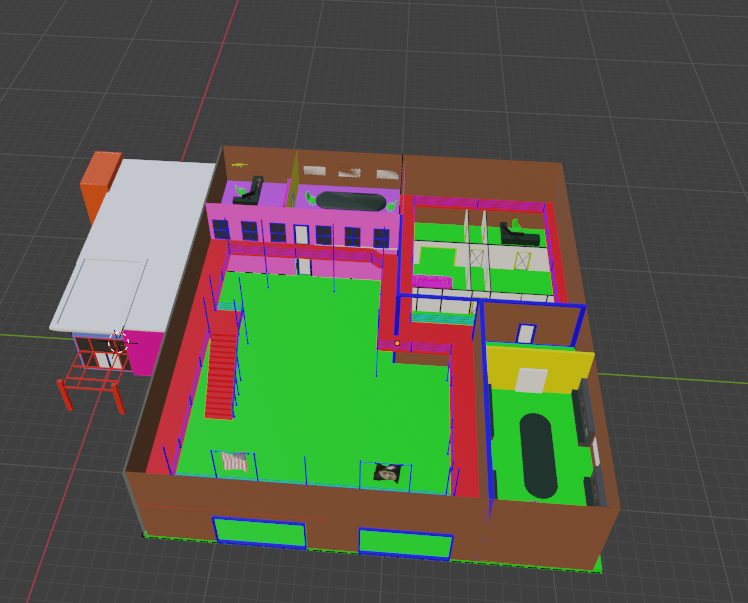
I want to keep everything much cleaner on the remake
I make my walls with planes for Backface culling/ Normals, is that standard for reforger?
sly bridge
hazy vault
I'm just now learning how to Import to substance or really do any texturing. I h...
i understand that, but do have a look over how PBR multi functions, it allows for a much much higher texel density using seamless (at least on the U axis) textures and planar mapping and blending between 4 sets using masks
hazy vault
sly bridge
i understand that, but do have a look over how PBR multi functions, it allows fo...
are you refrencing these templates, I assume these are the shader options


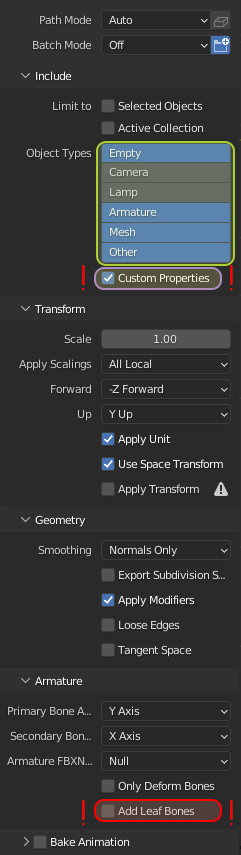 sly bridge
hazy vault
I make my walls with planes for Backface culling/ Normals, is that standard for ...
sly bridge
hazy vault
I make my walls with planes for Backface culling/ Normals, is that standard for ...
while you can toggle backface culling on and off in the workbench per object, it is ideal that walls have thickness (both for the mesh and it's geometry)
sly bridge
hazy vault
are you refrencing these templates, I assume these are the shader options
https...
i am talking about Enfusion PBR Multi, not substance shader templates. Enfusion uses metalness / roughness workflow
hazy vault
sly bridge
i am talking about Enfusion PBR Multi, not substance shader templates. Enfusion ...
Oooh Understood!
hazy vault
sly bridge
i am talking about Enfusion PBR Multi, not substance shader templates. Enfusion ...
Do you texture in Substance or just typically in workbench?
sly bridge
hazy vault
Do you texture in Substance or just typically in workbench?
you cannot texture in workbench
hazy vault
sly bridge
you cannot texture in workbench
You can apply and edit textures in the workbench, like the Reforger tools cant you?
sly bridge
workbench = reforger tools
fluid fern
Hey have you have this error ? I imported then reimported by checking “Generate BSP” and “Export Opaque Leave” except that I have the impression that it didn't work properly.
I've got my portals but my BSP doesn't seem to work, when I pull the sound isn't muffled.
fluid fern
I have 0 errors when i import
 sacred cape
Hello, is it possible to use a MatPBRTreeCrown with a model with a bone it disapear ?
surreal ore
sacred cape
Hello, is it possible to use a MatPBRTreeCrown with a model with a bone it disap...
 sacred cape
surreal ore
sacred cape
surreal ore
Wtf, I don't know why my model disapear 0_o
Here is without bone (Export skining) and here with my bones


 patent wren
Guys, will it be easier to take existing gun from vanilla game and modify the mesh of it, or take gun that is already made and rig it for arma?
Lets say, is it easier to modify meshes or rig the mesh for arma?
Another question is, how hard do you think will be to import these modded assets to arma 4?
delicate condor
patent wren
Guys, will it be easier to take existing gun from vanilla game and modify the me...
Can't modify existing things from vanilla or mods
You have to make new models
Or use bought models.
Using ripped stuff from other games is definitely forbidden
patent wren
delicate condor
Can't modify existing things from vanilla or mods
By vanilla game i meant arma reforger ofc, the wiki specifically says to use vanilla guns and modify them?
https://community.bistudio.com/wiki/Arma_Reforger:Weapon_Modding
Plan is to make bullpup version of one of the vanilla guns
delicate condor
patent wren
By vanilla game i meant arma reforger ofc, the wiki specifically says to use van...
You can't get the models.
The wiki text means something else than what you thought
patent wren
delicate condor
The wiki text means something else than what you thought
God damn it, i thought i can use the game assets to make mods 😦
faint scarab
You can just retexture the models... maybe! It's still not clear to me whether it's legal or simply tolerated!
patent wren
It seems that they do not allow that, which is weird, but its their intelectual property and they do not allow those to be redistributed?
Would be nice if that could be stated somewhere explicitly, that you cannot reuse the original assets, like guns and vehicles in your own mods (even if there is no exchange of money). Only way they say i can use it is for my own mod (not public) and for experimentation. But not public mod
The wiki gives an impression that you can just do inherited prefab and upload it as a mod.
https://reforger.armaplatform.com/workshop/5E4F1725CF7FD63A-M249pkmrpkrails
And how is this one done? Does it not add a version of pkm with just added picatinny?

Arma Reforger
adds 2 new variants of the BACONS m249 rail mod
added RPK /pkm with rail sup support
pics by kae
delicate condor
patent wren
The wiki gives an impression that you can just do inherited prefab and upload it...
you can inherit a prefab yes
but thats all done in the worbench
you dont get to touch the actual model inside the prefab