#enfusion_model
1 messages · Page 17 of 1
 surreal oracle

 tidal latch
is your armature using scale 1.0?
 elfin leaf
tidal latch
is your armature using scale 1.0?
elfin leaf
tidal latch
is your armature using scale 1.0?
i know i was watching a video ... and they mention something about selecting the whole model ... then pressing shift + A to scale it to " 1 "
tidal latch
I hate video tutorials which operate with some shortcuts
tidal latch
elfin leaf
i know i was watching a video ... and they mention something about selecting the...
https://community.bistudio.com/wiki/Arma_Reforger:Weapon_Animation/Basic_Tutorial#Adding_magazine_to_the_Scene here you have mention of applying transforms
elfin leaf
tidal latch
https://community.bistudio.com/wiki/Arma_Reforger:Weapon_Animation/Basic_Tutoria...
thx man ... i think this might actually help
 candid cave
guys is there a tutorial about making vehicles from scratch ?
 calm rune
candid cave
guys is there a tutorial about making vehicles from scratch ?
calm rune
candid cave
guys is there a tutorial about making vehicles from scratch ?
YouTube -> "how to model vehicles in blender" -> Money
elfin leaf
im having a hard time with this model i have
everytime i load the model ... its always small
 tulip nymph
Hey guys, I’m making a map called Mo’orea in French polynesia, I need some help to create some suburban homes and beach mansions with different pools, modern, vacation island vibes, something that would match this look from google maps, if anyone wants to help me just send DM. I also need lots and lots of custom road signs.


So far I’ve been using mainly vanilla buildings and structures, just as a placeholder for now till I can get custom assets.
tulip nymph
elfin leaf
im still trying create my first car
No worries bro
elfin leaf
so you need house making help
tulip nymph
elfin leaf
so you need house making help
Indeed
elfin leaf
why not just download models
tulip nymph
Indeed have blender but I don’t have money to pay for models and the models I need have a very specific look, similar to the roofs on the hotel structure but a house version of that and I need a bunch of diff house layout types to fit the satellite images, vibe of the island.
tulip nymph
Oh, I’ll check it out.
elfin leaf
ive seen tons of house models for free
elfin leaf
tulip nymph
Indeed have blender but I don’t have money to pay for models and the models I ne...
i dont know if this helps ... but theres an addon you can get called " BUILDIFY" ... look into it
 tacit eagle
Adrian helmets i will learn how to mport models
 elfin leaf
my car model keeps shrinking everytime i load it ... and i know im transforming and scaling
 vague walrus
I need to make custom attachment types for my visual customization parts. How can i make a slot only my stuff fits in? Is BaseAttachmenttype enough?
Bacon made his own Attachmenttypes and I wonder how he did it 😄

 wicked dirge
vague walrus
I need to make custom attachment types for my visual customization parts. How ca...
wicked dirge
vague walrus
I need to make custom attachment types for my visual customization parts. How ca...
An attachment type is declared by a class. The gun slot component declares what type it accepts and the attachment declares what it is. To make your own you simple need to create a new class that derives from base attachmenttype and assign it here and in the attachment
vague walrus
wicked dirge
An attachment type is declared by a class. The gun slot component declares what ...
Thank you for the response,
I think i got everything setup the right way. I wonder how to create a new class. Do I need a scriptfile and write my own attachment to make it show up in the attachment type List?
 kindred thistle
When trying to port assets from Arma 2, is there an easy way to turn proxies into empties or bones?
 surreal ore
kindred thistle
When trying to port assets from Arma 2, is there an easy way to turn proxies int...
surreal ore
kindred thistle
When trying to port assets from Arma 2, is there an easy way to turn proxies int...
I have a blender script for that somewhere, can probably send it sometime today after work.
vague walrus
Hey you beautiful people. Can someone tell me how I can make attachment classes so they show up in the list on the bottom right like Bacons?
 wicked dirge
vague walrus
Hey you beautiful people. Can someone tell me how I can make attachment classes ...
wicked dirge
vague walrus
Hey you beautiful people. Can someone tell me how I can make attachment classes ...
open up the Script editor, look for this part in the tree (use top text box to filter for "attachment"):

there you can see how BI declares their attachment classes
and undestand how it works
then make a new script, in same folder, and there add your new attachment class that derives from either the BI base, or maybe one of the already more concrete classes:
class AttachmentAPS_StockClass {}
AttachmentAPS_StockClass AttachmentAPS_StockSource;
class AttachmentAPS_Stock : BaseAttachmentType
{
};

class Attachment556MuzzleClass {}
Attachment556MuzzleClass Attachment556MuzzleSource;
class Attachment556Muzzle : BaseAttachmentType
{
};

class Attachment545x39MuzzleClass {}
Attachment545x39MuzzleClass Attachment545x39MuzzleSource;
class Attachment545x39Muzzle : BaseAttachmentType
{
};

class AttachmentHandGuardAKS74UClass {}
AttachmentHandGuardAKS74UClass AttachmentHandGuardAKS74USource;
class AttachmentHandGuardAKS74U : BaseAttachmentType
{
};
those are 4 examples of new classes declared in RHS
Then Shift+F7 to recompile the script and reload the world editor with your prefab and the class should appear in the list
keep in mind to recompile every time you edit your scripts
vague walrus
Omg thank you for that, thats really helpful. Thank you man!!
even with screensshots where to look
elfin leaf
what are the main components i need to get in a car?
vague walrus
You can open a car from reforger, duplicate it to your modfolder and open the entity and check which components the vanilla car has
 rancid glade
hello, im new in the enfusion tools but im used to other realtime engine and realtime 3d in general
so my question is : in the viewport of the enfusion tools, i can see there is an includer to import with my model
is the occluder in enfusion working as occlusion culling ? making assets behind the object temporarily unload to save performance ?

 stray crater
rancid glade
hello, im new in the enfusion tools but im used to other realtime engine and rea...
stray crater
rancid glade
hello, im new in the enfusion tools but im used to other realtime engine and rea...
Hi ! From everything I was able to read, the answer to your question is yes.
The goal is to hide objects so we save on the processing. But the occluder must be a simple shape and there should be as less as possible.
Sources : https://community.bistudio.com/wiki/Arma_Reforger:FBX_Import https://community.bistudio.com/wiki/Arma_Reforger:Resource_Manager:_Model_Editor
rancid glade
stray crater
Hi ! From everything I was able to read, the answer to your question is yes.
T...
Yes, exactly like a collider
 stuck kraken
Hi,
I need some advise:
I created a big box as a kind of plateau and give it a stone texture. Material is MatPBRBasic. As surface properties I selected "tiles_stone.gamemat" but when I step on it it sounds not different. I tried it also with a thin box and "metal_sheet.gamemat". If I fire on it it doesn't sound like metal.
What do I miss?
 karmic adder
stuck kraken
Hi,
I need some advise:
I created a big box as a kind of plateau and give it a s...
karmic adder
stuck kraken
Hi,
I need some advise:
I created a big box as a kind of plateau and give it a s...
Did you also configure the game material in the Enfusion Blender Tools?
kindred thistle
surreal ore
I have a blender script for that somewhere, can probably send it sometime today ...
That would be very helpful, I appreciate it
stuck kraken
karmic adder
Did you also configure the game material in the Enfusion Blender Tools?
The .gamemat comes from here: "ArmaReforger/Common/Materials/Game"
karmic adder
stuck kraken
The .gamemat comes from here: "ArmaReforger/Common/Materials/Game"
But did you configure it in Blender and not just the emat?
stuck kraken
karmic adder
But did you configure it in Blender and not just the emat?
Is there a tutorial?
karmic adder
stray crater
rancid glade
Yes, exactly like a collider
If you’re talking about simplicity of the shape, not really. For colliders, devs says that it’s better to make a UTM than multiple UBX 😁
rancid glade
and btw i was just wondering, is it possible to easily get the original .fbx file of the character ?
i need it for scale and proportions
rancid glade
and one other question :
for decorative assets only, should i do more than these 3 ?

do i need to do land contacts ?
there is no animation so no bones, no morphs
and what about "runtime details" ?
stray crater
rancid glade
and btw i was just wondering, is it possible to easily get the original .fbx fil...
You have sources somewhere, the character is rigged.
https://community.bistudio.com/wiki/Arma_Reforger:Character_Gear_Creation/Headgear/Asset_Preparation
You can find in there Character_Template.fbx and Head_Template.fbx
stray crater
rancid glade
and one other question :
for decorative assets only, should i do more than these...
For decorative, those 3 are enough. Land contact would be for fences for exemple, but for houses, you wish it to stay on a same level, so no land contact.
Bones are not only for animation ! You can use empties to make your work way easier when creating assets like houses, common windows, doors, ...
And I have no clue about what is Runtime details ! This is where my help stops ah ah
Runtime details seems to be a synthesis of your model with various informations.
BI's wiki is really full of a lot of informations, you can find plenty of answers to your question over there 😉
rancid glade
stray crater
For decorative, those 3 are enough. Land contact would be for fences for exemple...
fence ? what is the difference with fence and usual decorative asset ?
thanks a lot for all you answers / help @stray crater
i may have some questions soon on how to create buildings but not now
stray crater
rancid glade
i may have some questions soon on how to create buildings but not now
If you have any question, feel free to come in my DMs, I could help you 🙂
stray crater
rancid glade
fence ? what is the difference with fence and usual decorative asset ?
I think (and I guess I am right, or at least half right ah ah) that the land contact is useful when you want your asset to follow your land curves.
In a nutshell, you need land contact if your asset can be placed on a sloping ground. If not, don't use land contact, and your asset will be placed as it is in Blender. I don't know if I am a 100% percent clear here.
rancid glade
stray crater
I think (and I guess I am right, or at least half right ah ah) that the land con...
this is what i guessed when you told me the fence example bellow, but didnt managed to translate and explain it lol
stray crater
So my answer is clear ?
rancid glade
absolutely
rancid glade
stray crater
What kind of assets are you planning to create ?
just decorative for now, and most of all im learning reforger tools so im just messing around for now
i dm you
karmic adder
Has anyone ever investigated the extremely long TXO to XOB conversion times that very high poly models (>500k faces) have?
For me, 180k took 3m and 270k 8m. I stopped waiting for 450k after 20m. FBX to TXO is fairly fast, the trouble comes with TXO to XOB.
This makes it basically impossible to import very high poly models for e. g. reference purposes.
Does anyone know what's up with that?
 nocturne quartz
did you check your ram ussage?
karmic adder
It wasn't anywhere near full if that's what you mean.
It seemed to me like the conversion algorithm must have some kind of problem, since CPU usage was always high. Maybe the code has very bad runtime complexity for large models.
nocturne quartz
how large are we talking about? ive heard some people bring in very large models with very high poly counts before, maybe some new update messed it up
karmic adder
See the message above, I listed triangle counts with time in minutes. #enfusion_model message
wicked dirge
Reference for what? CN you give an example? This sounds extremely useless in workbench
karmic adder
wicked dirge
Reference for what? CN you give an example? This sounds extremely useless in wor...
It was a large 3d model, reconstructed from a point cloud. The idea was to use it as a reference for terrain making.
 last hill
It is likely the triangulation that workbench is doing, along with checking for colliders etc etc.
The larger the count, the longer it will take to convert and encrypt to prevent ripping.
That would be my thought on it. Could be incorrect.
stuck kraken
karmic adder
But did you configure it in Blender and not just the emat?
Thx alot. It worked! I changed from the .xob in "Import Settings" under "Physics/Surface Properties" by resetting it (right click on it: "Reset to default value") to default and then set the correct one.
Maybe a point for the FAQ.
BTW: In my Opinion it makes more sense that the applied texture/material gamemat setting to a 3d object overwrites the gamemat settings of the 3d object (.xob) for the part that the texture covers the 3d object (.xob).
Actual you can change the setting in the material but it has no influence (it seems not to work) if a .xob is set.
wicked dirge
karmic adder
It was a large 3d model, reconstructed from a point cloud. The idea was to use i...
Try to load it into Blender and decimate it down to 80k and then export
karmic adder
wicked dirge
Try to load it into Blender and decimate it down to 80k and then export
That does work, but it's not a good solution since it preserves way too little detail, 450k was already on the low end.
Splitting up the meshes into small tiles is also not great from a usability perspective.
 sly bridge
karmic adder
That does work, but it's not a good solution since it preserves way too little d...
sly bridge
karmic adder
That does work, but it's not a good solution since it preserves way too little d...
what is this 450k model?
i mean 450k is not really game asset
 shell hedge
why are people focusing on the triangle count of the mesh instead of the actual problem being reported?
shell hedge
karmic adder
That does work, but it's not a good solution since it preserves way too little d...
I would suggest splitting it into a few separate models just to see if there is a bug that prevents it from being imported, in which case only one of the split models would fail import
failing that, split it and assemble via slots or something
though that's a workaround and not a solution
wicked dirge
indeed, if you make sure all pieces have same global origin point relative to each other, you can reassemble it seemlesly
stray crater
I had this problem and « solved » it by exporting properly with Reforger Tools on Blender. I was exporting from the common blender exportation and had this problem, which disappeared when I used the Reforger Tools Exportation. Maybe it could help ? I never made a model with that much faces, so it’s just an idea.
shell hedge
it took 25 minutes but it imported for me
karmic adder
stray crater
I had this problem and « solved » it by exporting properly with Reforger Tools o...
Interesting, I'll try that
I assumed it would not matter
stray crater
I thought so, but it proved me the opposite ! ah ah
candid cave
guys when i try to import a p3d model of a tank from arma 3 i get this.
how can i import this tank ?
 stray crater
Hi ! If the mod is yours, you need to unbin it so you can open it
candid cave
stray crater
Hi ! If the mod is yours, you need to unbin it so you can open it
ok 👍
it worked but the paa files how can i extract them to blender ?
sly bridge
candid cave
guys when i try to import a p3d model of a tank from arma 3 i get this.
how can ...
which particular tank?
stray crater
I don't know if blender can take .paa, I would rather convert the .paa to .png first
stray crater
sly bridge
no
Is it not necessary ? always worked for me
candid cave
sly bridge
which particular tank?
my old test tank it was m1 abrams i binarized it from a long time i want to make it work in arma reforger so in forgot how can i convert it
sly bridge
stray crater
Is it not necessary ? always worked for me
you do not need to unbin anything if the .p3d is yours to begin with
sly bridge
candid cave
my old test tank it was m1 abrams i binarized it from a long time i want to make...
you cannot convert it using the existing official tools. blender will only load mlod .p3ds
stray crater
sly bridge
you do not need to unbin anything if the .p3d is yours to begin with
Weird. I really always had to. Maybe because it's been pushed on a server between the moment I finished it and the moment I wanted to open it ?
sly bridge
you can however load up the test file before was converted to .p3d
stray crater
That must be why, I lost all of my sources once.
candid cave
stray crater
That must be why, I lost all of my sources once.
that what happened to me yesterday
stray crater
Yup, so it was necessary for me to unbin everything.
candid cave
stray crater
Yup, so it was necessary for me to unbin everything.
yeah
stray crater
Anyway. Did you succeeded ?
candid cave
stray crater
Anyway. Did you succeeded ?
yes , thank you
stray crater
Perfect !
sly bridge
stray crater
Yup, so it was necessary for me to unbin everything.
unbinning the pbo is one thing, unbinning the p3d is another thing (and if that works it means that the p3d wasn't correctly binned to begin with)
stray crater
Ok ok
rancid glade
hello there, i almost finnished my work but im stuck on a problem
if you have any idea
here is the result in exterior and in interior :
as you can see the shadows are very hard, and even more in interior


what im thinking is : it's a material effect from the glass in game that allow to darken interior view from outside a building
but i tested almost every option in the material and didnt fix the issue
sly bridge
is the globe double sided? or culled?
rancid glade
culled
but it doesnt change anything whatever i check
i tried every parameters of the glass shader
nothing...
shell hedge
if you want to try doing something dumb try adding a reflection probe volume to it
I think env probe is projected on the dome but not on things under it because it doesnt do light pass checks [citation needed]
also try double sided first maybe
just extrude the thing and align normals
so its hollow
I think hollow is a better term than double sided since thats for culling by point order
karmic adder
stray crater
I had this problem and « solved » it by exporting properly with Reforger Tools o...
Did you just use the Export tool from the top bar, or do anything else?
I put the model in an LOD0 collection, added a material to it and exported via the EBT tool into the running Workbench project, but the import is still taking very long.
rancid glade
shell hedge
if you want to try doing something dumb try adding a reflection probe volume to ...
this was my next step to try
so im going to try it
shell hedge
karmic adder
Did you just use the Export tool from the top bar, or do anything else?
I put th...
it took like 25 mins for me, on Ryzen 7950X, if you want I can just send you the xob and txo?
karmic adder
shell hedge
it took like 25 mins for me, on Ryzen 7950X, if you want I can just send you the...
Thanks for the offer, but I'm currently just working on the pipeline. Any practical application would also require dozens of these, so I'll probably just end up dividing them up into smaller tiles.
shell hedge
ah ok that makes sense
25 min for import of a mesh like this is still absurdly high I feel like
karmic adder
Yeah, I'm making a feedback ticket currently.
Edit: https://feedback.bistudio.com/T182248
stray crater
karmic adder
Did you just use the Export tool from the top bar, or do anything else?
I put th...
Export tool from the top bar yes !
From what I see, not useful
 digital maple
Hi guys dont know how many times this has been asked if ever, is there a way to export the geometry of a model along with the UV to be used in substance or something along those lines?
shell hedge
no
digital maple
Sent DM
elfin leaf

Hey guys ... im placing down objects in my world ... but everytime i switch from test mode, the objects lose their colliders and i can walk through everything
 surreal ore
Doesn't matter if you don't have the right layer presets
elfin leaf
are these not in the right layers
 surreal ore
You're not even showing the layer presets on the screenshot
elfin leaf
this layer?
 surreal ore
No
elfin leaf
this
 surreal ore

 cloud rampart
Any idea why when I import the fbx, only one mesh is show? All are there, but in meshes only show 1 mesh and I need all 30 to a animation

 shell hedge
Turn off merge meshes or something
cloud rampart
shell hedge
Turn off merge meshes or something
mfg, I'm blind and didn't see that option, thanks
 silk glen
Do.you need a certain collider to control the suns light inside a building?
silk glen
Character has weird illumination below deck of my ship

 hoary plank
idk much about enfusion, but typically that means you're lacking dynamic/realtime light probes I think
Thers surely a way to bake the lighting for dynamic objs in building interiors
 stray bridge
silk glen
Character has weird illumination below deck of my ship
stray bridge
silk glen
Character has weird illumination below deck of my ship
maybe you missing the interior probe
silk glen
What's that
stray bridge
can be created in the world on ur left and parented to ur ship (drag and drop in the list)
silk glen
Dope I'll try it
stray bridge
not sure if thats the fix tho, never had this problem in my interiors but maybe it is
silk glen
stray bridge
not sure if thats the fix tho, never had this problem in my interiors but maybe ...
Idk if i picked the wrong ones but none of them seem to be changing it
surreal ore
 midnight path
karmic adder
That does work, but it's not a good solution since it preserves way too little d...
midnight path
karmic adder
That does work, but it's not a good solution since it preserves way too little d...
the most poly vanilla object i think is the btr @ 370k poly
i've had trouble with anything 700k+ either imports forever or errors out
u could try turning the model into a heightmap and just importing that, than u can just edit it and have it as the base reference
heightmaps can be millions of polygons
sly bridge
elfin leaf
can anybody check out the live ... and see whats wrong with my prefabs
post images?
elfin leaf
sly bridge
post images?
im live in terrain_makers
can you check out what im doing wrong
stray crater
What's the problem ? can't we just have screenshots ?
sly bridge
elfin leaf
im live in terrain_makers
if you want help, you generally post images, nor everyone can join some random live stream in VC, is not really all that hard ¯_(ツ)_/¯
elfin leaf
i figuered maybe if you see what going on ...you could kinda understand a bit better
stray crater
We don't even know what the problem is 🤔
elfin leaf
items that i place in world ,, seem to fall though and stick to the water level
sly bridge
elfin leaf
items that i place in world ,, seem to fall though and stick to the water level
what sort of items?
stray crater
sly bridge
what sort of *items*?
You're too fast
sly bridge
how hard can it be, if you encounter an issue, to actually specify in detail what the issue is....
why does it have to be a questionnaire of sorts, beats me
generally speaking it is related to colliders / how these colliders are set up
elfin leaf
i already have coliders
sly bridge
elfin leaf
i already have coliders
how do they look? did you named them correctyl (prefix). do they have the properties setup correctly?
stray crater
can't you send us photos ?
sly bridge
i can’t be bothered anymore with people who don’t wanna get help…
calm rune
They want all the help but can’t put in the effort to give the proper information so people can help them. They turn it into a guessing game.
shell hedge
Yeah joining vc is hard so I guess we can't help them
calm rune
shell hedge
Yeah joining vc is hard so I guess we can't help them
I work from 6am to 5pm. I don’t have time to joint vc. I can easily jump in and send a quick text with a solution if I’m given the proper info on what said person needs help with. So yes joining vc when you have an actual job is quite difficult.
 deft owl
literacy hard. why say many word when few do trick. Thats my guess for why no one elaborates 🗿
calm rune
deft owl
literacy hard. why say many word when few do trick. Thats my guess for why no on...
huh?
deft owl
calm rune
huh?
People tend to not explain their issue correctly and do not provide the details needed to give them any useful guidance, as you said. I was just making a joke about it as its extremely lazy and a lack of literacy
sly bridge
shell hedge
Yeah joining vc is hard so I guess we can't help them
posting the issue means more than a single person can have an input. Joining VC is not always an option (especially when you are in transit / work etc)
shell hedge
Did you dudes think I was being sarcastic or something
kindred thistle
I refuse to let it die
 stray bridge
kindred thistle
I refuse to let it die
stray bridge
kindred thistle
I refuse to let it die
is this from an apl official asset pack or yoinked? lol
kindred thistle
stray bridge
is this from an apl official asset pack or yoinked? lol
Arma 2 Licenced Data Packs
 idle hinge
Is it allowed to modify these? It could use a little facelift.
 still thunder
kindred thistle
I refuse to let it die
still thunder
kindred thistle
I refuse to let it die
My beloved corner building
nocturne quartz
2024 we are still using buildings from ofp
kindred thistle
idle hinge
Is it allowed to modify these? It could use a little facelift.
Yeah, but imma be honest, I am not the greatest at texturing, so I use the A2 textures
If you squint both your eyes it almost doesn't look that bad
 lilac condor
hi can anyone send a skeleton file? im always getting over 163 bones
 flint ivy
Its a shame the DayZ Chernarus+ assets arent able to be used. So many great interiors.
stray bridge
flint ivy
Its a shame the DayZ Chernarus+ assets arent able to be used. So many great inte...
remodeling is always an option, just takes time
stray bridge
idle hinge
Is it allowed to modify these? It could use a little facelift.
thats what the apl packs are for, for modders to work with. At least thats what I understood
digital maple
Quick question for anyone who uses Maya in here, for memory points, I'm using locators, issue is they're all being set to origin on export and I dont know if its a export setting or just enfusion doesn't know what the locators are.
All my bones are in the correct coords though just not the locators
kindred thistle
digital maple
Quick question for anyone who uses Maya in here, for memory points, I'm using lo...
I have no idea about Maya, but I think you are supposed to use empties
aka dummies or null objects
digital maple
digital maple
Quick question for anyone who uses Maya in here, for memory points, I'm using lo...
For anyone dealing with this is use bones that arent skinned
surreal ore
kindred thistle
I refuse to let it die
Which pack is it in?
kindred thistle
surreal ore
Which pack is it in?
ALDP_A2_PBOs_APL-SA_part1
surreal ore
kindred thistle
ALDP_A2_PBOs_APL-SA_part1
Name?
kindred thistle
surreal ore
Name?
A_Pub_01
surreal ore
Thanks
kindred thistle
surreal ore
Thanks
no problem
 delicate condor
soon workshop full of A2 buildings 😅
stray bridge
delicate condor
soon workshop full of A2 buildings 😅
already full of random stuff, mostly just testing stuff or nothing thats actually wanted or used. An A2 building pack would be nicer than 90% of whats online rn
delicate condor
stray bridge
already full of random stuff, mostly just testing stuff or nothing thats actuall...
Sure, just maybe not 100 same building
🤞
stray bridge
delicate condor
Sure, just maybe not 100 same building
true
but that wont happen imo
vague walrus
Hellooo, Im working on a Rifle again and the position is slightly off. It becomes especially visible when ADS and zooming in. What could be the fix?
(Hand position is wip)


 shell hedge
well its using your poses
I remember having this problem at some point but I dont know what fixed it, probably I redid the ik pose and exported it and it just worked, whereas previously it didnt
 shut bloom
So I have been playing around, with Haircards and Hair. But I ran into a problem. I cant have 2 Alphas to hide the "Helmet" in First Person.
 vague walrus
shell hedge
I remember having this problem at some point but I dont know what fixed it, prob...
vague walrus
shell hedge
I remember having this problem at some point but I dont know what fixed it, prob...
hm, i just made a new one and its still weird
vague walrus
Could the left hand target in the workbench have to do anything with it?
Also I leave the righthand on the trigger on it's position and always adjust the left hand to hold properly. It has an offset and is a few cm left of the gun. It clips in blender but shows up correct in the game
Prop.R should be the rifle position right? I haven't touched that
So no matter where I move both of the hands. If I don't move Prop.R it shouldn't move the gun correct?
digital maple
Can character animations be brought in as FBX into engine? Its not clear on the wiki if this can be done without using the blender tools Im trying to avoid blender?
tidal latch
yes but you would be only to do full body absolute export
it is not possible to do reload animations this way for instance
digital maple
tidal latch
yes but you would be only to do full body absolute export
OK thanks and I'll look into that, doesn't sound quite right
wicked dirge
shut bloom
So I have been playing around, with Haircards and Hair. But I ran into a problem...
in the material properties there are some sliders (alpha multiplier. intensity etc) i dont remember exactly the names. Anyway you have to set these sliders up in such a way that the top slider (i think intensity) when set to 1 (max) your material is completely invisible, then leaving the multiplier as it was, set the intensity to a value where it looks good in 3rd person. Basically the moral of the story is, you dont need to use the default 1st person clipping alpha for the 1st person disappear to work. It can be made to work on other alphas
when you go into 1st person view the engine sets intensity to 1 automatically and that why you dont see the object anymore
shut bloom
wicked dirge
in the material properties there are some sliders (alpha multiplier. intensity e...
do you mean Alpha Test and Mul?

Or am I confusing this with something else xD
wicked dirge
yes, put alpha test to max. Then tweak mul to a point where the entire material sphere disappears. then start lowering the test value until it comes back to a state that you like
shut bloom
wicked dirge
yes, put alpha test to max. Then tweak mul to a point where the entire material ...
Perfect setting it to 1 Works also. Thanks allot Soul Assasin <3
 uneven vessel
wicked dirge
in the material properties there are some sliders (alpha multiplier. intensity e...
uneven vessel
wicked dirge
in the material properties there are some sliders (alpha multiplier. intensity e...
Thank you for sharing this! Was encountering the same issue
wicked dirge
during gameplay the engine will push the Test value by itself to max and the thing will disappear
thanks to @tidal latch for enlightening me before 🙂
 wraith sundial
i require assistance
sly bridge
wraith sundial
i require assistance
with?
vague walrus
Suprise suprise the update yoinked my Mods

The Guns dont show up anymore
did anyone figure this out ?
oh i got it
It had 2 WeaponAnimationComponents for some reason
deleted the new one on both guns and they work now
uneven vessel
yes if you continue to have issues, try setting the 'binding name' field to 'Weapon' - this caused us some issues because it was blanked
 vague walrus
Ah alright, any fix for the gun not showing up in the arsenal after the update?
It seems all fine in the inventoryitems config

 grim bronze
hello guys But is there any way to import the pre-made model from Arma Reforger to texture it?
For example, taking a prefabricated .et file from Arma Reforger and importing it into Blender?
sly bridge
grim bronze
For example, taking a prefabricated .et file from Arma Reforger and importing it...
nope
grim bronze
sly bridge
nope
I would like to texture a vanilla outfit, but just adding the texture is messy, I would like to make a texture map
sly bridge
grim bronze
I would like to texture a vanilla outfit, but just adding the texture is messy, ...
you cannot export most files from workshop for security reasons, including models and textures
wraith sundial
sly bridge
with?
i need to make a house with a hole in the floor
so i can add it as an access to my tunnel system
stray crater
And what can we do for you ? What’s the problem you encounter ?
 austere bolt
any1 know why my colliders are not working they show up in enfusion but i can just walk right through the object
 tidal latch
austere bolt
any1 know why my colliders are not working they show up in enfusion but i can j...
tidal latch
austere bolt
any1 know why my colliders are not working they show up in enfusion but i can j...
https://community.bistudio.com/wiki/Arma_Reforger:Prop_Creation#Creating_prefab see warning section
 last parcel
have you added a rigidbody to the prefab ?
stray crater
austere bolt
any1 know why my colliders are not working they show up in enfusion but i can j...
Two solutions to your problem :
The first, if you have a warning on Enfusion, it means your colliders are not set properly. Use Enfusion Blender Tools to configurate them properly and reimport everything.
The second, gave by Wolf, is about the rigidbody. You need to set it so you don't navigate through your object.
austere bolt
yh forgot to give it the rigid body stuff
midnight path
why is every single one of my vehicle prefabs broken

this happens when i open this folder

 midnight path
when i open the .et files in text editor they still have all their components
but in the workbench they are all broken
tidal latch
midnight path
why is every single one of my vehicle prefabs broken

Arma Reforger
Learn about important modding changes in the upcoming 1.2 release.
 fluid dragon
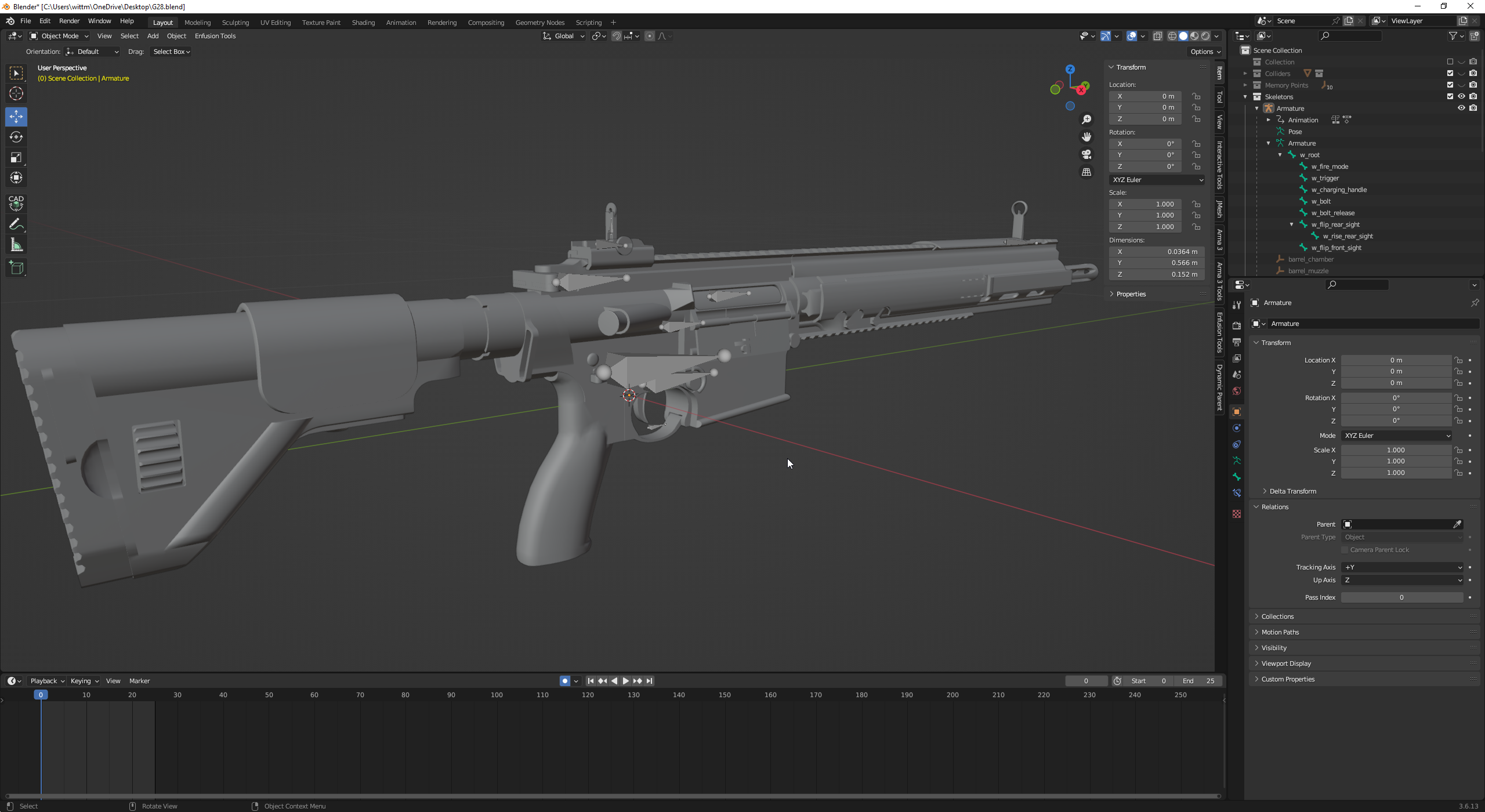
After Exporting the weapon model with some new bones that i needed to add it looks like that now in workbench, how do i fix it?
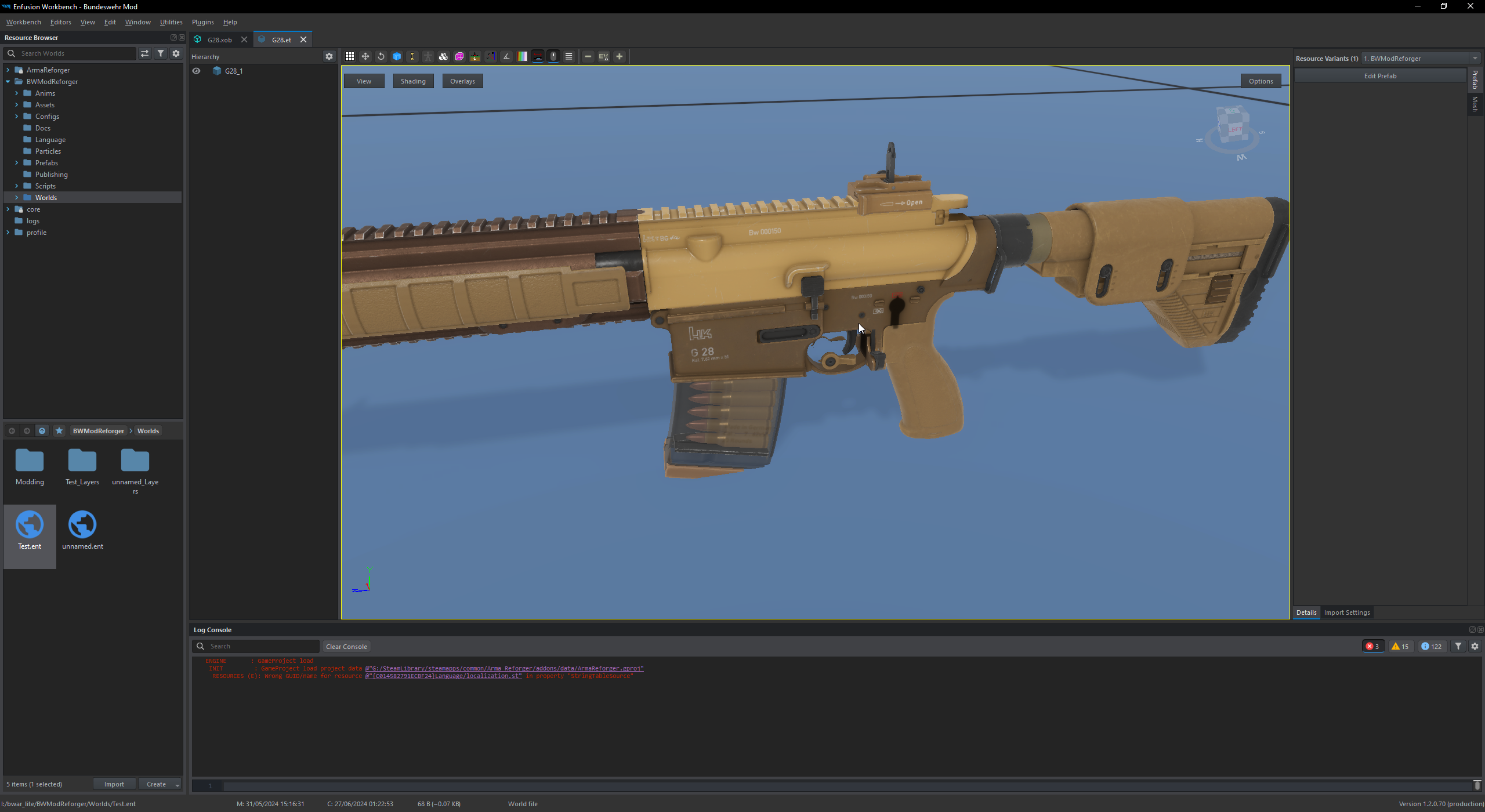
in blender it still looks all fine https://i.imgur.com/IbrSStL.png
 tidal latch
fluid dragon
After Exporting the weapon model with some new bones that i needed to add it loo...
tidal latch
fluid dragon
After Exporting the weapon model with some new bones that i needed to add it loo...
do you have your own animations already?
it looks like you are using m16 animations on your weapon with custom skeleton
fluid dragon
i already had own animations
it looked fine before i exported it with some more additional bones for the sights
tidal latch
how XOB looks like in workbench?
if you changed hierarchy of bones then you would also need to redo anims
fluid dragon
hm in the xob it looks fine
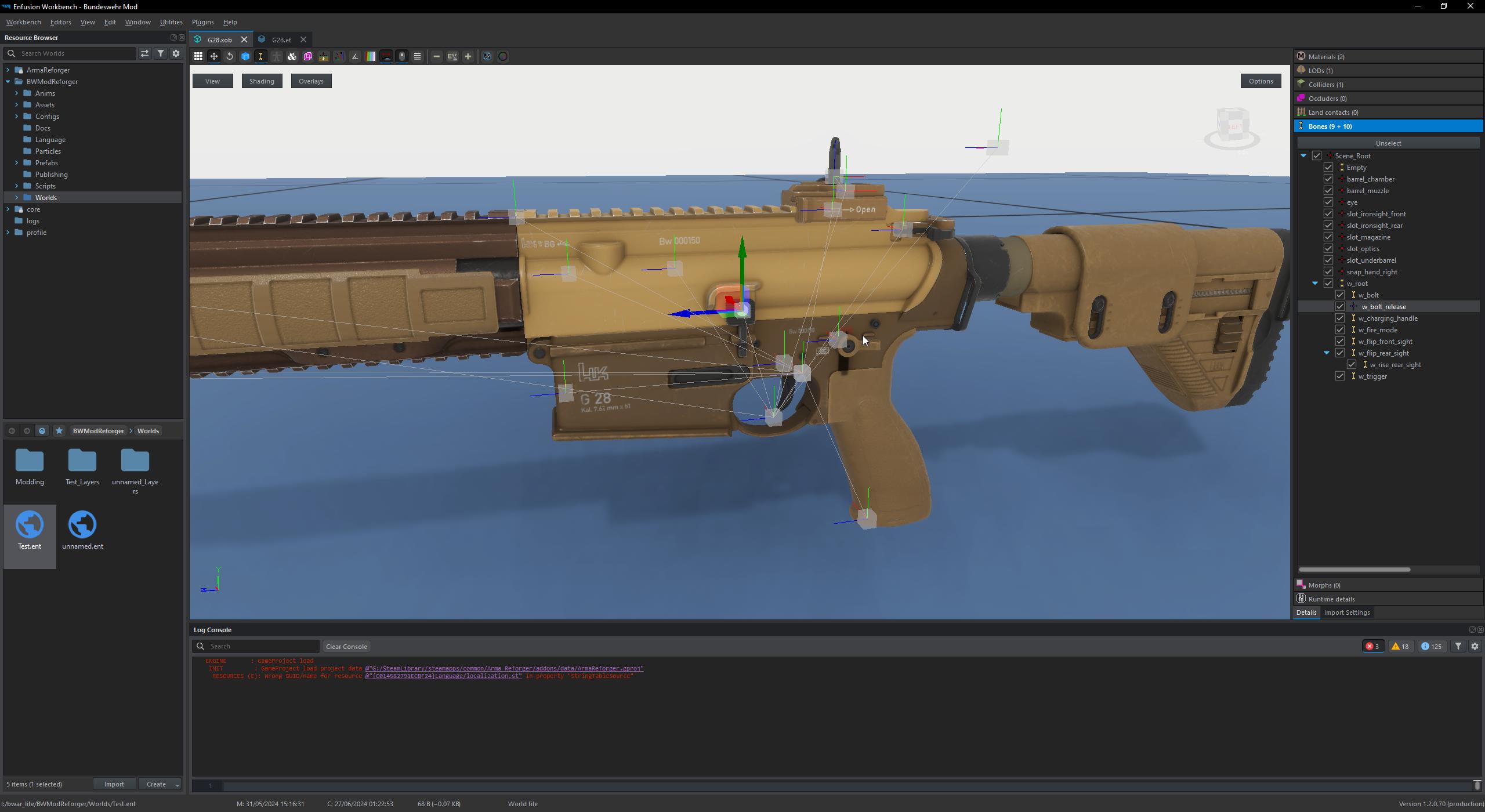
only under the bones section it looks kinda weird ?
why has w_bolt_release not a bone as an icon
and Empty has a bone icon
tidal latch
When creating skinned objects, Enfusion Workbench expects that the whole object is skinned to some bone.
⚠
Otherwise importer will try to "fix" it by skinning remaining faces to some root bone and in console log you will see below message:
RESOURCES (W): Missing some mesh skinning weights (Object_LOD0). Weighting them to root
"why has w_bolt_release not a bone as an icon" if there is nothing skinned to that bone then its marked as an empty object
fluid dragon
alright gonna recheck that stuff than, hope i find everything thats missing
alright that bone stuff seemed to be fixed now, but i still have some misplacement in the .et
is it maybe because of that error ?

if so how to fix it ?
 astral hull
tidal latch
https://reforger.armaplatform.com/news/modding-update-may-17-2024
astral hull
tidal latch
https://reforger.armaplatform.com/news/modding-update-may-17-2024
I see they removed _SA from vehiclewheeledsimulation does that mean it’s no longer server authoritive?
tidal latch
astral hull
I see they removed *_SA* from vehiclewheeledsimulation does that mean it’s no lo...
there are only authoritative vehicles
 steep kettle
Idk if this even belongs here, in animation or config but does anyone know how to fix it? Its not a huge deal but it bothers me. Its something to do with uh.. bones.

 steep marsh
Does anybody know how i can change the position of the hands on a mounted weapon? Already played around with the position marker but it didn´t changed
flint ivy
steep marsh
Does anybody know how i can change the position of the hands on a mounted weapon...
I think they are driven entirely by IK connection which I think is a case of parenting the hands to the 'grip' bone on a weapon.
Im also keen to learn this myself for future turret work.
steep marsh
Dont really know why its not working. Changed the selected points in the weapon itself and also created these l_hand / r_hand positions
 surreal surge
quick question on weight painting as I try to figure that out. I have got the sample vest and helmet in game and have a very general understanding of it. I saw several references to transfer weights and i tried it and didnt get too far. Is that only possible if you have already previously weighted something or is there a template to copy.
grim bronze
Hello guys, I added a silencer to my weapons, but I have no idea how to put sound on it, the sound still comes out of the gun, I would like that when I put the silencer on the gun has to make a silenced sound, and when I remove it, the gun has to make normal sound
kindred thistle
surreal surge
quick question on weight painting as I try to figure that out. I have got the sa...
Use the base body in the Reforger Samples on Github as a base to transfer weights
GitHub
Modding Samples. Contribute to BohemiaInteractive/Arma-Reforger-Samples development by creating an account on GitHub.
surreal surge
kindred thistle
Use the base body in the Reforger Samples on Github as a base to transfer weight...
maybe thats why im confused. I can use base body to transfer weights to say a belt?
kindred thistle
surreal surge
maybe thats why im confused. I can use base body to transfer weights to say a be...
Yes
surreal surge
kindred thistle
Yes
Thank you!!!!
kindred thistle
surreal surge
Thank you!!!!
No problem
 royal sandal

how to make gun small
in other words, do i need to scale down the blender model before i import it and it becomes an xob or is there a way to scale down the prefab, because when i scale down the prefab it just makes the floor model small and the hand model is still chambered in 155mm
tidal latch
royal sandal
royal sandal
tidal latch
https://community.bistudio.com/wiki/Arma_Reforger:Weapon_Creation#Tutorial_Goal ...
i know thats probably the prebaked response and i appreciate the reply, but that page and none of its linked sub pages answers the question as if a blender model needs to be properly scaled before importing into enfusion as a xob. it's also the first place i checked to answer this question before asking here. please correct me if i'm wrong.
tidal latch
there are few mentions here & there to have scale set to 1.0 ( like here https://community.bistudio.com/wiki/Arma_Reforger:Weapon_Animation/Basic_Tutorial ). Scale is more important for animations so thats why its mentioned so late. Perhaps I could mention it in asset preparation too
in general, you can also take a look at samples and see how its done
royal sandal
i apologize, you're right, thank you for the help.
tidal latch
no worries - as I mentioned, there is always room for improvement for docs
wicked dirge
royal sandal
i know thats probably the prebaked response and i appreciate the reply, but that...
In general, a correct scale at the source I.e. Blender will always make your life easier in the end
Scaling at xob or prefab level should be avoided
tacit eagle
royal sandal
Forgot to apply rotation and scaling in Blender ? It happens.
 mortal mortar
any idea of why this happens or how to fix it? I've been looking at the options for way too long and I can't seem to properly think lol

also, I'm not sure what kind of item should I assign it to... I'm guessing eyewear so it lets me use a helmet, but still not sure
I followed this tutorial yet it still doesn't give me the right results https://www.youtube.com/watch?v=8o3WnGLIQ_4&t=1003s
 deft owl
mortal mortar
any idea of why this happens or how to fix it? I've been looking at the options ...
deft owl
mortal mortar
any idea of why this happens or how to fix it? I've been looking at the options ...
Are you trying to replace the head? Look at the character identity component. That lets you swap different base bodies/heads
mortal mortar
so it works, but!

It has a proper armature and all from the base character model but for some reason it just won't align
 wary inlet
mortal mortar
any idea of why this happens or how to fix it? I've been looking at the options ...
wary inlet
mortal mortar
any idea of why this happens or how to fix it? I've been looking at the options ...
hair looks pretty good 👍
tidal latch
mortal mortar
so it works, but!
number of bones matches each other?
mortal mortar
wary inlet
hair looks pretty good 👍
Thank you!
mortal mortar
tidal latch
number of bones matches each other?
Oh that's something I haven't checked. It should be though since I didn't make any changes to the armature whatsoever
tidal latch
mortal mortar
Oh that's something I haven't checked. It should be though since I didn't make a...
so I assume you have used default settings which are wrong https://community.bistudio.com/wiki/Arma_Reforger:Weapon_Creation/Asset_Preparation#FBX_Export_Settings
mortal mortar
I'll definitely check and report back, thank you!
mortal mortar
Base body bones = 101 + 62
Female head bones = 51 + 111
so... clearly not the same
mortal mortar
Export settings are as per the tutorial.
Bones have two differences:
- Base body has an element called Camera while the head does not

- Each model has different "bones" from those red thingies which I have no idea what they are. I'm guessing that's a major problem.

Thinking about it, I used the base sample head's armature and not the base sample body's one. I'm 99% positive that's the root cause
deft owl
mortal mortar
Thinking about it, I used the base sample head's armature and not the base sampl...
Red refers to memory points I believe. They are points in model space used for interactions and such. Bones with no skinning are considered memory points. When there is skinning defined those red icons become yellow bone icons. So I think your skinning is not being exported correctly (or you havent done it yet)
You can see some of the spine and shoulder has skinning in your model, but probably none for the head. The vertices dont know how to map to the bone
wicked dirge
mortal mortar
Base body bones = 101 + 62
Female head bones = 51 + 111
well total number of bones matches so its ok
the X + Y is skinned vs unskinned
mortal mortar
wicked dirge
well total number of bones matches so its ok
all but one... camera
wicked dirge
mortal mortar
all but one... camera
lol yeah math aint mathin
mortal mortar
don't worry, my brain ain't brainin' nowadays
now.... I've set it in blender so it matches.. properly transfered the armature this time with the camera (I know it's properly transfered cause everything moves as it should in pose mode) . Also, made sure to have LOD's done this time
And i'm pretty sure I need to touch grass cause reimporting in enfusion shows no bones
and I want to kms
(pretty sure there's an intelligence development curve... you start learning stuff and become smarter, but keep at it and eventually become stupid again [not dunning kruger's curve... I've actually burned down brain cells)
deft owl
mortal mortar
And i'm pretty sure I need to touch grass cause reimporting in enfusion shows no...
Open XOB file in workbench and go to import options. Make sure export skinning is selected
mortal mortar
I had defintely forgotten about that. Thank you.
But I'm getting the same results.... everything's offset to one side
I'll just take a break lol
tidal latch
Add that camera empty object and then it should work fine
Or bone - i don't remember from top of my head how it was set
Hierarchy is important though
mortal mortar
female head vs basebody male


the female head has one more LOD. Dunno if that affects.
Also... the entity position is different in the base model. That might be the culprit...
 mint hollow
You have different bones under the Scene_Root, vanilla has EntityPostiion and Root as children. You have only Armature.001. Bones should match exactly the same hierarchy and number
tidal latch
Ps armature should be called armature (not armature.001) on characters
 twilit marlin
Looking for a better way to do this cable I'm trying to do, doing it as an actually modelled object leads to a massive increase in polygons for not much reason.
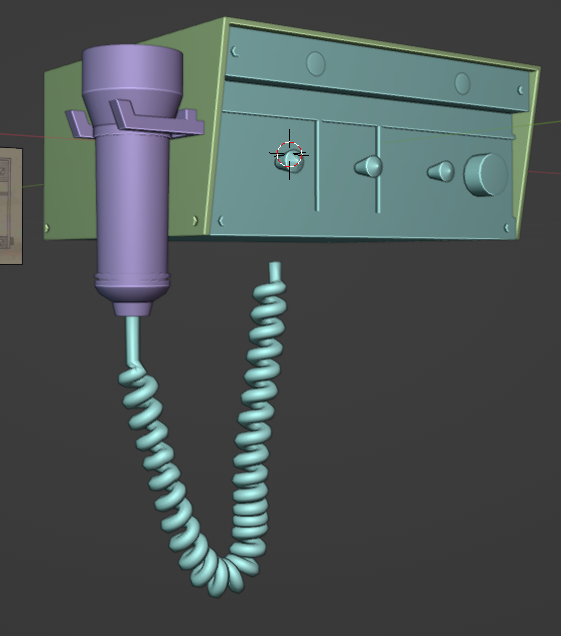
I'm using a curve to set the deform and a spiral to make the actual cable but there's probably a more efficient way right? Would most game assets do something like that as just a texture?
 crisp summit
Yes.
You can create a tube that follows the same path and bake the high res details onto it down to a normal map texture.
Or, you could use a three or four sided face and extrude it along the same path and then bake the texture. It'll be more triangles overall, but you'll get a better looking result.
That may be ideal if you need to animate it.
twilit marlin
would more tightly packed coils make for a better bake?
sly bridge
and opacity, which will lead to some issues unfortunatelly
had this issue on some springs\
twilit marlin
the opacity is actually why I was thinking of trying to pack the coils tighter, so there's less opacity
crisp summit
twilit marlin
would more tightly packed coils make for a better bake?
It would with the cylinder tube. With gaps you'll see some slightly odd artefacts.
Try it out and see if it looks good enough for you.
sly bridge
if this object is right in the face of a player, no matter how you do it will still look pretty poorly
what i would do, is make the shape of that sweep as simple as possible (you can even have a triangle follow that path)
twilit marlin
this will be off to the side but still close to players, somewhere around the center console of a car
sly bridge
would also simplify a lot the curves
twilit marlin
and only the switches need to animate
sly bridge
also, obviously baked in some higher density mesh
mortal mortar
@mint hollow @tidal latch thanks, I'll give it some more thought... I swear it's one step forward, two steps back lol
crisp summit
The rest of your model is quite blocky and could be reduced. I'd suggest that for the LOD0 you could get away with it being more high res. Then reduce hard for LOD1 and onwards.
Take a look at the vehicle interior for the other cars to see what your triangle budget should be. Maybe you've got more room than you think.
sly bridge
i was never able to properly bake down springs (of any type) and have it look decent enough (tried also various approches and software for that one)
also i wouldn't worry all that much
in regards to polycount. mind if i ask how much is it?
twilit marlin
crisp summit
Take a look at the vehicle interior for the other cars to see what your triangle...
its only 1700 tris without the cable right now so I probably do but this is the control box that will go with the police light I'm making and I want it to be a nice small package in 2 prefabs that anyone can add to their vehicles if they want lights so the smaller the better to allow for more budget to the car
with the cable fully modeled it doubles up to about 3-4k tris
sly bridge
peanuts, just saying
shell hedge
yeah dw about 4k in LOD0
twilit marlin
with the light as it stands it should be about 10-11k
I'll still give baking it down a try, if it looks decent then I will have probably saved some budget
 topaz bay
Hi there
How to make a windshield or glass of vehicles transparent?
Enfusion tools
I can’t upload a sample up here
topaz bay
This is the first time I’m using enfusion tools
I uploaded the texture but it apears solid
mortal mortar
topaz bay
How to make a windshield or glass of vehicles transparent?
Do you have a material set up? If so, you can use a material from other vehicle (Assets > Vehicles > Wheeled > M151A2 > Data > M151A2_Gkass.emat)
mortal mortar
tidal latch
Ps armature should be called armature (not armature.001) on characters
It works! The most likely culprit was naming... I got rid of all the .001s from the default files (which might have been residues from armature transfering). So thank you!
The gaps will be there until I work on a new body (which should be much easier to model, implementing it might be different)

also... how can I hide the "wound" layers?
mortal mortar
Time for a break
 surreal ore
mortal mortar
Time for a break
surreal ore
mortal mortar
Time for a break
Creating a custom body isn't as straight forward as it seems.
If you want the default functionality for the character to work on your body there will be a bit more set up than you think.

LOD 0 has 32 separate meshes that need the correct names.
Without these hiding body parts when equipping clothing won't work.
mortal mortar
surreal ore
Creating a custom body isn't as straight forward as it seems.
Oh absolutely. The way the game handles everything randomly and all. TBH that's why I went with just fem looking uniforms as a solution (the dark gru fem ones).
mortal mortar
surreal ore
oh! Well... I hope batch rename helps me, if not I'll just endure lol. Thanks!
topaz bay
@mortal mortar thank you very much, I’m at my very start of modding, I was digging in my old HD, and I found some interesting 3d models, that I bought before
I will inspect the models and see what will show up
mortal mortar
I was there a month ago... it might be easier or harder depending on what you want to do, but keep at it and you will see results eventually 🙂 (key word: eventually)
topaz bay
Yep
uneven vessel
twilit marlin
I'll still give baking it down a try, if it looks decent then I will have probab...
Just to cap this off in case it wasn’t clear - for best results set up your coiled cable so there is no gap between the cables (like how a coiled cable looks when it’s all pushed up as compact as it can go) - that way opacity doesn’t have to factor into it!
 neat canopy
twilit marlin
I'll still give baking it down a try, if it looks decent then I will have probab...
neat canopy
twilit marlin
I'll still give baking it down a try, if it looks decent then I will have probab...
I baked mine on to a triangular low poly model of the cable and that worked pretty good. The cable has ~2k faces in LOD0 and then less and less. I think that´s acceptable for a object near a player and used to interact with frequently.

 neat canopy
sly bridge
peanuts, just saying
neat canopy
sly bridge
peanuts, just saying
But also right what @sly bridge says. Always keep that in mind and a alpha version is also a option.
twilit marlin
Like I said, I think I'm gonna go for a baked normal on a cylinder as suggested but I haven't gotten to it yet due to 4th of July stuff.
I used my time yesterday trying a different layout for the microphone the cable will attach to that I think will be both more aesthetically pleasing and lead to easier placing in any vehicle without worries of clipping
or at least less clipping
 karmic whale
where would be the best place to commission a custom uniform?
mortal mortar
ignore the hair clipping in this pic, it's just a comparison to see if the model looks out of place compared to the base ones.

clipping semi fixed... I might just leave it like that and make another hair


 twilit marlin
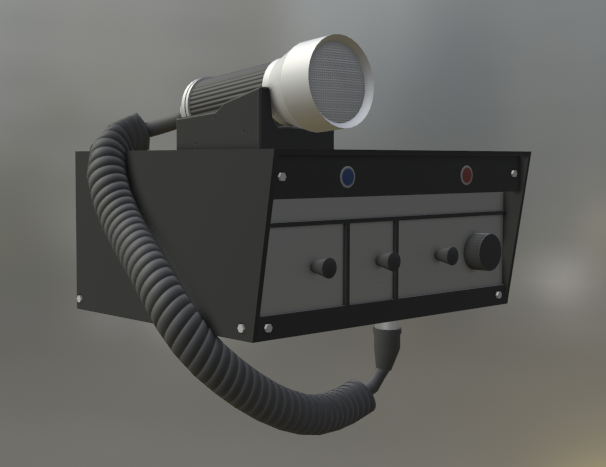
which one looks most aesthetically pleasing? I made the third one first because it's the most real but I saw some with the mic in a cradle on top and I thought that would allow for more cable to be seen without drooping as far below so less chance for clipping


I'm on the fence on which one like the most so outside opinions are appreciated
shell hedge
I like 1 and 3
mortal mortar
One looks really good. Plus the cable looks more heavy duty
twilit marlin
since it's tied I think I will go for # 1
shell hedge
I changed my mind for you so it's not tied anymore
twilit marlin
always so helpful
 woeful quarry
Is there any tutorials on how to give an object you made in blender collision for enfusion?
tidal latch
woeful quarry
Is there any tutorials on how to give an object you made in blender collision fo...
woeful quarry
Im extremely new to this im not actually sure what in that link i should be looking for
tidal latch
I guess you can follow the whole tutorial
woeful quarry
It looks like im looking at hieroglyphs
woeful quarry
 vague walrus
Hello, so my gun worked for a few days on our server. It started to aim out of the middle of the screen again. I run a custom holing Pose and it's setup correctly. It works again after sprinting

Would be cool if I could fix it but the game is in a state it crashes from basically looking at anything
vague walrus
Also i cant replicate that issue in the workbench. Its all fine there
 slow canopy
are there any tutorials on building houses and buildings with functional doors/ windows and to have windows break? been trying to look on yt but not really finding what i wanting
 patent flower
Hi all I’m trying to pick reforger modding up again Iv imported my vehicle with bones for getin and idle. Made a prefab and swapped the model out and wheels. When I try to get in when testing none of the actions show up
Anyone got any ideas where to start fixing this
patent flower


i get one random get in near the wheel but its not where i set it in bones

wheels also dont seem to be attached
when i move the vehicle up in the workd editor
slow canopy
hello have quick question of map i made a inland map what is best thing to do for the edges of map so not fall and see blue in distance i did not add ocean layer not sure if i was suppost to have that layer being inland map

 river heart
patent flower
river heart
patent flower
I might be wrong but i think your bones aren’t oriented properly.
 lethal frigate
slow canopy
hello have quick question of map i made a inland map what is best thing to do fo...
lethal frigate
slow canopy
hello have quick question of map i made a inland map what is best thing to do fo...
what i did is i made 2 very very simple models for background , and put them around the map so you have a feeling its not ending there
stray crater
slow canopy
are there any tutorials on building houses and buildings with functional doors/ ...
Hi ! No real tutorial but I can help if needed, slide in my PM 😉
 tidal latch
patent flower
Hi all I’m trying to pick reforger modding up again Iv imported my vehicle with ...
tidal latch
patent flower
Hi all I’m trying to pick reforger modding up again Iv imported my vehicle with ...
https://community.bistudio.com/wiki/Arma_Reforger:Car_Creation/Prefab_Configuration#Creating_actions get in actions are not tied to "get in" bones but to action contexts
patent flower
@tidal latch thanks, so concluding the actions them selves are defined in the "action contexts" but their location is tied to the bone location with the same name. Iv not got there yet but am i right in saying these "action contexts" are what trigger animations? ie doors ect
tidal latch
patent flower
<@105548653594193920> thanks, so concluding the actions them selves are defined ...
not exactly - they can be tied but they don't have to. You can also define offset manually
tidal latch
patent flower
https://community.bistudio.com/wiki/Arma_Reforger:Car_Creation/Simulation_Configuration#Wheels_parameters as for wheels - maybe you have some offsets defined
patent flower
its not offsets, even when u spawn the vehicle in and drive off the wheels stay where they are like they are not attached
tidal latch
then it could be some animation - make sure you are not using vanilla animations
check also with debugs
drive off the wheels stay where they are like they are not attached
can you show pic of it?
patent flower
Yeah will post it when i get home from work

^ this happens when i drop the vehicle in the world then use the gizmo to lift up the vehicle off the ground
wheels just stay there lol
tidal latch
so it might be offset actually
steep kettle
Is it cool/ok to edit the games models in blender? Just to scale up a mag pouch and fix a bone issue?
tidal latch
steep kettle
Is it cool/ok to edit the games models in blender? Just to scale up a mag pouch ...
its not possible and its not allowed if you don't have permissions from author
steep kettle
tidal latch
its not possible and its not allowed if you don't have permissions from author
Official stuff. Fix the SVD ammo pouch and resize the M12 ammo pouch so the m9 mags can fit.
tidal latch
you cannot load models in Blender for which you are missing sources
steep kettle
oh ok then.
steep kettle
So I can't but you guys can do it? Great then, its amazing to feel this much love from such great developers  !!!
!!!

 delicate condor
steep kettle
So I can't but you guys can do it? Great then, its amazing to feel this much lov...
delicate condor
steep kettle
So I can't but you guys can do it? Great then, its amazing to feel this much lov...
Make a feedback tracker ticket if you find a bug
🙏
rancid glade
hello, im stuck here with an import or export problem, i try to import on reforger tools my bandana, i made the skinning and all, and im exporting well (img 1 and 2) from blender.
armature is selected at the import, but when imported there is no armature once in reforger tools (img3)


 livid hull
rancid glade
hello, im stuck here with an import or export problem, i try to import on reforg...
livid hull
rancid glade
hello, im stuck here with an import or export problem, i try to import on reforg...
did you tick export skinning in the import reforger window?
rancid glade
ok seems to be fixed for a reason i didnt understood but now i have 241 bones !
thats a hundred more than on the wiki
maybe they updated their bone base model and i don't know
or maybe i did something bad (again)

i checked and i don't see double bones or duplicated ones
tidal latch
rancid glade
i checked and i don't see double bones or duplicated ones
https://community.bistudio.com/wiki/Arma_Reforger:FBX_Import#FBX_Export see parameters in red boxes on the screenshot
 stiff reef
I'm making some custom trees for my map but I can't figure out how to properly make the branches move in the wind. My polyplane material is set as MatPBRTreeCrown and I'm playing around with the wind settings but the whole crown moves at the same time, I'm trying to recrate the soft breeze that moves the branches like in the vanilla trees. Any help? Thanks!
 fathom bolt
rancid glade
ok seems to be fixed for a reason i didnt understood but now i have 241 bones ! ...
fathom bolt
rancid glade
ok seems to be fixed for a reason i didnt understood but now i have 241 bones ! ...
« Add leaf bones » need to be untick I think
rancid glade
tidal latch
https://community.bistudio.com/wiki/Arma_Reforger:FBX_Import#FBX_Export see para...
Everything is checked properly
rancid glade
fathom bolt
« Add leaf bones » need to be untick I think
The wiki says otherwise
tidal latch
rancid glade
The wiki says otherwise
you are reading it incorrectly then

#enfusion_model message there is also this pic
rancid glade
tidal latch
you are reading it incorrectly then
Ok i may have shit in my eyes then lol
rancid glade
can't find this file to override while typing its name in the browser

ah they changed the name i believe
 twilit marlin
I'm having trouble with colliders - I've spent the last two days trying to figure it out and made a very simple box just to get something imported correctly
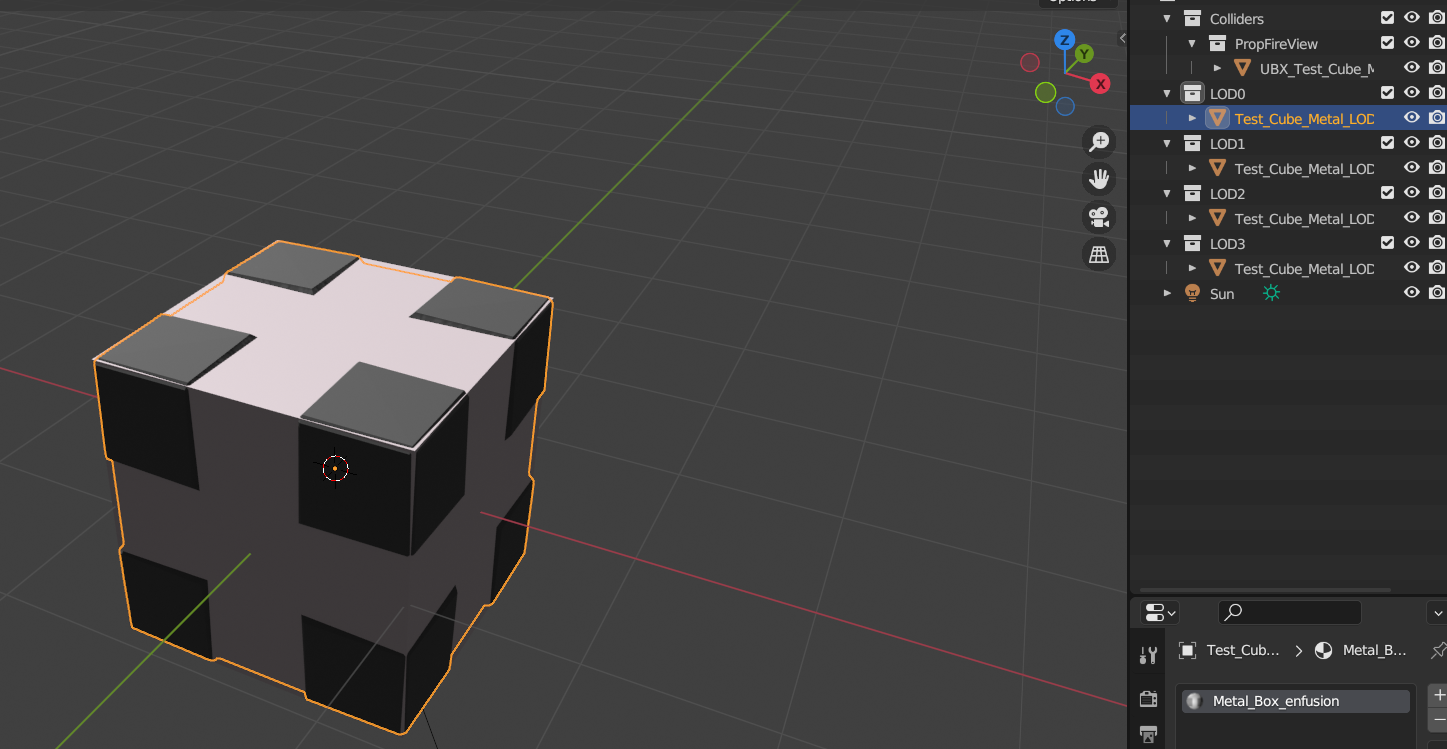
It imported sort of correctly (I couldn't use enfusion tools to do it for some reason) and when I got the fbx imported and registered it had the UBX collider but when I turned it into a prefab I could still walk right through it. What am I doing wrong? Is propfireview the wrong preset?
I'm having a similar problem with all my other models but those have extra problems like weird shapes or colliders inside of colliders so I'll work on that problem next.
tidal latch
twilit marlin
It imported sort of correctly (I couldn't use enfusion tools to do it for some r...
https://community.bistudio.com/wiki/Arma_Reforger:Prop_Creation#Creating_prefab
If you don't use one of the mentioned prefabs as a base, then you will have to go through more steps like setting collision. In some cases base prefabs might be missing RigidBody component and in such scenario, it will be necessary to add such component and enable Model Geometry option inside of it.
twilit marlin
I was following that and still couldn't figure it out. The fbx import page too.
tidal latch
twilit marlin
I was following that and still couldn't figure it out. The fbx import page too.
but is it all clear now?
twilit marlin
no but there's probably a step I'm missing between an xob with a collider and a prefab that you can't walk through but I'm not seeing it on that page
I read through the page again just now so I wouldn't say that missing something obvious. I inherited prop_base.et if that makes a difference.
tidal latch
so you have rigid body component in your prop?
ah, it seems you still need to check "Model Geometry" option
I will update wiki later
twilit marlin
Ok, I will try that when I'm back to a computer
twilit marlin
yep that worked
twilit marlin
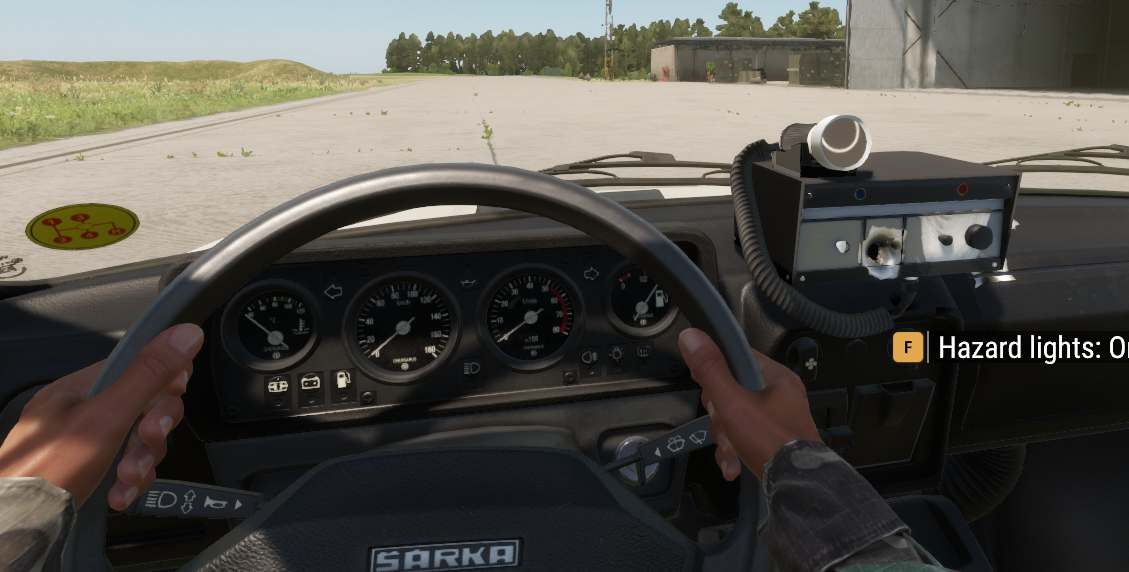
thanks for the help, I finally have one part of this pretty much done and in game - there was a hiccup at first where the car started self driving backwards trying to run away from the box on the dash but we're good now
also a texture hiccup that I can diagnose later, right now I'm just excited
 tropic flicker
help :c


 patent flower
Anyone here us 3DS max to export to enfusion tools?
having an issue exporting a skinned/rigged helmet
think there is a bone number mismatch that is causing my helmet to float and not follow the skinning


anyone got any ideas?.
patent flower
yeah somethings not right
i imported the character example and rigged/skinned off that
either its broke or im doing somethign wrong

fixed, no idea how
reimported sample, did a skinning, eported and it works 🤷♂️
last hill
You missed the empties when you exported I dare say.
shut bloom
So iam running into Problems I cant use a duplicated version of any of the Reforger Cars as a Base for my Cars since they are all locked and the Sample car is seemingly missing 50 % of the stuff.
tidal latch
shut bloom
So iam running into Problems I cant use a duplicated version of any of the Refor...
Why cannot you use those vehicles as base? Samples should have all you need too
shut bloom
tidal latch
Why cannot you use those vehicles as base? Samples should have all you need too
for some reasons the Anim Trees are all locked and I cant edit them
and I also cant delete some parts in components
"sorry forgot to turn off ping"
tidal latch
You need to duplicate whole workspace
shut bloom
but what about that I cant delete parts of components or remove certain onse will that be fixed with that aswell?
tidal latch
Inherited components can be only disabled. If you are doing a vehicle and you need to delete some component from vehicle base then you are doing something very non standard
shut bloom
ok that I can only disable stuff inside a component is a bit dissapointing but fair enough I guess.
astral hull
tropic flicker
help :c
U forgot to weight your mesh
tropic flicker
you mean this one?
 astral hull
shut bloom
ok that I can only disable stuff inside a component is a bit dissapointing but f...
astral hull
shut bloom
ok that I can only disable stuff inside a component is a bit dissapointing but f...
At the top of every component when u click it is a checkbox that says enabled
U can uncheck it and add the same component if u wanted
Or just duplicate the base prefab, break the instance, drag it from the layers area into a resource browser in the destination you want to save it and then u can edit whatever u want
tropic flicker
astral hull
Can you show your colliders
 tropic flicker
tropic flicker
tropic flicker
I just painted the weights on the mesh and on the fire collider, but the result is the same
astral hull
tropic flicker
I just painted the weights on the mesh and on the fire collider, but the result ...
What is your wheel radius in vehiclesimulationcomponent
tropic flicker
i dontknow man, where do I find that?
astral hull
In the axle section in vehiclewheeledsimulation component in the prefab
 spiral hedge
Hi, where i can setup the weapon collision? All parts of the gun have FireGeo and Weapon colliders. But if i walk on a Wall, the Weapon get clipped into. With original Weapons, the character moves the weapon backward.
 tidal latch
spiral hedge
Hi, where i can setup the weapon collision? All parts of the gun have FireGeo an...
tidal latch
spiral hedge
Hi, where i can setup the weapon collision? All parts of the gun have FireGeo an...
in Weapon Obstruction section of WeaponComponent
spiral hedge
tidal latch
in Weapon Obstruction section of WeaponComponent
But if i add a Silencer, the weapon gets longer 😦
tidal latch
lets hope vanilla solution will solve it
spiral hedge
k
tidal latch
although, take a look at bayonets

no idea how it will behave if "Is Bayonet" is set to false 😄
spiral hedge
Why i no not have SCR_WeaponAttachmentBayonetAttribute ? 😄 Only on Exp. Build?
tidal latch
oops, perhaps its from internal build 🙈 carry on, nothing to see here!
 covert dune
Yeah currently bayonet has no effect on weapon length 😛
shell hedge
its not about the size but how u use it
shut bloom
Soooo uhhhh why are the Sample car Prefabs broken? its missing its model even though its inside the Mesh Component 0.o

 tidal latch
shut bloom
Soooo uhhhh why are the Sample car Prefabs broken? its missing its model even th...
tidal latch
shut bloom
Soooo uhhhh why are the Sample car Prefabs broken? its missing its model even th...
It is overriden by something - see puzzle icon
If you are using more mods then disable them
shut bloom
How would I find out what is overwriting it since iam just using our own modpack....
shell hedge
right click > go to override?
any mod that uses the same folder/file path (without changing guid) will overwrite your content
 summer sierra
Anyone have any ideas whats going on here? Drove it around last night and everything was in place where the bones are. Uploaded the mod and noticed it transformed to the version on the right although i never touched it and now its doing this. the video was from the test of what it should be closer to although WIP. After loading it everything is out of whack. By disabling the injection for anims it resets stuff but i would find it hard to believe that everyone that makes vics in this game makes there own injection animations. Any ideas?

 spiral hedge
Short question to UTM Collider: How do i export them? i tryed transform Zero, Origin to Geo and also i tryed to parent it to root bone. But the collider is always arround 1m above the Model.
surreal surge
spiral hedge
Short question to UTM Collider: How do i export them? i tryed transform Zero, O...
origin to geo for each collider and then double check that parent is set to armature and in then in pose mode you selected the bone you want it to move with. Double check the instructions for the parenting in the asset preparation headgear guide half way down
astral hull
summer sierra
Anyone have any ideas whats going on here? Drove it around last night and everyt...
Export profiles are important for exporting animations
Each profile is meant to just send the data for the bones specified in the animation, if u use the one u generated from the .xob of the vehicle it’s exporting all bones. So when you do that and try to play a vanilla animation it snaps all the bones to where they would be on the vanilla model
summer sierra
astral hull
Export profiles are important for exporting animations
So how do I go about altering what I need?
astral hull
summer sierra
So how do I go about altering what I need?
The weapon creation tutorial should cover what you need animation and export wise
U can just apply the process to car instead
 nocturne quartz
its probably because vehicles are not complete. probably waiting for when new things get added in with the lav
 keen folio
Anyone in here familiar with architecture modeling, specifically looking for info on where to find documentation of how enfusion handles pbr workflow and limitations to model density as far as tris/polys go etc. Planning on making some modern houses from scratch and I just don't know where to start looking. Plenty of exp with ue4/5 but not this engine.
nocturne quartz
look up the buildings in the sdk.
patent flower
Afternoon all, is there a way to unhide/hide certain parts of the base character mesh with clothing?

trying to fix the missing part of the characters arms
patent flower
2nd question how do i stop my helmet being visable in 1st person?
patent flower
thats great thx
 wicked jasper
patent flower
Afternoon all, is there a way to unhide/hide certain parts of the base character...
wicked jasper
patent flower
Afternoon all, is there a way to unhide/hide certain parts of the base character...
BaseLoadoutClothComponent -> Hiding Array
You can put in the mesh parts of the character mesh. If you want to know what meshes you can hide go to Basebody_Male_01.xob go to LOD tab and then expand the meshes tab. There you can see what you can put into that hiding array
patent flower
@wicked jasper Thanks appreciate the help
wicked jasper
🤝
patent flower

@wicked jasper is this the right place? its only letting me put a prefab in
not enter any mesh part names
 rough lynx
override meshes to hide
patent flower
rough lynx
`override meshes to hide`

i did this but still didnt work, have I done it right?
wicked jasper
rough lynx
`override meshes to hide`
Sorry yes, this is the right one
wicked jasper
patent flower
Without the basebody stuff. So for example just Arm_L

 torn lodge
Hey, idk where to ask. So I added a music radio to a vanilla car and everything works, however as soon as I get into the driver's seat I can't access the prompt anymore to turn it on or off ?
Do I need to add the action somewhere to the driver's seat to be accessible ?
torn lodge
NVM found it
keen folio
Nothing fancy but I'm just trying to get my grasp on all this. Planning on doing an american city map with highly detailed buildings/landscape etc
 spiral hedge
Hi, which collider layer is colliding with the Terrain? i have VehicleSimple, VehicleComplex and FireView (also try Vehicle and MineTrigger) but all will not collide with the Terrain surface 😦
midnight path
spiral hedge
Hi, which collider layer is colliding with the Terrain? i have VehicleSimple, Ve...
are you using blender to make the model
spiral hedge
midnight path
are you using blender to make the model
yep
midnight path
select all objects EXCEPT MEMORY POINTS and right click and hit 'apply all transformations'
then reimport and see if it still falls through the ground
spiral hedge
midnight path
select all objects EXCEPT MEMORY POINTS and right click and hit 'apply all trans...
Because of the collider position? This i already fix. But i cant find any Layer that collides with the terrain surface
midnight path
also dont forget to give it some weight above 1kg in the rigidbody component
midnight path
spiral hedge
Because of the collider position? This i already fix. But i cant find any Layer ...
the tires dont need colliders to collide
spiral hedge
midnight path
also dont forget to give it some weight above 1kg in the rigidbody component
i will check this, think i give it 1000 kg
midnight path
u can remove the tires completely and the car will still drive
spiral hedge
its a boat, i do not have wheels 😄
spiral hedge
Its drives well
midnight path
but it goes through terrain?
spiral hedge
but if i drive out of the water, its sunk into the terrain
midnight path
vehicle_body
is what i use
for the main box colliders
also they cannot be touching eachother
or they dont work
spiral hedge
i have both vehicle_body and the body_slide
midnight path
make sure they are not intersecting eachother(the main colliders)


 spiral hedge
thanks
midnight path
np
midnight path
spiral hedge
thanks
what kinda boat u making 
spiral hedge
a RIB
midnight path
ah nice
u can animate the engine
if u use a rotator bone and a proc anim
then use a steering rotation proc anim from any vehicle
can set prop as a wheel, etc
so it spins
bone heirarchy would be root>v_body>v_rotator_l01>v_wheel_l01
spiral hedge
already done
midnight path
nice
spiral hedge
50% Substance Painter and the Collider fix
midnight path
let me know if that worked for you
ive had this issue before but im not certain on what i used to fix it
 storm nacelle
Hey, you guys with proc anim editor experience, got any idea why my toolbar doesnt show nodes and this happens ?
exactly the same if i load up, sample_car for example, that allready has the .pap and everything setup
tidal latch
procedural animation editor is broken
patent flower
Afternoon all, just me with another question, I want to make a patch item that goes into a vest inventory but shows up on the vest, what setting makes it visable on model
or is there a prefab i can base it off
I know the flashlight has it but cant work out what makes it show, plus want to make an item without the flashlight functionality
 brazen shoal
Is there a good place online somewhere that has decent models free to download and use?
wicked jasper
patent flower
I know the flashlight has it but cant work out what makes it show, plus want to ...
If you want to do it in the way the way it works with the flashlight your Vest needs the SCR_EquipmentStorageComponent where you can create the slot (aka where the item shows up) and then put the right Item Type in Allowed Item Types. Then you can go into the InventoryItemComponent of your Patch Item and change the Common Item Type to the Item Type that you selected in the Vest Prefab
Or you do it by scripting
delicate condor
brazen shoal
Is there a good place online somewhere that has decent models free to download a...
not really. game ready models are basically never legit
(sure some rare edge cases exist. but not consistently to be able to say, go here this is good source)
 naive pumice
quick question, can objects share a xob file, if the only thing that differs is the texture/material? or do you need a new xob file for every entity/object? it looks like material is tied to the xob, not the .et?
karmic adder
naive pumice
quick question, can objects share a xob file, if the only thing that differs is ...
XOB has the default materials, but these can be overwritten in the entities/prefabs MeshObject component
naive pumice
karmic adder
XOB has the default materials, but these can be overwritten in the entities/pref...
thanks TIL, yeah, that's what I thought, but that doesn't seem to work, but maybe I did something wrong there, I'll check
stuck kraken
naive pumice
quick question, can objects share a xob file, if the only thing that differs is ...
To answer your question:
You can "map" one xob to different .et. An example would be the traffic signs.
naive pumice
stuck kraken
To answer your question:
You can "map" one xob to different .et. An example woul...
ok, thanks as well, I'll check what I'm doing wrong
wicked dirge
Depending on the type of object you might have to do overrides in other components
twilit marlin
Kind of a silly question but the wiki just talks about it like it's an obvious thing so I'm having trouble finding answers, what makes a collider convex vs a trimesh other than the name?
shell hedge
Convex shapes can be trimeshes but concave trimeshes cannot be convex colliders
Or something
twilit marlin
is it that simple? convex is a non-primitive shape collider that doesn't go in on itself and a trimesh is everything else?
or am I still overthinking it, I can't seem to get the colliders right on my model currently but it might be as simple as giving in and making it a trimesh
it's gonna be an itemfireview so it won't have collision so it should be fine right?
wicked dirge
convex is simply that if you take any two points in on on the shape and draw a line between these points, the line will always completely be inside the shape
if this is true for any two points, then the shape is convex
the two shapes on the right are not convex
 shell hedge
left to right, USP UBX UTM LEGOHAND
wicked dirge
in this example, both right shapes could be represented by 3 convex shapes each
twilit marlin
that it explains it very well, thanks
i think i need a trimesh then because when I tried a convex (it wasn't convex) and two cylinders
surreal surge
quick query, does anyone know if blender 4.2 is going to be compatible with enfusion tools
sly bridge
surreal surge
quick query, does anyone know if blender 4.2 is going to be compatible with enfu...
at some point, YES, since 4.2 =LTS
surreal surge
sly bridge
at some point, YES, since 4.2 =LTS
gotcha, cheers. ill switch over when we get some type of confirmation
sly bridge
and BI said they will only support LTS
brazen shoal
Can creation of bones and colliders be done all through enfusion?
surreal surge
brazen shoal
Can creation of bones and colliders be done all through enfusion?
no... its all blender and imported into enfusion
the enfusion tools will help you setup the colliders but you need to have the collider meshes built as per the specs on the colliders page. there are also collider samples on the github
 hybrid mountain
tidal latch
procedural animation editor is broken
hybrid mountain
tidal latch
procedural animation editor is broken
Oh, thats fun. Any work around or am I just screwed?
sly bridge
brazen shoal
Can creation of bones and colliders be done all through enfusion?
for the second time, workbench (not enfusion) is a toolset aimed to script, configure and setup the assets that are imported. All the necessary work on models/meshes / textures / animations / sounds etc that are to be imported needs to happen externally
twilit marlin
do memory points retain rotation on import and can they be attached to a bone? I have a bit of my model that will need to spin and I'd like to have some lightentitys stick on the that bit of the model, I figure memory points will be the easiest way to do this
astral hull
twilit marlin
do memory points retain rotation on import and can they be attached to a bone? I...
Yes and yes
Parent with relations
astral hull
twilit marlin
do memory points retain rotation on import and can they be attached to a bone? I...
You can define the offset of the pivot in the prefab u technically don’t need a memory point but they are helpful
Parent the light to the bone you want and then you can offset it where you would have put the mem point
By that I mean choose the bone in the pivot id section
twilit marlin
getting them in exactly the right spot I want them will be difficult if I just offset it but it's good to know I can just use the memory point
 toxic marten
Anyone know how to hide a prefab on first person view when attached to the LoadoutClothComponent?
spiral hedge
Good day, i still cant find a collider that will collide with the terrain 😦 i now tryed: Vehicle, VehicleSimple, VehicleComplex, Wheel. i also used the vehicle_body and vehicle_slip materials. What do i wrong?
 tidal latch
spiral hedge
Good day, i still cant find a collider that will collide with the terrain 😦 i ...
tidal latch
spiral hedge
Good day, i still cant find a collider that will collide with the terrain 😦 i ...
is it trimesh?
Afair trimesh are not working very well for collisions with terrain. Use UCX or UBX or other simple collider types for that
astral hull
spiral hedge
Good day, i still cant find a collider that will collide with the terrain 😦 i ...
Make a box collider for the boat and make it ‘vehicle’ layer
spiral hedge
tidal latch
is it trimesh?
ok will try
spiral hedge
UBX is working well! Thanks guys
 trail sonnet
Anyone wanna help me out and make a
M2 flamethrower fbx for a scene im making?
keen folio
Guess the region. Anyways goddamn this is tedious, been a while since I've made anything lol, workflow is rusty.
 nocturne quartz
dat fov
tropic flicker
astral hull
In the axle section in vehiclewheeledsimulation component in the prefab
Lastly, I better delete everything and do it again from scratch but this time using the samplecar prefab and not the humvee one, I did it now I only have a few small details to fix
 olive pagoda
Hey all, i am very new to the Enfusion work bench, i have made a mask and it is scaled i am however having trouble importing it. If anyone has the Know how. could i please get help on the xporting and process from blender and importing to Enfusion
 storm nacelle
olive pagoda
Hey all, i am very new to the Enfusion work bench, i have made a mask and it is ...
storm nacelle
olive pagoda
Hey all, i am very new to the Enfusion work bench, i have made a mask and it is ...
What is happening when you import ?
olive pagoda
storm nacelle
What is happening when you import ?
Pretty much the only thing displaying is the head
storm nacelle
Have you read the documents on importing on the reforger wiki ?
You need to hide the head and select only the mesh you want exported in the fbx, and choose only selected in the export options.
olive pagoda
storm nacelle
You need to hide the head and select only the mesh you want exported in the fbx,...
ill give it a go, cheers man
surreal surge
What bone moves with breathing, does anyone know. Im trying to set up a PC like RHS has it with multiple belt configs but my pouches only move with the spine and dont move with breathing motion. Ive gone through the xobs but my pouch only moves side to side and isnt moving with the characters stomach movement in and out.
ive looked at their bone structure but if i set mine up the same way with the belt bones and no bone on the pouch i get the above
topaz bay
Hi there
Could you please advise how to add collider for a model?
I’m using blender
And. When I export the model into enfusion workbench
It seems I’m passing through the model!
I will upload the photos
 neat laurel
https://community.bistudio.com/wiki/Arma_Reforger:Weapon_Creation/Asset_Preparation
Scroll down a bit for a collider mesh. Essentially it's just a simplified mesh. And the export settings will include it.
topaz bay
I will dig around there
neat laurel
Once the object is in the world. You'll need a mesh to display it, and a rigid body to enable collision
topaz bay
Thank you @neat laurel
neat laurel
If you're using the world editor, vs making a weapon or stuff like that.
topaz bay
Actually a car
olive pagoda
storm nacelle
You need to hide the head and select only the mesh you want exported in the fbx,...
I got it to import but it did not import with color?
tropic flicker
good afternoon everyone, does anyone know where I can modify these front lights?
 olive pagoda
Anyone able to help a brother out, very new to all of this, finally got it to import however no textures ?

 surreal surge
olive pagoda
Anyone able to help a brother out, very new to all of this, finally got it to im...
surreal surge
olive pagoda
Anyone able to help a brother out, very new to all of this, finally got it to im...
Blender wont import textures. you need to follow the PBR guidelines and build the textures for import into workbench. then once you import them you can assign them
olive pagoda
surreal surge
Blender wont import textures. you need to follow the PBR guidelines and build th...
You wouldnt be interested in giving me a tutorial ?
surreal surge
olive pagoda
You wouldnt be interested in giving me a tutorial ?
im probably not the right guy for that because Im still learning. The best thing you could do with your time would be to go through the Bohemia tutorials and bring the samples into the game. They give you everything you need and once you go through those it will answer a lot of questions. They give you examples within blender with skinning and without.
olive pagoda
surreal surge
im probably not the right guy for that because Im still learning. The best thing...
Thanks man ill give it a go
surreal surge
olive pagoda
Thanks man ill give it a go
ill Dm you the info
olive pagoda
surreal surge
ill Dm you the info
Thank you really appreciate it
 grand notch
Just curious but I got a custom grenade model that I’ve been working on and was wondering which enfusion tool I would use to make it where when you pull the grenade you actually take out the pin of the grenade
shell hedge
you make the animation in blender, if you cant reuse vanilla animations
grand notch
shell hedge
you make the animation in blender, if you cant reuse vanilla animations
Is it the animation tool where I would mess with that? I got the grenade working and the actual animation just gotten fix the position of it and make the guy actually pull the pin
grand notch
Sounds perfect wasn’t sure, I get the weapons but wasn’t sure for grenades so thanks!
 snow wadi
anyone have an idea of what could be causing this? it only happens when its in the enfusion workbench

 last hill
snow wadi
anyone have an idea of what could be causing this? it only happens when its in t...
last hill
snow wadi
anyone have an idea of what could be causing this? it only happens when its in t...
What is it? What is it meant to be, is it an animation, is it just weight painted and sharing vanilla anims. Can't help with no info.
snow wadi
it was the bolt of a gun that for some reason welded itself to the space time around him, it is supposed to be a bolt, it is weight painted and doesn't have any animation on it
snow wadi
last hill
What is it? What is it meant to be, is it an animation, is it just weight painte...
could the reason be using the newest version of blender? a friend re-skinned it and it worked
last hill
snow wadi
could the reason be using the newest version of blender? a friend re-skinned it ...
Use 3.6 to be safe, could have been attached to multiple bones, rather than just the bolt, if you apply 1.0 weight on any other bone, it will split it by however many bones are weighted to the vertices of the component.
snow wadi
thats the thing, I made sure the only thing that was affecting that mesh was the intended bone
so I guess it was blender's fault
 iron galleon
little question what was the fix again for if gun fell though the map if they have a collision setup ? .
sly bridge
iron galleon
little question what was the fix again for if gun fell though the map if they ha...
rigidbody component irc
iron galleon
yea it has it all , if i drop it works fine but when the char dies it falls through the map
a fixt it
shell hedge
not only it needs colliders but also needs them to be proper
iron galleon
it was just that fireview doenst work and it needs to be weapon layer
but yea fix it
surreal ore
iron galleon
it was just that fireview doenst work and it needs to be weapon layer
Look at the colliders I made you for the Benelli
iron galleon
already fixt it thanks to
shell hedge
weapon for physics and fireview for other collision, usually weapons have those 2
snow wadi
I followed the tutorial (https://community.bistudio.com/wiki/Arma_Reforger:Weapon_Creation/Prefab_Configuration)
until the part called "Deployment IK Targets" I followed the steps and tested if I could use the weapon and deploy it on the ground or surfaces and the workbench greeted me with this (img)
for the base entity I used (enfusion://ResourceManager/~ArmaReforger:Prefabs/Weapons/Core/Rifle_Base.et)

do I need the "snap_left_hand" and "snap_right_hand" pivot points? for it to grab it properly?
 lunar grail
Any ideas why Get In Teleport in BaseCompartmentManagerComponent breaks the animations? Tried searching but didn't come up with anything, figured I'd ask here to see if there's an obvious answer.
lunar grail
the animation works if i dont check the teleport option, but then the player doesn't get moved into the right location in the vehicle, and also getting out doesnt work. if teleport is enabled, the player gets teleported to the right spot, but doesnt animate, but getting out works. Im 80% sure i set up the model properly and im not missing anything there, but given this issue that i've been stuck on, figured i'd see if anyone can offer any insight
keen folio
Getting busy with the texture painting and all the fun shit. I'm going to try to have a 10-15 building pack out by the end of next month, all high quality/full interiors etc

Also, as far as working doors go, should I just pop the arma doors onto these in the workbench or should I just make my own? I stuck to the dimensions provided in the wiki for the frames and all that.
 honest pine
snow wadi
do I need the "snap_left_hand" and "snap_right_hand" pivot points? for it to gra...
honest pine
snow wadi
do I need the "snap_left_hand" and "snap_right_hand" pivot points? for it to gra...
It can help
lunar grail
assuming the car creation tutorial may be out of date a bit. given I've been trying to follow it but its only part way working, are there any other good resources people can recommend to follow for modding in new vehicles?
olive pagoda
lunar grail
assuming the car creation tutorial may be out of date a bit. given I've been try...
I feel your pain
lunar grail
well, I've managed to get the player sitting in the right spots at least, so that part of the animations are working. now though, it seems like the engine wont start due to an animation issue, and again, I'm not sure why / if there is an easier fix for this outside doing custom animations? open to any assistance / advice
brazen shoal
Is it possible to convert a .rvmat file into .emat?
wicked dirge
brazen shoal
Is it possible to convert a .rvmat file into .emat?
no, fundamentally two completely different ways to describe a material
neat laurel
I would assume it's probably possible to steal the underlying tiff and rebuild it?
shell hedge
what kind of texture maps does an rvmat contain?
nvm I found it
it has specular and diffuse color
brazen shoal
wicked dirge
no, fundamentally two completely different ways to describe a material
Is it possible to extract the textures from the rvmat and rebuild it all into an emat file?
shell hedge
should be doable if you have the texture
neat laurel
I don't know the legal status, but of BI owns DayZ they really should make exporter for its content.
brazen shoal
neat laurel
I don't know the legal status, but of BI owns DayZ they really should make expor...
All their stuff is downloadable but only their already debinarized files are usable in mods
surreal ore
brazen shoal
All their stuff is downloadable but only their already debinarized files are usa...
Yes, you can port anything in the Licensed Data Packs
brazen shoal
surreal ore
Yes, you can port anything in the Licensed Data Packs
Not the binarized files right?
surreal ore
Not sure tbh. Ask in https://discord.com/channels/105462288051380224/105792634995388416
brazen shoal
Is there an already made helicopter model that I can look at in blender just to see how it was setup just to see how my littebird should be setup?
fluid dragon
Hey Guys, any Idea why it looks like that im missing Faces ? https://i.imgur.com/7kz1SdH.jpeg
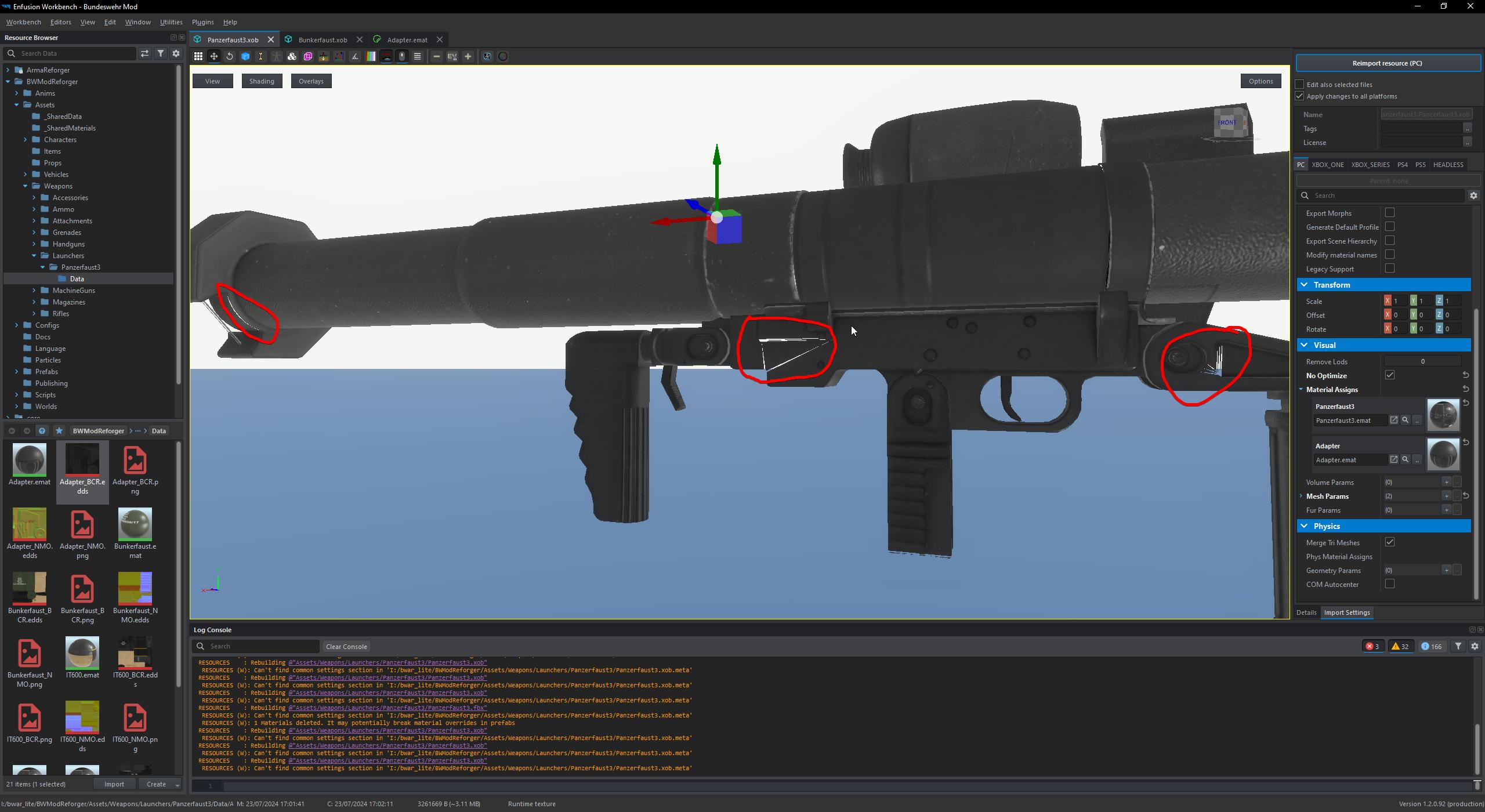
in Blender it looks fine
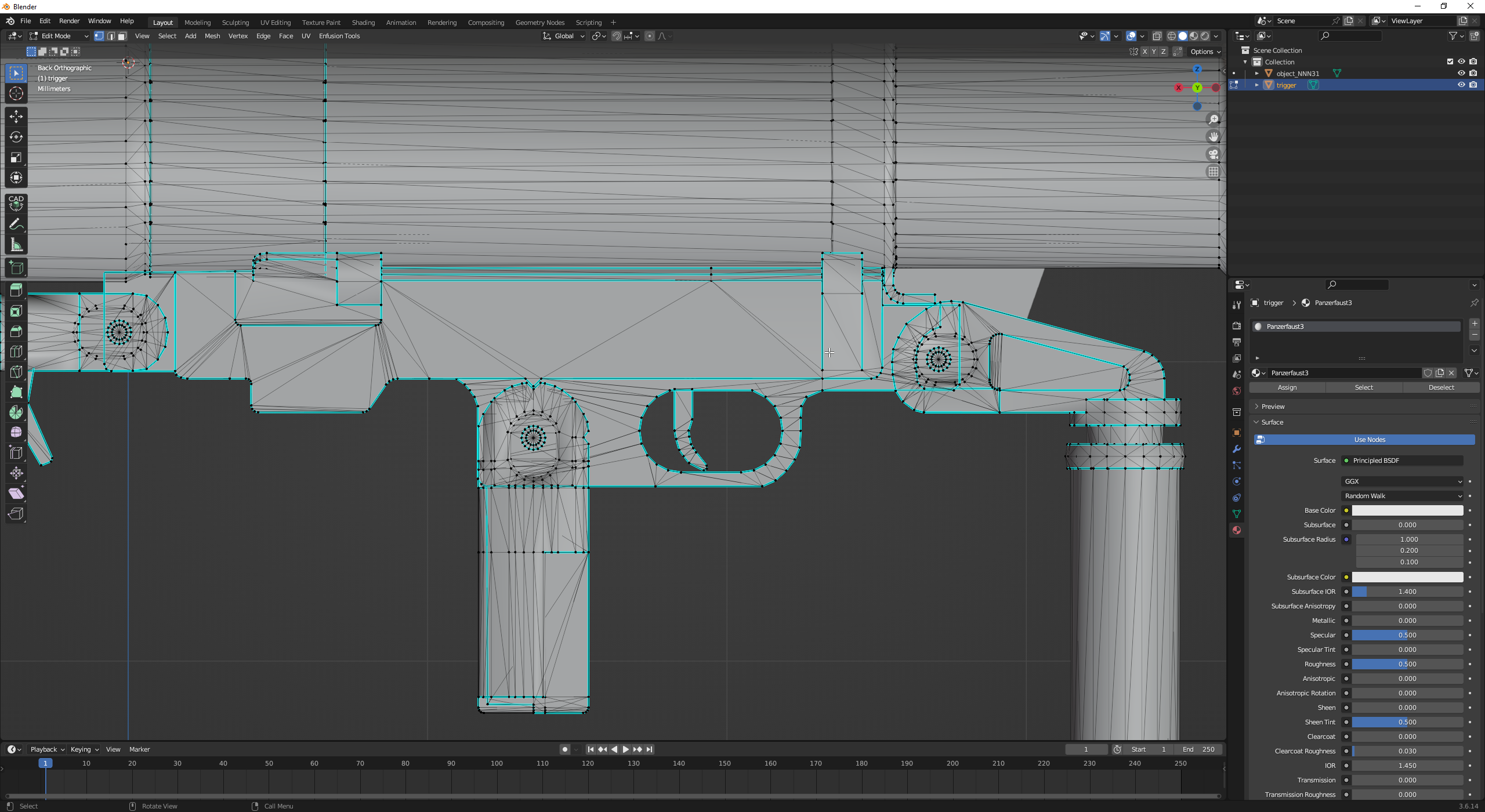
 willow sage
From the top right options of the Viewport, open the drop-down menu for “Overlays”, and under Geometry, check the box for “Face Orientation”
The object(s) will change color, and you'll be able to see whether the normals are correctly oriented or if they're flipped
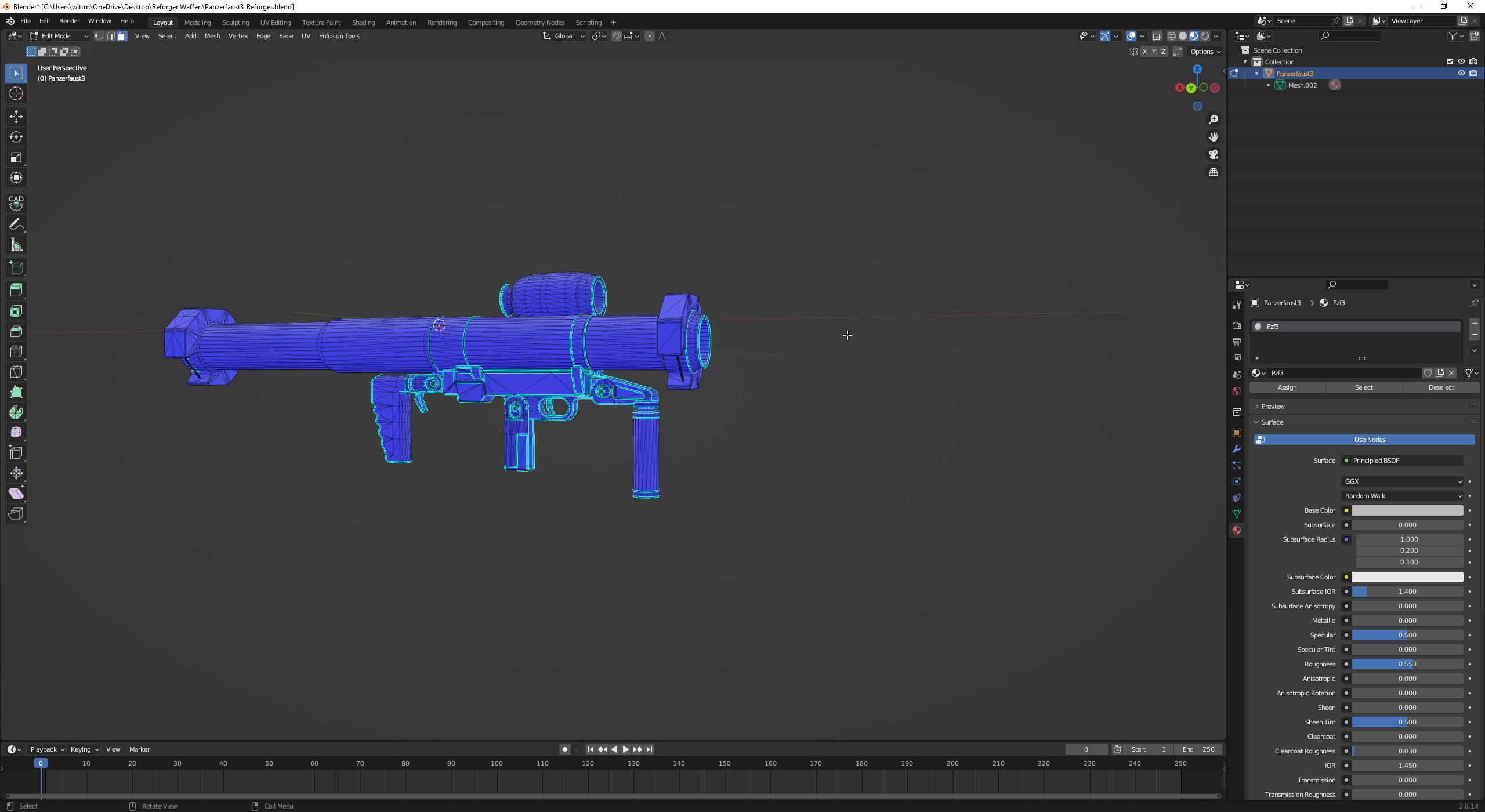 fluid dragon
nope, btw in substance it all looks fine aswell
last parcel
could be a too small face that be causing it
brazen shoal
How do I merge the Object_LODs into one?

They all have these same materials but vertex groups are different
 fluid dragon
fixed it, i think it was the scaling
lunar grail
Any ideas on what could be causing this? 1st picture is me loaded into a test world. The two prefabs on the right are inherited from M1025_armed_base, the two on the right from Wheeled_Car_Base. When loaded into the test world, the bones(and all other wheeled sim stuff), will work and display for the two on the left, but not on the right. Additionally, turning on any other debugging (suspension, tires, ect) will crash the workbench if the Wheeled_Car_Base inherting prefabs are placed. When I exit the test world (picture on the right), all the bones become visible. Loading back into the world takes it back to the situation in the first picture.


any ideas why inherting from the vehicle prefab works fine, but inherting from the Wheeled_Car_base doesn't work? I've tried disabling everything in the working ones down to just the base model stuff + wheeled vehicle sim, and when I do that, the bones go away with the sim turned off, and come back when its turned on, so I feel the issue is there. The issue being, I've basically duplicated the vehiclewheeledsim component manually in the ones on the right, and they still dont' work.
I also get the same issue (the bones not appearing) in the Wheeled_Car_Base inherted prefabs, even when using a base game xob (in this case, I used the same hmmwv xob to limit the differences). Even doing that, the bones do not appear
Disregard the above; I changed my axle torque share values, and it fixed itself. Not sure what I did wrong there, I might experiment more to try and see if I can recreate it again
 mighty bronze
lunar grail
Disregard the above; I changed my axle torque share values, and it fixed itself....
mighty bronze
lunar grail
Disregard the above; I changed my axle torque share values, and it fixed itself....
Skill issue
mighty bronze
brazen shoal
How do I merge the Object_LODs into one?
If you're aiming to have the entire vehicle be one model ctrl + j will join them as one
Wait hold on
mighty bronze
brazen shoal
How do I merge the Object_LODs into one?
Is this the arma 3 humming? If so it'd be best if you don't merge the LODS into one
Since you'd be merging progressively shittier versions of the same model into one
Same if arma 2, i just don't recall arma 2 having clan signs
Just incase you don't know level of detail (or LOD) is what makes models look worse (and as a result less performance) so level 0 is best detail and rhe further is going to look worse
 pseudo hull
fluid dragon
https://i.imgur.com/7q9OyKg.png
pseudo hull
fluid dragon
https://i.imgur.com/7q9OyKg.png
Try having a Triangulate Modifier active when you export, just in case. I agree with Wolf's message, the front most issue is likely the faces are too small. I recommend redoing the topology, on at least that part, but it wouldn't hurt to redo the topology on all the issue areas.
nocturne quartz
did you make that panzerfaust 3? boris it looks pretty good even without the seams
fluid dragon
Its our Panzerfaust 3 from the A3 BWMod
nocturne quartz
oh alright you should add the straps to it
hybrid mountain
Weird issue, no matter what I do I cannot get my UCL_ collider to import - turns out that if you make any change to X/Y length it will no longer be considered a perfect cylinder (even when those values are equal, rotation/scale is applied, and origin is set to geometry.
Rotating seems to cause issues as well - the only way I have gotten it to work consistent is using the blender menu to spawn a cylinder, define it's size in one shot, and translate it using the location move tool. That's as far as I can get before it breaks and fails to import.
 light eagle
hybrid mountain
Rotating seems to cause issues as well - the only way I have gotten it to work c...
light eagle
hybrid mountain
Rotating seems to cause issues as well - the only way I have gotten it to work c...
Did you try selecting the object, then holding Ctrl-A. Then select "Set Rotation and Scale"
woeful quarry
Anyone able to help me before i go bald ripping my hair out
legit all im trying to do is make a crater model for my map
but when you lay down in the crater you get stuck on random invisible geometry
You can crouch or walk fine but if you lay down you just get stuck on nothing
Ive tried allot of different things to fix it and its driving me insane
 empty horizon
is there any guides on how to add collision to models in enfusion?
mortal mortar
So I'm having the apparently common "Missing some mesh skinning weights. Weighting them to root" problem (I've searched through the whole discord, I swear).
I've re-done the weight transfer and weighting from scratch 3 times already and I'm not sure what I'm missing or doing wrong.
so this is what I have in blender, where I have 163 bones (157 + the 6 empty groups)

but on enfusion I have 164 bones.... and I'm going nuts.
 neat laurel
empty horizon
is there any guides on how to add collision to models in enfusion?
neat laurel
empty horizon
is there any guides on how to add collision to models in enfusion?
In editor or in blender? The weapon tutorial handles the blender one. Which realistically is just a big shapes over your more detailed shape.
toxic marten
mortal mortar
but on enfusion I have 164 bones.... and I'm going nuts.
I believe its a weight paint issue, thats the only time Ive ever got it. Console log usually displays something related
toxic marten
No problem
empty horizon
which name should i use for such collider?
 nocturne quartz
for a collider its a little complex
also your adding vehicle wheels for a static object?
empty horizon
nocturne quartz
also your adding vehicle wheels for a static object?
its monument
not a drivable vehicle
nocturne quartz
what is the green mesh?
tidal latch
mortal mortar
but on enfusion I have 164 bones.... and I'm going nuts.
check which parts of the mesh are moving when you move "Armature" bone in Resource Manager. Once you weight those missing parts to some proper bone, Armature bone will be gone from the list in Resource Manager and numbers of bone should be correct
mortal mortar
I'll give it a shot! Thankss
neat laurel
empty horizon
not a drivable vehicle
Yet 😁
Any monument is a drivable vehicle with enough will power 😂
tropic flicker
Does anyone know what is happening here and how I could fix it? I have a finished model with the same problem and I didn't want to fix it because I thought it was a unique problem to that vehicle because it was very high, however I see that the same thing is happening with this one and I would like it not to move when you leave it still.https://cdn.discordapp.com/attachments/1263669691046428704/1266839552790761472/20240727-1926-44.3490523.mp4?ex=66a69bc6&is=66a54a46&hm=d665beeea800510e7f4809f426a8a9cd988288b7774cf063589db4d5772e9ef8&
neat canopy
Hey guys,
on import of my building I get this errors. My BSP is manifold, portals are facing inside and are placed little outside of the Box/Portal Volumes, the portals are emitting light properly. Has someone had this error befor? I allready checked the wiki twice and also with a friend, his portals are working.

And portals are parented to PRT_Volumes
Transformation is applied
neat laurel
Whats the quickest way to make a non-driving "interactable model" - like they did with the ZU gun, or will/have done with turreted stuff. Should I be cloning what they did for "turrets" and just apply it to a diffrent model?
neat laurel
Any model maker want to save me from myself with a crane turret? 😂
 nocturne quartz
no put that dock crane on a vehicle
topaz bay
Hi there
What is good for enfusion work shop
Low poly models or high poly models?
Need your Advise please
I’m about to buy some interesting models and mess around with them
light eagle
I think you need to do some reading up on modeling practices before spending any money. High Poly and Low Poly have no strict definition. They are just terms for what the artist considered high and low. 15 years ago, BI used the Low Poly versions of their 3d assets for Arma 2. Those low poly assets looked good, and worked well. But now, 15 years later, those low poly assets are well below the quality standards you would expect in Reforger. If you look at the big asset warehouses, you will see High Poly and Low Poly, but that's not what you need to be looking at. You need to look at what the artists states the vert count is, compare it to what you see in the vanilla assets, and judge whether you feel the model quality is good enough.
topaz bay
Fair enough, I have a little knowledge about modeling and how to import to game Engine
For now @light eagle
karmic adder
Also, using LODs is very important, especially for very high poly models.
topaz bay
I understand
karmic adder
As BigBen said, very "low poly" models usually don't really meet quality standards.
Instead, LODs are what eliminates most of the performance disadvantage of very high fidelity.
topaz bay
I have some high quality low poly models that looks great
But when i compared it with h poly
There is a huge difference
karmic adder
Yeah, not all the quality comes from being high poly.
You can get away with fairly low poly counts as long as you have good textures / materials.
But obviously, if you're making a new model, you might as well make it higher poly, it has a benefit and little disadvantage.
topaz bay
I understand @karmic adder,
Thank you very much
Is it okay to share here
To get some advice in future?
nocturne quartz
what you mean ofp assets still look great in the refrogers
neat laurel
nocturne quartz
what you mean ofp assets still look great in the refrogers
I mean Reforger and OFP both look the same when viewed 10,000 km 😂
 rancid cape
As someone who has little experience with it but i would like to get the community more assets for their maps, how hard would it be and is it allowed to buy blender assets and create a mod with them? Lets say i bought this would there be any reason they wouldnt work in enfusion?https://www.cgtrader.com/3d-models/architectural/other/yemen-buildings-modular-collection

CGTrader
Model available for download in Autodesk FBX format. Visit CGTrader and browse more than 1 million 3D models, including 3D print and real-time assets
stray crater
rancid cape
As someone who has little experience with it but i would like to get the communi...
I guess there could be two points of view for your question.
If you use it on your map/server, then, no problem, you can use it.
If you buy it and make a mode as it is, so modular, then no, since you just make the collection free by sharing it.
If you buy it, make custom buildings using the modular collection, it is a bit different but still a no for me, since people can download your buildings and finally get the collection.
Anyway, I guess the best person to ask this is the creator.
For the importation question, there should be no problem, just maybe a bit of work for LODS, Portals, Lights, Colliders, …
neat laurel
If the assets are "free" check the licencing. If it's rights removed kinda deal go ham.
If it's purchased, generally everyone has a "no giving it to other people free" licence.
Also remember that assets that are super sexy don't translate well into video games. Details cost rendering money (although these don't look too bad). You can cheat with textures, but real detail needs real polys - and good looking assets will be poly dense as a result.
Luckily downgrading poly count isn't too bad, but it will require work. Just like anything worthwhile.
 fathom elbow
just ask the author if you are unsure
rancid cape
I see, thanks for the response guys!
 fresh lion
Hey, I'm not sure if this is the right thread, and it's probably a simple question for most: I'm trying to override part of the GreenBerets. I Override my characters to my folder with the base loadout character. I want the helmet, jacket, pants, vest, and some items in SCR_InventorySorageManagerComponent to come from the base loadout character. If a character has a item preselected to the individual character i should be able to clear it in BaseLoadoutManagerComponent(for example the beanie hat on Character_US_SF.et) and check the inherit from parent skeleton box, and it should change to the helmet i picked in the base character, but it does not. what am i missing, please?
wicked dirge
fresh lion
Hey, I'm not sure if this is the right thread, and it's probably a simple questi...
You probably need to be in #enfusion_configuration
fresh lion
wicked dirge
You probably need to be in <#976159689668722718>
cool, thank you. I'll try there
torn lodge
Can someone give me a good ressource how to setup colliders? Want to add colliders to my halo ring
 karmic adder
torn lodge
Can someone give me a good ressource how to setup colliders? Want to add collide...
torn lodge
karmic adder
https://community.bistudio.com/wiki/Arma_Reforger:FBX_Import#Collider_shape
karmic adder
torn lodge
Can someone give me a good ressource how to setup colliders? Want to add collide...
torn lodge
karmic adder
https://community.bistudio.com/wiki/Arma_Reforger:FBX_Import#Collider_shape
Thx bud
 tame tundra
rancid cape
As someone who has little experience with it but i would like to get the communi...
tame tundra
rancid cape
As someone who has little experience with it but i would like to get the communi...
also keep in mind, that most of the content from CG Trader are designed for offline render like blender and 3D Max, so you will need to optimize models by your own to improve performance
snow wadi
torn lodge
Can someone give me a good ressource how to setup colliders? Want to add collide...
isn't the halo ring just a decorative thing on the sky?
also, anyone have any idea what can cause this? RESOURCES (E): Collider is not valid 'UCX_body
nvm, it was a trimesh
nocturne quartz
is it possible to make a skybox ?
that how the originals are set up there is no point in adding collision to an object that is out of reach
shell hedge
Yes but clouds cast shadows on your sky objects so it looks lame
 spice topaz
shell hedge
Yes but clouds cast shadows on your sky objects so it looks lame
spice topaz
shell hedge
Yes but clouds cast shadows on your sky objects so it looks lame
What if you never add the clouds components 🤨
shell hedge
spice topaz
What if you never add the clouds components 🤨
There's no clouds
Also lame
surreal ore
rancid cape
As someone who has little experience with it but i would like to get the communi...
That pack is released under Royalty Free No Ai License. So if you buy it, all pieces; modular or combined can be used in a mod. You're just not allowed to share the source files with anyone.
vague walrus
Hey Guys, Im working on a modpack right now and im having trouble making the weightpaints for the pants and jackets to be perfect. Could anyone Help me out with it? The butt on the pants is kind of the biggest problem when crouching.


What would you guys reccomend making the hip section like to make it work correctly. I saw the vanilla pants have 16 bones
 surreal ore
Transfer weights from sample pants to yours.
tacit eagle
vague walrus
Hey Guys, Im working on a modpack right now and im having trouble making the wei...
Use this after Transfer Corrective Smooth Baker Blender addon
vague walrus
surreal ore
Transfer weights from sample pants to yours.
Oh thats a great Idea
The Sample pants are on github?
surreal ore
vague walrus
The Sample pants are on github?
Yes
 vale jasper
Can someone help/explain to me what Im doing wrong? I get this error in yellow and it freezes. I originally had this model without custom collisions and could not seem to get reforger to use the mesh as a collision (like unreals advanced collision thats built in)

 tidal latch
Your collider is not convex. Try creating something simple by hand from scratch


 tidal latch
Is it the only object with ucx prefix?
#enfusion_model message this is not convex by quick glance
Next time share screen without visual mesh - just collider
As for offset - make sure you apply transforms
vale jasper
Were do I apply transforms for that cylinder? In the toolset or from blender? (Sorry very new to blender)
I didnt offset anything in blender just scaled and sat it as in pic on right
unchecking COM Autocenter seemed to fix it
 vale jasper
Above, unbchecking COM autocenter fixed it, thanks reyhard
now to get bullet collisions.... damn
and the same process to follow on 20 other custom ones 🤕
nocturne quartz
i havent checked how the collusions are done with trees in the game but you can use less sided cylinders. I dont know if you should use the cylinder mesh or a simple trimesh
surreal ore
Trimesh should be used as few times as possible for optimization
 inland sentinel
Yes and trees are so frequent you need simplicity. They learned that with DayZ. I imagine colliders are similar how they recently made them in dayz
river heart
Why do my rail meshes import weird in enfusion I applied a basic texture to show off whats wrong with it all i need to do to publish this is to fix my rail mesh and i cant figure out how

 neat laurel
Looks like your normals are flipped. So your rails are showing up hollow or something like that.
tacit eagle

any reason why my custom patch material isnt changing the prefab for the patch?
ive duplicated patch and texture and made my own texture but still the prefab doesnt change
neat laurel
Right click refresh the image?
river heart
neat laurel
Looks like your normals are flipped. So your rails are showing up hollow or some...
Okay 👍
tacit eagle
neat laurel
Right click refresh the image?
?
neat laurel
Are you talking about the prefabs image? Or are you talking about the texture not showing up in the editor viewer?
tacit eagle
neat laurel
Are you talking about the prefabs image? Or are you talking about the texture no...
i am talking about the prefab itself not using my material
i made custom texture for patch and applied it and its still default RHS patch
tropic flicker
Why does my weapon not appear in the weapon boxes, if I am following the same logic as the example weapon?


 crisp shale
tropic flicker
Why does my weapon not appear in the weapon boxes, if I am following the same lo...
crisp shale
tropic flicker
Why does my weapon not appear in the weapon boxes, if I am following the same lo...
because you are opening up US_inventoryitems.conf when you open a US arsenal
you have to override it and add gun there
nocturne quartz
is there a diffrence between say 8 sided cylinder vs a 8sided cylinder which is trimeshed?
or better yet a cube that has been morphed around
tropic flicker
crisp shale
because you are opening up US_inventoryitems.conf when you open a US arsenal
ah ok thanks i was duplicating
river heart
neat laurel
Are you talking about the prefabs image? Or are you talking about the texture no...
So my Xob and prefab looks like that textured and un textured.
vague walrus
tacit eagle
i made custom texture for patch and applied it and its still default RHS patch
You need to define the material in the .xob file before importing in some occasions
wicked dirge
vague walrus
You need to define the material in the .xob file before importing in some occasi...
he is not importing a xob but overriding materials on an existing one
vague walrus
Ahhh alright
wicked dirge
tacit eagle
in your BaseLoadoutClothComponent are you setting your new material in the Worn Material Override and Item Material Overrides?

paste a pic of your component setup here
shell hedge
the wiki discourages using overrides and says to use prefabs instead
wicked dirge
shell hedge
the wiki discourages using overrides and says to use prefabs instead
not sure what you mean? The Material Override attributes is the standard way to replace the meterials on a xob through the prefab
shell hedge
 wicked dirge
shell hedge
wicked dirge
shell hedge
ah ok I see what you mean. Since we use overrides and they work fine, I cant say certainly that the prefab method will work in the patch system. although I dont see a reason it wouldnt
shell hedge
maybe in your patch it is different but for clothes it has never worked for me personally (the material override way)
like they would still look like the original jackets after opening the world
annoying
maybe its fixed now tho
wicked dirge
shell hedge
like they would still look like the original jackets after opening the world
once in a while yeah i see this too, but usually once you play the scenario its fine
but indeed this is way better nowadays
shell hedge
probably my skill issue
 south gust
Hey guys what is the cause of this glitch in enfusion. In Blender All normals seem to be correct, but in enfusion 2 Normals are wrong, how to fix this ?

 wicked dirge
south gust
Hey guys what is the cause of this glitch in enfusion. In Blender All normals se...
wicked dirge
south gust
Hey guys what is the cause of this glitch in enfusion. In Blender All normals se...
I very recently had an issue where I saw the same kind of problem. The problem was not with normals, what I found is that i had some unfused vertices. So somewhere where I thought i had one vertex i had multiple
once i fused them all went fine
south gust
alr, sound like real fun now
south gust
wicked dirge
once i fused them all went fine
ok it wokred, thank god
wicked dirge
nice
tropic flicker
Hi, excuse me, does anyone know why this happens?
When you use the GM to peter soldiers in this cargo prefab they look fine and sit in the place assigned from blender, but if you as a player try it, it will send you to the v_root bone.
neat laurel
Dragging people into positions is likely not the same as calling the action as a player. I don't know the solution off hand, but I had the same problem when I played with the BTR turret. It had something to do with the slots. I assume not having a slot properly linked to the get in action?
tropic flicker
neat laurel
Dragging people into positions is likely not the same as calling the action as a...
It sounds complicated. I've been trying to figure out what's wrong for 3 days. If it's not that, the cargo prefab simply doesn't appear in the vehicle I'm planning to put it in. Isn't there a better way to simply add more passengers to a vehicle?
neat laurel
I'm far from a expert, but you need slots and actions - and maybe a door if you want to use that grouping comp. I would assume you can just load up the vech with slots (their might be a hardcoded max) but your problem seems to be a disconnect on the "get in the position" of the slot on the action call. I got the same when I added a crane rather then a properly configured BTR turret. I don't know enough to say what is broken, but perhaps look at the BTR turret as a prefab and see how it merges into the body as one big prefab - perhaps a config is missing.
 tall yacht
Hello
I'm working on a map within the enfusion engine and I'm interested in importing models from Kitbash3d Cargo into my project by importing the models into blender 3.6 then importing the fbx models into my enfusion project.
So here is my main question I have about this.
What are the limitations in doing that? Bringing models from kitbash3d into enfusion via blender.
What is the poly/face count I should be limiting myself to, such as not go over x amount of polys.
How will this impact the overall file?
Id like to just import them as directly as possible but I'm not sure if it's a good idea to chop up the models into a bunch of individual models or keep a larger model as one whole model since the poly count will be the same regardless of the larger model being chopped up into smaller models or not.
Apologies if this question has been asked before.
vague walrus
Does someone have a weightpainted jacket to share?
transfering weights from the bohemia model doesnt look good
 light lynx
hey guys. Is it possible to "merge" vanilla assets in the tools? Say I want to add the goggles model under assets > character > eyewear to the M1 helmet under assets > character >headgear, can I overlay them, reposition them, and create a new asset. Or is that just not a thing. I think I've seen other mods with "modded" versions of vanilla assets, but I may just be mistaken and they might be really convincing recreations
sly bridge
light lynx
hey guys. Is it possible to "merge" vanilla assets in the tools? Say I want to a...
need to create a new prefab