#enfusion_model
1 messages · Page 15 of 1
 sand pagoda
 shell hedge
one for lod distance and one for culling distance
shell hedge
one for lod distance and one for culling distance
can you please point where the culling distance setting is?
shell hedge
sand pagoda
can you please point where the culling distance setting is?
It's not in meters, but pixel size scale will control how soon the whole mesh is culled
In mesh object component
 light vault
Could you please explain more about how to modify the bullet impact decals? Where do I find that? For context I'm asking in relation to creating a building mod. Wood, stone, etc should have different bullet impact decals when in the same mesh
 last hill
light vault
Could you please explain more about how to modify the bullet impact decals? Wher...
last hill
light vault
Could you please explain more about how to modify the bullet impact decals? Wher...
Impact decals are set up in the collider materials, you can change them inside your custom material, duplicate one of the default collider materials (aramid, metal etc etc.)
 lethal frigate
Can i buy kitbash models to import into reforger?
They are bit more expensive so im asking if its possible to get them into game
 karmic adder
lethal frigate
karmic adder
lethal frigate
So i can buy them?
karmic adder
I haven't read the license but very likely yes
You will have to do some steps before importing as described in the wiki page
light vault
last hill
Impact decals are set up in the collider materials, you can change them inside y...
Thanks. Are you OK if I DM you?
last hill
Go for it, might not answer for a bit, big day today of appointments for my toddler and teenager.
 wicked dirge
lethal frigate
Can i buy kitbash models to import into reforger?
wicked dirge
lethal frigate
Can i buy kitbash models to import into reforger?
all depends on the license of the models. You have to read carefully what you can and cannot do.
 stuck notch
Children cannot use their own LOD factors when in hierarchy.
Expected behaviour?
shell hedge
not sure if this applies but in my loadout editor I have to explicitly set all children to lod0 because everything except the gun becomes lod2 or something
but this might be coming from the inventory item component's preview item lod setting

 stuck notch
shell hedge
not sure if this applies but in my loadout editor I have to explicitly set all c...
stuck notch
shell hedge
not sure if this applies but in my loadout editor I have to explicitly set all c...
Yeah, I noticed that the LOD settings for mesh objects for gadgets are different when they are being held in hands

There is always the possibility at least


 stuck kraken
 woven swallow
any inputs?
woven swallow
any inputs?
Hi,
I have not a feedback for the model itself because I am not so expierenced in archery. 😉 But I am asking me something like that: For which scenario is this model planned?
woven swallow
stuck kraken
Hi,
I have not a feedback for the model itself because I am not so expierenced i...
We're planning on open world 1800's life, survival..
stuck kraken
woven swallow
We're planning on open world 1800's life, survival..
I would say the bow looks a bit too "fancy" for a survival scenario: The wood part is too worked out perfect. I would go for the design more in the direction "form fits function": Made from a wood stick (with some imperfections), rougher edges (it was made with more primitive tools in a short of time). If you have a "level system" for tools, this would be more higher end in your scenario.
woven swallow
stuck kraken
I would say the bow looks a bit too "fancy" for a survival scenario: The wood pa...
I agree. that's why I put WIP "Work in Progress" plus those imperfections can be done with textures.. but yeah.. I'm still messing around with the shape. thanks for the input.
 surreal ore
woven swallow
I agree. that's why I put WIP "Work in Progress" plus those imperfections can be...
surreal ore
woven swallow
I agree. that's why I put WIP "Work in Progress" plus those imperfections can be...
Bows weren't used if the wood had imperfections. If the wood had grain run off or a knot in it, it would have been simply tossed out and a new one would have been made. Bows making was perfected because for a bow to perform correctly it had to be perfect. It also takes months to make a bow and yes the simplest of tools were used and still are today.
stuck kraken
woven swallow
I agree. that's why I put WIP "Work in Progress" plus those imperfections can be...
Maybe I used the wrong word: more "organic". Also the post of Zelik supports my statement: A bow from an amateur survivor would look more imperfect. 😛
surreal ore
stuck kraken
Maybe I used the wrong word: more "organic". Also the post of Zelik supports my ...
It also wouldn't work, at least not well enough to shoot at range, with power.
woven swallow
surreal ore
Bows weren't used if the wood had imperfections. If the wood had grain run off o...
I still gotta work on the shape a little bit. just because im not happy with it.
woven swallow
stuck kraken
Maybe I used the wrong word: more "organic". Also the post of Zelik supports my ...
Don't worry dude. I get what you're saying.
 flint ivy
Is it possible to use Bohemia's stanag mag in my AR platform gun when I import it into Enfusion? Like could I animate a placeholder mag in Blender for exporting and then when importing it all into Enfusion, use Bohemias mag model?
Im hoping to make an M723 and an M16A1 and try match them in size and quality as close as possible to the Reforger A2 and Carbine/727 and if it would help me on time a little if I only need to make a 20rnd mag model.
surreal ore
woven swallow
I still gotta work on the shape a little bit. just because im not happy with it.
For an 1800s European bow the Back should be flatter and the Face(Belly) should be more round. I'd use a European longbow as a reference.
woven swallow
surreal ore
For an 1800s European bow the Back should be flatter and the Face(Belly) should ...
I'm using the Plains indian bows as an example
 hoary steppe
Does anyone by chance have a simple unit helmet patch model laying around I could use? will credit of course
woven swallow
surreal ore
For an 1800s European bow the Back should be flatter and the Face(Belly) should ...
this is the final shape
 surreal ore
woven swallow
I'm using the Plains indian bows as an example
surreal ore
woven swallow
I'm using the Plains indian bows as an example
Since that's the example you're going with. The first model was accurate. They are about that thin.
For that type the riser and the limbs are indistinguishable in thickness.
flint ivy
New work begins!

 livid apex
being driven a little nutty by this. any idea how to make bullet meshes selectable?
I've tried working as close to the base game magazines that have them as possible and somehow im only getting one or ocasionally 2 bullet meshes able to be selected in the magazine animation component?
shell hedge
they may have been merged in import
livid apex
shell hedge
they may have been merged in import
ah yes thats it
shell hedge
you can see if they are merged by viewing your mesh in workbench
livid apex
how do u prevent that?
shell hedge
you can try ticking do not merge for the meshes you do not want to merge
livid apex
thats in bender?
shell hedge
no, its in workbench because you import your mesh to workbench and not to blender
livid apex
ah ffound what ur talking about thanks!
 quasi furnace
Does anyone have a Game Ready asset from the G36? No matter which variant of the G36
 sick shard
quasi furnace
Does anyone have a Game Ready asset from the G36? No matter which variant of the...
sick shard
quasi furnace
Does anyone have a Game Ready asset from the G36? No matter which variant of the...
From cgtrader?
 sly bridge
quasi furnace
Does anyone have a Game Ready asset from the G36? No matter which variant of the...
sly bridge
sly bridge
quasi furnace
Does anyone have a Game Ready asset from the G36? No matter which variant of the...
keep on topic please
with an emphasis on makers
 obsidian pine
is 75k polygons, 75k vertice ok for an helmet ?
surreal ore
No
karmic adder
obsidian pine
is 75k polygons, 75k vertice ok for an helmet ?
To elaborate, the vanilla helmets mostly have 5k to 15k faces.
You can get away with some more, but what's arguably more important is that you have good LODs.
obsidian pine
so its more than enough, i dont want it to be too much too. Also i forgot those LODs things..
karmic adder
It would be good if you were able to at least get that LOD0 number down to 30k.
As for the other LODs, they should go down into the low hundreds, ideally.
Some people use a Decimate modifier for the first LODs, but I'd usually recommend to model at least the final 1-2 LODs from scratch.
shell hedge
probably not from scratch, but from LOD0
obsidian pine
i'll follow the doc on how to do all that, thank you mate, even to add an helmet is complicated 😄 so i have to downgrade on blender ?
 indigo halo
I’ve been reading docs about that but it still escapes. What’s the function of different LODs?
obsidian pine
from what i read i think its level of details, it tell how to render the model from a distance ? I guess
 tidal latch
indigo halo
I’ve been reading docs about that but it still escapes. What’s the function of d...
indigo halo
tidal latch
indigo halo
I’ve been reading docs about that but it still escapes. What’s the function of d...
indigo halo
Mmm I see, maybe it’s my migraine but it seems clearer now. Overall what poly count should I aim for for jackets and pants? 70k would be ok for LOD0?
karmic adder
shell hedge
probably not from scratch, but from LOD0
IMO with the final, very low poly LODs, it's easier to make a new one from basic shapes than to simplify a high poly one.
karmic adder
indigo halo
Mmm I see, maybe it’s my migraine but it seems clearer now. Overall what poly co...
Having a look at the official Reforger assets will give you a pretty good idea.
shell hedge
karmic adder
IMO with the final, very low poly LODs, it's easier to make a new one from basic...
Depends on the asset I guess. Been doing LODs for a mod past few weeks (weapon parts) and I feel making them from scratch would take more time
 faint scarab
Hi, could anyone tell me if there are mods with ghillie suits? Or maybe where to find 3D models?
 lament solar
Type in the word ghillie into CGtrader, Artstation, Sketchfab or TurboSquid
 tawdry nest
Anybody know how I would go about making my own custom patches from scratch for Reforger?
obsidian pine
Why do i keep having this error ? Even if i export from blender as an other name, and import in enfusion i keep have it, i dont understand. At first it was working but then i changed the model size, reimport and then i had that problem
 last hill
obsidian pine
Why do i keep having this error ? Even if i export from blender as an other name...
last hill
obsidian pine
Why do i keep having this error ? Even if i export from blender as an other name...
Delete the model and start the import process again if you haven't already.
obsidian pine
yeah i completly deleted both the file and its "meta" brother in the project files, even after that i still have the issue
its for a helmet, i even tried to make a new project and the ground fbx cant be imported 🤔
last hill
obsidian pine
its for a helmet, i even tried to make a new project and the ground fbx cant be ...
What is the model size in MB and poly count etc?
obsidian pine
After deleting the fbx file and totally and making it again, change name and import it worked. 129ko &
 last hill
obsidian pine
After deleting the fbx file and totally and making it again, change name and imp...
last hill
obsidian pine
After deleting the fbx file and totally and making it again, change name and imp...
Could have been an issue in the filename etc - glad you figured it out and yeah that file size and vertice count is perfectly fine.
obsidian pine
last hill
Could have been an issue in the filename etc - glad you figured it out and yeah ...
Maybe, but if i wanna do a change i have to redo all that, i cant just reimport, i'll see, thanks for your help
surreal ore
obsidian pine
Maybe, but if i wanna do a change i have to redo all that, i cant just reimport,...
What's it say in the log when the reimport fails?
last hill
obsidian pine
Maybe, but if i wanna do a change i have to redo all that, i cant just reimport,...
Keep the filename the same and you should be able to export your fbx directly from Blender to your project assets folder (where-ever your model xob and fbx are located [right click and show in explorer on the fbx in workbench]).
Will allow you to make changes, export your fbx from blender, bring Workbench back to the front and it will do a reimport automatically and update live in your workbench. Only does it automatically if you have your Workbench open when you export so keep that in mind.
obsidian pine
surreal ore
What's it say in the log when the reimport fails?
Now i managed to make it work so i dont know but if it happen again i'll check it
obsidian pine
last hill
Keep the filename the same and you should be able to export your fbx directly fr...
I had the same name. For exemple. I export M15Ground of blender. Import it in enfusion. I notice the model is waaaay too big in enfusion. I go in blender. Import that model again. Scale it down. Export it, reimport and boom "reimport failed"
obsidian pine
last hill
Keep the filename the same and you should be able to export your fbx directly fr...
Ooooh so if i want modify. I go in the project file. Import my model from it. Modify and export in the same spot. I will not have to click the reimport button it will automatically take effect ? I'll try that. That make sense but for a purpose of "security" i had a file on my desktop and i used this one to modify and then reimport on the project
shell hedge
3600 rifles with LODs - 47 fps
240 rifles with no LODs - 45 fps


 calm rune
shell hedge
3600 rifles with LODs - 47 fps
240 rifles with no LODs - 45 fps
calm rune
shell hedge
3600 rifles with LODs - 47 fps
240 rifles with no LODs - 45 fps
Just shows the drastic importance of LODs/
 inland sentinel
I am trying to import my first weapon into arma reforger however i am running into an issue. My UCX collider is saying it is invalid and not importing. Here are some pictures of what I have.


I'm a novice with blender so I could definitley have messed something up. I miss the bad but simple Object Builder from DayZ 😂
 covert dune
inland sentinel
I am trying to import my first weapon into arma reforger however i am running in...
covert dune
inland sentinel
I am trying to import my first weapon into arma reforger however i am running in...
What happens if you go into vertice selection, press A while in viewport, right click, press merge vertices and then by distance ?
I believe I can see doubled vertices
Also make sure those two squares do not have faces where they meet eachother
it has to becompletely hollow
inland sentinel
I believe you found the problem, I actually used the convex hull feature and think it fixed that as well
it now imported but the layer presets aren't working for some reason
I see you have to set that in the tools also after import
got it working now, thank you 🙂
last hill
inland sentinel
I see you have to set that in the tools also after import
You can do it in Blender before exporting, just have to make sure you enable the net framework part in Workbench and set up Enfusion Tools, while using Blender 3.6 or below. Then you click on your collider mesh, hit N to expand the menu on the right, tap Enfusion Tools and hot Collider Sstup. Find the ones in the drop down that you need and click OK.
shell hedge
on the topic of LODs I don't think I understand how MeshObject's LOD Factors work, I just keep slapping random decreasing values until I get what I want, how do I convert distance to lod factors given I know the triangle count for each level?
inland sentinel
last hill
You can do it in Blender before exporting, just have to make sure you enable the...
I believe i did do that however it might not have worked becasue i am using blender 4.0
last hill
inland sentinel
I believe i did do that however it might not have worked becasue i am using blen...
The tools don't support 4.0, drop back to 3.6 LTS version for working with Reforger until the support is added for 4.0
lethal frigate
shell hedge
3600 rifles with LODs - 47 fps
240 rifles with no LODs - 45 fps
Thats gonna be huge issue with all the mods coming for the game
Alot of models usualy miss lod models
Lods
shell hedge
lethal frigate
Thats gonna be huge issue with all the mods coming for the game
It already is. Some most popular mods have a lot of content without LODs
calm rune
lethal frigate
If you load more than 30 mods
Some popular mods give you just 60FPS when you can be getting over 100. That is just one mod. So add on another 20-30 with no LODs and all that shit on the map at one time. Oof.
shell hedge
It's easy to get into my 240 assets when you factor in clothing as well
Vest, pants, jacket, backpack, rifle times 50 players or/and AI
lethal frigate
I think that there should be atleast some regulations with mods
So people cant upload every scrub they get from Internet or else
shell hedge
I would support a big warning but not prevention. Sometimes I upload no LOD to test and wouldn't want this ability to go away
lethal frigate
Well ofcourse no prevention just as you said
Warning
If its continued like this it would be like cs2, where the game loads each individual teeth from npc 20 km away
last hill
I am in the process of making LODs for all of my currently released and accessible mods. Just so folks are aware.
All of my WIP stuff already has them but not the ones that I have moved on from.
lethal frigate
Thats great stuff to hear i wish others who dont do it look upon you
I wish to one day put some objects in the game they are simple enought for me, i just like to do level design and sometimes i need specific objects for it, thats why i would like to do them good and to have lods on every each of them.
obsidian pine
What is the bone group for an armband ?
surreal ore
Just transfer weights from the character sample to your armband.
obsidian pine
I'll try that, im very new to that im confused, thank you
obsidian pine
doesnt seem to work either, i used sample character and transfered weight, added armature with root thing, exported, imported with skinning idk 🤔s
calm rune
obsidian pine
doesnt seem to work either, i used sample character and transfered weight, added...
if its wrapped around the tricep or bicep area then set 100% weight to either RightArm or LeftArm and 0 weight on everything else.
make sure when exporting to check off custom settings and uncheck leaf bones.
obsidian pine
calm rune
if its wrapped around the tricep or bicep area then set 100% weight to either Ri...
I'll try that, for now i had this in my group after the transfer, but i'll put 100% on LeftArm then thanks

and this in modifier

So custom Properties need to be uncheck ?
 obsidian pine
calm rune
obsidian pine
calm rune
Oh ok so i was good on that, i already did an helmet that works like a charm, but for whatever reason the armband dont wanna stick to the body
here what happen
calm rune
obsidian pine
here what happen

 tacit eagle
obsidian pine
tacit eagle
obsidian pine
on the video i see that you have 162 bones you must have 163 in total
 obsidian pine
tacit eagle
on the video i see that you have 162 bones you must have 163 in total
obsidian pine
tacit eagle
on the video i see that you have 162 bones you must have 163 in total
i'll try to do again the armature
obsidian pine
tacit eagle
on the video i see that you have 162 bones you must have 163 in total
For whatever reason that fixed the problem, that's crazy how a little thing can break everything, thanks you and thanks guys for helping me, you are kind
sly bridge
@serene yarrow#creators_recruiting
faint scarab
Hi everyone, I was making a modification to an object, it worked perfectly but I must have forgotten to do a weight paint on a loader, so I reopened the file, made the necessary changes and brought the objects back to the skeleton, but now when I do parent with empty groups completely overturns all objects, except the belt! I haven't changed anything other than doing weight paint on a magazine! Can you help me?

 blazing siren
I have a model I exported to fbx, but when importing to enfusion, is showing up white without the materials on it. Anyone know what might be happening here?
 silk glen
blazing siren
I have a model I exported to fbx, but when importing to enfusion, is showing up ...
silk glen
blazing siren
I have a model I exported to fbx, but when importing to enfusion, is showing up ...
I had to import the textures into enfusion and apply them to materials in the engine
blazing siren
silk glen
I had to import the textures into enfusion and apply them to materials in the en...
Thanks! It seems you answered this next one, but am hoping to gain a bit more clarity. Is there an easy way to save the material nodes in blender or do you have to save them as a texture and apply them to a material?
silk glen
blazing siren
Thanks! It seems you answered this next one, but am hoping to gain a bit more cl...
A tutorial i followed before said to click the BCR and or NMO node depending on which map your saving and save the texture so you can import them into enfusion
Whatever you gotta do to get the texture file into enfusion because thats the only way ive been able to apply them to materials so far
file types ive seen so far are PNG, TGA, anf TIFF
Those seem to be the best for enfusion to convert to .edds
blazing siren
silk glen
A tutorial i followed before said to click the BCR and or NMO node depending on ...
Thanks again! I'm gonna give this a whirl tomorrow when I have time.
silk glen
Best of luck 🍺
blazing siren
silk glen
A tutorial i followed before said to click the BCR and or NMO node depending on ...
Do you happen to have that tutorial handy? Everything I'm coming across saves the materials into various libraries for future blender use, but nothing for png tga or tiff yet.
silk glen
1 sec

First Import of the model and setting the correct position
0:00 File Structure
0:45 First Export
1:39 Material Setup
2:20 Model Positioning
7:50 Creating The Prefab
10:48 Testing Model on Character
1:39
In this third link it can tell you what the properties of your files need to be in order to import into enfusion
blazing siren
Thanks! I think I found the gap. Still sort of new to blender, but it I think I need to convert the materials to textures and then follow the tutorials.
silk glen
blazing siren
Thanks! I think I found the gap. Still sort of new to blender, but it I think I ...
hope it works out ^.^
sly bridge
silk glen
How many LODs should I make for my rifle and magazine?
ideally until you end up with under 500 polygon for the last LOD
stuck kraken
silk glen
How many LODs should I make for my rifle and magazine?
It make sense to look in the examples. If make a magazine you should look into a magazine. Also important as the number of LODs is the number of polygons itself. You should have around the same numbers of polygons as the examples for each level of detail.
(as PuFu had said) 🙂
silk glen
Okay new to all this how do I identify my poly count?
sly bridge
stuck kraken
It make sense to look in the examples. If make a magazine you should look into a...
You should have around the same numbers of polygons as the examples for each level of detail.
not really. Because in an ideal world each lower LOD should be 1/2 of the previous one. exactly 50% of the previous one is not possible, but that would be the aim. So it is about the ration between LODs more than anything else
stuck kraken
silk glen
Okay new to all this how do I identify my poly count?
I am sure you can see it in blender.
sly bridge
silk glen
Okay new to all this how do I identify my poly count?
in reforger or in your 3d software (blender or something else)?
stuck kraken
sly bridge
`You should have around the same numbers of polygons as the examples for each le...
Yeah I agree. But to have AROUND the same polycount for level 0 should be also a goal for the mod maker.
sly bridge
silk glen
I use blender
top right side, there is a statistic toggle - also this channel is not really for blender help. blender org has their own discord server, there is also google in the mix
shell hedge
it's not as simple as "under 500 for last LOD", simple shapes like pants can be 100, but its not even about a hard poly count - you keep reducing as long as you cant tell the difference at the distance you want, then stop just before it becomes too obvious, repeat with next level and next distance increase
sly bridge
stuck kraken
Yeah I agree. But to have AROUND the same polycount for level 0 should be also a...
have a look over the m16a2 and the newer carbine that was added in
silk glen
shell hedge
it's not as simple as "under 500 for last LOD", simple shapes like pants can be ...
Nice I'll keep that in mind
shell hedge
it will depend on how many triangles you started with, LOD0 can be optimized even before you do LOD1, for example some models will have triangles you never see that can be removed
sly bridge
shell hedge
it's not as simple as "under 500 for last LOD", simple shapes like pants can be ...
i am quoting microsoft developer page in regards to DX - for anything under 500 polygons the number and size of the textures is what counts, not polycount. So if you have a 500 polygon object or less, is not even worth adding lods to it
silk glen
shell hedge
it will depend on how many triangles you started with, LOD0 can be optimized eve...
It makes sense why you said LODs take up most of your time then
sly bridge
i'll see if i can find that particular doc
shell hedge
for example triangles on the inside of this m4 handguard are unnecessary, nobody will see them

 stuck kraken
sly bridge
have a look over the m16a2 and the newer carbine that was added in
stuck kraken
sly bridge
have a look over the m16a2 and the newer carbine that was added in
If BI makes models with more polycount then this is the new "standard" . I don't see a problem. 🙂
silk glen
stuck kraken
If BI makes models with more polycount then this is the new "standard" . I don't...
It's also the first iteration. It could be changed in another update like anything else tbh
shell hedge
sly bridge
i am quoting microsoft developer page in regards to DX - for anything under 500 ...
textures aside, 500 triangles close to camera are less expensive than 500 triangles away from camera
because of quad rendering
silk glen
shell hedge
textures aside, 500 triangles close to camera are less expensive than 500 triang...
Is this because of all other objects being rendered as you move around the map?
silk glen
shell hedge
because of quad rendering
Oh whats this
sly bridge
shell hedge
because of quad rendering
define quad rendering? DX splits everything into triangles anyways (and so does openGL)
stuck kraken
silk glen
It makes sense why you said LODs take up most of your time then
I would love to see an automatic mechanism for generation of LODs if not present (something like for the MIPS).
shell hedge
if my memory is correct, the pixel shader processes pixels in groups of 2 x 2 - imagine this as a grid in which meshes are rendered - if your vertex appears in 2 pixels out of 4, the GPU will discard half of the render
many small triangles mean that a lot of pixels from those "quads" are wasted because at best each triangle occupies one or "half" of a pixel
so, rendering LOD0 at a big distance is a bigger cost even with just one object in the scene, because a huge amount of the pixel shader's work is thrown away, making the gpu do more work for the tiny parts of the screen that matter this is incorrect, sure, bigger ratio of used vs trashed workload, but total workload in terms of 2x2 quads on screen is smaller, probably
so, go as low as you possibly can while maintaining the shape of the object and you'll be fine
also even inefficient LODs are better than no LODs
sly bridge

polycount
Mkay, so I've just watched Helder's vid on exporting stuff to CE3 and It got me thinking again on a subject I've let go for a while.
shell hedge
also for the final LODs some shapes allow you to simply not bother and create a basic outline shape like this handguard, where the final LOD is just a cylinder with some extrusion 

I'm sure we have hardware strong enough for 500 triangles to be extremely cheap, all I'm saying is my preference for making LODs is going to be guided by how they look instead of what the number of triangles is - I'd go down for as long as it makes sense, until it starts looking ugly
sly bridge
shell hedge
also for the final LODs some shapes allow you to simply not bother and create a ...
this is a good example. because this particular part will never be used individually on its own, but with a bunch of other parts. Considering the engine handles each xob as a separate file, it is worth lodding further down than 500 than some other xob that is lodded on its own
 leaden trench
shell hedge
I'm sure we have hardware strong enough for 500 triangles to be extremely cheap,...
leaden trench
shell hedge
I'm sure we have hardware strong enough for 500 triangles to be extremely cheap,...
So what's the secret to LOD factors? I didn't exactly figure out how the numbers work with trail and error
shell hedge
leaden trench
So what's the secret to LOD factors? I didn't exactly figure out how the numbers...
the engine tries to be smart and compute its LOD switch levels based on the number of triangles of each respective LOD (I think)
factors relative to each other either delay or speed up the switch
there has to be a formula to translate the triangle difference to distance but I am not smart enough to come up with one so I just wing it
here's some reading that includes information about the 2x2 pixel "quads" https://developer.nvidia.com/content/life-triangle-nvidias-logical-pipeline
sly bridge
leaden trench
So what's the secret to LOD factors? I didn't exactly figure out how the numbers...
shell hedge
and here's a video that explains it better than I ever could https://www.youtube.com/watch?v=hf27qsQPRLQ

Level of detail and imposters are effective optimizations that work for reasons you may not fully understand. Let's explore why, from a hardware perspective, these work.
Gamedev Courses: https://simondev.teachable.com/
Support me on Patreon: https://www.patreon.com/simondevyt
Follow me on:
Instagram: https://www.instagram.com/beer_and_code/
Tw...
sly bridge
there is also a manual way to control the lods switch distance
shell hedge
I'm a dummy so I would probably prefer if the LOD Factor numbers were actually distance and not some multiplier
like, switch it out 2 meters away
leaden trench
shell hedge
I'm a dummy so I would probably prefer if the LOD Factor numbers were actually d...
Usual way is size on screen
sly bridge
shell hedge
I'm a dummy so I would probably prefer if the LOD Factor numbers were actually d...
agreed, which isn't the case
shell hedge
leaden trench
Usual way is size on screen
ok yeah that's better
that rail I just posted has LOD3 with like 1500 faces and LOD4 is 80 faces, and the engine switches it out way too early so I have to do the silly LOD factor sliders
sly bridge
leaden trench
Usual way is size on screen
the size on screen is from what i know correlated to pixel size, so you end up with slower lodding on higher resolution screens than with lower resolution screens.
shell hedge
the pixel size scale multiplier looks like something that would affect the LODs but all it controls is when the mesh is culled
sly bridge
shell hedge
that rail I just posted has LOD3 with like 1500 faces and LOD4 is 80 faces, and ...
:))) you are missing the 750 faces lod, the 320 lod and the 160 lod between that lod 3 and lod 4
shell hedge
nah, it's fine
sly bridge
¯_(ツ)_/¯
i for one would have stoped that that 320 poly lod and generally speaking i don't see the benefit of lodding things under 500-400 range, unless for instance i use a multimat and i actually collapse the multi to a normal shader so from 24 maps to just 3-4
shell hedge
I want to preserve the holes and rails for as long as it visually makes sense and then just wreck it when it no longer matters
sly bridge
i'll have a looky over reforger's files, see if BI has done that to get some more perf on the consoles
maybe @fossil crater can pitch in here if he pleases
shell hedge
80 triangles renders faster than 500 triangles, in my case the cylinder looks better at a distance than the collapsed rail model anyway
sly bridge
shell hedge
80 triangles renders faster than 500 triangles, in my case the cylinder looks be...
have you tested that?
 eager hill
shell hedge
80 triangles renders faster than 500 triangles, in my case the cylinder looks be...
eager hill
shell hedge
80 triangles renders faster than 500 triangles, in my case the cylinder looks be...
Nowadays it's not uncommon to have a few millions of polygons in the camera's field of view. So going so low with LODs is basically a waste of time usually because differences are virtually impossible to notice
shell hedge
I'll test it and then I'll know for sure how much the pixel shader pipeline waste of work matters
if it doesn't matter then that's good news
means I can be even lazier 
first issue I hit with this is that copy pasting like a thousand entities instantly crashes workbench
lol I can't even get to a point where my fps goes down while copy pasting the entities, it crashes and undos my previous pastes
 barren nexus
Proper noob question! If I download a 3d model from, say Turbosquid, then import it into blender and export it as .fbx so as to be able to add it into the Enfusion tools.... Is it the texturing of the 3d model that gives it substance? i.e. make it solid. If so, can it be textured in blender or should it be done in the tools?
sly bridge
barren nexus
Proper noob question! If I download a 3d model from, say Turbosquid, then import...
the workbench is not a 3d package,. you can neither create 3d model or texture meshes in it. You can however use other software to create your textures, blender is one of these software than can do that.
a game asset quality is made up of both model and textures, not just one or another
sly bridge
shell hedge
if it doesn't matter then that's good news
had a look over BI assets, some weird lodding on these as well (same sort of poly jumps)
also some assets are lodded below 500, but not by a lot
shell hedge
almost done comparing the rendering but now I can't load my world anymore
ok so if the question is "is 80 triangles cheaper than 450 triangles" then the answer is yes, but I had to make 35000 meshes to bring down my fps from 60 to 40 using the 450 triangle meshes, on my gpu anyway
I mean kinda obvious that it's cheaper, since it's less triangles
karmic adder
You'd probably have to test it on multiple GPUs to make any definitive statements
shell hedge
well, less triangles = better, I see no reason not to get my LODs as low as possible without sacrificing excess time
karmic adder
Yeah that's true. I meant the performance impact.
shell hedge
my silly cylinder looks better and takes less time to do than a decimated rail, so ez win

2.8 million triangles
16.8 million
 karmic adder
What GPU are you using btw?

 karmic adder
I could get my old 1060 that I still have lying around in the corner and test with that, but I think I'm too lazy
shell hedge
eh it seems a bit moot
sly bridge
shell hedge
ok so if the question is "is 80 triangles cheaper than 450 triangles" then the a...
fair enough, thanks for checking
shell hedge
14 workbench crashes
karmic adder
Did you also check if the performance difference increases as you go further away?
Because of the small triangles thing I mean.
shell hedge
yeah I was being kinda stupid, less screen space means less 2x2 quads are being rendered so the workload is smaller regardless of how much work is wasted

sorry about that
barren nexus
sly bridge
the workbench is not a 3d package,. you can neither create 3d model or texture m...
I get that, I think what I was trying to say is, I have a model, it's white and when placed in a map it's not solid, I can walk through it, does solidity come from texturing a model or will it still be ghostlike. Is there a switch (somewhere) that says, make solid. If you catch my drift.
sly bridge
barren nexus
I get that, I think what I was trying to say is, I have a model, it's white and ...
you need to make and assign collision meshes for your model
barren nexus
sly bridge
you need to make and assign collision meshes for your model
Thank you, just needed to know the starting point, save me searching in vain. Much appreciated.
leaden trench
can anyone confirm "Generate BSP" currently does nothing? it gives me this message: RESOURCES (W): No suitable BSP geometry found! Skipping BSP & portal creation. RESOURCES (W): Generate BSP is checked but no BSP geometry or portals were supplied, skipping?
 last parcel
yep same
surreal ore
What causes a part of a mesh to disappear at a particular angle?
surreal ore

Normals are fine


It maybe be because the material for the screen is a using a rendertarget
?
indigo halo
When I built a screen with a render target material it looked black. Everytime I had transparency it was because of normals being flipped
What kind of material did you put in there? Something like the PIP material of the base game or something different?
surreal ore
I got it sorted
It was just too small on screen so it got occluded at certain angles
I added some depth to it, so it's not s single plane
a*
indigo halo
Gotcha 😊
shell hedge
surreal ore
It was just too small on screen so it got occluded at certain angles
pixel size scale slider?
surreal ore
I tried and could never get it to work out
it would still pop in and out when walking around it at certain angles
 stoic torrent
Thats a bow and an arrow
 finite dagger
Are there any people busy with Russian weapons like bolt action snipers
indigo halo
Hi all, I have a doubt about retopology. I have e my normal map baked from my high poly. While doing retopo should I take care of covering correctly bumping parts or I just redo the topology and then the normal map baked onto the LP will do the rest? In other words: If I have a pocket do I have e to retopo following it’s shape also in terms of height or I just don’t care and normal will give me this detail?
faint scarab
faint scarab
Hi everyone, I was making a modification to an object, it worked perfectly but I...
Can anyone help me with this problem? If so, write me a DM! Thank you very much!
sly bridge
finite dagger
Are there any people busy with Russian weapons like bolt action snipers
why?
sly bridge
indigo halo
Hi all, I have a doubt about retopology. I have e my normal map baked from my hi...
depends on the distance. for pockets that are not protruding outwards a lot, you don’t need to follow the hp topology
indigo halo
Standard uniform pockets I’d say
Like a few mm outwards in real life for chest pockets and arm pockets in my case
 dim pier
Can I use multiple cubes as my ubx collision mesh?
indigo halo
If you use them separately yes, not sure if you join them
sly bridge
dim pier
Can I use multiple cubes as my ubx collision mesh?
yes, see here (they should not overlap) - https://community.bistudio.com/wiki/Arma_Reforger:FBX_Import
sly bridge
indigo halo
Like a few mm outwards in real life for chest pockets and arm pockets in my case
the LP mesh should be on top of the HP, or close to it (the larger the distance for rays on bake, the more distortion youțll have - unless you double bake - normalized and perpendicular)
indigo halo
I’m trying to keep it as close as possible avoiding overlaps. Using the polytool with surface snapping
Relaxing it here and there when it seems too stretched
sly bridge
not everyone is using blender btw 🙂 but yeah that sound like an option
indigo halo
Thank you 😊
 real dome
Crazy question maybe. I use Chief Architect software to make buildings and know how to import to blender I have also imported to arma as far as the basic structure of them. I was just experimenting and I still have a lot to learn about collision and LODs and getting the textures, correct. my question is … converting my chief architect buildings for use in Arma is it worth it or am I creating more work for myself in the long run?
dim pier
Any idea why the UV map works in the material preview window but not in the object preview window?
sly bridge
real dome
Crazy question maybe. I use Chief Architect software to make buildings and know...
no idea what chief arhitect is, but to get you some perspective, getting my revit files into max for my business is decent (usually a lot needs to be remodeled) for game assets it is a big no no. Get the basic shapes in and do it in blender or whatever else. Same for textures
surreal ore
dim pier
Any idea why the UV map works in the material preview window but not in the obje...
Switch it to UV set 2
shell hedge
idk about the shouldnt overlap thing about colliders, there are assets in the game that have overlapping box colliders like m249 bipod
surreal ore
shell hedge
idk about the shouldnt overlap thing about colliders, there are assets in the ga...
Perhaps the guy that made it didn't get the memo
Non-overlapping colliders have been a thing for B.I. for years iirc
last parcel
well according to the wiki it only words it like this " avoid overlapping colliders as much as possible "
surreal ore
I was pretty sure I heard mention of it back when modding A2
flint ivy
Slow progress but getting there! 🙂
Is it possible to make use of Bohemia's magazine and M203 models as attachments in Enfusion? Trying to make M723's that are as close a match as I can get to Reforgers AR platform guns. If I can use the existing mag and M203, it would help with that!
 shell hedge
yes
 lusty nebula
pretty sure you can also use the birdcage and handguard if you want I think. Its separated prefabs
flint ivy
lusty nebula
pretty sure you can also use the birdcage and handguard if you want I think. Its...
Oh awesome!
 hollow bluff
Dose anybody know how to make props like a sign I keep seeing all these groups that have Custom signs that they can place via gm and really want to make one for my unit
Nothing on YouTube so turning to the community for help
And if anyone knows how to put a logo on the side of a humvee any help is appreciated:)
shell hedge
you can open their mods and see how they did it
indigo halo
Guys an advice: in a uniform are you sculpting pockets or you just “draw” them using texture and then leveraging the height or displacement?
 past lava
flint ivy
Slow progress but getting there! 🙂
Is it possible to make use of Bohemia's mag...
past lava
flint ivy
Slow progress but getting there! 🙂
Is it possible to make use of Bohemia's mag...
Just a question, isnt the ingame carbine already a m723?
hollow bluff
shell hedge
you can open their mods and see how they did it
How?
If I may ask
Thx for reply I love your load out mod 🙂
sly bridge
hollow bluff
If I may ask
create a new project, right click > open with addons > select addon you wanna check
sly bridge
indigo halo
Guys an advice: in a uniform are you sculpting pockets or you just “draw” them u...
either way works, i feel there is more control if you model the outside of the pocket rather than depend on a displacement texture
indigo halo
Mmm I need to get a hold of this technique it looks like a 3 years old drawing everytime I try 😂
lusty nebula
past lava
Just a question, isnt the ingame carbine already a m723?
no, M723 has a A1 upper
past lava
lusty nebula
no, M723 has a A1 upper
ah
shell hedge
is there a max number of materials per meshobject?
surreal ore
shell hedge
is there a max number of materials per meshobject?
I was able to get like 300+.
shell hedge
Sweet
surreal ore
When I tried 3k it crashed upon import
Actually
Stopped responding on import
Hardware issue
You could probably do more lol
shell hedge
The only limit is your imagination INT_MAX
 cloud rampart
Is there any way (Without modifying animations) to change the position of a weapon on the back? I needed to change the position of a launcher and when I put it on the back, is almost on the waist
shell hedge
it is taken from the slot
I guess a pivot/joint on your weapon mesh is aligned by the slot to some spot
cloud rampart
I have it like this
 flint ivy
past lava
Just a question, isnt the ingame carbine already a m723?
flint ivy
past lava
Just a question, isnt the ingame carbine already a m723?
No that one is the M727, the "M16A2 Carbine". M723 has most notably an A1 upper and either a pencil barrel or the heavier, M203 cut barrel which later became standard for the M4 onwards. 🙂 The M723's used by the US Military were mostly commercial bought by special units such as Delta but the Rangers did have them too.
past lava
cant you just add the a1 upper on the existing m16a2 carbine or is that not allowed
 deft owl
Is there anything from v1.0 -> v1.1 that may have affected render targets? I'm not sure why but my render targets are now just rendering as white since the update. No errors or warnings in console, no code changes, no material changes. Not sure what could be causing it and its hard to diagnose
surreal ore
@deft owl vc?
deft owl
well, of course after I ask we figure it out. The opacity on the RT texture widget color must be set to zero for the background to not be white
 hybrid mountain
When importing my model, after building as an .xob - there are no bones... not sure what I am doing wrong lol.

 light eagle
Check your import settings in the xob and make sure "Export Skinning" is checked then click re-import.
https://i.gyazo.com/41606bafa40bce68ef73fc111a776ce7.png
 hybrid mountain
Of course it was the last thing that I decided to skip lol. Thanks for the assist.
 pastel edge
hmm my models are not attaching to the armature


it the same prossess it\s just a static model
the bones are not attached
ignore the direction
fixing that
 neat canopy
Am I right in doing it like this?
Till now i was doing the MLOD, in case I used the collor Pallet and not a low res baked texture, by scaling the UV area of my object very small and place it at the UVs colors position it fits with my actual model colors texture. I just want to have some clearyfication if thats the right workflow or if theres any other option/way it is intended to be used. 🙂
Thx
 hollow bluff
How do you open someone’s project?
sly bridge
hollow bluff
How do you open someone’s project?
how is this relevant to this particular channel?
hollow bluff
I’m trying to figure out how to open it so I can learn to re model something like a sign for my unit my apologies
I’m just really confused
hollow bluff
shell hedge
you can open their mods and see how they did it
How exactly?
hollow bluff
sly bridge
create a new project, right click > open with addons > select addon you wanna ch...
I tried doing this when I right click it doesn’t do anything and there is no add on section on the top just workbench editor view edit window utilities and plugins
shell hedge
check log console for errors
hollow bluff
How do I do that? I’m sorry this is just so new I have been trying to learn for weeks and nothing is really on YouTube I’m just so confused
shell hedge
theres a panel on your workbench screen that is named log console
hollow bluff
I opened it and see alot of code
I just don’t know how to open a modded project I’m trying to open this flag mod pack to figure out how to make my own flag
shell hedge
there may have been an error while opening it in which case it will be in the log console and you will have to correct it to open it
hollow bluff
We’re do you click to do that?
shell hedge
the errors will be logged into the log console
hollow bluff
Is it pluggins?
hollow bluff
shell hedge
the errors will be logged into the log console
I mean to open it
It says everything is running ok in logs
shell hedge
it should be on the bottom of the screen when you open workbench
sly bridge
hollow bluff
I’m trying to figure out how to open it so I can learn to re model something lik...
no worries, wasn't sure what you meant in the context
hollow bluff
shell hedge
it should be on the bottom of the screen when you open workbench
When I open tools I see projects which is blank and see add project
shell hedge
ok so open the project (or try to) first
hollow bluff
It dose not let me for some reason it just says scan add existing and create there is no open option
shell hedge
how about using the add project option to add the project you want to open
shell hedge
what do you mean? you said you wanted to open a project, therefore we assume it already exists
you create projects if you want to create projects
hollow bluff
Here my bad I’m pretty much asking how I pull a mod from the workshop and open it in my engine to look at how it was made
shell hedge
you download the mod in the game and then open it in workbench
they are saved in documents/my games/armareforger/addons
hollow bluff
But I do create a new project to do that correct?
shell hedge
create means "make new", add means "add existing"
shell hedge
- download the mod in the game
- add it in workbench
- open
hollow bluff
How do I download mods in enfusion? I didn’t know you could do that
shell hedge
I've already said twice that it happens in the game
hollow bluff
I opened the launcher I downloaded the mod from the launcher what do I click?
shell hedge
game; as in, start the game, go to workshop, find the mod, click download
shell hedge
so now open workbench and add the mod you downloaded earlier
hollow bluff
I clicked on workbench I see save save all options publish and exit
shell hedge
sounds like you are in some project now, so there you go
hollow bluff
So how do I open that person’s mod or is that not possible
sly bridge
hollow bluff
So how do I open that person’s mod or is that not possible
define open a person's mod?
hollow bluff
I’m trying to learn how to make custom flags and signs that I can place in gm
So props
I think
sly bridge
you can load someone's elses mod in a project of your own
shell hedge
so add the project to the launcher and double click it to open, then hopefully workbench opens with the project loaded
hollow bluff
sly bridge
you can **load** someone's elses mod in a project of your own
Where would I go to do that?
I don’t see load anywhere is what is confusing me
I’m in a project currently
shell hedge
so you opened the project, that's it
shell hedge
so now you can look into how things work there
nothing in the folders?
can you show a screenshot?
 shell hedge
I don't see your project open with the downloaded addon, so you need to either:
- right click your project, then "open with addons" and select the mod you downloaded
or if you did the above, check log console to see why the project didnt open
sly bridge
from the Enfusion Workbench Launcher - you create your new Project, you then right click it >Open with Addons > you pick the mod you want to load (or more than one), you tick the want you want and then you click open
 shell hedge
then ADD it
hollow bluff
how
shell hedge
press the Add Project button
hollow bluff
i just says create new scan and add existing
shell hedge
so, add it?
hollow bluff
i dont know how to
shell hedge
you just said it says "add existing"
hollow bluff
oh ok thank you
shell hedge
scan also works, as it will add all mods from a folder
hollow bluff
its add existing then you redrict to my games
shell hedge
it's also explained here https://community.bistudio.com/wiki/Arma_Reforger:Mod_Project_Setup
hollow bluff
thank you
shell hedge
no thank you
hollow bluff
do you know anyone who would i just cant understand this by myself
its to confusing to me
shell hedge
I don't think it's even allowed to get paid for something like this
hollow bluff
oh
shell hedge
the wiki has a lot of information about this, it should cover most of the basics, all you need is time and patience
hollow bluff
i have tried the wiki the only problem is when i put police on the side of my vic it didnt stay when i downloaded my mod the only thing different about the uaz was the fact of it being blue so whenever i try to retexture it dose not stay
shell hedge
did you use a decal or was it part of the texture?
in both cases you'll probably need a good grasp on this:
https://community.bistudio.com/wiki/Arma_Reforger:Prefabs_Basics
https://community.bistudio.com/wiki/Arma_Reforger:Data_Modding_Basics
hollow bluff
my problem is i dont have photoshop so i use the microsft paint thing
shell hedge
doesnt matter how you create your texture, as long as it's correctly applied, see above links
hollow bluff
thx bacon
 ember obsidian
Im currently learning how to add guns to Reforger and everytime I replace the M-16 3D model in my prefab with my 3D model I have no Reload sound but everything else works
surreal ore
@ember obsidian Show your xobs skeleton
Not sure but, i think you may be missing a "bone" that is the location the sound is supposed to play from
surreal ore
Show your rig
ember obsidian
surreal ore
Show your rig
The bones?
surreal ore
yes
ember obsidian
I have to note I bought that 3D model and I have no clue about 3D modeling so I tried to make it myself till my friend, wich has more clue about 3D modeling, gets online. So im pretty sure i did something wrong

 ember obsidian
Copy
 wraith sundial
Anyone have an idea where I would start to learn how to reskin weapons in reforger, I did some modding in arma 3 but I have no clue how to use enfusion. I’m trying to turn the rpg-7 into the pslr-2.
 steel hare
Hello everyone, I got a short question regarding modelling a ladder.
I read through the Wiki with the environment metrics (https://community.bistudio.com/wiki/Arma_Reforger:Environment_Metrics) and it says the first step should be in the height of 34 cm (above the ground / surface I recon) followed by the next step with a distance of 32 cm. Can one rely on the measurements which one sees in Blender?
 flint ivy
Do we have the ability in Refrogger to change hand position based on attachment?
I know weapon lights arent in the base game yet and I dont know if the behaviour with grenade launchers would work the same?
Just wondering if for now I'll need to sidemount the weapon light to stop hand clipping?
 shell hedge
yesn't
 covert gull
hey, can anybody tell me how to add a collision to a prop. I can phase right through it on the world editor. I have a collider on and it's working as far as I can tell...
last parcel
if you have a collison model on it in the editor you need to add a rigid body
that has these settnings
 covert gull
last parcel
if you have a collison model on it in the editor you need to add a rigid body
covert gull
last parcel
if you have a collison model on it in the editor you need to add a rigid body
K thank you. I have added a rigid body component in blender so that was my confusion.
 thorny cobalt
@slow tangle your'e posting in the wrong channels. Also you are crossposting and violating our #rules
This is the channel that you want.
If you have the source files for models, you can import them to Arma reforger
 slow tangle
okay thank you and sorry
slow tangle
thorny cobalt
<@350004003570188300> your'e posting in the wrong channels. Also you are crosspo...
is it any tutorial how to do it?
 dry garnet
flint ivy
Do we have the ability in Refrogger to change hand position based on attachment?...
dry garnet
flint ivy
Do we have the ability in Refrogger to change hand position based on attachment?...
simply change left hand to magazine grab like Specfor on the right https://www.reddit.com/media?url=https%3A%2F%2Fi.redd.it%2Fspeaking-of-neglected-cdlcs-any-love-for-csla-iron-curtain-v0-ut37874j2ujb1.jpg%3Fwidth%3D1920%26format%3Dpjpg%26auto%3Dwebp%26s%3D2a7615f27f1e404119660a85a75fda6131b6e380
 thorny cobalt
slow tangle
is it any tutorial how to do it?
flint ivy
dry garnet
simply change left hand to magazine grab like Specfor on the right https://www....
thorny cobalt
slow tangle
is it any tutorial how to do it?
flint ivy
dry garnet
simply change left hand to magazine grab like Specfor on the right https://www....
That works, but its not the feel I'd like to aim for. Will have a play around.
 flint vale
I’m over here in blender trying to make a fast helmet for my mod but I’ve never used blender before and I have restarted multiple times and don’t know where to start, Amy tips?
sly bridge
flint vale
I’m over here in blender trying to make a fast helmet for my mod but I’ve never ...
yes. start with a box
and some tutorials. there is a blender discord if you want want that
tacit eagle
WIP

 faint fractal
Hi, I have an issue where when I import my model it is missing a face even though it is showing in blender. any help would be appreciated 🙂 https://i.imgur.com/9XOzuET.jpeg https://i.imgur.com/T2aph9z.png https://i.imgur.com/Auhg3fk.jpeg
 tacit eagle
faint fractal
Hi, I have an issue where when I import my model it is missing a face even thoug...
tacit eagle
faint fractal
Hi, I have an issue where when I import my model it is missing a face even thoug...
Check for Flipped normals.
light eagle
faint fractal
Hi, I have an issue where when I import my model it is missing a face even thoug...
You also may need to triangulate your mesh before exporting. Workbench will triangulate for you on import, but can sometimes delete faces.
stuck kraken
shell hedge
yesn't
A rock solid "maybe". 🙂
 upper nebula
Hello ! Im searching for a good video tutorial, about blender modelling > to Lods > to Enfusion engine , does anyone have some ressources ?
sly bridge
upper nebula
Hello ! Im searching for a good video tutorial, about blender modelling > to Lod...
about LODs? or about importing LODs or what?
upper nebula
I was wondering about the LOD workflow, if this is something like "automatic" or have to be manually made, and if yes what are the rules about this
a good video tutorial from start to finish would be great, there is one on youtube that ive found but all the things are already ready on blender
shell hedge
upper nebula
I was wondering about the LOD workflow, if this is something like "automatic" or...
decimate in blender or instalod, and so on are helpful
there is no fully automatic process for making LODs that is both efficient and good looking at the same time
upper nebula
shell hedge
decimate in blender or instalod, and so on are helpful
there is no fully automa...
thats clear ! thanks a lot
surreal ore
shell hedge
decimate in blender or instalod, and so on are helpful
there is no fully automa...
Unreal Engine does a great job
shell hedge
surreal ore
Unreal Engine does a great job
I believe you, but likely not good enough to not require any manual work to be quality
surreal ore
Manually creating them is always the best bet.
calm rune
surreal ore
Unreal Engine does a great job
It does but a 30GB application just for LODs isn't appealing. InstaLOD works great and it has a free license.
shell hedge
is it really a big deal? you download it once
calm rune
shell hedge
is it really a big deal? you download it once
30GB application just for LODs 🤔
shell hedge
I mean, if it was good it would be worth it for me, 30GB is nothing either way
calm rune
shell hedge
I mean, if it was good it would be worth it for me, 30GB is nothing either way
lol
 shell hedge
if a 30 GB tool worked better for me than a 1 GB tool then the additional space is justified
calm rune
shell hedge
if a 30 GB tool worked better for me than a 1 GB tool then the additional space ...
what are you doing in InstaLOD that isn't giving you the results you want? If its a complex hard surface model then only way to get best results is manual LODs. Even unreal isn't going to solve your issues.
shell hedge
I'm not saying it's worse, I'm saying I'd use a 30GB tool over a 1GB tool if it was better for me
calm rune
I've used simplygon(no longer avaible), InstaLOD and Unreal. I didn't see a difference between the 3 for my work.
shell hedge
I am not discussing which one is the best, I am saying I would use the one that works best for me, not the one that takes the least amount of space
I don't know how to explain it differently, it's really simple
calm rune
I get it and im saying I didn't see different results that would put one better then the other on multiple different objects from HS to organic so I do not see the justification in 30gb applicaiton over a 1gb.
shell hedge
ok, I will decide this for myself on my own the next time I evaluate the software, currently I don't use either of the two but I'm sure a lot of people do
sly bridge
calm rune
I've used simplygon(no longer avaible), InstaLOD and Unreal. I didn't see a diff...
unreal used to use simplygon anyways
calm rune
sly bridge
unreal used to use simplygon anyways
Indeed
 stray bridge
Anyone got a clue why I still cant hear the "interior" sound when e.g shooting inside the building?
got the EnvironmentProbeEntity set up (maybe setted it up wrong)

 upper nebula
hello guys ! Im struggling to find a good youtube video for blender to Enfusion, trying to settup for example a collider with the UBX_ prefix, but thats not really working


when i import them on a map, no collisions
covert dune
upper nebula
when i import them on a map, no collisions
Did you add a RigidBody component to the prefab ?
covert dune
If you take a look at the other .et prefab files in the game you will notice a RigidBody, try setting one up
upper nebula
mhh lets check that ! thanks !
last parcel
Also an ubx collider is just a box more polygons makes it an utm
So make sure that you use the correct namning of it to
upper nebula
aaah ok !
didnt found that infos on the bohemia wiki
finally worked ! for those who ask , i had to add component rigid body + check Model Geometry , thanks a lot @covert dune and @last parcel
 karmic adder
upper nebula
finally worked ! for those who ask , i had to add component rigid body + check ...
karmic adder
upper nebula
finally worked ! for those who ask , i had to add component rigid body + check ...
You might also want to check "Static" unless you want it to react to forces
Like e. g. driving into it or a bullet
upper nebula
Oh ok ! Thanks for the tip, didnt knew that
 half edge
Hello everybody. I would like to create a patch bearing the image of my team that I could apply to the RHS Status Quo uniforms and helmet. Do you think it's possible? If so, does anyone know where I can find a patch preset? Thanks !
 deft rivet
Hello, whenever I tick the check box "export skinning" and reimport my model from source it throws this skinning error. If I import it into an existing .et file for the S1203 the bones go all messed up. Any idea what this could be?
 wicked dirge
upper nebula
didnt found that infos on the bohemia wiki
wicked dirge
upper nebula
didnt found that infos on the bohemia wiki
to avoid having to figure out what component your prefab should have its highly advisable that you simply find a vanilla prefab most closely related to what you want to make. Then either inherit from it directly, or look for an appropriate parent of it to inherit from. Then change the references to the xob, name description etc. This also means that if BI updates their base prefab, yours will also be updated automatically
 midnight path
deft rivet
Hello, whenever I tick the check box "export skinning" and reimport my model fro...
midnight path
deft rivet
Hello, whenever I tick the check box "export skinning" and reimport my model fro...
ucx is convex hull, change it to utm and retry, also i would name it what ever object it is a collider of instead of collider itself
like UTM_mainbody_01
deft rivet
midnight path
ucx is convex hull, change it to utm and retry, also i would name it what ever o...
Did you read what error I asked about?
midnight path
 midnight path
the skinning weights or the geometry is not convex
midnight path
im asking which one
midnight path
is what you are importing animated?
deft rivet
So I need to apply vertices to the v_root bone?
midnight path
if that specific part needs to be animated then yes
deft rivet
the v_root doesn't need to be animated
midnight path
usually i dont weight the body of the car
deft rivet
it's only connected to the main body
midnight path
just remove the vertex group from it and it should work
it should work regardless of that error though
i think your main problem is the naming of your collider
deft rivet
I can show you what my problem is in a second
midnight path
ok
deft rivet
@midnight path took a bit sorry
If I import the model into the s1203 mesh everything that has a bone rigged up to it is not in the correct place
you can see the doors floating and stuff
I don't know wether or not it has anything to do with that skinning error
midnight path
are you applying your imported mesh to the s1203 .et?
deft rivet
duplicated s1203 et yes
midnight path
disable the procanim component, save and re load and tell me if its still the same
best practice is to create your own car from the wheeled_vehicle_base.et
deft rivet
midnight path
best practice is to create your own car from the wheeled_vehicle_base.et
Thats what I originally wanted to do
But it would seem way too much work for a beginner project
midnight path
the workaround to make what you are doing, work, is alot harder
you will learn alot more if u make one yourself
deft rivet
midnight path
you will learn alot more if u make one yourself
The question is if I do all that will it fix my skeleton issue?
midnight path
yes
the issue is you are trying to use the animation and rigging setup that does not go with the bones you have
deft rivet
I'll take your word for it for now I guess. The collider is a blender naming issue right?
midnight path
the animations and everything for the s1203 is only for the armature it has, unless your bones are in the exact same orientation as the original vehicle, they will be all out of whack like you have
deft rivet
midnight path
the animations and everything for the s1203 is only for the armature it has, unl...
They shouldn't be in the same orientation
midnight path
UCX is for convex hull, if the mesh isnt convex just use UTM
and dont name it 'collider' name it off what it coincides with
deft rivet
So I should rename UCX_collider to UTM_Body_main?
deft rivet
yeah I know
midnight path
deft rivet
So I should rename UCX_collider to UTM_Body_main?
yes
midnight path
no prob, i know how to do all the car stuff so if u run into anything else just ask
deft rivet
midnight path
no prob, i know how to do all the car stuff so if u run into anything else just ...
Yeah it's my first ever mod so
I'm still learning
midnight path
my first car took me like 5 weeks, now i can do them in a few hours
deft rivet
midnight path
my first car took me like 5 weeks, now i can do them in a few hours
little more than a week in so far
many times where I wanted to shoot myself but it went okay enough to get to this stage
midnight path
surreal ore
UCX*
woops ty
deft rivet
@midnight path Hey, sorry to annoy you again. I tried to get rid of this skinning error but I can't find whats wrong, I added the missing v_body bone but it's still throwing the error
 tidal latch
deft rivet
<@230890238740791296> Hey, sorry to annoy you again. I tried to get rid of this ...
tidal latch
deft rivet
<@230890238740791296> Hey, sorry to annoy you again. I tried to get rid of this ...
in Body_main object you have some some vertex group which is assigned to only part of vertices
if you have skinning on object, then all vertices need to be skinned to at least one vertex group (max 5 I think)
deft rivet
having to do that would set me back by literal hours
What does it even do when I select all the body vertices to the root?
and what happens if I choose to ignore it?
tidal latch
having to do that would set me back by literal hours
impossible - it is fairly easy to do. If you are using Blender, you can edit mode start selecting vertices via Vertex Group menu and then invert selection and assign it to i.e. v_body
What does it even do when I select all the body vertices to the root?
some of the vertices will be influenced by two bones probably. For instance if door would be influenced by two bones and animation is trying to rotate single bone by 90 degrees, then influence on that bone would be split, meaning that door would only rotate by 45 degrees for instance
deft rivet
tidal latch
> having to do that would set me back by literal hours
impossible - it is fairly...
Thank you so much! That just saved me so much time
That also just fixed my error
Thank you alot!
 shut bloom
Why are you using a stolen model from My Summer Car?
 clear stump
my arma car
deft rivet
shut bloom
Why are you using a stolen model from My Summer Car?
Developer does not care about his models being used in other games as mods
- going to stay private anyway
thorny cobalt
deft rivet
+ going to stay private anyway
You posted screenshots of it here. With that it is already not private anymore
deft rivet
thorny cobalt
You posted screenshots of it here. With that it is already not private anymore
the developer literally does not give a single fuck about his models being used
not going to be uploaded to the workshop
Im just doing this for my personal enjoyment out of both games
thorny cobalt
I don't care what you do in private. But if you don't keep it private then its not private
deft rivet
thorny cobalt
I don't care what you do in private. But if you don't keep it private then its n...
I was just asking for help?
covert dune
Don't mean to get involved but, I mean if the developer doesn't care. 
silk glen
oops
 sly bridge
@timid swan #creators_recruiting
 wary inlet
silk glen
oops
wary inlet
silk glen
oops
that looks quite... normals
calm rune
silk glen
oops
thats ah, quite the boolean cut you have there 😅
 uneven vessel
the thousand edge blade
silk glen
calm rune
thats ah, quite the boolean cut you have there 😅
why thank you sir
Moses subdivided the seas
 woven finch
Anyone no where I can get some models from or does anyone make models.
 topaz willow
woven finch
Anyone no where I can get some models from or does anyone make models.
topaz willow
woven finch
Anyone no where I can get some models from or does anyone make models.
CGTrader, TurboSquid, Sketchfab, and ArtStation Marketplace all come to mind
woven finch
topaz willow
CGTrader, TurboSquid, Sketchfab, and ArtStation Marketplace all come to mind
Thx
light vault
I'm having problems in Workbench using the "Create/Update Selected Editable Prefabs" plug-in. When I run it it does nothing at all. It doesn't even write to the log. Any suggestions to get this working would be highly appreciated
neat canopy
I tryed to import my BSP, at first it gave me some face manifold errors but after I fixed that, my workbench just keeps crashing when I try to import my building :/ Has someone any advice? I followed the FBX Import documentation.
Or should I try to separate the first and second floor in one BSP each?
 light vault
neat canopy
I tryed to import my BSP, at first it gave me some face manifold errors but afte...
light vault
neat canopy
I tryed to import my BSP, at first it gave me some face manifold errors but afte...
What's the BSP terminology? I've imported a building with portals successfully, but not used "BSP" under portals
neat canopy
light vault
What's the BSP terminology? I've imported a building with portals successfully, ...
I didn´t reply to your question, it was a question on my own sorry 🙂
light vault
...I know...I'm trying to help you out 😉
If you remove the BSP_House02 does it work?
neat canopy
It works without, but I want to make it work with the BSP, thx for your reply by the way 😁
They updated the Wiki article, BSP is a part of Portals and Probes that BI uses allready on there buildings, but now they relesed a proper documentation on how to do it
That´s what the wiki says to BSP:
BSP geometry is used in conjunction with portals for volume analysis, i.e., room placement, connectivity. The geometry should represent simplified sketch of the building with walls, openings, etc.
I think it also plays a role in indoor audio etc
light vault
OK. I've gotten probe volumes and portals to work (as far as I can tell) not using "BSP" ...maybe I'm missing something. Can you send me the documentation link refering to BSP?
neat canopy
light vault
I'll try it out and see if I get the same problem
Sounds good, let me know if it works for you 🙂
neat canopy
light vault
I'll try it out and see if I get the same problem
That´s what it says shortly before crashing 😅
 covert gull
anybody has any idea why this happens? every time i try to move it after placing in gm
 last hill
covert gull
anybody has any idea why this happens? every time i try to move it after placing...
last hill
covert gull
anybody has any idea why this happens? every time i try to move it after placing...
Depends on how you have the model set up, skeleton, bones, animation workspace etc.
 little galleon
covert gull
anybody has any idea why this happens? every time i try to move it after placing...
little galleon
covert gull
anybody has any idea why this happens? every time i try to move it after placing...
Wow Are you making these Jets? 😮
covert gull
its just a staatic model, no bones or anims
covert gull
little galleon
Wow Are you making these Jets? 😮
props for now. adams model is too complex.
little galleon
covert gull
props for now. adams model is too complex.
Ohhh Honestly it still looks cool 😄 Good work 🙂
 slim knoll
Self explanatory but how do I hide the model from FP?
 covert gull
last hill
Depends on how you have the model set up, skeleton, bones, animation workspace e...
covert gull
last hill
Depends on how you have the model set up, skeleton, bones, animation workspace e...
fixed it I think. apparently vehicle collider layers don't like to mingle with Glass layers...
last hill
slim knoll
Self explanatory but how do I hide the model from FP?
Opacity map set to a specific texture map which the name of alludes me, if you check a vanilla helmet it will be on their material. Then you have the two checkboxes near the alpha sliders. Again, alluding my brain right now.
uneven vessel
I had this same problem, found the solution here: #enfusion_model message
surreal ore
last hill
Opacity map set to a specific texture map which the name of alludes me, if you c...
And it needs the ParametricMaterialInstanceComponet
indigo halo
morning guys, anybody is having troubles with the material overrides to retexture items? No matter what I try as soon as I save the prefab it shows the "original" texture
shell hedge
like this? #reforger_workbench message
light vault
neat canopy
That´s what it says shortly before crashing 😅
I DM'ed you
indigo halo
Precisely. I tried to change the material in the mesh object, the usual oldmethod of putting material ovverides, no way it can work
shell hedge
this bug has been annoying me for months
but replacing the material in text editor and reimporting the prefab works
indigo halo
Ah! guess i'm going to give it a go
shell hedge
I also know that the clothes specific material overrides are even more buggy and using prefabs with meshobjects as worn models is the way to go
surreal ore
I can get it to work no problem
Other than sometimes, world editor shows the old material.
Not sure the exact order of operations.
indigo halo
My text editor seems fine, it shows the right material
surreal ore
But I literally just showed @topaz willow the other day
indigo halo
Might try to restart it and see if maybe it went kaboom for some reason
surreal ore
And I sent him an example mod.
shell hedge
ok then in my video I am the only one cursed with this random bug
surreal ore
No you're not.
 surreal ore
Cashew had a far weirder bug
indigo halo
Gotta say the preview appears to be correct, but then when i place it on my unit it fails badly and shows the original thing
shell hedge
oh yea then its the worn override bug
just use a prefab with a meshobject itll work
as the worn model
indigo halo
did they plug the worn model into the _base prefab too? ok gotta investigate that. Brb
ok so, my prefab has the mesh object, the only solution i can think of is re-importing the xob to effectively duplicate it and assign it another material
less than optimal though
indigo halo
can not be registered at ModelSwitchManger because it doesn't have valid mesh object
when i put my prefab into the Worn Model
that's weird
in the BaseClothComponent
shell hedge
then make sure your prefab has a valid mesh object
indigo halo
It has, the same model with basic material shows up correctly 😦
I mean i'm doing a MARPAT combat shirt
the desert version (original material) works just fine
shell hedge
its all in here
a bit up
indigo halo
ah I see
so it means, if i'm getting this correctly: I create a prefab for the recolor then I create another prefab which is going to be my final object which will have inside the previously created prefab
shell hedge
just read the wiki man, so much stuff is in there
indigo halo
i owe you a beer man
silk glen
indigo halo
i owe you a beer man
i think most of us owe him a beer
 gloomy fable
Does anyone else has an error when installing the enfusion plugin into blender?
last hill
gloomy fable
Does anyone else has an error when installing the enfusion plugin into blender?
Make sure you are running 3.6 LTS not the latest version of Blender.
gloomy fable
last hill
Make sure you are running 3.6 LTS not the latest version of Blender.
Thank you!
indigo halo
silk glen
i think most of us owe him a beer
A caravan of beer then, so be it 😊
slim knoll
Are there any good clothing (jackets, vest, pants) tutorials?
 spiral hedge
tacit eagle
spiral hedge
tacit eagle
One message removed from a suspended account.
slim knoll
tacit eagle
One message removed from a suspended account.
If you are just making a uniform, it doesnt need a faction. Just yeet it into a box you want or into all.
Or you can make a new faction for it if you really want.
tacit eagle
slim knoll
If you are just making a uniform, it doesnt need a faction. Just yeet it into a ...
One message removed from a suspended account.
@sly bridge can we get a channel for showcasing our models?
past lava
tacit eagle
<@105574759248437248> can we get a channel for showcasing our models?
there is its #enf_showroom
tacit eagle
past lava
there is its <#976591280786276362>
That's not for models that's for mods
slim knoll
tacit eagle
One message removed from a suspended account.
Your best bet (aside from asking another modder) is to follow the tutorial on the wiki. Its above your original question.
sly bridge
tacit eagle
<@105574759248437248> can we get a channel for showcasing our models?
here is fine…or artstation i suppose 😉
upper nebula
What do you think is the best way to model interiors in 3D while still having exterior walls that are regular in size (without going modular)? I'm not really used to making interiors for games, so I'm wondering about your workflow. the blender modifier solidify does the trick on simple interiors, but when the base is complex, the walls lose their regular depth, any idea or ressource or youtube video ? Thanks
 lament solar
Solidify modifier and then some manual merging
leaden trench
upper nebula
What do you think is the best way to model interiors in 3D while still having ex...
you can start with a 2D floorplan and extrude walls up from it; the walls have whatever thickness they have in the floorplan.
 gusty needle
upper nebula
What do you think is the best way to model interiors in 3D while still having ex...
gusty needle
upper nebula
What do you think is the best way to model interiors in 3D while still having ex...
Maybe start with Autodesk. Make the floorplan and then extrude walls up.
Then export it to blender for entity placement and then export everything to enfusion
stray bridge
upper nebula
What do you think is the best way to model interiors in 3D while still having ex...
everyone got his/her own workflow (kinda) tbh. Some are more "professional" some are less. There are many roads leading towards rome
last parcel
^ true you gotta find the workflow that works best for you.
upper nebula
@leaden trench , @gusty needle , @lament solar , @stray bridge , @last parcel , Thank you for your answers, I've tested quite a few things since I asked this question, on Blender, the integrated addon called Archimesh is interesting and for a simple house shape for example, it can be a speed gain on the workflow, although it's not my main goal, I finally understood that my shape wasn't acting correctly with the Solidify modifier because the scale transformation wasn't being applied, so it seems to be working fine for me, for the moment, until I hit a dead end again  .
.
 turbid crow
@sly bridge sorry to bother you, but is it possible to build a map to play on in blender and then have the files transported over to enfusion?
sly bridge
turbid crow
<@105574759248437248> sorry to bother you, but is it possible to build a map to ...
no
shell hedge
depends on the definition of the map, but probably not worth it for anything other than height and satmap
 raw grove
You could make tools to do it most likely.
turbid crow
raw grove
You could make tools to do it most likely.
I don't have a pc, i have a mac and i have blender
sly bridge
raw grove
You could make tools to do it most likely.
i don't think you can actually 100% negate the need of the terrain editor in workbench altogether. At least for publisher you would still need it running, and it doesn't on OSX
shell hedge
just install windows on it
virtualization may or may not work, but none of it is worth it
light vault
Has anyone else tried importing a "BSP" mesh into Workbench with a FBX building model? This seems to always result in Workbench crash if "Force Create Portals" import option is NOT checked (which is required to be unchecked according to the documentation). Seems like it's broken
last hill
light vault
Has anyone else tried importing a "BSP" mesh into Workbench with a FBX building ...
Did you do a search? I recall this issue being reported and a fix was explained at some earlier date. I could be mistaken though, just rings a bell.
light vault
last hill
Did you do a search? I recall this issue being reported and a fix was explained ...
Yeah, I searched back, but there doesn’t seem to be a resolution as far as I can see.
@leaden trench did you get BSP import to work with “Force Create Portals” unchecked and without Workbench crashing?
 brisk tangle
not sure if this was posted before but this is neat!
https://www.youtube.com/watch?v=EemmDmGaLyg

I created simple rail and m-lock generator using parametric modeling in fusion 360
Artstation artwork: https://www.artstation.com/artwork/o2R3Dw
ArtStation product: https://www.artstation.com/marketplace/p/WrvD7/m-lock-rail-generator
Sketchfab: https://sketchfab.com/3d-models/m-lock-rail-generator-e134f4fafa514c2fa60b8ec265b8eb34


 leaden trench
light vault
Yeah, I searched back, but there doesn’t seem to be a resolution as far as I can...
leaden trench
light vault
Yeah, I searched back, but there doesn’t seem to be a resolution as far as I can...
I will try it soon. reyhard updated the fbx import wiki page recently with info on how to build the mesh and name etc.
 willow sage
 rancid silo
Nice ones!
light vault
leaden trench
I will try it soon. reyhard updated the fbx import wiki page recently with info ...
Thanks. Yes, that’s what I’ve been looking at. I’ve built a test model using BSP mesh plus portals as documented and unless “Force Create Portals” is checked (which is supposed not to be) Workbench crashes
brisk tangle
how do i make the uk-59L sights fold down when i attach a red dot, its got a bone to do it but idk how to make it do that
leaden trench
light vault
Thanks. Yes, that’s what I’ve been looking at. I’ve built a test model using BSP...
It crashes for me too. I was getting errors because it wants perfect topology, so I fixed the topology and now it crashes.
shell hedge
now topology too good
 minor sable
Does anyone know how to hide helmet in FPV, I added HeadClipping_A.edds to the opacity map checked "Allow User Alpha Bias" and "Disable User Apha In Shadow " already had ParametricMaterialInstanceComponent in the prefab which is GameEntity. I have 3 material, did all material stuff on all of them. Does anyone know what I am doing wrong?
light vault
leaden trench
It crashes for me too. I was getting errors because it wants perfect topology, s...
Exactly. Thanks. Needs to be logged as a bug.
On a seperate topic. Do you have issues with the “Create / Update Selected Editable Prefab” plugin? It used to work, now it seems to do nothing. Not even write to the log. Would you mind testing it?
leaden trench
light vault
Exactly. Thanks. Needs to be logged as a bug.
On a seperate topic. Do you have ...
I never used it so I wouldn't even know what expected behaviour to look for.
light vault
leaden trench
I never used it so I wouldn't even know what expected behaviour to look for.
The plug-in creates an “editable” version of the prefab. Adds a couple of components and places a copy of the prefab (with an “E_” prefix) in the “PrefabsEditable” folder. Apparently this is required for having mods appear in Game Master mode
When I run the plug-in, it doesn’t even write to the log. Does nothing.
last hill
minor sable
Does anyone know how to hide helmet in FPV, I added **HeadClipping_A.edds** to t...
Make sure you are using the headgear slot, safest method is to inherit from the helmet_base prefab and input your stuff.
rancid silo

 wicked dirge
great models!
tacit eagle
One message removed from a suspended account.
One message removed from a suspended account.
surreal ore
Add socks lol or make sure that your shoes actually cover the feet completely. If they cover the feet completely then you can remove the hiding of the feet from the prefab .
tacit eagle
surreal ore
Add socks lol or make sure that your shoes actually cover the feet completely. I...
One message removed from a suspended account.
One message removed from a suspended account.
surreal ore
It's there.
tacit eagle
surreal ore
It's there.
One message removed from a suspended account.
surreal ore
tacit eagle
One message removed from a suspended account.
If you can't find it, then you might want to do some more studying before trying to make mods.
tacit eagle
surreal ore
If you can't find it, then you might want to do some more studying before trying...
One message removed from a suspended account.
One message removed from a suspended account.
One message removed from a suspended account.
surreal ore
That's because I changed what I typed to be as polite as I was gonna be.
 wicked jasper
tacit eagle
One message removed from a suspended account.
wicked jasper
tacit eagle
One message removed from a suspended account.
In BaseLoadoutClothComponent
 tacit eagle
wicked jasper
In BaseLoadoutClothComponent
tacit eagle
wicked jasper
In BaseLoadoutClothComponent
One message removed from a suspended account.
wicked jasper
What you fill/remove in the array can be found in the xob of the character xob. Go to the LODs tab and then extend the "Meshes" thing
tacit eagle
wicked jasper
What you fill/remove in the array can be found in the xob of the character xob. ...
One message removed from a suspended account.
minor sable
last hill
Make sure you are using the headgear slot, safest method is to inherit from the ...
Thanks that fixed it, I was inheriting from the headgear_base.et instead of headgear_helmet_base.et.
uneven vessel
hey friends, I've got an issue with my weapons where when I use sights when prone they move back and the eye point clips through the rear sight/pip scope plane - I don't see this happening with vanilla guns.
I'm pretty sure it's something petty like my colliders being wrong or the eye point being behind where the head can go when prone or something, but I'm not sure what I'd need to do to fix it - has anyone else seen this?
I've added a video showing the same movement through the M21 vs my FAL
(aware this might be a configuration issue but this seemed like the first best place to ask)
last hill
uneven vessel
hey friends, I've got an issue with my weapons where when I use sights when pron...
It is actually present on vanilla weapons just not as often, shadow has been complaining to BI about the issue. Try using the M21 as your base - duplicate and adjust the m21 workspace for your anims and see if that helps.
Multiple weapons have the issue, its not you.
uneven vessel
Ok cool - yeah the FAL is based on a dupliacte of M21_base
I will say it's a lot more prone to happening on the things I make than the vanilla ones
last hill
uneven vessel
Ok cool - yeah the FAL is based on a dupliacte of M21_base
The animation workspace is from the M21 as well?
uneven vessel
yup
last hill
You can take a look through your workspace at the prone ik blend stuff in the graph, there are multiple settings inside the workspace directly now.
uneven vessel
hmm ok I'll take a peek and see if I can figure anything out - thanks!
last hill
Share anything you discover if it helps, a lot of other folks would appreciate it. pop any follow up on the animation channel 😉
uneven vessel
👍
barren nexus
Does anyone have to share or is willing to write a quick bullet point guide that shows how to give a model solidity? PuFu gave me some info and links to BI forums but TBH I'm floundering.
I have a building, I can walk though it... the walls.
Using the Enfusion Workbench and Blender 3.6 as directed by BI.
surreal ore
This explains how to create colliders.
Once you import your fbx and register it. Drop it into your world and add a rigidbody component to it. In the rigidbody component tick model geometry
barren nexus
surreal ore
Once you import your fbx and register it. Drop it into your world and add a rigi...
Thank you, Zelik, I've taken an existing model, a garage, and copied (mimicked) the configuration. I must have missed something in relation to the colliders. Again thank you.
 tepid relic
Out of curiosity, does the 50m geometry bug still exist in Reforger?
leaden trench
tepid relic
Out of curiosity, does the 50m geometry bug still exist in Reforger?
What's "the 50m geometry bug"?
If it's some wierd Arma 3 quirk then the answer is most definitely no.
surreal ore
tepid relic
Out of curiosity, does the 50m geometry bug still exist in Reforger?
I've imported a cube that was 1 mile x 1 mile x 1 mile and there seemed to be no issues.
stray bridge
barren nexus
Does anyone have to share or is willing to write a quick bullet point guide that...
Basic Import Tutorial for a model
- create a colliders mesh
- Rename the default folder to Colliders (screenshot 3)
- rename it with the fitting collider name (https://community.bistudio.com/wiki/File:armareforger-fbx-import-colliders-all.jpg)
- review screenshot 1
- in this case I used BuildingFireView (for a building) (screenshot 2) using the addon that comes with AR tools (install it in blender)
- export everything as fbx
- drag and drop into your mod project inside tools
- add rigidbody component to the mesh object (screenshot 4)
- set it up correctly / how you want it to be
- this is set up so it got collision (model geometry) e.g. static for a building (screenshot 4)
- create a prefab (.et) by drag and drop the entity from ur gameworld into a folder. Name it
I may forgot something or described it wrong / missleading


 barren nexus
stray bridge
***Basic Import Tutorial for a model***
- create a colliders mesh
- Rename the...
barren nexus
stray bridge
***Basic Import Tutorial for a model***
- create a colliders mesh
- Rename the...
Thanks Ben, I'll continue to look at this in the morning. Cheers for taking the time to respond.
 violet smelt
Hey there imported FBX w/ baked mats from my blender file my mats arent showing
any help?
my emats aren't importing
violet smelt
Enfusion Tools - FBX Export WARNING - Material Glass_body is not Enfusion material, won't be exported!
mfw when you find out its only used to "assign" textures
 mint summit
Someone who is really good at making models, I have a model made and everything but now that it’s in game I have to make adjustments I am very new to this so if an experienced person could help me out I’d appreciate it.
sly bridge
mint summit
Someone who is really good at making models, I have a model made and everything ...
mint summit
sly bridge
<#292271129303842817>
Thank you very much for this!
gloomy fable
Hey guys, as a beginner I tried to create slung-helmet slot with zeliks mod. Unfortunately I can only link the helmet to one loadoutarea. What would it take to create a second loadoutarea in the helmet prefab?
tacit eagle
 supple gust

 rose galleon
Hi guys, off the top of your heads, is there a correct name or specific word for like those models/objects that sorta blend into terrain, to give it depth, like this object:

I'm trying to google for techniques people use for making this kinda stuff, but searching for "3d modelling the but that goes on top of terrain but is a actually a 3d model" doesn't really help 😂
 fathom bolt
rose galleon
I'm trying to google for techniques people use for making this kinda stuff, but ...
fathom bolt
rose galleon
I'm trying to google for techniques people use for making this kinda stuff, but ...
the hard work here is the texture, for the 3d itself you can to do it by hand in 3dsMax or Blender... For the texture maybe you can find one in internet and apply it on your model or substance designer/painter
check in Workbench without texture for the 3D
not to hard i think
sly bridge
supple gust
hmmm….where is the model from?
clear stump
rose galleon
This shit needs to be done using an object or something
So if the terrain is
__/--
You need some object to do the blending
_>-/--
Imagine the -- are on top
rose galleon
Yeah I get that
I just mean like do we have a specific name for that type of object
or do we just call it faux terrain thingy
sly bridge
@rose galleonwhat it is you want to achieve?
from the image above, it is just a simple model with a texture on top.
rose galleon
I just wanted like a good search term in google to see how other people have gone about creating similar objects, in terms of like blender and texturing the lower half
Before I make anything, I obviously just like to see what others are doing to get a vibe to see if the way I am thinking about approaching it would be efficient or not
sly bridge
rose galleon
I just wanted like a good search term in google to see how other people have gon...
very unlikely to find on google precisely this sort of 3d model, especially since it is not a hero object
rose galleon
Yeah fair, understood o7
uneven vessel
try looking up megascans & environmental artist / tutorials
sly bridge
rose galleon
Yeah fair, understood o7

this is the sort of topology you should be aiming for (density can vary of course), and you can also use a a seamless (at least horizontally) texture
the model should also be larger than the space you want to fill, and you can easilly create a set of such objects for various purposes (different lenghts and sizes)
wary inlet
rose galleon
Hi guys, off the top of your heads, is there a correct name or specific word for...
terrain-object texture blending would be amazing
 fiery fossil
how would i go about importing a building from blender to Arma Tools?
supple gust
sly bridge
hmmm….where is the model from?
do you want it?
 junior flare
Anyone have any idea why UCX_VS_body and UCX_VC_body003 arent showing up in the workbench? ive set up the colliders and materials correctly but still doesnt seem to import them. seems like i keep getting this error.

 surreal ore
rose galleon
Hi guys, off the top of your heads, is there a correct name or specific word for...
surreal ore
rose galleon
Hi guys, off the top of your heads, is there a correct name or specific word for...
Embankment
deft owl
junior flare
Anyone have any idea why UCX_VS_body and UCX_VC_body003 arent showing up in the ...
For the reason outlined in the error message. Those two bodies are not convex, and therefore workbench won't import them as valid collision with the UCX prefix. In blender you can automatically make a mesh convex. https://docs.blender.org/manual/en/latest/modeling/meshes/editing/mesh/convex_hull.html
junior flare
ah sweet ill check it out thanks!
sly bridge
supple gust
do you want it?
did you make it? is the download link free?
tacit eagle
sly bridge
did you make it? is the download link free?
and here i am exporting RDR2 models haha

 fiery fossil
junior flare
Anyone have any idea why UCX_VS_body and UCX_VC_body003 arent showing up in the ...
fiery fossil
junior flare
Anyone have any idea why UCX_VS_body and UCX_VC_body003 arent showing up in the ...
how do you set up th colisions the wiki is hella confusing
tacit eagle
supple gust
Brother. he wants to know if you downloaded the model from somewhere or if you made it from scratch or if you stole the model from somewhere.
junior flare
fiery fossil
how do you set up th colisions the wiki is hella confusing
its very confusing your right the base of it is copying all the colliders and making sure they all have the right materials and names, when it comes to the convex i just messed around with the convex stuff untill i got it to work
fiery fossil
junior flare
its very confusing your right the base of it is copying all the colliders and ma...
gotcha thanks man ill give it a try
 meager pendant
Truck M923A1 replace thread
fiery fossil
so i have got the collisions done but struggling now with making bullets impact on the walls of my building any tips?
surreal ore
Yeah, add a fire geometry
 opaque mural
I think I'm doing something wrong here, I'm trying to export a car based on the sample mod new car, but when I export I get the xob and that works, but then when replacing the model in the prefab it doesn't have any of the memory points working anymore. am I exporting from blender wrong or something? How do I export and keep all of the memory points and stuff so the doors and windows go where they should be?
last hill
opaque mural
I think I'm doing something wrong here, I'm trying to export a car based on the ...
In the xob import settings when you double click the xob file in Workbench, check the box export skinning and model hierarchy then hit reimport mesh in Workbench. If it is exported properly, those settings will then populate.
opaque mural
last hill
In the xob import settings when you double click the xob file in Workbench, chec...
Thank you! I think that was part of the issue likely. it seems like exporting through the plugin was also a problem, but exporting through blender's normal file>export worked
fiery fossil
is there anywhere where i can get a scale arma character to put in blender to use as scale reference?
maybe a vehicle too
deft owl
fiery fossil
is there anywhere where i can get a scale arma character to put in blender to us...
GitHub
Modding Samples. Contribute to BohemiaInteractive/Arma-Reforger-Samples development by creating an account on GitHub.
fiery fossil
deft owl
https://github.com/BohemiaInteractive/Arma-Reforger-Samples/tree/main/SampleMod_...
Legend!!
 lilac condor
hello! been told to come here for some help?
basically, ive made my mod. confirmed it works in the arsenal but its possitoned to far to the side, has no collisons, and says it has 241 bones.
sly bridge
i would assume that is for a character. see the pinned messages in this channels for samples avialable via wiki / github
 rustic quiver
Does Enfusion have support for RMA textures?
karmic adder
rustic quiver
Does Enfusion have support for RMA textures?
No, you will need to change the channel distribution.
The Enfusion materials support:
BCR texure (Base Color in RGB, Roughness in A)
NMO texture (Normal in RG, Metalness in B, AO in A)
There are also some additional formats, but not RMA. More info here: https://docs.google.com/document/d/19VrUpAId4UGjykBw1rTP375Q9l2udNIEHPhTzqEgrSc#heading=h.rmel90eb1clw

Google Docs
rustic quiver
Thanks will take a look. I have some assets I bought from cgtrader that have RMA textures.
karmic adder
You should be able to convert them using e. g. an advanced image editor.
 arctic cedar
is there a way to hide the character model? changing the mesh object or disabling it crashes the engine
 drifting cobalt
is there any tutorial about creating .emat file?
 worthy hinge
Hey guys, I'm looking for character and head template for blender. The official ones not working for me in blender and I don't know why... Is here somebody who would share his blender project or something? Thank you!
fiery fossil
deft owl
https://github.com/BohemiaInteractive/Arma-Reforger-Samples/tree/main/SampleMod_...
@worthy hinge
try the animation updated one
worthy hinge
fiery fossil
<@209339990671491072>
I will, but as I said, the official ones can't import to the blender 😕
fiery fossil
deft owl
https://github.com/BohemiaInteractive/Arma-Reforger-Samples/tree/main/SampleMod_...
btw do you have something about importing textures too?
fiery fossil
worthy hinge
I will, but as I said, the official ones can't import to the blender 😕
once im home and infront of computer ill try to help
worthy hinge
fiery fossil
once im home and infront of computer ill try to help
thank you!
worthy hinge
fiery fossil
btw do you have something about importing textures too?
not at all. Anyway, animation update not working too.....
 surreal ore
This isn't related to model making, also don't cross post, as per the rules of the server.
surreal ore
drifting cobalt
is there any tutorial about creating .emat file?
Right click in resource browser and create a material.
drifting cobalt
I see, is there any tutorial about create the material in enfusion
I don’t know how to use these textures
silk glen
sorry if its hard to see
Imported my weapon sling into substance painter from blender and for some reason its failing to import all the faces. Any idea why? I googled and found that sometimes the model is "Overcomplicated for the program" so you need to triangluate your faces so i did that and the problem persisted.


its happening to the sling sash and the metal tip
the keeper and the ring are fine
covert dune
Are you sure its failing to import them or are maybe the normals just flipped ?
topaz willow
silk glen
In Blender, swap to the 2nd option in the top right of the viewport (can’t remember what it’s called specifically), then press the down arrow on it and check (or maybe uncheck) backface culling to see if the normals need to be flipped or not on the mesh
 silk glen
roger
topaz willow
If the faces disappear, you need to flip normals. If they stay, probably another issue then
silk glen
topaz willow
If the faces disappear, you need to flip normals. If they stay, probably another...
backface culling is unchecked
 topaz willow
What was it originally? Checked or unchecked?
silk glen
orginally unchecked
topaz willow
I’d check it then, and see if the faces disappear
silk glen
aight
topaz willow
I’m just not at my PC at the moment so can’t confidentially say which does which lol
topaz willow
Yup, so looks like you need to flip your normals for that mesh
Which as far as how to do it, you go into edit mode and select the faces on the mesh (probably all of it), then go to the options at the top, do Mesh > Normals > Flip Normals
silk glen
ill give it a go
covert dune
yeah go into edit mode, press A, then alt+N and Recalculate Outside
silk glen
silk glen
covert dune
yeah go into edit mode, press A, then alt+N and Recalculate Outside
ill try this
flipping fixed most of it but now these last segments are being wonky
woohoo
@covert dune@topaz willow you are both scholars and saints
covert dune



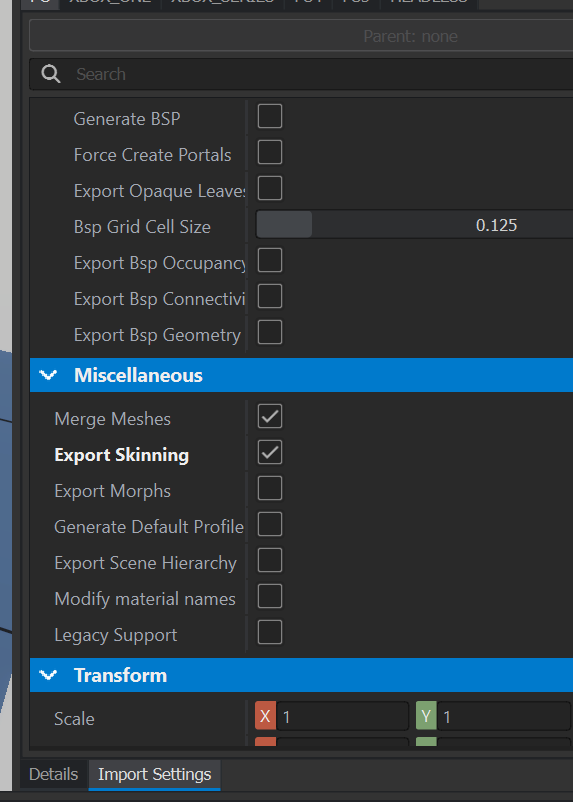


 nocturne quartz
I dont think slings ever look good in games
rancid silo
nocturne quartz
I dont think slings ever look good in games
Do you know Brother in Arms HH game?
nocturne quartz
no but go on
gloomy fable
Simple question: Does anyone know how to make backpacks restable for weapons?
surreal ore
gloomy fable
Simple question: Does anyone know how to make backpacks restable for weapons?
Wdym by that?
nocturne quartz
he wants the ability to rest weapons on the backpack, maybe while still on the player
gloomy fable
nocturne quartz
he wants the ability to rest weapons on the backpack, maybe while still on the p...
yes, but only when it is dropped on the ground.
surreal ore
I read "nestable" for weapons lol
nocturne quartz
I dont think the droppable equipment has collusion
or what ever mesh bipods needs
if you go on the workbench you can see which meshes are used with things that work on resting weapons and see what the dropped uniforms use.
surreal ore
You can bring back the collision of the backpack when it's dropped. And set it's layer preset
So I don't see why it wouldn't be possible
gloomy fable
surreal ore
So I don't see why it wouldn't be possible
I believe you mean to enable the clothnodestoragecomponent, I will try that, thanks.
surreal ore
No I don't. Lol
 devout dawn
Is there a list of model sizes anywhere? Like door width / height etc?
I tried importing a bungalow based on some old A3 settings, an it looks quite small when put next to a reforger house lol.
Or is there a test house like A3 had, that I can import into blender to get measurements?
neat canopy
devout dawn
Is there a list of model sizes anywhere? Like door width / height etc?
I tried i...
devout dawn
Oh wow that's a great help, thanks!
Also nice to see this stuff being written down in one place 😄
silk glen
tacit eagle
Flipped normals ?
yep that and recalculated outsides
silk glen
rancid silo
Belt?
gorgeous work bro
clear stump
i dont think so, but can text be added to a player, and that text be changed in game? For example the usual tag with surnamw
surreal ore
If you write the functionality then sure.
clear stump
Yeah but can the game recognize a textboxt or the only alternative is a hacky script that adds a letter on one texture layer?
fathom bolt
Name of players are displayed if i remember so maybe you can tweak it or use it as your own
gloomy fable
I ran into a problem with trying to balance ballistic protection of several vanilla cars.
metal1mm.gamemat is changing the vehicle S105 protection and metal3mm.gamemat is changing the uaz452 protection. Changing the thickness to "Value/MIN 1.6mm" and "Value/MIN 4.6mm" have the desired result punching through both steel layers of the vehicle body (I want 556x45 to be stopped by the second layer). The S1205 is even worse, it is also changed by the 1mm.gamemat, but has an effective protection of 50 percent in comparison to the s105 vehicle.
However now the uaz452 is a tank, and has exit holes even when no damage gets transferred. Why do the models have such a big difference in steel thickness and how can I make them evenly protected?
 covert rune
Hello,
Someone have a good video tutorial for correctly rigging a vehicle in Blender for import inside WB ?
surreal ore
covert rune
Hello,
Someone have a good video tutorial for correctly rigging a vehicle in Ble...
That isn't specific for Reforger. Just look up a rigging tutorial for Blender.
 slow turret
Finally got around to making the powerline cables work for my suspension bridge, and it works great until I try to add the vertical cables ... I guess the twirl from the material is added only with horizontal distance. Any idea?
 nocturne quartz
yeah maybe you could make a small uv for it and use the negative uv space
 honest pine
Hello everybody can someone help to make a simple skinning to bone in order to make a hat ? I have my model set bu for any reason it seems I can't skin it well in blender ending in a floating hat not following the head.. thx for any help
surreal ore
honest pine
Hello everybody can someone help to make a simple skinning to bone in order to m...
GitHub
Modding Samples. Contribute to BohemiaInteractive/Arma-Reforger-Samples development by creating an account on GitHub.
Iirc the samples include a sample helmet. If you don't know how to rig things look up a Blender tutorial.
Also your problem might be in your export settings for Blender or Workbench
slow turret
nocturne quartz
yeah maybe you could make a small uv for it and use the negative uv space
Thanks! Scaling it smaller worked!
honest pine
surreal ore
https://github.com/BohemiaInteractive/Arma-Reforger-Samples
Thank you Zelik ! And thanks for your mods !
That helmet sample might just be what I needed
surreal ore
honest pine
Thank you Zelik ! And thanks for your mods !
No worries, I hope you get it sorted.
honest pine
I hope too !
drifting cobalt
How do I create a model collision? use the RigidBody
last hill
drifting cobalt
How do I create a model collision? use the RigidBody
In the samples there is a collider example file, take a look in there.
drifting cobalt
last hill
In the samples there is a collider example file, take a look in there.
thx, I will look at the sample
surreal ore
surreal ore
https://community.bistudio.com/wiki/Arma_Reforger:FBX_Import#FBX_Export
@drifting cobalt this explains proper fbx importing
honest pine
surreal ore
<@763575444334968853> this explains proper fbx importing
Thanks dear Lord Zelik, I figured out I needed not to apply the armature modifier in order to leave the hat skinned
surreal ore
honest pine
Thanks dear Lord Zelik, I figured out I needed not to apply the armature modifie...
Glad you figured it out.
drifting cobalt
surreal ore
<@763575444334968853> this explains proper fbx importing
yep, I read this wiki and leant how to create a collider
slow turret
nocturne quartz
yeah maybe you could make a small uv for it and use the negative uv space
In the end, I could not get the cable-prefab to work vertically even though uv scaling did the trick visually. Ended up making a simple sylinder and adding the material on it instead, but the net result with the cables plus that is pretty cool
 nocturne quartz
whats cool
neat canopy
slow turret
In the end, I could not get the cable-prefab to work vertically even though uv s...
Awesome!
 torpid flame
i have a question i am working on it for a long time now. But i can't seem to figure out what the problem is. I want to implement a new weapon with an integrated optic but somehow the optic does not work and i don't know why, i did the same as told in the tutorial on the enfusion wiki, but i just don't want to work. If i use the pip2d scope it is just like looking through a lens without any scope
torpid flame
am i allowed to add at the pip2d scope component as a child to the weaponComponent
surreal ore
torpid flame
am i allowed to add at the pip2d scope component as a child to the weaponCompone...
is that what the tutorial said to do?
torpid flame
surreal ore
is that what the tutorial said to do?
no but am trying to make a the aug a1 and the scope is included in the weapon, that is my problem. If it would be a single scope i would just inherate the prefab of the ARTII optic
 surreal ore
Then you didn't actually follow a tutorial. You followed most of a tutorial then made up some steps yourself, and then wondered why it didn't work....
torpid flame
thats reason i am asking. If i would have found any other source i would have troed it that way
i saw that in the weapons component part is a child called sights component, so i thought i might work in there but i does not. And i kinda lost on how to fix that now
torpid flame
If anyone got a solution i would be really thanlfull
worthy hinge
Hey guys, I wrote here a week ago about my problem with official sample character or sample headsize import to the blender. I've still this problem with import and with animationRigupdate.blend eather. Is somebody here who can try to export skeleton from blender for me? I've got some pieces of clothing done and I really need bones. Thank you, guys for your help!
I've got blender 3.6 btw
honest pine
torpid flame
If anyone got a solution i would be really thanlfull
Maybe you can try to overpass the problem by designing your scope marking as ironsight front and rear ?
honest pine
worthy hinge
Hey guys, I wrote here a week ago about my problem with official sample characte...

MediaFire
worthy hinge
honest pine
https://www.mediafire.com/file/neiw8xk1f03o9fx/QuebecsSkeletonForStuff.fbx/file ...
Will do sir, thank you
torpid flame
honest pine
Maybe you can try to overpass the problem by designing your scope marking as iro...
Hm i mean there is a ironsight on top of the scipe and that is working. But i don't think this will work bc u need a texture for the crosshair and thats nit given in the ironsight
honest pine
Mmhh yeah I see.. I'm sorry buddy I'm not helping that good
torpid flame
I mean you are trying thats all that counts😅😁
honest pine
btw, I might be very interested in your work as I am myself trying to import a new bullpup to reforger. I figured out how to get it in the game but don't know how to change animation so hands act like holding an AR-15
honest pine
torpid flame
I mean you are trying thats all that counts😅😁
So now I don't know what are the role of snap_hand_right and snap_hand_left . I mean, I would have think at least my character would hold the weapon correctly and act weird only when I use action like aim or reload ?
torpid flame
honest pine
btw, I might be very interested in your work as I am myself trying to import a n...
I can help u with that if u want
honest pine
It would be a pleasure
torpid flame
Rn i am doing some stuff for university but later i csn try
honest pine
Shoot me a PM whenever you have some spare time will be just fine !
last hill
worthy hinge
Hey guys, I wrote here a week ago about my problem with official sample characte...
Can you link to the original issue you mention posting regarding the samples? I have the samples and have zero issues with them with a blank sample character blend file. What is the issue?
worthy hinge
last hill
Can you link to the original issue you mention posting regarding the samples? I ...
This is the issue msg by Blender. It doesnt matter if is the fbx or .blend

Behind the file is just file adress
last hill
You're hitting File - Open - navigating to Character_Weights_Template.blend and hitting open?
last hill
Did you reinstall Blender?
worthy hinge
I tried yesterday
last hill
Like fully delete it and reinstall everything including your configurations etc?
surreal ore