#enfusion_ai
1 messages · Page 9 of 1
 maiden tide
 viral olive
Are building interiors included in the navmesh, and if not, how do AI navigate them? I’m looking for something analogous to the path LOD used in A3 models
 marble grail
Navmesh is calculated automatically from all the geometry, including buildings. Buildings have no navmesh themselves. Only maybe door links, I am not sure how doors are marked.
 ruby bramble
@shut adder @mild quartz Apologies for the ping, but this advice stopped the navmesh generation crashes for me if you haven't seen it already
 shut adder
Oh thanks dude
marble grail
To kick-start #enfusion_ai a bit, here is a small doc about some higher level classes implementing AI decision making and how they are connected.
https://github.com/Sparker95/Reforger-AI-docs/wiki/Overview
GitHub
Various documentation about Reforger AI. Contribute to Sparker95/Reforger-AI-docs development by creating an account on GitHub.
 tawdry loom
Is there a way currently to make AI target specific parts of vehicles? Reference critical points of the damage model? (if there is already one)
Also I guess the AI will need contextual information about armour on the vehicle
 stone sapphire
They probably losing the sight of enemy
In BT if your target is null, then search for unknown targets and Orient their way
 mighty turret
I have been playing around with the formation system and trying larger squads in platoon formation. Now that multiple squads can have the same waypoint and there is this new decision tree thing. Is it possible to code it so that multiple squads can work more dynamically together? Like moving in a platoon formation towards the attack objective and then splitting off when they are like 500m away. Or if two squads have one defend waypoint. One defends it while the other patrols in a clover leaf pattern.
stone sapphire
mighty turret
I have been playing around with the formation system and trying larger squads in...
AI group can have children, those AIagents. Group is also an agent. You can have group of groups with behaviour of top one deciding and messaging strategical decisions to groups below.
Another thing, waypoint serves behaviour which can be injected in your tree. Current vanilla AI is doing it on groups level. You can customize behaviours by working out waypoint behaviour for it.
 round bluff
How hard would it be to just have the AI scramble for the nearest cover when they have a round impact near them and then continue their behaviour tree? I assume that it's not as simple as tossing in another block and tossing around some numbers.
marble grail
AIs don't have a very good solution for covers right now. So you would have to invent something on your own, and it won't be easy to do in script. 🤔
round bluff
Maybe look at the area around them and find the nearest object and take cover on that side. If there isn't just lie down and move away from the impact?
marble grail
Yeah something like this could work sometimes. When you start thinking about all kinds of objects in the game, what their geometries might be, how many of them there are on the map... it might turn out that the solution is not so great, or maybe on the opposite it's quite good for your use case.
For example, currently AIs project a few lines and search holes in nav mesh while scanning for cover, it's not very reliable, but can work for long obstacles like fences.
I've put a small doc about AI here:
#enfusion_ai message
So you can give it a try.
There is a danger reaction class when a projectile lands nearby: SCR_AIDangerReaction_ProjectileHit, you can mod it and override the PerformReaction method.
In fact you can see that they already activate a MoveFromDangerBehavior. So you could change the condition when it happens, or make a new Action for running away from bullet impacts.
 patent grove
I think there is a bug with the selector
At some point the selector only chooses the right side
marble grail
You mean after the left sequence has failed once? Or after it has completed?
patent grove
fixed it, forced return success
 buoyant pollen
would be interesting to see how a behavior tree for Predator/Alien AI that actively hunts and stalks player for a really cool horror experience, Reforger has got some great night lighting for such
patent grove
hey does anyone know a good way to set a formation for units of the same type not in a group?
 delicate solar
patent grove
hey does anyone know a good way to set a formation for units of the same type no...
delicate solar
patent grove
hey does anyone know a good way to set a formation for units of the same type no...
I believe only groups can recieve waypoints and be in formation. I dont know wether you can put ai in multiple groups. But you should be able to set up a group of groups.
Does someone know how to tweak the ai to use the flashlight at night?
marble grail
They currently use it at night, but only squad leaders do
and only when moving
there is some BT node, search for 'light'
but it's not exposed specifically in any other way
delicate solar
marble grail
there is some BT node, search for 'light'
but it's not exposed specifically in a...
Thanks, I will look into that.
 regal terrace
If I add new AI to a scenario, do I need to rebuild the navmesh?
regal terrace
I've added some CampaignRemnantsSpawnPointEntity with waypoint index -1 and tried random and patrol, but they just stand there where the entity was placed. How do I get them to patrol?
stone sapphire
regal terrace
I've added some CampaignRemnantsSpawnPointEntity with waypoint index -1 and trie...
Patrol requires entities in hierarchy of the spawner, so system knows where to position the patrol points
Open campaign_eden map and look through remnants spawners
regal terrace
stone sapphire
Patrol requires entities in hierarchy of the spawner, so system knows where to p...
Thanks a ton! I got it working! 🙂
 keen drum
Is anybody working on a mod where AI can drive vehicles?
stone sapphire
keen drum
Is anybody working on a mod where AI can drive vehicles?
Yes, Bohemia
keen drum
stone sapphire
Yes, Bohemia
Will it be included in the next update?
stone sapphire
keen drum
Will it be included in the next update?
No
keen drum
stone sapphire
No
bruh
 ||
|| red marten
Thats the only way they need - NO STEP BACK !
patent grove
@stone sapphire or anyone, how do you get custom AI to hear and react to (enemy) gunfire?
basically, any way to say if hear gunshot{ investigate() } from bt?
marble grail
There are danger reactions, please check
#enfusion_ai message
There is a danger reaction which reacts to gunfire
Although, there is also a DecoDangerEvent 🤔 but i never tried it.
patent grove
yeah but the problem is directing the AI towards the danger
I appreciate the AI docs btw
marble grail
What is the problem?
There is a SCR_AIDangerReaction_WeaponFired, you can check there how to get position of shooter for instance
 tame fjord
marble grail
What is the problem?
There is a `SCR_AIDangerReaction_WeaponFired`, you can chec...
tame fjord
marble grail
What is the problem?
There is a `SCR_AIDangerReaction_WeaponFired`, you can chec...
Thanks, that's good to know 😄 Cause patrol units doesn't seem to care about that value when shots get fired they always just run to the possition of the enemy 😦

I want to set them on my spawner so modders can define a range that also works on gunfire 😄
patent grove
marble grail
What is the problem?
There is a `SCR_AIDangerReaction_WeaponFired`, you can chec...
i think i messed something up - starting from a blank slate, im pretty sure im missing a component or smth
ill work on it tmw, thanks for the help
marble grail
🤔 maybe you opened not arma reforger data project, but core data?
tame fjord
@marble grail Did you find a way that the AI that has a patrol assigned does not hunt you just for shooting in the air 400 meters away? And is it maybe already in your docs?
marble grail
No it's not in the docs, but the answer why AI doesn't want to investigate is probably in SCR_AIDangerReaction_WeaponFired, I'd just place a debugger there to figure out what's going on.
I remember that there is a distance threshold beyond which AI will not want to go and investigate, and maybe other criteria.
tame fjord
marble grail
I remember that there is a distance threshold beyond which AI will not want to g...
Ok thanks, will investigate as well and inform you if i find a solution :)
tame fjord
marble grail
No it's not in the docs, but the answer why AI doesn't want to investigate is pr...
Not implemented right now maybe?: ```cc
// will be defined on AI component hopefully later
static const int AI_WEAPONFIRED_REACTION_DISTANCE = 500;
I am not sure, debugger will reveal the Truth
tame fjord
marble grail
I am not sure, debugger will reveal the Truth
I try to mod this value and see what happens 😄
tame fjord
marble grail
I am not sure, debugger will reveal the Truth
This little script does change that behavior i would not say its save but it has the power to set the value 😄
marble grail
But AI is only supposed to react to gunfire if it's smaller than that distance
tame fjord
yes for sure thats why i tested it with 50m 😄 i did spawn 250 and 100 meter away and they did not react anymore on to my shots. i needed to be very close for them to react 😄 @marble grail
 steep salmon
Idk if this is a dumb question but I’m new does anyone know if and when ai improvements or ai mods will come
tame fjord
marble grail
But AI is only supposed to react to gunfire if it's smaller than that distance
i know that 500m is realistic but for all my missions that sucks the hole city runs to your position xD
marble grail
new AI mods can come any day 
marble grail
tame fjord
i know that 500m is realistic but for all my missions that sucks the hole city r...
oh, so I am not sure, what did you want to do? prevent AI from running to your pos from far away? Or the opposite, make them run to you from further distance?
tame fjord
marble grail
oh, so I am not sure, what did you want to do? prevent AI from running to your p...
prevent AI from running to your pos from far away 😄
marble grail
all right, sorry then I misunderstood you. I believe that this value should do the trick then!
tame fjord
yes for now i hope they do what the comments say 😄 They should implement this number per Ai not as static const xD
marble grail
I agree, there should be a way to easily configure specific AIs placed in the world 🤔
stone sapphire
I think AIAgent has danger event range, with default around 400m
Aiagent danger handling happens before actual reactions
tame fjord
stone sapphire
I think AIAgent has danger event range, with default around 400m
Aiagent danger...
Specific for shooting from a distance changing this Variable does not change that they chase you even if its outside of this range. At least not with a patrol :( I did post a picture of that value in the editor some lines above :)
stone sapphire
tame fjord
Specific for shooting from a distance changing this Variable does not change tha...
I missed it and I was sure it would work.
Need to debug
tame fjord
stone sapphire
I missed it and I was sure it would work.
Need to debug
- Thanks for your work and that you are still taking the time to answer that many questions 😄
- That would be very nice I did try it a couple of times. only changing the static const int has helped 😦
 ember bridge
Is there some build in way to give AI some kind of identification like players have with playerId?
patent grove
that'd probably be better answered in: #enfusion_scenario
 feral peak
thanks
stone sapphire
ember bridge
Is there some build in way to give AI some kind of identification like players h...
Not really - each character has IdentityComponent with name but for AI its randomized from list of names per faction.
patent grove
is "Orient" fully implemented at this point? i cant get ai to turn their bodies properly :/
patent grove
maybe missing a character or ai component?
stone sapphire
patent grove
is "Orient" fully implemented at this point? i cant get ai to turn their bodies ...
should work - you need AICharacterMovementComponent under AIControlComponent on character prefab
mind properties on the node - precision especially
 iron lynx
does the ai use some kind of nav mesh to navigate and move around ?
 zenith eagle
iron lynx
does the ai use some kind of nav mesh to navigate and move around ?
zenith eagle
iron lynx
does the ai use some kind of nav mesh to navigate and move around ?
for me the general world navmesh i use is eden that give the AI the ability to move in any direction. Soldiers themselves I believe use the soldier navmesh. I think its set on the groups if your using group. I could never get the character to move correctly unless they are in a group.
 timid light
In SCR_CharacterDamageManagerComponent it doesnt seem possible to determine the instigator when a vehicle collides with the character.
The only thing that gets called on a vehicle collision is OnDamageStateChanged which has no instigator param
For now Im happy to check the immediate surrounds for a vehicle but would it be possible to get this added to OnDamageStateChanged?
or even better, have OnDamage or Kill called on collision, same as when they are shot with a gun
funnily enough arma 3 had this same issue xD
stone sapphire
timid light
In `SCR_CharacterDamageManagerComponent` it doesnt seem possible to determine th...
Known bug, gonna get fixed in future
timid light
Beautiful
timid light
btw I dont spose theres any rough ETA on AI driving? it would really make a lot more interesting missions possible
completely understand if you guys are playing it careful and delivering something above and beyond previous titles. take your time
stone sapphire
timid light
completely understand if you guys are playing it careful and delivering somethin...
Thanks, no promises, it will take a bit of time
timid light
understood
 dreamy goblet
How do you download from GitHub without a Release? Do you just copy file by file and place them all manually?
timid light
dreamy goblet
How do you download from GitHub without a Release? Do you just copy file by file...

but better if you use github desktop to clone it, that way you can update it with 2 clicks
Im trying to get an AI to take a position in a Guard Tower. I give him a Smart Action Waypoint with the tag "CoverPost" and the tower entity but he just moves to the tower and stands underneath it.
How do I get him to climb the ladder?
stone sapphire
timid light
Im trying to get an AI to take a position in a Guard Tower. I give him a Smart A...
it may be a bug with guard towers and AI
timid light
I can't find anything in a behaviour tree or anywhere about climbing ladders
Less of a bug I think it's just not been done
I'll just spawn them in position for now, can get the position from the smart action
stone sapphire
timid light
Less of a bug I think it's just not been done
Climbing ladders is done by something called navlinks
There is such component on every ladder.
AI is not climbing up the guard tower for some other reason. As far as I recall, the guard tower is too tight and sometimes does not connect well with rest of navmesh
timid light
Fair enough
 sour atlas
Few aspects of engine dev have given me as much PTSD as navmesh generation
 hallow trail
hiya guys. currently editing a mission and would like help to make the AI less sniper bots. far to many times we are getting 1 shot from 400 meters and its getting to be a pain for our ops. any help would be great. just want to tone down the accuracy abit is all
stone sapphire
hallow trail
hiya guys. currently editing a mission and would like help to make the AI less s...
There should be a way, let me check
stone sapphire
hallow trail
hiya guys. currently editing a mission and would like help to make the AI less s...
So, as long as you have mod with scenario, you can do this (its not easy but should work)
- override {5939FFCC6CC2FA96}AI/AIAgents/ChimeraAIAgentFull.et in your mod
- in that prefab in your mod, modify SCR_AIConfigComponent - Skill - that will make AI less accurate
Mind that as long as your mod is loaded it will modify accuracy of all AI
timid light
speaking of navmeshes... is the only way to get the nearest point on a navmesh using the AIPathfindingComponent?
Sometimes I need one and dont have access to a character so ive been putting that component on things just for that one method
for example finding a place to spawn that isnt inside a wall
stone sapphire
timid light
for example finding a place to spawn that isnt inside a wall
Possibly yes.
The thing is you cannot expect navmesh to be always there, so we assumed navmesh methods would be accessible only from AI.
Theoretically there is navmeshWorldComponent which could have methods to check it.
You don't need pathfinding, you only need navmesh raycast to confirm empty spot.
Alternatively you could use shape query to check the position of it's physically obstructed
timid light
awesome thanks

not having that much luck spawning them on the action vector lol
but hey.. it.. works?
vector wTrans[4];        tower.GetWorldTransform(wTrans);
vector actionPos = sentinel.GetActionOffset().Multiply4(wTrans);
thats my method and Im probably doing it wrong
he does have a very clear line of sight for 360 degrees though
timid light
stone sapphire
Possibly yes.
The thing is you cannot expect navmesh to be always there, so we a...
NavmeshWorldComponent seems to be empty or the generated class is
 frail nova
where do I connect for the navmesh?
 frail nova
figured it out
 verbal echo
stone sapphire
Thanks, no promises, it will take a bit of time
verbal echo
stone sapphire
Thanks, no promises, it will take a bit of time
For the first iteration even driving only via roads would be pretty okay as it would allow to add some more dynamic to user made missions.
stone sapphire
@proud coral
If you want to change AISkill globally, you'd have to mod AICombatComponent and change how GetAISkill method works
 proud coral
@stone sapphire Thanks, what is ChimeraAIAgentFull_2 in the SCR_AIConfigComponent doing then? You can change skill there
stone sapphire
proud coral
<@110113662080937984> Thanks, what is ChimeraAIAgentFull_2 in the SCR_AIConfigCo...
Yeah that too, you're right
 stone sapphire
 narrow field
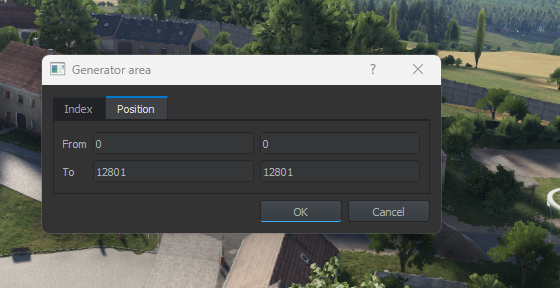
Guys is the left side X and the right side Z?
narrow field
Guys is the left side X and the right side Z?
Horizontal, vertical
 peak heron
I have the problem if i give my soldiers modded rifles or clothes... the AI wont work anymore... But i found a trick that works... not the best option...
Here´s a short video whats to do... https://youtu.be/OQvddFFLo5Y
I will show you how to solve the AI Bug if you use modded equipment
 haughty ivy
Are there any AI mods released
Really hoping a behavior tree that is based comes out soon
timid light
wish they hired the guy who wrote VCOM imho
 shy lake
Oh nice to see we already have some AI modding going on! 👍
Well i've tested lot of A.I. related stuff since release but sadly look's like most A.I. features are not implemented even if there are already many A.I. features like "Take Cover" and "Bounding / Overwatch"
In the editor there are many things to change, click, select, de-select related to A.I. but so far only things to have any kind of effect on A.I. is SCR_AIGroup > SCR_AIConfigComponent > Enable Danger Events and Enable Perception
Also any way to enable the "AI_DEBUG" feature? Or is it Dev restricted in combination with Diag.exe?
proud coral
Cant wait for an AI mod, they are pretty poor at the moment.
 elder wave
 just waiting to show off that potential bottleneck
 random owl
shy lake
Oh nice to see we already have some AI modding going on! 👍
random owl
shy lake
Oh nice to see we already have some AI modding going on! 👍
Hello, actualy you just need to run workbench with parameter -scrDefine AI_DEBUG (you can set it via Steam->properties on reforger tools ->Launch Options )
shy lake
WOW! Amazing! Many thx! 😀👍 Where did you get that info from? I couldn't find anything...
Nevermind... You're a Dev... 😊 THX a lot!
timid light
im sure this has been asked already but is there a way to disable a SCR_AIGroup? eg when no players are in range to help performance
dont wanna despawn entirely, just switch off the AI
group.SetFlags(EntityFlags.DISABLED, true);
this do it? guess ill find out
timid light
so an interesting bug.. if I am switching the player's faction between FIA and no faction, the AI will keep firing at where the player was until they run out of ammo
stone sapphire
timid light
so an interesting bug.. if I am switching the player's faction between FIA and n...
Indeed it seems like faction change is not handled properly in investigation behaviour.
timid light
Ideally for me I'd like them to stop firing but keep investigating, but might be just my use case as I'm using it for a guerrilla/revolution mission
Although I also don't know any other use cases for clearing faction
proud coral
@stone sapphire Hi, when I drop "ChimeraAIAgentFull_1" as my logic and set the skill to 100
If i then place an AI Group and look at its AIConfigComponent it sets the skill to 50

 stone sapphire
proud coral
<@110113662080937984> Hi, when I drop "ChimeraAIAgentFull_1" as my logic and set...
stone sapphire
proud coral
<@110113662080937984> Hi, when I drop "ChimeraAIAgentFull_1" as my logic and set...
ChimeraAIAgent is AI brain for soldiers. SCR_AIGroup is representation of group logic.
Those objects are related but not how you trying to do it
If you want to change skill for all AI soldier, you have to override agent prefab and change properties on that override not on instance.
Instance applies only to this actual object you dropped on the map.
proud coral
@stone sapphire Thanks.
Why does overriding, the ChimeraAIAgent suddenly make it apply to all AI Groups as opposed to just dragging in the original entity and changing values?
Because the overridden entity is still placed in the world as previously
stone sapphire
Those are very basic questions, please read up on Bohemia Wiki.
Short answer: Modifying the type instead of instance. Type gets used for spawning other entities of that type.
Prefab is a type.
proud coral
stone sapphire
Those are very basic questions, please read up on Bohemia Wiki.
Short answer: M...
No worries, thanks for your help. I don't like to take too much of anyone's time.
I figured changing the AI skill would be as simple as adding a loadout in the loadoutmanager or changing perception in the perceptionManager.
I've read the wiki on prefab basics and now I am editing the overriden .et rather than the instance but the AI still seem to be as effective as before.
I think I'll wait till someone comes out with a guide or mod at this point, I'm not a developer just thought it might be something simple (in layman's terms not a developers lol)
shy lake
Just wanna to ask: Is A.I. already capable of using cover?
I was toying around all day long using my own "Soldier.bt" file where i tested a lot of find and take cover code from other .bt files but somehow without any luck...
Sadly there is 0 documentation available about Reforger A.I. Behavior Trees.
Anyway... Even without any real results i really had a lot of fun messing around with all this stuff! 🥰
Can't wait to see the full potential of A.I. in Enfusion!
stone sapphire
shy lake
Just wanna to ask: Is A.I. already capable of using cover?
I was toying around a...
Yes they can take cover but only in some specific situations. There is no cover database where they could pick most useful place. Instead they recognize obstacles between them and a target and can use SmartAction's positions which are defined on most of compositions.
shy lake
@stone sapphire Many thx for your replay!
Well in this case...
Today i was reading something about "NavmeshHoles" in some find cover script and was expecting A.I. to detect every hole in the Navmesh as possible cover cuz trees and rocks indeed create holes in the Navmesh.
Well at least i did learn a lot about .bts today.
Again thx for taking the time to replay. 👍
shy lake
Is it possible we cannot overwrite "Group.bt" from editor placed A.I. groups in "SCR_AIGroup > BehaviorTree" section?
I runed the whole "Group.bt" file but somehow A.I. still works....
With "Soldier.bt" it works as expected.
 sly harness
Hey guys,
I’m stuck on something I want to add in a custom AI BT.
What nodes would I need to have my AI react to nearby gunshots ?
I’ve had mild success with the Danger Event decorator, but it doesn’t output anything and seems to stay on forever once triggered.
Ideally, I want the AI to panic briefly or move around – I just need a way to track gunshots for a short time.
Ideas?
shy lake
Please guy's! Whenever whatever you do related to A.I. modding be that kind and share your coding stuff. I'm really struggeling with OOP and .bt... 😭
timid light
is FactionAffiliationComponent.SetAffiliatedFactionByKey replicated?
or should I RPC the authority to do it
timid light
my peer tool is breaking on connection whenever any AI at all is spawned with a load of these errors:
RPL          : ServerImpl event: connected (identity=0x00010000)
rpl::Pip::FixedStep
 RPL       (E): IReplication::JIPError: Inconsistent item table on Slave connection. Item is missing or different item was loaded in its place. (item=0x40042ED9 layout=_SignalsManagerComponent_Layout con=0x10000)
 RPL       (E): IReplication::JIPError: Inconsistent item table on Slave connection. Item is missing or different item was loaded in its place. (item=0x40042EDA layout=script::Game::SCR_WristwatchComponent con=0x10000)
 RPL       (E): IReplication::JIPError: Inconsistent item table on Slave connection. Item is missing or different item was loaded in its place. (item=0x40042EDB layout=_RplComponent_Layout con=0x10000)
 RPL       (E): IReplication::JIPError: Inconsistent item table on Slave connection. Item is missing or different item was loaded in its place. (item=0x40042EDC layout=_BaseLoadoutClothComponent_Layout con=0x10000)
its ok I found your response to others with the issue, need to spawn after world loaded properly
 clever gale
Hey folks! Can you help me to make the Ai not look that stupid like it is at now? I created mission when Ai have to defend particular area. They have tripods with HMG´s to use it and there is defend waypoint set there. They are able to mount that guns but they are shooting only with one shot per couple of seconds, not using burst or supress fire. I didnt found where to set Ai to use these HMG´s properly. thnx for advices.
sly harness
@stone sapphire A question (and possible bug) about something I found while tinkering with BTs : it looks like the ‘SCR_AI Is Target Visible’ decorator returns FALSE when the target entity is inside a building – even if there is direct line of sight.
Is it an issue with, maybe, luminosity in buildings related to the perception component? Or is it intended?
stone sapphire
sly harness
<@110113662080937984> A question (and possible bug) about something I found whil...
interesting, even through open door or window?
And I suppose outside it works just fine?
sly harness
stone sapphire
interesting, even through open door or window?
And I suppose outside it works ju...
I only tested it through an opened door, so I don’t know about windows or transparent objects.
But yeah, the node returned TRUE as soon as I stepped out of the building.
shy lake
As you can see A.I. modding isn't a very populare topic as for now... Guess ppl 1. have to learn and study all the A.I. stuff and behaviors.
Currently A.I. seem's in a very early stage already learned the basic's but that's pretty much it.
But!
From reading all the A.I. Behavior Tree and A.I. script stuff it seem's like BIS A.I. Dev's are about to create some rly cool A.I.
So as for now i guess your best bet will be the official A.I. Dev's when it comes to A.I. improvements!
tame fjord
May this is a topic that fast is out of date as BI will upgrade that most likely :)
shy lake
Yes i hope so! 👍 Can't wait!
tame fjord
Same as map rotation. There would be ways to go around but it will get fixed 99% sure xD
shy lake
Enfusion has so much potential! 🥰
stone sapphire
sly harness
I only tested it through an opened door, so I don’t know about windows or transp...
I could not reproduce it with vanilla AI.
Can you send more detailed repro, maybe your scenario - to feedback tracker or on my DM?
Must be something with either PerceptionManager, or internal building probes or colliders. Hard to say atm
stone sapphire
haughty ivy
Is there any AI mods?
What mods you want? Just asking out of curiosity 🙂
 halcyon bridge
personally I'd like to see a way to have AI not abandon their positions and some way to have some kind of simplistic driving, like just following a path without any sort of formation or avoidance
also I'd like AI snipers to work but that seems to be more of a bug than needing a mod
timid light
halcyon bridge
personally I'd like to see a way to have AI not abandon their positions and some...
BI is working on all these things, AI is a work in progress
halcyon bridge
yup
haughty ivy
stone sapphire
What mods you want? Just asking out of curiosity 🙂
Less caterpillars with the AI movement 😄
 magic matrix
stone sapphire
What mods you want? Just asking out of curiosity 🙂
magic matrix
stone sapphire
What mods you want? Just asking out of curiosity 🙂
Ai commander
timid light
magic matrix
Ai commander
Is coming soon according to an interview with BI
Not sure why people are requesting mods for things that have been announced as coming to the base game.
magic matrix
timid light
Is coming soon according to an interview with BI
Oh shit really? I never seen the interview so i didnt know
timid light
magic matrix
Oh shit really? I never seen the interview so i didnt know
Good video about it all here https://www.youtube.com/watch?v=7LEYCgpRbhg
In this video, we're looking at what the future of Arma Reforger holds, by going through a revealing interview, searching through Reddit findings, as well as discussing my own speculations.
Interview with ARMA Reforger Project Lead, by GameStar:
https://www.gamestar.de/artikel/der-lange-weg-zu-arma-4-wie-geht-es-jetzt-mit-reforger-weiter,338114...
shy lake
@timid light Thx! 🙂👍
shy lake
Well from what i can tell A.I. Take Cover defenetly is working!
And it's working the way i was expecting it to work with Navmesh holes generated by map object's like rock's.
It has some strong conditions in .bt to make A.I. search and take cover but if you skip them and kind of force A.I. to search for cover it's working pretty well! 🤓
sly harness
stone sapphire
I could not reproduce it with vanilla AI.
Can you send more detailed repro, mayb...
After further testing, it appears the problem was caused by a modded dummy weapon the entity was equipped with. Is it correct to assume that the perception component is affected by the current weapon? I’m guessing that visual detection is based exclusively on the weapon’s aiming direction, rather than eyepos?
stone sapphire
sly harness
After further testing, it appears the problem was caused by a modded dummy weapo...
No, weapon should not affect perception that much. Maybe if it has big collider which can block view.
AI visual and audio detection is using head position. Precise weapon pos is only used for aiming / shooting
timid light
on that note is there a performant way to check if an AI has line of sight to another character? the lastSeen stat seems to include hearing them but I need to know if they can physically see them
im doing a trace atm and only every 2 secs but just want to be sure I dont clog up the FPS
shy lake
Did you already test with A.I. Diag? Bet there will be something like this.
timid light
I didnt and honestly havent delved into anything BT related about it
Id rather not touch BTs anyway as I assume they will change a lot
shy lake
Yes that's true guess BIS will change the currently T-800 A.I. to somewhat more human and tactical.
 wind kettle
stone sapphire
Yes they can take cover but only in some specific situations. There is no cover ...
wind kettle
stone sapphire
Yes they can take cover but only in some specific situations. There is no cover ...
Will the AI be able to use cover with specific animations attached to it? Like in this trailer:
https://imgur.com/nRXCsPz
 shy lake
Well my biggest intrest when it comes to Arma modding is A.I. doing this stuff for almost 20 year's now and FINALLY having something else than RV fresh and new is all i ever wanted and needed! 😊
@wind kettle Yes A.I. can already find and use cover but it's very early stage and will need improvement.
wind kettle
shy lake
Well my biggest intrest when it comes to Arma modding is A.I. doing this stuff f...
However do they also use or will they use cover animations? Arma3 had some cover seeking too however there was no real animations for "in cover". The reforger trailer shows that, so I wonder if that is jst for the trailer or a real thing.
So far in the game I have not seen the AI perform any cover animations.
shy lake
No there are no cover animations.
A.I. simply change stance given by LoS to their enemy.
Guess the trailer was somewhat cinematic.
stone sapphire
wind kettle
Will the AI be able to use cover with specific animations attached to it? Like i...
No. We don't want features just for AI or just for players. Custom cover animations in game would only make sense if both player and AI could use them. If you are after making cinematics - any animation can be played on character model using AnimationPlayerComponent
wind kettle
shy lake
Guess the trailer was somewhat cinematic.
Thanks for the answer. Will the AI be able to use bipods or "rest" their guns at street corners or on a fallen tree in a procedural way?
stone sapphire
wind kettle
Thanks for the answer. Will the AI be able to use bipods or "rest" their guns at...
At the time or later than players can, yes
wind kettle
stone sapphire
At the time or later than players can, yes
Ok so that means the weapon resting from arma3 marksman dlc is confirmed? If so that is great, I think this was really one of the best things in arma3. It feels like it connected you to the geometry of the piece of cover you were behind.
halcyon bridge
is there some button to make AI not exit a vehicle when inside a move waypoint?
seems like when they are at the move destination they always exit
random owl
halcyon bridge
is there some button to make AI not exit a vehicle when inside a move waypoint?
Since AI driving isn't supported yet they doesn't have other option than leave the vehicle and move on foot. But if you want you can drive them around if they are inside without move no problem.
halcyon bridge
can I override a behavior to disable getting out?
haughty ivy
halcyon bridge
can I override a behavior to disable getting out?
You could replace "MovePlanning" behavior tree that sets in node ID 3 (set variable) "dontUseVehicles" to true. But it has consequences: as AIs will not occupy drivers seat (AI driving not supported in current version), the result will be that in some cases, you give a group a move Waypoint and they will appear being stuck in the vehicle. But try it out!
 random ridge
hey guys i got my navmesh working and i have some questions
-
Are AI dumber than in arma 3 as far as fighting each other? for me , in urban environments they just bunch up on corners and get machine gunned en masse. They also cross things like fences by lining up and going one at a time.
-
They dont like buildings at all. Is it planned in the future they will have "mounting" locations to secure them and provide overwatch?
- What should a "good" nav mesh look like? mine has some blank spots but they are rare.
example. They never go in this building via the front door. Is it because of that blank spot?

sorry the office building on the left
random owl
- urban environment is tricky for us right now. We will try to improve it as well as crossing walls.
- I will prepare a Mod which would allow it at least in custom buildings. In general we would like to provide some universal solution which doesn't need custom changes in data but that will take us time.
- Yes the navmesh there seems suspicious. The end of the navlink should be on navmesh. Sometimes it's drawn underground(which is totally fine) but there it seems missing. Currently navmesh params are set quite tight so sometimes navmesh isn't optimal. It's due to saving memory since the map is huge. However changes in navmesh tech which will allow greater detail are on the way.
random ridge
random owl
1. urban environment is tricky for us right now. We will try to improve it as we...
so im assuming the reason they are avoiding that front door is because of that curb not being on the navemesh?
you want everything green right?
what do the colors mean i think red means unpassable right?
Also another problem i saw @random owl is chain link fences not only are not see through for AI , but they cant shoot through them either
random owl
random ridge
you want everything green right?
Colours are ok. The links are always blue. It could be that small hole in front of it causing the issue. There is an issue with registration of those. So before final regeneration navmesh I would advice close and reload the level.
random ridge
yes i was wondering if it was heighmap related like i would need to rebuild it or something
random owl
random ridge
Also another problem i saw <@544492934792216587> is chain link fences not only a...
issue with chain link fences - can you provide picture of the wall or name of the entity please? Thank you
random ridge
yes
random ridge
random owl
issue with chain link fences - can you provide picture of the wall or name of th...


so i had AI on the camera side of the fence and ai on across the water on the other side of the pipe and they did not see each other
and when i got them to move after shooting at the enemy , they walked around the fence
no shooting
when they got to the other side of the fence the battle started
random owl
random ridge
ok thank you will check. Maybe wrong setup on that fence.
sly harness
random ridge
hey guys i got my navmesh working and i have some questions
1. Are AI dumber th...
Wait a minute, the AI can cross fences? I've never seen them do that... Does anyone happen to know which BT handles that? I'd like to compare with what I did for my own zombies.
random ridge
sly harness
Wait a minute, the AI can cross fences? I've never seen them do that... Does any...
if you go into the navmesh you can see little "crossing points" that are generated
sly harness
@random ridge Oh so that's baked into the navmesh directly. 😮
Thanks!
random ridge
i think so it might be an object of some kind
i just saw it on the navmesh
i have no idea
it just showed me where they were
on big fences they are like
20 feet apart
i think
sly harness
Would make sense - I couldn't find anything related to climbing anywhere in the BTs.
random ridge
might want to look at something like a door and look in the object properties
sly harness
@random ridge yep, found those NavMeshCustomLink components; the functionality is actually part of the prefabs. I reckon I'll stick with the "in BT" approach for my project - way easier if I want my guys to be able to chase players on roofs or over objects that don't have the component (eventhough they actually are climbable by players).
 tawdry fox
Hi, any guys have a navmesh tutoriels ?
shy lake
In "World Editor" select "Tools" > "Navmesh Tool"
Right bottom corner click on "Navmesh Tool"
New Navmesh window will open.
Navmesh select "Soldier"
Click on Connect and again select "Soldier"
Click on "Generate" with all settings default
After it's generated save it somewhere and select it in "SCR_AIWorld" > "NavmeshWorldComponent"
tawdry fox
shy lake
After it's generated save it somewhere and select it in "SCR_AIWorld" > "Navmesh...
Super thank you, if I understand well the navmesh allows to establish the custom area where the AI can move, exactly?
shy lake
Sure np. Yes exactly that's what it's used for.
tawdry fox
🙏 thx
ember bridge
@random owl Hi, are there any plans to bring AI more in line with Players? For example Killing AI does not work with the Scoring System or respawn system, There is no simple way to grab all players + AI e.t.c. so if you make some gamemode with AI you often have to do seperate implementations to make code work for both.
stone sapphire
ember bridge
<@544492934792216587> Hi, are there any plans to bring AI more in line with Play...
Character is the common ground.
 arctic mason
Wait, score doesn't work for AI? Well that explains a few things.
ember bridge
stone sapphire
Character is the common ground.
Problem is that many modules use Player instead of Character.
 simple ibex
May not be the right place to ask, but why when in game master on my terrain are the AI I try and spawn white and won't spawn?
And what process would I have to use to make my own navmesh for the terrain I'm making? Any videos on the tube?
shy lake
simple ibex
May not be the right place to ask, but why when in game master on my terrain are...
Navmesh HowTo: #enfusion_ai message
simple ibex
@shy lake thank you, kindly
simple ibex
@shy lake sorry to bother again, I tried that method you showed but if I click navmesh tool when I follow along the navmesh option just says "none" to get soldier I have to add the SCR_AIWORLD then add component then add NavmeshworldComponent but when I click generate after getting soldier to show it my enfusion give me 3 crash logs. Can't seem to work how why,
shy lake
Yes you need "SCR_AIWorld" BUT you don't need to add anything! It's already there. Make sure you choose the "SCR_AIWorld" from "Prefabs > AI > SCR_AIWorld.et".
haughty ivy
i gotta question
simple ibex
@shy lake ah, that's where I was going wrong, I was pulling the SCR_AIWorld from the create tab, works now I got it from the prefabs, thanks again!!! Really appreciate it.
sly harness
@stone sapphire Is it intended that characters can walk through one another ? This is very problematic for zombie-like behaviors.
Players can also “hide inside” enemies, which become clueless and unable to detect them...
shy lake
@simple ibex Sure np. 😉👍
stone sapphire
sly harness
<@110113662080937984> Is it intended that characters can walk through one anothe...
No it's not intended
We know about collision issues, they will be solved eventually
 brisk sequoia
https://community.bistudio.com/wiki/Arma_Reforger:Behavior_Editor published - nodes page to follow
brisk sequoia
brisk sequoia
useful BIKI links:
https://community.bistudio.com/wiki/Arma_Reforger:Behavior_Ed...
timid light
nice 👏
simple ibex
I will assume this is being asked in the right place, but when I place my AI and get them to follow way points the AI may get near a lampost or telegraph pole and get shot off to a new location, any way I can sort that issue out? I've got my custom navmesh setup correctly. So not sure what to change to make them not turn into superman and fly off.
 shy lake
@brisk sequoia Many thx! 😊👍 @halcyon bridge What?
shy lake
@AI Devs:
I'm looking for a value regarding to A.I. movement but unable to find it...
Well for some reason A.I. which is > 100m away from their enemy will get many move orders within very short time like every 1 - 2 sec.
After A.I. is within the 100m range to their enemy the A.I. movement will be delayed by "SCR_AIGetCoverIdleDuration.c".
So my question: Where is this magical 100 defined? Anyway whatever i change or set in script and .bt A.I. somehow always stick to this 100 value...
simple ibex
I have a question regarding AI behaviour, for example. If I were to have one AI setup with the patrol waypoint following a road and another AI scouting in a wooded area close by and I was to shoot AI on patrol and the scout AI hears the gunfire and comes to investigate if the AI doesn't find me will it then go back to its original scouting waypoint or just hang around where the AI ends up?
shy lake
If they have Cycle waypoint they will get back to their original route.
shy lake
Would be cool if we could override .bts the same way like scripts.
Like if using same directory structure + same .bt file name it uses the custom .bt instead of the vanilla.
simple ibex
I'm still new to all this so not sure which is the cycle way point. I've been dropping the waypoints from prefabs where they have a blue radius. I wouldn't mind it being like a cross between tarkov, in where you have to get to a certain location to win and find loot like weapons, ammo and med kits and just generally survive But if the AI don't cooperate it may be a bit dull 😂
halcyon bridge
I think it's literally called cycle
 quasi flume
Hello everyone. Does anybody know how to get the InsectFlyMovementComponent to work?
simple ibex
@halcyon bridge I did try and use the cycle waypoint but not sure how to actually set it up as they just stand still when cycle is used. It's very annoying if you shot an ai then all of them come towards the gunfire even ones on the other side of the terrain I've made.
shy lake
simple ibex
I'm still new to all this so not sure which is the cycle way point. I've been dr...
It's somewhat different than in RV.
You have to create your move waypoints and put all their Hierarchy names in the cycle waypoint bottom box called Cycle Waypoints you can add more waypoints by choosing + and type in the waypoint name.
Choose the A.I. group and in SCR_AIGroup go to "Static Waypoints" add the name of the cycle waypoint.
This will add the cycle waypoint with all the move waypoints defined to it to the group and they will cycle after completing all other waypoints.
Bit complicated if you are not used to it...
However there is a pretty good video to show everything step by step: https://www.youtube.com/watch?v=WNL_oFhlmLU&t=1823s
ALL of the Resources for this tutorial: https://hq.uselessfodder.com/p/how-to-make-missions-in-arma-reforger.html
Buy awesome tactical games: https://nexus.gg/UselessFodder
Join in future operations: https://discord.gg/UselessFodder
Support the channel and community: https://patreon.com/UselessFodder
This is a COMPLETE guide to making a custom ...
simple ibex
@shy lake cheers, will give it a look over in the morning, do you know if there is anyway to turn down the ai alertness? Like can we make it so they don't react to stuff that's at a certain distance?
arctic mason
Similarly,anybody know how to set AI difficulty via script?
shy lake
simple ibex
<@839458468317364251> cheers, will give it a look over in the morning, do you kn...
Yes distance can be set here but has to be modded into the class:
`modded class SCR_AIReactionBase
{
//200 - sorry for that, its defined in Soldier.bt in a node GetTarget, should be moved somewhere we can call Get()
static const int AI_PERCEPTION_DISTANCE = 200;
// will be defined on AI component hopefully later
static const int AI_WEAPONFIRED_REACTION_DISTANCE = 500;
};`
simple ibex
@shy lake so I can just edit the last part of that and change it to a lower value? It is very annoying when you kill AI and all of them coming running over. Kind of kills the idea of my mission.
shy lake
arctic mason
Similarly,anybody know how to set AI difficulty via script?
I like to change A.I. skills myself too but could not find the time to do so.
As far as i can tell changing A.I. skill from the A.I. editor component does nothing.
It always returns 0.50 no matter what.
Only thing that affects A.I. skill is the SCR_AICombatComponent > "AI Skill Default" stuff of individual A.I. units.
Guess this is the part you looking for:
` // use this to change AIskill dynamically
void SetAISkill(EAISkill skill)
{
#ifdef AI_DEBUG
AddDebugMessage(string.Format("SetAISkill: %1", typename.EnumToString(EAISkill, skill)));
#endif
    m_eAISkill = skill;
}`
Yes exactly. 😉
simple ibex
@shy lake I'm very new to scripts but will give it a look and see what happens, thanks for all the advice though. It will definitely come in handy.
arctic mason
shy lake
I like to change A.I. skills myself too but could not find the time to do so.
As...
Interesting, thanks
simple ibex
@shy lake do you know how I can edit that SCR_AIReactionBase.c as it says it's read only.
shy lake
simple ibex
<@839458468317364251> do you know how I can edit that SCR_AIReactionBase.c as it...
You can NOT edit/change any original/vanilla code instead you have to modify/override it.
Take a look here: https://community.bistudio.com/wiki/Arma_Reforger:Scripting_Modding
Basically you have to create the same folder structure in your mission folder + a flder called Modded.
In your case create the folder structure: Scripts > Game > AI > Reaction > Modded
In the folder "Modded" place the file "SCR_AIDangerReactionBase.c"
Copy the code into the "SCR_AIDangerReactionBase.c" file.
`modded class SCR_AIReactionBase
{
//200 - sorry for that, its defined in Soldier.bt in a node GetTarget, should be moved somewhere we can call Get()
static const int AI_PERCEPTION_DISTANCE = 200;
// will be defined on AI component hopefully later
static const int AI_WEAPONFIRED_REACTION_DISTANCE = 500;
};`
In the Script Editor go to "Build" and click "Compile and Reload Scripts"
That's pretty much it.
simple ibex
@shy lake I realised if I duplicate a copy to my terrain then it let me edit it, ow my AI don't all run over when a shot is heard they all stay put doing what they were asked to do. Thanks again for the advice it really did help alot.
simple ibex
I'm assuming this is in the correct place, if it possible to change my base character clothes to the bloody one like when you're shot, so he spawns looking like he's been shot? Also is it possible to somehow mod the base character so when you spawn he's prone?
shy lake
In .bts there is a node called "Move" ( AITaskMove ) it is a none scripted node without (S) in it.
However is there a way to access the "Move" node code or is it closed-source?
Only thing i can find about the node is a empty base class called class AITaskMove: AITask...
simple ibex
Can anyone tell me how to get the character AI to follow waypoints? I've enabled AI, I've tried adding way points via the waypoint list, I've tried changing the AIControlCompnent Agenettemplate and override AI Behaviour Date but they just stand around, I have been using the group AI And marking then down so there is only one AI member but I can't get the group AI to stand on looks outs as they only want to stand on the ground. Anyway I can either use character AI or does anyone know how to get the group AI to stand on lookout posts?
simple ibex
@halcyon bridge it was meant to say you're shot 🤣
simple ibex
Can anyone advise me how I can make my AI smarter? If I'm behind them in the dark with a torch on like 2 meters away they didn't even notice me, even when they are set as "cylon" is it?
I've looked at SCR_AICombatComponent but not sure what I need to change to make them smarter.
arctic mason
@simple ibex AI skill is almost always only affecting their perception range and aim. If they don't notice your flashlight it's because it hasn't been programmed into them yet. The AI is still pretty basic right now but interesting behaviours can be scripted in.
simple ibex
Ah, ok. That makes sense as to why they don't notice much that isn't almost directly Infront of them. Some.of them when set at a lower level literally can't hit me when I stand still 1 meter away 😂
quasi flume
Is it possible to add Ai to a GenericEntity? Or any other way to make it move?
sly harness
@simple ibex Are you using a custom BT?
shy lake
simple ibex
Ah, ok. That makes sense as to why they don't notice much that isn't almost dire...
Somehow A.I. Devs choosed to give ROOKIE skill lvl compared to the other a very hight aiming offset which makes them miss almost every shot.
simple ibex
@shy lake it's funny watching them shooting everywhere it where I'm standing.
Just wondered if learning to script is super hard? And where would I even start? Other than just watching stuff on YouTube?
I can follow along with YouTube stuff but I honestly have no idea what any of it actually means.
shy lake
If you are rly interested to learn it and willed to spend some time and nerves it is defenetly doable.
I teached myself .sqf without any knowledge by reading a lot of scripts / functions from other ppl and by a damn lot of trial and error...
But at the end i was able to do with RV A.I. whatever i liked to do.
Well right now i have to learn and try a lot of new stuff myself cuz .sqf and enforce are very different BUT i've already got some of the basic stuff and able to do with A.I. what i like them to do.
But as i said you need to spend a lot of time and stand a lot of setbacks during the very first month's or so depending on your scripting knowledge.
For now i choosed to modify the FindNextCoverPosition() function.
It's used to calculate and return A.I.s next move position so it's called very regulary and therefor a good place to test code.
This might help you a bit for the beginning:
https://community.bistudio.com/wiki/DayZ:Enforce_Script_Syntax
https://www.youtube.com/watch?v=dCHoLgB0aXY
It's for DayZ but it's enfusion as well so pretty much most of it is similar in Reforger.

In this video we do not go into much detail as almost everything I do in it is hypothetical.
We go over basic data types such as, arrays and what they are and how to use them. We will discuss classes and functions and talk about how to use them, what they are for, and little details about them. In classes we go over private and public variables...
shy lake
Well another important thing is: Your goal!
What do you like to affect with your script / modding like what part do you like to focuse on?
For example 1. thing i've noticed when it comes to A.I. was their straight forward movement behavior.
So this was my 1. goal.
Find the part where A.I. movement is done / calculated and start modifying it step by step.
- change some numbers and see what it does next add some easy code like random values and stuff like that then start adding some code to set A.I. movement direction and so on...
Find something you are interested in study it and start modifying it by using very little steps.
After some time you will understand what it does and how it works and thats how you can get into all the coding stuff.
sly harness
@shy lake For example 1. thing i've noticed when it comes to A.I. was their straight forward movement behavior.
In my experience that only happens when you forget to set a navmesh? - I mean, if we're speaking about pathfinding.
shy lake
sly harness
<@839458468317364251> `For example 1. thing i've noticed when it comes to A.I. w...
Nope i'm talking about general A.I. combat movement.
They don't have any kind of movement pattern they just raise their weapon and walk straight up to you while shooting.
 tired flower
SO has anyone looked into getting AI able to drive?
stone sapphire
tired flower
SO has anyone looked into getting AI able to drive?
Me
timid light
my entire mod is relying on it, but no pressure xD
if its even 10% better than arma 3 its a big leap
tired flower
@stone sapphire
Well just a Question then, With how AI was handled in arma 3 they were dull, With reforger they appear to have more put into there thinking, So will the problem be solved when Ai can drive vehicles were if a vehicle takes fire, the driver crashes the vehicle or even kills his own troops trying to avoid the gun fire? Also will he hop out instead of staying inside?
stone sapphire
tired flower
<@110113662080937984>
Well just a Question then, With how AI was handled in arm...
It's impossible to talk about solutions to problems which does not exist yet
Arma 3 specific issues do not apply here, it's completely new tech
 unborn canopy
I'm no coder but a good example of AI behaviour is from the military simulation franchise, "Combat Mission Series". The, "Tactical AI" as it's called in that game is not perfect but top notch on the behaviour of individual entities, from the commander down to a single soldier. Basically, in a summary they gave AI human like behaviour, e.g "Not wanting to die", so the AI tries to make the best decisions to survive and get the mission done, even if means retreating. Their behaviour is based on moral and combat strength so under pressure they will make more mistakes for example and they uses real life tactics and formations to be as effective as possible. Maybe a big jump for the ARMA franchise because it may have to be built from the ground up but it's still a good reference for the direction of the series and also for modders.
As a long time player, the AI honestly stopped me from enjoying the game. I have high hopes for Reforger and ARMA 4 when it comes to delivering a better experience in that aspect.
halcyon bridge
combat mission AI is jank too
simple ibex
@shy lake I wouldn't mind somehow actually making AI a tad smarter for what I need them for, like right now to make a custom mission it's almost impossible to use the AI as they are now as interactive enemies. I've got AI set up for different waypaths, different skill levels but it would be nice if they could see you better in the dark, maybe react to your torch without needing to be a meter in front of them. But I guess that would be a hard task.
Can anyone tell me the difference between the group AI and the character AI apart from one being a group and the other being a single character 😂 why do the group AI follow way paths it can only stand on the floor and why can character AI stand on lookouts but never follow way points.
 balmy gorge
halcyon bridge
combat mission AI is jank too
balmy gorge
halcyon bridge
combat mission AI is jank too
At some level all AI are Jank - but are they fun and interesting enough for high replay value is the point. Do you know of mil-game AI that isnt Jank if held to the microscope?
halcyon bridge
balmy gorge
At some level all AI are Jank - but are they fun and interesting enough for high...
I agree
in combat mission AI soldiers liked to bunch up together just like in this game
stone sapphire
simple ibex
Can anyone tell me the difference between the group AI and the character AI apar...
Same as in A3 - AIGroup is more strategical unit, abstract, does not control anything. Single AI character does not have waypoint handling - thats optimization. When you spawn AI characters in GM, they actually come with their own groups, where more "tactical" logic is implemented.
What you may find logical, is that individual AI soldiers should be reacting to orders and other AIMessages, AIGroups should realize tactical plan defined by waypoints. You can also (technically supported but may have bugs) - put groups in hierarchy and use both waypoints and orders to communicate between them.
timid light
stone sapphire
Same as in A3 - AIGroup is more strategical unit, abstract, does not control any...
thanks for this, good info. so if a group has no waypoints I can give individual soldiers direct orders via code atm? simple stuff like "go to" is all I need really. Just that I might hack together some really basic AI commanding in my mod for now until you guys flesh it out properly
stone sapphire
timid light
thanks for this, good info. so if a group has no waypoints I can give individual...
Look for player mailbox component
I'm not sure if it's in public version, but if it is, it's kind of example how to use radial menu and send messages to AI.
Remember that AI is simulated on the server. Currently you'd have to write rpc to send request of order to server and then server can actually broadcast it to AI.
stone sapphire
timid light
I can see the mailbox component, will try to get it running
What's full name of that component?
timid light
stone sapphire
What's full name of that component?
SCR_PlayerMailboxComponent
and theres also SCR_MailboxComponent (I assume this goes on the AI character)
doesnt seem to work in public atm, wont recieve OnFrame events, but I can see how its sending orders
tired flower
People worry so much about making Ai choose the best path possible to win or survive, they forget to add the most human element of all..... Greed,
If you want a AI in a game like this that wont be to janky, you need to make the AI both smart, Greedy and even random as to what traits each soldat has,
See a Squad leader should not at as the squads brain for a AI squad, But each soldat should follow a trait tree of sorts. Some soldiers Are smart, Some are dumb, Some can act and some wont, To create an enemy Ai that uses tactics alone will never be fully stable, Nore will a AI that uses the best strats to win.
In my conclusion the only way to have an AI that feels like fighting a true human is to give each soldat his own brain persay, or have the commander over the whole unit have lines of code that can force a mastake
simple ibex
@stone sapphire so if I say have ai groups set on a route via the patrol waypoint but remove all put one from that group would that then single AI not be as smart compared to if it was in a group?
 pliant arrow
AI in Arma have always been at group level for multiple reasons:
- performance, since 1 running AI is faster than 10 separate ones
- networking, synchronizing 1 AI is faster than 10 separate ones
- it's extremely hard to have AI work as a team, so letting 1 AI handle the movement of all connected units makes it a lot easier
So yes, you could just add 10 separate units (as their own group), but they wouldn't be able to work together as well as a single AI.
But I've seen AI mods (in Arma3) which not only modified the group AI but also updated the group dynamics a lot, so they would be able to split up and flank their target, or communicate with other groups way better than the core AI was able to. So I do think that with time we'll get AI which is able to really use strategies like humans would, or even better, without being OP (aka aimbot).
halcyon bridge
let's hope AI in reforger will know how to drive over bridges
 west kettle
first they need to learn to drive 😄
pliant arrow
First they need to AI 🤣
For Reforger the AI is "good enough" (in the official game modes), but I'm sure it will get a massive update when Arma4 gets released.
Not to mention what modders will do in the meantime to fill in the gap.
 balmy gorge
halcyon bridge
balmy gorge
halcyon bridge
Is that legit? If so lmao
shy lake
Yes it is! 😉
simple ibex
Anyone of the NightOps that will probably know the answer, I download the AI spawn on the workshop to use in my terrain but I can only spawn US factions and whatever I try to do with the other AI spawns doesn't ever spawn the USSR. What am I missing?
arctic mason
Thinking of adding a "killswitch" to stuck bots that kills them if they haven't moved in x seconds. Anyone know what to override? Think I need an Onframe somewhere.
random owl
arctic mason
Thinking of adding a "killswitch" to stuck bots that kills them if they haven't ...
Why would you do such a mean thing to poor AIs? 😢
It's tricky to answer since I'm not sure what you gonna do.
But basically you can store position somewhere where it receive update and when it's unchanged for some time than call Kill on
SCR_DamageManagerComponent
So basically you could hack it into SCR_AIUtilityComponent. (it actually doesn't receive update but it has EvaluateBehavior which is called now and than from behaviour tree)
Slightly better would be change Soldier.bt. Place there some sort of decorator "NotMoving" in parallel and under the decorator whit properly set up abort conditions and stuff (AbortChilde) than sequence, idle and new KillNode which you would create.
But it quite hacky. Better would be create your own KillManager which cares about Agents registered in it and kill them eventually. But yea it's a bit more sophisticated thing to do.
arctic mason
@random owl You think that's hacky? You should see the rest of my code. I've done it for A3 and thought about doing it the same way. Store old pos, check difference after some time then execute.
But yeah I've already got an array of all my agents, maybe I can make a parallel array that stores positions and acts on it when necessary. I guess that's better than handling them individually.
I have no idea how to use behaviour trees and assumed that if they are stuck somewhere it's because the tree is caught in a loop anyway and it might be a chore to break them out of it only to off themselves.
shy lake
@arctic mason So far to me the only thing that made A.I. stuck is whenever they use the "Move Individually" command / .bt
Also sometimes they kind of stuck in or right in front of their cover position making them turn left and right all the time.
Instead of killing them just try to make them move to another position or even to their current position this very often solved my A.I. stuck problems.
arctic mason
In my case it's usually a guy stuck on a fence at a weird angle just sitting there wobbling.
Would be far easier for me to just get rid of him.
These guys are disposable in my scenario. Having a leftover guy out in the woods somewhere with his foot caught in a fence kind of ruins the scene
shy lake
Yes right.
At this point of enfusion A.I. developement it's hard to tell if it's a bug or none finished A.I. behavior causing the problem.
random owl
arctic mason
In my case it's usually a guy stuck on a fence at a weird angle just sitting the...
guy stuck on a fence at a weird angle - Could you please provide me more details? Where or how? maybe with scrrenshot/video? I was searching for bugs like this but wasn't successful. It shouldn't happen - I thought we resolved it recently.
Thank you
But as ATiM suggested new move should unstuck them. We are trying to improve our navmesh etc. so they don't get stuck what so ever but it will take some time.
arctic mason
Ok, give me a couple of days and I can have a few examples. It's happened often enough that I had to look into it so I should be able to get a few examples.
arctic mason
Quick update. I've recorded two instances where a single bot refuses to follow his squad. Going into gamemaster and giving a forced move waypoint will work to get him moving, also engaging him in combat will work. No instances of bots stuck on geometry yet.
shy lake
AI:
- Fixed: AI getting stuck in aiming after an attack and investigating
- Fixed: Rotation of AI when provided with a lookAt location
- Added: New navmesh area type for ladders
I like this update! 😊 👍
 trim mason
shy lake
Yes you need "SCR_AIWorld" BUT you don't need to add anything! It's already ther...
trim mason
shy lake
Yes you need "SCR_AIWorld" BUT you don't need to add anything! It's already ther...
sorry to bring this up again. Followed your instructions, added SCR_AIWorld.et to my map and proceeded to attempt to load my navmesh file via NavmeshworldComponent. Only issue is that the directory structure wont let me access the folder I save it in. All I seem to be able to access is ArmaReforger / Worlds / GameMaster or MP. My world "Dune Island" does not appear there, nor does the folder I saved it under. Any suggestions ? (nevemind....just found a solution. Created a folder within my Map called Navmeshes and placed the nvm file there
haughty ivy
Hey has there been any vanilla fixes to AI
 wise fable
haughty ivy
Hey has there been any vanilla fixes to AI
wise fable
haughty ivy
Hey has there been any vanilla fixes to AI
I believe the last update had AI updates
haughty ivy
shy lake
https://discord.com/channels/105462288051380224/976155415756808203/9970159121106...
I was thinking more FSM wise.. the AI tactics themselves.. lots of caterpillaring
shy lake
Well nope guess it will take some time till we see any major A.I. improvement if ever in Reforger.
To me it looks like Reforger was done with focus on MP.
Still i'm happy with what we have lot of stuff to do with A.I. for modding.
 tropic wave
I am just waiting for the AI to actually be able to do stuff at night. I want to see tracers everywhere until my game crashes
stone sapphire
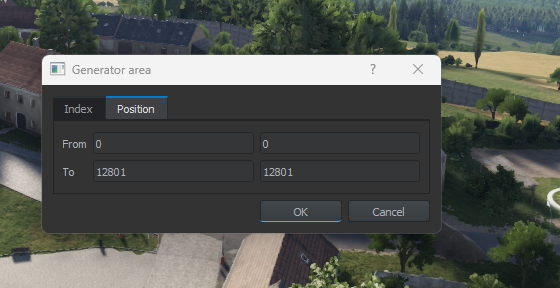
With 0.9.5.101 update there is new way of modding the navmesh.
Documentation is available here https://community.bistudio.com/wiki/Arma_Reforger:Navmesh_Tutorial
Basically you can save modified parts of navmesh needed for your scenario and merge those between different mods. It should make it easier to distribute scenarios on Everon as you won't have to provide rebuilt navmesh for whole island, but only for your modified parts.

 sly harness
stone sapphire
With 0.9.5.101 update there is new way of modding the navmesh.
Documentation is ...
sly harness
stone sapphire
With 0.9.5.101 update there is new way of modding the navmesh.
Documentation is ...
Is it possible to create a new navmesh project (other than “Soldiers” and “BTRlike”) ?
haughty ivy
Is anyone working on behavior trees right now
timid light
I think the majority of people are waiting to see what BI does to trees first rather than just possibly reinventing a wheel before they do
I may be wrong, but Ive not heard of or seen anyone going too deep into BTs yet
sly harness
I am, a little bit. 