#arma3_gui
1 messages · Page 11 of 1
 tepid bramble
 stark compass
hey, any idea how i can eliminate this effect(2) and this bar(1)https://imgur.com/a/KyuIGea
in-mission, without a mod, that is
i tried using ctrlShow, but it doesnt work on the elements
 quasi granite
[missionNamespace, "OnGameInterrupt", {
    params ["_display"];
    _c = _display displayCtrl 115099;
    _c ctrlShow false;
}] call BIS_fnc_addScriptedEventhandler;
@stark compass
quasi granite
I tried it from debug console and it worked?
stark compass
tried to run it on display 49
hold on
_c = (findDisplay 46) displayCtrl 115099;
_c ctrlShow false;```here's what i tried
ashhh
quasi granite
display 46 is not the escape menu
stark compass
49
yes
typo
im such an idiot
no wonder it didnt work XD
welp, it was a good try
but it still doesnt work
_c = (findDisplay 49) displayCtrl 115099;
_c ctrlShow false;```have you tried my code?
stark compass
i'll give it a shot
just a moment
nope, that wont work either
ran it from debug
quasi granite
did you close and open the escape display inbetween?
stark compass
yep
i also dropped a systemchat in there to make sure the event is firing
the print comes out just fine, but the element is still there
wait, this is for the blur-effect?
yeah, that's gone
that works
now i jsut need to find the idc for the bottom bar
quasi granite
it disables the tile effects
stark compass
Thank you so much
quasi granite
the black bar at the bottom has no idc so here is a workaround: ```sqf
_cs = ["Version", "MissionTitle", "TraffLight", "MissionNameBackground"];
allControls findDisplay 49 apply {
if (ctrlClassName _x in _cs) then {
_x ctrlShow false;
};
};
(this is only the bottom bar, combine it with the script from above)
stark compass
i could kiss you right now
quasi granite
np 😘
stark compass

@quasi granite sorry to be btohering you again. Do you know what is the name of this fella here?
https://imgur.com/a/ftl8i7Q
 barren apex
A picture?
 barren apex
RscPicture or one of it's variant ^^
 barren apex
Well I mean, what other answer did you expect? 😄
stark compass
the name of that specific element or idc
but i guess i got the message
i'll go and look it up myself
barren apex
Oh, well I don't know that one, but should be easy to find in the config viewer if you know what is the parent display/dialog name 🙂
stark compass
uhhh... im just crawling the script
quasi granite
@stark compass @barren apex nope, not a picture: cpp class Pause1: RscText { idc = 1000; x = "safezoneX + safezoneW - 2.2 * ( ((safezoneW / safezoneH) min 1.2) / 40)"; y = "safezoneY + 1.4 * ( ( ((safezoneW / safezoneH) min 1.2) / 1.2) / 25)"; w = "0.7 * ( ((safezoneW / safezoneH) min 1.2) / 40)"; h = "2 * ( ( ((safezoneW / safezoneH) min 1.2) / 1.2) / 25)"; colorBackground[] = {1,1,1,1}; shadow = 2; }; class Pause2: Pause1 { idc = 1001; x = "safezoneX + safezoneW - 3.2 * ( ((safezoneW / safezoneH) min 1.2) / 40)"; }; you can find all the controls in configFile >> "RscDisplayInterrupt"
barren apex
Well, that's another way to do it I guess 😄
quasi granite
or unpack the data to a p drive and dive into the config.cpp itself (very very useful)
stark compass
I umpacked it in addons

And found it already
But thank you regardless
Getting back into arma 3 gui programming
Took a little break off
 vast apex
got a thing that's boggling me for the past 3 days... i got a CT_TREE control with a onTreeSelChanged EH.
so i found this.. if i open the dialog that has that CT_TREE using createDialog the event is working fine, but if i open the dialog as display using createDisplay with the required params seems like the event dosen't want to work at all
is there something that I miss?
no RPT logs also...
stark compass
Can yougive your exact code onwhen you create the display and when you create the eh?
stark compass
What is my best bet if i want to display an image on a button and have it change depending on the button's state? RscShortcutButton?
tepid bramble
depends what you're trying to achieve exactly. if its an image and text then i use RscButtonMenu which inherits from RscShortcutButton, not quite sure what the difference is. if the button is just an image then you may prefer RscActivePicture as it looks more like the image is the button rather than an image on a button.
stark compass
i see
there is no documentation for RscActivePicture though
anyone have RscActivePicture base-class?
 cerulean roost
how you mean?
stark compass
the base-class for RscActivePicture
iu cant find one
and there is no documentation about it
@tepid bramble any ideas?
it's listed here: https://community.bistudio.com/wiki/ctrlCreate/classnames
but that's it
tepid bramble
use bis_fnc_exportbaseguiclasses or whatever it is called
stark compass
docs?
tepid bramble
run it in debug and itl copy the base gui classes to ur clipboard
just look it up on the wiki?
stark compass
bis_fnc_exportbaseguiclasses is not on the wiki
you mean BIS_fnc_exportGUIBaseClasses?
tepid bramble
probably
stark compass
kk
tepid bramble
use the default option
stark compass
is there a way to make listnbox elements auto-cut if the text is too long to fit the element
quasi granite
disableOverflow = 1; in config
 raw lagoon
howdy fellas, I'm making a side hud rsc display for an ac130, I have the main rsc controls bordered nicely inside a rsc control group, but i need to have a second bordered area inside that where other controls can only be seen inside the second 'internal' box, I'm racking my head and looking everywhere but can't figure out how to have two borders inside a rsc display
dang it would seem i cant post images here to help explain
this is my initial control group setup:
class Rsc_Pingo_AC130SideHUD_UI: RscUnitInfo
    {
        idd=301;
        onLoad = "_this spawn ac130_fnc_onRSCLoadHUD";
        onUnload = "removeMissionEventHandler ['eachFrame', uiNamespace getVariable 'USAF_SIDE_PFH_eachFrame']";
        controls[]=
        {
            //"CA_Zeroing",
            "CA_IGUI_elements_group"
        };
        class VScrollbar;
        class HScrollbar;
        class CA_IGUI_elements_group: RscControlsGroup
        {
            idc=170;
            class VScrollbar: VScrollbar
            {
                width=0;
            };
            class HScrollbar: HScrollbar
            {
                height=0;
            };
            x = 0.189078 * safezoneW + safezoneX;
            y = 0.06088 * safezoneH + safezoneY;
            w = 0.623906 * safezoneW;
            h = 0.836926 * safezoneH;
            class controls
            {
                class SysFM1Picture: ac130SideHUDPicture
                {
                    idc = 1500;
                    text = "";
                    x = 0.378281 * safeZoneW - XPAD;
                    y = 0.434593 * safezoneH - YPAD;
                    w = 0.0520834 * safezoneW;
                    h = 0.0907778 * safezoneH;
                };
but within that id like to have a second area with its own limits where a horizontal compass would reside, the compass edges would need to be limited to a given area
sorry this is super hard to explain
 ocean hazel
you can upload the picture elsewhere
raw lagoon
ok so my imgur wasnt working initially
that is my side hud currently
as you can see with the dashed gun box it cuts off nicely where its supposed to around the borders
if you turn your attention to the horizontal 2d compass at the top
thats just one of the stock arma ones i used as a template, id like to have my own compass textures there
however i cannot figure out how i can define a seperate, second, border for the textures that would go where that compass is
raw lagoon
never mind i got it figured out, just made a second control group under the same IDD rsc display
stark compass
is there a method to detect if/when a dialog is closed through Esc?
quasi granite
onUnload eh will fire with [_display, 2] as params. 2 is for a cancel action
quasi granite
_display displayAddEventHandler ["Unload",{
  params ["_display", "_exitCode"];
  if (_exitCode == 2) then {
    systemchat "Display was left by canceling (Escape or cancel button)";
  };
}];
oh yeah!
No, it's cool, i just need to detect if it was generally closed
Destroy doesnt work with Esc
"unload" works better
 wicked talon
How would I go about scrolling a listbox via script?
I want it to start at the bottom, instead of at the top
and then keep scrolling if more entries are added
 placid osprey
Don't think its possible with listboxes
Unless you pre-add the rows before and alter/update them later
barren apex
You cannot set the scroll of a control so it's not possible without some hacky work-around
placid osprey
Alternative: get rid of listbox and use predefined ctrlGroups as entries
barren apex
He still cannot set the scroll afaik
wicked talon
Plan B then, add things to a listbox at the top instead of the bottom
ocean hazel
But if you do lbSetCurSel, won't it scroll it for you?
https://community.bistudio.com/wiki/lbSetCurSel
wicked talon
It does!
// Autoscroll
    private _curSel = lbCurSel _listCtrl;
    if (_curSel isEqualTo -1 || _curSel isEqualTo _entriesNum -1) then {
        _listCtrl lbSetCurSel (lbSize _listCtrl - 1);
    };
that will have to do
ocean hazel
Oh nice, no need to rewrite everything then 😄
 toxic cradle
Im trying to import a dialog into my editor
im opening gui editor and doing ctrl + i then typing missionConfigFIle >> "life_my_gang_menu" and it says display not found
toxic cradle
already past that
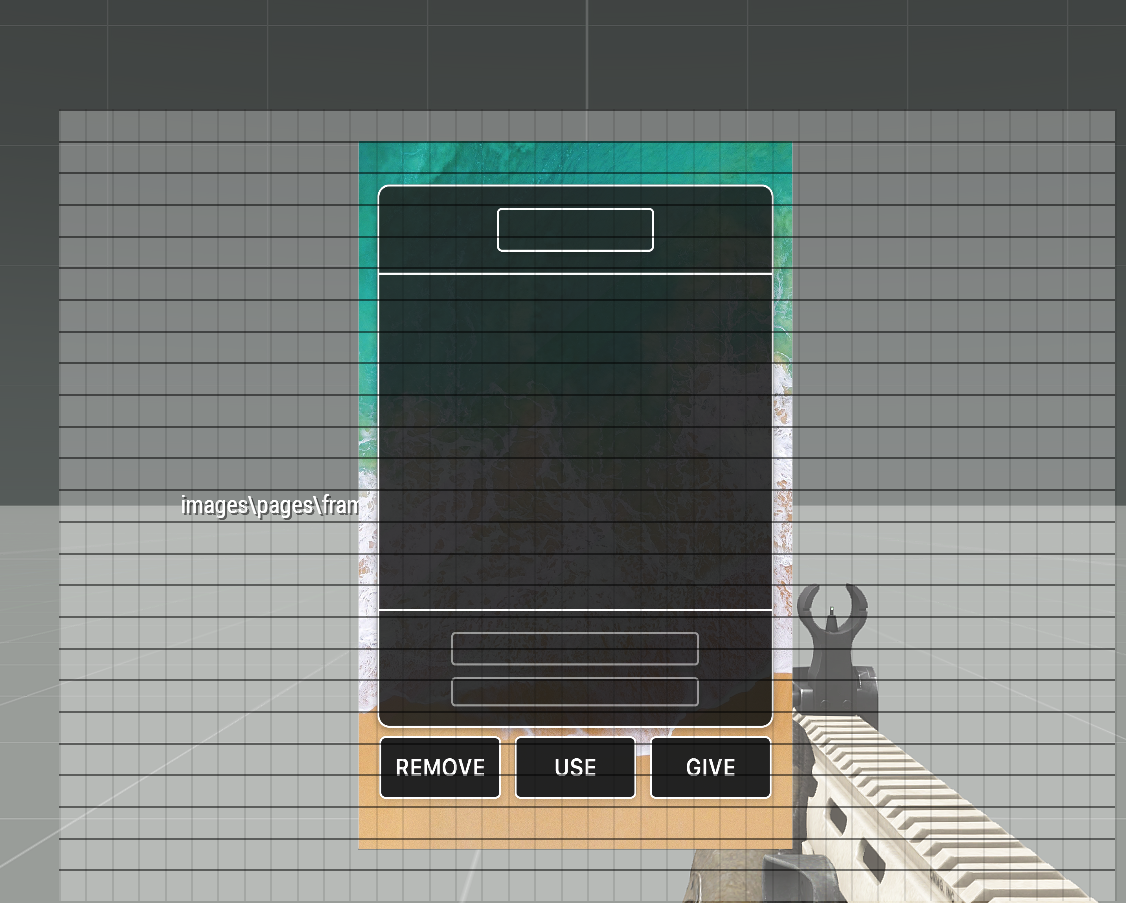
now my issue is when I load a gui, the existing buttons/backgrounds/imgs are just gray/invisible
stark compass
can you pastebin the defines for the dialog?
 brisk cairn
@tardy river basically trying to create a dropdown list like with RHS
https://imgur.com/a/vdrvYQp
 tardy river
i am a 3d artist, no idea how the base script works these days
feel free to have a look over it
brisk cairn
yeah didn't know about RHS main
was looking in the humvees configs but couldn't find what I was looking for
tardy river
RHS configs are a bit different from vanilla, since we use quite a few custome made functions, macros etc.
brisk cairn
thanks
tardy river
or here - afrf/addons/rhs_decals/ / usaf/addons/rhsusf_decals/
brisk cairn
oh that might be it
checking
brisk cairn
also
@main wolf
sorry to bother but I've also tried the script you made
_box = _this select 0;
_logo = switch (_box) do {
    case 0: { logoA };
    case 1: { logoB };
    case 2: { logoC };
    case 3: { logoD };
    default { logoA };
};
_box setObjectTextureGlobal [0, _logo];
the attribute appears in the editor but it doesn't change textures
could it be that the control combo is not finding the function?
cpp control = "combo"; property = "SZ_custom_logo"; displayName = "logo"; description = "This combo has twentyfive values."; tooltip = "Choose the logo to use on the box"; expression = "_this setVariable ['%s', _value, true]; 0 = [_this] call SZ_fnc_changeLogo;"; defaultValue = 0; typeName = "NUMBER"; unique = 0; condition = "1";
I probably messed up the expression but I'm not sure how
 main wolf
I don't know... I'm a scripter, not GUI expert 😉
brisk cairn
honestly I don't even know if its a GUI related issue
anything interface wise works
the script just doesn't work
and I wonder whats causing it
main wolf
but does expression even exist?
brisk cairn
uh..?
shouldn't it?
its onthe 6th line of the combo control
it may be wrongly written but it exists I think
main wolf
I've never heard of it...
and also isn't mentioned on the wiki https://community.bistudio.com/wiki/DialogControls-Combo
unless it's not a GUI element
quasi granite
those attributes are available in eden
brisk cairn
main wolf
Like I said... I'n not a GUI expert, so not the person to ask
brisk cairn
yeah I understand
thanks anyway
quasi granite
this is a topic for somone that knows GUIs AND eden so a very very small percentage of a3 players
brisk cairn
😭
toxic cradle
#define ST_LEFT           0x00
#define ST_MULTI          0x10
#define GUI_GRID_CENTER_WAbs        ((safezoneW / safezoneH) min 1.2)
#define GUI_GRID_CENTER_HAbs        (GUI_GRID_CENTER_WAbs / 1.2)
#define GUI_GRID_CENTER_W        (GUI_GRID_CENTER_WAbs / 40)
#define GUI_GRID_CENTER_H        (GUI_GRID_CENTER_HAbs / 25)
#define GUI_GRID_CENTER_X        (safezoneX + (safezoneW - GUI_GRID_CENTER_WAbs)/2)
#define GUI_GRID_CENTER_Y        (safezoneY + (safezoneH - GUI_GRID_CENTER_HAbs)/2)
``` @stark compassyes?
stark compass
yes, THAT
toxic cradle
stark compass
this is L*fe?
toxic cradle
Mhm...
stark compass
sure
try swapping Life_RscPicture to RscPicture
just once
because i recall the gui editor having a hard time with custom classes
toxic cradle
i thought about that but shouldnt it work since I have a common.hpp that says life_rscpicture is a type of rscpicture?
stark compass
yep, but the editor is tricky
so just give it a go
just change one of them to rsc
toxic cradle
yea in vr
stark compass
if youre doing it from mission, you have to manually import your classes
toxic cradle
uhhhh..
stark compass
copyToClipboard ("Default" call BIS_fnc_exportGUIBaseClasses)
run that in the debug field
toxic cradle
thx habibi
stark compass
have fun
toxic cradle
got a phone script, everything looks rlly nice except they just left out the gang menu/wanted list so its like wtf..
 tranquil iron
neither of these channels
stark compass
@tranquil iron where abouts would be the correct one for complaints on unrelated matters?
tranquil iron
which complaints?
I see someone asking about GUI editing in #arma3_gui
and stating why he wants to do what he wants, to make it more clear what he wants to archieve
stark compass
his issue was already handled and i thought they were starting a discussion of the framework/community, so i invited them to join in on different discussion to keep this channel on-topic
toxic cradle
🙄
stark compass
if you have more questions, feel free to ask
toxic cradle
ill pass since im gonna gfet complaints for it
stark compass
i dont know who complained to you, but sure. You do you
toxic cradle
@tranquil iron where abouts would be the correct one for complaints on unrelated matters?
his issue was already handled and i thought they were starting a discussion of the framework/community, so i invited them to join in on different discussion to keep this channel on-topic
stark compass
yes? Nobody was complaining to you
toxic cradle
about
            x = 0.338097 * safezoneW + safezoneX;
            y = 0.203 * safezoneH + safezoneY;
            w = 0.314524 * safezoneW;
            h = 0.594 * safezoneH;
i need to copy these values into the position of my new dialog
but they are a different format.
think i figured it out actually.
quasi granite
GUI_GRID is broken in GUI editor. See this here: https://community.bistudio.com/wiki/Arma_3_GUI_Coordinates#Using_the_grids_in_the_GUI_Editor
toxic cradle
after saving the vr mission and leaving how do i get back my gui
really hope i didnt lose my 2 hours of work..
saved it under those settings
quasi granite
two options:
- You have exported it as GUI Editor format, just copy paste that code back into the Editor with CTRL+V
- You have it exported it as config, load it to missionconfigfile (description.ext), press CTRL+I while in GUI Editor and write
missionConfigfile >> "YourDisplayName"
yours is option 1
toxic cradle
where do i copy it from
quasi granite
it was saved to you clipboard
 😄
😄

 toxic cradle
its hilarious
im laughing
haha
#thanksarma
undefined variable in expression. saved it as config
and STILL didnt work
stark compass
need help?
stark compass
do you want it as a config-entry?
toxic cradle
Yes
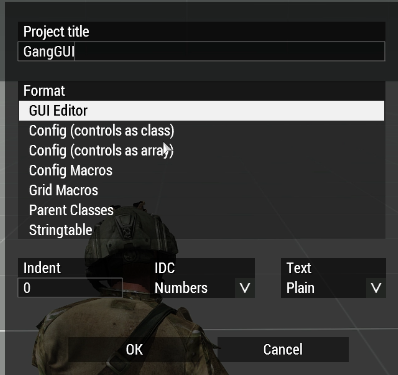
i chose config controls as class
called it GangGUI
then press ok then saved then loaded the mission back up and got an error.
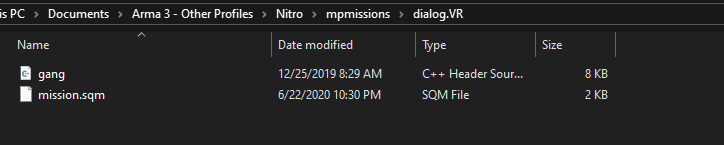
and no file to be found with the contents.
stark compass
shift+ctrl+s -> cancel -> shift + alt + s -> paste in your controls
stark compass
make it right once
stark compass
shift+ctrl+s -> cancel -> shift + alt + s -> paste in your controls
@toxic cradle
toxic cradle
into the file.
stark compass
into the controls class in your dialog class
toxic cradle
its not even making the file for it
stark compass
when you load the inventory through missionconfig, it will change all coordinates to GRID_GUI so remember to change those back to safezone
stark compass
what do you mean not making a file?
yeah, it doesnt
so?
make the file yourself
define your dialog in your .hpp and make a controls class for it
then just paste the stuff you just copied from the editor into the controls class
 ruby swallow
As Alternative, Download an external gui Editor and use that
stark compass
or write it all by hand
ruby swallow
The ingame gui Editor is... Usable at best
stark compass
🤷♂️
ruby swallow
For rookies most of the time no options
stark compass
i find it easier to just do the math
toxic cradle
math is disgusting
stark compass
the in-game gui editor is tricky and lacking
toxic cradle
love clicking on controls and instead of selecting it its like "OHHHHH, CHANGE SIZE? OK!"
ocean hazel
I have found third person who might be interested in the GUI layout manager we discussed @ruby swallow
Are you still interested in making it... by chance?
ruby swallow
No time currently, that is why sqf-vm and arma.studio are on halt currently too
And I think that was pre arma.studio ui editor 🤔 which I started now pretty much as a way to craft guis
toxic cradle
why is it still using the old version of an image? I restarted the mission like 4 times and it wont update to the latest
can you add conditions to menus so one background picture will show for 1 condition, another picture for a different condition
ocean hazel
why is it still using the old version of an image? I restarted the mission like 4 times and it wont update to the latest
You need to go back to editor then start the mission again for arma to reparse the .ext file
stark compass
you can change the textuure
ocean hazel
can you add conditions to menus so one background picture will show for 1 condition, another picture for a different condition
with code, everything can be done
with code, everything can be done
perhaps you can put some script into onLoad event
toxic cradle
        class Phone: RscPicture
        {
            idc = 1201;
            text = "images\pages\gang.paa";
            x = 0.338097 * safezoneW + safezoneX;
            y = 0.203 * safezoneH + safezoneY;
            w = 0.314524 * safezoneW;
            h = 0.594 * safezoneH;
        };
need to change the "text" of this on load..
I could make 2 separate dialogs but that seems inefficient.
quasi granite
onLoad = "(_this select 0) ctrlSetText 'images\pages\gang.paa';";
_this select 0 would be Phone?
quasi granite
https://community.bistudio.com/wiki/User_Interface_Event_Handlers#onLoad. Yes that would be the control
toxic cradle
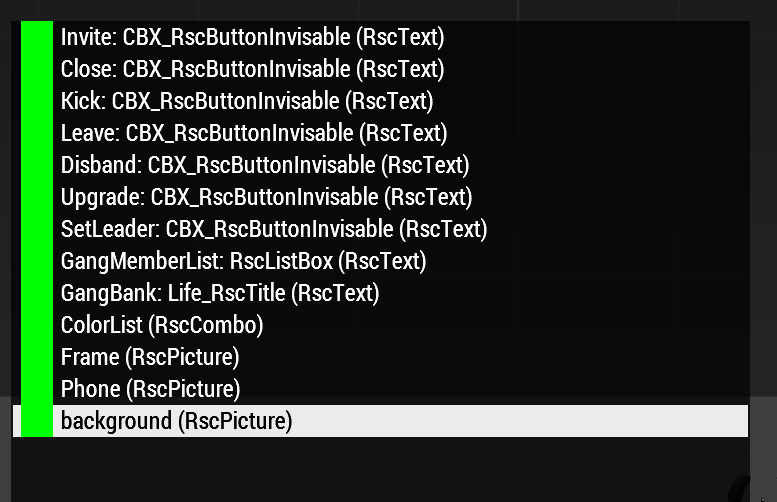
For some reason I cant click my buttons on my dialog..its like they are hidden behind the picture
but I have them at the top in ctrl l
do the pictures need colortext with transparency or something..?
tepid bramble
at the top in ctrl l
ctrl l?
toxic cradle
the hierarchy list thing
tepid bramble
oh, try them at the bottom
 tepid bramble
idk about the gui editor because i do mine by hand, but when using the controls class you define controls from lowest layer to highest
toxic cradle
well theres controls then controlsbackground
the background ones are the images they are above in the file
idc is just the control's id right
tepid bramble
yea. id-control
toxic cradle
can you change the font size of text on titles?
tepid bramble
yes
again, not sure about in the gui editor, but you'd usually use either sizeEx in the control config class or use ctrlSetFontHeight command
tepid bramble
whats the base class?
toxic cradle
sizeEx = "(((((safezoneW / safezoneH) min 1.2) / 1.2) / 25) * 1)"; is the default
How am I supposed to understand that
tepid bramble
the * 1 at the end is what matters
toxic cradle
ahh
tepid bramble
the usual values are
#define GUI_TEXT_SIZE_SMALL        (GUI_GRID_H * 0.8)
#define GUI_TEXT_SIZE_MEDIUM        (GUI_GRID_H * 1)
#define GUI_TEXT_SIZE_LARGE        (GUI_GRID_H * 1.2)
 burnt token
does anyone know the paths to the red/yellow chain texture? I've tried to find it in ui_f but could not find it there.
 distant axle
Maybe data_f? I'm not sure though
Found them: a3\ui_f\data\gui\rsc\rscpendinginvitation
burnt token
thx ❤️
 main wolf
RscProgress ?
and I'm not sure exactly which one that is, although:
#define CT_PROGRESS         8

#define IDC_LOADING_PROGRESSMAP        1008
#define IDC_LOADING_PROGRESSMISSION        1013
 tidal shale
I want to tweak this progress bar ( width, texture etc), i already tweaked main menu, lobby etc
stark compass
yeah, so the display and the idc
tidal shale
ye
main wolf
all data is available in UI_F, so it shouldn't be too hard to figure them out 🤷♂️
tidal shale
👍 all good ty
quasi granite
configfile >> "RscDisplayLoadMission" >> "ProgressMap" keep in mind that there are different loading screens for different situations, like editor preview and mission
ocean hazel
quick question, when I restart the mission in singleplayer, is the mission display 46 recreated?
ocean hazel
So created controls get deleted, event handlers get deleted?
Good to know. Because it's not the case for a mission reset in editor.
quasi granite
Restarting the mission does not update the mission display 46. returning to 3den does.
stark compass
that's weird
for me it did
even in editor
i msutve done something wrong
🤷♂️
quasi granite
controls created on the mission display stay there until the display is closed, aka you return to 3den
not sure about UIEH. they might be bound to the missionnamespace
 weary imp
@ocean hazel you mean in Eden when you click restart button? No, only if you go back to editor and preview again
distant axle
Is there any way to make place a image in an additive blend mode or something? Might not fit here but if there's a way to do it in a command like drawIcon3D, it's also okay for me
stark compass
how do i import the default engine defines for a mod?
pboProject is giving me flak for class RscObject { access = 0; type = CT_OBJECT; scale = 1; direction[] = {0,0,1}; up[] = {0,1,0}; shadow = 0; };
access = 0;
tranquil iron
class RscObject;
stark compass
alright, so no need to define them manually?
tranquil iron
no, declaration is sufficient
tranquil iron
if you redefine it, once vanilla changes every mod would break eachother
but you need proper requiredAddons
stark compass
like so
class ScrollBar;
class RscObject;
class RscText;
class RscFrame;
class RscLine;
class RscProgress;
class RscPicture;
class RscPictureKeepAspect;
class RscVideo;
class RscHTML;
class RscButton;
class RscShortcutButton;
class RscEdit;
class RscCombo;
class RscListBox;
class RscListNBox;
class RscXListBox;
class RscTree;
class RscSlider;
class RscXSliderH;
class RscActiveText;
class RscToolbox;
class RscControlsGroup;
class RscControlsGroupNoScrollbars;
class RscControlsGroupNoHScrollbars;
class RscControlsGroupNoVScrollbars;
class RscButtonTextOnly;
class RscButtonMenu;
class RscButtonMenuOK;
class RscButtonMenuCancel;
class RscButtonMenuSteam;
class RscMapControl;
class RscMapControlEmpty;
class RscCheckBox;```what would i need to add to my required addons?
stark compass
File P:\NCA\TOM\Addons\inventory\dialogs.hpp: circa Line 18 Mismatched quotes or missing ','
so such matter exists
dialogs.hpp is literally just
class ScrollBar;
class RscObject;
class RscText;
class RscFrame;
class RscLine;
class RscProgress;
class RscPicture;
class RscPictureKeepAspect;
class RscVideo;
class RscHTML;
class RscButton;
class RscShortcutButton;
class RscEdit;
class RscCombo;
class RscListBox;
class RscListNBox;
class RscXListBox;
class RscTree;
class RscSlider;
class RscXSliderH;
class RscActiveText;
class RscToolbox;
class RscControlsGroup;
class RscControlsGroupNoScrollbars;
class RscControlsGroupNoHScrollbars;
class RscControlsGroupNoVScrollbars;
class RscButtonTextOnly;
class RscButtonMenu;
class RscButtonMenuOK;
class RscButtonMenuCancel;
class RscButtonMenuSteam;
class RscMapControl;
class RscMapControlEmpty;
class RscCheckBox;```
and commentsthen its somewhere else, somewhere close by
stark compass
here is config.cpp
/*  */
#include "basicDefines_A3.hpp"
#include "cfgPatches.hpp"
#include "defines.hpp"
#include "dialogs.hpp"


class cfgFunctions
{
    class TOM // project or person tag
    {
        class inv_functions // This represent a group of function
        {
            file="inventory\inv_functions";
            class showInventoryDialog {};
            class initInventory {};
            class dropInventory {};
            class pickupInventory {};
            class takeCargo {};
            class dropCargo {};
            class populateInventoryItems {};
            class weaponType {};
            class removeAmmoMagazine {};
            class itemIconClicked {};
            class itemListClicked {};
            class itemListDoubleClicked {};
            class showBag {};
            class closeBag {};
            class getConfig {};
            class setPictures {};
            class addBackpackAction {};
            class itemType {};
        };
    };
};```ahhh
tranquil iron
check CfgPatches and defines
stark compass
class CfgPatches
{
    class TOMInventory
    {
        units[] = {};
        weapons[] = {};
        requiredVersion = 0.1;
        requiredAddons[]=
        {
            "A3_Data_F_Oldman_Loadorder"
        };
    };
};```i jsut sent defines
tranquil iron
no you didn't
tranquil iron
you wrote thats dialogs.hpp
vast apex
is there any function to set the colorFocused of a ctrl?
tepid bramble
not that im aware of, no
 weak trail
arma 3 gui making is cancer
(just wanted to give this constructive criticism to you guys  )
)
thanks, i already knew that tho
(for the ones that would say now, but what do yoi already know, here would be a link to screenshot of the error i get that makes no sense to me if it wasnt deleted)
stark compass
so where's the link?
weak trail
deleted
weary imp
Is it possible to create ListBox with scrollbar without using ControlsGroup?
tepid bramble
doesnt listbox have its own scroll bar?
weary imp
private _ctrlTree = _disp ctrlCreate ["RscListBox", -1];
_ctrlTree lbAdd "Category A";
_ctrlTree lbAdd "Text 1";
_ctrlTree lbAdd "Text 2";
_ctrlTree lbAdd "Text 3";
_ctrlTree lbAdd "Text 4";
_ctrlTree ctrlSetPosition [0,0,0.1,0.1];
_ctrlTree ctrlCommit 0.0;```
does the scroll bar show for you @tepid bramble ?no, though it does when using ctrlListbox
i honestly cant say ive ever encountered that issue before.
weary imp
intredasting
weary imp
w and h properties are to blame. when 0 scrollbar shows straight away, when not 0 then scrollbar shows only if list over certain size
private _disp = findDisplay 46 createDisplay "RscDisplayEmpty";
private _ctrlTree = _disp ctrlCreate ["RscListBox", -1];
_ctrlTree lbAdd "Category A";
_ctrlTree lbAdd "Text 1";
_ctrlTree lbAdd "Text 2";
_ctrlTree lbAdd "Text 3";
_ctrlTree lbAdd "Text 4";
_ctrlTree lbAdd "Text 1";
_ctrlTree lbAdd "Text 2";
_ctrlTree lbAdd "Text 3";
_ctrlTree lbAdd "Text 4";
_ctrlTree ctrlSetPosition [0,0,0.1,0.1];
_ctrlTree ctrlCommit 0.0;
shows
weak trail
soooo, i m encountering a problem while making a gui.
(This link is a screenshot of the error message i get)
https://cdn.discordapp.com/attachments/531504200182530058/727214436439293952/unknown.png
(This is the part of the ui that is the problem)

class myUi {
    idd = -1;                   // set to -1, if don't require a unique ID
    movingEnable = 0;           // the dialog can be moved with the mouse
    enableSimulation = 1;       // freeze the game
    controls[] = {
        ////////////////////////////////////////////////////////
        // GUI EDITOR OUTPUT START (by bruh, v1.063, #Duzyne)
        ////////////////////////////////////////////////////////

        class zb_wl_background: RscText
        {
            idc = 1000;
            x = 0.291667 * safezoneW + safezoneX;
            y = 0.203704 * safezoneH + safezoneY;
            w = 0.416667 * safezoneW;
            h = 0.564815 * safezoneH;
            colorBackground[] = {0,0,0,0.3};
        };
i honestly dont see the problem here....i would appreciate some help....
quasi granite
@weak trail you cant list classes in an array. there are two ways of setting up the config:
The more popular way:
class myUi
{
    idd = -1;                   // set to -1, if don't require a unique ID
    movingEnable = 0;           // the dialog can be moved with the mouse
    enableSimulation = 1;       // freeze the game
    class controls
    {
        class zb_wl_background: RscText
        {
            idc = 1000;
            x = 0.291667 * safezoneW + safezoneX;
            y = 0.203704 * safezoneH + safezoneY;
            w = 0.416667 * safezoneW;
            h = 0.564815 * safezoneH;
            colorBackground[] = {0,0,0,0.3};
        };
    };
};
``` or the array definition way:
```cpp
class myUi
{
    idd = -1;                   // set to -1, if don't require a unique ID
    movingEnable = 0;           // the dialog can be moved with the mouse
    enableSimulation = 1;       // freeze the game
    controls[] = {"zb_wl_background"};
    class zb_wl_background: RscText
    {
        idc = 1000;
        x = 0.291667 * safezoneW + safezoneX;
        y = 0.203704 * safezoneH + safezoneY;
        w = 0.416667 * safezoneW;
        h = 0.564815 * safezoneH;
        colorBackground[] = {0,0,0,0.3};
    };
};
hmm the biki is a bit unprecise in that regard. I'm gonna change that real quick.
weak trail
euhm, i m getting a new error now....
it says that there is no entry for RscText_1001
(The link is the screenshot to my error)
quasi granite
obv there is something wrong in the config but w/o code cant tell what
weak trail
am i allowed to share that here?
quasi granite
if it is a small text yes, otherwise use a pasting website like https://pastebin.com/
weak trail
This is my ui : https://pastebin.com/gnprFnd8
This is the defines that i use (the life one) : https://pastebin.com/idxKyHVU
i already added the type to all the button, but that cant be it, right? i mean, i have already made a ui, and that ui didnt need the type on each button
now that i added the type to all the buttons, it now requires me to add a text to every edit
quasi granite
the controls array consists of strings so
controls[]=
    {
        zb_wl_background,
        zb_wl_non_whitelisted_listbox,
                [...]
``` should be
```cpp
controls[]=
    {
        "zb_wl_background",
        "zb_wl_non_whitelisted_listbox",
                [...]
didnt seem to change anything
quasi granite
now that i added the type to all the buttons, it now requires me to add a text to every edit
@weak trail class inheritance should have you covered. would be easier to modify the base classes, as in add the missing attribute to the base class instead of each control individually. eg. from what i can tell is thatLife_RscEditis missing thetextattribute
weak trail
hm, would make sense, but i dont really want to touch it, as the life framework uses it and i dont want to break anything
quasi granite
it says that there is no entry for RscText_1001
@weak trail I cant really see why that error occurs as you dont have such a value or class in the config
weak trail
i already fixed that one
my problem was, that i exported it as array and i use the life_ everywhere, but the export of the ui uses the default names
so, in the controls was rsctext_1001 defines, but in the ui, it was life_rsc...
quasi granite
its also possible to inherit classes from within the dialog, eg:
class Dialog
{
    class Controls
    {
        class Ctrl1: ParentClass
        {
            text = "hello";
        };
        class Ctrl2: Ctrl1
        {

        };
    };
};
Ctrl2 will also have the text "hello"
weak trail
i was about to ask how, but then i saw the ctrl1 at the second part
quasi granite
be aware that clases are similar to code blocks in that regard. you cant inherit from Ctrl1 in another dialog
weak trail
yea, makes sense, ctrl1 is only defined in this dialog class
 acoustic veldt
I am using a .paa image that is blue for an RscImage. When I open the file in TexView2 it still shows as blue, but when open it in the GUI Editor it comes up as orange. Any idea why?
quasi granite
is the image in the size a² x b²?
acoustic veldt
No
quasi granite
paa files have to be in that format
acoustic veldt
what about jpegs?
weak trail
jpegs dont need to be, and can be used just as easily as paa files
acoustic veldt
Ill give it a go then thanks!
quasi granite
jpegs have no transparency though
acoustic veldt
There is no transparency so it should work perfectly
Now my issue is getting the text to show in front of the RscImage
Any ideas>
?
stark compass
@acoustic veldt define the text after the rscimage
stark compass
Hoe are you creating the element?
Is it part of a dialog you define previously
Or are you generating it through script?
acoustic veldt
I am just in the GUI Editor trying to drag a text box over an RscImage. I have tried changing the element order, colors, and position, but have had no luck
stark compass
You cant order images under anything in the ingame gui editor
Images will ALWAYS be on top
Dont know why
Just lock it and set it to tramsparent when youre working
acoustic veldt
So if I have the order set correctly and run the gui after saving it, it will come out with the text on top even if it doesnt show that way in the editor?
stark compass
@acoustic veldt correct
acoustic veldt
I have got everything in working order. I really appreciate the help! Now I have a new issue though which is that the RscPicture does not appear when the dialogue is created. Any ideas?
{
    idd = 9999;
    movingEnabled = false;
    class controls
    {
        class RscPicture
        {
            idc = 1200;
            text = "images\Raffle_Background.jpeg";
            x = 0.293495 * safezoneW + safezoneX;
            y = 0.225 * safezoneH + safezoneY;
            w = 0.413011 * safezoneW;
            h = 0.55 * safezoneH;
        };

    };
};```you didnt define a ctrl type, or any of the other properties the base rscpicture has.
class RscPicture
{
    deletable = 0;
    fade = 0;
    access = 0;
    type = 0;//CT_STATIC;
    idc = -1;
    style = "0x10 + 0x20";//ST_MULTI + ST_TITLE_BAR;
    colorBackground[] = {0,0,0,0};
    colorText[] = {1,1,1,1};
    font = "TahomaB";
    sizeEx = 0;
    lineSpacing = 0;
    text = "";
    fixedWidth = 0;
    shadow = 0;
    x = 0;
    y = 0;
    w = 0.2;
    h = 0.15;
    tooltipColorText[] = {1,1,1,1};
    tooltipColorBox[] = {1,1,1,1};
    tooltipColorShade[] = {0,0,0,0.65};
};
this is the base class. you can either modify this class directly or define it in the description.ext root and then inherit it to your control
acoustic veldt
It gives me an error whenever I modify from the base class though
tepid bramble
do you have the base class already defined in your description.ext?
acoustic veldt
How would I define that?
tepid bramble
put that snippet i posted in the description.ext above the RR_Raffle_Menu class and then inherit by doing class myPicture: RscPicture {
acoustic veldt
Wait what do I put in description.ext?
 old scaffold
Hey all. I’m new to GUIs but not new to sqf. Curious what’s the proper way to pass variables from a dialog (slider and list) to be used as parameters for a function called on a button press?
tepid bramble
by variables do you mean a variable set on the control or the control value?
if it is the control values you would do something like
//onButtonClick

params ["_ctrlButton"];
private _display = ctrlParent _ctrlButton;
private _ctrlSlider = _display displayCtrl 1;
private _ctrlList = _display displayCtrl 2;
private _ctrlListCurSel = lbCurSel _ctrlList;

[
    sliderPosition _ctrlSlider,
    _ctrlList lbText _ctrlListCurSel,
    _ctrlList lbData _ctrlListCurSel,
    _ctrlList lbValue _ctrlListCurSel
] call fnc_stuff;
buttons have a config field called "action"
you can define your code there in string*
no need for "onButtonClick"
tepid bramble
dont they more or less do the same thing?
tepid bramble
based on the wiki i assume action was the original way to do it. at least the sqf commands related to it existed before ctrlAddEventHandler did apparently.
stark compass
without knowing the internal guts and we assume "action" is just an EH
it comes down to milliseconds of time
so yeah
i would say it's "irrelevant", but it's not irrelevant
if you have the possibility of defining your action in the config, then do it
less code is more code
old scaffold
if it is the control values you would do something like
//onButtonClick

params ["_ctrlButton"];
private _display = ctrlParent _ctrlButton;
private _ctrlSlider = _display displayCtrl 1;
private _ctrlList = _display displayCtrl 2;
private _ctrlListCurSel = lbCurSel _ctrlList;

[
    sliderPosition _ctrlSlider,
    _ctrlList lbText _ctrlListCurSel,
    _ctrlList lbData _ctrlListCurSel,
    _ctrlList lbValue _ctrlListCurSel
] call fnc_stuff;
@tepid bramble this was the path I was on but I might need to refine it a bit more. Will check back once I have a second look. Thanks for the quick response everyone!
placid osprey
based on the wiki i assume action was the original way to do it. at least the sqf commands related to it existed before
ctrlAddEventHandlerdid apparently.
@tepid bramble iirc,actionwas the command that didn't send over any information about the ctrl. So nothing in_this
tepid bramble
mm. i cant think of a case where action would be better than onButtonClick.
placid osprey
Yeah. It's more or less obsolete.
acoustic veldt
I just began today on learning to make GUIs in Arma 3 and everyone who assisted me here really helped me to progress at a quicker pace than I expected so thanks especially to @tepid bramble and @stark compass . I finally got everything sorted out for getting the gui formatted and getting created correctly
Now I'm wondering how to create a RscText with text that can be changed based on a script. Would anyone be able to help or point me towards a resource?
tepid bramble
ctrlSetText
acoustic veldt
I'm trying to make it so that every time someone buys something it is noted and displayed. For instance one person buys something for $1 so it displays "$1" and then two other people buy the same thing for $1 so now "$3" is displayed
Could ctrlSetText be used for that?
tepid bramble
yes. you use ctrlSetText to set the text of a control in a script after it has been created.
stark compass
is there a way to create a control as a world-model?
as in a control that exists in the 3d space of the world instead of the 2d space that is the users display
main wolf
I doubt it
Controls/Dialogs need to be shown to the player in the correct layers, so having a "3D Control" doesn't make sense.
You could fake it like ACE Interaction, which shows stuff in 2D but relatively to 3D points
stark compass
yeah, i guess
is there a function to translate 3d point to 2d or will i have to write one myself?
ocean hazel
I add some controls to display 46, but when I open the map I still see these controls. I thought that the map display is entirely different from game display, is it not?
stark compass
Anyways, here's all the displays:
https://community.bistudio.com/wiki/Arma_3_IDD_List
Youre better off adding your GUI stuff somewhere else than 46, or hiding it on map opem
quasi granite
Well RscTitles would be for adding HUDs
ocean hazel
Yes but I thought that game renders either mission display or map display, but it turns out that it renders both, that's why I am confused
I have solved it by hiding my controls when visibleMap is true
quasi granite
ya the display 12 is a bit weird. once opened it stays open for the duration of the mission
ocean hazel
The game gets weirder every day
old scaffold
does anyone have pointers on sliderSetRange? I cannot seem to figure it out for the life of me...
main wolf
It just sets the min/max range of the slider return value;
so
class mySlider {
   type = 3;
   sliderRange[] = {0, 100}; // slider goes from 0 till 100
   sliderPosition = 50; // default position is at 50, aka center
   sliderStep = 10; // moving the slider goes in steps of 10 (so 0, 10, 20, 30, etc.)
}
please oh please don't tell me it's that simple...
I can just drop that in under the class??
main wolf
if your GUI is made with configs, yes (see https://community.bistudio.com/wiki/DialogControls-Sliders)
sliderSetRange (scripting command) basically works the same, just for scripted controls
old scaffold
excuse me while I go jump off a building out of frustration
sound of sliding glassdoor opening
@main wolf Thank you
stark compass
🔨
 tribal dagger
Hi question regarding RscText: I currently have the following GUI:
https://i.gyazo.com/30ae301a9d2f8023b9f83f54a94d3de3.png
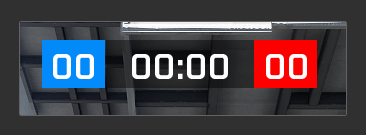
If you look closely, you can see the text is not veritcally aligned to the center. For some reason it is slightly offset downwards. Does anybody know why? Here is my config for the middle text:
        class MatchTimer: RscText
        {
            idc = 100;
            text = "00:00"; //--- ToDo: Localize;
            font = "PuristaSemiBold";
            x = 0.46125000000000005 * safezoneW + safezoneX;
            y = 0.02 * safezoneH + safezoneY;
            w = 0.0775 * safezoneW;
            h = 0.044 * safezoneH;
            sizeEx = 0.08;
            style = ST_CENTER; // ST_CENTER = 0x02
            shadow=0;
            colorBackground[] = {0,0,0,0.447};
        };
This only seems to happen with certain fonts though. If I use EtelkaMonospacePro as font then it is fine
main wolf
according to the wiki there's a style = ST_VCENTER; // 12 - 0x0C for vertical alignment, although there's also a note stating that it might not work well with other styles.
And that certain fonts work properly is because every font is different, so you might need to increate sizeX to make it fit
tribal dagger
Tried ST_VCENTER however that made the font not appear at all (prob got drawn offscreen somewhere). I'll mess around with the size setting then. Thanks 🙂
quasi granite
maybe a structured text might be better. then you can use
text = "<valign='middle'>00:00</t>";
Tried that, didnt work sadly. I just switched to a different font that isnt offset in that scenario and called it a day
weak trail
is it possible to like, flush the missionconfigs in the editor? so you dont allways need to exit the editor and then go back in and load the mission, everytime you make a minor change to your ui?
main wolf
Configs are loaded before the mission starts, so to reset the configs you need to be in a state before that happens aka restart the (internal) server
weak trail
so, basically, i must leave the editor each time i change stuff
main wolf
I usually go back to the editor and than load the mission again, which will reload the mission properly
weak trail
hm, for me it still keeps the classes if i only reload the mission
or did i just do the same mistake in the edit again and didnt notice it 
main wolf
So when in the editor you go to load mission, select mission, load it. And then start the mission.
That should reset all configs (it works for me when I work in mission configs like CfgFunctions).
weak trail
i see, gonna try that then
alright, works
i m having a weird problem tho
i think the problem are the buttons.
When i try to open the dialog, it says, "Cannot load texture add.paa"
the only thing in my ui that has anything with an "add" is a button
This is the button
        class zb_wl_add_to_whitelist: Life_zb_button
        {
            idc = 1600;
            text = "ADD"; //--- ToDo: Localize;
            x = 0.59375 * safezoneW + safezoneX;
            y = 0.731481 * safezoneH + safezoneY;
            w = 0.104167 * safezoneW;
            h = 0.0185185 * safezoneH;
            type = 1;
        };
And this is the parent class
        class Life_zb_button: Life_RscButton
        {
            type = 1;
            access = 0;
            colorShadow[] = {0,0,0,0};
            color[] = {1,1,1,1};
            colorActive[] = {1,1,1,1};
            colorBackground[] = {0,0,0,0};
            colorBackgroundFocused[] = {0,0,0,0};
            style = 48 + 0x800;
        };
i cant post the life_rscButton class, due to clydebot telling me that i dont share a server with this server
main wolf
well, that is not the problem, you most likely try to load an image somewhere else
weak trail
actually not at all
at least i dont think i do
all i do is, set the class of the ui, and then open it
on opening, it tells me about the texture
guess i ll just completely start over with this whole thing

tribal dagger
Hmmm, now I am having issues getting RscListNBox to work. No matter what .hpp I try, the list itself just doesn't get drawn on the screen. Here is an example config that doesn't work (its the example from the wiki with some minor changes):
https://pastebin.com/4zyr8xF3
When i create tha dialog with createDialog "wip", it creates an empty dialog (cursor appears but the list doesnt get drawn). If i define any event handlers in the config, then those fire as they should
any other control gets drawn, but the listnbox just doesnt wanna appear
no error either
old scaffold
Hey everyone- brain storming a script idea for an automated jump school. It’s pretty straightforward...pick a point and spawn a plane with the group as passengers at a specific altitude...I’d like to make a GUI that populates a map where the player can select start and finish for the flight path with a drop down menu for altitude...how would I go about creating a map within a dialog? How do I draw the flight path on the map so the player can confirm before starting?
Appreciate any advice! Thanks!
 quiet arrow
@tribal dagger are you sure that all the macros are defined?
tribal dagger
Yep all the macros are defined in my defines.hpp which is properly included
barren apex
is it possible to like, flush the missionconfigs in the editor? so you dont allways need to exit the editor and then go back in and load the mission, everytime you make a minor change to your ui?
@weak trail for GUI changes you only need to go back to the editor and save. If you click play again the config should have been updated.
quasi granite
is it possible to like, flush the missionconfigs in the editor? so you dont allways need to exit the editor and then go back in and load the mission, everytime you make a minor change to your ui?
@weak trail i make my uis directly in 3den with
findDisplay 313 createDisplay "MyDisplay";
``` and to update the config just save the mission. This should be the fastest method but will ofc not work if your ui depends on the mission.


> When i try to open the dialog, it says, "Cannot load texture add.paa"
@weak trail thats because of `style = 48 +...` where 48 is ST_PICTURE so it interprets `text = "add";` as an image file.On a mission that is, otherwise you can use diag_mergeConfigFile
weak trail
oh, i see, so if i remove the style 48 thingy, it shouldnt ask anymore?
gonna do that then asap
quasi granite
change it to another style
style = 0;
aligns the text to the left. see more here: https://community.bistudio.com/wiki/Arma:_GUI_Configuration#Control_Styles
weak trail
oh, thanks
i basically copied this parent class from a ui made by allianceapps, as they also use the life common.hpp and i struggled to find all the missing pieces on my own
and yea, i didnt really question that style, i was like, must work, probably
weak trail
@quasi granite i am pleased to be able to tell you, that this was in fact the problem. My ui works now to 95%. Only a checkbox to fix (which doesnt give any error)
quasi granite

weak trail
so, idc 1005 and 2800 dont want to display for some reason
1005 is a text, the other texts work fine
2800 is a checkbox
        class Life_RscText_1004: Life_RscText
        {
            idc = 1004;
            text = "New Level :"; //--- ToDo: Localize;
            x = 0.302083 * safezoneW + safezoneX;
            y = 0.675926 * safezoneH + safezoneY;
            w = 0.046875 * safezoneW;
            h = 0.0185185 * safezoneH;
        };
        class Life_RscText_1005: Life_RscText
        {
            idc = 1005;
            text = "Display All Players"; //--- ToDo: Localize;
            x = 11.5 * UI_GRID_W + UI_GRID_X;
            y = 8 * UI_GRID_H + UI_GRID_Y;
            w = 7 * UI_GRID_W;
            h = 1 * UI_GRID_H;
        };
the top one here works (idc 1004) and the bottom one doesnt
quasi granite
do you have UI_GRID_X/Y/W/H defined?
weak trail
i just noticed
i dont remember setting anything in grid....
i set everything to safezone
maybe i just missed those two elements then....
the checkbox is also in grid
works now
 trail ledge
Does anyone know to hide the range of a turret weapon from the top right display - i.e. the numbers you usually see when paging up and down - i.e. 200m, 300m, 400m etc...? Thanks.
ocean hazel
you would need to find that control in configs, get its ID, then move it elsewhere or hide it
 topaz talon
Anyone know why using ctrlCreate with ctrlEdit crashes the game?
hmm, looks like ctrlEditMulti works fine 
private _ctrlEdit = _display ctrlCreate [QGVAR(ctrlEdit), -1, _ctrlGroup]; tried with regular vanilla definition of ctrlEdit aswell, same crash
tepid bramble
is a known issue that i think might be fixed on dev branch.
yep, ticket:
https://feedback.bistudio.com/T136596
topaz talon
good to know, thanks
 sage shore
Alright this is a bit embarassing but I am having inexplicable problems closing my dialog.
Here is the exit button:
class Button_ok: Rev_RscButton
        {
            idc = 1604;
            action = "execVM 'scripts\Test_script.sqf';closeDialog 1;";
            x = 0.5 + (196 * pixelW);
            y = 0.5 + (342 * pixelH);
            tooltip = "Confirm message";
        };
The problem is that the cloaseDialog command closes the dialog wihtout running the script. If I include the closeDialog at the end of the script instead the script will run but the dialog will remain open. Am I missing something obvious here?
ocean hazel
That's right, because execVM does not behave synchronously, it adds script to be run by scheduler some time later, most likely not even at this frame.
Then you do closeDialog immediately, but the script has not run yet at this point.
Instead you should either put closeDialog inside your test_script, or use call
I'd rather never use execvm or spawn with user interfaces
sage shore
Ok no problem I'll just turn in this into a function
ocean hazel
action = "call compile preprocessFileLineNumbers 'scripts\Test_script.sqf'; closeDialog 1;";
This should work
sage shore
Thanks, I'll process it.
Its just nice to use scipts in the editing phase so I don't have to close the game every time I do a minor change.
ocean hazel
Then you can do it in a temporary mission
To avoid relaunching the game or mission
If you use function library, it lets you recompile code
Otherwise you can always do myFunction = compile ... to recompile it
sage shore
Never thought of that actually
ocean hazel
It's good to think of better ways for your workflow to avoid wasting time for testing changes 😄
sage shore
I could not agree more 🥳
 sick grove
Has anyone tried to make a RscMapControl work within a RscControlsGroup?
barren apex
I was not able last time I tried so assume it's still not possible
placid osprey
It "kinda" is possible
BUT:
You can't resize it, otherwise it will have an offset.
iirc, it also created an offset when you moved it around.
So yeah, technically it's possible, but some limitations.
 flint herald
oi, can anyone tell me from where i can grab these colors? https://i.imgur.com/ZYmicEi.png

i can't figure it out
i know that these hint colors are predefined somewhere. i want to use them outside of the hint text
["GUI", "BCG_RGB"] call BIS_fnc_displayColorGet gives me the current menu layout color, but it's not "it"
actually the grey is static, i can just use raw values for that one. but the bright color is depending on the set menu scheme
quiet arrow
@flint herald ```sqf
//--- Get custom color and brighten it if it's too dark
private _keyColor = (if (_color isequaltypearray [0,0,0,0]) then { +_color } else { ["GUI", "BCG_RGB"] call BIS_fnc_displayColorGet }) select [0, 3];
private _max = selectMax _keyColor;
_keyColor = (if (_max > 0) then { _keyColor vectorMultiply (1 / _max) } else { [0,0,0] }) call BIS_fnc_colorRGBtoHTML;
BIS_fnc_advHintFormat line 62
flint herald
ah. this looks like it could be it
quiet arrow
The grey is static as you said, it should be #99999999
quiet arrow
I took it from the code 😄
flint herald
from a different script?
the brightening works, thanks. guess i should have looked at the advhint script ... i was not expecting to see it in there at all. wasnt making the connection between field manual and advhint
quiet arrow
Glad it works now 🙂
 pearl yarrow
hi gents, I wondered if a control existed that would "stretch" with the text in it, or not?
it is to apply some background to the text so one can read it even if facing a white wall
I will use getTextWidth, thanks 😉
wicked talon
Has anyone here worked with custom curator modules?
using BIS_fnc_initCuratorAttribute and that sort of stuff

There are a few problems I am running into here, one being that the module title is not displaying correctly
second is that the attributes are displaying in the wrong places
and third is that from what I understand, the box should expand to fit the attribute placement, which they don't here.
Here's the config for the display/attributes https://pastebin.com/UDw7RWnE
wicked talon
Ping me if anyone replies
wicked talon
Found the issue
The function it was calling didn't include #include "\A3\ui_f_curator\UI\Displays\RscDisplayAttributes.sqf"
 tidal karma
Anyone know who to get rid of this silly timer? tens, hundreths and thousandsths of a second... blurg

I want the rest of the revive systen, just not this ridiculous timer. The one below shows whole seconds anyway, so theres no need for the top one
 agile sinew
you should be also able to duplicate the function, adjust the code, hook it into the template system (possibly even mission only)
 tranquil arch
I'm trying to rotate a picture but I'm running into issues trying to figure out how to keep aspect ratio while rotated.
The image I'm using is 512x256 "\A3\Weapons_F_Exp\Rifles\AK12\Data\UI\icon_arifle_AK12_F_X_CA.paa"
This is what it looks like using style = ST_PICTURE + ST_KEEP_ASPECT_RATIO; https://i.imgur.com/NZmonwj.png
and this is using style = ST_PICTURE; https://i.imgur.com/W68vdGt.png
I'm rotating the picture with _itemImgCtrl ctrlSetAngle [90,0.5,0.5];
I'm going to assume my issue is because the picture is not squared but if there is a way to get the rotated picture to not look skewed, help will be much appreciated.

 stark compass
@tranquil arch are you rotating the picture but not resizing the element?
try to resize the element to be 256x512 when you rotate the picture
(instead of of 512x256)
also, it could be that it's trying to fit the aspect ratio and not rotating it correctly when the element is rotated
so you might have to find an alternate way around it
also, cool work
you the same guy with the glovebox-stuff?
tranquil arch
The element should be the right size, if it wasn't the frame would show it since they both use the same position.
I don't fully understand what you mean by "resize the element to be 256x512". If you are saying change the size of the box that's not something I want to do.
I changed the picture to "#(ai,512,512,9)perlinNoise(256,256,0,1)" and it resulted with https://i.imgur.com/MtIPmRv.png This is using style = ST_PICTURE + ST_KEEP_ASPECT_RATIO; and I'm 100% that the picture control is the right size because again it shares the same position as the frame.
Then I messed around with it and set the picture to "#(ai,256,512,9)perlinNoise(256,256,0,1)" to reflect your suggestion of 256x512 and I got https://i.imgur.com/Il7R3eP.png
To see what would happen I changed the picture to "#(ai,512,256,9)perlinNoise(256,256,0,1)" and got https://i.imgur.com/ZapguJZ.png


I'm still lost on what needs to be done so the rotated picture looks right and I'm willing to accept the fact that the ability to rotate items won't be a feature.
you the same guy with the glovebox-stuff?
No
@stark compass
stark compass
@tranquil arch dont use keepaspect
That's how
Im counting this on the fact that the keepaspect tries to fit the image in the aspect it is in the stored format, and doesnt account for the rotation
So drop the keep aspect ratio
Try without it
tranquil arch
If I just use style = ST_PICTURE; then it looks like https://i.imgur.com/W68vdGt.png which still doesn't look right.
I tried with a squared picture and style = ST_PICTURE + ST_KEEP_ASPECT_RATIO; and got https://i.imgur.com/RNGLM9o.png which looks perfect.

But then I tried with style = ST_PICTURE; and got https://i.imgur.com/qVpXVtN.png which would back up your assumption

Im counting this on the fact that the keepaspect tries to fit the image in the aspect it is in the stored format, and doesnt account for the rotation
So unless there is some solution I don't know I'm going to assume that rotating pictures will only work correctly with squared pictures in a square RscPicture or a squared picture in a RscPicture with ST_KEEP_ASPECT_RATIO.
distant axle
I'm not sure this would work though, put a RscPictureKeepAspect into a controlsGroup and rotate the group?
...Wait, ctrlSetAngle works only for pictures? Never mind
tranquil arch
I was about to ask how to rotate a controlsGroup
distant axle
Thought was possible, but my brain must be 🦆ed
stark compass
@tranquil arch you COULD try to display the 3D object instead. Dont count on this, and you'll have to make some ammends when it comes to weapons, which i will mention later. I'm not sure how well it works 🤷♂️ either. never tried this myself beyond some simple tests, but this topic could help you get started:
https://forums.bohemia.net/forums/topic/167884-dialog-controls-on-3d-object-surface/
When it comes to weapons, displaying the p3d of the weapon as is is not a solution as it will also display the muzzle-flash-proxy. To avoid this happening, you need an object that the weapon is shown on through the means of a proxy again, similar to ground weapon holders.
If you cant get that to work through any mental gymnastics of your own, you could always just give up on rotating weapons.
Also, im not sure if you can rotate the dialog containing the item and what are the performance impacts of the 3D "preview"
something you'll jsut have to look into yourself
although, if youre making only vanilla-weapons, you could make a simple script that compiles a list of rotated pictures for those weapons and then include that script with your mod download as a tool, if people want to patch their mods to work with yours
the 3D object view is cool if you want to do the DayZ-style object inspect where you can rotate the object
i also read that you can add some actions to the selections on the weapon or something. Maybe a cool attachment system 
i might look into that myself, though
i already have an inventory-overhaul in works, so i cant be asked to work on another, but an extended attachment system sounds nice
stark compass
also, the source of the issue is still probably solvable
you can most definately rotate pictures/textures without them getting warped
just needs some elbow grease
tranquil arch
@stark compass I did think about using 3D object instead of a picture but my goal with this inventory is mainly a new style of virtual inventory. So it could display items such as food, resources, or money and yes roleplay missions are on my mind while making it, but I'm making so it standalone so it could be added to any mission.
I do plan on making it support gear items as well in a way that it's like an extension of the default inventory and you can equip gear with a contextual menu, and add/remove attachments from weapons. I started to work on this inventory system for fun and to see what it would be like and shortly after starting I thought about making it replace the default inventory, but as I went on I scrapped that idea out of not wanting to make it harder then it has to be.
While having the ability to rotate items can make inventory management nice, I'm going to accept defeat and not add it.
If anyone comes up with ideas on how to solve the picture getting warped I will happily try them, but for now I'm going to move on from the issue as it's not that important for what I'm working on.
stark compass
i see
nothing complicated with replacing the default inventory
been there, done that
but keep trying. I'll take a look tomorrow if i have time when it comes to rotating pictures

good luck on your project!
 undone ore
Do you guys know the difference between buttons and shortcut buttons? Wiki pages on GUI stuff seems pretty sparse. Thanks
tidal karma
Set up your respawn template correctly.
@burnt token Oh wow. As simple as that. I assumed counter template would break the respawn delay. Thank you very much
 exotic crag
Does anyone know what would cause background colors to not appear? I have an RscText field with a colorBackground that works fine. But I can not get a background to appear behind an RscListNBox no matter what I try. I've put an RscPicture and RscText behind it, and I've given the listnbox a colorBackground attribute. No matter what I try it's just fully transparent
tepid bramble
try creating a dummy ctrl as the bottom most layer, doesnt need to be visible, just needs to exist. ive encountered issues where the bottom most layer is invisible when a listnbox exists. dont know why.
 strange turtle
Having a very strange issue, hopefully someone here will have some insight
Building a dialog using a single control group (currently only with a single input), replicated a couple times over
The edit input inside the control group has some strange border color inconsistency https://i.imgur.com/gVP3FX7.png

If I move the input out of the control group, and instead replicate the edit input itself, the borders of the inputs look like I would expect https://i.imgur.com/9SpGJAT.png

Not quite sure what the cause is, I've tried changing a bunch of properties, code is here: https://sqfbin.com/poqilifusuhokibuqasu
tepid bramble
yea, frames and lines dont always look normal when inside ctrl groups... dont think anything can be done about it.
strange turtle
😦
might just have to turn the frame off and shim in some other solution for visually separating everything
 potent osprey
Does anyone have an easy way to make the weapon icon that shows up in the inventory
stark compass
getText (configFile >> [config file of the item] >> [class name of the item] >> "picture")
i use this to get the config-file ```sqf
params["_className"];
switch true do
{
    case(isClass(configFile >> "CfgMagazines" >> _className)): {"CfgMagazines"};
    case(isClass(configFile >> "CfgWeapons" >> _className)): {"CfgWeapons"};
    case(isClass(configFile >> "CfgVehicles" >> _className)): {"CfgVehicles"};
    case(isClass(configFile >> "CfgGlasses" >> _className)): {"CfgGlasses"};
};```
oh, "make".... errr... GIMP?
it's free
just define it as the "picture"
in the config
of the item
potent osprey
Damn was hoping for some sort of short cut
stark compass
@potent osprey what do you mean shortcut? for what?
for getting the texture or for making it
if you want help in making one, go to #arma3_texture
 novel heron
How do i use the import function?
I don't have a GUI format (fml) so was trying to import as a config file from my addon but i'm not sure how to point it out (if even possible)
Where does this project thing go when saved?
profile folder?
Nvm, managed to find the class
novel heron
How the hell:
x = 0.37625 * safezoneW + safezoneX;
y = 0.467 * safezoneH + safezoneY;
w = 0.061875 * safezoneW;
h = 0.011 * safezoneH;
becomes this ingame
["8 * GUI_GRID_W + GUI_GRID_X","11 * GUI_GRID_H + GUI_GRID_Y","6 * GUI_GRID_W","0.5 * GUI_GRID_H"]
However when i export, it maintains the 8...
barren apex
It's just a different position "type", you can change that for each control when you edit them
novel heron
Ah okay. ffs. Is it because my class doesnt have define the position type, so he just converts instead of maintain my setting?
barren apex
Idk, I don't really use the GUI Editor ¯_(ツ)_/¯
novel heron
lol
barren apex
If I had to guess, it converts to GUI Grid positions by default when you import from a config (which is what you did I assume?)
barren apex
Well it's probably that then. There's no way to know if a position is in GUIGrid, safeZone, or whatever format as in the end, everything is reduced to a single number
novel heron
I guess is weird my config uses safezone sizing in the first place instead
I haven't used gui editor in 2 years that's why I'm still figuring out best approach to edit what i already have
stark compass
@novel heron the gui editor is crazy. Every time you import something, it switches the type to grid. You have to mannually switch all the types to safezone
novel heron
Yeah, I'm just doing small changes at a time, Ctrl+shift+s what I actually care and then import again with the changes
ruby swallow
Best approach is to Ditch the ingame Editor and use some external one
strange turtle
I've just been using the dev branch and diag_mergeConfigFile, it's been working out okay
 restive girder
It just doesn't give you good control
And most ui are far better complement with scripting so you'll need to learn coordinate system anyway
topaz talon
does anyone know how exactly drawIcon width and height are calculated?
topaz talon
http://killzonekid.com/arma-scripting-tutorials-how-to-draw-icon-on-map/
[_xPos, _yPos] inArea [_ctrlMap ctrlMapWorldToScreen _position, _width / 640 / 2, _height / 480 / 2, _direction, true]
hopefully it's reliable 😄 (check if icon is under cursor on the map control)
 mental trench
hey guys, are there ways to fill a polygon in display via script? or do I have to use pictures? checked the gui wiki and only found ways to stroke the shape with ST_LINE
stark compass
@mental trench what is the use case?
mental trench
just contemplating options for a action menu mod i'm about to start working on, would be great if I can draw pies or polygons on display as some background shape for the radial menu, also I don't like using images very much (just a pet peeve) that's why I asked if there's any scripting option
novel heron
Those ST_LINE are for vector graphics only I believe. You might really just have to resort to images, why the pet peeve tho?
barren apex
@mental trench No there's no easy way to create polygons in Arma UI. Closest you can get is with a map control and some triangulated polygons + drawTriangle. (you can probably make the map control transparent so you only have you're markers and nothing else).
You can draw "empty" polygons with ST_LINE but you cannot set the width of the line iirc so not really usefull.
weary imp
@mental trench you can display transparent map and drawTriangle your thingy https://community.bistudio.com/wiki/drawTriangle
mental trench
i'll give that a try. would it make the cursor transparent too?
weary imp
depends how you make the map show with cursor or without, but if with you can also change it https://community.bistudio.com/wiki/ctrlMapCursor
mental trench
sweet thanks! @weary imp
 proven obsidian
Odd question but, does ArmA provide a generic 'background' video similar to the one they use in their loading screens/promo trailers/jet showcase ? I really liked the effect and would like to add some content to a blank one.
(also how the heck do people do the UAV fly over before a mission, that's so cool)
Yush
barren apex
I made a combobox with
_actionList = (findDisplay 49) ctrlCreate ["RscCombo", 9999];Is there a way I can make it longer when expanded? With a lot of items, it creates a scroll bar.
@crystal trail Not by script but there's awholeHeightattribute you can change
proven obsidian
Oh neat, ma yi credit it ?
😮 i'd be happy to credit your version if you're okay with it, looks dope
barren apex
Right ok, gonna have to learn how to actually configure GUI stuff I guess. Also is there something similar to a listbox that allows you to select multiple items at once?
@crystal trail Yeah I think there's aLB_MULTIstyle you can set on listboxes (see: https://community.bistudio.com/wiki/DialogControls-ListBoxes)
quasi granite
quasi granite
nope there is https://community.bistudio.com/wiki/lbSelection for multi selection
 glacial orchid
can someone help me out with making a "Y Menu" because ive looked around and there is no main videos with general things/code for it
main wolf
what is a "Y Menu"?
main wolf
stuff like that is custom coding, so you won't be able to find tutorials/guides for that.
glacial orchid
okay thanks
main wolf
although a basic explanation about how to build GUI elements can be found on the wiki: https://community.bistudio.com/wiki/Arma:_GUI_Configuration
tranquil arch
Regarding ctrlCreate it says on the wiki you can use -1 for the IDC if you don't care what it should be.
idc: Number - IDC of the new control (use -1 if you don't care what it should be)
Does this mean it will use a random unique IDC?
What I'm wanting to do is loop through an array of items and create several controls per item (ctrlGroup, Frame, 2 Images, StructuredText). Then I want to store the ctrlGroup into an array to be referenced in another function and on the ctrlGroup there will be a variable attached that contains the other created controls. So when I want to change the frame color I get the ctrlGroup based off index and from there I can use getVariable to get the frameCtrl.
If I can avoid using staggered auto-incrementing IDC's as the number of items can vary and I'm afraid of the IDC's eventually being used more then once causing issues.
barren apex
No it doesn't generate a random idc, it will just be set to -1 and you will not be able to retrive it with displayCtrl, but you can ofcourse store it in a variable and whatnot
tranquil arch
I think I understand but to clarify for my self will this set _frame1 to red and _frame2 to green? Or will it not work/set both to green?
_arr = [];

_frame1 = _display ctrlCreate ["RscFrame",-1];
_arr pushBack _frame1;

_frame2 = _display ctrlCreate ["RscFrame",-1];
_arr pushBack _frame2;

(_arr # 0) ctrlSetTextColor [1,0,0,1];
(_arr # 1) ctrlSetTextColor [0,1,0,1];
Yes this should work
wicked talon
Anyone here familiar with canDrag for listnboxes?
Trying to figure out where it pulls the displayed text from
that is the text that follows your cursor around while you're dragging
wicked talon
Alright it just appears to be broken for ListNBox
works fine for listbox, everything else identical.
flint herald
wiki always timing out when i need it
is there an option to rotate a gui element / image?
RscPicture
so far it looks to me like no
main wolf
@flint herald scripted yes: https://community.bistudio.com/wiki/ctrlSetAngle
flint herald
i need it in config
well, i dont "need" it, i just thought why make multiple images if it can be done with one
barren apex
You can just do that in the picture's onLoad
flint herald
hmm ok i try
 warped karma
you can use angle in the config - and for using a center different than (0.5/0.5) you can use centerU and centerV
 hoary estuary
So apparently its impossible to lbAdd pictures into CT_CHECKBOXES through script. Shame.
lbSetPicture and lbSetPictureRight would fit well for checked\unchecked texture setters
Will have to do it the hard way through lots of buttons then.
quasi granite
what about style=ST_PICTURE ? that will make the the checkboxes as pictures but no text
hoary estuary
Yes it will, except lbAdd adds empty icon and text is used as tooltip
quasi granite
oh so dynamically creating checkboxes?
hoary estuary
Only config-defined items work, no way to do it with scripting
hoary estuary
Yeah, will have to do it the hard way
Checkboxes or toolbox would fit perfectly for my goal, but arma is arma
flint herald
x = "0 * (0.01875 * SafezoneH) + (SafezoneX + ((SafezoneW - SafezoneH) / 2))";
how come this bs isn't "0" ?
if i set it to 0 for lolz, my coordinates are completely borked
tranquil iron
why would it be 0?
flint herald
0 * ?
flint herald
but * not +
tranquil iron
"(0.01875 * SafezoneH) +"
flint herald
this gui stuff is driving me mad
i just want to correctly center my box, but i'm too much a dum dum for this
main wolf
You have 0 * 1 + 1, so it returns 1 ```cpp
x = "0 * ( (0.01875 * SafezoneH) + (SafezoneX + ((SafezoneW - SafezoneH) / 2)))";
This will return 0or just x = 0, wouldn't this be easier 😄 ?
flint herald
only if i would want 0
barren apex
Yeah but that's what you want here?
barren apex
Well you never know, everyone does stupid things from time to time (like if (_var isEqualTo true) ahem) 🙃
 knotty panther
Hey there! I have a problem that is quite weird to solve.
I am looking to remove target and lock on information from the screen when in a particular vehicle, as I have my own interface for managing it. I was hoping there would be a config option to do so, but I don’t believe there is. Currently this is done in the mod by overriding "CfgInGameUI" >> "Cursor" >> "Targeting" classes, but this has the unfortunate side effect of overwriting the interface for other mods that need it.
Does anyone know how vanilla arma does their lock-on indications? I am trying to look for that, to see if there is a way to override it.
agile sinew
is it possible to have key shortcuts in scripted controls?
weary imp
@hoary estuary if you make a ticket and give me the link I will have a look. Please include repro if you do
Well you never know, everyone does stupid things from time to time (like
if (_var isEqualTo true)ahem) 🙃
This is not stupid, if _var is optional argument passed to the function and you only care when it is true then it saves lots of param checking as it can be anything but expression will be false unless you pass true to it.
hoary estuary
Does anyone use CT_CONTROLS_TABLE anywhere? I initially dismissed it as being mostly useless but looking at it again it seems to be useless yet again.
If I read it right:
- No mission-defined controls, only main config sourced classes
- Limited to 1-dimensional table (list)
Well not completely useless of course, but very limited.
placid osprey
@quasi granite ☝️
quasi granite
Does anyone use CT_CONTROLS_TABLE anywhere? I initially dismissed it as being mostly useless but looking at it again it seems to be useless yet again.
@hoary estuary yup did so in my mod: https://github.com/7erra/-Terra-s-Editing-Extensions/blob/3c2124016648c1ef8f9ebf858a86444fc2e9f65d/TER_editing/gui/RscDebug.hpp#L560 the CT_CONTROLS_TABLE is a very nice control imo. what is indeed not possible is to use mission config controls. for the most basic controls there are controls defined by arma though.
hoary estuary
@quasi granite Thanks, gonna have a look. Any screenshot of it being used?
weary imp
what is indeed not possible is to use mission config controls.
What do you mean by that
quasi granite
@quasi granite Thanks, gonna have a look. Any screenshot of it being used?
@hoary estuary https://steamuserimages-a.akamaihd.net/ugc/1458554570418505395/D29D204958694B2890274F7B0F6651549763218D/ the second and third picture contain a controls_table (third one is the one that i sent you the config to)
hoary estuary
Thanks!
quasi granite
what is indeed not possible is to use mission config controls.
What do you mean by that
@weary imp https://community.bistudio.com/wiki/DialogControls-ControlsTable#Base_class thecontrolBaseClass[]extends automatically toconfigFile >> ...so no missionConfigFile possible
weary imp
I’ll have a look, a bit shortsighted unless something is not documented
is there a ticket?
quasi granite
I don't thinks so. apart from me I don't know anyone using it yet. It was originally an addition to Argo, not arma and is not even used in arma afaik
weary imp
i think it might be used in contact
quasi granite
I'll make a ticket for it
weary imp
please and pm me the link
main wolf
I have a Dialog made with configs and use the action parameter to execute a script on a button.
However I would like to know the _display value of the created dialog, which can be used in _display displayCtrl 1234;
Is this even possible? Is there way to get the (parent) Dialog at all?
Or do I just have to store it in uiNamespace and use that?
ruby swallow
at least the good old way always has been: https://github.com/X39/XMS2/blob/master/X39_MS2_UIs/MedicalUi/ui.hpp#L8-L9
main wolf
was already afraid of that, at least I know when and how it's needed so (unless someone calls functions manually) it shouldn't cause any issues 😉
tepid bramble
if you use onButtonClick instead of action you can use the ctrl (provided in the event arguments) with ctrlParent to get the display.
main wolf
Are you sure?
class GUI_Button_TEST: GUI_Button_Base {
   idc           = IDC_BUTTON_TEST;
   x             = (((((safezoneW / safezoneH) min 1.2) / 1.2) / 25) * 1);
   y             = (((((safezoneW / safezoneH) min 1.2) / 1.2) / 25) * 7);
   text          = "TEST";
   action        = "_this call Test_fnc_doTest"; // _this contains unit which pressed button
   // replace with ?
   onButtonClick = "_this call Test_fnc_doTest"; // _this contains button _ctrl ?
};
I know there's an EH for 'onButtonClick', but can't find any reference to the variable on the wiki
quiet arrow
@unkempt mason You need to use both
 unkempt mason
why? @quiet arrow
quiet arrow
you use safezones to anchor the GUI and pixel grid to define it's size and position for precise placement.
@unkempt mason https://community.bistudio.com/wiki/GUI_Coordinates
unkempt mason
thank you very much
weary imp
@unkempt mason You need to use both
@quiet arrow Not true, before grid existed one could just use safe zones
unkempt mason
@weary imp So as i have understood rn the pixel grid is here that no pixel gets lost by rendering a gui?
quiet arrow
yes, you get perfect alignment
@weary imp Of course it's not needed, but recommended.
unkempt mason
Thank you so much @quiet arrow @weary imp
weary imp
but recommended
No. It is personal preference, whatever works for you.
quiet arrow
Then the wiki is wrong 🤷
main wolf
Q: is it possible to make a RscHTML control with scrollbars independent of the length of the loaded HTML?
I did see some stuff with ControlGroups, but all configs have a fixed height on the HTML element which makes it useless (and I don't plan to add a 1000 units whitespace).
main wolf
In addition to RscHTML; how are images handled?
Because for some reason images are not shown within the control, even when from the same domain as the HTML content (actually want to have from 3rd party URL which is also whitelisted in allowedHTMLLoadURIs).
unkempt mason
@weary imp What do you prefer and why? regarding to the pixelgrid /safezones
 willow stratus
safeZone is used if you want the UI to look the same regardless of the UI size.
agile sinew
lnbSetText does not support structuredText, does it?
so if you want to display an image and text, you need two cells?
distant axle
How about lnbSetPicture?
agile sinew
we use that atm for a picture - can you combine image and text with it (not part of the image)?
quiet arrow
Each column can have a picture and text IIRC
agile sinew
hm how does that work/look like?
distant axle
Look at Arsenal's magazines tab. That's an LNB
agile sinew
@distant axle are you referring to this? its a standard one type per column system
                case IDC_RSCDISPLAYARSENAL_TAB_CARGOPUT: {
                    _virtualCargo = _virtualMagazineCargo;
                    _virtualAll = _fullVersion || {"%ALL" in _virtualCargo};
                    _columns = count lnbGetColumnsPosition _ctrlList;
                    {
                        if (_virtualAll || {_x in _virtualCargo}) then {
                            _xCfg = _CFGMAGAZINES >> _x;
                            _lbAdd = _ctrlList lnbaddrow ["",gettext (_xCfg >> "displayName"),str 0];
                            _ctrlList lnbsetdata [[_lbAdd,0],_x];
                            _ctrlList lnbsetpicture [[_lbAdd,0],gettext (_xCfg >> "picture")];
                            _ctrlList lnbsetvalue [[_lbAdd,0],getnumber (_xCfg >> "mass")];
                            _ctrlList lbsettooltip [_lbAdd * _columns,format ["%1\n%2",gettext (_xCfg >> "displayName"),_x]];
                        };
                    } foreach _list;
                };
this is standard coding but i was asking about structuredText or combine two types in one cell
distant axle
You can do lnbSetPicture, lnbSetPictureRight and lnbSetText into one cell. Does this help?
Highly doubt you can put structured text there
agile sinew
will try lnbSetTextRight and lnbSetPictureRight ty
as A3 seems not to use them at all, is there any community mods making use?
distant axle
Use what? PictureRight?
quiet arrow
as A3 seems not to use them at all, is there any community mods making use?
@agile sinew
I usually just add another cell for pictures so no use for setPictureRight.
agile sinew
can one disable sorting for specific columns?
or set data to some dummy value same for each row to disable it
distant axle
What is the case? Why you would need to disable it?
quiet arrow
How would disabling sorting for one column work? The others are sorted buy one stays the same?
agile sinew
at times you dont want sorting for a specific column. ie when its value doesnt make sense to sort or is too technical to understand or too imprecise (think of good vs bad, or slow, medium, fast)
quiet arrow
https://community.bistudio.com/wiki/lnbSort But you have to define the column index of the colum you want to sort.
if(_colIndex == 5) exitWith {false};
ty
sage shore
Hello people, I'm currently playing with a display created by cutRsc command. However I'm having no luck really interacting with it. Should findDisplay, ctrlText, ctrlSetText and the like work with displays? Im unable to get any returns either from the main display or any of the controls.
main wolf
you should be able to use
"someLayer" cutRsc ["RscTitleDisplayEmpty", "PLAIN"];
_display = uiNamespace getVariable "RscTitleDisplayEmpty";
(_display displayCtrl IDC_SOME_ELEMENT) ctrlSetText "Some Text";
Thanks for the code but no success either with that
sage shore
Still strugling with this. Since I can get the display created fine I can't imagine whats wrong with the config. Here is what i'm running. As I said Im unable to get any return with findDisplay or ctrlText.
class RscTitles {

class test_hud {
        idd = 350;
        movingEnable = 0;
        duration = 10000;
        fadein = 0;
        fadeout = 0;
        class Controls
        {
        class Picture: RscPicture
            {
                x = safeZoneX;
                y = safeZoneY;
                w = safeZoneW;
                h = safeZoneH;
                idc = 350;
                text = "dialogs\textures\helmet_3_1.paa";
                };
        class Txt: RscText
            {
                idc = 351;
                font ="PuristaSemiBold"
                colorText[] = {0.184314,0.666667,0.117647,1};
                shadow = 1;
                SizeEx =GUI_TEXT_SIZE_LARGE;
                text = "MAG:";
                x = 0.92 * safeZoneW + safeZoneX
                y = 0.75 * safeZoneH + safeZoneZ
                w = 0.8 * safeZoneW;
                h = 0.25 * safeZoneH;
            };
        };
    };
};
@sage shore
Add this to test_hud (e.g. under idd):
    onLoad = "uiNamespace setVariable ['test_hud', _this select 0]";
    onUnload = "uiNamespace setVariable ['test_hud', displayNull]";
To get it after you loaded it:
_disp = uiNamespace getVariable ["test_hud", DisplayNull];
iirc, RscTitles can't be found with findDisplay
sage shore
You are correct, this trick does work both for the display itself and contained controls. Do you know if ctrlText is similarly not usable with RscTitles?
barren apex
It should be usable as long as you provide it a valid control
placid osprey
Yeps, should work too
sage shore
Hmm, no success either with my own or any example RscTitles I tried from the BI wiki.
placid osprey
Add this to one of your scripts:
_disp = uiNamespace getVariable ["test_hud", DisplayNull];
_ctrl = _disp displayCtrl 350;
systemchat str["DEBUG: _disp:", _disp," - _ctrl:", _ctrl," - text: ", (ctrlText _ctrl)];
And just check if everything is fine there (which it should be, according to the code above)
sage shore
Yep, it checks fine
placid osprey
So the issue is?
sage shore
That is a good question
placid osprey
Okay, let me rephrase:
What doesn't work, that you want to have it working?
sage shore
With your code Im able to check if the display exists and what is the current text value, now I'm trying to get the idc for the text control to use ctrlSetText
placid osprey
?!
sage shore
I.e. just using ctrlSetText wont work, I assume since there are bunch of other displays on all the time from the base game.
placid osprey
That is what you defined in the test_hud stuff
sage shore
Even with correct idc
placid osprey
Doesn't. An IDC is related to the display it is in
As a quick tip: Don't use any IDC's below 100, even in your own definitions (0 & 1 are Okay/cancel for example, everywhere).
So if you have an IDC with 150 and another Display/RscTitles has 150 too -> No issue. All fine. You use "Display" as the indicator, in which Display (dataset) it will search for that IDC.
e.g.
Example #2 in ctrlSetText
https://community.bistudio.com/wiki/ctrlSetText
_ctrl ctrlSetText "Hello world.";
https://community.bistudio.com/wiki/All_Arma_Commands_Pages == best and most helpful friend, if you read it properly 🙂
sage shore
Thanks for the tips. With your previous code I am now indeed able to refer to the correct control with the ctrlSetText. I was indeed using the idc based wrong syntax.
acoustic veldt
where to do I define base classes like RscButton for dialogs in the mission file?
tepid bramble
in the description.ext
acoustic veldt
how would I get a list of all the base class definitions to put in description.ext?
@tepid bramble
tepid bramble
bis_fnc_exportbaseguiclasses i think it is called.
eventually you will be able to do something simpler like import RscButton but thats not available yet.
acoustic veldt
I appreciate it thanks!
distant axle
Is there any workaround to fire onSliderPosChanged via sliderSetPosition?
quiet arrow
Just execute the code which assinged to onSliderPosChanged when you use sliderSetPosition
distant axle
Well, the issue is I don't know the onSliderPosChanged script there. What I'm trying to do is changing Video Settings, including Postprocesses. Maybe they have one but can't find any info from any vanilla sqfs
quiet arrow
Might be handled by the engine actually.
distant axle
This actually is my very best guess
barren apex
Yeah I think it is, I tried to do that a few months ago and wasn't able to find anything in sqf, I think every related to user settings is handle by the engine
 visual dragon
Anyone ever get the advanced flight model UI instruments showing/working on standard flight model
 drowsy tendon
Not sure if this is the right place for this but will give it a go. I have created a display in Eden that has the following control in it.
class MissionMakerNotes {
        displayName = "Mission Maker Notes";
        collapsed = 0;
    class Attributes{
            class GVAR(missionMakerNotesForTesters) {
               displayName = "Any other notes for Mission Testers:";
               control = QUOTE(EditMulti5);
               property = QGVAR(missionMakerNotesForTesters);
               expression = QUOTE(_this setVariable ['%s',{[_value] call EFUNC(briefing,convertNewLineToHTML)}];);
               defaultValue = "''";
        };
    };
};
When I call this back into a structuredText control in game using getMissionConfigValue QGVAR(missionMakerNotesForTesters); the output has been forced to one line ignoring any \r that would have been used when adding the information to the Dialog.
Please excuse the CBA Macros, I can remove them to simplify if required.
I want the display on the other end to output the linebreaks as the user would have entered them in the editor dialog. Any clues?
Edit - please ignore the indentation issues. Discord is weird.
agile sinew
does A3 not have combo box with multi selection?
is there really just https://community.bistudio.com/wiki/DialogControls-CheckBoxes
main wolf
you can use Listbox with LB_MULTI, to have multiple selections
and to retrieve the selected rows, use lbSelection (not sure about ListNBox though... since there is no lbnSelection)
agile sinew
ty
quiet arrow
Also Tree View has multi selection support now IIRC
quasi granite
Just a heads up to what I found out a few days ago: https://community.bistudio.com/wiki/DialogControls-Combo (and https://community.bistudio.com/wiki/DialogControls-ListBoxes) support the addition of static entries from the config with the class Items class, including value, data, etc.
quiet arrow
Interesting. I thought this was only working for Eden Attributes.
 idle pecan
Hi, is there a way to vertically center a text in a ct_static ?
 strange arrow
style = ST_VCENTER;
See https://community.bistudio.com/wiki/Arma:_GUI_Configuration for more.
quasi granite
From that page, yellow warning box
Note that drawing of vertical text is not supported and any attempt to use ST_UP, ST_DOWN, ST_VCENTER is likely to result in the following .rpt spam:
Obsolete, sizeH and sizeW calculation missing
In addition, ST_UP, ST_DOWN, ST_VCENTER are stand alone styles and should not be mixed with any other styles
drowsy tendon
Only available in Dev Branch - https://community.bistudio.com/wiki/ctrlSetURL 😢
weary imp
The situation is not permanent, it will make it to stable eventually
 rotund lintel
Is it possible to control one Control Type with another? I'm looking to control CT_XLISTBOX with CT_TOOLBOX but to begin with I have no idea if such is even possible 😅
edit:
CT_TOOLBOX https://community.bistudio.com/wiki/DialogControls-Toolbox
CT XLISTBOX https://community.bistudio.com/wiki/DialogControls-ListBoxes#RscListBox_.28A3_1.28_Template.29
barren apex
Afaik no. What are you trying to achieve?
rotund lintel
Listboxes can be used to populate, well, lists with (for this example's case) gear or weapons. And then you can change between different lists. It's just that if you have multiple lists and one after other it becomes rather tedious to shuffle them always through to get in the list where you want to be. So I was just thinking that I could use the CT_TOOLBOX to create "buttons" for multiple lists that, when pressed would switch directly to the corresponding list
strange arrow
I have not tried it, but my best guess is that you can probably make it work using UI EHs and a bit of code.
quiet arrow
@rotund lintel Not sure what you are trying to do, but you can use the same listbox and just fill it dynamically ?
idle pecan
I have a dialog which have a map inside:
class map : RscMapControl
{
  idc = 1101;
  x = safeZoneX + safeZoneW * 0.26875;
  y = safeZoneY + safeZoneH * 0.22444445;
  w = safeZoneW * 0.4625;
  h = safeZoneH * 0.55;

};
Can I create marker on it ? are they going to be shown on the real map ?
main wolf
- you must use
type = 101;ortype = CT_MAP_MAIN;to at least show markers - I don't believe you can place markers by default, but I do think you can add stuff with (extensive) scripting
idle pecan
My type is already defined on 101
weary imp
should show markers on all maps
main wolf
But can you ADD markers to a custom map control?
And preferred shared the with the default map.
PS. I'm working on a similar project, so I wouldn't mind an answer either.
weary imp
can you add markers specifically to the main map?
main wolf
Adding on the normal map is no problem...
Question is, is it also working for on a custom map control?
Or does it need to be scripted manually?
weary imp
test it
main wolf
because people are not able or willing to answer this...
@idle pecan I've tested it and it's not possible (without scripting) to add markers to the custom map control
idle pecan
Wdym without scripting ? the createMarker cmd would do the job ?
 opaque marsh
Hey guys, I have a couple of questions relating to GUI. I'm extremely new to GUI scripting so go easy on me lol.
-
Does anyone know how I can import an existing GUI from RscTitles in the Description.ext? I'm new to GUI scripting and the regular method for importing dialogs doesn't work with RscTitles.
-
If I want to use an RscPicture class can I use custom images and the other players still be able to see them? (I just want to make a mission with some custom GUI but I don't want players to have to download mods to be able to join)
distant axle
- if others have the pictures, eg in the mission folder, yes
idle pecan
1: ```sqf
#include "your_defines.hpp"
Well like, for example, Arma3Wasteland has small images used for the GUI in the bottom right but no one has to download anything to be able to see them
idle pecan
@opaque marsh probably because the image is in your mission folder. that mean it doesnt require addon, the image get implicitly downloaded by every player when they join the server
opaque marsh
Oh okay awesome thank you! And as far as question 1 goes, I'm referring to importing an RscTitle into the GUI Editor in game
idle pecan
I personnaly recommand you this tool instead of the vanilla gui editor > https://github.com/kayler-renslow/arma-dialog-creator
I have been using it for years and it's awesome
all type doesnt exist but if you plan to do not extremly advanced dialog, it will perfectly works
I dont know if you can import something in the GUI editor except if you previously export it from there
opaque marsh
I did previously export it from the GUI Editor but the issue is with the import command. In the default GUI Editor you press Ctrl + I and it opens up a dialog for you to type what you want to import and the format is
missionConfigFile >> "nameOfDialog"
where nameOfDialog is an hpp file but the issue is that RscTitles are defined within Description.ext so there is no hpp file to import
Also that GUI Editor looks awesome
tepid bramble
"nameOfDialog" is the class name of the dialog, not the hpp specifically
also you can move the dialog outside of rsctitles and try importing it?
both normal dialogs and rsctitles dialogs are read from the description.ext
opaque marsh
I see what you mean. My confusion with moving it outside of the RscTitles class is how would I import it and then parent it to the RscTitles class?
Or insert it into it I mean
tepid bramble
is that not a thing you would do after exporting it? i dont know much about the gui editor 😦
idle pecan
@opaque marsh in your description.Ext you can do this :
class RscTitles {
    #include "your_file.hpp"
};
then to import it in the gui editor you do missionConfigFile >> "classNameOfYourDialog"
opaque marsh
Thank you for all of the help everyone. You're awesome!
@idle pecan I actually just got home and tested the solution you gave me and the import ui says Display Not Found
But my RscTitle works because it shows up in game
idle pecan
Im not very experienced with RscTitle but I do think they work like dialogs?
can you post your hpp file ?
opaque marsh
Ye
tepid bramble
i suspect the gui editor only looks for displays in the missionConfigFile root, not in the RscTitles subclass
opaque marsh
class RscStatDisplay
{
    idd = 1537;

    fadein = 0;
    fadeout = 0;
    duration = 1e+011;

    class controls
    {
        class baseFrame: RscFrame
        {
            idc = 1800;
            x = 0.731094 * safezoneW + safezoneX;
            y = 0.755 * safezoneH + safezoneY;
            w = 0.0876562 * safezoneW;
            h = 0.17 * safezoneH;
            colorBackground[] = {1,1,1,0.25};
        };

        class playerHealth: RscText
        {
            idc = 1000;
            text = "TEST"; //--- ToDo: Localize;
            x = 0.731094 * safezoneW + safezoneX;
            y = 0.755 * safezoneH + safezoneY;
            w = 0.0876562 * safezoneW;
            h = 0.034 * safezoneH;
            colorBackground[] = {-1,1,-1,0.5};
        };
    }
}
the problem could be what Connor said
what happen if you try to define your hpp file, but not as a Rsc ?
missionConfigFile >> "RscStatDisplay"
you put this in the gui editor ?
opaque marsh
That is correct. If I remove the #include from the class RscTitles and instead put it at the top level in Description.ext then I can import it but it is no longer inside the RscTitles class for me to use
tepid bramble
did you try missionConfigFile >> "RscTitles" >> "RscStatDisplay"?
opaque marsh
No I did not, let me try
tepid bramble
i didnt realise you had to give it a config path, i thought it was just the display name 🤦
idle pecan
same lol
opaque marsh
That was the solution @tepid bramble thank you! Again, you all are awesome!
idle pecan
@main wolf #arma3_gui message I answered you here but forgot to tag you
main wolf
On the normal map you can double-click etc. to add markers; that is not possible on a map control.
However every marker you place with scripts (as on the normal map) will show up.
So, to have the same functionality as the normal map, you will need to script the double click, marker selection, etc. yourself.
idle pecan
Perfect! Thanks 😄
weary imp
I've tested it and it's not possible (without scripting) to add markers to the custom map control
However every marker you place with scripts (as on the normal map) will show up.
So which one is it?
main wolf
What do you mean?
If you have something to ask or say, feel free to do so... But till now I haven't seen anything useful...
opaque marsh
So I have another question. If I have an RscTitle which has this onLoad script in it:
onLoad = "uiNamespace setVariable ['stats', _this select 0]";
and I create this RscTitle in initPlayerLocal.sqf like:
cutRsc ["RscStatDisplay", "PLAIN", 0, false];
then will there be a uiNamespace variable called stats for each player?
My RscTitle works in singleplayer but when I tested it in multiplayer it only worked for one person
tepid bramble
any player with the display open would have that variable in the uiNamespace. but displays are only local so its not technically the same display on every player. also, uiNamespace is persistent even after a mission ends, so you really should use a prefix on your variables to avoid conflicts with other addons. It is best practice to use a prefix on global variables no matter where they are saved.
opaque marsh
What do you mean by prefix? If you mean the generic name 'stats' I intend to change that but I'm just trying to get this working at the moment so I was using a simple name. Regardless, I'm not sure if this is to do with the use of the uiNamespace variable I have created or what but it only works for one player in multiplayer and there are no errors or anything showing up
tepid bramble
like how functions have tags. for example bohemia uses BIS BIS_stats.