#arma3_gui
1 messages · Page 1 of 1 (latest)
 solid gyro
 willow stratus
scroll bar?
solid gyro
Sorry, didt spell well My opinion.
I mean menu where is different optiona and you can scroll menu with mouse wheel or from arrows on menu If there is more options than menus size is.
solid gyro
Thanks nice. I think that's what i need. I went wrong place 1st. This helps me alot
Thx alot for this, this solved my last promblem with my IED defuse GUI
 glacial smelt
Hi, would anyone be willing to help me with this error please? I get it when I am trying to preview missions in the editor. Someone told me it looks like a GUI number conflict, but I have never created a GUI for any of my missions nor have I ever even messed around with that feature. It is appearing when I preview missions in the editor and causing the game to crash much of the time. I am a GUI novice but how would I go about fixing this error?? Could it be a mod or dlc issue?
No entry 'bin\config.bin/RscDisplayMainMap/controls/MuteAll.columns'.
willow stratus
glacial smelt
Hi, would anyone be willing to help me with this error please? I get it when I a...
it sounds like you've broken the chain of inheritance
glacial smelt
@willow stratus thank you for responding, is that something that can be remedied? If so how and where can I learn more?
willow stratus
glacial smelt
<@360154905148653568> thank you for responding, is that something that can be r...
tho what I said is only true if your GUI is in config.cpp (mod)
glacial smelt
Scratch that, i found the config.cpp so now should I try to locate the RscMainMap?
@willow stratus Maybe I need help getting oriented, finding the file location of the GUI itself.
glacial smelt
@willow stratus I have locate "Class RSCDisplayMainMap" in the config.cpp located in "|steamapps|common|Arma 3 Tools|Binarize|bin|config.cpp" and I am not sure what to do next.
willow stratus
where did you even get that GUI config?
glacial smelt
willow stratus
where did you even get that GUI config?
I am not sure where the GUI came from, I dint create it.
willow stratus
what is it that you have? I don't even understand the problem
first you talk about a mission, then somehow you say you have a config.cpp and everything?
if you're trying to modify someone else's work then I'm afraid I'm not gonna help with that
glacial smelt
@willow stratus Woah, certainly not trying to modify anyone else's work. I enjoy Arma 3 by making missions in the editor and playing them on my own. I have never even published anything nor do I intend to. I am trying to teach myself how to make missions first and foremost and enjo the creative release aspect. However recently I have been experiencing this error when I preview any mission in the eden editor, even a brand new mission: No entry 'bin\config.bin/RscDisplayMainMap/controls/MuteAll.columns'. I have been posting around on the Arma Reddit, and Discord pages seeking help on this error which seems to crash Arma 3 for me. I have never made a GUI nor do I intend to i just wish to make Arma 3 work. The discord page for mission makes led me to this one. Perhaps we could set up a time where you could watch my screen and see what I am trying to explain?
For now I must sign off for the night. Thank you for trying to help.
willow stratus
glacial smelt
<@360154905148653568> Woah, certainly not trying to modify anyone else's work. I...
Well like I said I had no idea what exactly you were asking. what I said was just a guess based on what you had said
You can try repairing your game via steam
And if that doesn't help, make sure you've disabled filepatching in the launcher
I don't see any other reason you might get that error
Unless you're loading an old/broken mod/campaign
 mental trench
How can I convert compass bearings into positions on a GUI strip?
 distant axle
What's the goal? Horizontal Compass like Contact Expansion?
solid gyro
willow stratus
have you tried that?
Thought this gonna be peace of cake to handle. But i dont even get scroll menu to show on screen.
Tried many ways,
1st opinion was get this work via createDialoga
Class controls {
But seems im doing something very wrong
 hoary estuary
I think you need controls group
It has scrollbars if there is more content than its size
solid gyro
Yeah, i try that one next.
Several of the scroll menus look simple, but making them appear is a longer process
hoary estuary
Which scroll menus are you talking about?
solid gyro
All what i have seen in mods
solid gyro
Just trying get simple scrollmenu, where i can add my own text and use onButtonClick
willow stratus
solid gyro
All what i have seen in mods
can you show a screenshot of what you want?
 willow stratus
solid gyro
willow stratus
solid gyro
that's a tree
the scrollbar is part of it
same goes for listboxes that I told you before
solid gyro
Thanks.
 acoustic saddle
Quick question here is vallign broken
I've been setting it as bottom, top, middle 60+ times with no real difference
class DP_DTText: RscStructuredText
        {
            idc = 1101;
            text = "Development Tools"; //--- ToDo: Localize;
            x = 0.154531 * safezoneW + safezoneX;
            y = 0.164556 * safezoneH + safezoneY;
            w = 0.134062 * safezoneW;
            h = 0.055 * safezoneH;
            colorBackground[] = {-1,-1,-1,0.5};
            class Attributes
            {
                font = "TahomaB";
                color = "#ffffff";
                align = "center";
                valign = "bottom";
                shadow = false;
                shadowColor = "#000000";
                size = "1";
            };
        };
 quasi granite
acoustic saddle
Quick question here is vallign broken
https://community.bistudio.com/wiki/CT_ST...
quasi granite
acoustic saddle
Quick question here is vallign broken
https://community.bistudio.com/wiki/CT_ST...
yes?

 quasi granite
ah damn i got exposed. just added that info, multiple people reported that as well as my own experience 😄
acoustic saddle
😂 Lovely. there isnt any alternative apart from moving the y value is there
quasi granite
have you tried ST_VCENTER? https://community.bistudio.com/wiki/Arma:_GUI_Configuration#Control_Styles
Edit: cancel that, see note
acoustic saddle
Wouldnt that move it to the centre of the rscStructuredText
Acc looking at that I probably could use ST_VCENTER
...
quasi granite
there is ST_VCENTER but seems broken too
acoustic saddle
I am starting to think someone is doing this on purpose aha
quasi granite
someone couldn't be bothered to implement the height calculations of every font it seems 
mental trench
Hello. Please tell me how to determine the coordinates?

 solid gyro
How i can set angle to picture in gui? I did with photoshop this picture, but in on my gui picture is angled 90 degrees to right

 unkempt cliff
solid gyro
How i can set angle to picture in gui? I did with photoshop this picture, but in...
unkempt cliff
solid gyro
How i can set angle to picture in gui? I did with photoshop this picture, but in...
you mean like this : https://community.bistudio.com/wiki/ctrlSetAngle ?
solid gyro
yeah, but it didn't work.
don't know why.
which is right numbers to get picture 90 degrees to left
unkempt cliff
solid gyro
yeah, but it didn't work.
don't know why.
which is right numbers to get picture...
90 is
it only works for ST_PICTURE
solid gyro
Ok, good to know. I try. thanks for info.
 heavy moon
wondering if its possible to make an arma reforger style map system in arma 3?
like where it shows the nearest town and removes the actual pointer for where the player is
willow stratus
It is
solid gyro
solid gyro
Ok, good to know. I try. thanks for info.
Seems i got my picture to works with changing type = CT_STATIC
 hybrid quest
heavy moon
wondering if its possible to make an arma reforger style map system in arma 3?
hybrid quest
heavy moon
wondering if its possible to make an arma reforger style map system in arma 3?
https://community.bistudio.com/wiki/nearestLocations and a text on the map display.
heavy moon
hybrid quest
https://community.bistudio.com/wiki/nearestLocations and a text on the map displ...
bless u
does anyone know how i could trigger all this to only show when the map is active
like this, could i determine what compass direction is the player from the town

 exotic blade
heavy moon
like this, could i determine what compass direction is the player from the town
quasi granite
heavy moon
like this, could i determine what compass direction is the player from the town
heavy moon
exotic blade
heavy moon
like this, could i determine what compass direction is the player from the town
quasi granite
heavy moon
like this, could i determine what compass direction is the player from the town
heavy moon
u guys are amazing
one last thing (i hope) how can i detect when the map is active
i dont wanna just use the m key
only if really necessary
heavy moon
bless u mate
 topaz bolt
Does anyone know how to get DUI Squad Radar to have the icons on the radar fade away if someone isnt in LOS? I thought I remembered it doing this, but I tested in single player and I could still see my AI squad mates behind walls on the UI
 pseudo acorn
Looks like you want to mess with Compass Unit Occlusion
Specifically a checkbox for Enable Occlusion
topaz bolt
Thats in the Addon settings I assume?
 topaz bolt
success - thank you so much
 obsidian hedge
What is the best way to edit an existing dialog and/or create a new dialog using custom class definitions that take advantage of safezone? The User Interface Editor has always seemed a bit flimsy to me, often not loading imported definitions etc, but maybe it's just my lack of knowledge on the subject.
Although digging into the wiki again, maybe my expectation of the GUI editor is unrealistic and it doesn't/isn't supposed to give you a live representation of the display.
 strange arrow
@obsidian hedge Yes, GUI editing is much cleaner and easier without the GUI Editor. A text editor and a simple mission to preview the GUI in the 3DEN Editor is all you need.
obsidian hedge
strange arrow
<@110169963058196480> Yes, GUI editing is much cleaner and easier without the GU...
Excuse my ignorance, I haven't really delved deep into the world of GUI editing in Arma before.
If you're creating dialogs via text editing, how would you best determine the position of controls relative to the rest of the dialog? For instance, if I have a dialog and want two buttons at the end with spacing after the dialog.
I guess it's just a case of trial and error by changing the spacing and width/height? So, if the background is 200px in height then your button start would be 200+spacing
strange arrow
That's exactly how I do it.
obsidian hedge
strange arrow
That's exactly how I do it.
In that case it's just a matter of time to pick it up and get comfortable enough to make it a natural process.
Thank you for your time 🙂
hoary estuary
Find element that you want your new element after, say you want it below that
have your new element with y = Y + H + SPACING;
That's it, your element starts after needed one with some spacing added
 unborn meteor
a question. considering im interested in a HUD in some custom combat goggles. am i in the right place here to ask for the HUD part?
quasi granite
depends on the question but go ahead
obsidian hedge
hoary estuary
have your new element with `y = Y + H + SPACING;`
No question from me, but I wanted to thank you & @strange arrow (apologies for the ping) again.
Spend a bit of time looking at the various safeZone commands and today looked at pixelGrid which seems to be a better alternative to guessing arbitrary percentages for UI placement.
unborn meteor
quasi granite
depends on the question but go ahead
what do i need in order to get a HUD in my combat goggles. if possible i would like to contain data like ingame time, direktion im looking at and my height. So basically whats in the watches and the compass but as a HUD
quasi granite
i would go for a EachFrame mission event handler that updates controls on your hud
but no idea how to check if the goggles are equipedd. ace does it somehow
solid gyro
Hello,
I have issue with setVariable (tryed many of them in on GUI),
From debug my code and it works well but when i call function from GUI, it doenst change variable.
Example. I have variable cooldown = 0
But when i try change that in on GUI cooldown = 125; it doens't change.
I debug same function , and cooldown was set 125.
I tried player setVariable
uiNameSpace
missionNameSpace
Dont know where to start to Figure out My problem.
quasi granite
do you use the same code from the debug console as well as in the GUI? how are your functions called? are you sure those are the only two places you change the variable? have you tried logging a message before changing the variable?
solid gyro
Yes.
I have function which i call in function.
And 1st is from GUI action = 'call myFunction;'
And called my function from debug it works and just copypaste and works.
Maybe i just take 1 part at time and rest i just //
So i will do with messages and try that way , If there is some point where it does get stuck.
solid gyro
Yeah, there was mess in my code, i figured that out. Simple way was just message everywhere and localize problem,
quasi granite
i would also recommend onButtonClick instead of action to execute code on a button. where did you get the info that you should use action?
 vale pelican
hi all I am trying to create a gui where the player can add text to a box, then we can use that text as a name for marker creation. I am useing RscEdit box to recieve the text and onkillfocus to execute. I know the IDC so no need to get fancy there, but I cannot seem to extract the text. heres my code
        {
            idc = 1000;
            onKillFocus = "hint formattext ['Entered IDC %1', ctrlText 1000];";
            text = "Primary Drop Zone"; //--- ToDo: Localize;
            x = 0.381875 * safezoneW + safezoneX;
            y = 0.696 * safezoneH + safezoneY;
            w = 0.216562 * safezoneW;
            h = 0.042 * safezoneH;
            colorText[] = {1,1,1,1};
            tooltip = "Name your Primary Drop Zone"; //--- ToDo: Localize;
        };
I get a return of "Entered IDC " So it looks like im getting an empty string return, not sure what to do here...
quasi granite
can you try
hint formatText ["Entered IDC: %1", ctrlText (_this select 0)];
``` instead? there might be other controls with the same idc and arma picks the first one created (usually on another display)Perfect thats working thank you!
 left willow
Can I somehow display a gui defined in the description.ext in the Eden editor without starting the mission?
distant axle
Yes, you can just do it in Debug Console
quasi granite
left willow
Can I somehow display a gui defined in the description.ext in the Eden editor wi...
 oak nimbus
Is there a way to make a clickable RscPicture (or a button with an image)?
willow stratus
oak nimbus
Is there a way to make a clickable RscPicture (or a button with an image)?
Buttons do support images
Or use active text
oak nimbus
willow stratus
Buttons do support images
Or use active text
Can you elaborate more on active text?
solid gyro
oak nimbus
Can you elaborate more on active text?
Here is example , all Buttons are activetext https://youtu.be/RhJxweEwHg4

class button1: RscActiveText {
    idc = 1234;
    style = 48; //ST_PICTURE
    text = "\images\button.paa";
    tooltip = "button1";
    onButtonClick = "call TAG_fnc_myFunction";
    color[] = {0.9,0.9,0.9,0.9};
    colorActive[] = {0.2,0.2,0.2,0.2};
    colorDisabled[] = {1,1,1,1};
    soundEnter[] = {"\A3\ui_f\data\sound\RscButton\soundEnter",0,0};
    soundPush[] = {    "\A3\ui_f\data\sound\RscButton\soundPush",0,0};
    soundClick[] = {"A3\missions_f_oldman\data\sound\beep.ogg", 0.1,1};
    soundEscape[] =    {"\A3\ui_f\data\sound\RscButton\soundEscape",0,0};
    x = GUI_GRID_CENTER_X + 27.5 * GUI_GRID_CENTER_W ;
    y = GUI_GRID_CENTER_Y + 6.7 * GUI_GRID_CENTER_H;
    w = 2 * GUI_GRID_CENTER_W;
    h = 1 * GUI_GRID_CENTER_H;
};
i have done like this buttons (renamed so you can understand little bit more)
oak nimbus
solid gyro
Here is example , all Buttons are activetext https://youtu.be/RhJxweEwHg4
massive thanks, forgot ActiveText even existed
lol
unkempt cliff
RscShortcutButton is also a good one, it's getting better by updates
oak nimbus
solid gyro
```sqf
class button1: RscActiveText {
idc = 1234;
style = 48; //ST_PICTU...
when I set the text to
"\Images\ArrowHeadLeft.paa"
it only shows it as a string
is there something I'm missing?
oak nimbus
unkempt cliff
RscShortcutButton is also a good one, it's getting better by updates
can you set a picture on that?
unkempt cliff
oak nimbus
can you set a picture on that?
yes picture and text
oak nimbus
can you show me a quick example please, lol
It doesn't matter if its hpp or sqf btw as long as it works
unkempt cliff
you should get started by simply: class MyButton : RscShortcutButton { };
not sure if it has default image though
oak nimbus
yeah I'm concerned about which property is needed to set an image
oak nimbus
unkempt cliff
it has multiple images
so you are talking about
animTextureDefault
animTextureDisabled
animTextureFocused
animTextureNormal
animTextureOver
animTexturePressed
correct?
unkempt cliff
yes
distant axle
Just a thought: is it even possible to make my own display/control that fits here? Just like Mine Detector or GPS, if it's possible to make my custom Component it's really cool
 oak nimbus
unkempt cliff
yes
oak nimbus
unkempt cliff
yes
class _CT_SHORTCUTBUTTON
{
    access = 0;
    idc = CT_SHORTCUTBUTTON;
    type = CT_SHORTCUTBUTTON;
    style = ST_CENTER;
    default = 0;
    blinkingPeriod = 0;

    x = 0.000383413 * safezoneW + safezoneX;
    y = 0.467 * safezoneH + safezoneY;
    w = 0.051507 * safezoneW;
    h = 0.088 * safezoneH;

    animTextureNormal = "\New folder\ArrowHeadRight.paa";
    animTextureOver = "\New folder\ArrowHeadRight.paa";
    animTexturePressed = "\New folder\ArrowHeadRight.paa";
    animTextureFocused = "\New folder\ArrowHeadRight.paa";
    animTextureDisabled = "\New folder\ArrowHeadRight.paa";
    animTextureDefault = "\New folder\ArrowHeadRight.paa";

    soundClick[] = {"\A3\ui_f\data\sound\RscButton\soundClick",0.09,1};
    soundEnter[] = {"\A3\ui_f\data\sound\RscButton\soundEnter",0.09,1};
    soundPush[] = {"\A3\ui_f\data\sound\RscButton\soundPush",0.09,1};
    soundEscape[] = {"\A3\ui_f\data\sound\RscButton\soundEscape",0.09,1};

    class HitZone
    {
        left = 0;
        top = 0;
        right = 0;
        bottom = 0;
    };

    onButtonUp = "playsound 'beep'; ";
};
I did this, its not showing the picture, what property am I missing?
unkempt cliff
inherit from the RscShortcutButton that should set all the necessary properties
class _CT_SHORTCUTBUTTON : RscShortcutButton
use import RscShortcutButton if needed
distant axle
distant axle
Just a thought: is it even possible to make my own display/control that fits her...
More specifically, if one has an item X, possible to show the display Y, otherwise no... is this something that we can do?
oak nimbus
unkempt cliff
inherit from the RscShortcutButton that should set all the necessary properties
alright, I'm sorry if I'm asking too much lol
in the hpp file:
import RscShortcutButton;
        class _CT_SHORTCUTBUTTON : RscShortcutButton
        {
            x = 0.000383413 * safezoneW + safezoneX;
            y = 0.467 * safezoneH + safezoneY;
            w = 0.051507 * safezoneW;
            h = 0.088 * safezoneH;

            animTextureNormal = "\New folder\ArrowHeadRight.paa";
            animTextureOver = "\New folder\ArrowHeadRight.paa";
            animTexturePressed = "\New folder\ArrowHeadRight.paa";
            animTextureFocused = "\New folder\ArrowHeadRight.paa";
            animTextureDisabled = "\New folder\ArrowHeadRight.paa";
            animTextureDefault = "\New folder\ArrowHeadRight.paa";
        };
I still can't see the picture, but I can hear the button clicks
unkempt cliff
sounds like the texture paths are wrong or invalid paa?
distant axle
Is it even possible to make a class that starts with _?
oak nimbus
distant axle
Is it even possible to make a class that starts with `_`?
took that from KarelMoricky
distant axle
Hm, that's fine then I guess
oak nimbus
unkempt cliff
sounds like the texture paths are wrong or invalid paa?
with uiNamespace do {
    Tro_Su25CamoMangmentScreen = (findDisplay 46) createDisplay 'RscDisplayEmpty';

    _PreviousButton = Tro_Su25CamoMangmentScreen ctrlCreate ["RscPicture", 1201];
    _PreviousButton ctrlSetText "New folder\ArrowHeadRight.paa";
    _PreviousButton ctrlSetPosition [0.000383413 * safezoneW + safezoneX, 0.467 * safezoneH + safezoneY, 0.051507 * safezoneW, 0.088 * safezoneH];
    _PreviousButton ctrlCommit 0;
};
works?
is it the leading \?
let me try removing it
RscPicture on left, RscShortcutButton on right
Both using "New folder\ArrowHeadRight.paa"
 oak nimbus
RscPicture on left, RscShortcutButton on right
Both using `"New folder\ArrowHead...
oak nimbus
oak nimbus
RscPicture on left, RscShortcutButton on right
Both using `"New folder\ArrowHead...
why is the RscShortcutButton jagged like that?
unkempt cliff
the shortcut button is bit bugged, see: https://feedback.bistudio.com/T164820
should be fixed soon i think
oak nimbus
damn
unkempt cliff
maybe making the button wider fixes that
willow stratus
oak nimbus
Can you elaborate more on active text?
you still need help with that?
oak nimbus
yes how do I make it display an image
willow stratus
ST_PICTURE
also works on normal buttons
if you're testing in description.ext, you need the full path to the image
use getMissionPath
text = __EVAL(getMissionPath "folder\image.paa")
oh well how did I miss that
oak nimbus
unkempt cliff
maybe making the button wider fixes that
it makes only more jagged, I guess it can't be helped, but your help is greatly appreciated, thanks a lot!
unkempt cliff
oak nimbus
it makes only more jagged, I guess it can't be helped, but your help is greatly ...
strange it works for me ...
oak nimbus
guess it doesn't like 256x256
unkempt cliff
that should be ok, I meant to change the buttons width not the image's
oak nimbus
yeah I made it w = 0.1 * safezoneW;, still same thing
unkempt cliff
try wider.... 🙂
oak nimbus
unkempt cliff
try wider.... 🙂
it gets overstretched, I guess I will live with active text
unkempt cliff
oak nimbus
it gets overstretched, I guess I will live with active text
idk which version you are on but put autoAdjustTexture = true; to the class, might fix it
oak nimbus
unkempt cliff
idk which version you are on but put autoAdjustTexture = true; to the class, mig...
I found that activeText can have the image set with sqf which makes it far easier for me, so I guess I will go ahead with that since I can't edit the button image with sqf:
with uiNamespace do {
    Tro_Su25CamoMangmentScreen = (findDisplay 46) createDisplay 'RscDisplayEmpty';

    _PreviousButton = Tro_Su25CamoMangmentScreen ctrlCreate ["RscActivePictureKeepAspect", 1201];
    _PreviousButton ctrlSetText "New folder\ArrowHeadRight.paa";
    _PreviousButton ctrlSetPosition [0.000383413 * safezoneW + safezoneX, 0.467 * safezoneH + safezoneY, 0.051507 * safezoneW, 0.088 * safezoneH];
    _PreviousButton ctrlCommit 0;
};
 empty mountain
distant axle
More specifically, if one has an item X, possible to show the display Y, otherwi...
empty mountain
distant axle
More specifically, if one has an item X, possible to show the display Y, otherwi...
can for vehicles... not sure about people/infantry
distant axle
Yeah my investigation into the config suggests the same
solid gyro
oak nimbus
alright, I'm sorry if I'm asking too much lol
in the hpp file:
```sqf
import Rsc...
class controls {

        class _CT_SHORTCUTBUTTON : RscShortcutButton {
            style = 48; //ST_PICTURE
            x = GUI_GRID_CENTER_X + 12.5 * GUI_GRID_CENTER_W ;
            y = GUI_GRID_CENTER_Y + 26.7 * GUI_GRID_CENTER_H;
            w = 1 * GUI_GRID_CENTER_W;
            h = 1 * GUI_GRID_CENTER_H;

            animTextureNormal = "images\ArrowHeadRight.paa";
            animTextureOver = "images\ArrowHeadRight.paa";
            animTexturePressed = "images\ArrowHeadRight.paa";
            animTextureFocused = "images\ArrowHeadRight.paa";
            animTextureDisabled = "images\ArrowHeadRight.paa";
            animTextureDefault = "images\ArrowHeadRight.paa";
        };
    };
This worked for me,
i tested,
you have to put rcsShortcutButton
under
class controls {
    class _CT_SHORTCUTBUTTON : RscShortcutButton {
    };
};
and images folder is at the mission root folder
 simple prawn
Does anyone know if its possible to assign keyboard shortcuts to the various categories in the zeus' editor tab?
https://imgur.com/a/3s7KWpH
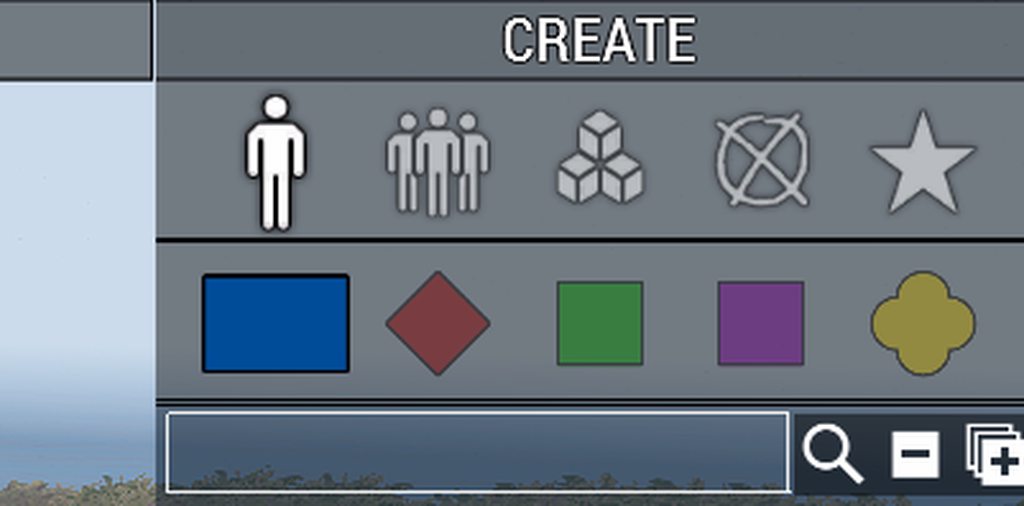
not sure where to put this so I figured GUI modding would somewhat fit
unkempt cliff
simple prawn
Does anyone know if its possible to assign keyboard shortcuts to the various cat...
try shortcuts[] = {key codes here}; in the button class
simple prawn
tanks, how would I go about figuring out what goes into shortcuts[] bit?
quasi granite
my mod (https://steamcommunity.com/sharedfiles/filedetails/?id=1387934106) also has a tool to find these codes
simple prawn
I'll try that out, thanks!
 edgy swift
I'm a bit lost on how to create a dialog from a .hpp file. The GUI tutorial on the wiki doesnt really explain it all that well. I see that Ace has done it the way that I was hoping too, just wondering how I could make something similar work
Ace's .hpp
class GVAR(DialogLoadout) {
...
};
Ace .sqf
...
createDialog QGVAR(DialogLoadout);
...
I've just seen that they included it in config.cpp, lemme try that and it might solve my issue
strange arrow
In order to do createDialog "MyDialog", there has to be a class MyDialog in the config, i.e. either missionConfigFile >> "MyDialog" or configFile >> "MyDialog" must exist.
So if you defined the class MyDialog in the file MyDialog.hpp, you need #include "MyDialog.hpp" in description.ext or config.cpp.
edgy swift
am I able to use config.cpp in a mission file? I was hoping to have a script that I could drop into any mission with minimal work. The wiki says use description.ext for missions, and config.cpp for mods
quasi granite
the description.ext is the file that is being read as the mission config by the engine. config.cpp is for mods only. you can include them in each other though like this:
#include "config.cpp"
// or
#include "description.ext"
Hey, Is there a command available to force the player to the curator screen if they are a curator? I have a ct_tree build that I add curator commands to, but I want it to be usable on the game screen. And when he opens the My GUI menu and selects curator settings, the screen changes to curator (Zeus) mode
unkempt cliff
solid gyro
Hey, Is there a command available to force the player to the curator screen if t...
vale pelican
Hello everyone, is there an efficient way to store a UI state then reload it. For example I have button that is executing a onmapsingleclick and opening the map to allow the user to place a named marker, then reload the ui. Should I just build a function that records all the UI elements settings, texts etc, or is there a command to save and reload an entire UI?
 ionic tundra
How do I make a button not flash when I click it
ionic tundra
Also, is it possible to disable the use of arrow keys to move between buttons?
distant axle
ionic tundra
How do I make a button not flash when I click it
Set every color config entries same color
ionic tundra
How many are there? I only see background color and active color
mm I may have found them
edgy swift
it alternates between colorFocused and I think backgroundColor when the button is focused
I stopped the flashing by setting colorFocused to the same as backgroundColor, in my case colorFocused[] = {0,0,0,0.5};
ionic tundra
Thanks ill give that a try
 gleaming gale
hello, i want to add a button on map on there, but i cant fin a way to do it, i want to make it work like the others on the right and when pressed open an dialog.

i saw some code like this in the forum, but always says "no control"
addMissionEventHandler [ "Map", {

    _boton = (findDisplay 12) ctrlCreate ["RcsButton",9999];
    _boton ctrlSetPosition [1.4625,-0.34,0.225,0.06];
    _boton ctrlSetBackgroundColor [0,0,0,1];
    _boton buttonSetAction "createDialog 'clv_savemarkers_gui'";
    _boton ctrlSetText "MARKER SAVER";
    _boton ctrlCommit 0;
    systemChat str _boton;
}];
well one thing is it should be "RscButton" not "RcsButton"
 quasi granite
be careful with that code! the map display (12) is not closed when closing the map. you would create a lot of controls on top of each other.
also: buttonSetAction is deprecated, use ctrlAddEventhandler instead
left willow
Hey, is the pixel grid recommended for UI or is using safezones or gui grid better?
quasi granite
short answer: yes, pixelGrid is the best option. longer answer: it depends. GUI grid for an Arma 3 like dialog, pixelGrid for Eden, safeZone for relative dimensions (eg full screen), and absolute positions never. this is because you want to use the base classes which use different ui grids. for example, base classes starting with "Rsc..." use the GUI_GRID macros and have an appearance like most ingame UIs, base classes starting with "ctrl..." use the UI_GRID (pixelGrid) macros and are exclusively used in Eden. in conclusion it depends on what kind of dialog you are aiming for.
Is it a standalone UI with custom design (custom base classes)? -> UI_GRID
Is it a UI used in the Eden Editor? -> UI_GRID
Should the UI look like a default Arma 3 UI by using the base classes already provided? -> GUI_GRID
Is the position relative to the screen? -> safeZone
Do I not want to listen to any of this advice and just make a UI that is inconsistent and ugly across different settings? -> Absolute
left willow
Its a dialog used in game, not in primarily in eden (only for debugging without previewing the mission) and it should look like a default arma 3 gui so it has a familiar feeling. So going with GUI_GRID seems like the best option then. Thanks a lot Terra!
 rigid delta
Unrelated to my previous stupidity - Does Arma have some kind of thermal overlay that can be edited - I.E making full thermal vision, that only causes targets to be viewed in terms of Thermal colouring.
More HUD or UI question but I thought it might fit here better.
 hallow geyser
hello i'm having problem with usage of checkbox. Please look at my picture of code. Is that a true usage or not?

destek
 topaz talon
hallow geyser
hello i'm having problem with usage of checkbox. Please look at my picture of co...
topaz talon
hallow geyser
hello i'm having problem with usage of checkbox. Please look at my picture of co...
cbChecked does not take a number, it takes a control
hallow geyser
what is control? if you available can u describe to me
this is my first time on scripting on my project
topaz talon
you're defining a control in the config, but you're trying to reference it with it's id(idc), some UI commands can do that, but others require the actual control reference, which you're supposed to get via their display with https://community.bistudio.com/wiki/displayCtrl
hallow geyser
it works thank you a lot for helping :)
vale pelican
vale pelican
Hello everyone, is there an efficient way to store a UI state then reload it. Fo...
Still wondering about this, currently running with a function that gets all UI checkbox, textbox and list box states then a separate one to reapply them...
topaz talon
vale pelican
Still wondering about this, currently running with a function that gets all UI c...
no other way, you have to save and reapply everytime
hallow geyser
Hello it's me again. I finished my project and works in mission folder. Can i convert it to mod?
 main wolf
yes can, it does require some additional configs, but those are relatively easy to set up
hallow geyser
if u available can u explain me where can i find these configs
main wolf
BIKI has everything you need, and the moment you start building mods you should also know the P drive and stuff (which in addition gives access to the contents of the core PBO's, which are basically mods on themselves).
https://community.bistudio.com/wiki/Arma_3:_Creating_an_Addon
hallow geyser
still i don't understand :(
quasi granite
any specific part you dont understand?
 random tinsel
Only whichever control in my dialog I have last clicked on has the proper background color. The rest are all darker. How can I disable this?
unkempt cliff
random tinsel
Only whichever control in my dialog I have last clicked on has the proper backgr...
maybe colorActive, colorBackgroundActive, colorFocused, colorBackgroundFocused, colorFocusedSecondary or some class field like that
random tinsel
okay... should I just try setting them all to the same thing?
unkempt cliff
random tinsel
okay... should I just try setting them all to the same thing?
i would try one at a time to figure what they do
random tinsel
ok
unkempt cliff
sorry i cant help you more
random tinsel
all good, thanks
random tinsel
unkempt cliff
maybe colorActive, colorBackgroundActive, colorFocused, colorBackgroundFocused, ...
I set them all to the same value just to check if it was one of them that was the problem, and it still isn't fixed... So, I guess it's none of these?
unkempt cliff
random tinsel
I set them all to the same value just to check if it was one of them that was th...
make sure the new values were read by entering the editor and then start again
random tinsel
I did
unkempt cliff
ok then the problem must be elsewhere
random tinsel
yeah
someone must be familiar with this. I've never once come across a GUI on a server that does this...
solid gyro
random tinsel
someone must be familiar with this. I've never once come across a GUI on a serve...
Which control type you have?
random tinsel
solid gyro
Which control type you have?
listBox, structuredText, text, and buttons
solid gyro
random tinsel
https://sqfbin.com/ifekumagebapalagenut
Have you tried changing all the colors to the same?
{0,0,0,0.3}
Now you have many different background colors, but does it work the same for all controls, i.e. is the last clicked on a different background than the other controls?
solid gyro
Weird.
Only what I have different in on my GUI button is
colorText[] = {1,1,1,1};
	colorDisabled[] = {1,1,1,0.25};
	colorBackground[] = {0,0,0,0.5};
	colorBackgroundDisabled[] = {0,0,0,0.5};
	colorBackgroundActive[] = {0,0,0,1};
	colorFocused[] = {0,0,0,1};
	colorShadow[] = {0,0,0,0};
	colorBorder[] = {0,0,0,1};
I have all these lines (this is example from wiki)
And myself I'm using this on button
Wo any color, only text
class RscButtonTextOnly: RscButton
{
	SizeEx = GUI_TEXT_SIZE_SMALL;
	colorBackground[] = {1,1,1,0};
	colorBackgroundActive[] = {1,1,1,0};
	colorBackgroundDisabled[] = {1,1,1,0};
	colorFocused[] = {1,1,1,0};
	colorShadow[] = {1,1,1,0};
	borderSize = 0;
};
hmm
obsidian hedge
Is it possible to conditionally import or define a control, such as RscText, if it hasn't already been defined? I'm creating some modular blocks of functionality which I will include in missions and reference, in description.ext, via their CfgFunctions and Defines, but I'd like to have it work as a straight forward drop in without having to restructuring the controls definitions that a mission already has.
strange arrow
obsidian hedge
strange arrow
https://community.bistudio.com/wiki/PreProcessor_Commands
I know about preprocessor directives but would that work with control classes? The preprocessor is run before the code is compiled or interpreted to minimize code output.
strange arrow
Can you explain what you're hoping to achieve using an example?
obsidian hedge
I could try, although I'm not sure if an arbitrary example would convey the idea.
Essentially, if RscText is imported by a mission, that I didn't develop, and I add a new GUI, + series of functions, that also imports RscText, I'd like to avoid the class already defined error.
The GUI and scripts that I'm adding form a reusable component that I've developed which I can drag and drop in different missions and update the description.ext accordingly to include my GUI definitions file and my CfgFunctions definition. The reusable nature of this component is why it may import or define classes that are already defined by the mission. The component is a permission system that provides a dialog for granting permissions to allow certain players to fly aircraft or crew a tank.
The best approach I can think of is to simply pack this reusable component as an addon that clients will run, rather than copying the scripts over on a per mission basis, since that would scope the control classes import to the scope of the addon which would prevent duplicate control definitions.
Apologies for the wall of text.
strange arrow
How does your component import RscText?
obsidian hedge
I have a defines.hpp, in the folder for my component, which uses the new import keyword.
import RscText;
I'll update description.ext to reference the component's defines.hpp. Typically I'll tweak the defines.hpp file from the mission, to remove duplicate controls, but I'm trying to get in a position of not having to change the rest of the mission files. My CfgFunctions does pre and post init to handle that side of things so it really is just two additional lines in the description.ext to hook my component in.
strange arrow
Try replacing import RscText; with ...
import RscText;
import RscText;
import RscText;
```... and have a look if that breaks anything 🙂Last time I tried it threw an error over a duplicate control definition, but I'll check it out again.
The problem in some cases is that some missions, which are sandbox based missions, use the pre v2.02 approach of defining the whole class in place. In that scenario what I was thinking of something along the lines of
Pseudocode
if RscText does not exist
    Import RscText;
end
But in that scenario I think packing my component as an addon is possibly the best option and then import the resources in the config.
Nonetheless, I'll test your suggestion again and see how it goes. Thank you 🙂
strange arrow
I am somewhat sure that that will indeed not work.
//Their mission:
class RscText;
//Your component:
#ifndef RscText
import RscText;
#endif
```This  does not work as intended (because `RscText` is not defined at preprocessor time).
```hpp
//Their mission:
#ifndef MYGUARD
#define MYGUARD
class RscText;
#endif
//Your component:
#ifndef MYGUARD
#define MYGUARD
import RscText;
#endif
```This  should work as intended (as far as I know), but it is not realistic to assume or require that the consumer of your component imports `RscText` like that.The second scenario is what I had in mind when thinking of preprocessor directives.
The challenge is, as you say, there is the expectation that a consumer imports control definitions in such a way that allows the precompiler to conditionally include code.
strange arrow
Not to forget that importing in such a way no longer makes sense since import was introduced: If both parties just use import instead of class, there is no conflict.
In my opinion it is reasonable to require consumers to import base classes using import if they want to use your component. After all, not all consumers will have imports of their own to begin with, and if they do it is easy to replace class RscText with import RscText.
quasi granite
unless you modified attributes, then simply replacing class with import is not as straightforward
strange arrow
What do you mean?
quasi granite
imagine the copy pasted declaration of RscText is
class RscText
{
  style = ST_LEFT;
};
``` but you need all your texts centred so you change it to
```cpp
class RscText
{
  style = ST_CENTER;
};
``` now you want to upgrade to the `import` keyword:
```cpp
import RscText;
``` but wait, now all your controls have left aligned text again.These are good points. It's essentially relying on the notion that all definitions of that control are the same.
This is why I'm beginning to think that using an addon is the best approach to solving this problem since the addon pbo can import and/or define its own controls without conflicting with or overriding anything in a mission.
strange arrow
quasi granite
imagine the copy pasted declaration of RscText is
```cpp
class RscText
{
style...
Oh boy, I was not aware that importing and overwriting in one go was possible 
random tinsel
If I want to set the dimensions of a control to be exact, do I need to use Absolute?
I want my control to be a perfect square
topaz talon
you should almost never use absolute, use gui grid or pixelgrid depending on what controls you're using
random tinsel
yep, I figured out pixelGrid, much better
random tinsel
Does anyone know why this particular RscStructuredText (HealthText) is overlapping with the RscPicture (HealthIcon), while the others are not?
config: https://sqfbin.com/pimoceguzunefixeyefu
quasi granite
is it a clickable dialog or a hud?
my guess is because it can be focused so it is moved to the foreground
you could try adding an invisible RscStructuredText as your first control
random tinsel
quasi granite
is it a clickable dialog or a hud?
It’s a HUD
random tinsel
quasi granite
you could try adding an invisible RscStructuredText as your first control
I’ll try that
Does the idc matter?
Or do I just have to configure it first?
quasi granite
idc doesnt matter only that is the first entry in the config
random tinsel
quasi granite
idc doesnt matter only that is the first entry in the config
Could I just put the RscPicture’s first? Or does it have to be the same class?
quasi granite
it has to be an interactible control type which RscPicture (CT_STATIC) is not
random tinsel
Okay, thanks
 proud frigate
I'm trying to create a fairly simple dialog where the player can enter some text and then click OK. Since I haven't done this before, I used Arma Dialog Creator to set it up. I believe this is done correctly, by comparison with other posted dialog configs, but when I actually try to use it with createDialog it simply says Resource njt_stargate_dhd not found. I've checked and double-checked and the classname in RscTitles is exactly the same as the classname I'm trying to use. There are no other related RPT errors and my {} are closed properly. The dialog is visible in the in-game config viewer and appears to be correct. I have saved the mission and restarted the Editor. I know there might be other problems but I'd like to start with the part where it simply does not work at all.
The relevant files can be seen here: https://github.com/NikkoJT/njt_stargate (RscTitles located at the bottom of description.ext, createDialog in initPlayerLocal.sqf)
solid gyro
#include "UI\numIED\VRK_numIEDDialog.hpp"

class RscTitles
{
	#include "UI\numIED\VRK_numIEDRsc.hpp"
};
And i have in hpp
class VRK_numIEDDialog {
	idd = 9000;
	movingenable = true;
......
So #include dialog at own.
Not in titles
And
createDialog "youDialogclassName"


createDialog "VRK_numIEDDialog";
@proud frigate
quasi granite
proud frigate
I'm trying to create a fairly simple dialog where the player can enter some text...
RscTitles is for HUDs, those are not interactible. you want to define your dialog outside of of that class
solid gyro
Thx Terra for explaining
 opaque crag
For a CT_COMBO, is there any way to either change the background colour of the list separately from the inactive control, or detect/change anything when it's selected?
 burnt iris
Does anyone know of a GUI mod similar to “personal arsenal” but it only allows players to change their facewear? If not, would anyone be willing to make one?
quasi granite
cant you just make a restricted arsenal with goggles only?
 potent bear
Is there a way I can programmatically click/activate a row in a listbox or listnbox? I'm trying to auto-select a role in the MP lobby based on player name. I've selected the role in the list and tried selecting the player in the pool, but it never assigns the role. Also tried ctrlActivate on the list boxes, but nothing with that either
burnt iris
quasi granite
cant you just make a restricted arsenal with goggles only?
Unfortunately no, because the players would lose anything that’s in their inventory but not listed in the arsenal if they click on any other tab besides the facewear tab.
Example: Player has a rifle, mags, bandages, etc. They go into this facewear-only arsenal, but accidentally (or purposely) click on the rifle slot. Now they no longer have a rifle because there were no rifles in the arsenal.
Unless that’s been fixed since the last time my group discovered that problem, it won’t do.
strange arrow
That's ACE Arsenal behaviour, not vanilla.
burnt iris
I’ll give it another try
left willow
Is it okay to multiply GUI_GRID Width / Height by small fractional numbers, like 0.1, 0.0.5, ..., or will that be problematic?
Currently facing issues where the button appears to be 1 or 2 pixels offset from where I want it to be and moving it by such small amounts seems to help. Basically what I am asking is: Is it ideal and maybe even normal to fix it this way or am I fundamentally doing something wrong which causes this issue?
random tinsel
Does anyone know how I can improve the quality of these RscPicture controls on screen? The bottom one is mainly the problem. The images are 256x256.
 empty mountain
can try using smaller images
arma UI scales images poorly so if the image is on a small control it looks worse the larger the resolution
willow stratus
random tinsel
Does anyone know how I can improve the quality of these RscPicture controls on s...
try ctrlSetPixelPrecision
random tinsel
willow stratus
try ctrlSetPixelPrecision
thanks 👍
random tinsel
empty mountain
arma UI scales images poorly so if the image is on a small control it looks wors...
I'll try this as well
 weak frigate
hello how can I remove the bar from the main menu on arma 3?
 topaz talon
mod it, the main menu display, you'll need to make an addon https://community.bistudio.com/wiki/Arma_3:_Creating_an_Addon https://community.bistudio.com/wiki/GUI_Tutorial and here's an example of cba in this case adding an option in the main menu https://github.com/CBATeam/CBA_A3/blob/92bf7f0a62955f8b2a8ed35bae60e2360e91bb00/addons/settings/RscDisplayMain.hpp in your case you'd just want to delete the control(s) iirc (which you should look for in the config)
GitHub
Community Base Addons for Arma 3. Contribute to CBATeam/CBA_A3 development by creating an account on GitHub.
solid gyro
Is there guide for listBox set lbData,
Getting just error .
Trying get player with
onLBListSelChanged
params ["_control", "_selectedIndex"];
_control lbAdd _selectedIndex;

 crude berry
_ctrl is not defined
solid gyro
Sry, i posted wrong code.
And i call that
[(this #0), (this #1)] call VRK_fnc_menu_select;
🤦♂️ lbData is just a string that's linked to a specific index inside a control. You set it with _control lbSetData [_index, "value"]; You retrieve it with _control lbData _index. For example: ```sqf
disableSerialization;
private _display = findDisplay 46 createDisplay "RscDisplayEmpty";
private _lb = _display ctrlCreate ["RscListBox",-1];
_lb ctrlSetPosition [0,0.2,1,0.2];
_lb ctrlCommit 0;
{
_x params ["_num", "_data"]; // i.e. ["1", "One"]
private _current = _lb lbAdd _num;
// setting data (strictly a string) for control _lb at index _curent
_lb lbSetData [_current, _data];
} forEach [["1","One"], ["2","Two"], ["3","Three"]];
_lb ctrlAddEventHandler ["LBSelChanged",{
params ["_control", "_lbCurSel", "_lbSelection"];
private _display = ctrlParent _control;
private _text = _display displayCtrl 1111;
// getting data of a control that fires the EH at index _lbCurSel
private _data = _control lbData _lbCurSel;
systemChat _data;
}];```
if something still doesn't work - please, provide full(-ish) code that reproduces your problem and not random one-liners
solid gyro
Yeah i will, thanks for help
obsidian hedge
Crossposting from #arma3_scripting as I originally posted there in error.
When using ctrlCreate, do certain controls not inherit their properties such as width and height?
I'm creating a table like structure, with columns and rows, via ctrlCreate, ctrlSetPosition and ctrlCommit to dynamically add controls inside a Controls Group.
RscText elements look fine but RscCheckbox controls take up a much bigger space than they should, they're probably around 4-5 times larger than they normally would be. I'm using the X & Y version of ctrlSetPosition so my assumption would be that the RscCheckbox uses its W and H as defined by the class.
unkempt cliff
@obsidian hedge i think you need to define the control dimensions in ctrlSetPosition , there's no default values
also inside the control group the coordinates go from 0 to 1. so not like global GUI coords
IIRC
crude berry
and i somehow remember 1 width controls being wider than 1 width group they're in and scroll bar appearing. Needs further testing, i'd say.
And not like i frequently do GUI stuff, but i don't remember controls not following ctrlSetPosition/ctrlCommit dimensions
strange arrow
Can you post one of your RscText and one of your RscCheckbox classes as well as your ctrlCreate / ctrlSetPosition / ctrlCommit code?
obsidian hedge
I'll swap to my PC and get the code.
For classes, I'm not deriving my own classes from the base types. I use the class RscCheckbox; to import the control. I'm not using the newer import syntax as hemtt, the build system, doesn't support it.
Code snippet. I've included a sample of the array and hashmap variables that I'm working with, and commented some of the looping logic.
#define COLUMN_WIDTH 0.15
#define ROW_HEIGHT 0.05
#define GET_ROW(INDEX) ROW_HEIGHT * INDEX

// Example
private _permissions = [
    [
        "Light", // Permission Name
        "Vehicles", // Group
        true // Is a default permission (automatically granted to all players)
    ]
    [
        "Plane", // Permission Name
        "Vehicles", // Group
        false // Is a default permission (automatically granted to all players)
    ]
];

private _playersPermissions = createHashMapFromArray [
    [
        "PLAYER_UID",
        ["PLAYER_NAME", ["Light", "Plane"]]
    ]
];

{
    _y params [
        ["_name", "", [""]],
        ["_playerPermissions", [], [[]]]
    ];

    // Retrieve the row for this iteration
    private _playerRowIndex = _forEachIndex + 1;
    private _row = GET_ROW(_playerRowIndex);

    private _playerNameControl = _dialog ctrlCreate ["RscText", -1, _permissionsGroup];
    _playerNameControl ctrlSetPosition[COLUMN_WIDTH / 2, _row];
    _playerNameControl ctrlSetText _name;
    _playerNameControl ctrlCommit 0;

    {
        _x params ["_permissionName"];

        // Create checkbox for the specified permission, on the same row as the player name but starting at one column over
        private _permissionCheckControl = _dialog ctrlCreate ["RscCheckBox", -1, _permissionsGroup];
        _permissionCheckControl ctrlSetPosition[(_forEachIndex + 2) * COLUMN_WIDTH, _row];
        _permissionCheckControl ctrlCommit 0;

        // Set Checked status based on whether the player has been granted the permission
        _permissionCheckControl cbSetChecked (_permissionName in _playerPermissions);
        _permissionCheckControl setVariable [QGVAR(permissionName), _permissionName];
    } forEach _permissions;
} forEach _playersPermissions;
for size you can use the 4 param version of ctrlSetPosition: sqf _permissionCheckControl ctrlSetPosition[(_forEachIndex + 2) * COLUMN_WIDTH, _row, COLUMN_WIDTH, ROW_HEIGHT];
obsidian hedge
Potentially my misunderstanding then. My assumption was that there are default values behind each controls class which would inherently be used
unkempt cliff
i dont think so
strange arrow
There should be (you can view the full definitions in the Config Viewer (configFile >> RscCheckbox)), that's why this seems weird to me right now.
obsidian hedge
I'm back on my work laptop for the moment. I'll include a screenshot and also the dialog code when I'm back to my PC
unkempt cliff
my bad, there are default x,y,w,h coords in the config
though I think they may not be compatible with controls group
crude berry
well, "RscText" and "RscCheckBox" have kinda different default w/h: RscText h = 0.037;w = 0.3; RscCombo h = 0.035;w = 0.12; 🤔
wait, "RscCheckBox", i've derped
class RscCheckBox w = "0.025 * safezoneW"; h = "0.04 * safezoneH";
i don't think absolute sizes would play well with safezone sizes outside of very very specific conditions
obsidian hedge
Here's what it looks like
The dialog code
class RscText;
class RscControlsGroup;
class RscButtonMenu;
class RscCheckbox;

class GVAR(permissionsDialog) {
    movingEnable = 0;
    idd = IDD_PERMISSIONS_DIALOG;

    class controlsBackground
    {
        class DialogBackground: RscText
        {
            x = STARTING_POS_X;
            y = STARTING_POS_Y;
            w = DIALOG_WIDTH;
            h = DIALOG_HEIGHT;
            colorBackground[] = {0,0,0,0.5};
        };

        class DialogTitle: DialogBackground
        {
            idc = 1000;
            text = "The Virtual Ground - Permissions"; //--- ToDo: Localize;
            y = (STARTING_POS_Y) - DIALOG_TITLE_HEIGHT;
            h = DIALOG_TITLE_HEIGHT;
            colorBackground[] = {"(profilenamespace getvariable ['GUI_BCG_RGB_R',0.13])","(profilenamespace getvariable ['GUI_BCG_RGB_G',0.54])","(profilenamespace getvariable ['GUI_BCG_RGB_B',0.21])","(profilenamespace getvariable ['GUI_BCG_RGB_A',0.8])"};
        };
    };
    class controls
    {
        class PermissionsGroup : RscControlsGroup
        {
            idc = IDC_PERMISSIONS_CONTROLGROUP;
            x = STARTING_POS_X;
            y = STARTING_POS_Y;
            w = DIALOG_WIDTH;
            h = DIALOG_HEIGHT;

            class controls
            {

            };
        };

        class BtnSave: RscButtonMenu
        {
            idc = IDC_BTN_SAVE;
            text = "Save"; //--- ToDo: Localize;
            x = END_POS_X - 0.0498837 * safezoneW;
            y = STARTING_POS_BUTTON;
            w = 0.0498837 * safezoneW;
            h = 0.022 * safezoneH;
        };

        class BtnCancel: RscButtonMenu
        {
            idc = IDC_BTN_CANCEL;
            text = "Cancel"; //--- ToDo: Localize;
            x = STARTING_POS_X;
            y = STARTING_POS_BUTTON;
            w = 0.0498837 * safezoneW;
            h = 0.022 * safezoneH;
        };
    };
};

And the macros I've defined which use the GUI_GRID system
removed some unused macros
#include "\a3\ui_f\hpp\defineCommonGrids.inc"

#define POS_X(N) ((N) * GUI_GRID_W + GUI_GRID_CENTER_X)
#define POS_Y(N) ((N) * GUI_GRID_H + GUI_GRID_CENTER_Y)
#define POS_W(N) ((N) * GUI_GRID_W)
#define POS_H(N) ((N) * GUI_GRID_H)

#define SPACING 0.01
#define DIALOG_WIDTH POS_W(44)
#define DIALOG_HEIGHT POS_H(25)
#define DIALOG_TITLE_HEIGHT POS_H(1.2)
#define BUTTON_HEIGHT 0.022 * safeZoneH

#define STARTING_POS_X POS_X(-2)
#define STARTING_POS_Y POS_Y(0.5)
#define END_POS_X (STARTING_POS_X + DIALOG_WIDTH)
#define STARTING_POS_BUTTON (STARTING_POS_Y + DIALOG_HEIGHT + SPACING)
your screenshot looks about right for the default checkbox size. Here's mine

so i'd say _dialog ctrlCreate ["RscCheckBox",... takes the default values of w = "0.025 * safezoneW"; h = "0.04 * safezoneH"; as i don't see them redefined anywhere in your code?
obsidian hedge
The default is actually that large? It seems quite stretched on the width in particular.
crude berry
and here's inside [0.2,0.2]-sized control group. Created with private _lb = _display ctrlCreate ["RscCheckBox",-1,_ctrlGroup]; _lb ctrlSetPosition [0,0.05]; _lb ctrlCommit 0;So i'd say: a) it's the default and it definitely looks kinda silly; b) being inside the control group doesn' t seem to change the size
 obsidian hedge
Yeah I agree with point A
I may derive my own control types then to provide some constraints and to keep some UI logic out of the functional layer.
Thank you all for the assistance
strange arrow
crude berry
and here's inside [0.2,0.2]-sized control group. Created with `private _lb = _di...
For controls group children, only x and y are relative to the parent controls group; w and h are never relative to a parent.
Regarding the horizontal stretching: As I understand it, the SafeZone system (as used by the RscCheckBox class) does not account for different aspect ratios. These values ...
w = "0.025 * safezoneW";
h = "0.04 * safezoneH";
```... probably yield a square on one specific aspect ratio (e.g. 4:3), but not on other aspect ratios - including the aspect ratios you guys are using.
@quasi granite Can you confirm that?safezoneW/safezoneH returned 1.33333 on my 16:9 display, so whatever
quasi granite
strange arrow
Regarding the horizontal stretching: As I understand it, the SafeZone system (as...
yes, other aspect ratios are a PITA. i'd recommend using GUI_GRID to get (almost) perfect squares
looking at the GUI_GRID macros:
#define GUI_GRID_WAbs        ((safezoneW / safezoneH) min 1.2)
#define GUI_GRID_HAbs        (GUI_GRID_WAbs / 1.2)
``` we can see that the result for a 16:9 display would be:
```cpp
#define GUI_GRID_WAbs        ((1.33333) min 1.2) -> 1.2
#define GUI_GRID_HAbs        (1.2 / 1.2) -> 1
``` which should correspond to a 16:10 screen in absolute coordinates (i think). a control with `w = 1` and `h = 1` would fill the entire area of a 4:3 screen but BI decided to go with the time and introduced the GUI_GRID to give a system that could fill a 16:10 (or was it 16:9?) screen without going out of bounds. anyway: absolute grid bad, safezone okayish, GUI_GRID good, pixelGrid best.and here's something to fall asleep to: https://community.bistudio.com/wiki/Arma_3:_GUI_Coordinates
strange arrow
In my opinion you don't give enough credit to the absolute coordinate system. For instance, ...
w = 0.03;
h = 0.04;
```... will always yield a proper square, regardless of the user's aspect ratio.
The absolute system can always be used for `w` and `h`. As long as the UI element stays within the absolute system's 4:3 area, it's also safe to use absolute `x` and `y` values.for every use case there is for the absoulte grid there is a better grid system available, eg. for your square case
w = 5 * pixelW;
h = 5 * pixelH;
``` boom pixel perfect square. for the second point fair enough. broken agate
which is the function for open controls tab? also for audio, video, game https://i.gyazo.com/38d052643e725cfbe218e8f358af335d.png i checked the control but it doesnt have any Buttonclick EH https://i.gyazo.com/2caa66ed90c7644b7fe50efb97a1d751.png want to do a custom esc menu
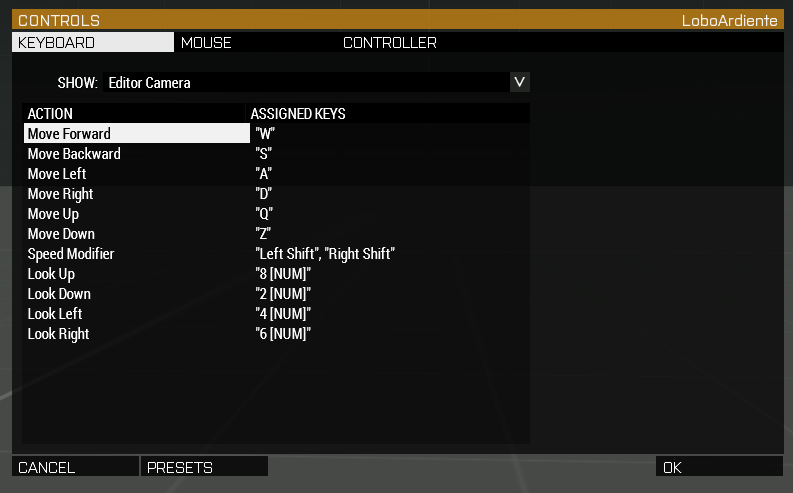
 hoary estuary
Lots of this stuff is engine-driven
broken agate
f
hoary estuary
You can modify game menus through mods, just leave idcs the same, I think engine uses them to figure which button does what
broken agate
ye i was thinking on that leaving the same idc maybe works
 mystic berry
I am trying out some basic GUI editing and I got a panel with a couple of buttons that triggers hints to work.
now I would like to add some more advanced logic to the buttons, is the best way to just exec a script with a argument regarding which button was pressed?
and can I somehow pass a object to my dialog when I create it so I can reference that in my click code?
topaz talon
button click event passes a control that was clicked https://community.bistudio.com/wiki/User_Interface_Event_Handlers#onButtonClick
so you can use that
you can also just pass an argument by yourself, e.g.,
bla_fnc_onButtonClick = {
  params ["_this", "_buttonIndex"];
  params ["_ctrlButton"];
  // can also look at ctrlIDC _ctrlButton
};

_button ctrlAddEventHandler ["ButtonClick", { [_this, 0] call bla_fnc_onButtonClick }];
nice, that is useful
is there a way to reference a in-game object? for example if I use createDialog "name"; from a addAction attached to a crate or similar, can I somehow pass that crate to the dialog so I can reference it in the code?
topaz talon
use a global variable
best would be to setVariable on display itself
tag_fnc_openDialog = {
  params ["_obj"];
  createDialog "name";
  // by idd
  findDisplay 1337 setVariable ["tag_myObject", _obj];
  // if you save display onLoad, e.g. onLoad = "uiNamespace setVariable [""tag_name_display"", _this select 0]";,
  uiNamespace getVariable "tag_name_display" setVariable ["tag_myObject", _obj];
}
then in fx., button click eh,
params ["_ctrlButton"];
private _obj = ctrlParent _ctrlButton getVariable "tag_myObject";
perfect, would the variable be local for each player?
topaz talon
yes obviously, UI stuff is local
mystic berry
good. though so, just checking since I haven't used uiNamespace before
thank you for all the help!
left willow
Is there a way to preview something defined in RscTitles in the 3DEN editor?
Or do I have to create it as a display or dialog first and then, once its finalized, move it to RscTitles?
distant axle
You can just preview using Debug Console
left willow
huh. But when I try to preview it with the following code in the editor nothing appears.
"test" cutRsc ["RscDisplayA3FFHud", "PLAIN", 2, false];
only inside a mission preview it works.
solid gyro
left willow
huh. But when I try to preview it with the following code in the editor nothing ...
("VRK_camoRsc" call BIS_fnc_rscLayer) cutRsc ["camoRsc", "PLAIN"];    // show
("VRK_camoRsc" call BIS_fnc_rscLayer) cutRsc ["", "PLAIN"];        //remove
Whats the difference to my approach from before?
solid gyro
To avoid conflicts with existing layers it is recommended to register a layer with BIS_fnc_rscLayer_ and to start the name with a TAG:_
("TAG_myLayer" call BIS_fnc_rscLayer) cutRsc ["myRsc", "PLAIN"];
"TAG_myLayer" cutRsc ["myRsc", "PLAIN"];
From wiki, just though that there can be some "test", and using TAG is useful always
 quartz granite
Would you mind sharing the file or barebones needed to replace the logo on the main menu?
 hallow dew
quartz granite
Would you mind sharing the file or barebones needed to replace the logo on the m...
hallow dew
quartz granite
Would you mind sharing the file or barebones needed to replace the logo on the m...
That is all you really need. If you want a working example you can check out some mods that change the logo & see how they did their configs. e.g. Veteran mod
 ruby ice
Hi all, maybe a silly problem but I haven't really dealt with GUI much. So I have this setup in an addon config.cpp:
class RscEdit;
class RscFrame;

#define GUI_GRID_CENTER_X    ((safezoneX + (safezoneW - ((safezoneW / safezoneH) min 1.2))/2))
#define GUI_GRID_CENTER_Y    ((safezoneY + (safezoneH - (((safezoneW / safezoneH) min 1.2) / 1.2))/2))
#define GUI_GRID_CENTER_W    ((((safezoneW / safezoneH) min 1.2) / 40))
#define GUI_GRID_CENTER_H    (((((safezoneW / safezoneH) min 1.2) / 1.2) / 25))
#define GUI_GRID_CENTER_WAbs    (((safezoneW / safezoneH) min 1.2))
#define GUI_GRID_CENTER_HAbs    ((((safezoneW / safezoneH) min 1.2) / 1.2))

class RscTestFrame: RscFrame
{
    idc = 1800;
    idd = -1;
    text = "This is a test"; //--- ToDo: Localize;
    x = 4 * GUI_GRID_CENTER_W + GUI_GRID_CENTER_X;
    y = 2.5 * GUI_GRID_CENTER_H + GUI_GRID_CENTER_Y;
    w = 13.5 * GUI_GRID_CENTER_W;
    h = 5.5 * GUI_GRID_CENTER_H;
    colorBackground[] = {1,1,1,1};
    colorActive[] = {1,0,0,1};
};
class RscChatUI: RscEdit
{
    idc = 1400;
    idd = -1;
    text = "Enter text here"; //--- ToDo: Localize;
    x = -11 * GUI_GRID_CENTER_W + GUI_GRID_CENTER_X;
    y = 28.5 * GUI_GRID_CENTER_H + GUI_GRID_CENTER_Y;
    w = 25.5 * GUI_GRID_CENTER_W;
    h = 1 * GUI_GRID_CENTER_H;
    colorText[] = {255,255,255,1};
    colorBackground[] = {0,0,0,0.56};
};
Just some simple test objects I setup using the in-game GUI tool. And when I createDialog... They're just invisible. If I give them a UIEH they respond, and I must press esc to regain controls, so they definitely exist. But, can't see em, no idea why.
opaque crag
Where's the dialog class?
ruby ice
opaque crag
Where's the dialog class?
as in RscFrame and RscEdit? or did I miss something else
opaque crag
Those are controls. You'd typically put those inside a dialog class.
I'm not absolutely sure what the distinction is, but the dialog's just a container for the controls inside it.
I don't know what happens if you pass a control class to createDialog.
ruby ice
okay, so I'm definitely missing something then. I'm re-reading the tutorial and I think I get what you're saying
yeah, I'm not sure why, but passing the control spawned the UIEH and nothing else, made me think I was doing it correctly. weird
thanks for pointing that out, I think I see my mistake now lol. misreading strikes again
ruby ice
yep that was it, all is well now 🙂 tyty
topaz talon
opaque crag
I don't know what happens if you pass a control class to createDialog.
it treats it as a display class 😄 there is no controls class in any of them, thus nothing is shown
 buoyant tree
Anyone know a way to change the font of the tooltip for a CT_STRUCTURED_TEXT?
opaque crag
I don't think there's a designed way of changing the font of the standard tooltips. You could always implement your own tooltip using a mouseover EH though.
buoyant tree
Yeah I figured, kinda what I was hoping to avoid 🙂
 fossil wyvern
Anyone know of a way to have a progress bar deplete from the left instead of the right?
opaque crag
You mean other than making your own? :P
fossil wyvern
Im not sure what you mean, sorry. Im making a progress bar in a description.ext. I would like it to deplete from the left and I have not found a way to do that.
opaque crag
I mean you can make something indistinguishable from a backwards progress bar using CT_STATIC, ctrlSetPosition and an EachFrame event handler.
but if you're new to GUI stuff then the answer is probably "no".
willow stratus
fossil wyvern
Anyone know of a way to have a progress bar deplete from the left instead of the...
If its empty color is not transparent, you can fill it instead
Otherwise you'll have to make your own progress bar like John said
 hybrid sinew
I currently have the following dialog which uses PixelGrid and works other than having scaling issues (remains in the center but increases size) and using PixelGrid with RscPicture which the Wiki says you shouldn't do (doesn't explain the effects of doing so though).
Is there a way to continue using PixelGrid and maintain scalability or is there another way of going about this? I have read the Wiki (https://community.bistudio.com/wiki/Arma_3:_GUI_Coordinates) and the GUI Tutorial (https://community.bistudio.com/wiki/GUI_Tutorial) and the relevant wikis linked in them as well as some of this Discord channel and I'm still a bit confused. Any help would be appreciated.
Dialog:
// Include macros that may be helpful.
#include "\a3\ui_f\hpp\definecommongrids.inc"
#include "\a3\3den\UI\macros.inc"
#include "\a3\3den\UI\macroExecs.inc"

// Import stuff, will need to be changed to "class X;".
import RscPictureKeepAspect;
import RscMapControl;

// TODO: Rename? Need to make it work first
class PDT_ASDP_Main {
    idd = 500; // TODO: this may need to be changed to not conflict with other addons, look into it.
    duration = 10e10;
    movingEnable = 0;
    fadein = 0;
    fadeout = 0;
    name = "PDT_ASDP_Main";
    onLoad = "uiNamespace setVariable ['PDT_ASDP_Main', _this select 0]";
    objects[] = {};
    class ControlsBackground
    {
      class Background : RscPictureKeepAspect
      {
        x = CENTER_X - 150 * GRID_W;
        y = CENTER_Y - 120 * GRID_H;
        w = 300 * GRID_W;
        h = 240 * GRID_H;
        text = "data\img.paa";
      };
    };

  class Controls {
    // Working but is in front of the background image and should be behind it, not sure how to fix that.
    // class Map : RscMapControl
    // {
    // TODO: Give it an IDC? No need right now but may "future proof" it for later.
    //     x = CENTER_X - 110 * GRID_W;
    //     y = CENTER_Y - 50 * GRID_H;
    //     w = 220 * GRID_W;
    //     h = 100 * GRID_H;
    // };
  };
};
 quiet arrow
@hybrid sinew What exaclty is the issue? The image getting of bounds with certain UI sizes?
hybrid sinew
quiet arrow
<@263878269965697024> What exaclty is the issue? The image getting of bounds wit...
Yes. I'll try and upload some pictures of it real quick for reference
hybrid sinew
Reference images (format resolution, aspect ratio, interface size): https://imgur.com/a/YccfLwp
1920x1080: you can change the aspect ratio and interface size without it going out of bounds.
1152x864 (4:3): an interface size above "small" results in the image going out of bounds.
1280x720 (16:9): an interface size above "normal" results in the image going out of bounds.
In all cases changing the interface size also increases the size of the image which is alright but I would like it to at least stay within bounds across various resolutions, aspect ratios, and interface sizes
 topaz talon
hybrid sinew
I currently have the following dialog which uses PixelGrid and works other than ...
topaz talon
hybrid sinew
I currently have the following dialog which uses PixelGrid and works other than ...
anchor from the corner of the screen (with safezone) instead of center, and add the amount of padding you want
e.g.,
x = safezoneX + 5 * GRID_W;
y = safezoneY + 5 * GRID_H;
w = safezoneW - 10 * GRID_W;
h = safezoneH - 10 * GRID_H;
would be 5 pixels padded from each side
should all look fine if you do this
hybrid sinew
I'll give it a shot and report back. Thanks man
Looks like it works, thanks again.
You wouldn't happen to know how to make the map appear behind it would you? Normally I'd just put the background bit below the map in the config but that doesn't seem to work in this instance.
topaz talon
hybrid sinew
I currently have the following dialog which uses PixelGrid and works other than ...
behind the picture here you mean?
controls in ControlsBackground always appear behind Controls
so, move the picture to Controls AFTER the map control
hybrid sinew
Even if I put it in Controls it's behind it
hybrid sinew
After it
topaz talon
🤔 probably has something to do with focus i guess
maybe try putting it in the background, the map control
topaz talon
it seems to work fine for me
hybrid sinew
The wiki does say that the map control can't be placed inside a controls group though. But it won't work outside it either lol
topaz talon
all i did was move the map control into ControlsBackground and move the background control into Controls

i did change the control type to RscText instead of picture though, but doubt that would change anything
hybrid sinew
That works now, weird
topaz talon
¯_(ツ)_/¯
topaz talon
hybrid sinew
I currently have the following dialog which uses PixelGrid and works other than ...
and using PixelGrid with RscPicture which the Wiki says you shouldn't do
about this,RscXXcontrols sometimes scale onGUI_GRID, so using them withpixelGridis not ideal, forRscPictureit's fine though, because it doesn't do any scaling,RscTextfor example, scales it'ssizeExonGUI_GRID_H, so usingpixelGridfor it's width/height would make it look weird. so one should always follow: if you're usingGUI_GRID, useRscXXcontrols, if you're usingpixelGridusectrlXX(3den) controls
hybrid sinew
Gotcha. Guess I'll have to dig through the Eden stuff to find those then
topaz talon
config viewer, and just type ctrl
 woeful wave
Hello, do you have a tutorial where I explain how to create a simple listbox gui to select kits made in the virtual arcenal?
gleaming gale
well... its simple in theory but no simple in practice, its like searching a tutorial on how to make a nuclear reactor lol
here is some basics
http://killzonekid.com/arma-scripting-tutorials-gui-part-1/
and all the rest you can findit on the wiki
https://community.bistudio.com/wiki/GUI_Tutorial
 woeful wave
I have already done all the visual part, that is not very complicated, also the part of adding the names of the Kits to the listbox, but I want to know how to assign an sqf so that when I select it with
double click
the sqf of the selected kit in the list
obsidian hedge
What do you mean by "assign an SQF"?
For clarification, SQF is a scripting language.
You can use a control event handler, onLBDblClick to manipulate the selected index.
https://community.bistudio.com/wiki/User_Interface_Event_Handlers#onLBDblClick
 granite berry
Hi can someone show me a good example of a UnitLoadout previewer ui ?
i got the list with the different Unit Loadouts all setup but i don't know what would be the best way to show the Uniform + Main weapon of the selected set
any cool example out there ?
quiet arrow
Like the Arsenal with a 3d view of the character?
solid gyro
Hello,
Hmm.
Is there possibly to do "animation" or such if i want do "notepad" and want some effect when changing page of it
topaz talon
solid gyro
Hello,
Hmm.
Is there possibly to do "animation" or such if i want do "notepad" a...
https://community.bistudio.com/wiki/ctrlCommit to "animate"
for the actual animation, you can use https://community.bistudio.com/wiki/ctrlSetPosition https://community.bistudio.com/wiki/ctrlSetFade etc
solid gyro
Nice! Thanks alot
 desert fog
I am trying to disable "+" button in arsenal when item is blacklisted. I managed to disable button ( is gray ), but I am able to click it and item is added, meaning that button is still active.
private _display = findDisplay -1;
private _button = _display displayCtrl 993; // item "+" button
_button ctrlEnable false;
https://i.imgur.com/zelAiGN.png
from wiki on ctrlEnable : Disabled controls cannot be clicked onto.
When I remove any ButtonClick events, it prevents of adding item, so my assumption is that there is some event that is adding items which is linked to _button. sadly I cannot view event handlers already added by BIS to elements.
_button ctrlRemoveAllEventHandlers "ButtonClick";
 solid gyro
Hi, could you paste button config , only that one's, what else there is. Or path to correct GUI hpp
desert fog
solid gyro
Hi, could you paste button config , only that one's, what else there is. Or path...
        class ArrowRight: ArrowLeft
        {
            h = "1 *             (            (            ((safezoneW / safezoneH) min 1.2) / 1.2) / 25)";
            idc = 993;
            text = "+";
            w = "1 *             (            ((safezoneW / safezoneH) min 1.2) / 40)";
            x = -1;
            y = -1;
        };
And where is config of onabuttonclick?
desert fog
solid gyro
And where is config of onabuttonclick?
I don't know
solid gyro
desert fog
I don't know
What is current display?
I mean have you tried
_display =
uiNamespace getVariable ["RscName", displayNull];
_control = _display displayCtrl _idc
//Or if that is in grouo

_control = ((uiNamespace getVariable "RscUnitInfo") displayCtrl 2303) controlsGroupCtrl 154; // Display -> Controls Group -> Control

_control ctrlRemoveEventHandler ["onButtonClick", _id];
Okey, this is what you must find 1st . Was that ace Arsenal?
desert fog
solid gyro
Okey, this is what you must find 1st . Was that ace Arsenal?
it is a vanilla virtual arsenal, _displayIDD is -1 when you open arsenal
using arsenalOpened event with BIS_fnc_addScriptedEventHandler
solid gyro
Yeah , i do not know how to overwrite vanilla arsenal. You may have wait when some of bi or veterans answers is there easy way to get that work like you want it without re coding arsenal GUI
empty mountain
        _ctrlArrowRight = _display displayctrl IDC_RSCDISPLAYARSENAL_ARROWRIGHT;
        _ctrlArrowRight ctrladdeventhandler ["buttonclick","with uinamespace do {['buttonCargo',[ctrlparent (_this select 0),+1]] call bis_fnc_arsenal;};"];
all this stuff is in:
\a3\functions_f_bootcamp\Inventory\fn_arsenal.sqf
aka bis_fnc_arsenal
desert fog
thanks, so I will try
private _enabled = false;

private _display = findDisplay -1;
private _button = _display displayCtrl 993;
_button ctrlEnable _enabled;
_button ctrlRemoveAllEventHandlers "ButtonClick";
if ( _enabled ) then
{
    _button ctrlAddEventHandler ["ButtonClick", "with uinamespace do { ['buttonCargo', [ctrlparent ( _this select 0 ), +1]] call BIS_fnc_arsenal; };"];
};
works
topaz talon
desert fog
thanks, so I will try
```sqf
private _enabled = false;
private _display = find...
isn't ctrlEnable enough?
also findDisplay -1 is wrong, you're just playing a lottery that there are no other displays with -1 idd, use a scripted DisplayRegistered eh
desert fog
topaz talon
isn't `ctrlEnable` enough?
apparently not, I was surprised too. needed to remove that eventHandler
empty mountain
BIS_fnc_arsenal_display is also set in uinamespace for the current arsenal display
being set nil when closed
desert fog
topaz talon
also `findDisplay -1` is wrong, you're just playing a lottery that there are no ...
I am using _display from "arsenalOpened" event, it returns -1 as ctrlIDD
https://community.bistudio.com/wiki/Arma_3:_Scripted_Event_Handlers
missionNamespace "arsenalOpened" params [_display, _toggleSpace]
topaz talon
i forgot arsenalOpened existed 
well okay, it passes the display
so why are you not using that?
desert fog
topaz talon
so why are you not using that?
added as private to example, so you know what _display use
desert fog
empty mountain
`BIS_fnc_arsenal_display` is also set in uinamespace for the current arsenal dis...
I don't see it set in case "Open" , what what I am using to open arsenal
topaz talon
desert fog
added as private to example, so you know what `_display` use
ah okay
desert fog
topaz talon
also `findDisplay -1` is wrong, you're just playing a lottery that there are no ...
google is failing me, where is this DisplayRegistered event ? want to take a look as alternative
topaz talon
https://community.bistudio.com/wiki/Arma_3:_Scripted_Event_Handlers at the very bottom of the page
quasi granite
since i have worked on the arsenal ui before here is what i do: https://github.com/7erra/VASS-Virtual-Arsenal-Shop-System/blob/master/Mission.VR/VASS/fnc/fn_shop.sqf#L282
basically overwriting the event with ctrlSetEventHandler and adding my own
 robust grove
Could anyone help me with GUI? This is my description.ext file, trying the cutRsc command in game and it does not work.
class RscTitles
{
    class RscMyHUD
    {
        idd = -1;
        onLoad = "uiNamespace setVariable ['RscMyHUD', _this select 0];";
        duration = 1e+6;
        fadeIn = 1;
        fadeOut = 1;
        class Controls
        {
            class RscPicture_1600: RscPicture
            {
                text = "pics\hut.paa";
                x = -13.5 * GUI_GRID_W + GUI_GRID_X;
                y = -0.5 * GUI_GRID_H + GUI_GRID_Y;
                w = 19.5 * GUI_GRID_W;
                h = 9.5 * GUI_GRID_H;
            };
        };
    };
};
try this:```
class RscTitles
{
titles[]={RscMyHUD}; // <---------------Add this
};
Still nothing, unfortunately
unkempt cliff
robust grove
Still nothing, unfortunately
make sure the GUI file is reloaded
robust grove
unkempt cliff
make sure the GUI file is reloaded
I am too stupid, how do I reload it?
unkempt cliff
robust grove
I am too stupid, how do I reload it?
you must return to the editor then it gets reloaded next time you start the mission
robust grove
unkempt cliff
you must return to the editor then it gets reloaded next time you start the miss...
Yep, did that
unkempt cliff
ok, then im out of ideas :/
robust grove
Thanks for trying
unkempt cliff
robust grove
Thanks for trying
hows your cutRsc like? the timing may matter
robust grove
unkempt cliff
hows your cutRsc like? the timing may matter
Im trying both this - cutRsc ["RscMyHUD", "PLAIN"]; and this - ("TAG_rscMyHudLayer" call BIS_fnc_rscLayer) cutRsc ["RscMyHUD", "PLAIN"];
unkempt cliff
I have cutRsc["CnQOverlay","PLAIN",0];
robust grove
unkempt cliff
I have ```cutRsc["CnQOverlay","PLAIN",0];```
Could you send me your RscTitles table, if you are able to?
unkempt cliff
robust grove
Could you send me your RscTitles table, if you are able to?
well i have this: ```class RscTitles
{
titles[]={CnQOverlay};
#include "client\overlay.h"
};```
try putting sleep 1; before the cutRsc call to make sure GUI is ready to go
robust grove
I'll try to create an hpp file
unkempt cliff
robust grove
I'll try to create an hpp file
it shouldn't matter...
solid gyro
Hey, If I have multiple images that I activate via a script. Now they pop up in a specific order one by one, how can I add some kind of sleep/wait to show the whole image with the second image when they are all loaded. So the player will only see the image when all its parts have loaded. No image for the player to see as each rcsPicture loads one after the other.

 queen epoch
I'd ctrlCommit 0 each image in the interface at the end of the code
Fastest way would probably be something like :
{ _x ctrlCommit 0 } forEach [ _image1 , _image2, _image3 ];
How i do this with loop?
I mean i check from array position of wires and def order goes through that so how i add/ use ctrlCommit, i didn't get it
solid gyro
How i can define own sounds in GUI?
Just config sounds and addon path?
 simple bay
I am totally new to this and I have no idea what I am doing and I am mainly editing some sources I found online, but what I am trying to achieve is simple and I hope some of you might be able to help me, as I am lost and about to try soon.
I want to add a color flag and a number of alive players per side + remaining time to the left bottom of the screen for spectators - check for that is already in the code and working.
What I arrived to so far is, that I'll need something like this.
// .. All the code to check if player is a spectator, custom function to get the correct color per side, check that we are in game (warmup ended)

disableSerialization;
uiSleep 1.0;

// Displays available at this time: Display #0,Display #313,Display #70,Display #46,Display #60492,Display #12
private _display = ???;

if (isNull _display) exitwith {};
_ctrl = _display ctrlCreate ["RscStructuredText", -1];
_ctrl ctrlSetPosition [0.31 * safezoneW + safezoneX, 0.97 * safezoneH + safezoneY, 0.03 * safezoneW, 0.03 * safezoneH];
_ctrl ctrlSetText "Generated and updated in future while loop";
_ctrl ctrlSetTextColor [0.9, 0.9, 0.9, 0.9];
_ctrl ctrlCommit 0;

// Loop that will update the text using some magic
The problem is, that I don't want the spectator to be able to "exit" it using escape.
I have no idea which display should be used to achieve this.
Can I get any pointers and explanation why it's supposed to be that? I want to understand what I am writing, as a rewrite of this mission framework is almost purely so I can understand it.
solid gyro
simple bay
I am totally new to this and I have no idea what I am doing and I am mainly edit...
https://community.bistudio.com/wiki/Arma_3:_End_Game_Spectator_Mode
https://community.bistudio.com/wiki/allDisplays
And if you want just it shown all the time on screen.
You should use HUD
class rscTitles
https://community.bistudio.com/wiki/Arma:_GUI_Configuration#HUDs
simple bay
solid gyro
https://community.bistudio.com/wiki/Arma_3:_End_Game_Spectator_Mode
https://com...
Thanks for the info!
So from looking at HUDs, I need to configure them in .hpp right?
Can I edit the text by script, or is it static?
solid gyro
simple bay
Thanks for the info!
So from looking at HUDs, I need to configure them in .hpp r...
Here is simple guide
http://killzonekid.com/arma-scripting-tutorials-gui-part-1/
simple bay
solid gyro
Here is simple guide
http://killzonekid.com/arma-scripting-tutorials-gui-part-1/
Oh, thank you, I found it some time ago, but disregarded it as I was still trying to go the display way!
Thanks, will look at it and once I succeed, I'll be happier in life, not having to deal with this anymore!
topaz talon
simple bay
I am totally new to this and I have no idea what I am doing and I am mainly edit...
you can use the mission display (46), it's fine for the most part
you can also just make your own through config
for mission display, it's simply findDisplay 46
solid gyro
topaz talon
you can also just make your own through config
If player dies and go to spectator mode, is that still display 46 and is there command to check is player spectator? I tried found command but I did not
topaz talon
solid gyro
If player dies and go to spectator mode, is that still display 46 and is there c...
display 46 always exists in mission
no command no, you can probably check if the spectator display is open though
or maybe look into the BIS_fnc_EGSpectator source, might give you a hint
topaz talon
solid gyro
If player dies and go to spectator mode, is that still display 46 and is there c...
private _isSpectating = !isNull (["GetDisplay"] call BIS_fnc_EGSpectator) should work
solid gyro
Awesome, thanks alot
simple bay
solid gyro
If player dies and go to spectator mode, is that still display 46 and is there c...
Solved it with
if (side player != sideLogic || !alive player) exitWith {};
checks if player is either dead, which will move him into spectator, or is side of logic, which are players who selected the spectator slot from the get go
solid gyro
Hi,
how do i change
soundClick[] =
    {
        "\A3\ui_f\data\sound\RscButton\soundClick",
        0.09,
        1
    };
to my own sound?
do i need do addon and get addon path there, or can i from description config sound and use that in mission
earlier example which i got doens't work
soundClick[] = {__EVAL(getMissionPath "numIED\sounds\numIEDsound1.ogg"), ...}
 tropic grotto
Heya, never wrote in this channel :p Is there any working/updated gui editor out there or are you guys just working with the included one?
quiet arrow
Best way is to not use a GUI editor at all.
tropic grotto
But do you at least use the arma 3 editor gui editor? Or do you literally script it completely
tropic grotto
Okay I guess just use the pinned comments right?
topaz talon
yeh
tropic grotto
Copy that, thanks a bunch guys
solid gyro
Hmm,
Seems i need to change dialog to display.
Issue is my buttons/ controls doenst show up when i createDisplay.
What all I need to change get those work?
Example of control which doesn't work
class next: RscActiveText {
            idc = 381;
            style = 48; //ST_PICTURE
            text = "VRK_Framework\images\note\next.paa";
            too
ltip = "next";
            onButtonClick = "[[VRK_ipHome,VRK_ipInfo,VRK_ipBox,VRK_ipCan,VRK_ipJerry,VRK_ipMulti],1] call VRK_fnc_note_browse";
            color[] = {0.9,0.9,0.9,0.9};
            colorActive[] =
{0.2,0.2,0.2,0.2};
            colorDisabled[] = {1,1,1,1};
            soundEnter[] = {"\A3\ui_f\data\sound\RscButton\soundEnter",0,0};
            soundPush[] = {    "\A3\ui_f\data\sound\RscButton\soundPush",0,0};
            soundCl
ick[] = {"\notesound\sounds\VRKnote2.ogg", 0.6,1};
            soundEscape[] =    {"\A3\ui_f\data\sound\RscButton\soundEscape",0,0};
            x = GUI_GRID_CENTER_X + 37 * GUI_GRID_CENTER_W ;
            y = GUI_GRID_CENTER_
Y + 23.7 * GUI_GRID_CENTER_H;
            w = 4 * GUI_GRID_CENTER_W;
            h = 1 * GUI_GRID_CENTER_H;
        };
Do i need modify controls or something else to enable player moving (running) just like when you got map display on
Does on button click work on createDisplay, i did not found any guide of it
Or do i need change active text to rscButton?
quasi granite
all displays created with createDialog should work the same as with createDisplay. How are you creating the display?
solid gyro
description.ext
#include "VRK_Framework\UI\BaseControls.hpp"
#include "\a3\3DEN\UI\macros.inc"
#include "\a3\3DEN\UI\macroExecs.inc"
#include "\a3\ui_f\hpp\defineDIKCodes.inc"
#include
"\a3\ui_f\hpp\defineCommonColors.inc"
#include "\a3\ui_f\hpp\defineCommonGrids.inc"
#include "\a3\ui_f\hpp\defineResincl.inc"
#include "VRK_Framework\UI\note\VRK_note.hpp"
VRK_note.hpp
class VRK_note
{
    idd = 300;
    movingEnable = true;
    onLoad = "uiNamespace setVariable ['VRK_note', _this #0]; [(_this #0)] call VRK_fnc_note_esc;";

    // Background
    class ControlsBackground
{
        class BackgroundImg: RscPicture {
            idc = 310;
            text = "VRK_Framework\images\note\back0.paa";
            onLoad = "call VRK_fnc_note_lowed";

            x = safeZoneX + safeZoneW - 2.8 * 3 / 4;
y = safeZoneY + safeZoneH - 1.6;
            w = 60 * GUI_GRID_CENTER_W;
            h = 30 * GUI_GRID_CENTER_H;
        };
    };

    // Controls
    class Controls {
 // All controls here
};
};
working with
createDialog "VRK_note"
Tried createDisplay with
findDisplay 46 createDisplay "VRK_note";
Partially works ok, it is showing background picture and control images but control call onLoad is not working correctly it doesn't show images I am active from the function I call with onLoad
topaz talon
solid gyro
description.ext
```cpp
#include "VRK_Framework\UI\BaseControls.hpp"
#include "\a...
the function is undefined then
solid gyro
But those work on createDialog
topaz talon
solid gyro
But those work on createDialog
huh?
[(_this #0)] call VRK_fnc_note_esc; this doesn't work, or am i getting your question wrong?
solid gyro
Yeah
topaz talon
VRK_fnc_note_esc must be undefined then
topaz talon
so the display one works?
i'm not sure if controls can even have an onLoad
i just tried your exact code and they both fire for me
solid gyro
topaz talon
i just tried your exact code and they both fire for me
On createDisplay?
No on createDialog
On createDialog all works good , but i need get this work on createDisplay
topaz talon
with both
solid gyro
Nice.
I will try again and check RPT if it gives some error in my functions.
Maybe is just /* all my functions and do them one by one again.
I read there is some commands which doesn't work on display but work in dialog.
So i think I got there some issue
solid gyro
topaz talon
with both
Thanks for help
lbAdd [1234, "item"];    // does not work on displays, and won't error either
_ctrl lbAdd "item";        // does work with displays
I Will check my functions
opaque crag
Well, the issue with the IDC-only versions is that IDCs are per-display/dialog.
It works for dialogs as long as they're the top-level dialog (parent will not work).
topaz talon
never use idcs
control is much better
you have guarantee that it's always the correct control and no need to worry about commands not supporting idcs
solid gyro
So do i need modify all idc to -1 and with get those with uiVariable if i need them somewhere else?
solid gyro
Or how i set some controls ctrlShow false and show if i do not have idd for ctrl
topaz talon
solid gyro
So do i need modify all idc to -1 and with get those with uiVariable if i need t...
no, keep their idcs, but use the display to retrieve them
solid gyro
topaz talon
no, keep their idcs, but use the display to retrieve them
Yeah! Okey , thanks.
Used that some of , but will change all of them. Thanks
solid gyro
So,
is there easy way to get this kind of "off/on" setup shorter code?
ctrlShow [320, false];
ctrlShow [321, false];
ctrlShow [322, true];
ctrlShow [323, false];
ctrlShow [324, false];
ctrlShow [325, false];
ctrlShow [330, false];
ctrlShow [331, false];
ctrlShow [332, true];
ctrlShow [333, false];
ctrlShow [334, false];
ctrlShow [335, false];
ctrlSetText [310,"VRK_Framework\images\note\back2.paa"];
ctrlSetText [322,"VRK_Framework\images\note\box\box"+str VRK_ipBox+".paa"];
ctrlSetText [332,"VRK_Framework\images\note\box\boxDef"+str VRK_ipBox+".paa"];
VRK_iedPage = 2;
when getting control with
_ctrl = ((uiNamespace getVariable "VRK_note") displayCtrl xxx)
and changing ctrlShow to
_ctrl ctrlShow false;
forEach
ctrlShow [332, true]; controls are visible by default, so you don't need to do that
solid gyro
Yeah, found issue of my GUI.
Thanks alot for testing sharp my code and proving it's correct, just functions which i try call was build wrong to work correctly in createDisplay
unkempt cliff
can you make the GUI editor output such coordinates that work on different UI sizes? I'm using terras editing extension that allows changing the (UI_GRID_X, etc) variables
topaz talon
unkempt cliff
can you make the GUI editor output such coordinates that work on different UI si...
unkempt cliff
topaz talon
https://community.bistudio.com/wiki/Arma_3:_User_Interface_Editor#The_Grid this ...
those definitions work on all UI sizes?
topaz talon
by that i meant you input your own ui variables
I'm using terras editing extension that allows changing the (UI_GRID_X, etc) variables
unkempt cliff
well i put those values as the X,Y etc variables but i think it just broke the whole thing
the grid become too big to work with
nvm trying again
ok those values seem to work, thanks Sharp! 🙂
atleast better than what I used to have 🙄
unkempt cliff
i think the resulting X & Y coords are good with diffrent UI sizes but Width & Height doesn't seem to be scaled
i don't know if that's the intent....
 quasi granite
https://community.bistudio.com/wikidata/images/thumb/7/76/GUI_GRID_defines.png/5...
quasi granite
quasi granite
https://community.bistudio.com/wikidata/images/thumb/7/76/GUI_GRID_defines.png/5...
 frigid mesa
Hey, I'm trying to be more organized.
Trying to make Folders inside of the "UI" Folder.
If I make a Folder called "Menu" inside "UI" i.e
UI/Menu/
How would I Call for that Dialog?
Currently Im using this in a button.
onButtonClick = "closeDialog 0; createDialog ""IpadKeys"";";
"IpadKeys" is a hpp inside the UI folder. But I want to put it --> "UI/Menu/IpadKeys" So I can stay Organized
Would this work or is there a different way?
onButtonClick = "closeDialog 0; createDialog ""Menu/IpadKeys"";";
frigid mesa
Ahhh Nvm, For anyone else Wondering.
Go to "description.ext"
#include "UI\Ipad\IpadHome.hpp"
And you can just then call for
IpadHome
Only thing now Im curious on is can I have The .hpp Duplicate names but indicate which File to pull from
Kinda like before
#include "UI\Ipad\Home.hpp"
#include "UI\Test\Home.hpp"

onButtonClick = "closeDialog 0; createDialog ""Ipad\Home"";";
How would that work? Or can I just not have Duplicate .hpp names
topaz talon
frigid mesa
Ahhh Nvm, For anyone else Wondering.
Go to "description.ext"
```#include "UI\Ip...
preprocessor doesn't care how you name your file, it just copy pastes what your file's content is
frigid mesa
Ah
How would I go about Having a Button or whatever Inherit Color/Text/Font
Also how might I Parent a background to all those Buttons so whenever the Background changes position based on Screen Resolution etc the buttons move with it
Heres the Hpp im using https://pastebin.com/RDsWpE8Y
Pastebin
Pastebin.com is the number one paste tool since 2002. Pastebin is a website where you can store text online for a set period of time.
solid gyro
If i do
ctrlGroup {};
With IDD
I can set group visible and not visible just ctrl show false/true?
And if i move control position, where it does take x y?
And change size h,w?
How do I define those in setCtrlPosition.
I didn't understand correctly wiki of
https://community.bistudio.com/wiki/ctrlSetPosition
topaz talon
solid gyro
If i do
`ctrlGroup {};`
With IDD
I can set group visible and not visible just c...
ctrlGroup {};? that command doesn't even exist- yes iirc
- if you mean move control position that is within a group, the x and y are relative to the group x and y, thus a control inside a group == groupX + yourX, etc, w and h don't have any relation, except if a control is larger than a group, then a scrollbar is added
- like any other control
solid gyro
-
https://community.bistudio.com/wiki/controlsGroupCtrl
Meant this -
Well not all , just some of them i want move and resize
topaz talon
yeah that command is how you retrieve a control from a controls group
topaz talon
frigid mesa
How would I go about Having a Button or whatever Inherit Color/Text/Font
Also ho...
just inherit the class, class GotoMessages : GotoSOS
for the second part, use a controls group
unkempt cliff
quasi granite
GUI_GRID does scale with interface size but maybe not the way you expect it to?
this is how it looks like after GUI editor ouput (normal UI size), the image is on bottom right corner: https://ibb.co/D79gShS . But it does not stay in corner (small UI size): https://ibb.co/R9qZFqn
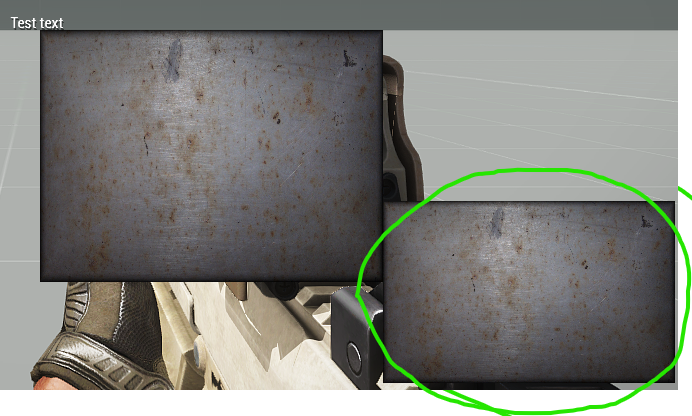
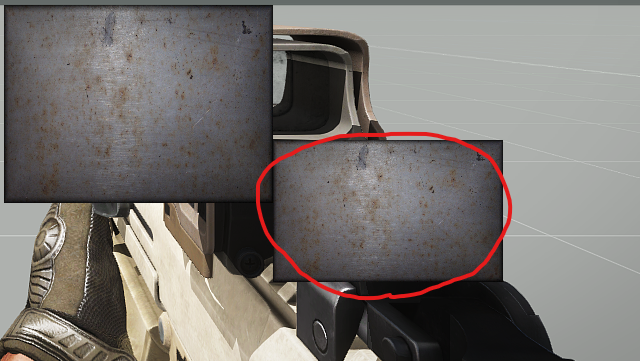 topaz talon
yes because you're doing coordinates wrong
to have it at the bottom right corner of the screen, do something like safezoneX + safezoneW - width - someOffset... and safezoneY + safezoneH - height - someOffset...
unkempt cliff
topaz talon
yes because you're doing coordinates wrong
But we are talking about the editor output now. or can you do that same in the editor?
unkempt cliff
alright. yeah trying to make this via the editor
solid gyro
unkempt cliff
alright. yeah trying to make this via the editor
If you change to do via description here is right down corner
http://killzonekid.com/arma-scripting-tutorials-gui-part-3/
unkempt cliff
solid gyro
If you change to do via description here is right down corner
http://killzoneki...
thx but i'm using the GUI editor
solid gyro
unkempt cliff
thx but i'm using the GUI editor
Yeah, i read. Just for if you start do another way.
unkempt cliff
solid gyro
Yeah, i read. Just for if you start do another way.
sometimes I type the coords "manually" but I like to use the editor
frigid mesa
topaz talon
just inherit the class, `class GotoMessages : GotoSOS`
Cheers man
mystic berry
I use the cTab devastator edition, where the microDagr is a inventory item and dont go in the GPS slot.
I want to remove the inventory item by script and that part works, but the GUI still shows up until it is closed manually.
can I force it to close some how? I tried using findDisplay / closeDisplay but the ctab interface dont seem to be a display? it does not show up under allDisplays at least.
any idea how to figure this out?
topaz talon
mystic berry
I use the cTab devastator edition, where the microDagr is a inventory item and d...
check their docs/source
quasi granite
unkempt cliff
this is how it looks like after GUI editor ouput (normal UI size), the image is ...
#define GUI_GRID_TOPRIGHT_X (safeZoneX + safeZoneW - GUI_GRID_WAbs)
#define GUI_GRID_TOPRIGHT_Y (safeZoneX)
#define GUI_GRID_TOPRIGHT_W GUI_GRID_W
#define GUI_GRID_TOPRIGHT_H GUI_GRID_H

#define GUI_GRID_CENTERRIGHT_X GUI_GRID_TOPRIGHT_X
#define GUI_GRID_CENTERRIGHT_Y GUI_GRID_CENTER_Y
#define GUI_GRID_CENTERRIGHT_W GUI_GRID_W
#define GUI_GRID_CENTERRIGHT_H GUI_GRID_H

#define GUI_GRID_BOTTOMRIGHT_X GUI_GRID_TOPRIGHT_X
#define GUI_GRID_BOTTOMRIGHT_Y GUI_GRID_Y
#define GUI_GRID_BOTTOMRIGHT_W GUI_GRID_W
#define GUI_GRID_BOTTOMRIGHT_H GUI_GRID_H
``` these are the missing coordinates. you want to use GUI_GRID_BOTTOMRIGHTSo - when creating a pip feature, does it always spawn on top?
Context: using this code:
cam = "camera" camCreate (positionCameraToWorld [0,0,0]);
cam attachTo [(vehicle player),[0,0.2,0.2], "head"];


cam cameraEffect ["internal", "back", "rtt"];
"rtt" setPiPEffect [12];
cam camCommit 0;
with uiNamespace do {
    private _pic = findDisplay 46 ctrlCreate ["RscPicture", 1800];

    private _res = getResolution;
res2 = (_res select 1) / (_res select 0);

    _pic ctrlSetPosition [0.551562 * safezoneW + safezoneX,0.225 * safezoneH + safezoneY,0.35 * safezoneW,0.35 * safezoneH];
        _pic ctrlCommit 0;
    _pic ctrlSetText "#(argb,512,512,1)r2t(rtt,1.33333333333)";
    };

    zoomi = 0.01;
         onEachFrame {

   cam camSetPos positionCameraToWorld [0,0,0];


            _Zoom = zoomi;
            cam camSetFov _Zoom;
            zoomi = zoomi + 0.001;

        cam camSetTarget AGLToASL positionCameraToWorld [0,0,1000];

{
[_x, false] remoteExec ["hideObject", 0, false];
[_x, false] remoteExec ["hideObject", cam, false];} forEach allUnits;
    cam camCommit 0;

};
to spawn a PIP display - which is spawning over the top of HUD elements spawned at idc 2200.
quasi granite
rigid delta
So - when creating a pip feature, does it always spawn on top?
Context: using ...
kind of. since it is the last created control it does appear on top. if you were to create another control at the same position that one should be on top instead.
rigid delta
quasi granite
kind of. since it is the last created control it does appear on top. if you were...
So it's just a matter of creating the camera display BEFORE the thing that's meant to go overtop?
quasi granite
yes but that is going to be pretty hard when trying to cover display 46 since that is the mission display that the entire mission depends on
if you run findDisplay 46 closeDisplay 0 it actually ends the mission
rigid delta
A h a. Yeahup that would be problematic.
So how would I hook in w/ my own... display (I guess?) That's running the custom HUD elements?
Aha - using its set Idd.
Ta mate
quasi granite
uuh not sure what you did but good for you
rigid delta
quasi granite
uuh not sure what you did but good for you
What I did was disappear to make dinner because I was starving.
So how would I put it onto the display for the custom HUD? Or behind it
quasi granite
it would maybe be possible to mod it
rigid delta
quasi granite
it would maybe be possible to mod it
so... that would be what I'm doing - but I don't know how to put the camera behind a HUD element
unkempt cliff
quasi granite
```cpp
#define GUI_GRID_TOPRIGHT_X (safeZoneX + safeZoneW - GUI_GRID_WAbs)
#defi...
these wont work with the GUI editor though?
 plucky crest
Hi, i made a Map Control in my gui but i have a problem. Every time i put a "Task" on someone i'm able to see the task in my "Map Control" so is there a way to remove this only in my GUI ?
quasi granite
rigid delta
so... that would be what I'm doing - but I don't know how to put the camera *beh...
you'd have to modify the HUD itself with an addon
quasi granite
unkempt cliff
these wont work with the GUI editor though?
yeah you would have to insert the expanded values. simplest way would be to put them in the description.ext, eg
[...]
test_x = GUI_GRID_TOPRIGHT_X;
etc. etc.
``` and then copy the result from the config viewerHi, do you have an idea to hide task in a specific map control ?
quasi granite
not really. I think the map control is too engine bound to be modified in such a way
opaque crag
I guess you could do some nasty hack to hide the task icons (eg with setMarkerAlphaLocal) when you switch.
quasi granite
i dont think tasks are markers
plucky crest
quasi granite
not really. I think the map control is too engine bound to be modified in such a...
yeah i think too
plucky crest
opaque crag
I guess you could do some nasty hack to hide the task icons (eg with setMarkerAl...
in the map config you can turn on or turn off the "showMarkers"
it's what i did and markers are hidden except the Task so yeah as Terra said i don't think tasks are markers
 leaden shell
Does anyone know where the default NVG effect mask (as in, the texture that gets placed over your screen to simulate the limited night vision FOV) is in the game files?
rigid delta
quasi granite
you'd have to modify the HUD itself with an addon
So I'm already using a custom HUD that I added with my addon - it's still spawning on top of that, regardless of the fact it's on the same idd and a lower idc.
It's getting that display specifically to spawn behind the custom HUD, that PIP, that i'm strugging with.
quasi granite
the position of the control is determined by when it was created, idc or idd have nothing to do with that
rigid delta
rigid delta
So - when creating a pip feature, does it always spawn on top?
Context: using ...
As you can see in the code, the PIP display is being created first.
That's the code being run, that is displaying the custom HUD when conditions are met - i.e the player is wearing the corresponding equipment
quasi granite
and you want to make that appear behind the arma HUD?
rigid delta
Behind the custom HUD that is being spawned by the last lines of that code
Which I just realised I left out of that example
one moment!
params ["_player"];


cam = "camera" camCreate (positionCameraToWorld [0,0,0]);
cam attachTo [(vehicle player),[0,0.2,0.2], "head"];


cam cameraEffect ["internal", "back", "rtt"];
"rtt" setPiPEffect [12];
cam camCommit 0;
with uiNamespace do {
    private _pic = PTD_display ctrlCreate ["RscPicture", 1900];

    private _res = getResolution;
res2 = (_res select 1) / (_res select 0);

    _pic ctrlSetPosition [0.551562 * safezoneW + safezoneX,0.225 * safezoneH + safezoneY,0.35 * safezoneW,0.35 * safezoneH];
        _pic ctrlCommit 0;
    _pic ctrlSetText "#(argb,512,512,1)r2t(rtt,1.33333333333)";
    };

    zoomi = 0.01;
         onEachFrame {

   cam camSetPos positionCameraToWorld [0,0,0];


            _Zoom = zoomi;
            cam camSetFov _Zoom;
            zoomi = zoomi + 0.001;

        cam camSetTarget AGLToASL positionCameraToWorld [0,0,1000];

{
[_x, false] remoteExec ["hideObject", 0, false];
[_x, false] remoteExec ["hideObject", cam, false];} forEach allUnits;
    cam camCommit 0;

};


("PTD_mask" call BIS_fnc_rscLayer) cutRsc ["PTD_maskRsc", "PLAIN"];
PTD_count = 0;


[_player] call PTD_fnc_mask_custom;

PTD_count = PTD_count +1;

[_player] call PTD_fnc_mask_custom;

PTD_count = PTD_count +1;
This is the effect I'm trying to do

This is the effect I'm getting

(also I know it's purple orange thermal - I didn't realise it was a thing when I was making the demo picture, found it, think it looks awesome - didn't update the demo picture, my bad)
leaden shell
leaden shell
Does anyone know where the default NVG effect mask (as in, the texture that gets...
bump
unkempt cliff
quasi granite
yeah you would have to insert the expanded values. simplest way would be to put ...
alright, ty. i'm gonna stick to the editor though 🙂
quasi granite
unkempt cliff
alright, ty. i'm gonna stick to the editor though 🙂
what i meant was that you can get the values that you need to fill in as the gui editor grid from the config this way
unkempt cliff
quasi granite
what i meant was that you can get the values that you need to fill in as the gui...
you mean like put them here: https://ibb.co/2Z2y2hc ?
quasi granite
yes
unkempt cliff
quasi granite
yes
so change them when I want center or bottom anchoring?
quasi granite
Yes
unkempt cliff
quasi granite
Yes
ic
 lone orbit
So I am completely new to GUI stuff for arma. Can I make UIs in a mission?
unkempt cliff
lone orbit
So I am completely new to GUI stuff for arma. Can I make UIs in a mission?
mental trench

I have a question
So in the default ARMA with no mods there is a beret hat, I am wondering how can I like take that asset and add the logo on the photo above on it
Basically I wanna model a beret hat with the logo on the photo above
Anyone here can help me? thanks
 strange portal
mental trench
Anyone here can help me? thanks
strange portal
mental trench
Anyone here can help me? thanks
Wrong channel, use #arma3_model instead, but to respond to your question, you cannot extract and modify models from game unless they have been provided in samples. The only way for you to do be able to do that as a work around would be, modelling the logo and attaching to the position of the player body when the said beret is in use by the unit, and for that, you can use #arma3_scripting to ask your questions but let me tell you, it is an annoying job to efficiently check each time there is beret on or off on every unit if you are not experienced in scripting. It may not end up as well as you dreamed it to be.
 opaque lynx
Q: what is a camera for purposes of default values? controlNull? or a simple object, i.e. objNull ... thanks...
opaque lynx
Q: if mouse button left, right, middle are 0, 1, 2, respectively,... is there a mouse event analog for the scroll wheel?
https://community.bistudio.com/wiki/Arma_3:_Modded_Keybinding
Thanks...
solid gyro
opaque lynx
Q: if _mouse button left_, _right_, _middle_ are `0`, `1`, `2`, respectively,......
onMouseZChanged
_
Use on: Display, Control
Fired on: Fires when mouse wheel position is changed. Does not fire on disabled control.
Returns: Returns the display or control and the change of the scrollwheel._
params ["_displayOrControl", "_scroll"];
Any good videos for GUI modding?
 wind spade
mental trench
Any good **videos** for GUI modding?
wind spade
mental trench
Any good **videos** for GUI modding?
learn how to make a gui and interact with a listBox
If you have any questions regarding the video, please reply to this topic here
if you have any arma questions in general please post here
opaque lynx
mental trench
Any good **videos** for GUI modding?
You can start with the in game GUI editor, but it is rather crude, tends to render 'code' and 'headers' in rather concrete (VERY, like virtually unmalleable) terms.
If you just need a primer, intro to some of the concepts, principles, it is okay.
But as I was finding, you may as well, depending on how 'serious you are', you will quickly graduate beyond that.
Just FYI and a heads up.
Good luck, good hunting!
opaque lynx
mental trench
Any good **videos** for GUI modding?
Will add one other pro-tip, it is not a bad idea to think of your regions, coordinates, etc, in terms of a grid, as the editor presents, and capture those calculations yourself internally. some like to introduce headers with macros; I found that to be very effective, expressing grid oriented ratios, etc.
opaque lynx
What is the _mouseOver type? BOOL? not readily apparent from the docs...
https://community.bistudio.com/wiki/User_Interface_Event_Handlers#onMouseMoving
thanks...
quasi granite
wind spade
https://youtu.be/H1Ap7so5aPY
i wouldnt call that a good tutorial. it's using safeZone coordinates which will be all over the place for other screen resolutions as well as the primary syntax of control commands (e.g. lbAdd [idc, value] instead of _ctrl lbAdd value) and much more.
opaque lynx
quasi granite
i wouldnt call that a good tutorial. it's using safeZone coordinates which will ...
yep, like I said, a primer, intro... starting from crudely generated GUI editor code.
opaque lynx
point of confusion here for me, considering "onKeyDown", "onKeyUp" events
https://community.bistudio.com/wiki/User_Interface_Event_Handlers#onKeyDown
https://community.bistudio.com/wiki/User_Interface_Event_Handlers#onKeyUp
When they say for args, params ["_displayOrControl", "_key", "_shift", "_ctrl", "_alt"] this means what for _shift, _ctrl, _alt re: state... true or false meaning respective Down or Up, depending on the call back? In other words, when down _shift==true meaning down, and conversely, when up _shift==true meaning up?
Thanks...
quasi granite
yeah we need more info on the parameters on those pages. i'll ask in #community_wiki
actually the other eh pages have explanations for the parameters...
opaque lynx
quasi granite
actually the other eh pages have explanations for the parameters...
well, which are? I am assuming it is BOOL... for starters. thanks...
opaque crag
I'm fairly sure that the shift/ctrl/alt params are true for pressed and false for not pressed, but I haven't seen documentation stating that.
opaque lynx
opaque crag
I'm fairly sure that the shift/ctrl/alt params are true for pressed and false fo...
that would be my first guess, but I am asking, because some code which I inherited would suggest it is as I described above, affirming either down or up, accordingly...
solid gyro
Good morning, Is there any way other than adding an animChange EH to the unit to check if he walks into the water and the UI display would close? I mean I want the display to close if the player goes into the water, I can check if he is in the water and the display won't open, but if he jumps into the water the UI display will stay open
quasi granite
opaque lynx
well, which are? I am assuming it is `BOOL`... for starters. thanks...
it is. why not test it?
solid gyro
opaque lynx
well, which are? I am assuming it is `BOOL`... for starters. thanks...
You can test from debug this one
myTestEH= (findDisplay 46) displayAddEventHandler ['keyDown',{
        params ['_ctrl', '_dikCode', '_shift', '_ctrlKey', '_alt'];
        private _handled = false;
        if (_shift) then {
            systemChat format ['%1 pressed', str(_shift)];
        };
            _handled = true;
        if (_ctrlKey) then {
            systemChat format ['%1 pressed', str(_ctrlKey)];
            _handled = true;
        };
        if (_alt) then {
            systemChat format ['%1 pressed', str(_alt)];
            _handled = true;
        };
    _handled;

    }];
in arma 3 you can pass code to these event handlers, no need for strings and ruin syntax highlighting 😄
crude berry
or even toString {//code} where the strings are still required
solid gyro
crude berry
or even `toString {//code}` where the strings are still required
Good to know, thanks guys
solid gyro
solid gyro
You can test from debug this one
```sqf
myTestEH= (findDisplay 46) displayAddEve...
This disables other keystrokes because of _handled, you can remove _handled it to see how keyDown, keyUp, etc. EHs work in a GUI. I have done this before using any EH, helps a lot.
opaque lynx
Cool so it is as I suspected, aligned with the event (question) being asked, up true, down true.
opaque lynx
Q: I have a PAA image that is displaying, that much is a minor accomplishment. I even have neutral, active, and disabled colors in effect.
Currently the image is 32x, intended as a sort of toolbox icon. I'd like to use it and resize it to 16x maintaining the aspect ratio. Is that the size attribute? Or which one should I use? Or should I just resize the source image itself? Thanks...
unkempt cliff
opaque lynx
Q: I have a PAA image that is displaying, that much is a minor accomplishment. I...
you probably mean this: style = ST_PICTURE + ST_KEEP_ASPECT_RATIO;
and of course w & h values
opaque lynx
unkempt cliff
and of course w & h values
partially, yes; that does maintain the aspect ratio. but it does not set the size (from 32x to 16x).
course, underlying all that, the code base I am working with, the layout macro calculations are a bit suspect, there is that... that aside, if I can resize at least one edge of the image...
unkempt cliff
I don't understand, the w & h values define the picture's render size
opaque lynx
there's no calculation that says, I want a 32px or 16px render size? in either W|H orientations?
unkempt cliff
i think you can calculate that but i'm no expert in that
opaque lynx
or maybe it is pixelW and pixelH
https://community.bistudio.com/wiki/pixelW
https://community.bistudio.com/wiki/pixelH
unkempt cliff
yeah those
quasi granite
opaque lynx
Q: I have a PAA image that is displaying, that much is a minor accomplishment. I...
if you config looks like this:
w = 1 * GUI_GRID_W;
h = 1 * GUI_GRID_H;
``` then you can scale it down with
```cpp
w = 0.5 * GUI_GRID_W;
h = 0.5 * GUI_GRID_H;
yeah I get that much. actually have macros that make decomposing into grids super intuitive.
what I am after is working with an image as a sort of toolbox image, 32px or 16px, or some such, aspect ratio maintained.
I think I have it more or less sorted out, but the control needs to be vertically centered.
quasi granite
ah the toolbox. the icons are scaled to fill the maximum width or height of the toolbox so even with an 16x16 image it would scale it up
you'd have to make an 16x16 image and put it in the middle of a 32x32 image (easy) or make your own custom toolbox (hard)
opaque lynx
sounds about right; thanks...
opaque lynx
Q: supposedly according to this page...
https://community.bistudio.com/wiki/safeZoneWAbs
difference between Abs and not, there should be some difference.
however in my case, finding there is no difference...
trying to apply that to gain some comprehension around some dialog sidebar (left/right) geometry on screen.
opaque lynx
opaque lynx
Q: supposedly according to this page...
https://community.bistudio.com/wiki/safe...
got it sorted I think... sorry for confusion.
opaque lynx
hello anyone have any experience responding to the MouseZChanged events? I wonder what sort of feedback is typical from the mouse wheel, in either the forward or reverse directions, and in what sort of scales?
in terms of actually using the feedback, I'm thinking to use it as a coefficient, perhaps, but I wonder if that is appropriate.
values I am receiving seem to be either +/-1.2 or so at the moment, multiplying up 2.4, 3.6, etc, depending on how aggressively I spin the wheel.
thanks...
secondary to that, I want to respond to that event from within a camera and engage with the mouse wheel, but also disable the camera at the same time when those conditions are met. possible to do? and I should return true or false when that branch has completed? i.e. so that the camera does not respond i.e. zoom in or out, when I want the action to have done so.
opaque lynx
Unrelated question, more or less, there is a soundClick which works fantastic on active image texts for left click actions. However, is there a soundRightClick, i.e. when I am responding to MOUSE events i.e. onMouseButtonClick? or I need to programmatically handle that one?
unkempt cliff
opaque lynx
Unrelated question, more or less, there is a `soundClick` which works fantastic ...
dunno, I'd recommend to export the parent classes or look via config viewer, to be able to look around
RscButton has these: https://sqfbin.com/puhevutagorazizaqupo
quasi granite
opaque lynx
hello anyone have any experience responding to the `MouseZChanged` events? I won...
maybe check BIS_fnc_arsenal or the spectator framework (maybe Zeus/Curator too) as they use mouse scrolling to move a camera
desert fog
can I rotate progress bar -90° ? trying to have it like thermometer going 100% on top full, to 0% down
private _display = uiNamespace getVariable ["MY_indicator", displayNull];
if ( not isNull _display ) exitWith { "MY_indicator" cutText ["", "PLAIN"]; };

"MY_indicator" cutRsc ["RscTitleDisplayEmpty", "PLAIN", 0, false];
private _display = uiNamespace getVariable "RscTitleDisplayEmpty";
uiNamespace setVariable ["MY_indicator", _display];

private _ctrl = _display ctrlCreate ["RscProgress", -1];
_ctrl ctrlSetPosition [0, 0, 1, 0.01];
_ctrl progressSetPosition 0;
_ctrl ctrlCommit 0;

_ctrl progressSetPosition 0.75;
// ctrlDelete _ctrl;
there is a vertical style iirc
desert fog
topaz talon
there is a vertical style iirc
desert fog
could I set that with some command or do I need to create element via description.ext
topaz talon
description
distant axle
Why's a Description.ext an issue for you?
desert fog
trying to create UI with plug&play SQF script, without hassle to include defines
distant axle
Hmm
topaz talon
check the config viewer, maybe there is a vertical progress bar class
desert fog
was thinking if maybe I will use slider without buttons
also sadly ctrlSetAngle only supports CT_STATIC, CT_ACTIVETEXT
opaque lynx
What is a vignette vis-a-vis a GUI display? the base line code I have uses idc = 1202 as defined in "defines.hpp", but I do not know what that is... no reference to vignette anywhere else to my knowledge... what is happening there, it is being hidden for whatever reason...
In context, a GUI display is showing, and there is also a camera in play. Not sure if that has anything to do with that?
opaque lynx
opaque lynx
What is a _vignette_ vis-a-vis a GUI display? the base line code I have uses `id...
it may be the id on a marker in the mission file, IDK... it seems like it is a magic A3 IDC, not sure... commented around it for now, seems innocuous, a non-artifact...
topaz talon
opaque lynx
What is a _vignette_ vis-a-vis a GUI display? the base line code I have uses `id...
seems to be a control in RscTitleDisplayEmpty
quasi granite
https://en.wikipedia.org/wiki/Vignette_(graphic_design)
It's the black oval that surrounds the screen, maybe to simulate dirt or the shape of the eyes

A vignette, in graphic design, is a French loanword meaning a unique form for a frame to an image, either illustration or photograph. Rather than the image's edges being rectilinear, it is overlaid with decorative artwork featuring a unique outline. This is similar to the use of the word in photography, where the edges of an image that has been ...
 dark light
which is the format of choice for non 2^x sized textures for GUIs?
.paa seem to behave rather weirdly when they're not 2^x and used in UIs, but jpg does not have transparency
unkempt cliff
dark light
which is the format of choice for non 2^x sized textures for GUIs?
.paa seem to ...
i don't think you are supposed to have anything else than power of two size textures in arma. so what's the problem?
dark light
unkempt cliff
i don't think you are supposed to have anything else than power of two size text...
Well non-compliant paa's get distorted colors, and if you keep it 2^x/2^y the image will be distorted if you need it in any other ratio (like 3:4, 16:9).
unkempt cliff
dark light
Well non-compliant paa's get distorted colors, and if you keep it 2^x/2^y the im...
sorry i dont understand the problem. you can choose to keep the aspect ration of GUI images if you want
dark light
But you cannot make a 800x600 paa and use it in a gui without color distortion.
You can make a 1024x512 but that'll be spatially distorted.
unkempt cliff
dark light
But you cannot make a 800x600 paa and use it in a gui without color distortion.
...
I think I now see what you mean. personally I would just copy paste the 800x600 image to 1024x512 (or 1024x1024) image, leaving some empty space around the image but maybe this is not what you want
dark light
unkempt cliff
I think I now see what you mean. personally I would just copy paste the 800x600 ...
In some cases this is an option, as is just saving the image already distorted and then drawing it in its supposed aspect ratio. But both have their limits or require some workarounds and it's annoying me.
 versed epoch
is it mandatory to add like
#define GUI_GRID_CENTER_X (safezoneX + (safezoneW - GUI_GRID_CENTER_WAbs)/2)
when these values are anyway the standard values?
dark light
versed epoch
is it mandatory to add like
`#define GUI_GRID_CENTER_X (safezoneX + (safezoneW...
It's only relevant if your code/config uses it
If there is never a reference to it, you don't need it.
If there is a reference to it, you need it, cause otherwise it will be undefined.
 fervent sail
does anyone have the nato map symbols for all sides in jpg or png?
dark light
You can quite easily extract them
and gruppe adler has a web based tool to bulk convert them
Gruppe Adler
Online converter for Arma 3's PAA format. Can be used to convert a single or multiple files in bulk and supports paa to png, png to paa, jpg to paa and more.
desert fog
looking for control/display of a watch, want to replace/override it via SQF
@polar ingot
opaque lynx
Q: is there a default prompt dialog in A3? I just need something I can ask the player for a yes/no or ok/cancel response. thanks...
opaque lynx
 tranquil iron
Bis_fnc_messagebox?
There is one, not sure if that's the right name
tranquil iron
Bis_fnc_messagebox?
There is one, not sure if that's the right name
thanks I'll have a gander
Hmm, but there is no tri-response, or radio response message is there... i.e. if I need 3+ possible responses...
fervent sail
dark light
You can quite easily extract them
i did extract them, but they are transparent and not in colour. how can i colour them without having to paint them in photoshop ?
opaque lynx
fervent sail
i did extract them, but they are transparent and not in colour. how can i colour...
they are PAA's AFAIK, and colors can be set easily, depending on the context
fervent sail
opaque lynx
they are PAA's AFAIK, and colors can be set easily, depending on the context
how can i do that? sorry im new
opaque lynx
fervent sail
how can i do that? sorry im new
in a marker? in a GUI control? like I said, depends on the context, question you are asking...
I find the Scripting Commands a handy bookmark to keep:
https://community.bistudio.com/wiki/Category:Arma_3:_Scripting_Commands
fervent sail
opaque lynx
in a marker? in a GUI control? like I said, depends on the context, question you...
i wanna extract all the markers in all colours in .paa
opaque lynx
fervent sail
i wanna extract all the markers in all colours in .paa
once you orient yourself to how to extract them in the tools, path to your markers is:
\\path\to\a3\ui_f\data\map\markers
where ever your \\path\to was.
they are usually white with transparent background. you apply the color depending on the context.
fervent sail
opaque lynx
once you orient yourself to how to extract them in the tools, path to your marke...
yeah, i got to that part. so i do have to add colours manually?
fervent sail
could i get the hex values for blufor opfor and indep anywhere?
opaque lynx
fervent sail
could i get the hex values for blufor opfor and indep anywhere?
I did using any screen capture, paint.net or whatever. that's the nature of the beast.
good luck, good hunting...
opaque lynx
it is either a documented color config i.e. "ColorWest", or an RGBA value, again, depending on the context.🤦♂️
at least you did not ask for colors and ALPHA channel combinatorics 🤣
 opaque lynx
https://community.bistudio.com/wiki/BIS_fnc_guiMessage
opaque lynx
opaque lynx
https://community.bistudio.com/wiki/BIS_fnc_guiMessage
so this one allows for two choices only...
can I still watch for key down up events in the background? i.e. user clicks 'OK' while holding the CTRL key down, let's say...
solid gyro
fervent sail
ah so manually xD

 runic stump
Has anyone experienced this?
- Create dialog, the onload places data on the dialog with setVar
- Find the dialog with findDisplay
- use getVariable on the return from findDisplay.
*** Now here comes the fun part***
- No data is returned from getVariable, however if I create the same dialog on top of the last one, data is returned.
- Same thing happened with I was trying allControls, weirdly if the my dialog is active I don't any returned data.
createDialog "A3A_Antistasi_Arsenal";
private _display = findDisplay A3A_IDD_ANTISTASI_ARSENAL_DIALOG;
copyToClipboard str (_display getVariable ["RifleCtrls",[]]);
_display setVariable [(_selectedTab + "Ctrls"),_createdCtrls];
Isn't onLoad usually spawned?
So in that example it'd happen after the copyToClipboard.
runic stump
let me try it in an scheduled environment
nope still is returning nothing
I'm just gonna make it a global hashmap
You're gonna have fun review this John
opaque crag
I'm just gonna wish I wrote it myself instead, aren't I :P
runic stump
quasi granite
runic stump
```sqf
createDialog "A3A_Antistasi_Arsenal";
private _display = findDisplay A3A_...
have you tried waiting for the variable to be defined? like
waitUntil {!isNil {_display getVariable "RifleCtrls"}} {...};
``` (horrible code, dont use in prod)maybe it is an issue with init order
runic stump
quasi granite
have you tried waiting for the variable to be defined? like
```sqf
waitUntil {!i...
I love you
That was it
 polar ingot
desert fog
looking for control/display of a watch, want to replace/override it via SQF
polar ingot
desert fog
looking for control/display of a watch, want to replace/override it via SQF
Don't remember and won't be behind a PC until... Next year 😑. But I remember reverse engineering it from a CBRN script or mod.
Wish I could be of more help 😔
dark light
opaque lynx
once you orient yourself to how to extract them in the tools, path to your marke...
You can just skip the path/to.
"\a3\ui_f\data\map\markers" already does it.
runic stump
So, I having this weird issue where my buttons aren't showing up. I have defined them exactly the same as the rifle button that does show up
 runic stump
I found it. I will explain if some else has the same issue.
class TabButtons: A3A_ControlsGroupNoScrollbars
        {
            idc = A3A_IDC_ARSENAL_DIALOG_TAB_BUTTONS;
            x = LEFT + GRID_W * 2;
            y = TOP + GRID_H * 2;
            w = 5 * GRID_W;
            h = 5 * GRID_H;
My control group only has a height of 5 pixel grids, meaning that one one of my buttons would show because one button is 5 grids
gleaming gale
there is a way to make to "reverse" the bar?
 gleaming gale
well used progressbar and added an background with switched colors lol
topaz talon
gleaming gale
there is a way to make to "reverse" the bar?
instead of increasing progress, decrease it, 1, 0.99...
gleaming gale
yeap, it will work
unkempt cliff
can you somehow detect if player is browsing the diary records? i have some map GUI that gets into the way
opaque lynx
dark light
You can just skip the path/to.
`"\a3\ui_f\data\map\markers"` already does it.
already does what? depends on 'where' you extracted it to. I make no assumptions this is readily obvious to anyone. but considering it is a fairly deep dive getting there anyway, maybe the skill level is a safe assumption.
dark light
opaque lynx
already does what? depends on 'where' you extracted it to. I make no assumptions...
You don't need to extract it.
It's part of Arma. You can just reference it like that.
"does it" like "is enough".
desert fog
I am trying to put a image to BOTTOM_LEFT corner of screen. And keep image position when resolution change or UI size change. Changing image ratio as change of resolution would be nice too.

private _xPos = safezoneX + ( safezoneW * -0.04 );
private _yPos = safezoneY + ( safezoneH * 0.66 );

private _ctrl = _display ctrlCreate ["RscPictureKeepAspect", -1];
_ctrl ctrlSetPosition [_xPos, _yPos, 0.5, 0.5];
_ctrl ctrlSetText "image.paa";
_ctrl ctrlCommit 0;
 ornate radish
has anyone tried to make the task notifications look less modern? I see CfgNotifications, but I fail to understand how for example to change the overall layout from there
crude berry
desert fog
I am trying to put a image to BOTTOM_LEFT corner of screen. And keep image posit...
what's the problem here?
If you want to put the image on the bottom of the screen - you get Y coordinate of screen bottom with safeZoneY + safeZoneH and then move your control UP (-y direction) by its height.
If you want to link control's aspect ration to image AR, you can get image AR from its resolution (getTextureInfo "image.paa" would give you that), and then multiply the control height by image aspect ration and 0.75 (as absolute coordinates are given in 4:3 region) to get the target width.
https://sqfbin.com/huziteguwahegagopuza for overly verbose example 🤷♂️
desert fog
crude berry
what's the problem here?
If you want to put the image on the bottom of the scre...
private _ysize = 0.3; // height of the displayed image on the screen in absolute units
private _xsize = _ysize * _imgAR * 0.75; // 0.75 because absolute units are on 4:3 AR

private _xoffset = 0.03; // absolute units from bottom left corner ( 0.01 )
private _yoffset = 0.00;
what is an absolute unit ?
ornate radish
is it possible to change the dark background color of a hint somehow? RscSomething maybe?
there's indeed class RscHint around ...
 gilded steppe
so iam trying to get an boolean when a Checkbox is checked with cbChecked but cbChecked wants a data type control but all what i have is an idc of the checkbox (wich is defined in the control.hpp)
when i use cbChecked in some other script, i wonder how to have the control data type of something
class RscCheckbox_2800: RscCheckbox { idc = 2800; x = 0.639219 * safezoneW + safezoneX; y = 0.588 * safezoneH + safezoneY; w = 0.020625 * safezoneW; h = 0.055 * safezoneH; };
when i try to use cbChecked RscCheckbox_2800 it doesnt work 😦
i wish i could just cbChecked 2800
or am i missing something?
opaque crag
displayCtrl
There is an IDC-only version but that only checks the top/active dialog, which can trip you up occasionally.
otherwise (findDisplay _MyDialogIDD) displayCtrl _MyCtrlIDC
gilded steppe
opaque crag
`displayCtrl`
thanks alot, that was just the one i was missing here 👍 👌 ❤️
 quartz bluff
TW noob question 
how do I define the layer position in terms of being in front of or behind other layers? I'm customizing some Kurt's Survival System fork and currently its custom hud is always on top, so it hides part of the map screen and I'd like to make the map screen have higher priority
 zinc oriole
i got this line: ```sqf
_ctrlTimer ctrlSetStructuredText format ["Time left: <t color = '#6e0101'>%1</t>", [ _timeLeft, "HH:MM:SS"] call BIS_fnc_secondsToString];
its giving some error of "expected text in this line". why is this happening?because format returns string, not text. https://community.bistudio.com/wiki/Structured_Text
Add parseText 🤷♂️
zinc oriole
okay ty
quasi granite
quartz bluff
TW noob question <:staresmile:769591371203608588>
how do I define the layer po...
the order of layers is defined by when the display was created. nothing else afaik.
 minor sonnet
how do I get the screen position of a control in a controls group?
ctrlPosition _ctrl works fine, but if the _ctrl is in a controlsGroup, it does not get the position
the use case is to create a clone to overlay on top
distant axle
You probably can get the parent's position and sum them all?
strange portal
minor sonnet
how do I get the screen position of a control in a controls group?
Just add up the controlsgroup position + position of that particular ctrl? But if you want to create clone, wouldnt you just use the same values as it is fetched for each component anyways?
minor sonnet
yea i have tried that, for some reason still issues
        _ctrlProgress = _ctrlGroup controlsGroupCtrl 23868;
        _ctrlsGroupPos = (ctrlPosition _ctrlGroup) select [0,2];
        private _ctrlPos = ctrlPosition _ctrlProgress;

        {
            _ctrlPos set [_forEachIndex,(_ctrlPos # _forEachIndex) + _x];
        } forEach _ctrlsGroupPos;```
the red bar should be in that empty black section at bottom of the box
23868 is the original progress bar which is in that position
        _ctrlLoad3 ctrlShow TRUE;
_ctrlLoad3 ctrlSetPosition _ctrlPos;```inb4 vectorAdd to not iterate manually
crude berry
I am assuming there is a ctrlCommit after ctrlSetPosition, but it's just not shown?
minor sonnet
yera
        _ctrlLoad3 = _display ctrlCreate ['RscProgress',12358];
        _ctrlLoad3 ctrlShow TRUE;
        _ctrlLoad3 ctrlSetPosition _ctrlPos;
        _ctrlLoad3 ctrlSetText '';
        _ctrlLoad3 ctrlSetBackgroundColor [0, 0, 1, 1];
        _ctrlLoad3 ctrlSetTextColor [1,0,0,1];
        _ctrlLoad3 ctrlSetScale 1;
        _ctrlLoad3 progressSetPosition ((loadAbs _entity) / (maxLoad _entity));
_ctrlLoad3 ctrlCommit 0;```private _ctrlPos = (ctrlPosition _ctrlGroup) vectorAdd (ctrlPosition _ctrlProgress);
_ctrlPos resize 2;
_ctrlLoad3 ctrlSetPosition _ctrlPos;``` crude berry
🤔 maybe try to add the control into the _ctrlGroup with the raw ctrlPosition _ctrlProgress as its pos
but what's already present in chat works on my machine (for group and control i create myself)
or not, i actually have a typo there
nope, the typo doesn't matter
and works on splendid camera for the display that's not created by me
inb4 your interface has group inside the group :3
crude berry
yep, should be easier
and group-inside-group definitely works on my machine (and obviously breaks the coordinates of freshly created _ctrlLoad3)
 crude berry
it's almost lilke control groups were made specifically for that :3
 hallow kite
Hey, does anybody here have experience rendering the text from the player diary to an RscStructuredText?
I'm having some problems getting coloured text to show up
random test example, here it is on the map screend iary

here it is on my RscStructuredText

ah I think I got it, the diary uses <font> while structuredText uses <t> tags
dark light
What's the proper way to draw other controls on top of a mapControl?
I'm having issues getting them to stay on top.
Ideally I'd still be able to interact with the mapControl as normal, except for the parts where other controls overlap it
opaque crag
Define the map control in class ControlsBackground and put the other stuff in class Controls.
dark light
The controls are in a controlsGroup, tho. That seems to mess with it
opaque crag
That's higher level. Shouldn't matter.
dark light
Cause the clicks ain't going through
opaque crag
ah, might be a problem there...
dark light
I'd assume the controlsgroup is catching them. But I wouldn't know how to enable passthrough for that
opaque crag
So you have a lot of scattered controls over the screen?
dark light
Kinda. It's the ctab screen
opaque crag
I don't know what that is.
dark light
hold on

Instead of having it in that small window, I want it to take up the whole background, with the "windows" still on top of it
But that way the clicks don't go through to the map control
If I move the map control into the controlsGroup, weird things happen
opaque crag
You may have to split each "window" into its own controlsGroup.
dark light
I feared as much :/
Ideally there would just be a passthrough flag on the controlsgroup
opaque crag
Yeah, can't see anything like that though.
crude berry
in my testing clicking through the control group works. But it brings the clicked control into foreground, overlapping the group
dark light
crude berry
in my testing clicking through the control group works. But it brings the clicke...
That's the behavior I get when the map is also in the controls group. If it's in the background of the display, the controls group blocks it off entirely.
In your example, do you have the map control in the background or foreground?
dark light
opaque crag
You may have to split each "window" into its own controlsGroup.
Hmm, that also only half works, cause now focus gets stuck in a listCtrl and never returns to the map in the background :/
// Edit: nvm, sth else was interfering. this works, thank you!
opaque lynx
Q: I have some toolbox controls with color[], colorActive[], colorDisabled[]... presumably active meaning as the mouse is over.
How might I set one or both of those colors after the fact in SQF code?
As it stands their configs are:
color[] = {1, 1, 1, 0.55};
colorActive[] = {1, 1, 1, 1};
colorDisabled[] = {1, 1, 1, 0.25};
But as you can see the images are not 'white' themselves, although their alpha channels appear to be responding correctly according to the config.
https://pasteboard.co/aqR7ueBfUxlh.png
I may end up going an entirely different way with this, but my aim first of all is to set their colors and/or alpha channels according to resource feasibility. Short of that, I'll plan accordingly.

Simple and lightning fast image sharing. Upload clipboard images with Copy & Paste and image files with Drag & Drop
opaque crag
Not all colours can be set in SQF. There are some missing ones.
opaque lynx
Not sure what you mean; these are set as RGBA, yes? i.e. literally as the config alluded to, in SQF, [1, 1, 1, 1] for the colorActive[].
opaque crag
I believe CT_TOOLBOX uses the listbox commands:
https://community.bistudio.com/wiki/Category:Command_Group:_GUI_Control_-_ListBox
Although I suspect you mean some other control type. They're all different.
opaque lynx
this is a good question, not using CT_TOOLBOX, just a control group with a class Controls {...} 'arrayed' within it.
and the resource icons are styled after ST_PICTURE + ST_KEEP_ASPECT_RATIO + ST_VCENTER
opaque crag
what's the type of the controls inside the control group? CT_STATIC?
opaque lynx
for the controls in question, I just said above.
type = CT_ACTIVETEXT;
type not style 🙂
but styled as pictures, icons
opaque crag
Commands: Button (TODO)
There are general ctrlSetXXXColor functions that probably work here.
opaque lynx
hmm that could be problematic if I wanted to set the color, if I am tracking... Notice: This control doesn't render the usually common colorBackground property and colorText is replaced with color.
and it seems like the colors are more of an alpha intensity mask on the underlying image than a true color, I suppose.
so in the above if ctrlSetTextColor is the 'normal' way, it appears as though this attribute is bypassed for this type.
opaque crag
Try ctrlSetForegroundColor if ctrlSetTextColor doesn't work.
possible that neither do though.
As far as I know, colour application to images is multiplicative, so 1,1,1,1 gives you the original image, 1,0,0,1 gives you the red channel and so on.
opaque lynx
ah I see, makes sense. will try thank you.
it works 👍 helps when 'onLoad' I am actually capturing the controls to a logical variable in the state.
dark light
Is there a native way to make controlsGroups movable?
The movingEnable attribute does not seem to do anything.
opaque lynx
IIRC moving enabled has to do with the engaged player, not the controls... I could be wrong.
i.e. UI is modal or not
dark light
It's a dialog, but not the whole dialog, just a part of it
strange arrow
@dark light Setting moving = true on a control allows the player to drag the parent display / dialog across the screen using that control.
There is no attribute to enable that behaviour for controls (groups). You will either have to move the contents of the controls group to their own display (then you can use moving = true) or you can try scripting a system that allows dragging individual controls (groups) around.
dark light
strange arrow
<@520769708920668216> Setting `moving = true` on a control allows the player to ...
moving = true then is only respected at the root level of the display, I assume, or does it affect the display if I set that on a control in a controlsGroup on that display?
Putting a display in my display is probably asking for trouble in my case. It's meant to be windows on a desktop, but the whole thing is movable already, so that'd be syncing two displays on the move.
Or are displays within displays moved with their parent display?
strange arrow
dark light
`moving = true` then is only respected at the root level of the display, I assum...
Consider this example:
class MyDisplay {
  class Controls {
    class MyControl_1 {
      moving = true;
    };
    class MyControl_2 {};
  };
};
```The player can grab `MyControl_1` and drag `MyControl_1` along with the entire parent display `MyDisplay` (including all of its controls, i.e. both `MyControl_1` and `MyControl_2`) around.
Now I can't recall ever trying this, but the above should also apply if `MyControl_1` were part of a controls group: With `moving = true` you can only make the entire parent display moveable, not just parts of it.Child displays are like modal windows. For instance, if you run MyParentDisplay createDisplay "MyChildDisplay", the parent display becomes invisible and uninteractable for the user; only the child display is shown. MyParentDisplay still exists and is still open, but, like I said, it is invisible. The parent display only becomes visible again once the child display is closed.
If you run ...
MyDisplay_1 = MyParentDisplay createDisplay "MyDisplay_1";
MyDisplay_2 = MyParentDisplay createDisplay "MyDisplay_2";
```... both `MyDisplay_1` and `MyDisplay_2` are visible and interactable, but `MyDisplay_2` is always behind `MyDisplay_1` if they overlap, even if `MyDisplay_2` has focus.
If one of these displays has a control with `moving = true`, that display can be dragged around the entire screen, regardless of the dimensions of `MyParentDisplay`.To me, all of these approaches seem unfit for your usecase (which, as I understand it, is making certain controls groups moveable within the confines of their parent), so you'll probably have to try writing (or finding) some code to make it happen.
dark light
strange arrow
To me, all of these approaches seem unfit for your usecase (which, as I understa...
Thank you for that comprehensive explanation!
That'll come in handy some other time.
I think you're right, I might just have to implement some custom dragging. Which wouldn't be too difficult if click events made a little more sense xD
dark light
Does the ratio you can set on render2texture procedural textures even do anything, or am I just using it wrong?
I'm using it with an internal camera and it doesn't seem to change the output at all no matter what ratio I put.
Like in this example the r2t is set to a ratio of 1 rendered onto a square texture and yet..
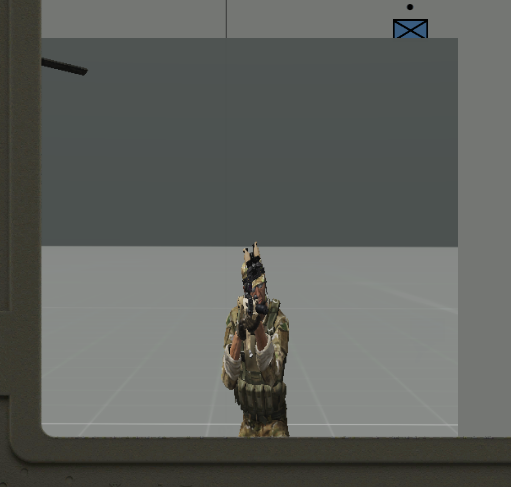
I've tried putting random values in, too, from 0.5 to 2 and it didn't change anything
opaque lynx
Q: how does one change the cursor, i.e. during a gesture? or at all... thank you...
dark light
opaque lynx
Q: how does one change the cursor, i.e. during a gesture? or at all... thank you...
Did you see that?
https://community.bistudio.com/wiki/ctrlMapCursor
Not 100% but maybe a start?
opaque lynx
not the map cursor. rather when I am in a camera. sorry, was not that specific.
interesting the cursors that I might like to use appear to be 'there', but again not a map cursor, rather when I am in camera.
pretty sure something like that happens for 3den editor already, so I know at least in theory it may be possible.
strange arrow
strange arrow
Child displays are like modal windows. For instance, if you run `MyParentDisplay...
@dark light Sorry, I made a mistake here.
The statement about the behaviour of ...
MyDisplay_1 = MyParentDisplay createDisplay "MyDisplay_1";
MyDisplay_2 = MyParentDisplay createDisplay "MyDisplay_2";
```... is wrong, it's not possible for `MyParentDisplay` to have two child displays created with `createDisplay` at once. As soon as `MyDisplay_2` is created, `MyDisplay_1` is destroyed.
It is only possible to have two displays on screen at the same time if one is created with `createDialog` and the other one is created with `createDisplay`. Depending on which `createDialog` parameters were used, the dialog will always be either in front or behind the display.good thing I didn't try that yet xD
I might actually skip the moveable windows altogether, at least for now.
Priority right now would rather be getting the weird r2t ratio fixed
strange arrow
@dark light You can try adjusting the aspect ratio (i.e. w and h) of the control or the FOV of the camera.
dark light
strange arrow
<@520769708920668216> You can try adjusting the aspect ratio (i.e. `w` and `h`) ...
I want that image to be square, tho. The texture is square, too, after all. And the thing is that I have no way of telling what the proper ratio is supposed to be. The FOV on the camera seems to only be the zoom level, it does not affect the ratio.
I can only assume that it might default to the ratio of my actual screen, though that's not explicitly mentioned in the docs (as far as I can tell).
And neither explains what the ratio on the r2t is supposed to do or how to use it correctly.
 humble falcon
Is the GUI editor broken in the current main branch of the game? E.g. resizing controls doesn't seem to work and I get script errors when I try to do that
        (        (uinamespac>
20:48:43   Error position: <ctrlsetposition _input;
        (        (uinamespac>
20:48:43   Error Type Number,Not a Number, expected Number
20:48:43 File A3\functions_f\gui\editor\GUI_init.sqf..., line 217
works for me, no errors on screen or in rpt
humble falcon
I reopened the game and it works now... Didn't change the default grid this time though, will try with it
Changed the default grid as well and it still works. Arma... 😄
zinc oriole
how can i create a rectangular ctrl background with border radius 20%?
 frail fern
Oh how I wish we got CSS in Arma GUI 😭
zinc oriole
yh i was looking over the entire wiki and just couldnt find anything (not even how to make a cricle, but that might be on me)
frail fern
We got no circles, no custom boder thickness.
Run this line on debug console and see what's available:
createDialog "RscTestControlTypes";
For a circle you'd probably have to use a transparent rectangle with an image of a circle in it.
humble falcon
What tools are people using nowadays for GUI editing anyways? Or just the ingame GUI editor?
 burnt token
Text editor
humble falcon
I know that many are editing things manually and I'm afraid of that I'll have to go the same route eventually
humble falcon
burnt token
Text editor
Just curious: how did you learn it? By the usual trial and error method or something else?
distant axle
Basically text editor is the best way to write GUI, trial and error costs no time actually
humble falcon
distant axle
Basically text editor is the best way to write GUI, trial and error costs no tim...
I need to look into that more then, I would appreciate the flexibility that the DIY text editor method would offer
humble falcon
burnt token
It's not that hard really.
That's more than welcome to hear. I've been waiting for Arma 4 to use the new modding toolset but it seems like that it's release is still so far in the future that it might make sense to try to create my pet project in Arma 3 after all these (stormy) years. GUI editing is the thing that has put me off the most so far
topaz talon
text editor is the way to go
zinc oriole
topaz talon
text editor is the way to go
what is text editor? is that something like visual studio code or notepad?
topaz talon
yes
 dapper cloak
Hi, I am trying to create my own ODST HUD, but I'm not sure how to best make the "compass" spin (I have the code to know when they turn and update the azimuth, just I need help with physically how to handle the GUI part any help would be appreciated
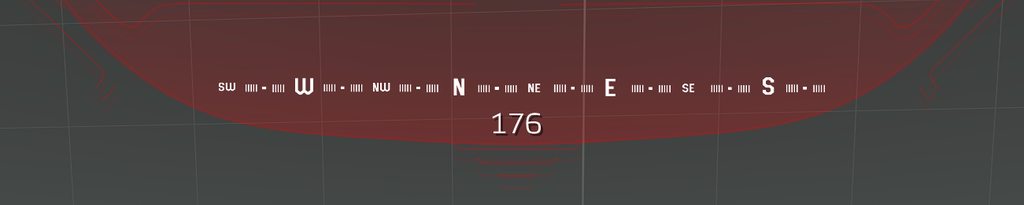
 iron halo
humble falcon
What tools are people using nowadays for GUI editing anyways? Or just the ingame...
iron halo
humble falcon
What tools are people using nowadays for GUI editing anyways? Or just the ingame...
Use Arma Dialog Creator, it's great
rigid delta
Silly question - can someone explain the ins and outs of rcsEdit?
Like, how to hide the outline of the textbox, limit the input to numbers, or Export the number in the text box.
opaque crag
reading the value is just ctrlText.
RscEdit uses ST_FRAME as the style which probably gives you the outline. You can make your own class that uses a different style.
Not sure about input limiting. Maybe you could do that with the onChar UI event handler, but there's not enough documentation to be sure.
strange arrow
I use an onKeyUp UI EH to do input validation (mostly with regexMatch), then set a boolean flag to indicate if the current content of the control is valid.
solid gyro
strange arrow
I use an onKeyUp UI EH to do input validation (mostly with `regexMatch`), then s...
Could you paste example here? I would need one on my own🤔
strange arrow
@solid gyro The setup basically looks like this:
class MyControl: ctrlEdit {
  idc = 123;
  maxChars = 2;
  onKeyUp = "[_this # 0] call A11_fnc_ctrlInputValidation;";
};
params ["_ctrl"];
private _text = ctrlText _ctrl;
switch (ctrlIDC _ctrl) do { //Could also switch on ctrlClassName.
case 123: {
private _validInput = _text regexMatch "[0-9]*";
if (_validInput) then {
_ctrl ctrlSetTextColor [1, 1, 1, 1];
_ctrl ctrlSetTooltip "";
_ctrl ctrlSetTooltipColorBox [1, 1, 1, 1];
_ctrl ctrlSetTooltipColorText [1, 1, 1, 1];
} else {
_ctrl ctrlSetTextColor [1, 0, 0, 1];
_ctrl ctrlSetTooltip "Invalid input.";
_ctrl ctrlSetTooltipColorBox [1, 0, 0, 1];
_ctrl ctrlSetTooltipColorText [1, 0, 0, 1];
};
_ctrl setVariable ["A11_validInput", _validInput];
};
};
```In this example, the user can only enter two characters into `MyControl` (because of `maxChars`) and `A11_fnc_ctrlInputValidation` validates that the input consists of nothing but digits. Empty input is considered valid in this example.
The result of the validation is communicated to the user by updating colors and tooltips.
Any other code that wants to use valid input from `MyControl` simply checks `_myControl getVariable ["A11_validInput", true]` first.
For instance, in the project that I made this system for, there is a button that should only be enabled if the input of `MyControl` is valid, so the onKeyUp UI EH calls an additional function after `A11_fnc_ctrlInputValidation` that enables or disables the button based on `A11_validInput` (and a bunch more conditions). outer oar
Hello fellows
I am trying to literally just test making my gui appear ingame (it is literally just an image at the moment) but cutRsc ["KJW_Radiate_Counter", "PLAIN", 0, true]; doesn't seem to work, where I have defined the RscTitles in the description.ext
import RscText;
import RscPicture;
class RscTitles {
    class KJW_Radiate_Counter {
        idd = 4948;
        enableSimulation = 1;
        movingEnable = 0;
        fadeIn=0;
        fadeOut=1;
        duration = 10e10;
        onLoad = "uiNamespace setVariable ['KJW_Radiate_Counter', _this select 0];";
        class controls {
            class CounterImage : RscPicture {
                idc = 4949;
                text = "data\counterlit.paa";
                x = 0.118437 * safezoneW + safezoneX;
                y = 0.621 * safezoneH + safezoneY;
                w = 0.20625 * safezoneW;
                h = 0.341 * safezoneH;
            };
            class CounterText: RscText {
                idc = 1100;
                text = "----";
                x = 0.200937 * safezoneW + safezoneX;
                y = 0.764 * safezoneH + safezoneY;
                w = 0.04125 * safezoneW;
                h = 0.033 * safezoneH;
                colorBackground[] = {0,0,0,0};
                colorText[] = {0,0,0,1};
            };
        };
    };
};``` description.ext looks like thisDoes anyone know how to hide these "scroll bars" like in this image?
https://imgur.com/a/ovjn8Ic

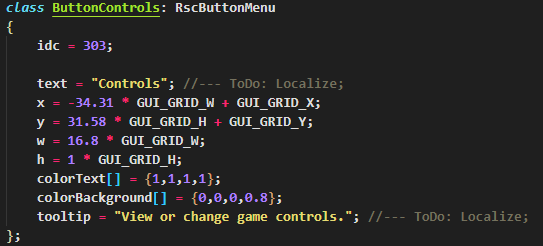

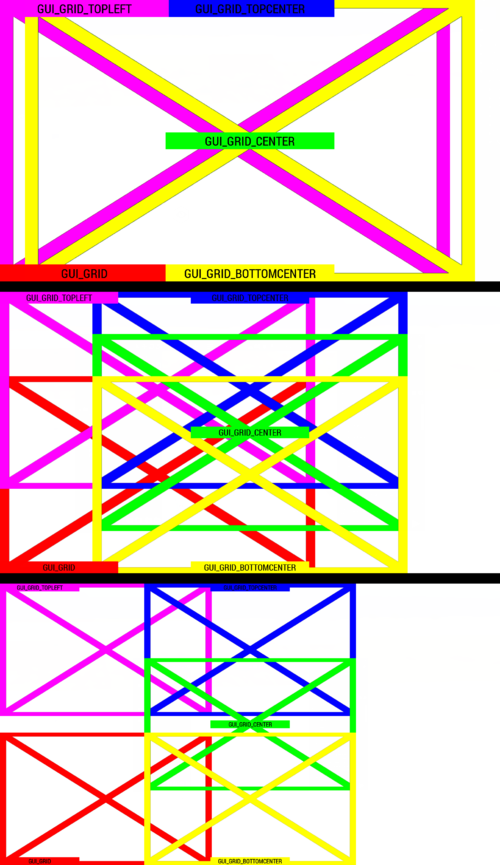


 distant axle
Use RscControlsGroupNoScrollBars instead
solid gyro
strange arrow
<@790272937994879047> The setup basically looks like this:
```hpp
class MyContro...
Awesome, thanks alot!
gleaming gale
how is the best way to make buttons but with images instaed of text? ( i need to change the images via script)
ive tryed with RscShortcutButton but cant find a way to change the image
the alternative im thinging is RscStructuredText and make all the eh to make act like a button
strange arrow
@gleaming gale Have a look up here: #arma3_gui message
outer oar
outer oar
```c
import RscText;
import RscPicture;
class RscTitles {
class KJW_Radiate_...
Anyone able to give feedback for this? I (I think very clearly) have no idea what I'm doing, just trying to make an image with editable text on it similar to ACE altimeter
topaz talon
outer oar
Anyone able to give feedback for this? I (I think very clearly) have no idea wha...
nothing wrong that i can see there
outer oar
topaz talon
nothing wrong that i can see there
Any issues with the command I'm trying to use?
gleaming gale
strange arrow
<@101779969457278976> Have a look up here: https://discord.com/channels/10546228...
yea i wanted to change the background color too, but i dont think is posible with that :/
:sad:
outer oar
How would I check the display with cutRsc is appearing? Trying to figure out if the command fails or not
Aha, for some reason it appears with
"someLayer" cutRsc ["KJW_Radiate_Counter", "PLAIN"];
private _display = uiNamespace getVariable "KJW_Radiate_Counter";```Ok, next question -- how do I change the RscText text's font? Google doesn't seem to be helping me; need a font with no drop shadow
outer oar
Nvm, think I'm all figured out on the GUI side of things now
 ebon hearth
hey guys
I'm looking for the rsc that corresponds to the "pause menu" if this makes sense.
I've been through https://community.bistudio.com/wiki/Arma_3:_ctrlCreate/classnames, but I'm not even sure it's what I'm looking for...
burnt token
RscDisplayInterrupt
dark light
Is there a native way to do vertical text in the UI?
dark light
Also, I couldn't find documentation on it, but sometimes controlsGroupCtrl and I assume displayCtrl as well return a scalar instead of a control. E.g. in onLoad's when the child controls do not exist yet.
Is there anything I can do with that scalar? It feels intentional, it could just return no control instead.