#arma3_troubleshooting
1 messages · Page 164 of 1
 cunning trench
 mental river
where did you get the game?
cunning trench
steam
mental river
then why does it say v2.06?
cunning trench
ya i noticed im fixing now
mental river
then run the game again
cunning trench
mental river
I don't see anything wrong in there
cunning trench
could it be my cpu? it's pretty old
cunning trench
when i got a new ssd and downloaded arma to it and deleted it on my hdd
mental river
cunning trench
when i got a new ssd and downloaded arma to it and deleted it on my hdd
open task manager and check what your idle disk and CPU percentages are
cunning trench
with arma open?
cunning trench
cpu is like 5% to 25% and my ssd is 0%
with arma open in the menu my cpu is around 80% ssd is like 2%
mental river
you're not doing anything in the menu?
cunning trench
no
mental river
80% is too much then
cunning trench
ya i need a new one
mental river
I have a weaker CPU and it's at 30-40 %
the problem is your Windows
not the CPU
or maybe the SSD
cunning trench
is there any thing i can do?
cunning trench
no
 rustic eagleBOT
Steam file verification process:
Right Click on game -> Local Files -> Verify Integrity of game files
Arma 3
Steam Workshop Mod repair process:
Open Launcher -> Right Click on mod -> Repair
The first process will automatically verify Steam Workshop items as well.
mental river
if it doesn't help, try running the game as admin
cunning trench
ok
mental river
also try running the game offline (set Steam to offline)
also try setting your virtual memory size to a constant value
equal to your RAM size (16 GB, 16384 MB)
 slim ridge
HOW TO HAVE MAX FPS POSSIBLE IN ARMA 3
 pine kite
Set graphical options to autodetect. Reduce object distance and terrain distance to something appropriate for your moving speed. (2-3k for infantry/vehicles; more for planes; if you can't see the horizon because of hills, make it closer), disable PIP, reduce antialiasing/anisotropic filtering. Lower resolution if needed further.
Don't lower graphical options too much. Processing is moved to CPU instead of GPU.
cunning trench
mental river
if it doesn't help, try running the game as admin
nothing worked
pine kite
Not sure if this is the cause, but select to not download mods and games in Steam while the game is playing. I've heard Steam tries to do that with all your Workshop mods. But that may have been a fixed bug.
 burnt imp
pine kite
Set graphical options to autodetect. Reduce object distance and terrain distance...
burnt imp
pine kite
Set graphical options to autodetect. Reduce object distance and terrain distance...
THIS, is the most concise to put it. Thanks @pine kite
 astral swallow
yo anyone know why my game freezes for like 20 - 30 seconds everytime i get into a vehicle or i leave a vehicle?
 ocean cosmos
Whats your render distance at
ocean cosmos
thats why then
astral swallow
ocean cosmos
thats why then
dont think so, i tested making the graphics at minimum and reduce render distance and its still the same thing
and i had the graphics at ultra with render distance at 12000 for a while and nothing bad happened
astral swallow
man
even at minimum settings it still happens
and it didnt use to happen before
just now
i always had settings at ultra
ocean cosmos
are you using any mods
astral swallow
yes
 stuck silo
For issues with the mission editor. Should I be here, or in #arma3_scenario?
pine kite
astral swallow
yes
Consider selectively disabling some one at a time (if they are not dependent on each other) Some mods can be a performance hog.
 ionic light
I cant configure targeting camera on helicopters to trackir. In fact, it doesn't respond to anything - keyboard, mouse. I turned off all mods to be sure. What options section corresponds to targeting camera movement directions?
 shy escarp
When i upload my mission file to my server the difficulty settings dont save. You can still see enemies on the map and friendlies. As well as when someone kills someone in the bottom left. How do i disable all this.
 umbral narwhal
It's not related to the mission file.
shy escarp
how can i change it then @umbral narwhal
shy escarp
my config files doesnt look like that for my server through host havoc
would i add thatr script in ?
pine kite
Put the entire class DifficultyPresets with encompassing curly brackets in.
It is not there by default.
Be aware that the mapContent parameter is now split up into 3. Check that description link for details.
 marble marsh
Hello again, I'd like to know how to hard reset Antistasi on a dedicated server. When I log in as admin in the game I cannot change the paramaters for some reason. When I change the server.cfg file, the mission won't load.
umbral narwhal
There are only two reasons that you can't change the parameters. 1. Not logged in as admin, 2. Mission already running. Point 2 is often caused by -autoinit in the server command line.
marble marsh
umbral narwhal
There are only two reasons that you can't change the parameters. 1. Not logged i...
I do log in as admin, but I still can't change the in-game parameters for some reason, and -autoinit? should I disable it?
umbral narwhal
Yes, you should.
marble marsh
umbral narwhal
Yes, you should.
It's working but not really, the black screen and initializing comes back with a bonus of being kicked by battleeye
would resetting the whole server work as well?
umbral narwhal
I don't know, you just introduced three things which are unrelated to changing the parameters.
umbral narwhal
[profilename].vars.arma3profile. Also stores a lot of mod config settings though, and other mission saves.
marble marsh
Hypothetically, deleting the mission save would revert it to its original state right?
 orchid zodiac
so im having this error and ive tried everything to fix it and nothing works
pretty much everytime myself and anyone else tries to load into a dedicated server that my Arma 3 Unit owns we get this ace error ive rinstalled updated all ace mods within server side and clientside and still nothing works
whats odd about it is the servers console dosnt throw up any errors when reading the mission only the clients get this message
my self and a few others already verified our files and still nothing
any luck can help
 celest mantle
Anyone ever hear of having 15% CPU usage and 1 % GPU while playing 60% memory and i cant seem to get good frames just got a new new AMD card and have a good cpu. feel like im being held back somewhere
orchid zodiac
graphics ?
celest mantle
orchid zodiac
graphics ?
?
orchid zodiac
maybe your graphics settings is too high or yourew veiw distances is to high
lower you view distance and usally does the trick
celest mantle
orchid zodiac
lower you view distance and usally does the trick
ya got 20+ frame boost but my cpu and gpu are still barely being used by arma lol
 steady hawk
That's normal. Arma 3 doesn't use much potential
celest mantle
steady hawk
That's normal. Arma 3 doesn't use much potential
so it just isn't optimized properly and 50ish fps at 1440p is about as good as im gonna get haha?
celest mantle
works well considering xD
 pearl sorrel
Under throttling exists also.. if your graphics are too low you'll cause fps issues etc.
 static fog
This error pops up just bought the game and i wanna play some campaign

(I didnt download mods)
steady hawk
!steamverify
rustic eagleBOT
Steam file verification process:
Right Click on game -> Local Files -> Verify Integrity of game files
Arma 3
Steam Workshop Mod repair process:
Open Launcher -> Right Click on mod -> Repair
The first process will automatically verify Steam Workshop items as well.
steady hawk
Verify via this
static fog
steady hawk
Verify via this
wait me?
steady hawk
Yes
 thorn apex
i need some help, I'm having trouble explaining, whether it's a sudden graphic bug or addon problem.
There is a video, but I think it will be difficult to explain other things.
 tawny geyser
hello, having an issue with
 Packets acknowledged in an incorrect order```

server loads to the mission, you can select role, then it kicks you back after loading, select role again, then it hits it with that and you cannot continue

https://zerobin.net/?46955449955cbfe7#HzsIziwb7X7FWVQapJOkgbvvkb+ZH/KC932pRT5scE0=

theres the Server RTP

and local

https://zerobin.net/?d9d7fcd406393894#GD8gSfbvlcD9wxKh0GcLULUDiBi398B4SSi9BWbW0zw=you have many corrupted/missing mods
as far as I see all related to Operation Trebuchet
tawny geyser
wild. cause other mission files with the same mods are working
ill just reinstall and hope for the best
thanks homie
rustic eagleBOT
Steam file verification process:
Right Click on game -> Local Files -> Verify Integrity of game files
Arma 3
Steam Workshop Mod repair process:
Open Launcher -> Right Click on mod -> Repair
The first process will automatically verify Steam Workshop items as well.
mental river
and make sure you have loaded all dependencies for all of your mods
tawny geyser
i absolutely have got them all loaded. but ill try that
mental river
maybe you have but your server has not
@tawny geyser yes, many missing mods on your server
in your rpt search for list of mods
those that say NOT FOUND or EMPTY are not found
tawny geyser
hm, i installed them all last night, i wonder if they just didnt install correct. aight ill try this
pine kite
marble marsh
Hypothetically, deleting the mission save would revert it to its original state ...
Yes, but you are throwing the kid away with the bathwater if you delete it.
Use the mission parameters to not load last save, and you start with a clean slate. Then you do a persistant save.
pine kite
thorn apex
There is a video, but I think it will be difficult to explain other things.
You should be able to place a link to the video here, other than that: #videos_arma
 grim tinsel
@tawny bearwhat are the names of the file(s) with the wrong signatures?
 tawny bear
Hello, I have a bug with arma 3, when I connect to modded arma 3 servers, I get "wrong signature..." errors, while my addons are all signed, my game files are normally not modify. The bug persists even after reinstalling the game.
tawny bear
grim tinsel
<@533180882865881088>what are the names of the file(s) with the wrong signatures...
it depend
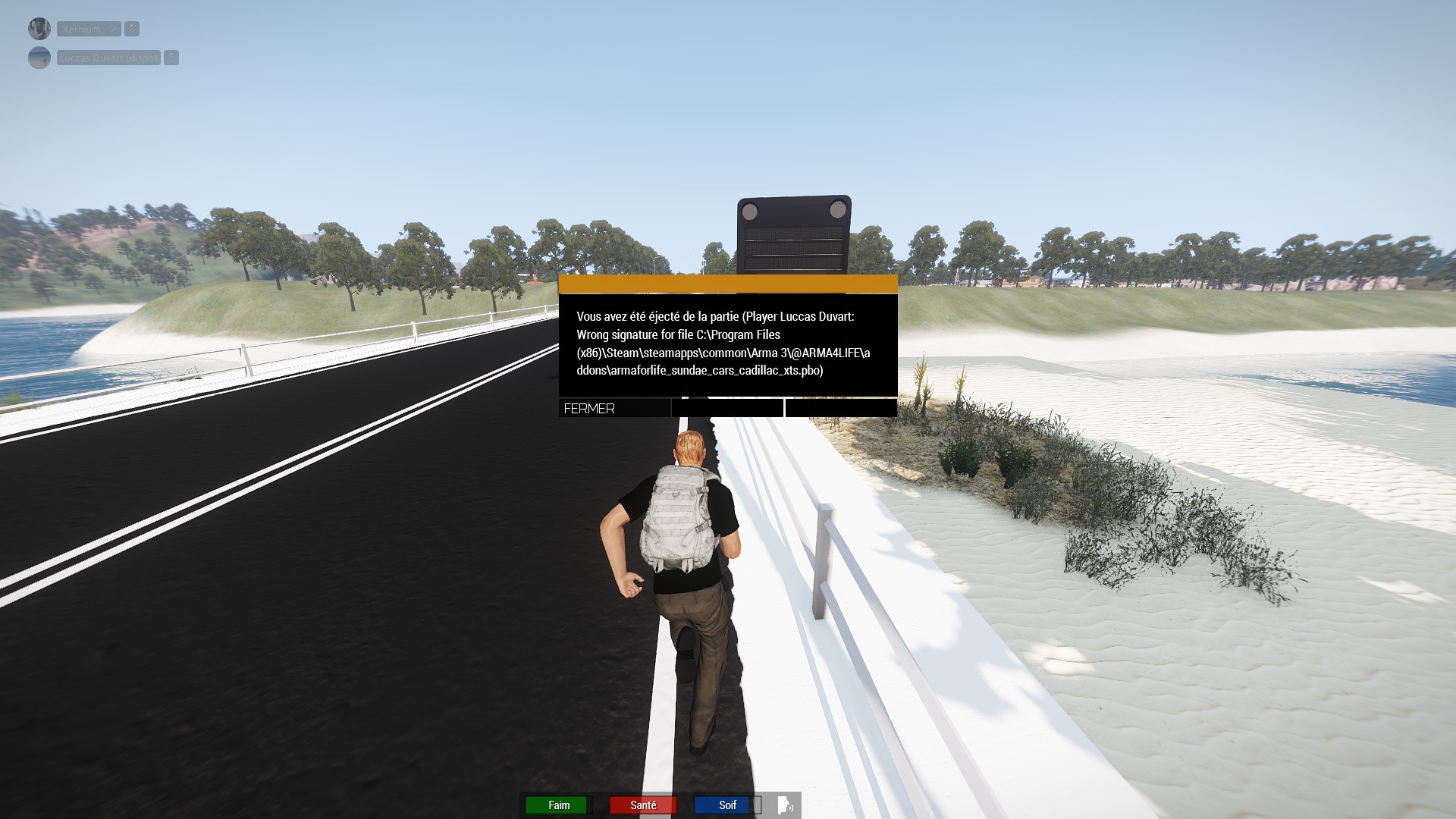
for example
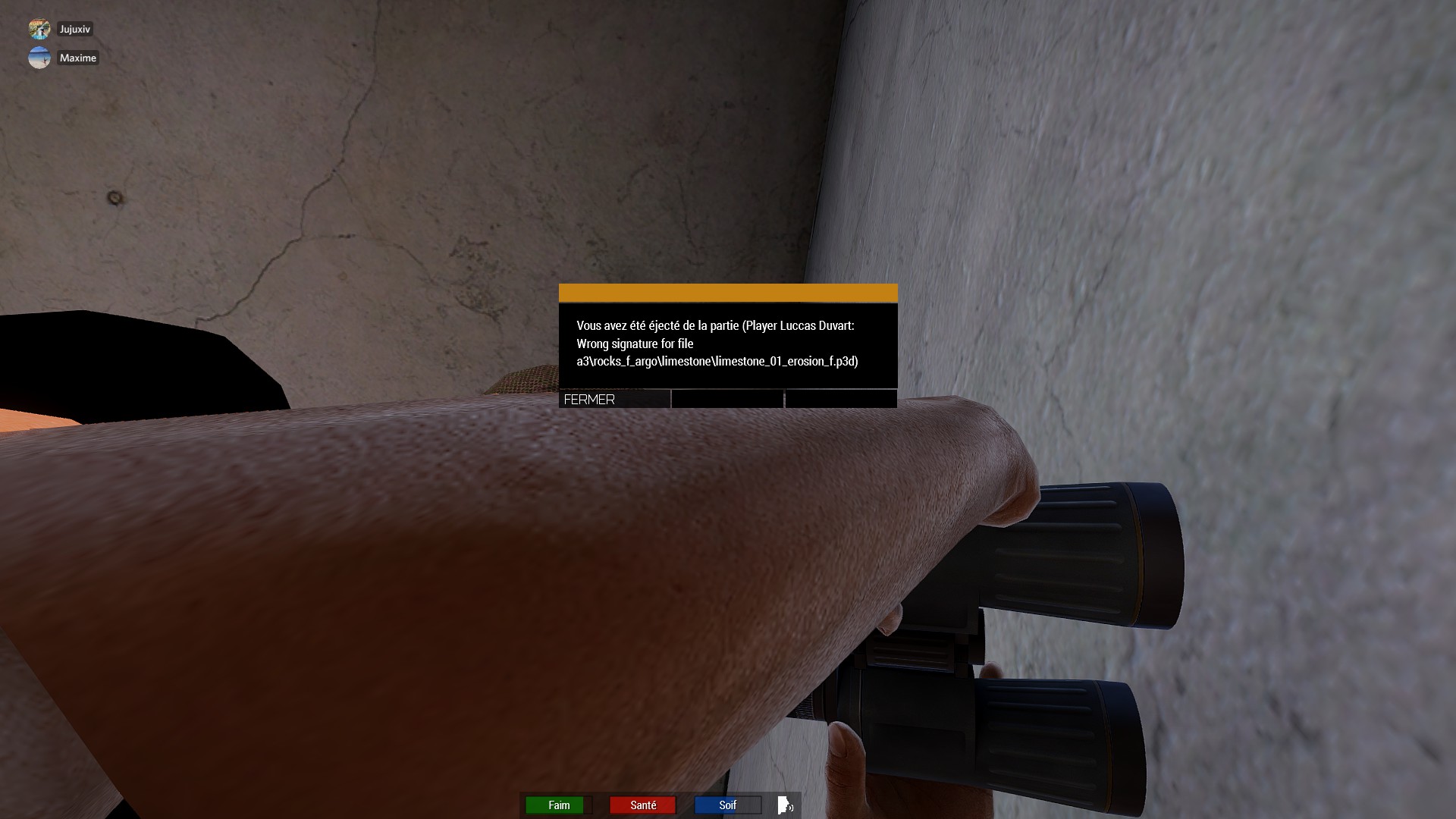
or this one ⤴️
mental river
tawny bear
it depend
it's a connection problem
I think it's related to battleEye
but just to be safe verify your game files first. I doubt it'll help tho
rustic eagleBOT
Steam file verification process:
Right Click on game -> Local Files -> Verify Integrity of game files
Arma 3
Steam Workshop Mod repair process:
Open Launcher -> Right Click on mod -> Repair
The first process will automatically verify Steam Workshop items as well.
mental river
the last time I had that problem, it went away when I switched to the perf branch
but it was so long ago and I'm not sure if it'll help now
tawny bear
mental river
it's a connection problem
Internet connection ?
tawny bear
mental river
https://community.bistudio.com/wiki/Arma_3:_Steam_Branches
i gonna try
@mental river
mental river
tawny bear
Internet connection ?
idk. but it's definitely related to server parameters too
tawny bear
mental river
the last time I had that problem, it went away when I switched to the perf branc...
You think i should switch to the developpement one ?
mental river
no
dev branch doesn't work in MP
only profiling branch is compatible
you need the CautionSpecialProfilingAndTestingBranchArma3 access code (enter in Steam > Arma 3 > Betas)
tawny bear
 mental river
yeah
tawny bear
mental river
you need the `CautionSpecialProfilingAndTestingBranchArma3` access code (enter i...
okay, tkink, i will try !
tawny bear
mental river
yeah
Where you find this solution ? Because i never saw that before. Tkx
mental river
I'm not sure if it'll solve your problem. like I said it was a long time ago and I'm not sure if it was even the profiling branch that solved my problem
anyway the profiling branch is well-known in the community. it receives a lot of small updates between major stable updates. see #perf_prof_branch
 mental river
tawny bear
Thank you anyway, it's very nice to try to help me
mental river
tawny bear
Thank you anyway, it's very nice to try to help me
have you verified the mod?
tawny bear
mental river
have you verified the mod?
I can't beacause it's Arma 3 sync mod
Arma 3 sync doesn't find any problem
tawny bear
@mental river Finaly, i think you solve my problem, after have restarted my computer, and change my branches, I reconnected twice on the first try without getting kicked
 fringe salmon
Hello, this may be more of a Arma tools issue but for some reason I can't launch my Arma 3 Publisher, I can launch everything else in my Arma 3 tools except that, I was going to edit my mod I post and noticed this, if you know how to fix this let me know.
mental river
fringe salmon
Hello, this may be more of a Arma tools issue but for some reason I can't launch...
try clearing your publisher settings
this
fringe salmon
That worked thank you.
 fathom tiger
Is there a module in editor that allows me to spawn in modded vehicles while in the scenario? trying to spawn in some modded planes but can only seem to do it in eden editor.
grim tinsel
fathom tiger
Is there a module in editor that allows me to spawn in modded vehicles while in ...
Take a look at Zeus (/ Game Master ingame)
fathom tiger
grim tinsel
Take a look at Zeus (/ Game Master ingame)
alright thanks
fathom tiger
grim tinsel
Take a look at Zeus (/ Game Master ingame)
im not seeing that module. are you saying i need to place the game master in eden and then do something with it in the scenario?
grim tinsel
yeah place the game master module in 3den and open it and set the allowed objectes to all objects
then press Z/Y ingame
fathom tiger
got it thanks for the help, trying to get into Zeus stuff
tawny bear
@mental river Finally, after testing your solution since yersteday, it don't work 😭
 warm marsh
while using imagetopaa in arma tools it just says failed to process
 uncut trellis
mayhaps wrong format, wrong resolution
tawny bear
To summarize my problem. When I connect to multiplayer servers with only the server addons activated, I get kicked in a loop for "wrong signature...". We have already tried to reinstall my game, my addons, to reset my game as much as possible, to change profile. To remove all mods except basic ones. To put them precisely the same parameters as my friends. And so far no solutions, we even changed the branches.
uncut trellis
have you tried other servers?
are you joining the servers through the launchers server browser
tawny bear
uncut trellis
have you tried other servers?
yes, it the same problem
tawny bear
uncut trellis
are you joining the servers through the launchers server browser
both
i have testing the two
umbral narwhal
Which mod does it say has the wrong signature?
tawny bear
That depends, it's all the time different
for example

also... I had may be 100 different error
 umbral narwhal
What often happens is that steam fails to update mods properly, sometimes leaving them with both old and new signing files, sometimes broken in other ways.
tawny bear
I have intall this one today
umbral narwhal
You've never had it before?
tawny bear
umbral narwhal
You've never had it before?
i have this problem since 6 months i think
umbral narwhal
That specific mod.
tawny bear
nobody was able to help me
tawny bear
umbral narwhal
That specific mod.
No, it's the same problem with other mod for other server
umbral narwhal
sighs
You're assuming it's a general problem. I have never seen it be a general problem.
uncut trellis
this basically just sounds like this Arma 4Life mod is broken
umbral narwhal
Sometimes it's the server that's not running the latest version.
uncut trellis
is it from steam workshop?
umbral narwhal
I don't know how often these get updated.
tawny bear
uncut trellis
this basically just sounds like this Arma 4Life mod is broken
i'm the only people to have this problem on the serveur, and they have lot of player. And in some other server, i have the same problem
and their signature are resigned all update
uncut trellis
are the problem mods from steam workshop?
tawny bear
uncut trellis
is it from steam workshop?
arma 3 sync for this serveur
by the workshop for other one
tawny bear
A other one

this time it's not a problem about the server's (modding) file, but arma 3 file
mental river
Well like I said that problem is not related to your mods or files at all
It's some kind of connection problem
But I don't know exactly what
Try playing on another server
umbral narwhal
It's possible that your PC is just corrupting everything it touches, although I'm surprised Windows is holding up in that case.
ocean cosmos
Looks like the server or A3sync isn't working -- given some of the stories I've heard I'd be inclined to believe it's A3 sync playing up
tawny bear
ocean cosmos
Looks like the server or A3sync isn't working -- given some of the stories I've ...
may be
tawny bear
umbral narwhal
It's possible that your PC is just corrupting everything it touches, although I'...
i think not
tawny bear
mental river
Well like I said that problem is not related to your mods or files at all
it's most likely
tawny bear
mental river
Try playing on another server
It's the biggest french server, and a whitlist one, so i hope i will find a solution 🥲 And i had the same same problem when i tried on another server
tawny bear
And when i look signature logs, arma 3 find nothing...
 warm plank
Do you have checked your harfware just to be sure?
Maybe your ssd or HD is broken, maybe its undable to save all files correctly
 last dawn
Can someone please help this happens each time I try to play Arma 3? It's my first time playing.
 uncut trellis
Try verifying your game files on steam
last dawn
aight
last dawn
uncut trellis
Try verifying your game files on steam
fixed, thanks
fringe salmon
Hi
this game runs at extremely low FPS
for some reason
it's 30 fps on main menu, it's 5 fps when I load in any scenario
things i've done so far:
-restart PC
-set arma process on task manager to high priority
-reinstall directx
-update drivers
-verify files
-enable HT, set 6 cores (my cpu has 6 cores), disable intro and all
-set graphics settings to low
-reinstall Arma
and none of them worked
specs:
-intel i5-10400f
-16gb ram
-RTX 2060
-512 gb SSD (arma is installed in ssd)
all the other games run fine
the only thing I noticed so far is that this game refuses to utilize CPU
uncut trellis
fringe salmon
the only thing I noticed so far is that this game refuses to utilize CPU
dont use low settings, use autodetect first then adjust view distance, clear all launch parameters too
and first test without mods
fringe salmon
uncut trellis
dont use low settings, use autodetect first then adjust view distance, clear all...
view distance doesn't do anything
fringe salmon
uncut trellis
and first test without mods
already did
with or without it's still 5 fps
it's also the case with launch parameters, they all result in 5 fps
no matter if theyre cleared or no
uncut trellis
if nothing affects it then it sounds like some sort of hardware issue
fringe salmon
uncut trellis
if nothing affects it then it sounds like some sort of hardware issue
but all the other games run fine
fringe salmon
uncut trellis
all games dont work the same way
yeah
maybe arma is just bad
now
Idk what caused this tbh
I joined some multiplayer server, it lagged a lot and suddenly everything lags
even singleplayer
uncut trellis
since it works for most people just fine, the problem lies somewhere in your setup
singleplayer is only way to properly test issues like this
multiplayer fps varies on server performance
fringe salmon
uncut trellis
singleplayer is only way to properly test issues like this
it's 5 fps bro
uncut trellis
I get that
grim tinsel
fringe salmon
I joined some multiplayer server, it lagged a lot and suddenly everything lags
did singleplayer etc. work fine before that, or?
fringe salmon
grim tinsel
did singleplayer etc. work fine before that, or?
Yeah
it used to work great
fringe salmon
one two, I join a friend's server and bam, 5 fps on everything
fringe salmon
uncut trellis
so what has happenend since it worked?
I joined a friend's server
fringe salmon
uncut trellis
and when did this start?
after I joined a friend's server
that's about it
uncut trellis
did your friends server run mods?
fringe salmon
uncut trellis
you could try clearing your profile
how do I do that
uncut trellis
@grim tinsel did we have bot command for profile folders?
fringe salmon
uncut trellis
perhaps some settings have corrupted
is it deleting a folder or what
uncut trellis
fringe salmon
how do I do that
the profile is stored in your user files
 uncut trellis
and yes deleting the folder makes arma create new one. You can also copy it somewhere as backup
its the arma 3 folder there
which is the default profile
unless you have made alternate profiles
fringe salmon
uncut trellis
unless you have made alternate profiles
I have
do I delete this folder
uncut trellis
then those should be stored in the other profiles folder yes
delete or move it somewhere so you have a backup
grim tinsel
uncut trellis
<@159639570638438401> did we have bot command for profile folders?
I think not? would props be good to add to the command suggestion doc
uncut trellis
fringe salmon
its still 5 fps
make sure you dont have any fancy enhancements on in your gpu driver settings, those can break frames
and does your computer also have integrated gpu?
fringe salmon
uncut trellis
make sure you dont have any fancy enhancements on in your gpu driver settings, t...
how do I see my driver settings
fringe salmon
uncut trellis
and does your computer also have integrated gpu?
what's an integrated gpu
uncut trellis
gpu integrated into your motherboard
probably not
and nvidia control panel most likely
 uncut trellis
I dont know, I dont have Nvidia card
fringe salmon
Yeah I don't mess with gpu driver settings
burnt imp
fringe salmon
Hi
Watch this video for Arma 3 specific FPS boost
https://youtu.be/GktBSZcglFk

We all have gotten stuck to 15 or 30 frames per second in Arma 3 despite your beefy rig. It is NOT optimized to any level. The game does NOT even use all of your CPU and GPU. See each step to increase your performance.
| Downloads
Intelligent Standby List Cleaner | https://www.wagnardsoft.com/ISLCw
Process Lasso | https://bitsum.com
Automatic V...
fringe salmon
burnt imp
Watch this video for Arma 3 specific FPS boost
https://youtu.be/GktBSZcglFk
it didn't work
fringe salmon
@uncut trellis Do you have any more advice?
uncut trellis
sorry, dont have more. its something that has happened on your computer, Arma has not changed
fringe salmon
Damn.
uncut trellis
one thing you could do is get your rpt log file and link that here. (after you start game, no mods, and go to single player and get the low fps)
!rpt
rustic eagleBOT
Arma RPT
Arma generates a .rpt log file each time it's run, which contains a lot of information like the loaded mods, or any errors that appear, this log file can be very useful for troubleshooting problems.
To get to your RPT files press Windows+R and enter %localappdata%/Arma 3
Additionally see the wiki page for more info: https://community.bistudio.com/wiki/Crash_Files
To share an rpt log here, please use a website like https://sqfbin.com/ to upload the full log, that way the people helping you can take a look at it and try to figure out the problem you're having together with you.
Note: RPT logs can hold personal information relevant to your system, the game or others.
uncut trellis
@fringe salmon
fringe salmon
Oh yeah one more thing I noticed @uncut trellis
when I pause and wait for some time and unpause, that time I spent waiting will be without lag when unpaused
apparently
fringe salmon
rustic eagle
tawny bear
warm plank
Do you have checked your harfware just to be sure?
Maybe your ssd or HD is brok...
I can try to install in my second ssd
warm plank
tawny bear
I can try to install in my second ssd
or just use the program "crystal disk info" and "cystal disk mark"
crystal disk info says if there is a fatal error on you SSD
and crystal disk mark can check the speed of the SSD ( should be around 500 mb/s reading and writing (maybe a little bit less or more depends what SSD do you have)
tawny bear
warm plank
or just use the program "crystal disk info" and "cystal disk mark"
crystal disk ...
okay, i gonna try, but i thnik it's not my problem, because all other game work (gta, gmod, wolfesntien...)
thanks
warm plank
fringe salmon
Oh yeah one more thing I noticed <@150949769953411072>
maybe stupid question but have you simply tries to verify your game files with steam
fringe salmon
warm plank
maybe stupid question but have you simply tries to verify your game files with s...
yes
warm plank
k
warm plank
tawny bear
okay, i gonna try, but i thnik it's not my problem, because all other game work ...
last idea is to delete arma complete and try redownload
and there mods, or only there mods, depends if the signature miss match just from mods or from the maingame too
warm plank
fringe salmon
yes
mhh i just wanna try diffrent thinks like re install drivers, or the complete arma game because we all know the verification with steam is sometimes useless
fringe salmon
fringe salmon
things i've done so far:
-restart PC
-set arma process on task manager to high p...
@warm plank
nah
seems like Arma is a piece of shit
warm plank
do you checked the windows engery saving options
fringe salmon
fun game though
warm plank
arma have not much fps thats right but its not the games bad if your mate do some crasy shit with his server
warm plank
warm plank
do you checked the windows engery saving options
sometims change windows to power saving mode and your cpu clocks just with 3GHz and not more...
and be sure arma starts the 64bit .exe and not 32bit
32 bit is 💩
uncut trellis
fringe salmon
yes
the max memory settings you got in the startup seem wonky to me. I would not use them
fringe salmon
i FOUND A SOLUTION
caps
It's fucking Battleye
@uncut trellis
fucking shit ac
Pin this btw
battleye causes lag for some, it's a good idea to turn it off
uncut trellis
well most servers wont allow you to join without it
fringe salmon
uncut trellis
well most servers wont allow you to join without it
Why
that's wrong
apparently one more guy had the same problem in 2016
ocean cosmos
battleye is anticheat
grim tinsel
^
 bleak sluice
how do i fix this? it never had a problem

 quaint jewel
delete your ace mod files and redownload
 worthy rover
Yo can someone help with the dlc for marksmen becuase it says manage you dlc but i have no idea how toi do that
steady hawk
Excuse me?
worthy rover
My dlc does not work for some reason
grim tinsel
worthy rover
My dlc does not work for some reason
Sorry, what part of the dlc isnt working?
worthy rover
The marksmen
steady hawk
Marksmen is not working, at what context?
grim tinsel
Ye what part of it
worthy rover
Its says mange you dlc and when i went to manage it, it still says exit the game and go manage your dlc
worthy rover
yeah
steady hawk
...Just in case, not with DM or VCs, just screenshot them
worthy rover
ok
So i bought the marksmen and then it says at the end manage dlc here

This i came at this screen and this i what it gave me so i thought it already managed?
 steady hawk
And?
I don't really know what is the issue
Try not to troll someone in this server.
worthy rover
And when i join an multiplayer server it says still need perks for the marksmen
steady hawk
What is the perks? KoTH?
worthy rover
Let me take an screenshot ingame for you
steady hawk
...Well, I'm guessing that whatever you say, perks? is not even a part of Marksmen DLC
worthy rover
Nevermind i figured it out myself thx for support
steady hawk
i figured it out myself
This is not really the way to conclude a troubleshoot in IRC - better to write what it was
worthy rover
steady hawk
> i figured it out myself
This is not really the way to conclude a troubleshoot ...
oh ok my bad so i hadded to but the slot ingame for maskmen so that why i dod not have the perks
steady hawk
...In KoTH right?
pine kite
Maybe he didn't choose a marksman role on the role selection screen?
 fleet spindle
should that happen?
 steady hawk
Shouldn't, but it does very very often
burnt imp
fleet spindle
should that happen?
It's normal now and there's nothing we can do about it
fringe salmon
i have troubleshooting
pine kite
Explain your trouble with shooting. 😉
 golden nova
I'm trying to play a singleplayer scenario, I have subscribed it on workshop and it is visible in my scenarios list in-game. However when I try to play it, a window appears showing "Downloading from steam", quickly downloads the scenario and throws out "Steam operation failed". Is this a bugged mission or something broken with Steam?
redownloading/resubscribing doesn't help no matter what I restart in what order. Obviously I can just download it through steamworkshopdownloader and play it "the old way" through copying the files to My Documents but the fact it does not behave normally concerns me
 pale sentinel
How may I use an M112 Demolition block to blow open a door without using the entire charge? My unit does not use the M112 Breaching charge in case you are wondering. Someone said you can activate a trigger that uses a part of it but I'm not sure. Please help.
 bronze river
probably a modded stuff, in vanilla you cant just trigger a half of it
 hybrid ivy
hello, i downloaded the game today and it keeps on crashing with a Error Code
 hybrid ivy
hello, i downloaded the game today and it keeps on crashing with a Error Code
hybrid ivy
hybrid ivy
hello, i downloaded the game today and it keeps on crashing with a Error Code
I also verified the game files already didnt work
fringe salmon
in simple works
 weary sky
Did you check the list on https://community.bistudio.com/wiki/Arma_3:_Unusual_process_exit#0xC0000005_-_ACCESS_VIOLATION
Usually it's a driver issue, especially since it's a new install
fringe salmon
weary sky
Did you check the list on https://community.bistudio.com/wiki/Arma_3:_Unusual_pr...
still crashes for maki
@weary sky how does one change system allocator
weary sky
In the Launcher go to the Parameters -> All Parameters and scroll halfway the page. There you can find 'Memory allocator (64bit)'.
Enable the checkbox and select a different one to test.
 bright fulcrum
Hello i need help , i cant connect into any multiplayer server including officials and I need help fixing it , I have my internet provider open all my ports and DMZ , I did a full reinstall to the arma 3 game including registry and appdata , And still cannot enter any multiplayer games .
The furthest i got is when I joined a warlords 2.1 redux server by officials , I picked a team and clicked ok , after that it got stuck on receiving data almost full bar. Other game modes cant even load into role assignment menu. Please help I would gladly appreciate that.
bright fulcrum
And showcases and scenerios are working good except that I have a bottleneck of 40 fps while I have rtx 3070 ti and 8 cores processor.
10% usage for both
but i dont care about that , i just want to play online on official servers\
Right now i tried to join a zeus server and it said in the chat "stavnu uses modified files" How to remove modified files please help.
 hidden shore
Disabling all mods in your launcher should fix that
bright fulcrum
i dont have mods anyways but i will try
hidden shore
Its odd that it would display that though considering you said you reinstalled...
Hmm
bright fulcrum
exactly
hidden shore
Perhaps your version doesnt align with the servers... Are you using the current release of arma?
bright fulcrum
I have the steam version maybe thats the problem?
hidden shore
No, there is only the steam version
bronze river
modified data wont be an issue
if you can still join an official server then its not a problem
bright fulcrum
But it wont let me into any server
I join , then It says in the chat stavnu uses modified data, stavnu connected
bright fulcrum
bright fulcrum
Hello i need help , i cant connect into any multiplayer server including officia...
.
only on warlords 2.1 redux it will let me get into role assign menu and then when I click okay i will be stuck forever on the receiving mission file
any other gamemode it wont even let me load into role assignment
and if it does , It would be blank forever.
hidden shore
What happens when it doesn't let you? Does an error pop up, does it just switch back to the server select screen, does it crash?
bright fulcrum
sometimes crashes and sometimes just doesnt work
I can hear the sound of the game though
like the water and or the forest
hidden shore
Can you post the rpt file?
bright fulcrum
how do i do that?
hidden shore
I dont remember where its located, google. Where are Arma 3 rpt files
bright fulcrum
oh its mission files?
bright fulcrum
it wont let me upload it here
hidden shore
Ok, look at the bottom of it and see if theres anything obvious
bright fulcrum
I can send you in dms tho,
i sent you

is it normal?
@hidden shore
I tried fixing files in the steam , didnt work
hidden shore
Uhh, I dont know... it seems to be saying that it cant find arma, but thats impossible since you launched the game.
Im sorry but I've actually just sat down on a plane, I won't be able to help any further. Hopefully someone else here can step in
bright fulcrum
👍 have a nice flight
umbral narwhal
The Arma 3 not found in the mod table is normal.
bright fulcrum
hello john thank you for trying to help me
you can scroll up and read the problem
do you need like a clip or a recording of what i see?
umbral narwhal
nah, I'm off to bed
bright fulcrum
oh 😦 good night
can you at least tell me what to do to try fixing that problem
can somebody help ?
bronze river
verify files integrity on steam
bright fulcrum
bronze river
verify files integrity on steam
Did it more than 8 times confirmed
@bronze river
And its not connection problems cuz i have dmz (opens all of the ports to all of the internet)
bronze river
i have no clue on this issue, best is to wait for Dwarden or any other BI (or other veteran role) to reply here.
bright fulcrum
Just so you know i had this issue since i bought this so they didnt patch this yet
bronze river
where did u install the game? ssd or hdd
bronze river
try on SSD
bronze river
yes, the calculating speed on SSD is better than HDD
helps me when loading into a server
bright fulcrum
yeah i know its faster to load on ssd but on hdd eventually the game should load
right?
bronze river
just try it on HDD first
bright fulcrum
I have it on hdd
bronze river
just move install folder using steam if you still have room on SSD
bright fulcrum
I have enough room but you know if the ssd will be filled up the Operating System would work slower
bronze river
still gives enough boost to play arma
bright fulcrum
oh and when I start the game , The program in the slider in windows named "Arma 3 cpu = 4 ..... .. . "
I have 8 core cpu
but doesnt really matter , at least let me play a multiplayer session with my friends on official servers
fringe salmon
hey ive had an issue that ive been trying to fix for the past 3 days when i launch the game i get an error msg from what ive gathered i think im missing some type of file ive tryed
uninstalling the game
restarting my pc
uninstalling steam
and a few other things i cant seem to find a fix on my own though
i can run it on 32-bit but it crashes constantly can anyone possibly help?
bright fulcrum
bright fulcrum
Hello i need help , i cant connect into any multiplayer server including officia...
Help!!! 
fringe salmon
fringe salmon
hey ive had an issue that ive been trying to fix for the past 3 days when i laun...
i cant post a pic here but it says "The code execution cannot proceed because [its just empty here] was not found reinstalling the program may fix this problem"
fringe salmon
bright fulcrum
do a clean uninstall like i did
i have 3 times
bright fulcrum
Including registry
fringe salmon
i have
bright fulcrum
and %appdata%
fringe salmon
i have
bright fulcrum
steam apps?
fringe salmon
yep
fringe salmon
nope its 64 bit 4 days ago my game was running just fine
fringe salmon
fringe salmon
i cant post a pic here but it says "The code execution cannot proceed because [i...
this error pops up anytime i do
i can run it on 32 bit but it crashes after about 5 mins
bright fulcrum
bright fulcrum
Hello i need help , i cant connect into any multiplayer server including officia...
help me i wanna play so bad
bright fulcrum
fringe salmon
i can run it on 32 bit but it crashes after about 5 mins
check system requirements
fringe salmon
bright fulcrum
help me <:meowsweats:707626030613135390> i wanna play so bad
me too man i have no clue how to help though i had an freind with the same issue no clue how he fixed it though
fringe salmon
bright fulcrum
check system requirements
my system can run the game it has for the past 3 years
bright fulcrum
wow you played the game 😳 for me its impossible im tired of all of the singleplayer
btw to post the screenshots you need to verify rules
fringe salmon
i cant even play single player with how much its crashing
fringe salmon
bright fulcrum
btw to post the screenshots you need to verify rules

i have a completely fresh install of the game and a fresh install of steam
bright fulcrum
maybe if you verify the game integrity more than i did it would work 😂
fringe salmon
ive verified them twice
fringe salmon
the error i got is useless lol
bright fulcrum
but still very informative
fringe salmon
how?
bright fulcrum
because it says you have an error in the system and there is a problem with code execution
thats the information
all i get is loading screen that doesnt load and sometimes when It loads it gives a blank role assignment menu
and forever stuck receiving mission data
fringe salmon
i could ask my friend tomorrow when he wakes up how he fixed it
bright fulcrum
this game is live 20 years and that single bug is not fixed
bright fulcrum
fringe salmon
i could ask my friend tomorrow when he wakes up how he fixed it
Did he get the same problem!?!?!?
fringe salmon
as you yes
 fringe salmon
when he wakes up tommorow i can ask him
bright fulcrum
I am desperate for his help please ask him or maybe give me his username
fringe salmon
guy keeps going afk and falling asleep no-one that knows him can consistently get ahold of him
yet again ill ask when he wakes up
fringe salmon
fringe salmon
hey ive had an issue that ive been trying to fix for the past 3 days when i laun...
in the mean time any other ideas on how i can fix this
bright fulcrum
I have no idea you tried what I would of do
you can google maybe it has a solution
fringe salmon
i tried that and it didnt lead to much
 safe zephyr
question what mods add wind deffection as i knnow ace does but even with it off it wont stay off
steady hawk
It is very hard to assume if you don't say what Mods you load
safe zephyr
true i am getting screen shots rn
ummm
i cant send the screen shots so give me a sec to get the mod list in text
steady hawk
In the first place are you sure that wind deflects your bullets?
safe zephyr
yes as the bullets only move with the wind indicator but my ace wind defflection is off so that is why i am confused
i am in vc if you want to see it
steady hawk
That's... pretty a LOT of Mods
Untick overwrite mission perhaps?
Since I don't even use ACE don't even know how it should work
No as you said vanilla doesn't have wind deflection. You should have a Mod that adds that. One idea is to split the Mod list half, load first half, see if it does, if not, try another half
If the half does, split the half into half... so quad? IDK
safe zephyr
fixed it
pine kite
bright fulcrum
is it normal?
That is normal. There are 2 tables like that in the RPT file, one in the beginning with all DLCs and one further down with mods selected. It is hard to say which that is. Better to upload the file somewhere and provide a link to it.
pine kite
bright fulcrum
And its not connection problems cuz i have dmz (opens all of the ports to all of...
Arma 3 does not need anything special to join other server. Only if you want to host a server session yourself do you need to actively do something about your network (router port forwarding and open firewall ports). Your changes to the DMZ or what ever might actually have broken it working. I suggest you undo all of that.
pine kite
fringe salmon
Make sure you have Visual C Redist 2013 installed from Microsoft. It's not automatically installed by Microsoft. Though Steam should install it when installing Arma 3. Maybe this was skipped/interupted for some reason. Uninstall that and reinstall that if it seems to be there already. It may get corrupt on occasion.
 sharp nimbus
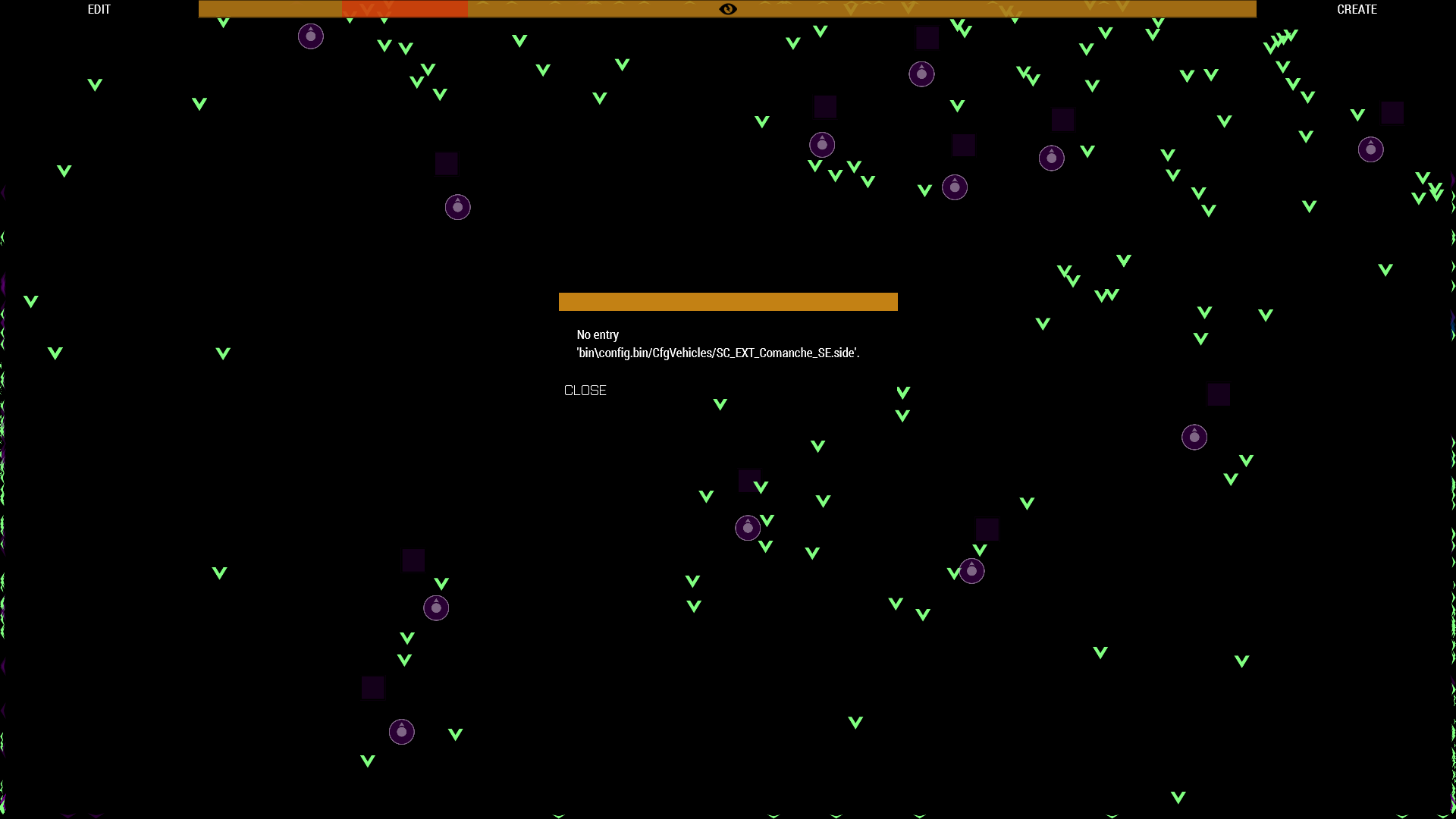
Why when loading up a save does it tend to remove a ton of the factions for me in zeus?
Figured this error message might assist:
https://i.imgur.com/WbNiaV6.png
In the Zeus spawn list where you spawn in different units a lot of the units are gone when I load the game after saving it
 bronze river
sharp nimbus
Why when loading up a save does it tend to remove a ton of the factions for me i...
bronze river
sharp nimbus
Why when loading up a save does it tend to remove a ton of the factions for me i...
were u saving when using mods, and load the save without mods?
sharp nimbus
bronze river
were u saving when using mods, and load the save without mods?
I reproduced the issue by doing this:
I restarted the scenario and saved it
I immediately loaded up the scenario
Units are gone
I didn't relaunch the game so the mods would have remained the same
could it be for some reason CDLC being enabled?
bronze river
not sure about that.
just remember big mission will also have big file size
possibly that ur saved is corrupt
sharp nimbus
bronze river
possibly that ur saved is corrupt
It happens every single time, so I have too many mods to functionally play arma 3?  I have 115GB of mods
bronze river
that's not that many, i once had 300GB+ of mods and all gone since i did a fresh uninstall
sharp nimbus
bronze river
that's not that many, i once had 300GB+ of mods and all gone since i did a fresh...
Then I don't see why it would corrupt every single time I launch it This bug is ruining Zeus for me
 feral phoenix
so my arma does this
when i try to join an official server

the next message is me getting kicked for this reason
i've tried verifying game files
 halcyon geyser
All of my steam games that were on my ssd said they were deleted, i fixed that by setting the steam libray folder to another folder, but now it says all my arma 3 mods are curropt? how do i fix this?
 pine kite
Repair each of them. Click the 3 dots.
halcyon geyser
i have, it just does nothing at all
feral phoenix
probably because there's no mod to actually repair
halcyon geyser
i can see them in the folder
feral phoenix
your steam library where aram was installed was deleted?
halcyon geyser
nope
feral phoenix
like fully deleted
halcyon geyser
I can still see everything there
fringe salmon
everytime i start arma 3 it says like "gft_Sec_ws needs characters_f_lxws
umbral narwhal
lxws rings a bell. Western Sahara?
fringe salmon
idk
bronze river
When you move install folder, the mod files are still in old install location (drive), that's why all red.
bronze river
umbral narwhal
lxws rings a bell. Western Sahara?
It is ws
fringe salmon
remove itor what
bronze river
Either verify game files or try to fix ws on dlc tab on steam
umbral narwhal
I don't know. Are you trying to run it? :P
bronze river
On in the launcher i forgot
fringe salmon
nope still doesnt work
fringe salmon
bronze river
Either verify game files or try to fix ws on dlc tab on steam
i got it as mod
bronze river
Wait what?
WS is Western Sahara CDLC
fringe salmon
i have as mod
bronze river
Can you give ss
fringe salmon
bronze river
Can you give ss
wait
pine kite
Western Sahara needs to be enabled (like any other cDLC) on the DLC tab of the launcher. It looks like a mod in the sense that the game (and server) loads it similar to a mod folder.
fringe salmon
i think i got it
pine kite
Make sure to know if you loaded it as Western Sahara compatibility mod. That only works for the gear and vehicles and factions. Not for the terrain.
halcyon geyser
bronze river
When you move install folder, the mod files are still in old install location (d...
How do i fix it then?
bronze river
i uh forgot,
pine kite
There is a hidden !Workshop folder in the main install folder of Arma 3. See if that leads to the right one. As it is a special kind of reference, like a short cut leading to another folder.
 fleet cipher
Whenever i play, if i have maybe over 10 units and some vehiccles etc, game almost always crashes, even without mods, and i also have more than good enough specs. Only error message i occasionally get is bad module info. Has anyone else this problem?
umbral narwhal
Are you overclocked?
halcyon geyser
pine kite
There is a hidden !Workshop folder in the main install folder of Arma 3. See if ...
Its gone for some reasonn
umbral narwhal
If it's crashing then it's malfunctioning rather than slow. i5-6500 is fine anyway.
fleet cipher
I once completely removed ARMA from my pc, and reinstalled it, but it still happens but a bit less
umbral narwhal
If it's random-time, random crash type and dependent on activity level then there's some active unreliability like RAM/PSU/CPU. If there are more repeatable triggers then it's more likely to be data corruption on disk, although may still have been caused by RAM or CPU unreliability in the past.
fleet cipher
Any way to FIx data corruption?
umbral narwhal
If there's more than one incidence of corruption then you should first address why it happened, otherwise re-downloading might make it worse.
run prime95, check temps etc.
pine kite
halcyon geyser
Its gone for some reasonn
Are you sure you are showing hidden files and folders? Because you are supposed to not see it if it is there. But because of you moving it to a different library it may have gone borked and not created the new reference to it. I don't know for sure how to repair this as I never had to deal with this myself. Maybe a complete reinstall of Arma is the better idea.
halcyon geyser
pine kite
Are you sure you are showing hidden files and folders? Because you are supposed ...
Yes im sure
I still have the mods tho because steam says, steam still detects the mods

and i can see them in the folder
pine kite
That may just be a summation of what you have subscribed. I would not trust that too much.
halcyon geyser
But then again i can see them in the folder
It just auto added a mod, so i know they are there
 pine kite
It's the linkage between the folders containing the particular mods to the container folder !Workshop in your new install that is messed up. I know it is based on softlinked folders which you can create yourself with a microsoft Windows command. But I don't know exactly what is required further for Arma 3 to work with that. I think a complete prune of the Arma 3 install folder and a complete reinstall be the more reliable way to do it. It will cost time and bandwidth redownloading mods. But a working one seems preferential to a download delay.
bronze river
ANZUS hmm now that's the name that sparks few controversies
oh well who am i to judge
halcyon geyser
pine kite
It's the linkage between the folders containing the particular mods to the conta...
Okay, will reinstall, for some reason my steam is downloading at 5 kb/s normally i get like 250 mb/s, guess i gotta wait 2 days to install arma
fringe salmon
pine kite
Make sure you have Visual C Redist 2013 installed from Microsoft. It's not autom...
i just tried it and it wont install it any other ideas to install it?
pine kite
No, if it does not install then your administrator priveleges in Windows are lacking. Or malware scanner is preventing you from runnning it somehow. It should install in Windows like any other program.
fringe salmon
pine kite
No, if it does not install then your administrator priveleges in Windows are lac...
Alright I'm reinstalling the game again i ran steam as admin to see if that helps
fringe salmon
pine kite
No, if it does not install then your administrator priveleges in Windows are lac...
How do i fix that my priveleges are lacking? Because i dont think its my maleware scanner
i ran both steam and the launcher as administraitor
pine kite
Your account has administrator role or it does not. If you don't (regular user) then you can elevate it by run as. But then it uses the admin account. If you are the administrator account then you should simply be able to run as and acknowledge when you want to install it. What makes you think it does not install?
fringe salmon
pine kite
Your account has administrator role or it does not. If you don't (regular user) ...
it doesnt give me a prompt to install and my game is still poping up with the error
pine kite
Check your Installed app list in Windows 10 settings. Uninstall Microsoft Visual C++ 2013 Redistributable. Then get this: https://www.microsoft.com/en-us/download/details.aspx?id=40784 Download the x64 one and double click it to install it. If it shows up in your installed apps again then it is ok. Then see if the error returns.
As Dedmen wrote earlier, it might also be DirectX that is lacking. Install this likewise, but choose your language: https://www.microsoft.com/nl-nl/download/details.aspx?id=35

Microsoft Download Center
The Visual C++ Redistributable Packages install run-time components that are required to run C++ applications that are built by using Visual Studio 2013. For an updated version of these redistributable packages, see KB 3138367.

Microsoft Download Center
De Microsoft DirectX® End-User Runtime installeert een aantal runtimebibliotheken van de verouderde DirectX SDK voor sommige games die gebruikmaken van D3DX9, D3DX10, D3DX11, XAudio 2.7, XInput 1.3, XACT en/of Managed DirectX 1.1. Onthoud dat dit pakket de DirectX Runtime die op uw Windows-besturingssysteem is geïnstalleerd op geen enkele manier...
fringe salmon
pine kite
Check your Installed app list in Windows 10 settings. Uninstall Microsoft Visual...
Thank you so fucking much ive been trying to fix it for days and it works
 edgy osprey
bronze river
edgy osprey
bronze river
you dont
bright fulcrum
pine kite
Arma 3 does not need anything special to join other server. Only if you want to ...
Valen , Thank you for your reply . I still cannot join any multiplayer session and please help me with the current problem . Thanks.
 somber zodiac
Can someone please help me with Arma? Whenever I click play it has an error thing and the exit code says 0xC0000135 - STATUS_DLL_NOT_FOUND
steady hawk
Try to reinstall Visual C++ 2013
somber zodiac
steady hawk
Try to reinstall Visual C++ 2013
How in the world do you do that
I have no clue with all of these files stuff
steady hawk
You can just Google it and follow what it says
somber zodiac
Ok. Thanks.
pine kite
bright fulcrum
Valen , Thank you for your reply . I still cannot join any multiplayer session a...
I don't know the solution to your problem. I don't have my game in a DMZ. For me it works, as for many others that don't have it either while connecting to a server. You normally don't need to open any ports for outgoing connections. So I suspect your changes actually made it worse. Or your internet provider does something special with your connection that causes the packets to get lost along the way. Since you claim that you at least partially connected to a server.
 viscid parrot
Has anyone had an issue where thye have to double tap their ptt key for ACRE radios?
 tribal condor
Anybody know why it takes forever for arma to start up?
pine kite
Too many mods. Or slow HDD?
tribal condor
pine kite
Too many mods. Or slow HDD?
Hdd?
pine kite
Mechanical hard drive.
pine kite
That number might be causing that yeah. And on multiplayer servers you might just get blocked for them.
tribal condor
Damn, mkay. Any way to make it go just a tiny bit faster? Or is the only solution yeeting some?
pine kite
Prune the mods you don't need.
tribal condor
Alrighty, thanks
pine kite
Depends on the kind of mods what makes them slow. Much scripting is probably taxing the CPU. But textures and models would tax your CPU GPU and memory.
burnt imp
tribal condor
Anybody know why it takes **forever** for arma to start up?
Do you have Arma and your mods loaded on an SSD?
tribal condor
burnt imp
Do you have Arma and your mods loaded on an SSD?
SSD? Sorry I'm not great with computer terms
I keep arma stuff on this one
 burnt imp
tribal condor
SSD? Sorry I'm not great with computer terms
burnt imp
tribal condor
SSD? Sorry I'm not great with computer terms
It's a type of Hard Drive. It's faster than a standard HDD. Look it up. I am willing to bet you do not have an SSD. If you switched, your load time would be way shorter
viscid parrot
Anyone have an issue with having to double press the PTT key in ACRE?
bright fulcrum
pine kite
I don't know the solution to your problem. I don't have my game in a DMZ. For me...
All packets are not lost when enabled DMZ, It is even unsecure to have it enabled since you can get connected from all around the world with all ports open , It never blocks packets. This supposed to have any problems with the files maybe? I'm desperate for help.
ocean cosmos
burnt imp
It's a type of Hard Drive. It's faster than a standard HDD. Look it up. I am wil...
Fr I know someone who was able to load arma with 200 mods in like 2 minutes with it on an SSD
Crazyness
burnt imp
ocean cosmos
Fr I know someone who was able to load arma with 200 mods in like 2 minutes with...
Exactly. Go SSD, and you will never go back
ocean cosmos
my windows install is on my ssd which is only 128gb so I need to figure out how to flip that across to a new one before upgrading 🙃
(im at 220gb for arma mods alone 💀💀)
 hexed badge
im getting this error after i downloaded some mods
 weary sky
you're missing a dependency, which either wasn't configured correctly or has been removed from the workshop
pine kite
hexed badge
im getting this error after i downloaded some mods
At the very least show the entire error! Not just the right part of it. It matters in it's entirety.
hexed badge
pine kite
At the very least show the entire error! Not just the right part of it. It matte...
Oh, i will later then
pine kite
hexed badge
Oh, i will later then
'Something-mod you downloaded' required a unknown mod containing a funtion 'real_uniform_unlock'. Show the list of mods you are using too.
hexed badge
pine kite
'Something-mod you downloaded' required a unknown mod containing a funtion 'real...

different error
im getting multiple now
i cant find "tfar_Core"
on workshop
i checked the dependencies, i have all of them for this specific mod. yet i still get errors
mental river
hexed badge
i cant find "tfar_Core"
that's just the TFAR mod obviously
hexed badge
this one?
 mental river
TFAR is a radio mod
pine kite
Those names in the error message do not always directly correlate to the names of mods. Somethings it contains a reference to the group that made it. In this case it is TFAR. But as far as I know, there are 2 versions of it TFAR and TFAR beta. Best is to figure out what mod that KuwaitGeneralHQ adds and then ask what TFAR mod it is dependant on.
hexed badge
pine kite
Those names in the error message do not always directly correlate to the names o...
thanks for the help, i found the file that contains all the mods are needed.
 sturdy delta
@umbral narwhal
So if my friend shuts the server down after we're done playing, all of the data will wipe?
umbral narwhal
The server saves to the [username].vars.arma3profile.
If you disabled autosave and didn't manually save then you'll lose progress.
Or if your server wipes/corrupts its vars file for some reason.
sturdy delta
Can you link me to the mod
umbral narwhal
Top of the FAQ channel on this server: https://discord.gg/GdvBxbvs
(am I allowed to post that? :P)
pine kite
John, his friend hosts the server, AwfulFault is the commander (somehow). So he stores Barbolani's progress in his vars file, but the friend starts the server with some older save from his vars file. I guess it depends on who joins the server first.
umbral narwhal
I don't recall that. The oddity with Barbolani versions is locally saving the player data, but it still saves the mission stuff on the server.
pine kite
ok, that doesn't account for his problem then. Maybe corruption/failed save then.
 gleaming bough
How can I host a server for 3 people?
umbral narwhal
Multiplayer, server browser, host server, tick UPNP and pick internet. Might work if you're lucky.
gleaming bough
umbral narwhal
Multiplayer, server browser, host server, tick UPNP and pick internet. Might wor...
and for them to find the server how do I?
umbral narwhal
should be visible in steam friends.
gleaming bough
umbral narwhal
should be visible in steam friends.
I got lucky
 jagged flower
 jagged flower
steady hawk
https://steamcommunity.com/sharedfiles/filedetails/?id=837729515
This?
jagged flower
steady hawk
https://steamcommunity.com/sharedfiles/filedetails/?id=837729515
This?
Yes
steady hawk
Yes what?
 steady hawk
I meant you have the perm. And I pointed the sussy Mod
 steady hawk
Let me rephrase: Remove CH View Distance and see if it fixes
jagged flower
 bronze river
calm it with the memes
steady hawk
Indeed. A reply text is enough
jagged flower
steady hawk
Indeed. A reply text is enough
Thanks for the help!
 errant gulch
I started having an issue. When ever I boot up arma, for first 5 minutes the game freezes for 0.5s every 3s. After around 3-5 min it starts working fine. I tried disabling all the mods and still the same issue. Didnt used to happen before
mental river
errant gulch
I started having an issue. When ever I boot up arma, for first 5 minutes the gam...
what if you try offline?
errant gulch
Will try one moment
uncut trellis
have you subscribed to a lot of compositions
 tiny forge
uncut trellis
tiny forge
uncut trellis
start game with just zeus enhanced and then add other mods in small batches to see if something breaks
 honest sigil
I have an extra vertical monitor and would like to run Arma 3 in it, it's possible?
Monitor 2: https://imgur.com/9dM096p
honest sigil
No problem, i can use a 4:3 configuration.
Can i keep Arma 3 running on it even if Arma 3 have no focus?
uncut trellis
there should be a launch parameter for that
honest sigil
Amazing! Thanks! 
 limber oyster
hey guys sorry i have an issue with my server at some moment it desyncing heavily then kicking almost all the players from the server for how i know the main error is "Client: Network message is pending" do you have any solutions to solve that problem?
umbral narwhal
Do you monitor the network traffic on the server?
 serene path
so i had 80 gigs available on my c drive before i installed arma and when i install it i have 13 left? even though it says armas only 40 gigs?, the properties of the arma folder say its only 40 gigs so why have i suddenly lost a extra 27 gigs of space?
mental river
serene path
so i had 80 gigs available on my c drive before i installed arma and when i inst...
40 GBs is only for the base game + its DLCs
mental river
right click on the game in Steam
then go to Properties -> Local Files
see how much Arma is taking up
serene path
its taking up 40 gigs
which ive got working now
ive got the space i should have now
but now i have another issue
im downloading mods but its taking up wayyyyyyy more space than it should be
ive got a mod pack of 37 mods which the person ive downloaded it from said for him its took about about 8 or 9 he thinks maximum 16 but for me i started with 54 gigs available and when i was done downloading only like 7 of the mods i had 2 gigs left
serene path
nah its all good i just had to download every single mod and export it to a seperate drive and create a symbolic link
pretty shit tho how we have to do this instead of bohemia doing something about it
it also downloads cache so if u download mods that are 100gb it will be 200gb on your drive since it duplicates it
umbral narwhal
This is mostly steam.
uncut trellis
All steam
uncut trellis
serene path
it also downloads cache so if u download mods that are 100gb it will be 200gb on...
There is nothing BI can do about it.
This is one of those things user has to set up on their own
 stoic sparrow
Hi could someone help me I got a problem and I don’t know how to fix it. I got a better graphics card a few days ago but for some reason my fps got worse is there a way to fix it
umbral narwhal
It probably autodetected your graphics settings to something ridiculous?
just work from Standard and make sure AA isn't set crazy-high.
stoic sparrow
I did but nothing helps
The max fps I get is around 40/45
No matter the settings
umbral narwhal
Are you sure that's worse? Arma really depends what you're playing.
mental river
stoic sparrow
No matter the settings
then something else is the bottleneck
also Arma is not GPU heavy
your CPU and RAM speeds matter more in Arma as long as your GPU is good enough
mental river
stoic sparrow
3060
did you uninstall the driver when you installed the new GPU?
stoic sparrow
yea
stoic sparrow
ok
 glacial harness
Hi how can I make Ai smoke animation and when is attack leave animation and react?
glacial harness
And is there a way to put custom emblem from ArmaUnits in single player?
burnt imp
glacial harness
Hi how can I make Ai smoke animation and when is attack leave animation and reac...
Please clarify
burnt imp
glacial harness
And is there a way to put custom emblem from ArmaUnits in single player?
Yes. But, it depends on what you mean by singleplayer. Official Campaign? Editor? Singleplayer Scenarios?
glacial harness
burnt imp
Yes. But, it depends on what you mean by singleplayer. Official Campaign? Editor...
Editor to give Ai emblems on the arm
glacial harness
burnt imp
Please clarify
the question is whether there is any script or mod in which there is a "smoking" animation and when AI with this animation is attacked, it abandons these animations and starts fighting
 weary sky
- try to validate your installation in Steam (might have a missing or broken file)
- https://community.bistudio.com/wiki/Arma_3:_Unusual_process_exit#0xC0000005_-_ACCESS_VIOLATION

 lament mist
cool
i tried to change settings maybe thats why
its still broken for some reason
its only on this server
im new so
 jaunty quartz
the general channel is not showing up
lament mist
it even broke on the prologue im stuck any help would be amazing
jaunty quartz
In arma 3 pubzeus
lament mist
wdum
burnt imp
glacial harness
Editor to give Ai emblems on the arm
The answer is yes. Open the arsenal for the unit, then assign it an insignia you want.
lament mist
a little bit disappointed lol
burnt imp
glacial harness
the question is whether there is any script or mod in which there is a "smoking"...
I am sure there is a script or trigger you can assign to that smoking animation. The trigger would then cause the AI to enter combat mode
glacial harness
burnt imp
The answer is yes. Open the arsenal for the unit, then assign it an insignia you...
But i want my own insignia created in ArmaUnits
 wary verge
im trying to import a modpack preset through the side menu thing and this is what pops up, have no clue how to fix it or whats causing it

 lament mist
@weary sky I don't know if I'm aloud to ping you but have you got any help bro
weary sky
depends on what the problem is
lament mist
I just got the game today i was looking forward to play and i just get a error message
'

i mean my pc is good enough
i dont know
wary verge
means it crashed
weary sky
did you check the link I sent?
usually it's a broken game, or old video/audio driver
mental river
lament mist
I just got the game today i was looking forward to play and i just get a error m...
when does the error happen?
mental river
did you verify the game data?
lament mist
yes
uncut trellis
do you have USB headset?
uncut trellis
still USB. 👍 Some USB audio devices have been linked with the Status Access Violation 00000005
try unpluggin them from your computer and test the game
lament mist
oh ok cool
uncut trellis
It might not be the case here but should be simple to test
lament mist
what if it is
uncut trellis
there is a pinned message on this channel that has a possible solution
lament mist
cool ill see now
ffs
it works when i turn my wireless headset off
lllllll
💀
@uncut trellis
uncut trellis
lament mist
it works when i turn my wireless headset off
try out if the pinned message solution works for you
lament mist
where is it ?
uncut trellis
dis
 uncut trellis
sorry I dont really know more about it. :C
 plush marsh
my friend is having problems with battleye, just joined the game and tries to enable battleye but still cant play and gets kicked, when he tries to play it says "you have declined battleye eula, to enable go to battleye page in launcher and enable" this happens even when he enabled it in the launcher
burnt imp
glacial harness
But i want my own insignia created in ArmaUnits
Oh! Yes, you can do that. You just have to create the mod.
lament mist
@uncut trellis sorry to interrupt your day but i spent all night trying to fix it myself would you know
uncut trellis
Sorry, I dont really know more about it.
uncut trellis
Its some sort of sound driver and windows 10 bug
lament mist
oh ok
bronze river
yeah USB headset really ruining stuff, a single inconvenience like not fitting, or a slight move will trigger it
try plug ur usb on other usb port
bronze river
bluetooth or with wireless usb (forgot what's the name is)
 plucky star
need help, my game is trying to install onto a gaming built SSD, the install keeps stopping due to "disk write error", sometimes if I let it sit for a few minutes it will start again temporarily but stop again after a few more minutes, it has also restarted download several times already
bronze river
is there enough room in SSD?
plucky star
2TB, I'd think so
lament mist


 bronze river
is this a new SSD?
lament mist
there mate
plucky star
it's only roughly %50 full
bronze river
usually arma just need 45GB
plucky star
yeah, I've definately got plenty of open space
bronze river
interesting, when Steam downloads a game there will be a moment in downloading process for steam to install it on the disk
and then continues downloading again
lament mist
@bronze river
bronze river
plucky star
yeah, I've definately got plenty of open space
try running steam as administrator
bronze river
lament mist
<@448181535514951680>
yes?
plucky star
bronze river
try running steam as administrator
I have already rerooted steam and my PC and closed steam and opened as admin, still no change in result
bronze river
lament mist
specs are above
good spec, i doubt that arma having memory leaks issue that fast
indeed peculiar
bronze river
plucky star
I have already rerooted steam and my PC and closed steam and opened as admin, st...
do you have other Disk maybe a HDD?
try install it there, and then move the installed arma 3 with steam to SSD.
i know HDD will take a long process to install but u have the internet speed for that
uncut trellis
!localhost
rustic eagleBOT
Arma 3
To host a server or a game session locally, you need to make sure first that your WAN address / external IP uses the IPv4 protocol!
Check your router’s status page in the settings to confirm. (If in doubt, ask your ISP, Websites like “whatismyip.com” give you a false positive!)
Local servers and games can not be hosted on an IPv6 network, or IPv4 via DSlite tunnel!
https://www.avg.com/en/signal/ipv4-vs-ipv6
Once you have confirmed that your connection uses the IPv4 protocol, you need to manually open / forward the ports 2302-2306 UDP (https://community.bistudio.com/wiki/Arma_3:_Dedicated_Server#Port_Forwarding)
See your router’s manual on how to do that, or ask google: “<your router model> + port forwarding”
uncut trellis
@fringe salmon perhaps this can be of help
burnt imp
Here's a video explaining 3 different methods to solve your exact problem
https://youtu.be/rjX9hBrOaOM

To play a private game with your friends, you think it is as easy as starting a game. IT IS NOT! Behold, Knightin tackles the bare minimum you need to play a private game with your friends.
| Written Guide
COMING SOON
| Chapters
0:00 Introduction
0:54 Overview
1:58 UPnP
2:37 Port Forward Overview
3:17 Set Static IP Address
5:28 Port Forward
6:...
 lavish kernel
i click play on the launcher and nothing happens it all closes and just gives me my steam library
what can i do i just bought it and want to play
steady hawk
!steamverify
rustic eagleBOT
Steam file verification process:
Right Click on game -> Local Files -> Verify Integrity of game files
Arma 3
Steam Workshop Mod repair process:
Open Launcher -> Right Click on mod -> Repair
The first process will automatically verify Steam Workshop items as well.
steady hawk
Try this
steady hawk
Any error messages?
 quiet flint
Hey i tried to quick play a sandbox game and this was the first server that popped up
Virus%200Outbreak%20Tanoa&200%2e8%2e9%20[Beta]
i tried to join a couple time and it kicked me each time. Is this a virus and should i be worried?
btw this is my second time every playing this game so i have no idea what im doing
 latent smelt
whean i try to join my dedicated server thoure ther launcher i get this

any help is greatly apricated
it was working fine until i switche the dedicted server control pannel to serverify
orignatly was using tadst
umbral narwhal
If you enable signature verification then you need to copy all the .bikey files to the keys folder on the server.
umbral narwhal
Well, otherwise people can join your server with any mods they like, which can cause problems
But signature verification is a pain to set up
latent smelt
aahh i see well im just hosting a server for my budies and i play shit together so i dont need signature registration and i have a password on it so should be good
thank you again
umbral narwhal
What usually happens then is that one of your buddies joins with RHS when it's not running, and then no-one can hear anyone else's gunshots :P
but maybe your friends are smarter than that
latent smelt
hope
i really hope
i just force theam to use the launcher
and jsut not give theam the mod pack
 grim tinsel
filepatching settings are in the launcher -> parameters iirc
 ripe crown
grim tinsel
filepatching settings are in the launcher -> parameters iirc
ripe crown
grim tinsel
filepatching settings are in the launcher -> parameters iirc
what should i do with it?
enable file patching?
grim tinsel
iirc its a toggle so presuambly set it to the opposite of what you have right now
 grim tinsel
ripe crown
grim tinsel
ripe crown
If you want to join a sog prairie fire server you have to have that (c)dlc enabled
uncut trellis
Use launcher server browser to join servers so it can set up dlcs and mods for you
pine kite
(if you bought those (c)DLCs)
 stray basalt
heres my problem.
about a month ago I deleted all of my arma 3 mods. i have gotten around 107 mods that I needed for servers and gameplay. now, every single one of my mods that i had before is attempting to reinstall. any help on getting rid of all of the mods trying to reinstall?
 ocean cosmos
unsubscribe from them instead of just deleting the folders from your workshop folder
fringe salmon
Hey so I keep getting this error, it’s my first time ever trying to play Arma and I’ve no mods
 bronze river
when in doubt, Verify game files on Steam
fringe salmon
How even? I’m not a big steam player
bronze river
fringe salmon
How even? I’m not a big steam player
what you mean not a big steam player, where did u get the game if not steam?.
Anyway to verify files just open up Steam, go to Library, Right click on Arma 3 icon, open up properties, select local files, in there you'll find 'verify integrity of game files'. and wait.
fringe salmon
bronze river
what you mean not a big steam player, where did u get the game if not steam?.
A...
I got it on steam but I don’t know how to verify the files was what I meant, I’ll try what you said down below
When I’m done shoukd I try get into a game again?
bronze river
sure
fringe salmon
bronze river
sure
I have learned the ways of Arma, thank you brave solider
bronze river

lavish kernel
i have tried everything and my arma still wont open
i click play it tries to load but nothing happens
i am reinstalling it now
uncut trellis
lavish kernel
What else can i do to my game
just to clarify, you open the launcher in steam? hit play? (no mods enabled)
and nothing happens
no errors?
lavish kernel
correct i only have 12 dlcs thats it
and i get no errors it minimizes the launcher and loads but nothing happens it just stops
uncut trellis
can you try runnign the 64bit exe from the install folder?
lavish kernel
yes that worked
thank you why did it not work from the launcher
if you know at all
uncut trellis
Dont know unfortunately. But it would indicate some bug in the launcher
or some launch paramterer has been accidentally turned on that breaks it
lavish kernel
so i should keep launching from the file
stray basalt
ocean cosmos
unsubscribe from them instead of just deleting the folders from your workshop fo...
i uninstalled and unsubscribed from them
bronze river
lavish kernel
so i should keep launching from the file
you can change to run the 64bit on the launcher, by going to parameter
lavish kernel
mine is on the 64bit
ocean cosmos
stray basalt
i uninstalled and unsubscribed from them
unsubscribing will uninstall them
stray basalt
ocean cosmos
unsubscribing will uninstall them
they tried to reinstall after i unsubscribed from them
bronze river
lavish kernel
mine is on the 64bit
does it say in parameter
Platform: Default (64 bit) ?
ocean cosmos
stray basalt
they tried to reinstall after i unsubscribed from them
You need to uninstall any mods which are dependent on it first
bronze river
lavish kernel
but will not launch from the launcher
can you open the arma 3 launcher in directory files, and then play it?
lavish kernel
still didnt work
pine kite
fringe salmon
I have learned the ways of Arma, thank you brave solider
That is not Arma specifically. Works for all/majority of steam game installs.
pine kite
Documents\Arma (or - Other Profiles) , then yourprofilename.arma3profile.
 mossy timber
Trying to play the prologue and I cant get into the atv after doing the map triangulation any ideas?
I've tried middle mouse button, space
steady hawk
!steamverify
rustic eagleBOT
Steam file verification process:
Right Click on game -> Local Files -> Verify Integrity of game files
Arma 3
Steam Workshop Mod repair process:
Open Launcher -> Right Click on mod -> Repair
The first process will automatically verify Steam Workshop items as well.
bronze river
what atv?
you mean the MRAP?
steady hawk
M-ATV it is, which is Hunter
mossy timber
Ye M-ATV in the prologue, I verified my game files twice now
steady hawk
Do you use any Mods?
bronze river
define cant get into the mrap
like you cant find the get in icon, or something else?
after u done drawing on the map, adam should tell u to get in the driver seat
mossy timber
Ye so he tells me to get to the driver seat, I walk up and get the wheel icon press enter and nothing press mmb and then enter to get in and nothing
No mods
bronze river
u sure that;s the correct car?
try reload autosafe, restarting mission may also help
tip you can press - or + to increase game speed (sp only)
mossy timber
Ye I've restarted it multiple times
I also tried east wind first mission andd I couldn't get into the truck in that but I could get into the helicopter
 glacial summit
So game was working great till today where no matter what I can't double click to place map markers, I can't repack mags, I can't eat, I can't open vest and backpacks. Any help with this issue would be greatly appreciated. sog prarie fire dlc


