#arma3_troubleshooting
1 messages · Page 157 of 1
 quaint jewel
 quartz violet
So... I was working on a mission last night and then noticed the launcher closed. I wanted to relaunch Arma in order to load a new mod but for some reason now the launcher wont launch at all
 umbral narwhal
task manager, close any open copies of Arma.
 timber bridge
Anyone know why FIR AWS for arma wont load on to the server i reload it about 6 times now and it popped up with the same error (hosthavoc)
quartz violet
Nevermind, I never tried restarting my PC. When I hit the home button my PC just entirely crashed
quaint jewel
timber bridge
Anyone know why FIR AWS for arma wont load on to the server i reload it about 6 ...
what is that same error
timber bridge
Warning Message: Addon 'FIR_A10_Fuldagap_F' requires addon 'FIR_AirWeaponSystem_US'
And it happens with and without the firewill planes
quaint jewel
Do you have Air Weapon Systems mod installed?
Thats a dependency of all of firewill's jets
 timber bridge
quaint jewel
Do you have Air Weapon Systems mod installed?
timber bridge
quaint jewel
Do you have Air Weapon Systems mod installed?
Yes I do it says I’m missing that even though it’s in the command line and in the server mods
 cursive herald
timber bridge
Yes I do it says I’m missing that even though it’s in the command line and in th...
cursive herald
timber bridge
Yes I do it says I’m missing that even though it’s in the command line and in th...
100% in the command line? We have host havoc and they’ve been more like hurricane havoc the last 2 weeks
timber bridge
cursive herald
100% in the command line? We have host havoc and they’ve been more like hurrican...
Yep confirmed and everything
cursive herald
timber bridge
Yep confirmed and everything
When are you getting the problem? In server or on start up?
 quaint jewel
100% no typo?
timber bridge
100 percent
Is it becuase of the new update or what becuase my friends had the same issues
quaint jewel
no the new update doesn't touch that, atleast not as far as we know
 sudden acorn
Can you show the complete command line?
sudden acorn
timber bridge
Is it becuase of the new update or what becuase my friends had the same issues
IIRC putting a " in the beginning and the end of the command line might fix the issue.
timber bridge
-ip=144.48.106.194 -port=2321 -noPause -noSound -exThreads=7 "-cfg=A3DS\basic.cfg" -ranking="" -par="" "-config=A3DS\server.cfg" "-profiles=A3DS" "-servermod=" "-mod=@Blastcore compiled by neetch;@CBA_A3;@CUP Weapons;@RHSAFRF;@RHSUSAF;@ace;@CUP Units;@CUP Terrains - Core;@RHSGREF;@RHSSAF;@Remove stamina;@Zeus Enhanced;@BackpackOnChest - Redux;@CUP Vehicles;@PLP Containers;@CUP Terrains - Maps;@CUP ACE3 Compatibility Addon - Terrains;@BloodLust;@RHSPKL;@ACE Compat - RHS AFRF;@ACE Compat - RHS USAF;@ACE Compat - RHS: GREF;@ACE Compat - RHS: SAF;@Task Force Arrowhead Radio (BETA!!!);@FIR AWS(AirWeaponSystem);@A-10 Warthog;@F-15 Eagle;@Lockheed C-130;@Project OPFOR;@CH View Distance;@Personal Arsenal;@Remove stamina - ACE 3;@Advanced Rappelling - Reworked;@Advanced Urban Rapelling v2 (remade);@Enhanced Movement (ACEX Fix);@Zeus Enhanced - ACE3 Compatibility;@DUI - Squad Radar;@VS ACE Static Line Jump MOD DEPENDENCY CHANGED Backpackonchest - Redux;@Freestyles Crash Landing;@ACE 3 Extension (Animations and Actions);@Advanced Towing;@Advanced Sling Loading;@LAMBS_Suppression;@LAMBS_Danger.fsm;@Immerse;@Immersion Cigs;@Vcom AI V3.4.0;@Fire Support Plus;@GGE: Core;@Diyala Map;@Hellanmaa;@Uzbin Valley;@Kunduz, Afghanistan;@MrSanchez' Head Gore Mod;" -malloc=tbb4malloc_bi -enableHT -world=empty -autoinit -maxMem=8192
Little easier to read
sudden acorn
Ah, you already have a " at the beginning and the end, then I don't know sadly
timber bridge
Yea it's weird
umbral narwhal
Did you check whether the mod is actually loading in the RPT mod table?
umbral narwhal
Some way down the RPT there's a table showing the status of loaded mods.
timber bridge
RPT being in the web console correct?
umbral narwhal
It's a log file generated by Arma servers. Where you access it depends on your server provider.
timber bridge
Im usin hosthavoc
umbral narwhal
I believe havoc has a "log files" button
timber bridge
log viewer?
I think i got it
for some reason @FIR AWS(AirWeaponSystem) has to be @FIR AWSAirWeaponSystem
without the ()
Hold on
Im just going to take it out
umbral narwhal
Needs to be the folder name, which is not necessarily the same as the mod name.
 crimson salmon
Hi,
It seems that for a few days Kaspersky recognizes Arma 3 Tools.exe as a malicious program. As soon as I launch it, it deletes it directly, does an active disinfection, and restarts the computer. It also does this for several friends. Can you make the program trustworthy?
 wise barn
use another anti-vir
crimson salmon
It's a way...lol.
Easier, put in trusted app like I did otherwise. I'm just raising a problem for those to whom it happens 😉
wise barn
tbh, i wouldn't trust a software that is originated in the RF and is widely used in western countries anymore. not to get political, but right now it poses a bigger threat than actual security imo.
crimson salmon
Yeah you're right. I hope that Kaspersky will stay apolitical...
wise barn
If not, you'll never notice directly
umbral narwhal
high command seems to be broken on the profiling branch
 median widget
Hi, my linux server doesnt see mod.
In server logs after launching I get "NOT FOUND (Empty)"
Mod key is in proper folder.
Space doesnt matter since another mod with space in folder name works well.
Any clues?
Also required mods doesnt show up in my desktop arma 3 client. Only "preffered".

Test run command, but I use web admin.
./arma3server -mod=@3cb_factions\;@CBA_A3\;@RHSAFRF\;@RHSGREF\;@RHSUSAF\;
Web admin does not reecognize that 3CB Factions mod aswell.
I tried various names in mod parameter.
I use google cloud and Ubuntu
 night igloo
whenever i play using RHSAFRF the Predicted Impact Point on all aircrafts dissapear, it is kinda anoying because is my main way to aim unguided weapons, is this normal or it's a bug?

 fringe salmon
All my servers are showing an X symbol next to them (which presumably means my arma is out of date) yet both my server and my client are running the same build of arma, any ideas?
It lets me connect anyway it's just... Mildly inconvenient
wise barn
@median widget
Bacause @3CB_factions is not the same as @3CB Factions.
Your folder has no underscore, and command line can not have spaces. Exception is if you set the command in quotes
median widget
I tried various names, same as folder name, renaming folder too
 jovial jackal
can someone please help me with this? i had no problem joining any servers till yesterday, no matter what server i try to get in it loads to the point where you are in the server loading screen and then my fps locks on 9 and loads forever, i waited for hour and then i gave up, in the file it says no folders found for mods but i do have them all installed and i have not made any changes to game before the problem started no new mods etc, verified game data, made new profile, reinstalled arma and a3launcher and still nothing
 sand mesa
Id assume it's 64, not sure how you would check on Host Havoc. But Ill gather that info, thanks
umbral narwhal
You can always check in the first few lines of the RPT. "Original output filename" will be either Arma3Retail_Server or Arma3Retail_Server_x64.
sand mesa
sand mesa
Id assume it's 64, not sure how you would check on Host Havoc. But Ill gather th...
Looks like the server runs on x86, but I got this lil guide today. I'll keep everyone posted if this fixed my issue of desyncing and server crashing

Dope. Stil has the "version mismatch" shit but the server ran, was able to connect. Thanks @quaint jewel

 quaint gull
I've got a bit of a problem,
Inside of a jet in first person I am practically unable to hear the beeping of a missile lock on, it's still there but barely audible. In third person I can hear it clearly, so far I have found no fix for this.
I've tried validating files through steam, booting up the game in vanilla, turning up volume of radio and other solutions people offered but none of it has worked.
Any chance someone knows how to fix this?
Posted yesterday but it got buried
 golden nova
when you get into the vehicle, do you do that in 1st person or 3rd
quaint gull
1st
umbral narwhal
Does it matter which jet?
quaint gull
golden nova
when you get into the vehicle, do you do that in 1st person or 3rd
ive tried both
issue happens as soon as im in 1st
golden nova
and it doesn't matter what camera you have when you click on "Get In"?
quaint gull
no doesnt matter
golden nova
hmm, dunno then, I had same issue when I was working on a tank mission and wanted to play music, people inside had it badly muted
and afaik changing the camera helped, maybe it doesnt work with all vehicles
what about the audio option with muting sound when you're checking your map?
make it 0 or 100, maybe it could help
quaint gull
golden nova
what about the audio option with muting sound when you're checking your map?
where is this option?
 supple quest
hey guys, I've got a problem recently with arma 3, every time I join a server I get kicked for "battleye client stopped responding" then it bans me for like 120 seconds then after that it just works fine, is there a way to fix this?
golden nova
quaint gull
where is this option?
 quaint gull
golden nova
quaint gull
golden nova
doesnt do anything
golden nova
don't know then
quaint gull
from what i've read it's a problem that was happening in 2015
gonna begin looking in files to find a fix
unfortunately most of them are binarized
golden nova
I doubt you will be able to solve this through reverse engineering or any modding
but you can bump the existing ticket(s) in the feedback tracker, maybe one day someone will fix it
quaint gull
will ask r/arma and see if they know
doubt the ticket will make any headway since the issue has been reported as 'fixed' many times
median widget
median widget
Hi, my linux server doesnt see mod.
In server logs after launching I get "NOT FO...
anyone? 
golden nova
median widget
anyone? <:shy:939883556707127306>
try asking in #server_linux or #server_admins
fringe salmon
Is anyone haveing an issue where your dedicated server won't connect since the new update.
 remote bay
fringe salmon
remote bay
fringe salmon
ya i tried running it as a x64 and applying new command line, still didnt work
 vernal grail
Has anyone encountered this issue before?
Arma 3 has been running fine until this morning when i loaded it up after maybe 4 days since I last played it.
Game runs fine until I open the map, inventory etc and move the mouse, it then drops the FPS from 60 to about 5 and the screen locks up if I continue moving the mouse.
As soon as I stop moving the mouse it goes back to 60fps, same if i close the map and move the mouse when running aroun the world.
Doesnt matter if I play a mod, vanilla SP, Contact etc, its happening in any game mode.
Whats more bizzare is DayZ is doing the same thing as well but other games (tarkov, no mans sky, elite dangerous) are perfectly normal.
 buoyant cargo
Can the developers roll back to last update please? This update is unplayable in multiple scenarios, Escape, king of hill, simple coop mission
 steady hawk
Okay...
 gusty hatch
is anyone having a bug where pressing F using pcml or titan doesn't change the firemode?
 kind bobcat
gusty hatch
is anyone having a bug where pressing F using pcml or titan doesn't change the f...
kind bobcat
gusty hatch
is anyone having a bug where pressing F using pcml or titan doesn't change the f...
Rocket launchers are broken for now. Wait until patch comes in ig
I also had problem with Titan Compact, since I couldn't even fire it for some reason, but my guess is that is because of mods I had turned on
fringe salmon
This happened after a 3 gig update btw
golden nova
have you tried exiting game and restarting Steam? this is their fault, not Arma's
fringe salmon
multiple times
Restarted pc
Restarted steam
Unsubbed and resubbed
I’m so fed up with this shit
All I wanted to do was Zeus
quaint jewel
buoyant cargo
Can the developers roll back to last update please? This update is unplayable in...
Can you specify what you mean by "unplayable"?
Lots of fixes are available on #perf_prof_branch
 last lintel
idk if someone mentioned this already VC dosent work on official servers
and all im seeing it works on other servers BUT
steady hawk
Already mentioned, and known
last lintel
they are using another version of the game which we can join
last lintel
steady hawk
Already mentioned, and known
any timeline we can hope for?
steady hawk
I don't know
last lintel
tnx
fringe salmon
ok apparently whenever i load up steam subscriptions to the workshop it starts to do the funny bullshit
wtf
buoyant cargo
quaint jewel
Can you specify what you mean by "unplayable"?
Lots of fixes are available on <...
desync and lagg, playing and server crashing, grenade launchr doing itself, von not working, different issue everyday, they do update server with that version but say it get worse each time
steady hawk
Better to elaborate what the funny bullshit means. Or you'll get nothing
fringe salmon
steady hawk
Better to elaborate what *the funny bullshit* means. Or you'll get nothing
i redirect you to the video above
quaint jewel
buoyant cargo
desync and lagg, playing and server crashing, grenade launchr doing itself, von ...
Today it should only be VoN being broken.
quaint jewel
last lintel
they are using another version of the game which we can join
Even if it says "incompatible version" you can still join
fringe salmon
@quaint jewel anyway to fix the workshop issue?
quaint jewel
no
 quasi geode
Does anyone know why the zeus arsenal doesn't want to load for me???
umbral narwhal
@fringe salmon Well, uninstall/reinstall would probably work.
There are probably better ways but I don't know steam that well.
fringe salmon
umbral narwhal
<@456226577798135808> Well, uninstall/reinstall would probably work.
internet doodoo
umbral narwhal
What's the actual problem though?
steady hawk
https://help.steampowered.com/en/faqs/view/6AD7-820D-8BE5-E51F
Tried this actually?
 fringe salmon
umbral narwhal
What's the actual problem though?
fringe salmon
umbral narwhal
What's the actual problem though?
I have subbed to these compositions right, so when I load up in Arma it starts doing this fugly starting download then stopping, essentially fuckijg up my internet and making Arma unplayable
 vapid moon
im not sure WTF is happening.. i tried making a fun mission for me and my friends which is basically KOH with AI on takistan. i tried loading and just couldn't load into the mission, it got stuck at the very end. after some troubleshooting, i found out that the sectors are causing this - if i remove them, i can load in. what the hell? (my sectors are set up like this - trigger->area->sector)
 slow light
I don't know if this is the right channel or not - but our server is using RHS on Exile and we have a huge amount of problems with RHS vehicles, where we probably know what the remoteExec is blocked. Have anyone of you the same problems and could provide any solution for the CfgRemoteExec?
Sadly RHS is not really helpful on their BugTracker about that stuff.
And also it seems that they dont have a Discord or something like that.
 umbral mango
slow light
I don't know if this is the right channel or not - but our server is using RHS o...
umbral mango
slow light
I don't know if this is the right channel or not - but our server is using RHS o...
it's not a bug in RHS or exile, probably a compatibility issue
unfortunately, compatibility with every other addon and scenario out there is not the main priority of mod developers
slow light
Yep, I'm 100% sure the system blocks needed functions, but its really hard to figure out which. And I really don't want to set the mode=2 in CfgRemoteExec
 fringe grotto
 fringe grotto
fringe grotto
fringe grotto
I have all the correct addons installed and I have tried uninstallingand re-installing nothing has gotten rid of this error message
umbral mango
slow light
Yep, I'm 100% sure the system blocks needed functions, but its really hard to fi...
Then add the needed function to allowed filters
slow light
The problem is, that there is no log in the RPT which describes the name of the function which got blocked. If I would know the function, I wouldnt ask to for help
 pine kite
timber bridge
here it is in the command line
pine kite
timber bridge
here it is in the command line
There is a space in there. Make sure to encapsulate the mod name with double quotes on both ends. Or the entire -mod= string (if there are not other mods already encapsulated with double quote: -mod="@This mod has spaces in the name";@Thismoddoesnot or -mod="@This mod has spaces in the name;@ThisModDoesNot"
pine kite
median widget
Test run command, but I use web admin.
`./arma3server -mod=@3cb_factions\;@CBA_...
Foldername has a space in it, not an underscore. Compare "@3CB Factions" with "@CBA_A3". If the server is Linux then the capitalization (a versus A) also matters.
 untold juniper
someone can help me?
pine kite
untold juniper
someone can help me?
Describe the problem. Don't let us search through a long file and turn this into a guessing game.
cursive herald
Anyone have host havoc that can walk me through the x64 Shit? I have no understanding what that is. Last night twice we encounter server de sync which caused us to scrub
pine kite
Ask host havoc how to make their management environment select the 64-bit executable. They provide it to you, they get your money. I heard that many server providers have a checkmark/setting somewhere for 64-bit executable, but then it defaults to 32-bit executable of the server anyway when you read the RPT log file. If that is also the case, then Host Havoc is still the party to fix that for you.
untold juniper
pine kite
Describe the problem. Don't let us search through a long file and turn this into...
Item STR_LI listed twice
and many other items with the same problem, I don't know where it comes from.
quaint jewel
If you launch with -debug it will tell you which stringtable that comes from
pine kite
Also, cut down the number of mods. Add them one by one until the error shows again. Or cut the current number of mods in halve, test if it works to load, then add halve of the removed mods back until the error returns. Continue until you can isolate which mod causes the problem.
 timid crypt
anyone else have no comms in zeus missions or jsut me
fringe salmon
everytime i launch arma

ive restarted me pc, made sure only arma is openeing and tried with no mods
 flint igloo
timid crypt
anyone else have no comms in zeus missions or jsut me
flint igloo
timid crypt
anyone else have no comms in zeus missions or jsut me
I just wanted to write that too, that comms are down since yesterday midday GMT. I thought they might come back but it seems like it hasn't been noticed/fixed yet.
All zeus servers seem to be muted to both Zeus and players. Don't know about other servers.
untold juniper
Warning Message: Addon 'cba_common' requires addon 'A3_Data_F_AoW_Loadorder'
someone can help me?
 quaint jewel
untold juniper
Warning Message: Addon 'cba_common' requires addon 'A3_Data_F_AoW_Loadorder'
som...
quaint jewel
untold juniper
Warning Message: Addon 'cba_common' requires addon 'A3_Data_F_AoW_Loadorder'
som...
Send me your RPT please, you can find it in %localappdata%/Arma 3
fringe salmon
quaint jewel
There is no dxgi.dll in Arma directory
how did it get there lol
and would it cause the crash?
 haughty bone
what dis
14:45:47 [ACE] (nametags) INFO: TFAR Detected.
14:45:47 [ACE] (repair) INFO: rhsgref_cdf_b_reg_uaz: usespare no selection: using armorComponent wheel_2_2_hide
14:45:48 [CBA] (xeh) INFO: [33552,570.094,0] PostInit finished.
14:45:49 [CBA] (optics) INFO: Scripted camera restarted.
14:45:50 [ACE] (common) INFO: Settings initialized.
14:45:50 [ACE] (common) INFO: 102 delayed functions running.
14:45:50 Error: Cannot create custom post effect(type: 5), PE with same priority(400) already exist.
14:45:50 Post process effect creation failed
14:46:21  Mission id: 2faf00358927e04d80f76b9a40cd1bc8a3671cc9
14:46:21 TAS-Mission-Template WARNING: Resupply Creator enabled, but missing the relevant spawner object(s) in mission! Disabling resupply creator...
14:46:21 TAS-Mission-Template --------------------[Executed show_fps on Server]--------------------
14:46:31 No alive in 10003 ms, exceeded timeout of 10000 ms
running a bunch of mods but not sure which is causing this, main ones are the RHS pack, ACE and TFAR
quaint jewel
fringe salmon
and would it cause the crash?
it would prevent your arma from starting
quaint jewel
fringe salmon
how did it get there lol
ReShade maybe?
quaint jewel
haughty bone
running a bunch of mods but not sure which is causing this, main ones are the RH...
server freeze? 32bit server?
fringe salmon
quaint jewel
ReShade maybe?
ah yep ive had that for a while
median widget
pine kite
Foldername has a space in it, not an underscore. Compare "@3CB Factions" with "@...
Folder name was not peoblem. Pbo had to be lowercase. Solved.
fringe grotto
 fringe grotto
fringe grotto
fringe grotto
I have all the correct addons installed and I have tried uninstallingand re-installing nothing has gotten rid of this error message
Please ping me in response
 fast notch
Anybody ever have the issue of being in a mission, and then getting "Respawn disabled" and being unable to spawn?

All other players spawn fine
quaint jewel
fast notch
Anybody ever have the issue of being in a mission, and then getting "Respawn dis...
Are you using #perf_prof_branch ?
it seems v4 of it broke respawn markers
fast notch
quaint jewel
Are you using <#105466848958513152> ?
I indeed am, gonna switch to stable.
Thanks, if this works I owe you a beer 😄
quaint jewel
I am the one who broke it, so take that beer back 
fast notch
Ooh, didn't notice your tags haha
Thanks for the quick help, appreciate it 👍
It works, lifesaver 🙂
quaint jewel
I shoot you in the foot and then bandage your wound 😄
fast notch
haha
 gaunt hawk
Need help, Edge ate Arma 3 and its stuck
Pleas don't tell me to get Gecko

 hushed blade

anyone knows why arma 3 hiding all buildings and i get insane lagg because of that?
I GET 7fps and there is no reason for lagg
golden nova
mods
hushed blade
it worked fine
pine kite
I see buildings, but at insane close rendering range. Maybe check that first.
 copper plank
Hey. I'm stumbling across a very strange problem, where some custom uniform retextures that I've made appear to work correctly in SP and when running a local MP server - but simply do not show up (i.e. any unit with them equipped when the mission is loaded in will simply spawn in underwear) when used on a dedicated server. It works fine when a unit wearing them is spawned in using zeus on a dedicated server, but if someone leaves and rejoins the game, they'll see said unit in their underwear while everyone else sees the uniform correctly.
Has anyone seen anything like this before, or has any suspicions what could be happening based on that behaviour?
A friend advised me to post this here rather than in the config channel, since my configs look correct to them
All the uniforms this happens with inherit classes/use textures and materials from other mods; they're CWR retextures. Here's an example of the config entries for one where this occurs:
https://imgur.com/a/vL6CknF

And it looks like the issue still occurs even with items that don't really inherit any classes from CWR, like this helmet:
https://i.imgur.com/MwyZfN1.png
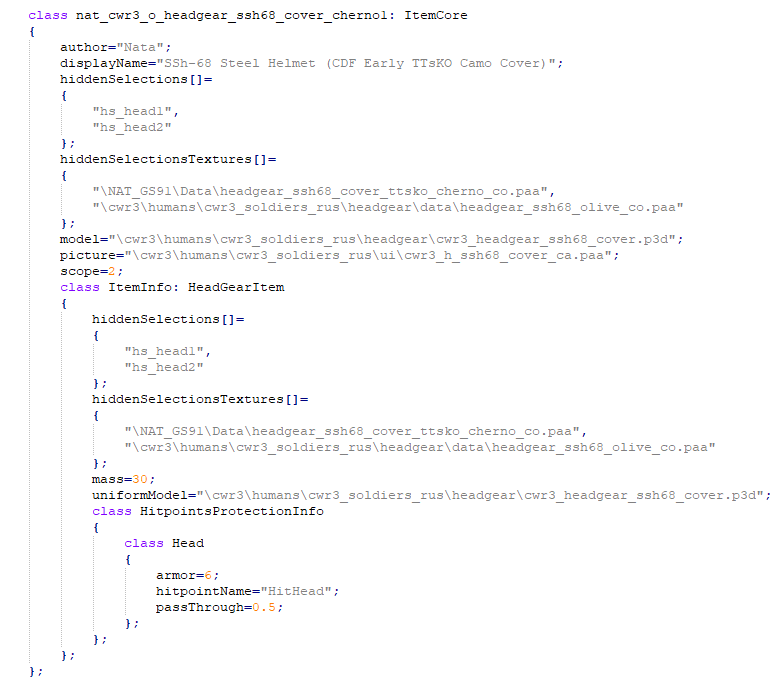 golden nova
this happens when Ambient Occlussion setting is on anything else than Off (less visible when HBAO is set to lower settings), is that a core game issue and can't be solved in any other way than playing without the HBAO?

here's the same part with HBAO not applied

it's visible only on models that use transparent or semi-transparent textures like fences and the older models
 wooden tulip
Hi, does anyone know about how the ACE ballistics work for artillery? I'm having some strange happenings with shells missing by hundreds of metres.
 uncut trellis
golden nova
this happens when Ambient Occlussion setting is on anything else than Off (less ...
uncut trellis
golden nova
this happens when Ambient Occlussion setting is on anything else than Off (less ...
this is pretty common with such transparent textures unfortunately
 terse juniper
I have bought the Arma 3 Creator DLC: S.O.G. Prairie Fire. I try and join games and it says I dont have the DLC. I have reinstalled the game and DLC, I have also verified my game files and the DLC is still not working, I am unable to play with friends and the only thing I can do is go in Eden Editor. When I try to Play the campaign the error says Missing DLCs: Unknown.
uncut trellis
terse juniper
I have bought the Arma 3 Creator DLC: S.O.G. Prairie Fire. I try and join games ...
Have you tried restarting your computer? Do you start the game via the launcher? Do you use mods?
terse juniper
just restarted gonna try now
i have tried with and without mods launcher and ingame join game
uncut trellis
Also you can try resetting your Arma 3 profile by deleting the old files. (make backup of it)
When joining mp always use the launcher as it can set up required mods and dlcs for you.
You can't join servers if you run wrong dlcs or mods
uncut trellis
Also make sure you don't have any launch parameters set in steam or the launcher
fringe salmon
Hi guys, I have a problem with launching the army because the error 0x0000906 pops up but this error occurs when I have the following mods enabled: Ace, ACE3 Extension, Backpackon wesest and Grupp Adler Trenches
and I did a file consistency check, I also checked if I had a virus but it didn't help
golden nova
have you tried disabling mods one by one, in any configuration, to see which one exactly is causing that issue?
fringe salmon
yes, and I listed the mods that cause me this error
Ace, ACE3 Extension, Backpackon wesest and Grupp Adler Trenches
also i repaired with the army launcher but it didn't help
umbral narwhal
Are you saying that with just ACE it's fine?
umbral narwhal
But you can't include at least two of those without ACE?
Try turning off your AV anyway.
fringe salmon
no, all these 4 mods that i gave me are making a mistake
fringe salmon
umbral narwhal
Try turning off your AV anyway.
ok
still the same
ok
works now
when i turned off the av it
thx
umbral narwhal
Probably a false positive on ACE extensions.
 tardy basin
i am getting battleye virtual machine error when i try to enter a server. Moreover, i don't have any virtual machine on my computer.
 karmic laurel
Can anyone help me figure out why when i open the server browser i see that i cant join any servers because im using a different version of Arma? I validated my files and everything was fine. I dont have an Arma Update and all my mods are up to date. Ive restarted steam and everything
Im able to join and play but the browser shows literally every server as being a different version
 shy wedge
@karmic laurel ArmA 3 had an update, but the servers are currently lagging behind. Means the version on the servers is older than yours.
quaint jewel
shy wedge
<@!258062119319109632> ArmA 3 had an update, but the servers are currently laggi...
its not
quaint jewel
karmic laurel
Can anyone help me figure out why when i open the server browser i see that i ca...
You can, that error message is a lie. You can still join
shy wedge
my complete server browser list is red after the last update
karmic laurel
Same, red and several are red x
quaint jewel
See pinned messages here
shy wedge
i tried do join a server, that works, but after that i lose the connection to the server
pine kite
terse juniper
I have bought the Arma 3 Creator DLC: S.O.G. Prairie Fire. I try and join games ...
On the launcher DLC tab enable SOG Prairie Fire DLC. Then press the button on the lower left that has funky colors. That should load the game with that. User interface should look stylized for SOG now, different from regular Arma 3 main menu.
 exotic sable
So, since the 2.08 update dropped, my friend's been unable to join our server. Verified integrity of game files and all. IIRC it says version mismatch.
pine kite
Make sure the server is running is running as 64-bit executable. There is a bug in the 32-bit executable since 2.08.
The red X is a false warning since 2.08. You can still join it (assuming the server does not crash because of the 32-bit issue)
terse juniper
pine kite
On the launcher DLC tab enable SOG Prairie Fire DLC. Then press the button on th...
yep when i load into the game i see the new sog main menu and all, I can play eden editor for the sog maps but says im missing the dlc when i try to play solo campaign or join multiplayer game, and I have also tried joining through the launcher where it auto selects dlcs for me
 patent kettle
Sounds like steam failed to acknowledge that you have the license for the DLC.
Unchecking and checking it in properties tab of Arma might fix it but you will have to redownload it. ;/
exotic sable
@pine kite Our executable is 64 bit. Don't know about no red X, he just gets a failure to connect when trying. Says version mismatch.
copper plank
copper plank
Hey. I'm stumbling across a very strange problem, where some custom uniform rete...
I apologize for bumping this :u
I just wanted to ask - do y'all think this would be better posted in #arma3_config ?
exotic sable
@copper plank Do you package your addons with Addon Builder or what? PBO Manager? Just taking a shot at this.
copper plank
pbo manager; I've tried using addon builder but I honestly couldn't get it to work
the strange thing is that there are assets in my mod which do work correctly
exotic sable
Using PBO Manager and not Addon Builder caused issues with my own in-house mod too! Some players could not join the server when packaged with PBO manager. It's fine to use PBO Manager for unpacking tho!
copper plank
hm, that's really weird, I see
exotic sable
Try getting Addon Builder to work. What's the issue?
Or is it just a bit less comfortable and convenient, like it was for me?
copper plank
oh, wait a second - do you mean the addon builder that comes with arma 3 tools?
I thought you were talking about one of mikero's tools for a second
none of which I could get to work when I tried
exotic sable
copper plank
oh, wait a second - do you mean the addon builder that comes with arma 3 tools?
Yes!
copper plank
I actually don't think I've fucked with the one that comes with arma 3 tools :u
I will try this
yeah, that worked actually
we'll try running the newly packaged mod on our server and I'll report back
terse juniper
patent kettle
Unchecking and checking it in properties tab of Arma might fix it but you will h...
have done both, I have also deleted profiles, restarted pc, verified game files and all that
copper plank
okay - that didn't seem to solve the issue
exotic sable
@copper plank Hmm, is your addon load order / requiredAddons[]={} ok?
copper plank
        {
          "A3_Characters_F",
          "cwr3_soldiers_ru",
          "cwr3_soldiers_fia"
        };
should this be empty?
I'm noticing that this issue actually only happens with my cwr retextures - cup retextures seem to be unaffected
exotic sable
Nah, it should have the addons that need to be loaded as pre-requisites for your own addon. Looks ok tho.
copper plank
hrm
so I notice that like... it doesn't contain cup, but the cup stuff works fine
very strange
I guess I'll try removing the references to cwr?
exotic sable
I think it'd be a good idea at this point to take this to the config makers channel as you suggested earlier. Someone better able to help might see it there.
 eternal temple
One message removed from a suspended account.
 proven jacinth
Hey guys.
Im having a slight issue lately. Its seems random. But when shooting Guns(What Type doesnt seem to matter) the weapon starts shooting all by itself. Its not using up any ammo tho. Putting the weapon on the ground/storing it in a Backpack doesnt resolve the issue. Does anyone else have this problem ? Or any fixes ?
uncut trellis
do you have mods?
proven jacinth
I tried with and without mods
uncut trellis
you could try making new clean profile in case your keybinds are somehow messed up
fringe salmon
Wassup, so i tryed zeus out recently for the first time about 2 weeks back and eventually i left the game and everything.I came back and tried to make a zeus again yet it didnt work it keeps saying "The Variable Name is used in another entitiy" and this has been going on for 2 weeks and have yet to find anyone to fix it anyone know what to do?
uncut trellis
at what point does it say that?
fringe salmon
So i put the entity down first aka the soldier then put the gamemaster down i press "ok" thats when it says it.
Ive tried un adding all mods, unistalling and re installing arma no idea what else to do.
 marble marsh
Hello,
Having issues with a lot of servers right now, I think there's been an update to the game that made a lot of servers and my personal server obsolete. I've updated my game but an X is still present on my server, I am unable to join it, when I do, the server does not receive any messages and crashes.


 wise barn
known and fix is WIP iirc
wise barn
@marble marsh
to clarify (sorry for it being a screenshot)
https://cdn.discordapp.com/attachments/618421027244081163/952253582219034664/unknown.jpeg
 marble marsh
wise barn
<@!518254673392566275>
to clarify (sorry for it being a screenshot)
https://cdn....
marble marsh
wise barn
<@!518254673392566275>
to clarify (sorry for it being a screenshot)
https://cdn....
Hmm I see, but it says falsely marks it right so it should work no?
umbral narwhal
Not if it's 32-bit, which is a separate problem.
marble marsh
ah i see
 maiden gale
whenever i launch arma 3 i get this

it goes to the splash screen
then freezes at the startup process
uncut trellis
have you checked the wiki page for common status access violations?
 uncut trellis
usually it means your game install is corrupted (verify game on steam) or you got some windows feature missing or broken (apply fix for that)
uncut trellis
check if there is anything helpful on the wiki page for common status access violations
if not then you may need to contact BI support and send them you log files
maiden gale
uncut trellis
check if there is anything helpful on the wiki page for common status access vio...
mind linking me that?
 uncut trellis
first try without mods
then if it continues, try verify game integrity on steam
if it dose not continue you have broken mods
repair or remove them
 near dagger
uncut trellis
first try without mods
near dagger
uncut trellis
first try without mods
Thank ya.
maiden gale
uncut trellis
if not then you may need to contact BI support and send them you log files
so i cant log anything
when i press try again
nothing happens


....
well thats not good
uncut trellis
I guess its time to contact BI support
 fossil rain
Hey, has someone encountered the problem that your weapons just randomly start shooting without actually using ammunition? And the only way to fix it is reconnecting to the Server because the weapons will even continue shooting when they are on your back. And dropping the weapon on the ground and picking it up again will also not help. I have already experienced it with Mods and without Mods loaded, and a few other players on my Server have it also encountered since the last Update.
fringe salmon
uncut trellis
I guess its time to contact BI support
Sorry for the ping but did you ever figure out what to do with my problem?
fringe salmon
Alright
uncut trellis
Im just a dude who sometimes knows stuff
fossil rain
fossil rain
Hey, has someone encountered the problem that your weapons just randomly start s...
I have also already checked my game for errors, which also didnt help.
fringe salmon
uncut trellis
Im just a dude who sometimes knows stuff
Where can i go for that and find out whats wrong
uncut trellis
BI homepage has contact email for support
that would be the official way to do that
fringe salmon
uncut trellis
that would be the official way to do that
Alr thanks
fossil rain
fossil rain
Hey, has someone encountered the problem that your weapons just randomly start s...
If someone has a solution for this, I would be very grateful. I also already created a support ticket. https://feedback.bistudio.com/T163718
 odd flint
i have a problem, and i really want to fix it asap
so i have reshade and it freezes after reshade loads. Also when i uninstall reshade it doesnt freeze, and it works perfectly.
any solution??
wise barn
yes:
don't use reshade
 patent vapor
Hey so when I use the NLAW with Ace, I get this weird bug where whenever I shoot it goes out of ADS for a millisecond which is enough to throw off the tracking system, making me miss
marble marsh
Hello again,
I'm renting a server with Nitrado, everything was fine and no problems have occurred. I haven't played since the new patch but when I do I keep seeing this message and get kicked out 90 seconds later. How can I fix this?

 ornate ivy
thermals in the RHS abrams are really really shit for some reason

occasionally it would switch to being usable for a short time (more contrast, barrel actually had shading etc) and then switch back
any ideas why this could be? possibly lag related?
 silver cypress
weather/time of year
untold juniper
no one knows how to fix it
 umbral narwhal
@marble marsh Switch the server to 64-bit.
kind bobcat
untold juniper
no one knows how to fix it
Seems like problem with Zeus DLC (A3_Data_F_Curator)
 pliant mantle
marble marsh
Hello again,
I'm renting a server with Nitrado, everything was fine and no probl...
pliant mantle
marble marsh
Hello again,
I'm renting a server with Nitrado, everything was fine and no probl...
Same i'm trying to stay on the 64 bits version. We have nitrado server too.
yesterday we had lot of issue, with 40k mods and with RHS mods, still getting that error, just spawn on simple mission make server crash.
 empty abyss
Coms down in official pub zues?
pliant mantle
umbral narwhal
<@!518254673392566275> Switch the server to 64-bit.
For now seem to have worked on one missiona t least. will confirml it later
pliant mantle
Alright, seem to have worked on nitrado, to activate 64 bit. Will see how thing goes in the week.
 crystal solar
Hey guys, can anyone help me? Every time I try to start a map in the editor my game stuck's on an infinite load screen, after this new update this started to happen, I downgrade to legacy 206 but the problem continued, Someone help me please.
umbral narwhal
Well, that's quite a mod list
Maybe try starting vanilla and then add stuff until it breaks.
crystal solar
I will try this, but if anyone find a solution for that, looking the log, tell me
quaint jewel
patent vapor
Hey so when I use the NLAW with Ace, I get this weird bug where whenever I shoot...
What Arma version are you running? #perf_prof_branch ? Ah I see you are running stable.
Try grabbing #perf_prof_branch and see if that fixes it
quaint jewel
untold juniper
no one knows how to fix it
missing addon/corrupted game files. Verify game files via steam
quaint jewel
crystal solar
I will try this, but if anyone find a solution for that, looking the log, tell m...
The log doesn't say anything about the freeze sadly
 steady beacon
hey guys i have an big desync problem on my server. can anyone helps?
quaint jewel
marble marsh
Hello again,
I'm renting a server with Nitrado, everything was fine and no probl...
See if you can switch the server to the 64bit one
quaint jewel
steady beacon
hey guys i have an big desync problem on my server. can anyone helps?
run #perf_prof_branch on your server
quaint jewel
empty abyss
Coms down in official pub zues?
yes. See #arma3_official_servers
slow light
Anyone also have this kind of problem: https://feedback.bistudio.com/T163723
umbral narwhal
AV software always has false positives on uncommon software anyway. Just the way it works.
slow light
yep, but afaik it can be solved with a correct signature in the exe file
quaint jewel
slow light
yep, but afaik it can be solved with a correct signature in the exe file
arma3tools.exe is signed
slow light
I know. the online file scanner by Kaspersky cannot find any issues, its only the software. the virus database is up2date, the program also. I just whitelisted the Steam folder recursive and it should be solved for me. I just opened the ticket because I might be not the only one who has his problems.
crystal solar
slow light
I know. the online file scanner by Kaspersky cannot find any issues, its only th...
Simple solution: use bitdefender instead of kaspershy
crystal solar
crystal solar
Hey guys, can anyone help me? Every time I try to start a map in the editor my g...
I found the cause, the nimitz mod is causing the problem, thanks for whoever tried to help! unfortunately I was creating a composition for a while, I wasted my time ;(
marble marsh
@quaint jewel @pliant mantle @umbral narwhal, Thanks for the help appreciate it, will do it once I can!
crystal solar
quaint jewel
The log doesn't say anything about the freeze sadly
I had removed the mod that caused the crash and had tested it, it worked perfectly, now I created a quick mission and put some compositions of my own and the game just gets stuck, I have no hope of how to solve this, and with the slightest desire to play .
uncut trellis
Verify game installation steam
Verify is different from reinstall
If that does not work post the error message you get

 uncut trellis
Local is your profile and settings folder
And seems like Windows is preventing access to it
Try running Arma launcher as admin
maiden gale
how do i do that
uncut trellis
You'll have to Google how to run programs as admin I suppose.
This is more a windows/user access issue than steam or Arma issua
maiden gale
now it just closes fully and doesnt even give a crash reason
what happens if i delete the local files
will verifying it repair those said files?
uncut trellis
You can't verify them since there is nothing to compare them with
They are created on game launch
First try restarting your computer
maiden gale
did that already no luck
uncut trellis
In case Windows just has it locked for some reason
Well you can try deleting thrm
But if the problem is Windows user access rights then that won't really do much.
uncut trellis
Yep that's Windows preventing access to them then
maiden gale
it says i have access to it
uncut trellis
You'll have to look into getting better user access rights for your user account
maiden gale
 uncut trellis
 then maybe your windows is broke
You'll have to look up if there are any solutions for Windows locking files online


 gusty siren
Hey I'm having big time troubles with launching arma 3, whenever I try to open it I get an error message telling me I can try to fix it by reinstalling arma 3 which took me about 4 hours to install in the first place. Anyone able to help?
 granite dune
marble marsh
Hello again,
I'm renting a server with Nitrado, everything was fine and no probl...
granite dune
marble marsh
Hello again,
I'm renting a server with Nitrado, everything was fine and no probl...
YES SOMEONE ELSE WITH MY ISSUE - I have tried so many things, please keep me posted if you have a solution!
uncut trellis
You may need to contact Nitrado customer support
granite dune
uncut trellis
You may need to contact Nitrado customer support
Thanks man, I see one possible fix forcing it into 64bit but will post in a sec as to the success/failure!
uncut trellis
servers should always run 64bit
there should be no reason to run 32bit
and 32bit is bit broke right now
granite dune
I think that has fixed it, forcing 64bit
Yeah thank you! It’s so weird that that’s the default, I have ticked the box and fixed it
Now I gotta go back and reply the solution to all my threads lol!
 wheat scroll
alright well this most likely has to do with the CBA mod but is there anyway I can fix this or take the error off my screen since its not going away this pops up after I switch units example I switch to an AI unit after I die or something the "ShowScriptErrors" is also unticked in the launcher if anyone knows how to fix it or take it off my screen @ me
 wise barn
@wheat scroll
not CBA but some sort of weather mod.
you can not disable error messages like this in the editor / SP
 slow comet
wheat scroll
alright well this most likely has to do with the CBA mod but is there anyway I c...
slow comet
wheat scroll
alright well this most likely has to do with the CBA mod but is there anyway I c...
weather+ error. you can disable the mod or run the mission on a LAN server to stop that error from showing.
marble marsh
Hello again,
Having an issue with antistasi where no one in my game is the commander, is there a fix for this? I've restarted the game but it does not work. I've looked up online and they said to use [player] call theBossInit; command but it does not do anything.
umbral narwhal
@marble marsh Barbolani version of Antistasi?
marble marsh
Uhh yes Blufor version
umbral narwhal
If it's a dedicated server you'll need [player] remoteExec ["A3A_fnc_theBossInit", 2], run as local.
 primal portal
Anyone else been getting massive desync on their server with the latest update?
 mellow mesa
Can anyone help me? Im running a windows server and its telling me an addon is missing from something i have no idea what is.
Warning Message: Addon 'BH_Pyramid' requires addon 'CAAModerna_client'
i have no mod loaded name BH or have said initals. this is causing my server to not start
is there a way to get around it or do i have to find which mod is causing this>
 pseudo tulip
Been having issues connecting to multiplayer servers since 2.08 released. Says the server I want to connect to is running a different version of the game, but when I hover over the icon it says it's running 2.08. I was on the profiling branch and thought that might be the issue so I tried going back to the base branch and still had the same problem. Also tried verifying my game cache.
 queen girder

There may be a glitch in the in-game server browser that falsely marks 2.08 servers as incompatible. Try connecting any way, or use the Launcher server browser instead. We will be looking into this and anything else reported.
 Twitter
·
Twitter
·
Is a known issue
pseudo tulip
gotcha, thanks
 upbeat gust
Just joined the server to ask about the voice chat thing
is it just my end?
I cant talk or anything.
steady hawk
In official servers? It's gone for a while, till the further update
quaint jewel
gusty siren
Hey I'm having big time troubles with launching arma 3, whenever I try to open i...
What does the "an error message" actually really say?
quaint jewel
steady hawk
In official servers? It's gone for a while, till the further update
"till the further update" no
steady hawk
Oh, okay. I didn't followed the topic very carefully
patent kettle
Feels like it's handled kinda badly, was there any official announcment?
steady hawk
Dwarden posts around the place
patent kettle
I do not care about public servers myself but if I would I would be bit lost.
steady hawk
exotic sable
pseudo tulip
Been having issues connecting to multiplayer servers since 2.08 released. Says t...
My friend has the exact same issue! He's been unable to play with us since 2.08 dropped.
 rose hatch
Hi dont know if this is the correct discord for my question but i cant restart any single player missions
when i press restart i just see a gray filter over the screen and the map im playing on
i have tried reinstalling the game
umbral narwhal
Are you running any mods?
rose hatch
yeah alot of mods. I guess a mod causes the problem but i cant think of any mod that mess up the game that bad
and it used to work before
i guess i'll just have to disable every mod until i find the mod causing the issue 😦
or do u guys have any clue of what mod can cause it?
umbral narwhal
You can use binary search techniques. First disable all mods and make sure that does work. Then add half the mods. Then either add or remove half of those, and so on.
umbral narwhal
If you don't load them then they don't do anything, yes.
rose hatch
okok thanks dude
 bitter hornet
i need help
i downloaded steam workshop antistasi cam lao nam
and i cant see it in the game
 storm seal
Dwarden fucked up not only public servers, but Private servers aswell!
Almost like hes trying to kill the game 
upbeat gust
quaint jewel
"till the further update" no
when will it be fixed do you have a date or no? if not thats fine
quaint jewel
It doesn't need a "update" to be fixed, VoN is not broken and can be re-enabled at any time. But due to safety reasons there is no planned date on doing that
upbeat gust
saftey reasons?
upbeat gust
quaint jewel
It doesn't need a "update" to be fixed, VoN is not broken and can be re-enabled ...
what does that mean?
quaint jewel
VoN is peer to peer
And recently (since ukraine basically) people have been abusing that so much that it made sense to turn off
umbral narwhal
@bitter hornet Multiplayer->host server
 karmic jolt
golden nova
geforce now? it doesn't support mods
karmic jolt
golden nova
geforce now? it doesn't support mods
bruh, why lol, well thanks anyways
golden nova
don't ask me, it's how the geforce service works, tried to play Cyberpunk with any mods too but it's just impossible
 grizzled night
my friend manages to forward his ports but ı cannot join him(playing on ge forcenow)
@golden nova it does support mods. I can pay with it only drawback is you have to always wait for it to download
 soft bay
is the ingame voice chat disabled for everyone?
i cant speak in global chat and i cant hear anyone else
im in a public server btw
 restive leaf
what dis mean
 humble wagon
@soft bay if you scroll up a bit you can read it, but yes it is disabled on official BI servers (not community servers).
 peak wagon
when in eden I try to use the zeus interface, but for whatever reason it doesn't work. I've changed the keybind and it doesn't work, idk how to fix it
umbral narwhal
You don't get zeus in the editor. Only in a running mission.
 sinful pulsar
peak wagon
when in eden I try to use the zeus interface, but for whatever reason it doesn't...
sinful pulsar
peak wagon
when in eden I try to use the zeus interface, but for whatever reason it doesn't...
are you in the mission or are you still in eden?
actively playing the mission
peak wagon
eden
sinful pulsar
Zeus is a live, in-game editor, so it can't be used statically like in eden
umbral narwhal
I guess the question is what you're trying to do in Eden that you think you need Zeus for.
 crystal hatch
My friends can't see my server. Yesterday they were able to join me for some antistasi but I had to go for about an hour and came back and relaunched the server. However they weren't able to join me. One of my friends tried to host it and it didn't work. However a different one hosted it and it did work. Now we have to rely on him to host it and it's very inconvenient. Is there a fix to this?

 void gate
 sinful roost
I showed him some Papameters and now it showed him this. Before He Could Login Correctly but just being in the main Menu it crashed like 8 seconds after he was in the menu
 woeful loom
storm seal
Dwarden fucked up not only public servers, but Private servers aswell!
woeful loom
storm seal
Dwarden fucked up not only public servers, but Private servers aswell!
Im guessing you just want your security to be compromised just because you wanna scream in the mic
wise barn
@sinful roostreinstall vcredist for 2013
storm seal
quaint jewel
And recently (since ukraine basically) people have been abusing that so much tha...
You patched the Exploit though? Why keep it disabled when there is no longer a threat?
storm seal
woeful loom
Im guessing you just want your security to be compromised just because you wanna...
I dont play public servers
My Private server, along with multiple others, have been fucked up by the newest update, and we arent able to connect or start them up.
They say they are up, but wont appear in the Server browser or direct connection.
shy wedge
storm seal
My Private server, along with multiple others, have been fucked up by the newest...
Same with us. You can connect but as soon as you are on it you get a red chain. Also only since the update, looks pretty much like that the engine would be broken
quaint jewel
storm seal
You patched the Exploit though? Why keep it disabled when there is no longer a t...
I didn't patch any exploit, there was no exploit, its working as designed. But the design is the threat
 hidden lark
how to fix this
 storm seal
quaint jewel
I didn't patch any exploit, there was no exploit, its working as designed. But t...
storm seal
quaint jewel
I didn't patch any exploit, there was no exploit, its working as designed. But t...
There was an exploit that the Zam-Tards were using to crash servers using VON, or so I was told
quaint jewel
Never heard of that
 bronze river
my Arma validate itself when gaming, so it crashed
 split hawk
so i need some help in terms of hosting a server
i can connect to my friends server no problem
but when i host they cant see the server in the browser?
how can i fix this
split hawk
 restive sequoia
open the ports in your router/firewall
restive sequoia
open the ports in your router/firewall
what do you mean?
restive sequoia
split hawk
what do you mean?
What i wrote ? 
 onyx shard
he dosent want a dedicated server
the one were you go server-host-internet-password-unip check
pine kite
!localhost
 rustic eagleBOT
To host a server or a game session locally, you need to make sure first that your WAN address / external IP uses the IPv4 protocol!
Check your router’s status page in the settings to confirm. (If in doubt, ask your ISP, Websites like “whatismyip.com” give you a false positive!)
Local servers and games can not be hosted on an IPv6 network, or IPv4 via DSlite tunnel!
https://www.avg.com/en/signal/ipv4-vs-ipv6
Once you have confirmed that your connection uses the IPv4 protocol, you need to manually open / forward the ports 2302-2306 UDP (https://community.bistudio.com/wiki/Arma_3:_Dedicated_Server#Port_Forwarding)
See your router’s manual on how to do that, or ask google: “<your router model> + port forwarding”
onyx shard
cheers
pine kite
Basically normally your router blocks any inbound packets unless some ports are opened. So your friends are knocking on your door, but nobody lets them in. Your router needs to know on which ports (UDP protocol ports 2302-2306) stuff comes in and to which LAN IPv4 address of the server it needs to forward those. Every router brand and model may have a different user interface. So we can't tell how you need to do it in yours. But 99% sure it has login details on a label on the device. Maybe someone made a video or explained it on a site, or not anyone ever. And then there is a further potential problem that your ISP provides you with a not-really-true-IPv4 connection because they can't provide a unique adressable IPv4 address on the internet. Packets get lost along the way some how. Nothing you can do about that but change ISPs or rent a server on the internet and pay for it.
Also your server/PC firewall may be blocking those ports.
 blazing sluice
I have a problem where when I host a server none can see it is there a fix for this I have hosted a server before for me and my friends but for some reason it does not work now.
exotic sable
blazing sluice
I have a problem where when I host a server none can see it is there a fix for t...
You need to open some ports on your router as Valen describes there just above your post.
blazing sluice
thx
 cosmic turtle
Hello, ive been having an issue with zeus. Remote control works for a while but it eventually breaks. (it seems to happen when the unit dies) It makes it so i cant remote control anything else i place and it makes it so i cant move anything on my character. The crosshair just bobs when i move my mouse.
i have a feeling its due to a mod but i have no idea how to tell if its ace or what
any help is greatly appreciated
 brave acorn
i'm trying to make it so my friend can join my server and my UPNP is enabled on my router but Arma is saying it is not enable?
exotic sable
brave acorn
i'm trying to make it so my friend can join my server and my UPNP is enabled on ...
You need to open some ports on your router as @pine kite describes there just a little above your post :D
exotic sable
pine kite
Basically normally your router blocks any inbound packets unless some ports are ...
👆
 drowsy turret
storm seal
There was an exploit that the Zam-Tards were using to crash servers using VON, ...
drowsy turret
storm seal
There was an exploit that the Zam-Tards were using to crash servers using VON, ...
rent free
how's your server?
fringe salmon
Hello I’m getting a frame drop pretty often in arma especially when firing I have messed with all my settings and can’t figure out what the issue is
fringe salmon
hi, when my friends and i make servers all of us cant see it now for some reason
fringe salmon
fringe salmon
hi, when my friends and i make servers all of us cant see it now for some reason
we could see each others servers yesterday but dont know whats wrong today
umbral narwhal
Make sure whoever is hosting is online in steam friends.
storm seal
drowsy turret
rent free
how's your server?
Doing well, we did our 3rd op last friday, had to take a break because of me moving and not having a computer
 strange swallow
Anyone have the solution to disconnects while trying to connect to the server?
exotic sable
strange swallow
Anyone have the solution to disconnects while trying to connect to the server?
You may need to restart Steam and check if there's client updates available. We've found after years of experience that that is usually what fixes it.
 mental river
@forest kettle post the workshop link here
 mental river
 forest kettle
https://steamcommunity.com/sharedfiles/filedetails/?id=428181330&searchtext=born...
forest kettle
https://steamcommunity.com/sharedfiles/filedetails/?id=428181330&searchtext=born...
so have you loaded the mod?
forest kettle
Yes
forest kettle
No errors there, only when attempting to load in server
forest kettle
I load via in game
mental river
can you post the full rpt?
forest kettle
Where could i find it?
mental river
!rpt
rustic eagleBOT
Arma RPT
Arma generates a .rpt log file each time it's run, which contains a lot of information like the loaded mods, or any errors that appear, this log file can be very useful for troubleshooting problems.
To get to your RPT files press Windows+R and enter %localappdata%/Arma 3
Additionally see the wiki page for more info: https://community.bistudio.com/wiki/Crash_Files
To share an rpt log here, please use a website like https://sqfbin.com/ to upload the full log, that way the people helping you can take a look at it and try to figure out the problem you're having together with you.
Note: RPT logs can hold personal information relevant to your system, the game or others.
mental river
only send the latest one (the one you tried to join with)
forest kettle
Should i close my game for it to generate a new one? or just attempt to load in once?
mental river
it'd be better if you close the game, reopen and try to join, then close again
then find the file that matches the time you started the game
forest kettle
Hope this is all right
https://sqfbin.com/xudanirojidetixutezi
mental river
forest kettle
Hope this is all right
https://sqfbin.com/xudanirojidetixutezi

not sure what's wrong
try repairing the mod (and maybe the game too)
forest kettle
in the server?
mental river
!steamverify
rustic eagleBOT
Steam file verification process:
Right Click on game -> Local Files -> Verify Integrity of game files
Mod repair process:
Open Launcher -> Right Click on mod -> Repair
ornate ivy
i'm having issues with extremely bad thermals on the RHS abrams
a group of infantry at 125m with and without thermals


it's pretty much unusable
every once in a while it will suddenly become more vivid for a short time then go back to this
any ideas?
forest kettle
@mental river
https://medal.tv/games/arma-3/clips/eumyVKKySKiNL/d1337q4dSsRZ?invite=cr-MSxzbUEsNTUwNDA2ODIs
This is how the issue looks

Watch Ehh and millions of other Arma 3 videos on Medal, the largest Game Clip Platform.
Weird isnt it?
mental river
forest kettle
Weird isnt it?
yes
did you repair the game?
it will check if any of the files are corrupt/missing and redownload them
forest kettle
mental river
it will check if any of the files are corrupt/missing and redownload them
Yep, nothing is missing
mental river
forest kettle
Yep, nothing is missing
well I see some errors with the mission
where did you get it?
ornate ivy
ornate ivy
any ideas?
figured it out, at minimum zoom the gun barrel is in frame, firing even 1 shot from coax will make it heat up and completely wash out the thermals
mental river
not for me no.
anyway I have no clue what's wrong. as far as I see it's related to your mission
maybe the problem is the server
forest kettle
Server shouldn't be the problem...
mental river
forest kettle
Server shouldn't be the problem...
not the server itself, but maybe the mission you uploaded to the server is corrupt
e.g. why does it say missing a pic.jpg file?
forest kettle
Haven't uploaded anything to pic.jpg
strange swallow
exotic sable
You may need to restart Steam and check if there's client updates available. We'...
I’ve tried but, I’ll also check for updates and continue that route. Thanks
mental river
forest kettle
Haven't uploaded anything to pic.jpg
The game is looking for a pic.jpg file tho. The why of it I don't know
forest kettle
That much I understand
forest kettle
Where do i find my folder containing all the pbo's.. Like description.ext init.sqf and all those.. Can't seem to find under %appdata% arma 3 other profiles
wise barn
you are mixing up quite some stuff here...
what is it that you want to achieve?
@forest kettle
forest kettle
I assume i need it to pack it into pbo for server config to work
wise barn
what is it exactly that you are working on, and what do you want to achieve?
forest kettle
Fixing this issue https://medal.tv/games/arma-3/clips/eumyVKKySKiNL/d1337q4dSsRZ?invite=cr-MSxzbUEsNTUwNDA2ODIs
Watch Ehh and millions of other Arma 3 videos on Medal, the largest Game Clip Platform.
pine kite
strange swallow
Anyone have the solution to disconnects while trying to connect to the server?
If the server runs 2.08 as 32bit, then the admin should make sure it runs as 64-bit. And update to the performance branch in awaiting for BI to publish the hotfix. Hotfix was published on the 16th March.
 fair aspen
uh, not sure if its the right place, but please check my issue in #arma3_questions
dont wanna spam the paragraph here too.
pine kite
Done. This would have been a proper place.
fair aspen
pine kite
Done. This would have been a proper place.
Alright, gotcha. Well the thing is, im using Zaphosting, which yes ik no dedicated server. My internet isnt good enough for that, however, it does allow use of FTP firezilla editing, so i can do most normal stuff through the cloud
The semicolon is just to seperate the modnames
as stated in the original post.
Bohemia Interactive Forums
CONTENTS Setting up your server What you need how you do it Links Information useful Tools Useful Addons Selecting between Stable & Dev Builds, full or Dedi package installs Port Forwarding Battleye Configuration Location of files Server Admin Commands Running Dedicated Server and client on s...
here
pine kite
Yes, to seperate. But not after the last mod in the list.
fair aspen
nono, it isnt that.
just an example.
Hm, alright
i'll see if it works, and get back to you on it
cheers
Im actually at work and using remote desktop, so wish me luck on running arma like this
Haha
pine kite
Do look into that RPT file. Make sure you do not run it with -nologs.
fair aspen
pine kite
Do look into that RPT file. Make sure you do not run it with -nologs.
Where was it located?
also, the server host provides two different params,
pine kite
On your hosting site, I do not know. Where the profiles are maybe.
fair aspen
one for Mods, one for Servermods.
should both match like this?
@CBA_A3;@CUP Terrains - Core;@CUP Terrains - Maps;@ProjectOPFOR;@Project OPFOR;@RHSAFRF
And such?
or are they seperate in any form
umbral narwhal
They're separate. -servermods is for mods that you're only running on the server.
fair aspen
umbral narwhal
They're separate. -servermods is for mods that you're only running on the server...
Ah, so not client side.
umbral narwhal
correct
fair aspen
gotcha.
pine kite
Where those files are is what Zapfhosting should explain. Those mods need to be encapsulated with double quotes because they contain spaces.
fair aspen
https://zap-hosting.com/guides/docs/en/arma3_mods/ For an example here
Information on how to install mods on your Arma 3 server from ZAP-Hosting - ZAP-Hosting.com documentation
Its VERY vague in some ways
pine kite
Client also generates an RPT file. That only explains what the game does on your side.
umbral narwhal
Also you probably don't want to load @ProjectOPFOR twice :P
fair aspen
umbral narwhal
Also you probably don't want to load `@ProjectOPFOR` twice :P
Oh yeah dont worry
thats just a mistake i made here
forest kettle
Can someone help me with small things.. relating to mission file? Would love to do it in vc
fair aspen
pine kite
Where those files are is what Zapfhosting should explain. Those mods need to be ...
Hm, their client might do that for me..?
as stated on their doc.
pine kite
You are playing the client.
fair aspen
It has a confic system built into it
pine kite
They have the server, your game is the client.
fair aspen
pine kite
They have the server, your game is the client.
yeah.
But i still have access to the server itself.
Im renting it.
I have access to all files, and am able to delete, and insert them through FTP connection.
If thats what you're worried about
I'll test what you said tho
-config="config\server.cfg" -cfg="config\basic.cfg" -mod="@CBA_A3;@CUP Terrains - Core;@CUP Terrains - Maps;@heavy ledge OPFOR;@RHSAFRF;@RHSGREF;@RHSSAF;@RHSUSAF;@Squad Ukraine;@Ukrainian Factions Project" -servermod="" -profiles=config -loadMissionToMemory -enableHT -autoinit @umbral narwhal
bruh
project
ok
ANYWAYS, this is how startparams look like disregarding the IP and port
Exactly how it should look like, correct?
umbral narwhal
The mods part? It looks plausible assuming that it exactly matches the folders names for each mod.
fair aspen
umbral narwhal
The mods part? It looks plausible assuming that it exactly matches the folders n...
Sounds good, testing.
umbral narwhal
-autoinit is something you want to avoid for many scenarios
fair aspen
man, modding is a pain in arma servers lmao
fair aspen
umbral narwhal
-autoinit is something you want to avoid for many scenarios
It's a co-op mission, you think so?
umbral narwhal
I don't know your mission. Just I see a lot of people including -autoinit because it's in various howtos and then being unable to change mission parameters or breaking it entirely.
fair aspen
umbral narwhal
I don't know your mission. Just I see a lot of people including -autoinit becaus...
hm, alright
i'll probably not fuck with it then
pine kite
fair aspen
Exactly how it should look like, correct?
Indeed it looks correct/plausible. But the RPT file will carry the verdict.
fair aspen
lol
fair aspen
pine kite
Indeed it looks correct/plausible. But the RPT file will carry the verdict.
Hm, this is weird.

I have all the keys for the mod in the actual server folder, however i get this error when attempting to join
ah, cant screenshot, hold on
It says the addons are not signed by a key accepted by the server..
which is odd cause i promise they're in there.
pine kite
Then the mod folders may be corrupted. Can happen if you don't transfer them securely via FTP. Transfer them as binary data.
fair aspen
pine kite
Then the mod folders may be corrupted. Can happen if you don't transfer them sec...
I did, thats the weird thing.
server isnt crashing.
just not launching with mods.
gusty hatch
does anyone have bugs with firing mode for rifle weapons?
this is after the 2.08 hotfix
I can't seem to switch from full auto to semi or burst for rifles
and the rifle is stuck on full auto
 late herald

 nova elm
gusty hatch
does anyone have bugs with firing mode for rifle weapons?
nova elm
gusty hatch
does anyone have bugs with firing mode for rifle weapons?
Can't reproduce, possibly a mod issue?
 vocal sequoia
Can't seem to get squad members to reliably use AT launchers?
At various distances I have tried to have a squad member use AT against
- an ammo truck
- an APC
- an actual tank
The only success I had was at a medium distance against the APC. Not even the tank itself!!!
Trying to rule out every possibility, and not sure what i'm doing wrong.
What I wanted was to have an ambush where my squad member fires a launcher at the convoy when it gets stopped by an interruption in the road, but even against heavy vehicles they just keep using their small arms and getting killed
The only thing I can think of is that a single AT missile is more "value" than a bloody tank, and it won't fire b/c of that?
fair aspen
pine kite
But I do not know why else those keys would mismatch.
Want me to send the RPT file?
pine kite
I'm off to bed soon. Upload it somewhere and post the link here so others can look at it too. And maybe offer suggestions.
pine kite
fair aspen
i could just do this
Sometimes RPT files are megabytes in size. This one is rather small.
fair aspen
pine kite
Sometimes RPT files are megabytes in size. This one is rather small.
Never got in the server.
the error from trying to join is at the bottom
19:44:14 Warning Message: Files "C:\Program Files (x86)\Steam\steamapps\common\Arma 3!Workshop@CBA_A3\addons\cba_accessory.pbo", "C:\Program Files (x86)\Steam\steamapps\common\Arma 3!Workshop@CBA_A3\addons\cba_ai.pbo", "C:\Program Files (x86)\Steam\steamapps\common\Arma 3!Workshop@CBA_A3\addons\cba_arrays.pbo", "C:\Program Files (x86)\Steam\steamapps\common\Arma 3!Workshop@CBA_A3\addons\cba_characters.pbo", "C:\Program Files (x86)\Steam\steamapps\common\Arma 3!Workshop@CBA_A3\addons\cba_common.pbo", "C:\Program Files (x86)\Steam\steamapps\common\Arma 3!Workshop@CBA_A3\addons\cba_diagnostic.pbo", ... are not signed by a key accepted by this server. To play on this server, remove listed files or install additional accepted keys.
19:46:16 Warning Message: Files "C:\Program Files (x86)\Steam\steamapps\common\Arma 3!Workshop@CBA_A3\addons\cba_accessory.pbo", "C:\Program Files (x86)\Steam\steamapps\common\Arma 3!Workshop@CBA_A3\addons\cba_ai.pbo", "C:\Program Files (x86)\Steam\steamapps\common\Arma 3!Workshop@CBA_A3\addons\cba_arrays.pbo", "C:\Program Files (x86)\Steam\steamapps\common\Arma 3!Workshop@CBA_A3\addons\cba_characters.pbo", "C:\Program Files (x86)\Steam\steamapps\common\Arma 3!Workshop@CBA_A3\addons\cba_common.pbo", "C:\Program Files (x86)\Steam\steamapps\common\Arma 3!Workshop@CBA_A3\addons\cba_diagnostic.pbo", ... are not signed by a key accepted by this server. To play on this server, remove listed files or install additional accepted keys.
19:47:34 Warning Message: Files "C:\Program Files (x86)\Steam\steamapps\common\Arma 3!Workshop@CBA_A3\addons\cba_accessory.pbo", "C:\Program Files (x86)\Steam\steamapps\common\Arma 3!Workshop@CBA_A3\addons\cba_ai.pbo", "C:\Program Files (x86)\Steam\steamapps\common\Arma 3!Workshop@CBA_A3\addons\cba_arrays.pbo", "C:\Program Files (x86)\Steam\steamapps\common\Arma 3!Workshop@CBA_A3\addons\cba_characters.pbo", "C:\Program Files (x86)\Steam\steamapps\common\Arma 3!Workshop@CBA_A3\addons\cba_common.pbo", "C:\Program Files (x86)\Steam\steamapps\common\Arma 3!Workshop@CBA_A3\addons\cba_diagnostic.pbo", ... are not signed by a key accepted by this server. To play on this server, remove listed files or install additional accepted keys.
19:53:42 Warning Message: Files "C:\Program Files (x86)\Steam\steamapps\common\Arma 3!Workshop@CBA_A3\addons\cba_accessory.pbo", "C:\Program Files (x86)\Steam\steamapps\common\Arma 3!Workshop@CBA_A3\addons\cba_ai.pbo", "C:\Program Files (x86)\Steam\steamapps\common\Arma 3!Workshop@CBA_A3\addons\cba_arrays.pbo", "C:\Program Files (x86)\Steam\steamapps\common\Arma 3!Workshop@CBA_A3\addons\cba_characters.pbo", "C:\Program Files (x86)\Steam\steamapps\common\Arma 3!Workshop@CBA_A3\addons\cba_common.pbo", "C:\Program Files (x86)\Steam\steamapps\common\Arma 3!Workshop@CBA_A3\addons\cba_diagnostic.pbo", ... are not signed by a key accepted by this server. To play on this server, remove listed files or install additional accepted keys.
19:56:16 Warning Message: Files "C:\Program Files (x86)\Steam\steamapps\common\Arma 3!Workshop@CBA_A3\addons\cba_accessory.pbo", "C:\Program Files (x86)\Steam\steamapps\common\Arma 3!Workshop@CBA_A3\addons\cba_ai.pbo", "C:\Program Files (x86)\Steam\steamapps\common\Arma 3!Workshop@CBA_A3\addons\cba_arrays.pbo", "C:\Program Files (x86)\Steam\steamapps\common\Arma 3!Workshop@CBA_A3\addons\cba_characters.pbo", "C:\Program Files (x86)\Steam\steamapps\common\Arma 3!Workshop@CBA_A3\addons\cba_common.pbo", "C:\Program Files (x86)\Steam\steamapps\common\Arma 3!Workshop@CBA_A3\addons\cba_diagnostic.pbo", ... are not signed by a key accepted by this server. To play on this server, remove listed files or install additional accepted keys.
20:27:03 Starting mission:
Like this.
Never got past this
gusty hatch
nova elm
Can't reproduce, possibly a mod issue?
oh yupp, it was the 2024 russian armed forces beta mod
woeful loom
vocal sequoia
Can't seem to get squad members to reliably use AT launchers?
At various distanc...
Was the ai squadmate using a pcml?
vocal sequoia
I think so?
 tired cedar
 storm seal
late herald
storm seal
late herald
Just happens. Idk, every time theres a boat in eden editor and I press play, it kills my game.
late herald
The problem was my task manager thought my steam was closed
And it couldnt launch
But I fixed it
quaint jewel
pine kite
If the server runs 2.08 as 32bit, then the admin should make sure it runs as 64-...
The hotfix was published yesterday
exotic sable
Now that the hotfix for clients & servers is out, my buddy said he was able to connect to our server again yesterday! Looks like the fix worked, but ACE3 launcher flight profile switching is still borked.
quaint jewel
exotic sable
Now that the hotfix for clients & servers is out, my buddy said he was able to c...
more details? "borked" ?
exotic sable
NLAW only works in direct fire mode, RHS Javelin in top attack. When you ctrl+ tab to switch mode, it instead puts the launcher away on your man's back.
Well, you can fire the RHS Javelin in direct fire if you never switch it to top attack, but you can't switch back to direct fire. Also the Javelin causes you to take damage from the backblast in top attack mode.
ACE3 flight profile switching is different from the Vanilla flight profile on Titan. Or is it? 🤔
Hmm, Titan MPRL Compact has the same issue at least with ACE3 active. Ctrl + tab puts the launcher on back.
pine kite
fair aspen
the error from trying to join is at the bottom
That means that the CBA mod on your game computer is containing the wrong files (corrupt maybe?) or the server has a different key than they belong to in it's key folder. I would shutdown the game/launcher/Steam, delete the contents of C:\Program Files (x86)\Steam\steamapps\common\Arma 3!Workshop@CBA_A3 (leave the folder itself) and remove CBA-related key files in the Arma 3 keys folder. Then let Steam verify your install and mods. In the launcher you can also use the 3 dots on the mod line to repair it. Afterwards I would do the same on the server. Make sure you remove old left-over mod folders and keys for CBA and upload again. If the FTP program has any means to show a CRC code (cyclic redundancy check to make sure all the bits are in the right order) compare those to make it match.
fair aspen
pine kite
That means that the CBA mod on your game computer is containing the wrong files ...
Sounds good.
I'll try that
fair aspen
pine kite
That means that the CBA mod on your game computer is containing the wrong files ...
Wuhuuu! It worked.
Cheers mate!
 muted sorrel
Hello, can anyone help me? My scroll menu is not showing action (eg. Inventory, change weapon, etc.)
fair aspen
pine kite
That means that the CBA mod on your game computer is containing the wrong files ...
Well, fuck.
Now i've encountered another issue
The custom mission for antistasi i've downloaded didnt show up in the properties mpmissions, however for some weird reason it was in /Documents instead.

In this folder, under my Other - (PLAYERNAME) profile.
I thought whatever, i'll just shove this in the mpmissions folder, and it'll work like so, correct?


Yes, i know. I got lazy with naming it.
been instructed not to use capital letters in mission files too, did that aswell.
No fucking clue what could be wrong, and this is the reported error.
"ErrorMessage: Cannot open file 'mpmissions\balls.'19:12:24 Application terminated "
Like ok, but why?
umbral narwhal
@fair aspen Mission filenames must be in the form [whatever].[mapname].pbo
fair aspen
umbral narwhal
<@!750846285627785237> Mission filenames must be in the form [whatever].[mapname...
so mission.pbo wouldnt work?
umbral narwhal
Not unless it's a workshop mission in a workshop folder.
fair aspen
it is a workshop mission.
umbral narwhal
If it's in MPmissions then you need the proper filename format.
 umbral narwhal
Also the valid MPMissions folder for pbos is the one in steamapps/Common/Arma 3/MPmissions. Nothing else works.
needs to be balls.mapname.pbo
fair aspen
umbral narwhal
Also the valid MPMissions folder for pbos is the one in steamapps/Common/Arma 3/...
then where the fuck is the workshop mission i subscribed to 
lol
umbral narwhal
And the template name should be balls.mapname

 umbral narwhal
Move it then?
fair aspen
here.
No, this is a local save on my computer
the one i transferred to the server
the saved one should work fine as that no?
umbral narwhal
PBOs aren't save files, they're missions. You're very confused.
fair aspen
No, its still a PBO.
umbral narwhal
Antistasi saves data to the profile's vars file.
fair aspen
 fair aspen
umbral narwhal
PBOs aren't save files, they're missions. You're very confused.
fair aspen
umbral narwhal
PBOs aren't save files, they're missions. You're very confused.
Indeed i am..
The thing is, it wont allow me to see my workshop scenario mission downloaded in the actual properties folder.
umbral narwhal
what is "it" here
fair aspen
umbral narwhal
what is "it" here
my explorer.
There is no mission PBO
for the scenario
umbral narwhal
Ok, let's go from the start. What are you trying to do?
fair aspen
OTHER than that save
fair aspen
umbral narwhal
Ok, let's go from the start. What are you trying to do?
Upload the antistasi to my server.
umbral narwhal
That specific version?
fair aspen
Before i confuse myself more, let me just try the formatting issue.
see if it's still viable to use
since it's a mission file anyhow.
umbral narwhal
Ok, first make a copy of the mission.pbo. Do not edit in place, or steam will replace it. Then rename it to antistasi-ukraine.chernarus_summer.pbo
Then upload it to your server's MPmissions folder, using binary FTP not text mode.
fair aspen
gotcha.
umbral narwhal
Then either use the template name of "antistasi-ukraine.chernarus_summer", or easier, just remove the entire Missions { } structure from the server.cfg and you can select the mission manually.
umbral narwhal
Yeah, if you connect to a DS that doesn't have a Missions { } entry then it gives you the mission selection dialog.
It's way better for troubleshooting.

 umbral narwhal
lol
fair aspen
Antistasi | Info | File: A3A_fnc_savePlayer | Not saving player 76561198062891355 due to canSave being false. | Called By: A3A_fnc_onPlayerDisconnect
it killed itself.
what
LMAO
OK
now it works
WHAT
HAHA
OK ARMA
pine kite
Who knows what can happen with an unknown quality mission file. Maybe it is bad to begin with. Therefore, when trying out to learn setting up servers, start with the know-good solutions. Like play a mission from Bohemia for multiplayer. Then you test if the server operates as it should. Then you try a 3rd party mission without mods until it works. Then you up to the next level and add mods to the server, from which you have proof that it worked with that mission by that creator.
late herald
this thing is on my screen when in editor and i cant remove it
 umbral narwhal
You have some script somewhere with a bug in it.
well, could be a mod you're running, I guess.
late herald
alright thanks
 viscid carbon
late herald
this thing is on my screen when in editor and i cant remove it
viscid carbon
late herald
this thing is on my screen when in editor and i cant remove it
dzn extended jamming
There is no problem if you make a mission while having this error
Alternatively you can easily unload this mod while making the mission and then add it later on
late herald
huh?
viscid carbon
late herald
huh?
The mod that causes the trouble is dzn extended jamming
late herald
hang on
late herald
viscid carbon
The mod that causes the trouble is dzn extended jamming
it worked, thanks for the help
pine kite
Yeah, such errors are not meant to be ignored. But as end-user you won't be able to do much about it unless you have access to the code and know how to fix it in SQF code. Better to remove the mod/choose other mission and let the creator know about it.
viscid carbon
pine kite
Yeah, such errors are not meant to be ignored. But as end-user you won't be able...
this error doesnt crash anything (at least we didnt notice)
we had it in our modset for more than a year with that error
pine kite
Maybe not crash, but some functions will not work. So whatever it pertains will do funny stuff.
The code gets some object data to process, but what it expects for proper handling is a grouping of data, text string or some kind of config entry. It may be a similar kind of information but it will be squeezing apples into your orange juice rather than leave it as apple pie filling.
late herald
pine kite
Yeah, such errors are not meant to be ignored. But as end-user you won't be able...
what happened was i was in vr testing some mods i had and i enabled all of them and then that thing showed up
pine kite
Well, then do not use one of those mods in that situation. Unless you want to find out what goes wrong.
 peak zinc
Mods: A3;curator;kart;heli;mark;expansion;jets;argo;orange;tacops;tank;enoch;aow;@AFRF_DEV;@USAF_DEV;@GREF_DEV;@SAF_DEV;@cupterrainscore;@cupterrainsmap;@alhd;@acemod;@CBA_A3;WS
Version 2.09.149065
Fault time: 2022/03/18 11:03:00
Fault address:  FD173569 00:FD173569 Unknown module
file:     stargate
world:    chernarus
Prev. code bytes: 01 FF 50 18 48 83 7C 24 30 00 0F 84 78 02 00 00
Fault code bytes: 48 8B 8F 58 01 00 00 48 85 C9 75 07 48 8B 8F 50
=======================================================
note: Minidump has been generated into the file C:\Users\alexp\AppData\Local\Arma 3\arma3_x64_2022-03-18_11-02-24.mdmp
``` lol when removing the Western Sahara Mod it works again(WS)
uncut trellis
Ws compatibility workshop mod or WS dlc?
peak zinc
DLC
but it kinda seems a general issue with my development build rn. I always get a Unkown Module when launching any of my missions (even without the WS DLC)
need to check further
Version 2.09.149065
Fault time: 2022/03/18 12:03:22
Fault address:  ACE43569 00:ACE43569 Unknown module
file:     stargate
world:    chernarus
Prev. code bytes: 01 FF 50 18 48 83 7C 24 30 00 0F 84 78 02 00 00
Fault code bytes: 48 8B 8F 58 01 00 00 48 85 C9 75 07 48 8B 8F 50
=======================================================
note: Minidump has been generated into the file C:\Users\alexp\AppData\Local\Arma 3\arma3_x64_2022-03-18_12-02-47.mdmp
``` hmm still happening.mission has zero modules placed.
umbral narwhal
That's a very different sort of module btw :P
Just means that it can't match the crash address to any DLL loaded.
peak zinc
I know
maybe the RHS installation is responsible. Loaded into editor, placed a AH-64D, tried to access the vehicle customization garage and the game died.
no, it hasn't been updated since at least March 8th and it was working two days ago
then something else causes this, hmmm
quaint jewel
peak zinc
```
Version 2.09.149065
Fault time: 2022/03/18 12:03:22
Fault address: ACE43569...
you are on dev branch.
setObjectTexture on simple objects is broken on dev branch, thats crashing for you
fringe salmon
every time i try to launch the game, it says that my user files are corrupted and need to be reset
i've already verified game files but to no avail
peak zinc
quaint jewel
you are on dev branch.
setObjectTexture on simple objects is broken on dev branc...
aiii, thanks Dedmen
pine kite
fringe salmon
i've already verified game files but to no avail
Your user profile files are corrupted according to the game. They are in 'Documents/Arma 3' or 'Documents/Arma 3 - Other Profiles'. Steam does not touch those when verifying. It does only touch those in the Steam library. (And there are some files hidden in C:\Users\username\Appdata\Roaming\Arma3 Not sure if those are also verified.)
late herald
i go into eden editor, and when i want to select any map except virtual reality it closes my game and says this
 wise barn
@late herald
CUP Terrains - Core is corrupted. repair or redownload it
late herald
thanks
late herald
@wise barn
it still doesn't work
I repaired the mod, doesn't work
redownloaded still
also it changes message
like instead of 2m5 corner it had some "dead npc" or pmc
wise barn
run CUP Terrains - Core and Maps only. no other mods
then go to the editor and open takistan and see if the error persists
late herald
ok

@wise barn yes, still appears

i only loaded those 2 mods and i loaded up takistan like u said
wise barn
go to
..\Steam\steamapps\workshop\content\107410\583496184\addons
and delete
cup_terrains_ca_structures_e.pbo
cup_terrains_ca_structures_e_c.pbo
once done, repair CUP Terrains - Core via the launcher options
 wise barn
not the bisign files, the PBOs. there are two (i edited my last post).
late herald
alr
wise barn
so, the on in the middle is one of them
 wise barn
unsubscribe from CUP Terrains - Core
go to ..\Steam\steamapps\workshop\content\107410 and delete folder 583496184
restart steam
resubscribe and redownload CUP Terrains - Core
late herald
Ok
late herald
wise barn
unsubscribe from CUP Terrains - Core
go to ``..\Steam\steamapps\workshop\content...
finally works
thanks m8
 rain breach
i get a battleye is not responding error when i join a game roughly 2 mins after i join
can someone help
 brave hawk
rain breach
can someone help
brave hawk
rain breach
can someone help
try starting the game as administrator once to install/update BE perhaps
 radiant plaza
Good Evening all, Getting this error when I try to launch my server after installing the RHS mods. Any idea? Warning Message: Addon 'ace_compat_rhs_saf3' requires addon 'rhssaf_main_loadorder'
wise barn
@radiant plaza
one or more RHS mods are not loaded.
you might have put it in the command line ect, did other stuff, whatever, but that's what the error tells you.
missing RHS mods
radiant plaza
Thanks!
rain breach
brave hawk
try starting the game as administrator once to install/update BE perhaps
thx man it worked
steady hawk
What error? Do you use any Mods?
steady hawk
Did you tried to verify the game? What specs?
 twin fulcrum
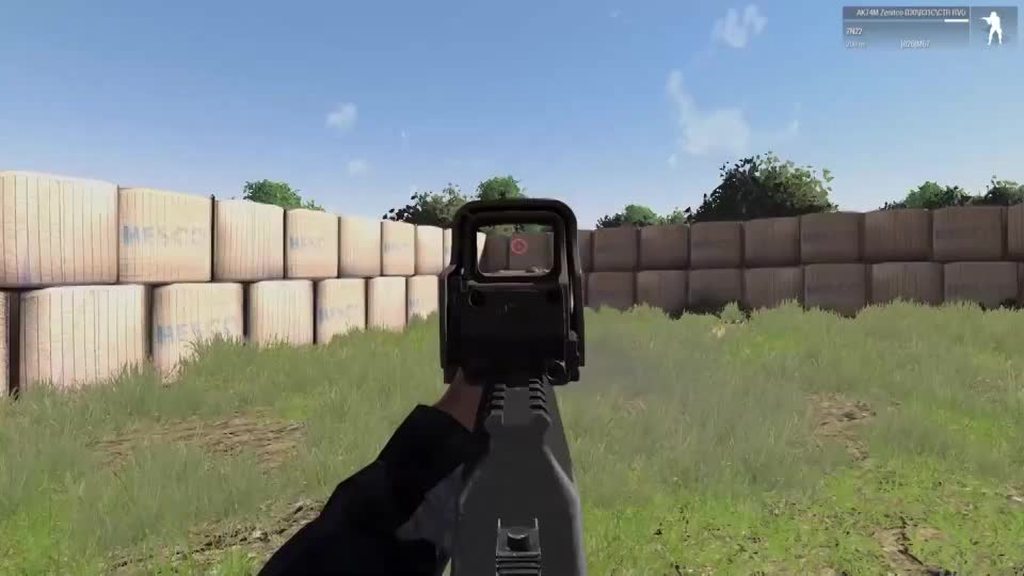 golden nova
does it happen if you start only vanilla game (no other mods) and recoil changer?
twin fulcrum
Dont know
golden nova
then try that, it might be some issue with the weapon mod itself or it's interfering with GGE or whatever you have loaded there
pine kite
Whenever you encounter problems, try to isolate it by using the least amount of mods. That includes zero, to make sure it isn't a vanila thing. If mods are depending on others, then try without the dependant one.
 pure ledge
Hello! anyone knows how to edit a Zeus vs Zeus mission where enemy units aren't visible on the Zeus interface? We placed 2 units on the editor, each one with its own Gamemaster module, but whenever we play the mission, and I press Y, I can see (with the flags and colors) all groups placed by my friend (enemy zeus)
umbral narwhal
Are you running any mods?
pure ledge
yes, a couple, but mostly added units
umbral narwhal
No ACE?
pure ledge
no ACE
we can see each other's units
Im the blue one, (i have my own gamemaster module) and I see on the interface my enemy's units (red)
 umbral narwhal
Yeah, it means something is calling addCuratorEditableObjects for all curators. I don't know what the default zeus behaviour is though.
pure ledge
any idea how to solve it? I found somewhere that this script should fix it:
if(isServer) then
{
{
if(_x isKindOf "CAManBase") then
{
curatorThing removeCuratorEditableObjects[[_x],true];
};
} forEach (curatorEditableObjects curatorThing);
};
but im not sure where to put that
umbral narwhal
It looks like you're using a Zeus mod there?


 umbral narwhal
That piece of code would simply remove all man-type objects from a curator given by the variable curatorThing.
pure ledge
oh, thats beyond me, we are going to try without Achilles now, hope it fixes it
pure ledge
no luck
 rugged siren
Boys, I'm having some problems starting Arma, it says ''it looks like the application configuration file is missing'', does anyone have a fix? Couldnt find anything on reddit and yt. It's been like this for 3 months now and I'm really desperate
umbral narwhal
Is that exactly what it says?
rugged siren
yes
Wait, I just booted the arma3battleye.exe and the game worked
then why does it say 'it looks like the application configuration file is missing'' when I start it from steam?
umbral narwhal
Launcher config broken, I guess.
rugged siren
umbral narwhal
Launcher config broken, I guess.
is there a fix?
umbral narwhal
Most people would have just uninstalled and reinstalled the game after three months :P
There may be quicker ways. It might be referring to the arma3launcher.exe.config file.
In which case you could copy it from a default/working install.
There's a lot of other launcher config stuff in Users/[username]/AppData/Local/Arma 3 Launcher
rugged siren
umbral narwhal
Most people would have just uninstalled and reinstalled the game after three mon...
I already uninstalled and reinstalled
many times
even checked for the files integrity
I think I fixed it
nope
rugged siren
umbral narwhal
Most people would have just uninstalled and reinstalled the game after three mon...
could you send me the cache.ch file? I just noticed it isnt in my folder
it think its that
umbral narwhal
Assuming that it's a cache, it just won't have created it because the application hasn't successfully run yet.
rugged siren
umbral narwhal
Assuming that it's a cache, it just won't have created it because the applicatio...
mhm
true
umbral narwhal
Does it throw this message when you start the launcher or when you start Arma from the launcher?
rugged siren
when I start Arma from steam it says 'it looks like the application configuration file is missing or corrupted''
and then it creates a file emergency log on my desktop
umbral narwhal
The launcher then?
If you run arma3launcher.exe directly, does it do the same thing?
umbral narwhal
Are there any other messages, and is the log it dumps on the desktop readable?
rugged siren
umbral narwhal
Are there any other messages, and is the log it dumps on the desktop readable?
yes they are readable
umbral narwhal
what does it say? :P
rugged siren
umbral narwhal
what does it say? :P
Im going to send it to you in private
umbral narwhal
yeah, it's specifying a problem in arma3launcher.exe.Config, so replace that with a working one.
rugged siren
umbral narwhal
yeah, it's specifying a problem in arma3launcher.exe.Config, so replace that wit...
how do I do that?
umbral narwhal
You could try deleting it and hope it rebuilds. Otherwise copy from another Arma install.
rugged siren
so can I just delete it and verify integrity of game files?
umbral narwhal
I don't know, I didn't write this shit :P
rugged siren
I'm going to try
umbral narwhal
You should probably rename instead of deleting, in case it doesn't know how to rebuild it.
It probably won't touch it on the integrity check because it's a config file.
rugged siren
Ok I renamed it, then what do I do?
umbral narwhal
Start the launcher, see what happens.
rugged siren
k
nope
I just did the integrity file thing, and it added a new arma3launcher.exe
and the other one that I renamed was still there with the new one
rugged siren
ok I renamed the config and started the launcher from the exe
didnt work
still got the error
umbral narwhal
Send me your arma3launcher.exe.config file
rugged siren
ok
umbral narwhal
Looks fine, so I don't know what it's complaining about. .NET install is busted maybe.
rugged siren
umbral narwhal
Looks fine, so I don't know what it's complaining about. .NET install is busted ...
alr, Im gonna try reinstalling it
rugged siren
umbral narwhal
Looks fine, so I don't know what it's complaining about. .NET install is busted ...
I just installed it, do I restart my pc?
umbral narwhal
That would be reasonable.
rugged siren
nope, still busted
 dim pawn
Servers simply aren't showing up for me
units show up fine but servers aren't loading...
bronze river
try ingame browser
rugged siren
umbral narwhal
That would be reasonable.
tried everthing even reinstalled the .NET Framework
didnt fix it
dim pawn
it won't show servers up but I can direct join smh
this is so dumb
I am gonna have to resort to using online server browser on google.
 chilly meadow
hello to all of you,
I have times after a very long time again installed Arma so now the following problem: Arma does not start at all. It comes the following message: 0xC0000135 - STATUS_DLL_NOT_FOUND.
Visual C++ 2013 I have now uninstalled and reinstalled 100 times. nothing has helped.
 minor dew
hello all, does anyone know why when i click on TADST and turn off all the difficulty settings it wont do this ingame?
umbral narwhal
@chilly meadow Does it say which DLL?
quaint jewel
chilly meadow
hello to all of you,
I have times after a very long time again installed Arma so...
Visual C++ 2013 I have now uninstalled and reinstalled 100 times. nothing has helped.
The correct one? there is 64bit and 32bit
chilly meadow
Uninstalled and reinstalled both 32 and 64 bit version
quaint jewel
well vcomp120 is visual c++ redistributable 2013
chilly meadow
so i am restarting my computer i have deinstall this again 😄 brb
Do I have to restart the pc after the installation or does it matter?
problem solved 😄
dim pawn
Okay so my issue is that servers aren’t showing but I can still direct join servers which is weird.
Why aren’t the servers showing up? Why do I have to use an online server browser instead…
umbral narwhal
@dim pawn Did it ever work?
dim pawn
umbral narwhal
<@!266972994188869632> Did it ever work?
Yeah it used to
marble marsh
Hello,
I play Antistasi on a dedicated server and installed Advanced AI Command to have an easier time with the AI. When I play Eden or join my friends the mod works, but for some reason it doesn’t work at all on my antistasi, CTRL + SPACE won’t even open a menu. Is there a way to fix this?
Also I tried with High Command and Command Converter and those two work but not AAC
rugged siren
Boys I really need someone with a cache.ch file that works so that I can replace mine, otherwise my launcher wont work
fringe salmon
hi guys, im trying to make a server so me and my friend can play together via port forwarding, ive watched multiple tutorials and it should al be working but when my mate tries to direct connect he cant join, he doesnt even get a message or anything just bacjk to the server browser