#arma3_troubleshooting
1 messages · Page 146 of 1
 true stone
get him to send you his full modlist as a HTMl
 burnt sky
Yeah that's how I loaded everything.
true stone
okay, one of your mods are probably corrupted, sounds like VSM AiO
repair that in your arma launcher
burnt sky
How do I do that?
burnt sky
When I press Join from launcher It just takes me to the menu fo Arma
Then error occures when I press Join
true stone
under the mods tab in your launcher
burnt sky
Mods are up to date it says.
 true stone
yeah
 wanton perch
how do i fix this

 golden nova
through repairing.
Did you load any mods, messed with parameters? More details you give, better answers you'll get.
wanton perch
in parameters i only god skip logos at startup
golden nova
mods?
wanton perch
none
 uncut trellis
there is a wiki page about these errors, perhaps you can find what needs to be done there
wanton perch
ok
 pine kite
DXGI suggests something is messed up with Graphics drivers or DirectX.
 wise egret
Hey, I've run into a bit of a snag when I'm making a mission. I'm making a mission based around a Takistani cold war civil war thing and the idea is that the players will be playing as international units, so, the AI that are at the base are to have European faces and such. Now to get around this I've placed down a unit, copied the loadout, grabbed another unit with the face and voice I want then pasted the loadout onto them, it normally works with no problems. However when I start up the mission to make sure everything is working in zeus, testing out some stuff, it goes back to their original loadouts, minus the weapons. I'm not sure if this is caused due to a mod conflict or something else entirely, has anyone else come across this bug and if so do they have a fix for this? Thank you.
 crimson patrol
Hello guys one question its been years since i installed Arma 2 and Operation Arrowhead, just did it tried to do a server list browse and is empty nothing shows up do i need to download some patch or do something else? thanks in advance.
 wise barn
@crimson patrol
arma 2 used to use GameSpy service for servers which got shut down some years ago. i'm not sure if BI switched to a steam solution, but if not you will very likely be out of luck finding servers without direct connecting via IP
crimson patrol
Oh i see i just wanted to play some MCC the old sandbox mode with a friend iirc Arma 3 doesnt has one or something.
wise barn
there is MCC for arma 3. even the vanilla game has something comparable called "zeus"
crimson patrol
oh with the dynamic missions and stuff?
wise barn
there are other mods that support dynamic missions, like "ALiVE"
crimson patrol
interesting I'm going to take a look right now and thanks
 timber venture
hey i just got a server cant load any custom scenarios, it says i need to have a description.ext even though i got a couple of arma servers from this company before and had no problem with it
 steady hawk
Not 100% sure what these settings are, but both of port forwarding and UPnP are not working well to host a game (not Dedicated), it doesn't show up on the server browser. What it could be and what should I show you to solve?


 uncut trellis
@marsh python whats the problem?
 marsh python
Problem of detail, it shows a lot at the level of the road
uncut trellis
its normal. your hardware probably is maxed out
marsh python
The game is really not pretty whereas before it was nice to play
The game is f$ull ultra
uncut trellis
do you have mods?
marsh python
No
marsh python
1200
my config is I7-7700k, 16gb ram 3600mhz and gtx 1070
The problem does not come from my configuration
uncut trellis
why not?
marsh python
Because when I was playing before I didn't have this problem and it was nice to play
marsh python
I have had the game since 2017 and this problem has persisted for several months so I can't really play the games anymore because the quality on the go is horrible
uncut trellis
then it definitly could be problem with your hardware
or drivers
have you cleaned up your computer fans? have you updated your drivers?
 golden nova
you sure you're playing in right resolution?
marsh python
yes my resolution is 1920x1080
golden nova
and you're sure your settings are maxed out, including anti aliasing, ambient occlusion and all of that?
if you have geforce experience you could uncheck the optimization feature for Arma, maybe it's doing weird things to your game


 fringe salmon
I keep on getting this error everytime I join a game.

 tall tartan
enable battleeye
fringe salmon
tall tartan
enable battleeye
....
 tall tartan
fringe salmon
....
tall tartan
fringe salmon
....
disable and enable again😳
fringe salmon
tall tartan
disable and enable again😳
doesent work..
tall tartan
fringe salmon
doesent work..
well im ouit of options
 tulip cedar
hi anydecent guides online how tuning for performance? i want to improve my fps in multiplayer servers can you help?
uncut trellis
@fringe salmon what server are you trying to join? do you have mods loaded? does the server use mods? are your mods and servers mods matching?
fringe salmon
uncut trellis
<@456226577798135808> what server are you trying to join? do you have mods load...
Im playing on vanilla pub zeus servers and I have no mods loaded whatsoever.
As a matter of fact, I have no mods at all.
uncut trellis
can you join any other official server?
have you tried verifying your game install on steam
fringe salmon
uncut trellis
can you join any other official server?
not sure but I will try that
fringe salmon
uncut trellis
have you tried verifying your game install on steam
Doing it now
fringe salmon
@uncut trellis Revalidating didnt work
uncut trellis
did you try other servers?
fringe salmon
ARE YOU FUCKING KIDDING ME
 uncut trellis

wise barn
@fringe salmon
reinstall vcredist for 2013 and battleye
fringe salmon
wise barn
<@456226577798135808>
reinstall vcredist for 2013 and battleye
Should I like delete a battleye file or?
wise barn
google: "reinstall battleye"
 pearl frigate
Can someone help me with this? The scenario is Dynamic Recon Ops on FATA map. I never launched it while ace was active. I deleted all the DRO save games and reinstalled the scenario, but still I cant load a save game after I leave. Thanks

 glacial fiber
A friend of mine is having issues where he will repeatedly crash when he is connected to my player hosted MP session
The modlist doesnt seem to change that but I will post it regardless
Im not sure what I should upload for a log file but if someone could point me where to find that I will grab it the next time he crashes
As for whats happening when he crashes it has varried from Hes in the arsenal to when hes walking around playing the game
pine kite
!rpt
 rustic eagleBOT
Arma RPT
Arma generates a .rpt log file each time it's run, which contains a lot of information like the loaded mods, or any errors that appear, this log file can be very useful for troubleshooting problems.
To get to your RPT files press Windows+R and enter %localappdata%/Arma 3
Additionally see the wiki page for more info: https://community.bistudio.com/wiki/Crash_Files
To share an rpt log here, please use a website like https://sqfbin.com/ to upload the full log, that way the people helping you can take a look at it and try to figure out the problem you're having together with you.
Note: RPT logs can hold personal information relevant to your system, the game or others.
pine kite
@glacial fiber ^ It helps if you can explain exactly what happened just prior to his crash. You'll have to correlate the time-date of the RPT filename with the session when the crash happened and what was done that caused it.
 agile rampart

I've had this problem where whenever I'm in a vehicle, there's this weird graphical glitch that causes some sort of z fighting to occur on all the objects. It's especially apparent on the bandana
I'm getting tired of Arma turning into a horror game whenever I hop into a helicopter with a guy with a bandana on

Here's another example
pay attention to the door gunner and eye sockets of the character
golden nova
unfortunately it's not fixable (for us, players), this is how Arma renders units inside the vehicles. Might be some issue with either the vehicle config or equipment, but I've never seen a vehicle that it doesn't happen inside of it
 rustic wolf

I don’t get this
Tried to load a campaign mission after not playing arma for a year
and this pops up
 humble wagon
@rustic wolf many updates have passed by since you have not played for a year, so old saves won't work as they are based on the very old versions of the game.
rustic wolf
so how can i play it
humble wagon
@rustic wolf restart the campaign/mission, and not press continue as that will give this error.
rustic wolf
tyyyyy
 radiant rampart
FPS Stutter - Hi collective brains. I am begging for help. I have a regular frame stutter when playing Arma. Every 2 - 3 seconds my FPS drops. causing a micro stutter. It is driving me insane. I have tried a total reinstall. Got rid of the issue for 5 mins then it was back. Tried with and without mods.
My system is more than capable. 16GB RAM, 2080TI GEforce RTX, Ryzen 9, Arma is on its own SSD 2TB.
I have changed parameters and settings. I dont get this FPS with anything else.

This is the stutter that I get in ARMA3. You can see the FPS drop suddenly every 2-3 seconds then go back up.
steady hawk
Steam says Server is not responding. on my UPnP'd host, even though UPnP is enabled/worked properly it seems, so nobody can see/connect to my game. What it could be, and what should I show you to solve?
fringe salmon
Polpox? damn i love your artowrk support mod
pine kite
steady hawk
Steam says *Server is not responding.* on my UPnP'd host, even though UPnP is en...
Is the UPnP service in Windows running? It is in my computer, by default I guess. Even though I am not running Arma 3 or any server instance of that at this moment.
steady hawk
I can confirm that UPnP NAT whatever lists 2302, 2303, 2304, 2306 on my router settings. Also surely my router is on my Networks on Explorer. So it is running I suppose
 rocky wave
I'm getting an error reading Include file d3s_cars_core_18\macros.hpp not found. and ArmA 3 won't start. This has only started happening after I subscribed to a few mods, could someone look at my troubleshooting report and tell me which mod(s) are causing the issue?
pine kite
Maybe trace back the steps in which mods you subscribed to. That should be easier than others making a guess.
Steam can show all workshop items you subscribed to in your profile. And then sort them by date.
tall tartan
mhm
pine kite
One thing is for sure, the paths to the mods it loads is broken according to the RPT files in that zip file
 wintry topaz
if a friend joins then get disconnected immediately from a co-op server why is this?
mod mismatch?
radiant rampart
Yes
wintry topaz
do we have to have every mod the same or just the main ones?
because ive played before with him with small mods like improved thermals and it worked fine
but with something like RHSUSAF it doesnt work
radiant rampart
Depends if the mod is client side or server side. Some mods are server side meaning they need to be on the server and the client will need them also. Others a client may just run like thermals. RHSUSAF is server side.
Simple way to think about it is if it adds something to the game that everyone needs to see or interact with then it is server side. RHS adds vehicles. So if you don’t all have it then you can see a tank and the other guy can’t. Or you have a gun and shoot him despite it being invisible to him. Also his client would not recognise the bullet etc….
 fossil vale
hey so I'm having a weird issue where screenshots I try to take using the debug console won't save. I've been trying to use the exportEditorPreviews function for a mod and it would go through the process until I'd look in my screenshots folder and nothing was there except the subfolder for the mod itself. I tried just taking a normal screenshot too using the screenshot ""; command and that didn't save anything either. The only thing I've done other than run those commands so far is increase the size of the screenshot folder by putting maxScreenShotFolderSizeMB = 2000; into my .arma3profile file. I also really quickly just tried upping the size of the folder to 5000 and running the game as admin and neither of those seemed to help
I just want to make sure I'm not missing anything obvious
 kind zealot
Hi I Need My character camera is stuck I need help.
 grim tinsel
kind zealot
Hi I Need My character camera is stuck I need help.
grim tinsel
kind zealot
Hi I Need My character camera is stuck I need help.
Sorry can you explain the issue a bit more?
kind zealot
grim tinsel
Sorry can you explain the issue a bit more?
When I'm in a vehicle and I go to zeus and I return to my character my view is blocked and I can't turn left or look right for example
 low siren
Hey i have a problem
when i disable stamina for my unit (with the box to tick)
my unit still has the stamina activated ?
how do i set a unit with infinite stamina ?
 regal laurel
I am truly at my wits end here.. not sure if this is the right place for this but I have spent hours trying to fix this.
Here is my situation:
Recently installed a cool looking scenario called Direct Action by BillyEatsWorld
When trying to play this on any version, I was running into a "bad_module_info" crash error
Attempting to fix this I did a number of things including setting the game to 32-bit, changing the memory allocator, and setting all of the .exe files to run without the fullscreen optimization enabled
I'm unsure as to whether or not this issue has been fixed, however, now I have the issue where my game crashes after I do particular things in game with the crash error of 0xC0000005 - STATUS_ACCESS_VIOLATION and have done all of the following steps to no avail:

can someone here help me with this issue
regal laurel
Crashed playing Old Man too
Just uninstalled all of my mods and removed all of my scenarios
Currently cant even play the game for more than 10 mins
I've verified files, reinstalled, done everything pretty much
 ripe geyser
low siren
Hey i have a problem
when i disable stamina for my unit (with the box to tick)
m...
ripe geyser
low siren
Hey i have a problem
when i disable stamina for my unit (with the box to tick)
m...
Do you use mods?
 flint radish
there are troubleshooting for modding too? got error with CBA_A3
 cedar crown
Creative Editing
flint radish
ok 🙂
flint radish
I figured out that my cba a3 error caused by art of war .. did i need that dlc to use cba? I dont own it i have marksman apex heli and tanks dlc.. did i need to buy then art of war?
 patent kettle
https://community.bistudio.com/wiki/Crash_Files send your RPT log.
 quaint jewel
!rpt
rustic eagleBOT
Arma RPT
Arma generates a .rpt log file each time it's run, which contains a lot of information like the loaded mods, or any errors that appear, this log file can be very useful for troubleshooting problems.
To get to your RPT files press Windows+R and enter %localappdata%/Arma 3
Additionally see the wiki page for more info: https://community.bistudio.com/wiki/Crash_Files
To share an rpt log here, please use a website like https://sqfbin.com/ to upload the full log, that way the people helping you can take a look at it and try to figure out the problem you're having together with you.
Note: RPT logs can hold personal information relevant to your system, the game or others.
quaint jewel
:3
flint radish
i send it in few minute
flint radish
https://pastebin.com/CyZhzrPc Its that the right? I fix the other issue with Ravage... there was a download error and the mod was incomplete... but the CBA Error with Art of War still appaers... but i can play ravage normal
patent kettle
Are you by any chance on the Legacy arma 3 branch?
Your arma is version 2.00
Current Arma version is 2.04
flint radish
Legal one but actuall really slow connection... the last update i cant download on steam... nvm i am actuall move to new apartment then i have better connection
Ah Legacy... i mistake.. yes it a old version
patent kettle
You should let steam update your game then.
flint radish
I try to play ravage now and if work i update after the movement... thx anyway 🙂
patent kettle
you have CBA errors in the RPT, it will not work, at least not fully.
I think this version of CBA should work with Arma 2.00...
https://github.com/CBATeam/CBA_A3/releases/tag/v3.15.1.201119
but you really should let it update when you will be able to.
flint radish
i try it ^^ but if it not work well i need to wait then... then i switch to fallout instead
thx for that version i try it... a good alternative until movemant...
Thank you Veteran you my man... that version works well... until i can update i use this
fossil vale
fossil vale
hey so I'm having a weird issue where screenshots I try to take using the debug ...
So I am completely and utterly stumped. as of now I've reinstalled the game from scratch, gone into windows sharing settings for the documents folder and shared it with myself in hopes I just don't have full access to it, taken the whole documents folder off of read only, gone into the security settings of the folder and tried giving myself access through that, made sure that controlled folder access was turned off, not just for the documents folder, but in general, and none of that is allowing me to take screenshots from the debug console either
 slim quest
i cant get this battle eye to work
it keeps kicking me from every server ive joined and ive tried to watch tutorials on how to stop it
and none of them work, i dont know whether its them not working or me not doing it correct, but i dont know?!
any help on how to stop it from kicking me?
 delicate belfry
have you double pressed numpad +, that toggles the zoom
just pressing it once usually fixes zoom issues if i run into any
 indigo garnet
Okay Guys, After bit of testing, i have the following Problem: If my friend joins me via LAN (Hamachi), no Missions work. In DRO the one joining is stuck on the map screen. Any help? I'm guessing it has to do with hamachi, so are there any alternatives (Our routers dont support Ipv4)
thanks in advance

 mossy robin
Anyone???
wise barn
 maiden grove
any other way i can edit my command line manager without using the hosts website?
because the website is bugged and i cant edit it
wise barn
yes, switch the provider / hoster or get a dedicated root server and have full access
mossy robin
wise barn
https://community.bistudio.com/wiki/Arma_3:_Unusual_process_exit
its not there?
my error
wait nvm
wise barn
maybe because it's one of the most generic error message possible in windows.
verify your game data, join a vanilla server without mods
mossy robin
Ive already done that before, and it still kept crashing??
wise barn
mods?
mossy robin
Got no mods
fringe salmon
Trying to make it so i can freelook with my joystick
ive bound the POV buttons to th elook up/down etc but it doesnt do anything
 steady hawk
Depends on what it is. It isn't a vanilla feature
Even if we know what it is, I don't know how though
 near hollow
hmm when i rename my presets in the launcher they are reverted on the next launcher start up..
common issue?
i.e. if i delete a preset it comes back lol
near hollow
 willow hedge
No idea what that is from so couldn't tell you.
fringe salmon
Not sure where to ask this, but I run a dedicated server on a box for arma 3, i got a mission file sorted with all the mods etc... now i launch the mission file in game, i choose a slot to load into, i download the map and when it starts to load me in it just kicks me to the mission selection screen
fringe salmon
yeah i did and im not sure what error to even begin searching for
pine kite
You can upload the file somewhere (maybe even here if it is not too big) and let others have a look. Maybe the cause is hidden in the RPT file your game client makes, should be hidden in an Arma 3 folder in your userprofile (invisible) Appdata folder.
fringe salmon
pine kite
You can upload the file somewhere (maybe even here if it is not too big) and let...
that's the rpt file for the server from the mission selection until i got booted back out into mission selection again
12:17:41 Warning: Steam Query data overflow, Mods/Signatures will not be correctly received by clients. Remove unused mods or change your server configuration to allow for more data to be sent.
That's the line thats concerning me out of all of them
1 think i did too was change the name of the pbo of the mission file, but that was done prior before it being put on the box.
that shouldnt cause an issue cus i've done it before but just saying
pine kite
That is not the entire file! That's just a snippet. Since you don't know what to look for, there's no point in you choosing the part you think might be it. Upload the entire file somwhere. Like pastebin.org or somewhere.
pine kite
updated earlier message.
pine kite
Well, it's the start of it anyway. Not sure the end of it is part of it. Can you verify with a text editor like Notepad++ (handles large files better than basic Windows Notepad)
fringe salmon
that's the whole rpt file in there
start and end of file matches up correctly
wait i think i found the issue, will update in 5 mieks
mikes*
still working on it ^
pine kite
Maybe that is the entire file, but it does seem to be truncated though. Seems like the server crashed and didn't have time to finish the RPT file with it's shutdown.
Get your dedicated server working and verified with no mods first. Then slowly add up mods that are known and tested by yourself to be working. Don't add them all in a bunch at the same time.
And start with known good missions.
fringe salmon
I think what the problem is, that in the server config file, i removed a line which kept forcing an old mission to be loaded all the time, because everything worked well previously, i presumed it was mod related though as we updated one of our mods and its local on the box so i didnt update the pbos on it
pine kite
Well, it talks of various mods where it is missing a semicolon or misplaced curly bracket. Might still be badly written mods you are using. From what I understand by those that are privy to Arma 3 SQF-code that can mess up compiling badly.
mossy robin
anyone can help me with the Status_acces_violation error?i removed my mods and it still crashes
pine kite
Then there is something wrong with the install of Arma 3, or your operating system.
Or hardware
Part of the error message is suggestion on posting it on the feedback tracker if I remember correctly. When you supply the needed information they may be able to tell more about the cause.
 shut socket
Hey is there a way to repair dlcs?
patent kettle
repairing the main game files will check the DLCs too.
pine kite
Should also be possible from the launcher modlist.
 wet nimbus
hey guys does anyone know how i can permanently set view distance in my server?
I've got a view distance line in the basic cfg but it doesn't seem to do anything
we're having to use admin commands to set it which would be fine if it didn't revert back to the default view distance every so often
wet nimbus
nevermind i just figured out that the mission we're using is adjusting it.
wet nimbus
oh ok, thanks
 wise barn
@hard dew
install vcredist for 2013
wise barn
troubleshooting stays public for others to read up on it if necessary
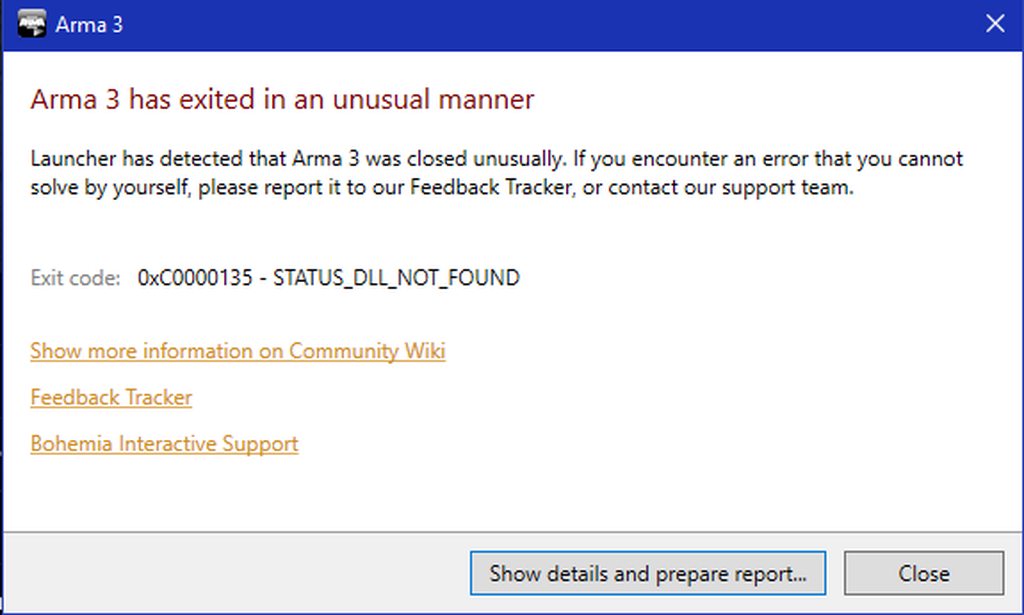
https://community.bistudio.com/wiki/Arma_3:_Unusual_process_exit#0xC0000135_-_STATUS_DLL_NOT_FOUND
wise barn
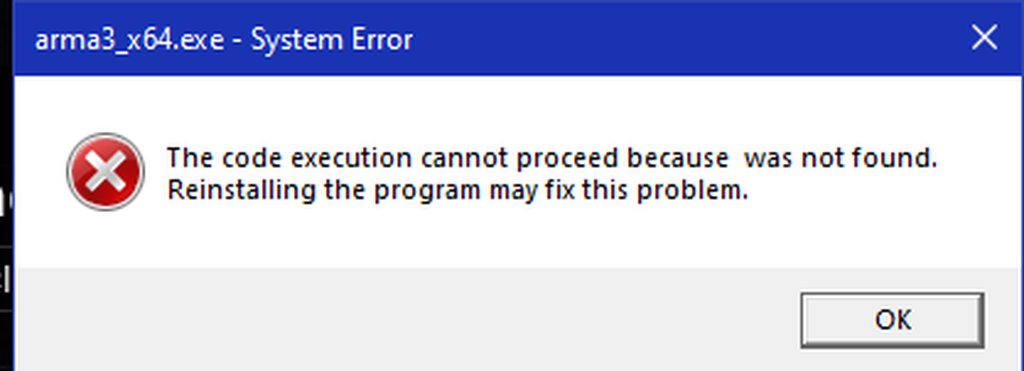
then it's not an arma issue but rather a system / OS issue
what DLL is it that's missing?

 wise barn
looks like directX
 hard dew
can u tell me how to repair it?
wise barn
google can
hard dew
or show me?
wise barn
i'd have to google it myself
hard dew
wise barn
i'd have to google it myself
sorry to bother u but can u go in private and sharescreen?
wise barn
sorry, i don't do that.
as i said, troubleshooting stays in public.
i also don't know more than google tells me
hard dew
ok tnx for helping
 digital gulch
my walk / run toggle is not working when i use ctrl + c . checked the bind, reset it, and its still not working. any suggestions?
 full summit
Hi Guys, I hoping you guys can help or at least know someone that can i was running Arma 3 as part of a starsim unit on my now old pc. Few frame issues graphics not brilliant etc but it ran, occasionally would lag so much it would crash or a few alt tabs in and out would just give me black screen and force a end task command through task manager. Now i have a new PC, (i can provide the full specs) but i9 11th gen, 3090, 32gb of RAM etc and since getting into arma with our mod list, game looks beautiful everything is smooth and no issues what so ever.. until it hits a random freeze and the game just crashes out. If any one can help please send me a DM as this is driving me insane not being able to use my new PC properly! Cheers
 sour bloom
what do i have to do in the old man cargo plane thingy
after landing the aircraft it doesn't say anything on getting out of the vehicle, but in the offroad it does
 subtle blade
Anyone have any idea why extracting a PBO on my external HDD would give a drive not found error, yet moving it onto a onboard SSD, extracting it, re-pbo'ing it and moving it back on the HDD fixes the PBO extraction issue?
hard dew
who can help to replace this files for Arma 3 (to download the from internet and where to put them)
 fringe salmon
i have a problem with arma 2 czech republic. i was buy and download on steam, i have Arma2, Arma2OA, and czech republic DLC, but i cant find czech republic scenarions and campagins, please help
steady hawk
IIRC you need to take an extra step on the ACR DLC. Follow this guide maybe
https://steamcommunity.com/app/33930/discussions/1/558756256520613453/

Lately I bught Arma2 Complete Collection, but installing ACR DLC properly turned out to be very frustrating. The solution could be found online partly, and I did my reserch to nail it down. I only try this on Win8.1, so I mentioned it in the title, but I think OS was irrelevant to my case.Hope this post can help you. First, about "!!!
First of all go to your A2 OA Steam Installation (X:\Program Files\Steam\SteamApps\common\arma 2 Operation Arrowhead). Search for DLCSetup\ACR folder and make a backup copy of "datacachepreprocessor.exe". Then copy "datacachepreprocessor.exe" from DLCSetup\BAF (Or PMC) and overwrites it with ACR's one. Then start the "datacachepreprocessor.exe"...
 wild vine
error creating Direct3D 11 graphical engine
 wise barn
did you do what lou and I told you to do?
wild vine
I don't know what the error is, but I don't know.
steady hawk
🤔 Excuse me?
wild vine
why
wise barn
check and / or reinstall your graphics drivers
uncut trellis
Could problem be too old hardware?
cedar crown
uncut trellis
Could problem be too old hardware?
There is such a thing with ArmA? 😄
steady hawk
ArmA runs on old hardware! Arma 3 on the other hand... IDK
cedar crown
Those computers would be running for fifteen years lol...
cedar crown
steady hawk
ArmA runs on old hardware! Arma 3 on the other hand... IDK
I'M A REBEL, WOO! 😄
uncut trellis
cedar crown
Those computers would be running for fifteen years lol...
There's plenty of old machines still in use around the world
cedar crown
uncut trellis
There's plenty of old machines still in use around the world
Yeah, I guess since I'm no longer running a decade old machine, it's getting harder to realize.
 still ridge
Single monitor. 1920x1080 native resolution. I would like to run arma in fullscreen windowed mode and in 1680x1050 but it wont allow me. Is there any way to achieve this besides going fullscreen?
uncut trellis
fullscreen window can not change its resolution
since its tied to the screen resolution
you can reduce sampling though
or do you mena like you would like black borders around your screen?
still ridge
preferably no black borders
still ridge
1920 hurts my eyes so i would like to be able to play at 1680 which i know works great for me. I could do it in fullscreen but alt tabbin is a pain so i was wondering if there is a workaround
uncut trellis
reduce sampling could make same effect
still ridge
I ll try lowering the sampling and changing desktop resolution
uncut trellis
desktop resolution could help too yeah
still ridge
Thank you very much for you time HorribleGoat!
uncut trellis
np. good luck!
pine kite
Choose a 1680 resolution that has the same aspect ratio as 1920x whatever you have. The GPU should scale it. But if might be less crisp.
The resolution list shows the aspect ratio at the end.
1600x900 should fit
 olive depot
anyone know why or how my arma 3 servers I host don't show up in my friends browsers? I have set up port forwarding over a year ago which is still perfectly working, my firewall is not blocking anything. It was working perfectly fine as of two days ago
olive depot
hello? anyone?
steady hawk
Still can't host my server looks like. I made sure 2302-2306 in UDP are open.
you need to make sure first that your WAN address / external IP uses the IPv4 protocol!
Confirmed.
you need to manually open / forward the ports 2302-2306 UDP
Also confirmed.
What it could be? What am I missing?
olive depot
ah

 calm ledge
Everytime i load up arma3, It gives me a black screen then i just have to restart my pc.
wise barn
go to ..\documents\arma 3 or ..\documents\arma 3 other profiles
backup all files that end on *.Arma3Profile
delete all files that end on *.Arma3Profile
restart the game
report what happens
steady hawk
patent kettle
Are you sure you're not behind ISP NAT?
Is this what I can confirm with tracert command? Two local IPs or not thingie?
patent kettle
you can't IIRC. You should check with your ISP.
Hm, you should be able to check via comparing your pubic IP and your WAN IP
Do you have an access to your router?
steady hawk
Yes
patent kettle
If so check the WAN IP
and compare it with the IP you get https://www.whatismyip.com/
If they're different you're behind ISP NAT
steady hawk
The same it seems, if what I see is what you say
patent kettle
Then IDK, try temporarily disabling your windows firewall to confirm it's not causing the issues.
steady hawk
I have completely no idea then
olive depot
its fucking stupid aye, out of nowhere one day it just doesn't work, arma is notorious for this issue
calm ledge
wise barn
go to ``..\documents\arma 3`` or ``..\documents\arma 3 other profiles``
backup a...
Never backed up in my life, How do i backup?
uncut trellis
copy and paste
steady hawk
By copy & paste or rename or... whatever
wise barn
mark files
right click "copy"
at a save location outside the documents folder
"paste"
calm ledge
Thank you
patent kettle
olive depot
its fucking stupid aye, out of nowhere one day it just doesn't work, arma is not...
I'm 99% certain it's not arma, properly open ports just work. If it does not then something blocks the connection.
calm ledge
wise barn
go to ``..\documents\arma 3`` or ``..\documents\arma 3 other profiles``
backup a...
It gives me a crash report
I found the issue
Its because i created a profile with my one drive on
and my one drive is broke rn
and before the game was going good i trying changing onto the profile i created on my one drive
then it crashed my game, so basically i need to turn my one drive on
but my one drive wont turn on
soooo
i find a way to turn it on
thanks for the help btw
 outer otter
so i've got a problem: i saved a composition and after pasting in on other map it goes like that:.. Could someone help me?
 quaint jewel
In the top bar in eden, disable the "follow terrain" thing
Its one of the buttons in the top row
 barren lagoon
Hello
I finished downloading Arma 3, but I can't join any server. It keeps telling me that some file is missing. Is it because I haven't bought any DLC?
Any help would be appreciated.
Thank you
 restive sequoia
post a screenshot of the error
barren lagoon
Be right back, just starting up my toaster :)
 raw atlas
hey um not sure if anyone can help me
getting 0xC000012F - STATUS_INVALID_IMAGE_NOT_MZ
cant boot arma
rustic eagleBOT
Steam file verification process:
Right Click on game -> Local Files -> Verify Integrity of game files
Mod repair process:
Open Launcher -> Right Click on mod -> Repair
raw atlas
have done that 5 times
grim tinsel
huh
restive sequoia
raw atlas
no luck still wont open
raw atlas
and what do you do when all that fails?
restive sequoia
repeat and be sure you tried everything exactly like described
raw atlas
insanity is described as doing the same thing over and over again and expecting different results, have done it twice now with no fixes
restive sequoia
every step listed there ?
raw atlas
directx cannout be uninstalled on windows 10 but yea
restive sequoia
then maybe try a fresh windows install like in the gold old times
raw atlas
guess im gonna have to do that
fringe salmon
im having trouble with my pbo files
it doestn show up when i try to publish my mod
see nothing
 restive sequoia
put the pbo's inside a folder called "addons" and then add the folder to publisher
fringe salmon
alr
barren lagoon

Sorry, I don't know how to take screenshots on PC haha
This happens every time I try to join a server. I let Steam verify the game files again and it still happens.
restive sequoia
You join a modded server, you need to load the mods the server uses to be able to join
fringe salmon
still doestn work
restive sequoia
Use the Arma 3 - Launchers Serverbrowser
fringe salmon
i put the pbo files inside the addons folder
barren lagoon
restive sequoia
Use the Arma 3 - Launchers Serverbrowser
Well I tried that but the error still occurs

 restive sequoia
sorry it's been a while, add the folder "above" the addons folder
fringe salmon
alright
restive sequoia
barren lagoon
Well I tried that but the error still occurs
Then your mod is corrupted. Go to Arma 3 Lauchers mod section and repair/delete/re-download the ExileMod
barren lagoon
Oh I see. Thanks
grim tinsel
fringe salmon
heres proof that i did indeed put it there
For the love of god don't put stuff in there
restive sequoia
I didn't even check the screens.
fringe salmon
grim tinsel
For the love of god don't put stuff in there
Then where
i dont even know or have any idea how to fix this
restive sequoia
C:\Workspace\@MyMod\addons
wherever but not into Arma 3 client files itself
 restive sequoia
Next mod not found, whatever you do, you do it wrong 😛
fringe salmon
restive sequoia
``C:\Workspace\@MyMod\addons``
wherever but not into Arma 3 client files itself
alr
barren lagoon
But I did reinstall the available mods.
 restive sequoia
barren lagoon
But I did reinstall the available mods.
restive sequoia
barren lagoon
But I did reinstall the available mods.
The error message says otherwise
Go to Arma 3 Launcher - Go to mods (Click unload all)
Then go to serverbrowser, search for the server and click on join

it shows the required mods and two buttons at the buttom
click the yellow one
it will download all needed mods (if the server is setup properly)
fringe salmon
still doestn work
fringe salmon
restive sequoia
Next mod not found, whatever you do, you do it wrong 😛
help
 trail sparrow
i am having some texture issues
These are what my tress look like

ive reinstalled the game, verifyied integrity
still the same thing
unmodded
no optional DLCs enabled
you cannot play MP games with contact enabled
because you have contact enabled
go to DLCs in the launcher and uncheck contact
uncheck all your DLCs
 rustic eagleBOT
Arma RPT
Arma generates a .rpt log file each time it's run, which contains a lot of information like the loaded mods, or any errors that appear, this log file can be very useful for troubleshooting problems.
To get to your RPT files press Windows+R and enter %localappdata%/Arma 3
Additionally see the wiki page for more info: https://community.bistudio.com/wiki/Crash_Files
To share an rpt log here, please use a website like https://sqfbin.com/ to upload the full log, that way the people helping you can take a look at it and try to figure out the problem you're having together with you.
Note: RPT logs can hold personal information relevant to your system, the game or others.
fringe salmon
i still dont understand why doesnt it show the pbo files
barren lagoon
restive sequoia
it will download all needed mods (if the server is setup properly)
Thanks. I selected "Upload available mods". I didnt see the mods required for the server haha (Retard moment). Thanks a lot!
fringe salmon
i did it i made the new folder right before addons folder

 brave hawk
@odd scarab you got automuted by the bot due to "fast spam", don't worry
wise barn
@odd scarab
make sure none of those is checked
 fringe salmon
welp it worked now
brave hawk
!purgeban @odd scarab 0 software piracy
 pallid krakenBOT
brave hawk
!purgeban <@!729724793213026366> 0 software piracy
pallid krakenBOT
brave hawk
!purgeban <@!729724793213026366> 0 software piracy
*PewPewPew!!*
RIP @odd scarab
radomhinote#8473 now has 2 infractions.
brave hawk
ez pz
really, people. looking for official assistance for a hacked game.
wise barn
this one time i blink, and something happens that i miss
🦆
how did he blow his cover lou?
trail sparrow
anyone have any idea about this?
 brave hawk
wise barn
how did he blow his cover lou?
brave hawk
wise barn
how did he blow his cover lou?
||[REDACTED]||
trail sparrow
its across all maps, unmodded and modded
brave hawk
trail sparrow
its across all maps, unmodded and modded
AMD GPU?
trail sparrow
yes
brave hawk
try disabling ATOC iirc
wise barn
jup, that'll do
brave hawk
yes, see pinned message
trail sparrow
never had that issue before
brave hawk
AMD effed their drivers
wise barn
AMD fucked up their drivers... again...
trail sparrow
as is tradition
wise barn
exactly
trail sparrow
it worked, thanks
uncut trellis


 cedar crown
You wouldn't believe how many threads on the Steam discussion I've answered with just "Try disabling ATOC" in the past week 😄
fringe salmon
i have some problems
i made a lil scenario in singleplayer, and i click play scenario
and it doesnt work
pine kite
restive sequoia
put the pbo's inside a folder called "addons" and then add the folder to publish...
Nope! @fringe salmon Addon folder is not meant for mods. It's part of the base game. Adding mods in there can mess up your game.
restive sequoia
already told him, was not checking his screenshots. because who would have this idea 😄
 finite quiver
Does anybody know whats causing this? it just explodes multiple times without stopping causing it to fly up in the air
 fringe salmon
pine kite
Nope! <@456226577798135808> Addon folder is not meant for mods. It's part of th...
fringe salmon
pine kite
Nope! <@456226577798135808> Addon folder is not meant for mods. It's part of th...
Then where
 prime kraken
Anyone know why my trees might be doing this?

They're acting really weird. I am running an AMD 6700XT and have the latest driver installed./

No textures
Last screenshot

This is taking place with no mods enabled too.
steady hawk
#arma3_troubleshooting message
Read the convo from this post
steady hawk
Video settings
prime kraken
Mind pointing me to where I can find this in my Radeon software
ah ok
Read my mind
steady hawk
in Arma 3
 solemn delta
We are in contact with the AMD driver team to hopefully find a solution for this AToC issue.
grim tinsel

quaint jewel
Contact 👀
grim tinsel

pine kite
fringe salmon
Then where
I don't even know what you are trying to do exactly. But if you are making mods they need to go in their own folder. Go to the channels under Creative Editing that fit your kind of mod for more help.
fringe salmon
alr
grim tinsel
btw @fringe salmon what are you using to pack your pbo?
fringe salmon
grim tinsel
btw <@456226577798135808> what are you using to pack your pbo?
pbo manager
grim tinsel
cough @wise barn
fringe salmon
alr
wise barn
mikero's tools is the way to go
 glass crag
steady hawk
glass crag
steady hawk
Could be
- Difficulties
- Mission
- Mod
- Server
- Whatever
- Whatever
rocky wave
i can't play as character
when I right click a character in eden, it only gives me a "Go Here" option but no "Play as Character"
i've already set the character to "Playable" and even "Player" to no avail
quaint jewel
if you set it to player, you can just start preview and you'll be in that character
grim tinsel
also you can do 'play as character' if you're previewing via mp @rocky wave
uncut trellis
is it a modded character?
 hexed mist
Does anyone know of a way to disable ATOC server side for players, due to the AMD driver bugs right now? This has been somewhat of an issue on my server.
uncut trellis
dont think that is possible
hexed mist
I've seen other servers force video settings before. If they can do it I can. I can use a mod to do it.
I'm running own modded server and can add anything I want into the mod. Just was looking for suggestions server side if there are any first.
wise barn
those params can not be remotly controlled. only the view distance can be by mission settings
 thick ginkgo
is there any reason as to why the ACE interact create zeus function gets disabled, I am logged in as admin on my dedicated
nevermind it keeps getting reset in server CBA settings for some reason, just enabling it fixes it thoguh
 sudden tundra
Does anyone know how to fix this error?
No entry 'bin\config.bin/CfgPatches.r3f_armes_c'.
It won't let anyone in to the server
steady hawk
Install R3F? IDK what Mod tho
 steady hawk
IDK what server you're trying to join but make sure you have required Mods
sudden tundra
This is on my own dedicated, it's not letting players join
steady hawk
Then make sure there is no broken Mod
Or the player who tries to join have every required Mods
sudden tundra
Does anyone know anything about this error?
cba_versioning - ace - Version Mismatch! (Machine: Thor (Piggy) version: 3.13.0.45, serverVersion: 3.13.6.60
uncut trellis
Your local mod is not up to date
 forest eagle
how to solve the problem with no leaves at bushes and trees?
steady hawk
Disable ATOC from video settings
 glacial ivy
arma disconnects my keyboard for some reason, and it only happens when im in arma its gets disconnected, and wont work until i unplug and replug the usb connector, what does cause this? i didnt have this problem before, only when im zeus or in the EDEN
 midnight ridge
Hey I'm playing Dynamic Recon Ops, there's a sentinel loitering at 1100 @ 2000m alt but I don't have a draw distance fat enough to see? I set my draw distance in the game's option to max and I still can't see that far for some reason. Any idea?
fringe salmon
Is there anyone available that can do my port forwarding via my router for me?
I know what I need to do but I have no clue how to actually do it on my router.
I'd really appreciate the help.
To clarify - I am not looking for instructions on how to do port forwarding. I'm asking if somebody would be kind enough as to take physical control of my computer via TeamViewer or hop into a discord call with me and physically tell me where I need to go. I've followed the steps on the website but I have no clue where to go in my router.
Thank you again in advance!
Just another thing to add to this - I'm confused because my router uses Port Triggering and not Port Forwarding
 compact yoke
Two different things, there should be another section that has Port Forwarding somewhere else on your router
It can be in some wacky places
fringe salmon
compact yoke
Two different things, there should be another section that has Port Forwarding s...
There isn't a second section. Only Port Triggering
compact yoke
You're confident that you have explored every section of your router's settings
fringe salmon
There's a search option for me to search for what settings I want in my router, upon entering "Port" into the search, I only get Port Triggering
compact yoke
That's wack
fringe salmon
It's under NAT Forwarding as an entire damn categorized section that lists (in this order)
ALG
Virtual Severs
Port Triggering
DMZ
UPnP
compact yoke
Haven't messed with port triggering before, so I am definitely not going to try to break your shit today. I'm sure someone here knows how to use it.
fringe salmon
Thanks for the help, anyway
I'm trying to get an arma 3 server set up and... Well without ports... Might be a little useless lmfao
I'm gonna set up the server anyway and I might get lucky and not have to forward the ports because this isn't my ISP's router, it's a gaming one I bought off amazon. So it might already have the ports 'forwarded' or just allow ALL ports to be access inbound and outbound by default, so wouldn't need an option to change them with
In the meantime, I shall ask my tech frend,
We call him dobby because he's our In-House elf for tech.
glacial ivy
fringe salmon
Is there anyone available that can do my port forwarding via my router *for me?*...
you can use an program called simple port forwarding, it will port forward for you
fringe salmon
glacial ivy
you can use an program called `simple port forwarding`, it will port forward for...
Could I uh... Have a little more information on what that program does? I need to be 1000000% sure I won't break my internet. My mother works from home 😅
glacial ivy
fringe salmon
Could I uh... Have a little more information on what that program does? I need t...
you will give it your routers accsess ip (exmp : 192.168.1.1), the routers username and password, then what port you want to forward (in your case 2302 -...- 2306) and then you will select the protocol (in your case UDP), and the you hit forward, and it will login to your router and forward that port
fringe salmon
Don't mean to be offensive or anything, just kinda eeeeee about a "Miracle 1-click program fix" for something as pedantic as arma XD
glacial ivy
it has a pretty clear instruction it self, just install it, it has a tutorial kind of thingy in it self
fringe salmon
glacial ivy
you will give it your `routers accsess ip (exmp : 192.168.1.1)`, the routers us...
Okay thanks that makes a ton of sense actually, it's just a program that does what I'd do, but better. And faster. And easier.
If this works my man you just practically gave me the final piece to revive my whole damn unit lmfao
glacial ivy
fringe salmon
If this works my man you just practically gave me the final piece to revive my w...
 fringe salmon
Soooo my router isnt in the list lmfao
If I choose a router that isn't mine from the list, do I risk breaking it
glacial ivy
fringe salmon
If I choose a router that isn't mine from the list, do I risk breaking it
you wont risk breaking the router
thats just for it to know what kind of webpage is going to be opend
casue it uses webscarping
choose a similler version of the same thig
like if its TP-Link g12 , but there is TP-Link g5 and no 12, use the g5
fringe salmon
Gotcha. Thing is, mine is an Archer VR400
There's not a single router on there under Archer
Arma isnt even in the list of program databases lmfao I'll add my own
Yeah this is too much for my smoothbrain to process
Gonna need another way
glacial ivy
fringe salmon
Arma isnt even in the list of program databases lmfao I'll add my own
thats normal, just use UDP and port
fringe salmon
glacial ivy
thats normal, just use UDP and port
Yeah it was way too complicated for my smoothbrain 😅
glacial ivy
btw, your router full name is TP-LINK Archer VR400_V1 Wireless VDSL/ADSL Modem Router
search under TP-Link
fringe salmon
glacial ivy
btw, your router full name is `TP-LINK Archer VR400_V1 Wireless VDSL/ADSL Modem ...
V2
I have the V2 aha
And there's no routers even remotely like it in the search, and this router uses its own Archer firmware
I know a lot about hardware, but networking, brain go brr
glacial ivy
fringe salmon
I know a lot about hardware, but networking, brain go brr
i can help you if you want, but it will be thro anydesk
or thro discord stream
fringe salmon
glacial ivy
i can help you if you want, but it will be thro anydesk
I don't mind anydesk - Just halp me lmfao
I've never felt so smoothbrained in my entire life... And I'm the smartest in my family when it comes to technology
glacial ivy
fringe salmon
I've never felt so smoothbrained in my entire life... And I'm the smartest in my...
it do be like that some times
 pine kite
fringe salmon
It's under NAT Forwarding as an entire damn categorized section that lists (in t...
pine kite
fringe salmon
It's under NAT Forwarding as an entire damn categorized section that lists (in t...
Sorry, don't have the time to help you through Teamviewer or whatever. But then it is likely Virtual servers. It probably has a list of common protocols, see if you can add your own, and then set them up with UDP ports 2302-2306 to your server's IPv4 address. Show screenshots of the interface if you can't make sense of it.
fringe salmon
pine kite
Sorry, don't have the time to help you through Teamviewer or whatever. But then ...
Don’t worry - David helped me out. Problem is resolved now
 thick stirrup
wow what is up with my arma
every time I open server browser it crashes
quaint jewel
posted crash report on feedback tracker yet?
thick stirrup
wouldn't know where to start lol
grim tinsel
thick stirrup
wouldn't know where to start lol
quaint jewel
Why u say crash when its not a crash 
thick stirrup
I mean it 'crashes' but IDK how to explain
quaint jewel
yeah freeze is freeze. Crash is plop gone to desktop
freeze I can't really analyze... easily
wise barn
@thick stirrup
make sure you have the game running in fullscreen windowed mode. some error messages hide "behind" the game and disappear once the game is force closed
thick stirrup
yeah it freezes and stops responding but the mouse works when I enter the server browser
it's running Fs-window rn, nothing appears
quaint jewel
what do you mean the mouse works?
ingame cursor won't work when its frozen
since when does it happen?
thick stirrup
the pointer moves, the ingame one, but the rest of it is frozen
it worked fine for my op last saturday, then I could use the editor yesterday, but IG since the GM update
quaint jewel
maybe it'll work again tomorrow 😄
thick stirrup
I just don't see why it'd semi-freeze
I'd like it working for an op later but Arma is Arma ig
quaint jewel
random idea, try to switch to profiling branch.
Or restart your PC
thick stirrup
I'll try it, thx
uncut trellis
or verify install on steam
quaint jewel
bit annoying we have automatic freeze detection that should trigger a crashdump, but it doesn't seem to be working
thick stirrup
restarting PC worked, don't know what but something obviously broke
wise barn
happens... nothing unusual
there is a reason why "have you turned it off and on again?" is a running gag when it comes down to IT
quaint jewel
Maybe your disk is full?
pine kite
wise barn
happens... nothing unusual
there is a reason why "have you turned it off and on ...
Not just a gag, the first line of defense!
wise barn
 sudden tundra
Does anyone know anything about this error?
cba_versioning - ace - Version Mismatch! (Machine: Thor (Piggy) version: 3.13.0.45, serverVersion: 3.13.6.60
I have tried re-installing ace and it has not worked, I also have deleted ace in the server and dragged over and installed in the server the copy that is in my mod folder and it still gave the same error
uncut trellis
do you have some mod pack that could contain old version of ACE
wise barn
well... your issue is literally written in the message:
version mismatch
update CBA
and ACE maybe
sudden tundra
So you think it's CBA not ACE?
sudden tundra
How could it be ace though if I've done what I said up there?
wise barn
¯_(ツ)_/¯
 junior kraken
Hey whenever I try to join a specific server it says server is not responding even though others can join, i can connect to other servers just not this one. Any one know why?
 prime light
could anyone here help me with my server on host havoc
 winged breach
Hi, so I tried to delete mods off of my arma thru steam, the arma launcher and the workshop files and none seem to make any effect in my storage.
 grim wing
 wise barn
check your launcher settings and make sure you have battleye active
 wise barn
👍
sudden tundra
Would anyone be able to help with a dedicated server issue? Some people can join the server and some can't even see or join it, even from steam friends
 fresh spoke
Can't find the "Sound Sources" in the settings and guns and effects are just cutting out
 fresh spoke
Anyone?
fresh spoke
steady hawk
Because it is here no more
So no way to fix gun firings just being silent then when a firefight starts?
Not even a big fight either
Like 4 guys
steady hawk
Make sure:
Using correct device to listen
Try empty mission and shoot
fresh spoke
It works fine when you have one person, it's when you have like 4 and guns are going off your gun cuts out
This is vanilla, just want to point that out
steady hawk
Then verify the game I think
fresh spoke
Alright, I will try that
Will that fix an audio issue in the game?
Like, need to know the issue first right?
steady hawk
IDK. Maybe maybe not
fresh spoke
Any way to increase the sound source then, maybe mine is set to like really low or something
steady hawk
That's the go-to solution if a strange issue happens
As the quote above, sound sources does nothing, Dedmen says
fresh spoke
So there is no limit to how many sounds should be playing on this game then?
If that's the case then I do have an issue then.
I will verify, if it does not work, do I submit a bug report or something?
steady hawk
Maybe. Make sure it is not a mission dependent issue
steady hawk
Try empty mission and shoot
fresh spoke
steady hawk
> Try empty mission and shoot
You mean just on my own?
I did, and it works fine
No sound cuts off when I am the only one
That's not the issue I am having
Only when a few people are engaged in a firefight does my gun stop making sound
Not when I am on my own
fresh spoke
Did a verify of the files, still the same issue with campaign missions
steady hawk
fresh spoke
Did a verify of the files, still the same issue with campaign missions
Is it an USB headset?
fresh spoke
steady hawk
Is it an USB headset?
Wireless yes
steady hawk
Try 3.5 audio
fresh spoke
steady hawk
Try 3.5 audio
What's that
steady hawk
3.5mm jack
fresh spoke
steady hawk
3.5mm jack
It's wireless, it does not have a jack cable
Just a USB stick
steady hawk
Try another audio device I said
fresh spoke
I don't have another pair of headphones on hand
I don't keep spares of things like that
steady hawk
You can use speaker perhaps
fresh spoke
Computer does not have a speaker
steady hawk
Whatever. If it is, I guess that's the issue. Arma 3 just doesn't like USB Audio for some reason
fresh spoke
Any patch we can see to fix that if that is a known issue?
steady hawk
Known. Dedmen is searching for the solution I heard
fresh spoke
Ok
Well thank you for the help, I appreciate you responding to me.
I will wait for a the eventual patch.
sudden tundra
Would anyone be able to help with a dedicated server issue? Some people can join the server and some can't even see or join it, even from steam friends
slim quest
i keep getting kicked every time i join any server, and its by battleye or something, ive deleted battleye files, ive tried re installing the game, nothing..... any help anyone
also its not that i have mods or cheats, i dont
uncut trellis
where do you joind a server from? In game or from the steam launchers server browser?
@slim quest
slim quest
when i load up arma 3, i click play, in that launcher menu thing, then inside the actually game, i go onto the server menu place
so yes the in game server browser place
 quaint jewel
wise barn
check your launcher settings and make sure you have battleye active
quaint jewel
wise barn
check your launcher settings and make sure you have battleye active
do that ^
 uncut trellis
yes
uncut trellis
yours is not enabled
uncut trellis
as you cant join servers with different mod configuration loaded
fringe salmon
I don’t have slots
I’m trying to host an internet server via my PC and when I get into the map - no slots
I’ve tried going into Eden and making a player but when I host that, also no slots
uncut trellis
have you placed down multiple playable characters?
are you using mods?
do you have all the mods the mission you try to run requires?
rocky wave
Whenever I play a mission from the editor I get an error [BIS_Function_activateAddons] this function can only be activated during the mission init. The mission I make in editor loads twice (shows the loading screen, puts me into the game for a second and then shows the loading screen again) and it mentions something about an object curator needing to be defined? can anyone assist?
quaint jewel
Sounds like you#re running some bad/buggy mods, like MCC for example?
rocky wave
I am running MCC, could that be the issue?
I'll try reloading my game without MCC hang on
quaint jewel
Yes. I have the same messages and its MCC doing it
rocky wave
ah alright, is it something that is fixable? or do I just need to live with it if I want to use MCC
quaint jewel
live with
rocky wave
alright, ty for the help
agile rampart
I can run 2x and 4x MSAA both at a pretty decent framerate, but as soon as I turn it up to 8x the fps drops dramatically, to like 5 fps
 lone lake
ups should have posted here #general_chat_arma message
 mossy elk
All my custom multiplayer saves are missing.
I started my game today to play and all of them were gone.
Had the same problem with a few other steam games.
Can somebody help me?
uncut trellis
do you have onedrive?
uncut trellis
then you probably dont have those account specific files shared
lone lake
Depends if you have your savegames on the onedrive...
fringe salmon
uncut trellis
do you have all the mods the mission you try to run requires?
Yes, yes and yes. The issue seems to has fixed itself over time
pearl frigate
so i downloaded a scenario that required ace, went into the mission.sqm and removed all the ace addons i could find, saved and went back to play, restarted but said i still require deleted addons. help ig?
uncut trellis
perhaps it had some ace content in use
pearl frigate
it has some more of these class items
 grim tinsel
pearl frigate
so i downloaded a scenario that required ace, went into the mission.sqm and remo...
grim tinsel
pearl frigate
so i downloaded a scenario that required ace, went into the mission.sqm and remo...
if a scenario requires ace its best not to try to play it without ace, as ace can be very important part of scenarios
pearl frigate
i asked the author and he said ace isnt a necesity
so do i need to remove all those class items or what?
uncut trellis
the author would probably be the best person to answer that
pearl frigate
alright so i 've got another problem if you dont mind, i found another scenario that doesnt require ace, and neither does ace appear in its mission.sqm file, yet when i try loading it, it says it dependent on deleted content, and then proceeds to show the list of ace addons. i've subscribed to this scenario after i loaded arma without ace. thanks in advance
 zinc hedge
hey i keep on getting this error when i try to join my server nothing unusual on the RPT Any help ASAP would be great Thanks ! :3

looks like the msg on the bottom right of screen shot cannot open error?
 hot jackal
I seem to have encoutered a rare problem with Old Man scenario. It won't start properly. When I launch it from the Scenarios tab, the intro plays as intended. Keystone's dialogue subtitles are displayed correctly, but I can only see a black screen, in the middle of which is the white dot pointer which I should use for interactions. I am asked to press the Space bar to continue, and if I do, I find out I am in the middle of the ocean (probably at grid [000, 000]?), I do not have control and cannot do anything.
I have tried deleting all Old Man tagged .pbos and .bisigns from my game folder and have Steam verify the game cache and download it again. Nothing changed.
No mods loaded. I can play any other scenario and campaign just fine.
Any idea as to how I can fix this? I have been playing the game for years and have played Old Man prior to formatting my PC with no problems whatsoever.
fringe salmon
So I am trying to pack this faction Pbo, but i cant, it says in line 0 there is an asterisk, except there isnt a single asterisk in the whole damn txt file. been trying to do this all night and im getting very frusturated

nvm
forgot to hit save
grim tinsel

steady hawk
Frequently answered troubleshooting
I got a CTD and an error code
You can refer a Wiki article Arma 3: Unusual process exit: https://community.bistudio.com/wiki/Arma_3:_Unusual_process_exit
Steam redownloads every Arma 3 Mods
It is a Steam issue.
I can recommend this forum post: https://steamcommunity.com/app/107410/discussions/1/135510194254064583/
“Contact the server admin” it says something with the keys?
This means Mods you've loaded is not accepted by the server.
It is recommended to use Launcher's Server Browser which allows you to adjust Mods easily.
Nobody hears me in VOIP/VON?
Usually because your Microphone is not set default in Windows.
Get to Audio Settings and change your default microphone.
The cloud file provider is not responding.
Arma 3 hates Cloud file saving. Disable OneDrive likely fixes it.
Some or all soldier animations are not working it seems, even in vanilla game
Sometimes Arma 3's animation cache can be corrupted despite the animations are no longer available because you unload the Mods that adds some animations.
You can delete the folder AnimDataCache that is located in Profile folder (https://community.bistudio.com/wiki/Profile) and it is safe to delete, no backup is needed.
You cannoy play/edit this mission, when I try to play a mission.
The dependency Mods are not loaded in your game.
Load the corresponded Mods and try again.
If you're sure that something is broken on Arma 3
Please report the issue to the #arma3_feedback_tracker: https://feedback.bistudio.com/.
steady hawk
steady hawk
# Frequently answered troubleshooting
## I got a CTD and an error code
> You can...
agile rampart
I'm having an issue where whenever I turn on anti-aliasing, at any level, my fps instantly drops to unplayable framerates (around 5-20 FPS), but as soon as i disable it i'm getting 60+
even when i have sampling up to 150%, it still runs better than when i have AA on
 steady hawk
Load these Mods
steady hawk
But the game says so
pearl frigate
I get this same message with every scenario I try to play
Anyways could someone tell me what mods do I need to install?
grim tinsel
pearl frigate
Anyways could someone tell me what mods do I need to install?
ace, tfar, fxp
as a start at least
 brittle scroll
Still no solution for this?

Tried to update mod several times yesterday. This message all the time.
 signal sonnet
Hi, hopefully someone can point me in the right direction. Yesterday I installed CUPS Terrains and after some point I was getting an infinite loading screen whenever trying to test the mission in the editor. This was not immediately after getting CUPS, but some time afterwards. Tested a bunch with and without mods and on older missions that were working, same thing.
Now I just tried testing on a mission we have on our server, with the server modset. Works perfectly. But if I download the pbo from the server and run the mission locally either in SP or hosted MP, with the same modset, then I get the infinite loading screen. I even reinstalled the game and still get the same thing.
 royal pelican
Can someone help me with my game graphics, i've owned arma for about a month now but every time i play the game no trees, grass or anything related to terrain will render in my game and im unsure how to fix it. I have tried watching videos, re downloading the full game, playing without mods, changing launcher settings but nothing will work does anyone know if they can help me?
royal pelican
uncut trellis
turn off ATOC
where is atoc in settings
uncut trellis
it has been mentioned here a few times in the past couple of weeks 😉
 solar orchid
Hey, im trying to host a arma server but getting this error: CreateBoundSocket: ::bind couldn't find an open port between 2303 and 2303
Any idea?
wise barn
!localhost
rustic eagleBOT
To host a server or a game session locally, you need to make sure first that your WAN address / external IP uses the IPv4 protocol!
Check your router’s status page in the settings to confirm. (If in doubt, ask your ISP, Websites like “whatismyip.com” give you a false positive!)
Local servers and games can not be hosted on an IPv6 network, or IPv4 via DSlite tunnel!
https://www.avg.com/en/signal/ipv4-vs-ipv6
Once you have confirmed that your connection uses the IPv4 protocol, you need to manually open / forward the ports 2302-2306 UDP (https://community.bistudio.com/wiki/Arma_3:_Dedicated_Server#Port_Forwarding)
See your router’s manual on how to do that, or ask google: “<your router model> + port forwarding”
outer otter
can i somehow boost my object builder?
uncut trellis
boost?
you will have to turn on DX view mode on the viewports so that it works
non DX broke with win10
 feral pewter
Hey how do i fix the infinite loading screen
When i load into my friends mutliplayer game it puts me on a loading bar about 2 inches from being done and it stays there
pearl frigate
grim tinsel
ace, tfar, fxp
so i downloaded every mod i could find but i still have those things missing

what do they stand for?
fringe salmon
If I load into server hosting and have no slots one more time I’m gonna break something I swear
grim tinsel
pearl frigate
what do they stand for?
sorry not sure
fringe salmon
So how come sometimes I get slots but 75% of the time theres no slots no matter what mods I load?
 proud hull
Is this a bug? I'm on the tipping point campaign mission, and my team just lead me to a random shore, and stand there, i've waited some 10 minutes
 golden nova
fringe salmon
So how come sometimes I get slots but 75% of the time theres no slots no matter ...
golden nova
fringe salmon
So how come sometimes I get slots but 75% of the time theres no slots no matter ...
scenario bug or faulty mods
golden nova
proud hull
Is this a bug? I'm on the tipping point campaign mission, and my team just lead ...
if it's the campaign mission then there should be few boats on the shore west of you, reach them and scripts should trigger themselves
proud hull
golden nova
if it's the campaign mission then there should be few boats on the shore west of...
I saw a turned over boat on the shore, but otherwise, they just stood there
pearl frigate
grim tinsel
sorry not sure
i solved the problem anyways lol thx. a fella told me to only launch arma with the required mods for that certain scenario and that seemed to work
grim tinsel

golden nova
proud hull
Is this a bug? I'm on the tipping point campaign mission, and my team just lead ...
have you tried restarting the mission? if you still encounter the issue then you can just cheat through it and end the mission https://community.bistudio.com/wiki/ArmA:_Armed_Assault:_Cheats
proud hull
tried multiple times to restart
golden nova
I think I had similar problem but it fixed itself after few tries, AI is just wonky
they're supposed to clear the city and then run from a mortar fire towards the shore I mentioned above
 brazen tiger
Hey !
I got this error even tho i got CUP in the server and before the Aceitemplus in the command line. I don't really know what to do...
22:58:48 Warning Message: Addon 'aceextitemsplus' requires addon 'CUP_CASigns2'
i'm probably just stupid but fr i can't find the solution and it's getting pretty annoying..
uncut trellis
You seem to be missing some part of cup
Have you subscribed to the official releases on steam?
brazen tiger
but with the old modset we used we didn't have this problem.
Might it be a clonficting addon ? oO
brazen tiger
uncut trellis
Have you subscribed to the official releases on steam?
yeah official mod :/
uncut trellis
Could be some other mod breaking it sure
When mods are in use and something does not work the cause is mods
brazen tiger
Just removed the 2 Aceitem and now i have this...
 wise barn
@brazen tiger
your CUP Terrains - Core is corrupted
you need to repair it via arma launcher
brazen tiger
but i didn't touched it
brazen tiger
did it, nothing change :/
wise barn
unsubscribe from the mod, go to ..\Steam\steamapps\workshop\content\107410 and delete the folder 583496184 if it's still there. then resubscribe
brazen tiger
Well i deactivated the map Australia and it works just fine now.. It wasn't updated since 2017 could it be the problem ?
wise barn
well... if i had known that you run australia....
yes
that's the issue
australia uses ripped and outdated CUP mods
brazen tiger
ffff we wanted so much to use this map :/
cause we are looking for a really big map like 40 40 and except Deniland we don't really know any god map.
So yeah, Australia is fully broken ?
brazen tiger
wise barn
well... if i had known that you run australia....
sorry, next time i'll upload the modset :/
 brazen tiger
sadly 20 by 20 wich is too small for what we are working on :/
wise barn
what about CLAfghan?
brazen tiger
gotta look even if it's 20 by 20. We are really looking for a big map with modded houses to do like weird roleplay milsim on it
wise barn
CLAfghan is huge 😄
brazen tiger
wise barn
CLAfghan is huge 😄
20 by 20 and the war we are doing just eat it up in like a month at 40 players lmao
We did it with Al Rayak
brazen tiger
so yeah i'm pretty annoyed as Australia was really the best map we could have x)
wise barn
i know of another pretty large terrain, i just can't remember the name. gimme some minutes to find it
you could take a look at South Asia from Take on Helicopters while i'm searching
brazen tiger
wtf it's wrote it's a 122 by 122 km
wise barn
yes
😄
you said you wanted it big ¯_(ツ)_/¯
sorry, i can't find / remember the other
brazen tiger
wise barn
sorry, i can't find / remember the other
yeah no problem i'll have a look about what you said before
So techanically, if i don't use anymore CUP core i should be able to launch Australia right ? oO
wise barn
it will work until the point where another DMCA will take that version of australia down...
so, better not using it
brazen tiger
yeah you're right..
well Thanks so much for the time you took to answer all my questions !
wise barn
np
 frank pulsar
Can someone help me every time i open up mcc in a sceinaro and load zeus my zeus/arma crashes ??
wise barn
as i told you on the BI discord: don't use MCC then
sudden tundra
Would anyone be able to help with a dedicated server issue? Some people can join the server and some can't even see or join it, even from steam friends
fringe salmon
brazen tiger
so yeah i'm pretty annoyed as Australia was really the best map we could have x)
Try lithium FFAA
 past ore
Can somebody help me with 7.1 sound. When in vehicles everything starts cracking and massive stutters happen. When i switch to stereo there is no more cracking. I know this is Arma issue because no other game does this. How to fix this?
wise barn
Well... It's known that arma doesn't like fake ass software emulated surround BS. Especially if it's USB or wireless driven.
No workaround
Stick to stereo
near hollow
Any reason why triggers suddenly for me stopped playing music in the effects category over a mp mission?
they used to work every single time
agile rampart
ran arma3p, still getting the error buldozer may not work:Missing file[s]: bin/config.bin
past ore
Damn then. My headphines are over 3.5mm jack. But im using hesuvi with vb cables for virtualisation. But it should be like real 7.1 because cable gets true input.
wise barn
Hesuvi with vb cables
That's your issue righ there
It would be no problem if you had a 7.1 sound card with jack outputs
proud hull
golden nova
if it's the campaign mission then there should be few boats on the shore west of...
Worked, thanks!
fringe salmon
For whatever reason my game not loading the assets properly! Tried validating without luck. Any ideas?
only hv trees and grass enabled with ATOC disabled or with A2 trees + grass, all the others are bugged, any ideas on how to fix it?


 uncut trellis
amd drivers are broken
atoc does not work
you need to disable it for now
@fringe salmon
fringe salmon
uncut trellis
you need to disable it for now
thanks
 halcyon adder
I keep getting this error when attempting to use unitPlayFiring, while unitPlay works fine. Any ideas?
The error:
https://cdn.discordapp.com/attachments/789257226032250921/884095472975904788/unknown.png
My setup: (abbreviated)
//movement data in this line, works fine so didnt include
d_v2f = [[79.006,"ML700_missiles_Hellstrike"],[80.836,"ML700_missiles_Hellstrike"]];
[v2, d_v2] spawn BIS_fnc_unitPlay;
[ v2, d_v2f, true] spawn BIS_fnc_unitPlayFiring;

 astral coral
Hey, so not sure if this is the correct channel for this, but I'm looking for some Arma related computer advice
So I'm planning on undervolting my gaming PC to try and reduce my carbon/energy footprint
But since Arma mostly cares about clock speed, I'm hoping to keep my clock speed at relatively where it's at now
Not sure if anyone has any experience in undervolting, and specifically in undervolting as an Arma player, but if anyone does I'd really appreciate some tips
I've got a Ryzen 7 3700X
quaint jewel
Hey, so not sure if this is the correct channel for this
discuss problems with Arma games and solutions to those

How about #offtopic_hardware or #hardware_vs_arma where all the hardware overclocking people are at
 worldly veldt
Is this a good place to post about server issues? I'm stuck in the briefing screen and I have the RPT to be viewed
worldly veldt
Not yet, I'm working with FASTER and trying to bring over an old save of antistasi to a dedicated server so we could run a headless client
Here is the most recent RPT
The only thing that I saw out of place to my untrained eye was this, it won't run or start without a3_characters_f
I can start it, I just can't click anything in the briefing screen where you have the map and you can hit continue, I can't drag my mouse anywhere on the map or use my keyboard to hit escape or even click the task etc
 wanton tulip
Hello, I get this error on certain occasions when using TedHo's infantry unit capture. I have two other infantry captures that play fine, but this one won't, even though the files are identical besides the data.
 uncut trellis
Data probably has some error
wise barn
you start by nor posting the same message over several channels. leave it at one channel only and wait for an answer
@molten horizon
 gritty ledge
all my mods have this on it and i cant load them at all. how do i fix this?
 wise barn
@gritty ledgesee pinned messages in this channel
 willow ocean
There is a problem with advanced flight model on helicopters. When i turn engine off and on on advanced flight model it starts like it hasnt any rotation and launches about 15 secs while i turn engine off and on on standard model engine starts from current rpm from autorotation
wise barn
!ft
rustic eagleBOT
Please use the official Feedback Tracker to report bugs and suggestions.
See this website for a guide on how to use it correctly: https://feedback.bistudio.com/w/ft_a3_howto/
gritty ledge
wise barn
<@!476184657290067968>see pinned messages in this channel
didnt work
 hot iris
Shift+P not working in splendid????
steady hawk
?
hot iris
My shift+P to take a splendid screenshot is not working. I would get high quality screenshots using that instead of steam
@steady hawk
steady hawk
¯_(ツ)_/¯Ask your capture software
Or you can just let Steam make uncompressed shot too
hot iris
Any way to improve quality of steam screenshots?
steady hawk
For all those people who find it more convenient to bother you with their question rather than to Google it for themselves.
 shell dawn
Hey everyone, I've been on hold with Tech Support with Xfinity for about an hour now trying to get port forwarding set up. The port forwarding is set up properly, but it still won't work properly. To my knowledge, the issue is IPv4 vs IPv6. Can anyone who uses xfinity give me a hand?
 honest sorrel
so, after some file issues earlier, my profile file is now gone, all controls got reset, and also all my saved loadouts are gone, and now im not sure on how to get the profile file back


 wise barn
@snow kindle
that a mod that you are using is badly coded and has issues
 snow kindle
Cfg is?
wise barn
nothing you can do about it
cfg stands for config
it's a class inside the mod called "class cfgWeapons"
as i said, you can do nothing about that
wise barn
np
shell dawn
wise barn
do you have IPv4 or IPv6?
I have both, but my ISP couldn't disable IPv6
pine kite
Arma 3 couldn't care less about IPv6. It's just that you need to have a public IPv4 address that is unique on the internet, as in not shared with other of their clients. But the IPv4 traffic should not be tunneled over the IPv6 traffic.
snow kindle
How do I unbinarize a file?
I have a PBO manager , but cant seem to pack this SQM into a PBO.
steady hawk
SQM will never trun to PBO
snow kindle
i took care of it
steady hawk
What exactly you're doing, and the goal?
fringe salmon
So I just finished a mission file, and I put the mission file on the server, loaded it up and the spawn slots aren't there. I've already set to playable, and checked that my mods were right. Does anyone have any other suggestions?
Nvm, got it figured out.
snow kindle
steady hawk
What exactly you're doing, and the goal?
Right now I'm trying to overhaul this server's addons, and redo its mission.
I am struggling as there is a custom mod that is partially signed, and is producing errors.


It won't fully start the mission.
steady hawk
This doesn't seem to be a good (allowed) modify for you
If you're repacking a Mod, nono
snow kindle
I am not repacking a mod, no worries, but I need to figure out how to make this "No entry" error go away.
I have permission from the owner, and in fact, it's my current objective of sorts is to fix all of this before the operation tomorrow. It's just, I don't know where to start, as this isn't my mod. @steady hawk
steady hawk
If so, ask author
Or, get rid of that weapon. Probably some of units in your mission have it
shell dawn
pine kite
Arma 3 couldn't care less about IPv6. It's just that you need to have a public ...
How do I get my IP address set up properly?
snow kindle
steady hawk
If so, ask author
I don't know for sure, but I think the problem could be in that the mod is partially signed,
and that it was manually uploaded to the server instead of being uploaded from the workshop.
Is there any way to narrow down what exactly is causing this?
The author is currently offline.
steady hawk
bisign or something does nothing to do with your issue. I ain't a server man but just use Steam Workshop version so it's done?
snow kindle
That's the thing, the mod is private so it can't be found on the steam workshop.
The author would have to publicize it. But, thanks, I appreciate it.
I'll keep looking.
 solemn adder
Looking for someone who can Help me out with a problem with Mod Mismatching between a Dedicated server and a client, (E.g. (The server has: CBA_A3 V1.23.4)( I Have: CBA_A3) )
Cant Seem to find the reason for the Sever to pull the version out of the mod file.
Should have stated that this is when trying to join the dedicated Server Via the Default Arma 3 Launcher. Any Help Would be greatly Appreciated.
gritty ledge
pops up everytime i open my game
 grim tinsel
gritty ledge
pops up everytime i open my game
grim tinsel
gritty ledge
pops up everytime i open my game
mod cant find a file
pine kite
shell dawn
How do I get my IP address set up properly?
You don't have any control on what IPv4 address you get nor can you change it beyond switching ISP. Check if the sites like whatsmyip.com report a different IPv4 address than the WAN address your router reports. If it is different then you are out of luck. Change internet serviceprovider. And choose one that provides a unique IPv4 address on the internet. (And that allows port forwarding in your router)
gritty ledge
grim tinsel
mod cant find a file
I see that but how would I get that file that I need?
grim tinsel
 ask the author of that mod
 median niche
doesnt work, the ace zoom thing is blank and stuck on my screen, cant move unless using mouse, and stuck in my character,
camera dont work
there

 frigid kernel
when i try to move a unit/object in editor, it moves too much different than 5-6 mins ago
how to make it default
median niche
your talking about arma 2 or arma 3
 gleaming mulch
Since the update was released for GM, I haven't been able to get steam to update the files for it. It will start/stop. In Downloads, it references a DISK_WRITE error. Please assist
uncut trellis
could try running scandisk or deleting GM files so steam can download them fresh
 kindred skiff
idk if this is the right place to send this, but i just had a massive fps drops while i was playing arma 3, it used to give me between 70+ fps on high settings, now on low settings, it barely gives me 20 (vanilla arma as well) anyone got a fix for that stuff?
kindred skiff
uncut trellis
low settings dont use gpu
ive tried using higher settings but it ultimately made my fps even lower than before, but i dont know if the reason for this is that arma 3 was optimized properly and the game did not close properly and caused this problem
fringe salmon
kindred skiff
ive tried using higher settings but it ultimately made my fps even lower than be...
Driver possibly? Background programs? Arma being arma perhaps?
uncut trellis
kindred skiff
ive tried using higher settings but it ultimately made my fps even lower than be...
do you have mods?
and also what DAC said
kindred skiff
fringe salmon
Driver possibly? Background programs? Arma being arma perhaps?
driver is updated to the newest one, have checked all background programs (plus it was running smoother with more fps when i literally had 10 tabs open and downloading mods than having nothing opened) and nothing was on it, i thought about the arma Engine probably causing this due to scripts and such but why wouldnt it cause it before when everything was good
kindred skiff
uncut trellis
do you have mods?
i do have mods, removed them all to try, problem still persisted, put everything on the lowest of the lowest graphics and i was still maxing out at 27 fps (with audio as well at extremely low)
uncut trellis
Could still be driver or hardware issue I suppose.
kindred skiff
uncut trellis
Could still be driver or hardware issue I suppose.
no way its a hardware issue, i literally just bought this laptop factory new yesterday
uncut trellis
maybe some driver/control software enhancement got turned on that eats all frames
kindred skiff
uncut trellis
Could still be driver or hardware issue I suppose.
ill check the drivers, it could possibly be that tbh, i have had the same problem on my high end PC, but the problem went away by itself
okay so apparently, the newest driver update got reverted on its own somehow, im downloading it again rn, ill check back
 eternal temple
One message removed from a suspended account.
One message removed from a suspended account.
One message removed from a suspended account.
eternal temple
One message removed from a suspended account.
 opaque rover
Hello everyone. I need some help with a problem I have. I made a mission with and I added a lot of holdActions in there. The way I crate them is the following:
In initServer.sqf I call an execVM to execute a script. In this script I use remoreExec(Call) to create the holdAction to the appropriate players. In Local host everything works really fine! In a dedicated server environment, only the holdActions that are "remoteExec(Call)"-ed on a numbered id (like -2 for everyone except the server) work. On the other holdActions I use the line: allPlayers select {side _x isEqualTo _side} (where _side, is the side that I want to have the holdAction and is passed as an argument to the script).
On the RPT, I get a line that says "trying to remoteExec(Call) the "bis_fnc_holdActionAdd" to 0 objects, maximum 1000"... I understand that because, when the initServer.sqf runs, no players exist in-game. My problem though is that I have set the "JIP" for the remoteExec(Call) to *true which (if understand it correctly) will put the whole call of the function to JIP Que so when someone joins and is a player of the appropriate side, it will be executed.
Have I understood something wrong?
Can someone provide some help with this?
Thanks in advance!
 fossil notch
Oddly enough, people can join my game with any addons they want and use them. I remember there being a "kick on modified data file" option, but that isn't there now. Doesn't seem to be any way of stoping people joining the game with any addons.
 turbid birch
I keep gettting error code "@cupm\addons\cup_chernarus_s.pbo" when trying to join a server. can anyone help ? only posted a couple times cause i wasnt sure where to ask
thick ginkgo
@turbid birch that's CUP chernarus 2020 I think, you have it installed and enabled?
turbid birch
I ended up getting it , I had a few textures and mods not downloaded for the server