#arma3_troubleshooting
1 messages · Page 143 of 1
 fringe salmon
 brave hawk
looks like a mod issue, can't say much more with that
fringe salmon
brave hawk
looks like a mod issue, can't say much more with that
as in the server will never be able to load a specific mod?
brave hawk
is that all of your RPT…?
fringe salmon
yeah i think ill double check
fringe salmon
brave hawk
is that all of your RPT…?
Thats the latest, after having just swapped around order in command line
full thing, as far as it gets
brave hawk
either
15:17:56 Warning Message: Addon 'cpt_ire_factions' requires addon 'A3_Characters_F<?>'← the interrogation mark
is the issue in the mod config
or
your server's network is ill-configured (ports, etc)
fringe salmon
brave hawk
either
> `15:17:56 Warning Message: Addon 'cpt_ire_factions' requires addon 'A3_...
is there anyway I could fix the mod config thing? i dont think its server ill configured as its had many-a scenario thrown on it and worked fine before
brave hawk
fringe salmon
is there anyway I could fix the mod config thing? i dont think its server ill co...
if the only difference is the mods, then yes, the mods are faulty
Try contacting the author perhaps
fringe salmon
brave hawk
if the only difference is the mods, then yes, the mods are faulty
Try contacting...
thanks man, the author has managed to fix that stuff now
....however lol
now when i load in and hit respawn nothing happens lol
the brand new rpt
this are the in game errors

seems to do it when hosting off of my pc also
 dusk lake
Having troubles with the Respawn function in eden editor loading onto my server
Steps are as follows:
- Create PBO.
- Add Respawn function
- Launch PBO on server im hosting.
- Server crashes on startup.
Notes: The server works fine without the respawn on the PBO.
 grim tinsel
dusk lake
Steps are as follows:
1. Create PBO.
2. Add Respawn function
3. Launch PBO on ...
grim tinsel
dusk lake
Steps are as follows:
1. Create PBO.
2. Add Respawn function
3. Launch PBO on ...
how are you adding the respawn function?
grim tinsel
so how do you do it after you create the pbo 
grim tinsel
dusk lake
upper right hand corner linking to a custom respawn point
also can you post a picture of what you mean with that?
dusk lake
Upper lefthand corner of the EDEN editor
Prefrences
Multiplayer
Set repspawn to Custom point
put down custom point
save PBO
Load PBO on server
Start Server
Server dies.
 rustic eagleBOT
Arma RPT
Arma generates a .rpt log file each time it's run, which contains a lot of information like the loaded mods, or any errors that appear, this log file can be very useful for troubleshooting problems.
To get to your RPT files press Windows+R and enter %localappdata%/Arma 3
Additionally see the wiki page for more info: https://community.bistudio.com/wiki/Crash_Files
To share an rpt log here, please use a website like https://sqfbin.com/ to upload the full log, that way the people helping you can take a look at it and try to figure out the problem you're having together with you.
Note: RPT logs can hold personal information relevant to your system, the game or others.
dusk lake
"-: JSHK_CONTAM LOG MESSAGE: Multiplayer detected, enabled respawn handling"
only thing that sticks out to me
going to remove JSHK
did not work @grim tinsel
grim tinsel
can you share the rpt log?
dusk lake
brave hawk
Warning: Steam Query data overflow, Mods/Signatures will not be correctly received by clients. Remove unused mods or change your server configuration to allow for more data to be sent.
(too many mods)
Can't find a mission collection / mission with template name: 'Changeme.Altis', skipping to next mission.
(info)
14:46:53 Global namespace not passed during: true
14:46:53 Global namespace not passed during: true
14:46:53 Error in expression <true>
14:46:53 Error position: <true>
14:46:53 Error Local variable in global space
(wat)
dusk lake
@brave hawk No idea man
new to the whole server hosting thing
mission and server works absolutly fine without the respawn addition
@grim tinsel any suggestions ?
 potent spear
So I had a computer made for me because I dont know much about them. I downloaded the game and since then i have had complete audio issues. In first person I cannot hear my weapon firing, i cannot hear vehicles, i hear enemy about 100 yards out but cannot tell which direction as its only in my left ear. In third person i can hear vehicles and such but the direction and depth is still so whacked out. So far nobody has heard of such an issue. Anything online is "no audio" and nothing even close to what im experiencing. Any ideas or have heard of this?
 uncut trellis
you audio device might be set up for surround sound
potent spear
my headset works in other games with no problem. Does this happen automaticlly?
uncut trellis
I dunno. I use just simple stereo headset
potent spear
sucks, cant even play the game.
uncut trellis
you probably can set it to stereo somewhere
potent spear
i appreciate it. I have no clue. Everything seems normal but idk too much to start messing with things.
 dull hound
Take this from someone who deals with a lot of different sound in/outs from doing a bit of music production on the side... Yeah audio stuff is voodoo.
I can create an entire 50 minute album with guitars, drums, bass, keys, vocals in my bedroom but can you easily switch headphones without reinstalling drivers and throwing your keyboard out the window? No. You cannot.
A good troubleshooting step: try each available audio output and restart
 wise barn
the main issue is that those "fancy surround gaming bullshit" headphones use software supported artificial "sound improvements" that are basically nothing but crap. arma sound output is something more unique and does not play well with all this. either plain simple stereo mode, or DSP based 5.1 / 7.1 real surround sound. that's it....
wise barn
dull hound
I can create an entire 50 minute album with guitars, drums, bass, keys, vocals i...
no idea what this has to do with what he asked...
dull hound
plenty, audio stuff can be tricky sometimes and often requires more than a simple answer. we'll have to know the exact steps that have been taken to (attempt) to remedy the problem
wise barn
yes, audio stuff can be tricky. but as by my last post the options here are very limited.
- arma hates certain USB headset manufacturers
- arma can not deal with most bluetooth based headsets in multplayer
- arma hates artificial surround bullshit and bollocks software based sound improvements
potent spear
HyperX Cloud Alpha headset.
wise barn
your headset might be fine for other stuff, just not for arma
potent spear
not good enough?
wise barn
no. it's the artificial software crap that is running along the drivers that fucks your arma sound up. it works for other stuff just well
do you have an oldschool set of 3.5mm jack headphones?
can be 10,- stuff
you just need it for a test
potent spear
yea. some turtle beaches
just found them.
im assuming 3.5 means 3 stripes on the plug in
wise barn
unplug your hyperX, plugin your 3.5mm and then change your output device tio the 3.5mm
does yours have a mic?
or just phones?
wise barn
green is phones, red/pink is mic
grim tinsel
potent spear
im assuming 3.5 means 3 stripes on the plug in
3.5 is the size/diameter
wise barn
all good. if it fits, it fits 😄
wise barn
did you try yet?
potent spear
no, you lost me at change your output device to 3.5mm
because i only had an option of realtek or my monitor speakers
not my turtle beaches
potent spear
ok
i uninstalled it when i lost hope and im reinstalling it now. itl be about 20 min
wise barn
@potent spear any news?
 lethal totem
Hey, i'm googling for hours now and can't find any solution... I know arma3 doesn't have the best performance, but was still hoping to get it run alot better on my new pc... Got a i9 10850k, rtx3090, 32gb ddr4 4000 cl16 memory, game is installed on a m.2 ssd and my fps still drop below 20 on invade and annex... How is that possbile? Is there something obvious i'm missing here? changing graphic settings doesn't seem to effect the fps AT ALL. feels like the same performance on 1k and 12 viewdistance... A friend with pretty much the same setup has exactly the same low performance... tried every guide we could find already..
wise barn
use autodetection for the graphics settings.
those FPS drops can be, and most likely are, caused by the mission design and/or server setup
lethal totem
We did autodetect as our first try, ran exactly the same... It's a server which is been there forever and pretty much is always full (77jsoc). Since it's always full i can't believe it's the servers fault tbh
lethal totem
I mean i tried "Old Man".. one of the new(?) singleplayer things.. and this aswell ran pretty bad
brave hawk
and what about one unit in the editor alone?
lethal totem
you mean empty editor or arsenal?
 steady hawk
Old Man is actually pretty heavy and scripted thing. As Lou suggests, you can test in Editor
lethal totem
both above 200fps
wise barn
see... mission design 😉
lethal totem
I just can't believe people play on below 20 fps for hours and come back every day... doesn't really make sense :D
wise barn
it does. arma is not about FPS.
lethal totem
it's a slideshow sometimes
steady hawk
It does. They just don't hate 20FPS
lethal totem
i mean... 15-20 fps is literally unplayable, even 40-60 feels super bad most of the time but i would't mind it at least in multiplayer
steady hawk
Literally playable, though
wise barn
i played arma 2 with 15-18 fps for a long time... ¯_(ツ)_/¯
i was just not allowed to fly helicopters 🤣
lethal totem
hmm... so.. only hope would be arma4 huh? :D
steady hawk
Or, forget about your FPS and enjoy 20 FPS
wise barn
and even if there will be an arma 4, your FPS will still go to hell if the mission is packed with heavy scripts
lethal totem
Dunno. It just doesnt make Sense i get the same Performance as With a 10 year old cpu
wise barn
to my understanding, 10y ago 3.6GHz where the same as today's 3.6GHz CPU speed
¯_(ツ)_/¯
fast CPU, fast RAM = moahr FPS
lethal totem
Could only go ~2% faster with a 10900k or switching to AMD, which probably would make a 2-5% difference either at max.
wise barn
or just OC your CPU
 quaint jewel
wise barn
to my understanding, 10y ago 3.6GHz where the same as today's 3.6GHz CPU speed
quaint jewel
wise barn
to my understanding, 10y ago 3.6GHz where the same as today's 3.6GHz CPU speed
No IPC improved alot
lethal totem
it's running at 4,9ghz
quaint jewel
Depends on what you consider speed.
Frequency yes, speed of executing code no.
More instructions per clock cycle, less waiting for memory due to bigger caches
brave hawk
quaint jewel
No IPC improved alot
oh good to know that!
uncut trellis
I've found many gpu control panel enabled special tweaks and enhancers eat frames in Arma 3
If anything is enabled there it might be worthwhile to try disabling them
 jolly merlin
I am having the strangest issue, something is automatically wrapping the code in my missions with the 'call' command.
I have never encountered this before and have no idea where to start looking tbh.
Example 1
 jolly merlin
thank you
 warm jasper

everytime i try to launch
arma 3 it just crashes on addons
can someone help i keeps doing it agian
wise barn
what's the full error message?
warm jasper
it gives me that nothin else
wise barn
open the game, go to graphics settings and set display mode to fullscreen windowed
warm jasper
k
wise barn
your actual error message might be hidden on the screen and disappears after confirming the error
in windowed mode, you can alt+tab through the windows / error messages
(if any)
 golden loom
Hey Guys I got an error with a picture of RHS anyone encountered this before? https://cdn.discordapp.com/attachments/768201046584983594/868223965045338192/20210723_231153.jpg

also gives me an error of picture 6_ca.paa/5/4/3
golden loom

golden loom
Just trying to load a mission, i have maybe an ammo box from that mod and that's all
 loud hemlock
Everyone on the arma 3 server spawns as the same loadout even though in editor people had diffrent loadouts selected
grim tinsel
loud hemlock
Everyone on the arma 3 server spawns as the same loadout even though in editor p...
are you using vanilla respawn?
loud hemlock
yeah
grim tinsel
you can disable the respawn on start
loud hemlock
no i mean like if someon e is selected an engineer
as the role
they dont choose there loadouts
they spawn with the same gear as who ever spawned first
grim tinsel
ah, sounds odd
loud hemlock
indeed
 near hollow
can someone help with this error in the RPT it LOOKS vanilla but not sure
 6:59:57 Warning Message: No entry '.scope'.
 6:59:57 Warning Message: '/' is not a value
 6:59:57 Warning Message: Error: creating weapon optic_Hamr_F with scope=private```

is that a Contact dlc optic?Vanilla(base game, non-DLC) optic. Either your Mod is doing something bad or the game is corrupted
 left crescent
Guys which servers have the best perfomance? I have around 30-80 fps on KOTH and >100 on RP servers. I dont really like rp, but RP servers seem to have way more fps. Are there any other conquest gamemods with decent servers?
brave hawk
left crescent
Guys which servers have the best perfomance? I have around 30-80 fps on KOTH and...
that's… not #arma3_troubleshooting, but server seeking so #arma3_questions
left crescent
Sorry, didn't know where to ask
brave hawk
'tsok!
 flat blade
golden loom
Hey Guys I got an error with a picture of RHS anyone encountered this before? h...
flat blade
golden loom
Hey Guys I got an error with a picture of RHS anyone encountered this before? h...
I've seen this issue posted a few times this week.
Are you also using 3CB Factions? I will assume that you are based on the previous issues I've seen.
If reinstalling RHS AFRF and 3CB Factions doesn't work, then try replacing all 3CB vehicles in your mission with temporary vanilla replacements.
Save the mission - reopen and see if the error shows.
If the error is no longer showing then you should be good to change the vanilla vehicles back to 3CB Factions ones.
I hope that works out for you.
If you are not using 3CB Factions... Shame on me for assuming stuff!
brave hawk
flat blade
I've seen this issue posted a few times this week.
Are you also using 3CB Factio...
or thank you for trying to help ^^ 😉
 copper raft
ok someone help me with this its starting to get to me: I've been having an issue on arma 3 where my screen goes blurry ever few seconds and its starting to really piss me off, also when I spawn in another playable character they cant run have the annying blurr and low ammo somebody please help me I've been trying to fix this for ever now
near hollow
steady hawk
Vanilla(base game, non-DLC) optic. Either your Mod is doing something bad or the...
Weird ill validate files first
brave hawk
copper raft
ok someone help me with this its starting to get to me: I've been having an issu...
can you send an rpt file?
!rpt
rustic eagleBOT
Arma RPT
Arma generates a .rpt log file each time it's run, which contains a lot of information like the loaded mods, or any errors that appear, this log file can be very useful for troubleshooting problems.
To get to your RPT files press Windows+R and enter %localappdata%/Arma 3
Additionally see the wiki page for more info: https://community.bistudio.com/wiki/Crash_Files
To share an rpt log here, please use a website like https://sqfbin.com/ to upload the full log, that way the people helping you can take a look at it and try to figure out the problem you're having together with you.
Note: RPT logs can hold personal information relevant to your system, the game or others.
copper raft
there are a few
copper raft
it kidna gets fixed when I disable stamina and wake up things
but its really annoying
near hollow
Vanilla no mods?
brave hawk
copper raft
there are a few
close the game
delete all rpt
start the game
send rpt
^^
 shy tusk
Hey everyone. I am trying to launch my server and I get these errors, which prevents me from selecting a slot, when I am on the server and it forces me back to the role-selection screen. Anyone knows what I can do to fix it? Thanks in advance
 brave hawk
@copper raftany news?
brave hawk
shy tusk
Hey everyone. I am trying to launch my server and I get these errors, which prev...
that's a config issue, coming from a mod
which one, I can't know for you (as it might be a conflict between two)
copper raft
brave hawk
<@!368308368860905472>any news?
fixed its self thanks
no idea what was wrong
brave hawk
okido, kewl
shy tusk
Hmm okay fair enough. So what should I try in order to fix it? Reinstall mods on the server or something else?
brave hawk
shy tusk
Hmm okay fair enough. So what should I try in order to fix it? Reinstall mods on...
remove half your mods
test
if it still does it, remove half your mods
etc.
until you locate it down to the responsible one(s)
shy tusk
I will try it, thanks
copper raft
ok new issue
so my vehicles now only let me aces my inventory
but not drive
it partially works
wait nvm fixed it
 solemn pewter
Any time I get into a Server, it says "Cannot load textures" then kicks me. Why?
wise barn
rules if the internet: pics, or it did not happen
post a screenshot of the error please
@solemn pewter
solemn pewter
wise barn
<@!477895272756936712>
Arma is no longer loading.
solemn pewter
wise barn
rules if the internet: pics, or it did not happen
post a screenshot of the error...
Its stuck on "Valadating"

Been like this for 3 days
OH
IT WORKS
 violet turtle
Hey, when I'm trying to play with mods, everytime I try to load into a game (singleplayer or multiplayer), error about extension .dll not found pops out. I already contacted the mod's tech team, tried repairing the mod in the launcher, reinstalling the entire game, turning off antivirus and battleye, but even if the .dll is in the mod folder, the game just won't load it and it'll keep throwing that error at me. I have no idea what else may be causing the problem, since I don't use any other antivirus except for windows defender (which didn't even block the file or gave me any announcement about it being a possible malware) and even battleye didn't show any message about the .dll file being blocked. My last bet is the arma 3 somehow being unable to load the .dll file or something, so I landed here.
wise barn
@violet turtle
#arma3_troubleshooting message
 wise barn
unsub from ACE3, check if all files from ACE3 are gone (manually check the !Workshop folder), resubscribe
then check if maybe Battleye is blocking that DLL


 surreal tide
 grim tinsel
👍
wise barn
@surreal tide
what's your question?
violet turtle
Any help to my problem?
wise barn
the solution is literally written in the message
violet turtle
wise barn
the solution is literally written in the message
my problem is about game not being able to find .dll file
 pine kite
Thus your install is corrupt.
wise barn
violet turtle
my problem is about game not being able to find .dll file
oh, i'm sorry.......
i blindly responded thinking you are monky.
i told you my solutions already
can't think of more
violet turtle
Well, the .dll file is in the folder, everything seems okay, but arma just won't register the file
nothing is blocking the file
at least not battleye or antivirus
violet turtle
Welp, if nobody has idea what's wrong, is there a last solution to try and fix the problem, if all previous ways don't work?
fringe salmon
any idea why i cant change view? as of earlier today i cant go to third person at all
fringe salmon
thank you that was it
dull hound
setting up an old logitech joystick, using the thumbhat to freelook. works fine for look left and right (it will return to center once I've stopped pressing) but look up and down stays in that position and does not return to center. anyone encountered this?
near hollow
violet turtle
my problem is about game not being able to find .dll file
Are you running it on a server if yes the .dll most likely is missing from the server
violet turtle
near hollow
Are you running it on a server if yes the .dll most likely is missing from the s...
it doesn't work when I try to join a server or when I even try to run the editor singleplayer
near hollow
then its something on your end, have you tried removing it entirely and re downloading/repairing?
 olive hinge
I have downloaded many sp scenarios from workshop (along with the required mods) but most of them can't be played (nothing happens when i click play button on the launcher). Any help?
P.S: Cross post due to no response.
olive hinge
Got it. Should I delete one of the posts?
uncut trellis
yes
uncut trellis
also can you for example paste link to one of the missions that do not work
olive hinge
Most of them e.g none of the dynamic recons with any maps
uncut trellis
link?


 uncut trellis
and you have all the required mods running?
do you have any extra mods running?
if yes, have you tried with just the required mods?
olive hinge
I have unloaded all the mods from launcher and then tried to start the scenarios. I thought selecting the scenarios will automatically load the required mods. Am I wrong?
I have the specific scenarios required mods, but didn't individually load them from my side.
uncut trellis
yes that is wrong
when game is running it does not load mods
mods have to be started on launch
olive hinge
So how do i know which mods to load in launcher for those scenarios?.
uncut trellis
possibly need to check the workshop pages
olive hinge
uncut trellis
possibly need to check the workshop pages
😬 that's a chore. But i guess no other way out.
uncut trellis
you can create a mod profile for each misson
olive hinge
I hope there is a how to for creating a mod profile. Never done that before.
olive hinge
Okk. Thanks man. U have been really helpful. 👍
uncut trellis
good luck
 unreal wasp
I have a squad member that keeps getting a bad module error from windows and it locks up arma when he tries to login. Any ideas here on what to do?
wise barn
 heady beacon
bought arma on steam, not starting. on taskmanager "arma3launcher" shows up for half a second, then dissapearing. after i tried it 7 times, my pc got a blue screen. cannot refund because i need 2h gameplay. please consider helping me :)
uncut trellis
have you verified the game files in Steam?
heady beacon
uncut trellis
have you verified the game files in Steam?
how do you do that?
if it doesnt do it automaticly, no
uncut trellis
right click on the games name in library go to properties - local files - verify files
heady beacon
and that will help?
heady beacon
uncut trellis
right click on the games name in library go to properties - local files - verify...
gotta try that tomorrow
uncut trellis
it could if your files are broken somehow
heady beacon
well
pine kite
heady beacon
bought arma on steam, not starting. on taskmanager "arma3launcher" shows up for ...
You don't need 2 hours of gameplay to refund. You need less than 2 hours, and within a period of 2 weeks after purchase. If you played more then yes you can't. But seems like you can't have 2 hours if it's not working for you like this.
heady beacon
so the thing is that the launcher shows up for half of a sec on task manager but then vanishes
heady beacon
pine kite
You don't need 2 hours of gameplay to refund. You need less than 2 hours, and wi...
fun fact, it shows that i played the game for 13 mins
which means the game itself did actually work
but i just cant see it
not even on task manager
pine kite
Well, then you should have no issue refunding, if you really wish to.
Did you do the game install verification?
heady beacon
nope
wise barn
reinstall vcredist for 2013
heady beacon
i didnt know wbout that
pine kite
Well, it was suggested at least 10 minutes ago by now.
uncut trellis
also the vcredist reinstall could be useful
wise barn
heady beacon
but whats that even
needed microsoft stuff
uncut trellis
heady beacon
and is arma 3 even fun?
yes
heady beacon
if i am not 16 is it ok for me to play the game
uncut trellis
youll have to ask your parents I suppose.
uncut trellis

heady beacon


hm
i guess i will still play it if i could
is there blood
like that that flows out of a dead body
@uncut trellis
uncut trellis
there is some blood but not really gory stuff
heady beacon
ok thats good
and is it similar to escape from tarkov, squad or insu... (?) sandstorm?
heady beacon
uncut trellis
there is some blood but not really gory stuff
Is there anything known about arma 4?
uncut trellis
in sense that each of them have guns and you shoot stuff they are similar
and no there is no news
heady beacon
Ok so my 36€ aren’t spend for a week
Wanna play with me tomorrow maybe?
And guide me
wise barn
!gettingstarted
rustic eagleBOT
If you're new to playing Arma, its recommended to have a read of #info_help_tips and especially the getting started guide (https://community.bistudio.com/wiki/Arma_3_Getting_Started).
Those resources will provide you with a good way to learn the basics of playing Arma 3 in both single- and multiplayer.
heady beacon
I mean ofc carry me
uncut trellis
sorry no. but also the game does not really play like that
get started with the singleplayer to get hang of it
uncut trellis
yes
heady beacon
Ok nice
Hope I get that game started
And if ur wondering, I do indeed have a good graphics card (just for flex: an rtx 3070 and 32 gb ram combined with an ryzen 5)
 outer otter
sorry, its only help channel with media sharing. Where i can find these stances( in animations ofc)?
 uncut trellis
@outer otter they might be from some screenshot animation package mod
or you will need to comb through the animation viewer
 rain breach
router does not alow server hosting, is there any way to fix it aside from buying a new router
wise barn
router does not alow server hosting
what makes you think that?
rain breach
i have been trying to host a sever for me and my mates and ive tried letting it through the firewall and port forwarding but still
wise barn
!localhost
rustic eagleBOT
To host a server or a game session locally, you need to make sure first that your WAN address / external IP uses the IPv4 protocol!
Check your router’s status page in the settings to confirm. (If in doubt, ask your ISP, Websites like “whatismyip.com” give you a false positive!)
Local servers and games can not be hosted on an IPv6 network, or IPv4 via DSlite tunnel!
https://www.avg.com/en/signal/ipv4-vs-ipv6
Once you have confirmed that your connection uses the IPv4 protocol, you need to manually open / forward the ports 2302-2306 UDP (https://community.bistudio.com/wiki/Arma_3:_Dedicated_Server#Port_Forwarding)
See your router’s manual on how to do that, or ask google: “<your router model> + port forwarding”
wise barn
see the IPv4 part
wise barn
easy: no IPv4 (WAN), no game hosting on your PC
wise barn
did you even read the arma bot post?
rain breach
yes
wise barn
did you check your external address?
pine kite
Does the router show the same WAN address as whatsmyip.com?
wise barn
is it v4 or v6?
how did you check it?
wise barn
pine kite
Does the router show the same WAN address as whatsmyip.com?
that website gives a false positive on ipv4
wise barn
rain breach
i just looked it up
explain please
pine kite
sure, but if the router agrees, then it shouln't be DSLlite or such.
rain breach
i looked up "what is my external ip adress"
wise barn
idk... check the router's manual
rain breach
ah ok
pine kite
There is usually a label on the router with how to enter it's configuration webpage, password etc. Alternatively you can enter the default gateway IP address into your browser. But still you would need to know the username and password for it. which should be on that same label.
pine kite
That's the tricky bit. We don't know. All routers have their own way of formatting the user interface. Just search for WAN address.
rain breach
what do i do with that?
wise barn
if it is not in IPv4 format, you'Re out of luck
even a new router wouldn't help you then
wise barn
does your address look like this?
2001:0ab8:85a2:0000:0000:8a3e:0370:7334
(example)
don't post it
just yes or no
wise barn
does it start with 192....?
rain breach
yes?
rain breach
it says on the router
rain breach
im so confused
wise barn
what router model do you have?
rain breach
no
wise barn
gimme a sec
wise barn
not quite
go to "internet" > "online monitor"
check if you see something related to IPv4/6
rain breach
is that in settings?
 rain breach
ok
one sec
just pulling it up on my pc
im having trouble logging in gimme a min
k
its ipv4
wise barn
where and which ports did you forward?
rain breach
wait what?
wise barn
i have been trying to host a sever for me and my mates and ive tried letting it through the firewall and port forwarding but still
your message
rain breach
o its just when i press start on the server it says setting up port forwarding
wise barn
you have to open ports 2302-2306 UDP manually on your fritzbox. i bet there are tutorials for your model on the internet
rain breach
will the port forwarding affect anything else other than arma
wise barn
every port that you open poses some kind of a risk to your network... always. but since you are not a big bank or company, the risk can be taken
rain breach
ah ok


 wise barn
you seem to be missing CBA
 umbral sail
Right
I uninstalled the game a while ago and just recently installed it
How do i get cba back?
wise barn
you subscribe to it on the workshop
 umbral sail
What about the other thing saying it closed unusually
wise barn
most likely caused by the CBA error
umbral sail
Okay thank you lmfao💀I thought I messed up uninstalling
rain breach
@wise barn is there a very large risk when it comes to prot forwardin?
wise barn
no
rain breach
is there a risk at all
wise barn
ofc. the same risk as just simply turning on your PC and checking mails
but it's save for server hosting
you got a firewall on your router, as well as in windows
wise barn
you do all from 2302 to 2306
wise barn
i'm not available for testing. sorry
wise barn
you don't have to restart you PC. it might take some time until your server/game name is broadcasted to steam/server browser
rain breach
do i need to have upnp on or no?
wise barn
not sure if UPNP even works
rain breach
ok😂
pine kite
Make sure the port forwarding is UDP ports 2302 to 2306. Port forwarding in Fritzbox is under Internet/Permit access.
I wouldn't use UPNP. Certainly not if you are already going to port forward as it might conflict. If you are scared that port forwarding is a security risk. Then letting any unknown program (you might accidentally download and execute on your computer) open the door wide open for hackers with UPnP certainly is a risk.
quaint jewel
unreal wasp
I have a squad member that keeps getting a bad module error from windows and it ...
"bad module error" text specifically is a windows bug.
If his game is crashing, he should make a ticket on feedback tracker see https://feedback.bistudio.com/w/ft_a3_howto/gamecrash/
 ionic geode
for some reason when anyone goes near a vehicle the server lags / frames drop, i see any issues on the rpt file, as anyone experienced this before?
uncut trellis
possibly some script in the mission that bugs
 cinder bolt
Iv deleted the folder but somehow its still giving me this message

 alpine reef
So my Arma settings just reset. I played earlier today and everything was fine. I made backups of the Arma 3 and Arma 3 - Other Profiles folders from Documents, as well as the userconfig folder from the games directory. However even when I paste those into their respective directories the game behaves as if I was launching it for the first time and the keybinds are the "factory settings".
heady beacon
@uncut trellis so i got arma 3 running, but the "wrong" way.
i just went to local files
and "locate"
i opened arma there
now i got the other problem
how do i use iron sights?
like they sayd something like "sec mouse button"
whats that?
anyone knows?
is it the middle wheel pressed down
alpine reef
heady beacon
<@!150949769953411072> so i got arma 3 running, but the "wrong" way.
Aim down sights is right click by default.
heady beacon
no
i said use iron sights
and it said in hints sec mouse button
and a better question, where do i change firemodes?
like i normally shoot that scar like gun semi, but suddenly it started to shoot auto and then i got the cutscene
uncut trellis
secondary mouse button is usually right mouse button
as primary is left one
firemodes change with F
did you run the bootcamp?
uncut trellis
yeh thats the one
heady beacon
heady beacon
<@!150949769953411072> so i got arma 3 running, but the "wrong" way.
but i dont understand why i can only launch arma by going into files and launching it from there
like
what do i do to make arma launch from steam
also i got this thing, when i started it said that i am using mods, i dont even know how to add them tho
do dlcs count as mods?
uncut trellis
what said you are using mods?
and if your windows and steam installs are alrigth then you hit play in steam, that start the launcher and there you hit play to start the game
heady beacon
uncut trellis
what said you are using mods?
when i launched the bootcamp
uncut trellis
that is quite odd
uncut trellis
I dont have preference really. I enjoy both
heady beacon
heady beacon
but i dont understand why i can only launch arma by going into files and launchi...
so the thing about that is, i launched the game instantly, not the launcher
heady beacon
uncut trellis
I dont have preference really. I enjoy both
ok, do other ppl kill u in multi
yes right?
uncut trellis
depends what kind of game mode you play
heady beacon
oh btw, i got the marksman dlc, are there ghillie suits?
uncut trellis
there are coop gamemodes where players play against AI
yes
but in MP it depends on the mission/gamemode what gear you can use
heady beacon
uncut trellis
there are coop gamemodes where players play against AI
i watched that one video, https://www.youtube.com/watch?v=LnU1HlBLPnU, this guy is like permanently talking bad about arma

Welcome back. Arma 3, a very [REDACTED] military simulator. Today we explore the depths of the ARMA cinematic universe and uncover its great secrets.
Twitter: https://twitter.com/martincitopants
Discord: https://discord.gg/cnxuMkUYkG
VOD channel: https://www.youtube.com/channel/UChp9HmpAUJx2352TFlgaZdw
Twitch: https://www.twitch.tv/martincitopa...
is it really like that, that bots see u from 10km and kill u in one shot
or not
quaint jewel
is it really like that, that bots see u from 10km and kill u in one shot
if you are in a open flat desert.. then maybe 2 kilometers tops
if its a sunny fogless day
and they have binoculars or you shoot at them
they can kill you in one shot if you're neither wearing vest or helmet and they get a lucky hit
heady beacon
do i have helis without buying helicopter dlc?
quaint jewel
yes
the DLCs are just extras, you generally don't need them
Some gamemodes give you advantages if you have them, others never touch them at all
grim tinsel
heady beacon
i watched that one video, https://www.youtube.com/watch?v=LnU1HlBLPnU, this guy ...
Welcome to Armed Assault 3

someone ban this man 
also why is that video super super quiet
quaint jewel
He doesn't even know the name of the game 
grim tinsel
!namedebate
rustic eagleBOT
The correct name is Arma 3. See: https://www.bohemia.net/blog/arma-2-the-name-tale
Bohemia Interactive
As we're quickly approaching the release of ARMA 2 , the third installment in Bohemia Interactive's award winning series of military PC simulations, it's a good time to clarify some things about the name and also explain why using Armed Assault 2 is wrong or why Arma is not a cheesy weird name as some English-centric souls may believe!
grim tinsel
its wrong tho
But ye as a general guideline, I recommend not talking actual info from meme-y reviews like that
heady beacon
i was just making sure
like i heard about "dark souls 3"
maybe this game was same
actually, it has something in common with call of duty
the games just a bit more realistic
and has not so iconic figures like cpt price and soap
heady beacon
cinder bolt
Iv deleted the folder but somehow its still giving me this message
before i forget i must flex: my graphics look a bit better since i have an rtx 3070 wiith 32gb of ram
heady beacon
quaint jewel
Some would call Miller a iconic figure
whos that
quaint jewel
A character in the campaign
uncut trellis
characters are iconic for people who play the games
I got no idea about those names you mentioned
its matter of perspective
heady beacon
i am going into settings>options>controlls every second just to see that i have 0 braincells and cant remeber how to open the gps
can i make the gps bigger btw?
quaint jewel
yeah
quaint jewel
options->gameplay I think, theres UI layout
heady beacon
on standart, theres:
GPS_______ none
GPS (TOGGLE)_____RIGHT STRG+[forgot whta]
whats the diffrence between these
quaint jewel
one you need to hold the key to show the GPS, the other you just press it once and it switches between on/off (toggle)
alpine reef
alpine reef
So my Arma settings just reset. I played earlier today and everything was fine. ...
Anyone got any ideas on how I could restore my profile?
heady beacon
quaint jewel
one you need to hold the key to show the GPS, the other you just press it once a...
Ok, but can I make it zoom out?
quaint jewel
alpine reef
Anyone got any ideas on how I could restore my profile?
maybe the backup files were corrupted?
quaint jewel
heady beacon
Ok, but can I make it zoom out?
not manually, its based on your movement speed
alpine reef
quaint jewel
maybe the backup files were corrupted?
I also tried another backup of those folders I made in January, that also doesnt work.
So either that one is also corrupted or it is another issue.
quaint jewel
u sure you are replacing the correct files for the correct profile?
alpine reef
Those are the ones I am replacing. As well as the userconfig folder in the game directory.
 quaint jewel
there is nothing in userconfig
or shouldn't be since it was disabled by default a few years ago
try only specifically replacing your one profile
alpine reef
The cba config is in there
quaint jewel
to make sure its really the correct one, instead of just copying all folders
quaint jewel
alpine reef
The cba config is in there
Its not, unless you play singleplayer with filePatching on
alpine reef
quaint jewel
Its not, unless you play singleplayer with filePatching on
Maybe I had file patching on at some point. 🤔
 alpine reef
quaint jewel
try only specifically replacing your one profile
alpine reef
quaint jewel
try only specifically replacing your one profile
Ill try that now.
quaint jewel
at best specifically the .vars.Arma3Profile and .Arma3Profile files
and when it again resets, you should see at their size that the files get force reset by Arma
alpine reef
quaint jewel
and when it again resets, you should see at their size that the files get force ...
The file sizes dont change at all, but I still have the standard settings.
quaint jewel
sounds like wrong file 
change setting ingame and save
and see that your files changedate is updated
alpine reef
quaint jewel
and see that your files changedate is updated
Didnt change.
quaint jewel
wrong file then
alpine reef
That suprises me though since I literally replace the .vars files in the Arma 3 - Other Profiles folder in my Documents .
quaint jewel
check all profiles and find the file that actually changed
alpine reef
Weirdly enough the files marked in blue were changed when I played earlier today, the ones marked in red are the backup files I pasted before. So the file location was fine earlier.

I have one other profile but that didnt change either.
quaint jewel
Weirdly enough the files marked in blue were changed when I played earlier today
All directories at the exact same time? Arma doesn't do that. I doubt that it was Arma which actually touched these
alpine reef
quaint jewel
> Weirdly enough the files marked in blue were changed when I played earlier tod...
Okay that mustve been something else then.
I still could not locate the folder that Arma gets the profile from when I am launching rn.
quaint jewel
My Documents/Arma 3 for the main profile, and the others in Other Profiles
alpine reef
Dont know if it has anything to do/gives us any clue on what is going on, but my game crashes when I try to change the User skin, voice, or anyhting like that.
quaint jewel
there is no other place unless you launch with custom -profiles start parameter and give a custom profile directory
quaint jewel
alpine reef
Dont know if it has anything to do/gives us any clue on what is going on, but my...
did you already report it on feedback tracker?
alpine reef
quaint jewel
My Documents/Arma 3 for the main profile, and the others in Other Profiles
D:[Name of my account]\Documents\Arma 3 - Other Profiles\XDrake
Thats the folder I was looking at the whole time.
Its the one nothing changes in.
quaint jewel
so any -profiles start parameter maybe?
alpine reef
I am using Arma 3 Sync as you can see. Those are my params. Other than that I am using profiling branch if that is useful to know.

I launched the game with the same settings earlier today when everything was still working. 🤔
quaint jewel

alpine reef
My Documents folder is on D: not on C:. Do you think that could be an issue?
However that is how I had it for ages now.
quaint jewel
shouldn't
unless there is suddenly a my documents folder also on C 😄
I have an idea
change security options... no that won't work :U
alpine reef
quaint jewel
unless there is suddenly a my documents folder also on C 😄
Thats what I initially thought what the issue was.
alpine reef
quaint jewel
change security options... no that won't work :U
Since I reset my Windows yesterday I am actually having issues with security settings on the D: drive.
quaint jewel
Idea was to disable read permission on the file
Arma will throw error at startup and tell you if its using that file
alpine reef
For example 7zip cant extract .zip files except I launch it in admin mode.
quaint jewel
but that way you won't find out where the profile is if it uses a different one
alpine reef
Maybe Arma which is on the G: drive cant read/write on D: since I reset my Windows and thats an issue?
alpine reef
I think I have no logs enabled. Dont ask why. 😅
alpine reef
I think I followed some guide on better performance at some point, dont really remember though.
quaint jewel
RPT logging was made async in 2.02 or earlier, since then it has basically no performance impact anymore
alpine reef
So would enabling the logs, changing some settings and then looking at the .rpt give us some insight on the issue at hand?
quaint jewel
probably
quaint jewel
lol apparently
23:08:12 MovesType CfgMovesMaleSdr load time 1337.0 ms
nice, keep that for tomorrow 😄
alpine reef
lul
alpine reef
quaint jewel
> 23:08:12 MovesType CfgMovesMaleSdr load time 1337.0 ms
nice, keep that for tom...
wilco
quaint jewel
-checkSignatures btw you probably want to get rid of that unless you intentionally want your Arma to start slow every time
alpine reef
quaint jewel
`-checkSignatures` btw you probably want to get rid of that unless you intention...
Alright.
Not sure how to go about the issue with my Documents folder though.
alpine reef
Good point, ill try that.
The isse still persists.

Did I just find the .vars files that my game uses rn?
quaint jewel
alpine reef
I obviously have no idea, but maybe the game is using the game install directory since it cant access my documents folder?
quaint jewel
sounds like something arma would do ye
alpine reef
quaint jewel
sounds like something arma would do ye
Trying to fix my D: drive now since thats the root cause.
 north hull
Just recently upgraded my CPU to a 5950x and now when I have Hyper threading enabled ether in game or on my CPU I have this weird texture flashing. I have tried turning off PBO and Rebar but still get the flashing. Only turning off hyper threading fixes it. Any ideas? https://youtu.be/3yPyy-MOyqQ
My Specs
Win 10 64bit
MOBO: ASUS TUF X570-PLUS
CPU: AMD 5950X
RAM: 32GB 3000 MHz DDR4
GPU: MSI GeForce GTX 1080 GAMING X 8G
Storage: 1TB M.2 NVME Samsung 970 EVO, 1X 400GB PCI-E NVME Intel 750 series
Headset: Corsair H2100
Keyboard: Corsair K95 RGB
Joystick: Logitech Extreme 3D Pro
Mouse: Alienware TactX Gaming Mouse
Settings: Ultra, 10000m dra...
wise barn
Hyper threading enabled
in the launcher?
north hull
yes
 maiden grove
I seem to have an infinite loading screen on my server
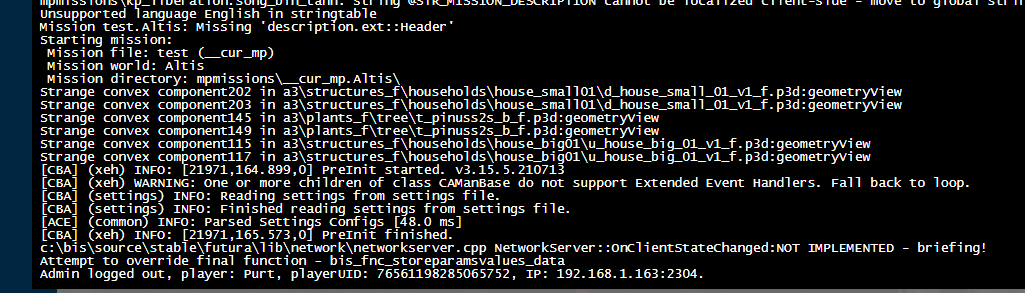
this is all i can gather from the rpt file
any ideas on how to fix?
wise barn
north hull
yes
don't. has no practical use
just leave the settings as they where on default
north hull
I thought dedmen was moving some processes around to give it a meaningful purpose. Like logging and such.
maiden grove
ive tried retransferring the modpack to the server again, to no avail. Still basically getting the same stuff from the rpt file
ionic geode
Has anyone had issues with exad causing players to lag / drop flames everytime they come near a vehicle?
 agile ibex
trying to move arma to another drive, with the workshop items staying in another folder.
can anyone help me with this
wont allow me to since it says, "not enough disk space."
 slate spire
i am trying to get the arsenal to show every item but it is showing only the items i have on my person, how do i make it show everything?
 steady hawk
https://community.bistudio.com/wiki/Arma_3:_Arsenal#Virtual_Ammo_Box
Read this syntax
slate spire
where do i put that in?
quaint jewel
alpine reef
Trying to fix my D: drive now since thats the root cause.
oh no D:
quaint jewel
north hull
I thought dedmen was moving some processes around to give it a meaningful purpos...
multithreading yes. hyperthreading != multithreading
quaint jewel
maiden grove
I seem to have an infinite loading screen on my server
do you hear sounds in the background, behind the loading screen
 fathom canopy
I have .rpt file full of this "unable to save config variable to:" spam: https://pastebin.pl/view/2e4b49d3 . how can I get rid of that?
Pastebin.pl is a website where you can store code/text online for a set period of time and share to anybody on earth
outer otter
idk
quaint jewel
fathom canopy
I have .rpt file full of this "unable to save config variable to:" spam: https:/...
You are probably saving config type values in profileNamespace, don't do that
fathom canopy
quaint jewel
You are probably saving config type values in profileNamespace, don't do that
Im not doing that atm, tried with new mission
quaint jewel
log looks like you're doing that
or did that in the past and didn't delete your entries from profileNamespace
fathom canopy
quaint jewel
or did that in the past and didn't delete your entries from profileNamespace
was thinking that too. guess I'll have to delete the user variables file
yep deleting the file worked
thx
🙂
fringe salmon
i cant export Missions
uncut trellis
please explain what that means
 chilly blaze
Not sure what Arma 3 is playing at here. Is this normal on Altis Wasteland with a handful of mods? 3800x, 1070, 64 gb ram
 heady beacon
@uncut trellis i want to join a multi server but it says i need battleeye
whats that
and how do i get that
uncut trellis
its the anti cheat system. it starts with the game by default when launcher is used
but you should be able to add it as launch parameter too.
heady beacon
well since i cant launch the launcher, am i fucked up?
uncut trellis
for future, please dont ping me. if you got questions this is public channel to ask those. no need to specifically get me to answer
uncut trellis
and refer to my second answer
uncut trellis
you will also need to make a shortcut and add the battleeye startup parameter
there is a wiki page about those
heady beacon
how do i spawn a vehicle
like theres this green thing
but what do i do to call it out
heady beacon
i already understood
heady beacon
uncut trellis
spawn vehicle where?
i have another question, how to heal
also how do i enable 3rd person view, to admire my ghillie suit
and lastly, how do i get a ghillie suit
uncut trellis
I cant answer at the moment. And I told you to not ping me with this stuff
heady beacon
i had to kill a recruit of mine to get one
heady beacon
uncut trellis
I cant answer at the moment. And I told you to not ping me with this stuff
wait i pinged u?
where
uncut trellis
replies ping too
uncut trellis
only if you actually reply to something
then its fine, not to start new questions 😛
heady beacon
but
can u answer them quick
just the keybinds
everything else i will figure out myself
 fallen vine
I'm having an issue, I've been hosting a dedicated server using TADST and for some reason nobody can connect, the server just doesn't pop up even if I give them the server's IP address.
I think I'm just gonna start from scratch and make the server all over again.
pine kite
heady beacon
does this ping?
If you reply, click on the "@ On" at the right of the "Answer to" bar. That disables the pin response where it becomes "@ Off"
pine kite
fallen vine
I'm having an issue, I've been hosting a dedicated server using TADST and for so...
Did you port forward the UDP ports 2302-2306 to your Arma 3 server computer in your router? If not, then that is why. The router blocks all incoming traffic by default, so also your friends trying to log in.
!localhost
rustic eagleBOT
To host a server or a game session locally, you need to make sure first that your WAN address / external IP uses the IPv4 protocol!
Check your router’s status page in the settings to confirm. (If in doubt, ask your ISP, Websites like “whatismyip.com” give you a false positive!)
Local servers and games can not be hosted on an IPv6 network, or IPv4 via DSlite tunnel!
https://www.avg.com/en/signal/ipv4-vs-ipv6
Once you have confirmed that your connection uses the IPv4 protocol, you need to manually open / forward the ports 2302-2306 UDP (https://community.bistudio.com/wiki/Arma_3:_Dedicated_Server#Port_Forwarding)
See your router’s manual on how to do that, or ask google: “<your router model> + port forwarding”
 true stone
Okay I'm going to go insane with this issue, I'm unable to open the debug console in 3den. Here's what I've done to (attempt) to fix it:
- Restart the Game
- Restart my PC
- Make sure the bind is defaulted (it is)
- Try accessing it though the tools menu instead (didn't work still)
- Tried merging the mission into a new file (didn't seem to change anything)
- Tried verifying game files
- Tried reinstalling the game
- Tried opening it on a different mission file on a different map with a different modlist
Nothing I've done so far has worked
I really don't have any idea what to try next, I did google it, but I couldn't find anything similar
north hull
true stone
Okay I'm going to go insane with this issue, I'm unable to open the debug consol...
Did you enable it in General>States>Debug?
true stone
Yup
 north hull
sorry might have miss understood do you mean open it in the editor or while playing the mission?
true stone
In editor
north hull
ahh ok is it not listed under tools?
true stone
It is, but when I click it nothing happens
north hull
Yeah dont know sorry.
 fiery lichen
status access violation fix, ive verified, reinstalled, and put in a new ememory allocator, plus a different launch command code
please help
ionic geode
Has anyone had issues with exad causing players to lag / drop flames everytime they come near a vehicle?
 left wolf
@true stone
I've had a mod block debug and config before.
1st load up in vanilla / no mods and see if debug comes back.
If it does, then one of your mods might be the culprit.
To whittle down a suspect mod, do the 1/2 reduction of mods sequence until you find the problem mod.
(The mod that blocked mine was a french author's items mod, name I don't have offhand.)
fallen vine
pine kite
Did you port forward the UDP ports 2302-2306 to your Arma 3 server computer in y...
I only ported to 2305
2302-2305, I didn't port to 2306
wise barn
sorry, 2306 is BE port
fallen vine
I'll open up a 2306 port and see if that fixes anything
but it's strange how I've been playing without 2306 opened all along and I've never had this issue until now.
wise barn
TADST is outdated, use this
https://forums.bohemia.net/forums/topic/224359-foxs-arma-server-tool-extended-rewrite-faster/
Bohemia Interactive Forums
Intro After using Arma for a long time and having my own dedicated server, I always found very hard to keep my mods up to date. So I used Flaxs tool (FAST) to make the whole thing work but there was some issues. The software tend to be quite slow sometimes, some menus are not working completely a...
fallen vine
Do I install it the same way I do TADST?
(insert it into server file with mpmissions)
wise barn
similar. read the documentation

GitHub
Full rebuild of Flax's tool for installing and updating Arma 3 server with built in features for managing Steam Workshop mods. - Home · Foxlider/FASTER Wiki
fallen vine
I opened 2306 but it still doesn't work.
wise barn
did it ever work before?
fallen vine
Yes, for over a week.
Then people started coming to me and telling me that they couldn't connect, the server would never appear.
No one can connect now, and then for one day they could, and then for some reason all my devices (headset, keyboard, and mouse) got disconnected and all my arma tabs (including the server) crashed.
Since then the problem has persisted.
Even after I've restarted the server from scratch and port forwarded all over again, even deleting my UPNP ports, nobody can connect.
It's strange, and it's frustrating, we were having fun.
The only person who can connect is me, and that's only if I put in the localhost IP (127.0.0.1)
I think that might just be the problem

It's IP address is the localhost IP, when it should be my ipv4
But I don't know how to change that.
chilly blaze
uncut trellis
server performance affects your fps a lot
I'm currently the only one in the server, anything I can do to help boost performance? I thought it was odd that it's not using my entire cpu and gpu. Ill have to check what cores it's loading up when I get home from work
I'm on a 1440p monitor and everything is set to high/medium, but changing graphics settings don't seem to make much of a difference
 sudden path
Hello, I need help. When I start the game all I see is a black screen.
steady hawk
Well so... what is the situation? Did you got any...
- Error log
- Loaded Mods
- whatever whatever
sudden path
I have loaded mods. But if I desable them it still do the balck screen
I'm playing Arma for a few weeks now, I never had this bug beffore.
steady hawk
Error log?
sudden path
Wdym?
steady hawk
Did you get any of error messages?
sudden path
I just have a black screen.
I restarted my computer, and I don't have the problem. Hope it won't happen again.
Thanks Polpox.
😅
near hollow
im getting 11:28:45 Warning Message: No entry 'bin\config.bin/CfgWeapons.optic_Hamr_F'. 11:28:45 Warning Message: No entry '.scope'. 11:28:45 Warning Message: '/' is not a value 11:28:45 Warning Message: Error: creating weapon optic_Hamr_F with scope=private error message pop up in my mission and ONLY in this mission im confused.
have i put a disallowed scope in my arsenal or something?
pine kite
Looks like a bad mod, or typo in mission script if you didn't play make the mod yourself.
near hollow
think i fixed it i searched for hamr in the mission.sqm and removed the entry
must of used a hidden scope of some kind
heady beacon
guyz i have a problem

how do i enable this thing
i kinda started pressing random buttons to find the advanced heal thing
but then i couldnt get this back
steady hawk
Enable what?
pine kite
Select different grenade? Or throw them? Or something else in that image?
If you don't see that overlay, then you disabled personal state stats in difficulty options or it was disabled through mission/server settings.
I meant the darker grey overlay, not the bright white clock and curvy arrow.
grim tinsel
heady beacon
how do i enable this thing
 what are you talking about?
fringe salmon
uncut trellis
please explain what that means
I am currently making jet another Mission for my Squad and i wanted to test it on our Server because the Server doesn´t belong to me i was exporting the Mission and sending it to the owner. But when i click the export to Multiplayer Button it doesn´t create it.
uncut trellis
are you sure you are looking into right folder?
fringe salmon
uncut trellis
are you sure you are looking into right folder?
yeah im sure because it is my 3rd Mission and i dont think the export Folder changed
heady beacon
heady beacon
that thing @grim tinsel
grim tinsel
heady beacon
that thing <@!159639570638438401>
that explains absolutely nothing
heady beacon
i dont have it anymore

look at top right
then look at the pic
above
somethings missing in my game
how do i get that thing back?
steady hawk
Your last picture seems completely fine. It seems no problem at all
But let me guess... you need to bring back that top-right HUD element right?
heady beacon
exactly
and also this: after leaving a vehicle, ur weapon is "disabled" until u aim
which button does that?
or is there even one?
steady hawk
Your weapon is just lowered I guess
Also I'm not aware that there's a button to hide that HUD element. Most likely in the difficulties settings or a Mod
heady beacon
yo thanks
 cursive stratus
session lost file fix?
pine kite
Please explain that last. Seems like 4 random words connected together.
grim tinsel
^
 finite quiver
hey im trying to add a picture into my arma mission but i cant find the mission files
like arma 3 doesnt download the mission files for me
even tho i have it saved
finite quiver
ok so i put the image in the mission file but its still saying it couldnt be found
grim tinsel
#arma3_scenario can props help when the peeps are around
finite quiver
ok thx
 green olive
Hey
What could be the issue
I'm getting "no message received" but the server thinks everything is fine
Ie clients just all disconnect but the server shows nothing in logs about that
We had that 3 times in a row, and now on the fourth one the server did actually crash
 chrome plinth
can i discuss about problems with mods i dont know where to go for this
 maiden grove
quaint jewel
do you hear sounds in the background, behind the loading screen
maiden grove
quaint jewel
do you hear sounds in the background, behind the loading screen
no, no sounds at all
thought maybe it could be just me, fucked up mods or smth. But my friend cant join either
grim tinsel
chrome plinth
make sure you have the actual ace loaded
chrome plinth
yes it is error is "only" when ace is loaded
 odd flint
 maiden grove
here is the RPT File
if anyone can figure out why the mission has an infinite loading screen
i see a bunch of warnings and errors with the specwar7 mod
and also some loop related to CBA
 pine kite
For the fun of it I installed it (pbom_inst_1.4_beta(x64).msi) and opened a PBO mission file like any other. Just double click. Opened without issues. Must be your particular PBO you are trying to load. As I wrote elsewhere (please don't cross-post, it's against the #rules ) your file is likely corrupt.
Or if you installed the 32-bit version, the pbo may be larger than it can handle.
@fringe salmon ^
fringe salmon
hi
fringe salmon
pine kite
For the fun of it I installed it (pbom_inst_1.4_beta(x64).msi) and opened a PBO ...
cross post what?
pine kite
Posting about the same issue in #arma3_troubleshooting and #arma3_questions
Doing that in multiple places makes a confusing discussion.
chrome plinth
chrome plinth
i cant use ace at all even its the only mod loaded with its dependencies
i still need some help on this
pine kite
What Ace did you load? Where did you get it from?
fringe salmon
pine kite
Posting about the same issue in <#141866231362879488> and <#105784487148802048>
sorry for that
green olive
green olive
Ie clients just all disconnect but the server shows nothing in logs about that
How should I go about troubleshooting this?
pine kite
How about starting to explain what you did that resulted in the "no message received". Your description is rather vague. post specifics, or at least a screenshot of where this shows up.
uncut trellis
if its rented server could be worthwhile to ask the hoster too if they can shed any light on what happens
chrome plinth
pine kite
What Ace did you load? Where did you get it from?
Ace from steam
 tacit badge
i have a problem that i can't rly find a written solution to, where can i look for human help (as in not just reading a post, but getting replies) regarding a corrupt compact flash card?
i know this is not arma3 related, but i hope to find someone who knows where i could get help
 versed niche
I have a very strange problem: On some missions in multiplayer, sometimes after a few minutes, sometimes immediately, I get low framerates while everyone else doesn't have that problem. My framerates get to single-digit numbers. If I press ESC key then, I still see the game running (it's MP after all), but the frame rate skyrockets, like in the upper 40 fps (which is what I usually have in MP). Once the slowdown occured, even restarting the game doesn't help.... anyone had a similar problem ?
(And yeah, modded game, ACE among others)
 pine kite
chrome plinth
Ace from steam
pine kite
chrome plinth
Ace from steam
If I search for Ace on the workshop I get a bunch of Ace's on the first page by different people. So again, which Ace did you subscribe to? Links please!
 green olive
I can't seem to unfold weapons when using a user action 2 set to 2xY
but if I change it to the default leftctrl+c it does unfold, am I missing something crucial here? RHS of course
Is this just "RHS sucks"?
yeah seems to be, if I remove the double tap and just use single press it works
green olive
I'm getting a lot of
Ref to nonnetwork object 87635e00# 668967: <no shape>
In the server log, how can I figure out what causes it?
pine kite
chrome plinth
https://steamcommunity.com/sharedfiles/filedetails/?id=463939057&searchtext=ace
Ok, seems the right one. We have to be sure and I don't know how long you have been using it. Try repairing it through the launcher if you have it as the single used mod. If there are more mods applied check if it is one that changes something with a microdagr. I personally never use ACE so I am not familiar with common errors with it.
near hollow
Exception code: C0000005 ACCESS_VIOLATION at 00000000 is this anything to worry about my game crashed with this inside the RPT (stable 2.04)
i have the mdmp if needed
hmm mission works now weird
brave hawk
near hollow
`Exception code: C0000005 ACCESS_VIOLATION at 00000000` is this anything to worr...
near hollow
thanks pops!
 ivory locust
Could anyone point me in the right direction please i am currently trying to install cherno isles i have renamed the file in the missions folder to Exile.Chernarus Isles.pbo i have set this template = Exile.Chernarus Isles; in config.cfg in the @Exileserver folder this is a pastebin to my startup bat https://pastebin.com/UTCfyyVV(edited)
Pastebin
@echo offcolor 0atitle Exile Monitor:Serverstartecho Launching Serv...
this is what i have in the server.log
12:56:18 Roles assigned.
12:56:18 Reading mission ...
12:56:18 No entry 'bin\config.bin/CfgWorlds.Chernarus Isles'.
12:56:18 Mission Exile.Chernarus Isles read from bank.
brave hawk
ivory locust
Could anyone point me in the right direction please i am currently trying to ins...
👉 don't rename files
ivory locust
are spaces ok inthe names then
ivory locust
iv tried with the original names and it returns the same results
ivory locust
thats the only reason i removed the spaces
let me check
i'll be back in 10 need to take the mother in law home 😦
 cedar crown
Hey guys. I'm having a problem with my TFRP pedals (plugged in the PC via the TWCS throttle) from Thrustmaster. I don't really use the pedals for flight in ArmA, but I found a good use for them with leaning for infantry and gas/brakes for ground vehicles.
My problem is: I use the toe brakes for both, and the game only registers the latter 50% of the axis. Any idea what it might be caused by?
 opal locust
Application: arma3server_x64.exe
Framework Version: v4.0.30319
Description: The process was terminated due to an unhandled exception.
Exception Info: exception code c0000005, exception address 00007FF6DA887D5E
Stack:
Server keeps crashing during peak time
 5:59:59 Server: Object info 132:50 not found.
 5:59:59 Can't change owner from 0 to 2
 5:59:59 Server: Object info 265:8 not found.
 5:59:59 Can't change owner from 0 to 2
 5:59:59 Server: Object info 132:50 not found.
 5:59:59 Can't change owner from 0 to 2
 5:59:59 Server: Object info 265:8 not found.
 5:59:59 Can't change owner from 0 to 2
 5:59:59 Server: Object info 132:50 not found.
 5:59:59 Can't change owner from 0 to 2
 5:59:59 Server: Object info 132:50 not found.
 5:59:59 Can't change owner from 0 to 2
 5:59:59 Server: Object info 265:8 not found.
 5:59:59 Can't change owner from 0 to 2
 6:00:00 Server: Object info 265:8 not found.
 6:00:00 Can't change owner from 0 to 2
 6:00:00 Server: Object info 132:50 not found.
6:00:00 Can't change owner from 0 to 2```This spams massively to 75mb rpt files
tried to noLog it but still crashes
Honestly so lost tried everything 😦
quaint jewel
report crash on feedback tracker, with crashdump
 lyric beacon
Hello, I'm trying to upload a private modpack for friends on the workshop, and whenever I try to upload it, it says "error code 2"
I don't believe it has to do with file size (33.5gb)
quaint jewel
lyric beacon
Hello, I'm trying to upload a private modpack for friends on the workshop, and w...
You cannot upload other peoples content to the workshop without their permission, did you keep that in mind?
wise barn
it being 33.5gb, i doubt that
lyric beacon
quaint jewel
You cannot upload other peoples content to the workshop without their permission...
yes
pine kite
Just make a collection list of mods, and make your own mod if you have to make specific changes to existing mods as dependancies. Saves you in uploading too if they are already on Steam.
 regal eagle
I have got a new router and when i try to setup a server i get in but i cant invite anyone/no one can join. I can join other servers
could the new router be the problem?
I had troubles before but it fixed itself but now its the same
lyric beacon
pine kite
Just make a collection list of mods, and make your own mod if you have to make s...
Yeah but I got a pretty sizeable number of mods compiled, so I'd rather put them all in one modpack rather than having my friends download and load 15 separate mods
But that works if I have no real other choice, i amy try once more and give up after that
regal eagle
regal eagle
I have got a new router and when i try to setup a server i get in but i cant inv...
I must have the same problem as before because i get no error from port forwarding
 coral otter
lyric beacon
Yeah but I got a pretty sizeable number of mods compiled, so I'd rather put them...
coral otter
lyric beacon
Yeah but I got a pretty sizeable number of mods compiled, so I'd rather put them...
Like what mod did you compiled in one ?
lyric beacon
well i was thinking of compiling a few different mods into one larger modpack, and share it with my friends
regal eagle
anyone?
lyric beacon
regal eagle
could the new router be the problem?
im gonna guess your router needs to have port forwarding set up or so?
regal eagle
i dont get a error for it
lyric beacon
you should check your router settings and maybe see if upnp is enabled or not, honestly not sure, but thats the first thing that comes to mind
lyric beacon
ah shit, ive never had a port forward issue so i wouldnt know, but its def gonna be a router thing
maybe you can look up a tutorial on yt
pine kite
regal eagle
could the new router be the problem?
Yes, you need to open ports UDP 2302- 2306 to the server IPv4 address. When you acces sites or servers on the internet the data can go out. But unsollicited traffic from the internet to you will be ignored by default.
pine kite
lyric beacon
Yeah but I got a pretty sizeable number of mods compiled, so I'd rather put them...
It's simply not allowed to reupload other's work without permission.
pine kite
regal eagle
I must have the same problem as before because i get no error from port forwardi...
What do you consider that port forwarding entails exactly? Just setting the checkmark when you start the server? Answer: there is more to it. UPnP is not garuanteed to work without checking if it is enabled in the router. So you might as well port forward manually in the router config.

 pine kite
Ok that looks ok. Except that it's best not to do UPnP and manual portforwarding at the same time. If the top image doesn't work reliable, do the bottom one by manual portforwarding.
regal eagle
how do i do manual portforwarding
pine kite
You already did in the bottom image
Except I can't vouch for what IPaddress you blotched out. There is no reason to do so because noone on the internet can use that IP address from the internet to hack that.
regal eagle
pine kite
You already did in the bottom image
What
pine kite
Don't tell me you are blind and not see what you posted yourself in minute 38 of the hour.
(I guess you are in a round-number timezone)
regal eagle
pine kite
Don't tell me you are blind and not see what you posted yourself in minute 38 of...
Then im blind
pine kite
regal eagle
This!
regal eagle
Yeah, but how do i manual portforward with this information
pine kite
At least it looks like portforwarding the correct way manually.
I don't know in what menu you did that. Might have been a different kind of port opening. There exists also something like port triggering. (not what you need)
pine kite
regal eagle
Did you make this screenshot yourself? Or just plucked it from the internet somewhere?
regal eagle
myself
pine kite
Then turn off the top image switch, see if it works. Do you know how to find the public IPv4 address of your router? If you do, replace it in this url: http://api.steampowered.com/ISteamApps/GetServersAtAddress/v0001?addr=YOUR.PUBLIC.IPv4.ADDRESS Open that in a browser when the server has started up. It should show details about your server if Steam detects it.
If it doesn't work, then make sure that blotched out IP address is correct.
And the firewall on the server operating system.
 sonic magnet
Hello, I have a problem and it is that I am globally banned, I entered the game and when I want to join a server I cannot, I do not know the reason why it happened, lately I have been playing with some friends and in fact the last time I had played was on Tuesday July 27 and well, I do not understand the reason for my ban, I do not like to play in a toxic way although I admit that I once had that behavior, but not enough for them to vote an expulsion or something related, it would be great Help me answer, I already sent my clarification to BattlEye but I wanted to know if you can help me here, thank you very much
quaint jewel
If it really is a battleye ban, only they can help you
 spiral bone
Hi,i have this problem when i launch my arma 3 it stopped responding and then just crashed with this error message,if someone can help to solve this problem it would be appreciated
 sonic magnet
quaint jewel
If it really is a battleye ban, only they can help you
sonic magnet
quaint jewel
If it really is a battleye ban, only they can help you
When I try to connect to the usual server, I get BattleEye: Admin Ban (wlbspam) but as far as I know I have not spammed
grim tinsel
sonic magnet
When I try to connect to the usual server, I get BattleEye: Admin Ban (wlbspam) ...
contact dwarden with that ban
grim tinsel
spiral bone
Hi,i have this problem when i launch my arma 3 it stopped responding and then ju...
create an ft crash report please
sonic magnet
grim tinsel
contact dwarden with that ban
Like DM?
spiral bone
grim tinsel
create an ft crash report please
this?
grim tinsel
sonic magnet
Like DM?
yes
sonic magnet
Thank you very much
rustic eagleBOT
Please use the official Feedback Tracker to report bugs and suggestions.
See this website for a guide on how to use it correctly: https://feedback.bistudio.com/w/ft_a3_howto/
quaint jewel
sonic magnet
When I try to connect to the usual server, I get BattleEye: Admin Ban (wlbspam) ...
thats a manual ban not a BE one
quaint jewel
spiral bone
this?
I'll have forgotten about that on monday
sonic magnet
quaint jewel
thats a manual ban not a BE one
Oh, I guess I'll contact Dwarden, or is there a way to fix it?
sonic magnet
Thank you very much
 hollow condor


